#blueprint
402296 messages · Page 644 of 403
 thorn trellis
 unkempt quarry
I'm trying to connect to my client server using my local ip but it just returns me to the main menu, I try the same command in the console and it works fine, where have I gone wrong?

 astral estuary
do you have an space after open? 🤔
unkempt quarry
Yup, made sure it did with the print
astral estuary
then I have no idea 😬
unkempt quarry
Would I need a find session node? I've used that for the serverlist
astral estuary
You can use one if you want
unkempt quarry
but then that defines the whole point of a direct connect function
astral estuary
kinda 🤣
unkempt quarry
Sorry, I meant join session
astral estuary
to use joinsession you need a found session
unkempt quarry
Wish there was a text field on the join session for ips
Another question, when opening a level do I need listen or ?listen
Managed to get it working, some reason UE decided it only accepts console commands in packaged versions
 manic knot
Hey so if my Character is Possessing a vehicle when driving it, how can my player be dealt damage when im not possessing it?
 dusky harness
How can i get and set the transform of my actor's component? Not like world location, but the one inside Actor's viewport
 trim matrix
relative transform
dusky harness
That did the job. Thank you
trim matrix
does anyone know how to make falling scream like gta 5 ? thx
 edgy sable
Hi quick question, I have a "Projectile" actor that I spawn more than 100 of it at a time, and my question is where should I put the projectile logic exp: Enable/Disable projectile, manage projectile animations , spawn particles when the projectile Hit or Bounce ..etc other than Setters and Getters, should I put the logic in the actor himself or should I put it in a "Projectile Manager" ? is there a difference ? will the logic, put in the 100 projectiles, have some duplicate stuff or would take more memory ?
 tawny helm
trim matrix
does anyone know how to make falling scream like gta 5 ? thx
tawny helm
trim matrix
does anyone know how to make falling scream like gta 5 ? thx
yeah, just use screen fade and UMG
trim matrix
tawny helm
yeah, just use screen fade and UMG
uhh
tawny helm
there is a blueprint for fading the screen to gray
and then you use UMG to display the death words
and there is also a blueprint for slowing down time if you want that in too
 round basin
Hi, when I crouch I want to rescale the capsule component with the sprite, but I don't want to rescale the "fond actor" (it's a background), how can I have a component that is not attached to the capsule component please ?

 spark steppe
round basin
Hi, when I crouch I want to rescale the capsule component with the sprite, but I...
spark steppe
round basin
Hi, when I crouch I want to rescale the capsule component with the sprite, but I...
might be better to apply the scale to the capsule height/radius values, instead of the object, and do the sprite separate if you want it to scale, too
round basin
spark steppe
might be better to apply the scale to the capsule height/radius values, instead ...
Seems like a good idea, I'll try that, thanks!
spark steppe
you could also sort them in different scene components, which dont inherit each other, but that might raise other issues and put unnecessary overhead into that actor
round basin
spark steppe
might be better to apply the scale to the capsule height/radius values, instead ...
I'm not sure if I did it correctly but I'm having other issues when setting the radius values... I did not succeed....
It still inherit from the capsule component
spark steppe
did you use the the value that you would have used for the scale?
because that's probably too small, what you want to do is multiply your base capsule size with the scale value
e.g: if it's usually 50, and you want to scale it to 1.5, then it's 50*1.5 = 75
round basin
@spark steppe I just realized I was setting the scale (for the sprite) to the capsule component instead of just the sprite...
Thank you for your help!
 runic parrot
Hi guys! anyone familiar with projectile movement? i'm trying to set the speed/direction of the projectile after spawning it and it just doesn't work. Only works if i set it on the default class and leave it like that :/
trim matrix
@runic parrot do you spawn the particle from your player character bp ? If you want to set the direction of the projectile, I would suggest using an arrow from which you spawn the projectile, and place this arrow in the "spring arm" component, so that the projectile go in the direction of your camera view. Also for the speed set something like 600 for a quite fast projectile.
 spark bridge
Hello extra smexy people!
A question if I may. I was wondering, is there any node in blueprints that tells "Unreal is currently loading asnyc at least one asset right now" ?
or a boolean that states "Async Load Asset" is working or not ^-^
runic parrot
trim matrix
<@!180365556162101249> do you spawn the particle from your player character bp ...
The projectile is an actor that i spawn when casting a new skill and it stays inactive a few seconds while the casting happens.
What i want to acomplish is that the projectile goes in the forward vector of the camera when i activate it, but i just can't change the direction of the projectile once it's spawned
the projectile actor does have a particle system on it and i'm currently trying to set the initial / max speed on the construction of the actor and later set the velocity in the direction that i want it to go (it just doesn't care about the change on velocity : ( )
trim matrix
Well, sorry but I think I won't be able to help you on this projectile system. I have made a basic projectile for my player when you go in fps mode, but it seems to be completely different from what you try to do.
runic parrot
no problem, i found something that may work
runic parrot
got it working, just in case anyone needs it.
Setup initial/max speed to 0.
Setup velocity to 0,0,0.
If you want to change the direction and speed, go to projectileMovement, set "velocity" to the desired rotation and multiply that value by your desired speed.
IE Go in the direction of the camera:
Set velocity (not local velocity) = camera forward vector x 1000 -> goes to the center of the camera at 1000 units of speed (not sure about the units of speed)
 stray wagon
Hello ! I have an issue where this function does not get called when changing level and my game crashes because of that
 runic parrot
on wich actor is that event?
 vapid ibex
Does anybody knows if it's possible to influence actor's position with a texture? Like, I have an animated noise texture, and I want a field of instanced actors to shift up and down based on the noise texture.
 proven mason
I have a ball actor that is supposed to print out a boolean value on whether it hits on a flipper.
I've managed to get the print statement to print out "false" before the ball hits the flipper and "true" when it rolls along flipper.
However, when the ball leaves the flipper I still get a boolean value of "true" when I expect it to be "false".
Here is my blueprint of the ball the actor.

How do I get the boolean value (BallonFlipper) to be set to false when it leaves the flipper?
 boreal tusk
Working with simple test materials. so far using only vector color node to set object colors.
Now I want to add an "Optional" Base color texture node. If provided use that instead of the base color.
I find my way around normal blueprints just fine. But the material editor I can't seem to find nodes to use for this.
Or how can I convert a float 3 color so a "Texture Sample" accepts it as default value.
 mental sail
You want a way to switch between simple color and a texture?
boreal tusk
Yea, right now in the actual actors I set the colors. But now I want to add the option for textures on the master material.
but if not provided I want the material to still use the colors on the float 3 parameter.
mental sail
 runic parrot
proven mason
I have a ball actor that is supposed to print out a boolean value on whether it ...
runic parrot
proven mason
I have a ball actor that is supposed to print out a boolean value on whether it ...
i would try using a sphere colission on my ball and a colission object on the flipper.
than check for on "Overlap" event of that colission object and set the bool to true.
For the false, you can use "OnOverlap Ends"
you dont need to do this on tick, just do on the events of the colission object
boreal tusk
mental sail
But ther is not a way to get the "base color" node into the "tex" input of the texture sample?
mental sail
So you don't want to switch? You want to apply a color to a texture?
boreal tusk
Right now all object are just one solid color. using a parameter to set the color via blueprints.
Now I want to add a texture to some of the material instances. When providing an actual texture use that. if not keep using that solid color fill.
 void cobalt
anyone know how i can make a progress bar fill up in a time set by a float variable?
by a certain action, like reloading
i have a widget for a progress bar
and when i reload a gun, i want the progress bar to fill in the time it takes to reload
how could i do that?
 hollow cape
timeline, timer, (less preferably) tick
void cobalt
soooo
how would i go about doing it tho
i know i need to do things in my character bp and the widget bp
but idk what
hollow cape
easiest way would be to have a var on your character BP that you update during reload (map it to a range of 0 -> 1), and in your widget bind the progress bar value to that var
boreal tusk
mental sail
I set it up like in your example works fine. Would have been nice if the material could do this automatically when the texture value is null/none.
So thanks for the help 😉
void cobalt
that makes sense, but how would i set a variable of "2" into a rang of 0 -> 1 ?
hollow cape
map range clamped
void cobalt
that a node?
hollow cape
easy way to find out lol
void cobalt
oh damn it is
ok ill see what i can do with this then
thanks
so, would this work?

@hollow cape
hollow cape
well that's going to output 0 all the time so, no
void cobalt
oh
hollow cape
what is reload speed. What are the potential values
hollow cape
ok no, that's not going to work
void cobalt
right
hollow cape
the progress bar won't just "update" on it's own. You have to update the value of it over time
void cobalt
because its just a value, and not an actual time right?
hollow cape
yes, you need to update it over time. Easiest way in this case would be to use a timeline
void cobalt
this?
 hollow cape
Yes. Right now you are probably going to just hard code a 2 second timeline, which will work, but it isn't going to work for you when you have a reload anim that takes say .7 seconds, or 1.3 seconds etc. But it will work
make a timeline float track that is 0 at 0 seconds, and 1 at 2 seconds
void cobalt
uhhhhhhhh
hollow cape
If you don't understand how to make a timeline track, I would recommend you hit up some tutorial vids and such. Matt Wadstein has some great ones on youtube.
 hollow cape
no....not at all
hollow cape
go check out matthew wadsteins channel. Not all tutorials are made equal
 dawn gazelle
What I did on my project was make an animation in the widget that just scales the progress bar from 0 to 1 in 1 second.
Then when the progress bar needs to play back, I take in an input time, say like 3 seconds, and I set the playback speed on the animation to 1/Time, giving you the appropriate playback length on the animation (it'll fill up in the specified time)

 sand shore
void cobalt
thats what a tutorial told me xd
sand shore
void cobalt
thats what a tutorial told me xd
stop watching tutorials from that source then
that's bad tutorials
sand shore
every tutorial should understand the basics of how BP works
sand shore
Well there you go
 gritty plover
Has anyone here used DoN's 3D Navigation plugin? I'm running into a little issue with that.
void cobalt
so, how would i set the timeline to be from my reload speed variable?
bcuz rn, i have to manually set the keyframes from 0-1
and its 2 seconds long
how can i make it that the 0-1 timeline is determined by a float?
dawn gazelle
Set the timeline so it's only 1 second long, then use the below node before starting the timeline, feeding in 1/Play Length for the new rate, then it'll play it for the desired Play Length.

 mystic lantern
^ I did this for all of my reloads in a game once. Even fire rates. It was a relatively small game and this set play rate works well
 grim ridge
Hey guys, does anyone know why my tracks keep disappearing after I change the blueprint? I'm going through a cource and I create new C++ class based on StaticMeshComponent, add it in blueprint, assign a static mesh to it in the blueprint, compile the blueprint, build the solution in UE4(4.26) and then when I press play my tank is without the track:

Then when I go into blueprint, static mesh field is reset back to none for some reason(but the mesh itself is still present on the tank):
https://i.imgur.com/4hbtLbt.png

I fixed it: first add TankTrack class and not change the name on the left, assign the mesh and socket, compile the blueprint, compile the solution. Now I can change the name in the blueprint. I also changed the name to LeftTrack and not Left Track.
Is it a bug? Is it something known? Not sure what exactly helps: not changing the name right after adding the class to the blueprint, not adding spaces to the name, or maybe compiling after I add the class without changing the name.
void cobalt
dawn gazelle
Set the timeline so it's only 1 second long, then use the below node before star...
i did that, but the time is completely off
when i set the reload speed to 2 seconds
it takes like 5
its like it grows exponentially from what i set the float to
dawn gazelle
Did you set the timeline to 1 second?
 prisma stag
Hello, Im trying to clean up code and add the end of some events I reset variables or set set some and do that for multiple variables in multiple places. Is there way I could something and in that "something" set then to what I want for that event?
dawn gazelle
yep
1/1 second = 1 play rate, so 1 second playback.
1/2 seconds = 0.5 play rate, so 2 second plaback.
1/0.5 second = 2 play rate, so 0.5 seconds playabck.
void cobalt
didnt work
now it lasts that long, but the reload progress bar finishes halfway thru
by timeline to 1 second u mean the timeline length right? @dawn gazelle
dawn gazelle
yep
void cobalt
yeah it doesnt work
the progress bar doesnt even finish
it goes halfway thru and then dissapears
unless
yeah ok it works now
i had the last keyframe set past the 1 second timeline length
but guess what! i have ANOTHER problem!
not related to the timeline thing now, unless maybe it is, im not sure
in my parent weapon blueprint
i have a struct feeding variables into the weapon that is being used
example firerate, reload speed, damage
and traces used
which if 0 means it only shoots 1 bullet at a time
anything past that, it shoots +1 on each shot
like a shotgun
but for some reason, that now has stopped working
 unborn maple
what the best way of registering an enemy death to start a new wave? trying to make a wave base game, but my array are saying it out of scope when built in a function and won't start a new wave. if i do it out of function then it show that there is 2 enemies alive when there are 0 in the level. i need help!
 void cobalt
no matter how many traces i use, the shotgun only shoots out one
unborn maple
all the other function work it just that it not registering the deaths correctly.
dawn gazelle
unborn maple
what the best way of registering an enemy death to start a new wave? trying to m...
There is no point in removing actors from the "Get All Actors of Class" return value. It is giving you a fresh array that is referencing all the actors of the particular class, removing the actors from said array doesn't do anything.
Your game mode should keep track of the enemies it spawns in its own array. As an enemy is defeated, you remove the reference from that array, and check the length of the array after doing so to see if there are any enemies left.
 dawn gazelle
That should be it for checking if complete, sure, but the "Get All Actors of Class" you have in "Register Enemy Death" isn't doing anything to help you here.
When spawning an enemy, you add to "Ships Spawn". When one of them is defeated, you remove the reference to that enemy from "Ships Spawn".
 dawn gazelle
This is bad.
 unborn maple
ohh im still new lol this is the first game im trying make with out tutorial. butt i am googling stuff.' should i just remove that part
dawn gazelle
yeah everything afterwards is ok.
what that would do is basically clear the Ships Spawn each time you spawn an enemy and populate it with the actor you've just spawned.
unborn maple
yeap. just having a issue on where i should place this registerdeath function to start the end wave check.
proven mason
runic parrot
i would try using a sphere colission on my ball and a colission object on the fl...
So I did this

and I'm not getting any print outs
the ball I used a simplified sphere collision and the flipper I used my own custom collision.
also here's the collision settings for the flipper
 unborn maple
thanks the new wave system work now. it just that it taking way to long to register that all the enemies are gone from the area even tho im removing them after they die
void cobalt
how can i spawn an actor for every linetrace?
i have a shotgun weapon
which the amount of traces is determined by an integer
a forloop spawns the amount

then i have a spawn actor which is the bullet trace effect ingame

it used to work, but idk what i did to break it
right now it only spawns 1 trace
i want it to spawn on every trace
how could i do that?
sand shore
@void cobalt is there a particular reason you're sharing snippets of the graph instead of the larger function?
sand shore
dawn gazelle
what that would do is basically clear the Ships Spawn each time you spawn an ene...
everytime a new wave starts, you mean?
dawn gazelle
I was explaining that what they had was when they were spawning an enemy, they were setting their array that keeps track of all enemies with only the enemy they spawned, so it'd be like clearing it with each spawned enemy which is not what they were looking to do.
 digital terrace
hi is anyone who could help me please?
i created a 2d platformer game on ue4 and I did a shitty trick that made me no longer control my blueprint placed on my map but made me spawn one in the place of my cam when I run the game
if someone can help me please
void cobalt
i fixed it now
 hollow zephyr
So, there's a Set Physics Max Angular Velocity, but there's no Set Physics Max Linear Velocity?
Or am I simply using the wrong term to find it?
 summer bolt
Is it possible to make a save file with just an actor and save game object
trim matrix
Hi guys, I think it's the good channel to ask this question. I made a teleporter with an emitter appearing once triggered, and the player goes to a new level after a loading screen. As the vfx is appearing in the persistent level, I can't delete it as the new level is loaded in the persistent level. So each time that I go to another level, the particle is in the new level, still played. I think that the way to avoid this would be to spawn the emitter in my player character blueprint, so that I set it visible only when "is teleporting" variable is set to 1. Would that work ?
unkempt quarry
I'm using sliders on a widget to get RGB values but when i cast those values to the character to change the colour, it doesn't work, any suggestions?
Widget:

Character BP:

Solution: I had to add the parameter name 👏
hollow zephyr
I was going to say, I don't see any mention of which parameter it's changing
dawn gazelle
unkempt quarry
I'm using sliders on a widget to get RGB values but when i cast those values to ...
Just a heads up, this won't actually work in a multiplayer setting in a real packaged game as you can't multicast from a client. Only the server can run multicast events, so you'd need to pass the value first to an "Executes on Server" event which can then do the Multicast.
hollow zephyr
Well that's neat to learn
 zinc pebble
Hey guys, longtime environment artist, trying to learn BPs for a personal project. Super new to this so I have kind of a 'fundamentals' question.
Making a basic horror game, where you can open doors, pick up a few items, and maybe interact with light switches and the like.
Currently all I have is the door opening, and I'm starting onto the item pickup system next. My door is set up through the player BP, (pretty basic, pictured below)
Is it better practice to have the interactions set up like this in the character BP? So a setup like this for each thing I'm interacting with.
Or would it be better to have the cast call an 'interact' event, and somehow determine which BP it's pointing at and interacting with, so that it has less stuff in the character BP?
Does it matter? Or am I overthinking this.
Also, hoping to add multiplayer at some point, so would that have an effect on how I should set this up?

 odd roost
Running into an issue packaging the game, I get this error but even if I move the include it just regenerates it and adds it at the bottom
Error: #include found after .generated.h file - the .generated.h file should always be the last #include in a header
sand shore
unkempt quarry
I'm using sliders on a widget to get RGB values but when i cast those values to ...
what does i cast those values to the character mean? Cast doesn't toss lvalues at an instance
unkempt quarry
dawn gazelle
Just a heads up, this won't actually work in a multiplayer setting in a real pac...
Thank you
sand shore
You seem to have figured out your problem with ease, do you mind helping to foster a culture where we have precise language around casts?
dawn gazelle
zinc pebble
Hey guys, longtime environment artist, trying to learn BPs for a personal projec...
Not overthinking. It's good to have thought about this 😛
I'd recommend what you do is set up a Blueprint Interface. What this will allow you to do is call a message from the "hit actor" and if the hit actor implements the interface, they can handle what happens next on that particular actor.


So the "Event Player Interact" event can be implemented on any blueprints you want the player to be able to interact with. If the target actor doesn't implement the the particular interface, then nothing happens, no errors thrown etc.
zinc pebble
dawn gazelle
So the "Event Player Interact" event can be implemented on any blueprints you wa...
Ooh okay. I was sure there was some way to do it, just wasn't sure what it was or how to find it. A lot of the beginner tutorials have things set up for the specific tutorial goal, and less for building foundational stuff, so it's been hard for me to find info like this.
I'll look into the BP Interface stuff when I get back home! Thanks so much for the info
unkempt quarry
sand shore
You seem to have figured out your problem with ease, do you mind helping to fost...
Sorry I don't understand
sand shore
i cast those values to the character versus I cast to character and then set those values
unkempt quarry
Oh, my bad
sand shore
quite often, beginners seem to have some conceptual holdups around how to find what to cast
 earnest tangle
Anyone have any clue what this means 🤔 Type mismatch: Expected BP_CustomProcWall_C, Found REINST_BP_CustomProcWall_C_393
Occurred when I tried to spawn an actor, restarting editor fixed it... but never seen this before so kind of wondering what is a REINST_...
sand shore
sand shore
quite often, beginners seem to have some conceptual holdups around how to find _...
I think it's just that it's extremely overloaded and often conflated.
sand shore
earnest tangle
Anyone have any clue what this means 🤔 `Type mismatch: Expected BP_CustomProcW...
the module was reinstanced. Hot Reload?
odd roost
earnest tangle
Anyone have any clue what this means 🤔 `Type mismatch: Expected BP_CustomProcW...
Is there a child actor involved?
earnest tangle
No on both
unkempt quarry
sand shore
quite often, beginners seem to have some conceptual holdups around how to find _...
I get the logic, it's just wording it and getting it into blueprints is what gets me, i'll get there eventually
sand shore
it isn't something I see super often, but it has something to do with reinstancing
sand shore
unkempt quarry
I get the logic, it's just wording it and getting it into blueprints is what get...
Oh I didn't think you personally were confused. Quite the opposite
unkempt quarry
Oh haha
unkempt quarry
I bet
I've now solved that problem but now replication...
I've copied the layout i have used to replicate nametags, probably not correct

Okay, scrap that. It's decided to work
I'll try and keep that in mind
dawn gazelle

 eager peak
im trying to create a text log that updates as you go through my level by setting a bool in one blueprint to true when you collide with it, then when that bool is true in the widget blueprint it sets a label as visible but im having problems... im not sure if i havent casted it to my widget blueprint right but its not recognising that the bool is updating


 leaden isle
Hey there. Is SET methods in BP by reference or by deference when you set a variable as input ?
And if it's as deference can you set is as reference with BP ?
 warm summit
I made a function in a BP FuncLib that has a Branch in it that Should stop any further action inside the function.
And thus I would assume, an event being sent allong the output Pin of the Function node in my Event Graph. But this does not seem to be the case. The function does nothing, as it should, but still pulses on the output pen and cuases other things down the line to fire. Is there a setting? Is this for a reason I need to understand?
I have resorted to putting my Branch outside the function in front of it, this works.
but Id like it to be built into the function, I am just checking to see if the Midi CC number is the one I want to listen too for this part of the BP.
 coral raven
Hey so im trying to add a projectile path for when i throw things, and it seems as the object im holding is colliding with the trace or somthing, is there a way to fix this?

it was working fine until i changed the start location to the same location as the socket that holds the object
 summer bolt
Is it possible to make a save file with just an actor and save game object
summer bolt
summer bolt
Is it possible to make a save file with just an actor and save game object
Does my question not make sense or am I just being impatient
coral raven
@summer bolt i dont 100% understand the question, but at the same time i might not be the best person to ask
coral raven
ok
summer bolt
Can I do it using just an actor bp and a save game object bp
coral raven
are u trying to just save a blueprint as its own file? or am i missunderstanding
or do u just need to make an unreal save file
summer bolt
I'm trying to save a variable
summer bolt
coral raven
or do u just need to make an unreal save file
Yes unreal save file
Like that I need to make one
Without using controller, gamemode, character, game instance etc
coral raven
so it will depend on the contents of the blueprint from my understanding. i may be wrong but if u have a reference in ur BP from another asset on ur game file then u will not be able to use the BP elswhere. if ur trying to move one blueprint from one game project to another - i can show u that. and if u just need the BP file u can access it through your project folder aswell w/ your file browser
if im missing the mark on this and thats not what u need, maybe i can help if u show me what ur trying to do
summer bolt
I know how to move bps to another project, just the reason is a little complicated, I would send screenshots but had to get off and won't be at my pc for another 10 hours or so
coral raven
is okay. im sorry that i cant help right this second but if u want to send me some screenshots when ur available, i may be able to help you. i cant promise anything tho as i am far from a pro myself haha
but ill do my best to help u
summer bolt
👍
coral raven
coral raven
Hey so im trying to add a projectile path for when i throw things, and it seems ...
i fixed my own problem!
i lied, i got it working but the collisions are fked, any help would be apreciated haha
my objects dont collide with the ground now
spark steppe
is there some way to get the bounds of a skeletal mesh, the get bounds method seems to only exist for static ones, and get bounding box has it's origin at the meshs origin, which doesnt help much in my case 😭
 karmic zealot
spark steppe
is there some way to get the bounds of a skeletal mesh, the get bounds method se...
karmic zealot
spark steppe
is there some way to get the bounds of a skeletal mesh, the get bounds method se...
Yes to first part.
I've had to use it recently actually for some random thing I was doing with bosses
runic parrot
Hi everybody! i'm having some troubles with my projectile not hitting the floor, but interacting as expected with everything else. Anyone had a problem like this before?
spark steppe
hm, might have a workaround with boxTrace against the skeletal mesh
karmic zealot
spark steppe
hm, might have a workaround with boxTrace against the skeletal mesh
Check out GetActorBounds
If that doesn't work (it's what I used), then yeah, you'll have to do some math
spark steppe
karmic zealot
Check out `GetActorBounds`
thank's, im afraid that will give me the same result as get component bounds
guess it worked for you because your mesh is probably close to the origin, while in my case the geometry can be like 1m away from its origin
karmic zealot
?
What do you mean the geo is away from origin?
Like, you aren't using root motion?
spark steppe
its clothes where the origin is always at the "foots", so if i got an tshirt the geometry is 1m above the origin

 spark steppe
ohhhhhh thank you
i was pulling from the skeletal mesh component, which didnt show skeletal mesh nodes....
yea getbounds on the mesh works fine, thanks a lot victor
coral raven
@karmic zealot can i ask u somthing? i have a static mesh being used on my spline to show where my projectile is going to land, but it is colliding with the projectile im holding. if i turn off collision on the projectile then it jsut falsl through everything, is there a fix to this?
runic parrot
coral raven
<@!98571503540400128> can i ask u somthing? i have a static mesh being used on m...
Create a new channel specific for projectiles and set them to ignore other projectiles colissions (edit - > project settings -> colissions -> Object Channels (new object channel for projectile) -> Trace Channels (pick your new channel and setup the colissions)
runic parrot
no problem, i just had that same issue a few hours ago
runic parrot
coral raven
my objects dont collide with the ground now
i also fixed this one, tell me if you need any help
coral raven
its the same issue lol i can change it from one or the other, if i have collision the flight path doesn show cause it hits the object, and if i turn it off the object just flys forever lol
im trying to do the trace channel now
runic parrot
oh i didn't saw the flying path part, you are making a projectile and also predicting the path with a trace?
coral raven
yeah so my alien has telekenesis and can hold objects away from his body. i was trying to set up a predicted flight path so the player can anticipate where the object will end up
coral raven
lol
runic parrot
but a ray trace should do it, let me give you a video for the ray trace
In this series we will be explaining how to add a building mechanic to your game as seen in such games as Fortnite and Rust. In our series we will be using it to build automation machines and a factory as seen in games such as Satisfactory and Factorio.
In Part 1 we build the functionality to click and add a block to the world, snapping it to a...
the end is a litle diferent, but the ray trace to get a path and object projection should work
coral raven
ok. ill try that, it sucks i literally just need the trace to ignore the object im holding lol
runic parrot
on shot trace you have a list of actors to ignore
coral raven

so i have this
how would i add my currently held object tho

this is my object, if this helps
runic parrot
what trace are you using?
this is my trace, for example. it will ignore self and ignore character actor

also, let me fix my building feature so i can show you, you may be trying to do exactly the same from what you are telling me
 fathom cobalt
Can certain controllers be finicky? I booted up a project for the first time in a while and also using a different Xbox controller and it did something I’ve never seen before: whenever i go straight the character sometimes slows down and then gradually speeds up. Sometimes it happens and sometimes it doesn’t. It’s especially evident when I make a sharp turn. Has anyone else seen this?
(I’d post a video but I’m away rn)
runic parrot
runic parrot
something like this maybe?
https://www.youtube.com/watch?v=88BCSofXKH8

Many of you have requested a way to leave me a tip so I've created a PayPal and a Patreon.
PayPal: https://paypal.me/reidschannel?locale.x=en_US Patreon: https://www.patreon.com/reidschannel
Discord: https://discord.gg/PdvudWx
AOE Tutorial: https://youtu.be/PCrGEcF3UhM
coral raven
ok thanks il check out that video
i hate that i gotta restart when im so clsoe but welcome to unreal lol
dusky harness
Any ideas on why my player Character can't move forward or backward while looking down?
runic parrot
probably your character is setup to move on the forward vector of the camera
dusky harness
Maybe it is. But how can i check if that is true?
runic parrot
check wich controller you are using, go into that controller and check for action inputs
and go where those input go, if they are not in the controller, probably they are on the character itself
are you using a template?
dusky harness
I don't fully understand you
Well i started from First Person template but i am far away from it now
runic parrot
hard to know what may be the problems without knowing your setup
try checking on this to get more into the topic

Remember to comment and answer the poll on the next tutorial video you'll like to see. Next tutorial's audio will be improved :).
Thank you for watching this video. I am about to begin an RPG game tutorial series which will begin shortly along with many other UE4 tutorials. I am also working on a Virtual Reality tutorial series to help those ...
dusky harness
That did not solved my problem. The only thing i can say that it all started when i attached the player camera to the arms head socket. (Before it was the arms attached to the camera and there wasn't any movement problems)

 tranquil tundra
dusky harness
That did not solved my problem. The only thing i can say that it all started whe...
tranquil tundra
dusky harness
That did not solved my problem. The only thing i can say that it all started whe...
if this only happens when you're looking down you probably take your forward from the camera facing
don't let the player look all the way down (just a degree difference is fine) and Normalize Your Vectors
tho it's just a guess and without knowing your setup that's the best we can do
 valid prairie
ok ive been at this for 2 hours
On Begin Component Overlap isn't firing. Except using a third person pawn. then it works. But the first person pawn won't trigger it.
Collisions is on on both the box and the pawn.
dusky harness
I found that Add controller Pitch Input rotates the capsule component. I doubt that this is alright
 zealous moth
@valid prairie is your actor that receives the overlap set to a placeholder default root? if so remove root
valid prairie
ummm huh?
runic parrot
Anyone know why i may be getting this right and bottom padding on the progress bar?

i already removed lal the paddings / margins except that one on the picture wich breaks the progress bar if i remove it
zealous moth
show me your root @valid prairie
valid prairie
Would the Root be the pawn?
runic parrot
what are you trying to collide with what?
valid prairie
I'm trying to collide a player with a box
coral raven
if anyone can hop in a DM and help me with my decal id truly appreciate it. i dont wana interupt the help neko is getting
runic parrot
show the box herarchy on the editor and the colission presets on the details panels
same for your player character
valid prairie
oh ok
zealous moth
@coral raven you problem with the decal can either be that your PPE is emissive or that your decal is not set. This is the default pattern so i'd expect it to be null
coral raven
@zealous moth ive switched it to the decal i want but its still green :

should be a purple ring. i think im just missing a small step
zealous moth
Can someone using UE4 4.26 create a new character blueprint from scratch without anything in it and show me the hierarchy?
@coral raven if you change it to any other decal does it show?
how do you make the decal appear?
dawn gazelle
zealous moth
Can someone using UE4 4.26 create a new character blueprint from scratch without...
 zealous moth
if you put in a blank decal actor in the level and put the material, does it show?
coral raven
let me try
zealous moth
@dawn gazelle wtf... was it always charactermesh0????
i cannot seem to hold a mesh when i play on a new pawn. The pawn exists and is controlled but the mesh is null
valid prairie
this is the box. it works with the Third Person Character BP.
coral raven
@zealous moth no it still shows green when i apply it to a decal in the scene:
 valid prairie
 runic parrot
get the pawn characters and than get the mesh
runic parrot
valid prairie
try checking the "generate overlap events" on the colissions box on the details
 zealous moth
@coral raven create a brand new level, no post process effect and see if you can load it
valid prairie
pawn
 coral raven
ok
zealous moth
@coral raven if you cannot see it in a brand new level, it means your decal setup is incorrect. if you can see it, in your previous level it's your post processing
valid prairie
mesh
 tranquil tundra
coral raven
tranquil tundra
coral raven
do you have your material set to deferred decal?
 coral raven
ok, if its my post processing - what would that mean? is there a fix? or is this a whole nother rabbit hole?
omg let me check
runic parrot
valid prairie
mesh
it's only going to block, not overlap. Change that colission presets to "custom" and see if you find the object type of your other piece you want to overlap with. check that one to overlap instead of block
 tranquil tundra
that's expected
coral raven
and still green in scene
runic parrot
one you get the config you need to make them overlap, i suggest to create a new colission preset / tag and customize it for that specific type of object
tranquil tundra
coral raven
and still green in scene
save it? :>
zealous moth
@dawn gazelle can you possess a character from that setup with a mesh? for some reason in 4,26 specifically my mesh disappears and that "CharacterMesh0" used to be (Mesh)
tranquil tundra
coral raven
wait do you also set the material blend mode to translucent? Deferred decals need that
coral raven
i dunno what ive done now but ive completely ruined the whole decal entirely 😢
valid prairie
still nothing.
coral raven
ffs lol
 autumn crane
Is there a way to wait until a button is pressed to repeat the action again. As in, once I press L Click to attack, I cannot start the animation over until it has completed?
dawn gazelle
zealous moth
<@!218956378654507008> can you possess a character from that setup with a mesh? ...
Doesn't just work like that. I'm guessing it needs a camera attached to it.
autumn crane
Assuming it has to do with play montage -> On interrupt
zealous moth
@dawn gazelle ah, my bad, can you add a spring arm and camera? I will try to recompile to see if it fixes it
valid prairie
ooooook so new possible fix of the issue
runic parrot
autumn crane
Is there a way to wait until a button is pressed to repeat the action again. As ...
there's many ways
the easier would be a boolean for "canBeUsed" and when you cast the animation, set that boolean to false
dawn gazelle
zealous moth
<@!218956378654507008> ah, my bad, can you add a spring arm and camera? I will t...
Yeah, shows the mesh there, of course since it's a new character, no control is set up on it yet, so can't move around.
runic parrot
than, on animation interrupt or complete, or event by timer, you setup that bool to true
autumn crane
Ah ok perfect. I will try something like that. Figured it would be an IsReady, or something
Didnt know if there was a way to change On Interrupt to continue animation or something
runic parrot
i'm currently using a timer handler and checking if "time remaining" is > 0, works like a charm
zealous moth
right but is it possessed? If i do not possess it, i can see the mesh and it works and all that. If I go in the character and set it to auto possess and auto receive input to player0 the mesh disappears
autumn crane
perfect. ill play with it. ty!
dawn gazelle
zealous moth
right but is it possessed? If i do not possess it, i can see the mesh and it wor...
Yep, its possessed.
zealous moth
what the heck...............
valid prairie
is it possible that the third person view is what is allowing the popup to show up?
because as long as i have generate colissions on, on the box and I'm using the third person character, the HUD has the pop ups
even if im not touching it
 ocean bluff
Hello! a quick question, is there any tutorial for a simple sliding system for a 3d platforming game? I wanted to achieve something like this in the video "it's timestamped". Just wanted to know if it's easy enough to implement one in my level.

This is a demonstration of a basic 3D platformer I made. Specifically, it's meant to show basic moves like jumping, double jump, high jump, long jump (which I think I forgot to record), ground pound, air dash, wall bounce, bounce pads, and rail grinding. The main inspirations were Super Mario 64 and Banjo-Kazooie. The potentially annoying rail g...
runic parrot
ocean bluff
Hello! a quick question, is there any tutorial for a simple sliding system for a...
honestly it doesn't look hard, it's a third person character with animations for slide and double jump
it doesn't look complex, but it looks like a lot of work : P

Starting to make our 3D Platformer game in Unreal Engine 4 by importing a new character, animations and coding them into the game! Please Like and Subscribe so that you can see the next part where we add the jumping. Patrons will have earlier access to the upcoming parts.
Support the channel on Patreon:
https://www.patreon.com/AstrumSensei
Joi...
ocean bluff
runic parrot
it doesn't look complex, but it looks like a lot of work : P
oh yeah I got a player character in my project, I just want the player to attach the spline (the rail) when jumping on it to grind.
unkempt quarry
I've made a lobby system that requires players to "ready up" then the host launches the game, the host opens the new level, but the players do not follow, does anyone know how I get the players to "reconnect" to the host?
runic parrot
unkempt quarry
I've made a lobby system that requires players to "ready up" then the host launc...
Try on "Multiplayer" section, most likely there are more familiar with it
unkempt quarry
runic parrot
Try on "Multiplayer" section, most likely there are more familiar with it
Sorry, will do
runic parrot
No problem, it's just more likely you get help in there, i'm sure if anyone in here knows they will pop up
 pine idol
I'm using this function i made to try and do a capsule test to detect other nearby hierarchical instances. However, over time, instances are still spawned near to each other, with the current radius is set to 5000.0, so obviously, they should not be near each other at all. This is the bp, and current problem pic: https://blueprintue.com/blueprint/mksslqff/
BlueprintUE
 thorn trellis
No matter what I do I get two overlap events per overlap with oculus hands
LogBlueprintUserMessages: [Party Actor_GEN_VARIABLE_Arm_Party_Button_C_CAT_0] Other Actor is: BP_MotionController and Component is: BP_MotionController_C_0.CapsuleComponent_9: LogBlueprintUserMessages: [Party Actor_GEN_VARIABLE_Arm_Party_Button_C_CAT_1] Other Actor is: BP_MotionController and Component is: BP_MotionController_C_0.CapsuleComponent_9
Is there a way to find out why this box collider is executing two times every overlap?
thorn trellis
unkempt quarry
I've made a lobby system that requires players to "ready up" then the host launc...
Sounds like something "Server Travel" would handle
unkempt quarry
thorn trellis
Sounds like something "Server Travel" would handle
Just discovered that, thank you!
thorn trellis
thorn trellis
No matter what I do I get two overlap events per overlap with oculus hands
`LogB...

This always causes two overlap events even with the other actor check and do once node
Party Actor_GEN_VARIABLE_Arm_Party_Button_C_CAT_0 Party Actor_GEN_VARIABLE_Arm_Party_Button_C_CAT_1
Seems to be where the problem is, but there's only one collider box, why does it generate itself twice when the actor/component are the same?
 severe anvil
so I'm having an issue where normalize is giving me two extremely different values in two different projects that otherwise have almost identical code
can someone tell me what I'm doing wrong?
runic parrot
severe anvil
so I'm having an issue where normalize is giving me two extremely different valu...
same type of data, same input values should give the same result, check what your imputs are and the data types you are using
thorn trellis
My UI is a child actor component, so I thought spawning the actor directly to my bp would be better, I get this log instead:
LogBlueprintUserMessages: [Arm_Party_Button_C_3] Other Actor is: BP_MotionController and parent is: and owner is: MotionControllerPawn LogBlueprintUserMessages: [Arm_Party_Button_C_1] Other Actor is: BP_MotionController and parent is: and owner is: MotionControllerPawn
does anyone know why it would be making two instances of Arm_Party_Button per overlap?
severe anvil
well I got the normalize working, now I'm wrestling with getting rotators to work
 last abyss
hey guys i got a math question, how do i make 600 = 300 and 300 = 600, and everything in between be the opposite (e.g. 350 = 550)
thorn trellis
sounds like an absolute value problem: abs(x-y)+z?
then clamp it at whatever starting value
severe anvil
do 900 – X (X being between 300 and 600)
alright, I have a desperation request, will probably stop working for the day after this, so hopefully someone can help me out
so I'm trying to make a lever in VR
I have a system that projects a debug line along the angle that I want the lever to be rotated to
I cannot for the life of me get the lever to rotate along that line
has anyone done this before?
last abyss
severe anvil
do 900 – X (X being between 300 and 600)
what if X is a value that can be anything? I am using the distance between 2 actors and clamping it between 300 and 600, how do i use that return value (between 300 and 600) to make it work like that?
severe anvil
if you are clamping the value between 300 and 600, then just subtract the final clamped value from 900
thorn trellis
You should be able to create a triangle between where you want it to go and where it is with two straight lines
then do some trig to get how much to radially adjust the lever
can you do inverse tan(theta) and stuff like that in unreal? just realized I never have lol
I'm still dyin over this double overlap issue if any smart person can help isolate it. Not a lot of other ways to do VR UI
#blueprint message
 haughty egret
If I bind to an event dispatcher on many instances of an actor, is there anyway to know which actor it is when the event dispatcher fires?
 scenic scroll
How is this possible?

like i'm just amused more than annoyed since i meant to place the second thing on the "true" too
but... what?
 tight schooner
It must be firing multiple times and doing both?
Try putting a breakpoint on that node
And doing some investigation
scenic scroll
that could make sense since it's on tick
i guess it's just constantly shifting between true and false really fast? cause darn, it doesnt stop xD
trim matrix
I'm following a simple tutorial but I can't figure out what that "Select" node actually is, when I search for "Select" none of the "Select" nodes that show up allow me to do what this guy is doing.. Any ideas? 😅
 tight schooner
Select totally exists. Try dragging a data input pin out and typing Select @trim matrix
There's a bunch of type-specific select nodes (int, etc) but there's a generic wildcard-driven one that is identifiable by its yellow icon in the search list, IIRC
trim matrix
tight schooner
There's a bunch of type-specific select nodes (int, etc) but there's a generic w...
Ah, I had to right click and do "change pin type" to get the correct options. Thanks 😆
 weary prism
Anyone know why this collision i have set up on the zombies hands only applies damage to me sometimes and not on every hit
im assuming its a matter of just placement or the speed of the attack animation mainly because it only works if im on the lower ground or very close to it
 teal dove
Hey guy, does anyone here know how to spawn actors inside custom objects, e.g. inside rings? Using volume bounds obviously spawns the actors outside of the ring.
trim matrix
This is so ugly, surely there's a blueprint for percentage right?
https://gyazo.com/d976f3f942f28080546dced532970692

It's so dirty
dawn gazelle
random bool with weight?
trim matrix
I just realized I could use that here. I originally Planned for more then just 2 though. Weighted with bool won't work for that 😦

Any other ideas though? @dawn gazelle
dawn gazelle
Another way to do it would be a randomized choice based on weight but it is a bit more complicated. This loot table tutorial is basically what you'd want to do if you have multiple choices, and though it's for loot, it can work for any other choices that need to be made.

Learn how to implement a loot table component for your enemies to drop random weighted loot.
Become a Patron to gain access to these project files: https://www.patreon.com/posts/project-files-32789634
Support me on Patreon and get access to videos early, join our developer community on Discord, get exclusive behind the scenes videos on my pro...
trim matrix
Thanks man, i'll check it out. Hate this disgusting switch on Int method
dawn gazelle
Instead of using a string map like he does, you can use your enum for the map instead.
 west ferry
how do you guys deal with blueprint conflicts?
i havent been able to find a good workflow at all, conflict resolution in blueprints always ends up being just redoing everything on the latest revision - huge time killer
 errant snow
@west ferry What sort of source control do you use? With Perforce the best option is to make them exclusive checkout, that prevents conflicts entirely.
runic parrot
weary prism
Anyone know why this collision i have set up on the zombies hands only applies d...
i can think of 2 things without knowing your setup.
- you are checking for the first hit and the hand is colidding with another thing before the character.
- check for complex colissions, the hand may be moving too fast and not registering the colission, so depending on how wide the part of the character it's trying to hit, it has more time to register the hit
vapid ibex
How would one go about creating a blueprint that has segments (or a long skeletal mesh) that are supposed to follow an arbitrary path of the heading segment? Sort of almost exactly like these enemies from an old game:
https://youtu.be/dJop8l6emb8?t=760
I wonder if there's any easy way to do this, keeping everything in 1 actor and without the need to convert locations from worldspace to localspace every tick (since my first hunch was "use splines").

My walkthrough (longplay) of the Contra Hard Corps (Sega / Genesis). It's no death and contains all endings of the Contra Hard Corps. There are six different endings in this game and I showed all of them.
If you've enjoyed my walkthrough like it please, leave your comment and subscribe to my channel! https://www.youtube.com/user/Sancha0211
trim matrix
Some kind of array of vectors with length equal to number of segments
Each time interval array element k has entry set to old entry at k-1 and array element 0 is set to some random point near old entry n, not intersecting itself mind (where n is array length, k is arbitrary 0<k<n+1)
And each element corresponds to position of a segment
vapid ibex
But I would need to remap those vectors to localspace every frame still? Or... It wouldn't be bad for performance or visuals or something if the actual actor's root remains static, or would update it's position only every, say, second?
So that I only move the actor's components
trim matrix
You can use world space. Also it depends what kind of movement you want and whether you need replication.
 bronze hull
It does not replicate, why?
"does replicate: check"
"sv event" > "mc event "
however the mc "print string" only prints on the server, not client.
 vapid ibex
trim matrix
You can use world space. Also it depends what kind of movement you want and whet...
vapid ibex
trim matrix
You can use world space. Also it depends what kind of movement you want and whet...
Well this is basically for a minor NPC for my game, that should follow semi-random path, or chase the player. I often hear about "replication" but I don't yet understand what it's needed for, therefore I doubt I'll need that.
west ferry
errant snow
<@!478406477774716938> What sort of source control do you use? With Perforce the...
i use git, git does support a locking workflow to totally aboid conflicts but then two people cant work on the same file at the same time which can cause a lot of problems
errant snow
Yeah, that is something that you have to contend with in that case. However, the interruption from preventing two people from working on the same blueprint is less than someone losing work because of a conflict. Also, if there's such high contention for specific blueprints it probably means that blueprint is doing too much and your overall architecture might be improved by splitting that up into multiple blueprints (or sublevels in the case of maps) to allow everyone to edit what they need simultaneously.
It's generally not a huge problem for us at my work (we use Perforce and exclusive checkouts FWIW). 75+ team members.
 dull gale
I'm probably just very tired today but does anyone know how I can do this just once and change which colour variable is used for the lerps based on a condition? edit: oops, the top 2 variables are supposed to be different, forgot to change them
 vapid ibex
west ferry
i use git, git does support a locking workflow to totally aboid conflicts but th...
vapid ibex
west ferry
i use git, git does support a locking workflow to totally aboid conflicts but th...
I wonder, IIRC it is needed to save every iteration of your work so that you could revert your changes at any time for any asset, correct? I bet the increase of volume of space needed to host the project's versions is exponential.
west ferry
errant snow
It's generally not a huge problem for us at my work (we use Perforce and exclusi...
makes sense, i think after my games gets bigger this will be less of a problem, and yeah i will try splitting my bps up into smaller ones
 timber cloak
is there a way to get Array without using "Get" node? the "Get" node requires integer value
vapid ibex
timber cloak
is there a way to get Array without using "Get" node? the "Get" node requires in...
"get" is used to get the item inside of the array, not the array itself
west ferry
vapid ibex
I wonder, IIRC it is needed to save every iteration of your work so that you cou...
what do you mean? the repository size does grow by the asset size with each new revision of an asset but it isnt a problem, uassets are pretty small
timber cloak
so, how do i get the whole array then?
not using loop here
i have the array variable set, but to get the whole thing to connect to a single variable node, i can't find any nodes to do this
feels like blueprint is very limited?
vapid ibex
west ferry
what do you mean? the repository size does grow by the asset size with each new ...
Well I don't know how exactly do they work or when they backup the project. Is it for each time you hit save or compile, or is it per editor session, or constantly every x minutes? Blueprints maybe weight not that much, but the textures, sounds, and other contend does, my folder for one game project is 3 gb, another clocking in at a 10 (which is ironic and actually weird, since it uses LESS textures, sounds and the models than the first one, and they're in much lower resolution as well).
west ferry
i dont have any problems with my repository size right now
revisions of big files are pretty rare
trim matrix
Replication is for multiplayer.
west ferry
in my case anyways
vapid ibex
timber cloak
feels like blueprint is very limited?
re-: so, how do i get the whole array then?
[5:49 PM] re-: not using loop here
[5:50 PM] re-: i have the array variable set, but to get the whole thing to connect to a single variable node, i can't find any nodes to do this
[5:50 PM] re-: feels like blueprint is very limited?
Show what you're trying to do. Usually the only things you do to an array as a whole is either replace it with another via "set" node, or empty it out via the "empty" node.
thorn trellis
This always causes two overlap events even with the other actor check and do once node
Party Actor_GEN_VARIABLE_Arm_Party_Button_C_CAT_0 Party Actor_GEN_VARIABLE_Arm_Party_Button_C_CAT_1
Seems to be where the problem is, but there's only one collider box, why does it generate itself twice when the actor/component are the same?
 vapid ibex
trim matrix
Replication is for multiplayer.
vapid ibex
trim matrix
Replication is for multiplayer.
Oh, yeah, definitely ain't going to need it then. Multiplayer is like the hardcore difficulty setting for gamedev, I ain't ready for that.
bronze hull
vapid ibex
Oh, yeah, definitely ain't going to need it then. Multiplayer is like the hardco...
😢
Im pulling my hairs out cause of a "basic" replication fuction
timber cloak
vapid ibex
> re-: so, how do i get the whole array then?
> [5:49 PM] re-: not using loop he...
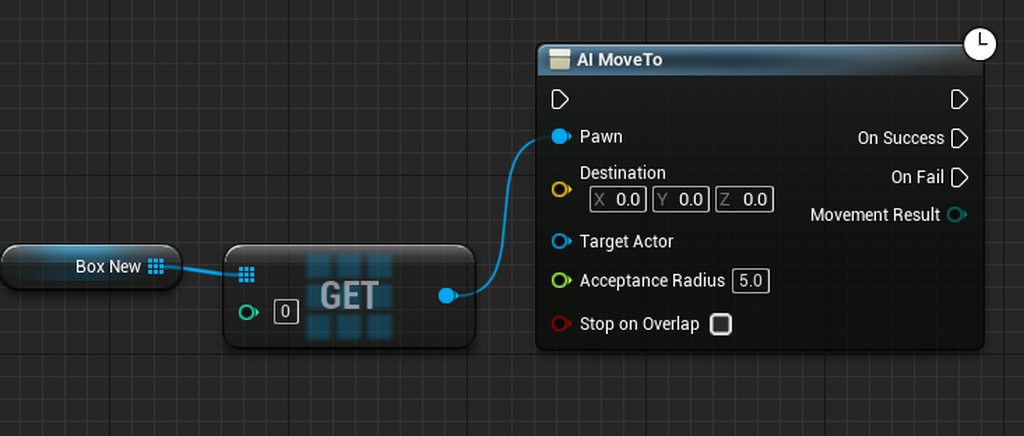
need an alternative of "Get" node
sounds like a blueprint issue being limited?
dawn gazelle
No. An array is a list of objects. That particular node only takes in a single reference of an object. If you want to move all the references, then you would need to use a foreach loop.
 dawn gazelle
You want to have each of the objects in the array move right?
timber cloak
yes
dawn gazelle
So then you need to go through each item in the array and tell them to move.
Which is what the loop would accomplish.
timber cloak
hmm i see
looks like i better resort to C++ since it is lagging with that BP loop
_>
thanks btw
really, if only there's a way to get whole array at once without loop
bronze hull
Can someone help me out with this nugget?
Why is it not replicating...:(
 thorn trellis
There shouldn't be any real difference between c++ and a loop in bp. If it's lagging then it's something in the loop that's causing it
timber cloak
doubt so, c++'s loop should be faster
dawn gazelle
timber cloak
really, if only there's a way to get whole array at once without loop
What blueprint are you using to try and call this AI Move to?
timber cloak
dawn gazelle
What blueprint are you using to try and call this AI Move to?
it's an actor
thorn trellis
they are, but not in a way that would cause you to see lag in one loop
thorn trellis
bronze hull
Can someone help me out with this nugget?
Why is it not replicating...:(
What are you trying to do?
bronze hull
@thorn trellis Actor in the level should spawn another actor on beginplay.
timber cloak
it is being called very often, not once
dawn gazelle
How often, and how are you populating the array?
timber cloak
i populate it right after "Spawn" node, with "Add Array" node
like every seconds, i am thinking of using event tick too
thorn trellis
bronze hull
<@!143528890306920458> Actor in the level should spawn another actor on beginpla...
Is the multicast print firing?
dawn gazelle
How many actors are you trying to move?
bronze hull
thorn trellis
Is the multicast print firing?
No...well yes. but only on the server....
timber cloak
about 70-90, depending on situation
thorn trellis
bronze hull
No...well yes. but only on the server....
have you tried adding a print before MC Spawn object?
bronze hull
thorn trellis
have you tried adding a print before MC Spawn object?
Yes, it prints on the server
thorn trellis
is your multicast set to reliable? And are your actors net relevant to the servers MC?
bronze hull
yes, reliable
bronze hull
thorn trellis
is your multicast set to reliable? And are your actors net relevant to the serve...
Actors netrelevant is new to me
thorn trellis
bronze hull
Actors netrelevant is new to me
Are you close to where the server is trying to spawn the actor
bronze hull
thorn trellis
Are you close to where the server is trying to spawn the actor
I have about 100 actors trying to replicate, on begin play.
player spawn on one of them
 bitter iron
So Im trying to create a light occlusion map for a farming system.
2 ideas, generate a few lightmaps of 3 angles of sun and combine them, might be really intensive if it needs to get updated every 30-45 minutes of game time
or
mask off areas occluded by trees and structures, stretch and fade them slightly east to west, call it a day?
lightmap thing would be cool tho
bronze hull
@thorn trellis Okay i fixed it by making the spawnable actors "replicated", however the string not showing confuses me though...
It now spawns and replicates properly however i dont know why i dont see the printstring on the client.
thorn trellis
So I just tested this setup, and it only multicasts to the actors that contain the event:

so for me I only see the print string on the one client that owns the actor, if your server owns the actor that you MC on, you probably only see it there
bronze hull
aaaah
bronze hull
thorn trellis
so for me I only see the print string on the one client that owns the actor, if ...
thank you, very interresting!
that makes sense.
as its in the level, no one owns it.
i think it makes sense...
dawn gazelle
timber cloak
about 70-90, depending on situation
Ok, so here's the thing.. If you could call this AI Move To node 70-90 times without a loop, you would probably still notice the exact same performance drop. It is not specifically because of the loop, it is more likely because of either:
A) AI Move To is more computationally hungry than your average node (I myself am not sure it is)
B) You have more going on after the AI Move To that is also being looped through (perhaps unintentionally)
C) Your calculations feeding into the destination pin may be difficult/slow to process (if you're using any calculations at all)
I can literally create a loop that has 125000 iterations that execute immediately just doing a print screen node, and it hitches for about a second - it's not specifically the loop that is slow, it's because I'm printing 125000 times.
So this actor that is trying to move the AI, it's not the AI actors themselves is it? Like it's just some controller actor you have placed in the level (and it's the only one)?
thorn trellis
bronze hull
thank you, very interresting!
that makes sense.
as its in the level, no one owns...
My turn:
FOR THE LOVE OF GOD SOMEONE TELL ME WHY I GET TWO OVERLAP EVENTS FOR THE FOLLOWING I'M GOING INSANE

I've tried every collision setting known to man, and the only ones that work fire twice no matter what
bronze hull
@thorn trellis is the controller spawning inside the box?
did you replicate this?
thorn trellis
No, it's a collider box attached to my finger tip, I move it over the collider box with the overlap event shown above
 wispy star
@thorn trellis what does the print name says for overlapped actor?
bronze hull
@thorn trellis its likely your collision on your finger.
There probably 2 objects with collisions enabled.
thorn trellis
both the "other actors" and the "other components" are the same for each fired event, and the "overlapped components" report different values:
LogBlueprintUserMessages: [Arm_Party_Button_C_3] Other Actor is: BP_MotionController and parent is: and owner is: MotionControllerPawn LogBlueprintUserMessages: [Arm_Party_Button_C_1] Other Actor is: BP_MotionController and parent is: and owner is: MotionControllerPawn
thorn trellis
bronze hull
<@!143528890306920458> its likely your collision on your finger.
There probably ...
Physics is turned off on the skeletal hand which results in it having no collision enabled, have tested that
bronze hull
@thorn trellis print out the compontents aswell...
thorn trellis
[Arm_Party_Button_C_3] is the component
thorn trellis
that's the weird thing, its like it creates a new component
[Arm_Party_Button_C_1] and [Arm_Party_Button_C_3] are the overlap box
bronze hull
there you go
C1 or C3 should be triggered, not both, is that correct?
or those are the buttons
What is the overlapped component>?
thorn trellis
I would assume there would only be 1 C instance, as far as I can tell from google, it's what the editor creates in response to an overlap event and in doing so it is creating two of them at the same time
it's a simple collision box


 thorn trellis
two sec, oculus hands crash the editor frequently and I had to undo changes to test your MC
bronze hull
okay
thorn trellis
LogBlueprintUserMessages: [Party Actor_GEN_VARIABLE_Arm_Party_Button_C_CAT_0] Overlapped components is: Party Actor_GEN_VARIABLE_Arm_Party_Button_C_CAT_0.PartyMenu_Overlap_Box LogBlueprintUserMessages: [Party Actor_GEN_VARIABLE_Arm_Party_Button_C_CAT_1] Overlapped components is: Party Actor_GEN_VARIABLE_Arm_Party_Button_C_CAT_1.PartyMenu_Overlap_Box
sand shore
it seems you might have two instances of your menu? @bronze hull is getting at that
bronze hull
@thorn trellis Okay, so there are 2 actors colliding
sand shore
Stumpy do you intend to have a listen server?
thorn trellis
I rock a dedicated server setup, but all this is local non-replicated stuff
sand shore
nvm, but this felt like a typical issue with listen servers and the use of GetPlayerController/Pawn (0)
thorn trellis
bronze hull
<@!143528890306920458> Okay, so there are 2 actors colliding
I'm really thick headed, I don't understand how this could be if there's only one collider box colliding with another collider box
thorn trellis
sand shore
nvm, but this felt like a typical issue with listen servers and the use of GetPl...
ah yeah, no get player / pawn stuff here
sand shore
sand shore
nvm, but this felt like a typical issue with listen servers and the use of GetPl...
it still might be, but less likely
timber cloak
dawn gazelle
Ok, so here's the thing.. If you _could_ call this AI Move To node 70-90 times w...
i see. It is not a controller but i am letting the actor call the ai
bronze hull
@thorn trellis Try changing your collision to this:
But clear all the "overlap", and work your way up untill it works.
 thorn trellis
... I found it
under my child actor's replication setting: Net Load on Client was causing this
bronze hull
hmmm
bronze hull
did you enable or disable it? to fix it.
thorn trellis
disable
bitter iron
could you try it in cpp to see if it works properly?
thorn trellis
bitter iron
how did you figure it out
trial and error and @sand shore questions
I could, but I have a lot of stuff already built in blueprints that I'd prefer not to redo
bitter iron
whenever I have serious logic problems I just start sending every bit of output to debug and line break it like code
i mean just to test it out
like just the single node, because it might make more sense that way
idk, sometimes in blueprint im misunderstanding what its actually doing, whereas in code things are a bit more easy to see wtf is going on
thorn trellis
yeah, the line by line print essentially returns two times for every overlap even with the do once node
I dig what you're saying
thorn trellis
thorn trellis
under my child actor's replication setting: Net Load on Client was causing this
It was a fluke, it worked once, now it's back to double printing
bitter iron
maybe someone on the forums might know more, sometimes you get epic responses
thats really fkin weird
sand shore
thorn trellis
It was a fluke, it worked once, now it's back to double printing
Are you absolutely certain that only one instance is present in the relevant client world?
It would be immensely concerning, were the overlap to truly be occurring twice without a corresponding end overlap.
thorn trellis
sand shore
Are you absolutely certain that only one instance is present in the relevant cli...
I think I am, but I'll walk through it all:
On Pawn begin play I spawn and attach BP_Motion_Controller actor to the pawn, dictating left and right hands (lmao this might be the problem)
The BP Motion controller Actor has a left and right motion controller, under each is a left or right oculus hand, under each respective hand different ui attachements
I think technically it might be spawning two left hand attachments, even when I dictate the spawn to be either left or right handed so I'm now gonna check that out.
 sand shore
Isolated node images rarely provide the context required for a useful response. I would recommend blueprintue if you are comfortable with sharing the graph at large
thorn trellis
No need, ya'll done fixed it
On Pawn begin play I spawn and attach BP_Motion_Controller actor to the pawn, dictating left and right hands (lmao this might be the problem)
Even though the actor selector dictates a left or right hand, for some reason even if the right hand actor spawned, it was spawning children of the left hand actor and attaching them to the left hand
so I just disable collision for that one
 twilit mantle
Does anyone know something about this error?
LogOutputDevice: Error: [Callstack] 0x00007ffd6bdcf6c4 UE4Editor-CoreUObject.dll!UnknownFunction []
thorn trellis
twilit mantle
Does anyone know something about this error?
LogOutputDevice: Error: [Callstack]...
You need to post the full callstack
sand shore
thorn trellis
so I just disable collision for that one
One could also fix the underlying issue there, possibly
But godspeed!
thorn trellis
sand shore
One could also fix the underlying issue there, possibly
But I'm laaaaaaazy
vapid ibex
timber cloak
like every seconds, i am thinking of using event tick too
AIMoveTo is a timed function, you don't need to execute it every frame (also it requires AI controller to work, I think?). Better would be to place it in an event inside the actor you're trying to move actually, and then in the forloop part of the system to just tell it to execute that event in the actor.
thorn trellis
Thank you guys for your help @sand shore @bitter iron @bronze hull
sand shore
twilit mantle
Does anyone know something about this error?
LogOutputDevice: Error: [Callstack]...
All we can divine from this is that the module UE4-Editor-CoreUObject was involved in your crash in some way. That module is typically only involved in low level crashes. There is insufficient context to clarify which common crash it might be.
Although this is LogOutputDevice, so this is likely an ensure rather than a hard crash
twilit mantle
oh okay, I found this:
utDevice: Error: Ensure condition failed: !FPackageName::IsShortPackageName(Path) [File:D:/Build/++UE4/Sync/Engine/Source/Runtime/CoreUObject/Private/UObject/SoftObjectPath.cpp] [Line: 79]
LogOutputDevice: Error: Cannot create SoftObjectPath with short package name 'NoneNone'! You must pass in fully qualified package names
 peak helm
Hey all i want to give every player a camera after post login but it seems like i cannot pass the camera to clients? (the camera is always not valid on client side) i've tried to set it in playerstate / gamestate as well but nothing works :/ anyone got and idea what i'ma missing?
thx Maff

 sand shore
twilit mantle
oh okay, I found this:
utDevice: Error: Ensure condition failed: !FPackageName::...
sand shore
twilit mantle
oh okay, I found this:
utDevice: Error: Ensure condition failed: !FPackageName::...
LogOutputDevice: Error: Cannot create SoftObjectPath with short package name 'NoneNone'! You must pass in fully qualified package names
Herein lies your issue, described in plain language
vapid ibex
@timber cloak
Also as a rule of thumb, try to stay the hell away from the tick for anything that absolutely does not requires being updated constantly. Trying to call MoveTo every second is ridiculously wasteful
sand shore
peak helm
Hey all i want to give every player a camera after post login but it seems like ...
The class RTSCameraPawn (or whatever the actual name may be) may not be marked for replication, or the reference to that spawned actor (stored within your player after you invoke SetCam) may not be marked for replication.
You will tell the difference by whether you can see these actors in the world outliner of a client world from within a PIE session. It may also be both issues simultaneously.
thorn trellis
vapid ibex
<@!192102567021379586>
Also as a rule of thumb, try to stay the hell away from ...
And even then, consider using a timer instead of tick
vapid ibex
thorn trellis
And even then, consider using a timer instead of tick
Usually the only things that need to get updated constantly are the things that need updated literally each frame, like lerping the position for smooth motion.
sand shore
thorn trellis
And even then, consider using a timer instead of tick
Profiling should probably guide this determination for a given use case, this rule is unlikely to be uniformly applicable.
twilit mantle
oh thanks @sand shore
and what about this one : "LogAudio: Error: Submix buffer listener only works with the audio mixer. Please run with audio mixer enabled"
thorn trellis
sand shore
Profiling should probably guide this determination for a given use case, this ru...
That's definitely more true than what I said, I just meant as an alternative in case you have the opportunity to invalidate the timer handle
peak helm
sand shore
The class RTSCameraPawn (or whatever the actual name may be) may not be marked f...
so i have to store the created pawn in a replicated variable even tho the event is called right after spawning? (i already tried this but the host just posseses the clients camera )
sand shore
thorn trellis
That's definitely more true than what I said, I just meant as an alternative in ...
Enabling/disabling tick, or even altering the tick group of the actor are also tricks one can use. There is even an option to lower ticking frequency, although that still induces some slight overhead for the object (evaluating whether that duration has elapsed).
sand shore
peak helm
so i have to store the created pawn in a replicated variable even tho the event ...
I am referring to the fact that the two components of my answer are, indeed, orthogonal. The cameras may indeed replicate down to each individual machine but the reference which exists in the player may not update on the client.
sand shore
peak helm
so i have to store the created pawn in a replicated variable even tho the event ...
Indeed, the opposite is also possible, where the client machine is informed of the reference, but never is able to resolve it.
Therefore, one must replicate both the spawned type as well as the property which is used to reference it
sand shore
sand shore
Enabling/disabling tick, or even altering the tick group of the actor are also t...
@thorn trellis Oh! Timers are also prone to this slight overhead. Additionally, any benefit from the C++ to BPVM transition code (and memory on either side) being "hot" during tick (although, the extent of that benefit is likely quite low as I would expect it to be similar to interacting with a general heap) is lost when binding a timer.
You generally should use a timer when you would otherwise manually process elapsed time for your own periodic actions.
This is to further explain why timers do not always beat tick (although they certainly can)
 median crater
anyone know of any good books on blueprinting?
thorn trellis
Huh, that's interesting to know
sand shore
median crater
anyone know of any good books on blueprinting?
Web content.
thorn trellis
sand shore
Web content.
Seconded
Try and figure out something to make, and then checkout the WTF Is Blueprint youtube stuff
dude does an awesome job at explaining each
sand shore
https://www.unrealengine.com/en-US/onlinelearning-courses?sessionInvalidated=true is also an invaluable resource

Unreal Engine
Unreal Online Learning is a free learning platform that offers hands-on video courses and guided learning paths.
median crater
just be nice to have something for those times you're offline you know xD
sand shore
The Unreal Engine twitch channel also has loads and loads of training seminars.
sand shore
median crater
just be nice to have something for those times you're offline you know xD
It is regrettable, however print media is uniquely unsuited for recent UE learning.
Udemy videos can be utilized offline, IIRC, though.
peak helm
sand shore
Therefore, one must replicate both the spawned type as well as the property whic...
Well now the camera pawn is replicated on both GameMode and PlayerController. The possession works just fine for both client and host but i just cannot set the ref in the clients playercontroller :/

 sand shore
thorn trellis
Try and figure out something to make, and then checkout the WTF Is Blueprint you...
sand shore
thorn trellis
Try and figure out something to make, and then checkout the WTF Is Blueprint you...
This is not dissimilar to how I initially approached the engine
sand shore
peak helm
Well now the camera pawn is replicated on both GameMode and PlayerController. Th...
That does not actually ensure that the type itself is replicated. https://docs.unrealengine.com/en-US/InteractiveExperiences/Networking/Actors/ReplicatingActors/index.html
Guide to using the adding Replication to Actors in Blueprints.
thorn trellis
sand shore
This is not dissimilar to how I initially approached the engine
And then you find out about GAS, and then you learn a little C++ for GAS, and then you need to figure out server stuff with oculus, and then you hate life for a couple months but come out the other end knowing a lot more c++.
And then you get stuck on stupid things like spawning two overlap components
sand shore
peak helm
Well now the camera pawn is replicated on both GameMode and PlayerController. Th...
Further, as one can find within the networking compendium, GameMode does not exist on client machines.
http://cedric-neukirchen.net/2017/02/14/multiplayer-network-compendium/
I would encourage you to become familiar with other channels in this server, and the pinned messages within each.
dawn gazelle
peak helm
Well now the camera pawn is replicated on both GameMode and PlayerController. Th...
If it's a replicated variable then you don't want to be setting the variable on the clients. Set the variable on server, and if you want to do something after the client receives the replicated variable, change it to a RepNotify replication and you'll get a function that you can use to do whatever logic you need to once the value has been set on server and is replicated to the client.
peak helm
sand shore
Further, as one can find within the networking compendium, GameMode does not exi...
yes i did read the compendium. I tried spawning and possesing in PlayerState/GameState and Just tried in gamemode out of pure desperation (i try to get this running for 2 weeks now but nothing works). The CameraPawn "Replicates" is checked
peak helm
dawn gazelle
If it's a replicated variable then you don't want to be setting the variable on ...
mh but how can i get the player input to the camera in that case? the player controller has to move the camera over the map so the camera (or a reference to it) has to exist in the controller right?
 maiden wadi
Why not just put the input in the camera pawn class?
By putting Pawn required input in the Pawn, you'll be saving yourself a lot of complexity in the controller.
sand shore
peak helm
yes i did read the compendium. I tried spawning and possesing in PlayerState/Gam...
I have also made sweeping and frantic changes out of desperation to get something working! You're in good company here. Although, did nothing assist here? Are the cameras still unusable on your client?
thorn trellis
thorn trellis
But I'm laaaaaaazy
On spawn I call a destroy component function on my BP_Motion Controller Actor to kill all opposite hand components. Still allows me to handle functionality in the BP_MotionController Actor without tearing apart all the child things and manually attaching them.
In case any other poor soul does the same thing as me in the future
 hushed pewter
Im applying force too a ball in an X and Z state and locking its movement in the Y axis, but it keeps on moving in that y axis depending on my shooters location?


 dawn gazelle
peak helm
mh but how can i get the player input to the camera in that case? the player con...
dawn gazelle
peak helm
mh but how can i get the player input to the camera in that case? the player con...
No. If you possess the camera with the player controller, then the player's inputs can be fed into the pawn - Authaer just pointed this out as well. You can put the input style nodes into pawns/characters and they can be controlled directly. The player controller if it ever needs to get a reference to what it is possessing can do a "Get Controlled Pawn" node and be cast or fed into a BPI or whatever you need to do.
hushed pewter
When i apply the force is it pushing it based on the balls rotation, if not why is it doing this.
thorn trellis
hushed pewter
Im applying force too a ball in an X and Z state and locking its movement in the...
Careful with Transforms and expecting x/y/z to be equal to world, try with it hooked up to different outputs
sand shore
Either you are using a constraint in local space, or you are applying your custom code which should clamp the axis value within local space.
The solution is to do all of your calculations except for constraints in local space, and then just constrain the world space transform
hushed pewter
Im using the constrants feature i assumed that was world

is there an alternative option?
sand shore
thorn trellis
Careful with Transforms and expecting x/y/z to be equal to world, try with it ho...
Transform also has functions to transition locations, directions, rotations, and scale into and out of the space that it corresponds to.
You could still reference identity bases and then use the xform to convert it automatically into the local space coordinates
peak helm
dawn gazelle
No. If you possess the camera with the player controller, then the player's inp...
Well i got the following problem now: I print directly before possess and everything looks fine (Controller posseses Camera, Controller1 posseses Camera1). However ingame both controllers have Camera as their controlled pawn ?!?
timber cloak
vapid ibex
<@!192102567021379586>
Also as a rule of thumb, try to stay the hell away from ...
thanks for the advice. But it requires to follow something constantly, so hence, using ticks/seconds is correct, isn't it?
vapid ibex
timber cloak
thanks for the advice. But it requires to follow something constantly, so hence,...
Nope, unless the thing you follow is capable of traversing hundreds of unreal units in a single frame.
If you need for object to JUST follow something, with nothing else, then it's better to use vlerp node, that lerps between current object position and target object position with an optional branch before it that checks when your object is at the desired distance from target to stop (and\or start) moving.
sand shore
peak helm
Well i got the following problem now: I print directly before possess and everyt...
possessing that's why
if you only want to associate the camera with the controller, but the controller have another pawn, you shouldn't possess the camera
peak helm
sand shore
`possessing` that's why
the camera is part of the pawn :/
timber cloak
vapid ibex
Nope, unless the thing you follow is capable of traversing hundreds of unreal un...
But then if i put delay for few seconds, it just stops so often and almost can never follow constantly right behind the thing. Something like stick behind that thing.
Also, this is very interesting about the Vlerp part.
void cobalt
how can i make an object fade out of the scene?
like dead bodies fading away after they die
ive looked at so many tutorials but no of them worked
do i make a whole new material for it? or should i do it in the already existing material for the object i want to fade out?
 pastel garnet
@dawn gazelle I think the problem is with this blueprint:

Get player controller
I think it might be creating two UIs, one for the client and one which has values of the other client.
I did a IsValid check but still is wrong
and yes I tried Is Locally Controlled with the update UI
 dawn gazelle
pastel garnet
dawn gazelle
pastel garnet
You would be correct, if this is in your character, than each time a character is created, it's trying to create a new widget on the local player controller.
pastel garnet
Or this variable is being used by each client.
pastel garnet
dawn gazelle
You would be correct, if this is in your character, than each time a character i...
Is there a way to prevent that?
Or it could be the Hunger UI reference problem
dawn gazelle
pastel garnet
Is there a way to prevent that?
Don't create it on the character.
dawn gazelle
controller BP would probably be best.
pastel garnet
Alright
Do I have to move anything there?
My movement input?
Never used a player controller bp before
dawn gazelle
No, movement input can stay on the character.
void cobalt
does anyone know how to help me
i want to make an object fade out after a function is called
void cobalt
can i reference material opacity in a blueprint?
tight schooner
@void cobalt on the BP side, you have to make one of these: https://youtu.be/IVKVXjaT6QM
What are Dynamic Material Instances in Unreal Engine 4?
Source Files: https://github.com/MWadstein/wtf-hdi-files
 drifting socket
Hi im new here, im having a lot of trouble making an iventory screen ui that can be controlled with keybinds
My current setup looks like this, the problem is the game still responds to inputs for jump and attacks
 dawn gazelle
drifting socket
My current setup looks like this, the problem is the game still responds to inpu...
dawn gazelle
drifting socket
My current setup looks like this, the problem is the game still responds to inpu...
You may want to use the node "Set Input Mode UI Only" when your inventory is open, and specify the "In Widget to Focus" to the reference of the inventory widget you're using.
 charred dock
drifting socket
charred dock
drifting socket
Ok i added your suggestion but now how would i make it so that when pressing tab it would close the inventory
since there is no key pressed event in the ui event graph
dawn gazelle
You can override the "On Key Down" event in the widget, and do something like this:
 drifting socket
Thank you very much, although this seems it would get a bit complicated if i want to add other keybind actions to the inventory such as deleting etc... is this the best way to do this?
oh nevermind i see how this works its brillant thank you!
charred dock
Can someone help me?
drifting socket
i can try
charred dock
runic parrot
i would suggest to check some tutorials about character movement on youtube
drifting socket
I've been trying to implement Datura's solution to my ui problem but i think im missing something

And this is in the player controller
 runic parrot
what are you trying to do?
change the input mode when opening or closing the inventory?
drifting socket
Make an inventory screen that can be interacted with by the keyboard
mainly to close it right now
runic parrot
i would suggest to not put action input like that on the inventory, but rather on the player controller.
and from there, when the input action is triggered, you call the HUD -> inventory UI and tell it to turn visible / invisible.
and after that you can change the input depending if it was visible or invisible
drifting socket
the problem for me is that i want it to be a fullscreen inventory and thus have to disable input which is where my problems are coming from
runic parrot
you have a third option, gamemode UI + game
drifting socket
sorry im not sure i understand
valid prairie
Really weird issue here. I have a main menu and a blueprint that opens the next level. When it opens the next level, it doesn't change the game mode and pawn/hud class. The absolute boolean is set to let it to, but it's not doing it.
My game jam submission is due super soon and its not working and I'm honestly thinking I wont get it in on time due to this.
runic parrot
drifting socket
sorry im not sure i understand
try to create a new node and use "Set input mode UI + Game" instead of "Game Only" or "UI Only"
 drifting socket
Wont that still allow me to control the player behind the ui?
runic parrot
yeah, unless your features are setup to work only on "game only" input mode.
i just disabled most of the annoying features when using "game + ui"
probably there's another way around, this is the easier way i found and works well, you mean need to do something diferent depending on what you want to do
drifting socket
ok so then im guessing i just have to make a boolean to prevent the player from doing anything in game while in the inventory?
valid prairie
Wait, can that node switch a players game mode and pawn class once a level is loaded?
I have a main menu and a blueprint that opens the next level. When it opens the next level, it doesn't change the game mode and pawn/hud class. The absolute boolean is set to let it to, but it's not doing it.
runic parrot
i'm not that familiar with level changes yet u.u
valid prairie
oof
 lost wolf
valid prairie
Wait, can that node switch a players game mode and pawn class once a level is lo...
lost wolf
valid prairie
Wait, can that node switch a players game mode and pawn class once a level is lo...
you can do anything with magic
valid prairie
can you help me with magic then
runic parrot
lost wolf
you can do anything with magic
we can do magic with you
drifting socket
shroom and magic
lost wolf
valid prairie
can you help me with magic then
so you have another pawn and gamemode selected for that level and it doesn't switch when you load that level ?
valid prairie
Yeah.
lost wolf
what happens if you do it manually with that node
valid prairie
I dont know how with that node
dawn gazelle
I'm fairly certain that the default pawn and game mode are set by the level and can't be changed while in the game.
valid prairie
Thats what I thought but its... not setting with the level
 void shuttle

I have a floor that have lots of same room. What kind of technique should i use
I mean when i open doors. I load to another room. Instead of using a big model like this
Sorry for my english. Im new to UE
pine idol
I'm using this function i made to try and do a capsule test to detect other nearby hierarchical instances. However, over time, instances are still spawned near to each other, with the current radius is set to 5000.0, so obviously, they should not be near each other at all. This is the bp, and current problem pic: https://blueprintue.com/blueprint/mksslqff/
BlueprintUE
Current problem of spawning too close to each other: https://gyazo.com/6af68a0c2919fcecb2b4087029390529
vapid ibex
void shuttle
I have a floor that have lots of same room. What kind of technique should i use
Try checking out blueprint construction script. you can make an actor of your floor, in construction script create static mesh components or child actors there (your actual rooms) and give them proper position in relation to it (by using scene components to determine where and how it should be attached, for instance).
I wonder if there's a better way to do that, or if this is fine... "control" function has another three bool parameters check that are universal to all my input events.

 cursive kindle
Still having a hell of a time at getting my tv to function correctly. It works except I want when u cycle through the channels I want the channels to advance the time that they have been cycling so ultimately appear like a normal tv. any help on a bp reference I am 2 weeks into this and I have made no progress.
vapid ibex
cursive kindle
Still having a hell of a time at getting my tv to function correctly. It works e...
What are your channels, animated textures?
cursive kindle
Yep they are media textures to media materials
Movies and tv shows
I also have this as a bp on its own as I would like to be able to use it anywhere
vapid ibex
cursive kindle
Yep they are media textures to media materials
Media Player assets by default are set to Play on Open which is why the video automatically starts playing when calling the Open Source function. There are additional commands you can issue to the Media Player asset such as pausing, rewinding or stopping the video once it has begun playing which can be found under the Media Player section when dragging off the Media Player Reference. - Unreal Documentation
So I think that the simplest way would be to create a float param that increments by tick to represent time passed, and that wraps around to zero at the length of your video files (in this case I'm assuming they're all the same length). Then when you change the channel, you tell the media player to rewind the movie of the new channel to the float's value (or normalized value, if the media players works like this). If they're different lengths it would be trickier a bit, requiring of you to make a separate float for each channel (preferably in array)
Wrapping around is easy - just check if your float parameter is greater than the length value, and if yes - set it to 0 instead of incrementing with delta.
cursive kindle
Any reference to this in a bp
 quartz fossil
But media players have a count of the current second they are playing
Why not just get that?
vapid ibex
That could work, but only if all lengths are the same
cursive kindle
Lengths are not the same... but could I use separate media players?
dawn gazelle
Does it matter if they start at a certain time when they are first activated? Like, maybe you want the player to turn on the TV and it immediately has what you playing at that moment they turn on the TV?
cursive kindle
It does not matter when they start. I wouldn’t mind it that was random as right now all the movies start at the beginning
dawn gazelle
So with this... I was thinking like, if you can get the video's length, then you can get the # of seconds that should be elapsed using this, and then you'd set your media player to load that video and play it from the time specified from this.

So if you have a 30 second clip, and you're at 45 seconds since the actor was created, that return should be 15.
If you had a 15 second clip, and you're at 45 seconds, then the return would be 0.
If you had a 1 minute clip, then the return would be 45.
How you pipe that info into a media player... I dunno ^^;
vapid ibex
Only it's better to use GetTimeSeconds, I think, it accounts for game time dilation and pausing (so like menus)
dawn gazelle
good call XD
vapid ibex
dawn gazelle
How you pipe that info into a media player... I dunno ^^;
You can just do it the manual way and set the lengths manually by checking how long the clips are directly in file properties in Windows. X)
On a related note, I wanted to emulate a handy and ingenious timer helper I saw in one of Unity marketplace asset, that was an object that just stored time since object's creation and checked it against actual time when a function was called in it (so no constant per tick updates, the thing is totally inert and doesn't consume CPU while working as a timer-on-demand!), but... These GetTime nodes are unavailable in the UObject blueprints. T_T
cursive kindle
I will try some of this stuff... any way to print a string of it counting ? I have done so much but have had little outcome so trying to make sure it’s working
 magic parcel
Has anybody had any problem with attaching a Niagara system to a BP?
when i attach a ribbon system, it doesnt work, but when I move the ribbon system in the level (not in the bp) it works
it only does not work when in the BP
i have tried to create the niagara as a child
the even odder part is.... spawn rate works
but spawn per unit does not
do i need to change anything? or is there something I am doing wrong

working like a charm for the system
trim matrix
How are you attaching
Could be your spawn per unit is in local space so is always 0
And #niagara better
magic parcel
yeah, its something different, somehow it magically started to work
no clue why
now backtracking to find out what i changed
got it now
 magic parcel
so the problem was I was using spawn by unit, but max threshold was set to 5000, when the projectile is moving at 10000.
fun times 😛
magic parcel
attach the AI to a socket during the montage
add a notify to hook into

Project Files : https://www.patreon.com/posts/38004787
In this episode, I am going to implement a stealth takedown system which involves the player and enemy character. To see this actionproperly, both characters should play the parts of their animations and they should be properly synchronized in time and location/rotation to see the connection...
something like this? probably

In this tutorial I am going to show you how to implement combat finishers in a hand to hand combat system in unreal engine. Compared to normal kicks and punches, the finishers are usually longer animation sequences with complex movements and interactions between two characters. In order to work them properly, both character meshes should be in ...
or this
cool
well done
if you watch the video i linked, it will show you that
 noble sentinel
Is there any reason as to why specific objects can be set as "Object" within the AI Black Board Key's but not other types of object?
I'm setting two variable, SenseList and PatrolPath
SenseList gets populated which is a character component, while
PatrolPath does not get set and is an actor attached onto the character
I've double check and the variables exist and are populated within the character (Grunt) but the Blackboard keys never get updated for patrolpath

 charred dock
does anyone know how to make your character not rotate when using WASD keys for moving? I want him to just run backwards and sideways, not turn around. I have the camera parented to the character's head and I'm in Third Person Template doing an FPS.
noble sentinel
I would suggest using an animation blend space
Example of a Blend Space used to blend a character's animations from walking and jogging.
^ @charred dock
charred dock
i fixed it with controller yaw thing
 gusty cypress
If im making an ingame level editor (planning to implement steam workshop) how would the saving actors transforms work with loading?
My current thinking is when the level is saved, get actors and their transform and add that to an array, once the level is loaded it goes through the array replicating all the edits
 loud scroll
Good day, i'm trying to get my client to see the text as the server is seeing in the HUD when i have character selection.
I cast to check the map index so it have different Briefing information on different maps. But the client don't see the information as the server. Thanks.


This is were i take the information of the index so the text is different for every map
dawn gazelle
loud scroll
Good day, i'm trying to get my client to see the text as the server is seeing in...
Game Instance is not something that is replicated. The server has its own game instance, and each client has their own game instance. You may want to store this value in the Game State as this is a class that replicates, is available to clients, and there is only 1 game state that exists at one time.
To set this up correctly, the Map Index variable should also be set to replicated, and on begin play of the gamestate do whatever logic it is you use to determine the map index
loud scroll
so will i need to cast to the gamestate to get the information ? sorry, i have been trying g to get this to work a long time now
trim matrix
lol i get so many issues by doing object comparison instead of class comparison xd
 uncut lark
Whats a good way to implement a weapon system similar to Half Life? Would I want to steer towards Enum?
gusty cypress
Im attempting to make a level select screen where once an ui element is selected it has a glowing green box and when another is selected it removes that previous glowing box and makes it green for the new element. the problem is once selected it never registers as unselected

doesnt seem to be false once a new element is selected even though technically it would be false

second approach is the same and still doesnt work
 gentle urchin
This doesnt show how the variable is updated
Like, is the levelselects individual sub widgets?
Or are this all done in the main widget
gusty cypress
let me clarify
I'm making a level select screen, the level elements are 1 template to be efficient. Each have an instance editable int that indicates what level they show (all working) when selected an overlayed image (the frame) switches from black to green indicating its been selected, but when trying to make it so once another verison of the template is selected I can't get it to recognize the new int isnt the same thus all stay selected
 gentle urchin
So sub widgets then
And updating of currently selected index is done where ?
It looks like a local update, meaning whatever you use as comparison is local anyways
In the template it seems
gusty cypress
each sub widget has its own in own int so I do when button selected set current selected widget to the widgets unique level int which works using a print. This means the tick should see the new selected level does not match the level index and be false but never returns false
gentle urchin
Currently selected is a local variable in the template, being updated
gusty cypress
what do you mean local?
gentle urchin
It appears to exist inside the sub widget
gusty cypress
both variables are within 1 bp
gentle urchin
Not the main widget
gusty cypress
oh
gentle urchin
There are several ways to do this
I can make some example once i get home in about 30
Its a tad ... convoluted.. to explain from phone
gusty cypress
when you say its not local do and need to use the main bp are you referring to here
gentle urchin
Basically you need the main widget to be aware of currently selected , and let the sub widget inform the main widget about the updated selection
gusty cypress
 gentle urchin
Yes
gusty cypress
ahh'
I think 5-10 mins I will have this working and lyk thanks!
so in general with widgets the top level must be where updates happen? then how does it still work turning them green when selected?
gentle urchin
Its not a must
But then youd need the sub widget to somehow know which other sub widget was selected
So its usually easiest to do in or via the main widget
The main widget could also make an array of sub widgets, and use currently selected index from main to deselected the last selected sub widget before updating to currently selected
Its all the same just done differently imo
gusty cypress
Since you seemed to know this alot better do you know key words I can search, I'm still stuck
for online help
 chilly jetty
Hi is there a way i can edit the duration of a sound cue in BP?
tight schooner
@chilly jetty I think there are "stop with delay" and "fade out" nodes
Dunno about editing the asset via BP offhand (for a utility widget / editor function?)
 flat raft
What's up with this
At full speed, you can see the foot slide. At .2 (slomo .2) the foot is planted to the ground
chilly jetty
tight schooner
<@169336711418085376> I think there are "stop with delay" and "fade out" nodes
yeah I saw those but it's not really what i want
I just opened audacity and edited the lenght of it
but thanks anyway


 tight schooner
@chilly jetty the sound cue node graph isn't Blueprint... You should ask #audio in the future about creating sound cues
 steady orbit
How do i prevent a Timeline from being frame dependent?
 fleet cosmos
Hi, Is it possible to attach a static mesh to the cable component's end in blueprint(not in the viewport via parenting mesh to cable), the doc has shown a way to achieve it in the scene itself.


 pulsar valley
Guys, I have a question. I generally avoid working with multiple people on the same map, but this time I'm forced to. Any tricks to do it using git? I mean, if we do change the map on our separate branches, what happens when we merge?
 atomic salmon
pulsar valley
Guys, I have a question. I generally avoid working with multiple people on the s...
atomic salmon
pulsar valley
Guys, I have a question. I generally avoid working with multiple people on the s...
you can use Streaming Levels for collaboration: https://docs.unrealengine.com/en-US/Basics/Levels/CollaborateWithSublevels/index.html
You can use sublevels to collaborate with other designers working in the same space.
tight schooner
steady orbit
How do i prevent a ``Timeline`` from being frame dependent?
Your question could mean multiple things. If you're doing certain math or adding offsets, you need to factor on the frametime (Get World Delta Seconds).
If you don't like that Timelines tick, you can roll your own Timeline-like system by sampling a Curve Asset manually.
earnest tangle
Probably
 sturdy marlin
greetings all i hope you are all well. new to unreal.
why isnt this working ?


 lime ridge
@sturdy marlin Have you selected a player controller when you start the level? If you would like I can find a basic tutorial and link you to it?
eager peak
has anyone had their widgets appearing at the side of the screen for a split second then being put into place where they are meant to be?
earnest tangle
@eager peak I ran into that issue when rendering widgets to a texture. Basically had to render twice in order for them to layout correctly as for the first render they were in the wrong place. Don't really know how you'd solve it if you're just using them as display widgets - maybe hide them and then show?
eager peak
I did try that but it didn’t work they still flashed at the side for a split second
earnest tangle
yeah hiding it might toggle the layouting I guess 🤔 what about if you fade it in using opacity instead? that should require it to actually do the layout but if it starts at 0 opacity it might not be noticeable
tbh it feels like there should be some actual solution to this but when I ran into it I spent quite a long time trying to figure out how to force it to layout it correctly immediately, but I didn't find any solution other than rendering it twice in my case
proven mason
ok so I got a question or so about vectors
let's say I have a plane laying flat on the x and y axis with the Z-axis sticking up 90 degrees on the plane.
Would the normal unit vector be 0,0,1?
I'm pretty sure it's a fundamental question but I'm a bit rusty on vectors
earnest tangle
the normal vector of the plane's face would be 0,0,1 in that case yeah
proven mason
let's say I rotate the plane 45 degrees on the x-axis. Is there a way in blueprint I can get the normal unit vector of that?
earnest tangle
you'd probably get the correct one if you just get the forward vector of the actor
assuming the plane is aligned so that it faces in the same direction as the actor's forward direction
proven mason
reason why I ask is that in a pinball game where the ball is rolling
there maybe cases where it may go airbourne
so say on that planar surface the z-axis velocity maybe higher than 0
so at that moment when it's about to go airbourne I want to set the physics velocity against it to push it back to the ground
imagine a roller coaster rail with a lot of twists for the ball to glide on. I don't want the ball to go off rails so I want the ball to stick to the normals of them.
earnest tangle
hmm
yeah you could probably just look at the hit normal or something since it'd probably cause a hit event before it'd bounce
but if it's a sort of a snaking track thingy it might be hard to get it to really roll/stick through it in a nice way - another alternative could be using a spline so when the ball enters it you just lock it into the spline
I don't really know how pinball games generally handle something like that, maybe it behaves better by just adjusting the velocity than I'm expecing it to :D
proven mason
okay I'll look up spline track in UE4
 naive heron
Hey guys I have a weird bug and I can not figure out where it is coming from. When I play the game in the editor I have a random camera actor that is being spawned in the center of the game. All of my companion AI seem to move to this random camera actor when I do a follow command. Any Ideas?
 inland merlin
I'm going crazy, I know there is a way somewhere (I think through .ini) to disable all construction script in the project. i want to know how i takes to open my maps without all my construction scripts but I can't remember how to do that  does anyone know this?
 lofty hound
Can anyone help, trying to implement an outer ledge climb around with sphere traces, however when the character gets to the destination he is rotated slightly on the x axis for some reason
I have made rot from x on the sphere trace wall normal so i dont see why it would rotate wrong. Any ideas?

 wise mantle
my problem could be for the animation channel, but at the same time. i wouldnt say its about the animation itself. i have a skeletal mesh component, thats animated, in an actor. i wanna attach a normal object to the animated object, so it follows its animation. idk if thats possible tho.
inland merlin
lofty hound
I have made rot from x on the sphere trace wall normal so i dont see why it woul...
Don't know if that will fix it as I would need to devle more in your stuff, but when setting the character rotation you should always use make rot from ZX
and have Z be 0,0,1
that way the character up vector is always the same as the world up vector
lofty hound
@inland merlin ah i see thanks! Would i implement it like this?
 inland merlin
lofty hound
<@!115537234437996550> ah i see thanks! Would i implement it like this?
inland merlin
lofty hound
<@!115537234437996550> ah i see thanks! Would i implement it like this?
Yes! You have a wide range make rot nodes, depending on which axis should be garanteed to be the value you entered, and which can be adjusted
inland merlin
lofty hound
<@!115537234437996550> ah i see thanks! Would i implement it like this?
i'm guessing it didn't solve your issue? could you test climbing on a basic cube with a rotation of 0 0 0 ?
inland merlin
wise mantle
my problem could be for the animation channel, but at the same time. i wouldnt s...
check this
 lofty hound
inland merlin
i'm guessing it didn't solve your issue? could you test climbing on a basic cube...
lofty hound
inland merlin
i'm guessing it didn't solve your issue? could you test climbing on a basic cube...
It did not but i'm sure it solved issues i may have in the future lol.
wise mantle
inland merlin
check this
hmm... doesnt seem to work. im wondering. when an object is animated in ue, does it actually change location. idk how to explain it but. isnt the object technically the same place, even when i play the animation? idk how ue works exactly. when i use 'move component to', the object follows along, but not when i use 'play animation'
 tulip iris
I've got a doozy of a question. Is it possible to convert a Blue Print from say, 4.25 down to 4.24? Anyone know of any methods to make this possible?
 frail marlin
proven mason
okay I'll look up spline track in UE4
frail marlin
proven mason
okay I'll look up spline track in UE4
You can get the dot product of the angled plane VS the 0,0,1 vector to do some calculations on how much velocity and when you need to launch
Join us for an afternoon of math... for artists! Bill Kladis and Wyeth Johnson, senior VFX artists at Epic, and David Hill, our Principal Mathematician, will walk us through examples such as Derivatives, Cross Product, Vector Transforms, Sobel Edge and calculating gradients around distance fields.
ANNOUNCEMENT
https://forums.unrealengine.com/un...
inland merlin
wise mantle
hmm... doesnt seem to work. im wondering. when an object is animated in ue, does...
show me your setup because it's not a very tricky setup aha. The skeletal mesh does move but all its bone moves, you have to put the name of a bone in the socket name for it to work
parent is your skeletal mesh and target is the mesh component you want to attach
inland merlin
tulip iris
I've got a doozy of a question. Is it possible to convert a Blue Print from say,...
you could try migrating all your assets to a project from a previous version but this is not something you can really do
montage and move component can work together if your montage doesn't have root motion in it
wise mantle
inland merlin
show me your setup because it's not a very tricky setup aha. The skeletal mesh d...

like this?
i typed the bone name, but it still doesnt seem to work. now the other mesh isnt even there lol.