#blueprint
402296 messages · Page 621 of 403
 peak plaza
Probably should but it's easier on absolute beginners.
 dense tulip
a cast is also a mold for when you break a bone ! heheheh
peak plaza
It's a mold regardless of bone or not.
 teal spade
Okay guys I’ll ask simple questions and try to answer by yes or no
Is the problem happening because the capsule isn’t attached to the mesh ?
 trim matrix
Yes, I do think so.
If the capsule isn't attached, it will not move with your character.
teal spade
Okay
 faint pasture
teal spade
Is the problem happening because the capsule isn’t attached to the mesh ?
faint pasture
teal spade
Is the problem happening because the capsule isn’t attached to the mesh ?
Which capsule?
teal spade
My character is made of a spring arm a camera a capsule component a mesh and another thing I forgot
This capsule in the character
The basic one in any character
faint pasture
Well you have to make the character mesh and trigger volume overlap each other. Make sure the collision settings are set up right
teal spade
Isn’t attached to the mesh so when I ragdoll it and move it away the capsule doesn’t follow
How do I male sure they are ?
trim matrix
That means your collision events won't fire.
teal spade
What should I check
faint pasture
You should check the collision settings.
faint pasture
Read the collision documentation first so you aren't flying absolutely blind here
faint pasture
The Collision Presets section in the Collision Property Category has a large number of properties broken out here for clarity.
trim matrix
The character Mesh has physics collision like overlaps disabled.
 proud hull
@teal spade if your capsule doesn't follow your character, why not use the "Other Component" pin and cast to "Skeletal Mesh Component" then compare that to the player's mesh.
trim matrix
try ticking the generate overlap events
teal spade
You lost me there slashin xD

Like what you see? Consider donating to support the channel:
https://www.paypal.com/cgi-bin/webscr?cmd=_donations&business=JUVNAEQP4W8UQ&lc=DK&item_name=Awsome UE4 gaming tutorials¤cy_code=EUR&bn=PP-DonationsBF%3Abtn_donateCC_LG.gif%3ANonHosted
In this mini series i will show how to get our character into ragdoll and back again ...
I’ll follow this
Okay I need to sleep
Thanks for the help everyone
I’ll come back here if i find any issue or if it worked !
 still trellis
any particular reason that my array property on a blueprint class empties itself every time i recompile in rider? is there a way to prevent this?
faint pasture
@proud hull if the two colliders are not set to overlap each other, none of that will matter. I bet you a million bucks that event isn't firing.
proud hull
faint pasture
<@291620720243376129> if the two colliders are not set to overlap each other, no...
How do you even get it to actually work with ragdoll? Been messing around with it now and I can only get it to trigger overlap events if I spawn an actor with a collision component and attach it to the character's mesh (I attached to spine_01).
 maiden wadi
@still trellis I've only experienced that with a C++ based Array. Blueprint based shouldn't be affected. If it's C++ based though, you need to set it up there or populate it in the construction script or beginplay in blueprint
still trellis
im a little confused on why that would work that way. wouldn't the point of exposing the property to blueprints be to get an easy drop down menu instead of having to populate it manually somewhere. i am taking info from it in begin play already to spawn things based on the classes in the array.
it is a c++ based array
 steep hazel
yo, random question? would it be possible to have a player character acts as a spirit that can walk over dead bodies, have that body float up into a walking position and be essentially worn until an input disables it? I just want to know if that's possible, I'm not currently doing anything with it
proud hull
steep hazel
yo, random question? would it be possible to have a player character acts as a s...
Yes it is possible.
Collision settings, unpossess, possess, etc.
maiden wadi
@still trellis I dunno. That's just been my experience with it. C++ people might have a better answer.
 lunar coyote
Strange... Components can't have Timelines in them, although they can have Delay nodes
 surreal peak
lunar coyote
surreal peak
lunar coyote
@surreal peak Ooooh... that feels weird. But then I know why. Thanks! 😛
 olive sedge
Can I read everyone's player state from the client or do I have to do that on the server and replicate?
I want to make a score widget
 regal venture
I'm having problems with BP caching some old values from class defaults, and I can't get it to update to the new values...
I just can't get the BP to read any changed values from the Default Values without deleting the array, and remaking it every time.
It was happening in 4.25.3, so I updated to 4.26.1 hoping there was a fix, but nope.
maiden wadi
@olive sedge One PlayerState exists per client for each client. So as long as you're setting those replicated variables on the server, all clients should get updated on them and any client should be able to pull information from them locally without any extra networking besides the setting on the server.
olive sedge
@maiden wadi right now, I have an array of controllers inside of each controller on the server and update it from gamemode:
https://i.imgur.com/bPWKicI.png
In the controller, I have an array of score structs that I replicate to the client
https://i.imgur.com/qn0oEVP.png
If I understand you right, there's an easier way to get the scores on the client?
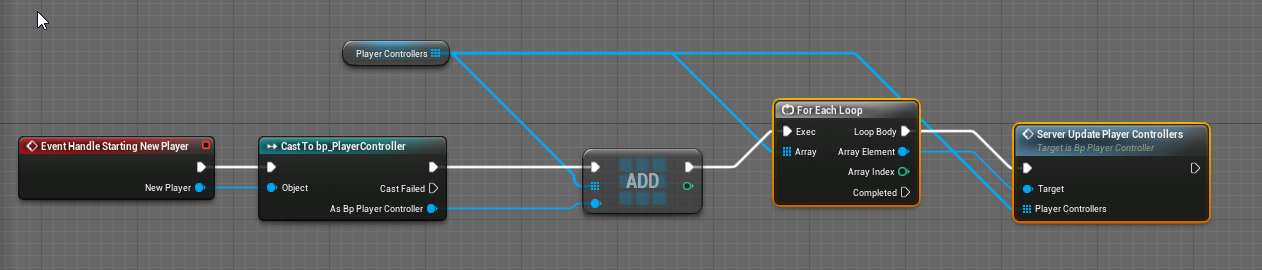
 maiden wadi
Ah. I think I see. You're making the server update an array of each player's scores and getting it from the PlayerController?
olive sedge
yes, the player controller has the scores server side and replicates it to its client
cause afaik the playerstate is bound to the player controller and the client side player controller doesn't know the other player controllers
maiden wadi
The array is redundant. Your PlayerName and Score in the State are already updated. So you can get the same values on all clients with no tick and no extra replication.
maiden wadi
You can get all playerstates like this anywhere on a client.
olive sedge
perfect, thanks!
maiden wadi
PlayerArray is just a list of the playerstates for each controller.
olive sedge
yes, that's what I was looking for
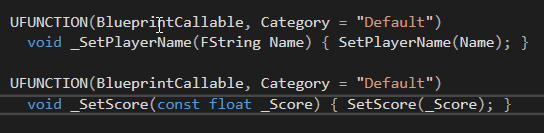
while I'm here.. Is there a reason that PlayerState's PlayerName is BP readonly?
I need to set the player's name and having a C++ wrapper function feels unnecessary
maiden wadi
I'm unsure. A lot of Unreal's default CPP values are like that. It's annoying for BP solo devs, but it's the correct way to handle things that often get set in CPP but should only be seen in BP for the designer, so that artists can't mess with it.
olive sedge
right.. I'll just wrap it, thanks @maiden wadi
 solemn parcel
Hello ! I struggle more mathematical wise right now. I made a overall health bar, that is composed of 3 progress bars close to one another, each one representing 120/3=40. I would like these x3 percent bars to act like one single.
olive sedge
@maiden wadi https://i.imgur.com/6nD7X0Z.png I feel dirty 😆
 trim matrix
Hey guys! Is there any benefits of using AND nodes except a clean code? I mean it seems less efficient not to use a branch for every value. I think this because if the first fails in the AND node it still checks the others! Why? Its totally pointless if it would fail either way. Its especially bad if there is a pure function connected and it runs that as well.
Example: https://blueprintue.com/blueprint/vtj9313t/
BlueprintUE
 novel cosmos
So this is something I've been unable to find information about but does anyone know how to get a screenspace widget that's on a widget component, you know for an over the head healthbar scale based on the distance from the player's camera and also to not be visible on screen when there's an obstacle between the player and the widget's owner?
regal venture
trim matrix
Hey guys! Is there any benefits of using AND nodes except a clean code? I mean i...
AND works well when combined with OR nodes and keeps things from getting too out of hand.
if( ( A && B ) || ( B && C ) )
{
  // stuff
}
Oh thanks so more complex stuff is what it's good for I see
regal venture
In general, it can just help with readability and intent of the code. If you have
if( A && B)
{ }
As opposed to
if( A )
{
  if( B )
  { }
}
Then it helps make clear that intention that A and B are to be considered together, as well as prevent anything from happening in between those evaluations
trim matrix
So it still looks at all the values in code? Not just in Blueprint?
trim matrix
solemn parcel
Hello ! I struggle more mathematical wise right now. I made a overall health bar...
Hi! I think it's something similar to this
BlueprintUE
I just quickly put this together, the relations or the variables may be off, but it might give the right idea. You could also use a MaxHP variable and /3 to put instead of the manual "-40" in the subtractions.
solemn parcel
@trim matrix Hiya, thanks checking it !
trim matrix
I put the remaining as a local variable
maiden wadi
@novel cosmos I don't think that is default behavior, the scaling at least. Most times you'll need to do that dynamically in the Widget. It's very easy by passing in the actor that the widget is for and using GetCameraManager on tick to relate it's scale to the local camera. You can do all of that in the widget's tick.
novel cosmos
I am just iffy about using tick's T_T
Is there no way around that? I know that it's not the default behavior.
maiden wadi
If you want something to happen constantly, like dynamic scaling, it has to be done on or nearly on every frame.
novel cosmos
I read somewhere about using materials for this.
maiden wadi
Don't be afraid of tick, just use it only where necessary. Avoiding it will honestly just cause more problems and unnecessarily complicate things.
novel cosmos
Hmm okay, then.
maiden wadi
If you really wanted to optimize it, you'd do it in C++, and have the actors register somewhere like the controller or HUD class, and you could dynamically register widgets to actors and only keep a small list of them. Slightly more complex setup, but less overhead for multiple ticks, less memory for more components and widgets overall, and less processing for moving scene components when the actor moves., etc.
It'd reuse the widgets and remove them from screen when that actor left the camera's area of effect.
novel cosmos
Makes better sense.
 stable frigate
hey guys, when i remove my touch interface in a pause menu and then recreate it again after resume. It displays my touch interface but it no longer receives input. It receives my input as touch input that i have created in input action.
 lost hazel
Hi all! How to get function name from function ? i Need function name for print string (for debug)
olive sedge
anyone know of a good way to find out which widget is under the cursor? I want my guys to fire abilities on keypress at whoever's icon the cursor is hovering
 stray island
I have three timelines for example that play after each other , how do i start again from first one after last one ends
So it loops
stable frigate
plug all finished pins to play from start
and plug the timeline_2 to timeline_0 play from start
stray island
Oh yes it worked but it kind of looks odd is this normal? To return back to previous node
stable frigate
its similar to how a recursive function works.
stray island
For ur question did u try set input mode ui only?
stable frigate
yes
my touch interface doesn't receive input after resuming the game. my touch input action starts taking input. i think it might be priorities that are being messed up, but i'\m stuck for now.
 daring turret
How do I add simple or complex collision to a procedural mesh? I can’t find any options. I tried to manually place a box collision around it. But it didn’t work. It’s set to generate this same block in two directions. So somehow I need to generate collision as well
stable frigate
how are you creating procedural mesh ? are you using spline component?
daring turret
I’m using two functions, to create the face and it’s face vertices
And I’m using construction script to render it. And a different part of my code makes the same block appear in two directions up to a certain number
 covert stirrup
I am in the Player controller, why can I not set this? How am I supposed to swap between 2 different pawns during run time?
stray island
Theres some lag during movments or rotation components , etc , is it my monitor or my pc ? Its ultrawide monitor that isn’t using display port but normal hdmi
daring turret
my code. how do i add collision to the block i generated
it creates this and generates it along the x axis
This is what happens when I push play
 unique wyvern
in ue4 can you save references to game assets such as textures/static meshes etc?
 thorn ermine
yes. ue4 data tables support this, it can export/import to csv as well, as plain text, just a referencee
proud hull
This issue seems to be engine related, maybe post in #ue4-general to get better visibility. Can copy your message link from here and just post it in that channel with a short description or repost it, but make sure to remove here or risk getting muted for posting in multiple channels.
 minor pagoda
Ok
solemn parcel
How can I avoid mesh overlapping an actor ? Both the actor and the mesh are in 'Block' channel from each other. The Collision parent from mesh is in block channel too.
proud hull
solemn parcel
How can I avoid mesh overlapping an actor ? Both the actor and the mesh are in '...
Can you show your collision settings for each character's capsule component and skeletal mesh component?
 sudden spear
Hi there!
Is there another way to get all actors placed in the level besides from "GetAllActorsOfClass" and making an public actor array for selecting them manually?
 errant snow
Hey everyone! I wrote a fabulous tutorial over at GameDev.net about building custom blueprint nodes in C++ that are more powerful and custom than what you can accomplish with a blueprint callable function. Check it out here: https://www.gamedev.net/tutorials/programming/engines-and-middleware/improving-ue4-blueprint-usability-with-custom-nodes-r5694/
covert stirrup
@trim matrix it looks like it might be a duplicate?
solemn parcel
@proud hull the wall in question
proud hull
Have you tried right-clicking the node and selecting refresh?
proud hull
solemn parcel
<@!291620720243376129> the wall in question
Ah, so you are testing against a wall. I thought you meant the 2 characters in the first screenshot, lol. So your player can walk through the wall or you just trying to prevent something like an arm going through it while the player is close to it?
Sometimes refreshing is necessary when you make changes to a function after it already exists on any graph.
You made an interface with shoot gun
Why don't you use the interface function there. You need to make sure whatever uses it is also implementing the interface
Odd, haha. Did that function originally exist before you made the interface blueprint?
 tight schooner
@sudden spear You can always "get actor of class* 😉
but no, nothing's coming to mind for getting references to actors baked into the level. You can offload the task to some manager class (e.g. have Game Mode get actors and fill array variables on BeginPlay) and have other actors get data from the manager, but otherwise IDK.
FWIW, GetAllActors nodes aren't anywhere as dreadfully slow as Epic Games will have you believe. Using it doesn't cause a gamethread hitch.
solemn parcel
@proud hull Sorry if the first picture has mistaken you, but yeah primarely against awall, to avoid a part of the body going through
 red oyster
Is there a way to set custom color (change by user during gameplay) for UI? I didnt found any tutorials for this.
tight schooner
@red oyster Try putting your UI element on the widget's event graph and see if you can Set Color or something. I'm pretty sure that's possible.
red oyster
I putted it in widget component as class, because I want to attach it to the object
proud hull
red oyster
Is there a way to set custom color (change by user during gameplay) for UI? I di...
Definitely possible. Lots of ways to do it. Split structs to make them easier to use those nodes.
 opal sinew
I have a hit marker widget which should appear when a player gets a hit.
However it works fine on the listen server, but when a client gets a hit the hit marker widget shows on the server
Not sure why so would be grateful for some help.
sudden spear
tight schooner
<@!298743998242226177> You can always "get *actor* of class* 😉
but no, nothin...
by Game Mode get actors you mean also "GetAllActorsOfClass" ? Because the only "GetACtors" I found is under Layers-Group and it does not seem to work
red oyster
proud hull
Definitely possible. Lots of ways to do it. Split structs to make them easier to...
I want to send a color variable to the ui component and make the ui graph make the work (set colors for button hover and etc)
I want to change color only in some parts of the UI
 late kraken
Hello!
I have a question that I have in mind for the project I'm currently working on.
I have multiples levels (for level streaming/optimization/organization purpose) and I want to have two triggers in different level affect one door in another level.
What is the way of doing so?
Modify a variable in the Persistent level? 🙂
Thank you for reading
Here is a screenshot of our current map
(each circle show the different level seperation and the red circle is where the trigger are, and the door would be in the middle where the arrow are pointing at)
red oyster
proud hull
Definitely possible. Lots of ways to do it. Split structs to make them easier to...
Wops sorry didnt notice, thanks
tight schooner
@sudden spear I have a Game Mode BP child class and I'm able to use the GetAllActors node there. If for some reason it isn't working, you can try GameState, or even make your own actor class that GameMode spawns into the world at BeginPlay as a custom "manager".
Ultimately GetAllActors isn't that heavy of an operation. I just put it on BeginPlay for most of my actor classes and save whatever it needs from that to a variable.
sudden spear
tight schooner
<@!298743998242226177> I have a Game Mode BP child class and I'm able to use the...
Making an own actor manager that is spawned at BeginPlay is a nice idea! Thank you 🙂
 prisma stag
Hello, Im having a problem where my ai tank is coming at me but for some reason at certain points in move to me at an angle. In the attached picture is the Behavior Tree. What happens is I have a service that checks to see if the player is within a certain angle of the forward vector of the aitank. If so, I do a ray cast and check to make sure that what its hitting is the player and not a wall or something. If that all works, it sets a variable to combat which starts a task that rotates/moves the tank to the player as seen in the above snippet. However, I have noticed, that when I get out of the tanks cone of vision, it sets the variable to idle just fine, but in the BT it still stays in the combat selector. Thats where I think the problem is.
 tired fog
how do i add swimming but where i press Y to float upwards and press A to float downwards
and push forward on the analog stick to swim forwards
and can turn the view with the right stick
daring turret
I need some suggestions and information. I’m trying to make a 2D game that works like Minecraft. I do not know how to make voxel like block generation with biomes and noise. If anyone knows how to do this or knows a good tutorial for it let me know. I’m trying to stick to only blueprint mode but if c++ is required I can try that.
prisma stag
Does the get actorForwardVector rotate with the actor?
Hm. The issue I explained above may be due to this then. Due to my code, it seems that my ai tank only does a raytrace when in a certain angle of the world. Let me try to get a video to show you.
 tardy harbor
After I nativise a blueprint, where is the cpp file stored in the project directory?
 celest yacht
@tardy harbor thats a question for the cpp chat
tardy harbor
I asked about blueprints, but ok
celest yacht
@tardy harbor You can find your nativized code in [ProjectDirectory]\Intermediate\Plugins\NativizedAssets
tardy harbor
yeah theres no plugin folder inside intermediate lol
 kind swallow
Hello everyone ! It has been now 6 months that I started working on UE4 with Blueprint, and I now want to experiment multiplayer (in Blueprint). I've tried something simple : create/join session, but you need host's IP to connect. I tried with the Advanced Steam Session (that worked) but I don't want to use Steam as a multiplayer plateform. Is it possible, always in Blueprint, to create a server that'll keep in mind all the rooms created by host and distribute them to the client looking for a game ? And by clicking, could join a game ? Or is there a better way to do it ? Thanks a lot !
olive sedge
I still don't got this.. how do you check which UMG widget is hovered on keypress?
kind swallow
@wind sequoia Do you have a link or something to learn more about master server ? thanks
 wind sequoia
just use steam
it would cost u a lot more
and take a lot more time
to setup a master server
kind swallow
Yeah but publishing a game in Steam is very complicated as I don't live in the USA
 mortal isle
i got this weird bug where sometimes in multiplayer client wont spawn
celest yacht
@kind swallow I haven't read through this entire thing but it may be helpful if you havent seen it yet - http://cedric-neukirchen.net/Downloads/Compendium/UE4_Network_Compendium_by_Cedric_eXi_Neukirchen.pdf
daring turret
Basically I wanna do this but with a procedural mesh. Because I need to duplicate it many times and instanced static mesh is too hard for the game to run. Any tips?
?
solemn parcel
So I'd like to activate Collision Box from an actor under a certain distance from the player, but Deactivate node on begin play doesn't work. Any ideas ?
tardy harbor
Is it possible to give gravity to a line trace? (bullet drop)
actually... I can just use an invisible projectile instead
 last abyss
@solemn parcel try adding a delay before the deactivate node
solemn parcel
@last abyss just tried, not working
daring turret
I also still need help finding a way to duplicate my procedural mesh
 sterile helm
I'm making a small proof of concept for a game idea I had, and I was wondering what the best way to handle levels would be. it's a puzzle game with relatively short levels, should I build them all in one level, load in a new level each time, or use level streaming?
I'm only familiar with the bare bones of programming/blueprints as I'm normally an artist, so I don't really know much about any of these techniques
 keen seal
Hi, trying to adjust the hue of my material.
The material variable is set to the instance.
Parameter is also called hue.
It works in the material instance, but not through this blueprint.
sterile helm
that looks like you're making an instance of the instance, not changing the one you already have
thorn ermine
@keen seal yeah you will need to set the material you just created on the mesh, creating it alone does not apply it on the mesh
sterile helm
yeah I was just looking and I think you don't need the create node and use 'set scalar parameter value on mesh'
thorn ermine
@daring turret if you are using a procedural mesh component, you of course spawn this using either an actor, or blueprint with this component in it
if you spawn another with the same data for the proc mesh component, it will be a duplicate
BUT i can tell you if instanced mesh is too heavy, creating many copies of the same mesh via duplication is not going to be any better, since instancing is heavily optimized
it may point to another issue, like your proc mesh may require LOD ( you will have to do this in the component, since its not static )
keen seal
I'm not sure I understand.
The same material as the one in the variable is set to the mesh.
sterile helm
yes but you're making a new material instance, which is not on the mesh, and editing that
try this instead
keen seal
sterile helm
try this instead
I'm having trouble with the material input.
If I promote it to the variable I can't select a material
sterile helm
why do you need to promote it to a variable?
keen seal
I'm very confused haha
Well what do I plug in to the self?
keen seal
No go
sterile helm
is that material an actual material or the material instance you want to change? because it should be the instance
keen seal
That's the instance.
What's the difference between an Object and a Dynamic Object?
sterile helm
not really sure, not sure I can really help you any further with this, it's possible you need to change some settings in your material before you can use it in a blueprint
if you're only trying to change the value of one object, try "set scalar parameter value on mesh"
keen seal
Thanks for your time!
thorn ermine
@keen seal after you create material instance, and set the parameter on the material instance, then you have to set it back on the mesh, you can do it in begin play, you just needed to connect your material instance form the create node, to a set material on mesh node 🙂
you cant set parameter on a material instance, only material instance dynamic. and yes, there is a difference
sterile helm
what is the difference? I'm guessing dynamic is only for the mesh you apply it on, based on the context?
thorn ermine
dynamic is used in code.
meaning, you cant change material parameters in code, or blueprint, without dynamic instance.
 stable dove
Im feeding a bunch of vector3 positions into an array and i want to compare them to each other to see if any are to close to each other then delete them if they are.
sterile helm
ah so a regular instance just means it can't be changed during runtime?
stable dove
any ideas on how i could achive this?
im pretty new to blueprints
not sure how i can read and compare items in an array
sterile helm
is there a way to save variables in a level and read them out in your character?
stable dove
yeah you can use variable libraries i think
 brittle reef
Hello guys! im following a course that the tutor made a random animation attack system with arrays, im using it on the enemies so they can do more than 1 animation attack but on the main character i want to make a combo system (its a hack n slash game ) and this doesnt work, so my question is if theres any node/function that i can get from the array to make it in order so i can Increment Int from a variable on the end of my attack function to go to the next attack, i get the logic but cant get make it work on UE4, thanks guys 🙂
keen seal
thorn ermine
<@!257802317472989185> after you create material instance, and set the parameter...
Anything like this?
sterile helm
stable dove
yeah you can use variable libraries i think
oh I could just save them in the level blueprint right?
stable dove
nvm
 meager spade
keen seal
Anything like this?
meager spade
keen seal
Anything like this?
You need to promote to variable, using the return value twice means the function will be called twice and two instances will be created as far as I know
stable dove
i was thinking about function and macro libaries
keen seal
meager spade
You need to promote to variable, using the return value twice means the function...
That doesn't seem to be working either.
stable dove
sterile helm
oh I could just save them in the level blueprint right?
I think so but tbh i got no clue
tight schooner
@stable dove I think there's a node that compares two vectors (=) within some specified tolerance. And then you need to make some double-ForEachLoop contraption that systematically compares each vector in the array with all the other ones. You probably want to do it in a custom function so that you can make use of local variables cuz you'll probably want to copy the array to a working (local) version where you remove the items you're checking so that you don't doubly compare items.
tight schooner
I'm not sure what data you want the function to produce if it finds a match but you can specify outputs for your function
stable dove
yeah i think i understand it
sterile helm
how would I go about getting the variable from my level blueprint to my character?
found a way
in the beginplay of my levelblueprint I cast to the playercharacter, and then set a variable there to the one in the level
I will need to do that for every level but it's only like 4 nodes
 tired cypress
sterile helm
in the beginplay of my levelblueprint I cast to the playercharacter, and then se...
tired cypress
sterile helm
in the beginplay of my levelblueprint I cast to the playercharacter, and then se...
You may want to write a function that you call at the beginning of each Level BP. That way, you only have to pass it that variable and if you want to make changes and such later, you don't have to go back to each level bp
I found that out the hard way when there were more and more things I wanted to initialize at the beginning of levels
faint pasture
stable dove
Im feeding a bunch of vector3 positions into an array and i want to compare them...
Round each vector to whatever your your desired resolution is, and use that as a key in a map
sterile helm
tired cypress
You may want to write a function that you call at the beginning of each Level BP...
that's a good shout
 vernal coyote
Hey all, working on a game where the player can turn into any physics item in the level. I have changing into the new mesh set up and working on a line trace. The problem is the capsule component doesnt change size for each object, obviously. This doesnt really work for something like a box, where you want to be able to move under a table but the capsule is still as tall as a person etc. For a temp solution I set up some gameplay tags and have the capsule resizing based on 'small' 'medium' 'large' tags, tuning them to be relatively the right size, but that doesnt work great for most objects, only a few, and seems like a tedious solution for a lot of objects. My question is how would you handle changing into a new static mesh, would you use a character or pawn with custom collision? How would you go about setting a proper collision capsule/box etc for the specific items? Thanks!
 vivid merlin
Why are my Game Instance variables not appearing when I cast to Game Instance in a level BP?
 hollow cape
you need to cast to your specific game instance class @vivid merlin
vivid merlin
ty KHarvey! will try now
@hollow cape still no dice- I must be doing other things terribly wrong. Other BPs can pull variables from the Game instance, none of them show up when I cast to GI in the level BP
vernal coyote
ok cool, Ill take a look at that, thank you! Any documentation you recommend?
thats awesome! yeah the idea is hopping between objects at will. Ill give this a go, super helpful!
sterile helm
how do you change what sort of stuff a linetrace sees as a hit?
right now it's interacting with something that's set to ignore all collisions except pawns, which it should overlap
well that's what the linetrace looks for isn't it?
I'm making a grid based game so I made my own movement, and I use a linetrace to check if there's anything blocking the tile it tries to move to
there's a dropdown for visible and camera in the linetrace, where can I change the queries?
might do that later, but for now I'm just making a proof of concept
currently I just move my player by the grid size
also makes it easier to design levels I guess
hmm I think I found the query thing you mentioned, but it seems like overlap is also done with queries so if I turn it off I can't go on it anymore
trim matrix
how do i get speed of my character? how do check if player is not pressing wasd?
faint pasture
vernal coyote
Hey all, working on a game where the player can turn into any physics item in th...
I wouldn't use character as my Pawn class, I would just make a pawn
vivid merlin
@hollow cape I figured it out! Really noob problem but I realized the sequence of creating the nodes made all the difference- If I pulled out a CastToGameInstance node first and then pulled off GetGameInstance second the variables wouldn't show. If I pulled out GetGameInstance first, and then pulled off that node CastToGameInstance they were all there. Thanks for help!
vernal coyote
faint pasture
I wouldn't use character as my Pawn class, I would just make a pawn
I was leaning that way, I however want the basic character movement to be the same i.e. walk, jump and camera movement. I was under the impression pawns dont have that? And if they can how would you set that up?
faint pasture
@vernal coyote what do you want to use for movement, physics or the character movement component?
vernal coyote
faint pasture
<@167361731444736000> what do you want to use for movement, physics or the chara...
Id like the character movement component, how can you use physics for movement? I hadnt considered that!
faint pasture
That's kind of the entire point of physics is moving things right?
vernal coyote
Im not sure what you mean
Im trying to find the best way to implement this and my experience with UE4 isnt that vast, so to my knowledge you need a movement component for a character/pawn for player input.
maybe Im just not seeing something obvious
sterile helm
how do I give the player back mouse control, for example in a menu?
 winged sentinel
hi everyone, im having an issue where my AI isnt the same speed as my character, even tho its a child bp of my character
I set max walk speed and everything
It just keeps moving at the same speed ignoring everything I adjust\
 hybrid blade
is the timeline blueprint node output called every tick or is it called every keyframe in the timeline? Also is there any better node for looping everything behind it on a set timeframe?
 astral fiber
Is there any way to cast this Child Actor to its Child Actor Class?
@hybrid blade It is called whenever the timeline runs
@hybrid blade You can use a "Delay" node, but this only works in events and not in functions.
astral fiber
I have never used this but this could be helpfull
hybrid blade
ya i couldnt remember how to do it thanks 🙂
 mystic coral
Is there a way to draw a debug sphere only if in the viewport or not playing the game?
 haughty crypt
hey guys, was just wondering, last time I checked I had an issue with it. Do blueprints allow individual component clipping when the components out of the camera view?
so, for example, if I had an array cubes in one blueprint, and I would only look at one cube, and all the cubes were components of said blueprint, would all the other cubes outside my view render?
 hushed pewter
Im tryna have my child sprite update each frame in a spot relative too my player
But it just remains static
haughty crypt
I would not recommend doing a get actor of class every tick
haughty crypt
hmm, are you trying to make the sprite follow the projectile?
hushed pewter
The sprite spawns once the projectile is destroyed
haughty crypt
and it follows the player afterwards right?
haughty crypt
ah then just parent it to the player
haughty crypt
sticks out?
hushed pewter
-------------------------O
O >>
O------------------------------
-------------------<< O
When it turns it rotates with it
Thats why im trying too make it relative too the players position
World spawn location - Player location = Distance from the player
haughty crypt
and parenting it wouldn't work?
trim matrix
https://blueprintue.com/blueprint/_y4tzqi7/
when moving left and right the players behaves wrong. up and down everything is as i want
BlueprintUE
it's a ball
hushed pewter
No
haughty crypt
explain to me exactly what your situation is
hushed pewter
haughty crypt
you want your sprite to stay in one position even though it's parented to the player?
hushed pewter
When the sprite spawns it stays in its regular position relative too the origional spite
haughty crypt
sorry if I'm misunderstanding here
hushed pewter
SO if the main char is at 200 0 200
and its at 220 0 220
Then itll be +20 0 +20
Thats what the vector-vector is
However, when it goes too update them in the world. It reamins static
haughty crypt
right, yeah, you can also find that in the details panel of the component on your outliner
its the little arrow in front of each transform
you can change relative to world
hushed pewter
I think i already tried that and had the same issue
The sprite move the opposite direction by rotating
haughty crypt
right well, it would be good to get a video of this issue, because i have no idea what im trying to solve here
you want the sprite to always face the camera rotation?
 mental swallow
About Materials.
If I want to tint a character with a color, do I really need to modify every material that the character uses and add a "Tint" vector parameter to it?
Isn't there a better solution to this? One thing for everything?
haughty crypt
yes, that's called material instancing
just make one master material
let's call it M_MasterMat
M_MasterMat has a tint parameter value
if you right click M_MasterMat in your content browser, you can make a material instance of that material
and it will make all the values you made into parameters public
mental swallow
Okay and then?
mental swallow
I know what material instances are. Let's say I grab a Paragon character. He has several materials for shield, armor, body, etc.
I need to modify those and create a MI of it to modify it later. But I want an easier solution where every mesh with different materials can be "tinted" without changing every material they use.
Or am I missing something from what you said?
haughty crypt
ah then that's probably using material interfaces
mental swallow
that sounds good. I google it. Thank you Tom!
haughty crypt
nah thank Lorash, they figured it out first
mental swallow
Thank you Lorash 😄
haughty crypt
but yeah, usually, if you want to tint every single material, you need to have a tint parameter in every mat
mental swallow
yeah.. I need to find an answer. I don't want to go with that solution
haughty crypt
should be simple enough to implement in C++, but still takes time to set that all up
mental swallow
I got it. But for example if there is a global shader that will get hooked up on every material regarding a character, it could work in my mind ^^
haughty crypt
psh, can't be too hard, create a new material asset type, change the class of each material
materials are classes right?
mental swallow
okay
tight schooner
Maybe you can do something with vertex colors / mesh painting? This is getting into #graphics territory.
haughty crypt
hm
mental swallow
yeah, that seems the way to go. With master materials.
haughty crypt
anyone want to answer my blueprint clipping question? Didnt know if i should send it here or in one of the content creation channels
just have usual object culling for components in blueprints
I was just wondering if it was still doing that
not culling it i mean
tight schooner
haughty crypt
so, for example, if I had an array cubes in one blueprint, and I would only look...
I want to say yes no... but there are debug modes that you can use to see what frustum culling is doing.
haughty crypt
ah brilliant thanks, I'll have to read into frustrum culling
tight schooner
@haughty crypt they show off the debug view stuff here: https://youtu.be/6WtE3CoFMXU?t=1656
haughty crypt
yeah I was just wondering if, for some weird weird reason, someone were to make a whole level in one blueprint, it would render everything in one go
I feel like unreal sees the blueprint as one big asset to cull
rather than cull its individual components
tight schooner
I meant to say "no"... I suspect each static mesh component is treated individually by culling
but IDK about hierarchical instanced static mesh... instances.
tight schooner
making some test scenes and using the debug camera + freeze render should reveal what's going on
haughty crypt
yeah I cant test for now haha but I'll try it at some point
 pine trellis
when using pixel streaming, do you need to host it on one of those places you pay money to or can it be done with your own internet connection?
 eternal jolt
Is there a good way to debug (watch) large struct arrays? To avoid this mess, and view it in neatly formatted?
I searched in this channel's history and found a few times this was asked.... 2-3 years ago lol :( any improvements on this?
 winter kettle
for a mobile game, how do I get the screen position that the player is touching
daring turret
How do I make the animation always play? I don’t want to give it a number. I just want the animation to always spin while on the loading screen
Also how do I remove this error
 weary jackal
@daring turret open console in your game.
Type r.Streaming.PoolSize and increase the capacity
daring turret
Thanks. I never knew I had to do that lol
 spark steppe
daring turret
Thanks. I never knew I had to do that lol
spark steppe
daring turret
Thanks. I never knew I had to do that lol
did you hover over the number thing? maybe it allows -1 as value for infinity
daring turret
I’ll try that
I am making a game similar to terraria and Minecraft. I have an issue. I want a world with a limited number of blocks. Trying to load all chunks at once will break the game. But if I use a delay between each 16 by 64 block chunk, it’ll work much better. Only issue is it takes about 10 seconds to load a chunk. So I did some math. For a world with 4K blocks wide by 1500 blocks tall It would take over 17 hours to load them all...
Big issue for sure. I know terraria uses similar generation with blocks. They’re worlds are 4200 by 1200... that’s for a small world size... the large size is double...
It only takes like maybe 3-4 mins on that game to load it all. That includes terrain generation and biomes and and so much more.
What can I do to make my generation that fast or similar? Terraria runs well on my pc, and I just want the basic terrain generation functions like it.
I’m using instanced static meshes to make the blocks. Is that the issue?
I’m heading to bed so I’ll respond to anything tomorrow btw
 worthy frost
@daring turret you will struggle with BP for performance
you need to do your chunk generation over threads and use C++ for speed
 static charm
they could just Nativize the BP
worthy frost
even so, you can't thread in BP
static charm
even in c++, might not solve the loading issue
yes u can
i thread
just fine in BP
worthy frost
how?
static charm
lol
static charm
bp is c++
worthy frost
yes but it is all on the Game Thread
static charm
no its not
worthy frost
like what?
static charm
i mean it depends what function youre calling
worthy frost
Async Tasks < Game Thread
static charm
i dont know what waht you mean by "<"
worthy frost
Async Tasks run on Game Thread
static charm
well whatever plugin for BPs im using, completly eats up all my cpu
worthy frost
that task could go off an run some stuff in a different thread sure, but everything that comes back to BP is pretty much on GT
static charm
well yeah i call GT functions after running my math
worthy frost
i am saying, if you are doing a lot of loops, math, and stuff, C++ is the way. (Nativizing or writing it yourself will help), Moving calculations off-thread will also increase performance more.
static charm
sorry i might have jumped into chat at the wrong moment
worthy frost
that is why phy's Voxel plugin is really fast, it does stuff in different threads, etc
worthy frost
sure, but you can't make stuff yourself in different threads in BP
you have to do that in C++
static charm
i dont know why you saying this, i know you are very knowledgeable
worthy frost
sorry, was just stating 😦
static charm
bp with plugins (written in c++) will multithread just fine
worthy frost
yes ofc
static charm
i have been doing it for over a year
 tame mist
hey i want to ask noob questions which google / ue4 documentation wont understand , can anyone help 😄
worthy frost
but the OP was asking how to improve the speed of their generation
static charm
yeah, thats a loaded question lmao
worthy frost
@tame mist don't ask to ask, just ask
worthy frost
use the ToText (Float)
worthy frost
you can use that aswell
but you need to format in a seperate node
let me show you
tame mist
does it have any way to limit the decimals /change it to anything other than 3
worthy frost
worthy frost
there is not much else tbh
could truncate it
Float -> Truncate
then plug that in
tame mist
worthy frost
Float -> Truncate
um that just rounds it to int
worthy frost
yup
tame mist
i actually needed 4 decimal points afterward
well i'll stick with to text
thanks though
thorn ermine
keen seal
Anything like this?
Yes that is 100% correct, it will not call the create twice, it only calls it once.
you can assert this behavior firstly, by the fact that the execution line determines the call in this case (white line), so it only executes once
secondly by setting multiple parameters, the fact that they are all getting set means it is using the same instance.
here is an example of one that I did just now, that works.
remember to make sure your material has the correct usage set as well, if you want to apply it to a skeletal mesh, it has to have that usage ticked
otherwise it wont work, and you should see a message in the log
you don't need a variable either, you can get the material out of the mesh again, and call parameters on it, once you have set it to dynamic, we do this all the time, its only about convenience to put it in a variable
sudden spear
Hi! Is there a way to get a reference to the level/-sublevel blueprint? I tried to implement a interface to the level blueprint but of course I don't have the reference to call a certain custom event from an actor
maiden wadi
@sudden spear That sort of design is not possible without some C++ work. And even then it's highly discouraged. Levels are supposed to be self contained actors. What are you trying to do in the level blueprint that requires other actors to contact it?
sudden spear
There are x amount of coins to collect. When they are collected an Event has to trigger. Problem is that I can't use GetAllActors
maiden wadi
Sounds like something you'd handle between the coins and GameMode.
sudden spear
which is another problem... currently I've hard-coded the amount of coins to collect. Without the use of GetAllAtors I'm not sure how to keep track of actors spawned in the level. Is there a way to count individual actors in thier own blueprint graph? BeginPlay doesnt seem to work
maiden wadi
Then you could make 50 maps, drop coins in and use that game mode and it'd just work.
sudden spear
Yeah I use the game mode actually 🙂
maiden wadi
Are your coins spawned, or placed by hand?
sudden spear
placed
maiden wadi
Two general choices are to either make GameMode's beginplay do GetAllActorsOfClass and set an array or number from that. Or make your coins GetGameMode and register themselves on their beginplay.
How come you can't use GetAllActorsOfClass for that? If it's just one check one time, it's pretty cheap. It's only discouraged if you're using it in places like tick.
sudden spear
like this? that doesn't seem to work
sudden spear
maiden wadi
How come you can't use GetAllActorsOfClass for that? If it's just one check one ...
Sure 🙂
....it's actually an exam and its permitted to use these functions ^^
maiden wadi
Pretty much. I'd make an event in GameMode that does this and then just call that event from the coins.
sudden spear
There are 3 main restrictions on that exam which makes it very "interesting" to solve these issues:
No direct ActorReferences (Don’t use Actor as public variable)
No GetAllActorsOfClass
No GetAllActorsWithTag
So calling the coin event from game mode is a challenge to since I can't use a public reference
maiden wadi
maiden wadi
Wait. Don't use Actor as public variable?
sudden spear
maiden wadi
Wait. Don't use Actor as public variable?
yeah ^^
maiden wadi
I'm not sure if you can use the game mode version for that then. :/ I hate college teaching for Unreal so much.
maiden wadi
Does it print GameMode Cast Failed?
maiden wadi
How are you testing it?
sudden spear
uhm... how? ^^
maiden wadi
How do you know it's not increasing the count?
sudden spear
I print the coin cout out of the game mode
ahhh... stupid me.....!
I printed on BeginPlay 😞
sorry^^
now its working
maiden wadi
But yeah, that should work fine for that. If they consider GameMode a public variable... I unno. I mean technically it is, it just has it's own call that returns it easily.
sudden spear
GameMode is encouraged to use! So currently I use the crap out of it ^^
maiden wadi
🤷♂️ Just terribly worded restriction I suppose. The idea of not using "any direct Actor references" is.. kind of impossible if you want stuff to communicate.
sudden spear
Indeed ^^
Also I have to make bots patrol...which I thank god achieved yesterday night. I wasn't thinking of level blueprints because I never used them in personal projects ^^
But now it looks alright... I have about roughly 30hours left. I wan't that job so much!!😅 Would be my first job in the games industry ❤️
sudden spear
try using for each loop and then plug in the target array as well as index
...size to fit has also to be enabled i guess
trim matrix
I want to set on a specific index tho,
size to fit will expand the array if needed
and that is not ideal since I am using index 0 - 2 only
sudden spear
so index number from "for each loop" and target array from the cast node
I see!
did you try the "get (copy) node?
with it you can control the array index
spark steppe
does the array have a element 0 to begin with?
otherwise you NEED to enable size to fit
spark steppe
set array elem needs an element at the given index to overwrite
if the array is empty, there wont be one
 left niche
Is there any way to get distance(exact) at location along a spline?
trim matrix
Yep, how can I be so gulible lol
spark steppe
i guess a lot of people been there, me included 😄
sudden spear
you're welcome 🙂
 pine ledge
Does Anyone use Record Sequence before, I was try to record variable but it isn't work. I already expose variable to Cinematics, but seem nothing record at all. Or variable can't be record ?
 pearl bridge
Besides the docs, anybody recommend a good place to start out learning blueprints?
Any videos out there that explains it well?
 pale veldt
hey, I'm following a tutorial for saving game and it got me confused. So it checks whether or not save game exists, if yes its gonna load. BUT when it doesnt, its gonna make a game save object WITHOUT A NAME? Dont I need to create it at a slot?
ok so I think this should fix it?
maiden wadi
@pearl bridge The issue with your question is that it is very open ended. If you know any other programming already, learning blueprints is just a matter of learning the editor and understanding that blueprint nodes are each just individual functions being called. If you're new to programming entirely, you have a lot of basic concepts that need filled in. Blueprints or programming in general also has a lot of varied fields. Doing AI is very different than doing a weather system, or making an elevator.
In short, nothing can really teach you the full extent of blueprints or any real language. You just have to pick something at your level and go with it until you understand it's concepts and then move on to something more complex.
 untold fossil
Hello 🙂
Is there a way to keep an array of structs the same in size and not have the indexed elements move (push up) when an index is removed from the array? I've read that most people just replace the given index to be removed using set. But that works fine with objects as you can just set none, but what about structs? How would one set an element of an array of struct to "empty" ?
Because I can just not plug in anything into the struct input pin but that just means it's an empty version of said struct and therefor unusable as a way to detect if this array element is "empty"
trim matrix
@untold fossil I'm sorry, that was the most confusing thing I've ever read.
left niche
untold fossil
Hello 🙂
Is there a way to keep an array of structs the same in size and not hav...
How about adding a boolean inside the struct itself that represents if the struct has been removed(is invalid)
untold fossil
Yeah did exactly that 😛
left niche
Or using a pair of bool with struct
untold fossil
I couldn't adjust the struct itself as it is too deeply imbedded and structs are known to cause many issues when altered. So i imbedded it into another struct which I needed to do anyway to include some other things like icon and name and also included a bool to check if it's empty.
@trim matrix Sorry about that xD
left niche
left niche
Or using a pair of bool with struct
This would've been way easier😀
untold fossil
Yeah a pair would work, but I need some extra info for what I'm doing which is easier with another struct.
left niche
sudden spear
Sure 🙂
....it's actually an exam and its permitted to use these functions ^^
Why can't you store the number of coins collected inside your player?
left niche
sudden spear
There are 3 main restrictions on that exam which makes it very "interesting" to ...
nvm i didnt see this
sudden spear
left niche
Why can't you store the number of coins collected inside your player?
alright 😉
 foggy escarp
Anyone know how to set variables public inside scene components and editable in the instance of the parent object?
When i check the box to make it public it doesn't transfer to the parent..
 gentle urchin
Is it a bug that this function never will return false after returning true once?
out of curiosity. Asking for a friend
left niche
gentle urchin
Is it a bug that this function never will return false after returning true once...
It should always return true regardless of the condition
gentle urchin
I'd think outgoing variables would be reset just like local variables,
but apparently not. Guess its my bad for assuming that
 turbid tiger
gentle urchin
Is it a bug that this function never will return false after returning true once...
turbid tiger
gentle urchin
Is it a bug that this function never will return false after returning true once...
this is the same as this
turbid tiger
gentle urchin
Is it a bug that this function never will return false after returning true once...
no it is not an error if branch = false function
will return the default state of the variable, in your case false
left niche
turbid tiger
this is the same as this
no its not the same. There is no false return node so it always return the true node
gentle urchin
Yet if the condition is not true in the first place it returns false
only after the first true, it always returns true
turbid tiger
left niche
no its not the same. There is no false return node so it always return the true ...
i just checked it
left niche
this always return true. notice the return node isn't connected. Connecting it still has the same result
I checked it too xD
gentle urchin
mine doesnt return true
unless it's been true once.
then as long as its the same object instance, it stays true.
deleting object from scene and making a new one,
resets this.
This is all there is;
left niche
Why don't you try adding a return false node to the false branch and testing
gentle urchin
it works as expected when you return false as you should do,
i was just curious if this was a bug or not
because as i mentioned, i'd expect it to return false (default state) unless else had been returned
I'm using the returns to exit early out of loops , and stumbled upon this "thing"
this was the actual use case
left niche
by default it won't return false. you dont have a return false node so it falls back to the only return node in the graph
no such thing as "return false by default" here
gentle urchin
It does tho.
dragged out new instance,
set value to 1 (so it wouldnt return true),
got false.
setting value to 0, returns true as expected
and now if i set value back to 1, it stays true forever.
left niche
then it actually might be a bug. Im seeing expected results here on 4.26 😕
gentle urchin
also on 4.26, altho with c++, if that should matter
left niche
gentle urchin
left niche
it didnt return false here
left niche
eh im blind
 primal smelt
Hi everyone. I'm playing around with torque for a wheelchair and trying to get it so when adding torque to one wheel it will steer the vehicle towards the opposite direction. I'm using a timeline just because for now I want to press a button and the torque is added every update for 5 seconds. This all seems to work pretty much out the box except that once the vehicle has turned enough the amount of torque being applied is massively reduced. This is to be expected in the screenshot I have provided, I just threw it together to show what I am trying to do but the effect is actually the same as If I just have a straight value plugged into Y in add torque. Any suggestions please?
left niche
Instead of right vector, how about (forward + (right * axis length)) * impulse @primal smelt
primal smelt
Sorry just to clarify, that is (get forward vector + (get right vector * axis length)) * torque?
primal smelt
left niche
yes, normalized
Apologies, I'm a bit thick. Is this what you meant? It actually gives largely the same result
 orchid garden
you got the first part (forward vector +(right vector * axis length) your just missing the * torque
primal smelt
Well the 10000 is the amount of torque I'm trying out. What is meant by axis length here?
orchid garden
not sure what he means by axis length.
primal smelt
I'm so confused! Is it really this complicated just getting a component's local Y axis and driving torque based off that information?
left niche
by axis length i meant a little offset to the right from the centre of the body
even if you use the right vector only, its working
primal smelt
left niche
by axis length i meant a little offset to the right from the centre of the body
Ah I see, thanks for your help! That has solved the issue for me, now I'll play around and figure out what the math is doing 🙂
left niche
Even im not sure about the math, but if it works.......😀
primal smelt
I'm pretty awful at math, I really should brush up on my skills as it will no doubt make this much easier :p
 astral fjord
Hi Im havin a problem with vertex animation in unreal material. My question is similar to this https://answers.unrealengine.com/questions/904329/how-to-rotate-vertex-animation-on-instanced-static.html
Problem im having:
I want to create instances of single mesh and with percustom data I want to drive the animations. I have group of birds that use flocking algorithm and each situation is different data in perinstnacecustomdata node. Problem is, that I dont know how to change yaw rotation of single instance. If I change it via updateInstanceTransform, the offset texture that drives anim stays same so instance of mesh is deformed. When I try to rotate in material I still dont have any success. Does anyone know how to tackle this problem? I need to set yaw rotation of single instance of mesh so it dowsnt deform animation.
sudden spear
Hello!
I'm using enum variable and bools in a level blueprint. They're all set as I wish but when triggered, they behave like they still have their default value. I even print the value and it shows the correct value. Is there a problem with enums and bools in L-bp's? Any ideas on this?
 fair sun
is there a possibility to get the sublevel name my actor is placed at?
 sand stream
when I add a value to the blueprint structure and remove all widgets and then create widgets again, the default value is set even though I added when creating the widget to have the current value. please help
 atomic salmon
@primal smelt torque needs to be applied around the intended axis of rotation. If it is a wheel, it needs to be applied around an axis coming out of the wheel (like the axle of a car).
primal smelt
atomic salmon
<@!365397632870383646> torque needs to be applied around the intended axis of ro...
Yeah the problem was that the Y axis which I needed was changing due to not getting the current local axis correctly
atomic salmon
Torque is always applied in world space anyway
So as long as you get the axis of rotation in world space On Tick, you are good to go
olive sedge
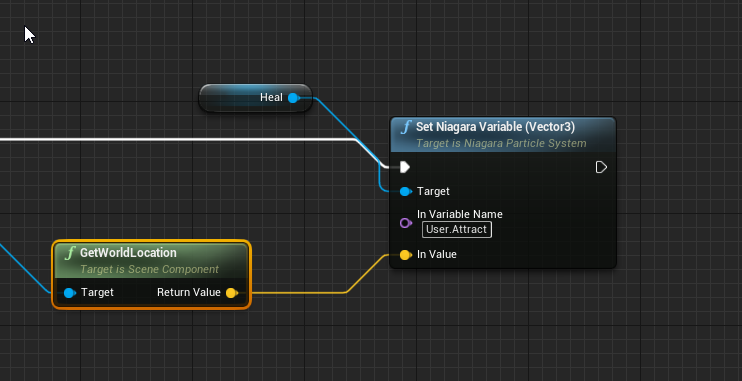
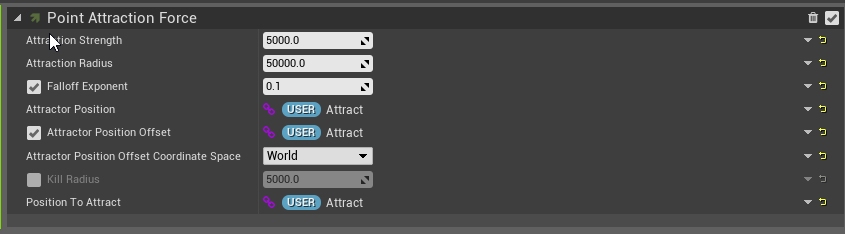
I want to shoot a heal beam towards a location, here is what I'm doing:
https://i.imgur.com/QftFlAC.png
https://i.imgur.com/FYxmQgk.png
The particles are not attracted to the point though, it is as if my variable set doesn't take. Any tips?
 keen parrot
olive sedge
I want to shoot a heal beam towards a location, here is what I'm doing:
https://...
keen parrot
olive sedge
I want to shoot a heal beam towards a location, here is what I'm doing:
https://...
try without User.
olive sedge
I did, doesn't change anything it seems
foggy escarp
What do i need to do to get the node GetInputMouseDelta?
It's not showing for me
im in the character BP
olive sedge
olive sedge
I want to shoot a heal beam towards a location, here is what I'm doing:
https://...
I tried everything I could think of with this in all different variations I could come up with. The particles always attract towards 0,0,0
maiden wadi
@olive sedge I'm heading out, so I can't reply for a while. But try this one.
 wispy lark
Anyone here have knowledge about customizing/adding features to the ALS v4?
tight schooner
@trim matrix I'm not sure what you mean. Making something instance editable exposes that variable to the details panel of the actor when you place it in the level
Like, spawn during runtime/gameplay?
You can expose a variable upon spawn, and that'll make it show up in the Spawn Actor From Class node
Or are you just talking about setting a default value for the variable?
I'm still a little confused
You need some sort of "blueprint communication". There are a lot of ways to set that up. You could have a manager BP that holds references to all the box BPs and manipulates them. You could have each box in a group individually hold references to each other, forgoing a manager. There are a lot of other ways...
I can't really tell you what's best
idk what that has to do with setting a boolean variable on 5 boxes but w/e
you should read/watch some documentation on BP communication I guess
 lilac remnant
I am making a slide door open/close with this code, for some reason when i first open/close the door it does so correctly, however if i try to reopen it then it moves by a tiny amount, and closing it doesnt move it at all.
I do fully realise that the vector+vector says 1.5 which is tiny, but for some reason it fires off for miles at any more than 10
fires when E or LMB also passes through a flip flop after triggering
tight schooner
@lilac remnant You're using its current location as part of a calculation to update its current location; I think that's the fundamental problem. Normally with a Lerp, you want two stable values to interpolate. An unchanging location 1, an unchanging location 2, and a timeline driving an alpha ramp
I'm not sure how the node Set Actor Relative Location works (relative to what?) but that might be an issue too. Either figure out two worldspace locations and interpolate between those vectors, or set a relative location for the static mesh component of your door rather than moving the entire actor around. With the latter solution, the root of the actor will stay in place, and the static mesh will move relative to that anchor.
lilac remnant
set it up with hard co-ordinates, it works perfectly again the first time, but after that it teleports to the new location rather than smoothly moving
nop, nor did i press sweep
 inland merlin
Seanny was right here: #blueprint message
lilac remnant
inland merlin
My advice when making is not to move the actor at all
move a component inside it instead
And work online with relative coordinates
tight schooner
yeah, the component SetRelativeLocation method is cleaner cuz you don't have to manage custom worldspace coordinates
in any case you should also use PlayFromStart (and maybe ReverseFromEnd is a way to consolidate the timelines) cuz the timelines don't "rewind" after you use them once otherwise
lilac remnant
changing the set actor to relative made it disappear xD
inland merlin
lilac remnant
changing the set actor to relative made it disappear xD
that's not what I meant
tight schooner
@lilac remnant What does your BP's component list look like? Is there a root, and a static mesh component connected to the root?
inland merlin
have you check this at least? https://docs.unrealengine.com/en-US/ProgrammingAndScripting/Blueprints/UserGuide/Timelines/Examples/OpeningDoors/index.html
An example use of a timeline in which we set up a classic proximity-based opening door.
lilac remnant
tight schooner
in any case you should also use PlayFromStart (and maybe ReverseFromEnd is a way...
there is a "reverse" option which you can connect the a node to, in order to play it backwards
tight schooner
I somehow forgot that opening a door is BP 101 and there's official documentation on it
inland merlin
that's for a door as a component
lilac remnant
yea, i have other rotating doors working and already set up in slightly more complex ways, but for some reason this sliding one isnt working
I can half ass it, and go by "once open it cannot be closed" but want to get this working
tight schooner
but yeah, on your component list, you should add a new "scene" component -- this is just a simple dummy location -- and make that the root of your BP actor. And then attach the door (StaticMeshComponent) to it. Then you can move the door relative to the root, which is a normal way to do things like this
lilac remnant
didn't know you could split the pin, makes it much easier
thanks! having splitting the vector pin worked!!
mortal isle
Can the input axis tick start when you press it?
inland merlin
just put a branch after it and check if it's different than 0
inland merlin
yeah, this will bloke the flow when the player isn't pressing anything or is pressing both right and left input
mortal isle
thanks!
 plain flare
Hey, I have player character in my map, which is i want to play with that. But, when I press play, there is new player character appearing too and I cannot take the player character that in the map.
How can I close, character creation when play pressed ?
Please help
plain flare
@mortal isle Now, character doesn't spawning. But I cant play with the character that in the map too
mortal isle
wait
let me understand
u are spawning ur desired character programmatically right?
and second character is spawning as well
right?
plain flare
One minute i will send you screenshot
inland merlin
make sure to select this if you have a player start
if you just want to place a player in the world select it and set this
Auto Possess Player to index 0
plain flare
I haven't player start. This is the character that I placed in map. And I want to play with it.
This is the gamemode
olive sedge
@maiden wadi Thanks for the suggestion!
It was something different however.. The value I fed was only available on the server so it didn't take
inland merlin
inland merlin
then do this
plain flare
When game mode like that, When I press start, new character appearing
Ok, I will look
mortal isle
use player start
plain flare
No, I don't want to use it
mortal isle
but why?
plain flare
I have to get my character to the map.
I mean, I have to see it when I'm not playing
mortal isle
u want ur player to spawn on a specific location
ugh
hmm
i think u gotta place ur character
remove every player starts
and set default pawn to none in gamemode
i think
plain flare
I couldn't find pawn category on my character
inland merlin
then search for it
plain flare
Ok, I was search in Mesh, so thats why I couldnt find. Now, I found
@inland merlin Yes, thank you that worked !
inland merlin
amen
 pine hatch
Hi .. i have some problem accessing the groom parameters at runtime. I am not entirely sure if its possible to do at all. What i tried so far is that i created an on key pressed event in my character BP i get the groom asset and get the Groom Groups Desc which is an array containing all the parameters which i try to modify at runtime. As a test i just setted the hair clip length, and on the button pressed i ad 50 to the default value which is 20 so it end up being 70 which is almost the full length. I printed the values so it changing it, but unfortunately it doesn't change the hair at runtime. I tried to do some research about the topic, i have a feeling that the groom values might be static values which are generated at compile and maybe that's the reason i cant make any difference at runtime. I wonder if anyone else had the same or similar problem? I attached a screenshot about my bp, hope it helps to see what i am trying to achieve.
tired cypress
If you want to modify the value stored in that array, you will need to use something like "Set Array Elem" node and not just Set.
 slate ledge
is there something specific i have to do to allow overriding axis mapping in a child blueprint ?
 unborn maple
i have an odd issue where my controls in my project are backword w s are suppose to be move forward and backword and a and d is left to right which work at first but when i reopen they got switch some how to s and d moving up and down
there shouldnt really be a reason why they flip
faint pasture
are you meaning for the movement directions to be in world space and not local to the pawn?
unborn maple
In the space it Self S, and D is moving up and down and walking in that direction. W and A has been switch to UP and Down walking.
when it should be the other way around.
and unreal has been doing this recently in my other project that contain key presses.
 pliant frigate
Probably a dumb question, but I'm new:
I find myself calling PlayerState and casting to my own Playerstate from it to get something stored there. Is there a better/proper way to just directly reference my own playerstate?
I've tried promoting that to a variable and referencing that from Begin Play .. but that doesn't seem to work a lot of the time - or at least i dont think it is.
 barren salmon
hi i have made sure my blueprint code works fine but does anyone know how i could stop my camera from rotating
wispy lark
@pliant frigate Perhaps this might help you: https://www.youtube.com/watch?v=5Rm1ngRhrjk
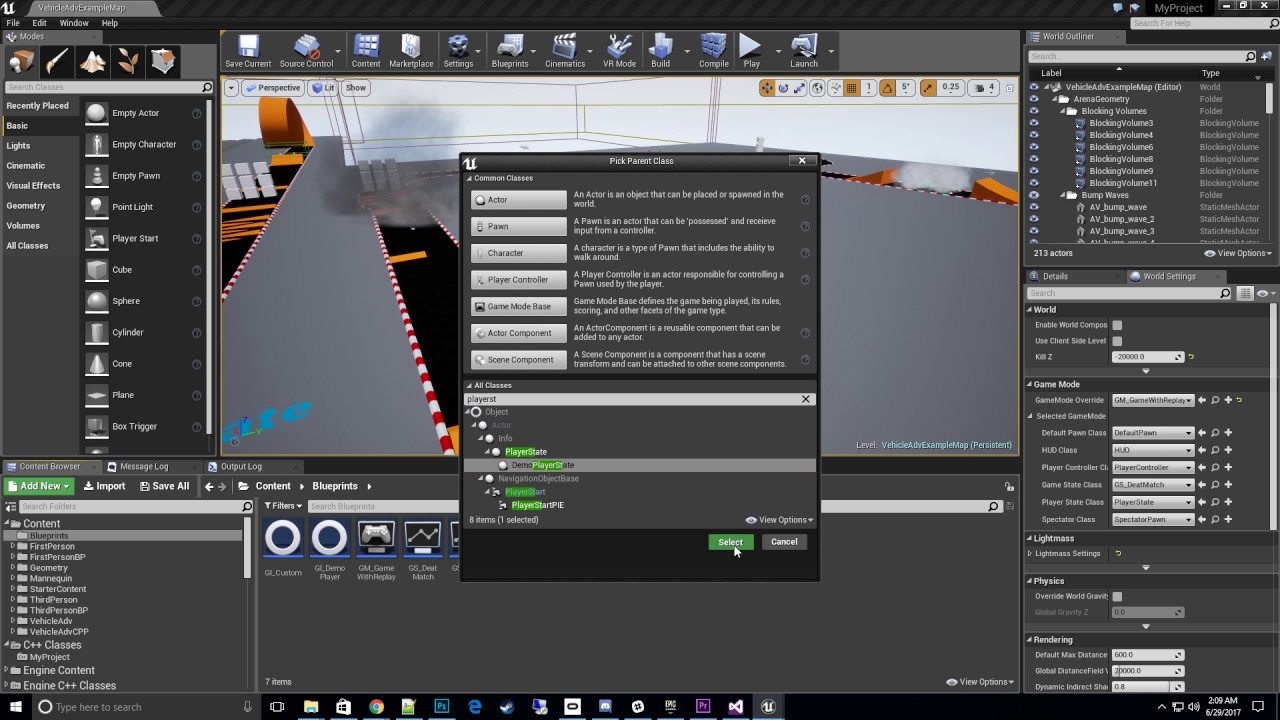
Learn how to integrate the Demo Player State to your existing project.
Available on the UE4 Marketplace:
http://launcher-website-prod07.ol.epicgames.com/marketplace/demo-player-with-vr-spectate
@barren salmon (Copy of a comment on UE forum) Spring arm component (camera boom) has a variable called "Use Pawn Control Rotation", you can set it to false in properties or in a BP.
Or. Just make sure there is no Axis input used to rotate the camera
wispy lark
In project settings / input.
barren salmon
wispy lark
There are all your inputs for keyboard/Mouse and controllers
oh! you know what! never mind that haha 😳
Do you just want to not be able to rotate the camera with the mouse?
 soft orbit
You want to rotate with the keys or the mouse?
Oh, already on it Xander
haha
proceed sir
barren salmon
this is the player movement
i just want the camera to not rotate
at all
like stay still and just follow the player
i got told to attach it to the spring arm and turn stuff off in it and that seems to be keeping it still now
wispy lark
ok.. So somewere you should be able to disable rotation. Can't remember were. I saw this in a tutorial a while ago.
Like all you need to disable is the mouse axis rotation (if the mouse rotation is the only issue you got)
pliant frigate
wispy lark
<@!202543499650924545> Perhaps this might help you: https://www.youtube.com/watc...
I am not sure how i apply the knowledge from that video to my question regarding my child blue print class. I appreciate the attempt to help me tho. Thank you.
soft orbit
In Project Settings just remove the mouse axis
should lock things up
and go from there
many ways to cut the cake here
 zealous moth
has anyone used this to make trails from non-skeletal meshes? Just static meshes.
zealous moth
i added sockets to my static mesh but the system does not recognize them; i was wondering if there was a workaround :/
soft orbit
@wispy lark gonna open a project and tinker around see if i can get a working example running
vivid merlin
is there a variable within a BP I could use that would select a texture from a set of textures?
vivid merlin
ooh thanks
soft orbit
@barren salmon https://www.youtube.com/watch?v=Si2FOOkvwus

A concept of a 2D Camera that can follow the player around with a dead zone so it's not fixed with the player in the middle. Also the ability to lock the Z axis if you want it to just be a side scroller with a fixed height.
Downloadable Project here: https://drive.google.com/open?id=1-pvYL14P3f2tW88xg-Nhr-LfU99FTQb1
This should work for what you need
@zealous moth can you show me what you mean by not recognizing them?
Usually thats cause by maybe a typo when typing the socket name or it is incorrect in a variable with a name type
faint pasture
@pliant frigate if you are constantly having to access your custom player state, you can save a reference to it and begin play or whatever. But I wouldn't worry about it
faint pasture
vivid merlin
is there a variable within a BP I could use that would select a texture from a s...
Or just use a map. You can map an email or an integer to a texture asset
Enum
pliant frigate
Yeah i do a lot of playerstate->cast to myPlayerState to get data from it. I have in the past tried promoting it to a variable that i reference.. but I think I get tangled up on Scope at times (not sure). I'll stick to just casting -- but checking to see if there was a right way i should be doing it. Thanks, Adriel.
faint pasture
@pliant frigate where are you reaching into player state from all the time?
pliant frigate
In failures past, I want to say I got a lot of "Accessed None" from other actor blueprints but I'm not positive. I only remember that it sometimes trips me up. I probably should cough up the money for a formal education and start back at the beginning - before i pick up a lot of bad habits or incorrect knowledge from trying to self learn.
faint pasture
You don't need a formal education but you definitely need to know some patterns and concepts so you don't end up with a tangled web of spaghetti.
pliant frigate
Yeah i hate spaghetti. I spend a lot of time trying to keep it simple, collapse some things to functions, etc.
I'm sure I'm not alone in having days where I feel its one step forward and like.. five steps back on learning.
soft orbit
Yep, especially when you write some code and you're like "ok this is working, finally gonna call it for the night." sleeps returns to the PC and everything is messed up and not working somehow lol
pliant frigate
Yeah.. im having that kinda day for the last two... and I'm trying to do something that seems like it ought to be simple. lol
tired cypress
pliant frigate
Yeah.. im having that kinda day for the last two... and I'm trying to do somethi...
It's always the "simple" things that throw you for a loop.
pliant frigate
Yeah i know. I've had a few insurmountable hurdles that turned out to be a really simple thing i overlooked... like making sure i've set the game mode to use the right things, etc.
tired cypress
I usually discover there's a single node for some really complex vector math...AFTER I created it from scratch or something
Protip: Always see if the node is a thing!
pliant frigate
I have now banged my head on making the Text Render show the correct player name over its head in a multiplayer environment for about three days. Its a circular cycle of either "no text", "others can't see the correct text", or "everyone gets the same text" but never "everyone sees the names correctly" lol. Ive read up on replication, looked into the example content.. but I'm clearly missing something.
I was up to "Player can see his own name correct" before i did something wrong, got frustrated, and promptly blueprint spaghetti'd myself into nothing working. lol
faint pasture
@pliant frigate just make a name a replicated variable on the character and only set it on the server.
If you make it a rep notify, when it gets updated, it can get the text render actor and update its text
pliant frigate
faint pasture
<@202543499650924545> just make a name a replicated variable on the character an...
From Player State, is there anything I need to do differently to get the correct Controller and/or Character in a multiplayer set up?
faint pasture
@pliant frigate you can probably just do it like this. And begin play on the character, get the corresponding player State and grab the name
 unique harness
Add a scene component and make it the root so the mesh is a child of the root
 coarse forge
hiya
anyone know what this error is talking about
DECLARE_DYNAMIC_MULTICAST_DELEGATE_OneParam(FTriggerHUDWithStoriesToWrite, TArray<UStory*>, Stories); is in my cpp class
{
    //Passthrough to bp for now
    OnTriggerHUDWithStoriesToWrite.Broadcast(Stories);
}``` and I broadcast herethe parameters on your custom event don't match the delegate signature
You're missing the int parameter
pliant frigate
faint pasture
<@202543499650924545> you can probably just do it like this. And begin play on t...
I'm still too dense. How do I get the correct TextRender from the correct character from a Player State? Is that possible or is it the wrong way to think about it. I hate when i make things so complicated in my head, lol.
Get Player Character wants an Index.. so i need to figure out the right Index.
unique harness
Also, you should pass arrays as const reference
unique harness
Show me the declaration of OnTriggerHUDToStoryMode delegate
coarse forge
DECLARE_DYNAMIC_MULTICAST_DELEGATE_TwoParams(FTriggerHUDToStoryMode, int32, FlowType, const TArray<UStory*>&, Stories);
found the issue
flow type
ug
k
unique harness
😛
coarse forge
that fixed it
man.. those guys were just hanging out everywhere
that one feature that will come after its shipped and if people buy it biting me all over today
thx
with the blueprint foreach.. is there a way to pause the iteration?
unique harness
no
coarse forge
So for this.. if I wanted to wait on a button press to get the next element out of my array.. I'd need to make a custom for each?
unique harness
Yes you could just use an int to handle the index and increment it on each button press
maiden wadi
You could make your own macro for it, but the default one doesn't pause.
coarse forge
cool, ill look into that after I test to see if it even works LOL
faint pasture
Anyone here done a global camera? Like a free flying one? What's the approach to it?
sand stream
hi, when I add a value to the blueprint structure and remove all widgets and then create widgets again, the default value is set even though I added when creating the widget to have the current value. please help
 open crypt
I want to get all the actors inside of a volume - I found a video that shows how to spawn things INSIDE of it, but they turn off collision and that's probably not what I need (otherwise how do I detect objects inside of it? - can anyone advise?
maiden wadi
@open crypt You can get all actors overlapping the volume. Would that work?
open crypt
yeah, then I'll get their display name and do something based on that - basically I'm destroying LOD actors at begin play because I am swapping out their static mesh components for destroyed ones - normally that's fine but for some reason if you destroy the mesh at begin play, the LOD actor remains
open crypt
maiden wadi
<@!273265779175194624> You can get all actors overlapping the volume. Would that...
how do I go about doing that? if they are overlapping at begin play, does that count? it's going to be like 50 things
Yeah this never fires even though they are inside - i knew overlap would be too easy to actually work
solemn parcel
I'd like your wise experience tips people. I'm making a project focusing around 150 Character Actors on map. For this, I want each of these actors outside of the Player Camera View to have specific code, and the ones inside, some inversed specific code (like rendered or not).
Which one cost more : This code on each single one of these actors ?
Or this one, as a 'Master BP', searching for all the actors on level.
If hypothetically it was on event tick, which one would cost more, performance wise ?
last abyss
isnt there a node to see if an actor is rendered?
solemn parcel
Yeah I think so, but i'd like to add more than rendering, change the movement capabilities, change the collision settings for example, depending if the actor is on screen or not. Which mean I need to know in real time which actor is on screen or not.
faint pasture
solemn parcel
Yeah I think so, but i'd like to add more than rendering, change the movement ca...
Switch on was recently rendered
maiden wadi
@open crypt It's a call. You can call it on any primitive component. GetOverlappingActors
open crypt
maiden wadi
<@!273265779175194624> It's a call. You can call it on any primitive component. ...
LOD actors don't have collision
maiden wadi
You're going to have to do some math via bounds then.
last abyss
solemn parcel
Yeah I think so, but i'd like to add more than rendering, change the movement ca...
https://gyazo.com/9f91210bd90e0057a10f99eacd4e4731 I was using that for an ai, idk about cost efficiency but isnt that what you're looking for?
 open crypt
maiden wadi
You're going to have to do some math via bounds then.
open crypt
maiden wadi
You're going to have to do some math via bounds then.
I'm trying this and it's returning NONE even though I know they are in there
maiden wadi
Might need some prints or breakpoints to debug the values.
maiden wadi
Is the breakpoint after the node calling those? Breakpoints are annoying like that. Easiest way is to add a print after the nodes you want to check and breakpoint on that.
 fickle blaze
Hey guys, I have a question. I'm using a population system pack from Unreal Marketplace and it comes with a bunch of low quality characters. Basically you drag out splines and it auto populates them with the included animated characters. I have duplicated the blueprints with new skeletal mesh / animations of my own, but it seems the array of characters is hardcoded and regardless of what I do with it (change the BP's in the array, delete the old ones etc.) it doesn't affect the outcome. Here is a screenshot of the blueprint if anyone has any ideas! Thank you in advance.
 severe sparrow
is it possible to attach a BP actor's specific mesh socket to another actor's specific mesh socket?
pearl bridge
How would one go about restricting a mesh to viewport only so it cant go outside the bounds of the camera? The mesh will be controlled with a gamepad controller.
solemn parcel
@last abyss @faint pasture I'm sorry I think I didn't explained myself properly : I would like to know, which one of the two approaches is the best, performance wise. Either, in the BP of the spawned actors, where each actor will independently check if it is in player screen or not, or by a 'Master BP' that will search between all actors in level, and check which one is on player screen or not.
Either 'Master BP'
Either Actor BP
Considering between 100 to 150 of these actors on map. Every tick, which method would be more efficient in term of performances ?
tight schooner
I'm not sure if anyone can answer that offhand... It sounds pretty heavy either way. May even want to selectively nativize that BP.
If you gotta know, then create a test scenario and see which method gives a better game thread time with a huge number of them (say, 1000 or 10,000) being checked
Changing the tick rate to something other than 0 (once each frame) can help too. IIRC, UE4's culling system doesn't even update on every frame
faint pasture
Premature optimization is the root of all evil
maiden wadi
Realistically that kind of logic should be done on an array of saved pointers to a specific group of actors rather than getting it by iterating over every actor in the level, in C++, in a single place like a component in the playercontroller. The C++ logic is very fast if you are only iterating over an array of about 100-400 actors.
prisma stag
Why does the base FirstPersonCharacter have a character mesh with no mesh?
I see thanks.
solemn parcel
@tight schooner In reality I don't plan to do it each frame, just imaginating the least case scenario, but at the end I will make the test scenario 😉
@maiden wadi On an array of saved pointers ?
tight schooner
Save the array of relevant actor references to a variable instead of GetAllActors, I think
solemn parcel
So in a single BP, referencing each of the spawned actors as an array, and making the check from that array ?
tight schooner
Event Beginplay —> get all actors —> save to variable
solemn parcel
The actors spawn each second, so i'll need to add each of them from themselves to the master BP variable
I think I got the answer
Thanks
 quick lance
I'm struggling to get a mesh to connect to some things via a physics constraint component, anyone have any experience working with them?
 torpid iron
Is there a way of finding a pawn in a level with a string? (Sorry if it doesnt make sense)
 silver bolt
@torpid iron you can use getAllActorsOfClass and loop through them to find the one you need
torpid iron
Thanks I will try that
winged sentinel
i have a quick quesiton as there arent any tutorials, how can i make my ai (zombie) play my screaming audio
sounds I just have it play sound at its location and randomly pick an audio file?
trim matrix
@winged sentinel Yes, but I'm sure there's hundreds of videos on that. You just have to generalize your searches
Also it's generally a good idea to use sound cue's instead of just raw audio files
 wanton coyote
Anyone know good search term for attack/grab moving physics object to have it move you, that doesn’t just provide a basic grab tutorial haha. I want to grab a chain or rope and have it yank me along for a ride
winged sentinel
@trim matrix Im probably just using terrible search terms lol
but thank you i will use a sounde cue
 gritty elm
how to add custom event with keyboard shortcut?
 hybrid turtle
Could anyone help me create a small Blueprint feature for my project? Pretty new to Blueprints so I could use some hand-holding from an expert.
Here's what I'd like to achieve: Change settings in a skylight when switching between lighting scenario levels (toggle on/off levels) as well as change setting in a material instance
The latter is bonus.
 runic sparrow
gritty elm
how to add custom event with keyboard shortcut?
runic sparrow
gritty elm
how to add custom event with keyboard shortcut?
What ultimately are you trying to do?
prisma stag
Hello. Ive setup an action event that triggers when f is pressed (will change to esc later). What I want to happen is that if a widget is open it will close the widget however when the widget is open, the event doesnt fire.
 pliant jewel
Hello,
I'm currently using the AI perception component, and have been able to setup sight, and hearing.
However, the only way they function is by themselves.
If i setup both on the same AI perception component, only the first one works.
So if I have sight, hearing no longer works, and vice versa.
Any reason why this would be occuring?
spark steppe
prisma stag
well you could add an keylistener inside of the widget which waits for esc
prisma stag
spark steppe
well you could add an keylistener inside of the widget which waits for esc
Ill have to take a look into it.
 wet steppe
Hello
Does anybody know why when I copy paste in the editor
sometimes it gives me weird positions on the pasted entity
not copied
some times it places right where I copied from
why is it some times off. Bug?
torpid iron
Is there any way to set a pawn object variable with a string?
unique harness
What do you mean?
torpid iron
when I press a button in a combo box it gives me back a string or what I pressed
And then I want a pawn object variable to be set to the string
wet steppe
Anybody know a fix to the copy paste issue
unique harness
torpid iron
when I press a button in a combo box it gives me back a string or what I pressed
sorry, I don't know what you mean
torpid iron
I need the selected Item output to go into the custom car variable
unique harness
Can you explain at a higher level what you're doing?
torpid iron
I can try
So I have a combo box that has a list of all the pawns in the level
Then when I select one it teleports infront of the camera
unique harness
how are you populating the combo box?
pearl bridge
How would one go about restricting a mesh to viewport only so it cant go outside the bounds of the camera? The mesh will be controlled with a gamepad controller.
torpid iron
unique harness
how are you populating the combo box?
Like this
unique harness
torpid iron
Like this
so when you do that, store a map of the actors where the key is the name and the value is the name, then use that map for the picked value from the combo box
torpid iron
unique harness
so when you do that, store a map of the actors where the key is the name and the...
hmmm ok
 wild harbor
hello, i got a a spreadsheet done that i want to integrate into unreal of all the enemies/animals and their stats, im trying to add all the stats like HP,Speed,STG,DEX,INT, ArmorRatings etc. but im unsure witch variable to use for what type of addition im adding. boolean,string,integer etc
unique harness
wild harbor
hello, i got a a spreadsheet done that i want to integrate into unreal of all th...
You probably want to use a data table
wild harbor
i am
unique harness
wild harbor
hello, i got a a spreadsheet done that i want to integrate into unreal of all th...
boolean is a true/false, string is a word/words, integer is a whole number, float is a decimal number
wild harbor
okay good to know
are they the only main ones i would use for what i need or do i use Arrays too?
unique harness
So you could have something like
bool IsAttackable = true
string NPC_Name = "Soldier"
int MaxHealth = 150
float MovementSpeed = 3.5
Array is a list
so you could have Array<string> or Array<int>, etc
wild harbor
i see
 scenic lotus
hi, so im made a pressure plate that will trigger a door open. When the player stands on it it will trigger the door. Is there a way when i push an object such as a sphere on it and it will trigger the door as well? Is there something i can change at the custom collision properties?
wild harbor
what if i add in a faction or alignment
unique harness
That could be represented as an Enumeration (Enum)
wild harbor
perfect
ill do up a data-table and try my hand with it and snap a pic before i decide to break something see if everthing fits
unique harness
scenic lotus
hi, so im made a pressure plate that will trigger a door open. When the player ...
You want to create an Actor Blueprint and add a BoxCollision. Add the BeginOverlap event and make sure the "GenerateOverlapEvents" box is ticked on the box collision
scenic lotus
unique harness
You want to create an Actor Blueprint and add a BoxCollision. Add the BeginOverl...
alright i'll try it out thx m8
torpid iron
How do I get a pawn from a string?
unique harness
torpid iron
How do I get a pawn from a string?
look up how to use a Map in UE4
your key will be a string, your value will be a pawn reference
torpid iron
unique harness
look up how to use a Map in UE4
Ok Thanks
stray island
Can i hide the white sphere on actors
 lapis zenith
stray island
Can i hide the white sphere on actors
lapis zenith
stray island
Can i hide the white sphere on actors
are you talking about the root component?
stray island
Yeah
lapis zenith
when you run the game it should go away automatically
stray island
I want it to disappear in the editor
lapis zenith
in the bp click on self then go to Editor Billboard Scale in details and set it to 0
stray island
Thanks
scenic lotus
unique harness
You want to create an Actor Blueprint and add a BoxCollision. Add the BeginOverl...
@unique harness about this. After i have a begin overlap event. Do i need to plug it in anything else?
unique harness
scenic lotus
<@!209383767322656768> about this. After i have a begin overlap event. Do i nee...
Yes, this is where you will hook up the pressure plate functionality
wild harbor
what would the Emun be called id use for assigning a faction type? also the size of a creature?
im catgoizing creatures on type and size and assigning factions/alignments to NPC/creatures
spark steppe
you have to create your own Enum with the faction types as values
its in the content browser context menu under blueprint
scenic lotus
im trying to set a value for my PressurePlateID to 1 so the player can open the door. How can i do it and which node am i suppose to use
coz i tried seting the value to 1when the object lands but nothing happens
 paper galleon
It might already be overlapping something by the time the player lands. Run print string and check that the event gets called when the player overlaps.
Or does it already?
scenic lotus
@paper galleon i tried printing but nothing comes out
 queen lichen
hello y'all, ive been having a difficult time to figure this blueprint out, so i have Actors spawning Pawns, these Pawns can overlap these objects which give points to score, but the issue is: only the player start spawning anything can only gain the points but not the spawn pawns
paper galleon
scenic lotus
<@!748903497570713650> i tried printing but nothing comes out
Oh I didn't look at the code properly. I just want to know if that overlap event gets triggered. By the ball or anything?
queen lichen
this is the score system
scenic lotus
i cast it to a ball object actually
then when i pick it up and place it on top i want to set the pressure plate ID which is an integer to become 1
im juz not sure how to do it
the way i set it here is correct isn't it
paper galleon
I just want to know if anything triggers the overlap event and allows it to be called. Does the ball cause the print string to run?
scenic lotus
it didnt print in the log
paper galleon
Yeah. That's the issue. Something else is causing the overlap event to be called before the ball.
paper galleon
scenic lotus
i jus needed to add a int + int and set it to 1
Cheers
left niche
prisma stag
The escape branch is not connected
 hollow mica
in UMG, If i use "Set Input Mode Game and UI" how do i make an image block mouse clicks? Everytime i click on a widget that's isn't a button the game captures the input, how do i prevent that?
I believe the Hit Test Visible option was removed?
trim matrix
Hello guys! Is there a reason why people use Spheres as reference markers in the BlueprintEditor? I always use Scenes and get the location from there. Is there any benefits?
left niche
Only that you can see the sphere in-game
 honest needle
Does anyone know why I don't have the debug filter dropdown?
hollow mica
no one answer >_>
 earnest tangle
@nimble talon I think the suggestion of using a sphere collider could theoretically do what you want... but make it toggle between sphere and cube colliders
so when you want to move, it toggles into the sphere so it rolls, and when you stop, it toggles into the cube, which would naturally have it return to one of its sides
@hollow mica try #umg :)
 nimble talon
earnest tangle
<@!527645768916402176> I think the suggestion of using a sphere collider could t...
nimble talon
earnest tangle
<@!527645768916402176> I think the suggestion of using a sphere collider could t...
This wouldn’t work for me, since it entirely physics based, so, for example, if you are on a ledge, the cube would not be rolling off because of sphere collision
hollow mica
I think we have too many channels duh!
nimble talon
Plus, the collision would be a bit messed uo
hollow mica
cpp guys used to know the answer for everything xD
earnest tangle
I think having a cube rotate without bouncing would be a bit difficult to achieve if it just used a cube collider 🤔
you could try using a custom collision mesh which is more like a smoothed cube maybe?
nimble talon
yeah I have been stuck on this for two months
earnest tangle
so it has flat sides, but its corners are slightly smoothed
nimble talon
Hm, I’ll try that
earnest tangle
you could perhaps also try to look at the velocity of it on tick and adjust it manually if it appears to be going too fast up for example
but not sure how well that would function
nimble talon
Hmm
 drifting rapids
hay all i'm trying to change the text color based on the players hp level heres my blueprint, it works when i have it set up on the playerhp variable, but i tried adding a playermaxhp variable and its stopped working, the math is right via my calculator so i dont get why it isnt working on here
am I missing something?
 round basin


