What I'm trying to achieve is basically... I take the axis values of both forward and right movement, if the player is moving forward and right at the same time - I limit the right movement by 25-50% so you can't run around strafing like a lunatic. But to get it to replicate into the server I'd need to create a custom event with a float input to pass in the right axis...
#blueprint
402296 messages · Page 594 of 403
 formal echo
and I've heard that opens up your game to speed hacking
and now I'm not sure how to go about it
 feral ice
can anyone see this bug? Or is just me. I want the collison box to collide with fence and the character i play as affect this collision detector. Can you understand what im trying to say : D?
 viral torrent
@formal echo In Cpp there is a GetMaxWalkSpeed() but in BP I don't really know how to handle this correctly let me check
formal echo
I think I figured it out
I can just set the default walk speed to the sprinting speed, then change the axis value to the amount I need to multiply to get the walking speed and crouching speed. Ex. Default sprint speed 600, if I want max walk speed to be 300 - I just set the axis value to 0.5
 maiden wadi
You'd have to set both values to about the same on clients and server. So speed hacking isn't really an issue here since the client wouldn't be overriding the server and if they speedhack it'll just make the client's pawn snap back into place.
formal echo
not sure how viable that is
 fallow creek
What is delta ?
viral torrent
change it axis value is tricky
and yeah since you set the max walk speed on server it should be fine for hack speed
formal echo
Why is changing the axis value tricky?
to be honest I havent tried it out yet, just finishing it to test if it'd work the way I wrote it just up above
 blazing delta
Hello, new here, and got 2 questions;
1] is there a way to implement/add sockets to a procedural mesh in blueprints?
2] Is there a way to even add sockets to a procedural mesh?
maiden wadi
@fallow creek Delta is often a term used to explain the difference. For example in tick it is the time between two frames drawn to screen. It can be looked at as how much of something you need in a time frame.
fallow creek
Fps contious movement like a character moves one place to another then it shows the difference of last postion and current position?
maiden wadi
That can be viewed as a delta, sure. They're more often used to predict next movements. But there's nothing saying it can't go the other way.
 upbeat copper
How can i call update sun direction from another object's blueprint?
Because i have sun object and i would like to call update sun direction that is in skysphere blueprint.
 mental tendon
hey guys how's it going?
is there a way to call this node on an ActorComponent?
 tall pine
im stuck trying to figure out how to set the forward flying speed of the player https://i.imgur.com/59X0DMK.png
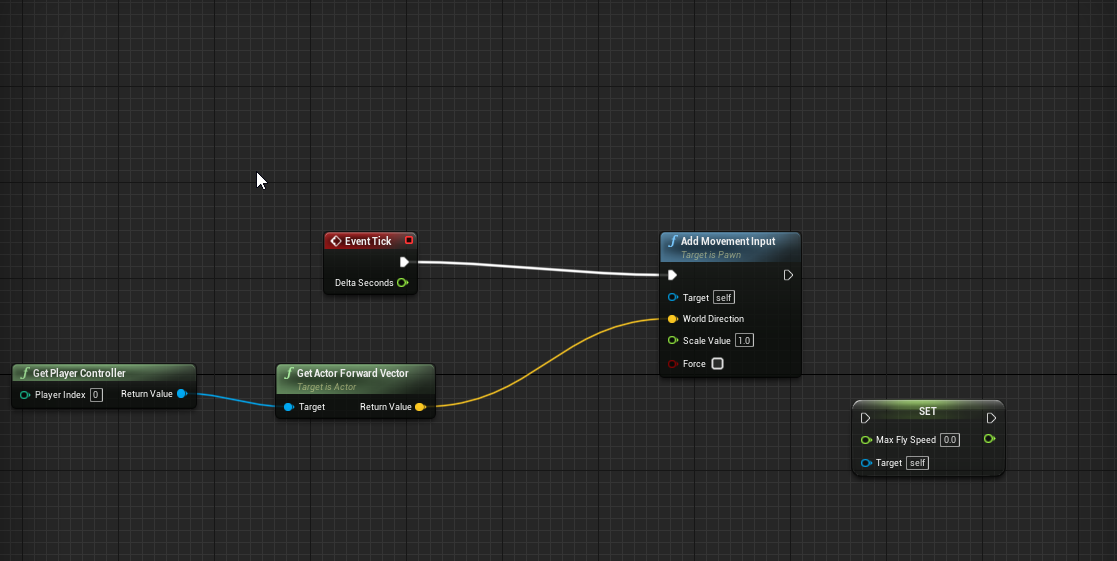
its automatically going forward and the fly speed by default is high as i want to move left right up and down easily
but i want forward to be slower
mental tendon
the function is not accessible from an actorcomponent for some reason even though I am trying to call it on an actor variable
 dawn gazelle
tall pine
but i want forward to be slower
dawn gazelle
tall pine
but i want forward to be slower
You can set the scale value lower on the add movement input node and they should then more forward slower.
dawn gazelle
mental tendon
hey guys how's it going?
is there a way to call this node on an ActorComponent?
if you have a reference to the actor component you should be able to plug it into the Target pin.
mental tendon
@dawn gazelle it looks like, it is not accessible, at all
tall pine
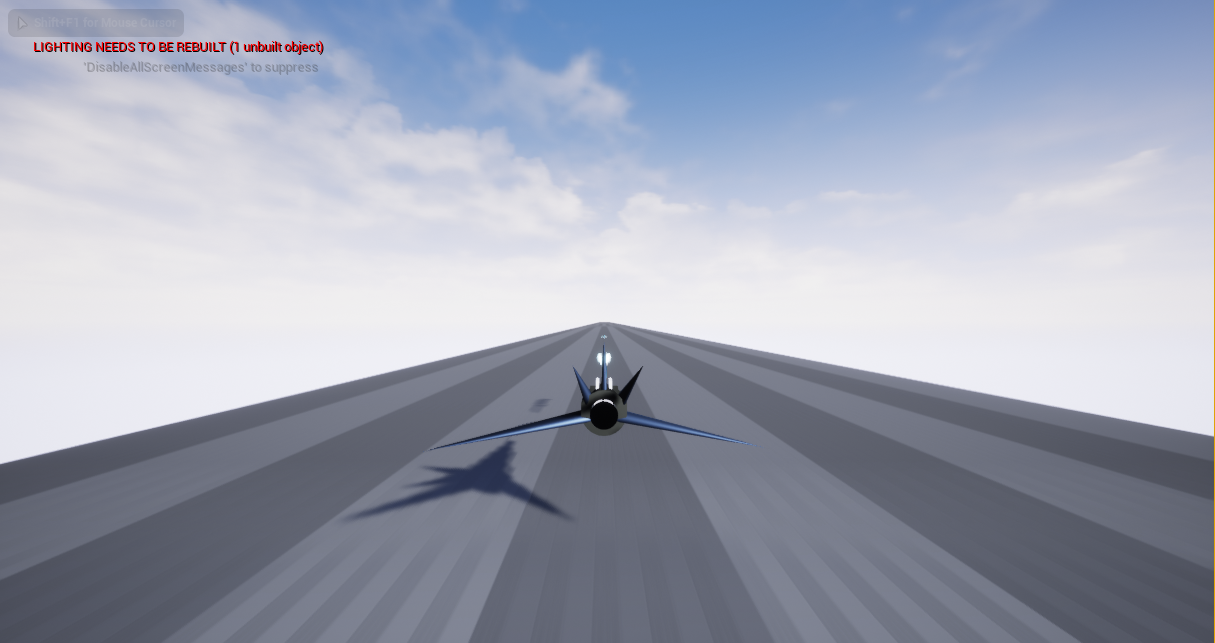
i got stuck w trying to figure out how to make the camera not lock to follow the flying player from behind
i want the camera to follow the player, but stay in the middle while the player can move freely left or right, up and down
how were i about to do that?
https://i.imgur.com/9rg9RRf.png
 weak kindle
l dont have any idea but nice work there @tall pine
How can l create a 3d widget and when l will look a button after some time it will trigg it (l will use a linetrace ofcourse but how can l connect it with the 3d widget)
dawn gazelle
mental tendon
the function is not accessible from an actorcomponent for some reason even thoug...
If you're trying to plug in "Parent Actor" into the "Get Owner" node, then it will not work as an "Actor" is not an "Actor Component" which is what that node requires. If you're calling the "Get Owner" node from within an "Actor Component" then you should get a return value of the "Actor" that owns it.
dawn gazelle
mental tendon
<@!218956378654507008> it looks like, it is not accessible, at all
Sorry my bad... That node is only available to Actors.
viral torrent
@tall pine inside your arm component try to uncheck Inherit Yaw
tall pine
arm?
viral torrent
you don't have a spring arm component in your pawn ?
tall pine
not yet
viral torrent
maybe the issue 😄
tall pine
do i put the spring arm as a child for the camera?
viral torrent
camera is a child of spring arm
mental tendon
@dawn gazelle how would you make it available for actorcomps too?
tall pine
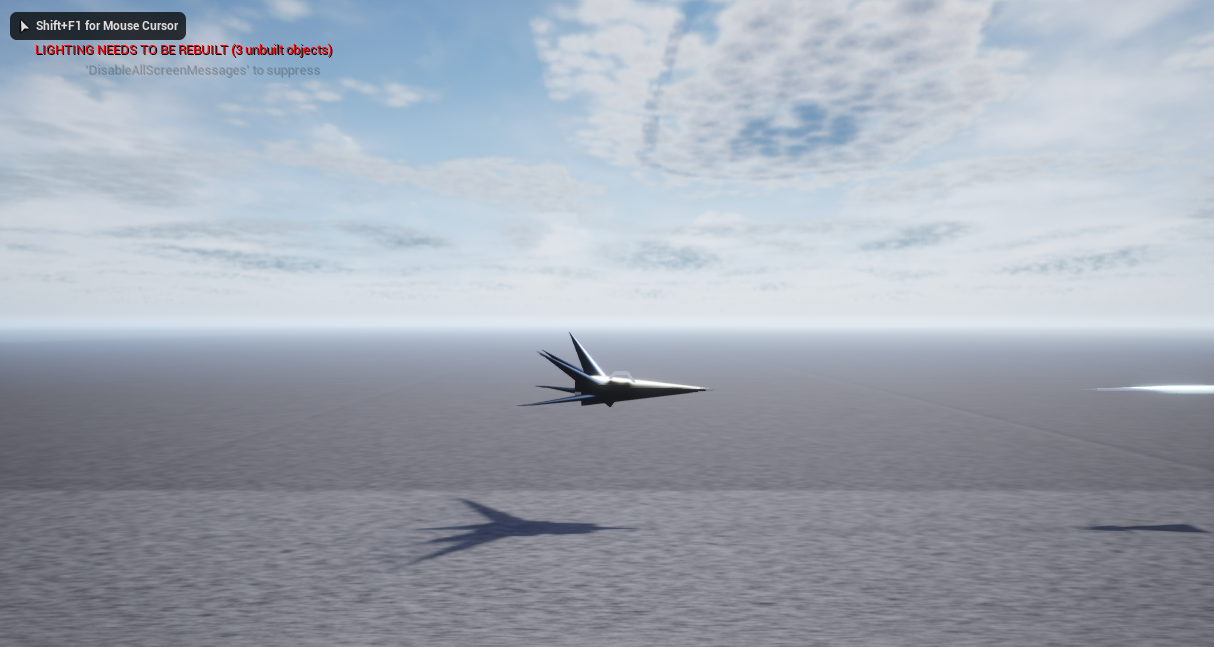
when i disable inherit yaw it puts my camera to the side, the other inherits don't seem to work https://i.imgur.com/S6BKtGG.png
 tall pine
yeah thats what i want
 trim matrix

place a camera actor in your world
and in the level blueprints add these nodes to get started
documentation on it here: https://docs.unrealengine.com/en-US/InteractiveExperiences/UsingCameras/Blueprints/index.html
A How To Guide for using a static camera in Blueprints.
trim matrix
weak kindle
How can l create a 3d widget and when l will look a button after some time it wi...
What?
viral torrent
@mental tendon I think the only way in BP is to create an event in your actor with the Add Component node and call it from your component
but you loose the flexibility of component
tall pine
i got it to work, now i will have to set it up somehow to follow the player behind him, as the ship just flies away into the distance
viral torrent
maybe use a spline
trim matrix
you want the camera to follow the player ?
tall pine
yeah
trim matrix
but not snap to him?
tall pine
nom kind of like an endless runer where player can move left right and the camera stays in middle
trim matrix
a few ways you can do that
if the character can only move forward on the X axis
then you could either set the game camera to move up at the same speed
set the camera to move forward at the same speed as the character*
well that's probably the best way to do it
I'll think of an example and get back to you
I don't even know what a spline is though so jack might be on to something
 orchid garden
@trim matrix I believe @weak kindle wants to do something like this, except instead of having it activated by the mouse have it activated by a trace:
https://youtu.be/_1zWWabWof0

What is the Widget Interaction Component in Unreal Engine 4
https://docs.unrealengine.com/en-US/Engine/UMG/HowTo/VirtualKeyboards
Source Files: https://github.com/MWadstein/UnrealEngineProjects/tree/WTF-Examples
Note: You will need to be logged into your Epic approved GitHub account to access these examples files. https://github.com/EpicGames/...
orchid garden
looking at your trace dots it looks like your camera's in motion
viral torrent
@trim matrix @tall pine about spline the idea is to setup a spline that can be for the terrain or one specific for camera and get position on spline using FindLocationClosestToWorldLocation to know the location of spline of your ship
tall pine
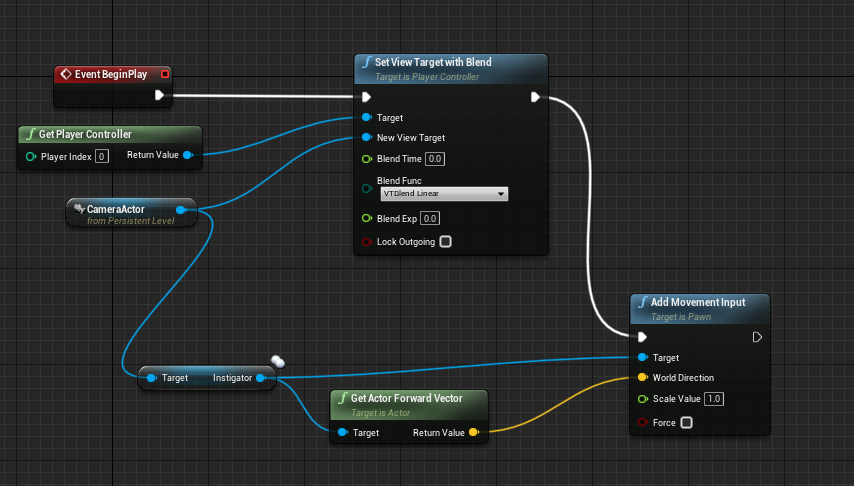
ive been trying to add movement to camera but doesnt work so far https://i.imgur.com/w74YhnW.png
no clue about splines
viral torrent
you need to call this on tick
tall pine
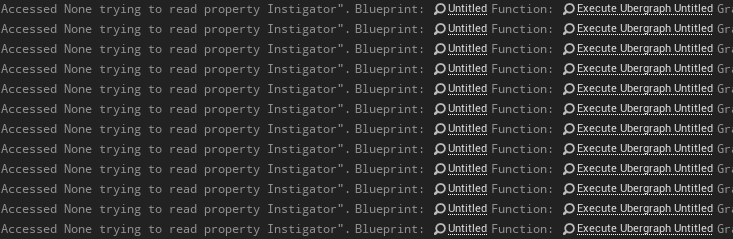
same error popping out pointing at the add movement input https://i.imgur.com/n9tYhX4.png
 viral torrent
instigator of camera is null since you placed it in the map
tall pine
how would i go about fixing that issue?
 hollow drift
I created a new interface bp. I added it to my desired bp i wanted to use on and searched for the function which i added inside of it. But it seems not to appear. Any idea why?
orchid garden
did you compile after adding the interface?
hollow drift
yes
i added a second one
second one appeared:
CallFilterValidTiles did not appear for some reason
bug?
orchid garden
hrm... can't say i've ran across that yet
orchid garden
i do know i couldn't get a interface call to work between a widget and a actor component.
hollow drift
-_-
I could get it almost to work
just i cannot get my event going
and i cannot rename a custom event and it says event already exists
weak kindle
when it is false it will delay 0.1 and reset to doonce but that will continue running after completed?
trim matrix
@weak kindle Reset Node does not continue, it just allows "Do Once" to function again
 green briar
Anyone know why this animation is playing on one but not the other? It works fine on the Knight, but won't play for the Skeleton. Clicking on the ANIMATION tab for the skeleton I can go through and see all the animations do work for him, I just cant seem to get them to play
trim matrix
@green briar if the animations really do work for him then there is an issue somewhere in your logic
@green briar something may not be connected properly
@green briar to be honest with you though, nobody in blueprint section is going to be capable of answering your animation question efficiently lol
green briar
Oof, yep, one of the nodes wasnt connected somewhere, I really should have looked harder
trim matrix
@green briar glad I helped, sorta. lol
 north bay
@orchid garden Not sure if you remember but I made the camera switch work in the end while the players are loading from the lobby inside in the new level . This code you see is inside the Player controller.
The problem I got now is that, while it is switching to the new camera, it is not using the camera that's inside the level, it seems to use just the blueprint of that camera and centres it inside the playable character.
How could I make a proper reference to the camera inside the level that I can use to put in the Player controller Blueprint?
trim matrix
I don't know anything about multiplayer yet, but why wouldn't that go inside of the level blueprint? Asking for learning reasons
@north bay
weak kindle
know someone what is the best mid range volume that mics can input?
otherwise l will needd 239471 tests
north bay
trim matrix
I don't know anything about multiplayer yet, but why wouldn't that go inside of ...
Omg this actually worked :'), I tried it before but without a small a delay and it didn't worked, but now I tried with a delay and it works fine. Thanks!
trim matrix
@north bay I'm glad that it worked! I figured it should go there
north bay
Yeah good notice, this si aslo my first multiplayer project so I'm still learning as well
orchid garden
north bay
Omg this actually worked :'), I tried it before but without a small a delay and...
casting, rep notify, ug... can all be a pain, expecially when trying to trace the problem (even with debugger)
trim matrix
hi
how can i fix this ?
i got 4 the same blueprints and 4 different meshes in the construct
i only can use one construct
maiden wadi
Construct is just a function that runs while the object is being placed for the first time, either when it's being spawned for gameplay use or placed in the editor. You can't have four different construction scripts for the same class.
orchid garden
anyone know if there is a way to turn a curve value to a variable for a timeline?
trim matrix
ow i didnt knew
is there a way to take the 4 meshes in the same actor and put it like that?
thanks authaer
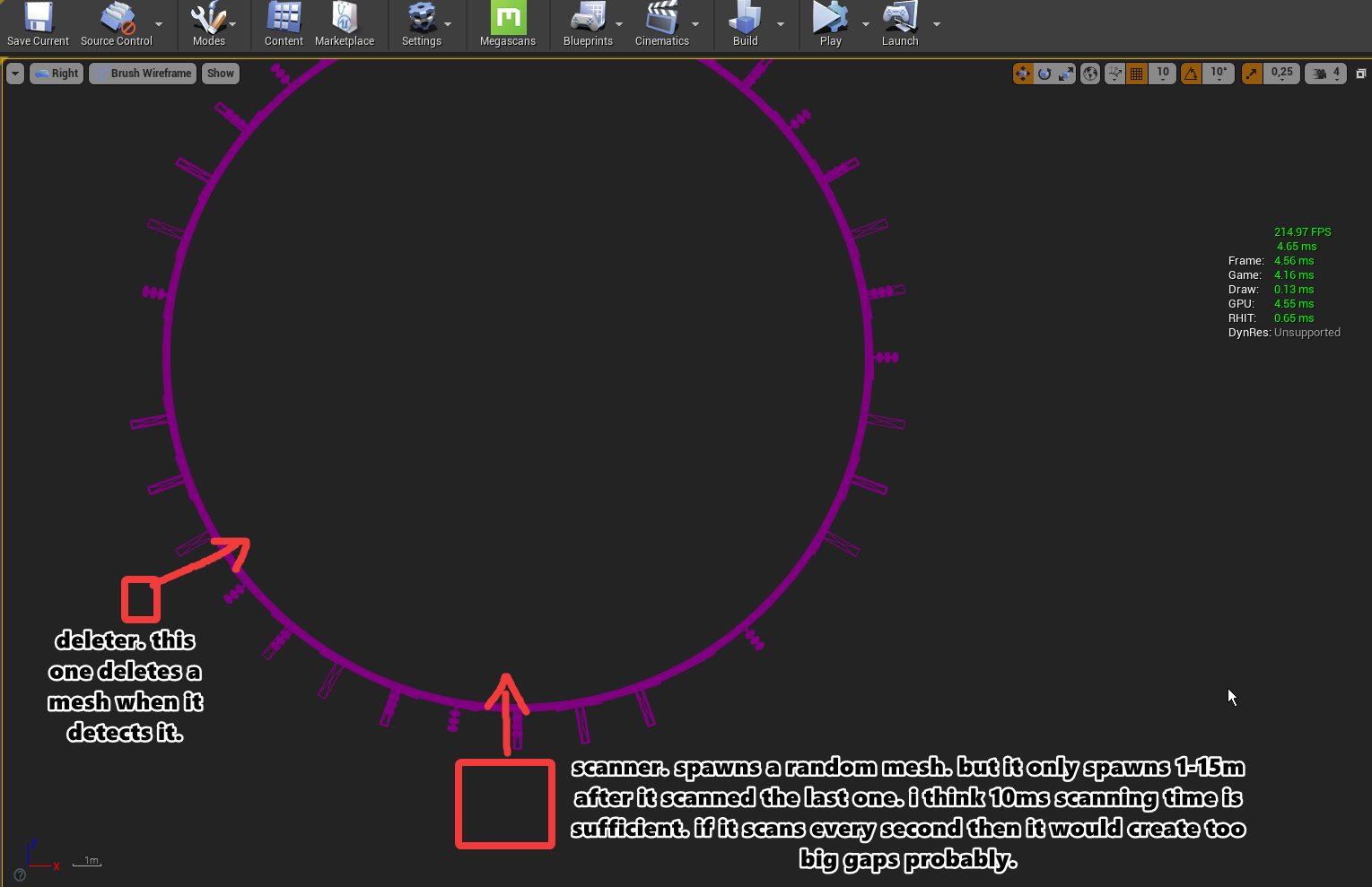
ow i have to set it i think xD
lol easy haha
maiden wadi
@trim matrix Not sure what you're trying to do?
trim matrix
im making a covering system on the cars :p
so i dont have to make it over and over again :p
 rain egret
Any way to improve procedural mesh generation and have it slowly be generated at runtime and not stutter?
orchid garden
@maiden wadi only asking you cause you've made a day/night cycle, is there a way to control when the stars begin showing after the sun reaches x point in the sky? I've noticed the sun sets on the horizon at about 16:50, but the stars don't start showing till 18:00, im wondering if i can manage to make the stars show at like about 17:25 instead.
 static charm
Rider, depends which part is causing the stutter, i use async thread to combine my procedural meshes. Collision generation is costly too
rain egret
I make cube structures out of premade mesh data with simple convex collision
static charm
if you are making a lot of the structures at once, like through a For Loop, then you'll have to spread the creations out over time.
rain egret
Makes sense, but all of that happens in a function so I can’t really add a delay node
static charm
Yeah you can keep the main code inside the function but put the begining/loop outside the function
But if it's only creating like 3-10 sections it shouldn't stutter too bad.
Also if you Nativize the blueprint and Package the game, it will solve a lot of Loop performance issues, since Nativize turns it into c++.
rain egret
I will look into nativize thanks
This is basically the code
Since it’s all in one function there’s not really a outside loop
static charm
Well you can just make the first part not a function.
Although, since there loops inside, even slowing the first loop might not get rid of all stutters.
But like i said Nativize when Packaging will help a lot, or you can put some of the code into Async Threads.
orchid garden
wouldn't adding delays inside that cause issues with the past vector? i.e. previous getting overridden by the next before delay ends?
orchid garden
wouldn't the delay need to be done before the vector is created is what im asking?
rain egret
Oh that’s a local variable
orchid garden
nm
my brain was over thinking 😉
each function call is independant of the previous... wasn't thinking function was thinking chain.
static charm
noonga, you can search blueprint vs c++ and read about 3 days worth of material on the topic, but here's a summary
rain egret
Thanks for the help lads, I will test it out later
static charm
blueprint has about 90% exposed functions of the available c++ you can do in ue4.
you can manually expand capabilities by buying/finding plugins or writing c++ that exposes more blueprint.
orchid garden
@static charm so if im looking at it right, and with what your saying to stop some of the stuttering... wouldn't the only place he would need a delay be right about here?
static charm
Yup! unfortuantely we can't put delays in a loop. We have to edit/make a custom loop node with a delay inside the loop itself.
or one can use a Set Timer on a loop with a counter
orchid garden
i was just going to say a timer with a self kill
static charm
yeah ive had issues with custom loop delays. so I usually end up using the Set Timer
orchid garden
or .. just pause timer by handle, then after kill the timer.
idk... probably overthinking again.
static charm

orchid garden
anyone know how to control when the stars show on a skydome?
static charm
like in the default Sky BP?
orchid garden
yeah
static charm
hmm, i think by default it uses the rotation of the levels main Directional Light
orchid garden
seems they don't show till about 1 1/2 to 2 hrs after the sun passes the horizon.
static charm
but you can turn the auto feature off and manually set the sky with a slider i think
orchid garden
this is what it looks like when the sun reaches the horizon
and the stars don't seem to show till its rotated to about 45 degrees below horizon
trying to make it abit more... realistic.
static charm
do you need your setup to be dynamic sky or is it just a static scene?
orchid garden
its dynamic
er if im thinking properly... sun moves position depending on time of day
static charm
orchid garden
i've basically made a timeline that sets most the values:
static charm
you can edit that < 0 check and make it so the stars blend in at whatever sun height you wnat
orchid garden
sun height is determined by... rotation?
static charm
depends if u have a light source selected in the skyblueprint
orchid garden
yeah the light source is set in the blueprint
dawn gazelle
orchid garden
anyone know if there is a way to turn a curve value to a variable for a timeline...
You can use an external curve if that's what you're looking for
Oop.. didn't realize I wasn't at the bottom of the chat XD
orchid garden
i was just looking for a simple way to change the float value @dawn gazelle , went with basic math from a given value and the fixed value 🙂
@static charm there seem to be several spots it does that abs check for the starts (update sun direction, refresh material)
static charm
good catch
maiden wadi
@orchid garden Been away for a bit. Are you using the default skysphere?
orchid garden
@maiden wadi yep default skysphere with sun defined in it.
maiden wadi
The stars are based on the material's parameters. AFAIK, Sunhight is the major player for that, but Star Brightness also plays a role.
orchid garden
hrm... so the stars start blending in at 0 sun height and become visible at -0.7 so.... to get them to start showing when the sun gets to the horizon, i'd need to modify the abs check to.... 0.7 instead of 0?
orchid garden
I also have a issue when the player turns/moves, the stars seem to vanish from the sky?
nothing i do to the abs check seems to change anything.
static charm
did u edit any other part of the blueprint? might have changed its overall behavior. especially if you said the stars disappear when the player moves.
orchid garden
yeah im not getting that, im getting the same results with its being 0.2 or 0.0
maiden wadi
@orchid garden More or less the higher that both Star Brightness and Sun Height are, the brighter that stars will be. They just get added to the zenith color and lerped out from the horizon. This is the actual part of the material where the stars are added, that TextureSample being the star material.
orchid garden
@maiden wadi , all i want it to do is fade to night sooner, rather then waiting till the sun is 45 degrees below the horizon
as it sits right now, when the sun drops below the horizon on my day/night cycle, the sun intensity and skysphere intensity get set to zero so you only have ambient lighting lighting the night.
but having a bright sky when its supose to be night... just doesn't really work.
maiden wadi
Hmm. Without changing star brightness, it's likely that you could just multiply SunHeight before inputting it into the Abs node for the set material parameter. The one Gallon just posted a moment ago.If you multiply it by.. two? I'd assume that would bring out stars twice as fast if you clamp it after multiplying.
 lean compass
how can i do camera tilt when strafing?
maiden wadi
@orchid garden Does this work by chance?
Maybe a larger multiplier, but still. Should show stars sooner with higher multiplier values.
orchid garden
hrm nope
orchid garden
still happening at the same exact sun height
orchid garden
im in 4.25.4
static charm
when sun height is less than 0 is picks A
when it is 0 or greater it picks 0, multiplying A input has no effect on the switch over point
orchid garden
maiden wadi
That's fair. You might need to up the < a little above 0.
orchid garden
i set it as high as 10 and it still showed the stars at the same point as the above picture
static charm
did u edit both abs checks
static charm
the one in the material gets overriden by the blueprint and at runtime
orchid garden
its stuff like this that just totally dumbfounds me because while its working for one person, and i can do the exact same thing and get a totally different result, doesn't make any sense.
static charm
well to be honest it sounds like you've added/changed a few things
it's possibly overriding something.
maiden wadi
What are you currently doing for the SetMaterialParameter?
static charm
if you save your level and test out a fresh blank level with the sky, you'll see it work
orchid garden
this is just the thrid person template level
far as what im changing via my day night cycle for the sun, just its rotation and light intensity. for the skysphere - the light intensity.
orchid garden
maiden wadi
What are you currently doing for the SetMaterialParameter?
i reverted them back to default.
orchid garden
maiden wadi
<@!458977415176257536> Does this work by chance?
in a clean level with the edit in that post, this is what i got:
maiden wadi
Try the < 0.2 as well.
orchid garden
orchid garden
little lower on the sunheight, but still happening about the same time of day.
which means, the sun height is being modified but the stars showing are still happening at the same 45 degrees below horizon
 jagged burrow
hey, I'm struggling to understand how to work with different systems with blueprints in unreal. Specifically how to pass on variables into a blackboard for example
I understand that it's map agnostic, but what would be the right approach to pass a variable, for example a location of some element, in a map to a blackboard, in order to make the AI move to that point?
orchid garden
@maiden wadi the only way i seem to be able to get it to somewhat work is by speeding up the suns rotation to reach that 45 degree angle after passing the horizon.
jagged burrow
sorry for hijacking guys
maiden wadi
@orchid garden Out of random curiosity. What happens if you just simply input straight 1 into both star brightness and sun height?
orchid garden
same thing
maiden wadi
@jagged burrow Nah, you're all good. To change an AI's blackboard from blueprint and not from the behavior tree, you just need to call GetBlackBoard on the pawn(not the AI Controller), and use the blackboard to SetValueAs. Drag off of the KeyName input and start typing Literal, it'll give you a node for a Literal Name.
maiden wadi
@orchid garden Wait, you're saying that this doesn't bring stars up at all times?
orchid garden
oops i did the wrong one on one of them lemme do it again lol
jagged burrow
It's such a simple task but I'm struggling to grasp the overall concept of interaction between different blueprints
maiden wadi
@jagged burrow You'll get there. Curiosity is the best tool. So is simplicity. If you're making something that's getting too complicated for you to follow on your own, stop. It's likely there's a better way or you're missing something that could simplify it a ton. But just try making small things. Copy some stuff from games you enjoy. You'll be learning new things for decades.
orchid garden
shouldn't it be showing the stars?
jagged burrow
hahah thanks
maiden wadi
It should look like this with those settings in a default skysphere.
orchid garden
if i look up before running :
maiden wadi
Move your sun to the horizon and check the RefreshMaterial checkbox on the instance.
Should still see stars, and the sky should be orange.
If that works, I can't think of a reason it'd break when you start theg ame.
orchid garden
hrm....
something screwy is going on... now the stars are dark blue after moving sun lol and refreshing... lol...
first is ran in new pie window, second is how it appears in the editor now.
formal echo
Just a quick question, sorry to interrupt, I have 3 possible scenarios (exec and branch on the top left). Each comes with its float value (on the bottom). How am I supposed to pick only the only that's currently active? By replacing all the braches and sticking in Select nodes?
orchid garden
im a thinking im gonna give up. the editor hates me.
dawn gazelle
formal echo
Just a quick question, sorry to interrupt, I have 3 possible scenarios (exec and...
Set the values into the same variable and then reference the variable on the output?
maiden wadi
@orchid garden Second looks like the star brightness multiplier was inverted to negatives.
 faint pasture
Anyone here pretty good with bitmask enums?
maiden wadi
@formal echo Things like this are most often done in functions for this reason. The Branch False/True is easy. Use a Select Float. But differentiating the execution lines return value is what I'd recommend using a function with different return nodes for.
 formal wren
How would you guys implement IK handles? I want to pose my charcter by clicking and dragging specific bones?
faint pasture
Is there a better way than a bunch of branches to select actors to spawn from a bitmask?
oh duh i can just use a dictionary
 odd ember
faint pasture
Is there a better way than a bunch of branches to select actors to spawn from a ...
odd ember
faint pasture
Is there a better way than a bunch of branches to select actors to spawn from a ...
the select operator. though why you'd want to use bitmasks in BP is beyond me
 candid hull
Is there a way to switch a skeletal mesh to ragdoll mode in the middle of an animation without resetting its pose? I'm setting Simulate Physics to true while an animation is playing, and while that cancels the animation like I wanted to, it also resets my skeletal mesh's pose, which is not what I wanted. 
faint pasture
odd ember
the select operator. though why you'd want to use bitmasks in BP is beyond me
I use bitmasks heavily in my map generation, just prototyping the actual spawning of actors based on the generated map data.
each bit corresponds to tile data such that 10000000 is solid, 01000000 is walkable, and 11000000 is a cave (solid + walkable)
rain egret
@static charm sorry to ping you, you suggested earlier that i use a set timer node. i looked into what that is and i understand that it will fire a function with a delay. however i dont know how this would help me in my case since all the examples i saw it being used in simply call the function but dont feed it any information
faint pasture
00100000 is water, and 01100000 is bridge
odd ember
in most cases it doesn't really make sense to use over explicit enums since the speed of bitmasks is amortized by BP speed
faint pasture
I'm only using bp to prototype the rendering right now, the bitmasks are used in mapgen (wave function collapse). Anyway, I'm just using an int to tile class dictionary right now
 shadow saddle
anyone know where is the lifespan option for projectile in BP
odd ember
shadow saddle
anyone know where is the lifespan option for projectile in BP
perhaps on the projectile movement component? I forget
upbeat copper
What is wrong with this?
I figured it out. There is relatively simple day/night cycle for someone who doesnt want to use level blueprint. Just tag your sky sphere with "Sky Sphere".
It works as separate object (blueprint)
maiden wadi
@upbeat copper Get rid of half of that and just use GetActorOfClass if you don't care which instance of it you get. There's nothing wrong with what you posted. Your Skysphere's Directional Light reference is null. It hasn't been told to use a specific directional light.
upbeat copper
Oh. thanks 🙂 That is simpler.
odd ember
not sure why you'd not want to use level bp in this case but hey
upbeat copper
I dont want to use level blueprint because if i end up converting my code to c++ then it can be easier (maybe) 😄
Or atleast i want to avoid using it
odd ember
doubt it. the level blueprint was designed to function as a manager for level actors
you can supercede it in some cases but if you're doing level specific logic it is really the best place to put it
maiden wadi
@upbeat copper Realistically, if you convert this to C++(and it's not a bad idea even in blueprint), you'd just combine these actors all into the same actor by using their components instead of using multiple different actors anyhow. It'll avoid you having to iterate over the actors list to get the skysphere all of the time.
odd ember
yeah GetAllActorsOfClass has more impact on your performance than the level blueprint will at this point
(or get all actors with tag, same thing)
candid hull
candid hull
Is there a way to switch a skeletal mesh to ragdoll mode in the middle of an ani...
Oh, nevermind, I just needed to adjust the constraints between some bones in the physics asset. 
upbeat copper
I replaced it with get actor of class. But if i want to have multiple levels with sun's do i need to combine all of those actors to one?
odd ember
realistically you'd want a subsystem if you're doing it in CPP
upbeat copper
Subsystem?
maiden wadi
One actor just simplifies it. One actor to drop into the level instead of two.
odd ember
subsystem is a cpp only feature
but can be exposed to BP for calling
a subsytem is the closest you get to completing the S part of ECS in UE4
upbeat copper
Okay. maybe i'll stick with level blueprint for my blueprint prototyping 🙂 Its likely that i will then convert all performance critical code to c++
After i get basic concept done
odd ember
where's that Allar video
upbeat copper
what?
odd ember

How to determine whether or not you should be using Blueprints or C++.
I had to find it
(the second part applies)
upbeat copper
Okay. thanks 🙂 i'll use blueprints for now until i get some basic thing done
orchid garden
so... how do you guys deal with map edges being visible?
dawn gazelle
Hide them 😛
odd ember
you've got plenty of ways of dealing with that
orchid garden
say if your world map is a island?
odd ember
I assume your level isn't going to be a flat plane
water is a natural border
rocks can hide seams
fog can do work at a distance
screen space effects can be employed
orchid garden
well i want them to be able to go out into the water. is there a simple way to make it look like it goes on forever?
odd ember
tbh this is highly contextual on the type of game you're making
a big enough water plane
I think a water pizza in this case is better
orchid garden
i don't think you understand
odd ember
maybe not
orchid garden
they wouldn't just be 'floating' on top of the water.
maiden wadi
97% of games probably just darken the water at depths the player will never reach and expand the landscape at least that far.
Subnautica and Raft both do it.
orchid garden
i must play they other 3%
orchid garden
.<
odd ember
😉
 gritty elm
i'm trying to import fbx, and it's size is 300mb, when importing reach to 100%, unreal engine stop responding forever
odd ember
you can make currents that force players (and everything really) back onto the island
maiden wadi
@gritty elm Why is it so huge? Maybe simpify the model a little?
odd ember
you can engineer some teleporter work to make it seem like the water goes on infinitely once they reach a certain depth
there's a lot of options
orchid garden
300mb... what you importing a city?
maiden wadi
Yeah, that FBX file is at least 50x bigger than it needs to be unless you're trying to make a movie or something with some billion polygon object.
orchid garden
i think my biggest fbx is about 1mb tops.
maiden wadi
I mean even with a 100k poly model and some animation work, I'd be hard pressed to get one over 6. 300 is insane.
orchid garden
average sizes of mine:
maiden wadi
@orchid garden Is the black line your end of land underwater, or your "beach"?
orchid garden
yep Authaer
(even my animations average at 600kb)
end of the landscape under water (sry skipped the last piece) @maiden wadi
odd ember
use a depthfade node on your water material?
maiden wadi
Games like Subnautica just do this. The landscape just goes down a ways, and no gameplay aspect can get a player deep enough without dying to see anything else. https://pm1.narvii.com/6733/cfd4ce3e6f2ca5940597ff44fd890e47a19cfd38v2_hq.jpg
 orchid garden
plan is to let them reach the bottom @odd ember
odd ember
I mean the subnautica example is good. various military style games do similar things even on land
orchid garden
do plan on having a invisible border to stop them from going past a certain point.
odd ember
you could also do the currents that I suggested
orchid garden
invisible border is simpler 😄 currents i don't have a clue about
odd ember
well yeah it depends on how much effort you want to put into it
 zealous moth
i am scared to ask what this is
maiden wadi
Depends on how clear you want the water at the depth. Post process darkening can hide a landscape pretty close. Sharp dropoff could keep you from having a lot to render past the invisible border. Slow tapering with clearer water means more level design past the level depending on camera angles.
orchid garden
@odd ember depends on being able to to it or not, not the effort. borders I can at this point, currents being i have no knowledge about it means I can't do them. Functionality first, Eyecandy and special effects after.
odd ember
currents are functional though
they would push you back
that was the point
how you'd represent that in cosmetics is an open question
orchid garden
and i point you back to my previous statement.
odd ember
just saying your previous statement said functionality first
orchid garden
you seemed to of missed a KEY part about Currents.
and i would consider currents being special effects applied to players yes.
odd ember
doesn't make them less functional though since they do perform a gameplay function. pushback is a mechanic, once again, whether you want it or not
orchid garden
"here you know absolutely nothing about how to make this work, even though your just trying to get the basics done you should do this now!" yep seems logical.
odd ember
I'm also not forcing you, it was a suggestion. I'm just saying it's functional, not cosmetic as you would otherwise imply
orchid garden
currents just 'thinking' about how they would react with the player would be both functionality and cosmetics to be perfectly honest. hense why i labeled it as 'special effect'.
orchid garden
maiden wadi
Depends on how clear you want the water at the depth. Post process darkening can...
i'll look into that Authaer, sounds like a good solution, post process and edge drop
maiden wadi
It's just an extention of pretty much everything else about game design. Hide it.
There's a reason that so many games abuse darker atmospheres. It makes level design incredibly easier.
odd ember
even in level design it's not a grave concern as most players aren't invested in breaking the game world
orchid garden
@maiden wadi btw, the problem with the stars n' night not wanting to change, seems to have something to do with me changing the suns rotation, I edited the timeline curves for the sunset time / lighting / fog and have it working pretty good now.
when you say fog im assuming Exponential Height Fog?
maiden wadi
For the hiding effect?
orchid garden
odd ember
even in level design it's not a grave concern as most players aren't invested in...
im one of those player who goes "ooo look at that, i wonder if i can get to it" ... 4 hrs later ... "hrm... seems totally blocked.."
odd ember
orchid garden
im one of those player who goes "ooo look at that, i wonder if i can get to it" ...
to be fair that's on the level designer. if the player sees something they would like to get to and can't that's definitely a design failure
orchid garden
well... i always look in all the nook and crany's when playing a game, part of the fun, finding things most people don't even give a second glace to.
odd ember
but there's a grain of wisdom here: make the borders of your world uninteresting 😉
orchid garden
even in fallout and skyrim, i was looking for ways to get past the borders in certain spots just to see what was there.
in fallout 76 i did find some interesting border holes that were intentional, mostly just eye candy but hey was still cool to find.
tall pine
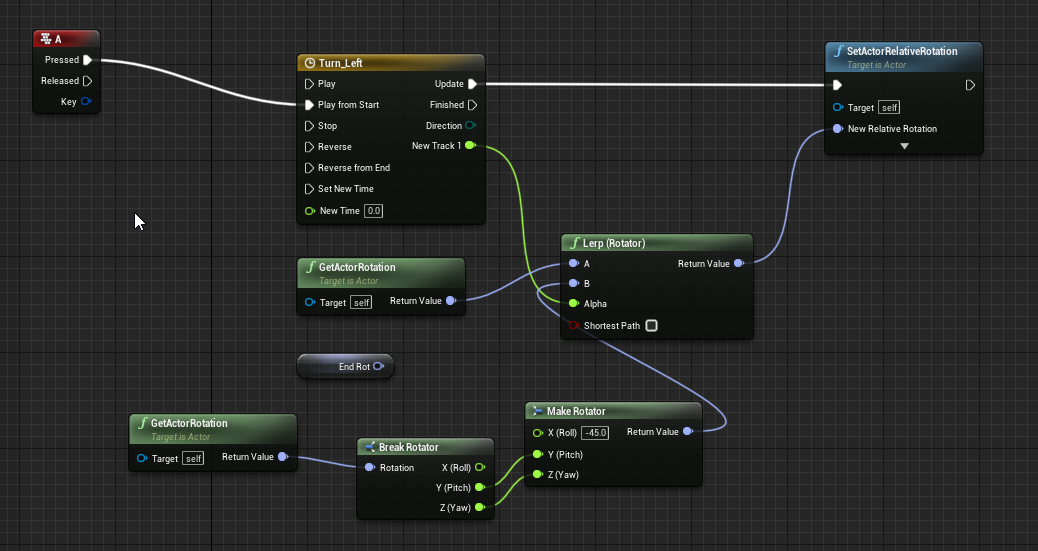
https://i.imgur.com/GIIyRf7.png i've been trying with a timeline editor to make the player flying ship turn smoothly left or right depending on the direction input, but as soon as i press A the ship instantly turns like 45 degress
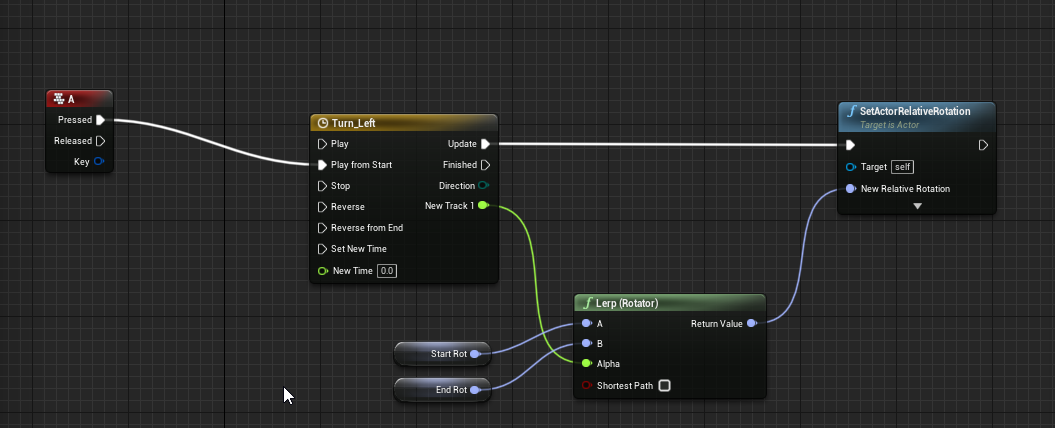
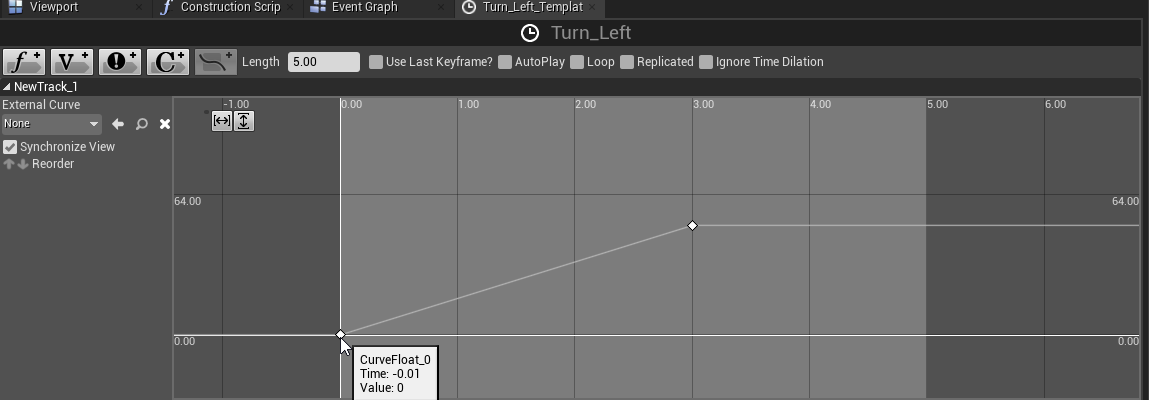
what am i doing wrong?
orchid garden
your time is always zero?
tall pine
the new time you mean?
orchid garden
for the time line yes, its always zero
upbeat copper
How can i combine all my level stuff into one actor? I mean that way so i can access blueprints in them from general place if you get it
maiden wadi
@orchid garden Fog can help. PostProcess can help a lot with that as well. This video kind of shows what I mean with that. Part 2 of 4 at about 6:10 shows the difference of enabling a scene depth underwater post process effect. It's pretty huge. https://www.youtube.com/watch?v=s2__Lmt-ywo
dawn gazelle
tall pine
https://i.imgur.com/GIIyRf7.png i've been trying with a timeline editor to make ...
I'd check to make sure the start and end rotations aren't getting set to the same value.
tall pine
i followed some random tutorial and i created 2 variables with nothing in them, then "get" them and plugged into that rotator
dawn gazelle
So you're not setting them anywhere?
tall pine
no
dawn gazelle
There's your problem.
dawn gazelle
You'd need to set whatever the forward rotation is, and then whatever the start rotation is +/- 90 degrees, but you'd probably want something to make sure a player isn't currently turning before starting that timeline.
 rough blade
is it possible to apply float values to a vertex?
IE- I line trace, hit a vertex, and receive the float associated with said vertex
odd ember
upbeat copper
How can i combine all my level stuff into one actor? I mean that way so i can ac...
use the level blueprint. it has access to all actors in the level
orchid garden
maiden wadi
<@!458977415176257536> Fog can help. PostProcess can help a lot with that as wel...
cool vid ty @maiden wadi that helps 🙂
faint pasture
rough blade
IE- I line trace, hit a vertex, and receive the float associated with said verte...
What float value?
rough blade
@faint pasture Im aiming to make a tank combat game, various parts of the tank will have different armor values (float) and the best way I can think of doing this is somehow apply a float value to each vertex that my traces can read.
zealous moth
@tall pine a few issues with your setup. So alpha goes from 0 to 1 and your timeline goes from 0 to what, 60ish? You want to set it up to go to 1. You should also have your timeline length be the max time. You have 3 set but your length is 5. Set that to 3.
Finally, are you rotating a player controlled pawn or just an actor? If the former, you need to rotate the player controller as well.
@rough blade maybe not vertex but you can either have boxes or a skeleton and do damage based on that hit.
tall pine
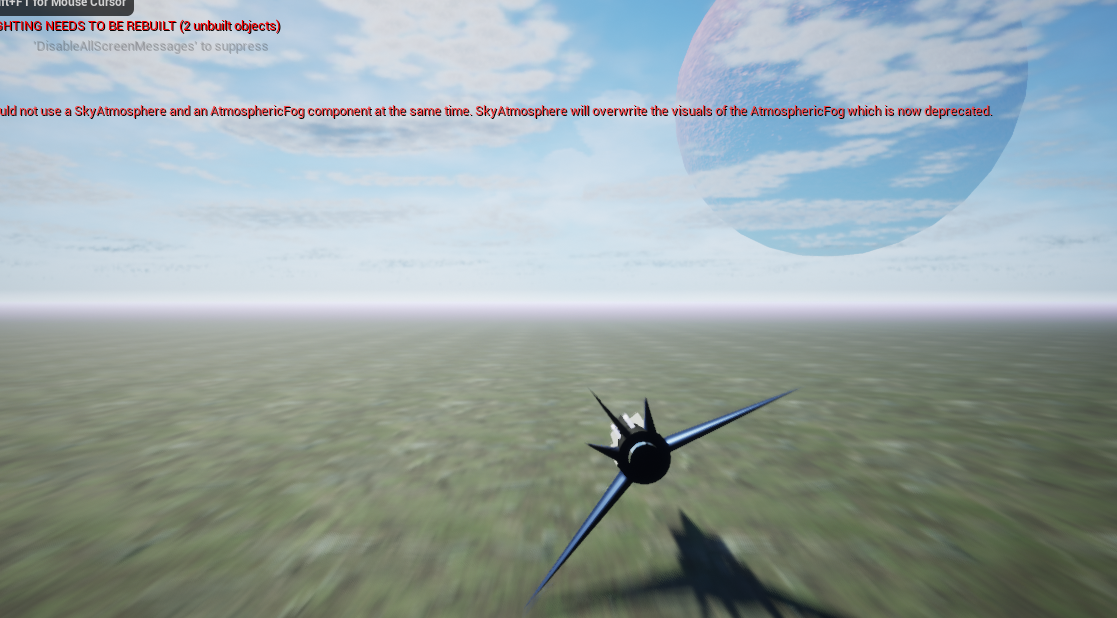
@zealous moth https://i.imgur.com/cLvJmTA.png oh god i figured it almost out myself. it roughly works how i want it to
 zealous moth
@tall pine there are a few gameplay hitches though
what if i pressed it twice in succession?
you'd be better off adding rotation to the mesh and clamp it at a specific value while being pressed and the reverse when released
tall pine
how i would go about doing that?
zealous moth
use "add rotation" node with a retriggerable delay
tall pine
so i delete the entire thing which comes after the A button node and replace it with the rotation thingy
zealous moth
you dont need to delete it
if this works for you and you ant to commit to a button input to trigger a timeline, that's fine
you'd have to work on what happens if you press it multiple times
anywho, just food for though
tall pine
nothing happens, and the player is stuck in that position
zealous moth
i know, since you don't have a reversed input 😛
tall pine
ya, so im looking to hold A which makes the plan flip 90 like in that picture (almost, need to fix the amount)
and upon release go back to standard position
il need the input key held down?
zealous moth
no no, you have a "released" input in the A button, just plug in the logic
tall pine
oh i plug into reverse
tall pine
i copied and pasted the entire thing for pressed and released, i plugged the release into reverse but the starship still is stuck
is this intended?
zealous moth
you will need to actually develop the reverse logic
the reverse of the reverse is the forward
tall pine
another timeline
orchid garden
has anyone done a realistic moon cycle? the moon oribits the earth every 27 days, and its phase cycle is 29.5 days (from new moon to full moon), curious about the math involved for that to place the moon properly in your world...
zealous moth
cycle = trigonometry
You can probably derive it to obtain what state of the moon it is in
orchid garden
well it seems like it would be eaiser if the sun didn't orbit your world and was the other way around.
the phase state thing i don't think would be too hard, but my brain just can't seem to do the math for the moon oribit to the world... i think the sun orbiting the world is whats making me go 'gah erg ooph' every time i think about it.
dawn gazelle
tall pine
another timeline
You may want to consider using an InputAxis instead for your left/right based on what you're trying to do.
This seems to work well for me.
The actor will automatically reset to 0 and left and right are handled, so long as you bind your input axis correctly.
zealous moth
i think he wants to do star fox
dawn gazelle
Yea that's what I figured too, but right now it seems mostly just the plane rotation.
upbeat copper
odd ember
use the level blueprint. it has access to all actors in the level
But what when i move to using c++?
Ping me if u answer so i can see it.
tall pine
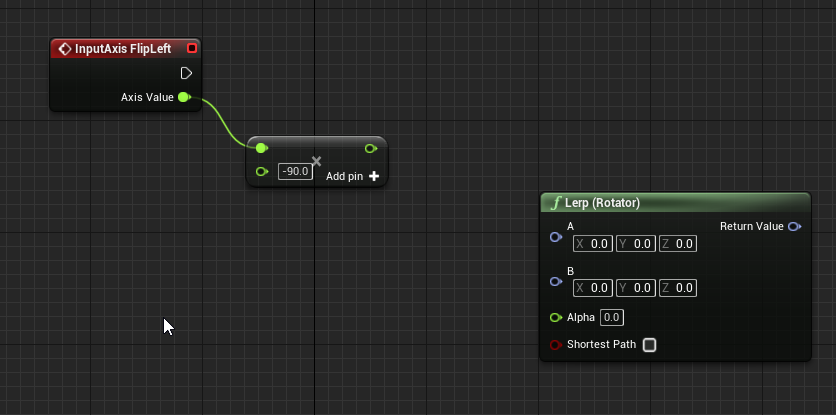
@dawn gazelle my lerp rotator can only accept rotator values https://i.imgur.com/XNIIAxS.png am i using a wrong one?
 dawn gazelle
You can right click on the pins and break them
tall pine
oh i didnt know that
dawn gazelle
erm "split" them :p
And if you want the rotation to happen faster, just multiply the Get world delta seconds
tall pine
this is so much better than what i did with timelines
could never come up with that thx
orchid garden
quick and dirty way to take a int of 1 and display it as 01?
dawn gazelle
Need as like a string or text or something?
orchid garden
yeah as a string or text either would work
dawn gazelle
Append -> first pin 0, second pin plug in your int.
orchid garden
yeah was thinking that
soemthing like...
but was curious if there was a quick n' dirty function that did it like there is for floats
dawn gazelle
what function is there for floats?
orchid garden
basically im just trying to get a timespan to display as hh:mm but 'astimespan' does the full hours not daily.
totext(Float)
dawn gazelle
Could do FormatText
odd ember
upbeat copper
But what when i move to using c++?
if you're moving to cpp you'll have to redo your code anyway. there's no point looking towards optimizations when you haven't even finished your prototype. and what's in the level blueprint may still remain in the level blueprint regardless
tall pine
@dawn gazelle i built up and plugged in the same script for flipping right, but in-game the ship only does halfway the rotation before stopping
i replaced the 90 with 180 at the beginning in the float multiplication node and it seemed to fix it, but whats the reason for that?
orchid garden
im optimizing as i go, throw it together, optimize, test, optimize, text, move to next part.
orchid garden
dawn gazelle
Could do FormatText
not sure how i'd use format text to add a leading zero if its under 10
dawn gazelle
tall pine
<@218956378654507008> i built up and plugged in the same script for flipping rig...
You should set up your input axis so your "right" value is 1 and "left" is -1. Like so:
Then you don't need to duplicate it - it should work with just the one input axis.
dawn gazelle
orchid garden
not sure how i'd use format text to add a leading zero if its under 10
Yeah, my bad... I forgot that the toText float has the additional options on it.
But, you could use this, no?
Change minimum integral digits to 2?
orchid garden
dawn gazelle
Yeah, my bad... I forgot that the toText float has the additional options on it...
oh derp! i didn't even see that one, just what i needed 😄 ty Datura 🙂
works perfect 🙂
dawn gazelle
(in fact, I can use it in my project where I hadn't) >> <<
upbeat copper
How can i get time of day from sun cm/sec?
or degree/sec i mean
wait. i might have got it
maiden wadi
Why would that be replicated?
@peak cipher You do realize that it's not broken, right? That's getting the time from your computer. It's not supposed to be networked. You can't network with the assumption that two machines are on the exact same millisecond of time. If you build off of that, someone' just going to cheat by moving their PC's time ahead a couple of minutes.
upbeat copper
I really apologize for messy blueprint, but why isnt this working? it produces divide by zero error.
The part after update sun direction
 worthy frost
only divide i see is some divided by speed
and if speed is 0, then that will throw that error
oh
upbeat copper
speed is 50
upbeat copper
Isnt it converting 1day into seconds?
worthy frost
no?
where are you converting it
you make a struct, break the struct
at what point do you calc the seconds?
upbeat copper
I assumed that the timespan node would convert the time automatically
 upbeat copper
is there some node that does it?
worthy frost
this is what you should do
upbeat copper
Okay. i'll try.
 frail swift
really need help here, think the bp is depricated but can't tell https://www.youtube.com/watch?v=WPVuMFotWJ0. Cant seem to find the get unique device id bp, what is the alternative?, thanks!

What is the Get Unique Device ID Node in Unreal Engine 4
Source Files: https://github.com/MWadstein/wtf-hdi-files
trim matrix
@frail swift if u have a problem with that video, you could ask the video creator, he is in this server
upbeat copper
I still get zero from this
@worthy frost I dont know why.
I am sure that has some easy fix
frail swift
trim matrix
<@319952657445814282> if u have a problem with that video, you could ask the vid...
No problem with the video, I litteraly just cant find the node when searching it into the editor, or searching online
upbeat copper
what node?
frail swift
get unique device id
trim matrix
frail swift
No problem with the video, I litteraly just cant find the node when searching it...
Untick the box on the top right
And search
frail swift
yeah no thats how im searching
frail swift
oh i thought those were two seperate things
upbeat copper
It says "Returns the platform specific unique device id "
trim matrix
What should “get device id” do?
frail swift
yeah let me check now if the functionality is different
wel get unique device id returns the mac adress of the device scrambled
upbeat copper
upbeat copper
I still get zero from this
Anyone?
upbeat copper
maybe
 lean thistle
Hello all, I’ve been stumped on this for a while. I’m trying to give an input of areas of rectangles, and draw a widget like this where the shaded areas are space the rectangles don’t go. It should place as many as fit
Any ideas on how I’d get started?
frail swift
Get Device Id returns blank, suppose it is because it is being run in the editor maybe but this definetley isnt the same functionality as unique id
frail swift
lean thistle
Hello all, I’ve been stumped on this for a while. I’m trying to give an input of...
Do you want the rectangles to automatically fill up the space
Like face a certain direction or get head to turn a certain way
static charm
That's a node Find Look At Rotaiton
you plug in the location where you want to Look
and then location of your player
then the rotation output will be what you set the Rotation of your player to.
 royal rain
hey guys im having a really hard time making my camera not suck, i modified the ball roller so that the camera follows the ball very well, but if i move my mouse in or out it will either zoom into the ball too closely, or get a top view of the ball
it makes it hard to turn becuase the ball turns in the direction of the mouse
static charm
do you want the ball to follow the mouse direction?
just remove the mouse axis input from the directional movement
and have it only move directions with key input
 thorny marsh
@lean thistle The Area of each individual rect added together must be less than or equal the Area of the space your filling.
This will give you the maximum number of rects you can fit.
(Potentially with space remaining)
Then you would need to figure out some mechanism for placing them appropriately.
Im assuming you have predefined Rects available that you then want to use to fill the area.
royal rain
no
one sec
i mean i needed the ball to only move in forward in teh mouse direction
i cant move with a and d anymore but that kinda doesnt ruin anything
my problems is the camera moves into the ball's ass crack or birds eye view
and it thats what makes it too much to handle
upbeat copper
This thing works, except it is skipping clock minutes. How can i handle that?
I am still proud of what i have now. I made it almost entirely on my own.
I am sure there is easier way to make a clock, but it is nice learning process making it by yourself.
And under that white box there is get time node.
dawn gazelle
upbeat copper
I still get zero from this
Timespans only contain the values set in them. If you have 0 set for seconds, then when you "Get Seconds" you'll get only the value you've set in the seconds field. It's not meant for converting a day into the number of seconds in a day.
 stiff chasm
i need help for my game
i want it so you can control your A Charecter
But there is a player 1 controller and a player 2 Controller
And then the inputs are in the controller and they posses the pawn to move them
So i can make multiple charecters
upbeat copper
dawn gazelle
Timespans only contain the values set in them. If you have 0 set for seconds, t...
I already solved that by using total seconds.
upbeat copper
upbeat copper
This thing works, except it is skipping clock minutes. How can i handle that?
But this is what i now would need help with
dawn gazelle
stiff chasm
And then the inputs are in the controller and they posses the pawn to move them
Usually the controls for characters are present within the Characters themselves. If you're going to have similar characters and only want to make the input functions once, then create a base character class with all the values and functions you need, then create child blueprints off of it. If you need to, you can override existing functions in child blueprints.
 flat raft
is it possible to show the output log in a debug package build ?
stiff chasm
dawn gazelle
Usually the controls for characters are present within the Characters themselves...
Like this?
dawn gazelle
So long as you're not dupliating them - you just need to right click on the blueprint and select "Create Child Blueprint".
stiff chasm
What is the difference between making a child and Duplicating?
dawn gazelle
Duplicating is making a copy, a child blueprint inherits everything the parent has. If you make changes to a parent blueprint, those changes will also be present in any child blueprints.
stiff chasm
Dear god
ok so how do i make it so that..
do i have to make a variable called chosen charecter, and cast to it whenever i want to send an input from the player controller to the Charecter?
 atomic salmon
@trim matrix roll acts around the X vector, so you need an impulse like [X,0,0]
atomic salmon
Where X is the magnitude of your impulse * the forward vector
dawn gazelle
flat raft
is it possible to show the output log in a debug package build ?
Use a shortcut and type -log after the executable name. That'll give you the console log at least.
atomic salmon
Take into account that all physics methods except those ending in Local act in world space
@trim matrix ^^^
trim matrix
aah ok cool
orchid garden
I have a master character, and depending on if the player selects male or female to start with, depends on which child blueprint it uses (kasqir = male, linhi = female)
dawn gazelle
stiff chasm
do i have to make a variable called chosen charecter, and cast to it whenever i ...
No. You should have all controls within the character itself.
trim matrix
so what unit is angular velocity in? cm/s or something?
unreal units/s?
wait no its angular
so it'd be degrees/s?
dawn gazelle
If you need to have anything specific for each character, then you make it in their blueprint and overwrite the input.
orchid garden
i.e. character meshes, animation bp's
stiff chasm
so do i have to have 2 of theese and use a boolean to choose which one it should listen and ignore?
Based on which player controller is possesing it
dawn gazelle
No. Each player gets their own player controller.
stiff chasm
Player or charecter?
upbeat copper
upbeat copper
This thing works, except it is skipping clock minutes. How can i handle that?
Anyone?
dawn gazelle
Each character receives their own inputs.
stiff chasm
There are 2 Player controllers, and plans to be multiple charecters
the chosen charecters change
like you select the charecter you wanna be
dawn gazelle
Doesn't matter.
atomic salmon
trim matrix
so what unit is angular velocity in? cm/s or something?
kg * rad/s or kg * deg/s
dawn gazelle
You are a player controller. You possess a character. your inputs are routed to the character that you posses.
stiff chasm
stiff chasm
@dawn gazelle this is in the charecters bp
so do i use a bool to separate what input it accepts?
lean thistle
@thorny marsh the issue is it’s not just the area that matters, imagine a skinny rectangle with an area of 10 (10x1) remains, but the rect that I want to place has an area of 6 but is 3x2. This won’t fit even though the area is less than, because both dimensions are greater than the space im filling
dawn gazelle
So if we both happened to choose the same character, we would each get our own copy of the character, we each posses our own and our inputs would be routed to our appropriate character.
trim matrix
atomic salmon
kg * rad/s or kg * deg/s
what if I have velocity change ticked so it doesnt consider mass, just deg/s?
orchid garden
if you want to override something thats in the master blueprint (say event begin play) you'd just disconnect the parent attached stuff and override it with what you want in the child:
atomic salmon
trim matrix
what if I have velocity change ticked so it doesnt consider mass, just deg/s?
correct
dawn gazelle
stiff chasm
so do i use a bool to separate what input it accepts?
There is no bools required. Again, every player gets their own player controller. The controller "possess" the character. Thus, the inputs for each controller are passed into the possessed character.
trim matrix
kg*cm/s?
orchid garden
child bp's are great 😄
atomic salmon
trim matrix
and what unit is regular force?
yes, kg*cm/s or centiNewtons
atomic salmon
trim matrix
does it say that in the documentation?
maybe somewhere, not sure, the docs on physics have historically been very essential
orchid garden
ue docs? i find them lacking on alot of things, telling you no more then you know in the editor.
trim matrix
atomic salmon
maybe somewhere, not sure, the docs on physics have historically been very essen...
essential?
stiff chasm
dawn gazelle
There is no bools required. Again, every player gets their own player controlle...
How do i set the inputs of each controller if the inputs are just action mappings and axis mappings?
orchid garden
stiff chasm
im so confused
split screen?
trim matrix
also im trying to implement a "brake" feature for my spaceship, where it just applies a force until it's 0 (pictured here)
atomic salmon
trim matrix
essential?
essential = kept to the bare minimum
trim matrix
but when I press the button I get this
trim matrix
atomic salmon
essential = kept to the bare minimum
aah
upbeat copper
upbeat copper
This thing works, except it is skipping clock minutes. How can i handle that?
🙂
stiff chasm
atomic salmon
@trim matrix you may want to move to #legacy-physics, see you there
stiff chasm
im getting mixed signals here
so the inputs need to be in the charecter itself but the player controller has inputs
orchid garden
trim matrix
but when I press the button I get this
try >= it may be dropping below zero and causing a infinite loop.
stiff chasm
😫 it doesent make sense
 tight venture
Is this the BP equivalent of C++'s UE_LOG(...)?
rain egret
So I made basic procedural box structures to make airships from. But they are limited in their form. My goal would be to have something like in the picture.
How would I go about creating such structures from static mesh data
stiff chasm
@dawn gazelle So i what does the player controller do in this situation then if the inputs are in the charecter?
orchid garden
stiff chasm
😫 it doesent make sense
some do them in the controller, some do them in the player.
dawn gazelle
stiff chasm
<@!218956378654507008> So i what does the player controller do in this situation...
The player controller is the interface of a player to the game. The player controller is normally used for commands that are character independent, for example, opening up the main menu, pausing, etc. The player controller can also be changed based on the game mode. The character is something that can be controlled in game. Any controls relating to the character should only ever be placed in the character, not in your player controller.
orchid garden
@dawn gazelle intresting, watching tutorials, im seeing them do one or the other (menu & player interaction) either all in the controller or all in the character :/ guess tutorials fail again.
tight venture
Nvm I found it lol.
thorny marsh
@lean thistle Yes understandable, however you know those constraints so you can choose the best fitting elements.
lean thistle
Thank you @thorny marsh , Speaking it out helped me. I suppose I'm mostly concerned with the placement of the widgets so maybe I should forward my question to #umg
thorny marsh
That would be ideal.
lean thistle
Thank you
dawn gazelle
For example, lets say you have a "character select" menu. Both your first player and second player will want to be able to choose their characters. This would be something handled in the player controller. The individual players should not need to have separate input events.
This is beyond what I've worked with myself, but this guy gives a very basic means of getting two players set up without creating separate inputs.
https://www.youtube.com/watch?v=u043y2D2agw

Follow me on Twitch! https://www.twitch.tv/itsmikethetech
Dig what I make? Support me on Patreon to help me keep making cool stuff! (and get a spot in my videos or early access to games!) https://www.patreon.com/mikethetech ❤
Join me on Skillshare! https://skl.sh/2KPfdTM
dawn gazelle
orchid garden
<@!218956378654507008> intresting, watching tutorials, im seeing them do one or ...
Technically you can, but again, your player controller can change each level. Character related controls should stay with the character otherwise you may lose functionality.
 tight schooner
@rain egret I'm hardly an expert but spline meshes may be an approach if you want beams to go from point-to-point with the potential for curves. Just throwing that out there.
Each node point in a spline (and by extension a spline mesh) has a transform and also tangent vectors.
rain egret
That’s interesting thank you, however I need it to be procedural
orchid garden
can't spline meshes be procedural?
dawn gazelle
Yes
rain egret
Okay? Hm, i mean made in blueprint using the one procedural mesh component. It all being in this one component is important
tight schooner
Each spline mesh is its own component so if that's your criteria, I suppose it wouldn't be suitable
rain egret
Yea
You see since only the root has collision It makes no sense have an elaborate structure outside of the root since it won’t collide with the environment
tight schooner
well, components further down the hierarchy can easily be colliders as well (incl. spline meshes, though there are some complications with them)
but personally idk jack about procedural meshes so I can't help you there
rain egret
I disagree, in all my research nobody has ever said that this is how it works. If I have a pawn that moves only the root will collide
Sure those children will have a collision but if I run them against the wall they will just phase trough it
orchid garden
anyone know what causes this ?
dawn gazelle
I think its a volumetric fog thingy
orchid garden
I have two types of fog, atmoshereric fog, and exponential height fog
exponential has volumetric fog, but its unchecked so shouldn't be getting applied as such i would believe
it seems to happen just after dusk for about 1 game hour of sun rotation
dawn gazelle
Ok, I had a similar issue some time ago and I know I deleted one of my fogs to fix it, and right now I don't have an atmospheric fog in my level XD
orchid garden
i i'll try disabling that one then 🙂 see what happens
dawn gazelle
Mine was a lot more ugly... Bright orange @_@
orchid garden
yeah i had that till i replaced the skysphere, thought i got rid of all of it
ah yep something to do with atmoshereic fog at night :/
fixed with a curve for time of day
and applying it like so...
ty @dawn gazelle 🙂
tight schooner
If you have some sky sphere, you can set the max fog distance to something less than the radius of the sky sphere geometry
I remember having a similar issue
orchid garden
yeah that could work as well 🙂
hrm... can you adjust ambient lighting on the fly in the game world on a post process volume or is that a fixed value?
 dense stone
Someone can help me with this error please, thank you very much!
 untold girder
@dense stone Recompile your "player state" or player controller
or both
Recompile everything
That's an error that pops up when you've created a new variable in another blueprint, but haven't compiled it yet
You guys wanna see something wild?
I'm trying to set a niagara particle's color to a variable. I can set it fine using a "vector to linear color" node, but if I try to use my "Team Color" variable, it just comes out as white, EVEN THOUGH the print string prints out to the correct color when I shoot.
That's it when I hook it to the variable
That's it when I hook it to the vector
It makes... literally zero sense
I even tried converting the variable to a vector and back again
tight schooner
Can't think of an explanation for that offhand...
I remember some version of UE (it was a ".0" release) had an issue with passing linear color parameters but it was patched later.
orchid garden
they look cyan on my screen, bit lighter then the first helmet, like 2x the brightness
or are you talking about the star shape at the front and not the balls?
untold girder
the muzzle flash
ironically the bullets are using the same team color variable and they work fine
There's no explanation
The answer is to cry
I accept my fate
tight schooner
Set parameter first then activate? Idk
Make a custom pure function that converts a linear color to a vector?
Can't hurt to try random, dumb things
to see if an inexplicable workaround can be found to an inexplicable problem
 covert arrow
any idea how a dbno state would work in ue4 im trying to implement it but im not sure how.
 subtle portal
Super dumb question: I've got a C++ class that implements a dynamic grid with a procedural mesh, and a blueprint child that I can fill with parameters like # of columns, rows, etc. and drag into my scene. But I can't change the parameters once I've set it down. Is there a "onParamChanged" or something I can implement that will let me destroy my proceduralMesh and create it again when I change the params in blueprint?
 somber quail
hey when i set the Engine scalability settings to medium it crashes
oh well guess bad computers cant play my game
faint pasture
@covert arrow make it an enum on the Character and do things when it changes via a RepNotify
 amber sand
My event tick just stopped working. I added it to an empty actor class and its not firing off, I connected a print string directly to it to make sure it wasn't just some glitch but it's just not doing anything. Is this a bug?
It works when I simulate the blueprint but not when I hit play
tight schooner
If you check your class defaults, you'll see a checkbox for actor tick enabled
You can also control it with the node, Set Actor Tick Enable
amber sand
@tight schooner It's on but still doesn't work
weak kindle
L have a big problem l have start my project using firstpersonshooot starter content and now l need help to export my game on vr android l dont think l have set even the controllers who can help me ?
maiden wadi
@somber quail It has to rebuild a lot of shaders. Does it actually crash with a crash log, or "stop working". Because it's still working if it's the latter. Even on my very simple small project with almost nothing in it, switching to medium at first causes a full rebuild of over six thousand shaders. Takes about two minutes of freezing before that even comes up.
somber quail
oh
weak kindle
how can l create movement from phone touch button??
maiden wadi
@untold girder I can't seem to replicate this. No matter what, using your values of blue always changes the particle to the correct one. None of these types make any difference. The two variables at the bottom, one is a FColor, the other is FLinearColor
UE4 version is 4.25.4
 hallow night
@weak kindle set timer on button pressed and clear timer on button released
 rich falcon
Hi everyone!
Not sure if this is the right place to ask but I'm trying to play a looping video seamlessly with no success..
Every time the video loops I get a black frame or a hitch.
Is there anything I can do about it?
I HAVE tried turning off auto-clear on the media texture, change the video codec, container and even framerate without success...
Thanks in advance for any lead 🙂
weak kindle
L dont know if it good to work movement with wigfet arrows like this but it works l want opinion
 meager idol
Hey qick question, how to best limit rotation of an actor relative to another actor?
I wanted to acomplish that with getting relative angles of each other but I am not sure how to do that the way I want it to
I want to limit the rotation differently on each end
trim matrix
Hello, i am trying to work on a FPS game but need a Health System(This game is multiplayer). I need some help with the health system as I can't make it take fall damage or even when something hits the player it takes damage.
 spiral vessel
subtle portal
Super dumb question: I've got a C++ class that implements a dynamic grid with a ...
spiral vessel
subtle portal
Super dumb question: I've got a C++ class that implements a dynamic grid with a ...
You can create a custom event in your BP and under the properties of this event, there is the option Call In Editor. When this is enabled, you will have a button within your BP default properties when placed in the world that will call this event when you click it.
Here is an example
And this is the button I am referring to that will be available on the actor
@subtle portal so I would recommend trying to use this to reset and regenerate whatever it is that you need to for your procedural mesh
@subtle portal or you can try to use the construction script in the Blueprint to do what you need to do; the tricky thing is that you are saying most of the work is done in C++ so I am not 100% sure how to handle your case; but construction scripts and call-in-editor events should help, or at least point you to the right direction
 visual lion
Hi All, I'm doing a quick simulation of a bullet that adds point's to spline during it's flight path
this is so that I can save this spline at it's end so that I can use the path has a reference but I can't save the finished spline after the simulation even If I press Keep simulation changes
is there any work around for this?
 bitter lance
Hello I have problems with Landscape in blueprints.
I am using function Editor apply spline and I want this to work for only specifed layer of Landscape.
There is argument Paint Layer in this function, that takes Landscape Layer Info, but after hours of searching through the web and UE source code I haven't found any way to get this. Any help?
 worthy tendon
meager idol
I want to limit the rotation differently on each end
worthy tendon
meager idol
I want to limit the rotation differently on each end
if you have physic simulation, you might want to use physics constraint, other wise you can clamp angles when setting rotations.
meager idol
Yeah, that's what i would do, but the two objects are not parented and i tried clamping the difference of the yaw values but that produces undesirable effects due to it being in worl coordinates
worthy tendon
spiral vessel
And this is the button I am referring to that will be available on the actor
oh wow
bitter lance
bitter lance
Hello I have problems with Landscape in blueprints.
I am using function Editor a...
worthy tendon
meager idol
Yeah, that's what i would do, but the two objects are not parented and i tried c...
you can use inverse transform to convert world rotation relative to other actor. then simply clamp the relative rotation with some min and max value
of course you can simplify a lot if you don't need to clamp all axes.
meager idol
Ah thanks
trim matrix
Hi folk, how can I get reference of spawned hierarchical static mesh actor created in construction script?
worthy tendon
beware that you get different results if you swap min and max. for example if min is 0 and max is 45 your rotation will be clamped to [0, 45]. but if min is 45 and max is 0 your rotation will be clamped to [45, 360] @meager idol
meager idol
TThanks for the tips
tight schooner
@trim matrix right click on the output of the spawn node and save to new variable
maiden wadi
@stable fjord What engine version, and what is the parent class?
 stable fjord
I migrated this blueprint from another class
Another project*
4.23
Engine version,parent class is an AActor
UObject_Cannon_Ball (name doesnt matter) in c++ deriving from AActor
In other blueprints I see this c++ class
maiden wadi
What's the current parent of the blueprint right now? Just AActor?
 zealous plaza
Hello everyone! I have a quick question if someone can help me: I'm looking to create an in-game menu where I can change the niagara system, something like a visualizer change with the press of a button. Can anyone point me in the right direction? can't seem to find the right tutorial
maiden wadi
What was the parent class in the last project?
If it wasn't Actor, you might consider changing that to like Actor, then migrating.
maiden wadi
Which may as well be a unicorn as far as the new project is concerned. There's a few posts about migrating blueprints. Most of them seem solved by reparenting the blueprint to a native base class.
May or may not work.
stable fjord
But If I am looking for a simple Actor to reparent, I dont see it either
Its good to mention that I have a blueprint compilation errors
 gilded blaze
how to make next level button
bitter lance
How to get LandscapeLayerInfo object in blueprints?
I need it for this function
trim matrix
Thanks for reply @tight schooner . I was looking for that but Add Instance node have only integer output?
tight schooner
@trim matrix yeah instances of an HISM component do not have component references
Cuz each instance isn't a component
You should open the... palette or library window? ... I forget what it's called
But you can peruse the nodes related to hierarchical instanced static mesh components there
And you use those to affect the individual instances
trim matrix
Ok thanks @tight schooner will look into that!
 rugged flame
Hello! The Multi User BP from 4.26, is that only for the UE editor, or can I implement it in a finished desktop app? Same for the iPad virtual camera from the virtual production system. Is it likely to have that work at runtime as well, with the desktop app as a host?
 split crescent
I have a map that is divided into grid tiles. When I place an actor on the grid tile in the editor, I want it to perform some logic to place it in the center of the tile. How would I achieve something like this?
maiden wadi
@split crescent I normally do that by keeping a grid size variable somewhere. You can do it manually if your grid sizes never change. But all you need to do is divide your actor's X and Y location by your grid size, round it to the closest integer, then multiply that by grid size. Depending on your setup you may need to add or subtract half of the grid size from that.
trim matrix
Hi, I packaged an AR project for the android phone, but it has a black screen on the phone and it doesn't seem to use a camera at all.
split crescent
Thank you @maiden wadi :)
maiden wadi
Also, make sure you actually ROUND the float to the nearest integer. Plugging the float into an integer will bring up Floor, which will round down to the nearest. So even 2.99 will become 2 instead of 3.
stable fjord
Hi! How to insert to this following array a Child Actor Component
'
I would like to store them
I have a BP object Cannon and looking for a way of conversion to this array
Tried to get a child actor but without any results
Cannon_Second is a Character
dawn gazelle
Cannon Second is of type "Child Actor Component" where your array is of type "Cannon Second". You can make your array of type "Child Actor Component" then you can store the "Cannon Second" objects in it.
stable fjord
Yes, but in this case I will be able to use functions from cannon ball object?
Thats the point
dawn gazelle
You're asking a question that no one could answer.
stable fjord
HAHAHAHA
 fair magnet
Is the Jittering normal behavior ? o.o
stable fjord
What u mean now
fair magnet
Can't u see ? :o while walking backwards it jitters around
walking forward is all fine
stable fjord
Aaaa
My god
Shaking a bit
I see it
The way you are going backward is correct?
fair magnet
Well I've only set up the MoveForward Event goes into addmovement input with get forward vector
pretty standard
theres nothing else set up yet
fair magnet
that's why I'm asking
maiden wadi
Try turning off DoCollisionTest in the spring arm.
fair magnet
@maiden wadi that wasn't it
maiden wadi
Is the spring arm attached directly to the capsule?
fair magnet
yea :o
Also I don't think it's the springarm nor camera because the whole character is rotating too
maiden wadi
Yeah, just double checked that. Something is causing the capsule to turn, and no that's not normal behavior.
trim matrix
trim matrix
anyone?
fair magnet
So I've printed the Forward Vector node and it seems that it jiggles around with the Y Axis for some reason
fair magnet
trim matrix
well... what is the problem
trim matrix
when I change nickname it doesn't confirm the new one
fair magnet
Do the events get called ?
trim matrix
wdym?
now I removed setting the name in the third person bp and it still set the player name to player
hmm
I found where it sets the name-in the binding
dawn gazelle
From what I've heard, you don't want to use bindings for text values. You're better to create your own function that sets the text within the text box in question and then call that function when you need it.
trim matrix
okay
so this function where it sets the function to make it inside the widget or in the controller?
stable fjord
Is there a way to insert these Cannons to array faster?
instead of dragging then inserting and so forth
trim matrix
dawn gazelle
From what I've heard, you don't want to use bindings for text values. You're be...
I made a function but the name doesn't change
hmmm
dawn gazelle
You need to set the text in a reference to the specific text box.
dawn gazelle
No, in your function you need to utilize this node:
This (below) is a "bind" which is apparently firing on tick
trim matrix
a okay
trim matrix
dawn gazelle
No, in your function you need to utilize this node:
in the event graph or function?
dawn gazelle
In the function
dawn gazelle
yep
trim matrix
okay
the set name works
now if we make change the name works will be perfect
😄
If I want to check what type my pawn is, should I do a class comparison?
orchid garden
I have a problem with Dynamic lights and hair models....
if the dynamic light is behind the hair model and the camera directly on the other side, you end up with a bright glow effect like above
it doesn't seem to block the lighting at all, texture is two sided. Turning 'dynamic shadows' off on the hair mesh makes the entire hair glow.
fair magnet
@trim matrix I'm not sure for which purpose you're checking but I personally would use tags
orchid garden
Anyone know how to stop dynamic lights from doing that? doesn't happen with static lighting.
this is the light settings for the hair in the bp:
green briar
What does this error mean? Why can't I reference "self"?
 minor merlin
You don't have this function on this blueprint
You have to get a link somewhere to the object that got this function
With what you are doing, you should use trace line (or another trace function), and cast to the hit actor the function take damage
green briar
I got it, thank you so much
 solemn parcel
I'm getting this error : Blueprint Runtime Error: "Accessed None trying to read property CallFunc_GetPlayerController_ReturnValue". Blueprint: UE4ASP_HeroTPP_AnimBlueprint Function: Execute Ubergraph UE4ASP Hero TPP Anim Blueprint Graph: EventGraph Node: Set Pitch
Here is the BP. I don't really understand
 coarse forge
so. it seems its not enough to just check an interface.. how do you go from generic Actor to setting a bool on an actor of a specific type if it implements an interface? Do I need to do an abstract class and use both abstract classes instead of just a generic actor?
minor merlin
solemn parcel
I'm getting this error : Blueprint Runtime Error: "Accessed None trying to read ...
Shouldn't you cast to player controller?
solemn parcel
@minor merlin closed the deal. Thanks !
minor merlin
Np
tall pine
i've been trying to fix this problem since a day now without success, basically the ship boosts forward whenever i repeatedly tap up and down, or left and right, which it shouldn't do
what could be the issue?
dawn gazelle
Are you adding force to the pawn?
tall pine
not sure i think not
am kind noobish
the event tick automatically adds movement input forward for the player
even if i hold down left and right for a few seconds after eachother it does a snake spiral moving forward
stable fjord
anyone knows, how to insert these cannons faster?
than
with method "one by one"?
trim matrix
why the widget doesnt remove when i press I ? it appear but i cant remove it
 viral sundial
If you want to make a blueprint that contains a section of a level like a room that contains other actors like spawn points, is the only way to place these actors within the blueprint to use a child actor component?
To clarify this is just to be able to drag and drop each spawner actor in the component view of the parent actor. If there's a better way please let me know! I can't use sublevels as it needs to be spawned at a specific location
dawn gazelle
tall pine
not sure i think not
am kind noobish
the event tick automatically adds movement...
What does your up and down movement inputs look like?
tall pine
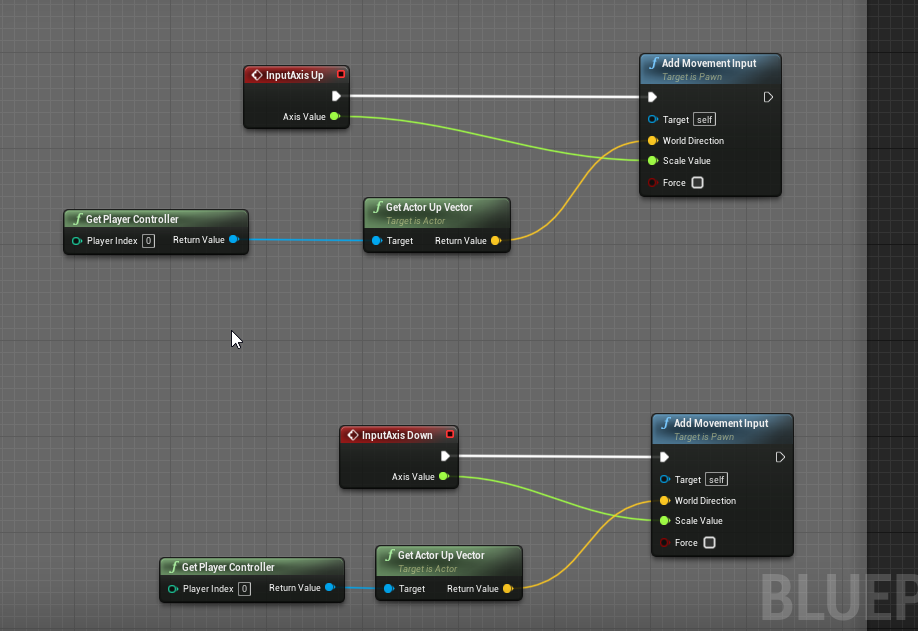 dawn gazelle
stable fjord
dawn gazelle
stable fjord
Maybe something like this may help you? You'd need to add a "Cannon" tag to your child actors.
dawn gazelle
tall pine
https://i.imgur.com/QzA9n3Y.png
May want to split the vectors so you're only inputting Z values
Like so:
dawn gazelle
trim matrix
why the widget doesnt remove when i press I ? it appear but i cant remove it
Set the owner on the creation of the widget to your player controller.
tall pine
dawn gazelle
Like so:
i tried it but it still boosts forwards as i go up and down
dawn gazelle
Whats your forward movement thing on tick look like?
tall pine
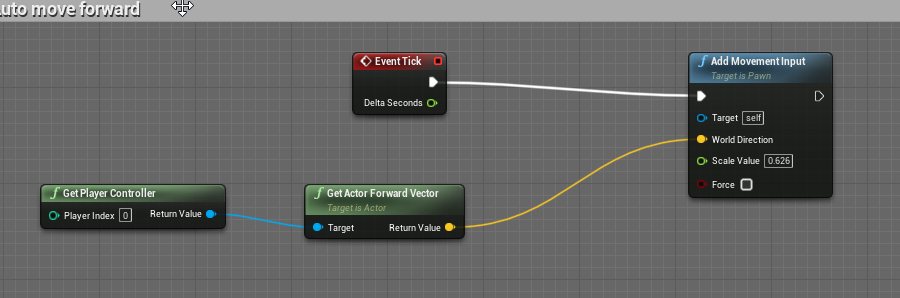


 dawn gazelle
Can you try doing the same here but 0 out the Z instead?
.
Oh also, your INput Axis for up and down - you should only need 1 input.
When setting up the inputs you can set a value to 1 and another value to -1
tall pine
dawn gazelle
.
tried that aswell, and merged the inputs together, still boosts me forward
 spark steppe
is there no blueprint node to unlink/remove files from harddisk?
i mean, i can implement it probably easy in c++, just curious if a node already exists
 wide topaz
Hi folks!
Is there a node that returns if the game is running vs editor?
wide topaz
Or do I have to set a var OnBeginPlay to check
maiden wadi
What are you generally trying to do that you need it to do different things in editor vs in play?
odd ember
wide topaz
Hi folks!
Is there a node that returns if the game is running vs editor?
there is in #cpp
you can expose it that way
coarse forge
Anyone got a way to get the properties of a generic actor to actual actor??
or.. do I need like an abstract class to base my pickup class on
odd ember
you'll want some type of base class probably, if I understand your issue correctly
coarse forge
k. Yeah so I made an interface for my pickup actions.. but I need to set the bool that says the object itself is actually being held
it seems I can't just get ActorClass and see it
since the actor being held is just AActor and not the exact specific one I'm using
odd ember
you'll need to cast it
coarse forge
so.. if i Have a bucket, pen, log, etc.. I'll have to cast to all of them
or cast to a base class?
wide topaz
@maiden wadi @odd ember I'm making level design tools, and want to select things depending on if its used in editor or runtime.
I made myself a simple function
I won't be doing anything with cpp because the project is a blocking prototype, so I won't bother haha
Thanks tho! 😄
odd ember
be interested to know what kind of level design tools @wide topaz
coarse forge
@odd ember so If im reading right.. make an abstract class for my pickup actors, then cast to that to set the being held prop
odd ember
pretty much
everything gets routed through actor
to get your specific subactor type you use casts
 wooden rapids
Hello Anyone know how disable Infinite Loop why it stops my Game there is no reason for that why we can`t disable it permanently in the Settings, however the Game runs good , i search everywhere and the Infinite loop count 1000000000 can be changed, but it doesnt let start the Game after i change the Value , is there another way around , thanks forward
odd ember
if you're getting an issue about infinite loops you should fix said issue about infinite loops
wooden rapids
odd ember
if you're getting an issue about infinite loops you should fix said issue about ...
Thanks CranzEstebogen , you mean there is no way Around just Fix?
 clear cave
conceptually with blueprints, I am aware of get all actors of class, is there a way to select only actors within a specific volume?
some sort of filter condition I guess, is there a condition/test blueprint node I can rely on?
@violet wagon you may wanna ask in #multiplayer but I believe this is commonly due to the fact that you need to tell the server to move the player character
 violet wagon
will do thank you @clear cave
odd ember
clear cave
conceptually with blueprints, I am aware of get all actors of class, is there a ...
collision can do these types of operations. what are you looking for exactly?
clear cave
odd ember
collision can do these types of operations. what are you looking for exactly?
I want to be able to create a sphere around an area of the map, and select particular random actors of a given class to update a specific property (think random scavenger hunt)
like forest with a bunch of trees, I want to be able to say in the region (sphere) a random tree will be golden or something
odd ember
what kind of timing are you looking for? is this something that happens when the player enters a place or just at random
clear cave
it should happen on begin play, it'll be constant for a game
odd ember
you can use GetOverlappingActors from a collision then
clear cave
is a collision a special type of actor?
odd ember
usually it's a component
clear cave
of a sphere actor?
odd ember
of any actor
clear cave
sure
odd ember
you don't need a physical sphere to have a sphere collision
coarse forge
trigger component
coarse forge
^
 narrow bear
Making a little utility macro, trying to loop over any given map and give value and key. Is there a way to do this properly? With the logic I wrote, the value return type isn't accurately detected.
coarse forge
hmmm
EpicAccountId:e15f62271fe54494817bd1c2557a5b43

Assertion failed: 0 && "Do not directly call Event functions in Interfaces. Call Execute_IsBeingHeld instead." [File:C:\Users\Zachary\Documents\Unreal Projects\bible_noahsark\Intermediate\Build\Win64\UE4Editor\Inc\bible_noahsark\PickupInterface.gen.cpp] [Line: 58]

UE4Editor_Core
UE4Editor_Core
UE4Editor_bible_noahsark_Win64_DebugGame!FDebug::CheckVerifyFailed<wchar_t [1]>() [c:\program files\epic games\ue_4.26\engine\source\runtime\core\public\misc\assertionmacros.h:156]
UE4Editor_bible_noahsark_Win64_DebugGame!`IPickupInterface::IsBeingHeld'::`6'::Impl::ExecCheckImplInternal() [c:\users\zachary\documents\unreal projects\bible_noahsark\intermediate\build\win64\ue4editor\inc\bible_noahsark\pickupinterface.gen.cpp:58]
UE4Editor_bible_noahsark_Win64_DebugGame!IPickupInterface::IsBeingHeld() [c:\users\zachary\documents\unreal projects\bible_noahsark\intermediate\build\win64\ue4editor\inc\bible_noahsark\pickupinterface.gen.cpp:58]
UE4Editor_bible_noahsark_Win64_DebugGame!AGopherWoodLog::Tick() [c:\users\zachary\documents\unreal projects\bible_noahsark\source\bible_noahsark\gameobjects\actorobjects\gopherwoodlog.cpp:48]
UE4Editor_Engine
UE4Editor_Engine
UE4Editor_Engine
UE4Editor_Engine```@narrow bear The map and key are pretty much always at the same index. So if you get the keys and values of the map and return both from the same index of the loop, that might go better.
narrow bear
are pretty much always at the same index
That sounds scary to assume, no?