#blueprint
402296 messages · Page 582 of 403
 faint pasture
 swift dome
How to run the print in here?
 dawn gazelle
@swift dome You don't want to. On the widget you can create an event for the button being pressed, and that's where you'd want to run your logic.
You can create the event by selecting the button in the designer view and on the right side at the bottom, there's options for creating the events.
swift dome
@dawn gazelle Thank you so much, that worked!
Is there a way to share variables from blueprints
?
dawn gazelle
Yes, but you have to get a reference to the specific object to get the values it stores.
 unborn maple
is shuffle array the node i want to use when wanting to spawn actor on a target point but shuffle them around so that when the game begins the player has to find them in a new spawn target point
i try to do random int in range but that just does it one at a time when i want to spawn 3 item and then shuffle them
dawn gazelle
@swift dome and you've already sort of done this by calling a reference to the Sample UI and calling the "Stop" button variable.
 trim matrix
Cant seem to get character movement component to work, all I want to do is move according to local x when I press mouse down.
 olive sedge
hello!
Any help on calculating an aim offset?
I have a pawn that is sensing another pawn and I want to aim offset the one sensing towards the one being sensed
 spark steppe
find look at rotation?
faint pasture
trim matrix
Cant seem to get character movement component to work, all I want to do is move ...
Uhhhh, what's it doing right now? That looks like it'll always move forward.
olive sedge
@spark steppe sounds good
trim matrix
stays in place
olive sedge
does pawn sensing work through walls? do I have to check for LOS myself?
dawn gazelle
@trim matrix Simplifying what you've made on my end (though using a different named input axis), my character just continuously moves forward. Perhaps your default movement speed is set to 0 or your forward vector is pointing straight up or down?
trim matrix
It's really weird my setup is quite complicated. The input is governed by mouse button down and moving the mouse rotates the direction the character faces.
dawn gazelle
Maybe try Add Movement Input instead?
dawn gazelle
That looks like its moving to me?
trim matrix
because Im using add actor world offset
I need to use the movement component if I want it to replicate smoothly
dawn gazelle
ah gotcha
trim matrix
I have character movement component and a floating pawn movement
Tried adding a vector to floating pawn but that doesn't do anything
dawn gazelle
So I'm guessing you're setting the Movement Mode on the CMC to Flying?
trim matrix
yes
dawn gazelle
and you've set up speeds for the CMC for said movement mode?
trim matrix
spark steppe
did you try to add the movement to the actors controller?
trim matrix
what do you mean? do you mean inside the controller?
dawn gazelle
I'm not really sure what the issue could be CodeB. You shouldn't specifically need to use the CMC to move the character for replication to appear smoothly. Here's something I made fairly quickly that emulates sort of what you're looking for. Upon right-clicking, it'll move the character towards the vector that they are looking and it works over network.
trim matrix
yes but that uses 'pawn movement component' which doesn't work for me either 😆
All I can get to work is add world offset and add physics linear velocity which replicate in a jittery way
dawn gazelle
That's the same node you used in your example.
dawn gazelle
Ok that's completely different.
trim matrix
and I network like this (in event tick)
and the characters move in the right direction but spazz out a lot
 empty current
hello everybody, trying to create and assign a tag to an actor when I hit it with line trace during gameplay. I am not very familiar with Arrays yet.
I must do something wrong because it does not work
(i written a tag in the ''new var'' variable ofcourse)
 wind void
From the code, I can see if actor has tag "Mesh", assign another tag set in New Var 0
You sure the other actor has tag Mesh?
trim matrix
hmm so if I network via getting-setting velocity instead of position, it is still slightly jittery but far better
empty current
yep this one is working, its ''Mush'' not mesh, means mushroom lol osorry its a bit confusing
wind void
also, you aware you are erasing all tags from the actor? Basically, if it has tag "Mush", clear all it's tags and set it to a new array containing only "New Var 0"
empty current
oh yes
!
thats mean its working
thank you very much
becaus i can see that it is erasing
the previous tags
so it means that the problem might ber somewher else
and indee
it is form somewhere else
thatnk you very much
!!!
dawn gazelle
@trim matrix Have you tried comparing what a default CMC values are to the CMC present on your character? Perhaps you changed a variable on it that is causing it to not move?
trim matrix
I mean 'flying' only has 2 options
It doesn't help my level is very large in unreal units so I need to move at extreme speeds to account for this
dawn gazelle
True, flying only has 2 options under it, but the CMC as a whole has a lot of values that if changed could potentially make it impossible for a character to move.
trim matrix
Well I assume only in 'general settings', 'networking' and 'flying'? I don't see any other subsections
 spark cliff
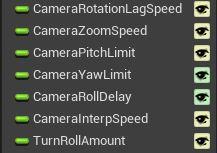
https://i.imgur.com/7N2FzYF.jpeg
anyone know what the different color eye icons signify?
 dawn gazelle
trim matrix
Well I assume only in 'general settings', 'networking' and 'flying'? I don't see...
dawn gazelle
trim matrix
Well I assume only in 'general settings', 'networking' and 'flying'? I don't see...
These are all the sections on my CMC. You could potentially skip the walking/running, swimming, specific ones, but everything else I'd take a peek at.
trim matrix
I haven't updated UE4 in a while maybe older version
dawn gazelle
Sorry, that one is also a custom movement one... here's a vanilla one from 4.26
dawn gazelle
olive sedge
I don't believe animations are run on the server like that. The cast also could be failing as it may be a reference the server doesn't have.
dawn gazelle
spark cliff
https://i.imgur.com/7N2FzYF.jpeg
anyone know what the different color eye icons ...
They indicate that the variable is instance editable. This allows you to modify the variables outside of its native blueprint.
olive sedge
it seems to be casting alright
@dawn gazelle this should actually be considered a bug I think?
olive sedge
because it's a listen server
 worthy frost
but to get speed, you get Character->Velocity->Size
olive sedge
so if there's a branch in there, it should be isDedicatedServer, not isServer
olive sedge
I just assume there's a branch in getCurrentAcceleration
haven't looked at the actual code yet
but I think, if the listen server is essentially a client with a host process, then it should behave like a client
olive sedge
because the "server" is a client
just a listenclient
it just comes up in print string as "server"
and if you go "isServer" on the listen client, it comes back as true
but isDedicatedServer does not
worthy frost
acceleration is fine here
server moves, acceleration updates and prints for server
(obvs client prints nothing cause its local)
olive sedge
huh. then it's weird it doesn't for me
but could be because the client is possessed?
worthy frost
eh
olive sedge
btw, how did you make that mp4? is there a handy tool for that?
olive sedge
I mean the actual capturing
worthy frost
yes i made it 😄
worthy frost
there is something on the web, called ShareX iirc
which allows you to capture stuff and upload it
olive sedge
ah, right
trim matrix
I'm thinking my problem might be something to do with pawn possession
 scenic scroll
i hate to be back so soon
but this blueprint is giving me trouble and i dont know why
olive sedge

 rough jay
whats the issue its doing kv
scenic scroll
basically what happens is when someone activates it (which should give them a costume)
for clients: they get the costume, regardless of who activated the blueprint (but only they not the host)
for host: everyone gets the costume
i can't figure out why that would happen when it always applies the blueprint only to the overlapping component (aka the person in the activation area)
worthy frost
@olive sedge i don't see anything updating
like you are not using acceleration
it works fine for me on 4.26
so no idea
worthy frost
well why would it print nothing on listen server is odd
trim matrix
is a new player controller created whenever a player enters the game?
spark cliff
thank you @dawn gazelle my guy
worthy frost
@olive sedge that is what i mean, it prints 0,0,0 (nothing)
spark cliff
seems that the color change of the eye actually just signifies that it has a tooltip
scenic scroll
scenic scroll
basically what happens is when someone activates it (which should give them a co...
bump if anyone thinks they can help
dawn gazelle
@spark cliff No, it's so you can modify the value outside of its blueprint. For example here I have a "FirstPersonCharacter" with only the variable "BaseLookUpRate" set to have the "eye open".... When I have that actor placed in the world, I can set its value on the details but only that particular variable, none of others that are present with their "eye closed"
scenic scroll
so does "world context object" means it only chooses from the input object? cause i can't find any other way of checking if the object is a player controller that will allow me to plug it into a "get pawn"
but if it didn't limit it to the input then that'd explain the current bug
spark cliff
yes i knew that datura, add text to the tooltip field of your variable you'll see it go from yellow to green
dawn gazelle
Oh interesting. I never looked closely at the color change XD
@scenic scroll It probably has to do with how you're calling that multicast - similar to the shield issue you had yesterday
scenic scroll
But- I used the exact same code as yesterday
the only thing that is different is the actual script that gets triggered
yesterday it was a shield turning on, today is a stormtrooper outfit being equipped
dawn gazelle
Not entirely sure why you're double looping here either.
the overlapping actors should be the array that you want I would assume, you could then just check that the object is of a certain class within the loop.
scenic scroll
i was double looping because with only one loop it wouldnt let me plug it into the "get pawn" for some reason
it said it was an "actor" not a "player controller"
same reason why i can't just "get owner" and then do an "equal (class)"
i need to somehow make sure the object i'm getting is a player controller or it wont let me plug it into the get pawn
but i'm worried the "get all actors of class" might just actually be getting all actors in the level
dawn gazelle
don't need to get the pawn - an actor is a pawn
you can set the class filter on GetOverlappingActors to your normal player character class as well, so you're not grabbing any other type of actors it may be overlapping with.
It's also good to solidify what you're doing as using the "get component by class" isn't necessarily the best. It's better if you know exactly what it is you're setting. In this example, you would need to cast to whatever your player character class is, and find the name of the skeletal mesh component.
scenic scroll
thanks! that's a good workaround (probably what i should've done in the first place but oh well, I didn't think of that U-U) i'll try both those methods!
 idle gust
I'm trying to use the ApplyRootMotionConstantForce node in a GameplayAbility to try and launch my character in a direction. I chose to try and use ApplyRootMotionConstantForce because root motion is automatically replicated.
I just discovered that for some reason, the Z direction is ignored if the character is in the walking or falling movement modes. I would rather not fuck with movement modes if possible, so I tried to find the c++ implementation of ApplyRootMotionConstantForce to find and override the movement mode check, but I can't find it or any useful documentation on it.
Does anyone have any experience with this? Or maybe a suggestion on how I can better add a simple replicated force onto a character?
idle gust
I finally found the c++ implementation of the node and it seems it ignores the Z input if the node is set to use gravity, which is unfortunate but I can work around it
 vital prism
With the UE4 Character and CMC - it's very nice to have the builtin "step" system where you can go up steps and over small lumps without a loss of speed... but is there a way to make it less sudden?
As in, if a character in 3rd person goes up a 10cm step - they currently teleport up 10cm in 1 frame
I'm tempted to offset the characters mesh locally, lerping back to usual positinon after stepping, but wonder if there is a better way?
trim matrix
Yo does anyone know why this is returning 1, and 0 rather then just 2?

I have 2 tags named "cover" yet the Array Index Doesn't seem to add them
 hollow cape
well the first index is 0, and the second would be 1
trim matrix
It's coming up 1 first, and then 0... Not sure why
hollow cape
is there more code you aren't showing that you're talking about? What do you mean it's "coming up 1 first, then 0"
trim matrix

The code should take in all the arrays, and compare them to see which one is closest to the character
It array comes up 1, and then 0 when I print to screen
I don't know if that changes anything, though.
hollow cape
when you print to screen, it can look backwards, have you checked the log
trim matrix
I've never used logs, I've always debugged with print to screen ( I'm a noob I know)
hollow cape
if you don't already, open up your output log window
printstring will (by default) also output to the log
trim matrix
Oh I see, it is printing 0 first, and then 1
I have no idea why this code isn't working then, I've used it multiple times in the past if you have any insight

This is the original code I copied
Context: The AI needs to know which wall is closest to him, so he can run to it and take cover
hollow cape
well, it looks to me like your foreach would fail every time on the first check (index 0)
you have if index != 0
the first index of that foreach will be 0
trim matrix
I figured it out, the first one specifically comes out false because it is being set to "cover" initially, every loop after 0 works properly
🤦♂️
That's what I get for copying code without first understanding it
 left carbon
Guys, is it possible to change material layer in runtime? Or any other way to blend two materials and change one in runtime?
trim matrix
The issue was that I didn't realize loop literally loops for each item... So when it return false I assumed it didn't work at all.
hollow cape
yep, there is a for each loop with break that could exit at a specified point, but the for each loop will loop through everything
I would be cautious using get all actors with tag as your game gets larger
may want to go with something along the lines of a multi box trace for objects/by channel or something like that to find all cover within "X" range, then loop through that
trim matrix
Actually sounds like it'd be a lot easier
hollow cape
yeah and the "get all"s aren't a good way to get references to things (though they are great for proto)
one way I've seen done is to have a few defined ranges to search at. First trace would be at 10m, if the array length == 0, then trace out to 50m, if the array length == 0, trace out to 150m, etc. That way you start small, to keep the size of the array that needs to be looped through smaller, and have a way to handle a case where there isn't anything super close
 tribal lava
Guys, anyone know how to add Sign in with Google and Facebook to a UE4 Mobile Game?
All the tutorials i find are instructing to use Android Studio? If anyone has any pointers it would be a lot of help.
 viscid blaze
Does the Construction Script handle Location or Location Offset a bit differently than the Event Graph or something? I have a function that runs every time the Construction Script is called. It scatters around an array of static meshes onto the landscape using a Line Trace for each one. It works great! The moment I call that function in my normal Event graph the meshes get positioned back at the world origin, but offset as if the world origin is my actors pivot (if that makes sense). The traces look exactly the same as when it's ran via the construction script, but the actors still show up offset at the origin. Anyone have any idea what could be going on?
 wide gyro
how do i get the create chat thing miunte 1.08 https://www.youtube.com/watch?v=8NtpIcbCrkw&list=PLXBIyoKwiri1NxwGouMS5w7ziCoT7Yx7b&index=10&ab_channel=AlenLoeb
||@here||

I'll post link to part 2 here when it comes out (around 1 week after this one).
Let me know if you had any problems.
Discord Server: https://discord.com/invite/ZhR2ecf
Thanks for watching!
 latent arch
hey all so new day and im still struggling with node selection and order with this. anyone thats good at vector math can help? 😄 I have gotten this static mesh actors bounds with a raycast and ive drawn it with a debug box. the yellow vertex points ive calculated using the origin and extents. How can i now rotate them so they line up with the bounding box corners? 😄
wide gyro
why can i not plug self to the controler
tribal lava
wide gyro
why can i not plug self to the controler
the error is quite self explanatory?
Try using get owning controller
or get owning player, not sure which is the right one atm
wide gyro
and how can i change the textbox color
 willow phoenix
Someone has a good idea what to look for (or maybe even know a tutorial) on how to connect the two nearest target points that are on different sub-levels via a spline?
https://youtu.be/CtPGyv6GGrA <- i want a smooth road over these floating rocky thingys

if you want to hire me as a leveldesigner, go ahead :D
like a root connecting one platform with another
 viral garden
hello all, hope you are well, anyone have any idea on how to do a Static mesh Swap?
Lets say you walk in to a volume, and switch a solid door in to a Broken Door?
 pine trellis
morning everyone, I think I need help because this doesnt make sense, I have an elevator I want to use in multiplayer but I keep getting access none on this code when running on client mode, why would it cause an error? is there another way I need to cast?
@viral garden you need to make a box collision, and then you you overlap it just destory 1 actor and replace another in its place.
or you can make 2 meshes in 1 blueprint and on overlap, change the visibility of 1 and hide the other one
viral garden
pine trellis
or you can make 2 meshes in 1 blueprint and on overlap, change the visibility of...
thanks photon, do you know the commands for that please? is it set visibility and Actor hidden in game?
pine trellis
I think I have it somewhere hold on
I think something l ike this shoud work
it should work for the mesh I would think, as its just a component
viral garden
awesome thankyou 🙂
 maiden wadi
@latent arch You still working on the bounding box thing?
viscid blaze
Can i access Level Outline Folder and/or Actor Groups via Blueprint? I am converting some randomly placed MeshComponents into StaticMeshes, and i'd like to also Group them once converted. Is that possible?
 visual vigil
Any1 knows how to do a mesh deformation for skeletal meshes
 vital oyster
How i can make my car have more grip on a certain material (vehicleMovement) ?
visual vigil
change friction??
latent arch
@maiden wadi hey bud, yeha still working on it. Ive tried all the combos i can think of and cant seem to get these vectors to rotate and line up with the bounding box XD
vital oyster
visual vigil
change friction??
Yes
visual vigil
it should work then?? just use different physics material with different frcition
 burnt obsidian
Hey I have a question; I have made this super simple Pawn actor with the floatingpawnmovement class attachted to it. I have added a custom springarm with a camera but for some reason when in playmode the camera is at 0,0,0 of the pawn location does anyone know what I need to do to actually respect the spring arm and actually use the camera I made instead of some other camera?
You can see on the left that the camera somehow moved inside the cube instead of staying in the position I gave it while my blueprint is completely empty
maiden wadi
@latent arch Hmm. That is a bit annoying to do with the Actor's bounds. It'd be much easier to do if you knew you had access to the component itself. But in short for the actor, you have to convert the location into the actor's local space, rotate it by the actor's rotation, then transform it back to world space.
latent arch
hmmi see, ive been trying some conversions but i jsut cant seem to get them the right way round lol
always end up worse than it is lol
when you say access to the component itself do you mean the Static mesh?
maiden wadi
burnt obsidian
anyone has an idea ? I am banging my head on it for the whole day already
visual vigil
did you checked on camera to use pawn control rotation??
burnt obsidian
yea
maiden wadi
Yeah, the Static Mesh Component. If I was doing this, I'd probably just write a couple of functions that get all static meshes on an actor. If greater than 1, get the largest comparable vector between them. So like if there's two and they have local Max bounds of 100,200,100 and 200, 150, 50, the new max would be 200,200,100. Use that for a local max box extent.
burnt obsidian
idea would be that I could just move around with the cube and change the spring arm length etc but for some reason it wont use that custom camera I made
 worthy tendon
You have collision problem
the spring arm is colliding with the mesh @burnt obsidian
burnt obsidian
the box has no collision
burnt obsidian
None
this blueprint is not even in the scene before clicking play as I call it as default pawn in the gamemode
latent arch
@maiden wadi is it not possible to get a local box extent from a ray hit? or am i just making things more complicated? haha usually good at that
visual vigil
after actor is spawned make the springarm camera the active camera
maiden wadi
@latent arch You could cast the hit component to a SceneComponent. So it should work with both Static and Skeletal meshes I think.
burnt obsidian
I've added this now but no change
latent arch
right now im using the primative component reference, is that a scene component or?
burnt obsidian
still just shows the result from before
maiden wadi
@latent arch Ah. My bad, local bounds is only on StaticMeshes, not SceneComponents.
visual vigil
after u play eject from game and see where camera is
latent arch
ive tried aplying the world rotation of the object to the vectors but it always ends up in some strnage place ehehe
maiden wadi
Yeah, you'd need to transform it into the component's local space first then rotate it.
worthy tendon
burnt obsidian
Hey I have a question; I have made this super simple Pawn actor with the floatin...
try disabling collision test on spring arm
latent arch
ah ok, is that by getting the box extent and then transforming component?
worthy tendon
if that fixes your problem, it's definitely a collision problem. maybe you have a volume in the world that collides with camera channel. @burnt obsidian
burnt obsidian
@worthy tendon I tried it but nothing changed 😦
@visual vigil when I eject the camera is in the position it needs to be
latent arch
like this? :S
burnt obsidian
but my camera ingame is still the one that is like on the 0,0,0 (relative to the pawn location)
maiden wadi
@latent arch Inverse transform, then rotate.
Normal transform is LocalToWorld space.
maiden wadi
Looks right. That'll be in local space for the component. If you need the world location you'll now need to normal transform it back into world space after the rotation.
latent arch
ahh ok, and then how do i aply it to my box extent so it aplies to all my vertexes? 🙂
so like that with the transforms?
visual vigil
it looks like ur springarm camera is not active camera then
maiden wadi
Do you have like an array of the vertices?
burnt obsidian
@visual vigil Yea I was thinking that as well but I also dont really find anything how I could make it active
latent arch
i have made one yes
maiden wadi
What location are those in, world or local?
latent arch
burnt obsidian
Cause for some reason there is this mysterious extra camera that I cant find
burnt obsidian
I tried looking in other blueprints that link to it but I found nothing noteable
visual vigil
i think its setviewtarget with blend
latent arch
this is the simple method i used to get each corner
maiden wadi
Okay. Origin plus extent tells me that's in world space, so you should just need to run those through the same InverseTransform/Rotate/Transform function to get the correctly rotated points.
Fairly sure at least.
burnt obsidian
@visual vigil I'm trying that now but this expects me to have a seperate actor to blend towards
latent arch
hmm ok ill try it, do i need to do it to each output separately?
burnt obsidian
as its requests an actor as input
latent arch
can i use my array and a loop? 😄
maiden wadi
If your second picture are the variables that are being used to create the array, then yeah a loop should work fine.
visual vigil
then maybe just select the other camera and make set active false
visual vigil
use get playercmarea to get it
 silent imp
I have use controller yaw on, however the character only moves like this no matter where the camera is looking
https://gyazo.com/165a359b12cfc38d8f68b57afc8da835
burnt obsidian
@silent imp could you show how you set up your camera
cause what you have is exactly what I need
visual vigil
maybe ur camera field of view is too far
visual vigil
in ur video i can see that camera is moving with player
burnt obsidian
Yea
But if I eject the camera is like in the preview
I also did some debugging bt printing the location of the camera I made and the active camera
And there are 2 different positions
(printing them both in the tick)
visual vigil
just check if other camera posiotn is same as cube postion
worthy tendon
burnt obsidian
<@!333539943349747714> I tried this now
something looks wrong here. I think you are Activating the root component instead of the camera component. you should also deactivate the other camera component when activating a new one.
 muted dawn
hey does anyone know why i can't uncrouch when i press shift?
 pulsar basalt
Do Actors have an AI Controller? I made an actor, got AI Controller and connected it to a Move To Location node with a target, and it isn't moving at all.
silent imp
the camera pitch is centered around itself, and not the characetr
 frigid anvil
Use a SpringArm @silent imp
muted dawn
oh lol
i forgot them
does anyone know why i can't uncrouch when i press sprint while i'm crouch
burnt obsidian
worthy tendon
something looks wrong here. I think you are Activating the root component instea...
I tried grabbing the camera component from that but I get no results for that
maiden wadi
@muted dawn No one is going to be able to remotely answer that question without seeing your logic trail.
muted dawn
i can show blueprints
it's something with the stamina system i think
it will be 3 screenshots tho
latent arch
@maiden wadi Horray! thanks a lot for the help mate! 🙂
 orchid garden
muted dawn
does anyone know why i can't uncrouch when i press sprint while i'm crouch
orchid garden
muted dawn
does anyone know why i can't uncrouch when i press sprint while i'm crouch
try something like:
orchid garden
no
silent imp
@frigid anvil not sure if im doing it wrong, but the spring arm still shows the same behavior as without
muted dawn
ok imma try
orchid garden
muted dawn
im using smooth crouch
i have no idea what smooth crouch is sry
orchid garden
muted dawn
well instead of it teleporting down it goes down slowly
but you still have a key that activates / deactivate crouch yes?
orchid garden
so take the part of your flipflop that fires off the uncrouch, and do a check in sprint to see if player is crouching, then fire off the part of your flipflop that uncrouches them, then begin sprinting
muted dawn
ok
frigid anvil
@silent imp Turn off Use Pawn Control Rotation in the camera settings and turn it on in the SpringArm settings.
silent imp
alright
pulsar basalt
Blueprint Runtime Error: "Accessed None trying to read property CallFunc_GetAIController_ReturnValue_1" Do I need to first create an AI Controller?
silent imp
@frigid anvil thank you so much! works perfectly
muted dawn
wait
it's something to do with real move speed
when i removed that it did the same thing
orchid garden
removed?
orchid garden
muted dawn
when i removed that it did the same thing
didn't mean remove anything, you'd basically be duplicating the uncrouch part in the sprint for the check. you'd need a var for the branch to determine if your crouched or not, and if you are crouched it would uncrouch the player. flipflops for character movement really aren't the way to go, expecially in cases like this as a flipflop will still fire off 'uncrouch' if sprinting has switched it off.
muted dawn
what does stand half height do exactly
ok
that seem to cause the effect rn
it's part of it
this is the crouch
orchid garden
muted dawn
so in the sprint before anything else is done in it you'd do a branch for iscrouched, if true you could copy everything from the timeline on from your crouch routine, and attach it to the reverse, then off the capsule height link that to where it starts the sprinting stuff.
Off the false pen from the branch you'd just connect it strait to the sprinting stuff.
make sense?
muted dawn
yup
orchid garden
i know sometimes i don't say things right :/
muted dawn
wait do mean false?
i already have an is crouched
for the sprint set it to off?
false
ok
orchid garden
a branch returns true or false
muted dawn
orchid garden
yep
orchid garden
you'd have to show how you've set this all up.
somethings not being put together right.
muted dawn
it's really big
orchid garden
where is the false pen going?
orchid garden
but you want it to uncrouch then sprint
muted dawn
but somehow it still happens
no
i have a bug that i can't uncrouch if i press sprint button while crouched
literally
pressing ctrl does nothing
orchid garden
the branch is coming strait off the activation for the sprint?
 grand torrent
Hey. I need some math help. I have a bounding box from an array of actors, which gives me an extent and a center. I want to set my camera to focus on this box, and always keep it in view, but also at a certain zoom range by offsetting the camera location. How can I do that?
muted dawn
yes
orchid garden
keypress->branch->sprint
muted dawn
yes
i have is crouched on the branch
wait
lemme send you
event play is there cause it wont activate the stamina system
orchid garden
stick the same branch check on crouched at the begining of your 'released'
muted dawn
ok
orchid garden
your 1/2 executing your stam routine
im betting something on released is causing the issue
muted dawn
i used this stamina system

Hit that SUBSCRIBE button and notification bell to stay tuned!
Check out our Patreon to help us continue making video games!
https://www.patreon.com/AuroraGameworks
Facebook: https://www.facebook.com/AuroraGameworks
Twitter: https://twitter.com/AuroraGameworks
OUR PATREONS!
George Far...
i modified it a bit to not print
 blissful nacelle
hello guys. I have a small problem with saving settings . i created simple widget menu with screen resolution , texture quality and other, but when i save settings , doesnt mater what kind , settings apply but i cant moove right-left, down or up with camera. i can jump, shoot, move, open and close main menu, change settings again, but i cant move camera. does anyone know what is the problem? menu was created only with widgets and simple blue prints, no c++.
orchid garden
muted dawn
i modified it a bit to not print
damn thats abit complex, i like the simplicity of my stam system lol...
muted dawn
lmao
it works
90%
it might happen but for a temp fix is okay
rn i just want to add headbobbing
blissful nacelle
if i simply close main menu all is worcking. so problem is in saving settings. this is logic of button continue
orchid garden
mine uses timers for stam drain / recharge that are activated by a slate i set for the state of the player (idle, walking, jogging, running), if stam gets dropped to zero it flips the player to walking state, and they can't run again till stamina recharges a bit.
pine trellis
is the run as client mode the same as the old dedicated server mode on the older versions of unreal?
muted dawn
im still confused on how to add a character that is invisible to the fps camera
and have him take the bullets
orchid garden
i did a third person cheat for a fps camera 🙂 so i can look down and still see the body
burnt obsidian
Finally found it. In the end I added in my Controller some player camera manager. After removing that it worked perfectly 😓
orchid garden
muted dawn
tps template?
yeah using a third person template, i set it up so the player can zoom in / out, and if they zoom in all the way it flips to the fp camera:
muted dawn
i know this trick
i made everything from scratch
no fps template
it's me and one guy i met on rust on the dev team
orchid garden
started in tp project, but character is from scratch, not really hard to setup, this one is just in my test project.
test project is so i don't screw up the main project heh
worthy tendon
burnt obsidian
Finally found it. In the end I added in my Controller some player camera manager...
should have known that. you can override camera transform in camera manager or camera modifiers.
burnt obsidian
but thanks for the suggestions its really appriciated!
 dim robin
is there any chance to use "in game" things from folders inside the computer?
muted dawn
dim robin
is there any chance to use "in game" things from folders inside the computer?
Yes
check your documents foldier
C:\Users(Username)\Documents\Unreal Projects
maiden wadi
After burning through a game in a week in the GameJam, using C++ feels awkward again. It might compute so fast, but it's so sloooow to set up.
muted dawn
compiling takes a lot of time
 twilit heath
warmly recommends Ryzen 9
maiden wadi
Nah, it's the difference of like adding components.. In C++ you're like.. Okay.. Property, Property type.. Name.. Now the constructor, Create default subobject, setup attachment... Blueprint's just like "Add Component, rename."
twilit heath
when im doing custom containers
maiden wadi
Left out the editor closing and reopening.
twilit heath
im much faster in c++
maiden wadi
Man, I love C++ don't get me wrong. Just after this week and how much I managed to get done, starting a new project with C++ just feels so clunky.
twilit heath
starting a new project is a PITA
you have just 2 days adding bones
without doing anything game specific
maiden wadi
I'm very happy with that little game though. Did it all from base classes and no marketplace content!
orchid garden
maiden wadi
Man, I love C++ don't get me wrong. Just after this week and how much I managed ...
just get a cray to compile your game on 😄 32 processors! lol 😉
dim robin
muted dawn
check your documents foldier
what do you mean?
maiden wadi
Haha. To be fair I don't think I've ever had a compile time over about two minutes . And usually those are freshly rebuilt projects. Usually it's about ten seconds.
orchid garden
nice, my old machine, not so fast.
muted dawn
dim robin
what do you mean?
i got confused by your question and i thought you where asking where your project foldier was
twilit heath
has 700 c++ classes, takes about 80 seconds for a full rebuild
dim robin
eheheh nevermind.. I just need to be able to "browse" computer folders ingame, but I'm not sure it's possible with unreal..
orchid garden
anythings possible, if you can code in c++
i don't think people would like a game that can poke around in their folders though
people get paranoid
muted dawn
oh
dim robin
it's not a game, it's a product configurator. i would like ppl to chose their textures
twilit heath
most do poke around appdata to some extent
in c++ you'd use IPlatformFile for that @dim robin
if you want to try your luck guessing some nodes that will work
dim robin
gonna check it thanks
twilit heath
it should go through generic platform interface in any case
then it can adapt to any OS
 deft hawk
So an "Event Overlap" is with collision volumes, and an "Event Hit" is.... with geometry?
maiden wadi
@deft hawk the type of component/actor doesn't change. Hit vs Overlap is just a setting. Hits are used on volumes that physically block other volumes, cause technically they can never overlap. Overlaps are used for literal overlapping volumes.
 dusky yacht
guuys, does anyone know a node that lets me rescale and distort a view? i want two views but they have to ocupy half of the screen and be distorted by half of the size
like that
deft hawk
So hit is only ever called when an object stops another object
maiden wadi
A blocking volume can trigger an overlapping volume's overlap event, but the overlap cannot trigger a blocking volume's hit. You need two blocking volumes to collide to have a "hit".
latent arch
hey @maiden wadi i have another question for you if you dont mind, If i have two vectors, in this case two vertexes. How can i work out the "line direction" between then than joins them together? 🙂
is it this? 😄
maiden wadi
That'll give you a normalized length 1.0 pointing vector from Point1 to Point2.
latent arch
ok sweet so i should be able to use it as a line direction then 🙂
now to clamp the position between those point ehe
bool check for the same coords? or is there a better method?
maiden wadi
Clamp it between them how?
latent arch
err one sec
so i want the closest point alone a line between two vertexes, but dont want the line to extend beyond them. It was carrying on to infinite length ehe
think this will work?
orchid garden
is there a built in fuction that will convert seconds to hh:mm:ss ?
latent arch
hmm not working yet back to drawing board 😄
maiden wadi
@latent arch Ohhh. I see what you mean.. So..
 rough wing
How can I exclude player from time dilation?
maiden wadi
Wow.. there has to be a better function for that.
orchid garden
think i found it.... fromSeconds
latent arch
yeah thats what i thought lol
maiden wadi
@latent arch This? But this is hectic.
latent arch
thanks man ill try it now! yeah if math this! lol
rough wing
What are yall trying to do
maiden wadi
TLDR, if the look at from point 1 to target is not in the same direction as towards point 2, then use point 1. Else if the target is past point 2 from point 1, use point 2, else use point found.
latent arch
sweet! ill brb! 🙂
is the target location for the closest point definately point 2 or should it be the target location?
muted dawn
@orchid garden I'm working on big project that's why the stamina system is advanced
maiden wadi
@latent arch I'm "faaaaairly" certain what I put there is correct if you use the output of the right SelectVector. I'm going to look around for a moment though because I feel like there has to be an easier method for that. :/
latent arch
this is how i initially got it to work, but i had to do a function for each direction lol
ok man no worries, but yeah its a rather large lump o spaghetti that hehehe
muted dawn
does anyone know how to do add different camera shakes on walking and sprinting
i only have for idle
maiden wadi
You could make that it's own function in a BP library or something.
FindPointBetweenTwoPoints... or something.
latent arch
yeah going to do that i think
just gonna test your version now
ok sweet! its clamped within the two vectors, but how can we make it travel between them rather than go from 0-1? 🙂
id rather it didn't jump from one vertex to the other but travelled between them
gonna take a break but ill be back hehe
trim matrix
Having trouble getting 'addmovementinput' to work and I'm wondering what setting I might have changed to break it
 celest oar
does any 1 know how to apply a force to a mesh that has simulate physics bellow a certain weigh and blend weight?
maiden wadi
@latent arch What I posted earlier should go between them.
Oh. I messed up with part of that actually. Forgot the other params. >.<
maiden wadi
@latent arch Here is a fixed and slightly more readable setup of that function.
trim matrix
character movement component still not working at all
trim matrix
Flying
maiden wadi
That's set in the properties as default?
trim matrix
well yes its a bit confusing as it has 'default land movement' 'default water movement' i am moving in the air lol
I set both to flying
maiden wadi
Land Movement is basically anything outside of a Water Volume.
trim matrix
The top disconnected node works but is laggy. In the movement input I have also tried 'add input vector' and also trying floating pawn movement instead.
maiden wadi
Not familiar with using AddInputVector.
trim matrix
I have tried print string on the input vector itself and it is facing the direction I want, and it's not like the mesh is moving but incredibly slowly. THe input is correct just not registered
Also tried 'add movement input' same thing
 odd ember
so uh what's the issue
trim matrix
The 'add movement input' node just doesn't fire
I have checked the input to it is what I want
odd ember
well you've set the add input movement to be 0,0,0
trim matrix
oh yes that is just a debugging thing
That im not using currently
tried add movement input, add input vector and also adding input vector to floating pawn movement component
 quasi frost
OnMouseMove shifts the inner canvas by CursorDelta ``` I am trying to do a panning widget and following this that I found on the forums, however there doesn't seem to be such an event inside of the widget. Does this go by another name? gritty elm
how i can detect face of cube by selecting it's face?
i want to highlight face of selected cube
odd ember
like inside a static mesh
hollow cape
He was talking to OverChens
hollow cape
Cranz, were you not responding ot OverChens question?
odd ember
nope
hollow cape
Well then nevermind
odd ember
I generally avoid questions that are vaguely phrased
hollow cape
@gritty elm afaik you'd have to have a different material slot per face in order to achieve that
lol
I still haven't learned my lesson
odd ember
there might be some way of doing it with the new way unreal handles static meshes and in editor functionality
but I've never used that
for brushes you'll have to dive into engine code
hollow cape
brushes can't really be referenced though right? Yeah it would take some custom stuff
odd ember
they can be referenced, but they can't be broken down
e.g. you can reference a brush volume
but getting the face of that would require a lot of custom functionality
more so if you want it to happen in game
hollow cape
Yeah
orchid garden
everytime you guys mention brushes... it makes me think of this:
hollow cape
geometry brushes
orchid garden
my brain just goes... brushes... texture!
hollow cape
And unreal slaps you across the face and tells you to be more open minded
hollow cape
The unforgiving mistress
olive sedge
I have a base class Unit and classes who inherit from Unit. If I want to have funcitonality in Unit that needs to know the range, what would be the best way to do this?
Use a variable in Unit that I override in the inheriting class, use a function getRange that I override?
what's the idiomatic way to handle this?
trim matrix
so I ended up having to use projectile movement to move
a bit less laggy than add world offset still not perfect
hollow cape
you were asking about this yesterday right? Is this about making a pawn move?
trim matrix
yeah
hollow cape
just out of curiosity, and feel free to say nah I'm good it's solved, but what's the issue with floating pawn movement? As in, why are you having to use projectile movement to make this work
trim matrix
No idea. Have tried floating pawn and normal CMC, input is just not registered.
hollow cape
and you're using add input vector?
trim matrix
Checked 100 times that the input is what I want, also that the mesh is not just really slow and I'm not noticing
hollow cape
is this a pawn or a character?
hollow cape
ah so the cmc is what you want
maiden wadi
@olive sedge Probably use a variable in the parent class that the inheriting class can override.
olive sedge
@maiden wadi check. 👍🏼
hollow cape
@trim matrix your character is a bee or something right?
trim matrix
yeh wasp
now my velocity is dependent on my number of players hmmm... and i dont think its due to lag as i am multiplying by time step
Getting faster with more players 
gritty elm
how i can select this arrow with mouse and do a drag operation at runtime?
latent arch
@maiden wadi thanks a lot dude, ill try the new version now 🙂
muted dawn
hey
does anyone know how do make the action continue after holding down a key for 1-2s?
i can't seem to find anything for this
gritty elm
timer events
@muted dawn when you press 1 you start timer event, and increment the integer, if integer value is 3, then you do something, but if you release the 1 key before reaching increment value to 3, you just set variable and reset timer event
gritty elm
@muted dawn do it like this
gritty elm
there is another way, if you want to do in professional way, you should do this instead @muted dawn
muted dawn
i've seen this one
i mean if i have it pressed for more than 3s it has pressed until the stamina runs out
lemme try something
nop
but that will be actually useful
pine trellis
where is the correct place to put an event dispatcher at beginning of code or end of code ?
I have a custom even do I do it right after the custom event or at the end of t he entire code?
viscid blaze
Maybe I'm searching for the wrong thing, but I'm surprised I can't find a way to duplicate/clone an existing Actor via Blueprint in the editor. Like, i want to effectively Ctrl-C/Ctrl-V the Actor via Blueprint. Is there really no way to do that?
pine trellis
yes @viscid blaze BP property transfer manager
is it ok to put my code at the begining of my code?
do you know where to put a dispatcher in the begining or end of code?
viscid blaze
pine trellis
yes <@!119508236855410691> BP property transfer manager
Is this what you're talking about? https://www.unrealengine.com/marketplace/en-US/product/property-transfer-tool I'm talking about via Blueprint. Basically "Out of all the selected Actors take this one and Duplicate it".
pine trellis
yeah
latent arch
@maiden wadi We have liftoff! Now to finish up and tweak / optimise ehehe 🙂
thanks for all your help dude!
maiden wadi
Oh nice! How's it working so far?
latent arch
so far great! 🙂
not im just putting in some checks so it takes the shortest patch to the player but continues to wrap around the bounds if the player isnt in LOS
then just need to add up the trace lengths to get a sound path, and figure out how to extend the traces that hit the player back out beyond their tangent point to colne the sound ehehe
clone*
viscid blaze
pine trellis
yeah
I enabled the Property Transfer plugin, but i don't see any in-blueprint nodes for using it when searching for "Transfer". Any ideas? You sure you can use this in Editor Scripts?
 clever steppe
ideas on how to do a homing projectile? i want it to steer in midair towards enemies, like a needler in halo
i know there's some kind of option for that in the projectile component, but i don't know how to use it
viscid blaze
clever steppe
i know there's some kind of option for that in the projectile component, but i d...

What is the Projectile Movement Actor Component in Unreal Engine 4
Source Files: https://github.com/MWadstein/wtf-hdi-files
maiden wadi
@clever steppe Basically you set IsHomingProjectile to true, give it a valid object as a target, and set the magnitude value and give it a max speed. You'll need to mess with the magnitude and max speed to get the desired effect.
 vivid aurora
how does one make viewmodels? (the visible arms seen in front of you holding your weapon in first person shooters)
cause i know they're not just the character holding the weapon in front of them enough for it to be shown on the camera
i can't find a single tutorial for how showing viewmodels on screen works though
not quite sure if this is a blueprint thing
sorry
i just didn't know where else it goes
maiden wadi
Never heard the term viewmodel. But usually it's just a camera that's attached to the rootcapsule, and a skeletalmesh attached to the camera. Skeletalmesh is usually just arms like in the FirstPerson template.
vivid aurora
oh?
so how would i make it visible only on that camera?
or are you getting to that?
maiden wadi
Basically set the OwnerNoSee/OnlyOwnerSee checkboxes depending on which camera you're using.
I haven't set that up yet on this character or I'd show, just started this project.
Default is FPS so the settings are...
So that only other players see the mannequin and the player sees the arms, player won't see the mannequin while they possess that pawn.
Of course if you're not doing multiplayer you don't even need the mannequin.
Just a camera with arms attached.
rough jay
anyone know how to make a variable decrease then once it hits 0 increase then once its hits 100 decrease and so on
maiden wadi
If you want it to increase and decrease at the same rate, usually a Sine with the output through Abs.
Alternatively, a bool. If False, lower, if true raise. If above 100 set bool to false and set variable to 100. If less than 0, set to zero and set bool to true.
clever steppe
followed the video, but i don't see how to refer to the root component of the npc class i want to hit
this is the blueprint actor in question. i tried making a scene component called "targetlock" but that seems to not be accepted
maiden wadi
@clever steppe You have to get it from the actor.
Drag off of the right blue pin in the Get and Get Target Lock.
 vocal elm
Please don't laugh too hard, stupid question but, there is no difference between these two methods of making a child class, right?
maiden wadi
@vocal elm There should not be, but there is. I don't know what it is, but I had some serious issues with UserWidgets over that.
rough jay
maiden wadi
Alternatively, a bool. If False, lower, if true raise. If above 100 set bool to ...
if above 100 set false if it goes 99 wouldnt that send it true?
maiden wadi
@vocal elm If I create a UserWidget class in C++, and use the left one, I can't see the designer view. The right version works and lets me see the designer view. After that I stopped using the Create Child Class button. 🤷♂️
@rough jay Mmm. No. What is the use case for this exactly? What kind of variable and what are the increments?
rough jay
tried to do something like this n failed ill give it a try later prob wasnt thinking
maiden wadi
That'll just run SleepDecrease all the time.
rough jay
yeah ik i had conditions but removed
maiden wadi
I assume float?
rough jay
integer
vocal elm
maiden wadi
<@!702271954245124127> If I create a UserWidget class in C++, and use the left o...
That is so strange, the left must be a child class, and the right must be a class, inheriting from another class, (which I thought was the same thing)
Cheers for the answer, you saved me from issues down the line 🍻
rough jay
its suppose to be decreasing if it was above 1 and increase if less than 0 or 0and yeah not the smartest tho the bool thing you mentioned ima try that later thx
clever steppe
it's working! but now it's just chasing random targets amongst the enemies, some of them already dead
rough jay
if u cant destroy the actor cant u just destroy the stimuli drona?
clever steppe
i'm trying this, but it just seems to remove the homing totally
ah, no
it still happens, just seems on-and-off
muted dawn
is there any way to smooth this fov change?
clever steppe
sometimes it's perfect, sometimes it's not even on
muted dawn
clever steppe
@muted dawn you could use a timeline
clever steppe
how so?
maiden wadi
Lerp them.
muted dawn
ok
maiden wadi
Make an Alpha in the timeline from 0 to 1.
Use that as the Lerp alpha.
@clever steppe How does your projectile pick it's homing target?
clever steppe
nooo idea, it's even picking a faraway npc when i have three others way closer to me and dead ahead
maiden wadi
Oh, you're using the GetActorOfClass. Hmm. What kind of functionality are you wanting? Like homing on the closest target to the player, closest to center of the aiming direction, or?
clever steppe
closest to the center of aiming direction
clever steppe
@muted dawn don't be so harsh on yourself
muted dawn
i only understand bool
maiden wadi
@clever steppe I'd possible just do like a massive sphere multitrace in the aim direction. Filter out all of the actors of the wrong type. Then you can collect all of their targets and find the one with the closest dot product to 1 from the aiming direction.
hollow cape
Welcome to dev
hollow cape
Don't worry you'll get there. Next thing you know it you'll spend a day trying to hunt down a misplaced condition or something
muted dawn
yup
clever steppe
@maiden wadi hm, that sounds like a longer task than i can do now, is it easier to do proximity only?
muted dawn
i shoul propably make it use branches now
maiden wadi
@clever steppe Just a sec. It's a pretty easy implementation.
clever steppe
listening
maiden wadi
@clever steppe You basically want it to only target these characters with the TargetLock component, right?
clever steppe
yeah. they're the only enemies around, anyway
this is a pretty simple project, only a game jam
 marble lantern
is there a way to get a nav mesh to update in real time when stuff happens. I have a couple of enemies that I want to attack me when the door opens but they get stuck cause the nav mesh detects the door mesh
maiden wadi
@clever steppe Okay. Here we go.
You can do this in the projectile. Do you follow what's going on in the function itself?
clever steppe
ah damn, this is the more accurate, trace solution huh
will do it now, give me a sec
i can understand it fairly well, yeah
collecting candidates and picking the closest one
clever steppe
no worries
marble lantern
put ur booleans before ite
muted dawn
ok
marble lantern
where are you keeping ur sprinting?
muted dawn
?
nope this broke it
i need it to change back when sprint ends
but timeline doesnt reverse and it snaps the fov
maiden wadi
@muted dawn Honestly. For something like this, I'd probably rely on velocity and tick personally.
maiden wadi
Hmm. Give me a minute, I don't have a sprint set up on this project but I can sort of do it with normal walking speeds too.
muted dawn
alright
i tried flip flops too
they work but not really
the timeline doesnt reset
f
wait
reverse from end?
 thick charm

 vivid aurora
maiden wadi
Basically set the OwnerNoSee/OnlyOwnerSee checkboxes depending on which camera y...
vivid aurora
maiden wadi
Basically set the OwnerNoSee/OnlyOwnerSee checkboxes depending on which camera y...
thanks bud!
orchid garden
what would you guys say is the best way to update spoil timers for items in a players inventory?
trim matrix
have the display change each time you open the inventory, and also in the last 5 seconds before it spoils @orchid garden
 fleet estuary
hello guys, quick questions. I think lol. I have a "add float" in my bluer print that adds infinitely. is there a way to make it stop at a certain value?
muted dawn
fleet estuary
hello guys, quick questions. I think lol. I have a "add float" in my bluer print...
what are you making exactly?
Are you using a = or >/< node?
fleet estuary
i made a meter that goes up when im in the attenuation radius of a light. But when its time for it to go back down again, i suspect its coming down from a value over 1 (i set it to one)
lol i used none of those. im wondering how to use those 😛 im still fairly new. i just have it add.
muted dawn
me too lol
send a me a screenshot
how you made it
this is how i made my stamina
fleet estuary
i havent added a <=
orchid garden
trim matrix
have the display change each time you open the inventory, and also in the last 5...
well the idea is with the spoilables, to have the percent bar go down while the inventory is open, but i need to track the time passed on the spoilable items somehow, and update that to the items in the inventory. I was thinking a general timer that would update the times on spoilable items, but even that could be off on the actual timers as its updating them depending on how many items they have.
Seen various games update the times on 100's of items but just not sure the best method of tracking the time passed on the items.
fleet estuary
maybe ill try that
trim matrix
Well personally I would have the displayed items correspond to instances of blueprints stored in the player blueprint that contain a variable to track each timer individually.
unborn maple
is there any good way to randomize a target point? is that thru an array?
trying to spawn 3 items but put them in random spawn locations of 3 target points.
muted dawn
fleet estuary
i havent added a <=
lemme make it real quick
orchid garden
build a array of your random spawn points, generate a random integer based on the length of the array and spawn the item?
unborn maple
i try to use random int but it was spawning one at a time.
unborn maple
so, it going to put 3 pictures on a wall, and then count down to 1 and randomize in 3 target points
unborn maple
ok.
odd ember
there's a lot of granularity to "random" though
so if you're looking for truly random there are more options
unborn maple
ah not really that far out it just going to be a small game to learn somethings.
orchid garden
between 1-3 there really isn't much randomization
odd ember
still 3^2=9 possibilities
orchid garden
if there are only 3 target points, its only 3
fleet estuary
@muted dawn Okay thank you
muted dawn
fleet estuary
<@!388666480545366018> Okay thank you
did it work?
odd ember
orchid garden
if there are only 3 target points, its only 3
depends on if there are other things being spawned in
fleet estuary
nope lol
trim matrix
@unborn maple lots of ways, could just use random float in range 3 times to make a vector inside a cube that doesn't collide with anything. Might need a bit if extra logic so the spawned items don't collide
unborn maple
ah yeah im new so i dont know the many ways.
odd ember
anyway back to my personal hell that is blender
trim matrix
blender is my favourite
orchid garden
odd ember
depends on if there are other things being spawned in
the first item spawning in only allows for 2 options for the other two items, then the third is left with the final option so its still just a 3 point randomization. yes there are 9 possibilities to how they can end up set on the walls but for the locational placement its still only 3.
unborn maple
so far i have this from here i just spawn them or do i need to run a for loop
odd ember
orchid garden
the first item spawning in only allows for 2 options for the other two items, th...
I was talking about possibilities though
trim matrix
@unborn maple not trying to patronise, it's true there are lots of ways to approach this problem.
unborn maple
understood.
odd ember
unborn maple
so far i have this from here i just spawn them or do i need to run a for loop
is there an array.random function or some such
if not
unborn maple
no it just a random int in range node iw as using in array
odd ember
you need to ensure you're always using length-1 when converting to array spaces. arrays start at 0, not at 1
orchid garden
unborn maple
no it just a random int in range node iw as using in array
you could just...
unborn maple
gotcha
odd ember
ah yes shuffle and do array.get(0) will also work
unborn maple
i was thinking of shuffle but didnt know how to use it lol
odd ember
if you're planning to do this over larger arrays though I do recommend the int option
because shuffle takes longer to perform
muted dawn
oh yeah does this work with like cutscenes?
fleet estuary
@muted dawn that just checks right? is there a way to stop the addition once it reaches a certain number?
muted dawn
you are trying to make a sanity bar right?
muted dawn
ok
fleet estuary
thank youi @muted dawn lol you made my day
muted dawn
np
i can hear my pc blasting music while im bit even wearing my headset
back to my topic
i fixed but something else broke
orchid garden
unborn maple
i was thinking of shuffle but didnt know how to use it lol
here's a example of how you could do it pretty easy with shuffle:
muted dawn
do i place the branch before or after
like i have it here
because i need it to work when my sprinting ends
muted dawn
that sounded like something out of ace attorney
unborn maple
i also keep forgetting i can make variable array to i had a long make array node
muted dawn
collapse nodes?
my fov still doesnt change
i moved my branch infront of the timeline
the bool is working
odd ember
unborn maple
i also keep forgetting i can make variable array to i had a long make array node
well you might not need to
muted dawn
i want to make my fov change when my stamina runs out but the fov doesn't reset
this is the entire script
unborn maple
i got it to work now just need to now make it so if that picture is spawn to not spawn it again since im getting duplicates
other than that everything good to go
odd ember
muted dawn
i want to make my fov change when my stamina runs out but the fov doesn't reset
why do you have that boolean in the middle, that's redundant
muted dawn
no not that
i want the walk fov to reset back when my stamina ends
ok
im removing the the booleans tho
odd ember
you can always assert that you are sprinting because you are doing this logic when the player presses the sprint button
muted dawn
i mean when the stamina blueprints happen
odd ember
ideally that should be one system
rather than two separate functions that you reference apart
muted dawn
this is the part where the booleans where attached
sry if i sound stupid. it's because i'm not good at explaining things
odd ember
I mean the logic speaks for itself
muted dawn
this one?
odd ember
nope
create a function
in that function, set a boolean as a return value
you can call the function something along the lines of IsSprintAvailable
muted dawn
ok
odd ember
did you make a function like I said
muted dawn
yes the Fov Walk
muted dawn
yup
muted dawn
pure done
odd ember
cool
so the place where you had the stamina
where you checked how much stamina was available
copy that into the function
odd ember
stamina?
muted dawn
you mean disable sprinting?
muted dawn
do i add that?
odd ember
show me it first
odd ember
okay so take the stamina variable and the <= node
muted dawn
ok
odd ember
and hook that into the return node of the function
change the stamina node to a Get node instead of a Set node
muted dawn
odd ember
you forgot the <= node
odd ember
there you go
so
now you can replace anywhere you have the Sprinting boolean
with that function
 wet mountain
How can one send a variable integer between blueprints in a level? Are you obligated to use "Cast to"?
wet mountain
I want to bounce lots of integer variables between a "master" blueprint that receives input to other blueprints which only need some of the variables, so I don't send all the variables to all the blueprints, only when needed.