#blueprint
402296 messages · Page 570 of 403
 odd ember
all that BP needs is a few more foreach loops on a get all actors of class
 trim matrix
just start the particle emiter is all
does it do it every tick now
maybe thats why it was so laggy
odd ember
can't exclude the possibility
 summer harness
https://twitter.com/i/status/1330479869369597952 links allowed here? 🙂


 odd ember
who needs computers anyway when we got new particle systems running every frame
odd ember
F indeed
trim matrix
why wont it fire tho
summer harness
Time to help for real, enable auto input for player 0
trim matrix
woh?
odd ember
my dude
trim matrix
its just a cube
odd ember
use BeginPlay
trim matrix
doesnt that only fire once?
odd ember
if you want it to work, and to do stuff just once
trim matrix
nah i want it to work when I pick it up lol
summer harness
in your cube bp
odd ember
slightly more complicated for the setup. have you heard of collision boxes?
or do that I guess
as a bandaid on a broken knee
tbh if you want it to work right now
and don't care about anything else
that is the solution
any other solution requires a lot more thought put into it
summer harness
there are some very good examples for pickups out there, would recommend using an interface, overlap & raycast
trim matrix
i am picking up the cube
just wanna fire the particle system once grabbed
so added a variable wich works
but event begin play obv doesnt work
odd ember
well no not for this
trim matrix
and event tick takes to many resources(so ive heard)
odd ember
tick fires every frame
odd ember
well no not exactly
it fires when the actor begins play
which is in a nondeterministic sequence
summer harness
if your character already knows something was picked up, get the picked up object there and call a function or use an event dispatcher
trim matrix
wich is when it enters the scene?
odd ember
of all actors in a level
odd ember
trim matrix
wich is when it enters the scene?
no when you play the actual game, whether through PIE or for realsies in a build
trim matrix
you know what ill just a do once node 👀
trim matrix
if it works
summer harness
dont be so harsh, there is a very good video from sjoerd on blueprint communication, just a sec
odd ember
it's pinned in the channel I believe
but I also think it's perhaps a bridge too far right now. I think the enabling auto input would be fine for now. it'd break easily but at least be functional
summer harness
https://www.youtube.com/watch?v=EM_HYqQdToE that one i could find quick ^^

Announce Post: https://forums.unrealengine.com/showthread.php?101051
This Training Stream takes a look at Blueprint Communication. We find that Unreal Developers of all levels can sometimes struggle through the concepts behind moving data between objects. So in this video we'll take a look at the different ways to make Blueprints talk to one an...
odd ember
@trim matrix I hate to say but you really gotta let go of tick. it's of no use to you and you'll only get into trouble using it for now
odd ember
it doesn't suck. it just fires every frame
 sinful girder
I have a few materials that use 8K textures, normals, etc... and in the end, the materials end up placing a few hundred megabytes into RAM.
When I have an array of material instances and the default value is around 20 of these, my RAM usage goes through the roof.
Is there any way to defer loading these into RAM until runtime or actually needed by the editor?
odd ember
that's around 60 times per second
trim matrix
yea wich sucks if it doesnt need to fire every frame
odd ember
@trim matrix here's what you can try
add a collision box component to your box
make it slightly larger than the box
or use a sphere, it doesn't really matter
summer harness
@sinful girder soft references could help, depends on what you are trying to do
sinful girder
summer harness
<@!72292743690330112> soft references could help, depends on what you are trying...
Right, completely forgot about those.
I just need an array of materials in order to pick a random one and use that material, so soft references should do the trick. Thanks!
trim matrix
@odd ember what?
odd ember
you know inside your blueprint
on the lefthand side
you got a big green button
press that button
summer harness
Could you show us the step where you pickup the object? i would suspect that happens in your pawn
odd ember
trim matrix
just confused how that fixes the problem lol
so what you can do is use an event from the collision box called OnComponentBeginOverlap
trim matrix
What I want for example is : I want to return true if any match happened
odd ember
trim matrix
what does it actually do ?
checks whether two arrays are equal to each other
odd ember
completely, 100%
odd ember
if you want a partial match you'll have to iterate through the array
trim matrix
yeah I was lazy and wondered what if 😄
@summer harness its just a raytrace and physicalconstraint node setup when I press F
to pick up and object
odd ember
huh well that might actually work
summer harness
That solves a lot of things, in your raycast get your hit actor, cast it to your cube and fire a custom event
trim matrix
how do i do the custom event stuff
odd ember
create one
trim matrix
sigh
odd ember
in the right click menu it's right there
summer harness
in your cube bp rightclick and create custom event, do your cube logic there
trim matrix
k but how do i make my character fire the event thats what I meant
summer harness
then in your raycast cast your hit actor to your cube and you can trigger that custom event from there
odd ember
trim matrix
k but how do i make my character fire the event thats what I meant
so if you have a reference to your cube object
you can use that to call your custom event on your cube
from your character blueprint
that's the fundamental concept behind blueprint communication
summer harness
odd ember
beautiful
summer harness
no need for a reference, that would be bad coding cause all refs get loaded in memory at start
trim matrix
does that work for multiple diff actors?
odd ember
I mean technically what you're using is a reference @summer harness
summer harness
with different actors you would use an interface
odd ember
it's not a variable local to the actor but it is still a reference
odd ember
the HitActor is what you're looking for
that's all you'll need for now
and depending on how much work you want to do boilerplate or how much you want to save yourself from doing constant work you can do different things with it
summer harness
interface variant
trim matrix
i just a custom event that works for multiple different obj's/actors
odd ember
yeah but there's even different ways of doing that
all with pros and cons
for an interface, you'll get the custom event, but you'll have to implement logic for each of those actor classes
another way would be to have a component that handles interaction for you
and add that to every class
you want to interact with
summer harness
yup thats right, you could also write an actor component containing that logic and check if the hit actor has that component
😄 same thought
trim matrix
to fire the event?
odd ember
to contain the event
andthe logic following the event
let's say you want the same particle effect every time you pick up something
regardless of what it is
with interfaces, you'd have to copy that logic for every class
that's a lot of copypasta
with the component method, you could add that logic inside the component and just call the component. then you just implement the logic once
odd ember
take it out back
summer harness
Suppose so, if its widgets/bps only
 haughty ember
how can I create a local variable inside a macro, of a custom struct type?
 late cave
@odd ember this worked for setting structs within structs, btw... direct connection to a split node only, and then cache all calculations before setting them
trim matrix
Placing landscape as a sub level, is it good practice?
haughty ember
@trim matrix don't think it's a common one, but it's neither bad nor good. If it fits you, do it.
They are usually separate levels though, just haven't seen many in sub-levels.
trim matrix
@haughty ember I am planning to place landscape as a sub level, then I will add more sublevels for different gameplay areas on that landscape
haughty ember
.. same answer
 ruby basin
If you have a bunch of different weapons in the game, and you want to spawn a different projectile depending on which weapon you are using, do you just do a bunch of branches for each gun?
lmk if question doesn't make sense
trim matrix
pretty sure you use the gun actor for all the projectile bp stuff
so pistol bp does pew
but rifle bp does pewpewpew
 faint pasture
@ruby basin you could make the fire event in a gun-based class, and then each specific gun does something different for the fire. most guns just spin a projectile out so you would probably just have a variable for the type of projectile if you wanted
haughty ember
@ruby basin There's no clear answer.
Generally though, if there is only a single branch-function ("spawn projectile") that depends on the property ("gun type"), a bunch of branches is fine.
The bigger it gets though, such as multiple functions that depends on the different gun type, the more you'll want to go into composition/inheritance.

 scenic scroll
i need help with something that is probably very simple so probably for being dumb lol
Basically i used the unreal third person template and a youtube tutorial to make this camera zoom code
but the problem is that when it reaches the max zoom in or out if you keep zooming it starts very slowly moving downwards until the camera is behind the character's hip instead ov over the shoulder
max zoom
if i keep zooming
 spring flax
I'm tearing my hair out over this. When I Add a Custom Component in an Actor Blueprint it doesn't pass through the exposed variables I give it - it instead returns the default variables.
 static charm
KV, it's either due to the camera being attached by the Spring Arm , which i think has a function for adjusting the arm length anyways
or its due to the rotation of the spring arm and how its being moved. which you could just stop zoom action when it when reaches max zoom.
Bear, not sure. What does the function look like?
And where are you setting the variables
in the level editor or in the blueprint itself
scenic scroll
you were right its the spring arm- i solved it by moving the spring arm to over the shoulder as a whole instead of the camera
thanks!
and i've just realized now that you mentioned the spring- zooming out now allows me to clip the camera into objects regardless of the spring arm, i wonder if there's a fix for that
static charm
there's a collision test or some setting in either the spring arm or the camera component settings
but it's not exactly perfect
scenic scroll
i mean the spring works if that's what you mean, the problem is that when i zoom out the camera is no longer at the end of the arm so it can clip into things before the spring collides with anything
static charm
did you try just adjusting the Arm Length instead of moving anything
static charm
nice
spring flax
@static charm im setting the variables in the blueprint. I havent changed the function at all. 😞 I could potentially change the variables after creating it, but id rather do it on creation to avoid bugs
static charm
Was it ever working? You'd have to show us how/where you're setting the variables when its being created
could just be the wrong variable name or something
oh thought that was a function , not the Add component node
spring flax
Im setting the variables in the nodes input pins. It wasnt ever working
Yeah its the node 🙂
static charm
what kind of component class is it?
it doesn't have any transform or anything
like this
spring flax
Its a custom component class and then I added exposed on spawn variables
static charm
im trying to replicate ur issue
but i can't replicate it
thats why im asking what class is the component
static charm
if you detach the plugged in Newvariable and just manually set the boolean does it work
spring flax
say for example I want to print the first variable
it wont, it'll just print the default
static charm
okay i got it replicating
if you put a delay after begin play
it will work
common bug/issue when creating objects in ue4
spring flax
damn yeah
spring flax
this is exactly what I'm trying to avoid lol
static charm
might have another way to fix it
spring flax
but thanks man!
static charm
let me try first
spring flax
i tried to do a work around in c++, but I'm just not cut out for it
static charm
well i think begin play happens immediately when its spawned, before anything is really registered
even a delay of 0 will fix it
spring flax
so there's an incredibly small delay?
static charm
yeah it will just wait 1 frame
or tick
but yeah that sucks and is annoying. there might be a proper fix. no idea what it is.
spring flax
I've been stuck on this for hours. Thanks man.
Hope epic get round to doing a full fix soon 🙂
static charm
it's the last direction that the pawn was told to do
delta rotator is just the difference between the two rotations. literally just subtraction.
 fierce birch
so if i hit the right arrow key, the axis value changes from 0 to 1, that means that the last input vector is 1 @static charm ?
static charm
should be yes
but might be delayed by one frame/tick
well it would also be in vector/direction form, so it would be 0,1,0 and also might be scaled by another number. so it could be 0,5,0
 lost schooner
anyone got any idea why when I attach an actor to another actor in multiplayer, it shows fine on the local client, and the listen host, but the attached actor is at the origin of the scene on other clients.
static charm
if no one answers here after a bit, you can also ask in the Multiplayer chat below this chat.
lost schooner
ah shit, I meant to do that, sorry
 woven saddle
is there a way to do something only while AI MoveTo is executing?
static charm
i guess you could put a Gate or branch and use the Success/ Fail executes to control the logic
woven saddle
thing is the execute on AI MoveTo only fires when it ends
woven saddle
appreciate it, though exit never fires for some reason
static charm
i forgive you
woven saddle
it's working now mate, appreciate it
static charm
cheers
 atomic prairie
hey! if i call in my first BP (lever) a custom event in my GameInstance, can i activate a second BP (door) with that? and how?
static charm
have the second BP call GameInstance and Set a reference to itself. Now you can call events to that second BP from GameInstance using that reference
atomic prairie
thx im trying that
 pale blade
Are there any issues with using a lot of sequences instead of chaining unrelated blocks horizontally?
static charm
not really. other than creating too much code to execute but that would be the same without using sequence.
pale blade
Okay, I was just thinking of using sequences so it's more vertical rather than horizontal looking
static charm
yeah thats fine, you can also select the related code sections, right click and collapse
pale blade
There's this article that says to avoid using Construction Script
https://medium.com/@alexandre.lombard_91611/be-careful-with-the-construction-script-ue4-26991991a88d
Is this true?

Medium
If you develop with Unreal Engine 4, you have certainly used the Construction Script. Probably without knowing this can ruin your project.
 novel kelp
I think it's more about using it carefully
 maiden wadi
The article is pretty true, even though it reads like someone who's had to deal with one too many designers crashing projects with it, haha.
Construction Script is really just another topic like Tick. Don't avoid it, just use it as it was intended to be used. It's not an EventBeforeBeginPlay. It's just a script that the editor can use to set up the actor in the viewport correctly for easy designing of objects. A lot of designers use it for dynamically generating stuff to place in level and such. Or slightly randomizing an instance of an object to be different than others of the same class, etc. Much like Tick and everyone saying to stay away from it. Don't avoid it, just use it correctly.
 flat raft
Spoken like a true Goa'uld
 earnest tangle
I think part of the problem is that it behaves a bit unintuitively
for example if you set a material in the construction script, the next time the script runs the material could be the default, or it could be the one you set in the construction script when it ran previously
maiden wadi
I've never witnessed that kind of behavior. If I tell it to set a material, it just sets that material every time an instance is placed or moved.
The only issue I've ever personally had with the construction script, is that it doesn't clear Arrays. You have to be careful when using Add to TArrays, because you'll end up with empty spaces if you don't clear those arrays at the beginning of the script and it keeps running and adding new ones.
 tiny meteor
in blueprint is there a node/macro which will activate one output once, then further activations run a second output in
something like DoOnce, and then if called again DoAnotherthing
or do I need to setup a bool/branch
 lucid granite
can I set those variables at runtime?
I would like to change characteristics like the fire power at runtime
 tight schooner
@lucid granite yeah, you can set float, vector, etc. parameters on Niagara systems
Place the niagara system on the graph, drag the pin out, and use a Set Float Parameter (or w/e) node
I usually have to prepend "User." to the parameter name in the field to get it to work, like "User.Width"
I guess it depends what the context of the parameter is
 pastel rivet
Back here again with this question as im stuck
Im trying to bend a mesh, by adding the distance and times a grow factor to the Y coordinates. Im trying to figure out how i can calculate the bending factor
With the correct values its bent, but i dont think im doing it right as the "curve grow factor" cannot be higher than 0.8 or else it bends the other way
when i try to use "SINd" it works for the additive side, but not the subtractive side
 stiff chasm
is there a way to set variables/Booleans without having to have a white line going Through it?
So its just always setting that value
pastel rivet
nvm i figured it! 🙂
 surreal peak
stiff chasm
surreal peak
stiff chasm
An Enum maybe :P
maiden wadi
@stiff chasm You missed Rising on the bottom also.
stiff chasm
oops thanks
surreal peak
Yeah it's two times falling. good eyes
stiff chasm
i missed that
surreal peak
But you should just use an enum
stiff chasm
you save me some trouble
pastel rivet
To solve my problem, i basically took the same values and added it to the opposite side of the zero point
stiff chasm
ok i see
surreal peak
Enum is short for Enumerator.
stiff chasm
surreal peak
You can add up to 256 entries into it.
Each name you assign is basically a "friendlyname" for a number (0 to 255)
stiff chasm
im a bit lost
surreal peak
Add 3 entries
Also, you should watch some basic tutorials
Not knowing what an enum is is pretty weak
surreal peak
You don't help yourself with not knowing the basics
stiff chasm
yeh im still new
surreal peak
Description is just for whoever uses them
So if you work with someone together
You can give them a comment on what that entry means
It doesn't have any effect despite that
Name is literally that, a name
Add 3 entries
maiden wadi
You can think of Enums as either booleans with multiple settings, or as named integers that you can switch logic off of.
surreal peak
Falling, Rising, Grounded
They are numbers in the background, so top most entry is representing 0, then 1, 2, up to 255 if oyu need that many entries.
If you make a variable of that enum type
It can have one of the values you entered
So instead of having 3 booleans
You can just have one enum variable and set it to Falling
Or Rising etc.
In your AnimBP you can then check "Variable == Rising"
maiden wadi
I need to do anim stuff soon. I'd much rather be doing that than this dynamic solar system at the moment.
surreal peak
Make a new Variable
stiff chasm
switch on enum seems to be the one but
surreal peak
And give it the Enum Type
Then replace the 9 boolean nodes you showed earlier with 3 enums
surreal peak
Is that a new variable?
stiff chasm
Yes
surreal peak
Yeah
You can imagine Enums like DropDown Menus
Where you define the options
And then select one
surreal peak
Yeah
Keep in mind that comparing floats to == is not always the best idea. Very slight changes could make it !=
So your == 0.0. could not always work out
surreal peak
For example yeah
maiden wadi
Yeah, running down a hill for example would put you in falling animation.
surreal peak
But you can also do == and !=
There are two versions
== BYTE
And == EnumType
Enum are bytes under the hood
(a byte is a variable type that can store values from 0 to 255)
So let's say you first entry in the enum, when you created it is "Falling"
stiff chasm
surreal peak
Then doing "Enum == 0" is the same as doing "Enum == Falling"
Drag from "enum" and search for ==
stiff chasm
so
stiff chasm
surreal peak
One that allows you selecting an actual enum value, which makes it easier
The bottom one
stiff chasm
surreal peak
Yes
So that allows you to check "IsEnumValue currently Falling"
the Switch is also nice, but if you just need a boolean for a condition, this is what you'd use
stiff chasm
Yeah ima stick with the switch
my breain hella melted
So only one of them can be true at a time right?
like to of them cant be true
surreal peak
Yeah
stiff chasm
i see
surreal peak
The variable can only take on of those
Which is basically what you did with your booleans
But in clean and nice
maiden wadi
@stiff chasm Do be careful though. If you have any surfaces that aren't flat, like a slope, and your character runs down it, it'll show negative velocity, so it'll assume you're falling.
maiden wadi
Really depends. Are you using a Character class? I remember it having a falling boolean variable for whether the character is in the air.
Ah. CMC(CharacterMovementComponent) does.
So. You could first check if that is true or false. If False set the enum to grounded. If IsFalling is true, assume it's in the air and then see if ZVelocity is positive or negative and set the enum to the according one.
maiden wadi
Probably the same. Let me check
It seems to have the same variable. Just a sec.
Something akin to this.
 upper adder
Ho do i leave the fucki9ng landscape editoooorrrrr
maiden wadi
Shift+1
maiden wadi
Alternatively,
pastel rivet
So im still having some small issues here, like the curve not being as i wanted and the most left and most right quads are stretched in the curve, but im closer to the final results i want 😛
upper adder
Would you, to make it the clean way, get the input in the player controller and then steer the pawn with it?
I always did the movement inside the pawn
maiden wadi
That doesn't feel cleaner to me. I'd rather leave input in the pawn if it correlates to the Pawn.
pastel rivet
@upper adder
I use the pawn for movement controlls, but to keep it tidy for bigger projects, i use the player controller having all the controls
Even for multiplayer its pretty good to use the PC if im not wrong
upper adder
maiden wadi
That doesn't feel cleaner to me. I'd rather leave input in the pawn if it correl...
Whats the cpntroller then actually for?
maiden wadi
I go as far as to use input in weapons or tool actors, rather than having the input in the controller or pawn to call on the tool.
A lot of things. I mean the controller still handles the input. Even the one that the pawn uses, it's still done through the controller. The controller is also very useful for UI controls. Want a game map that doesn't require you to possess a pawn? How about FPS tab screen stats?
And that's just normal game consideration stuff. It's also more useful in multiplayer aspects. PlayerController is the only safe place for data that a client can have that other clients can't see.
I just personally believe in keeping classes clean and self contained as much as possible. Beyond that it's also a good design decision. What if your PlayerController uses a left click to select things in some parts of the game, but you also in the same controller for a FPS mode where you have a character that can melee with left click, and then also fire a weapon with left click. Do you want to chain that along in the controller, branching a dozen times? Or is it simpler to just put each of those functionalities in their own class where they belong and just enable input in the most required one. So if you possess a character and enable input in a gun, left click doesn't melee or click on things. If you don't have a gun but possess a character, it can melee, if you don't possess a character or opt to disable input in the character, you can select things. All with nothing more than the consideration of what has had input enabled the latest. Not to mention the cleanliness of those events and calls not being tied to one another and all in their own separate locations.
 deep elbow
nice input, what's your practice for the input heirarchy
maiden wadi
If I recall correctly, most input is done latest in enabled actors. Had to go find the doc image. But this.
 deep elbow
right, thats good info, cheers bruh
 plain flare
Hey
Here is my codes
with that code, door opening count should be 0 when door closed
But it isn't becoming 0, it is staying on 1
Let me share some screenshots
Now, that is ok, when door opened, count should be 1
when door closed that is still 1
Why is that ?
 torn harness
Where's it happening? On tick? Or some event? What's the Yaw value when door is closed?
 cold raft
Hi, I am trying to spawn animals at ground level on a random location - Is GetRandomPointInNavigatableRadius the best way to do this?
This always spawns the animals at my current level - any way to get them to spawn at ground level for an x / y coord?
plain flare
@torn harness ok one minute im gonna explain
i will send whole code ss
What is wrong in here ?
 marsh lintel
Hi everyone! Is it possible to "override" the time of a curve inside a timeline? I want to change the duration depending of an instance placed on the level.
plain flare
second ss is 1, third 3... first 6
torn harness
@cold raft Do you have your navmesh built on the scene?
plain flare
@torn harness what do you think about my problem ?
 opaque blade
marsh lintel
Hi everyone! Is it possible to "override" the time of a curve inside a timeline?...
opaque blade
marsh lintel
Hi everyone! Is it possible to "override" the time of a curve inside a timeline?...
you can build it so that you can override the timeline itself, otherwise no you can however call on the timeline set curve and use a curve asset
torn harness
@plain flare Seems like when count == 1 the logic is not updated, connect this node to branch or something
torn harness
@plain flare No, when your count == 1 the node "switch on int" will always execute only pin 1, so it won't check if the door is closed or not and won't update the count because all you have on the pin 1 is print string, you should try to connect nodes like this
marsh lintel
opaque blade
you can build it so that you can override the timeline itself, otherwise no you ...
Going to try that then. Thanks!
plain flare
@torn harness i did it like that, but still writing 1 when closed
opaque blade
marsh lintel
Going to try that then. Thanks!
Be aware that if you use events or timings that they will not work out of the box iirc
cold raft
torn harness
<@!675613310825136128> Do you have your navmesh built on the scene?
ummm - well I do now. Thanks (I cant believe I forgot that)
 tawny tinsel
so i have a horde of fishes moving along a spline
but i want them to be spawned a bit randomly so i added and offset at the end
but with time they keep spreading out?
and my code does not make the offset higher on tick so idk
any way to fix this?
torn harness
@plain flare Hmm, what logic you want to achieve with the door? I looked at the screenshots, but barely understood what do you want. I see that the door will open after 3 seconds the actor has spawned, when should it close?
tawny tinsel
nvm i fixed it
turns out it somehow was doing that
so i just lerped my random vector with 0
torn harness
@tawny tinsel This happens on tick, right? The "add local offset" adds offset to the current position, on next tick position will be (base position + offset * 2) and so on, that's why they are spreading. To keep offset constant you can just add random offset to the position along spline before you connect it to "Set Actor Location And Rotation"
Oh, you fixed, ok
tawny tinsel
no it does not
its just a animation tileline as alpha
dw i fixed it
lerping random loc with 0,0,0 worked perfectly
used alpha for the lepr
that is not why they were spreading
it was constant
just he way my along the spline system works did that
torn harness
By tick I meant something that fires rapidly, your timeline also suits
It was definitely due to add local offset node, but if you found a workaround than ok. Just keep in mind that the add local offset node increase offset every time it is called
tawny tinsel
i guess that makes sense
its just a bit weird cause my random offset variabble is set before anything else
 little cosmos
Is there a way to single click replace all material references on static meshes with another material?
so if I have multiple static mesh actors in the scene that use material X and I want them to use material Y instead
 violet leaf
is there a way to retrigger an animation state if a condition has been fulfilled
tawny tinsel
what do you mean
 proud hull
@little cosmos you can use the "Select All With Same Material" option and then in the details, you can change them all at once.
proud hull
Not even sure what that means, I don't understand materials at all, haha.
torn harness
@little cosmos You can create editor utility blueprint and define how materials should change in it
Something like this
trim matrix
I haven´t used Character states before is it something that makes it easier later in development?
violet leaf
@trim matrix you are talking to whom ?
trim matrix
@violet leaf Anyone that knows about Character states and if I should implement them into my player character
 dry bramble
Hey Guys I have a little inquiry. Is there a way I can have an actor ignore a Touch Input AND let it pass through to whatever actor there is behind said actor?
 thorny cedar
i have a question regarding timelines? i can reset the Time, but how do i reset the individual Keyframes?
For example when i reset my time to 10s i want my timeline run from 0 to 1 in 10 seconds
little cosmos
torn harness
Something like this
Interesting. Do I need to do anything special for "editor utility bp"?
torn harness
little cosmos
Interesting. Do I need to do anything special for "editor utility bp"?
Find bp in RMB menu, derive from AssetActionUtility, and do the logic on the "Run" event
After that you can run the logic by clicking this in the RMB menu
little cosmos
Thanks!
@torn harness What's the first node you connect to the execution pin input there on the left?
torn harness
little cosmos
<@!256753329097408512> What's the first node you connect to the execution pin in...
Get Game World
torn harness
@little cosmos I just typed "Get Materials" and that node was automatically created
little cosmos
check this out @torn harness
summer harness
just drag aut the array element, did you do the for each by dragging out or typing?
summer harness
different variable types, you can check by hovering
little cosmos
ohh I see
 zealous current
hey guys hope all is well i want to create the effect of a room changing sort of like how they do in darq ive linked the trailer does anybody know if there are any tuturiols for this kind of effect, the idea is to create a clean study and turn it into something warped when an item is actived https://youtu.be/6ms0gUq4zBU?t=27

🎮 Coming to Xbox One, PlayStation®4, and PC on December 4th, 2020 🕹️❗ Sign-up to the DARQ: Complete Edition newsletter ➡️ https://bit.ly/DARQCE-newsletter 📧
DARQ: Complete Edition tells the story of Lloyd, a boy who finds himself in the middle of a lucid nightmare. Unable to wake up, Lloyd has to face his fears and decipher the meaning of the d...
27-32 seconds in the trailer
 viscid blaze
thorny cedar
i have a question regarding timelines? i can reset the Time, but how do i reset ...
viscid blaze
thorny cedar
i have a question regarding timelines? i can reset the Time, but how do i reset ...
The way I do it is set the timeline length to 1 second and then use the Timeline Function “SetPlayRate” to set my actual time in seconds there.
 wind orbit
Hey guys, I am new and I have setup this chessboard, following a guide. The board is made of squares that have an index between 0/63, and I use an array to place each piece in the starter position and set their materials.
Now I am trying to make left click be able to pick up pieces, so I set up to test, but because all of the pieces are placed in the blueprint for the board, when I click and print name of the object, it says "board" no matter what I click. How can I go about making it say "Pawn" when I click a pawn for example.
thorny cedar
@viscid blaze thank you
tight schooner
@thorny cedar the play rate works as a fraction, so to make a 1 second timeline last 10 seconds, your play rate has to be 0.1 (1 ÷ 10)
thorny cedar
but i need a timeline component?
little cosmos
@torn harness unfortunately this doesn't work
tight schooner
Whenever you make a timeline, it also exists as a component in your BP, so yeah. Add the component to the graph
thorny cedar
oh i spawn a floating cube and want the time and speed of my cube be editble on spawn
allthough i also have major diffulties to spawn the cube on the right spot :/
torn harness
@little cosmos Try to replace get game world to get editor world, the first one is actually wrong, my bad
thorny cedar
this code results in
little cosmos
torn harness
<@!459754093397803018> Try to replace get game world to get editor world, the fi...
Awesome! works like a charm. thanks for all that!
thorny cedar
First cube spawns right the second is somewhere else. My Collision is off
tight schooner
@thorny cedar it could be that you're setting a relative transform using world coordinates. I'm not sure though.
thorny cedar
can i change it? get camera is world i assume?
so i have to convert them somehow
since adding cube allows only relative transform
tight schooner
Yeah, you'd have to convert your world space vector into one that's relative to your cube-holding actor. The other approach is to make the cube components non-relative (absolute)
Child actor components are weird though
thorny cedar
that way?
tight schooner
Yeah
 urban haven
Really simple and a really beginners problem: I want to move an object upwards.... So I added a staticmesh component in a BP. I have its RelativePosition, I add with a Variable the height I want. Then the changed Z-position goes back into a SetrelativePosition.
If I set a height, I can not change it afterwards... I have to set the height before playing... I want to set it during runtime.. What am I missing??
thorny cedar
now my Cube always spawns at 0 0 0
tight schooner
Did you set the child actor component to absolute?
little cosmos
@torn harness I am trying to create a selected objects only context, rather than all actors in the level. but I can't manage to do it properly
thorny cedar
yes i did
tight schooner
Hmm
thorny cedar
wait
@tight schooner it works i was setting my Actor absolute not my Childactor i'm adding 😄
torn harness
@little cosmos You can try this
thorny cedar
just out of curiosity, why does the first spawn work?
tight schooner
Idk 😑
torn harness
@little cosmos Oh, my bad again, replace get selected assets with get selected actors
little cosmos
so the cast fails apparently
urban haven
Really simple and a really beginners problem: I want to move an object upwards.... So I added a staticmesh component in a BP. I have its RelativePosition, I add with a Variable the height I want. Then the changed Z-position goes back into a SetrelativePosition.
If I set a height, I can not change it afterwards... I have to set the height before playing... I want to set it during runtime.. What am I missing?? Now with image.
little cosmos
torn harness
<@!459754093397803018> Oh, my bad again, replace get selected assets with get se...
lol yes now it works
trim matrix
What holds the speed when a character can move up/down and to the sides?
trim matrix
It is the Movement:Flying right?
little cosmos
I wonder how to make that stuff with UI for the materials
urban haven
@little cosmos Dynamic materials?
 dense mica
Cant we access Maps second value?
I was using Class reference and Integer as count, but when I use Keys it only gets one each of them
tight schooner
@little cosmos Editor Utility Widget?
little cosmos
Not quite, but ill look into it
 meager vessel
Hey everyone, I'm trying to disable keyboard navigation (like pressing tabulator to select buttons in my UI). Setting all my buttons Is Focusable property to false gave some weird side effects. So i tried overwriting the OnPreviewKeyDown function but the first press of the tabulator key still seems to select a button. All subsequent presses don't navigate though. Is there a way to fix this so that there is just no way to select any button by pressing tab without setting "Is Focusable" to false?
 tawny hedge
Hello. I'm trying to add torque to a sphere from an actor and at the same time use the mouse to look around. How can I add the torque to the forward direction of the camera. If I press W to go forward if I rotate the camera 180 it will go backwards so it won't change the direction. Any tips? Or what to search for to get some documentation?
maiden wadi
@tawny hedge I'm not exactly certain how the Torque function works, but if it basically rotates the ball in a way that it would move in the direction that the direction is applied. You could simple get the camera's flat yaw direction, turn that into a directional vector and apply the torque that way.
 spark steppe
one fish for the person who tells me how to store an reference to an Material Layer Blend Instance
and how to access it with it's Material Function Interface
i've tried to store it as object but there's no usable cast available 😦
Material Function Material Layer Blend as datatype wont work because it's instanced...
may it be possible to make my own cast node in c++? 🤔
trim matrix
How can I make the root component of my pawn the capsule component be horizontal instead of vertical?
spark steppe
you can do forEach on the keys, and then find the value with the forEach loopElement
dense mica
when I do forEach for keys, it only gets one element
I have 2 class references in my Map, their value is set to 3. What was in my mind was use these as "count" for items
3 stick, 3 rock for example. But I cant get the value of them with keys
Should I ditch the idea of using maps or is there any better way?
spark steppe
this is what i meant
well that depends on what you want from your inventory, idk why you need a map tho
in maps the key has to be unique, so they only make sense if you use an inventorySlot as key for example
dense mica
I was decided to use that for make things easier for our designer team but I was just saw maps on a screenshots and thought it could be a good idea 😅
I'll change to default arrays then, thank you
spark steppe
if you don't really have sorted slots you can just stick to an array and limit what gets in by checking the size of the array
 wispy star
Is there any way to bind event to timeline? It has an event track, but it's only available when timeline is placed in the BP itself. Not when you call Play.
spark steppe
event dispatcher maybe, but from your description i didn't really get what your problem is :>
wispy star
@spark steppe there is no such option:
 analog perch
timeline events add exec pins that fire at that time
probably because when w is pressed it doesn't see any end in sight
if you did some logic in the loop the set w pressed to false it would work
or do the loop with a timer or timeline or tick
i would probably use a timer
maiden wadi
Do you realize how many times you're calling that with even pressing W for 0.1 seconds?
That line is running dozens of millions of times.
analog perch
ahh you beat me too it
trim matrix
Its just +1
It is simply a example
So that 1 in the set timer by event is every second it is going to be called
trim matrix
Then that set timer handle is just the promoted return value of set timer by event
And we are clearing it by releasing W
 trim matrix
@trim matrix What are you doing with Set new war 2 by the way?
@trim matrix Are you trying to make a sprint function??
odd ember
so not only are you using a loop
you're using a timer to run a loop
so every 0.1 seconds
you run a new while loop
trim matrix
i used to have a projectile get destroyed via apex destructible mesh
odd ember
and you wonder why it crashes
trim matrix
but it seems to very iffy right now (i lost the bp)
anyone can help me out?
Oh ok come dm and I can help you
no you
odd ember
I don't know what you're trying to do but you don't need a while loop and you probably don't need a timer
 grizzled garden
guys what it does not cast
wispy star
@analog perch yep...i was an idiot...it is actually playing the timeline thta is placed in a BP...even if the pin is not connected to it
so bizzare
analog perch
yeah, there is an autoplay check box in the time line
wispy star
@analog perch no...i mean...i can call a Play from anywhere
even tho the Play wont be connected it will play
analog perch
wait wut??
analog perch
and auto play is unchecked?
wispy star
wispy star
you obviously need to connct play on the blue node
but that node can be called from any function
analog perch
oh, yeah. that is how it should work
wispy star
@grizzled garden i see no question
analog perch
@grizzled garden how are you setting Target?
wispy star
oh...yep...^
grizzled garden
analog perch
<@!585587937757102105> how are you setting Target?
in this specific function or in this class?
wispy star
@grizzled garden i was talking about your message, i was not able to find it
also...should be "Why?"
grizzled garden
are you here to discuss english?
i think this is unreal engine development server
grizzled garden
analog perch
<@!585587937757102105> how are you setting Target?
wispy star
@grizzled garden Local variable does not exist outside of the function, since you're testing it in the entry point it's not yet set
it also seems like those two different BPs
analog perch
yup ^
wispy star
if you want to access a variable that is set in another actor, you need to get reference to that actor and then access that variable or use getter to copy it
and you need to do that on runtime if it's not a global variable that shared among many actors
analog perch
looks like its the same bp, just dont make it local
wispy star
if it is...then yes
local variables are created once process enters in the scope of the function (at least it's how I learned c++...in JS it's way different)
 broken coral
This weekend I am participating in game jam. I am mainly designer with abilities to do much stuff, AI etc in blueprints. Can I set up functioning networking, replication etc system in blueprints so that my game works in multiplayer mode?
grizzled garden
wispy star
if you want to access a variable that is set in another actor, you need to get r...
ok
summer harness
Yeah but prepare for headaches
summer harness
delay with delta secs would be the closest i can think of right now
but thats not 100% accurate
static charm
tick
trim matrix
How can I make my character face the mouse position?
static charm
there's probably a template/tutorial for following mouse. but off the top of my head, i'd say Get Location Under Cursor, and then set character rotation using Find look at rotation, using character location and the Get Location from the cursor
static charm
which name
spring flax
It's object name
tight schooner
Iterate through all of them 
static charm
it's object name is just it's class name followed by the instance id of it
so if u get all actors of class of that object type
and there only one
then it will return an array of just that object
you can use Get with item set to 0
and it will give u the object reference
spring flax
and if I have multiple?
static charm
well which one of the multiple do you want?
if there's something different about it, you can iterrate through the array like Seanny said
and then check which one has the different thing
like a tag or variable
static charm
damn thats a cool concept
summer harness
the name of an actor set in the world outliner is get display name in bp
 signal fiber
Hey i'm still new to unreal and I was hoping if someone could help me
static charm
welcome, just post your question and someone might be able to answer
signal fiber
ok cool. So i recently bought a asset pack that has seperate parts in the skeleton mesh, and i'm trying to put them together
static charm
does the pack not have a tutorial or guide?
signal fiber
not that i can find
and i've been looking for about 4 hours

Unreal Engine
A bundle of stylized characters (males and females) with a functional customization system for clothing parts and accessories. Directly compatible with the Epic Skeleton.#Male #Female #Stylized #Character #Battle #Royale #Third Person #Customization
that's the pack
odd ember
it says it's compatible with the epic skellington
signal fiber
I looked on the website on weorking with modular component
odd ember
have you tried starting a third person project and replacing the mannequin mesh with one of the character's mesh?
I mean I'm just spitballing here
static charm
These usually work by having the legs or torso as the Main component
odd ember
refund the pack tbh
static charm
and then the others will be attached underneath it
in the component hierarchy list
otherwise it says it has an example map, so you should just reverse copy how the blueprint in it is laid out exactly
trim matrix
@static charm It seems that the character only rotates with Pitch and Yaw but not Roll which I need it to
signal fiber
alrighty
static charm
Melon, one of the components likely has Roll locked in the settings
if it's simulating physics, it will be in the physics settings
if it's a character it's in the character movement component settings probably
trim matrix
It´s a pawn and here is the blueprint
The blueprint is in player controller and is temporary
static charm
im confused why you want it to roll in a side scroller
don't you just want to use Y for the rotation?
static charm
yeah if the front of the sub mesh inside the actor is actually setup to point towards X in the blueprint
then you want to change Y rotation
trim matrix
the character point towards Y
trim matrix
static charm
it might be due to the code itself
trim matrix
The weird part is that I get so small values when moving around my cursor
static charm
not the pawn
trim matrix
Yeah but I couldn´t find anything online that explains how to do it well
static charm
yeah theres something wrong with the Find Rotation
im checkin now
yeah
you want to use Pitch, from the Find Rotation
and then plug that into Roll for interp
so you're gonna cross them
trim matrix
I tried that but it didn´t work
static charm
well just to confirm, bypass the interp and plug it straight in the Set rotation
also might want to swap the Find Rotation input
so the mouse location is the start
trim matrix
It only works at half the screen lol
static charm
put a blocking volume/collision box
wispy star
@trim matrixare you planning to make it multiplayer?
static charm
and set the collision to block visibility so that it will where the mouse always hits
trim matrix
@wispy star I think so but as I am only in the early stages I don't know if I will change it
wispy star
@static charm have you enabled the Roll controller rotation?
@static charm i've asked about MP, cause Character logic is replicated, and if you don't need one, then it's simpler to make one form scratch...but for MP it's useful
static charm
im not the one with the issue
trim matrix
Ye I have
Well it´s getting really late will see what the problem is tomorrow. Thanks for the help!
wispy star
@trim matrix ok, night...but it's better not to use roll, and it's better to use pitch and yaw only, and add 90 degrees to aim vector
using roll is unpredictable
due to gimbal lock
 sonic pine
Hiho is there a better way to add Stats like that??^^
maybe a bigger + Function
1
+
2
+
3
+
4
and so on
 gusty cypress
I want to replicate another games sensitivity (specifically source engine), I'm not sure how but I do know this. If I were to use a sensitivity of 1 and a dpi 100 my Inches per 360 turn would be 163.64 (or 415.64 cm). Does anyone know how to use these values to solve the problem?
sens = 1
DPI = 100
inches per 360 = 163.64
ue4 sens multiplier = X
 raven valley
Not sure if I am in the right channel now but I've been looking at these two errors for the past 5 hours and I literally cannot figure out where or what is wrong. It was 4 errors to begin with but 2 of them actually told me in detail what to do, these I have no idea.
UATHelper: Packaging (Windows (64-bit)): LogInit: Display: LogLinker: Error: Failed import: class 'ObjectProperty' name 'K2Node_MakeArray_Array2' outer 'K2Node_MakeArray_Array2'. There is another object (of 'ByteProperty' class) at the path. UATHelper: Packaging (Windows (64-bit)): LogInit: Display: LogLinker: Error: Failed import: class 'ByteProperty' name 'K2Node_MakeArray_Array3' outer 'K2Node_MakeArray_Array3'. There is another object (of 'ObjectProperty' class) at the path.
static charm
Dex, well 164.64 inches would be 2.19 degrees per 1 inch = 100 dpi
but 2.1999 probably isn't going to help you because i doubt the sensivity that your multiplying will be the right place compared to where source engine was setting it.
Pikalugia, i'd find the blueprints with Array3 and Array2
delete them. save. restart editor and re-make them.
and/or give them a different name
raven valley
I wish UE4 would tell you which blueprint is the problem. I have over 10,000 files in my project, this is going to waste so much of development time.
static charm
there is a search feature
that can search all blueprints
but if you used array2 name
raven valley
Nothing pops up when I search for K2Node_MakeArray_Array2 or K2Node_MakeArray_Array3
static charm
you can search for Make Array
sorry
and if you haven't already, you can open the Log file and see if it happens to tell you the file/bp name
raven valley
Where would I search for it? In the content browser?
static charm
open a blueprint
and add a Make Array node, then right click on it and you can search
or Find references
raven valley
Ah, but I'd still have to open every single blueprint right?
static charm
no
raven valley
Interesting, I'll try
static charm
once u search for it
click this button
then it will search ALL blueprints for that same node
unfortuantely if you have a lot of make arrays
thats gonna suck
raven valley
Thanks for the help nonetheless, I'll try my best to find the source of the problem and I'll report back if I find it. 🤞
static charm
the only other thing is in windows folders
in the project folder itself
check the Saved, Log folder
that will be the raw log file
static charm
yeah that blows
trim matrix
im following this
oh eh
wait
its a series of pictures whatever
h
trying to make a dynamic material but the parameter doesnt wanna work
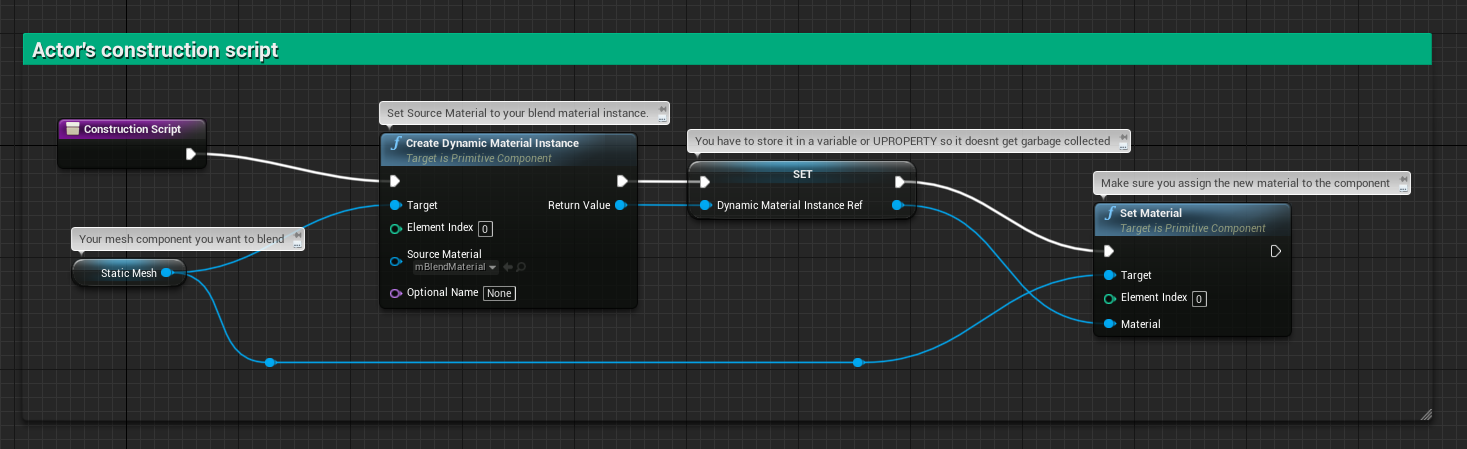
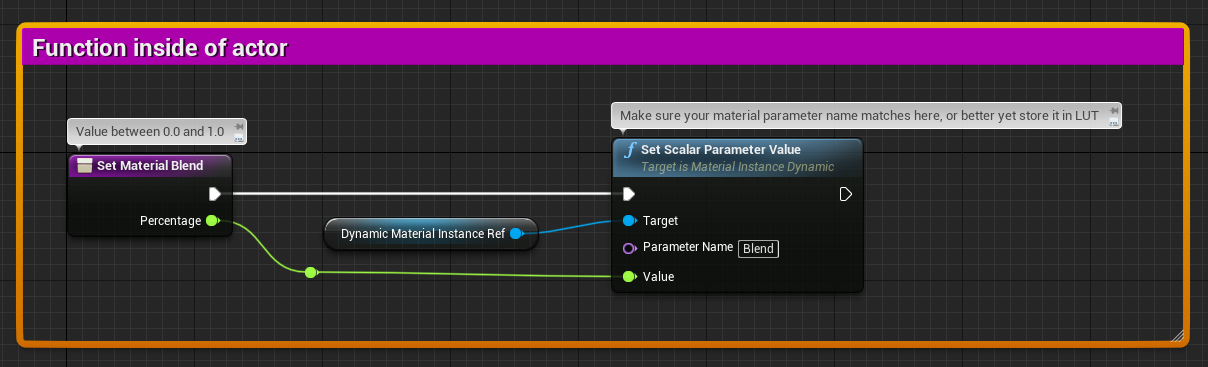
this part
static charm
i'd manually check that the parameter works
by putting a material instance on the actor
and manually changing blend
then check if that function to set the blend value is even firing
static charm
and setting the right blend value
right click and create material instance on the material in the content browser
manually put the material instance on the mesh
then open material instance and manually slide the blend value
trim matrix
youre supposed to put it in a timeline to change the alpha
and blend in two textures
but this part
something wrong here
 plucky aurora
I have a bp actor that i want to use to bake a mesh texture to texture but i dont know how to enable the "picker" for that source input
Can anyone help me with this? :)=
this is what i am running atm
 wicked dock
hey guys, can anyone help me with enabling mouse over/mouse click input :/
I'm struggling for the last two hours. I have a PlayerController with enabled mouse events, i unchecked the project settings "mouse as touch".
I have no clue why it is not working. Willing to stream my screen if anyone wants to help
 zinc fog
Is there a way to mirror a mesh? I have left and right rotating doors, i am hoping not having to duplicate each door.
plucky aurora
-1 on one of the scale value x or y
if your pivot sits well centered thats the fastest way
zinc fog
Thx i will see if i can figure it out!
 rough jay
https://streamable.com/ib7tem why are some not destroying
 odd ember
@rough jay why dont you just use auto destroy
rough jay
didnt work
odd ember
ok
so
the reason it doesn't work is because you're spawning several ones
and it technically only kills the last one because that's the only one it has stored
rough jay
ohh
odd ember
auto destroy would be the best way of doing it
it should work
if not, and you want to do it in that graph you'll need to add them all to an array
and then destroy each of them individually
there are other ways of doing it but that's the gist
rough jay
uhhh
get all actors get all components what is this thing called for i can put it in array
odd ember
none of that
pull out the pin
type add to array
you should get an add node
once you have it
you can drag out the array pin and create a new variable
zinc fog
@plucky aurora Thanks again, i got it working.
rough jay
did i do it right
rough jay
sus i dsidnt destroy but its suppose topprint out the index' and it kinda looks like theres more than 1 ball
odd ember
yeah it shouldn't add to the 0th slot
or well
wait
where are you doing this?
which blueprint
odd ember
ah yeah okay then the array won't work
rough jay
why
odd ember
I thought this was inside a class where you spawned ALL the emitters
rough jay
should i put this stuff inside my character bp?
odd ember
but I think you're right, it seems like there's an extra particle that has snuck in
no no
this is actually correct
is this the only place you're spawning stuff? are there any other events in the graph?
rough jay
seems like when it collides with another ball it bugs
odd ember
yeah
okay
so basically you should destroy the bullet when it hits something
and use auto destroy on your particle systems
plucky aurora
does anyone know if the draw material to render target node is limited to non projected textures? I am using world aligned and some normal transform stuff on it and it seems to not be able to draw that info ...
rough jay
got it to flop to the ground if it hit another circle, i wonder whats the reason behind this hm
rough jay
why cant i destroy the component
odd ember
@rough jay the component doesn't matter
the reason it spawns multiple
is because you do not destroy the bullet after the first collision
 narrow wyvern
Hello friends
Is it ok if I ask for advice here?
I think so, so I'm going to go for it
Right now I'm working with the Advanced Vehicle Template and I've spent quite a long time getting a trigger box to load a new level
I'm trying to get a garage system working into the game; whenever you drive up into the garage, it unloads the open world and takes you into the garage where you spend money to upgrade your car, etc
I believe GTA works like this
I have gotten the system working, but my car follows me when I hit the trigger box, and I want it to just despawn and whatnot when it opens the new level (the garage)
Any help would be appreciated, thank you so much :)
narrow wyvern
I just don’t know how to transfer the player from the view of the third person car to that it the empty garage
static charm
well you can either just set visible off for that car/actor
or spawn and posses another actor without anything except a camera
or place a camera in that level itself and set view to that camera
 stuck hedge
is there some way to check if the steam online subsystem is ready or not? Like if I try to run "get steam persona name" 1 or 2 seconds after my game launches, it will fail. Even though the steam overlay is available. If I put in a delay of like 5 seconds, it will properly return a steam name.
static charm
Run a loop until it's ready lol
stuck hedge
But how do I know it's ready?
that's the question.
simply testing for ID doesn't tell you
it'll immediately return the proper ID, but it won't return a steam name or anything like that
I wrote a C++ function that returns the SteamID as a string, and that'll instantly print the correct result
but even though it can get that, the next node that should print the name, fails.
static charm
when you says fails, like it crashes or just prints nothing
static charm
then just keep looping until it doesn't Equal 0
stuck hedge
I guess, that just seems really hacky
static charm
well
i'm surprised there's not an event or function for it already
to tell you when it's ready
stuck hedge
I was wondering if there was a bind I could use in the instance.
We create our ingame profile using your steam name and information, so that needs to be ready to make a new profile if one doesn't exist.
static charm
otherwise there's nothing really hacky about polling if it's ready
polling is pretty normal
stuck hedge
that's what I'll try then
static charm
isnt there an Advanded Sessions Plugin/package for free thats steam based
stuck hedge
that's what I'm using
narrow wyvern
Hm, I'm attempting to "Set View Target with Blend", but I can't seem to be able to bring up the option to create a reference to the camera I want to switch to
Could it be that I'm working on the wrong level?
static charm
hmm, yeah good point. if you're doing this outside the garage level, you wont be able to just pull the reference right from the level.
 twilit heath
this looks like both the trigger and what you want to set the view to are pre-placed on the level?
if so, add an instance editable reference of type of whatever you want to set the view to in the trigger blueprint
narrow wyvern
I got it :DDDDD
twilit heath
then assign it on the details panel of the trigger instance of the level
and you have your reference
narrow wyvern
I was working within the level blueprint of the open world, not the garage
And since the camera is in the garage level, not the open world level, I can't reference it in the open world level blueprint
Holy shit I feel like fockin badass right now, even though it's the most simple things
https://media.giphy.com/media/rlbzHD3pK2C5gWn15o/giphy.gif
It's the little things.
twilit heath
this is screen cap it, post it in blueprints from hell, then delete it and start over situation, imo
twilit heath
@trim matrix try figuring out a way to do it so its readable
use functions, not everything has to be in event graph
 neon sorrel
Anyone know why this isnt working? Migrated some instances and functions to a new project, and everythings the same, but this cast always fails. BP_PMM_Instance has game instance as its parent, so its confusing.
Always has a access none error
twilit heath
did you set your game instance calss in your project settings?
neon sorrel
Ahhh I think I missed that! Ill check on that and see if it works, yeah it was just set to the default now
Yep fixed it
I was so confused for a second, Thank you Zlo
plucky aurora
Does anyone here know how i can bake a triplanar material? Havent been lucky so far with the standard render target solutions
 steady apex