#blueprint
402296 messages · Page 543 of 403
 twilit heath
use that GetActorOfClass node and plug the result into the extra pin you'll get in ConstructWidget
after that you have a reference to that quest for the lifetime of the widget
 gusty shuttle
Cool, thanks, I'll give that a shot
twilit heath
then setup an EventDispatcher in the quest
with 2 integer inputs (CurrentNumber, FinishNumber)
gusty shuttle
For some reason I NEVER use Event Dispatchers, I really should
twilit heath
call the dispatcher whenever either of those change
and in widget, on Construct, bind to Quests EventDispatcher
and in the Event handing it, set the text
gusty shuttle
Nice, I'll give that a shot
twilit heath
you will need to initialize the text too, once, on construct, because dispatcher won't fire just because you bound to it
 dusk flame
"Hello" gets printed, so I know the SetScalerParamaterValue is being called.
gusty shuttle
with 2 integer inputs (CurrentNumber, FinishNumber)
@twilit heath I'm looking into how to do this in a dispatcher but there is no way to put inputs in a event dispatcher?
nvm, found it at the top heheh
twilit heath
you just answered your own question @swift pewter
 maiden wadi
What do you mean by default value in child classes? They should inherit whatever the parent class is. If you wanted a different default, another widget would have to inherit from that original widget and set it's own default for it's children to inherit.
 wind harbor
This node just Straight up kills Unreal engine, wtf...
And I have it in the Construction script of a Blueprints, meaning if I open the Blueprint it kills Unreal
But just adding it to any instancedStaticMesh component in other blueprints kills unreal when it's executed as well, no matter if it's in construction script or while playing
wind harbor
I tried with 0,1 and like 64 =d
 gloomy linden
0.1 doesnt seem to be a valid ism amount
wind harbor
no 0 and 1 and 64
gloomy linden
How many times did you add instances?
wind harbor
oh, i meant instances, guess I don't know what ISM Chunks are =d
gloomy linden
The target that you have there could be seen as an array that keeps the instances you add to it
 bitter iron
what the hell does convert mouse location to worldspace even do?
I thought it does the tracing for you?
gloomy linden
@bitter iron it translate the screen xy to world x y z
bitter iron
so you need to line trace to get the actual hit location?
gloomy linden
You could use it as start or end location for a trace
bitter iron
ah ok
wind harbor
Majmvp12, just Line trace from location along the vector and a good distance and you should get waht you need
gusty shuttle
IS there a ways I can get the parent for component begin overlap?
 stable fjord
How to fix this shitty wheel rolls?
 pine trellis
does a nyone know what this error means?
 mental robin
Is there a way to use a sphere collision in a BP to effect foiliage only within the sphere
 sinful finch
There is a reference file or index of all blueprints and what is each one for? 😅
 trim matrix
How do i undo things?
Like a shortcut
nvm
Is there a way i could make it so i shoot at the ground and launch up?
 alpine abyss
trying to toggle a boolean in the anim blueprint of this pawn but input doesnt seem to work. Feels like im not casting correctly but not sure what i am missing
 proven mason
I have 3 enumerator states for my character when he is in moving:
Neutral (standing)
Walking
Running
 slow schooner
having hard time understanding how can i can make spline mesh never stretch out of its bounds
or moving spline point along to be at the mesh bounds distance from the previous point
any hints?
proven mason
So far I managed to get the print outs Standing, Walking and Running when I push an analog button/stick towards a scale of 1
but when I set brake friction factor to 1 and brake deceleration walking to 300 I don't get the print out "Walking"
Here is my overall script
and here's how I set up the "walking" and "running" phase
So in a nutshell UE4 prints out those three print strings (in the first pic) during acceleration, but not on deceleration which is what I also want.
How can I fix that?
NVM I believed I solved it.
 barren frigate
Hi! How do I set a custom AIController on runtime? When I try to Possess / Unpossess the pawn to set a new Controller, it gives me errors saying that my custom AIController returns NULL.
So the game starts and the pawn moves with its default AIController, but on an Event trigger I'd like to switch the AIController to a new one, let's say AIController_new . Any way to do this in game mode?
trim matrix
Is there a way i could make it so i shoot at the ground and launch up?
 vernal compass
you could shoot a ray out of the gun and create a force at that point that acts on the player and pushes them in a direction
whether that be up or away from the point of impact
trim matrix
Pushing the player would just be launch player right?
 fierce birch
Anyone know how i can remove this gun mesh that is attached to this character
 sonic crescent
@fierce birch I suppose that exporting the mesh as FBX, importing it in a 3d app, removing the gun, reexporting the mesh in fbx, and reimport the base mesh will do the trick.
fierce birch
ok thanks, i thought there was a way in the editor
sonic crescent
@fierce birch I may be possible. But i'm not aware about the way to do in the editor.
Maybe you can change the surface of the gun with an translucent material. It become unvisible 🙂
(if the gun have its own material)
Hi, It's that the right way to create an instancer for adding plants to a StaticMesh ground in BP?
I have several instancedStaticMesh, i'm linetracing 100 times with a loop, and adding instances at impact location with random properties.
 vestal plinth
is there a way in the editor to make an actor snap back to the grid?
say it got offset a bit?
ah, it's Ctrl+End
 thorny marsh
@fierce birch It also maybe a Preview Mesh on the Bone.
This can be cleared in the Editor if it was set in the Editor.
 tender magnet
 flat raft
https://cdn.discordapp.com/attachments/221799467689574410/763143516875522068/2020-10-06_13-56-38.mp4 How do I specify exactly which widget I want to drop onto ? Right now I the entire widget prints Hello. I only want the Trigger Slot to print Hello.
Do I have to make a widget for each drop?
vestal plinth
all of a sudden, through reboots, every number from my random stream is zero
is this enough to initalize the stream?
 rough wing
Im about to go crazy anybody know a bug where a blueprint interfave doesnt get called?
flat raft
@trim matrix look into character launch
@rough wing did it work before? Did you try following the flow via the Debugger?
vestal plinth
this is ALWAYS coming back as zero. what could be going wrong?
it was working a few days ago, then stopped working without any changes that I can recall that might affect it
rough wing
@flat raft I got it to work, I accidentally put two of the same manager blueprint in the level
 late shuttle
Any way to get random vectors on the "skin" of a mesh?
 zealous moth
@late shuttle what does that even mean?
maiden wadi
@flat raft Your specific widget for the Trigger needs to handle the Drop if you want it to drop there. What'll happen is where ever you drop that payload, it'll more or less get any widget under the mouse, and drop it on the first one that is hitvisible. If it doesn't implement OnDrop, it'll just keep checking til it finds one that is or runs out of widgets.
flat raft
So my trigger slot, needs to be a separate widget.
maiden wadi
If you want it to work the default way, yep.
flat raft
So, if I wanted to avoid that.. and use my current setup
When I drop the green box over ammo slot, how do I go about ID ing that slot?
is there a ... this slot handled this drop?
I guess I can stop being lazy and just look at the API 😂😂
 ember dawn
Is there a downside to using a ton of scripts that run constantly, such as EventTick, or can I go nuts with it?
I'm looking up how to do picking up / carrying objects and they all seem to work by having a constant tick that checks if you're carrying something and if so, moves it with you.
 sudden swan
this video is esentailly free multiplayer with blueprints right?https://www.youtube.com/watch?v=u2Si2y2hviA

Hello guys and welcome back to another video! In this video I will show you how to create a Server Queue System. Much like what I had setup in my Fall Dudes Game.
Project Files:
https://drive.google.com/file/d/1E-NMD-_zxrqcSWBJUv4nio6G7vM_c6xw/view?usp=sharing
 surreal peak
@sudden swan it's never free as you need to host all that stuff and the servers somewhere
sudden swan
can i locally host it on my pc during testing though
its hosted on a sql database so i can locally connect to it via an app during testing 🙂 but i will have to host it once i release
aws just gives a 24/7 vm for it to be hosted on right?
if so i already have a azure vm
can i use a azure vm to host the multiplayer since i have a free azure vm from their student plan
or does it have to be aws
surreal peak
It can be azure too i guess
late shuttle
Anyone know a way to get a point on the surface of a mesh?
sudden swan
It can be azure too i guess
just a normal vm on azure will work?
late shuttle
I have a large Space Ship I want to randomly generated explosions on as it blows up... so I need vectors on the hull/surface/skin of the mesh
surreal peak
@sudden swan I can only say: Try it.
sudden swan
and on the aws tutorials they say to put in the static ip for server would this be the static ip?
surreal peak
Yeah. Keep in mind that actual server systems for e.g. Fall Guys don't work like that. At least not so manually
sudden swan
its using an sql database so for testing i can host it locally on my pc
like with mongodb for example u can locally connect to sql databases
surreal peak
I'm very well aware of that.
But you seem yo want to create a matchmaking server queue
Which requires quite some more external coding than a simple database
sudden swan
rip
MySQL said: Documentation
#1064 - You have an error in your SQL syntax; check the manual that corresponds to your MySQL server version for the right syntax to use near ''servers' WHERE CanBeJoined = 0' at line 1
surreal peak
- in addition, as usually with those projects: If you can't spend a few hundreds per month without actually earning something than a Dedicated Server Matchmaking based Game is not what you want to do.
Well you will have to take your mysql errors to places where those are solved. Not to the UE4 discord :D
sudden swan
ok
 quasi frost
So this for each loop is looping the same thing in the array infinitely. The do once node seems to work, well once, however if I add a reset to it from any point it loops infinetly again. How do I just say, do once for each item in the array each time this custom event is called?
 earnest tangle
Based on what you've shown it doesn't look like that should loop infinitely
If you modify the array during looping or if you recursively call your event that could cause it, but not much else
 severe iris
Is there any better documentation on the math node? I keep going to that article and being frustrated at how it doesn't give enough information https://docs.unrealengine.com/en-US/Engine/Blueprints/UserGuide/MathNode/index.html
The math expression node allows you to type in a math expression and builds the appropriate sub-graph to create that expression.
A list of supported functions would be good for example 😕
 tight schooner
@severe iris I've been frustrated about that too, but AFAIK no such documentation exists. You can always try stuff though; a surprising number of things work, e.g. Lerp() and RotateVectorAroundAxis() and etc.
tight schooner
VectorLength() works
I've noticed that functions that include parenthesis in the name such as "Lerp (Vector)" aren't available in math expressions
severe iris
Oh, okay, interesting 🤔
tight schooner
and with the right inputs...
severe iris
Didn't know you can just put most functions in like that, thanks 🙂
 opaque warren
Hi hi. I was wondering print
ups
xd
So, I was wondering
this input action is consumed when I press a button
Is there anyway to not consume the input when pressing a button but still having the event On Hovered?
 marble compass
how do you pass the reference of a variable to a function in blueprints? like i have float x, i wanna send the variable x into a function so the funciton can modify its value instead of just sending the value of x.
earnest tangle
in your function's properties, expand the parameter's options
there should be a checkbox for pass by reference
tbh it might be better to treat it as a value, and return the updated one... it's kind of unobvious in BP's what's gonna modify a ref so I feel like using them might lead to some confusing code
marble compass
thanks, found it
maiden wadi
@opaque warren Not exactly sure what you're asking for? If you don't want that LeftClick event to consume your input, just click on it and unselect the Consume input checkbox. But I don't know what that has to do with Hovered events?
marble compass
why does class == class not work properly in blueprint? i tested to see if it overlapped with the object of class that build area is set as default and it did, but the == returns false every time.
it works with cast to class node, but i want it to be done by comparing a variable since the blueprint will have children and i want them to be able to modify the build area variable to a different class.
 spring hare
Does anyone know how or what this effect is?
https://www.youtube.com/watch?v=cWpFZbjtSQg&ab_channel=SebastianLague

Experimenting with portals, for science.
The project is available here: https://github.com/SebLague/Portals/tree/master
If you'd like to get early access to new projects, or simply want to support me in creating more videos, please visit https://www.patreon.com/SebastianLague...
opaque warren
@maiden wadi sorry for my description. I have a bp that has an event for the input action LeftClick. When I LeftClick I do a Trace line and I execute my logic. If I have a button in the middle of the screen and I click on it, this Event for the input action does not trigger. I guess that happens because the button consumes the input and then the event for the input action is not fired.
marble compass
update: solved my issue, just delete the variable and created it again and it works fine now, probably a bug with the engine
surreal peak
@spring hare Sebastian fully explains how it is done. You'd need to port that knowledge to UE4 though.
spring hare
@surreal peak Okay i was just wondering if there was another for UE4 or not
spring hare
How do i make a Param in a material be able to be changed inside a blueprint?
surreal peak
If it's a named param you can just make a DynamicMaterial and call SetScalarParameter" or "SetVectorParameter"
Pretty sure google will also help you if you type in something like "UE4 Dynamic Material"
spring hare
Okay thank you @surreal peak
 ripe relic
How do I project text renderer through line tracing in blueprint?
When I project it it doesn't project it full text sometimes
 high phoenix
how to play a music from where it was left off
 devout tide
@high phoenix You can spawn an audio, bind on PlaybackPercent, then just multiply the percent value with the Duration of your sound and store the result on a value, then just use that value on the start time when playing the sound again
high phoenix
@high phoenix You can spawn an audio, bind on PlaybackPercent, then just multiply the percent value with the
Durationof your sound and store the result on a value, then just use that value on the start time when playing the sound again
@devout tide idk what you mean
i am just started coding
 ripe rose
is having tick enabled for a BP a non-negligible performance hit even if nothing is done on event tick?
in other words, should i unbind event tick for every BP where event tick isn't used?
 haughty ember
depends on how many actors of those classes you have, and before you ask I doubt anyone can give you a specific number
haughty ember
true, it's just about remembering
ripe rose
yeah
haughty ember
assuming you're derived class is actor, that is.
Some derived class might use it, so be aware of that
ripe rose
right
haughty ember
Personally btw, I wish the default was off
trim matrix
@ripe rose There is a project setting which disables tick by default. The Tick event wouldn't even fire if you had that enabled (in some cases).
The devs talked about how Tick is enabled there by default for easy and quick plug and play without hassle for the majority of developers.
It should be the other way around:
Enabling Tick for a class that needs it. Not disabling it as exception
That's what they recommend
ripe rose
ic
earnest tangle
If having it enabled has no performance repercussions then not sure why 🤔
it seems like there would be even if you did nothing
because the engine would have to call the function even if it's a noop
 fallen glade
Anyone has ever tried to scale a spline mesh with an offset from the original spline ? In my case I have a spline (1) making a ladder. To the spline I add meshes to make rungs (2) and rails (3) but when I scale a spline point the tangents get all screwed up : /
haughty ember
If having it enabled has no performance repercussions then not sure why 🤔
@earnest tangle because new users would have to find that tick option just to use it
I'm assuming you mean by "it enabled" you mean the option where tick is unchecked by default
earnest tangle
nvm I somehow read the discussion you guys had as "having it enabled has no performance penalty"
which now on a second read is not at all what you said
I don't know how I came to that conclusion on the first read lol
trim matrix
@haughty ember Can Blueprints Tick by Default is what I mean
I just thew it out of the top of my head
haughty ember
@trim matrix yeah I found it after you mentioned. The description and tooltips are a bit weird/confusing; I hope there aren't going to be any gotcha for me soon
fallen glade
The arrowes in the center are a visualization of the arrive/leave tangents, here you can see them alligned to the actual mesh location. The problem is: is it possible to get the tangent of a scale deformed spline ?
trim matrix
I think the engine does a good job giving warnings about Tick being disabled by default when you're still trying to use it in your graph.
fallen glade
or... how do I get this tangent ?
I know how to manipulate the thing itself but I'm unaware of any math equation useful in this case, if you can help please @ me !
 unique wyvern
is it possible to add components to actors dynamically?
fallen glade
@unique wyvern yeah, just type "add" you can add static mesh component etc
haughty ember
is it possible to add components to actors dynamically?
@unique wyvern If you mean in game-time then I know you can do it in cpp, not sure about bp. Either way I believe it's not recommended
 merry yew
I'm creating 2 players in my blueprint, but getting 3 Player Controllers. If I disable Spawn Player Controller, I still get 1. I wonder where the extra one comes from since I don't explicitly spawn it.
merry yew
I have no player and I never create a player
But I still get these when I hit play
Why?
haughty ember
A new player is created automatically when you start a game. A player controller to be more specific
@merry yew
merry yew
ok thanks msh91
ripe relic
Hi! I'm making a custom text graffiti in blueprint by using text renderer and line tracing
but the problem is whenever I hit the key for the graffiti it sometimes prints half the text only
and how do I place it on surface normal
can someone help me with this
ripe relic
but then how do you make it custom text?
It uses materials
@trim matrix I have the text material but I don't have any idea how do I make it custom text
trim matrix
Good question, I am no material artist so I have no idea how to parametrize the text somehow inside a material
Might even just keep it as actor like above
What was your problem exactly?
maiden wadi
The only easy way to do text in a material that I know of is a mapping. And that's not necessarily easy.
ripe relic
What was your problem exactly?
@trim matrix So the problem currently is I don't know how do I use decal for the text material so I went with text renderer and when I hit the key for graffiti on a wall or a floor it prints it in half and I want it to face it on surface normal
is there any way to do this?
fallen glade
If anyone stumbles upon my ladder from the future, this is how I fixed my problem. Instead of relying on a singular spline, I recalculate a spline for each rail (just a point per point copy of the main one with correct offsets applied) and then use that one without any scaling
maiden wadi
@ripe relic Try this.
ripe relic
thank you will try it
trim matrix
@ripe relic I realized that the good thing about decals is that they behave exactly as real graffiti.
Widgets can easily have adjustable text.
What if widgets can be used as material, I thought. Then I stumbled across this:
https://forums.unrealengine.com/development-discussion/rendering/1603327-umg-widget-render-target-for-material
Unreal Engine Forums
I've been trying for sometime to find an answer and only found this example but no clear way to do it. Id like to take whatever render target source the widget
I looked at how TextRenderActor and TextRenderComponent pull it off. The way that works is totally different than anything else material-related
ripe relic
I looked at TextRenderActor and TextRenderComponent. The way that works is totally different then anything else
@trim matrix Ohh alright I will take a look at it and try it, thanks
trim matrix
I'm actually really curious how to pull this off. I'll do it too just for fun
Using the Render Target from a widget component as material parameter sounds like the solution (if you want to use decals)
ripe relic
@maiden wadi How did you get the last Set Text node?
maiden wadi
ripe relic
I can't see the text renderer in viewport , can you see yours?
ripe relic
With decals or the text renderer
trim matrix
The text can always be changed
This is the actor with the Widget component and Decal component
The Decal Material applied to the decal component is this
I am no material artist. I just wanted to parametrize the widget component's render target somehow
ripe relic
Wow it looks like you pulled it off
 sour ridge
Are map arrays used like 2D Arrays?
ripe relic
Definitely will try it
trim matrix
And the Widget component of the actor has the Widget Class property set to your widget class containing the text you want to display
Use 'Get User Widget Object' on the Widget Component to eventually manipulate the text being displayed
hey I wish to move my spawn object
so cananyone help me
ripe relic
Use 'Get User Widget Object' on the Widget Component to eventually manipulate the text being displayed
@trim matrix Can't access my PC right now will try it later thank you for your efforts :)
trim matrix
No prob
 dense mica
I am planning to create Cod's medal system, any ideas how can I queue the widgets to come in order?
obviously i need to make variables and set them "expose on spawn" and use structs to manipulate variables but... how can i queue them?
 ashen sparrow
In my Animation Blendspace the horizontal and vertical axis is -1 to 1.. In my character BP I set the walk / run speed to 270 & 600 depending if you're walking or running. How do I communicate this to my animation BP so the correct animations play depending on if I'm running or not? Right now the running animations are played even if the movement speed is set to 270...
My blendspace looks like this... 0.5 on both axis are walking animations... (This is from the RifleAnimsetPro btw, if that makes a difference?)
I guess I could do a check when pressing the movement keys and then clamp the axis value if I'm walking? Kind of feels hacky, so maybe there's a better way to do it?
 astral epoch
Has anyone else had problems with the Was Input Key Just Released node not triggering?
I have a current setup running through pressed, released and held, and the only one that isn't triggering is released.
Off screen there are print strings to test each that aren't shown here, and the Finger Pulse only seems to fire on the pressed.
astral epoch
Nevermind, it just clicked what the issue was.
 neon sorrel
Anyone know how I can detect which user interacted with a blueprint object easily?
I dont know if theres a way to detect the actor that activated it
astral epoch
Each object should be uniquely identified even if they're of the same class, as far as I'm aware, same for controllers. Beyond that it depends on exactly what you mean by "activated it".
neon sorrel
Well my door currently works with a E to open button, trying to figure out if theres a way I can get the user who just pressed E on that door
astral epoch
Could have the event on the door require an input variable that's a pass-by-ref of the character blueprint?
I'm assuming you are actually calling something in the door here.
neon sorrel
Currently I just have a interact event that checks the users inventory system and if they have that item then open the door
actually hmm
I could maybe just use that
Standby
astral epoch
If you're doing everything in the character blueprint then you already have your self node to use. Otherwise, passing said self in whatever event the player calls works too.
neon sorrel
Im using it all in the door blueprint, for the inventory I just called get player controller. But if I use that in a print string it will print out the same controller for both clients. Hard to tell if theyre different since its the same name
astral epoch
The key press is in the door too?
neon sorrel
Yep
astral epoch
You're testing this with multiple computers?
neon sorrel
Nope, just the one. When I print out the local player controllers player name it prints out my pc's name
Maybe I just have to test with another pc?
neon sorrel
It seems to work properly if it prints out my pc name when running a client
astral epoch
Print the player controller number?
neon sorrel
Hmm maybe yeah
astral epoch
Yeah I'd day that is a good sign
neon sorrel
Wouldnt that print a 0 or blank space then?
astral epoch
You said you have a ref to the inventory?
neon sorrel
Because using that same player controller works for my inventory system
astral epoch
Player 0 is first player.
neon sorrel
Yep I just use "Get player controller" as the target for my inventory check
Seems to work well
astral epoch
Ah.
If it's not hooked to a controller blueprint then it wont have a player ID assigned to it.
neon sorrel
Yeah, which is odd that it still works with a player index of 0
astral epoch
You're probably better off doing all inputs from the player character, especially if its multiplayer.
Rather than having press E et all in the door.
neon sorrel
Currently I contained most all of the code for the doors in the door blueprint itself, it worked well for checking the players inventory and all, but hmmm
If I use get player controller then get player name it prints out my pc's name
So I assume that would print 2 different names on two seperate pc's
astral epoch
You can test that.
neon sorrel
I just have to wait for some of my beta testers to come online and push out a build yeah :/
astral epoch
I'd suggest more but I cant check as I'm on my phone right now.
neon sorrel
Its all good, I appreciate the help
astral epoch
Theres probably a node that checks who fired an input but I'm unsure.
neon sorrel
Ill read up some documentation, that would be handy if there was
I think I found the issue
Seems since I run the door event in the blueprint for the door, it runs on the server, which opens it for all players which is good
But I just cant reference the user who interacted with it easily because of that
trim matrix
How do i make the default projectile work like a real bullet? (like be straight and don't be affected by gravity)
this is the default code, asking if someone knows what i need to change
sorry for being a noob, I 'm just learning
 daring vapor
you want to change static meshes to another mesh?
@white crypt I'm actually looking to do this exact thing, and with a bunch of meshes within a level. Like all the walls, and all the doors... Do you have a tutorial you can suggest that shows how to build such a script? Perhaps a link? Many thanx. 🙂
ashen sparrow
Why doesn't my character "Un-crouch"? 😦
rough wing
I'm not sure but Can Crouch might be false when already crouching?
Also there should be a "crouch speed" variable so you won't need to set max speed
 white crypt
@daring vapor not that i know of, but its rather simple. You make a function in your bp and check the box "call in edtior", then when you click on the bp in your viewport you will see a button in the details tab. That button is your function, so you would have to get all actors of class (static meshes) and from a for loop you set new meshes

What is the Editor Utility Widget added in version 4.22 in Unreal Engine 4
Source Files: https://github.com/MWadstein/UnrealEngineProjects/tree/WTF-Examples
Note: You will need to be logged into your Epic approved GitHub account to access these examples files. https://github....
or always take a look at Mathews videos
ashen sparrow
I'm not sure but Can Crouch might be false when already crouching?
@rough wing It's not.. if I remove "Crouch" and "Un Crouch" from the end of the chain and do a Print there, it's all fine... :/
white crypt
If*
it means that your condition changes
so when released try to change the branch to false
 marsh forge
I'm trying to set up an approximate air resistance force for a character, how would I apply the force to the actor? (add force is a bit wack)
daring vapor
@white crypt Thanx, I love Mathews stuff. I hadn't come across this one yet. I'll check it out.
 stiff gulch
did you derive classes from TargetPoint?
stiff gulch
they all have the same data?
 lucid granite
no because they all have a different location in the world environment
so I need specifically targetpoint (show on the left side of the table) to be Flop1
but I don't see it in blueprint
stiff gulch
hmm make sure the class is blueprintable and try to make a blueprint from that targetpoint
or probably derive 3 classes :
AFlopTargetPoint
ATurnTargetPoint
ARiverTargetPoint
since they have different data
 haughty egret
Has anyone hit this before?
Assertion failed: OutPin->LinkedTo.Num() == 1
lucid granite
I found out the issue
now it shows in blueprint
so tsubclass only allows for a generic class but just a pointer allows me to get that blueprint accessible in C++ from the world environment
 charred berry
So what would cause this, what may be missing if so how do I fix it ?
I can get around it and on play seems fine, but it worries me this may affect project
and in compiler results Can't connect pins Enumerator and Resolution : Input is not an Enum.
 woven wing
You've changed one of the two types.
Or that variable has been removed.
Aaah.
You deleted a class.
That's what's happened.
Your 'bad cast node' there is what happens if you have a 'Cast to MyClass' node, and then you delete 'MyClass'.
My guess is, all those other missing pins are probably from trying to use something of that class after it's been deleted.
trim matrix
hey guys, having some trouble getting my character to rotate when entering a "Battle Arena" . I can get the character to move to the target location using target points but the rotation never works on the Z axis.
I've tried using local and world transforms and locations but I'm a bit stuck. Any help would be appreciated!
trim matrix
it doesn't update regardless of what Z value is enter, Ideal it should face the same direction each time, at present it keeps the character current rotation and moves them to the target point 😦
woven wing
Ah - I have a feeling I know what it is.
I think this is a bug.
Recombine that Rotation struct.
And use a 'make struct' node for the rotation.
Try that, put the same values in.
I think, if you have the struct broken like that, it might not work.
bitter iron
jackfractal
have you made camera dragging before?
like click -> gets hit position -> move mouse drags camera opposite direction
woven wing
Yes, but not in unreal.
bitter iron
ive made it in unity and took 5 minutes
this is insanely difficult in blueprint for some reason
woven wing
Yeah, unity is great.
woven wing
As with most things.
bitter iron
essentially, i can get the initial position, but I think my brain isn't understanding the math
I get initial worldspace position of cursor when I click in middle mouse button, verified working correctly
while input key is down, it will vinterp between (Current Position - Initial Pos) to AddWorldOffset
on event tick
To me, that seems sound, instead its literally just throwing the camera across the universe within a few ticks
woven wing
Hahah
bitter iron
and I think its got something to do with on play doing weird things to the position of some components, like -5432, -60102 XY???
white crypt
if you got two vector points and want to vinterp between them then use set world location
not add
bitter iron
am i stupid or should add work
woven wing
It won't work with v-interp.
bitter iron
oh
woven wing
What you could do, if you wanted to add it, would be to create a delta, and then multiply that by deltaseconds, and add that.
But setting the position using VInterp will do the same thing.
white crypt
you can even try "move component to"

What is the Move Component To Node in Unreal Engine 4
Source Files: https://github.com/MWadstein/wtf-hdi-files
ashen sparrow
Is there a way I can put a Branch in here?
white crypt
blend by bool
ashen sparrow
Lovely.. Thank you!
white crypt
you will want to cache it
if thats what you are asking 😄
from default drag and type cache
then you will be able to use that cache more than one time
ashen sparrow
Hmm.. I don't think that is what I want.. After the Default I want to check if my CombatMode-variable is true or false.. If it is, go to the "StandAim", else to "ExplorationLookAround". Or should I place my AimOffsets elsewhere?
woven wing
That's why Tsauken is suggesting you cache it.
white crypt
still cache it
woven wing
Cache the outcoming pose of your Default state machine.
Name it like 'State Machine Pose'.
Then plug 'State Machine Pose' into both of your AimOffsets.
And have the bool blend after with outputs from both AimOffsets plugged into it.
white crypt
yup, duplicating state machine would be wasteful
woven wing
Your cursor is attached to your animated character?
bitter iron
myb if i seem stupid, this was easy in code but rn i have no idea why I can't get this to work how i want rofl
woven wing
Hah, I mixed you and Svedin up.
white crypt
you are deducting from impact point
woven wing
Also that 'Set' for initial mouse WS makes me anxious.
white crypt
it does
bitter iron
im new to blueprint
white crypt
the whole thing probably runs on tick
bitter iron
might have to elaborate
woven wing
You cannot guarantee that a return value will be valid except within the evaluation in which it was generated.
bitter iron
see that is one thing I'm confused about
timings in general are not explicit to me
does it re-evaluate what it needs once its called? even if its not needed?
i should do all this in c++ tbh
blueprint seems bad for this kind of thing
woven wing
I don't think it's that bad.
You're just unfamiliar with it.
And it does take some getting used too.
It's a different programming language.
bitter iron
yeah, its seems really good for behavioral stuff
just for this seems outside the intended use case
woven wing
Nope.
bitter iron
besides like third person shooters
bitter iron
ok, one thing im confused on then, why is it not moving the scene root by the same amount my mouse is moving in world space
ashen sparrow
I think I got it.. (?). One more thing; the Output Pose - I can't connect them both to the output.. So how would I go about solving this? Sorry if I'm a total noob - it's my first time working with Animation BPs 😄
woven wing
You want to connect StateMachinePose to your AimOffset, and then connect both AimOffsets to your Blend.
 ashen sparrow
Please let it be beer?
charred berry
@woven wing if so, how do I fix a deleted class, can i reimport something ? Not a great programmer atm, a WIP
woven wing
Uhh... if you have perforce or git or some other kind of version control.
You can roll back whatever version you submitted the deletion.
If you don't - you're straight fucked.
bitter iron
so things shouldn't be on tick, what should be running camera functions
everything works
woven wing
OK so, some things should be on tick - things that happen over time.
Some things should not be on tick - things that respond to events.
Like a mouse click.
In Blueprint, all evaluation comes from an event node, whether that node is 'Event Tick' or otherwise. Functions called in a particular 'thread' of evaluation (the white lines emerging from one of the event nodes), the results of those functions are unreliable if used from another Event thread.
Unreal does not guarantee they will still have valid values.
So, in your 'Click' event, you should store all valid values as variables.
And then in your Tick event, you should use those values to do things over time.
In your case, I think you want to store 'Impact Point' as a variable.
Probably call it something like 'Clicked Location'.
And you probably want to use 'Set Actor Location', rather than move the Root component.
lucid granite
can I teleport to a location in the viewport with xyz cordinates?
woven wing
Not sure what you mean there Vaunture. Do you mean in the Editor?
 marble lantern
what node allows me to tell the get a ref to get all the actors in the level so i can run a custom event
woven wing
"Get All Actors Of Class", with the Actor class of "Actor" will get everything.
But you almost never need to do that.
The only time you'd need to do that would be something very odd and one-off.
marble lantern
i have some lights in a boss where it needs to change when the boss gets to a certain health @woven wing
woven wing
Ah, so if they're all the same class then you can put that class into the "Get All Actors Of Class" node, and then you won't get everything you'll just get lights.
And if it's only some of the lights, then you can add a tag to them, and use Get Actors By Tag and then you will only get those specific lights.
marble lantern
thing is i have a custom event in the light blueprint and i cant access it without a ref
woven wing
👍
That said, you can also have your lights find the boss.
And connect to his "I'm About To Die" event.
marble lantern
yea i was about to do that
woven wing
As it's a one-off, it's probably fine either way.
marble lantern
either way would be fine right? its not like one way is less cost effective
woven wing
If it were a standard mechanic - I'd say use the 'light subscribes to boss' method, but either way works fine.
bitter iron
I click, and it works
the problem is when I click, no matter where, it will move the camera so that my cursor is at world origin
my brain
nvm im fkin stupid
 barren relic
Hey all its me again lol! I had another question, Im trying to create a simple fighter game respawn system similar to mortal kombat's. Basically the player fights the ai and if he wins 2/3 he goes to the menu level and is able to choose another fight. However, if he loses he has the option to try again or go back to the menu level and pick another fight. Any suggestions?
 severe sparrow
hi.. i'm new here and also pretty new to unreal engine in general, maybe 20 hours in atm.
i have what is probably a very novice problem but i can't for the life of me find a solution on google, unreal forums or anywhere else.
I'm working with a shop inventory system using a data structure and data table, for some reason they will only work on the level that was on when i created them. I checked the level blueprint, I made sure all things are sharable to other blueprints, etc. The shop works 100% perfectly on one level, but when I switch to a new level it wont load anything from the data table. is anyone familiar with this?
 shrewd mural
When you load a new level, those objects have to be re-created. So if you want to transfer data between levels, one of the ways to do it is through the use of the GameInstance.
Idk if this should be here or animation, but does someone know why this does not play the animation? It prints the string, so I know it's running through Play Animation. nvm I just forgot to call super in the base class.
For context, thats a user widget and Fade is an animation of text fading.
 weary jackal
Hey all its me again lol! I had another question, Im trying to create a simple fighter game respawn system similar to mortal kombat's. Basically the player fights the ai and if he wins 2/3 he goes to the menu level and is able to choose another fight. However, if he loses he has the option to try again or go back to the menu level and pick another fight. Any suggestions?
@barren relic two integer variables. One for player, another for ai. If anyone losses first 2 games then no need of third. I think about a macro which contains 3 output respective to player. Win, draw, lose. If win then playerWinCounter+1. If lose then aiWinCounter+1. If draw then go for tge third game.
severe sparrow
@shrewd mural thank you! I had no idea it worked like that. I'll try to learn about game instance then
trim matrix
How do I reference a target point outside of the level blueprint?
I've set it location in the world and need to move the player to it, which I can do in the level blue print but not the first person character bp?
woven wing
@trim matrix - You can create an object reference variable on a blueprint in the level, and you can plug references into that.
If, however, it's like a spawn point, or a teleportation target - for the player, there are likely better methods to do.
 copper vessel
anyone know how to find this node?
 hushed bridge
👌
 simple berry
how would i go about hiding a skeletal mesh from everyone on a server?
woven wing
Like have an invisible mesh that's invisible to everyone?
Or one that's just invisible to some people?
simple berry
Invis to all
woven wing
Just set the either the 'visibility' property to false.
Or the 'hidden in game' property, if you still want to see it in the editor.
simple berry
Well I mean, it's supposed to be something that happens only when a certain variable is ticked, I have an event for it I just can't get it to work properly for some reason
woven wing
Can you show the bp?
woven wing
Ah, this is the same thing I was talking about earlier.
In "Server Hide" and "Server Death" you're using the values from another event.
Those values will not be valid.
So they won't be set.
Basically copy the 'Set Visibility' node down, plug it into the Server Hide node's 'New Param' parameter, and make it run off pin 1 of the sequence, and it should work.
simple berry
you see when i do this it dosent become invisible
simple berry
But when I do it the way you're saying it dosent work
woven wing
What does 'my way' look like?
simple berry
woven wing
Ah, you still need to call the event.
Use a sequence.
Call the event.
And then set the visibility.
 simple lantern
How many texture samples is too many in a material?
woven wing
But do so from the ServerHide's NewParam value.
simple berry
when connected it still dosent work
 raw bobcat
Hi everyone maybe someone here can help me with this (https://answers.unrealengine.com/questions/988604/input-doesnt-work.html) Its my topic
My input or just any other key doesn't work, any suggestions?
hushed bridge
@raw bobcat make sure your gamemode is spawning the right pawn and controller
you can check by putting a print in the Pawn and PlayerController's Beginplays
raw bobcat
Sorry im kinda beginner in blueprints where can i find my player controllers? @hushed bridge
hushed bridge
aha apologies, I forgot that the ThirdPerson pawn has all the controls built in
if you've placed the pawn in the world, go down it's details, there should be a setting called "Auto Possess Player" or something
set it to Player0
 harsh coral
I got a premade blueprint that basically makes a turntable rotation for an actor. How can I add that to a level sequence to export it as a movie?
hushed bridge
it should do the trick, you may not even need the camera blend anymore
raw bobcat
set it to
Player0
@hushed bridge yeah thanks, but now its kinda I dk, inverted? Like if i want to move on 180degress I need to press A then S and A, I can’t just simly hold A as in template, is there a way to fix it?
 north plank
I followed crocopede's grab ledge tutorial (https://www.youtube.com/watch?v=4yjcwZLQqlE) and followed everything he did but I am facing a weird thing. As shown in the video, my character stops at the desired height and everything is fine but if I press any movement button in any direction for a single time, my character automatically starts moving in random direction. This is happening when I am setting my movement mode to ‘Flying’ when the character grabs the ledge as shown in the tutorial but if I keep it to default ‘Walking’, such random things don’t happen but my character doesn’t reach the desired height. Many people have faced the same problem and they have commented in the video but no one provided the solution. As this is a complex blueprint setup, I can’t provide the full code but I am posting as much as I can. Can anyone please help me?

Tutorial series covering the following
Vertical wall run
Grabbing ledges
Climbing ledges
Sliding down walls
merry yew
Hey
I'm possessing pawns at the beginning of the game, but the aicontroller still executes
Or more importantly, IsPlayerControlled returns false
So even if I do this
This still returns false
in the AIController
EDIT: Turns out it returns false because controlledpawn is None. So I just needed to replace it with isvalid.
dense mica
their collision set properly but it doesnt collide?
i set breakpoint to test it but its not executing
 tawny tinsel
help i cant seem to cast from children if this variable if set in child sets to parent pls help
tawny tinsel
how do i set variable for child actor?
i cant plug in for each loop so what do i do
 fading marsh
Quick Question: How do I (in Blueprints) mark an event private so that it can not be called from outside that actor?
earnest tangle
I don't think events can be marked private
You could try using a function instead? Those can be marked both protected and private
fading marsh
Really? Wow... Im really falling in love with Unreal
earnest tangle
it says "tried to access index N from array of length 0"
so the length of the array is 0, and you're trying to read values from it
 thorny cedar
i saw this in one of my example projects. how can i create such a preview?
i can set this through a value
foundit
 tall eagle
Show 3D widget in variable properties
thorny cedar
@tall eagle it simply takes the values from the editor right? i want to build a spline that shows the individual Points to teleport
tall eagle
@tall eagle it simply takes the values from the editor right? i want to build a spline that shows the individual Points to teleport
@thorny cedar yes, it must be instance editable
thorny cedar
i set the value in my spline constructor for each teleporter element and it updates the position, but not at the exact location. I guess its not possible to add the element locatocation to my teleport to location before construct
thorny cedar
is there a way to lock a variable completely, that it cant be altered the editor?
earnest tangle
I think if it's declared in C++ you can just omit any Edit specifiers on it
then it won't be visible in any of the property panels to be edited
thorny cedar
@earnest tangle in c++ its obvious 😄 i want to have ana ctorr, that i can drop in my scene, but wont allow tto rotate it
dense mica
hardcode the actors rotation in construction script 😛
if you even try to rotate it, it should revert itself to hardcoded rotation i guess 😄
earnest tangle
that is a good idea lol
I don't know if you can prevent rotating an actor even from C++ unless you do something like that
thorny cedar
hm somehow i tried it and it didnt worked
 grim plank
is anyone familiar with physics constraints? I am having trouble assigning actors at runtime
I tried like this, but when i check at runtime, it doesn't work and only the component names are set, but not the actors
 solar bison
Does Add Child for panel widget assign indices to the children?
dense mica
use posses before maybe
anyone knows is sequence same thing as multi-threading? (in theory ofc)
 signal palm
It just executes them in order
earnest tangle
It's just a way to organize your nodes differently if needed
dense mica
understood. i was saw some multihreading things while researching my queue system, then wondered whats the difference
i guess multi-threading is about memory
im pretty sure im overlapping the object lol, why its not triggering overlap event?
breakpoint doesnt trigger too
signal palm
You don't have to check if it implements the interface btw, you can just fire it anyways
dense mica
doesnt work either
weary jackal
Rather than checking actor being overlap. Try overlapping sphere collision. And check with casting to your player
dense mica
tried it too... not worked, event hit works but overlap doesnt work
whats the difference anyway?
weary jackal
In actor overlap it checks fpr whole actor. And sometimes the actor held out of bounds. So it's good to work with colliders
dense mica
i created a sphere collision to check if it will work
the problem is not the collision channels or actors, its block my pawn on level but not triggering the events 🤔 thats weird
severe sparrow
does anyone know how one could share a data table through multiple levels using a gameinstance? i'm not having any luck. my goal is to share the same NPC with the same inventory widget that utilizes a data table and data structure, but they only work on the original level.
dense mica
maybe use savegame?
as far as i remember beginplay should trigger every new level loaded, right? on beginplay get savegame data (your data table)
save when needed so data wont lost (eg. save when inventory changed, new item added, removed an item etc.)
trim matrix
For Health , i have just a basic box. Is there a way to upload a custom healthbar texture?
I made the healthbar as a progress bar in widget blueprints
weary jackal
Make overlay
Inside that overlay add image and your progressbar as well
There're also videos if you're planning for a circular or square progress bar
trim matrix
ok thanks
dense mica
is this a good way to check gamemode?
i want to add different logics between different gamemodes
but i am handling the logic on pawn, thats why i need to do this
surreal peak
no
You are comparing a BP Asset with a Class Instance. That's the most wrong you can go.
If you want to know which specific GameMode that is, you can use a Cast
Also keep in mind that you always only can have one GameMode at a time. So theoretically you should be aware of what Class you are using.
You can of course change the GameMode per Level and when switching Levels, but during a Level the GameMode stays the same.
dense mica
okay eXi, thanks 🙂
 tulip iris
RTF RGBA 16f shows up blank, but, RTF RG8 shows up but obviously discolored. So I want RTF RGBA 16f...
Why would RTF RGBA 16f show up as blank when set as an image?
Been beating my head against a wall for a bit
would love some input!
 dense mica
had to go #multiplayer sorry
tulip iris
Its happens 🙂
tulip iris
It's tough as it all overlaps.
 civic sand
hi ! i think this is pretty simple but im lost.
im trying to call an event from another actor blueprint but cant get the correct object input when casting to it
if anyone has any pointers would be appreciated , been on this for hours
dense mica
is portal_bp a custom actor?
civic sand
its from when you add a bp and chose actor , is that a custom actor ?
dense mica
yes
dense mica
so you cant access a custom actor with only casting
you somehow need to get info about that actor
civic sand
yes , thats where im falling over
civic sand
its in every level
dense mica
but only one for each level, right?
civic sand
yes
dense mica
ok then you're lucky
normally you should learn about blueprint-communications and containers etc. but i can give you an easy solution for now (i mean "for now" because its not recommended for every logic-setup please dont get me wrong)
use "getallactorsofclass"
civic sand
ive been doing lots of examples but cant get anything ive learnt to work
dense mica
if im not wrong, there must be something called "polymorphism" in c++
so you create an actor, define some values, logics, codes to that actor
then create another actor derived from that actor
what you see on the actor creation window is actors derived from engine classes
"Get Player Character" gets the players Character actor
Derives an actor from that
You actually use that
With casting to original Character actor you can access to your own Character
But in custom actors thats not that easy
There are ways to access custom actors, like spawning them on gamemode then promoting the return value to variable, get all actors in class node, or using event hit
civic sand
ok
dense mica
but you dont need a specific actor to access, there is only one actor in your level
so get all actors of class returns as how many actors you have in level
you can just use it
civic sand
i tried binding but the problem was there are multiple coins
dense mica
i would create the portal_bp (spawn) on gamemode* then reference it by promoting variable, then cast to game mode and use it there
civic sand
thats great thanks , ill try that
marsh forge
what is the standard way to apply a force over time to an actor/component? I would imagine it is addforce but I keep running into bugs with that
basically if I wanted to apply a force while a button was held down, would I want to use impulse, addforce, or something else?
dense mica
im really not into phsyics but i guess impulse
im just saying that because i saw impulse too much in tutorials 😄
add force is kinda for movement maybe(?)
signal palm
Impulse is usually an instant push and force is usually a constant force that's being applied for multiple frames
marsh forge
ah, so then I guess I have to figure out why it's acting so wack
earnest tangle
AddForce should be the way to go if you want to apply it over several frames
You need to multiply your force by deltatime though
iirc
marsh forge
for some reason addforce is requiring really high values and it kind of breaks depending on the event
I didn't multiply it by deltatime
so that might fix it
lemme give that a shot in a sec
 winged badge
What would be an optimal way to load character models in blueprints without overwhelming the system memory?
In my game i have a character select where if players click on a character, their model will switch to that new character model and it will be saved to their id card when transitioning to a gameplay map
Right now i have the skeletal meshes in an array and when a player selects a character it uses an integer to find that model in the array and set it as the preview mesh
bitter iron
what would be the most foolproof way to enforce a level bounds? My first thought is to use collision channels
winged badge
On average each character takes up around 30mb and i intend for this game to run on systems with 4-8gb ram
trim matrix
is this a good way to crouch?
trim matrix
what should I use then?
trim matrix
Thanks
winged badge
If something such as a skeletal mesh is an object array as a default variable, will that mesh be loaded in even if i dont use the array?
marsh forge
so if I wanted to use addforce on a player, would I set the target to character movement?
just want to make sure I'm not setting this up wrong
dense mica
no set the pawn itself
what i meant movement before was moving the actors with phsyics, it wasnt related to cmc and i dont even know what i said is true 😛
marsh forge
oh I could have sworn it gave a compile error when it was set to self
lol
I am incredibly smart
dense mica
lmao
signal palm
You should actually use the character movement I'm pretty sure
marsh forge
it looks like it targets character movement component when you leave it as self anyway
which is why I was confused
well that's good
guess I have to give it a test and see if it decides it wants to act buggy
signal palm
It needs high values because the delta time is like less than 0.01
marsh forge
Noted
The main issue I was having with it earlier was it not working with one controller, but then having it add a crazy force when I had the input set to 0
signal palm
Hmm I just did a quick google search and found this: "Add Force and Add Force At Location automatically account for the delta time."
signal palm
But then some people say that their force is much stronger if their fps was low
marsh forge
Ue4 go home, you’re drunk
signal palm
Maybe just use impulses 🤷♂️
marsh forge
Impulses do work fine but I’m not sure how performance friendly that will be if I want to set up a drag force
Only one way to find out lol
signal palm
Found this on an old forum post
"AddForce accounts for delta time and should be used for applying force over more than one frame, AddImpulse does not account for delta time and should be used for single 'pushes', like from an explosion or being thrown by a player. The reason is that if you use AddForce for throwing or an explosion, how far the object moves depends on the framerate at the exact frame the force was applied, rather than being independent of framerate like AddImpulse is."
Do whatever you want with that information lol
gusty shuttle
Question: In a widget anim, if it get's called to play only once, do I have to tell it to stop once it's done? It's like a one-shot anim
As in, does it "garbage collect" it after it's done?
That question is weird but I just want to know if after it's playing if it's lingering
dense mica
on the last frame animation stops by default?
if you dont loop it
no idea about gc part
gusty shuttle
Aye, same. Thanks for Rubber ducking though
bitter iron
4 days into blueprint, seems to be especially vulnerable to my everlasting stupidity, feels so much harder to look at then code but so weirdly useful at the same time
So far, I feel that epic could use maybe a better way to show EXACTLY what something is doing, which I feel is the big strongpoint with c/cpp
signal palm
What do you exactly mean?
bitter iron
let me find an example
signal palm
I never used cpp in ue4, only for non ue4 projects just because blueprints are quicker to prototype with so I get lazy and don't wanna switch to cpp later in the project
bitter iron
ConvertMouseLocationToWorldSpace for instance
my initial assumption was that it literally did just that, but it doesn't, it allows you to do that with a tiny bit of work
signal palm
I mean it does that? It returns the location in the world and the forward direction from your camera IIRC
bitter iron
I suppose it does still yea
gusty shuttle
@bitter iron I've used that node before, it always gave me wacky results somehow. Probably was using it wrong on my end
bitter iron
or even just documentation, because a lot of blueprints are just magic
@gusty shuttle I also had to look up how to actually use it
since It didn't click for me
signal palm
Hmm maybe I'm too used to blueprints but it clicked for me instantly when I saw which outputs it gave me
bitter iron
it just takes essentially where your screen is, and then figures out a direction based on where your cursor is on the screen
yea the outputs let you see what it does
but if you are tired, or new to blueprint, a lot of nodes have extraneous outputs
that you don't really need to use it, they are just there for any use case
so the direction is like "ok idk why I'd need that" and you ignore it
and nothing is working, then if you are smart (I was not) you look at other nodes before you examine what that one is doing
signal palm
Yeah I guess that makes sense
bitter iron
but in code, it seems slightly easier to understand functionality, and especially trying to build something with math I can basically drop in formulas from PDF's if I want to
gusty shuttle
Maybe GetMousePositionOnViewport?
bitter iron
transforms are how UE4 refer to vectors in math sense right?
 bitter iron
GetMouseVectorsOnViewport seems fine
but its nitpicky
its more of a flaw with the medium than the node itself
or english tbh
signal palm
GetMouseVectorsOnViewport seems fine
@bitter iron You mean for the ConvertMouseLocationToWorldSpace noed?
bitter iron
ye
signal palm
Honestly GetMouseVectorsOnViewport would probably confuse me
bitter iron
yea thats what i mean
you can't make it better, its just the medium
im sure they have a ton of people having meetings on the names of nodes and shit, like every other company
just this week I had to participate in a meeting where my icons were deliberated about for 4 hours because one person thought they weren't good enough, and at the end he changed his mind and says he likes them, so same thing
signal palm
Idk honestly I find the node names pretty good usually, also they are usually just cpp functions exposed to blueprints, and their names are pretty much the same as I would name my cpp functions
bitter iron
usually pretty good yea, like I said I had no experience with this kind of thing at all, and in like 10-12 hours of learning it I've got a decent little camera system
and thats with like 9 hours of figuring out why my math didn't work
and its because I didn't have a addition node in the right place
9 hours.
signal palm
Oh well
bitter iron
ye
signal palm
I've done singleplayer bp only for like 3 years though I had some long breaks
Even though I've started learning cpp like 6-7 years ago, still haven't tried it in ue4
bitter iron
it look pretty dont it?
bitter iron
do you hate the curvy lines as much as I do?
bitter iron
god if epic gave me a editor preference thing for circuit board style interface my nips would explode
OH GOD
signal palm
Lmao
bitter iron
what the fuck
signal palm
bitter iron
no seriously
signal palm
I actually knew where everything was idk how lol
bitter iron
and they are so far apart you can only see one node at a time when you zoom in
bitter iron
your blueprint is a fire hazard
signal palm
I had a skin system
Where it had a switch
For every skin you can buy
And I manually hard coded every 3d asset for that skin
So when I wanted to add a new skin I had to change the code in like 5 blueprints
bitter iron
LOL "yea this is how fortnite does it"
signal palm
So I fixed that now and made a datatable and now you add a skin with a click lol
And I wanted to continue to work on it but it's just bad
So I started doing my first real multiplayer project a few days ago
bitter iron
yea, like I want to add velocity to camera rotation, so it feels nice, make everything feel better, zoom to cursor, gamepad controls, wasd etc
better to just remake it from scratch
bitter iron
is there a way to hide comments
signal palm
I haven't made it a habit to use reroute nodes
bitter iron
like folders in photoshop
signal palm
Hmm not sure
bitter iron
it would also be nice if they had a portion of the screen where It lists all my comment blocks
so i can double click there and zoom to it
bitter iron
LOL
signal palm
Or the whole block
signal palm
Yeah xD
bitter iron
i mean the block
signal palm
Not sure then
signal palm
There is also a plugin that makes your lines straight automatically
bitter iron
i wonder if it would be possible to have a cpp node where you can write cpp code as a node itself inside blueprint editor
signal palm
I remember wanting that before too haha
bitter iron
for my econ sim I am probably going to have to write cpp classes for the math and use them as blueprint
you can just use vs but it takes so long to load
and i don't feel like having a visual assist subscription right now
signal palm
Idk if I should try cpp for this game I started working on
bitter iron
i think cpp + blueprint is way better than either individually
signal palm
Well yeah
bitter iron
some things are cleaner in code, some things are way cleaner in blueprint and more modular
so you'd write functions in data oriented way in code, then use it modularly with blueprint to implement it
signal palm
I always say I'll try cpp in this project and I never do lol
Yeah I could just write functions and expose them to blueprints right?
bitter iron
yea
one problem is if features need to change, but with blueprint structure as long as you have the same in/outputs nothing should completely break
supposedly
 unique holly
Heyo! Hopefully a simple one for someone... I have My item classes as a string... 'item_C' .... and i was hoping for a node that removes the '_C' leaving just the items name. So from string element to string element removing '_C-
any takers? >_<
bitter iron
sure ill try
is there a reason to use strings though?
you can build custom variable types iirc?
unique holly
I'm trying to use the class of the items to pull defaults from a data table. Converting the class to row name seemed a simple route... i might be too noob
signal palm
Sooo that doesn't look like very good code but sure that should be easy
bitter iron
strings are best for literally just text
if its something the player needs to read, string is nice
unique holly
yeah, its just to get it to work on the data table row get node.
needs a name input >_<
signal palm
unique holly
You're a genius, i'll let ya know if it plugs my gap >_<
bitter iron
oh you are getting the row named Item_C
not items being named Item_C
misunderstood
unique holly
Exactly, And i can hopefully just set the class for any item in game... then adjust all the details for any item on one data table...
in theory...
signal palm
Hmm not sure, there are a lot of different ways to manage data in bps, and my old projects were terrible at it
bitter iron
i think its more difficult is what i mean
unique holly
This trick makes me very happy!! >_< Thankyou! I believe it lets me connect excel into my stuff... via csv files and data tables...
bitter iron
one line can be 1 node, or 15 lines can be like 100 nodes if its data management of something really complex
 rose flint
Hey guys, do you know if there is a way to make multiple highResShots in a row ? I put this in a loop but only the last screenshot is taken
signal palm
I think that's because it saves it into the same file so it overwrites the old screenshots
I haven't used that before but I think you can define the file path
So you can maybe take the index of the loop and append that to a path so it saves the images to file1 file2 etc
rose flint
Interesting Idea, I don't think it's that because it uses next available name by default but I will try thanks
charred berry
Is there really no way to fix a missing class born out of error inBP compile ? I can yes easily make a new project and migrate my terrains and avoid all of it and delete old project, but I like fixing things, so there really is no way ?
It would take forever on my i5-3570 no doubt, would a engine recompile do anything for THAT ?:
 tardy hollow
I have a map with multiple "DeathTraps" scattered:
Those DeathTraps have a NavModifier to not be included in the NavMesh:
Which works fine in 4.18 as you can see above
However, when I use the same thing on 4.25, it does not work
The NavModifier does not change anything in 4.25
Anyone knows if that's a bug?
 sour aspen
I have a second camera in the scene but I don't know where it comes from
Is there anyway to find out?
It only spawns when i start the game it's not in the level while in editor
It's spawned at 0-0-0 with 90 degree perspective
 gritty elm
i want to remove instance foliage using brush too, how it works
 onyx pawn
I have a text widget as pop up I wanted it so that it always faces actor but having problems that while it faces facto its also rotating the entire actor to face my camera and not just the text widget above it. any idea how to fix this?
 sudden ember
hi guys, when I change camrea rotation, my character walking slow
what could be the problem?
signal palm
I have a text widget as pop up I wanted it so that it always faces actor but having problems that while it faces facto its also rotating the entire actor to face my camera and not just the text widget above it. any idea how to fix this?
@onyx pawn You are setting the actor rotation
You need to set the widget component's rotation
onyx pawn
how would I do that?
onyx pawn
got it thanks
 open linden
hey guys,
which one of these functions would be more expensive? its a general example, but a programmer told me that 2. would eat up cache memory because its a recursive function. im no programmer so i dont know, but im curious.
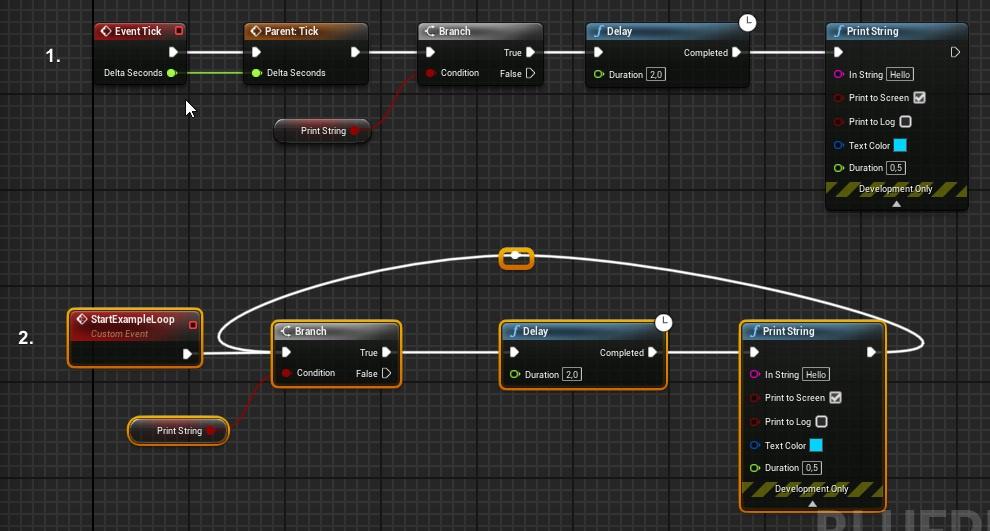
 open linden
@flat raft so 1 would be more expensive.
its calling "delay" all the time but delay is only allowing 1 exec to go thru it?
because its basically ticking all the time, even if nothing happens, right? but is a tick without connections at all expensive?
i totally get that "tick=evil", i'm trying to understand the input a programmer gave me.
open linden
😄
thank you for your input.
the original example was this:
https://cdn.discordapp.com/attachments/760995491190013953/763861700440752178/unknown.png


im using that to play sounds from time to time
flat raft
so, the tick is checking your bool every frame
in #2 your bool is being checked every 2 sec
 snow halo
Hey all, i'm trying to find the math to get a float, pref normalized, that tells me how much i am moving forward
open linden
Hey all, i'm trying to find the math to get a float, pref normalized, that tells me how much i am moving forward
@snow halo velocity? or distance traveled?
snow halo
forward at all even even if it's somewhat to the left or the right
so far i think i'm failing
woven wing
That would do it.
snow halo
i need the float to be 0 when moving backwards, fully left or fully right, backwards right and backwards left
does my math look correct?
 waxen mulch
Hey any clue why this dosent update when a new player joins?
this is on my gamemode BP sorry im kinda new and just learning so
woven wing
@snow halo - I think you'd get the same effect with just the clamp.
open linden
@waxen mulch i think gameMode lives on the server, so if you call getPlayerController ID 0, its always gonna be player 0
woven wing
That just cuts off the negative values for moving backwards.
So you'd have zero for moving backwards, and you'd already have zero for moving at right angles.
waxen mulch
Wait so what would i call?
open linden
no idea.
maybe on playerController - cast to gameMode - call some "new player joined" function and give him a new, unique ID, maybe increment an int or something. dont know mate, never worked with BP
because playerController is always bound to the client thats playing
snow halo
@woven wing i think moving purely right is returning a value other than zero though
and i need left or right to be zero
woven wing
That doesn't make sense.
snow halo
testing rn
woven wing
A vector dot a vector at right angles should be zero.
snow halo
1 forward, -1 back, -0.5 left, 0.5 right
woven wing
No.
Dot doesn't care about left or right.
It's basically measuring how much the angles 'project onto' each other.
So left or right project the same.
snow halo
then i have no idea why left and right return values if i print the dot return
i can see i'm just strafing my character
woven wing
So this always prints zero.
I don't know how your character works, but my guess would be that your pawn is rotating somehow.
 unique zealot
Hello guys, just found https://www.udemy.com/course/unrealblueprint/ this course, is it good entry? I, myself consider more like 3D artist, that would use unreal for those things but being able to do something in blueprints would be very handy, but not quite sure, if this is good course for 13 euros 

Udemy
Code Your First Video Game in 100 minutes with Visual Scripting. Created in collaboration with Epic Games.
open linden
@unique zealot mate, if i can recommend you a course on BPs,its this one:
https://www.udemy.com/course/unreal-engine-4-blueprints/learn/lecture/8556554#overview
amazing teacher, superb examples and explanations.
this was my first BP course on udemy and i basically got high on it, bought a bunch of other ones, just to find that none of them were even close to the one i posted. hes an excellent teacher and you feel it.
 stiff hatch
is there any good plugins for database work for BP?
open linden
i dont know about the other course, i can only highly reccomend the one i posted.
in the end, buy both, give back the one you like less.
unique zealot
Whoah, 31 hours, thats something.. thanks for recommend
wait, you can give them back? Thats weird, somebody can abuse that :/
 lunar coyote
well, while I don't condone that, Udemy themselves are playing dirty with their perpetual 90% off deals
open linden
wait, you can give them back? Thats weird, somebody can abuse that :/
@unique zealot yes ofc. i gave back 4 courses because they were not on par with the one i posted. jesus, watching someone make mistakes and fix them - IN A COURSE, without intent, jus "oh well we just gonna fix that lol"
well, while I don't condone that, Udemy themselves are playing dirty with their perpetual 90% off deals
@lunar coyote yeah wtf i also thought "im a lucky guy" with the sale but nop... they do it all the time. 😄 typical salesmanship.
wait, you can give them back? Thats weird, somebody can abuse that :/
@unique zealot i would never in my life give back that course. enjoy. 🙂
i just was able to finish a game jam project as a sound designer that also helped progrmmers a shit ton and polished the game in the end, only because of that guy teaching me, its intense. 🙂
unique zealot
Yeah, thats very awkward to make mistakes in course, haha. I will buy both, start with that shorter and then switch to that with portuguese voice 😄 thanks! 🙂
signal palm
Wait so what would i call?
@waxen mulch If you want to do something when a new player joins, you can use the OnPostLogin event in the gamemode bp
 crimson charm
how do you change the speed of a particle effect or at least change the speed it plays when called from a "Spawn emitter" node?
tight schooner
As far as the blueprint end is concerned, you set a float parameter on the effect
crimson charm
tight schooner
On the effect end, the workflow differs between Niagara and Cascade, but the gist is you want to make a float parameter drive the spawn rate or w/e
@crimson charm There's probably a node you can use on the output of Spawn Emitter Attached called Set Float Parameter
 robust cliff
anyone have a suggestion on how to stop all animations when Ai is dead?
haughty ember
anyone have a suggestion on how to stop all animations when Ai is dead?
@robust cliff Usually you have a bool so you play the death animation. Then you simply don't have any arrows leading out from the "death" animation node
robust cliff
ok
 haughty axle
guys have a question, how can take info from Enum and set Enum value as Tag in blue print
my BP have 2 tags, and i want to set one of them
trim matrix
can someone send me the default fps shooting script i deleted it...