#blueprint
402296 messages · Page 544 of 403
 pine trellis
my c++ plugin wont work without a follow camera and I need to disable it because my fps pawn uses another camera, but how do I tell unreal which camera to use for things like viewing and post processing
 haughty ember
@pine trellis I believe you're looking for Set View Target with Blend
 quasi frost
How do I say like, add unless a name that is the same as the one being added already exists, and if it already exists don't add it again?
 mild flare
AddUnique Node should do it
 lucid granite
I have multiple scene objects so I know where to make my cards appear but the scene objects don't stay in their relative location to the table. What should I use that works like a target-point but around an actor object?
 open linden
hey guys,
im using a level sequence to simulate an elevator, well im testing it. there is a button inside that starts the elevator movement.
when i start the movement, the elevator pops me away from it. 😄 what am i missing? i even made it so the first few key frames it goes down, "to catch me".

like, it works smoothly when im on that thing later, its just the first frame that seems to be weird.
 woven wing
Hmm - it looks like the player it teleported to the side. That's very odd.
mild flare
Guys please help me, I'm struggling with this for few days now...
I want to pass a variable from one of my streaming sublevel's actors (its location to be precise) to Persistent Level.
I tried using BPInterface with many different setups (events, messages and calls in different blueprints), but I am clearly missing something. :<
Communication should look like this:
- You are in persistent level and fire an Event.
- That Event spawns several sublevels in a loop.
- For each item in that loop - that is streaming level - I want to get access to an actor that specific streaming level contains and get its world location, so I can manipulate it in persistent level.
Where do I put message nodes, where event nodes? How to connect all this?
Any help would be greatly appreaciated.
open linden
Hmm - it looks like the player it teleported to the side. That's very odd.
@woven wing i was able to solve it using a timeline to smoothly set playrate from 0 to originally set playrate.
woven wing
Hmm
open linden
works fine now.

Guys please help me, I'm struggling with this for few days now...
I want to pass a variable from one of my streaming sublevel's actors (its location to be precise) to Persistent Level.
I tried using BPInterface with many different setups (events, messages and calls in different blueprints), but I am clearly missing something. :<Communication should look like this:
- You are in persistent level and fire an Event.
- That Event spawns several sublevels in a loop.
- For each item in that loop - that is streaming level - I want to get access to an actor that specific streaming level contains and get its world location, so I can manipulate it in persistent level.
Where do I put message nodes, where event nodes? How to connect all this?
Any help would be greatly appreaciated.
@mild flare you can pass the newly spawned actors to an object that persists all the time in game world, like GameMode, GameState, GameInstance or whatever you fancy.
 brittle fiber
Eve Cyber. Urgently seek some advise related to runtime spawn+data edit+save.. Please DM
open linden
@mild flare get it?
i was able to do this to make music smoothly transition through level changes.
mild flare
Haven't played with GameInstance yet, I will give it a try.
open linden
Haven't played with GameInstance yet, I will give it a try.
@mild flare do you know what i mean though?
create a new gameInstance, use that for your game, you can set it in project settings.
inside that, create an array of actors and a custom event with an actor input which adds the actor to the array.
then on all of your spawning actors, on begin play, get gameinstance, cast to gameinstance, execute the custom event and feed it your actor.
now you have a level-independant array of actors and you can do to them whatever.
lucid granite
is there a way to reset defaults?
If you have a C++ solution even better but I will still take a BP solution.
thanks for any help
open linden
is there a way to reset defaults?
If you have a C++ solution even better but I will still take a BP solution.
@lucid granite what do you mean by reset defaults? set new defaults? or "reset to default values"
lucid granite
reset to defaults
woven wing
I don't think there's an automatic way of doing this.
lucid granite
noooooo
 marble compass
@lucid granite i have a solution but it might not be the best: in the construction script, save the defaults into variables, then just set the rotation or whatever to the values you saved from construction script
open linden
@lucid granite well , check the little arrow next to location,rotation,scale. if it says relative or world, you can use
setWorld or LocalLocation or whatever to 0
lucid granite
oh, I'll try that
mild flare
@open linden Thanks, man! Those instructions will be very handy : )
open linden
@mild flare yeah man its so cool to learn about what objects live when and where...
gameInstance basicaly lives though your whole game session.
and its so cool, i spawned a music piece in main menu and on level change i casted to game instance and stored it there, in a pre-prepared variable. after level change i was then able to get it back and fade it out.
too cool. very happy about learning BPs...
mild flare
😄
me too, I love UE4, its just overwhelming how much more I have to learn to become fluent
open linden
@mild flare you'll get there.
did you ever learn via a course or how do you approach learning BPs?
mild flare
yeah, I followed many tutorials online, some of them were garbage, but some of them pure gold and taught me many awesome things : )
Mathew Wadstein's channel is diamond
open linden
Mathew Wadstein's channel is diamond
@mild flare holy crap yes. hes filling in all my blanks!
 swift dome
like remove the get and put it back? (btw i am pretty noob at unreal)
 waxen mulch
Could anyone help me
it works with one player
but not 2
im very new so anything helps me learn
swift dome
@woven wing it does not let me reconnect
it says array of widget object references not compactible with vertical box object references
any idea how to solve this
i assume i need some kind of conversion
not sure how to do it
 glad kayak
hey, was looking at the animation blueprint in the animstarterpack and was wondering, where do the anim notifies in the event graph come from? basically how would I go about making one myself?
 fathom cobalt
Does anyone know how to snap a player character to an actor component without them falling off?
woven wing
@swift dome - So most of the Array nodes are type specific. If you drag the 'get' off of your array again, you should get a working node.
Once you have a single object, and not an Array, you can Cast to the more specific type.
By typing in 'Cast to vertical box', and using that node.
 north plank
My character can't climb up. I really don't understand what I am doing wrong. Can anyone please help?
 hard kettle
@north plank it's not ignoring the one closest to itself, so it's climbing on to its current location
see how the horizontal hit trace is active?
north plank
sorry I am still a noob, so can't get process everything you said. Can you please elaborate so I can google and learn more about the problem? Also please give me any more tips if possible @hard kettle
hard kettle
see the part sticking out horizontally in front of him?
I think it's what's causing your issue
north plank
@hard kettle yes yes! but ain't that horizontal trace should always be active? It's connected to my event tick!
hard kettle
I think the character is climbing to the same place it already is
north plank
Yes that's the problem @hard kettle 😦 but how to solve this? (
hard kettle
disable the location its in as a viable location
north plank
I am trying that @hard kettle . thank you!
fathom cobalt
How do you make actors move?
 rough wing
Character stutters when I do this
 weary jackal
hey, was looking at the animation blueprint in the animstarterpack and was wondering, where do the anim notifies in the event graph come from? basically how would I go about making one myself?
@glad kayak when you open your animation, you can see notifiers section. you can right click to add notify to where you want. then if you open the animBP and search for your notifier. you will find it as an event
 late shuttle
Trying to get my camera to move forward of the forward velocity the character velocity (2.5D game)... any hints would be appreciated 😉
 fair sun
is there a way to make an == node for text where I just type the text or do I seriously need to make it a variable?
\
quasi frost
you could use format text maybe? Idk why you want to type it on the bp and not in the variable slot.
 willow tendon
im having a problem dispatching an event from an actor component into the actor its situated in :\
can an event call be nested inside some other event dispatch?
if thats okay, then im definately doing something wrong
woven wing
Not sure what you mean there deadmau5.
woven wing
OK.
woven wing
Ah.
willow tendon
but the second pic there, that custom event isnt firring at all
woven wing
OK, so your message there, in the component, is sending it to the component.
See the 'target' field there?
willow tendon
ya
woven wing
You need to get a reference to the Owner.
The component is itself, it is not the actor it's part of.
willow tendon
ah. hm
woven wing
So 'self' here, will send the message to itself.
And not it's owner.
Working with components in Unreal is more of a hassle than it should be.
woven wing
I don't know what you're doing there.
willow tendon
im just trying to dispatch events from a server to many clients (so to speak)
so i was trying to make it an actor component
woven wing
It being an actor component is fine.
willow tendon
because for the life of me i couldnt get an actor to dispatch to another actor
woven wing
You just need to get a reference.
I think there's a function called 'GetOwner' which will get the actor of the component.
Plug that into your 'Call Beat Dispatch' and it should work.
willow tendon
lemme try that
woven wing
Unless I'm misunderstanding what you're trying to do.
willow tendon
i dont think so, i think i just wasnt understanding hown referencing worked
lemme try a few things along the lines of what you just said
ive got an 'OSC Server' which basically just acts as an OSC server and parses messages and stuff and makes ints / floats.... then the idea was to have event dispatchers for some of those to be used in other actors and such
woven wing
I don't know what an OSC Server is.
willow tendon
OpenSoundControl.... basically a UDP protocol
woven wing
Ah.
willow tendon
that sends ints or floats from elseswhere
woven wing
Sure.
So you don't need to have that part be an Actor Component. It can be, but it doesn't have to be.
willow tendon
yeah i've just moved it as its own actor
woven wing
The pattern I would probably use for this would be:
Message Dispatcher: This is the thing you're building. It has some events that other actors can subscribe too.
Other Actors: When they're spawned, they look up the Message Dispatcher and hook onto it's events.
willow tendon
yeah thats essentially it
which i'd think would be pretty straightforward but im getting referencing issues
i come from the land of uniform vec3 = (1,2,3) so.... OOP is weird to me.,
youd think there'd be some kind of simple way to write / read global variables
woven wing
Hah!
Yeah, they make that purposefully tricky.
If you want something that's easy to access.
willow tendon
so ive come to learn
woven wing
Put it on your game mode.
Because then you can do this:
The game mode is always accessible.
And then in your game mode you can call the event and everything subscribed to it will react.
willow tendon
ehhhh i'd rather not fuck with that...
willow tendon
just learn to do it the right way. coz this mocap stuff is going to mess up the game mode.
willow tendon
fair
woven wing
I don't know why mocap would play around with your game mode, but you know your own project.
woven wing
I don't know what MVNlive is.
willow tendon
live motion capture crap / plugin
woven wing
Ahh.
Yeah, OK, if you're doing something live don't fuck around.
That stuff is fragile.
willow tendon
love how im already using this in production and i still cant figure out event dispatching. 😄
youd think that would be like the first step whilst learning.
done some pretty neat shit so far... but now that i have some downtime it's time to make things a little more... neat.
and to avoid the allmighty WTF is this promptly after submitting to P4V
willow tendon
yup
woven wing
woven wing
Mine just spits out a dummy event every half second.
willow tendon
roger
willow tendon
same as mine.
willow tendon
alright lemme get actors
woven wing
(this isn't production code, I'm not checking if there really is a server, this could break, it's just a test)
woven wing
Hurrah!
willow tendon
thats so funny.
see, before i was making the actor a variable
and it was like "nah"
in my mind, this is the same... thing... but this works.
woven wing
You could do it with a variable - but then you'd have to manually wire everything up.
willow tendon
woven wing
If you have like... fifty lights you want to react to this thing.
willow tendon
yeah i pass the variable through the call
woven wing
Ah, that probably wouldn't work.
willow tendon
nah i just need some basic info
then i can interp / trigger / do whatever after that
using the DMX stuff so i have thousands of 8bit channels coming in for other stuffs
but this OSC stuff is basically my core 'transport' information from an external music-y thing
so this works just fine for what i need, thanks so much, was driving me mental
 tribal flint
Can anyone help me with applying physics to an AI_Character? I have tried toggling simulate physics and messing with those settings but have gotten no success.
willow tendon
maybe check your phys asset on the char?
woven wing
@willow tendon - Glad to help. Good luck. : )
willow tendon
?
tribal flint
And impulses still dont work
woven wing
Ugh - good luck with that. The ragdoll editor in unreal is really awkward.
@tribal flint - What are you trying to do to your character?
willow tendon
only gotta do it once. 😦
tribal flint
I'm trying to apply impulses to my AI_CHAR when they get hit from an ability
on the XY plane
tribal flint
^ is that for a virtual concert scene?
willow tendon
would be a pretty shitty concert
woven wing
Are you using a BT for your character Brocori?
willow tendon
"ragdoll mouse... LIVE!" 200$ a ticket
tribal flint
No i'm just using blueprints
woven wing
Are you using a "MoveTo" to control the character movement?
woven wing
Ah, so based on some quick googling, it looks like AI MoveTo tends to override their reaction to impulses.
I think you probably want to call StopMovement on your Controller when they get hit.
Then they should react properly.
tribal flint
hmm when I enable simulate physics I lose total control of my player
i'm enabling it on the capsule component
ohh do i have to toggle that in conjunction with getting hit?
woven wing
Try turning that off, and deactiving your MoveTo (just unplug that MoveUnit event) and hit them with an impulse.
Check to see if that works.
woven wing
Are you sure your physics collision layers are properly setup.
So that it is actually getting hit by whatever is causing your impulse?
tribal flint
If i turn off physics for the char and it gets hit the game gives me a warning
that i need to turn on physics
so yea its triggering
woven wing
Not necessarily.
tribal flint
im printing a string too
woven wing
I am not sure why turning on physics for your character would deactivate your ability to move.
tribal flint
so when the projectile passes the char, a string is printed off the overlap event
Yea i'm not sure either other people had this prob with no solution
online
woven wing
But on most of my characters, I do not turn on 'Simulate Physics'.
woven wing
Hah
tribal flint
how do i get a reference to the hit player
it gives me "other actor"
but i cant use that
woven wing
Your screenshot is somewhat messy. I'm not sure where that error is coming from.
tribal flint
sorry haha
im trying to drag "other actor" onto target
of the node "Add impulse at location"
but it doesn't let me
This blueprint is on the projectile
woven wing
👍
tribal flint
quick question tho if you dont mind. If i were to have different characters this wouldn't work right? Because I would have to make a new blueprint with a diff name
Thats why i tried casting to pawn first
i have to cast to ai_char for this to work
woven wing
So there are a couple of ways you could handle this.
You could cast to Character.
Which should always have a CharacterMovement component.
So that would work.
late shuttle
(When my player is moving fast along the X/Y axis, I want the camera to move a second or two in front of the forward velocity of the player. Halp? sry to interupt)
woven wing
Or you could create an "Interface".
But, for your purposes, casting to Character would probably work fine.
tribal flint
ok sounds good ty I really appreciate all u done 😄
woven wing
Np
@late shuttle - This is a sidescroller? And you want the effect that when your character is running forward the camera moves a bit in that direction to show more?
late shuttle
Kinda. It's a 2.5D game. So Top-downish,.... like Enter the Gungeon.
late shuttle
Yes. (Spring Arm > Camera)
I've tried a bunch of stuff, best seems to have been setting RelativeTransform vector while VInterpto different maths on the Forward Vector, Velocity and Current Relative location.
Big problem has been that Camera does not inherit Yaw, so as I adjust the velocity it Relatively transforms making the only axis correct ingame as X
The rest are inversed.
woven wing
Not... entirely sure I follow. Your camera doesn't follow as your character rotates, right?
It remains at a fixed angle relative to the world?
 woven wing
Ewkay...
So the way I'd do it would be that I would be setting the position of the screen arm directly. So like Set World Location.
And what I'd be setting it too, would be the pawn's location + ( your velocity * some scalar).
And I'd be VInterping towards that.
So you'd calculate a 'cameras desired position' each frame, and then VInterp it.
willow tendon
everything is trying to kill you
woven wing
No rotations necessary.
late shuttle
By some scalar, you mean float, correct?
woven wing
Yeah, multiply your velocity by a float value. Make that a variable so you can play around with it.
Now, this works, but it will be kinda swingy, because of the interpolation.
willow tendon
@late shuttle looks cool, imma go grab early access
willow tendon
its 4 buks. chill 😄
lucid granite
can I add a socket to an actor or does it need to be to a skeletal mesh
I want to add 5 sockets to where I place 5 cards on a table (for texas holdem)
I found out that components don't move where I drag the actor in world space
sockets would follow though
woven wing
Components should follow their Actor.
lucid granite
woven wing
If you've been dragging components into the level, then they're all separate, and yeah - they won't follow each other.
lucid granite
for example the scene component above doesn't stay there above the table when I drag it into the world space
lucid granite
oh, just read what you said, so you already knew
it doesn't disappear but is really annoying if I need to move my scene components whenever I move my table
if it was a socket, it would always stay in place
woven wing
Can you show me the hierarchy of your actor?
You can attach sockets to either skeletal meshes or static meshes.
But not Blueprints.
lucid granite
woven wing
OK, so you're telling me that if you drop this table in your map.
And then you move the actor.
The components of the actor don't move with it?
lucid granite
that's right
lucid granite
I actually just remembered, I think I can add sockets on the static mesh which hopefully I can access from the blueprint
woven wing
Something else has gone dramatically wrong.
Like, if I make a blueprint with three static meshes.
And I drop it in a level:
And I move it.
... the meshes follow the actor:
lucid granite
oh, i wonder if it is because your root component is a scene component
and mine isn't a scene component
woven wing
I'll make it a static mesh.
Same deal.
They all move together.
That's how it's supposed to work.
If, however, over here in the hierarchy of the actor:
I were to click on one and move it:
Then it could be moved independently.
But you're not usually supposed to do that.
That's not normally how you move objects.
Normally you move the whole actor.
(there's nothing wrong with moving components like this, but you should only do it if you're doing it on purpose)
woven wing
It's not.
I just replaced it with a static mesh.
That has no effect.
This is a fundamental part of the engine.
It's vital for every single game made with it.
If you move the actor, the components also move.
The only way I could see it breaking is if your specific actor is overwriting the world coordinates of its own components for some reason.
lucid granite
So strange, I tested it in a different map, and everything works normally
I wonder why that is
woven wing
Can you delete the actor in your troublesome map and then re-create it?
Something may have gone wrong with that instance.
lucid granite
It didn't help
what is happening is that it is keeping it's absolute transform instead of adjusting so...
that -30,0,100 is the same as...
but it doesn't adjust to the relative location of the blueprint when I drop it into the map
to make things even more strange, I changed the Y of the table and now everything is WAY off
solution
- create sockets using the static mesh
- Use that static mesh in blueprint
- get the transform of that socket
that solution works, and it is probably lower-weight than having scene components
woven wing
It's not, and I expect that not solving this issue now will cause problems in the future.
But hey, that's future-you's problem.
lucid granite
well this here works for me for now, if I run into the problem again, I'll deal with it then. Thanks for helping
woven wing
👍
 ancient stag
Is event AnyDamage (and Apply Damage) the preferred way for handling damage or are there better ways?
@swift pewter Those are built-in engine events because Unreal used to be a first person shooter. They are quite reliable and also support replication. There is no "prefered" way though. You can build your own system and expand on it. You can also use the built-in events as a base and work from there.
Has anyone worked on an HTML5 project before? (working in UE4.22 currently) It seems common functions like camera fade, or the entire sequencer, are unsupported on the platform. Is there some resource where I can find what's supported?
 maiden wadi
@neon hazel That Actor has a SceneCaptureComponent2D component, and the blue one is that either dragged into the graph from the component's list or gotten through the right click context menu. The green one after that is that component's OrthoWidth variable. Can be gotten by dragging off of the blue one's pin and typeing OrthoWidth.
 fallow fox
Hello guys! I have a widget W_Parent and there I have some variables. Inside W_Parent I added another widget W_Child. Can W_Child access W_Parent variables, without sending the references to the child on event construct for example?
ancient stag
@fallow fox In a parent-child relationship, the child can always access the parent's variables. No need to cast for references.
fallow fox
I've created AmmoCount in parent but I can't find in child the ammocount variable
I don't need to check anything for the variable to be public? or something?
W_Safehouse is my parent and I added the W_Armory as a child. Inside W_Armory I can't find any variables created in W_Safehouse
 gusty willow
Hi is Dither Temporal AA good for mobiles phone?
maiden wadi
@fallow fox Wrong kind of parent/child. That's an attachment hierarchy. To inherit variables, Armory would need to be a child class of UserWidget of Safehouse.
 lone cradle
Hello, I have quite a simple question, if I deactivate the tick of an actor do its components' ticks also get deactivated? Thanks in advance.
 tawny tinsel
i need to get this lights position inside a umg can i?
 earnest tangle
If you have a reference to it in your widget, sure
tawny tinsel
so no direct way thank you
 twilit heath
@tawny tinsel if you don't re-instantiate the widget too often
twilit heath
just put an Actor tag on that light's instance
tawny tinsel
so i can save it
twilit heath
and do GetAllActorsWithTag
tawny tinsel
worlds rotations
twilit heath
if its once to grab it its fine
tawny tinsel
i have a save button in the ui
 ember niche
Hi guys i have problem with my game
The first pic is my level blueprint and second one is widget
fallow fox
Guys I have a question. When I create a widget, I send to the widget a reference to an actor from level and from that widget I send to another widget and so on, maybe to another one. The structure is something like this. Actor is sent to W_1 from LevelBP; W_1 -> W_2 (send the actor with event construct to W2) . My question is. Is this a bad way to keep a reference? I don't want to use get actors of all class.
earnest tangle
Seems reasonable
It reduces the amount of direct dependencies your individual widgets have if you provide the actors etc. as params
fallow fox
Here again I send
I mean, it's not poor performane if I'm sending on 4 widgets? When I want to use that actor on the last one
 proven mason
I want to get the velocity of the third person character but along the local axis of what the camera is facing instead of the third person character itself
what node(s) do I add?
earnest tangle
@fallow fox No.. it uses a trivial amount of memory for the pointer to the object but as said it's trivial and it's not a problem
 boreal ether
(dot product velocity with camera direction ) * camera direction
fallow fox
Thank you!
proven mason
@boreal ether forgive me for sounding noobish but how do I get the direction of the camera?
boreal ether
Get Forward Vector
proven mason
hmm I was expecting more in vector notation
not float
like no matter where I turn the camera if I move forward the velocity should be 600 on the Y-axis
and if I move forward right it should be 300 on Y and 300 on X
boreal ether
multiply camera forward vector with result of the dot product?
 fluid wraith
what'd be a good way to implement abilities?
Actor components?
boreal ether
@proven mason
marble compass
anyone know how i can make a function return the reference of a variable?
i can get a function to take the reference of a variable, but i can't seem to get it to return one
rough wing
@marble compass drag the variable to the return node
 spark smelt
Heya everyone, I am abit stuck!
So the thing I am trying to create is a ball that when it hits the ground, it finds the nearest player. However I am abit stuck, so far I've gotten it to detect all players in the area, but from here I am stuck, any ideas?
earnest tangle
You would need to store the distance in a variable
Basically sorta like this: Read distance to actor, if distance is lower than previous lowest distance, update previous lowest distance and update closest actor variable
then once the loop has completed, you should have the closest actor variable set to the actor with the lowest distance
marble compass
@rough wing that returns a copy of the variable , not its reference
earnest tangle
If there's no setting for it similar to the checkbox on parameters then I don't know if you can do it
I think it might internally use out parameters for return values, at least if you return more than one, which might limit it somewhat
spark smelt
@earnest tangle Thanks, I'll try and see what I can do! (:
 delicate folio
hey guys i have a question about using controllers - i was wondering how i could create something similar to what tekken has when you play locally - where it differs between player 1's controller and player 2's controller
i've never done anything like it before so not entirely sure where i should start
spark smelt
I think you'd have to create different player controllers and assign them to each player index. Might be wrong though.
Still not getting this to work, here is the blueprint:
proven mason
@boreal ether tried the pic you've suggested; it doesn't seem to work.
spark smelt
proven mason
during the start of the game before moving the camera I push forward the X axis increases to 600
but when I turn the camera to 90 degrees right and move forward the Y-axis instead of X-axis increases to 600.
rough wing
@spark smelt when I do that I usually forget to assign distance a great value like 99999
Because any player distance can't be smaller than 0
So change the default value to something greater
I was talking to acorn
spark smelt
I assigned it to 5000, but I'll try to increase it to 99999
rough wing
I didn't understand what you're trying to do @proven mason.
Velocity is the speed with direction
proven mason
I'm more concern about direction
 gusty shuttle
Is there a good way to disable character movement without disabling input from other non-movement keys? I could pull from CharacterMovement Component and disable movement, but how do I enable it again?
proven mason
basically if I press the forward the velocity should display 600 in the X-axis
spark smelt
Still doesn't work, it doesn't even recognize that it hits the ground. (I mean the physics work, but it does not recognize the overlap.)
rough wing
If you're trying to get velocity speed and assign that speed towards the camera forward vector, you can get velocity->length->multiply by camera forward vector
@gusty shuttle stop all movement immediately and some other nodes that I remember
proven mason
that velocity is based on the world axis
but I want to be on the axis of where the camera is facing.
so no matter where I rotate my camera X-axis is still gonna have 600
if I push the forward button that is
proven mason
I just want the print out statement to be 600 0 0 if I move in the direciton the camera is facing
rough wing
Is the camera seperated from the player
spark smelt
@proven mason This might create more problems than its worth, but you could rotate the entire world instead of rotating the camera. XD
rough wing
Get velocity. -> dot product
Get camera forward vector ->if == 1, print
You're currently converting a float to a vector idk how that works
Try getting the dot product of two directional vectors
proven mason
I think I was doing that with what @boreal ether suggested
 velvet mist
@spark smelt You probably need to compare the class of the actor hit, instead of the object
rough wing
Why are you multiplying the end result with forward vector tho? The dot product is between -1 and 1, you will most definitely not get 600, 0, 0
spark smelt
@velvet mist You mean the class instead of the actor?
velvet mist
Ye, if you're trying to check if it overlaps with any actor of that type
rough wing
@proven mason
boreal ether
Dot product to find the magnitude of the velocity in the axis of the camera vector and then multiply that with the camera forward vector to turn it into a vector with the same direction as the camera but with the length of the original velocity projected onto the camera direction
 halcyon nova
How efficient are event dispatchers? It seems like the best way to set up a delegate system but the words 'event' and 'listener' always make me twitchy
 void oak
anyone have a solution to having a "choose color" dropdown menu for UGM combobox? It there a way to change text color for each item?
I was thinking of using richtext but i am unsure how to make a combobox use it.
 bright dagger
If i set the variable of a UI widget to none. will it still be active(but not seen) and cause issues later if a lot are hanging around or do i need to do remove from parent aswell?
gusty shuttle
I had that same question @bright dagger . I use the HUD class to create all my widgets once, then I set up custom events to add to viewport or remove from parent. So basically anytime you want to show or hide a widget just cast to the HUD and GET/call the custom event
 golden wren
@bright dagger It will be active and seen , it just means that anything using that variable will not work, as there is no reference point.
 sturdy falcon
Soo, anyone with experience regarding the ProceduralMeshComponent? Specifically, overlapping events.
 trim matrix
how do i import blender meshes to ue4?
weary jackal
Export as fbx
trim matrix
in blender?
weary jackal
Yea
trim matrix
I already did
weary jackal
Then import in ue4
trim matrix
It wont show in my folders for some reason.
nvm i got it thank you
now i cant even see it
 sullen lodge
you can just use the blender to unreal tools addon tbh. It's quick - I just press f6 in blender and the mesh instantly appears in editor assets without any dialog box whatsoever, kinda like zbrush-blender livelink
 late marsh
hello
just wondering how to make a function repeat with a delay
without having to use like 10 boxes lol
(triggered once at start)
golden wren
Set timer by function name. and then clear it after it done it 10 times
golden wren
I mean there is also for loops if you want but IDK if you want that in the loop body would be one delay and one function call.
late marsh
ye idk how they work im a noob
golden wren
To do it with set timer with function name, you gotta do some calculation for amount of what happens within the function. There is no amount of limit for timers.
Ok for the for loop method... just use the for loop node after set enable gravity.
 haughty axle
Sup guys, have stupid question... I create a widget in actor BP on overlap event, everything is fine, it gets info, shows correct widget... but still gives me access none error.. what did i missed?
golden wren
Then I will continue after you have added the for loop
late marsh
golden wren
Sup guys, have stupid question... I create a widget in actor BP on overlap event, everything is fine, it gets info, shows correct widget... but still gives me access none error.. what did i missed?
May need more information about the widget. and overlap event
 white crypt
probably using widget reference before being set
golden wren
yeah references are usually the ones to cause that
@late marsh In the for loop for last index put 9 as you want to do this call 10 times.
It starts from 0 so you gotta count from there
haughty axle
heres the BP, it works fine but i always getting those stupid error
golden wren
Yeah it is this simple
late marsh
so thatll repeat 10 times
oh lmapo
cheers
i was thinking you had to add other things
golden wren
Just remember to the rest of the code in completed, cos you don't want other code to repeat 10 times
 golden wren
Yeah
white crypt
also on overlap end when you remove from parent you need to invalidate that variable
haughty axle
ok that makes more sense to me now @white crypt thx
white crypt
also dont make pure character nodes
sometimes it will return false
if someone else overlaps it could still call this event unless your overlaps are set up correctly
haughty axle
i need to work on this bit more i just started implementig key system in my character
white crypt
also an even better approach would be adding a widget component
instead of spawning it on onverlap, then you would only need to change the visibility on overlap
haughty axle
@white crypt this!
late marsh
@golden wren its only calling it one
once
only prints one hello then stops
if i remove the delay it prints it
multiple times
 sand shore
That's because the delay node only tracks a single timer
rough wing
What happens when you put delta seconds in delays duration?
sand shore
when you invoke it multiple times it notices that it already has a timer
 sour aspen
what might be spawning a camera at 0,0,0 ? I can't find anything spawning a camera but there it is when I started the game... 😩
late marsh
how fix pls
sand shore
if you want multiple independent delays you have to manually do it yourself
but in this example it is pointless
rough wing
What are you trying to do anyways
sand shore
A How To Guide for using timers in Blueprints.
All a delay node does is manage a timer for you
rough wing
If you're trying to put delays between actions just use a timer
late marsh
ive created a function that decreases mass of a physics object
sand shore
In this case I would delay before entering the loop
sand shore
because you cannot halt the loop body to wait for the timer before moving on
it doesn't matter what you do, the loop will continue to execute even if you use timers
you'll just get Nx timers that all finish at the same time
rough wing
Create a timer by event
Create custom event and plug that I'm the timer
Set timer to looping and duration to 1
sand shore
Save the handle so you can clear when you've done enough triggers
rough wing
You can get how much time passed from the handle as well, so you don't need to create additional variables to keep track of time
sand shore
read the link I posted
rough wing
And like Lambda said you can stop the timer with the clear and invalidate timer node
sand shore
carefully
play with those nodes a bit, see what they do
come back and re-read this conversation from the point I jumped in
late marsh
oke
 winged badge
so i have a blink system that changes a scalar parameter in real time for a material instance
the material slot for the material instance is not the same across every single character mesh
so if i switch to one mesh, their face is material slot 0, blink
and i switch back to another mesh with a face on material slot 7, their slot 0 is overridden by the last skin's slot 0
the ones highlighted in red are the material instances that change dynamically
 solar bison
Does an add node for array mutate it??
earnest tangle
Yes
You can see it doesn't return a new array
So for it to actually do anything useful, it would have to change the array that's being passed as a parameter
glad kayak
@weary jackal hey thanks for responding, do you know how to see the notify tracks in unreal 4.25? I can't seem to be able to find them in the animation sequence
actually nvm
 rapid token
Anyone???
 ebon edge
its *0 whats always 0
woven wing
@rapid token - What is it doing other than work?
woven wing
It's tricky to tell what you're doing, it looks like you're rotating something by the movement of the mouse.
If that's the case, I would check whether the X values of the mouse you're getting are good. Like, if they go up and down properly.
And then I'd check whether setting the rotation of the roll on the rotator to a static value had an effect.
Like, just set it to 45 and see what happens.
 scenic pivot
Help plz, I did everything according to the article, reviewed a bunch of videos, nothing works for me...
I need to achieve object translucent (subsurface scatering)
Made according to this documentation
Guide for using the Sub-Surface Scattering shading model in your Materials.
rapid token
I bought a course and it works fine for him..
woven wing
The best way of fixing things is to figure out what's broken.
Which means gradually making sure that individual parts of what you're working on are in fact working.
Which is why I suggest putting in a static value for X, and checking the mouse values.
If the mouse values aren't working? Well, that's probably your problem.
If putting in a static value for X doesn't work? Well that is probably your problem.
If they're both working? It must be something else.
You have to eliminate suspects, like a murder investigation.
trim matrix
Hi, I made a aim down sight system for my game using a timeline and a camera changing position, it works well except for one thing, if I execute it on server and the Player is moving sometimes I get weird results due to replication, and if I execute it on client the camera won't really change position(even if viewport changes) so I can't use LineTrace due to bad camera position, I'm stuck at this and I sincerly don't know what to do to make it work, someone has any idea?
 grim plank
Hey this may be a stupid question, but I am using "Project Vector onto Vector", how do I determine if the result is in the length of the target vector or the opposite direction?
I am essentially trying to figure out the velocity of an actor in relation to a specific vector
Nevermind, figured out that I can just check the angle
 flat raft
trim matrix
flat raft
trim matrix
how
 placid otter
ive been having this weird thing happen after starting to use UE4-C++ where after ive saved a project, if i close it and start it back up, itll come up with an error code saying "Could not find blueprint/thirdperson and because of that my entire main viewport just gets erased and everything ive been working on in the main hub. the behind the scenes stuff such as nodes and files remain unchanged though. what would be the cause of this and how can i prevent it?
to be more specific the error code is "Error: CDO Construxtor (Game): Failed to find /Game/ThirdPersonCPP/Blueprints/ThirdPersonCharacter.thirdPersonCharacter_C"
 vast lion
Is there a way top convert linear color to normal color?
 keen goblet
@vast lion ToColor converts a LinearColor to a Color
 neon hazel
anyone knows which nodes are used here? (circled in red)
 ocean gate
Hi! Does anyone know a way to have the lantern connected to the player's hip, without having it be statically attached (I want it to swing using physics, preferably). I thought using a cable to do this would be a good solution, but I can't get the cable to attach to the lantern as well as the player, and I don't know why! Any help would be very much appreciated.
 loud bridge
Hi, there is à system for used Google keyboard in unreal engine please Guys ?
 supple dome
@ocean gate i would have the lantern to be rigged with the character, then the bone could be simulated, the light could be attached to a socket/bone on the lantern
that also has the advantage of using same physics asset, with correct collisions etc
 dark estuary
@rapid token just incase you haven't fixed it yet. That multiply is your problem, as Spaq pointed out.
trim matrix
@ocean gate I never used this, but could (for some reason) instantly recall this tutorial. I think this could be helpful:
https://youtu.be/bMEp9tAcisU?t=612
Using physic constraints
In this free step by step Unreal Engine 4 tutorial video (UE4 how to) you will learn how to implement several mechanical joints using physics constraints.
All my UE4 tutorials: https://www.youtube.com/watch?v=BT0jFArPtGM&list=PLEp7216xGGILh3i2BZe2E0ZEuiIGa-VQT&index=1
Types ...
Great youtube channel by the way
proven mason
@boreal ether I tried using your graph but I'm not getting the results I've expected
so I pushed forward button or up arrow or W key I'm expected to get 600, 0, 0 no matter where I orientate the camera.
 sudden spear
Hey!
Is there a way to generate an ComponentBegin/EndOverlap Event for Spotlight cones ?
 surreal peak
I don't think they are actual collision primitives :P
sudden spear
yeah... true ^^
...do you may know a workaround for this?
surreal peak
Just some basic conemesh yeah
sudden spear
for sending a trace to the player when it enters the cone (spotlight) so the player can access the intensity information etc for visibility. The Problem with the conemesh is that I don't know how to scale it when I update the outer angle of the spotlight
surreal peak
Make it 100 units long. Pivot on the pointy end
And then either 100 units radius or diameter, depending on what the light cone setting is
And then just math it out
Or just use a capsule. Because your player will only be where the light hits the floor. So the shape isn't interesting unless you need it super precise.
This together with a trace to the player etc and you could get around needing a cone
sudden spear
These are some sweet tips! I'll test them. Thanks a lot 🙂
keen goblet
Anyone know of a script that's an inverse of a RetriggerableDelay? I want to filter rapid inputs by allowing the first pulse through, then blocking pulses until one is at least "duration" seconds after the previous
I can't for the life of me find a search query for this, but I know someone's written this before
earnest tangle
Doesn't the standard delay work that way?
keen goblet
I want to do the action first and then block pulses, not wait and then do the action. And I also want it to not block pulses for a set duration, but rather block pulses until one of them happens at least a certain amount of time after the previous one
earnest tangle
Ohh right
maybe Do Once -> Thing -> Delay resets Do Once
this way it would immediately do Thing, and then wait until Delay before it can be triggered again
ocean gate
Very useful video, thank you! @trim matrix
lucid granite
    UFUNCTION(BlueprintImplementableEvent, Category = Event)
    void MoveCardToTable(AActor* Card, FTransform NewTransform);
I then call this 3 times but it only executes once for one card
    MoveCardToTable(Flop1, Table->Target.Low.Flop1);
    //MoveCardToTable(Flop2, Table->Target.Low.Flop2);
    //MoveCardToTable(Flop3, Table->Target.Low.Flop3);
If I comment out the 2nd 2 blueprint calls, the first card drops down
proven mason
I got another situation
lucid granite
proven mason
in my third character example I can control the direction the character is moving using the mouse.
but when the character decelerates, moving the mouse no longer controls the direction of the character is going.
I want the mouse to gain control of the direction of the character regardless if he accelerates or decelerates how do I do that?
 candid marlin
Im not seeing my Anim Slot manager in my AnimBP details window. If I accidentally closed it, where do I go to open it again?
sturdy falcon
Hi guys. Anyone got some examples of Procedural Meshes with working overlap events?
 sweet nest
Hi, does anyone know how to check if all of the objects in the array has a veritable(bool) on or off. I need to check each one of them are on
earnest tangle
easiest way to do that is probably by making a function because you can then do an early return
basically you'd loop it, and if the variable is false, you'd return false
and on complete of the loop, you'd return true
this way it would return false if any of the array members have it as false, or otherwise it returns true
 abstract zealot
I d love to make a quick triplanar material to dump in engine some prototype mesh for whiteboxing without having to UV unwrap them first. there is plenty tutorials on that. I wanted to take it 1 step further and be able to do some material instances to speed it up even more but I can not figure out how to feed correctly a texture that I can access from the instance
I get an error if I try make that texture object into something usable from a material instance, I am missing something obvious..
I ll just make multiple materials for now I guess untill I figure out how to cast a float 3 to a texture 2d
 fleet cedar
Long time since math class... delta just means difference between two values?
pine trellis
does anyone know how to add to view port to a specific character from the player controller? I only want a viewport by the alien
proven mason
back to what I was asking
whenever my character decelerates I can't steer with the mouse.
what can I do to steer the character upon deceleration with the mouse?
fleet cedar
I’d like to do something to the effect of balloon full of air (not helium) that is tied to a string and following an object. How could I do the animation of the object? Is there a way to do this with physics?
What bout somebody dragging something with a rope?
 noble basin
hey, ive set up a portal system, and i want to be able to launch projectiles into it and have them come out at the right rotation, ive done so with the player, how would i call the individual projectiles within a blueprint?
fathom cobalt
Does anyone know how to make a VR pawn turn left and right with controllers? for some reaosn nopthing im doing is working
okay serious wtf
For some reason, I turning with Roll and Pitch works just fine, but no matter what I try, I cannot turn the VR character pawn with Yaw
 teal nymph
👍
my turn, anyone know why you can save an actor class in a datatable but not if its a 'level'? (probably data assets)
 sudden swan
how do i make a redeem code system as in on my site peopletype a redeem code and get an item in game
ik its possible but how
and how to make dlcs or paid tems
ik there are plugins for accepting payment methods but how u make it once they buy it they get the item
how do i post here
 opal stone
@sudden swan You @ the bot
Or just click on him
Right
and send message
like talent
Send him a message with just talent
Then it should ask you all sorts of quesions.
Probably you will need to write in seperate document and copy and past as you only have 30 secs to respond
noble basin
im trying to have a projectile change its velocity upon entering a portal, i tried calling directly to my projectile and getting its movement then changing its velocity through that, but its not working, any ideas? heres a snippet
 wraith mesa
Hey folks, was going through a project and not sure why he has used this node (set By-Ref Var) twice in a macro (named- ML_SetPreviousAndNewValue) instead of directly connecting it to the 2nd node. Can someone share what is happening here and is there a simpler way of doing this?
weary jackal
First for previous target it's setting the value 'New Target'
Second for NewTarget its setting the value New Value
 dapper kiln
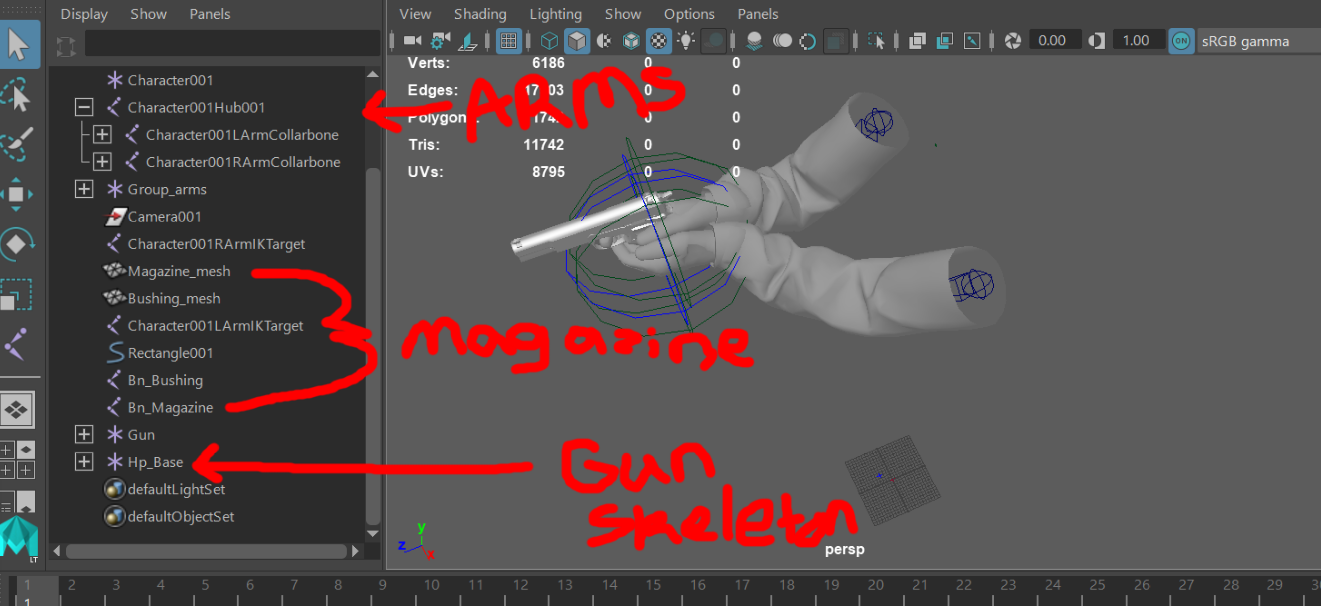
I need some help. I've been fighting with first person weapons for a week now and can't get anything working right. I have animated arms mesh, animated weapon mesh, and animated weapon magazines. My issues is they are all rigged separately in Maya so I'm not sure how to set them up in UE4. People online say to simply play montages and animations on each skeletal mesh and import them into UE4 as separate meshes but that doesn't seem to work well with my weapons. The guns have movement anims separate from the arms such as pins and chains hanging from the gun that move when you walk, run, etc. So How can I take all these skeletal meshes and add them into UE4 and play the movement anims, shooting anims, reload anims, etc?
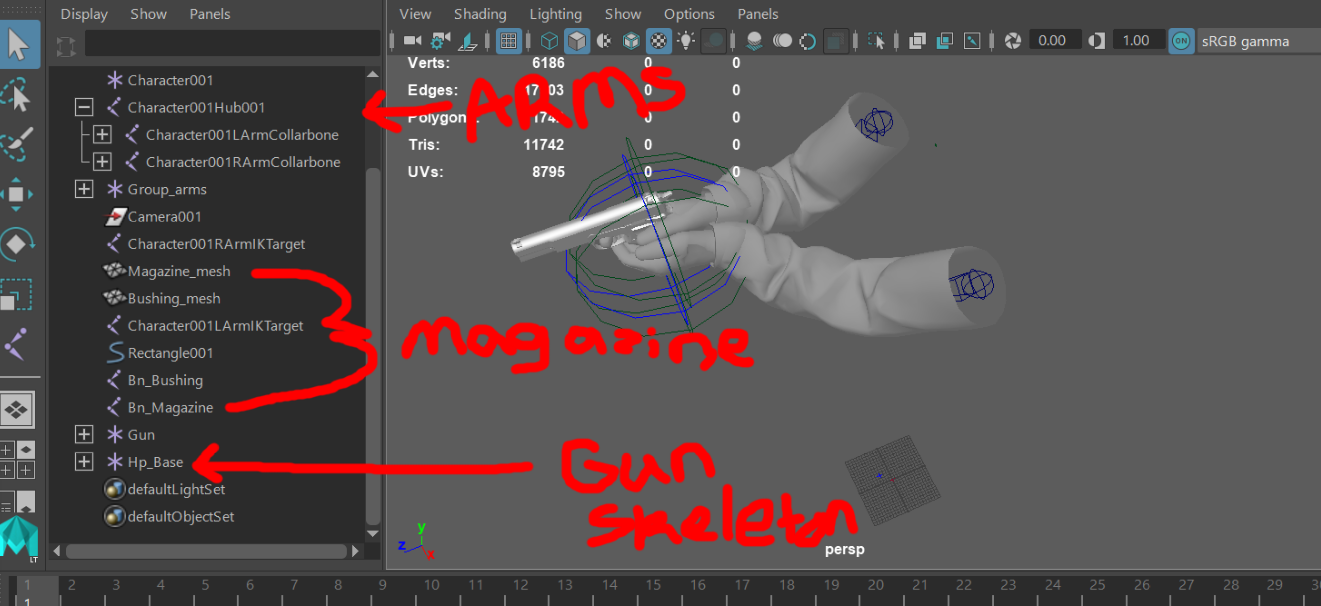
As you can see in my beautiful artwork above 😉 The arms, magazine, and gun are all in their own separate hierarchy. So they import into UE4 as 3 different skeletal meshes. Then I don't know how to make all three play animations together and look correct. Making 3 animBP's and 3 sets of the same animation just seems wrong. I know this is about animation but really it's a blueprint problem on how to set this up so I can easily add my other weapons in.
 simple coral
any know how to input TArray to varbinary
 full locust
Ragdoll punching controlled by mouse
I want to control the players arms with the mouse. EG, the right arm/hand is moved when RMB is held down and moves in the direction of the mouse, Same when LMB is held down the left arm/hand follows the mouse. Please help
 dense mica
Is it better to use components instead of coding inside the blueprint? for example, health, ammo, spell etc.
trim matrix
@dense mica hmm components would be a step in the right direction yea.
dense mica
thanks
earnest tangle
there's probably something on the character component if you look for "set speed" or "speed"
they are usually named similar to how the editable properties are, so check what the value for speed is called there
 amber rune
im trying to make a 0 gravity character component and find what direction is looking at and move in that direction
 low lava
Sup! Happy Saturday everyone !
Just a quick one. I want to add CQC combat as well as sword and bow combat to my 2.5D scroller. The Issue is, there are so many videos out there saying 1000 different things. (I get there are 1000 to do this) but I'd like to take the cleanest most modular approach to implementing Attacks and attack combos. I'd like to get it working with no weapons and a knife/sword and then move on to different moves sets for different weapons .
I'd be super greatful if I could be nudged in the right direction . A link to a blog, article , video would be amazing. Like I said, been through so much videos on youtube all with different data and ways to do this . Looking for the MOST correct way if possible .
 feral stream
Hello people so i was debugging my code and this funny situation came up:
can somebody please suggest a combination of nodes that will be more foolproof
lucid granite
is a HUD used for anything other than joining a bunch of UMGs together?
when I say "used" I mean commonly used...
 burnt leaf
I've got a turret set up, but currently it still shoots at the player if behind objects.
Players enter the overlap and the turret begins firing until left
Can this be fixed by a linetrace? If so does anyone have an example?
trim matrix
hey I wish to move a object for a multiplayer
and it is not replicating
please helpppppp
keen goblet
@burnt leaf There's probably an easier solution out there, but I'm sure you could totally script a series of regular line trace to do that. Try looking into the LineOfSightTo function or the PawnSensing component
rough wing
Has anyone here made an apex legends kind of sliding mechanic?
 paper galleon
@rough wing , I'm working on the same presently. And I have two options. Use a root motion animation montage that checks if we are currently sprinting when we press the crouch button. If true, play the sliding montage. The other option is the same process but instead of a montage, simply launch the character forward while reducing capsule half height e.t.c So... Yeah. I'd do it those ways. If anyone has a better idea. Please, please say so I might also need it.
dense mica
I kind of figured it out
can you share?
 crimson saffron
Any good blueprint learning resources?
 ember thunder
0
Hi, i actually have an animation blueprint that make my player walking/jumping, but on overlap the thirdpersoncharacter has a play animation block. After animation ends it still remains in last animation frame position and don't follow animation blueprint anymore? How to make the third person character follow animation blueprint again ?
Thank you.
noble basin
would anyone know how to capture an objects velocity before entering a portal to then change the velocity accordingly to the portal exit? thanks
pine trellis
I have a actor thats a radar and I need to get the widget to work in mutiplayer, is there anyway I can make the actor the owner of the of the widget
 kindred sun
Any way to have logic in Material Blueprints? I'm trying to toggle texture on a given object if a scalar collection parameter value is equal to something. I'm not seeing an ability to branch between selecting two textures.
 analog perch
you can use an if node
kindred sun
Oh yeah. Thanks!
 atomic salmon
@crimson saffron there is plenty of. Beside the many YouTube tutorials, head to learn.unrealengine.com and search for the Getting Started courses. There is one called Blueprints - Essential Concepts. You can start from there.
willow tendon
hey i have a weird one here:
my child actors arent updating in the parent actors...
*actor
should all have that pink texture under em.. its the same actor
crimson saffron
@atomic salmon I already know the interface and concepts
 manic knot
Anyone know of a more elegant way to sync a Day Night cycle float (0-2400) to DateTime? I can advance time fine with a timer, but I can’t figure out a way to sync the Day Night cycle to the world DateTime. I’ve set it up for the “second” that is added t the DateTime to have a multiplayer to make time advance faster, but using the same multiplier on a Timeline advancing the DayNight of off scale. Any tips?
trim matrix
Anybody know why I can't call the event of my Blueprint Interface?
 bright frigate
@trim matrix I've been having diffciulty too. Like they work after messing with it for awhile for no reason didnt even change anything.
@trim matrix Now I'm trying to get a message that already calls a event in another blueprint to call a second event in a different blueprint but not working 😦
trim matrix
@bright frigate Dude Ikr like wtf, Last project It worked fine and I literally am doing the same thing but suddenly nope....
 runic terrace
Make sure youve added the interface to the actors
trim matrix
It's added
 lucid heath
BPIs are actually pretty solid
 bright frigate
I'm not sure if I can have one message run the same event in two difference blueprints though
lucid heath
Can you show more of your setup?
 runic terrace
can you send where youre calling it from
 lucid heath
not seeing a call
trim matrix
tried in ThirdpersonBP and The AnimBP
I might be confused on what you guys mean by call
runic terrace
triggering the function
trim matrix

? lmao
Is this what you mean
I don't get it
I followed matthew's youtube video and it worked immediately upon him adding it to interface
Nothing was mentioned about a trigger
runic terrace
what youre doing the the screenshot you sent is calling/triggering/executing the function
thats what I was asking for so ye
trim matrix
oh right, so it will call the message, but never the custom event

Like where's the event
lucid heath
Have you made a dodge event?
runic terrace
you need to create the event yourself
type "add custom event"
and name it dodge or something
trim matrix
this is what I'm looking for


This is what i'm trying to get
An Event from the BPI
Not a custom one my bad
lucid heath
I think
Lets back it up. And just explain what you actually want to do.
Then we can unwrap it.
runic terrace
yeah Im pretty much lost
trim matrix
I want to talk to my AnimBP through the Blueprint Interface.
So in AnimBP I should be able to call an event similar to the one in the picture
and if the output is true, then my AnimBP will know that I am dodging
lucid heath
Uhm
 gusty stump
I havent been reading much i just got here
but it seems to me that you need to go to inputs and great new custom action inputs
lucid heath
I think you can, not sure if you want to
gusty stump
then go to your player and add a node for the action input.
runic terrace
you dont necessarily need interfaces to communicate with the animBP tho
gusty stump
ohh i see you are trying to make a state machine basically
trim matrix
@runic terrace Wouldn't the only other way be to call every single variable and add it to animbp? I really don't want to do that
 mystic olive
anyone know how to make a simple melee system and where I should start? been looking at videos on Youtube but its hard figuring out what exaclty I need and alot of the tutorials are years old
trim matrix
@gusty stump yeah that's it
gusty stump
here is an example of mine
runic terrace
@trim matrix I dont think using interfaces will avoid that
trim matrix
@runic terrace it's less ugly
gusty stump
make something like that and call it everyframe
mystic olive
Im trying to make a simple block, light attack & heavy attack and to where you can lock onto the enemy ai
gusty stump
interfaces are for when you want to make sure that two classes can communicate no matter what, like lets say you want all items no matter what kind of item they are to be able to be picked up with the x key
but you also wnat the x to talk to people
runic terrace
you can just use switches for that instead of stacking branches like that
trim matrix
@gusty stump how did you cast that to your animBP? And You should use switches lmao
gusty stump
you use an interface for like 'oninteraction' and then you can make interaction logic for tons of different stuff
trim matrix
hella branches bro lol
bright frigate
So maybe you guys can help me, not sure if what I actually need is a event dispatcher at this point though. Here is my Message in a notify state.
Here is the event that it calls and it works fine!
gusty stump
@trim matrix it was super quick and dirty yes there are some things that need optimized
bright frigate
The event is in Thirdpersonblueprint
gusty stump
@trim matrix as you can see i used the select at the end, so i could have used it at the start too, but i plan to do a lot of refining of various things later
trim matrix
@gusty stump And you used animation states? I have no idea what that is but I'll look into it
runic terrace
@bright frigate you can use the built in "Apply Damage" and "OnAnyDamage" events
instead of making your own dispatcher for that
bright frigate
And here is the second event I want to call in the CatCharacter Blueprint but not working
gusty stump
@trim matrix think about it this what, based on what yur character is doing you set bools, then each frame you check those bools, and use code like the above to pick which flipbook you want to display
runic terrace
@bright frigate Use "ApplyDamage" to apply any damage to any actor and on damaged actor use "OnAnyDamage" to detect it
gusty stump
So guys, any of you material dudes? Im trying to figure out how to sample a frame from a flipbook
via material
bright frigate
@runic terrace I do but just wanted to move it out of the notify state
runic terrace
Why
gusty stump
@bright frigate what @runic terrace said.. you should use the built in damage work flow if you want to do things like impulse on hits and stuff
bright frigate
I do and it works fine
I have the apply damage in the thirdperson blueprint and the event anydamage in my NPC_base blueprint which is a parent to the cat character blueprint
I'm just trying to get the second event to work in the cat blueprint from the message in the notfify state
gusty stump
anydamage should be in any actor blueprint regardless of its parents
runic terrace
you can override it
gusty stump
Im not sure I understand fully what you want to do
yeah and you can override it in your base class or anywhere in the hyarchiy
runic terrace
if you dont use the event on the child bp it will do exactly the same thing that it does in the parent bp, if you use it it will override
bright frigate
And here is the second event I want to call in the CatCharacter Blueprint but not working
@bright frigate This event in the cat character blueprint isn't working but the one in the third person is

 gusty stump
the event is called in the up most of them, but you can also right click the even and "add a call to parent node" to call the parents event as well
lucid heath
do they share the same animation blueprint?
gusty stump
no
it should being called in the most recent child
like I assume cat character inherits from 3rd person controller
if thats the case it should be being called in the cat character, at which point you use "call to parent" to run the parent event
bright frigate
I don't understand you fully @gusty stump but theres not call to parent when I right click?
gusty stump
here i use call to parent to make sure the event gets ran on my base calls to clean up stuff
This lets me make a base class that has logic for all my status effects.
then inhert from it for each one and as long as i call the parent event too then the clean up or boring non specific stuff gets done
bright frigate
Okay thanks yeah I don't think it thats it because in both thirdperson and cat character that its greyed out
gusty stump
that means one doesnt inherit from the other
you need to make sure cat character inherits your 3d person character
it sounds to me like cat character isnt the blue print actor you are controlling
bright frigate
no its not its a npc
gusty stump
then it needs to inherit from actor
bright frigate
But with BPI the message should go to the interface and then run all the events
gusty stump
and you shoudlnt have to to call the damage event in the parent if you are doing everything correctly
bright frigate
or it will only run one event?
gusty stump
do damage
 verbal cargo
Anyone know if there is a way to sweep a custom collision shape without moving an object - aka like we have trace sphere & box
gusty stump
take damage
@verbal cargo you could create and spawn the shape your self is that what you mean?
verbal cargo
Yea, I'm kinda trying that but I was wondering if there was a more elegant way.
gusty stump
you should have to check and see if you turn the alpha up on a sprite if it will still do collide checks
bright frigate
The red 'Apply Damage' Event is just a BPI event
gusty stump
I get that.
but you shouldnt have to worry about it being an interface
as long as what you are creating inherits from actor it should just work
 wicked magnet
I primarily program in Unity and sometimes use Blueprints, and was wondering - what is the best way to store the main variables the game will access? Before I've created a Blueprint with variables that other Blueprints can access, but I'm reading more about Game Instance blueprints, and it seems like these are the intended way for the project's main variables to be stored and accessed? Essentially the Game Manager blueprint.
fathom cobalt
How do you do this?
trim matrix
Are you able to set how far your root motion goes?
 gentle flare
Is there a way to put multiple child actors into an array then only use one of them? (randomly)
weary jackal
Get a copy of the array, the index will be between 0 to the length of the array - 1.in random
 valid lintel
Anyone got any idea as to what is going on? Trying to set up a static camera on level start
Getting this error "Accessed None trying to read property CallFucn_GetPlayerController_ReturnValue".
I think the error is obvious and that the result is none/null when called. I just can't figure out how to fix it or set up a default value of some sort
gentle flare
I made an array of my blueprint type but it won't let me add my blueprints to it because "Editing this value in a Class Default Object is not allowed"
 zealous moth
does anyone know how to get rid of foliage after reshaping the landscape?
gentle flare
There's lots of people on youtube showing how to spawn static meshes from an array but it doesn't seem to work with child actors
 robust cliff
Anyone have suggestions on a damage animation, should I disable movement when character takes damage?
zealous moth
@robust cliff never disable movement; worst mechanic in games. make them recoil but that's about it.
zealous moth
yeah
robust cliff
thanks for the tip
@zealous moth is there a reason why you think its a bad mechanic?
zealous moth
multiple hits means stunlocking
this is the case in many games in the 2010-2015 era where getting hit made you stunned a tiny bit
well now imagine that from many sources
the only way around is to put diminishing returns or immune frames
which at this point, why even have it
@robust cliff
robust cliff
i see
@zealous moth I was only asking because I noticed that in the Action RPG in the unreal market place they use that tactic, well i notice you cannot move. I think people from epic created that game and I guess I just want to take the best approach but then again you can say the best approach is relative>
zealous moth
yes, and there is a fine line between challenging mechanics and punishing ones
imo, this one is punishing, not challenging
robust cliff
I just want to use industry standard in some things, because I am new to making games and epic has been doing it for decades. I guess I can just pick and choose and decide what is important to me
I have a long way to go in my game but I just don't want to adopt bad practices
zealous moth
epic hasn't been making games 😛 they made an engine others use and this is not an industry standard either; it's just a game mechanic. In terms of design, imo, it's a terrible one for the reasons mentioned. I'd actually encourage the opposite: make a mechanic where if the player is hit, they gain something to help them overcome. This makes it more balanced and not too one-sided
robust cliff
I thought they had made a couple of titles fortnite, paragon, unreal tournament, infinity blade, gears of war, etc..., no? But i am getting off topic. I totally agree that disabling movement is more of a personal choice and unless you're playing a game that is competitive like WOW or LOL then stun locking is kind of pointless
sand shore
I would take anything implemented in an example project to be a demonstration of how one might achieve such an effect instead of an endorsement on its design
ember thunder
Anyone know that? https://answers.unrealengine.com/questions/989150/view.html
surreal peak
@ember thunder Use Montages for those animations
crimson saffron
Any good blueprint learning resources?
ember thunder
@surreal peak ok thank you
ember thunder
@surreal peak how to do that, I created 2 montages for my 2 animation, now on overlap play montage?
surreal peak
Usually yeah. You will need to make sure that the Slot you selected for the Montages gets used in the AnimBP Graph.
Just Google for Montage Slot if that doesn't tell you anything
surreal peak
UI might look a bit different cause they updated that recently
I think the Slot is now located in the top left corner of the bottom Montage UI.
Usually you have like generic slots like "Upper Body", so you can use that info (that it's a UpperBody Montage) to blend with the rest of the Locomition etc.
In the AnimGraph where your locomotion etc is, you should be able to rightclick and type "Slot" to find Slot nodes matching the different slots you can create.
There should be a "Default" one.
Make sure your Locomotion stuff runs through that before it goes into the big end node
Then it should play the Montages just fine.
If still struggling I would suggest looking for some recent tutorials, because I don't have the time right now to go more in-depth
ember thunder
👍 ty
low lava
Sup! I can't seem to crouch! I have the 'CanCrouch' checked and I have something happening on screen. The camera goes down but the character does not crouch.
Managed to figure it out !
low lava
A followup to my previous issue. Isa there a way to stop the camera from moving down with the character
It feels super cheap and horrible
 jaunty dome
for a game with 2D gameplay (Y-axis is locked) how would i go about implementing the character avoiding an obstacle by moving to the right or left side (+/-100 Y-axis) ?
twilit heath
@low lava the reason it does that is because its attached to the capsule (directly or indirectly, doesn't really matter)
if you don't want it hopping up and down you can either un-attach the camera, or attach it to some location on the character that doesn't move up/down during the crouch (like root bone of the skeletal mesh)
 celest oar
does any 1 know if the level blueprint runs on the server or if works just like any regular actor
low lava
@twilit heath thanks for getting back to my question. I can't seem to detach the camera from the capsule . Is there any other way of handleing this ? I don't want the camera moving at all when jumping crouching or whatever.
celest oar
@low lava there is a function or varaible that gives the camera a offset
i have used it in my game talewind
i just cant remeber the name
i used that to manage the camera position to make it behave like the sonic games
its a variable called CameraOffset
just checked
you can give it an offset like this for example CameraOffset.Z
you can make it stay still in a jump like this
CameraOffset.z += previousPos.Z - GetActorLocation().Z;
keep in mind that this was like 4.8
so i cant garantee that still works
low lava
I'll see if I can get something like this working. Still very new to UE4
twilit heath
@celest oar level BP is an Actor
celest oar
@twilit heath didnt know that thanks
twilit heath
you can even make a custom c++ base, ALevelScriptActor
celest oar
so if i want to move my player to X position after Y time im gonna need to call an rpc like usual then
twilit heath
depends on who's doing the moving
celest oar
well i would rather keep that in the level because that movement is gonna be level dependent
not every level works the same so
twilit heath
i don't like level BP having any gameplay logic
except the MainMenuLevel showing the MainMenu on BeginPlay
celest oar
well when u have a sudden death that works diferently for every level
it makes sense for that logicot be in the level BP no?
twilit heath
i would put it in GameModes
celest oar
the game mode is the same for a bunch of maps
twilit heath
level blueprint doesn't scale well
celest oar
what do u mean
twilit heath
and you can't open it without loading the level
celest oar
its a one off thing
twilit heath
which makes it pretty annoying to debug anything