#blueprint
402296 messages · Page 541 of 403
 merry yew
Then, is there a way to get pressed for thumbstick axis?
so I want to press the thumbstick to a direction
yes I know
but I want the equivalent functionality
actually there was left thumbstick left
I just couldn't find it with my search terms in the engine
yea that did work
I just didn't find it originally
 rugged perch
Hello everyone, can somebody pls help with a little issue i'm having. My character has a sphere collision attached to his leg and when this component overlaps the collision sphere of the enemy then the enemy dies. It works ok ... but ... the enemy picks up a box and then when i hit him it does not register the hit except from the sides ... is the box affecting this in any way? The box is a static mesh attached to a socket of the enemy. I tried setting the ColisionPreset of the box mesh to no collision but it does nothing. Can i fix this somehow ?
 maiden wadi
@livid vessel You need to be sure that multicast event is being called on the server, and that that actor is replicated.
 modest gulch
Hello. Is there way to modify existing Curve in blueprint? Let's say I have Timeline with certain external curve. Can I adjust curve just before running that Timeline?
 livid vessel
How can I fix this issue? No value will be returned by reference. Parameter 'Index'. Node: DestroySelf
@maiden wadi It will override the server
 trim matrix
How can I attach alternatively a Camera to a SpringArm for third person and to skeletal mesh bone for first person?
modest gulch
you attach both cameras and switch between them when needed
livid vessel
@trim matrix set parent to head
trim matrix
you attach both cameras and switch between them when needed
@modest gulch This is the simple way, but for what I'm doing it won't do what I want
modest gulch
well I don't know what exactly you want to do
if you want to literally create and destroy cameras in different places then I do not know how to do it
livid vessel
Maybe dont destroy them and only disable them?
 tawny hound
I have a tile in a 2D platformer project that makes the actor slide down when collided with. I am trying to figure out how to let the actor jump from the tile at any given point, and I'm having issues understanding how to communicate the blueprint for the tile with the character movement blueprint. Basically: if character is currently colliding with the tile, enable special jump from tile. I am 100% I am just braindead and the solution is really simple, but couldn't find anything that fit my query so far
 vague stream
how can I add a skeletal mesh component to an actor from a different blueprint?
maiden wadi
Make a function in the one you want the mesh component added do. Call said function from different blueprint. Make said function add a skeletal mesh component to the actor.
maiden wadi
That restriction might have been macros, but let me look.
Oh, I suppose you can. I was thinking of Macros. You can't add components from a macro library.
vague stream
well this is just a uobject class
maiden wadi
That one doesn't seem possible from either. The Add Component nodes are somehow specific to the Actor class. Something to do with the way the K2 node is made for them.
 fallen glade
Does anyone know why my spline mesh is all twisted ?
the mesh itself is super simple
nevermind I had to clamp it's tangents ahg
 lusty escarp
Hey guys, been trying to wrap my head around this problem for a good few days now. I'm trying to replicate the Escape from Tarkov Inventory System. I am troubling detecting where the item will be able to be placed
The Weapon is 2x5 size which cannot fit on the top right slots
how would i go about finding the first available 2x5 area
 stray folio
got my menu to work l3
lusty escarp
The first available slots would be
 mild granite
Don't suppose anyone here could be of some assistance for issues I am facing? :)
 rigid thistle
Hey guys, is there a way to change the properties of a post process volume at runtime?
@lusty escarp Well a brute-force method would be to check every slot that is free. if its free, check if all the slots 5 to the right are free, if so, check if all 5 slots in the row below are free. If they are all free, place it, if not check all of this with the next slot. (You would use the For Each Loop with Break a lot.)
@mild granite What issue?
mild granite
Effectively I am trying to build the foundations of a 2D golf game. And want to impliment a mechanic wheer you clikc and drag to choose how much power you put into the ball. Kinda like Golf With your friends but 2d and have no idea where to start
rigid thistle
Well, you could save the mouse coordinates on mouse pressed event. Then you save the coordinates on release event. You can then get the length between the initial point and the end point and calculate how much force you want to give your ball
You should also be able to derive the direction of the force from these coordinates
rigid thistle
thx a lot. I figured it out i think. You can drag from the settings variable and type in: set members in PostProcessSettings
lusty escarp
yeah, for some off reason, it doesn't show all the variables like a normal BreakStruct
trim matrix
@lusty escarp gonna have to do lots of for loops like Jan said for finding the first slot
trim matrix
Been working on something like this for a bit and its been annoying and not very efficient with the loops
mild granite
@rigid thistle While I don't doubt that is the solution, I am a total beginner, and have no idea what that would look like in BP's. Not asking you to do it for me, but could you maybe give examples of how it'd start? The "ball" (2D Circle) has physics enabled on it if that helps? xD Sorry
rigid thistle
@trim matrix How do is your inventory variable built? Is it just an array of booleans? How do you store the item data in them?
@mild granite First of all you need to make an Mouse Pressed/Released Event
mild granite
Yep! Got that :)
rigid thistle
The problem I have right now it that I don't seem to find the "Get Location under Mouse Cursor" node, although I am certain I have used that once...
Oh I got it
It's called: "Get Hit Result Under Cursor (by Channel)"
Then you press right click on "Hit Result" and click "Split Struct Pin". There you find the variable "Hit Result Impact Location"
This one you want to store as a variable.
Did you learn Vector Geometry in School?
Make sure to do the Logic in your Character Blueprint
mild granite
No I've never done anything like that :S
Yeah I figured it'd be in there, thank you :3
trim matrix
@trim matrix How do is your inventory variable built? Is it just an array of booleans? How do you store the item data in them?
@rigid thistle dont have much for item data just been trying to make the grid system work with the all functionality. But I suppose it will just be stored inside each grid with a reference to the what the item is from a data data table i.e. Item ID and then there is just a seperate item widget with an ID reference and gets populated accordingly.
But is only used to move around the inventory
rigid thistle
@mild granite Okay well Vector Geometry is very important for 3d/2d programming. Now google how to get the length between 2 vectors (hint you need to subtract one from the other and then use the node length on the outcoming vector. this gives you a float with wich you can calculate the force strength
mild granite
Okay...I'll do my best!
rigid thistle
Finally you use the outcoming vector and "normalize it" (wich gives you a direction vector) and multiply that one with the your own calculated strength)
and this vector you plug in to an "add force" node which you get by dragging from your physics simulating object variable in its blueprint
and then it should work
I'm going to my training but you can dm me if it worked
mild granite
It looks very complicated (for me anyway, so it'll take some time, thank you for breaking it down though!
rigid thistle
@trim matrix Well I would try to have a grid system which stores the item ID in every slot that it populates. The variable should have x and y coordinates so its best to create your own structure for x/y coordinates. And then it should work with the method i suggested previously by checking what each (x/y) point contains
and for an empty slot use something like 0 or -1
trim matrix
I know thats what im doing
rigid thistle
@mild granite No problem. It shouldn't be that difficult so if you have any more problems just contact me, I'll try to help more
okay then the algorithm should work fine
stray folio
im having trouble with my menu (again) but this time its because it's not showing a page
this is the switch on (based on the menu state table)
the rest works fine
im using a template yes so i dont know all of it
here is my button
here is my widget im trying to make appear
(only has buttons and the canvas)
rigid thistle
@stray folio I don't see any node that would show it. There must be a "Set Visibility" or "Create Widget" Node somewhere. This function needs to be called
stray folio
kk let me see if i can find it
rigid thistle
What it is doing now is setting the Variable "New Window to Show". But this does only set a variable and not show or present anything
rigid thistle
theres probably a function called show new widget or sth like that in your template that makes the "new window" visible and all other windows invisible
 open skiff
stray folio
open skiff
stray folio
i believe this is the problem
open skiff
Can sombody help me to tell me what this string contains pls how
rigid thistle
@stray folio glad i could help
open skiff
Hello?
rigid thistle
@open skiff chill out man. There's no reason to be so stressing
The string is the product identifier
open skiff
Not got it
rigid thistle
@stray folio just make sure that you only "CREATE WIDGET" 1 time and store it in a bariable. and if you want to see it again you need to "set visibility" to visible on this variable. Otherwhise i think you create multiple widgets of the same that are layered which messes it all up
open skiff
Is that string contains amount or name or something
 drowsy tide
Hey guys can i ask - i need a node, which i can use to disable the language change and lock some certain keys. Is it possible?
stray folio
yes
drowsy tide
Hey guys can i ask - i need a node, which i can use to disable the language change and lock some certain keys. Is it possible?
I mean I ofc want to know what to do
@stray folio
stray folio
like
ill show you
that is a option on a branch it will check it
and if is not check marked, itll be not true
trim matrix
@open skiff literally just a string you cant tell anything from that but the name is making a struct called purchase request with a boolean saying is consumable
Its probably up to you to make
What the info is
"Product identifier"
Make an item for purchase and have an identifier for it..
stray folio
its basically 1 and 0
but theres a lot of 1 and 0slol
my menu is almost done
just needs some settings and battle pass XD
 empty quail
@open skiff It's in the doc you referenced: "A Product Request is just the product identifier from iTunes Connect or the Google Play Developer console (in this case, match3theme_night), as well as whether or not the product is consumable. "
So it's just a string. That string corresponds the IAP you define in the store platform for your game.
open skiff
ohk so i need to add this price and item in developer console?
empty quail
That's right.
I've never actually used this API though, so I'm really just going with what the doc says 🙂
stray folio
i have a question
when you are using options settings, can the video settings go in full screen
in preview
or does it have to be lanched
open skiff
ohk ok so i need to put all item list and price on google play games console and they give me API then feed API on string
Right?
lusty escarp
@stray folio Dealing with setting before, i would always launch the game rather than PIE
stray folio
okay thank you
empty quail
That's what it looks like. What I would do is Define a test item in the Google console, and then test it out by calling the read API on the test product identifier in your game.
open skiff
hm?
empty quail
Using in-app purchases to offer additional paid content for your Android game.
"Testing
To test on Android, you need to upload the packaged APK to Google Play, as well as set up the correct testing profiles. You'll also need your custom key store. "
So none of this will work when you Play in Engine. You actually need to package and deploy to the Play Store as a beta/pre-release package.
open skiff
stray folio
is there a way to launch your game without unreal crashing?
lusty escarp
@stray folio Use Standalone Game?
open skiff
@stray folio what did you mean?
stray folio
let me try standalone
empty quail
Looks reasonable to me.
 mortal wharf
So i am making a load system does this look good? https://gyazo.com/e007212cb9cabe0579d28921c4e41f02 And should the return value be connected to anything?

 tender sierra
I created this by doubleclicking an existing connection
is it possible to create this one on the fly? ie I drag out and put a dead end somewhere in the Grapheditor
lusty escarp
@tender sierra yep drag from the node and type '.' in the search, this is result in the Reroute node
I use it all the time when i forgot where the node is even coming from
tender sierra
sweet!
lusty escarp
@mortal wharf, So you are searching for the savegame 'TheRunningOrder', checking to see if this does exist, if it does then load that savegame
seems like it should work to me
haven't played around with save games too much
mortal wharf
Ok thanks!
empty quail
All this time I've been typing 'rer'. Nice!
lusty escarp
Haha, i only discovered it by mistake as well @empty quail
tender sierra
@tender sierra yep drag from the node and type '.' in the search, this is result in the Reroute node
@lusty escarp you know if its possible to erase a reroute node without killing the connection?
lusty escarp
@tender sierra Unfortunately.....no
Was just trying to play around with it, but couldn't find anyway to do it
tender sierra
also, it seems like it isnt making an equally nice curve as if you had doubleclicked, right?
lusty escarp
You mean like this?
tender sierra
yeah
lusty escarp
yeah, doesn't work when going to the left, going to the right works fine. But you can just do this https://gyazo.com/5db67e6c44af70321ba0d5d7942915c9

SIMPLE?!?! RIGHT
 gloomy linden
The power of double clicking
tender sierra
yeah, doesn't work when going to the left, going to the right works fine. But you can just do this ...
@lusty escarp aha.. so the nodes are still there, I thought they disappeared
clever trick!
Another question, more blueprint :)
if I want to make a countdown, based on a start variable, how do I do it?
Later, I will add time to this start variable
 ancient topaz
Hello everyone!!!! I have a question, how spawn a pawn and them controlled this pawn? i make like in my pictures, but it is wrong
lusty escarp
@tender sierra This would take 60 Seconds to complete depending on the Current time variable being set to 60
@ancient topaz Do you have more than one player on the same computer? or are they on different computers ?
tender sierra
This would take 60 Seconds to complete depending on the Current time variable being set to 60
@lusty escarp I'll try yours in a second, but take a look at my try - why isnt it workint? It is counting up instead o down
gloomy linden
Since Get Player Pawn would be null it returns no controller
lusty escarp
@tender sierra Current Time minus -1 gives a positive number
lusty escarp
If you replace the -1 with just 1 it will work
gloomy linden
Please dont use delay for that, but a Timeline instead :d
lusty escarp
Because within the massive world of Maths,
tender sierra
@lusty escarp
Do I need the first set if the variable has already a proper set value?
lusty escarp
The Right value is the default value, so when the game launches, this is the value which is assigned to the int. The left 'Set Current Time' is set when the Blueprint starts. You can use 1 OR the other, doesn't really matter
If you called these nodes, then the timer would start at 60
as you are setting the 'CurrentTime' to 60 and then starting the timer
tender sierra
Thank you very much
logging off for today
 lilac coyote
Hey guys i'm trying to fire a simple projectile but the projectile doesn't show up. I'm not sure if i'm using the right nodes, especially the event nodes. Here's my setup
I'm trying to get it so the projectile BP is destroyed upon collision with anything such as a static mesh wall, but ignoring the player character (so it doesn't get destroyed upon spawn)
 dense mica
get owner is used for replication usually
set your projectiles collision to "BlockAll" then use "Event Hit" instead of BeginOverlap
When Hit > Destroy Actor
@lilac coyote
lilac coyote
@dense mica Hm still not working for me, i changed the collision presets of the collisionbox to blockall. I'll also post my setup in the characterBP
dense mica
remove the beginplay node
not sure if its relevant but this component should be below not the above of the collisionbox, this happens sometimes when you remove default root component and set your collision box as root comp.
anyway it doesnt matter we can fix it later
so you shouldnt ignore your own pawns collision if thats not a specific situation because you're not spawning it inside your pawn
also be sure if other meshes has a valid collision setup
dense mica
ah okay
so you are spawning the projectile
but it hits the character first
then destroys itself
what i usually do create a ArrowComponent and get its transform instead of characters transform
also when you call "GetActorTransform" its already set to "self" by default, you dont need to plug "get player character"
its not important but when you need to make a proper setup and maybe in future wanna develop multiplayer games these little details can be a problem
also do you call the "SpawnAbility4Projectile" event somewhere?
lilac coyote
yeah one sec sry
its in the anim bp
think i broke something since i reverted to the same node setup from earlier but it wont spawn
dense mica
i would call it directly from character class but its fine, have you tried the changing spawn transform?
you can use breakpoints to debug your game btw if you are still having difficulty to find the problem
select the node you want to debug and press f9, it will create a red square
when you play, if the node executes the game will stop
with this way you can understand if your nodes are executing or not
lilac coyote
oh yeah i dont think any of them are executing lol, i opened the bp in a smaller window nothing is firing off
dense mica
well you cant see if they are or not with this way
there are two ways of doing that
- put "print string/text" on the end of nodes
- use breakpoints
i use print string only for logging, if you set the duration to "0" it will stay still on the screen
breakpoints helps you to understand which node is executing when
i use print string only for logging, if you set the duration to "0" it will stay still on the screen
for example if you wanna count how many projectiles you have fired, you can use print string
breakpoints helps you to understand which node is executing when
but if you wanna check if your code is working or not breakpoints are your friend
lilac coyote
yeah i'm still new to programming/scripting, i'm kind of just learning a bit to test out the animations i make
i'll definitely look into the stuff you just told me about, but do you know like any good courses i can learn from?
dense mica
yeah, i started with twin stick shooter tutorial
just a quick note: learn.unrealengine is great but some of the stuff is outdated, and you need to learn some object-oriented philosophy and how engine handles the memory maangement (in theory) after that learning nodes/creating basic templates like tps, fps are easy
you should still check learn.unrealengine tho
lilac coyote
i've actually been eyeing this Udemy course should i take it? the only programming experience i have is bits of Python for fun https://www.udemy.com/course/unreal-engine-blueprints-the-ultimate-developer-course/

Udemy
Create three complete video games including a mobile game without a single line of code!
dense mica
there are official courses from unreal in udemy, i wouldnt trust the others
lilac coyote
yeah i know i bought several of their courses by making new accounts and gifting them to my main acc lol
trim matrix
I got a question whats better HLOD's or INSTANCES? or can you use Instances for HLODS? (I just tried doesn't seem to work)
lilac coyote
oh cool, so did you learn just by the UE website and youtube tutorials i guess?
trim matrix
so if i got a long ass wall made of multiple static mesh thats the same
instances or hlods?
 earnest tangle
this kinda depends on your previous experience tbh
if you haven't done much programming before it won't be quite as easy I think
dense mica
lets let him find his own way lol no one learns the same way in the end
lilac coyote
haha no worries i'll be looking into them all, relaly appreciate it
i just kinda want to get my feet wet with programming my main focus is animation
oh this one seems pretty legit though https://www.udemy.com/course/unrealblueprint/

Udemy
Code Your First Video Game in 100 minutes with Visual Scripting. Created in collaboration with Epic Games.
lilac coyote
its usually liike $12 if u get the sale, which is as easy as making a new acc though 😄
but i agree epic has good tutorials up there
dense mica
i might be wrong, since i am not good with animations but you also need to learn some 3d world stuff like geometry, vectors, direction etc.
if you wanna work with animbps
looking at the table of contents this looks very learn.unrealish
yeah just a little difference, learn.unreal just puts nodes and says "its okay" , udemy courses wastes 151565656 hours to just install visual studio
wait

My Blueprints book You can follow this blog on Facebook or Twitter . In 2018 I wrote for Epic Games the official BP Instructors’...
this is better than any tutorial for me lol
lilac coyote
oh wow
this is more of like a reference book though? not sure if i could learn from it
xD
dense mica
yeah its kind of reference book rather than "template tutorials"
never been into shaders, actually i even afraid of them
scary little things
ue material editor is kinda function library or macros, right?
instead of writing tons of text you just get "vector3 parameter"
earnest tangle
Shaders aren't super hard on a basic level
It's just that a lot of shader effects are very mathy
dense mica
i saw a GDC about it, even a little reduction of code lines makes huge impact on optimization
if i understand it correctly ofc
hmm
earnest tangle
I once wrote a "pixelate" shader which basically just makes everything look really pixelated, it's kind of a neat effect :D
dense mica
so a idiotic question then: there is one DirectX but, how can be renderers have their own impact on shaders?
color is same color
What does Arnold different from Evee to make its shaders more realistic for a better question
earnest tangle
Aren't Arnold and Eevee raytracers? So I'd imagine they have a better implementation
dense mica
we are on lounge if you wanna join
 rough wing
Does anyone know what channel pawnSense uses?
 dusk wing
Hey, would anyone happen to know how to set a custom blueprint class as a property in a Data Asset?
This works for generic blueprint types, but I can't force it to say BaseAbility Blueprints
 cloud trellis
How do i add a camera to the background of my ui
so i setup a level
added a camera
and now i want it as the background
stray folio
When a asset says network replicated, it's multiplayer?
trim matrix
kasher if you want to know more about replication just type in Bry unreal engine
"youtube"
dusk wing
I'd like to set an element of my array (Which is only accepting class references) from my Data asset, but the data asset seems to only accept generic blueprints. Is there a way to do this either in blueprints or by changing the Data Asset type? Doing it this way doesn't work because the generic BP Class is not compatible with the BP_Ability class
 obsidian pelican
HELP....T.T
why is the collision box detecting the player as a collision ?
the collision is as high as the triangle face ....
If anyone knows how to implement a collision detecting system pls pm me T.T im really frustrated with that
trim matrix
for what?
obsidian pelican
building system
dense mica
objects types has 3 elements which a player pawns uses them by default
add your pawn to "actors to ignore"
not sure tho, no idea what does system does but might be helpful...
obsidian pelican
nope didnt worked still the same
somehow i have the strange feeling that all those events or get overlapping actors etc doen't really work as they should...
 dreamy kindle
What is the major difference between a spectator pawn and standard pawn class?
Any pros and cons to each not sure which to use
 narrow kelp
not sure but i think the spectator pawn has different collision and stuff
probably different input and movement presets
dreamy kindle
right ok
 late shuttle
I need to get a very large mothership to spawn explosion particles randomly on its surface before it fully explodes, any way to get a random vector on the SURFACE of a mesh?
rough wing
Tbh the only thing I can think about rn is getting a random vector altogether and line tracing towards the mother ship @late shuttle
 simple lantern
How would I create a constant delay for an execution path within my BP? I want to lag an execution pin behind the rest of the code, so that everything that happens along it's path is 1 second behind everything else
the use case is a slow fluid projectile, the water goes through the air and then after a second I want a line trace to figure out where it hit in order to create a decal and play a sound effect
If the line trace fires at the same time as the water, then the sound will be instant. Same for movement of the water projectile, if it gets rotated I don't want the impact sound to instantly move around the world, but instead lag behind to account for the motion of the water
late shuttle
Use a sequence node with a delay on one.
simple lantern
Unfortunately for me delay doesn't work that way, just offsets when the execution pin is fired through.
I'm looking for some sort of buffer system that offsets all the data by a certain amount of frames. Ideally without making a whole array thing to deal with it
 flat raft
@late shuttle https://forums.unrealengine.com/development-discussion/c-gameplay-programming/7509-accessing-vertex-positions-of-static-mesh
Unreal Engine Forums
For gameplay programmers writing C++ code.
Rama made a bp node based on his Cpp class
 unique harness
@simple lantern have you tried a timer?
rough wing
@simple lantern so you want the execution to stop spamming?

Hello devs! In this video I showed how to make a very simple button spam restrictor; it caps the amount of times you can press on a button for a period of time! I hope you find this helpful!
Target: 150 SUBS! SUBSCRIBE TO HELP ME OUT!
dense mica
sometimes array doesnt get a valid object, am i doing something wrong?
simple lantern
Basically I want to lag a set of instructions like 1 second. So imagine a object A moves left to right, then a second later object B moves left to right. Or instead of movement it's a shader parameter that gets changed, or particles or anything else
rough wing
The macro in the video will not allow the execution to pass after it has already passed in a specified duration
dense mica
container is empty by default and i add objects to array in game, it should start from 0 - infinity
simple lantern
k i'll check it out thanks for the assist
rough wing
There's another node called get last integer or something
dense mica
lenght starts with 1, weird lol
rough wing
Yea I think length returns the actual number of items while get last index returns the index number-meaning it starts from 0
flat raft
Suggestion for getting the shortest path between 2 points, through a obstacle course. I would like a spline component to go from point A to B, avoiding some objects.
 weary jackal
@flat raft so some time ago I found this video. It's about the shortest path. Hes doing line trace in a point every theta direction and the noncollided points will continue this process until they find the point you are lookin for.
 flat raft
@weary jackal awesome thanks!
trim matrix
for ai?
i'll have to watch that in a bit i'm dissecting simple rotation blueprints
would be cool if youtube had subtitles with translation
 manic badger

In this virtual production vlog I breakdown an Indie friendly way of encoding focus for Mixed Reality using 2 follow focuses and 2 Vive Trackers.
Community:
Unreal Engine: Virtual Production Facebook Group: https://www.facebook.com/groups/2456259641280347/
Camera Hardware:
U...
manic badger
i need to focus and track the movement of camera using vive tracker
exactly as in the video
trim matrix
watching it
manic badger
ok thanks
trim matrix
Buy me a camera and green screen and the vive trackers and i'll get this to work 😉
manic badger
hahaha myself i don't have anything. I just want to try blueprint
trim matrix
did give me an idea of maybe having a camera that tracks and records in-game and can be displayed on a screen somewhere in-game
the code for tracking and following players is ez but i would have to research on recording and playback
then maybe we can add a vive tracker to the dummy camera that overrides the ai camera
and get it to focus
manic badger
ok let me try it
trim matrix
tracking.
note that the 2nd part of the code is a little convoluted because of the parents of the camera
and some lights animation
 trim matrix
when do you get your gear?
manic badger
no im doing it for another person he has it
trim matrix
o
manic badger
ok
simple lantern
How would I overwrite the attenuation settings of a spawned sound, do I need to create a variable for that or is there a way to do it within the node?
trim matrix
 sand shore
why would you expand the struct to answer the question of how to override it at all?
simple lantern
since i'm spawning in a sound, there's nothing to expand?
sand shore
Technically, you're only playing a sound. There is a different "spawn sound at location" node you would use if you need more control over the audio component which is used @simple lantern
Although you can make an Attenuation Settings object/asset and you can link that into the input for the play sound node.
simple lantern
oh nice "spawn sound at location" is what I was looking for, thanks
follow up question for anyone who knows, is it possible to get the object that a particle collided with, like a trace? Or does it only give you a location
sand shore
that a particle collided with?
simple lantern
yep
sand shore
I'm not aware of any sort of collision events being surfaced for particles in general
#visual-fx might know
simple lantern
thx
 noble basin
sorry if i sound nooby or anything im very new, im currently trying to make it to where i can spawn two objects, the first object essentially being a teleporter entrance and the other an exit, and placing the new versions of the objects erases the old ones, that part works fine, the part that isnt working is the teleporting itself, no matter what i try, the teleport sends me to the same spot in my level instead of to my exit, its driving me nuts 😅
ancient topaz
@noble basin Maybe you destroy your point before teleporting?
and system automatic send you in start point?
noble basin
maybe i should destroy it? or do i destroy it?
tender sierra
hello!
this is my point counter. It adds +1 for each thing I pick up.
I need a condition: when I collect five points, then something happens.
What is the proper approach for that?
 opaque warren
Hi hi. Is there anyway to duplicate/clone an actor in bp in runtime?
dense mica
i guess yes, what kind of actor is that? @opaque warren
opaque warren
a custom one
is cardBp that I have made with few variables
I want to have the same card with the same setup
i could not find a
CloneActor
dense mica
okay first step is to initializing the actor
opaque warren
like SpawnActor node
dense mica
in beginplay, set those variables, even if you already set them by "default value"
then select those variables and set them "expose to spawn"
create an event named "clone actor"
opaque warren
mmmh that is what I was trying to avoid
since it felt normal to have a node to duplicate an actor
in its current state
rathern than having to make it from scractch
dense mica
as far as i know there isny any cloning node in ue4
dense mica
no problem
simple lantern
I'd like to have a projectile play audio A when colliding with the ground and audio B when colliding with anything else. What's the best way to implement this, tags? physical materials?
ancient topaz
Hello! Help with advice! I want to spawn auto, and after that I can't give control to this auto. What i making wrong? I have 4 different controller, Player controller, and 3 AI controllers.
 sick lintel
Hello, sorry for stupid question, quite new to Unreal. So found a screenshot on internet and now Im trying to understand it. Maybe someone can explain to me what this node is? Its not regular Vector 2D - Vector 2D
sick lintel
Ok, @twilit heath thank you. Need to understand now how to do this
 twilit heath
do a normal -
sick lintel
just did 😄
twilit heath
then right click the out pin and break the struct
sick lintel
did split struct pin
 surreal shore
Hello! I am wondering if any of you can help me out with some info on ball control as in soccer. I found a YouTube tutorial but that was more confusing unfortunately since he jumped back and forward having things that he worked on before not really explaining
tender sierra
hello!
this is my point counter. It adds +1 for each thing I pick up.
I need a condition: when I collect five points, then something happens.
What is the proper approach for that?
Can someone point me to the right direction?
How can I check if a variable so that every five numbers, it triggers a condition
One way is divide the variable with 5 and each time it returns a whole number, then we have true
But how can I check whole numbers?
Another is: if ran five times, then true. A counter. But what are the blueprint nodes for something like that?
twilit heath
A % 5 (remainder from division by 5)
 stiff totem
When I add a widget to an actor, it creates a widget component
So how can I what the widget shows for each instance of an actor
can i change*
trim matrix
Anyone know how to find the class of a Null reference?
Got to know the class of the reference variable to before i use set by-ref var and make sure i dont make some impossible references
fallen glade
Can someone help with my ladder Railings ? All I'm doing is creating a spline and add 3 meshes to the railing, START (celeste) MIDDLE (green) END (red), it's fine when the spline has no curve as this but .......
When there is a twist, the offset is quite noticeable ...
Any idea ?
trim matrix
@fallen glade you need more meshes
I had a game where I experienced the same, but with cylinders. What I did was spawn more meshes to make it smoother
Make a mesh out of 1/3th of one ladder mesh (the middle part), and spawn those. Then you can have another mesh that terminates the sequence (and starts the sequence) without one foot railing at the end.
So 2 unique meshes in total
simple lantern
quick question - I want to use the rotation of an actor to drive a scalar parameter, such that no rotation = 0, 90 degree rotation = 1, and 180 degree rotation = 0 again.
trim matrix
Oh nvm I think your problem might be something else
fallen glade
@trim matrix that's not the problem, it's calculating the right point offset based on spline curvature, I was wandering if there was some in bulit feature to do it for me but I guess I can do it myself
simple lantern
My brain turned to mush hours ago and I'm having a hard time figuring this out. It's like I want a lerp but .5 alpha equals 1
simple lantern
i think lerps is what i need, I have the Yaw float and just need to map that correctly
I don't understand how to target a middle value though. I want something to fade in as the value approaches 90, but the range goes from 0-180, so it can't be a simple lerp.
simple lantern
This is how I solved it - I'm pretty sure it's a hack job but I can't be bothered to make it any cleaner right now
fallen glade
yeah, definitely a hack lol buy hey if it works it works
trim matrix
@simple lantern
Try this
'Your Float Value' should be the rotation!
I thought I'd help out
simple lantern
@trim matrix Wow, that's pro! Thanks a lot
trim matrix
No problem man!
trim matrix
Clamps an angle to the range of [-180, 180]
fallen glade
returns 0 to 1?
I always though normalizing meant bringing back to a 0 to 1 range haha
trim matrix
180 will become 180
190 will become -170
trim matrix
No worries
trim matrix
@stark verge Btw, I forgot to include the ABS in the end. Just realized it suddenly
 hardy vault
Hi so I'm attempting to add a default text to a boolean so it pops that in my widget rather than true or false, I don't see anywhere where i can set it
maiden wadi
Do you mean that you're trying to select a text based on whether that boolean is true or false?
hardy vault
Yeah right now it simply sets it to false and doesn't update
maiden wadi
You can just use a Select node for it.
hardy vault
https://gyazo.com/68e83110f6baf1c05d68e346accdcfde this is what i have right now
 maiden wadi
Well you can't add text to a boolean. Not without using a map or something. Since you're not setting those in the same function, just unplug the two booleans on top and use Text.
 bright frigate
Hi guys I have a simple question. I'm working on my behavior tree and I want I want to add some general tasks like move to or random roam but want it to work for a variety of AI controllers. So I thought maybe I could parent all my AI controllers to a new AI class and then work from there but am having trouble. You can see that currently cast to a specific AI controller for this task and don't know how to make it more general to work with multiple AI controllers.
maiden wadi
That's odd. You're casting an actor that is being controlled to a controller? Shouldn't the actor in that case be the pawn being controlled?
bright frigate
Its casting currently to a AI controller
maiden wadi
Either way. To generalize that, you'd have to move the Walk function to your parent ai controller and cast to it.
bright frigate
So I have the run and walk events like this
and thats in the AI Controller
and you mean move it to the AI controller class that I parented the AI controller too?
fallen glade
What would be the best way to pick randomly something from an array with different weights? Lets say array is made of A B C and i want to randomly get one but 70% of the time it should be A, 20% of the times B and 10% of the times C ?
I gues this isn't too bad of an Idea
maiden wadi
I think it really depends on how you're applying the percentages.
What determines that A has a 70% chance? That it's index 0 in the array, or it's item type?
fallen glade
Well, in my mind I envisioned using a struct
trim matrix
you could use maps
fallen glade
it's all very speculative, I was just wandering
@trim matrix How would you run the map to get something based on % ? I'm assuming you intend a map of (Whatever)(Float) ?
trim matrix
is there would be more than one item to come up ?
fallen glade
what do you mean?
trim matrix
say you got 80 out of 100
would it grant all the things under 80
or just single item
fallen glade
single item
trim matrix
then you could shoot a random foreach one and give it to player maybe
actually
scratch that
map might not be the way
altho
if you use structs
there is a function in cpp
which you can filter results
trim matrix
oh
I have an idea
you can still use map
but
not like
Item - Chance
Chance - Items
20 - 123
30 - 4
40 - 5
50- 7
fallen glade
So 2 items can't have the same chance of appearing ?
trim matrix
get random element
and give one of the items in the array
they can
Chance + Array of items
this way you dont need to loop at all
not get random i mean
random a number
fallen glade
oh so pick % then out of that percent pick random ?
trim matrix
and round it to tens lets say
but
random number
humm
wait that was stupid
im sorry
fallen glade
haha
trim matrix
Im trying to think of a way that you dont need much work
fallen glade
I found this ... https://www.keithschwarz.com/darts-dice-coins/ .... I'm not going to use this haha
trim matrix
what I normally do is
give a gap
lets take
0.0 to 1.0
if I want %50 chance
I random an element
If it is lower than .5
cant
if bigger
it can get that
but if it is bigger than other item that is lets say 70
it gives the 70
so this way even if it is random
it has more chance
fallen glade
mmm, I think I need to sleep on this... thank you for the help though !
It's complicated (for me)
maiden wadi
@fallen glade Found a pretty simple solution if you're still around.
Couple small loops comparing floats is a lot better than potentially cramming a hundred structs into an array just to find one value.
This also kinda just works no matter how many things you have. Each similarly weighted item has about the same chance, more weighted items have more chance, and there's no need to care about the total limit of the weight or keeping the weights in a specific range, or only having a specific amount of items.
fallen glade
Thank you so much @maiden wadi ! I'm going to have a look on Monday, my brain is fried !
maiden wadi
Like.. real life payment processing, or an in game store system?
fallen glade
 sick sapphire
how do I make it so that I can control 2 characters with 1 keyboard?
for instance WASD for one and IJKL the other, what would be a simple way to do it
 latent arch
anyone got any ideas why my component isnt stopping / getting destroyed?
the nodes are without doubt getting called because the print string says so
but despite the script running the doppler component ive made continues to live and to tick
 sudden spear
heyo!
I got a question regarding audio occlusion (Sound Attenuation Settings). Is there a way to define static meshes which entirely block sound cue's?
sudden spear
@sick sapphire
First you go to your project settings, then to "input".
Next you define the buttons you want to use on the "axis mappings" tab. Then (in the player pawn) you get the event you defined in the project settings. (like "move forward" in the picture)
sick sapphire
ye i figured that much out but it wouldn't work on 2 characters at once
so i made a central character and wired the 2 actual characters like remote controls
sudden spear
thats because you use one actor I guess
sick sapphire
yeah i just set it so that i only had one default pawn to deal with
works for my purpose
sudden spear
do you get any message when you hook up a print string node to those events?
so one player pawn can only be assigned to a single keyboard as far as I know. Just create a new actor that takes input
@sick sapphire
this should also help
https://www.youtube.com/watch?v=rFhnfPAjdFo&list=PLSfh6YsA0Lhu8r5xVSp5pnMziDkdt-vrW&index=15

Complete Playlist: http://bit.ly/1HrKqEG
In this tutorial series I teach you how to create a clone of "Pong" in Unreal Engine 4, using Blueprints.
The series will cover everything you need to know from creating meshes, scripting functionality, setting up menus, adding audio...
sick sapphire
do you get any message when you hook up a print string node to those events?
@sudden spear those inputs are hooked up to seperate functions in the characters
those functions then connect to whatever i actually want the input to do
it works nicely with about 0 input lag
for instance this (i will be removing the useless branch shortly)
sudden spear
ok but why not just putting the 2nd player input event directly into the desired pawn?
 floral condor
I have an actor whose whole purpose is to spawn kill everyone it touches.. This works fine when players run into after it spawns, but it doesn't destroy players that are overlapping it as it spawns. I'm assuming this is because of the collisions when spawning
any idea how to fix
in spawn actor i see "always spawn, ignore collision" I want "always sawn, don't ignore collisions
maiden wadi
@latent arch Is the Doppler variable actually populated? That's the only reason that would happen.
latent arch
hey buddy
its just a "link" from the actors component
1 sec
just dragged that to my Event graph to "get it". Would that not work?
maiden wadi
Can't say then, that should work fine.
open skiff
Hello Guys,
I Am Having Issue With FMOD. I Package My Project Then I Found That Sound Is Not Working That Issue Is Only From FMOD Can Anyone Help Me To Fix This Issue. That Package For Android Please Help Me
latent arch
yeah its really odd :/
sudden spear
@sick sapphire did you fix it ?
sick sapphire
Yeah the useless branch wasn't breaking anything but it's gone now
I didn't just put the inputs into 2 characters because it didn't work for some reason
sudden spear
ok so how did you fix it ?
sick sapphire
Yeah it just functions like in the pictures
Use the input to call a function in another character
sudden spear
alright
I learned something new then 🙂
stiff totem
Why can't I restart game from custom gamemode?
 astral granite
Like.. real life payment processing, or an in game store system?
@maiden wadi Real life payment with game coin
@fallen glade i dont understand the image
 honest dove
Hi ! I followed this tutorial to have "antichamber like" graphics https://github.com/1f604/tutorials/blob/master/antichamber_graphics/tutorial.md
now I would like my scene to be litted like in antichamber too (only take the light's color) like in the screenshot
anyone has an idea on how to achieve that ?
like if I could just get the color of the light applied to a pixel of my scene or something like that
floral condor
I have a donut/torus shaped object that i want to kill players when it overlaps them. So i made a ring in blender and imported it, set the collision on the static mesh to complex collision as simple. And now when players run into it, it kills them just fine. But when it spawns on players, it doesn't kill them, it goes right through them. How do I make the collider check on spawn?
trim matrix
@honest dove i think you can use stencil's
 haughty ember
@floral condor Pretty sure you can't. Just use a function and check it on spawn
trim matrix
could you do a line trace box trace or w/e when on its begin play
then pipe that into the kill code
unless more elegant solution
 gritty elm
how do i create widget inside client and server side
it ask for player controller, so it is 0, i want to setup for all multiplayer clients
earnest tangle
I recall servers don't have widgets
so you'd have to just generate it on the clientside
gritty elm
how, can you explain
where i can add widget, in my character class, or player controller
dusk wing
Hey! I've got an anim notify where I'm applying damage. I'd like to instead handle the damage handling from within an Ability Blueprint. How would I go about extracting the apply damage and calling the anim notify from within another bp?
earnest tangle
@gritty elm you could probably do it in your HUD class, I think the HUD class doesn't get instanciated on server
maiden wadi
The only server that should have widgets is a ListenServer. And you shouldn't even consider multiplayer when dealing with UI. UI should only ever deal with what is available to the client's machine.
open skiff
ancient topaz
Good evening. Please tell me how i can make such a thing. I have a few blueprints. I want to merge them all into one array and then search this array. But these blueprints are not on the level. I need to make a selection and spawn only one of them at the level.
 kind shale
how can I add a fade effect to my material?
gritty elm
@kind shale set your material domain to opacity, make opacity paramter, and create dynamic material instance inside your blueprint and set float paramter value of that opacity parameter of your material
kind shale
ok I'll give that a go
twilit heath
@ancient topaz in whatever blueprint you use to do the spawning, add an array of Type Actor Class Reference (you can use something other then Actor provided all the blueprints in your spawn selection share the same Base Class inheriting from Actor)
fill the array
and just pull one element out when you want to do the spawning
ancient topaz
I have a different vehicle pawns.
In this case, what should I specify?
earnest tangle
choose whatever is their shared parent class
sounds like it's probably Pawn unless you have your own parent class you've created
ancient topaz
@earnest tangle @twilit heath Can you show me a picture or tutor ?
ancient topaz
Ah! Ok! Im understand. I think )
Thank you!
@earnest tangle Explain how I can do such a thing.
I am confused.
I have a few cars. They have different settings.
Different skeletons. Different sizes of wheels. I have to put them all in one array. Then make a selection on this array and load to the level the car you have chosen.
kind shale
@gritty elm there doesn't seem to be a material domain called "opacity"
gritty elm
@kind shaleTranslucent
kind shale
ok thanks
gritty elm
wait
@kind shale watch this video : https://www.youtube.com/watch?v=Zhy6n1key1k&ab_channel=OneManArmyStudios

In this quick tutorial you will learn how to make a translucent material in unreal engine 4 from scratch.
this might help you can either change blend mode to masked or Translucent
sorry i've told you material domain instead of blend mode, these two options came together
there should be blend mode where you can set to Translucent either masked, then you will set your material transparent
 light glen
is it possible to create a size box widget in BP, i can't see any primitives when trying to construct
dusk wing
Should be able to in a widget bp?
 upbeat shadow
heya how would i go ahead and get 6 random numbers in a specific range out of a set sum?
 hearty gazelle
trim matrix
hearty gazelle
trim matrix
How do you only rotate an object's Z axis?
Like have its Z axis point in a specific direction but keep forward direction the same
Actually a better question would be is there a specific node to rotate an object so its Z axis is facing a point in world space
rough wing
@trim matrix so what you can do is get a set world rotation node
And plug in whatever Z value there
For the X and Y, you can get the objects current world rotation and plug them in
trim matrix
What math would you do to get the Z direction though? Thats what I am trying to figure out
rough wing
What are you trying to do?
trim matrix
Have a point. Have forces being applied to the player going towards that point (I do that by normalizing the distance the player is at and then adding a force in that direction) and then have the player rotate around when they walk across the sphere.
Actually I probably just need to do some trigonometry, just wanted to know if there was a node to rotate it or not without manually calculating it
 sonic crescent
Hi! I'm looking to a way to spawn some rocks onto a spawned static mesh. Actually i have some static mesh generated. I wan't them to be populated by somes rocks and plants instances. Anybody can explain me the way to do that in runtime?
 thin grail
@trim matrix Looks like you are trying to do some sort of Boss camera
Does anyone know how do I do so a camera follows an actor on a set track (or easier, just staing 0 at Y axis) and looking at said actor?
I've been traying different things
(I can't attach the camara to the actor because It is almost constantly spinning at high speed, is a pinball ball)
for reference, Im using the pinball construction kit, which doesn't normally contain a camera so It defaults to the player, I think I can add any camera with no consequences
narrow kelp
@thin grail try changing the camera components position and rotation
 ember dawn
I'm trying to set up a basic Pause menu and having trouble with one thing. I want the same key that opens the pause menu to also close it. But it seems like it isn't recognizing that input while paused?
earnest tangle
If you click on the event node, it should have "execute when paused" as one of its settings
Try enabling that
ember dawn
Yep, that was it. Thanks!
thin grail
@thin grail try changing the camera components position and rotation
@narrow kelp How?
Do you mean the camera I did put behind the ball or a floating camera on the player's position?
(I tried panning out the entire level but is too big)
 cobalt hollow
I had a question on the use of nodes in blueprints.
An example of a function with multiple branches and isvalids. Does having unique Return nodes for each one instead of all of them pathing to a single return node matter in terms of performance?
Pretty much is many wires going to a single node have any difference in performance long term over that node being duplicated and plugged in each area.
Thanks
earnest tangle
It depends on whether it avoids executing more nodes or not
If the return node is called instead of calling a number of other nodes and then returning, then it can be faster
cobalt hollow
It wouldnt change the flow of execution.
Im just wondering if wires and less nodes inside a blueprint has any long term effects on saving performance.
If all of my possible return paths were long wires to a single return node, instead of multiple duplicated return nodes does that change anything? Execution would be the same.
earnest tangle
I don't think it would change anything
I guess it kind of depends on what kind of code gets executed by the blueprint VM
but at least off the top of my head it seems like it shouldn't change
personally I prefer using a separate return if it avoids long lines... it feels cleaner imo
cobalt hollow
I gotcha, I personally hate the wires so I use duplicates of nodes everywhere so its easy for me to see whats going on. I didnt know if that was a negative at all in the long run
Aye same.
tender sierra
morning..
I posted this question on UE4 Answerhub but I'll ask here if someone knows anything:
**Can a blueprint actor in the world 'absorb' other actors in the world as its own components?
**
In a blueprint actor, usually, you add components to it, stuff that can be added into the world. Sky elements, lights, static meshes and so on.Say I have a blueprint actor which I place in the world. I have seen that you can pick objects from the world if you create instance variables that are of the type references to objects.
I am particularly interested in the picking mechanism. Can you pick actors in the world, and then make them part of the blueprint actor where the picker is? It doesn't matter if it creates a copy of the picked actor or if it completely absorbs it = erase the source instance from the world while putting a copy inside the picking blueprint actor.
earnest tangle
Sure that'd work
You can use for example one of the Attach Actor nodes to attach another actor into the first one
If you then disable physics on the newly attached actor, it would follow whatever it's attached into
tender sierra
You can use for example one of the Attach Actor nodes to attach another actor into the first one
@earnest tangle
this is the one you're referring to?
This is what I need to do.
"Absorbing" or moving actors **from **the world **into **a blueprint actor **through **the blueprint actor itself with eg. the picking tool.
At this stage, I am investigating if this particular method is doable.
sudden spear
Hey guys!
I want to be able to hear footstep sounds from AI as occluded audio through windows and doors but not through walls. I already figured out the Sound Attenuation Settings but it seems that I cannot get the desired result. The footstep sounds (like every other sound) should travel across a navigatible path. How could I achieve this?
Thanks in advance!
tender sierra
this is my solution to turn a third person character into a ragdoll when the time is up.
A beginner question: why do I need Get Player Controller? Why isnt it sufficient with **_self **(I am inside the character blueprint)?
 paper galleon
@tender sierra The player controller is a separate entity from the character. They are separate classes and serve different functions. The player controller mainly handles input. Sure, you can do some input functions and have some input events in the character. But the player controller handles input even in the absence of character. You can Google up the player controller to learn more.
P.S The function SetIgnoreMouseInput is defined in the player controller not the character
 surreal peak
The PlayerController is basically what identifies you as the Player. (There are also ULocalPlayer and UPlayer, but let's ignore that for now).
The PlayerCharacter (or simplier just Pawn) is what your PlayerController controls.
There are also AIController, which take the same part but for AIs.
They are both a child class of just Controller.
Controllers (Player/AI) Possess Pawns/Characters, which then are controlled. Imagine it like a puppet.
It's good habit to not use "GetPlayerController" or "GetPlayerCharacter" at all, although it's not that big of a deal when you make a singleplayer game.
But generally speaking, you can get the Controller that is currently controlling a Pawn/Character via just the "GetController" function.
That way you are sure that you mean the Controller of that specific Pawn/Character. Very important for any Multiplayer coding.
I think you might just want to ask in #audio about this @sudden spear .
surreal peak
Yeah, should also be where you ask this :D
sudden spear
got it @surreal peak thanks 🙂
surreal peak
Please don't post questions into multiple channels if there is one specific one you can use :P
sudden spear
alright! sry. Next time I know
surreal peak
Cheers
 primal moss
Hey uh, I've got a loop problem if someone's currently here and able to give me some direction
Wait, nevermind, I think i've got a solution
Okay, I fixed it partially

Here, I've made a cool burst fire mechanic for a gun, but right now it only fires twice
I'm trying to get it to fire three times in a row
there's a small setter at the very start of the BP when Input Action Fire (left click) is triggered
 sleek dust

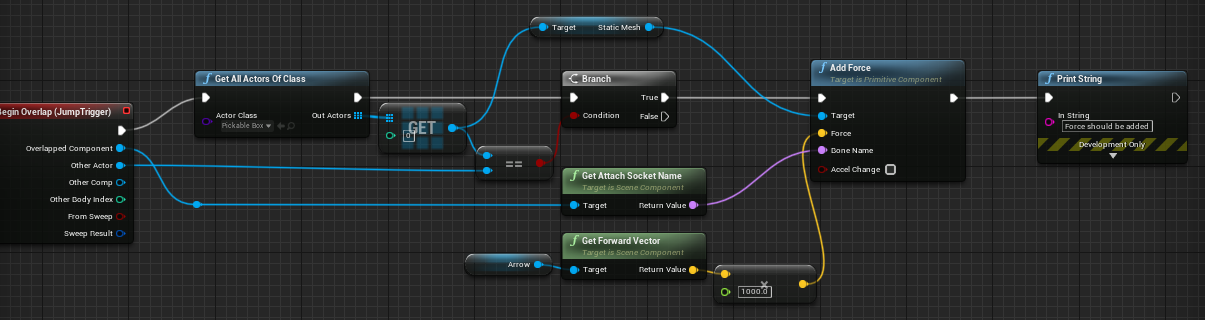
i tried to add force to an mesh when overlapping wich have physics on but.. it doesn't add any force to that object
maiden wadi
@sleek dust Use AddImpulse instead of Force. AddForce is meant to be used a lot more often and not for one time "bump" or "Burst" effects. Also, you're likely going to need a lot more than 1,000 for it to do more than wiggle.
@primal moss You definitely should not be using literal Loops for this kind of behavior. Loops are meant to be used instantaneously. Consider using something like a looping Timer instead which calls the event every 0.2 seconds.
primal moss
Hmm, oh, okay i'll try that
So do you mean:
I feed the timer through a count loop instead of literally for looping it
@maiden wadi Sorry for the ping, but how do you actually make the looping timer? (What's the right node for it?)
 worthy frost
SetTimerByEvent
set the Looping bool
you want to fire 3 shots with a short delay right
primal moss
Yep
Hmm, so in my case, how would I go about it? So I've got the count as the counter, then increment it per 'loop'
primal moss
Hmm, alright.
primal moss
Alright, I'll give that a try
@worthy frost Sorry, I'm having some mild difficulty understanding some of these concepts. I'm pretty sleep deprived and I've been trying to solve various problems in my project for basically nine hours
I'm also unsure if some of the features you've presented will work/gel with the variables I've got
worthy frost
basically, you set current bust count to 0 when you start firing
then you everytime you fire you increment that by 1
if its less than amount of burst shots, set a timer, to fire an additional shot
else stop firing
primal moss
Okay, the part I don't understand mainly concerns the custom events
The stuff I learned from didn't make use of many of them so I'm getting twisted up
worthy frost
best to start using them, splitting your logic into additional events/functions make for cleaner BP graph
primal moss
The fire function I have is 'a normal fire function' and it checks if the gun is burst/normal/etc
i'll try
worthy frost
well i can't see your logic
primal moss
can I pretend that the 'top row' in your image is effectively what i had before, the normal firing stuff?
worthy frost
but i can kinda guess what it is doing
primal moss
where instead of numkey 9, pressing left click fires the gun once normally
what confuses me is why the blue event and the custom event are both burst fire
wait uhh
thats a call to burstfire
hmm
ok, I'm starting to get it
so when I check the gun type
INSTEAD
of feeding the...
uhh, I'm not sure my 'theory' works, but basically I could have a custom event with the counter
and that checks how many bullets to fire
and does that sorta complicated stuff down below
Okay, I'm starting to get it
 worthy frost
some of those tutorials (if you followed one) does thing weirdly
i have seen very bad tutorials on weapon systems
maiden wadi
"Some"
worthy frost
they over complicate simple things lol
tho CanFire would not be a bool for me
would be a function that check if Input is down, weapon has ammo, player is not doing something that is blocking firing, game hasn't blocked firing, etc
 median sparrow
what's an example of a good one for someone who is trying to get into programming?
median sparrow
either/or
 worthy frost
show me the node
primal moss
wait
i'm stupid
didnt feed the count into the thing
Incidentally, how do you alter your wires into the neater versions?




 maiden wadi
@median sparrow Honestly, focus on learning the engine first. Find a nice long tutorial series and follow them. BUT Go back over it to learn what it's actually doing. Even if it's bad, you'll be learning the basic steps. Don't just follow it and patch tutorials together and be like some people I've seen who are talking about having been following tutorials for multiple years and still don't understand basic concepts. Google different datatypes to understand them, etc. Reading and not just being a drone to a youtube video will go a very long ways.
primal moss
Okay, so I recreated your thing, but my issue is that right now it doesn't touch my actual firing function itself, which is in a different blueprint
so what thing do I replace here in order to get it to do that?


The fire function I want is over here
worthy frost
that Fire should be but in your FireBurst before you check the burst cound
put*
where the print string is
in the first example i showed you
primal moss
Yep, gotcha
worthy frost
you should also hold a reference to your gun already cast to the correct type, to avoid keep needing to use Cast node
primal moss
I'm gonna give it a test
worthy frost
in my game i have CurrentWeapon on the player
primal moss
Hmmm? How do I do that? A variable?
primal moss
Interesting.
worthy frost
then i don't need to keep casting, as the base class holds the Fire function etc
doesn't matter what gun i have, all i need to care about is that it is a gun
and my gun actually handles all the firing
i have 0 firing logic in the player
primal moss
Hmm, so to do that, you'd have the variable be the right type. Question is where you set it if you pick up a new gun, etc
worthy frost
except CurrentWeapon->StartFiring
primal moss
Alright, sweet. The rapid fire works just right... and then it keeps looping
(firing single shots infinitely after)
worthy frost
you didn't stop the firing
primal moss
oops
worthy frost
i mean i would show you how i did my weapons, but it is in C++
and that would not be beneficial for you
primal moss
I did part of it in C++ like the stats/enums but yeah, the firing mechanism is mostly BP
worthy frost

 primal moss
hmm. If I wanted to stop it firing, would I use the false branch at the very end of the fireburstshot?
worthy frost
seems like a issue with your Gun's firing mechanic
btw, i recommend abstracting your firing stuff into the Gun
primal moss

 worthy frost
cause that looks really messy
primal moss
I guess part of it though, is that I have to bypass the canfire restriction on burstfire by setting it to true
I wish there was a way to just 'kill' the cycle and have it stop entirely
worthy frost
you just need to re-wire your bp
to have proper flow
Fire should just fire a single shot
primal moss
it always does that
wait wait, idea - is there a way I could set the SetTimerbyEvent looping to false after it loops thrice?
so when it goes into the false branch, it sets it to false. Though I'll be honest and say I have no clue how Count is resetting each time
worthy frost
what timer is looping?
primal moss

 primal moss
Oh.
It's fixed!
Thank you!
I'm sorry for that mistake. it's 11pm and I've been doing Unreal for so long...
 heady jay
I've been trying to make a multiplayer spawning system, but when I run it, only one player is able to control their pawn. Additionally, for the rest of the players, their view is of somewhere completely different than the spawn location, but the actual pawn is spawned in the right locations. Here is the blueprint function: https://blueprintue.com/blueprint/f01eupz_/
If you have any resources that may help with my issue or any ideas on the cause, let me know.
BlueprintUE
maiden wadi
@heady jay Is this all being ran on the server?
@heady jay First off. You're never changing index. You're making one player controller possess all of the spawned pawns, because it's likely that this never leaves 0
Oh, my bad, you are. Nevermind that last one.
maiden wadi
Is this inside of GameMode?
heady jay
Yea
maiden wadi
Put a Print betwen SpawnActor and Possess, and print off the name of the PlayerController, It should print off different names.
heady jay
Got it, one sec
Should I get the player controller ID?
If so, they all say -1 so hmm
I also got its display name which says playercontroller for all
maiden wadi
Personally. I'd probably do this by getting a list of valid player controllers, and then a list of all of the potential spawn points, and pass those two arrays into a function to select the start points. Cause with the Spawn Points being passed in as a copy, you can just select a point at random, delete that spawn point from the list and then remove it from the copied array and repeat for each player controller.
sonic crescent
Hi! (sorry to spawn into a discussion)
I'm trying to understand how to populate Plants and Rocks on my Actor "StaticMesh Ground" in runtime/in game with blueprint.
The way i'm able to do is: Create an actor "BP_Instance", put it a Instanced Static Mesh.
Then In my BP_StaticMesh Ground, I random TraceLine over the surface to Spawn my BP_Instance Actor on it.
Is that the way to do?
heady jay
@maiden wadi While that is a better system, not sure if it fixes my current problem though
Oh and also, part of that getting potential spawn points part is in the system, just not in that exact blueprint
 sudden swan
Fortnite's party royale (where the stream events by video) works by a hls stream as a media texture on the screen right
trim matrix
anyone help when I shoot at the enemy AI nothing happens the projectile goes through enemy AI but no health is taken away or registered the AI has been hit
as you can see i am using the ready made damage stuff in UE4
this is the code on the enemy AI side
 river wigeon
tbh looks way to complicated, why dont just make a custom event for dmgincome at the player bp?
trim matrix
so i seems to have narrowed down to why things aren't working as they should print strings are very seful i must say but it seems the other actor pin i was using didnt work as a object wildcard for the cast object in
instead now I have done a get player pawn for the VR player which seems to work
river wigeon
althoug i dont see any overlapping
trim matrix
overlapping ??
my new issue I has is on game start the AI heads streight for player even though they are out of sight
This is my chase player part of behavior tree
 quartz field
Hello everyone, for some reason the audio "Play" node is not triggered in standalone mode. In the editor, the audio track starts playing as expected (print returns false & true), but in standalone mode, it returns false & false. Any idea why ? thank you!
trim matrix
what would be best way to when Projectile hits object whats best way to check it's hit the AIenemy and not just a floor all wall ?
 supple folio
a cast maybe?
 proud hull
@trim matrix yep, just do the cast. If it fails, it is not that class, if it succeeds, then run your code.
Hit Actor > Cast to whatever class > go from there. The cast is your test, so no need to check in an additional branch.
supple folio
that it has the success and fail built in is already pretty awesome. so probably from the common approach it could be how they envisioned it to begin with
proud hull
Best practice is to make sure all your enemies share the same base class and cast to that, so you don't need to run a cast for every single individual enemy.
Or simply cast to a component, like if your enemies all have a "health component".
Assuming your floors and walls don't have the same component, hehe.
trim matrix
help. How do i make a bullet damage me with a sphere or box collider?
proud hull
@trim matrix Are you already able to detect the collision or are you trying to setup for collision detection?
 placid talon
guys can I ask a question. what is the best method to make a time variable that transferrable to all the npc/actor/weather blueprint? if I put it in player blueprint, then sending the variable trhough event tick to lot of actor sounds really heavy on performance. or is it the only way?
proud hull
@placid talon GameInstance and SaveGame combination. I'm assuming you want that time variable to save with the game so it picks up where it left off on the next load of the game.
trim matrix
@trim matrix Are you already able to detect the collision or are you trying to setup for collision detection?
@proud hull i can detect collision so it makes my health bar go down but i want it to follow the projectile or make it so the projectile damages me.
Right now whenever i touch the gun my health bar goes down.
proud hull
So you are currently doing the collision test with the gun itself and not the projectile?
placid talon
ohh thank you @proud hull , I'm still a noob here, alright I would learn about game instance first
trim matrix
So you are currently doing the collision test with the gun itself and not the projectile?
@proud hull Yes. I want the projectile to damage me but i cant figure that out.
proud hull
Multiple ways to accomplish this, and all depends on how accurate you want it to be. You can do a simple line trace from barrel of gun in the direction being shot, and see if it hits anything it can damage. Or you can actually have it render a projectile (physics based or not) and then test for collisions of that projectile.
The code you are currently using to have the gun itself damage you would need to be transferred over to the projectile BP instead.
Unless the gun is supposed to also affect your health bar, in that case, you just copy it over.
@placid talon GameInstance is a great place for global variables. It can be accessed anywhere, anytime.
 zealous moth
@trim matrix i saw this video awhile back with how to get dealt damage properly, worth a look: https://youtu.be/rA6PnJDY1m8
Source code: https://github.com/xuelongmu/HealthDamageRespawnTutorial
More info on Apply Point Damage: https://www.youtube.com/watch?v=B-2NvegyrcQ
More info on Apply Radial Damage: https://www.youtube.com/watch?v=asZZ6awygtc
In this video we're going to cover a basic health,...
trim matrix
One question, whats the blueprint that will refrence the projectile? I have a health variable already so i just need something to refrence the projectile.
placid talon
@proud hull many thanks man, just heard about it. don't know the terms so when I looking for time tutorial they only show making it in player blurprint and UI
proud hull
@placid talon You can technically put it there as well, but then getting references to it from other classes might be a hassle. Programming is amazing like that, millions of ways to accomplish the same task.
@trim matrix The collision itself should provide the reference.
trim matrix
@trim matrix i saw this video awhile back with how to get dealt damage properly, worth a look: https://youtu.be/rA6PnJDY1m8
@zealous moth I have that system where when you touch it you take damage. I have a cube that shoots at you and i want the projectile to damage you.
Source code: https://github.com/xuelongmu/HealthDamageRespawnTutorial
More info on Apply Point Damage: https://www.youtube.com/watch?v=B-2NvegyrcQ
More info on Apply Radial Damage: https://www.youtube.com/watch?v=asZZ6awygtc
In this video we're going to cover a basic health,...
zealous moth
i can only bring you the water, i can't make you drink it
trim matrix
Im really new to ue4 btw
zealous moth
watch the video, it's aimed at folks like you
proud hull
@trim matrix The projectile itself should have some sort of collision capsule/sphere/box. You would use the on hit event of that to determine when to apply damage to something.
The hit event has all your references.
trim matrix
I dont think my projectile has a collision capsule/sphere/box.
proud hull
@trim matrix If you check out the unreal documentation here: https://docs.unrealengine.com/en-US/Programming/Tutorials/FirstPersonShooter/3/1/index.html
The very first thing they add to their projectile is a sphere collision component.
Learn how to add projectiles to your First Person Shooter project.
Your projectile needs a way to determine if it hits something.
trim matrix
oh then it probably does because im using the fps template and my enemy is shooting the same bullets that will hit cubes.
proud hull
Yeah, that projectile is setup to work with collision. Check out the blueprint of the projectile for a sample of the code used.
trim matrix
Im really confused on how to do make the projectile damage me.
i have the on component hit event.
proud hull
That is the event you will want to add to.
You will need to test to see if the "Hit Actor" is the player actor (or anything you consider damageable).
Then use the "Apply Damage" node.
Or directly adjust what needs to be.
Personally, I setup my game to work with the "Apply Damage" node. I find it best to try and use built-in functions instead of recreating the wheel.
With C++ you can add in event dispatchers that are triggered on damage received to also update UI and such.
Even without C++, you can add them, but easier for me in C++.
trim matrix
i cant get the on component hit event anymore. I accidently deleted it and now it wont show up.
proud hull
Right-click, type in "event hit" and it will be there.
Simple example.
The cast is doing the test to see if it hits the first person character. If it succeeds, it applies damage.
trim matrix
how do i make it work with the projectile?
proud hull
That code example is the projectile.
If the projectile hits the first person character it applies damage.
trim matrix
so would that make the health bar go down?
proud hull
This simply figures out whether or not the first person character was hit. After that, you would need to have it adjust your health bar. If you tied all your events to the "Apply Damage" dispatchers, then it will work as you expect it to.
trim matrix
i have a health variable that is binded to my health bar. Would i just connect that variable to the return value?
proud hull
You could replace "Apply Damage" node with your health variable and simply set it to a lower value.
Something like this instead.
trim matrix
i copied that exactly and still no results.
proud hull
It needs to be tweaked to work perfectly. Just an example of how to accomplish what you need.
You may want to check for the hit in a different way. Since the first person character has no body, maybe you would want to check if it is specifically hitting the capsule or make another collision component to test from.
That current setup seems to only trigger when the projectile hits the gun of the first person character.
 grim meadow
When I check for each loop if my list of actors is valid, if one of them is destroyed it ends the game. I am trying to make so that if all actros in list are destroyed it will end the game. I tried checking the list of actors if its index is 0 it will end the game. But even if the enemies get destoyed they stay on the actor list so that does not work. any ideas how i can fix this?
 fickle anchor
@grim meadow When an actor gets killed or destroyed, you could manually remove it from the list via delegates or interfaces so you don't have to rely on garbage collection
 ancient stag
I don't understand why my Anim Notify is not firing in my animation montage. I even tried inheriting a PlayMontage_Notify, creating a subclass, and editing the name on the pin. But that didn't work either.
I was following the following tutorial. The instructor makes a regular Anim Notify that will for the life of me never fire if I do it the same way.... 😦 https://www.youtube.com/watch?v=nkj6PAbGYtM

Wes Bunn walks through how to set up and use Animation Pose Snapshot to create more natural looking ragdoll-to-standing animations. Ragdolls are fun, but snapping back to an animation can look really out of place, so Wes has the solution for you.
grim meadow
@fickle anchor I found a fix. I pretty sure this is not how i am supposed to do it but ti works
fickle anchor
Well, if it's not how you're supposed to do it, then it'll probably become a problem as the game grows and it isn't good practice to do things incorrectly on purpose
grim meadow
@fickle anchor I actualy think its not going to be a problem. added a box collision to that covers world and if it ends collison it removes the actor from list. So the function will only call when the actor dies.
trim matrix
Can you change the vector of gravity in the CharacterMovement system or would I need to use some sort of add force to make it work? 🤔
proud hull
@grim meadow not a good way to do this as collision needs to be tested every tick, even if you are only running your function when one dies. You obviously have a way to determine if an actor dies, so use that to also remove them from the list.
grim meadow
@proud hull That is actualy where my issue lies. i dont have a way to check if an actor dies.
proud hull
@grim meadow How do you determine when to remove them?
Are they just dropping off an edge and being destroyed by KillZ?
grim meadow
no if health of actor is below 0 it detroys itself. I understand i could cast to my game modetrating actor and remove itself from the list. I just have a lot of diffrent enemy types and diffrent moderating actors. I just wanted to do it all in one spot.
proud hull
@trim matrix I believe you do have to add your own custom force. Turn off gravity and apply the force yourself. Not 100% sure on this though as updates may allow other ways to accomplish this.