#blueprint
402296 messages · Page 529 of 403
 tight venture
well... maybe that means that neither of them are actually of type BP_ItemBaseInteractive
 native terrace
they are
i placed them myself
and i checked out the display name
i think my original blue print is corrupted somehow, I set up the filter to the last possible child class, it works. If i set it to the intermediate class it doesn't, if i set it to actors i get both results
tight venture
just hook up the array element to a print string
straight up. it should print out some type info I think
 dense mica
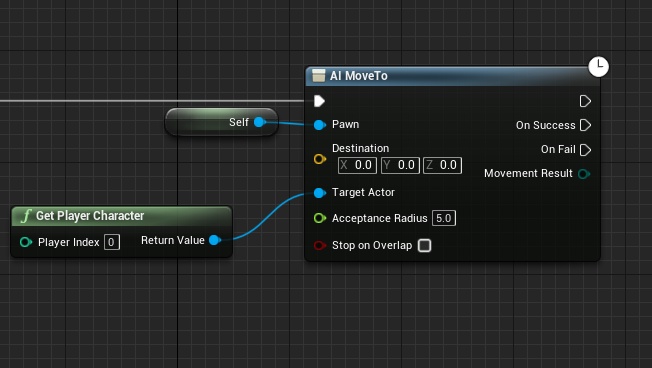
this is ruining my AI movement, any ideas how can I solve this?
 frail marlin
Would anyone be willing to help me with some simple vector math?
native terrace
ok found the issue 
editor crashed, didn't save the settings of my sphereoverlapactors node, so the radius was 0 and it was messing everything up. I was too zoomed in to see
great job epic 
tight venture
@dense mica you may have better luck asking that in #gameplay-ai, but at the very least you'd need to post your behavior tree, maybe some of the relevant tasks, too
I thought I saw that said 0.0...
dense mica
I am just using pure "AI Move To" -- I will post this on #gameplay-ai thanks
 near crag
Quick question, what node would I use to input two float values and output a vector?
near crag
I meant the opposite, merging two floats
tight venture
merging?
into what? the same value for each part of the vector?
give an example of your input floats and output vector to clarify maybe
near crag
"Get mouse position" gives an x and y value as a float. I need those two values to make a single location.
as a vector
tight venture
yeah, you can just use the MakeVector node
near crag
Ah, alright, I was thinking of a break node
tight venture
or you may be able to right-click on the output pins from the GetMousePosition node and see if you can combine them into a vector right there
Vector2D maybe
frail marlin
@tight venture I am calculating a throw direction/force for a character after releasing from holding a climbable object. Im trying to find the most accurate way to add the launch force to the character on release. As it stands, Im getting the primary climbing controllers relative start, and relative end when released from the climbable object. Im doing relative because the controllers world stays the same. I want to calculate from the end to the start and launch the character in that direction.
native terrace
vector2D ye
 spring magnet
keep in mind the GetMousePosition will get you the 2DVector of the screen coordinates of the mouse, top left is 0,0, bottom right is the size of the viewport
which wont translate well to a world vector if thats what you're after
frail marlin
I dont know if there is a way to get the character's velocity right before release and keep it going on that path?
tight venture
So, Montreseur, like a monkey swinging from a branch?
This a skeletal mesh you're working with? It have a physics asset?
frail marlin
Yep, kind of!
Its a character actor
so it has the movement component
ive just added two motion controllers to it
So far it seems that my vector calculations for the launch direction are just off.
native terrace
can't you store the velocity and forward vector on each tick and when user release your button, you stop watching for those on tick so you get the last value, when they let go 
frail marlin
On grab, im setting the "First Controller start" which is its relative loc, then setting its end relative loc on release
and creating a multiplier based on the length
 crystal mural
Am I being stupid? I made this for the text above my enemy's head but it seems to crash the game.
frail marlin
its just not seeming accurate
tight venture
Isn't there a way to get the center of mass?
frail marlin
can't you store the velocity and forward vector on each tick and when user release your button, you stop watching for those on tick so you get the last value, when they let go :DankThink:
@native terrace I can try this
near crag
Here's what I'm trying to do. I want the player to move to the mouse's location, and this works well for the most part, but still has the issue of checking for the cursor's hitpoint of the navmesh instead of the general mouse position. Because the former makes it difficult to move the player in areas where there might be walk-able terrain in front of the player character.
tight venture
I'd think you'd want to perform your calculations based on how the point of its center of mass is moving
frail marlin
@tight venture Character actors are driven my that capsule, im sure it has a center of mass
so get center of mass a grab, center of mass at release
tight venture
But I feel like there is a much easier solution: add a physics asset. I'm not uber-knowledgeable when it comes to using them, but I think that's one of the things they're designed for: doing that kind of calculations for you, given you set them up properly
frail marlin
subtracting those, creates the directional vector?
tight venture
If you wanted to do it with center of mass... um, if you recorded the location of it OnTick, you could draw a line from the second-to-last COM point before release to the last COM point before release, that would be the direction I would think
or just last COM point before release -> COM point at release
much easier probably
COM = center of mass btw
magnitude would be... ugh. bust out the angular momentum equations lol
based on the mass, the angle of the swing... I guess you could simplify it with a trig function based on the angle of the swing
near crag
@spring magnet Is there a better alternative? I tried "Convert mouse location to world location" but that only gave me issues unless I'm using it wrong
tight venture
just get one axis of its momentum
but before you go down that rabbithole, montreseur, I would definitely check out if physics assets aren't designed to do this kind of calculation for you. I have a feeling they are
frail marlin
Okay, thats extremely helpful I really appreciat that guidance.
tight venture
though that may involve a bit of set up to get it moving correctly and not reduce your monkey to a ragdoll
tight venture
I guess it wouldn't be so inaccurate to just use F=ma on it. But what would a be? Since gravity is already done for you, all you'd need is the XY-plane force to apply
gravity is handling the Z-axis for you
I know what you could do, @frail marlin
I remember doing this once
it's a static mesh?
that it's using?
oh... okay capsule
fine
tight venture
there is an option for "enable physics" in the details panel, right?
frail marlin
Yep
tight venture
Turn it on right at the point of release, then freefall until you need to grab something, then turn it back off
It worked when I did it
There was a caveat to doing that though lemme see if I can find it. There was one other thing you had to do
frail marlin
so gravity works super good
but, just calculating the launch force of the throw
so on grab, im setting the vr cams world loc, on release setting its world loc, taking that start and end, doing a direction calc
tight venture
I can't quite find it, but I remember it had something to do with the root component becoming detached
I think you had to reattach the mesh/capsule to the root component immediately after the node that disabled the physics again, to get it back to the way it was
something like that
if you just enabled physics right at the release, then the engine would take care of it all for you
native terrace
does anyone know i can force a widget to be a specific size?
the widget is doing its own life based on whichever space it finds the most accomodating but i wan't it to either scale as one or don't, but rn it's a huge mess 
tight venture
@near crag You can try doing a line trace to the floor (if you have a floor to trace to) from the mouse location
I've used GetHitResultUnderFingerByChannel node before with touch inputs to do just that. Gotta be something similar with the mouse input
@native terrace when you say "specific size", do you mean relative to the whole? Like 15% of the width, etc, or do you mean exact, like 104px?
 atomic salmon
@frail marlin don’t reason in terms of force but rather in terms of velocity
You want to combine the velocity your pawn has at the moment it throws itself with the one caused by gravity
frail marlin
@atomic salmon i am using character movement, so the gravity is handled by that and its variables
it is auto applied right after i release
So I just need to find the character's velocity at release and launch the character in that direction?
atomic salmon
In that case yes, that should work
frail marlin
is there a specific function i should call? or is get velocity good enough?
atomic salmon
Get Velocity on the CMC should return the proper value
 dim loom
can somebody help me out i made this spline system that keeps the mesh lenght so say 100x100x200 so the mesh dosent resize but for some reason i cant get it to work when i rotate the spline point the mesh just stayes strait and doesent rotate with the spline point
frail marlin
@tight venture and @atomic salmon thank you guys both very much
tight venture
np sounds like vr_marco had the right answer though lol
atomic salmon
Did that before, even though with a pawn
But it’s the same principle
With a pawn you have to implement gravity yourself. And ground detection.
frail marlin
If @atomic salmon is who i think he is, he made the tutorial i based my climbing on
😂
atomic salmon
Guilty as charged! 😉
atomic salmon
My pleasure. Glad it is helpful to the community. 😊
native terrace
@tight venture soryr i hop in and off. i mean like 100% of parent div
but with parent div with a max size
to write like a button in a square that wouldn't go over 60by60px but can be scaled down i guess
 burnt canyon
Silly question but easiest way to calculate ms passed between two ticks? Think I got my delta time math off
native terrace
print current time on tick, you'll get the output in the log, so you can easily substract them by hand
burnt canyon
Oh I'm dummy lmao
native terrace
milli seconds you mean?
burnt canyon
Also I see there's timespan structure now
atomic salmon
Delta Time is by definition the time elapsed between two consecutive ticks
native terrace
damnit i hate UI stuff
tight venture
@native terrace I think you can use a SizeBox to wrap it in for the max size
But, up until that max size, you want it to try and take up all the room it can?
native terrace
uhh let me draw a lidl paint of what i wanna achieve
pretend those buttons are perfectly centerd or whatnot
i want to be able to add them dynamically, this part i already have
the thing is, they are fucked up, because they are a child widget
and that child widget's widget position get all messy
tight venture
okay, so... I don't understand, of course they're a child widget of something... what's wrong then?
native terrace
nah i mean they aren't primitives from UMG system
they are also a widget with like 3 primitives in them
tight venture
okay so they're custom
native terrace
ye
tight venture
so what are you trying to do that you can't
native terrace
basically text, text, and a square looking thing i managed to make
let me relaunch unreal sec

basically i wanna have this widget, in a square shaped form, even when added on the other widget
right now it fucks up and they try to occupy has much space has they can when added to the other widget
i did try putting them in a grid panel but the same thing occured, i guess the grid occupied the whole space the parent widget gave resulting in stuff everywhere
native terrace

so i wrap this in a scale box, and then i add it to a horizontal thingy on the main widget right?
tight venture
all aligned at the bottom, kinda spaced out?
native terrace
yup
with the one being "selected" with more graphic features so the user can see but ye
tight venture
try this:
make the root/main-window widget a VerticalBox
Put 3 HorizontalBoxes in that as children. Make them each fill both directions, but adjust the value for the fill so that the middle box is like this:
---------------------
|                   |
|                   |
|                   |
|                   |
---------------------
|   MIDDLE BOX      |
---------------------
|                   |
---------------------
where you wanna align all your buttons
then you can just put your button/widget things in there, and since it's a HorizontalBox, you should be able to make them equally spaced
around the center point, by using padding and having the button things be fill vertical, and um... the middle horizontal one
the -|- setting
centered I guess it would be
actually you don't even need the padding
just have the buttons fill vert, horiz center
and then if they're too tall, you can adjust the height of the MIDDLE BOX and squeeze them to fit. Or, if you don't want their size to ever change, then just set the buttons' settings to be center for both vert/horiz. See what that gets you... I may be missing a wrapper or something, but just set it up like that and see how that looks
That make sense?
native terrace
uuuh ye i'll look more thoroughly after game 
tight venture
VerticalBox
  HorizontalBox fill=4
  HorizontalBox fill=1
    MyButton horiz-align=center, vert-align=center
    MyButton horiz-align=center, vert-align=center
    MyButton horiz-align=center, vert-align=center
    ...
  HorizontalBox fill=1
like that pretty much
tight venture
np
I just did a ton of UMG stuff so it's relatively fresh still. But I may be missing something to wrap the MyButton with, not sure
native terrace
ok lets try i guess
 for now lets see when adding one widget
kinda works 
@tight venture thanks mate
padding seems kinda fooked
 trim matrix
what's the best way to make a WHIP like weapon, something like from Castlevania?
tight venture
@native terrace try wrapping all the buttons in a uniformgridpanel
one row, centered horizontally
may be easier to do that than to mess with padding settings
i mean, inside the horizontalbox they're already in, so: horizbox > uniformgridpanel > button button button
or possibly you can try using spacers to fine tune it too
native terrace
very donk
 abstract maple
I got a customer project from the web with portals that I'd like to use in my game.
HOWEVER, the project uses a "pawn" as the player by default. I'd like to use my custom character instead.
When I change the player to my character, the portals do not work.
Where do I even begin to fix this issue? Thanks!
 hearty moss
check if the portal is somehow tied to the pawn
how does the portal work exactly?
it just looks like whoever made this did a bad job making it modular
 tight schooner
@abstract maple I'll second the above suggestion. The "portal" probably works with a Scene Capture Component 2D that tracks the pawn location for perspective-correct rendering, so you need to figure out how that system works and make it modular.
abstract maple
check if the portal is somehow tied to the pawn
It probably is.
how does the portal work exactly?
Absolutely no idea. I can't follow what's going on in the blueprints.
it just looks like whoever made this did a bad job making it modular
It was free so I can't complain 😦
tight schooner
It could be as simple as replacing the references to the included pawn with GetPlayerPawn, but it's hard to say exactly from the outside.
abstract maple
Where would I look?
If I had to guess, there is some kind of C++ stuff going on because there's only 3 blueprints and they're pretty empty.
abstract maple
How do I even check if it uses C++ or not? Like there are no files
tight venture
@abstract maple that's you recording that screen capture?
abstract maple
Yes
tight venture
super good quality voice recording
tight schooner
It'd be in the portal actor
abstract maple
super good quality voice recording
Sarcasm? 😂
tight venture
seriously brah. fah rayl
you must have the same mic as howard stern
or some shit
abstract maple
Here's the portal "pawn"
I don't really see anything "portal" related directly?
tight venture
can't read any of that ^
tight schooner
@abstract maple I mean the portal itself. Does the portal exist in the scene?
abstract maple
Yes, it's the camera thing, one sec
tight schooner
Is there a BP for the portal?
abstract maple
I don't see anything calling/referencing the "PortalPawn" anywhere
I am so stumped
tight venture
maybe the portal was an actor component, a child of the pawn, that he toggled set visibility on, like a third-person camera hehe
followed him around
no, but seriously, your character derives from Pawn?
abstract maple
My character is a regular character class thing
The default project character is a "pawn"
Not sure if it's a child or something else, but it's not a character which sucks since I can't use it. I need full functionality of a Character not pawn
tight venture
what about a subsystem? could it have been in a subsystem?
tight schooner
In the component list is there a Scene Capture Component 2D?
 crimson swan
it's possible the pawn in question has an extra component in it
abstract maple
your bp_portal has a camera holder
What do you mean?
crimson swan
i'll screenshot hold on
abstract maple
it's possible the pawn in question has an extra component in it
That's what I'm thinking, but I have no idea what it is or where to look
crimson swan
abstract maple
PortalBP
tight schooner
Right click and find references on that capture component. I want to see the script driving it...
crimson swan
just curious if that's just an empty mesh or it's got functionality
abstract maple
Right click and find references on that capture component. I want to see the script driving it...
tight venture
this feels like an easter egg hunt for some reason
tight schooner
😫
abstract maple
I've been at it for days 😢
crimson swan
i'm 99% sure it's the thing from my first picture
tight schooner
Ok, are there references to BP_PortalPawn in BP_Portal or vice versa? We need to untangle these two blueprints...
abstract maple
That's what I've been trying to find out
I can't find any direct refs from the PortalBP to the Pawn or vice versa
crimson swan
does camera holder have any code attached to it?
abstract maple
And I know that there are, somewhere
If I place ANY other pawn. new pawn, into the scene, the portal isn't visible
does camera holder have any code attached to it?
How do I check?
 low forge
please does anyone know how i can get the real date (real life) inside the game?
in fact I just need to get the day and month
abstract maple
crimson swan
can you show the pawn's code that came with the sample
if you didn't already
oh i think i know
the add widget to viewport
tight venture
@low forge Apparently you can use a BP Node called "Now" to get the current date/time
crimson swan
pretty sure the widget is casting to that specific pawn
or to a specific part of that pawn
tight schooner
The portal is a widget? 😹
crimson swan
yeah
abstract maple
Okay let me do this:
tight schooner
I'm about ready to suggest you look up a tutorial for making a portal with blueprints cuz that has to exist, lol.
crimson swan
99% sure it is , look at the zoomed out pic , the part in red
abstract maple

GitHub
VR portals that are seemless. Using scenecapture2D and depth masks. - Lewisscrivens/BetterPortals
That's the project I am trying to use
I'm about ready to suggest you look up a tutorial for making a portal with blueprints cuz that has to exist, lol.
@tight schooner It does, and they all don't work nearly as well as this one
This is the ONLY project that has ZERO glitches or artifacts.
I tried about 11 different methods
I spent so much time
This one is the best
low forge
@tight venture Thanks man 🙂
crimson swan
can you zoom in on this plz
crimson swan
yeah.. can you look at that widget's code please
 simple dragon
hi somebody can't explain me why my component is not registered Actors on overlap
abstract maple
yeah.. can you look at that widget's code please
Sorry to ask like an idiot, but how do I look at the "code"?
abstract maple
It looks empty
crimson swan
@simple dragon you can always put the overlap to overlap all
tight venture
In ABetterPortalsGameModeBase, you've got this:
class APortalPawn* pawn;
referenced all over the place
crimson swan
can you look at it;s design
abstract maple
In visual studio?
referenced all over the place
@tight venture
tight venture
he sets up the portal using the forward vector from that and other stuff
simple dragon
i know but i have water collision priest set to water on box collider and on actor set to only overlap water
tight venture
in the github account you just posted
abstract maple
he sets up the portal using the forward vector from that and other stuff
@tight venture Is it going to be a nightmare for me to switch it over to using my character?
tight venture
take a look at https://github.com/Lewisscrivens/BetterPortals/blob/master/Source/BetterPortals/BetterPortalsGameModeBase.cpp
GitHub
VR portals that are seemless. Using scenecapture2D and depth masks. - Lewisscrivens/BetterPortals
UpdatePortals()
if your pawn isn't his special type of pawn, then that pawn pointer will be null, and all that stuff breaks
Just change the type of that pointer to be your character type
and any references to it
i mean... naive approach anyway
see if that does anything
abstract maple
Just change the type of that pointer to be your character type
@tight venture Could you provide me with a link or a doc on how I can do that?
I don't even know how to open this C++ code from the project
I never used C++ in UE4 before
abstract maple
Yeah I downloaded his project and migrated a couple of my assets into it
tight venture
Oh. Well, um... you're gonna have to edit the source
or maybe you could just subclass his BetterPortalsGameModeBase and override the functions that use his special pawn type
crimson swan
or alternatively copy what he did in c++ to blueprint
tight venture
but easiest to edit the source
abstract maple
:|
I have no idea where to begin on any of those suggestions
I only know like 7% blueprints and 0.02% C++
tight venture
um, well when you created this project, that you pulled his code down into, you created it as a C++ project, or BP only?
or what
abstract maple
I just... opened his project
So whatever that was set up as, I don't even know
tight venture
oh okay
so ... in the editor, under File > click "Generate Project Files"
or something like that
you'll have to open it up in an IDE, edit some of his source, recompile it, and then open the editor back up again
abstract maple
Okay, waiting on it to open.
So when it opens, I close it again, compile the VS code, and open it as usual?
What exactly should I be adding/changing so I don't completely break what I have so far?
tight venture
when VS opens, search for the files BetterPortalsGameModeBase.h and BetterPortalsGameModeBase.cpp
abstract maple
Okay
abstract maple
Success
tight venture
okay, so it looks like he only activates these portals when the PortalPawn (his pawn type) is at a certain distance away from it and viewing it from a certain angle (looks like straight-on)
the portal code and the pawn code are highly... whatever the opposite of modular is
they're intertwined
abstract maple
So, switching his pawn out for my own character with my n00b experience will be next to impossible?
tight venture
Your best best may be to convert his PortalPawn class to work as your character class
um... let's see
tight schooner
@abstract maple you should look up a primer on classes and inheritance as it pertains to UE4
 cosmic lagoon
hey guys I have a box trigger like this and trying to get "On Component Activated" firing. however it doesn't seem to be happening.
this never fires when my character walks on it....could it be my collision settings on the actor? i'll take a look
tight venture
I lost him. @abstract maple you still there?
cosmic lagoon
doesn't seem like it....hmmm i wonder why it is not activating
tight venture
@cosmic lagoon if you want it to fire when your character walks through it?... then you want OnComponentOverlap
and you'll need to set your collision settings for both your character and the box trigger to specific settings
both will need to have the "Generates Overlap Events" checked
and whatever object channel the box trigger is using (probably either WorldDynamic, possibly WorldStatic) will need to have it set to Overlap for whatever object channel the character is using (probably Pawn), and vice versa
 mild mirage
how do i change the gravity of a character, like make the jump shorter
(im new to ue4)
cosmic lagoon
@tight venture ah I see so I am not using the right events
tight venture
I don't think so... Are you trying to get something to happen when your character walks through the box trigger, or when your character just touches it, or what
mild mirage
can anyone help?
cosmic lagoon
@tight venture when your through the box trigger
@tight venture when I search for on component overlap it won't show up here.
so what I did was just right click on the box trigger, and add event and this was the only one availble....
I see collision is set to Trigger
mild mirage
can no one help with such a simple thing?
tight venture
hang on dragonbally, sry busy with one thing first
abstract maple
@abstract maple you should look up a primer on classes and inheritance as it pertains to UE4
@tight schooner Thanks, do you have any specific recommendations?
I know content quality varies a lot source by source
mild mirage
@abstract maple can you help me?
abstract maple
How can I help?
how do i change the gravity of a character, like make the jump shorter
@mild mirage Oh, that's 2 things.
Do you want to change the jump or the gravity?
abstract maple
Click the very top first row
And go to the right, type "jump" in the search bar
abstract maple
Let me check
tight schooner
@abstract maple sorry, I don't have great learning resources recommendations offhand. Matthew Wadstein videos on YouTube are a go-to for every blueprinter and he might have some examples. Epic provides its own learning resources at https://learn.unrealengine.com/
Inheritance (parent classes & child classes) is a fundamental concept so it shouldn't be too hard to get a rundown on it
mild mirage
@tight schooner how do i make folders in blueprint manager? idk what they are called but to like group it
tight schooner
If you select two or more nodes, you can right click and create comment
mild mirage
ahh tysm
im new and learning
oh btw
how do i play an animation
e.g when they crouch
cosmic lagoon
@tight venture I just went with a Box collision and On Component Overlap.....strange the trigger was not working
 weary jackal
@mild mirage you want to gradually increase and decrease the speed when your player press sprint and released?
mild mirage
i got it
no of the camera fov
all i need to figure out now is how to do a crouch mechanic
and then how could i make it first person
but with a third person model
cause i wanna make it multiplayer
cosmic lagoon
@tight venture yes. I wonder why I even bothered with box triggers....not sure I know the difference between that in box collision
is it when the character is inside completely vs touched? in that case I would just scale down the box so character has to walk deeper
okay so i noticed I cannot add a timeline inside a function....hmmm
nor can I add it in macros...
tight schooner
"latent" nodes line timelines and delays can't go in a function cuz functions are meant to provide immediate output
Timelines in particular are a component so I guess it makes sense you can't macro them
Your timelines appear in the component list and you can call functions on them
 twilit heath
you can call an event that starts a timeline from a function though
 mortal cradle
Is there a node that would let me interpolate from 0-1 based on movement speed value ie. if my movement speed = 600 then interp value = 1, if it's 300 then value = 0.5 etc? I don't want to use a bunch of booleans for this
twilit heath
clamp(speed/maxspeed, 0, 1)
you can skip the clamp if you are certain of the ranges your values can take
tight venture
@cosmic lagoon sry, been busy with something. Um... box triggers are just a convenient way to, well, trigger a collision. whether by overlap or hit. Really, it's just a box shape with some preset collision settings to allow most things to pass through it like it's invisible but still trigger the overlap.
An overlap occurs between two actors as soon as the slightest little bit of their bounding areas overlap. So, in other words, just touching.
Or, more accurately, that's when OverlapBegin occurs
cosmic lagoon
yeah for some reason the box triggers were not firing....so i opted for a box collision and just made it smal
tight venture
Neither OverlapBegin nor OverlapEnd will trigger while they're overlapping each other, and then OverlapEnd will trigger as soon as they stop touching
mortal cradle
@twilit heath will try now thanks
@twilit heath it does work but the problem is that the faster I run the closer it is to max value where I would like it to be the opposite, the faster I run the closer to 0, how would you reverse it?
twilit heath
1 - speed/maxpeed
 chilly jetty
trying to use a Media Texture to play a video on my main menu screen
but it just ends up coming out as white?
took the media texture and made it into a material so the Image in the Widget could accept it
but it just comes out white
mortal cradle
@twilit heath everything works, thank you
 woven kelp
If I make a Blueprint Function Library, does everything related to it get loaded when I reference one of its functions? e.g. My function library has a function working on object A and a function working on object B. If I call the object A function, does the object B function, and thus the entirety of object B, get loaded into memory?
 flat raft
@woven kelp I don't think so, but not 100% sure. It is something I need to check on. 😀
If you have Unreal open, I don't, you can check. Make a FBP, and Reference 2 things in 2 different functions.
Call destroy on one of them, maybe A, then call B.
If you get a A pending delete, it means calling B, or loading the function library, requires all references to be valid.
My guess is that it doesn't care until A is actually called.
If you checkout the soft reference vid by Unreal, the dude goes over a few console commands for checking if things are loaded.
twilit heath
@woven kelp you don't have to call anything
everything referenced by BP function library gets loaded at game start
flat raft
Oh yea?
It seems like it shouldn't
Oh..actually, maybe I'm thinking of soft references
twilit heath
BP function libraries typically don't contain those
and yeah, soft references would not be loaded
flat raft
So if all is loaded, then I guess it can be left null until you use the function
If you don't want it to load.
Also, Zlo.. where is that dragon from?
 scarlet cairn
Is it possible to load object libraries from just blueprints? I'm having trouble finding the node for it
this little guy
I'm finding lots of documentation for c++ but not really anything for blueprints
flat raft
@woven kelp @twilit heath True story. You don't have to call anything. It's automatically loaded.
hearty moss
@mild mirage hate to break it to you but it looks like you're fairly new, and multiplayer is extremely complex and not really very well documented tbh. it's best to start with multiplayer in mind from the beginning rather than part way through, because it will just complicate things and cause a lot of trouble
unless you're doing local multiplayer in which case, carry on
cosmic lagoon
how do I get the current gravity direction?
imagine a room that rotates....I need to know which direction is down
hmmm nvm i guess I already have a linetrace pointing down for each player so
I do wish answers.unrealengine.com was more active tho....asking on stackoverflow seems to get instantly downvoted
this discord chat remains the fastest way to get help...but also talking through problems is helpful.
atomic salmon
@cosmic lagoon gravity direction is always [0,0,-1] unless you use a plugin or other ways to modify it.
mild mirage
can someone help me, i want to change the index of a widget switcher from another blueprint
how can i do this
cosmic lagoon
@atomic salmon basically the room rotates...and I need to figure out which is left and right again....
im thinking of figuring this out via relative location from the "ground" which may change anytime
cosmic lagoon
yes it is rotating only on the z axis
(which i presume is up)
so when the room rotates 90 degrees, the "right" becomes "left" and so on
and this is where I'm getting tripped up on
atomic salmon
you can look at the forward and right vectors of the floor mesh
as the floor mesh rotates, those vectors rotate along with it
cosmic lagoon
ah I see
atomic salmon
so if you do a GetRightVector from the floor mesh, that will always point to the right of the floor mesh regardless of its rotation
cosmic lagoon
thats true
one last thing is after the room rotates 90 degrees, how do I determine which is the floor?
atomic salmon
@cosmic lagoon I assumed your room is something like a floor with walls and it rotates around the floor pivot point, so the floor remains the floor. Or not?
Is it more like a box which rotates in any direction?
cosmic lagoon
it rotates in one direction
so the box could rotate 90 degrees left or right
and continue in either direction
hmmm I guess I can just get right vector for each wall
but then what bugs me is I don't know which wall is the new "floor"
mild mirage
how can i make a loading screen appear when a button is pressed?
i have the loading screen
as a ui widget
atomic salmon
@cosmic lagoon you can use the dot product of each wall's UpVector with the world up vector [0,0,1]
Whatever product is closer to 1, that is your floor
atomic salmon
make sure all the floor and wall meshes have an upvector pointing inside the cube
cosmic lagoon
I will give that a shot
 quasi frost
Is there a way to make something overlap anything else, even 3d objects in the world? I want these 2d squares to show over the grass without moving them up or removing the grass.
atomic salmon
@quasi frost looks like a job for decals
cosmic lagoon
thats not a dragon....thats a cow! lol
 tawny maple
I have level, which I'm loading via level streaming. When I'm executing Load Game From Slot in Play in Editor (PIE) mode, I'm getting a virtual copy of this level with naming UEDPIE_0_OriginalLevelName. This copy saves all changes with level and when I close and run PIE again, this copy with all changes loading instead of the original level, which gives me a lot of troubles. How can I prevent creating this virtual copy?
Also if I try to open the original level in the editor when a virtual copy exists in Maps folder, I'm getting editor crash with error: "World Memory Leaks: 1 leaks objects and packages. See The output above." The only way to fix that is either restart the editor or open virtual copy, then the original level. In both cases, level copy will be removed.
quasi frost
@cosmic lagoon
cosmic lagoon
HAHAHA
it's evolving!
@atomic salmon how do I get the "world up value"? I searched for it thinking it existed
oohh wait i see what you mean
just comparing it to [0,0,1]
 bitter mason
is there an equivalent to the select element from the mesh editor for a procedural mesh at runtime?
or are those "elements" from the static mesh lost anyway when i do this?
trim matrix
@quasi frost custom depth most likely
looks cool like this though
like painted on the grass or somethinig
 vernal ibex
Hey can someone please help! my project was fine all day and i went and made a new level and for some reason my character wont move only rotate, the camera is stuck inside him seen in this picture and when i jump it shoots me across the map. Changing the game mode override didnt work. any ideas would be great because this is frustrating
atomic salmon
@vernal ibex looks like a collision issue to me
anything colliding with your character?
quasi frost
Much easier way to fix the grass issue, just put everything on a stage lol
 tribal umbra
Any one know a clean way to clamp a vector position within a radius?
atomic salmon
@tribal umbra you mean vector length? https://docs.unrealengine.com/en-US/BlueprintAPI/Math/Vector/ClampVectorSize/index.html
Clamp Vector Size
tribal umbra
@atomic salmon Yes to an extent. My issue is that I'm trying to limit an actors position within a radius. When I clamp the vector size it clamps within a cubic space rather than a spherical space, if that makes sense?
atomic salmon
@tribal umbra the function I pointed you to clamps on a sphere.
tribal umbra
Really? oh great thankyou!
atomic salmon
Np
native terrace
@vernal ibex did you double check character controller is set tup correctly ?
 restive dagger
umm what should I put in object?
 vernal flax
guyzzz
1 fast easy question, here it goes:
how can I package with my game additional .txt file?
So i can later on read from it.
It can be saved in ProjectDirectory, as it's already working for me. I'm thinking mostly about Android case, where i'm ending up with just .apk and dont want to go to device files to add my .txt database by hand.
bitter mason
@restive dagger well the object you wnat to cast? 😄
vernal flax
@restive dagger - definitely a reference to that ColorPickup BP. You can probably also reference to a child of that ColorPickup i think. Easiest way to do it is Get Object Of Class node.
(can anyone confirm if im right with referencing a child of that ColorPickup?)
bitter mason
never done it, but should work since a child b of a is an a right?
vernal flax
Yea, thats what i thought but never actually used it.
bitter mason
@restive dagger you use a cast when you expect a certain type of object from some input and want to tell unreal engine to expect that type of object
restive dagger
I tried to get a reference to everything but it doesn't work
vernal flax
Get Object Of Class if that object is on the map and you want to do something with that.
restive dagger
I want to cast to set the actor location
restive dagger
I tried to get owner
and it didn't give me any error
@bitter mason player character
bitter mason
thats the point of a cast you can put almost anything in and the cast may succed or fail but you wont get an error
maybe you should read up casts, to really understand whats going on
Examples of different Casting Nodes and usage cases.
its one of the few things that get actually explained in the docs
restive dagger
my problem is not with casts rn
Lemme explain what I'm trying to do
Here's the system I made:
you have an actor blueprint called "Magnet" when you overlap with magnet it casts to third person character and sets magnet on "variable" to true
and you have a coin pickup blueprint
On event tick
It casts to third person char and checks if the magnet variable is on
If the variable is on (true) it sets actor location to the character
My problem is nothing of that logic actually happens when im in game
coin actor code
vernal flax
sooo you need to put into that cast for example GetPlayerController
restive dagger
magnet code
vernal flax
Or GetPlayerPawn
vernal flax
Magnet should work i think
vernal flax
Get actual position of that coin and get player position and lerp between the two. You can do it by each tick, but it's not optimal. You can also use Timeline to do just that, which is a prefered method i think.
remember to double click on that timeline and set how fast and how long etc you want it to happen. Timelines are awesome, such as Timers.
restive dagger
umm I don't know how to make logic inside of a timeline
I thought the only use of it was to change colors and positions
manually
:3
vernal flax
Nope, everything that happens over time.
restive dagger
so am I just gonna put a timeline in there
and attach the execute pins and that's all?
vernal flax
You do Update output each frame. So each frame you take actual position and player position and lerp between that two.
Lerp value you will set when clickin twice on that timeline
vernal flax
after that lerp you do SetActorWorldLocation or something like that, and it's connected to Update.
restive dagger
I never worked on floats using timeline
can you explain what am I supposed to do inside the timeline
I know I sound stupid but that's the first time for me 😐
vernal flax
i did everything i could bro, you have everything on screens
just doubleclick on timeline and then click that float icon i hovered as above
and then rightclick on timeline and add 2 points
easy peasy
ok, i g2g work on my stuff.
 glossy remnant
Does anyone have experience in making modular building mechanics that the player can do at runtime? I am finding myself stuck in figuring out how to approach this. I have a cube shape that has been divided into many individual meshes, I have a feeling I can make instances of each of the panels and that if any of the panels are not within view by the player they can be hidden and save performance. I think if I make this cube shaped room have sockets on all sides I can enable the player to quickly snap another cube to the initial one and keep snapping to make large structures, composed of all the individual panels. So if each of these panels were components of the let's say 'cube blueprint', would those be able to be culled or hidden if they are not being looked at? Is there a (in your opinion) better known way than making each of these panels components of the cube blueprint to save on performance?
Additionally, my intent is for each of these panels to be highlightable and can be changed to other meshes if the player chooses to upgrade them individually
tight schooner
@glossy remnant I can't comment on modular building systems but UE4 already has its own visibility & occlusion culling systems: https://docs.unrealengine.com/en-US/Engine/Rendering/VisibilityCulling/index.html
there is also a dynamic instancing system https://docs.unrealengine.com/en-US/Programming/Rendering/MeshDrawingPipeline/#dynamicinstancing
glossy remnant
Thanks @dusky obsidian ny I did a Ctrl+F on that page earlier to see if 'component' was even mentioned, no results. This makes me think that components would not be culled. All components (aka: 'panels' in my case) would be loaded in and nothing would be culled if I went the component route
hmm, not sure why I cannot shout your name here, sorry whoever 'Sean' is
restive dagger
@vernal flax Thank you so much, it has some bugs but I guess I can fix that https://gyazo.com/9315f04045a6273827f8b37747b32f57
 glossy remnant
I'm taking a look at that second link, I am hoping I can find a built in or BP solution
tight schooner
I don't have a straight answer for whether components get culled, but there are debug views (see bottom of documentation) where you can test it
Regarding the second link the takeaway is UE4 merges draw calls as of 4.22 automatically
You can use instancing as a tool but it's no longer necessary for draw call optimization per se
I suppose it depends what you meant by instancing 😅
I was thinking of Hierarchical Instanced Static Meshes...
glossy remnant
Reusing the same static mesh (panel) over and over to hopefully save on memory useage HISM I have been looking at. Can a component of a BP be a HISM?
tight schooner
yeah there is a HISM Component
glossy remnant
oh snap
tight schooner
ppl used to use it for optimization in elaborate ways prior to 4.22
now if you have a bunch of static meshes in the scene using the same shader material, then UE4 will auto-instance them
glossy remnant
ah, so if I have some sort of master material or something I could make use of that
tight schooner
I think if a bunch of static meshes have different material instances on them, then they won't get batched
You might find more knowledgeable people over in #graphics on these optimization topics
glossy remnant
I think I get it, and I think you have given me enough information to find a conclusion. I came here because I want the cube to be BP, and each panel to possibly be BP as well, or at least have multiple things that can be done to/with them. If these panels can be HISM components, and can be culled if not within view then I think this could work
each panel (HISM component) could be an array of different options (window, door, etc)
tight schooner
I have a vague recollection that a drawback of using HISMCs is they don't get culled. Or all the instances of a component together get treated like one big object. You might have to do some experimenting with the culling debug view...
glossy remnant
if player highlights that panel, while having 'window' selected, changed the mesh and material to show a window in that spot. Maybe I will need collision boxes
oh
well, hopefully I can find an answer out there, surely I am not the first person trying to have them culled
I think I might have enough keywords to find a forum post, I'll go take a gander
thanks for the information @tight schooner
 sonic crescent
Hi! i'm looking for example for instancing static mesh with blueprint. I need to populate an environnement with rocks. I need that to be by blueprint cause the landscape is generated in game. Any idea?
 stiff totem
How do you loop over an array of all instances of an actor?
glossy remnant
@stiff totem googling that exact sentence shows some promising google results, https://www.google.com/search?sxsrf=ALeKk03azDK7Bnw0PrstCSJhLkS83Xg5gw%3A1599916386422&source=hp&ei=YslcX7r5Fu_P0PEP55CuUA&q=How+do+you+loop+over+an+array+of+all+instances+of+an+acto&oq=How+do+you+loop+over+an+array+of+all+instances+of+an+acto&gs_lcp=CgZwc3ktYWIQAzIHCCEQChCgAVCsBVisBWCiB2gAcAB4AIABigGIAYoBkgEDMC4xmAEAoAECoAEBqgEHZ3dzLXdpeg&sclient=psy-ab&ved=0ahUKEwi6soX_2OPrAhXvJzQIHWeICwoQ4dUDCAg&uact=5
top result for me shows a forum from 2018 https://forums.unrealengine.com/development-discussion/blueprint-visual-scripting/1411928-how-to-iterate-through-a-array-to-get-the-actor-that-is-closes
Unreal Engine Forums
been trying to pick up a object that has replicated objects in the world.thing is i have simulate physics sleeping until i trigger a attempt to pickup this
you might be able to repurpose it
stiff totem
Thanks
glossy remnant
@sonic crescent I think Brushify might be able to do the instancing of the rocks for you
and I think in one of his videos (Joe Garth I think he is on Youtubes) he talks about how to change what the instances are, and what meshes they use
sonic crescent
@glossy remnant I don't have any landscape to use brushify onto. My level is generated randomely with staticmesh when the game is launch.
trim matrix
Heyo! I have this problem: https://imgur.com/a/v5n272s
In short i want my item tooltip to disappear when i toggle the inventory. Any ideas?

 bleak vector
I'm wondering if there's any way to "switch" on tags other than a hundred if statements?
glossy remnant
I am not experienced with widgets, but my first assumption would be that you have the inventory and the tooltip as separate widgets? If they were the same widget they would both close when you exit the widget (inventory screen)? @trim matrix
trim matrix
Yes they are separate. I have a function to toggle my Inventory Window inside my Inventory Component and a function to toggle the Tooltip inside my Inventory Slot widget on clicking the icon.
Can't figure it out
glossy remnant
@sonic crescent sorry, I don't have enough experience to solve that. Hopefully someone else can assist? "Hi! i'm looking for example for instancing static mesh with blueprint. I need to populate an environnement with rocks. I need that to be by blueprint cause the landscape is generated in game. Any idea?"
@trim matrix I think somewhere you will need to specify (in a blueprint) that both of these functions occur at the same time. This might not be the best solution, but maybe when the one function is called (inventory) there is a branch that also executes the tooltip at the same time?
crystal mural
Hello! Can someone clarify for me please - Recently I read a comment that construction scripts are only for in level editing. I've been since then moving my construction scripts to event begin play as I go along. NOW with my bullets the event begin play doesn't seem to actually do anything, specifically setting the initial speed. Did I misunderstand? Can I leave things in Construction Script for the main game?? I think I have misunderstood!
 ashen sparrow
I'm trying to spawn a particle effect on the muzzle of my weapon.. The socket is placed in the right location on the mesh but still the particle effect spawns at the wrong location.
The PE spawns at the grip of the weapon instead of where the socket is placed. What am I doing wrong?
trim matrix
@glossy remnant This is my toggle inventory function: https://blueprintue.com/blueprint/mb62r-nv/
I tried adding a remove from parent with a tolltip widget reference to "is valid" but that made errors
BlueprintUE
 untold anchor
Wanting to blend from Camera D on a spring arm (character X blueprint with a camera in it) to Camera B OR Camera A on different spring arms (Some other object C blueprint with 2 cameras in it at different positions) while being able to rotate around the spring arm's that they are children of. Character X is a fully playable character, Object C is non playable object but it's location is not static.
 jaunty dome
I'm trying to work with Maps but it seems the blueprints implementation is "barebones"
for example this is the solution i came up with to solve the following issue
I have a map (name: integer) and I want to add the values from mapX to mapY
looking through the available functions, it seems iterating through map is not possible, so i came up with the solution above, which will probably not work since map values are immutable
how would i go about solving this issue ?
 fallow fox
Hello guys! Is this the correct way to check if a product has already been purchased? Because as a tester, if I exit the game and try again, I can always buy the same product
glossy remnant
@trim matrix I might have bitten off more than I can chew; after reviewing your BP there I have become a bit confused and I think this will go beyond my experience.
trim matrix
ah its fine no worries i will figure it out eventually. It just has to be annoying till i do lol.
vernal ibex
any ideas why this trigger isnt working?
i just pass right thru it
did i miss something crucial?
fallow fox
Use box trigger and see if it works
vernal ibex
yep that worked 😄 ! thank you
fallow fox
Btw you should use other actor to cast to something, otherwise all the actors will trigger the action
or if it's what you want
tight schooner
@crystal mural From what I understand, construction scripts are executed in the editor (or if not, during packaging) and the state is baked into the level, which assists loads times. The ramifications of moving things from construction script to BeginPlay is everything pre-placed in the level will execute their scripts on BeginPlay, which could have a significant performance impact if you have hundreds of actors in the level with sophisticated scripts.
For actors that are dynamically spawned during play, I don't think there's a practical difference between construction & beginplay... Maybe your bullet velocity issue is one of those edge cases. I suspect construction happens before "activation" but idk. Maybe some component needs those parameters pre-set in construction.
 frozen copper
Does a for each loop with break complete after the break?
fallow fox
Yes
tight schooner
@ashen sparrow Is your muzzle flash effect omnidirectional? I noticed you're not setting any rotation on it. Beyond that, dunno, sorry.
You can try a "draw debug sphere" node to see if the socket location is really reporting correctly
frozen copper
I am looping through all my enemy actors and trying to determine when they are all dead, what should be the right way of doing this?
I was breaking after i found one that was not dead
tight schooner
I've never tackled this problem myself but I think it'd make more sense if the enemies reported-in upon death to some manager BP
rather than having a manager check constantly the states of enemies
The manager keeps some array of enemies, and enemies can register/deregister themselves from that array. Or something like that.
You're seemingly using GameState, so in your example every enemy can GetGameState and let it know what's up by calling functions on it or w/e
i.e. the enemies can tell the gamestate to put itself on the LivingEnemies list, or move itself to the DeadEnemies list.
(now that I think of it, I have tackled this problem myself but not with enemies lol)
frozen copper
I solved it by just checking the length of the array of enemies instead of using a loop
This section is called off of a timer.
tight schooner
if the enemies destroy themselves upon death then yeah it should work
frozen copper
they destroy after .5 seconds
tight schooner
Another "dumb" way to handle it is by having the actors tag themselves and the GameState using Get All Actors With Tag
crystal mural
@tight schooner Cool thanks. Ja I put it back onto the construction script, packaged for shipping and it still worked fine! So I suppose it's fine! Another weird thing that happened was I had the bullet "health" calculation happen before the score update, so when the bullet died the score wouldn't work on the first level with the bullets' health being 1. LOL! I'm learning 🙂
 pine trellis
crystal mural
pine trellis
crystal mural
I've never tackled this problem myself but I think it'd make more sense if the enemies reported-in upon death to some manager BP
@tight schooner I do this with mine. Works like a charm. The manager counts everyone before hand, and everyone then reports when they die.
ashen sparrow
When I shoot I spawn a particle at the muzzle location. This particle represents a bullet trace.. The PE stays put in its spawned location. How would I go about moving the PE?
tight schooner
@ashen sparrow It really depends. A simple way to make a particle move is to give it a velocity parameter and use BP to set a vector parameter on the effect. (The exact setup differs between Niagara and Cascade but on the blueprint side it's the same.)
I haven't done ballistics so I can't give you specific guidance on the "best way" to do ballistics vfx
for pointers on the particle effect programming end of things, you could try #niagara or #visual-fx
frozen copper
Is there a way to get a reference to a player character from a controller?
 vapid hatch
i currently have a problem with references just being reset to "None" when i restart UE, i checked everything i changed and cant find anything that would cause this, it also only happens after a certain commit on my git, anybody got an idea what the problem could be? (please ping me with possible answers)
 mortal wharf
How do i make a delay with a random float in range delay two things? As soon as the random float in range delay has completed i want it to do two things at the same thing how do i do this?
jaunty dome
sequence might solve your issue
Is there a way to get a reference to a player character from a controller?
@frozen copper Get Player Pawn
 main lake
Can someone explain to me why my print string shows up one in two times even if I asked it to show only if my ForEachWithBreakLoop is complete please ?
and this function (GameFinished) is called everytime the player presses a checkbox of my grid mini game
Here's my grid of checkboxes
 charred berry
following tut on creating ai char., and OP searches for , getcont, for him get controlled pawn shows up, here nothing, what did it change to ?
get player pawn ?
flat raft
@trim matrix If <get rotation> == 180: set rotation = something
so, condition node. == and Branch
 hazy vortex
Hello fellow unreal users!
I am kind of new to UE4 (think of maybe 1 month exp)
I am working on a 3rd person game where I want to control elements.
Now to the question:
I dont know how to look for it myself because its kind of specific, but how can I get access to the location in the world where my crosshair is aiming at? For instance when controlling earth i want to aim at the ground and then to make it spawn a rock from there (that can be used later, but thats not what i need help with right now).
I appreciate every form of help, even sending me a link to the answer, since i really couldnt find anything.
flat raft
@hazy vortex look up LineTrace, and or Spawn Item at Location, Spawn bullet Decal on Wall
hazy vortex
nice thank you @flat raft , it sounds like exactly what im looking for!
tight venture
@hazy vortex you may also find this helpful:
hazy vortex
oh yes this is great, thanks
flat raft
Can someone explain to me why my print string shows up one in two times even if I asked it to show only if my ForEachWithBreakLoop is complete please ?
@main lake Use the Debugger. Put a Break on the Fuction, and see how it flows.
charred berry
I'm really stuck on my issue any takers ? ;((
 maiden wadi
@charred berry GetControlledPawn hasn't been changed. It's a function for any Controller class. Usually specifically AIController or PlayerController.
trim matrix
following tut on creating ai char., and OP searches for , getcont, for him get controlled pawn shows up, here nothing, what did it change to ?
@charred berry I don't understand your question
You're trying to get controlled pawn?
charred berry
inside my game , creating ai player following youtube tut, part of making it is creating a get controller pawn node, but there is no such node
Its only one yr oild
old
get controlled pawn maybe it is
ya
maiden wadi
@charred berry Are you trying to get the controlled pawn of a Controller, or the player's pawn?
charred berry
after havig made class pawn
its just a robot companion for player, in tut case, its a chase pawn
trim matrix
As far as I'm aware, you can only get the controlled pawn of a controller, not a character?
maiden wadi
@charred berry Okay. Does the node you're after have a blue or green pin on the left side?
 charred berry
looking
trim matrix
First I called Get AIController, And then Get Controlled Pawn
charred berry
all I know is this is part of ai move to
with timer at top of bp
with get player , and get controlled pawn nodes
all part of event begin play
trim matrix
can you link me the tutorial? I don't know what you're trying to do
trim matrix
which part of the video?
charred berry
im geting ther
Get the full UE4 course:
https://bit.ly/36lJS3S
Unreal C++ Beginner Tutorial:
https://youtu.be/1dl91ORwmy8
In this video you are going to learn how to build a very simple game using Unreal Engine and Blueprint.
The goal of this lesson is to get you aquainted with the absolu...
trim matrix
so you just want the AI to follow you?
maiden wadi
It's GetControlledPawn from an AIController.
trim matrix
that's okay
charred berry
almost ;))
trim matrix
just try to replace it with "get reference to self"
maiden wadi
Are you following this tutorial exactly?
charred berry
ok
yes
ive never done ai anything b4 so
I hazve a huge sculpted world comop world
so adding to it over time
😉
maiden wadi
Then your class should be a class that inherits from an AIController, and you should be in that class. Right clicking and typing GetControlledPawn should make that show up.
charred berry
controlledpawn isn't showing up since I started out with 'pawn' class is what youre' saying ?
or did this change over a yrs time ?
OP started out with pawn <<<
:class as in
maiden wadi
In your tutorial, where you linked that, that class he has up. It inherits from AIController.
Top right is the parent class.
charred berry
OHHH so sorry I copletely missed that lol
rathe inconspicuous place ;))))
BUT YA good ic now
whew
 charred berry
im pulling out of pawn as he did
and I get no get controlled pawn anywhere
let me look once more 😦
ya no all I see is get player pawn
maiden wadi
Is your AIMoveTo inside of a class that inherits from AIController like his is?
maiden wadi
It won't show up unless you're dragging off of a pin that is of a class that is or inherits from Pawn, and that node with the pin is inside of a controller class of some kind.
trim matrix
just use self...
charred berry
embarrasing but ty!!
trim matrix
lol
charred berry
OK
its ok I fully get it
makes complete sense
ty again
and here I thought inheritance was some complex c++ procedure LOL
maybe later... ;0
we are you talking about just typing 'self' from pawn >>> ai move ?
I mean I know ai controller was proper place to start
charred berry
yes thats what I meant OK GOOD, ty at least for now I don't have to start over
excellent
trim matrix
yup np
 open crypt
How do I create something that functions as a delay but can be interrupted, without using a loop?
charred berry
https://forums.unrealengine.com/development-discussion/blueprint-visual-scripting/1458786-how-to-interrupt-ai-behavior-move-to-and-wait ,< does that do you any good ?
Unreal Engine Forums
My blueprint is attached. Basically, the AI is checking to see if it can see the player. But for some reason, during its wait or movement period, it never
open crypt
the best I can think of is using a timer that periodically runs an event that jumps into the event I want to delay
maiden wadi
@open crypt You can either make something manually on tick(would generally not advise). Or, simply make a timer, and use it's handle to clear and invalidate it if you want to interrupt it.
open crypt
Going to have to read up on using handles that way
Let me lay out my use case
I'm experimenting with some very basic A.I., essentially simple variables that update different logic...before I even hook up any physical actors, I want to examine the logic and see how it performs....
so if I am sending an a.i. firefighter to perform a task, right now I'm just hardcoded the time to do the tasks, and moving on
so I'm going to have various phases between each task
so Fire Attack might have multiple phases, like 1 - moving to the store 2- opening/forcing door 3 - searching for fire 4- fighting fire , and so on
@maiden wadi so I am starting the first phase but also running an event that checks if the unit is done or not
Basic skeleton of the logical process
Basically I'm taking the time it takes to perform the task, adding that to the current time, and then constantly checking to see if the actual current time matches that same time plus the 30 seconds
although that last one is wrong, I have to move some stuff around to make the timer logic work, I set a variable there instead of updating it which obviously wouldn't work
vernal ibex
Teleporting to Tavern works but for some reason teleporting back doesnt? is my code right?
 latent arch
Hey all, is there a efficient way to add all "new" actors to an array at a semi fast interval? So im grabbing all the actors in my map and adding them to an array. Then maybe every 100ms or so id like to add all "new" actors that arent already in that array to it, Is this reasonably doable?
 mental robin
I am trying to only return 2 decimal places of these floats. There were three solutions online I found and neither of them worked
crimson swan
you're looking for truncate aren't you?
 heady terrace
@mental robin In your output to screens, in actual memory, or both? For the former, in regular programming you have to use additional function calls to format your string.
It looks like there's ToText nodes in the Kismet Text Library (i.e. Blueprints). They've got them for most number types. Including floats. Play around with them to figure out how you want them to display.
 earnest tangle
^ yeah if it's for display purposes, you'd need to use number formatting functions like those
heady terrace
Ok I have a quick problem: AnimNotify Event Nodes for Animation States (Entry, Exit, Blend complete) aren't firing. I can add them into an EventGraph, but they aren't firing.
earnest tangle
Are you adding them into your anim bp or some other bp?
I was having similar problems and they fired fine in the anim bp, just not in other bp's :)
heady terrace
Not the animbp, I'm adding them into the Third Person Character BP.
I need them to turn off the capsule collider for mantling animations.
earnest tangle
My solution was to use them in the anim bp, and have the anim bp call an event in my character bp
trim matrix
Why on earth does the impulse normal return a positive number on the normal level but on streamed levels it returns a negative?
(Or the opposite value on streamed levels)
earnest tangle
I'm not sure if there's some other workaround for it but at least that way I got it working :P
untold anchor
i have objects inside of another object inside of a blue print, the outside object is using inverted normals and a fresnel shader to do an effect. I've set the objects on the inside up with On Clicked component events, and i've shown the cursor, and i have inputs determined via project settings. However, my clicks don't seem to be reaching my objects. My suspicion is that the container object is not letting the click reach the objects within it? if so, how do i resolve that? and if not, any clue what's happening?
heady terrace
@earnest tangle criminy, if that were the case then the nodes should not even appear in the TPC event graph in the first place.
earnest tangle
@heady terrace yeah, I suspect there might be some way to get them working in other BP's as well since they do definitely show in them as well... I just couldn't figure it out :P
@vernal ibex it would be helpful if you can explain what's wrong with it
heady terrace
@earnest tangle I think he explained it a few screens above.
earnest tangle
Ah musta missed it :)
vernal flax
wtf with that cast to nothing ;p
heady terrace
My problem is that I cannot see all the details in your screen grab, @vernal ibex. The resolution is a bit grainy.
mortal wharf
Anyone Have A Good Setup For A Round/Circling Rotation Of A Camera Shake?
vernal flax
they look the same ;p
vernal flax
obviously something with ending point
place target point on map
get it selected
rightclick on levelbp
and you have reference to it
and remove that cast to character coz its useless
heady terrace
@untold anchor I have not done that quite just yet, but I believe your logic is correct. Check the Sphere's Collision Tab in its Details section. My guess is that it should not say "Simulation Generates Hits," but I am unsure if that applies to clicks...
vernal ibex
could it be the booleans messing up?
vernal flax
rightclick on that Branch
and select Set Endpoint
then play
then game will be stopped when you get into that node you set the endpoint on
Anyone Have A Good Setup For A Round/Circling Rotation Of A Camera Shake?
@mortal wharf like, you can always parent to an object and give it more variations in certain way. Like attach camera to a sphere, make it roll, make parent of that ball and give it another dimension of movement
But depends ;p
@vernal ibex yea, test it with breakpoints so you see values of booleans
vernal ibex
alr
 feral granite
Getting this weird error
Blueprint Runtime Error: "Accessed None trying to read property CallFunc_GetBlackboard_ReturnValue". Blueprint: EnemyCharacter Function: Execute Ubergraph Enemy Character Graph: EventGraph Node: Branch
Only happens on actors created from "SpawnActor" node. Any ideas on why?
vernal flax
@feral granite send nodes
you are providing a bad reference to that branch
you can also use IsValid node to check if the reference is correct before you try to access it.
untold anchor
@heady terrace
feral granite
Creating the actors
untold anchor
i don't have that checked unfortunately
heady terrace
@untold anchor bbl
untold anchor
bbl?
vernal flax
Try WaitForValidate for example. But that function seems wrong. Also you had that NONE in Branch somewhere, so start there.
vernal flax
Check if those are valid before you test on that branch
vernal flax
like IsValid and print when false etc.
@vernal ibex yea, game is stopped, check your bp, should be opened already.
Test that with Play in Viewport
OKAY, 3 more questions and im going back to work.
xP
heady terrace
@untold anchor sorry, needed a quick break. I haven't done much mouse stuff yet. But try configuring the big sphere to use a different collision channel than the inner containers. Then when testing for collision, set it to a different channel.
feral granite
@vernal flax I did a 'IsValid' check and did get some prints from being not invalid. But why wouldn't my BB valid? Just hasn't be initialized yet?
untold anchor
well, i removed the sphere temporarily and it's still not clicking to the smaller objects, so i think my original hunch wasn't correct
vernal flax
maybe, try with WaitForValidate (something like that)
There are a lot of issues where just adding delay does magic.
heady terrace
@untold anchor good! You know what's not wrong!
heady terrace
That helps. Trust me.
@untold anchor How are you running hit tracing with your mouse button clicks?
untold anchor
i really simplified what i'm doing cuz explaining it is a bit more difficult, but boiling it down, it seems to the "simple" issue i'm dealing with
i'm not running a trace, i'm using the mesh component event on click
vernal flax
What sends On Clicked event to that MoonFish?
untold anchor
that's the thing lol, it doesn't have one?
it's a functionality of the engine now from what i've read
these base events can just be detected and trigger
heady terrace
@untold anchor Another way to do it would be to use a "Get Hit Result Under Cursor" node in response to an lmb click event.
untold anchor
as long as you have them active
heady terrace
@vernal flax are you implying there isn't an event system raising the OnClicked event for that actor's mesh?
vernal flax
Just asking, i dont know anything about that project, wanted to help so just asking for essential thing. Idk if it's VR game or mobile game or 3d or 2d. Now I can assume more ;p
untold anchor
it's a 3d game, one sec, i'll record a video
demonstrating what it isn't doing and what i can't get it to do
don't mind the missing materials lol, making them as i wrap up each part of it's functionality
vernal flax
embrace the jank
untold anchor
lol, uploading


basically, have two fish, when i click the blue one it needs to change the little sky thing into the night version, and when clicking the orange one, it turns to the day version
have the functionality working, and set to a keybind currently
now trying to get it to work on mouse click
heady terrace
The mouse click will never trigger unless you have pressed the K key, though.
vernal ibex
welp i got the teleporter to work once and then it broke again :/
heady terrace
oh wait nevermind
untold anchor
how so? o.o;
heady terrace
sorry, I screwed up. It should work.
untold anchor
yea, just two events currrently doing the same thing, cept one is going through a boolean, i bypasssed it for testing purposes of course
vernal flax
You are unpossesing your pawn? Or how is transition done?
untold anchor
sot he transition is done having two cameras on the objects
object
and of course, i have a camera on the player
i just used a set view target blend
put the cameras on some spring arms
heady terrace
@feral granite are you still having issues?
untold anchor
and then feed the mouse movement x and y into some rotational math
to swivel the spring arms around
this blueprint isn't a pawn, just a skeletal mesh actor, it's not posessable from what i understand
vernal flax
i see. Okay, so you can definitely set custom collision channels just for that. You can also set collision off to that inside out sphere when transitioning to another camera
untold anchor
so i did a test
heady terrace
@vernal flax he should use collision detection, though. I don't know if OnClick uses collision detection.
heady terrace
then don't use it. 😄
untold anchor
but it's a feature >_>
untold anchor
yea, k does the day night switch
i want to make it so that when i click the fishies it switches instead
heady terrace
Try instead using "Get Hit Result Under Cursor by Channel" node, triggered by a left mouse button click. Find its object. And then run whatever you want to on it.
It seems more complicated, but just put the nodes into a function.
vernal flax
yea, try that one
heady terrace
then break the Hit struct into pieces, find the Hit Actor, and print its name.
You might need to put your fishies into a unique channel.
untold anchor
well, they will be far from the only things that behave this way
as my goal with the "UI" is to have most of it exist within the world and gameplay
vernal flax
check just for tag then
untold anchor
and only resort to overlays as little as possible
so get hit result under cursor by tag?
heady terrace
if that's a node, then sure. ^^;
vernal flax
hit result under cursor will give you plenty options
go test it out, just rightclick and break red or blue output of that search under cursor node
untold anchor
vernal flax
i think most of keypresses and events like hit result under cursor should be done in Player Pawn or Player Controller and then passed onward. But that's probably just multiplayer thing, in single you should get away with that.
untold anchor
it has no execute in or out X_X
i've never used cursor / mouse stuff before
hence my excitement when i saw a giant green button promising to make it pretty straight forward XD
heady terrace
use a mouse click event
It's easy. Just like using keys. when a click occurs, an exec pin will appear. Drag that into the Print String node's exec pin.
untold anchor
oh, gotcha, it works different than the other traces then
heady terrace
yeah, huh?
vernal flax
yea, ray trace has exec's
untold anchor
my fishies don't go into it i figured i could use the physics assets on them but, don't see a way to get my physics assets for the fishies there to make the array
heady terrace
Hey, I have a problem. I'm trying to set my character's Capsule Component's Collision Type to **None ** in my AnimBP's Event Graph using TryGetPawn->Cast To Third Person Character -> CapsuleComponent -> Set Collision Enabled (No Collision). It doesn't work.
I can do that just fine in the TPChar's event graph, though.
untold anchor
isn't the pawn's capsule inherited?
vernal flax
Mippi, in that array you set which collision channels you want to test for
(i think, if i recall correctly)
heady terrace
@untold anchor nope, they're not compatible. Have to cast.
vernal flax
Set reference to that capsule somehow
Like, on beginplay or get component with tag or something like that.
untold anchor
it asks for an array
vernal flax
how you made one?
vernal flax
you should drag from dark green to the left and then Sugestions should help you out
It should be fine by default
untold anchor
those are my contectual options
and if i don't put anything there, it throws an error
vernal flax
right, wait a se
by channel maybe?
and yea, i was right, just drag from that array and Make Array
oh, i see you had it already before. So check that other Get Hit Result Under Cursor
untold anchor
by channel or for objects?
vernal flax
whatever makes you happy (so w/ works)
untold anchor
i'm guessing by objects, since you have the array spot there
heady terrace
@vernal flax That does not work either. :/