#blueprint
402296 messages · Page 519 of 403
 obtuse nimbus
 simple lantern
so you need to code a whole game
obtuse nimbus
no, first i just want a camera to rotate
simple lantern
no? how will the rest get coded?
obtuse nimbus
i tried making a blueprint, but my key doesn't give me an input
i will look at tutorials, i just prefer asking for the thing i'm trying to do at the moment, not for a bunch of other info
This is what i got so far, but when i run it, holding down A doesn't change the output from False to True
simple lantern
Well, the fact is you're starting a new software (which is a great thing) and need help understanding the very basics, that's tutorial city bud.
obtuse nimbus
True
simple lantern
but
obtuse nimbus
I do have some experience with doing stuff through nodes, cause i use blender a lot
but obviously material nodes are completely different than game engine nodes
 topaz junco
Also how are you sure its not changing? You have no print strings within that, nor are you changing anythign to tell
 maiden wadi
I strongly recommend a long multivideo tutorial guide. I followed a city builder when I first started, just so that I could understand the engine.
But to rotate a character on button press, try using AddActorLocalRotation or something I think.
topaz junco
for a FNAF like game, probably only need a SetActorRotation with a RInterp to Constant for smoothness
simple lantern
@obtuse nimbus Start with something like this. You'll have to add to it to make it work the way you want though
obtuse nimbus
can i connect 1 Get Player Controller to both AddActorLocalRotations?
like this
would this work too?
simple lantern
@unique finch you can either play a loop of audio whenever your player is in motion, or you can add a notify to your characters animation whenever their foot hits the ground, and have an event tied to the notify which plays a footstep sound
can i connect 1 Get Player Controller to both AddActorLocalRotations?
@obtuse nimbus Definitely
obtuse nimbus
alrighty
simple lantern
I'd recommend using setactorrotation like I showed above, using the Rinterp
obtuse nimbus
that's what i'm doing
 unique finch
@simple lantern my notifier thing isn't lettting me play a sound
simple lantern
you're currently using AddActorRotation
unique finch
it doesn't look like a timeline
obtuse nimbus
yeah i realised, i'm changing it rn
unique finch
@simple lantern help pls
unique finch
like
i add a notifier track
and usually there's an option to play sound
for it
but it doesn't have that
unique finch
@simple lantern dude this is what i see i added two notifiers but they had no option to play a sound
@simple lantern help man
bruh like legit i have been trying to do this thing for like hours and its still not working everyone is just being sarcasting over some bullshit that i actually want to do
simple lantern
@obtuse nimbus Yeah (I think) you need that because you're using a camera BP. You should rebuild it using a Character BP
unique finch
are you going to help @simple lantern ?
simple lantern
@obtuse nimbus Make a new BP and choose the Character class, and put all the nodes in there
unique finch
@simple lantern are you going to help me yes or no?
unique finch
@simple lantern can you please help somebody for the love of god help
HELP
SOMEBODY
THIS SHIT IS DRIVING ME CRAZ
topaz junco
http://www.franbo.uk/2015/12/16/unreal-engine-player-footstep-audio/
There's a tutorial

A complete tutorial guiding you through the addition of player footstep audio in a first-person Unreal Engine 4 game, using blueprints.
obtuse nimbus
please stop using all caps
unique finch
I DON'T WANT TO USE PHYSICAL MATERIALS EITHER
sorry
but it really is
just somebody help me
with the situation im in
forgot about other tuts
just help me with my situation
obtuse nimbus
maybe you can show it from the Window section?
like the Window button at the top right
maybe it's just hidden, so you have to show it?
obtuse nimbus
Top left my bad
unique finch
what is the window called again?
?
unique finch
nah i don't think its there
GOD DAMN IT
somebody help
@simple lantern i cant see this it looks so fucking different
HELP
GOD DAMN ITTTT
somebod
somebody
why is no one speaking man
 thin rapids
is this from a tutorial?
thin rapids
in the anim bp you have to make a function for these notifies
and there you play the sound
unique finch
Yeah i right clicked that thing
but i couldn't find the thing
couldn't find the notifier
thin rapids
probably in the tutorial they do something similar
thin rapids
couldn't find the notifier
@unique finch is the anim bp using the same skeleton as the one you used in the animation you put the notify on?
unique finch
hold on
thin rapids
or if you dont want to do that in the anim bp
you can use a 'play sound' notify
which will do that automatically
thin rapids
hold on i'll show you a screenshot
 primal oriole
i got this inventory widget bp by default
question is how do i turn it on/off and that it is hidden by default?
unique finch
@thin rapids do you have the screenshot?
thin rapids
wait i was opening ue4
unique finch
oh ok
thin rapids
@unique finch
unique finch
right click?
unique finch
thank you so much man
thin rapids
you're welcome
unique finch
@thin rapids thanks
 near crag
Heya, I am working on a point and click game that has a 2d character in a 3D environment and there's so many issues that I don't know where to start with tackling them.
I guess I'll start with the movement. These are the nodes for the controller:
And for the player:
It kinda functions in the way I want, but it feels very broken.
I want the player to move in the direction on the mouse when the lmb is pressed, then stop when it's released. The farther the mouse is from the player, the faster they move.
The speed kinda works that way, but also not really. The player does get slower the closer the mouse is, but won't go as fast as I like no matter what I set it as.
Not to mention the player automatically gets pushed out of the way of obstacles even when the cursor is pointing in the direction of the mouse, so any sort of platforming is impossible.
I'm still a beginner in UE4 migrating from gamemaker and I don't know how to begin solving this.
 faint pasture
@near crag Simple move to location uses pathfinding.
@near crag What type of control do you want, that they continually try to move in the mouse direction when clicking, or the clicking gives them a target point to move to?
near crag
The former
I used the top down template as a base and it had the latter. So I had to make some edits to get it to work the way I want.
faint pasture
Super simple the.
Tick -> if MouseIsHeldDown -> AddMovementInput((MouseHitLocation-CharacterPosition)*SomeTinyConstant
near crag
Is this applied to the controller or the player?
faint pasture
AddMovementInput is called on the characters CharacterMovementComponent
I'm sure theres a few other places you can call it but I'm talking about the same function that's used for movement by default.
 marble agate
What would be the best way to check if someone is looking at something in multiplayer? I really don't want to use a line or sphere trace for it, that feels like it would be a bit too much just to see if someone is looking at something.
I tried the WasActorRecentlyRendered, which almost works well, I just can't get who rendered the actor.
near crag
@faint pasture So I just keep the nodes in the controller as is and add them to the player's instead, right? Is that code you gave me supposed to deal with the speed or the overall character movement input?
 trim matrix
hi i am saving a vaule and trying to have it show on a different screen as you can see it is saving
but
it keeps saying 0 on the text
faint pasture
@faint pasture You can do it from either. Either do it in controller and get pawn and its movement component or do it in character. Add Movement Input adds scaled target velocity. IDK the scaling but it can go down to 0. I think 1 is max speed so scale your distance to 0-1.
just look at how the default 3rd person character does movement input and turn your mouse input into that.
 hardy sphinx
How to spawn every player as a random character in multiplayer?
i have 4 characters and i need random spawn
i cant find information how to do this
 flat raft
@marble agate compare vectors. Dot product of the two vectors.
faint pasture
@marble agate Dot(CameraForwardVector, Normalize(SomethingPosition-CameraPosition)
marble agate
Thank you! I'll give those a try! I played around with it, and with the help of another friend I think we got it!
trim matrix
Hello i have a question how could i make on begin overlap overlap all the time and not only on begin, i cant use overlapping actors cause i want the hit result from begin overlap
 alpine halo
Pardon?
 rocky ice
I slept like 2 hours... What was the "set" to promote something into a variable?
My mind is derping epically now
trim matrix
chu mean
faint pasture
try typing promote
trim matrix
or just the first thing at the top
alpine halo
Is it must to do it using 'set'?
Can make a type of variable and set it in blueprint or pull out a return node and promote. Idk about 'set'
Hello i have a question how could i make on begin overlap overlap all the time and not only on begin, i cant use overlapping actors cause i want the hit result from begin overlap
@trim matrix i don't understand
 indigo edge
how can I learn blueprints? Is there any good tutorial series that you could recommend?
rocky ice
@alpine halo It is needed, else the animations within my widget will not be picked up. I'm following the tutorial but the guy makes everything implicit and doesn't show the step by step of the process
alpine halo
It means he's pulling a node from the return value and then you'll see 'promote to a variable'
You can also click on '+' sign in variable tab and make your desired variable
rocky ice
My fatigued head is grateful for your help @alpine halo He indeed dragged the pin from the blue socket. I was doing everything from the white socket...
alpine halo
It's all part of learning 🤗
trim matrix
@alpine halo cause i want to check if key is pressed after begin overlap but since its "on begin" and not always overlapping then i have to hold the key to make it do what i want to do and i cant stand still and press it cause it wont work
alpine halo
Is it like interact?
trim matrix
yes but the thing i want to interact with is a instanced mesh so i need the hit result to get the mesh index
so i cant do is overlapping or something
alpine halo
Tell me if i understood it wrong. So there's an actor placed. And when your player gets overlapped with it and press a key it should interact right?
trim matrix
there is an instance of a mesh, yes it should and its working but only if i run into it while pressing the key cause its on begin overlap and not lets say "on always overlapping"
i will just show a screenshot
alpine halo
Okay how about checking the overlapping interactions with timer when key pressed and clearing the timer when it's released
 alpine halo
Non non
Use blueprint interface instead
If you wanna make something like this
Nvm
trim matrix
i know but its not an actor, its a instance of a mesh and i can only get the mesh index from the begin overlap
alpine halo
The branch where you're checking the key is E or not
You can make that as interface call
And after then do all the stuff like removing mesh instance and spawning actor from class
For the index you can connect nodes of begin overlap hit result into that interface
 winged badge
how would one set the visibility of an entire class
alpine halo
how would one set the visibility of an entire class
@winged badge you mean the class defaults?
winged badge
yes, at runtime
i have a system where players can choose between a "simple" and "advanced" hud
the advanced hud adds some more diegetic information via a widget component on the actor
this is toggled by the player and isn't replicated over the network
this is toggled by the player and isn't replicated over the network
the primary issue is that when new players join, their advanced huds show up (most likely because of this setup which i know it doesn't already work)
alpine halo
So when a new player joins it should open like simple and then the player can toggle between
winged badge
yes, but it can't be changed while in a game
internally it starts with advanced on and turns off if simple is enabled
 frozen hemlock
so boys Im having a bit of an issue when I set relative location to 0 it returns a stupid small decimal instead any idea's why that could be
 shrewd ore
I'm a bit confuesed. Has anybody ever seen that GetPlayerPawn returns null despite the fact that that there is a pawn in the world?
The most insane part is that it works if I launch in "New Editor Window PIE" but it does not work in the normal PIE mode
alpine halo
Return null or accessed none?
shrewd ore
it returns an empty reference in "PIE" and a valid reference in "New window PIE"
alpine halo
Don't know, apologies. 😕🤗
 worthy frost
@shrewd ore don't ask the same question in multiple channels #old-rules
shrewd ore
ok
 tight schooner
@shrewd ore kind of a stab in the dark, but if you're getting player pawn in frame 1 of the game starting, but something is explicitly spawning or possessing it, maybe the player pawn doesn't properly exist yet and you should wait a frame or two before trying to Get Player Pawn
If BPs are chaotically doing stuff at the same frame but in some order that just happens to work out in PIE, that order might change when the game is played or packaged in other ways. This is just a vague impression that I have with UE4 and not something that I've confirmed with experiments. But I've had problems like this and I had to control the order of BP execution a little more explicitly.
shrewd ore
I definitely does, I even call the code from the player pawn
tight schooner
hmm, dunno then
shrewd ore
I have never seen something like this, and it's not the only problem of this kind that I am having with the projekt
 round basin
hello, I have a sound (.mp3) and I would like it to play when I click on a button, I tried to change the sound of the button when it is clicked but it doesn't work, I think it's because of the type of my file (mp3) can you help me ?
shrewd ore
You can import is as a WAV file. The UMG Button has even a variable for playing audio on click
 dusky field
Hello, people! So basically I'm trying to make a widget display the current ammo that the currently equipped weapon has. The way i make the widget display is not through a user interface. instead i add a widget inside the weapon actor so that it displays on top of the weapon. But i can't seem to find a way how to correctly reference it. I don't know what should the object be. Any help would be great. Many thanks.
 violet wagon
@dusky field do you have a variable in your character that keeps track of what weapon you have equipped? If you don't then you have to make one, if you do then instead of casting to your weapon you should cast to your character, then get the variable that keeps track of your equipped weapon and use that variable to get your current ammo.
this is what it should look like
violet wagon
theres no wildcard that i know of that can cast to an object actor, so thats why you have to do it this way
dusky field
i guess it will do it for now
let me try implementing that
ok so it seems to work
thanks alot for the simple fix
but I'll still need to find a way to identify which player it should come from and not the 0
but thanks a lot either way
violet wagon
@dusky field To reference a specific player to your widget you have to set a character reference when the widget is created, so off of event preconstruct cast to the owner and make it into a variable. This is what it would look like, and instead of casting to your character everytime you want to get a variable from it, just use the "char" variable.
dusky field
i can't understand how this code should work but fortunately it fixed it! Thank you once again.
trim matrix
hi so i made my own difficulty settings blueprint https://blueprintue.com/blueprint/98bp6qwb/
it works in editor but in build it does not which is weird
BlueprintUE


just gotta fix this bug and my games done in terms of code ;-;
is this to do with the open level or the way i save the settings etc.
 fair magnet
Hey Guys... I have a simple question... so I'm using the default ThirdPerson Character rn. and I wanna implenent a strafe movement. so when the player hits a movement key the character rotates to it's position and when the player stands still he can rotate the camera around the character without him following the rotation
I did it sort of but it's not smooth at all
is there a way for me to smoothly rotate the character ? before turning off "use controller rotation yaw" ?
dusky field
hold on
fair magnet
I'm holding
dusky field
create this
and do this on tick
basically you can create a variable like is moving?. than set it to true when you move and false when you don't move. you can do that on a tick by checking if the movement velocity is greater than 0 on the X and Y axis. or all of em if you want to. if it's greater than set is moving? to true if not than false obv.
and then in a even tick
make is that whenever is moving is true than do this event
just make sure your character isn't using control rotation yaw
fair magnet
I'll give it a try thanks :o
fair magnet
@dusky field What's the reason for the 0 sec delay ?
dusky field
i tried to do it withouth a tick but delay 0 doesn't function at all
so you can remove that i belive
and nothing should mess up
ah
no
indigo edge
how can I learn blueprints in ue4? Is there any tutorial on yt that u can recommend?
dusky field
it decets an infinite loop
@indigo edge simply search on the internet. i obv recomend youtube ofc
just watch some videos and try to understand something. eventually you'l learn something
dusky field
well what are you trying to create?
people say
start small
so
idk
i myself wanted to create a shooter and so i watched tutorials for that
fair magnet
My initial thougt for downloading UE4 was that I wanted to create an MMORpg.... All alone... without any money....
indigo edge
well... I finished whole open world, animations localizations maps etc. but now I need to make my own scripts like combat system etc. Im making open world game (game is about colliding universes)
so it is not that simple as fps
dusky field
there are some good combat system tutorials
but it's hard to find em
atleast for me
indigo edge
yea but I probobly wont find any with gun, mele weapons, armor, stats etc.
trim matrix
so the cast is failling
indigo edge
so thats why im trying to learn that
trim matrix
meaning my code is not even being run
ugh
but why fail on build
but not in editor
dusky field
@indigo edge there are weapon system tutorials
Many of you have requested a way to leave me a tip so I've created a PayPal and a Patreon.
PayPal: https://paypal.me/reidschannel?locale.x=en_US Patreon: https://www.patreon.com/reidtreharne
Discord: https://discord.gg/PdvudWx
Hey! In this tutorial I'll be showing you how to c...
i havent watched this fully
but the comments say it's somewhat simple
indigo edge
yea but thats only guns
fair magnet
@dusky field So you disable "use control rotation yaw" but it never get's enabled again ? o:
indigo edge
and I want to have mostly mele combat. Guns ocasionaly (in some zones) or It would be very rare item
thats why Im trying to learn that bp
fair magnet
atleast it's not in this event
indigo edge
so is there any good way or just watching tutorials?
fair magnet
@indigo edge Try Ue4 Documentation
fair magnet
well I want to have it enabled so I can rotate my camera around the character when he's standing still
and when he's not standing still I want it to rotate to the cameras direction
fair magnet
right now it does yes
dusky field
are you setting the is moving? variable at the movement input?
InputAxis
MoveForward and Right
fair magnet
I literally copied your whole event
1 by 1
so If I haven't done anything
it's not shown there
dusky field
show me the event that u recreated
there might be some errors
if it's looking down
than there may be something referencing the pitch
or do you have use controll rotation pitch on?
fair magnet
Yea I found it
So the error where... that you're lerping the actor rotation to the camera rotation without filtering the pitch and roll
dusky field
yes
you're only rotating on the yaw
so that you can face towards
the cameras yaw direction
and not verticaly
fair magnet
well in the video you just plugged in the whole rotation value
that's why it rotates my whole character
dusky field
yeah
 queen meadow
Hello, sorry for interrupting but i have a small question. When we say switch has authority we test that we are the server and then we can sset variables specifically on the server and all of that stuff right????
dusky field
i myself don't know. sorry. just sayin. mb someone else knows it
fair magnet
@queen meadow Yes
It's like a branch... Authority is getting execute if it's the server
and remote is executed if it's the client
queen meadow
But why when we put switch has authority on begin play and on the authority we set scale 3d to smth, then that gets called on all players including the server, why?
I have tried it and makes no sense
Also this happens to tick
violet wagon
because the server replicates to all clients. clients dont replicate to servers unless you tell them to, so if you want the object to only scale on a client, then change the event to "run on owning client"
@queen meadow
fair magnet
you probably want to "Add Costum Event -> Call it whatever you want -> Click on that event and in the details panel you'll have the replication Settings... If you want it to run only on the server then set it to -> Run on Server"
queen meadow
Oh ok thank you very much for your valuable help both of tou
fair magnet
Probably since it's important to anyone
violet wagon
if its a character then yes but if its an object then you have to set replicated to true
violet wagon
dont hold back on asking questions, theres a lot of people in here to hel-p
queen meadow
When we make rpcs we run a server function on client right? If yes, how then the server can perform an action in rrgard of the client using the clients game data.Eg: We tell the server to add an item to the inventory.But if we running this on the server(because we tell them to), it should add the item to the servers inventory,right?
@violet wagon Thank you. You are the kind of people that make others feel welcome 😄
violet wagon
Im assuming that RPC's means replicated events since youre using BPs right?
 true valve
How to adjust volume using blueprint for an audio cue with Crossfade param?
violet wagon
hey ghost i made a big error in the answer, was just rereading ur question and realized
queen meadow
Oh...
violet wagon
so you want to make a change only on the server right? so that only the server has the item and not the other playes
queen meadow
No..what imsaying is that i dont want clients to add items on their own. I want an rpc that enforces clients to tell the server to add the item for them. What i dont understand is that, if a client tells the server to add an item for them, how does this work? I mean since the server adds the item in the finale, shoyldnt the item get added to the servers inventory and not the client's?
violet wagon
OOOOOOOOOH i see
if your running a listen server which i assume you are, then your server is also a client. all this means is that a players machine is also handling the servers job, so theyre still playing the game like any other player would, but their machine has all the authority, so when you cast to the server, you are pretty much casting to their machine to run some code, which is completely separate from what they're doing in game. If you want to make changes to what the server has in their inventory, then you have to cast to their client, which is done just like any other player. Hope that clears it up. I had a ton of trouble understanding this stuff when I started making muliplayer games so just @ me if you need me to explain more.
queen meadow
@violet wagon I think im a little bit dumb. Cant really understand how the server can actually modify things in our inventory since they doesnt have the inventory we have
Sorry for wasting your time but im having a very hard time understanding these. I mean i have been making multiplayer games for a while but one day it struct me(ha see what i did there) and i started wondering how all these things internally work
violet wagon
They dont have the same inventory but if you call an event to the client, then you most likely asked the client if you had the space to add something to your inventory, if you are high enough level to add something to your inventory, what slot you want to add it to, etc. Then you called to the server to make changes. Your server just takes in all that information that you gave it and runs some code. It just uses your clients information, and uses that to modify your inventory. So your client really is making all the changes since it has all the information needed, the server is just listening to what the client wants and does it. Also I watched every youtube video there was on muliplayer blueprints and I never understood it until about 10 hours of making blueprints and it finally clicked, so no your not a little bit dumb.
@queen meadow
queen meadow
Thank you very much. Im starting to get the hang of it
You are very supportive
But.
Can i tell you a little secret?
violet wagon
yhea
queen meadow
I didnt understand the scale thing
I meab if tou go to the upper qurstions i said that all ppayers scale to a size. Not just that the server replicates their scale and sends to the clients so they can see the servers scale
violet wagon
You asked why the scale changes on all clients if we change the scale on the server right?
queen meadow
Yhe
near crag
@faint pasture This is very late, but I think I finally got the speed to work a lot better than before. Thank you!
violet wagon
The server has all the authority, so when it changes something in the world it replicates to all the clients, but clients dont have authority, so when it changes something and doesnt call to the server it will only change for them. The server can change stuff on its own machine if you cast to its character and then make a change, for example, if you only want the servers health to decrease, then in their character actor you change their health variable and it will only change for them without changing any of the clients health. @queen meadow
all that applies to listen server. dedicated server is a bit different since it isnt an actual player
 slender escarp
Hiyo, I need some help. so I got a skill system in a game that has cooldown, availability boolean variable etc and i've already made 2 and they work. Now i've tried to create a specific ability that affects the player rather than deal damage to others, however despite copying the exact BP from the other 2 to spawn an actor when the skill key is pressed, and the actor itself having an event begin play to actually cast the spell, peculiarly it doesn't work (does not spawn emmitter as it should on the player, give me the debug message "successful cast" nor expend MP) and only works if I place a breakpoint at the "input key pressed" event and resume afterwards
 rose hazel
Because my dumbass self created static meshes for everything w/o skeletal meshes, I’m not trying to improvise a gun system based on Reid’s tutorial series. Will I run into any issues if I simply tell the gun to spawn an actor w/ projectile physics at a blank mesh’s location?
rose hazel
slender escarp
and the actor itself
The key input part is exactly the same as the other 3 skills, the spawn actor and actual actor BP is different because the other 2 skills are aoe and point and line shot skills
But for the most part the sufficient mp, availability etc check are the same as well
violet wagon
so it spawns the actor but the actor doesnt do what its supposed to?
slender escarp
Basically when I press the button absolutely nothing happens unless I place a breakpoint at the "input key r pressed" event and resume
trim matrix
how can I disable input for an Ability key and activate it only after entering a triggerbox, let's say for tutorial purposes?
violet wagon
maybe its just a timing issue. try and put a small delay after input key r pressed. i cant really see any obvious problems with your script.
@trim matrix when you enter the trigger box, set a bool to true, and when you exit the box, set it to false. Then right after the key press event, check if the bool is true or false and if its true then execute the script. If you only want the player to be able to use a key after the enter, but not remove it when they exit, then try using the "make inputkeyactionmapping" node. Just delete the action mapping that you have in the project settings and add it through script with that node when they enter the box
slender escarp
I put a 0.1 delay and I have to spam the button sometimes but that definitely helped seeing as it casts now
near crag
Is there a way I can print out data (such as the player's speed and location on the map) but in a way that there isn't a whole bunch of numbers scrolling down the screen?
violet wagon
@near crag you can put it on a widget. just bind a text widget to your characters variable you want to keep track of
 rough blade
For lists... How do i got about completely resetting a list? I thought I initially had it (list properly reset to be refilled) but I noticed in the debug filter that the background instances remain undeleted. (causing errors as the entries no longer have valid references)
 violet wagon
In the video they're following you but they twitch every once in a while, probably because of the delay node after the ai move to
@trim matrix
violet wagon
It shouldn't have to do with the move to ai node then, because it's definitely moving in the right direction. Maybe there's some collision issues on your ai that makes them collide with their projectiles or with each other, causing the twitching.
rose hazel
I’m following Reid’s weapon system tutorial, and my game is going to use different ammo types for different weapons. All of the functions are in the parent BP_Gun class. Is there any way to spawn a specific projectile based on a value in the child class?
For example, the only gun I have so far is a coach gun, and the ammo (BP_12G_Slug) is a child of a BP_Ammo class I made
trim matrix
it still does it when i removed firing
 earnest tangle
@rose hazel you could create a variable in the parent called "Projectile Class" or whatever, then you can define it in your child actors
rose hazel
That’s the issue - it doesn’t show up under Variables in the child even after compiling
violet wagon
@trim matrix that's weird idk what I could be
@rose hazel you should be able to use a variable if it exists in the parent. It wont show in the variable section of the actor but you can still get it and set it
rose hazel
Event Begin Play > Get Actor Of Class > Set?
trim matrix
hopefully this is the right answer
rose hazel
@violet wagon
violet wagon
no just type in "get {variable name}" and it will let you get variables from the parent class @rose hazel
rose hazel
All of the functions are in the parent class. I need the parent to pull the value from the child so the correct ammo type is selected
violet wagon
you can do the same thing with functions. just type the funtion name in the child and it will do the same thing as the parent, so that you dont have to cast to the child from the parent. This also works with events.
@rose hazel
trim matrix
bad news jerk still happens
near crag
If I can get the angle between the player and the cursor, is there a way I can use that to change the sprite to make it look like the character is facing a certain direction (0° = right facing sprite, 45° = sprite facing an angel, etc.)?
earnest tangle
Yeah, just look at the angle and choose the appropriate sprite based on it
near crag
Is there any function that will allow me to do that?
earnest tangle
built in? not really, but it's not super complicated
one of my projects has sprites that behave kinda like in Doom or such, it just uses an array which has them in order from forwards, forward right, right, and so on
I can just divide the angle by 45 (since there's 8 total sprite angles and 360/8=45) and use that to choose the appropriate sprite from the array
 reef mist
Hi guys, Im trying to make a laser beam weapon that shoots a continuous beam and does damage at a certain rate
My issue is with the render, a lot of vr apps use this lasers
but I cant seem to make it work
tight schooner
don't think anyone can help you by that description alone
you should elaborate on how you're making the beam, what issues you're having, etc.
near crag
I'm trying to find the angle between the player and cursor and I'm not getting the right values.
 dusk bolt
My game crashes with this error on loading a level
I had a hunch it had something to do with the Level blueprint but there is nothing in the blueprint that seems... out of order.
and im stumped : (
 fickle blaze
anyone else using the factions plug in from the marketplace? I have a question about it
 bitter schooner
I have a Data Asset referencing another data asset. In the editor everything works fine but in the build the reference is null. Any idea why?
@near crag try "find look at rotation". angle between the player and cursor? do you mean the hit point in the world space under the cursor and the player camera?
 pine trellis
i made a child of a pawn but I need to change something the montage in function of the parent of the child. how can I change the montage without changing the parent function?
bitter schooner
near crag
I'm not getting any data when I print the results from the "find look at rotation"
I think I should also say that the player sprite doesn't rotate into the direction it's moving in. It's completely stationary.
 chrome orchid
Hey how would i make a line trace coming out of the camera of all players. The thing that idk how to do is that im making a multiplayer game and i have teams which spawn 2 different player classes not a child of the third person character. how would i be able to replicate the trace between the 2
bitter schooner
@near crag what does getting not data mean? only zero values?
That is fine. Do you have a screenshot of the sprite?
fickle blaze
so anyone know how to make factions discoverable on a line trace
using the faction thing from marketplace
 coarse turtle
Whats the easiest way to rotate a vector around the plane with normal perpendicular to the direction a character is looking?
near crag
@bitter schooner It's not returning any values for the angles
I'm looking to find the angles so I can apply sprites of the character facing different directions
bitter schooner
Did you disconnect the print string for the screenshot? because the execution wire should be connected to something
 thin apex
 short pawn
does anyone know how to make a post process material that makes anime like sparkle or glitter? like this
 stray folio
hello i have a fly code that seems to walk sometimes in the air
can anyone help me
i got a screenshot
 quaint palm
Hey guys
I have this post process material and, through Blueprints, I want to dynamically set a particular scalar parameter inside it.
The material I wanna change is the #1 element in the array of the Post Process Volume. It's a screen blur material that I need to link with the current speed of the player pawn (it's a racing game)
 zealous moth
would anyone know if there is a way to give individual materials/textures/colors in an ISM or HISM? I heard of the "per instance" node in the material but the documentation is quite empty on details.
pine trellis
the code I circled is in my playercharacter blueprint am i suppose to put it in my player controller?
true valve
How to do a fog of war on a map window? Any tutorial or concept? Some thing like this.
 alpine halo

Unreal Engine Version: 4.19.2
Template: Third-Person Template
Assets:
The asset pack can be downloaded here: http://www.mediafire.com/file/zs4ti3vi5dttswf/Assets_WorldMap.rar/file
Video Description:
In this very first part of my new tutorial series, we create the project for...
true valve
I already have a map. I only need to learn fog of war. Only the discovered portion of the map be shown in the map.
alpine halo
it's in this video tutorial
there are 8 part of this tutorial
the part that spawns the actor
@slender escarp try input key string switch


you can make same as this in your skill custom event to check
the event begin play of any actor takes place when the game starts and the actor is in the editor from the start or as soon as the actor being spawned
 crystal bison
I'm having an issue with "Get Viewport Size", any insights would be appreciated
https://www.youtube.com/watch?v=1JTbXiT8OFY&feature=youtu.be
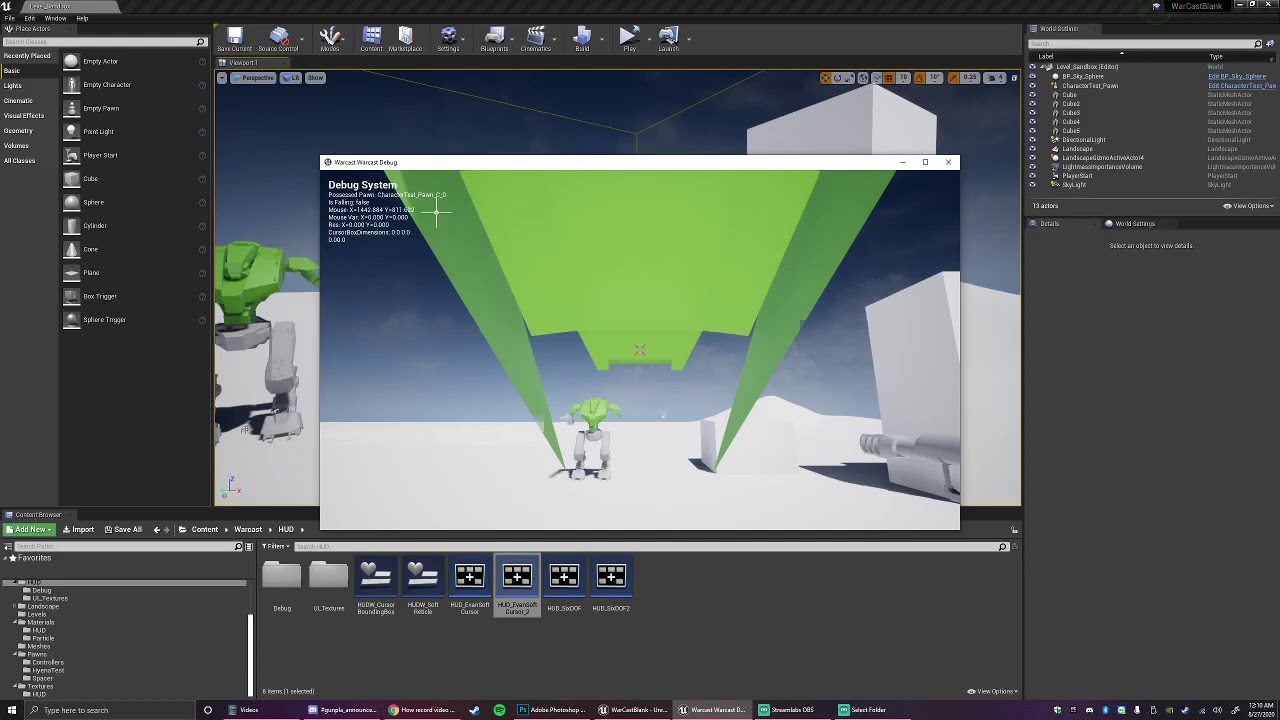
I'm using the function "Get Viewport Size" in my HUD Blueprint within my Unreal Engine 4 project. For some reason "Get Viewport Size" does not function correctly when in a standalone client, but functions correctly when played in the editor. Any help would be appreciated.
alpine halo

@quaint palm there's a node like this

also there's a set custom depth for post process volume
alpine halo
and I want to have mostly mele combat. Guns ocasionaly (in some zones) or It would be very rare item
@indigo edge https://www.youtube.com/watch?v=jKBAvvJDmMo&list=PLNTm9yU0zou7195IHfzM42_2KLwz91BTX
Project Files : https://www.patreon.com/CodeLikeMe/posts?tag=source code
Support my work on Patreon : https://www.patreon.com/CodeLikeMe
In this video, I will show you how to attach a sword into the back of the character in unreal engine 4. Also, how to make the character eq...
I’m following Reid’s weapon system tutorial, and my game is going to use different ammo types for different weapons. All of the functions are in the parent BP_Gun class. Is there any way to spawn a specific projectile based on a value in the child class?
@rose hazel make an enum for your ammo types, switch on enum
quaint palm
@quaint palm there's a node like this
@alpine halo Thank you for your reply. I managed this using Material Parameters Collection. Really easy to use!
 clever lark
Hi all, I am creating respawn system along with health bar in UMG. In Health UMG, I got event binded onHealthUpdate and calling dispatcher from CharacterBP.
Problem is, when I destroy actor (CharacterBP), event dispatcher doesn’t work at all. Any help would be really appreciated as spent long time but could not figure out.
alpine halo
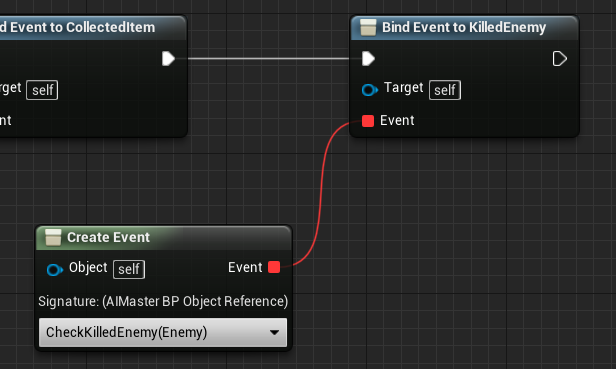
but if you're destroying an actor or character then you should use it with game instance
clever lark
@alpine halo Thank you very much, didn't think about it. Make sense as will keep Binding persist. I will try it and see if will work.
flat raft
Ellloo... I'm looking for ways to make my workflow faster. I'm making a Kerbal Style Building game where I can put together a whole bunch of parts. (Think Lego)

This is my prototype.
Notice the green connection points.
Right now, I have to manually make each connection point (6 for a cube), place it, setup the OnOverlapEvent and EndOverlap for each.
It is super tedious to setup 1, imagine 100. 😅
Anyone have workflow suggestions?
alpine halo
line traces on the faces of cube and the highlighted face should get attached by input action
earnest tangle
@flat raft We have something sorta vaguely similar, and so far we've used sockets defined directly in the FBX file. It's a lot less tedious to place them in Blender :)
Then we can either do a construction script or a begin play thing which just iterates over the sockets and generates components or whatever for them
flat raft
@alpine halo I did the linetrace approach before. Doesn't really feels good to control..as far as the player. Touching connection points with the mouse was the way to go.
@earnest tangle sockets? how are they made in blender? you mean bones?
earnest tangle
Setting up, exporting, and importing Static Meshes using the FBX content pipeline.
see the Sockets section there
earnest tangle
we generate a static mesh component per each socket which is used for the overlaps and rendering a little indicator area and such
flat raft
I tried the construction script earlier today. I wasn't able to name the components added.
earnest tangle
Why do you need a name?
flat raft
I have to save and load, also I have to hide/unhide the points when the connection is made
earnest tangle
I'm not sure why you need a name for that :) You could just hide based on the component reference when making connections, ie. the user clicks on the specific overlapping area you can get the component ref they clicked on
flat raft
hmmm.. I guess that's true
earnest tangle
for saving you probably could store the state of each into an array or something and then apply the state when loading 🤔
flat raft
I haven't tackled saving yet, but I know it's going to be a bitch 😂
earnest tangle
It's probably not that bad once you get the hang of it :) Just the initial hassle of figuring out how it should work
flat raft
Yea. If the player builds a lego car, I have to save each object, who they are connected to, where they are connected... oh gooosh.. I'm scared already 😂
earnest tangle
It's not as bad as having to save stuff like what state your AI characters and stuff are in :D
flat raft
I'm going to get there when I do AI stuff... dreading it also 😂😂
Ahh Sockets are great!
Thanks @earnest tangle
That will make life a little easier
clever lark
@alpine halo Worked perfectly! Thanks
 vast lion
I have these two points on a sphere
And I want to get this rotator
Not exactly sure how to do this with Unreal APIs
maiden wadi
@vast lion Which rotator are you after?
maiden wadi
So.. imagining this as a planet and you're the blue dot looking towards the horizon where the red dot would be?
@vast lion I have a theory that might work if the blue dot's positive Z is always facing away from the black dot?
You could just convert the red dot's location into the blue dot's local space. Zero Z which would put the blue and red dot on level fields. Find the look at rotation, and inverse transform that rotator back into world space.
maiden wadi
In theory, that should give you a world space rotator for your red arrow.
trim matrix
hey guys, how can I check if another key is already being held down while pressing another key?
unique finch
@round basin use a sound cue and enable loopin
looping
like
drag on drop your sound
round basin
If I have a wav sound how do I do ?
unique finch
in the sound cue
Ok go somehwere and right click
then go to sound -> sound cue
then drag and drop your .wav file in
then put the output with the sound cue output
then just click the .wav file in the sound cue
and enable looping in properties
search it up ig if you don't know
round basin
Thank you, it's working !
unique finch
You're welcome
 high ocean
any idea on how to "force" an overlap check? Mimic something like an initial overlap?
alpine halo
there is a pure function like 'is overlapping actor', which returns bool
 toxic dune
Hi, noob question but how do I create a gray thing in my blueprints to maintain order
not sure what the name is, lol
i think a graph
 deep elbow
❤️
high ocean
@alpine halo yea, thanks, I just reset collision after possession which forces inital overlap check. Thanks anyway 🙂
toxic dune
hi me again 🙂 I'm trying to give all the cubes a velocity when I press shift i might be missing something, can someone help (screenshot here)
im using the firstpersonexamplemap
trim matrix
hey guys, how can check if W is pressed while pressing space bar?
toxic dune
i need some kind of check to see if the actor is movable
 dense mason
Hey guys quick question
I made such an event
in bp_skypshere
no in my menu I would like to call it
unfortunately such a thing doesnt work
maiden wadi
Does it give you an error that says that SkySphere blahblah invalid something blah?
dense mason
no error at all
If I do something like this it gives an error but I have no idea what to connect
to 'object'
maiden wadi
You've hit the Pointer wall. In short the blue variables are called pointers. They're small variables that hold the memory address of your actual object. In your case, your pointer is probably empty. It knows 'what' it should point to, but not 'which one'.
maiden wadi
In short, you need to get a reference to your sky sphere that is valid and pass that into your widget and use that to call your Midnight function.
Where are you creating and storing the widget?
maiden wadi
Where is it being created from?
The ConstructWidget node you're using to create the widget that gets added to viewport.
dense mason
In my bp_playercharacter
it is like that because I open different menus on different objects
 bold shale
try plug sky sphere variable into the object field on the cast
maiden wadi
I'd wager it's probably empty.
dense mason
bold shale
ah ok
maiden wadi
If you want a very simple but unelegant solution, I'd just getactorofclass since there's only one of it.
bold shale
right click on the skysphere variable and does it say set anywhere
maiden wadi
I hate that node, but it'll make your life simple while you're still learning pointers.
maiden wadi
Just be careful using GetActorOfClass, or GetAllActorsOfClass, because it basically iterates over every actor in the current World. If you start having a large scene, it'll drastically slow down.
dense mason
Alright I'll remember
 devout shore
how do I delete this?
Its only option is to promote or watch, there does not seem to be a way to delete
maiden wadi
Selecting it and hitting delete on the keyboard doesn't work?
devout shore
nope
its OK i just went to the root of the node and broke them all, I will redesign it better this time
devout shore
I noticed that a few hotkeys are not working, for example if I select a node and press Q it should straighten it right? if I right click and choose to straighten it works, but if I press the button it does not
https://i.gyazo.com/1368fc85e004af3a6e8c6fea0adb2858.gif
@alpine halo NOPE
 simple lantern
Wow macro's are awesome
I never really understood the practicality until recently
alpine halo
You can set up your own set of custom keyboard shortcuts in the Editor Preferences window. To modify the keyboard shortcuts, click Editor Preferences on the Edit menu, and then click Keyboard Shortcuts.
 fallen glade
is it possible to print a string with multiple colors in it ?
trim matrix
@maiden wadi hey thanks, ok so how can I add a sudden burst of acceleration (w/ Spacebar) moving forward (while W press) in mid air?
so if jump with spacebar, and then when I'm holding 'W' in mid air, and then press spacebar again the character to burst forward a bit
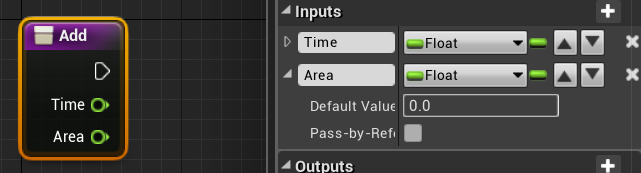
devout shore
is there any way to swap the values around inside a blueprint?
So area would be above time
 trim matrix
how mark some point(vector) in world location for feature usage?
something as trigger
or arrow
devout shore
a bit of a newbie question, but if I understand I am suposed to keep as much out of the level blueprint as possible, if I wanted to create a help text system that would simply write text to the screen when you press a button, would it be better to make a new blueprint or stick it all in the FirstPerson HUD blueprint?
trim matrix
@alpine halo thx
 obsidian meteor
@devout shore you still here?
without knowing much about your particular use case,
I would just say that should be handled in the HUD. however, you might want an interface set up so that different actors/classes all manage their own text, based on context
 indigo bough
Hey all, I can't for the life of me work out why my Procedural Mesh Components aren't being seen by a visibility line trace?
flat raft
@indigo bough are u able to see it?
indigo bough
Yeah, it's visible 🙂
flat raft
Normals pointing the right way?
fickle blaze
anyone using the faction plugin and can tell me why the line trace just says "none" even when I hit an actor with a faction set in it's BP
indigo bough
Ahh, that might be the issue, I haven't set up any normals for the proc mesh. How would I calculate those?
indigo bough
It's just a plane, I'll try to capture a wire of it
It's a plane, surrounded by corners and sides.
I was thinking maybe it's because it's a single tri thick, but surely that would still contribute to visibility
I tried this, but no change at all 😦
flat raft
well.. let's see... try checking Complex as simple, maybe enable all channels collision to see if it's doing anything,
fickle blaze
if your thing has no faces the default visability trace wont work
flat raft
Ur trace for sure hits it ya?
fickle blaze
probably
flat raft
He said he could see it. I'd assume if you can see it, it has a face
Can you see it in shaded view?
indigo bough
Yeah I can see it in shaded view
No collision with anything right now
In any channel
flat raft
check the collisions, drop something on it
Oh... also.. the create collision Che k box... uncheck it, then wait a second, then check it again
indigo bough
Yeah, zero collision at all 😦
flat raft
also, just for kicks... the relative transform... split that struct.
indigo bough
Oh, now it's working... I don't know why? (and how to replicate this on my other meshes)
flat raft
Oh.. was it the checkbox?
indigo bough
I think it was the unticking/ticking the checkbox yeah
Hmm, I can't make sense of that
flat raft
I've seen that before on other things.
indigo bough
Yeah I can't seem to get the other meshes to do the same.
Would setting it at runtime be better?
flat raft
Shouldn't matter.. as long as it creates it. What do the other meshes look like?
indigo bough
Exactly the same settings
I just tried promoting to a variable on the one that worked and set it on the others (as in this screen) but didn't work 😛
flat raft
You do have normals and tangents on this
flat raft
and it collides fine? The plane?
indigo bough
The corners do (most recent screenshot) but the center plane doesn't (screenshot before last)
flat raft
btw, what are you planing to do with these? Why make shapes this way?
indigo bough
I have a world grid for terraforming, and wanted to create the grid players interact with procedurally as the verts can be at any terrain height 🙂
flat raft
The corners do (most recent screenshot) but the center plane doesn't (screenshot before last)
@indigo bough Maybe the center normal is flipped?
Oh I see, you want your plane to form to the landscape.
indigo bough
Hmm perhaps, I could try flipping the vert order.
yeah 🙂
flat raft
as an alternative... try looking at shaders to do that effect. I'm not 100% sure if it will work, but I know shaders can bend verts also
indigo bough
Yeah I did think about just using decals honestly, as I have all the points to project from
More of a learning experience using proc meshes though, and I'm going to need a lot of them going forward so a good way to jump in 🙂
trim matrix
Can you please show how I can get forward bursts with each spacebar press while holding W in air with a timeline?
flat raft
Not a lot of tuts on the subject 😂
indigo bough
Yeah haha, it's fairly new stuff I think
I just copied all of the nodes that create the proc mesh and set the verts/etc. and it's still only working on the one mesh... :S
flat raft

This short guide explains how to generate meshes in Unreal Engine 4.
NEXT Procedural Pyramid - https://www.youtube.com/watch?v=KdhzYJ7wdq8
PREVIOUS Crouching mode - https://www.youtube.com/watch?v=NJolihHJUMM
TefelDev website: http://tefeldev.com/
Discord channel: https://d...
indigo bough
Thats how I got started yeah 😄
near crag
There has got to be a better what to accomplish this, right? I want to apply a specific sprite based on the angle between the cursor's hit location and the player. I tried to use an array but the "set sprite function" rejects it. Also the right-facing sprite won't appear.
indigo bough
Could you use a Select for the sprint, then you only have one set sprite node, and it's just a case of determining what to plug into the Select index
Just not sure what you'd use for the index. Perhaps you could turn each into an int?
near crag
I think the index takes enums. Would that work?
indigo bough
I don't see why not 🙂
faint pasture
Wild card is exactly that, it can take many things
 tender sierra
How do you create flow-lines like these?
indigo bough
I think it's a plugin, but you could do the same with thousands and thousands of reroute nodes 😄
(If anyone knows the plugin name I also would like it 😛 )
 light pike
had recently finished my project and before publishing it I had thought about putting advertisements using AdMob, I set everything up I packed my project and tried it on my phone to see if the advertisements worked but nothing (Of course I have set google permissions and services). Can you help me? Thank you
flat raft
@near crag you can get rid of 75% of ur nodes if u use a loop
@tender sierra @indigo bough called Electric Nodes I think, on the marketplace.
flat raft

Unreal Engine
Improve the wire style of Blueprints and materials editors.
trim matrix
Any recommendation for organizing variables both for Blueprints and setting spawn properties in the map editor?
Aka if I have the Name property, I would only need the map editor one for setting the property on spawn. After that it becomes an annoyance if I want to only access it via getters and setters.
And I want to access it via getters and setters so I can update other stuff when it's set.
 tough cipher
does anyone know why the ai character doesn't animate as he moves ?
faint pasture
@tough cipher It depends on how you have the animation BP setup, is the AI character otherwise exactly the same as your player character?
tough cipher
yes
faint pasture
What variables does your character use to drive the animation?
tough cipher
it's just the default ue4 anim blueprint
faint pasture
Make sure you have the anim BP set on the mesh
tough cipher
it's set
faint pasture
Show the anim BP data graph
tough cipher
oh its working now,sorry i didn't use the right anim blueprint
faint pasture
Lul
tough cipher
thanks
indigo bough
@flat raft I still can't get those other meshes to have collision, I'm completely confused 😄
 trail condor
Is there any way to see which controller hit a button from a level blueprint?
like if I'm using a Gamepad Face Button Bottom node
This is for a menu, if that helps
 ionic gull
Is there a way to get the player controller object reference from self?
trail condor
if that's a response to me, self isn't a player controller here, since this is a level bp
 undone plover
Has anyone ever had trouble using Epic's BP_FogSheet over translucent material? I've been trying everything I can think of, but their fog sheet wont render on top of translucent water for me
 past swan
Guys, i want to get static mesh size in actor BP (mesh are inside those actor which i want to scale). Get Component Bounds kind of works, but its give me bound from world space, while i want them in local space. Is there some nodes which can provide that?
trim matrix
making a Waypoint thing that teleports to the Waypoint that was clicked on. What would be the best way to get the correct instance of the Waypoint so i can set my actors position to that waypoint that was selected?
my current thought is setting a name to each waypoint then looping in the widget and checking for that name to get the correct waypoint to translocate to that position but isn't there a better way?
flat raft
@indigo bough can you share your plane gen bp so I can open it up ?
 naive edge
Having the camera transform, is there an easy way in bps to test if a point is inside a cone of view?
chrome orchid
hey i made a secure area multiplayer system where one team has to enter the collision of the mesh and wait ten seconds but if another team player comes into the collision, it stops the timer until the defender leaves or dies. I did this by checking overlapping actors in the meshes BP but this caused me to have to use 2 different character BPs for each team. I tried to use my system with 2 child classes of the third person character but it wont tell the difference between the two. How could i get the 2 different child actor classes to act as different players not just the parent actor
 twilit heath
team interface
chrome orchid
i made an array for each team so how would i check which team is overlapping a collision component
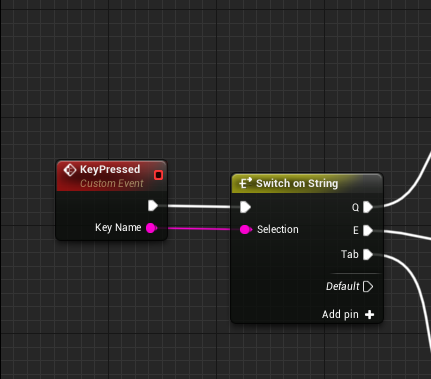

 limber oyster
Is there a way to use a PlayerCameraManager to drive a CineCamera? It seems to have its own implicit camera.
alpine halo
my current thought is setting a name to each waypoint then looping in the widget and checking for that name to get the correct waypoint to translocate to that position but isn't there a better way?
@trim matrix make actor called way point which contains the name of the location 'Text variable' and place it in the editor. When you click the button on ui, it should make your players new translation to the way points' vector
trim matrix
i used this method
alpine halo
Also make an enum for that which holds the name, so you can switch on enum
trim matrix
parent waypoint
i have 2 children from parent waypoint
both have this variable
 sick galleon
Nativization questions !
Ive set up packaging to nativize everything (inclusive), but I see no difference at all on my heavy bp script (something akin to voxel stuff). No errors apparently showing anywhere.
How to check if my BP is actually nativized ? Do I have to rebuild something somehow ? Do nativization work in PIE ?
alpine halo
Get all actors will filter your desired actor from all the actors currently placed in the world. If you have alot then if will affect your performance
trim matrix
yah
i wanted to use another node but it doesn't work without a c++ baseclass
couldn't figure this guy out
alpine halo
If you have like 10 or 12 like of way points, enum will be the best
trim matrix
well if this was to be expanded i like the hierarchy
alpine halo
In your button onclick make an input
And that input switch
And make a function so you don't have to do that for every button
earnest tangle
yeah those gameplay tag related nodes require a C++ baseclass that implements IGameplayTagContainer or whatever the interface was called
it's a bit annoying it doesn't really explain that anywhere in the docs
trim matrix
Yah its super nice though I really should learn to make the c++ class
@alpine halo make an input for button?
like for the make gameplay tag query
 round plume
can anyone help me 😦
alpine halo
Ah my bad, i mean custom event which button calls
trim matrix
np what i'm doing isn't for anything pristine so it will do thanks for the helping hand
round plume
I cant find "register with player state" node. can anyone help me:?
flat raft
I cant find "register with player state" node. can anyone help me:?
@round plume https://docs.unrealengine.com/en-US/API/Runtime/Engine/Net/UVOIPTalker/index.html
It's apart of the VOIP system
You've added the AddVOIPTalker node. Save it to a variable as it is in the pic. From that variable, pull out the Register with PlayerState. @round plume
 unborn turret
is there any way to see if a certain key is held?
flat raft
@unborn turret I think there is a IsKeyDown or something https://docs.unrealengine.com/en-US/BlueprintAPI/Game/Player/IsInputKeyDown/index.html
Is Input Key Down
unborn turret
is that the same thing as have an axis key?
 harsh comet
no, if you want to check an axis value, you'll have to be on the specific BP that can use the axis values I believe
 atomic shore
Hey, guys, need a little bit of math help here: I'm trying to get the green see-through cube to snap exactly with the grey cube that's already placed in the world.
The rotation of the grey cube is throwing off the computation for the snapping. Assigning the grey cube's rotation to the green cube is obviously incorrect. But I'm not really sure how to go about with that? Thx
harsh comet
You can cheese it by checking how long a key has been held down ad scaling the value based off of that.
@atomic shore Are you trying to run this via BPs?
atomic shore
Yeah
harsh comet
you want it to take the exact same space as the grey cube?
flat raft
Do the grid snap thing, plus the cube rotation I think
harsh comet
More to it than that.
atomic shore
Basically something like this. But this is with grey cube rotation zero
harsh comet
Set both rotators to be the same of course.
Get Green cube Forward Vector. Get Grey mesh bounds vector length.
Grey Cube world location = GreenCubeActorLoc + (GreenCubeActorRot.Fwd * Grey Mesh bounds Vec length);
This would take into account the size of the mesh bounds as well
atomic shore
Thanks. Lemme try that
harsh comet
If you run into issues, use the snipping tool to grab a screenshot of the code.
atomic shore
Right
flat raft
Is it always going to be blocks?
harsh comet
I came in here with a question, and totally forgot it tbh.
flat raft
Hahaha
atomic shore
Hahaha
harsh comet
Dropped a screenshot of what I'm working on in the WIP in case you wanna see 😛
atomic shore
Set both rotators to be the same of course.
Get Green cube Forward Vector. Get Grey mesh bounds vector length.
Grey Cube world location = GreenCubeActorLoc + (GreenCubeActorRot.Fwd * Grey Mesh bounds Vec length);
@harsh comet So wait, Grey cube location?
I need it to be for the Green cube location (runs in tick since it's like a preview object basically) .
flat raft
Dropped a screenshot of what I'm working on in the WIP in case you wanna see 😛
@Kyle.R#1079 Wow..that elevator does not wait. It's got places to be.
harsh comet
Green cube is the one that moves?
If so, just switch the names of what I said and it should work.
atomic shore
Correct. Alright. I'll give that a shot.
harsh comet
@flat raft Hahah, yeah, its activated by the player, but I wanted to do some fancy jumping stuff, so I just sent it 🙂
flat raft
Nice nice
You should make it faster than the player can jump. And have a face cam.
I wanna see the expression on the characters face as he just misses it and falls
😂
atomic shore
@harsh comet That didn't work as expected. It's making the green mesh go all wonky now. That's my setup.
Hit cube is the grey cube.
Static mesh is the green one (preview item)
FindClosestSnappingLocation() finds the closest relative snap point on the mesh (just the local/relative coordinates of the closest socket on the face that was hit by the raytrace, which is working fine but only if the grey cube is not rotated)
 tight venture
Is there such a thing as a node for a NULL/None value?
I want to unset DestinationWidget if IsActive == false
Like choosing "None" or "Clear" from a dropdown
What do I plug into the False pin?
I realize that I could just do it like this:
I was just wondering if there was a way to do it with the Select Node
Or, oh! haha
I bet it was already correct
Just leave the pin unconnected
 hallow nebula
I...what? What counts as an instigator?
I just want my pawn to be constructed.
How can that happen?
Input or not, it doesn't want to construct the pawn from class no matter what I do.
 viral vortex
could anyone tell me what is the difference here between these components, other than the fact that one is inherited and one isn't?
despite being the same, the inherited one gives me this error: cannot change socket on inherited components
Edit: If anyone else comes here, the problem is simply a technical limitation. My workaround is to have a getter function on the base class which by default looks for a component with a particular tag. If it fails, it runtime asserts and error and will tell the developer that he/she needs to add a weapon
earnest tangle
Inherited components are defined by the parent class
They have some limitations on how they can be modified by child classes
That's about it
viral vortex
hmm okay so it's natural limitation
am I going about this wrong? i have a base class that has a "weapon" child component seen here, and every subclass is required to have one, but they will attach to diff slots
i guess i could just manually attach a weapon on each subclass, give them a tag, and get them that way even on an abstract level. feels kind of workaround-y but it would work
hallow nebula
You'd have to make several sockets on the parent class.
Everywhere where a child class will attach their weapon.
When you add or remove a socket, you're changing the skeleton-- and since you're inheriting that skeleton from a parent, you can't do that.
However, you CAN attach the weapon to a socket that's already there.
Make sense?
hallow nebula
Now to standby for my own solution, lol.
viral vortex
okay, that doesn't actually seem like a workaround given that info
lol, have you dealt with this before yourself?
hallow nebula
Nah, I've just watched a lot of tutorials on the matter when I was designing a system in which to play animations for each individual finger for a VR game.
Messed around with montages, blendspaces, and sockets for way too long before I realized what I wanted didn't exist.
viral vortex
the worst feeling..
hallow nebula
Dread.
viral vortex
i've def run into some similar things. working day(s) on something only to realize that it's just not actually doable without like, extreme engine modification
part of every UE dev's experience i suppose, lol
hallow nebula
Or, the inverse.
Extreme engine modification only to find out there's a function for it in Palette.
 fervent kestrel
Hey guys which text channel should i go into for coding help
hallow nebula
Depends. Blueprint?
fervent kestrel
so it would be this one right
fervent kestrel
um im really new, like i started today so im not really sure what the difference is, isnt cpp more indepth code ?
hallow nebula
Blueprints.
C++ (or CPP).
The difference is if it's written out or if it's visual.
fervent kestrel
oh okay
can you access c++ if your in blueprint mode on eu4 ?
cuz i have never seen that
hallow nebula
Yup.
But you have to have some kind of program to do it. Most use Visual Studio.
You can edit code on the fly just by double clicking a node, sometimes.
It's really well built-in.
fervent kestrel
i see
im having trouble deciding on if my question would have to do with blueprints or c++,
hallow nebula
Let's just hear it, yeah?
fervent kestrel
the question is, how do i program an ai to come after me but only if i am facing the opposite direction of the ai
hallow nebula
Well, you could do it in either.
But, this is a good opportunity to teach you some basic elements of framework.
To know how to do that, simply ask yourself "What would I need to know, if I were X?" In your case, the AI.
You'd have to know whether or not the player is facing you, and you'd need to know where the player is (to move to), and how to move.
Right?
fervent kestrel
yeah]
hallow nebula
Is your game 2d or 3d?
fervent kestrel
3d
hallow nebula
Alright, so if I were you, I'd establish a few things.
- Find a way to get the direction the player is looking.
- Find the direction the player would have to be looking towards, to be facing the AI. I'd use the built-in Find Look At function.
- Reverse the direction for 2.
- Establish some kind of tolerance for how closely 1 and 3 need to be aligned.
- Determine if 1 and 3 fall within 4's tolerance.
Sounds complex, since it's five steps, but I've broken it up so that each step is manageable.
Once you get the result from 5, you can just plug that into your AI.
Does this break it down enough, or should I go on?
fervent kestrel
it would be nice if you went on a little more
im very new, i just started today i hardly know how to do basic things
fervent kestrel
no
hallow nebula
So you're all going to be on the ground level, right? No up or down rotation?
fervent kestrel
yes
hallow nebula
Alright. Could the AI be hidden from view?
Or when you say "When the player is looking", do you only mean "When the player is facing the AI"?
hallow nebula
Alright.
maiden wadi
Get AI's self location, get player transform, inverse transform into player pawn's local space. Zero out z on this new vector, get look at rotation from zerovector to the last modified vector. If Yaw is above or below -90 to 90, the player isn't facing the AI.
fervent kestrel
im sure i can figure it out with those directions
i can probably find how to do all that online right
hallow nebula
Sure, if you're looking for the documentation.
Or if that doesn't work for you, I could show you my way.
maiden wadi
Is this first person?
fervent kestrel
yes
 grim lantern
Is there a way to find actors in a specific bounding region?
maiden wadi
You could also just get the player camera's world rotation and location, get the look at rotation between the camera location to the AI and ask if the rotators == within a tolerance.
hallow nebula
And this is how to get the tolerance bit.
You'd get the actor's rotation and the Look At rotation.
An output of 1 means they're exactly equal, 0 means that they're in opposite directions.
Since it's using nothing but math, it's very "cheap", meaning the computer isn't spending many resources to compute this code.
Generally, the more you can rely on math rather than functions, the better.
maiden wadi
As for blueprint vs c++. You can get really far with blueprints and I'd encourage that you do learn with them even if you're planning on coding eventually. They're a great way to learn the API tools without a lot of headache and hassle.
hallow nebula
^^^^^
maiden wadi
@grim lantern By bounding region, do you mean rectangle?
I'm a fan of BoxOverlapActors and SphereOverlapActors.
earnest tangle
It seems BP's are actually almost recommended in some cases, eg. if you have references to assets you can configure it pretty easily if you extend a BP from a C++ class for example
Or at least hardcoding asset paths in C++ seems to be somewhat of an antipattern if the documentation is to be believed
grim lantern
@maiden wadi I basically want to export bunch of static meshes that are in a bounding region (just numerical).
maiden wadi
It's highly discouraged because most projects are done by groups. You never know when someone's going to decide to organize the file structure and move stuff. Unreal would update the locations automatically via the blueprint pointers. Where any hard coded values would need to be redone in every single location they're used.
maiden wadi
True that.
grim lantern
So anyone Ideas about finding colliding bounding boxes of asset's in a bounding region?
maiden wadi
Is this in editor or during play?
If it's during play, use the BoxOverlapActors. If it's in editor, probably just math it. Shouldn't need any more than their location, bounds, and then the location of your area.
tight venture
I have this macro:
And I'm using it like this:
Yet all it ever prints out is "[0]" or "[12]", etc. Never the context.
Is typing the string into the little box not the same as making a string and passing it in?
Cuz when I do this, it prints like it should: "[42]: MouseEnter"
flat raft
@atomic shore were you able to rotate it correctly?
grim lantern
@maiden wadi Good pointers! It's for Editor, but I might need it to run through the sequencer when the actor's are moving through the scene
Will probably just get all the values and run it through numpy
atomic shore
@flat raft Kinda. I'm trying something along the lines of what @harsh comet mentioned. Making a bunch of modifications. Thanks
flat raft
@tight venture weird... try build string instead?
grim lantern
Other question, I've disabled every ShowFlag.* command, then I just wanted to switch skeletal meshes, but still everything black, is there one ShowFlag that is needed to be always turned on in order to draw?
 rich lava
what make a good feeling third person camera