#blueprint
402296 messages · Page 480 of 403
 paper sky
i am trying to bind a key to change the camera for the plane
the camera by default is bound to the plane but when i press ALT key for example i want to be able to move the camera and look around and not control the plane
so I created a small component in the plane and was trying to possess it with the camera to look around and stop possessing when i release the alt key
 earnest tangle
It sounds like you should just add logic to rotate the spring arm when alt is held down
This way the camera would rotate without the plane rotating
paper sky
logic ?
earnest tangle
it might be possible if you used a child actor
but not sure how well it would work
paper sky
i am pretty new to UE4 so I am not familiar with the nodes and stuff tbh
earnest tangle
by "logic" I mean you would need to add nodes and such to handle it :)
paper sky
ah
earnest tangle
the child actor I mentioned is a component as well - it would allow you to attach a child actor (which could be a pawn)
paper sky
i mean the plane is already using a spring arm for pitch yaw and rolls with the camera
the child actor I mentioned is a component as well - it would allow you to attach a child actor (which could be a pawn)
@earnest tangle ohh this could help
i was also wondering how to like use 2 blueprints for the same purpose
earnest tangle
the child actors can be a bit tricky tho but maybe it's worth a try at least
paper sky
and since its a component i can also attach it to the plane you say
that might work out well
 modern root
Hey guys, I just started messing with the Editor Widget Utility, but I'm trying to do a trace from the mouse position into the world viewport so I can get the hit under the mouse position to auto-generate a wall on drag. But getting Player Controller in editor comes back as a NULL, is there a specific blueprint that gives me access to the editor mouse in the world itself? I gotta imagine there are ways to get what you clicked on in these blueprints, like OnActorClick and stuff
just to clarify - Get Mouse on Viewport returns an X/Y, but projection doesn't work because Get Player Controller does not produce anything
paper sky
how do I possess the child component though it doesnt seem to be compatible with the Possess node @earnest tangle
earnest tangle
you need to get the child actor that it spawns, and cast it to pawn
you should be able to possess that then
 dim kiln
afternoon :)
anyone know how to call an input action from a button press?
paper sky
you need to get the child actor that it spawns, and cast it to pawn
@earnest tangle thank you
 zealous moth
@paper sky do you want to swap cameras?
paper sky
@paper sky do you want to swap cameras?
@zealous moth yes.
zealous moth
use this
you can blend between cameras
it can be an instant swap or a slow transition
paper sky
what do you suggest i do if i want to hold the button to swap the cameras and when I release the button all the cameras will go back to their usual place and angle
 hallow night
Save their "usual place and angle" when u start pressing the button and where u release reset the place and angle
zealous moth
you can do several things, you can use the node i mentioned, you can put a spline on the actor and have your camera travel up and down the spline, you can have 2 cameras and while input is down you activate the other camera and deactivate the old
 manic maple
Hey y'all, do you know if the top down template disables left click on the character somehow?
This works when I hit Z but not left click
zealous moth
can you describe what you're doing?
manic maple
Literally just started up a fresh top down BP template, I've gone into the player controller to disable the 'click to move' logic, then gone into top down character BP and wrote that line trace.
It works fine hitting Z, but not at all hitting left mouse button
Can only assume that the mouse input has been disabled somewhere for the purposes of premade click to move. I don't know where to look for that though, didn't know it could be done.
manic maple
Check what?
zealous moth
do you have to click to capture to start clicking?
or did you change the input mode?
 gloomy linden
Your input settings ofcourse
manic maple
..Which input setting?
 gusty shuttle
My joystick is offset, is there a way to make the lever match the boxes location or rotation properly?
manic maple
@gloomy linden
Whether it's day one for me or not, there's no reason to talk down to people like that for asking a question, are you here to help people or just try to inflate your ego with this mighty knowledge you think you have?
[Which falls short when you struggle to actually read the initial question, I wasn't trying to call an action mapping, genius.]
gloomy linden
Its a real question, but I guess dunning kreuger effect is at work here
Also Left Mouse Button is mapped
The icon is kinda showing that
 maiden wadi
The Left Mouse Button Event node has nothing to do with project input mappings.
@manic maple It should work fine the way you have it unless you have any left mouse button input mappings in the PlayerController. If that's the case, you need to click on the event node and disable Consume Input.
gloomy linden
He disabled something in the player controller
But lets ignore that and check the input mappings
maiden wadi
Those are just named input events. He's using the direct left mouse button event. If it's not firing, it's one of three things. His mouse is messed up, it's consuming input in a different blueprint which can only be the controller since this is in the character, or for whatever reason he's not actually using this character blueprint somehow. Doubt he missed his mouse being messed up, and Z works, so...
gloomy linden
I've gone into the player controller to disable the 'click to move' logic
maiden wadi
And what does that mean to you? Maybe he disconnected the execution wires? The event can still be there and still consume input.
gloomy linden
¯_(ツ)_/¯
 meager spade
Is the construction order of components always the same? IE top to bottom or reverse?
meager spade
If my actor has 5 components, I can see them in a list inside the editor, is that also the order in which they are created?
I need one specific component to be created last and don't care about the others
 dapper cradle
Hi.
If I want to collapse a few nodes down to use in lots of different BP.
Do I collapse into Function or macro ?
(the picture shows the intended nodes to be collapsed)
manic maple
Well Remco, I fixed the problem, no thanks to your crappy attitude. [Authaer was 100% correct, just FYI] I just don't get why you have to act so arrogant to people coming here for help. Hope it makes you feel like a big man, because it sure doesn't make you look like one.
gloomy linden
thats a good question, I dont know. I would assume they are build from the construction script, but about the order..
@manic maple There is no arrogance, there is only you who feels offended.
meager spade
@dapper cradle Doesn't matter in your case but how did you manage to connect an array directly into destroy actor? ^^
gloomy linden
Beside, you didnt even awnser the qeustion if you are a starter (day 1), or not. Nothing to do with any form of arrogance. Just understanding where someone is at knowledge wise.
If anyone is showing arrogance, its you @manic maple
hence the dunning kreuger reference
dapper cradle
@meager spade I simply dragged from its execution pin and searched for Destroy actor :D
and thank you !
meager spade
I would recommend using a foreach loop inbetween, but you do know that you need to create a library for them to accessible anywhere right?
dapper cradle
I was hoping to take the collapsed node and copy/paste it everywhere i need it @meager spade
gusty shuttle
Question: How do I fix this rotation offset? The intent is the collision box follows the hand, thus the lever changes it's rotation based on the boxes location
meager spade
@dapper cradle Create a macro/function library instead
It can be done through the editor, quick and easy and a lot better
dapper cradle
I will give it a youtube and try to see how it is done, thank you for the advice!
meager spade
Though IIRC delay nodes can't be used in one of them
manic maple
@gloomy linden You really think you don't talk down to people? The way you spoke to me, and the way you're still speaking to me, is pure condescending arrogance.
But I can see you believe that you can do no wrong. Go ahead, blame everybody else for your attitude. I'm out.
gloomy linden
Dude, go cry somewhere else or complain at a mod. Bye..
gusty shuttle
Any tips to my issue folks?
Rotation is not my strong suit, so any tips goes a long way
meager spade
Same here but it seems like you are rotating the lever itself if the wrong axis's
Are you spawning them with the same rotations?
gusty shuttle
Should just be X and Y, that's all it needs to rotate and copy from the box location
gloomy linden
@meager spade I've been reading some pages about components but I cant find when they are being added in runtime, maybe you can find it, but its a lot to readhttps://docs.unrealengine.com/en-US/Engine/Components/index.html
meager spade
@gloomy linden Yeah I found a forum post that basically said it can't be guranteed, and if I get some result it might be different in packaged standalone so it seems I'll have to do it event drivenly
gloomy linden
I would assume: Actor > Construction script > Components > Begin Play
gusty shuttle
@gloomy linden What do you suggest for my rotation issue if you have any suggestions
gusty shuttle
Aye, I'm moving it like a joystick, no mans sky style. So like any pilot would when controlling a plane
Should move left, right and that's it. So X and Y only. I set it up like that but once I attach the box component in the Lever actor to the motion controller hand, it offsets instantly.
Which tells me my rotation is fooked haha
gloomy linden
is this where you set the lever rotation?
gloomy linden
try setting only the X axis in the rotation
 thorn moth
use the rotation component maybe
gloomy linden
Its annoying that in UE4 the XYZ can change between roll, yaw, pitch
gusty shuttle
gloomy linden
gusty shuttle
I def need pitch and roll, pitch is Y and X is roll
gusty shuttle
Yeah, that's what I'm sayin! haha the offset, how would I fix that?
gloomy linden
get current rotation and then add the new rotation to that
if the add value is negative, it will substract instead
gusty shuttle
AYYYE I think my brain was headed there. I was remembering some trick about adding or subtracting to fix a offset haha
 modest gulch
just to make sure, since documentation for AddInstance sucks ass. returned integer is index of added instance, right? https://docs.unrealengine.com/en-US/BlueprintAPI/Components/InstancedStaticMesh/AddInstance/index.html
Add Instance
gloomy linden
yes, correct
modest gulch
they really should fix that.
 bleak vector
delay node is not doing anything for me 🤔 it's actually just ignored
modest gulch
Remco thanks
gloomy linden
@bleak vector where and why do you use the delay node?
modest gulch
pi delay node is weird and kinda non-intuitive thing, use it carefully
gloomy linden
in some cases a timeline is better or a timer is better
gusty shuttle
@gloomy linden Thanks man, I'm still a bit confused but I think I know what you mean
gloomy linden
delay node is a cheat and shout be avoided if possible
@gusty shuttle np, if I had a VR set myself, I could try to help more but the VR is so different than keyboard and mouse 😛
maybe people in #virtual-reality have some neat tricks to help with it
modest gulch
think of it as code is continuing doing what it does SKIPPING delay node, and code after output of delay node is executed SEPARATELY after delay
burned me at least few times
gloomy linden
you cant delay in a forloop
bleak vector
the bottom one prints everything
gloomy linden
the forloop runs in 1 frame while the delay node waits X amount of frames
there are some people hacking the forloop macro to add a delay, but that should be illegal
gusty shuttle
For sure, I was thinking about saying "fook it!" yesterday, but figured id jump in and try again today haha. That VR-AR channel's activity is slow to respond. We both know when you want to get a problem solved, you want answers now, not later (especially when you tried everything you can think of and am frustrated at myself for not being clever enough to figure it out haha)
dapper cradle
sorry @meager spade I forgot to ask you what the ForEachLoop's purpose was and where I should put it in that picture I posted (I dont mind researching the node, I just wanted to know if
there was any specifics in this case)
meager spade
GetAllActorsOfClass then you get the array node into a for each and hook up the element node from the for each into the destroy actor and then call the delay node from the completed. I was surprised it was even possible to hook up an array into the destroy actor since you normally would do that inside a loop. Is there a built in reverse for each in the editor or did I copy that from the forums a long time ago? Because I just now remembered that you shouldn't remove elements for a normal for each loop
@dapper cradle I guess you could keep it as is if it works
dapper cradle
thank you for the explanation @meager spade !
gusty shuttle
I think the issue was from my axis on the lever and hand are in different spots. So it was doing what it was supposed to but the axis were fighting against each other
 sand shore
@meager spade particular nodes are eligible for their target pins to accept arrays. I forget the specific criteria, but I know one of the criteria is no return value (so probably also no mutable ref input)
bleak vector
how do I repeat something that takes time multiple times
 tight schooner
@bleak vector https://youtu.be/qc5WpNq7RFg

What are the Set Timer by Function and Event Name Nodes in Unreal Engine 4
Source Files: https://github.com/MWadstein/wtf-hdi-files
Looping timers are the proper way
bleak vector
bum bum bum bum bum bum... 🍅
zealous moth
@bleak vector what are you trying to loop?
bleak vector
trying to move a pawn
I have an array of vectors
I want it to move to the next one, then the next one, then the next one, etc.
gloomy linden
Could use a gate, timer, looped timeline (open the timeline and you see some options at the top) @bleak vector
meager spade
@sand shore I didn't know that
 weak raven
Newbie here, so please bear that in mind. But I am experiencing something weird and I can't figure it out. If I create a new project, choose Vehicle (or Vehicle Advanced), and simply click with the mouse in the viewport (so I can start controlling the car with my keyboard)... then the vehicle puts in the reverse and steers to the right. Without me giving any input. I have disconnected the keyboard, and the mouse, just to check if there is a stuck button somewhere, but it does not help. It continues to back up. Has anyone any idea what the heck is going on? I am on the newest Unreal Engine (4.25.1)
gloomy linden
Do you have a joystick or something connected to your computer?
gloomy linden
Disconnected it and then restarted ue4?
weak raven
hmm, no
tight schooner
Do you have a 3DConnexion controller?
gloomy linden
Ive had this issue only when a controller input is detected
With some games I had to restart it (unmounted controller keeps returning -1)
weak raven
wow, so that actually worked. I had to physically yank the USB cable, and then restart UE4
but... wow. Hmm. I can't have my controller connected?
gloomy linden
Ive no knowledge about controller input for the engine other than that, never used it. But i would think you need to setup the inputs in the project settings (Project Settings and then Input). Just so that the controller input gets mapped with axis values so that the engine knows what to do with it
weak raven
Yeah I followed a video guide, but it did not help. Hmm, maybe the controller has some issue. I guuess I will have to try another ps4 controller before I dive into other possible issues.
Thanks a bunch guys
 tall herald
Hey i want to make a multiplayer game and im stuck trying to change the level the players are in, so far i have this in my gamemodebp attached to a custom event, how do i call it from the charbp?
bleak vector
I figured out how to do what I need to do now thanks @tight schooner
 cerulean pivot
Question: why exactly can't I hook the delay function to multiple functions?
 elfin hazel
as in having multiple functions connected to its execution pin?
elfin hazel
an execution pin can only have one connection. You can use a sequence node after the delay if you want to trigger more functions.
 full crypt
Did the Advanced sessions plugin stop working for anyone else?
joining games always error, i dunno what changed but even old projects that have worked before are broken.
cerulean pivot
@elfin hazel omw to check it out
 wintry wigeon
How should one blend cutscene camera to player camera after cutscene ends?
 lusty escarp
Hey, I'm trying to create a Spline Conveyor Belt that moves item that are placed onto it. I don't want the items to have physics, how would i go about attaching the item onto the conveyor belt and follow the spline?
 buoyant glade
hey guys, im trying to build a spline wall for a personal project, but for some reason im getting a gap between each of the meshes, and i cannot for the life of me see my mistake 😦
blueprint can be found here
https://blueprintue.com/blueprint/e64zwmhs/
can someone help me out?
BlueprintUE
lusty escarp
@buoyant glade This is my Spline https://blueprintue.com/blueprint/v63ajh06/
BlueprintUE
tight schooner
@lusty escarp Unless you're going to do it with a Niagara effect or some big brained vertex shader, the Blueprint way would be to have a spline component somewhere, and have the item actors / item components update their transforms on tick. When you have a spline component, there's a plethora of spline nodes that you can use to get transforms along spline.
@buoyant glade I haven't scrutinized your BP but my instinct says that mesh bounds are the problem. You want them to overlap so that the overhanging bricks interlock but by default they don't.
sand shore
@buoyant glade that looks correct for default bounds. You'd want to shrink the bounds slightly
You'd adjust collision and not render bounds, btw
buoyant glade
ok ill try adjusting the collision box 🙂 thanks
wintry wigeon
How can I update UI icon like a control hint depending if the player is using gamepad or mouse & keyboard?
maiden wadi
@wintry wigeon This is usually done by detecting if a gamepad has been used recently. If it has, use controller icons, if not use keyboard. I still personally feel like it's best to set this as an option for people in the options menu. There are some plugins that handle this sort of thing too.
wintry wigeon
and how could I detect if gamepad was used recently?
buoyant glade
@sand shore i updated the collision, but the bounding box is still the same how do i change the bounding box size in ue? :S
maiden wadi
@wintry wigeon Just create inputs for it and set a bool or something whenever an axis is above or below 0. Could possibly do the same for the rest of the buttons on the gamepad too.
wintry wigeon
isnt there a better option?
 unborn beacon
How to origin shift after possessing a pawn? If I start game with the pawn it will origin shift, if I start game with another pawn then possess the origin shifting pawn the origin shift fails.
 pure zodiac
Hey guys im pretty new to blueprints, I'm following along with a tutorial related to a charge up gun, and while everything works according to the tutorial, i was trying to make my bullets go even faster on the projectile however for some reason they don't seem to want to go any faster than the default speed of 3000. I'd like to understand why. In this first image everything works as expected.
In this example however, the change makes no difference to the projectile speed. Yet the image above i was atleast able to slow it down. Just not speed it up beyond the default 3000
 next sundial
Hello,
how can i debug what happens during packaging?
The output log does not give enough information.
With exclusive nativization, the packaging starts after the (LogCook: Display : Finishing up...) line, it hangs for ~20 hrs and at some point it continiues. No error, no warnings related to nativization.
After the 20 hrs, it starts the nativization (1/800 classes) without any more hang.
How do i figure out what is happening during that 20 hrs?
 hoary orchid
How to trace ground 1000 units infront of the player?
 stoic raft
is there a way to instance a data table or use it like a template? i have lots of rows and need to change values, but i dont want to duplicate them cuz if i need to add or remove a row id have to do it in potentially hundreds of tables
hoary orchid
I just keep teleporting to spawn location everytime I use this
stoic raft
ur just trying to get a point 1000 units in front of the actor?
i think this would trace 1000 units in the direction the actor is facing and do a line trace from above that point
@hoary orchid and if ur trying to remove pitch or something i think this works, but GetForwardVector is already normalized so u shouldnt have to normalize it again unless u remove one
 winged badge
is it just me or are most replication and rpc tutorials for ue4 very poorly optimized? i feel that i am doing everything wrong which leads to a lot of lag god forbid my ping is over 40. the picture i've provided is just from yt tutorial that shows my workflow in concept. ping me if you have any optimization suggestions
stoic raft
at least its not multicasting the value of IsSitting on tick
winged badge
i feel there is some method of client side prediction that is flying over my head
 wooden nebula
I'm having weird issue where Array containing Texts cannot Find Text which I'm converting from String... Can anybody enlighten me what's going on?
stoic raft
im pretty sure most ppl would say to never use String for anything. i havent really done that but i think strings sometimes get weird when converted
wooden nebula
Yeah I'd prefer not to use it but ComboBox selection returns as String
although... I can always query selected index and discard the String which is delivered in OnSelectionChanged event
yeah that works... not ideal but works
stoic raft
no idea o_O i just see a lot of people hate strings
wooden nebula
I sort of have to rely on EWindowMode enum order now but atleast it works
and I guess that is not changing too much so not such a big deal 🙂
 rough marsh
Does Remove Widget from Parent destroy the Widget?
earnest tangle
no
 round idol
@rough marsh No, but it gets marked as garbage to be grabbed by garbage collection. If you have many many widgets (hundreds) spawning in a short time, you might want to check UE's garbage collection system and read on it a little 🙂
rough marsh
yeah I read about it and that you should use the "Collect Garbage" sparely. Thanks @round idol
round idol
@rough marsh np, hope it helped 🙂
 hardy merlin
Is there a way to mark a variable to be hidden in a particular subclass in blueprint?
I have a very robust base class and want to prep a more limited sub class with most values already set up correctly.
This is to not confuse other devs that will be using the subclass
 worthy frost
expand the advance section
of the property
you cant do it per subclass
even in C++ you can't do that
its either private or not
most people mark it private, and make Setters/Getters
to set/get the values
same as in c++
round idol
Any idea on what to do with modified structs causing lots of annoying bugs requiring me to go through blueprints, rename/delete/remake sections of script so they update, not break and all of the stuff which goes into it? This is getting increasingly frustrating and the bigger the project gets, the harder it is for me to "guess" where the struct broke, go and fix it. Any idea would be welcome, probably haven't tried all yet 🙂
hoary orchid
How to apply AOE damage to all the characters who are in radius of Wait Target Data
elfin hazel
@round idol when I used a massive struct of data I had some of the same issues and I just ended up making a function specifically to get that data. So a non-pure function so it doesn't get called for each data member. And when you change the struct, you just need to change the get function.
round idol
@elfin hazel That's a really nice idea idd 🙂 Thanks for the suggestion. Now the problem is that the struct is fairly ...big-ish, depends on what you mean by big, not network-gameplay big but yea, close. Contains other structs as well, and is itself contained in others (the one I butcher most times and which causes 90% of the problems). But i send the data from bp to bp and widgets and it gets passed around as "exposed on spawn" quite a lot. How would I go about making such a function I wonder? Which state of the struct will that get? At this point in dev, I'm not sure I know how to handle the getter function 😐
@elfin hazel Mostly gets data from a data table...Maybe I could just do two getter functions - one inside a BP function library and one in AC function library which basically only gets that - it would b pure tho :/ since I don't want to destroy my code by setting it in places I need it altered
@elfin hazel Either way, I'll definitely keep ur method in mind for future structs, it's brilliant! Very good workaround to a fundamental UE problem imo 👍
elfin hazel
I didn't really pass the struct around when I used it so I don't know how I would handle that.
Another option is to switch to an uobject to hold the data.
round idol
heh...but that doesn't fix passing it around tho yea, since it gets "corrupted" or whatever it gets, in between, while being passed :/
 inner ginkgo
@round idol Of note, you don't have to actually modify the dependent BPs, you just use the Refresh Nodes action. Also, when you modify the struct, it should mark all related BPs as modified. What I do is make sure to save all before making changes. Then go through and refresh nodes on any files marked as modified, compiling and saving them afterwards.
I agree that it is annoying and shouldn't work that way. But that's my workflow for it.
round idol
@inner ginkgo Yep, the problem with big structs/or idk anymore really is that (at least in 4.25 and 4.24) whenever you compile or try to save SOME blueprints, UE crashes. They do get saved though, but then you keep your fingers crossed since you don't even know where to refresh afterwards 😄 But yea, it is what it is 😛
inner ginkgo
I haven't had the crashing issues. That would certainly be obnoxious. The dependency graph might be good substitute for determining which files to update. I've also found that just running a package project action gives a reliable list as those files get reported as 'unknown struct' or something like that.
 whole ingot
Okay I want to get a ref to a character class in an actor class bp from the character class code.
I got this working which takes the actor class ref (wheels) and add it to the character (car) but that wasn't what I wanted xC and I can't figure out a way to do this correctly
inner ginkgo
I'm not sure I understand what you want, @whole ingot. You have a wheels actor, wheel child actor and car actor. How do you want those things to interact?
round idol
@inner ginkgo I think in my case it's a problem related to the number of references. The struct is called unitdata for a strat game. As you can imagine, it's spread in the whole game, so 100+ bps. That's why I'm still digging for alternative solutions. Fixing can take up to 1hr, and it's not immediately obvious, sometimes I just close the project and when I reopen it the next day, some things are broken 🥴
inner ginkgo
No, I understand the pain, lol. I have a struct called InventoryItem, which is used fricken everywhere in my RPG code.
whole ingot
@inner ginkgo wheels actor (child actor) and car I want my wheels actor to get access to my car variables in the car code.
inner ginkgo
Ok, so in your wheels actor, make sure that you created a car reference. And then where you are setting the wheels variable in your screenshot above, do the opposite. Set the car ref in the wheels to a Self node.
wintry wigeon
How could I detect if user is spinning left stick(or rapidly alternating wasd wdsa) like the spin in mario odyssey?
inner ginkgo
That's a bit tough, but it is going to work similar to any key combo system. The 'keys' in this case would be quadrants in the axis domain.
wintry wigeon
In Unity I seen some way of like getting delta between frames and then checking if the delta was changing between multiple frames atleast n value in x and and n value in y and only way you could theoretically achieve that was to do those rings, the problem is probably that the input is consumed faster then the moves happen
inner ginkgo
You could do that in UE4, too. The inputs aren't really 'conumsed'. The axis are states. You can check the current state of the x and y of the relevant axis and record it as a current frame. Then store up however many past frames you want to check against.
consumed* Man, I butchered that spelling.
 sonic crescent
Hi pros, I see a little lag everytime a new asset is spawn in my level. This occurs the first time only. Look like a memory thing. There is a way to charge all assets in memory before launch the level?
gloomy linden
have them spawn in a invisible place at the start of the level
and then teleport it
like underground or in a house where the player cant enter or something
sonic crescent
if the player can't see it, do they go into the GPU?
inner ginkgo
Generally, no. The engine should cull anything the player can't see.
Hard to say if hiding the them will fix your issues, though. There might be texture streaming or something causing your problems.
sonic crescent
it's on a Quest. it may come because of that.. I was hoping a general issue... i have no texture ^^
 true valve
Is there a way to get the level name instead of the world name in streamable levels setup?
inner ginkgo
I don't believe you can get the names of levels streamed in. You have to know them ahead of time. The way that I handle it is that I have each streamed level register itself with the game state, providing the information I need for other processes.
At least, you can't get the names through blueprints. C++ might expose more for that.
 winter kettle
my animation blueprint doesn't seem to be updating values for some reason
round idol
Here's a fun one: how to change the cosmetics on a disabled widget component? (in my case, a border) - without weird shenanigans (I can think of some myself). Question is, is it even possible? 🙂 (Not asking in slate/umg, those channels are usually half-dead.
If not, I'll just think of a quick shenanigan and work around it 😛
@elfin hazel now I know where I know ur nick from, you asked that question in design chat 🙂 - sorry if I bother tagging for such a stupid thing. Did you find a proper solution to that btw?
elfin hazel
@round idol No not yet, but I haven't worked on that prototype much yet. The prototype idea is to have UObjects be the agents, and they exist in the cell they are in. Just a list atm. So the idea is to have as many agents walk around in this fake world without tick, only when they enter a cell that the player is in, would they receive an actual Actor to represent them. I tested how many agents I could have, and it turned out to be 5000 mice running around looking for cheese.
of course, by optimizing this "look for cheese" aspect, would probably increase performance.
round idol
@elfin hazel Oh, it's not what I understood from there and wasn't even thinking of those numbers. Thats' definitely a game-changer, and the concept is very different from what I imagined. I thought you had actors...Yea, It's a whole different story
Can >1 agent be in a single cell?
elfin hazel
yeah, there's no limit really.
lets see, I had 5000 mice in a 10x10 grid so that's 50 agents/grid, including the occational cheese that spawns. so current implementation is to just iterate over the whole list. And each mouse would do a cheese search about every 5s, so that's a lot of searches. But then, on a more grand scheme, I would also have to sort the search by distance probably.
But this is all done in BP so far.
And actually search adjacent cells.
Someone wrote in the AI channel about what a solution could look like for something like a lumberjack cutting wood when it does not actually have a physical existance, nor the trees. so that's what I'm looking into.
round idol
Someone wrote in the AI channel about what a solution could look like for something like a lumberjack cutting wood when it does not actually have a physical existance, nor the trees. so that's what I'm looking into.
@elfin hazel Afaik, AI runs on tick, and the only way to stop it from doing that is playing with a gate/bool to turn its tick it on/off. Besides, can AI be ran on mere objects?
Or he wrote there, but isn't actually AI and I'm being dumb now lol
elfin hazel
Not a ai controller or behaviour tree, just some custom logic in the UObject that determines its logic. For example, if I want the Agent to move to a "location" in the grid, well I know its current location and its walk speed, so I can just do a timestamp and start a timer.
round idol
yea, I realized it afterwards lol, I was being dumb 😛
So...Should all those mice roam around and rather "stumble" upon the cheese i take it? Because if they hunt for cheese then it's not really a hunt, it's a damn migration (ofc, depending on # of cheese pieces available)
elfin hazel
Yeah, I don't know really. atm a mouse only searches its current cell.
Currently, if a mouse detects a cheese in the cell, it starts walking there. And when arrived and the cheese is there (odds are it isn't),it eats it and then it starts wandering randomly.
round idol
Well, some vector math might do the trick (fixing area and center for every cell from the start, at level load time). Then have the mouse grab random locations relative to center not exceeding "bounds". So something like Grab ->Go ->Bool (if yes, wahtever) if no, wait xTime/disalbe tick? (not much experience with mere objects here, so idk if they tick) -> GrabLocation ->Start over?
oooohhh, now i see what you mean by hunt...ye, it's a little more than just random. You have a "radius" around the cheese which attracts, so It's a competition. Doing the vector for the cheese too might also work lol...
 haughty egret
@sand shore Hey I can't figure out how I can actually pass my world to my UObject since there doesn't seem to be a GetWorld node in blueprint which I find ridiculous. Any ideas?
elfin hazel
yes, that's pretty much how it looks atm. The question was though, how one could perform a more performant search for a specified class.
currently, it's a loop of the entities of the grid (which would include the mice).
I was thinking of dividing the entities (mice and cheese), so that it would be possible to just grab the cheese list or something.
round idol
and I wouldn't worry about 5k objs really. I did a pathfinding for a 2d grid (represented only as array of 2d vectors) for a road system for city-building. Went up to 300x300 cells and it was decent. I did limit search to something like 15-20 cells (can't remember), but the idea is it went pretty well. The only thing I had to tweak was to avoid searching in cells that already had road on them and start new search from last path instead of scratch. That did it (without this last trick, it went bad...really bad). All was done in bps, pretty complex calculations & iterations (I can't cpp a single line).
Definitely divide cheese from mice, first of all since mice don't care where other mice are (if i get this right) so they only have to iterate cheese areas and stay within cell bounds.
heh, basically it's like "simulating" collision around things with vector math as I imagine it.
elfin hazel
yeah.. ugh. I spent 6 hours until I finally... scrapped my BP solution for "if vector crosses vector" and just exposed.. "SegmentIntersection2D".
round idol
You might want to try looking into octrees too, maybe basing your logic on cells instead of objects (so cells would keep track of what goes on inside them), then have the grid structures in octrees could also work, not sure, I have no idea how one could implement octrees in bp tho 😐
elfin hazel
yes, will have to read up on octrees.
round idol
if you discover a way - any way - a glimpse of how those could be implemented in bps, pls let me know. I've raked my (otherwise pretty dumb) brain, but couldn't find a way. Maybe I just didn't understand the whole logic of the octrees afterall so yea...
haughty egret
Does anyone know how I might access a GetWorld call in blueprint?
worthy frost
its by default
if the actor/object has GetWorld function implemented you can use them
which all normal BP exposed actors have
sand shore
@haughty egret Yeah I mispoke. You want to keep a UObject* and then your C++ can use GetWorld on that
Then, you'd assign whatever you have that has a world in your object (likely a pawn reference)
@worthy frost They're wanting a regular old UObject to be able to use BP statics
haughty egret
I don't really understand what you mean @worthy frost, I don't see the node in my actors. I have an object that definitely inherits from actor and it doesn't show up.
OK so what you're saying @sand shore is that I have to call GetWorld in c++ to get a world object there is no way I can get the world object in blueprint?
worthy frost
oh that's not possible, you need to override GetWorld() in the object, not doable in blueprint, you would have to pass around a WorldContextObject
in to your static functions
haughty egret
I have overriden GetWorld in the UObject but now I need to get a world to that UObject
worthy frost
something which you can use to access world functions, not sure how doable that is in Blueprints
haughty egret
But I don't know how to pass a world to it since I can't seem to access world from anywhere in blueprint
haughty egret
The override just returns a world property that I made
worthy frost
eh
haughty egret
I was just going to set the property when I created the UObject
haughty egret
No in c++
worthy frost
show me your override
haughty egret
UWorld* UUsageValidator::GetWorld() const
{
    return World;
}
 virtual class UWorld* GetWorld() const override;

// Set this to a valid world right after creation
UPROPERTY(Transient, BlueprintReadWrite, meta = (ExposeOnSpawn = "true"), Category = "Default") UWorld* World;
wontwork
{
    if (!HasAnyFlags(RF_ClassDefaultObject))
    {
        return World;
    }
    else
    {
        return nullptr;
    }
}```try that
haughty egret
RF_ClassDefaultObject is just available in UObjects?
haughty egret
I hope this works, it's so impossible to find information on how to do this
worthy frost
anyways this should have been in #cpp for the future
as its more a c++ not BP function
issue*
haughty egret
I don't understand the disconnect here
I was trying to call it from the actor that creates the UObject
So I could give it to the UObject
Oh wait, your code above is the same as mine, you just have a world property..?
Then it's the same question of how do I set the world property
worthy frost
no mine isnt likethat
{
    if (!HasAnyFlags(RF_ClassDefaultObject))
    {
        return GetOuter()->GetWorld();
    }
    else
    {
        return nullptr;
    }
}```that is mine
haughty egret
I read elsewhere that it won't work if it just calls getWorld on the outer though because it's not a custom implementation
Does that actually work for you just by setting outer? You don't override outers get world ?
worthy frost
my outer is an actor
sand shore
UPROPERTY(Transient, BlueprintReadWrite, meta = (ExposeOnSpawn = "true"), Category = "Default") UObject* WorldContextProxy;```Not you
worthy frost
yeah i know im just saying
sand shore
UWorld* UDogAttackBase::GetWorld() const
{
    return WorldContextProxy ? WorldContextProxy->GetWorld() : nullptr;
}```you can do the check for not being a default object if you like
haughty egret
OK, and then how do I assign the WorldContextProxy?
Is it possible to get it from an actor in blueprint so I can assign it on this UObject?
 simple lantern
Hey quick question - what's the best way to instantly fill an array upon construction with empty values? The resize node?
 dire onyx
Hey everyone I'm just trying to attach an object to my player. I'm getting this warning: root component cannot be attached to other components in the same actor in addition to the object not attaching to my player
haughty egret
@worthy frost Thats working!? Thanks for your code. I'm super confused though because without the if flag just calling GetOuter->GetWorld() doesn't seem to work
 dapper kiln
My game is a third person shooter so I use two linetraces, The first is from the camera towards whatever the camera is looking at, the second linetrace is from the muzzle of the gun, towards what The first linetrace hit/ended. It works fine but for some reason when I test on the free Spring Landscape level from the marketplace, My second linetrace is totally off from where it's supposed to be hitting. I feel like it's something with collision but My first linetrace is displaying hits, I'm unsure what is going on only with this specific map. Any Ideas as to what to look for?
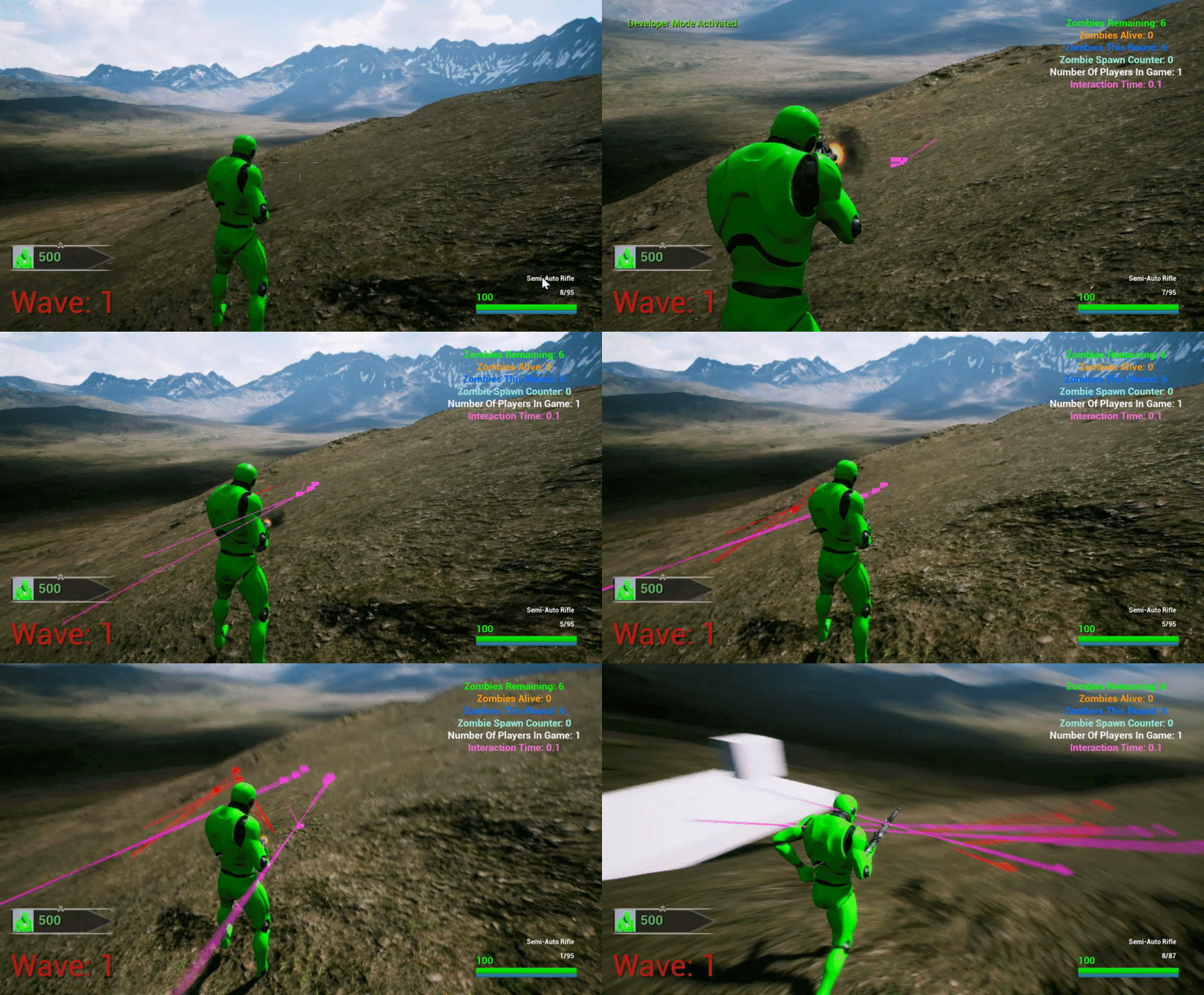
You can see that the purple linetrace which is the 1st linetrace, it hitting correctly, but the red linetrace which is the 2nd linetrace is off.
sand shore
@haughty egret it's the return nullptr
With my code, you would set the variable like you would any other reference, but you would need some actor to do anything
haughty egret
@sand shore The whole point of my difficulty was that I construct the custom UObject in a blueprint graph and you never explained how I could access World or WorldContextProxy in a blueprint graph
sand shore
Because I assumed you'd know how to get the variable reference.
Sorry
You right click in the graph and type the variable name.
Specifically, you're looking for "Set WorldContextProxy"
and if you're wanting to set this from another class, you have to make it public
Also the world context proxy is literally anything that would normally have a world
AActor, APawn, etc
 wary widget
is there a way to check if an object bound to a sequencer track is missing through blueprint?
haughty egret
@sand shore I know how to set the variable. I didn't know where I could get a WorldContextProxy. So you're saying anything that inherits from AActor IS a WorldContextProxy?
sand shore
Yeah. If anything you do in a Function Library requires a world context, you'll want to set that proxy var
haughty egret
Ahh ok that was a super key piece of information, an AActor actually is a WorldContextProxy. OK Cool so that's another way to do it.
Thanks for your patience explaining @sand shore
 pure blade
do they still add stuff to blueprints?
true valve
@inner ginkgo How would you get it in C++?
 trim matrix
hey is there a way to turn off movement but not looking around?
because the only way i know now is disable input put then you also cant look around
 tight venture
@trim matrix You mean in the viewport? You'll have to specify what exactly you mean.
Anyone know if there is a way to set the default value of a variable to be a constexpr?
tight venture
So you're talking in-game then... I'd say do that behavior at the point where you intercept the player input. Do a check on whether you're looking down the sight or not, maybe reduce the amount of movement by 90% (so you can still move, just really slowly)... or something like that
If you're using the default movement behavior from a pre-built UE character (like first-person-shooter template), you'll probably have to create a custom character BP which inherits from the FPS template character, then override the input settings in your child class
I'd say it's almost definitely wrong to disable the input entirely.
dapper kiln
Anyone know why landscape messes up my linetrace? https://i.gyazo.com/999ff550dd65bbc5dba0606000d69568.gif
The red linetrace uses the purple linetrace as it's target location, but adds spread.
https://i.gyazo.com/34e6731b6678989fb2c0035c448f7cec.png
This seems to be my problem when it comes to calculating my bullet spread. It messes up with landscapes for some reason. Is there an easy way to manually calculate spread without using these nodes?

 tight venture
Is it possible to set the default value of a blueprint variable to be a constexpr? e.g. Health = MAX_HEALTH
sand shore
Not from BP
tight venture
@dapper kiln You'll have to be way more specific. Where are these line traces starting and ending? What are their purpose?
sand shore
Not sure there's an easy mechanism to expose those to reflection
tight venture
thx @sand shore, that's what I thought
Best I can do to emulate would be to do that kind of stuff in the constructor, I am guessing
dapper kiln
@tight venture The purple linetrace shoots from my camera towards the center of the screen, The second red linetrace shoots from the weapon muzzle, towards where the first linetrace hit/ended. I then calculate a "random unit vector in cone in radians" in order to add a random bullet spread. So basically I take the impact location of the 1st linetrace and calculate the random end location for the second trace.
tight venture
Define "center of the screen"
dapper kiln
@tight venture The player's camera location plus a forward vector
tight venture
okay, I think I understand
How is it getting messed up? It looks to me like the red linetraces are happily spreading
dapper kiln
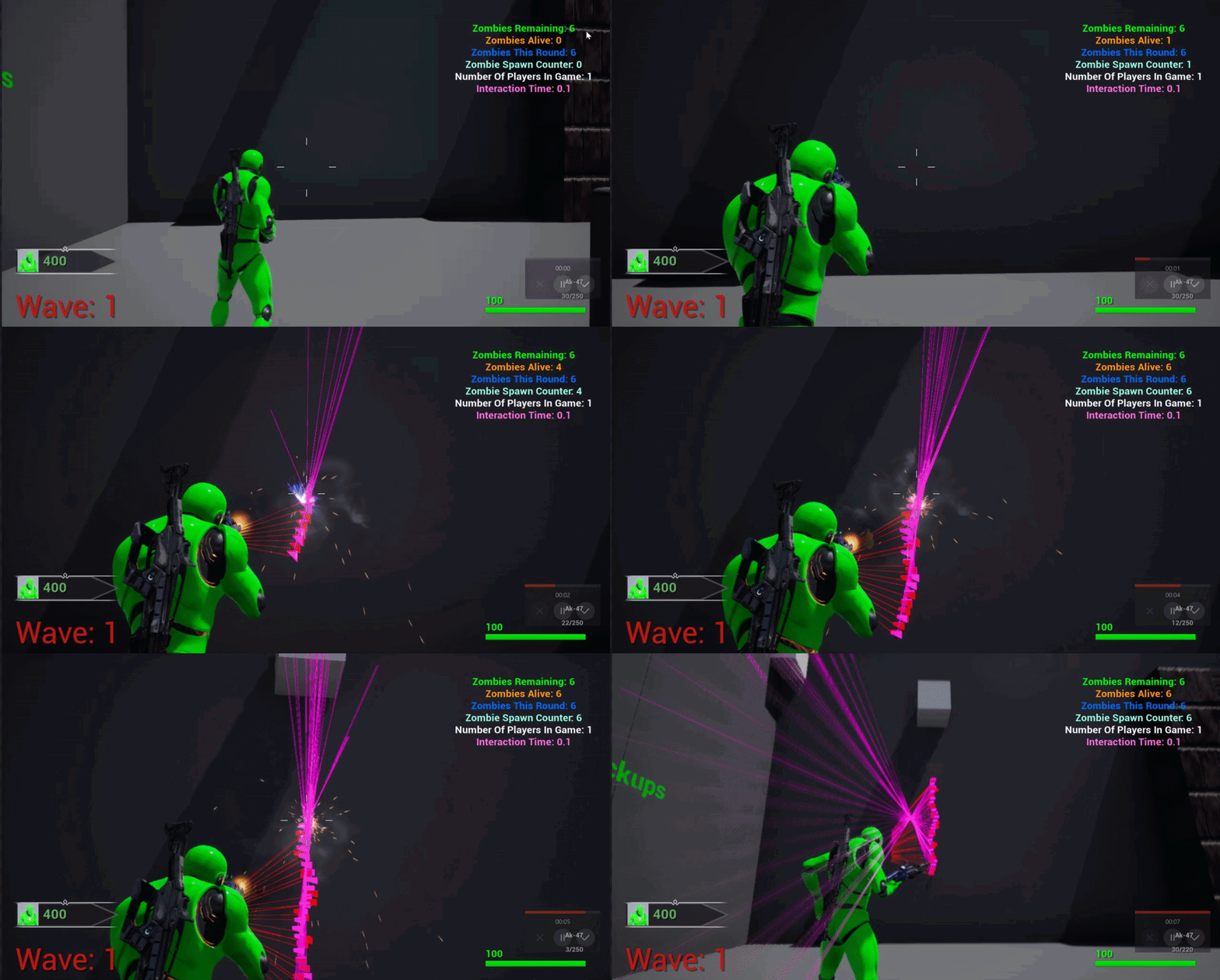
they are way off to the left of where they should be hitting. They should be hitting where the purple ones do
But only on levels with landscape
Here's a new basic level that works correctly https://i.gyazo.com/d81929f9604d647cff997a6fd2d852be.gif
 tight venture
Well, first of all... why are you even bothering with the purple line traces at all? What does/should the camera's view have anything to do with the bullet spread?
dapper kiln
The purple linetrace is how you know where to shoot because it's the camera you are using to look around. So it gives you the first vector you need in order to calculate the second linetrace that starts at the muzzle of your weapon, and ends in the direction of where the 1st linetrace ended.
tight venture
It seems to me that the bullet spread and the camera's position should follow where the player is aiming. It sounds to me like you're reversing it and making the player aim where the camera is pointing.
Or maybe I'm just not understanding this correctly
dapper kiln
It's weird to explain because in reality you would think you'd use one linetrace from the the muzzle of your gun, towards where you are aiming. But how do you know where you are aiming? Make sense? I'm just calculating where I'm aiming with the 1st trace
tight venture
I dunno, just seems like, however you are having the bullets come out of the gun, just calculate the cone based on that line, and have it deviate from the normal by some random amount of degrees. I don't think I quite understand well enough to help you, sorry. Anyone else have any thoughts?
inner ginkgo
The technique is fine. For the landscape version, did you crop that image or is the aim offset different? You have a centered aim in the working version, but the landscape version appears to be shifted to the right.
tight venture
Also, @dapper kiln, it would probably help us as observers if you turned down the duration of those linetraces. It's hard to tell what is going on
dapper kiln
@inner ginkgo The landscape version is the same, I just didn't get it all captured. I'll post another one. It also seems to be what direction I aim in as well https://i.gyazo.com/e1ac2be80d9f2d51003108243977a349.gif
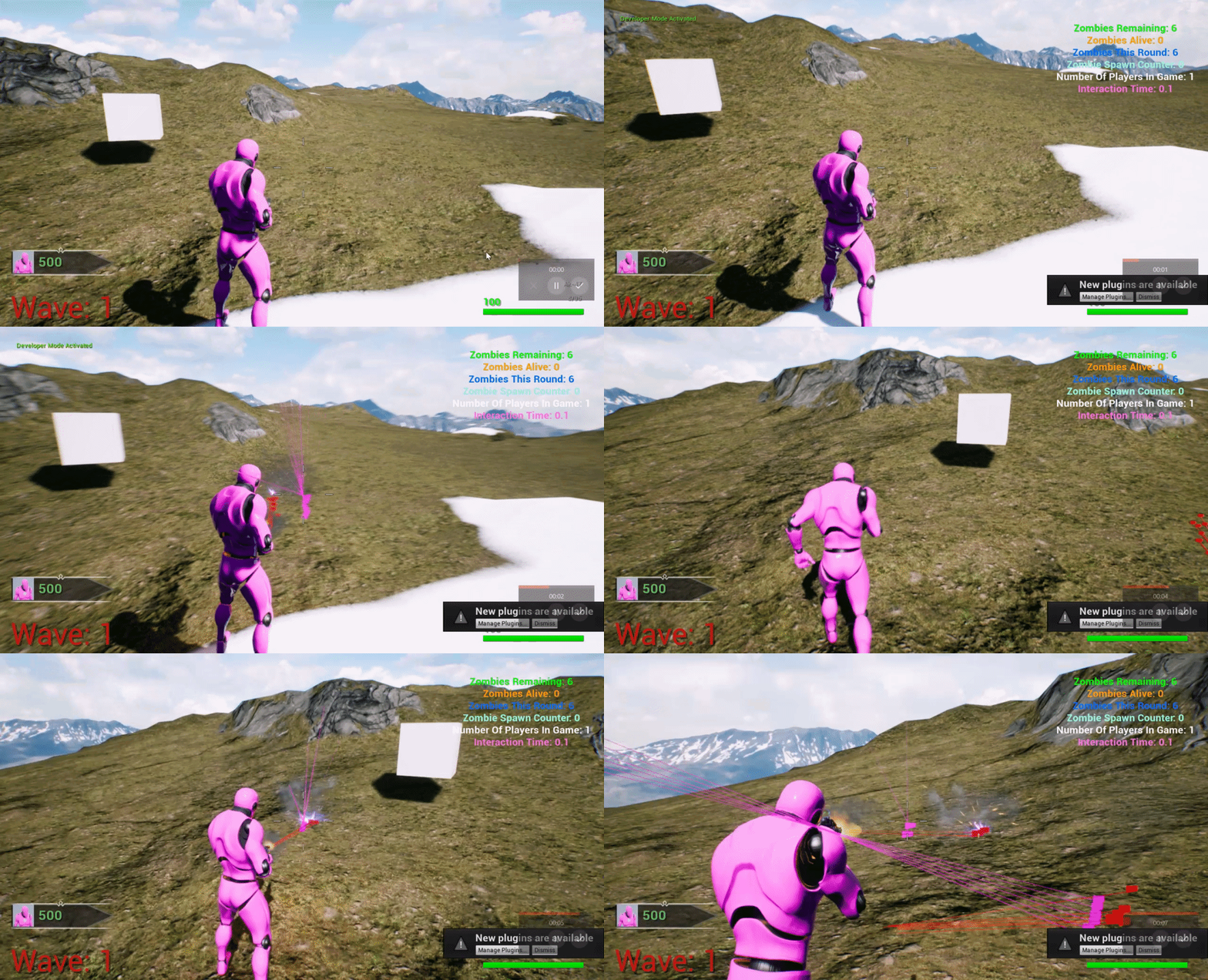 tight venture
Also, how did you make a gif from your screen? That would help me
dapper kiln
Gyazo
tight venture
cool, thx
inner ginkgo
The screen traces look wonky to me, but assuming you like where they are hitting, can you show the code that translates the hit location to a weapon fire trace.
dapper kiln
Yea let me copy my logic somewhere so its easier to screenshot and see.
inner ginkgo
I recommend https://blueprintue.com/
BlueprintUE
BlueprintUE.com is a tool for sharing, rendering and rating blueprints for Unreal Engine 4. UE4 is a game engine which use visual scripting called blueprint.
 inner ginkgo
Try using location, instead of impact point. And try without the cone randomization.
dapper kiln
@inner ginkgo These nodes are my problem child. If I take them out and just use the impact point directly, I have no problems. But then I my weapons are all 100% accurate lol https://i.gyazo.com/7feaf23ddb3e4788f75c34dc63887097.png
 inner ginkgo
What is your CW spread value?
dapper kiln
I tried location but it always ends up in the same direction. My CW spread is based on the weapon and is between 0 and 1 In this case my spread is 0.2

location is derpy lol
@inner ginkgo Let me ask you this, So I have the impact point I want. How can I easily take my CW_Spread value and just randomly make the impact vector be off by that CW_Spread value?
inner ginkgo
The cone function should work. I've never used it, but based on documentation, I think its what you want.
 subtle dagger
Hey sorry to interrupt, but I just have a quick question, will GetUniqueID give me the same number for the same object every time the world is loaded? I.e. does it act as a reliable tag when levels get loaded and unloaded?
dapper kiln
@inner ginkgo That's what confused me, It's worked perfect for months, but then I went to test out landscape levels and all of a sudden my aim was waaay off. I couldn't even shoot enemies.
inner ginkgo
The debug trace looks like it is registering hits. But maybe it isn't. Validate the hit values. Also validate that you are getting a hit and not using the trace end of that selector.
@subtle dagger Object IDs are mostly consistent. Objects in your map will load with the same ID each time. Objects you spawn at runtime will get IDs with consistent incremental ID numbers.
However, IDs will differ in different version. Like your IDs in PIE will be different than IDs in standalone/packaged.
And the same can be said for different UE4 versions.
subtle dagger
Got it, but they'll still be consistent relative to the same version right?
inner ginkgo
I sure hope so. My whole save system relies on it. 🙂
subtle dagger
That's what I'm working on lol thank you so much!
inner ginkgo
Documentation doesn't really tell you much, and my general rule is if isn't documented, it is subject to change at anytime.
Something to consider for runtime IDs is that the incrementing numbers will reset on a game reset.
dapper kiln
@inner ginkgo It's registering hits, I guess I'll have to come up with another way to calculate spread. I appreciate your help though.

This gives me 100% accurate shots
inner ginkgo
Yeah, the only thing that I can think of is that the character being at a diff angle than the aim vector could lead to the gun traces hitting early on an uneven landscape surface. But the scenes you show don't seem to have that much variation.
subtle dagger
@inner ginkgo Will do, thank you 🙂
dapper kiln
That's what I thought so i dopped a cube into the level and it's still off. I dont know what causes it
 inner ginkgo
Certainly odd. If the cone function is the cause, you could write your own.
Actually...
I just realized something silly.
dapper kiln
What? hahaha
inner ginkgo
You get a direction vector. You then add in the cone variation. But that's still a direction.
You need to add it to the source vector.
And probably apply some distance to it before you add it.
Basically, without that, you are always aiming somewhere near 0,0, which explains the wonkyness.
dapper kiln
I'm still not following. So I have the direction from my muzzle to where the first impact point was, Then I add in the cone variation. So I don't have a direction or I do? I need to add the cone to the 1st impact point?
inner ginkgo
How do you setup the trace? Maybe you are doing the logic there. But before and after the cone adjustment, you have a direction vector. Unit vector at that. Which means the trace end point is within 1 unit of (0,0,0) on the map.
To apply the direction vector, you need to add it to the source. So the math should look something like (source vector + (direction vector * distance float))
dapper kiln
My first trace is just your normal trace. https://i.gyazo.com/a4fd00a2fc2550ee95bc9be0b69bf10c.png
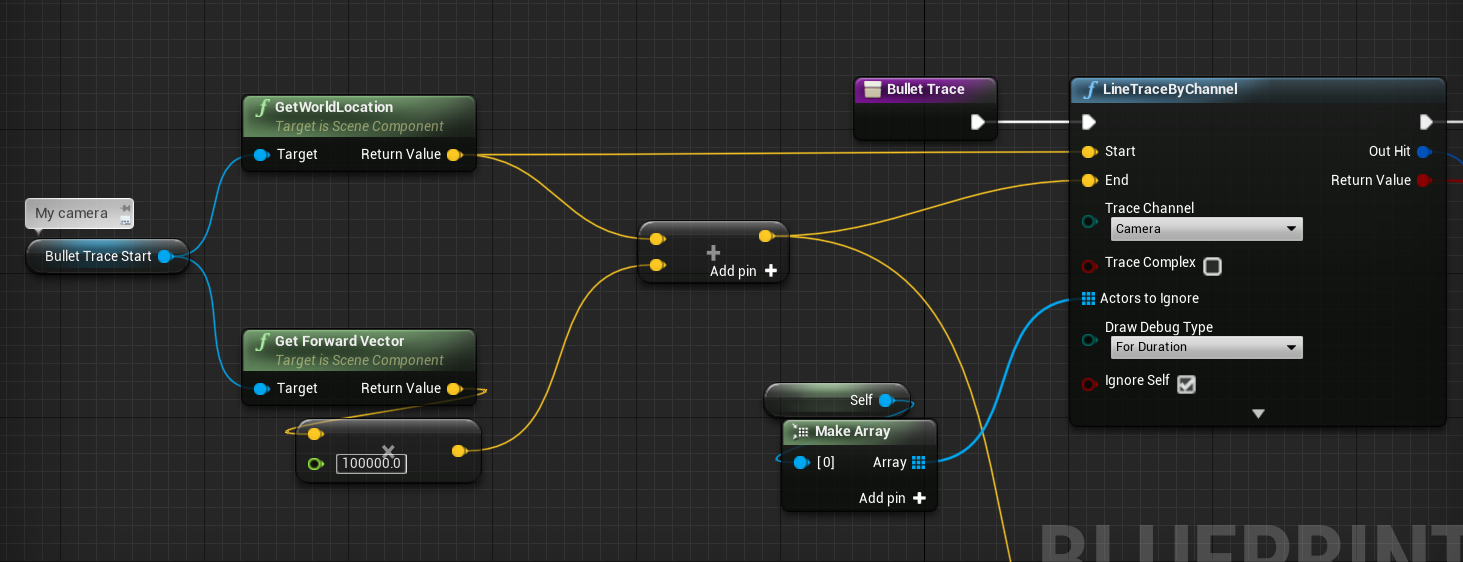
Then you saw the rest with the impact point and the cone stuff
inner ginkgo
You see how your multiplying the forward direction by a distance and then adding it to the world location to get your end vector? That's what you need to do with the bullet trace end point.
But it'll be the muzzle location, instead of world location. And it'll be your cone direction instead of forward.
 inner ginkgo
Yeah, that.
Now I'm actually more confused about the scenarios that DID work. It should only work by coincidence if you were aiming at the center of the map.
dapper kiln
Thank you so much!!!! I can't thank you enough. I'm not sure how it was working before. I guess because my test levels were so small compared to this landscape one? I'm not sure
inner ginkgo
Haha, yeah. Glad it is solved, though.
dapper kiln
Your the best 🙂 🥳 🥳 🥳 🥳
 rugged lynx
@inner ginkgo hey
inner ginkgo
Yo
 jaunty plover
anyone know anything about an issue where the "print string" node just fails to work? I don't know what I did to cause it and it seems to have an impact on other nodes too.
inner ginkgo
I've never seen one not work. There's a couple reasons why it might not appear to work, though. If you feed it null/empty data, you won't see anything pop up on screen. Another would be if the node just isn't being reached due to bad logic. You can set a breakpoint on the node to see if it is even being called.
jaunty plover
thanks, for some reason restarting it twice solved the problem
jaunty plover
I've narrowed it down, and the problem seems to be that it won't accept "print strings" that come from the player pawn class
even further than that.. only one specific player pawn blueprint
 thin heart
Hi I Am new to unreal . Which programing launguage is good c++ or blueprint
I am a unity developer
Can you suggest me
maiden wadi
@thin heart I personally recommend both. If you're new to the Engine, I'd strongly suggest starting with Blueprints. They'll get you used to the Engine's API and help you learn how to implement things pretty quickly. Once you start getting into more serious and heavy designs, C++ can be nicer in some regards. I personally do very little in C++ at the moment, mostly just write small blueprint functions that I can use in blueprints. It's working well for me at least. I feel like you really end up needing both for a decent game. Sticking just to code makes things unnecessarily complicated, sticking just to blueprint will be limiting.
@jaunty plover Can you show that pawn class where you're trying to print?
 surreal peak
@thin heart Start with BPs, unless you like written code more, then check C++.
Might be good to learn C++ outside of UE4 too, if you are interested.
In general, in most bigger team projects, C++ and BPs are used together, where the heavy lifting happens in C++ and the designers get some BP exposed stuff to create their Gameplay with.
You can also use only BPs (unless you find a point at which something isn't available in BPs, cause not everything is), as well as only C++.
But it's generally just weird to do that. The Engine is build in a way that you should utilize both. I can understand focusing only on BP or C++, but I would never suggest doing this on bigger projects.
earnest tangle
I'm always kind of curious as to what you can do with the cpp side as I can use it if I want to, but the information on how to use the cpp stuff is like... non-existent as far as I can tell
yeah, I can go and look at the engine source and see how stuff works, but I'm not really interested in spending my time doing that unless I absolutely have to do something in cpp because it won't work in bp's :D
 sacred gull
Not sure if this is the right place or not, with that said, I am trying to do a skill tree, and i have it to where it saves the levels i put in, however once you exit the skill tree, say you gain a level, you can go back into the skill tree and put said level into an already learned skill. I tried disabling the buttons after they are clicked, however the thing is, lets says the skill that hasn't been learned yet in the skill tree is closed, now you can no longer put in any levels. Sorry if that is very confusing, it would be so much better for me to screen share the entire thing. Any help would be greatly appreciated!
earnest tangle
Where do you store the skill tree itself? I assume not in the skill tree UI?
sacred gull
Yes I store the info in the skill tree event graph
earnest tangle
Right - so whenever you open up the skill tree UI, you would need to update the UI state based on your stored skill tree data
to give a simplified example, let's say you have skillA and skillB, so when you open the UI, you choose whether the buttons are disabled based on if skillA or skillB are set or not
sacred gull
so how would i do that, through just disabling the buttons or?
earnest tangle
you can do for example Set Active on the relevant buttons based on what skills are used
if you use set active and set it as not active it's effectively disabled
sacred gull
Because the UI saves the skills i have, however whenever i exit the UI and open it back up, i can just put levels back into the already learned skills
ok let me try that
thanks!
true valve
My blueprint has None parent class. How do I fix this?
It used to be Character. I don't see character as an options
maiden wadi
@true valve Have you restarted the editor at all?
true valve
ofcourse
maiden wadi
And the reparent blueprint isn't showing the character class?
true valve
Blueprint could not be loaded because it derives from an invalid class. Check to make sure the parent class for this blueprint hasn't been removed! Do you want to continue (it can crash the editor)?
maiden wadi
Well, sounds like something got corrupted somewhere. If simply parenting it to like Actor and then back to Character doesn't work, I'd either try making a new class and copying over your content if possible, or trying to go into your project saved folder and try some of the backups of your class.
true valve
same thing happening in all of my branches
 cinder stratus
Hi! Could anyone point me towards a good tutorial for a clothing system? Like how to have the player change the cloths weared by the character?
true valve
@maiden wadi Got it fixed. I had to compile in visual studio and in the editor. Then restart the editor. Now it's back to normal.
maiden wadi
Ah. Fair enough. If you do a lot of C++ stuff, don't forget to try livecoding if you haven't. I had a few issues similar to that until I started using livecoding and making sure to close the editor when compiling in VS after altering .h files.
true valve
livecoding? what do you mean. Keep the editor open while code in VS
 flint surge
What's the correct way to add components to actors dynamically? If I do e.g.
The mesh only shows up after I move the camera (I'm doing this via an editor utility widget)
And if I move the actor, it disappears again
A bit annoying to debug, too, because blueprint breakpoints dont seem to work outside PIE
 blazing ridge
i could use some help on these behaviour trees.
somehow it is ignoring the conditions i give him, it always executes the left part, even if my key is equal to curvedleft for the right one
maiden wadi
@true valve If you click on the arrow next to the compile button in the editor, there should be a setting called LiveCoding. It allows you to quickly compile gameplay related code. The downside being that you cannot use it for most .h file stuff. The default HotReload really isn't that nice for people that use a lot of blueprint. I had a lot of stuff breaking from HotReload after altering .h files and compiling. So instead of using it, I just enable LiveCoding, and anytime I need a full project compile, I close the editor and F7 compile. Once you have your function definitions and such written though, you can use LiveCoding to quickly recompile your functions for testing by using ctrl+alt+F11 while in editor, if you enable it.
true valve
I usually use the Compile button
maiden wadi
@blazing ridge Your Decorator looks odd? It says "BlackBoard Based Condition". I thought that one was just for checking if a value was set. But it looks like you're checking if they're equal?
@blazing ridge Ah. I see how that works now. How are you setting that blackboard key to something other than Straight?
 deep elbow
Hi, anyone know how to remove the mouse cursor from a packaged game? is there a global solution to just "never show the mouse" ?
maiden wadi
Nothing comes to mind besides just hiding it in the player controller. May be another option somewhere though.
deep elbow
ok i'll have a peek, cheers fella
blazing ridge
hey @maiden wadi i am doing this inside my AI blueprint
like this
basically i was trying to chose the movement pattern in the BT by the enum value, like branch
maiden wadi
Yeah. It looks like it should work from a glance. I can make a simple AI and test it here in a little bit if you don't find a solution for it.
simple lantern
Hi quick question, what's the best way to pre-fill an array at construction with empty values?
 icy pilot
blazing ridge
icy pilot
blazing ridge
@maiden wadi that would be really nice of you! i cant seem to get it to work
i also need to find a way to correctly call the activateeffect node
maiden wadi
@blazing ridge It's working fine. This was a very simple test. I made a timer set the enum in the blackboard to 1(Which is the 2nd one since it's 0 based) And in the BT I'm just playing animations with a single decorator that checks if the enum is equal to the 2nd enum value. It plays the right part of the BT first, then after a few seconds, the left side.
AICharacter
BehaviorTree
Blackboard
Enum
So I'd check your enum value somewhere. First guess I'd say it's either not being set somehow, or it's being overwritten somewhere else.
blazing ridge
yea @maiden wadi i already did that, its printing me out the correct one CurvedLeft = 1
however its not jumping to the correct sequence/selector if the value is set
i also see the value being set inside the BT on runtime
but its still going into the selector that has the check for value 0
 bold garden
@simple lantern Here's a question.. what is an empty Value? If you are working with an Array of type float or int, we would assume 0, if we use Actors... for me as a programmer it would be none/null. Just something to consider :)
Regarding your actual question: you can just add elements to the array with your defined "empty value". Later you could use a loop to access and/or change the value of each element. Or you could use the Make Array Node.
maiden wadi
There's actually a Resize node for that in Blueprint.
bold garden
@blazing ridge It's possible it stays in one Behaviour branch because you are missing an abort (both decorators are abort: none)
blazing ridge
@bold garden thanks! that actually worked, didnt know or read about that to be set.
maiden wadi
Can't wait til I get to AI in this project. I'm already tired of inventory systems for the next year. I will also never complain about another inventory system in games again.
bold garden
Behaviour Tree seems hard to learn at the beginning, but it's actually really easy if you just remember the following things (quite shortend, still wort reading the documentation of course):
- Execution Order (top to bottom, left to right). 2. Services -> Execute continously, great for things that should happen regardless as long as the specific branch is executed (So always in case of a service right after the root node), 3. Decoraters -> Basically scriptable conditions, 4. Tasks -> Everything the AI should actually do (Attacking, playing anims, etc.) -> Custom Task: Every exec branch needs finish execute node!! 4. Abort behaviour.. There are self, lower prio and both. It will visually display which nodes are affected once you set it. Self refers to the branch following the decorator, lower prio means every branch with a higher number (execution order) and both is simply the combination.
deep elbow
What are you making @maiden wadi
maiden wadi
Nothing crazy ambitious. Small coop survival building/crafter fps/tps RPG.
deep elbow
oh nice, got any screens? 😮
earnest tangle
Frankly that sounds pretty ambitious 🤔 I guess it depends on what sorta stuff you've made before
I mean not crazily ambitious I guess but also not super trivial, there's lots of interacting systems in survival games and building mechanics can get complex fast :D
maiden wadi
I find them incredibly simple compared to other styles. I mean once you have the basic system implemented, all you have to change are datatables. Right now my inventory system is a replicated struct array that has an integer and two bytes. ItemID, CountOfItems(For each inventory slot), and then a Durability counter. I did this so I could have an entirely data driven inventory and not need to rely on needing anything but that one thing replicated for the most part. I have two datatables, one for the items in the game that contains item specific information I might need like an associated Icon, max stack count, Name, enum for equipping in the right slot, weight, that stuff. The other datatable is for crafting recipes.
Will need a third datatable for buildings at some point I assume. Will deal with that once I actually have the inventory system working flawlessly.
deep elbow
nice
 vagrant kelp
Hey iam kinda new to the noise topic .. and i try at the moment to get a island shape.
I generate a grid with cubes and get different height .. but i dont know how to get the island like shape?
Should i check the value from the noise ? and if its like under 0.5 its just water ?
And how i then sucess that the border doesnt get placed ?
I use the Yaki Noise Plugin.
Thanks for tipps and help
 somber igloo
do any body has idea why i am getting tis error after firing at the pain volume
deep elbow
hey, I return to the hiding/disabling mouse cursor - I have set input correctly, set Show Mouse Cursor to false in every single possible place, but the mouse cursor is ALWAYS on screen, setting it to capture on start doesn't do anything, it's like something is fundamentally broken. this is 4.20 I believe, old project I'm trying to wrap up for release
somber igloo
do any body has idea why i am getting tis error after firing at the pain volume
@somber igloo video for this

error
deep elbow
its not finding the character, you probably cast to the character when doing an overlap and it fails. you probably want to make sure that what overlaps is the actual character not just anything
somber igloo
its not finding the character, you probably cast to the character when doing an overlap and it fails. you probably want to make sure that what overlaps is the actual character not just anything
@deep elbow Can you clearly define it
if possible
tight schooner
it looks like the volume is finding something but the cast is failing, and tries to run some functions on the failed cast
tight schooner
hard to say without seeing your BP
somber igloo
ok
tight schooner
when something fails a cast, that means the input object isn't the class
it's not a Third_Person_Character or whatever you're trying to cast to
if you put a Print String or Print Text node on your overlap event that prints the object name of the overlapped actor, that can help narrow down what's going on
deep elbow
man i can't even disable mouse click events, why the fuck
 tranquil elk
can anyone help me? I'm creating a multiplayer game but can't seem to replicate specifically left and right movement for the camera when looking around, only up and down. although it does work on one client and not the others, any reason why this might be?
 lucid cargo
Anyone know why it keeps crashing at GetActorOfClass
Item is set as you can see, and If I add a print before GetActorOfClass and I print the name of the EquippedItem I get the correct one, if I want to print after GetActorOfClass it never prints.
It litterly started happening out of nowhere, haven't changed anything, worked before that
 timber flax
Hey everyone, I am trying to possess a camera pawn from my third person character when a certain criteria is met, which is working perfectly. However as soon as I run with my third person character in to the trigger to possess the pawn, it possesses it but the footsteps of the third person character can still be heard in the back ground. Does anyone have any advice on how to stop that?
 remote meteor
your viewport "ear" usually changes when you possess a new camera, if the footstep is attenuated, you might want to switch your listener position to the correct place.
timber flax
@remote meteor The footsteps are not attenuated. I just looked at the character after the possession event by ejecting from the pawn and it seems like the third person character is just continuing it's run animation while the other camera is possessed. Is there no way to just stop the current animation/movement? I have tried functions like "Stop Movement Immediately", "Stop Active Movement" etc. before possessing the new pawn but it doesn't seem to do anything.
remote meteor
ah yes, because the "old inputs" still persists even after you unpossessed from the character
if your character strictly does not able to move while unpossessed, you might wanna add a boolean to control from the "MoveUp" "MoveRight" input events and such, if they are implemented in your character.
or you can try
disabling input before ejecting from the character
timber flax
@remote meteor Thanks, I have tried both but still to no avail. But what you say about the old inputs persisting seems like that would be it. Is there no way to like reset inputs?
timber flax
@remote meteor I found a fix, it seems that the "Stop Movement Immediately" function just didn't have enough time to actually stop the movement. So I added a delay of 0.1 between the stop movement and the possession and it seems to work. Thanks for the help though!
remote meteor
just curious, you are using third person template? if so, the animation blueprint is telling it has velocity
timber flax
Yeah I am using the template but have made significant modifications to it.
The Stop Movement Immediately zeroes the velocity. Which is why I found it weird that it didn't work. But it seems that the character didn't have enough time to zero velocity and stop animation before possessing a new pawn.
gusty shuttle
In VR, I'm trying to get my hand to anim blend to grabbing something. I set the anim montage to play once I grab the object yet it's not smoothly taking my current hand skel mesh and blending the anim. Any tips?
 bleak frost
hey guys
I have a small question:
any of you know how can I automatically enable ragdoll animation while I'm falling?
I'm using Advanced Locomotion Pack V
 frail spindle
Gang, given a selected actor in a level, how do I get the respective ‘asset’ object? Seems like this should be super easy but it’s eluding me...
simple lantern
@simple lantern Here's a question.. what is an empty Value? If you are working with an Array of type float or int, we would assume 0, if we use Actors... for me as a programmer it would be none/null. Just something to consider :)
Regarding your actual question: you can just add elements to the array with your defined "empty value". Later you could use a loop to access and/or change the value of each element. Or you could use the Make Array Node.
@bold garden Just woke up to this, thanks for the reply
thorn moth
@frail spindle didnt understand your question, you want to get a reference of the actor?
 prisma fox
hello my new community, its blueprint time
wintry wigeon
How can I blend to player camera position at the end of a cutscene?
gusty shuttle
Is there a way to blend my hand location to a static land location? I have a static hand in place but I need my VR hand to blend to the static hand once grabbing.
maiden wadi
@wintry wigeon Are you using a different camera for the cutscene? If so, you can call SetViewTargetWithBlend on the character. Should smoothly move the camera to the character.
 frank slate
Why doesn't it start up the GameLoop Event? The top breakpoint works, the bottom one never triggers
wintry wigeon
@maiden wadi How can I use the same camera if its on the character controller tied to the arrow? Also how can I listen for end of cutscene??
thorn moth
@frank slate are you connecting "Start game loop" at begin play?
frank slate
@thorn moth yeah, beginplay of a different class
maiden wadi
@wintry wigeon Not sure on the cutscenes. Just depends on how you're doing them. For the SetViewTargetWithBlend though, it'll find the first active camera on the actor that you give it.
thorn moth
@frank slate who is executing it? the server or the client?
frank slate
@thorn moth its a single player game, no replication. My playercharacter class runs the "StartGameLoop" event, that is in a blueprint that has "Object" as a parent. The "StartGameLoop" event runs just fine, but the GameLoop doesnt even run once
frank slate
@thorn moth not working either
thorn moth
try put "print screen" at the end, printing Gold
frank slate
@thorn moth it doesnt even run the function though
frank slate
@thorn moth its not an actor
frank slate
@thorn moth its just an "Object", it doesnt have its own beginplay etc, its kind of a helper class to store some stuff
thorn moth
yeah, I think you do event there
frank slate
@thorn moth could it be that "Object"s just can't run timers?
thorn moth
never used objects I think, normally go for an actor
frank slate
@thorn moth yeah it seems like you can only do timers in Objects in C++. Blueprints dont really support it, so I guess I have my solution 🙂
remote meteor
you can do timer in object
i did atleast
but its by function
not event
i sugges you have some sort of "handler" if you want to use timer in bp object
you cant stop a timer from object itself in bp
just curious
do you store a reference of this object somewhere
frank slate
@thorn moth I prepare my loop in GameMode BeginPlay now and use Event Tick in GameMode to run my GameLoop. I guess that's the better approach anyway
@remote meteor yeah I did
thorn moth
make on the game state
frank slate
@thorn moth whats the advantage?
frank slate
@thorn moth I mean, I don't need replication but I'm all for better organization!
simple lantern
Hi, i'm trying to fill a vector array with empty values as soon as the game begins. Could someone help me understand why this node set up doesn't work?
 tame stream
what's the best way to make a simple cooldown, obviously a int value saved, but what's the best way to make the cooldown start ticking down
delay 1> if delay >0 do it again?
im thinking this?
simple lantern
Hi, i'm trying to fill a vector array with empty values as soon as the game begins. Could someone help me understand why this node set up doesn't work?
@simple lantern nvm solved it with a resize node that fires once off of beginplay
maiden wadi
@simple lantern Just an FYI, the Do N node isn't meant to work like a loop. It'll allow the Exit execution line to work until the N input and then stop working til it's reset. So for example if you wanted to allow a player to press a specific button five times, you'd put 5 on the N input, and let the input Enter to Do N and do the input on Exit, and it would only allow the input to be used five times before stopping.
bold garden
Hi, i'm trying to fill a vector array with empty values as soon as the game begins. Could someone help me understand why this node set up doesn't work?
@simple lantern use a for loop instead of do n. Do n allows the execution n times, but doesn‘t execute n times by itself. Woah.. was too slow xD
simple lantern
Oh thanks had no Idea it worked that way
bold garden
And if you have the array as variable anyway, you could just add them there.
Not really sure why you would prefill the array though.. can‘t think of a usecase right now..
simple lantern
And if you have the array as variable anyway, you could just add them there.
@bold garden you mean as it's default value?
maiden wadi
I presize large struct arrays that use indexes for lookups that may have gaps in the indexes. Since it's much easier to use Get Copy of index, than to iterate over the array every time to find the right ID.
 grim lantern
Hey guys, I'm trying to convert the Date structure to a more human readable way. 1 -> January I didn't find a date formatting, so my next guess would be creating an array with strings. Thoughts?
simple lantern
in my case, i'm using the addition of new values as a driver, so new values come in and old values get deleted. So a reference to a single index will see a constant flow of values. but that doesn't start working until the array is filled and the values start cycling through the indices
and the reason for the array is because I want to reference multiple indices within that same array
maiden wadi
@grim lantern Probably just create a select for your month value.
bold garden
I presize large struct arrays that use indexes for lookups that may have gaps in the indexes. Since it's much easier to use Get Copy of index, than to iterate over the array every time to find the right ID.
@maiden wadi well yeah, but blueprint also offers sets and maps. A map might be a better fit in this case.
Hey guys, I'm trying to convert the Date structure to a more human readable way.
1 -> JanuaryI didn't find a date formatting, so my next guess would be creating an array with strings. Thoughts?
@grim lantern there should be some datetime nodes that format it.
grim lantern
That's returning Jun 12, 1 is this expected?
maiden wadi
I don't see any that return a full month name.
@grim lantern You could make your own though.
grim lantern
Guess need to create it mysel
maiden wadi
simple lantern
What's the best way to generate a BP from within another BP during runtime? I couldn't find an Add Component node for blueprints, and the closest I could find online was Spawn AI from Class which doesn't help in my case since this is not AI based.
maiden wadi
Spawn Actor From Class
grim lantern
@maiden wadi that's a great Solution!
simple lantern
Spawn Actor From Class
@maiden wadi ah well that seems pretty basic. always learning. thanks!
maiden wadi
Objects use Construct, Actors use Spawn. Components in blueprint are added with AddComponent nodes, and AI Actors have a specific Spawn AI From Class that also allows the specification of a Behavior Tree to be used with it.
 sterile light
Im having this exact problem: https://answers.unrealengine.com/questions/102662/my-navmesh-needs-to-get-rebuild-after-i-reload-a-m.html
My navmesh is dynamic and i force rebuild at load
This effects packaging too, ai doesnt move in a packaged game
The tickbox named "can be main nav data" in project settings -> navigation mesh and in the recastnavmesh actor in the world outliner keeps getting turned off too
This is starting to drive me mad, i dont have any clue why this is happening and its been a problem for like a month
maiden wadi
Don't have enough experience with Navmeshes to say. The #gameplay-ai channel people might know better on that sort of thing.
frail spindle
@thorn moth I have a simple editor utility widget where I’m iterating through a list of actors selected by the user in a given level. For each of those actors, I’m trying to retrieve the metadata from its respective asset. So given an actor object, I’m not clear on how to access the ‘asset’. Does that make sense? I’m a total noob to blueprints if that wasn’t obvious already! 🙂
tame stream
I have a "grid manager" in my world, but i'm having issue casing to it, i don't know the reference to find it
i need an object to cast to it
i can only cast to "class"
nevermind
think i got it
!left
thorn moth
cast unconnect
@frail spindle you want to get the actors to populate the list or you have problem to get the information of the actors?
 vast lion
What keeps the camera upright on a sprint arm?
Or just in general?
Roll seems to always be level with the ground
tight schooner
could be "inherit roll" checkbox on the springarm
or general inheritance settings
for rotation
vast lion
or general inheritance settings
As in from the camera class itself?
tight schooner
On any movable component you can set whether it inherits location, rotation and scale from the stuff it's attached to
frail spindle
@thorn moth I am able to get the list of selected actors in a level and iterate over it without issues. I just need to figure out how to get the asset object given an actor object. Seems so easy in the world outliner to say ‘Browse to Asset’, I just want to do it in blueprint so that I may query metadata.
thorn moth
I really don't understand, asset object is mesh? You have the ref of the actor you can get the component by class if you want
sacred gull
Is there a way to keep buttons enabled or disabled even after closing a UI?
gusty shuttle
Is it me, or we can't change the color of a line trace anymore?
I feel like this is the Mandella effect working here haha
Naw you never could, then how did I before>? I've not been using unreal in too long haha
bold garden
I thought only debug lines could be changed in color.
gusty shuttle
I could of swore I could change the color of a trace line.
I must of done some magic on another project and thought it was common haha
tight venture
Is this the only equivalent to a -= node? I don't see a separate -= node.
@gusty shuttle line traces aren't drawn onto the screen. You're talking about DrawDebugLine or DrawDebugArrow.
gusty shuttle
Indeed I was!
 gritty elm
@sacred gull what mean by actually closing ui or close game? you can use "set visibility" function in your widget to hide your widget, don't call remove from parent function, it will destroy your widget, use set visibility to hidden instead, in that way the widget data would remain saved
trim matrix
So, i have a widget shop menu where you can buy weapons.
I have bound the grenade amount to the variable "currentGrenades" in my character.
But what i want to also bind is IF i have any of the other weapons in my inventory.
Im not sure how i would set up that bind... any widget pros here?
the widget has access to the inventory array of the character, and can loop through it to see if i have that weapon or not, but i dont know how to use that to change the text of the button in a good way
 gaunt monolith
set the text block?
trim matrix
But do i create a unique bind for every button then that does the loop for a specific weapon? or is there a way to do it in a simpler way
hey this is probably an easy fix but does anyone know how to stop the player from just spam clicking a single fire weapon?
Im sure theres many ways to do it but i can tell you mine
gaunt monolith
if it works it works i guess
fix it up better if u run into problems later
mayB get every weapon first and make an array, use that for the byttons
trim matrix
@trim matrix A bool "CanFire", check if it is true before you fire the weapon. After you fire the weapon, set "CanFire" to false, create a delay node, then set "CanFire" to true again.
The input on the delay node can be a float variable "FireRate"
frail spindle
@thorn moth I’m realizing I’m interpreting data completely wrong... I’ll report back! I still really appreciate the help!
gaunt monolith
if u want to output if u have a pistol aswell u need to add it to a new array
trim matrix
The "checkRifle" is bound to a text box in the widget
so i dont really know when its "called"
gaunt monolith
when the text changes
gaunt monolith
ahh yea the text changes after the function
actually the text changes when the var is updated
trim matrix
Yeah, if you bind it to a var
like i did with my grenades
But if you bind it to a function, when is the function called?
trim matrix
yeah so i need to have each button text become a variable which is set the text manually if i click it
It seems so dumbed down :/ i was looking for a flexible way
gaunt monolith
u press a button or enter a collision box and u fire the function
 marble folio
I am lost here... my main character BP is throwing these errors for me...
[2020.06.12-21.02.28:369][ 0]LogCheckSubobjects: Error: BlueprintGeneratedClass /Game/Code/Character/BP_AnyCharacter.BP_AnyCharacter_C has a reference to default subobject (CharacterMovementComponent /Game/Code/Character/BP_AnyCharacter.Default__BP_AnyCharacter_C:CharMoveComp) of BP_AnyCharacter_C /Game/Code/Character/BP_AnyCharacter.Default__BP_AnyCharacter_C.
I tried reparenting from my custom(but empty cpp Character) to plain Character... which did not change anything
trim matrix
I mean i can do like this, for every button
just seems to clunky
The thing is, currently the player starts with the pistol, so the shop doesnt know he owns it until i buy it from the shop
And also, i dont know how i will solve it when i introduce dropping weapons
Thats why i wanted it to somehow be able to read the players inventory, the same way it does with the nades..
What do you mean?
You mean have the "buyWeapon" function in my character instead and just call it from the widget?
tight venture
I'm new to using quats... would this give me a vector pointing backward from this actor, raised 15 degrees on the Y axis?
trim matrix
I dont know if im having problems with aquisition, just having the widget read my inventory
timber flax
Hey everyone, does anyone know how to add collision to a mesh attached to a socket on your character? I for example want my character to push a block around. But after adding the block to a socket on my character, whenever I push the block close to a static mesh the block just goes right through it like it doesn't have collision. However it does, because when the block touches any objects with physics, it moves them.
tight venture
thank you 🙂
gritty elm
when i hover to texbox my mouse cursor changed, but i want to keep my cursor always in default mode even if i click in textbox
tight venture
I would have just used the RotateVector node had I come across it first. I just happened to find the quat version first
trim matrix
Is there a way to put a "text object reference" as an input in my function input?
I want the "Target" on the set text to be an input of my function, is it possible
gritty elm
drag target and when plug into input of function it show you green tick sign
trim matrix
Wow, thanks
tight venture
I've got a function which, in one branch of execution, will need to spawn off a bunch of actors, but with a short delay between each spawn.
Is converting this function into a custom event the only/best way to do this?
Delays aren't allowed inside functions.
I don't exactly want to stall any execution pipeline while the function runs, though... Wouldn't using a macro end up forcing the function to wait until all the actors are spawned before it returns?
i.e. would that "freeze" the game in some way?
okay. thanks, Lorash. Would it be wrong to turn it into a custom event?
okay, thanks dude
Guess I can't use a macro. Yes, I can put a delay in a macro, but then it won't allow me to use the macro in my function ;/
Oh, you meant replace the function with a macro. But I'm calling this function from within another function... I'd end up with the same problem.
gritty elm
when i hover to editable texbox my cursor changed to this, but i want to my cursor to default always when focus in texbox
trim matrix
can you not use "switch has authority" in widgets?
frail spindle
@thorn moth I’m such a noob! So, from a selected actor, get the static mesh component and use that to then query the metadata. Done! Learning slowly... 🙂
tight venture
@trim matrix interesting... I converted the function into a custom event, and added the delay into a while loop, and the delay seems to not be working. The actors are still spawning all at once. I'm reading that "in UE4, functions must return before any further nodes are executed" (-- someone on the UE forums). Is this why the delay doesn't seem to be having any effect?
Here is the while loop in question. I've highlighted both the while node and the delay nodes. I know the while loop is looping because multiple Poop actors are being spawned.
timber flax
@tight venture Yeah delays don't work in while and for loops but you can always create a custom loop.
tight venture
custom loop? Never heard of such a thing, i'll check it out. thx
timber flax
All the for loops and while loops and such is within a macro library. You can create your own macro library under the blueprints menu when right clicking in content browser
@tight venture There you can add a macro while loop with an delay. I saw a tutorial on a while loop with delay somewhere. I will have a look quickly.
tight venture
Yeah, I am watching it right now. He is making the exact thing I need: a while loop with a delay. Kinda rare that a tutorial video goes over exactly what you need 🙂

Need a special kind of loop? Perhaps one with a delay? In this video we show how to use the Standard Macros Library to add your own customized loop type. WARNING: Modify the assets of your Engine folder at your own risk!
A link to the wiki for further notes is available here ...
timber flax
@tight venture Yeah that's the one. But I would suggest that you don't edit the engine macro library because you can mess something up. So rather just create your own macro library. Any macro's you add to your own library will also show when right clicking in a blueprint
tight venture
I already have a (small) macro library. I'll just be adding this to it
timber flax
@tight venture Great stuff 👍
Does anyone know if it is possible to tell a collision volume that it had an hit without it actually hitting something itself? 🤔 Like setting an hit event or something
 proper vine
can someone help me im getting this error:
Assertion failed: GD3D11RHI->GetQueryData(Query->Resource, &Query->Result, sizeof(Query->Result), Query->QueryType, true, false) [File:D:/Build/++UE4/Sync/Engine/Source/Runtime/Windows/D3D11RHI/Private/D3D11Query.cpp] [Line: 45]
trim matrix
Is there a way to attach bones to my fp camera during an animation?
i need it for aiming
tight venture
I've never delved into the C++ code of the engine, but I've never gotten a compile error from anything engine-related. Did you modify any of the engine's code?
any code at all?
An assertion is a piece of code that has a simple condition. If the condition is false, it forces the compiler to quit in error.
assert(MyValue > 0);
for example
So, it's failing some assertion. Take a look at that file and post what is at line 45
(and a couple lines before and after it)
errr... excuse me, assertions are runtime, not compile time
it aborts program execution if the condition is false
Usually done to avoid crashes and quit cleanly if a condition is true where you can't continue the program. Avoid null pointer exceptions, etc
proper vine
i didn't, so this is just happening in a tool that im using that is from SHADERSOURCE that is Tropical Ocean Tool that was free
months ago the thing is that in version 4.23 it was working but i updated my project and know it isn't. And now im getting a diferent thing that is Fatal error: [File:D:/Build/++UE4+Licensee/Sync/Engine/Source/Runtime/Windows/D3D11RHI/Private/D3D11Util.cpp] [Line: 198] Unreal Engine is exiting due to D3D device being lost. (Error: 0x887A0006 - 'HUNG')
im really new on unreal and i dont know if this is normal but i dont have and Build folder on my D drive
any*
i was looking at forums and this error happens on unreal games too like fortnite ... some videos say that reinstaling all video drivers it fixes others say some random thing about msconfig but i guess that's not the case
here
tight schooner
I don't think anyone at #blueprint is gonna be able to debug your marketplace asset
You should stick to versions of unreal that the asset supports
Or contact the developer of the asset maybe
proper vine
yes but the asset suports the version that im using, i just saw that other people were having this problem so i decided to ask someone here
this problem was already in 4.23 and i think as nothing to do about the asset
proper vine
i have a video driver to update im gone a try that
tight venture
I am getting a "name already in use" error when trying to rename something in my blueprint. I've already tried fix-up redirectors on its containing folder, and also I tried reloading the asset from disk.
I am positive that this name is not in use anymore. What gives?
trim matrix
Can someone help pls?I am using these bone modifies so my spine follows the camera for aiming but i want to have it so my spine only follows the camera when im playing the aim animation is that possible?
tight venture
@trim matrix You could put an animation event at the beginning of the animation, and then at the end, and perform the actions there
errr.... animation notify. is what they're called
Open up your aim animation, then right click on the frame bar... play bar... whatever it's called
That thing
Choose add notify
Then in your animation blueprint's event graph:
you'll see all your notify events
There may be a better way to do it, but that should work
 modern cove
I tried to set some values using a BluePrint only for the Editor to crash and permanently fry my project when I pressed compile. Thankfully I had a spare copy upstairs but WTH Epic?
it whined "the game module could not be loaded" and crashed again when I tried to get back into my project.
 weary spire
hi, i'm making a gun that can levitate objects in space for 'x' time
Lclick grabs the object, Rclick takes the held object and turns off physics and gravity for 'x' time so it just hangs there at the point where it was released...
Problem.. How do i make it "hover/float" on the location it was released on?
like 50uu up&down over the z-axis
here is what i have so far
ofc this last thing behind "unlevitate" isn't gnna do as i want,, but am i on the right path? or would you guys suggest a totally different solution
i was thinking maybe a line trace that originates from the held object coupled with add force and some linear/angular damping,, but then it would always hover at the line trace length
trim matrix
@tight venture thanks what i did is it only gets the aim rotation if the animation is playing.The only difference is i didnt use notifies it just checks if aim is true or not
but its good now
tight venture
@weary spire just explain how you'd like it to behave, in a big-picture kind of a way.
I don't quite understand how your left and right clicking scheme is supposed to work
@trim matrix np, glad it worked out
weary spire
think a gravity gun from half life. Lclick grabs the object. Lclick with a held object drops the object.
Rclick with a held object lets the object hover in space for a set duration
tight venture
so, you have your gun, and you see something you want to move with it. You left click and hold to pick it up and levitate it through space?
weary spire
nah just 1 click
tight venture
okay, so one left click picks it up and holds it out in front of you, right click after that does... what?
releases it? but you don't want gravity to affect it?
weary spire
exactly, got that part figured out
tight venture
for just a short period of time? Gravity did affect this thing before you picked it up right
tight venture
okay, well... i think i (kinda) understand... I think you're probably missing a physics body in the object being picked up
errr excuse me, physics asset
With a physics asset, when you turn off gravity (but leave physics enabled), it will just float through space and ragdoll according to the physics asset you set up
so, you pick it up with left click, it hovers in front of you, then you right click and it would just get released under a zero gravity simulation
you need a physics asset for that
weary spire
it also disables simulate physics though
so it does float. but motionless
the part i'm struggling with
tight venture
you want it absolutely still? when you click right click?
weary spire
is adding a little motion to the object when it's in the hovering state
tight venture
just floating in mid air, not moving one bit?
tight venture
but, a static motion, not affected by physics at all?
weary spire
yes
tight venture
okay. sec. lemme look at those graphs you posted again
 plain sigil
Does anybody now how can i add footstep sounds? note that my character has no animation so i can not add it that way
weary spire
i can show in detail what every function does if that helps
tight venture
As it is right now, it looks like you're making the held object go straight up when the right click fires
weary spire
correct, that was just an experiment
tight venture
k. well, why not use your timeline value for the z-axis?
weary spire
this is new to me, how would i go about that?
tight venture
yes, that
use a float track, make it go up and down, from some positive value down to some negative value
and use the output to add it to the z-axis
weary spire
timeline set to looping yes?
tight venture
yeah, if that's what you want
weary spire
let me try that
tight venture
Or just make it go up and down a set number of times and don't loop
@plain sigil what determines when a footstep should sound?
If you have no animation... is it just every X number of seconds? Or does it matter if some character is moving and how fast?
plain sigil
@tight venture actually you can sprint or crouch and there is a camera shake when you move
tight venture
But you want the footsteps to sound according to how fast the character is moving?
weary spire
eyyy!
so made a 2 sec float track with 2 keys,, (one at 0: value 1, one at 2: value -1)
then hooked it up like this,, it does something :p
tight venture
Post a pic of your timeline float track
tight venture
I was thinking you'd be doing something more like this
But that's up to you
Then you wouldn't have to loop the timeline
Unless you want it to loop indefinitely (until you cut it off at some point in the future), then just have it go through one iteration: from zero down to -1, up to 1, then back to zero
weary spire
i'll mess around with a couple different options
tight venture
The way you have it now, it just goes from 1 down to -1, so if you looped that, it would move down smoothly and then jerk back up to the top
tight venture
🙂
weary spire
just one last question
in your imeline the curve is pretty smooth
if i try set up mine like so,, it's spikey.
tight venture
right click on any keyframe and you'll see the different modes to interpolate with
Or just click on the keyframe and hit the 1 number
weary spire
legend!
tight venture
That's what I used, the auto setting
weary spire
thanks Cali_West
tight venture
np
 teal ruin
oki, so.. putting my old project aside as I've been stale on it for a while and lost interest, I'm looking at doing a chess-like game. I'm trying to figure out my data structure. Do I do an overall data using structs in a 2D array (array of arrays) to record what piece is on the square, etc, or do I record the piece's location within the piece actor itself? If the latter, what would be the suggested method to check if it is destroying a piece when it moves?
saw a nice little custom chess project on the marketplace but am not sure that it would suit my needs as I'm intending to do quite a lot of customization
tight venture
And there are a finite number of piece types?
teal ruin
yes
tight venture
e.g. king, queen, etc
teal ruin
It'd be a piece class, is my guess, with subclasses for the differing types to determine their movement
tight venture
I'd make the board itself a blueprint class, have it contain an array of enums
Each element in the array would be a square, and the enum would be {None, PieceType1, PieceType2, etc}
teal ruin
I've never tried a chess-like thing so working out how to do the movement mechanics is going to be a challenge
tight venture
It would be like the board's "state"
teal ruin
so just a single array rather than a 2D array?
I was thinking a 2D array to have X and Y coordinates
tight venture
Either way. A 2D array is easier to think about, but functionally they'd work the same
teal ruin
oki, so the suggestion is option A~ record piece info in the board array itself
tight venture
that's what I would do
teal ruin
makes sense I guess, thanks 🙂
tight venture
🙂
true valve
Anybody knows about load stream level node.
So I have a world with 4 stream levels set to Blueprint.
I'm trying to load one of them from a different map not from the same world
tame stream
how many delta ticks is in a second? i'm wanting to do a count down :3
true valve
Go to Class Defaults. It's going to be in the Details window.
By Default I think it's .05
tight schooner
@tame stream it depends on the frame rate, cuz it's a measure of frame time and not a countdown thing. You can use Get Time Seconds or use a looping Set Timer By node for countdowns.
 harsh topaz
hi
do you guys know how i can tell an object to move toward something to move in the direction of another point?
Im trying to use the ai move to node but it is not working for me
 lofty spear
What ability system courses are there for ue4 NOT C++ just BP, I've seen a lot on youtube but they all seem half done ish? Please don't direct me to an obvious quick search on google.. I've done that.
 near yarrow
Does variable have to be replicated to get from one blueprint to another if your passing it in a rpc to server input?
I have inputs on my rpcs but they dont make it
 orchid reef
Hey guys
am trying to make a door/wall that slide down when a object is pressed
i couldn't find any videos on YouTube
near yarrow
You mean like into the floor
true valve
What's the alternative to chaining functions?
near yarrow
Chaining events? Macros?
true valve
I heard chaining is bad. I was wondering if any better way
inner ginkgo
Depends on what you mean by chaining. Are you talking about calling functions recursively?
@lofty spear The dev in Let's Make an MMO series covers creating an ability from start to finish. I don't know how to compares to other videos you are looking at, but it is at least 'complete'. He also does some networking stuff with it, too if that's what you need. https://www.youtube.com/watch?v=PAs-9KGlVJc

In this training series we will be taking a look at a step by step process to build an MMO in UE4. MMO's are very complex and take dozens of people working together to complete, but by the end of this multi-part training series you will have a simple MMO demo that you can pac...
@orchid reef There should be a lot of door tutorials in Google searches. If you are looking for one that covers your exact description, that might not exist. You'll have to piece together 2 or 3 tutorials to accomplish it.
@harsh topaz AI Move To requires a nav mesh and a valid path. Do you have those in place?
 keen prairie
Hello. I have an animation blend space set up so that the player can strafe walk/jog left and right but the third person blueprints seem to have the character direction at 0 at all times and i'm not sure how to amend it. I thought it would be a good start to print the player's direction every tick to double check but i also can't figure that out, lol. sorry to be a pain but any help is much appreciated
inner ginkgo
Which direction are you printing out?
weary spire
am i missing something here?
the particle fx i'm spawning stays active
should destroy after 2 sec
inner ginkgo
I'm not sure if the spawn return node is still valid after the delay processes. Try promoting it to a variable and destroy the variable ref.
weary spire
normaly i hook the destroycomponent up after the print string
same result your way Eckish
it's bizarre,, i've done it like this in the past
inner ginkgo
It does seem pretty odd.
inner ginkgo
@weary spire I think I figured it out. Seems that only the actor that owns the emitter can destroy it. So you need to make an event/function in your MyCharacter class that destroys the component. You can still pass it in as a variable and destroy that. But the code must execute in the owning actor.
inner ginkgo
If you don't want to create that function, it seems that reattaching it to the current actor and destroying it works, too.
 tight cobalt
What would be the best way to handle different cammera shakes? I have 3 of them, one for walk, run, and jump.
I managed to make transitions between walk/run/, walk/jump, run/jump, but for some reason when I jump, and then midflight I press walk or run, and then release and press it again, run cycle gets glitchy and never ends.
I am using simple booleans with branch to control shakes on key presses, is there better way to do this?
 shut magnet
hey guys so anyone here have action rpg inventory system can help me
i've been trying to find a way to when i equip specific weapon like sword or bow,it will play that swordman state or archery state
i tried 2 things that i know might be help 1.in the structure called InventoryItem i added an enum called WeaponState and in that its basicly for when i created a weapon for example sword i can set the enum state as swordsman.first method i tried is in the managercomponent of this inventorysolution in there are two funtions called equipitem and unequipitem there i basicly use macro that has reference to the inventoryitem structure and set the variable in both of those function.then in animbp i can get reference of that component and use it for various weapon state but that doesnt work
second method that i tried is i get the reference to the inventory item directly and use it in animbp but thats doesnt work either
i also asked in the arpgis forum for help as well and i tried this method https://forums.unrealengine.com/unreal-engine/marketplace/65774-action-rpg-inventory-system?p=1765112#post1765112 but thats doesnt work either or maybe what i tried in april by using this method is wrong
Unreal Engine Forums
Hello All,
I am happy to announce our first marketplace content.
Action RPG Inventory System - Marketplace Link (https://www.unrealengine.com/marketplace/arpg-inventory-system)
Supported Engine Versions: 4.13 - 4.24
Views: 1 Size: 200.6 KB ID: 1168237
Update Notes:
V1.1...
now im run out of ideas on what i can do
the other method that someone recommend is merging weapon component pack from marketplace into it but i dont want to buy something i can get it done myself
maiden wadi
@shut magnet My limited understanding of animblueprints says all you should need is an enum that you can switch based on the weapon currently equipped. There should be a "Blend Poses (EnumName)" or something node. You can select your different states based on that enum.
 chilly linden
whats the best way to do a wall jump mechanic?
tight cobalt
Any way to check is the camera shake already running?
maiden wadi
@tight cobalt How are you doing the camera shake?
tight cobalt
@maiden wadi Few days ago I started it by checking is the key pressed or released, then I started changing booleans.. But it was so comlicated.
Now I started all over again, doing checks with variables taht already exist within player like is in air, is wlking etc..
This is what I have so far..and it seems it works other than its a bit clunky in transitions...dont know how to fix that.
BlueprintUE
Didnt finish jump yet..
Stop all instances of cammera shake saved my ass.
Problem seems that existed cause if someone spamms W key,,it gets glitchy, now it works with this..
Also now I need to make states for D,A,S keys too, as they affect movement too but I dont want any shake on that.
Here is the video, you can see that now transitions from walk/run...stop run to walk are clunky at end, Dont know why, Might be casue of the Blend out time in the shake bp.
https://youtu.be/mgFVKmsRal0
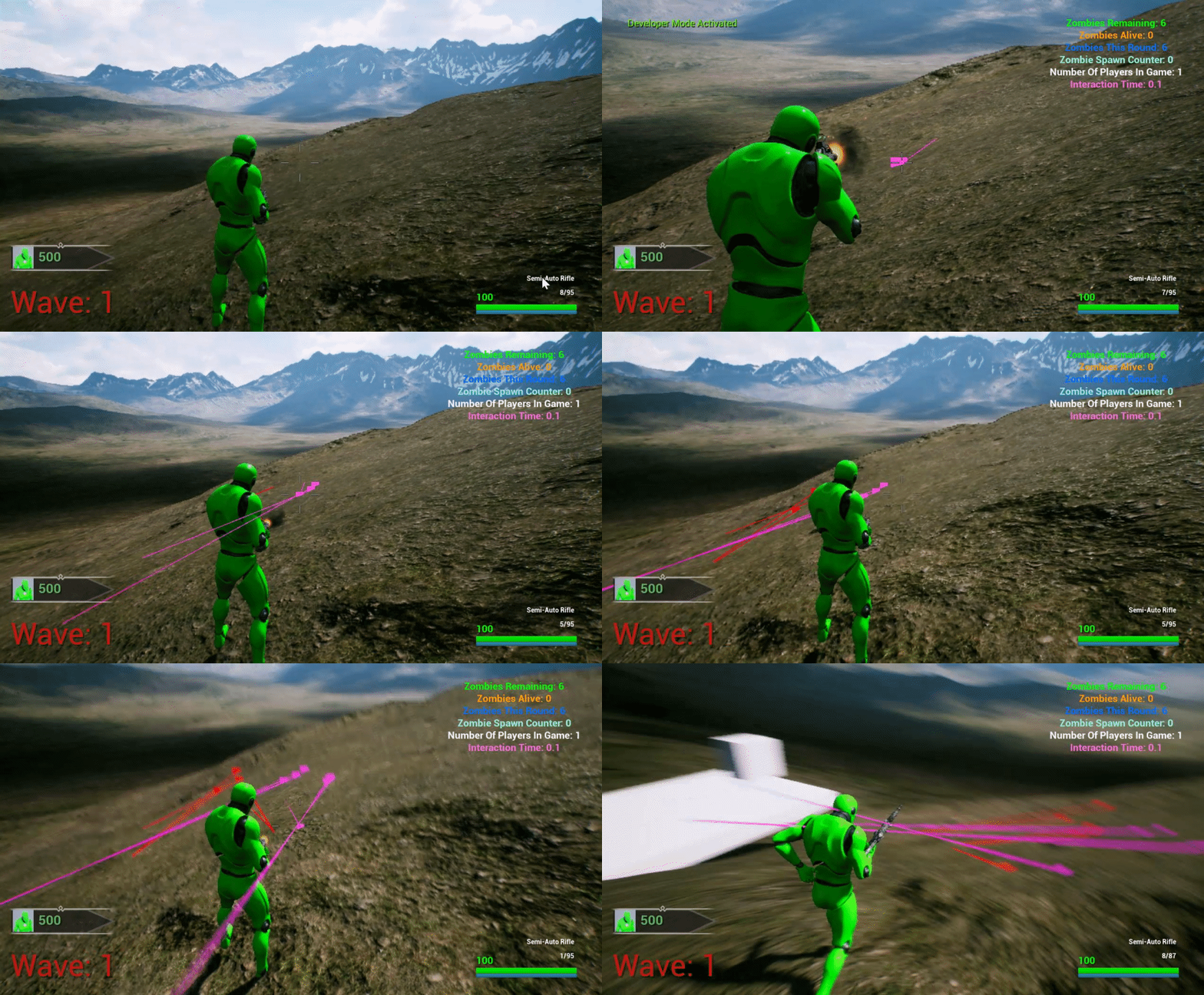
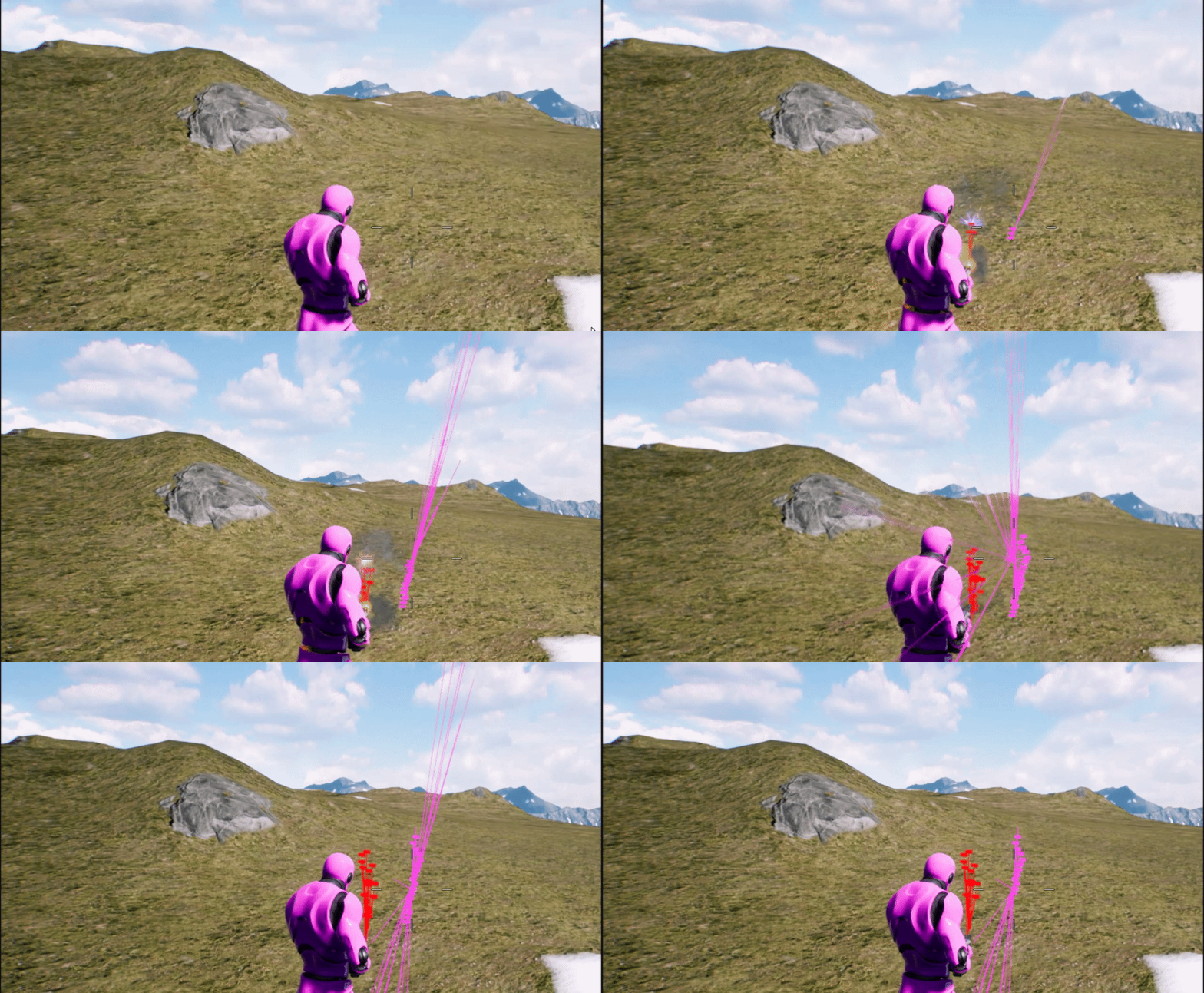
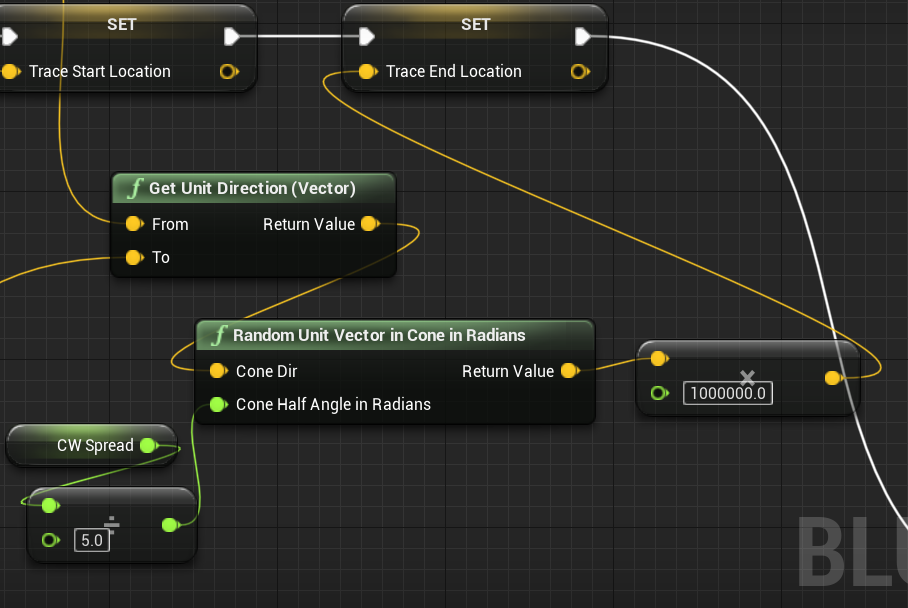
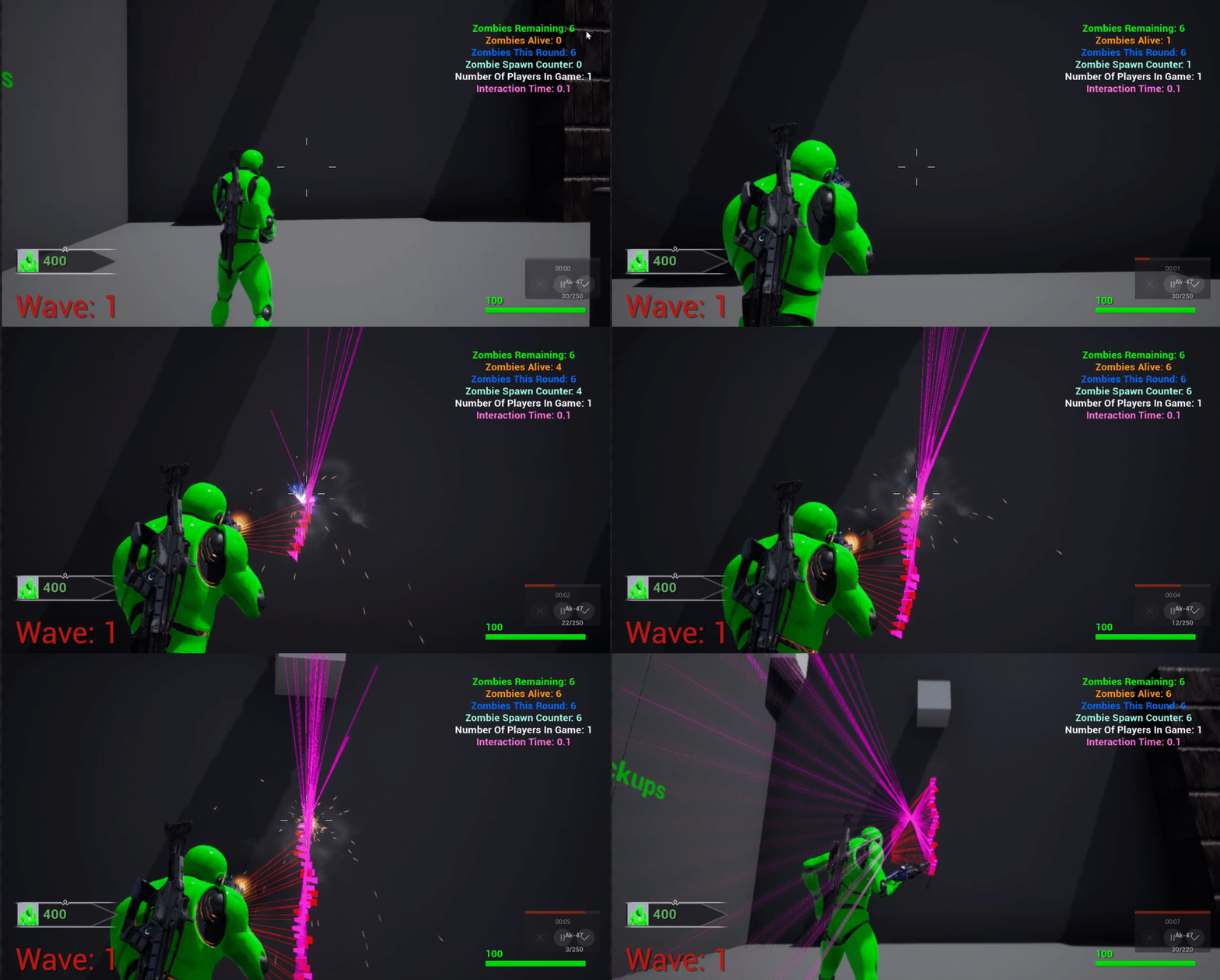
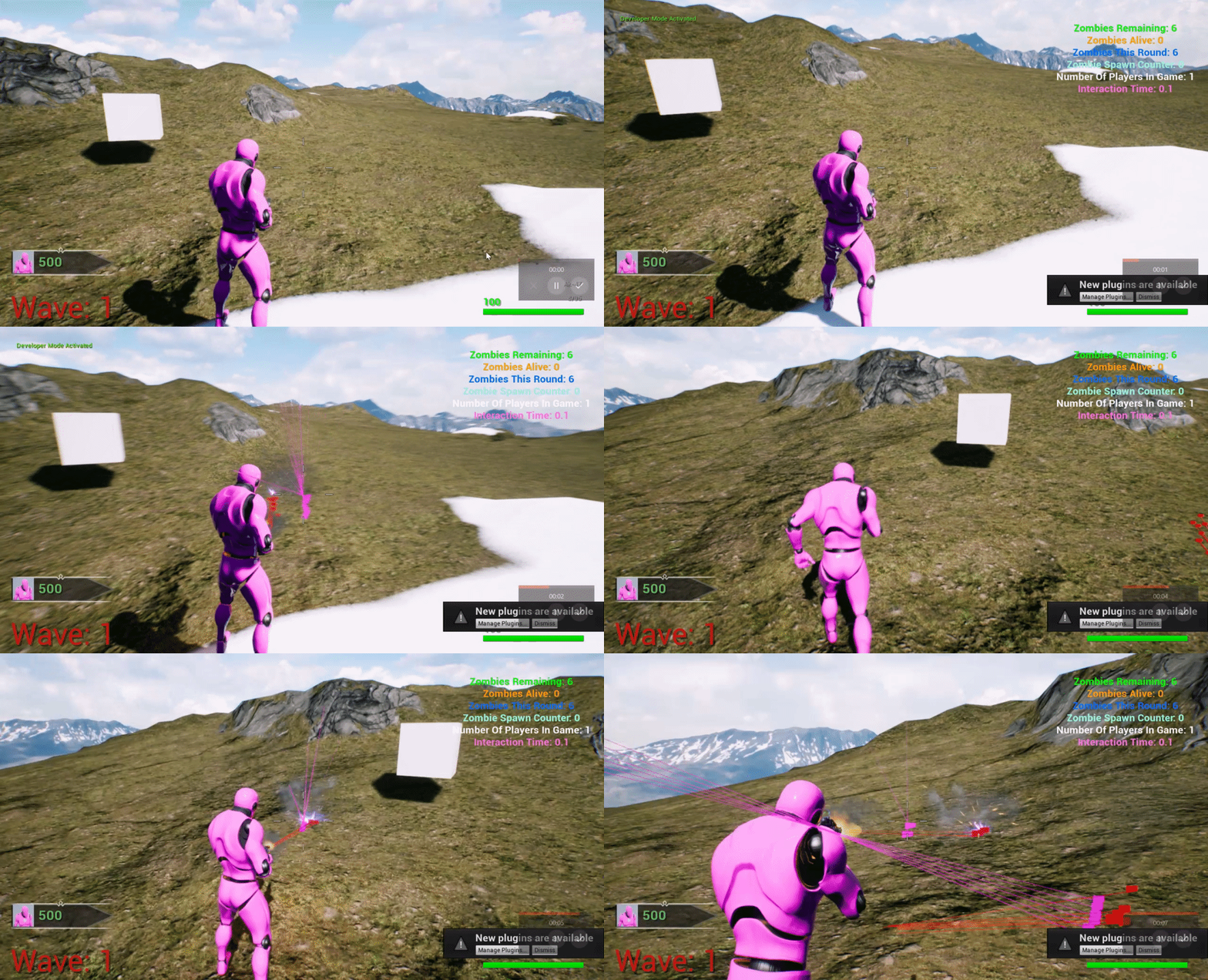
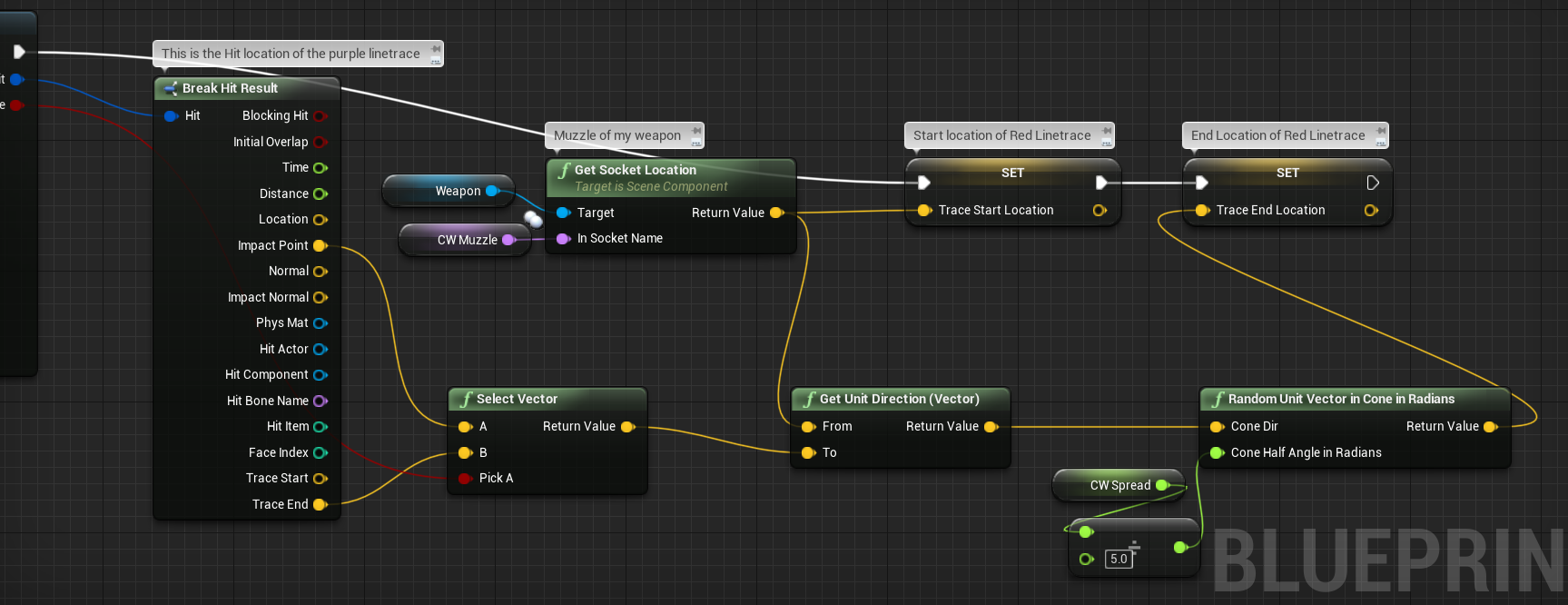
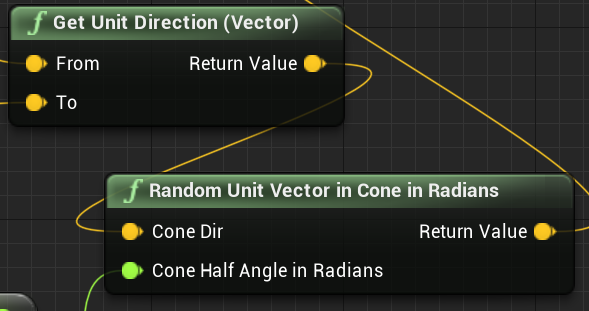
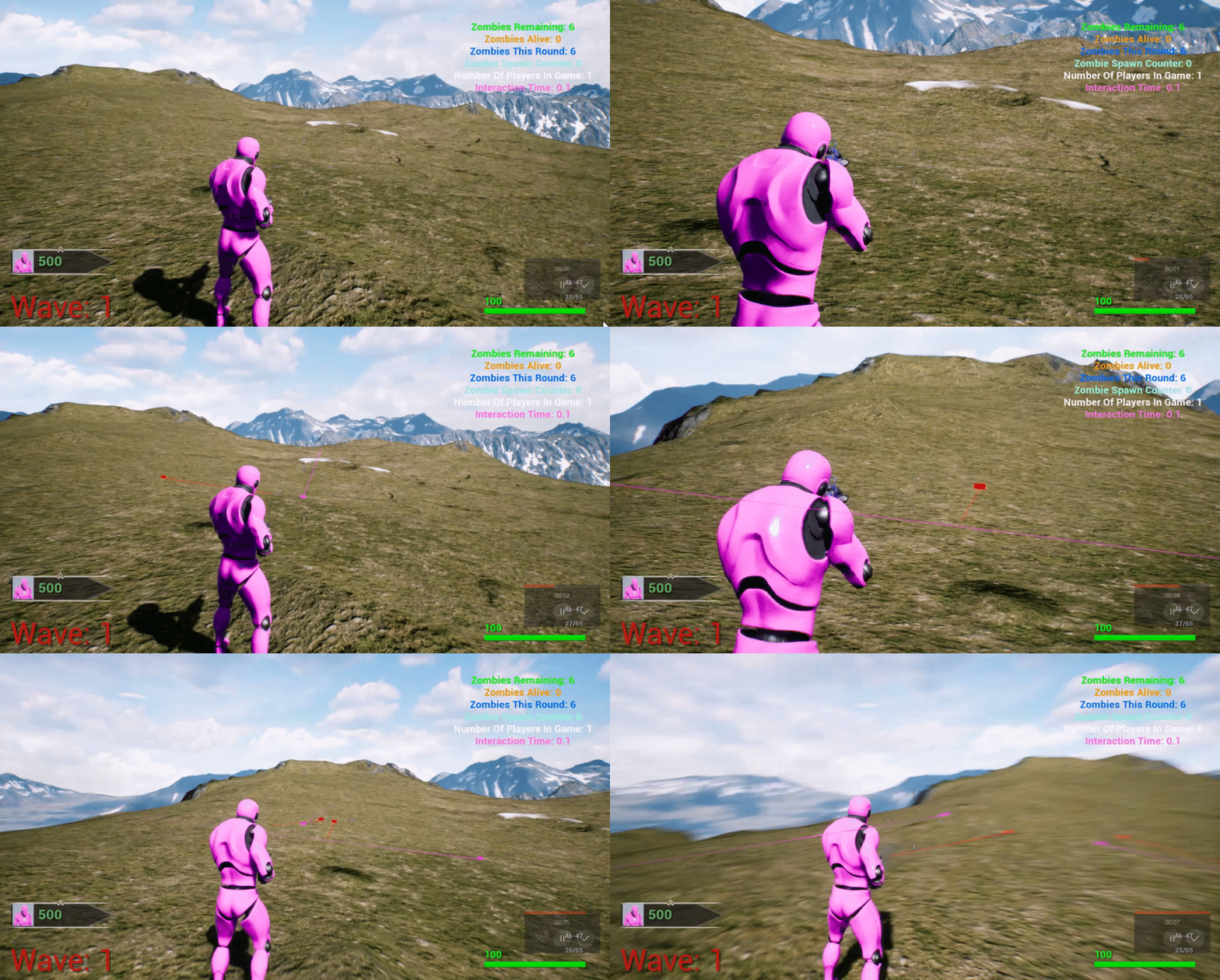
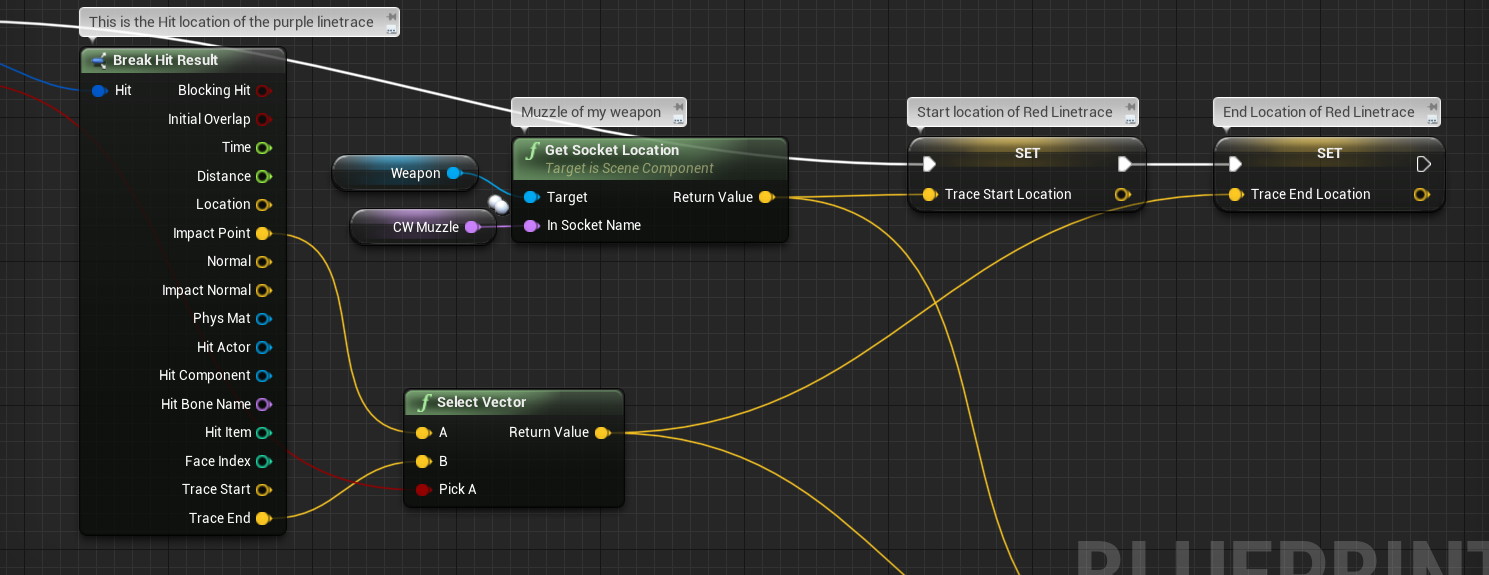
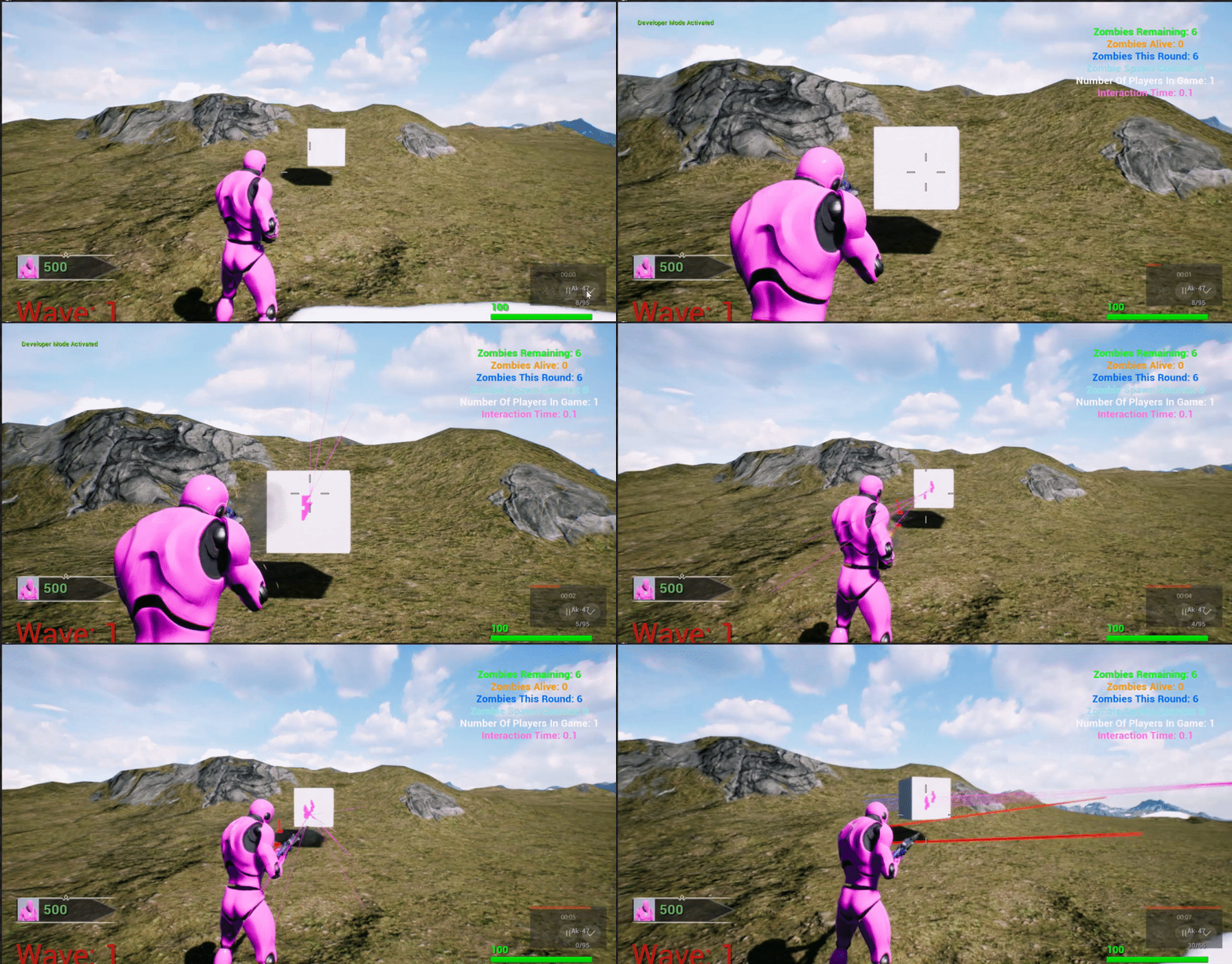
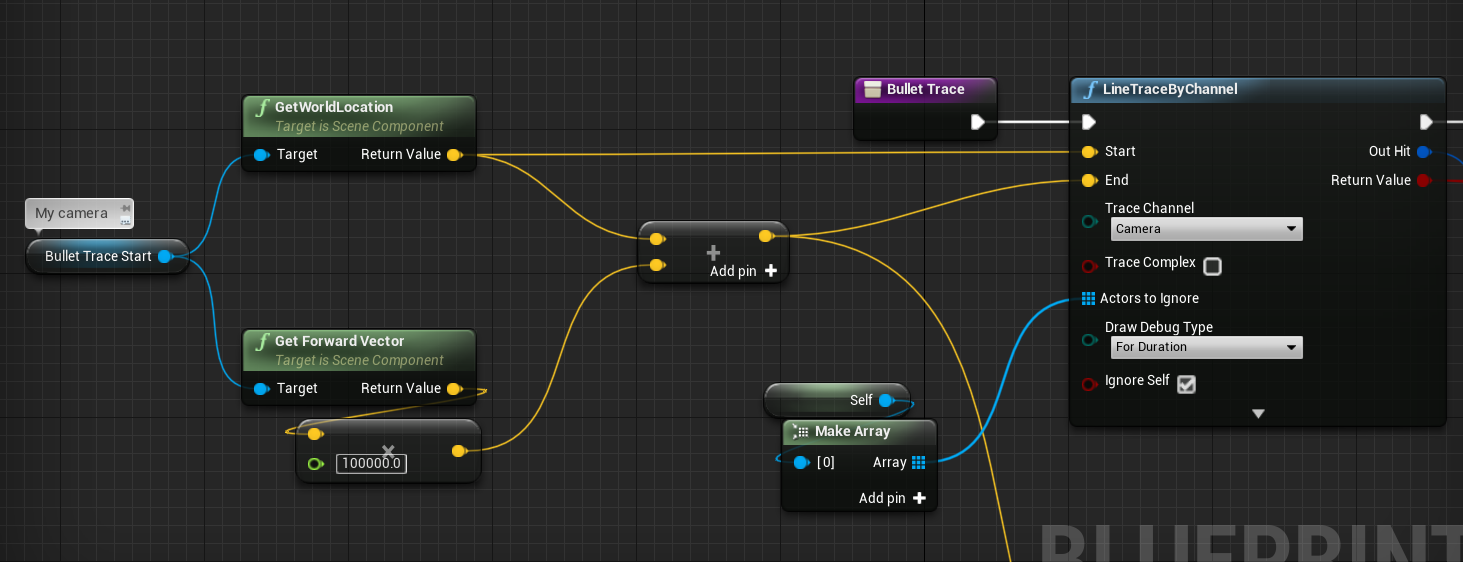
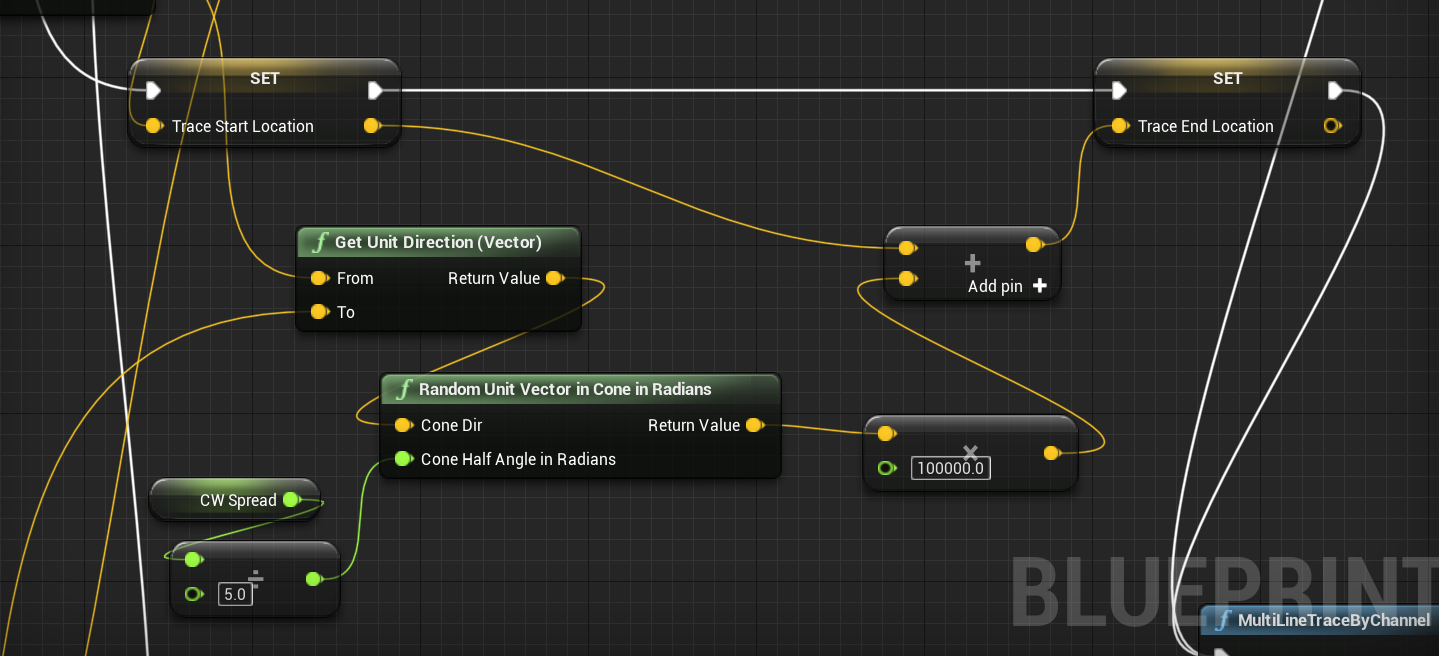
 mossy barn
Does anyone know why when I use the getallactorsfromclass node and select an actor blueprint it returns it empty?
maiden wadi
@mossy barn I don't use the node, but it's likely that your actor doesn't exist at the time of the GetAllActors call.
@tight cobalt Not really sure where to help with that. Personally I'd create something close to an animbp. A macro run on tick or something that gets actor values and changes an Enum, then at the end of the macro, check if the enum is changed. If it is changed, change the camera shake type or disable it.
tight cobalt
@tight cobalt Not really sure where to help with that. Personally I'd create something close to an animbp. A macro run on tick or something that gets actor values and changes an Enum, then at the end of the macro, check if the enum is changed. If it is changed, change the camera shake type or disable it.
@maiden wadi Yea, I actually wanted to try Enum and switch on int if this one fails too.
mossy barn
I've heard that recommendation before but the actor is definitely in game on start
tight cobalt
Fast Question, why I cant see exec firing in BP anymore? You know the orange color that shows you how are nodes being triggered within bp. I dont see it anymore.
This
I dont see it in some of my BP.
It used to be in all of them. now I see it only in ticks
 latent arch
Hey All, anyone got a solution to this? I'm trying to delay the playback of audio events based on distance. unfortunately due to this game it needs to be inside the same function / BP.