You cannot spawn an object in the world. You can spawn a "holder actor" that itself constructs and object, which you can then reference, or you can just use invisible actors spawned at 0,0,0. If you want to have blueprints that can arbitrarily be spawned or constructed without a transform then I don't know of a non-hacky way to do so. If there is one I would love to know about it
#blueprint
402296 messages · Page 461 of 403
 sleek jacinth
If you decide to use an object, be aware of its limitations. For instance you cannot use asynchronous nodes such as delays, it does not have a tick (though you can input one from an actor) etc.
 astral fiber
Does anyone know, how to make own blueprint nodes / system like that?
https://www.unrealengine.com/marketplace/en-US/product/quest-extension
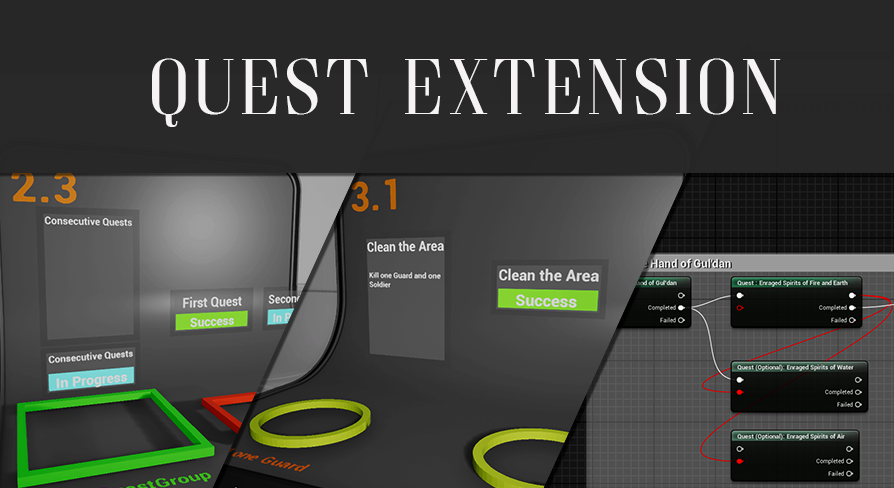
A plugin that provides a fully featured, non-linear and flexible Quest System to Unreal Engine 4
 wet swift
Guys i need help really bad. I am using stream levels. My main stream leve that as all the game's objects in it can't be selected or opened from the content browser help!
 warm plume
i copied the assets from advanced locomotion into another project and after fixing some stuff i can do most of the actions except for mantling, and also the alternate animation presets (e.g hands tied, with gun, with box, etc) don't work either, the items just appear at the feet of the character
 trim matrix
how i can add glow to a material?
wet swift
oh thats ez
but put your qestion #visual-fx
@trim matrix this is what my glow matierail looks like but please google your qestions before you ask a real person 🙂
trim matrix
Ah thx, was not sure where to ask 🙂
 hollow cape
@wet swift What's the purpose of having 2 multiply nodes?
wet swift
idk i followed a tutoirla don't blame me 🤷♂️
 thin rapids
@trim matrix but instead you could simply increase the value
so it's kinda pointless
trim matrix
yes, i did for me
 pine trellis
does anyone know if its possible to slow down a line by trace? For example, I am using a line by trace to teleport but it does it in 1 frame and I need to have it done with antimations and slower and not instant
 worthy pendant
I'm running into a pretty major issue, an hour and half before submission are due, lmao
Anyone know why my enemy spawners would be working just fine in a standalone game, but once I package it, they suddenly dont work anymore?
pine trellis
here is the code
pine trellis
ok cool going to try this out now thanks!
worthy pendant
np
Oh, and photon
Inside the timeline, create a float track, with two points
the first at a time of 0 and a value of 0
and the second at a time of x (however long you want the teleport to take) and a value of 1
bump
I'm running into a pretty major issue, an hour and half before submission are due, lmao
Anyone know why my enemy spawners would be working just fine in a standalone game, but once I package it, they suddenly dont work anymore?
 frank viper
Does anyone know a trick to open a UE4.23 script in UE4.18?
I tried to import it into 4.18 but it wouldn't even "see" it.
Is there a trick? Even if it comes in broken BPies?
I just need to see what I did so I can rebuild it in 4.18. so it doesn't have to actually work, nodes can be missing that is o.k.
Thank you 🙂
@worthy pendant You should do package tests right from the start so you dont run into those issues right at and hour before submissions 🙂
 tight schooner
@frank viper can't you download and install UE4.23?
@worthy pendant Can you narrow down which part of it fails?
The only thing that jumps out at me from the screenshot is if you're nativizing the blueprint, delay nodes tend not to work (last I checked), which is why I use Set Timer By nodes instead.
worthy pendant
I narrowed it down to a game mode issue
I think it honestly may be a UE4 bug
By setting the GameMode Overide in the world settings, it plays as normal
frank viper
You know I have a temporary setback my main machine broke down on me and I am stuck on a backup machine that is 11 years old with Intel HD 3000 graphics that doesn't support DirectX11. So at the moment I cant open any UE4 version younger than 4.18 😦 @tight schooner
 frail marlin
I am creating a climbing system in Vr with some simple Add to Actor Location stuff. I am noticing that when I let go from climbing, my falling speed is drastically faster than my falling speed while I am jumping. When I am climbing and I let go to fall, the character zips to the ground super quickly.
Anyone know what that might be? Is it because jumping adds velocity on a trajectory that mitigates some gravity scale?
 frozen spear
@frail marlin angular/linear damping and friction set too low on your physics assets?
I think 40 or maybe a little less than that actually counters gravity completely
 feral ice
Anyone know why it is adding impulse to one at the time, even though its a multiboxtracebychannel
 severe rune
You can try unhooking the Completed pin as that's not neccesary, and try removing the branch also as it shouldn't be neccesary if the trace is setup okay.
Also you can put a print after the trace call to print out the value of the length of the hit result, to see if you get 6 or one overlaps
feral ice
oh ok, but how do i print how many i collided with?
severe rune
BlueprintUE
severe rune
Does it print 1 or more than one?
severe rune
Okay,
so @feral ice what are the collision settings for your test channel on those cubest? Overlap or block?
severe rune
I think you could have fixed it also with overlap instead of blocking collision: https://www.youtube.com/watch?v=QrEw7ezIPhU

What is the Multi Box Trace By Channel Node in Unreal Engine 4
Source Files: https://github.com/MWadstein/wtf-hdi-files
feral ice
mhm well either way, thanks for helping 😄
 rancid quartz
Hello. I find myself so often casting the game instance, state, and mode to access those classes from other classes. Is there a better way to access this information? Would it be more efficient to somehow store these references somewhere where all classes could access them?
 hollow flame
how to solve this error, it only happen when i try to downgrade project from 4.24 to 4.22
 white crypt
engine is not compatible for downgrades
hollow flame
please help, i did lot hard work
white crypt
doesnt matter, use the version it worked on
you cant simply downgrade a project
you can migrate some of the stuff sure, but changing engine version to an older one wont work
severe rune
@rancid quartz You can assign it to a variable on begin play and use it via that method, you do probably want some element of casting and checking though still (or is valid nodes).
rancid quartz
Thanks, Fin. I do assign it to a variable after casting. My concern is that I do those same couple nodes in so many places.
GetGameInstance>CastToBP_GameInstance>SetGameInstanceRef.
I do those three nodes with the instance, state, and mode in so many actors and on so many BeginPlays that I figure there must be a better way.
hollow cape
I would ask myself if ALL those actors need the reference. There's really no way to get around casting to your custom game instance if you need to access data from it
@rancid quartz
rancid quartz
Okay, I see. I guess I could at least save a couple casts by storing a mode and state reference in the instance.
 rancid ridge
I want to parent a widget to an actor and this works fine with the widget component. Now I want to use the "screen" mode so that the widget is 2d but I also want the widget to be invisible behind objects. Is there any option I can use?
severe rune
@rancid quartz Yeah, if its something that's quite critical to your game there isn't going to be an easy way around that I'm afraid. The only way I could think of is if you create a blueprint class which inherits from Actor or Object (depending on usecase) and do a generic setup there to set your references on begin play once, and then all your other bp classes should inherit from those
frail marlin
@frozen spear I found out if I do a stop movement immediately upon "letting go" of the climbed object, the character would fall appropriately
 safe lion
can anyone help me? im having an issue with my player not recieving damage events
trim matrix
@rancid ridge you can make your widget a physical thing in the world
rancid ridge
Yeah I know, with the Widget Component. But I want the widget to always face at the camera (so that it is 2d but in 3d space). The "screen" mode works good but then the widget is always in the foreground
trim matrix
well just set it to rotate globally when camera rotates
 solid gyro
Jumped into 4.25 and got greeted with this in a AnimBP: Bug?
The grey box. EDIT: Nvm. That was a button for blendspace apparently
rancid ridge
But then I also need to change the size to always have the same size. Is there not an option or something?
 wind atlas
hello, could someone please tell me if I'm doing this right? I'm trying to make a blueprint actor which lets you swap out the mesh inside via a variable, and lets you specify a material that it should make an instance of and assign to that mesh
maybe what I'm doing is really stupid, on various levels
my thinking was, if I do this, i can add behaviour to my mesh, e.g. it can be rotating idly, detect triggers etc, and I also heard if you make a dynamic material instance its "lighter" but I'm not sure im going about it the right way
 rancid current
I am making a first person game and I can't move the camera up and down. This is the code for moving the camera, what can I do to fix this?
https://pastebin.com/bUdZs9yK

Pastebin
thin rapids
I am making a first person game and I can't move the camera up and down. This is the code for moving the camera, what can I do to fix this?
https://pastebin.com/bUdZs9yK
@rancid current enable the 'use pawn control rotation' checkbox in the camera component
Pastebin
thin rapids
the camera component in the character
rancid current
Ok
That didn't fix it it just made the camera rotate around the collision poll thing
Pill
pine trellis
is there any setting in unreal that would allow me to walk up a cube and all around it if I already have a gravity plugin?
rancid current
@pine trellis what gravity plugin?
rancid current
The one I have you need to have trigger box like things to do custom gravity
Does yours have a BP_GravityReceiver?
pine trellis
no its a C++ plugin
rancid current
Oh then why are you asking in blueprints?
rancid current
DirectionalGravity
It's pages though
Payed
@pine trellis what version are you using for ue4
rancid current
Do you have 4.20 installed?
pine trellis
no but I could install it
the plugin page says its not replicated

Free vector gravity for planets and directions. GravityMovementComponent allows you to control gravity direction and force for physics and movement.
rancid current
I have a project for 4.20 that can do multiplayer and physics objects and no that's not the one
pine trellis
which plugin is it?
rancid current
Custom
pine trellis
oh so you had someone make it?
rancid current
Ye
pine trellis
oh ok
rancid current
I'll send it in dm
pine trellis
ok
 mild pine
Hey guys. I want my horse to do a multitude of various idle animations when not moving. I want them to vary, not repeat themselves, and also not play constantly. Here's what I've got so far:
My Anim BP does a Blend pose per bool, checking if the horse is standing still. If true, run a Random Sequence Player node containing the variations of idle animations, using Shuffle. This works fine.
The horse BP looks like this: https://gyazo.com/14e3c3b44a399cffa3bd1d0381957599 - where I'm checking if the horse is not moving, and if it's not then set the boolean to true. I tested with the Delay node to make the animations not play constantly, but if the random bool with weight is true twice then I have 6 seconds x2 of idle animations running, which is undesirable. I want to trigger one animation, break, and then trigger another animation after X time.
Here's the current result: https://gyazo.com/e9e5ae3a2835458d9a654a5d19fdbdcf
As a sidenote, I need to connect this logic to the rider mesh aswell so I would need these variables to be synced so the anims of rider & horse match. What's the best approach to accomplish this? 🙂


 bold pilot
Does anyone have any experience with "Can Walk Off Ledges" flag in the cahracter movement component? It just seems to hold the character in midair when they would have otherwise fallen.
@mild pine You can blend poses by int in your idle state of the anim graph, then use a randomly generated int to choose which animation to play
For the movement you can just have values on your character/horse for current speed, then set a value on the anim BP each frame from that. Then check if that is >0 in your state machine.
 zealous moth
@bold pilot yeah it works with your step height and your angles to determine if your inputs can make you fall off or not
bold pilot
@mild pine Or even better, put the value into a blendspace with a standing animation blending into a run animation based on the speed
@zealous moth ahh great, thank you 🙂
zealous moth
@mild pine @bold pilot a simpler way to do it as a montage and have a check for idleness with a timer to randomly play one of an array of montages
easier to set up and to add/remove anims
bold pilot
@zealous moth Hm even with max step height so low the character is truggling on the stairs, and the max slope far too low, still no change.
Any ideas?
zealous moth
max step high so low?? show me your specs?
 strange junco
gamepad isn't working
it can detect inputs in the usb controller manager
but not in games/ue4
(im using a wired xbox one controller)
(ive tried updating drivers, un-plugging it and plugging it in again, different controllers, etc)
but nothing works
frozen spear
theres a setting for that in character movement component called "perch"
perch radius threshold
it controls how far off a ledge your characters capsule can hang before falling
by default its big enough to cause it to sink and float in air even with "can walk off ledges" turned off
zealous moth
is that new? never heard of it
frozen spear
bold pilot
Thanks guys, the combination of those worked 🙂
strange junco
?
bold pilot
@strange junco What os?
strange junco
windows 10
bold pilot
I've never had any trouble with xb1 controller on windows, but it might be worth rolling back the drivers
I think there are a couple of different versions
zealous moth
does it work with games or simple inputs?
are your inputs set up for that controller?
strange junco
doesn't work at all in games
zealous moth
reinstall it
strange junco
but the usb controller thingy works
zealous moth
wireless??
strange junco
wired
strange junco
didn't work
any other possible ways to fix it ?
it has worked in the past but when i updated windows a while ago it just stopped working
bold pilot
The not falling off edges thing is working nicely on the host and owning client, but to other players the fall animation gets played when a character gets close to the edge. Any way to stop that other than limiting the fall animation?
 fiery escarp
Hey folks. I'm using a SceneCaptureComponent2D to get the color on screen under my first person crosshair, but the color I'm getting from Read Render Target Pixel is a darker value than what is actually on screen. Is there a way to debug render targets? Like if I want to visualize where it is on the screen to make sure it's capturing the right area?
 half moat
I have an array of 100 widgets of the same type. I want to bulk edit all of them using blueprint coding similar to a python "apply" method (or similar to the UE4 bulk edit property matrix)
Is there a function that can broadcast a change to an entire array of objects simultaneously?
bold pilot
@half moat I've not used it myself but I believe there's an object iterator
or there's GetAllWidgetsOfClass node
tight schooner
There's no way to re-run a construction script in a BP, right? Use case: I made a call-in-editor function that straightens a spline. The associated spline mesh, which is configured in the construction script, doesn't update until I touch a spline point and wiggle it, or otherwise do something to trick the construction script to update.
EDIT: Welp, just dipped my toe into C++ for the first time just to get a RunConstruction node. https://twitter.com/gadztech/status/939967152861233154
half moat
@bold pilot That will collect them all, but not give you the ability to say.. mass change the brush color to all of them, just use a loop I guess? no broadcast?
bold pilot
@half moat If you have them in an array you could surely loop through them all and change the brush colour?
You could broadcast a event too though, sure
half moat
I meant something like this:
https://chrisalbon.com/python/basics/applying_functions_to_list_items/
Applying Functions To List Items
Used to interpreted languages, behind the scenes it's probably a loop anyway so I'll just use a loop
bold pilot
I don't get it, it says it's a for loop? Maybe I'm missing something
Not sure what the difference is between that and using a for loop on the widgets from GetAllWidgetsOfClass
half moat
It's showing you how to use a loop but you can do the same thing with a map function:
So I was thinking something like:
map(setTint, Array)
bold pilot
ah ok
 rich lava
 fair jungle
So I have a bit of a weird issue, I've set up an onKeyDown override in a tab switcher widget but for some reason it doesn't work unless I press TAB first.. anyone come across this issue before or is it specific to my code?
 grizzled steppe
hi, I am not to familiar with blueprint and am looking for how to make a emissive instance material brighter when is press a button on keyboard. Do you have any idea how to setup it simply please ? also i will like to do the same but for animating some simple rotation on multiple mesh when i press a button, do you have any link or simple explanation ? Thanks
severe rune
@grizzled steppe so you'll want to create a material first for this, if you create a scalar value and right click and convert to parameter and multiply it by the emissive channel, you can control the brightness with that value.
To then set and change the value on a mesh you can do something like this: https://blueprintue.com/blueprint/g9h5b3up/
BlueprintUE
This should just be pulsing the brightness over time
grizzled steppe
Thanks @severe rune
 old prism
anyone know if there is a way to <= a float value and select the highest one I cant think of a way to do that the <= function outputs a bool value
 marble folio
Max (float)
old prism
thanks
mild pine
@zealous moth Thank you - again, overthinking things when it can be done so simple! How do I make the montage not repeat itself though? Another thing; play anim Montage isn't compatible with arrays, how do I actually plug the array together with an anim montage? :p on another note, using anim montages didn't work well if I was to begin running from the idle state; then the horse's feet wouldnt move since it was mid animation. I guess on false I should cancel the montage.
 gloomy linden
@tight schooner the construction script gets triggered when the actor is being created/spawned. Its not supposed to run again. If you want to change stuff that you set in the construction, its better to make it a function and call that functuon instead
mild pine
Why doesn't this work? My goal is to make the timer break up the boolean, so that the boolean is true at a random time within 5-10 seconds, at which the actor should run an animation in Anim BP (referencing the bool).
 severe rune
You should remove the call to the event after the timer
 bleak carbon
Hey
I'm trying to make the server give a different color (represented by a float, "tint") to each player when they spawn
So this is what i do ^
But it appears that the server cannot query "PlayerState"
It returns None
Can't the server know which is the ID of each player?
if it can, how?
(This function is called in the BeginPlay of the player controller blueprint)
 median bloom
Hi guys, not sure if this is a CPP question, but i have built these BP's in code and would like to know why certain attributes are missing, perhaps i don't quite understand how to structure my BPS, basically i noticed that if i use a UStaticMeshComponent as a root object various options are missing on it's BP entry, i'm looking specifically for "Simulation Generates Hit Events", also known as
SetNotifyRigidBodyCollision();
in code. I'm having issues with my BPS not respecting this value and always generating hit events
this picture might help
 untold fossil
I have a bug in my game, where my character pawn gets destroyed as soon as the map loads. I have confirmed this by printing a string in the event destroyed in the character. I have no idea why or from where the character is being destroyed though. How could I find out?
Like for example is there a way to track from where an actor is being destroyed?
frozen spear
@mild pine look into using switch node attached to random int node instead of that method your using there... if you are just trying to get random animations playing...also look into animation blending and blend by bone...or even blend layers using slots..so if its playing it blends the animation no need to cancel it out
 barren rain
how would one calculate, the forward direction from a character to the world. I'm trying to move my capsule forward but can't seem to see what math i should use ??
 half ibex
Why does my Character spawns in Play mode but not on Launch? (Left: Play Mode, Right: Launch)
My Blueprint
 azure mango
Perhaps you have not set a location on the Make Transform?
half ibex
I have, it's 0,0,1
azure mango
Oh, then you could try out getting the actor's location on the properties, and placing it on the Make Transform node
That's what I usually do and it works
half ibex
Thanks. Let me try
Wait, what do you mean by actor's location? It is not on my level yet, I am trying to spawning it
Oh, then you could try out getting the actor's location on the properties, and placing it on the Make Transform node
@azure mango
azure mango
Oh, okay
I get it
Perhaps get the location of the platform that you have, as a reference, and add a little bit more of value to the Z axis, in order to avoid your character merging with the platform
half ibex
I see, Thanks @azure mango
azure mango
Np
 hard charm
how could i put a widget on a material?
that is, convert everything I have into a widget, pass it to an image so that a material can pick it up
half ibex
What is the purpose of Player Start when I already have set my Camera as my Default Pawn on the Game Mode?
 torpid locust
Hey guys, I'm trying to reproduce an effect that I'm not certain how to tackle. I've played Shadows: Awakening a while ago and loved the effect of switching between realms (real world and shadow realm) and I want to do the same mechanic in my game but don't know how to think about this.
Do I only hide/show objects from the environment or I create two levels and switch between then? Is there any other way to think about this?
A video to illustrate the effect (if it's not allowed just tell me and I remove it):

We take a look at the beginning of Shadows Awakening's story!
The First 17 Minutes of Overcooked 2:
https://www.youtube.com/watch?v=YbMBQJteE2M&t=2s
Subscribe to IGN for more!
http://www.youtube.com/user/IGNentertainment?sub_confirmation=1
---------------------------------...
 heavy lion
nope
So I am looking to get an array of all actors of a particular type. Get the nearest one and teleport the player to it.
I had planned on initially doing a Get All Actors of Class, then getting the distance
Not sure how to set it up
 tawny tinsel
so i have a pause menu with settings
and they work fine in game
but i have a main menu level without the player charcter so it fails at casting
 fair magnet
You know that you don't need to check if it's ingame or not when it's in the main menu
tawny tinsel
i was thinging maybe transfering the whole main menu screen to the main level
tawny tinsel
because this is the options button back when its in main menu "in game false" it goes to the main screen and when its in game it goes back to the game
wait a minute
i can just plug cast after to the same thing as branh false
IM A GENIUS
THIS WORK SPERFECTLY
 atomic prairie
When we go from one scene to another in game, is it possible to add a loading screen?
My scene 1 cuts and the scene 2 resumes, but there are a few seconds: the screen is frozen and the textures load
My question is bad expressed I think
tight schooner
@gloomy linden I'm not sure what the actual negative ramifications are of re-running the construction script in a purely in-editor context. Clearly the editor re-runs it any time you move an actor around; I'm just automating the part where you wiggle an actor in the editor (followed by ctrl-z), or double click some public boolean variable just to trick the editor to refresh the actor.
The issue with putting the contents of a construction script into its own, callable function is it first has to check whether all the dynamically spawned components exist and then destroy them before rebuilding them; I got half way through scripting that before thinking there must be a better way. Being able to re-run the actual construction script from scratch on demand is much cleaner.
tawny tinsel
somebody assist me
all the gpahics setting tutorials focus on the ui
all i want is to know wich nodes are gonna set the quality etc
and how do i use them
ue4 docs are useless i tried
 viscid saddle
Hey guys im having trouble with spawning through blueprints, i wrote a custom function to handle it however it still isnt spawning, made a reference to the spawner in the blueprint UI widget
tawny tinsel
whats inside spawn location?
viscid saddle
The handling of the other actor to spawn it
tawny tinsel
i mean can we see it?
 glacial eagle
Spawner could still be nothing
glacial eagle
it needs to point to a live object @viscid saddle
viscid saddle
God damn it -_- i see
glacial eagle
BTW there is a SpawnActor function in BP, you can just use that 😉
viscid saddle
There is, but last time i used it, wasnt spawning where the spawn actor is
glacial eagle
Yeah you'll need to provide the transform to spawn it at
otherwise it'll just end up at world origin
But again, "Spawner" needs to be valid
It can't just be an empty reference to something
It has to point to an object that actually exists somewhere
viscid saddle
I gotcha, it is in the game world but it still references nothing
glacial eagle
Yeah, you need an instance of whatever class 'Spawner' is (I assume AMySpawner) placed in the world somewhere.
Then the 'Spawner' variable needs to point to that object
viscid saddle
Hmm. I did make Spawner derived from the c++ class to a blueprint and im referencing that inside the UI widget
as a variable
mild pine
@frozen spear Alright, like this? https://gyazo.com/fafcec1fefc65e81f5d60f22631e034c

(I would add more pins and multiple Play Animation nodes)?
frozen spear
Yeah
You could even branch it off...make 3 different switches the first with 2 options and random range max 2...then the other 2 play animations on random range max however many animations you got
So 50 percent chance for top switch 50 for bottom switch...you could also branch animations on bools like if it moving play x it is idling play y instead
You can get pretty creative with switches on random
You can even just drag a bool like that directly into the switch as the condition
Switches are pretty neat
@mild pine
Select node is another very handy node...look it to it also
mild pine
Oh wow 🙂 So can do a random bool that triggers two switches, or simply run them based on if they have equipment on etc. - wouldnt make sense dusting off your armor etc if you're wearing nothing. Neat!
Yeah, I used the Select tool in another setup, like this:

It's the method I'm using atm
Is there a way to make this run on a list though? Like, the animations in an array?
So I dont need a bunch of anim montage variables
frozen spear
Right so from the path of the first switch leading to the play animation you can "set MyAnimToPlay" variable...then lead into a switch checking the IsWearingArmor bool
frozen spear
Was going to explain how to create a state machine with enumeration but realized thats far to complex to explain over text without being in front of my computer to show you screenshots...
Yeah you could make an array of animations but without structs or enums it will be a pain in the ass to set MyAnimToPlay variable as you would have to keep track of which element is the animation you want to play from the array and "get" it directly using its position in the array
Select node would allow you to set animations you store in a structure based on an enum
But like i said without being able to show you screens of that set up you would probably get frustratingly lost
 twilit heath
and you can just select the asset directly from select node's dropdown, too
frozen spear
Correct...select and switch are amazing nodes to learn...as well as structs and enums are as variables
twilit heath
select does have an annoying drawback, that it evaluates all possible selections regardless of the input
every time
frozen spear
Thats why i always pair it with an enum style state machine
And run it on smaller structs
Like MyAngryAnims array
For my AngryEnumValue
I actually found a crazy thing to use switch on last night that i didnt think was possible...you can compare against a 'Name' and switch return values from an enum as results
I made a mage class that switches elements and i track the elements on an enum...i pass the element as a Name and didnt need to pass it directly as an enum...
Was a neat little trick
My anim notify basically didnt have to know the enum exist...simply that the element was named "Fire" was enough
 elfin hazel
Say I have some Stats in my game, and some Stats are influenced by others. Like Magic gets a bonus from Int. When the Int Stat changes, the Magic stat needs to recalculate. Now imagine there's 100 Stats and a Stat can be influenced by several Stats.
So the most brute force method would be - if any Stat changes, recalculate all Stats.
But since the Stats are UObjects, they can have dispatchers that the influenced Stats listen to. So that's already better but still, if Stats A, B, C are changed and Stat D are influenced by all of them, it recalculates 3 times. And 2 of those will be incorrect numbers.
So how would I set it up so that a Stat recalculates only when all the 'influencers' has recalculated?
tight schooner
@tawny tinsel Get Game User Settings --> Load Settings (optional) --> Validate Settings (optional) --> use your various "set quality" etc. nodes --> Apply Non-Resolution Settings / Apply Resolution Settings --> Validate Settings again (optional) --> Save Settings (optional)
tawny tinsel
thank you
tight schooner
that said I continually bash my head against the Game User Settings system and I can't guarantee what I laid out will actually work :p
I end up using Execute Console Command to set a lot of things
frozen spear
@elfin hazel do all the stats share the same priority? Or is something like agility In charge of speed/reflex/dodge....i dont know the full use case but i would say you have to first establish a hierarchy of command for those stats otherwise calculating everything as a whole is going to get some weird results in some cases...i cant imagine everything sharing priority could even be calculated correctly at all...custom datatables maybe? But you would still have to set up some order of command there cause if dex changes dodge and strength changes dodge and they both share priority over it...your in for a bad time
trim matrix
when should i use functions over macros or events and vice versa?
frozen spear
Macros are for when you see yourself repeating the same code all the time in multiple blueprints.... functions are for when you repeat the same code many times in the same blueprint...macro librarys are a godsend
...unless you decide to always allow the higher amount to take priority
trim matrix
and what about events?
frozen spear
Events are used everywhere for everything
Hard to tell you a specific use case for events
tight schooner
@trim matrix To put it another way, functions are like a little factory where (normally) things go in and things come out. It only supports one input and output execution pin. But on the plus side you can make local variables in functions; variables that only exist inside the box rather than have to be "declared" in a particular blueprint.
Macros can have multiple exec pins in & out, so my typical use case is if I use a switch-on-whatever node a lot, or otherwise need something that manages execution flow.
There's a whole lot of overlap between functions and macros though; most things can be done in either
Macros can also have "latent nodes" like delays... same with events
functions have more restrictions because they're a box that needs to return things on demand in that moment
otherwise tons of overlap between functions & events too
people will have different opinions about what the "proper" use for each are but I would refer to Mathew Wadstein on "what is the best thing" angst:

What are the best things to use when you want to do things? Why would we want to use this thing? Is this right and other questions that might stop you from actually making a game.
Source Files: https://github.com/MWadstein/wtf-hdi-files
 fallen glade
Does anyone know of a good way to smooth 3d Vectors ? I have a spline that needs a lot of points to be able to follow inclined surfaces, but with more points comes rigidity. Any Idea?
3 Vector array I mean
frozen spear
@elfin hazel first sit down and draw out the stats on paper...draw lines to thier relations to the other stats and make sure you have a clear representation of the hierarchy that makes sense...with a 100 stats if you give control of a stat to every single other stat... it's probably safe to say you dont actually need that one stat....
tight schooner
@fallen glade might be a better question for the #cpp crowd cuz someone there can probably whip out some perfect algorithm. I suppose if you just want to average each point in the array, you can make a function that takes a vector element, and the two vector elements adjacent to that, and averages them... you loop over the whole array (but leaving the endpoints untouched) and save that to a new smoothened result. Maybe that'll work??
elfin hazel
I just realized that maybe I don't need to recalculate the stats at all. When getting a Stats Value, get the influencers values. But then that would create a lot of calls when displaying stats in the UI.
frozen spear
Then i would also suggest you figure out the paper rock sissor at the head of those main stats... which one takes priority
mild pine
@twilit heath @frozen spear Thanks 🙂 I'll play around with what you taught me 🙂
frozen spear
@elfin hazel take care to test it well...cause as i mentioned without any priority youll have cases where you put on a strength ring then a dex ring and it give you a different result when you put the dex ring on first then the strength
The result should end the same no matter the order
elfin hazel
Yes, still have to think it over some more.
frozen spear
Especially in cases where you have the strength ring lower a stat, and a dex ring raise it...(if your stats can go into negitive numbers wont notice...but if it clamps at 0 different story) example strength decrease agility -3...dex increases agility +4...put str on your at 0 then dex your at 4...reversed and your at 1 instead ...unless agility bonuses weigh more on dex...then it take priority and your at 4 always no matter the order you equip the ring
fallen glade
@tight schooner That sounds like an easy solution, thanks !
elfin hazel
Yes, that's a good point not to clamp the modifiers. Sounds like an exploit from Anarchy Online, which is what I am taking inspiration from.
frozen spear
Youll still end up with weird cases where the order you equip stuff changes the outcome
heavy lion
Does this make sense to anyone?
 vital prism
@heavy lion move player to nearest safehouse, if it is within range, and of type vehicle
tight schooner
@heavy lion This is how it reads to me: Get every "BP Safe Location". Do a trace between the player-character and each BP Safe Location. If it hits a vehicle (or even if it doesn't; potential issue there) compare the distance of the hit vehicle to the player and store store the closest result. Upon complete, if the distance is under some threshold, move the player to the safehouse.
I suppose my question is what the vehicle is about, lol
vital prism
Prob should have a set closest 99999 at the start
tight schooner
I may be misreading the script but is it trying to do something more than find the nearest BP Safe Location?
vital prism
or rather set closest=maxdistance
Not sure the trace does anything useful... as it only collides with one type
either the right type, and can always hit, or wrong, and will never hit
the hit result also outputs a distance, no need for the extra get distance node
heavy lion
@vital prism Nailed it. And yeah. It does seem pointless to me Just couldnt figure out an alternative.
vital prism
could connect "array element" from loop directly to "other actor" of get distance node to skip the trace
heavy lion
This still works in the same way. Nice one!
It just doesnt make a lot of sense to me
Mainly the float values
I dont get how it knows which actor to pick.
tight schooner
like which safehouse?
tight schooner
It goes through the whole list, seeing if this safehouse is even closer than the value stored in "closest"
and in the event that it produces a new winner, it stores that into the Nearest Safehouse variable
elfin hazel
It compares the distance to the current item with closest. If distance to is less than current, that is closer and will be the new distance to compare to. It requires Closest to have a high default number.
 dreamy ice
Is there any advantage to my inventory bp being a component or an actor? Currently it's an actor and I see where people are using components and I'm concerned.
tight schooner
(Like Chozabu mentioned, you should probably begin the process with the Closest variable set to a very high number. I would also add a "validated get" of the Nearest Safehouse variable on complete just to check that there is indeed an actual safehouse stored in there.)
heavy lion
@tight schooner @elfin hazel So do I need to do the branch to check if its below the max distance??
tight schooner
if you care about it being within some max radius, sure
heavy lion
I dont need there to be a limit on how far away you can be teleported.
Just teleport player to nearest.
tight schooner
yeah, then you can remove that part
elfin hazel
yeah, it depends on what you're doing. Seems like if its within the threshold, it just teleports.
tight schooner
@dreamy ice I don't have any experience with inventory systems, so I can only speak generally. To some degree actors and components are interchangeable so you didn't do anything wrong per se. BP Components are simpler; they have no "physical" presence in the game world -- no location. And they have some other restrictions I can't recall. Full blown actors have more functionality, so you aren't losing anything by using an actor class, but it is a "heavier" class FWIW.
elfin hazel
@dreamy ice It's really about composition. Spreading out the work logic to different classes, so one class isn't clogged up with logic and also not coupled with everything. If you use an actor component or an actor doesn't really matter. An Actor can be a component-in-spirit. But Actor Component does have some editor functions like "get component by class" which can be handy.
dreamy ice
Is there a conversion method? I think a components probably better because there's no need for a physical presence.
heavy lion
Here we go
trim matrix
idk why
elfin hazel
Don't think there is, they are too different. But an actor without tick, without a scene component and not attached to anything doesn't come with any extra costs. @dreamy ice
trim matrix
how do i turn screen messages back on?
dreamy ice
Okay thanks!
tight schooner
@trim matrix ENABLEALLSCREENMESSAGES
trim matrix
where?
tight schooner
console (tilde key)
also try typing "help" in the console
something awesome should happen
trim matrix
whats the console?
tight schooner
when you're playing the game (well, this works in the editor too)
press the tilde key: `
(or ~ if you prefer)
trim matrix
i did
tight schooner
I will actually confirm right now that EnableAllScreenMessages doesn't work lol
so IDK restart the editor
trim matrix
says this
but wont let me print to screen
or log
i was trying to learn how to use switch on integer
but this didnt work
maybe its the code not working?
heavy lion
What are you trying to do?
heavy lion
🤦
trim matrix
i was just experimenting with different stuff
im kinda new to blueprinting so
im trying to get familiar
btw does the DEFAULT pin of Switch on int fire when none of the other pins are correct?
 golden lintel
Regarding Blueprint nativization. Has anyone been successful nativizing more complex Blueprints? My project is a mix of C++ and Blueprints. All Blueprints have my own C++ super class and all Enumerators and Structures are done in C++. So far nativizing advanced Blueprints results in “Async loading event graph contained a cycle”. I don’t have any problems using remaining Blueprints, they run well and they are optimized but just out of curiosity I would like to know.
I have a bit of OCD, especially if things don’t work, I am in this loop for the last week 😊
frozen spear
You can have it hook into whatever other line of code also if the value doesnt match any of the switch values
trim matrix
Is there any penalty, performance or otherwise, to giving a ton of classes the same interface? Even if some or many of those classes never use that interface in the end. I'm just curious
 faint pasture
@trim matrix Maybe but it'd be so tiny it's not even worth thinking about. I'm pretty sure every actor has the Damage interface even if it's not used etc.
heavy lion
You can find out a lot of this info in the docs
trim matrix
😦
tight schooner
@golden lintel I can only speak to my own experience with my all-BP project, and at best in general terms. I initially tried selective ("exclusive") nativization but it caused problems with BP interfaces so eventually I went all-in. I haven't cataloged the ways nativized vs non-nativized do or don't like to communicate but I get the impression selective nativization could cause issues in that way. I also get the sense that nativizing BP makes it less robust; things that throw warnings in the output log during play-in-editor become crashes or packaging failures when nativized, so check for those.
Sorry I can't be more specific/helpful. Nativization gives me a hilarious gamethread performance boost but also has me hunting for more bugs.
From my limited experience and from what I read, one just has to embrace that to some extent when using the nativization feature
golden lintel
@tight schooner Thank you for the reply. I have tried both methods and I am getting crashes at start.
I converted smaller Blueprints to C++ but I have to big one (still good performance) that I would like to nativize.
safe lion
can anyone help me? im having an issue with my player not recieving damage events
Me or Edlin?
ok
one sec
for some reason the damage event is doing 0 damage even though i have it set to 20
ok ill try just casting to the player
ok i think that worked thank yi=ou
i might have to switch back to my old system though due to other reasons
thanks anyways
rancid quartz
Hello. Looking for some advice. I'm doing a big refactor of my project and I'm thinking of organizing it like so:
- If it needs to replicate or include latency, make it an event.
- Everything else will be collapsed into small functions that will "comment themselves" via their name.
So in the end, the event graph will consist of only events, latency nodes, and function calls.
Does that make sense?
 desert pendant
I've got about 60 static meshes that I want to toggle on/off. Is there some way to group them together (I already have them grouped in a folder) so that I can toggle them on/off together with one call, rather than have 60 SetVisibility calls?
heavy lion
Select the items in the viewport and create blueprint from them. Toggle that on and off
Alternatively. Move them to their own level and turn the level on and off
@desert pendant
 ionic harbor
does anyone have experience with level streaming? I'm doing a super basic level stream where my persistent level has a single plane, and another level contains a basic cube
I just want the cube to load in and appear when something happens. anything: begin plan, tap on screen, I don't care. but it can't appear before that
but for some reason, when I launch the persistent level, the cube from a streaming level is always there
I have zero code to load or unload stream level, but it just loads in default
heavy lion
How have you got streaming set up in your persistent level?
ionic harbor
that's my blind spot, I don't really know? I enabled world composition
heavy lion
You can right click on the level and choose level streaming type
It should say always loaded or blueprint
ionic harbor
in my levels tab I can see the persistent level and the streaming level as a sublevel
heavy lion
But if you are just wanting a cube to appear, why use level streaming?
ionic harbor
as an example that I can do it
heavy lion
ok cool
ionic harbor
the future product will be loading very very large models in Augmented reality
heavy lion
Just checking
ionic harbor
and we need them to be loaded into memory before we use them
heavy lion
If you are completely new to level streaming, I suggest you take a look at this
https://docs.unrealengine.com/en-US/Engine/LevelStreaming/index.html
Asynchronously loading and unloading levels during play to decrease memory usage and create seamless worlds.
Basically there are a handfull of ways you can load in a level.
A trigger, a volume, or distance.
heavy lion
Looks like you are using world composition??
ionic harbor
yeah, I thought was was a specific form of level streaming
from the docs you linked, that's where I started
the eventual augmented reality product will be one large world that has to scan a variety of images and show very huge models. so I'm trying to get all the models into their own levels
and place the level instance after loading it.
heavy lion
Ok. World composition may be a way of doing it. If you want everything to just stream in based on distance.
By default, without assigning any new layers, all levels will stream in 0.5km away from the player.
You can create new layers which control the distance at which levels stream in.
OR
You can use blueprint layers. Just create a single layer in the world composition window and uncheck streaming distance.
AND / OR not just or
ionic harbor
What would be your suggestion for a basic cube example like at the beginning of the convo
I don't think distance will be a factor in this IMO
oh I see the different optin for blueprint vs always loaded. gotcha
heavy lion
You shouldnt see that option if you are using world composition.
ionic harbor
I turned off world comp, it doesn't look like a good idea for this
heavy lion
Just an FYI. With world composition you can do every kind of level streaming except for volume based streaming
But in simple terms. Add a trigger volume in your world. Reference it in the level blueprint. On Overlap >> Load Stream Level
ionic harbor
the distance part of world comp doesn't apply, and this would be entirely based on triggers
heavy lion
Create another trigger to unload it
ionic harbor
in AR triggers aren't really going to be in the world unless you are walking around with your phone
it'll be based on image tracking returning a positive ID.
heavy lion
No experience with AR. I thought you just wanted to make sure it worked. Trigger volume is the easiest way to set it up.
Otherwise, you just use any other event to fire "Load Stream Level" or "Unload Stream Level"
ionic harbor
yeah I'll work on that now.
frozen spear
Theres an example of it in the learn tab you can dissect @ionic harbor
ionic harbor
oh cool ty
 midnight ravine
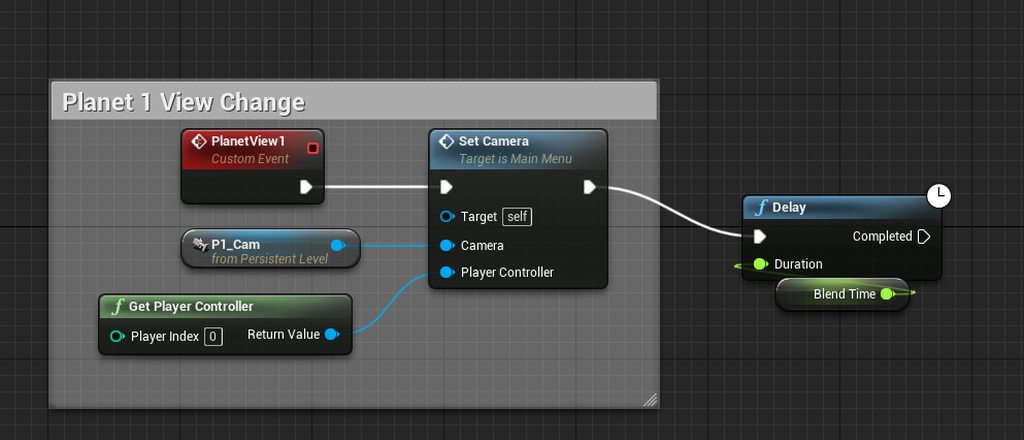
Hey guys, I'm working on a 3D Main Menu with a blueprint-driven camera switch. There's one thing that won't work well. I would like to be able to switch the camera while the blend is still running without starting the new camera blend from its origin. The new blend should rather transition smoothly while blending mid-way. Maybe there's a sensible way to for example just use one camera instead of 3 and just transform using animations. Someone got any experience with this kind of problem? Here's the code: https://imgur.com/a/2JI1Hmv and here is a demo of the current logic in-game: https://youtu.be/MQp0XnxkPf8

 frigid coyote
What is the proper way to calculate character direction in relation to the camera? I tried this unsuccessfully and not sure where my calculation is wrong.
thin rapids
just get the camera's Z rotation and make that a rotator (x = 0, y = 0, z = camera's direction)
frigid coyote
That is what the bottom portion of the screenshot is doing. That doesn't account for when the actor has turned to face the same direction as the camera.
thin rapids
try getting the control rotation z axis
or just the control rotation
i dont remember if that just takes the direction to a count
atomic prairie
Hey, I would like to make a Loading Screen, because when I change Level, there is a wait on the old level and the textures of the next level load again when we get into it..
I mostly saw tutorials for adding a widget and a timer like 15sec, but I would like the loading time to be linked to the real loading, a tips or tutorial for me?
 hot wedge
how can i create a corelation between my objects speed and a lights intensity?
how am i supposed to turn my velocity vector to an integer to use as intensity?
midnight ravine
Hey, I would like to make a Loading Screen, because when I change Level, there is a wait on the old level and the textures of the next level load again when we get into it..
I mostly saw tutorials for adding a widget and a timer like 15sec, but I would like the loading time to be linked to the real loading, a tips or tutorial for me?
@atomic prairie https://www.youtube.com/watch?v=6CkR6KG2znM

Announce Post: https://forums.unrealengine.com/showthread.php?117187
Alan Noon is back in action and ready to demonstrate one of the most common features in every game; Loading Screens. Through using UMG, Alan explains how to set up a screen to hold the player's attention whi...
Loading screen seem to be non-trivial to truly implement
atomic prairie
Thx i will watch that and try!
tight schooner
@hot wedge I don't think I have the full context of what you're up to, but assuming the vector represents average distance traveled per second, you could plug it into a VectorLength node and get a float out of that.
(if it represents distance traveled between the previous and current frame, you'll have to divide it by GetDeltaSeconds first to make it frametime independent)
 analog hill
I'm trying to calculate the angle between two vectors. By using the Dot Product the Green and the Blue vectors are indistinguishable. How would I go about calculating this?
heavy lion
I want to create a variable on an actor BP that is instance editable that allows me to select a type, a list in a dropdown menu. Any ideas?
severe rune
@heavy lion if I understand correctly a Enum would suffice for that?
heavy lion
@severe rune Ofcourse! Thank you.
analog hill
Yep. Enum.
tight schooner
@analog hill Maybe you could do it in rotation space by converting the vectors to rotators and using a Delta Rotator node
and get a pitch/yaw/roll differential out of that
analog hill
I ended up with this, that's working for me, but I'm going to look into your suggestion, too. Although mine works, I think with a different implementation I could make some things a little better
I'm calculating the "direction" of the thumbstick on a gamepad, I'm normalizing a vector created using the X/Y from the thumbstick there at the beginning, then calculating the "look at" direction to that.
heavy lion
Anyone know if it is possible to get a reference to a spline actor, or better yet a point in a particular spline actor?
I am wanting to do a check to see if I am near a road. But obviously the spline actor for the road will be quite large.
I think it would be better to get nearest road actor, find all the spline points within that road, check if any are under certain distance from the player
tight schooner
@heavy lion there are a ton of spline-related nodes available so yeah you should be able to do all that in-box
a Find Transform Closest to World Location node can do what you want
without checking each individual spline point
heavy lion
I do want to check for the spline points
So first I get all actors of class, which is "BP_SplineRoad", then do a for each loop?
Add all the spline points to an array?
tight schooner
You get the spline component from the actor and use any number of the spline-related nodes. If you open up the Palette window in the BP editor and scroll down to the Spline category, there's a whole catalog there.
I'm not sure what the most optimal way to do it for several splines actors would be, though. If you have a maddening number of spline actors in the world, maybe narrow the search with a SphereOverlapActors? (Would a SphereOverlapComponents work for getting the splines out of them quicker?)
 neon remnant
I have a spring arm attached to my gun so it will lag behind the camera a bit is there a way to simulate recoil using the spring arm or am i going to have to use animation for that
pine trellis
is there any way to have a character be able to walk around a cube shaped object if I am using a no gravity pluggin?
everytime I get to the edge of a cube or box the pawn falls off, most gravity plugins wont let you walk up a box
 maiden wadi
Not really sure about the plugin, but in general if you want shape oriented movement, the best way to handle it is to create your own. Making your own movement component is actually rather easy with a few line traces and set locations so long as you're not looking at replication.
@neon remnant Really depends on which kind of recoil you want. Real recoil where the player needs to drag the mouse down while firing? You need to add to the player's aim pitch. For fake recoil a lot of people rely on the camera shake effect. Best effects use a mixture of both.
neon remnant
id like to use fake recoil on the spring arm like add a impulse to it or something
ill do aimpunch later
 old aspen
Weird question, but does anybody know if the Reference Viewer correctly works with Maps or Sets? Seem to have a situation where I know an asset is contained in a map in another asset, but that relationship isnt showing up
 devout condor
is there a way to replicate the camera?
I'm trying to get this to work for multiplayer
 short pawn
Hi is there a way to stop a group of blueprint nodes from firing once triggered? I want my game to do either this or that once triggered and stop the other one from continuing
@devout condor do you mean create a new one? if so maybe try spawning one at the location?
devout condor
@short pawn have you tried the do once node? its hard to understand what your tring to do with out any visual
what happening is there is a turret mounted on the back of a vehicle, and it supost to look where the camera is looking.
it works on server but not client, even client's own turret won't move
short pawn
I have 2 super long blueprint node lines with delays etc. I want to stop all of one of them from executing if the other one is executing. @devout condor
can you attach the camera directly to the turret?
or vice versa
devout condor
@short pawn try this?
devout condor
I trying to set up the turret is such way the driver can use it if there isn't a second person, its a little difficault
what do you mean it stops?
short pawn
the blueprint only stops
i want all of the blueprints to stop , not only if it hasn't started yet because it has delays etc
have you tried findlook at rotation node @devout condor
ok i have to go goodluck
zealous moth
@short pawn timers; you can stop a timer with a timer or even itself
pine trellis
how expensive in ray tracing? does anyone know?
zealous moth
depends, are you doing it once? or on tick?
 tiny meteor
Unreal Engine Forums
Build powerful visual scripts without code.
does anyone know how to implement this in BP?
voidAInspectable::ArbitraryAxisRotation(const FVector& POVForwardAxis, const FRotator& InputRotation)
{
    const FQuat POVQuat = POVForwardAxis.ToOrientationQuat();

    const FQuat RollQuat(POVQuat.GetForwardVector(), InputRotation.Roll); // X Axis
    const FQuat YawQuat(POVQuat.GetUpVector(), InputRotation.Yaw); // Y Axis
    const FQuat PitchQuat(POVQuat.GetRightVector(), InputRotation.Pitch); // Z Axis

    const FQuat DeltaQuatToApply = PitchQuat * (YawQuat * RollQuat);
    this->SetActorRotation(DeltaQuatToApply * this->GetActorQuat());
}
if you want to implement code try the cpp channel
tiny meteor
I want to make it into a BP network
 sand shore
they wanna do quats but in BP
zealous moth
quaternions?
tiny meteor
well, it looks like quaternion functions are in BP now
sand shore
since when?
tiny meteor
is there some other way to rotate an object along screen space axis without quats?
not sure, think it was 4.22
sand shore
🤔
zealous moth
@tiny meteor not sure i understand what you mean... i briefly checked the thread and i don't know what they are trying to do either or for what purpose but what you can do based on that picture gif is to set up rotators and store in vars the angles; then, using vectors, find the difference between where the camera is and where the object is in 3D space and substract again. End result is that no matter where you are, your input rotation will show as desired
tiny meteor
they are trying to rotate an object along the camera axis
zealous moth
is this for runtime or the editor?
tiny meteor
runetime yeah
zealous moth
then yeah, vector math would do it
devout condor
ok so I have a turret that has a animation based on the cameras location, and it don't seem to work in multiplayer
Is ther a way to replicate the camera's position, or any other work around?
devout condor
I don't understand?
frozen spear
@short pawn have you tried attaching the code to a flipflop node? Or have you looked into gate node? Both of those or a combination of them could accomplish what you want...not sure of the effect of the delay nodes in your code tho but chances are they can be switched out with timers instead as suggested above...since you can cancel a timer by handle or function name at any time...which is the same as stopping a delay(which im not sure is even possible)
short pawn
I have tried flip-flop @zethfox but I want to stop the blueprint after it's already been triggered
@frozen spear
frozen spear
Then you need to change the delays to timers can call invalidate and clear timer by function name or handle as you start whatever is supposed to stop the other line of code
short pawn
Hmm OK thanks I'll try that
 astral tendon
Generally, what's the best place to handle input for a simple multiplayer project? The player controller or the pawn?
 round torrent
does it matter that it's multiplayer?
you want to handle pawn-specific input in the pawn, and game-specific input in the controller
in a game where you can run around in a character and then enter a vehicle, you want to have different inputs when it comes to running and driving, but maybe you'd like to open a quest log or something regardless, so that would go in the controller
astral tendon
I guess it doesn't.That makes sense. Thanks for the help.
sand shore
where do you set these to true?
@trim matrix
Well cool
I'll ask no questions about your setup. I'll only work with what I've been shown.
No idea mate!
Looks like it could all work out from what I've seen. Something is tricky about it.
Cause you got a thing where you can dash if a variable is >= 0... that's neat.
You've got a mechanism which increments that once every 2 seconds while below 3. Looks like that can get stuck if you run completely out. Maybe that's the big problem?
You also presumably toggle on these bools based on the level or the position of mars. Doing something mysterious with a uniform rotation before you subtract one from your "stamina" variable.
 hollow geyser
This might seem like a simple problem; how do I map 2 actions to 1 button? In the same way you can tap or hold on a touchscreen to do different actions, I want my spacebar to jump when tapped, but crouch when held. I tried to do it alone but could not figure it out.
sand shore
Best solution for that involves timers. https://docs.unrealengine.com/en-US/Gameplay/HowTo/UseTimers/Blueprints/index.html
@hollow geyser (editing to tag you cause flooded)
A How To Guide for using timers in Blueprints.
Press the action - start a timer. The event that the timer calls should be the hold action.
On release, check if the timer is still active. If it is, cancel the timer and do the tap action.
severe rune
@trim matrix You never reset your Do Once in roll regen if your float >= 3 (which im assuming is the default), try replacing that with a clamp to keep your float within your required bounds and that might make it work.
severe rune
If you hit that Roll Regen with that float variable set to 3 that's going to lock up
sand shore
severe rune
The branch is whats doing it
Do Once's aren't scoped to the event, they're scoped to the actor, so the 2nd time its called its never been reset
sand shore
No it is.
Unless he hits it with 3 or higher
I mean there's like 3 or 4 things to fix here
round torrent
what if he gets below 1 dash, then canroll is set to false, which disables him for regening?
sand shore
yeah that's another problem with it
severe rune
That's because you're incrementing by 1 each tick
If you change that float add to 0.01 it'll slowly increment
sand shore
Cut to the chase. Lerp it
Interp To is the easiest way to get a satisfactory increase over time
It's an application of a lerp
which is linear interpolation
All the things that are "CanRoll" could be replaced with
Dashes >= 1
Just delete Roll Regen
that's replaced with your InterpTo
round torrent
and avoid using "False" as the major point forward, it's just slower to think that way
sand shore
Try to practice keeping your graph clean
Top one
That goes directly on tick
Dashes goes in "Current"
Target would be 3
Delta Time is Delta Time
Interp speed should be .5
Take the output of that interp to node, save it as your new Dashes value
it'll never go above 3, you'll get 1 dashes back per 2 seconds, and it smoothly increases.
You can remove the delay
severe rune
And you'll want to sort out the canroll bool too
sand shore
CanRoll can go
Flip this around to Dashes >= 1
Connect it to this first branch
Both of these would be gone
You have your class check - that could probably go somewhere other than on your tick
But the interp and set - that needs to be on Tick.

What are the FInterp Nodes in Unreal Engine 4 and how can we use them to make a mouse scroll zoom in and out for a 3rd person camera?
Source Files: https://github.com/MWadstein/wtf-hdi-files
Close
What are you doing when you press shift?
Make the changes suggested and re-show the graph
You probably want < 1 and not <= 1
Otherwise, you have one dash and you can't dash. You have to wait one frame.
Up to you. Does it work?
round torrent
why is interp speed 0.3?
sand shore
¯_(ツ)_/¯
take a little over 3 seconds to get an increase of 1
Not what was originally there, semantically, but hey. The thing works.
round torrent
how'd you calculate that?
round torrent
dT * speed = ???
the thing is that FInterp has easing, so it would be a lot quicker to get the first dash than the third
 unkempt fjord
hopefully this is an easy one. On a UI button click, I want the NPC to play a particular animation. I'm casting to my NPC dialog blueprint but i don't know what to plug into object
any help is appreciated
round torrent
you plug in the NPC object of course
I don't think I get the question
you're wondering how to get that NPC from the widget?
unkempt fjord
whew, I'm pretty new to this but im trying to work my way through it best i can. In my user widget I have an on clicked button event. When the ui button is clicked, I want the skeletal mesh in my NPC blueprint to play an animation. The only way i know how to do this is to cast to the npc blueprint and use the skeletal mesh connected to the target of play animation. But I don't know what object should be plugged into the object slot of the 'cast to npc_dialog_delayed' node
round torrent
you phrase the question so weirdly, of course you know what to plug in the object slot of the cast node, right?
unkempt fjord
I don't
unkempt fjord
ok, even better
round torrent
casting is only so you can access the specific functions of a class
unkempt fjord
ok
round torrent
so for example if you use Get PlayerController, then you want to cast it to YOUR BP_MyOwnPlayerController so you can use a function you have created in that
but here you don't even have the NPC object
you can't cast to it if you don't have it
unkempt fjord
If i use "get player character" and plug that into play animation target, it plays the animation on my player character, I just don't know how to get the animation to play on the NPC instead
round torrent
and if you have it, you don't need to cast to it
unkempt fjord
ok, so i need to get the npc object inside the widget it sounds like.
round torrent
well, there are many ways you can do it
first, I don't really like the setup... should the UI really be responsible for the NPC playing the right animation? I think the UI should be really dumb and just say "hey, I was clicked, YOU choose what to do with this" (it's saying this to the NPC)
so I'd create that animation function in the NPC
and the NPC creates the widget, right?
when the player presses F?
unkempt fjord
yeah
round torrent
that's also weird, by the way, but ok
what else can the NPC do when it creates the widget?
could it perhaps... set itself in a variable in the widget?
unkempt fjord
ultimately, I would like the npc to play different animations based on what dialog path is chosen
round torrent
you go to the widget BP, create a variable with class of your NPC
then when the NPC creates the widget, it can access that variable and set it to itself
round torrent
yeah, what do you mean tried?
unkempt fjord
well, i ran the game and it didnt play the animation when i clicked the ui button
unkempt fjord
round torrent
you have only told it what object to expect
now you must set that object
and I suggested doing that in the object itself (the NPC) because it already creates the widget
so it knows the widget, and it obviously knows itself
so it has all the knowledge it needs
after you create the widget, you drag out from that object and set the variable NPCTest
unkempt fjord
i think im in over my head, if you're growing impatient i understand, otherwise thank you for your help
round torrent
yeah that's correct, now you only need to actually drag something to the NPCTest variable where you set it
cause now you're setting it to nothing
unkempt fjord
in the details panel i set it as
round torrent
nooo
that's not setting it
that's telling it what variable type it is
it's referencing NOTHING
when you set it, you say "now you reference this thing"
what thing should it reference, then?
round torrent
wait, that screenshot is in the NPC, right?
unkempt fjord
yeah
round torrent
you did it right before
i don't know what this is lol
go back to the way you had it
and show me
unkempt fjord
round torrent
yeah
so now you only need to plug something in to the NPCTest slot
but you're already in the NPC
so what do you plug in?
unkempt fjord
no clue lol. I was hoping Skeletal mesh would be the answer, but it won't allow me to plug it in
round torrent
haha well
unkempt fjord
round torrent
you see in the top left there
it says NPC_dialog_delayed (self) or whatever?
if you drag that out
or simply right click and type self
 hallow night
So i'm trying to get the output of this custom event
round torrent
that's how you get a reference to self
unkempt fjord
is my NPC_test variable set correctly? I have the variable type set to my UI widget blueprint
well, I appreciate your help 1cg, I don't know if we're going to solve this. Feels like im close, but i just don't have enough knowledge about how to put this together without learning from a working example
 abstract socket
Is there any sort of State Machine that is not for animations?
round torrent
behavior trees sort of come close?
trim matrix
anyone know how to modify global gravity z in bps
abstract socket
@round torrent I wanted to use FSM to handle my turn-based combat system
round torrent
I mean it's not really advanced stuff, you could easily create your own state machine
 rotund basalt
I found it weird how some people create Blueprints that are like the most giant thing that has ever existed on this planet, this is my largest one in my game it doesn't get larger than this.
Excuse the horrible organization
 burnt nest
bigger is always better, what else do you want to hear 😏
abstract socket
@round torrent Absolutely, but I wanted to find something to prototype with
trim matrix
anyone know how to modify global gravity z in bps
 worthy frost
is that on tick @rotund basalt
faints
use event driven :/
use timers for things that dont need to update every frame
:/
gloomy linden
@trim matrix Have you tried to google it?
round torrent
doesn't look to be that much in tick
worthy frost
lol ok..
round torrent
like 11-12 nodes
gloomy linden
anything behind event tick is too much
worthy frost
Tick is fine, for things that have to happen every frame
hover for example why does that need to be checked every frame
use tick, don't abuse tick 😄
 shut vapor
I am not sure why, but my landscape grass material is not working (I am not seeing the grass populate on the material layer)
rotund basalt
It was way much before, I reduced it by a lot, still will
thats why i keep reminding myself
but I just have 1000 other things to focus on
round torrent
@time have you tried just to sample the grass layer?
gloomy linden
how is it "ASAP" if you have 1000 things to do prior? 😄
round torrent
and you have set the right grass type?
round torrent
yeah landscape grass type
shut vapor
round torrent
the thing you choose in the grass node
shut vapor
it works if i paint it manually with foliage painter
round torrent
and you're sure you set it in the grass node?
shut vapor
what do you mean?
the Sample 'GRASS' node?
I just wrote the name
of the layer
thats my 3 layers
round torrent
but you have to select the grass type in the grass node, how else is it supposed to know what to spawn?
round torrent
yeah
shut vapor
its 500x500
round torrent
500x500?
shut vapor
yea, the size of my map
round torrent
500 cm x 500 cm?
round torrent
sounds enormous!
shut vapor
its not that big
round torrent
yeah that's meter
round torrent
im spawning grass on 4000x4000 so it's definitely not that
round torrent
nothing to build
shut vapor
yea
shut vapor
ye
round torrent
you're sure the GRASS layer works? you see the texture?
round torrent
yeah i dont know, it doesnt say "building grass maps" in the bottom right corner when you save the material?
cause it should
gloomy linden
how far away are you from your landscape?
gloomy linden
...
gloomy linden
it adds the grass in chunks
also the culling distance is working, so if you're too far away you wont see it as its not being rendered
shut vapor
yea the culling is working
was it because i was not waiting long enough?
because I moved close with all attempts
anyway
thank you a lot @round torrent
and you as well :) @gloomy linden
 south elk
im trying to make a widget a appear/disappear via a collision box but every time whilst the character is inside and and i starting clicking this happens: https://media.discordapp.net/attachments/653371951007662080/709780948652261476/unknown.png?width=1004&height=229

is there any1 here that can help me fix this?
round torrent
probably, since it tells you what the problem is
fallen glade
Could someone take a look at this and see if you can think of something?.. Basically I construct a line consisting of points 50 spline units apart. Everything is working though, sometimes, when the line has to jump from opposite distance there is an interpolation issue because points that are further from their new destination take more time to arrive ... https://www.youtube.com/watch?v=isg4cX4H-yM


I've tried correcting interpolation speed by distance to previous location but then the problem reverse itself
this are the actual construction points
 vagrant radish
Hi, not sure if this is the right place to ask
if I want a character customization screen in a 4 player co op game, would that be in a separate scene or would it be in the same scene (its also in a different environment)
 jolly trail
I would certainly do that in a separate scene
But that is just my preference and I believe it's just logical to do it that way
vagrant radish
@jolly trail thank you,
so its a very simple system i have in place, just changing the Hat of the character ur playing , would i save the hat they chose in persistent data (game instance)? and then use that in the actual game scene?
would that be the workflow?
jolly trail
You'd have to ask that to someone else unfortunately, can't help you there
vagrant radish
Ahh Alright! Thanks a lot regardless! C:
jolly trail
Good luck!
vagrant radish
Thank you!
jolly trail
Anyone got an idea here why items dont want to be added to my inventory anymore after a build? before it it works perfectly
here is what i use to add to my inventory
it prints and does everything right but just nothing gets added to my inventory
rancid current
Hey, sorry to interrupt, but how can I make my skeletal mesh rotate with the mouse only when I am moving?
zealous moth
@fallen glade try assigning penalty scores to the spline as it generates; if the length can be shorter, it should pick that one
@jolly trailhow far does it go and do you get any errors?
@rancid current sure, since the move towards camera is a boolean, you can set it up so that only when you input something other than 0 in your movement it follows
rancid current
My main problem is getting it to rotate is there any documentation on that?
rancid current
Ok
 tender glen
Hey does anyone know how to move blueprint object in a smaller scale unit, currently my scale is at 10 unit i would like to make it 1 unit
jolly trail
@zealous moth Well it goes all the way trough which is confusing, after i pick it up i can open doors with it, it just doesnt show at all
this is the itemstructure for the item i'm trying to pick up
zealous moth
if it works all the way through then your custom inventory function is skipping something
trim matrix
Is there a simpler way to get a proper sign function? (+1, 0, -1)
The built in function only returns +1 and -1
 alpine halo
this is the itemstructure for the item i'm trying to pick up
@jolly trail if the item is stackable. The slot should get maximum slot size and then after the remaining quantity should stor into next inventory slot
zealous moth
and remove all that other crud
severe rune
The built in should return -1, 0, +1 as far as I've seen?
alpine halo
Like if we pick 6 of that class of items and if the max stack size is 4 then 1 slot should store 4 of that class of item and 2nd should get 2
zealous moth
@severe rune his function is super redundant for nothing
and there are stuff in it that don't make sense
severe rune
@trim matrix But I agree with Zanet - Normalize might be what you're looking for on the vector - it returns a vector of length 1
trim matrix
To make this part clear - Start location is world location and Target location is relative location
zealous moth
that doesn't make it clear, that makes it even more confusing
your relative loc will not be the same vector at all
but regardless, you are adding a start pos and removing it
you might as well not add it in the first place
like i wrote: 1 - x + x is 1
why not add the start pos 10 times and remove it 10 times?
why only once
round torrent
optimization
zealous moth
lol
trim matrix
I was only looking for the sign function
elfin hazel
Just looks like a gate fused with a sequence, plus some options.
 prime copper
Has anyone got an implementation of the web browser plugin that works?
I did a tutorial last night and got it displayed
made the 3d widget and put it on a static mesh, set the web page up in the web browser settings
and it played a youtube video
this morning it doesn't work and I've gone mental
when I move the object around, I should even see the 1980x1080 window dragged along with it and I don't even see that
prime copper
https://www.youtube.com/watch?v=ODvbDVZ2AOc This is the tutorial I used, so if someone has a better one, pls don't be shy
dm is ok
I got it working but there must be a better way to drop YT videos in a project than this
In this Unreal Engine 4 tutorial we'll look at how to create a web browser you can use within the game world on a screen. This is done by using the experimental functions web browser and 3d widgets. The PC monitor static mesh I use in the video can be downloaded here: http://u...
zealous moth
to be frank, browser UE4 is not that popular :/
 pulsar orchid
Anyone know why my character isn't spawning here...
But rather here...
The Game Mode for the level is set to the correct game mode, the default Pawn is set to the ThirdPersonCharacter
But if I manually spawn a ThirdPersonCharacter and possess it, the player will spawn at the correct location, using the PlayerStart's Location. I'm not understanding why it isn't working by default.
zealous moth
does the pawn have auto input?
pulsar orchid
Auto Input as in Auto Possess Player? That is Disabled.
zealous moth
set it to player 0
pulsar orchid
Will do
Did not fix. I opened a brand new level, placed a cube, a light and a player start - It works. So I'm wondering if it's something with my Game Mode, since that one has no Game Mode Override?
Nope, that didn't fix it...
Nothing in my Level BP, nothing in my Game Mode BP being triggered (disconnected all exec event pins.)
trim matrix
Is a macro available through all blueprints?
 slender fjord
hey guys,
been looking for a way to keep an actor refrance after I destroy it to remove from game so i will be able to respawn the actor again with the same info on the variables in his structure
trim matrix
accessable*
slender fjord
any ideas ?
trim matrix
Just hide him
slender fjord
i checked this option but there is so much to the actor like collision mesh and more also an ai controller
just seems like there should be a better option
trim matrix
you can hide the root actor in the blueprint
so for a player you can hide the collision box and check that all parents should be hidden too
trim matrix
I think there are other ways too but to your situations its the only easy solution
slender fjord
and a boolean for is hidden will stop the controller so i will use this for now
if anyone know other way let me know please
@trim matrix Thanks again
severe rune
@trim matrix for a macro to be available for all blueprints you need to create a macro library for the object class.
trim matrix
Ah okay thx
 true valve
Can I use different game modes in persistent levels?
I have a main menu level with its own game mode. Then I want to load streaming level to my gameplay level and use another game mode.
 fringe kite
@true valve there can only be one game mode per level, otherwise there is two players
true valve
Then how do ppl create game menu in persistent levels.
 haughty crypt
Hey everyone, I was wondering, it seems like my sequencer destroys itself in about 5-6 minutes, is there a reason for that?
trim matrix
Hello!
This is a rather basic thing but I can't seem to find any answers on Youtube and I'm still learning unreal. Simply put, I just want to create a text render that I can stack text upon. the same way you are reading this sentence right now. How do I go about doing this?
 manic cloud
I’m trying to figure out how to create a modular character that can be used in game dev. I can’t seem to find any tutorials on this subject. Anybody know a good tutorial on this? Kinda like this: https://syntystore.com/products/polygon-modular-fantasy-hero-characters

Synty Store
Epic 3D assets for Unity and Unreal Engine in a low-poly style, featuring modular character pieces to mix and match, creating thousands of unique character models for your fantasy style games. Polygon series 3D models by Synty Studios.
 golden kite
great, is valid node is giving accessed none error
prime copper
Anyone got a screen shot of this using a box trigger to spawn and destroy the object? I can use the On Actor Begin to spawn the object, but the same thing can't be used as a trigger to destroy.
hollow cape
@golden kite show code
golden kite
what do you expect
code itself is gigantic
oh, its gone, now something else is giving me accessed none error
it doesnt let me see which branch is doing that
 sonic crescent
hi, disturbing again with a newb question. Is casting to get variable from actor really slower than using local variable?
 feral granite
For some reason I can't override the HUDClass for my game mode in the editor. It is greyed out. Any Ideas why?
Is it because my GameMode is a C++ class and not a blue print?
Yes it was the case
 wet hound
How can i attach static mesh spawned from another class to a socket?
i hae 2 mesh in it?
jolly trail
@alpine halo Well the item i'm trying to pick up isn't stackable, it's just one key
 late cave
can I reference a material parameter collection directly in blueprints without creating a variable for it?
 sick sapphire
How do I make a simple loading screen where it will show another level, then load the actual level when it's finished? How do I use the level streaming nodes?
devout condor
are there any alternative to useing the camera to aim?
late cave
This did not work...
 wet siren
@late cave that's the wrong format for object path
object path is {type}'/Game/{path}'
I recommend making the variable, then connecting to "Get Object Path" and printing the result to log, then copy the path that it gives you.
@sonic crescent the answer is "yes, maybe". it will depend on your specific use case, and even if it is slower, will it affect your game? the best thing to do is profile and see if there is a meaningful impact
@wet hound yes
@sick sapphire you are describing a Transition Map :)
sick sapphire
@wet siren ah ok thx
wet siren
@golden kite is Target valid?
golden kite
yes, it checks if its valid before
wet siren
can we see more of the bp?
@trim matrix Trying to create text in the world? or on a UI?
trim matrix
in the world
I've had to basically stack
text renders
creating a ton of text renders in a blueprint
and then moving them ontop of each other
is this how it's done, instead of for example hitting shift + enter
like here
wet siren
you can use shift+enter to get a newline