#blueprint
402296 messages · Page 454 of 403
 hollow cape
 covert stirrup
you basically need to bind it every time it needs to change
 maiden wadi
Generally speaking, you should put this stuff in the weapon. The weapon should be swung and on overlap apply damage. Then you handle damage in the separate actors. It shouldn't matter whether there's a player or an AI using the weapon if it's set up correctly.
hollow cape
I misunderstood, yes, begin play would happen once on the character. But you know when you're spawning new weapons, so that's when you would handle unbinding/rebinding things
Completely agree with @maiden wadi
maiden wadi
@unique flicker Do you know the difference between a class and an instance?
hollow cape
Nope, not if it's set up without hard coded high level casts or something
Probably not a bug, but something with the way you scripted it
maiden wadi
Then you programmed it oddly or misused a reference somehow.
hollow cape
Let's back up
what's the intended purpose of this on component overlap
are you making a physics based game?
maiden wadi
When you place the weapon in the character's hand, use the same execution line to set owner, and pass a simple actor or character reference into the weapon, that'll be their owner. Then in the weapon's overlap, you can just ask if the actor overlapped != owner.
hollow cape
There are other ways to handle that, like a simple distance check between the player char and the enemy during the "melee" attack sequence, but yes I usually pass a reference to the owner via an exposed on spawn char variable on the weapon/held item
Be mindful of overlaps, you may find quite a few instances of it failing to register an overlap at high speeds
It'd depend on your animation speed
Same concept, but a capsule collision is going to generally be bigger than the actual mesh collision
But yes, that would help
distance checks, sphere trace at a certain point in the animation, etc
Anim Notify's are your friend
maiden wadi
I don't think I've ever seen a problem with any sort of collision that wasn't solved by correct implementation of collision from the model or channel settings. The only reason people go with capsules a lot is because they're cheaper. 200 some faces of collision is usually cheaper than a mesh with 10,000.
hollow cape
You can use the component bounds in the construction script to "auto" size it, but it may not be perfect
@maiden wadi high speed animations will often lead to failed overlap triggers
maiden wadi
Fair, if your animations are too fast.
hollow cape
But Authaer is correct, a collision volume (simple geometry) is going to be cheaper/more optimized than a components collision geometry
@unique flicker No
Yes, you can try using component bounds and use that data to size the capsule
It's honestly not worth the effort, unless you're processing hundreds of weapons
mmmmmm no, but I can make one
maiden wadi
I saw someone implement something with a series of small spheretraces along the animation path for the speed issue.
hollow cape
Yep, traces are going to be more reliable if implemented properly
and you often want to trace from a small distance behind you in the animation forward
so you're always catching any missed frames of motion
Not tested much but this is the concept
Well you would want to define a trace start location per weapon
Nothing is going to be fully automatic, but you can do math to create a system to "process" new weapons and set up the parameters you need
🤷 because that's what I did
You can do relative as well
It scales a capsule collision to fit a static mesh
Construction Script is for constructors
It fires on compile, and placed in the world it fires on movement as well, something to be aware of
like if you drag it around the editor
maiden wadi
No. Only when it moves in the editor. It only fires once before the object is actually spawned when you use it in game.
hollow cape
No
Yep
Sequence of events when you start a game is Construction -> Begin Play -> Tick
So imagine if you have a BP for a car, but you want to be able to define the color of each car in the world in advance. You could create a dynamic material instance in the construction script, expose the color param value, and set it per car in the world
Constantly change
Because it re-triggers on every editor move, compile, and starting the game
No, it's nothing like event tick
Nope
maiden wadi
Each character would have a random color if you spawned them into the world. But if you move it in the editor, it would constantly change.
hollow cape
If you set it to pick a random color in construction, every time you compile the BP, or move the actor in the world, it would change colors
When you click "Play", the constructor would fire once
but not again
Correct
maiden wadi
The construction script is very useful, but do take care with it. I've seen some people do incredibly dumb stuff with it.
hollow cape
Assuming you didn't do any kind of save logic for the color, correct
Yep, you can destroy your level with it, crash the editor, etc. Be mindful of it
It's GREAT for setting params, like the intensity of a light per-instance or something like that. But be mindful that it will fire on every compile, and every drag/move of the actor at editor time
However you want to do it, it would work just fine as I showed in the constructor
 keen pendant
I'm an effects artist, so I don't have much experience in something I'm trying to do and wanted to ask for help for a personal project. I have a blood effect I want to put on a mesh when a bullet impacts them. That part is pretty simple: line trace with on-hit for the target. But the second part: dismemberment of a meshes body parts (maybe a decapitation) is where I'm lost. I've seen there are multiple ways to do this (toggle visibility, replace with different mesh, etc.) but I wanted to ask for advice on how best to approach this?
 frozen spear
Its gibbing...if you dont know the actual name...you gib the character...usually requires taking the character and chopping its mesh into a bunch of predetermined parts
I swear i seen someone make a choas destruction version of it too...where it lets the engine handle the gibs but either way its a pretty advanced tech
It would be done almost exactly the same as a modular armor system but instead of adding armor, you disable the visibility and spawn the part as a mesh with simulate physics
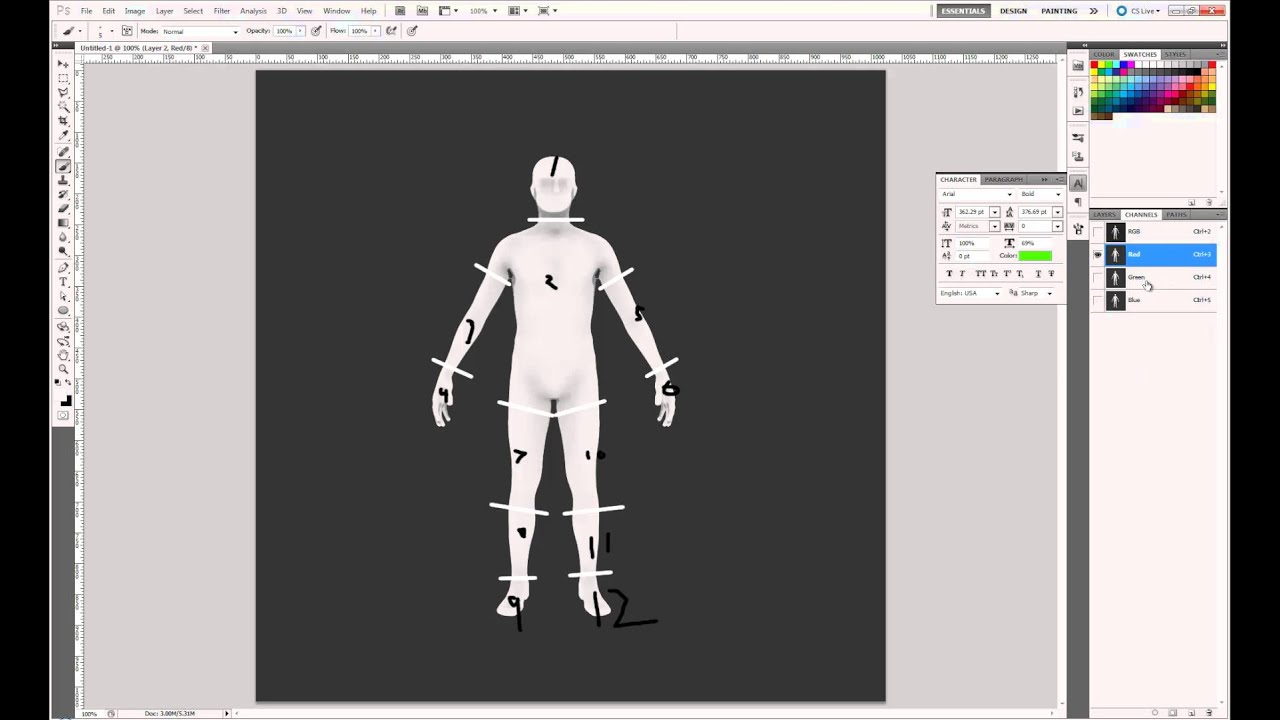
How to break apart a character for severed limbs without introducing seams into your seamless character.
Pt 1. Setting up the UVs and the masks.
This guide is what i book marked when i did it about a year ago
 neon perch
Hi! Weird question. Is there a way to fire something only when something stopped executing? Like something that fires when a gate closes for example
frozen spear
If its atrached to a timeline node is one way @neon perch
neon perch
Hmm, without that, as the execution can take arbitrary amount of time
 rough wing
How to add a moon to the sky sphere:
https://youtu.be/hiumJUeRsfc

Hello devs! This video I showed how to calculate time of day and add a moon to the sky sphere. I hope you find this helpful.
How to make a day/night cycle:
https://youtu.be/yg4ElvNy7es
Target: 150 SUBS! GETTING ...
neon perch
@frozen spear Thanks for the answer though!
keen pendant
@frozen spear this is a great starting point. Appreciated/
frozen spear
@neon perch if what you want to happen requires an animation to be completed you can add a custom event notify to the animation
And fire off the event from the animation completing that way
If its not linked to any animations...you can use trigger boxes...if its collection based you can check against the amount required
The question is a little bit vague
frozen spear
You can add custom event tracks in the timeline too
That when it reachs halfway you can do stuff like trigger special music or sound
neon perch
I'm rolling my own OnMouseOverlap system
frozen spear
Just open the timeline and "add event track"
And put a "key" at the time you want special stuff happening...give it a name and it will appear as a exit node that fires at that point
neon perch
Yep, thank you
frozen spear
Np, @trail crane actually deserves the thanks tho...i learned more from his channel than the 700+ hours of udemy courses
neon perch
Oh he's in here? Amazing, thanks @trail crane!
neon perch
Yeah, learning blueprints would have been much more painful without him
 serene thunder
Has anyone used Navmesh Walking on Character Movement successfully? It solves a lot of problems for me, but all overlap events are gone. Like, all of them. Triggers are not hit, bullets are flying through characters, hits not registering.
I get it why physics collisions may be disabled for navmesh walking, but overlaps?
frozen spear
Make a custom collision channel for your physics bodies to overlap?
 zenith sun
Hey guys. I was thinking... Why are the random functions from stream Pure? I would expect them to not be, so that when I want a new random from stream i'd make sure the execution flow makes a new function call
right now I have to cache the resulting random value each time I wanna reuse it
any thoughts ?
serene thunder
@frozen spear Custom in what way? Are you saying that Navmesh Walking disables all standard object and trace channels, but custom are going to work?
Actually, did a quick test, and it seems to disable only WorldStatic and WorldDynamic, everything else is unchanged. Thanks for the hint.
 tight venture
I have a question about timelines. Since you can't use timelines anywhere except the Event Graph (afaik), how do you do things over time in a function?
 keen goblet
@tight venture I'm not really sure that you can. Functions can't have latent actions, including timelines and Delay nodes. I don't think macros can use timelines, but they can use delays.
tight venture
hmmm... so... I want to "pulse" the material on a mesh, i.e. fade its material's opacity (parameter) from say 0.4 -> 0.0 over maybe 0.3 seconds, over and over again, while some condition is true (in my Event Graph). The Pulse() function is a function of the blueprint which contains the mesh.
Either I:
- Change Pulse() to Pulse(float&) and pass in the value from the timeline (the float) to Pulse() and, inside Pulse(), that float value should be constantly updated (by the timeline), so I could just do a while(timelineValue > 0f) { update Material... }
or... ?
that's the only idea that comes to mind
as long as I ensure that timelineValue will always reduce down to zero, even if the timeline is cut short (so Pulse() doesn't get caught in an infinite loop)
that should work, no?
keen goblet
@tight venture My first thought is to make a looping timeline that goes from 0.4 to 0.0 over 0.3 seconds. You could feed that value into some UpdateMeshOpacity function, using the float input as the opacity. Whenever the condition you're checking becomes False, you can call Stop on the timeline, and likewise PlayFromStart when the condition becomes True again.
 ancient heath
this keeps printing errors in message log. Says it's attempting to read missing property (that's in update animation event)
tight venture
okay, thanks @keen goblet, I'll try that
serene thunder
@ancient heath I also save a reference to owner character in (just in Event Blueprint Initialize Animation) and use it without issues in Update Animation.
ancient heath
then I'm out of ideas
serene thunder
Maybe it has something to do with types changed? Try Refresh All Nodes in anim bp.
serene thunder
Oh, good. I can't remember why I used init back then, probably for the same reason.
I guess it's some kind of initialization race.
ancient heath
yeah
gotta be
though I have no idea how the whole thing still worked if it didn't get the correct reference
frozen spear
not bad practice at all, especially since you wont need to cast against the owner of the anim again, you can just use the ref
i mean later on when you start adding specific code for animbp
ancient heath
yeah I just wasn't sure because my reference seemed to be broken. Glad it's fixed. I'd hate to cast everytime I needed the reference
tight venture
@keen goblet I tried to do this, but it went into an infinite loop. It didn't seem to be passing anything by reference, but by value:
Pulse() is on the upper right, and here is inside Pulse():
How do I make it pass those variables by reference? Or is there another way to do this?
Ah. I found it:
I still have an infinite loop, but I found how to pass-by-reference at least
Hmm.... why do I still have an infinite loop
keen goblet
I notice that Pulse isn't being called off of Update on the timeline, which was my conception of this script. If your timeline loops, I don't think you should need a loop in the function it calls on Update. Think of the timeline as constantly outputting a changing scalar paramater value for your material, which you can start or stop whenever you want.
 round idol
How would I go about getting an N number of random items from an array?
tight venture
oh... @keen goblet My thinking was that I'd have a single call to Pulse(), and loop until I set the boolean to false, using the value from the timeline as my opacity level, but you're saying that I should just call Pulse() continuously as the timeline progresses (maybe I should rename Pulse() to be something like SetPulseOpacity())?
@round idol You have an array of objects and you want to grab N number of objects from it at random indexes?
round idol
@tight venture Yep, let's say 3 or 5 actors from an array of n actors in one go...My current solution sucks, it can't be this complicated xD
and add them to another array on which to operate
tight venture
You require these objects to be unique? i.e. can't reuse the same index twice out of the N times you grab from it?
round idol
I'd rather have them unique, but i'd "keep" both versions 😛
tight venture
If you need them to be unique, use a Set, not an Array
(That would also force the objects themselves to be unique though)
round idol
Working on skills for turn-based and I kinda take targets from arrays
tight venture
Okay, so if you don't require them to be unique, just use
Max will be the length of the array - 1
Use that random integer for your index, and loop through it N number of times
round idol
so use do n?
tight venture
Sure, or a for loop would work as well
round idol
inside the foreachloop...
of course!
Jesus I'm dumb today xD
cos' that fires for each index in the array and when it reaches x it stops firing...
@tight venture thanks alot man, you saved me some pasta! Was virtually making the "do n" function manually lol
tight venture
np. It would look similar to something like this:
I don't have any execution pins to connect the DoN to though.
There may be an easier way to accomplish this using Sets, but I'm not sure, you'd have to go through the docs to see if Set has any functionality that does this for you
@round idol
round idol
It looks like this now:
I'm shuffling the array on which I apply the foreachwithbreak before that first bool
One question though: let's say I don't shuffle it and I go with get random in range then AddUnique. What will happen if it picks up duplicates?
@tight venture And another question: Is that bool at the end necessary or will the "do n" node end the loop when counter reaches desired number?
tight venture
sec looking at it
round idol
Yea, forgot the index pin in the get 😛
tight venture
That's what DoN does. It's Exit pin will execute N times and then stop automatically
If the Reset pin is executed, it will start again and do it N more times
round idol
oooh, i see, so it does stop automatically and (in this case) will end the loop
so my bool after is redundant
tight venture
yes, it only fires the Exit pin N times and then stops automatically
Well, it looks like you are looping through the LOC Occupied Tiles array
and for each item in that array, you are using the DoN loop
So, if N is 6 and LOC Occupied Tiles has 5 items in it, it will loop 30 times
tight venture
Except lol... the way you have it, it will force it to stop after the first iteration through LOC OT
cuz the bool check you have at the end of the DoN connects to the Break pin of the ForEach
The Counter output from the DoN is there to be able to do something at a certain iteration. You don't need to do the bool check to have it stop after the Nth iteration, it does that for you
round idol
the idea was that if i have 3 targets and got them all, it should break, no need to go through all of it...but it's broken anyway since yea, it takes # of targets for each - not good 😛
The Counter output from the DoN is there to be able to do something at a certain iteration. You don't need to do the bool check to have it stop after the Nth iteration, it does that for you
@tight venture yep, that was one of my questions, thanks for the clarification 🙂
tight venture
np
round idol
but the thing is still broken 😂
tight venture
Post it again
 north herald
Is there any direct way to get the currently played anim sequence from a skel mesh? From what I'm gathering it's not possible, but it seems so bizarre that there's no way to extract that directly.
tight venture
What you have now
round idol
Would this work? 😄
since the OccupiedTargets Array is shuffled before this section
so it gets from index 0 to index of NumberOfTargets...right?
tight venture
sec
 nova talon
tight venture
nova talon
tight venture
What exactly are you trying to do (describe in terms of your arrays, e.g. For each LOC Occupied Tile, I need to add the next item from LOC Targets to the end of a new array... etc)
@round idol
tight venture
Okay, well first of all, just use a foreach loop on the Tiles array
that will automatically loop once for each item in the array, no need to calculate indexes and whether you've finished going through every item in the array, etc
round idol
that will return all occupied tiles, I only want an n number of them (randomly)
tight venture
Then use the Array Index output from the ForEach loop on the Occupants array
okay, so not for each tile...
you want N Tiles, picked randomly, and for each of those, get the Occupant from the Occupants array (at the same index) and add it to the Targets array?
round idol
yes! 🙂
tight venture
okay, one sec
I think this should do what you described
@round idol
I have N=5 in that picture
That will grab 5 random valid indexes from Tiles, grab the Occupant at that index, and add it to Targets
It would be up to you to ensure that the length of Occupants is always equal to or greater than the length of Tiles, though. Otherwise you'll get a runtime error, array-out-of-bounds
round idol
Yep, did it (with the loop) works fine 🙂 I'll show u
tight venture
awesome!
round idol
tight venture
There is also an AddUnique you can use instead of ADD, which will ensure that each item inserted into Targets is unique, but then of course you wouldn't be guaranteed that Targets now has 5 new items (if the random number generator happened to pick 2 of the same indexes)
round idol
@tight venture Tyvm for ur time & help man 🙂 now I know several ways of doing this 😄 hope I don't forget them
tight venture
np, yw! glad I could help
 mystic olive
Having trouble replicating an inventory system across multiplayer my project is and will be 100% BP if this helps I'll gladly share screenshots
Current issue is when any player picks up an item everyone is givin the item
 zealous moth
gonna need some math help with the resolution
I set my aspect ratio to 2 with an 80 deg angle on the camera with a distance of 900 from the player.
This is in a 2d sidescroller.
I am trying to lock the camera within a boundary so that it will not show too much of the wall on the right or left or even top.
I managed to do that however it is exceedingly difficult to place in the world and measure up to where the camera frustum will be locked.
I am trying to use some math to set on construction so that the bound of the camera is locked to a specific ratio based on the frustum.
Anyone have any suggestions on how to start?
 spare pike
Question, a timeline doesn't fire the finished exec when it's stopped, is there another node that continuously fires an exec when an input is held?
 violet inlet
hello boys , i got some sort of bug i made a Bp how spawn actor for other bp like houses or boxes and when i hit simulate in the viewport of the bp they still remaine after i click again to end the simulation do you have any fix to hit like a checkbox to check
 tight schooner
@spare pike Don't think so. Button pressed/released events are events, and an input axis event is always ticking. Not sure why you stopped with timeline because controlling a timeline with pressed/released events should give you a pseudo-tick. There's also Set Timer by nodes; they don't tick but you can make them loop regularly. There's also Set Actor Tick Enabled. Or else use Event Tick by branching an input boolean off of it.
That's all that comes to mind.
@mystic olive Maybe ask #multiplayer
mystic olive
Thank you @tight schooner
tight schooner
@zealous moth I'm far from a math whiz but I'm thinking of a Lerp node. Desired FOV with extreme widescreen goes into B, extreme tall-screen FOV goes into A, and you rescale the reasonable AR value range so it's clamped to 0 and 1, serving as the Lerp alpha.
Then use a Power node to bend the alpha curve so that the game has the desired FOV at normal ARs
zealous moth
hm, i managed to figure a fix but i need to get the screen size somehow
tight schooner
I don't recall the name. Get viewport size or something
zealous moth
i tried that but when i playtest in a new viewport it gives me 0,0
tight schooner
boots unreal
hmm weird, Get Viewport Size is what I'm using and it works...
in PIE and fullscreen/packaged
zealous moth
lemme finish a thing and i will boot mine up
i ran mine as begin play with print string
it returned 0.0 if not in the main editor viewport
 true valve
So if I have 3 spheres and I want it to follow the spline. Let's say I have this system developed already. Should I use dispatcher so that the parent can keep the 3 childrens on track very similar to train?
 slender hawk
When using a bind event to an event dispatch, how do you connect the event pin to a custom event without a direct connection?
 thorny marsh
@slender hawk Use a CreateEvent node.
slender hawk
@thorny marsh Ahhhhh! thank you.
tight schooner
@true valve depends on what you're trying to do? I do something similar with my on-rails action game; a manager actor of sorts calls a generic initialize function (via a Blueprint Interface) on a bunch of tagged actors, and those actors traverse spline components on their own (via a Timeline, usually). That system works for me, where I want things to occur in a set sequence.
If I had to start over from scratch I might explore the UE4 Sequencer... I get the feeling that I reinvented the wheel somewhat.
I suppose if your three spheres connected like train cars needed to respond to events or inputs it would necessarily have to be centrally controlled in some fashion. Maybe a manager even doles out the spline-based positions for the spheres or something.
In any case what you decide to do will be dictated by your requirements and only you know what those are. By description what you suggested should work for moving three spheres along a spline.
true valve
@tight schooner I have an UI. I choose destination from the UI. I pass destination info and start spline offset. So I place three child actors, engine, and 2 carriages in the level. Assign them the BP_Spline. For carriages I substract a few points from the offset so they spaced out. So parent actor has a call dispatcher and the child has the bind event and timeline.
Parent
Child
@tight schooner Also I teleport my player to the one of the carriages. Part of works. For some reasons, only the carriage with player in it appears on the current offset and the other parts appear in different offset. I'm trying to find a way to connect them so they are always close to each other.
 vocal urchin
I'm having a weird issue where "Cast to RTS_Controller" is creating an error. I've actually never had a cast like this fail, and I've done it dozens of other places in this project (even in this same function), so I am quite puzzled as to why this is happening.
tight schooner
@true valve Interesting system; thanks for sharing it. The offsets are the issue?
 viral vortex
got a question about required pins in BP. so I know I can make a pin required in a BP-derived node created in C++. but I also make a lot of use with BlueprintFunctionLibraries. is it possible to make a pin "required" purely from BP? (it seems like I can accomplish this by making the variable pass-by-reference...is that considered a bad practice though? pass by reference + pure function seems like it would be okay, considering I can't mutate it that was afaik)
@vocal urchin it looks like that PC is actually null. I'd do a print out both before the cast and then off of the "cast failed" pin. that will likely give you the context you need. i'm not sure where this is happening but perhaps that PC isn't replicated/initialized yet
vocal urchin
It's super strange - I cast to it in the function earlier (within another function), and if I drag out that pin to this branch, it suddenly works.
First time I've ever encountered this
tight schooner
fwiw you can always save a cast into a variable if you find yourself casting to the same thing a lot
vocal urchin
Yeah, I need to find an efficient way of doing this, as it's casting from the controller to a lot of actors
I'd basically have to do a couple for loops to do it, which I'm trying to avoid like the plague.
 hazy igloo
@true valve Why do you Set Material Train/Train SM twice in your code?
 polar dawn
Hello friends, I'm not sure how to describe my issue...
I'm working on a vault system for a top down click to move game, and i'm firing two traces, one at hips and head for now to see if blocking object is vaultable. I'd like to get a vector past the endpoint of my top trace shown here, and then trace down to check out wide the blocking object is, like what's show, if it's a thin fence like structure then the character would vault over it. How can i get a point along the axis created from the start of the trace to the end of trace, and add like +20 to the vector to get a point past it?
The one vector shooting off to the character left is a forward vector
true valve
@hazy igloo Yea I was trying something but that shouldn't cause issue. Let's say I set offsets for all the children to 1. I have 1 - carriage_length, so that there some space. IDK something could be wrong with dispatcher, sometimes they don't appear on the correct offset.
So I take a child and place it in the level. Then duplicate it upto three. One for engine and two for carriages.
I also set start offset, duraction, and cart offset to individual child
polar dawn
Like so?
tight schooner
@true valve Are the children being spawned on demand by some manager BP? If so you can expose variables on spawn to set those in a centralized way... if you're not already doing that.
true valve
No I only keep three actors.
thorny marsh
@polar dawn Just take any point along that Trace (usually the point of impact) add that to the ForwardVector of the original Trace (probably the ForwardVector of your Character) multiplied by the distance you want to move it. That value becomes the StartVector of your new Trace to the floor.
polar dawn
@thorny marsh Hi, i think I tried that, but my forward vector of my character shoots off to the diagonal as shown in the first image
thorny marsh
FloorStartVector = (CharacterForwardVector * Distance) + ImpactVector
true valve
@tight schooner From the destination selection UI, I SpawnActorOfClass the parent train BP, then use that ref to call the move cart function in the first screenshot which is calling the dispatcher.
thorny marsh
FloorEndVector = (FVector(0, 0, -1) * DistanceForFloorCheck) + FloorStartVector
polar dawn
hmm okay, I think i might have it workings
Dope! Thanks @thorny marsh
Now the hard part of figuring out how to get the character to move that direction instead of going around
thorny marsh
👍
 trim matrix
anyone here ever worked with flood fill algorithms?
 grave ginkgo
Hi, I followed a tutorial on making a blueprint to swap furniture. I have 2 questions:
- how to I get the lighting info from chair 1 to chair 2. because I did the swap and the chair 2 is lit differently.
- I have copied the blueprint of the chair on multiple locations, is there a way to change all instanced blueprint when I press the trigger button assigned?
I hope my questions are clear! thanks in advance for all your help!
trim matrix
@grave ginkgo
@grave ginkgo
- are you using baked lighting? (i assume you are)
- use the "get all actors of class" node then pass that into a for each loop
polar dawn
okay, so now I'm trying to figure out how collision works, I created a Box Collision on my Character, that's set to ignore everything but VaultObj which I created a custom Collision Object Channel for. When I click on the world, I do some traces to see if the path to the destination is blocked by a a vaultable object, if it is I move the character to the impact point. My thought was that when the collision box collides with the vaultable object I could use the on Hit event to play my Vault animation montage, but nothing is firing...
Box Collision settings:
The static mesh settings player is colling with:
grave ginkgo
@trim matrix
- i'm using mix of static and movable lights. If I change the mobility of the type of chairs to static inside the blueprint, will it bake the light for both chairs even though 1 is visible and the other is not visible? am i clear? lol.
@trim matrix 2. thanks, I will try that!
trim matrix
@grave ginkgo set the mobility of both chairs to moveable and check if the problem persists, i doubt the lighting can easily get baked to the object without it being there
polar dawn
hmm wait i checked some boxes and now something is firing
I checked overlap on VaultObj and now Overlap is firing so I guess that's progress
grave ginkgo
@trim matrix thanks, ill try to bake it with the chair 2 visible so it can get the light info. im not sure if it will work. lol
for the "get all actors of class" where do i exactly insert that node? i tried inserting it inbetween the C keyboard entry and multigate, nothing changed. I tried also between ultigate and the 2 - set Visibility node, nothing happened. and on the Get all actors of class node, I selected BP class. Is that correct? sorry for being a noob. I attached the original blueprint that I am using.
polar dawn
I did it!
Obviously a lot of polish needed but I feel validated
If anyone knows how to decrease the dead zone between objects and the nav mesh, I'd surely love to know, nothing jumped out at me in the Engine settings, but i'll keep playing around:
maiden wadi
@polar dawn Just so you know, the reason a Hit event wasn't working with your first box is because you're only using Query, you need physics enabled on the object's collision settings for hit events.
polar dawn
@maiden wadi hmm i unpinned my overlap stuff, and changed both things to Collision Enabled(Query and Phyiscs) and the Box Collision Hit event isn't firing
I'm assuming Simulation Generates Hit Events needs to be on as well
maiden wadi
That's only for when you're simulating physics on the object. Show me the collision on the box how you have it set up now?
polar dawn
The vaultable static mesh:
And the Box Collision on my character:
Could the Character Capsule Component have anything to do with it
I'm using the Character pawn
maiden wadi
Which hit are you using, actor or the one for that component specifically?
polar dawn
On Component Hit (VaultCollision)
just firing a print string to see if it works
If I set the VaultCollision (Box Collision) to overlap on VaultObj channel, then I can get the ComponentBeginOverlap event to fire, which is how I got the video to work above
I don't know if there's a reason to use one or the other, mainly I'm just trying to fire the animation montage of the vault when the player gets to the object
maiden wadi
There's small reasons to use one or the other. For like what you're doing, either work the same. I'm not sure why your hit event isn't firing though. Not sure about with Simulation Generates Hit Events being on without the object simulating physics.
polar dawn
yeah, i'd like to figure it out just for my own edification to learn how collision works
also now I can't get overlap to work again lol
My box outline is gone in the PIE i wonder if that has something to do with it
hmm okay, i turned off simulate physics on my character and now overlap works again
 plush ridge
does anyone know how to apply cloth data to multiple sections at the same time? if I apply data to my cape, it removes the cloth data from the rest of the body. if I apply it elsewhere, it removes it from the cape, and so on
maiden wadi
Without getting into water volume stuff, the majority of that is easy. Make an actor. Make a static mesh plane the base instead of the default scene. Add a collision box to it, make it match the X/Y of the plane and be at least a little deep on Y, 50 at the smallest just for good measure. Put an Onoverlap on the collision box that checks if the overlapped actor is a player character class type. If so, apply damage, or call a death function in the player or however you handle death. Then just make a simple tick function that gets the actors's current world location and adds a little bit to the Z axis every time based on delta seconds so it's framerate independent.
trim matrix
Hey, I want to create a LandscapeSpline/Spline from Blueprint/C++ and add it to the landscape spline layer in a non-destructive way. I found the "EditorApplySpline" method, but some forum posts state that this method doesn't work with non-destructive landscape layers...does anyone has a solution?
 dense ledge
Hey all,
How do I best go about implementing a loading screen for custom logic which is performed at the start of the level? The level itself is not so heavy, so it won't take to long to load. However I have some custom logic which is very heavy and must be performed at the start of the level and I wish to hide that initial frame rate drop by overlaying a loading screen (the loading screen should preferably be independent, so that the loading screen animation doesn't experience any frame rate drops during that heavy calculation). Is that somehow possible?
trim matrix
anyone here ever worked with flood fill algorithms?
 midnight turret
Hello everyone, please, can someone explain me how can i expose light rotation parameter to a Material Parameter collection in a blueprint? I'm trying to replicate Iridescence material from this article https://80.lv/articles/building-an-iridescence-shader-in-ue4 and stuck at the last step, everything i do produces error, one or another :<

James Emory shared a detailed breakdown of his Iridescence Shader made in UE4.
this is how i thought i will send these parameters in a collection
and this is what i got trying to compile shader with this collection
 odd citrus
Hi everyone, I'm new to unreal blueprint programming and if possible I'd like some help with trying to make what I believe is a basic enemy for a platformer. My goal was to have a spider-like enemy that would hang from the ceiling and once it saw the player it would come down to try and hit him, if successful it would quickly retreat back but if not it would stay stuck in the ground for a while. I'm currently using a line tracer to see if the player walks under the spider and that's working fine but the problem I'm having is with making the spider move and return to it's original position. I'm fairly new soo I kinda free handed this and made the spider an actor and am using the Move Component To node to get the spider to go down but it's not working well at all since the spider is both going out of the level and doesn't return when colliding with the player. If you have any suggestions on how to move actors the way I'm looking for I'd gladly listen to them. Thank you for your time.
 vast lion
I want either a negative 1 or a positive 1 to then use in some maths. Is there not a single node for this?
 young grove
Could you please demonstrate how to play audio between levels through a game instance? I would like the background music from the menu to continue playing at the game level from the speakers.
I found this method, but don't understand how to do that:
Set an Audio Component on game instance.
Set a function on Game Instance for when you want to play the sound. You can pass the Sound Base through this.
On the function: Create sound2d and then expand the function options and check "Persist Across Level Transition".
Set Audio component with the return value from crwate sound2d.
With Audio component, call Play.
I created a variable in a game instance. But what to do in the main menu and in the second level so that the music continues to play in the same place where it ended I don’t understand.
Thank you in advance for any help.
vast lion
Nvm ended up doing this and exposing it to BP 🙂
float UMyBlueprintFunctionLibrary::RandomSign() { return FMath::RandBool() ? 1.0f : -1.0f; }
🙂
covert stirrup
so you wanted either -1 or 1? but not 0
trim matrix
what file format should i use for sound
 marble folio
I am not sure you have much of a choice there... wav 🙂
trim matrix
thanks
marble folio
and depending on a platform 16bit at that :)(it gets converted to that anyway)
also probably more suited for #audio 🙂
 bleak vector
hello 🙂 this works but it doesn't give me much room to mess around with it, what's a better way to implement this?
@polar dawn very nice fallout game 🙂
frozen spear
Using that solution you posted, you can set that "new time" variable to 90 and add a key frame to 0 it at the end of it, and use the finished output to mean you run out of time...you can also add as many event tracks as you want to have thing happening at different times during the timeline also by hitting add inside the timeline and choosing event track...then right click on the event track and add keys every where you need specific things happening....
The more complex solution is as emir stated using timers and timerhandles
 wise raven
Quick question : How do you keep a component attached to its parent even when its simulating physics?
frozen spear
You can try setting the physics asset of the attached component to kenometic
By clicking any of its capsules in the PA and scrolling to physics type section
That would allow the parent to do whatever it wants to do and the child just comes along for the ride
wise raven
im trying this on a static mesh component
frozen spear
Can you be more specific with what exactly its currently doing?
Also when you attach it are you making sure weld bodies is true?
Or are you using just parent socket in the asset details to attach it?
wise raven
So I have a wheeled vehicle pawn , inside this I want the main body of my car to a static mesh that needs to simulate physics for some collision purposes
but when i play my body goes somewhere else and the wheels / chassis are in another
on collision
because the body is simulating, but i want it to be attached to the skeletal mesh component
so that whereever the wheels go, the car also goes
frozen spear
But its inside a collision already...it could be already overlapping unless you manually turn on isSimulating only at crashes and have it shut off when your not in a wreck...otherwise you would need some pretty complex collision setup in the physics asset of the car...
wise raven
No i have disabled the car body from the wheels collision
they dont interfere
its just that I want the body to stay put
frozen spear
The body of the car is the static mesh
frozen spear
How are you attaching it
To the frame
Manually or through parent socket in details?
frozen spear
Right that "direction" is tied to "new track"...it spits out a float you can use in the math for the rotation
wise raven
When I turn off simulate from the body the car stays, but it defeats the purpose of what I want
frozen spear
You can click the first and last key of newtime and right click and change the curve type
To ease in and out
In beginplay nash, attach to component and turn on weld bodies
Theres a scene version and theres a actor version
If the first one doesnt allow you to set the parent or target correctly, try the other node
frozen spear
Ok and in socketname put the socketname
None will attach it to the root which will have undesired effects
And use snap to target
And line up the socket in the SK correctly instead
wise raven
Okay i am giving it a shot
frozen spear
The weld will keep it following the socket no matter what the parent is doing
frozen spear
You can rightclick the socket in the SK and add a preview asset...add the body
And you can line it up easier
You can also break that weld at any point in the code with detach component btw...like if you are going a certain speed when you crash and want to body to fly off
You detach it, then set isSimulating true
And it will go flying
wise raven
the attach is working fine only till my car body touches something
its detaching on hit
i gotta find out
Thanks for the help @frozen spear ! got the attachment part done right, just gotta look into a different issue now
frozen spear
There is an option for how much force would break a weld
I cant remember if its in the details of the attachto node
Im working from memory here lol
Ready, you want them run back to back you mean?
Instead of from one inside the other?
You use a
Sequence node
Have it run the first on 1 then the second on 2 and the 3 contenues onward
If you need a branch between them you can use a branch after sequence node sections then if true go to the for loop
Each row in sequence is independent
You need to add that branch to the other row also
trim matrix
reroute nodes get confused when i go from right to left, how can i fix this? getting some spaghetti because of this
frozen spear
0---check var1 array in loop---branch does it match?
.... 1--check var2 array in loop---branch does it match?
And so on...from thier branches you can set the match or contenue the code and even merge them after you do what they are supposed to do with a match
So each row is independent and will do everything in 0 before moving on to row 1
What exactly are you trying to check against btw...2 seperate arrays? Or an array of object that each have thier own arrays to check?
@trim matrix thats the nature of the beast, its the reason my first enabled plug ins in every project is "electronic nodes" and "blueprint assist"
Ok ready, so you have 2 seperate arrays... sequence is the way to go
After the branches do whatever you need to the elements of each array
But then just add a pin to sequence that goes on to the rest of the code if needed
If you are trying to leave early after finding a match on something, you can use a bool check "gotMatch" and only let it start the second row if you dont have a match yet
Im on my phone discord
 split wasp
be wary that [contains] is a loop in itself
zealous moth
@tight schooner i figured it out using tan of fov and the distance from frustum
 left bay
Heya, is there an easy way to get a 'Cursor Over' event to return which controller is doing the cursor over?
Trying to set up a co-op game, and I want to determine if the player essentially has 'permission' to interact with the game board.
I believe the alternative is to run an event tick/event timer by handle in the player controller to 'Get Hit Result Under Cursor by Channel' and set a 'controllerAskingForPermission' reference on whatever returns true, but I feel like there should be a way to just edit the event output?
 solar needle
 fervent summit
does anyone know here how to procedurally generate a terrain without the voxel plugin? i already searched everywhere
frozen spear
@solar needle youtube, udemy, skillshare
trim matrix
Can someone help me figure out this Ik system I'm following from the Unreal documentation https://docs.unrealengine.com/en-US/Engine/Animation/IKSetups/index.html. It doesnt quite seem to work and I'm not sure what I'm missing. Here are some screenshots.
im trying to get a interaction with an actor with a top down template how do i do tha t?
i want to click on it just to destroy it thats all, then i can go farther to check the interaction within mobile dev
If you want to click on the item and destroy it, you can do a line trace and destroy the hit actor
haha xD oke :p
I'm not that good at this, but I can help you more if you need anything
oke thanks
 obtuse ravine
Lads, I need help. I have a "target practice" dummy, it has a box colision. After bullet collides with box colision, actor is being destroyed. I made "reset" button (spawn actor), works fine until I start shooting. Seems like dummy has no collision in it. And yet, when I make this box colision visible I can see it.
Basically reset button is simply "press F to spawn actor (target dummy)
trim matrix
is there a way to check how many times you've compiled your blueprints
obtuse ravine
Well, I can put print string in my blueprint, if it help
trim matrix
lol and then go and save it each time i hit play, that doesnt seem like the best way
 terse goblet
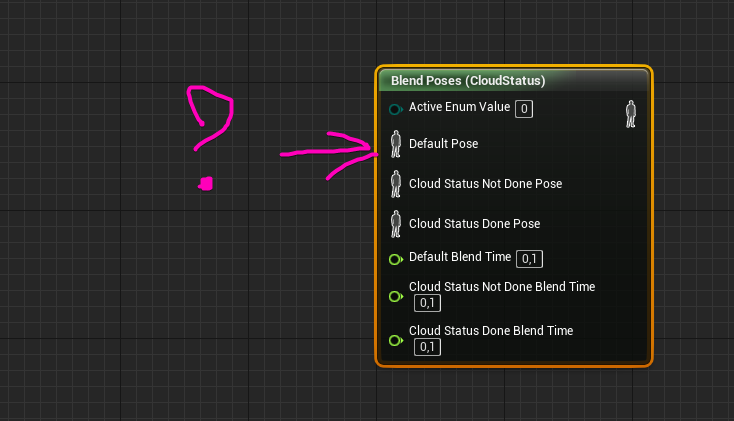
What is this pin for?
https://i.imgur.com/SsGIiT3.png
 simple tartan
@ashen snow I just saw a question you asked about RMC in October of last year - specifically u were wondering how to create a rmc from a static mesh component. I'm wondering if you had any luck on this? I've got the same question, and I'm also wondering how it's possible to use the procedural mesh slicing function with it. The documentation/examples is quite scarce for this plugin
 tough rune
How would I set up an input that shows the cursor and also disables the ability to look around? This is what I have currently but after a couple of seconds my character will walk off screen in the direction I'm moving to
trim matrix
ooh
terse goblet
in cam settings of boom idk what are you using, disable : inherit rotation
or use for controls idk
 tough rune
Wouldn't that make it so I couldn't move camera at all times? I want it to only be when you're holding down alt
trim matrix
hold up
loading up the editor
lemme see
didnt really played around with your wish
lemme see
well I guess
I have an Idea
wher do you keep your inputs ?
terse goblet
@tough rune set this val to true by pressing alt and to false by releasing
trim matrix
for moving around the camera ?
terse goblet
use pawn control rotation
trim matrix
its not the same thing
it only stops pawn from moving
he also wants the camera to stay
where is your input ?
tough rune
One second I'll screenshot
terse goblet
so here is good to have custom camera manager
tough rune
This is the only thing I have set up for the camera rotation, should I have set up another input for it to specify?
tough rune
Wherever it is set by default, I haven't touched the camera rotation
Would it be necessary to set up?
So that I can reference it for this?
maiden wadi
@tough rune If you just want to show mouse cursor and stop looking around, use Set Input Mode UI Only, and tell the player Controller to show mouse cursor.
tough rune
Like this? I'm unable to control movement with this though
maiden wadi
Wait, you want to keep moving, but show mouse cursor, or?
tough rune
Yeah exactly
maiden wadi
Set Input Game and UI or something like that.
tough rune
What does alt+s do exactly? Because I think that is my problem
This seems to work just fine besides the fact that when I press alt+s I stop being able to control movement etc
 quick lark
Anyone ever get this issue when renaming/deleting a component in blueprint? It seems like two separate components (one was duplicated from the other) are actually referencing the same entity:
Renaming an object (TankTrack /Game/Levels/BattleGround.BattleGround:PersistentLevel.Tank_BP2_2.Track Right) on top of an existing object (TankTrack /Game/Levels/BattleGround.BattleGround:PersistentLevel.Tank_BP2_2.Track Left_REMOVED_1B47626C4828A0A3D7735590A5DA1C91) is not allowed
I am looking to make VR "less twitchy" and add a subtle delay to movement, does anyone have resources on how I would go about this with the standard VR setup?
 halcyon zephyr
hey, does anyone know why my gun stops shooting after a couple of shots? https://gyazo.com/6173654c3bbd46a262720c1eb8f404ee

 viscid valve
Trying to store a reference to a custom actor component created in Blueprint within a data asset. I created a UActorComponent datatype to store it within, but I can only select the stock ActorComponents that UE4 ships with - any of the custom variants I have created aren't in the dropdown in the dataasset
I could try and be more specific and specify the datatype as the subclass I created, but I don't even know if C++ side of Unreal is aware of subclasses created in BP since I think it just creates a uasset when you create a BP subclass
 worthy frost
@halcyon zephyr why use a timeline for weapon firing?
also you don't evenhave any value coming out of it, making it redundant.
 mortal heart
When i steer my vehicle it deletes itself?
 gloomy linden
Cool feature
mortal heart
no
worthy frost
When i wake up in the morning i fart?
very little information, like how do we know why your vehicle deletes itself when you steer? it's like you expect us to have magical powers and know, ah yeah that's the issue, you are calling Destroy!
gloomy linden
I guess in this case, too much info
 night iron
does anyone know how to make a camera only see specific actors? i remember doing this in the past with a thermal scope but can't seem to figure out how i did it
 proud zinc
I am spawning instanced static meshes from the construction script. An array of the instances is automatically created on the instance component (done by the engine not by my blueprints). The array also provides the transform for each instance. When I try to edit the instances, the construction script is run again and resents any of the changes. How can I get the construction script to only run when certain variables are changes keep the changes to the instances?
worthy frost
@night iron seems like post process with some material magic
and something like render depth
night iron
@worthy frost i remember being able to filter by actor. i just can't figure out how i did it
 indigo zenith
@mortal heart can u be more specific what happens, is ur camera still stationary,. do u fly in the air? what happens exactly? try draw wireframe only see if the object is still beeing rendered
mortal heart
sure
worthy frost
i don't recall ever seeing anything like that @night iron
indigo zenith
@mortal heart also, make a print string on event tick. and pass trough the actor location
see if u can somehow notice soemthing weird with numbers
mortal heart
there isn't anything weird with the actor's location, it just gets deleted and the game (and sometimes engine) crashes
indigo zenith
so, when it gets deleted, the print string stops?
mortal heart
yep
indigo zenith
is there anything else in code that might be deleting an attached actor, but is referencing to self
thats how i got ****** once
 ocean prawn
indigo zenith
ocean prawn
indigo zenith
@mortal heart can u try add event destroyed to the vehicle and a print string. see if destroy actor is beeing called.
 sonic ermine
Hey all, I'm trying to do some VP work and I have an CV1 Oculus Rift (with Touch Controllers). I'm trying to set the position/rotation of a camera actor according to the position/rotation of a touch controller. I know a lot of people are using Vive Trackers for this but in the interest of using what I have, how can I get the position/rotation of my Touch controllers. Can somebody point me to the location in the docs? For some reason I can only find how to get the HMD p/l.
mortal heart
it isn't being called
it just gets destroyed as soon as "set steering input" is executed
indigo zenith
that some srs strange behavior, my only suggestion is take the sample project , advanced vehicle and see if u have the same issues.
its prolly something u didnt wanted to hear, but this goes beyond my expertise
also those crashes u mentioned earlier doesnt sound to great either
mortal heart
it doesn't happen in the sample advanced vehicle project
indigo zenith
ok, last option,.. try make a duplicate of the bp... maybe there is something wrong with inheritance
mortal heart
indigo zenith
ahhh..
redirectories
right click content browser folder
fix up redirectories
it might be that u moved folders around
and it crashes on that
mind give that a try?
before u do anything else
indigo zenith
srry m8, this is all my knowledge. im srry i cannot help u gurther
mortal heart
it's fine
indigo zenith
if there aint to much code yet, or project
start from template and work from there
there is something busted in ur project
trim matrix
@mortal heart i need help please save me!!
indigo zenith
@trim matrix https://www.google.com/

Stay and Play at Home with Popular Past Google Doodles! #GoogleDoodle
in all srsness, shoot vampire
trim matrix
hahaha naah i was just making a joke lol unless you maybe know something about floodfill algorithms in which case i would need help lol
indigo zenith
i figured, srry. no knowledge here
trim matrix
damnit lol oh well guess that game remains on hold
indigo zenith
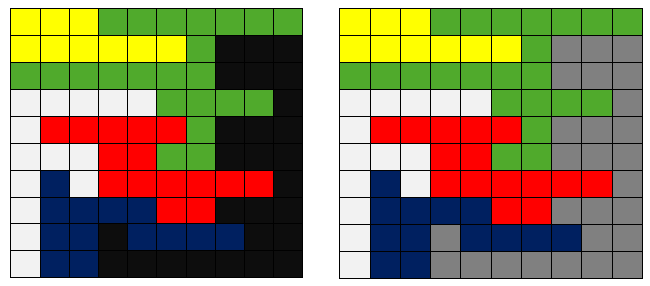
Flood fill Algorithm (also known as seed fill) is an algorithm that determines the area connected to a given node in a multi-dimensional array. It is used in the "bucket" fill tool of paint program to fill connected, similarly-colored areas with a different color, and in games...
not sure if this can help u
but i googled 😛
trim matrix
the problem is more unreal imo but i'll still check it out maybe it can bring me closer to figuring out this problem
indigo zenith
might give u some insight man, its the 1st time i heard this term 🙂
polar dawn
I'm trying to set up a rudimentary cover action, and it only works on one side, and I can't figure out how to make character face away from whatever side he's on. That was wrong video sorry
trim matrix
a simple way to start understanding it is if you think of randomly generated rooms/halls they all need to be connected together and a floodfill algorithm can start at the "entrence" or spawn of the player and "flood" each tile to see if all the sections are connected because if it isnt then a section wont be flooded as it if cutoff, thats a very shitty explaination (you caught me a bit off gaurd) but i'm opening my project to illistrate what i mean
indigo zenith
hmm, there is a developer called mystice., he streams somwetimes on twitch. he made something like that
polar dawn
Vampire, did you watch the Turn Based Strategy Unreal Stream?
mortal heart
i think i'm gonna update the engine from 4.24 to 4.24.1, maybe that'll fix the issue
polar dawn
He makes a procedural dungeon with rooms and hallways
indigo zenith
yes
i get it know, mystice games on twitch is doing something like this
@mortal heart i doubt it will fix, since the template working fine, no harm trying though
mortal heart
@indigo zenith do you think it could be a plugin causing the issue?
trim matrix
how do i cast to the blueprint in another blueprint
@polar dawn no i havent watched that stream
indigo zenith
@mortal heart are those plugins enabled inside the template?
trim matrix
@mortal heart hahaha lol i'm still running 4.22
polar dawn
Dunno if it's what you're talking about but kind of sounds like it, the blueprints are in the Learn Tab
trim matrix
anyone know how to help me
@trim matrix yes but a simple google search could teach you how to cast (or referancing as the proper term is) and thats probably why nobody is bothering tbf lol
thing is i understand how to cast just not how to cast in another blueprint. no need to be rude
especially where i have done my research and you cant reference blueprint actors in other actors cause then it would be ez
https://en.wikipedia.org/wiki/File:Recursive_Flood_Fill_4_(aka).gif this is an example of a floodfill in action imagine the white tiles are the floor and the black ones are the walls see how it cant access the two sections, the map generator must stop the walls from spawning there to make the map fully accessable
 indigo zenith
@trim matrix do u want 1 specific light to go on, or u want all lights to go on
trim matrix
i have a bunch of lights in the level but they are all in one blueprint
@trim matrix i at no means meant to be rude just truthful
the one blueprint has a custom event
@trim matrix must all of them turn on at the same time?
they are changing color
indigo zenith
and call custom event
indigo zenith
get all actors of class
add them to array
use the array as for each loopo
and call custom event.
trim matrix
on finished or loop body
trim matrix
loop body you fire off your code that must happen to each light
k thanks ill try that
@indigo zenith thanks it worked
u 2 @trim matrix
polar dawn
@Vampire, where are you in your process? Have you figured out which rooms are inaccessible?
trim matrix
honestly i do not know i might have finally cracked that however unreal freezes up and laggs so much it isn't useful
polar dawn
Because the flood fill seems exactly like a A* pathfinding
trim matrix
i have thought about pathhfinding but coding that seems even more ridiculas
polar dawn
Well there's some prebuilt plugins and stuff on the marketplace, I don't know much about it myself
are you using a grid?
trim matrix
yeah i got my whole map generating and everything i just need this one small spiece
piece*
polar dawn
If you knew what tiles were inaccessibly you could just do a a check if adjacent tile is wall, and if that adjacent tile has an adjacent tile that's an accessible tile, then delete the wall and rerun algorithm
trim matrix
that's literally what the algorithm does lol
how do i insert a code block in discord?
trim matrix
or just google then lol
polar dawn
/code sa
(╯°□°)╯︵ ┻━┻
I don't know C++ but I think I could do it in Javascript if I sat down and thought it out
trim matrix
        bool[,] mapFlags = new bool[obstacleMap.GetLength(0),obstacleMap.GetLength(1)];
        Queue<Coord> queue = new Queue<Coord> ();
        queue.Enqueue (currentMap.mapCentre);
        mapFlags [currentMap.mapCentre.x, currentMap.mapCentre.y] = true;

        int accessibleTileCount = 1;

        while (queue.Count > 0) {
            Coord tile = queue.Dequeue();

            for (int x = -1; x <= 1; x ++) {
                for (int y = -1; y <= 1; y ++) {
                    int neighbourX = tile.x + x;
                    int neighbourY = tile.y + y;
                    if (x == 0 || y == 0) {
                        if (neighbourX >= 0 && neighbourX < obstacleMap.GetLength(0) && neighbourY >= 0 && neighbourY < obstacleMap.GetLength(1)) {
                            if (!mapFlags[neighbourX,neighbourY] && !obstacleMap[neighbourX,neighbourY]) {
                                mapFlags[neighbourX,neighbourY] = true;
                                queue.Enqueue(new Coord(neighbourX,neighbourY));
                                accessibleTileCount ++;
                            }
                        }
                    }
                }
            }
        }

        int targetAccessibleTileCount = (int)(currentMap.mapSize.x * currentMap.mapSize.y - currentObstacleCount);
        return targetAccessibleTileCount == accessibleTileCount;
}```that is my script in unity 3d c# but i'm struggling to translate it to unreal
polar dawn
and it works in Unity?
trim matrix
yes i've built this whole map generator years ago in unity but now i want to finally finish it and turn it into a game but in unreal
polar dawn
Well like I said if you go to the Learn tab in Epic Launcher, and scroll down to Gameplay Concepts, there's Turn Based Strategy which has a BP that generates a complete dungeon at runtime with halls and rooms and populates it with units, etc
It was created during the stream https://www.youtube.com/watch?v=mI7eYXMJ5eI

Technical Writer Ian Shadden takes us through a project designed as a foundation for square tile, turn-based strategy games in Blueprints. We'll randomly generate a map, "dig" rooms and corridors between, and populate it with teams. It won't be a complete game, though should s...
trim matrix
i'm defo ganna go check it out thanks, just focusing a bit more on a smaller project now since i got too pissed off at struggling, hoping to release this new project today or tomorrow
indigo zenith
@trim matrix what kinda smaller project 🙂 im interested
 gentle tusk
is there a way to make an event that only happens on sight ? light to only play animation while the player´s looking at them ?
trim matrix
The game's name is "Pong League" it's a casual modern 3D pong game with a lot of new elements, features and mechanics to bring new life to Pong so you start bottom of the league and work your way up but it isn't repeat match after match there going to be loads of different match types to spice things up, like ones where the gravity can go weird and you aren't just focused on the floor but also the ceiling because you may need to jump to the ceiling to stop the ball (#floorGangVsCeilingGang) it's still heavy early i started the game today and wanna release as EA on ich io
@gentle tusk you can use the on detect event from a pawn sensing i believe, may just mean loads of things to cast to
gentle tusk
hmm ye i wanted to optimze, not sure if it´d work, i´ll give it a try
thanks @trim matrix
trim matrix
so far how things are looking, 100% blueprints and yes it's not very pretty i know but no.1 i started today and no.2 i'm more a programmer i'm not so good with graphics lol but i'll get there
@gentle tusk funny enough i thought you wanted to optimise and this is not a good way i believe
polar dawn
What's the ms number under FPS in STAT FPS?
trim matrix
i think some objects have an option to only update while rendered so might wanna check it out
polar dawn
and what's a good number for it to be?
trim matrix
as low as possible it's general lag i believe like your fps but in seconds as in how many seconds behind are you
indigo zenith
ah cool project :),
trim matrix
https://www.youtube.com/watch?v=hcxetY8g_fs here is unreal's explaination which is a bit more in depth (and more than i know) but it's good knowledge

This session by Sr. Dev Rel Tech Artist Zak Parrish explores performance concerns for shipping games, focusing on how to track down problem areas on both the CPU and GPU. Learn how to set up a test environment and how to employ the necessary tools to identify key performance p...
@indigo zenith haha thanks it's super basic for now first things i need to attend now is the main menu, then the level select screen and lastly the hud with the scoring system after that the game is actually close to release
if anyone is interested i will actually be recording most of my gamedev journey from now on with this game, and i'll be looking for test subjects i mean play testers sorry that wanna try the game and let me know how it is what can be improved, and maybe all the dev logs and play testing could help someone wondering how to go about game dev workflow/pipeline (although i am in no way trained or properly educated this is just how i've decided to go about it an who knows maybe it works for me and it could work for someone else or it doesnt work for me and can help someone else understand why, what i did wrong and what they should and shouldnt do/try)
 sly mason
I need some help, I am doing a project porting some halo assets into ue4 and I am currently facing a problem. As you can see in the picture there are number textures 0-9 and on the gun itself there are 2 material slots one for the left and right. How could I make it so the textures would go down from 60 to 00
p.s I currently have an ammo system
indigo zenith
im not rlly expert, but if u store the images in an array from 0-9
and use that to drive the texture
its quite late here , so im not rlly fresh anymore
sly mason
thanks ill watch an array tutorial
polar dawn
anyone ever messed around with a cover system?
 stuck hedge
@sly mason You create a material instance. On the original material you set the texture to be a parameter and when the ammo changes you set that parameter to the correct number image.
trim matrix
@sly mason google how to use a material instance it will be a lot easier for you to understand by watching a Vid IMO
they really arent that complecated but can seem daunting
indigo zenith
wonder how that gonna work with int higher then 9 though
sly mason
wont need it max ammo is 60
indigo zenith
or even with 999 rounds
the int allrdy gives the index in the array
there is int to string
length
trim matrix
@indigo zenith easy the gun will have 999 bullets but only tell you about 60 of them, just like women (JK chill)
sly mason
LOL
indigo zenith
if the length is less then 2 of the int
u can just retrieve the image from array, since it allrdy matches what u trying to retrieve
it gets tricky when u have more then 1 int
not rlly sure how to do that though, but should get u at least in some direciton
i mean if its greater then 9 it should use 2 textures. the 1st image will display 1, the second image will display the rest
if that makes any sense. srry 4;30 dutch time
sly mason
No i appreciate every bit of info, im just new to ue4 and have learned alot
 short pawn
I have a problem with a texture seam. I add a rotator to the texture and there is a seam, without the rotator there is no seam
sly mason
would i use setmaterialbyname?
 peak goblet
Is there any proper way (built into the editor by default) to control the order of actors when BeginPlay is triggered? That is, ensuring that one set of actors have their BeginPlay triggered before another? I've seen a suggestion of adding a delay node to the BeginPlay to control order. While that is my fallback option if I find no other way, it is more of a workaround than an actual solution.
For a potential use case example: I have a tile grid manager which controls the playing field, and then there are units and structures as separate actors that get tied to this grid. The one-time setup (BeginPlay) of these units and structures need information from the grid manager, hence I need to ensure that the grid manager's BeginPlay is executed before the units and structures.
zealous moth
@peak goblet yeah, use bp communication and feedback. Look up... i guess interface? When you begin play, your manager spawns unit 0 from the array, then pauses, once the actor is spawned and his beginplay is on, make it tell the manager to continue spawning, etc
tight schooner
I also do something similar where managers initialize actors via an interface function
peak goblet
That would assume the manager has full control of spawning though. What about preplaced objects in the editor?
tight schooner
I use preplaced actors. The manager gets all actors with tag and sends the initialize function to all
(my game is such that groups of things need to be initialized at different times so actor tagging is how I approach that)
stuck hedge
@sly mason Settextureparametervalue
but you have to create the appropriate material first
peak goblet
I take it that it is safe to assume that all actor's BeginPlay events are triggered before any other regular events occur? So if I have two actor's the order will always be Actor1.BeginPlay, Actor2.BeginPlay, Actor1.MouseX (or whatever other events may be). And for clarity, that it will never be Actor1.BeginPlay, Actor1.MouseX, Actor2.BeginPlay.
 still abyss
I wonder if it's possible to use the Level Blueprint to store World-specific data. I don't think it's possible to get a reference to variables in the Level Blueprint from within the GameMode, right?
The easiest way I'd imagine would be to do GetGameMode --> ProvideData so that we mutate the GameMode... but is there a way we can make the GameMode grab it from the LevelBlueprint, so that we have control over when that happens?
sly mason
@stuck hedge I have already defined all materials as a paremeter all I need to do is connect it with the ammo system
stuck hedge
I just told you how. on the object you create a dynamic material instance using that material, then you use settextureparameter value to set the texture for the number you want.
zealous moth
@still abyss you could if you tell instead of get. Just find your game mode or whatever that stores the info and from the actors or bp concerned, tell it.
polar dawn
Is there a better way to prevent moving to a location on click when you click on actor than comparing Display Name?
I'm in Top Down, and if I click on actor, the character moves to the actor which I don't want. The best thing I've come up with is to check the Display Name against a specified string which doesn't seem very elegant.
Comparing Actor's Class works a bit better, but I have to set it to it's specific class, for instance NPC, instead of being able to set it to Character which is the parent for all my pawns
 late gorge
is it possible to set name of a component?
i am spawning/disabling components at begin play construction script and i dont want some generic names for the resulting components
 subtle blaze
Aight, I'm like 90% sure I have done this before but can't for the life of me remember how. I have an object with an offset transform that is facing a certain direction and another object with a transform facing a direction. How do I make the second object be offset from the first object by both transforms and rotated such that the transforms are rotated exactly opposite each other but in the same location in worldspace?
 fair magnet
Can someone help me ? I can't handle my stuff anymore........
I'm trying to smooth out my Health bar and... For whatever reason the health does not get animated but the shield bar does....
 honest forge
Hello, i am trying to implement swimming into a third person character project. I have setup underwater swimming when the character jumps into a water physics volume but would like to know how to setup surface swimming with a different animation to the under water anim. Any suggestions?
fair magnet
It's a one shot action
since it get's fired everytime the Health changes
I actually don't know if looping would be a good idea
fair magnet
Oh I'm not doing it on tick anymore I've changed it :x
marble folio
ok 🙂
fair magnet
now it updates upon damage taken
trim matrix
quick dumb question but when i get all actors of class and do a for each loop how do i get the exact index of one off the array?
marble folio
What do you mean exact index?
trim matrix
marble folio
you do not need to get...
the for each loop macro gives you both the index and the actor
Array element and Array Index
trim matrix
so what would i use to tell it to only execute open door on door 4
marble folio
The order of the elements in the Get all actors of class is not guaranteed ...
I would store the door "number" in the door and check that in the loop
trim matrix
so set an integer up in the door code?
the only reason im using get all actors is so i can call a blueprint in another blueprint
marble folio
Depending on your game size there is nothing wrong with that
if you do not do it on tick 😄
by the way in your code above..you would not use the for loop at all..but it might open a random door 🙂 you would plugin the Open Door right into the Get All actors of class
but bounds check would be wise
marble folio
did you "Get 4"?
or did you get from the for each loop?
And bounds check is when you check taht the array has at least 5 elements when you try to access #4 🙂
trim matrix
i mean i got all actors of class then pluged in the event
it caused all of the doors to open
and there are 4 elements
cause there are 4 doors
marble folio
well then Get 4 will fail
because that is not a valid index
If you have 4 doors the indices of those would be 0 1 2 3
marble folio
Yes?:D Try getting the last index(there is a node for last index)
trim matrix
Hello all! I'm trying to do widgets that be able to zoom when player pinch in phone screen (TouchPad)... Someone knows haw can I do this?
So... I need to make zoom inside a widget...
marble folio
@trim matrix you can probably manipulate the transform scale.... I just closed my engine, but I did something similar with my map widget(not with touch though)
 sick sapphire
how do I make it so that my projectiles will always end up in the center of the screen? they currently travel from the muzzle of a gun actor, but they're not quite aligned with the crosshairs i have
indigo zenith

MY FB PAGE https://www.facebook.com/groups/UnrealMastersAcademy/
Hi Guys in this Tutorial we are goint to setup Projectile which spawn from the tip of gun and travel exact centre of crosshair location Hope u like it and please like and share subscrobe my channel
trim matrix
Ok... I can do a transform scale but I need to move this zoom around the screen
marble folio
that is slightly harder 😄 one thing that I did not know about when I started this adventure was a Retainer Box widget came in quite useful when manipulating a colleciton of widgets
trim matrix
@indigo zenith thanks, I'm going to see it now
trim matrix
@marble folio I have about 50 widgets... 😅... I will see this, the retainer box, I don't knows how it is (ah ok, I was doubting about this video...)
marble folio
So yeah I was working with Set Translation node based on where I did the zoom and then I was working with size boxes... hm interesting but I was using only images(map)
trim matrix
I'm using text whit some comboboxes but they are very smalls in a phone screen
sick sapphire
@indigo zenith thanks
marble folio
There are multiple ways to do that...to be fair I would first check the Retainer...if that does not work I would probably just loop through all the widgets and set their scale 😄
not sure how scale translates to children
ah it does translate to children
marble folio
Well he wants to zoom on player input
indigo zenith
not rlly sure, but i doubt people coding for all resolutions
trim matrix
@marble folio ok I see... I'm going to try this and first, search info about retainer... Many thanks
indigo zenith
oh srry, i slept only 3 hours
marble folio
You do not need the retainer... just scale the canvas panel or overlay or whateever you have as top container
and manipulate its translation to move it across the screen
trim matrix
@indigo zenith yes I try the scale box but it's not exactly that I would like to do
indigo zenith
ye, i just read it.
what acheta saying is correct
there is a translation scaling somewhere
indigo zenith
that one ^^
marble folio
I use scale boxes mostly for aspect ratio... 😄
trim matrix
Ah ok, but this is posible under player pinch or double touch?
marble folio
Those are two different things 🙂
You catch the event and you set the transform based on the event
trim matrix
Ok using blueprint could be possible I think
marble folio
Well you are in #blueprint so I assume that is what you are doing 😄 ... you will need to do some logic for the zoom and movement
marble folio
still needs to be triggered by BP 😄
indigo zenith
agreed, but at least should give him some idea where to look 🙂
marble folio
yeah the animations can make the transitions smooth 🙂 without much work
at least for the zoom
trim matrix
Yes yes, I have new thinks to try... I'm going to do this thinks... Many thank to both of you
😊
 distant forum
⚠️ HELP: How to Get Character to Trigger Audio, Not the Shot Fireball ⚠️
I am a university student and this assessment is due 2 weeks from now. My level of understanding of Unreal Engine, I would say is very basic. 😮
I am able to ScreenShare my level with you over Discord, alternatively I am able to keep sending screenshots of my screen and I have a mic. 🙂
I am looking for someone nice, helpful and has the time to direct message me. I will definitely share more details there (my blueprints, code, files, etc.) It would be very helpful (although not needed), if you also boot up your Unreal Engine and walk me through it, step by step, as you also send screenshots or screenshare.
If you help me out, please know that you leave a smile on my face, and that you’ve helped out a panicking student (me) out. Your help will be very appreciated! 😄 🙏


.gif) marble folio
marble folio
It is amazing how much time is spent on some of these "questions"
On to the answer.. I am no longer doing 1:1 because that tends to backfire real quick...
There is a way to trigger sound in the montage..same as there is Anim notify....
Open the anim montage file, scroll down the notifies bar -> right click -> add notify -> play sound
 restive tundra
is there a way to have animation montages only trigger events for a certain actor class
marble folio
And here goes the 1:1.... :sad:
@restive tundra I do not think so...you can trigger an event, catch that and do the logic in there...and pass it on to the actor if needed... or just plainly use interface and either implement it or not
distant forum
⚠️ HELP: How to Get Character to Trigger Audio, Not the Shot Fireball ⚠️
Anyone got other advice? I attempted to do the last solution recommended to me, but I failed 😢
indigo zenith
on the projectile make a capsule, on overlap cast to character bp , play audio
trim matrix
just set the trigger box to cast to yourself
and not the fire ball
assuming u are spawning a blueprint for the fireball @distant forum
feel ya pain too im a uni student too
indigo zenith
on the projectile, add a sphere collision, click sphere collisin, on begin overlap. u will get new event. other actor pin = cast to charactr bp., play the audio queue that is on projectile
maiden wadi
He's not trying to do something when the fireball hits something, Soul.
indigo zenith
its not where it hits
its when its overlapping a character in the way
so it will play fireball sound
i think thats what he/she ment
maiden wadi
"HELP: How to Get Character to Trigger Audio, Not the Shot Fireball"
indigo zenith
i cant decypher this question any other way
maiden wadi
Character makes a sound when it touches something, fireball does not.
indigo zenith
its on the projectile...
so when projectile sphere collision passes character
it will play sound
marble folio
anim montage -> play sound on trigger 😄
that is the answer to that question 😄
or any other anim notify and trigger whatevery sound he wants based on the spell being casted
indigo zenith
How to Get Character to Trigger Audio, Not the Shot Fireball
i still dont see how that applies here
marble folio
Well you can play the audio on the projectile creation I guess 🙂
but then it would move with the character
erm projectile
indigo zenith
seems he/she wants a soundqueue when projectile passes a player
distant forum
Oh to clarify what i needed help, there is a voiceline that plays when the player enters the radius
the voiceline is "move with haste, time lets not waste" its like a ghosty sounding voice line in the video
i only want the voiceline to play when the character's body enters that space
Although, it also gets triggered even though the char's body is far away, and i shoot the fireball towards said space.
indigo zenith
again, make a sphere collision on the projectile.
on overlap
cast to character bp
play audio on projectile after cast
maiden wadi
@distant forum What is the radius? Do you have a triggerbox somewhere for the player to walk into?
distant forum
yep yep, i have a triggerbox with a radius :3
maiden wadi
Where is it at? Just placed in the level, or is it attached to an actor?
More accurately asked, where are you playing the voiceline and the print?
marble folio
Ok I did not get that from the original question at all 😄
indigo zenith
this should get u started
make sure the sphere collision has a proper size an can overlap with a actor
gl
distant forum
thanks for the trying to help everyone :3 i appreciate it
indigo zenith
where u able to fix it?
distant forum
not fixed yet :' ) ill keep trying hehe
 wise jewel
i'm trying to rotate a door from the character, directly.
if i have the char in the scene i can edit the asset in the scene i want to reference
but if i don't have the character and i spawn it i can't set the value
i can set the variable i created only if the character is already in the scene
is there another way to set it?
maiden wadi
@wise jewel Not by default like that. Usually people handle doors with some sort of sphereoverlap, Line trace in front of the character that tells the door to rotate itself.
wise jewel
ok
i'm just playing around to see what works and what not
various ways to do things
i want to understand event handlers and interfaces
and direct communication
ive read a lot but i need to test in practice
maiden wadi
What you're doing there is called direct communication and it only works when the objects are spawned into the world by the world. Things spawned by GameMode generally don't use direct communication like that.
maiden wadi
Usually used to make stuff like world levers work with doors or stuff like that. But your character would still need to interact with the lever via line trace, sphere overlap, etc.
distant forum
WOW i somehow made it to work o. o my brain is fried
i dont even know how it works but it does :/
 heavy lion
So I am trying to get a random selection from an array of names.
I want to output the name itself, and its index # within the array.
But it seems to just give spurious results.
I tried this at first.
The array holds 3 entries. "Clear" "Rain" "Snow" or 0,1,2
Anyone know how to do this?
marble folio
the random you use for get is not the same random you use for the print string
you want Random Integer in range from 0 to LastIndex
Random Integer in Range
heavy lion
Ahaa. I tried that
marble folio
Ok what is your actual issue?:D
heavy lion
Well. When I run it. As you can see it prints to the screen the name, and the index. I just ran it, and it output "Snow" at index 1
marble folio
yes because the random number you get is different for each print string
The "Random Integer in Range" because it is pure gets executed every time it is being accessed
marble folio
get the random, save it to variable and use that variable from then on
or wrap the Random getter to non pure function 🙂
heavy lion
Ok. I got that working. But my branch aint working
marble folio
btw I would consider using enums for this... comes with some creature comforts 🙂
heavy lion
So I have two variables. The array of weather names. And the current weather of type name
Basically the plan is. Pick random weather at interval. Check if its the same as the current weather. If its the same, do nothing. If its different, Set the variable to current weather type
 indigo osprey
I have some kind of wierd bug. I started a project based on the FirstPersonShooter Template. I now want to hide the character model and remove the gun shooting sound. When I open my FirstPersonCharacter Blueprint tho, the event Graph is empty and so is the FirstPersonProjectile Event Graph when I open its blueprint. Any thoughts ?
Nvm....
I choose test cpp template ._.
Is there an easy way to import the Fps character from the blueprint project?
marble folio
@heavy lion you are still doing it wrong in that last picture
you need the random value in the Get already
so the variable is set before the branch...and used from then on
I rly need to make a video on this ... 😄
heavy lion
haha
Well I pretended the int wasnt working and removed it
It is correctly selecting between the 3 different names
@indigo osprey Big green button in the content browser, Option at the top for feature pack
marble folio
I will repeat it again... if you get a value from a pure function every time that value is accessed that pure function is executed again... so your Get is getting the random value for the Branch check, then you Get it again for the Value set, Then you get it again for the print string
so in that picture above the Random Int in range is executed 4 times
so you get 4 random values and it is up to your luck if you get the same value(since it is 0-3 that chance is reasonably high)
heavy lion
I don't need the int though tbh
You mentioned using an enum to store the weather selection types instead of an array of names
marble folio
yeah 🙂
heavy lion
I have an enum variable and an enum to set it to. I have added the 3 weather types
But I am struggling to find anything in the docs as to how to use em
Like how to pick a selection from an enum haha
Switch on Enum???
marble folio
yeah
indigo zenith
u set the enum variable somewhere.
heavy lion
@indigo zenith I have the enum variable which is filled with the three weather types
indigo zenith
ye
heavy lion
indigo zenith
clear, rainy, cloudy
for example
e
so u get the var enum
there
that will switch on the one u setted "somewhere
make a input event on a character, a flip flop for example
set 1st path clear
set 2nd path rainy
make a hotkey
that uses this switch
print string after it
when u press hotkey once
its using default variable that u have "setted default" as result
when u flip flop
and then press hotkey
it should give a different value, since u just setted the enum variable inside the flip flop
honest forge
Hello, i am trying to implement swimming into a third person character project. I have setup underwater swimming when the character jumps into a water physics volume but would like to know how to setup surface swimming with a different animation to the under water anim. Any suggestions?
indigo zenith
hope that clarifies it
trim matrix
Hi! I´m working on a boat sim project that uses OceanProject and I got stuck with the movement. My mouse x-axis is forward speed and I want this to work as in real life where the speed is “on” even if i don’t move the mouse (or a key..W,S). My coding skill is almost none 😊 The setup in picture was a suggestion from another forum but the boat only goes forward not reverse. Is this a correct approach? Regards steel
heavy lion
pfft. A bit
trim matrix
heavy lion
@trim matrix You would be better off joining the discord server for the ocean project
marble folio
considering the OceanProject is pretty much done... not sure how helpful that would be 🙂
heavy lion
Done?
trim matrix
was directed to this discord 🙂
heavy lion
oh
marble folio
yeah they stopped developing it 🙂
trim matrix
heavy lion
I thought they were reworking it. The ocean project was dropped by its original developer but had been picked up
marble folio
@trim matrix you need to hold the value of the speed somewhere and continuously apply it to the boat
the axis value is triggering all the time, so it will override your value... one way around it is to ignore 0 .... and have the "stop" as a separate event
trim matrix
@marble folio ok thanks. you dont have a quick blueprint 🙂 I can follow the code fairly but is the worst scripting my self
@marble folio my aim is to take an old optical mouse hack it up and attach it to real speed control. 🙂
marble folio
No I do not have a quick bp 🙂
trim matrix
🙂 thats fine
marble folio
I do have something similar in my project, but it is to limit the "lag" between the client and the server... and it involves sending the speed impulse on tick on the server 😄
And I am not very happy with it
trim matrix
@heavy lion i think the movement part of the Ocean Project will not be issued. Seems they will focus on environment (wind, waves...)
heavy lion
@marble folio @indigo zenith Does this look mental or fairly logical?
marble folio
it looks mental but hey it works 😄
marble folio
Just by the looks of it 🙂 it should be fine.
indigo zenith
lool
mental
question regarding ai perception:
im tryin to work on a day and night system that i can change actors perception on runtime.
however, i cant seem to find the correct node for the ai perception.
however this is exposed in pawnsensing
wise jewel
i cant understand why it spawn a new character now
i've set the default pawn everywhere i could
it was working before :/
trim matrix
im having trouble sharing a float between a blueprint and a gui how do i do that agan
@heavy lion @marble folio could gate be a solution for me
maiden wadi
@indigo zenith I can't seem to find where AIsense Sight is set in the CPP file, but it doesn't seem blueprint retrievable. Pawnsense on the other hand has this.
Might not be able to get or set the AIsense with blueprint. Not sure if there's a way around that without rewriting the CPP.
marble folio
Well there is one way... 🙂 add it to the code...
As far as I can see there is only a way to get it... still not sure how to do that but getting is there
I think it works based on class defaults, which would be an issue
    /** Maximum sight distance to notice a target. */
    UPROPERTY(EditDefaultsOnly, BlueprintReadOnly, Category = "Sense", config, meta = (UIMin = 0.0, ClampMin = 0.0))
    float SightRadius;
read only... 😄
@indigo zenith so what I would do is create a second AI perception component
activate/deactivate as needed and handle the events from that
indigo zenith
thats a good one, thx. quite easy to implement
heavy lion
Is it possible to compare an enum?
 spark steppe
sure, with an equals node
 thin rapids
makes sense
heavy lion
Awesome