#blueprint
402296 messages · Page 446 of 403
 jolly trail
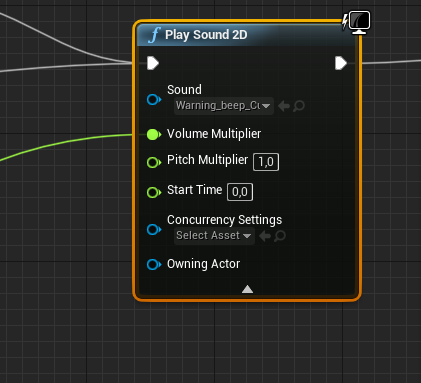
I have this value that goes into volume multiplier
It should beep louder when the monster is closer
I input the distance into volume multiplier
And you can guess what it does, it does the opposite obviously
It becomes quieter as it gets closer, and louder when going away
Is there a way to invert this? I've tried multiplying with -1
But that becomes negative so does nothing at all
 dry pewter
@jolly trail Have a maxium distance float, then make the math: Volume multiplier = Maxium distance - Distance to mosnter
dry pewter
Anytime
I think this is a simple question but i don't find anything useful on google
How can i make a pawn to be controlled by AI in blueprints?
I hace this pawn thqat is controleld by AI when spawned or placed in world, it ehaves correctly, then i make the player posses the pawn, works correctly, then i unposses it making the player posses a different pawn, now the previously AI controlled pawn is not doing anything, how can i make it so it gets AI controlled again?
 covert stirrup
I asked something like this earlier, but I have found a new clue.
I have an Enumeration for my controls that acts as a master list. It works, but I always see all the potential controls and want to hide certain controls that are not available to that object....before I didn't think it was possible but I found this "skip hidden" .. so how do I make an enumeration value hidden? this would be 100% what I need and this makes me think it's possible!
 loud cipher
Would i plug in this orange material which is a occlusion roughness and metalic into all of them or multiply it or something
Im confused on how to set it up3
covert stirrup
R = AO , B = Metallic R = Roughness
so you plug those into each, as R, B, G on their own are greyscale values
loud cipher
covert stirrup
(make sure that the AORM texture is marked as non RGB too)
covert stirrup
make sure it is unticked
when you untick and save the material, you will need to go into that Material again and just reapply it otherwise it has an error
untick and save the texture*
loud cipher
Ah okay
covert stirrup
then it "should" be good to go! if not let me know!
loud cipher
An error
I saved it though
and reaplied
Reapplied*
Nvm
Just had to reload it
nvm i still get an error
covert stirrup
completely remove it and put it back in
if you click on it and in the left hand menu reselect the same texture that should also work
 mossy blaze
Which chat should I use for help on capsule half height? My character keeps clipping underground because the capsule is centred
covert stirrup
is it VR?
mossy blaze
Nope, just third person
Crouch position. I've changed capsule half height from the BP as I need it near enough halved for when the character is sprinting.
I read somewhere that it might have something to do with mesh inheritance or something, but I don't understand that enough which is why i've come where for direct help haha
covert stirrup
hmm yeah, I was taking a look myself
(caveat I am in VR, maybe it makes a difference or maybe not..unsure)
so my capsule is the scene and the 0,0,0 is where the bottom of the capsule is
is that also true for yours?
mossy blaze
Nope, 0,0,0 seems to be the centre 😬
covert stirrup
If that is the case, that could be why
mossy blaze
I have no idea how to move it, especially without transforming my mesh haha
covert stirrup
if you open a new project with first person character, have a look at where the capsule is placed and that might give a clue
mossy blaze
third person new project has the same thing
I'm able to move my mesh so its bottom is touching 0,0,0. But the capsule is being stubborn and won't tell me how to move it up as well
now my character is hovering
 trim matrix
I assume this is the hard way to make a MOUSEUP/MOUSEDOWN [Gun Switcher].
what would be the best way?
 empty violet
Any idea on the 'proper' way to store actor objects?
what I want to be able to do is essentially
a = [x,y,z]
a[1].someFunctionInsideActor()
a[0].someVariableInsideActor = somethingNew```
But the array's and sets only seem to have the ability to get a copy of what's inside of it, meaning no changes to the copy will reflect in the array. maiden wadi
@empty violet For some arrays you can get a ref of the variable to manipulate. I'm not sure what you mean by that with actors though?
empty violet
Actor Objects are what I want to store
maiden wadi
Okay, but you don't store the actual actors in an array, just a reference to the actor itself that you can call functions/events from or get and set variables.
empty violet
Another issue I'm having actually,
Nevermind. I'm pretty sure I know where I'm going wrong.
 vast lion
How is damage handled for components?
 sand shore
@trim matrix you should probably make a custom enum for these, you can still use your switch node, but you would also be able to use the enum to directly index into an array.
then you could hide all the weapon meshes, and only show the one which is switched to.
you could also just increment/decrement the value instead of having to have two switches
trim matrix
I'll try when i got some spare time
 zealous bear
Ok im super confused. When the fade animations are hooked up it looks as though the progress bar is faded out, but when they aren't it looks like it's independent. (I posted this in #umg originally, but realized it was more of a #blueprint question, not spam)
 zealous moth
Here's a fun one: I have an actor that acts as I'd expect in terms of collisions: it hits static objects and generates a response.
I create a parent/child actor that holds 2 of the previous actor however it does not trigger collisions at all... anyone have experience with this?
 faint pasture
Have you tried printing the collision channel etc. at runtime? Not super familiar with child actor component but check if it's changing some collision settings.
zealous moth
i figured it out
so in the parent AND child, if you use projectile motion, both have to have it
set one to 0,0,0 and the other as desired
missing the projectile motion removes the collision
empty violet
Is there any way to send information through an Event Dispatch?
zealous moth
i don't think so. event dispatch is just a sub call, no?
empty violet
I create a user specified amount of buttons inside of a single widget. and then each button send's it's onClick event through an Event Dispatch to my player character.
I would like to identify which button it came from however, so I can pull certain characteristics out of it, and perform all the button logic there.
A user specified number of groups of the buttons (the number of which is also dynamic) can be placed, hence why I'm not putting the logic in the widget itself.
I think I know how I can do it actually, thanks Zanet
Cool, new question.
I have a desk-manager. It manages spell interactions,
Anyways.
How can I get a reference to an actor in my scene, inside of my character bp?
 lapis knot
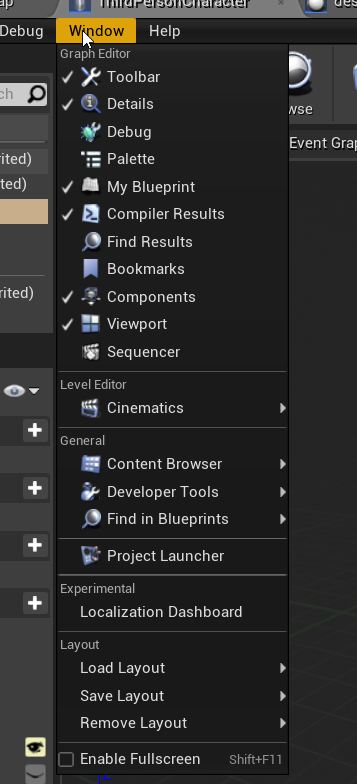
hey can i get some help please? i cant see the details window
empty violet
@lapis knot https://i.imgur.com/79ExR7Y.png
 lapis knot
thanks!
 rough wing
Here's a tutorial on how to restrict player input inside a period of time, disabling the player from spamming the button.
https://youtu.be/CQKlZjcXyg8

Hello devs! In this video I showed how to make a very simple button spam restrictor; it caps the amount of times you can press on a button for a period of time! I hope you find this helpful!
Target: 150 SUBS! SUBSCRIBE TO HELP ME OUT!
dry pewter
Guys i have a pawn controlled by AI, that gets controlled by the player, then i need it to be controleld by AI again, how can i do that? when i unposses that pawn it just stay still
faint pasture
You can do it in the sound cue
zealous moth
@dry pewter you can either create a new AI controller and ask for possession or reference your old one and make it possess it when you're done
@empty violet why do you use a "desk-manager"? In fact, what is that? To ref actors in your scene you can use the "find..." nodes and build an array. However, you'll probably want to be more specific.
empty violet
I'm just using findActorByClass or whatever it's called,
I figured it out.
and a Desk Manager is an invisible actor that handles logic within a level
zealous moth
do... do you even need that? I tried using otherworldly managers but most are just not as useful and good bp communication
dry pewter
@zealous moth Tried storing the orioginal controller in a variable and then repossessing it but didn't work
zealous moth
hm, what about creating a new controller and repossessing?
dry pewter
just to be clear, this could be the issue?
Or will that keep the BT running all the time?
hm, what about creating a new controller and repossessing?
@zealous moth How do i create a new AI?
zealous moth
i don't think that is the issue
i wish i did not close my editor
i think you can create actor from class as AI controller and then possess?
dry pewter
just to be clear, this could be the issue?
@zealous moth I just set the thing to "event tiick" instead of begin play and the setup of storing old controller and re-possessing works now
This is working, this will stay
Apparently the behaviour tree will not "re-run" until it's told to
 halcyon trellis
I am still having trouble figuring out how to do the transition rule from landing back to idle animation. This is my animation blueprint so far:
zealous moth
the 3rd person template has a mannequin that calculates its distance from the groud and interpolates when it lands
dry pewter
@halcyon trellis Maybe you should think of using BlendSpaces and use the distance to the ground to do the thing
For the jump animaiton, and if the capsule component is reducing it's heigh when crouching then oyu could use that for a blend space too
halcyon trellis
Should I use 1D blendspace or the standard one? Also what function for the animation blueprint checks distance to the ground?
zealous moth
check the 3d template
dry pewter
Thirdperson game mode default template
And thirdperson character animation blueprint
That was he refers to as 3D template
halcyon trellis
so i copied the land to idle rule the example above had and that seems to have done the trick
i might use a blend instead of a base animation though just so it transitions more smoothly
 tawdry stratus
anyone know why when i try to retarget animations to the UE mannequin it doesnt show up?
i cant seem to find the solution
 marble compass
I have character that can move around and i need it to move right based on its rotation, anyone know how add movement to the right based on character rotation?
nvm figured it out
marble compass
so i have this Time line node that is called to play when an event is called. i connect the event to the timeline and compile, and the Time line executes correctly
i then stop simulating in the editor, and simulate again in the editor, and call the event. the time line doesn't execute
only after going back into the blueprint, unlinking the event and linking it again to the timeline that it works again but only for once
anyone encountered something like this? (fixed)
marble compass
So instead of using Get Actor Out of Class to get reference to the door, i pass reference to the door to the level blueprint, then pass it to the game mode, then get it from the game mode in the object i'm calling open door from
marble compass
yeah if the door is in the level there are 2 ways to reference it, either by referencing it in the level blueprint then sending it to another blueprint in the level, or using Get Actor out of class but that only works if there is 1 instance of that class in the level
 lusty shard
is the door in a different level than the player?
maiden wadi
@marble compass LineTrace, ShapeTrace, Collision, SphereOverlapActors, HitResultUnderCursor all return actor references. You don't need to send it through another blueprint.
lusty shard
yea you can do a break hit result from the trace, and get the hit actor
marble compass
yeah but in our game, you open the door through a menu from far away, you are not a character looking at the door
lusty shard
ooh interesting challenge lol
maiden wadi
Is the menu in the level as well as a widgetcomponent or where does the menu reside?
lusty shard
Are you interested in knowing how to reference that door with less referencing through other references that need to be referenced so you can reference the door? lol
marble compass
the menu is created when the level starts and added to viewport
i mean sure i'd love to learn more @lusty shard
lusty shard
You might be able to still store the door as a variable if it exists within the same world as the player. not too sure but there has to be a more efficient way than all the hoops you had to go through.
marble compass
what does Master unit do?
lusty shard
when making a new variable.. type in the name of the door. Might be able to use ObjectReference or ClassReference to get the exact door
MasterUnit is my actor I could directly reference, that has been placed in the level.
There are 15 of them.. sec gonna try somehting
maiden wadi
That's just a holder variable, that doesn't actually get you a reference to the actual object.
lusty shard
there has to be a way to store an actor as a variable on the character though
maiden wadi
Sure, but you have to set it. If you want it to happen on level load, the character needs to be placed in the level at the start and then possessed instead of being spawned with the controller. If you did that, you could use direct blueprint communication.
maiden wadi
That's direct blueprint communication. To do that, his menu would need to be placed into the level as well.
The problem is that in the engine, World is spawned first. That's pretty much everything you see in the editor. Game mode is loaded either with or just after world, and it spawns the player controllers and the characters they possess by default. But at level load, those don't exist, so there's no way to use direct communication on them.
In all reality, even in multiplayer, you might keep that reference in the game mode. Game mode would probably be responsible for opening a level's door based on certain conditions in the level. Just depends on the door type and if you don't want players to interact with it directly. Now, normal doors that a player is just supposed to walk through? Nah, line trace or sphere overlap and use an interact interface. But being a special sort of door, it's not that terrible. Me personally, I would probably make a class that's meant to bring up the widget that opens the door and direct communicate it with the door in the level. The player can interact with that class to show the widget and the widget can make that class open the door. Much like a remotely operated security door.
covert stirrup
Good morning I have a weird problem with Macro libraries.
so I made one to have a function that doesn't seem to work, but they are identical functions, all linked the same. Is there a reason I am missing why this doesn't work or should I report it as a bug?
maiden wadi
@covert stirrup Hmm. Let me try to replicate. There shouldn't be any difference.
covert stirrup
I am not 100% sure on this bit, but I am almost certain it was working but then just stopped... tested and tested, couldn't figure out wtf it changed
would it make a difference if the macro is being used in a BP child?
maiden wadi
BP child? Like, Pawn is a child of Actor kind of child, or a child actor component kind of child?
covert stirrup
let me double check on that! 😄
the master BP is an actor class "BP_Equipment" which has a child "BPC_Solar_Panel_" The master didn't have a reference to the macro, but the child did (this should be fine though, only difference I can think of)
maiden wadi
Shouldn't matter I don't think.
covert stirrup
yea same, and also 95% sure it worked and just randomly stopped
ah well, I will stay away from it for now and keep macros inside each child
thanks though!!
 blazing ridge
I have a data table with a struct that lets me choose a Class reference - however I want to be able to choose different childrens of that class in the datatable
that doesnt work somehow
anything im missing?
thats the struct
i created a child blueprint of this master BP attack and want to chose this now as an option inside the table
covert stirrup
is it the Master BP attack you are wanting to be changeable?
blazing ridge
yes
@covert stirrup
basically i want to be able to generate a lot of child BP's of this master BP and assign those in the datatable
so i can pull the attack info later
covert stirrup
I think you are doing similar to me so ill see if this makes sense to you @blazing ridge
so you have a Master_BP, which you then make Child BP's from to inherit the previous code from?
maiden wadi
@covert stirrup So! Turns out that add component nodes weren't really meant to be used outside of the actor's BP. For some reason even after they're expanded on compile, the nodes actually turn into simple AddComponent nodes instead of AddStaticMeshComponent nodes. TLDR, can't use them in libraries I guess.
blazing ridge
@covert stirrup exactly
master BP should only give the general class structure for all the attacks
covert stirrup
@maiden wadi interesting! thank you for that information and goes in line with my testing from before, it didn't like it at all, thought I was just being a moron!
@blazing ridge so I think you need to go a step lower and reference the actual children
so the BP_master_actor will be litterally referencing that BP class, whereas your children will be a different class
in my example, the BP_Equipment is the master file and the BPC_Radar / BPC_Solar_Panel are it's children but they are referenced as seperate classes
blazing ridge
but that doesnt work for me. when i change the type of the struct variable to one of the child blueprints, i can only chose this specific child blueprint as an option inside the table
what i want is that the child blueprints are interchangeable with each other
lapis knot
@marble compass about the AI i forgot to add Floating pawn movement
covert stirrup
in the current way your trying yeah that won't work, the struct is litterally being told to look for that specific class
it wouldbe like saying to look for an actor but you want to reference a pawn you just cant
blazing ridge
what would i need to do/change for it to give me my wished behaviour
covert stirrup
let me have a play around, it will probably involve casting
just so it's fresh in my head, what is it you are trying to achieve
marble compass
@lapis knot not sure what that is but glad you figured it out
lapis knot
the ai was at 0 speed so Floating pawn movement basically adds it speed or movement u can call it
blazing ridge
A datatable in which i can setup my data, involving a reference or class reference to a specific blueprint CLASS.
I want to be able to lookup the child attack blueprint (which im going to have quite some of) from inside the data table.
to generally help with this process i decided to have one master BP that just gives the structure and variables to the childs, the childs then contain the specific info for each attack
@covert stirrup
so basically i want a variable inside the struct that can point to all of my child blueprints
that sums it up i guess
covert stirrup
hey @blazing ridge so this is my base struct
this is the BP_Master_Test
the child is empty
but it still inherets those variables you can toggle / change
trim matrix
hello how can i get a bluprint reference in the handmesh
covert stirrup
so you have a structure that feeds the data you want to the master, and any child you place will inherit those initial variables that can be changed in your world independently of one another
blazing ridge
@covert stirrup I understand, but thats not where my issue is.
my problem is inside the data table, I cant assign any other BP to the variable from my struct, besides the one i set it up to be
the only way i can see this go is when i change the variable to be class reference to actor
but then i need to manually cast and filter out what i want
covert stirrup
maybe it's the way your wording it, Class is something that can create objects of that class
blazing ridge
thats what i wanted to dodge
covert stirrup
so in your struct, you are telling it to reference that class, which spawns objects in the game world
blazing ridge
thanks for the help! although i just changed it to be actor class reference for now, to continue working
covert stirrup
yea no worries! keep at it, I will be around if you wanna have another crack at it
 nova pagoda
Hey guys, is there a way to stop a UMG User Widget from consuming arrow keys input when in UI only mode?
blazing ridge
there should be a block input checkmark someweher in the default si think
 flint surge
Remind me guys -- if I have a variable defined in C++ and I want to override the default in a derived blueprint, what's the right way to do that?
I think the BP only lists variables that are actually defined in the BP itself
Do I need to set the variable in the BP construction script or is there a better way?
?
Oh nvm, I remember now
I was looking at the wrong panel
 quartz cove
Hello , so I tried to make a UI with build mode , when I press B it opens but if I want to close it also by pressing B it's not working.
 dreamy ice
Why did you do a true or false statement instead of a flip flop? Just curious. Also the reason is because your not changing the status of your Boolean
trim matrix
hi,i am making a third person shooter and i did everithing aiming,the gun blueprint and everithing and it was working but suddenly it stoped working, when i press left click it deosnt shoot.any ideas?
maiden wadi
Reconnect the white line.
In all seriousness though, show us your shooting function.
quartz cove
Oh I changed the branch with a flip flop and now it's working ty Nash and I did that beacuse I made a custom event for those when it opens/closes but it didn't work
maiden wadi
@trim matrix That all looks okay. How about StartFire and the Left Mouse Button event?
maiden wadi
WantsToFire bool. Where is that being set? Cause.. you're asking if it's true and then setting it to true. But if it's not set true anywhere other than the StartFire function, it'll never get past that branch.
maiden wadi
Either take that branch out, or set that WantsToFire bool to true somewhere else like left click. But since you don't seem to be using it elsewhere, I'd probably just take it out.
trim matrix
ok thanks
 uneven gulch
Yo was good squad
Do you guys know the character off overwatch. Ana. That is a healing sniper
Also im new to programing but everything feels like a if statement too lol
But I was trying to do this with a line trace and in the hit actor instead of a int minus int I tried a int plus int and it did not work lol
Now I feel like it can inly be done with projectile base shooting
Is this true?
Shoot a player and heal them with gun like and off Overwatch
empty violet
I probably can't help you, but that was super vague, we're gonna need some code or some error that you don't understand.
Try putting print statements EVERYWHERE and seeing where something is going wrong
maiden wadi
@uneven gulch There is a single difference between a projectile hitting a target and a line trace hitting a target, and that difference is that one is 'instant' and the other travels with velocity in mind. Whether you use bullet collision or a line trace, you handle it the same way. Simply take the hit actor and call "ApplyDamage". You send the correct EventInstigator, DamagedActor, and DamageAmount through. In the class that you want to be damaged or healed, you use Event AnyDamage, and then check if the damaged actor is on the same team using the controller passed through the EventInstigator on the ApplyDamage call, and if they are on the same team, you add the damage to their health. If they are not on the same team, you subtract the damage from their health.
In fact, if you're trying to recreate Ana, you would have to use both a bullet and a line trace, since her scope is a line trace, and her unaimed shot is a projectile.
uneven gulch
@maiden wadi. Aye appreciate ya energy
Yea i read that about her being both line and projectile
For some reason when in the hit actor using any damage event and instead of using float minus float which lowers the variable
I tried float plus float and I think the health did not go up
Imma try it again
maiden wadi
No no. Just send a positive Float through on the Apply Damage.
It never needs to be negative. You don't want to handle whether you're hitting a good or bad target in the shot. You handle that in the hit actor. The gun/bullet just says "Hey I hit you for this amount of damage and this is the player who's using me."
Then on the things you're using Event AnyDamage on, you would compare teams. If their team is the same, add the damage to health, if it's not the same, subtract the damage from health.
 round idol
Hey all, I have a "longer" question 😛 I've got a grid spawned at 000 world space. I spawn a grid selector actor which consists of a collision box a little smaller than the grid tile size...It's location changes based on an UnderCursorTrace and when the "drone" overlaps a tile it gets info from that tile. I have a cursor snap setup in the trace but I'm retarded and I can't understand how to fix the offset I have from the selector actor without spawning the whole grid a little offset to match the snap 😭 Here's a pic of it:
 rain crag
Hi all, this might be a silly question but I'm currently trying set the value of a boolean passed by reference to a custom event (so it can dynamically set the value of different bools I pass to it in different situations) and currently the "Set Var (by ref)" node doesn't seem to be doing anything -- I try printing the bool value before and after the event and it is unchanged. Any suggestions?
uneven gulch
@maiden wadi
so thats what i saying i had the plus to add to the variable but for some reason it wasn't going up to heal
but thanks again 🙂
maiden wadi
@rain crag How are you passing the boolean into the event before the setbyref?
rain crag
@maiden wadi The referenced bool "in" the event gets set properly but it doesn't extend to the original variable 🤷
maiden wadi
@rain crag Amusingly there's actually a post about this back in 2014. I just tested it myself before going looking. SUPPOSEDLY Events and Functions are supposed to work the same in this regard. If you do the same thing with a Function, it'll work just fine. The fact that Events don't work the same way is supposedly a bug, and was logged to be fixed, but that was six years ago. https://forums.unrealengine.com/development-discussion/blueprint-visual-scripting/13570-pass-by-reference-variables-in-custom-events
Unreal Engine Forums
Build powerful visual scripts without code.
TLDR, Events do not pass the value by ref so use Functions in their place where you can.
rain crag
@maiden wadi Classic 😅 Thanks for your help!
 rancid ridge
I want to spawn a character on a specific location but if there is a collision the character should spawn on the nearest location where no collision is. Can you please give me some keyword on how to do this? Can I get the nearest next free position from the nav mesh or something or how can I do this?
maiden wadi
@rancid ridge Hard to say without knowing the exact use case. Some games you could just trace from the sky to the spawn point and get the highest location and let the player spawn there. The Nav Mesh idea could work too. Get a reachable point and try spawning there. But the basics would just be to try spawning the character and making sure that if there's any collision not to spawn it. And check afterwards if it's valid, if the actor isn't valid, try to find a new point and repeat.
rancid ridge
I want to spawn stuff like vehicles close to the players character
ok so just try to spawn, check collision and try again if there is a collision?
try again with an other location oc
maiden wadi
Still depends on your use case. Is the player able to set the location or is it more of a go into menus, select car, car spawns to the right side of the character with no indication of where the player wants to spawn it?
rancid ridge
second one
 tacit sail
Would doing a looped timer at 0.03 be better than just linking events to event tick?
 hazy pollen
Nope.
tacit sail
Nope to my question or?
maiden wadi
@tacit sail Depends on the framerate. If a player has 33.3 FPS it'll be the same as putting it on tick.
rancid ridge
But what about a raycast from the sky and if the raycast hits the ground I can spawn the vehicle and if the raycast hits something else the raycast moves a little bit further in an spiral way around the players location until it founds a free location? Could this work?
maiden wadi
It'll run 45% slower.
tacit sail
Would there be any performance difference?
Cause putting everything on event tick can cause serious issues as it piles up
hazy pollen
Depends what sits in there
tacit sail
So doing a looped 0.01 timer would be more optimal no?
maiden wadi
You shouldn't be putting a lot of things on tick.
Tick is fantastic for some things, and needs to be used for them, but it comes down to case by case. If you can make your coding event driven, ALWAYS do it.
tacit sail
Okay. But performance wise, there is no advantage to doing timer is there
For reducing stress on pc and stuff
maiden wadi
I mean, you can make stuff run four times a second or 120 times a second. The use case is what's important.
tacit sail
Okay
maiden wadi
For example, what are you using tick for?
hazy pollen
regen is usually in games updated per second.
tacit sail
So timer would be better
maiden wadi
You can put them on tick if you want a smooth healthbar update look. It's not that bad on performance unless you're planning on having like thousands of actors updating it.
 burnt abyss
how can i pause sound when the game is paused? right now whenever i pause the sound keeps playing
hazy pollen
you can costum time interval for tick in class defaults.
maiden wadi
I tried putting my health regen on a timer and it just looked jittery. It looks much neater on tick. Nice and smooth. But that's a personal preference.
tacit sail
Thanks
maiden wadi
As for the trace, If it's for stuff like looking at an item like Skyrim to see the values, 10-30 times a second is more than enough. I didn't notice much difference above 30.
tacit sail
Trace for damage
Because collision boxes dont give accuate trace start and end locations so the vfx jut has weird rotstions
hazy pollen
Which is better access predefined actors from game state or access game state in each needed actor?
@burnt abyss access spawned sound variable and pause it, when game is set to paused. If needed use evend dispacher.
 undone saffron
So my AI gets stuck on rocks and get go past them. Does anyone know how to make them go over them?
hazy pollen
Are you using navmesh?
undone saffron
yes!
hazy pollen
you may try increase Agent Max StepHeight and Slope and see if he walk over then, if stones are small. If big then you might need jumping mechanic to be implemented.
hazy pollen
Height of rocks?
hazy pollen
z axis is height
hazy pollen
Project settings -> Navigation Mesh for whole game.
undone saffron
wait in order to find the rock's height i need to go to the project settings?
hazy pollen
Then multiple that value with stone size if you look at that mesh in content browser. But you can also just approximately raise it and see if it helps in first place, before you exactly calculate.
 rugged rivet
Hey all, is there a way to call the the event construct node multiple times?
I want to call it if I change a variable
maiden wadi
@rugged rivet Call it when changing a variable in the editor, or in game?
rugged rivet
want to call it when I change the Tag here
hazy pollen
Create costum event. and Dispacher if acces outside of class.
maiden wadi
Oh, for a Widget. No. If you want to call that function after construct, place it in a function or another event and call that event on construct and also where you change that variable.
rugged rivet
ok, ill try and figure out how to do that! thanks
loud cipher
Im trying to make the player be able to click on this box
What would i use to do this?
I have tried using on clicked but it doesnt work
covert stirrup
I usually set something up like that myself using a line trace from 2d screen space to 3d world
so you would use the camera world position
 edgy galleon
if i have different meshes (fruits) and same functionality (pickup) with simple changes for each, what is the best practice for to handle it? right now i have a blueprint for each fruit and i copy the nodes between each new blueprint i create, is that right?
covert stirrup
@loud cipher I have not done it in a while, but let me check I think I have a project that used it still floating about
maiden wadi
@loud cipher Clicks work fine. But your player controller needs click events enabled, and you need to make sure the box is blocking hits on the same channel that the events are on in the player controller.
covert stirrup
@loud cipher
allows you to generate a hit actor event that can cast to an object in the world, if its the correct one, then do "x"
trim matrix
is it possible to attach two blueprint skeletal mesh actors together?
so they both simulate physics etc
but are attached to eachother
 amber marsh
anyone here know how I can get what key is assigned to inputs in the project settings?
 grand cloud
@amber marsh in actions mapping
amber marsh
Like if I want to display what key is bound to Jump, I can get output on the screen "Press space"
actions mapping? hmm I dont see a node
for that
grand cloud
@amber marsh If you want it to appear on the screen you can use qte
I just thought you wanted to see the keys
amber marsh
got it, I have it working now thanks
amber marsh
Actually one more question, does the engine also have Icons for each of the keys?
Is it possible to get those icons for display?
rancid ridge
I was not able to solve my problem. I want to spawn a car near the players character but how can I avoid colision problems? Can I use the navmesh and if yes how?
empty violet
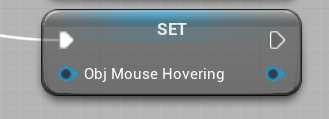
Anyone know how to empty a variable off the top of their head?
nvm I don't know why I thought it would be harder then this
https://i.imgur.com/ssngwJb.png
 sand shore
@empty violet Well to be honest, you'd clear an array so I could see how you might be looking for an "Invalidate" for a pointer.
empty violet
Right, I'd just got done playing with an array so I figured the single variables would have something similar. 
sand shore
Yeah no biggie. All these small bits of knowledge feel trivial but that's the sort of thing we mean by "building experience"
 unique falcon
hi you lovely lot, super basic one for you
i have my move input which goes from -1 to +1 and rests at 0. I'd like to do some magic to turn this into a smooth rotation value and i feel like there's some wizard nodes im not using or some simple maths to make it happen
ideally i want to have a second value that also goes from -1 to +1 but over time and never exceeds the current input value
empty violet
Smooth rotation value?
unique falcon
so at the start of playing my input is 0 and my rotation is also 0
i change input to +1 and my rotation now steps up by a specific value from 0 up to 1 over a short period of time
empty violet
Your either looking for addRotation or rInterpToConstant most likely,
unique falcon
but if i drop the input back to 0, it degrades linearly back down to 0 with a different value
empty violet
Can you explain the overall effect your trying to achieve?
Is this for a camera?
unique falcon
im trying to take out some of the twitchy feeling of a hovering vehicle's rotation
 late gorge
hi, can macros be overidden much like functions for a component?
and do they even get inherited?
empty violet
What is making it twitch Servus?
I'm not sure what you mean Mazimer, or I just don't know the answer, sorry.
Your setting it's rotation based on the mouse movements, duh you already said that.
unique falcon
actually it's keyboard!
empty violet
ah.
regardless, What I mean to ask is
"How are you changing the rotation?"
unique falcon
so i was using FInterpTo to smooth that input into something that's a little less binary
but FInterpTo doesn't know upper and lower bounds of this value, which means if the target is -1 and the current value is also -1 then when i make the target +1, step size is twice as big as it would be normally
oh sorry, that should be FInterp to Constant
empty violet
Are you adding to it's rotation or just straight setting it?
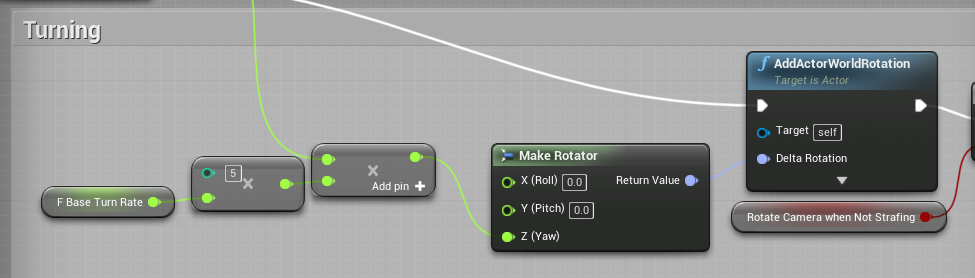
https://i.imgur.com/raqfC9G.png
For example, this is how I'm changing the rotation of my mesh on my side, using my keyboard (A+D keys)
 unique falcon
yeah, in this instance im using AddComponentLocalRotation
and it's really not that twitchy but im trying to get it that one step further so it really feels smooth and gentle despite how quickly you're turning
one of the games that does this the best, as far as i remember (and bear in mind that i don't play racing games much) is GTA
in GTA you can tap left and right periodically to turn really smoothly, it doesn't feel like you're turning 100% right and then 0% right on/off/on/off or anything
and interpolation seems to work but it has this issue of being a drastically stronger turn if you were going hard right and then swap to hard left because it's now trying to interpolate over a value of 2 rather than 1
empty violet
ideally i want to have a second value that also goes from -1 to +1 but over time and never exceeds the current input value
I'm not 100% sure on the first bit here honestly, but for the second part of the question you could just use the clamp node.
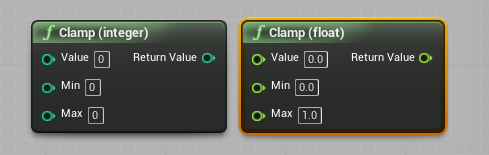
Sorry I can't help more beyond that, maybe someone else will come through that can help
unique falcon
oh, just clamping the output of FInterp to Constant?
sand shore
you could do that, yes
 north kelp
hey guys - does sound mix or sound class do something to audio volumes automatically? i have values im saving in the range of 0-1 but when i host a game and go back to my menu the values get multiplied by 100 (so 0-100)
unique falcon
just attempted that, it's not quite ideal because the output of FInterp to Constant is dependent on world delta seconds
sand shore
or you could have FInterpToConstant use the primary value as a target
north kelp
i have no code that is multiplying it... ive checked many times... all im doing is allowing the player to select volumes using sliders in an options, and saving the values to a file and in my game instance im storing a working copy in float variables
unique falcon
@sand shore, the primary value being the MoveInput?
sand shore
¯_(ツ)_/¯
but you most likely do want to use delta time
not sure why you wouldn't want to use em
unique falcon
yeah i think the issue is that i'm trying to interpolate towards a value that is normally 1 or 2 away, and i'd like to prevent the interpolation from attempting to move it too fast just because it tries to go further as fast as it would normally
i feel like i need to get mathy here and do away with the helpful nodes
 drowsy sparrow
hey guys, sorry to interupt, does anybody know if there is a blueprint or way to check how long a boolean has been true for?
i want to trigger an extended idle animation after the character has been idle for 10 seconds
unique falcon
you probably want a timer for that right?
something that you set each time you get into the "im not doing anything" state and is cancelled whenever your character does something
empty violet
Funny, I'm literally working on that exact type of timer right now.
@drowsy sparrow https://youtu.be/QcN04l3Vlxk

In this Unreal engine 4 (UE4) tutorial I show how to use a timer. I implement a function to decrement an integer periodically by using a timer in a blueprint.
00:20 : Create actor blueprint
01:10 : Add decrement function in blueprint
02:15 : Set Timer that calls decrement fun...
drowsy sparrow
thanks
empty violet
That's what I just used to explain timers to me,
Run the function for the timer each time your player stops moving, at the end of the timer check if the player moved.
If not, play extended_idle_anim
 potent citrus
Question - I'm working on a small project. One of the things that I am trying to accomplish is moving the camera from a fixed position to another in a Side Scroller level. I.E. Walking down the road, and you want to turn onto another street. How would you go about moving the camera to a new position in a side scroller setup?
empty violet
3d side scroller or paper-2d?
empty violet
nowkeep in mind, I'm not wholly sure about it, but if you know the position ahead of time (the full transform) you could simply use the tInterp node to transition the camera from the one transform, to the next.
The nuance comes into play as to how you want the camera to move, and I have no idea how I'd go about doing that without taking the full time to do it myself.
potent citrus
well, the intent is to make it look like you are walking around a small suburban neighborhood.
 atomic prairie
Hey! How to block the size of the game window? I have preset resolutions and I don't want the player to be able to change resolutions by moving the window with the mouse
trim matrix
hey guys just a question i was following this tutorial: https://docs.unrealengine.com/en-US/Engine/UMG/HowTo/CreateMainMenu/index.html and when im done i do have play and quit working but not the options menu it just doesnt show can u guys tell me what i did wrong?
How to create and script a main menu for your game.
nvm found it
wrong button hahaha
atomic prairie
haha
trim matrix
yeah looking for 2 days it was just the wrong button i just to hide and show hahaha
im so noob
 true valve
How do you take an enum and assign its display nameto a text object?
I'm using Set Text but taking Enum display name is what I'm trying to find out
zealous moth
@true valve there is an enum to string or to text i believe you can use
zealous moth
(y)
@true valve fyi, enums should be used for states that are not visible and then associated through a select into names or strings
covert stirrup
@true valve
true valve
that's what I have
covert stirrup
whats your result?
true valve
I change a UI label based on what object I interacted with
ie. player, workbench, etc.
covert stirrup
yea but what is your result
surely that should work to change a text box based on the enumeration you selecct
true valve
My result is the display name of the enum showing in the UI
covert stirrup
"How do you take an enum and assign its display nameto a text object?"
What I shown does answer that question, so I feel like you have more to it that your trying to achieve?
true valve
This is what I have
covert stirrup
So you have achieved what you asked yes?
covert stirrup
awesome!
zealous moth
well i thought i knew trigonometry but apparently not
I am trying to get an oscilliation with a height of 25 for the relative location
however i get a straight line
 fleet sandal
Finished >> reverse from end 😉
zealous moth
hah no i figured it out
the timeline was a 1 to 1 value
however sub-values of 1 in angles basically means nothing for sin function
i had to set it from 0 to 100
looks amazing
the rest of the bp is perfectly fine 😛
empty violet
Alright this is mildly annoying.. Whenever I start the unreal launcher it'll rapidly launch and crash itself at least 5-10 times a second, also breaks my ability to alt-tab. Unrelated, but anyone else had this issue?
zealous moth
which version?
empty violet
it's the launcher
zealous moth
sounds like a reinstall to me
empty violet
Just an intriguing issue, wanted to see if anyone had heard of it
Mostly surprised by how it breaks my alt+tab functionality
I am having an issue with a blueprint which I'll get to once I open my project again
lusty shard
settings in the file. compare the details after double clicking on the file
im not sure but thats where id look
make sure the internals are all the same
anyone care to explain Gates using a real world metaphor.. like a door? lol
why not jsut use open to start the gate.. or does enter have some sort of difference?
 violet inlet
hello boys , i would like to make a static mesh "hover" but the only result i got it's something who go only up and not smoothly
lusty shard
use a timeline
violet inlet
yeah it could be better
lusty shard
will spit out a float that relies on an where ever you set the high and low values.
and you can loop it.
Not sure what the event should be for triggering it, but hopefully it doesnt have to be tick
lusty shard
yea setting the timeline to loop should make it run endlessly
just need an event to start the timeline
trim matrix
Anyone here ever blueprinted a simple array for static meshes before? I was following the following blueprints from a pretty old tutorial, no meshes appear when I set it up in the blueprints amount ticker and havent gotten it to work, probably would help if i had a more general understanding of some of these nodes but there it be: https://i.imgur.com/G6nbPnD.jpg
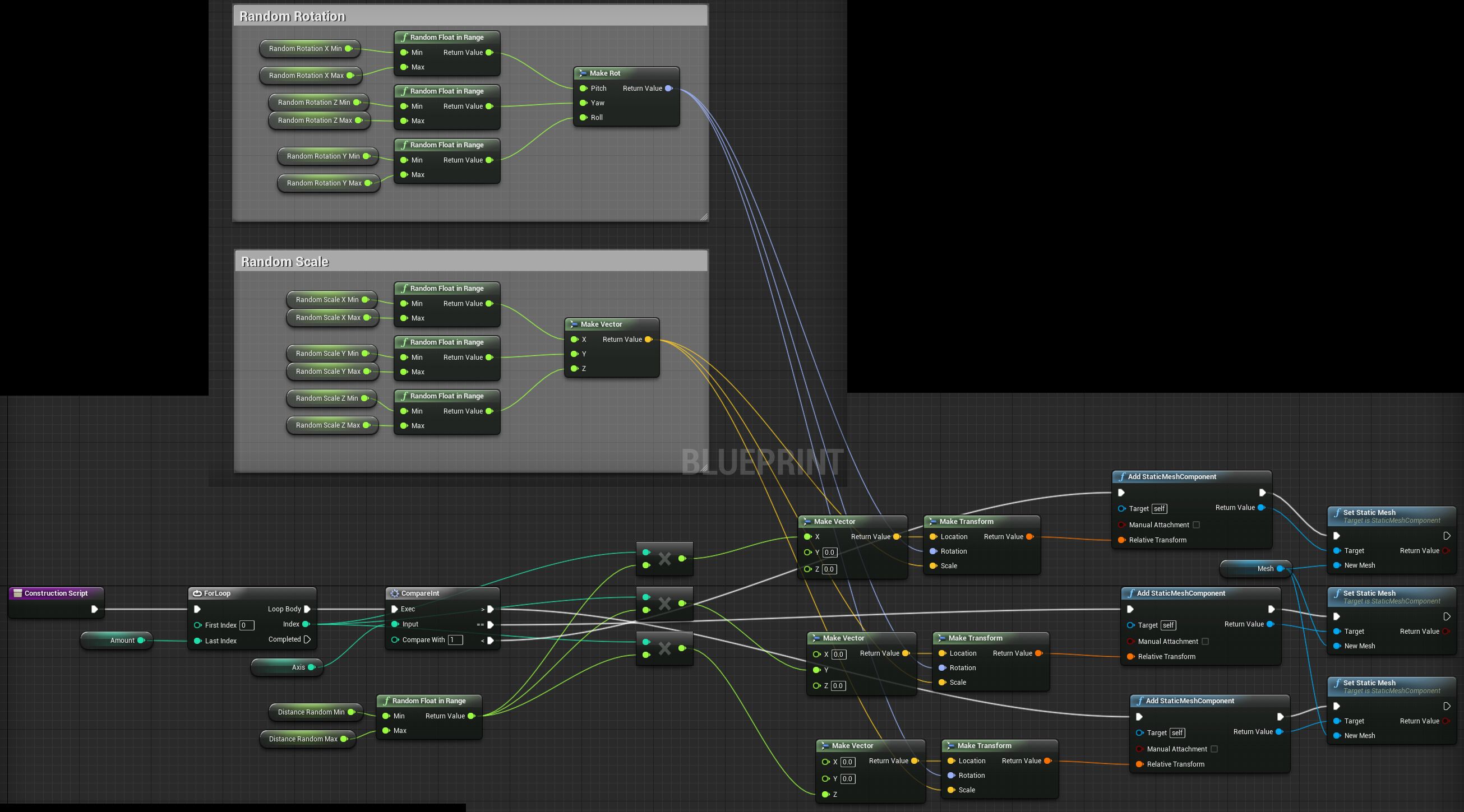
from this tut https://youtu.be/Ff6Rj62aXq8

Building a construction script where you can use any static mesh to create an array with random settings.
Here's a picture of the whole blueprint in case you want to copy it:
http://i.imgur.com/G6nbPnD.jpg
DasMatze
 feral leaf
I have changed the character walk..by making 1D blend space...now I made a buuton which will activate the action pose..of the character but after it get activated it automatically gets back to its normal state ...why need help??
rough wing
Here's a tutorial on how to save and load games.
https://youtu.be/5Wi7UIc_b8M

Hello devs! Here's a simple method of saving and loading your games. I showed what the saving and loading functions do and how to use them. Thanks for watching!
Target: 150 SUBS! HELP ME OUT!
Here's another video: https://youtu.be/5ZpTXMxuWUQ
 astral zenith
My latest issue: I have an enemy pawn. It has an invisible static mesh that is mostly used for direct collisions. And then another set of static meshes that act as damageable segments. The invisible static mesh ignores the Visibility trace channel, while the damageable segments block it. When I ApplyRadialDamageWithFalloff, the invisible static meshes often intercept the damage and prevent it from going through to the damageable segments. The apply damage node specifically says that only components that block Visibility will be hit... but I'm seeing otherwise in my game. Is this a known issue?
 earnest steppe
I'm curious guys, if somebody faced it already. So i'm using HUD to draw something, then the hud is referencing to a pawn camera class. I'm creating this camera class and attach it to an Actor. So if i assign the Pawn in game mode settings then it works ok, but if i don't do that i still can see the pawn created but HUD unable to access it, maybe i do something wrong here ?
i'm just cuirous why unreal has so strict rules and HUD unable to access pawn without assigning it inside game mode settings
zealous moth
@astral zenith sounds like inheritance issue; make sure whatever that mesh is parented to has similar collisions
 gusty cypress
Is it possible to have multiple skyboxes? I have multiple stages in a platform game next to eachother but I don't want them to be visible to each other and level streaming seams excessive if I have 15 stages next to each other
trim matrix
@violet inlet could make a level sequence that you just keyframe transforms then have it ticked to loop
just make sure you drag and drop the level sequence in the level and modify the details.
zealous moth
@gusty cypress i would argue that level streaming is exactly what you want. Skyboxes are very performance intensive so i'd advise against
gusty cypress
is there a general limit I should have within a level for performance?
zealous moth
what's your target audience? PC master race with best processor and graphics card?
if it's phones, you're way outta their capabilities
gusty cypress
PC, its just that I notice lag within the editor after making 7 levels within 1
zealous moth
right click your map and check the size
the physical size may not matter but the memory will
i keep mine under 200 mb at all times
gusty cypress
total for the persistent level or the sublevels? My persistent is 131 and its not even half way done
 uncut granite
Wonder if someone can help, i have created a spline mesh for a path but i don't know how to make it so that i can change the roll of each part of the spline and i don't know how to calculate it. ( circled part is what i don't understand and does not work as is )
the online documentation does not really help lol
 crisp wigeon
If I need to communicate between two different blueprint. Then which method should I pick that have low performance cost?
1.Casting blueprint
2.Event dispatcher
3. Interface
 tight cobalt
Guys how can I do different things upon different key being pressed? I have character that activates trigger box upon colliding with it, then widget is displayed to press E to interact, if user presses E it passes (enters) through the gate node..
Now I want to make to do different things if user presses up,down, then left right.
I am making a puzzle with 3 rotating wheels, I want character being able to select between wheels with up and down, then rotate each wheel left and right using left and right key.
Should I use Boolean variables or ints, branch? gates? I tried few different things but got lost along the way.
 cedar basalt
o/ How do I get a spline mesh to stretch or shrink along a spline and overlap the next index on the spline? Following along w/ this tutorial here. The reason I need the ability to stretch the mesh that's attached to the spline is because the ends need to overlap in order to be seamless.

https://www.youtube.com/channel/UC7HRB-YIUrG29zufq-vURsw
Our new channel is STILL pumping out videos as Project Torture comes to a close. So GO CHECK IN OUT!!
Almost 70 vieos, HOURs upon HOURS of videos. ENJOY!!!
WE LOVE YOU!!!
^the mesh I'm using for the spline
tight cobalt
@gaunt monolith Tnx Switch on int in conjunction with branches worked
 gaunt monolith
branches are fine but when u get lot of options its branch in branch in branch 😛
now u can just pop in another int if u want more options
covert stirrup
anyone know why a Macro made in a BP Master, Is not callable in a BP Child?
But Functions do appear
 radiant sequoia
Hey folks, does anyone have any good resources on best practices for the Player Camera Manager and Player Controller classes/blueprints?
I'm a little shakey on exactly what it is they're for. It sounds like the Player Controller represents the "will" of the player so your actual input handling events that you setup in "Input" settings should be handled there but the actual physical actions they carry out should still be done on your pawn.
Player Camera Manager though... is this for switching to cutscenes, other camera views etc? Struggling to find much in the way of explanation.
maiden wadi
@radiant sequoia The controller really isn't compared to the camera manager much. You're pretty much right between the two. The Camera Manager is your view in the world. The Controller is your control. You program things here that don't directly relate to a pawn you're controlling. For example, if you have a map hotkey that you can use whether you're controlling a running guy or a car, and you can open it from anywhere no matter what you're controlling or not controlling, that would go in the controller to be used on input from the player.
radiant sequoia
OK so presumably then in that example you'd setup a Map Key Input in the settings, handle that event in the Player Controller and... the Camera Manager would do the switch from the player character camera to the map view? (assuming it's a camera-based map, not a texture overlay of somekind)
Sound reasonable?
maiden wadi
Amusingly enough, switching cameras uses a function call to the player controller. I'm not sure how it works internally though. It may use the camera manager internally to process that. I don't know about CPP developing, but as far as I know, the CameraManager is mostly just used to get information about the camera, not usually meant to do anything.
If you wanted to switch cameras though, you'd reference the player controller and call SetViewTargetWithBlend and call that on a different actor that has a camera.
@crisp wigeon I know that casting and using that reference is a little faster than Event Dispatchers, at least for one connection to the dispatcher and one cast. I haven't tested interfaces yet though. I might do that in a bit.
radiant sequoia
OK, it doesn't sound like there's much point in me overriding the standard Player Camera Manager class then
It does feel strange in PlayerController having to constantly Cast my Controlled Pawn to my actual custom character type, I'd have thought that would be an overhead
I guess not
 fallow fox
Hello Everybody! I want to inspect some actors in my game using the swipe to left/right only. For example, you have a list of weapons in a row on a table and you want to drag left/right to see each weapon. I've done all of this but now I don't know how to clamp the swipe values to reach the max left and max right. Because if I reach the last weapon I can still swipe to the left for example and the weapons will go outside the screen. I need to get somehow the first and the last weapon and to get its bounds? How can I do this?
Here you can see some weapons which I need to swipe to see it
maiden wadi
@radiant sequoia Casting doesn't cost much at all. In fact, if you change them to pure casts, there is practically no extra performance cost. In fact, I started wrapping my getplayercharacter and getplayercontroller stuff inside of project specific function libraries. Small workflow help in not needing to bring up extra cast nodes everywhere.
@fallow fox Well, since you're doing everything in Relative space, that makes things much easier. Just put a clamp on the float before setting the new X location. Find a good Min-max value you like and it'll never be able to go past that.
radiant sequoia
Thanks for the advice @maiden wadi
fallow fox
And if I want to add all the objects dynamically how can I clamp the first and the last?
For example an array of actors. I get the first index and the last + a min max value? in a clamp?
maiden wadi
@fallow fox Hmm. What is StartLocation? Where is that in local space relative to your table?
Oh, my bad, that's being set at the end.
maiden wadi
Is the Maps transform X location value consistent with the table? Never changes I think?
fallow fox
The table it's just a backdrop. Only Maps I'm moving to left/right
maiden wadi
I'm slow today. I noticed that right after I said it. Just curious though, where do the values from the X go to? What are the numbers you're getting if you print that off?
maiden wadi
Looks pretty good. How is it working?
fallow fox
I've changed the setters first item and last item in begin play because each time I touch the screen it resets its location
But now at first touch/click, it set a new location ( outside the table) and there is the clamp, which it's working great
but it's not keeping it's initial location, where it should be
this is the initial location
Here jumps if I touch the screen
and here the clamp it's working
Solved. I've set the initial location to the entire scene 'Maps' and from there I've clamped min -50, +50 max
unique falcon
If I'm trying to rebound something off a wall/floor, I'll need a hit location right? I can't do that with overlap and should really swap to hits?
As far as I can tell, overlapping is really simple and the closest you can figure out to finding out where your overlap took place is by checking which component you overlapped, not ideal
maiden wadi
@unique falcon Is this for learning or functionality? Cause you can use the projectile movement component to make something bounce as well without having to hard code it yourself.
unique falcon
learning, trying to make a super smooth vehicle without actually using proper physics
(yeah I know ;))
maiden wadi
Gotcha. But yeah, hits are probably easier for that.
unique falcon
okay thanks, at least I know it's the right thing to spend my time debugging
so far I was only able to trigger something off overlaps so I'll go figure out why that is 😄
maiden wadi
Probably just collision channels. Your collision needs to be set to QueryandPhysics, and also blocking the channel you need.
unique falcon
I'm clearly missing something vital
Vehicle:
Test Object:
and in the vehicle blueprint I'm just waiting for EventHit to trigger, or OnComponentHit referencing the same mesh that has the collision settings in "Vehicle" above
neither of those trigger
trim matrix
So for some reason, upon a collision, a delay node is flagging up a "Infinite loop" warning?
am super confused
can anyone help me out?
unique falcon
how are you getting to that piece of code? what's before and after this section?
maiden wadi
@unique falcon Can I see your Vehicle and Test Object Components? I'll see if I can replicate that.
That failed cast will cause an infinite loop.
unique falcon
@maiden wadi vehicle components
Test object is just a Cube static mesh that i dropped into the level
which works absolutely perfectly if i enable SimulatePhysics
my vehicle registers the hit exactly as intended when Simulate Physics is turned on but otherwise doesn't know it exists
trim matrix
That failed cast will cause an infinite loop.
@maiden wadi apparently not tho... the delay is throwing up the error
unique falcon
it's more that your game is stuck in an infinite loop and the delay is the thing you're spending longest doing in each loop
trim matrix
ah
unique falcon
so when it decides to stop it because it's not going anywhere it will almost certainly break in the delay
unique falcon
you probably just want to remove the loop back
since you can just retry on the next BeginOverlap
unique falcon
same error?
unique falcon
im not sure what you're attempting to do with the delays but you could try putting a breakpoint in on your Begin Overlap and just following the trail to see where it gets stuck
maiden wadi
You do have quite a few delays there. Makes me itchy.
@unique falcon does the car go through the cube, or just not register the hit event?
unique falcon
straight through
trim matrix
As soon as i put a breakpoint in on the begin overlap, the simulation freezes up when i try to run it
unique falcon
if you've not done breakpoints before, it should just jump you to the BeginOverlap node so you can follow the steps its taking
click Step Over at the top to follow the logic
or Step Into, sorry
 crisp lance
Is it possible to create a "template" of Material in Blueprint? It would be more easy to maintain compared to copypasting.
maiden wadi
@unique falcon On the vehicle, that collision channel you posted, is that the core component? The Mesh?
@crisp lance Do you mean a material variable, or?
crisp lance
I have pyramid meshes. Each side can have a different texture, and this is done using the alpha value of vertex color (different for each side), and in Blueprint a comparison on this value is done and a texture is assigned based on it.
There are different pyramids with the same logic, but only the texture differs. I can copypaste the whole material, but if I ever need to change that logic I'll have to do it everywhere
unique falcon
@maiden wadi Mesh is actually a leftover, I've just replaced it with a Scene Component called Root to remove any confusion about it. ShipModel is the mesh with the collision.
maiden wadi
@unique falcon I wonder if it's the same for projectiles that it is for vehicles. Try making the ShipModel the root instead if you can. Projectiles have some weird issue with scene components being their root, they'll never register hit events from what I've seen. Vehicles may act the same way.
unique falcon
I was reading a few forum posts just now with success from people reorganising their component lists and it suddenly working
maiden wadi
I've made it a habit to order my root of any object to be collision since I've figured that one out, just like the player character's capsule collision.
unique falcon
the problem is that my ship model is over-turning compared to the actual movement in order to make it feel like it's sliding (since it hovers) so it's quite useful to have it not be the root
maiden wadi
@crisp lance I'm... somewhat sure I follow? If I do, your best bet is to make a parent class and keep the logic there. Then make children off of it that you can change the textures on. Then whenever you change the parent class, all of the children change with it but you can change child textures at will and none of the other child classes change.
tight cobalt
I am loosing my mind why is the actor rotation not detecting that its been rotated more than 360 degrees?
trim matrix
@unique falcon where do i click step into?
maiden wadi
@tight cobalt Cause you can't rotate more than 360 degrees. 361 degrees == 1 degrees.
unique falcon
@trim matrix
maiden wadi
That branch will literally never return true.
crisp lance
@maiden wadi I completely missed that Blueprints had inheritance. That'll be much easier than the template idea I had in mind. Thanks.
tight cobalt
@maiden wadi thats weird,,why then it keeps printing that its going more than that?
I dont understand
trim matrix
Im not really sure how to explain my problem But if someone could give me the time to explain that would be great
maiden wadi
@tight cobalt Where are you printing it?
tight cobalt
i have it saved as variable, and no amtter where I put print, it keeps going adding +18degrees to it.
let me show you the video.
maiden wadi
@trim matrix Explain away. Just bomb us with a big paragraph block. We'll ask questions if we don't get it.
tight cobalt
Basically I have 3 wheels that i can rotate..and change which one I want to rotate.
THen upon rotating all 3 to certain number..I will give user the key.
Thing is..I want to prevent user from going more than 360 and then not being able to solve it at all
trim matrix
Ok so basically i have set up a system to make it so weapons i pick up from the floor destroy the weapon i have in hand and replace it with spawning the weapon i picked up in my hands. to give the effect of picking up and droping a weapon. this works one time through but as soon as i try to go back to the other weapon i just dropped it bugs out and gives me an error code for a branch check that has no relation to my weapon dropping system.
@maiden wadi
When i go back to the other weapon it destroys the actor on the flor but doesn't spawn in my hands
tight cobalt
@maiden wadi Seems like..I forgot to include -360 in the check hah
trim matrix
maiden wadi
@tight cobalt That's also my bad. I thought those were get relative rotation variables not self made rotator variables. Get relative wouldn't ever return over 360.
trim matrix
@unique falcon so i got it down to here using the step system, the problem is that as soon as it gets to the delay node, the program immediately jumps back to the On event begin overlap
i have no clue why
tight cobalt
That minus was so small to notice. Damn..I also forgot that i can rotate the object in the minus.
unique falcon
@maiden wadi it looks like EventHit events only trigger off the root component, and only off some root component types
trim matrix
It never completes the delay
unique falcon
I think that Delay might be in the wrong place
Just from a good working practice type thing
In the frame where your BeginOverlap was triggered you want to do everything you can with the data that it gave you immediately and then store it if you need to use it later on (even if it's 0.01s later)
try doing your cast and your variable settings prior to the delay
trim matrix
aight
unique falcon
it might not be the solution but there's a chance that something is going strange when you're leaving the blueprint hanging for a while before using the data that came out of the BeginOverlap node
maiden wadi
Delays are generally never the answer.
unique falcon
they're so very tempting, but usually a timer is better
maiden wadi
@trim matrix What is the error you mentioned?
unique falcon
and it's worth spending the 30 mins figuring out how timers actually work, since they're a little more complicated than the delay node but very useful
trim matrix
Ok so basically i have set up a system to make it so weapons i pick up from the floor destroy the weapon i have in hand and replace it with spawning the weapon i picked up in my hands. to give the effect of picking up and droping a weapon. this works one time through but as soon as i try to go back to the other weapon i just dropped it bugs out and gives me an error code for a branch check that has no relation to my weapon dropping system.
@maiden wadi
maiden wadi
Yes, but what is the error?
zealous moth
@trim matrix pending kill errors mean you destroyed something too fast while something else is trying to get info out of it
tight cobalt
I was setting the wrong variable at the end of the branch. Instead of resetting middle wheel to 0 degrees if it was more than 360, somehow I was setting the small one.
zealous moth
@trim matrix your "destroy and spawn" system is not a good system. I would focus on code + visuals; make your "destroyed weapon" scale down to 0 with no collisions, do all the things you need to do, then destroy it
trim matrix
@zealous moth so the problem i have if i go that route is i want the slot for where these to weapons to go to be the primary weapon slot used only to carry one of these wepons at a time
@unique falcon so after removing most of the delays (actually looks a lot better so thx) the same error comes up but it is saying that the actual begin overlap node is an infinite loop
maiden wadi
Well, generally speaking if you're dropping them on the ground you wouldn't destroy them anyhow, you'd just detach and set their position away from the character and let them drop.
tight cobalt
@maiden wadi Working fine now! I guess it was a long day! Need to reorganize and clean my blueprints its getting messy, but I wanted to do that after i get all puzzles done. Seems like I'll do it tomorrow. Also it driving me crazy that I couldn't use timeline to drive the wheel rotation, but just couldnt make it to work. I guess its alright since its moving only 18 degrees, so its not that noticable. https://www.youtube.com/watch?v=QQwrbsjl8SQ


 zealous moth
@maiden wadi he is using an archaic system to drop stuff
@trim matrix I would recommend you stop and think it out a bit and see where the destruction becomes pertinent and in between when you don't want to see it
trim matrix
@zealous moth i would like to make it so that they just detach but im not sure how to do that when the weaopn is attached to my third person character
inhales... screams
unique falcon
Sounds like there's some funky logic going on behind the scenes here, removing the delays probably exposed something that was causing you strange issues elsewhere
Congratulations on having replaced your old issue with a new one though!
Now might be a good time to go into what you're trying to achieve with the BeginOverlap
zealous moth
@trim matrix you can literally attach and detach actors
there is a node called "detach"
trim matrix
Ok ill go try and run it to detach and attach thank you so much i literally started learning ue4 a week ago so im very much a noob thank you.
trim matrix
i can get my weapon bass to attach to the socket
 rugged stone
for some reason, my enemy patrolling doesn't work anymore. i keep getting errors that something is wrong with this set value, but i have no idea what is wrong with it.
covert stirrup
Hey guys, totally confused here.
I have added a Text render component in Construct Script and Set this to a Text component.
In event graph using Event Tick, I have set it to update the text, but this just does not happen. When I simulate gameplay, it never changes no matter what I do to the component. What am I missing here?
maiden wadi
@covert stirrup Construction script is ran only once when the object is created. Tick is ran after that fact.
Oh, I see what you mean.
Is the Print printing the correct text?
maiden wadi
I just tested the same thing and it's working fine. Created a text render component on the construction script and on tick I'm selecting a random in in range and converting it to text to set the text of the same render component.
covert stirrup
so the print and charge text should match but dont
both are generated fro mthe same tick
covert stirrup
I set the text render component to say charge
maiden wadi
You never set a RelativeTransform on the construction script.
Is that zeroing your scale by chance? If I take that out of mine, it doesn't show.
Nope, that should default to 1 on scale.
@covert stirrup Dunno. I did the same thing and it's working fine here.
covert stirrup
hmm
let me try in a clean BP and see what happens!
I can get it to work in a clean BP
as intended, so thats a positive
let me try it in a BP Child see if it works there
 fair magnet
Hey there so I tried creating a blueprint interface but for some reason it won't show up as an event. it only gives me the call function for some reason
covert stirrup
master BPs and Children BPs are fine
@maiden wadi not sure why it wasn't working before, but It is now...so, I am happy haha -- might have been how it was linked up before
works on its own seperate sequence from construct script
zealous moth
need some physics help here: I managed to get a lookat vector rotation based on the mouse position on screen. All good so far.
I am trying to use the Two Bone IK system in the animBP to make my right hand basically move towards the mouse.
I have been having mixed results...
so the arrow uses the rotator accordingly but I have no clue how to get around making a vector for the hand
 minor karma
can't help you on that sorry
now for my issue lol
i'm trying to work on a lock on system for my game, but idk 100% how i'll do it. what i'm thinking is it will line trace to the enemy closest to the front of the camera, obi within a limit, dying upon hitting an object. then, it'll trace left/right of that entity to be able to toggle to that enemy. does that sound like an ideal way to do it?
maiden wadi
@minor karma What you're wanting is a lock system that can toggle to the nearest left or right actor?
minor karma
it'll target to the one closest to the center of view
them from their, it'll scan left and right, to see if there's an enemy in range, that can be locked onto
idk if this will work at all, i'm just asking if that seems reasonable, or if there's a better way
maiden wadi
Okay, but what I'm asking is that you want to only target stuff that's within a certain range of the character? Cause that's pretty easy, both for the initial target and the switching.
minor karma
yes, how would oyu think would be best to do that?
because i only have a vague idea if i'm being unreal engine 4 with you lol
 signal cosmos
Hi guys, are you all also having some issues when you modify a struct? With some errors such as LogProperty: Error: UStructProperty::Serialize Loading: Property 'StructProperty /Game/Blueprints/BPI_Equipable.BPI_Equipable_C:Equip.Item'. Unknown structure.
And I think it's also causing some bugs in the game. Every time I open the project I got this error, and there are some new bugs that were not here when I closed the engine.
maiden wadi
For the initial targetting, that's up to you based on what trace or method you want. For the switching, what I would do is sphere overlap actors in the range you're wanting. That node has a class filter if you want to use it, or you can filter the array by tags or whatever you want. But basically you need to end up with an array of targettable objects. Then it's just about trimming the array. I personally would do it in quadrants for simplicity of thinking. Get rid of anything behind the player by comparing it's unit direction to the other actor with dot porduct to the player's forward vector. If negative, remove from array. Then you can use the right vector for the right side or (RightVector * -1) for the left vector, and remove anything negative again, then find the closest actor to the current target.
Hmm. Maybe. Now that I think about it, relying solely on the player's look at direction and finding the lowest might be better than comparing the range to the current target.
minor karma
yeh, that's why i was thinking a line trace from camera
especially because if i anchor it front, using the mesh. if the character turns around, then the lock on will only work on behind
maiden wadi
For the switching, or the initial targetting? You don't really need a line trace for the switching. Not until you check for occlusion anyway.
minor karma
for the initial
maiden wadi
Ah, no I was talking about for the switching left or right with all of that.
maiden wadi
If you want it semi inaccurate you could just shape trace with a large circle and return first targetable actor hit with it. I do something similar with a spell grab on one project, catching fireballs from enemies and 'grabbing' them into the front of the player character so they can be thrown back. It's just a sphere trace in the camera direction on a custom projectile collision channel. Only things I want to be grabbed are blocking the channel. You could do the same thing with tags and multitraces though. Return the array and parse it for the tags, and then find the first one hit with the tag.
maiden wadi
Sec, reorganizing my collision channels.
trim matrix
I didnt even know this was possible!
There is some infinite looping tomfuckery going on somewhere and i have no feckin clue what it is
minor karma
i could have a sphere/trigger volume. prioritizing the one with the greatest forward vector, then, i could do another sphere from that entity, keeping the rotation parented to the camera, while having the actual distance prioritized with being (if i'm thinking of this right) the closest x+/- target, closest to the camera.
does that make sense @maiden wadi ? and sound like it'll work?
also, @trim matrix click the node thats causing the error
screenshot it
then i can tell you waddup (likely)
 gritty elm
when i line trace from character to other box object and get normal hit, it return 1,1,0, which is fine, but when i rotate that object and try to get normal again by line trace, it returns .65, .78, 0 which i don't need, how to solve this issue
when object rotation is x=0,y=0,z=0, then it return correct normal result, if i rotate object, line trace return results like, x= .65, y= .79, z=0
minor karma
can you zoom out a bit more?
minor karma
just so i can see what it's connected too
trim matrix
maiden wadi
@gritty elm Do you know what the normals are?
trim matrix
@minor karma you wanna DM me?
minor karma
if you'd like, sure
gritty elm
i can understand, if i rotate object, then it's normal changes too, right?
that's fine, but how to solve this issue? i want to do something when player standing with specific direction of object
maiden wadi
@gritty elm It will, because the normal is the facing of the surface you just hit. Every surface in 3d is flat, so when you line trace, you hit a polygon. The normal will be that polygon's facing.
In short, you're looking for vector math based on the object's forward or right vector. If you explain what you're wanting a little more I might be able to help there.
gritty elm
i want to only do something when player stand in this direction, no matter what is rotation of object
yes i'm trying to grasp in vector math
maiden wadi
Okay, compared to where you just pointed the arrow, which side of that cube is the 'front'?
gritty elm
yes it's facing x-axis
maiden wadi
Okay. And what's happening when the player is in front of the cube?
gritty elm
player can push the object when standing like this: https://discordapp.com/channels/187217643009212416/221799439008923648/701021534508154891
maiden wadi
@gritty elm Is that just the cube simulating physics and being pushed around by the player's collision?
gritty elm
event hit, and adding offset with event tick to the box, by getting player character forward vector
maiden wadi
You might be able to calculate it on EventHit then. Not sure how your code/blueprint is set up. But the basics is that you only want to run the offset code if the player is in a certain z rotation of the cube. Let me make sure of a couple values with a test really quick.
gritty elm
i want to do something when player only facing that way, i also tried dot product, but it return results like this: -.9987 and -.8874, which looks complex to handle facing direction
here is the main code:
maiden wadi
@gritty elm DotProduct generally should be used with facing vectors and not point vectors. Dot Product is just asking how similar two facing vectors are to each other. If they're facing opposite directions the value with return negative. For example, two cameras facing directly at each other have a DotProduct of -1, two cameras facing the exact same direction have a DotProduct of 1. One camera facing to the left or right of the direction that another camera is facing would return a DotProduct of 0, if that makes sense.
But if you just wanted one direction, this is in blueprint, but I find this to be a pretty decent method of seeing if one actor is facing another.
north kelp
Anyone know how to get the current monitor that your game is running on, and also change that monitor (e.g. in my games graphics settings)
 echo basin
Crazy idea -but wondering if folks have feedback - I'm thinking to build a plugin that visualizes blueprints as Python code. And is bi-directional, so you could modify the code and it will update blueprint, and vice versa. Anyone seen someone attempt this yet? Syntax/AST mapping to blueprint would be configurable, so it could support more than Python, thoughts?
zealous bear
Anyone know if the settings for lights (directional lights specifically) are available as a STRUCT variable? It would be a pain to have to make my own...
 vocal urchin
I'm having a hard time understanding why this won't work. I have a single actor (a clickable icon) that I plan to use to control another group (a squad) as seen in the screenshot. I have a check to determine if the selected actors are the "mark actor" (the clickable icon), and if so, then I issue commands to that squad's members (going to the second For Each Loop). The problem is, this check always returns false, and I get the "No Squad Selected" error, when I am clearly selecting the icon...Any ideas here?
lusty shard
have you set a breakpoint, maybe on the branch?
maiden wadi
@vocal urchin I'd first start by making sure that anything coming out of that struct is valid before you even plug it into the other array to check if it's in there.
vocal urchin
Alright, I'll have another look at when I add it into the struct.
@lusty shard It does like, based on the breakpoint, that Squad Mark Actor hasn't been assigned. I assume that the "*" means nothing is there?
maiden wadi
I'd honestly just put a print after that very first loop and print off the IsValid of all of the struct's SquadMarkActor. If none of them are valid, not even one, that branch has no chance of ever returning true. If any of them do, you have some sort of disconnect between your struct actors and the actors in that Selected Actors array.
 stoic mesa
Im having trouble opening levels in my packaged project. I have all the maps in the "List of maps to include in packaged build" but im still unable to open a level from the main menu. Is this a packaging issue or a blueprint issue
maiden wadi
@stoic mesa Commonly, both. But start with packaging. You mind showing your project settings for the packaging with the maps selected part?
trim matrix
@maiden wadi so im trying to attach and detach but its not sensing myiinput key
maiden wadi
@trim matrix Start with the input key then. Put a print on it and make sure it'll print something.
maiden wadi
Where is the input, Controller, Character, or some other actor?
 robust cliff
any suggestions on how to get a push animation set up so my hands don't go through boxes without using another boxvolume?
stoic mesa
thats what I have. its meant for a multiplayer game but im just trying to debug the issue on why the maps wont open and it just kicks me back to the main menu
maiden wadi
@stoic mesa And in the content browser with your game files, the HUB map is in the main content folder?
trim matrix
@maiden wadi i have no idea why it isnt working
maiden wadi
@trim matrix That's not in the controller though, that event is in an actor.
@trim matrix If you want to use input in an actor, you need to EnableInput, and make sure that it's not being consumed in the Controller, Character, or any other actor.
trim matrix
so i cant use the same key binding for multiple bp because that input is only activated while im over lapping the actor
 sly dragon
hi i tried such a method but still the perks don't work right
normally the number of bombs should be 3 when equipped with ump
maiden wadi
@stoic mesa Double checked my own open level on a small multiplayer project I have started. The only difference I can see initially is that in the Options of the OpenLevel I'm using ?listen
trim matrix
even changing the key binding to an un used key it still wont print @
maiden wadi
@trim matrix Did you enable input in the actor?
stoic mesa
I was shown to use listen in the options node for listen servers but I will try a packaged version without that option and see if I get any difference @maiden wadi
trim matrix
yes input is enabled when i walk overlap the trigger box @maiden wadi
i checked and the anable input noded printed
maiden wadi
@trim matrix Oh, I just looked at that. You're plugging the controller in wrong. Target needs to be Self. The Player Controller needs to be plugged into where it says Player Controller.
maiden wadi
@stoic mesa You should use Listen I think, but I was just saying my only difference is that I'm literally using "?listen" and you're using "listen". I have no idea what the question mark is for.
stoic mesa
okay ill give it a shot
sly dragon
Can you help me, the problem is a little above
stoic mesa
@maiden wadi tried the opening the level in a packaged version with the ?listen and without any options in it. still cant open the level with the "?listen" but I could open the level when i had nothing in the options node so its narrowed down to that I believe
trim matrix
@maiden wadi i solved an issue just to see another i cant get it to attache to my weapon socket
vocal urchin
Did some more investigation and it looks like when I print the squad mark actor name, it's just empty. So it's looking like it never gets added to the struct.
But I'm adding it this way, and I can definitely get it into the selected actors array by pulling off the SpawnActor node, so why doesn't it go into the struct?
maiden wadi
@sly dragon I saw how you're handling the perk stuff, but you don't quite show what happens after the perk branch, I'm not sure what you're doing with the grenades.
sly dragon
1 min
maiden wadi
@trim matrix Try setting SetSimulatePhysics false, and SetCollision to none when attaching.
trim matrix
@maiden wadi The weapon disapears but is no where to be found hmm?
@maiden wadi never mid i needed to enable snapping now its just in a weird place
sly dragon
trim matrix
@maiden wadi it snapped to my hip instead of where my socket was is there a way to make two sockets snap to each other
maiden wadi
@sly dragon Kay, I see what you mean. Initially I'd caution against setting the array elem of a struct like that without using SizeToFit. If you try to set a Struct array element and it does not already exist, it will just ignore the request. To be sure that's the issue though, you can try setting that bool on the SetArrayElem to true. See if that was the problem.
@trim matrix That depends on your skeletal meshes. I haven't used that stuff enough to understand it fully, but when you snap an object to another they'll go to default places. You need to change stuff around on the weapon if you want it to go to a particular spot, or change the socket on the skeleton it's being attached to.
trim matrix
@maiden wadi ok thank you so much!
 pure heron
Anybody has any idea how to implement multishot for a weapon, so that the projectiles fan out, something like this?
I'm trying to do some rotator math, and the results are, uh
weird
maiden wadi
@pure heron Really depends a lot on how specific you want your shot. Randomized or even. Across a line, in a circle.
pure heron
Even, across a horizontal line
maiden wadi
What are the forward constraints? 180 degrees, 90, 45?
 cunning creek
why my GameMode is not showing any window?
maiden wadi
@cunning creek Click on the Window button at the top.
Make sure those things are checked
pure heron
I'd say 180 would be good, however with the extremes not firing. That is, 3 shots would be calculated as 5 shots, except only 2, 3 and 4 would actually fire.
maiden wadi
@pure heron So, thinking about it for a moment, the easiest way is probably just to take your shots, say you're working with three(one actual shot), so take 180 and divide by 3-1. Or 180/(3-1), it'd be 90 degrees. So you take the two left over and minus one more. The first one was the left shot, the second was the right shot, they'd never get used. Then rotate from -90 and add to that what you got from the first calculation, that would give you a vector of 0, a forward shot with one bullet. The same can be used by just changing the 3 in that calculation. 180/(5-1)=45, start at -90 on the rotator, and do the projectile three times using that 45 and adding 45 to it each time.
pure heron
That sounds like it could work, yeah
How to properly account for the aim direction, though?
stoic mesa
@maiden wadi I found a post from a guy who was having the same problem as me but he said it got fixed when he updated his version of unreal. mine is on the latest version. should I try just making a quick test project and see if I get the same open level problem?
maiden wadi
@pure heron You could do that based on the actor spawning them in local space and just convert it to world if you want.
pure heron
SpawnActor takes world transform, though
maiden wadi
@stoic mesa Weird. I mean you could try updating redirectors and stuff, but I'm not sure.
stoic mesa
how do I do that?
pure heron
@stoic mesa RMB on a folder -> fix redirectors
stoic mesa
gotcha thanks
maiden wadi
@pure heron I know, that's what I'm saying though. Use a local space point from the actor that's shooting the bullets, get your vectors based on it, and then use transform to convert them to world space.
pure heron
I guess that could work. Well, time to rewrite the whole thing
 fallen glade
Any way I can make a string get me substrings array going from <!> to </> ?
pure heron
Regex, if Blueprint supports it
Or split by opening tag, take the element with index 1, split by closing tag, get the element of index 0
fallen glade
alright, I found regex. No idea what it is but now I have something to work with 🙂 thank you @pure heron
pure heron
RegExr
RegExr is an online tool to learn, build, & test Regular Expressions (RegEx / RegExp).
fallen glade
oh my. looks like coding 😦 haha. Thank you !
 eager basin
Lets say I have a halo warthog . I have a driver class and a gunner class. I managed to get the driver class to move the car and the gunner class to move and fire the turret. There is 1 issue though. Originally I was attaching the turret to the car and rotating it with rotate actor on the Gunner Class. It worked great until you alt tab to a different screen then alt tab back. then it didn't work anymore. I redid the logic and now the turret is rotated using animation blueprints via transform bone with a value to change the yaw. The Gunner's camera now is rotated with Add Controller Yaw Input. I can not get the Add Controller Yaw input and the transform bone to change at the same rate even though they both are feed the same exact value, any suggestions?
maiden wadi
@pure heron You still working on that vector thing?
maiden wadi
@pure heron I got bored. You can convert the arrow line start line end to rotations for your spawning projectiles.
pure heron
Oooh, thanks, I'll take a shower and try it out!
 dense badger
Question regarding timers: If I want an actor to support N number of timers each with their own events, what's the right way to do that?
I started by creating an array of timer handles. But the event created when the timer completes can't have any outputs afaik so I have no way to know which timer completed... I feel like I'm missing something obvious
 gray dune
how can I have physic handle grab the physics object from the location my line trace hits?
 woeful idol
Feeling pretty stupid here, how do I instantiate a Blueprint class? It's basically just a data container, NOT an actor and I'm trying to fill it with data in a constructor or on Begin Play.
covert stirrup
Would it be better to use either a Struct or Enum for your purpose if it's pure data?
trim matrix
i need somepOne to call me I need serious help
woeful idol
Well, it's a 2d array and so I made a class that can wrap some of the more obnoxious looking access calls to a few functions
covert stirrup
could you give an example of what you need it for?
woeful idol
turn based strategy, keeping track of terrain sort of thing
trim matrix
PLease someone
woeful idol
Oh!
https://puu.sh/FznWa/c8c0083062.png Forgive my sloppy blueprinting; so ArrayOfTiles is my class derived from Object and it's throwing a "None when tried to access property" error and I just can't find where to actually instantiate it


Actually, everything spawns correctly - they just don't get assigned because the reference is None. Which I understand, I just couldn't find a way in blueprints to instantiate it to a usable reference
covert stirrup
I am guessing that the object you are trying to reference is a spawned object that just isn't there when it is being looked for as a reference
woeful idol
Right and I'm trying to figure out how to instantiate a new one
I can't use Spawn Actor From Class because it's not derived from Actor
covert stirrup
don't know 100% your answer but your in the right ball park it seems, so I will try my best to explain a situation I hit and see if that helps you
covert stirrup
so I have a solar panel that references a directional light to get its angle ect. If I leave that blank, it will do the same and throw up an error, so I need to make sure I have one of those BP_Directional_Lights spawned in my level and selected on the solar panel
So I feel like your error is something that needs to be put into the game world, just isn't there and you need one of those there to be referenced
trim matrix
@woeful idol After begin play use call allactorsfromclass the "get a copy" the use that to promote to a variable then use that object refernce as a reference idk if that helps
woeful idol
Thanks for the help, I will keep digging
trim matrix
anyone know how to fix my gun not tracking up and down with my camnera?
it will track left and right but up and down it just stays the same
covert stirrup
do you have any code to show?
trim matrix
yes
this is what worked before now it doesn't after i switched the way i pick up weapons to socket grabbing @covert stirrup
I dont think its an animation thing because it works fine untill i equip a weapon
covert stirrup
ah animation, not quite sure on that one. My one guess would be make sure to be using Blend spaces for more than 1 direction (but I don't think thats the cause)
trim matrix
I think it has something to do with the mesh being attached
all i know is i socketed the weapon my right hand and when i did it snaped to my back so i just changed it within in the weapon actor bp and now it doesnt seem to actually be snapped to my hand but like just floating in that general area @covert stirrup
is ther a way i can send my weapon bp to a child actor and still be able to pickup and drop the weapon?
@covert stirrup
?
covert stirrup
when it comes to the animation side I am not as confident, so I don't really know sorry!
With regards to the referencing yea that sounds possible, keeping the actor ready to be snapped to the socket again
trim matrix
so how would i keep the weapon snapped to my hands and moving with them ?
covert stirrup
like I said, I wasn't aware this was more of an animation question, so I cannot really help all that much
 south meadow
im trying to figure out how to get the GREEN direction vector. if my object hits the wall at a specific angle I want to be able to launch it off the wall at the equal opposite angle. i.e. if its straight on. it launches straight back if its a slight angle up, it bounces slightly up. im using add impulse since its not a character object.
anyone know the best way to get this?
zealous moth
yeah simulate physics, add bounciness, reduce friction and kill gravity
south meadow
im doing this in zero grav
 dense tulip
Hi Guys, i'm trying to get a reference to a "Target Point" object ... but when i try to get its value, its always null/empty.
lusty shard
maybe you are setting the target point wrong?
zealous moth
sounds like your object is not defined, null
dense tulip
that is not impossible ...
lusty shard
screenshot how youre setting it?
lusty shard
what node is after the GetMapWidth?
dense tulip
those 2 are the instances in the map
here the full function :
and i added a print for debug purpose
lusty shard
hmm i see the breakpoint too. was gonna suggest it
and the 2 targetpoints are being cleared it seems when the breakpoint is triggered?
hovering over them says empty with the breakpoint triggered?
dense tulip
this is possible, i always get a 0/empty value
dense tulip
lusty shard
what contains this targetpoint variable?
dense tulip
i wonder if i need something to get the values of the TargetPoints
lusty shard
is that BP placed in the level before play?
lusty shard
if bpworldmap is placed into the level, select it, and confirm that those targetpoint variables are set in the details panel.. if you can see them there
dense tulip
oh, that could be it ... lemme check
lusty shard
if its not placed in the level, or those values are empty, I suppose you could set them in blueprints manually.
dense tulip
This is what is in my outliner
lusty shard
dont see world map
so I would try setting those manually within the worldmapbp on begin play
dense tulip
first item in the pic ?
lusty shard
map editor?
dense tulip
ya, does this not represent the level ?
dense tulip
you mean this?
lusty shard
yea how is that bp_worldmap being placed into the level?
not even sure how its firing without being in the level honestly..
I see you have the maplowerright and mapupperleft in the world
is it a child of the playercharacter?
dense tulip
oh, i think i see what you mean .. .. i dont see the BP_WorldMap in the tree
yes it is a child
lusty shard
screenshot its details panel when you select that child
lusty shard
yea im trying to see the corner variables there
lusty shard
those are printing nothing also?
lusty shard
yea lol because those varaibles arent being assigned. You made 2 object reference variables that arent being set ever
You have to set them
dense tulip
oh ..
lusty shard
ok so
hope you didnt get to far lol
click tthe eyeball on those object reference variables
will make them appear on the character i hope
then use the dropper
to select those map markers
@dense tulip
pure heron
Is there something like yield return in Blueprint? So I can do essentially
for (int i = 0; i < 5; i++)
{
  yield return i%2;
}
instead of
int[] temp = new[];
for (int i = 0; i < 5; i++)
{
  temp.Add(i%2);
}
return temp;
?
 simple bison
How do i grab local player controller from playerstate 🤔
lusty shard
i dont understand the code really well but maybe if i knew what it was doing. looks like a for each.
pure heron
Basically, this idea: https://www.c-sharpcorner.com/UploadFile/5ef30d/understanding-yield-return-in-C-Sharp/
lusty shard
@simple bison Get owning controller maybe?
simple bison
C#?
pure heron
It's a language that supports yield return, so it's the best example I have
simple bison
and this is blueprint channel
but owning controller doesnt exist
im not even sure C++ has yield
pure heron
Yes, this is Blueprint channel, which is why my question was
lusty shard
it looks like youre trying to maybe get an index value of an array?
based off my skim of that link lol am i wrong?
a yield return searches for a specific value from several values?
pure heron
yield return in C# lets you not have to use a temporary value and return straight from the loop