#blueprint
402296 messages · Page 445 of 403
 jovial canopy
 maiden wadi
It's a function that probably wasn't ran. That return value doesn't know what to return because it hasn't populated the return value, since no execution made it to the function. Don't do that. Don't return the character movement, just use it outside of the function like you did inside with the reference.
 trim matrix
ah nvm I will just unpack the function and let it in the event graph, the easiest solution
 unique wyvern
for some reason after the 0.5 sec delay the print string only prints the end array size
I was expecting it to loop through the array and print 0 - arraysize, every 0.5 sec
maiden wadi
@unique wyvern Because the internal Loop doesn't stop. Basically, you told the delay node to restart for as many times as you ran the loop body. To clarify a bit, lets pretend each loop body takes 1 second. You make a delay for five seconds, but you have 20 array elements. What actually happens is you do one body, that's one second, it'll start the five second timer. One second later the timer is at 4 seconds, but the second loop body comes in, and calls the delay again, which resets it to 5 seconds. Essentially you end up with a 25 second delay in this case.
Hoping that definition was apt and not misleading.
 cinder dirge
@unique wyvern @maiden wadi ^ a good explanation, but not quite correct - it would be more so if applied to a Retriggerable Delay. In this case, the Delay performs de-duplication of the call that comes after it. As @maiden wadi correctly point out, the loop does not wait for the delay and simply runs through the entire array within a single frame. Since a single frame is, well, lots less than the Delay's delay, all but the first call is ignored (From the Delay node's mouse-over text: "Calling again while it is counting down will be ignored"). Thus when the Delay continues 0.5 seconds later, it runs only once, and at that time the loop is long finished, with the Array Index being the last index that was executed by the loop - it hasn't updated since the frame in which the loop ran
I do wish people would learn about Timers before the Delay node. This code would have been a lot easier to reason about had it used a looping timer
Remember folks, the Delay node is the devil and its mission is to deceive and mislead you
Use a Timer or Timeline instead
 gloomy linden
They should ban the Delay node :d
maiden wadi
They probably would if it wasn't so popular with designers. Lets face it. It's much easier to just say OnEvent>Delay>Flipflop>ChangeLightOnOrOff. Than to do the same thing with a timeline or delay.
 spark robin
Is there a node that outputs true or false depending on if the input variable is within a certain range?
(Please ping on reply ❤️ )
maiden wadi
@spark robin What input are you looking for. Integer, Float?
spark robin
Integer
spark robin
Ah yes, thank you 🙂
maiden wadi
This surprises me a little. I expected a bit more of a gap between these two. Just testing random things.

 stable plume
How do you disable/ delete/ stop a giff?
maiden wadi
@stable plume Discord settings, Text and Images, Automatically Play Gifs When Discord Is Focused.
stable plume
I love you 🙂
😍
Also thanks for that 'Make literal int' reply above - I have been doing 'if less than' into a branch type nodes when I've needed that functionality - your way looks way easier @maiden wadi
maiden wadi
@stable plume
You can mostly recreate the same thing like that. Of course the single in range is easier, but you don't even need branches.
stable plume
Yer I've been doing it longhand!
 pulsar moss
anyone know how to make this work? or is this not possible? I want to foreach over arbitrary data table row
with a macro
maiden wadi
I haven't used Datatables myself, but that looks like it should work? What's wrong with it?
pulsar moss
I think it's because the out row is undefined type, how does one coerce it to be a type? Can't cast to struct
I think maybe the solution is breaking it
ok yeah breaking it would work
 zealous moth
@pulsar moss @maiden wadi that's because the engine cannot just get a row in a vacuum, it needs a context. The way to handle it is to break the row and get what you need from it.
has anyone ever tried to have a specific skeletal mesh body part follow the mouse or an arbitrary point? similar to megaman or metroid
 brave oasis
Guys, I need to create a 3d yoyo like this in vr, where should I start? (from 0:24 to 1:40) https://youtu.be/FAP0EpZjwxw?t=24

 wintry pagoda
Trying to use Local Wildcard, but keep getting this error. Does anyone know what the issue is?
 covert crane
is there a way to view the public vars of a game instance without having to get into the blueprint itself? Same for the level blueprint now that I think of it... 😕
pulsar moss
@zealous moth thanks, I figured that was the case
zealous moth
@covert crane print string em 😛
@wintry pagoda cannot see what it says, can you zoom in?
wintry pagoda
Says "The type of Variable generated from expanding Get UI Root Actor is undetermined. Connect something to Local Wildcard generated from expanding Get UI Root Actor to imply a specific type."
trim matrix
@pulsar moss maybe try using your struct type as the output parameter
spark robin
Does "not" boolean node basically invert the output?
(So is my input is true, it outputs false and the other way around)
Please ping on reply ❤️
jovial canopy
yes
spark robin
Thanks
jovial canopy
@spark robin
spark robin
Thanks again lol
 languid current
needing some help to figure out how to make a highlighted text on UMG
i tried highlight of rich text but i dont know if i am dumb or if it does not work
 warm plume
i was following this tutorial so i could get used to how unreal engine works but i can't find the same node as in the tutorial
and the context sensitive check box is off
 empty violet
@warm plume Looks like it's doing the same thing just without requiring the execute node.
Probably a change between version, just skip right to setting the speed and see if it works
warm plume
i finished the tutorial and none of the animations are workign
 sand shore
@wintry pagoda Well you can't expect that wildcard to be resolved
You have two object types used and the wildcard system doesn't care if they're related.
You need to cast from UObject to your type before using it in your macro graph
empty violet
i finished the tutorial and none of the animations are working
@warm plume I personally have never used the tutorial, nor do I work with animations, but your going to have to ask a more specific question. You could also try #animation, they may have answers closer to what you will need.
warm plume
ah i got it to work
just needed to put the node straight from cast to character into set diretion instead of through calculate direciton
empty violet
@warm plume Looks like it's doing the same thing just without requiring the execute node.
Probably a change between version, just skip right to setting the speed and see if it works
 maiden wadi
@unique flicker I'm sure you could manage a work around to find the right actor, but in general this is something that should be handled when it's equipped. Create a reference holder variable in the pawn and set it when the weapon is spawned and equipped.
empty violet
You could also (if you have multiple equips) have a data struct or variable that holds everything equipped at any point in time.
 strange stream
So I just changed my game from a ''console'' to a keyboard/mouse situation. Which should be pretty straight forward.
In the video you can see my character firing an ability while standing still, and while moving. The character rotates with my mouse position.
When I'm standing still I'm hitting whatever is at my mouse cursor, BUT, when I'm moving while firing the bolt is just off.
You can see my mouse pointer on the enemy at all times, but when moving I never hit what I'm aiming at.
https://streamable.com/84f8h2
 empty violet
Easy referencing, easy switching.
Then, each weapon or equip-able should have its own BP where it's mesh is set and all that, easy way to derive mesh, an icon, sounds, how much damage it does. Good place to store all that.
 dusky birch
Hey guys, new here so apologies if this is the incorrect place to ask. There is probably a "first timer" guide that I've missed somewhere.
With regards to Procedural Level Generation, how important is it to use Octrees? Would you build out an Octree class within a BluePrint, or would you switch to C++ for that?
(specifically regarding 3d tile game creation etc)
empty violet
So I just changed my game from a ''console'' to a keyboard/mouse situation. Which should be pretty straight forward.
In the video you can see my character firing an ability while standing still, and while moving. The character rotates with my mouse position.
When I'm standing still I'm hitting whatever is at my mouse cursor, BUT, when I'm moving while firing the bolt is just off.
You can see my mouse pointer on the enemy at all times, but when moving I never hit what I'm aiming at.
https://streamable.com/84f8h2
@strange stream My guess is it has to do with however your spawning your "bullet", and how your giving it it's direction and velocity. Without seeing code and having the spare time to look into it I can't help much more.
Try standing much closer to the targets and doing it again, see if it continues to happen?
strange stream
Ability Fire blueprint
Rotation blueprint
''Orient Rotation To Movement'' seemed to fix it, sorry xd
 novel coral
I'm trying to add a camera tilt to left + right movement (like in original quake) I'm trying to use the camera shake, is it possible?
like this:
when I move left = add camera shake +10 but then it bounces around, I want it to stick to the position
 tall root
i've got a map generator using actors that are different rooms that spawn randomly to create the map and i have the actor, transformation, and class stored in 3 different arrays that are used when generating the map. Now there was no presistence and each time you would start the level it would generate a new map and i've started working on persistance and ran into a problem when trying to load the map from the saved values. I got everything working and whatnot but the classes don't save multiple instances of each class which is an issue because it only saves and loads the 3 first rooms. here's a pic to probably illustrate better what's going on
^ this is what it looks like when it prints where each CLASS is saved with their respective transformation
v this is what it shows when i tell it to print where each actor is saved and their transformation
this is the blueprint for spawning in what has been saved upon starting up the map again
something to note is that when i convert the array element in the for loop to a string and print nothing shows up.
 lofty moon
Hello!
Is there maybe anyone who could help me through DM's? This is my first time making a game and im very new and kinda embarresed lol
empty violet
Nothing to be embarrassed about, just try to read up as much as you can and then try to ask specific questions
 bitter wharf
Guys is there any way to render the widget only when its in front of the mesh? The widget is in screen space
 clear ledge
Hey guys. I'm displaying my item names like this.
Now I want to change the color of the names based on the Item Rarity variable. I'm not quite sure how to go about that
maiden wadi
@bitter wharf That's a widget component?
 dreamy ice
@clear ledge struct with text name and then color of text? Then make that your name variable instead of just a name? Or define it per item and use a enumeration to predefine?
bitter wharf
@maiden wadi Yes widget positioned in local space of Character
maiden wadi
@bitter wharf I'm not sure if there's a way to handle that with a screen space widget. Not by default. If you have a reference to the camera location actor location and widgetcomponent location, you could easily just do a vector comparison on tick and hide it when needed.
bitter wharf
Thanks, ill try, i just thought it might have a default way to handle this
 stoic narwhal
Is there any way to remove files inside the project files during runtime?
I've created a system using the victory plugin which writes IO files, but I need a way for the user to be able to delete them. Any ideas?
zealous moth
@bitter wharf you can make a custom material for fonts that only render when camera sees it
how? no clue, I am not that versed in materials
Enums use bytes... is there a way to set an enum through a byte?
 simple berry
quick question guys. how could i save an int to another int? basically, the player picks up something, its assigned to the slot with a number, how do i get the slot to remember that number and not limit the slots i can have?
can anyone help me?
lofty moon
Could someone help me? I have an idea for a game but I do not see any tutorials on what im looking for. I am wanting to make a Asymmetrical game where there is a Killer and 5 survivors. But I have No idea how to make that .
FYI I am a beginner
Also this game is heavily inspired by the games Dead by Daylight and Last Year
 true valve
How do you access the project version from settings if I want to show it in UMG?
sand shore
@lofty moon You're going to be in a loop here:
1. Break your problem down into easier/smaller bits. In example you need there to be two distinct teams, so you can spawn different classes - well how would you do that? How do pawns get spawned in by the engine? Is there some way you could customize this?

2. Start working on one of the smaller chunks. You don't wanna do everything there could be done, just enough to get going. That last part takes practice

3. Evaluate how the new work has changed your position. Maybe work on another chunk.
And you just 1, 2, 3, 1, 2, 3, 2, 3, 1, 2, 3 etc
This makes it possible to find a tutorial on many aspects of the project without there being one for the entire project.
 autumn ore
I have a problem with save blueprint. Have anybody worked with it before?
the data does not keep the value after quieting the game . there is a blueprint class called "Save Game" that creates a file that can be reloaded when you call it
data works in the editor not the build. we were looking for finding a way to save options variables in the build
i just need it to keep the variables after quitting the game. but it always returns default data values. not the ones i saved
sand shore
If you're just starting out and aren't comfortable doing that, go find a tutorial which does guide you through the entire process @lofty moon, even if it's not the game you wanna make
 urban salmon
@bitter wharf any reason you dont want to use world space for your widget component? that should fix the problem... though they dont look quite as clean as screen space
 vocal urchin
If I wanted to smooth AI movement between a series of points, what would be the smartest and most performant way to do that? Some kind of dynamically generated spline for it to follow?
I think of this as applying to vehicles and their steering, especially, as not all vehicles are tanks that can easily pivot on the point they reach.
lofty moon
Dude I have no idea what Im doing.... I dont know where to start
sand shore
Well, just try and find something to guide you in
doesn't have to be anything related to what you want to make - it's actually better if it isn't. You get frustrated when you cant get this-one-little-thing working and wanna make your cool project
lofty moon
I know. Could you maybe provide something that I could follow?
sand shore
https://www.youtube.com/user/VirtusEdu pick any of these, I guess

YouTube
Ever wanted to be a game developer? Well now you can with our extensive library of FREE courses! On our channel you will find numerous courses teaching you h...
that's what's popular rn
trim matrix
No delay node in Actor blueprint?
trim matrix
thanks
vocal urchin
I'm having a very weird movement issue where only a certain set of actors in an array move when I call this action. I am 100% sure that the Goal Location is being generated properly, and I'm calling this action from a pretty straightforward For Each Loop.
The function that calls the event in the actor
The issue itself - all points generated (see debugs), but only 8 out of the 9 are moving. Sometimes it's 5 out of the 9, or 6, or 7. This error doesn't occur with any consistency, other than it does occur, but with different actors.
Now, what's stranger is that when I click out into open ground, an area that won't use my cover system, all units move as they should.
But if I go back to cover, again, I have the same issue. As you can see, with three this time that are refusing to move.
zealous moth
i closed my editor but I have had mixed results with that move to actor/location node; instead i used the other simpler ones "move to location" and "move to actor" that use the AI controller; much smoother, less issues
vocal urchin
@zealous moth wow, that...actually works
zealous moth
yeah, and this was after a week of headaches
the move to actor/location node is simply not a good one
vocal urchin
I have also had several days of headaches. This is bizarre. Thank you!
trim matrix
I have 2 weapons on my thirdperson character both 1 handed weapons they both deal dmg to my ai right now for switching weapons i do it via viability what would be the way to disable the item so i don't do double dmg to my AI?
zealous moth
how do you detect damage?
trim matrix
overlap
zealous moth
you can set the collision to ignore
and a trick of the trade: scale the weapon down to 0
trim matrix
like turn off collision ?
zealous moth
yup
if you aren't using it, why need the collision?
personally though, I would do line tracing to detect colisions..
trim matrix
they don't have collisions
i think
@zealous moth you know anything about configuring buttons widgets to work with controllers?
zealous moth
so here are ways you can handle weapon swapping:
- Spawn/destroy actor
- Scale up/scale down and disable collision (collision enabled settings, not responses)
- use linetrace to detect collision and disable it
@trim matrix so that if you press the X button on the controller, the same X button on your widget is used?
@trim matrix or you mean visually?
or do you even mean physical game controllers? XD
trim matrix
i mean if u had a widget with three buttons,i wanna be able to select each one with a controller and then hit x
yea physicall
zealous moth
ahhh, so no mouse
zealous moth
what you'd have to do is make a set/array of your widget buttons and have a button that is considered "selected"; on input, you then call the "selected" button's event in the widget
@trim matrix linetracing
it is independant of lag collision
but more advanced
trim matrix
hmm
a button considered "selected"
u mean like hovered
right now my weapons when overlapping call a function on my ai to take dmg then in that function it disables collision
zealous moth
yeah, whatever you wanna call it.
zealous moth
ah?
trim matrix
i jus tdon't have collision at all on my weapons
zealous moth
lol
trim matrix
could u do an example of it? im having trouble understanding how youwould make an array of hovered widgets
zealous moth
so how do you detect hits?
trim matrix
overlapping seems to work
its a melee wep
forgot to mention that
i'll just scale to 0 probably less demanding then destroying actors
guessing
zealous moth
@trim matrix my editor is closed; when your widget is created, have it declare itself to your controller or character or whatever you own; then have an event or function that you can call to populate an array of widgets from that widget and you can either do it via tags or widget subclass; then, have your inputs cycle through the array by index number. Whatever that index is, that is "selected". Finally, have another event or input where if you have a "selected" button, call it
@trim matrix it's the same but in terms of complexity, much much easier to handle
I made a baby that has a rattle and a bottle; when i take them out, they scale up and i put a timeline on it also to make it look like he pulled it out from his back
trim matrix
nice
populate an array of widgets from that widget and you can either do it via tags or widget subclass; then, have your inputs cycle through the array by index numbe @zealous moth that is what confuses me
zealous moth
hm, try to get all children from your master widget; it should return you buttons. Add those to a separate array. I am gonna hit the sack so that's my last idea.
cheers
trim matrix
well nice now i just need a have decent attack animation
the one i made is pretty 🙂 trash
zealous moth
sword and board or 2h 😛 start with those
trim matrix
well striking from idle pose makes me worry about double hitting
also right now i have it set up where i have to hold mouseright to swing
got to have it attack once per click
zealous moth
you need an animation, a montage, a animation notification system. This way you can set it to send messages based on the notification itself (you can ID it)
 rough wing
Hi guys, if anyone is looking for a vault mechanic tutorial, I made a 3 part YouTube series that explains it. Check it out and leave a like.
https://youtu.be/4TqWo1sp7B8
https://youtu.be/4TqWo1sp7B8
https://youtu.be/4TqWo1sp7B8

Hello devs! This is the third and final part of the vault tutorial. Thank you for watching and don't forget to subscribe!
FIRST PART: https://youtu.be/ls9RizlFJ1E
SECOND PART: https://youtu.be/DqW7cG1MbHc
Target: 150 Subscribers! Help me out!
 marble lantern
@rough wing you got anything on menus with controllers
rough wing
@marble lantern Not yet
marble lantern
pls do
rough wing
You mean navigating menus with controllers right?
 heady hawk
So maybe someone can help me sort this out.
Currently I have an enemy pawn set up with an AI and animations such that it focuses the player
And I'm using 'orient rotation to movement' so that the upper body AO turns toward the player
 tight cobalt
Guys, why does the destructible mesh sound triggers only once? I have a pillar that is crumbling slowly every time when the projectile hits it. I want to play the sound when the projectile hits it in blueprint, but it plays only first time. Any idea?
heady hawk
The trouble I'm having is getting the rest of the body to orient towards the player when the player moves outside of the 90 arc of the AO
I imagine using some combination of enabling 'use controller desired rotation' and a bool with some maths will do it
But I'm failing on the maths bit
@tight cobalt Try using 'spawn sound at location' instead of 'play sound at location'
tight cobalt
I dont think thats the problem.
I cant even see the exec line pulse being sent second time.
heady hawk
Also, why are you casting to the projectile there?
tight cobalt
It was just example, since it didn't make difference with sound node plugged in directly to the event. It still played it once.
heady hawk
Anyway, solved my own problem, forgot all about taking the delta of the control rotation and the actor rotation. It was right there in the animation blueprint to begin with 😓
@tight cobalt So you're saying that if you hit the same actor multiple times, it's not playing the sound beyond the first time?
tight cobalt
Yea. But its destructible mesh.
I mean I could add sound directly to the destructible mesh options, but then its not directional. It plays on both speakers no matter where I look and it doesnt effect the distance.
heady hawk
So you mean after it's been 'destructed' the new chunks don't initiate a sound?
tight cobalt
Nor the chunks.. nor the leftovers of the mesh
trim matrix
Hello guys I want to make a loading screen, I have idea how to do it but I want to set randomize UI, like when you click "New Game", you will see this loading screen but I want to do it every time it loads to be different picture, one time one tip, other time other trick and etc, but idk is there a way to do it
tight cobalt
Might be..Wonder if there is a way to add the sound to the leftovers of the mesh then. Not sure would the overlap event made a difference.
heady hawk
@tight cobalt Quick google suggests you need to use an on component hit event
tight cobalt
Basically my mesh is 98% complete after the first hit.
Can you link me the article please?
heady hawk
It's in the forums, they're talking about impact with the terrain, but it seems relevant all the same
Unreal Engine Forums
Hello UE4 fans, developer and support team,
I tested a bit with destructible meshes.
I tested also some UE4 marketplace assets.
I have a problem that I am not
tight cobalt
Gonna check out. Thanks for your time.
trim matrix
Hello guys I want to make a loading screen, I have idea how to do it but I want to set randomize UI, like when you click "New Game", you will see this loading screen but I want to do it every time it loads to be different picture, one time one tip, other time other trick and etc, but idk is there a way to do it
heady hawk
@trim matrix I'd generate a 'random float in range' to choose from a an array set up with your tips
trim matrix
ok but these tips where will be? every tip and trick in different widget or?
@heady hawk
heady hawk
You just want to show text for the tip right?
 dry pewter
Hello guys, i'm leaving this question here before going to sleep.
I have a pawn that execures a blueprint and that makes the animation blueprint do stuff and swap animations.
When the pawn is player controlled th animaitons work as intended
But when the pawn is AI controlled, it execures the same blueprint (the behaviour tree triggers the pawn actor's blueprint as if the player did it) some animations do not work. what might be causing the issue?
Already checked if some "get palye controller" could be in the middle of the blueprint but it's not.
Please help, been stuck for hours here 😦
heady hawk
@trim matrix So you could just set up a text variable called 'tips' on your loading screen widget, make it an array, and type your tips into it, then when you create the widget, pick from that array at random and set your tips text using that value.
trim matrix
ok, will try to do it
heady hawk
@dry pewter What animation in particular don't work?
 neon perch
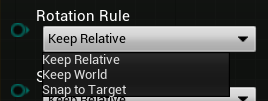
Hi! Is there an equivalent of "attachtoactor" but for rotation as well? Seems like it only "attaches" the position.
heady hawk
@neon perch Are you setting the Rotation Rule to 'Snap to Target' ?
neon perch
@heady hawk I figured it out, thank you
bitter wharf
Guys does anyone know why caching an animation state and then using it somewhere else make this rule to not function at all
 split wasp
I see you have jogstart and jogend bridged, are you sure you don't end up in dead end if run condition never gets triggered?
as jogend can also go in 2 directions
bitter wharf
They are bridged because one might simply click W fast and release, having no room for Run and just basically triggering jog start/end immediatly
split wasp
yes, you can still pass it through "Run" but the transition is so fast it wont play any frames from that animation
bitter wharf
Everything was working Until I decided to move internal animations in this states to separate cached states
Probably this auto rule is not working anymore due to the fact that it just cant get the total time of the internal animation
pity...
Its so freaking hard i dunno xD
bitter wharf
Ok so maybe you know, just theoretically
Lets suppose I want to make Idle > JogStart > Run > JogEnd> Idle, but in a way that all of them have direction interpolation
like a ring connected between JogForward, JogBackward, JogLeft, JogRight, and, its even not the end of it, I want to manually blend thouse for ForwardRight, ForwardLeft, BackRight, BackLeft
The question is, how I can add this additional layer of blending
split wasp
you could keep track of the animation cycle with 0-1 value
tight cobalt
Why is the sound playing only once upon stepping on the trigger box? I wand it to play everytime when I step on it, and stop when I leave the area. Any idea?
split wasp
say your animations start with left, but JogEnd gets called on right foot-> you have option to force animation to play until it matches left foot again, or start JogEnd from a point it matches right foot
but do mind, this is such a nitpicky territory that players don't even usually realize or pay attention to
bitter wharf
Sounds too complex.
split wasp
tl;dr just adjust JogEnd animation start time to match the Run state
bitter wharf
@unique flicker Try to cast weapon reference to your weapon actor
maiden wadi
@bitter wharf @unique flicker Casting won't change the actor's ==. The reason that doesn't work, is because you're asking if MainHandWeaponReference == a null actor reference. Casting only changes what level the reference is, it doesn't actually change the actor itself. If you want to know if it's a child of a different class type, you need to ask it that.
Okay, but that's not asking it if it's a child of something.
 thorny lily
hey guys
I'm currently working on a local mp as a student project, but we all moved to home office and I only got 1 controller the final game should be played with 4 controllers and my question is when I turn off assign 1st gamepad to 2nd pc will multiple gamepads assign themself to pc 1-4?
hope u're all staying healthy during this time. 🙂
maiden wadi
@unique flicker You have to set those things when you spawn the weapons for attachment. If you want to know what hand a weapon is in for logic reasons, I'd recommend an Enum. Generally if you wanted something like that, you would pretend your character was spawning naked and then on beginplay, you equip them, at which time your variables you need to set would be set.
 swift palm
Not sure if i posted it on correct channel, so if someone want to take a look at a question in unreal engine channel i will appreciate
 turbid hound
hey guys/girls how do I get my blueprints to know what level is loaded say Lobby.. once loaded can you do this?
swift palm
https://docs.unrealengine.com/en-US/BlueprintAPI/Game/GetCurrentLevelName/index.html you can use this i think
Get Current Level Name
turbid hound
Thank YOU
swift palm
np
maiden wadi
@swift palm Generally, if I'm not mistaken, the best approach is to use an interface. A constant line trace from camera is done, 10-60 time a second. Each linetrace that hits an object asks if it implements the interface, if it does then send message. That message goes to the object and retrieves an integer or enum, which you can then use to set the right button to show on screen with one image widget and multiple textures.
 warm condor
Anyone know where stack traces are logged to? This node doesn't go to the 'Play in Editor' window: https://docs.unrealengine.com/en-US/BlueprintAPI/Development/Editor/StackTrace/index.html
Stack Trace
Confused why it doesn't just log stack traces on all errors to that window by default
swift palm
@maiden wadi Thanks for answer. I will try to brake it down
@maiden wadi Each linetrace that hits an object asks if it implements the interface" Is this an enigne option or custom bool that i have to create?
 short coral
Hello , i have a question , do scalability settings have to be saved for a packaged game every time they're changed?
I know in the editor it's something different but i'm asking for after packaging or will the player have to change them every time? If so how do i save them?
maiden wadi
@swift palm It's a function you can run on an actor that will return a bool to use. Are you using Blueprint or C++?
swift palm
@maiden wadi I'm using both, with raycasting already set up on main player c++
short coral
What do you mean spawn them? How do you spawn scalability settings like game resolution and game effects?
maiden wadi
@swift palm This I think is what you're after. https://docs.unrealengine.com/en-US/API/Runtime/Engine/Kismet/UKismetSystemLibrary/DoesImplementInterface/index.html
@swift palm It's also worth noting that you don't need to use that in a lot of situations, sending an interface message to an actor that doesn't implement it will just make it fail silently.
short coral
I don't think you're talking to me @unique flicker right? Because what i have is widget blueprint
And the player just chooses the options he wants
swift palm
@maiden wadi Thanks for the link. Hopefuly now i can resolve it
maiden wadi
@short coral I'm not sure how it all works as I haven't delved into that stuff much, but based on most UE4 games, that is all saved by INI files. GameUserSettings nodes I think might be what you're after.
short coral
I mean , that's what epic decided to call them hahah , its confusing i know
Alright , so i'm guessing i have to find a way of saving them
maiden wadi
@short coral Are you just trying to change the scalability level or change the level's values?
short coral
No the engine's values , so it will affect all levels
strange stream
How would I go about making spell indicators like this, and make spells behave accordingly?
Like in League of Legends
maiden wadi
That I can't help much with. I don't remember which game it was, but a lot of people altered the INI for that. I know there's a default INI where those are stored that you can change and save and ship with your game.
short coral
Yes that much i know but i'm not sure how i would go about modifying the INI file and saving it from blueprints
maiden wadi
@strange stream Those are mostly decals. As for how to make spells follow them, that's up to coding and tweaking.
 supple dome
GAS does it by spawning an actor, and having a function that may return a array of actors or a hitresult, that way you can have targets or directions for skills
strange stream
Yeah its a big question I realize
maiden wadi
@short coral I'm not sure if you can modify scalability settings in blueprint. Not beyond just setting the level of it. You'd need to edit the INI yourself and let users select and save their own level.
short coral
You can modify them through blueprints using execute console command nodes , i created a menu widget to do that too but i was just wondering how would they be handled after the player exits the game
 frozen spear
Is there anyway to add anim notifies at runtime in actor bps or am i stuck only being able to add them directly to animationsI have multiple animations that will use the same notifies but want to be able to hotswap...lets say, no matter which animation it is, fire the notify .5 sec into playing
heady hawk
@strange stream For the circle around the player I'd spawn a plane at the player's feet with the appropriate transparent texture on it
For one that's indicating the spell's effect location, you'd spawn a similar place following the mouse cursor's location translated into world space
strange stream
Yeah, guess I knew that, I just have trouble on where I should begin with this
If I have 100+ spells the system needs to be easily reconfigurated to other spells
heady hawk
Getting started is often the tough spot
strange stream
Yeah..
maiden wadi
Just remember, League wasn't made in a day. Or a year. You're going to spend time configuring specifics if you want diversity. No way around it.
short coral
@maiden wadi figured it out , you use the save settings node
heady hawk
Personally I'd just set a goal and then iterate.
strange stream
Yea I know, but its always good to know what you're doing and where you're going
short coral
Using apply settings also saves the game user settings too
So it's more convenient to sue
use*
heady hawk
I'd start with putting together a mockup blueprint and material to get the circle around the player
empty violet
https://i.imgur.com/CM8mHh3.png
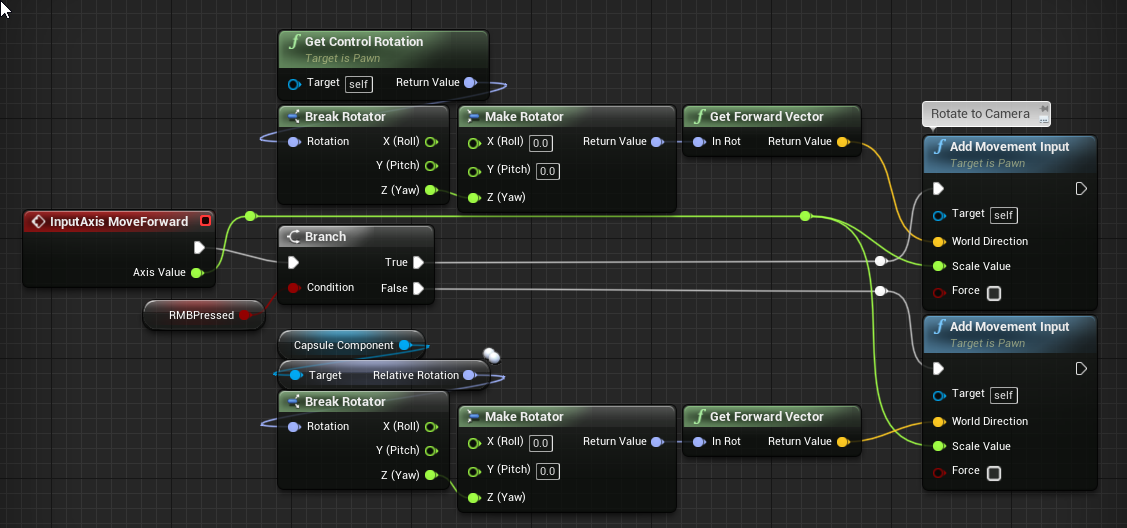
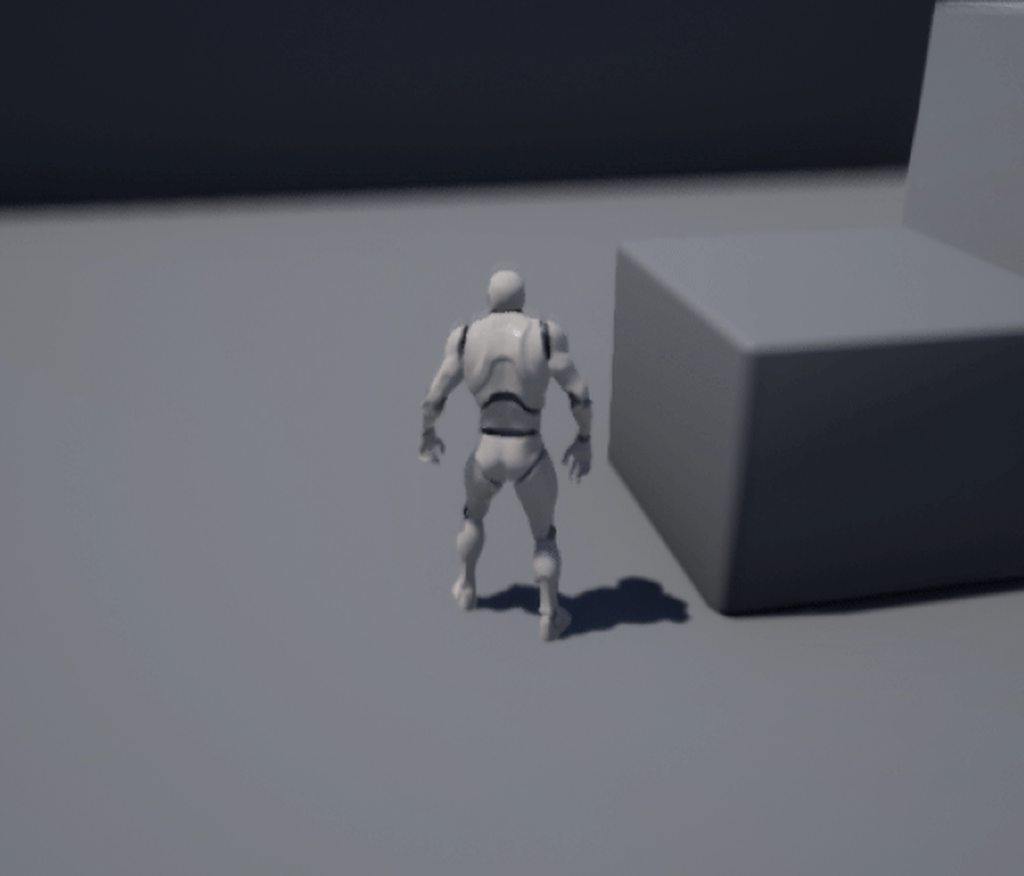
Moving backwards provides me with a jitter (gif to follow) and causes the character to always move backward in a particular direction, rather then directly backward depending on where the player is facing.
 strange stream
@empty violet orient rotation to movement?
empty violet
Hmm?
heady hawk
It's a setting on the pawn
empty violet
These ones?
https://i.imgur.com/AcClZX6.png
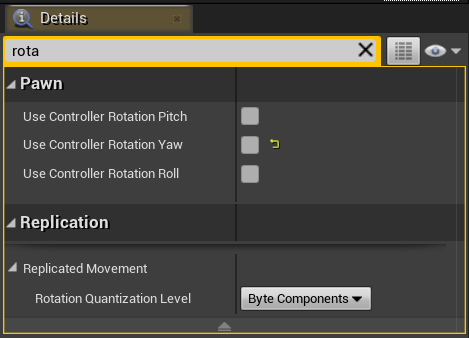
No matter which way the capsule/mesh is facing, it always goes backwards in that particular direction. My assumption is it's using world rotation for some reason.
But I'm specifically using the local rotation, So I'm confused enough to come here.
I'm going to keep looking into it on my own ofc, but if anyone has any idea's I'd love to try them.
strange stream
try unchecking it, or the controller yaw, pitch, roll, whatever
I always get confused by them
Whenever I have a movement/rotation issue I try unchecking / checking them all
empty violet
Unchecking it stop my character from rotating at all, though I'm sure if I started rotating him by hand it might work.
My confusion is that moving forward works just fine, it's only backwards.
It's definitely not those first 3 I showed. (Use Controller Rotation [axis])
There's gotta be bigger underlying issues. I'll try doing this a different way
heady hawk
Yeah, I wondered why you had that rmb in there
empty violet
The player should move based on Camera when RMB is held,
heady hawk
Oh
empty violet
when not the character should move based on character direction
heady hawk
Ok, I think you're over thinking it then
empty violet
I'm open to a simpler process, send it.
heady hawk
Try enabling 'use controller rotation yaw' when you have rmb down
empty violet
And still getting the same forward vector as I currently am?
heady hawk
No, don't do change the movment
maiden wadi
@empty violet Does the normal movement work when RMB is not down?
empty violet
In my original code?
maiden wadi
The false part of the branch, does it work correctly when you don't hold the right mouse button down.
empty violet
^^^ Yes it is firing properly.
maiden wadi
But does the character move correctly? Facing forward, as intended?
empty violet
Character moves as intended fully when holding RMB.
Character moves as intended turning left/right, and forward based on capsule/mesh rotation when not holding RMB.
Character does NOT move as intended when moving backward and NOT holding RMB.
The character's backward movement when not holding RMB jitters, and will always move in one direction
https://i.imgur.com/caImURA.gifv
No matter which way he, or the camera, is facing.
strange stream
So I made this material as a circle indicator (its a sphere)
But, how can I make a gradient from the edges towards the middle?
Like here
And give it some ''thickness''
empty violet
So I made this material as a circle indicator (its a sphere)
But, how can I make a gradient from the edges towards the middle?
@strange stream I presume you would use a texture as part of the material.
But yeah, might want to look around and ask #graphics
strange stream
Yea, was kinda suprised on how ''easy'' it was
heady hawk
@steel wasp I'm still trying to figure out your intended movement behavior, can you cite a working example?
empty violet
World of Warcraft is probably the easiest example.
LMB lets you move camera around without affecting character movement,
RMB lets you move camera around while affecting character movement.
empty violet
Essentially, Yupp!
Well for starters I had a bunch of extra math I didn't need.
https://i.imgur.com/466L4X4.png
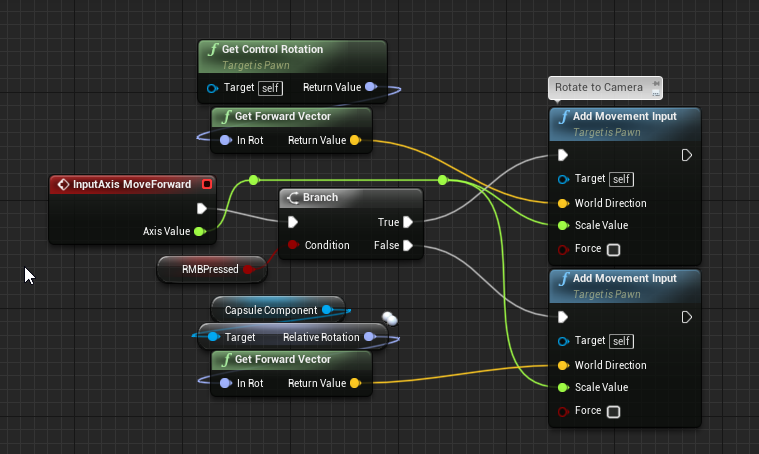
This achieves the same effects, I just took out the rotator break/create
As an side-note, my left/right movement looks exactly the same but with get right vector instead of get forward vector
heady hawk
I just worked it out myself on a new third person project
Use controller rotation yaw is enabled
The only thing I haven't tested is putting in the left mouse hold to rotate camera
Yeah, ok, now I see where the difficulty lies
empty violet
Your guy doing the issue going bcakwards?
heady hawk
When you go to move after you change the camera view, the character wants to move in the camera's view of forward/back
Because the camera is tied to the controller rotation
empty violet
Isn't the camera the controller?
Hang on I might have my components confused.
What exactly is the 'control' that the rotation is derived from here?
https://i.imgur.com/3iH1uf2.png
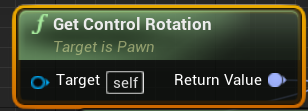 heady hawk
Well, when you're in control, it's your view
empty violet
Can I just send you my third person blueprint to overwrite yours with so you can see exactly where I'm at vs you?
I'm not 100% sure how .uasset files transfer over to other projects is all
heady hawk
That's ok, I'm trying to get the desired effect without too much outside influence 😄
heady hawk
?
empty violet
Getting the relative rotation of the mesh instead of the capsule makes it work as desired.
Which is weird, considering that forward movement worked, just not backwards.
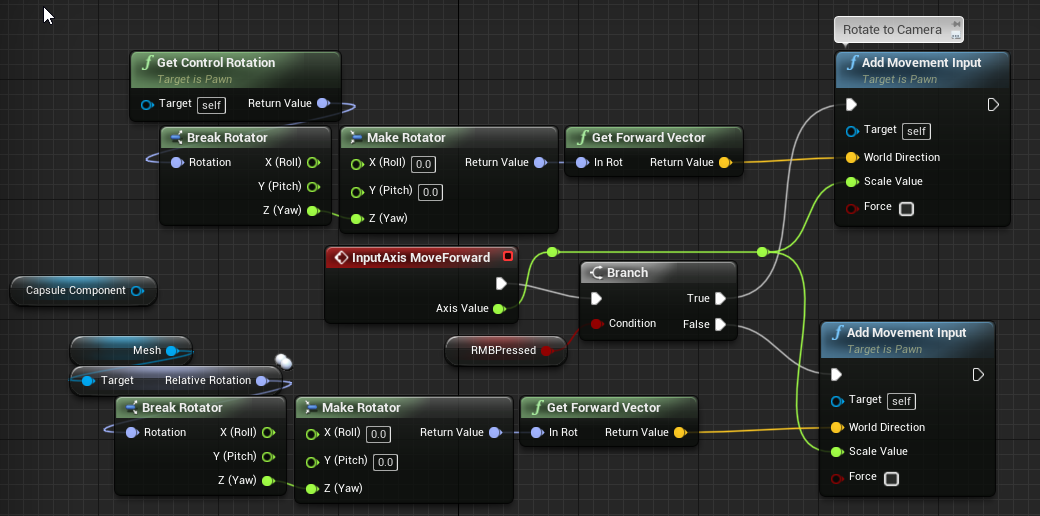 heady hawk
Huh, well ok then
empty violet
Wasn't a perfect fix, new issues. Has to be related to how the base character movement system works the rotation.
heady hawk
Yeah, thought that might happen
empty violet
It's not pulling direction from the meshs rotation, and I don't get it.
I'm trying to derive a forward vector for the world from a local rotation?
maybe the issue?
Noo... that's why we're breaking it and then making a new one. For the Get Forward Vector function.
Grr this is annoying.
 gleaming gulch
Hi, I wanna cast to a blueprint actor that I create inside a widget BP but it ask for the object reference. I put ( get owner) and other reference but it doesn't work. Is anyone knows how to fix this please.
empty violet
Is the 3DCapture_BP the parent of actor your working on right now?
Where is that blueprint being referenced inside of this actor?
 rugged stone
how do u make a ragdoll
empty violet
Okay so part of my original problem, the animation turning the character around is just that. An animation set in the direction of travel. The actual 3dperson movement template does NOTHING to the actual meshs local or world rotation when it moves.
I know that doesn't help either of you two,
CTCTyt I have no idea, that sounds like a super broad question. You could try #legacy-physics though
 reef tangle
I'm trying to make a button array, but every time I try to add them to the array it says "no objects"
but theres clearly buttons in the scene and saved
empty violet
In the scene?
Is it saved to the array instance, or the instance of the array in the scene?
I'm not super familiar so I'm just throwing stuff out there, but I've done the above before.
reef tangle
I made a button in umg
i'd like to take all of my umg buttons and put them in an array
then id like to randomly pick one and have it change color every 2 seconds
reef tangle
yes
zealous moth
anyone know if you can hide/show enums?
let's say I have choices A, B, C but I want to hide B for the time being
heady hawk
@empty violet So, I've got what I consider to be a working system 😓
No left button functionality, but it does have movement independent of the camera rotation as well as rmb locked behind the player as options
empty violet
@reef tangle, maybe this will help?
Unreal Engine Forums
I've been trying to find a way to add buttons to an array but nothing seems to be working. I've placed a button into the event graph and prompted it to a variable. I converted the variable to an array but it doesn't allow me to add buttons to that array. I want to create a mai...
It seems like you don't directly place the buttons into the array from the GUI, you do it in code/bp
heady hawk
empty violet
I'm trying to pick my way through it, I'm lookin
heady hawk
Use Controller Rotation Yaw is disabled, and neither of the two rotation options on the movement are enabled
With how I have it here, when no mouse button is held, the camera free rotates around the player, you move forward/back with w/s, turn with a/d, strafe with q,e.
With RMB held, character snaps to camera's forward view, w/s move forward/back, a/d are strafe, as are q/e, though the q/e could be easily changed to rotate
empty violet
What is going on in this bit?
https://i.imgur.com/E0uvqFa.png
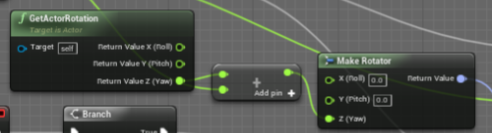
What does adding itself to itself do?
heady hawk
Oh, that's overlapping, it's adding the z to the turnright control input value
 keen seal
How would I go about making a rarity drop system?
I have a couple of powerups, that drop randomly, can I assign some percentage to it, so some are rarer to get than others?
heady hawk
Yeah, you might want to make a struct, say PowerupStruct, and in there have one value for the powerup name and another for it's rarity, then you could store an array of that struct type a variable in your blueprint
Or even, store a reference to the specific powerup blueprint in the struct
keen seal
Will take a look at that, ty
empty violet
Have a struct in which you store the possible powerups,
Assign each a % chance within the struct
Either ensure that the % chance equates 100, or handle the missing amounts later.
In your BP that spawns them, pull them all in from the struct, add up all the %'s and assign them a particular spot within the 1-100 space.
Get the random number, and then boom.
That's how I'd handle it anyway
keen seal
I see,
I'm fairly new to this, I think I'll end up using a tutorial or I'm never going to finish this game
Thanks for the help anyway!
empty violet
#animation
Not tryna be mean but you'll likely get better answers there.
bitter wharf
okay sorry xD My bad
trim matrix
how would i make collision for bullets
its being shot and i want to use overlap events when it hits a wall
but the thing is that it is overlapping with the gun actor and the players capsule component
 sick sapphire
@trim matrix probably a rough solution, but
in your OnBeginOverlap of the bullet, get the other actor, then use branch and "==" node to check if it is the player/gun actor
trim matrix
yep ive tried that, but then the problem is it wont detect when it hits a wall for some reason
im using physical bullets, not ray tracing so i believe it should be working
sick sapphire
you need to tick generate overlap events on the walls
sick sapphire
yeah those arent on by default for some reason
also keep an eye out for 'Generate Hit events' when you use the hit event too
sick sapphire
alright
swift palm
Hi guys, maybe someon from here will know (message link) https://discordapp.com/channels/187217643009212416/225448446956404738/700024744358969456
strange stream
I've attached an actor to my player, but I don't want the attached actor to rotate with the player. How can I accomplish that?
 trim matrix
yep
empty violet
@heady hawk Thanks a bunch for the help, scrapped it all and restarted from scratch and I got it working.
Used yours for a quite a bit of referencing as well, (even if they may look totally different).
 prisma flame
Hi,
I own a rectangular "Actor" with the origin in the corner.
How could I get the position of another of its corners (in "Vector")? By knowing that the rotation can change at any time.
Thanks
maiden wadi
@prisma flame Easiest way is to get that location in local space, and then convert it to world using the actor's transform.
gloomy linden
The amount of people asking how to change pivot is too !@#$ high.
maiden wadi
Who's asking how to change the pivot?
gloomy linden
I dont remember their names
prisma flame
@gloomy linden I don't want to change the pivot, I created the piece to have this pivot here, but I need to recover the 4 corners.
@maiden wadi Thanks, I'll try like this.
maiden wadi
@prisma flame If you have their local space location, which you can easily get by dropping a scene component into the actor and moving it to the corners, then take that vector and use this.
Local space into the location on the left, return value will be it's location in world space.
prisma flame
Okay, I see. Thank you for the clarification.
 gray hare
I'm trying to use DirectBlueprintCommunication, that is save an actor from my level to a variable in another actor in the level. I can find it in the drop down, or use the dropper tool to select it, but it doesn't actually set the variable? Is there some voodoo I have to do to make that work?
maiden wadi
@gray hare First understand that the variables do not actually save the actor. What you're creating are references. When you create a reference, it's empty. It's just saying, store this type of information in this reference. So you need to get some sort of actual reference to that actor. This is usually done via line trace, click, sphere overlap, collision or other things of that nature. The other two ways of getting an actual reference are on spawn, if you're spawning one actor from another, you can save the spawned reference. The last way is not really good for general use, but it is okay in testing stuff which is GetAllActorsOfClass, and drag off of the array return and get a copy of index 0
gray hare
Yeah, I'm familiar with all that. I'm trying to use the "Pick Actor From Scene" tool.
Trying to set the reference of an actor instance in the level to be another actor that's already in the level.
I've never actually used this before, generally work on more systemic stuff. I would assume it works on some level since there's UX for it.
maiden wadi
Ah, let me test quick.
gray hare
A How To Guide for referencing Actors in Blueprints.
See the Direct Blueprint Communication section.
maiden wadi
You're getting the dropper tool and not the cancel sign thing when you hover over the other actor with the dropper, right?
gray hare
Yep, the dropper shows up. When I click, it goes away and nothing has changed.
I get the cancel on objects of the wrong type.
I can also select my instance from the drop down.
maiden wadi
Anything running in the Construction Script?
gray hare
Nope.
This is a brand new blueprint that's not doing much else.
Just tried A->B and B->A, neither work. Is it working for you?
maiden wadi
Odd. It works just fine. What type of variable are you trying to populate it with? I'll see if I can replicate the issue.
gray hare
It's a blueprint type of a C++ base class I made that inherits from AActor.
I can try with anything basic to see if it works for anything.
I'm on 4.24, so not an ancient build or anything like that.
maiden wadi
I tried with one of my blueprint classes, and a basic Actor class. Works fine on both.
gray hare
Interesting. I made two new actor blueprints and it works...
I will have to investigate further.
Thanks for your help.
maiden wadi
Best of luck, bughunting!
 keen goblet
My actor X has a component C which references another actor Y. When X is destroyed, I want C to notify Y. Tried doing this by giving C a bound event to OnDestroyed for its owner, but this event doesn't fire when its owner is destroyed! (Presumably bc C is being destroyed at the same time as X.)
Any suggestions for new approach to get around this?
 mild ore
try end play. btw storing references to other actors is problematic.
gray hare
this is odd:
MyClassA: can't own B, or test actor
MyClassB: can't own A, can own test actor
Test Actor: can't own A, can own B
It's that specific instance of A. A new one has no problems.
dry pewter
@dry pewter What animation in particular don't work?
@heady hawk These 3
Transition is just a boolean
@heady hawk Is working now, while taking screenshots found one node that had its linkin broken, thanks.
linkings
 wet swift
do you guys think its going to hurt preformace if I use a ton of box triggers for everything in my open world game?
and if im using ticks on these box triggers 💀 💀 💀
maiden wadi
@wet swift Every single little thing you add hurts performance. But define a "Ton"?
wet swift
well im just saying is it going to effect fps heavily
like -10 fps
like -10 fps what it would normaly be
maiden wadi
Dunno. Are we talking a hundred, or ten thousand? And what is the tick in them for?
maiden wadi
What does it do?
wet swift
most of them start dialog
but the ticks are used to say when they start the dialog
i know theres a less costly way of doing it but im wondering if i can get away with it cuz i really don't want to change everything
@maiden wadi
maiden wadi
I doubt you'd see much performance difference with or without them. 20-30 isn't a whole lot for simple trigger volumes with a simple tick, specially when only one of those ticks is likely to be ran at any time.
wet swift
alright thx
maiden wadi
Kinda curious now. Must test something.
 zealous bear
Anyone know a solution to the character/player start being deleted when I restart level? (I have to carry over a score value)
maiden wadi
@wet swift Yeah, doubt you'll have an issue. Just spawned three thousand triggerbox actors. Lost two FPS from 80 to 78.
@zealous bear Savegame or GameInstance, and on load, overwrite the default value. I think Playerstate has a function that does that as well but I haven't used that yet.
zealous bear
im not sure quite how to explain this gimme a sec
is the game instance never overridden and the game mode always overridden?
maiden wadi
That's correct. And you should consider the HUD class for your Interface usage instead of the GameInstance.
zealous bear
thought it was deprecated so ive just been using a widget blueprint to slot in other widgets
maiden wadi
GameInstance is spawned when the application opens, it is there before even the first World. World is then spawned as the default level, and then GameMode, GameMode spawns PlayerController. When you change a level, the World is destroyed and everything it spawned.
zealous bear
but then everything respawns except player controller 😖
maiden wadi
How do you mean? It's recreated as well.
zealous bear
either the player start, player controller, or gamemode is deleted, making the character unable to spawn in
*and I'm using reset level
 gentle heart
what am i missing here? it just doesn't move
zealous bear
use add movement input
gentle heart
that doesn't work either
plus i want to use FloatingPawnMovementComponent because it provides smooth movement
maiden wadi
@gentle heart Have you printed to make sure the axis is not 0?
maiden wadi
@zealous bear I haven't used Level Reset, but it seems like it calls a reset on everything except GameMode and the Controllers. I can't find a whole lot on it but you may need to spawn a new actor to possess, or find a way to possess one if it's spawned.
 feral estuary
Guys any idea what behaviour may cause an NPC to slide when is suppose to walk?
maiden wadi
@gentle heart Let me double check a different project.
zealous bear
@maiden wadi so if im using the hud (which isn't umg) do i then need another widget blueprint 'hud'?
to control the placement of the other widgets
that seems redundant
feral estuary
The animation of the feet is there, it looks like they are running but thats executed only for the forward movement
they don't "turn"
just slide backwards or side ways
 dapper kiln
I made a top down twin stick shooter, but I also want keyboard and mouse controls. How can I rotate the camera to face the direction of the mouse? Or do these kind of games use a different control scheme? I've never played one on keyboard and mouse
zealous bear
get world location of the cursor
gentle heart
@maiden wadi i just checked on a different project and it works dunno why it doesn't on the other one
zealous bear
i think theres already a function for that
maiden wadi
@gentle heart I have the same setup. Click your Root, the Scene component, that is set to movable, right?
zealous bear
there might also be functionality for that built into the cmc, i know theres the orient rotation to movement
gentle heart
@maiden wadi yes it is
maiden wadi
@gentle heart I got nothing. Cause you have no collision to have issues. I might recommend making a new pawn and setting it up the same with the input. See if it works. If so, your class might be bugged, or you might have a setting or issue elsewhere.
gentle heart
@maiden wadi ok , this is really strange , i switched my pawn to other ones(SpectatorPawn , DefaultPawn) and they don't move either. I can look around but can't move
 late cave
how can I check that I made a valid get on an array of structs?
zealous bear
cant u just convert to validated get?
late cave
as you can see from my screenshot, there isn't even an isvalid node for structs
I also tried a get by ref, but still no way to validate that I could find
late cave
🤦♂️
zealous bear
you're good
dapper kiln
Thanks. I got the mouse to rotate the character 🙂
zealous bear
im sooo confused and this is taking way too long
i just want to respawn my character
late cave
wtf
if I drag a line from the function entry point to the set members node it works... but not if I try to avoid long lines?
jovial canopy
Hey! Easy question this time, is there a keyboard shortcut to select everything inside a comment (to move the whole block quickly)?
maiden wadi
@late cave What are you trying to do?
late cave
@maiden wadi this, which doesn't yield a warning
maiden wadi
Cause it doesn't know what the struct is yet. But the last picture you posted says that it's ReadOnly. So if you pass a Grid type variable into the function that is read only, it won't work, if you pass one is that is not read only, it will work.
late cave
@maiden wadi I don't understand how there can be a difference... in my last picture, the input Grid should be exactly the same as the Grid node?
it's a pass-by-ref function
 covert stirrup
Hey guys!
So I have an Enum where I want my master list of controls. Is there a way to hide some Enum values that are not required in some areas, in this example R1-6 I want to be hidden in the dropdown menu.
maiden wadi
@late cave The difference is that one is actually the variable. That's why it gives the warning. It KNOWS that variable is read only when you try to use it directly on the SetMembers. But in a Function, you could be passing in one that is read only or not read only. The function doesn't know that. Secondly, the SetMembers node doesn't know that the variable being passed in is read only or not until it's ran. You can send either in through a function that can be called from anywhere with the same TYPE of struct that can be read only or not.
sand shore
@covert stirrup details panel with that node selected... may or may not have "hide unconnected pins"
@maiden wadi Nah
You're on the right track
maiden wadi
Yeah, I missed that he was passing it by reference. That should give him an error outside of the function with a read only struct though.
 cold sinew
Hello Guys Goodday
sand shore
@late cave It just thinks it is accessing a variable becuase you're using a K2Node_VariableGet. It goes to check the properties of that variable and evaluates the parameter which is itself read only
BP references are kind of hacky
@maiden wadi and it will. If you try to pass a const by ref In BP it won't let you
const is also.... lacking
late cave
@sand shore I'm discovering lately sadly that a lot of things behinds the scenes in Blueprints seem to be very hacky...
I chose Unreal over Unity because I thought a native integration was more reliable than, for example the 3rd party Bolt for Unity, but it seems that Epic really meant it when they said that Blueprints is for sketching only and you really should go C++ for the final thing... which I must admit is extremely disappointing.
sand shore
the closer you get to following software engineering best practices, the more you should be using c++
coincidentally the closer you're following, the better you tend to be at C++
BP plays a very important role though, even in final products
late cave
I'm implementing a simple function library for 2d arrays, since blueprints doesn't have support for that... I guess that would be a good candidate to start looking into C++
@zealous bear sounds like a #graphics question?
sand shore
@late cave yes
you can do wildcards better (to some minor extent) in C++
it's.... not entry level work
but operating on a known type of array should be okay to start eith
covert stirrup
@sand shore having a look in this details panel (assuming this is the one you mean), can't seem to hide ones that do not have a pin in reference BP
sand shore
do you have the switch node selected
covert stirrup
the first one was with the actual enum selected, the switch has no options
Originally I had controls for objects in seperate Enums, but I cannot set an enum to a new one, so that idea doesn't work to limit what options are seen
a way to hide would be perfect but I cannot see it!
zealous bear
Does anyone know how I can view my decal from farther away? I have it set to 0.01 screen size. I keep adding zeroes and there's no change.
trim matrix
Does anyone know how I would go about creating a shock effect on a player after getting tased? i.e. how mesh twitches around like in this video: https://www.youtube.com/watch?v=8mOIGCEceNs&t
 empty violet
Wait so whats the difference between arrays and set?
I thought Array's were basically lists. But I just read the documentation and it seems like their more like dictionaries?
And that sets are more like lists.
 round idol
Hey, it may be a stupid question but: why is it a problem if in some cases I have a division by 0? Does it have any negative impact?
empty violet
question overload
And sadly I have no answer for any of them.
covert stirrup
Arrays work in very specific ways and change size depending on whats inside
sand shore
Well boy tell you whut imma go read UDecalComponent until my eyes bleed
covert stirrup
xD
zealous bear
nope
round idol
@zealous bear but but...it's not even a blueprint problem...
zealous bear
not a graphics question
covert stirrup
hmmm, not especially a BP one either
sand shore
And then I'm going to compile decal material stuff's in my head
round idol
@zealous bear it's the definition of a graphics question 😆
sand shore
And I'll make sure to do that before I answer anything I'm an expert in
empty violet
Decals are graphics, but his question is fairly general in nature. If there was a general question area I think it would go there.
It didn't hurt to try us, maybe someone would know off the top of their head.
sand shore
@covert stirrup Looks like you can't
zealous bear
its a question with one variable on the blueprint instance details panel
so technically its a blueprint question
covert stirrup
@sand shore this makes me very sad 😦
sand shore
I will put money down that nobody in this chat knows the answer
zealous bear
hsls shaders and stuff... thats graphics
whatever i checked #graphics and no one wanted to acknowledge me
covert stirrup
rather than discussing whether or not it's on topic, I don't think anyone knows so not answering the question is kind of the answer
round idol
@zealous bear you haven't been around here for long have you? 😄
sand shore
No shogu has
zealous bear
actually I have
jovial canopy
@round idol divisions by 0 are not mathematically solveable, so yes that's a problem. There's a "safe" division by 0 that doesn't crash, but make sure you manage the output if if returns 0
sand shore
I've seen shogu do this time and again as well
sand shore
It's like.
empty violet
Don't think we need to get into that argument, if no one had the answer then google is your best bet Shogu =)
round idol
@jovial canopy Thanks! 😉
zealous bear
dont waste your or my time arguing about if you can answer the question, just let me know that you cant and its fine!
zealous bear
yeah i was joking
sand shore
mm
covert stirrup
Sarcasm in formal places doesn't usually land well (as someone who is very sarcastic I learn the hard way)
zealous bear
other people have questions
round idol
@jovial canopy Would !=-0 conditioning work? - it should, any more "elegant" way of doing it? I can't know what values the vars are goint to take, either of them. Just getting a percentage of a stat for a check.
empty violet
Is this the proper way to append to a set or array?
Is there a better way?
 jovial canopy
Just check before, yes it'd work. In many cases (especially if it's for UI), the safe division is your best bet, as divising by 0 outputing 0 often somewhat makes sense. @round idol
sand shore
Alexs emote kind of lands ambiguously sometimes
zealous bear
i concur
sand shore
Myb
round idol
@jovial canopy oh Jesus! now I realized what you meant 😅 didn't even see that function until now - lol thanks, that would b perfect 😄
empty violet
Thanks Shogu that's what I needed.
jovial canopy
For exemple if you want to compute the fill rate of your health bar, you do healt/maxhealth. If your maxhealth can be 0, do a safe disvision, and your health bar would be empty.
Yeah there's literally a safe divide block
round idol
yea, saw it just now, I was...confused 😛 tyvm 🙂
zealous bear
@empty violet Please make sure to accurately give credit to the people who deserve it by using the '@' symbol before their name
BTW, this is sarcasm.

aight im out
sand shore
....
sand shore
👋
zealous bear
at least, thats what my dog says
empty violet
@unique flicker I'm using a set now,
But I'm using it to store all the hotbars the player wishes to create so that I have a place to reference them from later.
I will end up needing to save their configuration, location of hotbar, abilities in which slot of the hotbar, how many buttons per hotbar, if they want a hotbar with multiple rows/columns. ect
round idol
@empty violet https://www.youtube.com/watch?v=8tLZWdc2b6k Maybe this might help clear things up a bit 🙂
What is the Variable: Set in Unreal Engine 4
Source Files: https://github.com/MWadstein/wtf-hdi-files
covert stirrup
@sand shore I think maybe the issue I have of not being able to hide is fine, in the future when I create the UI I can probably put a check in then to display only available
sand shore
.... what
trim matrix
i have this tracking laser system and im trying to make it so when you hide behind something the laser will hit that
covert stirrup
@sand shore oh sorry, you were saying about maybe not being able to hide enum values I don't want to see all the time
@trim matrix that sounds like a job for a line trace by channel
 void rock
Is there any way to get a custom UObject to be constructed/shown easier in BP
In this example 'Event Data' is a Uobject with some data properties
I was hoping there was a way to streamline it's creation/use as an argument
empty violet
People still use 'deck manager's for overall game logic in levels, or is there a particular blueprint people use.
Also, gamemodes are level/map specific, correct?
gray hare
running into a bit of a weird issue
I have an actor spawning an acid pool actor that damages you when you walk over it.
When I spawn something else, I see it show up in game and I see it show up in the level outline
When I spawn my acid pool, it shows up in neither, but it still generates overlap events.
How can I have an actor spawned from blueprint exist in the world but not in the World Outliner?
And there's nothing to my actor. It's an actor with a static mesh and an overlap event.
 lament cipher
I have a blueprint (A) with a text render and a box volume and another 2 blueprints (B and C) each with a mesh. In the level, B and C are contained within A. A is set up so that when you hover the mouse over it the text render component shows with a specific label for B and C. When B and C are hovered over individually, they have an outline material that shows properly. The problem is, I want both hover events to fire so that the label shows no matter if B or C is hovered over (as long as the mouse is inside of A's volume) The only way to get the volume to work is to set it to "BlockAll" but that means that B and C's hover events don't work. Is there a way to set this up properly to register both "CursorOver" events?
round idol
Dumb question again but I'm really rusty: How do I clamp min value only?
zealous moth
@round idol floor i think, ceil is the upper limit
@empty violet yes
@gray hare time for good olde print string; put a print string node all over your spawning event and your acid pool and see if something is not firing
round idol
@zealous moth 😂 nice streak, however, I just want to prevent my var from going into negative values, not trying to modify it's value, floor "rounds down to nearest int" 🙂
 worthy frost
Min node?
round idol
@worthy frost nope 😂 min outputs the lower of two values... say -3 and 5. I only have one value, and I want it to display whatever positive number it has or 0, max does the opposite 😛
worthy frost
you asked what clamps the min
you want the largest of the values
if its -3, you want the largest, which is 0
err 5 sorry
round idol
no...there are no two values. I have either -3 or 0 😛
zealous moth
i think clamp is not the right word
round idol
oh, i got
zealous moth
I don't think there is such a 1 node; i'd use a branch and set it to the 0
round idol
it... 😛
worthy frost
use the clamp node
zealous moth
do share
round idol
return max with 0 as max 😛
worthy frost
Min returns the lower of the values, Max returns the largest of the values so Max(0, 100), returns 100, Min(0,100) returns 0.
Max(-5, 5) returns 5
Min(-5,5) return -5
zealous moth
but if he has -5 and -3, it should be 0
round idol
Nah, i'ts ok @worthy frost , got it, i just didn't think as far as to leave 0 as max and use max 😛 thanks! 🙂
worthy frost
why ? ints can be negative
zealous moth
well that's what i understood
worthy frost
max returns the largest of the 2 values
min returns the smallest of 2 values
Clamp node, clamps a value between Min and Max
round idol
yea, @worthy frost u right, if you have max as 0 and use max on any negative number, it will (should) output 0 😂
mild ore
i've seen people implement clamp with comparators in bp
round idol
@mild ore well did my share of clumsy stuff, I wanna prevent that now 😛
zealous bear
Anyone know if its possible for the camera fade (Start Camera Fade function inherited from Player Camera Manager) to cover the HUD?
 sick solar
Do Actors have unique IDs which are accessible from BP or C++? I'm looking to create a Save system, in which I can reference actors by IDs rather than tags or names.
zealous bear
There's 'GetPathName', 'GetObjectName', and 'GetDisplayName'.
Does that help?
And 'GetPrimaryIDFromAssetManager'.
One of those is bound to fit your needs.
sick solar
I'll check out that GetPrimaryID node.
Is there a FindPrimaryID node as well? In order to get an actor reference via an ID?
Or would I have to build my own TMap correlating ID to Actors?
Thanks for the help btw :)
zealous bear
'IsValidPrimaryAssetID'
I'm not an expert in this, but if you go look under 'Asset Manager' you'll find a whole bunch of helpful functions.
And 'Asset Data'.
sick solar
Alright I'll look into that thanks
zealous moth
@zealous bear no it is not possible to cover the hud; what I did in my game was remove it from parent before fading
zealous bear
ugh
 pure heron
I'm having some issues when trying to add multishot to my weapon.
The problem is, apparently, with this branch node
zealous bear
@zealous moth So the only way around that is to use another widget blueprint?
pure heron
Projectiles are simply spawned in a loop
zealous moth
another?
zealous bear
@pure heron Is that a theme or plugin that makes the lines like that?
pure heron
Electronic Nodes plugin
zealous moth
it's an 8$ plugin
zealous bear
ah
zealous moth
is there a way to selectively apply impulse?
I only want my player to be affected by it
 cobalt slate
Hey guys. Is there a way to set the camera being used by the player character to greyscale? I'm not finding that option in the post settings of the camera.
zealous bear
@cobalt slate it's in post process
you can create one in the level and set it to unbound, or use a cine camera
 zenith pond
Hey, I'm trying to drive the cable force parameter on a cable actor within a blueprint actor. It seems like the cable actor has a child named cable actor, can't figure out how to set that as the target because the cable actor from the components list wont work
 split crescent
I have InputAxis inputs driven by MouseX/MouseY that allows me to rotate my camera around my character, but I also want to have an in-game cursor that appears at all times so I can interact with objects. When I set show mouse cursor to true, my camera rotation doesn't work unless I hold down left click. Anybody know why?
EDIT: So apparently it works if I continuously set UI Mode Game Only on Event Tick.
worthy frost
that sounds like a WoW style system
zenith pond
My bad, should have been using a cable instead of a cable actor
 dusky thicket
So... is it possible to save and store custom user settings (ex: volume levels) with pure blueprint?
rough wing
Interactable Objects: tutorial, if anyone is interested.
https://youtu.be/5ZpTXMxuWUQ
https://youtu.be/5ZpTXMxuWUQ

I hope you are doing well! In this video I showed you a very simple method of creating an interaction system. If you find it helpful, subscribe and like the video!
Target: 150 SUBS! HELP ME OUT BY SUBSCRIBING!
reef tangle
hello
so I have an array of widgets, I set it up so that when you press a button, you add 1 to the array index, and load the next widget
but as it stands, the event is "begin play" so it doesnt update it. and the "event tick" event just makes it update every tick so you cant actually use the menu because it resets the next tick
I essentially just need an event that updates every time the "scene loader" integer changes
 marsh timber
Hey everyone,
Is there way when starting to call a custom notify state, to get the duration of this notify ?
I need to trigger an event that starts when the notify state begin and ends when the notify state ends, and have things happen proportional to the notify time. I'm trying to create a QTE button that will always start when the notify is started and make a "fail" if the player presses in the first 70% of the event, good if in the next 20%, Perfect in the last 10%
marsh timber
Basically I need to get this value in a blueprint, is it possible ? I'm struggling with this
maiden wadi
@reef tangle Why not just make your own event and call it when you change the integer?
tight cobalt
I am trying to prevent player from going to out of bounds area, I used simple cylinder and assigned it as a pawn collision. Its hidden from rendering, it blocks player but it blocks the projectiles too. How can I make projectiles go through but limit player?
maiden wadi
@tight cobalt Exactly like you just described. You need to set your bullet collision to ignore the barrier but block pawns. If you're not familiar with them yet, you can create custom collision channels in the project settings which make things like that much easier to handle.
tight cobalt
@maiden wadi So i create custom channel, set to ignore then in projectile blueprint I make that it ignores the wall right?
btw man..I have to add you to my thesis credits, you saved my ass so many times. I keep screenshots of oll ppl that hellped me, and your name popped up like 4-5 times.
And no, I didn't know about those custom collision channels. Good to know. Thanks.
maiden wadi
@tight cobalt Haha, just being a community member. Learning myself. For the collision though, for things like projectiles, I usually just make at least a single customObject channel named something like Projectiles with a default to block all. Then you can create a custom profile that blocks everything except the projectile channel.
tight cobalt
@maiden wadi Set up the custom collision channels but then it didn't register bullet impacts on some of my puzzles in the level, had to leave those channels aside. What helped was to just set the wall mesh to block pawn only and allow everything else. Thanks for your time.
maiden wadi
@tight cobalt That works. If you're doing any sort of simulate physics like dead bodies, you might leave PhysicsBody there as well.
tight cobalt
Not really, Its the puzzle level project, only one character.

There are 5 keys around the level..in order to open cave door, player needs to get all of them.
Each key has a simple puzzle to solve, with hints scatered around in form of scrolls
maiden wadi
That grass is incredibly visually appealing.
tight cobalt
For the collision issue, I wanted to make bullet sphere disappear when it hits the water (because I don't know how to make real water, I made a plane one) So the bulled bounces off the surface of the fake water. Then upon disabling it, it messed up these collisions of the player bounds too
Thanks..
Its my first project.
Learnt a lot in the past few months.
Actually really happy how much I've learned considering that i started messing with unreal jsut a year ago.
Really love it so far.
maiden wadi
It's a good development tool. Nice looking project too!
tight cobalt
Thank you very much. It means a lot.
@maiden wadi Do you maybe know how to set up object to change collision to overlap only pawn?
I have a key that has no collision and its invisible until you solve the puzzle, then it becomes vissible and enables collision.,.but all I could do is to use Query only under collision enabled node.
Problem is that sometimes blocks character thus preventing character from picking it up.,..so I ahve to approach it from the certain angle to pick it up.
maiden wadi
@tight cobalt Query Only should never block anything. For 'collision' purposes, it should act like it has no collision but still fire onoverlap events.
tight cobalt
Yea I thought so, but it seems like its bugged or smthing
Gonna try useing set collission response to channel now to see if it makes difference.
maiden wadi
Show me the nodes you're using to set it?
tight cobalt
And set it to overlap only pawn
It has the actor blueprint that is by default to overlap only player
Then I created child class where i disabled vissiblility and disabled all collisions
SO i prevent character from picking the key when its invisible jsut by walking over it
In level blueprint I basically want to ebnable overlap and visibility so when X-condition happens the key will show up and the overlap with character will be available.
This part is where the mesh should show and enable collsion after I check for bool if player solved the puzzle.
this is the complete level blueprint..
Gonna try using "set collision response to channel" instead of "Set collision: node
To see if it makes the difference.
Ok It works..
Added overlap by channel and character picks it up and destroys it before it actually blocks him
covert stirrup
Good morning! I am spawning a BP_button to a BP_Control panel and it spawns great, but I cannot reference any of the variables or individual pieces of the button, for example the collision box.
I have tried ref an array and straight from the child actor, but it won't do it. What am I missing to reference the BP_Button correctly?
tight cobalt
@covert stirrup You doing the trigger puzzle?
covert stirrup
I am not sure what you are referring to @tight cobalt ? is there a challenge going on?
I remember seeing a node like this, but it's not in UE 4.24 does it no longer exist?
nevermind that's just for the level BP
tight cobalt
You need to have global variables created in character blueprint.
Then you cast to character and find them there.
At least from waht I know.
 static shuttle
is there a way to get the index of a character from a string if it is uppercase?
heady hawk
SpawnActorofClass should still be available @covert stirrup
covert stirrup
@heady hawk you are right, I can do it in even graph, not in the construct graph
heady hawk
Then if you want to reference specific variables on the spawned actor, you need to cast to it
covert stirrup
ill try get it working in event and then see if I can move it to construct script
heady hawk
Actually, the cast to may be unnecessary
maiden wadi
@covert stirrup A CollisionBox component of an actor is still a variable of the actor.
covert stirrup
ah your a star
it was the target I couldn't seem to reference properly, thanks for that!
@maiden wadi I just realised your cast node looks different, which one is that?
maiden wadi
Just a pure cast. It just simply casts, it doesn't reroute execution based on whether the cast failed or not. You can get it by right clicking the cast node and selecting "Convert to Pure Cast" near the bottom of the list.
maiden wadi
@covert stirrup Not really. I mean there are uses, but in general no. The Pure cast is a 'little' faster and also doesn't interrupt execution but it should only be used if you know the reference is of a type. Usually it's safer to use the impure. But there's roughly a 10% performance difference between the two.
 frozen raven
Hey! I'm using vector variable inside blueprints and I want to display a gizmo in editor mode. This vector should be in world space. I know about the 'show 3d widget' checkbox in the vector parameters but it is displaying only in local space of the blueprint. Can I somehow transform its position to world space? I've tried to use different object as my gizmo in constuction script but nothing updates when I get the position of that object when in editor mode... Any tips or resource on that?
trim matrix
Hi, im doing AI's attack system right now. And im divided on 2 things, should i apply damage with AnimNotifies or with Overlap? Whats the better option?
heady hawk
There's not necessarily a 'better' option, just whatever one works best for your goal.
jovial canopy
when this happens, should I just close the editor and restart it, or should I just wait it out?
I'm just moving a folder...
sick solar
Hi! When I'm loading a game from savegame, the player rotation does not update, even if I explicitly set the camera rotation and the mesh rotation to the saved rot.
Any way I could fix this, so when the player loads a save the direction they are looking in is loaded from that savefile
jovial canopy
Do you have player rotation updating automatically on movement?
sick solar
Yes, it's first person so the camera is attached to a socket and "Use Pawn Control Rotation" is enabled
jovial canopy
Welp, I have a solution for this, but I can't send it to you
sick solar
Could you perhaps describe it?
jovial canopy
Blame the person who thought it was a good idea to make unreal load all the assets in a folder when you move it, Unreal editor's been taking 100% of my cpu for 35 minutes to rename a folder
I'll send it as soon as I can...
sick solar
Alright, thanks alot! Just ping me in case I'm not watching this channel 🙂
jovial canopy
That said I'm not too sure it'd work, I haven't worked in 1st person at all, maybe it's different
sick solar
Well it's worth a try I guess. Much appreciated even if it doesn't have the results I need.
jovial canopy
... Is it normal that renaming 7 folders take almost an hour?
This should take a few milliseconds, at worst
Is that a known unreal thing?
 pastel rivet
i cant get fullscreen windowed or windowed to work in package from 4.24, anyone can relate? I have tried execute console command and using game user settings, and the config files for game user settings inside the package, but no matter what i do, the game always is fullscreen
trim matrix
Hello I work here with unreal engine 4.24 an i have the problem that MotionController Grip1 is deprecated and I want to ask what is the alternate of this node because in the Dokumentation I diddn't found it
 warped quail
Hey, does anyone know a fix for this rotation issue on the spline component? It happens when it rotates too far. https://blueprintue.com/blueprint/5k7v9zlm/
BlueprintUE
jovial canopy
@sick solar well I'm sorry, it's been 2 hours and I still can't access UE... So I'll try to explain it here without screenshots I guess ><
Basically when your character moves, the facing direction is updated only when the movement (veolcity + direction) of your CharacterMovement is changed
By default the bottom one is checked and the top one isn't, in this setting in Character movement
You can get the character Movement object, it should be an attribute of your player
but when you set the rotation with something that probably looks like this, it does nothing
This is because you have to disable "orient to movement" and enable "controller rotation" for it to work
So just drag from the character movement object, and set the two booleans to the appropriate value, then set your look direction, then set them back
maiden wadi
@jovial canopy About the folder thing, bear in mind that renaming a folder means that the engine needs to go through anything in the folder and make sure that anything referencing those items is internally pointed to the new directory.
jovial canopy
Ok... but why does that take forever?
If I refractor a package name in a 500k lines java project it takes a few seconds at most
this takes hours
I'm guessing I'm doing something wrong here, I don't really see how one can setup a clean project directlry setup if renaming a folder takes this long ^^'
maiden wadi
Hard to say. How big is the project and what are you running it on? I can rename one of my more used folders on a small project and it take roughly 1.5 seconds.
jovial canopy
It's the topdown template, and I imported greystone (mesh, materials, animations and everythiong) and the whole paragon agora/monolyth asset... So pretty big actually I guess
I was trying to have an Asset folder and an SRC folder at the root of my project, like I usually do
I guess I should move assets one by one instead of trying to put the whole import from the store in another folder
but I kinda dislike the fact that assets from the store are all in the root folder, it gets messy quickly
sick solar
@jovial canopy It worked thanks alot 🙂
 vapid hatch
how can i get an entry of a datatable without the row name? i wanna use either the index, or one of the column names preferably
 glacial eagle
You can't, they are TMaps internally so looking up by index isn't possible
If you want to find by a column name you will have to iterate over all rows and find the matching value.
Not sure if BP lets you get all rows or not though.
vapid hatch
how can i spawn/create an actor component? i wanted to use them to manage items
but whenever i try to spawn/construct/spawn/whatever one i just get errors
strange stream
How can I change it so that my character doesn't collide with Pawn meshes in blueprints?
nevermind, figured it out
vapid hatch
whats the best parent class for an item class? i wanted to try using actor components as i dont really need meshes, but im having a lot of problems with that right now
 burnt abyss
how can i make it so that when i pause the game it pauses sound in game? when i pause the dialogue keeps going and it throws off animations and blueprint timers
 inner sandal
better place to ask perhaps, I doubt anybody would have any input on how to mimic the google street view movement blur when it blends from one 360 to another?
jovial canopy
What does this mean?
 terse harness
hey, is it possible to use widget buttons to fire InputAxis events?
 valid knoll
guys
best place to put a method who pause the game, is in playercontrooler
or in game instance:
jovial canopy
I'm absolutely losing my mind on the filesystem used by unreal editor, not gonna lie
It's not even possible to delete an empty folder, for some weird ass reason the editor can't even do such a simple task
 dull oriole
have you tried rightclick on the folder -> Fix up redirectors in Folder? might work afterwards
jovial canopy
Yes. To reproduce this you can just create a new topdown project, create a folder within TopDownBp
Then move the map folder in the folder you just created (let's call it src, it works just fine), and move the character folder in the same src folder.
If you do this, you now have a duplicated folder and no way to remove it as far as I know. There is no files in either of them, and no way to get rid of them
dull oriole
are you working with source control?
jovial canopy
No, would that help?
dull oriole
I was actually thinking the opposite, its been a couple of years but at my last job we constantly had to fix directories
jovial canopy
Also, am I really the only one to sturrgle with this? I sure can find a lot of people saying Contentbrowser is pretty questionnable, but the issues I'm having are completely preventing me from using the engine at all... ^^"
I'm a bit bummed out because so far I really liked trying things out in UE (I have only been there for 5 days), but the file management is starting to make me wanna look elsewhere tbh
oh ok
I tried to rename a folder earlier on a project I was working on, it took 3.5 hours and ended up crashing and corrupting the whole project
dull oriole
unfortunately I dont remember how we did it beyond using the fix up redirectors function
jovial canopy
Ah, shit. Thanks for the suggestion tho ^^
Is it that much of a bad practice to manage the assets I haven't linked to blueprints yet in an external file editor?
Simply using windows's file explorer is up to 1000 times faster, it'd solve a bit of the problem
dull oriole
no
thats an even worse idea
because it breaks the internal references and youll have to manually fix them
jovial canopy
Well, when I move something using the editor, it crashes and also messes up all the references
Like, for exemple, if I import something from the store
Am I supposed to leave it in the root folder of my project?
Because any attempt to move the assets anywhere leads to hours of processing ending up in crashes corrupting my project
dull oriole
well that is certainly not intended or the usual behavior in my experience
but I cant possibly tell you whats causing the issues on your end, sorry
jovial canopy
Huh. I'll try to make a new project and add the paragon assets, and just move them, see if I have the same issues on a newly created project
Well, yep. Creating a new project and impporting the greystone assets work as you want. Rename the folder, and you're in for a ride
cobalt slate
Guys, I'm going crazy here. Any reason why a collision response channel won't change after a delay? The only way it works is if I manually change it, but I need it to switch after this delay/timer ends. Again, works great if I have it set to block manually, but this node is just not triggering it. Any suggestions?
Actually it doesn't change at all. it only works by manually changing it. I don't understand.
dull oriole
I have this box volume added to my character to check for collision in front of it, but it doesnt return anything even when its overlapping the walls... I checked generate overlap events on both the volume and the walls, any idea why its not returning anything?
zealous moth
@dull oriole show the inheritance in the character and the character + box collision channels
chances are, you are inheriting the collision and the parent doesn't have that collision or it is set to something else
 silent zodiac
I have a BP that extends a C++ class. Is this parent call uneeded? There is a relevant BeginPlay function in the C++ class.
dull oriole
@dull oriole show the inheritance in the character and the character + box collision channels
@zealous moth oooh good suggestion, Ill have to check it out tomorrow, ty
lament cipher
How can I make a collision volume register a mouse over event without blocking mouse over events for the actors behind them?
 elfin acorn
@lament cipher have you try doing line trace for channel from the camera?
lament cipher
I have tried several things, I believe that is one avenue I have attempted but I will revisit it. Are there any prerequisites to the collision volume that I need to keep in mind?
 small ridge
Any thoughts why this doesnt disable player input? Done inside Gamemodebase, controlled pawn and controller values are correct.


it is called after the controller is stored via OnPostLogin and has possessed a player character
lament cipher
@elfin acorn The issue with line tracing from the camera is that the camera is just a point of view, not really a First Person Camera. I know there is a "GetCursorHitByChannel" or something to that effect. I assume the concept still applies.
elfin acorn
@lament cipher Under Collision, Collision Presets, Collision Response, Trace Respond, make sure visibility is check to block, if not it will ignore the trigger volume
lament cipher
@elfin acorn Right, I have that checked which is allowing the volume to trigger the event but that ends up blocking the object inside the volume. If I uncheck that, the volume doesn't fire but the object inside it does. Is there a "MultipleCollisionCheck" option or something that I am missing.
dry pewter
Any thoughts why this doesnt disable player input? Done inside Gamemodebase, controlled pawn and controller values are correct.
@small ridge How is the setup that calls that custom event? maybe something is wrong there?
 rugged rivet
Might be the wrong place, but is it possible to set/change the material of a particle emitter, at runtime?
I know you can change material/texture of an object but can't find a way to do the same for a particle emitter?
rugged rivet
ah perfect will post there, ty
 neat stream
Hello wonderful people! Did you ever had a widget that wouldn’t remove event even with remove all widgets? The widget disappear but I still can find it with a get all widget of class .... I’m getting mad !!! Don’t know what to do ... :/
maiden wadi
@neat stream You need to make sure that it isn't saved in a variable. Variable referenced widgets aren't garbage collected.
neat stream
😦
THE R is no removing the widget
it was before
well with my good workflow
I've deleted all logic in the "dialogue" widget
event with a new BLank widget created... something's off...
maiden wadi
@neat stream Give me a moment. I'll check it out.
vapid hatch
im currently using an actor component as inventory, and i want to add a scene component to all owners of inventories at runtime, how would i do that?
tldr: how do i dynamically create and attach scene components
neat stream
@maiden wadi ok thank you