#blueprint
402296 messages · Page 432 of 403
 maiden wadi
That is why you have a small sphere radius set. I assume your gas cans are not all right next to each other based on that you're already checking distance. This way instead of checking the distance of all of them, you're just seeing if one is even there. I can help show you through a simple version of it if you need? Doing it this way allows you to also interact with other objects with the same key press without doing all of the checking and work in just one object which would make that object become bloated after a while.
 olive bone
Hello, so if i add a widget component the chose the class. How do i get the class that i have chosen ?
 trim matrix
Please show me @maiden wadi
 atomic salmon
@tawny tinsel it is the heartbeat of the editor. That happens when the editor slows down due to some intensive tasks. You can safely disregard that message if it doesn't happen all the times.
 tawny tinsel
ah alrithy thank you for explaining it
now could you help?
i cant package my game
@atomic salmon
atomic salmon
You don't have your project open twice, do you?
tawny tinsel
nope
atomic salmon
Otherwise you need to take a look at the log file indicated on the fourth line from the bottom
atomic salmon
@tawny tinsel look at the error screenshot you posted above
Fourth line from the bottom
It says that more details are in that log file indicated there
tawny tinsel
ah
atomic salmon
That's where you need to look into for more details
tawny tinsel
it mentions the word string alot? is it cuz i have strings in my game
atomic salmon
I cannot tell until I see it
tawny tinsel
good idea
 normal rune
i did everything from this video:https://www.youtube.com/watch?v=3om6yJiYMcg&list=PLZlv_N0_O1gbY4FN8pZuEPVC9PzQThNn1&index=2
my floors wont spawn

Now that our player controls are done, we'll start creating a system to procedurally spawn a running course with randomly placed obstacles.
 pulsar moss
Hey all. I am trying to figure out who calls this function. I put a breakpoint on it, and it does call, but the stack trace is wrong. The previous call to this node is nothing to do with this function at all. I tried using search as well, but could not find any mention of this function.
normal rune
pls help
tawny tinsel

Pastebin
@atomic salmon
do you think this might be related to the fact that i disabled quite a few preset plugins?
atomic salmon
@tawny tinsel need to see this too: C:\Users\user\AppData\Roaming\Unreal Engine\AutomationTool\Logs\C+Program+Files+Epic+Games+UE_4.22\Cook-2020.03.21-15.54.29.txt
pulsar moss
Ah nevermind on my question. It's bound
via event delegate 😛
funny how the stack trace doesn't show that
atomic salmon
@tawny tinsel I believe one of your plugins may be causing issues
tawny tinsel
this is sad :<
atomic salmon
@tawny tinsel MagicLeapScreens
tawny tinsel
what about it?
 rough wing
@atomic salmon But its only the skeletal mesh thats like that. Other physics actors are very precise
atomic salmon
@rough wing check their mass, probably they have a lower mass
tawny tinsel
so what about magicleap screens
atomic salmon
@tawny tinsel try disabling that plugin
normal rune
pls help ❤️
tawny tinsel
how did you read those? tell me your knowlage so i shall care on @atomic salmon
@normal rune i will try to help whats the problem
normal rune
i was making an endless runner from the basics video on youtube
by epic
Now that our player controls are done, we'll start creating a system to procedurally spawn a running course with randomly placed obstacles.
atomic salmon
@tawny tinsel you can see from the last log that the crash happens immediately after the Magic Leap Screens module is shut down
tawny tinsel
oh so thats how
you checkd what caused the crash and what crashed afterwards?
very smart
thank you
atomic salmon
@tawny tinsel if you had installed the Engine debug symbols you would have seen it mentioned in the crash log as well
tawny tinsel
well shit my game keeps crashing due to d3d error
had the same issue with my last game tha ti finished but thank god it optimized it self to not do that
any way to fix that?
normal rune
pls help
tawny tinsel
can we see ur bp thats respnsible for spawning floors
atomic salmon
@tawny tinsel update your video card drivers
atomic salmon
@normal rune that tutorial is very old
normal rune
oh
tawny tinsel
@atomic salmon theyre all updated i constaly check them weekly
atomic salmon
@tawny tinsel is your GPU overclocked?
@normal rune where exactly are you getting issues?
tawny tinsel
nope im using a bit of an old laptop but its very good
its lenovo t530
8gb ram etc
i found a solution online with a coment but i have no idea how to acomplish these actions
i believe this might fix it
cuz its definitely not some driver issue
but cleaning some registry and reinstaling might work
but how do i do that?
atomic salmon
@tawny tinsel DDU is an utility. Google it
atomic salmon
@tawny tinsel never had issues with it, but it is an advanced tool, so you need to know what you are doing. Carefully follow the on-screen instructions.
 orchid zinc
My twin stick spectator pawn moves fine with the left movement stick, but any input from the right fire stick changes the movement trajectory relative to the movement stick. Any idea what's causing this?
tawny tinsel
idk that seems too scary for me im a bit of a begginer maybe im gonna skin
orchid zinc
Left move stick move the spectator left normally, as expected. But any right stick fire input will misalign the left movement stick, such that left might move down or up
ie:
left stick left = move left
right stick any direction
left stick left = move down-left
atomic salmon
@orchid zinc I would start by checking the axis value out of the two input events and then go down the chain until you find the problem
Maybe even double check how the two sticks are configured in the inputs under Project Settings
It's possible that you are rotating the controller with both sticks and that causes an issue, but it is difficult to tell just from your description
 languid lion
Hi everyone, I'm new here and I'm looking for some help with blueprinting (fairly new to Unreal as well). I'm working on a 2.5D platformer and I have to implement wall jumping, wall sliding and just sticking to a wall when you hold a key. I can share what I have right now. I'm looking for better ways to do the wall jump as I'm running into some issues with what I have right now, and I can't seem to figure out an efficient way of handling the wall slide
orchid zinc
I put an arrow on the spectator to see if it was getting rotated, but no dice. I will check what you suggested
atomic salmon
@languid lion Hi welcome! Share your problems, one at the time, will try to help
languid lion
The first problem I have is that I need to be facing the wall for the wall jump to happen based on how I have it implemented right now (line-trace to detect walls). I tried using a sphere trace but I can't get it to work
atomic salmon
@languid lion why isn't your player facing the wall?
Trying to picture it in my head. Maybe a screenshot will help.
orchid zinc
does this give you any more ideas?
I'm printing spec's mvmt component's input vector on tick. Y=-1 with move stick moving left. After moving the right stick slightly, the same left stick left direction now prints:
languid lion
The player rotates immediately based on which direction they're trying to move in
atomic salmon
@orchid zinc ok then we need to check which code is linked to the right stick because that one may be causing the issue
it is unlikley that one input directly affects another input, so it must be what comes after them
orchid zinc
OK So you don't think there is any default behavior for the spec pawn movement component that could do that?
I will check the auto possess controller more
atomic salmon
@orchid zinc the pawn movement component is very basic
the character movement component has many more options
 dawn moon
@maiden wadi Found the solution for character movement relative to cam rotation
atomic salmon
@languid lion but it should be possible to rotate the player toward the wall, or that doesn't work?
languid lion
It is, but it required manual input and it leads to some frustrating gameplay situations
because sometimes you might be pushing in the opposite direction before you come into contact with the wall to push further away as soon as possible for more air control and cover a greater distance
I can maybe post it somewhere
atomic salmon
@languid lion in principle you can pull back from the wall, then turn to face the wall and at that point jump over it
but you see after a different logic
languid lion
 atomic salmon
@languid lion ok now it makes more sense
so you need to bounce in between these vertical walls?
one option you have is to line trace in both directions and if you are closer to one wall than the other your player should turn to face that wall
languid lion
so you need to bounce in between these vertical walls?
Yes, while I do rotate the character on each jump, and it works fine as long as the player doesn't manually input a direction, the moment they try to have more air control, the jumping starts to feel awkward
and unintuitive
atomic salmon
@languid lion well first you have to figure out how you want your player to go through that situation and control the character
if you need to switch control logic or what
atomic salmon
@languid lion that seems to be fine, but I believe you first need to solve your interaction design issue. What does the player need to do to climb through these walls? Time the control? Keep pushing up?
Game dynamics are leading in this case.
The technical solution comes after you have figured that out.
languid lion
The player needs to be able to push directional input towards any side
and be facing whichever way when wall-jumping as long as they are within a certain range from the wall
I think I can get an example from Celeste to explain this
one sec
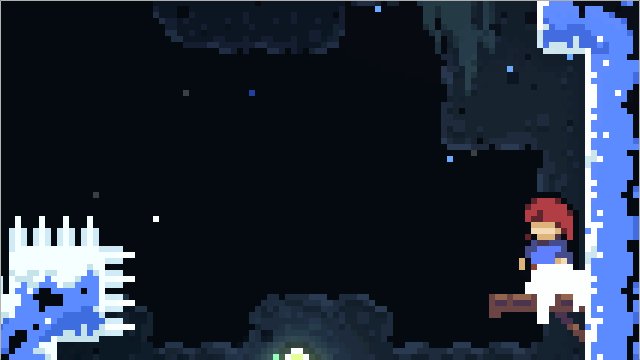

8- You can actually wall jump 2 pixels from a wall. (That sounds tiny but this is a 320x180-resolution game :P) https://t.co/fzm7NOee5p
Likes
2953
 Twitter
atomic salmon
Twitter
atomic salmon
@languid lion ok you need to time it a bit. So when the character is close enough to a wall and facing that wall, if the player gives an input in the opposite direction, you will turn the character away from the wall and push away from it
if the input comes too early, when the distance from the wall is too high, there is no push from the wall and the character loses speed and falls
something along these lines I guess
or if the character is flying toward the wall and the player gives the input toward that wall, the character just smashes into it
I can see this working as playing logic
the alternative is to use a separate jump button or something similar, so you need both to face the right direction and use the jump button to propel yourself off the wall
orchid zinc
OK here you can see the auto-possess player controller is not really doing anything with the axis inputs for the spec pawn
I don't see anywhere else that the inputs are interacting with code
languid lion
Oh the jump input is there and it needs to be pressed
it's just I don't wanna force the player to look towards the wall
I think I'm either doing a bad job of explaining it or of understanding your point right now
orchid zinc
here is the input settings
atomic salmon
@orchid zinc are you transforming the input in any way? Projecting it along a direction or similar?
 jaunty dome
Totally noob question:
I have an event dispatcher in Blueprint A
How do I "catch" it or bind it to an event in Blueprint B
atomic salmon
@languid lion even if it the player doesn't look toward the wall, you can calculate the distance from the wall when the jump button is pressed. If the distance is small enough ( < min_distance ) then you propel the character away from the wall.
So regardless of where the character is facing.
orchid zinc
How would I be transforming the input? I don't even see where the input is feeding into the spec pawn movement, it's just auto-possess with the player controller which I use for the living character.
Here is the only place it uses the right stick input on the controller
atomic salmon
But for that you have to trace in both directions because you don't know in principle which direction the character is facing when approaching the well. @languid lion
Unless you trace only in the direction of the character velocity.
orchid zinc
Here is where the player character (which is dead) uses the movement input. The player controller doesn't even touch that
My best guess is that this seems to be some default auto possess behavior for spectator pawn class?
maiden wadi
@dawn moon Noice, simple and elegant.
atomic salmon
@orchid zinc you can check it. https://docs.unrealengine.com/en-US/BlueprintAPI/Pawn/IsPlayerControlled/index.html
Is Player Controlled
But I doubt
You need to either place some breakpoints or many Print Strings to try to understand what is going on.
orchid zinc
the spectator is showing yes for is player controlled
atomic salmon
So it is possessed by the Player
orchid zinc
Yes it has auto-possess player 0 set
atomic salmon
that explains it yes
orchid zinc
But I don't have any code that would be causing this behavior I dont think?
So is this some kind of default gamepad stick behavior?
atomic salmon
@orchid zinc is this meant to be a two-players game?
orchid zinc
No just single player
orchid zinc
nope
I didn't make any code to move the spec it just always worked with auto-possess
but with this glitch
atomic salmon
@orchid zinc ok so let's check the whole logic once more
you have your inputs set for thumbstick left and thumbstick right
they are supposed to control two different functions
one for moving (I guess left) and the other one for something else (right)
but somehow you have a cross-effect
orchid zinc
Yes left stick is move right stick is shoot
orchid zinc
i just want to ignore right stick input except that player can use it to select in world with a modifier key held so I need it conditionally
but that condition is false so right stick input should be ignored for spec
atomic salmon
and you are sure you didn't accidentally mix up the input events or axis in your BP?
like mixing MoveForward with FireRight by mistake?
orchid zinc
Yeah see look there is no code in the spectator pawn
moveforward doesn't even appear in the controller just the dead player object
not the spectator
atomic salmon
do you use a custom player controller?
orchid zinc
yes but in it there is nothing that is using either axis
all the conditions are false for the events/pure func checks
worst case scenario is the axis is getting got before false condition
see all not used for spec
those are only occurences in custom controller
atomic salmon
@orchid zinc it is possible that the default player controller is applied instead of your custom one?
orchid zinc
I don't think so, myplayercontroller is the custom class:
set to auto possess and no code otherwise in spec pawn
but it works without me doing custom movement for it so that is concerning
atomic salmon
MyPlayerController is applied as AI controller, but you are possessing it from the Player 0
orchid zinc
interesting
is there a better way to do that?
it's just default I don't see a player-possess
atomic salmon
the player controller should be the one indicated in your game mode
if not it is the default one probably
orchid zinc
atomic salmon
@orchid zinc ok let me check the docs, you said you are trying to possess a Spectator Pawn
orchid zinc
yeah its just auto possess mostly everything default
but this is my game mode
seems like a slight conflict
I changed to my custom objects but no change in game
atomic salmon
@orchid zinc I don't think you are supposed to auto possess a Spectator Pawn
Your Player Controller should switch to it when you set the player in spectator mode
orchid zinc
ok I will try to possess manually
I guess failing that I can always use a regular actor
probably would be ok that way
orchid zinc
and thanks for your time btw
atomic salmon
@orchid zinc np
I think you can pull it off using a tweaked regular pawn and possess it when needed
 plucky crescent
Quick question: If I have a blueprint array with some actors and they are destroyed, do invalid actors refs remain in the array or are they auto-removed from it?
atomic salmon
@plucky crescent they will still be in the array
plucky crescent
Great! Thankyou for the info
 midnight hollow
Hi everyone! I am just learning blueprints and proposed myself what I thought would be a simple exercise, but I am hitting a wall and I don't know how to get around it. What I am trying to do is basically make a cube change it's color depending on the color of 4 cubes, that change color when hit. What I have already done is create a blueprint that changes its material when hit and stores the state in a boolean variable (because there are only 2 colors possible), and I got that working properly, but now I don't know how to make the other cube read the variable for the different instances of the object. What I'd want to achieve is a simple boolean lock, so that the "main" cube changes its color depending on the combination of the other cubes, if that makes any sense.
I'm sorry for the brick, I hope the explanation is clear enough
I tried google but I don't really know what to look for
 undone saffron
Hey, i have a text in my game instance which is always empty even though i fill it with info. I am trying to access that text through my widget!
Any ideas?
maiden wadi
@midnight hollow Sorry for the dumb questions, but just trying to follow. You have five cubes total. One specific cube is supposed to change it's color once the other four are changed?
midnight hollow
@maiden wadi Exactly
maiden wadi
Probably just have two classes. Maybe child classes depending on the amount of similarities, like if they all share the same mesh and such. But make one the checking cube and the other four that are the second class are just there for functionality, they just switch their bool and then call a function in the first class whenever their bool is changed. The function in the first class iterates through all four of the other actors to see if all of their bools are True(Or falese depending on your case). If all are the true/false you want, play your function that changes the first cube's color or whatever.
atomic salmon
@undone saffron is your Game Instance setup inside Project Settings --> Maps and Modes ?
undone saffron
Yes it is!
atomic salmon
@undone saffron Then you should be able to access it with Get Game Instance + Cast to your Game Instance class
undone saffron
that's what i do but it always returns empty
even though in the game instance it has a value!
atomic salmon
so when you do Get Game Instance do you get a valid object?
And is the Cast successful?
atomic salmon
And the value you are trying to retrieve is inside a variable in your Game Instance?
maiden wadi
It's worth the question, are you doing this in a construction script?
atomic salmon
I don't see why it shouldn't work
maiden wadi
Can we see what you have?
maiden wadi
I want to say put print nodes in the launchLobby event to test the ServerNames array length after something is added, Test the string being added and test before the launch lobby event is called. Maybe even switch the cast to a non pure just to be sure it's casting correctly. Other than that, not sure.
undone saffron
well, everything prints as it should besides the part where i access that text
maiden wadi
@undone saffron And that's at the loop where you're creating the widgets?
undone saffron
yes!
midnight hollow
@maiden wadi Is this how you would read the variable from the other 4 cubes? I have basically no idea of what I'm doing, and I haven't found a way of getting the actors from the main cube blueprint.

 jolly anchor
Hi, I'm a bit confused about AIMoveTo: does it apply ACCELERATION like player controller does?
here I'm detecting it's accleration, and while I'm doing it to a player controlled one, it works.
but as long as this guys is driven by AI, it always has 0 acceleration
Is it by design? Any ideas? Should I work around it?
Due to 0 acceleration, my paragon characters always decide to quit run animation, so it just slides to the destination
jolly anchor
How can I set material for the parent of a component?
@rough wing
maiden wadi
@midnight hollow Got bored, decided to make instead of type. But was considering something more like this. Terrible and rushed, but it helps make my point better than talking, basically the point is that you can put as many of the changingcubes in the level as you want, it gives you design flexibility instead of having to go back into the code to change the number of required cubes and such. This will always work if every cube in the level is turned green regardless of number.
 severe rune
Is there any way with blueprints (using level streaming) to show a loading UI widget as the first thing that happens, hooking it into the level blueprint or anything else still shows a second of delay before the loading screen widget appears
 keen seal
I can't remember the name for this node
I could get any number of outputs I wanted when pressing the plus button,
then it would select a random one from that list.
It's yellow and not an array.
Any ideas?
maiden wadi
What were the inputs, what was it selecting randomly?
keen seal
The input was a number I think
It would select anything that you'd drag out
maiden wadi
Initially that sounds like a Select node.
maiden wadi
Haha. I literally googled "Yellow Random Ue4 Node". Felt like an idiot when I saw the second picture and realized I should have known that.
undone saffron
@maiden wadi I guess you don't know the solution to my problem, do you?
trim matrix
I have a game instance holding an array of structs. When I try to access it from outside, the order of the array changes. What may be causing that?
maiden wadi
I was just trying a test of my own. I can't get the same results. My GameInstance gives me the results fine no matter where or when I change it's text variable.
undone saffron
did i mention that my variable is marked as replicated?
but the weird thing about this is that if i give a default value to the text var, and print it after i have changed it with my launch lobby function, it prints the default value i inputted
maiden wadi
So it's just not being updated correctly?
maiden wadi
@undone saffron Just curious, when you print length, is that coming out correct, but there's just no text in the entry?
undone saffron
I actually didn't try that
and now i am away from my pc
will try that the moment i get on my pc and report back
trim matrix
I'm having issues trying to display a text variable in my widget.
I have a weapon_parent blueprint with child actor weapons.
The child actors have text variables named WeaponName in all of them.
However, I don't know how to get them to show in the widget.
The only thing I have so far is a function bound to text in the widget.
 left carbon
Guys, I'm trying to control a pawn without possessing into it. But controls do not work inside. I do make EnableInput, however.
What may be the problem?
left carbon
 dreamy ice
Would you use an array or a set for an inventory or what are the advantages/disadvantages of both.
maiden wadi
Depends on the inventory in question.
dreamy ice
@maiden wadi The inventory is made to be reorderable and infinitely expandable. It stores a class reference of the item and a few other details using a struct. I want players to be able to combine stacks, split stacks, move stacks, transfer items between player and remote inventories. Crafting also.
severe rune
@trim matrix How is the relationship between the widget and the weapon_parent? Ideally you want to have a reference to the weapon_parent on the widget, and then either do a 'get child actors', iterate over those and cast to their blueprint to get the WeaponName variable
dreamy ice
Currently I have it made in arrays, but noticed that there are sets and was wondering what the best solution would be.
severe rune
@dreamy ice I've gone through multiple iterations of an inventory system, Sets disadvantages are a lack of an inplace update operation. Ideally a hashmap would be an optimal solution, but that isn't easy if you're dealing with networking and trying to do it only in blueprints. Array's are what we've settled on, much easier to sort and page if you need to split it up for whatever reason.
 true yew
Sets are good when you just need a sort of bucket you can toss things into, and check whether or not things are in it. Order is not guaranteed and you can't throw the same thing in it twice.
undone saffron
@maiden wadi When you said you weren't getting my result, did you do like i do? Setting the text from the text changed event of a textbox?
 low lotus
If you add a variable to a parent blueprint, how do u make the child variables also make the variable?
undone saffron
if you make a child of the parent the variables are there, they are just not visible
severe rune
You can change those variables or see them by pressing the 'eye' icon in the blueprint 'My Blueprint' and checking 'show inherited variables' or by clicking class defaults
trim matrix
@severe rune This is how it looks so far. I'm not completely sure how I should go on from here.
severe rune
drag a pin out from child actor and type 'get child actor'
That's going to be the object instance of the child actor you added to your character, if you then cast that to your weapon_parent blueprint, you should then be able to access the WeaponName variable through that (if it's set up as a parent/child inherited blueprint)
Not quite the same, but was what I had to hand 🙂 It should look something like that
Where Weapon Type is your WeaponName variable
 covert crane
Hey folks, is there a way to programmatically create a dynamic delegate? I know this might be a CPP question by my intent is to register a callback for a particular value change in a plugin. Basically, a user calls a BP method that provides a string then gets out an event that will be called when the appropriate callback occurs. is that a possibility?
jolly anchor
Hi, I'm a bit confused about AIMoveTo: does it apply ACCELERATION like player controller does?
here I'm detecting it's accleration, and while I'm doing it to a player controlled one, it works.
but as long as this guys is driven by AI, it always has 0 acceleration
Is it by design? Any ideas? Should I work around it?
Due to 0 acceleration, my paragon characters always decide to quit run animation, so it just slides to the destination
here the blueprint reads acceleration, when it's controlled by ai controller, it's always 0 acc
any ideas?
 mild ore
you can maybe try using velocity instead, and get lengthxy so it wont shaking the legs while falling/jumping on z axis.
 fathom spindle
Hi guys, I've got two hands streaming tracking data floats and bools for if they are visible. Need to take value for left if left is visible, right if right is and average if both are. Could anyone enlighten me on what combination of boolean/flow control nodes do this?
atomic salmon
@fathom spindle you can use the fact that bools can be converted to floats
output = ( leftvisible * leftvalue + rightvisible * rightvalue) / (leftvisible+rightvisible)
obviously this works if and only if you always have at least one of the two visible, otherwise you get a divide by zero
you can solve it by stating if (leftvisible OR rightvisible) == 0 then output = 0 else [the code above]
You can use a single Select for that
fathom spindle
Hey @atomic salmon thanks for this. I was just setting up this convoluted mess
does that do the same is or float maths safer?
fathom spindle
ohh thats much more elegant @maiden wadi
definitely my branches are not good then
atomic salmon
With one select node only
This can go as submission to the Obfuscated BP context 😉
maiden wadi
I never even thought to convert bools to 1-0 for multiplication checks. Blueprints are ruining me.
atomic salmon
@maiden wadi let's talk about converting enums to floats 😉
I have seen this hack used in the standard VR template
maiden wadi
Haha.
Actually, while I'm here. Does anyone happen to know any other places besides gameusersettings and t.maxfps where the PIE could be framerate locked?
If I run a Standalone, I get what I'd expect, FPS caps at 120, but for some reason in PIE, I have this weird issue where it'll cap at exactly 30, 40, or 55. I can't t.maxfps over that limit, but I can do it under, profiler says I should be getting more so it's not a bottleneck. It's just a random framerate cap and I cannot find a single setting anywhere that would explain it.
 subtle jolt
do you know if it has anything to do with focus or what monitor youre using? i know the pie is locked when the window isnt focused
also, if anyone knows anything about replication, I have a montage that works but doesnt replicate on client side
fathom spindle
yeah thats great
 viscid skiff
Can anyone take a look at my blueprints and explain why if I hit another player, then hit any other actor, that first player still gets damaged
maiden wadi
@viscid skiff What are those two functions? The Headshot and Normal damage. That's where your reference to apply damage is coming from.
viscid skiff
@maiden wadi
Exact same thing in normal damage, just the amount of damage to apply changed
maiden wadi
Does it damage the player if it's ANY other actor, like a door or wall, or do you have to shoot a second PlayerCharacter?
viscid skiff
second player character
however, after I shoot another player once, shooting any other actor continues damaging the player
maiden wadi
That's what I was asking, if shooting any other actor meant like doors or walls and such.
I'm at a loss. Because you're not saving references anywhere.
I'm curious what happens if you put a print between the damage function and the apply damage node and print out the damaged actor display name. Does it return the first character hit, or the wall?
maiden wadi
That makes a lot of no sense. O.o
viscid skiff
hmm
oh.. I might've just fixed it
I took the hit actor from the hit result and plugged that into apply damage
Yeah that fixed it.. Seems like casting to the player character in the function screwed something up? I don't know
maiden wadi
Trying a test of that myself really quick, curious.
subtle jolt
does anyone know how to fix replication stuff? i have one of my animations set up just like other ones but it still wont replicate
maiden wadi
@viscid skiff Well that's interesting. I did the same thing, it seems like the cast node saves the reference for you and because it cannot update it because the cast fails, it just returns the reference it already had.
Note for future self I suppose.
@viscid skiff It's also worth noting that this only happens inside of a Function, it doesn't have the same effect if you have that cast in the event graph.
So I guess the function node is what saves the reference.
viscid skiff
That is interesting.
maiden wadi
I was going to say, by the way, if you wanted to simplify your setup, you could use a select float for the damage input into the apply damage node. It would save you needing two function, or any functions, and only one apply damage node.
viscid skiff
Okay, I'll try and figure that out..
maiden wadi
@viscid skiff Just meant something like this.
 untold fossil
Not sure where I should ask this question, couldn't find any more fitting channel to post it then here. I'm trying to rotate a flag with a wind vector. Now, you probably thing, dude that's easy, just set the rotation oft he flag to the rotation of the wind vector? Well yes, but there's a complication 😄 The flag I want to rotate with the wind is mounted on a pole of a ship, and you guessed it... the pole of the ship wobbles with the waves, so meaning that the pole is rarely completely upright under a 90 degree angle, instead it is mostly skewed. Problem is when I rotate the flag with the wind, the flag is of course always upright, meaning the end no longer line up with the flagpole.
Here's an example of what I mean: https://i.gyazo.com/d4ec2f542bf62eb0247eec8305acf82a.png
My guess is there needs to be some matrix / math stuff in order to fix this. But I have no clue where to begin 🤔
 trim matrix
is there a node in the bp system for the entire game audio if i want to make an audio slider?
maiden wadi
@untold fossil Can you rotate the flag's X/Y with the pole, and the Z with the wind?
untold fossil
I've tried that, but it still doesn't line up, although the overal result is better, it's still not perfect
what I think needs to happen is I somehow need to transform the wind's yaw rotation into a relative rotation I can then use in a set relative rotation on the flag, basically that I only change the flag's relative yaw
but the question is how to turn a world yaw into a relative yaw. I should probably use the pole's world rotation as a starting point? Maybe like see what the difference in yaw is between the pole and the wind and then apply that difference to the yaw of the wind and use that as relative yaw for the flag?
maiden wadi
Your flag and pole, are they the same actor with separate components, or are they two separate actors?
untold fossil
Ok I think i found it, it was actually quite simple.. All I did was get the delta between the pole and the wind, get the resulting yaw, inverse it with a *-1 and apply that as the flag's relative yaw and it works perfectly now 🙂
so basically it checks the difference angle between the yaw of the wind and the yaw of the pole, and then the reverse angle is applied on the flag's yaw in relative space, so this way the roll and pitch of the flag never change (no gimbal issues)
atomic salmon
@untold fossil or you can use a cloth which automatically follows the wind direction and even bends with it...
subtle jolt
how do I blend both montages? i ust get one depending on how i connect the nodes
untold fossil
@atomic salmon Yeah but it's a bit overkill for our game 😛
atomic salmon
@untold fossil was trying to push the boundaries... 😉
untold fossil
well who knows maybe later 😄
atomic salmon
@untold fossil or a single bone skeletal mesh so it can also bend up/down
you could also combine wind with gravity. Pretty cool.
Sailor speaking, so flag on a boat ship gets me excited! 😉
tawny tinsel
so im trying to package my game for linux
and im stuck at sandbox cleanup
somebody help
maiden wadi
 rugged carbon
When I'm creating a custom GameState, and want to send updated information to it, is it better to cast and access it that way or send the information through an interface?
 summer zephyr
If i have string "Apple_C" how i can remove this _C because i would search in data table by Name.
i do something like this
but what is the best metod
rugged carbon
@summer zephyr I believe the node "Left Chop" might be better. Set the count to 2 and it should remove the last two characters
 surreal peak
Keep in mind that the displaynames are not meant for using in game logic. That's mainly debugging
 uneven swan
Can someone help me, how make a moba?
tawny tinsel
thats very hard you need charcaters turrets as enemies items etc too much work
@uneven swan
but you code one feature by one
undone saffron
Does anyone know why get player name of the playerstate won't work? It always returns empty
rugged carbon
@undone saffron Where are you setting the player name, might be it does not get registered?
subtle jolt
this isnt replicating on server side, but I feel like it should be. did I do something wrong? im new to ue4
 golden kite
is there any way limit the rotation speed? or the speed of X and Y values changing in a vector
rugged carbon
@subtle jolt Try changing the "TellClient" events to multicast? Also don't think you need the "switch has authority" when the custom event is set to only run on the server.
@golden kite Depends a little on the context the values are changing. If you are adding a delta to them you could for example clamp it or scale it down by a float. You could also explore the "interpto" nodes
subtle jolt
I did that, but it still wont replicate. I thought that as well and I changed it after watching a tutorial, I'm just trying to get anything to work. it looks like this now @rugged carbon
golden kite
oooh boy I REALLY will love the "interpto" nodes
rugged carbon
@subtle jolt I'll admit I'm not that well versed in multiplayer & replication, but you could try and put in some print strings at different points to see where the process stalls
golden kite
the context on how the values are changing is using impulse to rotate the pawn, or vehicle, because Im loading in multiple custom placed wheels etc that will effect the acceleration and steering
uneven swan
Someone know a tutorial by MOBA?
subtle jolt
@rugged carbon I found the problem, its in the function that changes the montage based on movement input and the client chooses a montage but the server doesnt know. is there any way to replicate a function (one of the blue ones?)
this is the functio
rugged carbon
A little hard to see the variable names, but that float variable that is replicated is it set by the client?
Someone who knows more than me might correct me, but replicated variables are only replicated if they are set on the server. At least from experience that feels like it is the case
subtle jolt
the directionx and direction y (the floats) are replicated if thats what youre asking
rugged carbon
Yes, but is it the client that sets them?
rugged carbon
You can't get values of a client on the server, but the client may send a message to the server that they want a value to change. This isn't an example of best practice, but it illustrates the point. On the left the client sets the float directly, but the server never finds out. On the right the client sends a request to the server, and ther server itself changes it. The value is then the same for both server and client
The general rule is: If a value determines gameplay, it should be handled by the server
In your case, when the player dodges are they standing still or moving?
If they are moving the server could maybe read the velocity of the character as that should be properly replicated out of the box i think
subtle jolt
ok so thank you so much I finally got the animation to replicate
but now the client is incredibly laggy
only the movement
rugged carbon
That indicates that while the server properly executes the code it does not run on the client. The server is forcefully updating the client to match the server location
undone saffron
@rugged carbon It's from the player state, i do not set anything
rugged carbon
If you haven't set the name, it won't return any name i think. In the game mode you can call Change Name to change the name of a controler
GameModes also have the option to set a default player name, but I have not been able to get that to function
untold fossil
Silly question.. I've seen people do pure casts, how do you do that? 😮
rugged carbon
@untold fossil Right click, it is towards the bottom of the context menu
untold fossil
Oh God, thanks xD
man that's very well hidden
Would have never found that myself lol
rugged carbon
Get nodes can also be converted to validated get from the context menu which I found incredibly useful 🙂
undone saffron
@rugged carbon The player state holds the player name based on the machine. So it always holds a name but how can i set it myself? It's a get variable only
rugged carbon
The gamemode can set it, the node is called "Change Name"
Basic Example set up in a player controller
subtle jolt
Im trying to set both the client and the server movement the same, but I cant find a way to get the movement smooth and not extremely jittery or stopping characters from moving, how are you supposed to replicate movement?
 frank jetty
Guys, noobie question: How do I apply changes made to an instance of a BP to the BP itself?
rugged carbon
@subtle jolt If you set it up like this both the server and clients will have the same values for DirX and DirY.
However, sending these updates so frequently might consume bandwidth, but how much is beyond my knowledge
If you only need them now and again you can send the axis values specifically like so:
atomic salmon
@frank jetty as far as I know that is not possible. Each instance can override the default settings of the class it belongs to, but you cannot "copy" those overrides back to the class to make them defaults.
 unique hollow
Alright so I'm thinking about comparing two object positions to a value
To create a range between said objects
so the two values are compared and if for example the object is <=500 trigger something
I'm trying to think up something but no idea
atomic salmon
@unique hollow not 100% sure I understand what you are after but the distance between two actors is the length of the difference vector between the respective world locations.
atomic salmon
In pseudo code: Distance_A_from_B = Length(WorldLocation _A - WorldLocation_B)
unique hollow
Basically yeah I want so that if I'm close enough to a certain object it activates
maiden wadi
I think you're looking for Event Tick.
atomic salmon
You can also do it with overlaps
maiden wadi
I think we're having trouble understanding what you're after, because it sounds like you just want a branch. If 2 object's distance <= then do this, if false, do something else
 zenith kindle
finish success finish fail for the node then ?
just make this a decorator or a service
atomic salmon
@unique hollow you have two ways: either continuously calculate the distance between the two objects (formula above) and when it is <= 5000 (cm) do whatever you need to do or set an overlap sphere with radius 5000 (cm) around Object 2 and use the Begin / End Overlap events, checking for Object 1, to do/stop doing whatever you need to do.
maiden wadi
 nocturne ledge
Trying to set a Boolean if the player gets spotted but I'm getting infinity loop warning,
But i cant figure out what to do to fix this logic
pulsar moss
Anyone good with blueprint debugging? I'm having trouble stepping into a function. For some reason, upon calling a function where I have a break point, UE4 simply won't step into that function when I press "Step Into"
it will skip to the next node
dreamy ice
I would assume the best way to handle armor and hotbar slots is to have a variable for each one instead an array list similar to how my inventory works. This variable stores a object reference spawned from a class reference stored inside of the inventory array when added to the variable? Just want to see if I'm doing this in an adequate way.
atomic salmon
@nocturne ledge you need to connect the new call after AI Move To to the On Success output
atomic salmon
otherwise it is calling itself over and over on each Tick
nocturne ledge
now just need to reset the boolean when not spotted
atomic salmon
@pulsar moss if that is a function you made it is strange
 unborn turret
I have a progress bar that i m displaying on my HUD. The issue is that it increments 0.1, 0.2, 0.3, etc. I want it to look smooth so actually progress from 0.0 smoothly to 0.1 instead of just jumping to it. I tried doing this.... but my target changes every 1 sec due a timer event so thats why it always jumps
atomic salmon
@unborn turret you want your interpolation speed to be small
unborn turret
like 1?
atomic salmon
Try it, but the higher it is the faster it gets to the Target value
unborn turret
it is a bit smoother but it seems a little hacky... towards the end it just jump from 0.8 to 1
atomic salmon
@unborn turret is the bar updated on tick or on your timer?
subtle jolt
@rugged carbon thanks for helping me out earlier, everything works pretty smoothly now and I think I understand basic networking a little better. I wouldnt need to eventtick > print if I were to just use the 'use when needed' function right?
atomic salmon
@unborn turret so the frequency at which the target is updating is your lowest denominator
Try to go even lower with the Interp Speed
rugged carbon
@subtle jolt You wouldn't need the print in any case as that was just to debug the value of the floats. The use when needed would help reduce how often the client sends information to the server. It's an optimization thing primarily.
pulsar moss
@atomic salmon yeah a function I made
what's worse, I am breakpointing somewhere, and printing, the code is supposed to trigger 3x. In play, it would break point once and print 3 times
feel like I'm losing my mind, is ue4 blueprinting just buggy? or am I doing something wrong?
this is a networked game mind you
severe rune
@pulsar moss is it a replicated (run on server / client) function you're trying to step into?
pulsar moss
it's server only function
well, it's just a function, not an event, it's supposed to run only server-side
and I am testing with 1 player dedicated server
atomic salmon
@pulsar moss does it work if you uncheck run dedicated server?
or is the problem with the dedicated server? Anyway it may be better to move this discussion to #multiplayer, you may get more specific help there.
pulsar moss
hm, it doesn't work, so it's not network-specific
I just can't step into the function, the stepper takes me somewhere unrelated
atomic salmon
@pulsar moss if you put a Print String into that function do you see it in the log?
pulsar moss
Strangely the step arrow is gray instead of red
yes, it does print
it prints, and these break points don't trigger haha..
 solemn bloom
why is mouse input floats stays at zero in my character blueprint ???
i followed all the forums instructions but idk , not working 😦
it works on my actor bp
atomic salmon
@pulsar moss do you have anything selected as debug target?
pulsar moss
yeah that was the problem here
so the debug target doesn't transfer, or I don't really understand it
thanks @atomic salmon
atomic salmon
@solemn bloom input is directed to the actor you are possessing, so are you possessing your character?
Or it least is it set to receive input? That is the first thing to check.
 rocky crypt
why is my print string not displaying my yaw rotation, it stays at 0? https://gyazo.com/3c490f756b49f6c2306fadbd19c65194
 atomic salmon
@rocky crypt Maybe because the Yaw is 0? To check that have a Print String directly on the Relative Rotation of the Camera Boom.
solemn bloom
yeah that's set in another blueprint
i'm able to move forward and left/right
just not able to get the mouse inputs
neither the click event is fired uhmmm
atomic salmon
@solemn bloom are you using input events or what?
atomic salmon
@solemn bloom can you show the relevant portion of your code?
rocky crypt
@atomic salmon still 0 😦
solemn bloom
sure, here it is
first set the input from my axis mappings, (thats correct cus in annother actor bp i was able to set rotationj of a camera correctly))
the second screenshot set possession of my character bp
i've set it up so it works in VR too
but rotation in vr is taken from the HD rotation, didnt have to set it up
rocky crypt
@atomic salmon Nevermind, figured it out, apparently getting rotation from camera boom got patched, so you have to get caemra rotation from get player camera rotation then break that rotator
maiden wadi
@rocky crypt Not sure what your issue is, but using your same setup, I can get relative rotations to print correctly.
solemn bloom
uhmmm
maiden wadi
@solemn bloom Have you put a print before the AddControllerYaw/Pitch and printed off the Axis value to see if they're firing and if it's above zero?
And also are you using mouse axis in your player controller anywhere?
solemn bloom
im using the same axis mappings to drive some other camera rotations
and yes i was able to see that the event was firing
it was just the float value that always stays at 0
i also tried to see with an 'event on clicked' and it wasnt picking that up either
maiden wadi
What happens if you try to print Mouse Y or X from your pawn?
@solemn bloom You need to go into your Controller, click on the Axis event and in the details panel in the right, uncheck "Consume Input", do the same in the pawn. Then the same Axis event can be used for both.
solemn bloom
zero
ok let me try 🙂
sorry you mean inside my character blueprint ?
i only have that one
dreamy ice
In my hotbar would it be better to have a variable for each slot or an array of 9 items that's full of a filler invisible item when not in use?
solemn bloom
ah mannnn
it works !!!!
finally ahahaha
thank you so much man ! @maiden wadi big up
maiden wadi
@dreamy ice Sounds like a design decision based on scope. I'd probably go with arrays though, just because if you plan on making anything like multiple bars that can be scrolled through or something, it's much easier to iterate though and handle, otherwise you're dealing with nine loose variables. But if you're just making one bar, and it's easier for you, do what makes it easier on you.
dreamy ice
I was more worried that one or the other would be inefficient then I was worried about expandability.
trim matrix
any1 familiar with procedural world generation?
dreamy ice
I'll probably stick with my array. Thanks!
solemn bloom
now onto packing
getting this error.... anyone familiar with ? Error executing C:\Program Files\Epic Games\UE_4.24\Engine\Build\Windows\cl-filter\cl-filter.exe (tool returned code: 2)
jesus, debugging never stops
maybe could it be because i renamed the project ?
maiden wadi
LOLOL I love that line.
jesus, debugging never stops
@solemn bloom
That needs picture framed and put in every programming classroom. XD
solemn bloom
fuck my life
AHAHAHAHAH
but yeah, it's because i renamed the project... i resumed back to its original name and voilaaaa
maiden wadi
What were the two names? Because a post I was reading said that it was related to naming conventions.
atomic salmon
@maiden wadi kudos for being able to spot even the most unbelievable "bugs" 😉
maiden wadi
I like puzzles.
 mystic coral
Hey guys, I'm trying to rotate something for a specific reason.
Using FRotators, this works but a gimbal lock (or extremely weird rotations) happen: (rot1 - rot2 + rot3), however if I do this on only the Yaw axis it works.
But now I need to do it on all the axis, so I'm wondering what the equivalent of this equation would be in FQuats, I tried (quat1 - quat2 + quat3) but this also gives me very weird rotations, so I'm wondering if there's another way or if I'm using FQuats the wrong way
rough wing
Hi everybody
Im trying to figure out how to solve a problem
I have made a bubble actor
When 2 bubbles collide I want to destroy them and spawn a big bubble
but if i destroy the bubble (in the bubble blueprint) it could possibly spawn 2 big bubbles
since there is 2 bubbles spawning the big bubble
 odd ember
generally stuff like this you will want to route through a manager
how do you spawn the first two bubbles?
odd ember
so that spawner should control when new bubbles spawn
rough wing
Yes
odd ember
also when they get destroyed
rough wing
No
odd ember
I understand
but you will need to have something that continuously monitors bubbles and can act and spawn/destroy bubbles since otherwise you have no control over your bubbles
rough wing
there might be more than 2 bubbles
rough wing
Ill try to do it thank you
odd ember
you probably want to use event dispatchers
or hmm
it's a good question actually because you might run into an issue with race conditions
 zealous moth
is there a good way to work with an overlap event have it be continuous? I tried a while loop and it crashed
 stuck hedge
If you trigger "on overlap" and then trigger "on end overlap", what's in between?
zealous moth
did a work around with a timer handle
works fine
I was hoping for an override such as "while overlap"
stuck hedge
You don't need it. Just use a bool. On overlap set bool true, on end overlap set it to false. As long as the bool is true, it's overlapping.
 gusty willow
If I can choose between events and functions which are more optimised?
zealous moth
events can use timers, functions cannot
 rose spire
Is there a way to auto save without an extension ?
trim matrix
there is async save game to slot
zealous moth
is async save game better than just regular save game?
trim matrix
from what I've read it is less prone to causing hitches
 wintry grove
i made a "Marquee" Selection Box. only problem is it is not selecting the units. they would turn green underneath but they are not getting selected. any help would be appreciated

there is no data being pass through how to fix?
 frail plaza
When using interfaces, what's the difference between Interface Call and Message?
trim matrix
I i have a question. So I have a pause menu, and when i pause my game i want my other UI on screen to delete itself until i resume the game. How can this be done?
I could just do remove from parent but i want it to resume the ui with the same duration it had from before the game was paused
subtle jolt
does anyone know how to replicate a launch character? ive looked on lots of threads and they all say Id have to modify charactermovement and that gonna be a yikes from me
 nimble bloom
Have a bit of a doozy: Have an Actor with a UI component child, and it's in screen space. The UI has two buttons that need to trigger (currently on click displays a string).
Right now on click, doesn't seem to work. The main UI canvas in the scene is visible but no collide, so that shouldn't interfere with the on click
Not really sure why the screen space buttons on the spawned actor aren't working. We're really wanting to avoid using 3d objects and sticking to UI widgets
 silent briar
Just as an experiment, try removing the main UI temporarily to see if it's interfering with your buttons
maiden wadi
@frail plaza Interface Call is just calling the function locally. It's designed to be used like any other function inside of a blueprint as far as I'm aware. As far as I know, you shouldn't get a listing to it without a reference to the correctly casted actor or without being inside of the actor's BP that has it. Message on the other hand is designed as a way to send a "Message" to a non casted actor telling it to play a specific event or function if it exists inside of that actor.
frail plaza
@maiden wadi Thanks for the reply and information 🙂
 hallow osprey
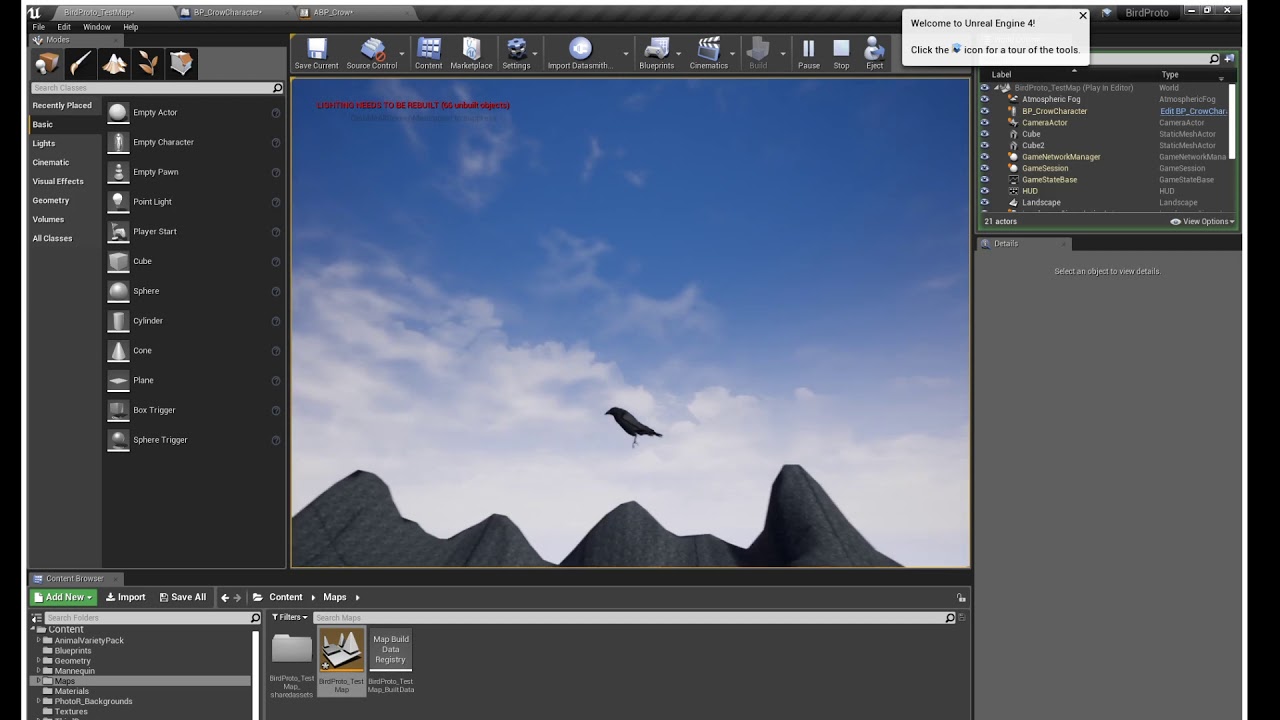
I'm trying to figure out how to solve some issues I'm having with movement and animations for my player pawn (bird), specifically with 2 things, having it use the correct animation for flying and being able to move up and down/vertical, not just forward/back/left/right/horizontal when flying
When I enter flying mode it only moves horizontal directions and uses a walk animation instead of flying
https://www.youtube.com/watch?v=4L47m_5FPfM
My anim graph blueprints are probably a mess but I'm trying not to mess too much with them on my own and break the parts that actually work lol and I haven't been able to find any tutorials on flying mechanics that have been able to tell me how to fix my problem
 delicate folio
does anyone by any chance know how i can have a teleport selection? e.g walking into a trigger box bringing up a UI allowing the player to choose where to teleport to they click their choice then teleport completes? i currently have a teleport function that allows you to teleport to and fro but that would only work for 2 teleporters at a time i want to add a 3rd to the mix and allow for choosing to teleport between the 3 rather than just back and forth between 2
this is what i've got currently to allow for the 2 at a time
 sick sapphire
How do I make it so that sounds volumes get progressively quieter the further they are? It doesnt seem to be built in
 wise raven
A simple line trace recognizes the physical material layers on my landscape, but my bullet projectile does not, my bullet projectile recognizes the physical materials on everything else except the landscape layers, any idea why?
solemn bloom
is there a way to set the keyboard 'esc' key to function as alt+f4 ?
so that when running a packed .exe i can close it ?
maiden wadi
@solemn bloom Just put a QuitGame node on your Escape key event.
 rain crag
Hi all, kind of a random question -- I've had a player start working for my entire project but it has stopped working properly after I simply moved its position. It seems to work in some areas of my map but not others, any ideas?
 quaint portal
hello, not sure if i should ask this here but how can i combine objects in a room to make them be checked by the cpu as one thing instead of about 70, sort of how terraria did with all them tiles.
maiden wadi
@rain crag Can't say for your specific case, but that's usually an issue with collision on spawn. Make sure it's high enough and such.
 worn coyote
Is there a way to combine a CustomRotate and a Vector3 and connect them to the TextureSize of the WorldAlignedBlend in a way I can use both?
 tight cobalt
Can anyone help me with this. I have a cave door that opens only when you collect 5 items and you stand in front of the cave (overlap). It works fine, it opens after picking all items but it just opens very fast- it teleports from point A to point B. How can I make it move slowly? I tried using "move component to" and "Vinterp to",,but i guess i am too noob to blueprints to make it work. Any help appreciated.
I want the door to go only up
maiden wadi
@tight cobalt You need to put your Vinterp>SetActorLocation behind a timeline or Tick.
The general idea is that you need to call SetActorLocation, which gets a new location from your VInterp, multiple times. Because each time, the location will change. You can either tie this to a Timeline, or put it OnTick behind a Branch or Gate.
tight cobalt
Can this be added in the actor/object blueprint? or have to be added to base blueprint?
maiden wadi
What you just posted is your check to make sure the player has enough of whatever for the cave door to open, right?
tight cobalt
Yes
I would basically want to move blueprint class actor from point A to point B over time if condition is true.
maiden wadi
Just a sec.
tight cobalt
Sure, thank you very much.
rain crag
@maiden wadi Appreciate it. I'm developing for VR so I want the player start on the floor, and it was working but I just moved it up a whee bit now like you mentioned and it's fine
tight cobalt
@maiden wadi I got it. Weird it didnt work jsut 30 min ago.
Aded move component to..
And it worked..weird..Must've been taht engine was bugged or smthing.
Thank you again.
maiden wadi
@tight cobalt Back, and nice! Was about to throw something together quick. Only thing I'd add is that if you ever make a blueprint where you use these more than once in a level, instead of inputting the location manually, just get actor location and add to it for the destination.
tight cobalt
Oh I see..
Thanks. Appreciated . I am very bad when it comes to blueprints, msotly doing modeling and level layout..but trying to learn.
 latent junco
Hey, got a problem I'd like some input on: I'm looking top-down on a 3D plane with hills and valleys, where there's multiple actors scattered about with my pawn in the middle. When my user inputs a direction (WASD), I want to find the nearest actor in the direction that was input by the user. My approach would be to get the vector of the direction between each surrounding actor and my pawn, compare that to the input vector and pick the one that has the least amount of difference. That seems a bit cumbersome, so I was wondering if there's a better solution that I'm not seeing
maiden wadi
I don't know what you could do to really ease that. I mean getting the actors in a cone in front of the character, then returning the one with the least distance is probably your only bet.
odd ember
@zealous moth you're looking for a shape trace
latent junco
@maiden wadi hm, that's a good idea, and then I could rotate the cone left and right until I find something. Gonna give it a shot, thanks!
maiden wadi
@latent junco Depending on your amount of actors, you don't even need a cone, just put them all in an array with a SphereOverlapsActors, Trim down the original array by getting the look at rotation of each actor and if they're within -45 to 45 on Z or Yaw, they're within 90 degrees of the player's frontal facing. Then run that array through a distance check function and return the shortest distanced actor.
latent junco
Bam, that sounds like a smart solution, I'll see I can get that to work. Thanks for the help!
hallow osprey
I'm having a problem with setting up flying (as a bird) where I can only move horizontal (WASD) but I can't move up or down. Basically I want to be able to move whatever direction my camera is facing including vertical/up-down but the engine acts like I'm walking on an invisible plane. Which means I also need the engine to recognize my flying animation but instead it uses the walk animation when I enter flying mode. Can anyone help me with this? I've been trying to find a tutorial with a fix for weeks and been asking in here for a few days but I haven't been able to find anything
maiden wadi
@hallow osprey I don't know how relevant this is to your setup, but I saw this and thought it might in some way help you. The guy has two youtube links, one to a rather long video where he explains some things. https://forums.unrealengine.com/community/general-discussion/101004-creating-flying-character-please-help
Unreal Engine Forums
General discussion about the game industry and the Unreal Engine community.
hallow osprey
I'll check it out and see where it gets me, thanks ^^
maiden wadi
Not entirely sure if it'll work out since his setup seems more like a glider, now that I think about it.
hallow osprey
might not help but anything's worth a try I think
didn't think it'd be this hard just to set up some basic movement controls x.x
 keen cosmos
This work-from-home thing is cool. Here's something I learned:
 undone imp
Is there a reason why timers don't have all proper functions exposed for objects in blueprint?
For example an actor can pause and clear a timer, as well as get time remaining.
Objects can't do any of those things.
Are those nodes simply not exposed for objects or is there a technical reason as to why they are not present?
 junior thunder
Sanity check on what I am doing for menu management for turn based battle system
Custom HUD class contains all menus, stored in variables mostly
When it comes time to switch menus, first step is to go and remove from parent all current menus, then create the menu the user wants to display to if it doesn't exist + store in variable, then add variable to viewport
The thought being I don't have to keep track of the currently displayed menu if I just hide all the possible menus every time and then display the one they want to see
 supple dome
@undone imp does your uobject override GetWorld()
undone imp
@supple dome I just tested it on a normal Object created in editor, from the base Object class, no custom code of any sort.
I though my code might be to blame, but its the same by default
supple dome
yeah i guess it needs to override GetWorld()
its fine otherwise
a UObject doesnt know which world it belongs to, so it cant work on timers, timers work on worlds
undone imp
@supple dome Right. so, if I override the getworld in code to for example ask the owner of the object for the world it will work?
supple dome
yea i guess
 gray dune
how could i rotate the player on the surface normal?
not rotating his feet to the surface normal
but so that the forward vector is same as the surface
like wall sliding
 dreamy mulch
Hello all, I am wanting to place a widget at an actor location and have the object in screen space so that it is always pointed at the camera.
The problem I am having is that I can't interact with the widget and I am not seeing any documentation on interacting with widgets in screen space. Any help would be appreciated.
Thanks!
maiden wadi
@dreamy mulch There shouldn't be anything to it. Make a Widget component in the actor, set it's "Space" setting under "User Interface" to Screen, select the correct WidgetClass. Make sure the draw size is right to display it correctly, and click away.
dreamy mulch
@maiden wadi Thanks for the quick response. I have done the above and I can click on the object and nothing happens.
I keep thinking that I am missing something.
maiden wadi
A quick diagnosis question, do you have a button on that widget that you can test with? If so, when you hover over it, does it highlight, and when you click, does it show it pressed down?
dreamy mulch
It does neither.
I have a print string attached for the click and I can't get anything to come up.
maiden wadi
I'd guess that something is on top of your Widget then, maybe another screen space Widget or the like. IE, I think your Widget's ZOrder is lower than another Widget.
dreamy mulch
A counter part of mine on the team may have just figured this out.
 twilit heath
@gray dune MakeRotFromX(Normal)
dreamy mulch
He thinks the main UI was blocking the widgets in the middle.
Going to look at what he has.
maiden wadi
Quite likely. You just need to change the ZOrder and it should be fine.
nimble bloom
@silent briar thanks! Turns out on the viewport generation a setting was wrong which caused the blocking.
jaunty dome
Hey there!
I have a bit of an issue with "Loading Screen" widget
I want to cycle background images everytime the loading screen appears
this is what i've been using
and this is the widget layout
Image is bound to that Background variable
the issue i'm having is that the image doesn't appear on runtime
I assume the texture is not preloaded
any clue on how to do that ?
It appears that if I remove the binding, the default set image appears properly
Issue fixed
for anyone curious, it seems there is a "bug" in UE where if you don't set a default value to Texture2D (Object Reference), any changes to it won't be shown in game
always remember to set a default value to Texture2D !!
maiden wadi
@jaunty dome Will keep that in mind, was trying to look up a fix for you. On a side note though, not sure if you knew, but to save you a few half seconds in the future and some screen space, LastIndex from an Array will do the same thing as Length-1
 pastel rivet
Question on performance
if i have 20 actors, they all have a public enum variable, and you can change these independetly on each actor blueprint, which runs a construction script that changes 10 - 20 different static mesh components per actor bp, is this considered pretty performance heavy?
Any tips on how i could optimize this process? Is there a design time event running that i can check, and run this per actor in a loop so many processes doesnt run at the same time
 nimble vortex
question, I'd like to use one key to toggle between X camera's, whats the best node to make such a toggle?
rocky crypt
@nimble vortex I used a set active node to toggle between the two
connected to a flip flop
nimble vortex
2 would work, but I am talking about 22 cameras
unless there is a flip flap flop flep flup flyp fluip fleup :p
rocky crypt
lmfao @nimble vortex my bad, dont know that one
rugged carbon
@nimble vortex Do you want them in a specific or random order? In any case you could cycle by having an array removing the first one from it, change to that camera, and then add it to the back of the array
 slow hill
although you will probably just want to select by index fthe list directly
rugged carbon
If you need random you can shuffle the array
slow hill
Set View Target With Blend to actually switch the cam
nimble vortex
< blueprint newb.
but I just want to go trough them one at a time so I can record each view
that part I knew hehe
slow hill
@nimble vortex why not use sequencer?
nimble vortex
previous project I just used a bleepload ot flipflops and what not
because I want to decide how long each is recorded on the spot
slow hill
ya you will probably just want to grab the index from a list. You could even set up a UMG widget to list/select them
nimble vortex
nah, just want a keypress. nothing should be visible in the view.
its just to record some angles from a scene I made.
slow hill
ah i see. in that case use a multigate node
Nodes that allow for controlling the flow of execution based on conditions.
nimble vortex
interesting, imma give that a go
thanks
back in LittleBigPlanet we had a specific node for these things called a selector, and either every time it was turned on it would go to the next output, and you could still activate specific outputs.
while I am starting to understand blueprint a little, my lbp-knowledge is getting in the way often :p
slow hill
ya it would probably be cleaner to keep a int variable of what index you were on, and increment/loop the int when you do the switch
and just get the camera index from a list
it would also work for n cameras rather than needing to hard code every one
 ancient bobcat
Well folks, do you have any idea why Get Input Analog Stick State always returning me 0 even if I move with gamepad stickers (xbox gamepad)? It works fine outside of Widget Blueprint but inside it's always returning 0. 🤔
Thank you for any suggestion.
The widget is on screen and active.
nimble vortex
@slow hill works like a charm, hug
wintry grove
The Selection Box is supposed to select the units but it does not. i am stuck please help
there is no data being passed through i dont know why ?
undone saffron
Does anyone know how i can get the controller of the player leaving the session? OnLogout event doesn't work for me because it runs on every player which complicates things
 static fjord
RunBehaviorTree does not run when using SpawActor node. can someone help? ty
the PawnSesing component does't work to! $#%"#%
 mighty fable
Could someone help me setup a dance animation for when my win condition is met in my game?
maiden wadi
@static fjord Are you using Spawn Actor, or Spawn AI?
static fjord
spawnactor @maiden wadi
maiden wadi
SpawnAIFromClass allows you to specify a behavior tree to use.
mighty fable
@static fjord Where are you getting that mesh component from?
static fjord
from the mesh
mighty fable
are you doing that in the base character or the gamemode?
static fjord
base character
mighty fable
my win component is set in gamemode I wouldnt know how to set it up in base character
maiden wadi
Make a custom event in the character that plays the animation, and call it from the game mode on the winning condition.
maiden wadi
@mighty fable Get a reference to the player's pawn in the game mode, cast to the correct blueprint that has this event, and play it after your win event in the game mode.
static fjord
@maiden wadi how do i have access to the caposule in de SpawnAI
maiden wadi
You mean the AI's capsule collision component?
static fjord
yes
maiden wadi
From the spawnaifromclass node drag off of the pawn output and cast it to the correct ai class, then drag off of that to get the collision capsule.
static fjord
@maiden wadi with SpawnActot do like this
maiden wadi
That should work, but you're not using the spawn ai node?
static fjord
yes
done
ty @maiden wadi
@maiden wadi can i get from the SpawnAI output the child class from the npcbase?
the output fom the spawnai is a child from npcbase. can i cast to the child?
 barren fern
Does anyone know how to export a screenshot from a packaged game? The only way I know how is through a console command but that doesn't work when you pack everything up for shipping.
 night grotto
I have a question about blueprint best practices:
Let's say my game has BP_MygameCharacter as a base character class, and that character has a BP_MygameBasicHealthBar_Component on it.
Then let's say I make a new character BP_DifferentCharacter that extends BP_MygameCharacter, and I want to put a BP_DifferentHealthBar_Component on it.
What is the right way to set up a relationship like this? My first thought is I'd like to just swap out the health bar component at the data level, but not sure if I can even do that.
Another approach would be to not even have a base health bar component, and place the "right one" on each character I make, but I like the idea that there's a default health bar.
 sand shore
What's the difference between the two health bar components?
If it's entirely visual you probably just want the logic to be in the component. Then you can assign different widgets which all know how to use that one component. If you're using a widgetcomponent, which is something else, you have to use inheritance on the widget and that's way tricker.
@night grotto ^
night grotto
I'm thinking of this in terms of behavioral differences not just visual
the generalized concept might be:
if I want to ensure that every character inheriting from CharacterBase has a component that inherits from ComponentBase, what is the right way to set that up, such that I can created characters derived from CharacterBase, and components derived from ComponentBase
Or is that just the wrong way to do it?
rocky crypt
how would i go about getting the relative rotation instead of the world using this blueprint? https://gyazo.com/8ea968af778b42e096a4205c9b1dffe1

 still sigil
Like, the relative rotation of the actor?
That would be "Get Current Actor Rotation," I believe is what it's called.
Or "Get Actor Rotation." It's one of the two. 😛
rocky crypt
its still using the world rotation tho
 shut estuary
I'm using world composition in my map. I have several added sublevels. In the editor it works correctly with Play In Editor. If I run via command line in -game mode it no longer seems to stream. Manually adding Load Stream Level says the level does not exist. Is there something I'm missing for using it not in editor?
 mortal dust
Is there a way to have a blueprint actor's details panel show properties from a component created purely in blueprints? I know I've done it with C++ but the client I'm working for is doing blueprints only.
(also hi, sorry I haven't said anything in three years and then come in with a question without introducing myself!)
 dapper cradle

 dapper sphinx
What do you mean?
By default it is on the right and if you don't see it Window->Details
wintry grove
Anyone have experience setting up a marquee box select ? im running into errors
 waxen cloud
 bitter ingot
Hey there! I was wondering how you guys would implement a more realistic approach to ue4s player movement. To clarify i mean it like the player changes suddenly the running direction and he should not instantly moving towards the new direction. Hope that makes it clearer. I know that i gotta usw actor velocity but i dont know in which way i should implement it
Any idead?
odd ember
you want it to taper off?
bitter ingot
Yeah
 tawdry stratus
hey yall got a question! so im trying to make a an object that when you press something like e it would open up a menu to do stuff like craft... having trouble getting started anyone help me out?
bitter ingot
I think line traces will give you a good start!
tawdry stratus
how so?
bitter ingot
Do you know how to utilize them?
tawdry stratus
not really!
odd ember
@bitter ingot is your game animation driven?
bitter ingot
There is plenty of tutorials on youtube go look them up and you schould be good to go @tawdry stratus
@odd ember how do you mean? Just normal anims?
odd ember
do your animation decide how your character moves
or does the movement dictate the animations
odd ember
timer
well
there's a few different things you need to do
you need to register when the input zeros out on the input scale in any direction, and when that happens you need a start a timer that tapers that value
the alternative is to freeze the character in an animation that does that automatically
bitter ingot
Wouldnt it also be possible to just multiply the axis value by..idk the old velocity?
odd ember
you're not guaranteed a linear decrease in axis value from frame to frame
it might fall from 1..0
from one frame to the next
bitter ingot
Yeah right
Ill look in to the locomotion project from ue4 the creater kinda implemented it
odd ember
keep in mind when you do this you sacrifice responsiveness
bitter ingot
Yeah
bitter ingot
I dont want the player to a d ad so yeah
odd ember
I'm not saying don't do it, I'm just saying there's a reason most games shy away from it
bitter ingot
Thanks for the tips man!
viscid skiff
How would I go about creating an ability that allows the player to spawn an actor in the nearest doorway? Would I create an invisible actor at each doorway and get the closest one?
 hidden basin
Guide to creating and using Target Actors.
Also in blueprints is there a good way to get a modulo that works like a c++ modulo
or do i just have to make one
 rare gale
@hidden basin does the existing one not work like C++?
hidden basin
oh no it does
i meant the other way lol
like negatives becoming positive
so you can decrement and make circular arrays work
i just made my own
 frozen needle
I have this very simple blueprint of a lightswitch that should change visibility of all of the copies of one light blueprint but it doesn't seem to work. The Loop Body won't impulse. I have the exact same blueprint in another project and it works perfectly fine, but not here. What am I missing?
rare gale
Why are you casting to Bolt? You aren't doing anything with it, is that the issue?
frozen needle
I cast to it because I only need this character to use the switch, I mean it works if I just print string after it, but it's not working with loop body
"Completed" is working too
Somehow it just avoids loop body
rare gale
Your target is wrong... not even sure how you connected an array to a single actor connection. You need the ArrayElement from the ForEach to connect to the Visibility target I think
frozen needle
nope, didn't work
rare gale
to a single light?
frozen needle
I have multiple lights on scene but they're all the same blueprint
Basically one blueprint duplicated multiple times
rare gale
that's just a reference to that TYPE of BP... you need to fill it with specific lights you want to manipulate. If you aren't either setting that in the details manually or doing something to find all the lights in your level, it's empty by default
Have you tried GetAllActorsOfClass?
that could find all the lights of that type in the level and then run the loop on that result
not an efficient way of doing it so I wouldn't suggest it long term
frozen needle
Not sure if that's what you mean but as you can see it won't pulse either
rare gale
yeah, that's because it's empty... nothing to loop through
the array is an empty bucket that only takes one type of item, but you have to put the items in there
frozen needle
shit, I totally forgot about it
I just picked it on the scene and it worked
Thank you so much!
rare gale
NP
 woven saddle
Hello, I have an 'AI MoveTo', on success I want it to play an animation (so it reaches the distance I want), how do I ensure it goes from walking to the animation smoothly and the character doesn't stop before playing the animation?
tawdry stratus
anyone know how to fix?
wintry grove
Testing out projectiles , how do i move this collision box ? i can scale it but not move its location its anchored to center... unless there is a ignore collision from spawn ?
it is set to delete off collision but the box is in middle
 silent beacon
Is there a way to split a white connection path to to give 2 outputs in an event graph?
 molten gate
@silent beacon like this?
Look at macros and their inputs and outputs, that's probably what you need
silent beacon
How do I make a macro to have 2 outputs
molten gate
In your macro in the blueprint graph:
rough wing
Hi everybody. Im trying to make actors that are in the air fall down.
A body of actors needs to have at least 1 of them touching a static mesh as support
If non of the group is touching a static mesh i want them all to fall
 tight schooner
Sounds like those actors need to periodically report in with some manager blueprint that determines whether they should "all fall down"? Random, probably mediocre idea in lieu of someone chiming in with a better one.
rare gale
What's the difference between these two and how do I get the Play Montage version in my AI BP? I only have the option for the Play Anim Montage
tight cobalt
Does anyone knows how to add some particles or effects to play in main menu? I have static image with a button and a title, but It feels dull, would like ato add some mist/fog/smoke// or anything along these lines, simple. Maybe some falling leaves.
 coarse obsidian
Hi there, I'm trying to make a projectile with bounces using the Projectile component. Everythings is good but the sphere is not rolling depending on the velocity/direction. I found some custom rotation blueprint code on internet but It's not working as expected. I don't want to use Physics simulation. I'm sure this is something easy and widely used, but can't find what I need on youtube/forums
 red marsh
Morning all, hopefully an easy one for you guys. I have a balloon with gravity which obviously floats off. I've attached a cable component start to the floor and the end to the balloon. when i click play the balloon goes into the sky and the cable just continuously extends. how do i limit the length, hence stopping my balloon? thanks in advance
 barren falcon
Hey anyone help me I want my character to do something when an event occurred which is when a another character collide with each other and excess the variable inside the actor
 blazing ridge
tried to copy this guys functionality. somehow it only works for one single line break for me, then the rest of the text is not shown/set.
id like to fix it though, maybe someone instantly sees the problem
https://forums.unrealengine.com/community/community-content-tools-and-tutorials/1589865-tutorial-automatic-string-line-break-on-the-first-space-found-at-a-custom-length
Unreal Engine Forums
This is how I did for a String be Break in lines with custom size. I made a Blueprint Function Library and Added the Function them all Widget may call it.
Original
maiden wadi
@rare gale In short, the first one(PlayMontage) is a latent function, note the clock icon. This means that it is used right where it's at and updated every frame until finished. It contains several outputs instead of just one. The second(PlayAnimMontage) is just a function call. The function call can be used anywhere, even inside of other functions. Latent nodes need to be used in the higher level event graphs. So you need to add the Play Montage in your AI Character's/Pawn's Event Graph.
 marble halo
If I have two server rpcs in blueprint, and one calls the other. is it gonna do more work than calling a regular custom event on the second server rpc?
 devout tide
anyone knows how can I get all instanced static mesh components on a foliage?
 cold sinew
Hi Friends ..
I Have Server Rows as a buttons in Browser Can i set an Index for Each button so i can check if its selected or not to color them ?
Using Blueprint
 gloomy hornet
Hello Everyone, I'm in need of some help accessing every players save game on a multiplayer project.
I'm making a multiplayer game where every player has a save file with their own name. The name is set at launch if no save game is detected. The issue is I'm trying to implement a scoreboard, where I want to show, among other things, the name the player has set on their own save file and I'm having issues with that where or everyone gets the same name as the server or everyone gets the same name from their own local save game file. I've been at this for days and can't seem to figure out a way to replicate every players name to the scoreboard on everyone's game. It's driving me crazy. Here's what I have so far, have in mind that I've changed things around a lot
this is in the character blueprint
this is also in the character blueprint
Upon creating the widget a child is added to a widget, PlayerInfo
I'm fairly new to this and would like to implement this in blueprints
what is currently happening is that everyone gets the same name as the server who hosts the game
I'm really scratching my head with this
I've implemented something similar with a chat following a youtube tutorial but cant seem to figure this out
with two computers, with two different steam accounts and save game files
maiden wadi
You're going to get a lot better help with asking that in #multiplayer. The people there understand replication and server/client issues a lot better.
gloomy hornet
Alright, thank you for your help, will do that
 somber linden
Hi guys, maybe somebody could help me find a solution to a problem. I have an actor that controls what time it is.
Every vehicle and engine in the game needs to know what time it is, because they cannot charge during night (solar panels).
So I need my time actor to fire an event at all the vehicles / engines that
could I do this without having a tick
that checks what time it is on every vehicle/engine
so basicly I want my time to fire an event when it changes to night that updates all the vehicles without having all the vehicles checking the reference all the time
maiden wadi
@somber linden You have two general options. One is to use a manager of sorts and keep an array of all current vehicles and update them through an interface or through casting. Or you can achieve the same thing through an EventDispatcher by getting a reference to your daytime actor and binding a custom event inside of the vehicles to play, then call that from the daytime actor.
rough wing
@tight schooner I tried to set a “Stable point” when one actor is on a static mesh. And every other actor extending from that point has a reference to an array in that actor.
Every time a new actor is added or removed I check for end/begin overlaps to see which ones i should make fall down
It didnt really work because (i think) end/begin overlap doesnt register when you destroy actor
tight schooner
IDK what kind of game you're making but in my mind it's some Red Faction-y destruction system where if you destroy the supports, the whole structure crumbles? Are new supports to the structure ever added? How does the system determine if something is a valid support? (I'm asking this more rhetorically than actually.)
If the supports are "dumb" (static mesh actors rather than BPs), but you need some way for the system to know if a support is destroyed, and end-overlap isn't firing for destroyed actors...
maybe the thing that destroys the support, in my imagination a rocket, can broadcast (via a BP interface or whatever) to the structural systems around it that it's destroying this particular static mesh actor
and the structural systems can update their arrays of supports holding up the structure. When the array is empty, the structure collapses.
If the supports are "smart" (actual BPs) then they can communicate directly with the structure, and register/deregister themselves on the structures they support before DestroyActor-ing.
somber linden
@maiden wadi thanks. I will try event dispatcher first
trim matrix
Hello, is there a way for me to disable the player camera manager in game and swap to a camera component? This is so I can use an ads camera on a gun.
 prime berry
@wintry grove your collision is the parent of the bullet in the hierarchy. that's why everything moves with it. Either detach them or move the bullet over to match the position in regard to it's parent
 faint pasture
@trim matrix Set view target to gun and have a camera on it. Or manually move the characters camera.
 leaden glacier
Getting a weird lil issue where AttachToComponent doesn't work on a Mesh that has been affected by physics.
https://i.imgur.com/omLi0ef.png
If I disable physics, it does not actually attach properly, unless physics has never been enabled to begin with.
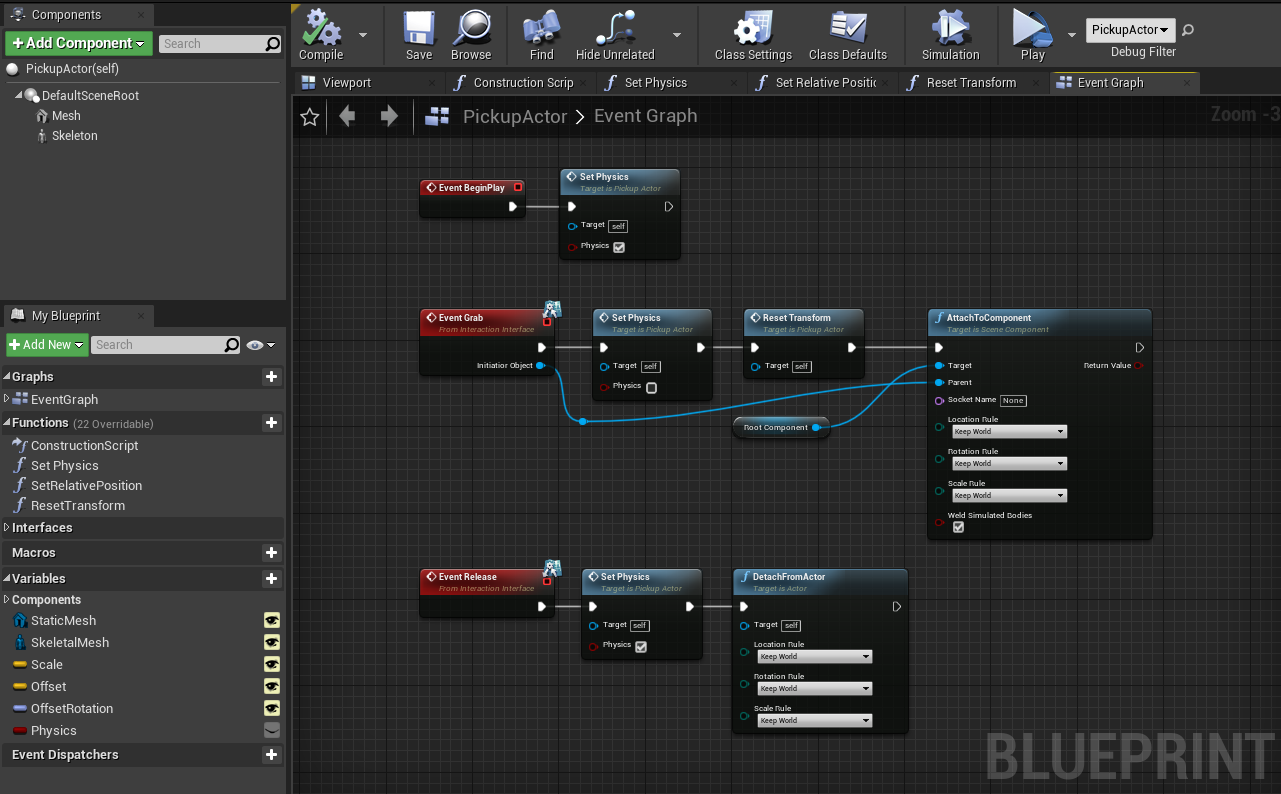
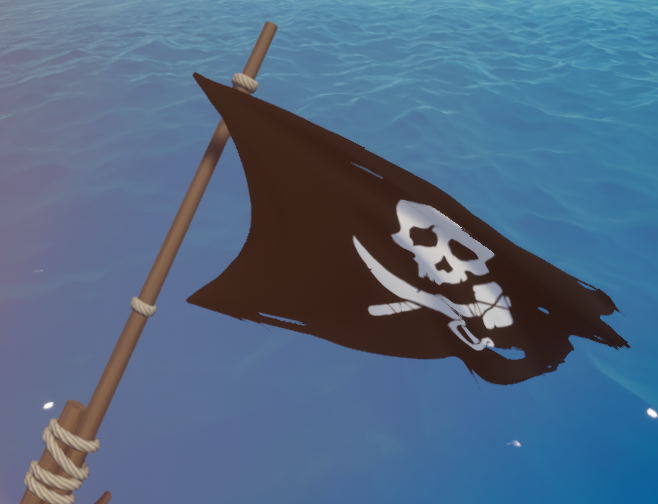

 faint pasture
@leaden glacier why is the root of that pickup not the collision?
Try making the mesh the root or adding a box collider for the root.
leaden glacier
Not 100% sure what you mean with that
Ah so, the mesh isn't the root just to allow to set either a Static or Skeletal Mesh when you drag in the actor, which have a small offset to the default sceneroot.
I'll try adding a collider
It works fine no matter what with the mesh being the root btw, that's how I had it at first.
faint pasture
I like to have the mesh be visuals only and a box or sphere collider as root for physics if it works for the object.
leaden glacier
Box as root seems to have no effect in this case
Probably will if i set the box to be the component with physics, so that indeed as you said the mesh is just visuals
Okay yeah that ended up solving everything actually. Big thanks @faint pasture