#blueprint
402296 messages · Page 431 of 403
 flint surge
 latent junco
walk the topology by hand <- could you elaborate on what that means? I'm unfamiliar
if you're looking for spherical gravity you'll need to make that yourself as well
@odd ember nah, I'm looking for more complex objects to slide on, like a character
so that seems too specific
 odd ember
I reckon you'll have to do away with gravity entirely
latent junco
Yeah, definitely
flint surge
like... break out the index buffers and other mesh data and figure out which faces are adjacent to one another and, given a du & dv along the surface, what the corresponding new position in the mesh data you'd get
odd ember
tracing "down" to the relative location of your chracter's feet will still work
flint surge
sounds semi-tedious
odd ember
and then just using impact normal to adjust rotation
flint surge
tracing seems easier but potentially more prone to errors or unexpected behavior
odd ember
there's no silver bullet
latent junco
Hehehe I figured as much 😂
flint surge
Well if you're looking at the raw mesh data there won't be any surprises
traces are quick and dirty and work for well-behaved cases
but you could imagine a scenario where there's a fold in between your character's feet on the face that it's standing on, and the trace start location
latent junco
@flint surge I'll have to do some googling to understand your suggestion, but at least I have something specific to google now!
flint surge
which would result in the character jumping up that ledge -- which may be desired behavior or not
I would recommend starting with traces
latent junco
true.. maybe some trickery could be done by making a simplified version of the mesh that's used for collision...
odd ember
absolutely
flint surge
So then what you do is find a way to stick a character onto a surface just to get it intialized, e.g fire a really long ray from far away towards the center of your object of interest
then, when you have the surface normal, you align your character to that
odd ember
you can start with a spherical trace
flint surge
then, when you move, for instance D might give you a +5 along X projected onto that plane
odd ember
then pick up on the nearest surface and trace to that for the normal
that would account for cases like jumping
flint surge
so you move your character along X in that plane by 5, and get a trace from there back down towards the object's center of geometry
and then stick to that new surface normal
latent junco
jumping's out so that makes things easier 😄
flint surge
but if you want it to really behave like an ant crawling on a surface such that you can go underneath ledges and past really sharp angles, you may need solution B
like if you were making a 3D modeling program that needed to not miss any in-between geometry
latent junco
so you move your character along X in that plane by 5, and get a trace from there back down towards the object's center of geometry
@flint surge Aah, I think I get it! Use the normal plane of the current position, move on that plane, trace down, then move the character, correct?
 sleek heath
hello
odd ember
that's what we've been saying
flint surge
yeah, the normal you get from the trace corresponds to the plane of the face that was hit
sleek heath
is there anyone willing to teach me blue prints or reccomend a tut or course will pay 🙂
latent junco
👌
flint surge
you'd need a second float to describe the orientation of your character (rotation about that normal, direction of facing on the plane)
flint surge
not sure what you mean by that
odd ember
you would want to make sure that regardless of orientation you still know which way "true" down
or up w/e
latent junco
Perfect, that's more than enough to get me started! Thanks for unclogging my brain guys 😄
flint surge
instantaneous "down" in this case would be (object_center_of_mass - character_center_of_mass).GetSafeNormal() (or whatever that function is called)
flint surge
"absolute down" is undefined, without finding out more about the problem domain
even my suggested "down" makes assumptions
odd ember
that's why i'm saying it should be defined
flint surge
not really, his question was 100% answered
odd ember
you'll want to use it in case of more advanced behavior
flint surge
you're answering something he may or may not ask in a bit, but there's no point speculating imo
odd ember
it's a good thing to keep in mind
flint surge
Off the top of my head I can think of at least 5 different ways of defining gravity or down or whatever
depending on exactly what he's doing
odd ember
yeah but it's not about gravity necessarily
flint surge
I could list them all but that'd just confuse everyone
and it doesn't answer the question 😛
odd ember
I said it would be wise to do
this isn't a jira ticket
not everything is cut and dry
and being pedantic gets you nowhere
flint surge
I'm not being a pedant, it's a perfectly valid point
odd ember
you kinda are, no offense
flint surge
You're picking one of a handful of potential things he might be trying to do and choosing one of them and describing next steps, even though none of that was asked for
 hallow osprey
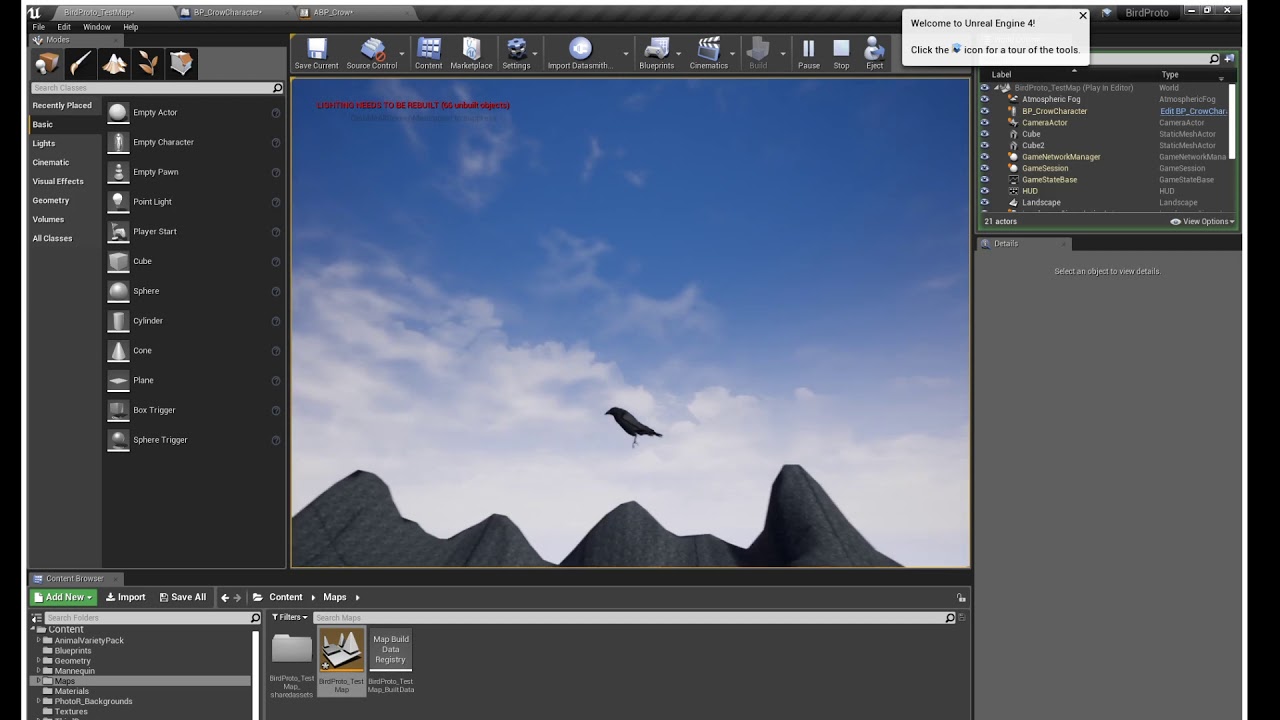
Also to add to my question above I figured a video of the problem I'm having might help. My flying bird keeps using the walk animations instead and that plus direction is what I'm trying to fix at the moment
https://youtu.be/4L47m_5FPfM
flint surge
I don't see how that serves to do anything but confuse 🤷♂️
odd ember
well it's not your call to decide
flint surge
I'm not deciding anything, I'm just remarking on style and execution
odd ember
you kinda are
flint surge
Advocating for non-decision isn't a decision, it's the opposite
flint surge
I'm just trying to avoid confusion
flint surge
You may perceive it as pedantic but there's a valid reason for me mentioning that
odd ember
just let it go
flint surge
I have let it go, I don't see there's any point in going in circles
So does anyone know what the sane way to access properties of inherited components via blueprints is? E.g. if I have a C++ class A, and I specialize it into blueprints B, C, D, and so on, which are all different versions of A. Apparently if you treat them all as references to A, you get "None" when trying to access the base class's component, but when you access it via references cast to B or C or whatever, you can access the component just fine. Do I really have to write duplicate versions of the functions that mess with that component?
Trying to figure out if I've just made a blunder somewhere or if this is really how they work
flint surge
It's hard to say what category this falls under
I'm trying to access the components (decorated with UPROPERTY(BlueprintReadOnly)) in blueprints but even in C++ the getter function just gets garbage
 supple dome
should work
flint surge
It works if I do "Cast to B" and ask for MyComponent from that
doesn't if I treat them as A, which they're all subclasses of
So if I do, for instance, "Get All Actors of Class A", then For Each over them, and ask for that inherited component, it fails IsValid and if I attempt to use the component anyway, it results in output log warnings of "Accessed None"
But if I cast them to what they "really" are, I can access the identically named components just fine
so it's like it does some type mangling or whatever
So then I say "fuck it", and just write an accessor for the thing I'm trying to read (a property of the component) into the base class, which returns the struct but what it returns is empty and breaking on the accessor reveals that the component pointer is invalid
So it "uses" the base class' property in spirit, but not really if I have to cast to the child class to actually do anything
Dunno if I made a mistake, or if this is an unintuitive implementation, or if I'm just confused about how computers work
odd ember
I mean it is really a #cpp question since the base of the question (and the solution to it) will be based in cpp
it's probably a question of accessors though
flint surge
Unless it's something fundamental regarding how Unreal handles objects etc.
 short coral
Hey guys , how would you go about making a minimap for an open world game?
A pretty large landscape too
flint surge
Seems like the same problem would happen even if I never even launched Visual Studio but I should probably experiment
 twilit heath
all instances of an object can be interpreted as an instance of their superclass
flint surge
Yeah that's been my experience in the past as well
Regarding minimaps -- depends on what sort of look you're going for
Personally I'd hand draw one or render out some other type of static image
flint surge
Could still take an image with a camera or something and store that as your map picture or something
But an aerial photo may not be very good looking
flint surge
You could also have an overhead icon designed for every asset you want to appear on the map, bake out the terrain or whatever as an image and then extract the positions of all the assets and render a sprite for all of them
short coral
Yes , i tried using a scene capture component and put it inside my level , changed the projection type to orthographic and set the width for it but the image has some areas covered in green muddy color
flint surge
Could be a frustum clipping issue
flint surge
The view frustum of the camera that's taking the picture... although come to think of it I'm not sure what a screen capture component is
short coral
I have heard it but not sure what it is exactly
odd ember
you'll likely need a scene capture component
if you were doing it in world composition you could do it per proxy level
flint surge
And also if you're doing ortho it won't have a frustum, per se
it'll still have near and far clipping though
 meager oyster
hello! i'm calling this function that has two outputs in blueprint (function: ProjectPointToNavigation). i'm reading both values (success and the actual point it found). but by reading both values, the system calls the function twice. is there a way in blueprint to force it to be called once, or store both values in one call for example? I could work around it by comparing the value with the input (it will be equal if no valid point was found), but was hoping there would be an easy way to avoid that...
short coral
@flint surge i see
flint surge
Functions without execution pins get called every time their value is used afaik
maybe if you stored them as local variables it would avoid the double call
short coral
@odd ember i'm using a 2d scene capture component at the moment
meager oyster
@flint surge : ah yes, the execution pins, good point.
didn't even think about that
odd ember
@short coral you'll have to figure out a way to make smaller screen captures come together in one large image essentially
flint surge
kind of depends on the use case
short coral
I dont have much experience regarding this but i guess its basically labour work
flint surge
with procedural generation it makes the most sense because you might be doing it on an ongoing basis and you'd want to only re-render parts that are nearby etc
if you just need one static image, trying to render a single large image with an orthographic camera seems fine, but most of this just seems like a bunch of artistic decisions
odd ember
@short coral divide and conquer really, it's the best way if you have a large map. if your map is excessively large I definitely recommend world composition as well
the breakdown into level chunks is necessary for large maps
flint surge
personally I'd probably write a script that renders it out from icons, but I'm picturing a specific type of art style
supple dome
@meager oyster no workaround, would have to recreate the function without BlueprintPure
short coral
@odd ember @flint surge thank you both
 solemn bloom
Hey guys I hope somebody can help me..
I have been trying to debug this for a couple days and I didn't seem to go nowhere
I have a project where im able to switch between VR more and screen mode viewing, I also have a UI widget which is on screen, and one which is in world when I'm in VR.
Now the hovering and clicking works for both
 jolly anchor
Hi,Is there any ideas about how to:
use a brush to edit on the ground "where is Team0's territory, and where is Team1's territory"?
Let the code detect , and auto determine whether my unit gets buff on this
solemn bloom
But the actual event dispatched I set up in the widget only works when I'm in screen mode !!!
Do you have any idea why this is happening ?
flint surge
So to be clear, in VR you have an actor in the world with a WidgetComponent? And you're clicking at it with a WidgetInteractionComponent?
And in flat mode, you're instantiating the same widget in the viewport as you are in the actor with the WidgetComponent?
and the event is dispatched from inside the click handlers of the Widget blueprint?
odd ember
@jolly anchor no such functionality exists
flint surge
Well, not right out the box as such
You could probably hack something together, maybe use an invisible material in a secondary slot and then test for that material to determine where you are
but painting materials in editor will require you to develop a custom tool I think
unless the texture paint mode works as-is
I've never used it
But yeah making new edit modes is reasonably straight forward
odd ember
physics materials could work for some approximation of this, but it's a question of how malleable they are
flint surge
It's not a solution that would be very dynamic
But based on how they phrased it (painting with brushes implying an editor feature, and no changes during gameplay) it seems like it may fit the constraints
I mean I'm sure it could be made to work in real time, even in multiplayer, but you'd have to be more careful
meager oyster
@meager oyster no workaround, would have to recreate the function without BlueprintPure
@supple dome I did some tests and just wrapping it in a BP function and wiring up the outputs to the output node of that newly created function did the trick 🙂 only being called once
flint surge
did it not work with temporaries/local variables?
or do you just prefer this visually
meager oyster
no, it would call it once for each local variable
flint surge
I see
that makes sense I guess
the only other option then would be like a struct or something
meager oyster
yeah, i did expect the same to happen here as well, but it didn't 🙂
flint surge
well, you have two nodes being executed separately for each setter, so each gets their own execution of the node they rely on
situations like these are one of the downsides of blueprints
less control and sometimes unintuitive
meager oyster
some sneaky performance loss at times
flint surge
Off the top of my head I can't think of a cleaner way to do this than what's picture above
supple dome
uh, thats cool
flint surge
well, you don't need a function, probably -- could just collapse some nodes to get the same effect
odd ember
struct vars
flint surge
but with structs you have to break/make to see into them
flint surge
Hm, I'm not sure it's simpler when you still have to create a struct type though
I think that function is the lowest amount of extra clutter
Unless collapsing a set of nodes avoids the extra invocation as well
like that
My guess is this still results in 2 function calls
but there's a very small chance it creates those same kinds of temporaries
(you can probably tell I'm a big fan of lambdas in C++)
flint surge
figures
solemn bloom
@flint surge hey man ! Sorry please tag me or I'll loose track of the messages :)
So Ive tested a bit more and created a level with just the VR
Same issue persists
flint surge
Right, so what's the setup?
WidgetComponent, WidgetInteractionComponent?
Same base Widget class?
solemn bloom
My setup: on the level I have a BP actor with a widget component inside,
Then I have motion controller bp (from the default be template), the motion controller bp is referencing BP motion controller which has the interactive widget functionality.
And THEN I have another bp actor where I want to send the events to
I'll share some screens
i have an event dispatcher in the widget which should send to my actor bp
flint surge
Does the motion controller pawn have a WidgetInteractionComponent?
solemn bloom
flint surge
I'm assuming you're trying to point and click with the (presumably) Vive wands to interact with the widgets in the 3D world
solemn bloom
i can point to the ui buttonc and click on them, that works i can see using a print string attached at the end of the node clicked (in the widget bp)
yeah that works
but then i cannot dispatch the event anywhere else
it works when its screen based, with the mouse
when i click buttons it dispatches them into my bp actor
but when i try in vr it doesnt dispatch
flint surge
it's kind of blurry, but after the OnClicked(Play), which I take it does get called, you're sending a message via an interface or something? (Call Play - Stop)
flint surge
Probably not necessary if you're using self
if you put a breakpoint in there, at what point does the message stop?
I mean the key difference between the 2D and 3D versions is that in 3D the widget lives inside a component inside an actor, and in 2D it lives as a widget in your playercontroller's viewport
solemn bloom
sorry how can i do the breakpoint
flint surge
but if it's calling a function on itself, I don't see why that part would behave differently
F9 with a node selected
and there are probably controls at the top of the editor
hm, I guess there isn't a button for the breakpoints, but there is one when you right click
solemn bloom
i made it and run the simulation
now ?
breakpoint
its not saying much, just this
from the output log
short coral
@odd ember hey about world composition , would it be better to use it instead of level streaming and which one would be a better approach to making a mini map be?
flint surge
That "Accessed None" seems worrying @solemn bloom
For whatever reason your TestBP doesn't know about "UI Interface"
I don't know what that is because it's cropped out
somehow you need to make sure your TestBP gets a valid reference to that widget, or reorganize your function calls in such a way that you don't need to access it by reference from the outside
odd ember
@short coral it'd be easier, but it depends on your setup. if your world is like dark souls world composition is useless, but if it's like far cry then you should be using WC
 tawny tinsel
can someone remind me with one is pawn and rotate and yawn?
nvm i remembered
what node do i use to make a actor component rotate?
depending on a float
 mild ore
pull a wire from component and set relative rotation
there you can yawn your float if you right click the rotation input pin and unfold to 3 axes
tawny tinsel
hm
now how can i convert a value that switches from 0 to 12 to a value that switches from 5 to 12?
flint surge
you need what is known as a map
the uhh... mathematical function, not the datastructure
gotta check if that exists in the blueprint function libraries...
this fella right here
clamped means that your output is constrained between A and B even if the input isn't
unclamped means if you have [0, 1] => [5-10], with 0 you'll get 5 as you'd expect, but with -2 you'll get -5 instead of 0, or with -1 you'll get 0 instead of 5
This of course is all assuming that by "switches" you mean "varies smoothly in between"
tawny tinsel
hmmmmm
flint surge
If you mean it can literally take on only those two values, this should still work but you may need to do some checks to coerce it to stay at those extremes
tawny tinsel
so where do i put what?
flint surge
wherever you need that conversion
tawny tinsel
so i can conver a varaibale that goes from 0 to 12 to a variable that goes from 1 to 100?
flint surge
or 5 to 12 as you mentioned earlier
tawny tinsel
whats in range and out range?
flint surge
now how can i convert a value that switches from 0 to 12 to a value that switches from 5 to 12?
=> would result in:
so, if input is 6, Return Value is 8.5
tawny tinsel
hm
flint surge
if input is 0, Return Value is 5.0
flint surge
uhh...
well you can think of it in terms of geometry like lines or vectors
but it boils down to comparing the sizes of the input and output ranges, moving and scaling
tawny tinsel
hm
flint surge
so it'd be like... out_min + ((value - in_min) / (in_max - in_min)) * (out_max - out_min)
not sure if I got that exactly right
but the idea is that you know your output starts from out_min, and you're adding some fraction of the output range to that
based on where your input is in the input range
 trim matrix
Im trying to slice an arm from an enemy. Im using the break constraint target is skeletal mesh.
Im just pressing button to see how its going to fall off
nothing happens
tawny tinsel
perfect this is the best node ever
trim matrix
I can use the hide bone function though but the constraint doesnt work
flint surge
don't know the answer to that one
but it seems like that might not be enough anyway, since the mesh that's skinned over the skeleton is still connected
even if the bones are severed, and the weights of the rig are such that the right vertices follow along with the severed arm bones -- those vertices are still connected to the shoulder by edges and faces
So I don't really know how constraints and animations work in UE4 precisely, but I'm saying that even if you got it to fall on the ground (you'd probably need to make it some kind of a physics object or something?) it would just stretch out on really skinny triangles
trim matrix
uhmm
one blueprint is doing it just by command -> break constraint -> play animation
works perfect
flint surge
I see, maybe the mesh itself is in pieces
Gotta let someone else answer that one, I have no clue
 wet swift
qestion
trim matrix
but is not in parts or anything
wet swift
i found this site called unity freaks
does anyone know how to download from it?
everytime i open the link it says site not found
flint surge
Idk, this is Unreal though
odd ember
@wet swift do you even read the channels or do you just post random stuff all the time? this is the third time I see you post yet another random question where it doesn't belong
flint surge
And regarding meshes in Unreal, I think a mesh can be in pieces (like the object topology can be disconnected, in islands), but if you import it as a single mesh it doesn't show up in pieces
wet swift
well im trying to download a blueprint idk
the server has so many channels its kidna confusing
trim matrix
LOL
yeah he had a another sk mannequin with ragdoll collision presets
i guess thats the key
odd ember
@wet swift there is literally a #more-resources for all the channels
flint surge
sounds about right
wet swift
can you just help me with my problem instead of bullying me
odd ember
your problem isn't solvable by us
wet swift
alright
odd ember
that's kind of the point
odd ember
idk, might be better to ask in #animation
trim matrix
was not a question if that was for me
flint surge
there's no predicate
odd ember
there's no predicate
... and you're saying you're not a pedant 🙄
flint surge
just making an observation
and poking fun at your low tolerance for errors and misconduct when it comes to policing this channel
try and relax a little
odd ember
same
solemn bloom
hey guys !os i found something in the forum, i made some progres but im not there yet
this way it works, but its from the level bp
this way it doesnt, and its form actor BP
WHY
flint surge
I have a vague recollection of having trouble accessing the widgets inside the widget components like that
if you put a breakpoint on "Bind Event to Play - Stop", does that ever get triggered?
also, I don't know if the print strings work the same way in VR
 atomic salmon
Print String works in VR, it's just not very visible in the top left corner of the HMD. Better to have a look at the log.
Or use a Text Render Component attached to your hand / other actor.
flint surge
breakpoints are pretty easy to spot because the VR hemisphere freezes
kind of annoying to be taking the headset on and off constantly though...
I'm glad I'm done with my Vive adventures for now
solemn bloom
added a breqakpoint as u said, but the the preview doesnt hang, which means it's not getting triggered ?
its not cating to player UI
but why tho ? it's the same as in the level bp
and it works there uhmmmm
 maiden wadi
You might want to make sure that your GetAllActorsOfClass is getting the correct thing, and that the actor's beginplay is firing.
solemn bloom
beginplay is firing
and get all actor is getting my vr pawn, which has the widget component in it
flint surge
GetUserWidgetObject smells to me
I have this vague notion that I struggled with that too
maiden wadi
It works in the other blueprint though. The only change is the reference.
solemn bloom
okay i managed
i moved the widget component in an actor bluieprint instead of keeping it inside the pawn
flint surge
hm, fair enough
I was about to launch the previous project to see how exactly I built it
solemn bloom
uh ehm
false alarm
it works on the virtual reality default map
but not on my level
on my level it still stops at 'cast to player ui'
 leaden glacier
Can I somehow attach a static mesh to a socket, but setting the origin of the static mesh to a socket on the static mesh? Aka: lets say you have a stick SM, you add a socket to that which defines where the character grabs it. When the character grabs it you'd like the stick to attach to the hand, but have the attach point be the socket on the stick so that it's always correctly in the player hand. Is there a way to do that?
atomic salmon
@leaden glacier the attachment location for the SM will be its pivot point, but you can always use Set Relative Location to shift it as needed. Another way is to wrap your SM into a BP with a scene component as root, then set the relative location of the SM within it. It will then attach at the root component. Last but not least, you can export the mesh into a DCC tool, change the pivot point, the reimport it.
leaden glacier
Changing the pivot point doesn't sound too bad, but yeah I'm working on something that adds the offset from pivot to socket. Guess there isn't a superduper easy built in way xD
Pro of offset is you could create a grab point on multiple points of the SM, and select the closest or something.
Pivot point is limited in that sense
atomic salmon
You can edit the pivot point of a mesh within unreal but only while it is placed in the level.
If you need full control you can always turn your stick into a BP which can dynamically determine its on attach point.
 fathom birch
Hey friends, I've a blueprint variable with a Set container type.
Technically it's a struct with a Set container type. I'd like to update values on that given Set at that index, but there is no 'get'.
atomic salmon
@fathom birch Sets are unordered containers so you don't access specific items and update them. What you can do is Remove the old entry and Add a new one to it.
If you want to get a specific element in an ordered way you can convert a Set to an Array.
 covert agate
hey guys! i've been trying to find tutorials on this but I really can't, i really need your help.
How would i be able to make a light and door sequence like this in ue4? where if you look at the light button and press e it turns on the light and when you look at the door and press e it closes it.
and how would you make a power meter that would decrease and when it hits 0% everything would open and it would be unclosable.
(and if it's not too much to ask, how would i make everything turn dark when the meter hits 0?)
sorry if i'm asking too much but i just can't find tutorials anywhere. thank you! ❤️
odd ember
it's a lot to take in, but you can make a look at trigger fairly easily. you might want to combine that with being in range of button(s)
was the intention that using the door or light would cause the power to drop?
 stoic narwhal
Are there any plugins for drawing stuff instead of commenting? I've got a complex BP system that I'd like to draw a diagram for and keep it handy in my blueprints
stoic narwhal
@covert agate What you're looking to do here is relatively simple. I'll explain it in ways which you can research it for yourself and figure out.
The first thing you want to do is set up a 'Line trace by channel' to be executing when you press E.
Then you want to have the door and the light to be set under the same parent. Lets call this BP_ParentInteractable.
You then do a 'Cast To BP_ParentInteractable' with an event that happens on that parent class.
This is then overridden by the door and the light to do the two separate interactions, by using the same event that you used in the parent class. This is called an override event.
Thats your basics for now, as for the power conditions and stuff, you'll have to figure that out - should be relatively simple. You could do it a sloppy way and use 'GetAllActorsOfClass' and call all doors to open when power is 0
And with darkness, you want to use dynamic materials to control the emissive values in the lights for buttons and stuff.
atomic salmon
@stoic narwhal you can always store it as texture in a diagram folder
covert agate
tysm grandmamax!
stoic narwhal
I'd rather not have it as textures in my games though
trim matrix
How can i randomly pick locations on my landscape to spawn an actor? I'm asking again because i deleted my code and I don't remember how to do it
stoic narwhal
@trim matrix What like pre-allocated ones?
trim matrix
yes
stoic narwhal
You could make target actors, spread them over the world, get all actors of class, then do a random int in range from 0 to array length minus 1, then get that int and spawn the actor there
trim matrix
nah
stoic narwhal
?
trim matrix
I want random spawns
stoic narwhal
thats exactly how to do it lol
trim matrix
There was a line trace that took a float variable that told the game how many actors to spawn, and then took the actor array bounds of the landscape, and line traced randomly only with the number stored on that float and then spawned the actors there
stoic narwhal
Well if you made it before then surely you can make it again?
stoic narwhal
okay good luck
 elder sun
Beginner developer needing help simplifying code for an FPS reloading system
I think this is the right channel
Is there any way to simplify this code
stoic narwhal
use the print screen button my dude
Also yeah I wouldnt code it like that, why are you looping the event?
elder sun
It loads a round then goes back into a branch check to see if the clip is full and if not it repeats
I'm not very familiar with different nodes so I'm sure this is very messy
stoic narwhal
You want to avoid using delay nodes as much as possible
use timers instead
If it were me, I'd use a timer to control a boolean for 'Can Reload?', every time the player presses reload, the timer starts looping for 0.4 seconds and also does the reload logic
then when the timer finishes, it sets 'CanReload?' to true, which allows the event to be fired again
You can do two types of timers: Function timers and event timers. I prefer event timers
trim matrix
@stoic narwhal that was sarcasm
elder sun
Oh ok I'll try to work with timers thanks
elder sun
Oh ok that helps so much thanks!
stoic narwhal
np, timers can be a lil tricky at first, ping me on here if you get stuck
also if you hit windows key and type 'clipping tool', its real easy for screenshots like that ^
trim matrix
I need help with my enemy AI. How can I add a sound cue at the AIs location that gets louder if i get closer to it.
 wide sphinx
Hello I've created a character blueprint for test purposes and I want to add a cube primitive for now instead of a real skeletal mesh. Is it possible?
 frigid anvil
You can just add a static mesh component to your character, but the skeletal mesh component is inherited so you cant delete it
wide sphinx
I've used the unreal mannequin instead thanks
 latent shadow
Whats the best way to go about limiting the camera movement so the player cant look beyond the natural Y 90/-90 from a FPS perspective? Ive tried clamping it and not adding any input if it would pass those thresholds, but both had bad results
odd ember
just use rotators and euler angles and you'll automatically reach gimbal lock?
latent shadow
I do reach what seems to be gimbal lock by just looking down, but if i move my z axis around enough it kind of "unlocks" and flips the camera
odd ember
I mean that's not gimbal lock then
gimbal lock is like cardinal directions
once you reach north pole, any direction will be south
did you use quaternions?
latent shadow
This is all I have for camera movement
odd ember
why are you using add?
latent shadow
Should I not? Originally this was meant to work on planets, so i was using add relative rotation, but now im working on a flat plane
trim matrix
@stoic narwhal sorry for earlier i get cranky when i'm frustrated but i got it working
stoic narwhal
Yeah no worries mate glad you sorted it
odd ember
@latent shadow I'd try with set control rotation
trim matrix
How can I over write a location with another one after i collect a gas can? I have 8 and whenever i collect a gas can, i want my ai to go to it's location
latent shadow
Alright, thanks. Using control rotation worked
hallow osprey
Beginner here! I'm trying to figure out how to solve some issues I'm having with movement and animations for my player pawn (bird), specifically with 2 things, having it use the correct animation for flying and being able to move up and down/vertical, not just forward/back/left/right/horizontal when flying
When I enter flying mode it only moves horizontal directions and uses a walk animation instead of flying
https://www.youtube.com/watch?v=4L47m_5FPfM
My anim graph blueprints are probably a mess but I'm trying not to mess too much with them on my own and break the parts that actually work lol and I haven't been able to find any tutorials on flying mechanics that have been able to tell me how to fix my problem
 trim matrix
my UI widget isn't displaying at all when I click play. i used the steps outlined in the unreal documentation
frigid anvil
Where is this made(In which actor)? @trim matrix
trim matrix
@frigid anvil its just in a blueprint under Content (not attached to an actor)
frigid anvil
So its just an actor in the content browser?
frigid anvil
I mean the BeginPlay event. Is it in your character?
trim matrix
no i disabled GameMode because im only making a menu screen
i guess i need a player spawn?
frigid anvil
You could show it through your level blueprint if you dont have an actor
trim matrix
ya thats where i have it but its not displaying
 loud bridge
Hi, in the BP of my weapon, I do with the event tick that when it is not attached to my character, which constantly add +10 to the rotation but it only works before it is attached to a socket for the first time. Please help me
trim matrix
this is strange
frigid anvil
An example of how to create, display, and remove UI elements from the screen during gameplay.
Have you tried following that @trim matrix ?
trim matrix
ya thats what i used i followed that 1 cuz im new to Unreal
but im gonna create new project see if it works
maybe i created a C++ project?
 zealous moth
quick question: I am trying to construct another widget inside a widget when I scroll through tabs. Would anyone have an idea of a method to do it? I would need to construct it and destroy it as I go through nodes as if to refresh.
frigid anvil
Try looking at the templates @trim matrix Maybe you spot the issue that way
trim matrix
ok i got it to work... it seems that I can't use blueprint level view if I am using a C++ project
elder sun
@stoic narwhal I think I've figured out how The SetTimer node works but I still can't get the reload logic to repeat
It will run the function once and not again
stoic narwhal
Ah the example I put in was for reloading 1 bullet at a time like a bolt action or a pump shotgun
stoic narwhal
If you tick looping, the event will fire once ever half a second
You should probably just fill the mag instead of looping for every bullet
elder sun
Yeah but I want to make it to have the sfx of putting each round in one at a time
So how does the looping input work?
I want it to loop until CurrentMag = MaxMag
 rough wing
Hi
I want my level to play a sound when an actor has completed a task
How can I send a signal to the level blueprint when a task is complete
or when a boolean turns true?
 desert tide
is there a limit to the amount of instanced meshes I can have in a single blueprint?
 fair estuary
@desert tide none that I'm aware of although managing to many in a bp might become a nightmare.
 static charm
you're limited by performance/draw calls your hardware can handle
desert tide
Hmmn, that's weird. I'm generating a terrain using instanced 'blocks' (Lego not Minecraft haha) and once I start creating a few, the instances spawned later in the code stop spawning. But my computer isn't chugging or slowing down at all
static charm
ive had a million instanced meshes work fine (broken into groups, and bad performance, 20fps)
your code just isn't working
or they are being spawned and just not rendered/culled
desert tide
Hmmn, yeah my code is not working rn. Because I can spawn as many ground tiles as I want, but the vegetations blocks have weird behaviour
Essentially I am making a terrain system, based on the Lego brick, so it's basically minecraft terrain gen but only the surface and not voxel. I'm currently just using a for loop to generate an X array of the blocks, and then a nested for loop to generate that array in the Y axis. Then offsetting the height of each instance using a perlin noise.
Is there a more efficient way of doing this? Maybe using more techniques from Minecraft worldgen, and doing it in chunks? I can see that having benefits later

 winter kettle
I have an overlap pawn only sphere collision component in this projectiles they have a movement projectile component that stops moving when they overlap with anything that isn't a pawn
 mossy coral
@winter kettle u r checking actor for validity (is it there) and doesnt matter what kind of collision it is
Just tick the pawn to overlap and others to block or ignore in actor collision settings
trim matrix
How can I code a jumpscare? I have an animation ready and when my enemy catches the player I want his rotation to lerp to face the enemy, keeping the enemy DIRECTLY in front of the player's camera and play the animation
desert tide
Okie, So I've set up a significantly more efficient way of generating a "Chunk" How do I now go about making multiple chunks to form a map? Any resources on this?
 winter nest
HI guys , on my character orient to movement node is not working , what could be the issue ?
 wise raven
I have physical materials applied on my landscape layer infos but my bullet projectile does not recognise the physical material and therefore plays the same emmiter on impact, this however, is only happening with the bullet projectile. my characters footsteps recognise the physical materials and play different footstep sounds on each painted layer
btw the bullet projectile recognises the PM on any static mesh or actor, just not the landscape layers
@torpid swift You need to find the mouse click event and replace then with WASD
 hard dove
Is there a way for me to update a player's collision to match the custom collisions used on an object? (Effectively replacing a player's capsule with collisions that match a selected object/prop, similar to I guess what you can see in prop hunt)
winter nest
@hard dove if you want to replace collision profile and change its Object Type.
hard dove
My goal is to effectively match the player's collisions with the collision configuration of the object.
So as a quick example
The player's collision would become this, as it is the collision of the object
 fallow fox
Hello. I want to open a secret box at every > 24hours. I've done this, but I'm afraid it's not working if for example you'll open the box in 31th this month. Once you'll be in April you can't open anymore the box ( or you'll open at 00:01 1st April). How can I get the exact > 24 hours from previous day? Thank you!
short coral
Hello , I might be very wrong here but , it's impossible to split a current level into smaller levels is it? I'm looking into world composition at the moment and there's nothing that points to it being possible
maiden wadi
@short coral Are you by chance looking for level streaming?
short coral
No I'm looking into world composition
atomic salmon
@short coral do you mean automatically? Then no.
short coral
No not automatically no , but is there a way of doing so?
atomic salmon
@short coral what are you trying to achieve? What is your use case? That may suggest to go either with Level Streaming or with World Composition.
short coral
I was talking about making minimaps earlier ago , i have a huge level with a pretty big landscape , i tried using a scene capture component to take a picture and then maybe edit it to work kind of to my level size but that didn't work out for me unfortunately, so a guy suggested using world composition and breaking it down to smaller levels and making mini maps for each level
atomic salmon
@short coral ok so you are working on a sort of Open World game and you need to make a minimap for it. World Composition is probably better in this case. When it comes to the minimap though, I don't know what would be the best way to do it. Usually you have something pre-built by the artists on which the world is based on, but in this case it seems you are trying to reverse engineer the minimap from the world itself.
short coral
Yeah unfortunately , i really didnt think this through too well
atomic salmon
@short coral you could look into the engine source code and find a way to access/save the world composition map which is displayed in the editor.
short coral
i don't think that would be possible , because i JUST enabled world composition a day ago
 north oriole
Is there a way to access the name of the current gamemode in a networked game?
 ashen skiff
Hey there, I'm trying to figure out how I can detect input if the payer is inside a box collision, how would I do so?
atomic salmon
@north oriole GameMode exists only on the server. GameState is replicated to clients, so you can query the GameMode from the GameState and replicate that info to the clients in that way. Better to ask in #multiplayer .
@ashen skiff I am trying to understand what you mean. Do you want to detect when the player enters a trigger box?
ashen skiff
I can detect when they are in the box by using On Component Begin Overlap I need to detect if they press a key while inside the box
atomic salmon
@ashen skiff ok. Since input is managed within the player pawn, the best way is 1. from the trigger box let the player know it is inside the box by setting a boolean variable in it. 2. detect the input key within the player and if the boolean is true, make something happen.
In other words: the box informs the player that it has entered it and the player checks for the key + the fact that it is inside the box to trigger an action.
Note that the action trigger can be sent back to the trigger box BP as well, for example to open a door or make a platform move.
ashen skiff
So I currently have
atomic salmon
@ashen skiff the right way to do it is to take Other Actor out of the Begin Overlap, cast it to your player character (e.g. ThirdPersonPlayer) and use that reference to inform the player it is inside the box
With Enable input you are granting the box actor the rights to process the input but this is not the right way to do it if you ask me.
The reason is that this doesn't generalize well and it is against the principle of keeping the game logic where it belongs to.
ashen skiff
Thanks
atomic salmon
@ashen skiff np. Feel free to share your progresses here if you need some help.
trim matrix
How can I code a jumpscare? I have an animation ready and when my enemy catches the player I want his rotation to lerp to face the enemy, keeping the enemy DIRECTLY in front of the player's camera and play the animation
 jolly pumice
Guys, while I work on unreal bp, I have sometimes a problem, where script, that I made some time ago, magicaly stops working. When I start to diagnose, what happened, everything seems to be fine, just node dont carry data that they should. Then, I do nothing else but print string, to proble another part of code, and puff, magicaly starts to work. It's very frustrating, what could cause that issues?
atomic salmon
@trim matrix break it down into simpler chunks:
- Find where you enemy is and calculate the rotation to look at the enemy (FindLookAtRotation)
- Apply the rotation to your character using RInterp with SetControlRotation
- When the player is facing the enemy (no more rotation), play the animation
Something along these lines
@jolly pumice are you using a launcher version of the engine or did you compile your own? Which version are you using? Have you been moving assets between projects using Explorer instead of Migrate? Did you try to close your project, delete the Saved, Intermediate and Build folders and reopen your project? Make a full backup first just to be on the safe side.
jolly pumice
Version: 4.24.3-11590370+++UE4+Release-4.24
I launched game in editor
Nothing moved, all saved, nothing migrating, cleaning saves didn't help, backing up all
It's like editor not getting data from dt I think
That's how it looked at least, problem was on structure build on dt table
That happened at least 2-3 times, same story as now
atomic salmon
@jolly pumice it could be a bug in 4.24. It is not the most reliable version to be honest.
trim matrix
How can I make my enemy move to the center of the players camera regardless of where the player is looking?
jolly pumice
I had much smaller project, when I started it at 4.23, so can't compare. I think there's no solution right now. Thanks @atomic salmon
atomic salmon
@trim matrix take the camera forward vector, multiply it by a float which is the distance you want your enemy from the camera, add the result to the camera world location. That is where your enemy should move to be in the center of the camera.
Pseudo code: GetWorldLocation(Camera) + Distance * GetForwardVector(Camera)
Note that if you are using a Spring Arm it may react to your enemy getting too close by moving around to avoid collisions.
trim matrix
i am using fps
atomic salmon
@trim matrix it should work then
 bleak vector
pretty sure you're teleporting the player there
 gentle urchin
Along with target location being forward vector * distance, which would translate to something like 72,0,0 if you were looking directly at the X axis
If you wanted to TP the player, you'd use Add Actor World Offset
If you on the other hand want to tp something else in front of the player, you'd need to use the player vector and add whatever forward distance you'd want
 fallen glade
is it possible to add a mesh to an "actor component" ?
gentle urchin
Depends on what sort of mesh, but not really as i can see
I guess that contradicts the first part of the sentence
fallen glade
Primitive Components (class UPrimitiveComponent, a child of USceneComponent) are Scene Components with geometric representation, which is generally used to render visual elements or to collide or overlap with physical objects. This includes Static or skeletal meshes, sprites or billboards, and particle systems as well as box, capsule, and sphere collision volumes.
this is a thing but It can't be crated ?
atomic salmon
@trim matrix first you are moving the player not the enemy apparently. Second you didn't add the world location as explained above.
 plucky aurora
https://gyazo.com/2bde1bcdd699724e8ed705857ed79f19 when i teleport my player from one spot to the other, he always starts waving his hands in a short "falling" anim state. How can i stop the player from doing that? Oo
fallen glade
@plucky aurora hide the player for a couple of frames
plucky aurora
i need to be able to see the arm since i want to introduce a custom animation while the teleporting effect happens
fallen glade
then you wont be seeing the falling animation
plucky aurora
ok then, not sure if you wanna, but can you give me some input on which steps i should take to actually play that animation? i have it already imported, but i have a lack of experience with animation implementation in unreal
i already tried "play montage"
it didnt do a thing for me 😄
gentle urchin
it's the way to go
Make sure you've got the montage setup for the correct slot on the skeleton
plucky aurora
ah ok, yeah just realized that when i read the doc about it again
plucky aurora
thx guys 🙂
tawny tinsel
i ned to cast the skysphere
gentle urchin
In the anim Graph you gotta play the slot,
tawny tinsel
pls help
gentle urchin
along with it being selected in the montage
plucky aurora
@gentle urchin even with setting it to the defaultgroup.default slot it doesnt want to play for me rn
gentle urchin
does the montage work for the skeleton you're using it on ?
plucky aurora
its the unreal manequin, imported without errors, plays properly in both anim preview and montage
gentle urchin
yeppyepp, i assume thats the one you're using in the char bp aswell
gentle urchin
Yeah im thinking there's one more thing needed to be done ..
just cant remember what it is 😂
You're definetly sure the char got the correct input right ?
so the event is triggered in the first place
plucky aurora
well maybe the character doesnt have input on rn, that could be it. most of the stuff i do i do from the persistent level of my level streaming
but that single thing is only called in the character bp
gentle urchin
just add a print to make sure it fires
plucky aurora
i see, i think my other event consumes itself
because using f as firing event enables the anim
thats great
😄 now i know how to fix this
 tender glen
Hey guys anyone tried to use menu anchor with input mode being game and ui? I've had the menu anchor working with ui only but i switched to game and ui, then it stopped working
 jade zinc
Hi, anyone knows its possible to access a TQueue inside blueprint? (By adding UPROPERTY)?
hallow osprey
Beginner here! I'm trying to figure out how to solve some issues I'm having with movement and animations for my player pawn (bird), specifically with 2 things, having it use the correct animation for flying and being able to move up and down/vertical, not just forward/back/left/right/horizontal when flying
When I enter flying mode it only moves horizontal directions and uses a walk animation instead of flying
https://www.youtube.com/watch?v=4L47m_5FPfM
My anim graph blueprints are probably a mess but I'm trying not to mess too much with them on my own and break the parts that actually work lol and I haven't been able to find any tutorials on flying mechanics that have been able to tell me how to fix my problem
tawny tinsel
how do i make my glass fall apart "crash breakdown physics blah blah" when the character hits it
i cant find a way to destroy it other than remove from the game with "destroy actor"
odd ember
@tawny tinsel you'll have to make it a destructible mesh first
there's probably a few tutorials out there for it
tawny tinsel
how do i make it
i keep righ clicking theres no button for that
theres only 1 tutorial
odd ember
For all those people who find it more convenient to bother you with their question rather than search it for themselves.
tawny tinsel
very funny
odd ember
nobody's laughing
odd ember
literally the third tutorial will show you how
I mean
like the third video link
it's right there
short coral
Hey regarding world composition , in my current level setup i have a day and night cycle setup , would i have to set it up it too in every level or would it only be placed in the persistent level alone?
odd ember
persistent
your skybox is part of the world
not each individual level
the persistent level is for stuff that is always loaded
e.g. sky, main terrain actor, systems that are required to run
(but nothing else should be in the persistent level except for things like that)
short coral
What about stuff like procedural volumes , will they be in their own levels?
plucky aurora
I was able to disable the "falling" effect by setting the component velocity to 0 while teleporting.
odd ember
@short coral volumes are generally local, not global
 feral ice
i am playing sound at location but it sounds like 2d... anyone know what i did wrong
odd ember
@feral ice probably you don't have any sound attenuation or volumes set up to define reverb
 arctic junco
how to copy landscape to a new level
jolly pumice
quick question guys, it's faster to get actors by tag or get all actors of class?
tawny tinsel
so i finaly have my destructable mesh? how do i make it destroy and fall when i press a button?
what node will make it exploe
short coral
@odd ember would world composition be a good idea to use in the case if i have 2 separate levels?
Say the player would reach a door then it would load the level
odd ember
@tawny tinsel now that you have it I'm sure some of the other tutorials can help you make that happen
otherwise feel free to ask in #legacy-physics
@short coral really getting into #level-design territory so let's take it there
jolly anchor
physics materials could work for some approximation of this, but it's a question of how malleable they are
@odd ember
You could probably hack something together, maybe use an invisible material in a secondary slot and then test for that material to determine where you are
@flint surge
Thank you guys! I'm sorry I didn't express my appreciation yesterday. I'm thinking about grab some Unreal code, and modify it into something useful for me.
tawny tinsel
is theres an event tick node for only somethings happends?
for example is theres event tick after ovelap component?
so it only checks every second when my character overlaps something?
 tight schooner
You can control event tick with Set Actor Tick Enabled node
tawny tinsel
no i cant do that i need it to tick all the time cuz its connected to so many things
is theres something like this?
i just put a random node here
tight schooner
quick question guys, it's faster to get actors by tag or get all actors of class?
@jolly pumice
I want to answer this for myself so I made a little benchmark. Each array returns 15 items. Strangely enough get-with-tag is slower, but I still had to run it like 10K times to get a tangible performance hit.
Here it is playing in editor. Get-with-tag performs 3x worse...? It's not what I expected.
And here it is in a packaged, nativized build. The crazy thing is get-of-class performs better while get-with-tag performs worse. It makes as much sense to me as it does to you.
I wonder if there are optimizations related to running it in a loop or something. I might try spawning a ton of actors, all running get-all-actors on tick 
and seeing what the results are with that, lol
jolly pumice
hmm, class is just a string, nothing more to compare, tags on lowest level are just strings too, but there could be entire table to load, even if empty, it has all it machine code "wrapping". That's just my conclusion of it
Thanks, for those test 😄
I'll do some testing later, maybe there's good reason behind that difference 😄
tight schooner
OK here's another benchmark. I spawn 1,000 of these actors at the push of a button. They first do get-of-class on tick for a half second, and then switch to get-with-tag.
Here it is via preview-in-editor. The first spike is the spawning of 1,000 actors. Then the first plateau is get-of-class, then the taller one is get-with-tag.
And in a packaged, nativized build
I wonder if Epic optimized get-all-actors-of-class at some point (caching the results?) cuz they saw too many people abusing it. I have no idea.
maiden wadi
@tight schooner How do you display that?
tight schooner
There is that mysterious little spike before the first, smaller plateau. I wonder if that's the initial get-all-actors-of-class.
@maiden wadi "stat raw" in the console?
maiden wadi
Getting slightly different results. This may be a fault of the branching or somewhere else? I had to spawn 100,000 actors just to see the spike, but I set one key to get all actors of class, and another to get all actors with tag. First spike is class, second is tag.
maiden wadi
Getting the same results running them on tick with a branch modifier.
odd ember
@gleaming yew inside the timeline there's a loop option
 gleaming yew
@odd ember oh yeah, there is, thank you
atomic salmon
@maiden wadi at source code level the two functions are almost identical, but GetAllActorsWithTag has to check whether an actor actually has that specific Tag, so that may account for some overhead.
One interesting difference though, GetAllActorsOfClass uses a TActorIterator while GetAllActorsWithTag uses an FActorIterator...
maiden wadi
Dunno much about engine source. Just been told that getting actors with tags is faster than getting actors of class. Renzu was getting different findings with their test and I got curious. Tags for me was almost twice as fast, where their test had tags five times slower.
 olive cloud
ok
maiden wadi
@olive cloud You're using a constant4 or constant3 somewhere you shouldn't be. But yeah. More of a material question for graphics channel.
olive cloud
ok. wasn't sure since it was material BP. got it, thanks
atomic salmon
@maiden wadi keep in mind that in BP there is a significant overhead each time you invoke a function
Nativizing gets you very close to C++
gleaming yew
@worthy frost what should i do?
 worthy frost
not use Timeline with tick
 north osprey
Didn't know where to post this: Anyone has opinions on the best tool in Unreal to author balancing data for a RPG game? In my case we need to translate XP to a player's Level.
Most RPGs tend to use csv tables for that (which would translate to DataTables or CurveTables in Unreal). The drawback is that you have to author a lot of rows (one per level), and the player level is capped by your authoring.
A better way that I can think is having one or more Math functions that map XP to Level. But I was wondering what is the best "designer friendly" way to have this in Unreal.
tight schooner
For context I ran my get-all-actor performance tests inside of my current game project, in a level that has ~280 actors in it involving ~20 different actor classes. I made sure that my usage of Get All Actors of class / with tag both returned the same 15 actors. For the tagged actors, it was looking for the 2nd of two tags.
I figured some "real world" results would be more illuminating than if I whipped up a simpler test in a blank project.
 static fjord
how can i get the CAPSULE HALF HEIGHT from the BPClass inthe GET array? TY
odd ember
@static fjord you... can't
static fjord
no?
atomic salmon
@tight schooner I would expect GetAllActorsOfClass to be faster simply because you can pre-determine the set of actors to go through while GetAllActorsWithTag has to go through all the actors anyway
static fjord
but I need the value before making the spwanactor
odd ember
you might be able to cast it to class and and then get it that way
but you could also just fix the capsule post spawn
that will work just as well
odd ember
you can cast to classes just as you can cast to actors
hard dove
How can I change the player's collisions into the collision layout of an object, similar to a prop hunt type mechanic? Transforming them is easy enough but I can't figure out how to get effective collisions.
hard dove
Assigned to the mesh?
The prop mesh has complex and custom collisions attached if that's what you mean. But I don't know how to translate that over to the player and give the player those same collisions
maiden wadi
@tight schooner In your project, do your other actors have a lot of tags? I got tags to be of equal timing to class, but only once I added seven tags to the actors and put the queried tag last.
hard dove
@odd ember Any thoughts on that?
odd ember
@hard dove disable all but essential collisions on the capsule, and minimize the capsule volume by using its specific settings
hard dove
Well I know how to make the capsule collisions and size out of the way, but how do I get the prop's collisions attached to the character @odd ember
hard dove
When I turn the player's mesh into whatever object they've selected, their mesh changes. However, the collision is not inherited and they only retain their capsule's collisions
My function is to grab the mesh of the object that their linetrace hits, and then replace the character's mesh with that. @odd ember
tight schooner
@maiden wadi almost all of my actors have just 1 tag on them. Maybe that has something to do with it, idk.
 jaunty dome
anyone with multiplayer experience here ?
jaunty dome
I've been obsessing over this for three days, can't do anything else 😦
worthy frost
@jaunty dome against the rules to post in multiple channels #old-rules
also you never actually stated your problem..
jaunty dome
I'm sorry, I didn't know about the rules
static fjord
@odd ember I did the position correction like this. it's correct?
worthy frost
depends on who is actually looking at the time you post. No one is obliged to help. And the rules state: If you have a question, keep the discussion to an single channel, if it hasn't been answered within an hour or so you may ask it again so long as it has fallen behind the existing discussions.
People help because they want to help like me 🙂
and clicking first, means you are grabbing focus
so use SetInputModeGame when switching to WASD movement
could do it a begin play of the pawn
zealous moth
i had created this before a few months ago but i forgot how i did it... how do i add input pins in the construct node?
expose on spawn!
😄
 void jewel
any idea how (or why) camera gets rotation from editor when i possess a pawn? e.g. if I rotate the camera within the editor before pressing play, the game inherits that rotation when pawn is possessed
maiden wadi
@stark dagger Collision channel settings.
Does your pawn have a camera component on it?
odd ember
@static fjord yes
void jewel
The problem is originally that I'm setting rotation during level begin play to have a smooth transition from intro to "in-game", but the problem was that unreal automatically overwrites any rotation i set when pawn is possessed. It seems like it only overwrites the rotation and not location. Either way, it's strange that when i play from in-editor it uses the rotation I had in the editor before pressing play.
odd ember
@hard dove if your collision is on the mesh then swapping meshes is free, you understand?
 night grotto
Let me see if understand this correctly:
A macro library that extends BPClass can't be used within BPClass itself, but can be used within children of BPClass.
A function on BPClass thus can't use a BPClass macro lobriary, but could use a BPClassBase macro library.
This makes me want to make a BPClassBase and a BPClass that extends BPClassBase so I can (1) Create a BPClassBase Macro Library and (2) create functions in BPClass that use BPClassBase Macros
Have I got it right or am I doing it wrong?
odd ember
yes 👍
night grotto
❤️
zealous moth
ok this is driving me nuts, I am making a widget construct other widgets as their children depending on the context but when I change contexts, some widgets go away while others do not.
This is what I use to clear the widget children:
how can it do it for some but not others
for ref this is how i construct widgets into the main parent:
some of them go away but others do not
not sure why
trim matrix
Is there an alternative i can use for on begin overlap/is overlapping actor?
I have a gas can that spawns a enemy on pickup and if the player run and gun's while picking it up, the enemy doesnt spawn
so i need some other way to pick it up without triggering it just with a key press. Like within a certain distance
 tribal kraken
So when I use the "Set Actor Enable Collision" node and set it to false, it turns off the collision on everything, what can I do to allow certain collision spheres to continue allowing overlap events, regardless of when the actor collision is on or off?
worthy frost
just toggle the indidual channels
zealous moth
@tribal kraken get component - define it - set collision to false
zealous moth
tribal kraken
Well the problem with not using the actor collision node is that when I do use it, grinds function properly:
Where as when I disable everything but the one thing I still want on, I get this:
zealous moth
have you tried the individual channels? sounds exactly like what you need
tribal kraken
This? Because it doesn't work.
trim matrix
Can someone help me? I attached a camera actor to my character in it's construction script, set the location, but when it completes set view target as blend, it alters the location slightly higher
if someone could help that would be great 👍
worthy frost
@tribal kraken SetCollisionResponseToChannel
trim matrix
Can someone help me? I attached a camera actor to my character in it's construction script, set the location, but when it completes set view target as blend, it alters the location slightly higher
worthy frost
@trim matrix don't spam, your question is still visible, people will answer if they know the answer and willing to help. #old-rules number 7
wet swift
hi, i am trying to change the player pawn when they run into a box collider. It does switch the pawn and my input moves the correct player but for some reason im still stuck with the original pawns camera. Any ideas?
frigid anvil
Maybe you need to unpossess first @wet swift ?
frigid anvil
Before or after the possess?
trim matrix
@frigid anvil can you help me?
I attached a camera to my actor when it spawned and i set the view target to that camera when my enemy catches me and after a few seconds, the rotation and location of the camera changes https://gyazo.com/e0e0d986e3285bca4512f0f31b316219

 frigid anvil
What happens if you do it after?
wet swift
gimme a sec
trim matrix
take your time Sebb just please help me after them if you can
I'm really frustrated and have tried everything
frigid anvil
Chill Timmy. If someone knows a solution and got time to help you they will 🙂
trim matrix
thats why i asked
wet swift
now neither pawns work
if you think about it possesing and then unpossesing is kind of redundant
@frigid anvil
my pawn is being possesed its just for some reason the camera is not being switched
frigid anvil
Thats very weird. Is your camera a part of the actor?
frigid anvil
Do you have any code thats preventing it from changing?
frigid anvil
Is AutoActivate turned on in the camera?
wet swift
yes
frigid anvil
And Find Camera Component when ViewTarget ?
wet swift
is that a variable?
frigid anvil
Yes in the actor details
frigid anvil
How are you getting the reference to your possessing target actor?
wet swift
public variable
but im sure it is possesing the right charector because the correct pawn is responding to my input
its just its using the old pawns camera
frigid anvil
Tested it now and it works for me. What kind of actor are you using?
wet swift
one of them is the third person charector with a different mesh
and the other one is the same thing
@frigid anvil
do you think its a problem with the player controlor or with one of my pawns?
frigid anvil
Could you send screenshots of the full blueprint thats relevant to possessing?
 dense dagger
is there a node to break a text string down to individual characters?
wet swift
Get Character Array from String
dense dagger
Thanks very much 🙂
wet swift
try googling before you ask qestions lol
frigid anvil
I dont see why your camera wouldnt change @wet swift This is strange
And if you print the reference name its the correct one?
frigid anvil
Is this checked in your player controller?
wet swift
yeah u can see in the screenshot
so heres the thing
if i turn that off
and turn on attach to pawn the camera attachs to the correct pawn
but since im not using the pawn's camera the camera is in the middle of the mesh
frigid anvil
Which camera are you using then?
frigid anvil
Ah ok
Have you tried setting this up with the default character in one of the unreal engine templates?
frigid anvil
Maybe you'll find whats causing the issue that way
wet swift
ok i tryed it with the third person charector
and it does the same thing
so theres something wrong with my first pawn
alright i tryed it the other way around and same thing
so theres just something wrong with my controler
alright i fixed it
all i did was change the player controler to the default player controler
idk why i guess something was fucked up on the player controler
thx for the help
frigid anvil
Glad you figured it out
trim matrix
what's a good way to stop a sound on overlap and start another one and then make it so it doesnt throw you back to the main menu until the sound is over?
trim matrix
stop sound on overlap -> on overlap start another_sound. if another sounds length is 30sec, make timeline on overlap for 30sec float -> on finished exec to main menu. lol
trim matrix
Ok another question
How can I "lure" my AI over to my player location when he picks up a object?
frigid anvil
You could set its target location to the object you picked up @trim matrix
frigid anvil
Why wouldnt it work with multiple objects?
trim matrix
idk
but how would i go about it? Let me show you my code i use to pick up

So what i basically want is
there's 8 gas cans randomly spawned. Each time i pick up a gas can, i want my ai (using pawn sensing) to be "lured" to it's location
and the same with the other 7
but replace the last one's location with the next one
frigid anvil
Just cast to the AI and set it to move to that location
trim matrix
wait

this is my chase script
so how can i make simple move to actor override with simple move to location?
frigid anvil
Your Location should be a vector variable. And you would also need a custom event to trigger from your player
Then you just set that variable
trim matrix
I don't get it. I have a learning disability so im sorry
could you perhaps show me and i can test? I've been at this for days
frigid anvil
I could maybe do it tomorrow if you want
trim matrix
sure
 undone timber
how can i exclude some actors from being captured in a capturecomponent?
ah nvm...
i was able to do it lol...
tender glen
Anyone know of ways to iterate a tmap in blueprint?
 velvet viper
Anyone able to help me out with recreating the [PROTOTYPE] or Hulk Ultimate Destruction movement system where when the player is sprinting, their rotation is altered - sort of like a car?
rough wing
Hi
Im having problems with my physics handle
When I grab a skeletal mesh component it kind of sags downwards
It should have been on the dot but its all the way down there
velvet viper
Anyone know how I can keep my player's acceleration forward the same, but slow down the pawn's movement left and right so it's a bit delayed?
undone timber
where do i adjust camera parameters so that the camera won't adjust too much when looking straight at a light source?
nvm
 true valve
Is there a way to get reference of a Landscape Spline in a blueprint?
maiden wadi
@trim matrix Did you manage to get that working?
maiden wadi
When creating a Pawn child class instead of a character, I set it up like a character class. Capsule Component as the root, SkeletalMesh as the Capsule's child. Collision presets on the capsule set to Pawn. When placed in level though, unlike the character, the pawn is placed halfway down through the terrain. The Character class seems to have a default way of raising the character up to match the terrain. Is that a setting somewhere which I'm missing in the pawn or capsule components, or do I need to program this behavior myself?
 narrow kelp
@maiden wadi couldn't you just raise the capsule?
maiden wadi
It's the root component. It can't be moved.
narrow kelp
the root component will be where the transform handles are
so you could make the root an empty node
and have the capsule and mesh positioned where you want them
maiden wadi
If I do that, and use get actor location, it'll return where the empty root is and not the capsule. I was just wondering if anyone knew why the character class was different.
 dawn moon
Hello, please can someone help me, in the top down template, made a few changes so i can control the player with keys and gamepad, and also made the spring arm to rotate in yaw with right mouse button. But the player keeps moving in its original axis when cam is rotated, i'm new to all this and can't seem to find the answer anywhere. Thanks.
 novel cosmos
Would anyone have any idea about how would someone go about making an exploration system?
You know like in some games, when you enter a certain area the name of that area pops up on UI, I am guessing it should be possible with level streaming but how can we expand upon that? Like only showing the minimap for region player would have been to and stuff D_D
maiden wadi
@dawn moon Are you trying to make it so that the character will always run away from the camera when W pressed, Towards the camera when S pressed, sort of setup?
atomic salmon
@rough wing you need to increase the stiffness of the physics handle
Don't be afraid to try very high values
dawn moon
@maiden wadi Yes i think this is what i want
maiden wadi
If I'm not mistaken, the third person character does exactly what you're looking for. You could use that setup and change the camera to your liking. But in general you need to get the camera's facing, and add input to the character based on the camera forward vector.
dawn moon
ok thank you i'll look into this, so far my movement input is like so
novel cosmos
Did you try "Enable Movement" : D
bleak vector
Hmmm, I'm just not getting good results with trying to force a grid onto navmesh actors. I see no way to get what I want other than building some kind of A*/djisktra pathfinding system for the units in my game; should I put it in a character class, ai controller class, or what? 🤔
 modest crater
Is there anything that could be the cause of event Begin Play not firing?
Nothing is being printed out
exactly nothing
:/
modest crater
I tried it on every one of my custom blueprints, but I'll try again
No, still nothing
And print to screen is checked
The duration is 2 sec
I think my project is cursed
%50 chance that the second player gets a pawn
Aaand editor crashes even tho I updated drivers and restarted, I'm taking a break
wet swift
it might be currupt
luckly i the whole project wouldent be curropt just one of the assets
modest crater
None of this happened on 4.22 which I updated from in the last week
wet swift
just try to find the offending asset and delete it
modest crater
Maybe its corrupt because the editor crashes after 15 mins of being open
every
session
modest crater
Yes,
only suggestion: "update drivers and restart lol so ez"
Result: exactly nothing
wet swift
idk i think this is past the help of me
i can only help if its a blueprint problem
@modest crater you could try running something that would track ue4s procces to see whats crashing it
modest crater
Debugging the engine is waaaay beyond my level
bleak vector
unreal crashes for me all the time when I mess with data assets for some reason 🤔
wet swift
can anyone help me with my problem
its alot easier
what do you think is the best way to make a large crowd of people all cheering? I need to save memory
@bleak vector
wet swift
there not there gonna be pretty close up
the good thing is
im only using them for a chinimatic
should i just place alot of animation assets?
bleak vector
if its just a cinematic then maybe it won't be a problem
might be some tricks you can do like reuse actors that aren't in frame
wet swift
i guess i could just prerender the cutscene
bleak vector
they dont need anything other than a skeletal mesh with a single animation
wet swift
whaaaaat
how
all i have is a banch of animations
on a single charector
*skelital mesh
bleak vector
you make a crowd actor
with a skeletal mesh
and use animation asset
instead of an animation blueprint
bleak vector
you can make a different actor class with a different animation
or on begin you can assign a random animation idk
bleak vector
or yeah you can have it so any actors not in frame are teleported into frame when moving the camera
so if you only see 50 actors at a time you have the same 50 actors
wet swift
ok
bleak vector
I wonder if there isn't a way to use niagara or something
to make particle mesh actors
😆
wet swift
yeah thats what i was thinking
whatever
as long as a prerender it it won't take up any extra memory
solemn bloom
hye guys happy corona weekend, i have another question for you, i have a level where i can switch between VR and screen mode, and i need to be able to switch between cameras (from an actor bp) and also switch to free roam mode (both in vr and screen) i think i need to setup multiple pawns, a screen pawn and a vr pawn that able to fly through ?
im just very confused by pawns and charachters
maiden wadi
@trim matrix That would be a great place to use Interfaces. Instead of putting the input key on the gascan, leave it in the player controller. Do a SphereOverlapActors, iterate through the overlapped objects, If they implement the interaction interface, use that to do your pickup logic. That would eventually lead to you destroying the actor, and on end play you could do another sphere check to get all of your enemies in the area, or even all of them in the level if you wanted, and move to the player or gas can's current location.
trim matrix
@maiden wadi how would I iterate?
maiden wadi
ForEach loop