#blueprint
402296 messages · Page 421 of 403
 true yew
 main plinth
later down in line it'll hopefully be seamless, but for now it's fine if it is just a teleport that resets the view
 pulsar orchid
Anyone know how to get pawns to stop jumping when teleporting? I have several AI controlled pawns teleporting to the same location when specific events trigger, their collision with pawns is set to "Ignore" in both the Mesh and CapsuleComponent. But when they teleport they have this immediate jump, then perform their actions.
 fathom portal
Actual jumping, or their AI thinking they're off the ground for a split second?
pulsar orchid
It looks like they spawn on the ground, then actually jump. But it is possible they are simply spawning slightly off the ground.
Going to try something.
Ok, so if I instead use "Set Actor Location" and "Set Actor Rotation" it works.
 glad sigil
Hey! My first time asking here. Is there any way to add a different collision shape besides the capsule component to a Character? I want to add a sphere collision in front of the player that stops it's movement as it was the capsule component? Like adding an sphere in front of him to restrain movement at that point
pulsar orchid
You can add a Sphere Collision Volume to your character in the Viewport of the Character's BP, then position it in front of the character.
glad sigil
But it wont stop movement even though it was Pawn collisions
true yew
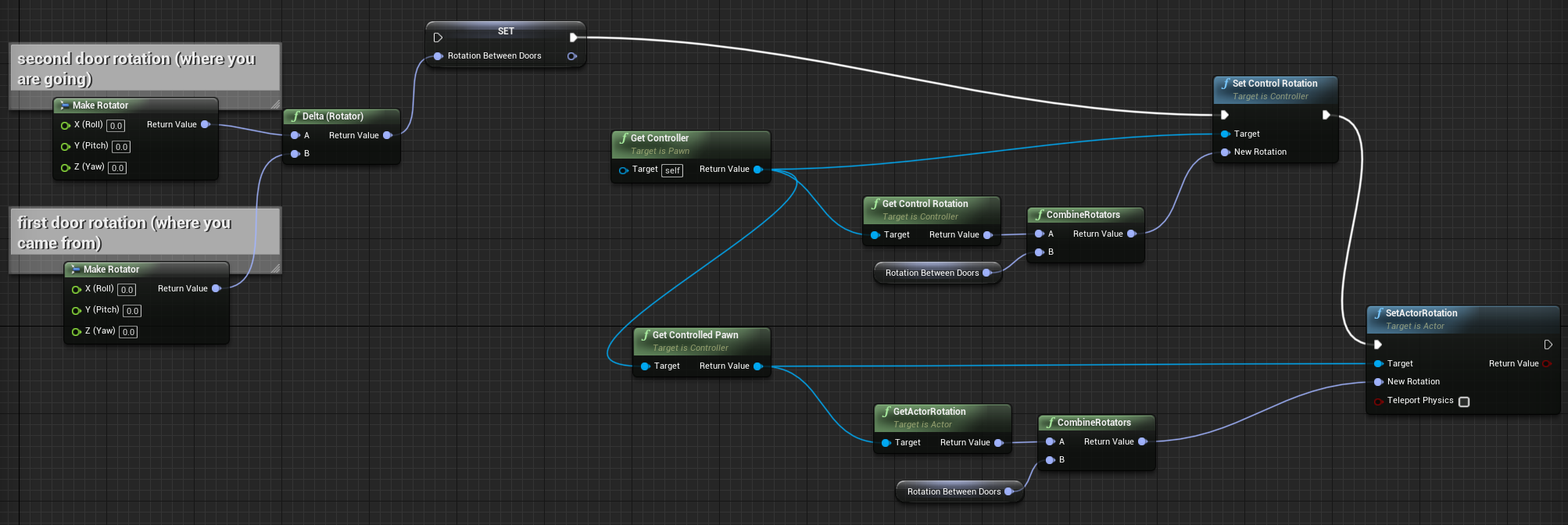
@main plinth this is pseudocode from a random non-actor blueprint but (I think it would work) look at it and see if you can figure out how to apply some of it https://i.gyazo.com/ea8094cc5abe9c7d8848b81ad7543235.png (edit - fixed something in pic)
 pulsar orchid
@glad sigil I would have the sphere determine if it overlapped something, if so stop movement. That's at least a good place to start, then you can begin tuning from there. Unless you're trying to detect something like an invisible wall, at which point set the collision to Block, it won't allow the Sphere to move into the collision of whatever you're walking into assuming the collisions are set correctly.
 shut fiber
@main plinth there's a different node for overriding the controllers rotation, gimme 2 mins
 charred flint
so basically if I implement these in the pig then we could get it to work better?
@charred flint Do I still need to add the static mesh to here or only a skeletal?
shut fiber
@main plinth Use this to set the rotation of your player.
charred flint
this is also a skeletal mesh so I wonder why it doesnt work
 trim matrix
@glad sigil i once tried to do that and i think i saw some property on the character but i just checked it out and found nothing
charred flint
What I want to do is add the animation to the pig AI
glad sigil
Ok, Ill try to stop the movement then. Thanks everyone
 spiral surge
anyone familiar with the
glad sigil
anyone familiar with the
@spiral surge
Yeah, we use it here with our team
spiral surge
@glad sigil could we talk for just a second, i have a few quick questions.
glad sigil
Sure, feel free to PM me
trim matrix
yeah i thought this would do it @glad sigil
 flat valve
Help! I'm stuck trying to figure out BP Communication! Seems like video examples are never what I am dealing with,or I am not getting it.
I have a BP class called "Mesh_Switcher", that has an array of static meshes. For example, one will contain only ovens, while the other child will contain cabinets. I need these two children to communicate with each other/and know each others status. It's the communication part that still fouls me up. What methodology is best suited to do this type of communication.
If anyone can just point me in the correct direction, that would be helpful.
 odd ember
generally two children communicate through their parent, since that is the only link between them
trim matrix
doesnt intger variable store a value when i open and close a widget? like i press tab to open widget, increase number by 1 and close widget again. when i reopen the widget with tab the number is back to 0, does anyone know how i can store the value so it doesnt reset?
main plinth
@true yew Thanks, that worked! and sorry for the late reply, I was having dinner
odd ember
@trim matrix if you don't kill the widget it will
main plinth
@shut fiber I tried something similar but it would make the camera snap to the floor, which would make the transitions weird and I was sure I could just copy the 2 other "axis" instead, thanks though
trim matrix
so i should not do the "remove from parent" to close it? @odd ember
 zealous moth
anyone have experience with apply post process effects on singular meshes rather than areas?
odd ember
yeah I mea unless you want to store it elsewhere
@zealous moth you can use custom depth with stencil values
but it's more of a #graphics query
zealous moth
I am actually good at making post process effects, but apart from applying it to a general area, I am not familiar with how to apply it to singular meshes
I will try the graphics department though
odd ember
like I said custom depth is your go to
trim matrix
do u know how i could close the widget without the "remove from parent" thingy?
odd ember
collapse it perhaps. you could also store the variable elsewhere
generally widgets are just supposed to be cosmetic
trim matrix
alright i try it with storing elsewhere :D ty
glad sigil
yeah i thought this would do it @glad sigil
@trim matrix
That won't work either, Ill keep trying
 worthy frost
@spiral surge #gameplay-ability-system
 atomic salmon
@glad sigil the Character Movement Component only considers the root capsule for collision detection, no matter what you add to your character
worthy frost
be warned, its not BP friendly
atomic salmon
If you want custom collisions, you need to derive your own Character implementation so you can reshape the root capsule or reference a different collision component
flat valve
@odd ember, so lets say we have BP_SmithFamily, and in the level we have 2 children, BP_SmithFamily-Ted, and BP_SmithFamily-Bill. Would they cast to the parent? Like, this is what confuses the heck out of me.
odd ember
I have no idea where you are going with this
flat valve
I don't know all the terminology well, so I have to use stupid examples.
odd ember
sounds like there is a conflation between something like a sims like person and interior BP elements
glad sigil
@glad sigil the Character Movement Component only considers the root capsule for collision detection, no matter what you add to your character
@atomic salmon
Ok, thanks. I feared that. I'll have to find a work around.
Thanks
atomic salmon
@glad sigil (repeated because I didn't tag you) If you want custom collisions, you need to derive your own Character implementation so you can reshape the root capsule or reference a different collision component
flat valve
"generally two children communicate through their parent" - How?
odd ember
their parent communicates with one child, gets some data, then throws that into the other child
glad sigil
@glad sigil (repeated because I didn't tag you) If you want custom collisions, you need to derive your own Character implementation so you can reshape the root capsule or reference a different collision component
@atomic salmon
Yeah, was thinking something like that. Thanks!
 frank garnet
Is blueprints the right place to set up projects capable of spawning or I ll have to rely on c++?
 golden kite
so I have a vehicle pawn that has no collision, but the collision is provided by the mesh loaded in after the scene starts playing
when I add in actors to the same vehicle pawn and use attach to to them, they get snapped to the pawn by location, rotation and size, but when those actors that are snapped try to interact with ground, instead of acting like its a part of the vehicle pawn, it just goes underground just like it doesnt have any collision, any help?
flat valve
I'll ask this question, with hopefully with a more specific answer. Two children, instances from a common class, want to see each other, within their own code. What method exist to do this? Get Actors of class X???
 distant sedge
You have to use Lisp for spawning
atomic salmon
@flat valve This is a good description of Blueprint to Blueprint communication. It says 4.9 but it is still valid: https://docs.unrealengine.com/en-US/Engine/Blueprints/UserGuide/BlueprintCommsUsage/index.html
Overview of when to use different methods of Blueprint Communications.
 maiden wadi
@flat valve I'd probably start by asking why they need to see each other? What is it that they need to know from one another, or affect?
atomic salmon
If both your Blueprints are already in the level, you could simply add a reciprocal reference inside each other as a variable, then use it to exchange messages.
odd ember
yeah if you're using a spawn manager the manager can inject references between both as well
the level blueprint also knows all of its actors
fathom portal
Click the error, it will tell you where it messed up @spiral surge
Accessing none likely means you're referencing a variable that isn't set
It helps if you give us more than "why ?", for future reference
trim matrix
I need help figuring out something. I'm trying to figure out how to convert a Vert- FOV to a Hor+ FOV, so then the FOV looks correct at any aspect ratio, but I'm unsure what I'm doing wrong
According to a Gearbox blog post about FOV, this is how you calculate the Horizontal FOV
I think I broke it down like this using PEMDAS
What i'm trying to do is adjust the vertical field of view every time the aspect ratio changes so the top and bottom part of the field of view doesn't get cut off.
Reason I just don't enable Hor+ FOV scaling in the project config files is due to the default camera FOV in UE4 being not properly formatted for Hor+
worthy frost
@trim matrix your math is different
trim matrix
@worthy frost is there anything specifically that I'm doing incorrectly?
trim matrix
the ones in my blueprint are using radians at the moment
worthy frost
i would be doing it with degrees
rather than radians
as your mixing degrees and radians
trim matrix
Alright i set both to degrees
However, when the horizontal aspect ratio is small, it shows the image upside down, and when i stretch it out past a certain point, it breaks shadow rendering
worthy frost
also im not sure why you are passing in Field of View
to the multiplication after the 180/pi
trim matrix
I thought that's the vertical FOV that is logged at event begin play
 placid steppe
how can u make the vr controller like a giant
trim matrix
I set a float variable based off the camera FOV at the start
worthy frost
yeah but you don't need the vertical fov to get the horizontal fov, it uses the screensize no?
ah
your order is wrong
break it up into smaller chunks
placid steppe
but then hands are way under me
worthy frost
so you can debug and make sure the logic is correct
atm its wrong
@trim matrix gimme sec
@trim matrix
 trim matrix
So the current issue looks like it's conversion is still going way too high, which is resulting in the camera going upside down
I'm thinking I'll probably just change this project to use Hor+ scaling, then get a 90 degrees vert- FOV to a Hor+ one using a calculator (Which results in an FOV of 59), and then just have that the default FOV, then base my FOV slider around Horizontal values.
Thanks for helping though @worthy frost
spiral surge
@fathom portal 🙂 Its referencing a owning player, do i need to put one?
trim matrix
hahaha
fathom portal
Which plugins? 4.24 hasn't been out a tremendous long amount of time, you might just have to wait a little, or send the devs a message and see if they plan to update
trim matrix
I should have posted this in the C++ channel. :x
trim matrix
true
 celest oar
spawning an actor that goes up bellow the player makes the player go super high in the air, is there any default option that i can change to stop that behaviour?
odd ember
@celest oar disable physics on that actor
celest oar
wont that break the jump?
odd ember
what jump
celest oar
the issue is on a character
in multiplayer
i have a character that spawns walls for defense
odd ember
I don't know anything you're not telling me
celest oar
when that wall is spawned bellow another character
sometimes the character is launched in the air
odd ember
probably physics yeah
true yew
@trim matrix if you can read code https://i.gyazo.com/9f3f0aca9cd6219d06f2c8abcd6e517e.png
 trim matrix
Thanks.
Yeah, I can digest this.
 ancient sandal
how can i convert an int64 to a string without it having the commas? is there any easy way or do i need to use c++
zealous moth
@ancient sandal try this
I did a whole lot of string and regex manip in my lifetime, this is a simple operation
I am trying to set up this but I don't know where to find the index for the materials, anyone have a clue?
 dapper kiln
So I have a weapon system in place and now I'm trying to figure out how to use it with a torch weapon. My only problem is how to do the fire fx and the point light. Should I just make a torch blueprint and spawn and attach it when I switch to it then destroy it if I switch to something else? Or is there a way to play a looping FX and point light on a skeletal mesh, because since the torch is considered a weapon I can set the weapon mesh to the torch I just have to get the FX and light
spiral surge
could i check the hit location and tell it to not provide it to the move to location if its in the ui?
currently, right clicking into a inventory slot that is empty, clicks through the ui and moves the player to the location behind it. this is the problem, we need the inventory to stop the click to move.
 jade trail
Are there any tutorials for a fighting game?
 undone timber
so... i dont even know what exactly i should be looking for, i have a spaceship game i made, with custom movement physics and inputs, how exactly do i tell an AI controller how to control the ships?
 marble halo
Anyone know if it's possible to get a listing of the sub packagePaths (directories) for a particular packagePath (directory) with assetRegistry? Can't find a way to do that. Does it only give you back files.. I want to walk the assetRegistry if possible so i need to get back a list of the subfolders.
undone timber
also how can i prevent an spawned actor from colliding iwth the actor that spawned it?
marble halo
Nevermind, found it.. GetSubPaths method.
undone timber
nvm was able to fix my issue too, at least the spawning one
 rugged nexus
Why does the component attached to my cable component end point keep falling and not act like a tether ball
undone timber
question, i have this actors (pawn) where i defined movement like this , it works fine, but i cannot get an AI controller to control and make the actors move or do anything at all
 short pawn
Hey guys, I have a ribbon on an animated fbx, I added bones to it and exported it. Is there anyway to make these ribbons move when the mesh moves?
undone timber
skeletal mesh physics clothes or use a tick event...
short pawn
Is there a way I can set those bones as kinematic?
I added bodies to the bone and made them kinematic and now they Re flapping with too much random vigor...
In all different directions
 stuck hedge
How can I use construct object from class to create actor components at runtime? I have a parent actor component class and some abilities saved as children of those components. At runtime I want to add specific ones to the character. The problem is, the construct object from class refuses to accept the class
The class I'm trying to construct is an actor component, not an actor.
the self is the player character that it'll be attached to
trim matrix
@stuck hedge maybe try "add x component"
stuck hedge
Unfortunately with that node, there is a node per component.
I was looking for a modular solution.
trim matrix
yeah i noticed that too
stuck hedge
I'm going to have several abilities that depends on player pick up and when they pick something up, it attaches that component, now if there are only a handful I could switch, but if you start getting 10, 15, 20 etc it's going to become blueprint soup.
I just want to create the component and attach it to the character.
trim matrix
why not use the same component for all of those?
what are the different pick ups?
you could also try spawning an actor and attaching it to some sort of socket instead
stuck hedge
because each component will contain the code for that ability.
otherwise I'd just be piling all the code for all the abilities on the character at once.
trim matrix
well I'd probably try an actor
have a parent class have a reference of that on the player
undone timber
mystice! save me! D:
so i am trying to implement an AI controler on my game, i did a little example but i dont know how to make my pawn understand or move ...
i have made the controoller, blackboard, service and behavior tree
and my blueprint which is my space ships, have the controller set on their defaults controller and well all of that...
now i know the last step is in the actor itself to add how to interpret the inputs from the aicontroller but i dont know how to get the pawns to do the ai controller bidding
 ebon kettle
Hi all,
I want to convert the "string" to text render
I want to use "Set Text".
According to ue4 docs the target is Text Render Component,
but in my case is the target is "rich text block" and have compiler error.
How can I do for this case?
https://docs.unrealengine.com/en-US/BlueprintAPI/Rendering/Components/TextRender/SetText/index.html
Set Text
here is error message
 surreal peak
A lot of different classes have a SetText funtion. You need to make sure you pull a wire from your Button1Text and then search for the function, otherwise UE4 has no context of what function to find for you.
ebon kettle
I find it! Thanks!
undone timber
i am still soo confused
i tried this, because i can see in the simulation the behavior tree is trying to move somehow, but didnt work either
trim matrix
@undone timber i dont have so much experience with bts and bbs
usually you dont need input events on an ai controller
you call ai move to on the bt or blueprint to make the ai controlled pawn move somewhere
undone timber
i get that, i mean those are the inputs on my actor on the spaceship
the behavior tree is calling the moves... but i mean, how is the AI even supposed to know how to control the ship at all?
this is my current behavior tree
just something easy so i can see if my ship is moving at all
trim matrix
and does it move?
undone timber
nope
trim matrix
are you sure that your ship gets possessed by the ai controller?
undone timber
the simulation shows the BT is running like crazy
trim matrix
and what is wander location?
undone timber
wander location is calculated like this
trim matrix
did you print out the vectors?
also 500 is a small radius maybe you are zoomed out too far to see it
undone timber
this is what the bt is doing when i press play
trim matrix
without that it wont find any points to walk to
undone timber
as you can see the ship has indeed calculated a position it wants to move to
i have a navmesh the size of my universe set
trim matrix
well im not sure how nav meshes work with flying mechanics though
they usually enable pawns to walk on meshes
undone timber
although i understand that, what is confusing me, is that obviously the ship wants to...
what i think is going on in "english" is that the AIcontroller doesn't know how to control the ship... like... how to send its outputs to the pawn...
is it because the pawn is not a character?
 twin pollen
Guys, I have a problem with OpenLevel that is really bugging me for a while. I have a scene containing only UMG (Main menu). when press play, opens the first level. Problem is, playercontroller doesn't call the functions mapped to input actions when opening the level. But when testing the level on its own, it works fine.
My graph is as simple as this
short pawn
@twin pollen did you set input back to the game? Sometimes you have to do that if it's paused or u set it to widget only to interact with the menu
Also check the level name has no extra spaces or anything
twin pollen
So do you mean each level I'll have to set my inputs?
The level loads fine though, music works, animations works, only controls are missing
twin pollen
OOh, I've seen this before, alright I'll try it out
short pawn
Goodluck
twin pollen
Thanks a lot, it worked. You've a life savior my friend 😗
 tame pecan
Hello!
I want to save a integer inside a spawned actor (Using unreals savegame function)
So how my system works is I have cables connecting from a electricity pylon to a machine, on first connection the parent (pylon) receives a serial number and gives that to its child (machine) and additional machines connected to the pylon - receives the same serial number
So on load all machines check if their serial number is equal to any of the serial numbers of the electricity pylons and connects a cable between them if its true, this only works to 100% in editor and standalone, but not in a packaged build. In a build it only works on like 50-60% of the machines. What is wrong?
 summer apex
Maybe this will somehow help?
stuck hedge
@trim matrix I ended up writing a very small c++ function. It was the only way to do it.
{
    ComponentReference = NewObject<UFP_AbilityParent>(this, ClassToSpawn);

}``` stuck that on the character, now I can modularly do this at runtime. glacial eagle
add meta = (BlueprintSpawnableComponent) to the UCLASS() 🙂
That will allow it to be spawned with the "add Actor component" nodes
short pawn
@twin pollen no problem! Glad it worked!
trim matrix
he wants to have a function which has a dynamic component spawning
stuck hedge
@glacial eagle That was already there.
trim matrix
so a class as input
glacial eagle
Add Component does that already doesn't it?
trim matrix
there are like add components for each different component
stuck hedge
No, there is no add component node.
glacial eagle
Also, make sure you call RegisterComponent() - otherwise it'll die on it's arse.
stuck hedge
I just tested it, and it works fine.
component was added and code running.
Maybe because my component is code only. It doesn't have any physics or anything
or physical state
 vestal hawk
Hey guys, im trying to create a position indicator where a circle follows underneath a 3rd person player to help them see where the character is on a surface, can anyone give me a hand?
https://www.youtube.com/watch?v=oKdOxPuByNU similar to this, you can see it at 25:40 clearly

LEGO Star Wars The Force Awakens Video Game Gameplay Part 1! Prologue: The Battle of Endor! Chapter 1: Assault on Jakku!
NEXT PART ► http://zack.watch/LEGOForceAwakensPart2 PLAYLIST ► http://zack.watch/LEGOForceAwakensList
SUBSCRIBE ► http://sub.zackscott.games ► Thanks for ev...
glacial eagle
If the component is Blueprint Spawnable, you should get this in the BP context menu for a component of that class:
But when adding at runtime, you're supposed to create the component then call NewComp->RegisterComponent(); - otherwise it doesn't register with the actor properly
trim matrix
he said having all the different nodes for each component class would be too much
stuck hedge
Yeah, that's not very modular.
fine if you only have 2 or 3 components to choose from, but if you have 20 random components or 50, you don't want to be creating massive blueprint spaghetti for each case.
Now I can just pass a class and spawn and attach that specific class
glacial eagle
Fair enough, just bear in mind there's a reason AActor::AddComponent isn't exposed like that
It does a lot
stuck hedge
Yeah, it's not going to get called often or anything.
glacial eagle
It's not so much about calling often, just about proper setup
stuck hedge
What kind of issues could that cause?
glacial eagle
Well not registering it for example means it won't work with replication, won't create physics and render states if required etc.
Won't have a valid UWorld either
stuck hedge
Single player, no physics or rendering, and there is no code in c++ except for the fire ability blueprint implementable event.
glacial eagle
Just don't expect it to work properly if it isn't setup properly. Any attempt to access the world for example in that component will just crash
stuck hedge
Okay, I'll register it then. I don't expect to have any c++ code on there. This is basically just a gameplay ability lite style system where I can put various chunks of code onto the character for temporary abilities without bloating the character itself.
charred flint
I managed to fix my animation but not sure what this error is about
charred flint
Auto Rotation of a skeleton mesh does not work, I know usually maybe it doesnt need to be connected to the triggerbox
skelleton mesh is not compatible somehow
atomic salmon
I managed to fix my animation but not sure what this error is about
@charred flint Indicates that your are trying to do something with your Skeletal Mesh while it has been marked for kill (removal from the level)
You can use IsValid to check if your SM can be safely accessed. Or do a validated get.
@charred flint always check that your execution pins are connected (white line). A function whose input execution pin is not connected will not be executed.
undone timber
just to confirm but... unreal has no AI for true flying actors? (3d nav mesh?)
maiden wadi
UE4 doesn't do flying AI by default I don't believe, but there are a few marketplace solutions, or tutorials to show how to go about making flying AI.
atomic salmon
@charred flint sorry had to go away for a bit. Remind me what you are trying to achieve with that code.
charred flint
Hey Marco no problem at all, basically this is a way to make sure the pig faces the player at all times
I managed to get a walking animation by copying a skeletonmesh from the demo files of the free animals pack but now 2 more remaining steps are its facing right and that it will walk on the terrain rather then it flies or comes from under the ground as it does now, it has no sence for the landscape
atomic salmon
@charred flint to make the pigs face the player you have to work within their Event Tick
The Event Tick in UE4 is triggered at each frame
Since the player can move, you need to update the facing direction of the pig at each tick provided you want them all the face the player and not just those that are within a certain range from the player
Supposed you want to do it only for those that are close to the player, on Event Tick within the pig you can get the player world location, subtract from it the location of this pig, calculate the length of this vector. If the length is < of a certain value (min distance) then you make the pig face the player.
flat valve
I have several instances of the same class, each all contain, obviously the same code, and same variable names, just unique names within the level. I also have an UI, with BP code, that would like to access one of those unique named instances. Casting only seems to show the parent/master/class, not any of the named instances within the level. What method of communication should I use? I have read up on all the methods, and It's still not clear, so maybe a point in the right direction would help.
atomic salmon
@flat valve How would you determine which instance is the UI is showing at that moment?
Does it need to be user selectable?
flat valve
@atomic salmon
So what I have is called BP_MeshSwapper. This class has BP code within it to hold a array of SM's, such as, lets say 10 different refrigerators (which is entered via the details panel). This BP_MeshSwapper has several instances within the level, each contain a different array of SM's, fridges, ovens, etc. So, one of those might be calld BP_MeshSwapper-Oven, BP_MeshSwapper-Fridge. I also have an widget that has an interface that collects all of those BP_MeshSwappers, and list them, which allows the user to pick "fridge" and then select from the array the fridge they want. What I need, is when the user picks oven, it can look at the Fridge BP and read its status, and say to it self "oh, you cant do this, or that". All the logic part I can figure out no issue, its just the communication between the instances, fridge reading oven, vice versa.
@atomic salmon - I think I get your question. All the logic for seeking what is seen is via some BP, I think it cast a visibility ray.
@atomic salmon - Specifically I am using SDot's BP - https://www.unrealengine.com/marketplace/en-US/product/archviz-user-interface
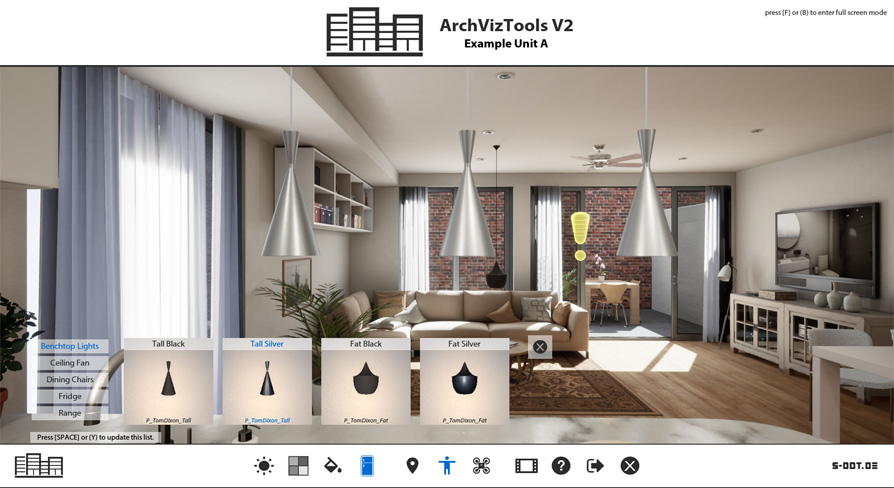
A flexible user interface for Architectural Visualization Projects
Actually, to complete describe what I am doing. I have interdependent choices, which have have to adjust to each other. I have 3 oven widths, 4 fridge widths, and 9 casework types. The choice of an oven not only effects the width of the casework around it, but also the the casework type. All of those permutations have been modeled, and entered into the array of meshswaps. I just need to work on the interdependent logic. In order to do that, they need to know the status of their neighbors.
atomic salmon
@flat valve It is easier for me to understand if you describe it from a user perspective. So the user selects an appliance in the level and they want to swap with another one.
flat valve
Exactly
atomic salmon
If they select a fridge, you want them to be able to swap in another fridge and nothing else
flat valve
If they choose a wider fridge then what is seen, then, the casework needs to adjust accordingly.
Which is part of Sdots feature set. The issue is, there are 9 variations of casework, which needs to retain despite getting smaller or larger.
atomic salmon
Ok, so you are hiding the non compatible choices from the UI so the user can pick only the valid ones.
flat valve
Nope, all options are on the table, at all times. The model adjusts to the users specifications. If they want a 38" fridge, then the casework will retain its style "classic, modern, etc" but then get wider to accommodate wider fridge.
Also, the casework, oven, fridge, they are all instances of the same "BP_Swap" class.
atomic salmon
Ok, so back to your question, the UI has to know which appliance is currently selected?
Not knowing this Sdots thing I am not sure what it has already implemented and what not.
flat valve
No, it just needs to know the "status array number" of a specific BP_MeshSwap.
He has, but what I am doing is complicated over that, he has it set to broadcast "hey all instances that have an INCODE of "cabinet" change to THIS array Number. Which works great!!! Until you have complex interdependent stuff.
So, I am grafting a function that will only activate with the oven, or fridge. This function will read the status of the cabinet, to know what style it is, and then say "oh, style classic, at size 30" you want to use THIS # in the array"
atomic salmon
It's very difficult in this case to provide a specific advise because you are building on the functionalities of a plugin which I am not familiar with, so I have to keep it generic.
flat valve
Generic will work, I understand a lot in principle, but BP communications proving hard for me. It's easy when its a simple tutorial example of a player pawn and level BP, but harder in this type of situation.
atomic salmon
Ok one way for you to talk with a UI widget is to set a variable into it for example.
odd ember
wouldn't that violate MVC
atomic salmon
So when you create a widget you get a reference to it and with that reference you can set some variable values into it.
flat valve
Principles will be violated in the life affirming saying "don't let perfect get in the way of done"
atomic salmon
Then back into the widget, you use that value to alter the logic.
odd ember
yeah but in this case those same principles are what will keep you alive if you choose to change your method
flat valve
If we sell this project, I get to eat bread, put it that way.
atomic salmon
@odd ember in principle I agree, if we would be teaching in a computer engineering class...
odd ember
well yeah I don't knwo the context either
it may be justifiable to have high coupling
I am just very wary of technical debt
charred flint
Since the player can move, you need to update the facing direction of the pig at each tick provided you want them all the face the player and not just those that are within a certain range from the player
@atomic salmon Omg haha
flat valve
Learning hacks has often been a stepping stone in allowing to learn it proper, in lu of an classroom and professor. Get it working, then get it good.
@atomic salmon Did you have anything else to add to your description/
odd ember
you don't always have that affordance when working with code unfortunately @flat valve
my take would be to add a recursive function that checks mesh bounds every time a mesh changes
flat valve
@odd ember - Fortunately or not, I am not a programmer by any trade, 3D artist in fact. I just need to get it working, small company, new product.
odd ember
and moves it out of the way in a perpendicular direction
or you could specify the placement of each mesh individually
if you're more inclined towards interior design
and then just save the layouts prebaked, and switch visibility
flat valve
@odd ember 98% off all this logic is well done by the author of the BP's.
atomic salmon
(sorry on the phone)
 odd ember
okay that seems to be working, what's the issue then?
flat valve
THAT part works, its the fact there are 9 versions of cabinets.
So I can say, load the 30" cabinet because the oven changed, but I can't say "Load the 30" cabinet AND the cumberland style"
odd ember
can you show the case where it goes wrong?
flat valve
There too much to explain, but, I CAN fix this issue.. I THINK... the issue is... well I can fudge the logic... the only thing I don't understand is, how to read a variable from one of those instances you see. All I need to do is "cast...whatever" to the cabinets and say "hey, what is the value of YOUR "chosenOptionVar"
BlueprintUE
That is the logic I will be hacking, maybe you can get an idea.
odd ember
there's already event dispatchers hooked into that
so you probably need to take a look at the oven/fridge parent blueprint and see how that event dispatcher is implemented
flat valve
🤔
flat valve
I dont see any listed
flat valve
Ill keep looking
odd ember
@flat valve I'm sure there is a search feature somewhere that allows you to look for them across all blueprints in your project
 cyan lion
@flat valve @odd ember
odd ember
@flat valve try without "call"
flat valve
Okay, found some stuff, which, lol found before and grafted a print string to for debugging research. I'm going to sniff this avenue out for now. Thanks!
flat valve
Actually, not really. Maybe a start
I mean, it uses "dispatches" of which I know nill (despite tutorials). Oh all so confusing.
atomic salmon
Event Dispatchers?
flat valve
yes
odd ember
event dispatchers are like the notification bell for youtube videos
a lot of people can click the bell
atomic salmon
They are a way for a blueprint to send out a message and other blueprints can pick it up
odd ember
and when the creator puts out a new video everyone who had the bell gets a ring
flat valve
Right, okay, well that is important, but not what I need to deal with now. Eventually I will get to that part.
odd ember
the idea here is that this is how your blueprints communicate
the information gets sent through them
flat valve
Unless I make a new one that causes instances to yell back "HEY THIS IS MY VALUE OF X"
Does it work that way?
I mean, event dispatches would be good to one way send a value of OFF to 100 lights right?
flat valve
or better yet, tell those lights they should turn off by their own logic, in a sense.
odd ember
but that can also be handled differently
yes
think of them as a reaction to something happening
each BP with a subscription is essentially saying something along the lines of, "this button was clicked, what does this mean for me?"
and then executes the logic of that
flat valve
Okay, makes sense.
charred flint
@atomic salmon I think I managed to get the pigs rotating as were ever I stand they never face me now
flat valve
Zac from Epic, just remembered his explanation.
charred flint
so I got the opposite of what I need but atleast they rotate somehow 😛
atomic salmon
@charred flint let's fix those pigs
flat valve
🐖
charred flint
atomic salmon
@charred flint invert the inputs on Find Look at Rotation
charred flint
the part in the bottom is for the rotation
odd ember
@flat valve what is happening in the UI is that it is sending a packet of information about the mesh to the player character, whatever that may be in your case
charred flint
how do I invert them btw? And I also have a similar not working setup in level blueprint
it's disconnected?
@atomic salmon im not 100% sure
might have forgotten something
atomic salmon
It should feed into the Set Actor Rotation node
flat valve
@odd ember Would that packet of information likely be an "Object" with many variable types?
odd ember
it could be anything
atomic salmon
Plus you need to invert the inputs to Find Look At Rotation
odd ember
but you can customize your dispatchers to include any information you choose
atomic salmon
@charred flint Looks good.
Except that you have no condition on the distance from the player but ok
flat valve
charred flint
Should I make 1?
odd ember
@flat valve you can see what it sends in the upper right corner
flat valve
Yep
atomic salmon
@charred flint 1 what? 1 pig?
 spark robin
I've made a UI in Blender and got some issues exporting everything in pieces due to rendering limitations in the software (Cant have multiple cameras at different resolutions)
So someone suggested I would then just use 1 camera covering everything in the UI and that I would animate each icon to only show 1 frame and render an animation (So then I would be getting 1 full-screen size image with each little icon in
Now ofc thats the issue, that I will be having a 1080p image with a small icon on covering just a little piece of that 1080p image. So my question is if I can use clipping/some other feature to remove the unnecessary parts of the image directly in Unreal Engine without having a negative performance impact caused by unnecessary pixels of each image being loaded or if I would have to use GIMP to cut each image one by one before importing to Unreal.
Thanks :)
(Please ping on reply ❤️ )
charred flint
Also I made this inside the level blueprint is that an overkill at this point since I made another rotation model in the actor blueprint of the pig?
atomic salmon
@charred flint The rotation should be inside the pig BP
charred flint
A condition for distance from the player 😛 Not sure how yet but ill figure
atomic salmon
Each pig rotates itself
charred flint
oke ill delete it from the level map then, it was from a previous tutorial anyway
level blueprint*
flat valve
@odd ember, so what I should do, is create a custom eventdispatcher that will exist in all instances of the BP_MeshSwap, but only reply if that instance contains ovens, which I can make determine via a bool.
atomic salmon
@charred flint for the distance, UE4 has a handy node called Get Distance To
charred flint
Do I need to hook up this one aswell o is it fine as a solo
charred flint
Wonder why the tut made me create it lol
atomic salmon
idk
 stiff hatch
Is there a way I could search through a data table similar to a for each loop with an array?
odd ember
@flat valve event dispatchers are one way
charred flint
ok so were do I put the Get Distance to exactly?
atomic salmon
@charred flint think of the logic. You want the pigs to face the player if and only if the distance is less than a threshold value
charred flint
got it!
atomic salmon
So first you calculate the distance, then compare it to the minimum value and if the condition is true, you rotate the pig
If not (false) the pig continues to look where it wants
charred flint
So the key element is probably somewere here correct?
atomic salmon
@charred flint you need a code branch
A Branch in BP is like a IF ... THEN ... ELSE
IF (Distance < Minimum Distance ) THEN Rotate the Pig ELSE Do Nothing
charred flint
The branch part I understand just missing the logics of were and how to give an input on the distanc
atomic salmon
You also have a Boolean variable Face Player which you probably want to use to switch this feature on / off
charred flint
Still ahve them running sideways lol
atomic salmon
They are probably oriented wrongly inside their capsule
charred flint
You also have a Boolean variable Face Player which you probably want to use to switch this feature on / off
@atomic salmon Was also part of the tutorial so might not need it
atomic salmon
If you want to keep it, do an AND with the distance condition
charred flint
oke lemme find the < option in blueprint and ill try it ^^
charred flint
min distance is missing
atomic salmon
You have to create it as variable
Right click on the second pin on the < node and select Promote To Variable
Then name it Min Distance and give it a value, say 300
300 = 3 meters
charred flint
got it!
at this point I got it all but the value do I put it under value range?
If I understand correctly we can use the same strategy to only make the pigs find the player if they are within the radius of a min or max distance
atomic salmon
@charred flint that depends on your game play. Try with 300 (3 meters from the player) or 500 (5 meters).
Maybe 1000 not sure how creepy you want the pigs to be
charred flint
still gtting its but
atomic salmon
Should they sense the player at large distance or only when he is very close?
charred flint
I think very close would be best but I should not run in another issue yet 😛
 magic summit
hello is there anything I could do wrong so camera shake doesnt even start?
charred flint
this is what I got now and the only thing that is not in use at all is the actor rotation which I think I do need if im right
magic summit
I created camera shake blueprint class, added some values for shake and plugged it in with play camera shake like this
but still nothing happens
charred flint
in the original tutorial I watched he had it auto rotating quite quickly in the vid so I must have done something wrong there but still now to with all the other improvements you layed out
This is the main blue print for spawning pigs and finding player
maybe I need to adjust that one
atomic salmon
@charred flint didn't get the issue. They are rotating too fast?
There is no delay in the rotation, so they rotate immediately
charred flint
they arent rotating at all... 😛
atomic salmon
@charred flint Target for the rotation is self
The pig, not the player
Remove that connection
zealous moth
@odd ember I managed to set everything up for the custom render depth using premade PPE but there is no documentation on how to set up the indices for the PPE materials. It's not in the settings, it's not in the render options in the primitive mesh so I am out of ideas. Any clues?
atomic salmon
@charred flint what is the value of the face player var?
because if it is false there is no rotation
charred flint
this?
atomic salmon
that explains it
charred flint
I just now notice the default value tab
atomic salmon
it only appears after you compile once
atomic salmon
@charred flint are they rotating?
charred flint
compiling and loading up now
atomic salmon
Go pigs!!!!
charred flint
ok they do rotate
atomic salmon




 charred flint
hmm the one we just looked at is not that?
atomic salmon
yes but you have to go to the viewport
charred flint
atomic salmon
@charred flint I am going that the pig needs to be rotated to face the arrow
charred flint
how do we determine the front view
charred flint
lets test
atomic salmon
So I would say you need to rotate the pig Skeletak Mesh in that direction
charred flint
it was at greeeen indeed
atomic salmon
Yep, green is the right axis Y
charred flint
its some nice steps. Btw could also the same viewport position for the height of the mesh decide that it flies above the ground and not so much stand on landscape wereever it has slopes, etc or is that not as simple as that?
atomic salmon
@charred flint are your pigs using a character movement component?
charred flint
😅
@atomic salmon Really thrilled about the fact that I managed to get it this far
charred flint
@charred flint are your pigs using a character movement component?
@atomic salmon basically I made a fresh AI Script and added the walking animated pig mesh as the mesh to use
With some help yes... 😛
@atomic salmon with a lot, from this channel, youtube and telegram 😛
atomic salmon
That's how we all started
charred flint
yes and one day I be helping new people to ^^
atomic salmon
that is expected. giving back is a must.
charred flint
absolutely I 100% agree there
im already trying to understand issues of others I read here, just rather pointless to dive in on it now... 😛
atomic salmon
anyway, it is not easy to get the pig stand properly on the ground. You would need to line trace from the center of the capsule down to the ground and orient the pig according to the normal.
stiff hatch
(you could take it a step further and use a RInterp to to make it a smooth rotation as well 🙂 )
charred flint
anyway, it is not easy to get the pig stand properly on the ground. You would need to line trace from the center of the capsule down to the ground and orient the pig according to the normal.
@atomic salmon something that I was afraid of already
atomic salmon
not saying it is difficult but you need to know about line traces etc.
charred flint
(you could take it a step further and use a RInterp to to make it a smooth rotation as well 🙂 )
@stiff hatch im happy I got it this far... 😛
stiff hatch
true lol
atomic salmon
@stiff hatch yeah, that would be the next step
stiff hatch
actually it shouldnt be too hard to add it from it's current state honestly
charred flint
Planning to stick around so ill get there for sure
atomic salmon
No, it is rather easy. Just need an extra step/
stiff hatch
litteraly 1 node xD
atomic salmon
@stiff hatch two, you need also the current rotation
charred flint
like 1 node extra?
atomic salmon
ok let's do it
stiff hatch
ahh good point lol
atomic salmon
@stiff hatch you teach him
stiff hatch
oh aiight lol
charred flint
they feel as big things but im seeing more and more that if u know the logics its not to much time consuming
if u know what ur doing... 😛
atomic salmon
it's called experience
charred flint
awesome man thanks Dough and Marco
stiff hatch
very true @atomic salmon
ofc.
you will need to get the rotation of the pig actor, as well as add a Rinterp to node
charred flint
so basically this unconnected one at the moment right?
stiff hatch
ahh okay. yeah you will need the get actor rotaion node that you dont have any connections with and another node called "RInterp To"
You could use "RInterp To Constant" but that wont give a smooth start and finish rotation
charred flint
oke I see its a big node
stiff hatch
yeah, its not that bad.
charred flint
do I replace something or just attach it to existing nodes?
stiff hatch
so you see it has Current and target
charred flint
yes
stiff hatch
You would plug your Actor's Current rotation (Pig's Rotation) there and Your Target rotation (I beleive the one from your Find Look at rotation if im not mistaken) into the target
charred flint
Ok I got that but it broken up the get actor location node
stiff hatch
almost.
you wouldnt plug the return into the find look rotation
you would get the return from the find look rotation and plug that into the RInterp To "Target" pin
charred flint
I did but it auto created this get rotation X Vector node
atomic salmon
@charred flint the Rinterp To node goes between Find Look At Rotation and Set Actor Rotation
charred flint
oh so its completely misplaced
charred flint
sec
atomic salmon
when you are a pro you are going to use source control, so you can roll back a mistake
stiff hatch
I use GitHub desktop and have had trouble with roll back. i think its just me but yeah
stiff hatch
Perforce?
atomic salmon
@stiff hatch https://www.perforce.com/
Perforce Software provides enterprise-scale development tools. This includes version control, application lifecycle management, agile planning, and static analysis. Development and DevOps teams around the world rely on Perforce to do their best work and innovate at scale. Perf...
stiff hatch
@charred flint yes thats right
charred flint
when you are a pro you are going to use source control, so you can roll back a mistake
@atomic salmon Dont get me started there please.... 😛 What a dramma with LFS..... 😛
atomic salmon
@charred flint Current and Target are inverted
charred flint
ah ok
atomic salmon
You still need World Delta Time
3 nodes actually 😉
and to set a proper value for the speed
stiff hatch
you can also get the float you created
charred flint
oh boy
atomic salmon
true
charred flint
oke Lets see
stiff hatch
you will need to plug the delta time to a "Get world delta time" and change the interp speed
atomic salmon
We want smoothly rotating pigs!!! We want smoothly rotating pigs!!!
stiff hatch
lol
charred flint
And flying Mutated Pigs Later 😛 I designed them already for Marco since he requested it
oke let me see delta time
charred flint
what is a logical interp speed?
stiff hatch
this would be plugged into your delta time on the Rinterp to
charred flint
yes that one I have ^^
charred flint
my E and R notes are lose so it takes me a lot of time to type atm
stiff hatch
(correct me if im wrong)
charred flint
oke so maybe 3 or 5 or something?
stiff hatch
id say try 1 for now. and just toy with it
Lower values are slow movement
higher are faster
 languid current
sorry to interrupt
charred flint
languid current
i need a little help
charred flint
sorry to interrupt
@languid current Your not interupting ^^ Im just taking to much time of these guys so im kind of interupting the chat my apologies
stiff hatch
nonsense
atomic salmon
InterpSpeed is a multiplyer to Delta Time
So if InterSpeed is 1.0 at each Tick the rotation is Delta * Delta Time
If InterpSpeed is 2.0 it will be 2 * Delta * Delta Time and so on
languid current
so, i have a player working fine, but at some point in the game i will need to completely change how his controls/inputs are working without changing the caracther
charred flint
love the rotation
stiff hatch
OH! okay lol thank you @atomic salmon I learned something new now!
languid current
what should be the best method to do this?
charred flint
InterpSpeed is a multiplyer to Delta Time
@atomic salmon This is still above my knowledge of logics of the nodes in blueprint system
but im keeping it in mind ^^
stiff hatch
@languid current that is currently over my head but i'll see what I can find!
languid current
thanks
atomic salmon
@languid current you can keep your input events but completely switch logic based on an input mode
languid current
input mode node isn`t to change from gameplay to UI?
atomic salmon
Say that you want your keys to become inverted
languid current
or am I mistaken it with gamemode?
stiff hatch
Woah
atomic salmon
Input mode is something I made up to explain. Assume you have two different input modes.
stiff hatch
are you setting the location at all somwhere in the pigs @charred flint
atomic salmon
@languid current and you want to switch from one to the other, you would just set a boolean with a branch and execute one logic or the other
So same keys/input events can lead to a different movement logic for example
charred flint
right now they spawn randomly within a radius of 10,000 (something and they massively run towards the player at begin of game, not sure if that answers what you meant
stiff hatch
can I see what your using to spawn them with?
charred flint
sure! sec
stiff hatch
another thing is @charred flint are the pigs a Character class or Pawn class?
languid current
@atomic salmon oh, makes sense, i was thinking there should be a more specific way to this, since i commonly see posses characters to trade controls
charred flint
@languid current
@atomic salmon Whole different rotation system
languid current
I get it, thanks guys
stiff hatch
@charred flint Pawns don't have an inherited movement component and wont have gravity and basic moment as if they were using a character class.
you could add a movement component to the pig and tinker with the settings in the component
charred flint
so I should convert or redo it?
stiff hatch
um. me personally I'd try adding the movement component first
distant sedge
Movement Component isn't exposed, it's baked into Character class
charred flint
hmmz
stiff hatch
oh, okay. thank you. I didnt know that.
so you might have to re-parent the pig then to a character class
atomic salmon
Also the CMC relies on the root to be a capsule, there is no way around it
charred flint
we can easily convert it or do we need to make it from scratch?
atomic salmon
Unless one rewrites it from scratch
stiff hatch
you can re-parent the actor
atomic salmon
@charred flint Duplicate your class to make a copy before you try to convert it
distant sedge
Using Character class starts to go down the BehaviorTrees / EQS path which I still think is easier than @atomic salmon trying to teach someone vector math and encouraging them to use Tick
stiff hatch
class settings at the top and then in the details at the top is the calss and option to re-parent
atomic salmon
@distant sedge I respectfully disagree. It is faster but not easier for a beginner, especially if you don't know the basics yet.
stiff hatch
For a tick replacement you could just have a timeline playing and looping only when needed though for a performance improment.
atomic salmon
I can easily explain vector math and what happens on Tick. I cannot easily explain how to build a Behavior Tree and work with the EQS. @distant sedge Can you? It requires a lot of fundamentals.
charred flint
It didnt go free unfortunately
stiff hatch
can I see your components list?
charred flint
stiff hatch
It is recognising duplicate components
charred flint
right now its like this
hmmm I duplicated the pig as marco said thats all though
it has another name
stiff hatch
are the bottom 3 components (Aside from movement and floating pawn movement) us use at all?
charred flint
oh it has them in there indeed
well the skelleton mesh is the others I just made cus peopl were mentioning it didnt had it before
stiff hatch
you might want to move all the stuff from the other components that you made into the new (inherited) ones
once youve moved them then get rid of the duplicates
charred flint
So get rid of these 2 right?
and reeplace the inherited mesh with the skeletal mesh?
stiff hatch
Yes. but before you do make sure that references to those specifically are no longer referenced. so more errors don't ensue
(if anyone knows a better easier way please throw it out there lol)
stiff hatch
okay thats a good thing lol. so then just set the (inherited) mesh to your pig mesh
distant sedge
@atomic salmon Adding a bunch of math and AI behaviors on the tick isn't a good fundamental, just need to make a Character class and hook up his pig model, create a BehaviorTree asset and add in a MoveTo node -- way less woes than he's having now.
charred flint
as I cant delete it
stiff hatch
(you can also get rid of your floating pawn movement)
charred flint
what does it do? I dont really had a clue anyway
stiff hatch
floating pawn movement if quite literally in the name
Floating. and allows more flying type movement. when if youre making a pig. (Unless you want them to fly) then you dont need
charred flint
ahh explains the flying pig lol
stiff hatch
indeed lol
stiff hatch
yes. its inherited so that cannot be deleted. so your skeletal mesh component you added can be deleted and then put the pig mesh in the inherited Mesh
stiff hatch
so that will just loop the selected animation. if you have an animation Blueprint then you should use that.
charred flint
no it was an asset it seems but I cant change the data in the inherited mesh
now I can
so now it should be all set
stiff hatch
yep
stiff hatch
oh?
stiff hatch
well that is kinda a good thing lol
stiff hatch
This a above my head. I'm sorry
charred flint
ill go back to the asset looking what I messed up
stiff hatch
alright
I have a question for the community. I originally had the timeline as a tick but replaced it with a timeline. would there be a less performance intensive way of doing this?
charred flint
crashed 3 for 3 since the last few changes
stiff hatch
can you disconnect the tick from the rotation nodes you have and see if it will run then
charred flint
@stiff hatch should I delete that at the pig?
stiff hatch
you cant delete that.
charred flint
I think the pigs cause the crash since they are on character
stiff hatch
it is inherited from the Character class.
stiff hatch
yep. one second


try disconnecting the tick here and try and run it and see if you get the error
charred flint
stiff hatch
(the execution pin of the tick
charred flint
done
charred flint
no crash on compile but not sure on play
unfortunately still
completely shut downs the engine
ill try putting it back to a pawn
see if it works again
stiff hatch
(Worst case scenerio, just create a new pig "character" class and just copy the code over)
charred flint
dang it deletes the stuff at class converting
thats probably the issue
all gone and I had duplicated the wrong blueprint so no backup -.-
stiff hatch
yep, its because the (inherited) part of it was inherited from it's parent which was a character class. when its new Pawn parent does not have any inherited stuff
(well it does but not the stuff the character has)
charred flint
so I just have to fix the char class
charred flint
no it has more still
but cant make it back to a pawn
this is the complete thing
stiff hatch
for what youre doing a character class would be simpler. I would try and make a new "Character Class" and then copy everything over form the original pig to the new pig
stiff hatch
well
kinda.
Once you have copied over everything to the new character class. you will have to go to the part where you spawn the pigs and switch it to the new character you created.
charred flint
no crash yet but didnt mak the pig yet
stiff hatch
or else it will just spawn the old ones
charred flint
just empty plain cha
yes I edited that in the level blueprint to the new class ^^
Good news and bad
no more crash but back to flying and none moving pigs
none rotating to
and none explosive omg xD
its still a pawn class there
maybe I need to replace it
stiff hatch
where is the spawn node
nvm
your spawn AI from class node
you have to set the actor class to the new pig you created if you havent already
charred flint
that I did yes
charred flint
stiff hatch
go to the viewport of your new pig
charred flint
but it says pawn class
stiff hatch
Its okay. Character inherits from pawn. and your pig inherits from character
charred flint
stiff hatch
your pig is a 'grandchild' of pawn
your pig skeletal mesh component needs to 1. rotate to face the direction of the arrow
and 2
you need to scale the capsule component
charred flint
ok
stiff hatch
select the Capsule component
charred flint
stiff hatch
are you still playing in editor? (PIE)
true yew
(nobody made a "when pigs fly" joke? what a shame)
charred flint
yh but closed it
stiff hatch
I thought about it. but didnt know how to incorperate it
you closed the PIE and it still wont let you edit
zealous moth
@true yew I had to filter this discussion out, way too many replies on essentially homework rather than simple questions
stiff hatch
Fair point @zealous moth i'll take the hint and move it with @charred flint
charred flint
@true yew I had to filter this discussion out, way too many replies on essentially homework rather than simple questions
@zealous moth im sorry your right
 proud zinc
I am trying to get the size of a static mesh bounding box however, that function seems to be gone in 4.24.2. Any suggestions on how I can get the vector size?
atomic salmon
@proud zinc Are you sure? I can see it in the source code of 4.24
 cold sinew
Hi Guys
How Can i Assign Index for every object spawned in the world ?
im using Index Variable and writing number manually
atomic salmon
@cold sinew a variable inside a BP can be marked as Expose on Spawn
When you use the Spawn Actor node, that variable will appear as an extra input on the node and you can assign a progressive value to it
cold sinew
Yes that what im doing
 marble lantern
Anyone know why if i add a camera in the first person template in ue. It shifts to that camera view instead of the first person
Im having some trouble with it and it is stumping me
cold sinew
but when i spawn from the same child like 5-6 they will have same index @atomic salmon
i want each object have different index my brain not responding i cant find a way to do that :d
 carmine prawn
@marble lantern I'm going to guess it's auto activated. There should be an option somewhere to switch that off
marble lantern
yep
that was it
@carmine prawn now im guessing i just need to call it now if i wanna use the view
carmine prawn
more than likely lol
marble lantern
kk thank you so much
atomic salmon
@cold sinew you can also use a dummy actor which contains your last index and update it at each spawn
cold sinew
How xD
im working on pickup objects
but not inventory system
just pick up with 2 sockets the player can pick sword for 10-20 seconds and drop it
or can pick throwable objects like bomb or knife
im using Component to hold the function also
atomic salmon
@cold sinew ok I am focusing on the indexing question. Quick and dirty: you create an actor BP placed in the level whose only task is to hold the last index and let you read it and increment it after each object spawned. BUT, if you need something which is also persistent across different levels then you have to use a GameState object for that.
cold sinew
Yes
atomic salmon
Yeah that should work
 full fjord
I'm assuming the APEX Destruction plugin in UE4 is broken?
https://issues.unrealengine.com/issue/UE-86213 I guess so 😦
 vestal igloo
I had a question on efficiency. If you have a lot of actors performing the same action, say for example, recording their transform every frame for a reverse time mechanic. Is it more efficient to have every actor do that themselves, or have one actor do a loop through all the actors and do that call for them?
zealous moth
@vestal igloo CPU/GPU efficiency or programming efficiency?
vestal igloo
cpu gpu
I was looking at one of the free monthly assets and he's got one actor grabbing all the actors in the scene that need to record their position, puts them into an array and runs a for loop to do it, instead of having each actor do it themselves. Just curious if that had an efficiency bonus I hadn't known about?
zealous moth
ah the time management thing
in blueprints, the less ticks the better and maybe you'd want it centralized
couldn't tell for cpu gpu
vestal igloo
I can see the organizational benefit of it
zealous moth
yeah, everything centralized into 1 with easy references.
odd ember
are the actors of similar types?
zealous moth
I will not lie, I am building an asset to sell and I come across various ways to do things and honestly, I go for what would be easiest for the buyer, not so much UE4 performance and such. It may be that it was easier to organize in this case rather than keep track of everything at once individually. Imagine 1 actor out of 100 isn't acting properly, you'd have to debug intensely at different levels.
vestal igloo
yeah
its all either a specific type of pawn, or a specific type of static mesh
its get all pawns put em in array, then get all meshes and put em in another array, then run a for loop for each tell each to record its transform
true yew
it almost sounds like you'd be interested in learning about Entity-Component-System coding architecture. but I don't think that's what that particular example is. they're probably just doing it that way for design reasons, because it's simple and it avoids affecting the actor code (like it allows their system to remain independent of your actors)
zealous moth
sounds about right 😉 i'd do it liek that oo
true yew
(ECS is more of a C++ topic, not really something you could learn about for BP)
vestal igloo
Cool, I hadn't thought about doing it this way before. Thanks for the info!
true yew
if the "find actors" is only done once like on level initialization, it's not that bad. if he's doing this every frame or something then it could be terrible and having each actor responsible for updating themselves could be faster.
vestal igloo
yeah
I think he's doing it every frame, but I don't think there is a need to unless actors are being spawned at runtime
vestal igloo
it checks to see if each actor is valid
zealous moth
because then, if you tell the actor to record itself and you destroy it, that data is lost
vestal igloo
yeah, can't rewind from destroyed.
 late cave
I currently running my game in PIE mode... I have a blueprint open in the background... how can I see what the variables currently are?
In Unity, they just update live straight in the editor...
 paper lance
oh i just realized theres a multiplayer channel oops im dumb, gonna move that message there
 ocean radish
Anyone know a way to get the length of a data table?
@late cave make the variable public
late cave
@ocean radish doesn't seem to matter... even if I watch my variable, I only get a small blue icon on it that doesn't tell me anything
also, the debug window, the variable is there UNTIL i press play, then it disappears
and even if I select the actor (which I don't get why I have to do), it says "no debugging info"
ocean radish
you could print it to a string if you want to see it update, but you should be able to see it ingame and you have to select an actor to see if becuase hows it supposed to know what to show you :d
public vars are shwon on the details panel in the actor
late cave
well, since it's a player controller, guess I'm screwed
guess I'm going to have to printf like a god damn caveman 😛
ocean radish
Ahh i see, for things like yeah you could make your own test actor that you put in the world and throw vars at
then just get playercontroller> get var
late cave
it's so weird, though... 2020... the blueprint editor animates the fancy wires
yet, I can't see what the variables are
ocean radish
yea was just setting up a test
only way i could see it in playercontroller was to hover over
 finite hatch
I'm trying to set up a simple "teleportation" where once I go through a box with my VR character, it teleports me to another box that I've marked using a public variable of that class...for some reason, it's not doing anything though when I walk through it
Is there something simple I'm missing here?
late cave
@ocean radish nope, not even there...
 fair estuary
@late cave sometimes you have to tell the BP editor to watch the one that you want. There is a drop down menu on the top of the BP editor called Debug Filter on top of the BP editor. If that has nothing set then you won't be able to see what's going on. You can see it on this photo next to the play button https://preview.redd.it/rko0156zzul11.png?width=1920&format=png&auto=webp&s=650f6bf7719471e47200c42f2807f32e78da3497

 ocean radish
@late cave works on mine :/
late cave
@fair estuary yes, that was it... thank you!
wow, bending over backwards just to do some simple stuff...
I'm never going to remember that 😛
fair estuary
lol Unreal is an interesting beast. I'm glad that worked 🙂
ocean radish
yea defo some quirks with it especially in blueprints, but hey i cant code for ..... so 😄
finite hatch
Does anyone know why I can't teleport from one location to another? I may be missing something simple in here
 round dock
jk figured it out
finite hatch
It keeps telling me "Infinite Loop Detected"
I changed it a bit to try and prevent this, but it still gives me that error
I just realized I had my true still going to the set actor location node. However, when I disconnect that, it doesn't work at all
 heady estuary
if teleported = true set it to True
distant sedge
Is it possible when you teleport to the other portal it's trigger an overlap there and then rapidly sending you back and forth
heady estuary
yep could be but also im not sure why if its true you are setting it to true when you know its already true
 latent shadow
Does anyone know If theres much of a performance difference between maps and arrays? I know arrays are probably faster, but by how much?
 static charm
depends on the operation/what you're doing with them
and in the end,it's blueprint. so you're not going to be fast anyways
but they are different enough that generally what you need to do, ends up picking which one you end up using
latent shadow
Well I'm thinking of which to use for an inventory system. Maps would be slightly more convenient because I could use the key as a slot ID but I could always do an array of a structure or use the array index
static charm
the peformance difference will be so small, and you probably aren't calling these inventory systems multiple times a second. so use which one is easier
i think the biggest difference is searching through arrays to find an item vs finding items in a map
but if there's less than 50 items. performance difference is probably so tiny
latent shadow
Well I'll have automation so I might be doing operations quite often in different inventories
static charm
Electric Shock
you can turn on the box draw debug to see where the box is
im going to assume it's not in right location
 wintry grove
where is this box draw debug?
wintry grove
it shows green lines but dunno what it means
Trees supposed to spawn in here but they spawn inside eachother in same place
distant sedge
@wintry grove Your trace doesn't have an end location, you probably want to take the start location and go downwards
wintry grove
When i switch from half to end for the trace it places these red squares
distant sedge
This might be able to replace all the math you're doing to pick a location, just pass in the origin and extent from your volume and bump it up 200 like you're doing for start location and then bump it down -900 for end location https://docs.unrealengine.com/en-US/BlueprintAPI/Math/Random/RandomPointinBoundingBox/index.html
Random Point in Bounding Box
distant sedge
Actually half size should probably be the extent of your tree, just remembered the logic is inside your volume BP
Make the half size 1m (100u) in each direction as a starting point for the width of your trunk
wintry grove
sorry im stupid what is 100u ? I tried the exact way for your screen clipping it spawns two trees but they are not grounded like clamped and they appear to exit the spawn box
ocean radish
100 units
not sure why you need to trace when you already have your spawn area?
you could just spawn with the box extents? and if you know the Z value just pass that in, if you need to figure out how high to place then you would need to do some trace
distant sedge
Maybe -900 wasn't enough, here's a version that uses the exact extents from your volume (replace my Box variable with your SpawnVolume)
wintry grove
Red Squares 😛 thanks for helping me lol i think i might die in a hole. did the start (Gold)vector variable have any settings ?
golden kite
helo all, is there any way to use 2 loops on same object? index needs to fit with them too
distant sedge
Nah, on the Set Start up top I just right clicked it and split the pin
In your photo it looks like it's working, that's where the trees should be in the red square
If that's a landscape might need to do something special for their collision, not worked with them much but found this tut https://docs.unrealengine.com/en-US/Engine/Landscape/Collision/index.html
Collision settings for Landscape.
wintry grove
thanks pal 🙂
 unborn maple
how would i check if a enemy has been hit by someone who dash at them? i try setting booleans but it doesn't work.
it must be more? cause i set a bool to true to be hit by dash if health is lower then 20% and then if it is tru and i hit them with the attack destroy character
static charm
Rose, yes you can use two loops just be careful with how it's laid out otherwise infinite loop can happen
although i dont know what you mean same object
Ayopunky, from the attacking character, when dashing check for what it hits and the health of what it hits, then destroy or apply damage
unborn maple
yeah i have the dash working it dash using launch character
unborn maple
yea