#blueprint
402296 messages · Page 416 of 403
 shell estuary
 jolly lion
nvm found a solution to my issue
 late cave
@sand shore sorry to bother again, but you seemed really knowledgeable... seems the wildcard doesn't like enums, or I missed something?
the complete macro again:
late cave
mmm... so the implicit "null" isn't always so implicit, it turns out 🙂
 spark robin
In the animation blueprint window, how do I get input actions ? (Im inside a transition rule and what the branch in the screenie to activate every time the transition rule activates)
Please ping on reply ❤️
late cave
@sand shore thanks for pointing that out... I think I'll post this to answerhub and hope for the best 🙂
 sand shore
can you perhaps clear the value at the start?
The issues is just persistent state.
Not actually familiar with the set of functionality within BP macros
You want an input action within the graph of a transition state, @spark robin ?
sand shore
It's not, nor is it a good idea
late cave
oh, great. answerhub is down! 😛
spark robin
I have an in game issue where when I hold down ctrl to crouch and then shift to sprint without letting go of ctrl and then release shift, the speed will be set to walking speed (600) while the animation remains as if Im crouching while and the other way around
So I thought the right place to fix that would be by then making it so that the animation and speed is set in the same place sorta, so thats why I were asking
Im aware I got some unnecessary nodes here lol
sand shore
the issue is that the animgraph exists on an entirely different thread (usually).
If you do anything in the animgraph which isn't just a direct memory access, you get the slow path.
But beyond that you can't have an event response node...
 trim matrix


Am spawning it
but cant destroy it
any thoughts ?
am i doing it wrong
Oh solved nvm 😄
 latent shadow
Is it impossible to use macros from a macro library inside a function library?
 late gorge
how, how can i get the vectors marked as 2?
basically i want to get normals of the collider boxes
so i can calculate angles between the velocity of the sword and the normal of the surface the sword hit
i tried using normals on the hit generated by component begin overlap event
but those dont seem to do what i think they do
spark robin
@sand shore Is there a node that makes a execution wait until it gets a second input?
I believe I can solve my issue directly from within the event graph if there is
or will I have to add a variable and use a greater than node for it?
 boreal jackal
@trim matrix add a delay?
I finally got my citron character going
@late gorgewhat u tryna do?
late gorge
trying to make a distinction between a slashing and stabbing motion
spark robin
The delay cant be in time, it must be until it gets another input
I can just use some variable nodes for it tho, no need
boreal jackal
ok
@late gorgeyou would have 2 animations a=toslash b=stabb just have play b after
boreal jackal
@late gorge Ohh sry dont know anything about vr
late gorge
it has nothing to do with vr... im asking how to get normals of the surface that was hit on a ComponentOnBeginOverlay event
 fathom portal
It will only let the "enter" line go through to the "exit" if the gate is marked to open
Sure sure
late gorge
so that i can calculate angles depending on which part of the head was hit
 tight schooner
Don't think overlap events provide that info...
trim matrix
the normal vector of the face that was hit
late gorge
ok, so it is what i think it is... im just not sure why my code doesn't trigger correctly then.. hang on
spark robin
Took me forever to figure out, but finally I fixed my crouching/sprinting transition thing 😄 lol
late gorge
Normal of the hit in world space, for the object that was swept (e.g. for a sphere trace this points towards the sphere's center). Equal to ImpactNormal for line tests.
trim matrix
well i cant really figure it out from this either
trim matrix
so when it says for a sweep it points towards the sphere's center it could be that it points towards the center of the colliding object?
but one should try it out with line traces
trim matrix
i mean debug the normal
late gorge
how do i do that?
ik how to make trace debugs stay visible but i've never tried drawing specific vectors
trim matrix
just get the vector as origin, multiply it by x for the end
actually get the impact location as origin
(and feed that into a linetrace by channel)
late gorge
huh, this is a thing
trim matrix
never used that
late gorge
doesnt seem to do anything >.>
from a fixed point (hardcoded coords near the head)
to "impact point"
just great, hit results where everything is 0 >.<
 vocal barn
Hello, i have a problem concerning my climbing system as shown in this gif :
my climbing animation montage seems to rotate my character and i don't know why
also i made a TPS view to see the scene much better
 vocal barn
so thats when i call my montage from my player controller
my animation has root motion enabled
 atomic salmon
@spark robin your "node group" is a comment box
Select all the nodes part of it and press C
spark robin
Thanks
 gentle flare
so... I've just started getting into blueprints (believe it or not)
Hey, I been C++ all this time
So... I got a blueprint for my spaceship... and another blueprint for a basic button, and then a child blueprint of the button that can talk specifically to the spaceship BP to tell it to do stuff...
Thing that's bothering me is that part of the setup is in the scene hierarchy
If I wanna distribute this ship model, isn't it best to have it as a single actor BP that you drag into a scene and hey presto it's all setup?
But can you put one BP inside another?
Basically, like you do with prefabs in unity
Convert selected components to blueprint class... right...
 cobalt slate
Hi! quick Noob question. Can i pass info from one player controller to the other? and if so, how can i do it? I have working information in my lobby player controller that i need to somehow get passed over another player controller. I've tried casting both directions, nothing. It's like they're invisible to each other. Is it just not possible?'
trim matrix
Figured out the problem, it wasn't the line trace that was failing in nativized builds. It was that if a nativized blueprint references a user defined enum from a non-nativized blueprint the reference is not correctly made in the packaged build.
It was solved by switching to exclusive nativization and including both BP's but ultimately that's too much of a hassle for me to bother with so I'm just going to disable blueprint nativization and manually convert if need be.
 vapid locust
@gentle flare Actor components, or just spawning actors as components of other actors are things you can do. You can also make a library and call functions from it, which is generally the way to go if there are functions you are using a lot.
fathom portal
@cobalt slate I believe controllers aren't supposed to talk to each other. That's why if you're using online multiplayer, each player is "player controller 0"
You need something that can talk to both, like the game mode
Can you explain what information you need to get from one to the other?
 placid steppe
i want to have a button that rotates my actor 90 deg everytime its clickled
it rotates ones and it seems the rotator changes values from posative to negative
and then next time i try adding it goes the opposite way
im trying to change pitch
cobalt slate
@fathom portal I'm trying to get the current player count from my lobby game mode. Everytime someone enters the lobby, i have the count storing into an INT. I think send that to the lobby Player Controller, and using print string, it prints the exact amount of current players perfectly. My issue is, I need to send that INT into my main menu player controller so i can reflect on the "find match" area. So when a match pops up, it'll say there's 2/4 players. I've spent 2 days trying to get that integer info to the main menu area and no luck and i'm about to pull my hair out.
fathom portal
@placid steppe share the code you're using
cobalt slate
I've tried that, but it only ever returns as 1. no more, no less.
tight schooner
@fathom portal Did you ever solve your phantom variable issue? Just curious
fathom portal
@tight schooner thanks for thinking of me, but no, I ragequit that version and reverted back to a previous unreal engine version
lmao
placid steppe
cobalt slate
I'm also using a Lobby Game mode , and Main menu Game mode. Will Game modes talk to each other?
fathom portal
Which in this version when I package I'm either missing blueprints or the blueprints aren't functioning as intended, depending on how I package
fathom portal
^ They can't talk because there's only every one in existance at any given time
cobalt slate
So there's literally no way to pass information that a player has now entered the lobby?
cobalt slate
I've tried get num players, player array, all returns 0 or 1
cobalt slate
Okay, i'll try it.
placid steppe
what are you trying to do?
cobalt slate
just get the player count of the amount of players that have entered a lobby
but that's in the lobby game mode.
placid steppe
you should just count players array
cobalt slate
I need that same info in my main menu game mode so that i can reflect in on my match search area.
placid steppe
if its not correct you have anohter issue
cobalt slate
hmm...when i print string, it only says server:1 across all 4 screens immediately on game start. Doesn't do anything else.
placid steppe
Anyone know why if i add the rotation to pitch it goes back and forth around -180 and 180 but if i do the rotation around yaw or roll it works as expected and goes in circles
is there like a safe way to rotate pitch in circles
 thorny relic
trim matrix
thorny relic
trim matrix
https://gyazo.com/a12898237f68aeead8bdc251033f3b6a.jpg Anyone got a way i can fix this? top is client bottom is server.
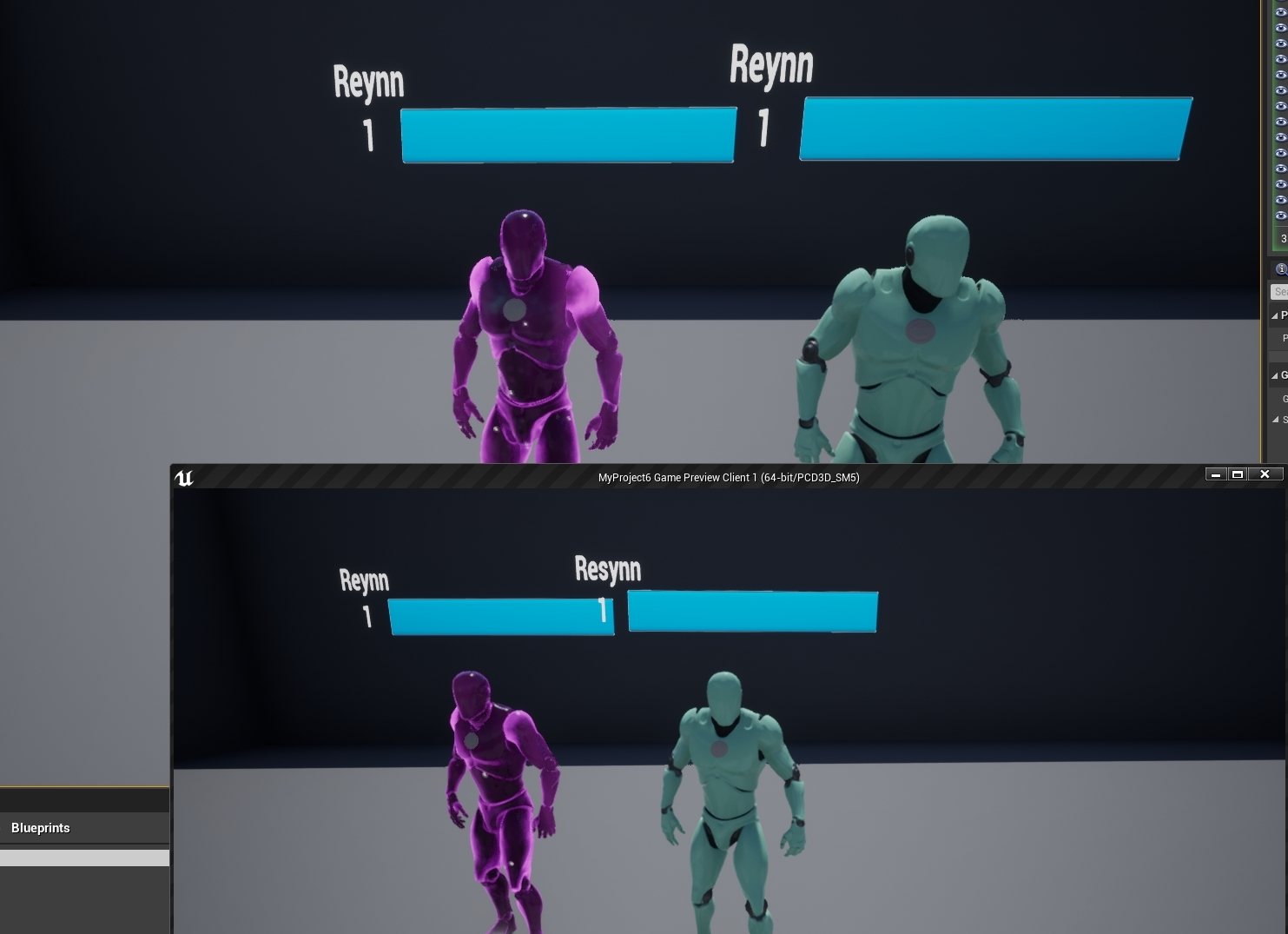 placid steppe
looks like its a anchor issue / sizing
if you change the resolution ratio of that window
i bet it changes
 stuck hedge
What's the best way to check if a bunch of procedural stuff is done running? I've got a modified dungeon generator running. I create some new non-standard walls that have their own procedural code, to check exactly what shape they should take depending on where they are (corners, straight area, ends,etc). After the dungeon is finished being laid out, they need a couple of seconds to first wait to make sure all the walls are spawned, then to check their surrounding area to see how they should configure themselves and then finally actually configure themselves based on that. Normally that's seamless to the player unless they spawn facing a hallway that happens to contain those type of walls. They may see a slight blip as a wall quickly flips to what it should be. While the dungeon generator runs there is a loading screen as there is an event that can be called to finalize. The problem is the walls are outside of that scope and each wall is responsible for their own configuration. There isn't like a wall manager that goes through and checks each wall. is there an easy way to check that or would i have to look at just looping through and make sure they've all set themselves up?
fathom portal
@stuck hedge two things that come to mind is a simple boolean variable called like "Building in progress" that gets set to true, then don't take action until after it's completed and the variable is set to false, or simply call an event after your procedural generation is done
stuck hedge
There is no central actor to call an event when the wall setup is done. The wall set up is something built on top of the dungeon generator and runs independent of it. The best thing I've come up with right now is to set a bool saying it's done and then call to the generator and have it check all the existing walls. If they all report being done, then proceed. But that means each wall makes that call. Luckily there aren't usually that many of these wall pieces in a level, so it doesn't add any kind of noticeable delay or hiccup.
fathom portal
It doesn't need any central actor, your objects can talk to each other. They can call events, set variables, etc on other actors and objects
But maybe they should have a central actor that controls this kinda stuff
That's how my proc gen works
stuck hedge
Sure, but each wall has to do that independently because there isn't a central actor.
I mostly set this up to allow me to use another kind of wall.
Normally you can only use flat walls for hallways, but I wanted to use curved walls in some cases. To do this, I have to check what's around it to modify it depending on where it sits. It looks great, but right now I just have a delay handling it and since it happens after the proc gen, the player is active in the world. The check I've added now seems to work but I'll test it a little more to make sure there is no performance issue.
 crimson crypt
I've used "Set TImer By Function Name" inside of my GameMode blueprint to cause the player to lose after a certain amount of time.. When I play and lose the timer does not reset and after I lose due to timer it automatically loses any game after hitting the restart button, immediately. To fix this I put a "Reset Level" in the lose condition function which took care of this issue. Now I'm getting a warning that says "The widget 'W_Results_C" was already added to the screen", which handles loading the current level, next level, or main menu levels. I attempted to utilize a remove all widgets in multiple places but I'm still getting the warning. Any possible solutions or things I should check?
trim matrix
We could use some help figuring out why our Custom Weapon BP's teleport function wont work serverside, only locally. Anyone able to take a look?
 teal spade
Hi there folks! (Beginner here!) Would like to ask that is there a way to have multiple/unique of these (macro?) decrement objects. I've a sprint system applied, to which sprinting and rolling/dodging is tied to (and jump at some point). Since the two supposed to drain different amounts of stamina, I'm running into this issue where if I change this macro, it affects them both (being a global value). Not sure how to tackle this problem, without reverse engineering the whole thing, and make a bunch of math nodes, to replace it with this single object. What do you think? Thanks in advance!
 surreal peak
You use that one node on different variables.
Which variable depends on which system you are using.
teal spade
It's tied directly to the stamina counter, which then decrements it over time, and sets the new values accordingly
Which Stamina is just an integer
(It's from a tutorial, so you know, I'm learning all the stuff)
it's two separate system, both affecting the same main variable, the stamina bar in this case (but uses different variables inside)
everything works fine, as I've managed to make unique variables, functions and calls for each system
it's just when I place this Decrement Node into my blueprint, it acts as a global variable. And when I double click on it, it reveals this macro mess that I currently have a hard time to understand. (as I can't add anything to it, from the right side panel, to say give it a unique variable)
thus, even though I've 2 of these in my blueprint, they all act as 1, which is a no-go, in this situation.
 bleak vector
so I want weapons to have combos, this is achieved easily enough by incrementing a variable each time an attack happens
however when you don't attack for a short time the variable goes down to 0
what's a good way to keep track of the time without using tick events
 solemn igloo
@bleak vector you can either use timers or timeline. Whenever in your montage or animation you about to reset the combo number , Set the timer of idk some function name "F_ComboResetTimer" . Also when you set the timer you can promote the timer to a variable so you have access to it later. Then create a global variable like "ComboResetTimer" then increase this with delta time every frame . check if number is larger than a value -> reset the timer float variable and pause the timer. Also when you Set The Timer you can check to see if the timer handle variable is valid or not. if it is not valid promote it to a variable . if it is valid just unpause the timer
bleak vector
🤔
solemn igloo
is it confusing ?xD
bleak vector
making it a global variable sounds like a bad idea... this is for every character
solemn igloo
yea i meant as a variable for your character
not local variable
you using c++
?
or bp
i assumed u use bp
basically you use a mini tick that tick for like 2 or 3 second then it pauses
if you need a more precise control over it you can use timeline
but i usualy use timeline if the variable im changing is a hp UI or something which need to be smooth
does any one know the best way to create a Hit pause effect? the way i do is i pause the montage and resume but the problem is the anim trail get cut off
bleak vector
I got a system working with timeline that seems pretty good thanks 🙂
solemn igloo
😉
trim matrix
@bleak vector set timer by event
@solemn igloo something like set custom time dilation?
surreal peak
@teal spade All that macro does is take the variable that you fed into it and redurce it by one.
If it has a "global" effect, then it's because you are feeding it a variable you are using "globally".
The node itself has not state so to speak.
teal spade
@surreal peak so this means that the stock Decrement Int Node is setup in a way that functions globally? Because the only variable that is fed to it, globally, is the stamina variable itself (which it should be, because I wish to drain the exact value by doing various actions (sprinting/rolling,jumping, etc). I thought that I could "cheat" my setting up that each action decrements differently (by using the default node). I thought that I should include the BP itself: https://blueprintue.com/blueprint/ahko4i36/ The problematic area is on the right middle, where it prints it on screen as well
BlueprintUE
 jolly trail
Not sure if this question belongs here but:
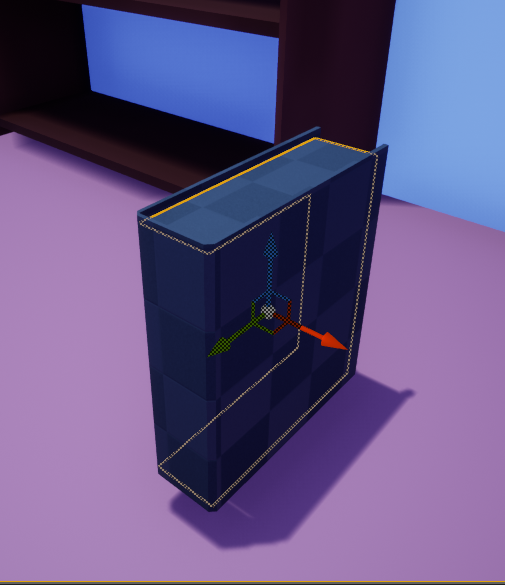
I have a book that consists of 2 different meshes, the paper and the cover
I'm simulating physics, it needs to be picked up and so on however I can't seem to find a way to keep both together without falling apart, unless I put them in a blueprint and parent them to eachother
Is there a better way to do this?
surreal peak
@teal spade I'm not really sure what you are trying to achieve. You are reducing Stamina by 1
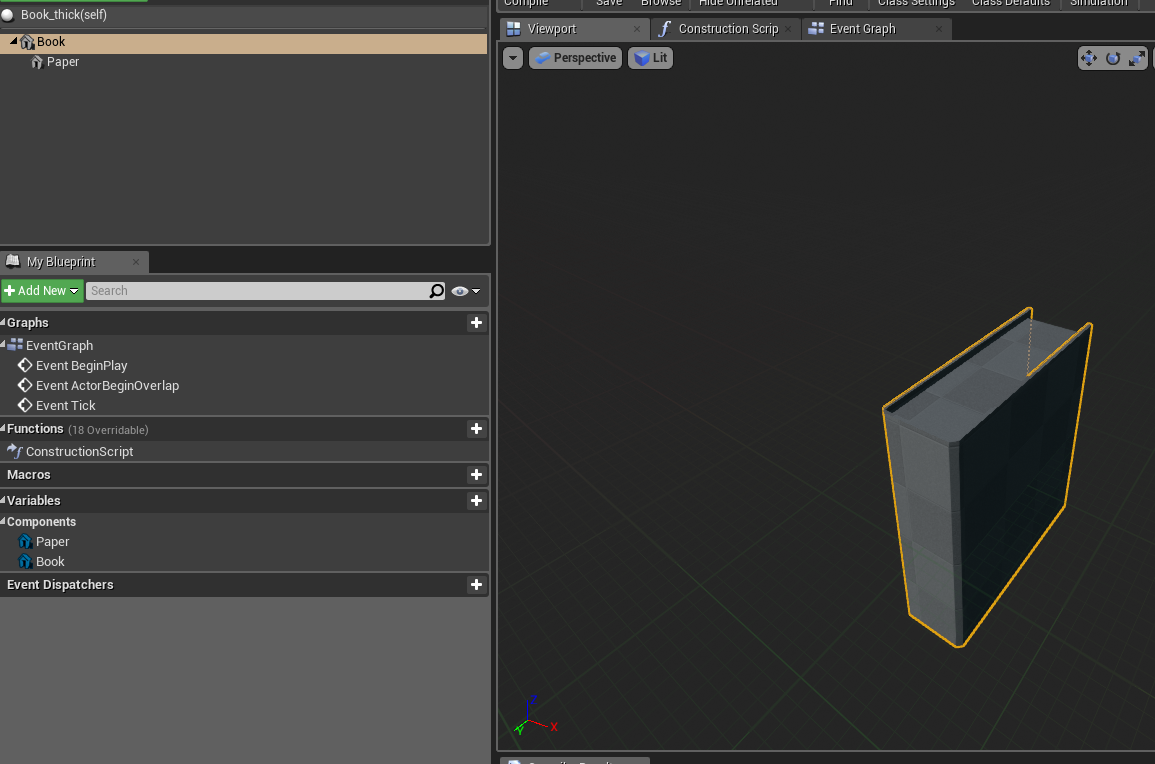 surreal peak
@jolly trail Why are these two different meshes?
jolly trail
Because I want to apply 2 separate materials to them
jolly trail
Oh right, different UV channels?
surreal peak
No, the same UV channel
But the triangles can have different material slots assigned
Or quads, whatever you are dealing with
jolly trail
Alright, that helps me forward, thanks!
I see now, I completely overlooked this.. lol
teal spade
@surreal peak Because, in the original tutorial (which I followed) it was used for sprinting, which is tied to a timer, that slowly, or faster decreases the stamina amount. However, I wish to use it for rolling, in the sense that I do not wish to gradually decrease it, rather than with fixed amounts (in bursts).
surreal peak
Why are you so fixed on using the Decrement node then?
"--" is the short form for "Variable = Variable - 1"
If you need different behavior, use a simple "minus" node and pass in how much it should remove
If Sprinting costs 1 Stamina per Second, -- every second makes sense
If Rolling however costs 50 Stamina per Use, then "Stamina - 50" is what you want
teal spade
so then I assume, I need to remove the timer itself, right?
because it won't be needed
surreal peak
Yeah, the Timer is from the "over time" usage of your sprint I guess
If rolling doesn't need it then it's enough to check if "Stamina - RollNeededStamina >= 0" and then "Stamina = Stamina - RollNeededStamina"
teal spade
OK, let me see what I can come up with, and thank you for the help, this all is a bit messy for me! 🙂
teal spade
@surreal peak thanks! it seems to fixed my issue!
 mild flare
Hi guys! I've got a blueprint that highlights traced object, but I don't know how to go back to original material when there is no hit anymore. How do I approach this? I've seen many tutorials on tracing but they only show how to get a hit. Any help would be greatly appreciated. : )
 severe zinc
@mild flare First you need to set the default material to a new variable
mild flare
oh, ok, I'll try that
trim matrix
i love your lighting in that
surreal peak
@mild flare You need to think about which "states" or "cases" this could have.
And you need to save the previous hit, so you know if you hit something before.
- No OldHit, but NewHit -> TurnOn NewHit
- OldHit and NewHit -> TurnOff OldHit and TurnOn NewHit
- OldHit, but no NewHit -> TurnOff OldHit
In addition you might want to make sure that only specific actors can do that, otherwise you'll light up every single mesh you trace.
It's good practice to have an Actor BP for that, which you can cast the "HitActor" of your Trace to.
"No NewHit" would then also be true if the cast to your custom Actor fails.
mild flare
@surreal peak Thank you very much! Great, now I have something to work on : )
 quiet tinsel
greetings folks.. anyone know if/how I can access input events on a child actor component class?
I have the input event on the graph, doesn't seem to be working, not sure if it's my code or just not set up right
surreal peak
What Actor is that Component on?
quiet tinsel
a pawn
surreal peak
Also how did you add the Event? ContextMenu or copy paste?
quiet tinsel
I'm modding pavlov so I can't modify the pawn :/ context menu
surreal peak
Check if other 100% unique input events work
quiet tinsel
you're probably right tho, I tried putting a delay on it to handle it happening after other input events... but if it gets consumed
I think other mods have buttons double mapped to inputs in game tho
like you can fire and jump simultaneously in some maps
the jumping being a custom mod
but basically you're sayin a child actor component should be able to fire input events when attached to a possessed pawn?
 rigid heart
1.0 == 1.0 equals false? Why?
trim matrix
@rigid heart did you print the value again after the "True" / "False"
rigid heart
No, there's only those three prints
trim matrix
maybe try that
rigid heart
You mean the value could've changed inbetween the print and the branch?
trim matrix
also you can just hook the bool into the printstring node
no idea tbh just to make sure, i mean you are not setting anything there
rigid heart
Right, I'll give it a shot
Works when I use a "nearly equal" with a small error tolerance, instead of the basic "equal" node. Weird stuff.
 frozen otter
New to UE4 blueprint programming. I watched a YouTube tutorial of how to make a first person controller. Everything in the code works, except this one part:
Moving while looking up or down will slow your controller (or stop it completely until you look directly up or down). Any way to fix this? Thanks!
 thorn fiber
Anything wrong with this? https://gyazo.com/1cd3cba691af74a07d99d0f32f0787b5
 frozen otter
Thanks so much! @trim matrix
trim matrix
yvw
Im trying to target an actor that i want to be spawned ingame, but i can only reference 1 actor at a time it seems, everything in the script works as intended, how can i target any actor of an actor class that is spawned?
@thorn fiber not sure, but you could try using a + float instead of a / float on the distance node
i can drag and drop the target into my game and the turret will aim/shoot at it just fine, but not if the actor is called anything different than the original one, its for a tower defense game
fathom portal
@trim matrix it looks like you're always getting the first actor you find from the "get actors of class"
You should replace that with "get actor of class" if that's intended
If that's not intended, get all actors of class and loop them
trim matrix
what do i put into the return node?
 frigid anvil
Do you only have one single target @trim matrix ?
trim matrix
i have actor that is a targt
1 actor*
in the scene it works if i just drop in 1 of them
but if i drop in another it will only recognize the first
frigid anvil
Thats because in your Event BeginPlay you are only getting the first actor and setting that to a variable I believe
What exactly are you trying to achieve?
trim matrix
im making a tower defense game and im trying to make turrets aim and spawned actors
frigid anvil
When they are overlapping a certain sphere
trim matrix
ideally i guess they would attack the actors with the lowest number first cause theyre the furthest in
exatly, that represents the range of the turret
@MFG how do i setup the loop?
frigid anvil
@trim matrix You could use this instead
surreal peak
*should
That image with the GetAllActorsOfClass and constant Tick to check the distance is a nightmare :D
trim matrix
haha yea probably
frigid anvil
trim matrix
looks like what sebbs saying helps but cant get it in yet
frigid anvil
This works, but its not the best and it wont keep targetting the first actor in range
trim matrix
i dont have the on component begin overlap execution thing
frigid anvil
Click on your sphere first
trim matrix
i tried event actorbeginoverlap but that has only 1 node for other actor
frigid anvil
Do you want it to keep shooting the first actor in its range until its out of range?
surreal peak
Can you please start by not combining your code with the one posted?
This makes it really hard to explain stuff.
Sebb posted you what you should use.
Whatever happens on Tick is something completely else than what should happen on the Overlap
trim matrix
@frigid anvil no, i want it so that it shoots the actor with the lowest number that is within the range
frigid anvil
lowest number?
surreal peak
Is this some sort of TowerDefense?
trim matrix
assuming we got actor 1,2,3,4,5 spawning the 5th would be likely to be further behind
yes
surreal peak
Do you need this to fire every frame or every few seconds?
frigid anvil
Is it kinda like bloons tower defense?
surreal peak
Cause if you use tick, you'd do this every frame, which can be quite often.
surreal peak
You should add overlapping Actors into an Array that you can maintain.
And then start a Timer
Every x seconds you loop over that array and find the furthest away.
trim matrix
but yea it would be between 0.1 and 3 seconds
thorn fiber
@trim matrix The issue is that GetLocationAtDistanceAlongSpline is failing to give me location along distance. IDK why.
trim matrix
yea absolutely its a huge performance waste
surreal peak
Yeah, then use a timer, get rid of the tick
trim matrix
wouldnt a delay do the same?
trim matrix
ohh what ok
surreal peak
Overlap only happens every overlap, not constantly.
trim matrix
yea
surreal peak
So you need to start a timer that loops if there isn't one already.
trim matrix
how do i do that?
frigid anvil
trim matrix
right i think i know what works good here
surreal peak
trim matrix
dang idk whats going on but that looks awesome
ok i know a little bit whats going on
oh ok now i see
cant create that same remove function going off of the 2nd cast
ok got it now
how do i make the signature @surreal peak ?
trim matrix
i got it in now
surreal peak
Oki
trim matrix
i didnt create the trydamage event my b
ok, got it to work the problem it only shoots once now once it enters
each time i leave and enter the object again it shots one more time tho
so it shoots once when i get within range
its mean to shoot repeatedly if in the zone
meant*
surreal peak
Did you set the timer to loop?
trim matrix
yea
i ticked the looping box
good progress tho, it now shoots all actors and works way better already
Hi. How can i spawn an actor on the X,Y of the player location, but not on Z? Im trying to only spawn it on the ground, I tried to split and not connect the Z (image below), but without it he doesnt spawn the actor at all.
frigid anvil
Its spawning in the Z of the level so maybe its spawning below your floor/ground ? @trim matrix
trim matrix
hmm, maybe. Let me check. Thank you
yes, thats it, its spawning at the world "Z".
how can i spawn it only on the ground?
frigid anvil
Is the ground the same height all over your map?
trim matrix
no
frigid anvil
Is that actor always spawning on your player?
trim matrix
yes, always on the player location
frigid anvil
Then you can get the player location and subtract something off its height
trim matrix
but if the player is in the air i want it to spawn on the ground
trim matrix
when the player reaches a certain range around the enemy, the enemy spawns it on the player location
i just tried to save the blueprint and it said failed to save blueprint...
ok now it did
frigid anvil
@trim matrix This could work
trim matrix
ok, i will try it. Thank you
@surreal peak i did tick the loop function but its not working, any idea how to solve it?
it does shoot perefectly fine just no loop
frigid anvil
Could you send a screenshot of the code @trim matrix ?
trim matrix
frigid anvil
Where is the code that makes it shoot?
Its supposed to be connected to the custom event there
Not after the overlap event
trim matrix
@frigid anvil thank you, it worked 👍
shell estuary
What is the main point of an enumerators? or typically what would it be used with?
surreal peak
Usually if something has more than two states.
trim matrix
@shell estuary you can use it for switches or ifs, usually to describe states
surreal peak
E.g. a boolean is enough if a state is on or off, yes or no, etc. But if you have something that can have more than one state, like a weapon fire mode, you'd use and enum
Like SingleFire, BurstFire and Automatic or what not
trim matrix
they take only 8 bits if im correct, an int32 or an FString would have more, also it is easy to use them in the editor with those dropdown menus to select something from and a switch will automatically add all cases.
but Im not sure if they might be limited to a range of 255
 stiff tendon
Hello. Quite a random question that probably is best answered by 'it depends'... but how large a dictionary of names mapped to a struct is considered too large? (especially to look for stuff in it via blueprints) Is searching for a name in a list of 100 names considered expensive? 1000? 10000? Because I'm trying to store the states of
all my interactive/useable objects of my game in a save game object and I'm concerned the list might grow too big at one point or another
trim matrix
thank you so much exi it actually works now
 haughty ember
@stiff tendon "Optimization is the root of all evil". I highly doubt you need right now that amount, so just use it. In the future if you have a need for it - fix it.
trim matrix
gj really good script too apreciate it @surreal peak
surreal peak
@stiff tendon TMap > TArray for large collections
If you can map the struct to a unique key then TMap is faster for bigger collections due to using hashing
But yeah, make it work first, then optimize
stiff tendon
@haughty ember I sort of agree. I definitely won't need thousands but still I guess it's good to look ahead. Also just for the sake of knowledge
@surreal peak roger that, thanks. I tried to use structs in structs so I can at least split lists per-level and keep them contained but UE tends to hate structs in structs I believe... It's buggy and at some point a struct isn't initialized properly or doesn't compile for some reason and it falls back to a default struct and all pins are reset... Yay. I don't know if you had any experience with this?
late gorge
hi, anyone know how to create a gaussian distribution of floats in blueprints?
surreal peak
BP structs generally suck
They tend to break of used in too complex scenaris
So yeah can totally be that what you said happened/happenes
stiff tendon
@surreal peak ok good to know it's not just me then. I've had no issues with BP structs as long as they don't contain other custom BP structs... Thanks
stiff tendon
speaking of saving game, I always failed to see the use of that 'SaveGame' option available on a variable in a blueprint. It reads 'Should this variable be serialized for saved games?'. But you can't just save actors and objects in a save object, can you?
have I been doing thing the wrong way this whole time? I'm using structs to describe the state of my actors (like pickedup, status, health, whatever) along with an ID system so when loading the game I can get those values and plug them back in the corresponding actor. Could I just save the actor itself with serialized variables??
shell estuary
I learned the basics of blueprints and stuff but idk how to get started. Like not sure what I want to do...
trim matrix
so.. ive been working on a different script to spawn a target and make that target follow the ai bots so that the turret gets a nice reference where it has to shoot
but... after finishing the script the turret stopped shooting
i havent changed anything in the turret
this is the transform script
ive had the same issue before. it feelsl like a bug but i doubt theres such a glaring problem with ue4
thats where it stops working for no reason that im aware of
stiff tendon
overlapping actor is no longer a 'Testtarget' blueprint
print string that actor's name before the cast so you know what's overlapping
trim matrix
ok
oh its overlapping the ai_char now nice find
i think it should be testtarget it should be overlapping
stiff tendon
it probably triggered 'EndOverlap' and testtarget was removed from list
it really depends on what kind of geometry you're using to overlap who with what and where 😄
trim matrix
testtarget is a plain and its overlapping a sphere component
stiff tendon
Begin/EndOverlap will trigger once if an actor having the right collision profile will enter 'Sphere1's radius
trim matrix
the sphere component is a compnent of the turret
sphere1 is the bigger one so thats the relevant one rn
 echo wren
how would i go about having a actor's blueprint in the level cast to a blackboard task function? i just need to toggle this blackboard bool from tick in the actor blueprint...
stiff tendon
check if EndOverlap is triggered, print string actor's name before cast there as well
trim matrix
yea end overlap is triggered and its ai char again
hm thats weird
so i just have to prevent the endoverlap from happening too earl
early*
also btw thanks really good advice
echo wren
can you change a bool in a AI blackboard from actor blueprint or do i need to cast to a function within a BTT (blackboard task)?
trim matrix
dont know myself but somoene else might
echo wren
i wired up the cast, but it failed because i dont know what object to put in the cast "object" input for a Blackboard Task (BTT) i casting too...
trim matrix
i checked again and even if i disconnect the end overlap node it doesnt work
.... whats even weirder is that if i delete all the scripts in the transform parts of the target blueprint it doesnt work anyway
which is weird, i havent changed anything in the other script, the other one doesnt work even if i delete all the blueprints
some object reference might be messed up? really not sure what it could be
... and if i drag and drop one of the targets in now it wont recognize the target at all anymore, only if its spawned
 ember wharf
Apologies in advance i'm new to Blueprinting so i'm not sure if this is the right chat to ask this in but i was wondering if anyone knows how i can call a controller button press while in a blueprint widget? My pause menu basically takes control of my controller so i cant unpause. I set it up as a function that calls an instance event but it cant be triggered.
shell estuary
Running into a very unusual problem. I created a blueprint that slowly decreases the size of a platform on my map. It works perfectly and decreases down to the desired size, however midway through it despawns my character. I am not sure why this is happening and if anyone could take a look, I can screen share.
the only thing that I can think is it gets rid of my player start locations once the platform is too small
 static charm
seems unrelated unless the size of the platform kills anything outside the platform, hence the player dying
shell estuary
it decreases to like the red size there
I stay on the platform the entire time tho by moving
static charm
well unless you have specific code that destroys the player, or does something with the match/game
shell estuary
well its odd
because if I dont change the platform size then everything works as normal. problem only comes up when I change that.
trim matrix
non of the starting materials are showing up as having any thing other then a static texture
this is how it looks,
this is how it should look
its just a static texture in the editor and the game
any ideas?
 frail plaza
Can select nodes run a function or do they always just return a value?
 lavish glade
hey guys I kind of have no idea how to make my AI (zombie) jump over obstacles. Does this look like the right idea? https://blueprintue.com/blueprint/lh4lp3my/
BlueprintUE
surreal peak
@stiff tendon Ehm yes you can but not really in BPs.
The SaveGame BP is just a simple object that gets serialized
With cpp you could also serialize other objects and actors
stiff tendon
that's what I thought, thanks for the answer 🙂
trim matrix
@surreal peak one can serialize uobjects? are there any resources on the serialization?
 fallen glade
Hey boys, I'm struggling with setting,saving and loading my inventory/what's inside chests etc properly. What I need is 2 arrays of a custom struct. I've created a special ui to save the correct arrays.
For now I load them in from a "data asset" object I save with my inventory tool
thing is whenever it's reloaded it resets itself... obviously
what's the best way to proceed?
I was thinking of having the first read come from the data table and then have one save object per chest/player ? is that the right way to go about it ?
surreal peak
@trim matrix The SaveGame is basically just a subclass to limit BP users from serializing other objects. You'd need to use Google. I don't have any articles for you sadly.
 twilit heath
@trim matrix you can get the gist of it from http://runedegroot.com/saving-and-loading-actor-data-in-unreal-engine-4/
it works for UObjects as well
 blazing ridge
how can I permanently rotate a skeleton/skeletal mesh bone?
I have assets from the marketplace with forward direction in Y, i need it in X to fit to my remaining assets.
any possibilite to do this without having to ex/import thoser assets again?
twilit heath
SetRelativeRotation
blazing ridge
no, not in blueprints or code. I want the assets themself to get another initial pose
tried rotating the root in the skeleton and saveing it, but nothing changes, even though the values are saved
trim matrix
@surreal peak @twilit heath thanks for the info, I also found this plugin, though Im not a friend of plugins:
https://www.unrealengine.com/marketplace/en-US/product/savior

Savior Auto-Save Plugin is a C++ Plugin designed to extend UE4's generic 'SaveGame' system, providing easier to use storage framework for Developers and Designers.
there also is this: https://docs.unrealengine.com/en-US/API/Runtime/Core/Serialization/index.html
and a few not so informative forum threads
oh yeah and i found this: https://github.com/usagi/cereal-UE4

GitHub
cereal ( C++ serialization library ) adapter for UE4 ( Unreal Engine ) types - usagi/cereal-UE4
 still nexus
I want to create a project for a large screen (samsung touchscreen tv) what kind of projects should i make ?
 tawny sundial
Hello everyone, i am working on an archviz project in which i want to show chair, table, bed as 3d icon, is there any other way except scenecapture2d to show many static meshes as 3d icon
 unique ingot
Okay how do i find the difference between two Rotation axis, for instance I want to compare the Yaw of two rotations
AND DONT SAY SUBTRACT THE AXISES
 fleet sandal
Get the dot product?
 worthy frost
still nexus
worthy frost
still nexus
Does unreal export project for touchscreen to lenovo yoga screen ..? If so how
trim matrix
Hey guys quick question
I have a get overlapping actors that is detecting if the player is overlapping a specific volume.
Everything was working fine but then i added level streaming and streaming volumes to the game and now the Get overlapping actors always returns no overlapping.
Disabling the level streaming volumes and everything works but i need them.
Anyone had this situation in the past? how can i make this work?
spark robin
Couldnt find the right channel for this question, but in the HUD designer window, can I like parent elements or link element animation data?
Im watching a tutorial series https://www.youtube.com/watch?v=3Csk3CAS52U&list=PLL0cLF8gjBprG6487lxqSq-aEo6ZXLDLg&index=32 where he tells you to one by one add the same animation to several elements. I know that in Blender you can like parent stuff, so if something in the scene moves, other stuff will move along with it as well as linking data such as alpha/transparency, are there any features like this in the HUD editor?

Here we take a look at how we can create a kill-feed which will display and popup when a player has killed an enemy. We go over how to setup the blueprint to display it, along with layout out and animating the graphics to make it look good!
► Resources: https://www.virtushub....
(Please ping on reply ❤️ )
 thorny pewter
Question: does sandbox.babylonjs.com supports obj file exported from unreal?
 copper reef
Question - I want to input this into base colour, but I want to reduce the amount of green in the green channel, how do I do this?
 tacit robin
Hey I try to implement a new Inventar at my Characters Beginplay but it wont work as intended. Any help is really appreciated. I have to say i am a beginner and just started with blueprints.
So the inventar i am speeking of has a Bp_Inventar/Actor which sets all functions.
- refered to InventarHUD which is implemented in the MainHUD of the Character lexa.
- InventarHUD gets icons of InventarIconHUD
Thats my Beginplays on the Character and BP_Inventar:
character
bpinventory
 potent hamlet
Noob Question, I just want to make my mesh component on my blueprint the same mesh as this StaticMeshActor in the level.
 sharp cape
Hello I know there a lot of unanswered questions but I will ask anyway because Im stumped. I have created a macro library with the actor parent class and I have a blueprint function library (with the blueprint function library parent class). I want to call my custom macros in this blueprint function library but can't. They dont show up in the search, and I'm not even allowed to copy and paste the macro into the library. Could anyone help me understand why?
sand shore
@spark robin Well you can make a custom widget for those elements which itself contains that animation. Does Virtus not show you how to create a custom widget for the killfeed entry?
spark robin
@sand shore Idk what a custom widget is unless this is what you mean
Btw ImmutableLambda, do you know if I can make the 3D viewport go fullscreen while simulating/playing the game from within UE4?
 weak idol
Is there a reason Event Destroyed doesn't get called when unloading a stream level? is there a way to determine when an object is cleaned up when unloading a stream level?
trim matrix
I want to move an actor from place to another
am ganna use timeline + lerp
but the last node for movement what is it ? 😄
weak idol
SetActorLocation? not clear what you're asking
 odd ember
@weak idol unloading a streaming level isn't the same as destroying an actor
that actor could still be alive in that streaming level when you load it back in again
weak idol
unloading the stream level destroys the actors within it, i want them to unregister with systems when this happens
weak idol
what object contains that event?
odd ember
levels, usually
weak idol
oh i see, that doesn't quite help. i have the same objects in the persistent level that i do in the stream level, is there a way i can identify which objects are owned by which level?
i was hoping they just called destroy and handled their own cleanup...as they should
not sure why destroyed doesn't get called when....it gets destroyed...it still doesn't make sense to me. but i'm willing to move past that for a solution, i just can't think of one without coupling my objects to stuff
odd ember
try using EndPlay
@weak idol
What actually happens when an Actor is loaded or spawned, and eventually dies.
weak idol
that works, thank you cranz. i did read the lifecycle docs, i guess i missed it
odd ember
again they aren't actually destroyed by the level transition, they are just deallocated
weak idol
yep, i understand, it suits my purpose, thanks
trim matrix
is there a way i can make the actor keep rotating?
weak idol
you can use rinterp to interpolate the rotation from current to target. you can calculate your target rotation by direction from actor to target location
trim matrix
@trim matrix in the detail pannel of Rotating component you can set the rotation in every direction
weak idol
not sure if there's anything built-in to keep look at
or there's that if you want constant rotation, perhaps i misunderstood
trim matrix
@trim matrix i can make the actor keep rotating in hes sport right>
like 360 rotate loop 😄
yeah and other things
^^
or the interp movement, you can set a lot of location in your actor and it will move to there
 opaque terrace
Hey all
Iam looking for help my BP I guess i am on right channel
I have 2 BP. On first i make alot of cubes with constructor BP.
These cubes are as instanced mesh component in this BP
On secound BP i want show some of cubes which overlap with collsion sphere
I dont know how to "read" list of these cubes becasuse arent actors, and all cubes are in instanced mesh
Secound bP
trim matrix
Can you show your first bp and the second one whole code?
opaque terrace
ok wait secound
trim matrix
Hello Guys, is there a different between a trigger and trigger BP? Just placed a trigger in the level and it blocked after creat a BP it doesnt work someone idea?
hey guys, ive been working on a script yesterday with the work of some people, im trying to make a tower defense game right now and im trying to target path following bots. i tried to make the targets spawn inside and follow the bots but for some reason that made the turret not shoot anymore, i can have as many targets as i want inside the level and it works perfectly fine. is there perhaps a way to cast to the ai pathfollowing bot directly? im gonna post the blueprints
trim matrix
@opaque terrace So you are trying to spawn a grid 10X10 for example in your level and trying to show your instance within your sphere correct?
 snow geyser
@opaque terrace Also consider 2d Grid execution Macro.
Im currently using a 10x10 grid in my game as well and thats how I handle its creation and eventual movements
opaque terrace
@trim matrix correct
This sphere collsion is attached to character which show his move range
@snow geyser This 2d grid macro is build in feature in Ue4 or your custom ?
trim matrix
its a feature of ue4
trim matrix
discoverd it because of you thanks deadmon^^
opaque terrace
I will check this , seems might help
snow geyser
just sharing the knowledge, I happen to be using it now and only know because of MathewW vid
trim matrix
@opaque terrace just try it i believe its better
snow geyser
When setting its location, I just hook up the Grid mesh BP reference array to a for each loop. Pull the array index off of it and get the Grid Location array information. Use that to set the actor location
 worn kernel
guys what procs on hit events
opaque terrace
@snow geyser I will try do this, any other way to "read" contents of instanced mesh component?
snow geyser
Im sure there might be a better way but that seemed like the best to me for now. Im no UE4 wizard though
opaque terrace
understand, thanks for help 👍
trim matrix
What is the 2D Grid Execution Macro Node in Unreal Engine 4
Source Files: https://github.com/MWadstein/UnrealEngineProjects/tree/WTF-Examples
Note: You will need to be logged into your Epic approved GitHub account to access these examples files.
snow geyser
Yup, thats how I learned of it lol
trim matrix
Thanks again^^
snow geyser
👍
 crystal mural
Hello everyone! I'm not sure what I'm doing wrong here. I've got a button to go to a "bird's eye view". As you can see I have a Tinterp To for this and it works fine when my interp speed is 0. Anything else and it seems to not complete its animation.
 elfin hazel
Interp to is supposed to happen over time, where as your input action is an event that fire once.
 rain ravine
AFAIK timeline is a greate use here
create a timeline with the time you need, play it on key press and interp on updates
crystal mural
OK I see now why this is working elsewhere. I've got an Axis mapping that moves the rotation like I want.
rain ravine
play reverse on release
crystal mural
And this is once off fire.
OK great. So either I make my shift button an "axis" map or I do a timeline.
HAHA! Timeline sounds more efficient hey. Thanks!!
opaque terrace
@trim matrix ok i see U used castto, ok this might be good idea i will check
trim matrix
yeah, cast to your Spawnactor^^
opaque terrace
Hmm but you spawn actor not instanced mesh component
trim matrix
oh, true hmm i will try it now with instance mesh
opaque terrace
I tired spawn actor ,but with 10000 actors on screen i get infinite look warning
spark robin
 odd ember
we are robots it is going
 cold sinew
i have Masteritem_BP
and i have Children as a pickups ( consumables , Equipments etc..)
im trying to pick up on 2 sockets but its not working
i've added a sphere collision to the parent bp
when the player overlapping its just using same on socket
cold sinew
i have no code was trying 4 -5 nodes nothing happend deleted them xD
i just need the method and i can do it
surreal peak
I don't even understand the problem
surreal peak
What Sockets are you talking about?
cold sinew
let me explain it better 😄
surreal peak
Would be a good start :P
cold sinew
look guys i have masteritem_BP for pickable items its have StaticMesh and SphereCollision
odd ember
we understand
cold sinew
and i have children from this Masteritem_BP for other items
odd ember
we don't understand the problem you're having
like what are you actually trying to do
are you trying to pick up the item physically and transfer it physically?
cold sinew
yes when player enter the collision the item will attach to Left hand socket
and when the player enter the other collision another item will attach to right hand
cold sinew
i've tried to create a boolean checking the hand if empty its keep give me false
odd ember
maybe try without the boolean first
cold sinew
i will write it again one sec 😄
odd ember
also show your pickup code
odd ember
that is why it's better to have code
crystal mural
Adding to my last question... would I ask about weighted tangents in a timeline here or in #animation?
odd ember
timelines aren't really animation, they're just a value traced along a spline
odd ember
you need the skeletal mesh
crystal mural
Ah OK. So then how do I pull the handles further? If I turn the tangent of that middle key they curves go out of range. I want to make it snappier.
In Maya I would just turn on "Weighted Tangents"
odd ember
right click on a point and you have options
crystal mural
No that's not them.
odd ember
place more points and use the right click to set the right interpolation
crystal mural
No surely that's not the solution.
trim matrix
@opaque terrace if i set the visibility it show every instance you have to look how to solve this
crystal mural
See in Maya I can pull my tangents longer.
But oh well... this is really a question at polish stage.
odd ember
@crystal mural timelines aren't a stand in for animation graphs, they're used to create simple animations without having the need to create individual animations for objects such as doors or lifts
maya in comparison has a full animation suite
I gave you a way of doing it in timelines, otherwise you'll have to deal with animations and their graphs, respectively
trim matrix
Hello Guys, is there a different between a trigger and trigger BP? Just placed a trigger in the level and it blocked after creat a BP it doesnt work someone idea?
crystal mural
Then if I feel my camera isn't easing into its position nice enough where would I find this animation graph? Or you just saying in general?
odd ember
in general
in case of camera, you can try different interpolation settings instead of messing with the timeline
crystal mural
OK so you don't know. Oh well, it's fine for now. Thanks anyway.
odd ember
@crystal mural no I do know, I'm saying after the timeline you use a different interpolation node
crystal mural
Potato, Tomato my friend 🙂
odd ember
uh huh
 ocean radish
Anyone have any clues on this one or alternate ways of doing it, I have a widget component with a progress bar on items in my game, i want to set the progress bar amount from the base object I cant find anyway to reference this
trim matrix
@ocean radish from which base object?
ocean radish
just the actor that holds the widget
odd ember
@crystal mural in the case of anim graphs, they're in the animation editor or baked into animations externally.
trim matrix
so it's on a widget component?
odd ember
it's a per animation option though so it requires animation baking
ocean radish
@trim matrix So need to set the variables in the widget comp(TaskProgressBar) from the base actor(Base_TaskObject)
trim matrix
and where do you have to reference it?
ocean radish
in the eventgraph of the actor or the otherway round
trim matrix
on the actor just drag the component in and do a "Get User Widget Object"
cast that to your class
call the progress bar changing function or whatever
crystal mural
@odd ember No yeah I get what you're saying. And yes, that really is a mission when all you want is a tiny bit more snap from your alpha curve. Actually where do I put in feature requests? I'll go check...
trim matrix
on the widget im not too sure
you could probably set a reference of the owning actor at beginplay on it
ocean radish
@trim matrix just testing now seems to make sense
odd ember
@crystal mural in your case it's easily solvable already adding in more points in the timeline. request or no, you'll get it done without any noticeable difference, so what's the issue exactly?
crystal mural
I'm being pedantic about how my camera moves from one spot to another and back. That's really my problem.
odd ember
but like I mentioned initially, you can solve that
trim matrix
@crystal mural yeah sadly editing curves in unreal has some tangent restrictions
crystal mural
And more points is terrible and bumpy.
odd ember
by using what is already in the timeline editor
trim matrix
like the length specifically
I think I once mentioned it and I got the answer that they'd implement it for sequencer stuff but I never used that
odd ember
you can also use camera tricks to make it feel more snappy, if you're interested
but that's less technical and more camera direction
crystal mural
I've been animating professionally for close to 20 years. I can promise you adding more keys is the worst idea if you want butter.
trim matrix
you could also do a linear graph and feed that into an interp function
crystal mural
Yeah tell me what you mean? I'm interested. Anything to help.
ocean radish
@trim matrix Thanks man that seems to work, one major messup i was doing was trying to do it in the construction script
trim matrix
yeah in the construction script you have to be careful with actor references and anything that first has to spawn in the world
odd ember
@crystal mural like going beyond your focus point and snapping back. but now that you mention butter it sounds like you want it to be smoother?
(which to me is different than snappy)
odd ember
aha yeah okay
crystal mural
What I've got now is... well... fine.
ocean radish
@trim matrix yea, so if anyone else wonders, the same, in the event graph, i did like he said, got the widget component got the user widget object then cast that to my widgetclass then accessed the variables from that
crystal mural
I say waving my hands! HHAHA!
odd ember
I was going to suggest post target smoothening, but you're already doing that
best is to draw lines with camera I've figured
crystal mural
I don't understand? Draw lines with the camera?
Mine is moving linearly from one point to another. It's the temporal smoothing I'm after.
crystal mural
In After Effects I would have two keys (Start and finish) and then set each of their velocities to 0 and influence to 100.
Ok no my camera isn't moving in a curve. It's going straight.
Should we not move this to #animation?
odd ember
well draw out what you want
crystal mural
HAH!
odd ember
this is just an example
and honestly since it's to do with timelines let's just keep it here
also show me your node graph post timeline
ocean radish
@crystal mural can you not use a timeline sorry if im missing some info
crystal mural
Let me make a quick animation fo ryou.
I am using a timeline yes.
Current timeline
 covert agate
hey guys, although this may be seen as somewhat cringeworthy, i need this lol:
does anyone know how to make a door and lights activated by a button? and the doors/lights would be like the ones in five nights at freddy's.
- while i'm here, how would I also add a power metre that would drain the more you use the doors, and when it runs out, all of the doors would open and you'd be inable to activate them.
sorry if i asked a bunch! <3 please tag (sorry for the inconvenient paragraph)
odd ember
@covert agate hook the button's use event up to use the door's use function and the light's toggle function
covert agate
oh, is there any tutorials for that? i'm somewhat a noob.
thaaanks for the response
*thanks
odd ember
yep there are tons I bet, I suggest googling
ocean radish
@covert agate https://www.youtube.com/watch?v=5Hv8zrNOFL0 thats a pretty good tut for setting up a rotating door, if you are after one that opens upwards just change the rotation to location and move it up and will have to change the event to call it

If you liked this tutorial leave a like and subscribe if you want to see more. If you have any questions tell me down in the comments.
Patreon web page: https://www.patreon.com/AlenLoeb
Music:
Hinkk - Guradi...
trim matrix
@crystal mural
covert agate
thank you so much! anything for the power meter? <3
trim matrix
alpha is linear
crystal mural
Here it is. So the "Camera" goes from one place to another. See how that curve gets VERY steep in the middle to make it snappier and still ease out for a long time? That's what I mean by weighted tangents.
ocean radish
@covert agate for a power meter thats gonna be a little bit more of a custom UI element so look at something like a health bar on how to implement https://www.youtube.com/watch?v=jlrqFoYvMX4
This tutorial covers how to create a simple health bar and some text for a point system. We create the widgets in UMG and bind them to variables we set up in our character.
covert agate
ty!!
crystal mural
@trim matrix Those functions might help. I'll give them a try. But at this point I'm splitting hairs.
trim matrix
@crystal mural I think you can influence that with the exponent
of the ease function
ocean radish
@covert agate but obvioulsy from what you learn there you can implement that on what you need to do, but just follow the tutorials to the end, will help you understand whats going on and how to change it for your needs
covert agate
tysm!!
crystal mural
@trim matrix Yeah maybe, let me give it a bash.
odd ember
@crystal mural yea the exponent will for sure help with that
crystal mural
Animation and maths meet...
odd ember
is it a float curve?
crystal mural
It is.
odd ember
managing alpha between locations?
crystal mural
That's right.
odd ember
or managing speed
ok
yeah then the exponent will give you the best results
to be fair though I should have seen that it isn't speed from the graph
oh well
not a robot
odd ember
yes
crystal mural
Ah there we go!
Yes this exactly solves my problem.
I still want weighted tangents though.
Thanks!!
odd ember
@crystal mural outside of custom animations you'll be hard pressed to find that level of granularity
but in the end it's all math
and perhaps more precise this way
crystal mural
Years of staring at animation graphs has spoiled me.
Thanks you two. This will do for now. There's a bit of a bump, but that's the rotation that needs a separate graph all on its own.
trim matrix
@crystal mural you should probably have the graph as linear and use the Ease function which you can directly interp the transforms with
there you can also set the function and the exponent
 still trellis
what does deactivating a component actually do? does it prevent all function calls, changes in variables, disable tick, disable replication, etc.? or is anything left on
 rough wing
Is there any way I can make the editor's object placing tool an in-game feature?
 twilit lily
How would one assign a value/number to a level for a next level button to be used. In my case when the player finishes the level a menu pops up with a next level button. Obviously I cant just set the next level button to just open a specified level.
 gilded pebble
Hey
Would it be possible to create a borderlands/fallout like modular weapon system where you can craft weapons from the parts as a player and save the combinations on the server as a new item?
odd ember
anything is possible
gilded pebble
Is there a guide covering something like creating a new unique item while the game is running?
odd ember
think it's fairly advanced to build a guide for
so no I wouldn't think there is if it isn't easily googleable
gilded pebble
I see, thanks for replying
odd ember
it's probably not that hard to do for someone seasoned, but if you don't know what you're doing I suggest trying to get some experience first
gilded pebble
Alright, thank you
 inner sandal
Asking if anybody knows if you can cycle forwards and backwards through a media material frames via blueprints? For instance pressing one button plays the animation forward till you stop pressing and the same for backwards?
odd ember
@sand shore you around?
 drifting rapids
hay all, anyone know how to make navigation invokers spawn navmesh? mine arent creating navmesh when spawned and i have navmesh set to spawn dynamically
odd ember
as we spoke about the other day, I've been trying to inherit from BehaviorTreeComponent, but it seems I'm getting linking issues despite having the AIModule in my target file, any idea what gives?
@sand shore
late gorge
hi, anyone know why a (valid) reference call to update a widget is printing the correct value (an increasing integer)
but the widget itself is simply not updating?
but if i close the window then reopen the menu, the value is again properly displayed?
it's just mindfucking with me
 mint blaze
is it in a invalidation panel
 narrow kelp
how does the display widget know the value
late gorge
so basically i have a component with a widget reference, i call update on that reference
narrow kelp
make sure its referencing the value that is actually changing
late gorge
this is basically a size box that gets its content set as a main menu
so whenver i talk to an npc, a central menu is set
then, from the driver components, i call update on widgets
and that doesnt work
if i then close menu and reopen (repassing the reference)
it will correctly show the value
i've seen this approach work before (and it IS working for other components like it)
so i just call update on the reference on say the music player and it will correctly update what needs updating
but it just doesn't seem to work for this specific widget
narrow kelp
okay but how is it being updated
late gorge
and im not working with anything weird, it's just a set text call on a text
component has a reference to its display widget (which is valid, checked via prints)
narrow kelp
it seems like either the value is not updating and/or the text isn't updating
late gorge
and whenver the component finishes crunching the numbers, it calls update on the widget
narrow kelp
so i'd test both of those
late gorge
the values are updated, they show correctly on reopening the menu
narrow kelp
okay but you want them to update when they're changed, not just when you open the menu
late gorge
i have 2 diff components templated the same way -> reference to a widget, created at beginplay
one works fine, the other doesnt
welll.... yes, that's why the component's update function also calls widget's update at the end
but it simply doesn't work untill i reopen the menu
while say the music player has zero issues with that, if i walk around (and the music switches depending on that), the texts displaying what is playing update just fine
and that widget has a LOT of moving parts, they all update fine
meanwhile this other widget has just one int64 it needs to increment (Day counter)
i even set up a breakpoint, the update function GETS CALLED
late gorge
after closing/reopening the menu
the update function is selectively going "nah, fuck it, current game day doesn't work", no other way to describe this >.<
because that citizens array is definitely not something that would work without a valid reference
narrow kelp
hmm
ember wharf
I'm trying to spawn a projectile that comes from my character and the world outliner shows that it is spawning but i see nothing
any ideas on what might be happening?
narrow kelp
you're setting the location to be the forward vector
which is probably close to 0,0
you need to make it the player's camera location + (forward vector * some value)
ember wharf
would the camera matter if its a top down character?
ember wharf
like this?
narrow kelp
i can barely read that but i dont think so
ember wharf
sorry about that
ember wharf
amazing! that worked! Thank you!
narrow kelp
sweet
frail plaza
UE4 crashed and now none of my data assets will keep their values. I can set their values, save and then exit the editor and when I launch the project again they're all back to nothing. Am I missing something?
Side note, I wasn't even dealing with the data assets when the crashed happened.
drifting rapids
anyone know how to make navmesh invokers work at runtime?
drifting rapids
anyone know how to make a navmesh invoker make navmesh at runtime?
 delicate drum
Hey guys, is there a simple way to add a gif into the user widget? Or i have to add every frame and make an animation?
trim matrix


how i can add Invincibility to this
I dont want my character to keep getting hit
maybe a delay would work?
 viscid skiff
I have a fairly basic question, How would I go about adding in a system where when I pickup a certain item, it sets some sort of variable so that in-game abilities change. I have a general idea in my head but can't seem to implement it correctly.
 astral tendon
Is there a way to reorder the pins on a blueprint node?
 olive cloud
As far as I know only on nodes and structs you set up
cold sinew
GoodMorning
My Question got ignored yesterday so xD
if i want to create attach to component function for i child actor do i need set the function for every child ?
or just in Parent BP ?
surreal peak
Theoretically just the parent blueprint
Unless the a child has to perform different logic
Your hand socket issue is more character based
Your character has to keep track of what it picked up and to which hand
@cold sinew
cold sinew
No the thing is
when overlapping the parent sphere collision all the children collision acting the same thing
the easy way to do that when the player overlap the collision and successfully attaching the socket i need to set that socket to true
so when the player overlap another actor its will check if that socket already in use it can switch to the other socket
but when im doing this operation in Parent actor BP its not working
do i need to check it on Character BP ?
surreal peak
That check needs to be in the character
cold sinew
Ok so i will try to set it on character bp
surreal peak
At least the boolean has to be in the character
cold sinew
So on the Parent bp when the player attach will cast to character bp and set the boolean true can i do that there
?
yes this way worked
So on the Parent bp when the player attach will cast to character bp and set the boolean true can i do that there
@cold sinew
thanks i will continue working on that code
surreal peak
Yus
 odd veldt
Is it possible to control vertex animations, I know I could use dynamic materials, but how to control it, maybe using different animations on one mesh?
thorny pewter
How can the tv sound change with respect to the player position?
If the player is close to the tv, the sound will be louder and as he moves away from tv, sound gets lower...how can i do it?
trim matrix
@odd veldt i think there is something called Morph Targets
 cyan lion
@thorny pewter you can achive that with sound attenuation settings, but for more info i would recommand to go #audio
thorny pewter
Thanks @cyan lion
cyan lion
i mean its pretty simple to use, so probably google will be enough ;-D
 ornate apex
Hi guys, already googled but I found nothing about this error.
the problem is that everything work, but this error came up every time..
Here another user with the same issue but no one answered https://forums.unrealengine.com/development-discussion/c-gameplay-programming/39920-error-failed-import-for-component
Unreal Engine Forums
For gameplay programmers writing C++ code.
bleak vector
What determines the "update" speed of a timeline?
 true kiln
Hello guys,
I need a little math help to create a formula , always I've the max input & max output but i need to create a formula to get a result similar to this example:
max input 5 max output 2:
In : 0, Out : 0
In : 1, Out : 1
In : 2, Out : 1
In : 3, Out : 2
In : 4, Out : 2
In : 5, Out : 0
bleak vector
I'm wondering if it's fps-dependent
odd veldt
@trim matrix I know, but they work only on skeletal meshes.
trim matrix
there is also the procedural mesh component, never used it though @odd veldt
@true kiln so it should raise from 0 to 2 in steps of 5?
odd veldt
I could use skeletal meshes with just one bone and animate it with morph targets... its possible to use them in the animation asset... 🤔
true kiln
@trim matrix it does not actually raise to the max output just at the max input turns to zero
odd ember
@bleak vector it's frame based yes. timers are the only type of events that are frame independent
true kiln
input always starts from 0 to max input but for each two steps out put raise one step, except when input is 0 & when input is at max
trim matrix
@odd ember i always thought they pick like the nearest frame to tick on
@true kiln how do you define the max input?
true kiln
I've the max in & out that's fine
trim matrix
🤔
if it's integers:
if(in == max){
  out = 0;
}
else{
  out = in - in / 2;
}
I think that should work
true kiln
Thanks I'll test that I'm not at PC now
true kiln
They're integers
trim matrix
yeah ints should work
true kiln
👍
odd veldt
there is a limit for morph targets? 😖
trim matrix
so
if(in == max){
  out = 0;
}
else{
  if(in / 2 == 0){
    out = 0;
  }
  else{
    out = in - in / 2;
  }
}
@true kiln
odd ember
isn't it just out += in % 2
or am I missing something
that could be rewritten as out >= max ? max : in % 2
trim matrix
it's not a loop i think
true kiln
@trim matrix @odd ember thank you guys I'll test when I reach my PC, no it's not in loop
odd ember
doesn't have to be a loop, it's just a ternary operator
trim matrix
but what it would do is set out to max if it's max
and also would either set it to 0 or 1
odd ember
ok sure
then just do out >= max ? 0 : in % 2
it's probably out >= max ? 0 : in - in % 2 in all fairness
trim matrix
yeah
 zenith pond
I need some spline, tangents, and circles help. I want to make a circular arc from a list of evenly spaced angles that are less than 90°. Placing them on a circle is easy enough, add the radius, rotate around axis by the angle, but how do I get the correct tangents? I did find with 2 points at 90 degrees you do 2a-b to get the base tangent of one point, and multiply that by 1+.5519 (found it on an article about cubic bezier curves), repeat for B, and you got an 99.9% accurate circle.
zenith pond
Maybe I can lerp 0-.5519 based off what percentage of 90 degrees the point is located or something...
true kiln
if it's integers:
if(in == max){
  out = 0;
}
else{
  out = in - in / 2;
}
@trim matrix Works perfectly, thank you.
trim matrix
awesome
but
do the one with the divide by 0 catch @true kiln
the second one i posted
oh wait
doesnt even need that
nvm
true kiln
does not need extra check
trim matrix
yeah only divides by 2
true kiln
🙏
 sinful ibex
quick question, do action mapping keys keep sending the same signal as long as they are pressed or do they send signals like someone is pressing the key incredibly fast, aka is it a straight line or a spikey signal
 fallow fox
Hello everybody! I'm creating a FPS game for Android and I've made this BP to rotate the camera without using the sticks. Does somebody can help me to make this to be a little bit more smoother? Because it's jittery. Right now it's like jumping to one frame to the third or something. Thank you!
surreal peak
"Moved" is executed when you move the finger or as long as you are holding it on the screen?