#blueprint
402296 messages · Page 409 of 403
 late gorge
 stuck hedge
show me the save and the save game object as well
stuck hedge
@late gorge I don't think you can save and load a reference to a player state like that. You need to set up something to hold all the variables you want off it.
@thorny cedar Is your game instance set in your project settings?
stuck hedge
You should be making structs
stuck hedge
This is my main save struct. It has several individual structs from other objects in it (some of which have another layer of structs in them)
When I save, I set this one struct on the save object and save.
 thorny cedar
@stuck hedge
 wraith wraith
Hey I'm currently learning blueprint. Please let me know if this is correct: an event triggers a function and a function references a class. So if I want to open a door, the event would be that something overlaps the doors box collision, the function would be that the door swings open, and the player controlled character would be what the function references overlapping the collision
 trim matrix
Guys, anyone have come accross issue with navigation on launch?
my AI no longer able to move around in launch, but it's just fine in editor
@wraith wraith that's about right.
Make a door bp, and add box collision. On overlap, you want to get reference if it's Character
then play open door animation
if it's just rotation or 1 axis, you can use timeline
 patent hornet
kind of an embarrassingly beginner question here but can anyone point me towards how i could set a point light to randomly change color over time? just looking for a lil nudge in the right direction, any suggestions appreciated
ty!
trim matrix
@patent hornet lerp flinearcolor
patent hornet
bless u
trim matrix
Not me, bless linear interpolation 🙂
 icy pelican
hey guys, when I lower the agent radius(radius of smallest agent to transverse this navmesh) in the RecastNavMesh-Default, a Floating Pawn i have stops being able to move, how is this possible?
 slim wave
Hi, i try to make a camera bobbing like a old game (like Doom https://youtu.be/jP2jI0BVG0w?t=23)
I tried the Camera shake but.... Nope, full random, can't make a specific movement :/
So i try to find something made in code but i find nothing
If someone have a idea
 neon jolt
Hi
We are working on a projets now using a CameraScene2D we want to add a 2D widget to the screen using this camera but nothing is showing up in the 2Dtexture, do you guys have an idea on how this may works ?
thorny cedar
is there any way to reset the level with a blueprint?
for example if the hmd wasn't move the map resets
stuck hedge
You would have to create a function to return everything to it's starting place/settings or just open the level again
thorny cedar
@stuck hedge restart game should be enough, but i wonder how i can set a timer that calls restart, wjhen for example my HMD headsethasn't moved
stuck hedge
how do you check that the HMD is moving?
thorny cedar
thats what im trying to ask. Should ask in #virtual-reality
stuck hedge
Yes, I can't recall the node right off, but there is a node for HMD movement. You can simply work with that. WHen it's not reporting any movement set a timer by function name.
Then if no one picks up the HMD before the timer elapses it'll restart
thorny cedar
great
stuck hedge
You'll need to check if the HMD moves though and clear the function handle otherwise it'll keep ticking until it's up and reset
thorny cedar
@stuck hedge can i get my player camera location and check that position after a specific amount of time again?
if the location is the same -Restart
stuck hedge
You can, but you'd probably need to set and store your camera location on tick. and then if it's the same 2 times in a row, set a bool, and start a counter/timer and if it reaches it, reset
thorny cedar
can i call this Restart Game with event tick?
stuck hedge
You can call it anywhere there is execution,
stuck hedge
So here is something that should come with a warning. If you use the Take high res screenshot node and give it a file name, any time you execute the "highresshot" console command after that instead of using the normal name of highresscreenshot00000 it will take every screenshot with the name you fed that node. Even though you aren't using that node anymore. That will then cause the 20 screenshots you thought you were taking to just write over top of each other
In fact, even restarting the game and not executing that node seems to be causing it to do that.
thorny cedar
so what do i have to do instead
 sick plover
Hey Guys i have a question, this is how i Update my Animation but i have a problem, i want that my Player 1 and 2 always Face wach other Can Someone Tell me how to do that ?
My code in better quallity 😄
 prime berry
well first of all you're comparing to 0 in the world
second, which axis is your world aligned to? X or Y?
then you might want to use the actor location, not it's movement component
oh wait
sick plover
so its a 2D game it plays at the x axis
prime berry
so far so good
I just realised what the movement component does there, sorry I read that wrong
sick plover
no problem 😄
prime berry
anyway take the actor location, and check if it's bigger than the location of the other guy and then to the same you do here with the "set control rotation" depending if it's bigger or smaller
prime berry
pretty much, yes
you could use a select node instead of the branch that select's either 0 or 180 and puts that into the Z of your rotator
nore sure if you could output to a rotator directly with select, otherwise that would be even shorter 😄
can't test it right now UE4 is currently stuck
prime berry
well then use the float with 0 and 180
also you probably want to disconnect your existing rotation logic for now
sick plover
so this is what i did now and i can say the only thing happen is that my char1 lost his animation when i walk or jump
prime berry
well maybe plug in your "update animation" aswell 😄
also both are 0 on the Z axis...
can you rightclick on car 1 and char2 and select "watch this value" and take a screenshot while you're in game?
sick plover
nope i cant there is no watch this value :/
sick plover
yes 😄
sick plover
now i have this
oh no sry wait
this one
and at the picture befor uhm so how did i say that.. do you know where the right spot is to connect this with my update animation ? 😄
prime berry
do the same for char2
just plug the update animation in before your branch
basically take it's output out from the 'compare float' and plug it into the 'branch' node @sick plover
sick plover
which output of these three ? > or == or < 😄
prime berry
none of them
unplug that thing
event tick > update animations > branch
simple as that
prime berry
yes but instead of -180 use 0
please try to thing about what you're doing 😄
-180 and 180 would be the same orientation
sick plover
alright, so like this ? 😄
prime berry
there's no image
sick plover
wdum ?
prime berry
well just hit play and make a screenshot of what you have right now
sick plover
prime berry
the blueprint...
prime berry
alright in the blueprint on the top next to the play button is there a dropdown menu?
sick plover
prime berry
well char 1 and 2 is empty
prime berry
well you need to reference them somehow
you could give them a reference to the other character when you spawn them for example
 fallow fox
Hello everybody! I'm making a mobile game and I want the first half of the screen to use the joystick and second half to use the touchscreen to look around. I've created the touch for the second half but I have a problem. If I've already clicked on the first half it doesn't work anymore to look around or if I press while looking around my camera jumps to another position. My question is: how can I use only one finger? So when one finger is pressed, I don't want to recognize the second touch, only if I release the first finger. Thank you!
sick plover
Seirei so how i do this ? sorry for ask so much but im really interested to learn these things 😄
prime berry
https://www.youtube.com/watch?v=EM_HYqQdToE maybe this helps then? I can't really lay out all the code for you.
this is really trivial stuff, but explaining it step by step is a bit overkill. basically what you want is to either have a spawner blueprint that spawns them and gives them the reference to the other character on spawn or use "get all actors of class" and maybe grab it from there on begin play.
There's just so many ways to do this and it depends on how the characters get spawned and how flexible you need to be with the system.

Announce Post: https://forums.unrealengine.com/showthread.php?101051
This Training Stream takes a look at Blueprint Communication. We find that Unreal Developers of all levels can sometimes struggle through the concepts behind moving data between objects. So in this video we'...
sick plover
so u need to know everthing i did is from these tutorialls https://www.youtube.com/playlist?list=PL4vARnfO6MOh42pNcEvf1nyZixzpzoPgK i did everything execlly like him but now the tuts are over and i want the chars face each other 😄
 prime berry
yeah I'm not watching a tutorial just to answer a question I already answered 🙂
sick plover
no that was not my intension 😄 i only want u to know that 😄
 frail wyvern
@sick plover @prime berry no idea if yall solved it but i mentioned in the paper2d channel what you could do
"In one case you can use a line trace for one charcter to another, clamp the distance to 1 and - 1 then flip the character accordingly"
prime berry
is that really faster than just checking the position, though?
and you still need to know both character locations
 vague fox
Could someone help me out with this?
It's somehow offsetting on the y-axis while I'm only negating the same calculation I used for the walls on the right
I think the culprit is the floor mesh as that's offsetting aswell but somehow the walls on the right snap nicely 😦
frail wyvern
@true valve if you know the child you can literally pull out a get parent node. Or you can set up variable in your child's bp that denotes the parent.
@late gorge @stuck hedge i believe you can save a player refernce into a save game but you might be better in saving all the variables you need into an array and save that array into a save slot.
@unique flicker youll need a variable for yiur default value
@slim wave you can lerp the cameras relative position from a min to max as the character is moving
@neon jolt there shoukd be a tutorial on the wikin YT that deals with render targets..... Essentially what you're looking for ia something like a security cameta set up
@prime berry its a quick and dirty method. Considering. But you are checking the position. Checking the vectors of Character A to Character B and vice versa. You can get a vector length, distance or check the X value which will be either positive or negative. You can clamp the value to just 1 or - 1 to represent the the which direction your opponent is in. Then you would rotate your character accordingly
vague fox
Should I just give up then?^^
frail wyvern
@vague fox could be your pivot point?
prime berry
I'm not quite sure I follow. do you check the vector length and the x position? how would the length alone give you a direction? isn't it just a scalar that's always positive?
vague fox
I thought it was my pivot point aswell
But then why wouldn't it snap nicely on the left side if I were to rotate the mesh 180 degrees on the Z axis?
@prime berry I calculate the edges of my floor mesh
prime berry
sorry I was referring to CrazyL 😄
vague fox
Np^^
slim wave
@frail wyvern i'm trying a methode with Sin and the value of the input, half work, my math is not good but the methode work
frail wyvern
@vague fox dumb suggestion make the scale negative?
@prime berry you can do either or.
And for vector length i could be wrong, but i think it does give you a u a positive or negative valuem
If anything use distance I think that also gives positive and negative results
@slim wave fair enough
prime berry
well I'm pretty sure that distance is always positive as a negative distance doesn't make much sense
sick plover
Hmm :/
frail wyvern
Possibly i cant double check atm
prime berry
and vec3(1,0,0) is the same as vec3(-1,0,0) when using vector length
vague fox
No:(
prime berry
both return 1
 fathom portal
Distance they're the same
frail wyvern
If yoh checked then im wrong.
My point is you can line trqce to your opponent and check the X value for 1 or - 1 to tell you the direction
fathom portal
Actuality they're different, because they also represent more than a distance
They also represent direction, and a line segment
prime berry
yeah but to trace you need a start and an end vector, and then you can just use those for calculations without doing the trace
that's what I meant. the trace is redundant, unless I'm understanding something wrong
fathom portal
I mean, you can simply get both locations and compare the X of each
No need to trace anything
Whichever X is less is the left one
prime berry
that was my initial solution 😄
fathom portal
Yupyup, that's what I suggested to them yesterday
@sick plover you have two options:
Option A: Let players face whichever direction they're moving (IF they move left, make them face left)
Option B: Run a check every tick/every few ticks to detect who is left of who, and orient them accordingly
From yesterday in #paper-2d:
https://discordapp.com/channels/187217643009212416/221799404305121280/676567926714662914
frail wyvern
I made the suggestion as the person who asked the question seemed as if they wanted to check all the time where the player was in relation to their opponent. Itbwas a quick and dirty one.
Right, i was riffing off of @fathom portal second option
fathom portal
Seems close, I don't see anything immediately wrong
frail wyvern
Looks fine to me.
trim matrix
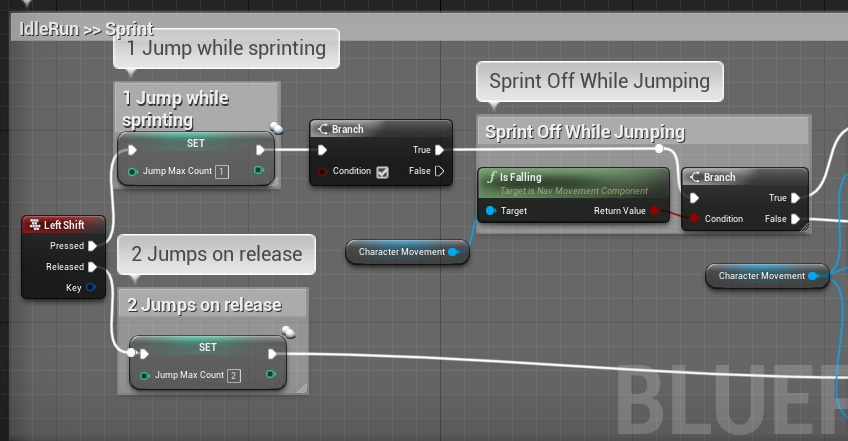

This is a sprint BP
Everything is fine
but in the End
Set Is Sprinting [True]
I dont want this to play unless the player is moving
am trying to add a branch if he is standing still
dont play the animation
cuz if am standing he will play it if i press Shift
Any thoughts? and thanks
 oblique gyro
any idea how i could slow down time but not slow down my player?
fathom portal
@oblique gyro Slow down time then inversely speed up your player
oblique gyro
how
fathom portal
@trim matrix you just need a way to see if the player is moving?
oblique gyro
how do i speed my player up
trim matrix
@fathom portal am trying to figure it out
if you have any idea how i can do that
it will be great
fathom portal
Trying to find a good node, sorry, not ignoring you
@oblique gyro you want these nodes I believe:
oblique gyro
what does the custom time dilation do
fathom portal
Sets the time dilation for the specific actor you're in
oblique gyro
oh isee
fathom portal
Default time dilation is 1 I believe
So if you set global to .5 the game will run at half speed
Then set custom time dilation to 2, and your character should run at normal speed
At least that's the idea, I've never used the custom one
fathom portal
@trim matrix You likely want to check the "Get Velocity" node. If it's equal to 0/0/0 the character isn't moving. There's more to it to make sure they're moving forward, like comparing it to the forward vector to make sure they're moving forward, but that's the basic:
So if the resulting dot product is above .5 they're moving and moving forward
Glad to help @oblique gyro, I learned something new too
oblique gyro
very nice
fathom portal
Ping @silver kettle I believe that's them in the screenshot
fathom portal
Sweet man, 2 for 2
sick plover
Holy Crap this Works!!!
oblique gyro
good
frail wyvern
Good job
fathom portal
Also @sick plover welcome to coding. You'll be chasing that high for years
sick plover
Thank you @MLG i will try my best 😄
oblique gyro
@MLG lol
thorny cedar
i want to spawn my Player with a new pawn attached based per level
with this the Pawn i wanna attach wont work
frail wyvern
@thorny cedar you dont have anythong set to the = node so its gonna return false
sick plover
guys i have a question 😄 so this works only for Player 1 how can i make this for player 2 ?
fathom portal
Simplest way: put this code in your other character
sick plover
locally
 hollow cape
local player 2 is playercontroller(1)
thorny cedar
@frail wyvern oh didn't checked this . I guess it's just equal to a player start
sick plover
naa it dont work :/
frail wyvern
@thorny cedar yup
thorny cedar
Yeah just forgot it and it was allready close to 5 pm here :)
frail wyvern
@sick plover other character. Or player controller.
sick plover
the other character dont do the same like player 1
he dont turn when player one jumps over him but player 1 does
frail wyvern
Check the player controller is different than player 1
sick plover
i have two players in player controller 1 because i play bothe on one keyboard
hollow cape
mmm no, you have 2 player controllers if you're doing local multiplayer
sick plover
yes i have two but player 2 is empty
hollow cape
player 2 is playercharacter/playercontroller(1)
sick plover
yes
hollow cape
Are you saying you have split screen but the second player has no possessed pawn?
sick plover
nope no split screen
hollow cape
so this is single player where you are controlling 2 pawns?
sick plover
no it is a 2 player game but not split screen
hollow cape
Ok, I'm trying to confirm if there are 2 player controllers or not
sick plover
i used this for player 1 and i copied it to player 2 but it dont work he dont face player one
 true valve
@frail wyvern Let's say I include the child BP in another blueprint as a child actor component. How would I get the parent class reference or just the parent ref without the usage of Get Actor of Class?
hollow cape
Are you specifically spawning/possessing 2 different classes? Because I'm betting that both player controllers are controlling the same class of pawn, and you've hardcoded the float comparison to be between playercharacter(0) and playercharacter(1). You'd need to flip that for the second class, but that only matters if you're actually spawning different classes for the 2 players
I don't think you can without casting @true valve , I want to say the child actor component returns an actor reference only
 winged sedge
@hollow cape i'm working with shoto and i also thought we just had to flip the values but it doesn't matter even tho our char 2 is just a copy of char 1 and should be the same class
hollow cape
no, if you copied the BP it becomes a new class
winged sedge
ah ok
hollow cape
If you make a child BP, that's a different story
sick plover
prime berry
what is that check for ==?
winged sedge
^ but the update animation is referring to the char 2 and not char 1, where else do we need to set the class?
prime berry
why is that in there? 🤔
winged sedge
uhh good question
ah that flips the function so that the characters dont face the wrong way
prime berry
I don't understand
winged sedge
the character should always face the other player and without that part he always looks at him with his back
 burnt obsidian
Hi I have a question. I have an enemy who has a collision sphere at his weapon. His weapon has an animation. Now when the weapon gets swinged it passes through the hero but the hit doesnt get registered. If I let my hero walk into the weapon it DOES register the hit.
does anyone have an idea how I can make it that it always registers the hit
prime berry
one of the branches should do just that, the initial check seems redundant as it's only true if the two components are basically right on top of each other
@sick plover can you hook it up like this and tell us if it still works?
winged sedge
will try
prime berry
are you shoto?
hollow cape
snap
winged sedge
we're in a call and he's not checking dc currently
prime berry
I see
frail wyvern
@sick plover change the player controller of the second player to 1
@true valve get the child bp, pull from it and look for get parent actor
frail wyvern
@burnt obsidian check your weapons collisions
winged sedge
@frail wyvern they're currently both being handled by controller 1 anyways
frail wyvern
@hollow cape thanks. It's a mess lol so many inquiries
hollow cape
@winged sedge No they're not both being controlled by 1 player controller....
burnt obsidian
@frail wyvern for what exactly? Cause if I just let the weapon float and not animate and then walk into it with my character it works
its when the animation plays that it doesnt work
winged sedge
theres one 'my player controller 1' which currently is doing movement for both of them
or what do u mean?
hollow cape
Ok, let me ask this a different way, when you guys play in editor, or new PIE or however you test, are you setting it to 2 players?
frail wyvern
@burnt obsidian is the collision moving with the weapon or the way the animation happens?
burnt obsidian
yes
wait im uploading a video to youtube to show you
1second

you can see when I walk into the weapon it says "SlappedHero"
but when the enemy attacks and swings through me it doesnt happen
fathom portal
@burnt obsidian youtube is good, I would check out gfycat, has a hotkey, its much faster than like OBS or anything else
@burnt obsidian can you share your code? Are you using "on overlap"
?
prime berry
@winged sedge @sick plover may I propose this approach? while you're at it? 🙂
fathom portal
IIRC on component hit only works when your velocity isn't zero
hollow cape
have you checked the value of bAttacking to make sure that's being set?
burnt obsidian
hmm ill try on begin overlap
winged sedge
@prime berry sure will give it a try ^^
fathom portal
^ I believe I had to like turn off collisions and turn them back on to get a non-moving component to trigger a component hit
Which obviously isnt ideal
burnt obsidian
nope doing it with beginoverlap doesnt help either
how do you mean turn off collisions?
frail wyvern
I used line traces to do hit detection
I obviously love line tracing😂
hollow cape
have you set the collision component to hidden in game = false to verify that it's actually moving like you think?
prime berry
line trace solves everything!
hollow cape
right
burnt obsidian
ah sorry it might be a bit hard to see in the video but yea I have it turned on false so I can see it go through
fathom portal
@burnt obsidian alternatively you can check every frame for overlapping actors
Every frame during the animation I mean
burnt obsidian
if I would use line tracing would I then calculate the distance between the enemy and the hero and if its less then X make it "hit"?
hmm but wouldnt that be really heavy @fathom portal
fathom portal
Not really, because it would only fire during the animation, and getting overlapped actors isn't intensive
burnt obsidian
my idea would be in the end to have atleast 20 enemies on the screen if they all start doing that
fathom portal
Should be fine
burnt obsidian
ah ok
prime berry
@burnt obsidian have you tried using the hit event? usually this one behaves a bit differently. But I haven't dabbled too much into collisions to tell you how and why exactly 😄
fathom portal
Yeah, even with 20 I don't think it would be a problem
prime berry
basically with that you can check of the comp is your ball collision and then see if it hit the player, and if it did you do your stuff. Just print out the different kinds of components to see what's what and if it works 🙂
trim matrix
@burnt obsidian I mostly use onbeginoverlap
burnt obsidian
yea I tried @trim matrix but for some reason that just ignores the character during the animation
prime berry
@burnt obsidian you might need to enable this on your collisions though
burnt obsidian
my guess would be cause the animation is to quick for the collision?
trim matrix
didnt you use on component hit in the screenshot?
burnt obsidian
yes but @fathom portal suggested it aswell already
but didnt seem to solve anything
@prime berry yea thats enabled 🙂
prime berry
okay good luck 🙂
fathom portal
And if you remove your boolean check and add like a print string, it shows the event isnt even being fired?
Or use the built in debug tools to watch the execution lines light up
burnt obsidian
nope
if I just take out the branch it still doesnt work
weird thing is
when he swings it doesnt
but then when he goes back with his weapon it does
how do I call the collision check every frame @fathom portal
hollow cape
mrrik, put a set global time dilation on a key press
fathom portal
Are you sure the collision box is actually following the swing?
hollow cape
watch it in slow motion to see what's going on
fathom portal
Yeah, I'm not sure why it wouldn't go then
hollow cape
or set the anim speed slower. I had an issue with super fast stuff not detecting, ended up using CCD for on thing...but this was a while back
winged sedge
@prime berry your approach works great on char 1 thx 😄
char 2 is still a problem child tho
burnt obsidian
@hollow cape I put the speed of the animation on .2 but still the initial swing doesnt register
while the return does
winged sedge
we copied char 1 and thats our char 2 yes
hollow cape
^ like I said before...lol
burnt obsidian
is there something maybe in the animation I could change
hollow cape
odd
burnt obsidian
animation blueprint*
prime berry
@winged sedge switch the 0 and 1 in the 'get player character' on the second blueprint
hollow cape
@prime berry that only helps if they're actually spawning the proper classes. If it's just player start with a default pawn class in the gamemode, then that won't matter
winged sedge
ya it still doesnt change
trim matrix
@burnt obsidian Maybe try a low playrate but to me it doesn't look as if it's too fast for the physics tick or whatever
burnt obsidian
Ok I made the collision sphere twice as big and now it 8/10 works
sick plover
fathom portal
That points to a speed issue
sick plover
this is what they say at char 2
fathom portal
Because the larger it is the better chance the physics tick will hit on the right time
burnt obsidian
what does CCD stand for?
hollow cape
constant collision detection
prime berry
@sick plover how does the second char behave?
winged sedge
he just stands there looking right
prime berry
oh one sec
fathom portal
Well, I believe CCD is only for debugging, someone correct me if I'm wrong
fathom portal
I thought it was too intensive for stuff outside of debugging, I could be misremembering
burnt obsidian
ah
hollow cape
I don't think it's a debugging thing, but it is more expensive
burnt obsidian
well with that it registers it every time
but @MFG if I would check the collision during animation which node Should I use for that
hollow cape
might be better off setting some anim notify's, and getting all overlapping components to check if there's a "hit"
fathom portal
Google isn't coming up with anything, so maybe I'm just misremembering. Maybe keep it in and see if you get any crazy lag
It's definitely more intensive, though
hollow cape
yep
burnt obsidian
@hollow cape what do you mean with anim notify?
prime berry
just out of curiosity, did MrRik ever try the 'Event Hit'?
hollow cape
yeah he did
prime berry
alright I'll shut up then
hollow cape
@burnt obsidian in the animation, you can set an anim notify, which is effectively an event at a certain point in the animation
you can put a few, and run "tests" to see if there's a hit at those points
that way it's not checking every frame
@prime berry lolol not at all, this channel is crazy right now
prime berry
haha no worries I was just curious if that would behave differently for some reason
burnt obsidian
@hollow cape Ok I did the notifying
and it does register it
but jsut not always in the collision
but I guess I could just replace the on overlap with this
hollow cape
No
The notify only gives you an event at a specific point in an animation.
You want to take that event, and get all overlapping actors on the collision component and see if it's overlapping the player pawn
I appologize I misread, yeah you'll want to replace the on begin overlap EVENT with this method, but don't get rid of the component. You may also want to make the collision bigger...you'll have to play with it
burnt obsidian
Ill do my best
but Thanks a lot already! I wouldnt have even thought about these things
really appriciate it
fathom portal
Teamwork makes the dream work
burnt obsidian
you too btw @fathom portal
burnt obsidian
with work I use unity so its always fun to come back to unreal haha :p
It works!

 still sigil
Hey, so I'm looking into bringing another Blueprint programmer on board my project pretty soon, to help me with this final mechanic I need for my prototype. Before I start looking for one though, I wanted to get an idea of what a reasonable price range would be to pay a freelance UE4 Blueprinter for such a task. If you're curious, the mechanic in question is a rail grinding mechanic, akin to the ones scene in the Ratchet & Clank games. I just wanna get a general idea, before I jump in head first into the "Looking for Work" channel. I also more wanna know just what a one time flat rate would be. Not an hourly payment.
fathom portal
Its impossible to even estimate based on what you've given.
Are your levels done? Or are they proc gen?
 trail berry
hey guys...how I can collide a trace with a physical body of character???
 rough wing
Why does "Is A" always return true?
do I need to add something for it to change?
I only need a flip flop boolean
where it switches True/False
fathom portal
@rough wing it should change itself. Where is this located?
Like what kind of blueprint, a controller?
rough wing
Its a function
fathom portal
Inside of?
rough wing
In my character blueprint
 odd ember
on the topic of a flip flop, how would one go about making a logical flip flop where there is a way to always force A
fathom portal
@odd ember you would simply make your own flip flop variable, then you can change it if you want
odd ember
doesn't it just become a branch then
fathom portal
Yupyup
trail berry
anyone can help me?
still sigil
@fathom portal Levels aren't done. I'm building all the base mechanics first.
This Grind Rail mechanic is the last one.
 twilit heath
and this is different from branch how @odd ember ?
fathom portal
@rough wing google says flipflops dont work in functions. No idea why, but you'd be best off either moving it out of the function or making a non-local variable one yourself that flips back and forth
twilit heath
Set A to NOT A, then branch
odd ember
@twilit heath well yes my point exactly
fathom portal
excellent. Which solution did you go with?
rough wing
I thought it wouldn't work outside the function
but i tried it outside the function
and it worked
fathom portal
Nice! You could always just call it and pass it to the function
But you'd have to do it wherever the function is every time
rough wing
thats exactly what i did
fathom portal
Or turn it into a custom event
twilit heath
which means when used inside of a function it creates a variable to keep track of it in the function scope
rough wing
the flipflop is outside the function and it connects inside another function after A is set
still sigil
What info would I have to give for someone to estimate a price range for me?
Like, just the mechanic that I'm wanting to be made?
And it's functions?
 sand shore
that's pretty vague
I thought about giving an impromptu quote, not valid as I'm not LFW, and from what you've said alone the revision risk puts that at a floor of $1k for me
Especially for a flat rate all inclusive price
still sigil
To make one gameplay mechanic though?
fathom portal
@still sigil some questions that might be good to answer that immediately come to mind:
1: How big will your maps be?
2: Do you want every edge to work, or do you want to hand-place splines and stuff to indicate grindable areas?
still sigil
The mechanic works on Splines. Not on everything.
There are set places where you can and can't grind.
fathom portal
Yes for one gameplay mechanic, especially since it's vague people would be smart to go extremely high to cover just in case stuff
still sigil
Or will be I should say.
fathom portal
Will you place the eventual splines or is this something you want done?
still sigil
I'll be doing that, yes.
frail wyvern
@trail berry you can get the hit result from a trace
still sigil
I've been making everything thus far, but I've been looking into having another programmer help me make this one gameplay mechanic, since I'm not really sure where to even begin in making it myself.
I have a full description of how I want the mechanic to work written out to eventually post in #looking-for-work , but if you guys need me to post it here too, to get a full idea of what it'll cost, I can do that. Would that help?
sand shore
It'd definitely narrow it down. Something you should also consider is whether your additional programmer will have to restructure anything to make your feature work. You probably don't want everything to be possible whilst grinding. Is the game set up for that?
still sigil
What do you mean make anything possible while grinding?
sand shore
If you're happy with just a spline interp I can turn that around for you pretty fast. That in itself is < $30, but mechanics never exist in a vacuum
Well okay, let's say that it's normally possible to talk to an NPC. Wouldn't want to do that while grinding because either the NPC goes out of frame or the player does... or it has to zoom weirdly. Or maybe something crashes the game now.
So now, the dialogue system needs to understand when you're doing a special action
Oh and typically if you find a bug after I did anything, there's the issue of "touched-it-last-itis". Now I have to prove whether it's "my bug" and you won't want to pay for bug fixes.
still sigil
Well I haven't started work on the NPCs quite yet, but if they did exist, then no, that wouldn't be an issue at all. I would make it to where NPC interactions are only activatable whilst inside the NPCs trigger box for the dialogue.
sand shore
But that's just the issue, those aren't mutually exclusive
I can be grinding on a rail and be within a trigger
Which, in the case that you added NPCs, is definitely your bug and not a freelancer
still sigil
Ahhh, I see what you're saying. So like it could think it's an NPC trigger, and not the Grind Rail trigger?
 modern ledge
Hey, I'm now to Unreal and programming in general. Could I get some help with something? Sorry, I dont want to interrupt though lol whenever someone has a chance c:
still sigil
Or wait, what point are you actually making here? Cause I do have precautions in place to prevent that type of issue from happening.
sand shore
Well if it was me doing it, there wouldn't be a conflation between the types of volumes.
The point I'm making actually is about quality, and the unknown state of which systems exist in your game
still sigil
Well anyway, I'm gonna go ahead and post the list of things I need in here so we can narrow this down a bit.
modern ledge
Oh ok. So, I wanted to get some practice, so I used Spyro from the Reignited Trilogy as a test subject. I figured out how to make him charge, walk, and jump, buT I can't figure out how to do the glide ability? I want him to glide when you double tap and hold the space bar, and then fall when you release, but I'm just not sure how to set that up
still sigil
Editable Spline Meshes: So that the model for the Grind Rail itself can be swapped with whatever model fits that particular level.
Land on Grind Rail Anywhere: My game is planned to have a more open ended design, which means in some cases, Grind Rails could be accessed from any point. The player should be able to land on a Grind Rail from any point, and then begin Grinding from where-ever on the Rail they landed on, while also moving in whichever direction they were facing before landing.
Ability to Attack While Grinding: This should be self explanatory. The player should still have the ability to swing their Melee Weapon while grinding on a rail. This will be used to destroy hazards that are on the rail, and to hit switches.
Duck/Crouch While Grinding: Used to duck under obstacles.
Jump & Double Jump While Grinding: Again, self explanatory. The player should still have the ability to jump and double jump while grinding.
Switch Rails: If there is another Grind Rail next to the player while they're grinding, the player should be able to jump onto that rail by moving the Left Stick in the direction the rail is, (Or by pressing A or D on the keyboard) and then pressing the jump button.
Abandon Grind Rail: If the player tries moving in a direction where are no Grind Rails available, and then performs a Double Jump while doing so, they can abandon the Grind Rail entirely, exiting the Grind Rail's momentum, and returning to their normal platforming state.
Grind Rail End Point: And lastly, this should be an obvious one, but once the player reaches the end of a Grind Rail, they should jump off of it automatically, and return to their normal platforming state.
odd ember
@modern ledge I have no idea of the context of your game or what you mean by glide
don't assume everyone knows as much as you do about any particular topic
 fleet sandal
Maybe this? https://youtu.be/dCEdW5bBS1M
Hello everyone in this video I will show you how to make a paraglider inspired by Breath of the Wild in Unreal Engine 4. This 100% blueprint.I always wanted to make a glider in unreal engine.
In this video we first make a paraglider actor.Then attach the actor to a component...
still sigil
https://youtu.be/0XD3P7lfOlI?t=23
He's talking about this ability.

In This Level You Can Find:
-500 Gems
-3 Dragons
Links Of Interest:
-Twitch: https://www.twitch.tv/parrypugman
-Review/Let's Play Channel: https://www.youtube.com/channel/UC97J6a73W2gJ3lv1EeDp0jQ
-Discord: https://discord.gg/vv9mYxM
odd ember
well there you go
modern ledge
Yeah, lol. Sorry I guess I shouldnt have assumed everyone played the game. lol Oh and thanks @fleet sandal that looks like it may work. I'll give it a try!!
odd ember
controlled descent you can check that video for
if you want the input command
(of double tap space and hold)
get time on button press, then check for time on release
then make a branch if the double tap is within a certain tap time, and increment an int
on press, you can have a branch that checks for that int, which is what a double tap is
it's a bit "dirty" but sadly most games do double taps like this
modern ledge
Ah ok. I'll see if I can do that. I guess I chose a tricky one for a first project lol Thanks for the help!
odd ember
I think it's a good first project goal to set
so don't fret
considering other people want to make an MMO right off the bat
 orchid zinc
@still sigil So you have the jump, crouch and attack code already? Switching between rails would require interacting with your jump code and setting a specific target end point at the beginning of the jump. Is that a feature you have already?
modern ledge
@odd ember Lol yeah, true. Its been really fun to mess with so far
still sigil
@orchid zinc None of the Grind Rail portions are actually made yet. That's why I'm looking into having someone else do it, cause I've been struggling trying to think of a way to even get the player to attach to, and move along a spline. Let alone all the other stuff.
But all the other "base" versions of these actions, jumping, crouching, and attacking, are implemented. It's just the grinding itself that I haven't started on yet.
 gusty shuttle
I need a hand offsetting my arrow. It seems to point the exact opposite of where I am. Any tips?
The code behind it
Or rather, I just need to follow where the mouse is pointing haha
 trim falcon
is it better to use a advanced locomotion blueprint from the asset store, or make one your own for learning purposes
still sigil
I guess when you put it like that, the only thing I really need another programmer to help me with is getting the player to attach to, and move along the grind rail, and having the player swap between grind rails.
The rest of the mechanic, I can probably do myself, since I've already made versions of these that you do when you're not grinding.
trim falcon
i dont understand
orchid zinc
he is talking to me
trim falcon
oh
trim falcon
lol its fine
gusty shuttle
Any tips from you folks? From my post above^
orchid zinc
@still sigil So do you want players to jump between nearby grind rails or only be able to switch if they are somehow touching 2 separate grind rails at the same time? If it's jump, that requires modifying your basic jump to work with the grind rail destination. Or it would just be the same as a well targeted abort jump
still sigil
https://youtu.be/OA3saEwYONw?t=19
When I say "Switch Rails," I'm talking about this.

Hey Everyone!
This is one of the many gameplay elements in Ratchet and Clank. The variety of gameplay elements are easy but fun nonetheless.
Rachet and Clank is a reboot from its early 2000 iteration. This Action/Adventure game is just an overall joy to play and look at wit...
orchid zinc
Right, so when he is switching between rails he is not doing a normal jump
his jump destination is the other rail
still sigil
Yes.
orchid zinc
So it depends on how you wrote your basic jump to determine how much work that is
unless you want a separate jump ability made but then it might look different
still sigil
Either could work I suppose. Switching rails is less of a "Jump" command, and more of a "Move over here," command. It looks like a jump visually sure, but it's end goal is really just to move the player to the other rail.
orchid zinc
Yeah but move commands are different in every game
it depends on your animations, etc.
Also, in that vid, there is clearly some kind of nonstandard momentum happening there, there is an impetus being added, it's not just using the player's existing momentum and locking to spline. And I don't see that detailed in your desc
still sigil
Yeah, I'm not really looking to have that be part of my version honestly. That's why. 😛
orchid zinc
OK but simply 'move to' the other rail isn't nearly enough information to estimate what that entails
i mean, it's got to start the jump with the other rail point as a target
sand shore
And do you include animation controller code in that?
orchid zinc
to determine the animation and arc etc
still sigil
I don't really know what it entails either. Again, that's why I'm looking into paying someone else to make this part. Cause I literally have no idea how to make it myself.
What it'll entail is however the other programmer chooses to accomplish this goal.
@sand shore I can do the Animation Blueprint stuff.
orchid zinc
So would you be willing/able to add an 'end point destination' to your jump function and animation so that a point can be specified and the jump always ends at that point?
so that someone could just get the destination point of the other rail to switch and call your jump to that point destination
at which point the land on rail code kicks in
sand shore
Also, single player?
still sigil
Yes.
@orchid zinc I actually need to make something like that anyway for another feature, where the player jumps to the nearest safe point on the ground, if they touch something dangerous like fire or spikes.
The Rail Switching could be linked to that, if needed.
orchid zinc
But there is an issue with getting the momentum to look continuous between switches
I guess just need change the destination point closer/further depending on momentum
still sigil
https://youtu.be/kStahjj21QY?t=1320
Hang on, I have a better example. Think more like this for the rail switching.

Thank you guys for watching.
orchid zinc
Yeah so looks like you want a fixed or minimum momentum while grinding
still sigil
Pretty much.
orchid zinc
So you can guarauntee all one would need to do is pass the rail switch jump end point into your jump func and then the animation, arc and momentum would work and be handled by you?
then it would pick up at the rail again when landing
which would be part of the commissioned code
still sigil
I...think? Are you saying the jump code doesn't need to be altered at all, and I can just use the default jump code?
Cause there's not really any special momentum changes that I have in mind for rail grinding anyway, so if the default jump doesn't need to be messed with at all, I'm fine with that.
 frosty steppe
anyone know how can i bind a value of a bp to the UI progressbar
https://cdn.discordapp.com/attachments/225448446956404738/676884313295290368/unknown.png
https://cdn.discordapp.com/attachments/225448446956404738/676884380416737280/unknown.png
https://cdn.discordapp.com/attachments/225448446956404738/676884507118403587/unknown.png
it doesnt work how i done it
any tips?


 mortal heart
how can i make an actor sequence instance editable?
this keeps happening when i try to edit the instance's sequence

 naive cave
Hey guys, BP noob so forgive what may be a stupid question but how I make this go into that. I need it to spawn an actor based on a field in a datatable.
 weak shore
Does anyone know how I could make a UI like this https://prnt.sc/r0x508 which is somewhat 3d

(stays in place when moving around)
orchid zinc
@still sigil Hard to say for sure how hard that is without looking at your jump nodes first
still sigil
I've gotta say I wasn't quite expecting to go quite this in depth with this. I was more asking to hear from other Freelancers about what they usually charge for...like....in general really, and then I was gonna try to come up with my own price range based around that. XD
orchid zinc
Yeah I was hoping you would hear that too
still sigil
@orchid zinc I grab a screencap of the jump code.
Yeah, I wasn't really asking about how much would they charge for this mechanic specifically. I more just meant what do freelance blueprinters charge in general.
orchid zinc
I would also like to hear some BP freelancers chime in on their general price ranges and how they estimate costs
wraith wraith
@trim matrix thank you!
still sigil


Here's the code for the jump. @orchid zinc
Ignore the "Jump Max Count" node just floating there in the first screenshot. That's a piece of unused code I forgot to delete. 😛
sand shore
So since I threw out a ballpark...
I typically estimate how long it'll take me to understand how your project works (to the extent necessary). I also estimate time to implement and test. For all-in upfront estimates, I include enough time for back and forth iteration on specific "feel" or technical details as well as bug fixes with adjacent systems. In the past, I've been burned by goalpost moving.
The time to implement bit is personal taste. I just have an idea of how long similar things have taken me to do - in this a core movement mechanic.
There's also a bit of padding for risk. Now that you've provided more details the risk factor drops significantly.
still sigil
And so for you, when it's all said and done, how much do you usually wind up charging?
orchid zinc
Does this new info allow you to revise your ballpark $30-1000+ estimates at all?
sand shore
I charge the agreed amount (or sometimes less, if it ended up being under time by a lot).
So say $200 for a team system implemented at the start of a project
And yes, I could do a better estimate with the details provided.
Even though the screenshot of the jump function isn't something I normally ask for, it's a good way to judge the rest of the project
still sigil
So you would say somewhere around $200?
sand shore
For this? With these details and the approximate state of your project, maybe. A team system is simpler than this by a lot, and that was a portion of a rolling agreement (didn't include some of the things a full upfront one does)
No mechanic is created equal, which is why I don't just have a table.
still sigil
Okay, I can do that then. I was honestly getting kinda scared there when the $1K amount was getting thrown around. XD
fathom portal
I mean, can you estimate how many hours it will take to understand your current setup, cement what you're actually looking for, then build the actual tool, test it, etc?
 cobalt slate
Does anyone have a link to a video or page on how to disable a character select button once another character has chosen one? My game is only a 4 player/character multiplayer game, and i don't want two players choosing the same character. I feel like this should be simple, but i can't seem to find much documentation on it. thanks!!
This is with blueprints by the way. i'm still on C++ basics!
fathom portal
@cobalt slate it could be as simple as "on button press ---> Disable that button"
Or you could make it much more complicated but future proof
sand shore
@still sigil Yeah, I'm a bit of a premium still. You might go so low as to be $50, but I'd avoid going that low
fathom portal
Then enable all buttons when you go to select characters again
 odd veldt
Is it possible in a blueprint to read the vertex colors of a near static mesh?
sand shore
Someone will do it off Fiver
still sigil
@fathom portal How long it'll take for someone to understand it? Not really. If my above code is anything to go by, I would say my coding is pretty basic. So I don't think it would take someone very long to understand it.
fathom portal
Lets start with the basics: How many hours (estimate) have you spent on your project?
Like is this a thing you've been working on for six months, or is this something you started yesterday
still sigil
A couple years now. I've been working on it on and off since the very end of 2017.
fathom portal
Ok, woo, I was thinking this was like a new project.
So: How long would it take for you to sit down and explain your project, how anything crazy in it works, things relevant to the job. Would it be a 20 minute discussion or a multi-day ordeal where the person would have to take a binder of notes to wade through your existing setup?
sand shore
I'm gonna go with an hour on my side
fathom portal
Anyone else have input? I'm trying to move this forward
sand shore
Then, I'm pretty experienced just cracking open marketplace assets and figuring them out
still sigil
I'm gonna go with @sand shore 's estimate. I guess it really just depends on what gets asked.
That's not really something I'd know the answer to until I'm actually there doing it. 😛
sand shore
And yeh I'll let others speak up, hogging it just a smidge 😂
still sigil
You're good. 😛 I've been really appreciating the feedback so far.
@fathom portal Anything else?
fathom portal
This isn't really my area of expertise, I've only ever had staff positions, I've never done freelance UE stuff before
I'm just trying to think through what I would consider. It would take a rough estimate of the hours, how complex the task is, etc
odd ember
some very blueprint related discussions going on today
still sigil
It's a very complex discussion, that I had no idea was even going to become complex. 😛
sand shore
Doesn't belong in industry-chat, career-chat, lounge, or unreal-engine IMO
still sigil
I actually tried asking this question in #industry-chat first, and someone told me I should ask it here.
And so, here we are. 😛
odd ember
lmao it was @sand shore
 stuck fossil
Sorry to interject but I had a quick question. Does "Crouched Eye Height" in the first person character BP still just not work at all or am I doing something stupid? I saw some answerhub questions about it from a few versions back but nothing from 4.20 on that I could find.
still sigil
Oh...Well.... XD
odd ember
we've come full circle
still sigil
IT'S ALL CONNECTEEEEEEEEED! XD
odd ember
@stuck fossil have you tried it?
stuck fossil
I did, even setting it as low as 1 and no change, thats why I was wondering if there was like an additional setting I needed to fiddle with first or something.
I assumed it would be as easy as changing the value but no such luck.
odd ember
wait what do you mean setting it?
pretty sure crouched eye height is determined by eye height which may well be determined by capsule size
stuck fossil
I meant the value. I think by default the "crouched eye height" is set to 20 or something, so I tried going lower and it didnt change. I'll look into the capsle itself though and see if changing its dimensions helps.
odd ember
yeah what I am saying is that it is predetermined by other factors
or at least that has been my experience
stuck fossil
That makes sense. I'll mess with the capsule some more this afternoon and see what I can come up with. Thank you for pointing me in the right direction!
trim matrix
So i have a little third person project, and for it i need orient to movement, but while dragging i need the character to have limited movement (not turning around when walking backwards being the main one) Since there is no way to switch orient to movement on or off, how else would this be achieved?
 plush ridge
What might cause a player to spawn far away from the PlayerStart? It only happens on one map. I made sure:
- No collisions were affecting the spawn
- The correct game mode is set and the correct pawn spawns
- The pawn has correctly set up collisions with the landscape mesh they spawn onto
But for some reason I end up very far away from the spawn point and underneath the map, to fall forever.
It may be spawning me at 0,0,0 (need to confirm this).
Side note: if I open the level manually and hit Play, I spawn and play correctly. This weird behaviour only happens if I load into a different level by default, and then, at runtime, load myself into this level in question.
fathom portal
@plush ridge do you have any level arguments that would only modify it when coming from a different level?
odd ember
are you sure that the player start actually exists in the level you're loading?
plush ridge
@fathom portal No special arguments anywhere, I use the same logic to load into all other levels that work fine.
@odd ember Yes, with no errors
Same set-up as in my other levels.
fathom portal
If you move that like higher off the ground, does it still happen?
odd ember
is it a persistent level with sub levels?
plush ridge
One sec
Ah crap
Moving the playerstart higher did fix it. But it doesn't say "Bad Size" on the starting point, that's strange
fathom portal
That is indeed strange
There's a hotkey to move it as close to the ground as possible
plush ridge
oouu
odd ember
yeah press end
fathom portal
So like you'd move it ten feet off the ground, then hit the hotkey and it will do it
@odd ember for the win
plush ridge
Will this hotkey work for any actor? I have some scene comps I use as a reference to spawn AI at their location, would be nice to move them all to lowest possible
fathom portal
Is there a blueprint equivalent for that? Like being able to do it at runtime
odd ember
it will work for any actor yes
fathom portal
Should work for anything with a hitbox I imagine
plush ridge
hmm wait
odd ember
no hitbox necessary
plush ridge
here's what happens if I use the End key
fathom portal
Oh nice
plush ridge
the reason:
I have a black cube below the map (for lighting reasons)
Does the 'End' key use visibility channel to check how far down to go or something
Because my landscape ignores Visibility
plush ridge
no luck with blocking visibility, still goes through the landscape
It does have collisions yes, I can walk around if spawned correctly
odd ember
is that a custom setting?
plush ridge
Visibility is a default trace channel but these are my collisions for the landscape
(Some custom there)
odd ember
try using a non custom preset
plush ridge
'End' key seems to work on objects using non custom preset
Might be looking for certain object type, then
Like Static or something
Interesting...
odd ember
no it's the custom presets
plush ridge
Well, this'll do nicely, even with the minor workarounds
odd ember
it's a bug
odd ember
that epic won't fix
at least that was the MO last time I checked with them
@plush ridge I'd recommend that you create a new preset for your landscape
instead of using "custom"
then it will work
plush ridge
Ah gotcha, I totally overlooked that we can set up custom presets
Is this via .ini only or can it be done in the frontend?
odd ember
it's all under project settings -> collision
plush ridge
Perfect, thankds
odd ember
can set up custom channels and object types too
naive cave
I think my question got buried with all the industry talk so sorry for asking again, but I'm a bit of a BP noob and while I know how to do this in a few different programming languages, I'm having the hardest time figuring out the method in BP. I need to connect from Ext Type (which is stored as a String in a datatable) to a Spawn command to spawn a specific actor. However, I'm not finding a way to convert that info. What would be the best way to accomplish this?
odd ember
@naive cave store the actor class you want to spawn
naive cave
Store it in...a datatable?
naive cave
So I have Ext Type's column set to have the name of the actor. For instance, this specific row is TownBuilding1 for sake of testing. I have an object stored called TownBuilding1. That may change during the course of the game, so I need to be able to pull it from the table, but I guess I'm not sure if I'm missing another step here?
I guess that's where I'm kind of lost is what do I do once the actor class is listed in the datatable? And do I need to change it to something other than a string in the datatable config?
odd ember
yea it needs to be an actor class variable
odd ember
correct

 split ginkgo
How would I see if a player is using a keyboard or gamepad?
I want to change the button prompts in my game depending on the controller method the user is using
 short pawn
Maybe check if key is equal to the input key
 carmine prawn
It's fairly simple, @split ginkgo https://youtu.be/WCxUw_s4YQQ

Hiya Guys, today I'm going to be showing you how to check what input device is being used during gameplay so in this case, is the mouse and keyboard being used, or is the gamepad being used, in this case we're using it to switch what a tutorial displays
 distant sedge
Switcheroo might be better if you want more than just a couple hardcoded inputs or even let players remap buttons https://www.unrealengine.com/marketplace/en-US/product/switcheroo

Easily detect whether the player is using a gamepad or the keyboard/mouse combo, and react accordingly.
split ginkgo
I currently done have the budget to use paid plugins but I'll add that to my list of needed plugins
I'll try that video, looks like it could work
 narrow breach
Is there a way to stop the editor from disabling my break points everytime I close and re-open a project, it really messes with my iteration workflow
trim matrix
Can someone help me make a new gamestate? When i do, my character stops moving
 peak mantle
Is there a way to set a fixed position for tooltips? Instead of it moving with the cursor over the button
stuck hedge
You could put a spot on your HUD and attach it to that when you pop them up
peak mantle
but its not 1 button, i have X amount of buttons for example, and each button/widget is created within a for loop, so each button will have a tooltip beside it lets say, but a fixed location. Like Button location + 50 on x-axis
stuck hedge
Are the buttons on the UMG?
if so, just do this: button->overlay->text/image label attach the tooltip to the overlay (it allows multiple children) with an offset.
 ebon reef
anyone know if you can open a pure BP in c++?
 cobalt ferry
believe if you add a new c++ class to a pure bp project it will make the necessary files
plush ridge
Is it possible my player is being spawned before my landscape has a chance to load in properly?
During level load (not level stream)
cobalt ferry
more likely your player start is inside something
plush ridge
Definitely not
I checked against player collisions in the level, nothing is blocking it
But when I spawn in
It always spawns me in some random point in the level, nowhere near the landscape
And I fall forever
This is the only PlayerStart in the level and everything is set up correctly ;/
I saw it work a couple times but it's like a 1 in 100 chance at this point
plush ridge
@rough wing "Make Vector"
rough wing
smh thank you
cobalt ferry
what if you move the spawn closer to the ground?
plush ridge
@cobalt ferry I tried it at the location UE places it when I drag it into the world. Tried it much higher. Tried placing a basic Cube underneath it to make sure the landscape wasn't taking too long to load or something. I always get teleported to this random location.
Couple things I know:
- it only happens if I load the level at runtime (start in a different level, then load this one). If I just hit play in this level already loaded, it works every time.
- it does not happen to any other level, even if I load them at runtime
cobalt ferry
@meager wasp had a similiar issue
unsure what the problem ended up being in the end
plush ridge
hmm
he spawned but landed under his landscape
in my case I'm spawning way off the map
I did a print
"spawn" vector is the location of the PlayerStart, "char" vector is the location of the player himself in that same first frame
they match
so the player spawned at the playerstart
except,
(X=-691.952759,Y=1589.337158,Z=329.388550)
That, is the real location of the playerstart
🤔
 amber grotto
Does anyone know how to make the mask be used like the knife, that the mask can be taken out and put on? https://youtu.be/h8Sy5xf_QUs

 desert pendant
is there a way other than cut/edit in text editor/paste to switch an actor I have in a level to a blueprint subclass I just made?
 sullen radish
is anyone familiar with the Touch blueprint that Alan Willard demonstrated in this video https://www.youtube.com/watch?v=a2dOtwuNyeQ&t=2020s

In a world where more and more displays have capacitive touch support, it can be useful to know how to implement different kinds of user input. On this week's livestream, Alan Willard will walk us through how to listen for common touch input combinations.
ANNOUNCEMENT POST
ht...
I've put a timestamp for the specific point where i need to ask a question about really
i think the blueprint he made is really amazing and it's in another level to be honest... i really want to figure out how to do the interaction for some objects in the scene... i've been struggling for few days to understand how to get it done .
 north oriole
Does anyone know how to fix this bug? Every time I open my project it says the BP can't compile, I have to right click "refresh" the create widget node to get it to compile.
trim matrix
https://blueprintue.com/blueprint/az7jlxhi/ I have an inventory that has quantity
BlueprintUE
but i don't know why the quantity doesn't stack how should work
the first item it stack but after that becomes bugged and just starting to add new items instead of stacking
 sick sapphire
is there a variable i can tick on in the child actor menu so that I can make the location and rotation lag behind the parent actor
also what is it called
 haughty ember
@sick sapphire Nope. But you can use a spring arm component, and it has lag properties
sick sapphire
ah i must have misremembered
anyways thx @haughty ember gonna try that
haughty ember
@trim matrix I'm confused; how can the item both exist and the inventory length equal 0?
Or rather, what does Check if Item Exist function actually do?
trim matrix
it checks if the item exists in the datatable
haughty ember
ah. well I can't tell by that code, you should add some print string nodes / use breakpoints.
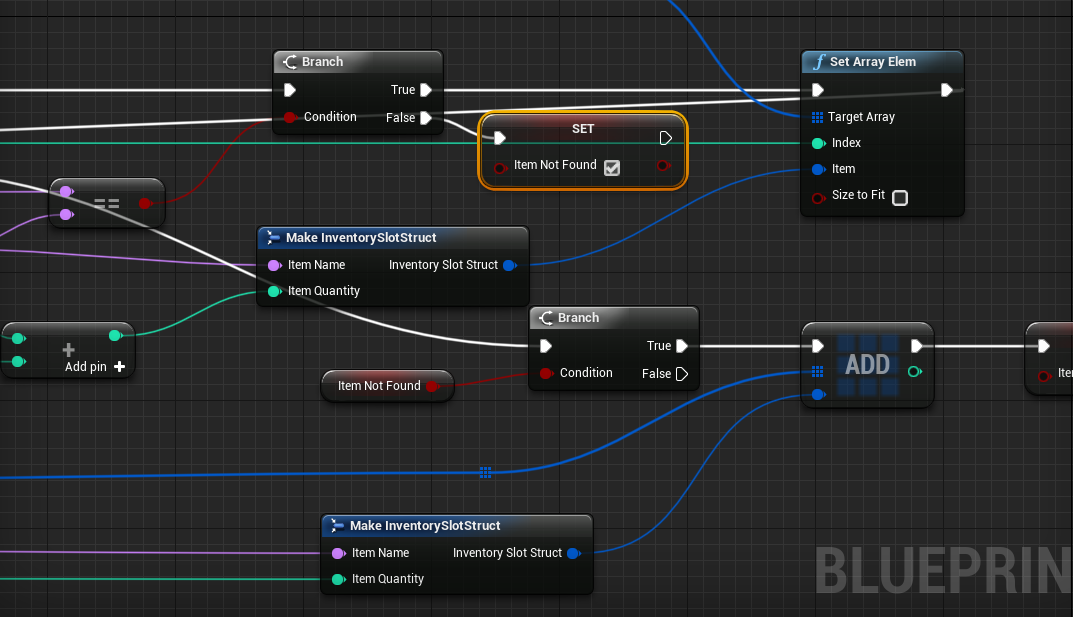
What I do find strange is the Add node at the False branch inside the foreach; I think you meant to put it on the Completed exec pin rather
trim matrix
hmm
let me try
the idea is that i iterate the array
and if i find an item that already is there i add to his quantity
and if the item doesn't exists i add an new item
haughty ember
yeah, but you're adding a new item on every iteration of the loop
so if inventory contains 3 items that aren't your item, it will add your item 3 times
 haughty ember
I already told you before what to do; use the Completed pin and not the False pin of the branch
yes exactly
haughty ember
but don't put the set there
call set ItemNotFound=true before the start of the loop, and if the branch is true call set ItemNotFound=false
But either way this just take care of the case where your item doesn't exist, you said the problem is it doesn't stack (hence when it does exist)
 faint bolt
Guys what actually mean when a Replicated Custom Event is Reliable? What actually change when it is Reliable and when is not?
 plain marten
Odd question, has anyone set the Twist Limits: Damping for the Angular Limits on a PhysicsConstraint in blueprint at runtime, I'm having trouble chasing down where one would find a function to set that in BP or CPP?
 bleak vector
hello folks 🙂 I'm wondering how I might go about listening to something
When the player uses a spell, it creates an actor that manages that spell's functions
I'm wondering how to tell it when the notify event on the casting animation triggers
twilit heath
set the active spell ref when you spawn the actor
pull it into anim BP with blueprintupdateanimation
if its valid, send notify
 wind harbor
How do you name the Table rows in unreal 4.24.2??
 surreal peak
Click on them
wind harbor
OOohh, just double click in the list works 😮
surreal peak
They did a good job on updating these but that change was strange for me too at the start
twilit heath
same
wind harbor
Yeah, I see a lot of super nice updates here, but I felt like my brain was leaking out or something, like not finding super basic stuff is scary <.<'''
surreal peak
It's shitty ux
wind harbor
that part yes
twilit heath
can finally see what row struct the DT is based on now
surreal peak
They show you that you edit the rows in the struct view at the bottom
But also need you edit the row name at the top
You can right click a DT to see that
But yeah annoying
 glacial eagle
All we need now is a meta flag for UPROPERTY to restrict the row struct type..
sick sapphire
how do I make a crosshair follow the cursor in "Input mode Game and UI"?
slim wave
Is it possible to remove a reroot without unlink?
odd ember
@thorny cedar yes?
as in, I have no idea about your context but what you're asking is entirely possible
thorny cedar
when i call load streaming level after this node i want to spawnActor( MotionPawn) Posess
so every level has a different pawn
trim matrix
There may be a misunderstanding in the design. There are two layers: how it works AND how it looks. You can have in each level the same "how it works" character, but with different "how it looks" skeletal meshes. But from the "how it works" perspective there's only one character class. So each level that particular only one character gets a different look. For example, in RPG when the player wears a different armor. The armor made of metal LOOKS different than the armor made of leather, but it's the same player character. I apologize if it's convoluted, and not what you need 🙂 @thorny cedar
thorny cedar
@trim matrix i have two MotionController Pawns one for level 1 and one for level 2
i wanted to seperate both in two Pawns since Pawn 2 is a bit overloaded atm
trim matrix
This unfortunately doesn't mean anything to me, because I don't know your global overall design. My comments about design still stands in my opinion, at least relative to Occam's razor. Of course, I may be completely wrong because I lack the full extent of your vision, for which once again I apologize, because it's not my intention to muddy the waters unnecessarily 🙂
trim matrix
does the array have some sort of callback when is updated ?
thorny cedar
is there a way to call make visible after loaded after it loaded?
i mean to make the level visible?
split ginkgo
Is there a way I could get the direction of a joystick and make a widget image rotate to face that same direction?
thorny cedar
find look at and invert?
 hollow tusk
if I make some struct (defined in C++) in BP does it call the default 0 param contructor to create it or how does it work?
split ginkgo
@thorny cedar that worked, I had to subtract 90 degrees to get it facing the correct way even after inverting it but it works good
Thanks
thorny cedar
@split ginkgo yeah it was my first guess
split ginkgo
Actually @thorny cedar the look at rotation I set to 0,0,0 do you know if there's a way I could get a screen space location of a image?
I was thinking that 0,0,0 would point towards the center of the screen, but on second thought, thats actually the top left corner of the screen
Unless 0,0,0 is the center
 tough mountain
I have a problem that a specific StringTable does not load when i play packed/standalone. It is not referenced in any UMG elements and only used dynamically during play. How do i force it to load? No idea if this is the correct channel
split ginkgo
No, its on a widget
thorny cedar
and your widget is in your level?
split ginkgo
Oh, I'm not doing VR
thorny cedar
yeah just have to switch my mindset
split ginkgo
Trying to get that middle green leaf to face the leaf that the player's joystick is pointing towards
So if the joystick is all the way to the right, it points towards the right
split ginkgo
Yeah
thorny cedar
and then call an event to rotate your greenleaf every tick
thorny cedar
its sth like a direction idicator?
split ginkgo
Yeah
I think this works: @thorny cedar https://blueprintue.com/blueprint/gjb2kcvl/
BlueprintUE
thorny cedar
should be rather simple, if you found the right rotationa xis
split ginkgo
Yeah
 manic cradle
Hello everyone. Is it possible to create an invisible/translucent material that hides stuff that is behind it?
 tight schooner
For the visual aspect you should ask #graphics. For BP all you have are "set visible" nodes that'll hide the thing wholesale.
Or have a BP drive the parameters of a material (or material parameter collection)
 slow hill
Pull from an actor reference > drop on graph> search in context menu
manic cradle
@tight schooner ok, thanks
split ginkgo
@fallen glade Why are you adding a static mesh component to another static mesh component?
 fallen glade
no I'm trying to add a static mesh component from a function library
here is the function:
slow hill
Yes but you need an actor to add the component to
fallen glade
I have it
split ginkgo
@slow hill I tried disabling the "Enable Context" and it doesn't show up in a blueprint library
@fallen glade What are you trying to do?
fallen glade
just add a mesh to my characters through function
split ginkgo
Asking about your attempted solution rather than your actual problem
What are you trying to achieve by adding the mesh to the character
fallen glade
adding a weapon to my character
split ginkgo
You should actually probably keep this function inside the character
fallen glade
yeah, i have it there already wait
split ginkgo
No, I mean make the function inside the character
It had no place being outside of the character
fallen glade
Can't reuse then :/
fallen glade
on different type of characters
split ginkgo
As much as you want
Make a character master class that all characters are children of
slow hill
You probably want an interface if you want to reuse on different types
fallen glade
I have different parents
split ginkgo
Have one master parent that everything is a child of
Let me write something showing how you would do it
fallen glade
I do understand how to do that
split ginkgo
MasterCharacterClass
    -> CharacterKid
         -> CharacterAdult
    -> CharacterDefault
-> CharacterTwo```my qyestion was: why can't I add a static mesh from library function ? What's the technical reason behind it ?
slow hill
Im pretty sure you just need to drop a wire pulled from a pin ref
fallen glade
@slow hill
split ginkgo
@fallen glade You should do it right the first time, it will save you the hassle when your adding new characters
slow hill
If you cant use inheritance create an interface for adding the weapon
split ginkgo
He should just use inheritance though
From what I'm understanding, there is no reason to not use inheritance
fallen glade
I mean, there are a lot of different ways to do this... What I don't understand is why this way can't be done
split ginkgo
they did it like this because its not how you should do it
fallen glade
fair enough
split ginkgo
They create constraints on purpose sometimes
split ginkgo
Yeah, shouldn't be too hard, but if you have any issues just ask here
sand shore
Actually this is one of those times where you ought to be able to do the thing
However there's a technical constraint which prevents that particular node from existing within a BPFL
You might be able to tackle this with a custom Actor Macros
Make a regular macro library and then reparent it like you would a class (reparent to actor). That'll only let you use it within actor subclasses @fallen glade
It might have enough context to spawn the nodr
 chilly lodge


 odd ember
no
carmine prawn
hello, anyone a triangle
 frail plaza
What would be the best way to implement a paper, scissors, rock type damage system where there's 6 attacks and 7 armors of varying strengths and weaknesses based on who they were hitting? Everything I've been coming up with involves 42 float*float nodes on 6 different blueprints so I feel like I'm missing something crucial.
fathom portal
@frail plaza I believe you can cut that down drastically with select nodes
 solemn dagger
Hello, im trying to make any componentmesh to fill another component(cube), i already can resize the mesh to the same size of the cube but if my component mesh has its pivot not in the center of the mesh i dont know how to align it to the cube
how can i get the pivot position of a componentmesh ?
 teal nexus
Is there a way to control, from Blueprint, which assets should be packaged into the build (or rather, which ones should not be packaged) ?
odd ember
@frail plaza data tables
 snow geyser
Yeah I just rethought it
odd ember
you want <k,v> maps
frail plaza
I made a data table but I'm having trouble figuring out how to pull the information out of it, all I've managed to do is return a true/false if the row exists, haha, not what any of the values are.
Sorry, I'm still very new to this.
I'm reading about maps now, do you just use the data table to populate the map info somehow?
 fresh holly
Hello everyone I'm trying to make a blueprint that has a raytrace from the camera till it hits something (infinite distance) and then use that distance to either scale a object up or down I have 98% of that working but the scale will never go down and it scales on different axis depending on the coordinates of the hit location (couldn't figure out how to use the distance instead of the hit location vector) if you want to see the full blueprint https://blueprintue.com/blueprint/zmy7fz1o/
BlueprintUE
 forest junco
I am trying to get information from my enemy data table to control my animation blendspace for my enemies. I tried making a reference in the blendspace to both the spawner (which sets the enemy's speed) and the enemy character itself. When i try to feed the value into the blendspace via the object reference that i created (spawner or enemy) the value it always coming up as 0. It's probably a super basic mistake on my part!
trim matrix
If anyone can help me, then please message me
 keen goblet
@fresh holly Have you tried using the Distance output of the hit result? If that doesn't output what I think it does, you could do VectorLength(GetWorldLocation(Camera) - HitLocation). Then you could get the ratio between that distance and whatever distance you want to mean "don't affect the scale" and multiply the target's scale by that value, or something like that.
 pastel rivet
does Set Actor Tick Enabled only disable the event tick node?
or does it accualty affect other factors aswell?
keen goblet
@pastel rivet Think disabling tick just means the Tick event doesn't fire for that actor. Don't think it stops latent actions or collisions or anything.
odd ember
yes it stops tick from running
ends up saving performance
some actors can't run without tick though
 robust temple
How can I make sound cue having Mono Distant and Stereo sound (for player and other players) not play Mono Distant for player causing the sound?
pastel rivet
@keen goblet this does count towards input in the playercontroller as well? Because it prevented me from using input
keen goblet
I don't know :/
naive cave
Hey guys, got another question...I've got the Event BeginPlay set to spawn the proper default building set in the struct, but I want to be able to press Y, have it change the variable in the struct, set it, then spawn again. I know I'll need to delete the prior spawned building, but I can't get this to work as it is. Am I missing a piece here or is this not the way this works?
(I'm a programmer learning BP for the first time so I know how to make this work in code but figuring it out in BP has been...fun.)
rough wing
I can't find this node anymore
Launch Character
Does anyone know where i can find it?
odd ember
are you looking... on a character?
@naive cave you need to use SetMemberInStruct otherwise you have to reset the full struct reference
naive cave
Where would that be? In place of the bottom Set after the Y press?
odd ember
when you're setting the member in the struct from Persistent
naive cave
So replace Set with Set Members? Sorry, this is such a different beast from coding
naive cave
Sadly, no. Most of my experience has been with other languages.