#blueprint
402296 messages · Page 408 of 403
 tropic tide
Before I had issue with time dilation, but it was trigger's fault
 trim matrix
For some animations
when i lock them from moving
the animation get bugged and work in a weird way
any1 had this issue?
 latent shadow
Does anyone have any idea why blueprints I put in my world go invisible at beginplay when i rebase my origin, but if i eject i can toggle the visibility or reassign the mesh and it become visible again, unaffected by another origin rebase.
 odd ember
@latent shadow are they hidden in game?
latent shadow
Yes
 jade widget
Can someone help me with my issue here
Link to message in this chat
https://discordapp.com/channels/187217643009212416/221798862938046464/675374010883768361
latent shadow
Ejecting and moving them makes them visible again
odd ember
I mean do they have the "hidden in game" tickbox ticked?
latent shadow
no
odd ember
@jade widget that looks really bad. I recommend never having input outside of the character
or the player controller
latent shadow
If i dont rebase the origin it doesnt do it
odd ember
what do you mean rebase the origin?
latent shadow
Origin rebasing/shifting
odd ember
are you doing that real time?
in game
as in
because that strikes me as an editor time only option
and I have no idea how you are going about that real time
latent shadow
No its made as to allow larger worlds by shifting the world origin/ moving all actors in the world accordingly
i think thats how it works
its a realtime feature
odd ember
again, you're doing this in game?
latent shadow
Yes
odd ember
because that doesn't sound right
latent shadow
It works perfectly with my planet and player
odd ember
world composition is made for this exact purpose, without having to rebase
odd ember
I think you're treading at the boundary of what UE4 allows you to do within WC then
I honestly wouldn't even know how to help you without at least seeing the code or anything
even then it might be a case of you trying to use functionality that is severely limited in scope
latent shadow
I am pretty certain Im using it properly, I dont see how rebasing could be an editor only feature either
odd ember
well you're not showing any code of yours either
latent shadow
The code for rebasing is pretty simple after enabling it in world settings
And if I do this in the BP thats going invisible it works
odd ember
probably a bug then
latent shadow
Ill browse the bug issues and see if i can find it
odd ember
on the other hand, what are you rebasing?
latent shadow
Everything in the level, its because my planet is too big so i get precision errors
 static charm
maybe the initial shifting on begin play, since it's not needed, it causing issues? Or doing the initial too soon on begin play is an issue
odd ember
tbh it sounds like you should be rebasing the level itself, not every actor in the level
latent shadow
^
jade widget
@odd ember what do you mean? it enables input meaning the character can use the interact keybind
odd ember
@jade widget it's a way of doing it that is rife with issues like these
latent shadow
Putting a small delay on the rebase at begin play seems to fix it
jade widget
@odd ember so do you have a way to fix it? or you just going to tell me that it shouldn't be that way? 😆
odd ember
yeah you fix it by having input only on your character or your controller, and allowing your interaction to pop up as the interaction to use when you enter its radius
plus it seems you're dealing with two separate triggers, you don't check for which actors trigger, so it might be well some other actor triggering your overlap first
jade widget
But my issue is that I need to click the interact key twice to get it to work. The overlap works great but on first load into the game I have to click interact twice to get it to work. Once it's been clicked twice it works for the rest of the game play
odd ember
why do you think those issues aren't related?
jade widget
How do I reference the hit boxes so I can put them into the controller
odd ember
so what you want to do is have the hitboxes on the interaction. when the player overlaps, you cast it to your player character
on your player character you create an event dispatcher
called "OnInteraction" or some such
give it an input parameter of "actor" or whatever your interaction base class is
then call that from your interaction when your player overlaps and you've done the cast
jade widget
Okay. thanks 🙂
odd ember
from there the player knows your interaction, so you can set it as a variable. then you can have something like a "use interaction" input that allows you to call the current interaction's "use" function, which in turn does all the logic that the interaction needs to do
in this way you can also enable events in the level blueprint for interaction, so that one interaction (e.g. a button) can use another interaction (e.g. a door)
 terse harness
Hi, I have some actors with widget components that include buttons. How can I allow these buttons to be clicked in-game?
odd ember
you uh, press them... probably with a cursor
nah they have events associated with them
terse harness
thanks, I actually tried that first. the problem is that with normal widgets you set the input mode to UI/UI and game to allow interaction, but doing that requires just one widget to be focused. I'm looking to be able to interact with multiple widgets at the same time
 analog ice
I'm really not sure what to make of this. The error is simply not true. The variable it claims isn't functioning, works perfectly during PIE.
It's related to my blueprint for placing the character's footprint decals. It gives me tons of errors during PIE (basically everytime he makes a footprint) saying something about having difficulty with the get PhysMat node.
odd ember
I assume this is a mouse based game?
terse harness
ye
odd ember
you can use the OnMouseHover event to decide which widget to focus
terse harness
❤️ perfect. thx
analog ice
Nevermind. I think error might just be happening when he walks on something without a physmat for it to get. That could make sense.
And when it returns none, it's just reporting that as an error. Which it isn't really.
odd ember
@analog ice always use isValid before performing checks to avoid errors like that
analog ice
That worked! Thank you 🙂
terse harness
ok setting user focus is tricky because it requires a widget object reference, but I only have widget component references. any ideas?
 rough wing
Hello everyone,
I want to reverse my characters stance
My character at the moment is holding his gun on the right side, i want to make it symmetric and have the gun at the left side
Is there any way i can do this?
odd ember
@terse harness whichever object or actor is spawning the widgets will have a reference to all widgets, so it should be the entity managing them
 celest oar
guys i am having a bit of a collision issue here
my custom channels are set properly to ignore but they are still generating overalp events
tropic tide
overlap events and collisions aren't the same thing
celest oar
i think i just have a mesh that i use for perimeter that is causing the issues
tropic tide
you can turn off generate overlap events
celest oar
got it working ty
tropic tide
👌
 lavish glade
how guys how can I get my AI/Zombie to jump over obstacles?
the zombie follows me and when I jump on top of something, the zombie just stands there rather than jumping over it
trim matrix
I'm having an issue where Get Instances Overlapping Box (Overlapping Sphere just randomly picks whatever it wants regardless of size) will pick up the instances at the top, north side and bottom of a cube without fail, but always misses the instances at the south, east and west sides of the cube UNLESS I make it run the function more than once and call THAT more than once (so twice and twice again) in which case it will remove the problem pieces but if I run it again the pieces will come back until I run it a fourth time. I've looked at the visual script over and over again and can't see any logical issues so can somebody explain to me what I've done wrong?
Script itself is very simple it just doesn't do what I intend it to
Using Sphere just flat out didn't work even though it should work the same way, the size of the box doesn't seem to matter either. Part of me thinks the Instance Overlapping has some issues.
If it's any help, the instances I'm referring to are single-side planes that come together to form a cube, both internally and externally.
I've been slaving away at the map editor thing I've been making and I'm almost at the light, just need to get over this last hurdle 😩
lavish glade
I wish I could help but I barely know anything
trim matrix
That's ok 🙂
Also am I wrong for using blueprint? I know how to use C++ but most places I've checked say that most things are best done in BP.
lavish glade
Not sure, I never used visual studios or any C++ code
 fathom portal
@trim matrix Use cpp for really, really intensive stuff like procedural generation. Most of everything else is perfectly fine in blueprints
trim matrix
I dont want any procedural generation just player generation
fathom portal
That's fine, yeah
 molten iron
Hey All, I have created a modular system for our characters where all clothing and attributes are child Skeletal meshes under a parent (body) mesh. However, the child meshes will not simulate physics for some reason (such as the attached tail). Do you know what could be the cause ( we have set all the physics assets properly to simulate and we have ticked on "simulate physics" on each child mesh but nothing will simulate)... anyone know what could be the cause?
 molten hound
Hey guys, has anyone else had an issue with animation blendspaces? No matter what I do the when setting it up from idle / walking / running it always plays the last animation. In this case running. I can see that my speeds are correct in game but the animations do not match.
All three animations are plotted and when I use the slider they are correct.
As soon as I launch the game and move the character the animation goes to running no matter the speed??
 manic flint
Hello, I am trying to work what the best way to reduce complexity and time. I have 1 BP that has the pick-up capability and then I have a number of other BPs (objects) that I want to pick up. Is the right path to use direct blueprint communication, that is to add the pick up BP to each of the prop BPs?
It seems that this might be my best option https://docs.unrealengine.com/en-US/Engine/Blueprints/UserGuide/BlueprintComms/index.html are there any other options?
How to use one Blueprint's functions, events, and variables from another Blueprint.
 tight schooner
@manic flint I would look at "Blueprint Interface" rather than having to cast to every possible class of pickup. And/or another way to tackle this problem is to make all your pickup-able classes children of a master pickup-able class, and only cast to the master (parent) class.
The situation to avoid is making a pickup script that looks like a chain of "is this object this class? What about this class? Okay, how about this class?" etc.
manic flint
Good point. I will look at BP Interface. And noodle on it more.
Thank you @tight schooner
 vocal urchin
I am calculating the position of an object in space as it flies through the air. I have all the position data I need, but how do I get the rotation data as well?
static charm
Get Rotation
vocal urchin
Ah, let me be more precise. There isn't an actor. It's a line trace.
That creates an arc (line trace segments).
static charm
So which rotation do you want and in reference to what
the start trace and the end arc point?
or just one of the segments
vocal urchin
I am having a particle effect fly along the direction of the trace (a bullet tracer).
So I need to update at every segment to get the right rotation
The current problem, in a nutshell
vocal urchin
Hrrm.
 twilit heath
its what i'd recommend, altho you probably have the direction stashed/accessible somewhere already
twilit heath
if you have velocity for bullets (as a vector) just MakeRotFromX from Velocity
vocal urchin
@twilit heath Eeeyy, nailed it. Thanks man, I'll remember that
twilit heath
MakeRotFromX basically makes a rotation so that forward vector is aligned with the provided vector
MakeRotFromYZ for example, would first precisely align the right vector with Y, then get as close as it can for aligning the up vector with Z (have to be perpendicular)
@vocal urchin
trim matrix
anyone used alsv4?
 spiral surge
anyone know how to scale geometry (multiple) as the same time without breaking the desires shape?
static charm
put them all in one blueprint
 true valve
So I added some point lights to a house. What are some way to turn them all on/off cheaply?
These are some of the things I tried:
- Get Actor of Class using Point Light. Used the ref to toggle visibility.
- Created a BP of Point Light then created a child BP of it. Added the children to the house using Child Actor Comp.
None of them can toggle its visibility
 unborn lantern
Hi, I need to use BeginOverlap on an actor where I attach on the fly a number of static meshes. It seems the overlaps are like a box around the components I add, but I would like to use the actual geometry of the components to check for overlaps. How to do that?
Solved, I just had to set "Complex as Simple" in the static mesh I am attaching.
spiral surge
Im having issues with my player navigation, the player pawn is set to "can effect navigation generation, there is a persistent world that has a nav mesh bounds, and each sublevel has its own, and the world settings are set to nav mesh invokers true, and when i place a player start and try to play my player character falls through the map? someone please help.
 limpid lotus
Hey has anybody had the problem where their game crashes when using the game user settings version of switching from fullscreen to either borderless window or windowed?
tight schooner
@true valve Both of those should work, so dunno. Some other ideas..
- Event Dispatcher https://www.youtube.com/watch?v=sEcoWGrF1Hg
- Get All Actors with Tag https://youtu.be/PKBQyTtS62g
maybe the light type (static/movable) is preventing it from working. IDK. (I'm not knowledgeable on this particular subject.)
fathom portal
@void rock I've never used delegates before, but what happens when you click the arrow to the left of the name?
 void rock
just shows the pass-by-reference option
 obtuse summit
Hi Guys, i am relatively new Unreal user. I have been experimenting with the AR handheld template and i wanted to know if there was any way to edit the blueprint so that the replaceable spawn actor is spawned only once in the scene instead of it being spawned with every touch. Any help would be greatly appreciated. Thank you.
 stuck hedge
"take hires screenshot" node. What is it the file output as? Do we need to put a file extension on the name?
This one
Saving the screenshot to disk seems to work fine. However, loading it doesn't. I've tried it both with and without the png file extension it creates and either way no texture is created.
 cold sinew
Goodmorning guya
Yesterday i was looking to connect to database ( Sqlite or Mysql ) and which one better
Someone suggested VaRest to me ive downloaded that
 surreal peak
At that point I would suggest checking the cpp code and breakpointing it @stuck hedge
cold sinew
Tried to connnect to Local mysql but it didnt worked
When im using this link for example
http://localhost/mydb/ its getting everything even css codes
Idk because im printing all requested content or not ive tried to get just the table nothing happend
surreal peak
VaRest is for http request stuff
If you don't have a server app that handles these, then that doesn't really help you.
cold sinew
Are there any server apps we can use ?
Are there any google service for this requests
surreal peak
One usuall writes their own
If you want to directly connect to a mysql db then you need a different plugin iirc
cold sinew
Idk if there are free plugins
surreal peak
Pretty sure there are some on the marketplace if you actively search for mysql
cold sinew
They are expensive xD
surreal peak
31€ or so last I've seen
cold sinew
Maybe i havent seen that
surreal peak
Either way, VaRest alone is not helping you
cold sinew
I ve found USQL was 400$ something like that
Ok i will check for that
Thanks
Have a nice day
stuck hedge
@surreal peak I'm looking at the function in c++ now, unfortunately it is giving me little insight as to how it looks for the file. I assume it would look for it in the same directory that it saved it in, but who knows. I'll keep digging down.
stuck hedge
the screenshot one sticks it directly in screenshot
yeah okay i'll try sticking that on the front and see
Hmm nope, I tried Game/Saved/Screenshots/TestScreenshotNow.png but that didn't do it either.
Oh it may need the full path.
It does. It needs the full windows path
including disk drive
That seems rather annoying.
trim matrix
How can i switch between two meshes/skeletons?
surreal peak
@trim matrix More info please.
trim matrix
so im making a horror game
I have two states, wandering and chasing, they both have different skeletons
I would like it to change skeletons when my enemy is chasing me
and go back to the other when it wanders again
 sullen pelican
you normally keep the same rig and change the animation
sullen pelican
so the pose does not change? just the mesh?
trim matrix
yes
sullen pelican
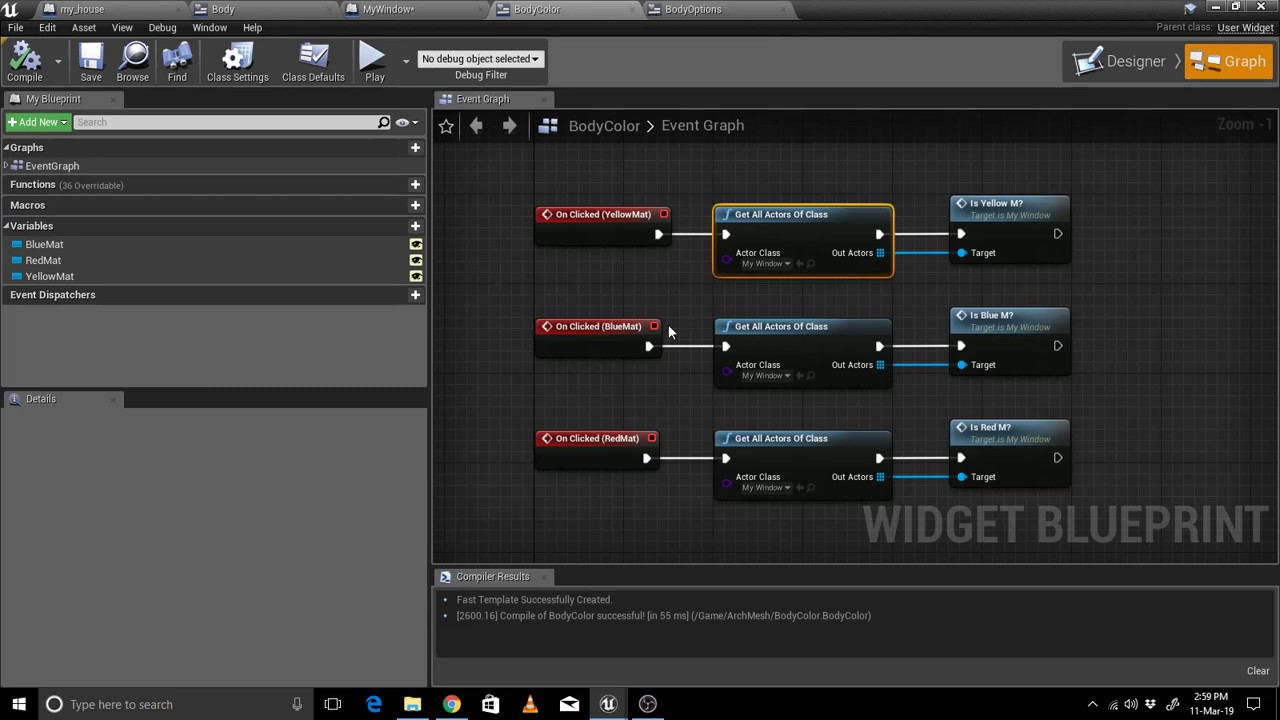
how to change static mesh and material in unreal engine using blueprint for your ArchViz projects
might help
trim matrix
How can i reset a sound on retriggerable delay?
 cyan lion
what do you mean by that? Reriggerable Delay starts countdown from beggining when it get execution again
so basicly RetriggerableDelay(5s) got fire, starts counting down and get fire again after 2s, so it start counting down from 5 to 0 again
like that
and about resetting sound you can just play it again from Start
 pseudo tusk
anyone know a good algorithm for sorting actors based upon how far to the left they are from a starting position? in this instance it'd be how far left from the player character they are
i get close but it's not working in all instances
should specify this is a 3d game so checking strictly x positions isn't going to work in this instance
surreal peak
GetRightVector() * -1.f ?
pseudo tusk
how would that get how far left something is from a starting position?
surreal peak
First off, that's how you get the "left"
For distance checks you can then do:
FVector DirectionDistance = (CurrentLocation - StartingLocation);
pseudo tusk
surreal peak
And then:
float DistanceToLeft = FVector::Dot(DirectionDistance, GetRightVector() * -1.f);
surreal peak
Dot product will "extract" the part of the distance that is solely in the left direction
pseudo tusk
i knew it had something to do with dot but i wasn't exactly sure how to set it up properly to work in all instances, the way i had it setup was working in most instances but not all
still not working in all instances tho
 icy pelican
quick question: is atan2 available in blueprint math expression?
 carmine prawn
The math expression node allows you to type in a math expression and builds the appropriate sub-graph to create that expression.
Atan2 (Degrees)
icy pelican
still nothing
carmine prawn
Can't you write the expression into the node, as described in the first link?
 glacial eagle
My guess is the engine can't decide whether to use radians or degrees version
glacial eagle
Might be that node isn't setup to work with math expressions then
IIRC Epic have to flag the nodes to work with it
glacial eagle
"If I recall correctly"
icy pelican
what do you mean by "flag the nodes"?
glacial eagle
Epic have to set it up in code to support specific expressions. I guess they missed Atan2
icy pelican
got it
glacial eagle
Do any nodes that take two inputs actually work in math expressions?
glacial eagle
Ahh
yeah found it
Yeah they missed that one looks like
Ahhhh I see how it works
The node needs to have a "compact node title" or a custom display name... that node unfortunately has neither
A bug/oversight on Epics part technically
Report it as a bug, they'll probably fix that
icy pelican
ill do that :)
terse harness
what's the standard way of changing the currently focused widget? SetUserFocus and SetKeyboardFocus aren't working and I feel like I'm missing something. Edit: fixed. forgot to tick recieve hardware input
pseudo tusk
why are my rotations going in different directions depending on if i'm tabbed into the game or not?
twilit heath
rotation depending on mouse position in viewport?
 queen compass
Hey guys, right now I have a situation: In a big project there is a controller blueprint that has certain functionality, lets call it blueprint A. For my, smaller section of this big project, I need to create a custom blueprint, lets call it blueprint B. What I need is that I need some (!!!not all!!!) functionality of blueprint A to be present in blueprint B before I start adding my own custom functionality to B. BP A is a really massive one with huge number of dependencies, I've tried creating BP B as a child of BP A, but it did not really work, because I have to override numerous events, functions, etc. So, I wonder, maybe there is a simpler way to do it? Sorry, I'm still pretty new to UE4 and Blueprints, so some things that may seem obvious to you may not be so obvious to me. Thanks in advance.
stuck hedge
@surreal peak Thanks for the help earlier, I've now got save games with screenshots
 trim falcon
how to check if character is moving.
queen compass
@trim falcon For example, you could print the result of GetActorLocation every tick
trim falcon
mhm
queen compass
@trim falcon If you can see that the value changes, then your actor is moving
trim falcon
aight ill try that
 meager spade
Do I just put in a class that implements the interface since I can't cast to it?
tight schooner
@queen compass sounds like they should both be children of a parent BP that holds the functions common to both of them
meager spade
Or a component since they only need some functionality to be the same
queen compass
Hmm, ok thanks, I`ll see what I can do
 tacit sail
Is there any way to change the gravitational direction?
 rose spire
Can anyone help me with saving and loading game?
tacit sail
I think ue4 has a free asset for that which can help you with that @rose spire
 frosty steppe
hey is it possible to attach a spawning object thats falling to a wall thats moving

the red triangle gets spawned randomly and the black wall is moving | the triangle has physics to fall down (gravity) | can i attach it to the wall while the objects is falling
 lean inlet
yes
If you have a socket on the falling object you can have an object spawn at that location
@frosty steppe
lean inlet
is the object you have a static mesh?
frosty steppe
im spawning a blueprint with a static mesh in it yea
and that bp object has gravity to fall down
lean inlet
ok let me show you real quick
sorry for moving it here I just know other might want this help and they'll go to BP channel frist
 split ginkgo
Whats the best way to achieve this type of locking/selecting system? https://www.youtube.com/watch?time_continue=2777&v=ipft1iw_myo (46:18)

throw back tuesday playing Viva Pinata. come follow me on twitch@ twitch.tv/likeanaddiction. so you never miss out on the phone -- Watch live at https://www.twitch.tv/likeanaddiction
I have something right now, but it doesn't work very well at all. What I'm trying to do is to detect a collision overlap (sphere) and if its from an actor, then it sets a variable to that actor and in EventTick it checks if that actor variable i valid and sets the location of the player to the location of that actor
lean inlet
The red circle is the socket manager
So the red is when i created a socket
and the purple is where i move it on the mesh
now this mesh will always have this socket attached to it
frosty steppe
okay
and how can this help me
if im adding a socket to my falling object
to attach it to my wall thats moving
that my falling object doesnt glitch through the wall but instead "move with it" (attach it)
frosty steppe
but my wall and my falling object are different blueprints how can i attach it now (my falling object) to my moving wall
lean inlet
so in the case of spawn actor you can choose the actor class
frosty steppe
yea
lean inlet
do have it attach is different
you want to it to be locked on to the object correct
I think this is want your looking for
and name your Sockets!
so know what is goes too
frosty steppe
but im using a bp where a static mesh from ue4 is inside
the triangle
how can i add the socket there to attach my falling object bp ( triangle) to my wall
 zenith kindle
how do i expand a line till it hits the edge of the screen? i only have 2 variables, cursor location (projected vector) and a vector direction pointing to the edge of a screen.. in the example i clamp the result but it is wildly inaccurate once you get closer to edge since im drawing a line with a fixed distance...
is there another way? to draw a line from a point and a direction, calculating the distance to hit the edge of a box (viewport size)?
odd ember
viewport size is fickle
since it's a frustum and not a box
you can try using WasRecentlyRendered with a time of 0.0 to cutoff the screen edge
but it might not work unless each element is a separate actor
but if you're painting it screen space, you can use GetViewPortSize and convert that to world space
there is a function for that
then compare the vectors that it spits out
 bronze mountain
Having some problems identifying the right node to use in this situation, if I have a set of numbers, say 1-6 and I want to press a button and run a different command depending on what number is active, how could I do it cleanly?
I could branch like 6 times but wonder if there's a dedicated node to do the check? 😛
 tame coyote
or a switch on int, since you have numbers, maybe
odd ember
enums are ints behind the scenes
whole idea behind enums is pure readability for int based operations
such as states
which is what it looks like ya boi is doing
chances are you could even use a select node instead
bronze mountain
Readability is what I'm looking for, I'll check both options then, cheers folks
bronze mountain
Switch on int was perfect for the job, enum went a bit over my head at the moment, for context I'm getting the child count of a widget, so I'm not sure how to apply that value into an enum, or if it's necessary?
 fallen glade
Does anyone know how to add a skeletal mesh component from a macro/function library... it wont let me : /
 hard galleon
question is there a way to spawn and delete particle systems dynamicaly from blueprints ?
 fair estuary
@hard galleon Yes you can do that. You can use spawn emitter at location or spawn emitter attached that can either be manually set or passed a particle variable to run. From there it will output the emitter that can be set as a variable and modified or deleted as you see fit.
hard galleon
i think i might have found it ^^
i wonder if spawning and deleting emitters every frame is a performance hog compared to have to adjust 6 emitters per actors 🤔
fair estuary
You should build your emitter to attempt to accomplish the look that your going for. Spawning and deleting anything every frame could be a pretty big problem for performance.
hard galleon
ok thanks wont do that then 😛
fair estuary
lol no problem
hard galleon
you spared me time rebuilding my placeholder stuff and find it out by my self 😛
trim matrix
Hi, im learning how to make structures and data tables. I made a structure (with health and damage float variables) and a data table of that structure. Inside my Main Enemy (Parent) i added a variable of that structure, now my question is: How can i add a row (from the data table) to a child, and take damage when that child is attacked?
fair estuary
@trim matrix do a get data table row and select the row that contains your enemy data and use the output to set the struct variable on your enemy. As you populate your data table with more rows, you will also need the function Get Data Table Row Names which outputs an array of row names that you can loop through and compare against the specific data table row name that you are looking for on your children and then set the structure that way.
In my work, for all things that rely on a data table, I create a variable called hard_coded_name which contains the specific data table row that I'm looking for and externally expose it as well as making it exposed on spawn. This way your parent can contain the logic and the children can contain the hard coded name that you would be searching for.
trim matrix
ok, i will try that. Thank you 
 late gorge
hi, im trying to make a basic save work and it's failing to save for some reason. i've checked https://docs.unrealengine.com/en-US/Gameplay/SaveGame/index.html but i can't seem to find the async save game to slot function
Overview of how to save and load your game
the last bit simply fails
i only store current map, actor transform and location
trim matrix
Got a simple question regarding saving as well... I'm trying to get the name of a component
but its not displaying mesh
trim matrix
How do you get the camara in urneal to cause the farthest part of the map to not shown, and to slowly generate and show once you move closer?
 gusty shuttle
In your experience guys, how do you fix this bug?
surreal peak
Depends on what is causing it
I usually get this when I'm not connected to SourceControl
late gorge
usually this happens when an editor instance failed to close properly
late gorge
anyone have any idea why a game load into set game transform location always ends up with me being at the right spot for a brief moment (a frame or two)
then teleporting back to PlayerStart object within the map?
the code goes: load map -> set actor location, set actor transform
and there is no teleports of any kind within the level blueprint
 odd veldt
Is it possible to make a mesh in a actor only visible to its child actor? (only owner see is not working)
gusty shuttle
@surreal peak @twilit heath Yeah I have two error reports open in the background not showing
gusty shuttle
That fixed it. Weird how that sprung up haha
Thanks @twilit heath and @surreal peak
twilit heath
@late gorge overriding Choose/FindPlayerStart is usually the way to go there
 past juniper
Struggling with something having done a couple of different tutorials and still having the same issue, not sure if I have set something up wrong in my project.
Trying to use a spring arm to have a 3rd person camera based on a sphere mesh, got the sphere moving moving around and stuff. but for some reason when i run the game it ignores the camera position and puts the view from the sphere location.
late gorge
@twilit heath is that an option on Character?
 winged sedge
hey i have a question about 2d sidescrollers, does anyone know how i can make 2 characters in a 2d sidescroller always face each other except when moving etc.?
late gorge
and wouldnt that break loading normally?
past juniper
@winged sedge get the position of each character and compare whatever axis is 2d,
(X1<X2) setChar1FaceRight
(X1>X2) setChar1FaceLeft
not too familiar with blueprints but the logic shouldnt be too complex.
winged sedge
aight i'll try thx
past juniper
np
the set face left and set face right, will probably be changing a rotation axis 180.
trim matrix
how do you set up clipping planes in unreal?
so like if im far away, i dont want to see anything from far away
view distance basically
twilit heath
@late gorge gamemode functions
 pure heron
Is there any way to get all classes that inherit from another class? For example, I have my BP_Upgrade class, and I want to get an array of BP_HealthUpgrade. BP_DamageUpgrade, and so on, all of them inheriting from BP_Upgrade.
And I'm talking classes, the purple variables, not the blue references.
late gorge
@twilit heath i only see functions to get player start, not to set whether to ignore it
twilit heath
you can override those
and they return an Actor*
which doesn't have to be PlayerStart
 valid tide
Hello everyone. Spring Arm with Camera in it is inside character Mesh, and attached to head socket. Running animation has slightly head tilt, but camera doesn't tilt with head. How do I fix it?
late gorge
@twilit heath ...? it doesnt appear to be overridable
twilit heath
choose and find player start are
there is a pretty big fail in the gamemode logic tho
late gorge
choose player start... returns an actor? wat
how does this even make any lick of sense
shouldnt this return a vector... or a transform?
or i guess find player start would
twilit heath
    /** Return true if FindPlayerStart should use the StartSpot stored on Player instead of calling ChoosePlayerStart */
    virtual bool ShouldSpawnAtStartSpot(AController* Player);
and it will return true for most respawn sceanrios
bool AGameModeBase::ShouldSpawnAtStartSpot(AController* Player)
{
    return (Player != nullptr && Player->StartSpot != nullptr);
}
not accessible from BP
late gorge
insert a witcher-like "fuck" here
 visual granite
late gorge
visual granite
late gorge
let's just say im looking to not have to delve into c++ code before the game is even in a proof of concept stage
odd ember
@visual granite generally a terrible idea to modify base classes
extend them instead
and make them accessible in the extension
late gorge
the thing is, i see plenty of tutorials
for save games
and none of them show this behaviour
i load to where i saved the game, for a frame, then it overrides it
and i go back to the playerstart actor on the map
so.........
?!?!?!
srsly some things in unreal are infuriatingly inconsistent
huh, i guess open level was causing the issue, it's not even marked as async...
this just straight up worked
but since i will have more than one level, this isnt exactly acceptable... how do i make sure it waits for open level to finish?
edit: well, after some googling... here's to another couple of days of getting to know how ue does things 😄
twilit heath
when do you call that RestartAtTranform?
 feral ice
if i want to see if something is bigger than 1 but smaller than 2. Which of the following do i use
 sick plover
Hey there, i want to make a 2d Fighting Game together with a friend we set 2 chars, the camera and a stage but we have a problem when player one jumps over player 2 he dont face player 2 so i want to ask how can i set it up to player 1 and player 2 always face each other. Sry for my bad english 😄
feral ice
sick plover
i forgot to say im a absolutly noob in ue4 😄
i have this so how can i say player 1 and 2 pls always face each other
trim matrix
how can you check to see if you're coming out of a trigger box? I don't want to check on begin play though
sick plover
im using target points to spawn player one and two
it says player one (Goku) always look at right and player two always look at left
and this is the problem they dont face each other
can anyone help or can someone show me how he handle it with char 1 and 2 facing each other ?
 keen goblet
@trim matrix On Component/Actor End Overlap might give you what you're looking for
past juniper
@sick plover maybe something like this. I'm new to UE so its a guess but try this, and then use the faceRight instead of your is moving right bool on your one.
and whenever one is facing right, the other is facing left, so you can use the same bool for both.
sick plover
@past juniper me too im a absolutly noob so my question the Last Thing you Made a nee Variable?
At the Moment it is like this p1 always looks right and p2 always looks left
frosty steppe
anyone know why this isnt working
i want to set a limit to my falling speed value with clamp
but it isnt working like i want
frosty steppe
i want to increase the falling speed over time
and get game time in seconds was good thing to use in my opinion
frosty steppe
nope
i convert it to a negative value
if you thought this would be the answer idk why it isnt working
static charm
"anyone know why this isnt working, but it isnt working like i want"
i dunno what you want or the situation
does this actor spawn
for a short time
is it from beginning of level play
what is the object
frosty steppe
idk what you mean it increases the falling speed and my object is falling faster and faster but the clamp doesnt work
i want to limit it to -20
without the clamp it works
but witht he clamp the value stucks at -1
 prime berry
@frosty steppe you need to add your current speed to to the speed value before the clamp
right now you're not addint it at all
prime berry
why did you change the system I gave you? 😄
frosty steppe
im now using game time in seconds
idk which one i used before but the value resettet at 24 or smth to 1 again
prime berry
what?
frosty steppe
yea
prime berry
gametime in seconds will just count up indefinetly
frosty steppe
yea i know
prime berry
you need to use delta time to be framerate independent
prime berry
what resettet?
prime berry
please show me the nodes
frosty steppe
hope its like it you gave me today
prime berry
looks like it but I don't get why it would do that
frosty steppe
me2
thats why i used game time in seconds
but then my clamp isnt working
such a simple code isnt working what a shame 😄
atleast my algorithm for scaling works
prime berry
it should gradually build up speed at 9.81m/s just like normal gravity would 🤔
frosty steppe
smth wrong with my value?
frosty steppe
no
prime berry
gimme a sec I'm starting up unreal, this is bugging me 😄
 frosty steppe
am i stupid wtf
prime berry
I'm really confused
prime berry
this is identical, right?
prime berry
can you print the delta time only?
prime berry
nope that's pretty much normal behavior
frosty steppe
okay weird
prime berry
just out of curiosity
if you do that and start the game, what does that look like? there should be a little speech bubble with the current value in it
OH
wait a second
expand the print string
and set duration to 0
then make a screenshot of the text
frosty steppe
prime berry
do all of them stay in place and count up?
frosty steppe
prime berry
or rather down
prime berry
well there you go... each line is one of your spikes
so every spike that spawns starts at 1 and then slowly accelerates
frosty steppe
oh
canca
but it makes sense
so i should export the falling speed to a other bp
and then use it
prime berry
also considering you start at 1 I guess they even move up a bit when they spawn
frosty steppe
yea 😄
prime berry
... 😄
frosty steppe
what would you do?
export the falling speed in another bp
then it should work or not
prime berry
well what do you want? should all of them move synchronous at a constant speed or how should they behave?
prime berry
yeah that would be the easiest solution, I think
frosty steppe
okay
i have one question
you are really good in ue4 what are you doing in private
i mean are you programming any apps
or what do you do
prime berry
I've just been building stuff in UE4 for automotive applications at work
frosty steppe
wtf 😄
prime berry
for 4-5 years at this point
prime berry
this is really basic stuff though 😄
most of it is learning by doing, like you're hopefully doing right now 😛
prime berry
that's why I like to answer newbie questions, it's a fun exercise to build something simple like this out of my head or just whoop it up in UE4 real quick
frosty steppe
the best thing i learned is to keep the code clean did you see my new algorithm
prime berry
no I only saw the spaghetti stuff
prime berry
damn that's pretty clean
 prime berry
or at least it's ordered nicely, I bet there's still some spaghetti 😄
yeah I remember that
frosty steppe
😄
i created custom events that all the spaghetti stuff gets out
i cleaned every bp that was a work
prime berry
so basically you want something like this.
move your current tick event stuff to a different blueprint and get a reference to that
it's not the best solution, but it'll do the trick for now
prime berry
😄
frosty steppe
mhh now i dont know what to do next
prime berry
welcome to gamedev
frosty steppe
😄
i can show you my "brainstorming experimentation" i did yesterday ATTENTION SPAGHETTI
prime berry
oh boy
frosty steppe
prime berry
😬
frosty steppe
it rotates the camera and setting up every object that it looks like that a harder level started and now the objects arent falling from up->down it falls from right->left
is there a easier method? 😄
prime berry
not only one 😄
prime berry
I think so
sick plover
Hey @prime berry do u have expirence with fighting Games ?
frosty steppe
idk
okay
now it would work to just rotate every object
but yesterday i had gravity
so rotate everything wouldnt work so good
😄
so i needed to roate the camera that the objects are falling down but it looks like it goes from right to left
prime berry
so basically you turn the camera by 90° to the side so that everything goes sideways?
prime berry
you're doing better than some other people on here, no worries 😄
frosty steppe
okay puh glad to hear
ahh last question before i go to bed i need to go to school tommorow
the clamp doesnt work :/
it sets it to -1
prime berry
well yeah because -1 is bigger than -20 so if that's your minimum it'll set it to that
frosty steppe
oh
prime berry
switch the values in min and max
prime berry
and if you go to school, pay more attention in math class 😛
prime berry
same, it's nearly 1 AM here D:
frosty steppe
gn8 im now going to bed
prime berry
haha have a good night
prime berry
then we're in the same timezone 😄
frosty steppe
💙 *nohomo
prime berry
seriously go to bed you need the sleep more than I do 😄
@sick plover you want to turn your characters, right?
why don't you just check the position of the other character and see if it's X value is bigger or smaller than it's own? and then just rotate them accordingly
sick plover
@prime berry i have a problem i want that Player one and two always Face each other but i dont know how
prime berry
well see what I just wrote 🙂
sick plover
So Can you Show me a exemple in blueprint i Need to say i started to learn ue4 in a week, sry for my bad english 😅
prime berry
I really can't build that on the fly right now, but basically what you want is to check the position of each fighter and the other fighter and then just do a simple check on it's X value, if that's your horizontal.
basically, get world location, break the vector output, and then with the X output, you do a > and plug that into a branch node.
and then for the True and False outputs you set the characters rotation, or scale or whatever you use to flip the character when you move them manually.
this is really basic stuff you should be able to figure out on your own with a bit off googling around 🙂
sick plover
All right thanks Seirei i will try it tomorrow 😄
 slate wasp
Can someone tell me how BPs handle quaternions? I'm writing some custom anim nodes in c++ and I'd like to expose an FQuat where I'd connect quats coming out of some other anim nodes. My main question is are BPs going to be slowing things down b/c of the way they support quats?
odd ember
quat nodes already exist in BP?
I mean since it's BP it'll undoubtably be slower than the cpp implementation
slate wasp
it's indicating that my node is on the fast path - is this still getting slowed down b/c of bp?
odd ember
it's separated out of the game thread
 fossil tangle
How can I remove these warnings? I recently deleted these DataTables.
odd ember
that's all the lightning symbol means
odd ember
most likely, with whatever optimizations the animBP does in that regard
slate wasp
better ask #animation then, thanks
 still pumice
I'm using a normal on hit event to store hit data and it's retrieved later in execution
But for some reason if I shoot two projectiles, and the collide half a second apart (they're fire rate limited) they seem to lag behind a projectile.
Like if I shoot in place A, and place B, and place C half a second apart, projectiles 2 and 3 will be one letter behind.
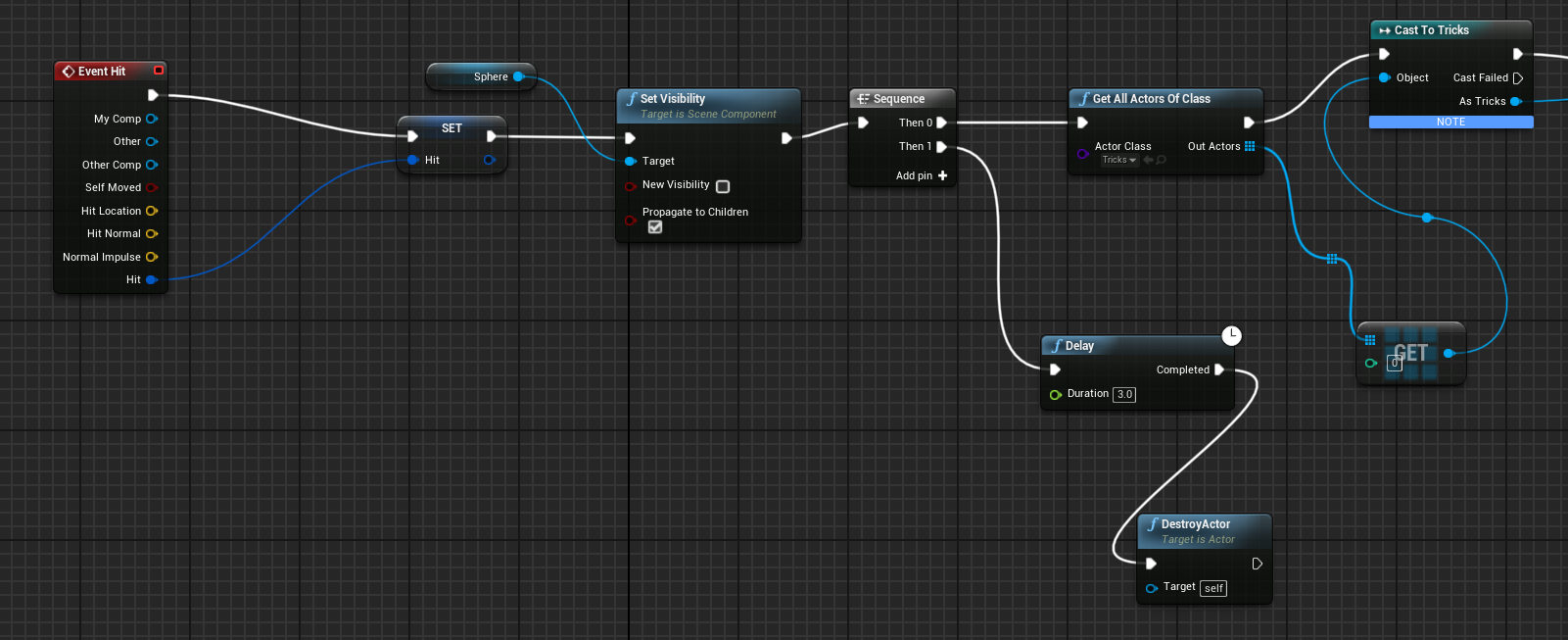
Anyone know what's going on here?
 timid zenith
anyone here used the "Apply Editor Spline" node to deform their landscapes in editor?
 lofty citrus
@timid zenith can you ask the actual question instead 😄
static charm
i use a free blueprint that uses that node
works like shit
not accurate

but its better than nothing
of course it could just be the blueprint itself, since its free
 still lily
hey everyone im trying to create an image based inventory(for now as a test) and i cant get the image to save i tried applying the image to a image reference inside the gamemode (since it never closes unless the game mode changes or game closes) and to THEN destroy the widget then upon recreation of the widget its supposed to apply the image from the gamemode back to the widget reference but it doesnt change anyone know why that is?
it appears to never store into it at all
just reloads the basic default texture
Upon deconstruction it calls this function from the gamemode
Upon reconstruction it calls this other function
head sprite is located within the widget and saved head sprite is located within the game mode
the widget calling the load
the widget calling the save
timid zenith
@lofty citrus I setup everything for my spline to deform the landscape (Raise/Lower the landscape depending on the Z axis of the spline itself) it works perfectly on 4.23/22 but now I am on 4.24, it deforms the land only when I am moving/dragging around the spline, as soon as I stop interacting with the spline, the deformities on the landscape go away for some weird reason.
how can i set it up so that the deformities stay after i stop dragging the spline?
lofty citrus
if it only happens on 4.24, it sounds like a bug
unless there's some additional setting for it now
timid zenith
i know they added landscape layers in 4.24 idk if that has anything to do with it
lofty citrus
probably has
 marble tusk
as far as I know Editor Apply Spline doesn't work at all if you have layers enabled
at least when I tried nothing happened
timid zenith
oh wow is there a way to turn off layers in 4.24?
marble tusk
Yeah, but you had to have turned it on yourself in the first place
It shouldn't just turn itself on
timid zenith
i am pretty sure they are on by default in 4.24 but thanks for all the info
marble tusk
Like, when you make a landscape in 4.24 there's a checkbox to enable layers and it's unchecked by default
marble tusk
I think it's a checkbox in the landscape's details panel to disable it
timid zenith
i spent all day on this, wasted 4+ hours haha and at the end it was just a simple checkbox 😦 FML
marble tusk
It sucks because I really want to use it with layers
 royal olive
Hey I'm starting to lose my mind while working on my animation blueprint
I'm trying to use "Get all actors of class" to pull a variable from one of my actors - however, the OutActors Array appears to be completely empty in the eyes of the AnimBlueprint
Why is this happening and is there a way around this?
twilit heath
im guessing you disabled context to even put that node into anim BP
and the reason in that case would be that it doesn't have a proper GetWorld() implementations, as UObjects often don't
having an anim BP iterate over all actors is a pretty terrible approach in any case, have the Pawn it belongs to cache the reference then just get it in TryUpdateAnimation
royal olive
having an anim BP iterate over all actors is a pretty terrible approach in any case, have the Pawn it belongs to cache the reference then just get it in TryUpdateAnimation
@twilit heath
But how would I go about that 🤔
My setup is that I'm having a world that moves instead of the player (it's important for what I'm doing) - however, I also got a pawn on that world that can rotate, but of course can't move besides that.
So my plan was to change the animation of my pawn to a walking animation every time I move the world (which is handled in the world's blueprint)
 heady shuttle
so I THINK this question belongs in blueprints but correct me if I'm wrong. Lets say I wanted to create a house using a bunch of SM_wooden_plank. As far as game performance is concerned, is it more efficient to build an actor blueprint of said house or just build the house from scratch in the game world
static charm
well last i heard blueprint meshes were bugged and not auto instanced
so less rendering performance
compared to static meshes in level
but if you instanced them yourself, of if the bug is fixed
then no different
 rotund ruin
how about building it in the game world then using merge actor to make it a single mesh?
static charm
that depends on the whole scope of the scene, poly count, and requirements
if its a a few million polygons for the finished house, then it's gonna be worse performance
as a single mesh
because it will always be rendered as a million polys
versus if you only saw part of the house, then the rest are occluded or culled and then less polys
heady shuttle
as of right now I dont understand how to work with/understand/account for polys :/
could you dumb that answer down just a little bit?
static charm
whats your target hardware
heady shuttle
pc
static charm
like minimum gpu
heady shuttle
not sure. I'm working for someone on this project
static charm
realistically speaking a low end pc/gpu should be able to render like 3 million polys and around 3k draw calls
i mean low end gaming pc
not low end intel gpu hd garbage
Sorry, not sure which answer you wanted me to re-word
 lone cape
My background is in Software Engineering, and I already know C++ outside of Unreal Engine. I want to understand Blueprints since they seem pretty integral to Unreal Engine. Can anyone recommend a solid tutorial or video or anything that teaches Blueprints from the perspective of someone who already knows how to code?
pseudo tusk
@lone cape I don't think you really need a tutorial to understand blueprint, outside of the structure of how Unreal Engine handles things like actors or what. I'd recommend just reading the docs for things that aren't currently in your knowledge and just applying what you already know from C++ into Blueprint/UE4
fathom portal
I second what @pseudo tusk said. If you know cpp blueprints will come naturally. Of course, a tutorial on the ins and outs, tips and tricks, etc can never hurt, even for blueprint experts
static charm
i agree with ryan but either just follow in the in editor tutorials, introduction to blueprint videos, or just watch tutorials on the specific mechanic/feature/node you want to work with
lone cape
Thanks, appreciate the answers.
static charm
i had no background in coding and learned this way. and then learned coding
fathom portal
Honestly I like to watch videos of people blueprinting, because even after using it for quite a while you still learn tips and tricks from time to time
static charm
yes its nice to see how people use nodes/code and how they organize their logic
lone cape
As someone with a more traditional programming background, Blueprints / visual scripting in general has always seemed strange to me. So I've mostly avoided it thus far. But I'd like to finally learn.
static charm
its great for prototyping, you can iterate very fast, for semi-complex stuff.
as well as self learning ue4/game dev
fathom portal
It's really not crazy. It handles a ton of headache for you, at the expense of being very, very slightly slower at runtime (in most instances not enough to matter).
static charm
its actually extremely slower but c++ is so fast that even extremely slower is still fast lmao
fathom portal
Eh, agree to disagree. 99% of instances it won't make any difference in speed for which one you pick
static charm
(not extremely but still it's 10-30x slower confirmed)
pseudo tusk
thats outdated
static charm
show me updated
pseudo tusk
the speed difference for most things nowadays is none at all
fathom portal
^
static charm
the 10-30x was confirmed as of 2018
im not advocating for c++, im just saying c++ is so fast
that blueprints being slow, isn't noticeable, like you already said
pseudo tusk
nativized blueprints are around the same speed
fathom portal
They're both fast, next to instantaneously fast for most operations
fathom portal
I 100% still recommend using cpp for really intensive stuff, like procedural gen
pseudo tusk
in most cases
fathom portal
Now we're just getting semantical
pseudo tusk
yeah
fathom portal
dude me too
static charm
mmm i want to get into voxel/procedural
fathom portal
one sec
pseudo tusk
anything that heavily relies on loops i'd stick to C++ for
but i wouldn't really make a game that uses proc gen in UE4 anyway
static charm
i was playing with proceduraly destruction
pseudo tusk
i'd use unity for that
fathom portal
@static charm you seen that voxel plugin?
pseudo tusk
at least in regards to something like minecraft
fathom portal
Free and paid
fathom portal
I've been meaning to take a 2 week hiatus from my current proc gen to game jam a voxel plugin one
I own the paid one
It's breathtaking
A thing of beauty
lone cape
For me I can look at C++ code and read it and understand it relatively quickly. But complex blueprints look like a giant mess to me. But pretty much all of the assets on the store are Blueprint based so I want to be able to understand those.
fathom portal
Naaa, cute games like astroneer would be perfect for the voxel gen
static charm
yeah im not familiar, but yes you're right
fathom portal
@lone cape it just takes practice. I'm sure when you started with cpp it looked like spaghetti too lmao
static charm
even after 2 + years looking at complex blueprints, it gets only slightly easier
lone cape
@fathom portal Yeah you're prolly right but that was 20 years ago lol.
static charm
people are honestly bad at making complex code in blueprints readable
for others
i mean
pseudo tusk
lmao
fathom portal
I was gonna say wasn't cpp made around 98
pseudo tusk
same
fathom portal
Then I realized that was more than 20 years ago, fuck
pseudo tusk
if i'm doing blueprint
it's gonna be sloppy
lol
unless im doing work for clients then i try to tidy things up
lone cape
@fathom portal C++ came out 35 years ago, which makes me feel really old.
static charm
 fathom portal
Was it? Dang, I got me years wrong
Years ago, before I knew much of anything about blueprints:
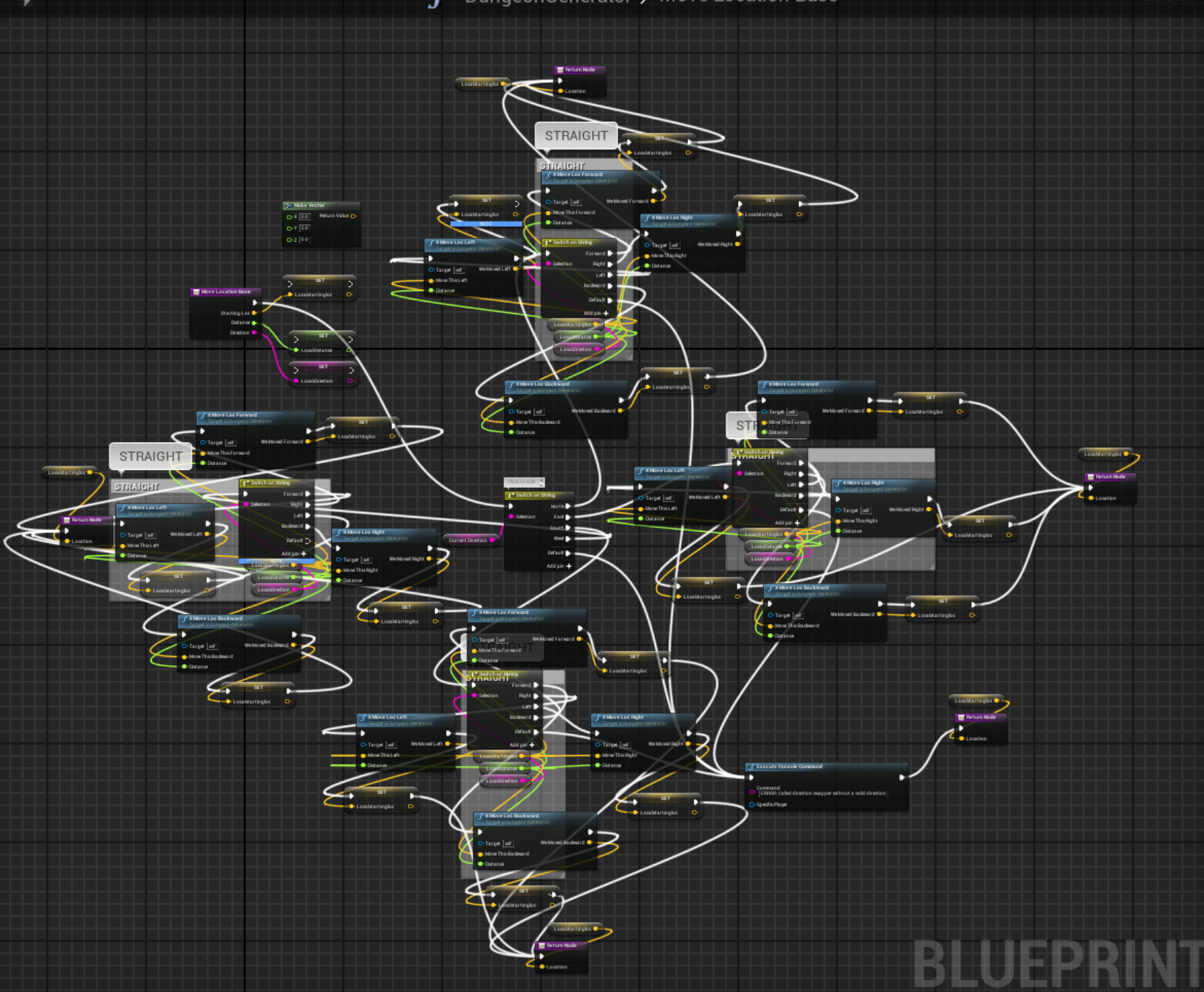
Years ago, don't judge
pseudo tusk
 hollow cape
@fathom portal that gave me hives
pseudo tusk
yesterday, dont judge
fathom portal
Heh
lone cape
See, and people talk about spaghetti code. Blueprints quite literally look like spaghetti.
pseudo tusk
oh man
fathom portal
It was a function to teach a procedural generation system to make turns
pseudo tusk
you should see my animation tree i made a few years ago
fathom portal
All my proc gen is in cpp now, luckily
static charm
hollow cape
Blueprint stuffs should be either vaguely square/rectangular, or an absolute disaster all over the place. Never diamond shaped, wtf
fathom portal
I know I knonw @hollow cape, but that's just how it turned out. There's method to the madness, each direction represented a direction the system could turn
hollow cape
hurts my insides, and a bit of my outsides
fathom portal
Ryan you do proc gen stuff?
hollow cape
lol
fathom portal
Me too man, me too
pseudo tusk
i've been getting into it lately
mostly trying to make minecraft style terrain
easier to get better results in unity from my experience tho
better performance too
fathom portal
Have you tried the voxel plugin?
pseudo tusk
and i don't like fucking with the runtime mesh component plugin
fathom portal
Not to understate that it will blow your mind
fathom portal
It handles so much of the bologna you gotta do to get voxel stuff to work, and has a mode specifically for minecraft-looking terrain
pseudo tusk
whats the difference between the paid version of that and the free version
hollow cape
money
static charm
the built in procedural mesh component performance was fixed and is better than runtime component plugin since 4.20
hollow cape
sorry
pseudo tusk
yeah but if im generating a lot of cubes and stuff it gets confusing from my experience to remove the inner faces using the runtime mesh component since you can't track triangle positions iirc
fathom portal
@pseudo tusk there's a bunch more features you get with the paid one:
Like the voxel spawners and voxel graphs alone change the system completely
pseudo tusk
i see
seems like it could save a lot of time
compared to building your own voxel system at least
but that removes a bit of the fun
fathom portal
 fathom portal
 fathom portal
All procedural, all destructible automatically, etc
You can have a system that spawns as you walk, so your world can be infinite
Or you can do things like spherical planets
lemme find a pic
pseudo tusk
minecraft 2, no more cubes edition
fathom portal
There's an option to make the voxels blocky if that's your kink
pseudo tusk
notch was actually working on something like that last i checked
fathom portal
 pseudo tusk
in javascript tho for some reason
fathom portal
Notch doing Notch things lmao
pseudo tusk
@fathom portal very no mans sky'y
fathom portal
I personally like the idea of planets more than flat worlds
Agreed!
Well, me you and @static charm could put our heads together and game jam something with the system
static charm
i have some ideas
and prototyped a few of them
just waitiing
to put it all together with people
honestly my plan is make decent protoype/visuals. get kickstarter/funded
then quit daily job and finish game
fathom portal
@pseudo tusk you do programming mostly? @static charm what about you?
static charm
doesnt have to be my ideas
fathom portal
I do virtually exclusively do programming
I'm a turd burgling noob when it comes to art
static charm
mostly just script stuff because i dont have time for modeling or animation but i have generalist abilities
 sullen radish
@fathom portal how did you make the saturn rings please ?
stuck hedge
I know it's a small thing for some, but I finally finished my full save system. Everything in the game is saved and restored, the game saves a screenshot with the save game, and the game list displays that screenshot. Players can type in custom names, up to 25 characters. The settings, savegame list and the games themselves are 3 different save objects to keep everything separated.
sullen radish
Is anyone familiar with the touch Input Alan Willard done in this video stream ?https://www.youtube.com/watch?v=a2dOtwuNyeQ

In a world where more and more displays have capacitive touch support, it can be useful to know how to implement different kinds of user input. On this week's livestream, Alan Willard will walk us through how to listen for common touch input combinations.
ANNOUNCEMENT POST
https...
stuck hedge
About the only thing left that I want to do is add an autosave feature. But that's fairly trivial. Just set a timer and have it save in the timer. Resetting the timer if they manually save themselves.
fathom portal
@sullen radish That actually isn't my work, that came from the voxel plugin discord's showcase channel, but I've done it previously and it wasn't difficult. Best thing is it's physically there, so if you get like a rocketship and head out there, you can interact with it because it's actually there
sullen radish
@stuck hedge eventually I think this is a must for any game, i will be asking for tips when i get to that point if you don't mind.
fathom portal
Congrats @stuck hedge, heck yeah, nice work, don't forget to show us!
sullen radish
@fathom portal I'm really questioning what's the best way to make that ring,,, or how to apply a texture on a rounded shape like that?
i mean what's the best way to do it ?
stuck hedge
Sure. It wasn't too bad. I had to figure out a couple of things that weren't entirely obvious and aren't well documented
fathom portal
@sullen radish I'm not sure how to get that effect outside of the voxel plugin, honestly.
This was me using that plugin, working to get biomes to work:


 stuck hedge
@fathom portal The UI isn't much to look at right now, but it's completely functional. I may still change the thumbnail size for larger monitors.
fathom portal
Thanks for sharing @stuck hedge, really nice work
sullen radish
i know it can be done, i'm no professianla really but if you gonna do it someday, what's the best way to do so ?
stuck hedge
Deleting also works. I may add that to the load menu as well in case anyone wants to delete a game there.
sullen radish
@stuck hedge yeah indeed, nice work.
stuck hedge
@sullen radish One tip I'll give you is that when you start to make your save games, everything should create a struct. Anything you need to save, should have a function that returns a custom struct of everything it needs. The game mode should assemble that into one mega structure of all your other structures and then save that as the save game. To load your game, just do that in reverse. Have the game mode pass those structs back to the objects who set them up.
sullen radish
@stuck hedge that's pretty nice. thanks for the tip. I'm actually working with something similar.
I'm making a game that communicates with a database server (SQL) and returns some information, i really would like to know if that will work for my project the way you did it.. i think i should try what you mentioned here as a concept in my case. i think it'll do it for me i guess.
stuck hedge
My actual game mode just puts it all together into one single struct like this.
it passes that over to the game instance, who then saves it in an actual file.
Since i have a level change in my game, it uses the same function to save the state of the game when transitioning back and forth between the two levels.
sullen radish
That's actually what i needed... or i think so ... i'll be working back in this project in few days,, do you mind if i DM you at that time to get some help with what you did ? i really like the way you did it here ,, nice thinking.
stuck hedge
Sure if you need
sullen radish
actually in my case it's not that important for me (for the time being) to save the returned values and pass them through a game mode. yeah i know that's the only way i guess to make it for achieving save game. but i might need some help with passing return results into a struct, it might be simple for you but i'm not really having that much experience with blueprints 😄
so yeah , i'm definitly gonna need some help when i get back to that project 😄
stuck hedge
No problem it's the best way to learn by trying things out.
sullen radish
@stuck hedge yeah sure, and Thanks a lot for helping and sharing these stuff here.
stuck hedge
I hope it helps anyone who might be stuck on figuring that out.
sullen radish
I'm already struggling with the touch inputs for a touch screen application i'm making right now 😄 touch is really rough to make it smart enough.
stuck hedge
I think.. one of the templates includes basic touch control examples.
sullen radish
is it the two circles on the touch screen that controls navigation ?
stuck hedge
yes
sullen radish
no that's not really what i'm looking for, i've found exactly what i need in the video i've mentioned earlier ,, Alan Willard really did the impossible with that blueprint touch manager, but i find it really complicated for me to understand it all, and i've implemented it in my project but need some help with it, and have some small questions.
trim matrix
Does anyone know how i can pass in a scale for spawn ai of class?
Right now, it only spawns my AI small
stuck hedge
when you spawn an actor there is a transform. You can set the scale there @trim matrix
true valve
Let's say I've a point-light BP then I created some child BP. If I toggle visibility of the parent BP using an interface from another BP , all children BP should toggle as well. Right?
stuck hedge
Not unless you tell them to. If you change it in the editor in the class, the children will follow, but once the instances are in the game they each do their own thing
true valve
Is there a way to toggle the children from parent without looping through all the children?
Or is there any other way beside using inheritance? @stuck hedge
stuck hedge
You can bind an event and set a delegate.
Make a function on the parent and then call a delegate. on the children on begin play bind an event to that function and when it is called, then they will all switch.
stuck hedge
Yes that looks right.
I think it might be better to change the intensity to 0 but I can't recall right off if it's any different for performance.
You can pass variables in those, so you can pass a bool for on off if you want.
true valve
Unfortunately it behaves the same as using interface. So from the level blueprint I used get actor by class with BP_Point_Light then called Event Toggle Switch Lights.
Only one child light toggles
out of three
stuck hedge
You have to bind it to the parent
I just noticed that
you bound it to itself.
on begin play on the children, you need to get the parent instance of the light and pull off that and bind to that.
like this. My actor is binding to something on the game mode
on begin play, get all actors of class, find the parent actor, then pull off that reference and bind to that. then when you switch the parent they should all change.
true valve
Nice that works. Is there any get node to get parent directly from child? That would be nicer.
stuck hedge
I mean.. if you have them all in the scene. You could expose a variable that is instance editable and set it for each one.
create a variable that is an object reference to the parent type, then set it instance editable.
go to each one and find that variable and set it to the one you have in scene.
But that kind of thing is usually only used if you really need to give something a specific reference to another thing. like if you have 10 light switches and 10 lights, you want to pair them up. So you could use those kinds of variables to do so. Since you only have one parent, it's probably just as easy to get the actor and pull off there.
true valve
So the issue with the current solution is that i'm toggling visibility in the child BP
I wanted the parent's visibility to effect all the child. So that I can utilize the parent's is visible in the parent BP.
stuck hedge
you can still change the parent's visibility if you want
true valve
I'm thinking I can get parent's visibility from child and based on that update
stuck hedge
You would have to do that on tick. That would not be efficient.
using the delegate is much better performance wise.
true valve
I could two dispatchers in parent: Light on and light off
stuck hedge
You didn't connect lights off
true valve
Yea got it
Just saw that
Nice thanks a lot. Hopefully it's not expensive.
So this is why I needed this. So I have a small village with about 7-10 houses. I wanted the lights to toggle based on the hour of the day.
I was using Set Timer by Function Name to check against the hours to toggle. Better than EventTick.
stuck hedge
Yes, if you are setting it on the hour though, you only need to check it on the hour. Like the example I showed you. You can also create a dispatch for your time manager so that anything that needs to know the time can connect to it.
true valve
I have world time setting every second. I have logic set there to check for certain hours to trigger the event in parent BP.
Now I have to replace all the point lights with child actor components so that I can set the Point Light Child as its class. These will be all the houses.
late gorge
is there anything particular you need to set to save objects in GameSaves?
i tried to save my player's state object and it did not load it (it did load the player location etc.)
stuck hedge
@late gorge You need a function to first save all the variables you want, and then a function to restore them all.
You also need to create a save object in the game instance to store it in.
if you scroll up you'll see some screenshots and how I suggested setting it up.
late gorge
... yes... i know. im saying that i save everything i want then i try to restore it but only basic variables work
stuck hedge
Without seeing what you're trying to save and restore and how you're doing it, I can't really say, you'll need to post screenshots