#blueprint
402296 messages · Page 405 of 403
 oblique gyro
yea uok
oblique gyro
done
 trim matrix
Ok so now u have to set the first value
Set the R , G and B
to what ever blue color u have right now
oblique gyro
yup
trim matrix
yua so 0.0 is blue
0.2 is the value of red
Hmm.... im looking at the node here but I can only find one output or vector output....
Try the vector parameter value on materials
hopefully that's the one
oblique gyro
ye
 carmine prawn
why don't you use one of the lerps to change the colour?
oblique gyro
oh
carmine prawn
You get snapping with a lerp?
oblique gyro
lerp still snaps tho
trim matrix
oblique gyro
i see
trim matrix
@carmine prawn Does it have to go with the tick event?
@oblique gyro anyway tell me how u go, i will be around
oblique gyro
k dope
 tight schooner
@blazing ridge Your problem is interesting so I spent some time sketching out a solution. (I didn't test it lol.) In my mind your function to make an array of random vectors separated by some distance tolerance would go like this. Hopefully the graph make sense.
inb4 someone tell us you can do this in one node
The first loop is the one that drives attempts to add unique random vectors. The second one tests the random vector against all others in the array. If it finds a distance under 0.02 units, then it sets a failure flag and doesn't add the vector to the array. (Or it adds it to the array if it checks out.) Then the first loop makes further attempts until the vector array reaches a specified length.
It's a potentially heavy function so you shouldn't use it on a per-frame basis or anything.
 blazing ridge
hey thanks for the approach! @tight schooner i think your solution with the distance node is better. however i still dont get it working.
 opaque elbow
Does anyone know how to make something happen when an object touches the ground (the landscape)
for example I want to play a sound when my tree touches the ground
tight schooner
Use any number of the "play/spawn sound" BP nodes in your treefall timeline or w/e
if you're using a timeline, it's possible to make an "event track"
trim matrix
How do you go with tree falling btw?
opaque elbow
it didnt work but instead of making my tree fall with a timeline i did it with physics. (it looks better).
trim matrix
nice
opaque elbow
but what do you mean by set collision? @trim matrix
trim matrix
does the tree have collision?
opaque elbow
yea
trim matrix
i was thingking on component begin overlap event
but i guess the tree already touched the floor at the start
trim matrix
0o ok
 opaque elbow
yea
i tried setting a begin overlap but casting to landscape doesn't work at all @trim matrix
trim matrix
cuz im not sure under what category it even hit
opaque elbow
same
it doesn't print anything
like if the landscape wasn't a component or anythingç
trim matrix
hmm check ur collision
opaque elbow
it worked
trim matrix
yea because character is actor
opaque elbow
ohh actually
I just checked a box "Generate overlap event" on the landscapoe
ima try it
nvm doesnt work
Oh i have an idea
trim matrix
Collision settings for Landscape.
Hmmm
landscape might be tricky actually
i never use them
opaque elbow
@trim matrix is there a way of calling an event when my tree hits a specific type of object?
i could make my landscape its own object type
trim matrix
I dont know if u should do that, i think collision might be handled differently in landscape
but if we are just talking about actor/object
then yes
u just cast it
and make it play an event u created on that object
 patent crow
What you could try, is on on your tree, on event hit, break hit, get hit actor, and branch, to see if it is the equal to the landscapes actor.
on event play, you could even get a reference to the landscape actor, to prevent casting every single time the tree is hit by something
trim matrix
@patent crow landscape counted as actor then?
he tries on overlap
but gets nothing on the component or actor
patent crow
hmm.. It actually won't be referenced as an actor.
let me tinker and see what i can figure out
trim matrix
legend
patent crow
So you could cheat by adding a collision sphere around the base of your tree, not exceeding the height of the stump, so that it doesnt always touch the trunk component, when the trunk component touches that collision sphere, you can trigger a sound
You can always adjust the size of the sphere so that it makes a sound just as it hits, or slightly before.
If the sound is more than just a thud, and maybe has some leaves/branches crackling, you may not be able to tell that it didnt fire at exactly the moment it hit the landscape
opaque elbow
@patent crow Im not sure to understand what you mean? This wouldn't happend when my tree touches the ground??
patent crow
Something similar to this. Sphere collision was the wrong choice, as you cant really set it's Z this low and reach the range you'll need.
you would attach the box collision to the base of your tree, so that when the upper touches the box, it can fire off a sound
opaque elbow
ohh I have already thought of that but my landscape is not flat tho...
patent crow
Yeah, I figured that may be an issue.
opaque elbow
yea...
but
Since the landscape is an object type, I could make its own object type in the project settings
 patent crow
That actually would be a solid way to do it.
opaque elbow
but is there a way to call something when my tree hits an object type?
I cant find the node
patent crow
That would be something I wouldn't know, but I'm sure one of the blueprint gods on here will be able to provide an answer.
When they wake up, that is.
patent crow
No problem!
 short coral
Hello there , i wanted to ask how to go about placing enemies in an open world game , the best way to spawn them and destroy them kind of while optimizing performance?
carmine prawn
well, in this months freebies there may be something to help with that. https://www.unrealengine.com/en-US/blog/featured-free-marketplace-content---february-2020

Unreal Engine
Unleash a horde of enemies, set your mood lighting, and so much more with this month’s free content.
trim matrix
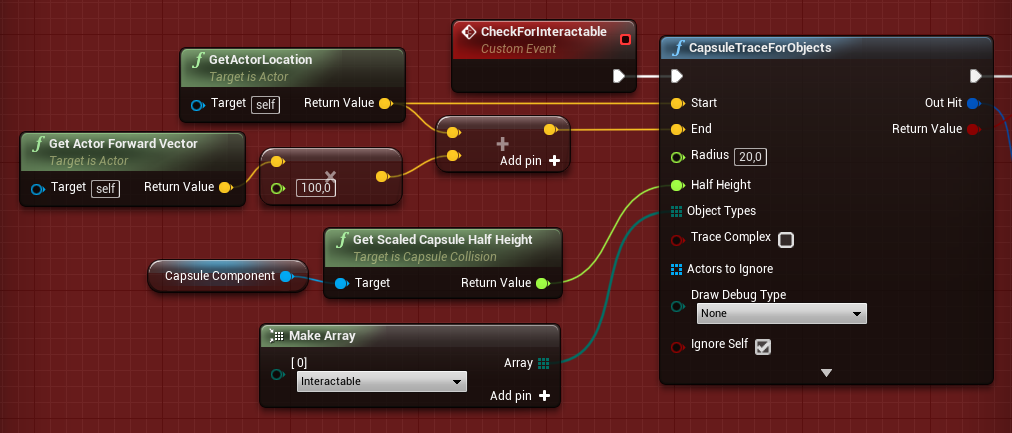
Object types I guess
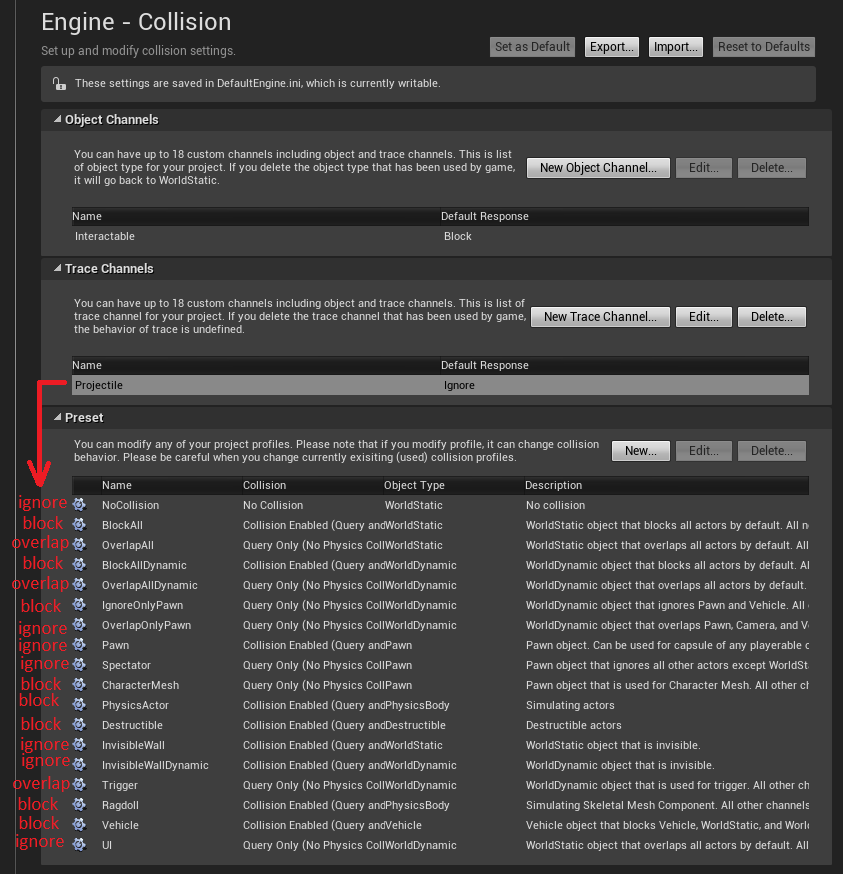
If u want to add new one https://ue4dcs.com/images/GettingStarted/ProjectileChannel.png
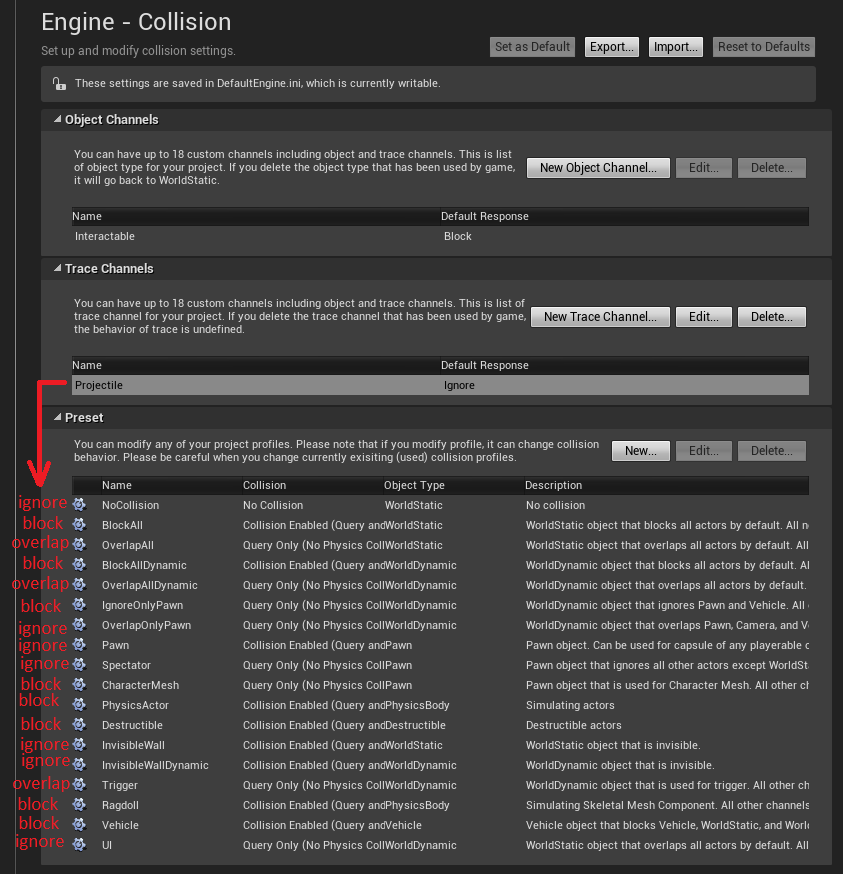
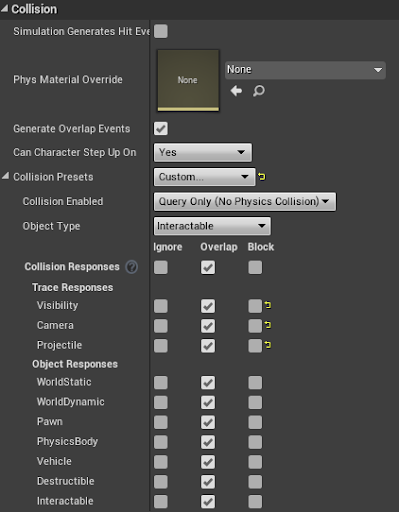
See the interactable? it's a new channel
maybe u can make a new channel for the landscape
patent crow
This man did the math
trim matrix
Actually that is for trace channel.. not sure if u can get something like this from overlap event
Ohhh actually.....
U can make it only collide with the new channel
opaque elbow
@patent crow I had already done this with object type
trim matrix
@opaque elbow mind sharing how you do it? I might need it for my project too
just a SS would be nice 😄
opaque elbow
I just dont know how to check the object type for an overlap event
@trim matrix yea sure 🙂
im gonna show in like 15 min im in a black ops game right now XD 😛
 astral fiber
I am starting my map with normal inputs (mouse + keyboard), so the user can login. After that I want to switch in VR mode, does anyone know how I can accomplish this?
 desert pendant
if I have an asset in my project (say, a MediaPlayer), how do I go about accessing that from a level blueprint?
astral fiber
@desert pendant Make it to an actor, and than you can dynamically create it
"Spawn Actor from Class"
Thats the blueprint node
desert pendant
okay. does doing it that way add any extra overhead?
astral fiber
No, but you can modify the Media Player like you want.
For example add Functions for playing music, switching it off and on...
desert pendant
thanks
 full kettle
hey guys, is there a way to check in BP if a given bitmask int has a certain flag?
I've created a bitflag enum in c++ and in BP I have a bitmask int associated with the enum
so at runtime I want to check if the int has a certain flag, how would I do that?
hmmm I just found about the Make Literal Bitmask and I can associate the node with an enum, so should I use bitwise & and see if it's > 0?
opaque elbow
@trim matrix ohhhhhh my bad bro I thought you didnt know how to add an object type... But yea no im stuck there to... i dont know how to get this from an overlap or hit event...
i'l try to search and if I find something i'l let you know 😛
astral fiber
When I use the blueprint node "Enable HMD" it allways returns false, so it could not enable it, any ideas why?
trim matrix
trying to make a menu that spawns stuff from it, I am under the assumption to use buttons w/ images on them, but I don't want to add every item 1 by 1, do I make a base for the items, i.e weapon base, then get all actors of class / for each add to the menu?
 long quartz
hi 🙂 need help with this one! i am trying to blend between two materials over night. the blending is working. the timeline is for a smooth change of the parameter. but how to set it between 6pm (180° angle) and 6am (90° angle)?
 rotund ruin
is this ok for gamepad detection?
 haughty ember
@rotund ruin Isn't that the same as using Flip Flop?
rotund ruin
@haughty ember im not sure, let me think
hmm I don't see how to do it with flip flop since it's either keyboard or gamepad key
haughty ember
@long quartz It depends on how your changing your time. Worse case you can calculate how many seconds until 6pm, set timer, and then use a tick / 1s timer.
But since something is moving your night anyway, you probably want to plug into that and set the material in there. You probably won't use timeline either in that case
 covert agate
Sorry if i can't contribute much to other's questions i'm just a bit of a newb/noob
haughty ember
@rotund ruin I'm pretty sure replacing the bool (set + branch) and the Do Once nodes with a Flip Flop will give you same result. Same thing you want to check is the starting value
but why do you even have do once? it's just a set to bool.
 spark delta
When I add one of my widgets to my viewport, it consumes a click event. I have to double click to fire a single click event, for instance. I have the whole thing set to non-hit-testable and non-focusable, and even when I set the entire widget to hidden it still consumes the click for some reason. Any ideas on why that might be happening?
rotund ruin
@haughty ember let me try. because I only want to change it once, when the player switches from gamepad to keyboard and reverse
rotund ruin
I might use it to show stuff on screen maybe
spark delta
oh didn't even realize that was a channel, thanks
haughty ember
@rotund ruin then don't use the flip flop. The bool and branch is fine. Add another 2 branch instead of the 2 do once
You can even make it a function to make it more clear tbh
rotund ruin
cool, thanks!
haughty ember
@full kettle yes. https://docs.unrealengine.com/en-US/Engine/Blueprints/UserGuide/Variables/Bitmask/index.html
Blueprint integer variables can be declared as bitmasks to store binary flags in a more compact fashion.
@trim matrix sounds good.
long quartz
@haughty ember i am using good sky from marketplace. it has an auto night cycle function and you can change the day length. you are right. the timeline would need to change in scale depending on day length
trim matrix
hello, i havent used ray cast before but how do i get it to detect the enemy so that way i am able to call certain components it has?
haughty ember
@long quartz I'm not too familiar with it. And it's not what I meant about the timeline.
The good sky plugin changes the "time" somehow; you need to see how it works, and when it does, get the current time and calculate the value.
e.g. alpha = (time <= 9pm) ? 0 : (time >= 6am) : 1 ? ((time - 9pm) / (6am - 9pm)); (in a very pseudo code)
@trim matrix the component you're going to get is the collision component (e.g. a cylinder component). If you want another component, get it from Hit Actor
trim matrix
so...
um
what do i call ?
because i tried to cast to the enemy and connect it to hit actor, but it doesnt work@haughty ember
 hollow cape
hit actor -> cast to (custom class)
put a printstring on cast failed to see if you're getting a failed cast or juts no hit
trim matrix
i believe i did that but ill try again
haughty ember
@trim matrix make sure Return Value of the Line Trace By Channel is also true (that was even a hit)
Line Trace By Channel is something you need to call continuously, not just once.
trim matrix
i use a button press
hollow cape
not true @haughty ember , it can be event-based (ie firing a weapon)
trim matrix
yes i have event
so the reason why its not working, is because the return value wasnt true?
haughty ember
@hollow cape yeah but it depends what you're trying to find. If it's just target it's true. If it's actual collision (e.g. bullet hitting an enemy) then it won't really work
(but you're right, I didn't use the right wording)
hollow cape
well you need pull off the return and see if you're even getting a hit
I got you @haughty ember , just didn't want to confuse the issue
 hollow cape
let me ask this way, are you seeing the red box on the thing you're shooting at?
trim matrix
i see a red line
hollow cape
or is the red line going through the thing you're shooting at with no red box
then you need to check the collision behavior for the visibility trace channel on the thing you're shooting at
trim matrix
i dont think its going through
trim matrix
ok
haughty ember
only red without green = no hit
trim matrix
yea, ill try to screenshot
haughty ember
my bet is on wrong collision properties btw.
hollow cape
yep
that's why I went there
or no collision assigned to the mesh...unlikely if it's a skel mesh but likely if it's a custom static mesh
trim matrix
hollow cape
ok so you're hitting it
trim matrix
but the others are hitting it but not showing green
hollow cape
now, when you drag off the hit actor and cast to (custom class) and call and function, it doesn't work?
trim matrix
hmm
hollow cape
that's going to do with the physics capsules on that skel mesh
trim matrix
im doing print strings
hollow cape
ok, based on your screenshot above, doing an actor== isn't going to wrk
long quartz
@haughty ember this is how it works. maybe i could use the "get rotator to time of day" or something else?!
hollow cape
@trim matrix and you're getting a failed cast?
trim matrix
yea, because some rays hit him but show red and then show green sometimes
hollow cape
the green are hits
red going through means it didn't hit. So this isn't a casting issue, this is a collision issue
haughty ember
@long quartz no idea honestly; not familiar enough with it I'm afriad
@trim matrix Check the viewport menu Show -> Collision. Might help you understand what's colliding against what
hollow cape
well firstly, if you think you're colliding with the capsule, check the collision behavior on the capsule. It shouldn't be returning a hit I don't think
trim matrix
hm
hollow cape
or print the display name of the hit component to see what you're actually hitting
haughty ember
yeah but I meant in the game view
hollow cape
yeah it's set to pawn so it's going to ignore visibility channel traces
hollow cape
so you're getting the hits off the physics asset attached to that skeletal mesh I'm guessing. I THINK if you check trace complex you'll get more what you're looking for
trim matrix
whats trsace complex
hollow cape
actually, check the collision settings for the mesh itself
see what the trace response for visibility is
should be set to block
haughty ember
I don't think it has anything to do with complex
like @hollow cape said though, you're colliding against the skeletal mesh and not the capsule
hollow cape
on the skeletal mesh
haughty ember
@hollow cape Why would he do that? He wants to collide against the capsule no?
hollow cape
for a trace? I guess it depends on how he wants to check if it's a hit
trim matrix
it calls this
hollow cape
if he wants to "shoot" the enemy, then the mesh needs to block the trace to return true
haughty ember
@hollow cape He was complaining on the red lines / not hitting.. I think anyway
haughty ember
@trim matrix I'd disable the collision on the skeletal mesh (optimization), and change the collision preset for the capsule.
hollow cape
just change it to custom and set visibility to block
haughty ember
@trim matrix if you're working on a bit bigger project it might be worth to se a custom collision profile in the project editor and use that instead of custom
trim matrix
but why does it work if i set it to block? wouldnt it block the ray from working?
hollow cape
now...the fact that you were getting hits before in the center of the chest makes me think one of your other components was set to block visibility traces
haughty ember
"Block" = hit
trim matrix
😮
 upper adder
IT JUST WONT WORK!! (I tried in packaged) Im dying! 😦
trim matrix
this is cool
hollow cape
don't you have to load and save game user settings?
trim matrix
thank you guys
tight schooner
ForLoop node with 0 and 1 for first index & last index, respectively
tight schooner
I mean, if you just want to run a node twice, then ForLoop is a way to do that
trim matrix
i want two bullets to fire at same time
spark delta
the for loop executes all of its loops in one tick, so that would work perfectly for you
trim matrix
for each loop?
spark delta
nope, just a for loop
trim matrix
cuz im trying to call two spawn points
spark delta
it takes two integers as inputs. First integer is where to start (0 in your case) second integer is where to end (1 in your case). Looping from 0 to 1 results in 2 executions of the loop body
tight schooner
How do you fire the bullet? With a spawn-actor or a custom function or something?
spark delta
tight schooner
yeah, it would work, assuming the thing attached to Fire Bullets isn't "latent" (doesn't have any clock icons on the nodes)
spark delta
so smol
trim matrix
newby mode activate
tight schooner
huh.
trim matrix
lol
spark delta
oh, your bullets are just components.. Interesting :)
spark delta
Not how I would have done it, but if it works for you keep it up
trim matrix
thank u: )
haughty ember
@tight schooner there's a really weird thing with discord when someone shows an image. Resolution in chat: 100x100. Resolution when clicking: 300x300. Resolution if you right click -> open link in browser: 1000x1000
I hate it.
tight schooner
yeah I "opened original" and at 100% zoom I could make out some text, lol
not sure how to do it in the mobile app w/o downloading
haughty ember
yeah, 150% zoom at least :p
trim matrix
being on discord makes me feel liek the world is nicer cuz i meet nice people on here
haughty ember
it's just an illusion, people are crap <optimistic here>
trim matrix
lol
i wanna make my ai interesting
all they do is shoot at u when they see player, and follow
not to mention they rotate in one spot, if im close. they dont move back or walk around
haughty ember
You can check https://www.unrealengine.com/en-US/blog/featured-free-marketplace-content---february-2020
(Open World AI Spawn System)
Unreal Engine
Unleash a horde of enemies, set your mood lighting, and so much more with this month’s free content.
haughty ember
it's free, just check it out so you'll know if you want something like that and how to create one
trim matrix
mine is supposed to be similsr to alan wake
cuz im on project
well i could get them to find location in a small radius after throwing something at the player
im having a problem right now with my character rotation. i have a player offset so i am able to look in many directions when i turn and my legs would be facing another direction
but say if i aim my camara around the player. i want my player to rotate his whole body
im unsure how to properly do it while keeping my offset
 tulip iris
Stupid question. How do I get the static mesh reference from a static mesh actor?
tulip iris
It's all good. I figured it out. Its static mesh actor to to satic mesh comp to static mesh.
Thank you
 solar needle
hi, how to take all array componet to be used ?
tulip iris
Use a for each loop
tulip iris
solar needle
let me try
 past bolt
Hi! quick question, does anybody know how to go back to the last edited blueprint? i don't know exactly how to explain it, similar to what you have any almost any IDE to jump to the previous classes you edited
solar needle
doesnt work
past bolt
something like i don't know, ctrl + back arrow?
tulip iris
I'm going to need more info @solar needle
Simple plug you array in and iterate over that loop.
What isnt working?
tulip iris
@solar needle you have to plug the loop in
plug the loop in first
then run it into your logic
tulip iris
Sure thing
@solar needle Youi could even use get components by class and select what you are trying to collect. This way it makes the array for you automatically. Saves you a lot of time.
solar needle
no. i have 1 arrow that must not be used.
unless there is a function to exclude excluded arrow
tulip iris
You could exclude it wit a tag
solar needle
how that work ? (sorry i was newbie.)
tulip iris
You could do something like this
1 go to actor and select the comp you want to exclude. 2. in details search tag. 3 and the tag you want to exclude.
@solar needle Does that make sense?
solar needle
what is second image ?
solar needle
ok. i will save the code. thanks btw
tulip iris
Sure thing! Enjoy
 twilit lily
Is there a way to detect a static mesh component overlapping with another mesh?
Wait figured it out
opaque elbow
Hi everyone, i'm trying to make my tree fall in the direction my player was looking when he cut the tree down. Im working with a timeline to make my tree fall and currently this is what I have: My tree falls but always in the same direction. https://gyazo.com/2c10153c7b0f903c4b6cee5de61338fb I want to get my player's forward vector and make the tree fall in this way, but I dont know how... Can someone help me?

Basically, everything works already but the tree always fall in the same direction and I want to change that to the direction my player is facing.
spark delta
Without going through the linear algebra required in my head first, could you break up the player forward vector, and apply X/Z to P/Y on the rotator? There's probably unit conversion required, but I haven't really worked directly with that before
opaque elbow
Wait wich one do I have to connect to wich? im confused... LOL https://gyazo.com/d05c960fe6a310f3c85a2979eb987fa9
 spark delta
Actually, I wonder if you could just get the Z rotation of the actor and apply it to the rotator 🤔
That seems smarter
opaque elbow
by connecting the z to z?
spark delta
I think that you're also going to need to pass the player's information into the sequence as well, or the tree will rotate with you as you turn after cutting it down lol
Your problem is a little more complicated then it sounds because I don't know the starting rotation of your tree. I'm assuming its 0 rotation on P/R/Y, so I'm going to work through that math really quick.
opaque elbow
yes normaly it should be 0 0 0
and I have fixed the problem where the tree follows you when you rotate just by promoting the forward vector to a variable before the timeline

Ohh but btw the rotation pin on my timeline is just a float value that is updating with the timeline. Then it is passed to make a rotator. It's not an actual rotation r/p/y
the float starts at 0 and finishes a 90. So when I make a rotator with this value it starts at 0 and finishes at 90 degrees so it looks like the tree falls on the side
@spark delta
spark delta
Yep, i getcha. I'm trying to make a quick mockup of this in my project to test for ya
This might take a while. I'm on the worst computer I've used in over 10 years. If anyone has a solution that they can whip up really quick and post, feel free to do so
opaque elbow
Thanks man I really appreciate it! 🙂 Take all the time you need my friend
tight schooner
aesthetically?
any time you're doing a branch into parallel nodes, you could instead use a "select" node
tight schooner
drag out any data input pin and search for "select"
twilit lily
Ohh this looks extremely useful
tight schooner
you should test if it's consistent at different frame rates
like anything you do on a per-frame basis usually has to be scaled by World Delta Seconds
twilit lily
spark delta
@opaque elbow Part 1: What to do with the timeline + tree fall direction rotator
and how to set up that tree fall direction rotator
There might be a way to shortcut either of those linear algebra parts, but I'm not sure of it if there is. Someone smarter than me may know though :)
twilit lily
@tight schooner how can I test it on different frames?
tight schooner
Project settings --> search "framerate"
spark delta
@twilit lily are you using that force variable anywhere else?
If not, you don't need to set it in that code
And generally, you could cut down those nodes by half I think
twilit lily
Add impulse for jump
spark delta
That select is a beauty though 😍
spark delta
oh I see you already removed that set in the second image 👍
If you want to make it more aesthetically pleasing, you can remove one of the speed*1 sets of nodes, and just have the output of that optionally go through the /3 node for false
(and speed *1 doesn't do anything, but I assume you might scale that in the future)
twilit lily
Eh, how pretty it looks is only a bit important to me
Oh yeah, thats for later purpose
I just want to improve on the actual code its self
spark delta
ah well you're golden then :D
twilit lily
thank you
@tight schooner no its not consistent, so how would I scale on World Delta Seconds?
tight schooner
Get World Delta Seconds and multiply your force input by that
the problem is, unless you were running the game at 1 fps
you're probably going to want to multiply it by 60 after that
to get the kind of force you were previously getting at 60 FPS
for example
cuz World Delta Seconds is the frame time, and at 60 FPS it tends to be a number like 0.01666666
twilit lily
oh i see
tight schooner
(which is 1 / 60)
so in effect it'll apply less force when the framerate is higher, which is fine because at a higher frame rate, it'll be applying the force more often
so it balances out that way
then if your ball gets the same jump height or w/e at 30 FPS & 60 FPS then mission complete
(I suppose the other way to approach this problem is to put your add-force function on a looping timer instead of on a per-frame event. Of course this'll have some effect on the general responsiveness of the controls, but then you won't have to scale stuff by the frametime.)
opaque elbow
@spark delta I dont know if its because it doesn't work or if I did something wrong, but my tree goes insanely crazyyyy... Here's what I have done https://gyazo.com/4167fe1e792ff4e28d546d60a1d7ceac https://gyazo.com/360c50312ff6a0982bb051cf5d8b32f5

 spark delta
nice saving out of date packages 😃
I thought for a second my ue was making that popup when I clicked onto it, but nope lmao
Oh, is your Rotation output from your time line [0,1] or [0,90]? @opaque elbow
twilit lily
Hey @spark delta When you get a sec, would you mind helping me with my is in air? system?
opaque elbow
AHAHAHAHAHAHAAHAH fuck my bad when i took the screen shot it saved at the same time LOL

@spark delta
twilit lily
opaque elbow
hum it goes from 0 to 90
twilit lily
Event hit is just sorta not accurate
opaque elbow
 twilit lily
It's just a detection when a player hits a wall etc
spark delta
ah, mine went from 0-1. Try scaling it down to that and trying that out :)
twilit lily
Kind of bad tbh, just have been using it to improvise.
opaque elbow
ok 🙂
spark delta
@twilit lily Is it just inaccurate because it fires too often? Or does it fire when it shouldn't?
twilit lily
Well look at it this way, my game has ramps
you dont always have to jump to be in the air
spark delta
I think that any physics collision acts as an EventHit, but I don't remember for sure right now
twilit lily
It does
So you end up in the air without jumping and the can jump is still true
because you never jumped
spark delta
When you're going down ramps?
twilit lily
flying off ramps
spark delta
ah, gotcha
twilit lily
So its a flawed system xD
spark delta
You're not using the CMC, right?
twilit lily
Correct no CMC
opaque elbow
@spark delta YAYY were almost there! 🙂 its something quite simple but I still wanna ask to not mess with all the math you did 😄 Instead of the tree falling in front, it falls on the left side
twilit lily
so sadly no is falling 😦
spark delta
What if I told you that CMC handles that perfectly already :)
twilit lily
Yeah CMC is great
but I need the physics with the ball
and CMC didn't like that
I tried both ways, making a character attaching to a pawn and the opposite, pawn attached to character.
spark delta
@opaque elbow Does it always fall exactly to the player's left? That sounds like you're swapping the roll/pitch variables
opaque elbow
yes it always fall on the left side of the forward vector
spark delta
How are you currently handling the IsInAir calculations @twilit lily ?
spark delta
ah I see
I think that the CMC handles it by ticking and updating whether or not its colliding with anything below it. Are you willing to root through the code to convert C++ to blueprints to emulate it if I find the line of code where it does that?
opaque elbow
@twilit lily I am reallly not sure but I think there is a better node for jumping.. (launch)
( I think)
opaque elbow
ohh then it might be ok 😛
spark delta
@opaque elbow just a thought- maybe the thing you're getting the forward vector for is turned 90 degrees to the left from where it looks like the actor is facing for some reason?
 spark delta
Yeah, that all looks pretty good. The code that I gave you had the thing falling exactly away from the player though, so I think something in there is at 90 degrees that you wouldn't expect
 twilit lily
@spark delta so is there a way to detect an overlap begin via a box collision to mesh component?
tight schooner
@twilit lily This might be a dumb way to solve the "am I on the ground" problem but it's the one that comes to mind. In your Event Hit, you get a Hit Normal. I think this tells you the direction of the surface from the player (or maybe it's the other way around, but you can use a NegateVector to change it). On every hit, save that information to a vector variable.
Before you jump, you can do a linetrace from the ball toward that vector variable -- the "last known" surface direction. Taking the resulting hit location, and getting the Distance (it's a node) between the linetrace hit location and your actor position, you can then determine whether the ball is close enough to the ground to be allowed to jump. You can even use the Hit Normal to do walljumps.
end of cool story
 vapid hatch
Just do a line trace downward wenn you press jump
tight schooner
yeah, if you don't care about wall jumps you can do a linetrace straight down
twilit lily
I do care about wall jumps xD
vapid hatch
If it hits something you can jump, if not then not
twilit lily
Well I already have a detection like that
vapid hatch
Oh, that makes it a bit more complicated
twilit lily
Yeah, this is a bit more complex, the issue with the current system is if you ramp off something and dont jump, you can jump mid air
tight schooner
my galaxy-brain approach does a trace in the general direction of the last-known impacted surface
twilit lily
@tight schooner I somewhat understand the method, I'm still trying to connect it all tho. That may be a bit ahead of me, I've never tried anything like that exactly.
spark delta
@tight schooner I think your approach won't work if you walk off the edge of a sharp cliff. The frame before you walk off, the impact direction would be straight down. The next frame, you could have a LOT of distance straight down, depending on how tall the cliff is. In reality though, you're just barely off of the cliff, and you probably still want to be able to jump
tight schooner
yeah, I suppose you could build some hysteresis in the system or something
spark delta
Well I just mean that since he's a ball, there will only be one point of contact and once that contact point changes I don't think that method accounts for that properly
twilit lily
Look
spark delta
oh?
twilit lily
I cast line trace straight down
When the player jumps
Wait I see a flawn
flaw*
nvm
spark delta
\o/
spark delta
Here's a kind of weird approach: Attach a cone that is invisible but generates hit events to the bottom of your ball, and lock its rotation. If that intersects anything, then you're safely "on the ground" and can jump
A little hacky, but it could do what you want potentially. Maybe a cone isn't the best option... Can you truncate a sphere or something? I'm not sure lol
twilit lily
I think I have something
tight schooner
Provided the ball continually contacts a surface, I assume my approach would work like this in the cliff-edge scenario. I'm not sure how physics generates hit events though. (Does it do so continually as long as there's contact?)
trim matrix
How can I make my ai open multiple doors? I tried get all actors and then for each but it still only works with one
tight schooner
Tangentially, I'm working on a hovercar game that can gravitate and jump from arbitrary walls and ceilings, so figuring out where the nearest surface is at any given time has been a huge challenge for me. Nothing but imperfect solutions I've found
spark delta
I believe it continues to generate hit events every frame that you would have collided with each object.
I feel like this is the obvious solution (for @twilit lily , not your wacky hovercar game lol), but if you get any hit normal that is below the z=0 plane, then you're "on" something, right? If there isn't any hit normal below than they're you're in air?
spark delta
The tricky thing would be to make sure that you update it every tick (specifically, if you're colliding with multiple things, just because one is above z=0 doesn't mean you're in the air. Another object might be below z=0)
twilit lily
spark delta
I believe in you
twilit lily
No need
This fixes it all
I created a box with a spring arm
I'll probably do a multicast
or cast from more spots
but anyway this works
spark delta
Ah how very game designer-esque of you
tight schooner
oh yeah that's smart
tight schooner
use the springy box as a physical hysteresis
twilit lily
Not sure what you mean
tight schooner
I guess I'm misunderstanding it too
tight schooner
you better believe I used autocorrect
twilit lily
LOL
tight schooner
On your ball, there's a springarm and then a box?
so the box is lagging behind the ball?
twilit lily
No just using it to hold the box in place
so it doesn't move when the ball rotates
because if I cast from the ball
my traces aren't accurate
spark delta
Where on the ball does that cast from? Is that from the center?
spark delta
Sure, gotcha
tight schooner
oh ok, I thought you were using the springy part of the springarm to make the collision box lag behind the ball, affording the player some degree of "ledge jump" or "air jump"
spark delta
What happens if you're riding along a cliff edge with your center off of the edge but your ball is still making contact with the top of the cliff at an angle?
twilit lily
I can multicast
tight schooner
(Man I am getting no actual work done. People are having such interesting problems in #blueprint today.)
spark delta
haha I agree renzu
twilit lily
xD
spark delta
I still think that the most "ideal" solution would be to check overlapping actors each tick and see if the collision normals are negative, but in the end it really is up to whether or not it consistently works in your game
If you can do like 6-10 multicasts around the bottom of your ball, I think your solution might be good enough, and you don't need a perfect solution
twilit lily
Ticks are bad tho
Wait
Instead of casting straight down
what if I cast from like the side
tight schooner
you know... if it's on your player pawn and integral to the response of the game
ticking is worth it
twilit lily
I know @odd ember would kill me if I did that
spark delta
That's true, but if you're only using this to see if you can jump, it is much more performant to only check that when the player tries to jump
tight schooner
yeah
spark delta
still, either solution can work as a polling thing when you try to jump or in tick if you want to update an IsInAir variable
tight schooner
As far as game logic is concerned, phones are still really fast. You can always see how it performs and optimize it later.
One ticking actor won't kill the game
 twilit heath
most of the engine's movement components are very aware if you're on the floor or not at all times
and you can just query the MovementMode to find out for something like CMC
twilit lily
Hmm
Well I can't use overlapping actor
As I only have staticmeshcomponent
Heres my solution
tight schooner
thinking up even more ways to solve the jump problem
twilit lily
xD
I cast sideways
which isn't perfect
but it'll help when the ball is on the edge and should seem like you can jump
twilit heath
what movement component are you using Crypto?
twilit lily
hmm
I think this should work for me
Okay so I forgot that I have inputaxis lmao
So I'm casting constantly
so I know to slow down the movement or not
spark delta
tbh I still don't really understand why you can't use a CMC for this, but again if you have a solution that works then more power to ya :)
twilit lily
Haha, thanks for all the help guys
Ultimately is was the suggestions and efforts from y'all that lead me to a solution 🙂
spark delta
Any time :) If the ball moves the way you want it to, can you get a recording of the thing to share? I'd love to see what its supposed to look like lol
I'm about to head out soon, but if you do end up getting a recording you can send me a DM or tag me or something
tight schooner
or post it in #work-in-progress
spark delta
^ or that lol
twilit lily
@spark delta Yeah for sure, I'd DM you because my wip is still really rough xD
My levels are garbo
tight schooner
People post too many presentable video games in WIP, lol. I want to see more balls rolling around in dev maps
 glossy solstice
hey guys, im still learning the engine but I'm having an issue finding out how to do this: I want to check if a button is down and apply a force each tick its determined to be pressed. I've heard using event tick is generally frowned upon, so whats the proper way to do this?
tight schooner
Hard to imagine a plausible way to do that without tick. Doing it on tick won't be a performance issue if it's just on your one player pawn. The no-tick sermon from Epic applies to scenarios where dozens or hundreds of actors are ticking in a scene. That said...
you could use a looping "set timer by function name" node on button depressed
and a "clear timer by function name" on released
with the function itself adding force
and you get to choose the interval
glossy solstice
If I do use an event tick as I was originally planning, how do I apply it to multiple nodes? The main issue I was running into was that it only can be linked to one node apparently
so how do I link multiple branches of logic to the event tick?
IE I have a separate force to apply on w, a, s, d
and im using 'is input key down'
tight schooner
I suppose you need a function that calculates some sort of force vector variable based on which buttons are held
I suppose the function can be called every time a button is held or released
and on tick, you can either begin with a branch node that checks whether the force vector is something other than zero to determine whether to apply force or not
or you could use the node "Set actor tick enabled" to control whether tick runs at all
Ultimately there are a lot of different, roughly equally effective ways to do what you're asking
glossy solstice
Hm, ok. Thanks for the help. I feel like I'm still missing something though. I'm used to coding it so the blueprints might be throwing me off a little.
Here's what I'm doing which works great, but I don't know how to apply the W/S 'add force' nodes to this tree
tight schooner
So you don't have button mappings set? (project settings --> input)
... cuz if you did, you can make use of these pressed/released events. I wrote my suggestion assuming you had these.
glossy solstice
ah, I didn't see these. Is it the input under 'engine'?
tight schooner
yeah
glossy solstice
should it be under actions or axis mappings? I'm not entirely clear on the difference
tight schooner
"actions" are buttons... you get a pressed/released event like the one pictured
"axis" is analog, so to speak, and you get an event-tick-like thing that's always running
glossy solstice
ah I see, that helps a lot
ok so this is a one-time trigger, it doesnt check if its held down or not
i assume then you'd use a bool to apply over time?
tight schooner
that's one way of keeping track of it
the "add torque" node is p.much the only node that needs to be run on tick (or otherwise run on a continuous basis)
you can make a separate function that calculates a torque vector variable to feed into Add Torque
which only runs on the Pressed/Released events
that was my thinking anyway
glossy solstice
yeah that makes sense
so obviously this is wrong, but can you tell me why the 'while loop' doesnt run? I'm missing something
does the while loop need a timer of some sort on it to tell it how often to run?
tight schooner
for one thing the exec isn't connected, but if you did... it might cause an infinite loop, lol
glossy solstice
it wont cancel once the bool changes on key release?
tight schooner
I'm not that familiar with that node, but I think it'll loop until the boolean is false
and not in an every-frame tick way
more like a crash the game infinite workload way
glossy solstice
lol
tight schooner
Event Tick is ultimately the only thing that "ticks" with rare exception, AFAIK
glossy solstice
see normally I'd just write an if or while statement into a loop that runs every frame and checks if the key is down, so I know what I'm trying to do, but getting it to do that in blue prints is whats causing me the issue
tight schooner
one alternative that I mentioned earlier is Set Timer by Function Name (or By Event)
glossy solstice
Ok, thats how I thought event tick works, but how do you connect it to more than one thing? thats what I'm really missing here I feel like
tight schooner
Event Tick always executes everything "in serial"... I tend to make long, sequential lines of nodes coming off of it
but if you like the multi-line aesthetic, there's the Sequence node
that'll give you "line breaks" so to speak
tight schooner
I'm not sure what you're misunderstanding
you just connect a bunch of nodes one after another?
glossy solstice
im probably just not thinking of it correctly, but the sequence node was basically exactly what I needed and couldn't find, so thank you
tight schooner
I g2g but if you ask more questions in #blueprint, I'm sure someone will answer 👋
glossy solstice
thanks, i appreciate the help
Another question....when I apply a torque to rotate the pawn, it doesn't change the rotation of the transform. So when I apply a force, it always applies it in whatever direction the pawn spawned in, instead of where it's currently facing. Does anyone know why it might do this?
in general it seems like using the physics system isnt changing the transform values for some reason?
twilit lily
@glossy solstice Take a look at the ball template provided by unreal engine.
It might explain some things that aren't clear.
glossy solstice
thanks, I'll take a look
 snow halo
Hey All, if I getActorOfClass and I have multiple instances of the same actor in a level. Which instance is it grabbing?
haughty ember
the first. the order is first the level actor, then the actor spawned array (actors spawned after creating the iterator).
the 2nd array order is quite clear (first spawned is first in array).
the 1st array order, I'm assuming, is by list added to level.
Either way though you shouldn't rely on it.
@snow halo
snow halo
hmm ok. Basically I have an animation blueprint that a few actors will use. I have a UI that controls certain variables in the anim bp. When there are multiple of these actors, i would like to have a toggle in the ui to step from one instance of the anim bp to the next etc etc
order doesn't matter
at least not until i get this far
haughty ember
Get all actors and save it. Although order is probably gonna be the same, it's not guaranteed and the actor iterator is creating the array again every time anyway.
snow halo
ok so I basically have to get all actors, then iterate that array to grab all the anim instances/anim bps and then store those in another array?
then i can cycle that array of anim bp/anim instances in my widget ui?
haughty ember
yup
you can just store the actor array and when you switch get anim instance from the actor, but I'd just do it like you said, I think that's better
snow halo
hmm ok, could be worse... the only thing i imagine having trouble with is the casting
hopefully it'll make more sense when i wire it
i'm assuming i gotta cast on every actor in the array to get the specific object
for each actor
same for the anim instance maybe..
it's actually a custom anim instance i wrote.... well we'll see
 fallow venture
heyya mates, I'm having a bit of an issue connecting 2 color nodes
feel like an idiot trying to put the circle in the square hole for some reason, although they're the same structure.
eh.. fixed now I've sent this, weird bug, but just converted to linear color first and then used that later on
¯_(ツ)_/¯
 vocal urchin
I am having difficulty incrementing something in a struct. I want to increment the value by +1 every time a line trace records a hit, but I only ever get "1" as the value. How do I fix this?
fallow venture
@vocal urchin
vocal urchin
Like this?
fallow venture
ye
vocal urchin
no dice
fallow venture
where's your print for that ?
vocal urchin
It's coming out of hit count in the struct.
fallow venture
wait, is this in a function ?
fallow venture
ah, right, so local variables get destroyed each time it's run
vocal urchin
Yeah, just not sure how to store this data. I'm not having troubles with any other local variable in this function
fallow venture
usually in the not local vars ?
vocal urchin
I'm not though. they're being put back into the struct
fallow venture
oh, revert my change from https://discordapp.com/channels/187217643009212416/221798862938046464/674503423856607242
oh
nope ..
thought I had it lmao
fallow venture
could remove the local var and use set by ref instead, and use the same line throughout ?
 pastel rivet
for some reason, after updating to 4.24, my camera wont place itself like it did before. Ive updated from 4.22.
The issue is when the camera gets a location to move to, and set the correct angel based on a arrow component
 livid blaze
so imagine i have a moving object. its not got physics enabled, but i want some kind of guesstimate of velocity change over time. Basically, it would be allowed to accelerate and decelarete in any direction, but not too severely. If its velocity changes too rapidly, it will trigger a flag which detetches it from a group of actors and change its behaviour. I'm thinking of using the tick event and measuring the previous vector from the last tick, and new vector to get a length, and trigger my behaviour if that length is more than a threshold. Is this the best way to go about it, or is this perhaps over engineered?
im also concerned that such a solution wont scale if i have hundreds of these actors in play at once (and i will)
so perhaps instead of blueprint, i should have them register with a monitoring function written in C++ that only has one tick event? not sure if thats worth the effort.
 thorny cedar
how can i check if a function has a input variable or not?
i want to go a other route, if my input actor is not connected
is the IsNotequal enough without selecting an actor?
 earnest tangle
that'll work, or you can use the Is Valid node as well which also ensures the actor is not currently being destroyed or such
thorny cedar
@earnest tangle still erly morning 🙂 figured it out 😄
tight schooner
Yeah timelines "update" on every frame when they're running
 sick sapphire
how do I make a white fog at night? (directional light is pointing up, skysphere is night)
using the volumetric fog
sick sapphire
alrighty
 bleak vector
what's a good method for getting a cone area in front of a character?
 signal cosmos
Hi guys, is there a way, in Blutility, to replace all the selected actors by another one from the content browser?
trim matrix
@signal cosmos Destroy the actors and create one on each of the actor location?
signal cosmos
Yeah that can do the trick I think
 cyan lion
actually you dont need bluetility for that i suppose, just select actor on screen, RMB and you have option "replace with"
trim matrix
@bleak vector u can make cone in 3D max, attach it to your BP and check for collision
@signal cosmos Is it for in-game or editor?
for editor do what b3k says
signal cosmos
It's for the editor
And I know I can do it like this but I wanted to know if there were a way to do it with bluetility to have more controls over what to replace by what.
trim matrix
for Editor only - Select the actors replace with ^ like b3k says
in-game.. on the event. U have to have an array of those actors you want to replace, then create actor on each of their location and destroy the actor that is being replaced
something like this?
this basically destroy all player and "replace" it with my Ai
u can also reference them if u need it
 stark garnet
Just a question, but for some reason cast to Pointofinterest doesnt exist for me. Im currently using points of interests to make text and all for what im making, and im sorta new to this, and im trying to use a cast to point of interest command, but it doesnt seem to EXIST
bleak vector
Is there something like a construction script for data assets? I'm trying to set up some automatic rules like "if this variable is true, then this variable is 5"
cyan lion
on the left you have list of skeletons
trim matrix
Yea so my right hand side skeleton is too large
it creates problem in the re-targeting, the hands not in the right position
how can i scale it 0o?
it's odd tho because in the editor, they are on the same size
cyan lion
hmm, actually i dont have a clue
haughty ember
@bleak vector I don't think so, but data assets can have methods so you can just do that like int GetVar2() const { return Var1 ? 5 : Var3; }
bleak vector
hmm
haughty ember
@trim matrix scaling shouldn't be a problem. I've done retargeting with different scaling and it still worked. But you're probably better off asking in #graphics
trim matrix
k, thx
trim matrix
@trim matrix You may need to tinker with some retargeting settings
Most of your bones should stay on skeleton, But the root bone and its immediate child may need to some tinkering with animation scale/animation. In the end some trial and error may help 🙂
for more related at #animation 🙂
opaque elbow
Does anyone knows how to get a hit event with the lanscape? Or something that notifies me when something hits the landscape?
Ive been searching but can't find anything
...
tight schooner
are you trying to get all hit events, from any object, that hits a certain landscape object?
opaque elbow
kind of yea
basically i want my tree to play a sound when it hits the ground (the landscape)
tight schooner
Oh, well, I guess you'd do it at the tree level. Doesn't seem like you can wrap a landscape in a BP...
seems like a landscape object has some "generate overlap event" settings
does your tree generate hit/overlap events?
tight schooner
hit/overlap event doesn't fire?
opaque elbow
nope
tight schooner
does the tree begin overlapped? Like is it already overlapping on frame 1 when you play the game?
opaque elbow
no...
its not touching the landscape at all
I have no idea of how to make my game knows when a tree touches the landscape... 😕
tight schooner
collision is a pain to get working right... it's hard to say where your issue lies
like if the overlap is not happening at all, it could be a collision channel/response issue
opaque elbow
I think the reason why the hit/overlap event is not firing is because the landscape is not the same type of object as an actor. Because it fires with everything else except for the landscape
And I have no clue how to make something that know when something touches the landscape...
opaque elbow
yea
tight schooner
both your tree collision object and landscape have to be set to "generate overlap events"
tight schooner
and yeah, they have to overlap each other's object types
opaque elbow
But like this would my tree just fall through the landscape??
tight schooner
what actually happens in your game currently?
opaque elbow
what do you mean
tight schooner
like does the tree "go physical" and plop on the landscape?
does it fall through the world?
does it play some canned timeline animation
opaque elbow
it rotates with a timeline to fall but just before touching the ground, I set its physics to enable
opaque elbow
I mean when I set the collison of my tree and landscape to overlap each others, yea it falls through
tight schooner
what if you set worldstatic/worlddynamic to block?
opaque elbow
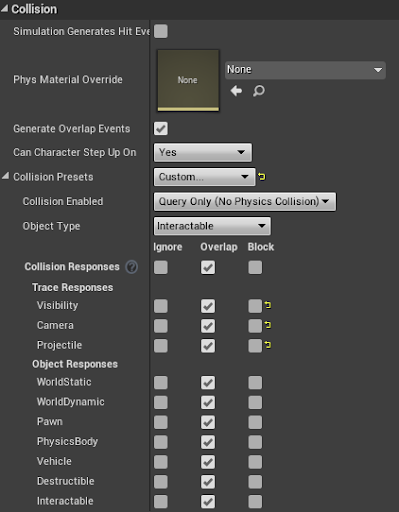
humm... My tree and the landscape have their own objects type. Let me show you what I have: This is the tree collisions https://gyazo.com/fd2a956f70b0045d92190ca73121bd70 And this is my landscape collisions settings: https://gyazo.com/f4a9b5905d07cb9372d243166e7fe610


top is tree and bottum is landscape
@tight schooner
tight schooner
what if you set both landscape to tree to block? Is there a reason you're using overlaps?
opaque elbow
No it was to test. When both are set to block the tree doesn't fall through the gorund
ground*
tight schooner
With blocking set, does this event work on your tree?
opaque elbow
No I have tried that...
Waiiit
actually yea
it works
BRUH
u know why it didn't earlier?
tight schooner
No idea. Collisions have always been weird for me. Lately I've been struggling with getting component-specific hit/overlap events to fire. But the generic "Event Hit" and "Actor Begin Overlap" nodes work.
opaque elbow
Its because I was using The hit event on the left instead of the right one.... 😪 https://gyazo.com/2aaf9689fc6eda5241baa9e2a9a7ef14
 tight schooner
oh yeah that's my issue too
opaque elbow
damnnn
tight schooner
so all I have is this workaround, lol
opaque elbow
I think its because there is no "Other" pin on the (On component hit)
And on the hit event there is
Landscape might not be consider as an actor or a component or anything
opaque elbow
Then is there any reason why this doesn't print anything when my tree collides with the landscape? https://gyazo.com/811427e91a4bc42a80eab74f3ef3b640

@odd ember
 odd ember
collision channels most likely
hit events need to be enabled as well
for both actors
opaque elbow
yes they are
odd ember
collision channels need to respond with block towards the other actor's collision type, respectively
opaque elbow
Both were set on block and both hit and overlap events were enable 🤔
odd ember
ok and are the actual collisions touching?
odd ember
oh so it's not something that happens dynamically
it's been set like that from when you start the game
opaque elbow
ohhh no the tree touches the ground when I make it fall
opaque elbow
humm what?
odd ember
how are the actors colliding
and are the actual collision components that you have set, actually colliding
opaque elbow
My tree falls and touches the ground and nothing happens. https://gyazo.com/1664af578536a8769224cfffc5781fdd What do you mean by the collision component I have set? Sorry If I dont quite undertstand... 😑

But when I use the Event hit it works
opaque elbow
Ohh no I have fixed my issue by using The "hit" event instead of the "on component hit" We were just not sure why the "on component hit" doesn't work. And then I said maybe its because the landscape is not an actor. The top one works, but the one on the bottum doesn't https://gyazo.com/4974222955af8f8740bf8fcda6836ba1

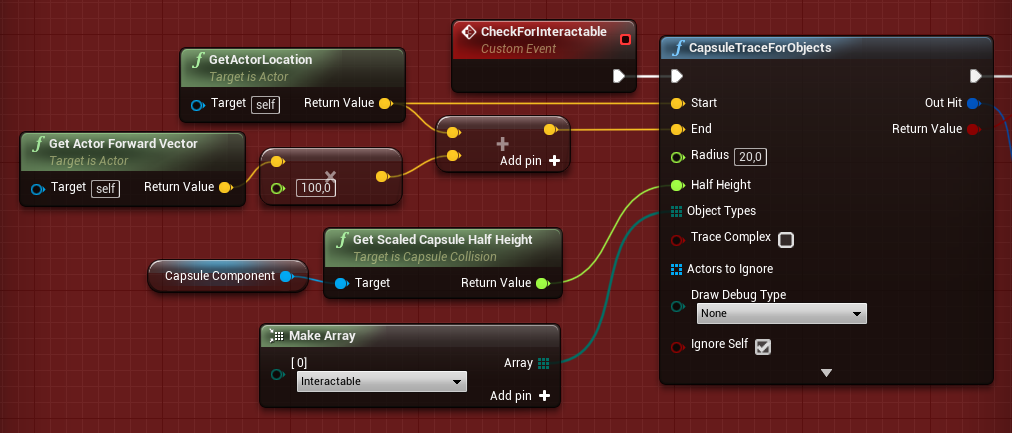

@odd ember
The event "hit" has a pin called (Other) And the event "On component hit" has (Other "ACTOR") So that's probably why it wasent working
odd ember
@opaque elbow on component hit requires the component to actually hit, not the actor itself
and likewise the settings need to be correct for the component itself, not the actor
opaque elbow
my component was hitting the landscape tho. So I would assume its the settings?
what would be the correct settings?
odd ember
generate hit events, collision set to physics, blocking the correct type of object/channel on both
opaque elbow
I did that
odd ember
is the component actually hitting the landscape
opaque elbow
yes
odd ember
are you sure about this
opaque elbow
yea
odd ember
because if there is no event registered after all teh settings are correct, it's the only variable left out
opaque elbow
it was working when the player collides with the component but not with the landscape for some reasons
odd ember
Collision settings for Landscape.
looks like you might need to whitelist collisions
but check the page and check each landscape component that it reflects the settings
collision is always a two way street
both actors colliding need to register the collision of the other for it to work
that also includes landscape
opaque elbow
Thanks I will take a look and find whats wrong with it
 vivid quail
Anyone know why my AI isnt jumping when they collide with a wall?
I also tried "Launch Character" at the end
 lean inlet
Hey yall I have a question on a pack i recently got
Im trying to call on an array to set a weapon for my char in blueprints
I'm trying to call on the 10 value in the array and switch the item class to one of the class weapons i created
this is what i started to do but then got stuck
thorny cedar
im to stupid to get a sphere attached to a spring arm is always in front of the view
^^
i want to change the distance
i should try the settransform + my offset right?
lean inlet
distance of the Sphere attach to the char or the distance of spring arm to the char
thorny cedar
im using a spectatorpawn
@lean inlet maybe thats the reason why it doesnt work?
i want to have a person that can fly through my level and activate stuff
lean inlet
ahhh
thorny cedar
so a kind of spectator.i guess unreal sees a spectator as a non player so it does not have a camera, since there is no rotation i could give my Sphere
I want to use this Sphere for Debugging. Jump from 1m to 5m to 10 m. So i tried to attach all to one scene node but it only keeps the location up to date
thorny cedar
it increases the distance
yes
but when i move the pawn ingame it does not move along the rotation of the pawn
rotating springarm with my sphere attached to it
@lean inlet can you give me a short introduction to spring arms?
socket Offset and target offset
if i want my target to be in x=600 i need a lenght of 900 + Offset?
this is the rotation of my pawn
 pearl rose
Hey, someone has tried to "limit" the speed turning rate so it's not affect by the DPI of the mouse?
lean inlet
@thorny cedar I'm not the best in Springs arms. But if you have an exact number you want your object to be placed you could have it attached and move to x=600 in Blueprints
This is just off the top of my head i didnt test it but this is what i would do
 violet wolf
hi, i have a plane that I want the player to be able to pass through so I set the collision preset to "NoCollision" in the BP, but i still can't pass through it, any ideas why?
violet wolf
violet wolf
its the default ue4 character, so i think it does?
lean inlet
ok what is the collision settings for the rest of the the mesh
if the mesh aroudn the plane has collisions which are whack than it will stop the player
hollow cape
I'm betting the ring around has a blocking collision volume
hollow cape
you can always look at the player/visibility collision views to see what's going on
lean inlet
aye
violet wolf
ah yeah it was set to default, i've created a collision inside the statich mesh window previously so I thought it would use that, but it doesn't
hollow cape
you'll need to either make up your own collision geometry in the static mesh editor using multiple primitives, or (less preferable), set it to complex as simple
lean inlet
If you want you can set the mesh to use complex as simple and it will map the mesh pretty well
hollow cape
it does, but can create other issues, like physics stuffs
violet wolf
so which collision preset should I be using on the gate?
if i want it to use the collision i created inside the static mesh window
hollow cape
default should use whatever primitive collision you have set up