#blueprint
1 messages · Page 305 of 1
 flat jetty
Hmm, do you recommend changing my whole UI to Common UI, by using layer stacks etc? I think its time.. I hate that UMG doesnt allow us inputs, and I have hard times about focusing, unfucosing etc.. It loses focus anywhere i click..
 surreal peak
flat jetty
Hmm, do you recommend changing my whole UI to Common UI, by using layer stacks e...
surreal peak
flat jetty
Hmm, do you recommend changing my whole UI to Common UI, by using layer stacks e...
Not sure if LayerStacks would be a requirement here.
But I know we use ActivatableWidgets and apply our IMCs through that.
flat jetty
For example it focuses here when i click somewhere else, then click "TAG". And this Hotbar is Focusable to set false. That blue square appears when i click tab
 surreal peak
Something of it is clearly visible and focusable
flat jetty
Hmm. But even if I click somewhere when this slot is empty, it first will show "square" on Inventory, then on second attempt, it closes. How people dealt UI toggling with same button before Common UI?!
Should i add an invisible box that prevents clicks to other things for my inventory 😦
Or maybe i should be okay with SetGameAndUI node..
surreal peak
flat jetty
Hmm. But even if I click somewhere when this slot is empty, it first will show "...
If their game still needed normal input, they use GameAndUI.
If they game only needed UI input, they used UIOnly and added the key press to the OnKeyDown method of the widget.
flat jetty
Exactly I did the **second **method, but with Tab key, i am having troubles. 😦 Since tab's current behaviour in Unreal is switching widgets, when I lose the focus, it re-focus on tab, then on second attempt, it does the behaviour i want, which is closing my Inventory Ui
Here is how i am handling it.
surreal peak
flat jetty
Exactly I did the **second **method, but with Tab key, i am having troubles. 😦 ...
That's because TAB is a NavigationKey
And UE/Epic is very picky on those.
If it can navigate with it, it will consume the input.
flat jetty
Should i just give up TAB then
Do you guys recommend Common UI for a middle-size project insistly? Do you think its a "must-have"?
surreal peak
Not 100% sure tbh. I haven't really tried to solve this myself.
surreal peak
flat jetty
Do you guys recommend Common UI for a middle-size project insistly? Do you think...
It's probably a must have by now.
 crimson spade
so i've managed to cut down quite a lot on all the functions and BPs as you suggested by using a sphere trace (i couldnt quite figure out sphere overlap), but im still running into the issue of being unable to "cancel" my lock-on by simply releasing the button. i have my targeting and follow camera set up, and it was much easier lol. i still just cant figure out the hold input issue
 flat jetty
surreal peak
It's probably a must have by now.
flat jetty
surreal peak
It's probably a must have by now.
Alright.
flat jetty
surreal peak
If it can navigate with it, it will consume the input.
I have changed the input to "I". But mouse click events are losing focus again, and meaning that "I" is not working. I also set my Player HUD's canvas panel (which is the parent of every widget for my player widgets) to "Visible" instead of Non Hit Testable.. Ah man..
 dark drum
flat jetty
Do you guys recommend Common UI for a middle-size project insistly? Do you think...
dark drum
flat jetty
Do you guys recommend Common UI for a middle-size project insistly? Do you think...
I recently made a personal plugin that sets some stuff up that uses CommonUI. There can be a little setup but it makes a lot of stuff easier in my opinion.
surreal peak
flat jetty
I have changed the input to "I". But mouse click events are losing focus again, ...
Focus is always placed onto a Widget that is Visible and Focusable. If nothing fits that it falls back to the Viewport Widget iirc.
Input is bubbling up from the leaf widget of the focus path to the root. If you put your OnKeyDown into a widget that could not be part of the focus path, then you won't be guaranteed to get that event to fire.
crimson spade
crimson spade
so i've managed to cut down quite a lot on all the functions and BPs as you sugg...
for anyone who runs into a similar issue in the future, i've solved it! i added a Released trigger to the key input and that creates a new Completed event for the key

 maiden wadi
flat jetty
Do you guys recommend Common UI for a middle-size project insistly? Do you think...
maiden wadi
flat jetty
Do you guys recommend Common UI for a middle-size project insistly? Do you think...
Must have depends.
The primary choice is whether you'll ever have gamepads. If yes then yes it's a 100% must have. Default UMG/Slate requires way too much work to avoid having navigation issues.
If you are 100% PC Keyboard/Mouse only, then you can skate by without it depending on the project. But TBH I wouldn't ever do a project without using it. Specially if you couple it with CommonGame out of Lyra for pushing content to layers easier. It makes it much easier to manage stuff like showing an inventory, or p ushing critical notifications over other things, no thaving to care about ZOrder stuff, etc etc.
Having said that, I also wouldn't advise relying on gameplay inputs in UI. They're very separate things. Which is a reason CommonUI also has it's own input system which are normally used for activating their buttons but can be set up to be used without a button in C++. In BP you can do it by making an invisible button or something as well. But I 100% advise not relying on input actions in UI without an explicit setup for it like what eXi likely has where you probably know the widget using it won't be in Menu mode.
surreal peak
crimson spade
for anyone who runs into a similar issue in the future, i've solved it! i added ...
Did you just want it to call something once on pressed and once on released?
crimson spade
surreal peak
Did you just want it to call something once on pressed and once on released?
i wanted to enter a "lock-on state" while holding a button. i was running into several different issues such as it cancelling itself immediately, only allowing me to lock-on once and never again, entering lock-on then never leaving, etc.
adding the Release trigger gave me exactly what i was looking for out of the Hold trigger
surreal peak
crimson spade
i wanted to enter a "lock-on state" while holding a button. i was running into s...
Hm, still sounds like you wanted the old, deprecated "Pressed + Released" behavior.
Which is quite simple to recreate.
 rain warren
Question: How do you make a nested BP actor follow the rotation of its parent? For example if I have:
BP_Parent
BP_CUBE
BP_SPHERE
Say, I put some BP script in BP_CUBE to rotate it, I would expect that BP_SPHERE rotates along with it, but that does not happen. BP_CUBE rotates and BP_SHERE doesn't even though it's a child.
Any advice on the best way to accomplish this appreciated.
crimson spade
surreal peak
Hm, still sounds like you wanted the old, deprecated "Pressed + Released" behavi...
this is essentially what i wanted, yes, but i wasnt sure how to accomplish it. this is only my second or third week working with the engine 
surreal peak
crimson spade
this is essentially what i wanted, yes, but i wasnt sure how to accomplish it. t...
Here is how you recreate that.
- InputAction with two Triggers
- Pressed
- Released
- InputAction set to Boolean Value Type
- In your Blueprint, use the
Triggeredpin of the Input Event and use aBranchfor the Value- True -> Pressed
- False -> Released
 vapid sedge
Hey guys,
so I am trying to get an array with all "Scene Components" from an actor. In the actor there are 2 of them, but for a strange reason (with print string) it says that there are 4. I hope somebody can help me, thank you 🙂

 maiden wadi
vapid sedge
Hey guys,
so I am trying to get an array with all "Scene Components" from an act...
maiden wadi
vapid sedge
Hey guys,
so I am trying to get an array with all "Scene Components" from an act...
Scene root and Cube are also scene components.
vapid sedge
I thought that too, is there a way to only get the "actual" scene components
maiden wadi
By class, not without making your own child of scene component and replacing those two with it. The other alternative is adding a tag to the component's tags in it's details panel and pulling components by that tag.
vapid sedge
Great suggestion, they already have tags, so thats what I am trying now, thank you!
It worked!
rain warren
One more try. How do you make a child actor rotate with its parent? I want the turret to rotate with the base:
 maiden wadi
rain warren
One more try. How do you make a child actor rotate with its parent? I want the ...
maiden wadi
rain warren
One more try. How do you make a child actor rotate with its parent? I want the ...
The short answer is not to use child actor components. Curious why it's not rotating with it though. AFAIK child actor just attached the spawned actors. And attached things should rotate with their attach parent by default unless you explicitly turn that off.
 hardy forge
Does anyone have an idea of how to make a wheel that charges something?
Imagine a hamster wheel needing to be spun in order to power up and open a door for example. The player would be going inside and running to spin it.
maiden wadi
hardy forge
Does anyone have an idea of how to make a wheel that charges something?
Imagin...
First make some sort of power node that opens the door at %. Test that by setting the percent from 0 to whatever. This is mostly an actor that is probably placed on a wall or nearby the door with a reference to the door. If you're a level designer you can even use direct blueprint communication. See Blueprint Communication livetraining video in the pinned videos.
Then make a hamster wheel that the player can possess with it's own inputs for farward and back. This is essentially identical to any form of car or horse possesion where you take control of a second pawn and your old pawn serves as a display in/on it. This wheel has a reference to the power thing and while being moved forward it can send events to increase the power each tick.
hardy forge
You are a genius! I didnt think of possession. Thats a great idea. Thank you so much!
rain warren
maiden wadi
The short answer is not to use child actor components. Curious why it's not rota...
Weird. The child actor is itself an actor so it goes Actor-Child actor-Child of child actor. The child of child doesn't move.
Also, what's wrong with using child actors in UE? Asking because this is utterly common with Unity.
maiden wadi
rain warren
Weird. The child actor is itself an actor so it goes Actor-Child actor-Child of...
In a nutshell, they have serialization issues. I'm unsure of whether they've ever been fixed, but people generally regard them as a cursed class. Cases of multiple spawned actors in your blueprints/maps, or cases where the component breaks and won't spawn it's actor anymore.
There's only one case where they would be viable for use and that is if they are never saved. If your blueprint spawns with them having no class set and some runtime data sets the class, they work perfectly fine. If you place them in a map and save the map, you're probably at the mercy of luck.
vapid sedge
Hey there,
I have a quick other question. Is there a node to get the actor, which the component is attached to, just like in the picture, but not for "cable component"?

 lofty rapids
Get Owner ?
rain warren
maiden wadi
In a nutshell, they have serialization issues. I'm unsure of whether they've eve...
Got it, thanks. So what is the correct way to create modular actors? ie. a tank has treads, a body and a turret that all move together with their own behaviors and animations and logic?
vapid sedge
lofty rapids
Get Owner ?
No, the owner does not get changed 😭
But I did it with set owner, thank you 🙂
 copper lion
Hello guys, i was playing with a stamina system, its working fine sprinting+stamina, when i sprint its drain stamina when hit 0 stop sprint and then regenerates.My question is: is this good coding?I was just playing around testing stuff (im a little beginer)


 lofty rapids
copper lion
Hello guys, i was playing with a stamina system, its working fine sprinting+stam...
lofty rapids
copper lion
Hello guys, i was playing with a stamina system, its working fine sprinting+stam...
in the case of checkforstamina you could just return the result of the and
copper lion
oh so you are saying that i can just plug in the and result in the return node? no need for a branch and everything else?
lofty rapids
copper lion
oh so you are saying that i can just plug in the and result in the return node? ...
right i think so yes
copper lion
everything else, is looking good?
lofty rapids
copper lion
everything else, is looking good?
theres no sense in checking is sprinting in the events because you set the value before you call it
so you know it will always be that
copper lion
yeah i realised that now
cuz i check it in the inputs
well it works fine, regen stops at 100, sprint stops at 0, regen starts when im not sprinting
i will try to implent this in a stamina component
if i want to make a stamina and a health component to attach it to the character , actor component is the way to go or scene component?
 mental trellis
Scene is basically ana ctor component that has a transform. If you don't need a transform, use an actor component.
copper lion
thanks
lofty rapids
copper lion
Hello guys, i was playing with a stamina system, its working fine sprinting+stam...
if you run regenStamina a bunch of times you will have a bunch of timers
you may want to shut that off at some point
copper lion
use the clear timer?
lofty rapids
i think with this way also your frame dependent on drain
lofty rapids
copper lion
use the clear timer?
ya clear the one created before you create another one
plug the return value of the timer into a variable
and clear that before you run it
lofty rapids
lofty rapids
i think with this way also your frame dependent on drain
meaning if your frame rate drops the drain won't be smooth
copper lion
lofty rapids
plug the return value of the timer into a variable
so from the return of set timer by function name i promote it to a variable and then?
lofty rapids
copper lion
so from the return of set timer by function name i promote it to a variable and ...
before you run the timer clear and invalidate
copper lion
like this
 lofty rapids
copper lion
like this
lofty rapids
copper lion
like this
but your not setting it after running the timer
lofty rapids
copper lion
so from the return of set timer by function name i promote it to a variable and ...
you didn't do this part, but with this part and set to the same variable that your plugging into clear and invalidate that should be good you may need to check if it's valid first but idk
copper lion
 lofty rapids

 dusky cobalt
Isn't calling the timer again reseting it as well?
it should because you cannot have couple of timer started from one node
copper lion
lofty rapids
i did like this and it stopped regenerating
dusky cobalt
How do you drain stamina? its -1 per click?
or do you have 1 stamina and then have to wait for it to regen to sprint again basically
ohh because it's triggered input ok I see
copper lion
as long as i sprint, it drains stam, it drains it fast, like -1 in a 0,5 secs , max stamina is 100, if i sprint to 0 stam it stops sprinting than regen to 15 to say and than i sprint drain again
 weary nimbus
I have my music set to pitch down whenever I open a menu, however when I change the music volume in the menu, it resets the pitch.


 dusky cobalt
copper lion
as long as i sprint, it drains stam, it drains it fast, like -1 in a 0,5 secs , ...
dusky cobalt
copper lion
as long as i sprint, it drains stam, it drains it fast, like -1 in a 0,5 secs , ...
i'm not sure if triggered is consistent or if its just spams the trigger as much as it wants
i would on Input Started -> Start Timer By Event(DrainTimerHandle) loop every 1second ->
Drain Stamina-> [Get Current Stamina - 1 -> Set Current Stamina]
Clearn and Invalidate(RegenerateStaminaHandle)
On Released -> Get DrainTimerHandle Clear and Invalidate +
Start Timer by Event(RegenerateStaminaHandle) loop every 1second -> Regenerate Stamina ->[Get Current Stamina +1 -> Set Current Stamina] -> If Current Stamina >= 100 then Clearn and Invalidate (RegenerateStaminaHandle)
copper lion
Can i create an event to put the timer and everything and then link it to the input to be more clean?
dusky cobalt
copper lion
Can i create an event to put the timer and everything and then link it to the in...
yes, like Start Drain or Stop Drain
copper lion
Thanks
dusky cobalt
or it's more like Start Drain and Start Regenerating
copper lion
I was wondering that the timers will come in the way
dusky cobalt
Drain Stamina, Regenerate Stamina
copper lion
I didnt know how to use them corectly
weary nimbus
I'm going to go crazy. If I walk a certain distance, cursor over events on other actors just simply stop working. I've tried moving anything that can be causing interference with my mouse over event near the selectable actors, but the ONLY way I can get them to detect the mouse cursor is moving them to the spawn area
 civic oar
Why would this happen besides Tick Enabled toggled off? No exec pin for tick.

 faint pasture
copper lion
as long as i sprint, it drains stam, it drains it fast, like -1 in a 0,5 secs , ...
faint pasture
copper lion
as long as i sprint, it drains stam, it drains it fast, like -1 in a 0,5 secs , ...
How smoothly do you want stamina to drain?
Just use tick my guy unless you intend for stamina to be chunked
 proud sentinel
im trying to compare my fps wasd movement direction to the direction my character is facing,

each side of this comparison is just calculating an angle that results in a heading, where forward is 0, right is 90, back is 180, and left is -90
my issue is that the input vector, and the vector im calculating from control rotation is different when holding forward, specifically that the control rotation is falling behind as i start turning, implying that one of these is being smoothed, delayed, or isn't recent in some way
anyone who's had to implement sprinting should have done this, but im finding no resources, i'd appreciate any suggestions from anyone who has
 copper linden
Not sure if I should be asking this here or in the cpp channel, but I'm trying to make a quick sort implementation in C++ and call it in BP, but there's nowhere for me to plug in my array, even though it's listed as a parameter. Is my syntax off, am I missing something? I'm in Unreal 5.4
https://i.gyazo.com/4f8af9df87a4ac51067b62d44bbbe20d.png
https://i.gyazo.com/fe36877aa0855eaece8dabafb0f772f9.png

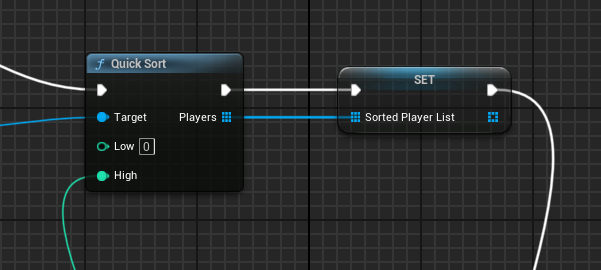
 dusky cobalt
copper linden
Not sure if I should be asking this here or in the cpp channel, but I'm trying t...
dusky cobalt
copper linden
Not sure if I should be asking this here or in the cpp channel, but I'm trying t...
Refresh? Are you using live coding? Do you turn off editor when you compile C++?
copper linden
yes, I turned off the editor when I re-compiled
dusky cobalt
copper linden
Not sure if I should be asking this here or in the cpp channel, but I'm trying t...
better question is how did you make the Players be return in void function without return 😄
 dawn gazelle
 wicked sedge
im getting this error each time
wicked sedge
im getting this error each time
Accessed None errors means you're trying to access something that isn't set to a value. Namely, your "UI Reference" doesn't have a value set. You may have set the "Type" to the appropriate type of reference, but it isn't populated with a value.
copper linden
dusky cobalt
better question is how did you make the Players be return in void function witho...
yeah, that's part of what's got me confused 😕
wicked sedge
dawn gazelle
Accessed None errors means you're trying to access something that isn't set to a...
interesting so whats the best way of setting the UI variable because i dont create it in that BP
dusky cobalt
copper linden
Not sure if I should be asking this here or in the cpp channel, but I'm trying t...
try
TArray<AUserPlayerState*> QuickSort(TArray<AUserPlayerState*> Players, int Low, int High);```but do you want to return the PlayerStates actually?
dawn gazelle
wicked sedge
interesting so whats the best way of setting the UI variable because i dont crea...
You'd have to pass the UI reference to that actor, or have some means of having your UI know about that actor and have the UI read what it wants from it.
dawn gazelle
copper linden
Not sure if I should be asking this here or in the cpp channel, but I'm trying t...
The & on a parameter usually makes it an output. If you want to pass it by reference to the function then use
TArray<AUserPlayerState*>* Players
 wispy kayak
Hi, how to convert those same name meshes to integer ?
 faint pasture
wispy kayak
Hi, how to convert those same name meshes to integer ?
faint pasture
wispy kayak
Hi, how to convert those same name meshes to integer ?
don't, what are you trying to do?
dusky cobalt
@copper linden did you figure it out? might try this one as well
void QuickSort(TArray<AUserPlayerState*> InPlayers,TArray<AUserPlayerState*> &OutPlayers, int Low, int High);
copper linden
dusky cobalt
<@363153952998555651> did you figure it out? might try this one as well
`void Qu...
I'm working on it, I'm trying datura's method, my pointer skills are a little shaky, I can't rememebr how to get index refs when passing an array by pointer
https://i.gyazo.com/5989b171281acf16bd93314424585a5d.png
 wispy kayak
faint pasture
don't, what are you trying to do?
wispy kayak
faint pasture
don't, what are you trying to do?
This is my problem, I only want when I select SM_High_Chair_01 only those make changes.

 copper linden
dusky cobalt
<@363153952998555651> did you figure it out? might try this one as well
`void Qu...
copper linden
dusky cobalt
<@363153952998555651> did you figure it out? might try this one as well
`void Qu...
I'll give your method a try as well and let you know
faint pasture
wispy kayak
This is my problem, I only want when I select SM_High_Chair_01 only those make ...
where is the bit of your code where you store WHICH chair you're changing the mesh of?
show your code
wispy kayak
 faint pasture
You are somewhere changing the meshes for every chair in the world when you should be changing them for MySelectedChair
that's your problem
are all 3 chairs part of one actor?
 faint pasture
wispy kayak
yes
faint pasture
wispy kayak
yes
why
just make a chair actor with the ability to change mesh, and put 3 of them in the scene
much simpler
 sand shore
copper linden
I'll give your method a try as well and let you know
sand shore
copper linden
I'll give your method a try as well and let you know
void QuickSort(UPARAM(Ref) TArray<AUserPlayerState*>& InOutPlayers, int Low, int High);
wispy kayak
faint pasture
just make a chair actor with the ability to change mesh, and put 3 of them in th...
If I change 1 actor with same chair, will the others get change too? I want that changes too
faint pasture
wispy kayak
If I change 1 actor with same chair, will the others get change too? I want that...
do you want to be able to change 1 chair at a time or not?
wispy kayak
faint pasture
do you want to be able to change 1 chair at a time or not?
yes, like the video all actor got change
sand shore
dusky cobalt
better question is how did you make the Players be return in void function witho...
"Out Params" are displayed in Blueprint like they are return values. Any BP function call that has multiple outputs is usually not returning a value in the traditional sense.
Return values also appear on the right-hand side.
faint pasture
wispy kayak
yes, like the video all actor got change
Which one do you want?
Change all chairs at once
or
Be able to change each chair on their own?
you're making zero sense
wispy kayak
faint pasture
Which one do you want?
Change all chairs at once
or
Be able to change each chair...
change all at once
sand shore
That's why TArray<>& appears on the right side of the node - UPARAM(Ref) is telling BP to treat the array& as an input reference parameter, and not an Out Param
faint pasture
wispy kayak
This is my problem, I only want when I select SM_High_Chair_01 only those make ...
looks like you already have that
copper linden
sand shore
`void QuickSort(UPARAM(Ref) TArray<AUserPlayerState*>& InOutPlayers, int Low, in...
That worked, thank you!
 inland walrus
Bp works fine however if the player keeps hold of the button during the cool down it doesn't play the charge animations, any help?

I can send a video too if needed
weary nimbus
Can anyone help me with what Greyh4m mentioned here? It seems like a likely solution because I am using a custom PlayerController
 inland walrus
https://tenor.com/view/spongebob-cant-wait-impatient-anxious-eagerly-gif-12243170376163390127
me when I see @dawn gazelle typing
 dawn gazelle
inland walrus
Bp works fine however if the player keeps hold of the button during the cool dow...
dawn gazelle
inland walrus
Bp works fine however if the player keeps hold of the button during the cool dow...
Where is your cooldown and what part of this code would stop your execution/charge-up time during that cooldown?
inland walrus
dawn gazelle
Where is your cooldown and what part of this code would stop your execution/char...
 dawn gazelle
That's a charge up time, that's not really a cooldown.
 dawn gazelle
Use a timer for your cooldown rather than a delay. You can use the return value handle and verify how much time is remaining or even check if its a valid timer handle to know if it is on coodlown or not.
I'm not sure how your cooldown here would work. The delay would trigger one time, reducing the value by 1, and the HeavyRecharge function is only called once on the blendout, so the delay never gets retriggered.
 inland walrus
dawn gazelle
Use a timer for your cooldown rather than a delay. You can use the return value...
inland walrus
dawn gazelle
Use a timer for your cooldown rather than a delay. You can use the return value...
How could the timer be the problem?
dawn gazelle
Oh.. I see..
inland walrus
dawn gazelle
I'm not sure how your cooldown here would work. The delay would trigger one tim...
The delay for the cooldown?
dawn gazelle
You recall it after the delay.
inland walrus
yeah
The timer works, I just cant figure out a way to basically stop the player using that input right before they can use it again
is there a disable specific input and enable it again node? that'd be great, I could uninput the player from holding it even for like .2 seconds
Then they'd have to rehold the button again
weary nimbus
weary nimbus
Nevermind, found the option but it didn't fix the issue
Ughhhh this engine is going to make me TWEAK
inland walrus
dawn gazelle
You recall it after the delay.
Not sure if this helps
 dawn gazelle
inland walrus
Then they'd have to rehold the button again
dawn gazelle
inland walrus
Then they'd have to rehold the button again
Based on what I can see, you should only set StartCharge true on started if CanHeavy && Sword Equipped == true as well.
inland walrus
dawn gazelle
Based on what I can see, you should only set StartCharge true on started if Can...
updated but still facing the same issue
 inland walrus
dawn gazelle
Based on what I can see, you should only set StartCharge true on started if Can...
dawn gazelle
inland walrus
dawn gazelle
Based on what I can see, you should only set StartCharge true on started if Can...
dawn gazelle
I think it might be the Completed doing it. Add another pin to the AND on your check at the bottom here and plug in the StartCharge on it.
 inland walrus
dawn gazelle
I think it might be the Completed doing it. Add another pin to the AND on your ...
inland walrus
dawn gazelle
I think it might be the Completed doing it. Add another pin to the AND on your ...
you absolute legend.
inland walrus
dawn gazelle
I think it might be the Completed doing it. Add another pin to the AND on your ...

I can go to bed and rest easy now 😅
dawn gazelle
I don't think what you have set up here is the right way of doing it... There's probably some magic you can use with the Enhanced Input system to add and remove the input action based on when the cooldown is up and if the sword is equipped, etc. Additionally the trigger can be used along with the triggered seconds/elapsed seconds to know how long the key has been held. This could help you skip a lot of these branches and delays, and manually tracking a timer for the charge time. At least for now it is working how you're hoping 🙂
inland walrus
dawn gazelle
I don't think what you have set up here is the right way of doing it... There's ...
Thanks dude! I tried doing some magic with the inputs but my issue was that the elapsed seconds start when the input is triggered/started, which means if the player is still holding down the input, they're going to be able to skip the animation since it's checking if elapsed seconds was >= 0.7
I basically need to find a way to reset how long the player has been holding down for
 open charm
greetings fine people of this chat, I need some help

I asked this in another place and got no answers, how would i make this work?
weary nimbus
weary nimbus
I'm going to go crazy. If I walk a certain distance, cursor over events on other...
Y'all someone please
Really hate to keep bumping it but it's the only big bug I have right now and I can't bloody figure it out
open charm
weary nimbus
I'm going to go crazy. If I walk a certain distance, cursor over events on other...
can you send some pictures of the code or anything else so we can see what the problem is?
weary nimbus
The door highlights when I hover my mouse over it in the spawn area (image 1), but the exact same actor does not in this hallway (image 2). There are no collisions blocking it (image 3), and doing a line trace by the channel I'm using for mouse events does hit the door here and nothing else. I have added extra zeroes to the trace distance, and turned Attach to Pawn on in the controller settings, but nothing. Image 4 is the parent actor BP, and image five is the BP for that door specifically (child of the parent actor). Apologies if the last blueprint looks messy, I moved the nodes around to fit them in frame.


Click events don't register in the hallway either, but work as intended in the spawn area, so I know it's at least not related to the outline effect.
 proud salmon
Anyone know how I might solve this problem?
I have a character that moves on tick with Add Movement Input.
If I click on another character, it will possess the original one with an AI Controller and then possess the new character.
Problem is: When this happens, if the original character is moving, it will stop for a split second before resuming. I can't seem to figure out why 🤔
I've tried overriding Unpossessed, Possessed and Receive Restarted but none seem to stop the hitch of movement stopping.
 lunar sleet
proud salmon
Anyone know how I might solve this problem?
I have a character that moves on t...
lunar sleet
proud salmon
Anyone know how I might solve this problem?
I have a character that moves on t...
Possession can take more than one tick
You can try to do it in cpp to see if it’s fast enough not to notice it, otherwise cover it up using animation/camera tricks if your use case permits
 spark steppe
i think what happens is that the controller controls the movement, and when you swap it you hit it after ticking, therefor it won't apply the movement on that tick
what you could try is to apply the movement manually when the possessed event fires
proud salmon
Thanks. Tried a few things but none of them fully removed it but a bit of lag on the camera seems to hide it. At least enough for now.
 tiny tundra
I have a Widget placed in my UMG. I would like to swap it out with a different one from an Array of Widgets. Easy way to do this?
Basically in this illustration, I want to set "WB_Presentation_slide1" to be a different one from the array of AllWidgets.


 hallow violet
I am trying to use a child as a pivot for its parent, to give it a some sort of "grab point" that I can change on the blueprint, I been trying several ways cant seem to find how to do it
wispy kayak
Hi, how can I achieve this with adding child from blueprint. I have Struct Array , it will create 3 scrollbox after that inside struct array have Array B, will create the button according to struct index.
 surreal peak
tiny tundra
I have a Widget placed in my UMG. I would like to swap it out with a different o...
surreal peak
tiny tundra
I have a Widget placed in my UMG. I would like to swap it out with a different o...
Is AllWidgetsfilled during runtime?
tiny tundra
surreal peak
Is `AllWidgets`filled during runtime?
no
surreal peak
tiny tundra
no
Then what are those references? You can't reference Widget BPs and add them to the Screen that way.
 snow halo
Hi everyone, Im having a system where I wanna create a fructal stone in place of a normal stone static mesh. So far I tried to make it a component and have it invisible with collisions disabled, but somehow that wasn't possible. Then I tried to create another duplicate blueprint only with the geometry collection inside of it this time
So in place of this line trace is where I wanna destroy & create those destruction fractal physics, but sounds like they might need a small bomb from the build in unreal engine masterfield blueprint
 tiny tundra
surreal peak
Then what are those references? You can't reference Widget BPs and add them to t...
tiny tundra
surreal peak
Then what are those references? You can't reference Widget BPs and add them to t...
I see, I just dragged them in from the project window
surreal peak
You need to have a variable of type UserWidget Class (Array fwiw) and then use CreateWidget to spawn them.
surreal peak
tiny tundra
I see, I just dragged them in from the project window
Yeah that's not correct. You are referencing the Blueprints atm.
You need to reference their classes and then create them when you need them.
tiny tundra
surreal peak
Yeah that's not correct. You are referencing the Blueprints atm.
I see.. yeah I was just starting to come to the same conslusion
surreal peak
The CurrentWidget variable is equally sus.
 keen robin
can somebody explain me this? xD both are same types and it complains about converting it to numeric type
surreal peak
That should potentially also be a UserWidget one (not class though).
And swapping them out you'd need to change the VerticalBox you have to be available in your widgets EventGraph (mark as Variable in the Designer, top right when the VerticalBox is selected) and then call RemoveFromParent on the CurrentWidget, create one of the array entries as a new Widget, set CurrentWidget to that one and call AddChild on the VerticalBox, feeding in the CurrentWidget.
tiny tundra
surreal peak
And swapping them out you'd need to change the VerticalBox you have to be availa...
k let's see here..
surreal peak
hallow violet
I am trying to use a child as a pivot for its parent, to give it a some sort of ...
Not entirely sure what the plan or problem is tbh. Can you explain this more?
surreal peak
wispy kayak
Hi, how can I achieve this with adding child from blueprint. I have Struct Array...
Loop over the outer array and for each entry, spawn a scrollbox and then loop over the inner array of the current entry and fill the scrollbox.
hallow violet
surreal peak
Not entirely sure what the plan or problem is tbh. Can you explain this more?
In my game you can grab items, and my plan is to give it a "grab point" so the item when its on the hand of the character that is where its being "grabbed" instead of the 0,0,0 of the item
surreal peak
snow halo
Hi everyone, Im having a system where I wanna create a fructal stone in place of...
Honestly, not sure what your struggle is. You will need to explain what is actually not working the way you are trying. I have no clue what "sounds like they might need a small bomb from the build in unreal engine masterfield blueprint" means.
surreal peak
hallow violet
In my game you can grab items, and my plan is to give it a "grab point" so the i...
Right, then add a SceneComponent, or a Vector that is exposed and visible as a Widget, to the ItemActor and query that when attaching.
surreal peak
keen robin
can somebody explain me this? xD both are same types and it complains about conv...
Show the error it is giving you.
keen robin
 snow halo
surreal peak
Honestly, not sure what your struggle is. You will need to explain what is actua...
snow halo
surreal peak
Honestly, not sure what your struggle is. You will need to explain what is actua...
how should i implement the masterfield blueprint, do i need a masterfield blueprint to explode the fructal mesh/geometry collection?
what is happening is this, I zap the thing with my trace, so that thing is a stone actor in the world
and I zap it with a trace only if im holding a tool like a pickaxe that is able to destroy a stone actor.
keen robin
keen robin
nvm, changed the input value in function to byte instead of enum and it worked
tiny tundra
surreal peak
And swapping them out you'd need to change the VerticalBox you have to be availa...
Yeah dude that did the trick! I feel good knowing that I was pretty close to getting there myself, but your telling me the other way wouldn't work prevented me from exploring that method further - and the AddChild thing would certainly have taken me a bit of time to get to as well. Thank you!
snow halo
Question...
if you trace an actor with your line trace
or sphere trace and get a actor reference of that actor
why cant I use that reference as target of interface and then send message to that?
No messages will be received on the actor unfortuantelly and I dont understand why.
snow halo
yes but that's not object im passing, im passing actor
 frosty heron
Actor is an object
 snow halo
frosty heron
Actor is an object
snow halo
frosty heron
Actor is an object
ok, but why doesnt this work?
 hallow violet
surreal peak
Right, then add a SceneComponent, or a Vector that is exposed and visible as a W...
hallow violet
surreal peak
Right, then add a SceneComponent, or a Vector that is exposed and visible as a W...
I tried adding an arrow as the parent to try and make it as a handle, but it just takes the arrow, not the item that is the child of it. It used to have a scene componenet that had the same issue as the arrow
lunar sleet
snow halo
ok, but why doesnt this work?
Did you check if False prints?
frosty heron
snow halo
ok, but why doesnt this work?
Debug and make sure your hit actor implement the interface.
You can do a check to confirm that as well
Does implement interface
snow halo
frosty heron
Does implement interface
I know for a fact that they both have that interface, because they are both children of the same parent actor.
frosty heron
snow halo
I know for a fact that they both have that interface, because they are both chil...
Better to check than debating
I know how interface work and never have issue with it.

Epic Developer Community Forums
Hi, I have a quick question. Is it necessary to check if an object implements a certain interface before calling a function from that interface? Here’s an example. When I click “Resume Game” in my pause menu, I want to run some code in my HUD class. Do I need to put this branch with “Does Implement Interface”, or is it ok to just ...
lunar sleet
Your line trace could be hitting a different actor
snow halo
lunar sleet
Your line trace could be hitting a different actor
But im destroying it.
I wouldnt be able to destroy stone if I wasnt hitting the right actor
My pickaxe can only destroy stones.
snow halo
frosty heron
Better to check than debating
 dusky cobalt
snow halo
dusky cobalt
snow halo
that is bad design btw if you have interface on something that shoulnd't really use the events from interface
for the collision settings it's probably because you are running Line Trace by Visibility channel, and probably everything in your game is blocked on Visibility Channel which it will detect anything, maybe also something in front of the item you are trying to hit, maybe that item doesn't block that channel.
You should have Interactable channel and things that can be interacted with set to block that channel
snow halo
dusky cobalt
that is bad design btw if you have interface on something that shoulnd't really ...

You're right im using visibility
dusky cobalt
does that thing you trying to hit has collision settings to block Visibility channel?
snow halo
dusky cobalt
that is bad design btw if you have interface on something that shoulnd't really ...
I do have an interactives channel but thats reserved for my "e" key when i "e" to pick up something
where's click is reserved for item actions
snow halo
dusky cobalt
does that thing you trying to hit has collision settings to block Visibility cha...
yes
dusky cobalt
snow halo
yes
so what is exactly happening? does it go trough has tag but doesn't spawn actor?
where is tag on your iron stone?
 sturdy vale
Hello everyone, the first picture is my scene, in which there is a candle on the far left, and nine slots for placing candles. In the middle is a wooden board with a small hole, and on the far right is a curtain for displaying the reflection of the candle. I want to achieve the effect of my second picture. That is, I will light the candles, and then place the candles on the nine slots respectively, and then the curtain behind will display the reflections of the candles of different sizes. I think this is called small hole imaging. Please help me complete this project together, thank you very much.


Please help me
snow halo
dusky cobalt
so what is exactly happening? does it go trough has tag but doesn't spawn actor?
it does have tag, and it does go through tag
only the cast fails
dusky cobalt
snow halo
it does have tag, and it does go through tag
on Spawn Actor set collisions to always spawn
wait, what cast? the interface?
snow halo
dusky cobalt
on Spawn Actor set collisions to always spawn
good call
snow halo
dusky cobalt
wait, what cast? the interface?
oh im not using a cast, i was using a cast before the interface
but I removed it becaus e i was failing to cast too
wispy kayak
surreal peak
Loop over the outer array and for each entry, spawn a scrollbox and then loop ov...
It did spawn, however my inner array index is become 0,1,2,3,4,5,6. I want keep it 0,1,2 , 0,1,2 to each scrollbox.
 analog prism
does anyone know how to make the linetrace always point under the player even when rotated? it's behaving this way regardless of what i set the actor rotation to

the orange/yellow one
tried both of these solutions


but they behave the exact same as this
 snow halo
dusky cobalt
wait, what cast? the interface?
snow halo
dusky cobalt
wait, what cast? the interface?
the target looks correct, but it just goes over it
 dusky cobalt
snow halo
the target looks correct, but it just goes over it
dusky cobalt
snow halo
the target looks correct, but it just goes over it
this looks like different class than just iron_ore, maybe you implemented interface event in that class and it doesn't have anything on it?
iron_stone_BP and iron_or_bronze_stone_bp
iron_or_bronze_stone_bp show this class's Activate Chaos

 regal geyser
Hello everyone! Any PCG wizard here to help me out with a simple yet infuriating problem?
I have an input Array of actor classes (in order to randomize the spawning of them) but i can't figure out how to shuffle between them, if i use the "Random Choice" node i always get the same sequence; i created a custom PCG BP in order to shuffle the array and it still returns the same array in the same order!! It's driving me crazy!
Plz Help!
https://blueprintue.com/blueprint/a6k5on7r/
here is the custom bp out of frustration lol
https://blueprintue.com/blueprint/28dgxjhm/
here is the PCG itself

No description provided
No description provided
dusky cobalt
dusky cobalt
iron_stone_BP and iron_or_bronze_stone_bp
show this @snow halo
snow halo
dusky cobalt
show this <@855871357182410802>
where did you find those?
I think iron_or_bronze_stone_bp is deleted
its an old actor I was using
that I later deleted, how did you find that?
 snow halo
dusky cobalt
its what you hit
snow halo
dusky cobalt
its what you hit
impressive attention to detail, thank you
 gentle parcel
hello Sourcers! I hope in a feedback on this... long charged jumps! I kept googling about that but all I can find is about higher charged jumps but what I need is actually to jump longer depending on 1. how fast the character is moving forwards and 2. based on how long I hold the jumping key. I managed to achieve the second part but still can't solve the distance covered by the jump. Any help or even just a hint about a nice tutorial about that?!?? Thanks in advance!
dusky cobalt
snow halo
impressive attention to detail, thank you
in game dev nothing is happening without a reason, if something doesn't work just go trough every step and make sure it's correct, if something fails, it fails on one point, and you need to find where
 kind estuary
Isnt this supposed to alter my Struct?
Im Passing By Ref ✅


no data is being changed
dusky cobalt
kind estuary
no data is being changed
why would it be changed? you are passing the same struct in and out
kind estuary
dusky cobalt
why would it be changed? you are passing the same struct in and out
ignore the output thats just there as an additional thing. im passing the Building Design Struct as reference. So any changes i make in it inside the function should take effect, right?
dusky cobalt
kind estuary
ignore the output thats just there as an additional thing. im passing the Buildi...
you need to make struct and then apply changes and then plug struct
kind estuary
dusky cobalt
you need to make struct and then apply changes and then plug struct
This worked but required a Local variable Building Design S. In C++ such thing would never happen 🤨

 chilly crane
Is it just me who never casts because I can never work out what to feed into the "Object" part?
Would someone be able to enlighten me, or am I probably better to continue using a system of BP interfaces?
inland walrus
Anyone know why this lets me shoot 5 fireballs when it should be 4?
Will is set to 100. Fireball costs 25. However, it lets me cast fireball 5 times

 chilly crane
inland walrus
Anyone know why this lets me shoot 5 fireballs when it should be 4?
Will is set...
chilly crane
inland walrus
Anyone know why this lets me shoot 5 fireballs when it should be 4?
Will is set...
I can't read any of that it's too zoomed out, try using blueprintue.
My initial thought is it doesn't seem you are checking if you have enough will to case more fireballs
inland walrus
chilly crane
I can't read any of that it's too zoomed out, try using blueprintue.
My initial...
Sorry about that
https://blueprintue.com/blueprint/zvlizqnd/
https://blueprintue.com/blueprint/e6zj15vy/
No description provided
No description provided
 zealous fog
inland walrus
Anyone know why this lets me shoot 5 fireballs when it should be 4?
Will is set...
zealous fog
inland walrus
Anyone know why this lets me shoot 5 fireballs when it should be 4?
Will is set...
switch the branch and spend willpower
The 5th fireball you are shooting now will set you will to -25 but at that point you already checked whether there is enough willpower

Of course, then you will spend willpower even if you cant fire
so id refactor it even more, and move the check for willpower to that branch
inland walrus
perfect that works
zealous fog
and then the only thing spend willpower should do is lower the willpower
zealous fog
inland walrus
perfect that works
it works but introduces another bug 🙂
zealous fog
good luck
analog prism
analog prism
does anyone know how to make the linetrace always point under the player even wh...
Can someone help me with this
inland walrus
zealous fog
good luck
fixed

 zealous fog
analog prism
does anyone know how to make the linetrace always point under the player even wh...
zealous fog
analog prism
does anyone know how to make the linetrace always point under the player even wh...
get forward rotation and rotate it it downwards
 analog prism
How would I do that exactly I’m not the best at rotation math
zealous fog
inland walrus
fixed
Nice. I would be careful nesting too much into functions, especially with delays, can make some bugs hard to find (Edit, lmao just realised its another event not a function my bad)
analog prism
I can try stuff but not sure if I can do it right
zealous fog
analog prism
I can try stuff but not sure if I can do it right
I would encourage that. I can give you the answer but vector maths is really important in gamedev so youd be best to learn it yourself
analog prism
Alright bet
zealous fog
If I can recommend Chatgpt, itll be able to help you learn easily these sort of topics. Just make sure to check it in engine
On basic vector math in UE it should be quite accurate
analog prism
Alr thank you 🙏
 split wasp
having done 6DOF movement components, "downwards trace" is a trick question
split wasp
analog prism
does anyone know how to make the linetrace always point under the player even wh...
getting characters root components(capsule probably) up vector and negating it probably works, but guessing from the sonic character you're planning on walking in the ceilings, then answer gets trickier
then you gotta decide are you tracing in gravity direction, or character-down direction
analog prism
split wasp
then you gotta decide are you tracing in gravity direction, or character-down di...
Yea I did the negating thing but it didn’t work and I want the character down so I’m gunna try the forward thing dean mentioned
split wasp
sure rotating forward vector works too, it's just unnecessary math for CPU to do
analog prism
What else can I do
Cuz rn I’m trying to make so I can walk on ceilings but I can’t think of other ways than the one dean mentioned and the stuff I’ve tried
And all of them point down in the world vector which aligns with the gravity
split wasp
forward vector rotated 90 degrees on X-axis is exactly the same is up vector negated
analog prism
So then what is there to do
 little moat
No description provided
Can someone help me understand what my code does?
I haven't done UE in a while
I also know there's a problem I need to understand my code to know what happens
I tried to undderstand it myself already
split wasp
at glance it checks twice a second if capsules of NPCs are going to overlap based on their velocity
little moat
split wasp
at glance it checks twice a second if capsules of NPCs are going to overlap base...
Checks twice?
It's made to see if npcs are going to collide but I got no idea how it works or what's wrong
spark steppe
analog prism
How would I do that exactly I’m not the best at rotation math
get the actors up vector, inverse it (* -1) and scale it by the distance that you want to trace
inland walrus
Any recommendations to make the animation perfectly loop until the player releases?
analog prism
spark steppe
get the actors up vector, inverse it (* -1) and scale it by the distance that yo...
Did it, didn’t work
It kept going straight down not under the character
The yellow
 spark steppe
is your character even rotated?
spark steppe
show your node setup of the trace
analog prism
Im not home currently I’ll send it when I get home
spark steppe
using the up vector should 100% work if you don't mess up the math... (and if your actor is rotated)
dark drum
analog prism
does anyone know how to make the linetrace always point under the player even wh...
Are you using the character class (as the parent) with the movement component?
spark steppe
double check on that actor rotation, eventually you may have to use the up vector of the capsule/mesh
 violet bison
is there anything like capsule trace but overlap?
analog prism
dark drum
Are you using the character class (as the parent) with the movement component?
No I’ve been making my own
It was initially the cmc but then I deleted all the code and I’m doing all the physics manually and such
dark drum
analog prism
No I’ve been making my own
Add an arrow component to the root so you can see which way up is for the actor. It might be that you're rotating the mesh instead of the actor itself, which would be why the up vector for the actor doesn't match what you expect.
dark drum
violet bison
is there anything like capsule trace but overlap?
You can add a capsule component and bind to the overlap events.
analog prism
dark drum
Add an arrow component to the root so you can see which way up is for the actor....
alr I’ll do that when I get home
 cursive drum
what are the ways to call function from widget to actor component, like clicking the button of the widget and calling to a blueprint
spark steppe
cursive drum
what are the ways to call function from widget to actor component, like clicking...
sounds like you should watch this https://www.youtube.com/watch?v=EM_HYqQdToE

Announce Post: https://forums.unrealengine.com/showthread.php?101051
This Training Stream takes a look at Blueprint Communication. We find that Unreal Developers of all levels can sometimes struggle through the concepts behind moving data between objects. So in this video we'll take a look at the different ways to make Blueprints talk to one an...

 analog prism
still
 spark steppe
and i feel like your actor may not be rotated, but something else is, like the capsule or mesh


 rancid path
I have 2 widget blueprints and a blueprint interface communication between those and the gamemode. From the Lobby widget, I am trying to call an event on the MainHUD widget that basically says "If Pawn A, hide visibility on health widget, if Pawn B, hide visibility on crosshair widget". Would anyone be able to help me with something that I feel should be simple but this is something strangely stumping me. I thiink I'm forgetting something in regards to calling/referencing events. Thank you everyone!
zealous fog
rancid path
I have 2 widget blueprints and a blueprint interface communication between those...
Show your blueprints 😄
rancid path
sorry, was taking screenshots haha

within the player c ontroller, once the game begins, set Lobby UI

In the Lobby, once Start is pressed, I am trying to Call To Setup, a Custom Event I added trying to reference SetupPropWidget within the W_MainHUD (the buttons/hpbar/crosshair are all here)

Code I am trying to reference/execute once Start Game is pressed
ive thought about just having a new seperate UI for the different pawns, i just have endgame screen logic on this singular one so i was hoping not having to redo. If I have to though, is what it is
SetUpPropWidget is part of the BPI
zealous fog
Ok so you have 2 widgets MainHUD and Lobby and you need them to communicate right?
rancid path
yes
zealous fog
Where is mainhud created
If you can get a reference to the mainhud, you can pass it into Lobby as a variable if you expose it on spawn
rancid path
First pic, once SetPropOnClient is called, the Lobby widget is removed and the HUD is put into the viewport from there instead
rancid path
zealous fog
If you can get a reference to the mainhud, you can pass it into Lobby as a varia...
Thank you!
zealous fog
Make sure to refresh the create widget node
It usually doesn't do that automatically
dark drum
rancid path
I'd have an event dispatcher on the lobby widget that the hud can bind too when it's created. When you create the hud widget, have it bind to the event dispatcher when is created.
On the lobby widget, you call the event dispatcher when you're button is clicked.
In my opinion, event dispatchers should be the go to for UI stuff as it can help prevent reference loops.
rancid path
dark drum
I'd have an event dispatcher on the lobby widget that the hud can bind too when ...
Thank you as well!
zealous fog
dark drum
I'd have an event dispatcher on the lobby widget that the hud can bind too when ...
What do you mean with a reference loop?
dark drum
zealous fog
What do you mean with a reference loop?
It where Class A references Class B which references Class C which references Class A. It's good to get in the habit of avoiding it where possible.
zealous fog
dark drum
It where Class A references Class B which references Class C which references Cl...
I see, thanks
I usually build my UI with one main widget and then have seperste widgets on that
dark drum
Using event dispatchers can also make it easier to iterate of UI designs without having to rework everything. Makes it easier to swap out widgets.
zealous fog
Makes it easier to reference stuff but haven't used many event dispatchers in UI
dark drum
zealous fog
Makes it easier to reference stuff but haven't used many event dispatchers in UI
Buttons are a create example for event dispatchers as this means the button doesn't need to know (Nor should it care) about what happens when it's clicked. It's done its part. 😅
Anything that should do something when the button is clicked, would bind to the buttons on click event.
zealous fog
dark drum
Buttons are a create example for event dispatchers as this means the button does...
That makes sense
Yeah I'd usually have the event of what should happen in the main widget
For example
"Save button clicked"
So i guess it's like an event dispatcher with extra steps lmao
Ill try it out some time
 gloomy swift
whyyyyyyy does the get value as x node for blackboards in bp not have a fill-in value... This doesnt work, I dont want to create local variables just to store the name of a key
 rancid path
dark drum
I'd have an event dispatcher on the lobby widget that the hud can bind too when ...
rancid path
dark drum
I'd have an event dispatcher on the lobby widget that the hud can bind too when ...
Forgive my ignorance, but is this how I would start/?

At the end of the top and bottom
maiden wadi
gloomy swift
whyyyyyyy does the get value as x node for blackboards in bp not have a fill-in ...
Because it's used a lot in C++ and copies suck. You can just use MakeLiteralName as well.
zealous fog
spark steppe
sounds like you should watch this https://www.youtube.com/watch?v=EM_HYqQdToE
@rancid path
From 1:33:50
It's an amazing video
rancid path
Thank you so much!!!!
dark drum
rancid path
You can remove 'HideLobbyUI' event from the lobby widget. (I assume its the lobby widget)
How yo call it is fune though.
Now when you go to create the HUD widget, get the lobby widget, and bind to the On Game Start Event dispatcher and use the create event node, connect the hud widget and select the function you want to call when it's clicked.
 final nimbus
Is there something like FilterByPredicate but for Blueprints? I've tried searching online and not found anything. Do I have to write my own?
 fiery swallow
final nimbus
Is there something like `FilterByPredicate` but for Blueprints? I've tried searc...
fiery swallow
final nimbus
Is there something like `FilterByPredicate` but for Blueprints? I've tried searc...
Theres nothing like it. You'd have to write your own unfortunately
rancid path
dark drum
You can remove 'HideLobbyUI' event from the lobby widget. (I assume its the lobb...
Within my Player Controller, I set the UI to the lobby on connect, and once the start button is clicked, it starts an event which Removes From Parent which is the Lobby UI
Should I still remove the Remove From Parent? Won't I have both UI's at once? I'll be back at my computer in 20
rancid path
wait im an idiot. I just duplicated the MainHUD, hid visibility on the new HUDs themselves (no BP) and on my first pic, the bottom Create Widget is the new Hunter widget. working perfectly too. Thanks everyone for the help, turns out I just had to not be an idiot for just a moment haha
 sleek aspen
Hi, I added a health bar but now the player can no longer move, does anybody know how I can fix this?
 analog prism

Epic Developer Community Forums
I’m trying to make the yellow linetrace point down according to the actors rotation but no matter what I’ve tried it doesn’t work, it only points down according to world space no matter what. what I’ve attempted:
been banging my head on the wall for hours
i can't figure this out
 rough sinew
sleek aspen
Hi, I added a health bar but now the player can no longer move, does anybody kno...
rough sinew
sleek aspen
Hi, I added a health bar but now the player can no longer move, does anybody kno...
You have unconnected the part that sets up the controls/input. Connect the part under input map again.
 leaden osprey
hello guys! I really need ur help. So the problem is I created a bow and heres an arrow ofc. So when i fire an arrow and the collision on arrow overlaps smth it causes a damage. But it doesnt. I have here a damage system that i created from tutorial and in all other places it works so ig its not the problem. please if u have any ideas help. If u need some more info, just tell what u need


 sleek aspen
rough sinew
You have unconnected the part that sets up the controls/input. Connect the part ...
sleek aspen
rough sinew
You have unconnected the part that sets up the controls/input. Connect the part ...
That fixed it, thanks for the help
 gloomy zealot
Are there any good resources for learning this? I am just working with chatgpt currently, I want to add abilities to lyra, like how the dash is on shift, I want to add a frostbolt.
rough sinew
gloomy zealot
Are there any good resources for learning this? I am just working with chatgpt c...
Chat GPT is notoriously bad at teaching/working with Unreal, specially features that are changing and evolving since 5.0. You'd be way better off looking for tutorials in YT. You might get lucky with your asking your questions to AI but it often hallucinates things that don't exist sending you into a dead end.
analog prism
the issue with unreal atleast in my current experience trying to learn it for the past two weeks is sometimes you hit a deadend that knowledge of blueprints and knowing how to program and all that and even ai wouldn't help figure out
like I'm dealing with an issue and I'm trying like 4-6 diff methods and none worked at all so the only way to figure it out is to try and try and try or get help and for the former many people get demotivated
rough sinew
leaden osprey
hello guys! I really need ur help. So the problem is I created a bow and heres a...
Your code is a bit convoluted and could use some simplification. You'd better use a blueprint interface for damage (with the target being your hit actor). Even if you do it this way you are BINDING to an event that CALLS the event dispatcher. The CALL should be only when something is hit, this way it makes it a circular reference. The problem is your event for damage handling is the same name of your event dispatcher causing the confusion. There might be other mistakes somewhere in code too. I'd simplify it a lot.
rough sinew
analog prism
like I'm dealing with an issue and I'm trying like 4-6 diff methods and none wor...
It will help you a lot to learn some very simple debugging tools, like printing to screen, breaking points or displaying your ray-traces in game. It is much easier to find mistakes this way. Go to a place in your code where you know the values it should output, find if the results are OK there. If they are, your mistake is likely "downstream" from there. If the values are wrong your mistake is like "upstream". Repeat this until you find the origin or your mistake.
analog prism
rough sinew
It will help you a lot to learn some very simple debugging tools, like printing ...
no yeah I'm aware of how to debug like this and I've been deploying these strategies this whole time but there's def some issues that aren't just simple to figure out
rough sinew
What is your current issue?
analog prism
analog prism
https://forums.unrealengine.com/t/line-trace-to-the-bottom-of-the-player-regardl...
.
I just can't find a solution
rough sinew
So the point where you know the mistake is at the line trace, your error is upstream. Have you taken a look at actual actor location and rotation it is using?
analog prism
yeah it's changing
the pitch specifically is going from -1.5 to 1.5
which would make sense because it's what I'm controlling primarily for the slope
 rough sinew
You mean 1.5 degrees? That image seems much more than that.

 rough sinew
So that is the issue. Is you skeletal mesh doing the rotation?
 rough sinew
The first thing I would check is why your rotation is so off from the value it should be. If that value is wrong nothing else can work.
analog prism
it shouldn't matter much due to how the actor is clearly rotating and it doesn't care about the actor up vector
hold on
I'll provide you the blueprint so you can clearly see
No description provided
rough sinew
Put the character in a known slope and hard input the value into your ray trace. Does it work?
analog prism
rough sinew
Put the character in a known slope and hard input the value into your ray trace....
yeah

 rough sinew
So the only issue is the actor rotation.
How about you try the skeletal mesh rotation?
analog prism
I'll give it a try
i figured out a temporary solution though
i realized 1.5 to -1.5 is 20x less than the actual rotation
so i multiplied it and it might be finally working
 rough sinew
Well, that is weird. 🫠
analog prism
yeah it is
 ashen flame
I dunno if this is the right section to ask
But does anyone have resources for randomly procedural towns/cities?
leaden osprey
rough sinew
Your code is a bit convoluted and could use some simplification. You'd better us...
so what do i actually do? SORRY i dont understand
ashen flame
Like the environment will be randomly generated including roads
analog prism
@rough sinew your comments helped me think of a solution thanks
slope physics work much better
rough sinew
leaden osprey
so what do i actually do? SORRY i dont understand
Either fix the event that is called on Bind or research Blueprint Interfaces which should make this simpler and more useful.
leaden osprey
okay.. thank you!
 finite basin
yo is bp actually viable as a main language?
analog prism
finite basin
yo is bp actually viable as a main language?
yea
finite basin
analog prism
yea
ty
for some reason after first hit it dasnt apply more damage can anyone help?

 rough sinew
finite basin
yo is bp actually viable as a main language?
rough sinew
finite basin
yo is bp actually viable as a main language?
If you want to make your own small/medium single player game it is totally doable. If you want to get a job you will 9/10 times need to learn some C++.
 random pulsar
hey there ,can someone explain why this logic does not fail after 11 seconds?

 dusky cobalt
random pulsar
hey there ,can someone explain why this logic does not fail after 11 seconds?
dusky cobalt
random pulsar
hey there ,can someone explain why this logic does not fail after 11 seconds?
its probably getting refreshed everytime you call that block
random pulsar
and what would be the solution?
dusky cobalt
start timer, set boolean , on the finish set boolean back, before starting, check the boolean so it wont be refreshed
or you can check if the timer is valid then dont start it, and only start timer if its not valid
you need to make variable for timer handle and save it on return value from set timer by event
on finish just to make sure clear and invalidate timer
random pulsar
dusky cobalt
you need to make variable for timer handle and save it on return value from set...
ok,i made something similar
and all of this in one task?
dusky cobalt
similary to what you have now
just add check before starting timer
why not use built in wait for 11s though?
random pulsar
dusky cobalt
why not use built in wait for 11s though?
it does not work
you mean like this?
 dusky cobalt
yes, it doesn't work?
random pulsar
i can try one more time ,but yeah it doesnt
so what i want is to fail the sequence after 10 seconds
dusky cobalt
#gameplay-ai try here
random pulsar
thx
faint pasture
analog prism
https://forums.unrealengine.com/t/line-trace-to-the-bottom-of-the-player-regardl...
Make the capsule visible, is the capsule rotating in any way but yaw?
You have 3 possible sources of rotation before you see the character mesh.
Capsule could be rotated, skeletal mesh component could be rotated, and mesh bones could be rotated.
Start there, figure out which one it is.
 fallow umbra
is there a way to stop unreal auto updating my Splines each time I add or delete a point? ||not landscape splines, but Component splines||
weary nimbus
How do I get my media player to not unload the video as soon as I hit play? The video is already in my {ProjectFolder}/Content/Movies folder
It also unloads it if I just close out of the tab
weary nimbus
Also, this isn't working..

The event itself simply doesn't fire if I hook it straight to the print string
Help
wispy kayak
I am using adding child but how to find what index Array A if I click the buttons from Array B ? For instance, If I click Buttons from Array A [2] I want get that index Array A. I can't get the scrollbox index according which column I click.
 weary nimbus
Also, this isn't working..
weary nimbus
weary nimbus
Also, this isn't working..
Fixed it
 scarlet urchin
How can i fix the character unsticking to the wall when i face left/right while climbing in the same direction?

Ive noticed that the game thinks im moving backwards when i look left/right direction that im crawling in!
dawn gazelle
scarlet urchin
How can i fix the character unsticking to the wall when i face left/right while ...
Use the actor's right vector when climbing rather than the control rotation's right vector..
scarlet urchin
dawn gazelle
Use the actor's right vector when climbing rather than the control rotation's ri...
Thanks a lot! It worked!
scarlet urchin
dawn gazelle
Use the actor's right vector when climbing rather than the control rotation's ri...
agree about casting btw
 golden frigate
i put together a mechanic that lets you draw a mask onto a blend layer using render targets, but it requires 2 render targets to work. Anyone got any resources or advice on making the render targets R16F format instead of RGBA16F (for efficiency purposes)? I tried to just swap everything to operating on the red channel but it didnt work
chilly crane
Someone critique my first combat sys draft. I'm designing an ARPG system, is there any obvious errors you can see straight away? Or suggestions?
No description provided
 maiden zealot
Hi - I've encountered the 'Inifinite Loop Detected' error in my blueprint. To clarify, the loop is NOT infinite, it's just millions of cycles because I'm editting a very dense mesh. The problem is that this is in the construction script, so I was wondering if there's a way to politely ask Unreal not to panic about this.
tiny tundra
VERY basic question time. Is there any perfomance difference in A or B? (Does it affect performance one way or another if I make this reference target a couple of times like this, or is it more performant to just use the single bundle and drag separate connections off of it?)
 weary nimbus
After way too much finagling, I finally give up on trying to get the main menu and actual game to work from the same persistent level. The only reason I did this was because I needed the options that you set in the main menu to match the ones set from the pause menu in game, and actually affect the game itself, but if I'm putting each on separate levels I have no idea how to sync them.
tiny tundra
weary nimbus
After way too much finagling, I finally give up on trying to get the main menu a...
can't you just store the options in the Game Instance? Then you can read/write from anywhere
weary nimbus
tiny tundra
can't you just store the options in the Game Instance? Then you can read/write f...
Oh sweet, I'll look into that in the morning
tiny tundra
It's super fast & easy
weary nimbus
I need super fast and easy right now lmao
That should take care of a few bugs
My other issue is that saving isn't working. It works in one instance of the game, e.g. if I save, walk somewhere else and load the save it'll put me back there, however if I close the game and open it it resets all the save slots
This is after packaging the game too
tiny tundra
weary nimbus
This is after packaging the game too
Ah. haven't dealt with saving yet, personally (other than writing stuff to a JSON)
weary nimbus
I might be able to get away with not adding it right now, this is for a game jam and also a demo level (only a few minutes of game time) so shouldn't really need it
Defo will need it later though if I plan to release a full version
Lastly, are there any good guides or anything you'd recommend for setting up a graphics settings panel?
For things like v-sync, anti aliasing etc etc
tiny tundra
nah sorry, that is all greek to me as well! Still fairly fresh with Unreal myself
gloomy zealot
Hey guys, I am working on spawning a projectile in Lyra with GAS, I made the input object for lyra, and I'm working on the blueprint, I'm trying to have it spawn from the socket in the hand(I think this is the muzzle?) I am kind of lost though, is any of this correct:
 chilly crane
tiny tundra
VERY basic question time. Is there any perfomance difference in A or B? (Does i...
chilly crane
tiny tundra
VERY basic question time. Is there any perfomance difference in A or B? (Does i...
Not sure how intelligent the engine is in that regard, but personally I'd do #2, it sets you up to be more efficient
chilly crane
chilly crane
Someone critique my first combat sys draft. I'm designing an ARPG system, is the...
Ping me with response please
lunar sleet
tiny tundra
VERY basic question time. Is there any perfomance difference in A or B? (Does i...
Will not affect game performance at all. Might affect editor performance at scale, but otherwise nothing to worry about it
maiden wadi
tiny tundra
VERY basic question time. Is there any perfomance difference in A or B? (Does i...
You won't see a difference with pointers like that, getting them is so fast that you would need literally hundreds of thousands of them every frame to make an issue.
But to answer the question directly, technically B is faster. And will be much faster if those are function calls. It follows the simple principal that every pure node connected to an executed function gets executed once. So in A you're calling those getters twice, in B you're calling them once and reusing a cached value of the third node on the second call.
lunar sleet
maiden wadi
You won't see a difference with pointers like that, getting them is so fast that...
He’s not caching it tho, isn’t it same thing because pures get called for each connection?
If he stored it into a variable, I could see your point
But he is not
dark drum
maiden zealot
Hi - I've encountered the 'Inifinite Loop Detected' error in my blueprint. To cl...
In the project settings, you can increase the limit for loop detection. Increase with caution but it should allow what you want.
maiden zealot
dark drum
In the project settings, you can increase the limit for loop detection. Increase...
Yeah… I increased it to 1,000,000,000 (a lot, I know - but I wanted to be sure) but it’s somehow hard capped at 10,000,000 despite me setting it higher. Assuming this doesn’t work, is there a way to break up the loop in a way Unreal will be ok with? Some kind of delayed for loop or similar?
As I say this, I’m questioning just putting this piece of code into a c++ script
dark drum
maiden zealot
Yeah… I increased it to 1,000,000,000 (a lot, I know - but I wanted to be sure) ...
10 million is already huge. Moving to c++ can help as the BP loops have additional steps which would count as an operation towards the loop counter.
maiden wadi
lunar sleet
He’s not caching it tho, isn’t it same thing because pures get called for each c...
Using the same pure node connected to the same executed node twice will reuse a cached value of the output on any pull after the first.
dark drum
maiden zealot
Yeah… I increased it to 1,000,000,000 (a lot, I know - but I wanted to be sure) ...
If it's editor time, you can split your logic into call in editor functions and call them one after another by clicking the button.
 plucky mortar
hello, I am Sophie, and I am really new to unreal,a nd here too^^. I need to make a game for my school and i am struggling with BP.
has someone time to help me? I don't know if I need to post right away my issue or if it is better to wait for someone to be available.
maiden wadi
@lunar sleet Most common example are the Random nodes. Using one connected to two different executed nodes and getting two different values. Using two connected to one node and getting two different values, and then using one connected multiple times to one executed node and it'll always give the same value.
dark drum
plucky mortar
hello, I am Sophie, and I am really new to unreal,a nd here too^^. I need to mak...
Just post any questions you have, if someone can help they normally do.
maiden zealot
Oh also for some context - I’m operating on a mesh that has about 3,000 vertices and 2,000 triangles, and making several consecutive sections of a bigger mesh with these. The operation is more complex than a simple shift in coordinates, as the meshes are bent around splines and such. As it stands the biggest loop has about 200 copies of the mesh, so I assumed 200 * (3,000 + 2,000) = 1,000,000 cycles, assuming each vertex and index gets visited once. But apparently it exceeds 10,000,000 somehow, despite the fact I can explicitly see there isn’t that many sections being created on the mesh.
plucky mortar
ok. I need to show to the player a list of objects, then the player can check some of them to add them to their inventory.
i did this : to be able to check the status of the click, then inside the image, i have this one.
(please don't judge, its my very first attempt to code something)
My main issue is that i can't pass the statuts 'ischecked" to the thing i am checking to make the inventory.
I don't know if i am clear enough...

 dark drum
maiden zealot
Oh also for some context - I’m operating on a mesh that has about 3,000 vertices...
dark drum
maiden zealot
Oh also for some context - I’m operating on a mesh that has about 3,000 vertices...
The loop counter is based on operations as far as I'm aware so reducing what's happening in your loops can help. For example, getting a vert location, modifying and setting the value would be 3 on the counter. It could be more of course, hard to say without actually following the stack trace but it should give you an idea.
maiden zealot
Huh. Thats rather annoying, I’ll just shift what I can to C++. Thank you!
dark drum
maiden zealot
Huh. Thats rather annoying, I’ll just shift what I can to C++. Thank you!
Yea, there's no way of actually knowing if a function would result in an infinite loop so we got to count lol. If you figure it out though, I'm pretty sure there'd be a nobel prize. 😉
maiden zealot
I’m familiar with the halting problem, I’ll pass XD
dark drum
plucky mortar
ok. I need to show to the player a list of objects, then the player can check so...
I can see you storing the inventory on the game instance. This isn't really advised. Do you plan to have other inventories in your game? If so, you'll probably need to redo it all anyway. 😕
maiden wadi
It's worth a note that you can get rid of a lot of looping costs by dropping each loop into it's own function. Causes a lot less chaining macro calls each sub loop iteration.
maiden wadi
Yeah. Happens. :/ Scripting languages.
maiden zealot
Meh, it’s what I get for giving blueprints a massive task
 trim matrix
Can someone help me fix this
Blueprint Runtime Error: "Accessed None trying to read property CallFunc_GetLocalPlayerSubSystemFromPlayerController_ReturnValue". Node: Add Mapping Context Graph: EventGraph Function: Execute Ubergraph BP Third Person Character Blueprint: BP_ThirdPersonCharacter
plucky mortar
dark drum
I can see you storing the inventory on the game instance. This isn't really advi...
so, i needed to present a toy, so i will have the opportunity to remake everything from scratch. Why iis it not recommended?
the game my team chose is a vendor meeting heroes each day. the morning he will get some new items, then chose a few of them to be presented to heroes.
So i think we have 3 "inventories" : the items coming each day, the inventory "total", and the one for tiem chosen during this day.
I don't know if this answers your question.
my main issue (i think :s) is that i have a table with component (name, etc) and i did put the "checked" as a component, but i am not able to "update " it.
trim matrix
Can someone help me
dark drum
plucky mortar
so, i needed to present a toy, so i will have the opportunity to remake everythi...
The game instance is the first thing created when the game is launched and is responsible for managing the state of the game as a whole. You shouldn't put session specific logic or data in the game instance as this can increase launch times for the game.
Adding to that, you can only have 1 game instance. This can make managing anything on there become difficult as you scale up.
Generally, an inventory should be an inventory component which you can place on the player character, controller, player state, NPCs and even actors for storing items.
This helps make sure all inventories function the same and can work together without having to copy and paste logic.
dark drum
trim matrix
Blueprint Runtime Error: "Accessed None trying to read property CallFunc_GetLoca...
You're trying to get something that doesn't exist in your logic.
trim matrix
dark drum
You're trying to get something that doesn't exist in your logic.
Im not cuz I didnt even code anzthign yet
Its just the template
wispy kayak
Hi, what the name of this? What keyword should I search?
 trim matrix
Like its just the 3rd person template and I put 2 players and listen server
and it gives me that
error
plucky mortar
dark drum
The game instance is the first thing created when the game is launched and is re...
so i would need to change the "location" ? not in the game instance, but in the player ?
dark drum
plucky mortar
so i would need to change the "location" ? not in the game instance, but in the ...
I would create an actor component for your inventory. This can be placed on any actor. (Including the player or controllers)
plucky mortar
ok. do you think at this point in need to do this to make what i want work ? because soon i will need to redo everything.
dark drum
plucky mortar
ok. do you think at this point in need to do this to make what i want work ? bec...
Well from the look of your logic you're adding empty data structures to the array.
plucky mortar
empty ?
dark drum
plucky mortar
empty ?
The set nodes. The values are all empty. (No name and what not)
plucky mortar
i wanted to add the "isselected" one. should i fill all ?
lunar sleet
maiden wadi
<@179343890409717771> Most common example are the Random nodes. Using one connec...
I c, thx
zealous fog
lunar sleet
I c, thx

Medium
The concept of pure and impure nodes are, at their very core, super simple and really intuitive after a few sessions of playing with the…
Great article with some good examples
lunar sleet
Yeah I’ve read such things before. Guess only the 1x execution per each new node stuck
dark drum
plucky mortar
i wanted to add the "isselected" one. should i fill all ?
If the data is already set and you want to modify values in the structure, you can use the set member node.
wispy kayak
Hi what widget should I use for this style? This not working with scrollbox.
 dark drum
wispy kayak
Hi what widget should I use for this style? This not working with scrollbox.
dark drum
wispy kayak
Hi what widget should I use for this style? This not working with scrollbox.
If you're using common UI I believe they have a carousel widget which might do what you want. If not, you'll have to make it yourself.
trim matrix
Can someone help me
 grizzled goblet
whats the node for getting the current FPS
kind estuary
I need to spawn some cube collisions all over the map. They are all the same size and shape. Should i use an instanced static mesh component for all these cube collisions. Or Box Component?
 dim siren
trim matrix
Can someone help me
dim siren
trim matrix
Can someone help me
It's because the server is trying to access a subsystem which only exists locally. Add a branch with Is Locally Controlled before adding the Mapping Context.
trim matrix
dim siren
It's because the server is trying to access a subsystem which only exists locall...
Yh but I didn’t add any mapping context or anything it’s just the default 3rd person character
dim siren
trim matrix
Yh but I didn’t add any mapping context or anything it’s just the default 3rd pe...
The default template includes adding a mapping context, look in the Third Person Character BP.
rough sinew
kind estuary
I need to spawn some cube collisions all over the map. They are all the same siz...
If you need visualization you'll need a mesh, otherwise the box collision is much lighter.
ISM are only worth if you have 100s of meshes IMO, if you don't, don't bother.
trim matrix
dim siren
The default template includes adding a mapping context, look in the Third Person...
Wait so I need to put something before the mapping context node?
kind estuary
rough sinew
If you need visualization you'll need a mesh, otherwise the box collision is muc...
🫡 💯 Though think about it. Making 100 box collision needs 100 events for the collisions. But one HISM with 100 cube instances, is one collision event, right? Thats what seems here in my tests. I'm only using one On Begin Overlap for the HISM, and for the box collision each one needs a On Begin Overlap. Now i dont know if below all of these the engine ends up having to do the same or not, but it seems better to use HISM. Dont you agree?
Im only using HISMC, because there is not Box Collision Instanced. I dont need the visuals of the HISMC, they will be invisible, i only need its collision and high performance for thousands of little cube collisions in the map.
dim siren
trim matrix
Wait so I need to put something before the mapping context node?
Yep, a branch node with Is Locally Controlled (true), then it will only try to add the local subsystem to the instance that can access it.
rough sinew
kind estuary
🫡 💯 Though think about it. Making 100 box collision needs 100 events for the ...
If every box needs to collide it is one event trigger per box, regardless of origin. You might set it up once as an ISM (which you can do also as a box collision) but the check is per object.
Collision cost is also dependend on tris counts. I'd imagine your box mesh is optmized to have as few as possible.
Having an static mesh and always having it invisible for a simple collision is worst than having a collision box.
trim matrix
dim siren
Yep, a branch node with Is Locally Controlled (true), then it will only try to a...
Bro you saved me

Thanks
But one last question is this a problem or can I ignore it
 kind estuary
rough sinew
If every box needs to collide it is one event trigger per box, regardless of ori...
kind estuary
rough sinew
If every box needs to collide it is one event trigger per box, regardless of ori...
🫡 im making a small test here. though its hard cause im already in 300.000 cube collisions and still fps. will try to uncap it to see better 🧐
kind estuary
rough sinew
If every box needs to collide it is one event trigger per box, regardless of ori...
Its very hard to tell. I reached 400.000 with both box collision, and HISM. at 260 FPS.
I assume its the same performance
Though both were on Set Visibility -> False
rough sinew
That's great. You can choose what's best for your workflow then.
kind estuary
Ah, but the HISM if you set it to visible was down to 100 fps at 200.000 instances
its only if its not visible. it works as a collision
thanks @rough sinew
sturdy vale
Is there anyone willing to be my UE5 teacher? I have encountered too many UE5 problems recently and I am about to collapse.
If you have any, please add me as your friend. Thank you very much
 meager igloo
sturdy vale
Is there anyone willing to be my UE5 teacher? I have encountered too many UE5 pr...
meager igloo
sturdy vale
Is there anyone willing to be my UE5 teacher? I have encountered too many UE5 pr...
Give it some time, and you'll learn (possibly) 🥲 That's how I did
This is probably a simple problem, but I can't figure out how to calculate an angle to another object?
I have the rear wheels of my car that should have the same angle, since it is a solid rear axle
sand shore
meager igloo
This is probably a simple problem, but I can't figure out how to calculate an an...
Something like this: https://www.wikihow.com/Find-the-Angle-Between-Two-Vectors , though I think there are built in functions

wikiHow
Learn how to take the dot or cross product of 2 vectors to find the angle between them If you're learning about angles and vectors in math class, your teacher probably just assigned you problems to find the angle between 2 vectors. It can...
 paper notch
Hi, i'm making a hang and swing system, and i'm having this problem with direction of the character. I modify the character direction based on the camera rotation. It works if i jump from the opposite direction or if jump off the first pole
The animation changes with blendspaces, idk why but everytime i jump from that direction the character decides to use the opposite animation
paper notch
nvm i deleted this system, the problem is that i only calculated 2 possible directions with -90 and 90. But i have to take in consideration every possible angle of the pole 
dawn gazelle
 boreal basin
The "Completed" output of an input action only triggers once. You probably want all of this connected to the "Triggered" pin which will trigger while the input is held, and then you can skip using the Delays.
Unless this is supposed to be just a "tap" at which point, I'm not sure what your IsRunning function does.
 dreamy mountain
Hey so I've been following a tutorial from one of my teachers at college to make a bullet hell game; he's using a world offset to do enemy movement. I wanted to add verticality to it, so I connected the Z axis links, but when I do, AI cheat and fly about to the players current location. Is there any way to make it so that when they move outside of a nav volume, they don't just fly about and instead stay within the bounds and without using character AI moveto stuff? I would get a video to show you what I mean but I'm at work lol

The quality of the screenshot is pretty bad now that I look at it
Oh it's better when opened in browser, makes sense lol
The only reason I'm trying not to use the character AI moveto stuff is because he's told us it shits itself when there's a ton of enemies in the level
dawn gazelle
dreamy mountain
Hey so I've been following a tutorial from one of my teachers at college to make...
If I remember right, the default navigation system within Unreal doesn't have vertical movement. Like, you can get a random point in the navigable radius but the navmesh needs a surface underneath to know that it's a valid place for the movement to occur.
dreamy mountain
Would a linetrace from the bottom of the character which checks if it's within a valid distance from the floor work?
If it's past the valid distance, move it back and try moving up
faint pasture
grizzled goblet
whats the node for getting the current FPS
1 / Delta Seconds would be your game thread tick rate which is usually your FPS
grizzled goblet
k thx
 river cairn
hi! i have this simple spline blueprint - is there a way to make it so the spline moving mesh starts at a different spot?

because if i have multiple meshes moving on the same spline, they all start at the same spot
rough sinew
river cairn
hi! i have this simple spline blueprint - is there a way to make it so the splin...
On the Lerp node set A as anything but zero (probably a variable between 0<x<1 in your case)
river cairn
rough sinew
On the Lerp node set A as anything but zero (probably a variable between 0<x<1 i...
i tried to put A as .5 or 1 but nothing happened 😦 does A need to be connected to something?
rough sinew
Or set the initial time for the timeline something other than zero
maiden wadi
Changing A will change their speed. As it will make the distance shorter.
river cairn
rough sinew
Or set the initial time for the timeline something other than zero
but that means all of the meshes will all start from the new spot, no?
maiden wadi
You need a random
rough sinew
maiden wadi
Changing A will change their speed. As it will make the distance shorter.
Yes, changing the timeline initial step is better
river cairn
maiden wadi
You need a random
like a variable float?
rough sinew
Or changing A and adjusting the play rate.
river cairn
i just need a variable to make it so every mesh starts at a different spot (of my choosing)
maiden wadi
RandomFloatInRange from 0 to your timeline's length plugged into NewTime
Oh, then yeah instance editable instead of Random, but same thing. From 0 to TimelineLength
river cairn
maiden wadi
RandomFloatInRange from 0 to your timeline's length plugged into NewTime
you mean like this?
 rough sinew
Min = 0.0
Max = whatever you want the starting position variation to be.
If half the spline it probably is 0.5 in your setup
river cairn
rough sinew
Min = 0.0
Max = whatever you want the starting position variation to be.
it didnt do anything :( i have one spline and multiple meshes (spiders) set to move at different speeds, but they all spawn in the red circle
 maiden wadi
How long does the timeline play for?
river cairn
hmm, i think a second?
 maiden wadi
Did you put 1 in the Max side?
rough sinew
I think he means the random float range
 rough sinew
How do you initiate the multiple meshes? Are they multiple instances?
maiden wadi
I wonder if you'd need to sequence into SetNewTime. I assumed that would read when calling Play, but maybe not.
river cairn
rough sinew
How do you initiate the multiple meshes? Are they multiple instances?
every mesh is a blueprint, and its connected to the spline
i mean when the player walks up over there, some time would have passed already so theyre at a random location so it might not be a big deal
rough sinew
If every one is a new instance they should have new random start points (considering they are running their own timelines)
river cairn
rough sinew
If every one is a new instance they should have new random start points (conside...
hmm i think the blueprint makes it so they snap to the start with the same location and rotation, even if theyre nowhere near the spline
rough sinew
Well, yes they should run the spline, just at different spline starting points.
If you manually set the starting points to different values: 0, 0.5, 0.8 do they start the places you'd expect?
river cairn
rough sinew
If you manually set the starting points to different values: 0, 0.5, 0.8 do they...
you mean move them on the map or?
 rough sinew
No, if you set the "New Time" to a manually set variable that you chose. Do they start where you'd expect?
maiden wadi
Sequence, and do the red arrow after calling play.
 river cairn
rough sinew
No, if you set the "New Time" to a manually set variable that you chose. Do they...
river cairn
rough sinew
No, if you set the "New Time" to a manually set variable that you chose. Do they...
nope, just tried, all start at the start of the spline, even with different new times
river cairn
maiden wadi
Sequence, and do the red arrow after calling play.
could you tell me what sequence means? or how to do it?
i did the red arrow
maiden wadi
It's a node. Like Branch
 maiden wadi
Then0 into Play. Then1 into SetNewTime
And also keep the random node you had before.
rough sinew
Yeah, that is the missing part
river cairn
like this?

omg, when i changed max to 1, theyre in random spots!
do i have to make anything a variable? or do i leave it at 1?
maiden wadi
You can leave if if it's working as intended. If you need to set it from the details panel you'd need an instance editable variable instead of the random node.
river cairn
maiden wadi
You can leave if if it's working as intended. If you need to set it from the det...
ill leave it :) thank u so much for your time you guys! @rough sinew
 pastel dock
Hello everyone... I could use a bit of direction here if possible. Working on getting blood pools working when AI die, got that working. Only one problem....

the blood pool is absurdly large LOL
not sure why
bp screenshot inc

This is my only logic I added for it, it uses a animated decal bp
leaden osprey
hi guys. why abp can stop working when enemy is patrolling?
dawn gazelle
If it's a decal then the size of the decal's box influences where it appears. It may be "going up the wall".
pastel dock
dawn gazelle
If it's a decal then the size of the decal's box influences where it appears. I...
The wall isn't an issue just the size, it's setup to just go on any surface nearby, so without a wall nearby it's still massive. I tried shrinking it in the decal bp itself. But then that changed the location (in the air) and I wasn't sure what to do. Never dealt with decals before
4.27.2
dawn gazelle
One thing I can see is potentially that conversion from Vector to Transform. Right click and Split the Spawn Transform on your spawn actor node - this then gives you separate input for location, rotation & scale - I'm not sure if that conversion you are doing in the middle there may be messing up the scale which would definitely be resizing the decal.
Within the actor BP, you should be able to size and position the decal as you desire. At location 0,0,0 means the decal will be directly in the center of the actor, and the bounding box that you see shows the area that the decal can affect.
pastel dock
dawn gazelle
One thing I can see is potentially that conversion from Vector to Transform. Ri...
I had that thought too, but it's location. Is there a way to transform both location and size?
because the location is spot on (at least that part is correct haha)
pastel dock
dawn gazelle
Within the actor BP, you should be able to size and position the decal as you de...
let me try that, because I was shrinking it by scale, and that changed location for the desired effect. It looks invisible until i walk into it.
dawn gazelle
If you split the transform on the spawn actor node, you can then adjust the scale of the actor which would influence the decal, or, you'd have to modify the size/scale properties of the decal within the actor directly.

 lunar sleet
pastel dock
Where or how do I split the transform?
lunar sleet
pastel dock
Where or how do I split the transform?
Unplug it first
You can’t split something that’s already connected
pastel dock
lunar sleet
Unplug it first
Ah!
Yes
hahaha
one moment
So same issue as when I scaled it in the bp for the decal, weird. I left Z axis alone, just set the scale to 0.5 for X and Y. And the decal is floating not touching a surface unless i walk into it as a player
one moment let me mess with it a bit
lunar sleet
pastel dock
So same issue as when I scaled it in the bp for the decal, weird. I left Z axis ...
Scaling should be done on all 3 axes if you’re trying to make it symmetrically smaller
pastel dock
lunar sleet
Scaling should be done on all 3 axes if you’re trying to make it symmetrically s...
right but that didn't work either, that's why im confused. Let me try it again on moment
okay adding a 2 second delay, because it seems to be spawning about waste high and this allow the AI to fall down first one moment.
same result, going to try lowering it on Z axis
 empty iris
Is this official unreal engine discord channel? Can I talk to someone that develops the engine ?
gloomy zealot
Hey is there any paid resource for blueprints, or some kind of mentor system, I don't know it very well and it's hard to reason out what I need to do next.
gloomy zealot
empty iris
Is this official unreal engine discord channel? Can I talk to someone that devel...
Nope and nope
empty iris
gloomy zealot
Nope and nope
Kk thanks 😊
gloomy zealot
NP bro, there might be a feedback tool in the epic launcher though.
pastel dock
Even setting Z axis to -100 it's in the air and i have to walk into it. Very odd.
 dawn gazelle
empty iris
Is this official unreal engine discord channel? Can I talk to someone that devel...
dawn gazelle
empty iris
Is this official unreal engine discord channel? Can I talk to someone that devel...
This is a discord for game developers who build games using Unreal Engine. There may be Epic developers that lurk here, but this discord isn't really here to allow ease of access to discuss development of the engine with them.
empty iris
Kk I just have a good idea 💡. For new people there should be a comment inside blueprints telling you what goes into the blueprints game mode, game states, player controller, game instance all should have a comment box telling you what goes in those blueprints for easier learning . 😉
Do you guys know of a plug-in that does this ? 🤔
pastel dock
empty iris
Kk I just have a good idea 💡. For new people there should be a comment inside ...
you can write your own comments
A lot of good tutorials on youtube to start with, but what goes there is your logic, and what logic depends on you and your game. The rest are just guidelines really.
empty iris
I know but I can write anything . I don't know what goes in any of these blueprints. Like controls should be in controller . But if making a multiplayer you put controller stuff into game modes . Nothing has a set way
dawn gazelle
Technically anything can basically go anywhere. Organization of code is mostly up to the developer.
empty iris
What's the proper way 🤔
dawn gazelle
Also it can be highly depedent on what it is you're developing. Some games may favor putting controls in the player controller, like RTS games, where an FPS game it may make more sense to put most of the controls in the character.
pastel dock
Well, that's progress, just the wrong direction! LOL!
 empty iris
I'm trying to make a open world survival game . I forget what goes into certain blueprints . It would be nice to see a comment when you open a blueprint
gloomy zealot
empty iris
I know but I can write anything . I don't know what goes in any of these bluepri...
There are templates you can start with, that helps a lot, tutorials, and even AI can almost be useful.
You can mouse over nodes in the blueprint editor to learn what they are doing too.
You might want to start with lyra if your survival game is multiplayer and fps, but tbh if you don't know blueprints you might want to start with something super small.
pastel dock
So... for some reason, both positive and negative numbers to divide by, result in the blood pool covering the entire map.
 empty iris
I got multiplayer working 💪 I have anticheat that works I game it was just a thought for easier learning
I'll check out Lyra again it wasn't what I was looking for tho
lunar sleet
pastel dock
So... for some reason, both positive and negative numbers to divide by, result i...
Why are you trying to connect the location to the scale
Just manually put in x y z
pastel dock
lunar sleet
Just manually put in x y z
I was dividing it. Because manually adjusting the x y z didn't work, seemingly no matter what i put in it
lunar sleet
Well that won’t make it work any better lol
pastel dock
Well it did work better, the blood is on the ground and not floating
however, it's massive
even more so than before
This is -5 manually in x, y, z. It's even larger
 empty iris
Can't you just change the size of the animated decal in the blueprint scale ?
pastel dock
lunar sleet
Idk why you’re putting -
because I'm troubleshooting, let me show you 0.1
lunar sleet
pastel dock
because I'm troubleshooting, let me show you 0.1
It’s bad math. Stay above 0
pastel dock
0.1, it's smaller but above the gound and i have to walk into it
 lunar sleet
empty iris
Can't you just change the size of the animated decal in the blueprint scale ?
lunar sleet
empty iris
Can't you just change the size of the animated decal in the blueprint scale ?
This too, provided it doesn’t need to be dynamic
empty iris
He needs to unplug scale in the picture above set it back to 1 for xyz if changed in the decal blueprint
pastel dock
empty iris
He needs to unplug scale in the picture above set it back to 1 for xyz if change...
that had the same problem, it's easier to just adjust here
dawn gazelle
empty iris
I'm trying to make a open world survival game . I forget what goes into certain ...
It's more important to learn what each of the base classes are and what they are typically used for, rather than "where is the best place to put this".... The classes have their own lifecycles and responsibilities, and then you can decide where is the appropriate place to put your code.
UObject = Base class of all things within the engine, including assets.
Actor = Base class of something that can exist within the game world.
PlayerController = The "brain" and interface of a player to the game. Good for things that are character agnostic, like inputs for opening menus and the like. Doesn't replicate to everyone and only exists on the owning client and the server.
Pawn/Character = An actor that can be possessed by a Controller, which then allows the controller to send inputs to it while it continues to possess it. Good for things like Health. Can replicate to all other players, but usually only within a certain distance between other player's characters.
PlayerState = An actor meant to house information relating to a player regardless of what they may be possessing or not. Good for things like Player score, name. Replicates to all, always.
GameState = A replicated actor that can be used to house information pertaining to the game that is easily accessible via "Get GameState". Good for things like Timers, Team Scores. Replicates to all, always.
GameMode = A non-replicated actor responsible for handling the spawning of players and is responsible for handling details about what other default classes to use. Sometimes refered to as handling the "rules" of the overall game.
ActorComponent = Something that can be added to actors that give them modular functionality that you define. A good example would be an inventory which you may want to add to a character and a chest - rather than developing seperate inventories for both, you could develop one inventory system and give that component to both a chest and the character for them to both have an inventory.
empty iris
pastel dock
that had the same problem, it's easier to just adjust here
Is it parented to another scale in your decal blueprint being root of something changing scale it will add to it check your decal blueprint for root or parented objects with extra scale
pastel dock
empty iris
Is it parented to another scale in your decal blueprint being root of something ...
parent is just decal actor
empty iris
pastel dock
parent is just decal actor
Ya some how your code above is wrong then .
pastel dock
empty iris
Ya some how your code above is wrong then .
that is why i am trouble shooting 😉
empty iris
Print strings are your friend
pastel dock
it works perfect without messing with scale
once I mess with scale, it changes location
to about waste high
no matter the numbers i put in
empty iris
Some how your scale is getting location maybe you set it wrong before this
pastel dock
empty iris
Some how your scale is getting location maybe you set it wrong before this
i dont see how, even going into the decal bp and simply changing scale, same issue
empty iris
Is it the texture really big ? 🤔
dawn gazelle
pastel dock
So... for some reason, both positive and negative numbers to divide by, result i...
Scale 1 = Default size as you've defined in the actor.
Scale 0.5 = Half the size
Scale 2 = Double the size.
Your decal within the actor has its own scale and size, but it is also affected by the scale of the actor it is a part of.
So if you have a decal with a scale of 1, 1, 1 within the actor and set the actor scale to 2, 2, 2, then you can expect your decal to also be double the size in each dimension.
pastel dock
dawn gazelle
Scale 1 = Default size as you've defined in the actor.
Scale 0.5 = Half the size...
right, I tried 0.5 in scale, and again it works but then hovers above where it should be
empty iris
Leave Z at 1 see if that help floating
pastel dock
empty iris
Leave Z at 1 see if that help floating
nope
 dawn gazelle
pastel dock
right, I tried 0.5 in scale, and again it works but then hovers above where it s...
dawn gazelle
pastel dock
right, I tried 0.5 in scale, and again it works but then hovers above where it s...
If you're scaling the actor down, then it's going to be hovering in the air because your actor is positioned in the air rather than on the ground.
empty iris
OK I'm pretty much lost then it should be a easy fix .
pastel dock
dawn gazelle
If you're scaling the actor down, then it's going to be hovering in the air beca...
Well, it works at 1,1,1 it's just the decal is too big. However I did try adding a 2 second delay for that potential issue and same result.
empty iris
0.99 might show more 🤔 I'm pretty lost tho . Scale would raise it if scaling a flat image the location would change
lunar sleet
What’s with the last update location btw
pastel dock
lunar sleet
What’s with the last update location btw
that's to know where to spawn the blood pool
lunar sleet
Just get the actor location
dawn gazelle
This here is a decal actor, you can see the bounding box of the decal itself and how its projecting on to the wall and the floor.
The second image shows the actor scaled in one dimension to 0.5.... It stays hovering because the actor position is still in the same spot.
The third image shows the same decal actor but moved down slightly so it is now interacting with the floor.


 pastel dock
one moment
empty iris
All I can think of is line trace to the ground and place the decal
This would only work on completely flat surfaces tho 😒
pastel dock
lunar sleet
Just get the actor location
same issue, keep in mind, it's fine when i don't change scale.
 maiden wadi
Shouldn't need to scale the actor anyhow. Open the BP where the decal is and change it's size.
dark drum
pastel dock
same issue, keep in mind, it's fine when i don't change scale.
Just change the decal size on the decal component.
gloomy zealot
empty iris
I'll check out Lyra again it wasn't what I was looking for tho
Did you use a framework? What are the features so far? It seems like a cool project, I thought survival games were impossible until recently.
empty iris
gloomy zealot
Did you use a framework? What are the features so far? It seems like a cool proj...
Have you seen kekdot on YouTube he tells you alot of information in multiplayer
gloomy zealot
Nope but I will bookmark it, thank you!
empty iris
I just used builtin multiplayer create session leave session . Just type "session" in the blueprint you find them all
pastel dock
Getting better... this is X: 1, Y:0.1, Z:1
 pastel dock
dark drum
Just change the decal size on the decal component.
pastel dock
dark drum
Just change the decal size on the decal component.
that changes the location where it spawns, that is why i'm asking about it to begin with
empty iris
Try X 0.1 aswell ?
pastel dock
empty iris
Try X 0.1 aswell ?
makes it float in the air
pastel dock
Ahhh yes I remember this when I switched to UE from Unity. For whatever reason, X, Y, Z are different.

I just needed to change Y and Z instead of X
Thanks for the help everyone
empty iris
Glad you fixed it
pastel dock
now that it's working, i'd like to randomly change the Y and Z to get different blood patterns, what node do i need for that?
Ahhh! I can split the structure pin!
Got it, ty
empty iris
pastel dock
now that it's working, i'd like to randomly change the Y and Z to get different ...
You could rotate it in random rotation. probably rotate on X
You can use a switch and have more decals to use for randomness
pastel dock
empty iris
You could rotate it in random rotation. probably rotate on X
You can use a swi...
using clamp and random to change Y and Z to random values, effectively making random shapes and sizes.
random rotation would still be nice tho how do i do that
empty iris
Use random float in range or int in range 🤔 one for y and one for z
pastel dock
empty iris
Use random float in range or int in range 🤔 one for y and one for z
no no thats working fine i meant how do i do random rotation of bps
empty iris
Get rotation , set rotation break the set rotation so you have xyz and use float in range 0 to 360 I think 🤔
Use X I think 🤔
pastel dock
empty iris
Get rotation , set rotation break the set rotation so you have xyz and use float...
I'm talking about the bp being spawned
a random rotation of different bps
empty iris
Ya that should rotate every object in a different direction
pastel dock
empty iris
Ya that should rotate every object in a different direction
i'm talking about random rotation of objects
empty iris
Might need a axis clamp I think so it clamps rotation to 0 to 360
pastel dock
I'm already doing what you keep telling me, that was my idea lol
now im asking about randomly rotating between different bps
empty iris
Ya you should use the axis and set rotation use the random float in range again
You only want it to rotate once ?
If you want it to rotate indefinitely timelines are probably good for that
You can tell the BP when you spawn the decal it's the purple pin transform rotation right click and split use on X with random float in range 0, 360
gloomy zealot
I am trying to make a frost bolt ability(picture like wow) in lyra, but I can't figure out where the grenade bp is, there are weapon and pistol blueprints though.
maiden wadi
gloomy zealot
I am trying to make a frost bolt ability(picture like wow) in lyra, but I can't ...
It's just named Grenade
gloomy zealot
So far I have a GA_Frostbolt that spawns a BP_Frostbolt that has a sphere collider, and I am checking the team of the component hit.
maiden wadi
B_Grenade or something similar.
gloomy zealot
 maiden wadi
Ah, you have to look in the feature plugins as well. Not just the main content folder.
Lyra is specially fractured into special modules.
maiden wadi
It's pretty simple if memory serves. Mostly a timer or on collision trigger to do an AoE check to apply a GE for damage?
 tropic token
guys, how do I dynamically access that?

I need to change all materials to transparent one and back to their old values
gloomy zealot
maiden wadi
It's pretty simple if memory serves. Mostly a timer or on collision trigger to d...
Damn, I guess I want a weapon instead? I want this thing to go in a line.
empty iris
tropic token
I need to change all materials to transparent one and back to their old values
Set material node index is the element index
tropic token
empty iris
Set material node index is the element index
I only see set material by name
by slot name
oh, damn
it's default one
gloomy zealot
maiden wadi
It's pretty simple if memory serves. Mostly a timer or on collision trigger to d...
The default weapons are hitscan right?
maiden wadi
Quite likely. I don't remember off hand though.
maiden wadi
gloomy zealot
Damn, I guess I want a weapon instead? I want this thing to go in a line.
You shouldn't need a weapon though. Just your BP should have something like a projectile movement with no gravity set. The GA should spawn this. Very similar to grenade.
gloomy zealot
Ohh okay I understand.
 open acorn
Anyone know why the outer widget (left) doesn't show the inner widget (right) correctly?

 dark drum
open acorn
Anyone know why the outer widget (left) doesn't show the inner widget (right) co...
dark drum
open acorn
Anyone know why the outer widget (left) doesn't show the inner widget (right) co...
Are they nested canvas panels?
weary nimbus
Why does this cause such a big frame drop? Is there a more efficient way to do this? I want my character to freeze in place, regardless of if they are in the air or not.
 maiden wadi
weary nimbus
Why does this cause such a big frame drop? Is there a more efficient way to do t...
maiden wadi
weary nimbus
Why does this cause such a big frame drop? Is there a more efficient way to do t...
You're 100% sure one of these three nodes are doing it?
 scenic compass
hello a little while ago i was here looking for a solution to get my voxel world running with C++ now im implementing materials utilizing a 2d texture array in the material editor and its going well but i noticed there is an Png chouce in the source file i got my pngs from that trees can be rendered with or without alpha so they can be see through like in minecraft my question is how do i make only the squares where leave textures are two sided and leave the rest to be one sided without making all the other textures that arent see through also two sided
dawn gazelle
Use seperate materials?
dark drum
open acorn
yes
Its not recommended to use more than a handful of canvas panels for an entire project. You should look at using the other various layout panels. (Vertical and horizontal)
scenic compass
dawn gazelle
Use seperate materials?
no im using a single material with a vertex color pluged into a multiply then appended to texture cordinate plugged into a 2d texture array and that is providing the textures for my whoe world so im having trouble sepperating the leaves that should have back faces from the otehr textures like dirt who dont
weary nimbus
maiden wadi
You're 100% sure one of these three nodes are doing it?
Yes, 100%
The only two other nodes in that event change my character's flipbook animation which I know for sure hasn't caused any performance issues
maiden wadi
I would consider running Unreal Insights to determine what it is. Because none of those nodes are inherently costly.
weary nimbus
Huh, weird, it just fixed itself
But my character also isn't freezing in place if I'm in the air, it keeps falling
empty iris
weary nimbus
But my character also isn't freezing in place if I'm in the air, it keeps fallin...
I think you can look for the time dilation node . It can slow down and even pause a game
weary nimbus
empty iris
I think you can look for the time dilation node . It can slow down and even paus...
I want other characters to be unaffected though
empty iris
I'm not sure probably use the location on tick until not needed 🤔
weary nimbus
My On Tick is already being used by smth else
And unfortunately, I can't use multiple
empty iris
How long do you want the character in the air?
maiden wadi
weary nimbus
My On Tick is already being used by smth else
Sequence
 olive yarrow
had my nav working fine yesterday, AI weren't hugging walls or any of the usual issues... aaaaaand now today they yet again are hugging walls. They also now walk right up to the player even though i've a wide acceptance radius....
I haven't even touched this stuff today so i don't understand what's suddenly going on... any help?

 stone field
olive yarrow
had my nav working fine yesterday, AI weren't hugging walls or any of the usual ...
stone field
olive yarrow
had my nav working fine yesterday, AI weren't hugging walls or any of the usual ...
@diyon_ do you use version control?
( the idea being able to check what has changed, and be able to revert back to working copy if necessary )
weary nimbus
empty iris
How long do you want the character in the air?
Just for the death animation
Then the character can respawn
olive yarrow
stone field
@diyon_ do you use version control?
( the idea being able to check what has cha...
no 🤦
That's through Git, right?
stone field
olive yarrow
no 🤦
That's through Git, right?
Git is a version control system that allows you to collaborate on an Unreal Engine project. In this guide you will learn what Git and GitHub are, how Git compares to Perforce and how to use it in your team projects.
olive yarrow
stone field
https://www.anchorpoint.app/blog/git-with-unreal-engine-5
Preciate it Karma, looks like i've got a task for tomorrow!
stone field
Lots of people seem to use Azure instead of Github. Should be pretty much the same stuff in a slightly different skin
olive yarrow
would you recommend azure?>
stone field
I haven't tried it
We use perforce for game, github for engine
But git/azure is the easier choice to get things started perhaps
olive yarrow
fair nuff!
 thin panther
olive yarrow
would you recommend azure?>
thin panther
olive yarrow
would you recommend azure?>
azure is definitely the superior host. It's dashboard is quite ass and unintuitive, but i can forgive it for the 250GB of free space you get
olive yarrow
oh dang, yeah i probably wanna get grandfathered into that incase it changes (like being grandfathers in even exists anymore 🙄 , but i'll still get FOMO if i don't)
 visual crest
I am trying to make it so all my NPC just don't just run straight the player but kind of surround him but I am not good at vector math in UE5 this is what I have but its not right. Can some one help me?

 dense badger
Is it possible to call an input action through blueprint?
 devout oak
What can I connect on the Cast input for this cast for it to go through. I've tried get owner and a few others but havent had success. This code is also in my character bp https://i.imgur.com/Rrw9FhK.png
https://i.imgur.com/OyVxKp1.png this is the soulsightsteal event thats being called

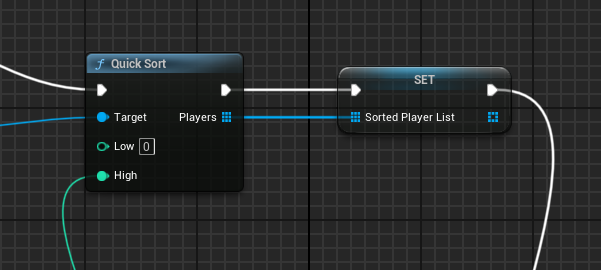


 dawn gazelle
devout oak
What can I connect on the Cast input for this cast for it to go through. I've tr...
dawn gazelle
devout oak
What can I connect on the Cast input for this cast for it to go through. I've tr...
Casting is just a type conversion. You need a reference to whatever a BP_SoulSight is.
dawn gazelle
dense badger
Is it possible to call an input action through blueprint?
Manually calling the input, no. You could create a separate event that you could call and hook up so it functions much like using the input.
dense badger
dawn gazelle
Manually calling the input, no. You could create a separate event that you coul...
Yeah was hoping to avoid all the duplicate functions in this case.
dawn gazelle
visual crest
I am trying to make it so all my NPC just don't just run straight the player but...
You should be able to use something like "Get Random Location in Navigable Radius" to get a random point around a specific location within a certain radius.
devout oak
dawn gazelle
Casting is just a type conversion. You need a reference to whatever a BP_SoulSi...
any suggestions on what to even try to connect?
dawn gazelle
devout oak
any suggestions on what to even try to connect?
What is a BP_SoulSight and how do you spawn it?
devout oak
my BP_SoulSight is a cascade particle effect that is just attached to the player
im trying to get the IA to just run the custom event that is in BP_SoulSight
dawn gazelle
Attached to the player, so it's in the list of things on the left hand side like here?
 devout oak
yes
dawn gazelle
Then you should be able to just drag it from there into your event graph.... But I'm guessing it's a child actor?
devout oak
yeah
dawn gazelle
Ok, so you can drag it in, but then you need to "get child actor" from that, and that is what you would cast.
 fickle rampart
Hey. Today I stumbled upon some strange behavior in UE.
I am trying to create a ravine/abyss logic in which the Player dies when jumping into it. For that I created a BP with a collider and use the OnBeginOverlapEvent for the following commands:
- Detach the springarm from the Player (so thet the character keeps falling)
- Disable left stick input (character movement) but keep camera movement (right stick)
I tried to create the same feeling like in the souls (e.g. elden ring) games or other games where the Player's character keeps falling but the camera stays in place in the air, still moveable.
The problem: When the Player's Character (including the whole BP) keeps falling past a certain distance, the BP suddendly vanishes from the game...
I need the BP to exist consistently. Can I achieve this somehow? Or is there another way to create this souls like "fall into abyss" logic? Msybe there is another, better way to achieve my goal?
I attached a picture of the Concept. As you can see, the boundary is where the BP_Player suddendly disapears from the game... which I don't know why it happens. But I know for sure I never implemented such logic anyhwere.
 dawn gazelle
fickle rampart
Hey. Today I stumbled upon some strange behavior in UE.
I am trying to create a...
dawn gazelle
fickle rampart
Hey. Today I stumbled upon some strange behavior in UE.
I am trying to create a...
There is a setting called the Kill Z in the world settings which deletes the player when they fall too low, which would also delete anything attached to the character, such as the camera.
You can change this height to a further distance, or, change the view target of the player to another camera you spawn, and depossess the character.
 hushed fox
visual crest
I am trying to make it so all my NPC just don't just run straight the player but...
hushed fox
visual crest
I am trying to make it so all my NPC just don't just run straight the player but...
A really simple way to do this is get the player character location and use a random point in bounding box to get a random area around him. That can make them surround and follow a non direct path but still chase the player
hushed fox
fickle rampart
Hey. Today I stumbled upon some strange behavior in UE.
I am trying to create a...
My guess would be is those games probably spawn a actor with a camera component somewhere in the vicinity of where the player fell and then use the set view target with blend node to switch to it
fickle rampart
dawn gazelle
There is a setting called the Kill Z in the world settings which deletes the pla...
Ah this is something i didnt' conaider. KillZ value is too low for sure.
But even though, it might be a better idea to switch to another camera...or even reattach the whole springarm anto the abyss's BP and let the user's input events to be triggered in there.
All in all you helped me with your answer. Thanks alot.
fickle rampart
hushed fox
My guess would be is those games probably spawn a actor with a camera component ...
Yeah sounds like a clean solution. The new viewtarget just would need to be able to handle the user input the same way the BP_Player does with the EnhancedInputSystem. Haven't tried it yet with any other BPs except for the player's but it should still work I guess.
Thank you so far.
hushed fox
fickle rampart
Yeah sounds like a clean solution. The new viewtarget just would need to be able...
You can make it a pawn instead of an actor and give it basic flying controls. Use the possess and unpossess nodes alongside the set view target
 jaunty saffron
How would you approach this problem:
I have a big map 10x10km and Im using world partition
I have a rocket that flies out of the spatial loading range of the player but I need to check when the rocket hits the ground,
I though about making duplicated layer of the landscape to only check for collision but its overkill I think, any in engine solution for that?
The only solution I found so far is to use the WorldPartitionStreamingSource but its not efficient imo, if I have 5 rockets flying different directions it will just load stuff I dont need the player to really see
trim matrix
Im working with the 3rd person template how do I make my character walking speed slower
frosty heron
Select the character movement component, change the max walk speed to what you want.
trim matrix
frosty heron
Select the character movement component, change the max walk speed to what you w...
Where is that component tho
frosty heron
In the character blueprint
trim matrix
thanks bro
frosty heron
Blueprint and scalable doesn't goes hand in hand.
devout oak
How would i update the location on a scene component using two different keybinds
lunar sleet
I’d say self-promotion is against the #rules but seeing that you’re pretty much running a one-sentence smear campaign on yourself I guess we can call it entertainment
trim matrix
Can someone tell me how I can get a different animation when walking then standing still
rough sinew
trim matrix
Can someone tell me how I can get a different animation when walking then standi...
Take a look at any template project with a character (first person, top down). Look for a property in the character BP -> character mesh called Animation Blueprint. Inside of that there is something called an Animation State. Those are your basic rules to transition between animations. There is a lot on this topic, this is the very basic.
trim matrix
rough sinew
Take a look at any template project with a character (first person, top down). L...
Ok so I figured that out now my problem is its multiplayer and only the server can sprint and walk and have all the animations how do I fix this
rough sinew
Maybe it is best to ask in the #multiplayer channel. Tbh I'd say if you are still learning the basics don't jump straight in MP.
trim matrix
rough sinew
Maybe it is best to ask in the <#221799385611239424> channel. Tbh I'd say if you...
Ok but if I dont do mp while I learn the basics will I be able to add it later on or will I have to restart
stone field
jaunty saffron
**How would you approach this problem:**
I have a big map 10x10km and Im using w...
If the player will never see them, just fake it i reckon. Estimate the time to impact and any other needed things?
 fallow bridge
Is there someone or maybe someone you know that could help me I want to translate my world coordinates to a 2D map UI. Bottom left of my world is X: 100000 and Y: -100000.... center of the world is 0,0 and I have an image for my map UI.. Bottom left of image is x:500,y:-500 and center is 0,0 I'm stuck on making the function for coordinate tranzition please help
maiden wadi
fallow bridge
Is there someone or maybe someone you know that could help me I want to translat...
Think in UVs. Regardless of your widget size, you can convert anything from Anything to 0-1 or 0-1 to anything else.
This implies your world size is 200,000 if the bottom left is 100,000 in size and the center is 0,0. So take each axis. X as an example. Lets say you're at 50,000 X. You need to take X/MaxXSize which is 50,000/200,000= 0.25. AKA 25% of the way from the left to the right side.
Now in your widget you can use this to say how far from the left it is. If your widget is 400 pixels wide for example. You simply multiply 0.25x400 and end up at X=100
rough sinew
trim matrix
Ok but if I dont do mp while I learn the basics will I be able to add it later o...
There is a lot of code structure you need to think when planning for MP. You can refactor it later but it is likely to be painful. Please don't make your first game a MP one.
trim matrix
rough sinew
There is a lot of code structure you need to think when planning for MP. You can...
Okay then I will be removing the mp
Can someone help me with this

How can I connect this to that without discconecting the rest
fallow bridge
maiden wadi
Think in UVs. Regardless of your widget size, you can convert anything from Anyt...
if I understand correctly

it kinda of works but the dot indicating the player is not positioned correctly for some reason

It should be where the arrow is
fallow bridge
maiden wadi
Think in UVs. Regardless of your widget size, you can convert anything from Anyt...
Thank you for the help.. I've managed to make it work.. I had to multiply y with -1 and it works so I won't touch it any more..
trim matrix
I need help my running animation only affects the lower body
Even the idle animation
spark steppe
#animation (most likely your montage plays on a Slot which is only blended in on the lower body, so check the animation blueprint)
spark steppe
fallow bridge
if I understand correctly
for the sake of it... use a remap value range node
also, your world origin is most likely at UV 0.5, 0.5 keep that in mind
trim matrix
spark steppe
<#221798806713401345> (most likely your montage plays on a Slot which is only bl...
Its a sequence
not a montage
 lime compass
hi everyone, I have a round based system set up in my gamemode blueprint and so it runs even when in a different level which i dont want it to do, I know ill probably need to set up a simple blueprint to basically check whether or not we are in the correct level to run this piece of code, im just not sure on the set up, can someone help me out please
 gloomy zealot
Hey, I am looking for an unreal dev I can work with for a bit to help me start my project. I have tons of experience but mainly in web dev.
thin panther
gloomy zealot
Hey, I am looking for an unreal dev I can work with for a bit to help me start m...
In that case you'll want to post to the job board, read #instructions 🙂
maiden wadi
lime compass
hi everyone, I have a round based system set up in my gamemode blueprint and so ...
If you main deciding point of whether it's round based is the map. Then make a subclass of your GameMode that has the round logic in it and specify that game mode in those maps.
faint pasture
trim matrix
Ok but if I dont do mp while I learn the basics will I be able to add it later o...
You will have to restart anyway. 6 months from now it'll take you a week to recreate what you made in the previous 6 months, and you'd be able to do it better.
 sudden briar
anyone know useful resources for mordhau like combat?
 simple ember
why is my BeginPlay not firing?

if i just create a new actor blueprint and link up a print to beginplay it fires like normal
spark steppe
simple ember
if i just create a new actor blueprint and link up a print to beginplay it fires...
probably because you haven't selected it as debug object
in the BP graph top bar, there's a dropdown
and check if print to screen is checked in the print string advanced settings
also the actor that you dragged in, isn't a child class, right?
simple ember
spark steppe
also the actor that you dragged in, isn't a child class, right?
no it's the same one i have open
simple ember
spark steppe
probably because you haven't selected it as debug object
ill try this but that's weird given i have never even seen that dropdown before
spark steppe
i'm not sure if this is really the issue here, since it would be two weird edge cases
i would have at least the string expected in the viewport
 ivory copper
Is there a difference between placing an object by dragging it into the editor or spawning it from a bluprint in the begin play event?
dawn gazelle
ivory copper
Is there a difference between placing an object by dragging it into the editor o...
At just a "spawning" kind of level, no. If I remember right, actors placed in a level would be loaded at the time the level is loaded, where spawning at begin play of something would happen after some other point when that object begins play.
 cobalt bramble
is anyone aware of a tutorial online that can show how to make this, a spline that i can create with a mesh that i can then put other meshes along that mesh to achieve lanterns hanging on rope, or a rope with flags along it? im not super knowledgeable about tech art so im finding it hard doing it off the top of my head and ive looke everywhere for a torial like this

 fervent jolt
cobalt bramble
is anyone aware of a tutorial online that can show how to make this, a spline th...
fervent jolt
cobalt bramble
is anyone aware of a tutorial online that can show how to make this, a spline th...
https://www.youtube.com/watch?v=0DRaBJYQF7o this should do what you want
it should be possible with the functionality he develops
 grave hill
Has anyone got any success in making the new Gameplay Camera system attach the camera to a specific bone?
scarlet urchin
I'm trying to collect an actor, which has a instanced 'ID'. I want to add collected actors to an array in the save game blueprint. The part that isnt working is the saving to array in save game bp. What am i doing wrong? Or is there a better all around method?


(Think i got it working actually) No I didn't.
lunar sleet
scarlet urchin
I'm trying to collect an actor, which has a instanced 'ID'. I want to add collec...
I don’t see anywhere SetCollected function is being called. The video you made is too fast to even read the nodes properly. The screenshots show you overwriting an array where the target is not actually on screen, and doing so twice, can’t tell why because that’s also not on screen
Also try not to drag target noodles a mile away from the output, crossing other noodles, behind nodes, so it’s not at all clear what is going where . Promote them to a variable then get them as needed
scarlet urchin
lunar sleet
I don’t see anywhere SetCollected function is being called. The video you made i...
The set collected is just before 'add player hud message function'. it is in the video.
lunar sleet
Like I said, it was too fast to see and unfortunately mobile discord sucks for pausing videos for some reason lol
I see it now
Your target is coming all the way from the cast to spider man
Debug to see if the cast is succeeding, use breakpoints to see if your code even reaches your function, if you haven’t already
dawn gazelle
Based on what I'm seeing, it looks more like you're constantly overwriting the Collected Tokens array rather than adding anything to it, and if you have multiple instances of these pickup actors in the level, only the last one that is found would be setting the value in the save game based on the below image, which is probably not what you want to do.
Part of this stems from having all the pickup tokens having their own array of picked up tokens. That's a lot of duplicated arrays.
The array should be stored on some other managing actor, like say, gamestate, or a component on the gamestate that manages these tokens that the tokens then can easily communicate with.

Or... just leave them in your save game object, no need to store the array in all the different pickups, just have them read from the one source.
When one gets picked up, it can communicate to the loaded save game object and set that it was picked up.
 storm solar
I have an issue w/ hitstun w/ my game.
When you get hit you enter hitstun and get frozen in hitstun anim.
Once a timer expires you exit that animination and regain control.
The problem is, if you get hit while recovering from hitstun, you don't re enter hitstun and im not sure why.
1st screen shot is resuming animation. Third is begin hitstun anim. An anim notify triggers the loop and locks you in hitstun.


 warped juniper
How do you reccomend using Soft Object references with Object class BPs?
Async is not available so I don't know how that should be done...
is Load Asset Blocking not an issue for just a simple DT that holds only floats?
 wicked cairn
Anyone with procedural generation experience with dungeons— how would you go about having a dungeon generator decide when to place hallways and rooms when you want the rooms to mostly be paced at the end of hallways?
Currently I just have a percentage chance for both, where hallways are more likely to be placed than rooms. I’ve gotten most my knowledge from this series of videos https://youtu.be/4ddbnQIuwAM?si=yflZbD7kw3eFZWme explaining an easy way to make ‘procedural dungeons’ and have been building off it but cannot figure out how to get what I want.
Any help appreciated!! 🥺

➤ PATREON - https://www.patreon.com/REEANIMATION
➤ TWITTER - https://twitter.com/Ronnie_Ree
➤ DISCORD - https://discord.gg/cmsBqGtnqP
➤ BUY ME A CUP OF COFFEE and some Popcorn 🙂
https://ko-fi.com/reeanimationandgaming
➤Spider Animation Tutorial
https://youtu.be/2O-Y5g31Z5A?si=jrh3fcb-FrsuqFp2
➤Easy Dungeon Wall Tutorial - Blende...
 worthy tendon
wicked cairn
Anyone with procedural generation experience with dungeons— how would you go abo...
worthy tendon
wicked cairn
Anyone with procedural generation experience with dungeons— how would you go abo...
take a look at shape grammars. see how unreal engine pcg does that.
scarlet urchin
dawn gazelle
Based on what I'm seeing, it looks more like you're constantly overwriting the C...
Got it working! Moved the Array to Player character and also created the 'load collections' function in player char.


 warm elk
Anyone have a moment to help me out with a simple cycle toggle using Ultra Dynamic Weather? I made a level blue print that lets me cycle time of day be increments of 100, but I'd like to do the same thing and cycle through some selected weather types, and I'm a little unsure of how to proceed. This is my Press 1 or 2 to add / subtract time from time of day, but I'd like to have the 3-4 key cycle through 4-5 weather states

 wicked cairn
worthy tendon
take a look at shape grammars. see how unreal engine pcg does that.
wicked cairn
worthy tendon
take a look at shape grammars. see how unreal engine pcg does that.
I'll try searching this up! Thanks
warm elk
warm elk
Anyone have a moment to help me out with a simple cycle toggle using Ultra Dynam...
Nevermind, I think I have it working:
 inland walrus
Hey, anyone know why it's only using the lift hand animation once on first play?
after the first one it just snaps
 queen yew
is there a way to call a custom variable from the main character BP without casting?
I want to get a variable from the main character inside of a gameply ability blueprint. if I do cast would it impact the performance?
 wanton path
Aye, so was wondering how I'd approach making a third to first person shooter system.
I want to hybridize if possible the first person and third person templates into one system where you can scroll up and down to change perspectives.
I know how to do the perspective changes.
So I was wondering if there's a way to hide the different perspectives?
Like, if I'm in first person I can only see the arms like the fps template, but not the third person model. And vice versa with going into third person without seeing floating hands?
faint pasture
queen yew
I want to get a variable from the main character inside of a gameply ability blu...
Won't hurt
 verbal reef
hey.. i created a zooming system so i would like some feedback on it if possible
this is my first time sharing BPs


it works well but i just want to know if there was stuff i couldve done better maybe idk
storm solar
storm solar
I have an issue w/ hitstun w/ my game.
When you get hit you enter hitstun and g...
any ideas?
 weak stream
hey, im making key remapping for controller, but I can't figure out the best way to replace this with either an icon, or just plain text like X Y A B etc, im using enhanced input and common ui

I have no trouble making the icons with Common Action Widget, but they switch when I move the mouse, and I would like to keep it as gamepad at all times
could I override the widget somehow to keep always as it was gamepad or something?
 zinc nacelle
I can detect the name of the bone hit, but is it possible to detect which collusion capsule was hit?

