#blueprint
1 messages · Page 304 of 1
 autumn pulsar
 maiden wadi
You can do this. It's common place to do this for dynamically added components. It's essentially the same as a default component in the class, the difference is that adding a component to the blueprint manually just creates said variable for you.
But having said that, I caution against using just a component for weapons. You'll be blocking yourself into a very strict design path. Which is fine if you've weighed all of the pros and cons and really need that tiny performance you'd get.
 proud salmon
If you've ever broken everything by editing a structure, there's an easy fix 🙂
Finally had it happen again so I made a video on how to fix it! This has never not worked for me. Hopefully it helps someone!
 frosty heron
proud salmon
If you've ever broken everything by editing a structure, there's an easy fix 🙂 ...
frosty heron
proud salmon
If you've ever broken everything by editing a structure, there's an easy fix 🙂 ...
you can stop walking on the land mine. Make your struct in cpp.
blueprint struct shouldn't be a thing tbh.
proud salmon
My asset is blueprint only for simplicity. Plus many people use blueprint structures.
frosty heron
yeah people use broken tool, doesn't mean you should.
just saying
also creating the struct in cpp doesn't require you to know cpp
it's actually as simple as pasting the header from the blueprint struct.
proud salmon
But it requires you to build CPP
(Not saying I disagree, I use CPP personally, just not for my asset).
frosty heron
proud salmon
But it requires you to build CPP
sure, I rather do that then going back to blueprint struct. It give too much pain and the worse thing is they break silently.
installing VS isn't a hard task either. Better spend the time on that than fixing the broken structs.
 trim matrix
for a marketplace item, being blueprint only is a big plus
frosty heron
I don't get how using broken tool has anything to do with market place.
There's no award for going blueprint only.
And that's the word of epic employee.
Self gating is not a good attitude.
People don't know what they don't know. But for those that knows. Migrating the struct to cpp is better than fixing blueprint struct over and over and over.
trim matrix
frosty heron
I don't get how using broken tool has anything to do with market place.
if ur making a tool to sell on the market place, it has everything to do with market place
frosty heron
@trim matrix you got your opinion, I got mine.
Again you don't need to know cpp to make struct.
If you chose to use broken tool, pay the consequence.
I'm not gonna sit here and encourage others walking on a minefield.
You dont need to know cpp language.
You can make the struct with 0 cpp knowledge.
Follow the installation guide from epic. Add a header file. Copy paste from your blueprint struct.
Dont know why you feel offended.
And i don't want to argue with someone debating in bad faith.
I will keep my opinion. Don't use bp struct
If you want to encourage people to use broken tool go ahead.
Yeah I am ignoring you now. There's not much to say, you already made up your answer.
Have a nice day
 hoary junco
how do you stop a physics object from vibrating when laying flat on a surface? I have a coin mesh with this collision box, I've tried using a basic box collision with it too but it still does it, and when this coin lies flat on the ground it vibrates and steadily rotates around as if lying flat on the ground is impossible for it. I've given it some directional and angular dampening to try and cut it out but it still does it even if the dampening went as high as 0.5, not sure how to stop it from jittering

 lunar sleet
frosty heron
<@456226577798135808> you got your opinion, I got mine.
lunar sleet
frosty heron
<@456226577798135808> you got your opinion, I got mine.
I was gonna say the clown’s somehow survived with some wild shit in other channels but he’s been on block a long time now lol
 rare dome
Hi everyone! New to developing and working on my first Unreal project for class. Wondering if anyone can help.. I'm trying to follow my teachers tutorial, for creating a player health widget. https://www.youtube.com/watch?v=ryMDa2Kok3w I think he's using an earlier version of UE because the layout is slightly different than mine (using UE 5.5). After setting up the progress bar in the widget blueprint designer tab (about 2 minutes in), i can't seem to make the variable visible with the open eye in the graph tab to match his set up. When I hover the closed eye is says "Variable is not public and will not be editable on an instance on this blueprint". Any advice would be much appreciated!


 solemn folio
Yeah I'm pretty sure. I also thought of that and moved the spawn location but it follows me once and stops
 dusky cobalt
rare dome
Hi everyone! New to developing and working on my first Unreal project for class....
dusky cobalt
rare dome
Hi everyone! New to developing and working on my first Unreal project for class....
What do you need to do exactly as a next step?
rare dome
Next steps are creating these in the event graph
 dusky cobalt
Are you not able to drag and drop Player Bar?
rare dome
I am but I'm wondering if something is setup wrong because in the tutorial his variable tab looks like this.
 dusky cobalt
If you click on the Eye you will make it Instance Editable which he has
rare dome
It won't let me click on the eye. This message comes up when I hover.
 rare dome
no it doesn't do anything when i click :/
dusky cobalt
can you try to set in details Instance Editable?

I just tried and I can toogle the visibility by clicking eye
rare dome
My details panel doesn't look like that. The checked boxes under Defined Property Flags won't let me uncheck any of those either.

Could it be something in the project settings or editor preferences? Or class settings?
dusky cobalt
Oh, you are right. I have it the same way. I wouldn't worry about it unless it will stop you with doing something later in the tutorial.
 surreal peak
You are fine. The Eye Icon didn't make sense for these variables, so Epic disabled them at some point.
dusky cobalt
In this case it should not matter, because:
The progressBar is basically a variable type of Progress Bar in this case it points to this exact The Progress Bar you created.
There won't be situation where you will want to set this variable as some other Progress Bar created somewhere else.
surreal peak
It's to mark Variables as Instance Editable, but the the ones you are looking at are from the UWidgets you added to the Designer. And those shouldn't be Instance Editable.
rare dome
Ok I wasn't sure if I have it setup wrong or if that would be an issue later on. Thanks for the help!
 snow halo
This is my Remove Ingredients logic in my crafting system. Inside this Russian Doll looking function system. I have another function that has a central branch at the base of it. Thats the most important part o fit. The branch is like a train track swith operator, it desides whether our train goes south or North. But the problem is no matter what I do, or no matter what I try , it will not work!!!
The outcome that I get out of this is that when I click "craft" item, say this item costs, 1 wood, and in my inventory I have 50 wood, the outcome is that I will get all my wood removed just for this one craft.
Im not sure if this outcome also happens for other items. I also tried it for clay,I will create a clay furnace and it will delete all my surplus of that item too.


Oops I made 2 branches here, but anyway... it's still the same logic.
The top part Is supposed to remove the whole stack, the bottom part is just removing 1 amount
So the problem right now is like it feels like going to the ATM to draw 10 bucks and the ATM programming logic is so broken that it drains your entire account instead. ( I hope this helps explain it )
 dawn gazelle
snow halo
This is my Remove Ingredients logic in my crafting system. Inside this Russian D...
dawn gazelle
snow halo
This is my Remove Ingredients logic in my crafting system. Inside this Russian D...
Focus solely on this image for now.
This function you're calling takes an input map of what looks to be item classes & an integer value.
I imagine this is meant to represent what items to remove and how many, however, this function is currently looping through your entire "Contents" array, finding **all ** matches of the item in the Contents, and removing whatever quantity it has at that particular index of your Contents array.
Instead of subtracting all of the item in the inventory, you need to use the input map to determine how many you need to remove and keep track of how many left to remove as you call to the "Remove From Inventory" function. You also should make sure to not call to "Remove From Inventory" if you do not need to remove any more.
 solemn folio
Yeah I'm pretty sure. I also thought of that and moved the spawn location but it...
solemn folio
solemn folio
Yeah I'm pretty sure. I also thought of that and moved the spawn location but it...
i figured it out. my player characters root node doesnt move, only the objects below it do

for anyone having the same problem
snow halo
dawn gazelle
Focus solely on this image for now.
This function you're calling takes an input...
Im doing that now
 dawn gazelle
That is using the item class default object's slot quantity which I imagine is how many of that particular item can be in a stack.
You need to use the function's input variable.
 snow halo
I imagine this is meant to represent what items to remove and how many, however, this function is currently looping through your entire "Contents" array, finding all matches of the item in the Contents, and removing whatever quantity it has at that particular index of your Contents array.
So far I haven't had a lot of problems tested yet. Like to beta-test whether or not it will remove 1 amount from each stack of wood. I only managed to have one stack of wood so far.
snow halo
dawn gazelle
Focus solely on this image for now.
This function you're calling takes an input...
Instead of subtracting all of the item in the inventory, you need to use the input map to determine how many you need to remove and keep track of how many left to remove as you call to the "Remove From Inventory" function. You also should make sure to not call to "Remove From Inventory" if you do not need to remove any more.
I think this remove from inventory might be checking many times based on how many items I have in my content array
but the good part is that it only goes I think few times after I click craft
its not causing any loading or lag issues for example
snow halo
dawn gazelle
You need to use the function's input variable.
but thats the one im using
dawn gazelle
You are using the keys which gives you the class. You need to use the values from that map input to get the quantity to remove.
You need to use the keys still to set up your loop to know which item, but you also need to know the values to know how many of them.
You can use a find on the map and provide it a key, which will then give you the associated value
snow halo
dawn gazelle
You are using the _keys_ which gives you the class. You need to use the _values...
should i pass the keys into the Remove from Inventory nested function?
dawn gazelle
No. That tells you how many you need to remove in total. You want to promote that to a variable and use it to keep track of how many left you have to remove.
Since you need to check over your inventory what slots have how many quantity....
snow halo
This is the crafting system though.
 dusky cobalt
I think you should also rethink your way for storing Ingridients as Tmap Ingridient (name, enum, class as ley (you decide what's better (depending on how many items you have) and INT (quanity of it).
Then, the cost for crafting something should be stored as the same TMap on the item you want to craft.
RemoveIngridients should take input of TMap IngridientsCost.
Inside Remove Ingridients you can also add check IsEnoughResources and the whole function can return boolean (if removed or not which gives you feedback if there was enough resources or not).
RemoveIngridients first Get AllPlayerIngridients and For Each Key Of IngridientsCost, you Find that Ingridient on AllPlayerIngridients, Find Value, Remove and Set, you also need to make check if the AllPlayerIngiriendts Key with Value is > than Key with Value in IngridientCost etc.
snow halo
I only want 2 numbers.
- Minuend
- Subtrahend
Both of these numbers already given, am I wrong?
dusky cobalt
Just without getting deep into the logic, the Content array that you loop trough is irrelevant and seems wrong. Get Class defaults also should not be needed because how class of some item knows how many items you have in inventory? or is it even worse because if you have item Wood which is 10 Quanity of Wood and not actually 1 Wood?
What is your Key? It's soft reference of class? like you should not need to get class defaults from the key, key itself should be something that already tells you what that thing is.
If you had like 5 resources you would go with enum, if you have 200 resources/crafting materials then these should be probably dataassets/names maybe something else
dawn gazelle
snow halo
This is the crafting system though.
Right, that's telling your function what item and how many to remove of the item. Now you need to make it so your inventory actually uses both of those values.
Right now, you're using just the class, which is the definition of the item. The class wouldn't define how many of the item is required for any particular craft.
Use a Find on the Map, that gives you the total amount to remove.... Then you need to remove them as you find them in each slot of your inventory until you have no more left to remove.
So let's say I have a craft that requires 5 wood.
The first loop you have is looking through the ingredient list.
The second loop is looking through your inventory for the item in particular. Let's say you come across a slot that contains only 1 wood. You wouldn't want to remove 5 wood from that slot if there is only 1 in the slot. If you remove 1 then you need to keep track that you now need to remove 4 more from other slots, and keep going through the slots in your inventory in the loop until you no longer need to remove any more of the item from the inventory.
dusky cobalt
snow halo
I only want 2 numbers.
1) Minuend
2) Subtrahend
Both of these numbers alread...
 dusky cobalt
dusky cobalt
dusky cobalt
and If Enough Resources check

 fervent sky
Is there anyone in here who works in blueprints in UE obviously? We would need to produce interactive 3D maps of neighborhoods, apartments, click and show interior detail of those apartments etc.
Feel free to reach out to me for further details.
dawn gazelle
dusky cobalt
Except it appears that TerraVive is trying to build an inventory system that can be used in multiplayer and that means you can't really use Maps to replicate the contents of the inventory :/
dawn gazelle
fervent sky
Is there anyone in here who works in blueprints in UE obviously? We would need t...
#instructions for information on how to post a job offer, no need to spam all the channels.
fervent sky
Ah i see. Thanks!
I figured to paste here its more appropriate for the requirement.
I apologies
 young meteor
Hey
I'm trying to optimize my game, and for some frames seem to be GPU bottlenecked.
According to ChatGPT lowering resolution for temporal super resolution might be worth it, and it is trying to make me test it.
The commands it suggests in my development build returns "command not recognized" or similar phrasing. It is now suggesting adding lines to my DeaulftEngine.ini file.
Wanted to check with you guys in case it is sending me down a very bad path I don't understand.
Is this something I should be careful with, or is simply a time waste?

 final berry
Heyo, I'm trying to create a talent tree widget, but kind of struggling with the patterns. I thought a datatable would work fine, but I feel like im losing overview quite quickly when putting it in a datatable, Im currently using an "x" which is a single tree, and a "y" which is the tier of that single tree to determine where to put it in the grid. This kind of works but for example no idea how to do a combine tree with this kind of grid.
I was wondering if anyone has any pointers on how to do a skill tree. Is it hardcoded (just placed in the widget using the designer)? or do people tend to build it dynamicaly using a datatable and filling a widget from there
 dire hazel
guys max draw distance at bp not working
static meshes and default scene root set to static
and also culling distance instance not working for that bp, it is working for static meshes directly be put on level
dusky cobalt
final berry
Heyo, I'm trying to create a talent tree widget, but kind of struggling with the...
It probably depends on how many skill tress you have, how many abilities there are. If it's low amount, hardcoding and making it work is probably not the worst idea. If you have tons of abilities, each ability has skill tree or you have 20 heroes, each have ability tree then yeah you need some kind of architecture for that that is flexible and scalable, but until you won't figure the end goal it's hard to give example solutions.
Also need to know if on each level you have some choices of skill, or you can select all, or if there is requirement before you can get next level skills you need to add 2/3 of the previous ones etc.
young meteor
final berry
Heyo, I'm trying to create a talent tree widget, but kind of struggling with the...
As for the designer part, I personally did some math on pre-construct to make nodes snap to specific intervals. So it basically rounds to a value and sets its position.
young meteor
final berry
Heyo, I'm trying to create a talent tree widget, but kind of struggling with the...
Also did a template node, in which ,again on pre-construct, I set some text for myself that is not shown to the player.
final berry
I currently have this struct, but when I started to add rows to the datatable I got confused real quick, when it comes to doing the logic to preconstruct the UI. Especially because talents will also cross categories, that is the main headache 🤔
I:ll go back to the drawing board 😉

 boreal basin
Any ideas for my issue?
dusky cobalt
final berry
I currently have this struct, but when I started to add rows to the datatable I ...
What is the idea for the talents? Is it skill tree where you first have 1 choice, that goes into 2 choices and you can always select one?
or these are more like Unlocks and everything can be clicked and added as upgrade?
or does it just add new skill to your hero?
final berry
dusky cobalt
What is the idea for the talents? Is it skill tree where you first have 1 choice...
You gather blueprints during the game which gives permanent bonuses. Some passive, some new buildings stuff like that. Most passives will have 5 points max, where as new buildings will probably be 1 point.
The thing is im looking for scalabe because I have no idea yet on the exact amount of items in there, or where or. Etc..
final berry
dusky cobalt
or these are more like Unlocks and everything can be clicked and added as upgrad...
so this one
Rogue-lite stuff
boreal basin
If anyone is good with Gameplay Tags, am I doing this right?
 dusky cobalt
all right, so you could create UObject for each Upgrade and then store array of upgrades, for each UObject upgrade create button ActivateUpgrade, this would call to the UObject and call ActivateUpgrade() -> add +5 health, add +20 attack range.
If you want it to be in some sort of skill tree, then you need to create Struct Array of UObjects and:
Level 1 Upgrades: Upgrade 1 Upgrade 2 Upgrade 3
Level 2 Upgrades: Upgrades 2 Upgrade 3 Upgrade 4
if level doesn't matter then its even easier because you just hold list of upgrades. If it matters then you need some kind of way to Unlock level 2 upgrades on LevelUp.
final berry
Its mostly based on previous unlocks
dusky cobalt
Allright, so separate each ''Path'' as Path.
You can have 10 Paths or 3 or 25.
Each Path is:
Level + Array of Upgrades.
You unlock next level in the Path when you click upgrade of previous level or x amount is needed to unlock next level.
You can also make it so when you select upgrade of level, other upgrades cannot be unlocked.
Then in some kind of Skill Tree Manager you make logic for creating widget for Paths, inside Paths you create For Each Level buttons for Upgrades in the level etc.
final berry
dusky cobalt
Allright, so separate each ''Path'' as Path.
You can have 10 Paths or 3 or 25.
E...
Yea, got something like that, however I lost it when tried to apply something like this to that logic 😅
 dusky cobalt
Do you have any reference of a game where it's exactly like this?
Like what kind of bottom spells you have that they unlock something in the middle of them? and it's also required for something next to it. I'm not sure if it's intuitive to have it this way. Did you try going trough how you would level up the last skill?
 final berry
Its more a what do you prefer to go for kind of thing, its not required to unlock everythiung. And its also just that if I can get this to work scalable, then I can get anything to work scalable 😉 So its a bit of an extreme example, but yea
its all very much in progress so I might be a bit too soon with the talent tree (or atleast with the futureproofing of the entire possible tree)
probably just have to start with a small hardcoded thing and work from there
To see what works and what doesnt etc
autumn pulsar
maiden wadi
You can do this. It's common place to do this for dynamically added components. ...
I guess I’m not entirely familiar with a good path for weapons
I guess actors would be the way to go?
dusky cobalt
final berry
Its more a what do you prefer to go for kind of thing, its not required to unloc...
I think you need something like this but it's high overview.
Create Abstract Slots that each have variables: Array of Required Slots and Upgrade/Ability/Wahtever
Each Row is Array of Slots, so you can add first array to be 4 Slots, 2nd aray 4 slots etc.
In each Abstract Slot you can assign previous slots that This Slot will Bind on the construction.
Each Slot binds to Required Slot OnUnlocked.
When you unlock something it call OnUnlocked, and the slots that require it will get +1 Unlocked and check Is It all? or it's still 1/2, if it/s 2/2 unlocked you Unlock This.
I think this would be the way.
maiden wadi
autumn pulsar
I guess I’m not entirely familiar with a good path for weapons
Usually yes. Because it allows designers to add whatever cosmetics to them they like.
 rustic saffron
Hi, I'm new to Unreal Engine(I'm more familiar with Unity) and have two questions:
If I want to create an ARPG demo (like Sifu) with polished 3C mechanics, is it recommended to start with the third-person template?
If I need to start with the third-person template and integrate GAS (Gameplay Ability System) into the project, should I choose the Blueprint or C++ template when creating the project?
maiden wadi
rustic saffron
Hi, I'm new to Unreal Engine(I'm more familiar with Unity) and have two question...
Your template won't matter much. Templates are extremely shallow. They're just some basic assets and a couple basic blueprints. About 30 minutes work max. And if you really want those assets or blueprints, you can always get those files from the content browser by importing the template.
For whether to start in BP or C++, if you have any intention of using C++ ever, it's usually easier just to make a C++ project from the beginning. This has no real correlation to what systems you'll want to use though. But on that note a few lines of C++ does make GAS easier to use sometimes.
rustic saffron
This has no real correlation to what systems you'll want to use though. But on that note a few lines of C++ does make GAS easier to use sometimes.
So c++ is not required for GAS...
 dark drum
rustic saffron
> This has no real correlation to what systems you'll want to use though. But on...
dark drum
rustic saffron
> This has no real correlation to what systems you'll want to use though. But on...
There are parts you don't require C++ but if you want to leverage the attribute portion, then you have to use C++. There's currently no way to define them via BP.
 sand shore
Personally, I'd go C++ because even if you only use it to make basic struct / enum definitions and never use it for GAS, the structs will be more stable. BP structs can cause a lot of issues
Besides, there's usually going to be something in the course of development where you'll wish you could drop in a couple of custom bespoke function libs written in C++
You can add C++ later on, but it is easier to start there
If you go C++ template you can add the BP template if you'd rather have your mechanics in mostly BP
autumn pulsar
sand shore
Personally, I'd go C++ because even if you only use it to make basic struct / en...
What's usually the best template to use when adding a struct? Additionally can you just have all your structs in a single file?
dusky cobalt
autumn pulsar
What's usually the best template to use when adding a struct? Additionally can y...
It's probably the best to have each struct in it's own header but if you have struct/enums that are very closely used then they can both be in one header.
dusky cobalt
autumn pulsar
What's usually the best template to use when adding a struct? Additionally can y...
#include "ExampleStruct.generated.h" // name of the .h

USTRUCT(BlueprintType) // important  so can be searched and used in blueprint
struct FStructName // name of the struct
{
    GENERATED_BODY()
public:
    UPROPERTY(EditAnywhere, BlueprintReadWrite, Category = "Variable Category")
    float Variable= 5.f;

    UPROPERTY(EditAnywhere, BlueprintReadWrite, Category = "Variable Category")
    float AnotherVariable = 15.f;
}
If you want another struct in the same header file:
USTRUCT(BlueprintType)
struct FAnotherStructName
{
    GENERATED_BODY()
public:
    UPROPERTY(EditAnywhere, BlueprintReadWrite, Category = "Variable Category")
    float VariableExample = 5.f;

    UPROPERTY(EditAnywhere, BlueprintReadWrite, Category = "Variable Category")
    float AnotherVariableExample = 15.f;
}
enum class EExampleTypes : uint8
{
    Example 1      UMETA(DisplayName = "Example 1"),
    Example 2      UMETA(DisplayName = "Example 2"),
    Example 3      UMETA(DisplayName = "Example 3"),
    Example 4      UMETA(DisplayName = "Example 4")
};
and this is for enum
sand shore
autumn pulsar
What's usually the best template to use when adding a struct? Additionally can y...
Rider (which you might want to try using for C++, its free for non-commercial/learning use) will have a lot of templates for all types of C++
autumn pulsar
dusky cobalt
```#pragma once
#include "ExampleStruct.generated.h" // name of the .h
USTRUCT...
Sick thanks
 hazy ether
Anyone know why UE5 doesnt utilise my GPU at all?
 dire frost
who knows but you can use profilegpu command to see exactly what your gpu is doing at a frame
hazy ether
Considering my GPU says 0% utilised, even though my FPS is about 10 shows is basically doing nothing!
it's like the CPU is doing everything!
hazy ether
dire frost
can you share what you see?
Not right now, Ive just gone on REPO with freinds
dire frost
lol ok
hazy ether
dire frost
did you use `unit stat`?
No, i was looking at task manager, it said it wasnt being used by anything.
dire frost
for any performance issue you should almost always use the builtin profiling tools
because it gives you more accurate info and less headache overall
hazy ether
Fair enough, one question, does pressing "run in separate window" still carry over the scalability settings?
(I'm stuck with a 1060 atm... soo scalability is medium)
dire frost
hazy ether
Fair enough, one question, does pressing "run in separate window" still carry ov...
||1060 gang 🤝 || IDK
hazy ether
dire frost
||1060 gang 🤝 || IDK
XD!
dire frost
hazy ether
(I'm stuck with a 1060 atm... soo scalability is medium)
i mean UE5 is pretty fast on my machine. cant complain. i just have nanite, virtual shadows, tsr off and lumen set to high
i get like close to 100fps
dire frost
i3 8100 :)
hazy ether
I got a I7-7700k
dire frost
you should profile and see what's exactly is taking up your frame time
hazy ether
Yeah
dire frost
once you're free check out #profiling
hazy ether
Probably my program... I have a few event ticks in there XD
dire frost
i mean that alone shouldnt cause an issue...but who knows!
profile and we shall find out
hazy ether
Yeah
hazy ether
dire frost
i mean that alone shouldnt cause an issue...but who knows!
So, in my game, I have a small drone, with big secenery, but if Im going fast enough verticaly I will just phase through solid objects! I have CCD on and the Exepermental collision thing but it still happens
you seem to know a lot, any ideas how I'd fix it?
dire frost
i would've thought CCD would've been sufficient enough honestly
idk i guess make the drone's collision bigger?
hazy ether
dire frost
idk i guess make the drone's collision bigger?
If I make it to big it gets harder to do the precision flying parts of the races XD
hazy ether
dire frost
i would've thought CCD would've been sufficient enough honestly
nope... I would have thought so aswell! though, it did help a bit!
dire frost
not making the drone go so fucking fast should help...?
hazy ether
XD, its a racing game! it should go fast!
hazy ether
Idk...
dire frost
i mean i got stuff moving at like 100m/s and collision works perfectly for me
well i never tested sub 30fps
hazy ether
Aparently turning this on fixed everything...

Disabling shadows on my drone helped for performance! it had to recalculate them every time the props moved!
dire frost
hazy ether
Aparently turning this on fixed everything...
huh i guess your props didnt have proper simple collision
but for a drone i guess it's fine to use complex collision
hazy ether
dire frost
huh i guess your props didnt have proper simple collision
Nah, the drone doesnt have colision, I have a dedicated collision box around it
 dire frost
oh wait this means some props doesnt have simple collision at all!
it didnt matter if your dron was going bijallion meters per second or just cruising through it wouldnt have collided with them anyway!
hazy ether
the big box is the collision, that does all the collisions, the small box is the root! that has physics enabled
hazy ether
dire frost
it didnt matter if your dron was going bijallion meters per second or just cruis...
No, the colision box around the drone has collision, not the drone body its self
dire frost
hazy ether
No, the colision box around the drone has collision, not the drone body its self
i was talking about the props scattered in your world :P
hazy ether
Oh XD
hazy ether
dire frost
oh wait this means some props doesnt have simple collision at all!
Nah, they do! if im going slow I can land on them fine!
dire frost
hmm odd. anyway it works now
dire frost
hazy ether
Just need to figure out the rest of the performance...
#profiling :)))))
hazy ether
dire frost
<#1014245197623869491> :)))))
Yeah, Idk how to start the profiling to begine with...
dire frost
check the pins in that channel. should have a great starting point
but the basic idea is. you run unreal insights which is a separate app (you can launch it through UE5 though). you'll then launch a PIE session. insights will attach itself to it and starts to do its thing
just play around. make sure you trigger those hitches and moments where your game slows down
hazy ether
Where's unreal insights?
dire frost

click this button here then start your game

and in the app you can open up that trace and see what's causes slow downs
hazy ether
Oop! Repos started! talk later!
dusky cobalt
hazy ether
Fair enough, one question, does pressing "run in separate window" still carry ov...
use Standalone or package game if you want to test it ''as it would be''
 pine carbon
Could someone recommend a tutorial on how 3D rotation is handled in Unreal?
 split wasp
iirc blueprints use pitch-yaw-roll, with optional conversions to quaternion if that's more of your thing
and ofc math library has all you need to convert unit vectors into your desired rotation
hazy ether
dire frost
Ive done that! and it says "wait for task" is taking the most time per frame....
hazy ether
dire frost
and in the app you can open up that trace and see what's causes slow downs
What even is "WaitUntilTasksComplete"?
 lunar sleet
hazy ether
What even is "WaitUntilTasksComplete"?
lunar sleet
hazy ether
What even is "WaitUntilTasksComplete"?
That usually points to an underlying issue
The tasks further down are the ones taking too long
hazy ether
Whats "syncPoint_Wait"?
 warped juniper
Any way to make the Out Row pin have the correct struct?
 hazy ether
Do timelines that have reached there end still cause performance delays?
lunar sleet
hazy ether
Whats "syncPoint_Wait"?
Looks like a GAS thing
lunar sleet
hazy ether
Do timelines that have reached there end still cause performance delays?
No, but also having latent actions does not mean you have to a performance issue
hazy ether
lunar sleet
No, but also having latent actions does not mean you have to a performance issue
What?
lunar sleet
warped juniper
Any way to make the Out Row pin have the correct struct?
String-based inputs are read at runtime so there’s no way for you to see it in editor
lunar sleet
hazy ether
What?
Having a timeline does not equal having “performance delays”
warped juniper
lunar sleet
String-based inputs are read at runtime so there’s no way for you to see it in e...
Alright, so it's not going to be visually correct, but so long the DT has the correct struct it's gonna work?
lunar sleet
Latent actions = taking place over multiple frames ^
hazy ether
lunar sleet
Latent actions = taking place over multiple frames ^
Ah, Ok... I didnt think I had any of thoes...
lunar sleet
warped juniper
Alright, so it's not going to be visually correct, but so long the DT has the co...
Maybe, you’ll need to test at runtime to find out
hazy ether
Unless for loops run over multiple frames
lunar sleet
hazy ether
Unless for loops run over multiple frames
They do not
UE loops always run within one frame
You can make custom ones that don’t but the generic loops are always 1 tick
So if you put delays inside them they fail to operate properly
hazy ether
And I presume for loops that only run once at start-up wont effect the rest of the game?
Also, when I check task manager... my GPU isnt being utalised at all!
lunar sleet
hazy ether
And I presume for loops that only run once at start-up wont effect the rest of t...
Not likely, you’d prly get an infinite loop message if you did something to make them run perpetually
hazy ether
hazy ether
Also, when I check task manager... my GPU isnt being utalised at all!
oh, it is now... but its "desktop windows manager"
lunar sleet
hazy ether
Also, when I check task manager... my GPU isnt being utalised at all!
Loops are run on cpu
lunar sleet
At this level, not at all
dark drum
hazy ether
how resorce intensive is casts and stuff?
Less than an interface call. 😉 Be it a miniscule difference.
 dark drum
hazy ether
The GPU isnt much better... could that be the issue?
dark drum
hazy ether
The GPU isnt much better... could that be the issue?
What are the timings when you do 'stat unit'
hazy ether
Whats that?
lunar sleet
Console command
hazy ether
I presume i need the game running for that?
lunar sleet
Type it in console then run the game
hazy ether
also, having the game running standalone drops the FPS by over 4 times
hazy ether
lunar sleet
Type it in console then run the game
I cant have it showing while running standalone
dark drum
hazy ether
I cant have it showing while running standalone
Do it via the editor.
hazy ether
yeah, it doesnt lag almost at all in the editor
But heres what this says

Does the fact that GPU time and Frame are verry similar mean its a GPU issue?
hazy ether
hazy ether
also, having the game running standalone drops the FPS by over 4 times
I get over 60 on "play in editor" but only get 15-25 on standalone!
Wich makes no sense
warped juniper
@lunar sleet Okay I just found out Object bps cannot do async load
Since it's just a DT I guess a hard ref isn't awful
lunar sleet
warped juniper
Since it's just a DT I guess a hard ref isn't awful
Should be fine, provided it doesn’t have hard links to heavy assets
warped juniper
The DT is all numbers yea
hazy ether
I presume having event ticks on widgets that arent open dont cause issues?
lunar sleet
I mean they can
hazy ether
Oh?
lunar sleet
Generally you don’t want to bind things to tick on widgets because they cause unnecessary draw calls which can get expensive fast
Depending on the visibility setting of the widget that can be a problem even if it’s hidden
hazy ether
I hide them using "remove from parent"
does that mean anything?
lunar sleet
That should destroy them so technically should be fine
hazy ether
I'm doing this on each one of my widgets for controller support, this shouldnt be expensive, right?

It could just be my 1060 and I7-7700k, 8 year old PC... tbh
warped juniper
Hey, I need some roast of my code.
In this Object type Blueprint for the player, the Stat Upgrades structs hold all relevant data for the weapon progression, like value and current level. The goal is to have a weapon that can exist in the player's inventory, and be removed / added while retaining all upgrades. Naturally, is would have to exist in saved games without changes.
There is a function that grabs a Data Table and assigns the variables to each struct one by one, skipping the Current Level value, as to not override it if the DT is reloaded again
I'm a bit unsure about this setup as I never worked with DTs like this before. Any feedback about it is appreciated.

 hazy ether
It could just be my 1060 and I7-7700k, 8 year old PC... tbh
hazy ether
hazy ether
It could just be my 1060 and I7-7700k, 8 year old PC... tbh
Probably has some effect on it... XD
Does scalability settings change between PIE and Standalone?
I recon that's the issue
How performance heavy is overlap checking?
with the "event begin overlap"?
Resonably... aparently
Made all the race checkpoints not check when there not active and it feels better
Wow, that's improved my FPS by a good 10 it seeems!
from about 23 to about 38!
hazy ether
Tommorow plan, is to turn my 2 existing buildings into single meshes! they are currently made up of a lot! especialy the big building!
Yikes, looking over the whole map of my racing area and I get over 900 draws... that's not good!
dusky cobalt
hazy ether
I'm doing this on each one of my widgets for controller support, this shouldnt b...
Also dont use canva panels
hazy ether
Oh?
dusky cobalt
use only 1 for main widget, like whole HUD, but dont use them in smaller widgets/sections
use overlays, horizontal/vertical wrappers etc.
hazy ether
I have 3 widgets, one for Main menu, one for pause menu, and one for leaderboard
dusky cobalt
doesn't matter what you have, its gonna be much more as your game grows, it's general rules to not overuse canvas
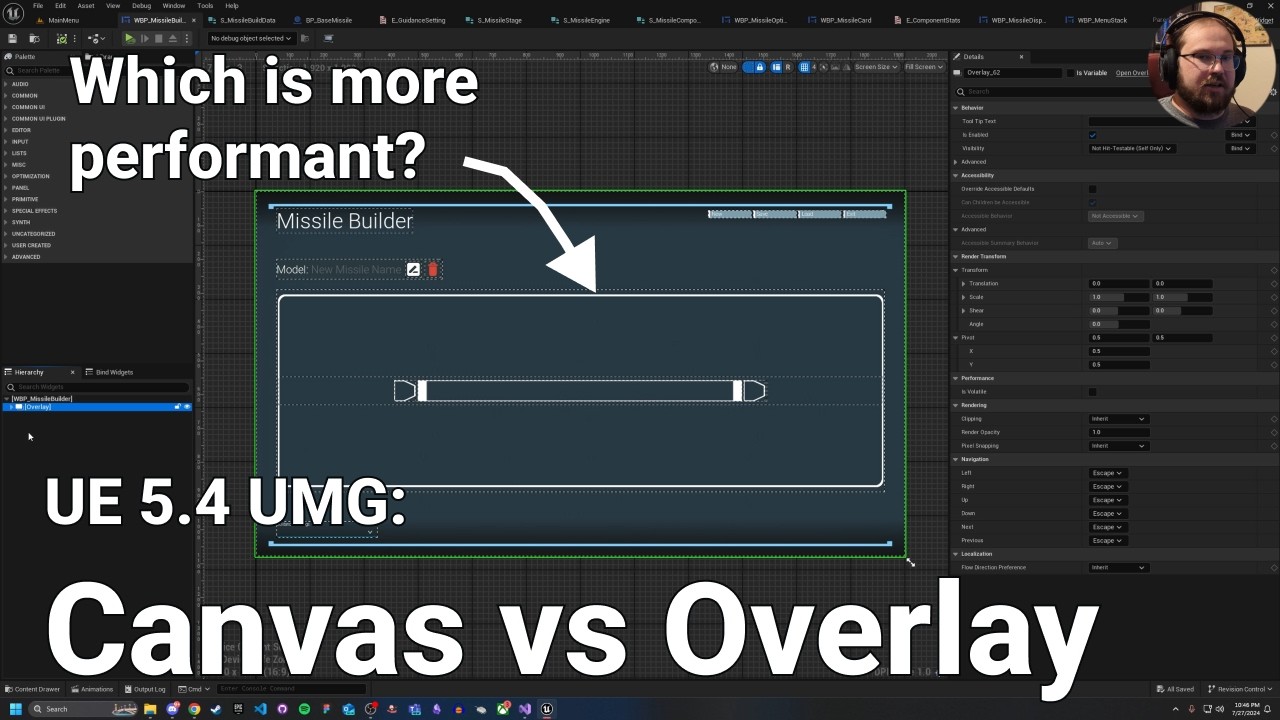
Often people say you should avoid the canvas panel at ALL times, but is that really true? And if not when should you use the canvas panels?
If you enjoyed watching, please like and (if you aren't already) consider subscribing...
short video but tldr is don't use canvas
dusky cobalt
hazy ether
with the "event begin overlap"?
depends how you set collisions on the thing that triggers it (you should set it to as few channels/objects as possible for things that overlap/block it) and then its mostly how heavy is the event after it's triggered
but these are standard to use
hazy ether
it seems setting everything to ignore instead of overlap helps!
dusky cobalt
there is also MultiSphereTrace by Channel you can use and just ''pulse'' it with Timer by Event, it's cheaper
also other shapes depending what you need
 dusky cobalt
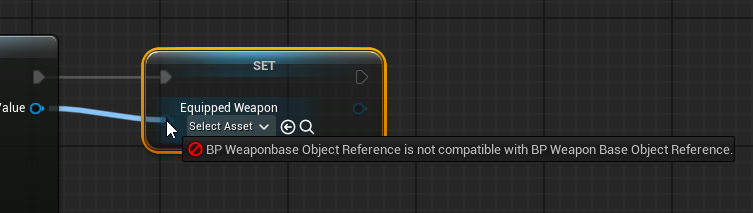
Weaponbase and Weapon Base
hazy ether
dusky cobalt
there is also MultiSphereTrace by Channel you can use and just ''pulse'' it with...
Intresting!
autumn pulsar
aha
dusky cobalt
I guess Weaponbase is c++ ? and in blueprint you set variable to be type Weapon Base but you spawn Weaponbase(C++ version)
autumn pulsar
No I just created another bp and forgot about it
kind of blindly trying to figure out the best way to give my guy a gun
Wondering if I should make my weapons a UObject with world context
rather than an actor
since for the most part it's going to run lock-step with the pawn
the Epic Sample content just makes a gun an actor component
dusky cobalt
well, all you need toadd is static mesh to owner of UObject and then all the functionality could be in UObject
autumn pulsar
That's kind of what I was thinking
then give it world context so it can spawn stuff like traces and actors
dusky cobalt
ActorComponents are probably good enough too. What you might need that cannot be in Uobject but can be in Component?
autumn pulsar
Was wondering if Actor Component was a good enough route as well
dusky cobalt
UObjects are a bit easier to handle with C++ knowledge, like spawning things all that shit is much easier accessible from C++
autumn pulsar
Wasn't really going to drop to C++ unless I needed to
dusky cobalt
I would say it all depends on how many weapons, what types etc.
dusky cobalt
What type and what is plan for that? like these are swords/bows that can be equiped etc?
and it changes what it does /dmg / effects on hit?
autumn pulsar
but would be stuff like guns, melee, grenade launchers, maybe crossbow
I plan to have a relatively simple damage structure, with the owner, the base damage, and then tags to apply
dusky cobalt
and you can hold couple of them in inventory and then just switch?
autumn pulsar
Was thinking just primary, secondary, and special
dusky cobalt
so you need component anyway like WeaponComponent that will be manager for that
autumn pulsar
then the player pawn would handle things like ammo
dusky cobalt
and then each Weapon could be UObject
autumn pulsar
yeah
That's kind of where i was settling on
just need to add world context to it
dusky cobalt
they all have shared functionality like Fire() or ExecuteAttack() in parent and then each weapon can inherit from that
autumn pulsar
I'd need to look into how the enhanced input system works
dusky cobalt
then UWeapon_Pistol can have Reload() etc.
autumn pulsar
but I was thinking of just changing contexts for it on weapon switch
so each weapon could choose how it wants to process the input
for charge attacks or so
dusky cobalt
that's easy, just create IMC for each weapon
and set priority up of the current weapon
each weapon can have even variable of it's IMC so OnWeaponChange you take that IMC and you set priority up
and you may remove previous one (CurrentOne) before setting new
autumn pulsar
Was thinking of having a base that kind of handles all that then inheriting it for each weapon and then do specific functionality there
Then have a function library for things like weapon spread or recoil
dusky cobalt
autumn pulsar
Was thinking of having a base that kind of handles all that then inheriting it f...
i would say good direction
autumn pulsar
I do want to allow the player to be able to swap out weapons in their inventory, so I'll need to play a bit
dusky cobalt
is it inventory like minecraft and drag drop or more like cs where you have weapons by clicking 1/2/3/4
dusky cobalt
yeah so keep that in WeaponComponent and Input Action call to switch there
dusky cobalt
Like InputAction_1 -> GetCharacter->GetWeaponComponent ->SwitchWeapon(1) -> Set Primary Weapon
ENUM with Primary/Secondary/Special and Tmap ENUM + WEAPON(UObject)
one thing you need to figure out how to swap static meshes but i guess its just setting invisible and visible on switch
autumn pulsar
I was using skeletal meshes
dusky cobalt
yea that's the same idea
autumn pulsar
I was likely going to create + attach and then destroy on swap 
dusky cobalt
set hidden in game I think makes them not generate anything
autumn pulsar
But I don’t really know if that’s a good idea
dusky cobalt
you set current hiden, then set new current
i can imagine player spaming 1212121212121212121 if it will lag it won't be good I guess
dusky cobalt
you set visible then start animation
or start animation, on end set invisible and set visible for new, start animation for new
autumn pulsar
Couldn’t I just have a dedicated skeletal mesh component then swap it out? Or is that a bad idea
All items in the player’s inventory will likely be loaded in memory
dusky cobalt
yea lol, you have variable of Skeletal Mesh your component added to Character
so you can just set new mesh I guess
autumn pulsar
I don’t plan to have weapon attachments so I don’t need something super special
Though skeletal meshes tend to be super crashy in Unreal
goddamn why is building Unreal C++ so stupid
dusky cobalt
it gets better with time:D then you spend whole day just writing c++ noteven compiling once until everything is ready:D
snow halo
dusky cobalt
and If Enough Resources check
where are you setting the Inventory Resources variable?
dusky cobalt
snow halo
where are you setting the Inventory Resources variable?
It's above, Add node is setting it.
snow halo
dusky cobalt
It's above, Add node is setting it.
oh, but is it an empty variable?
dusky cobalt
snow halo
oh, but is it an empty variable?
why do you think that? Add in Tmap works like Set (it sets The Key with new Value) and in that situation it's new resource amount for each key
snow halo
dusky cobalt
why do you think that? Add in Tmap works like Set (it sets The Key with new Valu...
I see, so I just wanna make a placeholder for what it's gonna ADD into it
dusky cobalt
but remember checking if its enough for all resources is important because otherwise you might end up with removing 2 first resourcs and then getting error or - value
snow halo
dusky cobalt
but remember checking if its enough for all resources is important because other...
Is that example checking if its enough for all resources?
dusky cobalt
yes it is
 marble tusk
dusky cobalt
marble tusk
dusky cobalt
I don't know if you've already figured this out, but that code specifically will only run the loop body once instead of for each item in the array. You're breaking out of the function during the loop body instead of after it's completed.
dusky cobalt
yeah that return node should be on completed that's right
and on false from first branch we might return false as well for the function
so it's @snow halo info for you to change these
autumn pulsar
dusky cobalt
it gets better with time:D then you spend whole day just writing c++ noteven com...
I just mean the already convoluted C++ errors just get worse when you've got this tower of cards that it's built on top of
goof one thing up and a thousand other things also throw errors
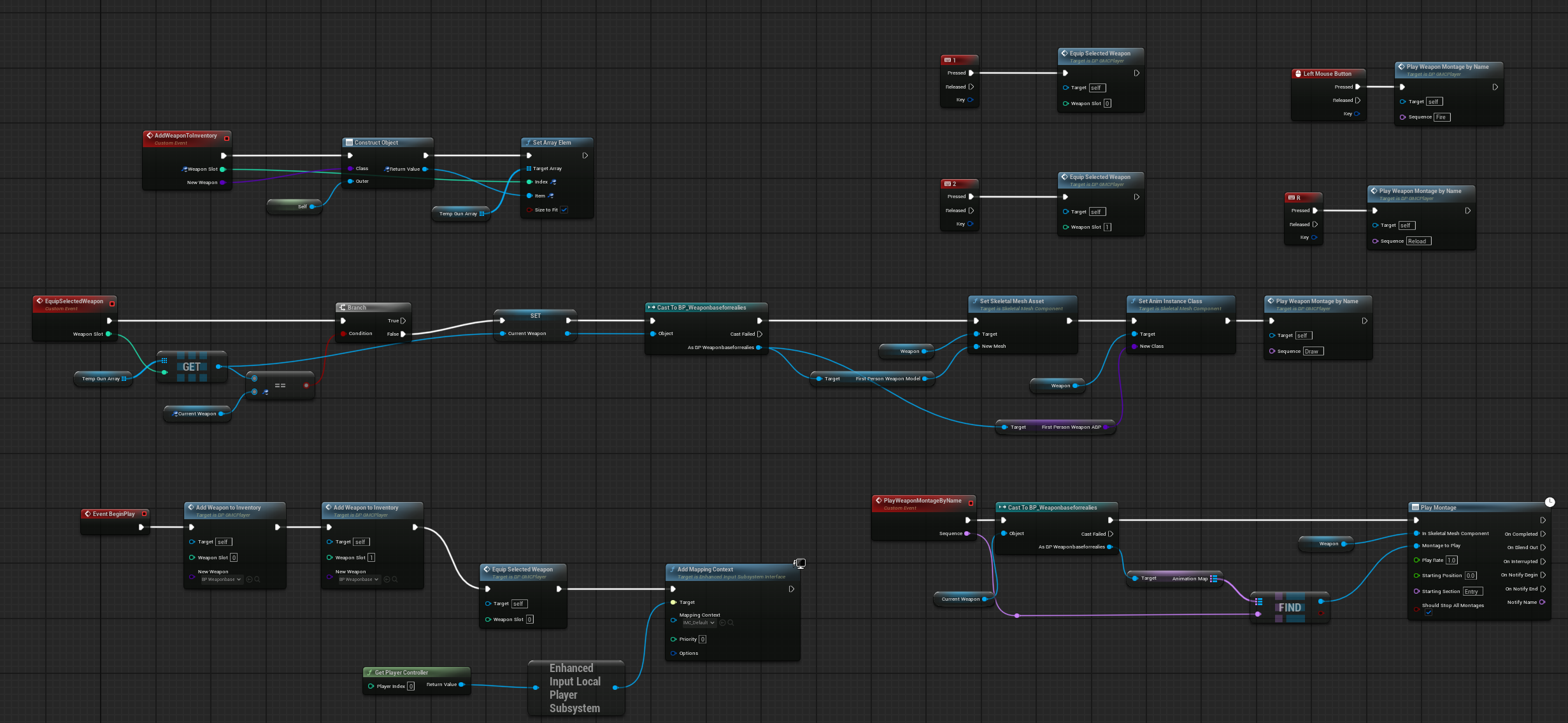
got some garbage done lol
Definitely gonna get rewritten
snow halo
dusky cobalt
yeah that return node should be on completed that's right
I tried it just now and it doesn't remove everything from the inventory
 chilly osprey
warped juniper
chilly osprey
warped juniper
Is there a way to run an event automatically when a BP of the Object class is Constructed?
boreal basin
Hmm, who here has an IA_Sprint layout that uses first the IA_Dash as the trigger then having IA_Walk move the character after the Dashing had occured?

 dire hazel
guys max draw distance at bp not working
static meshes and default scene root se...
dire hazel
dire hazel
guys max draw distance at bp not working
static meshes and default scene root se...
any suggestions?
 eager thicket
is it possible to access another level's level BP from the main menu level?
i want to have the ability to change the spawn pawn on a level depending on what is selected in the main menu level BP
 civic quartz
Hi everyone, I observe this problem and it seems it is getting worse, happening more and more often. It started out with Blueprint Nodes copy and paste not working sometimes. While Ctrl-C did not work, often the context menu did work for copy. But now, I observe even the context menu being grayed out. Closing the Blueprint and reopening helps, but after some time (at the moment, 10 minutes later) - same effect. Also delete key for nodes does not work. IIRC it started happening with UE5, cannot remember having seen that in UE4, now being in 5.5.4. And no, there's only one editor instance open. What I found: switching into Game View and back in the viewport also seems to resolve that (temporarily) Example
 dark drum
eager thicket
is it possible to access another level's level BP from the main menu level?
dark drum
eager thicket
is it possible to access another level's level BP from the main menu level?
No because the level doesn't exist at that point. Whilst it's technically possible to access the level BP this isn't really worth it as there tends to be better options.
In terms of spawning the character, this is normally handled in the gamemode (IIRC) so any logic for choosing what character to spawn should be handled in here. In terms of determining what character should be used, this could just be stored in the GI. If you need this data more persistant than that, it might be worth just storing it inside a save game object instead.
dark drum
warped juniper
Is there a way to run an event automatically when a BP of the Object class is Co...
assuming its an actor, yes, you have begin play. If its more of a onetime thing to setup how it looks, you can always use the construction script.
 undone sequoia
guys this causing me game lagging is there any other way to have prediction?
 dark drum
undone sequoia
guys this causing me game lagging is there any other way to have prediction?
dark drum
undone sequoia
guys this causing me game lagging is there any other way to have prediction?
How often are you calling it?
undone sequoia
dark drum
How often are you calling it?
tick
my NPC is aiming bombs with help of it
 rose crest
timer by event?
 dreamy mountain
trying to make a scene capture 2d render target appear in this box but it doesnt show it, it shows other images but not this one, any ideas?

if it does render, it has this weird transparency

thats the scene capture settings
 frosty heron
dreamy mountain
trying to make a scene capture 2d render target appear in this box but it doesnt...
frosty heron
dreamy mountain
trying to make a scene capture 2d render target appear in this box but it doesnt...
Make a material that takes your render target and invert it
dark drum
undone sequoia
tick
What are you doing after this?
dreamy mountain
frosty heron
Make a material that takes your render target and invert it
its still black, it just now lacks the transparency it had
idk why
frosty heron
Post your material in #materials
frosty heron
dreamy mountain
its still black, it just now lacks the transparency it had
It would be dark if it's not updated though. Have you run a 2d scene component at run time to update the texture?

 cunning vapor
Just a little bump for this; does anyone know of a "healthier" way to look for the point to snap to ? Saw this comment on YT as well as hheres the BP


Im not trying to make a huge grid (just a 6x3) / nor will it being used in any other instance other than this 'level'
dark drum
cunning vapor
Just a little bump for this; does anyone know of a "healthier" way to look for t...
Take the input vector divide by you're grid size, round the result and then multply by the grid size. This will normalize the input vector to the grid. You can add a small offset at this stage should it be required but I wouldn't have it any more than half the grid size.
No need to loop through points.
dark drum
cunning vapor
Just a little bump for this; does anyone know of a "healthier" way to look for t...
This node will probably do the bulk of the work though. Not sure which version of UE it was added though. (I found it in 5.5) This of course assumes an even grid size.

 faint pasture
undone sequoia
guys this causing me game lagging is there any other way to have prediction?
faint pasture
undone sequoia
guys this causing me game lagging is there any other way to have prediction?
How far of a throw are you predicting?
Turn down sim frequency maybe
Either down or up, whichever number makes it do less traces
cunning vapor
dark drum
This node will probably do the bulk of the work though. Not sure which version o...
got it working with some tweaking and using this node; gone from 2fps to 6 fps; thanks ! 😛
undone sequoia
faint pasture
How far of a throw are you predicting?
Idk it's a lot I already solved it I put all actors to ignore and let it trace just one specific which is target
And it's not lagging
cunning vapor
cunning vapor
got it working with some tweaking and using this node; gone from 2fps to 6 fps; ...
Meant to say 60! XD
 magic jackal
What do I have to do in order to get Call In Editor functions to work? Variables appear under the "Default" section, but no functions.
dark drum
magic jackal
What do I have to do in order to get Call In Editor functions to work? Variable...
Create a function and tick the 'Call In Editor' flag. It'll then show in the details panel when you select an instance in the level.
magic jackal
dark drum
Create a function and tick the 'Call In Editor' flag. It'll then show in the det...
Thats the thing, they do not
 keen sun
There is no Z translation data on a jump attack animation is there anyway I can use these animations
add Z translation
the hip translates though the hip goes up but the root stays andbecause of that I'm unable to use the root motion and the entire animation becomes useless
dark drum
magic jackal
Thats the thing, they do not
Make sure the function doesn't have any inputs/outputs.
magic jackal
dark drum
Make sure the function doesn't have any inputs/outputs.
It does not, just a simple Custom Event.
hazy ether
Whey! my draws have gone from 900 to 400 now ive fixed the main building!
And, I now have suport for the OWO, and BHaptic suits!
dark drum
magic jackal
It does not, just a simple Custom Event.
An event is different to a function. Drop the logic into a function.
 kind estuary
Using Editor Utility, im trying to get all the transforms of my selected meshes, to store them in a Data Table. How do i do that? How do i get the data or copy the data and then paste in the data table?
warped juniper
dark drum
assuming its an actor, yes, you have begin play. If its more of a onetime thing ...
I specificaly said it's an Object class...
dark drum
warped juniper
I specificaly said it's an Object class...
Ahh, my bad. For a UObject parent, no. You'd have to manually call a function when its created.
cunning vapor
@dark drum I saw you commented on the next part in the video; did you find a better way to get the grid point instead of going through everything in the array every tick ?
Also posted a pic of the previous fix you gave me that works P nicely


 dawn gazelle
warped juniper
I specificaly said it's an Object class...
dawn gazelle
warped juniper
I specificaly said it's an Object class...
If need be, you can create a helper static function that you could use to construct that specific object type that then automatically calls whatever "begin play" like event/function you create, and just be sure to use that function whenever you want that specific type of object created.
Spawn Actor From Class works similar to this... Though I haven't dug deep enough into the multiplayer code to figure out how Begin Play is called on actors that were spawned through replication 😬
dark drum
cunning vapor
<@430016173694779402> I saw you commented on the next part in the video; did you...
I'm not sure of you're intention. If I remember correctly, that video is in regards to storing data in cells. (a uobject) I don't believe what you're trying to do is relevant.
cunning vapor
yeah, im just trying to get the correct 'point' which is an actor BP; so that i can store the data; but with the BP above "Get closest grid point" im not able to find any points :/ and the process (followed from youtube) using a for each loop in tick destroys the framerate;
sorry if i've butchered that explanation


 steady night

hi, in a enemey AI behavior tree
how can i set a condition in the move to *
"is dead = False"
a check*
lunar sleet
If by dead you mean destroyed can use a decorator to make sure the target actor is valid before moving down the branch. But also #gameplay-ai is better for these questions
dark drum
cunning vapor
yeah, im just trying to get the correct 'point' which is an actor BP; so that i ...
So I would store the grid points in a TMap somewhere (maybe a manager class) You can have the grid points register themselves using there grid normalized location.
Then when you want to get the relevant one, you can just find the value from the TMap.
cunning vapor
dark drum
So I would store the grid points in a TMap somewhere (maybe a manager class) You...
will give it a shot; thanks
steady night
@lunar sleet well i really meant a condition(bool) to check if true or false
lunar sleet
steady night
<@179343890409717771> well i really meant a condition(bool) to check if true or...
Use a true/false decorator then
 storm solar
I have my game focus on button in a widget. On space bar pressed, nothing happens (gamepad works fine).
This only happens on the initial focused button. Going to any other button in the widget works with the keyboard, even going back to the initial button works.

 silent plaza
hey 🙂 here is the parameters from my camera. Everything else follows the Third Person Template
What do you guys think ?


i'm struggling with bugs when i enable Camera Lag
dark drum
silent plaza
hey 🙂 here is the parameters from my camera. Everything else follows the Third ...
Tick 'Draw Debug Lag Markers' and see what it's doing. It might shed some light with whats happening.
silent plaza
I enabled it but it just show a green line following the player. i still have the problem when I'm colliding landscape with the camera. Do you guys know this strange bug with the standard Camera Lag ?
warped juniper
dark drum
Ahh, my bad. For a UObject parent, no. You'd have to manually call a function wh...
Guess that's not too hard
steady night
@lunar sleet which one iis that ?
 warped juniper
dawn gazelle
If need be, you can create a helper static function that you could use to constr...
warped juniper
dawn gazelle
If need be, you can create a helper static function that you could use to constr...
This is a great tip, I'll make a function library for that
eager thicket
dark drum
No because the level doesn't exist at that point. Whilst it's technically possib...
What is GI exactly?
Is that just a standin for the gamemode
 olive yarrow
If the player is spamming attack while being/getting stunned, they are no longer able to attack.
Any suggestions on how to get around this?
 maiden wadi
Personally I would recommend not messing with inputs just for a gameplay stun. A stun should not mess with controls. It should mess with the pawn being controlled. Too many other things handle input management and it'll be a headache to maintain.
I would also recommend taking a look at GAS. It's much easier to do a stun with a good ability system that can maintain state well.
silent plaza
dark drum
Tick 'Draw Debug Lag Markers' and see what it's doing. It might shed some light ...
I disabled Camera Lag and I still have the issue when moving with my camera. I think it is related to camera collision. But it is strange because I only use the standard system
dark drum
eager thicket
What is GI exactly?
Game Instance
olive yarrow
maiden wadi
Personally I would recommend not messing with inputs just for a gameplay stun. A...
Preesh, aside from GAS - how do you mean? My mine jumps to unpossess or something similar
silent plaza
Do you think I need to code a new Lag system ?
olive yarrow
oh wait, character movement... duh
maiden wadi
olive yarrow
Preesh, aside from GAS - how do you mean? My mine jumps to unpossess or somethin...
Yeah. Cause you don't want to assume anything with this. If for example you put in some sort of automove feature later that doesn't rely on the player entering commands, and you just disable inputs, the pawn can still freely move and do things even if the player has no ability to input keys.
olive yarrow
maiden wadi
Yeah. Cause you don't want to assume anything with this. If for example you put ...
I switched to editing movement just to try something else really quickly - however the issue persists

mm, i think it's the set animation mode.
nope that ain't it
i think it's any animation or montage at all that disables the player being able to shoot after being stunned
frosty heron
silent plaza
I disabled Camera Lag and I still have the issue when moving with my camera. I t...
Spring arm is not really standard. You can't get decent camera with it, especially when hitting a corner.
 inland walrus
Can someone help me figure out how I can make it so that the NPC is only hit once upon first overlap?


Any help would be appreciated
frosty heron
You can register an ID per attack window.
If the character being hit already have the attack ID. Simply do nothing.
inland walrus
frosty heron
You can register an ID per attack window.
So like an array that stores each attack attempt?
inland walrus
Where would I put it?
frosty heron
I had mine in the combat component.
Which is latched to both the player and the enemy
inland walrus
hmmm
So I would trigger that the AI is being hit, but how do I determine when the hit is over?
frosty heron
You define that.
For me it's between the start and end of the sword being swung.
Anim notify state to be exact
 lunar sleet
steady night
<@179343890409717771> which one iis that ?
lunar sleet
steady night
<@179343890409717771> which one iis that ?
correction: use a task to SetValueAsObject for your target and invalidate it by leaving the Object Value blank when you consider it dead. Then, you can just check if it's Set or Not with a regular blackboard decorator
 frosty heron
 wraith loom
Is there a possess node for the client only? If there is one I can't find it
wraith loom
Is there a possess node for the client only? If there is one I can't find it
Don't think so and I don't see the point to do that as a client.
Just ask the server to give a pawn to possess as a client.
dark drum
lunar sleet
correction: use a task to SetValueAsObject for your target and invalidate it by ...
As an FYI, i'm pretty sure, IsSet isn't the same as IsValid. Its more to check if values in the BB has been initialized. You can set a value to null which would count as it being set.
lunar sleet
dark drum
As an FYI, i'm pretty sure, IsSet isn't the same as IsValid. Its more to check i...
🤔 I remember it differently but def worth testing
dark drum
lunar sleet
🤔 I remember it differently but def worth testing
Its been over a year since I used BT's but I'm pretty sure it was something that tripped me up. I could be remember wrong though. 😅
lunar sleet
The main thing that trips people with those decorators is when they assume isSet/NotSet is the same as True/False. But yeah, I could be hallucinating. There is a set value as bool node you can use to change true false states but I haven’t dug far enough into how to check that, maybe it’s for observer abort on value change 🤷♂️
maiden wadi
I wish they would put in a real AI system at some point. Engine could use a decent smart ai approach.
lunar sleet
Could have also sworn there was a bool decorator but I couldn’t find it
lunar sleet
maiden wadi
I wish they would put in a real AI system at some point. Engine could use a dece...
Real as in how? I think the Epic folk in #gameplay-ai implied they’re trying to shift from BTs to STs and #mass if need be
snow halo
dawn gazelle
Focus solely on this image for now.
This function you're calling takes an input...
I tried to do something like this
 dark drum
lunar sleet
Real as in how? I think the Epic folk in <#221798778208780288> implied they’re t...
dark drum
lunar sleet
Real as in how? I think the Epic folk in <#221798778208780288> implied they’re t...
I like ST's but you can't dynamically set them. (atleast you couldn't the last time I used them)
maiden wadi
As in able to do structured decision making based on shifting goals and shifting priorities. You can kind of do it with BTs or STs, but it's not that great. Lot of spider web, non data driven bullshit coding.
lunar sleet
maiden wadi
As in able to do structured decision making based on shifting goals and shifting...
Yeah, I guess it’s the usual kind of thing where UE is meant to be a generic clay from which you have to mold your own pot
At least they seem to be active in this department again
maiden wadi
Smart AI is a generic idea. There's nothing project specific about it. You can use it for a city builder, an RTS, FPS, etc. And with or without an ECS system.
snow halo
Hi I have a problem, im removing with this logic #blueprint message items from my inventory when I craft, but it's removing the wrong kind of items. This time my logic is removing the right quantity, but the wrong type of items.
dawn gazelle
snow halo
I tried to do something like this
Don't need the "Values" and the "Get" there... Just connect the "Find" integer output to the Quantity.
The index I imagine is supposed to be the array index from the inventory itself
Which you removed for some reason.
maiden wadi
Removing things from an array by index in a for loop is scary.
frosty heron
I had to do that quiet a number of times 
Always with reverse for loop though
Otherwise guaranteed bug
maiden wadi
Why is this index thing here. Why not just pass the softref and look up the index you need to affect from it in the internal remove function?
The index is to this map of things to remove, not to the actual array of items. And even if it was an index to the items, this is scary code.
 maiden wadi
Can't wait til I'm done writing bad AI code. I really want to get back to my equipment system. 😦
snow halo
dawn gazelle
Don't need the "Values" and the "Get" there... Just connect the "Find" integer o...
I've added it back but now it won't remove anything
 frosty heron
maiden wadi
Can't wait til I'm done writing bad AI code. I really want to get back to my equ...
frosty heron
maiden wadi
Can't wait til I'm done writing bad AI code. I really want to get back to my equ...
What does the A.I have to do?
maiden wadi
snow halo
I've added it back but now it won't remove anything
Don't compare an FText and an FName. You translate your game to Chinese and that's gonna explode.
maiden wadi
frosty heron
What does the A.I have to do?
Play the game. Literally.
frosty heron
Sounds like RTS
maiden wadi
Similar. 😄 Toned down RTS in a sense. But same idea.
 sick sky
ST was fun to learn but a bit of pain to get it working at first in c++
maiden wadi
Hence my earlier comments about smart ai and decision making systems. I originally hacked it up for gameplay testing a few months ago in a very derpy single tree. And now I'm reworking that to take into account personality differences, and also expanding it to actually make decisions instead of just iterating the same set of code constantly. But it would be nice if there was even a basic version of GOAP or STRIP implented in engine.
dawn gazelle
snow halo
I've added it back but now it won't remove anything
That is closer to what you want though. You're at least trying to compare the ingredient to remove to the items in your inventory. As Authaer points out though, your comparison there isn't great. You also again, need to keep track of how many you need to remove (the integer from the FIND), and keep a count of how many you're removing from your inventory slots until you've removed enough.
 runic panther
really dumb question, but i have 4 different animations for pushing a block. a start animation for grabbing the block, a pushing loop, an idle push animation, and letting go of the block.
I have the blueprint already made for moving a block (without any animations).
How do I go about adding in the animations? Is there a guide/tutorial out somewhere for this?
snow halo
maiden wadi
Don't compare an FText and an FName. You translate your game to Chinese and that...
I replaced the types, now im comparing exactly the same types but still don't get a result.
It's not removing anything
maiden wadi
runic panther
really dumb question, but i have 4 different animations for pushing a block. a s...
An AnimBP most likely. Where you detect when you're pushing a block and use that state tree instead of the normal movement one.
snow halo
Now im using this === and also I tried both Get Class Display Name and Get Class Defaults
 maiden wadi
snow halo
I replaced the types, now im comparing exactly the same types but still don't ge...
maiden wadi
snow halo
I replaced the types, now im comparing exactly the same types but still don't ge...
Can you test doing a ToName from the String off of your FText? So that it's FName == FName?
Cause depending on what that == node picks, it could be wrong. Like if it converts your FName to a string and ==. It could be wrong due to capitalization. FNames are automatically lowercased.
snow halo
dawn gazelle
That is closer to what you want though. You're at least trying to compare the i...
should i make a variable to remember how many items Im removing at each instance/circumstance?
maiden wadi
Why does your CDO not have the same ID that your struct uses?
snow halo
what's CDO?
maiden wadi
Class Default Object. Essentially the thing you're getting properties from in your GetClassDefaults node.
Like when you make a new item in the inventory, how do you determine it's ID then?
snow halo
maiden wadi
Like when you make a new item in the inventory, how do you determine it's ID the...
I have two data tables. 1) is for the crafts, 2) is for inventory collections

 maiden wadi
Datatables still give me such nightmares. 😂 Brings back good old RS2 memories.
What we did is we had a DataTableRowHandle on the actor that pointed back to the datatable for the item. So like on your Grindstone_Item_Inv class, or it's parent, whatever is the base class of your items, would have a DataTableRowHandle, and then in Grindstone_Item_Inv you can specify this datatable and the Grindstone row. Then you have access to that ID from your GetClassDefaults
runic panther
maiden wadi
An AnimBP most likely. Where you detect when you're pushing a block and use that...
i see.
I looked at a video about a similar thing and he's making an animation montage out of his 4 separate animations. Which I think I will do as well.
I haven't finished the video but I think he'll do an AnimBP as well? Unsure
maiden wadi
runic panther
i see.
I looked at a video about a similar thing and he's making an animation ...
Maybe. Depends on the movement you're after. Montages would be more like for... PlayMontage and specifically move the block 16 meters.
If you want something more dynamic like... Lock onto the block and move in whatever direction with the block, that is more of a state graph in an AnimBP.
Like if you're after the second behavior more. I would look up how they do state graph switching based on similar things like different weapon types. It's the same idea mostly, you're switching the state based on what the character is doing. Holding a rifle, a pistol, no weapon at all, pushing the block, bracing against a sandstorm, etc etc.
Montages are for like single punches, a rifle recoil, getting knocked over, more one off ideas rather than a new full state.
snow halo
maiden wadi
Datatables still give me such nightmares. 😂 Brings back good old RS2 memories.
...
is there another better way to do this besides GetClassDefaults?
runic panther
maiden wadi
Like if you're after the second behavior more. I would look up how they do state...
this is amazing advice, thank you.
inland walrus
Any way to make it so that it doesn't detect the whole Villager as the hit actor but rather a Box Collider that the Villager has on them?

or perhaps check if what has been hit has a tag
nvm got it
 soft estuary
Assertion failed: (Index >= 0) & (Index < ArrayNum) [File:D:\build\++UE5\Sync\Engine\Source\Runtime\Core\Public\Containers\Array.h] [Line: 771] Array index out of bounds: 0 from an array of size 0

UnrealEditor_Engine
UnrealEditor_Engine
UnrealEditor_Engine
UnrealEditor_AnimGraphRuntime
UnrealEditor_AnimGraph
UnrealEditor_AnimGraph
UnrealEditor_AnimGraph
UnrealEditor_AnimGraph
UnrealEditor_AnimGraph
UnrealEditor_KismetCompiler
UnrealEditor_KismetCompiler
UnrealEditor_KismetCompiler
UnrealEditor_Kismet
UnrealEditor_Kismet
UnrealEditor_CoreUObject
UnrealEditor_CoreUObject
UnrealEditor_CoreUObject
UnrealEditor_CoreUObject
UnrealEditor_CoreUObject
UnrealEditor_CoreUObject
UnrealEditor_CoreUObject
UnrealEditor_CoreUObject
UnrealEditor_CoreUObject
UnrealEditor_CoreUObject
UnrealEditor_CoreUObject
UnrealEditor_CoreUObject
UnrealEditor_CoreUObject
UnrealEditor_CoreUObject
UnrealEditor_CoreUObject
UnrealEditor_CoreUObject
UnrealEditor_CoreUObject
UnrealEditor_CoreUObject
UnrealEditor_CoreUObject
UnrealEditor_CoreUObject
UnrealEditor_CoreUObject
UnrealEditor_CoreUObject
UnrealEditor_CoreUObject
UnrealEditor_CoreUObject
UnrealEditor_CoreUObject
UnrealEditor_CoreUObject
UnrealEditor_CoreUObject
UnrealEditor_CoreUObject
UnrealEditor_CoreUObject
UnrealEditor_CoreUObject
UnrealEditor_CoreUObject
UnrealEditor_CoreUObject
UnrealEditor_CoreUObject
UnrealEditor_CoreUObject
UnrealEditor_CoreUObject
UnrealEditor_CoreUObject
UnrealEditor_CoreUObject
UnrealEditor_CoreUObject
UnrealEditor_CoreUObject
UnrealEditor_CoreUObject
UnrealEditor_CoreUObject
UnrealEditor_CoreUObject
UnrealEditor_CoreUObject
UnrealEditor_CoreUObject
UnrealEditor_CoreUObject
UnrealEditor_CoreUObject
UnrealEditor_CoreUObject
UnrealEditor_CoreUObject
UnrealEditor_CoreUObject
UnrealEditor_CoreUObject
UnrealEditor_CoreUObject
UnrealEditor_CoreUObject
UnrealEditor_CoreUObject
UnrealEditor_CoreUObject
UnrealEditor_CoreUObject
UnrealEditor_CoreUObject
UnrealEditor_CoreUObject
UnrealEditor_UnrealEd
UnrealEditor_UnrealEd
UnrealEditor_UnrealEd
UnrealEditor_Core
UnrealEditor_Engine
UnrealEditor_UnrealEd
UnrealEditor_UnrealEd
UnrealEditor_UnrealEd
UnrealEditor_UnrealEd
UnrealEditor_UnrealEd
UnrealEditor
UnrealEditor
UnrealEditor
UnrealEditor
UnrealEditor
kernel32
ntdll
When added before hand no errors or even in PIE but if i reopen the project it crashes
why does it keep crashing after i reload unreal its just a animation blueprint from dcs``` dawn gazelle
soft estuary
```so im getting this crash when using a animation blueprint
Assertion failed: (...
dawn gazelle
soft estuary
```so im getting this crash when using a animation blueprint
Assertion failed: (...
Only thing this indicates is you're potentially trying to access an array at index 0 but it has no items in it.
and it might be in an animation bluerpint.
dreamy mountain
hey, how would i make it so that the projectile fires in a straight line along the arrow without moving down? i tried changing different stuff on the spawn but it didnt work, didnt spawn, so i need a hand with it
 soft estuary
dawn gazelle
Only thing this indicates is you're potentially trying to access an array at ind...
soft estuary
dawn gazelle
Only thing this indicates is you're potentially trying to access an array at ind...
ok ty 🙂
no items
hmm this system uses a inventory system
i use dcs,but ill take a look
but it also pulls data from another ani
i also use 5.3
or a bug with unreal with the ControlRig but that was on unreal 5 early version.
i found this on a forum
maiden wadi
snow halo
is there another better way to do this besides GetClassDefaults?
Really depends. Datatables are okay. Just handling them is much harder than something like a DataAsset setup where one data asset houses the static data for one item. Some people dislike the ton of extra assets though. But 🤷♂️
soft estuary
i could be wrong but wasnt 5.3 known for issues with this?
i used a control rig aswell
dawn gazelle
dreamy mountain
hey, how would i make it so that the projectile fires in a straight line along t...
Could you just use the world rotation of the arrow?
dawn gazelle
I believe that at the end of the day, whatever logic you're using to rotate the arrow towards the mouse would be what you would need for the rotation of the projectile.
dreamy mountain
that makes sense
ok so turns out it wasnt snapping to the mouse, and changing the finterp from 1 to 0 on the speed to make it jump, now it has vertical movement, what am i missing?
 inland walrus
Any idea why it isn't doing damage?
it works without the branch which means it's something to do with the tag
dark drum
inland walrus
it works without the branch which means it's something to do with the tag
You're checking the tag on the actor not the specific component. Use hit component instead when checking the tag.
inland walrus
Ah thank you, I tried switching this node to Hit Component and it makes sense why it wouldn't let me
 autumn pulsar
Does Uobject have a construction script?
frosty heron
inland walrus
Any way to make it so that it doesn't detect the whole Villager as the hit actor...
Check against the hit component instead?
dark drum
autumn pulsar
Does Uobject have a construction script?
No. The construction script is just on actors.
young meteor
young meteor
Hey
I'm trying to optimize my game, and for some frames seem to be GPU bottlene...
Anyone have any thoughts on this?
As long as it is not risky I can give it a go?
dark drum
young meteor
Anyone have any thoughts on this?
As long as it is not risky I can give it a go?
TSR is a type of AA which can be changed in the project settings. Choosing an alternative method can help but TSR is actually really good so you might not want too after you see the difference. 😅
young meteor
dark drum
TSR is a type of AA which can be changed in the project settings. Choosing an al...
It is my understanding it is just suggesting lower resolution for the "Temporary high resolution"?
If not needed it sounds good. I have no idea if that is the case though.
Maybe simply changing graphic settings affects this though? Not sure.
dark drum
young meteor
It is my understanding it is just suggesting lower resolution for the "Temporary...
For the AA side of things, I believe there's a quality setting on the scalability settings
young meteor
AA stands for?
dark drum
young meteor
AA stands for?
Anti aliasing
 exotic moat
how do i allow my widget / slot to be dragged but also allow it to be clicked on
 merry sparrow
exotic moat
how do i allow my widget / slot to be dragged but also allow it to be clicked on
merry sparrow
exotic moat
how do i allow my widget / slot to be dragged but also allow it to be clicked on
i been using a key for toggle it, mouse click on and off with 1 key so it can switch in run time
with simple flip flop

 exotic moat
Hmm, is there any other way? My Goal is to allow the player to click on the slot to show information & shift click to quick transfer or be able to drag and drop to rearrange their inventory
merry sparrow
ok i find this helpful with inventory system i have

Edit before you start: This series tend to get pretty complicated at times. And there are ongoing errors that doesn't get fixed instantly in every video due to the scale of the functionality. As of 5.3 everything is still working though so don't be too alarmed if you get errors every now and then when test playing as it will get fixed later.
H...
go watch and find the parts you need its full inventory tutorial 100% worked for me
 fading sentinel
Hi everyone! I'm running into a strange issue in Unreal Engine 5.5. Whenever I attach a static mesh (any mesh, not just the default cube) to a socket on a skeletal mesh, the scale of the static mesh gets multiplied by a huge factor—it's always way bigger than expected. I suspect there's a value somewhere that's multiplying the scale automatically. If I can figure out the factor, I could adjust the socket's scale in the skeletal editor to fix this. Does anyone know why this happens or where to look? Thanks in advance!
dark drum
fading sentinel
Hi everyone! I'm running into a strange issue in Unreal Engine 5.5. Whenever I a...
It sounds like you have scale on one of you're bones. Is the skeletal mesh one you've created/imported yourself?
fading sentinel
dark drum
It sounds like you have scale on one of you're bones. Is the skeletal mesh one y...
Yes created and imported from blender
 lyric rapids
For some reason the execute trigger node isnt working for a meta sounds trigger
dark drum
fading sentinel
Yes created and imported from blender
Make sure you've applied any scale to all the bones. If you have one with a scale of 20 for example, anything attached to the bone will be scaled by 20.
silent plaza
frosty heron
Spring arm is not really standard. You can't get decent camera with it, especial...
hey thank you for your answer. What do you mean? I have to code my own camera system? Is it recommended ?
fading sentinel
dark drum
Make sure you've applied any scale to all the bones. If you have one with a scal...
But my bone scale is 1 and I always applied my scale in blender
dark drum
fading sentinel
But my bone scale is 1 and I always applied my scale in blender
If you're sure the bone scales are all 1, check the socket as well. If that is 1 then you might need to check you're animations (such as idle). If the animations have scale applied to bones, the same thing can happen.
But ultimately, if something gets scaled when attached it becauses there's some scale somewhere.
frosty heron
silent plaza
hey thank you for your answer. What do you mean? I have to code my own camera sy...
Depends on your objective. If you want a decent looking camera then spring arm isn't the answer.
I stole my camera logic from Epic's sample.
Lyra.
Thank f for it otherwise I will be stuck with sh@t tps camera.
silent plaza
yes even with standard Third Person I have those bugs/jittering
silent plaza
frosty heron
Depends on your objective. If you want a decent looking camera then spring arm i...
I want a smooth camera system with Camera Lag, I like the Spring Arm system now but I just want to fix this collision/jittering bug. I would love to keep it as simple as possible, but with smooth movements (that seems standard in most games 😅)
I can't find anything about this problem
fading sentinel
dark drum
If you're sure the bone scales are all 1, check the socket as well. If that is 1...
how can I check the scale of my bone in an animation sequence
dark drum
fading sentinel
how can I check the scale of my bone in an animation sequence
Select a each bone within the anim sequence and check the scale.
fading sentinel
dark drum
Select a each bone within the anim sequence and check the scale.
Indeed the scale is changing but more than 1.3
Is there a way to use a socket with its scale ??
frosty heron
silent plaza
I want a smooth camera system with Camera Lag, I like the Spring Arm system now ...
If you want standard in most games then spring arm isn't.
Someone added camera lag on lyra camera
And again I yoink the codes
dark drum
fading sentinel
Indeed the scale is changing but more than 1.3
Is there a way to use a socket w...
Scales can compound as I believe they're relative. So if each bone in the chain has a scale of 1.3 it can all add up.
I would just fix the scale directly. Trying to hack it will give you more headaches in the long run.
frosty heron

Smooth your camera movement with position and rotation camera lag just like for the spring arm component.
⭐ join https://www.patreon.com/NanceDevDiaries for perks (credits, ad-free videos, early access, newsletter)
Updated video at : https://youtu.be/reYvjoyBys4
Lyra doesn't use a arm spring component (which supports camera lag), but uses c...
snow halo
Hi. I have a question related to bp communication. How do you communicate with a dead or non-existent actor that hasn't been created or born yet?
ok so i have a blueprint furnace, this blueprint has a function, if you click it while holding a iron this iron will trace & if it finds a furnace tracing it will magically transform itself into another item.... Which is fine, it's exactly what i want. But first you need to load it up with wood to start up the fire in the first place & warm up the furnace before its even ready for us. If you put wood on the furnace fire will be on, but if fire isnt on then we dont want the player to be able to have things craft themselves via the furnace's fire, so I want to instruct my iron ore item blueprint that if it shouldn't transform itself into something different even if it traces the correct transform equipment (fire furnace).
For example I thought about using interfaces and sending a boolean message automatically or calling an interface function remotely, but the problem with this approach is iron ore bp will probably not be an available blueprint or opened up active anywhere by the time this message is being sent out by the interface to make sure it catches the interface message.
When you enable the furnace and turn it on, you are holding an enabling fire blueprint aka fire_lay blueprint, this wood should be the only one to enable the furnace's functions. Im holding an active blueprint called fire_lay bp and after i place it in the furnace's fireplace, fire niagara & fire audio sounds will appear.
But the problem is iron_ore will not be ready yet, so it's graph will not be informed about the interface message. It will come much later and it will not hear any interface messages.
Also another issue is that maybe I will have more than 1 furnace. If that happens then I dont want fire on one furnace to enable every other furnace in that world too.
 dark drum
snow halo
Hi. I have a question related to bp communication. How do you communicate with a...
dark drum
snow halo
Hi. I have a question related to bp communication. How do you communicate with a...
Short answer is you don't.
Have your furnace keep track of the relevant data and handle what happens when interacted with.
For example, 'HasFuel' and 'IsLit'. When you interact, you check these two variables to determine how you should handle it.
snow halo
dark drum
Short answer is you don't.
Have your furnace keep track of the relevant data a...
so should I cast from the iron ore that will not be mined yet until late game?
to access the variable?
 snow halo
if you hit iron_ore next to the furnace, iron_ore will make itself into a different type of item, but I need to give a rule to this system. The rule should be an inspector, this security guard will check if your furnace is warm enough to be ready to burn iron --> turn it into other shapes
dark drum
snow halo
so should I cast from the iron ore that will not be mined yet until late game?
Why would it need to know about what hasn't been mined? The only thing furnace should care about is, does it have fuel, is it lit, and what is the player holding when being interacted with.
 hoary forge
hoary forge
hoary forge
anyonw know how to solve it im facing this issue
i want to xonnect as topdown to te target but its not
dusky cobalt
snow halo
if you hit iron_ore next to the furnace, iron_ore will make itself into a differ...
you don't need to cast because you will need interface for all for this like Check Interact. You need line trace on tick from your character that Interacts with something and that thing will react to things: like it may: check if player has 5 resources if yes do this, if it doesn't show you cannot do,
then you need another input action + line trace that will shot on ''click'' and will `Start Interact, which may be hold 3 seconds then something will happen.
each thing you interact with will have it's own interaction implementation
snow halo
dark drum
Why would it need to know about what hasn't been mined? The only thing furnace s...
so could I share some of that logic that iron_ore has for itself, and instead put that transformation logic into the furnace instead?
this one sounds more appropriate
dark drum
snow halo
so could I share some of that logic that iron_ore has for itself, and instead pu...
What logic would the iron ore have that would be relevant? All the furnace needs to know is what the object is. Only the furnace should have the smelting logic, it shouldn't be handled anywhere else or be spread across different classes.
dusky cobalt
all you need to know is:
- Furnance checks if Character that interacts has 5 wood (this is Check Interact).
- Then when you click, you check again HasResources (character), and Start Interact will start a fire on click.
and yeah if furnance can interact with 10 different things like
wood
food
something
then you would have switch inside furnance
and first you would GetPlayerItem (something that you hold at this time).
snow halo
dusky cobalt
you don't need to cast because you will need interface for all for this like `C...
Im not using tick btw, im tracing on a click. But it sounds like based on what @dark drum recommends that I could spare half of that logic into furnace instead.
dusky cobalt
and then switch reaction inside furnance
snow halo
dusky cobalt
all you need to know is:
1. Furnance checks if Character that interacts has 5 wo...
you already have wood crafted, you just need to click it at the right place
dark drum
dusky cobalt
then you would have switch inside furnance
I wouldn't use a switch, I'd have a smeltable data table that contains what items can be smelted into. The furnace can just get the result from this then.
snow halo
click with your wood (while holding it) on a furnace and it will know its place inside that furnace
dusky cobalt
dark drum
I wouldn't use a switch, I'd have a smeltable data table that contains what item...
can be, but you still need GetCurrentItem that will check that, then will check row in the data table and output will be the info from the row basically, good idea
dusky cobalt
snow halo
click with your wood (while holding it) on a furnace and it will know its place ...
it's the furnance that will check your item, not the item itself that will call to furnance
fading sentinel
pls guys how can i animate a float value from 0 to 1 using a lerp node
I cant figure out how to get an alpha value input that will change over a specific time
if it was a normal blueprint actor i would have use a timeline node but am using an animation blueprint
 rough sinew
fading sentinel
pls guys how can i animate a float value from 0 to 1 using a lerp node
I cant f...
rough sinew
fading sentinel
pls guys how can i animate a float value from 0 to 1 using a lerp node
I cant f...
If it is not anything you can use animation transitions remember that anim BPs also tick and have delta time, so you can increment by doing the logic yourself (and maybe adding some FInter).
Also, animBPs can read values from the owner (character/pawn), so that can use a timeline and you get a value from there.
 heavy hamlet
What is the best way to render a subset of the scene (a pair of actors) into a separate rendertarget, taking into account all the light sources, shadows from the scene (as usual) present in the scene, in order to eventually custom blend (possibly using my own fullscreen pixel shader) with that rendered source scene (minus this pair of actors)?
inland walrus
Does anyone know how I can get a reference to the selected node? I want it to check if the player's weapon is sheathed, if it is then change animation

 lilac storm
Hello devs , anybody knows how i can make selection on radial menu like this with Gamepad right stick right now it working with mouse ?
 frosty heron
How can I clamp a vector? is the only way to normalized it then multiply the vector?
lilac storm
frosty heron
How can I clamp a vector? is the only way to normalized it then multiply the vec...
you can break FVector and clamp each float seperately and save it to another vector or set it to the same vector as new value
frosty heron
not sure if that's what I want.
basically given an arrow, I want to clamp it's length.
dreamy mountain
hey, it doesnt fire to the mouse properly, how would i fix this? im just trying to make it so that the bullet fires to the mouse

 fading sentinel
rough sinew
If it is not anything you can use animation transitions remember that anim BPs a...
fading sentinel
rough sinew
If it is not anything you can use animation transitions remember that anim BPs a...
okay thanks but is it possible to set a variable of an animation blueprint from its owner ??
okay
so i will use cast and then feed in its owner
frosty heron
fading sentinel
okay
so i will use cast and then feed in its owner
I need to read again. What is it that you want to do? You want the abp to grab a value from its owner?
fading sentinel
Yes i want to grab a value from it (owner) but was thinking of updating the varible directly (ABP) instead of reading from the owner
frosty heron
fading sentinel
Yes i want to grab a value from it (owner) but was thinking of updating the vari...
Always read.
Normally you want to have a local variable in the anim bp, which get set from the value of its owner.
E.g. bCrouching variable in the anim bp.
The value is set every frame from the owner.
Set bCrouching to get Owner IsCrouchihg.
Then you will use the local variable in your state machines.
fading sentinel
frosty heron
Always read.
Normally you want to have a local variable in the anim bp, which ...
okay noted and this should be the best pratice to follow ??
again i have one tiny annoying blockroad
I'm trying to blend between two animations, A and B, and I want Animation B to start playing as soon as the blend value starts increasing from 0, not just when it reaches 1.
and it turns out the animation B starst playing only when it reaches 1
from my knowledge the best place to do this is a 1 or 2DBlend Actor
fading sentinel
frosty heron
I don't know how you do the blend
this is the nood in the ABP it blends perfectly but the B animation starts playing only whne it gets to 1
 frosty heron
fading sentinel
this is the nood in the ABP it blends perfectly but the B animation starts playi...
frosty heron
fading sentinel
this is the nood in the ABP it blends perfectly but the B animation starts playi...
.i never seen that node. Why don't you use blend space?
fading sentinel
frosty heron
.i never seen that node. Why don't you use blend space?
its not a character animation
but using blendspace means all aniamtion in the blendspace graph will loop
and i want the BalloonGroundLift and BalloonGround animation to hold their last frame and not loop
i want to confirm does StateMachine Blend animations ?? (since have been using it they only switch animations and not blend
frosty heron
Probably better ask in #animation
rough sinew
There will be a blend between animation according to the rules you set.
Even just building a state machine with minimal transition rules will blend the animation.
fading sentinel
frosty heron
Probably better ask in <#221798806713401345>
okay i will do that now
fading sentinel
rough sinew
There will be a blend between animation according to the rules you set.
cause i know switching animation state automatically starts the animation sequence
but for blending i dont know about that
let me go ask in aniamtion
 brave pilot
I need a blueprint to switch between two materials (not material functions) based on a variable inside that blueprint. For example if the variable is true the model uses material 1, but if the variable is false the model uses material 2. Is there a good way of setting this up?
frosty heron
brave pilot
I need a blueprint to switch between two materials (not material functions) base...
Just use a select node and plug it to the set material node
brave pilot
oh, interesting
inland walrus
inland walrus
Does anyone know how I can get a reference to the selected node? I want it to ch...
bump
pine carbon
What's the fastest way to get an arbitrary object to do something on a key press for testing purposes?
You know what, this is more concerning. Why is this not working?

Take Damage just prints "Damage Taken." Or it WOULD, if it worked.
This is painfully simple. Why would it not work?
 magic crown
Hey guys hopefully a simple one. Trying to figure out how to update my line traces on the edge of my tile mesh to update and follow rotation on ever axis. Right now when I rotate, it sticks to the same direction always mostly.
I've tried to use Get Actor rotation and Get Rotation X Vector but I still cannot figure out
dark drum
magic crown
Hey guys hopefully a simple one. Trying to figure out how to update my line trac...
Show how you're currently handling the traces.
magic crown
@dark drum

Trying to make a grid trace system for spawning grass instances.
Dividing the length of the tile by how many instances I'll be placing for grid like setup.
Grass To Spawn Per Row is set to 3. Hence why there's three debug arrows here. Just need this to follow no matter the rotation / scale
 undone sequoia
guys FPS have big effect on my game when I play it when i have 30 fps my game is much slower than when I play with 60 and if I use delta time its same thats problem of ue or what?
maiden wadi
pine carbon
You know what, this is more concerning. Why is this not working?
It's an optimization. There's no damage to apply, so no point wasting resources calling the event.
pine carbon
pine carbon
What's the fastest way to get an arbitrary object to do something on a key press...
In that case, back to this.
maiden wadi
Is there only one in the level?
Depends on what you're trying to do specifically and the context. If it's a single thing dropped into the level you can place a Debug Key event in like your player controller or pawn and GetActorOfClass to call the function.
pine carbon
Right now yes, although I'd prefer a quick and dirty solution that would work even if that wasn't the case. If keys aren't the best solution, I'd be fine with something else. What I really want is a fast way to tell an object "do this thing when I do this thing."
maiden wadi
One neat way to test specific functions on objects is...
ke * EventName
In the console. This'll run on every object of that class. No need for debug setups or anything.
@pine carbon EG say you have events like these.

I do ke * MySuperCoolEvent in console.

ke * MySuperCoolEventWithParam 73
 pine carbon
maiden wadi
One neat way to test specific functions on objects is...
```ke * EventName```
In...
pine carbon
maiden wadi
One neat way to test specific functions on objects is...
```ke * EventName```
In...
Oh that's PERFECT.
Thank you so much, holy cow.
maiden wadi
The * means all classes. You can do specific classes with their class name. EG if you look at my first screen it's NewBlueprint1
So instead of * I would use NewBlueprint1_c
ke NewBlueprint1_c MySuperCoolEventWithParam 73
 thin panther
pine carbon
This is painfully simple. Why would it not work?
thin panther
pine carbon
This is painfully simple. Why would it not work?
Try with a damage higher than 0
thin panther
Oh wow, I was hella out of sync 🤣
pine carbon
Yeah, that happens to me sometimes too.
 worn path
Hello!
I am trying to change the simulate physics so an object that has physics can stop and snap to a socket
If the physics is set not in blueprints it works but changing it in blueprints dosent work.
Videos for better explanation.
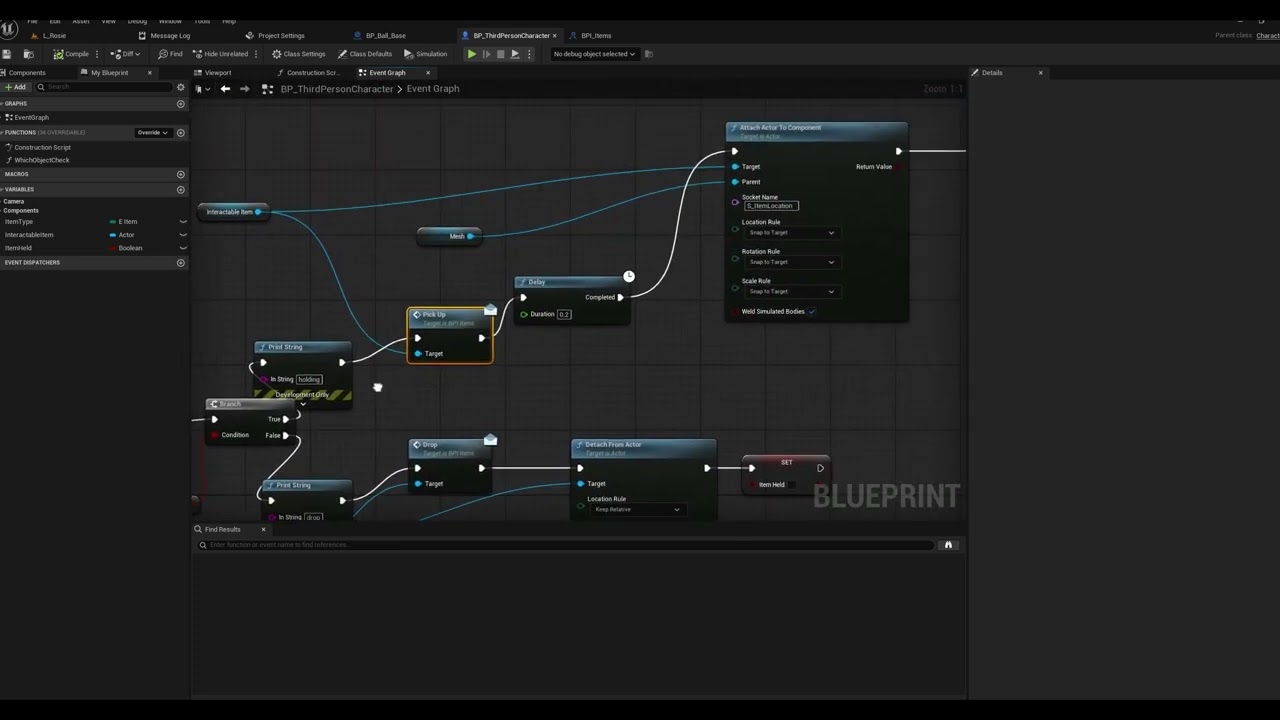 cunning vapor
Trying to save "new rooms" to my save data and load it in; it saves/loads only one component; Have I setup something wrong here ? Do I need to create a map and add that ?
Thanks in advance!

 worn path
cunning vapor
Trying to save "new rooms" to my save data and load it in; it saves/loads only o...
worn path
cunning vapor
Trying to save "new rooms" to my save data and load it in; it saves/loads only o...
what is in housing data? is it pulling anything or is it blank/null?
marble tusk
cunning vapor
Trying to save "new rooms" to my save data and load it in; it saves/loads only o...
I don't know about all that, but one small issue I see is you need to replace the length node with a last index node. Length is the total number, but the first index is 0 meaning the length will return 1 past the last index
Which means you'll likely get an error or warning for trying to get an invalid index from the array
steady night
@lunar sleethmm in this case im using "stunned" so it needs to be able to reEnable it,
pine carbon
Okay, bit of a strange question, but we have a punch attack in our game, which is basically a physics playground. At present, the punch "works" because the hitbox of our arm's static mesh clips into objects and does jank. This does cause punched objects to move, but it's hardly an elegant solution, nor can it be easily controlled. What I'm currently trying to do is as follows, but I'd like to hear thoughts on if this is a good idea/a better one exists:
Remove all actual collision from the arm.
When a Punch is done, briefly enable a SphereCollision where it's visibly impacting.
Anything that gets detected as overlapping will have a hit and damage event manually triggered, and be given an impulse in the direction the camera is facing.
The impulse is applied by the entity doing the punch. Would it be better to have the punched object handle that from hit data?
cunning vapor
marble tusk
I don't know about all that, but one small issue I see is you need to replace th...
Sorry for the long reply; 'last index' is for Array's :/ thought i could use length instead
marble tusk
cunning vapor
Sorry for the long reply; 'last index' is for Array's :/ thought i could use len...
If there's not a last index for maps, then just subtract 1 immediately after the length node
I guess it makes sense there wouldn't be a last index since maps are unordered
cunning vapor
you reckon a for loop on the keys would be better?
marble tusk
Oh yeah, just get last index of the keys array

 dawn gazelle
steady night
<@179343890409717771>
dawn gazelle
steady night
<@179343890409717771>
Is that a question mark in there?


 lunar sleet
steady night
shouldent this work ?
lunar sleet
steady night
shouldent this work ?
No, that was specifically what I said wouldn’t work because isSet does not equal isTrue
 jagged night
Is there any way to use timers in functions?
dawn gazelle
jagged night
Is there any way to use timers in functions?
You can start a timer in a function, but the delegate it calls would need to be external to the function itself - you can use a "Create Event" node and connect it to the Delegate input and then select the function or event you want the timer to call.
lunar sleet
Functions generally try to fire in one tick, so putting latent functions in them is no-go. You can use events or macros or just do what Datura said
rough sinew
Exactly, you can even block the game thread if you try to make a function that is too computationally heavy.
storm solar
storm solar
I have my game focus on button in a widget. On space bar pressed, nothing happen...
Any idea? I found a crude work around but I dont what to have to implement that on every widget I make.
It's using on keypress down on the current widget to cast to the the button widget and see if it's being highlighted.
lunar sleet
storm solar
Any idea? I found a crude work around but I dont what to have to implement that ...
May wanna try #umg
storm solar
This seems more of a blueprint issue but I'll try asking there.
inland walrus
Anyone know why the block animation isn't looping when it should be?


if I disable auto blend out, it holds the animation but after a second or two it freezes the animation and gets rid of the natural movements

 barren blaze
Can Anyone tell me How to correct rotation .
And This walking error..
All the blueprint are correct with no compiling error.
Please tell me what is the mistake I am making.
 mystic elm
Why is my character doing this?
lunar sleet
I thought there was a bool one but ig not
lunar sleet
For your use case, you should prly use gameplay tags but you’ll need to add a tiny bit of cpp code to enable the interface
 swift mauve
Hi Everyone,
I have a system of datas made of data asset and I'm modifying them at runtime. To be short, you answer a few questions and it determines the asset that will be spawn in the level. Everything works well in PIE but not in the packaged game. It seems that it's ignoring the runtime modification. Am I missing something about using data asset?
TY very much
pine carbon
swift mauve
Hi Everyone,
I have a system of datas made of data asset and I'm modifying them ...
Homie, you're gonna need to not be short.
Be elaborate.
steady night
@lunar sleet hmm so thers no way to "Set / unset" ?
lunar sleet
steady night
<@179343890409717771> hmm so thers no way to "Set / unset" ?
Not for what you’re doing, not in any good way anyways
swift mauve
🙂 Ok I use a widget blueprint in a "menu" level and there's a few questions in it. For each answer there are different compatible assets (sky presets / trees / rocks / birds...) that are stored in data assets. Then I got a function (inside the widget BP) that picks one random asset between the compatible ones and store its value (name sometimes or direct reference to data asset for others) inside a main data asset called Level Construct. It contains all the asset determined by the user answers.
Then it opens my main level and there, are some blueprints to build the level (pick the right sublevel, apply the right sky preset, etc).
So everything is working well in editor but when I package my project, it seems that all the answers from the menu level are ignored and it only use the values that where inside my level construct data asset at the export time. Like if it where not able to write into the level construct DA...
dawn gazelle
swift mauve
🙂 Ok I use a widget blueprint in a "menu" level and there's a few questions in ...
You're creating the level construct data asset at runtime? Like using construct object node?
swift mauve
No it is already existent at launch. Should I create it at runtime to be sure that it contains the last values?
I could have just the Primary Data asset with the structure and the create then data asset at runtime?
dawn gazelle
swift mauve
I could have just the Primary Data asset with the structure and the create then ...
I'm not 100% on this.... But usually when transitioning between levels references are destroyed, but I'm not sure how that works in terms of assets since they would still keep existing as their asset. When you're modifying an asset at runtime, you must be manipulating a copy of that asset that is currently in memory.
I wonder if it would work if you stored the reference to the data asset in something that persists through levels, like the Game Instance. If you did create the object at runtime, then creating that object in the GameInstance and using the GameInstance as the outer should also ensure it persists between the level change.
Why it works in editor and not in package is probably because you could technically modify assets in the editor, but in a packaged game, it can't write the data to the package.
 marble echo
dug up an old project of mine after taking a bit of an unreal break and cant see what the issue is here; Why won't the model change after pressing 2? all of the other information sticks
 dawn gazelle
marble echo
dawn gazelle
marble echo
If 1 isn't pressed first, the "Get Class" node will return "None" which could prevent the code when pressing 2 from working. It's best not to cross wires across execution lines like this.
marble echo
i just temporarily added that to see if anything would change, even without that note the 2nd model doesnt appear after pressing 2
swift mauve
dawn gazelle
Why it works in editor and not in package is probably because you could technica...
Mmmh ok thank so I'll need to dig a bit about game instance and try to rebuild the storage of my level construct datas. Thank you for the help
dawn gazelle
marble echo
i just temporarily added that to see if anything would change, even without that...
There's only a couple of reasons why anything else may not be happening:
- You're not getting a valid row output from your data table. (You can put a print string or a breakpoint after the Row Found ouput to verify you are)
- There is no W Mp Sk Actor in the level at all. (You'd get an Accessed None error if this was the case)
- There is more than 1 W Mp Sk Actor in the level and you're manipulating a different one than you're expecting. A way to test for this is to do a "Get All Actors of Class", specify W Mp Sk Actor as the class, and print the Count from the Array that is prorvided. If there's only 1 then that should be the one you're concerned with, but if there's more than 1, you need to figure out how to get your references better, or make sure there is only 1 in the level.
Anther reason could be that this actor doesn't have input enabled on it (ie. it's not possessed) in which case it wouldn't be detecting any of your inputs at all.
marble echo
This script is all in the FirstPersonCharacter blueprint, and the actors are all attached to the camera by default, just swapping visibility when needed. I'll double check the data table
marble echo
got it. something to do with the Actor Sequencer
thanks for the help though @dawn gazelle
marble echo
sorry another question with data tables... how do I actually update the numbers in them? like firing a weapon would subtract numbers which would stay in the table

just read that data tables arent editable during play, sorry for dumb question
 weak stream
friends, in common UI, is there a way to perform a back action from blueprint?, essentially I want to have a back button in widget, in addition to gamepad mapped button
oh, I think I figured it out - I just Push the previous widget - e.g. Push Pause Menu -> Push Options Menu -> Push Pause Menu again, essentially it seems to behave just like a 'back' action
but if I'm doing this wrong, and anyone has a better solution, let me know ^^
maiden wadi
weak stream
friends, in common UI, is there a way to perform a back action from blueprint?, ...
Deactivate is what you're looking for.
weak stream
aww shit
weak stream
maiden wadi
Deactivate is what you're looking for.
thanks! much better
marble echo
can anyone tell why this is only firing twice? the fire rate is 3, so the Firing event should trigger 3 times?

whole thing
 maiden wadi
marble echo
can anyone tell why this is only firing twice? the fire rate is 3, so the Firing...
maiden wadi
marble echo
can anyone tell why this is only firing twice? the fire rate is 3, so the Firing...
Your DoN is pointless here. You'll have the identical logic if you remove it. The reason it's firing twice is because you told it to fire immediately and then set a timer to fire again.
DoN is like a gate. It allows the execution to enter the gate N times. When reset it starts counting from 0 again.
So you set your DoN to count to 3. Executed it once. Fired, Set a timer, reset the DoN, and some frames later the timer went off to fire again. This repeats every time you press your input action.
marble echo
maiden wadi
DoN is like a gate. It allows the execution to enter the gate N times. When rese...
i think i understand, thank you. i've removed the timer and it lets me fire 3 times, but what I want to happen is to fire the same event 3 times on a single click, am I in the right territory for that?
hazy ether
"Is Loud" Idk why that made me laugh XD
marble echo
got to track silent weapons somehow!
hazy ether
I presume, thats for AI detection?
maiden wadi
marble echo
i think i understand, thank you. i've removed the timer and it lets me fire 3 ti...
EG traditional burst rifles?
marble echo
hazy ether
I presume, thats for AI detection?
yeah, 'loud' weapons will make a sound bubble for AI
hazy ether
Yeah, Figured!
marble echo
maiden wadi
EG traditional burst rifles?
i want automatic weapons to fire 3 times on a single click, or held down for full auto. like Goldeneye on n64
hazy ether
So... I need a way to do VR menus... I already have desktop menus set up, if I just make a blueprint with the widget in the world, and set focus, will controller inputs go into that instead? Im not using the VR controllers btw
its a drone game that works on desktop and VR, and I need a way to do the Menus in VR
Also... is it a good idea to make my drone into a pawn instead of an actor, and migrate my code from my PlayerCharacter into the drone pawn?
maiden wadi
marble echo
i want automatic weapons to fire 3 times on a single click, or held down for ful...
The simplest way would probably be to make a firing function that calls itself. So you set the times you want to fire and call Fire.
Fire then checks how many more shots it needs to do, if >0 it shoots, and sets a timer for the next firing time which calls itself. This logic repeats until shots left is 0.
fading sentinel
Hey guys, I'm trying to create a system that scrubs through an animation timeline in real-time using an input value. For example, if the animation is 10 seconds, I want to use a float or integer value to update the current frame of the animation in real-time without playing the animation.
I've tried using an Animation Blueprint, where I converted the animation position to an input and set the play rate to 0. This approach works when I compile the animation blueprint, but it doesn't work at runtime.
Is there a way to make this work, or is there a better approach to achieve this?
 jovial steeple
fading sentinel
Hey guys, I'm trying to create a system that scrubs through an animation timelin...
jovial steeple
fading sentinel
Hey guys, I'm trying to create a system that scrubs through an animation timelin...
I've done something like this before using the animation montage system. You can set a montage to have a play rate of zero to stop it automatically moving forward, then directly set the montage position when needed.
These nodes may help:
 fading sentinel
jovial steeple
I've done something like this before using the animation montage system. You can...
fading sentinel
jovial steeple
I've done something like this before using the animation montage system. You can...
So I will use all 3 functions together?
jovial steeple
fading sentinel
So I will use all 3 functions together?
The first two functions are different ways of starting an animation montage. The third function will directly set the position of an animation montage.
So no
fading sentinel
Ohh
So I have to choose between the first and second
Which will allow me choose a montage or animation sequence
Then the last one is what I will use ??
jovial steeple
fading sentinel
Ohh
So I have to choose between the first and second
Which will allow me choos...
Yea
rough sinew
Does it have to be a montage? I think you can set the animation mode to animation asset and set the position directly, no?
jovial steeple
fading sentinel
Ohh
So I have to choose between the first and second
Which will allow me choos...
Note that if you use the second function, you will have to promote the returned montage to a variable. This is so you can plug it into the MontageSetPosition node.
 fading sentinel
jovial steeple
Note that if you use the second function, you will have to promote the returned ...
fading sentinel
jovial steeple
Note that if you use the second function, you will have to promote the returned ...
Okay
So I guess it's best I set this logic inside the animation blueprint event instead of my actor blueprint
jovial steeple
rough sinew
Does it have to be a montage? I think you can set the animation mode to animatio...
Not to my knowledge. Its not as if I have researched that extensively as the only time I ever had todo something like this, I needed montages anyways.
Its not an obvious function call in blueprints.
Anim instance only has set position nodes for anim montages.
fading sentinel
rough sinew
Does it have to be a montage? I think you can set the animation mode to animatio...
What about the active animation that is playing won't u play the animation first before doing that ?
jovial steeple
It can go in either place.
rough sinew
jovial steeple
Not to my knowledge. Its not as if I have researched that extensively as the onl...
Alright. I am not sure about it either. I know you can set the play rate and position of an animation asset in the editor (I use to get screenshots of actions) but I've never done it during runtime.
rough sinew
fading sentinel
What about the active animation that is playing won't u play the animation first...
If you use a set the animation mode to a single anim it should change things immediately.
fading sentinel
jovial steeple
Note that if you use the second function, you will have to promote the returned ...
Will I run the montage set every time I update the new position ??
Or it's better I use tick to run it
jovial steeple
@fading sentinel also make sure your anim instance is properly setup to be able to play anim montages. You need to give it a slot node.
jovial steeple
fading sentinel
Will I run the montage set every time I update the new position ??
Or it's bett...
You run montage set position whenver you need the position to change. Probably whenever your slider UI detects a change.
It shouldnt need to be on tick.
fading sentinel
jovial steeple
<@926394738599411724> also make sure your anim instance is properly setup to be ...
Yes done that already
And again does the new position work with the length of the animation or a value of 0 to 1
jovial steeple
iirc its time in seconds.
And not a 0-1 scale.
You can just calculate that easily though.
fading sentinel
So that means if my animation is 300 frames
I will use between 0 to 300 ??
@jovial steeple
jovial steeple
fading sentinel
So that means if my animation is 300 frames
I will use between 0 to 300 ??
<@12...
No, I beleive SetMontagePosition takes in a time in seconds. Not a frame value.
In the range of:
Range:
{
   Min: 0
   Max: TotalLengthOfAnimationInSeconds
}
This is how you would convert a float from the scale of 0-1, like one you might retreive from your slider UI to the new montage position.
 fading sentinel
That means I can change my
"Zero to one scale"
To 100 since am using a float value that is between 0 to 100
jovial steeple
fading sentinel
That means I can change my
"Zero to one scale"
To 100 since am using a float v...
Yes
well
You would need to divide that 0-100 by 100 then
In order for it to be on a zero to one scale and fit into that equation above.
 fading sentinel
jovial steeple
You would need to divide that 0-100 by 100 then
fading sentinel
jovial steeple
You would need to divide that 0-100 by 100 then
Am abit lost, so which of the variable will I be updating between 0 to 100
jovial steeple
fading sentinel
Am abit lost, so which of the variable will I be updating between 0 to 100
Do you just wanna voice call.
Its a pain to explain things over text
fading sentinel
jovial steeple
Do you just wanna voice call.
Yes I agree it's very frustrating
jovial steeple
fading sentinel
Yes I agree it's very frustrating
I will DM you
 weary nimbus
Heya, I'm following this tutorial for an inventory system, and I was wondering if there was a way I could set a default rotation to the mesh?
https://www.youtube.com/watch?v=FjkOQvmu3fI

Hello everyone,
Welcome to the next part of our series on the Unreal Engine 5 inventory system!
In this video I will show you how to Move and zoom in on your 3D Item widget
Previous video: https://youtu.be/eDU5-IY3oZM
Discord: https://discord.gg/Yh7w5GBU7k
Playlist: https://www.youtube.com/playlist?list=PLrudBLqLfaTS4um1O8ncySgOQu0rNDF9Q
Pa...
Also, is there a way to change the aspect ratio of a SceneCaptureComponent? I don't like having mine a square.
Or even if there's a way to crop the output would work
 desert glade
Has anyone used the Gameplay camera plugin? How to set the initial rotation value of spring arm?
weary nimbus
weary nimbus
Heya, I'm following this tutorial for an inventory system, and I was wondering i...
Back to this, I want to be able to have my cursor disappear and be able to drag indefinitely when I hold my mouse down in the item view window, and return to normal when I stop clicking, how can I achieve this?
lunar sleet
Hiding your cursor is done by changing bSeyShowMouseCursor
surreal peak
weary nimbus
Also, is there a way to change the aspect ratio of a SceneCaptureComponent? I do...
Depends on the render target size and aspect ratio I think
The world around it is usually hidden by changing the capture to use a show list and then add the meshes (and actors?) you wish to show by hand
undone sequoia
guys i have question when I turn on linetrace debug for my prediction or any other linetrace to be visible everything in my world moves a little bit to right every widget everything why?

 restive lagoon
Hey there, im currently struggling hard making a physics handles location update not laggy on the client side.
Physics handle grabs object, client says what location it should be at, RPC server sets location, handled actor is movement replicated and replicated.
Server sided it looks perfect, client side not so much.
The object keeps falling down and lagging back up, assuming its some simulation thing but i dont know what causes it.
disabling the physics simulation client side fixed it, its not perfect but a good enough solution for now
 frosty wadi
restive lagoon
disabling the physics simulation client side fixed it, its not perfect but a goo...
frosty wadi
restive lagoon
disabling the physics simulation client side fixed it, its not perfect but a goo...
I have the same issue what do you mean it is not perfect what is wrong with that solution?
restive lagoon
it still appears stuttery on the client when moving the object at expected "fast" speeds.
inland walrus
Can anyone help me figure out why it's not holding the block animation even though it's looped
restive lagoon
you play the animation once when you press the button, a pose blend might be more what youre looking for
inland walrus
restive lagoon
you play the animation once when you press the button, a pose blend might be mor...
How would I do that?
restive lagoon
When youre using the motion matching template i cant really help with that, i refrained from using it.
inland walrus
ah damn
I was hoping it'd just be a tick box somewhere
or an input issue
If I disable auto blend out it holds the animation but then stops the natural sways and freezes in animation
 weary nimbus
surreal peak
The world around it is usually hidden by changing the capture to use a show list...
weary nimbus
surreal peak
The world around it is usually hidden by changing the capture to use a show list...
Well I got that
It only shows the object I want to show
But the window I have in my UI is a rectangle but the scene capture is a square. If I try to stretch it to size it stretches the capture, but if I leave it as a square it's hard to tell where the sides of the capture end when I'm dragging my mouse to rotate the mesh so it goes off the widget
And if I give the capture a background to show the border, it looks ugly
inland walrus
restive lagoon
When youre using the motion matching template i cant really help with that, i re...
This seems to work but when the animation loops, it jolts a tiny bit

There's also a delay when releasing block, I imagine it's the animation finishing
frosty heron
I wouldn't use montage for your blocking animation
it should just be a state
having delay is pretty nasty imo when doing any gameplay logic
delay means you promised to executed what ever comes to it after X time.
It's a recipe for bugs.
why do you have bools like Wants To block?
Right click -> If Weapon Is Valid -> Set bBlocking to true
on release set bBlocking to false
dusky cobalt
Does anyone know if the Acceptance Radius in AIMoveTo if gived Location only, it's from that exact location to the location that we will reach?
Basically I have Acceptance Radius set to 200, and it sometimes stops at 250 330 or 350.... very inconsistent.
I Get Actor Location of the Target and I want AI to move there. Sometimes it reaches right.. sometimes it stops ''too fast''.
Does it somehow reevaluate the goal location if it cannot reach it? Even though there is no null nav mesh, just obstacle (more expensive move), very little around the target. This nav mesh, aimove to feels like its so shit in ue5 or I'm using it wrong.
frosty heron
also that's not how you loop a montage, try to not go around like that with your execution. You can simply create a montage section and loop the section.
I still suggest to just use state machine over montage for blocking anim.
frosty heron
dusky cobalt
Does anyone know if the Acceptance Radius in AIMoveTo if gived Location only, it...
it should be, mine doesn't really fall short. Might be something else interfering with it?
Perhaps debug draw shapes on the target location. See if it fall short, also observe the movement result.
dusky cobalt
I'm also using C++ version so I believe it's Move to Actor or Location version in bp. Ugh I'm gonna lose my mind on this xD
how can it be so stupid, click on target, get its location, go to location with acceptance 200, stops at distance 330 and move is finished xD


 inland walrus
frosty heron
on release set bBlocking to false
inland walrus
frosty heron
on release set bBlocking to false
I'm not familiar with state machines and I feel like I'd have more issues figuring it out than this one issue
frosty heron
inland walrus
I'm not familiar with state machines and I feel like I'd have more issues figuri...
surely you are fammiliar with these? These are state machines

your blocking anim can just be blend by bool node in your anim graph.
I would just do this
 inland walrus
frosty heron
surely you are fammiliar with these? These are state machines
inland walrus
frosty heron
surely you are fammiliar with these? These are state machines
Idk if gasp uses state machines
dusky cobalt
dusky cobalt
https://tenor.com/view/whine-give-up-pout-frustrated-gif-5313242348381105216
Solution:
MoveRequest.SetAllowPartialPath(false);
frosty heron
inland walrus
Idk if gasp uses state machines
I dunnoe. kinda stayed away from ALS and what ever anim system out there.
for me it's better to start from scratch
at least I know how to modify and where to expand
inland walrus
All good, GPT fixed it by putting a loop in the animation timeline


 snow crag
Hey all. I'm sitting here unable to fix an annoying problem in my data handling in unreal engine blueprints.
I'm not very good at blueprints overall. And might not be able to explain my issue well but here's a video that shows it somewhat.
Essentially what's going on is when each of those cylinders(The Growth Source) spawn it checks for cells (on the grid) within a max distance and adds all cells within it to its "AffectedCells". I use this later for evaluating other data.
In the process of adding the affectedcells, though, it seems like whenever a new Growth Source spawns and it has overlapping max radius with another growth source it seems to steal its AffectedCells.
That's not intended, they should be able to share them. I dont know if what im describing is what's ACTUALLY going on behind the scenes, but that's what it looks like to me
here's the function
dusky cobalt
snow crag
Hey all. I'm sitting here unable to fix an annoying problem in my data handling ...
GrowthActor is the cylinder?
snow crag
dusky cobalt
GrowthActor is the cylinder?
Technically it’s also the grass as that’s a render target (there’s a plane above every cylinder/growth source which is captured and sent to the landscape shader
But yes
weary nimbus
I have a save system that stores the player's inventory, but any items they've picked up before will spawn in. How do I keep them from spawning in if they are supposed to be in the inventory?
dark drum
weary nimbus
I have a save system that stores the player's inventory, but any items they've p...
I don't know the sort of inventory system you have but the general concept would be the same.

Welcome to this tutorial on how to create an inventory system in Unreal Engine 5! In this video, we'll go over the concepts of setting up an inventory system using Unreal Engine's powerful Blueprint visual scripting language.
In part eleven, we continue setting up the required logic for saving our item data. So whether you're a beginner to Unre...
maiden wadi
snow crag
Hey all. I'm sitting here unable to fix an annoying problem in my data handling ...
Can you point to a specific time stamp of your video and point out the issue? I'm not entirely sure what you mean by them stealing another's affected cells.
pine carbon
maiden wadi
One neat way to test specific functions on objects is...
```ke * EventName```
In...
'Tis not working.
 maiden wadi
pine carbon
'Tis not working.
maiden wadi
pine carbon
'Tis not working.
If this is a BP class don't forget the _c
pine carbon
Why is there a _c on blueprint classes?
And why the heck isn't that in the scene tree names?
frosty heron
it's an instance
the .uasset would be the template class. Anything else you getting at run time is an instance (object)
pine carbon
maiden wadi
If this is a BP class don't forget the _c
Okay this works but does not do what I want, which is definitely a skill issue on my part. That calls the event on both instances at once. I can't do ke OrientableCube2_c DebugEvent.
How do I do that?
snow crag
maiden wadi
Can you point to a specific time stamp of your video and point out the issue? I...
at 0:07 you can see one of the actors has a completely filled circle. The other has a half full, and the other has none. They are all supposed to have completely full ones.
This is because of the order in which they are "Registered" in the blueprint. The one with the full one being the last in the queue. The Max Radius is bigger than the circle you see in the video, meaning it extends into the other plants.
You can also see it later when i make new ones. The red debug spheres are not supposed to be dissapearing at all
pine carbon
Additionally, is there a way to rotate an actor BY an amount around an axis without getting the current rotation, adding to it, and setting it? That feels like something there's probably a built-in node for, but I cannot seem to find it.
frosty heron
AddLocalRotation?
pine carbon
frosty heron
AddLocalRotation?
Thank you.
Now for a more irksome 3D rotation thing that takes a bit more explanation.
 regal geyser
Hello everyone! Any PCG wizard here to help me out with a simple yet infuriating problem?
I have an input Array of actor classes (in order to randomize the spawning of them) but i can't figure out how to shuffle between them, if i use the "Random Choice" node i always get the same sequence; i created a custom PCG BP in order to shuffle the array and it still returns the same array in the same order!! It's driving me crazy!
Plz Help!
https://blueprintue.com/blueprint/a6k5on7r/
here is the custom bp out of frustration lol
https://blueprintue.com/blueprint/28dgxjhm/
here is the PCG itself

No description provided
No description provided
pine carbon
I have a custom component that holds a target_rotation variable (just a float, doesn't actually control rotation) and does a sphere trace around itself for other actors containing instances of that component. That works. The intent is that the components will see one another, read one another's target_rotation, and compare that to the actual rotation of their parent actors to find out if they are oriented correctly. The reading of one another's target_rotation works, but I don't quite understand Unreal's actual rotation handling well enough to make that detection work.
This is a simple actor that contains a mesh and my custom component.

How the everloving frick do I get that mesh to face somewhere else and have that be treated as the 0 rotation?
This shouldn't be hard but every time I use a new game engine, this ends up being an issue for me.
Zeroing out the rotation of a component is something I find myself wanting to do constantly, and it is always a struggle.
 lofty rapids
pine carbon
This shouldn't be hard but every time I use a new game engine, this ends up bein...
lofty rapids
pine carbon
This shouldn't be hard but every time I use a new game engine, this ends up bein...
i thought you turn the mesh , then turn the actual actor in bp then you would be "zero" rotation of the mesh ?
i also thought turning the mesh would pretty much zero it out at it's actual rotation
pine carbon
lofty rapids
i thought you turn the mesh , then turn the actual actor in bp then you would be...
I can't.
 pulsar osprey
use the details panel to the right
you can't rotate the root component. every transformation is done relative to the root so it would be pointless anyway
pine carbon
This McFricker does nothing.
 pine carbon
pulsar osprey
you can't rotate the root component. every transformation is done relative to th...
pine carbon
pulsar osprey
you can't rotate the root component. every transformation is done relative to th...
That explains that, at least.
So what do I actually have to do?
pulsar osprey
is it your root?
if you really want to rotate it then set an empty scene component as the root, add the cone to that empty component, and then rotate the cone
lofty rapids
oh right if it's the root then your stuck, but if it's a child then you can do this "zeroing"
pine carbon
pulsar osprey
if you really want to rotate it then set an empty scene component as the root, a...
That's so finnicky. Thank you.
pulsar osprey
it makes sense. your root component transform is effectively (is?) your actor transform
pine carbon
Yeah but the mesh data ain't coming from there. It's coming from somewhere else.
pulsar osprey
engines like godot and unity use a scenegraph where you can just spawn a prefab or node holding other nodes but there isn't really the concept of a root gameobject in a prefab or godot equivalent
pulsar osprey
im not sure what the point would be
the only weakness that I can immediately think of in the way unreal does it is that you effectively can't nest actors without a level
pulsar osprey
i know bp has issues with nested containers in c++; not sure about it entirely in bp
you have to wrap the nested container in a struct in c++. might be the same here?
 gleaming relic
pulsar osprey
you have to wrap the nested container in a struct in c++. might be the same here...
gleaming relic
pulsar osprey
you have to wrap the nested container in a struct in c++. might be the same here...
ye
pine carbon
Going backwards through BP connections fixes things for me sometimes.
 dim siren
pine carbon
Yeah but the mesh data ain't coming from there. It's coming from somewhere else.
dim siren
pine carbon
Yeah but the mesh data ain't coming from there. It's coming from somewhere else.
Check the static mesh's import settings. You can change the transform there and re-import it (not sure if it's possible with engine meshes).
 leaden osprey
Hi guys, prolly its a simple question. Im a beginner dont mind. After i added an interface to a character, one of the functions doesnt appear to be a function. Instead its a custom event, how do i fix this?
frosty heron
Sounds like a naming conflict
 lilac bobcat
pine carbon
Going backwards through BP connections fixes things for me sometimes.
lilac bobcat
pine carbon
Going backwards through BP connections fixes things for me sometimes.
This is great advice.
frosty heron
Aka you have function with the same name.
leaden osprey
frosty heron
Sounds like a naming conflict
Just rename it, right?
frosty heron
leaden osprey
Just rename it, right?
Yeah, you don't want name collision if you do have something that share the same name.
leaden osprey
Tyy it helped
hazy ether
I've copied my actor into a pawn and now the collisions are messed up, the root is on overlap, and the dedicated collision box is block, yet the root is the only thing that collides! I cant figure out why!
Anyone got any idea why the colisions are broken?
Pls? Im so confused!
hazy ether
This worked fine on another project! but isnt on this one 😦
dusky cobalt
hazy ether
I've copied my actor into a pawn and now the collisions are messed up, the root ...
do you mean you reparented?
hazy ether
What?
hazy ether
dusky cobalt
do you mean you reparented?
no, I took everything from my actor, and put it into a Pawn Blueprint, that way I could combine the actor and character, and now the collisions on the root and dedicated collision box arent behaving how they should
This worked find in my other project! But I cant find any difrences between settings!
frosty heron
Sounds like child actor component
hazy ether
frosty heron
Sounds like child actor component
What does that mean?
If you mean the colision box is a child of the root, then yes
storm solar
storm solar
Any idea? I found a crude work around but I dont what to have to implement that ...
Any ideas? Reddit has no clue either
frosty heron
hazy ether
What does that mean?
If you mean the colision box is a child of the root, then y...
You have more chance getting help if you post a picture.
We can only guess from what you said.
hazy ether
 frosty heron
Whats the issue? Can you elaborate on "not working how they should"
hazy ether
The root has physics on, but collision off, The dedicated collision box has collision on but physics is disabled so it stays connected to the Root, yet the collision box wont collide, only the root is, despite collisions being set to ignore.
Pluss, when I do enable collision on the Collision box, the root then doesn't collide and I fall through the floor.
frosty heron
I don't play with physich much but afaik simulating physics = detaching it from the root.
hazy ether
The root has physics, nothing else does
frosty heron
How do you change the collision? Through bp?
If you do that make sure it doesn't propagate to child
hazy ether
frosty heron
If you do that make sure it doesn't propagate to child
How do I do that?
frosty heron
Show how you change the collision? There might be a tick box that says propagate to children or something. You want that unticked.
hazy ether
frosty heron
Show how you change the collision? There might be a tick box that says propagate...
I've looked, there isn't one...
this worked fine when it was an actor, I copy and pasted all the components to a pawn and now its not behaving how it was.
frosty heron
Well i don't really use pawn, only character.
With character only the capsule component matter.
Not sure with pawn.
hazy ether
Plus, if it was propagating, it would propagate the disabled collisions...
frosty heron
So the root have collision disabled?
hazy ether
it should do, but still colides
If i delete the colision box the root then adhears to its settings, its like the root is takeing the collision settings of the colision box
frosty heron
Try visualising in real time. Other than that, no more dice.
Open ' type show collision
And just play on pie and see what gets stuck
hazy ether
its so incosistent, when the drone is upright, the colision box is through the floor, but the root is above, and if its on its side the root is flat on the surface...
Wait what? the collision box is the thing doing the collisions... but the collisions aren't matching the same shape as the box!
Oh there we go! That was weird
Apparently it decided to make the "box extent" values do the collision size...
 crimson spade
hoping someone can help me here. im trying to make my lock-on function only while the button is held. i have the IA set to Hold with a threshold of zero and IsOneShot enabled. the problem im running into is that if i try to set up logic for Completed on the IA event, it considers itself to be complete the instant is fires the lock-on functionality. i'd like to set it to only complete on key release. i tried using Press and Hold, but the issue is that it constantly fires the functionality, locking on to new targets as they become the new qualifiers.
anyone know how i can make the lock-on only fire a single time and maintain its lifetime only while the input is held?
 frosty heron
Hold on there, why are you instantiate an actor every frame just to grab closest actor?
That's wayyyyyy overkill
Turn what ever you have into a function.
surreal peak
I mean, they are asking to only trigger it once
frosty heron
I suggest using actor component to handle your targeting
surreal peak
@crimson spade Shouldn't it work to move that to the "Started" pin?
And then destroy it again on the "Completed" pin?
crimson spade
unfortunately the Started/Completed route with a Destroy Actor doesnt keep it from considering completion upon executing the lock-on. basically kills itself on start
crimson spade
frosty heron
I suggest using actor component to handle your targeting
how do you mean? i currently have a large sphere that spawns around the player and checks for the nearest compatible actor using an interface on the actors
 frosty heron
crimson spade
how do you mean? i currently have a large sphere that spawns around the player a...
frosty heron
crimson spade
how do you mean? i currently have a large sphere that spawns around the player a...
I don't create an actor to check the overlap.
Just project a sphere overlap instead.
I wouldn't need to care about its life time.
If life time is relevant, that should be handled on your targeting system.
I suggest encapsulating all the logic for the targeting in an actor component.
@crimson spade and to run a function once just use started pin
If you need something that behave every frame, you can do that on tick and control the calling with a bool imo.
 flat jetty
Hey everyone! are there any way to use my Enhanced inputs in Set UI Mode Only?
For now, I have IA_OpenInventory, and I open my Inventory UI, then set UI mode only. But as you might guess, i cant toggle back since its UI Mode only. I need to use UI mode only because i dont want user to move etc.
So i have created custom logic inside Inventory Widget, but it seems like Tab is not working correctly since its switching between widgets first (i think its unreal default behaviour or smthg), then closing my UI. And also, IF i "tab" and open my UI, then click somewhere else with my mouse, it loses focus, meaning that "tab" wont work to close it up.
