#blueprint
1 messages · Page 294 of 1
 random pulsar
yeah solved it thx
 final berry
One tiny bug, when clicking in the hidden area the default cursor pops up again (for as long as you hold either the left or right click 🤔 )
random pulsar
how is it called the component that has a visual representation?
scene has no visual representation,there is something like a dragon image and you can change it as well and add it as component in any blueprint
 faint pasture
random pulsar
how is it called the component that has a visual representation?
scene has no vi...
faint pasture
random pulsar
how is it called the component that has a visual representation?
scene has no vi...
PrimitiveComponent
doesn't mean visual but it means it has some sort of geometry
random pulsar
faint pasture
PrimitiveComponent
i cant find it in search bar
 faint pasture
random pulsar
i cant find it in search bar
faint pasture
random pulsar
i cant find it in search bar
primitive is an abstract class
faint pasture
What are you trying to add?
random pulsar
see the green one?
its the root component,i can see it,and when i add a reference point like the one circled red ,i dont see it of i deselect


in this points i will spawn objects,i would like to see where i will spawn them in game mode
so i want to add some sort of point but visual
bruh,its billboard
 spare sorrel
I'm trying to set up a system in Unreal Engine where every time the player dies, they respawn, and a block spawns at their death location. I want to limit it to 5 blocks, so when a 6th block is created, the oldest one should be removed (FIFO system). Right now i'm a bit lost, if anyone could help me a bit here, at least to know where to continue it would be great, im starting in Unreal and i can't find anything useful online
This first part works well(at the end it goes attach to a destroy actor)

so every time the player dies i creates the cube, but after the spawnActor idk how to continue
I have this but it obviously didn't work, cause i tried using 2 different sources to make it work XD

any help would be well recieved 😄
 maiden wadi
final berry
One tiny bug, when clicking in the hidden area the default cursor pops up again ...
maiden wadi
final berry
One tiny bug, when clicking in the hidden area the default cursor pops up again ...
Odd. Initial assumption is mouse capture causing it. Can you set your input mode up so that it hides the cursor during capture to see if that works for you?
faint pasture
spare sorrel
This first part works well(at the end it goes attach to a destroy actor)
I don't know what the function is called but you want your add to happen at index 0, pushing everything else back, then if size > max, destroy the last one and remove it from array.
 wicked surge
Hello, I'm working on a Blueprints project, and I'm trying to get GameMode to call the GameHasEnded() function on the PlayerController. I was going to override this function to add in behvior for when the game ends. However, I can't seem to call GameHasEnded() anywhere in the Blueprint, and I can't override it. Is there something else I should do instead?
faint pasture
spare sorrel
This first part works well(at the end it goes attach to a destroy actor)
Quick and dirty but this works

 drowsy anvil
how can I make a camera that is stationary and separated from the 3rd person character? and that camera can be animated with sequencer?
when I removed camera from 3rd person character, it added one for him anyways when I pressed play
spare sorrel
faint pasture
Quick and dirty but this works
When I get home I'll try this
Thank you for your speed
 meager spade
spare sorrel
When I get home I'll try this
meager spade
spare sorrel
When I get home I'll try this
Also for future reference, be mindful about order of using for example get and add/remove. In your screenshot you remove the first element from the array so you are destroying what was the second element prior to using remove index
 fast compass
Is there a way to have Widget Blueprints still be tickable when paused? I want to revert options after x amount of seconds if the player does not confirm them, but the timer doest count down since the game is paused.
maiden wadi
UserWidgets do tick when paused. Their timers do not due to being tied to the world that is paused. You can either use a literal tick timer or maybe an animation track.
fast compass
Oh i see, good to know! Thanks! 🙂
spare sorrel
meager spade
Also for future reference, be mindful about order of using for example get and a...
thank you good man, im literally unable to think after 5 hours of leveling xd
 storm solar
Any idea on this issue?
 dusky cobalt
storm solar
Any idea on this issue?
dusky cobalt
storm solar
Any idea on this issue?
You could always just create buttons from array and add them as a child to the vertical box that you put in the main UI on the edges of screen. You could create enum or something that can help you differentiate what the buttons does so then you can pass that thing that identifies button when you click on it.
dusky cobalt
storm solar
Any idea on this issue?
you would either have Initialize Button and pass that vegetable from array, or just expose Vegetable on spawn of the widget button.
When you click on button it Do Something and passes that Vegetable it's holding.

 shut lantern
I'm trying to make my health bar represent the max value of my constitution stat and starting base health. Everything seems to be working fine but would like to know if there is a better way to go about it. (ignore the shape of the blueprint)
 storm solar
dusky cobalt
you would either have Initialize Button and pass that vegetable from array, or j...
storm solar
dusky cobalt
you would either have Initialize Button and pass that vegetable from array, or j...
 storm solar
storm solar
storm solar
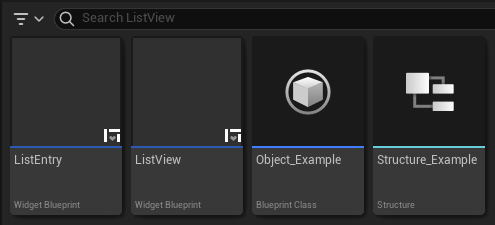
For Add an Entry to the List View section. Of the guide on the picture.
my build machine is offline atm
dusky cobalt
shut lantern
I'm trying to make my health bar represent the max value of my constitution stat...
If this is built in binding, then it's getting called on t ick even when the health number is not changing, which may have impact on performance, because you don't need it to call/tick when it's not changing. What you need is to create Event Dispatcher inside your Health Component, or in a place where you have your Health and Stat. In case of these different stats you probably need 2 event dispatchers. On Health Change and On Const Stat Change. Inside your Widget, you get that actor/component reference and you bind to these events. Inside widget you implement what is supposed to happen when these events get called, so in case of On Health Change, you just set the widge t to the new health amount.
 topaz goblet
Running into an issue.
I have a Parent Object (NPCTemplate). It has various actor components. One being a Health Component. In this component, I have 'currentHealth', 'maxHealth'.
I create a child from that parent object (NPCTemplate) called NPC1. In NPC1, for the Event BeginPlay, I do a SET for the health variables inside the component.
I run the game and am seeing the values of the parent class's component, not the childs.
Verified that it is the child actor that is selected. But, the components don't appear to have their own instance inside the child?
dusky cobalt
topaz goblet
Running into an issue.
I have a Parent Object (NPCTemplate). It has various act...
like the variables are the same in the childrens in the editor or when you hit play? are they not updating to what you set them to in the children classes?
topaz goblet
dusky cobalt
like the variables are the same in the childrens in the editor or when you hit p...
When I play. The variables I set for the children aren't appearing on the children. They're setting for the parent.
The eventgraph for the child (NPC1) has the event BeginPlay set to change the variables. But, in the game, the health is the defaults set in the parent.
dusky cobalt
Any screenshots of the setup?
 next kite
Hey guys, i need a major bit of help with my checkpoint blueprint
right now it takes the speed of the car as it goes through it, but i want to expand it to be three checkpoints (entry, apex, exit) for a corner. Thing is ,when i do this and place multiple instances. issues occur
 barren tangle
what is the difference between Spawn new actor from class and Construct ?
 runic terrace
Construct is for objects
barren tangle
runic terrace
Construct is for objects
if for example i have an array of item. and i want to create a new item into my table, i will use Construct?

like that?
runic terrace
Is your item an object or an actor?
barren tangle
it's an actor
runic terrace
Then you need to use spawn actor
barren tangle
what is an object then?
topaz goblet
dusky cobalt
Any screenshots of the setup?
I'll try to get screenshots in a bit. Thanks!
runic terrace
barren tangle
what is an object then?
Object is anything that exists in the game, an actor is an object that has a transform and exists in the level
barren tangle
runic terrace
Object is anything that exists in the game, an actor is an object that has a tra...
it's more like the game instance if i understand
runic terrace
Yes game instance also inherits from object, but has extra functionality
Basically almost everything inherits from object, but they differ in functionality
barren tangle
runic terrace
Basically almost everything inherits from object, but they differ in functionali...
ok i didn't know we were able to create object, that can be usefull
runic terrace
Yeah you can use it for stuff that don't need a transform
But they are limited as they can't use delays, tick events and some other stuff actors can use
barren tangle
runic terrace
But they are limited as they can't use delays, tick events and some other stuff ...
ok good to know, sometime you don't need those tick events.
runic terrace
Yeah for example if you don't need a lot of functionality inside your item actors, those can just be objects
barren tangle
so i guess it gives better performance to use an object ?
runic terrace
Yes objects are pretty much the bare bones of stuff
You can also use structs for items, but that can be very limiting
Though keep in mind you can't replicate objects unlike actors
Just something to keep in mind if you need multiplayer
dusky cobalt
I would say neglible and it's not more about object vs rather but what you do with these and how you handle them. Objects are limited, if you need something to happen in the level you need actor most of the time. Imagine objects can be dead things that are literally dead and won't do anything. They might have some functions like calculations, but they will never come alive in the level. Actors use most performance when you spawn and destroy them, so if you use Pooling Pattern, you overcome the most expensive thing and then difference between actor and object is not so big. Then it all really comes what you can do with object and what you cant.
runic terrace
Also take a look at Data Assets, those are the best of two worlds imo
They are like structs with functions
dusky cobalt
This is abstract but imagine you put 100 functions to object and 1 function to actor. Does it matter that one thing is actor and 2nd is object for performance? It's what is inside these things that make it up for performance issues. Not them itself. If it was like this, no one would be using Characters because they are ''the heaviest''.
topaz goblet
If making an NPC, should I be using the Character blueprint?
runic terrace
if it's a character, yes
barren tangle
dusky cobalt
This is abstract but imagine you put 100 functions to object and 1 function to a...
yes i was more thinking, when we create an object for calculation or for game logic. Some part specific doesn't need a tick event or things like that, that was the idea to replace them.
dusky cobalt
barren tangle
yes i was more thinking, when we create an object for calculation or for game lo...
you can disable tick on actor and it's almost the same really
barren tangle
ok
barren tangle
runic terrace
Also take a look at Data Assets, those are the best of two worlds imo
you mean to have an item system, data assets is a good way to do that?
here item is more like mario kart. the item that we can use
i'm searching what is the best appraoch to do that
runic terrace
If it needs a transform and a visual representation in the level then you can't use objects or data assets for that
dusky cobalt
you can use Data Asset + Actor for example, then you need 1 actor and different Data Asset for different things, Actor has generic functions that uses variables from DA and works on them
so when you spawn a thing you spawn actor of class and put Primary Data Asset on spawn then Initialize
barren tangle
so i need to create something static... hardcoded... i guess
create an array: ListOfItems (with all existing items) and pick the one i need from there
but it sounds like an amateur solution
dusky cobalt
maybe you mean something else but if it's literally what you said then probably no, not liket hat
runic terrace
Don't worry about those that much
unless youre spawning hundreds of stuff every tick the performance cost wouldnt even be noticable
dusky cobalt
barren tangle
should we not avoid spawn item during the runtime
Well, the straightforward anserw to this question is using pooling object method, then you don't worry about this. So it means you donthave to worry about it right now as you are prototyping, but later you might need to change it to use pooling system instead of spawning and destroying.Right now just spawn and destroy and dont worry.
barren tangle
dusky cobalt
Well, the straightforward anserw to this question is using pooling object metho...
i have already did the prototype, now i need to rework everything to improve the performance because it was really really really bad
i was 30 - 40 fps... on solo
and i was 8 fps on multiplayer local 😄
runic terrace
It's usually not the code that kills the performance
runic terrace
90% of the time it's visuals
barren tangle
but i didn't test the multiplayer local yet 😄
dusky cobalt
did you try to package game? was it still 40fps?
barren tangle
dusky cobalt
did you try to package game? was it still 40fps?
yes
except for people with a Gozilla Computer
they were able to run it at 120 fps 😄
dusky cobalt
so what, are you literally spawning and destroying 100 actors per second?
barren tangle
but me with my average desktop and laptop... i was at 30 - 40 fps on solo 😄
but i have rework everything
now i stay at 60
but i will rework the item system... but i want to do it correctly
that's why i'm asking those question
dusky cobalt
how many items are you spawning ?
barren tangle
in my head it's create a table of item: and pick on of them during the runtime
runic terrace
Realistically, even if you optimized the hell out of your item system you may or may not gain like 1 fps
It's usually the post process and visuals that kills the fps
(Unless you're doing something very wrong)
barren tangle
6 players that can have 2 items each
but i guess some item will remain on the field so
i will say for the item system : 30 items
 mental trellis
Unless your game is coded so badly that you're already getting -5 fps, I doubt an item system involving 12 items is going to do anything.
dusky cobalt
i dont think 100 items would even cause any sort of performances issues ...its not it
barren tangle
dusky cobalt
i dont think 100 items would even cause any sort of performances issues ...its n...
ok i will go with the pull system
and will not worry to much with the items
barren tangle
mental trellis
Unless your game is coded so badly that you're already getting -5 fps, I doubt a...
the issue was 4 camera on local...
so 4 times calculate the scene
dusky cobalt
uhh, i think you are missing some things we say to you 😄
mental trellis
barren tangle
so 4 times calculate the scene
Oh god.
barren tangle
dusky cobalt
uhh, i think you are missing some things we say to you 😄
i will go with that to learn that pull system as well 😄
i have a idea, but it's good if it's the best solution for those kind of situation
dusky cobalt
does your system not work?
runic terrace
If you're getting 60fps in an average laptop with 4 local cameras then either your laptop is a beast or there's nothing to optimize
barren tangle
dusky cobalt
does your system not work?
yes it works
runic terrace
Just lower the resolution of the cameras
barren tangle
runic terrace
If you're getting 60fps in an average laptop with 4 local cameras then either yo...
not it's on solo
i'm afraid to test multiplayer 😄
lol
runic terrace
Like split screen?
barren tangle
yes
runic terrace
The game still has to render 4 times as much, in a 4 player splitscreen
barren tangle
the first idea was to play with children 😄
but i didn't expect to render the game 4 times... but it was logic in a way
runic terrace
You have to see the world from different perspectives, so it has to render each perspective
barren tangle
yes, that why it was logic 😄
runic terrace
It'd work better in multiplayer since it will only be rendering a single perspective
barren tangle
but when you start you think unreal engine will handle that for you 😄
barren tangle
runic terrace
It'd work better in multiplayer since it will only be rendering a single perspec...
yes that's why lot of game today doesn't implement local multiplayer
with split screen
even minecraft... when you multiplayer, you can see lot of lag and freeze
but i was thinking a mario kart game was something easy to do 😄
runic terrace
I think the reason is people just play on their own pcs, no reason to play splitscreen unless it's like a console party game
barren tangle
yes but we grown up... and sometime we search a fun game that we could play wich children
then the library of game are almost the same...
mario party, mario kart...
and even mario kart it's really hard for children
storm solar
when trying to "add item" with preset parameters I keep getting the default text instead. Any idea why?
 mental trellis
barren tangle
but i was thinking a mario kart game was something easy to do 😄
mental trellis
barren tangle
but i was thinking a mario kart game was something easy to do 😄
Driving is actually one of the hardest types of games to get right. Even for simple games like mario kart.
Network delay in kart "physics" can make them really jumpy.
topaz goblet
If I accidently deleted 'Parent: Begin Play" how do I re-add it?
mental trellis
Right click teh begin play node and choose 'add call to parent'.
runic terrace
topaz goblet
If I accidently deleted 'Parent: Begin Play" how do I re-add it?
right click on the event and add parent function
barren tangle
mental trellis
Driving is actually one of the hardest types of games to get right. Even for sim...
yes that why i think of a simple version of the concept, a 2D race where you can focus on cars, obstacle, items, its more easy when there is only up and down as move set.
and the worst...
i hate race game 😢
i never play race game... even mario kart i don't play to it...
but i don't do a game for me but for others
if they can enjoy it, i will be happy
 odd kiln
Anyone knows how can I use a Set Actor Location node to make my Actor orbit around another Actor ?
 olive yarrow
So aaah, i made this for my AI to progress... but i forgot i'ma need them to fall back and my brain has decided it's done working....
Could someone help please?
 faint pasture
olive yarrow
So aaah, i made this for my AI to progress... but i forgot i'ma need them to fal...
faint pasture
olive yarrow
So aaah, i made this for my AI to progress... but i forgot i'ma need them to fal...
Instead of removing indices, add 1 to the index of the position you want
Progress -> CurrentIndex++ -> get position at CurrentIndex -> Walk to it
FallBack -> CurrentIndex-- -> get position at CurrentIndex -> Walk to it
olive yarrow
faint pasture
Progress -> CurrentIndex++ -> get position at CurrentIndex -> Walk to it
FallBac...
like so?

 tired hollow
Is it the BEST way to create events in BP and then execute them via C++? I wanted to make virtual voids in c++ and override them and call them from the interface in C++ but idk if thats possible
tired hollow
Okay, that's what I thought
dusky cobalt
C++ doesn't see blueprints, but blueprints see C ++
tired hollow
Okay so I have to call functions with a UFUNCTION macro and do for example IExample::Execute_OnEvent(Actor)
Okay, thanks
runic terrace
You could create the function in C++ and override it in bps
then you can call that function in C++
olive yarrow
oo, i got it, thanks Adriel
wicked surge
Hello, I'm trying to create some in-game settings that remain no matter how many times the player dies - things like NumberOfPlayerAttempts, PlayerScore, etc. Is this something I should do in GameInstance? I was trying to do it in GameMode, but this gets reset when the level re-loads.
Alternatively, in my GameMode version, I'm currently avoiding re-loading the entire level by calling ResetLevel in Gamemode, and then from EventOnReset in my NPC event graph, trying to spawn a new NPC, before deleting the old one. However, it seems like nothing is spawned when I call SpawnActorOfClass from this event. Is there a reason why that would be expected?
Alternatively (again), is there a different process I should be using, e.g. would it be easier to stream the level in, with all the NPCs, and then delete and re-stream it in when the player dies?
Finally, I'm stuck on this because I was following a C++ tutorial that used "GameHasEnded" on the playerController, but I'm in a blueprint only project and can't seem to access this function in any way - is that as expected?
dusky cobalt
wicked surge
Hello, I'm trying to create some in-game settings that remain no matter how many...
GameInstance variables will persist between levels. Also don't spawn things from GameMode, if you must spawn them on Begin Play or put them in the level already (depending on the setup).
maiden wadi
Resets need to be overridden if I recall. All it'll do is call reset on a bunch of actors and it's up to you to implement game specific reset.
I'm also not sure I would keep game specific stats in the game instance. They should be put in a SaveGame, and reloaded with the level.
 autumn parrot
hey i have a question so i noticed when my character is running passed the trigger box and the buildings spawn. it causes the game to freeze a little or stutter, why does this happen?
topaz goblet
Ah, okay... I think I figured out my issue. Looks like it was an issue with me hoping to update a single value in a struct, but the whole struct being overwritten.
In a struct SET, is there a way to update only a single value, without overwriting the whole thing?
 dawn gazelle
autumn parrot
hey i have a question so i noticed when my character is running passed the trigg...
dawn gazelle
autumn parrot
hey i have a question so i noticed when my character is running passed the trigg...
If you happen to be spawning in a whole bunch of actors all at once, that can happen.
autumn parrot
dawn gazelle
If you happen to be spawning in a whole bunch of actors all at once, that can ha...
whats the best way to optimize this? @dawn gazelle
olive yarrow
dawn gazelle
If you happen to be spawning in a whole bunch of actors all at once, that can ha...
No chance to instance or re use?
 dry summit
Im trying to make physics based movement for my character. I have a sphere collision that uses physics to move around and jump but I cant figure out how to add my character mesh without it sticking to the sphere and spinning like crazy with it.
I don't want my character mesh to have physics, just its movement, if that makes sense. I was kinda able to make it work with a collision capsule but it isnt as smooth as a sphere. Does anyone have some insight on how to do this? or is this just the wrong approach?
faint pasture
dry summit
Im trying to make physics based movement for my character. I have a sphere colli...
Don't have the sphere spin
You can constrain it to not be able to rotate in component settings
dry summit
faint pasture
Don't have the sphere spin
I'll try that, thank you. So basically locking the X and Y rotation? Also, Would you recommend this approach if im trying to make a rollerblade character? the main issue im dealing with in the CMC are ramps and sticking to the floor, so I figured physics based would be better.
faint pasture
dry summit
I'll try that, thank you. So basically locking the X and Y rotation? Also, Would...
Yes, I'm a physics shill
Frictionless sphere:
Tick -> math -> add force
That's a great way to do all sorts of movement
Just make sure to keep thinking in fundamentals. Fundamentally, how does a rollerblade or ski or skateboard behave? It opposes movement in its lateral direction.
That's kinda it. Everything else just falls out as emergent effects
 chrome sphinx
Hi everyone! I have a message written already, I am not sure where I should post it since its not exactly a job offer, its a hybrid of "looking for a teacher and a developer at the same time who helps me building what I am interested in" sort of message. Since this is the chat I see ppl being currently active, can you help me in which room should I post this message? Thank you : ) Ps.: I will delete it from here if neccessary.
Hi there everyone! I am fairly new to UE, and I am few seconds newborn to this discord channel. I'd like to know if its possible (and not against the rules) to pay someone for mentorship? I know there are a lot of tutorials out there. I have watched some videos and been using GPT as a help, but since time is very valueable, I'd rather have someone help me with the EXACT thing I have in mind to develop, while still having the option to ask during the process. I'd like to learn while building the thing, both aspects are important. I dont just want someone to develop my game, I am eager to learn, but I also want to reduce the learning curve (and creation TIME ) by having someone experienced by my side showing the way and guiding the process. I hope I am not breaking any rules with this proposal (I have read the etiquette and couldn't find anything against this). I am well aware everyone has their own thing to do, but a guided hour of creation / tutoring might be something some people are up for. I'd pay for an hour of time to a mentor to build things segment by segment while answering my questions. This also gives enough freedom for both parties, since neither of us is commited fully, only for that hour of tutoring so to speak. Is that possible? Thank you for your answers in advance
dry summit
faint pasture
Yes, I'm a physics shill
Great, thanks. Yeah im really liking how the sphere interacts with the world and ramps with physics but im just stuck on getting the character mesh not to follow the spheres rotation even if it is funny to watch.
So you're suggesting to just lock the rotation of the sphere? Is that what you mean by constraining it to not rotate in the component settings? Also, should I make the sphere small and in between the characters feet?and should I have an additional collision capsule for the mesh itself?
 river cairn
could someone tell me why this is giving an error? i made a boolean variable in my firstperson movement BP and it all works, however if i want to enable or disable it in specific levels, then this BP i made in the level blueprint is giving an error

heres the flashlight blueprint

 frosty heron
river cairn
could someone tell me why this is giving an error? i made a boolean variable in ...
frosty heron
river cairn
could someone tell me why this is giving an error? i made a boolean variable in ...
You need to provide the target. It;'s complaining because self is not the blueprint class where FlashlightEnabled is declared.
So the target has to be your flashlightBlueprint
river cairn
frosty heron
So the target has to be your flashlightBlueprint
hmm, my flashlight is inside of the same bp_fpmovementplayer BP, so do i make the target "Cast To BP_FP_MovementPlayer" too?
frosty heron
casting is just a type check
at the end of the day you need to provide the object reference to your flashlight
are you using child actor component for your flashlight?
river cairn
frosty heron
are you using child actor component for your flashlight?
i dont think so - its directly inside of all of the other movement bps

should i make it seperate?
frosty heron
well depends on how modular the game is
if for learning then you really don't need to.
but if your game can pick up different kinds of equipment or tools then you want to seperate the code.
river cairn
i want a lot of levels, and just want the option to either have the flashlight disabled or enabled in that specific level
frosty heron

assuming FlashlightEnabled is declared in that blueprint class, this should work.
Changing the boolean doesn't do anything visually though.
river cairn
frosty heron
that worked!!! thank you so much, it was as simple as that ❤️
frosty heron
river cairn
that worked!!! thank you so much, it was as simple as that ❤️
yeah but you probably don't see any changes visually? It's hard to say without looking at the code thoroughly.
might want to create a function to TurnOn and TurnOff the light
river cairn
frosty heron
yeah but you probably don't see any changes visually? It's hard to say without l...
well, when its disabled the flashlight doesnt work when i press play, and when its enabled, it works - exactly how i wanted it
river cairn
frosty heron
might want to create a function to TurnOn and TurnOff the light
is this something different?
frosty heron
river cairn
is this something different?
Right now you are just toggling via input.
what you can do is create a function that you can call to turn off and turn on the flashlight
so if you want to jump scare the player, you have control over that.
and while early in development, I discoruage the use of flip flop
as you can't set the internal state of the macro.
use boolean instead.
river cairn
frosty heron
what you can do is create a function that you can call to turn off and turn on t...
hmm, so if i have a more story based game, thatll make it so it can turn on or off whenever i want, and not disabled for the whole level?
frosty heron
river cairn
hmm, so if i have a more story based game, thatll make it so it can turn on or o...
not sure how this relate to the level but in theory and practice, you can do what ever you want when it comes to your flashlight functions.
it's all about translating the action you want into codes / bp.
river cairn
frosty heron
so if you want to jump scare the player, you have control over that.
could you give me another example of this please? where would i use this in a game sense?
frosty heron
simply containing the action of toggling your lights on and off in a function means you can call it where ever.
e.g. Via input or via events.
OpenDoor -> SpawnGhost-> GetCharacter -> TurnOffFlashlight
river cairn
frosty heron
e.g. Via input or via events.
ahhh, so for example, when the player walks into some region, i can make it so the option to use the flashlight works?
river cairn
frosty heron
OpenDoor -> SpawnGhost-> GetCharacter -> TurnOffFlashlight
ahhhhhh, thats great, id love that
frosty heron
the event can be anything you want.
random pulsar
hey i try to make this idea i would appreciate any help
so i have an actor Arena and i have there 20 reference billboard points in which i want spawn all enemies that derive from base enemy ,and one more class which is BP_HandsFromGround
I want to spawn them by time,so each 3 seconds lets say ,and i don't want to spawn actors at the same point so i need to check if that point is taken already
i also want to spawn multiple actors at random points,lets say from 2 to 5 enemies ,randomly
how can i do so?
a already have some logic but they spawn in the taken point,and they don't spawn from 2 to 5 enemies


 frosty heron
@random pulsar instead manually populating the array.
Use GetChildren instead and cast to billboard points. Add it to array if the cast succseed and there you go, you have all the points.
Next, to pick lets say 5 random points from all the points.
Simply shuffle the array.
Then just go from index 0 to 4.
river cairn
frosty heron
simply containing the action of toggling your lights on and off in a function me...
is it hard to do? i have no idea how to go about it, maybe know a video? 🥺
frosty heron
river cairn
is it hard to do? i have no idea how to go about it, maybe know a video? 🥺
it's not hard just practice as you go. I can't recommend any video. Been forever since I relied on youtube.
also there are a lot of things that you have to unlearn from youtube. but it is what it is.
You kinda just have to fall sometime and correct / imrpove through trials and errors.
Something I can recommend that deffinitly helps with encapsulation is to learn a programming language. Pick any language you want as long it's Object Oriented Programming.
Learning OOP through blueprints kinda sucks imo because I don't know who cover it well exrtensively.
random pulsar
frosty heron
<@420953639683620875> instead manually populating the array.
Use GetChildren ins...
i dont get it
 frosty heron
but any programming language will guide you through the concept. Spend like 2 weeks and you don't really have to learn blueprint through sheer will or lots of errors.
frosty heron
random pulsar
i dont get it
Do a for each loop on the children.
If the cast succseed add it to the array of SpawnPoints
this way you can have any number of spawn points and you don't need to hard coded it
Imagine plugging each spawnPoint 40 times, that is not the way.
random pulsar
like so?
 random pulsar
frosty heron
Imagine plugging each spawnPoint 40 times, that is not the way.
random pulsar
frosty heron
Imagine plugging each spawnPoint 40 times, that is not the way.
yeah
frosty heron
random pulsar
like so?
you can print it as well to check if you get the spawn points to the array.
frosty heron
random pulsar
like so?
wait this is not correct
do the cast after the loop
Plug the array element to the cast node
random pulsar
yeah it will add also this right?
 frosty heron
For Each Children -> Check if they are BillBoardComponent Type -> If true then Add to spawn point
frosty heron
random pulsar
yeah it will add also this right?
that's why we have the cast but the cast is not at the right place atm.
You should go over each of the children. Then check if it's of type BillboardComponent
river cairn
frosty heron
simply containing the action of toggling your lights on and off in a function me...
ah, i think i got what you meant. if i do your idea, the player wont be able to turn the flashlight on or off themselves, which i was doing with the flipflop node, but your idea is rather the flashlight turning on and off whenever i want, and the player cant manually do anything?
frosty heron
river cairn
ah, i think i got what you meant. if i do your idea, the player wont be able to ...
that's not what I meant.
the idea is to extend functionality so you can turn on/off the flashlight not exclusivly by input.
the point of creating function is so you don't repeat your self.
now imagine if you want to turn off the flashlight when a certain type of ghost is near the player
what will you do? Copy and paste the flip flop node?
If you contain them into a function, you can just call the function instead of copy paste.
random pulsar
?
 frosty heron
random pulsar
?
frosty heron
random pulsar
?
this is correct.
random pulsar
yeah its a llot better than this 😂
 frosty heron
random pulsar
yeah its a llot better than this 😂
frosty heron
random pulsar
yeah its a llot better than this 😂
I've been there too 😉
random pulsar
what about further implementation,can you guide me through?
i need to check if the point is taken already ,and spawn a few enemies at random points that are not taken
 frosty heron
random pulsar
what about further implementation,can you guide me through?
i need to check if t...
frosty heron
random pulsar
what about further implementation,can you guide me through?
i need to check if t...
You don't need to check if the point is taken already, simply shuffle the array and go from index 0 - X
this way, you will not spawn at the same location.
You need to Shuffle the array BEFORE running the timer / spawning.
For every Spawn just increment the index.
 bold phoenix
Hey ! I'm wroking on the possess system for my game. I bascially have a main player and a bunch of actor that can be possessed and the unpossessed. I'm therefore wondering if there is a way to unposses the secondary actor and go back to the main actor whitout having a secondary actor aware of the main actor (to prevent overreferencing).
I could do that with a BP interface or passing by the gamemode. However I'm trying to find an easier way that would not require extra code
random pulsar
frosty heron
You don't need to check if the point is taken already, simply shuffle the array ...


whats the input for increment?
random pulsar
i dont have any integer here
 frosty heron
make one

 frosty heron
I think this is the part where you should try to solve it.
ask again if you are stuck.
understanding is more important than getting it to work
write in paper if you are not sure about the flow.
You should increment after spawning too
otherwise it won't pick index 0
frosty heron
random pulsar
ok ,but it also need to change somewhere?
Is this run inside a loop? if so that's incorrect.
also the shuffle is in the wrong place too.
- Get AllChildren -> Add To Spawn Points
- Shuffle the spawn points so we get a random order.
- Start a timer to spawn enemy.
- OnSpawnEnemy -> if (index < numberOfEnemyToSpawn -> SpawnEnemy) -> Increment index.
final berry
Is there a better way to select one of the 3 clickable objects? It works, but it feels a bit hacky. Any suggestions?
 frosty heron
final berry
Is there a better way to select one of the 3 clickable objects? It works, but it...
frosty heron
final berry
Is there a better way to select one of the 3 clickable objects? It works, but it...
Make a function in the base class
the function can be overriden in the child class
but essentialy in the code you provide you can just CastToBaseClass -> Selected
nested cast is anti pattern imo, make a common function in the base class instead.
override it as you wish if that fit your purpose.
 unkempt valley
Hey! So i just need help fixing why if i do not have a default value entered in for the selected map variable, it wont pick a map. and If something is entered, it only picks what the default map is. Can someone help me remedy this pls 😄

 frosty heron
debug
print string when it's selected, and ensure that MainmenuRef ->SelectedMap is updated before the switch is called.
 distant elk
Noob question: How do I do something whenever a variable changes?
unkempt valley
@frosty heron sorry im not understanding..im a little slow
frosty heron
distant elk
Noob question: How do I do something whenever a variable changes?
You can look at RepNotify but I won't recommend doing it this way unless that's really what you want.
frosty heron
unkempt valley
<@1050954229902213150> sorry im not understanding..im a little slow
Look into ways to debug your project. e.g. Breakpoints, print string, etc. There should be a video / article about debugging on the internet.
distant elk
frosty heron
You can look at RepNotify but I won't recommend doing it this way unless that's ...
Ok, is something else better? It's an editor script, if that makes any difference, it doesn't really have to be performant
frosty heron
distant elk
Ok, is something else better? It's an editor script, if that makes any differenc...
lets be specific first, what do you mean by Variable changes?
In editor when you set a variable to new value or at run time when taht variable changes in value?
distant elk
frosty heron
lets be specific first, what do you mean by Variable changes?
In editor when you...
In editor. I want to change the scale of the points of a spline
final berry
frosty heron
override it as you wish if that fit your purpose.
But I got 3 different baseclasses. I still need to cast to eachn of them to do something right? 🤔 Im confused
frosty heron
final berry
But I got 3 different baseclasses. I still need to cast to eachn of them to do s...
Nah make the function in your base class.
Then just cast to your base class -> CommonFunction
 young meteor
Hey folks
Any way of checking if a timer has been invalidated like this?
Asking because I don't want to call the "EnableRegen" function if the timer is already looping. My understanding is this would restart timer, and if I call it often it would never fire the "StartRegen" function.
 frosty heron
if the object reference is the child then the common function of the chidren will get called.
 gentle urchin
isvalid
dusky cobalt
final berry
But I got 3 different baseclasses. I still need to cast to eachn of them to do s...
use interface
gentle urchin
final berry
But I got 3 different baseclasses. I still need to cast to eachn of them to do s...
you should read up on inheritance
frosty heron
dusky cobalt
use interface
Don't?
gentle urchin
it's clearly defined behavior
dusky cobalt
frosty heron
Don't?
he has 3 different base classes, like one is character and one is actor, how is he supposed to make base class for it?
frosty heron
you want to do something on class that derived from the same base class, you don't use interface you use inheritance.
gentle urchin
dusky cobalt
he has 3 different base classes, like one is character and one is actor, how is ...
Coldsummer basically suggest to combine them to a single base class
OR a single interaction component
component > interface
final berry
frosty heron
Then just cast to your base class -> CommonFunction
That would imply that BP_Tower_Base_parent, BP_EnemyBase and BP_Tower_Balloon_Base have the same baseclass, no?
gentle urchin
as it holds states aswell
gentle urchin
final berry
That would imply that BP_Tower_Base_parent, BP_EnemyBase and BP_Tower_Balloon_Ba...
yes
frosty heron
I'm not sure if they are derived from different class or not, can't tell from here.
frosty heron
final berry
That would imply that BP_Tower_Base_parent, BP_EnemyBase and BP_Tower_Balloon_Ba...
Yes and if they are not you are probably doing it wrong imo.
gentle urchin
and if they're not from the same base, they probably should be (or the interaction logic moved out to a component 😄 )
interface works , but lacks the state management, and implementation that a component can bring along
meaning you'd need to implement the same common logic on all 3 classes if you use an interface
while if you use a component, the common logic can be done in the component, and reused easily
frosty heron
Squize, I went to Final fantasy concert 😭
what a great day
but they don;'t play any number 9!! blashpemy
gentle urchin
😮 😮
frosty heron
I still leave a happy man but they played soo much 8 and 16
gentle urchin
7 aswell?
final berry
Alright so basically all have them have the same parent BP_SelectableUnit for example and then have that one have the select logic in it?
gentle urchin
final berry
Alright so basically all have them have the same parent BP_SelectableUnit for ex...
yepp
ai ai
while i'd be blessed to go, i'd be a tad disappointed with the left-outs
probably still amazing tho
gentle urchin
final berry
Alright so basically all have them have the same parent BP_SelectableUnit for ex...
then in the base class you'd define all the common events, and some default logic for them, and override them in the respective child classes
whoever interacts with these, doesnt ever need to know exactly which child class it interacts with
dusky cobalt
final berry
Alright so basically all have them have the same parent BP_SelectableUnit for ex...
Just use component, much easier to manage and modular, you can then make anything selectable simply by putting component on it. In component you make universal logic for everything. Inside each thing if you need you can bind On Selection and provide some additional logic.
gentle urchin
whenever you find yourself doing that, rethink your approach
Im in favor of components , personally
makes it much easier to just slap it on some fourth class later on if you have a change of heart
instead of reparenting, fixing illogical blunders, and whahtever else that crashes (variables for example)
Add Component -> Add additional logic
frosty heron
distant elk
In editor. I want to change the scale of the points of a spline
Only in cpp if you want to react to variable change in the detail panel.
PostEditChangeProperty
distant elk
frosty heron
Only in cpp if you want to react to variable change in the detail panel.
That's a bummer. But thanks for answering!
gentle urchin
I'd nudge you to go the cpp route 😄
it's "pretty easy", and gives you lots of power-ups 😄
final berry
dusky cobalt
Just use component, much easier to manage and modular, you can then make anythin...
I'll look into this one, cheers!
dusky cobalt
final berry
I'll look into this one, cheers!
So just so you can picture it, instead of doing 3 branches and cast there, you would get Hit Actor > Get COmponent By Class ( Selectable Component) and call Select This inside it. Inside component you provide what is supposed to happen (set highlight visible) for example or add Actor to Selected Actors array in your pc.
final berry
dusky cobalt
So just so you can picture it, instead of doing 3 branches and cast there, you w...
Oh yea thanks I think I got it though 😄


That looks much cleaner yea 😄 Appreciated
maiden wadi
final berry
Is there a better way to select one of the 3 clickable objects? It works, but it...
You should consider abstracting this out to make it more game agnostic. Make a manager related to the player decide what is or is not selected. This is state you need in a LOT of places. On gameplay actors, on UI, etc. It needs to be somewhere cohesive, not on 3 different classes. Then you get a collective place where you know what the player is selecting.
You can effectively do this with an array of actors in a generic selection component. Select one to a hundred thousand things, put it in the array of actors.
When selecting new things, you have to first compare what is being unselected from the current array and run a function on them.
Then you need to determine what is newly selected and run a function on those.
How you run the deselect and select function is up to you. Interfaces work, but they require a lot more code in multiple classes. A more generic and easier to manage method is to generically set selection state on the actor through generic means like adding it to a particle emitter that shows selection or setting CPD or custom parameters on materials. Which has the benefit of being able to be made data driven instead of having to code everything manually by hand you can just set some values in a data asset somewhere.
We do this at work with a component on the PlayerState which also has the ability to set hover states. It works on anything from a first person shooter to an RTS game. We have a generic class that handles all of the normal stuff and we subclass it per game to give it specific handling.
frosty heron
Soon the time will come when I have to make damage text.
say if I have 400 of them, can I use widget? or slate still the answer here.
and should I do object pooling? or 400 userWidget ain't worth the sweat?
gentle urchin
I do widget pooling and without to much effort can show quite a few of them without much hit
pretty sure i limited mine to ~100 widgets, but thats mostly for screen space reasons
 waxen ice
What gives me calling parent to Tick function in BP? As far I noticed Tick from C++ is called anyway
 thin panther
If you call tick in a child object, same as any other one.
waxen ice
thin panther
If you call tick in a child object, same as any other one.
Why doesn't it work with C++ like other functions? If I have a function in C++ and override it in BP, I have to call the parent so that the function from C++ also gets called.
maiden wadi
frosty heron
say if I have 400 of them, can I use widget? or slate still the answer here.
I don't do either. I use a canvas that lets gameplay register a struct of data in a subsystem. Text, TimeToDisplay, GameTimeRegistered, Velocity, etc. In C++ it iterates the list to remove old ones, then in paint it just draws the text to frame each screen. You get good cache miss avoidance and no prepass costs. It's insanely quick even for hundreds of damage number, or any other text based sort of displays like resource expenditures and acquisitions, etc.
 dark drum
waxen ice
Why doesn't it work with C++ like other functions? If I have a function in C++ a...
dark drum
waxen ice
Why doesn't it work with C++ like other functions? If I have a function in C++ a...
In C++, they often have a separate function you override in BP. It gets called in C++ on the main function chain but still allows core C++ logic to run regardless of whats override as it's not the original call function you override in BP.
waxen ice
dark drum
In C++, they often have a separate function you override in BP. It gets called i...
So, calling the parent function of Tick works only in BP inheritance, right? It's kinda weird that it works differently than other functions.
 storm vigil
Hi is it normal that whenever i destroy and spawn child actors there naming number in this print increases? would this be a concern especially in my case which keep switching weapons or holstering them. Like would that affect performance and up to what point does the numbering even end.
dark drum
waxen ice
So, calling the parent function of Tick works only in BP inheritance, right? It'...
It works the same way. Whats the actual issue you're having?
maiden wadi
storm vigil
Hi is it normal that whenever i destroy and spawn child actors there naming numb...
It's not a concern so much. It's just an increment to the last name. It's largely to avoid serialization issues with some things. The old instances are destroyed and gone.
storm vigil
maiden wadi
It's not a concern so much. It's just an increment to the last name. It's largel...
thanks, i was just worried that lets say the player plays the game on hours end keep switching weapons it might go to ridiculous numbers haha I assume it will reset once you play another session or game instance
waxen ice
dark drum
It works the same way. Whats the actual issue you're having?
Ok, my bad. Recently, I did a lot of work with interface connections between C++ and BP, and there you have to explicitly call the parent function in BP for the C++ implementation to work as well. I assumed that every function works like that, but I forgot that interfaces are an exception, and other functions works like you said. 😅
dark drum
waxen ice
Ok, my bad. Recently, I did a lot of work with interface connections between C++...
Yea you always have to call the parent function in a child for the parent logic to run. However, to safe guard important logic that should always run, some functions get wrapped.
For example,
void SomeFunctionInternal()
void SomeFunction()

SomeFunctionInternal()
{
  SomeFunction()
}```
Some function is exposed to BP to be overridden but will never affect the internal version.

Event Dispatchers can be a little different as a child can have its own implementation of the event dispatcher without affecting the parent version. You would need to explicitely override them in these cases. (Of which you'd get an awefully long node due to the name)Correct. These are related to the current World. So going back to main menu or travelling to any other map should reset these. As for how high they go, I have no idea. You'd probably have to play for a few years at least before it became an issue.
dark drum
maiden wadi
Correct. These are related to the current World. So going back to main menu or t...
I thought it resets when GC kicks in. Allowing the previous numbers again.
maiden wadi
It may. Sec.
dark drum
I can't say i pay much attention to the actual numbers though lol.
 gray lantern
For Editor Utility Widgets is there a way to save/iterate a variable like an int that saves when I close the tool so I can reopen the tool later and keep that variable?
I could put it into a data table but that seems like overly complicated
dark drum
gray lantern
For Editor Utility Widgets is there a way to save/iterate a variable like an int...
You could use a data asset. 👀 It's a little unorthodox but it works. You could then have different data assets. Any changes to the data asset will mark it as dirty resulting in a prompt to save when you close out. You can also manually save via the editor widget if needed. (Or just save the data asset)
maiden wadi
dark drum
I thought it resets when GC kicks in. Allowing the previous numbers again.
It's possible if that updates this cached list here that it seems to go off of in FActorLabelUtilities::SetActorLabelUnique
maiden wadi
gray lantern
I could put it into a data table but that seems like overly complicated
@dark drum If you need it to be saved with the entire project(including source control for other devs), then it has to go in some sort of package like a data asset.
On the other hand if it is only for you locally then you can put it in a SaveGame which will save locally to the project in your Saved folder. Normally studios don't source control this folder so it doesn't usually get sent to other people.
gray lantern
I'll try a data asset 🙏
storm solar
https://forums.unrealengine.com/t/quick-start-guide-to-list-view-widget/738161
Trying to make an item list using this guide and I'm running into issues.
I can get the item list to spawn but the text an item amount is set to default. How is it being update? Note that I had to change construct object example to spawn actor item example due to UE updating and changing how that functionality works.
-For get text name function (pure) when is that called?
-How are the items supposed to be updated?
-What is the object array example doing? I tried to call it to change quantity and it didn't do anything.
-I cant see how the name and quantity(especially) is ever called if the text is never referenced.
Epic Developer Community Forums
This post is intended to be a quick-start guide to get List View up and running with simple add, edit, and remove functionality. For more advanced stuff, you may have to find another forum post to help with that. None of this will be groundbreaking information, it’s mostly information that me, from 2 weeks ago, would’ve liked to have as a refer...
 trim matrix
how would i edit an actor or get its components that i spawned in using a blueprint?
dark drum
trim matrix
how would i edit an actor or get its components that i spawned in using a bluepr...
Depends on the context. Store a ref to it when created or use some sort of trace.
trim matrix
im trying to get a second turret to shoot from an arrow that is in the first one, but i dont know how to get it to shoot from the second turret not the first
random pulsar
when i pickup a knife first time,it adds to the viewport,but the i pick it up the second time,the variable increases but it does not add to UI why?


the issue is in the add knife function from mainWB?
how can i fix that?
for better understanding
 maiden wadi
What is KnifeSlotWBRef?
random pulsar
a widget blueprint with an image
maiden wadi
Right. But look at your game mode. You're creating 10 of them. You're setting each of them in turn to the same variable.
Wait, that's not even the same variable. Where are you setting that in the attack component?
autumn parrot
dawn gazelle
If you happen to be spawning in a whole bunch of actors all at once, that can ha...
If anything I’ll try doing a packed level actor and see if that works @dawn gazelle
random pulsar
maiden wadi
Wait, that's not even the same variable. Where are you setting that in the attac...
 maiden wadi
Right. So you created 10 widgets, and only saved the 10th one into a variable.
You have no control over 1-9.
random pulsar
yeah i see,and how to fix that?
dark drum
trim matrix
im trying to get a second turret to shoot from an arrow that is in the first one...
I can't visualize your setup. So you have two turrets, are these both actors? or in the same actor?
random pulsar
maiden wadi
Right. So you created 10 widgets, and only saved the 10th one into a variable.
do i need a for each loop?
will it fix smth?
dark drum
random pulsar
when i pickup a knife first time,it adds to the viewport,but the i pick it up th...
You need to use 'AddChildToHorizontalBox'.
random pulsar
dark drum
You need to use 'AddChildToHorizontalBox'.
this didnt help
dusky cobalt
it won't help because there is a lot of wrong things in your system, you should focus on more basic things and understanding how blueprints communicate and learning where things should be, before you try to force them
dark drum
random pulsar
this didnt help
How do you set the main widget ref on you attack component? It looks like you create the widget in you're game mode.
dusky cobalt
like GameMode is for sure not place to create widget of knifes
just placing variable of something (class of something / object ref of something), doesn't mean this variable is filled with the thing you want
random pulsar
dark drum
How do you set the main widget ref on you attack component? It looks like you cr...
i get it from game mode
 dusky cobalt
your KnifeSlotWbRef is always ''one'' thing, it's actualy the last one you create in gamemode, you dont have access to the rest of 8
so it doesn't get added to UI because it might be already there
and you removed some random one
random pulsar
dusky cobalt
it won't help because there is a lot of wrong things in your system, you should ...
3 years ago,i chose to go to a new speciality in my country Moldova
they tell us to make games,but we are not programmes,The speciality is game design
So each year they want game from us but they dont teach anything at all
like the maximum that they tought us is how to rotate a cube with code
im cooked
dusky cobalt
well, there is a lot of information on the internet that lets you learn yourself
random pulsar
and my personality loves fast results
like for example i prefer to watch a movie rather than a serial
i cant concentrate for a long time
choose to ask here quescions rather than watch a course and learn more
 blissful grail
 flat jetty
Hey everyone, for a survival game like Forest with many lootable items etc. What kind of type I should follow for my items?
Struct & Data Tables
or
Data Assets only. Which one is more useful?
 autumn pulsar
If I bind an event, is it possible to get a reference to the actor that called the event?
Or do I need to make it pass an actor argument
dusky cobalt
autumn pulsar
If I bind an event, is it possible to get a reference to the actor that called t...
you need to add variable to the event dispatcher and when you call it just pass it
autumn pulsar
gotcha
dusky cobalt
flat jetty
Hey everyone, for a survival game like Forest with many lootable items etc. What...
It's mostly just preference I feel, and doesn't mean you cannot use Struct with Data Assets btw, so it's more Data Asset vs Data Table. I find myself Data Assets much easier to use than Data Tables. Just more universal. And you need to make ''arays'' of Data Asset yourself, while Data Table is already array of these things.
 violet bison
when I play in editor, the client that is unfocused had its fps drop a lot
and seldom functios that are reliable aren't called sometimes
do I need to worry about this in shipping build?
 charred berry
unfocused client , and functions not reliable not sure what you mean, but then im not working on mp atm..?
mental trellis
If the rpc queue fills up due to low fps, reliable functions can just get dropped without notification.
Or some similar mechanic.
Had a similar issue with a dev who just had a terrible computer and got shit fps, not even unfocused window, some reliable functions just ended up not being sent.
olive yarrow
I've got a component/actor that triggers a widget popping up. When i add this component to another actor - it no longer reacts to overlaps properly (instantly runs OverlapEnd for instance), what in the lords name is goin' on here?
forgot to add the vid, sorry!
olive yarrow
eh, switch to a timer instead and it works. not the end of the world i guess
faint pasture
olive yarrow
I've got a component/actor that triggers a widget popping up. When i add this co...
can't tell without seeing code
 livid flare
Hi there, I'm looking for a way to add NPC's to a quest system, make them participate to the quests (can be faked, just need to generate few stats at the end) any idea?
dark drum
livid flare
Hi there, I'm looking for a way to add NPC's to a quest system, make them partic...
As in the can trigger the quest complete conditions? like picking up 10 items for example? So it'll count the items picked by the player and NPC?
livid flare
dark drum
As in the can trigger the quest complete conditions? like picking up 10 items fo...
Hey I saw a series about quests in your channel! Very cool!!
Yes that would be perfect, not sure how hard it is to implement it
With actual quests, I only have two stats, exp and gold, but I guess I need to add some others stats or edit the experience one, like how fast a player or a NPC complete a task
I'm thinking in create some AI behavior during tasks, like NPC trying to sabotage the player someway 😄
dark drum
livid flare
Hey I saw a series about quests in your channel! Very cool!!
Yes that would be p...
It can depend on the systems you intend the quest to listen too. If the NPC has an inventory for example, you can just have the quest (when it's initializes) check for any valid NPC's and if there is, have them bind to the relevant event dispatchers on the inventory. This can be done in addition to the player and be handled differently.
So the quest could have a function that's called when the player picks up an item and then a seperate one for NPC's. They could of course call the same function if needed.
livid flare
dark drum
It can depend on the systems you intend the quest to listen too. If the NPC has ...
At moment they have no inventory both Character and NPC, but the quests rewards with items who are in database
not sure if that can help
dark drum
livid flare
At moment they have no inventory both Character and NPC, but the quests rewards ...
Whats the actual quest you're thinking about wanting?
livid flare
I currently have 3 basics quests: talk to a NPC to start the quest, collect and deliver some items, go to final destination
dark drum
livid flare
I currently have 3 basics quests: talk to a NPC to start the quest, collect and...
You're not giving me much in terms of what you actual want.
livid flare
dark drum
You're not giving me much in terms of what you actual want.
I just need NPC do what the player already does, some events can be faked like the collectibles
dark drum
livid flare
I just need NPC do what the player already does, some events can be faked like t...
The quest system wouldn't control what anything does. It should only listen/observe the game world. The only exception is potentially giving rewards/granting access.
If you want NPC's to do stuff then you'd have to set their AI to do what you want.
livid flare
dark drum
The quest system wouldn't control what anything does. It should only listen/obse...
Ok so I have to go all in on AI behavior?
dark drum
livid flare
Ok so I have to go all in on AI behavior?
Yea, a quest shouldn't be telling the NPC what to do. That's not the job of a quest system. AI might check if a quest is active to change it's behavior but beyond that, it shouldn't need to even know theres a quest system.
livid flare
dark drum
Yea, a quest shouldn't be telling the NPC what to do. That's not the job of a qu...
Yes make sense! So the tricky part could be how to point the AI to the quests
I'll give a try.. I'll let you know If I succeed, thanks a lot for the help @dark drum
dark drum
livid flare
Yes make sense! So the tricky part could be how to point the AI to the quests
I'm not sure what you mean.
livid flare
dark drum
I'm not sure what you mean.
to do as you said, AI checking for active quests
limited skills here 😦
dark drum
livid flare
to do as you said, AI checking for active quests
Assuming you have a quest manager, it'll just be a case of getting it and seeing what active quests it has.
Of course other options can be to use the same triggers for giving/activating a quest to also update the NPCs at the same time. Possibly through some global event system.
livid flare
dark drum
Assuming you have a quest manager, it'll just be a case of getting it and seeing...
Yea I'm tempted to start learn GAS with the subject..
I guess I'm going that way I'll use a global event and see if that works
thanks
 crystal flax
hey there i want to know is there any plugin or procedular generation technique which can help me build platformer for my game like i am not getting ideas for diffrent level where should be obsticles and coins is there any plugin which can help me out to build a base platfrom
storm solar
gray lantern
I'll try a data asset 🙏
any idea on this issue?
gray lantern
@storm solar just using a data table it's not a huge deal 🙏
ohh lol
you meant to ping your self?
storm solar
storm solar
https://forums.unrealengine.com/t/quick-start-guide-to-list-view-widget/738161
T...
any idea on this issue?
yeah my bad
 mild jacinth
im using aiperception component. for some reason the sight config only triggers once at the start of the game. i was wondering am i doing something wrong here
the tick interval is by default 0 and max age is also 0
radius is 180
 dark drum
storm solar
any idea on this issue?
dark drum
storm solar
any idea on this issue?
This is the bit you want to look at. When you add an object to the list, it'll create the widget and call this event and pass the object through it. It's up to you to then do something with it.
You'll most likely need to cast to the expected object type so you can access it's data.
 storm solar
@dark drum So this is how I have it set up like this.(1st pic) but the later two picture dont name or number it nor change the data when ran. I had to create a function that renames it on creation. And changing the value of object array example dosen't do anything


 dusky cobalt
Any ideas how to achieve something like that? I want to spawn a thing in the air, and make it go to the green location like a fallen meteorite to the ground. Kind of fast and with a big boom. It should stay there. Should I just make it Projectile ? Or move this action on event tick/timer by event from X to X with accelerating speed. Just looking for ideas.
 storm solar
<@430016173694779402> So this is how I have it set up like this.(1st pic) but th...
storm solar
storm solar
<@430016173694779402> So this is how I have it set up like this.(1st pic) but th...
i had to change construct object example to spawn actor because construct stopped working w/ an update for this purpose.
This is how I have it setup atm so it’ll display the initial item. But updating the object example array won’t change anything.
 dark drum
storm solar
This is how I have it setup atm so it’ll display the initial item. But updating ...
dark drum
storm solar
This is how I have it setup atm so it’ll display the initial item. But updating ...
They setup a binding on the text block that gets the text from the object. Using this type of binding isn't advised though as it'll update every tick.
Instead, create an event dispatcher on the object called 'OnTextUpdated' with a text input. Then create a getter and setter function for the text variable. (Make sure you set the text var to private). Then in the setter function, have it update the text and call the event dispatcher when done.
In the List Entry, when its sets the object, you can bind to this instead where it calls a function in the widget to update the text block.
faint pasture
dusky cobalt
Any ideas how to achieve something like that? I want to spawn a thing in the air...
Depends, do you want it to always hit the point you want or to hit whatever it runs into
dusky cobalt
faint pasture
Depends, do you want it to always hit the point you want or to hit whatever it r...
Yeah, it's more like animation really of it falling and in the end beeing at the location on the ground.
faint pasture
dusky cobalt
Yeah, it's more like animation really of it falling and in the end beeing at the...
timeline probably
then you can "animate" it directly in the timeline
dusky cobalt
im actually trying the timeline approach so hope im on good track 😄
faint pasture
dusky cobalt
im actually trying the timeline approach so hope im on good track 😄
Just output a 0-1 float with a nice curve to it and use that to interpolate between start and end position
DoThing -> calculate Start -> calculate End -> play timeline -> timeline update -> position = vinterp(Start, End)
timeline finished -> do whatever you do on landing
storm solar
dark drum
They setup a binding on the text block that gets the text from the object. Using...
Thanks for the response.
A little confused on what I need to do.
So I made an event dispatcher from the item example BP (it just contains the item struct).
When you say getter and setter functions you just mean the get and set nodes? Not creating an actual function for all of this? Although I’ve already set and get the created item with setting the item example?
Event dispatchers are still a little weird to me.

 lunar sleet
storm solar
Thanks for the response.
A little confused on what I need to do.
So I made an ev...
lunar sleet
storm solar
Thanks for the response.
A little confused on what I need to do.
So I made an ev...
Those get/set nodes are pure functions, aka getters and setters in code speak
storm solar
lunar sleet
Those get/set nodes are pure functions, aka getters and setters in code speak
So its what i already have?
lunar sleet
storm solar
So its what i already have?
Well, just looking at what @dark drum told you actually, in this context he’s telling you to create actual functions
Basically using functions that call a dispatcher in order to avoid binding, since there’s no reason to update every single tick
 manic vessel
Im used to using gameplay tags for actors , but is there any method like this for adding\removing tags for components
storm solar
lunar sleet
Well, just looking at what <@430016173694779402> told you actually, in this cont...
apparently there are know issues and difficulties using list views. IDK if it ever got fixed,
lunar sleet
I’ve used list views without issues, tho not extensively, in fairness
storm solar
ah ok. I figured out how to bind the text from the tutorial and now im able to update it like in the guide.
Does it really check every tick? Is there a way to avoid that? (Im know its the answer from pattym but I dont really understand what he wants me to do.
Ill keep rereading it and checking it out.
lunar sleet
storm solar
ah ok. I figured out how to bind the text from the tutorial and now im able to u...
To simplify: make it do the thing only when needed 😀
For instance, when A happens, call a function that updates the text
storm solar
right. So to pull back. How do I access a specific widget from list view?
I created the widget and have it set as a variable.

-function 1 and 2 on top and bottom respectively.
lunar sleet
it's high time to use discord for desktop and Win+Shift+S 😄
 gusty shuttle
Quick question: Is there a way to rig something up so my Cine Camera component can be used as a actor target? Some way to get around component vs actor?
 lunar sleet
sec, I'll check how I pull list view items in my project
gusty shuttle
I know it's the wrong ref, but I'm looking for a hacky way to do it haha
storm solar
its my build machine which is offline atm.
*found get item at. I swear i typed that in before.
I should be able to manipulate the values from there right?
lunar sleet
In my case I grab the list view and iterate over it, then grab the display name and search for a specific substring
but for me, it's specifically named objects so idk if that'll work for you.
lunar sleet
gusty shuttle
Quick question: Is there a way to rig something up so my Cine Camera component c...
you're trying to look at the CineCamera?
gusty shuttle
lunar sleet
you're trying to look at the CineCamera?
In this case, I'm trying to get my eyes to track a actor class as usual...but in this example, the thing I want it to look at is a camera component inside a actor
It's one of those cases were you made a bridges and by the time you got to the middle, it's off center haha
lunar sleet
Not sure but that specific function only looks for an actor, you can’t bypass it per se
gusty shuttle
lunar sleet
Not sure but that specific function only looks for an actor, you can’t bypass it...
Aye, I know. It's one of those things where I'll have to fix some other stuff to get this to fly so I'm looking for hacks haha
gusty shuttle
For the record, I found a work around. I just added a cine camera component inside my third person character, boom done
Thanks for rubber ducking @lunar sleet
autumn pulsar
Is there a way to get defaults from a class of an object?
I'm making a spawner, and I'm trying to check the bounds using the actor hull to determine if I can spawn it or not
oh
there's literally "get class defaults"
hmm
doesn't seem like it gets the root defaults
dusky cobalt
autumn pulsar
doesn't seem like it gets the root defaults
because its a class and not actor defaults
i guess
autumn pulsar
tried a character class, but it didn't offer the components to grab

what a cursed node
lmao
 leaden raven
I've got a tough one I cant figure out on my own. I recreated all my UI using CommonUI, as it was the only reliable thing my google searches resulted in that allowed me to easily enable controller input on UI stuff. So I'm getting issues with my pause menu
When I use Set Input Mode UI Only, I can't unpause the game by pressing the pause button again, but can use my controller through the menu
If I use Input Mode Game and UI, I can't use a controller to navigate the UI, but I can unpause using the keyboard pause button.
My Input action for Pause has Trigger when Paused enabled, and it's the exact same code that worked through normal UMG, So I don't understand what's going wrong. Would an ActivateableWidgetSwitcher cause any issues? It doesn't on any of my other UI, but all of that UI uses Input Mode UI Only
I also use bools rather than a flip flop because it's more reliable and doesn't require me to press pause twice to re-open the pause menu, I've seen people use multigates but I dont understand them

 olive yarrow
I have two characters with this exact collision set up on one of their overlaps. When the characters touch, the camera shifts off center, same vice versa for the other character. I had to disable collision to stop that from happening, but this is how i must have my collisions to chat with other stuff on the map... What gives?

I could set a event tick keeping the camera boom at its start location, but that'd interfere with some other stuff other spots
eeeehhhhh, i got it. Kinda. I mean, i got it good enough.
 gritty palm
Hi
Ive been looking for a clean instruction/tutorial for a match 3 game. But I have not found one.
Does anyone know a tutorial?
Or can anyone briefly explain to me how the core structure and logic of this type of game should be coded using only blueprints?
I know that I have to have a grid manager blueprint and a master tile blueprint and some childten for eqch type of tiles.
But how to search the grid, how to determin a match has happened etc etc, I dont know
Ive heard array of arrays but dont know how exactly it works
 quartz bough
Hi guys im looking for a way to connect an editor utility to blueprint function library
For example, i want to have a checkbox in my editor utility, and access that boolean within my function library functions.
Anyone know of a way to do this?
frosty heron
quartz bough
Hi guys im looking for a way to connect an editor utility to blueprint function ...
This sounds like something a DeveloperSettings should do. Otherwise your best bet is probably to have a reference to your editor utility asset.
 vernal dune
guys i need help, i follow this tutorial "https://www.youtube.com/watch?v=9r1FRotG2kY&t=693s" and I set things all up, the blueprint interface, the montage, the animation blueprint, followed until 12:12 I start playing and the gun skeleton mesh just lift up like this, please point out the mistake, don't know where i did wrong


Get the finished project source files here: https://products.infimagames.com/g/fps-tutorial-source-files?utm_source=youtube&utm_medium=video&utm_campaign=unreal_videos
Subscribe to our Gumroad newsletter for exclusive updates, future discounts, and more: https://infimagames.gumroad.com/subscribe
Check out our other work here: https://www.unrea...
vernal dune
vernal dune
guys i need help, i follow this tutorial "https://www.youtube.com/watch?v=9r1FRo...
perfect tutorial btw
frosty heron
autumn pulsar
doesn't seem like it gets the root defaults
Wdym by root default.
Isn't there only one cdo?
One class gets one cdo at the start of the application
young meteor
Hey folks
If I want to add a setting for brightness the player can use from the menu. Is it as simple as this? (sorry for low res picture from Youtube)
I know how to make a slider etc. and control the value from a Widget.
My question is more about what to actually change. Is it simply the Gamma value like shown in the screenshot, or are there more things I should make sure to change?
 dark drum
young meteor
Hey folks
If I want to add a setting for brightness the player can use from the...
dark drum
young meteor
Hey folks
If I want to add a setting for brightness the player can use from the...
To change the gamma yes. Just be aware it also controls the UI brightness so might not be the setting you're looking for. Beyond that it's adjusting PP settings.
Also, regarding Gamma, it effects the editor as a whole and not just the game window. 🙄
young meteor
dark drum
To change the gamma yes. Just be aware it also controls the UI brightness so mig...
What is PP settings?
frosty heron
Post process
young meteor
Thank you. So are there common/default PP settings people use?
Or is it highly dependent on the project meaning there arent any good general guidelines here?
dark drum
young meteor
Thank you. So are there common/default PP settings people use?
Or is it highly d...
Expose settings for brightness. Can be tricky if you have other PP volumes around though as they can affect each other.
young meteor
was afraid that was the main one. I know I have Exposure volume in my level.
Guess I could play around a bit with the lighting to maybe not need it. Would also ensure some consistency across different levels I guess.
dark drum
young meteor
Guess I could play around a bit with the lighting to maybe not need it. Would al...
I was think about having a separate PP volume in a level (Possibly dynamically spawned) for global settings and then have the settings menu change its settings. Not had chance to test it yet though but it might be a starting point for you.
young meteor
dark drum
I was think about having a separate PP volume in a level (Possibly dynamically s...
Is PP stuff not quite performance heavy to use?
Already minimized it as much as I could for that reason. (Like bloom and stuff)
Having 2 affecting each other sounds even worse. I could easily be wrong though.
dark drum
young meteor
Is PP stuff not quite performance heavy to use?
Already minimized it as much as ...
It more of the specific settings that would effect performance. All have a different cost depending on what they do. I believe the values get weighted before being calculated. In one project, we have 4 overlapping and there wasn't any affect on performance. I've not checked the code but it what it seems like from observation.
young meteor
Okay. I see.
dark drum
The PP system is actually pretty impressive, the fact it handles overlapping PP volumes is nice. Even cameras have a PP on them. That makes me think actually, you might he able to affect the PP of the current active view camera. Could probally get it easily from the camera manager. Just another option.
young meteor
Nice. Good point.
dark drum
young meteor
Nice. Good point.
Just checked, you can put camera modifiers on the camera manager. You can make a custom camera modifier to control the PP as well. Could be another option, not used it myself so not sure how easy it is to use. You can add multiple modifers so it might allow you to create a modifier per setting.

 young meteor
Hmm, worth considering.
Where are you finding these BP nodes?
"Add New Camera Modifier" for example
dark drum
young meteor
"Add New Camera Modifier" for example
Its on the 'PlayerCameraManager'.
young meteor
I might be confused but I don't even know what that is.
dark drum
young meteor
I might be confused but I don't even know what that is.
It's the thing that actually managers the camera. One always gets created when you start the game. So when you go to set the view target, the request gets funnelled back to the camera manager that actually handle it. You can create an entire game without explicitly using a camera component and set the camera manager handle it all.
young meteor
Okay. I obviously need to read up a bit on that front.
dark drum
I believe camera shakes are handled through the camera manager as well. Using the modifiers.
dark drum
young meteor
Okay. I obviously need to read up a bit on that front.
The black hole that is UE. There's always something new to learn. 😅
young meteor
Yeah. Camera shake is an issue of mine as well. Trying to find a way to scale them, so if I'm lucky it might help with both things.
 dusk solstice
Hello! I have a question in the code. Can I ask a question about the code here?
 surreal peak
dusk solstice
Hello! I have a question in the code. Can I ask a question about the code here?
surreal peak
dusk solstice
Hello! I have a question in the code. Can I ask a question about the code here?
You can ask questions about Blueprint code here. C++ code would be over in #cpp
dusk solstice
surreal peak
You can ask questions about Blueprint code here. C++ code would be over in <#221...
Thanks
dusk solstice
dusk solstice
Hello! I have a question in the code. Can I ask a question about the code here?
I'm trying to repeat the code from the ARPin documentation from Epic Games, but I don't understand (where I highlighted) that in this Input action there should be a key value.
 surreal peak
Might be an older tutorial that still uses the old input system and not EnhancedInput
dusk solstice
well... even if a new one was used, then it’s all the same. what value should the key have?
storm vigil
Dont we have a set gameplay tag by boolean? As i dont want to use a branch to add or remove gameplay tags
dark drum
dusk solstice
well... even if a new one was used, then it’s all the same. what value should th...
The circled node is a legacy input action, this system is depreciated and has been replaced by the enhanced input system. As a quick overview, you would create a new input action (like you would a bp), then add the input action to an input context mapping class and specify the key that would trigger it. If you're using a template, there's normally one already setup for the movement and look, you can add it to that. ICM do need to be added the the enhanced input subsystem.
It would be worth you spending 5 - 10 minutes to get the basic down for how enhanced inputs work. There's plenty of tutorials about for it.
 inland walrus
Anyone know how to reduce the z axis size of a capsule? or the scale in general?

or even change it to a box
dark drum
inland walrus
Anyone know how to reduce the z axis size of a capsule? or the scale in general?
The capsules size is based on it's radius and length. It'll always be at least a sphere. These settings should be in the details panel when its selected.
dusky cobalt
There should be height and lenght for the capsule component to set.
mental trellis
inland walrus
or even change it to a box
If you're using character as a base, you have to use a capsule.
inland walrus
So is there no way to adjust the height? as it's already at the lowest settings in details
oh wait
mental trellis
If your model is just longer than it is high, then you're a bit screwed.
inland walrus
I've solved it
mental trellis
You can scale the capsule and then scale the model the opposite way?
inland walrus
Solution: You have to lower your capsule radius before lowering the height
olive yarrow
Currently i have my AIs capsule component rotating to face the targets it has locked onto... buuuuut... i need it to just be from the spine up.
For my player character, easy - aim offsets and all that hubbub.... but i'm at a loss for the AI. What do i put in place of the capsule component?
Both characters share the same ABP, if that helps
 cunning vapor
Hey There!
Is anyone knowledgable in "moving a ui widget" Ive followed a few different tutorials but none seem to be working for my setup.
My UI is self contained (custom size) and then is dragged into a new canvas panel to create different menu's
what is the best way to move the Ui ? ANy help would be much appreciated

 olive yarrow
cunning vapor
Hey There!
Is anyone knowledgable in "moving a ui widget" Ive followed a few di...
olive yarrow
cunning vapor
Hey There!
Is anyone knowledgable in "moving a ui widget" Ive followed a few di...
Animations!
cunning vapor
olive yarrow
Animations!
so animate the movement / drag ?
olive yarrow
ah fuck i misread.. sorry Cat :/
cunning vapor
olive yarrow
ah fuck i misread.. sorry Cat :/
Haha no worries 😄
been hitting my head on the table for this xD
olive yarrow
Fingers crossed we both get the help we need
poseable mesh may be my answer 
But i think i'll have to go back and seperate my characters torso from its lower body as the poseable mesh doesn't seem to use ABP
olive yarrow
Yeesh, tried messing with the ABP and it was... not successful
dusky cobalt
olive yarrow
Currently i have my AIs capsule component rotating to face the targets it has lo...
Are you using behavior trees?
 swift jay
UE 5.4.4 trying to change the state of an AnimBP by setting the bool for it to True. (Aiming)
However, I'm not sure why but it seems like if I were to manually set Aiming to true in the Anim Preview Editor, it doesn't want to go to true. So when play testing, nothing happens. Not sure why it will not just set itself to true.

 olive yarrow
dusky cobalt
Are you using behavior trees?
olive yarrow
dusky cobalt
Are you using behavior trees?
Not currently, i don't think my AI will end up being that advanced. Though I do think i'm gettin' a little closer to the end goal in my ABP.... i think.
dusky cobalt
olive yarrow
Not currently, i don't *think* my AI will end up being that advanced. Though I ...
I think there is some node that makes Face Target or something like that, not sure if its also in blueprints
olive yarrow
dusky cobalt
I think there is some node that makes Face Target or something like that, not su...
Heard, eventually i'll have to dip into BT's... just delaying for no reason i guess
dusky cobalt
olive yarrow
Heard, eventually i'll have to dip into BT's... just delaying for no reason i gu...
found something like this, not sure if you saw that
 olive yarrow
oh hell yeah i can work with that
 fading sentinel
Hey everyone, I'm working on a train animation in Unreal where 10 static mesh cabins are moving along a closed-loop spline. I'm using an array to store each cabin’s default distance along the spline and then updating their positions every frame with a formula like:
The idea is to keep them evenly spaced and loop smoothly when they hit the end of the spline. It works fine with a single mesh, but with 10 cabins, I'm running into an issue: when the first cabin loops from the end (like 8000) back to 0, the transition can get messy. The modular math might end up causing some segments to stack on each other or snap abruptly as they wrap around.
Has anyone dealt with a similar situation or have suggestions on how to make that loop seamless without overlapping or visible snapping? Any help or insights would be much appreciated!

 olive yarrow
fading sentinel
Hey everyone, I'm working on a train animation in Unreal where 10 static mesh ca...
olive yarrow
fading sentinel
Hey everyone, I'm working on a train animation in Unreal where 10 static mesh ca...
I've used a spline before that would spawn an actor who would then smoothly go around and loop, when spawning multiple actors on the same spline they stayed the same distance from each other (i used a timer to spawn the next actor, not a distance calculation).
Hella rudimentary and simple, not exaaactly like what you're doing, but do you think that'd be able to help?
fading sentinel
olive yarrow
I've used a spline before that would spawn an actor who would then smoothly go a...
hmm you mean I should use the timer to delay each cabin ??
what am doing is I have a train with a single cabin in a blueprint
and in another blueprint, i have another train with 10 cabins so the idea is that the single cabin train will push the 10-cabin train (both Spline will be placed close to each other, But the single cabin train Spline has a different path since, it will stop pushing the train with 10 cabins that's why they exist in a separate Spline Blueprint)
this is not an animation, but for logic that can be repeated, that's why I must get the 10 cabins to the start of the spline by the end of the animation without snapping or overlapping each other
fading sentinel
olive yarrow
I've used a spline before that would spawn an actor who would then smoothly go a...
wow I think I fixed it all I did was add the % node and use the Spline Lenght
olive yarrow
fading sentinel
wow I think I fixed it all I did was add the % node and use the Spline Lenght
Sorry For the delay!!
But i'm glad to hear you were able to fix it with your own system! If anything goes wrong again feel free to hit me up, mines pretty barebones so i'm sure it could easily be built on
 granite nacelle
I'm having an issue where if the enemy misses the player it stops moving I'm kind of tied up with the blueprint logic
fading sentinel
olive yarrow
Sorry For the delay!!
But i'm glad to hear you were able to fix it with your own...
let me share a short video
olive yarrow
granite nacelle
I'm having an issue where if the enemy misses the player it stops moving I'm kin...
i didn't watch the whole vid so i could be talking out my ass, but on fail you could reloop pending your logic - or do a trace of your preference to detect the player within a certain distance - if it hits the player, then restart that chase and hit sequence
fading sentinel
@olive yarrow
thats it works perfectly and am using the value from the single train to drive it
olive yarrow
CHOO CHOOOOO
So iiiii'm back where i started, just trying to get the head to look where the enemies are (some enemies fly) but with this configuration the character simply stares straight forward.
I've tried messin' around with variables but the head just refuses to look where the target is,
plz help D:


 somber thunder
hi i would like to make selectable ammo belts for my aircrafts using a mix of the two bullets i made (each belt having more or less of ap or he), and i can't really find information on how to do it, i am still new to game dev so if someone can help it will be appreciated

 olive yarrow
ag shit i just realised my cast failed that's... probably where i should start... wasn't failing earlier 🤔
olive yarrow
somber thunder
hi i would like to make selectable ammo belts for my aircrafts using a mix of th...
This is gonna sound frustratingly broad when you're just starting, but "one master bullet, child instances for other bulelts. MAke sure the variables you want are present, use a collision or shared interface to pass on the damage when it collides with your enemy
i'm missing something... but that's a start!
 grizzled goblet
Hey gang!
I'm loading a level instance like so:
I want to move it after it has spawned as well. But SetLevelTransform seems to do nothing:
I'm waiting till it's loaded.
any ideas?

 olive yarrow
grizzled goblet
Hey gang!
I'm loading a level instance like so:
I want to move it after it has...
olive yarrow
grizzled goblet
Hey gang!
I'm loading a level instance like so:
I want to move it after it has...
oh i totally got you gimme one second to switch projects
cunning vapor
cunning vapor
Hey There!
Is anyone knowledgable in "moving a ui widget" Ive followed a few di...
I managed to get the widget to move around using this : (pictures) but now my widget only moves/drags when the content box is pulled and not the top header, what am i doing wrong ? haha


 olive yarrow
grizzled goblet
Hey gang!
I'm loading a level instance like so:
I want to move it after it has...
olive yarrow
grizzled goblet
Hey gang!
I'm loading a level instance like so:
I want to move it after it has...
Alright homie, try running it in standalone mode first. idk if they ever patched that but you used to not be able to move that stuff in editor/viewport
olive yarrow
grizzled goblet
<@406859364624891905> no luck, I'll keep trying! Thanks 🙂
shite, coulda sworn in my project i had used the set.... If you break the pins instead of use Make Transform, does that help?
grizzled goblet
no, I tried both ways. as soon as the level is loaded I can only move the actors inside
not the level as a whole
dusky cobalt
cunning vapor
I managed to get the widget to move around using this : (pictures) but now my wi...
UI Windowd and Slot as Canva Slot, there is something wrong with this. You should set new position of the Header? Also on Mouse button down is assigned when you actually click on header? or its in a ''global'' canvas panel?
olive yarrow
grizzled goblet
no, I tried both ways. as soon as the level is loaded I can only move the actors...
I found this on a forum... i dunno if it's exactly the same
 grizzled goblet
@olive yarrow it says that's the solution, i'll keep tryingL:
https://forums.unrealengine.com/t/help-with-set-level-transform-level-streaming/2317/4

Epic Developer Community Forums
To Epic people > Any plan for fixing that ? It would great to it work. Thanks.
grizzled goblet
i'm loading a level instance VS loading stream level. I thought that one was worldcomposition VS I'm using WP
somber thunder
olive yarrow
oh i totally got you gimme one second to switch projects
i already have somewhat of a damage system, i don't really know if i should use structures or just a branch system to chose the ammo to fire in my guns, using some kind of belt would permit me to have some flexibility if i want to add more bullet types
cunning vapor
dusky cobalt
UI Windowd and Slot as Canva Slot, there is something wrong with this. You shou...
there is a "MBD" for the header (not connected as it doesnt seem to work) so i was using just a global MBD
olive yarrow
somber thunder
i already have somewhat of a damage system, i don't really know if i should use ...
I used Switch on Name once, and also tags.
Branches are appealing cause they can be easy - but shit gets nmessy
 crude birch
Hey there, not sure if this question belongs here or in some other category.
we have monsters that we want to spawn from under the ground level, basically crawling out.
we created a spawn montage that we start on their begin play, and the animation in that montage begins with the skeletal mesh being below the ground. oh we also set movement mode to none and deactivate collision with worldstatics for as long as the montage is playing.
So in theory this is working well, but when the actors spawn, you can see them in their bind pose for a fraction of a second... is there any way to prevent this? like preloading a montage before we spawn the actor, or spawn the actor with a running montage... or doing something in the anim blueprint maybe?
dusky cobalt
cunning vapor
there is a "MBD" for the header (not connected as it doesnt seem to work) so i w...
But mbd boolean doesnt make it know which widget should change position, you need to implement the on mouse event to be binded to exact widget that you should move
 snow halo
Has anyone here had any problem of your game crashing after you press play? like every time.
This happened to me after I just imported some animation
cunning vapor
dusky cobalt
But mbd boolean doesnt make it know which widget should change position, you nee...
ok so the on mouse event (up & down) should be on the header (child) and the move event should be in the "Test window (with a canvas panel and the UI_Window) (parent)?
dusky cobalt
crude birch
Hey there, not sure if this question belongs here or in some other category.
we...
You could start playing animations and then make actor invisible then after 0.1s delay make it visible, or just set his position first to some far away 15000x15000 and then start playing and then set the real position as its already playing
maiden wadi
olive yarrow
Currently i have my AIs capsule component rotating to face the targets it has lo...
You should do this the same way for both AI and player. The capsule always follows target location. This is true for player mouse movements and AI's focus target. The upper body follows the capsule movement, and the waist down is reverse animated to stay in place up to a certain extent.
dusky cobalt
cunning vapor
ok so the on mouse event (up & down) should be on the header (child) and the mov...
Do you want to also change the parent of the widget Child you are moving?
cunning vapor
dusky cobalt
Do you want to also change the parent of the widget Child you are moving?
yeah
cunning vapor
dusky cobalt
Do you want to also change the parent of the widget Child you are moving?
Thanks btw ! 😛
olive yarrow
maiden wadi
You should do this the same way for both AI and player. The capsule always follo...
i.... what? D:
olive yarrow
maiden wadi
You should do this the same way for both AI and player. The capsule always follo...
right now i've a trace from the player pushing into the ABP for the location, seems to be working as the head moves up and down when looking at targets of different height - but there's some offset and so the head is always look lower than i need
cunning vapor
dusky cobalt
Do you want to also change the parent of the widget Child you are moving?
Ive tried to put it into photoshop for better understanding; Red is top widget -> blue inside red -> pink inside blue
 dusky cobalt
cunning vapor
Thanks btw ! 😛
dusky cobalt
cunning vapor
Thanks btw ! 😛
I think it's not as easy as it sounds. I also might be completly wrong but. When you click on the widget, you need to Remove from Parent first, then **fake **this widget ''look'' at the location of your mouse position (on ''tick''), then when you drop it, you need to somehow probably check if your cursor is over some other widget parent and if yes, then you add it to that widget. If there was nothing under your cursor, you simply readd this widget that was held back to the previous parent.
Or do you ahve something working as prototype already and you just looking to fix some 1 thing?
cunning vapor
dusky cobalt
Or do you ahve something working as prototype already and you just looking to f...
got a prototype atm;
ive got it moving around already; just cant get the header to be dragable -- i also need to work out the drag from cursor bit
somber thunder
olive yarrow
I used Switch on Name once, and also tags.
Branches are appealing cause they can...
it gets to that kind of mess to use many branches, i know, but i need to check a lot of tags to apply the right damage amount, and that's also why i am seeking another way to make my guns select their ammo, but its the first time that i use structures so i don't know what kind of variables i need to have in my structure to make somewhat of a "belt" or at least a selector (ui can wait for now)
 dusky cobalt
cunning vapor
got a prototype atm;
ive got it moving around already; just cant get the header...
dusky cobalt
cunning vapor
got a prototype atm;
ive got it moving around already; just cant get the header...
the part to move the header draggable you just binded to the wrong panel the on mouse click event
dusky cobalt
somber thunder
it gets to that kind of mess to use many branches, i know, but i need to check a...
use enum and switch, sorry you can actually switch on gameplay tag or even on string
olive yarrow
somber thunder
it gets to that kind of mess to use many branches, i know, but i need to check a...
fair, i may not be able to help much. When using tags you could note somewhere things like tag1_weapon type tag2_Projectiule type tag3_damage type etc etc, that was how i got around using different weapons with varying projectile types and damage types
crude birch
dusky cobalt
You could start playing animations and then make actor invisible then after 0.1s...
set the visibility to hidden in the construction script, added a montage notifier to set it to visible. as soon as that fires, you can still see the bind pose for a second 🤪
dusky cobalt
crude birch
set the visibility to hidden in the construction script, added a montage notifie...
try with location, or maybe someone else has better idea, damn 😄
olive yarrow
I FUGGIN GOT IT YEAAAAAAAH SUCK MYU BUTT ABP'S!
cunning vapor
dusky cobalt
the part to move the header draggable you just binded to the wrong panel the on...
Ahhh; ive just got it currently set as "overrider" not bound, would i bind it inside the child widget ?
crude birch
dusky cobalt
try with location, or maybe someone else has better idea, damn 😄
tried the same with an offset of the mesh with -5000 to be undone by the montage notifier, same result. wth 😦
thanks for sharing your ideas though
olive yarrow
well... i got the head... my arm insists on shooting like a caricature of 90s rappers. BRACE YOSELF FOOL
yeah nvm... if they get too close to the character the head just looks down.
cunning vapor
cunning vapor
Ahhh; ive just got it currently set as "overrider" not bound, would i bind it in...
Is this possible? Doing the mouse up down in a child widget and then the move event in the parent?
dusky cobalt
cunning vapor
Is this possible? Doing the mouse up down in a child widget and then the move ev...
So basically your widgets that can accept these widgets that can be moved, they are waiting for the On Mouse Over, and then on mouse button released, when you release button while over the widget you check boolean HasWidget, if it has then it gets that widget that been held and adds it as a child. If you hover over but dont have widget and are not holding then you basically do nothing.
crude birch
crude birch
tried the same with an offset of the mesh with -5000 to be undone by the montage...
cunning vapor
dusky cobalt
So basically your widgets that can accept these widgets that can be moved, they ...
I think i get it; ive created the mouse up / down in the header blueprint (as an override); and am now trying to make it move in the top widget; but no joy; sorry for the back and forth and thanks again for all the help ^^


 brittle oxide
How do you create an array of timers that activate the same looped function without overwriting each timer over itself?
Every time I activate the Creat Timer By Event and add it's timer handle to an array, it overwrites the previous timer which stops it
The timers exist, they are just inactive, only the latest created timer is active.
maiden wadi
brittle oxide
How do you create an array of timers that activate the same looped function with...
Can you use C++?
brittle oxide
not right now unfortunately
dusky cobalt
i think its not possible in blueprints
maiden wadi
The main issue is that the function gates you from this on purpose to protect you from registering multiple timers to the same function in the same instance. It's a safeguard for most scripters.
cunning vapor
dusky cobalt
So basically your widgets that can accept these widgets that can be moved, they ...
Ok; got it working now but the positioning is a bit off; header is being used though; thanks again mate
dusky cobalt
brittle oxide
not right now unfortunately
one workaround is to move starting the timer to the objects that are using it, so like manager just calls there, hey start the timer, and then object handles the ''waiting'' + what it is suposed to do
 junior oracle
Can we not use arrays in event dispatchers?
dusky cobalt
you can but you will have note
junior oracle
i keep getting "no value will be retunmred by reference"
yes
how to kill event dipatcher?
destroy it
dusky cobalt
unbind?
junior oracle
no im joking
srry
but actually how do i pass arrays?
do i just do a sad for loop?
cunning vapor
cunning vapor
I think i get it; ive created the mouse up / down in the header blueprint (as an...
In case anyone wants a fix in future; this is what i did instead; now having the issues of moving the window correctly; but this iis how i got the connection from the on clicked binding

 dusky cobalt
junior oracle
but actually how do i pass arrays?
dusky cobalt
junior oracle
but actually how do i pass arrays?
I think the data will be passed correctly, but you just cannot ''work'' on this array I believe. Like these things will be copies and not references.
You can try to switch it from Array to Single and back again, maybe it will get fixed.
brittle oxide
dusky cobalt
one workaround is to move starting the timer to the objects that are using it, s...
Was going to use a Manager > Actor Component but the code requires adding a box collision and you can't add box collision components inside an actor component. Roadblocks everywhere.
dusky cobalt
brittle oxide
Was going to use a Manager > Actor Component but the code requires adding a box ...
Box Collision is actor component, and you can Add Actor Component inside Actor Component. You just have to add it to the Owner of component.
maiden wadi
@dark drum You'll probably want to just create your own UENUM wrapper for it.
brittle oxide
dusky cobalt
Box Collision is actor component, and you can Add Actor Component inside Actor ...
Thank you!
 lilac storm
Hey there , when i start the game my character becomes i don't even know what, (video) and if i hit something it again become normal , any ideas what is it?
dusky cobalt
lilac storm
Hey there , when i start the game my character becomes i don't even know what, (...
Put the spawn a bit higher above ground, it's probably trying to spawn while ignoring collision ? so it will spawn in wall/floor. You could work collisions settings on spawn, maybe set always spawn but adjust collision or something like that.
 signal bane
Is there a node that prints out the type of an object?
lilac storm
signal bane
Is there a node that prints out the type of an object?
yes there is node Get Display Name
brittle oxide
dusky cobalt
one workaround is to move starting the timer to the objects that are using it, s...
Creating and attaching an actor component to the manager. in the Actor Component, I'm starting and setting the timer for that object, it loops. It loops inside that actor component until I spawn another actor component and then that new actor component loops twice as fast and the old actor component stops looping.. and so on.
autumn pulsar
frosty heron
Wdym by root default.
Like if you have a class a class is based on you don’t get access to the underlying class defaults
dusky cobalt
brittle oxide
Creating and attaching an actor component to the manager. in the Actor Component...
Something doesn't work?
brittle oxide
dusky cobalt
Something doesn't work?
I'd like each actor component to continue looping on their own
but when i spawn a new actor component the old actor component stops looping and the new actor copmonent gets twice as much loop speed seesm like it the old timer gets added to the new actor component
dusky cobalt
so spawn component and on Initialize call to start the timer?
brittle oxide
I'm doing that kind of yeah
brittle oxide
I got it, it's all good thanks so much for your help you rock bro

 dusky cobalt
oh okay, good it works 😄
brittle oxide
haha i spent all day on this
 pure walrus
hello could anyone help figure why my layered blend per bone only affect upperbody even tho im using the pelvis as filter ? (parent of every bone)
brittle oxide
dusky cobalt
oh okay, good it works 😄
Thank you so much for your help, without you popping me out of my mindset i wouldn't have gotten it - this new Actor Component thing was the solution, you are amazing buddy!
pure walrus
ok got it, for those wondering u gotta unplug this shit
 runic terrace
lilac storm
Hey there , when i start the game my character becomes i don't even know what, (...
runic terrace
lilac storm
Hey there , when i start the game my character becomes i don't even know what, (...
He's just playing prop hunt
cunning vapor
Hey guys; tinsy bit stuck again 😛 I think ive found the correct mouse positioning but my ui is not moving correctly;
in screenshots: with:
New POS my UI wont move
But with mouse cursor it moves correctly but from the top left (screenshot)
Ive followed this tutorial to try and fix it but joy; am i getting the correct cursor data? how comes its not moving now ?


 dusky cobalt
Try printing some values
dusky cobalt
cunning vapor
Hey guys; tinsy bit stuck again 😛 I think ive found the correct mouse positioni...
Ohh, haha so what is happening you are getting mouse position, then you - from that position, but it was X-1, then you try to X-Z, but in reality it's X-X = 0 so it doesn't move.
like Get Position is probably 0

 dreamy sail
Im building this steering wheel logic and it works perfectly when I move it left to right, but I dont know how to make it smoothly go back in its place. this is what I tried, but I dont think I udnerstand how the "current" pin works in the Finterpto node or what Im doing wrong, but any value that I have in "current" it will go to it, instead of going to the "target" value.
also, if I have 0 in "current" , it will snap into place, but I want it to go smoothly.

I tried several approaches but for some reason "current" doesn't act like "current", but more like "target". even if I make the angle a variable , it still won't work. basically it needs to work exactly like the logic that comes out of " triggered" but in reverse , to smoothly go back to center when I let go of the button
faint pasture
dreamy sail
Im building this steering wheel logic and it works perfectly when I move it left...
current is what the current value is
finterpto will output a new steer angle for this tick based on the current steer angle, the target steer angle, speed, and delta time
dreamy sail
so then what should go into "current" and "target"? I was thinking current will get the current value and it will make it go smoothly to 0 if target is 0
cunning vapor
dusky cobalt
Ohh, haha so what is happening you are getting mouse position, then you - from t...
ah god i see what is happening when breakpointing it; position is 800/200 after all the subtracting etc comes out at the same; Im still racking my brain trying to figure it out >.<
dusky cobalt
but what is the problem?
cunning vapor
im sure im overlooking something here; in my head it seems correctbecause the mouse will be moving changing the "New Pos"


 dusky cobalt
why are you trying to substract anything?
you need to set widget position to position of your cursor, no?
faint pasture
dreamy sail
so then what should go into "current" and "target"? I was thinking current will ...
Target is what your input leads to, current is the current wheel angle
cunning vapor
dusky cobalt
you need to set widget position to position of your cursor, no?
Yeah, I just wanted to avoid the offset when dragging (the snap to top left of the frame)
dusky cobalt
cunning vapor
Yeah, I just wanted to avoid the offset when dragging (the snap to top left of t...
it might be something with pivot on the widget if it's not 0.5 0.5
faint pasture
dreamy sail
Im building this steering wheel logic and it works perfectly when I move it left...
This is much better just on Tick using the axis value
you need it to tick for a while after the input is released to interpolate back to neutral
Just do:
Tick -> TargetAngle = InputAxis * SomeNumber -> Finterpto CurrentAngle towards TargetAngle -> ??? -> profit
dreamy sail
faint pasture
Just do:
Tick -> TargetAngle = InputAxis * SomeNumber -> Finterpto CurrentAngle ...
it worked, thanks a lot
 mild pine
Hey guys. I'm using a saving system (EMS) which is integrated into an inventory pack. To not dive any further into that, the save functions needs the game to be run in Standalone mode. However, when simulating in Standalone it returns false, as if I'm not playing in Standalone. Does IsStandalone actually mean that it has to be packaged? Im using 5.4
 winter plume
maybe this is a dumb as hell question, but i'm trying to make a blueprint that composes a group of mineral nodes, and i want to assign those to a protected array of mineral nodes defined in the parent C++ class. but literally no matter what i do i can't get the freaking references to go into the array. i click "select from viewport" and i click on the node, and it just selects the node. i try to drag and drop and the details window changes. i can't for the life of me figure out how to lock the details tab context
 faint pasture
winter plume
maybe this is a dumb as hell question, but i'm trying to make a blueprint that c...
faint pasture
winter plume
maybe this is a dumb as hell question, but i'm trying to make a blueprint that c...
A ChildActorComponent is not an Actor
It's a component which instantiates an Actor
You can fill that array at runtime by iterating over your ChildActorComponents, casting each ones Actor to MineralNode, and adding to array
assuming MineralNode is an actor, dunno what it is
winter plume
yeah
faint pasture
This is my one biggest problem with Unreal, you can't just arbitrarily nest actors at design time
winter plume
there's no like templated version of GetChildActors either?
faint pasture
you can get components by class UChildActorComponent
Although if you are gonna have some randomization of positions anyway just design how many nodes you want and let it spawn the node actors at runtime
ChildActorComponent has some real problems especially with networking or anything decently complex
or MineralNode can be a custom subclass of StaticMeshComponent, dunno if that's best practice but I've done that before to add stats to a mesh
winter plume
oh ive already got logic to lay them out, i was generating them straight from C++ prior, adding on a bp to it now. doesn't matter if they get reordered i guess, since its for an RTS I want it to have some semblance of what it's going to look like before the game runs, don't mind if it's not 100%
cunning vapor
dusky cobalt
it might be something with pivot on the widget if it's not 0.5 0.5
sorry for the late reply!
Putting the alignment to 0.5/0.5 now grabs from the center and not mouse point
 faint pasture
winter plume
oh ive already got logic to lay them out, i was generating them straight from C+...
faint pasture
winter plume
oh ive already got logic to lay them out, i was generating them straight from C+...
What does a MineralNode have, just float HowManyMinerals?
winter plume
faint pasture
What does a MineralNode have, just float HowManyMinerals?
nothing at the moment but yeah a resource count and a weakptr to an active harvester
i'm clustering them so i can have it sort of like a priority queue where it will deflect a worker from a resource that's already being harvested onto an empty one
faint pasture
Is a mineral cluster meant to be a "thing" at run time or is it just a way to add a bunch of nodes to the map at once?
does any gameplay care about a mineral cluster or just mineral nodes
autumn pulsar
What's most people's strategy for handling the state soup that is player movement?
maiden wadi
autumn pulsar
What's most people's strategy for handling the state soup that is player movemen...
How do you mean?
autumn pulsar
maiden wadi
How do you mean?
I guess like if you're mid-jump there's likely certain things you can't do
same with being on the ground, or swimming
I guess gameplay tags?
maiden wadi
I think I'm mostly asking what things? Like are you generally asking about things such as how do you determine when a player is allowed to crouch, or jump, or even do non movement related tasks like firing a weapon or making sprint stop a spellcast, that sort of thing?
 shy topaz
Hey, everybody. I'm practicing with Physics Constraint and I can't understand why a controlled character can't get within a certain distance of the Physics Constraint, it just pushes him away
At the same time, if the character is not controlled, but just an actor attached to the Physics Constraint, everything is fine, it moves freely within the restrictions
Are there any tricks in attaching a controlled character with Physics Constraint?
Because I'm doing it through the player capsule, giving it physics
Translated with DeepL.com (free version) 🤡
autumn pulsar
maiden wadi
I think I'm mostly asking what things? Like are you generally asking about thing...
yeah
I guess sort of managing all the states a player might have in a sane manner
and caveats
maiden wadi
autumn pulsar
yeah
The short answer is yes, tags. Or some form of flags. More or less updated by your movement events or some form of state machine you build around it.
For the actions, this is one reason GAS really shines. You can turn your actions like Jump, Dash, Sprint, Shoot, etc into abilities and they can simply not activate based on the tags you specify in them. And other things like interrupting spellcasting on sprint or even when being knocked over or etc. It's just the ability itself listening for certain tags added or removed and simply cancelling the ability when those events run.
autumn pulsar
looks like I got some major refactoring to do 
gentle urchin
oooor if you're without gas for some weird reason you'd just do it the old fashioned way
it helps to atleast generalize it into abilities of sorts, to keep the logic separated (spaghetti - meet my fork straightener!)
and at that point you're nearing Gas anyways
surreal peak
Tbf, there are plenty of reasons not to use GAS.
gentle urchin
it's far from perfect 😛
surreal peak
Not only that. It's also not the best idea to GASify every project.
gentle urchin
indeed
surreal peak
I have used the idea behind GAS abilities and their block and cancel stuff and a made smaller and simpler version of "actions" with that
Or the Modifier stuff from GEs and made a simpler effect system.
Sometimes GAS is really overkill
gentle urchin
that's how i've been using several of these large generic systems tbh
extracting the parts i need, in some project specific way
surreal peak
I've seen people throw GAS at too many projects 😅 there is for example one that is a party game where you jump around with cats and collect stuff. Beats me why that needed gas
gentle urchin
I guess you could just use it in some minimalist way ? it's not for everyone to create these systems themself
surreal peak
Yeah sure, that's also fine. GASify is more a term for pushing GAS onto a project and using almost all of it for barely a reason.
 vague moth
Does anyone know if its possible to nullify Z velocity with an actor using the character movement component?
For testing I did a thing where i set the Z velocity to 0 every frame, but the character stills falls with a speed of around 0.14m a second
It sounds nitpicky but I would really like if i could nullify it completly :P
surreal peak
vague moth
Does anyone know if its possible to nullify Z velocity with an actor using the c...
Idk if Falling applies the Plane Constraints.
Otherwise you could use Flying as a MovementMode.
Or you go into C++ and change the Falling Vel Calculation.
But given this is #blueprint, I guess that's not an option.
vague moth
dang
But its good to know that in c++ i can change the way falling is calculated
ill keep that in mind for the future
thanks dude👍
 pallid ice
vague moth
Does anyone know if its possible to nullify Z velocity with an actor using the c...
pallid ice
vague moth
Does anyone know if its possible to nullify Z velocity with an actor using the c...
You can turn off gravity somewhere
dark drum
surreal peak
I've seen people throw GAS at too many projects 😅 there is for example one that...
I wouldn't have thought about using GAS for a party game but to be fair it handles a lot of the replication side so it could be nice if you want to keep additional c++ to a minimum.
surreal peak
dark drum
I wouldn't have thought about using GAS for a party game but to be fair it handl...
Yeah, but we ultimately had to do a lot in C++ due to the custom movement it needed.
And obviously a lot had to be placed into the CMC instead of GAS cause prediction doesn't work nicely between them.
surreal peak
pallid ice
You can turn off gravity somewhere
Right, that's probably also a good option. I was thinking too complicated.
tired hollow
Welp... Just learned about Event Dispatchers 😄
 jovial steeple
Those are pretty cool
 verbal kayak
Hi. I think this is a math problem more, but how do I get location of a moving object, from a trace that hitted it? I tried to add the trace hit loc + world loc of object but that is not working.
do i need to divide the locations of the world loc and hit loc or something?
jovial steeple
verbal kayak
Hi. I think this is a math problem more, but how do I get location of a moving o...
I think I may be misunderstanding,
- You run a line trace.
- Line trace hits a actor.
- You want the world location of that actor?
jovial steeple
verbal kayak
i want the world location of that actors hit point
When the linetrace hits, it gives you the exact location of the hit. It seems that you know this.
verbal kayak
yeah, but i need it to update all the time
jovial steeple
Ok I was going to ask that yes.
verbal kayak
is it like distance between the 2 points and minus that from the equation?
hmm doesnt really work as it gives me float output only
jovial steeple
verbal kayak
is it like distance between the 2 points and minus that from the equation?
This pseudo code contains the math.
Variable AActor* SavedHitActor;
Variable FVector SavedHitLocationOffset ;

OnHit(FVector InHitTraceLocation, AActor* InHitActor)
{
  SavedHitActor = InHitActor;
  SavedHitLocationOffset = InHitTraceLocation - InHitActor->GetWorldLocation();
}

OnUpdate()
{
  UpdatedHitLocation = SavedHitLocationOffset + SavedHitActor->GetWorldLocation();
}```Show your code, the implementation may be wrong.
verbal kayak
actually, it works halfway now.
It will follow, but it will follow in the center point of the world location of the object i hit
not the hit location
jovial steeple
I cant help any further without seeing your code.
verbal kayak
 jovial steeple
With what I can see in that screenshot, I dont see any issues with the math.
verbal kayak
yeah the yellow line comes from hit location of a single trace
jovial steeple
The issue is probably something outside the scope of what that screenshot informs me of.
verbal kayak
do i need to update that trace all the time i guess?
jovial steeple
You should only need to do one trace.
verbal kayak
hmm ok
jovial steeple
There seems to be alot of other things going on, which may be causing the issue.
If youd like to hop on a voice call, and show me the rest of the blueprint, im sure its simple.
verbal kayak
Ok, you can try. I dont know if it is simple code though.
jovial steeple
I will dm you.
verbal kayak
ok
 kind estuary
These 2 bad boys.
One is soft reference and the other is class reference.
If i use class reference does it mean that the uobjects stored in it are loaded already?

i think its better to use soft reference for the abilities my player will have in its power.
Then at begin play load async.
Then when using ability just Spawn of class, is that right?
this is confusing 😵💫 
jovial steeple
kind estuary
These 2 bad boys.
One is soft reference and the other is class reference.
If i u...
When the engine loads in an object, it will also load in any hard references that object has. So yes, when that object is loaded, everything in the PlayerAbilitiesArray, the class and the related object will also be loaded and they will be available automatically. The class references needs the uobject to be loaded in order to work properly, so loading a Uclass, loads the object.
The things inside the PlayerAbilitiesSRedArray will not automaticly be loaded however.
 forest basin
Hey gang, i'm seeing something intersting/annoying, When I update a blackboard key it doesn't "immediately update". It does update shortly thereafter so it's not that I'm mistyping the key or anything silly like that.. But it is making my control flow difficult
kind estuary
jovial steeple
When the engine loads in an object, it will also load in any hard references tha...
🫡 So whats the reason to use Hard references, like ever? All classes are better off being Soft, and loaded when needed, right? So why do we even have the option not to do so?
This should be the standard...?
jovial steeple
kind estuary
i think its better to use soft reference for the abilities my player will have i...
Maybe a better way to explain why loading a UCLASS loads in the object as well is like so.
-
A hard object reference that points to the
Ability01object needs theAbility01object to be loaded. This is because, this hard object reference would point to an instance of aAbility01object in memory. ThusAbility01must be loaded in memory in order for this reference to exist. -
A hard class reference that points to the
Ability01object needs theAbility01object to be loaded. This is because, this hard CLASS reference would point to a special instance of aAbility01object called theClassDefualtObject(CDO). ThusAbility01must be loaded in memory in order for this reference to exist. -
A soft object reference that points to the
Ability01object DOES NOT need theAbility01object to be loaded because its simply storing a file path behind the scene. -
A soft class reference that points to the
Ability01object DOES NOT need theAbility01object to be loaded because its simply storing a file path behind the scene.
jovial steeple
kind estuary
🫡 So whats the reason to use Hard references, like ever? All classes are bette...
There are plenty of reasons for hard references. The games player character basically cannot exist without the character movement component (an external class reference) being loaded in memory.
A hard reference confirms that if a player ever wants to exist, the hard referenced character movement componet must also be loaded.
Hard references are the default because they are simpler to use then a soft reference. It would be annoying if you had to manually load each class. Mannualy async loading each class would also be pointless on tiny classes.
Yea a complicated object with a high poly mesh is better off async loaded. But my tiny lightweight inventory manager object class doesn't need to be async loaded.
Even if i had to block the game thread in the middle of gameplay to load this class, it wouldnt even be noticeable. Also, the game basically needs the inventory manager to be loaded in at all times anyways, and it would most likely end up getting loaded when you load the level anyways, through some hard reference somewhere. It probably should be loading here to.
Also, the way the game knows which objects to keep loaded in memory is because of hard references.
The engine automatically unloads any objects from memory that do not have a hard reference to them.
This is how garbage collection works.
Even if you load in a class, from a soft reference, you need to save it to a hard reference somewhere if you want it to stay in memory.
Anyways, alot of times its simpler and better suited to just use a hard reference to something.
kind estuary
jovial steeple
There are plenty of reasons for hard references. The games player character basi...
So why not just load the character from a soft reference. Whats the benefit of having it as an hard reference from the get go? What if im doing an RTS game, and i need my characters to be archers, but i have pikemen swordsmen etc... I dont see the benefit of having it as hard reference. Because they might not even be needed in the current battle.
kind estuary
jovial steeple
Hard references are the default because they are simpler to use then a soft refe...
So its a question of being annoying. there is no inherent benefit in having hard reference
kind estuary
jovial steeple
Yea a complicated object with a high poly mesh is better off async loaded. But m...
ahhh i get it now
ah
so basically everything should be soft except stuff that will pop in every game/level
jovial steeple
Just depends on the game
In a game with a set character, if your in the gameplay map, there is no reason to make the character a soft reference.
kind estuary
jovial steeple
In a game with a set character, if your in the gameplay map, there is no reason ...
though what about the character weapons
those will come and go
jovial steeple
If the game is simply structed to move from level to level. The character in the battle map just needs to be loaded.
Yes in that case, use soft references on the weapons. The choice between hard and soft changes for each part of the design.
As well as the overall game design.
kind estuary
🫡 thanks this is much clear now
 broken dune
Hey dudes! I have a delta rotation, that i want to aplly to ik_hand_gun bone, but here if i pass this as a parameter, bone ignore it or starts jiggling. Hovever, if i pass exact same value manually, it works.


 wintry imp
Can anyone confirm if I'm just missing something/going crazy here?
Cable Components set up in Construction Script seem to work just fine in-editor, both in the BP Viewpane and when placed in the level, but when you run the game, the "Attach End To Component" gets cleared for some reason?
wintry imp
broken dune
Hey dudes! I have a delta rotation, that i want to aplly to ik_hand_gun bone, b...
You've shoved a Print String in there and verified that the value being passed is 30, right? 😉
(I teach students, I have to ask these things)
broken dune
wintry imp
You've shoved a Print String in there and verified that the value being passed i...
Yep
wintry imp
wintry imp
Can anyone confirm if I'm just missing something/going crazy here?
Cable Compon...
Yeah ... this is a pain the butt. Can anyone confirm if I'm missing something, or do I have to redo my complex rope bridge to store references to everything and then rebuild itself on BeginPlay?
 dapper wave
Hey, sorry to pop in. I have a short question that I don't seem to find anywhere else. If I want to have an UI set to world space (i.e. rendered in the world rather than on player screen), can that UI be clickable by the player without using a widget interaction component?
forest basin
whats the neatest way to watch a variable on a pawn from an ai controller. In the pawn there is a timeline representing battery drain. When that gets to 0 I want the controller to doa couple things including updating blackboard keys. I want to avoid tick as there will be pottentially 100s of little battery powered ai robots in this game
maiden wadi
dapper wave
Hey, sorry to pop in. I have a short question that I don't seem to find anywhere...
No not really. Only widgets in the slate hierarchy are normally clickable. Once it's put in world space on the plane, it has to go through the interaction component to function correctly.
dapper wave
maiden wadi
No not really. Only widgets in the slate hierarchy are normally clickable. Once ...
I guess it makes sense, yeah. Thanks a lot for sparing my time of pointless google searching
 bleak moon
Hi sorry if this is possibly against server rules but i've written a google doc explaining an issue i'm having with unreal sockets/ blueprints (i hope this is the right place to post) as its quite a lengthy issue i'm having that has pictures and such explaining the problem im having
https://docs.google.com/document/d/16g9BuJKnW8bw_F54ojeFixs3UkQJy_nLau1c9qsnFfY/edit?usp=sharing

Google Docs
Hi guys first time posting so i hope this is in the right place and apologies if not: I have a character blueprint comprising of different skeletal meshes, head, torso, arms, back, legs and arms. Im having problems with sockets and connecting each of my parts together. I created static meshes...
dapper wave
forest basin
whats the neatest way to watch a variable on a pawn from an ai controller. In th...
I cannot really test right now, but isn't there some sort of OnTimelineFinished delegate you can bind a function to?
 verbal girder
Am I crazy here? My debugger is showing one value (walking) but the breakpoint moment and mouse over shows a different value (swimming)?
 forest basin
dapper wave
I cannot really test right now, but isn't there some sort of OnTimelineFinished ...
forest basin
dapper wave
I cannot really test right now, but isn't there some sort of OnTimelineFinished ...
you can only set the func to run on finish
dapper wave
and your timeline doesn't end once it reaches 0?
pallid ice
wintry imp
Yeah ... this is a pain the butt. Can anyone confirm if I'm missing something, o...
did you try to also put it in beginplay?
i have weird experiences with construction scripts sometimes
I only use construction scripts if i want things to also appear in the editor when i am not playing to give me a preview.
wintry imp
pallid ice
did you try to also put it in beginplay?
Yeah, the video attached to that message is showing that it works if you reassign it on BeginPlay, it's just a pain in the ass because I'm making a procedural suspension bridge and didn't plan on tracking all the components and referencing them at runtime like that.
I've got it working now through that but I really wanted to confirm that it was actually a bug with the CS and I wasn't just missing something.
maiden wadi
forest basin
whats the neatest way to watch a variable on a pawn from an ai controller. In th...
You're already using tick for the battery drain. Realistically hundreds of ai robots isn't going to work in BP. You might manage it in C++ with some careful stuff, but those numbers are pushing ECS territory.
 civic tiger
Hello, I got a problem with just walking up on stairs.. I even made a big research about it and did not find a solution. My problem is that when im tryin goin upstairs and I look up from around 5 to 70, I cant go up .. Its a first person game with only the capsule and the camera on character. If there is anyone could help i would appriciate it
dapper wave
try to start walking from a reasonable distance towards your stairs, and while holding w, press f8 to eject, switch to collision mode and see if there is anything weird with the collisions
 surreal wagon
Hello! I want to make a camera lag like in beyond: two souls. The thing is that most tutorials on this is using a spring arm. This is horrible on first person as it changes the "feel" of the camera and it does not rotate normally anymore. Can someone guide me on how to make a accumulative camera lag? This is the system that I currently use from a hand sway system I have implemented. It is not working like I want it to.
 faint pasture
forest basin
whats the neatest way to watch a variable on a pawn from an ai controller. In th...
faint pasture
forest basin
whats the neatest way to watch a variable on a pawn from an ai controller. In th...
Dispatcher
 timid lance
help please i can't package my project i not pack for ios but show this i have rebuild src and reinstall vs for 10 time and reintall windows but still have this problem
 maiden wadi
timid lance
help please i can't package my project i not pack for ios but show this i have r...
maiden wadi
timid lance
help please i can't package my project i not pack for ios but show this i have r...
Can you show the actual error?
timid lance
Running AutomationTool...
Using bundled DotNet SDK version: 8.0.300
Building AutomationTool...
E:\UnrealEngine-5.5\Engine\Binaries\ThirdParty\DotNet\8.0.300\win-x64\sdk\8.0.300\Microsoft.Common.CurrentVersion.targets(3398,5): error MSB3554: Cannot write to the output file "E:\UnrealEngine-5.5\Engine\Source\Programs\AutomationTool\IOS\obj\Development\IOS.Automation.Properties.Resources.resources". Could not find a part of the path 'E:\UnrealEngine-5.5\Engine\Source\Programs\AutomationTool\IOS\Properties'. [E:\UnrealEngine-5.5\Engine\Source\Programs\AutomationTool\IOS\IOS.Automation.csproj]
Build FAILED.
E:\UnrealEngine-5.5\Engine\Binaries\ThirdParty\DotNet\8.0.300\win-x64\sdk\8.0.300\Microsoft.Common.CurrentVersion.targets(3398,5): error MSB3554: Cannot write to the output file "E:\UnrealEngine-5.5\Engine\Source\Programs\AutomationTool\IOS\obj\Development\IOS.Automation.Properties.Resources.resources". Could not find a part of the path 'E:\UnrealEngine-5.5\Engine\Source\Programs\AutomationTool\IOS\Properties'. [E:\UnrealEngine-5.5\Engine\Source\Programs\AutomationTool\IOS\IOS.Automation.csproj]
0 Warning(s)
1 Error(s)
Time Elapsed 00:00:02.24
RunUBT ERROR: UnrealBuildTool failed to compile.
RunUAT.bat ERROR: AutomationTool failed to compile.
BUILD FAILED
timid lance
maiden wadi
Can you show the actual error?
you mean this ?
dusky cobalt
timid lance
you mean this ?
Try this:
- Find all the folders in the path.
- Right Click them and Properties.
- Uncheck Only to Read.
Do this for every folder on the paths you see.
dusky cobalt
Did you try to generate files and rebuild solution after deleting intermediate and binaries?
timid lance
i have reinstall windows too
dusky cobalt
whoa
timid lance
and still have same error after reinstall windows lol
dusky cobalt
why would this be windows fault
dusky cobalt
Did you also change all the files to be Not To Read Only? In these folders?
not folder but also each file
civic tiger
dapper wave
try to start walking from a reasonable distance towards your stairs, and while h...
collision mode you mean instead of lit?
civic tiger
nevermind found the issue FINALLY! I just had to disable my pawns use controller rotation pitch and have only the yaw
 uncut lark
I have a sound function that is tied up to physics materials, but the footstep interval cant change until the movement key is released.
I want it to basically change this footstep interval variable on the fly so that the sound plays at a different interval rate depending on if this bool thats tied to my shift key is pressed down or not
Heres the sprint function. Just a simple on off bool

Heres the movement input. Its been modified from the original due to some other ladder controls

Then here is the sound code that plays the sound. The float value tied to the timer event node is the foot step interval. Thats what controls the time inbetween each sound

Any thoughts?
Wait I fixed it
I called the noise function after the sprint bool and it fixed it
 sand yacht
does anyone know how to fix this? this is inside a function library

ive compiled this before and it worked just fine
it just broke somehow
lunar sleet
did you make the struct in bp or cpp
sand yacht
bp
lunar sleet
it could've broken, bp structs tend to do that alot
sand yacht
is there an easy fix for that? or is it a matter of recreating the struct
ive already tried restarting my engine and resaving all files
dusky cobalt
You will get errors 99% of times when you add or remove something from struct that is made in blueprints.
sand yacht
lunar sleet
ideally, define it in cpp first.
id rather stay away from cpp, really is just black magic to me
sand yacht
dusky cobalt
Try to connect/disconnect pins, refresh node
alright will try that
dusky cobalt
imagine doing it when you have this struct in 6 blueprints..
sand yacht
dusky cobalt
imagine doing it when you have this struct in 6 blueprints..
should be fine in this case, only using it to save some stuff in this one function lib
lunar sleet
sand yacht
id rather stay away from cpp, really is just black magic to me
I get it, but something like defining a struct is not hard to do, you can prolly just copy paste code from the internet
sand yacht
but i get what yorue saying
lunar sleet
once it's defined, you don't need to touch it again unless you want to add extra stuff
lunar sleet
you define its parameters in cpp and then expose it to bp, so you can use it (assign and read values) from inside bp
dusky cobalt
sand yacht
or is it a cpp file

 sand yacht
dusky cobalt
sand yacht
dusky cobalt
Thanks!
 languid furnace
How can i get a cast to a widget blueprint?

 lunar sleet
languid furnace
How can i get a cast to a widget blueprint?
lunar sleet
languid furnace
How can i get a cast to a widget blueprint?
You need a reference to the widget. Either the above or you can use the ref on creation if it’s in the same bp
languid furnace
let me explain a bit what im trying to do
so i have a options widget that i can adjust post process settings and there is a event called "update post process settings" i need to use that event whenever i enter a new level so the post process at the level works and the one in the settings
 visual crest
can some one explain to me why this is returning not valid ?
 visual crest
Ok thanks
visual crest
How do I make a bool to see if a int is odd or even?
maiden wadi
visual crest
How do I make a bool to see if a int is odd or even?
Number Mod 2 == 0 is even.
May also want to abs it first too if you want to support negatives, unsure how the mod will take those.
 night umbra
visual crest
can some one explain to me why this is returning not valid ?
night umbra
visual crest
can some one explain to me why this is returning not valid ?
you need to set enhanced input before get
maiden wadi
Eh?
olive yarrow
how... how is this both true but false? The index has 3 points... but is also allegedly not greater than 0...?
 surreal peak
olive yarrow
how... how is this both true but false? The index has 3 points... but is also al...
surreal peak
olive yarrow
how... how is this both true but false? The index has 3 points... but is also al...
What is connected to that? Pure node connection can cause things to re-evaluate for each connection. That can cause different results.
languid furnace
so i have a options widget that i can adjust post process settings and there is a event called "update post process settings" i need to use that event whenever i enter a new level so the post process at the level works and the one in the settings
how can i get a cast like this to widget bp
olive yarrow
surreal peak
What is connected to that? Pure node connection can cause things to re-evaluate ...
Just a get, i only have one copy of this spline available at any time

I... ugh.. i forgot to uncheck a collision which was for some reason causing the issue... Though now i gotta figure out why the movement doesn't succeed or fail... THE JOYS! (also thanks for responding - really!)
surreal peak
No worries (:
surreal peak
languid furnace
so i have a options widget that i can adjust post process settings and there is ...
Pretty sure your widget won't survive the level change. The widget needs to adjust settings that you can save and then later load and re-apply
olive yarrow
When i switch from my team lead to my secondary character, my team lead does not set its controller as AI, however my second team is always switching correctly between playercontroller and aicontroller.
These blueprints are virtually identical all over save for which squad is being referred to so i am at a loss as to why the Team lead refuses to be an aicontroller... The image on the left is the one that returns invalid

here's when i initiate the switch

nvm i found my issue... jeeeesus i think i need to take a day off devving :laugh:
 remote flare
does anyone have advice on how to get an enum by its name in an animation blueprint? I'm trying to do some bitwise math to check if some state flags are set, but i'm currently at a loss on how to go about doing it. I could just visually reference my enum i wrote in C++ and get the raw value of the bit flags that way, but that would be tedious
Here's what i got so far:

and this is my enum on my player class:
 olive yarrow
I swear there's something akin to SwitchonEnum,
remote flare
there's the select node:

but i can't find official unreal documentation on how to use it
and i'm not sure if this node does what i initially thought
dusky cobalt
you can just switch on enum
remote flare
switch on enum generates this, but form what i remember execution pins don't work in blueprint graph don't they?
 dusky cobalt
they work
olive yarrow
Teamwork 😎
dusky cobalt
its the same switch with switch, case0,case1,case2 etc.
remote flare
i'll need some guidance if you don't mind holding my hand for a bit lol. When i try to connect execution pins i get this error:
 dusky cobalt
what is pose link structure? and what valuesdo you need?
basically you need to manually create something after the switching
remote flare
here's my full blueprint graph for my swimming state, if that helps any in giving additional context:
 languid furnace
surreal peak
Pretty sure your widget won't survive the level change. The widget needs to adju...
languid furnace
surreal peak
Pretty sure your widget won't survive the level change. The widget needs to adju...
every level has their own unique ppv so i'll use the code at every levels beginplay
but i still cant get the cast
dusky cobalt
remote flare
here's my full blueprint graph for my swimming state, if that helps any in givin...
what do you want to connect with what?
and what values you need, like 0-5?
ohh I didnt notice it's animation graph, imnot sure if you can use switch there, you might beright, I'm sorry
unless there is something like begin play or anything that can be called
remote flare
yeah everything i've read online says you can't use execution pins in animation blueprints unfortunately
dusky cobalt
but you only need to change the value from 0-5?
remote flare
i need to check whether the flag for Heavy Splash, Medium Splash, or Lite Splash are set when the player is in the swimming state. These flags are set depending on how fast the player is falling when they hit the water, and it sets a timer as well as the flag. When the timer finishes, it clears the flag, allowing the player's normal swimming animation to play instead of their idle/treading water animation
dusky cobalt
oh, i have no experience with animations yet , maybe someone else can help or #animation
remote flare
i'll try there  thanks