#blueprint
1 messages · Page 282 of 1
 dawn gazelle
The texture2D is an image, sure, it's the visual thing, but it's not a good thing to use to keep track of what it actually is you're trying to repesent.
The thing you're trying to represent is the thing that you should be using to keep track of what you're representing.
 snow halo
it's just a visual UI, it's kinda like going to the restaurant, the waiter shows you what kind of meal you wanna order, and gives you a tablet to select what kind of food you want, this UI uses a software that is only visual, it's just working with the user to deliver data and do stuff, im making this all inside of that UI because I feel like I wouldn't have to make more blueprints as that would make things harder to understand, follow and manage
dawn gazelle
There is nothing wrong with using UI to deliver data..... The problem is using UI to keep track of data that you probably are already keeping track of somewhere else.
snow halo
So if I had an inventory component, and in it contained a simple array of ItemID (which means you can have more than 1 of the same item in the array it's just an array of those item IDs) I could have a function "Get Item Counts" which then would return of Map > Integer. The function would have a local map variable of the same type and then loop through the array, looking up to see if the local map variable and add its value + 1 back into the map in the loop body. On Completed, I'd return the local variable map. That now gives me a way to know the count of all the items in my inventory - and any UI can easily call that function to then know the items and the counts of them.
yeah but the problem is that I would still have to pass all that info to the action UI. With the action UI you create a GTA like radial menu of 8 slots and 5 categories of items.

I would still have to do some Texture2d passing work, but I see what you mean
dawn gazelle
No you wouldn't.
snow halo
that sounds already kinda better, as I already have a inventory component
dawn gazelle
You'd ahve your widget generate itself based on the data contained in your inventory. (I hate my r key... It only works like 66% of the time @_@)
snow halo
yes but I would still have to do some work for the widget to generate data based on the data contained in my inventory
dawn gazelle
Absolutely, but the widget itself doesn't need to keep track of it all as the inventory does and you just need to make it so your widget generates itself based on that data, and then ensure you have a means of having things update themselves when things change.
snow halo
like for each loop and then get one of these bad boys and populate it via the array. For example you still have to adress the Integers problem <----
 dawn gazelle
Not if you made it dynamically generate itself.
dawn gazelle
Sort of. That loop at the end requires you to pre-place the things.
At least within the container.
snow halo
Matter of fact, this works on tick 😀
yeah, it doesn't work lol
I hate sheesh like that which is why I tried to avoid them
I mean how hard can it be, i feel like im already close to finishing it the way im doing it rn.
No im not, that was a GET a ref, not a GET a copy
you are sus
 spark steppe
...
snow halo
but that's pretty irrelevant for as you still struggles with the basics
spark steppe
the array you are getting from the map doesn't even exist out of your function scope
it's generated from the map data
 lusty shard
just have a boolean IsMoving passed into a branch required to be false.
set true when moving
 snow rover
can someone please help me i cannot use my gamepad to navigate my main menu, only m&kb. gamepad works just fine in game but does not work on the menu. for the love of god, someone help me. i have been stuck on this for 6 months. i am losing my mind.
I already tried setting them explicitly it doesn’t work, I read it is supposed to be automatic, it doesn’t work
I can control my main menu just fine with mouse and keyboard point and click, gamepad nothing. My gamepad works just fine in my game though
Sorry for caps.
 lusty shard
snow rover
can someone please help me i cannot use my gamepad to navigate my main menu, onl...
lusty shard
snow rover
can someone please help me i cannot use my gamepad to navigate my main menu, onl...
remove caps. hurts my eyes. wont read
How have you been struggling with this for 6 months but you just joined this discord today
did you try making sure all widget elements are focusable?
Do you have a cursor that represents the controller?
snow rover
… I’ve been building this project for awhile, its multiple assets I merged, and yes all the buttons are Is Focusable?
lusty shard
if you cant solve for assigning contextual controller keybinds per screen, maybe you could look into a cursor alternative that moves with joysitck or dpad
 mystic blade
lusty shard
just have a boolean IsMoving passed into a branch required to be false.
mystic blade
lusty shard
just have a boolean IsMoving passed into a branch required to be false.
something like this?

or at least in the right direction?
snow rover
lusty shard
if you cant solve for assigning contextual controller keybinds per screen, maybe...
I’m on 5.5.1, all the keybinds are set to default escape, it’s supposed to be automatic, so why isn’t it? Its not making sense
 little prism
I am struggling to find how can I change style of selected item in my list?
onSelected and OnSelectionChanged events fire but I don't "see" what is selected...
lusty shard
mystic blade
something like this?
i imagined this for a 4 event system, each event firing from a keybind. you basically want to block any other input if already moving aka if IsMoving is true.
so on true, should have nothing
but issue with this 1 event system, any input would be blocked, even if setup the way i had in mind
on false, you would set true after movement
little prism
do I need to change the styles on the event?
or do my ListItem need to be subclassed to get "Selected Style" properties or something like this?
lusty shard
snow rover
I’m on 5.5.1, all the keybinds are set to default escape, it’s supposed to be au...
Id reach out to the people who made the packs you are using/struggling with. "it" doesnt tell me anything and I cant know how everything is made. Highly recommend rescoping and making things from scratch. Then you wont be stuck dealing with and learning other peoples systems.
snow halo
spark steppe
the array you are getting from the map doesn't even exist out of your function s...
well the array doesn't but im setting it to a global variable which will be set to the memory 👍
lusty shard
snow rover
I’m on 5.5.1, all the keybinds are set to default escape, it’s supposed to be au...
Sorry to say that honestly. UX and input systems are very specialized skills and require a deeper knowledge of unreal.
snow halo

SET is always there, no matter whether im in or out the function
And it works
The only thing that doesn't work is the integer thing. at the bottom
So...
 zinc swift
I've got it working, thanks for your input 🙏
lusty shard
snow rover
I’m on 5.5.1, all the keybinds are set to default escape, it’s supposed to be au...
Last thing id say on this is to instead focus on just pc users as the priority, casually solving this controller keybind issue on your spare time. Then your project can keep going at least for pc users.
little prism
little prism
I am struggling to find how can I change style of selected item in my list?
onSe...
any ideas anyone?
 fiery swallow
little prism
I am struggling to find how can I change style of selected item in my list?
onSe...
fiery swallow
little prism
I am struggling to find how can I change style of selected item in my list?
onSe...
what are you talking about
show like a pic of the code or something
little prism
I have a list of item - ListView is set to "Single Selection". When I click on item on the list all events happen as they should but I want to be able to change style when I select an item...
I am now working to add border or something on the event OnSelected
 lunar sleet
 jovial steeple
snow rover
can someone please help me i cannot use my gamepad to navigate my main menu, onl...
jovial steeple
snow rover
can someone please help me i cannot use my gamepad to navigate my main menu, onl...

You are not explicitly setting the correct widget to be focused. I've numbered two parts of this image that will correlate to my explanation.
- The
SetInputModeGameAndUInode has an input on it calledInWidgetToFocus. You can plug a reference to any user widget into this and unreal will focus that user widget. For clarity's sake, all parts of a "UI" count as being there ownUserWidget. This means every button in your UI, every text element, and also the whole "Container" UI that contains everything else are each considered their own user widget.
When you are calling SetInputModeGameAndUI, you are plugging a reference to the WBP_LoadMenu user widget. Like i said before, Unreal will now attempt to focus the WBP_LoadMenu user widget. The issue is that WBP_LoadMenu is not focusable. If you went into the class defaults of WBP_LoadMenu, you would see a checkmark for IsFocusable and it would be false (Because its false by default when you setup a user widget class). Even marking it to be focusable wouldn't do much, as the WBP_LoadMenu has no default logic built into it that actually makes it function once focused.
So instead of plugging a reference to the WBP_LoadMenu user widget into InWidgetToFocus, instead plug a reference to a focusable widget such as the WBP_NewGameButton user widget. I'm assuming that WBP_NewGameButton is just a button widget that is placed inside the menu. If so, all buttons widgets are focusable by default so it should work.
- In the second part you are attempting to call
SetKeyboardFocus. You are plugging in a reference toWBP_NewGameButton.SetKeyboardFocusto my knowledge is only for setting up typing focus. For example, the user typing something on there keyboard into a editable text box. CallingSetKeyboardFocuswith aWBP_NewGameButtonreference as the target will do nothing because it has no typing logic. The kind of "focus" you are looking for would be achieved by using theSetUserFocusnode.
Either way, calling SetUserFocus would be redundant if you just plugged the correct widget into SetInputModeGameAndUI like I was talking about in the first part. This does the same exact thing as SetUserFocus.
I hope this helps, ping me if theres anything else.
fiery swallow
little prism
I have a list of item - ListView is set to "Single Selection". When I click on i...
but on item selection changed returns the new selected item. I don't get it
little prism
yes, but I am asking if the "selected" item and styling it is already built in the engine (like hovered button style) or do I need to deal with that in blueprints
fiery swallow
yeah you'd have to do that yourself
little prism
ok,thanks
mystic blade
lusty shard
i imagined this for a 4 event system, each event firing from a keybind. you basi...
no clue how to do this
still trying to learn blueprints
 faint pasture
mystic blade
something like this?
faint pasture
mystic blade
something like this?
you can just get control rotation and add movement input like:
InputVector = ControlRot.Right * ActionValueX + ControlRot.ForwardVector * ActionValueY
or my favorite way to do it:
InputVector = RotateVector(MakeVector(ActionValueX, ActionValueY), ControlRotation)
mystic blade
off topic from this but why do both of these setups do the same thing? as in they both allow the player to move wherever


 tropic kite
I have this system that detects the slope angle to increase / decrease speed depending depending on said angle. The issue I'm having with this solution is I don't know how to actually maintain the speed
 tropic kite
mystic blade
off topic from this but why do both of these setups do the same thing? as in the...
tropic kite
mystic blade
off topic from this but why do both of these setups do the same thing? as in the...
this is how mine is setup
 mystic blade
tropic kite
this is how mine is setup
mystic blade
tropic kite
this is how mine is setup
its funny cuz its just getting more simple
tropic kite
yeah lol
mystic blade
but idk why they all do the same thing
tropic kite
mystic blade
but idk why they all do the same thing
I'm not 100% positive how it works
faint pasture
mystic blade
but idk why they all do the same thing
The same way 1 + 1 = 2 but also 64^(1/6) = 2 and ln(e) + tan(45) = 2
mystic blade
u act like i know what that means
faint pasture
many ways to end up with the same result, some simple, some elaborate
faint pasture
ok it's magic
mystic blade
faint pasture
ok it's magic
why are u being so cryptic?
 trim matrix
hey, im trying to recreate this, but im not sure what im doing when it comes to where to put it in my game, ik its prolly better to use a seperate camera actor instead of the player blueprint? but idk im a little confused https://forums.unrealengine.com/t/how-to-create-a-camera-system-like-mario-odyssey/1251101

Epic Developer Community Forums
Im still new to unreal engine and would like to create a camera system with blueprints like the one seen in mario odyssey, but I cant seem to find any tutorials to help me online. I’ve been playing many indie platformers with the same camera system and would like to be able to recreate it myself. I want the camera to only move up when landing on...
dawn gazelle
mystic blade
why are u being so cryptic?
He's not... He told you exactly why - they're two different ways of accomplishing the same goal. What the difference really is here is that you may have a different control rotation that doesn't align with the rotation of your actor, in which case your two different ways would behave differently.
This one relies entirely on the rotation of your actor.

This one relies on your control rotation which may not be directly associated to your actor's rotation. You'd use this if you didn't care about the rotation of the actor directly, and you didn't have the actor automatically rotating to your control rotation (there's settings for this within the player controller and the pawn I believe)
 snow halo
Why does ""Increase Number"", not work?

 eternal cradle
updating from 5.4 to 5.5 seems to break my IA's inside widgets? what has changed? could someone enlighten me plis?
 jovial steeple
snow halo
Why does ""Increase Number"", not work?
jovial steeple
snow halo
Why does ""Increase Number"", not work?
You cannot use SetArrayElement to change the value of a map entry.
Does it work now
snow halo
wait
jovial steeple
If it still dosent, show the updated code.
snow halo
how do you use it?
jovial steeple
How do you change the value of an entry a map?

 frosty heron
The array is a copy?
snow halo
it's a reference
jovial steeple
This doesnt work at all. You need to use the Add node to change the value of an entry in a map
frosty heron
It is not
jovial steeple
The same way you did it in the top picture
jovial steeple
snow halo
it's a reference
It is not a reference
The Values node returns a copy not a reference.
snow halo
 jovial steeple

This returns a copy.
So you are iterating through a copy of the map values in the first place.
snow halo
jovial steeple
Unreal only gives you 10 map nodes

 snow halo
jovial steeple
If the key already exists, the value will be overwritten
snow halo
jovial steeple
If the key already exists, the value will be overwritten
so how should I get the values?
jovial steeple
snow halo
so how should I get the values?
The way you are getting the values is correct. Itterating through a copy.
Just if you need to set a value, need to use that add node.
 primal hare
FlipFlop node question.
How can I make sure, the node always starts with A each time player respawns. That is reset it each time player dies/respawns?
frosty heron
not with the current FlipFlop node, you can't modify the internal state.
this is where you don't place flip flop node outside testing purposes
I actually never even use it, toggling a bool is easy enough
snow halo
jovial steeple
Just if you need to set a value, need to use that add node.
but my item isn't object, it's integer

 jovial steeple
Lol
snow halo
unless if instead of using the values I use the keys
spark steppe
i told you almost 24hours ago to use the find node, increase the index by one and add it back to the map
it's 3 nodes
frosty heron
@primal hare Do this instead of using flip flop node
 spark steppe
how many days is it going to take you?
primal hare
frosty heron
this is where you don't place flip flop node outside testing purposes
They sshould add a reset input to make this more useful
frosty heron
primal hare
They sshould add a reset input to make this more useful
you can always make your own
but yeah that's a good idea
snow halo
spark steppe
i told you almost 24hours ago to use the find node, increase the index by one an...
can you give more details besides being aggressive?
jovial steeple
snow halo
can you give more details besides being aggressive?
I have no idea what your trying todo, but heres an example of incrementing all values inside a map that are equal to 10.
 spark steppe
he knows the map key he is looking for
jovial steeple
lol
spark steppe
so it's as simple as find key, increment, add key/value to map
jovial steeple
 spark steppe
doesn't even need the branch
since he wants to increment to 1 if the value doesn't exist
jovial steeple
lol
spark steppe
and in that case the find node returns 0, so it works regardless
snow halo
well here's the thing
each slot has its own values
so i dont want quantity to be universally 1 or 2 or 3
each slot has its own values
frosty heron
snow halo
so i dont want quantity to be universally 1 or 2 or 3
ok but beside that, take a step back and understand how to Add values to the map first.
spark steppe
how hard is it to give it a try?
frosty heron
stop thingking about your slots or w/e
you need to get past adding a value to a map first
 pulsar osprey
 frosty heron
spark steppe
how hard is it to give it a try?
frosty heron
spark steppe
how hard is it to give it a try?
maybe it's not easy for newbies. They won't even know what's a copy or reference
not saying he doesn't but in general
jovial steeple
It is a bit confusing
spark steppe
in all fairness, he hasn't even tried it yet, at least he didn't show it or asked about it
instead he asks the same question every few hours
 jovial steeple
 spark steppe
there doesn't even belong a for loop
frosty heron
A map is Key, Value pair
spark steppe
https://blueprintue.com/ put that blueprint function here

blueprintUE is a tool for sharing blueprints for Unreal Engine. UE is a game engine which use visual scripting called blueprint.
jovial steeple
Idk is that what he wants.
frosty heron
if you want indexed element you might as well use array
the point of map is that the index don't matter? at least that's how I remembered
if your keys are a a reference to objects, then you just use the key to find the value associated with the key.
looping would be meaningless.
snow halo
spark steppe
https://blueprintue.com/ put that blueprint function here
No description provided
spark steppe
actually i want the other one, which started all this
snow halo
spark steppe
actually i want the other one, which started all this
its inside of the collapsed graph
spark steppe
damn, i thought i could edit it online
snow halo
No description provided
spark steppe
yea, i found this, but i thought the website allows edits
that's almost correct, one sec

idk why there's the first branch?!
since it's supposed to always increment by 1, i guess the first branch is pointless, too
also nvm the green line edit
snow halo
spark steppe
idk why there's the first branch?!
The first branch comes from here
 spark steppe
i would probably slap a -1 math node in and still use the result of the increment, since it's more obvious at what happens

there's probably more useless stuff on the right, since it's probably almost the same as in the increment numbers thing
snow halo
spark steppe
i would probably slap a `-1` math node in and still use the result of the increm...
why -1 ?
snow halo
spark steppe
ok got that
snow halo
spark steppe
also nvm the green line edit
so should the green line be removed or not?
spark steppe
keep it for now
snow halo
so my collapsed graph looks something like this now
 spark steppe
also i think there's still another issue, the menu should fill from slot1 to slot8?
remove the first branch, too
snow halo
spark steppe
also i think there's still another issue, the menu should fill from slot1 to slo...
that is correct
spark steppe
then as index for this you use the length result -1 of your items map

you can probably screw the counter variable at this point
snow halo
spark steppe
but the problem is that if I remove all that then I will always be creating more slots
 gentle urchin
I 'd just trust Ben to get this right
 snow halo
this is what my code looks like now
 spark steppe
snow halo
but the problem is that if I remove all that then I will always be creating more...
spark steppe
snow halo
but the problem is that if I remove all that then I will always be creating more...
you only create a slot for each unique item
if you add to a map and the key exists, it will just replace the current value associated with the key
ok we are getting close to a saner solution which should work...
now remove the nodes that i've marked in the last screenshot
snow halo
spark steppe
then as index for this you use the `length` result -1 of your items map
hold on
Ill post an update
No description provided
This is what it looks like on the outside
No description provided
spark steppe
ok, the collapsed thing is fine now
snow halo
This is what the collapsed graph looks like in a seperate blueprintue so that there's no buggy code
 snow halo
spark steppe
snow halo
spark steppe
I mean, that's totally not what I wanted to do. lol
sorry but it doesn't work. And it's totally not useful
spark steppe
what does work and what does not?
and where do you even set CurrentTexture2D now...
snow halo
I will try to explain
I pick up items

For example, rocks, and woods and stuff.
None of it works properly, it's full of bugs that I can't even explain these patterns
and now the slots just range from zero to 7
I want to have a specific slot for reach item depending on the count of that item is
wood will probably not be there because it's not a hand-item, bad example
but I can craft a range of things and put them there like knife, hammer, axe, sickle etc.
rock is also throwable so it's gonna go there
but the problem is that now the numbers don't work
and now the slots work even worse further from what I tried to do
i begin and it looks like this

I pick a rock up, now the 2nd slot has a number 1

and the more stuff I pick up the more it looks like this, numbers just get set around in order, but they are supposed to be counting similar items
spark steppe
yea i've interpreted the number part wrong
what you are trying to do isn't possible with a Map actually
since the order of items can change any time
and therefor it would shuffle your slots
as a hack... you can make a key array from the items map, find the item index of your item, and use it as index for the get node of the text box array
but i guarantee you, this isn't going to be a solution to the issue that you don't have a inventory with stable slots
snow halo
spark steppe
but i guarantee you, this isn't going to be a solution to the issue that you don...
Actually I do have an inventory with stable slots
this is action control UI
rock is supposed to be throwable for example
then I also have a crafting system which you can craft all the basic survival tools
but this is a system to control what kind of action you make, and changes the kind of static mesh you hold in your hand, and when you press maybe on rock you throw the rock on to some attacking animal, if you have other weapons/tools crafted via the crafting system you create other types of actions based on the selected kind of item
This is not an inventory system. I already have an inventory working 100% properly & cooperating with my crafting system. This is just an item display & action select system
gentle urchin
Sounds like you just want a contextual menu to the hovered/targetee item
snow halo
gentle urchin
Sounds like you just want a contextual menu to the hovered/targetee item
yes
thats what I was trying to do with that menu lol
spark steppe
then assign the action slot in the map instead of the item count
and get the item count from the real inventory
 rough cedar
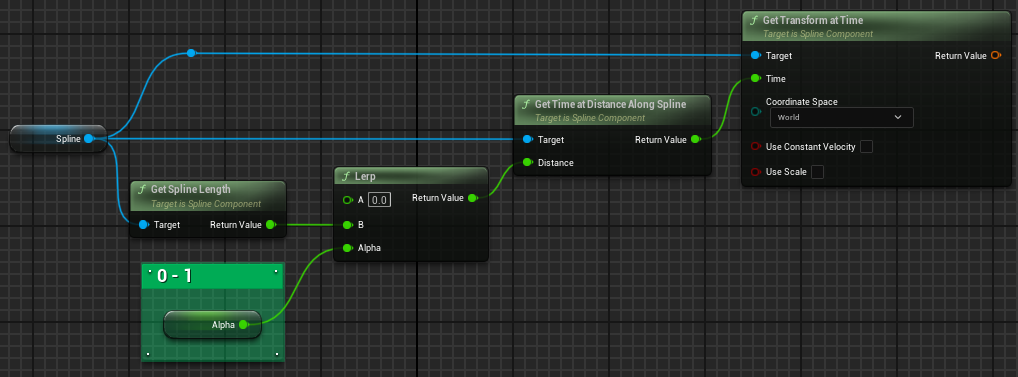
does anyone know how to convert an actors postion on a spline to a 0-1 value?
gentle urchin
FindClosestPointOnSpline -> Distance -> Divide by length
fiery swallow
 fiery swallow
gentle urchin
FindClosestPointOnSpline -> Distance -> Divide by length
fiery swallow
gentle urchin
FindClosestPointOnSpline -> Distance -> Divide by length
or that
gentle urchin
I think they wanted the other way around
given a position vector, whats my alpha along the spline
rough cedar
gentle urchin
given a position vector, whats my alpha along the spline
Yep this!
how can i find the closest spline point?
gentle urchin
its a method
rough cedar
yeah i think thats my first problem i cant find how to get that spline point
fiery swallow
get the spline point locations, and just iterate over each one to compare distances with your character, the smallest distance wins
gentle urchin
 fiery swallow
when did that function come out?!
gentle urchin
4.Ancient
fiery swallow
that's wild, there isn't even a "find closest actor" function yet
what does and doesn't get exposed to blueprints as a function will forever be a mystery to me
rough cedar
gentle urchin
I can’t use that function because this isn’t for anything that’s using input

gentle urchin
rough cedar
I can’t use that function because this isn’t for anything that’s using input
huh ?
it's not an actual input
rough cedar
Isn’t it looking for a key input?
spark steppe
there's one for the point index, too iirc
gentle urchin
"key" being a point on a spline
rough cedar
gentle urchin
"key" being a point on a spline
Ok let me give this a shot 🫡
rough cedar
gentle urchin
ok this seems to work well to give me the distance along the spline! so now just divide that by the length? or do i still need to find the closest spline point?
gentle urchin
Just divide by length yeah
 maiden wadi
@gentle urchin What is input key on spline btw? I always just used the distance along spline ones.
 little moat
No description provided
I'm trying to figure out avoidance for my npcs but the code really isn't working
It always prints "Going to collide" no matter what
I don't see what's the issue so can someone help?
I want to calculate the future locations of the npcs and compare the distance between them compared to the collision capsule size to see if I need to change the path
Blueprint Runtime Error: "Accessed None trying to read property CallFunc_Array_Get_Item_1". Node: Branch Graph: EventGraph Function: Execute Ubergraph NPC BP Blueprint: NPC_BP```And I get this but can't figure out when and why and howbreakpoint when you set the NPC BP and breakpoint when you try to access it
you can also print time stamp to see if you are trying to access it before NPC_BP gets set
gentle urchin
maiden wadi
<@231467939734355969> What is input key on spline btw? I always just used the di...
Think its just a splinepoint ?
little moat
frosty heron
you can also print time stamp to see if you are trying to access it before NPC_B...
I don't get what's the point of that
little moat
frosty heron
breakpoint when you set the NPC BP and breakpoint when you try to access it
How do I see values of breakpoints in bp?
frosty heron
little moat
I don't get what's the point of that
to see when you set the references and when you try to access it?
you will get accessed none error trying to access a null reference
little moat
Well things do get triggered at least
The main problem right now is the "Going to collide" spam
fiery swallow
little moat
https://blueprintue.com/blueprint/a4bhgrnm/
this code looks like you're saving velocities, and not locations
velocity is not the same as location
it's just how fast you're moving in a direction
if you're not moving in any direction then the output is 0,0,0
little moat
fiery swallow
this code looks like you're saving velocities, and not locations
Oh yeah might be
I suck at math
How would I get a location
Isn't velocity x time the location?
fiery swallow
Location + (velocity * time) is probably what you're looking for
little moat
oh.
fiery swallow
But i don't think it's time that you're looking for
little moat
Or velocity x time + location
little moat
fiery swallow
But i don't think it's time that you're looking for
I want to calculate the location of my npc in 0.5s
maiden wadi
What if it has a path calculated to turn, and this code runs as it's running up to a wall that it already intended to path around?
fiery swallow
little moat
I want to calculate the location of my npc in 0.5s
Just doubled check, yeah the formula I gave should work just fine so you could do 0.5
fiery swallow
maiden wadi
What if it has a path calculated to turn, and this code runs as it's running up ...
Is that a question for him? I'm not sure he's gotten that far yet lol
fiery swallow
Soooooo true. I almost want to make my own avoidance system just for fun because of all the challenges
little moat
fiery swallow
Just doubled check, yeah the formula I gave should work just fine so you could ...
But I should add the + location?
little moat
frosty heron
working on A.I atm
Yeah it is...
little moat
maiden wadi
What if it has a path calculated to turn, and this code runs as it's running up ...
I got no idea what this ment
maiden wadi
What if your code runs at purple? Velocity says you're about to hit a wall. But the AI is already correctly pathing around the object.
 little moat
maiden wadi
What if your code runs at purple? Velocity says you're about to hit a wall. But ...
little moat
maiden wadi
What if your code runs at purple? Velocity says you're about to hit a wall. But ...
I got no idea why would it run at purple
Oh wait right
I haven't done the actual avoidance yet btw
It shouldn't run from purple since I always run it from the same spot to calculate future location
Even when I start the game and nothing is near it still says that it's going to collide

And yeah it gives me this
fiery swallow
little moat
But I should add the + location?
Yes. Location + (velocity * time)
fiery swallow
You got nothing plugged into velocity or am I crazy?
Oh that's just the website
You need to use the same output for the distance check too
Don't only check for acceleration
Just because something is a vector doesn't mean it's giving you a relative location
little moat
fiery swallow
You need to use the same output for the distance check too
What how
Shit nvm
Still constantly printing "Going to collide" and I get the same errors
 drowsy rivet
Hi everyone! When I hit play button, the player character starts to run backwards uncontrollably, like you don't hit the movement buttons wasd but it moves on its own
how to solve it?
maiden wadi
Find out what is making the character move to begin with. Disconnect logic until you find it. When you do, evaluate why your code is telling it to move backwards.
 granite frost
Why should I use primary data assets and not data assets?
I want to know the places where I should use primary data asset and where to use data asset.
 dark drum
granite frost
I want to know the places where I should use primary data asset and where to use...
dark drum
granite frost
I want to know the places where I should use primary data asset and where to use...
Primary Data Asset is what you use in BP to create a new type of data asset. The template might be a good way to think of it. Creating a data asset requires a template to use which defines the overal structure (variables) that you then specify in the data asset.
granite frost
dark drum
Primary Data Asset is what you use in BP to create a new type of data asset. The...
I am sorry but this seems like an explanation of primary data assets. I might be misinterpreting this but I want to know when to use data assets and when to use primary data assets.
I already know why they're used but what difference does it make when I use data asset over primary data assets
dark drum
granite frost
I am sorry but this seems like an explanation of primary data assets. I might be...
A primary data asset is the template you use to make the data asset. If you need a new data structure then you create a new primary data asset that you can then create data assets from. The PDA is the parent and the data asset is the child.
You can't just use a PDA instead of a data asset.
granite frost
dark drum
A primary data asset is the template you use to make the data asset. If you need...
I think you're misunderstanding me. Primary data asset inherits from a parent class named Data asset. And I can create a bp from both of them, the data asset files that are created as a result of them are different from what I am asking
dark drum
granite frost
I think you're misunderstanding me. Primary data asset inherits from a parent cl...
Oh, yea the PDA, has some extra stuff for the asset manager to give more control for loading and unload them. I believe they should be you're default when creating them via the editor.
granite frost
dark drum
Oh, yea the PDA, has some extra stuff for the asset manager to give more control...
Yes, I have heard that they're integrated with data asset manager or something and has efficient loading and unloading but I was just looking to have an example to actually understand what it means.
If they don't have something I want. Then an extra inheritance level is just useless memory
Although, I'll probably stick with PDA but I saw just at one place where someone used DA instead of PDA and I wanted to know his reasoning
tropic kite
Has anyone successfully built a system with slopes and momentum? Every solution I've built - I can get the slopes, but can't seem to find a method to retain that speed
maiden wadi
granite frost
Why should I use primary data assets and not data assets?
The short answer is what you already discussed. PrimaryDataAssets can be managed by the asset manager. This allows them to both be referenced via PrimaryAssetID properties without being hardreffed or having to care about their type. It also enables you to do bundled loading.
dark drum
granite frost
Yes, I have heard that they're integrated with data asset manager or something a...
Now I could be wrong as I've not delved too deeply into the asset manager but it can allow you to load/unload bulk assets using the primary asset ID. This can be useful when streaming in a new area that contains area specific content. Having a data asset have a primary asset ID means it can be utilized by the asset manager. Unless you have a big game with lots of different things, you might not ever use it to be fair.
maiden wadi
It's also extremely useful to be able to specify your things as assets if you're correctly doing a data oriented design.
dark drum
tropic kite
Has anyone successfully built a system with slopes and momentum? Every solution ...
Going up hill requires more energy so you slow down. Fighting against gravity.
maiden wadi
Consider an array of FPrimaryAssetIDs where you don't have to care about what the thing is. But you need an array of them for like a crafting list. But you need to specify the crafting requirements, and you need to know if a player has a correct perk, the table has an upgrade, and the player or table have the correct inventory ingredients. You can put all of these things in one list and make a system to sort through them. But your people making crafting stuff only have to care about that one list.
 hushed elk
how do i fix my movement script in blueprint here the script and the movement stuff


 little moat
Still constantly printing "Going to collide" and I get the same errors
little moat
little moat
Still constantly printing "Going to collide" and I get the same errors
Help?
granite frost
So, do I need to create a data asset every time? I created a data asset class to be used on an editable variable directly. Do I really need to first create a data asset before putting them in? Can't I just create use them directly?
dark drum
hushed elk
how do i fix my movement script in blueprint here the script and the movement st...
What's broken?
maiden wadi
granite frost
So, do I need to create a data asset every time? I created a data asset class to...
I'm not really sure what you mean by this? The question is confusing. You should think of a DataAsset the same way you think about a StaticMesh. It's an asset. A DataAsset houses data for some specific thing you want. A static mesh houses vertexes and materials and such.
granite frost
maiden wadi
I'm not really sure what you mean by this? The question is confusing. You should...
So my problem is that I want to create an asset which has an array of static mesh soft reference and depending on some kind of identification criteria like dropdown or integer change, it also changes the static mesh which can be used. I created a variable integer with limited range which could act as the index of the array of static meshs and created a function to return the static mesh. However, I just realised that contructor script of the other blueprint class only calls at a property change but for that contructor script, the variable I have inside the data asset is actually not in its range to detect a change of. Now I have this problem, trying to figure out how to solve it.
I basically want to create pieces of a puzzle
There is particularly no variable that should be changed for it except the piece mesh. So instead of creating a data asset for each piece separately, I thought of creating one asset with an array and to define a way to select one piece from it
maiden wadi
Like a literal puzzle that you put pieces together?
granite frost
maiden wadi
Like a literal puzzle that you put pieces together?
Yes
Each piece has exact same properties except the piece mesh itself
maiden wadi
Depends on how separated out you want to get with the pieces. I mean you could make one data asset that is the puzzle. And you could make an array that has all of your pieces and their data.
How you define each piece is up to you. They can just be a struct that is in an array or a datatable. You can create a whole separate data asset for each piece.
Then you also need your actors or components that can manage this data to display themselves and function.
hushed elk
dark drum
What's broken?
when i press d i go up when i press w i go left when i press s i go right when i press a i go down
granite frost
maiden wadi
Depends on how separated out you want to get with the pieces. I mean you could m...
I am using the first approach you mentioned. But I want a way to select which mesh from the array to be used. I am doing it using the method explained earlier using constructor script to see the live updated result, however, constructor script can't detect a change inside the PDA and as such won't show an update even if the select mesh is changed. And the PDA don't have a mesh of it own.
Thats why I am struggling
It works fine at runtime
maiden wadi
I'm not sure you could fix that nicely without C++. Listening for an onedit delegate from the data asset.
maiden wadi
hushed elk
when i press d i go up when i press w i go left when i press s i go right when i...
Sounds like your swizzles are wrong.
granite frost
maiden wadi
I'm not sure you could fix that nicely without C++. Listening for an onedit dele...
I see so there is no easy way. Thank you for trying to help. Although, I have one more question. Its just a question and not a problem. But can't I create a data asset just from a blueprint directly? Like this specific case, do I really need to create a data asset instance for it? Can't I just use the script directly? Because the change will be made for each instance and not on the data asset in the file system.
Even if I make it, that would only be 1 data asset.
Which seems pretty useless
I have found a way tacky way to use contructor node on construction script but it has name like DA_puzzle_piece_C_91 it seemed like it was causing a memory leak
maiden wadi
It depends on your situation. Data assets are meant to be able to define things so that gameplay code can be data driven. For example if you wanted to make 17 puzzles. It makes sense to make 1 data asset class, and 17 instances of the class.
granite frost
First it was _C_0 the 85 then 90 then 91
maiden wadi
Yeah this means you're creating new asset instances. Which you don't normally need to do.
granite frost
maiden wadi
It depends on your situation. Data assets are meant to be able to define things ...
Yes, but considering all piece will only have 1 property different, it seemed pretty wasteful to create data asset for each of them
dark drum
hushed elk
when i press d i go up when i press w i go left when i press s i go right when i...
 maiden wadi
Depends. For now it's one property. Tomorrow there's two. In a week there's three.
granite frost
maiden wadi
Depends. For now it's one property. Tomorrow there's two. In a week there's thre...
Thats an already done work, I just wanted to migrate from data table to data asset
maiden wadi
Any specific reason for that change?
granite frost
maiden wadi
Any specific reason for that change?
For now, I just want to know if I can create a data asset for a variable directly from a class or I really need to create a data asset before using it
granite frost
maiden wadi
Any specific reason for that change?
All these are deriving from a base item class, and some of them needed some specific properties different from other and data asset just seemed more appropriate for adding more properties
Like firearm needs ammunition type and loaded ammunition, torch needs battery percent etc.
Basic item don't need them
 grim flower
Hi im trying to make a flash effect but its not working

 azure haven
I Have these to Blueprint which I need help with. For info:
-I Have 3D Widget(WB_LatheMonitorTest) which is placed in my actor (LatheTest)
-My Monitor Widget Component is the Widget Component in my actor
-I have a LatheRef variable (Type: LatheTest)
My Problem now is that, when I click the start button, my Print String shows up and says that my LatheRef is invalid(none).


I also checked if the right widget class is selected and it is
maiden wadi
granite frost
For now, I just want to know if I can create a data asset for a variable directl...
I will at least say to this that there's almost never a reason to actually ConstructObject a data asset. This is kind of what I was trying to say with the static mesh example. You can statically reference a static mesh by making a pointer to it's type and setting it. Youc an do the same with a data asset once you've created one in the content browser.
maiden wadi
azure haven
I Have these to Blueprint which I need help with. For info:
-I Have 3D Widget(W...
You didn't set it to anything. LatheRef is blank. I believe you're looking to get Self and plug it in.
azure haven
bruh. thanks fo rthe help it works now
 dusky cobalt
If Actor has Widget created on him. I delete the actor. I cannot access the widget on him, but it exists (I can see it in viewport). What kind of magic is this? Is this that it's just reference of widget doesn't exists at the location I try to get it from, but Widget actually exists? If it exists, but I will never ever need this one in the game. How can I delete it and free memory (i know it's probably 0 effect on performance but just out of curiosity).
maiden wadi
dusky cobalt
If Actor has Widget created on him. I delete the actor. I cannot access the widg...
When you say widget, do you mean one created by WidgetComponent, or one created by CreateWidget?
dusky cobalt
CreateWidget
and I know they are created only on the client. I just wonder how to delete them completly. Or If Remove From Parent == Destroy
maiden wadi
This is because what happened is that the character requested the widget to be created, and saved a pointer to it. Then the character was destroyed. The widget was never removed and so it will just remain in the viewport.
Widgets share the same garbage collection as any other uobject. If anything references them, they will not be destroyed. So if the character is alive and references it, or if it is in the viewport and the viewport is referencing it, it will not get deleted. To delete it, you simply remove all references to it, as in null it in the character or destroy the character, and remove it from viewport.
To fix your immediate issue. Override the character's EndPlay, and use the pointer you save to the widget to remove it from viewport.
dusky cobalt
Oh, that's good to know. So what I should do is basically Remove From Parent and then if I have variable I should set it to null.
For context I needed to transfer this variable to other place, but before it triggered to Remove from parent, the Actor was already destroyed, so I just moved it to store it in the place I'm doing the removing (i stored it at first at the moment I actually added this to viewport). So in there I'm just gonna flush this variable.
Thanks that was usefull 🙂
dusky cobalt
Did you try multisphere / sphere trace?
 austere orchid
spectator camera pawn movement doesn't work at all when i set game paused
i want everything to pause but i still want to be able to use the pawn, any help would be great thanks
Tick Even when Paused is enabled
im using 4.27
maiden wadi
<@&213101288538374145>
 thin orchid
Hi! So our programmer dipped in middle of the project (I'm just a level designer) and I need to figure out why the playerstart doesnt work at all after we click on Start in UI. I have a feeling there's something wrong in this section of the blueprint but still not sure. more details;
- The level of the playerstart is on a separate level, which is tutorial_level
- This code is on MainMenuOptions Widget BP
- The player start doesnt work on any other level, even if I create from 0, it seems to pick up a fixed location.
- I checked the Project settings etc, everything seems to be in order and nothing seems wrong
- If I try to print string after findplayerstart nothing prints

 golden wren
thin orchid
Hi! So our programmer dipped in middle of the project (I'm just a level designer...
golden wren
thin orchid
Hi! So our programmer dipped in middle of the project (I'm just a level designer...
Once Open Level is called, code afterwards don't get called if I remember correctly.
maiden wadi
Partially correct. OpenLevel isn't thread blocking. The code after would execute. But probably not after that delay. Thread blocking code would still run because the open level is not actually called until the next frame at least.
maiden wadi
thin orchid
Hi! So our programmer dipped in middle of the project (I'm just a level designer...
I'm curious. Did your programmer who ditched do this?
thin orchid
maiden wadi
Partially correct. OpenLevel isn't thread blocking. The code after would execute...
It doesnt work without the delay as well
And yes
Im partially trying to understand what he did and debug it
maiden wadi
Your project dodged a dragon sized bullet.
golden wren
😂 yeah
thin orchid
Ahahaah that felt good in the middle of my panic attack
maiden wadi
This isn't.. I don't even know where to start. This isn't how you pick player starts. This is code that simply travels you from one level to another.
The SaveGameToSlot maybe should stay here BEFORE the OpenLevel, but everything after that is useless here.
thin orchid
If I delete the entire thing and just load the next level nothing would broke then? Cause this is after checking if theres a save data already existing on false it comes to here
Im assuming hes creating a new save data after loading it
maiden wadi
I'm not saying it would work. I'm saying that the most this code should do is maybe create a saveslot if you wanted one created, and open the tutorial level. It's up to the tutorial level's GameMode to pick your correct starting spot.
golden wren
What bit did you try?
thin orchid
only kept this
 golden wren
You would still need to deal with the player spawning within the Tutorial Levels Gamemode
maiden wadi
Open your Tutorial_Level, and open the game mode class from it's world settings.
You'll be looking for function overrides.. Sec
maiden wadi
Yeah, that means that gamemode class that was there has overridden player start for some reason and is spawning it in a specific spot. The default implementation is to find a playerstart and use it's location.
thin orchid
Okay I can fix the gamemode from there I think
cause now its not spawning character etc but i can figure out the rest
Thank you!
maiden wadi
I would look for one of these underlined functions being overridden.

Er. Also missed ChoosePlayerStart
thin orchid
That one is really helpful, thank you so much again!
dusky cobalt


so If I'm not mistaken base gives you 1 actor, and multi gives you array of actors
maiden wadi
@dusky cobalt Think of multitraces like a flamethrower. You want to trace, and stop at the first blocking hit which will be a wall or similar. But you want to get everything else that it overlapped on the way.
 marble badger
How do I get the speed of a component in real time? I'm trying to do this but it returns the speed up to 5 frames late in the past.
This is returning the result extremely in the past.

 quick sun
Hey folks! So I am trying to figure out how to get this idea for a new blueprint that handles "momentum" for whatever actor it is attached to.
To simplify it as best I can I have a BP_Collision that uses a multi-sphere trace to track hit actors and a BP_Stats that handles stats obviously and taking damage. I want to create this new blueprint to take the number of hits and subtract the times hit to then affect the value of a momentum meter which I assume would be a float.
Once I get the system working I want to add UI and buffs or debuffs depending on the level of the momentum meter, but for now I just want to get the system to get and change the value of the momentum meter.
Attached is the BP_Collison as far as I have gotten it so far and the BP_Momentum I am trying to still figure out.
I'd appreciate any help and thanks for reading this rambling post. I can open the project and get screenshots of anything else that may help getting this sorted.


 weary shard
anyone else having problems with uefn mannequin when trying to add virtual bones from the head to any bone. For some odd reason when i try to add a virtual bone from the head to hand_r it's not connecting to the hand_r bone but it's floating in the air, but other bones seem to work fine

 austere orchid
Why does this still stop input on the player pawn?

 autumn pulsar
Does Blueprint have a paragraph node or something, where I can just dump text in?
trying to make a todo list/explanation and kind of wanted to have it with the relevant code bites
snow halo
spark steppe
then assign the action slot in the map instead of the item count
you mean, reverse the branch?
but you told me:
[8:22 AM] what you are trying to do isn't possible with a Map actually
And I kept that in mind so I now Im looking to use struct because someone also recommended me to try with structs
snow halo
spark steppe
and get the item count from the real inventory
thats a good idea actually
But there is one problem, I have a lot of slots in my inventory, will 30 slots and each item each having sometimes around 30 stackable amount each be a problem with the loops?
Because that sounds like doing for each loop on top of for each loop, 30x30 would create a lot of lag into my game as my game will have to pause for those loops to finish calculating or even crush my game all together
 dreamy sail
sorry for the stupid question, but what could I use here instead of random so I can get each array element in order and then make it go back to 0 and start all over again? I tried making it a variable and then using increment int but it didn't work like that

I want it to be set up just like this, but isntead of random it should get them in order basically
autumn pulsar
Hey, so I'm using a Lerp node to lerp between my starting character's location, and the location of a ledge. I'm using a rotator, but the issue I'm having is when trying to go from -170 to 170, it takes "the long way around" and counts up until it reaches 170. This causes it to do a 360 rotation instead of the 20 degree rotation it needs to do. Anyone have an idea what I'd need to do to correct this?

oh there's a lerp rotator
cool
faint pasture
autumn pulsar
https://i.imgur.com/gTadIWK.png
interp mode too
what are your other options
autumn pulsar
faint pasture
what are your other options
other options?
dark drum
hushed elk
how do i fix this though?
The screeshot I sent is how you should setup your key inputs in the ICM.
faint pasture
autumn pulsar
other options?
 autumn pulsar
faint pasture
autumn pulsar
faint pasture
ah, there was quat interp
Yeah, setting it to Quat fixed it
Is there a way to use a different collision shape with the CMC?
capsule collision kind of feels bad
weary shard
weary shard
anyone else having problems with uefn mannequin when trying to add virtual bones...
anyone knows the answer to this?
faint pasture
autumn pulsar
Is there a way to use a different collision shape with the CMC?
Short answer, no
what are you doing where a capsule doesn't work?
frosty heron
how does one do a tank with CMC?
faint pasture
you don't
faint pasture
I could see a dragon, depending
frosty heron
Well I suppose a pawn is the way then?
but then we have to write our own movement code for network?
faint pasture
But the further you stray from an upright bipedal, the worse of a fit CMC is
frosty heron
that's abysall task
faint pasture
Depends on the "fidelity" of the collision needed though. If it's an RTS you could use CMC for whatever you want because the small scale shape of a unit doesn't matter.
frosty heron
I wonder if GMC and CMC can work hand in hand. So maybe GMC for the dragons and all that and CMC for humanoid characters
frosty heron
true
faint pasture
predicting movement with colliders that aren't smooth shapes isn't trivial
frosty heron
Im only working with CMC atm
faint pasture
that's what's so useful about a capsule, it can't get stuck on sharp edges and whatnot
frosty heron
@faint pasture sorry for the ping,
What would be the cheapest way to calculate what's infront of the character?
I want to filter the grids in the red box.
 faint pasture
frosty heron
<@127902729677963264> sorry for the ping,
What would be the cheapest way to calc...
faint pasture
frosty heron
<@127902729677963264> sorry for the ping,
What would be the cheapest way to calc...
calculate what about it
frosty heron
dot product of actor forward vector and the player loc - grid loc?
So I want to do a diamond formation for my parties
the character is the lead, so I don't want them to look for any grid that is infront of the character.
faint pasture
you wanna know if a char can path there?
frosty heron
I want to filter the green spheres insside the red box
frosty heron
filter according to where the player is facing
Because I don't want the companion to go infront of the character
they should follow from behind
faint pasture
what do you want to know about the location represented by each green sphere?
frosty heron
I want to pick one of the sphere 45 degree behind the character for Ally_1, 90 degree behind the player for Ally_2 and, -45 degere for Ally_3
But before I get to that part, I want to filter the grids infront of the player charcters.
Suppose I have an array of all those grids, I need to find a way to check which grid is infront of the character and take it out from the equation.
faint pasture
Go about it the other way
frosty heron
im listening
faint pasture
instead of pile of spheres -> filter
just generate the points
you got PlayerChar, you know their forward vector, so calculate the desired spot and path to as close to it as you can get
if it must be on a grid, gridify it by rounding
frosty heron
The reason I used grids is because it's inbuilt with the nav mesh
it will automatically move the points when there are unpathable areas
faint pasture
ok then cook up your desired point not on grid then select the closest grid point
frosty heron
example
 faint pasture
so what's the reasoning behind the grid?
 faint pasture
frosty heron
faint pasture
frosty heron
wha'ts the motivation behind the grid though?
frosty heron
The grid is generated by the EQS
faint pasture
is the game grid-based at its core?
frosty heron
no
but it helps with the nav mesh
the grid is shifted if there is unpathable areas
faint pasture
if you're already using EQS you can just Q the E for where to stand
frosty heron
if I don't use the Environment Query, I would be giving location that doesn't respect navmesh
frosty heron
faint pasture
if you're already using EQS you can just Q the E for where to stand
sorry, can you elaborate on the Q and E?
faint pasture
you can just cook up DesiredSpot, then query to get ClosestNavigableSpotToDesiredSpot
query the environment
frosty heron
faint pasture
you can just cook up DesiredSpot, then query to get ClosestNavigableSpotToDesire...
that sounds like what I should do
I didn't know there's such function too, will look around. Ty
autumn pulsar
faint pasture
what are you doing where a capsule doesn't work?
Less it doesn't work, and more I don't like the way it works
when I'm on an edge for example, it either kind of sinks me or bounces me off
and that kind of feels bad
faint pasture
autumn pulsar
when I'm on an edge for example, it either kind of sinks me or bounces me off
have you fine-tuned all the parameters you have to mess with?
there's all sorts of walk off edge stuff
autumn pulsar
faint pasture
have you fine-tuned all the parameters you have to mess with?
yeah I've played around with it
The issue I have is when you're on a ledge you kind of sink https://i.imgur.com/fN7oDQt.png
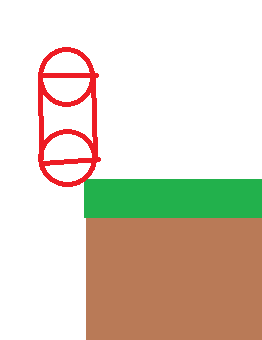
if you don't like that you can push the player off with the perch stuff, but because the collider is a cylinder it's a weird directional bounce
which doesn't feel good at all to me
weary shard
weary shard
anyone knows the answer to this?
Damn I guess that’s a no, I thought the unreal engine discord would know, guess I was wrong 🫠
frosty heron
weary shard
Damn I guess that’s a no, I thought the unreal engine discord would know, guess ...
not a lot of us do modding for fornite game
try #verse
Add virtual bone work just fine where I used it
and I don't know what you mean "From the head to any bone"
a virtual bone parented to existing bone
if you create it on the hand, it will appear on the bone head (assuming no offsets)
autumn pulsar
Is there an event when my collision collides with a surface?
frosty heron
No issue what so ever
 frosty heron
autumn pulsar
Is there an event when my collision collides with a surface?
frosty heron
autumn pulsar
Is there an event when my collision collides with a surface?
Hit event
 thin panther
autumn pulsar
The issue I have is when you're on a ledge you kind of sink https://i.imgur.com/...
thin panther
autumn pulsar
The issue I have is when you're on a ledge you kind of sink https://i.imgur.com/...
You can use a flat base for movement tests somewhere in the options.
autumn pulsar
frosty heron
Hit event
Thanks
autumn pulsar
thin panther
You can use a flat base for movement tests somewhere in the options.
hmm, doesn't seem to quite address some of the issues I was having by checking it
I was going to use the hit event to do some wall ejection code
weary shard
frosty heron
not a lot of us do modding for fornite game
I’m not modding Fortnite I’m using the uefn mannequin from the game animation sample pack. And when I say from the head to any bone. I mean I’m adding a virtual bone from the head bone to let’s say the l foot bone
frosty heron
weary shard
I’m not modding Fortnite I’m using the uefn mannequin from the game animation sa...
A virtual bone is parented to a bone
I don't understand from the head to the left foot bone
like what do you even mean by that
you either assign it to the head or to the left foot bone
A bone is a single point location fyi
weary shard
frosty heron
A virtual bone is parented to a bone
A virtual bone has two its parent bone and a target bone. The head is the parent bone and target bone is the foot_l. A virtual bone connects two bones
frosty heron
weary shard
A virtual bone has two its parent bone and a target bone. The head is the parent...
where do you find this setting?
autumn pulsar
weary shard
A virtual bone has two its parent bone and a target bone. The head is the parent...
pretty sure trying to connect head to foot would create a dependency loop or so
 remote wasp
Hi, I'm having a problem with collision detection
I have a projectile going very fast and I want it to detect overlaps
But it's going so fast that it sometimes goes through the collision it's supposed to overlap
I've checked CCD on both the projectile and the target hitbox
weary shard
frosty heron
where do you find this setting?
you would right click on the parent bone, go to add virtual bone, and then pick the targeted bone


 remote wasp
Hi, I'm having a problem with collision detection
I have a projectile going very...
remote wasp
remote wasp
Hi, I'm having a problem with collision detection
I have a projectile going very...
nvm I got it
just needed to increase the number of simulation steps in the ProjectileMovement component
autumn pulsar
Does Tick Run before events?
frosty heron
weary shard
you would right click on the parent bone, go to add virtual bone, and then pick ...
I see, so this is like for IK or something. Try #animation they probably know more
faint pasture
autumn pulsar
Does Tick Run before events?
Tick is an event, before WHAT events?
autumn pulsar
faint pasture
Tick is an event, before WHAT events?
Hit
 blazing yarrow
faint pasture
Tick is an event, before WHAT events?
blazing yarrow
faint pasture
Tick is an event, before WHAT events?
I thought this was a trick question
autumn pulsar
Does the Hit Event Trigger before the Hit Event
faint pasture
autumn pulsar
Does the Hit Event Trigger before the Hit Event
Probably depends on which tick group you're using
blazing yarrow
Can you explain what you're trying to do, that might help
faint pasture
and there's not really a before/after, unless you're talking within a single frame
autumn pulsar
faint pasture
and there's not really a before/after, unless you're talking within a single fra...
within the frame
faint pasture
autumn pulsar
within the frame
You can pick which tick group you're in
I think event hit fires at PostPhysics, probably right before it
autumn pulsar
Like if I set a variable in the Tick, Will the Hit Read that this frame or the value from the previous frame
I'm basically trying to "Undo" the Physics velocity adjustment when I hit collision in a specific way
 river herald
Is it possible to update a data table during gameplay, i want to check a boolean saying they own an item, is there a better way to do this
faint pasture
river herald
Is it possible to update a data table during gameplay, i want to check a boolean...
idk about possible but that's not what they're for
data tables aren't a database, they're meant to be read only at runtime. They are where data for your game comes from
 merry mirage
river herald
Is it possible to update a data table during gameplay, i want to check a boolean...
merry mirage
river herald
Is it possible to update a data table during gameplay, i want to check a boolean...
You can change data assets during runtime although it is not recommended as their data will be saved on disk. You're better off making UObjects with the RowData and updating those Objects with the bool during runtime
faint pasture
autumn pulsar
Like if I set a variable in the Tick, Will the Hit Read that this frame or the v...
Just test, figure out what tick group you're on first
I'm pretty sure if you're PrePhysics your hit comes after tick, if you're postphysics it comes before.
 sacred forge
Some animations I imported have a root motion location transform on the mesh relative. Does anyone know how I can edit this?
 autumn pulsar
faint pasture
Just test, figure out what tick group you're on first
autumn pulsar
faint pasture
Just test, figure out what tick group you're on first
https://i.imgur.com/kodrJjD.png found out I could just use this which is a much more effective way to do what I want lol
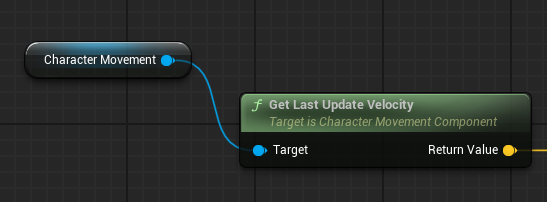
Thanks for the help though
 torpid sage
How do I use variables from one blueprint in another one?
frosty heron
you get a reference to the instance of that other blueprint
 astral ravine
How do I use variables from a specific blueprint in another one?
hushed elk
dark drum
The screeshot I sent is how you should setup your key inputs in the ICM.
i fixed that its still the same thing i think there is something wrong with my code
frosty heron
@torpid sage @astral ravine
Your blueprint class is a template.
They get instantiated at run time.
For example when you spawn a PlayerCharacter, an instance of that blueprint will be created.
Suppose you have 2 players spawned, there will be 2 instance of the BP.
BP_PlayerCharacter_1
And BP_PlayerCharacter_2
Bp_PlayerCharacter_X is what we call instance, they hold the variable and the methods from the template.
If you need to access BP_PlayerCharacter_2 Hit point for example, then you will need to get a reference to BP_PlayerCharacter_2.
There is not one way to set and pass reference. You need to use the method that make sense the most for your use case.
Some example on passing reference.
Registering to a manager at event begin play (When the actor is spawned)
By exposing object reference as instance editable and use the eye dropper tool to pick object in the level.
By getting a reference when overlap / trace happens.
Etc.
torpid sage
frosty heron
<@244203027953745920> <@357340051853541398>
Your blueprint class is a template...
Thank you!
astral ravine
frosty heron
<@244203027953745920> <@357340051853541398>
Your blueprint class is a template...
Thanks!
frosty heron
@astral ravine @torpid sage
One last bump.
https://www.youtube.com/watch?v=6IOgkWv1lEY&t=132s&ab_channel=MathewWadsteinTutorials
This person is great at explaining, the video is just 5 minutes. I hope it helps you to understand how to use references.

What is Blueprint to Blueprint Communication, or how do I call functions or get variables from other Blueprints, in Unreal Engine 4?
Source Files: https://github.com/MWadstein/wtf-hdi-files
 glad sail
As a general good rule of thumb; if you have to cast to another blueprint, save the output of that cast as a variable (reference) that way you can access it later without having to cast again.
This is especially helpful if, say, you have a weapon blueprint attached to your player character. As soon as you attach the weapon to the player, cast to the player and set that as a variable, so you have access to all the player functions within the weapon blueprint.
spark steppe
casting is cheap
maiden wadi
glad sail
As a general good rule of thumb; if you have to cast to another blueprint, save ...
Please don't repeat random reddit misinformation here. It's not helpful. The act of casting costs nearly nothing. There is an IsValid call in the cast that may cost an exceptionally miniscule amount of CPU time when casting, but you're going to call IsValid anyhow on a cached pointer before using it so that point is not a valid one to say not to cast. And the linker issues casting often gets entirely blamed for but is only one fauled of have nothing to do with the runtime act of a cast.
 solemn shale
maiden wadi
Please don't repeat random reddit misinformation here. It's not helpful. The act...
solemn shale
maiden wadi
Please don't repeat random reddit misinformation here. It's not helpful. The act...
cost of casting is memory size
glad sail
maiden wadi
Please don't repeat random reddit misinformation here. It's not helpful. The act...
I'll be honest; I'm just speaking from experience. And nothing really to do with performance. I'd rather deal with one 'get' call to get the variable/function I want in my parent class, rather than "get owner, cast to parent class, then get variable/function". If I'm doing it enough times in the blueprint, Imma get tired of the tediousness, and will prefer a semi-permanent reference. It looks cleaner as well.
Like, sure casting is a negligible cost, but what's the harm in having a good rule of thumb like that?
maiden wadi
Mainly, it causes extra management of state that already exists and requires a new person to the system to understand that you're tracking the same state in multiple places and that if they affect the system they need to be aware of your extension. Everyone familiar with Unreal knows that if you possess a pawn and give it a weapon that the owner of the weapon is likely the pawn. But now the weapon has a second pointer to it's owning pawn as well besides just it's Owner property which will already be managed and updated by set owner calls. You now also need to be sure to set your own state. Which if done in a nice way in some setters can be easily managed, sure. But then it's just as much work as an occasional extra cast node here or there.
drowsy rivet
maiden wadi
Find out what is making the character move to begin with. Disconnect logic until...
ok
frosty heron
solemn shale
cost of casting is memory size
Not true to many extend.
The casting it self is almost next to nothing. The memory footprint is caused by HARD Reference to a blueprint Asset which in turns load dependency.
So casting is almost free, it's having the hard ref (blue pin) to a blueprint asset is the issue.
So what's the solution? Make a native class in C++.
Read the pinned material "busting unreal myths"
 proper moon
maiden wadi
Please don't repeat random reddit misinformation here. It's not helpful. The act...
proper moon
maiden wadi
Please don't repeat random reddit misinformation here. It's not helpful. The act...
so you are saying casting on tick is the same or better as IsValid on tick for a variable?
maiden wadi
It's identical.
frosty heron

Epic Games Developer
Are Ticks really that problematic? Should you make all your meshes Nanite? Is the ChildActorComponent truly cursed? Should you never use Cast?
You've pr...
rough cedar
does anyone know how i can check the difference of values between floats but in a more lenient manner?
 frosty heron
EQS being a grid kinda makes it hard to calculate since it doesn't really rotate around the querier's rotation 😦
fiery swallow
frosty heron
EQS being a grid kinda makes it hard to calculate since it doesn't really rotate...

you don't have to use a grid
maiden wadi
Yeah, EQS points themselves are either things or locations in code. Grid is just one of the easier starter ones.
dark drum
Custom EQS generators can be interesting.
dark drum
rough cedar
does anyone know how i can check the difference of values between floats but in ...
What are you trying to do? As in the end goal.
frosty heron
Guys, if I have a vector, how can I rotate it by 90 degree clock wise?
Make rot from X?
dark drum
frosty heron
Guys, if I have a vector, how can I rotate it by 90 degree clock wise?
Rotate vector?
frosty heron
dark drum
Rotate vector?
Is that a node name or a question? 
I have a forward vector of my character, I want to point to 45 degree of that direction.
dark drum
frosty heron
Is that a node name or a question? <:lurkin:1316599475447402550>
A node. There's also rotate around axis.
 granite frost
so I have this specific problem in my project. I have an asset and a class for a node called item_asset and item_node, both of them has a child class called firearm_asset and firearm_node, now the problem being since the asset in the node is of the reference of item_asset, the firearm_node uses that too, but I want it to use firearm_asset, and to work it out, I have 3 options:
- cast the item_asset to firearm_asset every time I need it
- create and iterface for it specifically
- create a new variable, and use that instead making the original variable useless.
I don't know if any of these are the right way to do it? what is the best way?
dark drum
granite frost
so I have this specific problem in my project. I have an asset and a class for a...
Assuming it's just a new base class (that you'd create other children of) I'd just cast.
granite frost
I see all these bad talks about how casting is bad. But I think its just doing new_type<type>& var = old_var. Is it that bad?
granite frost
dark drum
Assuming it's just a new base class (that you'd create other children of) I'd ju...
Cast it everytime when using it?
Or cast once and store it?
That would require to create a new variable
dark drum
granite frost
Cast it everytime when using it?
Depends how you'll be using it but yea.
granite frost
I just wanna change its type to the child class type to call the extra variable I have in the child class😭
granite frost
dark drum
Depends how you'll be using it but yea.
I see. Thank you!
dark drum
granite frost
I see all these bad talks about how casting is bad. But I think its just doing `...
 spiral ridge
Hi!
I'm trying to make a simple teleport.
But when a hero (pawn) enters a trigger, it teleports to a strange place (diagonally below) and starts to slowly drift back to the trigger. I tried the Teleport node, but the result is the same. What is my mistake?
 granite frost
dark drum
https://discord.com/channels/187217643009212416/221798862938046464/1335534657277...
granite frost
dark drum
https://discord.com/channels/187217643009212416/221798862938046464/1335534657277...
Thank you.
granite frost
granite frost
I see all these bad talks about how casting is bad. But I think its just doing `...
It seems like this is the case
frosty heron
granite frost
I see all these bad talks about how casting is bad. But I think its just doing `...
Casting cost almost next to nothing, the issue is the hard reference to blueprint asset.
Casting to blueprint asset produce hard ref to the blueprint asset. that will load the dependency as that needs to be loaded before your blueprint can be loaded.
Solution is linked by pattym already.
You create a native C++ class and you cast to the native class instead.
granite frost
Although, I think I see a problem that even if the cast fails it'll load it
dark drum
spiral ridge
Hi!
I'm trying to make a simple teleport.
But when a hero (pawn) enters a trigge...
There's nothing here that would cause it to drift back.
frosty heron
granite frost
Although, I think I see a problem that even if the cast fails it'll load it
it's the hard reference to blueprint asset.
granite frost
frosty heron
it's the hard reference to blueprint asset.
Yeah, but if I just want to specific that the data stored in a variable is of the child class but the variable won't let me access it because its of parent class. I'll need to use cast?
I don't know if there is any other option.
To just change the data type
dark drum
granite frost
Although, I think I see a problem that even if the cast fails it'll load it
What's the likelihood that child class would be present in the game at any given time? If high then it'll probably be loaded anyway. 😉
granite frost
dark drum
What's the likelihood that child class would be present in the game at any given...
Its definite. I'd rather have it crash if its not😅
Atleast I'll know that I probably messed it up while assigning
frosty heron
granite frost
Yeah, but if I just want to specific that the data stored in a variable is of th...
wdym by you can't access it because it's of parent class?
just show some code
and why are you afraid of casting?
if you know C++ just make native class
 granite frost
frosty heron
wdym by you can't access it because it's of parent class?
granite frost
frosty heron
wdym by you can't access it because it's of parent class?
I can't access the property of a child class if its assigned to a variable of parent class which doesn't have that property
frosty heron
granite frost
I can't access the property of a child class if its assigned to a variable of pa...
cast
casting is almost free
just don't cast to Blueprint Asset
granite frost
frosty heron
cast
Yeah, that's what I'll do I just wanted to know since everyone says that casting is bad. Is there any other option
frosty heron
granite frost
Yeah, that's what I'll do I just wanted to know since everyone says that casting...
Not everyone, just youtubers and redditors
they are wrong
granite frost
frosty heron
just don't cast to Blueprint Asset
I am gonna cast to the data asset
granite frost
frosty heron
Not everyone, just youtubers and redditors
My colleague said it😅
frosty heron
granite frost
I *am* gonna cast to the data asset
Go ahead
frosty heron
granite frost
My colleague said it😅
Show him the link pattym gave you
straight from epic
dark drum
granite frost
I can't access the property of a child class if its assigned to a variable of pa...
Lets say you have a 'Gun' type bp that gets data from you're firearm class, then the 'Gun' will always need to know about the firearm and thus should force load the class anyway. The specific data in the firearm class however could be soft referenced (such as meshes and VFX) where you'd load them when needed.
granite frost
frosty heron
Show him the link pattym gave you
Hoho, he probably knows. He was probably just giving me warning not to use it carelessly
granite frost
dark drum
Lets say you have a 'Gun' type bp that gets data from you're firearm class, then...
That makes me wonder..... Should I keep my data asset as soft reference?
dark drum
granite frost
Hoho, he probably knows. He was probably just giving me warning not to use it ca...
Good hierarchy and soft references should be the main way for memory management. This however requires more thought so a lot of people often mistake interfaces as the primary way to manage memory which isn't their primary use.
granite frost
dark drum
Good hierarchy and soft references should be the main way for memory management....
Yeah, it took me 1 week to finally understand the difference between hard reference and soft reference, the internet just made it so confusing when it was just a simple concept.
I have seen 10min long video explaining it when it can be explained in 10 seconds.
dark drum
granite frost
That makes me wonder..... Should I keep my data asset as soft reference?
It's hard to say. I wouldn't worry about it for now. You can always go in later and change it to a soft ref. Sometimes, it can be better to just change a few of the vars inside the data asset to soft references and load those specifically when needed. It depends on the use case.
frosty heron
granite frost
Yeah, it took me 1 week to finally understand the difference between hard refere...
You can think of soft ref as a string/path to an asset
granite frost
dark drum
It's hard to say. I wouldn't worry about it for now. You can always go in later ...
I have changed most of them to soft reference. Especially all of the once which are needed during the initialization phase only
granite frost
frosty heron
You can think of soft ref as a string/path to an asset
Yeah, I Fully understand it now.
I just wish I hadn't wasted a week for it😭
Thank you guys. I'll now get back at it🥹
dark drum
granite frost
I have changed most of them to soft reference. Especially all of the once which ...
The only things that tend to need to be soft references are things like static meshes, sounds, textures/materials. Base class that will be heavily used shouldn't reference any of the heavy stuff anyway so keeping them loaded wouldn't be an issue.
frosty heron
it's a journey man, I've been stuck for months
dark drum
frosty heron
it's a journey man, I've been stuck for months
Definitly a journey lol.
frosty heron
I think it will take me another 9 years till I can do a decent cpp
granite frost
Hehe
dark drum
It's a pain when you're at sea without a compass floating around aimlessly searching for land. 😅
@frosty heron I'm still trying to figure out how that binding stuff to enhanced inputs is able to return a gameplay tag even though it's not specified in the template function. 😅 (some of the code you shared)
frosty heron
@dark drum there is veriadic template on the BindAction
#define DEFINE_BIND_ACTION(HANDLER_SIG)                                                                                                                                            \
    template<class UserClass, typename... VarTypes>                                                                                                                                                    \
    FEnhancedInputActionEventBinding& BindAction(const UInputAction* Action, ETriggerEvent TriggerEvent, UserClass* Object, typename HANDLER_SIG::template TMethodPtr< UserClass, VarTypes... > Func, VarTypes... Vars) \
    {                                                                                                                                                                            \
        TUniquePtr<FEnhancedInputActionEventDelegateBinding<HANDLER_SIG>> AB = MakeUnique<FEnhancedInputActionEventDelegateBinding<HANDLER_SIG>>(Action, TriggerEvent);            \
        AB->Delegate.BindDelegate<UserClass>(Object, Func, Vars...);                                                                                                                        \
        AB->Delegate.SetShouldFireWithEditorScriptGuard(bShouldFireDelegatesInEditor);                                                                                            \
        return *EnhancedActionEventBindings.Add_GetRef(MoveTemp(AB));                                                                                                            \
    }
Man, I don't even understand this code
but I am guessing since there is veriadic template, you can pass any variables you want, as many as you want.
so you can pass more than just the gameplay tag
a function will be created
spiral ridge
dark drum
There's nothing here that would cause it to drift back.
But it happens. And this strange because the blueprint of teleport has no another logic.😢
frosty heron
where is this?
 spiral ridge
In teleport BP
dark drum
spiral ridge
But it happens. And this strange because the blueprint of teleport has no anothe...
Unless you're scene root is moving, the location it'll move to will always be the same. You most likely have something else that's causing the issue.
dark drum
frosty heron
<@430016173694779402> there is veriadic template on the BindAction
```cpp
#defi...
BindAction is the function being defined.
const UInputAction* Action → The input action being bound.
ETriggerEvent TriggerEvent → Defines when the binding should be triggered (e.g., Pressed, Released, Triggered).
UserClass* Object → The class instance where the function (Func) exists.
typename HANDLER_SIG::template TMethodPtr<UserClass, VarTypes...> Func
This represents a pointer to a function (Func) inside UserClass, whose signature matches HANDLER_SIG.
TMethodPtr<UserClass, VarTypes...> is a delegate function pointer.
VarTypes... Vars → Additional optional parameters passed to Func.
I think that's actually cleared it up in my head. lol.
 dark drum
frosty heron
Why is it reversed 😠
dark drum
frosty heron
Why is it reversed 😠
There should be a way to invert the score applied.
maiden wadi
frosty heron
I think it will take me another 9 years till I can do a decent cpp
You'd be surprised how much you can learn when you want to or need to. I didn't know anything about C++ or Unreal just over 6 years ago.
frosty heron
I can do that on Dot product, using linear inverse but with the trace test? 🤷♂️
frosty heron
maiden wadi
You'd be surprised how much you can learn when you want to or need to. I didn't ...
you struck me as a person who can learn things very fast.
on the other hand i am a drop out
just starting live over and trying harder on my 30s
maiden wadi
I never went to high scool. I skated by for a few months out of middle school and took an HSE test. I'm missing a lot of fundamental education. 😄 You just have to transfer knowledge in a way you can understand it. Doing vector math I sit here waving my hands around like a derp, pointing in random directions, because I don't actually follow half of the math for it, I just know how the functions affect directions in the end.
frosty heron
I suppose you learn most when you work as a dev in the studio?
ik I am not a fast learner, but working 12 hours a day as a labour kinda hinder me from finishing this project
maiden wadi
That did help yeah. 😄 Even before I started working in a studio though I was more or less messing with Unreal 8-14h a day already.
frosty heron
My goal is to quit my job this year and just to work on the game 🙏
maiden wadi
I find you don't need a ton of C++ for Unreal though. Not like the advice of needing to learn every facet of the language just to start creating an actor anyhow. A lot of stuff is nice to know, but most of your C++ use will be systems creation and data handling. Rider also helps. Nice that it has the free license now.
I think I'm almost done with my equipment stuff. 😄 Got equip-able items applying stat altering GEs.
frosty heron
I'm only up to combo attack and hit react 😭
next is Basic A.I
Then I will start working on equipment and interaction
rough cedar
dark drum
What are you trying to do? As in the end goal.
ah nvm i found a better way, it was a dumb idea lol
 barren tangle
Hello Do you know if start and reverse block each other?
 frosty heron
barren tangle
Hello Do you know if start and reverse block each other?
frosty heron
barren tangle
Hello Do you know if start and reverse block each other?
No, a play will play the timeline forward, a reverse will play the timeline in reverse
so if you are 75% of the way to the timeline and you execute the reverse, it will play from 75% to 0%
play from start will start from beginning regardless
stop will stop the current timeline on it's track
reverse from end will play from end
barren tangle
frosty heron
so if you are 75% of the way to the timeline and you execute the reverse, it wil...
ok so if i play reverse when play is on going, it start to go backward?
frosty heron
correct
barren tangle
ok, because before i was create 2 timelines with the opposite direction to play both
frosty heron
don't do that
barren tangle
but if i can use the same timeline with play and reverse it's better
frosty heron
that;'s right
barren tangle
frosty heron
that;'s right
thanks
dark drum
The number of times i make a variable as an array, then I change it to a map and then decide to make it a data asset. I feel like i need to just skip the first two decisions. 😅
dusky cobalt
dark drum
The number of times i make a variable as an array, then I change it to a map and...
Use struct and put it to Data Asset 😄
dark drum
dusky cobalt
Use struct and put it to Data Asset 😄
Yea, that's normally what I end up doing, I just feel I waste time by going through the motions haha.
'Yea and array will be fine' -> 'Actually a map would be pretty good here so I can use X as the key to prevent duplicates' -> 'Maybe a data asset would be better so you can define different preset and swap them out.'
dusky cobalt
i myself put almost everything ni data assed if its gonna be used for like more than 1 entity, if its individual 1 variable then i just put it on the class
Hmm, i need sanity check.
AEntity (Base Class)
│
├── AUnit (inherits from Character)
│ ├── Infantry
│ ├── Tank
│
├── ABuilding (inherits from Actor)
│ ├── Barracks
│ ├── Factory
│
└── AResource (inherits from Actor)
├── Gold
├── Wood
Something like this cannot exists right?
I cannot make Base empty class sudenly be Character in the child and in other child be even something else?
dark drum
dusky cobalt
Hmm, i need sanity check.
AEntity (Base Class)
│
├── AUnit (inherits from Charac...
not in BP. You can technically duel class in C++ but I don't know how that would trasfer to UE.
frosty heron
Can't do multiple inheritance on UObject
Not supported
I don't get the question though
The base class can be an actor
Character is an actor, so is your resource
If you want to go lower use uobject
granite frost
Is this going to work? I remember there was some problem earlier with hashmap where the entry can only be replaced but can't be edited by getting a reference of the variable or something like that. I want to know if this will update the Quantity variable like this or I should create a new variable, update it and then set it.
 dark drum
granite frost
Is this going to work? I remember there was some problem earlier with hashmap wh...
dark drum
granite frost
Is this going to work? I remember there was some problem earlier with hashmap wh...
I wouldn't use data assets for storing quantity. They're single instanced meaning when you get say the apple data asset. It will be the same one everyone else uses. This means you wouldn't be able to have an apple somewhere else with differing quantities.
granite frost
dark drum
I wouldn't use data assets for storing quantity. They're single instanced meanin...
thats a struct
containing data asset and an integer
 granite frost
dark drum
I wouldn't use data assets for storing quantity. They're single instanced meanin...
granite frost
dark drum
I wouldn't use data assets for storing quantity. They're single instanced meanin...
Although at some places I am using data assets to store data but I thought making a variable Instance Editable makes it unique
frosty heron
Iirc I use set member
granite frost
frosty heron
Iirc I use set member
? Whats that?
frosty heron
Drag your struct and type set member
Don't split them, get drag then type set member
granite frost
frosty heron
Drag your struct and type set member
that struct is being used as a datatype of an array. I don't know what you mean by this could you please provide an example?
frosty heron
You want to modify the internal struct value right?
granite frost
frosty heron
You want to modify the internal struct value right?
yes
granite frost
granite frost
Is this going to work? I remember there was some problem earlier with hashmap wh...
this won't work?
frosty heron
Drop the getter, drag the pin and type set member
granite frost
frosty heron
Drop the getter, drag the pin and type set member
I can see a node. But I don't know what to do with it
frosty heron
I don't know, I never use set integer by ref. Beside that will just change an int variable at best.
I'm trying to show you how to set the struct value regardless of the type.
frosty heron
granite frost
I can see a node. But I don't know what to do with it
Picture
I'm on my bed
granite frost
 frosty heron
Left click the set member and take pic of the detail tab
You should be able to expose the variable you want to mofify
dark drum
granite frost
thats a struct
Oh, it's a struct. Ignore me then lol.
frosty heron
E.g the quantity
granite frost
you mean this?
 frosty heron
Yes that's how you modify struct
granite frost
frosty heron
Yes that's how you modify struct
oh thats awesome! But I also need to read it before updating it
how do I read it now?
frosty heron
By getting your struct
Just get the same index to get the one you just changed
I'm gonna head to bed. Gn
granite frost
frosty heron
I'm gonna head to bed. Gn
Like this?
 granite frost
dark drum
Oh, it's a struct. Ignore me then lol.
granite frost
dark drum
Oh, it's a struct. Ignore me then lol.
Excuse me, sir.
granite frost
granite frost
Although at some places I *am* using data assets to store data but I thought mak...
.
dark drum
granite frost
Like this?
Yea, that'll get the value from th struct so you can get the quantity before setting it.
granite frost
dark drum
Yea, that'll get the value from th struct so you can get the quantity before set...
so set by ref won't work?
the get lets me get a ref copy and there is an option for set by reference. This seems quite misleading if it doesn't work
dark drum
granite frost
the `get` lets me get a ref copy and there is an option for set by reference. Th...
updating structures inside other structures or arrays can be a little tricky at times. So you would get from the array as a ref, which will allow the set members node to work. 🙂
If you got a copy from the array, the set members wouldn't update the struct in the array.
granite frost
granite frost
Although at some places I *am* using data assets to store data but I thought mak...
What about this, sir?
I mean chatgpt said so. But I don't wanna trust it.
I have been fooled enough times.
dark drum
granite frost
What about this, sir?
That's for the ref itself not the object referenced. So with data assets, there's only ever one instance of the object which everyone uses. This is the same for things like textures and static meshes. They get instanced as soon as you load the editor and it'll only create one of them which everyone uses.
granite frost
dark drum
That's for the ref itself not the object referenced. So with data assets, there'...
I see now. So how do I create a copy of them to edit it?
 storm solar
been looking into this fow a week. But how do I change the opacity of an existing material / actor. (i want them to fade out upon death.)
dark drum
granite frost
I see now. So how do I create a copy of them to edit it?
In BP you can't. You might want to create you're own uObject class that you can create as of when needed. When you want a new instance, you can just create a new one.
granite frost
dark drum
In BP you can't. You might want to create you're own uObject class that you can ...
Seem like another headache I need to find solution for. Thank you for your help that was much appreciated!
But then what is even the point of instance editable property in data assets?
dusky cobalt
granite frost
But then what is even the point of instance editable property in data assets?
Data Assets should not be used for ''live'' data. It should be mostly ussed as something to Initialize from or have base of info about the thing.
dark drum
granite frost
But then what is even the point of instance editable property in data assets?
Well this is the description. It just means can it be publically changed which just means, can you change it. Which you can but there's only one instances of it.
 dusky cobalt
So you create actor or object and put it on it, and then make it use it (set local Data Asset variable)
granite frost
dark drum
Well this is the description. It just means can it be publically changed which j...
those are still editable even if this property is false
granite frost
dusky cobalt
So you create actor or object and put it on it, and then make it use it (set loc...
I have a pretty good idea of its use case but having experience with Godot and the freedom of resources there. I just assumed I could use it like here too. There we can create duplicates and just use them
dark drum
dusky cobalt
Data Assets should not be used for ''live'' data. It should be mostly ussed as s...
You can use them for live data, I developed an entire system around it. The fact they are single instanced and can be accessed from pretty much anywhere can be pretty handy. You just have to be aware that in a build any changes wont be saved and any changes would be reflected everywhere that uses them.
cough Global Vars cough
There's some other things regarding making changes when playing in the editor but still a useful tool to have.
granite frost
I guess this will have to do?
 dark drum
granite frost
I guess this will have to do?
dark drum
granite frost
I guess this will have to do?
That may or may not work. Sometimes somethings have stuff run on them when created which wouldn't be called by the construct node.
granite frost
hm
dark drum
The spawn actor of class node for example, is a construct node but with extra stuff for registering it with the world and triggering all the construction scripts and begin play stuff.
Spawning an actor with the construct node would probally cause issues lol.
granite frost
M problem is that there is some data that I want to store in inventory and the basic approach is to destroy the item and just keep its details. I thought using assets with help with complex data that needs to be stored like the loaded ammunition in gun is a data that would be unique for each gun and needs to be stored in inventory
granite frost
dark drum
The spawn actor of class node for example, is a construct node but with extra st...
yeah but DA don't have any construction script or begin play or anything of the sort
dark drum
granite frost
M problem is that there is some data that I want to store in inventory and the b...
Use a uobject data asset combo.
Where you're items are a uobjects that has a var for it's imutable item data. Then you can have a quantity on the uobject which you can change freely per instance.
granite frost
dark drum
Use a uobject data asset combo.
Where you're items are a uobjects that has a va...
so I should not use Data asset
?
dark drum
granite frost
so I should not use Data asset
If you need unique data per instance then no.
granite frost
dark drum
If you need unique data per instance then no.
not for all of them but just for some few
Things just got more complicated for me instead of solving
I was reading that 😭
I guess I will make 2 variables now. one for PDA and one for custom UOBJECT
granite frost
dark drum
If you need unique data per instance then no.
How did you do it?
What I am thinking of doing right now is to create a UObject with a varaible for the Data asset and let it have the ability to hold the extra values that I need with the power of inheritance
 south cargo
Dumb question - which event should you bind your on clicks on? i.e. Construct -> Get Button -> Bind on Click
Picture for context
 dark drum
granite frost
What I am thinking of doing right now is to create a UObject with a varaible for...
dark drum
granite frost
What I am thinking of doing right now is to create a UObject with a varaible for...
I use uObjects for my items. I had planned to use data assets for data that doesn't changes (such as meshes, default display name and description) but never go round to adding it.
granite frost
dark drum
I use uObjects for my items. I had planned to use data assets for data that does...
I see. Thank you!
dark drum
south cargo
Picture for context
Depends, OnConstruct can be fine. There is an OnInitialized event as well.
 potent orbit
Alright, I'm trying to get some kind of visiblity system going on like a Splinter Cell game. There's no real easy way to pass the illumination values of actors from what I could find, and I don't want to buy the plugin if I can avoid it. So I figured I'd do line traces from lights with trigger volumes. I'm attempting to automate this process by making a blueprint actor that can read the attenuation radius of the nearest light and set its own collision volume to that radius, so that I can have a collision area that will auto-update if I ever have to tweak the map's lighting.
This is probably a stupid idea.
So my hairbrained scheme is to adapt this: https://jeewanthalahiru.medium.com/find-the-nearest-location-on-given-vector-array-on-unreal-engine-60eea1a6ebb1
So I want to run this on level load. I tried putting it in the constructor and didn't do anything. I tried re-running it from BeginPlay, but it doesn't seem to be able to pickup a value or even draw in the world despite being set to Visible. Is there a way to get this to work or is this something I should stop trying to do?


Medium
When you are using Unreal Engine, sometimes you may need to find the nearest location for a certain location using a vector array. For…
south cargo
dark drum
Depends, OnConstruct can be fine. There is an OnInitialized event as well.
Which is the best default to begin with until later edits are needed?
fwiw construct works fine for this use case
dark drum
south cargo
Which is the best default to begin with until later edits are needed?
I tend to use onConstruct myself.
south cargo
Thanks
granite frost
dark drum
I use uObjects for my items. I had planned to use data assets for data that does...
Alright new problem. How do I create an instance of it?

the Uobject
dark drum
granite frost
the Uobject
Use the construct node.
granite frost
dark drum
Use the construct node.
I can't do it in the editor? Then How do I set its initial value from the editor?
dark drum
granite frost
I can't do it in the editor? Then How do I set its initial value from the editor...
Use the class to define it and then use that class to construct it in game to create an instance.
granite frost
dark drum
Use the class to define it and then use that class to construct it in game to cr...
what if I want it to have different properties for each instance?
dark drum
granite frost
what if I want it to have different properties for each instance?
That depends, as in a new item?
granite frost
dark drum
That depends, as in a new item?
This UObject is going to be set to an Item and I need to define that the variable in the data asset is holding which Primary data asset

This is my Uobject
I need to set this variable for each instance
dark drum
granite frost
This UObject is going to be set to an Item and I need to define that the variabl...
Watch this it might give you a better idea on how to proceed.

Welcome to this tutorial on how to create an inventory system in Unreal Engine 5! In this video, we'll go over the concepts of setting up an inventory system using Unreal Engine's powerful Blueprint visual scripting language.
In part one, we go over setting you an item object that will house our item data. So whether you're a beginner to Unreal...
granite frost
dark drum
Watch this it might give you a better idea on how to proceed.
https://youtu.be/...
Thank you once again. You have been a great help!
granite frost
dark drum
Watch this it might give you a better idea on how to proceed.
https://youtu.be/...
For now I did this
 dark drum
granite frost
Thank you once again. You have been a great help!
dark drum
granite frost
Thank you once again. You have been a great help!
Pt2 might be helpful as well as it shows how to make a world item which is a way to represent you're item data in the world.
 glass blade
why does my guy print spine_05 when i hit it with a projectile on the head?
i have it printing every bone just fine except the neck and head
it just prints spine_05 above the neck area
granite frost
is there a way to manually run the construction script once?
dark drum
granite frost
is there a way to manually run the construction script once?
No, put you can put the logic in a function and mark it as call in editor. The construction script can then run the function instead.
granite frost
dark drum
No, put you can put the logic in a function and mark it as call in editor. The c...
oh. I see thanks!
spiral ridge
dark drum
Unless you're scene root is moving, the location it'll move to will always be th...
Thank you, I found the problems!
1.) The player's blueprint had a check (every tick) to see if he had reached the destination point in that turn (the game is turn-based). But he teleported before he had time to reach it, and so the blueprint was constantly trying to reach the destination point.
2.) The pivot point in the player's model (and in the blueprint) was shifted along the z-axis. During normal movement, I compensated for this with an offset (I forgot about it). Therefore, when teleporting, the center of the model ended up underground, and from this point it was pulled to the teleport.
dreamy sail
what am I doing wrong here ? I'm trying to change the material , in order, starting from 0 , but it doesn't work, are any of the nodes not placed properly ?

basically I just want to add 1 to the array element each time I fire this logic
it's for an actor that spawns, and it's connected to its eventbeginplay node
dreamy sail
dreamy sail
what am I doing wrong here ? I'm trying to change the material , in order, start...
so each time the actor spawns, it should have a different material, but in order, starting from 0 all the way to 9
 livid flare
Hi I'm trying to add an interact event for the character with a vehicle, I tried to follow few tutorials but they all fails at some point. Each one of them have very different implementation, one use interfaces, one just cast anything, some of them use different SKM to be activated at runtime, another one have the logic inside player controller, while another do the logic inside the level BP. So I feel a bit lost and with an headache 😄 any tips on what route to follow is appreciated (the vehicle is a motorbike), thanks
autumn pulsar
livid flare
Hi I'm trying to add an interact event for the character with a vehicle, I tried...
There's lots of different ways to do the same thing
Personally I think for larger scale games, it's better to do the interact within the player or the vehicle
I think for a basic interaction system an interface is easiest
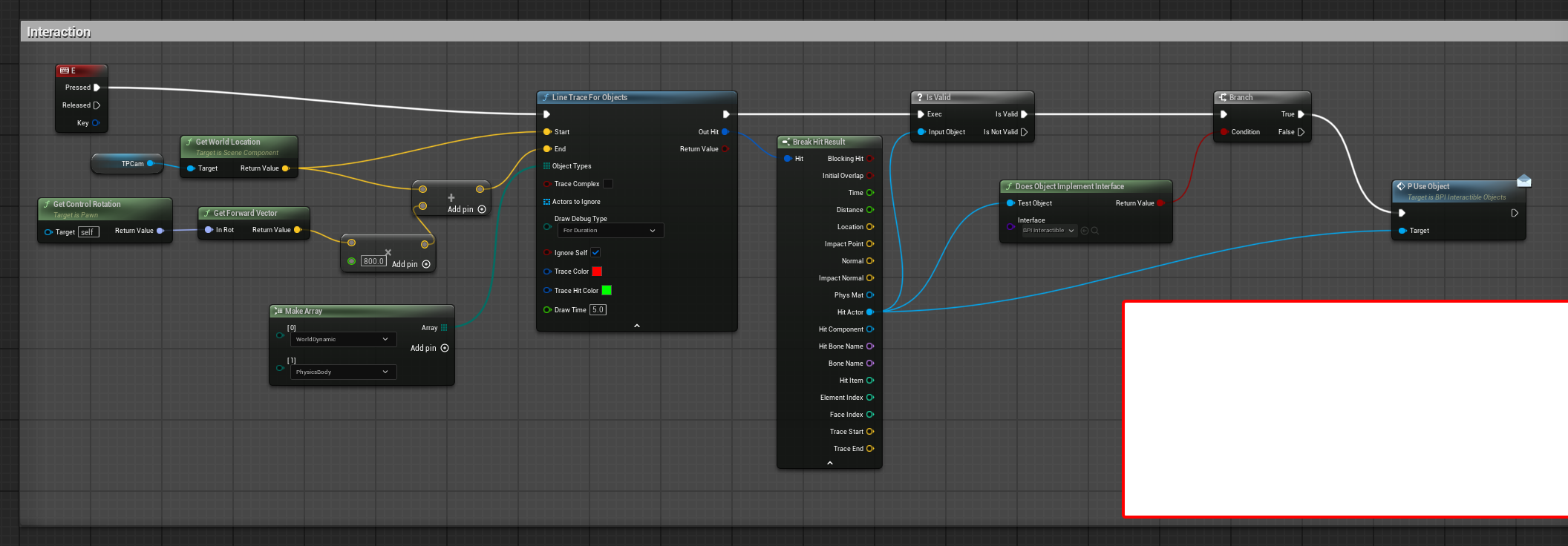
Here's a sort of example logic
I basically fire a trace from the camera, see what I hit, check if it implements an interaction interface, then fire the "Use Object" event
then in my door under the "class settings" I add the interface
in this case it's "BPI Interactible Objects"
then you'll see the function the interface has. Right click and hit "implement function"
you'll then get an event with it
in this case my use button opens the door
but if it was a car, it could possibly put me into the car
you can also pass variables around
like in the Use Object, you could pass a reference to yourself as the "caller"
so that way when the car gets the function, it knows who called it and can put the user in the car
The thing with programming is there's so many roads to the goal, I think while learning it's important to just pick one
if you're starting out you're going to write bad code no matter what, so it doesn't really matter what you pick. You can always rewrite it later
getting in a car is a surprisingly hard thing to do
livid flare
Hey @autumn pulsar thank you! I'm going to follow all the steps, do you think I can use it without a door?
autumn pulsar
livid flare
Hey <@151046841830473728> thank you! I'm going to follow all the steps, do you t...
the point of an interface is it's an abstraction
like, a door you open, a car you get in, a tv you turn on
you activate all of these by pressing "E" but you don't want to write logic to interact with each one specifically
so that's where the interface comes in
the interface guarantees the object has the function, so when you use the "Use" function, the object will have it and execute it
livid flare
Yeah and I'm aware that those are basic stuff and I'm still asking for help for it 😄 it's a bit frustrating but at same time keeps motivated!
autumn pulsar
livid flare
Yeah and I'm aware that those are basic stuff and I'm still asking for help for ...
it's a long road, and we all start stupid, so don't worry it's just a part of the process
I realize this is a big ask, but one of the things I'd highly recommend is learning a bit of C++
It gives you a lot of understanding how things work under the hood
livid flare
what I can use instead of door to fire up the interaction
autumn pulsar
livid flare
what I can use instead of door to fire up the interaction
if you're using the interface, you just implement the "use object" function on whatever you want to interact with
keep in mind you need to add this function to the interface to begin with!
livid flare
autumn pulsar
I realize this is a big ask, but one of the things I'd highly recommend is learn...
yeah I guess I'm gonna start focus on BP first before diving into C++, but you're right!
autumn pulsar
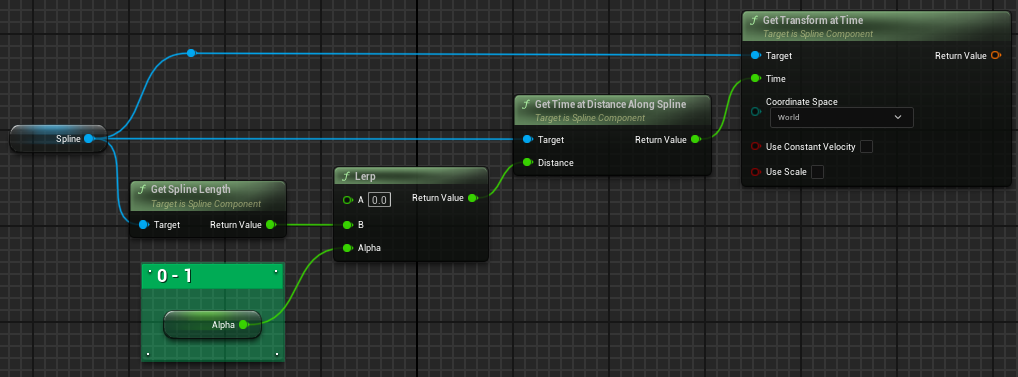




 autumn pulsar
livid flare
yeah I guess I'm gonna start focus on BP first before diving into C++, but you'...
autumn pulsar
livid flare
yeah I guess I'm gonna start focus on BP first before diving into C++, but you'...
well, BP is basically just C++
Also in that picture, that's my interface. it only has one function in it
livid flare
Ah ok thanks, I'm gonna try this out, thanks again you're very kind!
drowsy rivet
how to fix it😭 ? I guess the problem came from when I added gun socket to right finger index in skeleton tree and then compiled it, then I deleted the gun socket bu it did not solve the problem. Is there a solution?
 livid flare
autumn pulsar
well, BP is basically just C++
livid flare
autumn pulsar
well, BP is basically just C++
yes but it scare me 😄
autumn pulsar
livid flare
Ah ok thanks, I'm gonna try this out, thanks again you're very kind!
I do want to say, sometimes you'll find a distinct lack of info and need to actually figure things out
autumn pulsar
livid flare
yes but it scare me 😄
it's pretty scary at first, but once you break down that wall it makes everything else soooo much easier
I only started C++ last year
autumn pulsar
drowsy rivet
how to fix it😭 ? I guess the problem came from when I added gun socket to right...
what's the issue?
drowsy rivet
autumn pulsar
what's the issue?
the character that you play as a player looks like this in the viewport, and when I hit play, the mesh looks like this
autumn pulsar
There could be a large number of issues going on, but I'm guessing it's likely something in your skeleton or animatiions
try previewing them and seeing what's up
drowsy rivet
autumn pulsar
There could be a large number of issues going on, but I'm guessing it's likely s...
I think it is in the skeleton also
livid flare
autumn pulsar
I do want to say, sometimes you'll find a distinct lack of info and need to actu...
Yes I'm trying to avoid tutorials sometimes for this reason, I hope to leave the tutorial hell one day 😄
Only one year? But do you already have some other coding exp?
drowsy rivet
the mesh itself is fine here but not in the viewport of the player
 autumn pulsar
livid flare
Yes I'm trying to avoid tutorials sometimes for this reason, I hope to leave the...
autumn pulsar
livid flare
Yes I'm trying to avoid tutorials sometimes for this reason, I hope to leave the...
no
I started programming at 26 
livid flare
@drowsy rivet have you set AnimBP for the character?
autumn pulsar
drowsy rivet
the mesh itself is fine here but not in the viewport of the player
what does the animation look like?
drowsy rivet
livid flare
<@1101081150560161792> have you set AnimBP for the character?
like walking?
drowsy rivet
autumn pulsar
what does the animation look like?
like the animations of walking when I hit play?
autumn pulsar
drowsy rivet
like the animations of walking when I hit play?
the animation file
drowsy rivet
I have the CH_player tab, it have blueprints and viewport, so I tried to change the character from exo skeleton to odinary soldier and the outcome is the same. I think the problem is in the Ch_player tab
livid flare
drowsy rivet
like walking?
I mean in your BP character, you set the animation BP for your custom character
livid flare
autumn pulsar
I started programming at 26 <:ForestCat:593151786689364022>
So do you have already a good background?
autumn pulsar
livid flare
So do you have already a good background?
no
I just, sat down and started doing it
livid flare
that's the way!
autumn pulsar

YouTube
A YouTube channel about video games & programming. For inquiries, please visit inquiries.rgmechex.com.
Channels like this are pretty cool
A lot of stuff is outdated now, but it kind of gives you an idea of what makes a game tick
https://www.youtube.com/watch?v=9hdFG2GcNuA this is also kind of a good illustration of floating point numbers

I explain how floats work, also known as floating point numbers. Floats are a type of variable, which are used to approximate real numbers. Other types of variables, such as bytes, shorts, and longs, can only represent integers. So in SM64, those are used to represent Mario's lives, Mario's coin count, Mario's HP, angles, timers, vertices of lev...
drowsy rivet
it hava the animation files
autumn pulsar
drowsy rivet
it hava the animation files
well I mean do they look messed up
drowsy rivet
autumn pulsar
well I mean do they look messed up
no
granite frost
why can't I use == with string? How do I check them then?
autumn pulsar
could be an issue with rigging, or something odd in the animation blueprint
autumn pulsar
granite frost
why can't I use == with string? How do I check them then?
if you're checking names, I'd use name instead of a string
you can do string to name and then compare
drowsy rivet
autumn pulsar
well I mean do they look messed up
I have the CH_player tab, it have blueprints and viewport, so I tried to change the character from exo skeleton to odinary soldier and the outcome is the same. I think the problem is in the Ch_player tab
granite frost
autumn pulsar
if you're checking names, I'd use name instead of a string
I am checking object name of a Primary data asset which unfortunately returns a string
autumn pulsar
granite frost
I am checking object name of a Primary data asset which unfortunately returns a ...
use the to name then
granite frost
autumn pulsar
you can do string to name and then compare
Why can't I compare string directly?
autumn pulsar
actually
there's "equal exactly"
and "equal not exactly" for string
one checks for caps, the other doesn't
granite frost
Ohh I see
Thanks I'm going to bed now. I'll check it tomorrow
Thanks for the info.
autumn pulsar
drowsy rivet
I have the CH_player tab, it have blueprints and viewport, so I tried to change ...
could be a difference in the skeleton
livid flare
autumn pulsar
A lot of stuff is outdated now, but it kind of gives you an idea of what makes a...
very cool and useful stuff there, I love it!
drowsy rivet
autumn pulsar
could be a difference in the skeleton
both of them have different skeletons, but the outcome is the same, it becomes a bended mutant in Ch_Player
autumn pulsar
maybe you're doing some weird blend spaces in the skeleton
livid flare
@drowsy rivet I guess you need to post some more screenshots to get some more help
drowsy rivet


 livid flare
 drowsy rivet
 livid flare
on your last pic select the character on the menu on the left, and check what anim BP is using
drowsy rivet
livid flare
on your last pic select the character on the menu on the left, and check what an...
it is using BPA_Soldier animations
livid flare
ok open that and check stuff there
perhaps you need to refresh the skeleton
try right click on root, select refresh and choose your SK
than you may check control rig too
drowsy rivet
livid flare
try right click on root, select refresh and choose your SK
in skeleton tab of the mesh character?
livid flare
in BPA_Soldieranimation
maiden wadi
granite frost
I am checking object name of a Primary data asset which unfortunately returns a ...
I'm curious what you're tying to do here? If you're trying to see if two data assets are the same, then you can == their pointers which is much safer and much faster than a string compare.
drowsy rivet


 livid flare
drowsy rivet
livid flare
drowsy rivet
Sorry I meant to check inside control rig, but you can just disable if you are using it, for a quick test
hmm looks fine by the pics so the only thing that came to my mind is to check if you have selected the right Anim BP in the BP character, as I have already suggested
drowsy rivet
I just find out that I just needed to turn on the animation😭

now, the probelm is that it run backwards
drowsy rivet
livid flare
Sorry I meant to check inside control rig, but you can just disable if you are u...
thank you for help!
livid flare
Glad to hear it is moving now! You can check if it has inverted axis in the character movement logic
drowsy rivet
livid flare
Glad to hear it is moving now! You can check if it has inverted axis in the char...
when I hit play, the character starts moving on its own backwards
I will check on the locomotion part and blendspace player
livid flare
yes in the blendspace perhaps
solemn shale
has anyone know is using canvas panel for widgets too much is bad for performance?
maybe 10-15
drowsy rivet
solemn shale
has anyone know is using canvas panel for widgets too much is bad for performanc...
I don'k know about ot though, but the AI said that it is not that bad for performance, you just need to monitor the complexity of animations and number of UI elements
solemn shale
drowsy rivet
I don'k know about ot though, but the AI said that it is not that bad for perfor...
thanks
livid flare
solemn shale
has anyone know is using canvas panel for widgets too much is bad for performanc...
I can't help but I have a feeling that someone could say to use profiler to check 🙂
autumn pulsar
Does UE4 have a sort of "transform" object? I want to parent my camera to something, then drive that object
 high fractal
It doesn't appear the built in task "hold loading screen additional sec" works. Have you noticed this? It works in editor but does not hold for additional time in a shipping build.

 remote meteor
high fractal
It doesn't appear the built in task "hold loading screen additional sec" works. ...
remote meteor
high fractal
It doesn't appear the built in task "hold loading screen additional sec" works. ...
by default, it should be the other way round, doesnt hold in editor, but holds in a packaged build
the option "Hold Loading Screen Additional Secs Even in Editor" is to make it hold even in editor.
maiden wadi
high fractal
It doesn't appear the built in task "hold loading screen additional sec" works. ...
I can't say I've noticed that. I just double checked it in our latest project and it's showing there fine. I have the reason printed on the bottom left of the loading screen, so I know the thing keeping it alive and I can see it showing for that. 🤷♂️
autumn pulsar
How do I set the current camera of a player controller?
I'm trying to spawn in my camera as another actor and use that
frosty heron
Camera belongs to the actor you are possessing not your player controller
frosty heron
solemn shale
has anyone know is using canvas panel for widgets too much is bad for performanc...
People that knows what they doing said yes but didn't specify how much
10 or 15 sound peanut tho
 warped juniper
What do you suggest is better for handling multiple weapons on a player, in an FPS enviroment:
Player actor holds the inputs / calls for the weapons, but taps into Data Assets according to currently held weapon to control things like damage, vfx, fire rate etc.
Weapon component that holds the inputs and variables of each weapon, and get swapped around as according for active / inactive comps
Note: The weapons would have upgrades for number values and certain Gameplay Effects involved...
autumn pulsar
warped juniper
What do you suggest is better for handling multiple weapons on a player, in an F...
What kind of variety of weapons are you going to have?
If the weapons are going to do funky things, it's probably better to let the weapon decide what it does
if they all do basically the same thing, you can just make the weapon as a struct or so
then let the player handle it
warped juniper
Hard to know exactly atm, since this is a very early draft... But I could use a component based system just to have flexibility
 muted halo
Hey was hoping someone could help me on handling arrays. In the screenshot I provided there is a bunch of logic that runs before hand but if everything is true, the element in the array will receive +1, if that element can meet all the previous requirements for 5 straight loops it will print out the "Over 5" string. My problem occurs when there are more than 2 elements in the array, I want each of those elements to go up +1 by themselves however its actually just adds +2 to the count every loop. How can I make it so each array gets its own unique +1? Any help is greatly appreciated!!
 muted halo
oh let me get you a better screenshot one sec
That For Each Loop on the far left is taking in the keys of the Map
 frosty heron
Why do you need this count variable?
Also your array doesn't contain int
I'm confused, do you want to modify a map or array element?
muted halo
honestly, Im not entirely sure the difference but essentially I want the elements to meet the "Sphere Detected Actors" and "Recenetly Detected Actors" requirements for 5 loops (I was using the count to +1 every loop) and then once at a 5 count to send the message (other logic Ill implement later)
Im sure there is a better solution to this, fairly new to bp
when I have only 1 element in the array it works as intended (counts up from 0 -> 5 over the loops and outputs the message) but when I have 2 or more actors it adds the number of elements to the count. so if I have 5 actors in the array it would go right from 0 -> 5
frosty heron
Add bream point on the loop and you can see how it runs