#blueprint
1 messages · Page 278 of 1
 snow halo
and then it gave me that error
but Im still able to play game game in editor and run it like normal
 crude helm
I would say it would work
get hand socket weapon, call interface on "use skill", if it has it works, if it doesn't do nothing, no casting, might need a is valid though.
then on the "use skill" function it could loop trough all skill and cast all, or like cast first, and set next index for next use
 surreal peak
The warning is very vague but I would assume the skeletons the AnimBP and the ControlRig use are different
snow halo
surreal peak
The warning is very vague but I would assume the skeletons the AnimBP and the Co...
you're right, they look different, ABP_manny is more feminine, skinnier, wider leg stance, the skeleton one is more upper body muscular and wider arm stance. I wanna keep the right-side masculine one. Not sure how

the error appears to take me to the ABP <-
In the game it appears that im using the fat one

 dark drum
I believe it's the following tick. Never really checked to be honest haha.
surreal peak
dark drum
I believe it's the following tick. Never really checked to be honest haha.
Yeah could be, it uses the FLatentActionManager, so chances are high the action is only processed next frame.
Kinda sad :D
 young meteor
Any easy way of setting a "play speed" of a timeline?
I would like to change a variable based on this graf. But how long time the graph (Timeline) takes to play is something I would like to be able to set as well. How do I do this?
 surreal peak
young meteor
Any easy way of setting a "play speed" of a timeline?
I would like to change a ...
surreal peak
young meteor
Any easy way of setting a "play speed" of a timeline?
I would like to change a ...
You can make sure the Graph is exactly 1 Second long (make sure you either set it to 1 second max length or to tick that the last key is used for it.
Then you can use the Timeline Variable (it's a component in the end, so you can find it in the variables list) and set the PlayRate to 1 / Duration. E.g. for 2 seconds it will set the PlayRate to 1/2, so play half as fast, resulting in it take 2 instead of 1 second.
young meteor
surreal peak
You can make sure the Graph is exactly 1 Second long (make sure you either set i...
I've set Timeline length to 1 second.
Is it one of the Output pins, or where is this Timeline Variable?

Or any of the Timeline Window options?
 surreal peak
young meteor
Or any of the Timeline Window options?
surreal peak
young meteor
Or any of the Timeline Window options?
Set the Lenght to 1.0 please.
surreal peak
young meteor
I've set Timeline length to 1 second.
Is it one of the Output pins, or where is...
You should be able to either just get it if you rightclick and search for Timeline, or find it in the Variables list, as I already told you.
snow halo
You know how they say use interfaces to pass booleans from one place to the other right? Instead of hard casts or even regular hard object (variable) references that everyone thinks are okay?


oh i forgot to check it?
in the input
 inland walrus
Is there a way I can make these checkboxes unclickable and trigger through blueprints?
 snow halo
"Create Widget"
actually at this moment since this is coming from my character my guess is that this will not really be that bad
because character will always be loaded
or i should make it nested in the widget
 thin panther
snow halo
You know how they say use interfaces to pass booleans from one place to the othe...
thin panther
snow halo
You know how they say use interfaces to pass booleans from one place to the othe...
No. I've literally never heard that in my life. Is this some variation of the "casting is expensive" myth?
snow halo
thin panther
No. I've literally never heard that in my life. Is this some variation of the "c...
probably
 frozen ledge
Is there any difference in the way blueprints and C++ class objects serialize variables for SaveGame? I added the SaveGame property to one of my booleans in my Blueprint but it doesn't serialize. I have a subsystem which iterates through every actor in the world, checks to see if it implements that interface and loads the serialized data. This works for 99% of all my objects in the game, aside from this one blueprint I'm creating
 severe pollen
I can get the Complex Collision Mesh setting to work, does anyone know what I am doing wrong? The mesh on the left is a simplified version of the mesh on the right. The right mesh has set Complex Collision Mesh to the left mesh. It actually is shown properly in the mesh editor but not in the world. What could be the reason?

 maiden wadi
frozen ledge
Is there any difference in the way blueprints and C++ class objects serialize va...
maiden wadi
frozen ledge
Is there any difference in the way blueprints and C++ class objects serialize va...
No, they save the same way assuming you're using the savegame archives.
maiden wadi
snow halo
You know how they say use interfaces to pass booleans from one place to the othe...
I'm on the very opposite end of that "they" spectrum. I personally think that interfaces are trash for the reasons that people usually use them. It creates really shitty, indirect, hard to follow code. People started abusing interfaces because a few derps got lucky with using them to break linkers and went out and told the world how dumb they are for not actually understanding how linkers work. When in reality, you simply need to understand how to manage linkers correctly and to create correct code only classes and to manage your asset linkers. You use tools like asset bundling, softrefs, etc and you can keep simple code setups using casting and composition and not have to care about weird interface hackery.
frozen ledge
maiden wadi
No, they save the same way assuming you're using the savegame archives.
Right now I'm using FObjectAndNameAsStringProxyArchive, is there a different archive class I should be using?
I'm using ChatGPT and it's telling me to use a different made-up class that doesn't exist lol
maiden wadi
No, that's correct. Are you marking it as SaveGame?
struct FTarrionSaveGameArchive : public FObjectAndNameAsStringProxyArchive
{
    FTarrionSaveGameArchive(FArchive& InInnerArchive) : FObjectAndNameAsStringProxyArchive(InInnerArchive, true)
    {
        ArIsSaveGame = true;
        ArNoDelta = true;
    }
};```Yup. I would show code but I'm under NDA but it's pretty typical, I'm just passing in an array of byte data using an array of uint8
maiden wadi
That sounds right. Mine works just fine on both BPs and C++ classes. 🤔
frozen ledge
It's really weird, I have 2 booleans, both of which have the SaveGame property enabled on them. To do a smoke and mirrors test I have a boolean which default value is true, then on BeginPlay it's immediately set to false. Looking at my SaveGame file I can see it properly gets serialized (but ONLY if I set it on BeginPlay) but the other one, which I'm updating upon breaking my actor (it's a breakable wall) never gets serialized and always resets to its default value. I have an interface used to determine which actors opt into SaveGame and I don't have this issue anywhere else
maiden wadi
The two booleans are on the same class?
frozen ledge
yup they're both part of the same Blueprint class
I'm doing saving / loading purely out of Blueprint
It might just be my somewhat unconventional setup, I see other ppl online make USaveGame objects and pass variables into there, I have a subsystem which checks to see which actors opt into an interface
but if you're saying it works with the savegame archives I'm really unsure
    // Manually handle Blueprint variables marked as SaveGame
    for (TFieldIterator<FProperty> PropIt(Source->GetClass()); PropIt; ++PropIt)
    {
        FProperty* Property = *PropIt;

        // Check if the property is marked as SaveGame
        if (Property->HasAnyPropertyFlags(CPF_SaveGame))
        {
            // Get the property's value from the source object
            void* ValuePtr = Property->ContainerPtrToValuePtr<void>(Source);

            // Serialize the property
            Property->SerializeItem(ArInv, ValuePtr);

            // Debug log (optional)
            UE_LOG(LogTemp, Log, TEXT("Serialized Blueprint property: %s"), *Property->GetName());
        }```

ChatGPT suggested I use this but I'm not doing it this way lolI use USaveGame. I just generically save any UObject by passing it into my savegame. Which writes it's byte array and some extra data to a struct and that struct gets written into a giant array in the savegame.
Yeah you don't need to property iterate.
frozen ledge
Yeah definitely not lol
frozen ledge
maiden wadi
I use USaveGame. I just generically save any UObject by passing it into my saveg...
Yeah that seems to be the typical way of doing it. too late in my project to make use of that unfortunately lol
Thanks for the help, I'll figure something else out
maiden wadi
Where are you saving the byte array?
Cause SaveGame is the general way to make it platform agnostic. You'll have issues on some platforms if you're using odd file types sometimes.
frozen ledge
maiden wadi
Where are you saving the byte array?
In a map of structs, using a name as the key which does a lookup when I iterate through all the actors in the world upon bootup
Definitely not the most optimal way of doing it lol
maiden wadi
That's mostly what mine does too, but how are you saving the data on disk?
 olive yarrow
I've a combobox string im using to change the names into images. However, regardless of option # is is only showing the Goblin Token. Any help on where i went wrong?
 frozen ledge
maiden wadi
That's mostly what mine does too, but how are you saving the data on disk?
frozen ledge
maiden wadi
That's mostly what mine does too, but how are you saving the data on disk?
Oh never mind I am saving them a custom USaveGame object lol
I'll look more into this on my own, thanks for the help
maiden wadi
olive yarrow
I've a combobox string im using to change the names into images. However, regard...
Don't construct uwidgets directly like this in this function. You'll crash after a little while. Wrap your image in a UserWidget, and CreateWidget that to return it. But for the other question. What are your strings?
olive yarrow
maiden wadi
Don't construct uwidgets directly like this in this function. You'll crash after...
like so?
Stringss are the same as the texturefile (option 0 string is GoblinToken)
 maiden wadi
You need to switch on string and select a local variable then. The String to Int expects a numerical string like 0 or 32 or 9999. Without a numerical string, it'll just return zero.
olive yarrow
FAM
ugh ive been using switch on string everywhere else what the fuck am i doing here
thanks facepalm
 shadow flame
Hello! I'm doing a basic on-screen keyboard however when on touch-screen everything inputs twice. I'm using the OnPressed function, tried putting a do once with a 0.15 second delay on call back.
I'm thinking it has to do with replication. It's a multiplayer game and the keyboard is on the host.
inland walrus
Is there a node to unload/remove level instance?
 faint pasture
shadow flame
Hello! I'm doing a basic on-screen keyboard however when on touch-screen everyth...
faint pasture
shadow flame
Hello! I'm doing a basic on-screen keyboard however when on touch-screen everyth...
show code
from touch to the thing that happens twice
 untold fossil
Hello! Got a bit of a brainbreaker / paradox issue. So I need to trace complex collisions for a sticky bomb throwable that needs to attach at the exact mesh face it touches, herefor I need complex collision tracing as I can't go around and make all the objects in my world use vertex perfect collisions. But, here's the issue. With trace complex collisions enabled sticky bombs also detect tree leaves, which are just planes. How can I still use trace complex, but not have it detect the leaves of my trees? Seems like quite the challange, doesn't it? Been breaking my head over this for several days. Let's see if anyone here can solve this puzzle. 
Ok wait, I may just have found the answer to my own question.

Let's see if this is the solution I'm looking for
faint pasture
untold fossil
Hello! Got a bit of a brainbreaker / paradox issue. So I need to trace complex c...
why do the leaves block that channel?
dark drum
untold fossil
Let's see if this is the solution I'm looking for
Yea, you can specifiy a custom complex collision mesh for you're trees without leaves. An alternative option might be to look at custom collision channels.
faint pasture
are the leaves and tree same mesh?
untold fossil
faint pasture
are the leaves and tree same mesh?
Yes, they are
faint pasture
I'm assuming you want to stick to tree trunks?
inland walrus
Using this node, how can I unload the current level instance and load a new one?
 untold fossil
yes, but only the trunks, not the leaves
faint pasture
you'll have to have a custom collision mesh
untold fossil
Yeah, gonna try that tomorrow, I have a feeling it's exactly what I've been looking for
faint pasture
I don't see how you NEED to trace complex if your simples are done right
untold fossil
faint pasture
I don't see how you NEED to trace complex if your simples are done right
Mainly for vehicles which have many small details
faint pasture
embed a little bit into the simple collider and it'll look great
untold fossil
If I don't use complex tracing, a sticky bomb can be attached through / inside a detail part which makes it impossible to see the sticky bomb, which is a big gameplay issue
A sticky bomb is quite small compared to the size of a vehicle (tank)
I also don't want the sticky bombs to float a short distance from the surface they land on, neither do I want them to be clipping halfway inside the surface. It's vital, for both visual and gameplay reasons to have them stick perfectly on each surface.
 gentle urchin
Cant you fake the glue part with some thickness,
Thatll give you some leeway for such minor details
untold fossil
Well, it honestly works perfectly well the way it's implemented atm, the only issue was the tree leaves. I think if I can simply fix that, all will be good. 🙂
gentle urchin
Fair enough 😅
shadow flame
faint pasture
show code
was putting together the image for it (multiple points) I found a solution though. I applied a do-once -> delay -> reset on my key class when it gets called.
 full fjord
is there no way to see an event graph for a destruction blueprint?

 vapid crest
Hey! I working with UE for 6 years now, and I always struggle to finish projects, mostly because I want to use non-animated characters for my game (like tanks, cars, etc), and at one point or other I stuck. I working on (yet another) Blueprint project, and I need to make my Pawns to move to the player and avoid each other. I think with avoidence I am on a good path by creating custom NavModifier and add as a component (and turn up the cost), but honestly pathfinding is a nightmare for me. As I use pawn, my only way to use Floating Pawn Movement component, but i got many problems, as I want the Pawns to follow my player:
- Simple move to worked, but now not working with Spawned AI Pawn
- Move To stops every time I move with my character to a new way and starts after a few seconds. I used the default settings for the Node
- AI Move To makes the AI Pawn's movement choppy and strange
What I want to know:
- Did any of you know any way to implement pathfinding with Pawns while they avoid each other and not suffering from the aformentioned problems
- If not what other way I can finish my goal. roughly 5 out of 6 of my project depends on this mechanism at a given degree.
 worthy tendon
inland walrus
worthy tendon
inland walrus
print value of CurrentMap see if its actually what you think it is.
inland walrus
how do I load a stream level load game function?
 dusky cobalt
If I have character as base class, but I need 1 child to not use skeletal mesh, I mostly only need for that thing to ''move''. Is it better to use floating pawn movement component or just somehow delete skeletal mesh (disable maybe?) from character
inland walrus
Can some please help, I can't figure out why it's not unloading a level stream upon load game
 woeful pilot
does anyone have a workflow for un instancing an instanced mesh, i need to remove some floating geo
faint pasture
dusky cobalt
If I have character as base class, but I need 1 child to not use skeletal mesh, ...
can't you set the skeletal mesh component do use nothing?
dusky cobalt
faint pasture
can't you set the skeletal mesh component do use nothing?
im currently testing all possibilities, will see
 wild pumice
I have a Parent player class that creates a UI. I really need it to instantiate on the character class. Is there a way to prevent all the child actors I can switch to from creating duplicate UI interfaces? They are currently all creating duplicate UIs.
faint pasture
wild pumice
I have a Parent player class that creates a UI. I really need it to instantiate ...
show the code
wild pumice
faint pasture
show the code
It's not much, in the EventBeginPlay I am creating the widget. My question is, can I prevent Child Classes from running code in the Eventbeginplay? I don't think that'll be possible.
My guess is the proper way would be to have a custom event and have another Blueprint call the "create widget" event and have the child classes reference that once instance of the widget.
 faint pasture
wild pumice
It's not much, in the EventBeginPlay I am creating the widget. My question is, c...
faint pasture
wild pumice
It's not much, in the EventBeginPlay I am creating the widget. My question is, c...
just make the class a variable
base class spawns widget MyWidgetClass
child classes change what MyWidgetClass is
wild pumice
wouldn't each child class also have the variable and create their own widgets? I'm looking to only have one widget that can be shared between parent and child. If its not possible, I might have to move all my widget code to another blueprint the Player characters can access.
faint pasture
wild pumice
wouldn't each child class also have the variable and create their own widgets? I...
the only change for a child class would be the widget class
wait, why does WB_Inventory_Widget need to be different for child classes?
what should be different about the UI for subclasses?
wild pumice
oh, not different.
wild pumice
I meant I only want one instance of it
faint pasture
just make sure your begin play calls Parent:BeginPlay
why would you have more than 1 instance?
don't duplicate the begin play code
the child classes begin play code would have ADDITIONAL stuff if wanted
wild pumice
when each child runs their "EventBeginPlay" when they spawn, they all "Create WB Inventory Widget"
faint pasture
what are these things?
wild pumice
Ok, so I think it would get fixed with Parent:BeginPlay
faint pasture
I don't see how there's a problem, are you spawning MULTIPLE pawns at once?
wild pumice
yes
faint pasture
how are you "changing" your pawn?
faint pasture
wild pumice
It's not much, in the EventBeginPlay I am creating the widget. My question is, c...
show more of this code
wild pumice
I have posses pawn logic to switch characters
faint pasture
the computer is doing exactly what you tell it to do
if you tell it to add a widget to the local players screen on begin play, it'l do that, whether possessed or not
this is why UI handling in pawn is pretty bad
wild pumice
Yeah, im noticing that.
I'll rethink my approach. Thanks. I think in the end it'll be better to separate the inventory UI from the player bp.
faint pasture
wild pumice
I'll rethink my approach. Thanks. I think in the end it'll be better to separate...
It can be on PAWN bp, maybe, but the timing has to be different
you want to show/hide on possession, not on begin/end play
it's better in the PlayerController thoguh
you still need to update when possession changes
wild pumice
faint pasture
it's better in the PlayerController thoguh
I'll try this and handle it in PlayerController that is already handling some of the possession logic.
 worn tartan
I want to tilt my plane left and right when I turn. This isn't doing the trick. I am super new to blueprints. Any thoughts or direction?
 faint pasture
worn tartan
I want to tilt my plane left and right when I turn. This isn't doing the trick. ...
faint pasture
worn tartan
I want to tilt my plane left and right when I turn. This isn't doing the trick. ...
what does that do?
why is your airplane a character?
 autumn pulsar
If I want just a blueprint with a function I can add onto a model, what exactly would I use? I was trying to make a "cast spell" system where you'd pass it a blueprint object and it'd run the logic in that when called
autumn pulsar
worn tartan
I want to tilt my plane left and right when I turn. This isn't doing the trick. ...
what is it doing in-game?
faint pasture
autumn pulsar
If I want just a blueprint with a function I can add onto a model, what exactly ...
component probably
autumn pulsar
faint pasture
component probably
I guess I'd just add the component to say the weapon blueprint?
faint pasture
autumn pulsar
I guess I'd just add the component to say the weapon blueprint?
What exactly are you trying to do? You want to add XXXXX to YYYYYY so it does ZZZZZZZZZZZ
autumn pulsar
faint pasture
What exactly are you trying to do? You want to add XXXXX to YYYYYY so it does Z...
Sort of, say for example you equip a staff, you get a few skills on your bar, one might cast a fireball, but another might cast a heal
faint pasture
autumn pulsar
Sort of, say for example you equip a staff, you get a few skills on your bar, on...
ok so what ARE fireball and heal in your system?
autumn pulsar
That's what I'm trying to figure out
faint pasture
Fireball could be a struct
Name = Fireball
OnActivate = Projectile (fireballprojectile)
CostResource = mana
Cost = 100
autumn pulsar
oh cool, I corrupted an asset fun
faint pasture
but for your first draft, I'd make abilities as actors probably
BP_Ability_Base
where BP_Ability_FIreball overrides some stuff
autumn pulsar
I was going to make the spell effect, and the skills seperate
spell effect would say be spawned by the animation, and the skill would define which one
autumn pulsar
would that be an actor component?
autumn pulsar
I see
faint pasture
actor isn't ideal, but then none of this is. The ideal setup looks like GAS, but for your first time doing this, and especially for single player, abilities and effects as actors is totally fine
You probably want 3 core classes, the stats container, the base ability, and the base effect
I'd make them as ActorComponent / Actor / Actor respectively
Actor lets you have timelines and a transform, which is useful.
WAAAAAY down the road you might want to look at GAS
GitHub
My understanding of Unreal Engine 5's GameplayAbilitySystem plugin with a simple multiplayer sample project. - tranek/GASDocumentation
 proud salmon
autumn pulsar
I see
proud salmon
autumn pulsar
I see
Make your spell details a structure and attach that to your item, load it on equip.
autumn pulsar
proud salmon
Make your spell details a structure and attach that to your item, load it on equ...
If it was as simple as just doing damage maybe, but if it's an AOE attack, or something else, can't just be a struct
proud salmon
Anything can be a structure
autumn pulsar
but I might be scope creeping for what is essentially just a learning project with no goal
autumn pulsar
proud salmon
Anything can be a structure
Yes, but you lose flexibility with one
proud salmon
Why?
proud salmon
Well ya, they aren’t code they are data.
Either you put the functions on your weapon (ie a staff loads the structure and sets up its spells) or you put the functions on an actor that is spawned (ie your staff shoots a fireball) and load the data from the structure there
autumn pulsar
proud salmon
Well ya, they aren’t code they are data.
Either you put the functions on your ...
wouldn't need a struct at that point since the class would have the variables 
faint pasture
you have a spectrum from everything being a subclass to everything being data
proud salmon
If you want one piece of data, sure. If you want multiple, group them all into a structure and load it.
faint pasture
subclasses and objects is most flexible but most messy and can get gross
Fully data driven and data oriented is best performing and probably best scaling, but it can take a lot of work.
I'd prototype it with objects first if you've never done this.
autumn pulsar
faint pasture
subclasses and objects is most flexible but most messy and can get gross
Fully d...
part of the goal isn't to necessarily make something clean but learn the process for designing these kinds of systems
faint pasture
autumn pulsar
part of the goal isn't to necessarily make something clean but learn the process...
just do it with objects first, you can crank it out in an evening
autumn pulsar
faint pasture
just do it with objects first, you can crank it out in an evening
maybe if you're experienced haha
I'll eventually figure it out I guess
I might just simplify this
I doubt I'll really be doing anything beyond damage
faint pasture
I mean it's just a base ability class with stuff like
Activate
Deactivate
Then fireball ability just does:
Activate override -> spawn projectile
proud salmon
If you want an example with solid commenting to try and learn from, grab my inventory system, it's free.
https://www.fab.com/listings/57e429e3-3a31-4950-ab18-37cc3bea4de1
It's not abilities but it uses structures, actors and data tables together to create items, vendors, containers, etc.

Fab.com
Survival Craft: Inventory is a comprehensive inventory framework for single player, multiplayer or Co-op Games. Designed for performance and adaptability it is extremely easy to use and optimized for all your needs.Our comprehensive game-ready feature set and fully integrated component setup enables you to dive right into your project. Integrate...
faint pasture
proud salmon
If you want an example with solid commenting to try and learn from, grab my inve...
I've got a pretty interesting item system idea, you ever thought about a global item system based around GUIDs?
proud salmon
This uses GUIDs.
autumn pulsar
proud salmon
If you want an example with solid commenting to try and learn from, grab my inve...
I understand what you're going for, it's just not entirely my goal
faint pasture
If every item has a GUID you can have all sorts of interesting implications, like trivially nested containers as deep as you want, or gameplay mechanics like poisoning a single apple or associating items with other mechanics
proud salmon
Sure it is, your goal is to learn
it's free blueprints that have comments to learn from 🙂
proud salmon
faint pasture
If every item has a GUID you can have all sorts of interesting implications, lik...
 autumn pulsar
I'll check it out when I have time, I just don't think it's quite related to what I was trying to do
proud salmon
👍
autumn pulsar
I have a year experience with C++ so I'm not totally lost
Just sort of figuring out the nuances of designing systems
proud salmon
For sure, it can get complex quickly haha
autumn pulsar
Oh yeah, and there's a bunch of different ways to do the same thing
I made a sort of Dark Souls Hitbox system lol
I can use animation notifies to spawn hitboxes that deal damage
I'm currently just trying to figure out a good way to do weapons and animation sets
but also make it semi generic so both monsters and players have sort of the same structure, just different drivers
Though I'm not sure of the performance of constantly checking tables for shape traces every frame
could probably store it in a variable
proud salmon
Ya my system stores the montage soft reference in the data table for the weapon and passes it to the character to play when it's equipped. The animation notifies then enable/disable the traces, combo timing, etc.
Can do either in front of you (i.e. hit a tree easily) or detailed trace (follow trace points on the mesh)
autumn pulsar
I was thinking of using a structure to store soft references in the weapon, then it just loads them all when the weapon is equipped
autumn pulsar
proud salmon
Can do either in front of you (i.e. hit a tree easily) or detailed trace (follow...
my current system is pretty flexible, you can spawn hitboxes basically anywhere and attach to any socket
I plan to add a "use weapon hurtbox" if you want to use the weapon
Weapon has a base damage that the hurtboxes can multiply against, for example a third strike doing 1.5x damage
It also adds actors to an ignore list so a hurtbox can only hit an actor once
proud salmon
Yep
I do unique target per swing, etc. Combos that can have different damage values, crit chances, etc
autumn pulsar
I should probably upgrade it so it works off Hurtbox sets rather than individuals
proud salmon
then you add in replication and it gets even spicier 😄
 dapper escarp
Hey, I've run into a slight problem. Idk if this is how it works but I'm using animation sharing for multiple npcs in a shooting game. But when I shoot them, I want to unregister the npc from the anim sharing manager so it can ragdoll. Is there a way to unregister the actor? I've been looking for hours. Any help would be appreciated, thx (:
 quiet remnant
Does anyone know if find returns a value copy or ref ik in c++ it returns a ptr

 fiery swallow
quiet remnant
Does anyone know if find returns a value copy or ref ik in c++ it returns a ptr
fiery swallow
quiet remnant
Does anyone know if find returns a value copy or ref ik in c++ it returns a ptr
I'm almost positive it's a copy. I don't risk it either way in blueprints though, I always make sure to set it no matter what
maiden wadi
Circular pins are always copies.
quiet remnant
maiden wadi
Circular pins are always copies.
most times this for example is a ref

 maiden wadi
That's not a ref though. It's a ref that you've turned into a copy.
quiet remnant
nope its a ref heres a test


 jade inlet
I'm facing a problem right now and hope to get some help to solve it. I'm also an absolute beginner in UE and may not know or use all the correct terms and possibilities, so please forgive me if I've used some of them incorrectly and/or if my query and information is not specific enough to assist me with unerring solutions.
In this case, I would be grateful if you could let me know exactly what information you need in order to help me further.
In my current project I work with PCG and I use a rectangular spline component (BP-Actor) as a spawn actor for the PCG system. My knowledge is based on several videos I've watched about using and working with PCG, and as far as I can tell, they all work with the Actor BP construction script. At the moment I'm only using the construction script to define the area size of the spline component by variable(s), but I have noticed that every time I save and compile the Actor BP, this also causes the spline to change size and shape.
Now I would like to know if there is a way to prevent this?
quiet remnant
jade inlet
I'm facing a problem right now and hope to get some help to solve it. I'm also a...
yea that's because the construction script runs on compile as for a fix you could try many things like
Use the get player pawn node if valid run the code on the construction script.
Make a blueprint function lib in c++ and make a func exposed to BP that returns the result of GIsPlayInEditorWorld call this function in bp is true run the code on the construction script.
Make a blueprint function library in C++ and make a func exposed to BP that takes in a world context object to get the world, and returns whether the world is a game world using World->IsGameWorld(). Call this function in BP, and if true, run the code on the construction script.
    static bool IsGameWorld(const UObject* WorldContextObject);```
```bool UWorldCheckerLibrary::IsGameWorld(const UObject* WorldContextObject)
{
    if (!WorldContextObject)
    {
        return false;
    }

    // Use GEngine to retrieve the world from the context object
    UWorld* World = GEngine->GetWorldFromContextObject(WorldContextObject, EGetWorldErrorMode::LogAndReturnNull);
    if (!World) return false;
    return World && World->IsGameWorld();
}```Ah. That's neat. But I'd probably still change that to a diamond pin. Macros act a bit different than normal functions. Usually if it's a circle, assume it's a copy. But yeah, Find from map is 100% a copy. It causes you to pull the entire struct out, modify it as a copy, and then readd it to the map.
dusky cobalt
jade inlet
I'm facing a problem right now and hope to get some help to solve it. I'm also a...
So probably the most straightforward way would be to move that logic from Construction Script to Begin Play, unless it's something you need to see after you place the actor in the editor and not hit play yet. If it needs to be in construction script then I would listen to the other anserws happily.
quiet remnant
maiden wadi
Ah. That's neat. But I'd probably still change that to a diamond pin. Macros act...
yea i always assume the same but just wanted to double check because of the case i just showed but i should change the pin icon so its more clear its a ref
maiden wadi
jade inlet
I'm facing a problem right now and hope to get some help to solve it. I'm also a...
Sounds like you have a shifting seed somewhere which should be defined in this BP and passed into the PCG systems or whatever is randomizing the spline.
dusky cobalt
jade inlet
I'm facing a problem right now and hope to get some help to solve it. I'm also a...
Also I think you should be able to have instances of this actor without it changing the size everytime you compile. Like place Actor in the World, and then go to it's details and set some variables (that the scrip uses) to be 100/200/300 whatever. These should not change when you compile. Which means you could have the same BP_Actor but with different, let's say sizes. Compiling the new logic will only affect the actors IF *you change they way you use variable *)
 tropic token
UFUNCTION(BlueprintCallable, BlueprintPure)
ECOR_AffiliationType GetAffiliationToCharacter(ACOR_CharacterBase* Character) const;
Is there any way to make blueprint compilation fail if nothing is connected to Character pin?
maiden wadi
Semi sure you'd need a custom k2 node for that?
tropic token
maiden wadi
Semi sure you'd need a custom k2 node for that?
Sounds kinda complicated, I was hoping to get away with some meta data on the Parameter :/
maiden wadi
I wonder if const ref would work? That throws errors for some things like arrays and structs I think.
Oh, you can't even compile a const ref pointer.
maiden wadi
Wait, no I derped. Sec.
Nope. Doesn't work. You 'could' use a UPARAM(ref) UObject*& SomeRequiredObject... But it not being const just feels bad to me. :/
tropic token
Sometimes it just crashes the editor, because you simply forgot to connect pin :/ but it would be so bad to make additional checks in CPP code
jade inlet
@quiet remnant , @dusky cobalt & @maiden wadi
First of all, thanks for your replies and for your help!
Okay, I indeed forgot to mention additional things... sorry for that 😅 🙈
a) please provide me with solutions that only contain using BP nodes as I'm also not very skilled in or familiar with traditional coding.
b) I haven't set up anything in Event Graph yet, so my project doesn't (have to) do anything when I hit play at the moment.
c) I considered to use the spline as spawn actor for the PCG system to be able to set a boundary for the PCG points to spawn and to define the size but also the shape of this boundary either manually or automatically "on the fly" by changing variables via the details panel of the BP.
I guess there are a lot of possible and probably even better solutions to accomplish what I'm trying to do, but I'm very overwhelmed right now. I feel like a little kid who has access to a garage with tons of tools and materials to build a vehicle, but doesn't know how to connect everything together 😅
maiden wadi
jade inlet
<@530062522556874775> , <@716996204872859659> & <@143471961723371520>
First of ...
Primary question is, does the spline change, or does the PCG spawning along the spline change?
jade inlet
maiden wadi
Primary question is, does the spline change, or does the PCG spawning along the ...
Well both, the spline's shape and size are calculated within the construction script and whenever they change it also affects the PCG spawning inside the spline.
maiden wadi
Then start at what is affecting the spline. How is it being created in the construction script?
jade inlet
That's how I set it up
maiden wadi
Like what are you doing with the spline in the construction script that would cause it to change and not be the same just because it's ran again?
jade inlet
maiden wadi
Like what are you doing with the spline in the construction script that would ca...
Okay, so my plan was to only have to define the area size for the spline and the calculation in the construction script then automatically defines the sizes for side a and side b. This also ensures that I get more variety in the shape of the rectangle and is probably also the source of the problem, although I don't want to do without it. Preferably I want to be able to randomize the shape by another variable or a button later on, but it shouldn't change whenever I compile the BP.
maiden wadi
You need some form of seed and or other driving variables then.
Compilation should be able to run the function and still get the same outcome in this case. So if you drive your randomizations off of a seed and stream or other variables you could change per instance, then it'll generate the same identical thing again.
jade inlet
But the changing shape issue is not the only problem I'm facing right now when using say the construction script workflow, so I'm wondering if there might be a better solution that I can use to get rid of all these issues.
 tame moat
Hello Friends, I feel mad dumb right now because I know I've gotten around this in the past. but I've been working for the last 12 hours and just want to finish this feature before I go to bed. What I am trying to do is change the location of an actor that simulates physics. The actual implementation uses a short lerp via a timeline. On this test actor I replicated the issue even with disabling physics simulation I can't get the object to move. Is there some checkbox I am missing or is it a much more involved workaround? many thanks in advance!
 jade inlet
maiden wadi
Compilation should be able to run the function and still get the same outcome in...
jade inlet
maiden wadi
Compilation should be able to run the function and still get the same outcome in...
Thanks, I'll give it a try!
dusky cobalt
tame moat
Hello Friends, I feel mad dumb right now because I know I've gotten around this ...
use Set Actor Location instead of Set World Location of the component
Physics should not matter since you are teleporting the target, it might fall down or not depending on what you chose at the destination, but I think teleportation is not affected by the physics.
tame moat
dusky cobalt
use Set Actor Location instead of Set World Location of the component
Also doesn't work, exact same result
dusky cobalt
What does it mean it doesn't work?
Can you show where you put this actor in the world?
tame moat
sure 1 sec
dusky cobalt
also did you check ''teleport'' and don't plug default screne root to the target
leave it as self or plug self
tame moat
Pretty much what happens is it doesn't like the blueprint version of disabling simulate physics, but if I do it in the details editor it works...
 limpid knoll
Stupid beginner question. How do/Can I remove those nodes or disable their creation?
 maiden wadi
limpid knoll
Stupid beginner question. How do/Can I remove those nodes or disable their creat...
maiden wadi
limpid knoll
Stupid beginner question. How do/Can I remove those nodes or disable their creat...
That is a #pcg-framework question. But generally speaking usually you can't. They're conversions for data types from one to another between functions.
limpid knoll
Okay, thanks 😄
dusky cobalt
tame moat
Check Teleport on the node
also delete old bp from world compile and drag neww one
snow halo
Changing render scales fucks up the quality and it really blurs things out

how can I change font using SlateFontInfo if it doesn't have target?
without target it's as useful as nothing
might as well use it for decoration
tame moat
dusky cobalt
Check Teleport on the node
Unfortunately the same result of it not moving.
 little prism
Hi,
I exposed a component object reference variable at spawn on my UserWidget but when I try to use it in "On Initialized" it's not available "Null value"... Is this correct behaviour?
quiet remnant
tame moat
Unfortunately the same result of it not moving.
Run the engine under the debugger and set a breakpoint in the set actor location and check whys its not working and also check your log
talking about c++ btw
 craggy ferry
Good afternoon everyone, hope I wrote in the right category, I'm new here.
I have a problem with a task to which I can not think of a solution: I need to somehow in Blueprint to create a logic in which I can send through UDP stream from the main camera of the character in my game.
As I understood - for this purpose I can use Render Target and somehow convert the data. I found plugins on GitHub that allow me to add UDP components and sockets to the character's BP. In the future I need to transmit telemetry and control input in addition to the video stream. But for now I want to understand if it is possible to set up such a stream?
 trim matrix
Hello, hopefully right channel for this - need to fix this script to go through compil, any ideas?
LogValkyrieValidation: Error: Found disallowed object type /Script/NiagaraEditor.NiagaraHierarchyScriptCategory, Referenced by:Content/_ZZ_Imported_Packs/__AoeVFX/_GenericSource/NE/NMS_VortexVelocity.uasset (NiagaraScript), Plugin mount point:/DragonBattlegrounds.
UEFNValidation: Error: Found disallowed object type /Script/NiagaraEditor.NiagaraHierarchyScriptCategory, Referenced by:See below for asset list, Plugin mount point:/DragonBattlegrounds.
UEFNValidation: Error: /DragonBattlegrounds/_ZZ_Imported_Packs/__AoeVFX/_GenericSource/NE/NMS_VortexVelocity
jade inlet
maiden wadi
Compilation should be able to run the function and still get the same outcome in...
I found a video where the creator shows something similar to what I'm trying to achieve, and there he says that adding the code to a custom event within the event graph instead of initialising it via the construction script would fix the issue. Well, it actually fixed that issue, but now I have another one and I don't know why 😅 🙈
Are you familiar with PCG and could you help me?
 plucky yacht
Is there a problem with the event dispatcher binding its own event?

 tropic kite
does anyone have recommendations on keeping a character grounded while walking?
 pulsar osprey
gravity
 dawn gazelle
plucky yacht
Is there a problem with the event dispatcher binding its own event?
dawn gazelle
plucky yacht
Is there a problem with the event dispatcher binding its own event?
No, but why would you do this? Event dispatchers are usually meant to facilitate communication from a source object to other objects that want to listen to the event being called so they can perform an action when the event is dispatched on the source object. You may as well just call the event directly if you're wanting something to happen within the same object.
 restive rose
Hello everyone! If there is anyone who has worked with the Anim Dynamics node in ABP, can you tell me how to limit the movement of a bone? I tried Linear Axes, Angular Limits, Spring Constant. It began to dangle less, but if the character gains huge speed, the constraint still starts to bug and move away over large distances.
Thanks in advance
tropic kite
pulsar osprey
gravity
by just jacking up the default?
inland walrus
Any idea why my button goes large in width when I add an image to it?

 quiet forge
I have a gamemode with Event BeginPlay and added a Print string to it, why am I not seeing this? The game mode is definitely being used + I am in "New Editor Window (PIE)"
Prints on tick do work
Begin Play does not even fire Breakpoints, why is that
Is it because my GameMode inherits from GameModeBase?
fixed it
I made a gamemodebase in c++ which didn't use super
inland walrus
I want to put this part of my widget in here, but when I do, it loses the top and bottom of the button, Any ideas?

 quiet forge
I made a gamemodebase in c++ which didn't use super
quiet forge
quiet forge
I made a gamemodebase in c++ which didn't use super
this is what I meant so it was not a BP error
 quiet forge
inland walrus
I want to put this part of my widget in here, but when I do, it loses the top an...
quiet forge
inland walrus
I want to put this part of my widget in here, but when I do, it loses the top an...
a) this is UI related, not BP
b) You should use something else instead of what you are trying to do. There are UI-list-elements that can add n elements to its list based on a template/preset widget that can contain data per element.
tropic kite
pulsar osprey
gravity
even at a very high number it still happens. The only solution I can think of immediately is making sure the edges are more rounded.
 agile loom
Hey all.
I have an actor placed in the world. Within this actor I have an overlap trigger. When it's overlapped, I want a sequence to play. The sequence basically moves actor's camera around to show something off in the level.
Within this actor I create a level sequence, and then attempt to set the binding - but I can't bind my actor's CineCamera (component) to the AddBinding. Clearly it's asking for an actor, but really I want to bind my actor's cinecamera component to it. How is this done?
 maiden wadi
agile loom
Hey all.
I have an actor placed in the world. Within this actor I have an overl...
maiden wadi
agile loom
Hey all.
I have an actor placed in the world. Within this actor I have an overl...
You mean that you want to use the cinecamera off of a pawn, or?
inland walrus
how to reference widget in blueprint?
agile loom
maiden wadi
You mean that you want to use the cinecamera off of a pawn, or?
Hey thanks for the response.
No the pawn has its own camera - I essentially want this actor (placed in the world) to move its own camera around itself. The camera should temporarily replace the player's camera (or at least viewpoint). This actor is placed multiple times throughout the map, so obviously this cinematic needs to occur at each one independently
agile loom
inland walrus
how to reference widget in blueprint?
Depends where the widget is stored - normally if it's created by the hud or gameviewport client, access those pointers first and then access the member widget pointer, cast if need to
 deft copper
Supposedly the new Enhanced Input System allows for using input events in your Game Instance BP class, but I can only get it to work from my Player Controller BP class. Any thoughts on what I may be missing to get it to work?
faint pasture
deft copper
Supposedly the new Enhanced Input System allows for using input events in your G...
that seems.............iffy
maiden wadi
agile loom
Hey thanks for the response.
No the pawn has its own camera - I essentially wan...
I'm unsure on that one, sorry. Normally the sequencer would just do shots. 🤔 I should really learn more cinematic stuff.
maiden wadi
deft copper
Supposedly the new Enhanced Input System allows for using input events in your G...
I'm both curious why they would allow that, and more curious why anyone would want that?
 faint creek
Hi everybody, are there alternative methods to program character's jump?
Somebody knows, please?
 deft copper
My goal is to have a hotkey to switch my custom TextBP's DynamicMaterialInstance to flip a parameter in said material to switch from the color texture over to a debug checker pattern. The TextBP is listening for a specific event, which I had setup in the GameInstance. I guess I could do it in the player controller.
dusky cobalt
If there is a plugin that says supported engine version 5.1 - 5.4 it means that it's not guaranted it will work on 5.5 and I can still try to ''migrate'' it myself somehow into project?
dusky cobalt
deft copper
My goal is to have a hotkey to switch my custom TextBP's DynamicMaterialInstance...
All ''controling'' inputs should be in player controller basically.
deft copper
Anyone here using Dynamic Material Instances modify a scalar value and have the change take place over time, rather than instantly? I have included a tiny video file of what I am seeing. The scalar value change is from 0 to 1 which controls a Switch node in the underlying material, to switch from the texture to a checker board pattern.
 timber oar
Hi gang I'm trying to make it so my player can walk on the inner walls of a tube, like a loop de loop, and I got it mostly working fine but the walkable angle of 90 is making them stop on the wall. Does anyone know a work around for this?


 inland walrus
This should print every item in the players inventory right?

 final heath
Hello! This is kind of both a programming and animation related question, and I'm probably not describing it particularly well, so I'll be happy to elaborate if need be.
Basically, I'm trying to make an attack for my sidescroller game functionally like a combination of something like Bayonetta's Afterburner Kick from Smash Bros and the 8-way dash from celeste. Basically, an advancing attack that can be angled in the 8 sidescroller directions that travels a fixed distance, aka it doesn't really carry momentum or factor in pre-existing momentum when starting the attack. As such I want to avoid something like Launch Character. I figured one way to do this would be through animation, using root motion and such, but I'd prefer to not have to create 8 different animations that each move in different directions, so I figured i could make one animation then rotate the mesh to allow the root motion to do its thing and move the character in the direction the mesh is facing, though that approach unfortunately only works on the left/right directions.
I guess I'm basically just looking for ideas/suggestions on how to accomplish something like this, I'm rather inexperienced with tying gameplay mechanics to animation so I'd really appreciate the help.
 timber oar
inland walrus
This should print every item in the players inventory right?
timber oar
inland walrus
This should print every item in the players inventory right?
Theoretically as long as there's string in that array
inland walrus
timber oar
Theoretically as long as there's string in that array
Thanks
deft copper
Turns out my Dynamic Material Instance scalar change was fine, it was TSR that was having the change look like it was happening over time.
inland walrus
timber oar
Theoretically as long as there's string in that array
I have this blueprint, it checks if the player already has an apple. if true it adds another apple, if false it adds a new line to the array called apple. Is that correct? If so how do I recognise if the player has 2 Apples?
 faint pasture
inland walrus
I have this blueprint, it checks if the player already has an apple. if true it ...
faint pasture
inland walrus
I have this blueprint, it checks if the player already has an apple. if true it ...
both paths add a new string "Apple" to the end of the array
inland walrus
faint pasture
both paths add a new string "Apple" to the end of the array
ChatGPT tells me I should change the player inventory from an array to a map, what do you think?
faint pasture
ChatGPT doesn't know shit
what do you want your inventory to be able to represent?
What should it look like to have 2 apples?
Because right now how that looks is that the array is: "Apple", "Apple"
inland walrus
I want it to count how many apples they've collected
faint pasture
Do you want 2 entries of "Apple" or do you want something like "Apple" : 2
inland walrus
"Apple" : 2
inland walrus
faint pasture
string is the thing, int is how many
Like this?
 faint pasture
inland walrus
Like this?
faint pasture
inland walrus
Like this?
not add
you'll need to get the value and modify it
start with find, it'll give you the int if found, and let you handle not found
if not found, add with int 1
if found, increment the int for the key
 faint pasture
inland walrus
Ah okay, so like this?
faint pasture
inland walrus
Ah okay, so like this?
what do you do if not found
I don't know if the int would default to 0 and I certainly wouldn't rely on it
if not found, what do
inland walrus
faint pasture
what do you do if not found
Add a new item to the map
I'm going to link up all the variables etc once I know how/it works
inland walrus
faint pasture
if not found, what do
Got it working, didn't need the branch

 winter plume
is it normal/expected to have uproperty getters/setters of members of a c++ class so children are readily manipulable via BP or do yall prefer a more encapsulated approach and things that function as blueprints elements should remain black boxes
 celest oar
im trying to use a tile view in a widget, but the values are not passing for some reason, i inherited from whatever it was that was need and passed the values like so

but when i make binds for those values in umg its like they dont exist
 lost hemlock
Does anyone know why this says it wasn't successful?

it's nothing out of the ordinary
or anything to worry about
just wondering why do I have to see this shit every time
lol
 stone field
lost hemlock
Does anyone know why this says it wasn't successful?
stone field
lost hemlock
Does anyone know why this says it wasn't successful?
it looks unusual. head over to #source-control
final heath
8 direction movement attack
 icy jacinth
I'm trying to create a simple BP to allow a character to pick up a weapon -- instead of attaching to a socket, I just want the weapon to float next to the character. I'm trying to spawn it at the location of a scene component. On pickup, the weapon disappears from the ground but does not appear next to the character. Any thoughts on why?
 autumn pulsar
icy jacinth
I'm trying to create a simple BP to allow a character to pick up a weapon -- ins...
autumn pulsar
icy jacinth
I'm trying to create a simple BP to allow a character to pick up a weapon -- ins...
Is your socket name valid?
wild pumice
I also have an inventory ui question. I have pickup items and a ui notification that comes up when an item is picked up. I have a render target to show the 3D model of the item that I attached to the Master item Parent Blueprint. In my scene now theres a ton of scene2d cameras for each item and my framerate got DESTROYED.
What would be the proper way to display the 3D model of an item in a ui notification? It also cant just be one Blueprint that updates it's static mesh(I have this currently and when you update the static mesh all notifications update the 3D model to the latest for all notifications on screen).
dusky cobalt
Guys, if I want to upgrade project to 5.5, should I install plugins to that version before I do or this project will have these plugins on it's own and then I can update them on top of it? Like do I install plugins(that the previous project was using) to the version 5.5 before upgrading any project?
icy jacinth
autumn pulsar
Is your socket name valid?
Hmm, I do have a named socket, but it's different from the scene component, so come to think of it, the socket shouldn't be necessary, right? Removing that input doesn't fix the issue though 🤔
dusky cobalt
icy jacinth
Hmm, I do have a named socket, but it's different from the scene component, so c...
Try to break these things in a small tasks. Write a recipe in words what needs to happen first, then try to program what needs to happen. You are first spawning actor with class Spawn Actor (doesn't tell much). Then you are d estroying actor (Current Weapon) where did we ''set'' what is current weapon? Pickup Location I guess it's plugged when event is triggered by overlap or line trace? Btw Adding +10 to Z vector will spawn weapon above your head not in front of u. Then you spawn new weapon at 0.0.0 location of the world. And then you attach actor to the socket. So hmm I would check first if it's even possible to attach whole actor to the component (yeah even if the node exists sometimes its... xd )
celest oar
Does removing an item from an array in BP auto resized that array?
or is it gonna have empty indexes?
faint pasture
celest oar
Does removing an item from an array in BP auto resized that array?
The logical size gets resized, the memory doesn't necessarily go away every time.
If you have an array with 3 elements and remove one you have an array with 2 elements.
 mild pine
Hey guys, I'm trying to improve my Hurricane spell, and I was thinking it would look better if I had the enemies entering it be sucked in and follow the direction of the wind, flying higher until they reach the top. What do you think would be the best way to do this, without simulating physics? Multiple scene components spread through the tornado and timelines lerping the actor's location to each individual component?
faint pasture
mild pine
Hey guys, I'm trying to improve my Hurricane spell, and I was thinking it would ...
How are the enemies moving around normally?
mild pine
BT-driven MoveTo's. The Hurricane spell is doing SphereOverlapActor in order to begin sucking up enemies. I'm steering away from ragdoll physics in this aspect as it's a coop game and I believe it could get more complicated, although it would've probably looked the greatest in that fashion. I'll try doing the timeline setup with components with various rotations and locations, and I'll see if it looks anything close to decent unless you have any better suggestions 🙂 @faint pasture
faint pasture
mild pine
BT-driven MoveTo's. The Hurricane spell is doing SphereOverlapActor in order to ...
I mean is it ACharacter?
using character movement component
mild pine
Oh yeah, it is
faint pasture
it depends on how rigidly they should be stuck in there etc
can a character get knocked OUT of a hurricane? Or in?
mild pine
The characters cannot get knocked out of it, but they can get knocked in
 eager thicket
how do i access a widget's custom fuctions/events from a widget component?

is it even possible?
dusky cobalt
eager thicket
how do i access a widget's custom fuctions/events from a widget component?
use Create Widget first, then set it as variable, and then you can make this Widget Component to also use that widget you ''created''
 tribal gazelle
Is it not possible to convert a UE4 skeletal mesh to UE5? I can only seem to find "animation retargeting" not "skeletal mesh retargeting"
celest oar
faint pasture
If you have an array with 3 elements and remove one you have an array with 2 ele...
thanks
winter plume
'bAutomaticallyRegisterInputOnConstruction' must be true in order to use Enhanced Input in the widget
getting this when trying to make a widget reactive to input events. anyone know what i might be doing wrong?
this is the blueprint in question

 warm idol
My pickup system is not working when i try to pickup the item after i dropped it.
 autumn pulsar
warm idol
My pickup system is not working when i try to pickup the item after i dropped it...
autumn pulsar
warm idol
My pickup system is not working when i try to pickup the item after i dropped it...
I'd do a breakpoint on the branch and then check the hit actor
Are you flipflopping between pick up and drop?
or are they seperate keys
warm idol
Ohm they are different keys, i do the pickup with E and the drop with G
Its working if i not use the simulate physics, but i want to use it bc of the drop function
I tried setting off the physics before the attach component but that not worked
autumn pulsar
try using trace for objects instead of channel
warm idol
I will try, thanks
winter plume
anyone have any input on my question mayhap? I can't get the events to trigger with this setup which doesn't make sense to me. do i need to relay the events from an actor or? idk
fiery swallow
winter plume
anyone have any input on my question mayhap? I can't get the events to trigger w...
Could I persuade you to not do that, because typically you don't want to do that
dawn gazelle
eager thicket
how do i access a widget's custom fuctions/events from a widget component?
Widget components require you to use "Get User Widget" (can't recall the exact name of the node, but it's something like this) from the Widget Component reference, from there you'd cast that to your custom widget class and you can then access the functions and variables as neeeded.
winter plume
fiery swallow
Could I persuade you to not do that, because typically you don't want to do that
can you tell me how to implement an RTS selection box then because that's how i could think to do it
i don't understand how you make UI if you can't have it react to input actions
i want the user to be able to click and drag a box to select units
winter plume
fiery swallow
Could I persuade you to not do that, because typically you don't want to do that
should my player controller on the other hand then know about the widget and invoke data from that? relayed through the player controller which has the ui bindings set up
fiery swallow
winter plume
should my player controller on the other hand then know about the widget and inv...
Normally the rule of thumb is that the widget listens to actions that took place from the game, not the other way around
but you can always just do what you just described yeah
winter plume
how can the widget listen to actions from the game. i thought you were just trying to persuade me not to do that
fiery swallow
event dispatchers
alternatively, if you really want to override button presses in widgets, there are a number of functions you can override inside of the UMG
winter plume
can you elaborate please
fiery swallow
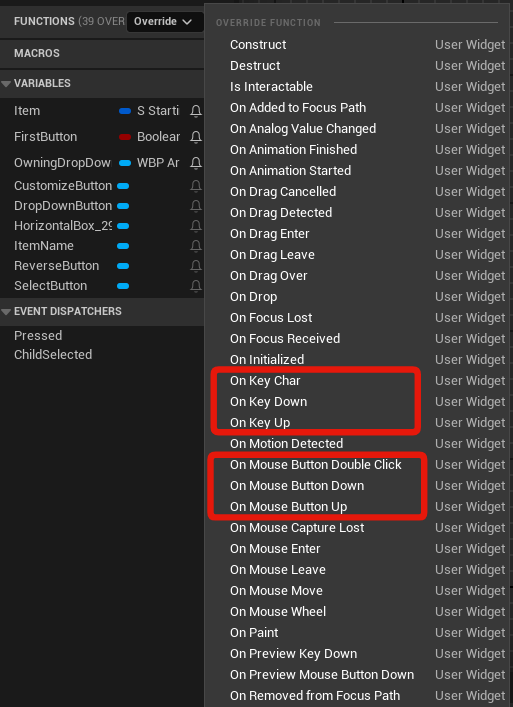 winter plume
oh ok
fiery swallow
if you click the override button next to functions in the UMG, you'll find these
winter plume
so enhanced input is just explicitly not for widgets?
fiery swallow
Inputs in general aren't really "meant" to be used in widgets directly
winter plume
why is that? seems redundant to have like what, three input systems
fiery swallow
It's more of, there's an intended way to use stuff, and an unintended way
you can most likely find a way to get input actions to work in widgets in some way, but it'd be far from common
winter plume
ok so i'm trying to internalize this. so i can wire these events and basically have the widget "emit" the current selection window. would the player controller subscribe to an event emitted from the widget, or have the widget as a dependency and read from it on tick or what's the convention?
fiery swallow
you lost me there. when programming in unreal engine atleast, All your logic ideally happens outside of the widget, the widgets have one job, which is to display the information that is happening in the game, not dictate it
you can use a timer to get information, and then display it, or you can use event dispatchers or something else
but actual gameplay logic should happen outside widgets. if you follow that logic, there'd never be a need for a widget to receive input directly
winter plume
so for context my default hud is a viewport with a canvas panel with my widget in it, and a child of my widget is a border, which will basically be moved according to mouse down location, and stretched according to where the mouse currently is while down, and when the select completes, the player controller should be able to take that selection, find out all the selectable units in that rect and add their references to a group
i'm making a selection box. so something needs to drive the size of the border
fiery swallow
if there's gameplay logic specifically related to the UI, like selecting a button, then that's understandable.
once the button is selected or whatever then yeah it'd make sense to cast to the controller, or wherever the logic needs to be and etc
winter plume
i know you're not trying to but you're kind of talking in riddles to me. i'm trying to solve a problem ok?
i want to box select stuff in the world. and i want a visual representation of that selection happening
what should i be doing? because you've said in so many words that everything about my approach is wrong
fiery swallow
I thought we were on the topic about using input inside of a widget, what I'm saying is you don't directly drop input actions into widgets, you can override key events in the functions if you really need to.
winter plume
this is what i'm referring to
 fiery swallow
I wasn't referring to anything else
winter plume
click + drag, and box is made
input drives it, but that input shouldn't be wired into the widget itself, so i would presume then i would put it on the playercontroller and reference the widget somehow but it seemed like you were saying that was wrong as well so i'm lost
fiery swallow
if input is required, then yes, you could put the input in the playercontroller, and when it's pressed you could call an event dispatcher to let the widget know it's time to do what you need it to do, or you can get a direct reference to the widget and tell it that way
are you familiar with the concepts I'm talking about?
winter plume
i'm familiar with event dispatchers in a general sense. i've written my own event dispatchers. i'm not familiar with navigating ue5
so i don't understand event dispatchers as a complete answer
fiery swallow
it's just one option of multiple
the easiest way is to just override the "On key down" event. I can show you an example
 tribal gazelle
I have a character with a body armour skeletal mesh and when I go up stairs the vest goes haywire moving heaps down then up, anyone know what could be the issue or how to fix it? Thanks.
Ok so taking the body armour out of the player mesh and then checking Use Bounds From Leader Pose fixed it up
worn tartan
Good evening. I am very new to blueprints. I have a basic UFO that I got to move around with the keyboard and a controller. I would like to tilt the UFO the appropriate direction when I turn or go forward and back. Ultimately it would be nice to have it tilt when I move the left thumbstick of the controller in any direction. It would also be nice to have the tilt directly correlated to how much you are pressing on the thumbstick. Right now I am using the Third Person Template and simply replaced the default character with my UFO skeletal mesh. I've attached my blueprint where I am failing miserably at getting the tilt to work. Any help or pointing to a tutorial would be amazing.

 warm idol
autumn pulsar
try using trace for objects instead of channel
warm idol
autumn pulsar
try using trace for objects instead of channel
“It’s not working, I tried with a delay, I just can’t figure out what the problem is. I think this should work like this, but never mind, I’ll either stick with Unity or create a completely different system, but since I just started, I have no idea how it should be done. This seemed like the best/easiest solution. Anyway, thanks for the help.
maiden wadi
warm idol
“It’s not working, I tried with a delay, I just can’t figure out what the proble...
Part of your issue is that you're detattching the component from it's own actor as well.
@warm idol When you make a component simulate physics, it'll detach from it's parent component. If you have a default scene root for example and then a static mesh attached to it. You first called Detach from actor which will detach the scene root from the held position. Then you tell the static mesh to detach from it's scene root.
Now when you pick the item back up, you are picking it up. You're picking up the scene root. The static mesh just isn't attached to it anymore so visually you're not seeing the same thing.
 vocal dust
Hey guys -- new to unreal engine here! (On day 3). Question -- is it normal to hit a problem that makes you wanna kill yourself?
autumn pulsar
vocal dust
Hey guys -- new to unreal engine here! (On day 3). Question -- is it normal to h...
Yeah, part of it is sticking with it and banging your head against it until it makes sense
If you're completely new, you'll struggle a lot with seemingly simple stuff
vocal dust
Mind talking me through a problem I have spent like 10.5 hours on
autumn pulsar
I'd personally recommend starting out by learning Object Oriented Programming
autumn pulsar
vocal dust
Mind talking me through a problem I have spent like 10.5 hours on
I can give it a shot, but I can't guarantee I'll have a solution for it
but the important thing is to just realize it's going to take time to learn. It's a marathon not a sprint, and you may be punching above your current weight. I'll see if I can help though
 hoary forge
I want to use the Lyra Starter Game Template in Unreal Engine. I have added a drone, and I want it to shoot at Lyra's enemies using AI any one help me ?
pulsar osprey
that's a very vague thing to get help on
untold fossil
Hello. I encountered a super weird engine bug/problem. Yesterday everything was perfectly fine. And this morning I launch my project and in one of my blueprints, the timeline curves are all gone.  What the hell could have happened? Is this a known issue? This is extremely concerning tbh
 dark drum
fiery swallow
Inputs in general aren't really "meant" to be used in widgets directly
dark drum
fiery swallow
Inputs in general aren't really "meant" to be used in widgets directly
That's not entirely true. The input system has two modes, UI and Game. This has been how it's been handled for years and hasn't been updated since before the introduction of enhanced inputs. Simply put enhanced inputs only fire in game input mode and not UI. The reason why is because they haven't been setup to use the focus path. This of course could change in the future.
In commonUI, epic has added some simple support for using enhanced inputs in widgets but this is limited to specific scenarios but ultimately requires the input mode to be on game.
UI has always been intended to receive and handle inputs from the player but can be tricky when you have multiple different widgets all wanting to do something. Hence why they haven't moved from using the focus path system and returning if something is handled or unhandled to capture inputs and stop them going further down the focus path.
fiery swallow
dark drum
That's not entirely true. The input system has two modes, UI and Game. This has ...
So which part of what I said wasn't entirely true? I was referring to input actions. Are you saying that widgets were intended to have input action events?
no hostility intended if it comes off that way
dark drum
fiery swallow
So which part of what I said wasn't entirely true? I was referring to input acti...
They work when the input mode is on 'game and UI'. It just doesn't honour the focus path. It not working when in UI mode is more down to epic not yet overhauling the UI input mode system, not that they never intended for them to not work. This change could come in the future if epic continues to work on CommonInput and CommonUI. Just a bigger thing to implement than they would have liked haha.
dark drum
fiery swallow
no hostility intended if it comes off that way
No worries. 🙂 Sorry if I sound hostile. Pretty early for me haha.
Fun fact, it is still possible to half use enhanced inputs (simple press events) as you can check if there are any keys assigned to any input actions on an Input context mapping on the player. This can be nice if you want to be able to have the flexibility of changing the desired key from an ICM instead of hard coding in a widget.
 quiet field
Hey, I have few questions and need help with my project. I created a turn in place system for manny. For the most part it works but I have few problems with it. Is anyone kind enough to help me understand my issue? I can record a small video as well for better understanding
It seems like most of the time it works but sometimes when rotating fast or more then 1 whole turn, it glitches out
dark drum
quiet field
Hey, I have few questions and need help with my project. I created a turn in pla...
Just post the issue. If it's animation related though you might be better posting in #animation
quiet field
@dark drum the video attached to my question has the issue
When I do a turn it works as it should for the most part. But it glitches out with enough speed and enough rotation
fiery swallow
dark drum
No worries. 🙂 Sorry if I sound hostile. Pretty early for me haha.
Fun fact, it...
I get what you're saying, and I see where you're coming from. I did mention that there are ways to use the input system directly with widgets. But I don't believe it was intended, which is why is difficult enough as it is, and there's multiple methods to do it. I think it's something that is supported, with limits. I mean this in the way that you could code your entire game in level blueprints, but it's definitely not common, nor was it intended to be used that way. Or replacing all of our casts with interfaces, you can do it, but not intended nor should it be done. Hope that makes sense

 dark drum
fiery swallow
I get what you're saying, and I see where you're coming from. I did mention that...
dark drum
fiery swallow
I get what you're saying, and I see where you're coming from. I did mention that...
They want it too but lots of issues they need to work out and does require using commonUI. (Still experimental stuff)

Epic Games Developer
Learn how to incorporate Enhanced Input with CommonUI's input system.
 devout oak
So im trying to create a bp for a trap that in order to disarm it they need to be crouched rn im just working on the hud and im running into an issue with it removing one of the huds when they leave the collision box

 maiden wadi
The kind of question that always makes me thoroughly enjoy GAS.
dusky cobalt
winter plume
i see
something that might help you is Get Actors in Selection Rectangle node, read about it and maybe find some tutorials
winter plume
dusky cobalt
something that might help you is Get Actors in Selection Rectangle node, read ab...
Appreciate that. Im mot even there yet though. Im trying to make the selection rectangle visible and the only answer i seem to got was "this isnt the way to go about it"
dusky cobalt
winter plume
Appreciate that. Im mot even there yet though. Im trying to make the selection r...
check Draw Rect that is in HUD
 winter plume
Lol that would be hilariously simple. Bases thank you
And if its the game modes default hud is ghere a way to access it easily from the playercontroller
dusky cobalt
yes, Get HUD inside player controller
winter plume
Sweet ill try this in the morning thanks so much
dusky cobalt
should be a lot of videos using these to make rectangle selection
 foggy spire
how do i multiply something with pi in blueprints?
 lusty birch
PI node..
dusky cobalt
What did t hey change to Enchanced Input System that in 5.5 I'm getting 0 as Action Value and in 5.4.2 I was getting -1 or 1 ?


wow.. they moved it t o triggered xD
eager thicket
does "get render target" auto-update the material? for instance, say a UI has a countdown, will that countdown project onto the material by itself?
 inland walrus
Can anyone see anything wrong with this?

 frosty heron
inland walrus
Can anyone see anything wrong with this?
frosty heron
inland walrus
Can anyone see anything wrong with this?
Hard ref in data table is wild
inland walrus
frosty heron
Hard ref in data table is wild
https://blueprintue.com/blueprint/jvg-6ak7/ Heres the code, I cant take it in one screenshot

No description provided
My issue is for some reason itemID is only printing as Apple in the third person character, even though on item pick up, when you pick up the item, it adds Apple or Cherry etc depending on the instance editable
frosty heron
@inland walrus hard to debug without having the project at hand but you should be worried about having hard reference in a data table.
You will end up loading every mesh of the item in the game. Even when you don't need them all.
Imagine having 300 items in the game and loading all 300 items on them when you just need to display the one that you own.
Your players will run out of memory for no reason.
inland walrus
Where do I hard reference the datatable?
frosty heron
Your item mesh is a hard ref
Simply having the dt there will load every item mesh in the game
inland walrus
Alright I've removed it and done it a different way
frosty heron
Well the only other way is using soft reference
frosty heron
And loading them at will
Don't know what I'm looking at there
Hard to tell what's wrong without debugging and knowing the system
I suggest adding breakpoint and print string
See if you didn't get the result that you expected
And work your way from tbete
inland walrus
Yeah I already did the print strings for debug, it's setting the item ID's perfectly for the inventory system, but not for the change text
frosty heron
I mean you can see why it doesn't change your text if you check with the print string and break point
Literary you can see why the branch goes to true or false
inland walrus
yeah I realise the branch isn't plugged in, but it still doesn't work without the branch
 frosty heron
And you can find out why something don't work simply by break point
Like what don't work?
The text doesn't change?
inland walrus
The text only changes to Apple for some reason
inland walrus
In this video you can see that it is setting the item id correctly when the item is picked up and added to the inventory
My theory on why it's not working is that they are set as instance editable on which item the player will pick up
 dusky cobalt
inland walrus
In this video you can see that it is setting the item id correctly when the item...
dusky cobalt
inland walrus
In this video you can see that it is setting the item id correctly when the item...
First this is not printing name of item and it's literally first thing that is on this event? Or i'm blind?
 inland walrus
dusky cobalt
First this is not printing name of item and it's literally first thing that is o...
inland walrus
dusky cobalt
First this is not printing name of item and it's literally first thing that is o...
Yeah that is only there to tell me what the player is interacting with
dusky cobalt
but on video you are interacting and it's not printing it? or you are not interacting?
frosty heron
You got something printing on tick, go there and figure out what you are printing and why it produce apple instead the text you expect.
inland walrus
dusky cobalt
but on video you are interacting and it's not printing it? or you are not intera...
I'm not interacting, I'm just hovering. I only want this to change from apple to item name, but they all say apple
 dusky cobalt
In which part of code you are trying to set name/variable in the Widget ?

oh i see it's here?
 dusky cobalt
go to Widget, create variable Interactable Item
expose it on spawn and connect it here
 inland walrus
Alright I'll try that
dusky cobalt
then on Begin Play, just Set Text to that variable (in the widget)
dusky cobalt
then we can debug later things, but my guess is you should also add break point to where you are Setting Interactable Item and check maybe it's only always giving Pick Up Item Reference 1 even if the item was 2 3 or 4
also for ''later'' this part should be probably event on Player Controller or Player State (but looks like u have inventory in player controller so there) , and there you have function/event Add Item/Remove Item, which you can call in future from anywhere and just tell it ''what'' it should add (self) instead of each thing having this lines of code.
 inland walrus
It still thinks everything is an apple

 dusky cobalt
okay, when are we setting up pick up item r eference?
 inland walrus
inland walrus
inland walrus
in third person character
dusky cobalt
wait what
but u need to have reference of the current item that we interacted with
not with empty (default) class
inland walrus
That's here on interact
 dusky cobalt
like when you interact, you need to get reference to tobject we interacted yes?
inland walrus
yeah it's in that image above ^
dusky cobalt
like: Click something > Get What we Clicked and send it further
are you using line trace or something like that?
inland walrus
The interact line trace is on tick, once it hits something that's interactable
 dusky cobalt
okay here we go.. Interactable Actor set
where is it the Interactable Actor set? and how are you sending this reference (Interactable Actor) to this place:
 inland walrus
Here is how we're getting the actor reference
 dusky cobalt
but do you realize it's empty default class reference and NOT EXACT object you are looking at?
begin play runs once
line trace runs 24/7
inland walrus
I have a do once function
inside it
that checks if it's interactable, do once
if not interactable reset

So it should reset every time the player looks away from the interactable object
dusky cobalt


this is why it's not working
you set Interacted Actor, but don't set which item was picked up ever, the item that was picked up was set on start of game once and it's apple
inland walrus
We don't want to pick up the item
dusky cobalt
and whatever you will click on, it doesn't matter because the Pick Up Item Reference is always the same
inland walrus
We want to just change the text on which item the player is hovering over
The pick up works perfectly when adding items to inventory
dusky cobalt
but you are trying to set the widget name to the Picked Up Item
which is never changing 🙂
dusky cobalt
just try to swap Picked Up Item Reference with Interactable Actor
inland walrus
so confused 😅
I can't do that as I need the interacting actor to determine non items too, such as doors etc
Which it already does
frosty heron
At simple form, it can just be.
Hit actor -> implement interface? -> set interacted item name -> if widget exist, update the text to interacted item name variable.
dusky cobalt
i don't know how to say it clearier. You set Picked Up Item Reference ONCE at the start of t he game, and then anytime you** look at something **, it creates Widget, taking all the informations from Picked Up Item Reference and feeds it.
inland walrus
It's already setting picked up item reference once at the start of the game (begin play on third person character)
inland walrus
I feel like it's always apple because it only changes item id when you interact with it? Or am I wrong?


The item ID is instance editable


That has to be why it isn't working
dusky cobalt
you never change the Picked Up ITem reference
frosty heron
Not sure how it is relevant to instance editable
inland walrus
dusky cobalt
you never change the Picked Up ITem reference
Do you mean here?
 frosty heron
inland walrus
Do you mean here?
frosty heron
inland walrus
Do you mean here?
This is obvious mistake
You setting a reference to null and trying to change a property of null object
inland walrus
frosty heron
You setting a reference to null and trying to change a property of null object
I only change it to null when the player is not looking at an interactable object
 frosty heron
You need to understand reference first
What you are doing is obvious mistake
That validate get will always be invalid
Because you already null the ref
dusky cobalt
Don't get me wrong, but start listening to what we are saying instead of trying to .. convice us it's ok
just take time and read what we said is wrong
inland walrus
I really do appreciate the help and I'm not trying to convince you you're wrong but I don't know where you referring to with this reference I need to set, I thought it's already done
inland walrus
frosty heron
Because you already null the ref
Where do I null the reference?
dusky cobalt
my advice: read 15 times what I said and try to really understand it, no point in me typing it again, its the same thing all time
frosty heron
inland walrus
Where do I null the reference?
The set before the get validate
inland walrus
frosty heron
The set before the get validate
Okay I've removed that
frosty heron
You are nulling the reference then trying to set a text of a null object.
Your validate get will never be valid.
frosty heron
inland walrus
Okay I've removed that
But you need to understand why...
Or you will just stumble on another bug
You should understand reference at the concept level first.
inland walrus
What does setting a reference do? I thought it just creates it as a variable reference
frosty heron
Look up on material regarding object reference
inland walrus
Alright
dusky cobalt
inland walrus
What does setting a reference do? I thought it just creates it as a variable ref...
Okay in other words. Delete where you set picked up item reference on begin play. It doesn't do anything really, in this context I think that you think that by doing this you create ''slot'' for the variable, meanwhile the slot is created when you add variable to blueprint. Then just by creating the same ''variable'' in other blueprint, doesn't automaticaly makes it 1:1 in other blueprint.
Variable is just a empty slot that can be filled with pointer reference (to exact thing). Now you when you hover over something you need to somehow pass that reference to this variable. It's basic things so if you are begginer just watch more videos how to set variables and how to access get/set references.
inland walrus
dusky cobalt
Okay in other words. Delete where you set picked up item reference on begin play...
Ah okay, knowing that is very helpful so thank you for the fleshed out message, but when I don't have a set there I get accessed none
frosty heron
You really should see some material regarding references
Your last sentence still demonstarte that you have yet to understand what reference actually is
Look up some reference videos, and naturally you will know what instances are too.
Learning is better than shooting in the dark
And it's not that people don't want to help you, but there are already material out there regarding what you are missing.
And it's something that takes hand holding in discord so better to just watch established material covering the topic
icy jacinth
dusky cobalt
Try to break these things in a small tasks. Write a recipe in words what needs t...
Thank you - I really need to invest in a rubber ducky. The solution was embarassingly simple in that I didn't have a mesh assigned to the actor that attached to the scene component 🤦♂️
dark drum
inland walrus
Ah okay, knowing that is very helpful so thank you for the fleshed out message, ...
Think of an object based var as an empty envelope. When you set the reference to an object, you're putting a set of instructions (a map) inside the envelope for how to find the actual object in question. You can copy these instructions from one envelope to another or remove the instructions entirely.
When you use the ref, it gets out those instructions and follows them to the object. Once there it can get the relevant data or call the function specified.
If the envelope is empty or the object is being destoryed (if it's an actor) you'll get an access none message because there's no instructions that take it to the object.
autumn pulsar
dark drum
Think of an object based var as an empty envelope. When you set the reference to...
I think a more apt description would be it’s an address on the envelope and you’re mailing instructions to that address 
inland walrus
@dusky cobalt @frosty heron Hey guys, just an update, I managed to do it


 inland walrus
dark drum
Think of an object based var as an empty envelope. When you set the reference to...
inland walrus
dark drum
Think of an object based var as an empty envelope. When you set the reference to...
Thanks for this, I will save it to my notes and look at it whenever I use it
 muted vigil
I am using GASP, I want to turn my character to actor. I tried to use SetActorRotation and Add or Update Warp Target from Location and Rotation. but they didnt work

how can I turn my character
dark drum
This might not be the best place but does anyone have any idea what would cause all the meshes to not be visible in any map? Even creating a new map is empty. I've noticed that the sprites also arent visible but it does show one if select it from the outliner.
Edit: Fixed, I had set the near clip distance to a negative number. 😅
 floral carbon
Yo. I have a sequence playing when the player character overlaps a hitbox. The sequence is just another character running from point A to B. I want that character to disappear at the end of the sequence. Currently it resets to its original position after the sequence. Easiest fix?
 frosty heron
floral carbon
Yo. I have a sequence playing when the player character overlaps a hitbox. The s...
frosty heron
floral carbon
Yo. I have a sequence playing when the player character overlaps a hitbox. The s...
there is on Finished event you can hooked up on the sequencer.
You can get rid of the actor there but that aside, don't use level blueprint.
frosty heron
dark drum
This might not be the best place but does anyone have any idea what would cause ...
Don't set it to negative or absolute 0 🙂
some people sets it to 0 and that also produce bugs because well, diving by 0
I think mine is set to 0.001 but you can always just run the console command to test the value in real time. When you find the sweet spot, sets the one in the project settings.
surreal peak
floral carbon
Yo. I have a sequence playing when the player character overlaps a hitbox. The s...
There might also be settings on the Character in the Sequence to spawn it in, so it despawns again later.
 hoary summit
Can anyone advise me on my inventory system? I currently have a save game plugin from the marketplace that saves items into an 'inventory' by key. I need to also load item data but this is unsupported by my save system. The developer of the plugin told me I wouldn't have to save that data as it can be done another way but I'm struggling to find a solution as to how to do that. I have an item data structure but not sure what to do with it.
When i pick up an item
 frosty heron
hoary summit
Can anyone advise me on my inventory system? I currently have a save game plugin...
frosty heron
hoary summit
Can anyone advise me on my inventory system? I currently have a save game plugin...
no one can tell without owning the plugin
floral carbon
frosty heron
there is on Finished event you can hooked up on the sequencer.
Can't figure this out. All I see is Event - Trigger on the sequence. Add that track then...?
frosty heron
and I encourage to actually learn how to save / load without using pluggin first
frosty heron
floral carbon
Can't figure this out. All I see is Event - Trigger on the sequence. Add that tr...
no, there should be OnFinished event from the sequencer. You bind that event before playing the sequencer and that OnFinished event will be called when the sequence is finished playing.
hoary summit
frosty heron
no one can tell without owning the plugin
alright, thanks
snow halo
Im trying to pass the data to my selection widget

should i use interface here?
or cast it ?
note : the quick selection ui widget will almost always be on the screen
or if not on the screen then hidden
frosty heron
are they so different that the user widget can't share the same base class?
also if you don't want to load your entire item's thumbnaill don't use hard reference in data table
snow halo
frosty heron
are they so different that the user widget can't share the same base class?
theyre not
so i can use it?
not real difference i think
frosty heron
use what? I don't know the context
casting is free btw, it's the hard ref that gives you the memory foot print
snow halo
frosty heron
also if you don't want to load your entire item's thumbnaill don't use hard refe...
i can load it inside of wb_radial_menu
frosty heron
you just need to declare the class in cpp since blueprint class is an asset
snow halo
?
frosty heron
snow halo
i can load it inside of wb_radial_menu
you load it when ever you want
normally when you want to use it
or before
you are the designer, your choice
snow halo
yep
frosty heron
snow halo
Im trying to pass the data to my selection widget
interface is fine here if you can't use the same base class
floral carbon
frosty heron
no, there should be OnFinished event from the sequencer. You bind that event bef...
yeah this isnt easy. thanks anyway ill figure some other way
frosty heron
floral carbon
yeah this isnt easy. thanks anyway ill figure some other way
Event On finished -> Destroy some actor
it's like a few nodes
snow halo
frosty heron
interface is fine here if you can't use the same base class
Would this be softer or interface is softer
 frosty heron
snow halo
Would this be softer or interface is softer
frosty heron
snow halo
Would this be softer or interface is softer
I don't understand
snow halo
which one is better
frosty heron
the question doesn't make sense
snow halo
interface or soft cast
frosty heron
what is soft cast
if you need to communicate between objects that don't share the same base class, you can use interface
snow halo
frosty heron
if you need to communicate between objects that don't share the same base class,...
so if I wanna pass all those variables by making exactly all those same variable types as interface inputs & have exactly the same outputs and then transfer them via output on to the other blueprint?
frosty heron
@floral carbon
 frosty heron
snow halo
so if I wanna pass all those variables by making exactly all those same variable...
frosty heron
snow halo
so if I wanna pass all those variables by making exactly all those same variable...
you have to implement the function in every class that implement the interface
use that as you will
 tulip totem
I'm trying to spawn some mesh on a spline, so the spline is renderable in ue5.4.4 and im using the blueprints from https://tiedtke.gumroad.com/l/splinetools
however its remembering the old drawing of the spline and not updated to the new height of the spline. if i move the spline around the mesh does update but its like a mix of the old spline position and new spline position.
why would this be happening? why isnt it just spawning on the spline.


Gumroad
I found it really strange that there are no easy way to create spline objects directly in Unreal Engine for let's say fences, roads, power lines etc, so I decided to make three different blueprint spline tool systems for different purposes. Just drag and drop into scene and choose your mesh. Very easy to use and customize.DeformableThis one is u...
maiden wadi
tulip totem
I'm trying to spawn some mesh on a spline, so the spline is renderable in ue5.4....
What function is this code in?
 broken wadi
Why is it that sometimes static mesh components of a level placed blueprint don't appear at all in the details panel after selecting the BP in the level? I would like to apply some specific changes to a few components but they aren't available to modify. They are rendering.
tulip totem
maiden wadi
What function is this code in?
Construction script of the actor
maiden wadi
broken wadi
Why is it that sometimes static mesh components of a level placed blueprint don'...
Are these just placed in the BP of the instance? Initially that sounds like a component marked VisibleDefaultsOnly. But that seems super weird for a static mesh, and not possible for a Blueprint.
snow halo
frosty heron
you have to implement the function in every class that implement the interface
like this?
 dark drum
frosty heron
Don't set it to negative or absolute 0 🙂
dark drum
frosty heron
Don't set it to negative or absolute 0 🙂
Yea, I know that now haha.
maiden wadi
tulip totem
Construction script of the actor
My initial assumption would be that the function was not designed to clear out old meshes and recreate new ones in the correct places. But I'm not sure.
broken wadi
maiden wadi
Are these just placed in the BP of the instance? Initially that sounds like a co...
Blueprint has this component hierarchy:
Plane (root)
-
Box collision A
-- 4 static meshes -
Box collision B
-- 8 static meshes -
Box collision C
-- 5 static meshes (but only 3 show up in details panel but all 5 are rendering)
maiden wadi
All BP placed? Nothing from C++ parents?
broken wadi
yea all just bp
maiden wadi
Can you see their details panel in the BP?
broken wadi
I even disabled the construction script which was modifying some material instances
on the blueprint its fine everything is there
in the level I can see all the static meshes and can select them manually to move them but can't edit their properites
when i select one of the missing components it mimics a root level selection in the details panel
maiden wadi
And this happens even with new instances of it placed?
broken wadi
yea
maiden wadi
Oof.
🤷♂️ Beyond me. Usually this is a sign of bad UPROPERTY markers, or BP serialization, but your situation doesn't fit either. :/
broken wadi
could be something like that, this was one of the oldest blueprints i made using 5.0early access
im running 5.5.1 now
but ive made changes to it since then on various versions...yea i dunno its odd
maiden wadi
Could be worth a remake of at least the components if there aren't a ton of children. Even if there are, you could probably put two new components, make an editor utility to iterate the child BPs to set properties same as the old two. Then afterwards remove it from the parent after saving all of the children.
Or just do it by hand if there's not a lot. 🤷♂️
broken wadi
Just now I even tried to delete ALL blueprint nodes and functions, even the constructor, saved. Added new instance to the level and it still has the same issue. So weird.
tulip totem
maiden wadi
My initial assumption would be that the function was not designed to clear out o...
i deleted all the construction script for it. compiled and saved. so all i had left was an actor and my spline.
re added all the code and it still spawns it in the wrong place 😦
if i drag a new actor into the scene and start drawing the spline again, it all works  but that meansi need to redrawthe whole spline again 😄
maiden wadi
tulip totem
i deleted all the construction script for it. compiled and saved. so all i had l...
But I mean the code itself. It sounds like the code wasn't designed to update old meshes correctly or something when the construction script reruns.
floral carbon
frosty heron
<@1182194668964941985>
nah bro
broken wadi
maiden wadi
Could be worth a remake of at least the components if there aren't a ton of chil...
I made a workaround by adding some public variables and just modifying them with the constructor script.
inland walrus
Does anyone know why this might not work?


It should open widget upon complete but it doesn't
maiden wadi
inland walrus
Does anyone know why this might not work?
Does it print the other thing?
inland walrus
maiden wadi
Does it print the other thing?
no it doesn't do anything
maiden wadi
My initial assumption is that that is in some other actor?
If yes, did you enable input on it?
inland walrus
maiden wadi
My initial assumption is that that is in some other actor?
I'm not sure
inland walrus
maiden wadi
If yes, did you enable input on it?
maiden wadi
This code though. What actor is it in? If it's in that thing you just went up to, and you didn't enable input on it before pressing the key, it can't accept input.
 inland walrus
maiden wadi
This code though. What actor is it in? If it's in that thing you just went up to...
inland walrus
maiden wadi
This code though. What actor is it in? If it's in that thing you just went up to...
it is, Where would I enable input?
oh my b
Found it
thanks mate
maiden wadi
Depends. Could do it on an overlap and disable on end overlap.
But realistically this isn't a good path for interaction. Bug prone, not scalable. Even your widget is making a bad assumption right now that isn't reading the real value if your interaction timing. You have no ability to affect the interaction time per object either, like making one thing take 2 seconds, and other take ten.
You'd have an easier time placing a component on things that can be interacted with and calling a simple start and stop interaction. The actor being interacted with could bind functions to the component's started/completed event dispatchers. Then your interact code simply line traces and starts interaction with an object and stops it on the same cached object when releasing. You can do it without casting by simply getting the component from the actor pointer in the trace results.
 languid hemlock
Is this possible with blueprint?
I want one variable to follow the value of another variable. I think this is possible with pointers in C++. Is there a way to do this for Blueprint?

I think its doable with UObjects, but I need this variable to be replicated...
olive yarrow
why in the omnissiahs name does my game freeze if i let my mouse leave the screen while dragging a slider widget?
I have it set to lock the mouse, so maybe saying leave isn't correct - hits the edge of the screen?
snow halo
Hi, I have this function every time I add an item to the inventory, im expected to pass those on to the other side, but it's just like one of those horror movie scenes where the actor picks up the phone call and nobody is talking, nothing is being received on to the other side, and it looks like all those inputs on the other side are empty and look like they still need to be fed data


empty hungry variables
dusky cobalt
Can you show Pass Info function?
also what do you need to happen, in either way you always need to provide item id first almost to get ''info''
dusky cobalt
snow halo
other way is to maybe go with interface event like Get Info, and there you plug all the variables, then you just call Get Info and you can access every variable you plugged inside of the actor with interface (you still need target though to call this interface event to that thing that is holding this data and has this interface though)
 hexed oasis
Just a quick sanity check, if I need a custom component that generate some data then spawn some particles to visualize the data then I want an actor component right?
and the particle system should spawn dynamically then attached to the parent actor correct?

 muted halo
Hi there, would anyone know how I can have an event triggered when a certain object becomes visible in frame? For example lets say a pylon enters the screen the player is using how can I just trigger a print string saying "Pylon is in view". Thanks everyone!
frosty heron
languid hemlock
Is this possible with blueprint?
I want one variable to follow the value of anot...
Not in blueprint, you are referring to reference which is just an alias of another variable.
On the contrary, what you are doing in your blueprint there is declaring 2 variables, each occupying different space in memory.
dusky cobalt
snow halo
Yeah, so this needs to be on the object which you want to extract the data from, but you cannot do any input. Inside the object you just plug variables, these will get passed when you call that event from anywhere with reference to this object.
languid hemlock
frosty heron
Not in blueprint, you are referring to reference which is just an alias of anoth...
This is bad to hear. I have a very crowded string array and I want to select a random string once and reflect it to the widget. When the value of the selected string in the Array changes, I want it to change in the widget. I cant save array index of string because elements are swapping index often. Not sure if there is a proper way to do this in blueprint
frosty heron
languid hemlock
This is bad to hear. I have a very crowded string array and I want to select a r...
What is there to save?
Cache the random string or set a variable. Widget simply read the variable.
dusky cobalt
languid hemlock
This is bad to hear. I have a very crowded string array and I want to select a r...
Why you need array index? Just get another thing from array as you did it first time? Like
Update Widget > Get Random from Array > Update Widget
call this event anytime you want new thing from array and when it changes? or it needs to be the thing that is in the same index as the one before? i dont get it 😄
dusky cobalt
muted halo
Hi there, would anyone know how I can have an event triggered when a certain obj...
check Was Recently Rendered node maybe it's gonna fit your game, is it topdown, 3rd person view?
languid hemlock
dusky cobalt
Why you need array index? Just get another thing from array as you did it first ...
Nevermind. I found the solution while writing the all problem. 'Rubber duck debugging' works 😃
quiet field
Anyone can help me with the issue I'm facing with my turn in place logic? Here's a video of the glitch. It seems to be working for the most part, but with enough speed and Yaw degrees it breaks sometimes. The first glitch happens around 25-27 seconds into the video
 idle crescent
Can I get the instance hit by a raytrace of an instanced static mesH?
 spark steppe
idle crescent
spark steppe
idle crescent
Is it? It just says
 dark drum
idle crescent
Is it? It just says
dark drum
idle crescent
Is it? It just says
Yea, it's the index of the hit instance in terms of ISM and HISM.
idle crescent
Huh. I will need to test but that's great, thanks
muted halo
dusky cobalt
check Was Recently Rendered node maybe it's gonna fit your game, is it topdown,...
its first person. In my case its actually flying a drone around with the camera in scene and when x object comes in frame I want to output a .txt file but for now even a print string works
inland walrus
Can someone please help me figure out why this is opening multiple widgets and how to fix it

 winter plume
am i tripping or should this work? RTSPlayercontroller is added to the default game mode and the default game mode is loaded into the sene but i'm not seeing any logs when i click. Also the input context mappin containing these actions is set
 frosty heron
winter plume
am i tripping or should this work? RTSPlayercontroller is added to the default g...
frosty heron
winter plume
am i tripping or should this work? RTSPlayercontroller is added to the default g...
Set where?
You will need to show more than this pic
Check your world settings as well, make sure it's not overriden unintentionally.
inland walrus
inland walrus
Can someone please help me figure out why this is opening multiple widgets and h...
bump
winter plume
i only have default world settings right now afaik
what other pics would you like to see
frosty heron
winter plume
i only have default world settings right now afaik
Post the world settings of the level you are testing
Also show where the imc is binded
inland walrus
winter plume
am i tripping or should this work? RTSPlayercontroller is added to the default g...
Do you need to enable input?
faint pasture
inland walrus
Can someone please help me figure out why this is opening multiple widgets and h...
why wouldn't it?
winter plume
inland walrus
Do you need to enable input?
i don't know what this means. i need input for my game yes lol
 celest acorn
still pretty new to bp, I'm trying to make a sphere collision spawn and apply damage to any actor within its radius (like an exploding barrel would), but when there is no actor in the radius, it stays there until there is, i want it to destroy the collision so that when i pass through i dont get damaged by nothing if you understand me, I know this is due to the on begin overlap but I don't know how to fix it lol. i have never made anything like this so im very confused lol.
 faint pasture
Also, why are you only spawning a widget if the current widget is valid?
frosty heron
That's a controller, input already enabled by default
 inland walrus
faint pasture
Also, why are you only spawning a widget if the current widget is valid?
inland walrus
faint pasture
Also, why are you only spawning a widget if the current widget is valid?
I used chat gpt for this as I always have this issue when making blueprints and I'm not sure why or how to fix
winter plume
it might not be binded now that i think about it. where would i do that?
frosty heron
winter plume
Your game mode settings. Set them correctly.
Check if everything in order when you expand selected game mode
faint pasture
inland walrus
I used chat gpt for this as I always have this issue when making blueprints and ...
don't do that
learn how to do things
inland walrus
xD I do know what I'm doing roughly, but I don't why this issue occurs or what the counter is for it so I can implement it in my future code
frosty heron
winter plume
it might not be binded now that i think about it. where would i do that?
Single player?
winter plume
frosty heron
Single player?
right now it's 0 players i'm trying to address that first
faint pasture
inland walrus
xD I do know what I'm doing roughly, but I don't why this issue occurs or what t...
First off, why do you have 2 places that spawn the widget?
frosty heron
winter plume
right now it's 0 players i'm trying to address that first
Are you doing single or multi? It matters
inland walrus
faint pasture
First off, why do you have 2 places that spawn the widget?
Chatgpt👀
winter plume
i'm not sure where i'm supopsed to set the input mapping context in the game mode
 frosty heron
winter plume
i'm not sure where i'm supopsed to set the input mapping context in the game mod...
frosty heron
winter plume
i'm not sure where i'm supopsed to set the input mapping context in the game mod...
Check the default third person template. It works for single player
faint pasture
inland walrus
Chatgpt👀
Just start with the earliest bit of that code that you understand and go from there. No more copying from ChatGPT, you can ask questions, but implement all code yourself.
winter plume
frosty heron
Check the default third person template. It works for single player
check it for what
inland walrus
faint pasture
Just start with the earliest bit of that code that you understand and go from th...
I have redone it multiple times in my own way but I can't figure out how to counter it opening all blueprint widgets
faint pasture
inland walrus
I have redone it multiple times in my own way but I can't figure out how to coun...
WHEN do you want to show and unshow the widget?
frosty heron
winter plume
check it for what
Check it to see how to setup enhanced input
winter plume
frosty heron
Check it to see how to setup enhanced input
check it where? if i knew where to look i wouldn't be stuck lol
frosty heron
winter plume
check it where? if i knew where to look i wouldn't be stuck lol
In the template you will find it in the character blueprint
Probably at begin play
inland walrus
faint pasture
WHEN do you want to show and unshow the widget?
I want to show the widget when the players interact hold completes, I don't need to remove it as I have widget close buttons for that
winter plume
frosty heron
Probably at begin play
will it show an enhanced input action reference wired into a comand? because that won't help me
inland walrus
but it's opening all widgets rather than the instance editable one
frosty heron
winter plume
will it show an enhanced input action reference wired into a comand? because tha...
Well you haven't show the binding part, so I can only assumed that it's missing
If you already done so just post the pic
For enhanced input to work you need to add imc at some point
winter plume
like this?

i was told to set it in the game mode but i still cannot see where to set it in the game mode and nobody answered that
frosty heron
winter plume
like this?
No. You have 2 options here.
See the full example in third person template and look into the character blueprint
Or read the epic documentation on how to setup enhanced input.
Where you set it is project dependend
@winter plume https://dev.epicgames.com/documentation/en-us/unreal-engine/enhanced-input-in-unreal-engine
You haven't show this bit


Epic Games Developer
An overview of the Enhanced Input Plugin in Unreal Engine
have a read through the doc
 celest acorn
still pretty new to bp, I'm trying to make a sphere collision spawn and apply da...
celest acorn
celest acorn
still pretty new to bp, I'm trying to make a sphere collision spawn and apply da...
may have got lost during the help with the other question:)
winter plume
frosty heron
<@177936472563777536> https://dev.epicgames.com/documentation/en-us/unreal-engin...
yeah nobody suggested that bit. figured i out
frosty heron
winter plume
yeah nobody suggested that bit. figured i out
reading doc > praying someone answered every single detail you don't know
faint pasture
celest acorn
still pretty new to bp, I'm trying to make a sphere collision spawn and apply da...
Can you reiterate what the actual problem is?
you want the barrel to explode...... when?
celest acorn
so the barrel explodes fine, the sphere collision that causes damage, spawns fine, the issue im having is, that if there is nothing overlapping the sphere, it wont activate or destroy, and i dont want there to be a random sphere that can damage an actor like a minute later because thats not very realistic, i only want damage to be caused from when the barrel explodes. So if there is nothing overlapping it should destroy, if there is, it should apply damage and then destroy once applied.
faint pasture
celest acorn
so the barrel explodes fine, the sphere collision that causes damage, spawns fin...
why are you spawning a thing to cause damage?
that's a bit silly, you can do it all in the barrel like:
OnExplodeEvent -> get overlapping actors -> damage them -> delete self
celest acorn
faint pasture
why are you spawning a thing to cause damage?
because i want it to be able to activate other barrels to explode, sort of like a chain reaction
faint pasture
celest acorn
because i want it to be able to activate other barrels to explode, sort of like ...
why wouldn't that be possible?
celest acorn
faint pasture
why wouldn't that be possible?
i mean i dont know, im still very new to bp, this was the way i assumed it worked
so this is my barrel bp
faint pasture
Here's your barrel:
BarrelMesh
OverlapSphere
Barrel.TakeDamage -> update hp -> if low enough -> Explode
Barrel.Explode -> get overlapping actors -> damage them -> delete self
celest acorn
 faint pasture
you don't need to spawn a 2nd actor to do the explosion, just do it there
celest acorn
faint pasture
Here's your barrel:
BarrelMesh
OverlapSphere
Barrel.TakeDamage -> update hp...
okay i understand that
faint pasture
just have a sphere, and get its overlapping actors, and damage them
celest acorn
faint pasture
you don't need to spawn a 2nd actor to do the explosion, just do it there
okay i understand ill give it a shot thank you
faint pasture
you don't even need a sphere collider, you can just do a sphere trace
inland walrus
Adriel did you have any ideas regarding my issue?
celest acorn
faint pasture
you don't even need a sphere collider, you can just do a sphere trace
im familiar with collisions so ill give that a try first, thank you
faint pasture
inland walrus
I have redone it multiple times in my own way but I can't figure out how to coun...
what do you mean by "all blueprint widgets"? The code you showed just spawns one and adds it to viewport
unless you've enabled input on like 30 things so that code is technically running on 30 different actors
inland walrus
faint pasture
what do you mean by "all blueprint widgets"? The code you showed just spawns on...
 frosty heron
🙅♂️ try to contain your inputs in your controller or character.
faint pasture
inland walrus
WHEN does input get enabled on these actors
yeah just handle your input in the pawn probably
frosty heron
why does pressing a button suddenly spawn a widget on every single item in the world
inland walrus
faint pasture
WHEN does input get enabled on these actors
I don't think it does
faint pasture
frosty heron
why does pressing a button suddenly spawn a widget on every single item in the w...
cuz ChatGPT
inland walrus
xD I removed the chat gpt stuff
faint pasture
inland walrus
I don't think it does
then how does any of your input event code work if input isn't enabled?
just put inputs in your pawn until you're comfy with how it works
 faint pasture
inland walrus
faint pasture
inland walrus
yeah don't have that in your interactable
inland walrus
Oh
faint pasture
you already have this

that runs when the thing starts getting interacted with right?
inland walrus
faint pasture
you already have this
I don't think this is set up properly, it's only used here
 faint pasture
inland walrus
I don't think this is set up properly, it's only used here
faint pasture
inland walrus
I don't think this is set up properly, it's only used here
that looks fine
your pawn tells InteractingActor that its starting to get interacted with
that's when you should show UI
what you had was that every actor that could ever care would trigger its ui when that key was pressed, NO MATTER WHAT
inland walrus
faint pasture
what you had was that every actor that could ever care would trigger its ui when...
Ah okay so like this instead?
 inland walrus
?
 faint pasture
for a quick and dirty prototype you can just get player 0 but eventually you want to pass over who's doing the interacting
so the thing being fiddled with knows WHO is messing with it, for reasons like checking if they have a key, or killing them
inland walrus
faint pasture
so the thing being fiddled with knows WHO is messing with it, for reasons like c...
Ah, get player controller doesn't work I don't think
faint pasture
inland walrus
?
This should technically work, it's just gross and will fail as soon as you have more than one player around
if it's not doing anything, you need to debug why it's not getting called
inland walrus
faint pasture
This should technically work, it's just gross and will fail as soon as you have ...
lool good thing it's a single player game xD
inland walrus
faint pasture
if it's not doing anything, you need to debug why it's not getting called
Even this doesn't work
 faint pasture
inland walrus
Even this doesn't work
faint pasture
inland walrus
Even this doesn't work
then the problem is before this
frosty heron
following up on our previous encounter, please just look at material on references and instance
faint pasture
go all the way back to the input in the pawn or controller that kicks all this off
faint pasture
inland walrus
I don't think this is set up properly, it's only used here
does this work
if not, how are you setting InteractingActor?
inland walrus
The only thing I can think of is that it could be the interact system, the interact function works but the hold doesn't seem to


 inland walrus
faint pasture
does this work
inland walrus
faint pasture
does this work
Basic interact works, but the hold doesn't
inland walrus
Could it be that I have to inputs with the same key? but one for hold and one for normal/press
faint pasture
get it to print Hold on hold and Press on press first
just directly off the input events
inland walrus
faint pasture
just directly off the input events
Does this help?
faint pasture
inland walrus
WHEN do you want the UI to show?
 twilit mantle
hello there, does anyone know why the animation of my character does not move when using the simple move to node?
inland walrus
faint pasture
WHEN do you want the UI to show?
In this video, the UI is showing at the right time
inland walrus
inland walrus
In this video, the UI is showing at the right time
Just not the right amount of UI
 inland walrus
Nothings printing
inland walrus
faint pasture
I bet that's not getting set correctly
Think you might be on to something
snow halo
can I set slate brush without tick bindings in Widget Blueprints? Tick bindings = 👎
I only wanna update or tick once
but somehow its impossible to SET slate brush w/out bind ⛔ on widget buttons 🖱️
 left flint
hi, all! very new to Unreal. trying to wrap my head around blueprints. I followed a tutorial that covered things like applying damage to a character and making it so hit actors can ragdoll the player character. I wanted to try to apply what I learned to do a few simple things on my own. First off, i wanted to make it so when the hit actor launches the player, it also applies damage. I was able to get this to work by subtracting health when the hit happened. but the damage number doesn't pop up when i do so. makes me think subtracting health ≠ damage are far as the code is concerned. I tried using the apply damage node but it does seem to work. any tips on what I'm doing wrong?

 inland walrus
faint pasture
Print InteractingActor here
inland walrus
faint pasture
Print InteractingActor here
It was incredibly simple
dusky cobalt
I have AC_UnitProductionManager, where I have panel with widgets Produce Unit, which are all units player can produce. When building is constructed or destroyed I need to call to the Manager and update all buttons (check player buildings, if any unit requires it). Question is where should be binding properly done?
Should I bind On Events inside the objects that should communicate info up or when I spawn the building (in the building placement manager)? my guess would be to do it on begin play from inside object (building, and other event in constructable component). Would it be correct?
 dusky cobalt
left flint
hi, all! very new to Unreal. trying to wrap my head around blueprints. I followe...
dusky cobalt
left flint
hi, all! very new to Unreal. trying to wrap my head around blueprints. I followe...
That is correct way to substract health, probably something with your hit by hit actor function is off. But first try to set this.
Also remember you can add break points on the nodes and then T10 to see the flow and which data in nodes is gettinf filled.
 left flint
dusky cobalt
That is correct way to substract health, probably something with your hit by hit...
left flint
dusky cobalt
That is correct way to substract health, probably something with your hit by hit...
like this? or should i disconnect this link? Tested it and the damage still isn't applying. also im not sure what you mean by T10?

 dusky cobalt
left flint
like this? or should i disconnect this link? Tested it and the damage still isn'...
dusky cobalt
left flint
like this? or should i disconnect this link? Tested it and the damage still isn'...
Sorry, I mean F10 key, yeah first screen is ok, you can also connect from Set to the hit by hit.
Must be something wrong with Hit By Hit I guess?
try to print before Hit By Hit node, name of the 3rd person character
just swap player state to your character

and add it before hit by hit
left flint
dusky cobalt
try to print before Hit By Hit node, name of the 3rd person character
i tried this and the text appears.


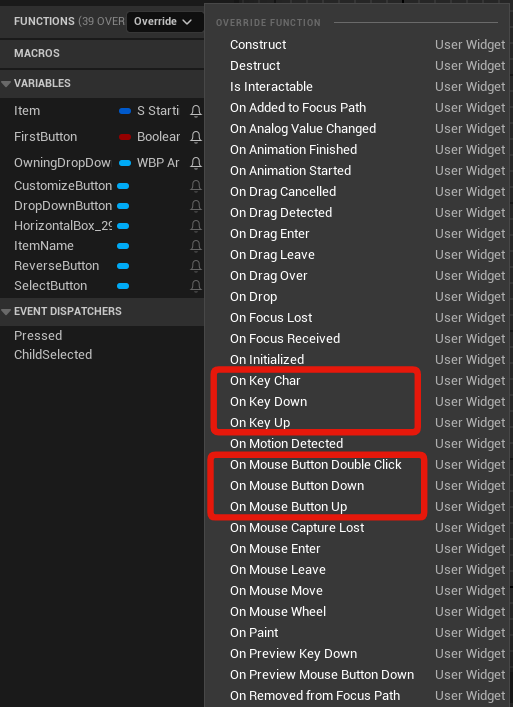
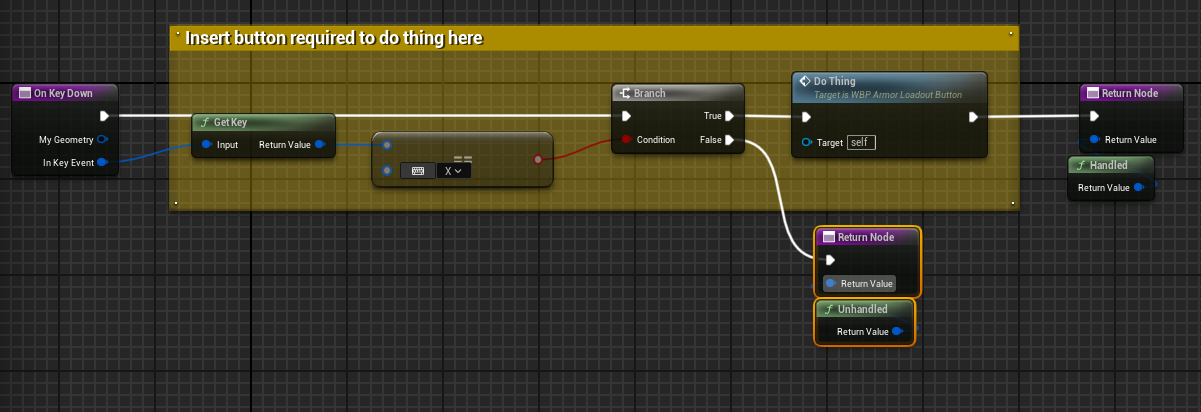 left flint
so now when he gets hit his name appears
should i maybe switch things around and try to apply damage before the hit event?
dusky cobalt
what does hit by hit does exactly
btw ur damage is set to 0 now
also event any damage is on your 3rd person character, correct?
left flint
dusky cobalt
btw ur damage is set to 0 now
omg im dumb
it works now lol
but i gotta figure out at which step i fixed this...
left flint
dusky cobalt
also event any damage is on your 3rd person character, correct?
correct
dusky cobalt
you had wrong variable for the target and you didnt set it
left flint
and hit by hit makes the character get launched, takes away player movement then after a delay respawns him and restores movement
left flint
dusky cobalt
you had wrong variable for the target and you didnt set it
so it was setting the third person character variable between the cast and the hit actor that fixed it. thank you so much! I still dont quite understand getting and setting.
but im sure ill get it. this is still way easier than when i was trying to learn C#
dusky cobalt
variables are like empty buckets, you can put water into them (values and references to things), by setting up variable you fill it up with water (data, value), then you can drag anywhere you want that bucket and pour it up at something (doesn't mean its empty yet) when you set the variable to nothing, it gets empty
learn how to use break points, its huge for this editor
you can see step by step what is your code doing
left flint
thank you! that makes more sense. how do i use break points exactly?
winter plume
so event dispatchers are a slight misnomer i assume? like any event dispatcher is also in theory an event that you can bind to
dusky cobalt
left flint
thank you! that makes more sense. how do i use break points exactly?
right click you add break points, when u run game and u do something and this node is triggered it will stop and take you here, you can sthen see all the nodes having values and you can check every value if its set, if its valid, what numbers got set etc. then u can click F10 and see what is happening after step by step

 winter plume
oh nvm i see when yo udrag it in there's an option to use it as an event and then it generates one in the event graph
left flint
dusky cobalt
right click you add break points, when u run game and u do something and this no...
oh, nice! so if something isnt working this would be a method you could use to figure out where in the chain your runing into issues?
dusky cobalt
exactly
left flint
awesome! thanks
so an issue i have now is the character keeps taking damage after getting knocked away. this was solved in the tutorial in the hit by hit actor event for the actual physics. im wondering if i shouldn't just put the add damage into that event instead of where i have it. but it wouldnt let me call my character as a variable inside my characters blueprint. or if so, idk how to exactly
i feel like the overall issue is that when the character gets launched, his collision capsule is left where he was. so it just keeps getting hit... how would i go about making the collision capsule launch with the mesh?
this is what the event currently looks like


 old cypress
Is there a way to make a blueprint function not overridable by derived blueprint classes and be only implementable in parent blueprint class (not in C++)?
fiery swallow
old cypress
Is there a way to make a blueprint function not overridable by derived blueprint...
mark the function as private
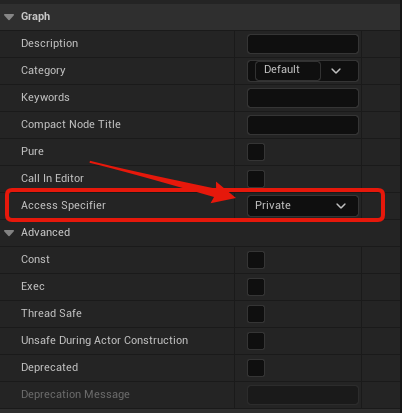
 old cypress
fiery swallow
https://i.gyazo.com/87fdd0a087127b6ffa7783347ab3fbcb.png
old cypress
fiery swallow
https://i.gyazo.com/87fdd0a087127b6ffa7783347ab3fbcb.png
yeah, but that will make it invisible for child classes
fiery swallow
that's so true. You want to be able to call the function, but not be able to override it. I don't believe that's possible.
also, if you care to share, why would you ever need to do that?
tropic token
guys, is there any way to limit selection of the montages and animation sequences in data asset's property with particular skeleton?

 ripe fiber
Can someone help me to a guide to "Push and Pull Objects in Topdown" tutorial ?
 upper badger
I'm trying to implement something simple (imo) - click a cube, print a thing. I have mouse events enabled in the controller class, I have the controller class in the game mode, and I have the game mode in the world settings. I have a UI in the game but I disabled that for now. I tried both onClicked on the cube and I also tried adding a box collision but still nothing. What else should I check?
maiden wadi
Double check that the box collision on the cube actor blocks the same trace channel as is specified in your player controller class near the clicked settings you enabled.
upper badger
yep, it does. default click trace on controller is visibility and i set the cube to block all
 wispy kayak
Hi what to change for this? 5.5 is deprecated.
 dark drum
wispy kayak
Hi what to change for this? 5.5 is deprecated.
dark drum
wispy kayak
Hi what to change for this? 5.5 is deprecated.
If Epic deprecate something they normally provide a message advising what to use instead. (if there is a replacement)
 ruby ivy
Hello, is it possible to store the contents of array elements as an integer? For example, if index 0 is 1 and index 1 is 0, how can I get the output as 01?
frosty heron
ruby ivy
Hello, is it possible to store the contents of array elements as an integer? For...
that's pretty random, what do you actually want? The index or the value?
ruby ivy
frosty heron
that's pretty random, what do you actually want? The index or the value?
i need values only
frosty heron
wdym by storing content of array element as integer?
just have the array be the type that you need.
structs if you need multiple fields
ruby ivy
frosty heron
structs if you need multiple fields
I want to write the values of the elements inside the array to an integer like this: 010101010, where the first element is 0 and the second is 1
frosty heron
ruby ivy
I want to write the values of the elements inside the array to an integer like t...
what is your array?
an array of int?
ruby ivy
frosty heron
an array of int?
yep
frosty heron
Your Array
0 -> 1
1 -> 0
2 -> 1
3 -> 1
4 -> 0
and you want to store them as a data type that represents 10110?
ruby ivy
yep
frosty heron
loop over your array and convert them to string
append on each iteration
what's the actual application though
ruby ivy
If I save to a string with a loop, wouldn’t it be just one result? Doesn’t it overwrite the value every loop
frosty heron
you append the string on each iteration
so with the value above, your string will be 10110
ruby ivy
frosty heron
so with the value above, your string will be 10110
okey i ll try it thanks
ruby ivy
frosty heron
you append the string on each iteration
I try like this and not working what is my mistake
 frosty heron
ruby ivy
I try like this and not working what is my mistake
frosty heron
ruby ivy
I try like this and not working what is my mistake
this is for quiz? I don't see why you need to have anything other than the struct
but in any case

also you probably want to set RandomF to be empty before the loop
ruby ivy
frosty heron
this is for quiz? I don't see why you need to have anything other than the struc...
this is for keypad i don't know how can i use structs and it proably change whole system
frosty heron
ruby ivy
this is for keypad i don't know how can i use structs and it proably change whol...
I don't see why do you need to do what ever you want to do now. An array of int is probably enough to represent entered key
ruby ivy
frosty heron
I don't see why do you need to do what ever you want to do now. An array of int ...
yes one array represent key (0or1) and one array is answer array system works without problem but i need answer array like this for read this string in paper etc. for player can found solution
frosty heron
ruby ivy
yes one array represent key (0or1) and one array is answer array system works wi...
Yeah that make sense
to check answers or the keys an array of ints is sufficient but if you need to display them to the user then you will need to convert them to txt or string.
ruby ivy
frosty heron
I got a result like this array is 9 elements
 frosty heron
ruby ivy
I got a result like this array is 9 elements
frosty heron
ruby ivy
I got a result like this array is 9 elements
Read what I said about making your string empty before the for loop
also, I don't know the code before what you posted
you might be running it more than you need
ruby ivy
okey i fix that
frosty heron
this function to convert answer to string should be self contained
ruby ivy
thanks thats all works
 fair hatch
Having an issue setting up the blueprint to where my turret will despawn after a few seconds instead of just bombarding my scene with turrets.
Anyone know how to fix that?
frosty heron
fair hatch
Having an issue setting up the blueprint to where my turret will despawn after a...
not without seeing any code
you should check your Spawn collision rules too. Maybe you set to despawn if overlapped with an existing object in the world.
fair hatch
frosty heron
not without seeing any code
There's also that error warning. Still pretty confused on it.
 frosty heron
fair hatch
There's also that error warning. Still pretty confused on it.
frosty heron
fair hatch
There's also that error warning. Still pretty confused on it.
the node is not even connected
fair hatch
To? Still learning all of this XD so I tend to get lost at times
frosty heron
 dusky cobalt
if it's not conectect to execution pins it's not gonna run which means it will not give any value
these are beyond basic things
look up some tutorials about unreal engine flow of things
fair hatch
And I am still a beginner XD
I take notes and keep trying though, even if they are beyond basic things
frosty heron
we are not bashing or critisizing though, just giving info why you don't get expected result
dusky cobalt
you need to connect this, so it actualy goes trough and give any value to the ''orange'' line
 fair hatch
it compiled thanks. This will ensure the turret despawns after some seconds?
frosty heron
fair hatch
it compiled thanks. This will ensure the turret despawns after some seconds?
no, nothing in this code destroy the actor.
you destroy actor via destroy actor node
fair hatch
And I have to put that at the end of Spawn actor?
frosty heron
fair hatch
And I have to put that at the end of Spawn actor?
you can add a life time inside the Bp Turret
dusky cobalt
good thing to do is to get to know your tools before you start using them, but don't be discouraged to ask questions just be prepared to accept feedback 😄 if we give you solution you skip part of learning and getting to know things and how they ''really'' work 🙂
frosty heron
fair hatch
And I have to put that at the end of Spawn actor?
Go to your BP turrent -> Class Defaults.
Look for field called Initial Life Span
set the duration as you wish.
Line trace End is very odd, that is a mistake if your intention is to draw a line between the actor and -150 below the target actor.
fair hatch
frosty heron
Line trace End is very odd, that is a mistake if your intention is to draw a lin...
Yea, I put it normally, but it was way above the actor
So I had to figure out what number was good to make sure it was on the floor
 winged ember
try again,again,again
frosty heron
you shoot far enough that the line hits the floor. Then you use the impact location as the spawning point.
ruby ivy
How can I make spawn four actors randomly in eight different locations?
fair hatch
dusky cobalt
good thing to do is to get to know your tools before you start using them, but d...
I know about that, I tend to rewatch things over and take notes for this reason.
 acoustic vine
Hello everyone, I have a question on Unreal Engine. The problem I encountered is as follows. I am making a note-taking mechanism, if the character's velocity is 0, it takes notes without any problems. Note interaction is taken with line traces, but there is a problem. If the player and the mouse cursor are positioned somewhere on the side of the note and the widget is opened, the note does not close again. How can I prevent this? I am open to suggestions