#blueprint
1 messages · Page 270 of 1
 frosty heron
Why do you need to use interface when you have the component?
just access it directly
frosty heron
not following
 autumn pulsar
if you make a special component to handle an edge case or something, you don't have to update references in another component if they need to talk with each other
but I guess in my case I wouldn't really run into that
frosty heron
you used interface when you want to communicate between objects that doesn't share the same base class
anything more than a few lines, consider not using interface imo.
autumn pulsar
or if a function needs to be implemented differently on another object for some reason 
frosty heron
autumn pulsar
or if a function needs to be implemented differently on another object for some ...
inheritance
make them derived from the same base class
and have the function in the base class
autumn pulsar
inheritance is its own form of grossness
autumn pulsar
yeah, but some trees can get pretty gross
frosty heron
might be just design problem
autumn pulsar
possibly
man, this is spaghetti lol
I guess systems get pretty complex the more you add to them
Do animation events that occur over a duration fire the ending event if the animation is interrupted?
frosty heron
becareful with blend out time
anim notifies will not be called when the anim is blending out
had to spent hours until I got it figured
autumn pulsar
yeah
I'd mostly be using those for determining iframes, superarmor, gameplay logic, etc
frosty heron
The begin and end seems to be always called
regardless if someone have 2 FPS
not sure with intteruption or blend out
autumn pulsar
Guess I can add interruption logic to make sure states are reset
frosty heron
if hover over the pin, it should tells you.
autumn pulsar
location is the end of the trace while impact point is where the trace hit if it hit anything afaik
that's wrong actually
location seems to take into account the collision bounds of the trace
you get the end location you gave to the trace
frosty heron
what do you want to do anyway
just use the location?
if it doesn't hit anything the location should be the end of the trace too
autumn pulsar
Why are you branching twice with select vector and the branch
also you're doing this every tick
so it's just constantly warping forward
try just using a keypress event instead
like p
that way you can watch it for a single frame
you can also add breakpoints
 nova grotto
how would i go about making it so when i lock on to an actor they lock back onto me
autumn pulsar
nova grotto
how would i go about making it so when i lock on to an actor they lock back onto...
You'd probably have the lock on mechanic inform the actor that you're locking at them. Either through an interface or actor component
nova grotto
autumn pulsar
You'd probably have the lock on mechanic inform the actor that you're locking at...
could you give me an example of what you mean by interface or actor component im very new at this still
i made this but have no idea where to go from here
 autumn pulsar
nova grotto
i made this but have no idea where to go from here
autumn pulsar
nova grotto
i made this but have no idea where to go from here
If you're new, you're going to struggle a lot, but personally I wouldn't use "is locked on by"
Rather, I'd access that actor itself, then call a function like "set lock on target" and pass yourself to it
nova grotto
autumn pulsar
If you're new, you're going to struggle a lot, but personally I wouldn't use "is...
how do you access another actor from your character
nova grotto
autumn pulsar
how are you locking on to them?
i followed a guide and have a sphere trace setup
 autumn pulsar
where does the outhit go?
nova grotto
autumn pulsar
where does the outhit go?
break hit result
 autumn pulsar
so that hit actor is the other object
nova grotto
autumn pulsar
so that hit actor is the other object
yes the lockon works as intended
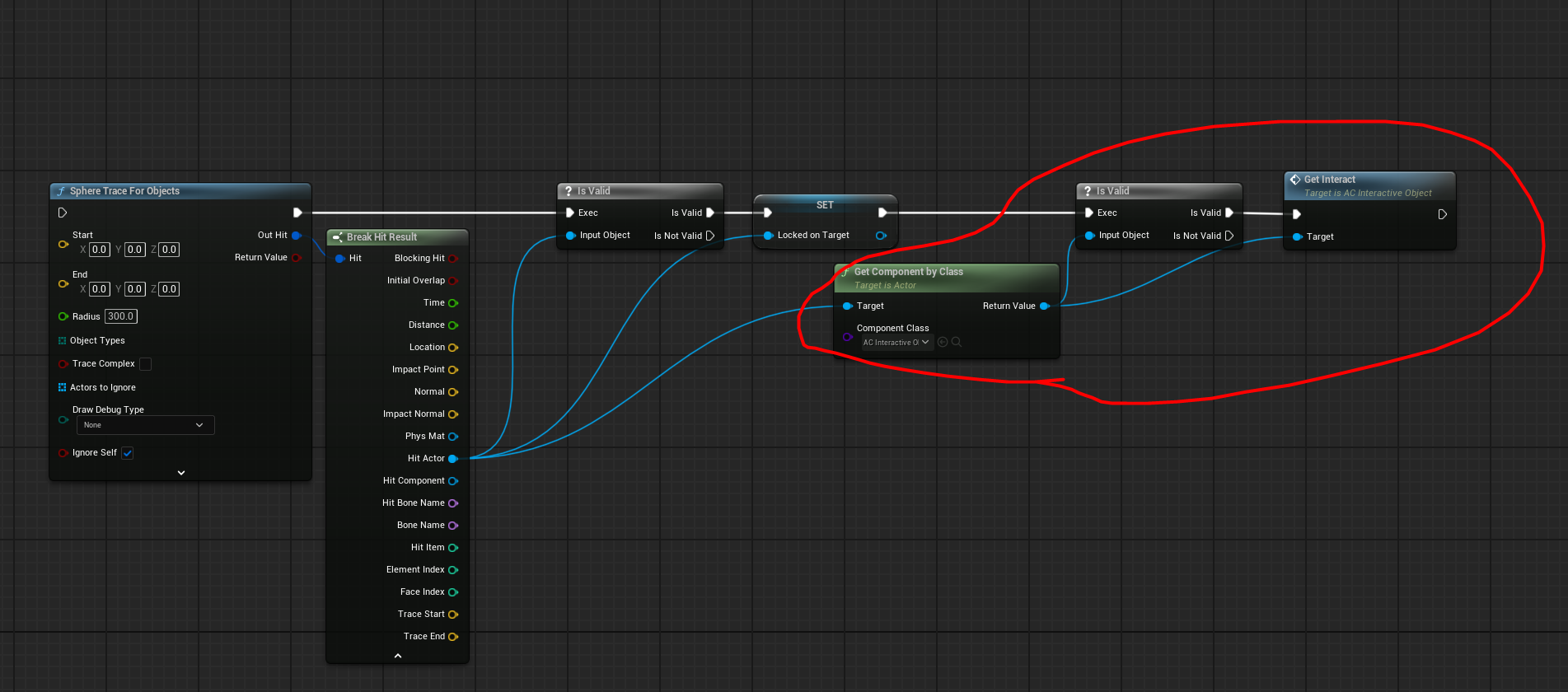 nova grotto
autumn pulsar
is it in the main blueprint?
nova grotto
autumn pulsar
is it in the main blueprint?
yes the characters bp
autumn pulsar
Do you know what actor components are?
nova grotto
autumn pulsar
Do you know what actor components are?
stuff like your movement component right?
autumn pulsar
similar
nova grotto
autumn pulsar
similar
how are they different
autumn pulsar
well an actor component can be kind of anything
It's basically another blueprint with functions and variables
That can be attached to actors so they gain that functionality
like a health system
nova grotto
autumn pulsar
well an actor component can be kind of anything
so id make a component to be locked onto instead?
autumn pulsar
I'd recommend reading into them and learning about them. They're not something you can learn in a day, and frankly I'm wanting to go to bed so I can't really walk you through it
 frail oar
How do I load a data asset directly from blueprint? the appropriate matthew wadstein tutorial doesn't seem to be working
autumn pulsar
nova grotto
so id make a component to be locked onto instead?
you're still targeting the actor
but the component handles the interaction
nova grotto
autumn pulsar
but the component handles the interaction
im not sure i follow
autumn pulsar
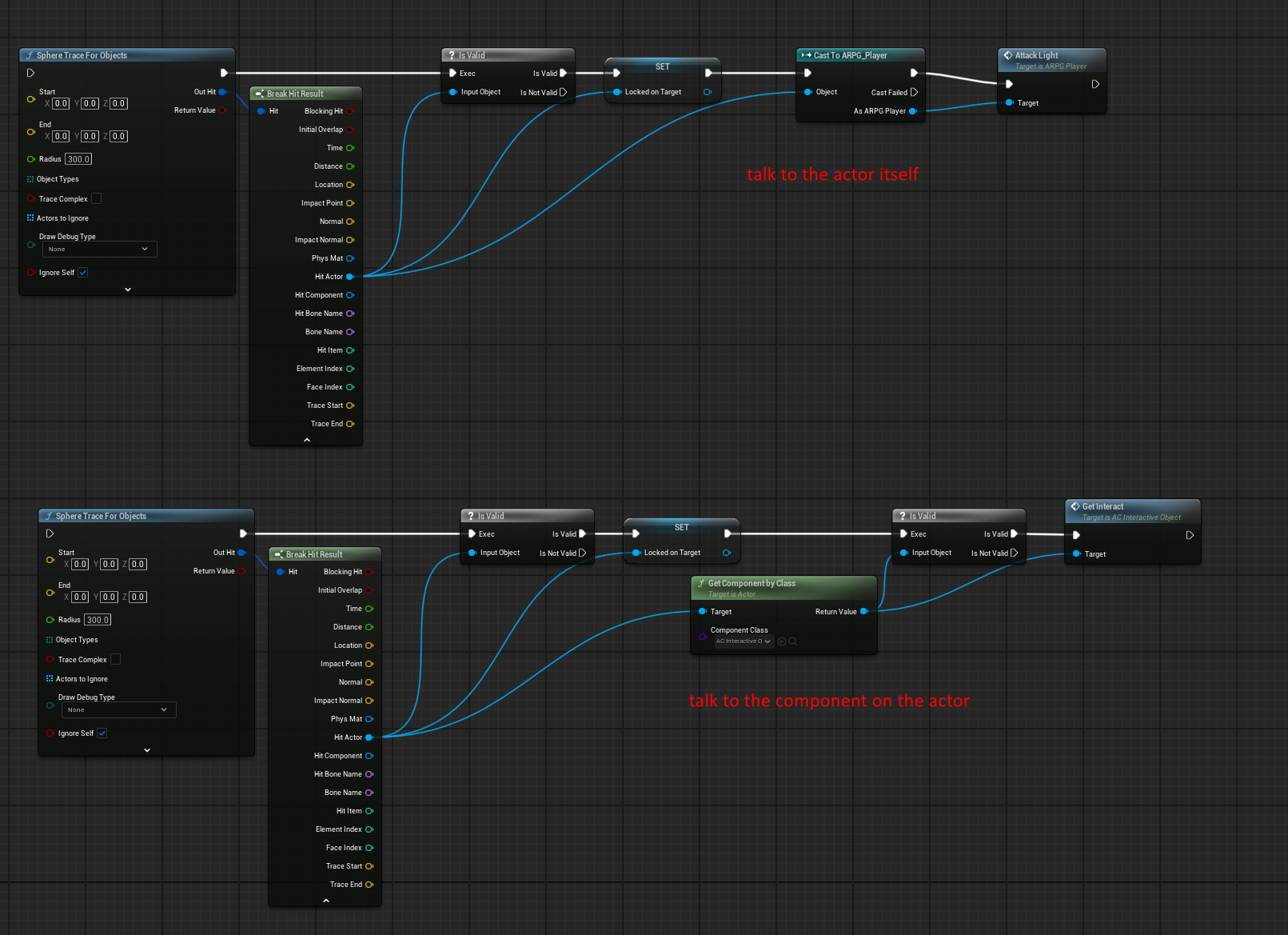 autumn pulsar
nova grotto
im not sure i follow
autumn pulsar
nova grotto
im not sure i follow
Think of it like a secretary for an important businessman
When you want to schedule an appointment with them, you go through their secretary and they actually book the appointment and handle all the calls
vs talking to them directly
But say you want to do damage to an actor. You don't want to write code for 20 actors
nova grotto
autumn pulsar
vs talking to them directly
ok i think i follow
autumn pulsar
so you write a component, and apply it to all of them
and bam they all have the same interactions
frosty heron
frail oar
How do I load a data asset directly from blueprint? the appropriate matthew wads...
wdym by loading a data asset?
just get a reference to the asset?
frail oar
i'm overthinking it probably
 nova grotto
autumn pulsar
so you write a component, and apply it to all of them
nova grotto
autumn pulsar
so you write a component, and apply it to all of them
this would not be a new variable right
frosty heron
Primary Asset ID is asset manager stuff
I never used it my self
but your question isn't specific to Data assets
autumn pulsar
nova grotto
this would not be a new variable right
You'd move what you're doing to an actor component
I think in your case, you probably want it to "just work" for now
so I'd use a cast
and talk to the actor directly
not you
frosty heron
@frail oar print out the assets, see if you get the DA to begin with,.
autumn pulsar
nova grotto
this would not be a new variable right
Do you know what a function is?
nova grotto
autumn pulsar
Do you know what a function is?
not really
im almost surprised how far ive gotten while barely knowing anything about code
blueprints really are amazing
autumn pulsar
That's something I'd add to your "to learn" list, but in this situation, you can probably just edit the variable directly
nova grotto
autumn pulsar
That's something I'd add to your "to learn" list, but in this situation, you can...
the variable of the locked on actor?
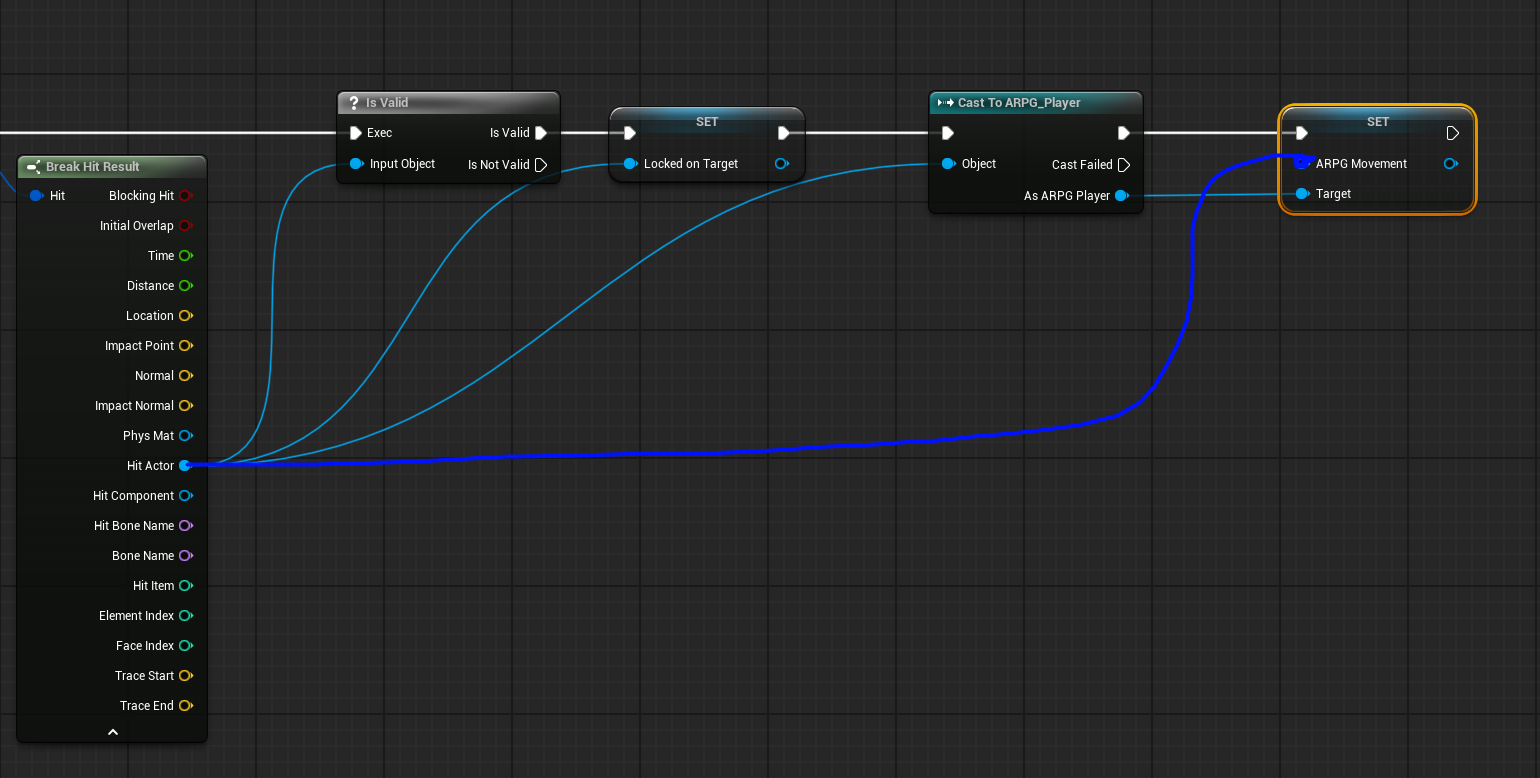 frail oar
frosty heron
<@252522586053804032> print out the assets, see if you get the DA to begin with,...
frail oar
frosty heron
<@252522586053804032> print out the assets, see if you get the DA to begin with,...
i do
frosty heron
frail oar
i do
show how you print it

 autumn pulsar
I would highly recommend looking up programming fundamentals, as while this is the easiest way to do it, it's not the best way and will likely cause bugs/ scaling issues
nova grotto
autumn pulsar
I would highly recommend looking up programming fundamentals, as while this is t...
will do
autumn pulsar
nova grotto
the variable of the locked on actor?
basically, cast to "playercharacter" or whatever you called your npc/player
then "As playercharacter" drag off that and type in "set locked on Target" and "Target Lock" and set those
then add a "get owner" node, and feed it into the "Locked on Target" node
nova grotto
autumn pulsar
basically, cast to "playercharacter" or whatever you called your npc/player
im using the default so this is it right

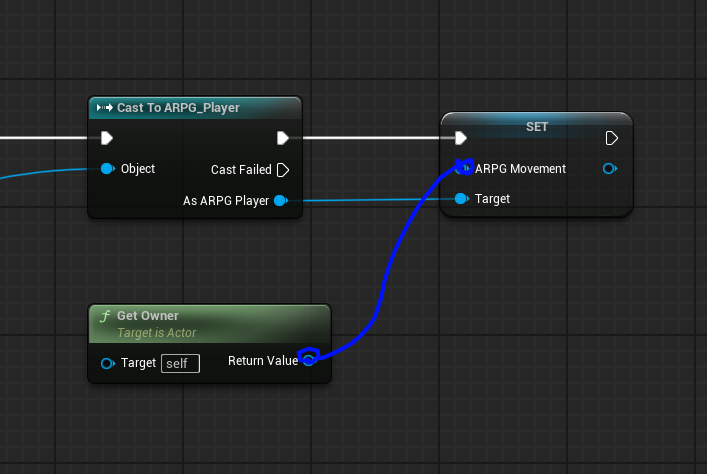 nova grotto
autumn pulsar
then append it to the end of your target lock function
nova grotto
autumn pulsar
then append it to the end of your target lock function
just like this
 frail oar
frosty heron
show how you print it
frail oar
frosty heron
show how you print it
Progress! This gets a valid object. but i still don't know how to get my asset type from it. casting doesn't appear to work
 frosty heron
frail oar
Progress! This gets a valid object. but i still don't know how to get my asset t...
frosty heron
frail oar
Progress! This gets a valid object. but i still don't know how to get my asset t...
you can get the object using Get Object. But yeah no luck on the cast on my end too.
nova grotto
autumn pulsar
the red one
i make a branch before the cast and set the bool as the condition?
frail oar
there's a Get Asset but not a Get Object
frosty heron
frail oar
there's a Get Asset but not a Get Object
it will return the Asset UObject
frail oar
that returns None, actually
autumn pulsar
nova grotto
i make a branch before the cast and set the bool as the condition?
don't need a branch
frail oar
it's not loaded?
nova grotto
autumn pulsar
don't need a branch
ok also i got an error what should my cast object be attatched to
frail oar
yea it's not loaded
autumn pulsar
nova grotto
i make a branch before the cast and set the bool as the condition?
drag off the cast node "as third person" again
autumn pulsar
nova grotto
ok also i got an error what should my cast object be attatched to
the end of the lock on function
then on your "break hit result" plug that into the the cast node
frosty heron
@frail oar you need to load it first
with async or w/e from the example I seen
btw casting should work
my data asset just didn't have the right specifier
autumn pulsar
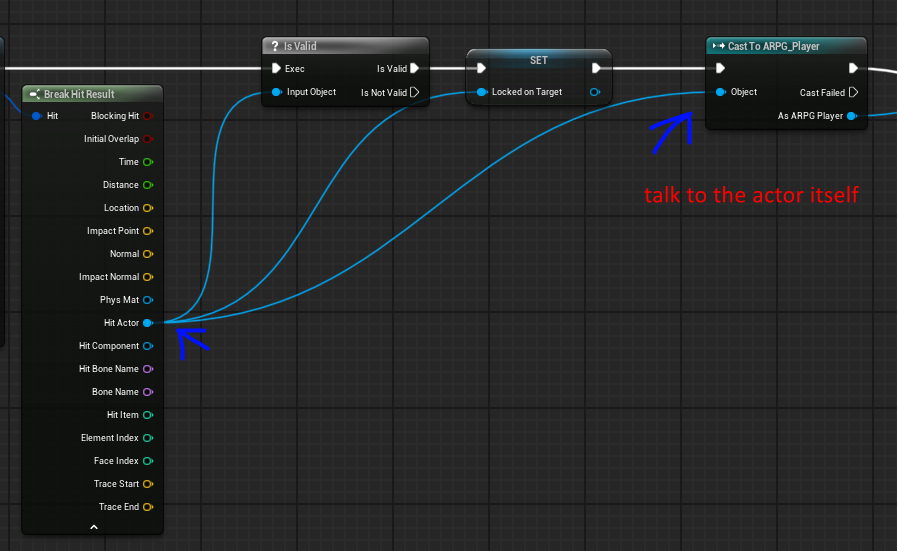 frosty heron
I will check on my end.
frail oar
does loading it require C++ or something? i don't see any blueprint functions that do it
frosty heron

Epic Games Developer
Information on Data Assets in Unreal Engine.
nova grotto
autumn pulsar
https://i.imgur.com/LLXMxSL.png
ok i have it setup and its all green but where was the extra target lock bool needed?
frosty heron
@frail oar This is Unreal example

loading by ID in blueprint.
I'm just tryign to figure out how to expose the DA to the cast in blueprint only.
autumn pulsar
nova grotto
ok i have it setup and its all green but where was the extra target lock bool ne...
at the very end
and you need to use the "as third person character"
otherwise you'll be editing the variable of yourself!
frail oar
oh i'm in a function so i don't have the async load nodes available
nova grotto
autumn pulsar
at the very end
oh wait are you saying i have to move where i have it set to now to after this
frosty heron
frail oar
oh i'm in a function so i don't have the async load nodes available
async is latent action, you can probably do a blocking load
Nvm, only Async load is available from the asset manager.
autumn pulsar
nova grotto
oh wait are you saying i have to move where i have it set to now to after this
don't move
nova grotto
ok
autumn pulsar
it'll be an additional one
nova grotto
 autumn pulsar
basically what you are doing with the "As Third person" You basically get the other character you hit with the targeting system, and accessing it's internals
autumn pulsar
nova grotto
wrong one, you need to drag off "As third person character and then create the node
frosty heron
@frail oar what is your data asset derived from?
nova grotto
autumn pulsar
wrong one, you need to drag off "As third person character and then create the n...
 frail oar
a C++ class
autumn pulsar
nova grotto
that's the one
click the check box, since you want to make sure it knows it's locked on the target
nova grotto
autumn pulsar
that's the one
 frosty heron
frail oar
a C++ class
frosty heron
frail oar
a C++ class
ok, make sure you add Blueprintable, BlueprintType as the access specifier in your UClass
autumn pulsar
you're using the wrong node
nova grotto
autumn pulsar
Don't use "Is locked on by"

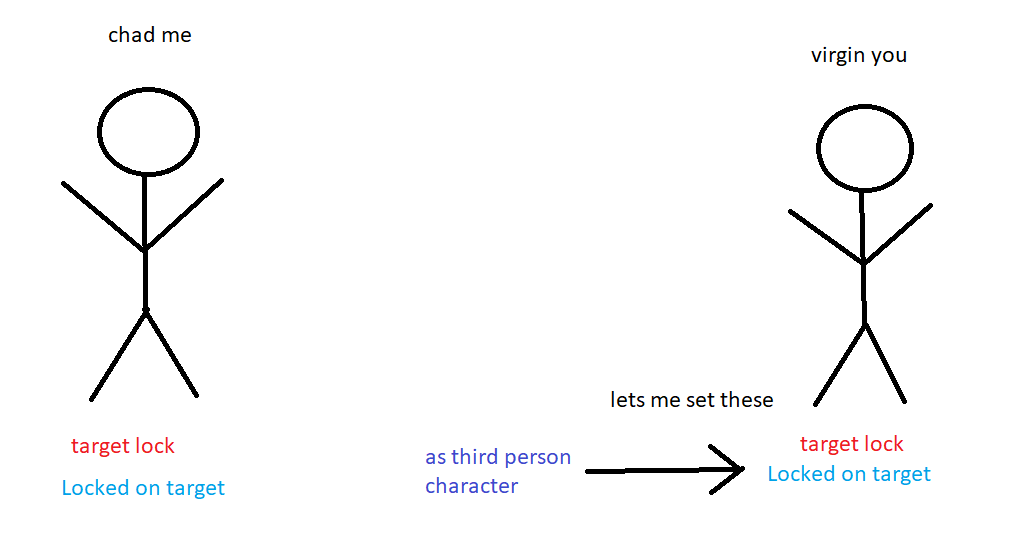 nova grotto
autumn pulsar
https://i.imgur.com/nl34ovk.png
nova grotto
autumn pulsar
https://i.imgur.com/nl34ovk.png
i love this lmao thank you so much
frail oar
it's still unloaded what on earth
frosty heron
@frail oar have you loaded it?
frail oar
three different ways
frosty heron
ok well I never worked with asset registry but I will look into it
frail oar
including a Load Asset Blocking node right in front of it
frosty heron
testing right now
frail oar
thank you brother
autumn pulsar
nova grotto
i love this lmao thank you so much
Basically the variables exist in both objects. But if you use "set" you're only setting the ones on yourself. So if you want to set them on the other guy, you can use a cast node.
nova grotto
autumn pulsar
Basically the variables exist in both objects. But if you use "set" you're only ...
so casting allows me to interact with blueprints of other things then right?
autumn pulsar
There are some downsides to cast, in that if you've got a different entity like a monster, the cast might not work if it's not built off the third person character
autumn pulsar
nova grotto
so casting allows me to interact with blueprints of other things then right?
it's one of the ways
nova grotto
autumn pulsar
There are some downsides to cast, in that if you've got a different entity like ...
im planning for everything to be based off of this one so im good there
 autumn pulsar
nova grotto
im planning for everything to be based off of this one so im good there
autumn pulsar
nova grotto
im planning for everything to be based off of this one so im good there
Gonna be real blunt, starting out, you're going to make a lot of hot trash and be baffled and confused. I wouldn't let that bog you down as that's just part of the learning process
nova grotto
autumn pulsar
Gonna be real blunt, starting out, you're going to make a lot of hot trash and b...
oh trust me i never thought getting into coding was gonna be easy or pretty but throwing myself into it was the best way for me to start learning
autumn pulsar
Personally, if you're really interested in approaching this seriously, I'd at least learn the basics of C++ as it teaches you a lot of programming fundamentals that blueprint has
as well as concepts
frosty heron
frail oar
<@1050954229902213150> this was it
Yeah the entire point of making the Data asset blueprint type and blueprintable is so we can cast the object
but you are not using the asset registry at this point
frail oar
baby steps
autumn pulsar
nova grotto
oh trust me i never thought getting into coding was gonna be easy or pretty but ...
Do realize it will likely take months if not more for you to get to a good place of confidence
so don't feel disheartened if it doesn't click right away
frail oar
wdym i do
autumn pulsar
 zealous moth
you mean you guys don't just code it once and it works on the fly???
zealous moth
you mean you guys don't just code it once and it works on the fly???
I don't have bugs, just more features
It's kind of funny how many ways we've come up with to abstract changing a variable
anyways, I sleep hope it works
frail oar
@frosty heron that'll do for now, gotta hit the sack. thanks for your help 🙂
autumn pulsar
frail oar
<@1050954229902213150> that'll do for now, gotta hit the sack. thanks for your h...
fellow bed enjoyer
frosty heron
frail oar
wdym i do
I mean the load asset blocking part. You are not loading it via asset manager.
but yeah, maybe a problem for another day.
frosty heron
To Load or Unload assets at will
I thought that's why you are using it.
personally I didn't use one my self cuz I am lazy.
frail oar
no i am forced to use it because i can't do instanced in a data table and so i can't edit stuff inline
otherwise i would keep using data tables
i don't have much art atm so loading times aren't an issue but if they become i can move things into async loading easy enough
autumn pulsar
just call it next gen and load everything into memory
frail oar
that's what i do right now haha
 surreal peak
The thing is, that's an Editor Level Tool. So you'd need an Editor Level Tool in UE.
At which point you'd basically want to build this into the existing Paper2D TileMap Editor.
And that's requiring Engine level knowledge and Slate knowledge.
The logic behind it is relatively simple. It works somewhat like the Wave Function Collapse that was mentioned to you.
Probably even exactly like that.
 digital glacier
how am i supposed to know what the object for this cast is?
 digital glacier
how* lol
frosty heron
Casting is just a type check
You grab a reference to an instance then you can check its type.
surreal peak
surreal peak
Probably even exactly like that.
But your Tilemap will most likely have an exact setup, where each possible option is just one.
And then all your code would do is check what is around the tile you want to place and then pick the most fitting one of the available ones.
Getting thati nformation into the tiles is a different story. Idk if that's easy extendable.
You'd need to paint that onto the tile to mark which part of it can connect to which other part.
digital glacier
frosty heron
You grab a reference to an instance then you can check its type.
can you try to elaborate what that means? ive been kinda just struggling at understanding what the object is for casts and i usually use this channel as my last resort
surreal peak
digital glacier
how am i supposed to know what the object for this cast is?
The problem here is that this is a simple thing for someone who understands Object Oriented Programming, and a wall for someone who doesn't.
As ColdSummer says, Casting is a Type Check, with the As Hand Proxy being the casted object IF it is of that type or a child of that type.
But if you struggle to even understand what Objects, Instances, Classes, Types, etc. are
Then this is not so straight forward
frosty heron
digital glacier
can you try to elaborate what that means? ive been kinda just struggling at unde...
Watch the blueprint communication video on YouTube.
 sacred canyon
surreal peak
The logic behind it is relatively simple. It works somewhat like the Wave Functi...
sacred canyon
surreal peak
The logic behind it is relatively simple. It works somewhat like the Wave Functi...
yeah and as I said I did make my own already but it’s such a mess that adding all the 1x1 variants wouldn’t be possible
surreal peak
Ah I didn't read that far. Only saw the video and the question.
digital glacier
frosty heron
Watch the blueprint communication video on YouTube.
there a link? just saw a 3 hour video when i first searched it up lol
surreal peak
It breaks my heart every time thinking of what a poor state 2D is in :/
frosty heron
digital glacier
there a link? just saw a 3 hour video when i first searched it up lol
Yeah that's probably the one. I thought it was like 2 hours.
sacred canyon
ended up with this alternative that just adds black gradients on top of one tiling texture (and also a top variant) https://cdn.discordapp.com/attachments/1010197797145940021/1325009178149785621/image.png?ex=677a3a75&is=6778e8f5&hm=87996614e2ab95ced3edef8f38729f422d156317c1910d95fa981b3b18905993&
 surreal peak
The video is pinned to this channel. @digital glacier
frosty heron
You won't get much help asking broad question like that. Every time I tried, it take hours of hand holding.
@digital glacier
digital glacier
will this deeply enhance my understanding of blueprints
surreal peak
Honestly
You should try to read up on OOP stuff, even if you won't want to use C++
Understanding what a Class, an Instances of that Class, a Cast to a different Type etc. is and does is really important
And it will make the Cast Node something super super simple
digital glacier
thanks 🙂
surreal peak
It's just shit for us to explain, as this is basically asking us to write down the basics of object oriented programming, which are already written down somewhere :P
digital glacier
the pinned contents in this channel would be helpful for a beginner like me?
surreal peak
digital glacier
the pinned contents in this channel would be helpful for a beginner like me?
Not all. Some might be advanced
fwiw, most of them are probably more advanced actually
frosty heron
Exi I got a question if you are still here
surreal peak
And if I'm not here, you don't?
frosty heron
I wouldn't bother you if you are staying for the tea 
 frosty heron
Do you predict hit react when using GAS?
Atm I have it played on PostAttritebuteChange with a gameplay effect.
surreal peak
sacred canyon
ended up with this alternative that just adds black gradients on top of one tili...
Doesn't look too bad though
surreal peak
Last time I worked with Weapons and GAS was in The Ascent
And there we predicted it via GameplayCues iirc
But only the visuals
frosty heron
Ahh
surreal peak
Never the Gameplay part of it
frosty heron
So don't have any root motion?
Play the root motion via code I guess?
As in don't couple it with the montage anim.
surreal peak
We had RootMotionSources for some Abilities, like a Jump with heavy impact that damages enemies.
But I don't think we had any for Hits
frosty heron
I see , I see
surreal peak
RootMotion would also count as Gameplay for me then, as it moves the Actor
Predicted Hit Effects were only the visuals and sounds
surreal peak
No worries
sacred canyon
surreal peak
Doesn't look too bad though
yeah it’s better than expected, I was able to overlap them by disabling depth test, it’s a bit of a slower process than drawing tiles but it works (and I can also rotate it which is nice)
 gentle urchin
Wish the tilesets worked better than they do
Found them very troublesome
And limiting
surreal peak
Paper2D could very well be labeled as experimental and alpha by todays standards
In almost all aspects. It's missing tons and tons of features and QoL stuff for existing features.
 vapid ingot
anyone with experince in smartpoly multiplayer survival? can it be used for single player? as his project formation is very good.why im asking is it has alot adn i also tried the gorka survival single player which is to the point and less things.
frosty heron
vapid ingot
anyone with experince in smartpoly multiplayer survival? can it be used for sing...
Yeah I had one of his survival turorial
It was soo horrible glad I dropped it.
vapid ingot
whos? smartpoly's?
frosty heron
The way he use interface gonna be very harmful to anyone watching it
Yes smart poly
Btw multiplayer can work for single player
But not vice versa
Single player just mean no lag
vapid ingot
i just started it a few days back and right now its for 5.4 ue, and from the start he added multiplayer func, on the server, was thinking i can make a single player first and then multiplayer.@frosty heron
frosty heron
vapid ingot
i just started it a few days back and right now its for 5.4 ue, and from the sta...
No, multiplayer architecture is not the same.
You can make mp game to single player but not vice versa
In many cases it just straight up redoing the game from scratch.
vapid ingot
i dont want to touch multiplayer, just single player.and later will want to replicate what is needed
frosty heron
And that's not how one make multiplayer game
You either make multiplayer game or you make single player game
This is something you decide at the start
Not something " I will just replicate what I need later "
vapid ingot
yes so far finished a mainmenu,pause system.lolz
vapid ingot
frosty heron
Not something " I will just replicate what I need later "
yes i hear you.
so i should go wityh the gorka survival then.thanks for the help@frosty heron
frosty heron
I don't like either one with passion
Your best source of multiplayer knowledge is pinned in #multiplayer
And the best video tutorial for me soo far is Stephen ulbardi when it comes to multiplayer
Often youtubers tricked you by showing the project that may seems to work because they test with 0 latency in editor.
vapid ingot
frosty heron
And the best video tutorial for me soo far is Stephen ulbardi when it comes to m...
i want to learn blueprints and c++, i forget things.lolzz.but isnt it easy to watch and make a game rather then learn from a tutorial on how to amke a game and later relize where to start and what to write?
frosty heron
vapid ingot
i want to learn blueprints and c++, i forget things.lolzz.but isnt it easy to wa...
Is their game even working? Has it been tested?
vapid ingot
frosty heron
And the best video tutorial for me soo far is Stephen ulbardi when it comes to m...
yes but dont want to touch multiplayer now just singleplayer, but smartpoly's approch with the data managment has caught my eye, thats why was asking
frosty heron
vapid ingot
i want to learn blueprints and c++, i forget things.lolzz.but isnt it easy to wa...
I also learn from looking at other people work and their articles.
Very rarely I can come with something decent my self.
But then you want to read from at least someone you think capable or have experience.
vapid ingot
frosty heron
But then you want to read from at least someone you think capable or have experi...
yes true that.
frosty heron
The thing is I used youtube my self in the past
And learn from those very youtubers
The ammount of unlearning I had to do was quiet painful
vapid ingot
but the problem is what we want is either spread or in pieces or in chunks, that is not good for the project.
frosty heron
I was told to just take what I need. You don't have to follow entire tutorial. Just understand what they are doing.
vapid ingot
frosty heron
I was told to just take what I need. You don't have to follow entire tutorial. J...
ya me doing this as well.
frosty heron
No one's gonna make a Picasso art when they first paint.
It's all a journey for us.
I am still not satisfied with my own current game.
vapid ingot
frosty heron
No one's gonna make a Picasso art when they first paint.
i understand ,the first game muist be a bad game.lolzz
gentle urchin
surreal peak
Paper2D could very well be labeled as experimental and alpha by todays standards
lukcy we got PaperZD huh
surreal peak
Well, kinda
The AnimBP stuff in normal UE is 100000 times better than what PaperZD offers
vapid ingot
frosty heron
I am still not satisfied with my own current game.
aint that true, i changed my main menu alot of time and still think its not good.lolzz
gentle urchin
surreal peak
The AnimBP stuff in normal UE is 100000 times better than what PaperZD offers
Yeah it still has some way to go, that's for sure
still i was able to setup common animBP's and such with what it offers 😄
felt a bit hacky, I'll admit, and the 'containters' with notifys and whatnot are somewhat limiting and strange to work with
I mean, I wouldnt say I'm proud of this setup but it worked xD
 gentle urchin
||(My excuse for this is very short timeframe putting up a vertical slice thing) ||
digital glacier
i just watched the full blueprint communications video
i feel like i cant be stopped.
 frank olive
For some reason my character is only going at a speed of 212 sideways but it goes the correct 300 vertically and diagonally


Using "Normalize 2D (Vector)" on the World Direction fixed it, in case any other beginner sees this
 lost hemlock
So, im still trying to make inventory_system and building_system communicate ☎️
But one speaks a slightly different language dialect than the other, so I need somehow to make an app, that translates both their accents/dialects/languages to the corresponding language to communicate effectively.
Here I have a function that acts kinda like a security guard at a party entrance that checks everyone's ID or to see if they have the right "requirements" to be let in to the party.
I replaced every single structure I could find with my with my own structs inside of this UI_EBS_Building_Menu


But mine didn't haveBuildingRequirements 🏗️, DataTable📊. My structs are kinda different. FItemStruct doesn't have this DataTable📊 --> BuildingRequirements 🏗️

Now I have an empty handler and I think it's wrong that I am using two different structs.

But this blueprint was already using 2 different structs before
So at the moment I have two structs of the same Inventory <--

 worthy belfry
EIDT:
FIXED
Hello, everyone, good Morning! I believe I ran into a Unreal bug (maybe??) and want to know if anyone else ever had this issue
Version: 5.3.2-29314046+++UE5+Release-5.3
Platform: Windows 11 (23H2) [10.0.22631.4602] (x86_64)
Summary:
Test_parent: inherits from actor
Test_child: inherits from Test_parent
ST_Test is a Structure that has Test_parent class reference as variable (note: Clas ref, not actor intance ref)
Data Table created from ST_Test
Can´t add neither test_parent nor TestChild as the value of the variable on the Data Table
**REASON: Directory folder for the classes had special characters that are not allowed on folder naming (such as "()" ), therefore became invalid and Unreal could not track
Solution: remove any invalid special character on Folders. **
I realized the folder had a missclicked "(" that broke the index
Whenever I click on select , it just won´t work .
It is weird as I already have this very same system applied on my project with a different class inheritance, but while doing the same (and I have done it multiple times before) I can´t select the class I want this time
I am using Data Table, and I use to simple add a parent class references as Struct variable in order to determine which child class of said actor class to spawn (Ex. BP_Upgrade as parent as variable on the structure, but BP_Upgrade_HealthUp(Inherits from BP_Upgrade) as the value on the data table row.
I have compiled, and also reopened the project, with no effects.
anyone has seem this before or I am missing something here? cheers!


 jovial steeple
worthy belfry
EIDT:
FIXED
Hello, everyone, good Morning! I believe I ran into a Unreal bu...
jovial steeple
worthy belfry
EIDT:
FIXED
Hello, everyone, good Morning! I believe I ran into a Unreal bu...
Your not doing anything wrong per say, this happens quite a lot with unreal where things just get messed up and don't work.
I was litteraly just talking to someone a few mins ago with the same issue.
Ussualy have to start remaking classes when this happens.
They just get messed up.
I dont have a good answer, just that it looks like your experience unreal being cursed, as it does sometimes.
worthy belfry
jovial steeple
Your not doing anything wrong per say, this happens quite a lot with unreal wher...
Yeah, I have done this so many times before, it smells like UE being weird :/
worthy belfry
jovial steeple
They just get messed up.
Yep, Thats why I created this test inheritance, just to end up in the same issue
then I noticed it was not my classes (they were already pretty simple tho)
worthy belfry
jovial steeple
I dont have a good answer, just that it looks like your experience unreal being ...
I see, thank you tho 🙏
 dark drum
lost hemlock
So, im still trying to make inventory_system and building_system communicate ☎️ ...
dark drum
lost hemlock
So, im still trying to make inventory_system and building_system communicate ☎️ ...
Personally, I would build both systems to speak the same language. (as you put it) Not doing so is going to be buggy as hell and become a pain to change/implement features in the future. With you're current path, you'll end up with tons of duplicate data.
You might benefit from learning about uobjects and data assets. Learning how to use them can really help clean this type of stuff up and streamline a lot of the logic.
jovial steeple
Or just start from scratch.
worthy belfry
jovial steeple
Or just start from scratch.
yeah, that would not be possible as it is a commercial project💀 but I can work that around with enums, but it would be not as scalable as I want it to be
but it would work for now, if I can´t fix it will have it done using switch case 💀
jovial steeple
Most of those issues just end up fixing themselfs over time for me 💀. Essp cause I ussualy keep my unreal version updated.
lost hemlock
dark drum
Personally, I would build both systems to speak the same language. (as you put i...
isn't that C++?
jovial steeple
lost hemlock
isn't that C++?
You have to setup data assets in cpp, its super easy tho, you would be able to figure it out.
Uobjects arnt specificly a cpp thing.
lost hemlock
jovial steeple
Uobjects arnt specificly a cpp thing.
do you mean smart objects?

This tutorial we will be taking a closer look at how smart objects work and are set up to get a better understanding in Unreal engine 5.
UE5 beginner tutorials: https://www.youtube.com/playlist?list=PLNBX4kIrA68llqDOuz57FM7PadJTWwR66
Join the Discord server here: https://discord.gg/zBeebU7uv3
Support the work of LeafBranchGames on Patreon her...
like this for example?
jovial steeple
lost hemlock
like this for example?
No, UObject is the base class type for most things in Unreal

The Parent class of Actor for example, is UObject
 trim matrix
jovial steeple
No, UObject is the base class type for most things in Unreal
trim matrix
jovial steeple
No, UObject is the base class type for most things in Unreal
What I just read in one book said its the all classes' parent class
jovial steeple
trim matrix
What I just read in one book said its the all classes' parent class
Thats just a simplification that is a good way to think of it yea.
In blueprint yes.
In cpp, you use a ton of classes that arnt UObjects
trim matrix
jovial steeple
In blueprint yes.
yeah, I don't work with cpp maybe there is another things
trim matrix
jovial steeple
In cpp, you use a ton of classes that arnt UObjects
is those classes are in blueprint also or no?
jovial steeple
No, those are just for CPP
trim matrix
jovial steeple
No, those are just for CPP
oh man, why unrealllll
jovial steeple
The main reason to use a UObject is to get the editor to even know about it
 toxic quartz
Hello, in an application I developed in Unreal, any external joystick can be connected—this could be a gamepad, flight controller, or any other device. However, the player needs to configure the device within the application. Keymapping with joystick or gamepad assignment isn't working. Can you help?
jovial steeple
There can be classes outside of the editors knowledge doign stuff to. Just normal classes, that arnt UObjects
dark drum
lost hemlock
isn't that C++?
As other's have said, you can create BP classes from uObjects. It's located in the all classes section. It's the barest type of class you can make meaning they can be pretty light weight. I use them for a lot of things.
trim matrix
jovial steeple
There can be classes outside of the editors knowledge doign stuff to. Just norma...
OKay bro, I get it all the way through of it I guess, thx for the infomation
jovial steeple
Yea I make Uobjects in blueprint all the time.
dark drum
I've done an inventory system tutorial using uobjects as well as a few tutorials showing how you can use them to create reusuable logic.
jovial steeple
Great way to contain reuseable functionality that isnt really tied to an actor.
Yea
I honestly dont really use components to much, I just make UObjects for stuff.
No reason to make inventory component, when can make inventory object.
dark drum
Data assets are ubojects but single instance ones that are pre construct by the editor.
frosty heron
In what world inventory is not a component though
the items in the inventory component can be represented as UObjects
but you still want to use actor component as a container for your items
jovial steeple
When I have a game with multiple characters, each needing there own inventory. These characters arnt spawned in the world. They are just in the backburner of my party system.
So many examples where inventory does need to be tied to actors
Not that you couldnt make a master inventory component, on your player controller or something, that contains multiple inventorys or something
frosty heron
I will still have inventory component in the player state if that's the case
jovial steeple
But theres just no reason why a array of items needs to be tied to a actor.
Its not nessicary
It doesnt need to be tied to anything tbh
Uobjects helps with that
dark drum
jovial steeple
But theres just no reason why a array of items needs to be tied to a actor.
That would depend on the game but in most cases it can help define ownership. If you're not using a component you just end up creating something else that functions as a component so you might as well just use a component.
jovial steeple
Ofc this is all context sensitive to personal preference and how your game works.
I typicly just use an interface function to get the inventory if I really need an easy way to get an actors inventory.
Although my current project actually uses an interface to get the EntityDataObject. This is a uobject which contains an entitys Inventory, Stats, all the backend stuff.
You can then just assign any entity data to any actor and it will work.
Actor just reads from that entity data.
frosty heron
jovial steeple
You can then just assign any entity data to any actor and it will work.
so in other word, an actor component 0o?
jovial steeple
I can fully operate on all of this regardless of if the actor exists or not tho.
I can also swap the entity data at runtime easily
worthy belfry
worthy belfry
EIDT:
FIXED
Hello, everyone, good Morning! I believe I ran into a Unreal bu...
@jovial steeple Fixed! I realized one of the folder of the classes directiory had an invalid "(" that broke the indexation, so unreal could not locate the classes
frosty heron
you can use player state to store your info if you the characters you control don't always exist in the world.
jovial steeple
I have actors which swap between representing different entity's in the middle of combat.
worthy belfry
Would be lovely if Unreal could point out incorrectly named folders
dark drum
AI controllers can have player states as well, as an FYI.
jovial steeple
worthy belfry
<@1277781732036317292> Fixed! I realized one of the folder of the classes dire...
😂
wow
worthy belfry
jovial steeple
wow
yep I tried to create a new classes from the dat table and set it on Content folder and it worked, So I tracked all folders and realized a naming error

frosty heron
worthy belfry
EIDT:
FIXED
Hello, everyone, good Morning! I believe I ran into a Unreal bu...
You might want to apply that to any naming
using special characters is like playing with a mine
worthy belfry
frosty heron
You might want to apply that to any naming
oh, sure, we don´t use them XD
it was probably a misclick
frosty heron
I won't even add space on my blueprint event
jovial steeple
Yea no special characters
frosty heron
nvm, thought I am dealing with maps... turns out I am just dealing with array.
was gonna ask if adding a key value pair will replace the value.
it probably will 🤔
frosty heron
That sucks, I want a map that contains an ID and an array of actors
wouldn't be much of a help if it replace the whole array
jovial steeple
Yea
frank olive
So for some infuriating reason the animation on my blend space preview and the actual animations show when I run the game, I have no clue what to do about it at this point
As you can see here when the X is 1 and Y is 0 ingame it displays no animation, it's just sliding forward and yet when I check the blendspace and preview it with the exact same values there's an animation there
frosty heron
frank olive
As you can see here when the X is 1 and Y is 0 ingame it displays no animation, ...
well, are you actually playing the blend space?
you can preview the instance in the anim bp during play in editor
observe if the blend space is playing
frank olive
frosty heron
observe if the blend space is playing
How can I do that?
frosty heron
frank olive
How can I do that?
open your anim blueprint, on the top region when you play in editor, you can select the instance to observe
frank olive
Yeah it's playing it
frank olive
This is how I'm getting the X and Y values

which is running off the Event BlueprintUpdateAnimation in APB_Manny Event graph
 wide beacon
Hello, I'm trying to create a plank that is picked up in one environment and then when you overlap with a collision it shows the plank in that in the other environment to create a bridge. I've been trying to do this for three days now. i didn't think it would be complicated but i just cant get it to work, my project is due very soon and its real stressing me out, could i please have some assistance from someone?
frank olive
frosty heron
and maybe just take another video
I am also getting this error, even though I don't know how that could be possible

 frosty heron
frank olive
I am also getting this error, even though I don't know how that could be possibl...
frosty heron
frank olive
I am also getting this error, even though I don't know how that could be possibl...
I don't know about that error but you are not showing enough info
did you use blend per bone to filter between your blend space and the aiming pose?
frank olive
frosty heron
I don't know about that error but you are not showing enough info
What do I need to show? Also I don't think so, this is the blend space

if you want I can stream it and show you anything you need to see if that's easier
frank olive
okay
frosty heron
frank olive
okay
so when you are moving your character seems to use orient to movement
when you are aiming you probably want it to ticked off
might want to ask in #animation
frank olive
alright
wide beacon
Hello, I'm trying to create a plank that is picked up in one environment and then when you overlap with a collision it shows the plank in that in the other environment to create a bridge. I've been trying to do this for three days now. i didn't think it would be complicated but i just cant get it to work, my project is due very soon and its real stressing me out, could i please have some assistance from someone?


 jade inlet
Hi everyone!
I made some math operations and would need some help!
As far as I can tell everything should work as expected, but unfortunately it doesn't... at least not coherently.
I want to define the sides of a rectangle area by only typing in the area size. Therefore I created three variables (PropertySize, PropertySizeSideA and PropertySizeSideB). Now the PropertySize value should be devided by a random integer in a range from a minimum of 1 and a maximum of PropertySize's value. The result of the division then should define PropertySizeSideA and the randomly chosen value should define PropertySizeSideB.
Example: As you can see in the picture, the PropertySize is set to 4 and the random value is 3, so usually the value of PropertySizeSideA should be 1, but it's 1,333333 instead.
I would like to understand what I'm missing and appreciate any help!

 hoary hedge
can anyone please help me with "healing overtime/continous healing" ?? I've this actor which will heal the player but it's not working if I'm standing on it
(i'm totally new to blueprints)
make sure to ping me or reply to this message

 marble tusk
jade inlet
Hi everyone!
I made some math operations and would need some help!
As far as I...
marble tusk
jade inlet
Hi everyone!
I made some math operations and would need some help!
As far as I...
4 divided by 3 is 1.333333.
Also, you're likely to get two different random numbers with that setup. Pure nodes are called for each time they're needed, and in this case it's needed for two set nodes. You likely want to be setting B first, then using B in the division instead of getting another random number.
jade inlet
marble tusk
4 divided by 3 is 1.333333.
Also, you're likely to get two different random numb...
Omg, you're right! I'm out of brain 😅 🙈
I mixed this up with another try where B was 4 and A not 1.
Out of ten attempts, at least half of the results were correct, but I will definitely try your tip.
Thanks for your help!
Now it works! 😍 🥳
autumn pulsar
hoary hedge
can anyone please help me with "healing overtime/continous healing" ?? I've this...
You're going to need to add some kind of time step
Currently you're just healing every time you overlap
 crude helm
Hey there, not sure which channel to ask about control rig
Is there a way to get a control by name?
We can get the control transform by name, but I need the actual item

 past compass
is there no reverse for each loop w break ?
crude helm
past compass
is there no reverse for each loop w break ?
annoyingly no, only reverse foreach loop
either you copy the reverse foreach loop macro and make it handle the break
or you simulate one
 crude helm
Hey there, not sure which channel to ask about control rig
Is there a way to get...
crude helm
crude helm
Hey there, not sure which channel to ask about control rig
Is there a way to get...
Found it!
It is called just Item instead of Get Item or Get Control 😖
 hoary hedge
autumn pulsar
You're going to need to add some kind of time step
hoary hedge
autumn pulsar
You're going to need to add some kind of time step
okay something time event tick ??
 split crystal
hi, HNY25 y'all, per chance, anybody grok blueprints inheritance with interfaces? the parent blueprint implements some interfaces. they are generally getters for exposed-at-spawn properties, like attack speed. i hoped that subclass blueprints would Just Work and i thought it did but right now i am getting return values of zero when the behavior task to attack casts to the interface and calls the GetAttackSpeed interface.
trim matrix
split crystal
hi, HNY25 y'all, per chance, anybody grok blueprints inheritance with interfaces...
if you create vhild class of your main, and if you don't change main things in your child actor it just works as parent
past compass
crude helm
annoyingly no, only reverse foreach loop
either you copy the reverse foreach loo...
ahh nice that makes
sense
gentle urchin
past compass
is there no reverse for each loop w break ?
Just put it in a function and call return mid loop
 ancient dome
Does anybody know if I can user editor utility widgets or something to autocareate these float parameters, Say I just give it a list of names and it creates the nodes for me

as well, I pretty much have to "promote" all of these float inputs to a parameter

it's inside mutable

so unfortunately, they didn't think of anything like that
alternatively, just need to know how to generate blueprint nodes to copypaste in lol

then I could write my own short python script or something
but they seem to have unique IDs, I guess maybe the wrong channel for it, gonna move elsewhere
past compass
gentle urchin
Just put it in a function and call return mid loop
would the remaining indices still loop tho ?
feel like i'd have to set a local bool, whcih i could do
autumn pulsar
hoary hedge
okay something time event tick ??
Tick is fine, just make sure you disable it when you’re not using it
wide beacon
does anyone klnow why i cant walk across this?
dark drum
wide beacon
does anyone klnow why i cant walk across this?
Probably down to collision. Show the collision in the editor to see if anythings there.
gentle urchin
past compass
would the remaining indices still loop tho ?
No they wouldnt
No neee for local bool, just branch out when donen
wide beacon
dark drum
Probably down to collision. Show the collision in the editor to see if anythings...
 ancient dome
wide beacon
ancient dome
wide beacon
pretty sure he meant to use the collision view in the editor
so u can visually see the collision
wide beacon
ancient dome
pretty sure he meant to use the collision view in the editor
oh, how do you do that
ancient dome

think when u do play in editor there is like a command or something? don't remember
surely somebody else can fill in
wide beacon
thank you
nova grotto
autumn pulsar
Basically the variables exist in both objects. But if you use "set" you're only ...
sorry for the ping but i think theres an issue with the setup somewhere i put this in the event tick to test if its working and the other actor isnt turning with to face me

 grave relic
Hey im looking for some logic help with a pokemon style combat. So I have this:
A battle controller, this controller tracks the player unit and the npc unit. It can receive the moves that the unit wants to use. And determine what units move goes first.
A enemy and player unit, these are spawned in and have variables such as stats and models. These are spawned in and have a connection to the battle controller.
What I need help with is this. How can I cleanly say that if the player units speed is faster, then you do your action. The action is an event, and then after that event it sends a "ActionCompletedDispatcher" and the battle controller tells the NPC unit to do it moves. Or if the NPC is faster the other way around. Like how can this logic actually look? A switch? A bool? Im stuck on this. 🙂
nova grotto
nova grotto
sorry for the ping but i think theres an issue with the setup somewhere i put th...
this was the setup
 autumn pulsar
Check the logic flow I guess
Also watch values
Make sure expected values show up
autumn pulsar
nova grotto
this was the setup
If you right click on an output, you’ll get the ability to “watch value”
Then if you play, you can see the logic flow in real time
split crystal
trim matrix
if you create vhild class of your main, and if you don't change main things in y...
thanks for the sanity check!
dark drum
grave relic
Hey im looking for some logic help with a pokemon style combat. So I have this:
...
You'd most likely benefit from having a combat manager that keeps track of the game. (You could probally just use the game mode) It would then be the manager that states who should go first. When the player or NPC finishes there move, they let the manager know so it can decide what happens next.
 maiden wadi
Also don't think in Player versus NPC. You may need NPC vs NPC battles for some reason too. It would be best to keep the logic generic as a battle participant(player or ai) until you have to deal with that player's turn. Speed is likely dictated by the pokemon or whatever is in the field and both ai and player have this. So that needs to stay generic.
grave relic
dark drum
You'd most likely benefit from having a combat manager that keeps track of the g...
This is the intention for the battle controller, it currently keeps track of this 🙂 But I cant envision the current logic for the exection I listen :/
grave relic
maiden wadi
Also don't think in Player versus NPC. You may need NPC vs NPC battles for some ...
Yeah for sure, but this will always be player vs an NPC 😄 This logic exists in the Units, there is a base unit that is generic for both NPCs and player controlled units. But I am currently struggeling with envisiong the logic for the order of execution when it comes to turnbased combat :/
gentle urchin
Battlemanager registers partisipants and their units
Dispatched units speed is compared, faster one begins the turn
This is controlled from the manager
Each action has a speed assosiated with it
Quick attack > attack
Use Item > attack
 round marten
anyone know how i could pull off a rotation system like this? star is the control rotation, square is the actor, the sphere is the square's limited rotation range
gentle urchin
Basically just two rotators
Where one follows the other with a +/- x degrees of leniancy
 round marten
gentle urchin
Where one follows the other with a +/- x degrees of leniancy
round marten
gentle urchin
Where one follows the other with a +/- x degrees of leniancy
apparently youre speaking the language of gods cause i don't understand fully
i got two rotators yes, the actor and the control
how can the actor follow the control rotation with an offset
maiden wadi
You have two rotators. When you change the rotation of either you clamp the top one to an angle of the top one.
 daring spruce
Hi Unreal community,
I'm working on my 1st title called Infernal, and I'd like to make the enemy able to walk on both ground and walls.
for exemple: let's say the enemy is running towards the player and he gets shot instead of completing the chase he jumps on the wall and starts running on it as a way throw off the player's crosshair
think about it as having a normal navmesh on the ground, a vertical one on the walls and a navlink in between so the ai could alternate between both. the only problem is there is no way I know of to have vertical navmesh in unreal.
can y'all please suggest ways to walk around this. thanks in advance.
peace<3
maiden wadi
Initially speaking there's no way to have a navmesh on walls. Not without building your own solution or finding a plugin.
gentle urchin
Does it really need a navmesh tho
daring spruce
gentle urchin
Does it really need a navmesh tho
how so
daring spruce
you mean by keeping the actor on the ground and moving the mesh??
daring spruce
yes
but you don't have to set tick enabled to false if you're destroying the actor
maiden wadi
In general, yes. But need more context on your issue, and how you're debugging to test this to understand the issue.
daring spruce
gentle urchin
By letting the actor "fly" along a predefined wallpath aka spline or similar
I thought about that initially but it meant I had to go through the whole map and that would create the same scenario each time you're visiting the area + I'm lazy when it comes to repetitive tasks
😶 😶 😶
maiden wadi
In game is PIE, or a cooked/standalone game?
gentle urchin
daring spruce
I thought about that initially but it meant I had to go through the whole map an...
Plugin it is then !
And all the finnicky bugs with invalid paths
daring spruce
do you know of one I saw one called Dynamic Surface Navigation but I'm still studying and all of my money is spent on that😭 😂 😂
daring spruce
gentle urchin
Plugin it is then !
oh and another one was called spider navigation that didn't work exactly as intended but I think I have to use it anyway
gentle urchin
GitHub
3D navmesh generation and pathfinding plugin for UnrealEngine - midgen/uesvon
MIT, 5.3 🙂
daring spruce
gentle urchin
https://github.com/midgen/uesvon
thank you I'll look more into it<3
 fierce scaffold
how can i activate and deactivate a niagara system when my actor is rotating ?
as in the rotation engines system of a space shuttle.
 odd widget
fierce scaffold
how can i activate and deactivate a niagara system when my actor is rotating ?
...
odd widget
fierce scaffold
how can i activate and deactivate a niagara system when my actor is rotating ?
...
do you have a rotation command(e.g when the left and right buttons are pressed)
if so you could simply add a deactivate while those are active and activbate again once theyre completed
fierce scaffold
no. i have a system where the ship goes in the direction of the ministick.
i have a partial solution with a rotation variable and a cached rotation variable, and i compare them and triger one side or the other if superior or inferior to zero
evaluated tick to tick
 fallow sigil
I am working on a UE 5.5.1 game that utilizes level streaming. There is a problem of levels being stuck inside of some sort of loading limbo. This occurs with multiple streamed in levels as well, not just this one. The ones handled via level streaming volumes are doing this, it works fine if they are set to Always Loaded. All levels work fine if the editor starts off within the persistent level, transitioning to the persistent level seems to be the most reliable way to cause it to occur. Any advice on how to fix the problem? Nothing gets logged to the console either upon the loading starting
 zealous moth
gentle urchin
https://github.com/midgen/uesvon
zealous moth
gentle urchin
https://github.com/midgen/uesvon
What's that?
gentle urchin
zealous moth
What's that?
3d navigation volume and pathfinding
 odd kiln
Hi all
Can I get the position of a "Montage Notify" ?
I want to play my "Montage" at a specific position : a montage notify
I guess I found it.. I have to create a "New Montage Section"
maiden wadi
fallow sigil
I am working on a UE 5.5.1 game that utilizes level streaming. There is a proble...
Hard to say without a reproducible project for it. Is this something that can be recreated easy in a blank project?
fallow sigil
maiden wadi
Hard to say without a reproducible project for it. Is this something that can be...
Haven’t attempted it yet. Just found out blocking load makes it load like normal
maiden wadi
fallow sigil
Haven’t attempted it yet. Just found out blocking load makes it load like normal
Is there a lot of content in them? Huge textures and such? Bunch of stuff that needs loaded maybe? Wondering if it's just taking forever on the async load.
fallow sigil
maiden wadi
Is there a lot of content in them? Huge textures and such? Bunch of stuff that n...
the level I attached in the image just contains GoodSky alongside a directional light
it varies between them content size wise, it isnt having problems when playing directly in the level is what confuses me about it
 sharp void
How can I reset a CVAR to the config value at runtime?
past compass
gentle urchin
No they wouldnt
hmm interesting i just now seeing, but i ended up doing this, which worked fine

 craggy flicker
is there a way to have like a "calculated column" for data tables? For example, I have a column "Cost per consumption" that'll be based off the total unit cost and total units. Is there a way I can calculate this or do I have to do that in the items blueprint
 dawn gazelle
craggy flicker
is there a way to have like a "calculated column" for data tables? For example, ...
dawn gazelle
craggy flicker
is there a way to have like a "calculated column" for data tables? For example, ...
No. Data Tables contain static data of the defined structure. There is no means to display a column with a calculated value based on values entered within the row.
craggy flicker
Okay so
I decided to work with a editor utility blueprint
Then have two tables
And a third item table that’ll use attributes from the two tables
The third table will be generated at run time
 brittle oxide
What is the best way to slow down the speed of an OnComponentBrginOverlap? Do I just use a timer to activate it every half second on loop?
 mental trellis
"slow down the speed"?
lost hemlock
as soon as i start walking this creates a million walking sounds playing at the same time.

yet I cant do smth like this connected to "Cancelled" <---- and have these sounds stopping when I stop making character movement inputs WASD
 dawn gazelle
brittle oxide
What is the best way to slow down the speed of an OnComponentBrginOverlap? Do I ...
dawn gazelle
brittle oxide
What is the best way to slow down the speed of an OnComponentBrginOverlap? Do I ...
Overlap events happen when the overlap happens. There is no speed involved.
dawn gazelle
lost hemlock
as soon as i start walking this creates a million walking sounds playing at the ...
This happen because your movement input trigger is likely triggering at your frame rate, roughly 60 times per second. It's not a great place to put a sound event.
A lot of people use notifies with their animations to trigger the sound of the footsteps so that it synchronizes with the actual motion that happens on screen.
 wet ridge
i have a super weird issue that i cannot pin down the cause of. UE5, v5.5.1
i'm making a simple main menu. the widget blueprint has a blueprint interface implemented, and i am sending the message event from my player controller. whenever i try to use the blueprint interface, the UI returns an "access none" error for every part of the UI i am trying to change. however, that only happens when trying to use the blueprint interface. if i set the entire thing up with a dispatcher, it works just fine. if i do events inside the widget itself, no issues either. any idea why BPIs would be causing this issue?
dawn gazelle
wet ridge
i have a super weird issue that i cannot pin down the cause of. UE5, v5.5.1
i'm...
Accessed None errors indicate you're attempting to utilize an invalid reference, which usually wouldn't even occur with interfaces as interface calls usually don't care if the reference is valid or not - if it is valid then it'll call the interface on the target object, if it's not valid, no warning or errors are usually triggered but nothing happens.
Can you show the full details of the error message, and perhaps provide a screenshot of the part of your code where the error is coming in?
wet ridge
you're misunderstanding a little about the issue, i can show the screenshot, yeah
please hold as i recreate it
lost hemlock
dawn gazelle
A lot of people use notifies with their animations to trigger the sound of the f...
yeah but those sounds are longer than 1 second, they could be around 1 minute long for example
dawn gazelle
lost hemlock
yeah but those sounds are longer than 1 second, they could be around 1 minute lo...
You'd still be triggering the creation of a sound object every frame. Probably not what you intend to do.
wet ridge
okay, here are two snips to show what i am talking about.
the first image is a super simple button press that calls the BPI
the second image is the widget blueprint. when i hit X, it works. when i do the confirm action, it doesn't work and i get an access none error for the smart border.

 lost hemlock
dawn gazelle
You'd still be triggering the creation of a sound object every frame. Probably ...
lost hemlock
dawn gazelle
You'd still be triggering the creation of a sound object every frame. Probably ...
yes but why can't i play and stop and play and stop?
maybe not necessarily stop
but mute
 dawn gazelle
lost hemlock
yes but why can't i play and stop and play and stop?
dawn gazelle
lost hemlock
yes but why can't i play and stop and play and stop?
The "Triggered" fires every single frame.
Your "Spawn Sound 2D" node is currently triggering every single frame meaning it's creating a new sound object every single frame and playing it.
dawn gazelle
wet ridge
okay, here are two snips to show what i am talking about.
the first image is a ...
You are setting UIRef somewhere earlier I imagine?
wet ridge
dawn gazelle
You are setting UIRef somewhere earlier I imagine?
yep. i confirmed it with the print string in the second screenshot, the BPI is landing correctly.
 dawn gazelle
wet ridge
yep. i confirmed it with the print string in the second screenshot, the BPI is l...
dawn gazelle
wet ridge
yep. i confirmed it with the print string in the second screenshot, the BPI is l...
There's the problem... I'm not sure why, but in 5.5 versions of Unreal they allow you to set a default value for object references which won't be valid during gameplay. Basically you're ending up referencing the blueprint itself which won't really exist at runtime in the same way a constructed widget does... So your interface call is working, but it's calling to something that isn't constructed, so then it ends up trying to reference something that doesn't actually exist and throws the accessed none error.
Your "UIRef" variable needs a reference to the constructed widget that you see on screen (The return value from the Create Widget node that you then added to the screen).
End of the day... An interface call doesn't really help you here.... You still need a reference to the widget itself, so it's a bit pointless to use an interface, unless you intend to have a variety of objects that implement the "Score" interface for whatever reason.
maiden wadi
That means you created a userwidget, but never added it to a parent.
lost hemlock
dawn gazelle
The "Triggered" fires every single frame.
Your "Spawn Sound 2D" node is currentl...
sounds like I absolutedly have to use notifies
wet ridge
dawn gazelle
There's the problem... I'm not sure why, but in 5.5 versions of Unreal they allo...
well then, yep, you're right that totally fixed it holy cow.
that's frustrating that was the issue!
frosty heron
the next step is to not use interface there.
Have the U.I listen what it needs to know, e.g the score
wet ridge
using an interface felt clean! would you suggest just casting it?
frosty heron
no, you want the communication one way.
use event dispatcher and have the U.I listen to it.
wet ridge
to be clear, i'm specifically building a main menu to be used with a gamepad.
 fiery swallow
wet ridge
using an interface felt clean! would you suggest just casting it?
fiery swallow
wet ridge
using an interface felt clean! would you suggest just casting it?
How's that
I just want to pick your brain on that, I've always felt like interfaces were 3 extra steps, and super annoying because I couldn't directly see what it was doing. Genuinely curious what you like about it
dawn gazelle
wet ridge
to be clear, i'm specifically building a main menu to be used with a gamepad.
To follow up with ColdSummer's recommendation as an example:
GameState can contain a variable named "Score". You can use a function on it called "Update Score" that takes an integer value. The function sets the "Score" variable on the GameState to keep track of the value and also calls an event dispatcher to indicate the Score was updated.
Your widget on construct or initialize can get the gamestate > cast to your custom game state > read the current value of Score from your gamestate and set whatever widgets you want to then use that value as you need > you also bind to the event dispatcher to perform the same operations
fiery swallow
Once everything is setup using an interface saved you like one extra node on average (the cast node) but I never felt like it made my blueprints any cleaner 🤔. I hope i don't come off or sound rude. Just curious
frosty heron
Do not do
ItemPickUp -> Update UI score
Character -> Update UI score
GameEnds -> UpdateUI score
What you want is for the widget to read, instead getting told what to do by other object.
This way all those objects above do not depend on the UI.
Score should be stored somewhere that is not U.I, lets just say the game state.
GameState -> SetScore-> BroadcastScore
Widget On Construct -> Get Game state -> Bind Score
wet ridge
fiery swallow
I just want to pick your brain on that, I've always felt like interfaces were 3 ...
(caveat, building a main menu seems to be a different beast that i'm hacking together so i'm going to speak more generally.)
for BPIs, i always think of the example of different items taking damage. if i know i will be using the same action to interact with a bunch of different items, that's what a BPI is for. all the items react to getting hit, but how they react is different.
i use a dispatcher when i want a bunch of disparate things to know the event just happened. i am not directly interacting with those things, but they need to know when something happened.
it feels cleanerto me because i can just say "hey i am hitting a thing, so i call the damage event, and if it is damage-able, it'll do its thing." seems like when dealing with big groups, that would eventually get confusing to do any other way.
wet ridge
frosty heron
Do not do
ItemPickUp -> Update UI score
Character -> Update UI score
GameEnds ->...
@dawn gazelle you are both correct. i honestly just grabbed a random BPI to showcase the issue i had. i do want to reiterate though i'm building a main menu for a gamepad specifically, which feels very different than a game UI in how to do it right.
frosty heron
why are you telling UI that you are hitting a thing though? game pad or not
that's not their job to know. The U.I job is just to display the score which it reads from a source e.g. the U.I's owner.
if you maintain one way communication, you will keep your sanity
using interface and having the coms everywhere will be a recipe for debugging nightmare.
fiery swallow
wet ridge
(caveat, building a main menu seems to be a different beast that i'm hacking tog...
Nah that's fair, and 100% the appropriate way to use an interface. I thought when you said felt clean I took it literally, as in your blueprints were cleaner. But you meant cleaner as in better structured
I'd probably try and squeeze in an interaction component over a BPI though
wet ridge
frosty heron
why are you telling UI that you are hitting a thing though? game pad or not
how would you create a main menu on a gamepad without telling the UI that you hit a thing? how would you switch between the items?
fiery swallow
I've even use an actor component for a damage system over a BPI
wet ridge
fiery swallow
I'd probably try and squeeze in an interaction component over a BPI though
interaction component? i'm not even sure what that is!
fiery swallow
It's just an actor component that has interaction logic in it
and in my opinion, actor components are objectively better then BPI's
frosty heron
wet ridge
how would you create a main menu on a gamepad without telling the UI that you hi...
Not sure how main menu correlates with hitting a thing, what exactly is the thing?
As for switching between items, the U.I reads from the Equipment actor component of the character, which slot is currently selected.
the Equipment actor component will never have to know if the U.I even exist.
it just broadcast an event, that the player is selecting a slot, then everything that listen to it can do their task. E.g U.I updating it's border.
wet ridge
frosty heron
Not sure how main menu correlates with hitting a thing, what exactly is the thin...
i meant hitting up and down on the analog stick. whoops, miscommunication there. i need a way to tell the UI that the player hit down and to change the focus to the next item down on the menu.
maiden wadi
Focus navigation.
maiden wadi
wet ridge
i meant hitting up and down on the analog stick. whoops, miscommunication there....
In the project settings, change this RenderFocusRule to Always while you're testing so that you can see where the focus is going easier. when you put a menu up, you set focus to a widget like a button. And directions will change focus.

If I recall analog, dpad, and keyboard arrow keys all work by default.
wet ridge
maiden wadi
In the project settings, change this RenderFocusRule to Always while you're test...
Thank you, this is very helpful.
maiden wadi
If you're new to UI, I recommend checking out CommonUI early on. If you adapt to it's ideas, it makes gamepad handling insanely easier for a lot of UI implementations.
lost hemlock
Problem, trynna pass data like Item ID & Quantity from my Inventory System to this Easy Building System (EBS)
Im trying to replace these structs with my own structs
but only problem right now is this for-loop or any for-loop can't become compatible with my struct array Resources here


Before:
 zealous moth
@lost hemlock what unreal version?
 normal ether
I have a quick question about the node GetPlayerController work under a multiplayer environment?
I would expect the actor at index 0 to be the playable character for the client. is this not the case? I am observing odd behavior when trying to interact with this node on each client
frosty heron
normal ether
I have a quick question about the node `GetPlayerController` work under a multip...
Don't use get player controller with index in multiplayer setting.
You can read the pinned material in #multiplayer with detailed explanation.
look up Wizard's multiplayer tips and tricks.
normal ether
will do ty
dawn gazelle
lost hemlock
Im trying to replace these structs with my own structs
but only problem right no...
Still trying to plug the DDR5 into the DDR3 slot eh?
The only way you can make it "compatible" is by basically ripping out the guts and replacing every reference of those structures with yours, or, working the other way, replace everything you have made already with theirs.
I suppose an "alternative" that may work... is if you disconnect the loops that reference their structure, and then connect the array up, and from the array element use a "Break" grab the values you need and feed it into a "Make" of your structure.... But that's more like a bandaid solution of converting... Not sure if it'll fix everything else in the long run.
Or if it'll work at all for that matter.
If it does, then you could probably create yourself a blueprint function library pure function that takes in their structure as an input, does this conversion for you and then return the desired output as your structure.
lost hemlock
dawn gazelle
The only way you can make it "compatible" is by basically ripping out the guts a...
thats what i just did and it works, lol, the widget finally starts printing Requirements numbers etc. But the numbers in that data table need to communicate with inventory system still lol.
normal ether
Another question.
What is the best way to check that the server is done initializing?
frosty heron
normal ether
Another question.
What is the best way to check that the server is done initia...
Why does the client need to know if the server done initializing?
90% of the time, client just receive data from server Via OnRep
try putting them into context, what game mechanic are you after?
normal ether
Im seeing a situation similar to this post
More or less within one of my widgets, I am grabbing the owning player pawn and casting it to my third person character actor object.
This cast is immediately succeeding, then failing at run time. When I spit out the print strings of the object i see a similar pattern to the following:
Server: PrintString - correct player character (MechMaster_Char_C_0)

Server: PrintString - None (it's now set to none for some reason?)

Client 1 fails the cast to my player character (from my get player char function)

Client 1 fails the cast to my player character (from my get player char function)

Client 1: PrintString - correct player character (MechMaster_Char_C_0)
By implementing a random 2 sec delay before this cast, it all works as I expect it to. However I got lucky at guessing the 2 seconds, so I'd like to make this more consistent especially for slower computers
Reddit
Explore this post and more from the unrealengine community
frosty heron
just show your code
delay should never be used in Multiplayer game. Each player may have different ping. Your bandaid will suddenly break with delay node.
you should use OnRep to respond to variable changes / updates
normal ether
frosty heron
delay should never be used in Multiplayer game. Each player may have different p...
agreed, it was a test to add that to see if initialization was part of the issue or not
 frosty heron
normal ether
agreed, it was a test to add that to see if initialization was part of the issue...
frosty heron
normal ether
agreed, it was a test to add that to see if initialization was part of the issue...
this is widget?
normal ether
yes
frosty heron
Widget can be owned by the character
instead get player charcter 0 why not just use the corresponding character
Which would be the owner
maiden wadi
This is something that trips up a lot of people early on with networking code. Your UI shouldn't be dictated by your gameplay state directly, which is how a lot of guides and tutorials say to do things.
If you've ever played any sizable MMO that has ui mod support for example. There's a whole API there about getting safe values for things, or waits for things to be ready, etc.
It's not much different in Unreal. You should be able to put a hud up that has a subwidget which is the player's healthbar. This widget should know how to handle itself and wait for the character to be ready so that it can display correctly, and be able to put itself in a waiting state when it has nothing to show.
frosty heron
@normal ether Don't use Get player something with index. The INDEX is not to be relied on. It will reffer to different object / null depending on whos calling it.
have you not read the article
normal ether
maiden wadi
If you've ever played any sizable MMO that has ui mod support for example. There...
So, I should decouple the ui from the player, then request the data from the player object?
normal ether
frosty heron
have you not read the article <:lurkin:1316599475447402550>
I did however I read conflicting information about getting player at index 0 being fine for networked games from unreal devs
https://youtu.be/78XJYBfWXAA?t=180

Here we talk about the GameInstance Class Blueprint and why it is so important in networked games. We hop into the GameInstance and start scripting out the functionality for displaying our Main Menu and its options. We start implementing some of our first Blueprint Session nodes such as the Create Session, Join Session and Destroy Session as wel...
Its old but if thats wrong thats ok. very much learning
frosty heron
That tutorial by epic is NOTORIOUSLY BAD and straight up wrong.
that's not me saying it
but the mod in this server that works on MP game for studios
Most epic videos are pertty good, but that bp multiplayer video in particular. Don't bother watching it.
normal ether
frosty heron
Most epic videos are pertty good, but that bp multiplayer video in particular. D...
got it. thanks
maiden wadi
As a small example. I have a widget here that shows multiple bars for player's health, stamina and food atm. Each bar widget handles it's own display, but it's parent handles waiting for the player to be valid or changing.
 digital glacier
how do i make so that if an integer variable is 3 for example, it'll have three asterisks? is this a multiply by string case?
digit counter: 3
set text: ***
 maiden wadi
I should probably take that isvalid out and handle that in the bars too, to hide them or something. But the point being that it simply initializes the widget, binds an event that'll run when the player's controller's controlled pawn changes. And update the bars at that point.
maiden wadi
digital glacier
how do i make so that if an integer variable is 3 for example, it'll have three ...
ForLoop with an append string maybe.
frosty heron
@digital glacier probably want to check if the number of digit is not 0
 normal ether
maiden wadi
I should probably take that isvalid out and handle that in the bars too, to hide...
normal ether
maiden wadi
I should probably take that isvalid out and handle that in the bars too, to hide...
My understanding is:
This will bind the player character to this object based on the owner, and when the ownership transfers to the client, this reference will update.
And my guess is that your Initialize functions are setting the references?
digital glacier
frosty heron
<@853296562368544798> probably want to check if the number of digit is not 0
mind if i ask what the -1 integer node is for the last index?
maiden wadi
normal ether
My understanding is:
This will bind the player character to this object based o...
Separate out the multiplayer for UI. Consider that UI is not networked at all. And make sure you keep that in mind when dealing with UI. Never mingle networking with your UI. It is all strictly local only. You network and gameplay code can trigger events that your UI cares about, or can put new UI up, but the UI itself is local only to that machine and should be able to handle itself by registering events that it can use to do what it needs when it needs.
There is no transference to client. Your client has a player controller, and a HUD class. If you initialize your original UI from something like your AHUD's beginplay, you have three guarantees. GameState, That player's Controller, and that player's HUD are all valid and ready.
In the case of the healthbar example. It's owning player already exists, so you can get it's playercontroller that way to either get, or register the event to listen for the pawn/character to be valid ready, or change.
Regardless of whether this is a listenserver or a client, this code will always just simply work without care of whether the player keeps the same character all game or if it switches pawns every two seconds from death, or other events.
frosty heron
digital glacier
mind if i ask what the -1 integer node is for the last index?
array starts with index 0
if you have an array with the length of 3
that's 0, 1 , 2
Accessing 3 is out of bound, outside blueprint you will crash. In the bp, you will get accessed none error.
zealous moth
I got a conceptual question for y'all.
I'm making a game similar to pokemon in terms of combat.
I got a datatable of monsters with basic stats and properties.
When I get to the battle screen, I basically import the base data as battle data and modify it as needed: new HP, new condition, etc. I'm thinking of giving each monster in your party an ID and in the save file use that ID as a new struct for the battle data.
Does that make sense?
frosty heron
Can't comment as I haven't deal with anything to that extend properly but making the game data driven is already a huge plus.
Is data assets not in the equation? @zealous moth
zealous moth
nah i checked, i gain nothing as opposed to datatables
frosty heron
I'm also a DT enjoyed but kinda regretted that and wished I used DA for my inventories.
Laura says there's a bug associated with DT. She personally doesn't use any DT afaik and always prefer data assets.
zealous moth
I saw that but if you want to do mass edits, DA didn't seem to be worthwhile. it's just been a headache to take the data from places.
frosty heron
Well DT and DA both are ready only (at least how it is intended).
I used them to get default values and nothing else. Anything that needs to be saved, I store them in a struct.
gentle urchin
DA for each "pokemon", possibly a DT for the lookup
digital glacier
i understand casts are for checking whether its of a specific class, so would this work for checking if the overlapped component is of class Pavlov_HandProxy?
 gentle urchin
Yeah if handproxy is a component
 upper cairn
I got this problem at random times, the character probably having collision problems because I set the capsule component to NoCollision and I did not have the error. I checked if the capsule component hits anything with print string but it does not hit anything. Is there anyone who can help me fix this issue?
digital glacier
gentle urchin
Yeah if handproxy is a component
that 2 hour pinned video really did help 🙂
upper cairn
The velocity is still changing If I press the gas pedal but when I really collide with something the velocity is 0
gentle urchin
upper cairn
I got this problem at random times, the character probably having collision pro...
Could the mesh be hitting something?
Seems you got some invisible collider going onn
upper cairn
But if it hits something for real the velocity
Becomes 0
In my case the velocity still increasing or decreasing
You can see on the video
zealous moth
upper cairn
debug either by showing what it hits in tick or on hit events OR debug and show all your collisions during play; i believe you can do a command for that
gentle urchin
Apparently its not hitting anything
Not sure if thats true but
What exavtly are you printing?
Current velocity? Accumulated?
zealous moth
it looks to me like the logic is moving something, but it's probably the root, not the component
and then it locks
hoary hedge
autumn pulsar
Tick is fine, just make sure you disable it when you’re not using it
thanks for the solution !!
oh okay which means to disable it when the player's not overlapping
 near wolf
Hi guys !! Does anyone know why the destroy actor logic could not be working?

what am I doing wrong
gentle urchin
You're crossing wires between unrelated exev paths
Which is a big no no
If you want this bp to control the death of the spawned bp, ypu should save a reference to it
maiden wadi
 gentle urchin
And make sure its valid before destroying itn
gentle urchin
maiden wadi
https://tenor.com/view/ghostbusters-egon-don%27t-cross-the-streams-gif-654854082...
Drives me insane whenever i see it 😂
dawn gazelle
near wolf
what am I doing wrong
The issue likely is because you're trying to use an input on an actor that you haven't enabled input on, or you haven't possessed it with a player controller. Ah nevermind... Widgets you usually have input enabled.
maiden wadi
I wonder if they ever fixed the axis bindings for userwidgets.
gentle urchin
You wanna use it ? 🤯🤠
Cant recall how i handled it 🤔
Routed the inputs i think
Even tho the setup was a bit weird some places I liked having full control of the routing that i had
Have yet to try it with commonUI
Shouldnt be to long tho! I wanna support controller on my project so better learn it i suppose
maiden wadi
Less interested in using it, more just curious. 😄 I don't bother with player controller inputs in UI at all. It would bother me to no end if I did.
gentle urchin
As in you dont care about supporting controllers?
Yeah im sure itll be a headache wasting precious time on bs
Thats kinda what I liked with my old setup... it simply worked once setup
Input method changed nothingn
I guess it shouldnt with commonUI either ?
maiden wadi
No, I mean PlayerController inputs. I tend to refer to the device as gamepads. Keeps my sanity intact with the playercontroller being so prominent of a class.
near wolf
any help here? It's driving me crazy and it's so simple
 trim matrix
near wolf
any help here? It's driving me crazy and it's so simple
trim matrix
near wolf
any help here? It's driving me crazy and it's so simple
it basically says it is not valid
it is not level basically, he can not find it, or doesnn't know which thing you refer to it
near wolf
but what do I have to do?
frosty heron
Don't access null variable or a reference to instance that has been destroyed
After pressing J *before destroying the actor
Can't destroy nothing
trim matrix
frosty heron
Don't access null variable or a reference to instance that has been destroyed
Bro I don't know how the behaviour tree stuff works technically, I tried to understand and in general videos it tells me in a way that I don't understand, this happens in animation stuffs also, what videos or places/soursec you prefer?
near wolf
please guys tell me what to do exactly, because it's urgent, ill come back after that and study it properly so I understand it completely
trim matrix
near wolf
please guys tell me what to do exactly, because it's urgent, ill come back after...
put is valid node after input action J Key
and plug your spawned actor to valid node's input
near wolf
trim matrix
put is valid node after input action J Key
like this?

 spark steppe
just convert the spawnedActor get node to a validated getter node
and connect your destroy on the isvalid branch
 near wolf
Guys, I'm sorry but I am not a blueprint guy, Im just doing a simple example and I'm getting more confused. If you can help me with a simple screenshot how to do it i'll be thankful, if not fuck it and I'm passing this one, because I need to do what I'm actually doing
frosty heron
or you can convert the spawned actor like Ben suggested
trim matrix
 spark steppe
i can't believe he made a flow graph
near wolf
trim matrix
This still doens't work
frosty heron
paint still find it's usages
trim matrix
frosty heron
paint still find it's usages
yeah, I am always using it
trim matrix
near wolf
This still doens't work
then there is another place also you need to check something, or related to this topic
trim matrix
trim matrix
but in case of this, this is one of the errors that we see in your log
near wolf
I tried almost every possible setup, it removes the error, but the destroying is still not working
 dawn gazelle
near wolf
Guys, I'm sorry but I am not a blueprint guy, Im just doing a simple example and...
dawn gazelle
near wolf
Guys, I'm sorry but I am not a blueprint guy, Im just doing a simple example and...
The reason why they're saying this is because the white lines are execution paths and you don't want to take a result or value from one execution path and plug it into an input on another execution path as it may either be invalid when it's being requested from that other execution path as it hasn't yet been executed, and it makes your logic look messy, harder to follow along with, and more difficult to properly organize.
frosty heron
near wolf
I tried almost every possible setup, it removes the error, but the destroying is...
if you call the spawn repeatedly, only the alst one will be referenced
near wolf
dawn gazelle
The reason why they're saying this is because the white lines are execution path...
I know, I've just been trying for the last 1 hour to make it work and I got tired of it and at this point I'm plugging anything anywhere so to see if something will make any difference
near wolf
frosty heron
if you call the spawn repeatedly, only the alst one will be referenced
I can spawn multiple actors yes, if that is what you mean
frosty heron
near wolf
I can spawn multiple actors yes, if that is what you mean
and only the last one you spawn will be destroyed
because spawned actor sets it's reference everytime an actor is spawned based on what we see above.
you will need to use arrays if you wan to spawn multiple of that actors and destroy everything that has been spawned.
near wolf
frosty heron
and only the last one you spawn will be destroyed
so if that actually is the issue, how do I make it know which one is the last one? Or at least how do I make it spawn only 1 time?
it looks like the problem is not even in what I've been trying to fix in the last hour lol
I just used a Do Once node
it spawns only 1 actor
but still doesn't destroy it
 frosty heron
start debugging
ensure the actor is spawned, then ensure the code to execute the destroy actor is called.
trim matrix
near wolf
so if that actually is the issue, how do I make it know which one is the last on...
If you want to just spawn one, you will again need to check if your "spawned actor". If your actor is spawned, then do nothing (Is valid section). if your isn't spawned, then spawn actor (Is not valid section)
near wolf
trim matrix
If you want to just spawn one, you will again need to check if your "spawned act...
I am already spawning just one with the do once node. But the destroy actor doesn't work
ill take a break and try again. Thanks anyway
trim matrix
near wolf
I am already spawning just one with the do once node. But the destroy actor does...
it technically needs to work
jade inlet
Hi everyone, I'm having issues again to find a solution for the desired result and would therefore appreciate your help! I want to reduce the possible sums by telling the node system to only continue giving PropertySizeSideA a value if the result of PropertySize devided by PropertySizeSideB is greater/equal than 5. The way the node setup is set right now doesn't work, probably because the value which PropertySizeSideA receives has been chosen before the statement gets activated. I hope this train of thought was correct and understandable. What am i missing here?

 glossy cloak
So... just remove the first set node?
glossy cloak
jade inlet
Hi everyone, I'm having issues again to find a solution for the desired result a...
^
Oh nvm.
Welll... first of all you're setting property size to itself. So that's redundant.
Looks like it's doing what you're saying you want it to do. Have you tried putting a break point on the first set node and stepping through, checking the values as you go? My guess is that your numbers aren't what you're expecting them to be.
gentle urchin
The PropertySizeSideA value should with this code be >=5
And if its notz it will be defsult value of PropertySizeSideA
Yoi're also not doing any logic for retrying it
Another option would be setting a clamp on propertySizeSideA
E.g.
PropertySizeSideA = Max(5.0, PropertySize/random)
If thats what you really wanna achieve
 rare iris
Hello, i'm trying to understand the content example in the BP_Button advanced blueprint interface example how the Target Blueprint is set
 rare iris
found it, it was on Details Panel
 verbal pagoda
I'm trying to get loc and rot of head, pause animations, unset follow leader pose, adjust z up a bit and set position of head, then after a delay set it back to follow leader pose. But the position is always a little off. Anyone know a fix?
https://blueprintue.com/blueprint/o5h87fx-/

No description provided
jade inlet
glossy cloak
Oh nvm.
To be honest, I don't know why I did that 😅 🙈
Thanks for the hint!
gentle urchin
Did you try the clamping?^^
jade inlet
@glossy cloak & @gentle urchin
Tomorrow I will clean up the code, do some more tests and report to you if I still should have issues. Thanks for your help!
 raw dragon
Does someone know why the eqs doesn't update the location of a line in the Dot test?
I'm running this dot test from the player to a point. It works fine on the first time. But when I run the eqs again with a new point, the eqs still targets the previous one.
raw dragon
I found the fix, was not a problem with the eqs.
I just didn't update the location array (in which the generated points were) after using it.
Needed to remove all contents from it.
raw dragon
Is there a way to retrieve all generated points with their associated score so we can manually filter them?
 cold sable
im struggling so hard i've done this a thousand times but it's not working this one time ugh....
I just want the character to face the direction it's moving and i've unchecked inherent yaw in the camera/boom and i've checked orient rotation to movement in the character movement BP... what else do i do to make it face the direction it's moving??
surreal peak
cold sable
im struggling so hard i've done this a thousand times but it's not working this ...
Uncheck the yaw stuff on the character
It's inheriting the control rotation still I guess
cold sable
i did ;~; im so confused im re-opening to project to see if it works
lost hemlock
Hi does anyone know why this doesn't work?
- You destroy the tree, (tree's health goes to
0%) - But tree disapears instantly, no opacity timeline playing
 surreal peak
cold sable
i did ;~; im so confused im re-opening to project to see if it works
surreal peak
cold sable
i did ;~; im so confused im re-opening to project to see if it works
You wrote camera/boon
Not character
That's two different settings

 surreal peak
Aren't you calling destroy component on the tree
lost hemlock
surreal peak
Aren't you calling destroy component on the tree
yes but im doing that AFTER
surreal peak
That's not clear to me from the pictures
surreal peak
Where is the tree destroy actually called from?
surreal peak
lost hemlock
you dont believe me ?
What does this have to do with believing?
lost hemlock
 surreal peak
You have a bug somewhere so yes there is a high chance you are at fault
lost hemlock
 surreal peak
I had enough users saying something which wasn't the case in the end cause they didn't see their mistake
 surreal peak
All is said was that the pictures didn't show properly what the order of the events is
Actually now I see it
lost hemlock
yes because the previous part is irrelevant, i thought you wouldn't wanna see all the ugly code from the widget
surreal peak
You are calling the destroy during the update or not?
lost hemlock
because widget shouldn't have anyhting to do with it, i could be wrong tho
lost hemlock
surreal peak
You are calling the destroy during the update or not?
the timeline update?
maybe im stupid but what I try to do here is destroy it after the Opacity-timeline has been played
 surreal peak
You basically set the value once, then destroy and next frame it's already broken
If you want to do this at the end you gotta connect it to the "Finished" pin
You are basically destroying the tree over and over again
lost hemlock
!!!!!! ohhhhh
surreal peak
Second frame it will start spamming nullptr access
surreal peak
lost hemlock
you dont believe me ?
..............
surreal peak
The image made it look like the bottom part was a seperate event. So I didn't know when that DestroyComponent part was called.
Took me a bit on the phone to see that the SetCollisionEnabled is the same in both images
lost hemlock
but heres the thing
opacity thing doesnt even work, so now that I execute it after Finished<---
the tree just stays visible, waits 1 second
surreal peak
That's a different story then
surreal peak
Does your Tree have a DynamicMaterial applied?
lost hemlock
surreal peak
That's a different story then
but not really, because I could have tree fading slowly away
and at the same time have it destroyed?
or maybe not
because it would get destroyed too fast
surreal peak
The Set call for the Opacity will fail once you marked it as destroyed
You can't interact with UObjects anymore after you destroy them. At least usually.
They are marked to be cleaned up by the GarbageCollector
lost hemlock
i shouldn't set it?
surreal peak
No, that's all fine, the point is that you did:
- SetOpacity - First Frame - Still valid
- DestroyComponent
- SetOpacity - Second Frame - Invalid
- DestroyComponent
- etc.
lost hemlock
surreal peak
The image made it look like the bottom part was a seperate event. So I didn't kn...
oh i see you're on mobile
surreal peak
Yeah not anymore, I opened my laptop now to edit the picture earlier
lost hemlock
surreal peak
Does your Tree have a DynamicMaterial applied?
it has its own material, but im using these nodes to get the material
surreal peak
It could be that the node you use expects you to put a DynamicMaterial on it first
Hm na, seems like the C++ code would create a DynamicMaterial on the fly
Anything in your logs talking about not finding the Material Parameter?
Maybe a typo in either the Node's param or in the Material itself?
lost hemlock
But there is not really anything inside of this one, so it is Dynamic material
 surreal peak
That's just a StaticMesh.
lost hemlock
it's a parent object
surreal peak
DynamicMaterial basically means that it#s a runtime create material of which one can change the exposed parameters.
lost hemlock
surreal peak
That's just a StaticMesh.
yes but this parent also has no material inside of it
surreal peak
As otherwise you would be altering the one on your harddrive (or in the RAM fwiw), which might be shared between different meshes
Yeah but it will probably get one from the Mesh after assigning
If the Mesh has a default Material
I mean, your tree has a visual material ingame, or not?
lost hemlock
surreal peak
Anything in your logs talking about not finding the Material Parameter?
the logs are not relevant, they shouldnt be affected at all by this
surreal peak
The whole DynamicMaterial thing is also a Runtime thing.
surreal peak
lost hemlock
the logs are not relevant, they shouldnt be affected at all by this
The logs would tell you if you do something wrong if someone added logs for that case.
They are always relevant
lost hemlock
surreal peak
I mean, your tree has a visual material ingame, or not?
yes every time and in every child
surreal peak
Does your Material have a proper Scalar Parameter named Opacity?
lost hemlock
surreal peak
The logs would tell you if you do something wrong if someone added logs for that...
logs are just tree logs
that fall
they do fall after 1 second
surreal peak
My good person, Logs as in Output Log with Warnings and Errors
 surreal peak
I'm not talking about cut down trees
lost hemlock
so now logs are waiting, it looks like before, but with delay 1 second
lost hemlock
surreal peak
My good person, Logs as in Output Log with Warnings and Errors
oh lol, i thought component logs
surreal peak
Does the Material that is on the Tree have an Opacity Scalar Parameter?
lost hemlock
surreal peak
Does your Material have a proper Scalar Parameter named Opacity?
i dont think so
surreal peak
Then this won't work. The Material needs to be set up to support this.
You need a Scalar Parameter with the name "Opacity" in the Material of the Tree.
And that needs to be connected to the Opacity pin of the output node (in the Material Graph).
And the Material needs to be set to be Translucent, so it even makes the pin properly visible.
lost hemlock
surreal peak
Does the Material that is on the Tree have an Opacity Scalar Parameter?
sounds like I should make material instances then of those static mesh materials
surreal peak
An Instance can't add that
Instances can only alter some of the settings and the default values of the parameters
But the parameters must be added to the Graph of the original material
lost hemlock
I will try to do it both, will it work even if it has 2 materials inside of it? It should be
 lost hemlock
surreal peak
An Instance can't add that
lost hemlock
surreal peak
An Instance can't add that
those materials are already instances, lol. And this is the unaltered form, that I originally got them from sketchfab,
surreal peak
Then go up the chain and find the non-instances
surreal peak
lost hemlock
I will try to do it both, will it work even if it has 2 materials inside of it? ...
Yeah, the node you used for setting the param goes over all Materials and tries to set the param value.
lost hemlock
surreal peak
You need a Scalar Parameter with the name "Opacity" in the Material of the Tree....
but if I set it to transluscent will that ruin some kind of property of that material?
 mild jacinth
AIMoveToLocation is not working in packaged build despite no errors.. is there something Im missing? why is PIE process much different than .EXE?
same for Standalone vs PIE
lost hemlock
surreal peak
You need a Scalar Parameter with the name "Opacity" in the Material of the Tree....
And it looks like opacity is already connected
 surreal peak
Yeah but not sure what the Material function there is doing. If you want to add your Scalar Param you can make a new Scalar Parameter in your screenshot and multiply its value with the opacity from the Material Function and put the result into the output node

Something like that
Not sure what the M_SpecularGlossiness is otherwise connected to. Make sure the default value of the param is 1, so you don't make everything that uses this invisible by mistake
And check that the two material instance you had there don't use different base materials.
If they do you gotta add the opacity setup there too
lost hemlock
surreal peak
yes thats what I did but now my trees look like they are from some kind of 4th dimension and have a very trippy look to them where you can look to them where you can look inside of them at the same time as you can look outside of them
Two-Sides Materials are off now btw

If I enable two-sided I think they're look even worse

@surreal peak it still doesn't by the way
lost hemlock
I can try to enable Disable Depth Test but now my trees will look like shards of glass
 inner minnow
Best way to execute these commands? Seems to activate about half the time after re-launching the game. Even worse when trying to get it to catch with packaged build:

 noble ledge
I have an actor and I have a arrow inside of it that I use for pointing X. Does anyone know how I can exclude this item from bounds checking of the actor?
autumn pulsar
noble ledge
I have an actor and I have a arrow inside of it that I use for pointing X. Does ...
should be a setting
 kind willow
Hey, I need a 2nd copy of "flying" type movement for the sake of ladder climbing, but I cannot figure out how to set up custom movement mode, since by default it just freezes the player in place and doesn't allow for any movement
 autumn pulsar
noble ledge
I have an actor and I have a arrow inside of it that I use for pointing X. Does ...
autumn pulsar
noble ledge
I have an actor and I have a arrow inside of it that I use for pointing X. Does ...
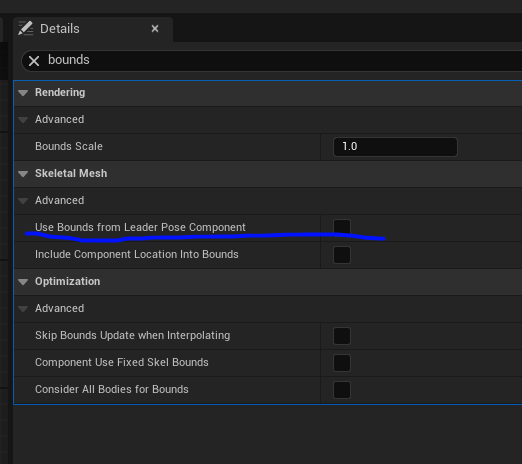 noble ledge
autumn pulsar
https://i.imgur.com/XymESwM.png
noble ledge
autumn pulsar
https://i.imgur.com/XymESwM.png
that is on an actor?
autumn pulsar
noble ledge
that is on an actor?
yes
autumn pulsar
kind willow
Hey, I need a 2nd copy of "flying" type movement for the sake of ladder climbing...
You'll need to get the actor's movement mode, add a switch statement, then implement your own logic
noble ledge
autumn pulsar
yes
that is on a skeletal mesh component
kind willow
autumn pulsar
You'll need to get the actor's movement mode, add a switch statement, then imple...
I presumed so. I already do that with the flying movement type. The issue is I need flying for something else, thus need to make a new custom movement for just ladders
autumn pulsar
kind willow
I presumed so. I already do that with the flying movement type. The issue is I n...
can just use flying and branch it
kind willow
The issue is that the custom movement type needs to act like the flying type does, which it doesnt
kind willow
autumn pulsar
can just use flying and branch it
I guess, but it makes the code messy as I need to firstly check the movement type, then check which type of flying I need to use
hoped for a neater solution, since the custom movement type is right there
autumn pulsar
custom is for movement types that aren't really going to be there like 6DOF movement
you can use functions and different event graphs for organization
since ladder and flying would be mutually exclusive, you should really only need 1 test and all the other logic is completely seperated
kind willow
autumn pulsar
since ladder and flying would be mutually exclusive, you should really only need...
Tbh I might need flying for swimming also, since the default swimming movement is causing me some issues, but I guess I'll just need a switch for that
autumn pulsar
Yeah, just make a switch and break it up further
kind willow
Alright. I guess that will have to do. Thanks
autumn pulsar
switch is good since it will ensure there aren't any conflicts
autumn pulsar
noble ledge
that is on a skeletal mesh component
I don't think arrow is considered for bounds
you can use the bounds preview
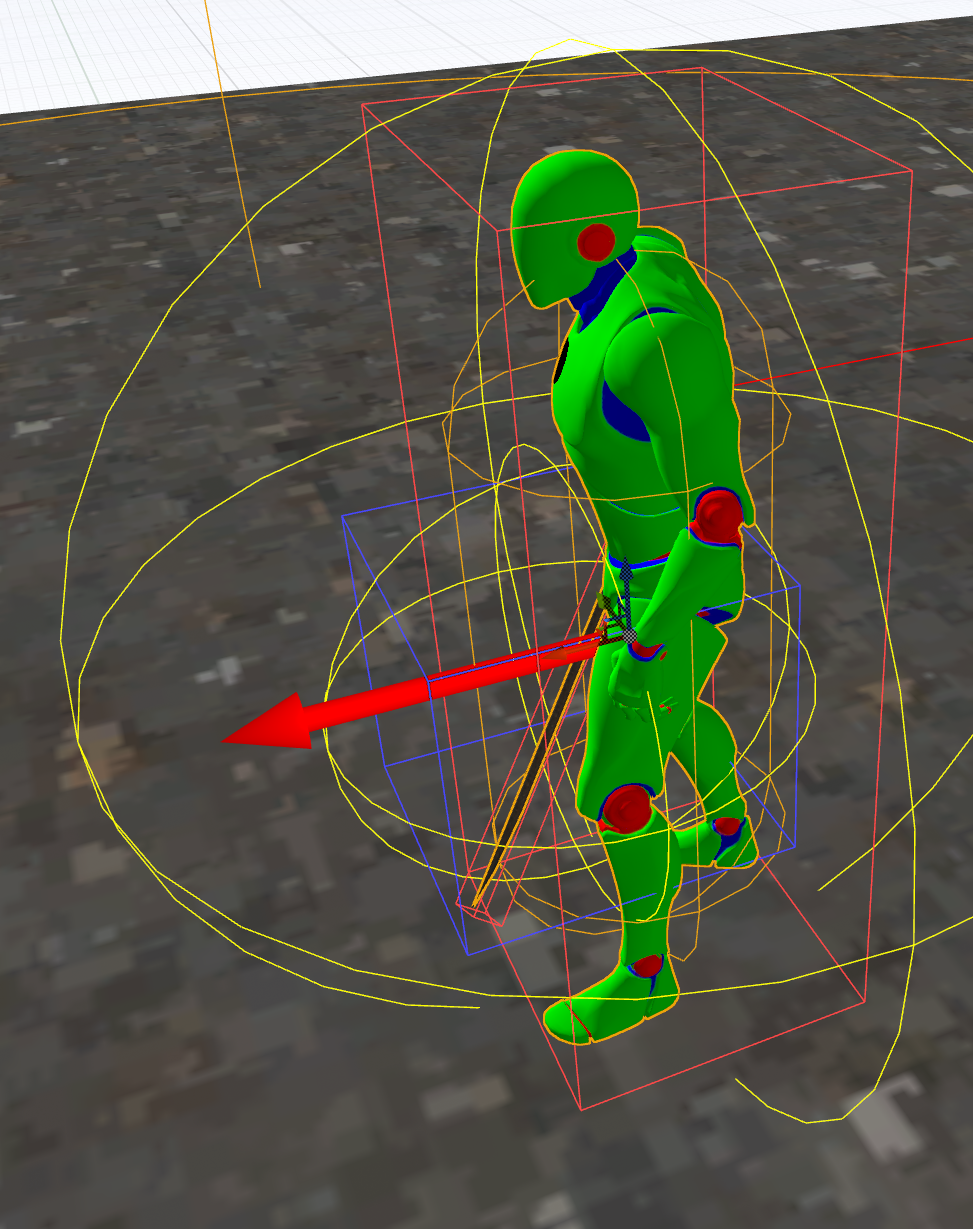


 kind willow
I think stuff that's set to only visible in editor isn't considered for bounds?
 fiery anvil
anyone know the name or solution to this problem? ive seen it happen before but i totally forgot everything about it. anyone know anything?
kind willow
fiery anvil
anyone know the name or solution to this problem? ive seen it happen before but ...
Odd. I remember having simmilar issues with an animation, because a bone size was set to 0 in Blennder, but that doesn't seem to be it...
fiery anvil
i remember that the fix for when it happened to metahumans was something like going into the skeleton and just tapping an option on the bones but i dont know if that works for this and even if it did i dont know what specifically to do.
 drowsy rivet
Hi everyone! I am tying to create an fps game and I needed enemy and ally npc ai for that. I found that video https://youtu.be/vpUDvKVEFOY?si=pklTaY5L9zBd4oRY, but the video is done in ue4, can I still use those blueprints in ue5.5?
Project Files: https://www.patreon.com/posts/61565288 .
In this episode of the unreal engine advanced locomotion series, I am going to integrate start working on NPC AI characters. Here we will be re-using the default AI controller available in ALS system which allows AI characters to randomly move around while focusing on the player character....
kind willow
drowsy rivet
Hi everyone! I am tying to create an fps game and I needed enemy and ally npc ai...
Unless it's about the particle system, all UE4 tutorials should work in UE5
fiery anvil
drowsy rivet
Hi everyone! I am tying to create an fps game and I needed enemy and ally npc ai...
yes you should be able to, there might be a few differences in the names of the nodes though
 pallid canyon
I’m having a read none error when trying to package. What is the best way for me to make sure a variable is set? I think that is the problem
autumn pulsar
pallid canyon
I’m having a read none error when trying to package. What is the best way for me...
use the "is valid" node
pallid canyon
autumn pulsar
use the "is valid" node
Just put it in before setting the variable?
autumn pulsar

Just Bret Hart doing some code review.
 dry sleet
Well to be honest that just hides the problem
If it's meant to be set and it's not, then adding an IsValid node will just make your game behave in a way you don't expect
Unless you add an error message, but that's kind of what Unreal does by default when you get "accessed None" spam
kind willow
dry sleet
Well to be honest that just hides the problem
Then you just have to set it. There isn't any way to go around that. Unless, you do set it, but it still is null in the end. Then I'd check for stuff like race conditions
 lusty birch
beginplay sets value only at game start
 woven pond
thanks but yes that was the plan however i was checking for greater than 0 not less than my mistake (was being set to 0 as branch was true when it shouldnt have been)
lusty birch
timer itself has elapsed time so why do you need separate var
frosty heron
woven pond
Cant replicate the elapsed time from a timer
what does replicate mean in this context?