The reason I ask is, the PlayerState is something that the server will keep in an inactive state when a player disconnects and the server can reinstate that inactive playerstate when the player reconnects. There's a good pin in the #multiplayer channel about persisting data, including through disconnects:
https://wizardcell.com/unreal/persistent-data/#persisting-data-across-disconnects
#blueprint
1 messages · Page 245 of 1
 dawn gazelle
 visual crest
Ok looking at it. I see you make an arry of items found to remove. I am just deleting Items when I finding them, I am guessing that is what is causing the problem?
dawn gazelle
Possibly. Like you wouldn't want to remove the items for crafting if you're not sure you even have all the ingredients available, right? A concern I have with my approach is that the more items and inventories you have to look through, the more likely there will be a hit to performance since it's having to loop so much, first searching for the items, then looping through the items to remove, only for you to have to loop through the inventories again to find the items :/
 raw wraith
dawn gazelle
The reason I ask is, the PlayerState is something that the server will keep in a...
raw wraith
dawn gazelle
The reason I ask is, the PlayerState is something that the server will keep in a...
I'll check this out thanks!
visual crest
dawn gazelle
Possibly. Like you wouldn't want to remove the items for crafting if you're not...
No my check if items exist it different. It just looks

It works perfectly 100% of the time the problem comes when I try to select and delete the items
 civic jay
Hi,
I've got this bit of blueprint set up to fire spells from a spinning emplacement, but the source of the projectile doesn't move, just the rotation, I'm missing something, does anyone know what?

Just plugs into a spawn actor node
 faint pasture
civic jay
Hi,
I've got this bit of blueprint set up to fire spells from a spinning emplace...
faint pasture
civic jay
Hi,
I've got this bit of blueprint set up to fire spells from a spinning emplace...
because you're adding the offset vector in WORLD space
the offset doesn't rotate with the rest
civic jay
Ah, I see, I'm doing this in a component
faint pasture
why have an action offset vector and not just a scene component or socket to spawn things from?
This is a thing to spawn fireballs from parent actor right?
civic jay
Because I hadn't thought of that yet lol, yeah that's right
faint pasture
Is it a scene component or actorcomponent?
civic jay
actor component
faint pasture
Why not just make it a scene component then self.transform can be the spawn transform
There's reasons not to, just wondering if you've thought of that
civic jay
I hadn't, I watched a few tutorials of making bow and arrows and spell casting systems and they used it this way, I'm unsure of the main differences
faint pasture
The fireball spawner can spawn fireballs from self.transform instead of from parentactor.transform
What is this thing, is its base class some sort of generic ThingDoerComponent?
civic jay
I was just lazy and slapped the component I was using for my actor to cast spells to make a spinning cylinder fire out spells
So far I had no problems casting spells the right way from the main character BP
faint pasture
I would either make it a scene component or give it a socket name property and have it cruise its parent for anything with that socket
I'd probably just make it a scene tho
civic jay
Awesome, thanks for the help, that's a lucky rabbit hole I avoided
 eager thicket
what do i use vinterpto with exactly? is it set world location?
faint pasture
eager thicket
what do i use vinterpto with exactly? is it set world location?
Tick -> Vinterpto SmoothedPosition towards TargetPosition -> feed the SmoothedPosition into the position of the thing
since both are positions of things you won't need an intermediate variable, can just plug the output of VInterpTo into Thing.SetWorldPosition
 lime oar
How do i add nodes inside of other blueprint?
 frosty heron
lime oar
How do i add nodes inside of other blueprint?
frosty heron
lime oar
How do i add nodes inside of other blueprint?
Right click empty space and type the node
Turn off context sensitive if it doesn't belong to the bp you are in
But you can just drag the ref to pull the node
lime oar
frosty heron
Turn off context sensitive if it doesn't belong to the bp you are in
The sensitive context hides nodes of other blueprints?
frosty heron
Just tell me what node you want to pull and from where

 lime oar
frosty heron
Just tell me what node you want to pull and from where
lime oar
frosty heron
Just tell me what node you want to pull and from where
what do you think?
lime oar
frosty heron
Just tell me what node you want to pull and from where
i am using this video as reference
https://www.youtube.com/watch?si=4MK6PheTwFpj4zOR&v=EmjhRw_FVwE&feature=youtu.be

After a long time due to college, I'm gonna spend my time being productive again. In this tutorial, I guide you through creating an interactive door, including features like the Interaction Prompt HUD, line trace for interaction, and utilizing the latest enhanced input system introduced in UE 5.1 (if I'm not mistaken).
Don't forget to hit the ...
 thin panther
Why aren't you using the door tutorial I gave you earlier...
lime oar
thin panther
Why aren't you using the door tutorial I gave you earlier...
what tutorial?
lime oar
thin panther
Why aren't you using the door tutorial I gave you earlier...
send the link again for me
@thin panther
thin panther
 ocean current
When im turning my use controller rotation yaw off during game play im loosing my look up and down even if its turned back on during gameplay. does any one know how to fix this. im using the first person template with a third person camera view


I dont want to loose it at all and want to keep look up and down why the use controller rotation yaw is off
 dark cedar
How do i bind custom events to Input actions?
frosty heron
dark cedar
How do i bind custom events to Input actions?
I don't think you can do that in blueprint but I could be wrong.
In cpp you can do it with BindAction
dark cedar
what is a work around?
 maiden wadi
dark cedar
How do i bind custom events to Input actions?
maiden wadi
dark cedar
How do i bind custom events to Input actions?
Why can't you just call the custom event from the input action?
 crimson talon
I am using a lock on system that changes my third person character’s movement front relative to camera to not when the lock on is active so I can have strafing enabled but I have no idea what to do regarding the controls changing based on camera direction (for example when the camera is behind the player the W key will move them forward but when the camera is in front the S key moves they move forward where they are facing)
I want to know where to find what reads these changing controls so I can implement directional inputs based on where the player is facing
 lunar sleet
crimson talon
I want to know where to find what reads these changing controls so I can impleme...
lunar sleet
crimson talon
I want to know where to find what reads these changing controls so I can impleme...
you could do a DOT product between the camera and the character's forward vectors
crimson talon
lunar sleet
you could do a DOT product between the camera and the character's forward vector...
That’s currently what I’m doing but it feels overly convuluted
 sage heron
Hello UEngineers... I have set up my Data Assets (buildings properties) and I wanna spawn a Child Actor (farming building) based on a Parent Actor... I'm confused on how to approach this. When I use the class I can't send the Data Asset variables with the spawn actor... Any help on that? (thx a lot)
 tame pecan
sage heron
Hello UEngineers... I have set up my Data Assets (buildings properties) and I wa...
tame pecan
sage heron
Hello UEngineers... I have set up my Data Assets (buildings properties) and I wa...
Click on the variable and expose at spawn
sage heron
yeah but when I hook up the class I wanna spawn, I lose all that stuff
(I get the class from the Data Asset)
lunar sleet
unfortunately you can't have exposed variables with a wild card spawn
sage heron

lunar sleet
you can however take all that data and set those variables manually right after
sage heron
like cast them?
lunar sleet
no? why would you cast?
you know what the object is already
well I guess not with a wild card lol
let me see if I had to do something similar sec
sage heron

this is the static mesh for the Ghost that I spawn (for building)
and the child actor (cause I'll have some specific stuff inside it)
and I have to create 1x2 1x3 etc etc 😐
lunar sleet
yeah, in my use case I only had to use one cast to make sure it's not a specific class
sage heron
ok
lunar sleet
are you just changing the mesh for each child or is there more to it
lunar sleet
but you can cast to parent
I'd prly do something like a switchOnEnum
then you cast to parent and you just use different values for the same variables on the switch
sage heron
alright, I'll check it out, probably need to sleep cause I can't think straight
thx for the help
 lunar sleet
sage heron
alright, I'll check it out, probably need to sleep cause I can't think straight
lunar sleet
sage heron
alright, I'll check it out, probably need to sleep cause I can't think straight
same really 😅
 wide schooner
Hey, i was wondering, if you had an inventory system to do with resources such as wood, stone etc (classic survival inventory) and also weapons and tools.
Would you create 2 different inventories or would you create one that takes everything. Also, i'm not sure if i store the datas about the items in an data table or if there's other method to do it properly
 tawny patio
Hello im trying to learn behaviour tree and I want my enemy to move but for some reason they jitter left and right alot

Heres a video (yes its a 2d game weird for unreal : P)
any idea? tq
nvm i fixed it it was the transition rule in my slime animation BP
 covert ore
why is rename grayed out?


 runic ore
because it's added from c++
also I guess you can't rename components on instances of a class / maybe also from BPs
maiden wadi
wide schooner
Hey, i was wondering, if you had an inventory system to do with resources such a...
One inventory can hold it all. And you should separate your data based on runtime vs static. Your inventory holds runtime data. Current durability, item type, etc. Datatable or a data asset holds the static data. Max durability, durability per use, name, icon, etc.
covert ore
runic ore
because it's added from c++
i tried renaming it in the c++ file it came from but it still shows up as the original name

 mental trellis
Did you recompile?
If you're editing the engine source on a build from the launcher, it won't do anything
covert ore
mental trellis
Did you recompile?
i did this
 wide schooner
maiden wadi
One inventory can hold it all. And you should separate your data based on runtim...
wide schooner
maiden wadi
One inventory can hold it all. And you should separate your data based on runtim...
Ok i see, would you better use data table or data assets for static datas ?
I would say data table as it is scalable easily but inm not sure about the pros and cons of data assets
maiden wadi
That's up to you and how you like to organize your data mostly. For personal stuff and at work, I use data assets as a definition. One data asset is an item definition that has all of the relevant data that item needs to function.
You can do the same thing in datatables, but you have to link the items to the row. Most people do this by assigning the item a gameplay tag and making the rowname the same tag.
covert ore
mental trellis
If you're editing the engine source on a build from the launcher, it won't do an...
i edited the GameNameCharacter.cpp
in Gamename>Source>Gamename>GamenameCharacter.cpp
runic ore
covert ore
i did this
You need to close the editor, and then run Compile from your IDE
covert ore
runic ore
You need to close the editor, and then run Compile from your IDE
how do i recompile in vscode?
runic ore
covert ore
how do i recompile in vscode?
by installing Visual Studio. VS Code is not quite suited to be used with UE
frosty heron
Download visual studio for compiling, use rider for your IDE
 tropic token
guys, is there anything like custom event I can use inside function in blueprints? I have for loop with break and I would like not to drag from my loop body to break through everything
covert ore
runic ore
by installing Visual Studio. VS Code is not quite suited to be used with UE
okay but how do i compile without waiting 500 hours for visual studio to install
mental trellis
You run it on a computer built this century.
covert ore
mental trellis
You run it on a computer built this century.
my internet sucks. not my pc
runic ore
covert ore
okay but how do i compile without waiting 500 hours for visual studio to install
well, having a proper dev env is a prerequisite. . .
covert ore
it took like 7 hours to install the engine itsself
mental trellis
covert ore
my internet sucks. not my pc
You run it on a computer with internet from this century. 😛
I feel your pain, the UK has had shitty internet forever. We're years behind the rest of the world and probably a decade behind countries like Korea.
Well, the southern part.
covert ore
mental trellis
You run it on a computer with internet from this century. 😛
how
getting new internet would take longer then installing visual studio
wich would still be like 2 3 hours
mental trellis
Install the minimum required packages for VS.
You'll save some time.
(go to individual components and uncheck things)
Deciding what to uncheck is the tricky part.
wide schooner
maiden wadi
That's up to you and how you like to organize your data mostly. For personal stu...
But how do you link data assets to the actual item ? For linking in data tables i usually have a name property in my item that is the same as the row name in DT
maiden wadi
wide schooner
But how do you link data assets to the actual item ? For linking in data tables ...
My runtime data holds a pointer to the data asset.
wide schooner
maiden wadi
My runtime data holds a pointer to the data asset.
Ok, it looks same as what they do in Lyra. I'll try this workflow, thanks !
covert ore
runic ore
well, having a proper dev env is a prerequisite. . .
does this work for now?
 runic ore
covert ore
does this work for now?
runic ore
covert ore
does this work for now?
I don't know what VSCode calls, I mean, try it, maybe it forwards the proper build commands.
covert ore
runic ore
I don't know what VSCode calls, I mean, try it, maybe it forwards the proper bui...

 solar bison
I have a conceptual question I need to understand right now
What is Child Actor component?
How is it different from me just attaching (using Attach Actor to Component node) in runtime? I want my weapon to be a separate actor because I can swap out weapons, change which socket its attached to etc
Any tips?
mental trellis
The CAC is a component you add to an actor that spawns another actor and attaches it.
The difference is you can add that component at design time, not run time.
The problem is that it's broken in several ways.
In your case it sounds like a socket or a simple scene component would be better to attach your gun actor to


 mellow folio
I recently bought a new computer, huge performance upgrade. Intel I7-14700kf with a 4070. Everything about my project runs very well, but now the Blueprint graph itself is extremely sluggish. Moving BP nodes always causes a hitch. Compiling has no problems. After about an hour, the engine starts flickering a bit and oddly, it completely fails to open new popup windows. Cannot right click on anything with the mouse because the popup it would create is instantly closed.
solar bison
mental trellis
In your case it sounds like a socket or a simple scene component would be better...
I didn't understand
I'm doing this, is this correct? I'm basically trying to avoid CAC since you mentioned it's broken
 mellow folio
I always put the collision handling to ALWAYSSPAWN
mental trellis
Yeah. Other than that seems fine.
 dark drum
mellow folio
I recently bought a new computer, huge performance upgrade. Intel I7-14700kf wit...
dark drum
mellow folio
I recently bought a new computer, huge performance upgrade. Intel I7-14700kf wit...
Are you using windows 11 by any chance?
mellow folio
dark drum
Are you using windows 11 by any chance?
Yes
 bright stratus
what is the best way to make depth of field, bloom and motion blur settings? they are set as Post Processing Quality in Lyra but I want to adjust them manually and add them options menu for players
dark drum
mellow folio
Yes
I thought so, it sounds like an issue with windows 11 always on top feature and a conflict with the nVidia graphics driver. UE really don't like it sometimes. I had to disable it on my machine. I can't remember off the top of my head how to do it though.
mellow folio
dark drum
I thought so, it sounds like an issue with windows 11 always on top feature and ...
Thanks that sounds promising
 deep drift
Hi. A small stuff with Widgets and Input. I don't want to use Encahnced Input System just for one ui element with a debug option (will do if I run out of options).
What I simply want to do is to close a visible, added to viewport Widget with a button press.
I set Keyboard Focus, make widget bool isFocusable to true. But it doesn't react at all. Any guesses?
dark drum
deep drift
Hi. A small stuff with Widgets and Input. I don't want to use Encahnced Input Sy...
How are you currently handling at the moment?
deep drift
I don't understand? I have a widget that I display at the beginning of Play (it's just some debug info about the level).
In Widget I have "Debug Key Press E" with logic that disables that widget ("closes it")
In said widget I have set is focusable, and in Level Blueprint upon construction I set that widget to Keyboard Focus when it is created.

 dark drum
deep drift
I don't understand? I have a widget that I display at the beginning of Play (it'...
dark drum
deep drift
I don't understand? I have a widget that I display at the beginning of Play (it'...
You'll need to make sure that the input mode is set to Game & UI or it won't recieve inputs.
covert ore
is this logic correct?
 deep drift
@dark drum Something like this? And then upon killing it set it back to Game only?
 dark drum
deep drift
<@430016173694779402> Something like this? And then upon killing it set it back ...
dark drum
deep drift
<@430016173694779402> Something like this? And then upon killing it set it back ...
Yea
dark drum
covert ore
is this logic correct?
 deep drift
dark drum
Yea
deep drift
dark drum
Yea
Doesn't work 😢 but at least mouse is visible so I will just make a clickable button
frosty heron
deep drift
I don't understand? I have a widget that I display at the beginning of Play (it'...
Don't use level bp.
You can use on key down event for widget input
 burnt citrus
hello i have a question about the "set timer" node: if i have multiple of them in a BP, they set multiple timers and so i need to clear each one of them?
something like this? https://i.imgur.com/5Z9LJ2d.png
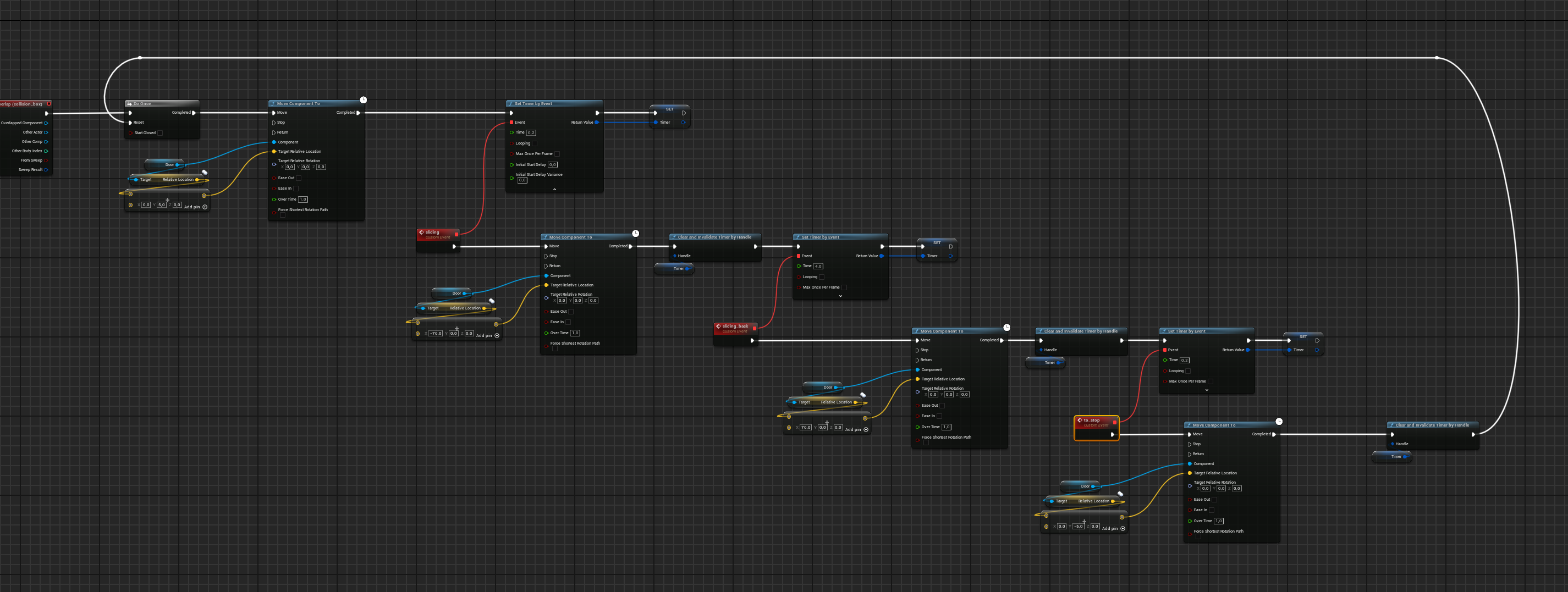
it's a sliding door with different movement delayed
dark drum
burnt citrus
something like this? https://i.imgur.com/5Z9LJ2d.png
You don't need to clear and invalidate a timer unless it's looping or you want to stop it before it finished. With this example, it doesn't look like you'd need them.
burnt citrus
so if the node trigger just a one time event, then it stops itself?
i set it like this cause i just need a delay between the movements, and i read around is better to not use delays and set timers instead
dark drum
burnt citrus
so if the node trigger just a one time event, then it stops itself?
Yea, if it's not a looping timer, it stops once called.
burnt citrus
thanks 🙂
 marsh pilot
What node do you use to spawn a static mesh at a certain location without it being an instanced location?
tropic token
is it possible to do virtual function in blueprints? so I can override it in child BP?
frosty heron
tropic token
is it possible to do virtual function in blueprints? so I can override it in chi...
you can override function in child bp
tropic token
yea, I can override any function?
frosty heron
yes
dark drum
marsh pilot
What node do you use to spawn a static mesh at a certain location without it bei...
Static meshes are displayed in either a static mesh component or an instanced static mesh component. When you place a static mesh in the level it created a static mesh actor which is just an actor with a static mesh component inside so you have two ways.
Add a static mesh component to a preexisting actor and set its mesh and location or spawn a static mesh actor and again set it's mesh and location.
marsh pilot
Got it thank you!
 violet bison
set timer by event or event tick, which one better for cooldown system?
dark drum
violet bison
set timer by event or event tick, which one better for cooldown system?
Tick is only if you need something to update each frame. Cool downs are normally only needed at specific times. (When you use the ability to when the cool down has finished) If you were to do a cool down on tick, it'll be checking ever tick even when an ability hasn't been used.
 trim matrix
hey was wondering if theres a way for my game to have a titlescreen w like an animation playing and a press "x" to start prompt which then opens the ui main menu? kinda like these ones https://youtube.com/clip/UgkxnM3z_rg465nWS57GgLj_h7rqTW01SgjZ?si=rn-X1DGxlOjaK2fs


YouTube
48 seconds · Clipped by KIRA · Original video "Banjo-Kazooie (N64) - Intro & Title Screen" by At0micPunk
thin panther
sure, you just make a level for your main menu
 hollow bane
hello guys, do you know how I can access the focal distance of my camera in blueprints? Is it even possible?
 dawn gazelle
hollow bane
hello guys, do you know how I can access the focal distance of my camera in blue...
dawn gazelle
hollow bane
hello guys, do you know how I can access the focal distance of my camera in blue...
 hollow bane
thank you!
 deep charm
does anyone know how to config the ai looking at the player?
cuz it ends up like this

here's the code


 mild jacinth
how can I make a dynamic pathway representation system.
e.g if mouse is hovering over an actor (I know how to do that function but not the actual visualization), it will create a spline mesh of the path.
 junior crane
Hey can anyone guess why this happened to my character? This is from Lyra. No idea why this collapsed like so

 valid sluice
I need help really trying to figure out this widget problem and i havent made much progress in days, and Id prefer to have someone look with me instead of just a ton of screenshots. Is there a way to connect with someone? or no
faint pasture
mild jacinth
e.g if mouse is hovering over an actor (I know how to do that function but not t...

Have you at least got that far?
lime oar
hello everyone i still have the problem that the open doesn´t open for nothing the images are in ue5 general
dawn gazelle
lime oar
hello everyone i still have the problem that the open doesn´t open for nothing t...
Is the issue that you're pressing a key and expecting something to happen here? You're doing a trace but doing nothing with the hit result if so.
 lime oar
dawn gazelle
Is the issue that you're pressing a key and expecting something to happen here? ...
lime oar
dawn gazelle
Is the issue that you're pressing a key and expecting something to happen here? ...
yes
i want to make a door that open and close when i press E
 random locust
Hello my ‘Break Hit Results’ won’t link up to my ‘Multi Sphere Trace for Objects’ node.
It doesn’t give an error when I try to link it but it does say “Only exact matching structures are considered compatible. Derived structures are disallowed”
So I’m at a loss. Everything else works fine but I was trying to start the process to add damage to the hit boxes and this happened. Please help?
this is the blueprint.
 faint pasture
random locust
this is the blueprint.
faint pasture
random locust
this is the blueprint.
that trace outputs an ARRAY of hit results
foreach it
 timid yoke
trim matrix
hey was wondering if theres a way for my game to have a titlescreen w like an an...
timid yoke
trim matrix
hey was wondering if theres a way for my game to have a titlescreen w like an an...
Yeah most loading screens do this with MoviePlayer to play those starting screen images or videos. You'll have to find some tutorial.
random locust
faint pasture
that trace outputs an ARRAY of hit results
ok sorry what does that mean then exactly? sorry im very new to blueprints
maiden wadi
random locust
ok sorry what does that mean then exactly? sorry im very new to blueprints
What are you trying to do with the trace?
random locust
maiden wadi
What are you trying to do with the trace?
connect break hit results but it wont let me. i think maybe theres an issue with the rest of the blueprint because the tutorial i watched worked just fine in the video
maiden wadi
random locust
connect break hit results but it wont let me. i think maybe theres an issue with...
If you're following a tutorial, then double check it. Most likely you put the wrong trace node. There is another trace node that outputs a single hit result instead of an array of them.
random locust
maiden wadi
If you're following a tutorial, then double check it. Most likely you put the wr...
i have a few times, i have the original attack blueprints from an asset, im just adding the hit boxes and trying to do damage, it all worked up until i tried to add the 'break hit results'. now it just says its incompatible. so im just like??? i cant seem to find any alternate hit result options that are compatible
maiden wadi
random locust
i have a few times, i have the original attack blueprints from an asset, im just...
The node you added returns an array. An array is multiple hit results. If you meant to have one hit result you need to change the node to the single version. If you meant to have the multi, then you need to loop over the hit results to handle them one by one.
lime oar
can someone help me?
random locust
maiden wadi
The node you added returns an array. An array is multiple hit results. If you me...
omg it workeddddd. thank you so much!. life saver! i am in your debt my friend
 mossy skiff
What exactly is the difference between "GetController" and "GetPlayerController" ? Why does he get the AiController if I use "GetController" ?

 tiny tundra
wondering how to get this box to appear?
 maiden wadi
mossy skiff
What exactly is the difference between "GetController" and "GetPlayerController"...
maiden wadi
mossy skiff
What exactly is the difference between "GetController" and "GetPlayerController"...
There are two types of controllers. AIController and PlayerController. AI Controller serves as a brain, running an AI tree and some other stuff. PlayerController serves to process a player's input. Both basically serve the same purpose of manipulating the Pawn they possess. A Pawn can be controlled by a Player or AI controller. So depending on which controller is possessing it, that's what you'll get when calling GetController.
GetPlayerController is independent of this in that it simply gets the first PlayerController on the machine. Which in singleplayer there will only be one.
maiden wadi
tiny tundra
wondering how to get this box to appear?
It's an == node. Drag off of GetEffectingButton and do ==
 keen tinsel
any tip on using FABRIK node?
setup : character holds its right hand up holding flash light
problem : the hand moves alot when character is moving even though in the animation the hand remains still
goal : make the hand stable in cameras frame similar to weapon holding
so any idea ?
lunar sleet
Go away bot
keen tinsel
?
thin panther
I think it's a joke because your name is cyborg
 pure elk
am i doing something wrong?
 mild jacinth
faint pasture
mild jacinth
faint pasture
yeah. its not what im looking for. it returns wrong amount of points.
thanks for suggesting that though
i had to write something custom instead
 frozen nexus
hi i'm new here and am looking for some help, i have a widget with a boolean variable but when i access this variable in another widget blueprint the result is always false, even after it is set to true in the first widget blueprint. Does anyone know why the variable isn't getting updated in the other widget?

 harsh nebula
pure elk
am i doing something wrong?
harsh nebula
pure elk
am i doing something wrong?
The bind event node is meant to trigger other events. In your case you're binding an event to itself which is redundant and could cause problems. The "On Component begin overlap" is its own event trigger.
 mild ibex
How would I go about scaling a group of actors based on locations only. Basically scale a group based on a central point but not affect the scaling of the individual actors
Can that be done with simple parent child relationships, I forget
 sudden nimbus
mild ibex
How would I go about scaling a group of actors based on locations only. Basicall...
sudden nimbus
mild ibex
How would I go about scaling a group of actors based on locations only. Basicall...
interpreting your request: I want to scale the positions of actors without scaling the actors themselves -- nothing about the editor or the actor/component system does that for you. You'd need to do it yourself as far as I know
however
if you are making a volume, and hoping to divorce the size of a box from the scale of the actor containing it, there are specific systems that let you do this (ie so that you can scale the actor and have the component itself be aware of the sizing changes, instead of having the component just see it's default size that's being adjusted). See ATriggerBox (uh I think that's the right family of the two) and related classes for how that works
lunar sleet
thin panther
I think it's a joke because your name is cyborg
Well also the way the question was phrased and the fact that his bio says he doesn’t pass cap’chas
 civic oar
https://imgur.com/gallery/rigging-4-wheeler-unreal-engine-5-Ze4hsgW Having issues animating my four-wheeler using the control rig. Details in this IMGUR album.
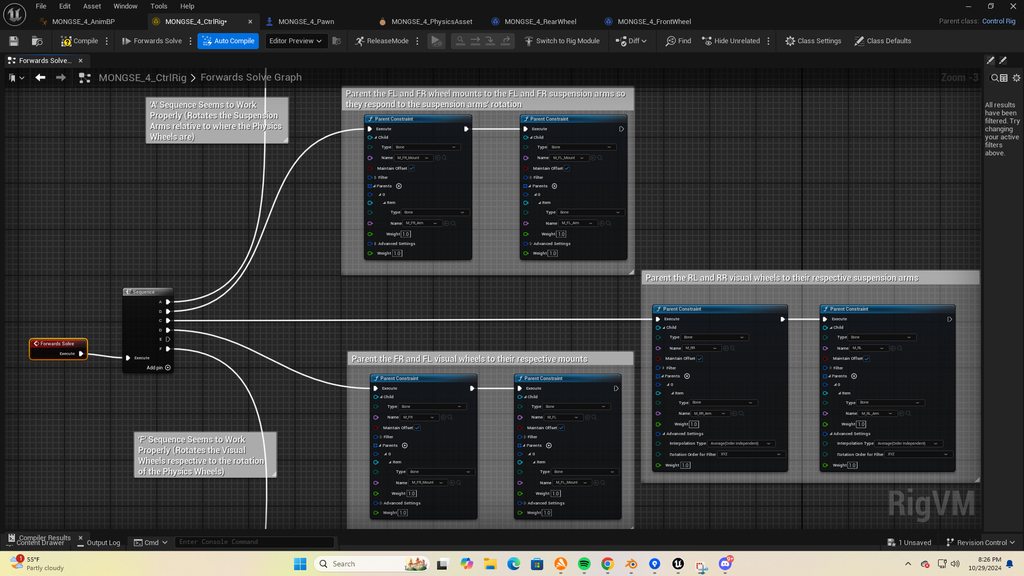
 ebon olive
pls help. what happened? I didnt do anything, i swear. I just refresh nodes because for some reason there's an error here on the character blueprint and now it shows this error. I'm really lost.
 lunar sleet
ebon olive
pls help. what happened? I didnt do anything, i swear. I just refresh nodes beca...
lunar sleet
ebon olive
pls help. what happened? I didnt do anything, i swear. I just refresh nodes beca...
Show us the error
ebon olive
lunar sleet
Show us the error
Larger screenshot. I swear i didnt do anything. It was all ok prior, the moment i rename one of the function which is NOT AT ALL related to this, it starts to show this error

Close look

I deleted that VR orientation and position and can combile but warnings still there and i cant move diagonal
is this a bug? 😭
i dont understand. i didnt even do anything at this blueprint. The only thing i go here because the error led me here
lunar sleet
ebon olive
i dont understand. i didnt even do anything at this blueprint. The only thing i ...
Is the character details panel blank?
ebon olive
lunar sleet
Is the character details panel blank?
oh sorry i didnt click on the character component. This is it
 lunar sleet
ebon olive
oh sorry i didnt click on the character component. This is it
lunar sleet
ebon olive
oh sorry i didnt click on the character component. This is it
Did you update the engine by any chance before this happened?
Tho it sounds like renaming that function is what broke it
I’ve had the engine crash sometimes after renaming a function/event, likely due to outdated redirectors
You could try closing the bp and using update redirectors on the whole content folder
ebon olive
lunar sleet
Did you update the engine by any chance before this happened?
omg i remember. There's an update in a middle of my project which i did. I click update on the epic launcher. It didnt have an error straight away though but the update did happened
wth these updates 😭
ebon olive
lunar sleet
You could try closing the bp and using update redirectors on the whole content f...
ok i will try update the folder of it. omg... this is the last time i press update. im kinda mad at epic/unreal devs right now tbh hahaha
violet bison
is there any round up/down function?
or have to use the truncate?
 rotund barn
does it matter which one i use to check if something is valid, or are they exactly the same under the hood?

 zinc ermine
whats the best way to clear out a soft reference from memory once Its used (for example an item from the inventory)?
lunar sleet
ebon olive
ok i will try update the folder of it. omg... this is the last time i press upda...
Setup source control
Then these things will be insignificant
ebon olive
lunar sleet
Setup source control
omg i just realized the update really screwed up this character i got from unreal. because i just create new project using the same character from marketplace and the same problem still applies. Can i revert back from the update? 😭 is there a way?
because i dont think this character is up to date. so my only solution is to revert back the unreal update
lunar sleet
ebon olive
omg i just realized the update really screwed up this character i got from unrea...
You cannot migrate backwards if that’s what you’re asking.
What version did you upgrade to and from?
ebon olive
lunar sleet
You cannot migrate backwards if that’s what you’re asking.
omg... ok i need to let out my anger im really sorry you have to hear this because since im already here. I HATE EPIC FOR DOING THIS!!! They should put up a warning that an update can ruin your project assets. So this is my warning to all of you guys, BECAREFUL ON YOUR UPDATES
anyway, im using 5.4.4 now 😅 I cant remember what's prior to the update. i think its 5.4.3? im not sure sorry
lunar sleet
ebon olive
omg... ok i need to let out my anger im really sorry you have to hear this becau...
You’ve been here for over a year. I don’t believe that no one ever told you to setup source control
Minor versions don’t ask you if you want to migrate, but they also don’t tend to break projects like that. You said you renamed a function, did you try to rename it back to what it was?
 undone bluff
ebon olive
Close look
undone bluff
ebon olive
Close look
I never install the vr stuff so this is just what I see any time I open a project based on the templates
ah right I set all the vr plugins to disabled back in ue4 because I got sick of windows MR booting up every time I open unreal and there was no option to turn it off back then
literally just a call to a function that comes with a plugin
might be disabled for you or the reference broke
if you are not developing vr just delete it entirely
also things breaking after a minor version upgrade is simply the expected outcome, only the last number which stands for patches doesn't really matter
rather, it'd probably help if you tell us more about your issue instead
 silk rampart
Has anyone here setup an orbit cam and been able to change the default rotation position of the spring arm? It's honestly a bit frustrating that something that should be simple isn't. Basically I have setup a orbit camera to go around a pawn in the scene. In order for me to be able to control the orbit I have to have on "Use Pawn Control Rotation" on the spring arm, but whenever this is active it always locks the rotation on possession to 000. I simply want it so when I possess the pawn the camera is at 40 degrees but nothing I set in the blueprint changes anything. This means I also can't save the position of the camera when leaving the pawn and going back into it, since it always goes back to 000. Any advice would be appreciated
undone bluff
just set it on possessed?
silk rampart
I tried that, it won't do anything, even when attempting to use the same stuff I used to control it in the first place.
It's like it refused to do anything until I use some sort of mouse input
undone bluff
odd
silk rampart
If I turn off "Use Pawn Control Rotation" or the "Inherit Pitch, Yaw, Etc" then I can set a default angle but then I also can't control the spring arm anymore using my code.
sudden nimbus
silk rampart
If I turn off "Use Pawn Control Rotation" or the "Inherit Pitch, Yaw, Etc" then ...
well if you have a controller possessing that character with a CharacterMovementComponent set to push the control rotation of the controller to the pawn ("Use Controller Desired Rotation"), then any attempt to change it would be instantly overwritten by the CMC
maybe thats what you are running into?
when you disable Use Pawn Control Rotation, the expected thing to do is to just set the rotation on the spring arm component directly

as it notes there, it will just read its own relative rotation and move its children as needed
trim matrix
hello! can anyone help me what's the problem with enhanced inputs? i can seem to know what's wrong

NVM
 pale mica
hi guys excuse me for being a noob but when clicked again I want the menu to be hidden again

why it aint working
pale mica
I figured it out
 silk rampart
sudden nimbus
well if you have a controller possessing that character with a CharacterMovement...
silk rampart
sudden nimbus
well if you have a controller possessing that character with a CharacterMovement...
That is the thing. I am already controlling it though add relative rotation on the spring arm, but such function only works when that option is selected. When I turn off off even with mouse events plugged into add relative rotation the spring arm just stays locked and static.
Its one of the reasons this whole thing confuses me.
I can plug any of this stuff into the camera for like a mock look around fps style view but the minute I move the same functions to the spring arm for orbit function it will not work at all without that check box set, then it works.
All I want is a new default start angle.
 mild galleon
hello everyone!
about gameplay tags:
instead of casting for 80 different unit types in the rts, could i just "read and hand over" their gameplay tag?
When i tested this with gameplay tag container and a switch at the other end, it sadly did not work.
 dark drum
mild galleon
hello everyone!
about gameplay tags:
instead of casting for 80 different unit ty...
dark drum
mild galleon
hello everyone!
about gameplay tags:
instead of casting for 80 different unit ty...
Technically yes but you can only implement the 'Gameplay Tag Asset Interface' using C++ as it's not exposed to BP. Alternatively, you can create your own BPI for getting the gameplay tags that you can impliment on your unit.
To be fair though, I would imagine all units would extend from the same parent class so you could just include the gameplay tag container on the parent and when needed just cast to the parent/base class to get the gameplay tag container.
dark drum
silk rampart
All I want is a new default start angle.
Use control rotation and set the control rotation on the controller.
dark drum
pale mica
I figured it out
I would get rid of the flip flop and check the visibility of the widget switcher. If it's visible set to hidden, if it's hidden set to visible.
frosty heron
mild galleon
hello everyone!
about gameplay tags:
instead of casting for 80 different unit ty...
What is this???
you should make a base class that have a gameplay tag that defines the class.
Then you just need 1 cast and pass that gameplay tag to where ever you want
mild galleon
oh, i am trying to find out what type of unit is on its way
frosty heron
Instead BP Cast Villager
Bp Cast Millitary
Bp cast Cat
Bp Cast Dog
frosty heron
well this is more like not utilizing inheritance
if they the class have to be different
then make a generic function that gets a gameplay tag
perhaps your own interface if there isn't already one
mild galleon
you see, i do have parents, but i need to make distinct reactions based on what it is in this case.
i can show you that interface, sure
frosty heron
TLDR: if they can share the base class, make a parent class and implement there
If the classes can't derive from the same class then use interface
 frosty heron
You want the one with message icon btw
Also make sure the receiving end implements the interface
mild galleon
well it works when i set the gametag hard on the other side of the interface.
frosty heron
no idea what that means
frosty heron
for a start use the right node and provide evidence that the receiving end implements the interface
mild galleon

see, i am already using this definition "Unit.Typ.Villager" (next to others) to do something in my widget.
so it can see that hard defined gameplay tag.
but thats not very clever.
what i was hoping for was, i can read out that actors individual tag, and just hand that over via interface and let the widget react for each case.
instead of defining it on the input of my interface myself.
frosty heron
mild galleon
frosty heron
____
TLDR: if they can share the base class, make a parent class and implement t...
its too compressed for me to comprehend, sorry.
why would i use parent classes, if i want to make a case switch? i need to know which child is currently selected.
and yes, i use the interface.
frosty heron
each of the instance hold the tag
the tag is a property of the parent class
so you can just do one cast
Cast to Parent -> Get Game tag -> Pass game tag to where ever you want
no need for hundreds of cast
mild galleon
i think i slowly understand what you say.
frosty heron
Does civil villager and Unit Millitary parent share the same base class?
mild galleon
the problem was that the interface didnt work, like what exact nodes would i use to send forth tags. i tag container i guess
yes
master unit
frosty heron
then create a variable of gameplay tag in your master unit
mild galleon
i was taking the gametag from there, its not the problem. when i have gotten the gametag, it didnt turn the switch on the receiving side.
frosty heron
you can add any gameplay tag to the switch
there is a plus button on the switch statement
mild galleon
yes i said i already build it and it worked
for pre.defined game tags, and yes, i also have added the tags to the units. let me double check
mild galleon
i know.
frosty heron
I am not sure anymore now, so what exactly don't work?
we kinda jump around from the casting issues to the switch
mild galleon
thats what i am trying to find out. i will give it another shot and test. one sec
are you sure, this node can process a container of tags? because, it appears, when i feed in a container, it does not work, and when i feed in a specific game tag defined, it works

do i have to add the gameplay tag asset interface manually to all BP classes?
frosty heron
mild galleon
are you sure, this node can process a container of tags? because, it appears, wh...
No a switch statement takes a value
not an array
mild galleon
so would i then do an for each loop and sort there on the recieving end or how is that usually done?
frosty heron
So you want to pass a container and do something for each of the tag in the gameplay tag container?
mild galleon

yes, i have units
but they have both their type and other attributes in the tags.
frosty heron
mild galleon
are you even passing a tag container? this code doesn't make sense
pass a gameplay tag container to your interface function if you want to pass a container
@mild galleon
 frosty heron
yup
Gameplay Tag contains a Gameplay Tag
GameplayTag containers contain collection of Gameplay Tag
Also don't do too much nested cast, I would suggest to have your container in the parent class
too much nested if statement or nested casting is indication of bad code
not attacking btw, just info that I gather
Object -> Cast to Parent Class -> Get Game Container -> Pass that container where ever you like
don't do
Object -> Cast to Millitary unit's Container -> Pass
Else if Cast failed -> Cast to Another Unit's container -> pass
faint pasture
@mild galleonWhy are you using a switch here anyways? What is the switch for?
mild galleon
i have some cases on the other side,
so, basically showing different buttons for different unit abilities
thin panther
Why not have the base class have a function each child can override
frosty heron
it's for the widget I believe
mild galleon
thanks for the idea. yes its for the widget.
 main lake
Where can I find the hex color used for each type of variable in unreal please ? (Like Booleans = Red, Float = Green, Transform = Orangish, etc...)
I'm referring to these little chips

 grave relic
Hey, I have this object that moves along a looped spline, but when it comes to the start point again it does not loop. I would prefer using this system over a timeline since I can have a consistent speed independent on the size of the spline. Any ideas? 🙂


 grave relic
covert ore
but this doesnt
grave relic
covert ore
but this doesnt
Where are you doing this execution? In the player?
covert ore
grave relic
Where are you doing this execution? In the player?
in a blueprint called SpawnBall
in all>content>blueprints
grave relic
covert ore
in a blueprint called SpawnBall
Then you need to have in begin play Enable Input. Otherwise the SpawnBall BP cannot recognize that youre pressing a button. Begin play works cause it runs regardless.
covert ore
grave relic
Then you need to have in begin play Enable Input. Otherwise the SpawnBall BP can...
how do i enable input?
grave relic
In SpawnBall BP, drag out from begin play, and you can find a node that is enable input, then you just have to GetPlayerController and connect it 🙂
 covert ore
grave relic
In SpawnBall BP, drag out from begin play, and you can find a node that is enabl...
covert ore
grave relic
In SpawnBall BP, drag out from begin play, and you can find a node that is enabl...
It works. thank you
 small moat
is there any blueprint function to get the depth of a world space point in screen space? I wanna know how far away from the camera plane 2 points are, taking fov and all into account

 main lake
small moat
is there any blueprint function to get the depth of a world space point in scree...
main lake
small moat
is there any blueprint function to get the depth of a world space point in scree...

Epic Developer Community Forums
Hi I’m making an RTS and in this I need to get know where the world space is based off of a point on the screen. Now I can do this for the mouse, I use this script: Now this works great for the mouse pointer. But I want to be able to get the world position from a 2DVector that is not the mouse. Ideally some kind of node like this: but ...
small moat
this isn't actually what I'm asking for
I want the depth, not the horizontal/vertical position
 oak hedge
Hi there, does anybody here has experience with the ViewModel system ? I'm trying to set the global viewmodel collection inside a GamemodeBP but I have no clue how to get this node :

 lime crow
Hi im trying to create an interface, so i can call the player variables from other blueprints. (Ie the player walks into a box and it adds a live) im really not sure how i implement it, where i implement it or what nodes i use in the plyer bp? thanks

 lunar sleet
lime crow
Hi im trying to create an interface, so i can call the player variables from oth...
lunar sleet
lime crow
Hi im trying to create an interface, so i can call the player variables from oth...
Watch the pinned video on bp comms
lime crow
lunar sleet
Watch the pinned video on bp comms
where is it please?
lunar sleet
Click on the channel name go to pins, scroll to bottom
 exotic plover
is it possible to get the true location of the client camera INCLUDING the camera shakes running?
lime crow
i know what and how an interface works, i know how to implement a basic one its just somthing a bit more specific, im trying to get a refreence to my self and i need to know where it should go.
lime crow
lunar sleet
Click on the channel name go to pins, scroll to bottom
i see no bp comms
zinc ermine
do soft references get garbage collected when not in use?
dawn gazelle
rotund barn
does it matter which one i use to check if something is valid, or are they exact...
What they do is the exact same, and I may be incorrect about this, but there's probably an absolutely miniscule amount of additional performance by using the converted get, simply because the IsValid is a blueprint macro which calls additional nodes within it to check if the object is valid and has a branch, where the converted gets check would be handled all within C++. Either way, I wouldn't worry too much about using one over the other.
 broken wadi
 tight pollen
silk rampart
dark drum
Use control rotation and set the control rotation on the controller.
tight pollen
silk rampart
dark drum
Use control rotation and set the control rotation on the controller.
Tried this.
It still will not rotate on possession it will only rotate when I give it a mouse input.
mild galleon
what method is better performance wise,
"get class" or "cast to" ?

 wraith loom
mild galleon
what method is better performance wise,
"get class" or "cast to" ?
wraith loom
mild galleon
what method is better performance wise,
"get class" or "cast to" ?
Definetely get class
lunar sleet
lol
dark drum
mild galleon
what method is better performance wise,
"get class" or "cast to" ?
They'd most likely be negligible. Having to use multiple nodes for the get class method would make up the additional step of returning the object type. 3 nodes vs 1.
In terms of memory, you'd be creating a hard ref with either the class or cast so there wouldn't be any difference on that front.
In summary, just use the one that makes the most sense for what you're doing.
 still salmon
Hi I would like to generate random actors inside a spheres radius, but with a minimum distance between them. How would I go about this?
broken wadi
still salmon
Hi I would like to generate random actors inside a spheres radius, but with a mi...
Probably with #pcg-framework
 sinful prism
Any idea how I can set this? LOD0 Screen Size
 silk rampart
Does anyone know a better way to move between cameras when taking over a pawn? Really want to zoom in on a unit when I take it over as a pawn, but Set View with Blend decides to interpolate way off making it less of a zoom and more of a dolly pass and sweep.
faint pasture
mild galleon
what method is better performance wise,
"get class" or "cast to" ?
Cast but you should think about why you're doing this
mild galleon
faint pasture
Cast but you should think about why you're doing this
in my case, to find out what unit i have selected and do the appropriate reactions from the game
faint pasture
mild galleon
in my case, to find out what unit i have selected and do the appropriate reactio...
Why are you doing it like that? What are these reactions? Why doesn't the unit just have a MyReaction thing
Explain more, what decision are you actually making here. If you have a villager, you do x, if you have a military unit, you do y
mild galleon
so, my controller selects units.
i check for the objects under the mouse, and then i need to learn, what these are.
you select widged switcher pages in the hud, for instance.
faint pasture
What happens if I select 1 villager and 1 archer
which widget switcher pages are shown?
mild galleon
there are many options, and they are very similar between units, so i wanted to have them in the same widget, also avoiding turning widgets on and off
there is a hierarchy.
faint pasture
This should all be data
mild galleon
same as for Age of Empires 2 in fact 🙂
it is data, but i guess you meant something else?
faint pasture
ok let's take the giving of an order as an example
you have dudes selected, you right click something
mild galleon
yes?
faint pasture
instead of switching on dude type and giving a different order to each depending on type (attack, chop tree, move to), just tell everyone to InteractWithTargetUnit
and the military types will look and see the unit is an enemy and attack it
silk rampart
I find Cast works better, but to really do it well I need to load the casted connection in as a variable. That way I can adjust variables in the cast without a billion cast to nodes. An example is I have a menu that controls a pawn directly, but to make sure everything links up I have a single macro using a "cast to PAWN" that puts the pawn in as a variable of the widget, then I can bind the variables to the menu items or edit them using On Value Changed. Get actor of class is better when I need to just do a quit edit to some objects in the scene.
faint pasture
the civilian types will look and see it's an enemy but they can't attack so they just walk to a nearby position.
either way, the caller doesn't care.
or for the UI example, instead of switching on UnitType, ask the unit what it wants in the UI (GetUIData or whatever)
mild galleon
i was thinking about giving them actor components, but i was struggling to start the actor components code, so i placed it in the master unit and its children
mild galleon
but you really need to know what you have selected when you build up your UI 🙂
faint pasture
mild galleon
but you really need to know what you have selected when you build up your UI 🙂
Ask the selected units
Show your UI in 2 different flavors
mild galleon
yes, i am doing that via casts
faint pasture
no
ask them
GetUIData
BaseUnit.GetUIData()
then just give different data to different units
mild galleon
but i am using the same switcher, so i would safe the widget switcher pages in that unit then instead of sending forward?
that could work i guess.
(as numbers)
faint pasture
mild galleon
yes, i am doing that via casts
Now when you add a 3rd type you need to change the unit AND whatever else depends on that, the controller at a minimum
put it all in the unit, as data or function/event overrides
faint pasture
mild galleon
but i am using the same switcher, so i would safe the widget switcher pages in t...
Show your pages so I can see what you're talking about
mild galleon
you know, when i do any of the unit actions, i need to take the UI input from buttons and go back to my units anyways...
its a widget switcher with many buttons, and many pages.
i dont think that the details matter too much about how it looks 🙂
 agile swift
Hi! I made a simple main menu with a "Play" button but the button stays on screen when I load my level with the Open Level node. I do Remove All Widgets before I Open Level but the button is still visible. If I don't run the Open Level function, the button will dissapear correctly but something about opening a level makes my game unable to remove all widgets. What am I doing wrong?

 narrow sentinel
Anyone know a good video that guides on how to do seamless custscenes that involve the player character
bassically where the control of player character is locked and cinematic takes over and then smoothly returns control at end of cinematic
broken wadi
narrow sentinel
bassically where the control of player character is locked and cinematic takes o...
I don't know of any good videos for that but it just takes an understanding and implementation of a few key steps. First add a camera to the level, record movements with it using the sequencer. Then setup and trigger a custom event to unposses the character then play the sequence and repossess the character with the controller once the sequence finishes.
narrow sentinel
broken wadi
I don't know of any good videos for that but it just takes an understanding and ...
well i remeber UE did a thing while ago where they did a step by step on how they do it but they don't do it in video format it's all wrote down, I can try it though see what happens
 gritty aurora
Hey everyone. I'm having an issue in Unreal Engine 5 where my UI buttons work perfectly in Simulation Mode but don’t respond at all in Selected Viewport. I've checked the Set Input Mode and Show Mouse Cursor settings, but still no luck. Has anyone else encountered this issue, or does anyone know how to fix it so the buttons respond in the Selected Viewport as well? Thanks in advance
maiden wadi
grave relic
Hey, I have this object that moves along a looped spline, but when it comes to t...
You just need to wrap the distance along the spline. Instead of strictly adding, you should make a small function that takes in the spline and desired distance along the spline. If SplineLength >= DesiredDistnace return DesiredDistance else return DesiredDistance - SplineLength
dawn gazelle
agile swift
Hi! I made a simple main menu with a "Play" button but the button stays on scree...
As soon as you call Open Level, the engine basically stops doing everything and starts loading your level. If you did a "Delay Until Next Frame" after remove all widgets, that may be enough to allow the widget to disappear before your level starts loading.
 neat tangle
new day new question, i have been sufffering with an annoying issue regarding animations replicating, the listen server sees the clients normally from crouching sprinting and all, clients can sprint and do anything and see themselves running, however when a client look at the server or another client they see lagging or jittering animation, any ideas or sth could have been wrong? (BP)
maiden wadi
neat tangle
new day new question, i have been sufffering with an annoying issue regarding an...
Is it lagging or jittering? Jittering sounds like something is fighting something else. Lagging sounds like lack of update rates.
 fierce birch
maiden wadi
Is it lagging or jittering? Jittering sounds like something is fighting somethin...
fierce birch
maiden wadi
Is it lagging or jittering? Jittering sounds like something is fighting somethin...
I was about to say the same thing
also i have a stupid question, is there a way to set datatable row members values at runtime
I was just simply going to override the row
neat tangle
maiden wadi
Is it lagging or jittering? Jittering sounds like something is fighting somethin...
ehmm i would say its struggling to show the run animation or crouch, but the walking is really smooth, maybe lemme take a quick vrecord
 vernal steeple
neat tangle
new day new question, i have been sufffering with an annoying issue regarding an...
vernal steeple
neat tangle
new day new question, i have been sufffering with an annoying issue regarding an...
You're probably not multicasting correctly
Or doing it at all
I recently just had that problem but fixed it
neat tangle
@maiden wadi i hope this clarifies my query ;-; you see there the server always sees normal, however the client view to the server is laggy i guess?
neat tangle
vernal steeple
You're probably not multicasting correctly
ehm idk i just checked my version and multiple people's version and yet its still not changing at all
maiden wadi
vernal steeple
You're probably not multicasting correctly
You don't multicast anything to do with animations.
maiden wadi
No. You do not.
vernal steeple
Yes, you do
maiden wadi
You replicate it. It's gameplay state.
vernal steeple
Fix it for him then, I literally just had this issue
neat tangle
i mean i had to multicast the sprint
everyone runs and walks normally, but the clients see everything laggy
vernal steeple
neat tangle
ehm idk i just checked my version and multiple people's version and yet its stil...
Because something isn't properly synced between the two
running fine on the server, but maybe the other clients aren't getting the information they need
maiden wadi
neat tangle
<@143471961723371520> i hope this clarifies my query ;-; you see there the serve...
I don't see anything lagging. It's running fine, your animation just isn't blending. Can you show your animation bp?
neat tangle
maiden wadi
I don't see anything lagging. It's running fine, your animation just isn't blend...
i mean i thought so, but the animations are working fine when you look at yourself or in standalone
do u wanna see the egraph or animgraph?
maiden wadi
Is your running animation a 2D Blend?
maiden wadi
Can you show where you're setting the two floats that drive it?
neat tangle
that u are referring to the direction and speed, correct?
maiden wadi
Right
neat tangle
on event update ofc, going with these
 maiden wadi
Where are you caching the Movement and Character refs?
neat tangle
on event bp initialize?
maiden wadi
From GetPawnOwner?
neat tangle
get owning actor
maiden wadi
That's a bit odd then. These should work just fine locally on each client. 🤔
neat tangle
thats why im saying, everything's normal, the clients himself doesnt lag or anything, only the clients looking at others clients or lserver looks laggy.
maiden wadi
For random curiosity can you just replace the refs here with a GetPawnOwner->CastToCharacter-GetMovementComponent etc?
neat tangle
tried the TryGetPawnOwner, still same thing, the client runs and sees himself normally, however when the lserver or other clients run they look laggy or unable to activate the run animation.

maiden wadi
neat tangle
tried the TryGetPawnOwner, still same thing, the client runs and sees himself no...
In this case I would start with some logging. See if these values are actually changing/setting on the right machine. If they are, I'd check out some settings like your tick on the skeletal mesh. There's a setting somewhere in CMC related to syncing animations as well. I don't remember what it is off hand but it can cause them to look laggy.
 magic vault
Need some advice guys, i'm trying to set up a basic 'attack' system where when the player clicks it sets a boolean for 'IsAttacking?' on for 0.5 second and then turns it back off, then an 'OnComponentBeginOverlap' event for the hitbox casts to the enemy, checks for if the player is attacking and then destroys the enemy if the enemy is overlapping with the hitbox and the 'IsAttacking' boolean is set to true. Problem is, it works.... but not very often? 😭 I have to spam click and it wants to work like 5% of the time it should be working?? Any advice would be very appreciated :)


also please be patient if i'm completely thick and don't understand what you're asking if you ask me questions - i'm a newbie to unreal lol
vernal steeple
I'm having an issue right now also
Currently I'm trying to have my character sit on a chair
I'm moving him to an arrow component and forcing the new rotation and location
The location works, the character will rotate but he gets snapped back to the original location he was looking
 vernal steeple
magic vault
Need some advice guys, i'm trying to set up a basic 'attack' system where when t...
vernal steeple
magic vault
Need some advice guys, i'm trying to set up a basic 'attack' system where when t...
Maybe 0.5 seconds is too quick for it to check and realize it
im not sure i'm a little new also
Maybe you could do something a little more concrete like an eye trace
magic vault
I think it might be that I need something thats constantly checking to see if the enemy is overlapping
because if i move away and move back whilst 'attacking' then it destroys the enemy
vernal steeple
what I usually use is GetOverlappingActors
magic vault
but not if the enemy is already overlapping with the hitbox
magic vault
vernal steeple
what I usually use is GetOverlappingActors
let me take a look
magic vault
vernal steeple
what I usually use is GetOverlappingActors
looks like a scary node which i have no clue how to use LOL
vernal steeple
this is how i use it for interacting with stuff
 magic vault
but I don't want it to delete EVERY actor that interacts with the hitbox, just specifically the enemy actor
vernal steeple
you can filter it with class filter
do you have an interface for your enemieos
enemies*
magic vault
wdym
vernal steeple
one sec trying to think how to explain it
vernal steeple
i need help too man i've been trying to figure this out for hours
magic vault
yeah it really does suck sometimes
😭
I'm doing game design at college and my teacher does NOT teach us the software so i'm kind've just freestyling it until i get a good grade LOL
(college as in UK college so not like university or anything official like that)
vernal steeple
I was a software engineer
and I always wanted to make games
An interface btw is like a way to have reusability in your case enemies
like you can classify them by having an interface so you can have multiple enemies that inherit the same functions
you can also use an interface as a way to filter from get overlapping actors
idk if im saying this well or not
magic vault
vernal steeple
idk if im saying this well or not
As well as you can PFTTT
But its totally flying over my head cause I have never even heard of it before
I kind've understand what you're trying to say though
vernal steeple
Create the Interface:

In the Content Browser, right-click, go to Blueprints > Blueprint Interface, and name it something like EnemyInterface.
Define Interface Functions:

Open EnemyInterface and add functions that enemies should implement, like TakeDamage, Attack, or Die.
Set the input and output parameters for each function but don’t add any logic—interfaces are only for defining functions.
Implement the Interface in Enemy Blueprints:

In each enemy Blueprint, go to Class Settings, add EnemyInterface under Interfaces.
This will allow you to implement each function in the enemy’s Event Graph, where you can define specific behavior for taking damage, attacking, etc.
Using the Interface:

From other Blueprints (like player or AI controllers), you can call these functions on any enemy that implements EnemyInterface, making it easy to interact with different enemy types consistently.
This setup ensures that all your enemies can respond to shared actions like taking damage or attacking, while keeping each enemy's specific behavior modular and customizable.```though for multiple enemies specifically doing enemy things, you'd rather use inheritance
Essentially:
Interface - useful for class agnostic behaviour. If lots of things can't reasonably share a base class, but want common functionality, use an interface. For example, you can interact with NPC's, Weapons, Chests, etc., and they're unrelated apart from being interactable. It's a good use of a component or interface
Inheritance - useful for behaviour and properties closely tied to that class of enemies. I'm only ever going to shoot some kind of weapon, be it a gun or a bow, etc. That means I probably want my shoot function to be on some common base class of them all.
vernal steeple
I think he's right
but
we might be overengineering if this is just a small project
for your school
magic vault
vernal steeple
we might be overengineering if this is just a small project
I mean its going to have multiple enemies so maybe not
Plus its not a small project as such
more of a medium size project
vernal steeple
sweet, then yeah probably use inheritance
magic vault
the deadline is march next year
magic vault
Thank you guys for all the help, i've been trying to read up about inheritance more but i'm lowk falling asleep so i'm going to have to do that tommorow
lime oar
can some one help me with a issue the character doesn´t move but the game is still running
 molten pike
Does anybody know of a tutorial that would help me understand how to bind controller buttons or keys to the "Button Pressed" or "Button Event" nodes here? This is from 'The Chat Bubble' asset from the marketpalce->Fab. The demo map allows you to press alt and then use the mouse to click on the chat buttons but I can't see where that's defined (it's not in Project Settings/Input since it works when opening the map inside my project), and can't figure out how to define it for myself.


trying to open those event nodes doesn't give me anything, just their labels
 summer sail
Out curiosity: What is your thoughts on functions vs macros? What is the practical difference and when to use one or the other? Thank you in advance!
 mighty fox
Hello guys, quick question: Is it possible to disable the Render Target Auto Clear in a SceneCaptureComponent2D?
dawn gazelle
summer sail
Out curiosity: What is your thoughts on functions vs macros? What is the practic...
Macros are interpreted by the engine as a copy and paste of the code that is contained in the macro at every location that the macro is called.
Functions are "instanced" when they are called.
Macros can use wildcards and have execution inputs and outputs, and even contain latent nodes (like delays) so they can be used for some very complicated logic.
Functions will execute entirely within the frame they are called in, cannot be delayed in any way and have only the one execution flow path (1 Input > 1 Output)
Functions also can be marked "Pure" allowing you to hook up its output to several nodes and each node will evaluate the function.
Both support local variables, but macros have a bit of a stranger way of handling it. With functions you can name your local variables, and get them like you would a standard variable, and the local variables will always be reset to default values with each execution. Macros have these "Local Variable" nodes which you must always connect up directly (makes a nice bowl of spaghetti) and have no name making it a bit harder to follow them, and the local variables are "stored" with the macro - each execution of an individual macro node can be considered its own "instance" of that macro and will retain its own local variable values regardless of how many times that particular node is executed.
Therefore, which to use is more based around what kinds of inputs or outputs you want. As a rule of thumb though, prefer functions over macros unless you really need some advanced scripting that is frequently repeated throughout your blueprints.
summer sail
dawn gazelle
Macros are interpreted by the engine as a copy and paste of the code that is con...
Woa thats a very detailed explanation. Thank you so much for taking the time to explain!
 hollow latch
Nothing after my branch is working for some reason?? The widget is literally just a button then when clicked sets the boolean Shower to true. Helpp
 frosty heron
vernal steeple
we might be overengineering if this is just a small project
frosty heron
vernal steeple
we might be overengineering if this is just a small project
Not even relevant when it comes to choosing interface or inheritance
Interface for enemy sound like a total code smell, why can't enemy share base class?
frosty heron
magic vault
I mean its going to have multiple enemies so maybe not
Multiple enemies that derives the same parent class or not? If not, why not? Won't enemy have something in common?
Attributes, behavior, tags, etc.
frosty heron
hollow latch
Nothing after my branch is working for some reason?? The widget is literally jus...
The branch is executed right after you create the widget
Time to explore debugging if you haven't already
hollow latch
frosty heron
The branch is executed right after you create the widget
What do you mean? Like is that a bad thing?
frosty heron
hollow latch
What do you mean? Like is that a bad thing?
Your confusion seems to be derived that you don't know when the nodes are executed
Break point helps you with that
lunar sleet
hollow latch
Nothing after my branch is working for some reason?? The widget is literally jus...
Hard to tell given you’re crossing streams and your player character reference is not even in the screenshot. But like ColdSumer said, use a breakpoint to see exactly where the code is failing
 pseudo fulcrum
In BP, how does one obtain a mesh in scene (Quinn) and attach a model to the head portion of the skeleton?
frosty heron
pseudo fulcrum
In BP, how does one obtain a mesh in scene (Quinn) and attach a model to the hea...
You get the mesh component
If you are using character blueprint, normally people would use the mesh as the character skeletal mesh
pseudo fulcrum
I'm at the part of trying to find the object in the scene
Get object by class? I think?
pseudo fulcrum
Quinn's the only thing in the level, just trying to, from BP, find Quinn in scene, then from the mesh component / skeleton / find the head and set an object to it.
May have other models appear later
frosty heron
I am just gonna guess since I can't fully grasp what you said
I am gonna guess QUinn is your player character mesh
and you want to find something in the world and attach to the quin's head?
pseudo fulcrum
yeah
frosty heron
The node to attach is Attach Actor to component
or Attach Component to Component depending on the object you are attaching
how you set the reference to the actor / component is entirely depending on your game
@pseudo fulcrum
Here is a code example, an item that can be placed in the level. With a collision component.
On Component Begin Overlap -> If the overlapping actor is a character -> Attach the actor to the head of the character


 raven quest
Hello everyone 🙂 I'm pretty desperate about some errors I'm getting in my game... I've tried different things but it simply doesn't work.
All of a sudden some things happened that didn't happened before:
- Meshes in specific BPs instances that just work the same as others already doesn't render. If I deactivate and activate visibility manually while running the game in editor, they render again
- An actor doesn't detect collisions, this also happened suddenly without making any prior change, it detected collisions after I activated CCD but it keeps just floating over any surface it lands
3. A render target suddenly started rendering a grey grid, I didn't change anything there either regarding rendering(not happening for now?)
I've tried different not so destructive things to fix those without any luck (like reconstructing the actor logic, changing collision configuration, moving the objects from place to place, rebuilding some things, etc.). Does anyone have a bit of time to try helping me figuring out what's wrong with this?
 silent parrot
Hey does anyone here have any ideas of how to generate a sphere trace in front of a camera at a set range but account for the perspective change?
I know how to do the basic sphere trace but because of the range difference, the radius is smaller the larger the distance.
pseudo fulcrum
frosty heron
<@220903460353081354>
Here is a code example, an item that can be placed in the...
What would I do if the player isn't the actor that it needs attached to?
frosty heron
pseudo fulcrum
What would I do if the player isn't the actor that it needs attached to?
The actor is the actor that going to be attached.
The component is what ever component you pass

if you are not sure how references work, I will suggest to watch blueprint communication video by Matthew
or the Unreal one but that's like 2 hours.
yea don't use get all actor of class
you are just iterating over every instance of the class in the world, and attach something to a RANDOM one
watch the blueprint communication video to understand what object reference are
gritty aurora
Hey everyone. I'm having an issue in Unreal Engine 5 where my UI buttons work perfectly in Simulation Mode but don’t respond at all in Selected Viewport. I've checked the Set Input Mode and Show Mouse Cursor settings, but still no luck. Has anyone else encountered this issue, or does anyone know how to fix it so the buttons respond in the Selected Viewport as well? Thanks in advance
raven quest
Rendering and collision issues
 surreal peak
gritty aurora
Hey everyone. I'm having an issue in Unreal Engine 5 where my UI buttons work pe...
surreal peak
gritty aurora
Hey everyone. I'm having an issue in Unreal Engine 5 where my UI buttons work pe...
Use the Widget reflector to check if something is overlaying your UI and blocking the buttons
gritty aurora
surreal peak
Use the Widget reflector to check if something is overlaying your UI and blockin...
I found the node causing the issue. Adding a sequence to 'Add Mapping Context' was the problem, so I removed the sequence and replaced it with a MultiGate instead
 grave relic
maiden wadi
You just need to wrap the distance along the spline. Instead of strictly adding,...
grave relic
maiden wadi
You just need to wrap the distance along the spline. Instead of strictly adding,...
Okey I get it, but how would I get desiredDistance? If the desiredDistance is the length of the spline?
maiden wadi
grave relic
Okey I get it, but how would I get desiredDistance? If the desiredDistance is th...
You're already getting that. That is your (Speed*Delta)+CurrentDistance.
The issue is that say you have a 1000 length spline. Each tick adds 15 to the distance. At 66 ticks, you're at 990.
Your current will clamp at 1000 because you'll do 990+15=1005. The spline is only 1000 long so the getter just returns whatever is clamped to the end.
But if you do a simple branch or switch and do
if CurrentDist+Speed > 1000
GetPositionAt (CurrentDist+Speed) - MaxLength
else
GetPositionAt ( CurrentDist+Speed)
 little prism
Hi All,
Simple question but can't find answer anywhere... How can I expose an object variable to child so it's assignable in detail panel?
Standard types are visible but not objects
surreal peak
gritty aurora
I found the node causing the issue. Adding a sequence to 'Add Mapping Context' w...
That sounds pretty wrong but if it solves your problem, sure
lunar sleet
little prism
Standard types are visible but not objects
It’s already there if it’s in the parent. Click the gear and show inherited variables if you need the visual aid
little prism
lunar sleet
It’s already there if it’s in the parent. Click the gear and show inherited vari...
There I can see it, I mean on the actor on the detail pane

I see structs and other variables but not object
or should I use Class reference to set class?
lunar sleet
I’m confused by your question. What is an “object variable” to you? Show it in the parent
little prism
yes... Found it but I'm dump 🙂 I wanted a class reference to show there not an actual object... dah
 hollow ibex
I was thinking of using a Material Parameter Collection to store and access my weather values, any horrible downsides that I'm not seeing?
chatgpt says it's a great idea, but he also told me to eat rocks so...
faint pasture
hollow ibex
I was thinking of using a Material Parameter Collection to store and access my w...
for gameplay purposes or just for usage in materials?
hollow ibex
faint pasture
for gameplay purposes or just for usage in materials?
gameplay; store sun position and intensity, cloud density, fog density, etc. Then access the MPC from different entities for logic purposes
faint pasture
hollow ibex
gameplay; store sun position and intensity, cloud density, fog density, etc. The...
I'd just make an EnvironmentActor which contains and updates all the weather/environment variables and the MPC. I certainly wou'dnt read an MPC for gameplay purposes, I'd read the actual source data.
grave relic
maiden wadi
The issue is that say you have a 1000 length spline. Each tick adds 15 to the di...
Did I understand you correctly? I when I tested this they still move, it moves around, but still stops at the start when its done one lap.

 hollow ibex
faint pasture
I'd just make an EnvironmentActor which contains and updates all the weather/env...
hollow ibex
faint pasture
I'd just make an EnvironmentActor which contains and updates all the weather/env...
yeah I think I see your point, it'd be more organized to update all values from a single actor rather than have each actor randomly update the MPC with its values
 umbral oyster
Hi all, I have suddenly encountered an insanely weird issue with HISM. I have a BP construction script that added a few HISM to an actor, but when I try to rotate the actor using BP node runtime, the HISM wont follow and the editor would output strange messages:
Warning: Mismatched Primitive transform! primitive
this is with Unreal 5.4
I did not see this message before in older versions (since this is a project i upgraded to 5.4)
mild galleon
hello,
I have made an interface between my PAWN and my MASTER UNIT.
I can access some functions of my MASTER UNIT from within the PAWN, but not all.
See, "Unit Order to Build Something" is missing. Do you have any idea why that is?
 dark drum
mild galleon
hello,
I have made an interface between my PAWN and my MASTER UNIT.
I can access...
dark drum
mild galleon
hello,
I have made an interface between my PAWN and my MASTER UNIT.
I can access...
These just look like normal function calls. Check to make sure you've not made the function private.
mild galleon
okay nevermind! i implemented the function inside its own BP class
and then it worked
it somehow updated all the functions i could call 🙂
thank you
dark drum
mild galleon
thank you
As an FYI, if you're using a base class for all you're units you don't need to use an interface. An interface is for when you have different classes that don't share a common parent but need to have/use the same functions.
mild galleon
this is strange

so, before i cast again to Master Unit, i only see these 3.
after i cast, wait i show you a screenshot
the green ones are being

oh wait maybe i was stupid and just spelled it differently 😛
yeah my own stupid mistake haha, nevermind 🙂
thanks !
 light walrus
How do I create SoftObjectPtr from it's path or by casting from default soft object to my type(WorldSoftObject)?
 dark drum
light walrus
How do I create SoftObjectPtr from it's path or by casting from default soft obj...
dark drum
light walrus
How do I create SoftObjectPtr from it's path or by casting from default soft obj...
The world var type isn't exposed to BP. (To prevent hard references to entire maps) There is a structure for a world soft ref but you wouldn't be able to convert a soft ref into that specific type.
What's your end goal?
light walrus
I am trying to create a button that holding soft object reference to a level. When this button clicked, this level is opened
 light walrus
dark drum
The world var type isn't exposed to BP. (To prevent hard references to entire ma...
light walrus
dark drum
The world var type isn't exposed to BP. (To prevent hard references to entire ma...
This object I am getting from scanning assets and getting soft object by primary asset id. And I need to convert it to WorldSoftObject
I think I can easily do in C++. But do I really need to create a class only for that specific purpose?
dark drum
light walrus
I think I can easily do in C++. But do I really need to create a class only for ...
Yea, you'd most likely need to do something in C++. We don't have much access to the world var type in BP. :/
light walrus
I see this for example. But yet again this is not exposed to blueprint. Ahhhh.
light walrus
dark drum
Yea, you'd most likely need to do something in C++. We don't have much access to...
Thanks
light walrus
light walrus
I see this for example. But yet again this is not exposed to blueprint. Ahhhh.
 light walrus
dark drum
Yea, you'd most likely need to do something in C++. We don't have much access to...
light walrus
dark drum
Yea, you'd most likely need to do something in C++. We don't have much access to...
Default OpenLevel can use full reference path to open level. Okay. No need to use c++ class, because primary asset id already store it's full reference path
 dark drum
light walrus
Default OpenLevel can use full reference path to open level. Okay. No need to us...
dark drum
light walrus
Default OpenLevel can use full reference path to open level. Okay. No need to us...
Yes, but from BP you won't be able to get the world soft ref needed for the open level function/node.
light walrus
There is a node to open by name that targeting exact function in C++
 dark drum
light walrus
There is a node to open by name that targeting exact function in C++
dark drum
light walrus
There is a node to open by name that targeting exact function in C++
Ahh ok.
narrow sentinel
if I set a streaming level to always loaded will it still unload when i tell it to at runtime or will it force to never be unloaded?
 spring locust
Hi all. Is there a way to mark a property in BP class (or define it in C++ with UPROPERTY tags) in such a way that derived classes would default that property? Something like DuplicateTransient but for class derivation.
burnt citrus
i have 6 sliding doors (that are blueprints) to attach in 6 different slots in my main BP. i made this https://i.imgur.com/1MmyEva.png
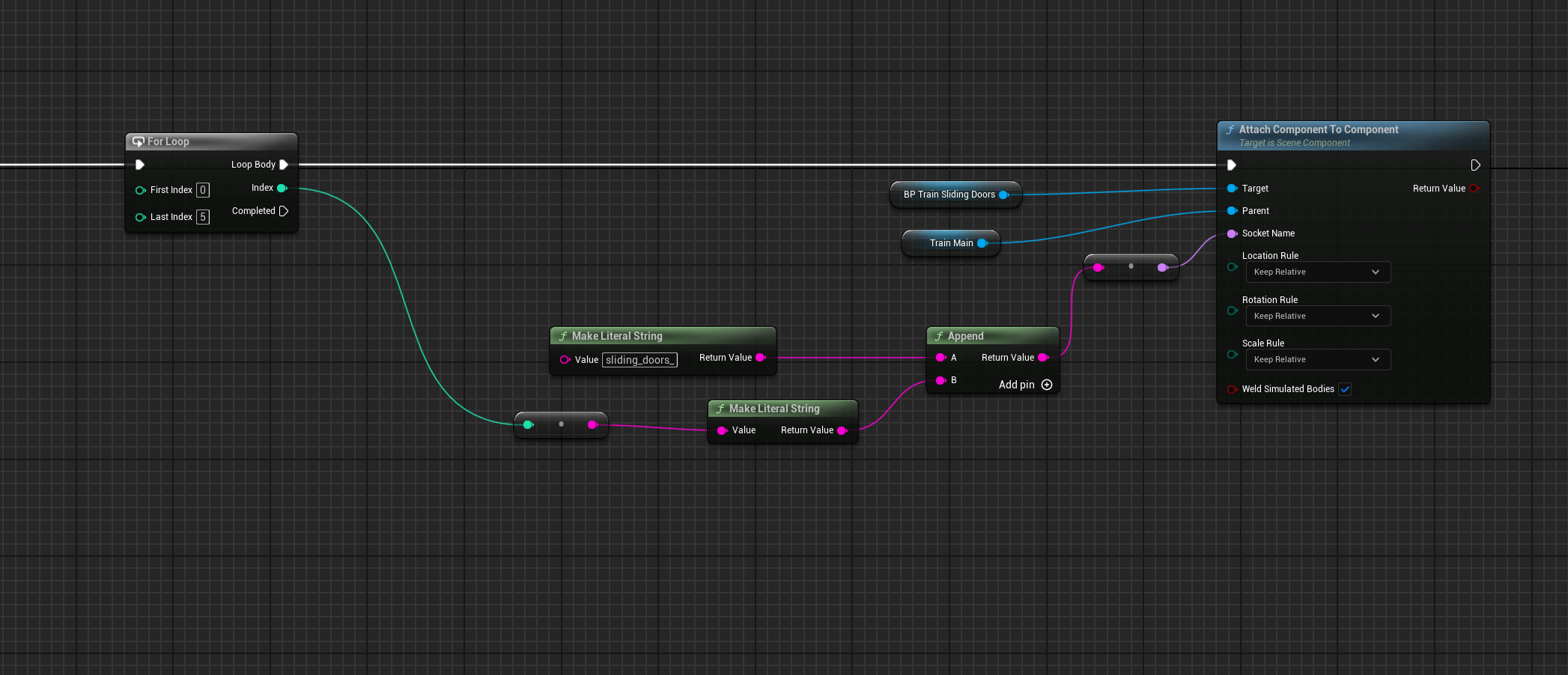
but the loop attach the same door, that ends in the last socket. is it possible to instance the door blueprint to use as target or i have to create 6 different components?
burnt citrus
PS - i'm in the construction script
light walrus
How to change resolution for windowed mode. Because it's only changes to borderless mode with this blueprint

OR basically
How do I make borderless mode with fixed resolution?
Ah. Nevermind. Fixed it with settings to "Use borderless window"
 tawny condor
Learn how to script a Headlamp that you can toggle on and off to light up your game's world. This beginner tutorial will guide you through the process as we use Blueprint to implement this capability for our character.
Join my Patreon (https://www.patreon.com/unrealdevhub) to support my channel and help me continue to create educational content...
i found this video super helpful ^ super interesting example of equippable items and blueprint interfaces
mild galleon
thanks
hello.
I am doing something "on actor overlap".
For test purposes i made the collision box visible.
How is it possible, that i send 5 villagers to build a building, but 10 events are detected?
How could i prevent that the same actor triggers this twice?
 burnt citrus
Ok i solved, i don't know if it's the easiest method but i did this (i didn't know you could drag an asset in the graph, and get the add component node for the blueprint) https://i.imgur.com/V4rFrOM.png
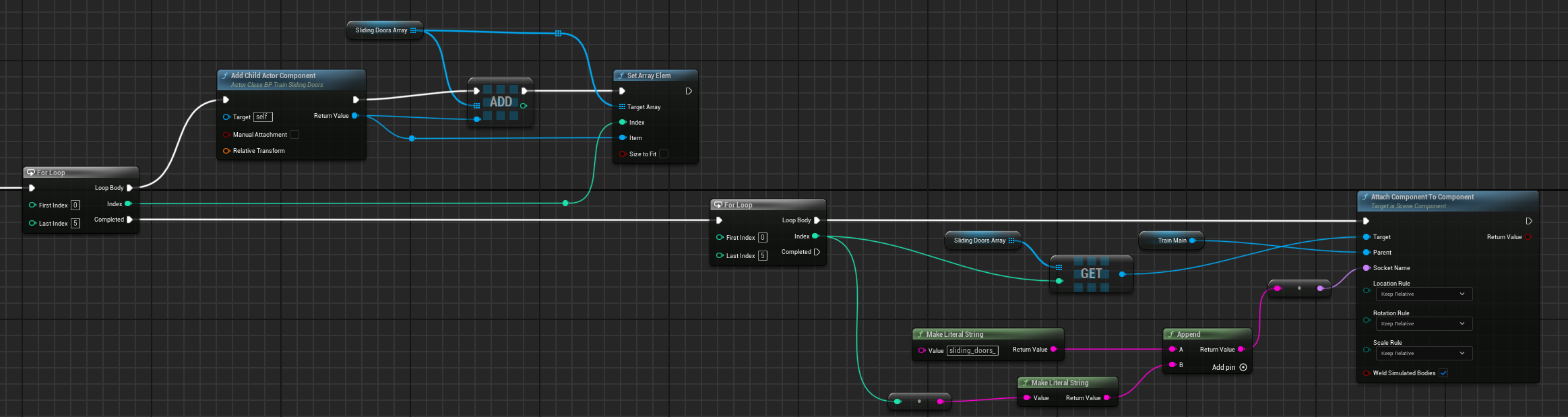 narrow sentinel
how do i make a rotation matrix ?
I need to take these into a matrix but not sure how

Anyone help pleaseeeeeee 🙂
I'm trying to have it so the bone on my vehicle follows the rotation of the spline but in terms of like railway bogies on tracks
at the minute when the train has got to other side of the track the bogies have done a full 360 which is incorrect
Thats the code I'm doing and well it's kind of working but also isn't
 burnt citrus
are you sure the spline is build correctly? i don't know how it works on UE, but seems that the normals of the spline flips. It happens when crossing the center of the map?
narrow sentinel
burnt citrus
are you sure the spline is build correctly? i don't know how it works on UE, but...
??
yeah looks correct, z up and x forward

issue is it's this shape which means as the vehicle comes around the bend the rotation of the bogies continues past what would be natural so 360 rotation

anyone online that could help me out please ??
so i think i've located the issue might be with the tangents
so i believe the issue is after the train goes past half way mark it's then ended up the numbers being minus
I give up, no matter how I do it don't seem to be right
lunar sleet
narrow sentinel
I give up, no matter how I do it don't seem to be right
#game-math might be able to help
 queen heron
this is new
so for some reason, my variables loose their data when they are called in the next function
setup is straight forward
set a value into the variable inside a function, send the tick into the next function and call the same variable there for further process
my variables aren't even local in the functions
lunar sleet
queen heron
setup is straight forward
set a value into the variable inside a function, send ...
what the heck does "send the tick into the next function" mean? 😄 . Also you've been here for over a year, you should know to show screenshots rather than giving play-by-plays in text form
but I'd wager you're not returning those variables in the first function so you can pass them into the next
 steady night
hello, question how do i change the game cursor ingame ?, ive but a custom one (widget) in project settings, but how do i change it ingame ?
queen heron
here are screenshots in the specified order
here is the initial function

here is the variable that is set and will be used in the third function

the outlined function is the second one
lunar sleet
first screenshot is illegible. Just show the contents of the first function


 lunar sleet
ok, which function sets the variable?
queen heron
the initial one
first two screenshots are from the first function
the second screenshot is the end of the function
lunar sleet
😮💨 so the 2nd screenshot where you've outlined a var and a function call, that's inside the first function?
queen heron
yes
lunar sleet
so you're wondering why ObstacleBottomDistances is not read properly by ProcessObstacleTopHeight?
queen heron
just said the outlined function in the second screenshot is the second function
but yes
no idea why the variable data does not move across functions
lunar sleet
ok, your first screenshot was impossible to read due to resolution, but those appear to be on different execution paths, unless you're somehow using a sequence
queen heron
here is a clearer version of the ending part of the initial function
 lunar sleet
ok gotcha
usually for you to use a variable from a function you need to actually return that function, but given that you're calling a func. inside a func., try creating an input on the ProcessObstacleTopHeight function, of type float array
dark drum
queen heron
here is a clearer version of the ending part of the initial function
This isn't the function you showed above. This is the top one not the bottom one.
 lunar sleet
or whatever that variable is
after you compile both you should see a new pin on your 2nd function call (outlined). Use a getter to plug your ObstacleBottomDistances into that new pin
queen heron
dark drum
This isn't the function you showed above. This is the top one not the bottom one...
it is the same graph from first and second screenshot
queen heron
lunar sleet
after you compile both you should see a new pin on your 2nd function call (outli...
knew you'd recommend that...
welp, guess there are no workarounds for this :/
still interesting how data does not stay as global
despite not having the variable as local
lunar sleet
queen heron
still interesting how data does not stay as global
you are inside a function
for it to become global you would need to return said value using a Return Node
queen heron
oh I see
dark drum
queen heron
it is the same graph from first and second screenshot
huh... That function is 'Process Obstacle Top Height' but the function you showed is was for 'Process Obstacle Bottom Height'. If you have one for top and bottom, you are probally using the wrong function.
lunar sleet
dark drum
huh... That function is 'Process Obstacle Top Height' but the function you showe...
there's that too, I was wondering about the name difference 😄
queen heron
dark drum
huh... That function is 'Process Obstacle Top Height' but the function you showe...
I got you confused 😄


I skipped the second one
the trigger order is fine
here is the second function in case you're wondering 😄

and here is the end part of it
 dark drum
queen heron
and here is the end part of it
dark drum
queen heron
and here is the end part of it
So 'Process Obstacle Top Height' calls 'Process Obstable Bottom Height'?
dark drum
queen heron
and the initial function calls Process Obstacle Top Height
Assuming that the variable in question isn't a local variable, then its being change somewhere along the chain. I can't say I've ever had an issue with variables just losing their data.
Why do you think it's losing its data?
queen heron
this is the only time its cleared

this is inside the initial function
if the line trace hits an obstacle that a real player could jump over or slide under, the Clear node will fire to avoid flooding the array
the rest is just Adds and Gets
tho funny enough 🤔
actually no nvm XD
nothing funny about it
nvm again, boi I'm sleepy
there's the Obstacle Top Heights vector array variable that somehow keeps its data intact
cause when I check this through the print string in the second function
I'm getting correct results
 dark drum
I'm going to take a guess and say you're logic isn't doing what you think it should be doing. 🙃
queen heron
dark drum
I'm going to take a guess and say you're logic isn't doing what you think it sho...
nope, as a matter of fact, I've used this very same setup without functions, and everything was working flawlessly
reason why I put everything in functions is to have faster compilation speed
lunar sleet
queen heron
reason why I put everything in functions is to have faster compilation speed
what? you're in bp
what's compilation speed got to do with anything
queen heron
lunar sleet
what? you're in bp
yes but as the graph keeps pilling up in nodes, it becomes slower whenever is refreshed
lunar sleet
queen heron
yes but as the graph keeps pilling up in nodes, it becomes slower whenever is re...
ah you're talking editor speed
 kind estuary
In my BP_GameMode created a Blueprint variable for an actor Reference and made it public instance editable so that I can put the actor in it, with the eyedrop:
Though for GameMode variable i have no clue where i can select it and set it when im in the Level?

its so weird
i can only do that for normal actors, not for GameMode?
queen heron
kind estuary
i can only do that for normal actors, not for GameMode?
to set variables in gamemode from other blueprints, you need to get the gamemode reference first
and then cast it to the gamemode you made
kind estuary
queen heron
to set variables in gamemode from other blueprints, you need to get the gamemode...
thanks though thats not what im trying to do
Im trying to set the reference while in the editor. Like with the little eyedrop
Though the GameMode doesnt offer this
dark drum
queen heron
nope, as a matter of fact, I've used this very same setup without functions, and...
With and without functions are two different setups. Regardless, things don't just lose their data between function calls (ignoring local vars of course) which means somethings is clearing it. You should add a break point just after the data is set and then step through to see whats happening.
queen heron
dark drum
With and without functions are two different setups. Regardless, things don't ju...
I think I found the culprit 🙂
this part right here

it goes into true
so of course no data is added into the array
queen heron
kind estuary
thanks though thats not what im trying to do
Im trying to set the reference whil...
ah, being able to edit variables within the editor
yeah, I don't think thats a possibility
only at runtime for gamemode
dark drum
kind estuary
thanks though thats not what im trying to do
Im trying to set the reference whil...
You can't. (unless it's a soft actor ref) You can only set hard actor refs if the actor you'll be setting it on is placed in the level. The game mode can't be placed in the level so you can't set it.
lunar sleet
kind estuary
i can only do that for normal actors, not for GameMode?
Game Mode does not "live" in the level
it's not a placeable actor
and if the only way you know how to set refs is the little eyedropper, you need to learn some more basics
watch the bp live comms training here in full if you haven't (pins)
kind estuary
thanks
queen heron
ok there we go...
the darn line traces that are meant to start from the ground would start with overlap
so of course this would go into true and not add any float values into the array
till this day I still don't know how my tiny brain is still working after making all these complicated blueprints
dark drum
queen heron
till this day I still don't know how my tiny brain is still working after making...
So to confirm, you're logic wasn't doing what you thought it should be. 😛
 wary rain
Hello Guys! I am trying to create a transparency post process effect for when my player goes under a surface like inside a building (top down game).
Can someone explain to me if the material preview is always like this in the post process domain or does this mean I am doing something wrong? The effect does not work at all in game
 queen heron
dark drum
So to confirm, you're logic wasn't doing what you thought it should be. 😛
queen heron
dark drum
So to confirm, you're logic wasn't doing what you thought it should be. 😛
it is in fact doing what I thought it should be
it just needed some important adjustments to assure it works good
😅
dark drum
queen heron
it is in fact doing what I thought it should be
it just needed some important ad...
'Calibration' 😉
queen heron
yesh
dark drum
queen heron
yesh
I've made plenty of little mistakes I've spent longer than I'd like to admit trying to resolve. If something doesn't work I just assume I've done something wrong lol.
queen heron
today I was meant to figure out a way to make the ai path navigation rely less on the Z position of the path so it would stop trying to find the path again after jumping high enough
and after finishing some testing, I noticed how the ai would only choose to jump over
but eh, at least I've made some progress with the ai part
lunar sleet
wary rain
Hello Guys! I am trying to create a transparency post process effect for when my...
#visual-fx would be the place to ask
thin panther
lunar sleet
Game Mode does not "live" in the level
I meeeeean technically....
lunar sleet
thin panther
I meeeeean *technically*....
Yeah I know
thin panther
:P
 surreal bridge
I am working on making a macro and was trying to figure out how I can ha e two different types of wildcard, if even possible.
I am wanting to add a key and get an object out, but I would want the key and object to be different types.
If I can't I am planning to just duplicate the macro and have different keys set to a certain type (like string) and have the wildcard be the output.
 marsh sonnet
I have a settings menu that is supposed to pop up when player hits "o" button, but it's not appeariong OVER the level - any ideas where to start trouble-shooting?
 dawn gazelle
surreal bridge
I am working on making a macro and was trying to figure out how I can ha e two d...
dawn gazelle
surreal bridge
I am working on making a macro and was trying to figure out how I can ha e two d...
Fairly certain this isn't possible if I understand what you're asking. Can you not use a Map type variable to potentially accomplish this without a macro?
surreal bridge
This is what I have currently:

Since I can't use wildcards in functions I had to use the macro, but I am thinking that this might work, and if it doesn't it is because the map is a copy and not a ref. Couldn't see how to change that so I assumed it was a ref my default. (Haven't tried it out yet)
dawn gazelle
The output in this macro would always be of the type of the default input.
raven quest
raven quest
Hello everyone 🙂 I'm pretty desperate about some errors I'm getting in my game....
Serious question, this doesn't have a proper solution? or it lacks of information? dumb? I have asked in different places without any answer lol
surreal bridge
Yeah, which is expected.
In java I had a 'get or default' function to either get the value in the map or return the default, but I wanted to add to that so it adds the default to that key.
So the map value and the default and the output are all the same
I had set the key and map key to string since I couldn't get it working with wildcards for both without the value and key being the same thing
 north viper
Hello! I'm working on a 3d game with paperzd and flipbooks, but I have a small problem with a enemy ai that I just made. It has an own roam and walks around, and it can attack me when i get closer, but after that It just stand in one place and doesn't walk again randomly. I’m new to game development so maybe just me who can’t figure this out.


 civic oar
Why are my wheels rotating 180 degrees half the time and correctly the other half and how do I fix it? Video for reference.
 faint pasture
north viper
Hello! I'm working on a 3d game with paperzd and flipbooks, but I have a small p...
faint pasture
north viper
Hello! I'm working on a 3d game with paperzd and flipbooks, but I have a small p...
Look at your code, what's the path that results in enabling movement and going back to roaming
faint pasture
civic oar
Why are my wheels rotating 180 degrees half the time and correctly the other hal...
are you meaning to be modifying rotations in global space?
you should probably use combine rotators here
FinalRotation = CombineRotation(RotationFromSteering, RotationFromSpinning)
civic oar
@faint pasture Modifying in Local Space results in same issue
faint pasture
Euler angles in general are pretty bad for this
What are the inputs to this function, what do you have at the beginning and what are you trying to output at the end.
faint pasture
civic oar
Why are my wheels rotating 180 degrees half the time and correctly the other hal...
That's euler shenanigans / gimbal lock for sure.
It gets screwed up when the wheel has spun half a turn (pitched upside down)
use rotations and combine/delta on them as much as you can
What is this physics wheel you're getting rotations of?
civic oar
faint pasture
What is this physics wheel you're getting rotations of?
Chaos Physics Wheel using the bone FR_MT and FL_MT, (MT stands for empty)
faint pasture
civic oar
Chaos Physics Wheel using the bone FR_MT and FL_MT, (MT stands for empty)
Why not just copy its rotation, it doesn't do the visual steering?
civic oar
faint pasture
Why not just copy its rotation, it doesn't do the visual steering?
It's an issue with the way the supension arms are connected to the wheel, via a kingpin which doesnt rotate on the x or y axis, only the z axis
faint pasture
also you're mapping FL to FR and vice versa
what bone are you trying to modify here?
civic oar
faint pasture
what bone are you trying to modify here?
The kingpin/mount bone that doesn't rotate in the Y-Axis as does the wheel (M_FL_Mount and M_FR_Mount)
faint pasture
is the right vector of the wheel bone always aligned correctly?
show the skeleton
where I can see bone orientations
civic oar
@faint pasture
 keen tinsel
so im stuck in this for almost 2 weeks , searching for tutos or solutions in google/youtube and the trial went with no result
trying to set up hand holding flash light at the bottom right corner of the camera , the thing is i want it to be following the camera without being so shaking when walking /running
kind of similar to guns set up but just with one hand
any help/ starting point wld be appreciated ?
timid yoke
keen tinsel
so im stuck in this for almost 2 weeks , searching for tutos or solutions in goo...
attach it to the camera
keen tinsel
i'll try that and see
faint pasture
civic oar
<@127902729677963264>
are the wheels aligned the same?
you could get right vector of wheel bone which should end up being right vector of mount bone
ignoring the global vs local vs relative space shenanigans, MountRotation = MakeRotationFromYZ(Wheel.RightVector, Mount.UpVector)
 surreal carbon
I'm currently having this issue where every time I make change or even just move a node in my player character and press compile a bunch of other ui widgets and game modes need to be saved. then when I try to play in editor and save the changes it crashes. I've managed to identify that there is nullptr it throws the error in "isdefault" function but I'm not sure where the issue resides in my setup. anyone know of this issue?

 heady grove
Hi, I am working with the vr template in unreal engine 5.2.1, do you have any idea how to make it able to grab an actor conformed of multiple static mesh? my idea was to place the grab component as a child of the scene root component but it didn't work :c
tiny tundra
Update to a post I made a couple of weeks ago (problem I was having, put down in frustration, now returning to it)
My problem is that I have cut my screen into a 4-way display, consisting of 4 displays - they are captured with SceneCaptureComponent2D cams and rendered onto textures. I want to be able to click on elements in the top-left display and select them - so it needs to understand that I am casting a ray from my cursor onto that rendered texture (it's being drawn onto UI button), and then project that ray into the world from where that SceneCaptureComponent is placed.
Fig1 shows what the game looks like - Fig2 is how far I have gotten (obviously I am missing some important connection., specifically what needs to be fed into the Screen Position part of the Deproject Screen to World node). Note that the SceneCaptureComponent that I want to grab from is highlighted in the left.
Fig3 is another part of the blueprint where I am capturing the XY position on that UI element on MouseOver, and normalizing it from 0-1. This is also referenced in Fig2 (WB 4way Display = Screen Xpos Tactical X & Y)
My partner and I are banging our heads over this one and I've asked a few places, but sadly I am not savvy enough to connect the final dots on this. Let me know if you are able to help- thank you!


 past compass
i am attempting to just see what a doulbe jump would feel like and i have set my max jump count to 2 (and higher) and it will not jump more than once... does anyone know why this might be happneing ? common reasons ?
 stone field
past compass
i am attempting to just see what a doulbe jump would feel like and i have set my...
stone field
past compass
i am attempting to just see what a doulbe jump would feel like and i have set my...
Learn to use breakpoints and step through your blueprints to see values at runtime.
 silver seal
Does anyone know how to fix this? I'm creating a game called Cubelife, which involves shooting magic balls. However, they currently only shoot along the X-axis, which means they only fire forward. I want to change this so that they don't only shoot in that direction. Any advice on how to fix it?
maiden wadi
silver seal
Does anyone know how to fix this? I'm creating a game called Cubelife, which inv...
Not enough info. What should be determining fire direction in your example there?
silver seal
i want it to like rotate the character
when i click A it moves A but not
Looking At the Axis
It move
And i want it to rotate too
so when i move in the back it faces the back
but when i move to the back it doesnt face the back
silver seal
oh i fix it
 grave crow
Absolutely cursed but it works in below 5.1 just with pure BP:

 woeful yoke
How to get sphere collision of overlapped actor referenced from another actor?
 lunar sleet
woeful yoke
How to get sphere collision of overlapped actor referenced from another actor?
lunar sleet
woeful yoke
How to get sphere collision of overlapped actor referenced from another actor?
Get a ref to said actor, cast and drag its sphere collision component
woeful yoke
I see! Lemme try that!
lunar sleet
woeful yoke
I see! Lemme try that!
Keep in mind you also have actor begin overlap and component begin overlap events, that bind you have there might not be necessary
Unless you’re doing something funky that requires it
woeful yoke
The overlaps are not in this Blueprint, those are in the Glowballs actor's blueprint which is referenced here. So I could not get any actor begin overlap or component begin overlap events of Glowball in here. I tried searching for them. After casting I can get them, I think.
I tried this method, but it's not working still.

I was trying to get hard memory reference free method, so I was trying to avoid casting. But functionality comes first, so I would definitely look into it!
I kind of solved it by doing all the overlapping from the child itself, and just handlin on Destroyed from the Parent
lunar sleet
woeful yoke
The overlaps are not in this Blueprint, those are in the Glowballs actor's bluep...
Yeah you can’t get overlap events by casting. I thought you’re asking about the sphere overlap component
You can however use get overlapping actors and cast on a for each loop to make sure you grabbed the right ref
And that one you should be able to call from the other bp iirc
woeful yoke
lunar sleet
Yeah you can’t get overlap events by casting. I thought you’re asking about the ...
Yeah, I am very new to blueprint, so most of the time I don't know what I am talking about lol
woeful yoke
lunar sleet
You can however use get overlapping actors and cast on a for each loop to make s...
I see , I will try that next!
lunar sleet
woeful yoke
Yeah, I am very new to blueprint, so most of the time I don't know what I am tal...
You’ll get used to it, but my advice to all bp newcomers is to watch the live comms training at the bottom of pins. It’s a bit long but it’s worth every minute
woeful yoke
lunar sleet
You’ll get used to it, but my advice to all bp newcomers is to watch the live co...
I did not understand the location of the live comms training. Is that on this discord?
lunar sleet
woeful yoke
I did not understand the location of the live comms training. Is that on this di...
Yeah under Pinned links in this channel, scroll to bottom
kind estuary
im doing some fancy procedural generation.
So i need to create actors. Analyze the model, delete actors, and then recreate actos.
Not only is it a bit slow. I can see like 1000 Deleted Object in the editor's Level tab
IS this okay?
Maybe i should change to UObject or struct?
 steep cypress
@dry sleet @dark drum Hey both, dont know if you remember but I was having trouble with lag in unreal engine. As it was so odd thought I'd post an update just out of curiousity. It turns out its reading the drive my project was in too slow.
Why that is for me to find out but at least it's diagnosed 🙂 hope you're both well and thanks for your help
 dry sleet
steep cypress
<@156052619838750720> <@430016173694779402> Hey both, dont know if you remember ...
dry sleet
steep cypress
<@156052619838750720> <@430016173694779402> Hey both, dont know if you remember ...
Ah! Very strange that it would manifest in such a weird way, but I guess it makes sense.
Nice that you figured it out -- same to you and have a good weekend!
I just figured my shitty bug out myself with the tried and true method of PrintString haha

bloody nans up in my grill
steep cypress
nanites?
dry sleet
I wish
dark drum
steep cypress
<@156052619838750720> <@430016173694779402> Hey both, dont know if you remember ...
How odd. 🤔
dark drum
steep cypress
nanites?
Not a number I believe.
dark drum
dry sleet
Indeed
What was your issue? I can't say I've ever gotten a nan message using BP lol.
dry sleet
Nah this is from C++.
dark drum
dry sleet
Nah this is from C++.
Ahhh. Say no more lol.
dry sleet
I will find out the precise issue NOW because I just caught it on the call stack
steep cypress
dark drum
What was your issue? I can't say I've ever gotten a nan message using BP lol.
exactly, never heard the word before 😂
dark drum
dry sleet
I will find out the precise issue NOW because I just caught it on the call stack
Yea, finding the cause can take significantly longer than fixing it. 🥲
 sonic trench
hii! i am making a vignette effect in unreal engine the vignette is showing but moveent logic is not working here is pic

 dry sleet
steep cypress
exactly, never heard the word before 😂
dry sleet
steep cypress
exactly, never heard the word before 😂
Ahh sorry I thought you were joking -- NaN usually stems from dividing by zero (giving you Inf) and then using that weird result in calculations.
But in Blueprint there's a check in place to prevent you from getting Inf from a zero division I BELIEVE.
dark drum
dry sleet
But in Blueprint there's a check in place to prevent you from getting Inf from a...
Sort of, it flags an error in the logs.
There is a safe divide though you can use if you know there might be times 0 could be a divisor. It just returns 0 if the divisor is 0. (No error log on this one)
The logs getting spammed by divided by 0 errors can impact your frames though so best to sort them out.
dark drum
sonic trench
hii! i am making a vignette effect in unreal engine the vignette is showing but ...
You might want to explain what you want it to do and what it's currently doing.
dry sleet
dark drum
Sort of, it flags an error in the logs.
There is a safe divide though you can u...
KISMET_MATH_FORCEINLINE
double UKismetMathLibrary::Divide_DoubleDouble(double A, double B)
{
    if (B == 0.0)
    {
        ReportError_Divide_DoubleDouble();
        return 0.0;
    }
    return A / B;
}
It also returns 0 it seems.
narrow sentinel
Anyone know best way to get the speed of an actor thats having it's location set rather then pysics moving it ?
dark drum
narrow sentinel
Anyone know best way to get the speed of an actor thats having it's location set...
Get it's current location, minus the new (desired) location and then get the vector length you'll probably then need to divide this by delta time.
narrow sentinel
dark drum
Get it's current location, minus the new (desired) location and then get the vec...
hmm this is where I need to use the delat node don't I sound when I get the new location it's a tick on from last location
 manic vessel
Can't get rid of this error im setting an actor to physics and then grabbing it, I have tried to find a solution but the only one that slightly worked was to go outside the function and add a delay to the sim node. anyone got any ideas on a good solution for this one.


 narrow sentinel
dark drum
Get it's current location, minus the new (desired) location and then get the vec...
narrow sentinel
dark drum
Get it's current location, minus the new (desired) location and then get the vec...
whic means I can't do this within a function
dark drum
narrow sentinel
whic means I can't do this within a function
It shouldn't make a difference.
narrow sentinel
dark drum
It shouldn't make a difference.
wouldn't it, like if I don't know the new location I'd have to use the delay node so it checks next tick and not on same tick ?
dark drum
narrow sentinel
wouldn't it, like if I don't know the new location I'd have to use the delay nod...
Before you set the location, get it's current location and store it in a var. (PrevLocation for example)
narrow sentinel
dark drum
Before you set the location, get it's current location and store it in a var. (P...
ohh right I get you
So i'm doing this on tick but don't seem to be working
 pale mica
Guys, my excuse if this is not a blueprint problem however does anyone know why the marker doesnt display the widget when clicked from a distance?
dark drum
narrow sentinel
So i'm doing this on tick but don't seem to be working
You need to set the 'CurrentLocation' just before you update it's location.
narrow sentinel
dark drum
You need to set the 'CurrentLocation' just before you update it's location.
oh so but I thought I have to seperate updating the location else wouldn't the function all run in same frame ?
dark drum
narrow sentinel
oh so but I thought I have to seperate updating the location else wouldn't the f...
Unless you're able to control the order things execute, it's best to have setting the previous location before it's updated to a new location.
 hidden swift
Why does importing an mp3 file into Unreal increase its size by 3 times or even more?
narrow sentinel
SO that, but wouldn't that not work either ??

wouldn't all that happen same frame so it would always appear as it's where it would be
 open furnace
Why RemoveFoodEffect triggers only once even though I have two separate handles?
 dawn gazelle
narrow sentinel
SO that, but wouldn't that not work either ??
dawn gazelle
narrow sentinel
SO that, but wouldn't that not work either ??
Calculate first based off of previous location, then set the previous location to the current location.
dawn gazelle
open furnace
Why RemoveFoodEffect triggers only once even though I have two separate handles?
The way the Set Timer By Function node works is that it ties a delegate to the world timer, but only allows that delegate to be associated to the timer once. You can't have multiple calls of the same timer work if it calls the same function/event, even with separate handles or separate calls to SetTimerBy nodes.
In your case, you may want to have your food effects as separate objects that can run their own timers.
narrow sentinel
dawn gazelle
Calculate first based off of previous location, then set the previous location t...
pretty sure I tried that aswell and it didn't work
open furnace
ok make sense 🙂 thanks mate
dawn gazelle
narrow sentinel
pretty sure I tried that aswell and it didn't work
This frame:
My "Previous Location" is 0, 0, 0 (Unset from default)
My "Current Location" is 1, 0, 0
Current - Previous = 1, 0, 0 indicating I moved 1 in X.
Set Previous = Current
Next Frame:
My "Previous Location" is 1, 0, 0
My "Current Location" is 2, 1, 0
Current - Previous = 1, 1, 0 (I moved 1 in X and 1 in Y)
Set Previous = Current
Next Frame:
Previous Location = 2, 1, 0
Current Location = 2, 1, 0
Current - Previous = 0, 0, 0 (I didn't move at all)
etc.
narrow sentinel
dawn gazelle
This frame:
My "Previous Location" is 0, 0, 0 (Unset from default)
My "Current L...
but if I do it all within a function doesn't that function all get called in one frame or tick
dawn gazelle
Yes, but that's why you store the current location in previous location when you're finished with the calculation. On the next frame "previous location" will have the value from the last frame.
narrow sentinel
dawn gazelle
Yes, but that's why you store the _current location_ in _previous location_ when...
oh so my issue is I'm not storing current rather I'm just getting it when I'm - from the previous
dawn gazelle
Yea right now what you have is just storing the current location in previous location first and then calculating, which means it'll always return 0 since previous will always == current.
 gray ingot
Hi, i have an issue, my Scene Capture Comp 2D does not work when scalability lower than "Epic", where i can change it?
dark drum
narrow sentinel
SO that, but wouldn't that not work either ??
Take the set 'Previous Location' and have it called before you update the location of the actor. That simple.
As for why it doesn't work, it's because the previous and current end up the same value when it's called so the result will always be 0.
lunar sleet
narrow sentinel
So i'm doing this on tick but don't seem to be working
Do not ever put a delay on tick.
lunar sleet
gray ingot
Hi, i have an issue, my Scene Capture Comp 2D does not work when scalability low...
Change what, the scalability?
narrow sentinel
dark drum
Take the set 'Previous Location' and have it called before you update the locati...
like this ?
 dark drum
narrow sentinel
like this ?
dark drum
narrow sentinel
like this ?
No, go to where you update the location of the actor, and put it just before it.
narrow sentinel
dark drum
No, go to where you update the location of the actor, and put it just before it.
done that see what happens
lunar sleet
dawn gazelle
The way the Set Timer By Function node works is that it ties a delegate to the w...
Technically you can call the same timer twice but it’ll just restart the timer iirc 😁
dark drum
narrow sentinel
done that see what happens
Make sure you remove the node to set the previous location from the function you've shown above though.
narrow sentinel
dark drum
Make sure you remove the node to set the previous location from the function you...
so that didn't seem to work as now it seems to think the vehicle is moving when it's not
 fading sail
Say I put some 3D object into the world, convert to Blueprint, that new BP then is a child class of Actor and has a Viewport in its editor. Well I can drag that new BP into another BP's already-open editor's Components tab and thus having added the new BP to the other BP's Components tree, I can see the original 3D object in the Viewport. Very well!
But that added BP in the Components tree is not an instance of said BP's own (Actor-inheriting) class, it's an instance of "Child Actor Component", and so the functions and vars exposed as public by my new BP aren't immediately/trivially/obviously accessible from the other BP having the former in its own Components tree.
How does one unwrap (or cast?) any "Child Actor Component" to get its actual Actor-derived Class type? Anyone know?
lunar sleet
fading sail
Say I put some 3D object into the world, convert to Blueprint, that new BP then ...
No, not very well. Don’t do that.
Child Actor Components are broken to begin with and the design flow you described is problematic
dark drum
fading sail
Say I put some 3D object into the world, convert to Blueprint, that new BP then ...
Dynamically, it's not possible. You have to know before hand to be able to cast. But as Neo said, they're pretty buggy. I would only use them for extremely simple stuff.
 fading sail
thx both of ya =)
narrow sentinel
So got a question for all, let's say in your game you have an actor that follows a spline would you implement it in a way where it's not locked to the spline and instead following it but using say it's own speed parameter to move along the spline ?
I'm just thinking that would be better as then it's based on the speed of the actor on the spline not say the spline length etc
mild galleon
Hello everyone!
very short question:
will this give me back who "owns" the actor, as of, which player controls the unit in my game?
(its an RTS, so you can control various units and buildings, and there are several players)
 lunar sleet
mild galleon
Hello everyone!
very short question:
will this give me back who "owns" the actor...
lunar sleet
mild galleon
Hello everyone!
very short question:
will this give me back who "owns" the actor...
No.
mild galleon
thank you.
lunar sleet
Welcome.
mild galleon
i guess i have to make an enum then with the players and update on spawn in the master unit etc.
 fallen glade
Is it possible to create a level folder using blueprint?
lunar sleet
mild galleon
i guess i have to make an enum then with the players and update on spawn in the ...
I would check with #multiplayer on that one. GetOwner is generally used to get the actor that is set to own the current one (you can set the owner dynamically and some nodes have an Owner pin as well). It’s handy for passing refs around
mild galleon
and dont trust chatGPT, thats the second time it told me BS haha
 final python
is there not a way to get how many member variables a struct has? Obviously I can just make that be a member variable, but seems kinda redundant lol
lunar sleet
mild galleon
and dont trust chatGPT, thats the second time it told me BS haha
Aye, it hallucinates all things Unreal
dawn gazelle
You can assign ownership however you want. If you assigned the owner to a playerstate, then yes, it could return which player owns the actor, even in multiplayer. The only time this may not work is if you possess a pawn - that pawn's ownership is usually then set to the PlayerController possessing it which can't be read by others.
lunar sleet
dawn gazelle
You can assign ownership however you want. If you assigned the owner to a playe...
Ok, I guess I also hallucinated that response😅
I didn’t realize you can use a PlayerState as owner but ig that makes sense
dawn gazelle
final python
is there not a way to get how many member variables a struct has? Obviously I ca...
I don't think in blueprint on its own.... I imagine that could be something exposed through some C++
tiny tundra
Repost from above, I apologize, my back is kind of against the wall with this & the clock is ticking.
My problem is that I have cut my screen into a 4-way display, consisting of 4 displays - they are captured with SceneCaptureComponent2D cams and rendered onto textures. I want to be able to click on elements in the top-left display and select them - so it needs to understand that I am casting a ray from my cursor onto that rendered texture (it's being drawn onto UI button), and then project that ray into the world from where that SceneCaptureComponent is placed.
Fig1 shows what the game looks like - Fig2 is how far I have gotten (obviously I am missing some important connection., specifically what needs to be fed into the Screen Position part of the Deproject Screen to World node). Note that the SceneCaptureComponent that I want to grab from is highlighted in the left.
Fig3 is another part of the blueprint where I am capturing the XY position on that UI element on MouseOver, and normalizing it from 0-1. This is also referenced in Fig2 (WB 4way Display = Screen Xpos Tactical X & Y)
My partner and I are banging our heads over this one and I've asked a few places, but sadly I am not savvy enough to connect the final dots on this. Let me know if you are able to help- thank you!


 broken wadi
tiny tundra
Repost from above, I apologize, my back is kind of against the wall with this & ...
broken wadi
tiny tundra
Repost from above, I apologize, my back is kind of against the wall with this & ...
I dont really understand your question but maybe you can just right click and split the screen position then feed it the x and y you have?
kind estuary
I remember i got this figured out before... though i dont remember it now...
i need my text to self adjust the position to be centered on the location im spawning. So there was something i cant recall now that adjusted the location of the text to right.
 tiny tundra
broken wadi
I dont really understand your question but maybe you can just right click and sp...
tiny tundra
broken wadi
I dont really understand your question but maybe you can just right click and sp...
Thank you for responding. So I am using a screenCaptureComponent to get an image of my screen, and sticking that on a UI button. Doing this 3X so it looks like I have 3 different displays at once.. I want to be able to use my cursor to click on these displays
 flat coral
I'm realizing I'm going to a lot of pains to not damage actors unless they can have logic to handle damage, but like, is this a waste of time? Is there actually any potential side effects to calling Apply Damage on an actor which has no logic to handle that?
 dawn gazelle
flat coral
I'm realizing I'm going to a lot of pains to not damage actors unless they can h...
dawn gazelle
flat coral
I'm realizing I'm going to a lot of pains to not damage actors unless they can h...
No. It's an interface call. If the interface isn't implemented, nothing happens.
flat coral
Somehow I never made the connection that it was an interface call. That simplifies things considerably!
 hallow nest
Hey guys, is it possible to create an reactive audio from sound of media player? I only seen it’s made with a .wav source
 dull shell
Hey Guys, I'm trying to integrate FSR in my game but im running into a problem where r.FidelityFX.FSR3.QualityMode doesn't seem to have any effect at all. I did Enable FSR 3 and i can see the effect by turning off FSR and Turning it back on. The edges are a bit jagged in FSR ( maybe cuz default selected is Ultra Performace ). But I cant seem to change quality mode
 pulsar osprey
narrow sentinel
So got a question for all, let's say in your game you have an actor that follows...
pulsar osprey
narrow sentinel
So got a question for all, let's say in your game you have an actor that follows...
i implemented something similar a few years ago
it used physics to push objects along the spline
also pulled you to the center based on distance and dampened your velocity based on how fast you were moving away
exotic plover
im not able to open struct viewer in editor wtf! anyone have this issue?
its for all my projects
it just opens a glitched ue5 tab and I cant view the struct
why is it like this?
 narrow sentinel
pulsar osprey
it used physics to push objects along the spline
narrow sentinel
pulsar osprey
it used physics to push objects along the spline
See I did think of physics but also that it might be a bit over engineered for that is happening in my game
exotic plover
ok I solved it by resetting the layout ... idk what was going on
 wise ravine
What is the difference between casting and this == method? (mention please)
 faint pasture
wise ravine
What is the difference between casting and this == method? (mention please)
faint pasture
wise ravine
What is the difference between casting and this == method? (mention please)
casting is asking "Is this thing an instance of BP_FirstPersonCharacter? If so, let me treat it as one"
The equivilence check is "Is this thing player 0's Character?"
Is this a dog, vs is this MY DOG named Fido
Did a person overlap me, or did David Smith
Did a Character overlap me, or did Player 0's Character?
 merry mirage
Hoi! Been looking into the Blueprint Default Events and wanted to add some cool events appear with each new Blueprint I create of a particular class. Does anyone have information on how to do this? The only resource I can find is a forum post from 2017 and I don't quite seem to understand it. Cannot find a "[DefaultEventNodes]" section of the EditorPerProjectUserSettings.ini file.
( said forum post: https://forums.unrealengine.com/t/blueprint-default-events-on-graph/381497 )
(Please ping me with your response, I have notifcations off)
narrow sentinel
So for my actor that moves along a spline. I'm doing it by a speed value, would I be better faking the speed to where I lerp it to and from a target speed clamped to a max speed
Or get the speed using methods which you could say is more accurate
 unique bone
casting as a whole just feels so weirdly obfuscated. personally i always have to know how something works under the hood to truly feel like i know anything about it. every function box in blueprint i don't wholly understand is just a big red flag to me.
but with casting no matter how much you look it up you basically get "it makes x thing kinda sorta like y thing don't worry about it. it just works :)" and that feels so uncomfortable
faint pasture
unique bone
casting as a whole just feels so weirdly obfuscated. personally i always have to...
Casting is just a type check
You know how types can be nested? A character is a pawn is an actor is an object?
just like a dog is a mammal is an animal is a living thing
the overlap hands you an actor reference. That's like being handed an animal reference
great, it's an actor / animal
but you want to know if it's a character / dog so you can call Jump / WagTail on it
unique bone
so when you're asked to plug a reference in it's more or less situations where blueprint is going "give this function exact details so it doesn't screw it up"
grave crow
exotic plover
im not able to open struct viewer in editor wtf! anyone have this issue?
- Reset your layout via menu.
- Delete or move
Saved/andIntermediate/folders. Restart Editor, open log see if nay errors.
If none, run "Validate assets" on problematic files. Check log again.
If nothing, repeat the same but Resave All.
if this is a source build, do-Cleanand rebuild, could be some odd reflection data hijinks. it hangs but not crashes so a bit odd.
grave crow
final python
is there not a way to get how many member variables a struct has? Obviously I ca...
Reflection tools not exposed to BP realm. You need to make them in C++ and expose yourself
 hardy merlin
What's the preferred way to have a camera in a third person game without relying on Camere Boom?
Like, in unity the camera is a separate object I can script to do whatever motion I want.
pulsar osprey
unique bone
casting as a whole just feels so weirdly obfuscated. personally i always have to...
casting is pretty simple. it's only ever needed when turning a base class into a derived class. derived to base is implicit
also things in programming are meant to be abstracted. otherwise you would be writing assembly
faint pasture
hardy merlin
Like, in unity the camera is a separate object I can script to do whatever motio...
You can just drive the camera veiwpoint yourself, don't need any objects or actors for it
You can just make a custom PlayerCameraManager and do anything your heart desires
 lost hemlock
Hey! How can I get my axe collision to interact with a tree inside a BP_Tree that’s nested in a PCG setup? The whole setup is in a PCG_Spawner Blueprint actor that has its own collision box, and I've tagged both the axe and tree collision boxes as 'tree.' They’re not communicating when the axe hits the tree. Any ideas?
so it's a static mesh inside of the BP_Tree, inside of a PCG_Graph, inside of a blueprint.
faint pasture
A camera component is just USED by the PlayerCameraManager. It all boils down to PlayerCameraManager.
https://dev.epicgames.com/documentation/en-us/unreal-engine/camera?application_version=4.27
faint pasture
lost hemlock
Hey! How can I get my axe collision to interact with a tree inside a BP_Tree tha...
Show your code
lost hemlock
 faint pasture
lost hemlock
faint pasture
lost hemlock
does that begin overlap event ever fire?
lost hemlock
faint pasture
does that begin overlap event ever fire?
nope
faint pasture
start there
are you sure BP_Tree actors are being spawned? What's the collision settings?
show collision settings for tree and axe
lost hemlock
faint pasture
show collision settings for tree and axe

 faint pasture
lost hemlock
faint pasture
lost hemlock
tree ignores worlddynamic, axe is worlddyanmic