#blueprint
1 messages · Page 243 of 1
 mild galleon
 faint pasture
You're starting to get outside of BP territory
What are the sort of attributes you'd want to save per unit or building?
mild galleon
i have structs for buildings and units, yes.
i just cannot use them right now.
i guess, i have to do something when a unit is spawned, to "add a row" and fill in.
faint pasture
ignore data tables, they aren't the use case here
mild galleon
(coming from my DT model, of course that doesnt work, yes)
mild galleon
probably.
faint pasture
so your savegame would probably be like this
TArray<UnitDataStruct> UnitData
TArray<BuildingDataStruct> BuildingData
mild galleon
i am just not sure, if i can put array of data into an array.
mild galleon
that sounds good then. just a bit of work.
faint pasture
You probably want to split out the transient and savegame data, like for your units it might look like this.
UnitActor
StatsData
UnitSaveGameStruct
LocationData
StatsData
If you don't need LocationData at runtime within each unit
mild galleon
so the top level would be the individual units ID, mapped on that array of properties, perhaps.
Then, the second level, this array of properties, would have to represent the struct of properties i guess, filled with individual values for each case /index
faint pasture
How varied do these units get? Why can't you have it like:
UnitDataStruct:
Name
HP
MaxHP
Damage
CurrentOrder
UnitSaveGameStruct:
Location
UnitDataStruct
SaveGameObject:
TArray<UnitSaveGameStruct> Units
TArray<BuildingSaveGameStruct> Buildings
Are your units actors at runtime?
mild galleon
sorry, what does "currentOrder" stand for?
faint pasture
The main gist of it is you just observe the game world, record all this data, then for loading, you just receate it.
If they are actors then you'd probably want to store the datatablerow id or whatever in UnitDataStruct
There are ways to make this more automagic but that's in C++ only I think. You can basically just tag properties as savegame then cruise the entire world and serialize them for saving.
I really like the "game" mostly living in raw structs myself tho.
mild galleon
i think at the savegame struct it also needs "OwningPlayer"?
mild galleon
i have to learn more about how i can directly use structs for ... i guess data assets or arrays.
So far, i only used structs for creating data tables.
or perhaps i can use the structs on their own somehow.
like, if i have created the structs (which i already have for said DTs)
then, how would i implement them to be used by an array or data asset?
I understand them currently only as a "structure" but not a data passing /storing entity in itself.
faint pasture
They're just bundles of data
mild galleon
i might be wrong
faint pasture
You could consider your DT_Units as a record of all the unit types in your game in their default state
mild galleon
yes. that i do. but then its a DT. and i seek a solution without DT, because i could not update it, right?
I could only use "static properties" reading out from DT. but not store "volatile, dynamic" information on new spawned instances/units (unique properties)
faint pasture
The DT would be where you say what an archer or footman or cannon IS
mild galleon
yes.
but if, say, a swordsmen gets hungry, then, that cannot be stored in the DT.
thats unique to that unit and also changes.
faint pasture
yes, the individual swordsman has a UnitStats struct that is different from default
mild galleon
i could store it, but i would need to make thousands of empty lines for "to spawn future units" and then edit them.
faint pasture
but the swordsman row in your DT says what the default stats are
DT are for editor time data
mild galleon
okay, that i get, i struggle with how to use that to generate runtime data.
faint pasture
Spawn actor Unit -> set its UnitStats struct from the DT
mild galleon
(and store it! )
faint pasture
First off, do you have 1 actor per unit in the world?
and is are they all instances of Unit with different data, or all different subclasses of Unit?
mild galleon
one type of BP actor, yes, well, there is one master unit and several child unit types, of course, /(rock paper scissors)
and then each child would have instances /reference objects (individuals spawned)
 upper dome
Question
Hello, I am trying to follow this tutorial, but instead of a Player Character, I would like to control a Light.
I have already made a BP with a Light inside, but I don't know what to connect to the Object pin, I am pretty new to UE, any tips is very welcome.
Tutorial: https://youtu.be/9ks-tkqM26c?si=NB6mNQBVvjoXXe6Q
I included a picture of the video and of how i got my setup now.

 faint pasture
So your entry for Archer in the DT might be like:
DisplayName = "Archer"
Class = BP_Unit_Archer
MaxHP = 120
Range = 12
Cost = 30
Spawning:
get data table row -> spawn actor from class row.Class -> spawnedactor.Stats = row.stats
Having a BP subclass for each unit type can get a bit redundant, the BP subclass can be thought of AS A DATA ASSET
 dawn gazelle
upper dome
`Question`
Hello, I am trying to follow this tutorial, but instead of a Player C...
dawn gazelle
upper dome
`Question`
Hello, I am trying to follow this tutorial, but instead of a Player C...
You need to get a reference to the particular light you'd want to control.
mild galleon
spawnedactor.Stats = row.stats will create an instance. okay.
faint pasture
mild galleon
spawnedactor.Stats = row.stats will create an instance. okay.
Think about where you want the default stats to live. WHen you want to balance archers to have less hp, do you want to modify the data table or the Unit_Archer class?
mild galleon
maybe its just an issue with my construction system, and it should be able to tell which instance has what building progress.
maybe i am overthinking this. All from master_building....
of course the DT.
faint pasture
BuildingStats should have a variable float HowBuiltAmI
You could honestly do this all with 1 baseclass and 1 struct if you wanted to get crazy with it
then you won't have so many special cases
a building is just a unit that can't move
mild galleon
yes, it has, but if i build a few in a row, by several villagers, i get that apparently, running construction in parallel,
they overwrite each other.
faint pasture
each building instance has its own
just like how each villager has their own HP
it's basically a secondary HP
mild galleon
meaning that i dont need to worry about the parent class not knowing what is being build?
faint pasture
You need to understand the difference between a class and instance
when you spawn an actor from a class or make a struct copying another struct it's another instance, they don't share data
mild galleon
i was not able to build 2 buildings of the same class (or a second instance)
faint pasture
that sounds like some screwed up code lol
faint pasture
ok ignore subclasses for now.
BP_Building
Name
float HP = 100
float MaxHP = 100
float HowBuilt = 0.0
When you place a building, you spawn actor from class Building. It gets spawned and its HowBuilt = 0. When you command a villager to work on the building, it'll start hammering it and increase HowBuilt over time (each hit, it calls AddConstruction on the building it's working on). Each time HowBuilt is modified, check if it's >= 1.0. If it is, the building is now operational.
Just like how each time you take damage you check if you're dead
Villager:
WorkOnBuilding -> if MyBuilding.HowBuilt < 0, call MyBuilding.AddConstruction
Building:
AddConstruction -> HowBuilt += 0.01 -> if HowBuilt >= 1.0 -> Operational = true
mild galleon
sorry for the colour. so this is how i open up construction:
I checked for is >= 100% of max HP.
 upper dome
dawn gazelle
You need to get a reference to the particular light you'd want to control.
upper dome
dawn gazelle
You need to get a reference to the particular light you'd want to control.
Thank you, I have this now is that the right way?
 faint pasture
So do you intend for the villager to take an action adding buildness to the building, or for the building to take an action looking at how many builders are around and increasing its buildness?
dawn gazelle
upper dome
Thank you, I have this now is that the right way?
That's sort of one way - that'll give you an array of all lights currently loaded, but not necessarily a specific one you want.
faint pasture
It'd be a lot easier formulating everything as Villager.WorkOnThing
the thing being worked on doesn't need to know about villagers
mild galleon
i want the builders to be active there, and check how many.
Before i was looping over the array. but that caused issues. Now, i am checking overlapp events.
faint pasture
why do any of that?
mild galleon
yes, you want to scale the construction speed.
faint pasture
why not have each villager add a unit of work to its target (tree, mine, building)
mild galleon
its a tactical thing how many villagers you send.
upper dome
dawn gazelle
That's sort of one way - that'll give you an array of all lights currently loade...
I tried dragging the light from the Outliner into the Blueprint, but then nothing happens
faint pasture
mild galleon
its a tactical thing how many villagers you send.
more villagers = more hits, the building still doesn't need to know
upper dome
srry im talking trou you guys
dawn gazelle
upper dome
I tried dragging the light from the Outliner into the Blueprint, but then nothin...
Yeah, that only works within the level blueprint. Things placed in a level cannot be directly referenced in standard blueprints.
mild galleon
faint pasture
more villagers = more hits, the building still doesn't need to know
not really i guess.
faint pasture
It'll be a lot simpler to put all this logic in your villagers. They just call ThingI'mWorkingOn.GetWorkedOnIdiot (probably an interface call) and the thing does its thing (gets built, gets chopped, puts gold in the caller's pocket)
all they do is respond to getting told that they're getting worked on
per "hit" or whatever
Just like how HP only responds to getting damaged per hit
mild galleon
okay, thank you for this advise. so how would the building "learn" of its progress? ah right, similar to melee system.
part of the preview logic is also there. i mean i have a lot of building references.
for updating for instance:
 faint pasture
Building.GetWorkedOn(pass over amount of work, reference to worker, whatever)
Buildness += Worker.ConstructionSpeed
Update stuff based on Buildness
mild galleon
 faint pasture
mild galleon
faint pasture
mild galleon
If it's health just have a villager working be negative damage
Things can usually be a lot simpler than people often think
But one guiding principle I really like is to keep references flowing one way.
A worker needs to know what thing it's trying to work on. The thing doesn't need to know about the workers around, it just responds to events.
mild galleon
right. so like the damage event,the building reacts.
faint pasture
yup
 leaden helm
Sorry to interrupt. Not sure why this isnt working. Trying to set the static mesh of a blueprint, which is attached to the target actor's root, set the relative location to a socket location on the mesh of the target actor.
 faint pasture
hell it could BE the damage event if you wanted it to be super simple. Building is healing.
mild galleon
yes i had this thought, but wasnt clear on how to do it! 🙂
faint pasture
If you're ok with half built and half destroyed being the same thing then it'll just work. Use the same logic as damage, just send over a negative damage amount
 empty wasp
Can you help me
mild galleon
i do have though, build up stages and destroyed stages of buildings. therefore, i need to have at least a bool "was build completely before"
faint pasture
mild galleon
i do have though, build up stages and destroyed stages of buildings. therefore, ...
or 2 "hp" variables
however you want to do it
empty wasp
It seems that grab component broke ability to change location of a component
faint pasture
bool bBuilt would be pretty good.
that's what you'd check to be able to do things with the building like spawn dudes.
mild galleon
okay, let me summarize what you have said and think about a different approach.
faint pasture
Building:
HP //defaults to 0
MaxHP
bBuilt //defaults to false, set true on HP being filled, set false on HP being emptied if you want to have to do a full rebuild
Damage -> HP -= Damage -> check for full or empty
OnHPFull -> bBuilt = true
OnHPEmpty -> bBuilt = false
UpdateMesh -> choose mesh based on HP and bBuilt
that'd be for if you wanted a destroyed building to basically be back to foundation
mild galleon
it shouldnt be necessary to make that ID system for having the buildings work proper
(for now)
of course, the earlier i figure that out as well, the better.
faint pasture
yeah you won't need an ID system for anything beyond saving references
mild galleon
but i want to soon show the game on a public place, so i rather focus 🙂
faint pasture
that is, loading a game and having units still have refs to other units
TargetUnit etc
upper dome
Question
What is a good place to learn about Object Refrence and Casting for beginners?
mild galleon
thank you very much for this conversation.
I guess i will put more into the villager, and then update HP on event in the building 🙂
faint pasture
upper dome
`Question`
What is a good place to learn about Object Refrence and Casting for b...

Harvard University
An introduction to the intellectual enterprises of computer science and the art of programming.
mild galleon
wow thats amazing! 🙂
faint pasture
Basically long story short, a reference (or pointer really) is like an address.
The object is the thing at that address
which can be of various datatypes. You could know that 1221 North Street contains a Building
but if you wanted to Live in it, you'd want to know that it's a House (subclass of building)
you'd cast it to House, and if it succeeds (it was a house), you can Live in it.
But if it was a Restaurant (still a Building, but not a House), you can't.
or if I give you a reference to an Animal, and you want to tell it to Fetch, you'd have to cast it to Dog because Dogs are what do fetching, not all Animals.
if the animal was actually a Slug, the cast would fail
but you could still do Animal stuff with it like Feed and Pet
so a cast is basically "Check if I can treat this Thing like this MoreSpecificThing"
Event Hit -> cast OtherActor to Character -> tell it to Jump
That means
Something hit me, I know it's an Actor but I don't know if it's a Character, let's check, and if it was a Character, tell it to Jump.
Everything in the world is an Actor, but you can't very well tell a Landscape to jump can you
mild galleon
you do ask, when you cast, if the object your talking to has a specific parent or child, and doing so, you try to access that target's functionality and ask for a response. So if successful, (valid target) it should react as expected.
upper dome
faint pasture
https://pll.harvard.edu/course/cs50-introduction-computer-science
Cool thanks, I enrolled
The first lecture guy really drank a lot of coffee tho
 idle crescent
Is there a way I can tell where an event is being triggered from in blueprints?
 stone field
idle crescent
Is there a way I can tell where an event is being triggered from in blueprints?
stone field
idle crescent
Is there a way I can tell where an event is being triggered from in blueprints?
Not as far as I know : This is one reason it is imo important to
- name your events very explicitly for finding them with search, tracing with breakpoints
- use events sparingly : they have their uses but if a game is too much event-driven, it can be a big pain to trace logic chains
so to find them, have to "find in blueprints" with the event name
idle crescent
Appreciate it. I got it.
stone field
and if it's something generic like "Event_TakeDamage" and there's a zillion things that use it, it may be incredibly painful to trace a problem
now that i think of it, I haven't checked recently if breakpoint and stacktrace might be able to give info on where event was called from, but I presume it's not going to work without extra lifting.
I seem to recall in some previous game, I made it so Events have to include the senders Name to make tracing a bit easier
 trim matrix
hey trying to make a sign system like zelda, but when i hit interact instead of displaying the text the text just goes away


 autumn patrol
Can anyone shed some light on something. This piece of code works perfectly in the editor however when it comes to a packaged game it will always return as -1 even when every other system works
 dawn gazelle
trim matrix
hey trying to make a sign system like zelda, but when i hit interact instead of ...
dawn gazelle
trim matrix
hey trying to make a sign system like zelda, but when i hit interact instead of ...
You have no text being set in these set text nodes.
 dawn gazelle
autumn patrol
Can anyone shed some light on something. This piece of code works perfectly in t...
dawn gazelle
autumn patrol
Can anyone shed some light on something. This piece of code works perfectly in t...
I think comparing text to text isn't a great way of handling this. Text is also handled a bit differently than a string - if I remember right, text essentially translates into a unique value, so even if you have two text variables that have the same text (eg. "Sword" and "Sword") they may not equate to the same thing as they are stored as distinct unique values.
 split crystal
so i am guessing here at the end of 2024 still nobody has a clear explanation of how to get radial damage to make sense and actually work? 🙂 :-((((
dawn gazelle
What doesn't work about it?
split crystal
heh most everything? i "just" want a doc that actually explains it fully. all i can find are people flailing with it and giving random hacky so-called solutions.
it seems that one hardcoded rule, empirically speaking, is that it can never apply damage to things with Object Type == World Static, fwiw.
dawn gazelle
You can check the source code for how it works.... For example, it does an overlap trace for all dynamic objects which would explain why you're having trouble with World Static objects.
bool UGameplayStatics::ApplyRadialDamageWithFalloff(const UObject* WorldContextObject, float BaseDamage, float MinimumDamage, const FVector& Origin, float DamageInnerRadius, float DamageOuterRadius, float DamageFalloff, TSubclassOf<class UDamageType> DamageTypeClass, const TArray<AActor*>& IgnoreActors, AActor* DamageCauser, AController* InstigatedByController, ECollisionChannel DamagePreventionChannel)
{
    FCollisionQueryParams SphereParams(SCENE_QUERY_STAT(ApplyRadialDamage),  false, DamageCauser);

    SphereParams.AddIgnoredActors(IgnoreActors);

    // query scene to see what we hit
    TArray<FOverlapResult> Overlaps;
    if (UWorld* World = GEngine->GetWorldFromContextObject(WorldContextObject, EGetWorldErrorMode::LogAndReturnNull))
    {
        World->OverlapMultiByObjectType(Overlaps, Origin, FQuat::Identity, FCollisionObjectQueryParams(FCollisionObjectQueryParams::InitType::AllDynamicObjects), FCollisionShape::MakeSphere(DamageOuterRadius), SphereParams);
    }
Otherwise, seems to work just fine against pawns, including with falloff.
 worldly mist
Can anyone help me with some animation // a control rotation issue I've been having? Been stuck on this guy for a good day and a bit now and I've no clue where to go.
So my animation has rotation on the head bone I'd like to apply on the camera, but the issue is that I've got a true first person setup going on which means that I need to have "use pawn control rotation" set to true.
This is the setup I've currently got, and while it gives me the rotation animation I need, it sets the player looking towards the X, removes all Yaw and negates all control from the player.
If you could help me figure out how to simply layer this animation data on top of the currently player control rotation I'd be forever in your debt. Any and all help appreciated 🙏

I should also clarify that I'm doing this on a looping timer by event that runs as long as the montage does
 nova grotto
how do i make a character push another character by walking into them without causing an infinite loop if they get pushed into a wall
this is what i have so far

 lunar sleet
nova grotto
this is what i have so far
lunar sleet
nova grotto
this is what i have so far
Try add impulse maybe. I’m more curious about the 2 empty branches
nova grotto
lunar sleet
Try add impulse maybe. I’m more curious about the 2 empty branches
there was some other stuff there but i slimmed it down and forgot about those tbh also what does impulse do
lunar sleet
Pushes stuff around
 silent stag
mild galleon
did you check if your root bone was correct? sometimes its that, what changes th...
silent stag
mild galleon
did you check if your root bone was correct? sometimes its that, what changes th...
Yes all bones same placed with sk_mannequin
 devout tide
You can also just use Launch Character, its character specific and works similarly to the logic you need
 mild jacinth
anyone has any idea why this cannot be recreated and where its coming from

its in animbp
 tacit cobalt

 frosty heron
tacit cobalt
frosty heron
tacit cobalt
the make array does nothing in this context
you can just plug the return straight to the length
wasting cpu for no reason
Also you are looping over nothing.. I'm suprised you didn't get error

 jaunty night
he probably wants to get all actors of that class, not just one :/
frosty heron
right, missed that. Change it to get all actor of class if you want actors of the type from the world
get Actor of Class only return the first actor it found
 severe tendon
I have a question: In the case of weapons, normally each of its characteristics is stored in the gun actor itself right?
For example, I have two guns: one is a pistol that shoots raycasts frontally and i have a shotgun that shoots a lot of raycasts in multiple directions
These raycasts would be stored in the gun itself?
frosty heron
@severe tendon imo it really depends on the devs, there is no one right way of doing things.
some project may have component that manage those hits, some may use "abilities" to define how the gun shoot, etc
if you are new, just start simple. It's fine to have the hit data in the weapon actor
severe tendon
But raycasts normally come from the character right?
frosty heron
totally depend on the game and the implementation you choose but to answer that, not really
in epic's example Project Lyra. There are a few options on how to handle trace for weapon.
One being from Camera to Centre of view, the other from the weapon socket to the centre of view
If you want to start the trace from the weapon muzzle then do just that. Ask your self why the trace would start from the character and where exactly in the character?
severe tendon
I would prefer that the raytrace comes from the center of the camera
I think it would be more precise that way
frosty heron
you can do what ever you like, you are the designer
everything comes with pros and cons
for slow moving projectile, it would be weird to trace from the centre of the camera
why? picture when you are hugging a wall, your muzzle is aimed right at the wall but the centre of the camera is pointing at an opponent that your muzzle can't physically point due to the wall inbetween
so in the case of multiplayer, the enemy will get shoot, it's satisfying for the shooter but the victim will say, wtf, I can't even see your gun. How do you hit me?
severe tendon
Yeah I understand
frosty heron
but for fast moving projectile from centre of camera is valid option, infact Lyra do just that
frosty heron
certainly, nothing stop you from doing that
each weapon can implement shooting differently
for my own project, I used Unreal Implementation of Ability System. GAS
So I can just assign any ability to a weapon
 ebon olive
Blueprint Runtime Error: "Accessed None trying to read property LockOn". Node: Toggle Lock On Graph:
I dont understand. The nodes are there. Why does it still cant detect???
 frosty heron
ebon olive
```Blueprint Runtime Error: "Accessed None trying to read property LockOn". Node...
frosty heron
ebon olive
```Blueprint Runtime Error: "Accessed None trying to read property LockOn". Node...
Lock On is null at the time of accessing
ebon olive
frosty heron
Lock On is null at the time of accessing
what? why? its there. im so lost. sorry
is there a way to make it permanent??
frosty heron
Object Reference points to an instance of an object. If you never set Lock on to point to a Lock On in the world, then the value is null
lets say you have an object reference of player
by default the value is null, it points at no player in the world
it's your job to set the variable so it points to a player in the world
frosty heron
ebon olive
what? why? its there. im so lost. sorry
Where do you set Lock On exactly? i am guessing never, hence the error
ebon olive
frosty heron
Where do you set Lock On exactly? i am guessing never, hence the error
oh it sets on an enemy. Its already in unreal. So what you're saying, i didnt set my lock-on to an enemy?
frosty heron
ebon olive
oh it sets on an enemy. Its already in unreal. So what you're saying, i didnt se...
I don't know such variable, can you just show the variable, the type, and your variable plus component tab
ebon olive
frosty heron
I don't know such variable, can you just show the variable, the type, and your v...
oh wait. it works now when i compile the blueprint everytime. I hope this wont affect my game in the future since i have to compile everytime i started unreal. this happens everytime when i first started unreal 😂
thanks btw for your help
frosty heron
@ebon olive I just noticed that Lock On is probably a component in your component tab
so the value should be valid as it refers to the lock on in your component
just guessing at this point tho, can't tell for sure without looking at the project
ebon olive
frosty heron
so the value should be valid as it refers to the lock on in your component
yes you're right hahaha. it detects enemy when i press the an input within the radius but that's on cpp.
So far its ok now. thanks
frosty heron
for games like fortnite, they will just disable the ability to shoot when if the projectile predicted to hit a wall infront of the player
 odd kiln
Hi all
Anyone know how to possess a creature (mount) but still be able to play animation and BP logic with my Character please ?
I'm stuck because I can only possess 1 of them so if I possess my Horse I can't attack with my Character
frosty heron
The horse and the character would use different anim instance
what's stopping you from playing animation on the character or the horse?
possessing it self doesn't really do anything animation wise
odd kiln
Because for example I have an "Attack" custom event on my Character. How can I call this event if I'm possessing a Horse ?
I need to possess the Horse I guess to be able to move around the map with it
frosty heron
Are we talking about inputs or animation?
odd kiln
Inputs sorry. I said animation because my "Attack" event is making an animation.
A montage
But I need to call event from my Character while I'm possessing my Horse
frosty heron
I don't dwell much into inputs but one way for the input is to bind the input in Player Controller instead of the character
odd kiln
Like in Elden Ring when you are on the Horse but you can still attack with your sword
frosty heron
Player Controller Input Action Attack -> Player Character -> Attack
Player Controller -> Move Forward Pressed -> Get Controlled Pawn -> If Character do X, If Horse do Y
If you are making a game where you can ride a horse or enter vehicles, I would suggest binding your input in your controller
frosty heron
as a self taught and someone that never work in a team, I don't know what's right or wrong. It's fine to keep things simple imo.
I think possessing the horse is fine
but in terms of input, if you bind the input in the controller, it doesn't really matter if you possess the horse or not
ideally you always want to control your character, regardless if it's in a horse or a tank
if you possess the horse, when using functions such as Get Player Character , it will return horse instead of your human character if you possess the horse
just be mindful of that
odd kiln
Ok so I should just "attach" my Character to the Horse and then move the Horse if the "bOnHorse" variable is true, right ?
frosty heron
I would bind the input in the controller, Lets say W for Move Forward
Move Forward: Triggered -> If Mount is Valid -> Mount.MoveForward() else PlayerCharacter.MoveFoward()
odd kiln
So in my PlayerController blueprint ?
frosty heron
Your player controller blueprint is the player's brain
frosty heron
I wouldn't use boolean
odd kiln
Why ?
frosty heron
because a mount is an actor
it can be a horse, a tank, an airplane
so why not just an actor variable?
You can then check if mount is valid . If there is a mount, call the Move forward in Mount
if there is no mount then call the move forward in Player Character
odd kiln
Because I just need to get if I'm on the Horse or not
So in the PC I need 2 variables to get reference of the Character BP and the Horse BP, right ?
With a "Cast To"
To call the "Move Forward" from this or this BP
frosty heron
Yes, but make your system generic for less headache
instead of horse BP it can just be a mount type.
Where horse derives from the mount class
there's no reason using boolean here, other than limiting your self
odd kiln
So BP Character variable and BP Mount variable
And the Horse is a child of the BP Mount
If I understand correctly
But how to know if my Character is riding the Horse or not ?
I need to "set" variable in my Character BP when I'm interacting with the Horse
frosty heron
@odd kiln When you want to ride the horse, you need to set the Mount variable to the horse or what ever you are riding
odd kiln
Oh ok so if the "Mount" variable is null it means I'm not riding something, else I call the "Mount.MoveForward" right ?
frosty heron
yup, that's how I would do it
odd kiln
So in my Character BP, when I'm riding the Horse, I need to call an event from the Player Controller BP to set the "Mount" variable, right ?
frosty heron
Where ever your interaction logic is
set the mount variable before actually riding the poor horse
odd kiln
Ok lol thank you !
odd kiln
frosty heron
set the mount variable before actually riding the poor horse
Last thing sorry. To call the "InputAxis Move Forward / Backward" from the PlayerController, I need to make it as an event ?
Because I can't call this from PC
 floral oxide
Hello everyone, for multiple attributes, I want to make an adjacency matrix of attribute restraint relationships similar to that of Pokémon, but it seems difficult to obtain specific columns in UE's DataTable, and I know very little about two-dimensional arrays in C++. Does anyone have a good solution?
frosty heron
odd kiln
Because I can't call this from PC
Don't use Legacy input, use Enchanced Input Action.
The Input Action will be in the player controller. What you need to call in the character is the implementation for the movement. E.g a function that execute Add Movement Input
frosty heron
floral oxide
Hello everyone, for multiple attributes, I want to make an adjacency matrix of a...
Unreal doesn't really support multi dimensional array as far as I know.
At the very least, it will not be supported in the reflection
odd kiln
So I need to create a custom event before my "Add Movement Input" node right ?
Actually I just have my Input before my Add Movement Input node
But I need the parameter "Axis Value" I guess
(float)
frosty heron
Create a custom event in the player that take the parameters you need
you can pass that from the controller
odd kiln
Ok thanks !
 lost eagle
i’m using level streaming for a render im working on and one blueprint in a scene is using simulate physics and forces in BP. it works fine in the specific level but when playing from the level persistence, the force seems to be incredible weaker.. like very noticeable
anyone know why this might be
it’s not the end of the world but strange
 eager thicket
what can I do to smoothly interp the location of an object to a new location?
It feels like a very simple task but I honestly don't know what BP to us
odd kiln
frosty heron
you can pass that from the controller
My Add Movement Input node is not working for the Horse
I can't use this node if I don't possess it ?
If I "Print String" it, I got something but my Horse is not moving
odd kiln
I got it, I needed to set "Auto Possess AI" to "Placed or Spawned". Thank you !
 pure elk
is there a better way to do this?
 lunar sleet
pure elk
is there a better way to do this?
lunar sleet
pure elk
is there a better way to do this?
Well you can just break the pins you don’t need to use break make xform, but otherwise it’s fine
jaunty night
any idea how i can get this node to show up?
i can find it with search for one user widget but I can't find it for another
 lunar sleet
jaunty night
any idea how i can get this node to show up?
i can find it with search for one ...
lunar sleet
jaunty night
any idea how i can get this node to show up?
i can find it with search for one ...
Anim graph node only
jaunty night
not sure what you mean... they're both user widgets but only one finds the "play animation with finished event" node
oh, got it
lunar sleet
jaunty night
not sure what you mean... they're both user widgets but only one finds the "play...
oh I see what you mean, UE made it seem like it was something you can only do it inside animation graph but apparently not
jaunty night
i can't use it in functions, only in the main graph
lunar sleet
yeah, long as you're dragging from a user widget ref
weird that you can't get it with context sensitive off tho
jaunty night
I guess it doesn't appear for functions because it's a latent node :/
well, anyway, thanks 🙂
 forest spade
How would you handle implementing reticle sway when aiming in a third person project? Essentially if I'm aiming and I keep my mouse completely still, I want the reticle to move around a bit and not be static. Adding a camera shake doesn't work because its only cosmetic (aka line traces from the center of the camera aren't effected). Seems like something needs to happen by smoothly adding random control rotation so it actually effects line traces? Haven't been able to figure this out.
 errant raft
Its interesting that GetActorRotation doesn't return correct numbers
Maybe the transform in editor doesnt reflect actual rotation of the actor
well the transform is also wrong
I must be missing something about how rotators work
 languid hemlock
Where to use "Set" type of variable? It doesnt have "Get(copy/ref)" node, also you cant for loop them unless you convert it to array. Whenever I want to use it, I convert it back to array because of its restrictive nature

 humble flax
Hi I was following a tutorial for motion warping and came across an issue and i have not been able to fix it for a few hours now. I can'

I cant find the motion warping component block thing
this is what it shoudl look like

i enabled the plugin and everything
forest spade
languid hemlock
Where to use "Set" type of variable? It doesnt have "Get(copy/ref)" node, also y...
Sets are good and efficient if you want to check when they "contain" something. I use them a lot for lists of unique items. If you need to do any for-loops or something similar, its better to just use the array type from the start.
forest spade
humble flax
Hi I was following a tutorial for motion warping and came across an issue and i ...
You should add the Motion Warping Component directly to the blueprint before you can find it. Open your hero character BP (or whatever actor that's referencing) and add the Motion Warping Component under the Components tab (where your Mesh is).
humble flax
forest spade
You should add the Motion Warping Component directly to the blueprint before you...
ohhhhh tysm 🙏
humble flax
forest spade
You should add the Motion Warping Component directly to the blueprint before you...
sorry i had one more quesiton, why do i get that error

i added the motion warping comonent to hero character bp
 waxen dust
humble flax
sorry i had one more quesiton, why do i get that error
waxen dust
humble flax
sorry i had one more quesiton, why do i get that error
because you're trying to connect " TAPlayer Character " Actor with " BP Player Character " Actor 
looks like your variable " Motion Warping " is originally from " BP Player Character "
waxen dust
humble flax
yeah
you need " motion warping " for " TAPlayer Character " in order to connect it 
I'm assuming it's a component that you should put inside " TAPlayer Character " in order to be able to get a reference to it
lunar sleet
waxen dust
you need " motion warping " for " TAPlayer Character " in order to connect it <:...
Other way around I think
waxen dust
lunar sleet
Other way around I think


 forest spade
humble flax
sorry i had one more quesiton, why do i get that error
forest spade
humble flax
sorry i had one more quesiton, why do i get that error
Which one is your playable character, TAPlayer Character or BP Player Character? Looks like your function is returning TAPlayer Character, so that is the BP that will need the Motion Warping Component. If you drag out of your "Return Value" for that function and you can't find trhe Motion Warping Component, then it's not in that BP.
humble flax
from the looks of it BP Player Character is the playable character
 rancid hull
any time i use apply additive in my anim bp it makes the animation huge and grow and deform but if i use either of animations by themselves its fine any ideas?
humble flax
humble flax
from the looks of it BP Player Character is the playable character
i didnt really work on that part, it was a teammate
lunar sleet
rancid hull
any time i use apply additive in my anim bp it makes the animation huge and grow...
Try #animation
waxen dust
rancid hull
any time i use apply additive in my anim bp it makes the animation huge and grow...
sounds like scale is getting added as well?
rancid hull
theres no scale diference tho
if i play the animations separetly theyre the same size
rancid hull
lunar sleet
Try <#221798806713401345>
will do
waxen dust
rancid hull
theres no scale diference tho
ye but you said " additive " and if scale is 1 for each, doesn't that mean 1 + 1 = 2?
 warped saddle
does anyone know if 5.4 reference viewer soft references pink line is broken? i cant see it even tho i do everything right
humble flax
forest spade
Which one is your playable character, TAPlayer Character or BP Player Character?...
TAPlayer Character is a c++ file
how do i add motio nwarping component to a c++ file?
rancid hull
waxen dust
ye but you said " additive " and if scale is 1 for each, doesn't that mean 1 + 1...
yeah but the scale isnt doubled its like 5x and all the bones get scaled weird
forest spade
rancid hull
any time i use apply additive in my anim bp it makes the animation huge and grow...
Additive anims are in relation to something, so first thing I'd do is check what those anims are additive to (in the animation itself). Make sure that its the right animation or frame that's set there. Double check if you should be using Mesh Space or Local Space. And the second thing I'd check is in your Anim BP, there's two nodes: Apply Additive and Apply Mesh Space Additive. Make sure youre using the right one that matches the anim additive.
rancid hull
ty
 final python
so is the Make Box 2D just completely useless?
Why is this even a node lol
box 3d u get the math functions for random positions and stuff, but box 2d is basically just a couple vec2 struct with extra steps. It has like 1 function for UV's, but just seems a little odd that there is a whole struct for 1 node
 distant grotto
Getting this error which is crashes the engine occasionally, anyone know what the cause is? [2024.10.26-20.34.52:880][955]LogWindows: Error: Assertion failed: InstanceIndex < GetMaxInstanceIndex() [File:D:\build++UE5\Sync\Engine\Source\Runtime\Engine\Public\InstanceDataSceneProxy.h] [Line: 48]
its probably this blueprint, but i dont see how getmaxinstance index could be causing a fatal error

 frozen wren
hello guys what could be the best way to replicate array variable
such that the server and cliants know whats added or removed
 gusty crypt
can anyone tell me how to pick a random "tile" on an 3x3 grid (that doesnt exist), and spawn an actor in the middle of it ? Lets say like tetris just on 2 axes
 hardy dagger
Hey hey. I am fairly new to Unreal, and am putting together a small game for my 8 year old. Nothing fancy but hopefully some good ol' father/son bonding will come out of it.
I am going for a sort of stylized zombie chasing a small goblin, and started setting things up for a damage by line trace kinda shooting system, but then I thought I might actually find use for the gun that comes with the first person project (the one firing bouncy balls). It seems like it would fit in with the sort of goofy gameplay I am trying to achieve.
That brings me to my question: How would I go about making the bouncing projectiles deal damage to the zombies? I can do it easily enough with line trace, and there's plenty of tutorials to help me there - but how do I get the bouncing balls from the starter gun to deal damage so I can make away with line trace altogether?
 rugged wigeon
hardy dagger
Hey hey. I am fairly new to Unreal, and am putting together a small game for my ...
rugged wigeon
hardy dagger
Hey hey. I am fairly new to Unreal, and am putting together a small game for my ...
Unreal has some built in things for damage but there's no particular reason to use it. The engine does not come with a built in concept of health. But basically you need to detect when the ball collides with the with the zombies and call some method or interface to reduce some variable you make to represent health.
rugged wigeon
gusty crypt
can anyone tell me how to pick a random "tile" on an 3x3 grid (that doesnt exist...
either pick two random numbers between 1 and 3 or pick one random number between 1 and 9. Then do whatever you need to do with that. It's confusing to say "choose a tile on a grid that doesn't exist".
dawn gazelle
distant grotto
its probably this blueprint, but i dont see how getmaxinstance index could be ca...
It's probably not this blueprint. GetInstanceCount wouldn't throw this kind of error as it doesn't take an instance amount and GetInstanceTransform has a check in it to make sure a valid index is input otherwise the function just returns and it has no assertion check in it. I'd check other places where you may be attempting to access an instance static mesh component and make sure the index is valid before attempting to access the component.
frozen wren
frozen wren
hello guys what could be the best way to replicate array variable
sorted
 viscid python
I have a character with several skeletal meshes attached to a "body" mesh. I now want to highlight the whole character. Of course if I highlight the main "body" mesh, only that one gets highlighted. I would have to highlight each skeletal mesh separately. Is there a way to "grab" all those meshes with one node/function?
Currently I am using "GetComponentsByClass" but it also only gets the first skeletal mesh it finds (main body).
 dawn gazelle
viscid python
Currently I am using "GetComponentsByClass" but it also only gets the first skel...
dawn gazelle
viscid python
Currently I am using "GetComponentsByClass" but it also only gets the first skel...
That function should return an array of all skeletal mesh components attached to the actor. You'd need to loop through the array using a For Each loop plugging in the return value array and then do what you need to do with each component.
viscid python
It's working now, thank you very much!
odd kiln
I'm using the "Rotator from Axis and Angle" node to rotate my Actor upward but it rotates to the side
Anyone maybe know why this happens ?
I'm using "Get Actor Up Vector" node
In the "Axis" pin
dawn gazelle
odd kiln
Anyone maybe know why this happens ?
Think of the "Axis" as a line that the player will rotate around. If you use the Up Vector, then the character will rotate on their "Yaw". If you use the Forward Vector, the character would rotate on their "Roll" axis. To get them to "Pitch", you'd need to use the forward vector rotated 90 degrees to the left or right, or on the Z axis.
odd kiln
dawn gazelle
Think of the "Axis" as a line that the player will rotate around. If you use th...
So I should not use the "Rotator from Axis and Angle" node I guess
Or I use the "Actor Forward Vector" into the "Axis" pin
But I have to rotate it to 90 degrees before, right ?
dawn gazelle
Oh I forgot, there is a "Get Right Vector". That should do it.
dawn gazelle
I'm not super great with math myself. I'm better with the abstract parts of rotations and vectors, and have a general understanding for how it works rather than being able to actually figure it all out with calculations or even knowing which calculations to use.
I like to think of an airplane usually.... You have 3 axis you can rotate on, Pitch, Yaw and Roll. If you have that airplane and its forward vector is along the X axis...
If you want the plane to twist its body so its wings become less parallel to the horizon and more perpendicular to the ground, you'd rotate on the X, causing the airplane to roll X = Forward Vector.
If you want the plane to climb or fall to move the nose up or down, you'd want to rotate on its Y axis changing its pitch. Y = Right Vector.
If you want the plane to twist its nose to face further left or right you'd rotate on the Z axis changing its yaw. Z = Up Vector.
So using those ideas, if you wanted to rotate on a specific axis, you'd feed in the desired values for those particular axis you want to rotate on... Rotators are just combining all 3 of those axes together so any math you may use can apply to all parts of the rotator itself.
Quaternions.... That's a transform with something else, I think like an extra vector? So you can have something at a certain location, with a certain rotation and certain scale while also knowing the direction that it is travelling without assuming that its rotation tells you the direction of its travel.
This illustrates why you'd want a quaternion to determine the full information about this plane.... it's not travelling along its rotation.https://media1.tenor.com/m/h7KHnS8CllwAAAAC/stol.gif
 frosty heron
I heard it's the go to solution when facing with gimbal lock
but comes with issue on it's own as well, it will try to find the shortest distance for the rotation
 normal furnace
Can anyone tell me, if I have an enum with, say, 10 types, is there any simple way to loop through all those types? Currently I just use an array variable of that type with an entry for each of those enum types, however I'm finding I need to create those all over the place, and it's going to be a nightmare if I add any more type to the enum.
frosty heron
you should just use gameplay tag at that point
split crystal
dawn gazelle
You can check the source code for how it works.... For example, it does an overl...
thank you for the info!
dawn gazelle
normal furnace
Can anyone tell me, if I have an enum with, say, 10 types, is there any simple w...
I think each enumerator type gets a macro foreach loop created for it.

 normal furnace
dawn gazelle
I think each enumerator type gets a macro foreach loop created for it.
normal furnace
dawn gazelle
I think each enumerator type gets a macro foreach loop created for it.
Oh wow you're right! I never even thought to check that. Thank you so much!!
 primal hare
I got my player to follow a spline.
How do I set the trigger for it? So when player leaves spline, I can trigger normal movement?
essentially how to know the player is still on the spline or not
final python
primal hare
I got my player to follow a spline.
How do I set the trigger for it? So when pla...
Just check if their distance is however far away you want them to stop following the path.
I assume the spline is like a gravitational type thing that sorta guides the player in a rough direction, but there isn’t too much info to go off of
primal hare
Player walks on a branch, the spline keeps its direction along the branch
How to get distance of last/first point of the spline?
makeshift solution I thought of was have two collisions on either end
final python
Well yea that would be much simpler just having the 2 collisions at either end. I thought u meant at any point of the player walking along the spline they could deviate off of it.
primal hare
and with that I remain ever away from elegant programming. the makeshift dude. 🤣
 autumn pulsar
hey, so I'm trying to make a collision bounds to test and see if there are any other actors nearby. One of the issues I'm encountering is the collision capsule is the current actor when I'm getting overlapping actors
Is there a proper way to do this that I'm not understanding?
 atomic depot
Hello, I am following a tutorial about object pooling, and they use a tick for it. I have heard using ticks is bad for games, but is it fine to use here or not?

 undone otter
So I have main Dialogue widget, and another for Widget answers, and code that means the answers Widget as template and displays as many widgets as there is answer selections, but how do I call each of those widgets invidually, for example to move between them using a up and down keys ?
lunar sleet
atomic depot
Hello, I am following a tutorial about object pooling, and they use a tick for ...
Tick is only bad if you don’t know how to use it. Also the screenshot you’re showing is not what you’re saying
You’re showing both a node enabling tick on the actor and a timer.
Neither of those is the event tick itself
lunar sleet
undone otter
So I have main Dialogue widget, and another for Widget answers, and code that m...
You probably want to set focus, but #umg is the place to ask
atomic depot
ok, it sounded like it enabled a tick on an actor, making me think it now has a running tick on it
lunar sleet
atomic depot
ok, it sounded like it enabled a tick on an actor, making me think it now has a ...
Actors have tick on by default unless you set them otherwise
If there’s nothing on the event tick, nothing actually runs on tick
So changing that bool does nothing at all
It’s useful when you want to run something on tick until a certain condition is met for instance
atomic depot
thanks this cleared it up
 fallow yarrow
Was something changed with how Interfaces worked in 5? I created a Blueprint Interface, added it to class of my object, however I unable to create an Event with the function in my interface, only able to pull it as a normal node. Any idea what I might have missed?
When I right click the interface in object, you could before choose "Implement" but now I only got "Convert function to Event". Is that the same?
lunar sleet
fallow yarrow
When I right click the interface in object, you could before choose "Implement" ...
It means you already implemented it as a function so now you need to convert it to an event
fallow yarrow
Hmm, so they change it so all interfaces start as functions and you have to actively change them to events now? Just to understand the change
lunar sleet
fallow yarrow
Hmm, so they change it so all interfaces start as functions and you have to acti...
No, but it’s easy to do by accident iirc
You can always try removing it and implementing the interface again in class settings
Then just right click and type event <interface>
Should work from the getgo once you’ve compiled
Iirc if you just double click the interface on the left panel, it’ll go straight into a function
fallow yarrow
Yeah, something is weird, because I choose "convert function to event" and it comes up with "Conver Event to Function Failed! Function cannot have output parameters"
lunar sleet
What engine version ?
lunar sleet
Weird, should be working fine. You tried removing and readding the interface to the class?
fallow yarrow
Doooh, I'm a idiot. I had added output to the wrong interface function, so the one I was working with of course couldn't act like event. 😛
Thanks though 🙂
Scorch earth might do some damage but often solve it hahah
 sudden nimbus
yeah you can never convert a function with a return value to an event
hardy dagger
Hi, its me again. So I am trying to follow a tutorial that has a zombie heading to attack a certain place, or attack player if they spot them. But after implementing this, the pawn/zombie just doesn't move.
I've set things up according to the tutorial, and I've printed strings for every step of the way to figure out, if there was something not firing, but that doesn't seem to be the case. Still the pawn just stands there.
If I disconnect the Event BeginPlay, all the other function work again, and the zombie chases the player.
Any idea to what I could be doing wrong?

 wispy kayak
Hi, how can I make when the green button clicked again, it will become orange.

 lunar sleet
wispy kayak
Hi, how can I make when the green button clicked again, it will become orange.
lunar sleet
wispy kayak
Hi, how can I make when the green button clicked again, it will become orange.
Make another Boolean. This time actually name it something that makes sense so you know what it does when you come back to the code later.
If false, set color to orange, set the bool to true, if true set it to green, set it back to false
Test and adjust as needed
fallow yarrow
hardy dagger
Hi, its me again. So I am trying to follow a tutorial that has a zombie heading ...
When you do your loop, you keep your reference, but you keep replace it with the next one without actually running the Move to Keep function, only the last object/character get that function when the loop has completed
hardy dagger
fallow yarrow
When you do your loop, you keep your reference, but you keep replace it with the...
Not sure I get that, but just to be clear, the "keep" is in reference to a castle, not as in retaining something
fallow yarrow
Hm, so what does the Keep Ref actually do, since you keep replacing it in the loop before in the end on complete, you do something with the last Keep Ref?
You might as well remove the For Loop and just get the last index and put into the variable and run the rest
You sure you shouldn't have the Move to Keep node going to the end of your Set node instead of Completed?
hardy dagger
fallow yarrow
You sure you shouldn't have the Move to Keep node going to the end of your Set n...
I am not sure at all. That's why I am trying to do a tutorial - but this is that step in that tutorial :
 fallow yarrow
Yeah, it doesn't quite make sense to me, since you don't actually do anything in the loop except for getting the last element in array and then do the rest, just seem like a weird way to do it, imo. Do you have a link to the tutorial or name of the tutorial?
hardy dagger

DOWNLOAD THE PROJECT FILES HERE:
https://www.patreon.com/posts/pirate-tower-ue5-111308048?utm_medium=clipboard_copy&utm_source=copyLink&utm_campaign=postshare_fan&utm_content=web_share
Check Out My Multiplayer Survival Game Course:
https://smartpoly.teachable.com
Mobile Multiplayer Prop Hunt Game Course:
https://smartpoly.teachable.com/p/unre...
Its Lecture 19 I am stuck on. The Creating Tower/keep part
fallow yarrow
Do you have more then one BP_Keep in the level?
And is all your conditions (ChasingPlayer/IsDead/IsChasingKeep/IsAttacking) all set to false?
 wintry vault
So I have some classes with this hierarchy:
AWeaponProduct : AProduct : AIngredient : AActor
AShieldProduct : AProduct : AIngredient : AActor
And I want to set the same Blueprint visual for both AWeaponProduct and AShieldProduct. Then the only way to do this to make 2 Blueprints instead of 1?
wispy kayak
lunar sleet
If false, set color to orange, set the bool to true, if true set it to green, se...
Where should I put the branch?
 dark drum
hardy dagger
Hi, its me again. So I am trying to follow a tutorial that has a zombie heading ...
dark drum
hardy dagger
Hi, its me again. So I am trying to follow a tutorial that has a zombie heading ...
The way that begin play is setup is a little sketchy. If there's only ever one keep then there's no need to 'Get All Actors of Class'. If there are multiple, the logic would only use one of them (the last one in the list) so you might be better off just getting a random one from the array.
As for the move to not working, it is probally failing. You'll need to make sure that there is nav mesh around the keep in question.
hardy dagger
fallow yarrow
Do you have more then one BP_Keep in the level?
Only one keep. All set to false
hardy dagger
dark drum
The way that begin play is setup is a little sketchy. If there's only ever one k...
Ok, thanks. Will see what I can figure out
hardy dagger
dark drum
The way that begin play is setup is a little sketchy. If there's only ever one k...
I think it is the navmesh. I just tried lifting the object into the sky, and suddenly they are moving towards it
Thank you both for the help. I've unchecked the "can ever affect navigation" for the static mesh I am using as keep, and now I can continue the tutorial
Will also consider to change the get all actors with simply an get actor instead
 open furnace
hey guys 👋
how do you profile Blueprints? I want to find slow functions sorted by execution time
 neat tangle
okay hear me out, how possible could it be to use 2 instances? is there a way to do it? as in gameinstance FOO is already parented to BAR, however we got BAZ that also gotta be a parent of FOO, any ideas?
dark drum
open furnace
hey guys 👋
how do you profile Blueprints? I want to find slow functions sorted...
you can start a trace and then play you're game. It'll record the stack trace highlighting function calls and the ms it takes to run.
dark drum
neat tangle
okay hear me out, how possible could it be to use 2 instances? is there a way to...
There's only ever one game instance. This game instance is created as soon as the game is launched and persists until the game is closed. (In editor, the load order is a little different due to some things already being loaded)
What you are trying to do that makes you think you need two?
wispy kayak
lunar sleet
If false, set color to orange, set the bool to true, if true set it to green, se...
It works, but when there is a button still green, when click other button it makes the button red instead of green. How to make boolean keep true instead of false when click other buttons ?
 neat tangle
dark drum
There's only ever one game instance. This game instance is created as soon as th...
neat tangle
dark drum
There's only ever one game instance. This game instance is created as soon as th...
I am informed that only 1 instance exist and cannot be 2 and not sure if referencing or anyway could be possible to utilize the 3rd instance, however, im trying to combine sth from the marketplace, one plugin that offers XGameInstance and another that offers YGameInstance, and of couse as we based its not possible to have more than 1 game instane and 1 parent of it, so what can i do without falling into the CPP mess?
dark drum
neat tangle
I am informed that only 1 instance exist and cannot be 2 and not sure if referen...
You need to describe what you're actually trying to achieve. The engine is setup to only function with a single game instance. You can create a child of a game instance that will contain the same logic but beyond that it'll still only use one. If you're using C++ you might be able to change it at run time and perform a soft reboot of the game or something but it's definitely not possible with BP to use more that one game instance.
neat tangle
dark drum
You need to describe what you're actually trying to achieve. The engine is setup...
Okay sorry, let me clarify again, as a starting point im using AdvancedSessions plugin which offers the GameInstance that i am already parenting to my main MyGameInstance, and all okay so far, however, i was checking the discord sdk and found a way from a DiscordGame repo, however both of these plugins are giving me a custom game instance so obviously i cant use both, is there a way or am doing it wrong and my only through cpp?
dark drum
neat tangle
Okay sorry, let me clarify again, as a starting point im using AdvancedSessions ...
No, you'd have to pick one. You could make a child of the custom game instance and then add/override additional logic if needed.
 kind estuary
This behaves like a multithreaded program functions.

It runs Hi and Bye at the same time
why is that
 spark steppe
it doesn't run them at the same time
it runs them after each other
the delays start at the same time
and whatever happens after the delay will be executed after the time ran out
frosty heron
kind estuary
This behaves like a multithreaded program functions.
this is just splitting the task
still running on the game thread
spark steppe
to put it in other words... latent nodes (those with the clock) are "working in the background" and the BP Graph doesn't wait for them to finish
instead their completed pin continues when their condition is met
kind estuary
spark steppe
instead their completed pin continues when their condition is met
it sounds like what i would want from a new thread though
neat tangle
dark drum
No, you'd have to pick one. You could make a child of the custom game instance a...
Thank you so much, surely will stick to the advanced, however, i have constructed an object from class and choose the extra game instance needed and was able to use it really well, no issues
dark drum
kind estuary
it sounds like what i would want from a new thread though
Using another thread allows you to perform calculations in parallel to the game thread without stalling the main game thread. If the main game thread stalls it can cause low frame rate. There's no way to use additional thread in BP out of the box. All you're doing is spreading calculations across ticks which is different. Adding to that, with you're setup, they'll eventually sync up and both call on the same tick.
dark drum
neat tangle
Thank you so much, surely will stick to the advanced, however, i have constructe...
If you're just using custom logic, you'll probably be fine but game instance specific functions probably won't work as intended and would need to be called on the main one.
kind estuary
dark drum
Using another thread allows you to perform calculations in parallel to the game ...
thanks 🫡 though this is actually working. its working like a thread.
Before it was crashing.
I was reading a texture, and basically redesining it voronois, and lots of other stuff applied to it.
The iterations would go to the millions. So i realized it needed an async function.
So i created it in CPP. But after sometime i realized this also works.
Both methods need "delays" so it doesnt halt.
dark drum
kind estuary
thanks 🫡 though this is actually working. its working like a thread.
Before i...
It's not doing what you think it is lol. Again, you're just spreading calculations across ticks on the game thread. There's no second thread involved.
kind estuary
dark drum
It's not doing what you think it is lol. Again, you're just spreading calculatio...
aahh well, tahts what i wanted. would there be a benefit to doing an actual second thread here?
dark drum
kind estuary
aahh well, tahts what i wanted. would there be a benefit to doing an actual seco...
In all honesty, based on the few nodes you've shown, it seems pointless. A flip flop would probably be sufficiently to alternate between what's being calculated. As for needing to utilize a second thread that would depend on what you're actually trying to do. Sometimes making the calculations more efficient can be better than working with multiple threads. Adding to that, if it's just a high number of loops (10,000's) converting to C++ can drastically improve performance.
kind estuary
dark drum
In all honesty, based on the few nodes you've shown, it seems pointless. A flip ...
its because its voronois and more voronois, and then drawing stuff, and then cleaning. Its a lot of calculations. it needs delays or a new thread, so it chills a bit
kind estuary
dark drum
In all honesty, based on the few nodes you've shown, it seems pointless. A flip ...
half of it is already in c++
dark drum
kind estuary
its because its voronois and more voronois, and then drawing stuff, and then cle...
I'm suprised it's not being calculated on the GPU. I would imagine it would be better suited to handle these type of calculations.
kind estuary
dark drum
I'm suprised it's not being calculated on the GPU. I would imagine it would be b...
i like to do stuff in the shader, but this needs to happen only once
so doing it in the shader is bad because it will keep running
for example
you have a texture and you want to draw a new texture at runtime
you just draw it, save it, and be done with it
if doing it in the material, its there infinitely
right?
dark drum
kind estuary
i like to do stuff in the shader, but this needs to happen only once
Then you should look into 'Timer By Event Next Tick'. Split you're logic into functions for the different stages. At the end of the first stage, have it call the next stage using the node i mentioned above. This will call the relevant function the following tick.
kind estuary
dark drum
Then you should look into 'Timer By Event Next Tick'. Split you're logic into fu...
is that how a Loading... "Screen" is done?
so you have stages, an then can print 25% 60% etc...?
because thats what im trying to do
dark drum
kind estuary
is that how a Loading... "Screen" is done?
No, loading screens are done async. They load stuff using a different thread so it doesn't stall the game thread. What I mentioned above just spread it across ticks. As a reminder, a tick is only complete once all calculations are complete. a second thread could take 10 seconds to complete it's 'tick' but the game thread could still be cruising at 20ms.
Spreading across ticks is just a way of saying, do this now, then the following tick do this etc... It's great for when you have a lot of calcs that don't actually need to all be done at that moment of time but it all happens on the same thread.
severe tendon
Any idea why this isnt working?

I am trying to make it so that a ray is cast from the camera
But Nothing is happening
kind estuary
dark drum
No, loading screens are done async. They load stuff using a different thread so ...
danke 🫡
dark drum
severe tendon
But Nothing is happening
What makes you think nothing is happening? What are you expecting to happen?
severe tendon
A red line to appear lol
And it doesnt
Which is weird, because i've done this other times and it worked
kind estuary
severe tendon
Which is weird, because i've done this other times and it worked
Draw Debug Type?
severe tendon
Ok, now it works lol
Thanks
So, i changed the type from "multi line" to only "line" and now the casts dont collide with the actors
Isnt it kind of the same thing?
kind estuary
dark drum
No, loading screens are done async. They load stuff using a different thread so ...
A thing that i noticed is that regardless, an async function still needs some kind of delay so it doesnt get a convulsion too
dark drum
kind estuary
A thing that i noticed is that regardless, an async function still needs some ki...
The perceived delay you get is just the difference between the second thread completing compared to the game thread. When running on a second thread, there's no delay, it just chugs away until it's complete but the game thread could have completed many ticks in the same time. Don't confuse delays and async, they are very different.
kind estuary
dark drum
The perceived delay you get is just the difference between the second thread com...
really? maybe i have done something wrong but for example here, i still need to be careful to not log all the iterations:
void AMyActorAsyncFunction::MyAsyncFunction() {
UE_LOG(LogTemp, Log, TEXT("Async Task is running!"));
for (int32 i = 0; i < 9999999 && bIsTaskRunning; i++) {
// cant log every iteration or it will start halting, Logging every 1000 iterations for performance
if (i % 1000 == 0) {
UE_LOG(LogTemp, Log, TEXT("i = %d"), i);
}
FPlatformProcess::Sleep(0.001f); // Or just use a Sleep for 1 ms <- also works
}
bIsTaskRunning = false; // Stop the task when done
UE_LOG(LogTemp, Log, TEXT("Async Task has ended."));
}
void AMyActorAsyncFunction::StartAsyncTask() {
bIsTaskRunning = true; // Start the task
Async(EAsyncExecution::Thread, this {
MyAsyncFunction();
Async(EAsyncExecution::TaskGraphMainThread, this {
UE_LOG(LogTemp, Log, TEXT("Back on Main Thread!"));
});
});
}```
FPlatformProcess::Sleep(0.001f); // Or just use a Sleep for 1 ms <- also works
dark drum
kind estuary
really? maybe i have done something wrong but for example here, i still need to ...
I don't believe UE_LOG is thread safe. (I think that's the term) Anyways, this looks more like a discussion for #cpp but again, delays are different to something being async. Async is having two things being calculated in parallel on different threads. A delay just delays something.
kind estuary
dark drum
I don't believe UE_LOG is thread safe. (I think that's the term) Anyways, this l...
yeah but without the delay its starts lagging a lot. If UE_LOG is not thread safe then what should i use instead to see what its doing
kind estuary
dark drum
I don't believe UE_LOG is thread safe. (I think that's the term) Anyways, this l...
okay i go pester the C++ crowd a bit
wispy kayak
wispy kayak
It works, but when there is a button still green, when click other button it ma...
Hi can someone help me on this one?
trim matrix
so i have this spin jump setup, but for some reason when i jump and then use it, the player is killed

not ryl sure why
 crude helm
I would start by removing the pin on that apply damage, then remake the rule on that branch, as it is applying damage based only on "is falling".
Not sure what your actor array would be but seems like you are just multiplying the damage you will take for each of them.
pretty sure you don't want a "is falling" as damage condition since everything will be falling as soon as the impulse up ends
trim matrix
so im trying to make a player color customizer menu for my game, and i have made the dynamic material instance, and a linear color variable, but im now not rly sure how to make the function that sets the color for the player, or how to save that for the player

 trim matrix
crude helm
I would start by removing the pin on that apply damage, then remake the rule on ...
trim matrix
crude helm
I would start by removing the pin on that apply damage, then remake the rule on ...
lemme try that
removing the damage fixed it

 zinc jasper
trim matrix
so im trying to make a player color customizer menu for my game, and i have made...
zinc jasper
trim matrix
so im trying to make a player color customizer menu for my game, and i have made...
this is the core of that function

you create a dynamic material instance from the material that you want to change the color of
then change the parameter value that you defined in the material
the value is the linear color that you're saving in a variable
trim matrix
 autumn pulsar
trim matrix
so i have this spin jump setup, but for some reason when i jump and then use it,...
autumn pulsar
trim matrix
so i have this spin jump setup, but for some reason when i jump and then use it,...
You're not filtering out the player character
zinc jasper
you need the source material too. Just get "get material" from the mesh
autumn pulsar
so it's applying damage to yourself
 zinc jasper
trim matrix
zinc jasper
trim matrix
but there's actually an even easier option. Just use this one

then you dont even need the "create dynamic material instance". Just make sure the mesh has a a "material instance" material applied to it
trim matrix
for in the function? or in the player
 trim matrix
 zinc jasper
trim matrix
zinc jasper
trim matrix
yeah and make sure you have a material instance created from your main material of the mouse or whatever it is

and this material instance is applied to the model
trim matrix
 zinc jasper
and that in the parent material there is the vector parameter with a proper name, name it something like "BaseColor", then also write in that name here

do you have that set up in the material?
trim matrix
 zinc jasper
okay, though I would name it something else than Param, its gonna get confusing :D
trim matrix
ok
trim matrix
 zinc jasper
you renamed it here too yeah?
 trim matrix
yea
zinc jasper
okay
now you need to access that linear color variable and convert it to a vector value
trim matrix
in the player or in the savegame
zinc jasper
in your last screenshot
to plug into the parameter value
but for now, create the Linear Color variable in your player (i suppose that's where the last screenshot is?)
trim matrix
so i should add a linear color variable in the player?
yea
sofar i only made it in the save game
zinc jasper
well you have two options
trim matrix
so this?
 zinc jasper
but yeah for now this is fine
now try to run this node ingame and see if the color changes to the variable color
trim matrix
it did this
 zinc jasper
i guess you left the variable black
so it seems to work
change the variable color to something else and see if its fine
trim matrix
 zinc jasper
if it is, then all you have to do is save the variable to savegame object when saving, and load it at the start of the game back from the savegame object to the player variable
great, so far it works then
and then create a widget that will change the value of that color variable in the player and run that function again after the player changes it
and that's basically it
trim matrix
is ther a way for in the menu of changing the color i can have an animation looping that gives the player some feedback of what the color looks like?
zinc jasper
if you want some inspiration, here is my color changing widget

 zinc jasper
trim matrix
is ther a way for in the menu of changing the color i can have an animation loop...
zinc jasper
trim matrix
is ther a way for in the menu of changing the color i can have an animation loop...
you can run the function immediately after any change of the color, like when the slider with the color updates
im doing it here
so it will have an immediate effect
that "call new color set" function I have there on the right is basically just your function to update the material parameter values, what you just made now
trim matrix
gonna sound dumb, but im slightly overwhelmed lol, so first i need to make a widget
 zinc jasper
I gave you the whole screenshot, I can't guide you through the entire widget creation process right now, there's plenty of tutorials for that :p
I have to go now I'm sorry, good luck though!
trim matrix
ok ty for the help
mild galleon
Hello everyone!
I have a widget, playing a piece of music on click.
Now, i want to mute the background music for that time playing, via interface in the level blueprint.


would you know why there is no "hello" (read, the level blueprint doesnt get the event fired)
that is where i am currently stuck at
my interface is this
 mild jacinth
can someone help me.

both of these nodes fail to get the playercontroller, and it happens after i spawn the character manually via spawn widget
lunar sleet
mild galleon
would you know why there is no "hello" (read, the level blueprint doesnt get the...
No idea what you mean here. Are you trying to communicate with the level blueprint from another bp via interface?
mild jacinth
when i use print string -> get controller -> display class name -> then it shows me : SERVER: (blank, no name at all) as if it doesnt have a PC at all. what gives?
lunar sleet
mild jacinth
when i use print string -> get controller -> display class name -> then it shows...
You can’t use get player controller for a #multiplayer game
mild jacinth
lunar sleet
You can’t use get player controller for a <#221799385611239424> game
get controller returns nothing either
and this runs under server authority node

essentially i need to be able to get the ingame widget reference from the pc

but since it returns nothing i cannot get access to it
lunar sleet
The server probably doesn’t get one, but you need to go to that channel for real answers
@zinc jasper you’re alive
hardy dagger
I've thrown together a small zombie shooter for my 8 y o. He just tried the first iteration today and was giggling with glee. I did notice that he was clicking faster than the shooting montage (a goblin throwing fireballs) could keep up. This had an adverse effect in that it actually blocked some shots because the montage started over.
So is there a better way to do this? Maybe something to force a wait until the animation is done? I don't need to worry about ammunition or reloading or anything, but I don't want him to have a machine gunblin either.
 lunar sleet
hardy dagger
I've thrown together a small zombie shooter for my 8 y o. He just tried the firs...
lunar sleet
hardy dagger
I've thrown together a small zombie shooter for my 8 y o. He just tried the firs...
Triggered fires every tick my guy
You can’t be putting latent actions on it, it’s like putting a delay on tick
The nice clock icon on the montage node means latent
autumn pulsar
Does blueprint have a way to use an index to pick an object in an array? There's GET but that makes a copy not a reference
select doesn't seem to do what I want it to
lunar sleet
hardy dagger
What would you suggest instead?
Well, given your montage’s description I imagine you don’t want it to fire 120 times per second, so run it off the Started pin for starters
lunar sleet
autumn pulsar
Does blueprint have a way to use an index to pick an object in an array? There's...
Find
autumn pulsar
lunar sleet
Find
that doesn't work on an index level
hardy dagger
lunar sleet
Well, given your montage’s description I imagine you don’t want it to fire 120 t...
The effect right now seems the same. I can still spam click and disrupt my montage to start over. But duly noted, switching to started instead.
autumn pulsar
I'm basically trying to get the first object in the array
lunar sleet
hardy dagger
The effect right now seems the same. I can still spam click and disrupt my monta...
From there you’ll have to see if your branch is passing through as intended
lunar sleet
autumn pulsar
I'm basically trying to get the first object in the array
Oh I getcha
You can use GET and pass by ref iirc
Or actually
autumn pulsar
get makes a copy
lunar sleet
There should be a GET with a diamond
lunar sleet
🤔 sec I need to boot it up
 toxic nacelle
Is it an array of structs or objects ?
autumn pulsar
toxic nacelle
Is it an array of structs or objects ?
objects
hardy dagger
lunar sleet
From there you’ll have to see if your branch is passing through as intended
I have about a months worth of time in UE and am just following tutorials right now, so that was part Greek to me 🙂
autumn pulsar
I'm testing for actors with a collision mesh
toxic nacelle
autumn pulsar
objects
It's ok, it'll copy a pointer then
A pointer is just a 64 bits int
autumn pulsar
ah
lunar sleet
hardy dagger
I have about a months worth of time in UE and am just following tutorials right ...
Keep the bp open while you run the game
Select a debug object at runtime
Watch the code fire
autumn pulsar
toxic nacelle
It's ok, it'll copy a pointer then
Cool. Was thinking it would be expensive to make copies of the entire object
lunar sleet
Yeah, makes sense. Array holds pointers
hardy dagger
Is there a method to prevent a montage from being interrupted?
lunar sleet
autumn pulsar
Cool. Was thinking it would be expensive to make copies of the entire object
You should be able to use set by ref on it afterwards if need be tho
lunar sleet
hardy dagger
Is there a method to prevent a montage from being interrupted?
Well your current code should be doing that, no?
Did you watch what happens at runtime?
hardy dagger
I don't really get what I am supposed to be looking at or for
zinc jasper
lunar sleet
<@299162607473000448> you’re alive
I am
hardy dagger
lunar sleet
Did you read these msgs?
I did. I don't understand them
lunar sleet
zinc jasper
I am
Busy making Tile Town 2 eh? 😄
zinc jasper
lunar sleet
Busy making Tile Town 2 eh? 😄
not exactly... but I do have something underway perhaps 😄
lunar sleet
zinc jasper
not exactly... but I do have something underway perhaps 😄
Heheh nice
lunar sleet
hardy dagger
I did. I don't understand them
You got 2 monitors?
hardy dagger
No
lunar sleet
If not just resize your windows so that you can see both your bp and PIE
Drag the bp to a separate window for this
Hit Play. At the top of the bp window there’s a No debug object selected drop-down. Select your goblin instance
 lunar sleet
Then click to see what happens to the bp when the code executes. You will see your white exec lines fire with red arrows
What Vik showed essentially
autumn pulsar
when I break out of a foreach loop, do the array element and array index variables get destroyed?
hardy dagger
lunar sleet
Then click to see what happens to the bp when the code executes. You will see yo...
Thanks. That made sense. I see my notify begin firing off on each click. I imagine that's the issue
zinc jasper
autumn pulsar
when I break out of a foreach loop, do the array element and array index variabl...
just print string them and see for yourself
lunar sleet
hardy dagger
Thanks. That made sense. I see my notify begin firing off on each click. I imagi...
Yeah, the code shouldn’t be passing your isFiring branch after the first click, if setup right
zinc jasper
but there's a logic issue here, why would you want an array index outside of the loop? That doesn't make much sense
what would the index even point to when the loop is no longer active?
lunar sleet
 zinc jasper
lunar sleet
https://tenor.com/view/leonardo-di-caprio-africa-smile-frontier-brave-gif-569852...
zinc jasper
lunar sleet
https://tenor.com/view/leonardo-di-caprio-africa-smile-frontier-brave-gif-569852...
 autumn pulsar
zinc jasper
but there's a logic issue here, why would you want an array index outside of the...
autumn pulsar
zinc jasper
but there's a logic issue here, why would you want an array index outside of the...
being dumb, but basically I'm testing objects in the pool to find the first object that meets my criteria then using that
zinc jasper
autumn pulsar
being dumb, but basically I'm testing objects in the pool to find the first obje...
then test each one on the loop, and when it's correct, save it to a variable or something and break the loop
you don't need to access the index outside of the loop
save it to a separate variable
"chosenIndex" or something
or the object itself
autumn pulsar
for more context, I'm trying to make a sort of eye system that tests for nearby objects, makes sure they meet specific criteria, so I can tell my character to look at them
 desert juniper
zinc jasper
what would the index even point to when the loop is no longer active?
desert juniper
zinc jasper
what would the index even point to when the loop is no longer active?
i don't think you know how arrays work
lunar sleet
Lol
autumn pulsar
zinc jasper
then test each one on the loop, and when it's correct, save it to a variable or ...
yeah didn't want to make a whole variable for something I'd only use once, but I guess that's the most straightforward approach
desert juniper
you can get the value in an array by it's index location
zinc jasper
desert juniper
you can get the value in an array by it's index location
I think you misunderstood the question
lunar sleet
Yeah time to go back to sleep now lol
desert juniper
zinc jasper
I think you misunderstood the question
it's possible. it's possible
zinc jasper
I'm even saying to save the "found" index to then retrieve it from the array after the loop is broken
lunar sleet
 zinc jasper
desert juniper
it's possible. it's possible
zinc jasper
desert juniper
it's possible. it's possible

this is what they were asking
if you can access the index directly after the loop has been done
lunar sleet
Not without storing it buster
zinc jasper
to which I said it doesn't make sense because the loop is already done, and to instead save the index to a variable first in the loop, then access that saved variable after the loop
and you're telling me I don't understand arrays... huh
autumn pulsar
I get it no need to start a fight 
desert juniper
zinc jasper
wtf is this code even doing?
lunar sleet
Exactly
zinc jasper
desert juniper
wtf is this code even doing?
do you know what an example is?
and yes, exactly
lunar sleet
🤣
desert juniper
idk who's cursed code that is. lol
zinc jasper
desert juniper
idk who's cursed code that is. lol
dude I just made that to illustrate the nonsensical question if you can access array index after the loop
what is there to not get
like seriously
lunar sleet
It’s a practical example of the question for your visual aid
desert juniper
zinc jasper
dude I just made that to illustrate the nonsensical question if you can access a...
i get it. I'm agreeing that it's nonsensical.
idk what you're mad about lol
lunar sleet
Vik, I bet you’ve never even shipped a game in in your life psshhh
autumn pulsar

zinc jasper
desert juniper
idk what you're mad about lol
Idk, perhaps you opening up by accusing me that I dont understand how arrays work
when in the end you agree that it's nonsense
lunar sleet
desert juniper
idk what you're mad about lol
Probably this #blueprint message
autumn pulsar
Better question, how would yo approach the problem of finding actors in a radius that meet specific critieria
zinc jasper
it's starting to feel like playing chess with a pigeon
lunar sleet
I just wanna say this is stuffy’s fault
autumn pulsar
and picking the closest one
desert juniper
because i read this. and this isn't correct

there was likely more context i missed, but that whole comment is wrong
zinc jasper
desert juniper
because i read this. and this isn't correct
how is it not correct?
yes the context is in the screenshot I posted
and the original question
sometimes the context is important before starting to accuse someone
zinc jasper
lunar sleet
Vik, I bet you’ve never even shipped a game in in your life psshhh
yeeaah what would I know
:D
lunar sleet
I think maybe at this point mark as troll and move on tbh
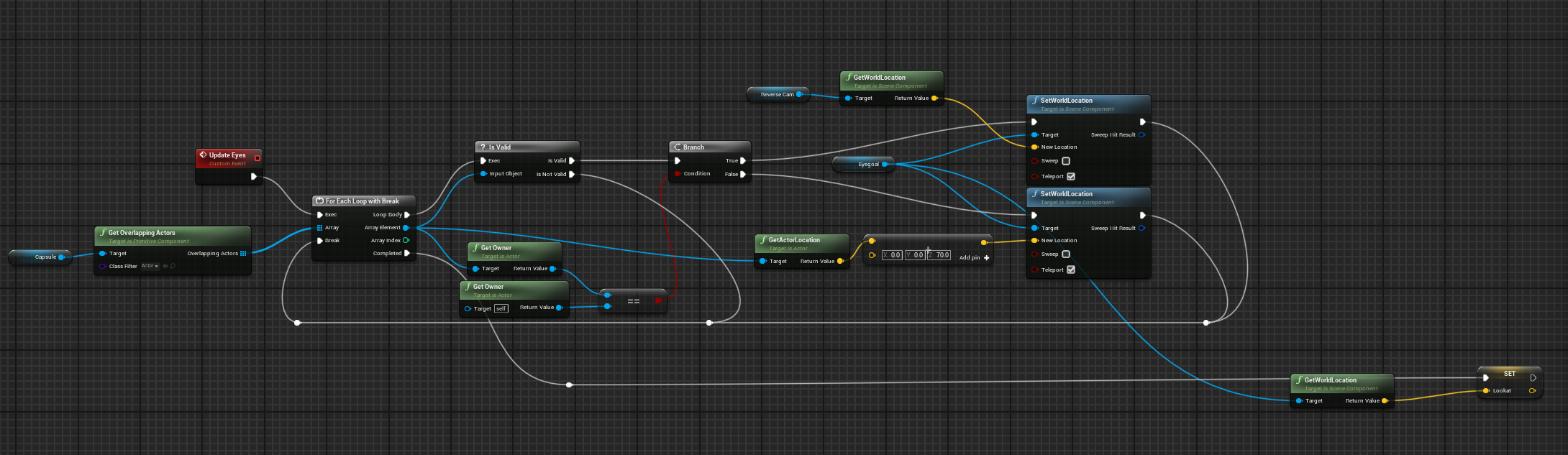 lunar sleet
autumn pulsar
Better question, how would yo approach the problem of finding actors in a radius...
lunar sleet
autumn pulsar
Better question, how would yo approach the problem of finding actors in a radius...
An EQS query context
zinc jasper
lunar sleet
Heheh nice
btw all these scrapped projects in the meantime helped me learn a lot, definitely worth just doing shit for fun even when you quit halfway through. Everything is a learning experience :D
autumn pulsar
lunar sleet
An EQS query context
could you clarify a bit more?
lunar sleet
zinc jasper
btw all these scrapped projects in the meantime helped me learn a lot, definitel...
Hehe, fair enough
zinc jasper
lunar sleet
Hehe, fair enough
and to the satisfaction of some members that are no longer here, I even have over 800 lines of c++ code included in my project, yay
lunar sleet
zinc jasper
and to the satisfaction of some members that are no longer here, I even have ove...
Yeah well she’s dead, so don’t bring her up 🥲
zinc jasper
lunar sleet
Yeah well she’s dead, so don’t bring her up 🥲
huh
autumn pulsar
I'm currently just pissing about making stupid graphical features for my game with no gameplay
lunar sleet
zinc jasper
huh
Laura, I meant. Not really dead, just…dead to me
desert juniper
zinc jasper
sometimes the context is important before starting to accuse someone
fair enough. tha's on me lol
zinc jasper
lunar sleet
Laura, I meant. Not really dead, just…dead to me
aaah. I didn't mean just her but yeah. I just saw at some point she decided to leave or whatever
lunar sleet
zinc jasper
aaah. I didn't mean just her but yeah. I just saw at some point she decided to l...
Scorched earth on her own msgs and leave but yeah
zinc jasper
desert juniper
fair enough. tha's on me lol
I appreciate it :D
lunar sleet
zinc jasper
aaah. I didn't mean just her but yeah. I just saw at some point she decided to l...
Who else? Authaer came back
Pretended he never left
zinc jasper
fair enough Idek anymore
lunar sleet
Well I’m also happy you have cpp in your code now
zinc jasper
i tried to avoid this group for a while because it makes me somehow less productive lmao
lunar sleet
I started adding some more yesterday too
autumn pulsar
zinc jasper
i tried to avoid this group for a while because it makes me somehow less product...
feel that
lunar sleet
zinc jasper
i tried to avoid this group for a while because it makes me somehow less product...
What, you mean people throwing accusations at you out of the blue doesn’t keep you productive?
zinc jasper
lunar sleet
What, you mean people throwing accusations at you out of the blue doesn’t keep y...
hahaha no just me spending more time here than in the actual editor
but today someone was very helpful in the materials channel
so im happy
lunar sleet
zinc jasper
hahaha no just me spending more time here than in the actual editor
Yeah ik what you mean. I make sure to keep discord on the second screen so it takes less focus
zinc jasper
but I don't mean to distract from the problems people have here, lemme scroll up a bit :D
zinc jasper
lunar sleet
Yeah ik what you mean. I make sure to keep discord on the second screen so it ta...
I also have it on the second screen but that doesn't really help, Im just staring at the second screen then :D
anyway back to Stuffy's spaghetti
lunar sleet
autumn pulsar
could you clarify a bit more?
actually just an EQS query. Normally used for AI but you can use it to test for certain conditions on objects within a radius
autumn pulsar
I'd probably be tagging specific objects so that works
like having an "interest" target
dark drum
autumn pulsar
could you clarify a bit more?
EQS is short for Enviroment Query System. It allows you to create generators and then perform checks on them such as distance to objects and gives weights to them. You can then decide if it returns the best weighted one or all of them.
zinc jasper
what are the conditions for that target? What if there are multiple ones in the range? Always the closest one, or?
zinc jasper
so the closest one?
 zinc jasper
like "Take the closest object within X meters from the player that has bLookable=True and save its location to LookAtLocation"?
zinc jasper
so if something is a bit further but has higher priority then it will take priority
or something like that
math
autumn pulsar
yeah
zinc jasper
I guess try the EQS route, I personally never really worked with it so I can't help with that, I was just thinking about other ways :D
just keep in mind that looping over a lot of objects on tick in BP would probably be very costly
autumn pulsar
yeah
I was going to test only every now and again
not like I constantly need to shift targets
zinc jasper
looping timer on 0.5 seconds or something
autumn pulsar
yeah
final python
adding a log string in 5.3.2 and then saving causes the save to freeze, at least in my project. Just spent 30 minutes trying to figure out why I could not save at all.
autumn pulsar
well, tbh, don't care about performance now since this isn't really going into anything shippable lol
just a playpen environment
zinc jasper
autumn pulsar
well, tbh, don't care about performance now since this isn't really going into a...
sure but it's a good thing to keep in mind anyway, just for educational reasons and for future projects :p
autumn pulsar
true
zinc jasper
like I said I learned the most from my scrapped projects
every new project is a bit less of a mess haha
mild galleon
lunar sleet
No idea what you mean here. Are you trying to communicate with the level bluepri...
that is true. is that not possible?
lunar sleet
mild galleon
that is true. is that not possible?
No, you cannot communicate with level bp, hence why we usually avoid using it
mild galleon
ah!!!
zinc jasper
I would absolutely avoid doing anything in level BP at all
final python
well.... you caaaaaan
mild galleon
so if i add music to my game via level BP, where else could i add that? ( i mean where can i move my level BP logic)
zinc jasper
I have a saying - if you can do it in level BP, you can do it somewhere else and most likely better :D
mild galleon
(so that they do communicate proper)
i guess i could use my widgets.
or an instance of the game
zinc jasper
there's plenty of ways to add music
mild galleon
oke
zinc jasper
you can even make a BP that will hold music and control it
and just place it into the world
mild galleon
thank you for the answer 🙂 great
dark drum
lunar sleet
No, you cannot communicate with level bp, hence why we usually avoid using it
Not strictly true, but it is a pain. 😅
zinc jasper
level BP should be cast into the dark depths of hell
final python
final python
well.... you caaaaaan
I have some cinematic stuff in my tutorial level that is only present there
 final python
making a whole actor manager system for that is redundant and is like 1 of the few valid reasons to use the lvl bp
zinc jasper
I always try to look for some OOP solutions instead
no need for a whole system
but I'd rather put it somewhere that I can re-use
dark drum
You have to use Interfaces and you have to get an obscure object ref lol. One min I'll try find it.
lunar sleet
 zinc jasper
lunar sleet
https://tenor.com/view/you-down-wit-opp-yeah-you-know-me-naughty-by-nature-hip-h...
zinc jasper
lunar sleet
https://tenor.com/view/you-down-wit-opp-yeah-you-know-me-naughty-by-nature-hip-h...
what's OPP
lunar sleet
OOP*
zinc jasper
:D
lunar sleet
zinc jasper
what's OPP
You mean you don’t know that song? 😀
zinc jasper
they look like some hardcore programmers indeed
lunar sleet
zinc jasper
now I do
Good. Now listen to it, then good luck trying to unhear that whenever you read OOP
zinc jasper
lunar sleet
Good. Now listen to it, then good luck trying to unhear that whenever you read O...
hey that's evil
lunar sleet
zinc jasper
hey that's evil
 final python
zinc jasper
I always try to look for some OOP solutions instead
final python
zinc jasper
I always try to look for some OOP solutions instead
I mean I guess its rly fine either way, but it seems like the level blueprint is sort of comparable to casting in a sense.
where like ppl are split half and half, but once u figure it out properly, then its no big deal
zinc jasper
uhh
lunar sleet
Disagree
zinc jasper
I don't really agree with that comparison haha
no one is split on casting
casting is completely fine if done properly
lunar sleet
Well some are but for the same reasons people believe level bp is a go-to option.. Cause some idget on YT told them
zinc jasper
while Level BP indeed IS something basically just kept from the earlier versions of UE
and there's always a better way to do stuff
final python
yea if something is in memory already, but there are a ton of ppl that still try to avoid it like the plague.
its actually a 3 way split lol, ppl that don't care at all and just do it, ppl that utilize it properly, and ppl that avoid it at all costs
lunar sleet
Right tool for the right job, used right is my motto
zinc jasper
lunar sleet
Right tool for the right job, used right is my motto
right
dark drum
@lunar sleet To send a message to the level BP, use the get actor of class node and get the level script actor. You can then use a BPI to send something to it. I would assume if you are using level streaming, each level will have their own so you might have to use the 'Get All Actors of Class'. I've not found any other way of getting it.
zinc jasper
I'm very happy I'll never have to do this :D
lunar sleet
dark drum
<@179343890409717771> To send a message to the level BP, use the get actor of cl...
This is good to know if I ever feel like I want to feel pain
zinc jasper
lunar sleet
This is good to know if I ever feel like I want to feel pain
"Sometimes I use level BP just to feel pain, just to feel anything again..."


 lunar sleet
You’ve found the hidden actor at the center of the engine
dark drum
If you want to set cinematic mode for all players the level BP can do it apparently.

I got excited for a second when I made a custom level script actor but I can't set the level BP to that one. :/ If it would it might have allowed adding of components to it. O well.
dark drum
You can add actor components to a level bp. 🤔
 marsh pilot
Anyone know why I can't edit the objectclass variable in this table? Not sure why I can't change it's defaults

 grave relic
Hey I’m looking for some suggestions for a system I’m planning out for my game. So I want the player to have access to a loadout of weapons, let’s say 4. I want the player to be able to swap between them during a battle and they should be unique. Even if the player has two of the same named dagger they should not necessarily be the same. Since I want the items to be individuals and have experience, health etc that can be modified. And this also has to be stored. So when the player loads the game up again they still have their unique loadout. So I don’t know if I should just make actors(since I’m planing to have a lot of weapons, hundreds) since it might be to many and to messy. Or if I should pull from a data table or make data assets. Thank you for your help and suggestions!
mild galleon
a very short question:
is it true that this node will stop any "spawned 2d sound" ?

or is that an error on my side?
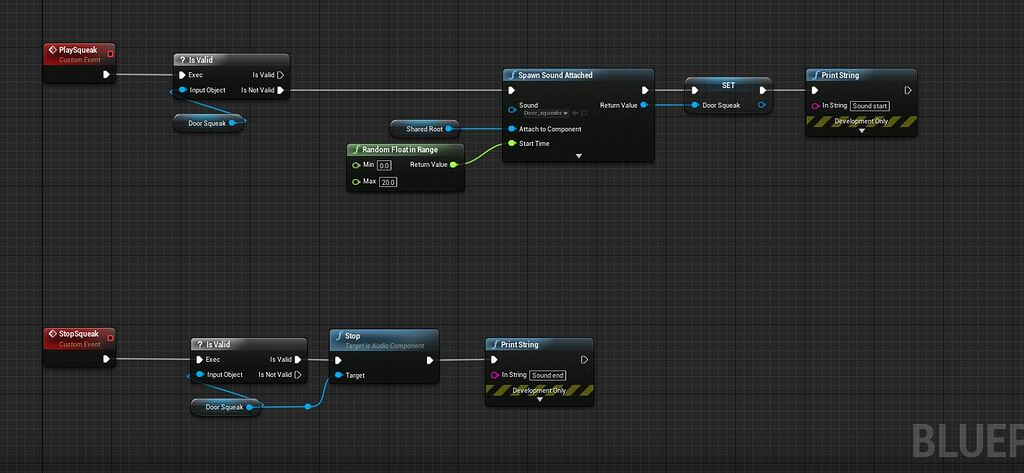
Epic Developer Community Forums
I have a couple of simple custom events to start and stop audio ( a squeaky door ): PlaySqueak is called during a timeline, which is ok, because it checks if the audio is already playing and only starts it if not. Stop squeak is called when the timeline stops. Usually works fine, but… Under certain circumstances, if I walk up to the door a...

i read that "set Sound" could solve it
dark drum
mild galleon
a very short question:
is it true that this node will stop any "spawned 2d sound...
spawned 2d sound, no, these tend to be fire and forget type sounds. That specific node is for stopping the sound currently playing through the audio component you connect to it.
mild galleon
so if i wanted to stop a playing sound,
i have tried SpawnSound2d, PlaySound2d for generation, i am about to try setsound right now.
zinc jasper
mild galleon
so if i wanted to stop a playing sound,
i have tried SpawnSound2d, PlaySound2d ...
if you set the sound's volume to 0 it stops :D
and no I'm not joking, it actually properly stops, and if you raise the volume again it starts from the beginning
zinc jasper
yeah
I'm setting it to like 0.01 when I wanna mute it to prevent it from being restarted
but maybe I'm missing something more obvious lol
mild galleon
ehm. what node would you use to compare strings from data tables etc?
i will try that, thank you
specifically, equal operator didnt work on string
maybe i am just tired 😉
zinc jasper
mild galleon
specifically, equal operator didnt work on string
===
mild galleon
thank you
zinc jasper
string has its own two equal operators
one case sensitive and one case insensitive
 frosty heron
marsh pilot
Anyone know why I can't edit the objectclass variable in this table? Not sure wh...
frosty heron
marsh pilot
Anyone know why I can't edit the objectclass variable in this table? Not sure wh...
Most likely because they don't exist in editor time.
zinc jasper
marsh pilot
Anyone know why I can't edit the objectclass variable in this table? Not sure wh...
did you by any chance set it to an object reference instead of a class reference?
frosty heron
That's pretty crazy anyway, a hard ref in data table
 mystic edge
Hey. Is there a way to move the mouse cursor to a specific location on the screen when a button is pressed? or like freeze it so it cant be moved anymore?
frosty heron
You can try set mouse position on tick, not sure how well will that work
zinc jasper
mystic edge
Hey. Is there a way to move the mouse cursor to a specific location on the scree...

the bottom two are from a free plugin LE Extended Standard Library
mystic edge
Alright thanks!
lunar sleet
You’re posting cpp code in #blueprint , go to #cpp
 ember forum
Ope my b Wrong channel thank you!
mild galleon
zinc jasper
I'm setting it to like 0.01 when I wanna mute it to prevent it from being restar...
sorry, what exact "set volume" node was it?
i am having a few here.
and thanks again for the exact equal advice, i forgot that haha
zinc jasper
mild galleon
sorry, what exact "set volume" node was it?
there's these two

there's also a volume setting on an entire class of sound
experiment with what works for you the best
mild galleon
thank you very much
trim matrix
zinc jasper
if you want some inspiration, here is my color changing widget
i managed to get the widget setup, what should i do next
 zinc jasper
trim matrix
i managed to get the widget setup, what should i do next
zinc jasper
trim matrix
i managed to get the widget setup, what should i do next
its in the screenshot of the widget set up i sent you
the last node should be calling your function that you made to update the color parameter, taking the input from the sliders as the color
you'll figure it out ;D
trim matrix

i got that setup im just not sure how to link it to my player i have a slight idea of adding it to my save system, but applying the color to the mesh im confused
mild galleon
zinc jasper
there's these two
great, so this can stop the sound playing, however, it seems my interface doesnt send over information.
 lofty rapids
trim matrix
i got that setup im just not sure how to link it to my player i have a slight id...
lofty rapids
trim matrix
i got that setup im just not sure how to link it to my player i have a slight id...
you can use a dynamic material
trim matrix
i have one setup i think
also wanted to have this animation playing and updating the color on it while the player is changing the slider
 steady night
 lofty rapids
trim matrix
also wanted to have this animation playing and updating the color on it while th...
lofty rapids
trim matrix
also wanted to have this animation playing and updating the color on it while th...
that should work when you have a dynamic material, the animation will most likely have that material instance running on it
trim matrix
yea i have it using a material instance
 zinc jasper
trim matrix
i got that setup im just not sure how to link it to my player i have a slight id...
zinc jasper
trim matrix
i got that setup im just not sure how to link it to my player i have a slight id...
you dont need to use event dispatcher like I did, that was just for my case
trim matrix
oh
zinc jasper
instead get a reference to your player (or where the function to change the material instance parameter is) and call that function
make the function have an input
a color input
feed the input to the new color parameter
then plug the "final color" in the widget to that function
zinc jasper
where's the function to change the parameter value?
trim matrix
this?
 trim matrix
so this one
 zinc jasper
yes.. give it a Linear Color input
use the input to change the parameter value
then call that function within the widget, plug Final color into the input
that's all
 zinc jasper
wheres your logic to change the material parameter? i thought you had that done already
trim matrix
 trim matrix
that oh, thats just in my player bp off begin play
zinc jasper
wel its the same thing you need to do again
trim matrix
so inside the function remake those nodes
zinc jasper
thats why im saying just make it into a function
so you can reuse it
you dont need to make a second function
just one
then reuse it
thats the entire point of functions :D
trim matrix
so am i keeping those nodes where they are?
zinc jasper
convert them into a function
trim matrix
 zinc jasper
name it SetPlayerColor, give it the color input
then call it from within the widget and plug the final color into the input
odd kiln
Anyone know if I can enable gravity for a flying character ?
I mean when I set movement mode to Flying my character is not falling anymore
I'm trying to simulate an Airplane
zinc jasper
then dont set it flying just set its gravity to very low
zinc jasper
then give it constant downward motion on event tick
the scale of which will be guided by its current acceleration
odd kiln
So a constant Add Movement Input to -1 on Z axis ?
zinc jasper
try and youll see
odd kiln
Thank you so much
 zinc jasper
why did you put the function within another function
oh wait nvm
disregard :D
i read it wrong
trim matrix
i just did wat u said lmao
zinc jasper
yes
sorry
put a "Set Milo Color Mat" node as the first one
set that variable to the Color input of the function
then drag from it and also set it as the parameter value
trim matrix
 zinc jasper