
#blueprint
1 messages · Page 241 of 1
 teal owl
 lofty rapids
and you have a navmesh covering that area ?
teal owl
yep
 lofty rapids
is the cast successfull, i would check the location print it out
 pale lotus
ok so i have these 2, how can i make it so that it keeps repeating that function until i let go of the key?

 teal owl
lofty rapids
is the cast successfull, i would check the location print it out
teal owl
lofty rapids
is the cast successfull, i would check the location print it out
cast is successful
prints out 0,0,0
teal owl
 lofty rapids
check the return value is true off the trace
teal owl
it should be first frame
teal owl
lofty rapids
check the return value is true off the trace
the value is updating
as i move
 lofty rapids
see if it's a blocking hit
lofty rapids
maybe try it using the blackboard
also check the variable
make sure it's not 0,0,0
teal owl
nope its seeing the pawn but chooses to ignore it
lofty rapids
well it's failing
because position is 0,0,0 for some reason
and i'm guessing thats not within your navmesh
lofty rapids
are you using site or something as the trigger ?
if it's far away it probably can't see it
teal owl
but it should update when within range
 main lake
Can someone explain to me what is an event dispatcher in a summary and how does it behave in multiplayer.
Like tell me if my understanding is wrong but is just a way to broadcast an event and we can create a binding to intercept that event and execute some code that we want.
And for multiplayer when binding and calling an event dispatcher, like does the context (server / client) matters ? Like does an event bound on Client could also be received on server and vice versa ? Or depending on where it's called and bind it's received only by the same context ?
What about event dispatchers that are bound or called in a simple (event so not server only, or client only) but being both as in unreal, if an event isn't set to run on server or un on client, it runs both on server and client. So does that mean an event dispatcher is that's called or bound that way would execute on both server and client at the same time ?
lofty rapids
also #multiplayer

 pseudo spear
could this issue be solved within blueprints rather than c++? im new to using c++ in Ue5 and having some issues with spawning characters in a basegamemode class #cpp message
lofty rapids
main lake
no 👀
theres a whole multiplayer section for a reason, it's a lot more complicated
teal owl
how do i use ai perception
 queen valley
is setting angular limit supposed to detach component from parent? Also I used event tick just for testing
 teal owl
to update a bool in a behavior tree to be exact
queen valley
queen valley
is setting angular limit supposed to detach component from parent? Also I used e...
because my component which physics contraint controls, just falls when I do this
lofty rapids
teal owl
how do i use ai perception
teal owl
lofty rapids
<https://dev.epicgames.com/documentation/en-us/unreal-engine/ai-perception-in-un...
can you just tell me the code to make the bool update
im not reading all that
i have to give this by monday
and i have the entire fight to do
queen valley
teal owl
to update a bool in a behavior tree to be exact
just use pawnsensing
in your bp
teal owl
queen valley
just use pawnsensing
isnt woring
queen valley
teal owl
isnt woring
mine works, how did you do it
queen valley
teal owl
isnt woring
this is how mine detects the player
 teal owl
just imagine theres a pawnsensed node there or whatever its called
 queen valley
teal owl
just imagine theres a pawnsensed node there or whatever its called
queen valley
teal owl
just imagine theres a pawnsensed node there or whatever its called
self -> get aicontroller -> get blackboard
look at how I did it
and in your aicontroller you should run the behavior tree
main lake
lofty rapids
theres a whole multiplayer section for a reason, it's a lot more complicated
alright, can I at least get an answer for my first question, is my definition / understand correct ? 🙂

 teal owl
queen valley
is that in ai controller
teal owl
queen valley
is that in ai controller
yes
queen valley
teal owl
yes
ok, so get your aicontroller when getting blackboard
teal owl
queen valley
ok, so get your aicontroller when getting blackboard
did that
queen valley
teal owl
did that
 queen valley
teal owl
just imagine theres a pawnsensed node there or whatever its called
queen valley
teal owl
just imagine theres a pawnsensed node there or whatever its called
in this example you did not
queen valley
but does the bool update?
moving could have to do with your destination but does the bool update now as it should?

 glad mesa
Hi! When the level is left does this mean the event end play will trigger in its level blueprint?
 frosty heron
main lake
alright, can I at least get an answer for my first question, is my definition / ...
frosty heron
main lake
alright, can I at least get an answer for my first question, is my definition / ...
main point to understand here is, each machine run their own instance, run their own scripts.
How you distribute on who does what, e.g. which machine bind what, it's all depend on your design.
If a machine never subscribe to a delegate, then it will never fire it.
teal owl
has a path toward the player but doesnt move
 frosty heron
The way you define it as if you think the games is run by one instance..
Everyone have their own world. Multiplayer is about synchronizing the state of everyone world to give illusion that the world are shared.
frosty heron
teal owl
has a path toward the player but doesnt move
looks like out of bound though
and a bit weird that the navmesh isn't fully lit green
main lake
frosty heron
main point to understand here is, each machine run their own instance, run thei...
Thank you, that's what I wanted to understand 🙂 👍
teal owl
frosty heron
and a bit weird that the navmesh isn't fully lit green
yea thats what i was thinking
no clue why
frosty heron
teal owl
yea thats what i was thinking
maybe just make the navmesh, span throughout the entire level. Also change the settings to ensure that you see green all accross the floor
it looks broken to me
teal owl
frosty heron
maybe just make the navmesh, span throughout the entire level. Also change the s...
no thats the path
thats the path it should take
frosty heron
Too many patches that is not green
teal owl
but its not green
frosty heron
normally that happend when there is a collision
teal owl
frosty heron
maybe just make the navmesh, span throughout the entire level. Also change the s...
done
frosty heron
from static mesh or w/e
teal owl
frosty heron
from static mesh or w/e
ive only got landscape
lofty rapids
 frosty heron
teal owl
ive only got landscape
frosty heron
teal owl
ive only got landscape
right, well you will need to increase the slopes, etc. Play around with the setting untill all the path is fully lit green
 prime stump
Hey, is there a reason that my player controller needs 'start with tick enabled' on, despite me not using tick in my player controller, otherwise my input doesn't work at all which is mostly in my player character class not the player controller?
frosty heron
prime stump
Hey, is there a reason that my player controller needs 'start with tick enabled'...
why do you want to turn it off anyway?
leave it on?
prime stump
I'm gonna turn it back on in this case cause its just the player controller and it doesn't really need to be off but i was just curious why my input doesn't work even tho the add mapping context nodes are called just fine
frosty heron
not sure, I never turned off ticks on controller. It's one of the important class. Not ticking the brain is a bit of red flag for me.
and inputs should be handled generally in your controller anyway.
or character / components, but controller works depending on the game types
 queen heron
what should I use within the actor blueprint to fire a obstacle line trace?
the actor has the crouch mechanic enabled, so if I fire the line trace from the actor itself, and the obstacle requires a crouch system, its gonna move the line trace down into the ground and fire off again, but I want the line trace to fire from the same height location
maybe fire from the skeletal mesh and get the half height of its bounding box?
nah...
I think I'll use a replica of the capsule and make it invisible and uncollidable
 lilac lance
queen heron
what should I use within the actor blueprint to fire a obstacle line trace?
the...
lilac lance
queen heron
what should I use within the actor blueprint to fire a obstacle line trace?
the...
You can just get the vector you wanted to use as the origin and add some Z to it
queen heron
lilac lance
You can just get the vector you wanted to use as the origin and add some Z to it
wouldn't that overcomplicate the solution?
lilac lance
No
overcomplicating is duplicating something that is not neccessary
If pivot point ge
If pivot point of the thing you want to use as origin of the trace is slightly shifted downwards because of the crouching thing, then just add to that vector some quantity in the Z
If i understand correctly this is your issue right ?
You can print the value of the location in Tick for the thing you are using as origin of the trace, and then crouch to see the difference in value. Then just put that difference as the number you add
queen heron
lilac lance
If i understand correctly this is your issue right ?
yes
its solved in any case
I'm using the world location of the capsule collision (not the default one) and made sure it doesn't not follow the center point of the default capsule by having it parented to the skeletal mesh
 lilac lance
teal owl
ai move to isnt working
lilac lance
teal owl
ai move to isnt working
No target actor plugged in, try that instead of X Y
 storm solar
How to I launch a character that is in a root motion animation. It has to be easier than toggling
Root motion at the beginning and ending of every animation.
teal owl
lilac lance
No target actor plugged in, try that instead of X Y
ah no i should clarify that im floating
lilac lance
And who is self ?
teal owl
storm solar
How to I launch a character that is in a root motion animation. It has to be eas...
its an option in the animation
teal owl
lilac lance
And who is self ?
the enemy
storm solar
teal owl
its an option in the animation
What do you mean?
lilac lance
teal owl
the enemy
print string in the main exit of the cast, and also in the cast failed to check where is the flux going
teal owl
the cup should be moving to the fish but it isnt
 teal owl
lilac lance
print string in the main exit of the cast, and also in the cast failed to check ...
teal owl
lilac lance
print string in the main exit of the cast, and also in the cast failed to check ...
nope the cast is fine
lilac lance
teal owl
nope the cast is fine
Do you have a NavigationVolume?
teal owl
storm solar
What do you mean?
 teal owl
lilac lance
Do you have a NavigationVolume?
teal owl
lilac lance
Do you have a NavigationVolume?
yep
lilac lance
teal owl
the enemy
Print strings in all 3 exits of the move to in order to check what its doing
storm solar
teal owl
I need to have root motion enabled so the animation dosent snap back at the end.
teal owl
storm solar
I need to have root motion enabled so the animation dosent snap back at the end.
yea so what do you want?
teal owl
lilac lance
Print strings in all 3 exits of the move to in order to check what its doing
the cast is failing somehow
storm solar
teal owl
yea so what do you want?
"launch a character that is in a root motion animation"
teal owl
storm solar
"launch a character that is in a root motion animation"
what exactly do you mean by "launch"
send them to fucking space?
storm solar
teal owl
what exactly do you mean by "launch"
the launch character node.
teal owl
storm solar
the launch character node.
afaik u have to toggle root motion at the beginning and ending of every animation
teal owl
lilac lance
Print strings in all 3 exits of the move to in order to check what its doing
it cant get the player character
it doesnt know who the player is
lilac lance
teal owl
it cant get the player character
Plug first Ref (get), straigth into the get location, ignore cast, bypass it
lilac lance
teal owl
it cant get the player character
Go straigth from the event to the AIMoveToç
teal owl
this?
 lilac lance
try that yeah+
teal owl
its failing somehow
lilac lance
teal owl
its failing somehow
If it prints fail is because there is no possible path to take, or because the references are Null,,,,, try printing the references aswell to check if they have a name
 upper delta
Hi guys, I am a c++ dev. I find blueprints difficult to work with. Can I share a screenshot of a FoV flow I am working with and get some help based on the 3rd person starter template?
teal owl
upper delta
Hi guys, I am a c++ dev. I find blueprints difficult to work with. Can I share a...
sure
teal owl
lilac lance
If it prints fail is because there is no possible path to take, or because the r...
ur right, ref is null
how do i fix that
lilac lance
which one is null ?
teal owl
ive set it to bp_tpc
 lilac lance
meaning the third person char ?
upper delta
So the flow dies at the timeline update - the key is recognized from the initial print state
 teal owl
upper delta
So the flow dies at the timeline update - the key is recognized from the initial...
teal owl
upper delta
So the flow dies at the timeline update - the key is recognized from the initial...
connect the executes?
 upper delta
teal owl
connect the executes?
upper delta
teal owl
connect the executes?
I feel stupid lmao. I thought the variable should update the current state. Thanks!
lilac lance
teal owl
this prints nothing
ref is tpc ?
teal owl
upper delta
I feel stupid lmao. I thought the variable should update the current state. Than...
yea np
 lilac lance
teal owl
yep
lilac lance
teal owl
yep
and where is this bp ?
teal owl
lilac lance
and where is this bp ?
masterenemy
lilac lance
teal owl
yep
On beguin play you can do get all actors of class, get a copy(index 0), and this will be the reference of the player character if you are using third person,,,, index 0 of any guiven class is alwways the player character if the player is using that class
lilac lance
teal owl
masterenemy
I think you can also simply plug Get player Character where you are using Reff,,, chech if it lets you do that
teal owl
?
 teal owl
lilac lance
I think you can also simply plug Get player Character where you are using Reff,,...
teal owl
lilac lance
I think you can also simply plug Get player Character where you are using Reff,,...
na i alr tried
lilac lance
And i think you can also get Player character and just save that reference in a Var
teal owl
lilac lance
And i think you can also get Player character and just save that reference in a ...
yea but this should do the same thing right?
teal owl
the cup is supposed to chase you
lilac lance
check if that sequence is being executed
lilac lance
check if the value of that var has a name,,,, print it just after setting it
teal owl
/failing
lilac lance
ok, were getting closer
teal owl
we are so close
its working but the mesh itself isnt updating?
is it ok if i call you rn to show you? its hard to explain.
lilac lance
sure
 autumn parrot
Hey so my character patrols randomly and i am trying to get him to attack me when he seems, but he just ignores me and walks past me like i dont exist

 autumn parrot
Hey so my character patrols randomly and i am trying to get him to attack me whe...
autumn parrot
autumn parrot
Hey so my character patrols randomly and i am trying to get him to attack me whe...
why is this happening?
 humble wigeon
I'm at my wits end with this, I've banging my head against this implementation problem for the past week all day.. I'd appreciate if someone could shine some light on how to do this properly...
I’ve attached a screenshot from Blender to give a better idea of the model I’m working with and its bone structure. My goal is to smoothly rotate the bones towards a series of targets in the scene, but I need each bone to rotate along a specific axis, particularly so the head bone looks at the target.
I tried using the 'Transform Modify Bone' option in the anim blueprint referenced by the pawn blueprint this skeletal mesh is used in, but I’m having trouble adjusting the rotation as needed as I can't properly calculate the needed angle for the bone. I’m not sure if this is the right approach or if there’s a better method. I also looked into the 'Look At' node in the animation blueprint, but it doesn’t seem to replicate the behaviour I’m aiming for. It simply manipulates the bone's transformation to face an object, without allowing control over the specific axis of rotation for each bone.
https://imgur.com/a/ggmvJkH
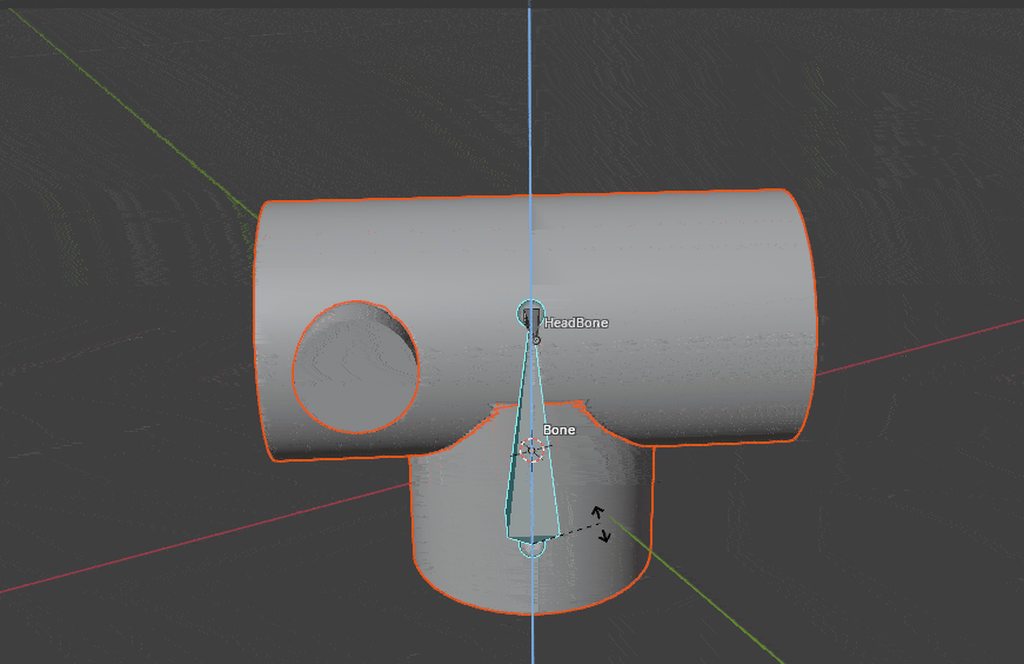 pale lotus
any way i could calculate the rotation from the center of mass and then turn it back into the rotation of the origin

 dawn gazelle
humble wigeon
I'm at my wits end with this, I've banging my head against this implementation p...
dawn gazelle
humble wigeon
I'm at my wits end with this, I've banging my head against this implementation p...
In blueprints you have "Find Look At Rotation" which you could use to then split the rotator for the individual axes and apply them to the corresponding bones.
autumn parrot
autumn parrot
why is this happening?
?
 drowsy anvil
hello, how do I combine/add and remove movement speed based on pressing and releasing, instead of setting it? how I make the total of both buttons reduce speed even more when both buttons are held down?

 dapper panther
I have a button that has up to 3 actors visible so I can assign different items in the world to them. For example, Button1 in the world I assign to X, Y and Z items, but Button2 I use it for A, B and C items.
But is there any way to make this same type of logic for a widget button?
I'd rather the player be able to press a button or maybe a keybind and bring up an interface which has this same button on it. I put this in the UI BP and instead of Event Interact I have it on Button Press, but I realized I have no idea where I can assign these actors

 uncut elk
ive been reading alot of mixed information online about delays and timer by event when it comes to delaying tick for performance. does anyone here know which is actually better? is there really that much of a difference between doing either or in this use case
dawn gazelle
dapper panther
I have a button that has up to 3 actors visible so I can assign different items ...
You'd have the widget read what the actors are that you need (probably stored in the player controller?) and listen to event dispatchers for when those actors change.
uncut elk
had to fix for any confusion
 dawn gazelle
Use tick if you need something to potentially happen every frame.
Use a timer if you don't.
Tick is only bad for performance if its used incorrectly, like doing thousands of loops or extremely complicated math every frame that doesn't need to happen every frame.
uncut elk
i understand that much.
but when it comes to delaying tick for performance, ive read mixed information on what the best method is , between these 2 here, simply delaying , vs using a set timer by event on loop.
dawn gazelle
Timers, including delays, use the world's tick and checking if the desired amount of time has elapsed every frame, and only if the desired amount of time has elapsed does the delegate event (or completed pin) trigger. So both of these are probably the same.
The performance of which one of your examples is better is negligible. You're asking something that is likely in the area of nanoseconds of computation time. What's more important is using the appropriate tool for the task at hand.
uncut elk
dawn gazelle
Timers, including delays, use the world's tick and checking if the desired amoun...
perfect, good to know, just making sure , thanks
humble wigeon
dawn gazelle
In blueprints you have "Find Look At Rotation" which you could use to then split...
I initially implemented this by grabbing the bone's transform in world coordinates to calculate the 'look at' rotation towards the target actor in my animation blueprint event graph, which I then fed into the 'Transform (Modify) Bone' node in the anime graph through a float variable. However, I encountered some issues with the bone's initial rotation.
When checking the rotation of the 'base' bone in the Skeleton Editor in UE5 after importing, I noticed it had a 90-degree rotation on the X-axis and for some reason after trying the above method, at runtime the model seems to be rotated 90 degrees on the Z axis (here's a GIF showing the implementation I have at the moment, you can see the model facing the target from the side). I tried compensating for this in my calculations, but when I added smooth rotation using linear interpolation, the model started behaving erratically for some reason...
There's also some screenshots of the nodes from both my event graph and anim graphs inside my Anim BP: screenshots
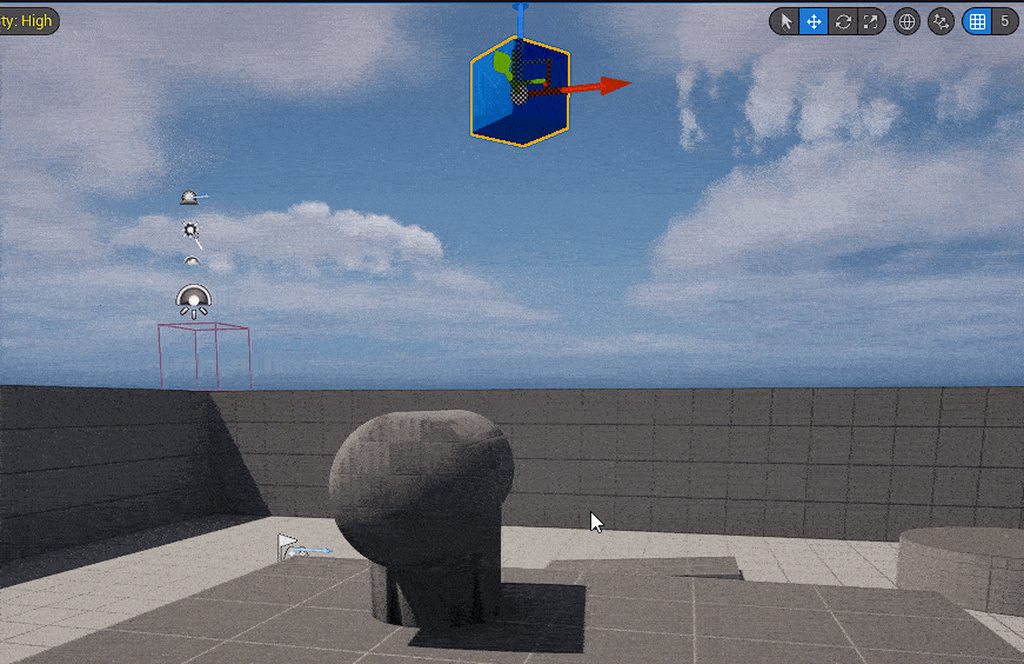

 pearl fossil
im new to unreal and just wondering if there is a way to reference this in another blueprint. When The lure and fish attach i want the fish to execute something but i want it to happen in that fish's blueprint
 dawn gazelle
pearl fossil
im new to unreal and just wondering if there is a way to reference this in anoth...
dawn gazelle
pearl fossil
im new to unreal and just wondering if there is a way to reference this in anoth...
THe "Fish Gen Reference" is a reference to the fish?
If so, just create an event or function within your fish blueprint, call it when you attach it, and then do whatever logic you want in your fish blueprint.
pearl fossil
dawn gazelle
If so, just create an event or function within your fish blueprint, call it when...
yeah a random fish attaches to lure after lure hits fishingvolume. thank you! that clears it up a lot
 harsh nebula
humble wigeon
I initially implemented this by grabbing the bone's transform in world coordinat...
harsh nebula
humble wigeon
I initially implemented this by grabbing the bone's transform in world coordinat...
Normally you would rotate your model in Blender by 90 degrees and then export the skeletal mesh. From memory it should be facing the X direction. Then do a Ctrl+A and apply transformations just to be sure.
humble wigeon
harsh nebula
Normally you would rotate your model in Blender by 90 degrees and then export th...
Yeah someone suggested that earlier in another website and it worked, they also advices to not bother with using a rigged model for something this simple and instead just use 2 static meshes and control them in the pawn blueprint instead of trying to transform the bones in the animation blueprint using a "fake" animation sequence
harsh nebula
humble wigeon
Yeah someone suggested that earlier in another website and it worked, they also ...
Yes. For simple objects it is easier to parent the meshes in a blueprint. Each "child" will inherit the movement from the parent. So if the base is the parent, when you rotate it around the z axis the children will rotate with it. In your case the vertical base cylinder would be parent then the horizontal one would a child of that and then your smallest one (eye/camera I presume) would be a child of the horizontal mesh.
frosty heron
uncut elk
had to fix for any confusion
The two won't even give equivalent result.
Putting delay on tick will only delay initial execution. It will fire every frame after 0.2 sets in your case.
Also read this for other common myths. Very important as most youtubers get it wrong.

Epic Games Developer
Are Ticks really that problematic? Should you make all your meshes Nanite? Is the ChildActorComponent truly cursed? Should you never use Cast?
You've pr...
humble wigeon
harsh nebula
Yes. For simple objects it is easier to parent the meshes in a blueprint. Each "...
Exactly no need to over complicate/engineer things... Sometimes I lose sight of the bigger picture and get lost in a rabbit hole. Thanks for taking the time to help, I appreciate it👍
harsh nebula
humble wigeon
Exactly no need to over complicate/engineer things... Sometimes I lose sight of ...
LOL. No problem. It sure is easy to over complicate things. I still do it. But then when I've made a module I go back to it and then think, is there a way to simplify it?
 storm vigil
Which is better in a single player game, i mean for animbp optimization or is it neglible unless there are lots of AI using it.
Example checking a crouch state of the player.
-
get mesh anim instance, cast to the anim instance and set the crouch boolean on the anim bp, i assume by doing this you would be setting it on or off by events on the crouch state and not on tick.
-
have a function on the blueprintthreasafeupdate animation that checks player crouching state using property acess, which i assume still runs on tick on the anim bp, but runs as thread safe. Thanks
frosty heron
storm vigil
Which is better in a single player game, i mean for animbp optimization or is it...
Single or multi doesn't make any difference when it comes to what you said.
Everyone running their own instance, how much one can handle depends on each machine
 mortal coral
Is there a way in Blueprints to define a function that takes an event Delegate?
 quiet violet
how do i make a bone tract a camera
 sudden nimbus
storm vigil
Which is better in a single player game, i mean for animbp optimization or is it...
sudden nimbus
storm vigil
Which is better in a single player game, i mean for animbp optimization or is it...
there shouldnt be a difference between these two, do what works best for your project (but avoid doing the cast on each update either way)

 maiden wadi
 pine trellis
this there any way to see the icons /
pine trellis
this there any way to see the icons /
Put them in the correct texture group and set the correct compression setting. If they are UI textures. Their TextureGroup should be UI, and their compression settings should be UserInterface2D
frosty heron
@maiden wadi Hey sorry to bother you. Using GAS atm, it seems OnAvatarSet is too early for clients, I am getting null on actor info.
Is there any other events I can use?
Nvm, fixed it. Uses the Actor info from the passed param instead of GetActorInfo()
 tacit cobalt
Has anyone ever worked on something like Freezing Weapon ? I am trying to create a projectile that can Freeze Enemies and can create Platforms on Water. Any Idea how I can approach this ?
 trim matrix
hey, im trying to make a pause menu, with it being activated by an input and also be able to be unpaused by the same input, but when i press it, the widget flickers instead of just pausing or unpausing
 frosty heron
trim matrix
hey, im trying to make a pause menu, with it being activated by an input and als...
frosty heron
trim matrix
hey, im trying to make a pause menu, with it being activated by an input and als...
Triggered run every frame
use started if you want to tap the key once to execute something
also don't cross pins, what you are doing is cursed as f
trim matrix
frosty heron
also don't cross pins, what you are doing is cursed as f
😭 ik i was following along w a video havent cleaned up yet
tacit cobalt
Has anyone ever worked on something like Freezing Weapon ? I am trying to create a projectile that can Freeze Enemies and can create Platforms on Water. Any Idea how I can approach this ?
frosty heron
tacit cobalt
Has anyone ever worked on something like Freezing Weapon ? I am trying to creat...
why are you spamming
 zealous moth
@frosty heron have you worked in niagara fluids by any chance? You're the only regular on the server at this time I can think of asking
frosty heron
zealous moth
<@1050954229902213150> have you worked in niagara fluids by any chance? You're t...
0 experience on niagara 😦
maybe there are folks in that channel
zealous moth
hah it's empty
frosty heron
only have 1 special effect that my brother made using old particle system
zealous moth
i only found like 4 results from search on fluids
frosty heron
Too advanced for me :P, but will attack the subject in the future
after my game got somewhere, I want to learn special effects
zealous moth
yeah, getting there as well
frosty heron
@zealous moth https://www.youtube.com/shorts/kx2om2YWhSs
This video inspired me to learn tech artist stuff

Progress on my slime game. Subscribe to follow my work in process!
#shorts #gamedev #indiedev #unrealengine #vfx #slime #games #gaming
zealous moth
hahahaha I'm actually looking into something like that
I'm trying to make goo that sticks
but the niagara water plugin is driving me nuts
in that video he uses a complex shader that moves vertices around
it's pretty neat
frosty heron
all the best to you 🙏
 stiff dock
I’m looking to create an index for items the player has found through their journey. Would an array be better, or a map? I’ve primarily used arrays since they have worked for what I’m doing, and I don’t fully understand maps as of yet. I’m curious to suggestions on which is more likely to perform smoother and consistent
 thin panther
Maps are for associating a key with a value. Take data tables as an example, which are just maps internally.
They map a row name to a struct. You look up the map with the row name, it returns the struct.
The benefit of this is lookup speed. Searching for something in an array is O(n), meaning time spent scales linearly with number of elements. With a map, and the way they're implemented, lookups are O(1), meaning time is constant no matter the number of elements. You wouldn't use a map for iteration though. If you want a collection of items you frequently loop through, you want an array for that.
stiff dock
Okay that makes sense. Thanks for the info, chief
 zinc sun
hey guys I was setting an interactable system, with a tutorial in youtube for an FP game, but the problem is my game is an old style with fixed cams, like old RE or SH, with a own BP, anyone know how to make this setting to a project where have another camera component? If you need the full code I can send here. I'm a novice lol
 frosty heron
zinc sun
hey guys I was setting an interactable system, with a tutorial in youtube for an...
frosty heron
zinc sun
hey guys I was setting an interactable system, with a tutorial in youtube for an...
you would need to define the interaction method. In the case of old RE / SH, they don't shoot a single ray to check if the ray hit something. Which is what you are doing now.
one way to do it is to project a collision in front of where the character is facing
then check if it overlap any item
teal owl
can i make an actor move towards another while ignoring all else (even collision and gravity)
zinc sun
frosty heron
then check if it overlap any item
I'm gonna take a look in the morning! Thx man, I can message you if I need some help or something?
 lunar sleet
teal owl
can i make an actor move towards another while ignoring all else (even collision...
lunar sleet
teal owl
can i make an actor move towards another while ignoring all else (even collision...
You’d need to turn off collision and gravity and use Simple MoveTo location I think . Or Move directly towards I can’t rmbr exactly
teal owl
lunar sleet
You’d need to turn off collision and gravity and use Simple MoveTo location I th...
well im using a homing projectile now
any ideas?
lunar sleet
Well if it’s a projectile then do that
teal owl
i want it to spawn normally via level bp and immediately start chasing the player
on hit it should deal dmg accordingly
lunar sleet
You shouldn’t be using level bp to begin with
teal owl
lunar sleet
Player controller is fine
its supposed to spawn randomly around the map and start chasing the player
lunar sleet
Then player controller
teal owl
explain in stupid terms
lunar sleet
Which part
teal owl
all of it
lunar sleet
Lol
teal owl
i havent used ue5 for too long
lunar sleet
On BeginPlay, spawn actor from class BP_Projectile or w/e
The homing part you’ll need to do some reading on, I haven’t used it in a while, it’s not as straightforward as you’d think but iirc you need to have a homing component on your target so it can go to it
 steady night
hi im trying to calculate direction of my player based on the current rotation since i have a "lock" mode that makes player only be able to walk facing forward i need to get directions based on that

 crimson elbow
Has anyone ever had an issue where the data on the other side of a interface call was missing the data?
This FString has data going in, but nothing coming out.

 lunar sleet
The data was missing the data ?
crimson elbow
The string is blank on the other end
lunar sleet
Interfaces can be difficult to debug tbh
Try passing the actual object instead of a concatenated string and see if it comes through tho
crimson elbow
ah shoot, I think I found the reason. I was passing the interface through another event for some reason, that was messing things up
maiden wadi
frosty heron
<@143471961723371520> Hey sorry to bother you. Using GAS atm, it seems OnAvatarS...
Happy you fixed it. 😄 I vaguely remember something similar to that a while ago, but haven't had that problem recently.
 tulip echo
[LOOKING FOR LEARNING RESOURCE]
Hey there,
if someone knows a:
• tutorial
• or sample project / plugin
• for a road building system (e.g. for an RTS)
---> that works at runtime, not just in editor
---> allows for smooth curves (via splines or geometry script, I suppose)
Feel free to ping me, please.
(Couldn't find ones for this topic specifically & Own attempts are very meh)
Thx!
 manic vessel
Is there a better way to get which team has a score = to the target
 lunar sleet
May wanna do >= just in case
manic vessel
Im In lyra trying to finish my CUSTOM CTF win condition. Im going to try copy the same methods first ! so might be ok

Sorted 🙂
 frosty heron
@zealous moth https://80.lv/articles/working-with-niagara-fluids-to-create-water-simulations/ this may help
Senior Tech Artist at Epic Games Asher Zhu shared an enormous breakdown of the workflow in Unreal's Niagara Fluids, explained how to set up the water surface and whitewater particles, spoke about making the water simulation's color scientifically accurate, and shared some snippets of code.
 random pulsar
hey
i'm looking for a boss algorithm scheme
like a parent that has checks and common logic for a few bosses and then each child boss has something specific
for ex a special attack shielding or teleportation
i want to find only the scheme to understand better how to my my own algorithm scheme
teal owl
 teal owl
why isnt the impact in the center of the screen is my question
 frosty heron
End = camera location + cam forward vector x Length
teal owl
like this?
 teal owl
frosty heron
And make your spaghetti neater
teal owl
frosty heron
And make your spaghetti neater
ah thats not for now
frosty heron
Well it's making it hard for other people to read
teal owl
frosty heron
No
then?
frosty heron
If you are asking help for homework, you do make effort on your hand writing
frosty heron
teal owl
then?
Read above
 tight pollen
in RepNotify Attach Actor To Component doesn't work?
teal owl
 tight pollen
i want attach player to Replicated Actor
teal owl
still doesnt work @frosty heron
frosty heron
teal owl
still doesnt work <@1050954229902213150>
Still incorrect....
Look at the formula above
teal owl
frosty heron
Still incorrect....
i dont get it dawg
frosty heron
tight pollen
but when attached, PlayerCharacter falls to the floor
teal owl
isnt that what im doing?
frosty heron
The result of the multiplication goes to the bottom of the plus node
End = camera location + cam forward vector x Length
 frosty heron
Not correct still
teal owl
whats wrong now
frosty heron
For the multiplication it's the camera forward vector x length
You are doing cam world location x length instead
teal owl
you mean this?
 frosty heron
No...
teal owl
explain in caveman
teal owl
none of them work
frosty heron
Lol?
teal owl
uh whyd you delete it
frosty heron
Because you need to change some part since it uses the controller and im thingking you might end up doing random things instead
End = camera location + (cam forward vector x Length)
Read then implement that step by step
I'm gonna sleep
teal owl
frosty heron
I'm gonna sleep
good night
 dark drum
teal owl
its not working
dark drum
teal owl
its not working
Order of operations is extremely important.
 thin panther
Yes, you're multiplying the world location by your length, not the forward vector.
Think of the forward vector as where you're pointing forward, and you multiply it by how far forward you want to go in order to get a direction + distance.
You then add that to the initial location, so you get the direction from that point.
If you're interested outside of this assignment, look up some vector math lessons, it's a very important skill in games.
trim matrix
how can i fix my camera system? im trying to add more moves for my player, rn adding a wall jump, but when the player goes up to a wall the camera zooms into the players head and makes it so u cant rly see to move


 surreal peak
It's probably the Spring Arm that has Collision Checks enabled. But if you disable those it will go through the wall.
trim matrix
surreal peak
It's probably the Spring Arm that has Collision Checks enabled. But if you disab...
ideally i want the camera system to work like this one, but im not sure where to go for that
surreal peak
trim matrix
ideally i want the camera system to work like this one, but im not sure where to...
That's usually done by handle the calculating the Camera Transform yourself.
That looks somewhat simple in the video, but can be pretty involved.
You'd want to break down what the camera is doing and why.
You can use the APlayerCameraManager class, that you can make a BP of and assign your custom BP class via your PlayerController (it has a variable in its Class Defaults for it).
The PlayerCameraManager has a function you can override that returns the Location and Rotation of the Camera. You can also get the "ViewTarget" in that function, which is basically the Pawn/Character in most cases.
You can then Math out where the Camera should be based on where the Character is etc.
There is most likely no one here who can give you an exact solution (and no one should in theory, cause otherwise there is no learning involved), so you gotta start step by step and come back with more specific problems.
trim matrix
surreal peak
That's usually done by handle the calculating the Camera Transform yourself.
Tha...
im confused
surreal peak
The point is that nothing in your video will be solved by a checkbox. The Collision against the wall like this is not a thing. UE only has the DoCollisionTest boolean by default and that will just check in SpringArm direction if it hits a wall, and thus shorten the SpringArm.
trim matrix
ik its not as simple as a checkbox, thats why im here
i dont need it to be exactly how the video is, maybe at some point, rn i just want it to be able to move on its own so i dont have to keep adjusting it when im testing
steady night
is it possible to round to closest "set value" ?
so if i get a float thats 35 can i round to closest 45,90,135 ?
surreal peak
steady night
so if i get a float thats 35 can i round to closest 45,90,135 ?
Is it always 45°?
steady night
y
surreal peak
Generally you can do something like this:
// Whatever Value you want.
AngleStepSize = 45;

// Random Angle between 0 and 360.
RandomAngle = RandRange(0, 360);

// This gives you an integer value between 0 and X, where X is how often AngleStepSize fits into 360. For 45 that would be 8.
AngleIndex = RoundToInt(RandomAngle / AngleStepSize);

// Final rounded Angle
RoundedAngle = AngleIndex * AngleStepSize;
It's a bit biased towards 0 and 360 I guess, due to both being the same.
You could subtract the AngleStepSize from 360, then you get 0 to X - 1 for the integer.
Then the options for the Angle would be 0, 45, 90, 135, 180, 225, 270, 315
With 360 being omitted as that is the same as 0
Your 35 is the RandomAngle btw.
 steel shadow
trim matrix
ideally i want the camera system to work like this one, but im not sure where to...
steel shadow
trim matrix
ideally i want the camera system to work like this one, but im not sure where to...
spongebob will know
you missed a lot of coins
trim matrix
trim matrix
how can i fix my camera system? im trying to add more moves for my player, rn ad...
steel shadow
noobie response but try fiddling around with 'do collision test' on camera/spring arm component (forgot which)
plus target arm length, socket offset stuff like that
trim matrix
ive been doing that lol
trim matrix
deleted the spring arm and remade it, now its not doing it, now my only issue is having to move the camera manually
pine trellis
how do I get a referemce from a component to a blueprint I keep getting access none on it when I drag it out in begin play

I tried to get compoent by class but still access none
 low yoke
Been having this issue with alignment for a few hour now, I finally get the skateboard to align with the slope but the movement become weird after that.
trim matrix
so i have made an objectives system and a ui to update and tell the player what the objective is, but when the player hits the trigger, the text appears at half opacity before playing the animation, then when i hit the complete trigger, the text thats solid goes away, but it leaves the half opacity of the last objective


 desert juniper
trim matrix
desert juniper
trim matrix
Take a look at how this guy worked his camera system
https://www.youtube.com/watch?v=-linPnvpX3U
dark drum
pine trellis
how do I get a referemce from a component to a blueprint I keep getting access n...
This issue isn't the reference to the card reader but the 'Widget Interaction Component' on it. It's an empty ref so most likely not being set.
uncut elk
frosty heron
The two won't even give equivalent result.
Putting delay on tick will only dela...
this is..not true? putting the delay on tick delays the execution till the time has elapsed, all flow sent in that duration is ignored. I know this because in my racing game, my pawns are set up with delayed tick in this exact way , and execution after the delay is only firing in that exact way I mentioned. seemingly anyway.
regardless thanks for the video resource tho.
trim matrix
i have this health setup in my game, it works completely fine when playing in editor but when i play a build, the health dosnt function, neither does my ice block

 trim matrix
i have this health setup in my game, it works completely fine when playing in ed...
trim matrix
trim matrix
i have this health setup in my game, it works completely fine when playing in ed...
ok the health is working only on certian objects that give damage
trim matrix
im not sure why the ice stopped working,

 trim matrix
ok the health is working only on certian objects that give damage
trim matrix
trim matrix
ok the health is working only on certian objects that give damage
the damage works in the first blueprint but not in the second, the first blueprint is the only one i have that deals damage that actually works, even tho theyr all setup the same


jfc ok got it now
human error
trim matrix
trim matrix
the damage works in the first blueprint but not in the second, the first bluepri...
that will not work lol
frosty heron
uncut elk
this is..not true? putting the delay on tick delays the execution till the time ...
Only the initial. After 0.2 second it will just fire every frame in your case. You don't expect putting delay in tick to fire the execution every 0.2 seconds, you can test it easily by printing.
trim matrix
trim matrix
show
 frosty heron
@surreal peak spring arm camera never looks decent. Lyra camera system and penetration feeler saves the day for me.
 keen copper
Hi, When my character is running forward with w, when I turn the mouse to the right, I don't want him to turn right. I want him to turn his head to the right and continue running straight. With which setting can I do this? Probably something that can be done with one or two clicks in the camera, spring arm or movement component.
There are details such as Aim off set - Blend animation.
surreal peak
keen copper
Hi, When my character is running forward with w, when I turn the mouse to the ri...
CharacterMovementComponent has a Orient To Movement or so boolean.
That will make the character turn to the move direction iirc.
Then for the Character itself you probably need to disable UseControlRotationYaw, so it doesn't follow the Mouse Input, which usually modifies Yaw.
There might still need to be some logic for the direction in which you apply movement though
I think the third person template does have that kind of movement already though
dawn gazelle
 chilly crane
"Accessed None" errors mean you are attempting to access a reference that is invalid. Check your reference is valid first before accessing it using an IsValid node.
pearl fossil
strings wont print and its not letting me access the events in the other plueprints; anyone know why?
 chilly crane
dawn gazelle
"Accessed None" errors mean you are attempting to access a reference that is inv...
chilly crane
dawn gazelle
"Accessed None" errors mean you are attempting to access a reference that is inv...
when I click on the locate button it takes me to the highlighted set node "Enemy Location"
 faint pasture
pine trellis
how do I get a referemce from a component to a blueprint I keep getting access n...
faint pasture
pine trellis
how do I get a referemce from a component to a blueprint I keep getting access n...
Just drag it in, why are you getting by class?
 dawn gazelle
chilly crane
when I click on the locate button it takes me to the highlighted set node "Enemy...
dawn gazelle
chilly crane
when I click on the locate button it takes me to the highlighted set node "Enemy...
Which uses a reference to get a location. This reference is likely invalid when you're trying to get its location.
 chilly crane
dawn gazelle
Which uses a reference to get a location. This reference is likely invalid when...
chilly crane
dawn gazelle
Which uses a reference to get a location. This reference is likely invalid when...
it's getting it from this overlap "Other Actor", is that the wrong node?
 faint pasture
chilly crane
it's getting it from this overlap "Other Actor", is that the wrong node?
faint pasture
chilly crane
it's getting it from this overlap "Other Actor", is that the wrong node?
what object is this code running in?
chilly crane
faint pasture
what object is this code running in?
the 3rd person character bp
faint pasture
chilly crane
the 3rd person character bp
So why get player character 0 and not just self?
Player Location is where self is
chilly crane
faint pasture
So why get player character 0 and not just self?
you mean why use the "get player controller"?
 chilly crane
alright, I thought it was better to be safe 😅. Will that fix the issue with the enemy?
faint pasture
chilly crane
alright, I thought it was better to be safe 😅. Will that fix the issue with the...
It's less safe, you don't care about player 0's character, if it has one, you care about SELF
chilly crane
 alright then, I did the opposite of what I intended, I'll go change that rq
dawn gazelle
chilly crane
it's getting it from this overlap "Other Actor", is that the wrong node?
You also have it getting a reference here which is stored in an array of a structure which may not be getting updated correctly before you're accessing the value.
 faint pasture
If you're the guy talking about locking on to targets, it should be this simple.
BeginOverlap -> TargetCheck
EndOverlap -> TargetCheck // or just use tick depending on your desired system
TargetCheck -> get overlapping actors -> found one -> set it as Target
-> ain't found shit -> clear Target
Tick -> if Target is valid -> rotate camera to look at target (probably actually modify control rotation but whatevs)
chilly crane
faint pasture
If you're the guy talking about locking on to targets, it should be this simple....
so you're saying just have the logic once on an event tick?
faint pasture
chilly crane
so you're saying just have the logic once on an event tick?
which logic?
if you need to keep looking at target it'll have to be on tick somewhere
if you need to continuously evaluate potential targets then it'll be on tick too, depends on what you're going for
The absolute simplest lock on system could be like:
Tick -> find a target -> found one -> set Target -> if Target is valid -> look at target
-> didn't find any -> clear Target
This will drop target if you go out of range or look away too much or whatever, depending on your target selection criteria
Whether or not the Target actor ref is valid IS your bit of data to choose whether or not to look at it
chilly crane
the idea is it needs to keep constantly updated on what the closest targets are, however when there aren't any enemies around (which will be fairly frequent) I don't want it checking for stuff that isn't there.
Every tick basically it should update the locations of targets into the array, then it's going to do a linetrace to each target to check there's no obstacles blocking it, and the closest one that meets those requirements will be set as the current target.
On pressing the lockon button, the camera should rotate towards the target, but not lock, so the player is free to look around if they wish.
If the player is locked on, it won't update the current target (for obvious reasons), but should still keep the array updated for instant response when the player wants to change their target. The player should also be able to navigate the potential targets using X & C to move up and down positions in the array
faint pasture
chilly crane
the idea is it needs to keep constantly updated on what the closest targets are,...
don't try to optimize costs that aren't there
if only valid targets are causing overlaps then it's basically free
a for loop of length 0
ok so u got 2 targets, the locked one, and the highlighted one then
but keep that same energy
Tick -> find a target -> found one -> set Highlight -> if Highlight is valid -> draw debug dot -> if Target is valid -> look at target
-> didn't find any -> clear Highlight (and Target maybe)
LockOnButton -> Target = Highlight
 celest trench
Does anyone know how I could convert a string to a unique int that can be used as the seed for a PCG graph but be the same int for the same string every time?
 chilly crane
faint pasture
Tick -> find a target -> found one -> set Highlight -> if Highlight is valid -> ...
chilly crane
faint pasture
Tick -> find a target -> found one -> set Highlight -> if Highlight is valid -> ...
so this select target function is correct? It's supposed to find the closest enemy that isn't behind impassable terrain
 chilly crane
faint pasture
Tick -> find a target -> found one -> set Highlight -> if Highlight is valid -> ...
chilly crane
faint pasture
Tick -> find a target -> found one -> set Highlight -> if Highlight is valid -> ...
Like this? Call the event every tick, and then just an on demand remove enemy node
 maiden wadi
celest trench
Does anyone know how I could convert a string to a unique int that can be used a...
maiden wadi
celest trench
Does anyone know how I could convert a string to a unique int that can be used a...
Depends how robust you need it to be. A simple get character as number over every index of the string for example added together could be a seed.
faint pasture
chilly crane
Like this? Call the event every tick, and then just an on demand remove enemy no...
why even have the array around?
you're making it way more complicated than it needs to be
dawn gazelle
celest trench
Does anyone know how I could convert a string to a unique int that can be used a...
The seed system in Unreal only uses an int32 or 4 bytes, which would translate to only 4 characters of a string.
You can parse the seed into an array, then start to do some math, string comparisons and other things to try and make it into a smaller 4-byte string but that's a lot of work for minimal gain (being able to type in a word to get a specific seed for example) but if you're sticking wtih blueprints, you aren't given any tools that can convert a string into a number easily unless that string is a number in the first place so you'd have to build some kind of character->number map. Generally speaking, you may want to stick with just using a numeric seed.
There is the Low Entry Extended Standard library plugin which can help convert strings into bytes which can then be more easily manipulated with some math and converted into an int32, and it even provides a means of generating a hash based on an input byte array, helping ensure you can get fairly unique values regardless of the text entered, but there can still be duplicates. (See image of something you could do as an example with this library)
 chilly crane
faint pasture
why even have the array around?
chilly crane
faint pasture
why even have the array around?
how else do I compare all the targets in the area around the player to select the closest one then? I've got to store all those measurements somewhere
celest trench
dawn gazelle
The seed system in Unreal only uses an int32 or 4 bytes, which would translate t...
Woah thank you for all of the info. I am open to doing this part in c++ if needed, just figured I’d try blueprint first
chilly crane
faint pasture
Tick -> find a target -> found one -> set Highlight -> if Highlight is valid -> ...
Alright, here is a visual indication of what I'm wanting to make something similar to: https://www.youtube.com/watch?v=aubFXs1P7Qo

Fully blueprint based Target Lock System for Unreal Engine 5.
You can easily modificate the system via blueprint without necessary of C++ knowledge.
Available for purchase in Epic Marketplace:
https://www.unrealengine.com/marketplace/en-US/product/target-lock-system
Setup video: https://youtu.be/dg9e_8iycGo
Music by @artxnxise
Chapters:
0:00...
 ionic cypress
chilly crane
Alright, here is a visual indication of what I'm wanting to make something simil...
ionic cypress
chilly crane
Alright, here is a visual indication of what I'm wanting to make something simil...
https://github.com/mklabs/ue4-targetsystemplugin
Here's a free one
GitHub
Dark Souls inspired Camera Lock On / Targeting system plugin - mklabs/ue4-targetsystemplugin
chilly crane
ionic cypress
https://github.com/mklabs/ue4-targetsystemplugin
Here's a free one
will it work in 5.5/.4?
ionic cypress
chilly crane
will it work in 5.5/.4?
I'm not sure though. It should not be changed a lot there for the camera code. But if you have any compiling error, you prolly could just contact the plugin creator or solve it yourself.
chilly crane
ionic cypress
I'm not sure though. It should not be changed a lot there for the camera code. B...
ty, I'll give it a go 😄
 blazing ember
When I aim down sight in my project it goes from third to first person, because of this where you aim is offsetted from where your crosshair was initially before you aim down sight and then after as well when you stop aiming down sight and I am curious if theres any information or resources that anyone knows of that would show how to solve this
 tropic token
guys, I have a gameplay cue like this. Is there any way to understand if it's being executed on local client? I mean I would love it be visible on the client who owns the ASC it's being activated on

like this maybe?

yea, it works
nice
 amber fable
Okay, I've been struggling with this for hours and I'm not sure what to do.
I'm making a 2D visual novel in Unreal Engine 5 and want to have an item be required for certain events. But I'm not sure how to have the event of picking the item up connect to the true/false value of the boolean. (I'm not even sure if I'm thinking about this right).
The way I'm trying to implement an item requirement is to have the item be required for progressions: aka, the player cannot continue without the item. Once I have this figured out I should be able to figure out the rest of the implementations on my own.
 austere bane
Trying to get my player to teleport after interacting with a specific item by pressing the E key, but instead, it's just teleporting my player when they walk up to the item (bc of collision). Help would be greatly appreciated.
 harsh nebula
austere bane
Trying to get my player to teleport after interacting with a specific item by pr...
harsh nebula
austere bane
Trying to get my player to teleport after interacting with a specific item by pr...
Right now you are triggering the teleport and the E key has nothing to do with it. It's being bypassed. Watch the flow.
You pretty much need to disconnect the white wire between your "set" and "set actor location" so that the E key press is the only thing that can activate your teleport.
maiden wadi
Saving way too much state. Overlap should just get the local PlayerController and enable input. EndOverlap should get the local player controller and disable input.
Interact should simply GetPlayerPawn->SetActorLocation
austere bane
harsh nebula
Right now you are triggering the teleport and the E key has nothing to do with i...
I disconnected the executions and it's just not teleporting at all now
maiden wadi
Cause you didn't enable input on this actor.
austere bane
Gotcha. And I assume I'd do that in my actor's blueprint?
harsh nebula
maiden wadi
Cause you didn't enable input on this actor.
oops. forgoet that part...
austere bane
harsh nebula
oops. forgoet that part...
How do I do this?
maiden wadi
austere bane
How do I do this?
Plugging in your teleport location of course.

 austere bane
I’ll give that a shot tomorrow and update. Thank you so much for your help
maiden wadi
amber fable
Okay, I've been struggling with this for *hours* and I'm not sure what to do.
...
If I'm understanding what you need correctly. I would recommend a simple GameplayTagContaineras like a progress marker. When you get an item, simply add a tag to the container. Then you just need to check if the container has that tag to know if you've picked up that item or not.
dark drum
amber fable
Okay, I've been struggling with this for *hours* and I'm not sure what to do.
...
If you want actual items in the world the player can interact with and pickup, I would create a simple inventory. Once setup up, it's easy enough to check what items are in the inventory. Adding to this, you can include event dispatchers on the inventory component that are called for things such as picking up items.
If its more of the concept of items that aren't real (like an NPC saying they're giving you something) you could just have an array that you add items to. As Authaer said, a gameplay tag container could be a good option if you want to go down this route.
trim matrix
desert juniper
Take a look at how this guy worked his camera system
<https://www.youtube.com/wa...
ive looked into this a little its similar to what i was trying to do. sofar all i have gathered from it is to use raycasts to move the camera, but im not sure where to start w that😭
 young meteor
How would you guys suggest I go about an enemy destruction?
I'm looking at the Chaos destruction / fracture menu option.
This seems to be based on an impulse/impact. In my case I would like my enemies to only break when I get their health variable in the blueprint to 0 or less.
Is there a "break mesh" node or similar I can call when I want it to happen?
And how do I set up the mesh to allow for the Chaos destruction?
(I know I can go to the drop down menu "Fracture", but is that what I need to do for every single "mesh"/"enemy" I have?)
trim matrix
hey, how can i make a pawn of a boat thats controllable like these, using the third person templates movement inputs, like i want it to be something i can have the character spawn in for a boss battle, and then add in the shooting mechanic later, but mainly want to make the boats controllable by the player

 light glen
hello, i am thinking about creating an editor tool, all its got to do is write out a CSV file, nothing exciting, but what i am wondering is how can i make sure its excluded from the main build
frosty heron
light glen
hello, i am thinking about creating an editor tool, all its got to do is write o...
you can use the #if WITH_EDITOR macro
I would assumed you will be using C++ anyway, don't know how you would write out a CSV file using blueprint
You can also make an editor Module
light glen
the code will be c++, i just want to know how to handle the visuals
yeah i have the editor module, just the ui / blueprint parts i don't know
frosty heron
light glen
the code will be c++, i just want to know how to handle the visuals
well for editor only stuff, you can either wrap it with the macro or you can create editor module
 lean plover
trim matrix
hey, how can i make a pawn of a boat thats controllable like these, using the th...
lean plover
trim matrix
hey, how can i make a pawn of a boat thats controllable like these, using the th...
Check the input map in Content Examples. You can take over a ufo.
lean plover
In the Samples tab of the launcher. There's a project called Content Examples. It has everything you need.
trim matrix
lean plover
In the Samples tab of the launcher. There's a project called Content Examples. I...
how do i get this node?

 dreamy mountain
hey, i want to swap from one camera to another within the same blueprint, how would i do this?
like which node do i need to use?
trim matrix
lean plover
In the Samples tab of the launcher. There's a project called Content Examples. I...
ok ive looked into it and yea that should work just i have a few issues, i wanna have them be locked to the water area in the boss arena, and also im not sure how to recreate it, do i just recreate the nodes in the example? (also not sure how to let the player control it)
tight pollen

Will merging into 1 mesh be profitable?
then I reduce the number of Draw Calls, but the number of polygons will be greater 😄
what is better?
trim matrix
trim matrix
ok ive looked into it and yea that should work just i have a few issues, i wanna...
how do i get these nodes?
 dreamy mountain
is there a way to smoothly add controller yaw input?
i want it to be that when i press e, the camera gets +15 controller yaw input
but at the minute, it just snaps immediately
frosty heron
dreamy mountain
but at the minute, it just snaps immediately
interpolate on tick
dark drum
Does anyone know if it's possible to get the name specified for a collision shape on a static mesh?
 frosty heron
if you are using mouse to set the control rotation, then there is lag option iirc.
If you are using events, e.g. +15 when you press a button, then you want to interpolate to target rotation on tick
dreamy mountain
yeah im using an event, using q and e to rotate the camera
frosty heron
interpolate on tick it is then
dreamy mountain
the only interpolation i see is linear colour
theres no tick option there
its a node right?
frosty heron
RInterp for rotator
Float interp for float
depends if you want to interp the whole rotation or just one of the axis
dreamy mountain
just one axis
its adding to the controller yaw input

the variable is set to 10, i havent used finterp yet, so im not too sure how to use it
pressing E to rotate it just makes it snap there immediately
frosty heron
Change the name, Target is not the increment
Target is the final value the camera rotation should be
Oh, wait. This is for input?
dreamy mountain
Yeah
im wanting it to be that you press E, and it rotates the camera by 15 degrees i guess it would be
frosty heron
not sure wher you have this, but I would place it on the Input event
On triggered
That one runs every frame
 frosty heron
started only run when you press the button not when you are holding it
if you want to do something over period of time, you will need tick
dreamy mountain
ah
frosty heron
im not sure how you can get the current input value from the input events tho
I feel like this would be something that is already handled in enhanced input
might want to scour the internet or ask around
dreamy mountain
well is there a way i can change from one camera to another?
i can possibly just set multiple cameras around the player to swap to
frosty heron
Lyra camera system is a god sent for me tbh
it handles camera modes and also handle correction when hitting corners
for the most part you can update your camera view in camera manager.
Add your logic on UpdateView in the camera manager. That one runs every tick
trim matrix
frosty heron
Lyra camera system is a god sent for me tbh
dumb question but what is that
tight pollen
does it make sense to use LOD on objects with Trainingles == 3-5k?
frosty heron
trim matrix
dumb question but what is that
Epic's sample project that meant to set a standard
You can download it from your launcher
 marsh pilot
Anyone know how perfomant having a bunch of cable components in a scene is? I'm working on a power tycoon game, I expect to have a lot of transmission lines in a scene. Not sure if cable components scale well though
trim matrix
how can i recreate sample content?
 plucky gale
How do I get the velocity before impact?
 desert juniper
trim matrix
ive looked into this a little its similar to what i was trying to do. sofar all ...
desert juniper
trim matrix
ive looked into this a little its similar to what i was trying to do. sofar all ...
Break out of tutorial hell :). start small and break down the problem into bite sized chunks.
 neon warren
hey
does someone know how to make a variable integer counter
that goes up by 1 every time a projectile object hits a surface
with blueprints
im trying to make smth that counts the number of bounces before destroying the projectile actor
 past compass
neon warren
hey
does someone know how to make a variable integer counter
that goes up by 1 e...
past compass
neon warren
hey
does someone know how to make a variable integer counter
that goes up by 1 e...
There is an increment int node , you could prob use that
 atomic salmon
@neon warrenif you are using a kinematic projectile, the Projectile Movement Component has an OnBounce event you can use to count the bounces and then destroy the projectile when max bounce is reached
If you are using a physics projectile you can use the Hit Event for that (in the projectile BP)
neon warren
atomic salmon
If you are using a physics projectile you can use the Hit Event for that (in the...
im using a phys projectile
im aware of the hit event
im just wondering how to add the hit to the current variable
im aware this is incredibly scuffed

this produces the number 1 onscreen every time theres a hit
i want to change the hits variable by 1 every hit
@atomic salmon
atomic salmon
@neon warrenyou have to plug your variable into the upper input node of the +
It's like saying: Hit = Hit + 1
So you read (get) the value of Hit, add 1 to it and store it back (set) into Hit itself
 atomic salmon
Yes that should work
neon warren
Oh yea thx it does
neon warren
Marco, since u seem to know shit, how do i make a projectile not count the summoner as a hit
if ur running forward, you hit the projectile, which is kinda annoying
is there perhaps a way to delay the start of when it starts counting
 small moat
anyone knows if it's possible to set parameters on a niagara system from an actor's construction script without it also resetting the parameters that were set by hand in-level?
dark drum
neon warren
if ur running forward, you hit the projectile, which is kinda annoying
Check the 'Other Actor' to see if it's the actor that spawned the projectile. If it's not perform you're logic as normal. If it is, do nothing.
neon warren
dark drum
Check the 'Other Actor' to see if it's the actor that spawned the projectile. If...
oh its that simple? cool
Hmmm
neon warren
dark drum
Check the 'Other Actor' to see if it's the actor that spawned the projectile. If...
theres no other actor param
is there a way to do a 1 time delay before it starts counting
so it cant hit anything within 0.5 seconds of being spawned
dark drum
neon warren
theres no other actor param
It's on the hit event.
dark drum
neon warren
where?

 faint pasture
neon warren
Where do u want me to connect it in
faint pasture
neon warren
Where do u want me to connect it in
Check if that's who spawned the projectile. Probably use Instigator
set projectile.instigator to self when spawning
check if otheractor == instigator when hitting
Or just use collision settings to make the hit not happen to begin with. Or have velocity inheritance so it doesn't hit.
Why the 1 frame delay?
neon warren
faint pasture
Why the 1 frame delay?
i put that in to make it not hit yourself as a 0.5 sec delay, but it doesnt work if ur moving forward and i forgor to remove
 flat coral
ISTG there used to be an option to move parts of a class up to the parent class? Am I crazy?

Oh, you can do it on variables and functions but not components? Why?!
austere bane
maiden wadi
Plugging in your teleport location of course.
For the teleport, don’t I need a dest location?
maiden wadi
austere bane
For the teleport, don’t I need a dest location?
Correct
lunar sleet
maiden wadi
Correct
Idk if teleport even works properly anymore, I feel like you have to use set actor location now, unless I’ve missed something 😅
austere bane
maiden wadi
Correct
How would I link the dest location to my target point?
 low glade
hey am i missing something? Why am i getting "fail" some times?
 maiden wadi
austere bane
How would I link the dest location to my target point?
maiden wadi
austere bane
How would I link the dest location to my target point?
The same way you were before in SetActorLocation
austere bane
maiden wadi
The same way you were before in SetActorLocation
I see. It’s still not working but I think it’s because of the target variable for Is Overlapping Actor. Is there a specific way I set that variable up?

 sharp void
low glade
hey am i missing something? Why am i getting "fail" some times?
sharp void
low glade
hey am i missing something? Why am i getting "fail" some times?
Been a while since I thought about how it works but: Does that random node get evaluated more than once? Does it work if you take the random node's output-> Promote to local variable -> Read the variable instead of the multiple outputs of the node?
low glade
sharp void
Been a while since I thought about how it works but: Does that random node get e...
Oh you think each chek is a diffrent instance so a different number that doesnt follow previous checks
good idea
lemme try
sharp void
low glade
Oh you think each chek is a diffrent instance so a different number that doesnt ...
it's my best hypothesis and an easy one to test. i just don't remember offhand
low glade
sharp void
it's my best hypothesis and an easy one to test. i just don't remember offhand
Yeah I can't get it to print fail no matter how many tests I do thanks for the help
lunar sleet
sharp void
Been a while since I thought about how it works but: Does that random node get e...
@low glade pure functions like that random run once per each connection
hence the need for storing them in a var - doesn't have to be local tho
sharp void
lunar sleet
<@806561878318907432> pure functions like that random run once per each connecti...
pure function
has side effects
unreal pls
 magic jackal
Is there any way to "wrap" a Text Render Component around a mesh? example cylinder?
lunar sleet
Cedric's first pin here talks about the pitfalls ^
 sweet silo
hi there this should be colliding and printing something but it's not.. Any idea what can i do ?thank !

this is inside the boxes

box setting and spline settgin

 sweet silo
lunar sleet
Cedric's first pin here talks about the pitfalls ^
sweet silo
lunar sleet
Cedric's first pin here talks about the pitfalls ^
Simply cache the result of “GetFilteredArray” and “PureArrayProof ” before running the ForEachLoop inside the event graph. It seems like such a simple fix for such a complex problem, but this really is all you have to do.
Alternatively, don’t make the function pure and simply let the node have exec pins (I advise doing this for anything that is remotely expensive to avoid accidentally running into this issue).
wow i llove this easy fix !
lunar sleet
sweet silo
hi there this should be colliding and printing something but it's not.. Any idea...
breakpoint the overlap event and if it drops to that node hover the other actor pin
sweet silo
ok tthanks a lot
it's not stopping.. and i'm getting this


and the cast is not failing either
lunar sleet
yeah, means your collision is not set properly
check the other object, the box is set to overlap all but whatever you're trying to overlap with it needs to also overlap the box
collision is a 2-way street
sweet silo
ah yeah i'm confused with overlapping so i should get 2 "overlapp" all OR 2 block all would work as well ? thanks again 😉
lunar sleet
doesn't have to be overlap all or block all, you can customize it. But object A should be set to overlap object B and viceversa at least.
sweet silo
ok thanks i get it
 dry sleet
flat coral
Oh, you can do it on variables and functions but not components? Why?!
dry sleet
flat coral
Oh, you can do it on variables and functions but not components? Why?!
Wait, you can promote variables up to the parent class??
dang, TIL
that would have been useful the dozen or so times I had to do that manually :(
components are pretty complex with regards to serialisation so I guess that's why it's only allowed on simple types
lunar sleet
flat coral
Oh, you can do it on variables and functions but not components? Why?!
what are you talking about?
child has all the parent's components, parent only has what parent has. it's a one way deal
lunar sleet
dry sleet
components are pretty complex with regards to serialisation so I guess that's wh...
~~wdym exactly by promoting variables "up to the parent class" ~~ ah the move to Parent class option, I getcha. Yeah, that's a simple copy and paste. Realistically you could do that with a component manually, but I could see it breaking things. Either way, not really a game changer
 sand warren
Quick question guys, how do you replication geometry collection ?
 dry sleet
lunar sleet
~~wdym exactly by promoting variables "up to the parent class" ~~ ah the move to...
dry sleet
lunar sleet
~~wdym exactly by promoting variables "up to the parent class" ~~ ah the move to...
game changer and game changer...
Anything that makes restructuring easier and reduces the risk of breaking existing instance overrides is nice to have in the toolkit
lunar sleet
I suppose it saves you 2 seconds
then again, if you design the parent properly from the start, you'll likely never encounter this
lunar sleet
hey, never said I don't design things wrong 😀
dry sleet
I'm saying it's nice because you don't have to:
a) Delete the property and remake it in the parent, which feels like it would disrupt existing instances
b) Recreate the property in the parent beforehand, which will automatically rename the old property to OldProp0, and the hoisted prop won't link as you'd want it to
lunar sleet
yeah, ok that makes sense if you have a lot of getters and setters you need to overwrite after
 cold lion
Hi I am a bit stuck here, I am trying to make the health component subtract from the health bar as the player is hit however this setup just drains the players health instantly? what could I be doing wrong here?
 lunar sleet
I'd try #visual-fx for that question
lunar sleet
cold lion
Hi I am a bit stuck here, I am trying to make the health component subtract from...
3 things: 1) if the know the OwningActor has an AC Health component, you can just use get AC Health. If you don't know if it'll have that component, you're going to probably need an isValid check right after that get component function, because if it's nullptr your game will crash (Accessed None).
2) You're currently plugging GetOwningActor into SetOwningActor which is rather pointless.
3) To answer your question, that FInterp is probably completing near instantly, you can right click watch the Updated Health and watch it live at runtime to check
cold lion
okay yes I intend to keep the component on the player so far I think this did something because it is not instantly draining but it is also not draining the bar in gameplay. The enemies and the player both share this AC_health component but only the player has the hud, do i need to target the player somehow?
 dawn gazelle
cold lion
okay yes I intend to keep the component on the player so far I think this did so...
dawn gazelle
cold lion
okay yes I intend to keep the component on the player so far I think this did so...
Some additional things:
-
Your FinterpTo here is basically pointless. FInterpTo calculates a value between the Current and Target values based on the Delta Time and Interp Speed and is meant to be used every frame. If you're using "Updated Health" as the target but then immediately set "Updated Health" to the output from FInterpTo, that means the next frame it will already be at the target, thus no additional change can happen. What you actually want to do is have whatever is currently displayed as the "current" input, and what value you want it to eventually reach as the "target" input.
-
If you're using a health component and want this widget to be able to be used by multiple health components, you need to feed the widget a reference to the health component it needs to display information about. In your previous screenshot you were retrieving the health component from the "Owning Actor", but in the most recent screenshot, you just have a reference to a health component, but no indication of how that reference is set.
lunar sleet
also SetOwningActor as it is in this latest screenshot essentially guarantees that ref will be set to nullptr (that node should also be removed)
cold lion
Okay I understand a little bit better thank you I will go back to tinkering with it
 idle vigil
this might be a dumb question but is there a way to quickly check if there is some implemented logic in a blueprint somewhere that is located far away from the main cluster?
dawn gazelle
What is a cluster?
idle vigil
i meant a group of nodes

sometimes i delete nodes and there are longer distances left between nodes on the event graph
dawn gazelle
Ah, visually... You'd have to look through your event graph listing, and you can double click on the events to find them.
 lunar sleet
but also maybe don't put nodes so far out zooming out is not enough to find them
dawn gazelle
I don't think there's an easy way to get everything back within a certain range either without really messing things up :/
lunar sleet
I just cut and paste
chilly crane
Is there a way to add the whole locomotion pack from Epic to a project? I've trialed it, and I really love it, so I want the whole thing in my project. Would I be better to wait until 5.5 releases and then get the additional parts that aren't currently available?
 lusty shard
is there a way to just get the resource variable from the class.. with out getting all of the variables?
 maiden wadi
austere bane
I see. It’s still not working but I think it’s because of the target variable fo...
maiden wadi
austere bane
I see. It’s still not working but I think it’s because of the target variable fo...
You're teleporting your PlayerState, not the Pawn.
austere bane
Oof, good catch. Thank you. Gonna fix that when I get the chance.
maiden wadi
If that doesn't work. Make sure you're getting input there correctly with a print or something.
lunar sleet
lusty shard
is there a way to just get the resource variable from the class.. with out getti...
Wdym, aren’t you doing that in the next node?
Or you mean just get that specific struct instead of the entirely class defaults
lusty shard
lunar sleet
Or you mean just get that specific struct instead of the entirely class defaults
This right here.
Seems inefficient to get all of the variables in the class when I only need 1
If I assign the struct to a category, moving it out of "defaults".. is that a possibility?
faint pasture
lusty shard
Seems inefficient to get all of the variables in the class when I only need 1
Doesn't really
In C++ the getter would be optimized out
Dunno bout in BP but there's really no difference
austere bane
maiden wadi
You're teleporting your PlayerState, not the Pawn.
It worked! Thank you so much. Now if I wanted to do this with different target points and different times, how would I go about that?
The idea is that my player will encounter different items as they play, and upon interaction, they will teleport to different spots.
faint pasture
it's not like it's in the business of just fetching data and throwing it out. Don't worry about it unless your profiling shows it to be an actual issue
faint pasture
austere bane
It worked! Thank you so much. Now if I wanted to do this with different target p...
set teleport target reference in the editor at design time
put these teleporters in the level and tell them each to use different targets
might need to make the TeleportTarget variable public or whatever
lusty shard
faint pasture
it's not like it's in the business of just fetching data and throwing it out. D...
I do try to be aware of better practices. But yea probably can let this go since it gets called on an event. Not tick.
faint pasture
lusty shard
I do try to be aware of better practices. But yea probably can let this go since...
wouldn't matter anyway
lunar sleet
I’m not sure it would make a perf difference anyways since the CDO is already loaded that’s just displaying all its values right
faint pasture
it either is smart and only actually fetches what you use, or there's no way around it, either way it's nothing
the code doesn't say "get defaults, then get me unit cost resources", it's saying "Get me Defaults.UnitCostResources"
austere bane
faint pasture
set teleport target reference in the editor at design time
That works too! Thank you so much. Just saved me lots of headache lol
lusty shard
faint pasture
the code doesn't say "get defaults, then get me unit cost resources", it's sayin...
Ok. Wasn't sure if it was a hard reference or had a difference of always loaded vs not.
Recently learned about hard and soft references and now I'm more cautious/curious about how I reference things
lunar sleet
lusty shard
Recently learned about hard and soft references and now I'm more cautious/curiou...
A reminder that only matters when the object is not already loaded though
But yeah otherwise soft refs are nice, especially with DAs
lusty shard
lunar sleet
But yeah otherwise soft refs are nice, especially with DAs
District Attorneys? Digital Assets?
lusty shard
lunar sleet
A reminder that only matters when the object is not already loaded though
So if I were to provide an object instead of a class, there would still be no difference from the get defaults node?
lunar sleet
lusty shard
So if I were to provide an object instead of a class, there would still be no di...
Yeah, it should be the same. There’s always class soft refs tho
lusty shard
lunar sleet
Yeah, it should be the same. There’s always class soft refs tho
I havent used those options yet! but that wouldnt make a difference either anyway right? Id still need to get the variable and the same amount of info would be loaded?
lunar sleet
lusty shard
I havent used those options yet! but that wouldnt make a difference either anywa...
tbh, I'm not sure, I haven't checked
lunar sleet
lusty shard
I havent used those options yet! but that wouldnt make a difference either anywa...
I just looked at my class softref. It doesn't look like it lets you get class defaults when it's soft anyways. So I'd wager the CDO needs to be loaded anyways
lusty shard
lunar sleet
I just looked at my class softref. It doesn't look like it lets you get class de...
CDO = Cross digital object?
lunar sleet
Class Default Object
It’s like instance 0 of an object when it gets spawned/placed
With instance 1 being the actual instance
Someone mentioned it somewhere here recently
But basically when your object is spawned the CDO instance (“non-tangible”) gets loaded first and then the actual instance
If that makes any sense
ah yes, it was Authaer, makes sense 😄 . Here's the actual explanation #blueprint message @lusty shard
 iron idol
the tool to move objects isnt appearing. anyone know what i might have done?

nevermind. i figured it out haha.
 empty marten
Guys, drawing a blank here. What's the name of the node for use a or b with a string input?
iron idol
switch on string?
empty marten
No. It uses a boolean to switch between 2 strings and outputs a string
It's bugging me cos I need it XD
iron idol
ah, my bad. unfortunately I am unfamiliar with that node
empty marten
No probs
 versed sun
iron idol
versed sun
iron idol
its a forever curse my friend
empty marten
true dat
trim matrix
how can i fix this? trying to make a save system, following a tutorial, been doing it step by step, but this keeps erroring https://youtu.be/7gfA-QO5pA8


In this tutorial we will be creating a very powerful and easy to use save system.
Let's create systems playlist: https://www.youtube.com/playlist?list=PLNBX4kIrA68lvWElEzhRaCOtCjZ7L05xv
Join the Discord server here: https://discord.gg/zBeebU7uv3
Support the work of LeafBranchGames on Patreon here: https://www.patreon.com/LeafBranchGames
 high iris
What is the recommended, idiomatic UE 5+ way of dynamically switching what an input (pressed, held, etc) does depending on the state of the player? Assuming not using GAS.
e.g. say I'm playing a match-based FPS with a store, I purchase an ability that I can activated with my C key, or maybe I purchase a weapon that goes into my 4 key slot, and it's used by holding that key down.
Should I be using the Enhanced Input System here and let each item do an Add Mapping Context with their specific mappings once the item makes it into the player's inventory? And then if the item/ability is dropped, I remove the mapping context? Or is this overkill for what I'm trying to accomplish?
 jade oyster
currently struggling with trying to make a line trace that no matter what direction you face it will always throw a line trace down to the ground and i keep running into the same problem of the trace flipping once you change direction and was hoping anyone could give a hand in explaining where im going wrong

 lunar sleet
trim matrix
how can i fix this? trying to make a save system, following a tutorial, been doi...
lunar sleet
trim matrix
how can i fix this? trying to make a save system, following a tutorial, been doi...
That means SaveGameRef is not set properly, go back to the point in the video where they show you the SET node for it
trim matrix
lunar sleet
That means SaveGameRef is not set properly, go back to the point in the video wh...
it is set, even went through and redid it and still get the same error
lunar sleet
trim matrix
it is set, even went through and redid it and still get the same error
show the code
lunar sleet
high iris
What is the recommended, idiomatic UE 5+ way of dynamically switching what an in...
Doesn't sound like overkill. If you want, you could do what the FPS template does and have the context on the weapon/ability component that is attached to the character on pickup
trim matrix


 high iris
lunar sleet
Doesn't sound like overkill. If you want, you could do what the FPS template doe...
high iris
lunar sleet
Doesn't sound like overkill. If you want, you could do what the FPS template doe...
Oh, I'll have to take a look at that one, thank you!
lunar sleet
trim matrix
When/where is this Event Request Load interface event being called
 lunar sleet
I don't see any interface message call to that event there


 undone bluff
jade oyster
currently struggling with trying to make a line trace that no matter what direct...
undone bluff
jade oyster
currently struggling with trying to make a line trace that no matter what direct...
you are working with transforms in world space, y changes relative to the character as you rotate. you need to rotate vector around axis and use get actor right vector to get the local y axis
trim matrix
player
lunar sleet
Christ this is some complex mess lol
ok, for now try to mask the symptoms by plugging SaveGameRef into an isValid (with ?) node before plugging it into the Load Data For Requester node (on the isValid execution path)
it'll hide the error message if you're somehow trying to access the ref before it actually contains any data
jade oyster
undone bluff
you are working with transforms in world space, y changes relative to the charac...
how would i go about that, if you don't mind
lunar sleet
but if you're not setting it properly at any point ,it'll only mask the issue ^
trim matrix
lunar sleet
Christ this is some complex mess lol
im just following the video 😭
undone bluff
jade oyster
how would i go about that, if you don't mind
rotate the forward vector (local x axis) around the right vector (local y axis)
lunar sleet
jade oyster
how would i go about that, if you don't mind
I mean the person/cat gave you the node names
 lunar sleet
trim matrix
i put a print string on the not valid and it prints when the level opens 😭
lunar sleet
trim matrix
i put a print string on the not valid and it prints when the level opens 😭
ok. Did you save the game before the level opened?
trim matrix
lunar sleet
ok. Did you save the game before the level opened?
no i saved in the level, exited the game, and then in the main menu hit continue
lunar sleet
trim matrix
no i saved in the level, exited the game, and then in the main menu hit continue
did you exit the game completely (back to editor)?
trim matrix
lunar sleet
did you exit the game completely (back to editor)?
yea
 lunar sleet
or just returned to main menu
jade oyster
undone bluff
rotate the forward vector (local x axis) around the right vector (local y axis)
i still don't understand as i have little to no experience working with blueprints and code (NVM got it too work, thank you for the help!!!)
trim matrix
also after saving, trying to pause agin makes the game pause, but the menu not show
lunar sleet
trim matrix
also after saving, trying to pause agin makes the game pause, but the menu not s...
ah I just saw your error
this is why it's important for you to organize your code as you write it, and definitely before showing screenshots asking for help and not later

read that and see if you can tell what the issue is on your own
trim matrix
save game isnt connected to target?
lunar sleet
my guess is Save Game is supposed to be connected to save game ref
trim matrix
nope wont let me drag it in there
lunar sleet
sec let me find this game saved
where is GameSaved implemented
the interface event
trim matrix
this?
 lunar sleet
no, it's ok, I'm watching this shitorial to see what crazy stuff this guy is teaching you, brb
trim matrix
lunar sleet
no, it's ok, I'm watching this shitorial to see what crazy stuff this guy is tea...
sry 😭
lunar sleet
I was looking for GameSaved which apparently is an event dispatcher inside the GI
trim matrix
 lunar sleet
idk why he's using multiple bp comms here but eh
lunar sleet
trim matrix
ok I found your error
can't really blame you because the guy uses cast, dispatchers and 2 interfaces to confuse tf out of everyone including himself at one point in the video.
anyways, you missed actually setting the SaveGameRef before calling the Game Loaded dispatcher, or interface, whichever one he picked there

in your screenshot you just straight u plugged the into those calls, which means SaveGameRef was left as nullptr
hence your AccessedNone errors
trim matrix
ah ok ty lemme test 😭
ok, so now that worked, but it kinda broke my pause menu 😭
it still pauses when u hit pause, but the widget no longer shows
lunar sleet
that's a different issue
go back to the video to the widget add/remove from parent and find out what you missed. I've suffered enough watching this guy overcomplicate everything lol
trim matrix
😭 i get it lol ty for the help
lunar sleet
my advice is watch the pinned video on blueprint comms in full. It's pretty long but you'll actually understand what all these interfaces, casts and dispatchers do so when you see these dudes getting lost in their own shitorials using a dozen functions and 3-4 different comm types just to call a save game, you'll know to steer clear from them
 dark cedar
my blueprint isnt working can comeone dm me and help
lunar sleet
better to just ask the question in here, and provide relevant screenshots if necessary
 warped juniper
I have a small issue regarding setting velocity on the CMC
I have a timeline that sets a constant velocity of X over for 1 second. So the expected result would be that total movement is X, right?
So far it's only getting around 70/80% of that value... I have tweaked the braking, friction, gravity paremeters and its just not working out.
This is the node setup for the movement in question.

 lunar sleet
warped juniper
I have a small issue regarding setting velocity on the CMC
I have a timeline tha...
lunar sleet
warped juniper
I have a small issue regarding setting velocity on the CMC
I have a timeline tha...
this is not you use timelines generally

 lunar sleet
you're casting to the wrong controller for one
you need to cast to YOUR PlayerController not the base because getPlayerController gets you the base, hence the note
warped juniper
lunar sleet
this is not you use timelines generally
Well I wanted to do set the velocity over X time
dark cedar
lunar sleet
you need to cast to YOUR PlayerController not the base because getPlayerControll...
How to do?
lunar sleet
warped juniper
Well I wanted to do set the velocity over X time
yes, so make a float track, set it to X. Make 2 keys, one at 0 time with value of 0, one at X time with value of 1. Name the float track Alpha (so you can understand what you're using it for). then go back outside the timeline, add a Lerp node. Plug the Alpha track into...the Alpha pin. Then either type in the values of A and B manually (these will be your start and end velocities respecitively), or plug in variables that contain them. The only thing you don't want to do is try to change the values of A or B while the timeline is running, those need to be fixed. The end result of the lerp should be plugged into your set velocity on update.
lunar sleet
dark cedar
How to do?
Did you make a custom player controller bp? What's it called?
also, what is the problem you're experiencing with your bp, specifically?
 warped juniper
lunar sleet
yes, so make a float track, set it to X. Make 2 keys, one at 0 time **with valu...
warped juniper
lunar sleet
yes, so make a float track, set it to X. Make 2 keys, one at 0 time **with valu...
What if I explicitly want the velocity to be fixed per second from the very start? I think I mentioned that.
lunar sleet
dark cedar
no experience BP
ok, start with "Your First Hour in Unreal" on the Epic portal, then watch the blueprint comms live training at the bottom of the pinned posts in this channel
dark cedar
Will do but before I do that could you help me fix this so I don’t feel like I wasted 3 hours 😦
lunar sleet
dark cedar
Will do but before I do that could you help me fix this so I don’t feel like I w...
you need to specify what the problem actually is
lunar sleet
warped juniper
What if I explicitly want the velocity to be fixed per second from the very star...
like same value between seconds 1 and 2 and so on?
warped juniper
Yeah a static velocity for now
Currently it should do that
But 100 velocity per update for 1 second only goes as far as 87 ish when done in the air
dark cedar
So first off the swiping/moving around is glitchy and the zoom doesn’t work at all
warped juniper
And 67 ish on the ground
dark cedar
Let me get a clip to show you
warped juniper
No friction or grav at play
dark cedar
lunar sleet
well you're multiplying the forward vector by that dodge value, did you right click watch each of those values to see what actually comes through? @warped juniper
dark cedar
Just kinda asking how you would do it
And then I’ll go learn the basics and stop embarrassing myself 😂
 limpid osprey
instead of something silly as this solution, is there a way to use some sort of event dispatcher to get the event when the character movement switches the falling state?, so I don't have to check each interval
 warped juniper
limpid osprey
instead of something silly as this solution, is there a way to use some sort of ...
warped juniper
limpid osprey
instead of something silly as this solution, is there a way to use some sort of ...
There is an event called On Movement Mode Changed
lunar sleet
dark cedar
Just kinda asking how you would do it
camera movement can be complex and it involves doing some hard math. All I can really tell you there is that it looks like your camera is going back to the original value, so there's probably something wrong with your math. Can't tell where exactly you went wrong at a glance, sorry
warped juniper
It lets you add an enum switch based on the new and previous movement mode so it should work to do this.
lunar sleet
limpid osprey
instead of something silly as this solution, is there a way to use some sort of ...
you can also use set timer by event to run the loop on a timer until you want it to stop
dark cedar
lunar sleet
camera movement can be complex and it involves doing some hard math. All I can r...
Any idea why the zoom isn’t working?
lunar sleet
dark cedar
Any idea why the zoom isn’t working?
that's a very odd macro, where did you get this code?
lunar sleet
ah fun
limpid osprey
warped juniper
There is an event called On Movement Mode Changed
thx, didn't know that existed
warped juniper
lunar sleet
ah fun
Yeah now I need to create a function to set it to 0 and set it back. Not hard at all, just another little consideration
I also want to figure out a way to remove that last tick memory though...
lunar sleet
tick memory?
warped juniper
The CMC has this thing where when it goes from forced velocity to no velocity, it "remembers" the velocity it had last tick, and attempts to inherit some
This results in a single tick having a teeny tiny amount of velocity even if you don't want it to.
The higher the frame rate, the more likely it is to be last for more ticks
This is the output log for the distance traveled by the actor (has a break as soon as all of the timeline is finished and returns exactly 100 along X)
 limpid osprey
warped juniper
This is the node setup for the movement in question.
limpid osprey
warped juniper
This is the node setup for the movement in question.
I don't understand why it has to be in the update, or does the Dodge distance also change each tick?
warped juniper
And this is the log for the exact same logic and scenario, but without a break.
 lunar sleet
You can also force another SetVelocity on Finished if needed
warped juniper
I wish that worked, but sadly not.
Adding another set velocity at any point doesn't erase that memory velocity
Changing ground friction also only marginally improves it... Any non 0 friction has the same value
At the very least, the behaviour is fully consistent
limpid osprey
is it planar, no gravity?
warped juniper
I'm using it with gravity, but no reason it couldn't work without
warped juniper
limpid osprey
I don't understand why it has to be in the update, or does the Dodge distance al...
Also I'm using it with update because I want constant velocity.
limpid osprey
so if I understand correctly, your character doesn't move the expected distance that would result from a simple velocity * deltatime?
warped juniper
It does move with deltatime. The CMC velocity system implements it by default
In the CPP part of the code you'll find that on each update it translates the actor by Velocity * Deltatime.
As such you don't need to multiply it yourself
limpid osprey
with deltatime I mean an arbitraty deltatime
distance = velocity*time
but some some reason your distance is not equal to velocity*time?
warped juniper
It's just a name really
It says distance because the timeline is 1 second long
Since what I want to test is the ability to get exact distances
limpid osprey
so your goal is to get the distance a character has travelled?
warped juniper
No, it's to make them travel exactly the distance I want.
limpid osprey
is it going along a complicated geometry, not planar?
if that would not be the case you could just set actor location I guess
high iris
lunar sleet
Doesn't sound like overkill. If you want, you could do what the FPS template doe...
Ok, took a look at the FPS template, thanks for the tip! The bit I don't grok yet is how I can handle the situation where I have multiple weapons in my inventory that all have the same Mapping Context, let's say IMC_Weapons in this case. I don't want these actors destroyed when unequipped, but I do want their events for handling the input action to be dormant until they're equipped again.
So the bit I'm not fully getting is how do I tell the Enhanced Input System "hey, forget those events from the weapon we just unequipped, don't activate them when their inputs are triggered, instead activate the on this other weapon I just equipped that happens to have the same mapping context"
E.g. when switching from knife to pistol to rifle to bazooka, they'd all have to respond to LMB. In theory I could create a distinct mapping context for each weapon, each with its own LMB, and Remove + Add a mapping every time I equip a new weapon, but that sounds pretty laborious?
 lunar sleet
high iris
Ok, took a look at the FPS template, thanks for the tip! The bit I don't grok ye...
lunar sleet
high iris
Ok, took a look at the FPS template, thanks for the tip! The bit I don't grok ye...
Maybe a bit laborious, but it’s probably the simplest way to do it really, because you’ll likely want to have the IAs work a little differently for some weapons
Realistically you should only need 3 contexts though at most
Maybe even 2
Single fire weapons and the knife can all just call an Attack event on the weapons’ parent class off the Started pin - event that is customized differently in each child class
Rifle auto/single fire would need a hold trigger with triggered and cancelled pin nodes tho, so I’d just do a different one for that
high iris
Roger, thanks for that tip, I think I follow. I'll investigate further in that direction you suggested.
young meteor
Hey folks
I have a track built of sections that could be straight or turn.
I currently define a Spline by adding a point at the center of each track section using their Transforms (Red dot + arrow).
I would like to curve this spline more smoothly and therefore I'm trying to get the position of the green dot in the picture.
I can't seem to be able to do this. I have the Transform as a relative position in the "Track Blueprint".
I'm not sure if I can just get the position of the Red dot in the screenshot and add a Vector to it? (using Vector add node, and adding - 50 for x (up and down), and 50 for y (left to right))
This does not seem to get me the right position.
What am I doing wrong, or what should I do instead?
 lunar sleet
young meteor
Hey folks
I have a track built of sections that could be straight or turn.
I cu...
lunar sleet
young meteor
Hey folks
I have a track built of sections that could be straight or turn.
I cu...
I’d ask the rocket scientists in #game-math 🙂
young meteor
lunar sleet
I’d ask the rocket scientists in <#1174844469850419241> 🙂
Good point. Forgot we had a rocket scientist team in here 🙂
Think I just solved it even though I've been having issues with it for days.
Having to explain it and draw it out in order to ask the question sometimes clarifies things for oneself. 😄
lunar sleet
young meteor
Good point. Forgot we had a rocket scientist team in here 🙂
Think I just solve...
Ah, the good old discord rubber ducky effect strikes again 😀
How did you end up solving it?
young meteor
Adding a rotation to the transform (135 degrees) getting forward vector and multiplying by whatever distance I want.
Then adding that to the original Transform location
lunar sleet
Nice
young meteor
Thank you for your math channel input though. Could easily have been the way to go.
lunar sleet
Np, next time you’ll have a better sounding board at least 😀
 brave jackal
Hi, why doesn't it have Shoud Do IKTrace?
 young meteor
Not sure if it is a stupid question but I'm trying to make my enemies turn smoothly.
I can set a rotation rate from the Character Movement, but that seems to only affect what the mesh/Character is facing. Not in which direction it moves. So if I give it a low value and it does a turn, the new trajectory of the movement is instantly set still, and the the character slowly rotate to face the direction it is moving.
How do I actually set a rate for how quickly it can change movement trajectory?
Trying to get a smooth movement where it has a turn radius bigger than 0.
If you imagine a car for example, it would be weird if it instantly changed direction 90 degrees to the right, and then the car slowly rotate to match that new direction over time.
 dark drum
brave jackal
Hi, why doesn't it have Shoud Do IKTrace?
dark drum
brave jackal
Hi, why doesn't it have Shoud Do IKTrace?
Hoover over where it says error, it'll tell you the issue. As for why Do IK Trace isn't an option, if you select the node, you can choose which inputs are present on the node. The options are based on the selected control rig to use.
brave jackal
I just copied from Manny's animations
dark drum
young meteor
Not sure if it is a stupid question but I'm trying to make my enemies turn smoot...
I believe you want to have it orientate to movement direction and add a rotation rate. You might also need to untick can strafe in the AI controller. This will mean the AI can only ever move forward and turn accordingly. It might not be perfect but might be a starting point..
dark drum
brave jackal
I just copied from Manny's animations
Then as a guess, the control rig that manny uses doesn't match the skeleton the animBP is for. (That's probally the error but again, hoover over it and it'll tell you)
brave jackal
dark drum
Then as a guess, the control rig that manny uses doesn't match the skeleton the ...
Yes, I already understood this. Now I'll make my own Control Rig
 proper flower
Hi, I'm working with asteroids.
The problem is that I need to shatter these, and I'm using an exchange function that works in this way:
once static mesh is hit, disable it and enable geometry collection(the same actor but hidden and no physics initially) then apply radius impulse.
The problem is that even if the asteroid is hit( comfirmed by print string) and scattered away, and mesh exchanged, the damage does not trigger the shattering that is set to 5000, the same as radial force.
any feedback?
 bright stratus
hello, is there a way to enable/disable keyboard/mouse or gamepad only? like if keyboard is enabled gamepad is disabled etc. 🕹️
frosty heron
bright stratus
hello, is there a way to enable/disable keyboard/mouse or gamepad only? like if ...
Having a branch infront of the inputs is one way.
Though I don't see the benefit for going extra mile to restrict players
bright stratus
frosty heron
Having a branch infront of the inputs is one way.
is there a way to set a setting in Unreal settings or need to set it for each of the inputs?
frosty heron
I don't know such settings
bright stratus
ok, thank you!
 tawny patio
Can anyone help why this doesnt allow me to turn on/off the pause menu by pressing Escape?
 frosty heron
tawny patio
Can anyone help why this doesnt allow me to turn on/off the pause menu by pressi...
frosty heron
tawny patio
Can anyone help why this doesnt allow me to turn on/off the pause menu by pressi...
The code is flawed, you do be making a new pause widget over and over and over, everytime you press escape.
What you want to do here is have a variable of your widget type. Check if it's valid.
If not valid ,create one and set the reference. Otherwise just show the pause menu and pause the game.
Also don't cross pin and make your code less of a spaghetti as much as possible
 pastel rivet
is it possible to move a custom event which is call in editor, to another category than "default" ?
frosty heron
pastel rivet
is it possible to move a custom event which is call in editor, to another catego...
not as far as I can see, but you can use functions if you don't need to do any latent action.
With functions you can organize them with category.
tawny patio
Like this ?
 frosty heron
better but you want to pause on IsValid as well, otherwise you will only pause once
also I would advice to not use flip flop for production code. They can be fine for quick prototype but you should use boolean instead
because you cannot change the state of the flip flop, they are stored internally
Picture turning flashlight on and off with flip flop. But now you want to exit the game. How can you save the state of the flashlight?
pastel rivet
another question, is it possible to rename or set a name before spawn on an actor? Its for the outerliner name
 quartz arrow
How can I get the exact center of the viewport?
When I use "Get Viewport Size" node and divide it by 2, the coordinates are anywhere else but not in the center
frosty heron
pastel rivet
another question, is it possible to rename or set a name before spawn on an acto...
you do want to look at deffered spawning. Not sure if that's available in blueprint. Then you do need to override what ever that is responsible for giving name to the object.
pastel rivet
frosty heron
you do want to look at deffered spawning. Not sure if that's available in bluepr...
i figured it out with by using a BP and editor script 👍🏻
frosty heron
pastel rivet
i figured it out with by using a BP and editor script 👍🏻
sounds like something that will only work on editor time
pastel rivet
Yes, thats the intention 😛 Its a tool for designers
i can share incase someone else wonders
frosty heron
quartz arrow
When I use "Get Viewport Size" node and divide it by 2, the coordinates are anyw...
internet says to use Event receive Draw HUD
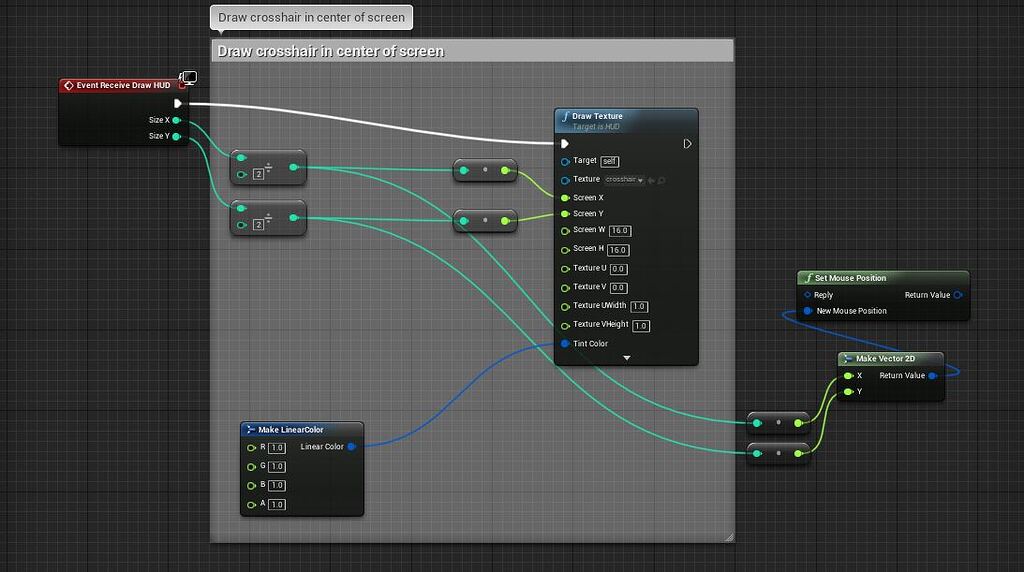
Epic Developer Community Forums
Hello Folks, Just recently started using Unreal and attempting to make a basic game to get myself familiar with the engine. Coming from a Unity background is proving rather difficult! In my game I want to be able to highlight objects with a cross hair - which is working, then I wish to click on this object to make text appear. I have the mouse...
pastel rivet
Make a editor utility blueprint, and insert this into the construction script.
Make the variables instance editable and expose on spawn (Dont know why both, but for some reason it doesnt refresh on the spawn actor we gonna make next unless you check both)
(Second image)
Now in your BP, just make a simple spawn actor, select the editor utility blueprint and connect the variables you want to be changed before spawn and remember to destroy on the end.

 tawny patio
Did some googling and found this to work for me, using "execute when paused" on the escape key

 narrow sentinel
Anyone know how to do this ?
I want to set that value after I call the editor Utility function
 dreamy mountain
hye, what node can i use to swap from one camera to another? i tried view target blend, but it doesnt let me connect a camera component to an actor node
quartz arrow
@frosty heron thanks, it worked!
frosty heron
dreamy mountain
hye, what node can i use to swap from one camera to another? i tried view target...
you can still use view target blend. If you want to use the camera that actor has, you can ensure that the camera in the other actor is activated.
Then it's just Player Controller -> Set View Target with blend with Target being the target actor
dreamy mountain
the actor has 2 cameras though
frosty heron
deactivate the one you don't want and activate the one you want to blend to
dreamy mountain
didnt even know that was a node, thanks
bright stratus
bright stratus
hello, is there a way to enable/disable keyboard/mouse or gamepad only? like if ...
I still struggle with this can anyone help me 😦
 mild jacinth
can someone explain to me how this works. I think its similar to that of function input. I see some values being passed from Input Pose node to Base Layer Input.
 small moat
is set simulate physics on static mesh busted? trying to use it from a construction script, when setting it to true the variable properly changes but when the construction script reruns and sets it to false it stays true
atomic salmon
small moat
is set simulate physics on static mesh busted? trying to use it from a construct...
try to set it in the Details panel and Simulate in the editor. Is the static mesh falling under gravity and can be kicked around, or do you get an error in the log?
It may be missing its collision volume
small moat
setting it in the detail panel lets me switch between true and false, regardless of what the construction script's trying to set it to
atomic salmon
the question is whether it properly simulates or not
atomic salmon
are you changing its collision profile as well?
 atomic salmon
small moat
atomic salmon
small moat
It may have something to do with the fact that you have a GC nested under a StaticMesh. Can you try to temporarily remove the GC and act only on the Static Mesh to see if that part works.
small moat
doesn't seem to change anything
I tried with a brand new actor with just a static mesh and a bool changing simulate physics in construction script, still the same result
it also unparents the component when ticked for some reason

this is on 5.4 fwiw
atomic salmon
small moat
I tried with a brand new actor with just a static mesh and a bool changing simul...
I understand you are looking at the details panel to show the changes in sync with what the construction script is changing, but the real proof would be if the actor simulates physics or not based on your settings in the construction script. Or it never does anyway?
small moat
it does simulate in game
atomic salmon
So if the construction script sets it to simulates it simulates, otherwise it doesn't?
small moat
when first added to the level the actor won't simulate
when ticking enable physics by default it simulates
when unticking it, simulate physics stays enabled and it still simulates
atomic salmon
even if the construction script sets it to not simulate?
small moat
yes
I can directly disable Simulate Physics on the actual component to stop it from simulating though
(only if Enable Physics By Default is also unticked)
atomic salmon
of course. so it looks like whatever it is in the Details panel overrides your construction script
small moat
not necessarily
if Enable Physics By Default is false it'll override it
if it's true, trying to untick Simulate Physics Won't work (the panel will refresh but it'll stay true)
basically the construction script can set simulate physics to true, but seemingly just does nothing when it should set it to false
atomic salmon
ok I see. I had this before but I forgot what was causing and and how we solved it...
I will try to retrieve it
small moat
thank you
trim matrix
i have this setup for my players health, the default value of player health variable is 8 should be full health then, but when the player starts from a new save file, their health bar is empty but they can still play


how could i fix that?, i want when the health bar is empty they die, and the coins still increase health
faint pasture
trim matrix
i have this setup for my players health, the default value of player health vari...
When do you update the UI?
 empty wasp
Normally, widget match cube scale, but i need widget to match its content, so i checked draw ar desired size and size of widget is perfect, but when i play it it seems that cube behind it is too small. I want a cube to match size of widget. I tried everything but problem with units it above my head, cube is in unreal units, and widget is in pixels. how can i match size of cube to widget.
 trim matrix
faint pasture
When do you update the UI?
trim matrix
faint pasture
When do you update the UI?
this is the widget for the meter

 faint pasture
trim matrix
this is the widget for the meter
faint pasture
trim matrix
this is the widget for the meter
construct is happening after the character is spawned probably
try move the get and cast to the binding, see if that fixes it
if it does then that's your problem, widget doesn't have a character to set as ref when it's made
trim matrix
faint pasture
try move the get and cast to the binding, see if that fixes it
wdym
move the cast into get percent?
faint pasture
trim matrix
wdym
yes
trim matrix
like this?
 trim matrix
no
 sand bloom
I feel like that should have worked in the first place, without casting every tick which you really shouldn't do afaik
are you sure the division isn't causing issues?
you can put down a print string to see what your math is doing
trim matrix
it prints when the level opens
faint pasture
trim matrix
it prints when the level opens
Print string to see if the math is wrong or the UI is wrong
faint pasture
sand bloom
I feel like that should have worked in the first place, without casting *every t...
Doesn't hurt but this recommendation was just to rule out that race condition
 lime yoke
I need to check out how many actors of a class is currently spawned but I don't need to use them / call functions from them. Instead of using the actor class of my player character (BP_MahouUnit) I was thinking about getting all the actors and filtering them by the tag PLAYER, that way the array doesn't contain information about the playercharacter avoiding extra references. Is this more efficient or am I wrong?
 trim matrix
when i load into a level not going throught th main menu, the health bar is full. when i start a new save from the menu the health bar is empty
faint pasture
lime yoke
I need to check out how many actors of a class is currently spawned but I don't ...
Just get by class if they're all that class
sand bloom
faint pasture
Doesn't hurt but this recommendation was just to rule out that race condition
for sure man, sometimes you just gotta fix the issue first
faint pasture
trim matrix
when i load into a level not going throught th main menu, the health bar is full...
Figure out if the actual health is empty or the health bar is what's screwing up.
lime yoke
faint pasture
Just get by class if they're all that class
I assume it's not wasting resources the first one?
trim matrix
its both, bc when i collect a coin (which is set to increase health) its fills the bar if i collect enough of them
faint pasture
lime yoke
I assume it's not wasting resources the first one?
Not enough to care about. I think nowadays get actors by class uses some sort of data structure, it's not literally iterating over every actor in the world.