#blueprint
1 messages · Page 211 of 1
 barren tangle
the overlapping event is there to link the door to the action button of my character

on my main character when i perform an action, i will trigger that event through event dispatcher
the when i enter into the collision box. The door should link the event
and bind the On Action Performed
 lunar sleet
Ok
barren tangle
but sometime it works and sometime it doesn't
so im wondering if the bind like that should be avoid?
lunar sleet
barren tangle
but sometime it works and sometime it doesn't
Which part doesn’t work? The bind ?
barren tangle
because i don't want the door to be triggered if i'm not inside of the area of the action... that's why i was thinking to bind them when i enter into the area of action
yes
the bind seems to work
lunar sleet
It prly means the cast failed, did you check ?
barren tangle
but the action not
lunar sleet
barren tangle
but the action not
Oh ok
Does the action fire every time?
Like did you put a breakpoint/print string on the IA node?
barren tangle
the cast didn't fail because i print on the screen the message

let me try the add a print on the action
yes the action it's triggered all the time

 lofty rapids
you got a bunch of branches log the opposites see if something is failing the branches
put a print string on the event itself right off the start, see if it's firing
barren tangle
the event is not called.
could it be because my actor is not 100% inside the box?
the upper part is not into the box
but the lower part is, so i assume that the event is called and the bind should be done
lunar sleet
If the dispatcher call is not made it means it’s not reaching that far into your logic, nothing to do with your overlap
lunar sleet
barren tangle
but the lower part is, so i assume that the event is called and the bind should ...
Don’t assume. Step through the code using breakpoints
 drowsy anvil
hello, how do I fix this error?
 lofty rapids
probably use other actor not component
barren tangle
ok i understand
in fact when i end overlap i remove the bind... but because of the character animation movement, some part of the body enter and leave the box, so unbind the event...
that's annoying...
drowsy anvil
lofty rapids
probably use other actor not component
how do I change it to that? in tutorial they just used 'third person character' instead of my character and it just worked
lofty rapids
drowsy anvil
how do I change it to that? in tutorial they just used 'third person character' ...
see the begin overlap event in red ?
see how theres out pins on the right of it
your using overlapped component
probably want to use other actor, and plug that into your cast
you should notice a difference in what your following
the line probably goes from other actor to object in the cast
drowsy anvil
ah yes, the node in the tutorial has them in different order, thanks for the help, sorry I didnt pay enough attention
nice everything works now, very happy
 whole dove
I'm controlling my camera spring arm with the mouse input, basic thirdperson camera control. how can I clamp the min/max value for this?

not the value output from the input action though, but the min/max value of wherever Controller Pitch Input goes
 proud salmon
What is the "proper" way of rotating a mesh within an actor? "Rotating Movement" only works on the root.
Just set relative rotation on tick? 🤔 It's just visual flair, nothing important (i.e. a motor spinning).
 cosmic dirge
I have made 2 Data Assets for 2 different enemies, how do i do in a blueprint when i press enter that it should spawn 3 of that type, and 2 of the other for example? im a beginner

 valid juniper
I'm using the GetDataTableRowFromName BP Node
(https://dev.epicgames.com/documentation/en-us/unreal-engine/API/Runtime/Engine/Kismet/UDataTableFunctionLibrary/GetDataTableRowFromName?application_version=5.4)
but when I try to build for prod I have this error :
LogInit: Display: LogProperty: Error: FStructProperty::Serialize Loading: Property 'StructProperty /Game/GA_BaseGameplayAbility.GA_BaseGameplayAbility_C:GetParameter:CallFunc_GetDataTableRowFromName_OutRow'. Unknown structure.
OutRow is a framework strucutre, how is this unknowned, any idea 🙂 ?
Epic Games Developer
Get a Row from a DataTable given a RowName
 dawn gazelle
valid juniper
I'm using the GetDataTableRowFromName BP Node
(https://dev.epicgames.com/documen...
dawn gazelle
valid juniper
I'm using the GetDataTableRowFromName BP Node
(https://dev.epicgames.com/documen...
Sounds like you've plugged in something wrong into the output of the node. Can you show a screenshot of how you have it hooked up?
valid juniper
dawn gazelle
Sounds like you've plugged in something wrong into the output of the node. Can ...
I have many, usually used like that

 turbid cypress
valid juniper
I have many, usually used like that
turbid cypress
valid juniper
I have many, usually used like that
Sounds silly. But i sometimes get that when packaging. What tends to help is making it a local variabe (if it's in a function). Then trying to repackage.
There's probably a cleaner solution to have it pick it up correctly.
 static sequoia
anyone know how to make the playable character play an animation when both holding down R and inside collision box of a separate Blueprint?
turbid cypress
static sequoia
anyone know how to make the playable character play an animation when both holdi...
Your pick on when to check. But if for instance on pressing R: get the overlapping actors from the bounding box, loop over them and compare it with your character.
On release of R stop w/e you want to do.
The other way around you can set a bool for a button press. And have use your box collision event.
 grand surge
in motion matching i added crouch so
anyone known i how do i add when prees jump input it whill stand
reply anybody
please i am going to sleep thats why
static sequoia
turbid cypress
Your pick on when to check. But if for instance on pressing R: get the overlappi...
can you explain it like I am 2? I want the Event ActorBeginOverlap from my box collision blueprint to somehow funnel into the condition of the branch on my bp_thirdpersoncharacter blueprint


I am very new
grand surge
i am 4 but not learned too much to make whachting tutorials
turbid cypress
static sequoia
can you explain it like I am 2? I want the Event ActorBeginOverlap from my box c...
leme make a screen then, sec :P
 ruby cobalt
copy pasted some code and i get this.. I want to detect collision with the skeletal mesh in this BP

ahh i get it.. i have to create the component hit event from the skeletal mesh
turbid cypress
static sequoia
can you explain it like I am 2? I want the Event ActorBeginOverlap from my box c...
First screen is to set the button press to check in the function.
The second one is also a trigger for the function, but from the side of the actor or w/e has the collision box.


Then in the function you check if both the button is pressed and the character is is inside the collisionbox

Depending on your setup or scenario you might have to change a few things. Like if you have multiple characters you need to verify who's doing what. this way is a bit simple.
ruby cobalt
can skeletal mesh detect component hits??
i somehow can't
testing 3 different meshes atm
turbid cypress
weird phrasing. Do you mean detect if it's been hit with something?
ruby cobalt
yeah
i had a system like this work fine with a static mesh.. trying to use many skeletak meshes together and ditch the static mesh
turbid cypress
If it's not triggering, then most likely your collision settings
 ruby cobalt
hmm they are all set like this
 turbid cypress
Is your character doing any physics simulation? Because you'll need to set "simulation generates hit events"to true then.
I also always derp with this kind of stuff so i'm not 100% sure. But you might need to set the correct collision response to overlap too.
static sequoia
turbid cypress
First screen is to set the button press to check in the function.
The second one...
whats the red "set" thing called? lol
 static sequoia
oh ok I see
turbid cypress
It holds a "true" or "false" value
static sequoia
yeah
ruby cobalt
turbid cypress
Is your character doing any physics simulation? Because you'll need to set "simu...
so this bool was missing on all of my stuff there is still no "On Component Hit" maybe there's another event i can use
turbid cypress
ruby cobalt
so this bool was missing on all of my stuff there is still no "On Component Hit"...
protip. If you select the component and right click in your blueprint, the first option are events related to that component.
 ruby cobalt
oh that's cool
atm neither hit and begin overlap cook
i'm testing a similar static mesh.. it works fine
turbid cypress
Need to check the collision settings between the character that's doing the hitting and the one being hit.
ruby cobalt
i believe overlap can't work considering the meshes have collision that stop that from happening ha
turbid cypress
And what's the case if i may ask? Maybe there's an alternative solution
ruby cobalt
i trigger sounds when various objects hit.. trying to use physics to build some kind of instrument
turbid cypress
Like a finger hitting a string?
In any case, i think both need to be set to overlap to work. But i'm not an expert :P
ruby cobalt
turbid cypress
Like a finger hitting a string?
yeah pretty much but with any object
well if they have collision to use with physics i believe i can't use overlap
what I got working so far was a skeletal mesh hitting a static mesh.. the static mesh bp detects the hit
 maiden wadi
valid juniper
I'm using the GetDataTableRowFromName BP Node
(https://dev.epicgames.com/documen...
maiden wadi
valid juniper
I'm using the GetDataTableRowFromName BP Node
(https://dev.epicgames.com/documen...
You need to go to the BP specified, GA_BaseGameplayAbility, and use Refresh All Nodes.
You have a pin with a bad value for some reason. Refreshing it should fix it.
ruby cobalt
turbid cypress
In any case, i think both need to be set to overlap to work. But i'm not an expe...
you're right! i gotta use overlap
static sequoia
turbid cypress
It holds a "true" or "false" value
it plays the animation the moment I press the button, am I doing something wrong? should the animation be plugged in somewhere else?


 turbid cypress
in your end overlap you set that function bool to true :P. Should be false there :D
i just noticed i did that in my screenshot too lol. My bad
static sequoia
oh ok
turbid cypress
static sequoia
oh ok
You understand why right? :P.
Understanding how it works is important
 cyan spire
Hello, short question, can someone tell me how to link a Static Mesh inside my Blueprint Parent Actor so it can be modified from the child BPs?
 static sequoia
it seemed odd that it was checked to me. but it still instantly plays the animation 🙃
static sequoia
turbid cypress
You understand why right? :P.
Understanding how it works is important
it doesnt matter what pattern they are checked, the animation is still instantly playing without being inside collision box
turbid cypress
Well i do notice i forgot lol. So if you press the button it will always run like that.
If you're inside the collisionbox it shouldnt run without pressing though
I'll DM, since it's silly to flood chat with it
static sequoia
yeah
 rose crest
cyan spire
Hello, short question, can someone tell me how to link a Static Mesh inside my B...
rose crest
cyan spire
Hello, short question, can someone tell me how to link a Static Mesh inside my B...
SM component will be visible in child actor, just edit it there
ruby cobalt
wouldn't it be nice to have gpt4 in here to chat with us and helping to troubleshoot?
(and learn in the process?)
turbid cypress
It loves to pull stuff out of it's ass though. Think for especially beginners that might be confusing :P
cyan spire
rose crest
SM component will be visible in child actor, just edit it there
Sadly doesnt work with structs, it works fine when using BP interfaces and passing vars, but not if use structs the same way. It bugs out and no data is found from the child actors
 trim matrix
How do I make this black space not be black? Im using the Default Unreal sky atmosphere and fog
 turbid cypress
cyan spire
Sadly doesnt work with structs, it works fine when using BP interfaces and passi...
turbid cypress
cyan spire
Sadly doesnt work with structs, it works fine when using BP interfaces and passi...
What he said is right though.
Anything and everything in your parent class is visible in the child BP.
did you perhaps make it in your child? Because that will never be visible in your parent.
cyan spire
I put the struct into the Parent BP of Equipable_master and made a blueprint interface to send a Object Ref (Equipable_Master) to access it in my Character BP. When im accessing it in my character BP, i get the struct and break it. I assigned the values in Equipable_Child. When im accessing it, the server returns correct, the clients return null.
Im just looking for a more efficient way to pass values from a child bp to my character BP, because its a hassle to make a BP interface for everything ....

BP interface function*
 wind sentinel
Hello, does anybody know how I can spawn an NPC at a specific location after a custom event has been triggered?
 bright hamlet
trim matrix
How do I make this black space not be black? Im using the Default Unreal sky atm...
bright hamlet
trim matrix
How do I make this black space not be black? Im using the Default Unreal sky atm...
Check the settings, unsure where exactly not home atm 🙏 there’s a video for it on YT
dawn gazelle
wind sentinel
Hello, does anybody know how I can spawn an NPC at a specific location after a c...
From the event, call the "Spawn Actor From Class" node and plug in the location you want to use <_<
cyan spire
dawn gazelle
From the event, call the "Spawn Actor From Class" node and plug in the location ...
If you want to do it properly : Make a Class for your NPC logic, make a "NPC Spawner" Class in which yo use the spawn actor from class node and spawn the npc, make a for each loop, make a array and put every actor object reference into that array, use a bp interface to call get reference to self and you can access all your NPCs AND their logic inside your character bp
 fiery swallow
cyan spire
If you want to do it properly : Make a Class for your NPC logic, make a "NPC Spa...
fiery swallow
cyan spire
If you want to do it properly : Make a Class for your NPC logic, make a "NPC Spa...
that's the proper way to do it?
 raw spindle
is there a way to disable widgets in the widget designer? I basically want to "comment them out"
 raven gyro
https://blueprintue.com/blueprint/ycdll0ss/
can anyone help me with this blue print please? i have 3 Skeletal Cubes, First Button Will turn Cube 2 and 3 off and keep Cube 1 on. Second Button will ONLY turn on cube 2, but cube 3 keep being affected.

No description provided
 still breach
Hello, does anyone have a solution to this problem I'm facing?
I have an Inventory System Component that holds a Content variable which is an Array of SlotItem. SlotItem is a struct.
I realise that I have a particular type of items, keys, that need to hold more information than a simple SlotItem, they need to contains the ID of the door the specific key opens.
So I created a derived struct "SlotKeys" from SlotItem to store my additional information. The problem is when I want to add said key to my Inventory Content through Blueprint, I get the following issue;
Any easy way to fix this?

 stone field
still breach
Hello, does anyone have a solution to this problem I'm facing?
I have an Invent...
stone field
still breach
Hello, does anyone have a solution to this problem I'm facing?
I have an Invent...
"derived struct"? I don't think structs do inheritance
Perhaps best to make SlotItem a class
wind sentinel
@dawn gazelle @cyan spire thanks for your help 🙂 my BP does work now!
fiery swallow
stone field
"derived struct"? I don't think structs do inheritance
Perhaps best to make Slot...
They do in cpp , but I think he's referring to something else
fiery swallow
still breach
Hello, does anyone have a solution to this problem I'm facing?
I have an Invent...
it says right there that derived structures are not allowed
you'd have to break your slot key , and manually insert them into the item struct
or change your content struct array to be whatever the derived class is
stone field
"Yes, c++ struct is very similar to c++ class, except the fact that everything is publicly inherited, ( single / multilevel / hierarchical inheritance"
hmm I am very rusty on cpp : )
still breach
Hmmm... That's problematic, Not all Items are necessarily keys, but all keys are items though..
And if I break the struct as suggested, I'm losing the keys information
And making the content array the derived class isnt a scalable viable option, if later on I have other item exceptions, I won't be able to use it
 lethal coral
How do you find the purple nodes in the control rig editor? I've tried to search "for each item" but can only get just "for each" and"replace items" just doesn't exist. I'm trying to replicate the image here but can't find the nodes

 silk cosmos
still breach
And making the content array the derived class isnt a scalable viable option, if...
silk cosmos
still breach
And making the content array the derived class isnt a scalable viable option, if...
I would just use uobjects to store the custom properties for each item instead of structs. You'll have to deserialize and serialize them if you want to save them though.
still breach
Myeah.. I'm just a lil worried about losing performance about going this route, but seems to be the only viable option at this point
silk cosmos
Using uobjects is much more scalable anyways
 marble tusk
There needs to be more info on blueprint Instanced Structs out there. It seems super useful, but the only info I can find is the tweet chain from the person who submitted the PR for it and a YouTube video from like a week ago
 obtuse oriole
how do I calculate the angular velocity to rotate from one rotator to the other?
basically to calculate the angular velocity for the cube to face forward the target (white is target, blue is the cube actual forward direction)

and yes, if u have been remembering my last few questions here. I did decide to make my own physics handle actor components, physics constraints is a bit too complicated for me
 surreal swallow
Hey Guys, Im having a problem that I cant set an struct array element. It stays the default.
in short:
I want to set a value inside my "Character Upgrade struct array", that is inside my "character struct array"
What am I missing here?

 gentle urchin
fiery swallow
that's the proper way to do it?
gentle urchin
fiery swallow
that's the proper way to do it?
Definetly not 😅
gentle urchin
still breach
Myeah.. I'm just a lil worried about losing performance about going this route, ...
Uaing structd you'd end up with. A superstruct that can handle all differences between all items
Easily gets out of hand
Can be done tho
still breach
Thats what I was trying to avoid with struct inheritance ^^'
Was trying to go with TVariants Arrays but seems like UE5 doesn't like that at all for blueprints and only is supported through full cpp, so kinda dissapointed here that it seems like there's no perfect solution
 crude knot
Physics objects falling through the ground (landscape only) anyone have any tips?
gentle urchin
still breach
Was trying to go with TVariants Arrays but seems like UE5 doesn't like that at a...
Uobjects 😆
gentle urchin
still breach
Thats what I was trying to avoid with struct inheritance ^^'
But wouldnt that be pretty troublesome having to cast the struct to several types to figure out whats in the slot atm?
Guess you could make some functions in the base struct that you'd just override , and identify them that way
marble tusk
surreal swallow
Hey Guys, Im having a problem that I cant set an struct array element. It stays ...
You need to use 'GET (a ref)' instead of copy. When you get (a copy) you're then working with a copy of the struct, so it won't change the original
still breach
gentle urchin
But wouldnt that be pretty troublesome having to cast the struct to several typ...
Why would I cast anything when I could use polymorphism instead?
marble tusk
Blueprint Instanced Structs are a thing now
So you don't even need to use UObjects for it
I think it's been in the engine since 5.3 based on what I've found while searching. Might be in 5.2 behind a plugin you need to enable https://fxtwitter.com/_Jambax/status/1592826899486867456

#UE5.1 integrated my PR to add Blueprint Graph support for Instanced Structs.
If you don't know what these are, and you're interested in building generic, data-oriented systems - then hooo boy are you in for a treat!🧵
marble tusk
still breach
Thats what I was trying to avoid with struct inheritance ^^'
So yeah, maybe look into Instanced Structs
 storm shale
still breach
Thats what I was trying to avoid with struct inheritance ^^'
storm shale
still breach
Thats what I was trying to avoid with struct inheritance ^^'
U can just use uobjects instead of structs
I'd recommend relegating structs to data tables or similar stuff; rather than gameplay purposes
gentle urchin
still breach
Why would I cast anything when I could use polymorphism instead?
How'd that work exactly?
still breach
marble tusk
So yeah, maybe look into Instanced Structs
That's almost perfect except I don't see a way to instantiate struct arrays
still breach
storm shale
U can just use uobjects instead of structs
Problem with Uobjects is that they're a lot heavier than structs when using RPCs
still breach
gentle urchin
How'd that work exactly?
wdym?
storm shale
still breach
Problem with Uobjects is that they're a lot heavier than structs when using RPCs
oh well u shouldn't be sending them over the network
gentle urchin
😅 its an inventory, hard to avoid
storm shale
most likely don't need to send structs either
for example, my items are all Integers
marble tusk
still breach
That's almost perfect except I don't see a way to instantiate struct arrays
What do you mean?
BTW, this is the only other source of info on using Instanced Structs I could find. https://youtu.be/FHDrebwibfw
#UE5 #Blueprints
Don't be shy, buy me a coffee! https://buymeacoffee.com/polysiens
Social Media & MORE:
Fiverr: https://www.fiverr.com/qinq96
Discord: https://discord.gg/uPfRHBCfDu
LinkedIn: https://www.linkedin.com/in/petar-ples-08a04356/
Personal Website: https://venturoustudios.com/
UE Marketplace: https://www.unrealengine.com/marketplace/...
storm shale
each item is 1 integer and that's it. You can store pretty much all info you need in a single integer; worst case scenario int 64; even worst case scenario string. an ID.
gentle urchin
storm shale
for example, my items are all Integers
Same, well, gameplaytags but yeah
still breach
storm shale
each item is 1 integer and that's it. You can store pretty much all info you nee...
So... essentially a struct ^^'
gentle urchin
I only replicate what is truly required
And locally update the rest (for ease of access)
storm shale
still breach
So... essentially a struct ^^'
a struct is different than an integer in size though XD; sides the purpose is to like code them into INTs
when u get them u uncode them once; and that's it
u could store that info in a struct
or an uobject
or an actor; whatevs works
still breach
marble tusk
What do you mean?
I mean its great when you got a single struct, but not an array you want to iterate through it seems. Or there's something I still sont get
 still breach
storm shale
a struct is different than an integer in size though XD; sides the purpose is to...
still breach
storm shale
a struct is different than an integer in size though XD; sides the purpose is to...
Yeah but the difference is neglegible at this point. I agree, your way is more optimized, but I really dont need to go that far for my needs
marble tusk
still breach
I mean its great when you got a single struct, but not an array you want to iter...
Something you could do is have one struct that's your generic item info that every item has, and include in that struct an instanced struct. Then you just use whatever item specific stuct you want for each item as the instanced stuct
and make an array of that one struct
Maybe watching the video I linked would help
I haven't even used this stuff yet since I also just learned about this today
still breach
oh, I missed the video link, my bad, I'll have a look, thanks! It sounds like it might be exactly what I need
marble tusk
Yeah, I was kind of surprised how this thing I was just learning existed is also the thing it sounds like you need 😆
gentle urchin
I vaguely recall something it didnt support which prohibited my use of them .. cant recall what that was
It may even have gotten fixed by this point
marble tusk
In that video he uses a DataTable, but you could just replace that with your array basically
gentle urchin
Maybe it was mostly the limited bp support of the structs im thinking about..
marble tusk
It's funny, I was just thinking the other day how I wish I could do something like this with structs. To make it even better, I had seen the twitter thread about it back when it was first posted, but I didn't understand what it was talking about and dismissed it since it wasn't in the engine at the time anyway
gentle urchin
😅 same. I now got a dislikeable superstruct with me
marble tusk
I had figured if it was something worth knowing that people would talk about it when it's in the engine, but it seems that nobody has been. As if nobody even knows it exists
 paper smelt
What's a good way of checking when a function is called? I want to use it to see something on a widget but dont want to use tick as it would not be the best for performance

 proud bridge
What is the difference between a function and a custom event? The only difference I know:
U cant use delay in function
U can use RPC only in custom event.
What other differences are there?
paper smelt
proud bridge
What is the difference between a function and a custom event? The only differenc...
Functions allow you to call the code all at once unlike functions. witch is why you cant use a delay.
Purpose:
Custom Events:
Used primarily for event-driven logic.
Designed to be triggered or "fired" by other events or functions in response to certain actions or conditions.
Often used in scenarios where you need to respond to an external event, like a player input or an overlap event.
Functions:
Used to encapsulate and reuse logic or calculations.
Called directly within the Blueprint by other functions, events, or nodes.
Ideal for operations that need to return a value or perform a specific task without necessarily responding to an external event.
2. Return Values:
Custom Events:
Cannot return a value.
Used mainly for performing actions rather than calculations.
Functions:
Can return a value (e.g., an integer, float, boolean, etc.).
Suitable for calculations, data processing, and logic that needs to produce a result.
3. Execution Flow:
Custom Events:
Executes the connected nodes when triggered.
Can be called multiple times or triggered by various events or conditions.
Supports latent actions (like delays and timeline nodes), which allow for time-based actions within the event.
Functions:
Executes the connected nodes and optionally returns a result.
When called, the function completes all its logic in one execution step unless explicitly broken up by other logic (like a delay outside the function).
Functions do not support latent actions directly within them (you can't use a Delay node inside a function).
4. Visibility and Access:
Custom Events:
Typically used within the same Blueprint or by other Blueprints that reference this Blueprint.
Can be called by name using "Call Function" nodes or by triggering them through event dispatchers or other events.
Functions:
Can be private or public, controlling access to the logic within the function.
Functions are more suited to be reusable blocks of code that can be called from multiple places.
5. Parameters:
Custom Events:
Can accept input parameters (like a function), but they do not return any values.
Great for triggering actions with specific inputs but without the need for a return value.
Functions:
Can accept input parameters and also return values.
Useful for scenarios where you need to pass in data, process it, and get a result.
6. Use Cases:
Custom Events:
Triggering a response when a specific event occurs, such as handling player input, responding to overlaps, or starting a sequence of actions.
Useful for organizing event-driven logic, such as triggering animations or starting a sequence of actions.
Functions:
Encapsulating logic that can be reused, such as calculating a value, processing data, or performing a repetitive task.
Ideal for calculations, data processing, and any logic that should be reusable and potentially return a value.
Summary:
Use Custom Events when you need to trigger actions in response to an event or when you need to execute event-driven logic.
Use Functions when you need to encapsulate reusable logic, perform calculations, or process data, especially when you need to return a result.
marble tusk
 paper smelt
Lol
Its the best way of getting info
Learn all you can about it
Dont just follow tutorials step by step take the time to learn it and you will be a pro with it 😉
proud bridge
If we use a function inside a RPC custom event, will it replicate?
paper smelt
Should
proud bridge
Thank u tommyboi, this helped a ton!
paper smelt
Some things you have to make custom events and call them in the function
Some things wont
Like changeing materials
make that a seperate one
proud bridge
paper smelt
Like changeing materials
Yess exactly
paper smelt
Yeah
barren tangle
hey, i have someyhing weird. i have 2 different characters. child of BP_MainCharacter
When i retrieve actor from class : BP_MainCharacterChild1 like this
 paper smelt
proud bridge
Yess exactly
paper smelt
proud bridge
Yess exactly
Ive been replicating a lot recently so im learning a lot more
barren tangle
and after i print the character name like that

it prints 2 Name. BP_MainCharacterChild1 and Child2
proud bridge
paper smelt
Ive been replicating a lot recently so im learning a lot more
Do u prefer repnotify or just plain old server and multicast config?
paper smelt
barren tangle
hey, i have someyhing weird. i have 2 different characters. child of BP_MainChar...
Try not to use get actor of class too much its not the best with performance its very slow try casting
paper smelt
proud bridge
Do u prefer repnotify or just plain old server and multicast config?
Well ive learned you can use the game mode as well to replicate some things
proud bridge
paper smelt
Well ive learned you can use the game mode as well to replicate some things
Without having to do RPC?
proud bridge
Can u give me an example? It will help me a lot
barren tangle
paper smelt
Try not to use get actor of class too much its not the best with performance its...
i can't i have to replace the PlayerController Pawn
proud bridge
barren tangle
i can't i have to replace the PlayerController Pawn
U can use “get controlled pawn” from player controller to get the pawn currently associated with it
paper smelt
It only needs to run on server so I only need one custom event that runs on server to make it work instead of haveing 2

 proud bridge
paper smelt
It only needs to run on server so I only need one custom event that runs on serv...
proud bridge
paper smelt
It only needs to run on server so I only need one custom event that runs on serv...
Ooo so multicast is not reqd here
paper smelt
proud bridge
Ooo so multicast is not reqd here
Not at all
barren tangle
but my question is more: is it normal to display 2 names when the functions is supposed to return me 1 object?
proud bridge
So to use dynamic material instance replication, i can use this method?
paper smelt
Maybe idk never tested materials through here you cant replicate everything through this meathod so id have to check
But its a good meathod to use when you can
proud bridge
paper smelt
But its a good meathod to use when you can
Yes its definitely simpler
paper smelt
as there is only 1 game mode in a a game and it auto replicates basically
paper smelt
proud bridge
Yes its definitely simpler
100%
proud bridge
Thanks man, i ll let u know of my findings
paper smelt
proud bridge
Thanks man, i ll let u know of my findings
Alrighty also priv text me if you do cuz I dont get notifications from this server very much
proud bridge
I ll drop u a hi right away
 surreal bridge
Sorry it took so long to respond. I managed to figure it out.
If either the year month or day is 0, it will break it.
But if they are all 1 then the changes to the time work:


 frosty heron
surreal bridge
Sorry it took so long to respond. I managed to figure it out.
If either the yea...
frosty heron
surreal bridge
Sorry it took so long to respond. I managed to figure it out.
If either the yea...
That's what I said 😆
As long they are not 0 you are good, if you see my follow up comment I got the time working too.
frosty heron
Since you are using now at some point you should plug the year from your date
Unless you don't care about year then just put 1
The moment year and month is 0, anything you set there is broken (become 0)
surreal bridge
I plan to use Now at the start of a new game and just advance the game from there. So the date will start at the same time but will be passing by much faster.
I also ended up changing my time tick method to a loop with a delay instead of the on tick method.
In the past I have been used to there being like 20 ticks per second and that was how fast the tick rate was. Where as UEs tick event is based on the FPS so it varies
cosmic dirge
So i have this array that works and spawn my actors, but i want a delay after each time, and if i add a delay after Foreach loop and between spawn actor, it stop working, any easy fix?
 fiery swallow
cosmic dirge
So i have this array that works and spawn my actors, but i want a delay after ea...
fiery swallow
cosmic dirge
So i have this array that works and spawn my actors, but i want a delay after ea...
Copy the foreach loop macro, paste it into whatever is calling this code. And then place a delay node inside of the foreachloop
cosmic dirge
fiery swallow
Copy the foreach loop macro, paste it into whatever is calling this code. And th...
I copied the foreach loop macro. what is calling the code is "Spawn" Should i just paste what i copied in the event graph there? that looks messy
fiery swallow
Don't copy the content of the foreach loop, on the top right after you've opened up the macro, search for it in the search bar
Copy it from there, and then in your spawn class, next to macros, right click the corresponding macro button and select paste
gentle urchin
marble tusk
I had figured if it was something worth knowing that people would talk about it ...
I think the latter is mostly the case, and perhaps lack of knowledge/documentation on how to use them
fiery swallow
cosmic dirge
I copied the foreach loop macro. what is calling the code is "Spawn" Should i ju...
If that was too hard to follow.
https://youtu.be/zh8xx9abzZY?si=Y4kmx7B9Op3PfwEg

#ue4 #beginner #blueprint #foreachloop #delay
Byte Sized Tutorials! How to create a custom "For Each Loop" with built in delay!
Can't really show you how to do it because I'm not at my desk
But this video seemed to do it properly
cosmic dirge
fiery swallow
If that was too hard to follow.
https://youtu.be/zh8xx9abzZY?si=Y4kmx7B9Op3PfwEg
I made it work, i tried to follow along, and i struggled but i got there 😛
 cosmic dirge
fiery swallow
Glad to hear it
cosmic dirge
fiery swallow
Glad to hear it
ty ❤️
marble tusk
You can avoid having to resetup all the inputs and outputs by instead copying the macro in the "Macros" list and pasting it into your macro library's macro list
fiery swallow
Video I sent also shows how to do that. Personally I never do it because "ain't nobody got time for that"
gentle urchin
I seldom have enough use of it for a macro library 😅
cosmic dirge
first i copied all of the macro and i wanted to put it in a new macro, and i got lost with all the input and outputs and tought , did i get stuck already? .....
gentle urchin
And since i cant share macro/bpfl easily across all projects...
Engine wide library would be nice
Just like engine wide asset library would be nice...
fiery swallow
gentle urchin
I seldom have enough use of it for a macro library 😅
Same, but it's the one macro that will never really change, so I usually just copy it from Blueprint to blueprint as needed 🤰
gentle urchin
Instead of bloating every project with all the content, only reading from a common lib and adding what is used would be neat
marble tusk
fiery swallow
Video I sent also shows how to do that. Personally I never do it because "ain't ...
No, I mean, in that video he has to setup all the inputs and outputs and reconnect them, but you can avoid that by copying the macro itself in the macro list instead of all the nodes inside of it
Copying the macro like this instead of selecting all the nodes inside of it
 fiery swallow
Oh yeah that's what I was saying to do haha
I thought you were referring to the macro library
Maybe my description was terrible
marble tusk
Ah yeah, I only watched the video and he does it by selecting all the nodes instead
 crude dew
Hi, I attempted to remake Pong but Im finding that sometimes the ball will end up stuck in the middle of the playfield as the image shows I do have a function which check the direction of the ball (Which has locked rotation to prevent ball spin like in Billiards/Snooker), If the ball is bouncing vertically then destroy the ball and spawn a new one, But wondered if someone had some idea on how I can prevent this from happening without it looking really weird and modifying the trajectory of the ball wildly please? (Sorry for the long post)

 pallid nest
hi guys, im trying to gather all widget componenets from this specific widget that contains "canvas_" so I can turn on the visibility is this supposed to be the right way to do so? atm, the print prints sucesfully the widget but I think the conditional is not correct
 frosty heron
pallid nest
hi guys, im trying to gather all widget componenets from this specific widget th...
frosty heron
pallid nest
hi guys, im trying to gather all widget componenets from this specific widget th...
I will never do something like this, not sure what your objective is tho.
Would just make a base class with the function to hide certain element.
frosty heron
crude dew
Hi, I attempted to remake Pong but Im finding that sometimes the ball will end u...
How did it get stuck? What's the logic to move the ball? Maybe it collide with invisible wall, have you try toggling Show Collision in console when Play in Editor?
crude dew
I can show a video demo https://www.youtube.com/watch?v=IgvwUcbfQc8 You can see it gets stuck here.
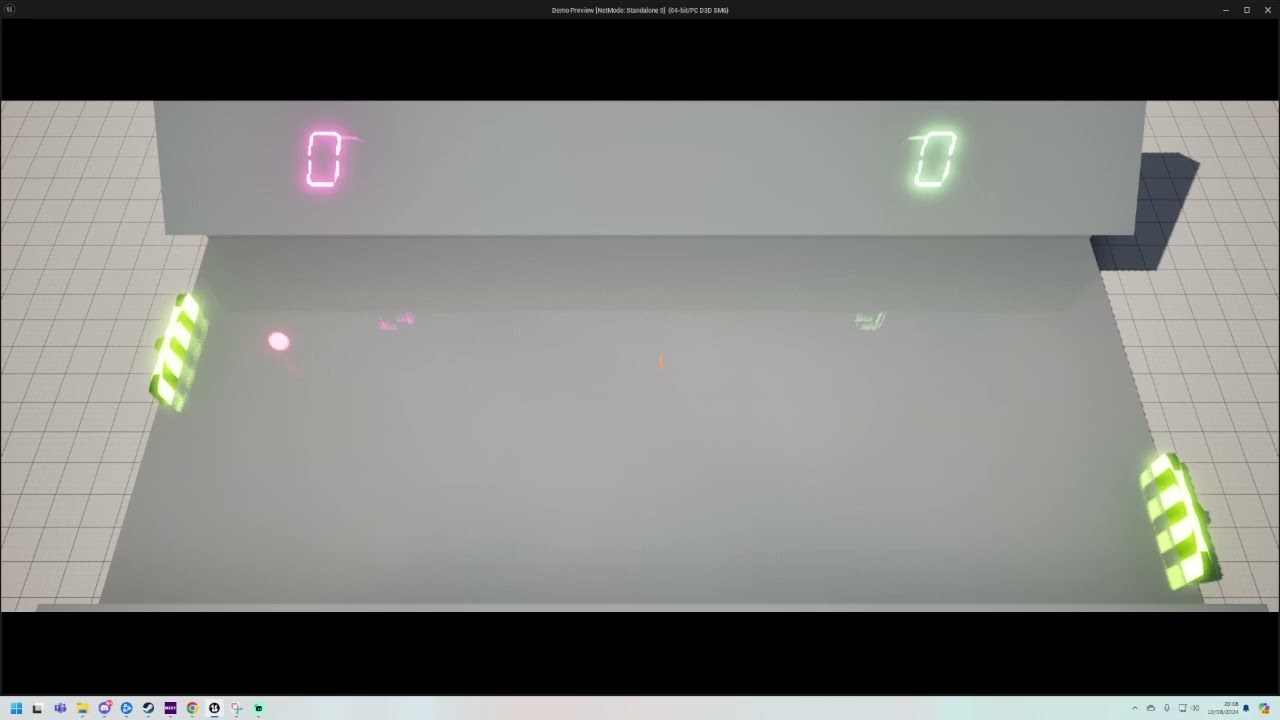 crude dew
The ball is handled by physics
This is the material handling it

The ball Rotations are "locked" so ball spin cant cause the weird bouncing angles.It seems to start off accurately then goes a little weird for some reason
gentle urchin
Friction?
crude dew
I,ll try reducing it to 0.0
with 0.0 it just goes left and right when it hits the paddle even when paddle is moving but that does mean that the friction is having an effect on how the ball is reacting to the paddle, So maybe I can modify the paddle to have angles predesigned into the paddle and that will add some "control" to how you can "direct" the ball?
@gentle urchin Thanks!! Now seems to be working better it was the friction I was thinking the friction would only affect the speed loss of when it hits something but it does seem to have some effect on the actual trajectory of the ball, So I will add angles to the paddles instead 🙂
pallid nest
frosty heron
I will never do something like this, not sure what your objective is tho.
Would ...
many thanks for your reply and advise. There are many canvas hidden in my widget (40) and right now I am turnin on visibility one by one, which is not very smart so I was trying to find a better way to do this
frosty heron
pallid nest
many thanks for your reply and advise. There are many canvas hidden in my widget...
Show your widget blueprint hierachy
pallid nest
frosty heron
Show your widget blueprint hierachy
all those that it says "Canvas" are the hidden one
 frosty heron
pallid nest
all those that it says "Canvas" are the hidden one
frosty heron
pallid nest
all those that it says "Canvas" are the hidden one
and the actual UI?
you most likely don't want to use 1 canvas per element
they could just be a child of one canvas
pallid nest
 frosty heron
If they all share the same canvas, then you will just need to toggle one canvas
also if you want feedback, the text is kinda hard to read
pallid nest
each canvas has a button and an image that when an integer is > 0 then is displayed,
frosty heron
pallid nest
each canvas has a button and an image that when an integer is > 0 then is displa...
So like, they should be a widget of it's own
pallid nest
thanks, but they are not the same canvas right?
frosty heron
instead Canvas with generic buttons
What you can do is create a widget for the button
with all it's properties (integer, image, etc)
then they all can be a child of one single canvas in your "Master" widget
pallid nest
so you mean creating another widget with a single image of this and then calling that one directly instead of repeating so many times , right?
frosty heron
are the buttons not a widget blueprint of it's own?
pallid nest
frosty heron
are the buttons not a widget blueprint of it's own?
No. They are not
 frosty heron
Yeah that's gonna be a nightmare
pallid nest
each canvas contains all these 5 elements
pallid nest
exactly
pallid nest
do you by any chance know any tutorial ? I know there is a way to do with a single one but I dont really know how
frosty heron
You need WBP_MyButton
Which contain Skill Icon, BG, Button, integer, etc
frosty heron
pallid nest
do you by any chance know any tutorial ? I know there is a way to do with a sing...
Not really because the idea is just OOP. Inheritance and Delegates is what you need to know
pallid nest
frosty heron
Not really because the idea is just OOP. Inheritance and Delegates is what you n...
many thanks that is extremely helpful as now I know where to look at it so I can check it. I know there is a smart way because my widget (template) contains some skills that are done somehow that way (with a separate widget)
frosty heron
I would show a bit of what I done, but I just messed up my project and can't open it.
pallid nest
frosty heron
I would show a bit of what I done, but I just messed up my project and can't ope...
😮 really , i hope you can fix it. That is terrible
frosty heron
I can comment the problematic line but trying to figure out why 😛
pallid nest
i try to do backups almost every two days very scared of that haha
frosty heron
ahh f it I can do that later
frosty heron
pallid nest
i try to do backups almost every two days very scared of that haha
Use Source Control
pallid nest
frosty heron
Use Source Control
sorry what is that, a plugin ?
frosty heron
no, it's a tool that every software developer used.
can't get a job as one if a person doesn't know how to use it.
pallid nest
great thanks again mister
frosty heron
You can commit changes, and reverse to earlier version. Really important as you can time travel if your project gets corrupted
pallid nest
it seems I have it activated so something else to my to do list
 frosty heron
It can work outside Unreal but anyway

@pallid nest This is my WBP_Button,
it contains all the logic that my custom button does
returning Item, Index, etc

They get populated to a single canvas panel
pallid nest
aha and then you will call this in the main widget right? I have it from the template as well but what I struggle to understand is how you display X times
 frosty heron
#blueprint message
Yeah this is my parent widget
where the button gets added
and they will live under one canvas panel, so when I want to hide all my buttons, just need to switch one Canvas Panel
pallid nest
great many thanks again for your time and help mate
gentle urchin
crude dew
<@231467939734355969> Thanks!! Now seems to be working better it was the frictio...
Sweet. You could add direvtional impulse based on how clode to the edge of the paddle they hit ^^
frosty heron
@pallid nest The idea is to not do repetitive work, My logic to toggle all the button is as simple as toggling one single canvas panel

imo, you should try to keep all your custom buttons in one single parent
pallid nest
thanks again that is very helpful, i will try to think how to do adapt to what I do (is almost the same but the difference is that there should be a condition passing an integer as well - using a data structure )
frosty heron
pallid nest
thanks again that is very helpful, i will try to think how to do adapt to what ...
Event dispatcher
You bind the delegate to the parent Widget Blueprint
pallid nest
bless you ! I will try that
grand surge
anyone known how to fix like in motion matching i created first person camera and turned of use pawn control rotation so it becomes realistic ultra realistic so but on this https://www.youtube.com/watch?v=-zkdBxBybFg here the files it was repliceated https://github.com/cenairaclub/motionmatchingreplicated


GitHub
Unreal Engine 5 Motion Matching Sample REPLICATED. Contribute to cenairaclub/motionmatchingreplicated development by creating an account on GitHub.
so in this replicated project i am adding same camera and same code and tuning off use pawn control rotation but its bugging camera not movig
 oak juniper
A question. You probably saw an effect in games where grass is affected by an explosion, cant find anything really meaningful on youtube about how to design systems like this.
BUT my question is not about grass, imagine a game where something explodes in a room and every single object starts wobbling accordingly. for the animation i imagine you can make a skeletal mesh to sheer the objects, but how would you approach the system that would shear them?
maybe you saw something somewhat related to it.
frosty heron
I do imagine it can be as simple as applying force?
where the explosive location is the source
oak juniper
the thing is i dont want the objects to be physical
i want them to be glued in place for gameplay reasons until they are destroyed and no longer exist.
so i just want to do a wobble effect on top of what is practically an immovable prop.
gentle urchin
frosty heron
Event dispatcher
I wish my first ue tutorials covered those 8 years ago
frosty heron
gentle urchin
I wish my first ue tutorials covered those 8 years ago
😔 I wish I didn't use only blueprint for the first 10 years.
gentle urchin
That too lol
barren tangle
can you help me to do a movement that make a straight line into the direction the actor is facing?

i try that but it doesn't work
 agile moss
The enemy does not play the punching animation montage. Anybody know why?
 barren tangle
agile moss
The enemy does not play the punching animation montage. Anybody know why?
barren tangle
agile moss
The enemy does not play the punching animation montage. Anybody know why?
did you put the default animation into the Anime Blue Print to allow the animation montage?

 barren tangle
doest your AI move?
barren tangle
ok
but in your case it will attack if it reach the location 0 0 0
does it reach the location 0 0 0 ?
maiden wadi
It does not use the Location if there is a valid object specified.
barren tangle
because your issue is to know if you reach the specific location or the target?
if you reach the target does a print works?
agile moss
no, it should play when the enemy reaches the location
barren tangle
instead of the attack?
agile moss
barren tangle
if you reach the target does a print works?
ofc, that is why he starts running again
barren tangle
is your mesh composed of multiple mesh?
agile moss
no
frosty heron
The A.I have anim montage slot?
 vague night
I am doing some course and I have a task to make in UE5 using blueprints a simple game where objects randomly spawn and move toward the player, if they don't get shot down, player takes damage - think Missile Command - what would be a good way how to set this up?
agile moss
well he uses the same BP_anim as the player
 crimson pollen
my mouse remains hidden. Anyone know why? I put this in the level blueprint itself
 frosty heron
Ise the montage use the same slot ( upper body or w.e it's called )? Try to just play montage outside your system
The montage also need to use the same skeleton as the anim blueprint
Is the A.I and the player share the same mesh?
 frosty heron
crimson pollen
my mouse remains hidden. Anyone know why? I put this in the level blueprint itse...
frosty heron
crimson pollen
my mouse remains hidden. Anyone know why? I put this in the level blueprint itse...
Set Input to Ui or UI and Game depending on your need.
Also stop using level BP
barren tangle
how can i move an object to a line base on the forward vector of the character?
crimson pollen
@frosty heronyes I know im doing this for debug reasons. It doesnt seem to work even know I had this working a few months ago
barren tangle
crimson pollen
<@1050954229902213150>yes I know im doing this for debug reasons. It doesnt seem...
does your issue is solved with the set Input ?
agile moss
barren tangle
how can i move an object to a line base on the forward vector of the character?
You mean
Add movement input?
barren tangle
no, it's a collision box. that i want to move

i want to move the box following the forward vector
agile moss
Box
Set location to get location plus 1
And like a tick use instead set timer by event
Use a custom event first and plug the red in the red
Or if u want to move it instantly just set the location to what you need
barren tangle
i move it with a timeline but the destination is confused
i know the start but how can i know the end


 agile moss
try this, but use timeline instead for the float
 barren tangle
so regarding to where im facing, how can i would like to move to that direction the box
i can't a collisions box is not a pawn
agile moss
Ah right
frosty heron
barren tangle
i want to move the box following the forward vector
Why can't you just parent it to the capsule?
So it follows the rotation of the actor
barren tangle
it's the case but for the movement, how can i get the destination?
frosty heron
Not sure what the goal is
 agile moss
can u try ai move to? (wait does it work on normal actors, lol idk)
frosty heron
Why are you using timeline? What's the objective?
If you need to go from A to B in x ammount of time then use timeline but if not you can't use timeline for something without fixed length
barren tangle
the objective is to make a box move from position A to position B in a straigth line, but base on the forward vector of the player
frosty heron
Is this like projectile?
barren tangle
like projectile
frosty heron
Use projectile component
All you have to do is specify speed and rotate the projectile
It will shoot straight
 woven sky
how can i fix it???
 pale obsidian
Should I make a general parent class for, well, everything?
barren tangle
when you use projectil you spawn the projecti each time?
pale obsidian
If I have a simple parentage setup:
-Bp_human
-Bp_player
-Bp_enemy
Does it matter if I put enhanced input into the player bp or human bp?
barren tangle
put it into the gameMode...
barren tangle
it's related to the player controller not to the pawn
frosty heron
wait, what are we talking about here
barren tangle
you can put it on the player controller or the gameMode
the activation of the enhanced input system

it's not related to the character
frosty heron
depends on your game I guess
if you can swap between characters then maybe controller is not a better place
pretty sure the default template add input mapping context in the character
barren tangle
yes, but it don't think it's the good place to do that
it's not related to the character, so it should not be there. it can but it should not
frosty heron
depend on the game
barren tangle
player controller should be the best place, yes depend of the game
and what functionallity you will need
frosty heron
if you can switch between characters, then perhaps doing it in the character is better
when you posses a car, you get to have input to drive the car
when you are on foot, you can shoot, etc as a human character
barren tangle
if character have different Input yes, if they have the same don't do it into the character
frosty heron
dumping all of those in controller doesn't seem like the ideal to me
barren tangle
all character will share the same Input, but only if you need them to share the same input
if you do it into the character, only the character and its children will have it
frosty heron
so at the end, it depends on context or what your project need.
barren tangle
yes, im agree with that
frosty heron
as far as I know Lyra even usses component to do the Inputs
frosty heron
Epic's sample project that meant to show standards
some say too over enginereed
but lots of nice things you can grab from there. The camera system saves my project.
barren tangle
pale obsidian
If I have a simple parentage setup:
-Bp_human
-Bp_player
-Bp_enemy
Does it matt...
so it's depend what you need to do and to control. you need to have on the actor that you need to control with the input system... at least
barren tangle
frosty heron
so at the end, it depends on context or what your project need.
but sometime, if you need to control the main menu as well. if you have it on the character level you will not be able to do it. So all those input need to be set into the Controller, and retargeted to the good target 🙂
BUT it depend of the game
so that's why put it into the controller and let the controller controll the input is better
frosty heron
well I don't have much idea, don't really touch Input much
barren tangle
the last game i made was with menu controlled by a controller. and the controller was the good place to control everything, character, menu ...
oak juniper
are there tutorials on making a Squad like pip scopes where as you aim the main camera render resolution drops and blurs so that the framerate stays somewhat consistent?
maiden wadi
oak juniper
are there tutorials on making a Squad like pip scopes where as you aim the main ...
What? I'm not sure what the first part of that has to do with the last? There is a feature in engine already for dynamic resolutions which I think is what you're after which lowers render resolution to try to maintain framerate.
woven sky
woven sky
how can i fix it???
can someone help me please!
oak juniper
maiden wadi
What? I'm not sure what the first part of that has to do with the last? There is...
in squad it only lowers the resolution outside of the scope and blurs it
its not like a common pip approach that instantly drops fps
barren tangle
i face the top direction but the projectil goes up right

i don't understand 😄


lol
 humble wigeon
barren tangle
humble wigeon
barren tangle
Would you mind sharing the screenshots of the blueprint driving this behaviour? It's easier to debug if we can visualize the implementation
barren tangle


i don't know why, but i have like 45° offset

this goes into the straight direction
so my question is performance wise, i spawn projectile so i create actor each time i launch a projectil... is it the good way to do?
humble wigeon
barren tangle
What if you try to untick the Rotation Follows velocity?
what happens then?
barren tangle
nothing, it's the same
now that i have enable it, the box is on the good rotation related to the character
but it doesn't affect the movement
humble wigeon
barren tangle
so my question is performance wise, i spawn projectile so i create actor each ti...
From my understanding it's no ideal, if it's something that gets created and destroyed as frequently as a projectile, you might wanna look into object pooling (You create as many projectiles as the character can shoot in a give second before you need them, and only activate them/render them when the character shoots). I've done this in Unity, not sure how to go about doing this in UE5 though 😅
barren tangle
but the probleme is the character can use projectil when he wants
humble wigeon
barren tangle
now that i have enable it, the box is on the good rotation related to the charac...
so if you have that checkbox ticked and the -45 degrees node then the direction is right? Is that correct?
barren tangle
humble wigeon
so if you have that checkbox ticked **and** the -45 degrees node then the direct...
yes
but i was not expect that 😄
pale obsidian
barren tangle
so it's depend what you need to do and to control. you need to have on the actor...
context: single player game, 3 member party. need to switch controlled party member real time.
humble wigeon
barren tangle
but the probleme is the character can use projectil when he wants
yeah, if you use the object pooling method, you can just create the bullets without showing them, and then only show them whenever you perform the shoot action, and then hide them later (e.g. if they hit something of they reach after a certain number of seconds)
humble wigeon
barren tangle
yes
but if you take the -45 node then it's not broken again yeah?
barren tangle
ok so instead of destroy i hide them and put back into the pull
barren tangle
humble wigeon
but if you take the -45 node then it's not broken again yeah?
yes
humble wigeon
barren tangle
ok so instead of destroy i hide them and put back into the pull
This is done in Unity but the idea is the same Introduction to Object Pooling in Unity | Object Pooling Tutorial

In this video I will cover what Object Pooling is, why you need it, how to implement it, and cover some of the common pitfalls of using an object pool.
Object Pooling is the concept of pre-creating objects as disabled, then enabling and disabling them instead of instantiating and destroying them. Object instantiation is an expensive operation a...
barren tangle
humble wigeon
This is done in Unity but the idea is the same [Introduction to Object Pooling i...
yes i understand the idea 🙂
humble wigeon
barren tangle
yes
I'm gonna try to test it on my end, see what happens
 primal hare
This one BP sometimes triggers sometimes doesn't. Not sure what is happening. Below is the related error
PIE: Error: Blueprint Runtime Error: "Attempted to access BP_AI_ThirdPersonCharacter_C_1 via property K2Node_DynamicCast_AsBP_AI_Third_Person_Character, but BP_AI_ThirdPersonCharacter_C_1 is not valid (pending kill or garbage)". Node: Assign Caught Event Graph: EventGraph Function: Execute Ubergraph BP Bridge Trigger RESPAWN Blueprint: BP_Bridge_Trigger_RESPAWN
LogScript: Warning: Attempted to access BP_AI_ThirdPersonCharacter_C_1 via property K2Node_DynamicCast_AsBP_AI_Third_Person_Character, but BP_AI_ThirdPersonCharacter_C_1 is not valid (pending kill or garbage)
BP_Bridge_Trigger_RESPAWN_C /Game/_2_D3_GAME/LEVELS/Anand/UEDPIE_0_Start_B_02.Start_B_02:PersistentLevel.BP_Bridge_Trigger_RESPAWN_C_1
Function /Game/_2_D3_GAME/LEVELS/Anand/SEQ/BP_Bridge_Trigger_RESPAWN.BP_Bridge_Trigger_RESPAWN_C:ExecuteUbergraph_BP_Bridge_Trigger_RESPAWN:0812
frosty heron
You are trying to access a null pointer
your variable points at nothing in the world
Eg, you are trying to access ThirdPersonCharacter but it was not set
you need to specifically set the pointer to point at some instance in the world.
primal hare
But it mostly works
frosty heron
"mostly"
frosty heron
whatever the case, the error triggers when you didn't set ThirdPersonCharacter
and trying to access it
primal hare
ok let me see all connections are there and pointing correctly
frosty heron
You shouldn't try to access something before setting the pointer.
Use the IsValid check before trying to access but this could be a curse if you don't know what you are doing.
 thin panther
More specifically you're accessing the result of a cast even if it failed
primal hare
yes valiadated check, I've heard now let me go learn it
humble wigeon
barren tangle
I tried this just now in my own project and I think I'm getting the behaviour you're looking for? Am I right? Here's what mine looks like


I'm spawning the projectile 100 units along the forward vector, you could try doing that too, just to see what happens. It might be a collision issue when spawning exactly on the character's location maybe? 🤔
surreal swallow
marble tusk
You need to use 'GET (a ref)' instead of copy. When you get (a copy) you're then...
Thank you, now it works.
raven gyro

does anyone have tips on how to make it more clean? QQ
https://forums.unrealengine.com/t/multiple-buttons-one-door/353559
I found this here but i dont understand D:

Epic Developer Community Forums
Hey, Incredibly noob question here and I’ve been trying to see if I could find the answer here but it always seems to be something a bit different that I haven’t quite been able to use. I’ve set up a couple of really simple blueprints for a door and button (buttons can be activated by one of these - Shooting it, stepping on it, pushing a physi...
 white thicket
I want some tips! So should i make all the game money system in character bp or there is other good way i can use so that i can call that event everywhere
stone field
white thicket
I want some tips! So should i make all the game money system in character bp or ...
If you know c++ I would look at SubSystems.
If not, perhaps a dedicated BP + a persistent Actor to handle things.
GameInstance is a possible choice as well.
white thicket
stone field
If you know c++ I would look at SubSystems.
If not, perhaps a dedicated BP + a p...
Okay!
 dark drum
Is there a var type that is just the date? Day, Month and Year. If not I'll just have to use the Date Time one. :/
dark drum
gentle urchin
<@430016173694779402>
It's just the Data Time one.
dark drum
It's just typing the data into this isn't the easiest haha.

 steel crag
frosty heron
<@201835402183573504> The idea is to not do repetitive work, My logic to toggle ...
steel crag
frosty heron
<@201835402183573504> The idea is to not do repetitive work, My logic to toggle ...
Is that your work or something you can download ? Looks great !
gentle urchin
dark drum
It's just the Data Time one.
Oh wth ots stiil DateTime just nulled time...
dawn gazelle
raven gyro
The branches seem a bit superfluous. If you want to turn one thing on and the other two off, just do so.
dark drum
I wish 'object' would appear in the parent class drop down. 😦
raven gyro
dawn gazelle
The branches seem a bit superfluous. If you want to turn one thing on and the o...
dangi know its superflous but it have a reason for it, idk how to explain in 1 sentence lol
dawn gazelle
raven gyro
dangi know its superflous but it have a reason for it, idk how to explain in 1 s...
You can always set those boolean states as needed then if there's additional logic you need to run afterwards based on their values then you can branch.
maiden wadi
agile moss
Have you actually debugged to make sure that Attack is running?
agile moss
maiden wadi
Have you actually debugged to make sure that Attack is running?
No, how do I do that?
maiden wadi
PrintString or PrintText node. Or click on a node and press F9 to put a red breakpoint marker on it.
Play. If you used Prints, you'll see the text show up in the top left. If you used breakpoints, the game will freeze and go to that BP's breakpoint.
maiden wadi
Then expand your AcceptanceRadius to 200 and try again.
maiden wadi
You're not seeing a print On Success?
agile moss
No
maiden wadi
Then it's never finishing. Put a print on OnFail and print out the Enum output.
agile moss
Ok
 sturdy verge
Hi, how can I use custom ini setttings in a packaged build?
agile moss
maiden wadi
Then it's never finishing. Put a print on OnFail and print out the Enum output.
Shows nothing
It doens't have to do with ai move to
But with montages
Maybe
maiden wadi
If the move is never finishing. It won't call the Montage. So...
agile moss
Well the custom event is to attack
 final berry
Hello! What is a good way to disable all input in the entire game with the exception of 1 (like a left mouse click on a "click for next" button?). Use case is a tutorial
agile moss
Maybe it works for a split second
maiden wadi
But if the move is never finishing, the custom event won't run.
maiden wadi
You said a print on Finished wasn't printing?
 agile moss
Because
agile moss
agile moss
Because
after reaching the destination its told to follow again
and it does
but no montages work
for the play montage, the empty white thing works but the completed doesnt
maiden wadi
Dunno then. Is that the same montage the player is using in your video?
And the AI is using the same skeleton?
maiden wadi
final berry
Hello! What is a good way to disable all input in the entire game with the excep...
You just want to keep the player from doing anything except for clicking a "Next" button?
maiden wadi
sturdy verge
Hi, how can I use custom ini setttings in a packaged build?
Same way you do in PIE/Standalone
raven gyro
dawn gazelle
You can always set those boolean states as needed then if there's additional log...
Hopefully this is easier to understand, It's like having 1 button do 3 things at the same time when triggered.
- Turn On something if it's off.
- Turn Off something if it's on.
- If something is already off, just stay off.
dawn gazelle
You don't need to check if something is on or off in order to turn it off or on.
 tame loom
Hey i'm having a fatal error on start up of project. I managed to get into it after first opening a different 5.2 project but. I'm really worried about this. I have version control and can revert some work but id rather figure it out and not lose work. Especially being that I don't see any reference to what I was working on. Sorry to blow up this chat with this but here is the error.
final berry
maiden wadi
You just want to keep the player from doing anything except for clicking a "Next...
Yea, that's an easier description 😛
tame loom
Seems to mention anim bp at the beginning but yeah Please let me know if anyone has any idea. Thanks
final berry
maiden wadi
You just want to keep the player from doing anything except for clicking a "Next...
Maybe 1 additional action, like executing what is asked for in the tutorial (select something, click something)
maiden wadi
tame loom
Hey i'm having a fatal error on start up of project. I managed to get into it af...
Judging that this is linker code and that this code has changed since 5.4, I would say either that code is bugged somehow, or you have a circular dependency causing issues with loading some things before others because both things need each other but you can only load one at a time.
maiden wadi
final berry
Yea, that's an easier description 😛
To stop other input, SetInputMode_UIOnly, or if using CommonUI and your tutorial thing is an activatable widget, set it's mode to Menu. Put a canvas or border(draw None) behind stuff with it's visibility set to Visible.
The first stops gameplay controls, the second stops mouse clicks from bleeding through to other things.
The allowing other inputs for the tutorial, that gets a lot more complicated.
final berry
Aight, those are some great pointers, I'll see what works for me 🙂 Cheers
tame loom
maiden wadi
Judging that this is linker code and that this code has changed since 5.4, I wou...
thank you very much for the insight! I wish it told me a little more. It does mention something about anim bp at the beginning so i guess i'll start there.
TY!

I saw this in the anim bp lol hmmm maybe i'll get rid of that. Have a feeling this might have been it
although the error report mentions the anim graph in the anim bp and this is the event graph so maybe not. Idk but i'll try for now.
 undone bluff
not valid > delay > is valid
classic
tame loom
oh no really lol 😂
undone bluff
but while I haven't been following it's quite certainly not the source of the problem
tame loom
oh damn ok
bummer. I'm scared to keep workin on project cuz i feel like if i keep pushing eventually I won't be able to open project no matter what
undone bluff
tame loom
Hey i'm having a fatal error on start up of project. I managed to get into it af...
ah reading an invalid memory address, most likely not an issue with something you did
make sure that you weren't out of memory or disk cache
might also be a driver issue or corrupted engine files
tame loom
really? ok cuz opening up a different 5.2 project first then opening up this one let me open it
hmmm ok interesting
Its still an early project. I'll check that and maybe even open it up and convert to 5.3 or 5.4
THanks so much man seriously
undone bluff
np, different engine version is a good idea if it's an option
otherwise worth trying a reinstall (or rebuild)
 tight pollen
how can I add components in runtime?
 ruby cobalt
tight pollen
how can I add components in runtime?
ruby cobalt
tight pollen
how can I add components in runtime?
you can, using blueprints to add them
crude dew
Hi, Is possible to change the material of a specific index in a HISM Component ? Here you can see I,m passing the scoring player then trying to assign the material to a specific instance index ?
 tight pollen
ruby cobalt
you can, using blueprints to add them
tight pollen
ruby cobalt
you can, using blueprints to add them
spawn Actor and attach actor to component?
?
crude dew
Am i right in thinking that you cant actually store references to each "Instance" and the integer is just a ID Number of it,s instance held within the HISM Get Instance Count?
maiden wadi
crude dew
Am i right in thinking that you cant actually store references to each "Instance...
This is correct.
crude dew
Ahh, So i cant actually get that instance directly say I had 50 instances and I wanted to get Instance number 15 how can you access this array as I notice the HISM doesnt return an array at all
Would i have to loop through the Instance count of the HISM to do this (If Current Element == 15 then do X)
maiden wadi
The thing is that the HISM component is the instance. It's just displaying and holding collision data that emulates multiple different meshes of the same look. There are no actual separate mesh instances in this case.
For the material..
crude dew
Ahh ok.
maiden wadi
You can affect per instance parameters on your material.
gentle urchin
You can make your own uobjects tho
crude dew
This demonstrates what Im trying to achieve
 gentle urchin
And with some crafting have them as the 'reference' to the instance
crude dew
So if player 1 scores then I need to change the colour of one of them (Indicated by scribble)
gentle urchin
This is usefull if each instance needs to have a bunch if extra data related to it
maiden wadi
IMO I would just set your per instance data.
gentle urchin
Per instance data is runtime
You can easily flip color of an instance by having the color be a product of the instance data
crude dew
Not done that before, So is that in the material shaders? or in the Blieprint?
I saw Per Instance Random node.
No idea how to use Per Instance Data nodes XD
this is how i have it setup atm

Might change to using 10x static meshes and store them in an array and just update individual materials for ease xD
gentle urchin
😆 prob worth it
crude dew
JUst thought this might be easier to use xD
tight pollen
how can I add Custom Scene Component to Actor in runtime
maiden wadi
@crude dew Do you understand HSV?
crude dew
Not particularly, I have found my issue I had to mark as dirty when i changing it... now its working as i expected.

Im guessing that refreshes the instances to update with the new colours.
maiden wadi
You can also mark that afterwards too on the HISM component in a single call.
Won't change much unless you're updating hundreds of instances in a frame probably.
crude dew
Oh ok i,ll do it off the "Completed" (Nah its only 10 instances im updating)
maiden wadi
tight pollen
how can I add Custom Scene Component to Actor in runtime
AddComponentByClass
sturdy verge
Is it possible to get the Screen Percentage in GAme?
maiden wadi
sturdy verge
Is it possible to get the Screen Percentage in GAme?
Screen percentage of what?
gentle urchin
Of the percent, duh!
sturdy verge
Of the Screen, you can set it to 40% to reduce render time
stone field
sturdy verge
Of the Screen, you can set it to 40% to reduce render time
Like this stuff?
https://dev.epicgames.com/documentation/en-us/unreal-engine/screen-percentage-with-temporal-upscale-in-unreal-engine?application_version=5.3
Epic Games Developer
An overview of using Screen Percentage with Temporal Upsampling in Unreal Engine.
sturdy verge
stone field
Like this stuff?
https://dev.epicgames.com/documentation/en-us/unreal-engine/scr...
Yes, I'm looking to print the used Screen Percentage
So I can check, if it's working
stone field
sturdy verge
Yes, I'm looking to print the used Screen Percentage
I seem to recall some nodes like GetConsoleVariableIntValue() or GetConsoleVariableFloatValue()?
 fiery ridge
Why does this only work if I put a Delay node between Patrol function and AiMoveTo? (This is BP task for BT, Patrol is a custom function library)

 sudden wadi
Hi,
Anyone able to help me out with this?
https://www.youtube.com/watch?v=-t3PbGRazKg&list=PLNwKK6OwH7eW1n49TW6-FmiZhqRn97cRy&index=1&t=1s
I’m at 21:20 on the above video. I’ve followed the tutorial step by step up to this point. When I go to the details panel of my enemy blueprint, and attempt to change the AI Controller Class from its default value “AIController” to my created AI_Enemy_Controller, I’m unable to switch from the default option. I see the option for my controller come up through the drop down, but when I select it nothing changes.


Chapters:
00:00 Info on the Full Series
01:29 Info on Part 1
01:52 Enemy and Player Setup
04:43 Basic Enemy Behavior
08:30 Fix Leg IK issue with Ue5 Mannequin
11:33 Creating the Behavior Tree and Blackboard
12:43 Quick Explanation on Behavior Trees
15:02 Building the Behavior Tree
17:20 AI controller Setup
21:27 Testing the Behavior Tree
23:05 C...
dawn gazelle
sudden wadi
Hi,
Anyone able to help me out with this?
https://www.youtube.com/watch?v=-t3P...
I believe you named it AI_Controller_Base.
If you happened to create another AI Controller class off of this, open it up and check the top right hand corner and see what the parent class is. It should be either AI Controller or AI_Controller_Base
 zinc ermine
Noob here, is it possible to make this without casting to player character? this is a master blueprint which controls my health and ammo pickups. I've heard casting is unoptimised and I plan on having lots of these in my world.
 dawn gazelle
zinc ermine
Noob here, is it possible to make this without casting to player character? this...
dawn gazelle
zinc ermine
Noob here, is it possible to make this without casting to player character? this...
Casting doesn't really cost all that much. Unless you're casting 10s of thousands of times every frame, the cost is minimal.
The real hinderance here is that by having your character class referenced in this other blueprint means that in order for this object to be spawned, it would have to load the Character's class which could be potentially a heavy class to have loaded, but if it's always loaded it doesn't really matter.
zinc ermine
to test that Ive just Duplicated a thousand Pickups without any fps drops, Am I in the clear?
ps. Thanks for the fast reply
lunar sleet
zinc ermine
to test that Ive just Duplicated a thousand Pickups without any fps drops, Am I ...
Build -> Test -> Optimize if needed.
fiery ridge
zinc ermine
Noob here, is it possible to make this without casting to player character? this...
You could instead use an actor component to store HP, ammo, etc
And use same component on other actors as well (enemies)
 hollow tendon
Hi. I have 2 actors. An arrow actor and a tree actor. I want to set the arrow actor to the tree's actor location expect i want to add 100 points to the x axis of the arrow actor ( means i move the arrow to the tree location on z and y but move it 100 points to the direction of the tree aka to where it is looking at )
The tree:

arrow actor

Current setupp

What did i do wrong?
And how to get the desired results? Thanks in advance
undone bluff
hollow tendon
Current setupp
let's start with, where is this
hollow tendon
in the arrow's actor
undone bluff
ah, alright and I assume the get actor of class is just temporary and there is currently only one tree?
 undone bluff
okay let's move on to the meat then, the forward vector is normalized, if your tree's forward direction is x then it will return 1 0 0
 undone bluff
right, right
hollow tendon
i want the arrow to be placed 100 point from the direction the tree is facing at
hollow tendon
undone bluff
okay let's move on to the meat then, the forward vector is normalized, if your t...
ok
hollow tendon
undone bluff
okay let's move on to the meat then, the forward vector is normalized, if your t...
yeah
what do i do now then
undone bluff
so you get the forward vector, and multiply it by the distance (100)
 undone bluff
nope
hollow tendon
ok
undone bluff
first of all multiply the forward vector by 100, you are multiplying by 1 (not doing anything) then dividing by 100
 undone bluff
you are multiplying a single axis
 undone bluff
hollow tendon
i want the x axis, no?
undone bluff
hollow tendon
i want the x axis, no?
we are dealing with world space
hollow tendon
yeah
i just want it to go 100 points from direction of the tree
so no specifc axis i guess
undone bluff
yes please have some patience I am trying to explain the process step by step
undone bluff
unimportant but you can right click the bottom pin and make it a single float so it's easier to manage
 hollow tendon
undone bluff
unimportant but you can right click the bottom pin and make it a single float so...
hollow tendon
undone bluff
unimportant but you can right click the bottom pin and make it a single float so...
hmmmm
hollow tendon
undone bluff
unimportant but you can right click the bottom pin and make it a single float so...
make sense
undone bluff
if you put 100 there it'll basically do the same thing as a 100 100 100 vector
hollow tendon
where i click which one
 undone bluff
right click the bottom vector input, with the 3 fields
hollow tendon
done sir
 undone bluff
 hollow tendon
hmmm
undone bluff
you want To Float

 undone bluff

 hollow tendon
thanks!!
undone bluff
what we have is a local offset
hollow tendon
yeah

 undone bluff
nice, now we just add the two together like this

 undone bluff
that's it
hollow tendon
Does not work
undone bluff
odd. time to troubleshoot then
hollow tendon
wait
@undone bluff THANKS SIR
it works
wow amzaing
you are a mathmatical genuius
undone bluff
glad I could help, you should make sure to remember this specific pattern because it's needed a lot
hollow tendon
so lets re-cap what i learnt
we got the forward vector of the desired target
that we want to offset our set actor location to + offset on the forward direction
the get forward vector has 3 inputs tho
why?
isnt the forward always the x axis?
why the get forward vector has 3 vecs
make no sense
undone bluff
the local x axis is forward (in unreal engine) but if you turn the tree 90 degrees now the local x axis is along the world's y axis
marble tusk
hollow tendon
it looks slick and modren
 undone bluff
^^^
hollow tendon
undone bluff
but it is understandably tricky to learn
yeah
it is indeed tricky sir
hollow tendon
marble tusk
https://www.unrealengine.com/marketplace/en-US/product/crystal-nodes
thanks pepe
undone bluff
also electronic nodes, but that's paid
hollow tendon
sir..
i am a game dev
that's by default mean i am broke
i cant afford that
🤣
undone bluff
that's so real
hollow tendon
as real as unreal engine
 sudden nimbus
cries that my i9/64GB/3080 is woefully insufficient
hollow tendon
for what? seems more than enough sir
sudden nimbus
it's not
hollow tendon
sadge
sudden nimbus
HLODs 🥲
hollow tendon
remove all features and use the mobile preview at 50% screen res 3D, issue solved
🧠
no more lag
hollow tendon
sudden nimbus
HLODs 🥲
nanite
sudden nimbus
nanite doesn't replace HLODs 🙂
 compact fable
Hey guys, got a question. I am making a game that has a PC version and VR version. What would be the best way to separate the maps? Have different levels for each or use sublevels?
sudden nimbus
hollow tendon
i dont know
48km2 land mass world partition level, you are not going to skip HLODs for that
hollow tendon
undone bluff
the local x axis is forward (in unreal engine) but if you turn the tree 90 degre...
What if we are dealing with a local compoent? say u want to apply what we did to a component of the tree class?
say i want to move the arrow class to the leaf of the tree + 100 points to the direction the leaf is facing
this adds more complexity :/
i will copy paste our code
but replace the tree vector with the component vector
hollow tendon
sudden nimbus
48km2 land mass world partition level, you are not going to skip HLODs for that
nanite can work for world partion i think?
sudden nimbus
sure it does, I know because I'm using it. you still can't skip HLODs
well, if you want more than a small square of that world to be visible. This is why Epic uses HLODs on the projects it also uses nanite, such as city sample
hollow tendon
impressive
sudden nimbus
to be fair it's mostly just landscapes that make HLODs so expensive, and it's questionable that it should require such resources. #level-design message
hollow tendon
thats sad, i can not get
forward vector of a componet
only an actor
massive limiation from epic dev?
hollow tendon
sudden nimbus
to be fair it's mostly just landscapes that make HLODs so expensive, and it's qu...
nice
undone bluff
well an actor actually technically doesn't have a transform, its root (scene) component defines its location, rotation and scale.
every scene component attached to the root component has a transform relative to this root component, but there's still functions to get and set world transform as well as getting the forward vector, they will just do translation between world and local behind the scenes
I am not sure why you can't get the forward vector, are you sure you're targeting a component that actually can have a transform (if it's a mesh or anything else visual it does)
sudden nimbus
I've probably got about 15% of my worlds final HLODs set up and it takes about 3 hours on my system to build them. So I'll probably be looking at a 20hr build time for the final world, assuming I don't hit any additional VRAM or RAM bottlenecks
hollow tendon
undone bluff
well an actor actually technically doesn't have a transform, its root (scene) co...
Thanks for your help
hollow tendon
sudden nimbus
I've probably got about 15% of my worlds final HLODs set up and it takes about 3...
sad. i hope one day u will get a 256 Ram and rtx5090TI and dlss4 and amd 8950X3D 32cores 64 threads cache 512mb
🙏
and QD OLED 480HZ 4k 0.01ms response time screen and 16Khz mouse polling rate
sudden nimbus
next upgrade will have to be at least 512gb of RAM and a proper professional grade GPU
sudden nimbus
you laugh but that would be lovely
sudden nimbus
the motherboard that supports it would be nuts on price
I'll just say: Don't try to build an open world if you aren't ready to pay for it.
Both with your time and your money
hollow tendon
yeah
i make basic puzzle game
with maximum 50 mesh on screen
in which most of them are cubes
with 1024x1024 textures
😎
runs on 64mb dram, gtx169 ti, 5hz 32pixels mointor, 64hz mouse and intel core i 0.1 256mhz cpu 0.5 cores computer
fully optimized better than 99.9% of ue5 releases thts for sure
their optimiztions sucks, they release them with gpu usage does not go high even if u have the world fastest cpu
game caps at 90fps, lowering settings to get higher fps? nah, lower settings to keep fps at 90 but lower ur gpu usage the lower u reduce ur settings
so annoying
wait
my textures have more pixels than my target monitor resoutlion/pixels
gotta drop that to 16pixel
undone bluff
sudden nimbus
I'll just say: Don't try to build an open world if you aren't ready to pay for i...
I solve this problem by making the open world only as big as I can fill with unique content by myself, which is not very lol

 inland walrus
Any ideas on how to make it so that 's' makes him turn around and run the other way instead of running backwards?
hollow tendon
looks a fun game
sudden nimbus
inland walrus
Any ideas on how to make it so that 's' makes him turn around and run the other ...
are you using character movement component?
inland walrus
yeah
sudden nimbus
there is an option to match orientation to motion which might be of interest
but if you are using root motion animations, it would be higher quality to handle this either in a blend space or if you are using motion matching, to do it there
...assuming you have animations for it
either way more an #animation question
inland walrus
Ah okay, yeah i'm pretty new to this motion matching
undone bluff
mildly unrelated, but it's honestly crazy that orienting the character to the direction of velocity is not built in (there's only a setting for the direction of acceleration)
inland walrus
agreed
sudden nimbus
I believe technically it does neither -- its based on the player's input
inland walrus
its the motion matching that I cant figure it out with
sudden nimbus
ah right, bUseControllerRotationYaw will do it based on the input, bOrientRotationToMovement is based on acceleration
sudden nimbus
inland walrus
its the motion matching that I cant figure it out with
are you already doing motion matching?
undone bluff
inland walrus
its the motion matching that I cant figure it out with
beats me, never messed with MM, but I'm quite sure the sample comes with a toggle for this very thing
inland walrus
Any idea where? & my dev set it up but he's inactive atm

 inland walrus
damn, thanks. When I click the middle mouse button it turns how I want it. Now I just need to figure out how to make that the standard
 frosty trellis
yo
im new to bp and i was wondering how to turn off the sound when the player turns the tv off
 dawn gazelle
frosty trellis
im new to bp and i was wondering how to turn off the sound when the player turns...
dawn gazelle
frosty trellis
im new to bp and i was wondering how to turn off the sound when the player turns...
You can use a sound component on the actor and turn it on and off.
frosty trellis
thank you ill look into that!
inland walrus
Anyone know why this isn't working?

 daring merlin
inland walrus
Anyone know why this isn't working?
daring merlin
inland walrus
Anyone know why this isn't working?
youre casting to your anim blueprint instead of your character class
 fallen glade
I provide this set of vertices to a procederual mesh I add like this: is there a reason why it's not generating? Fist time I touch this. SHould I use the dynamic mesh component intead? What's the diffference?


oh it does work but I should be working in local space instead ha
 ancient moth
How could i calculate, how far i have to move a object to the left/right, until its in the center of the screen?
 manic vessel
Im trying to spawn this collision box as the center of the cable component , but im not getting the result I need

 silent drift
This might not be the right Channel, bit figured i start here. I need to make tech (want as well, I know there are solutions on marketplace but I want to learn), that will fade out walls and such when the players enters an interior. I am making a 2.5D game and would like to make it that when a player goes behind a wall or such that would hide them I fade the asset out, or even just hide.
Is that a BP thing or more a material thing I would call from a trigger BP?
I have no real idea how to start on this and that is why I am asking.
fallen glade
silent drift
This might not be the right Channel, bit figured i start here. I need to make te...
Can be both there are plenty of tutorials on youtube I think. You can either trigger visibility from blueprint, trigger some sort of fade from blueprint or have a simple shader with some opacity mask in line with the camera view
silent drift
Thanks!
I think feel like i might trigger it from a BP since opacity is usually quite expensive.
Just hide the mesh or such then.
maiden wadi
silent drift
I think feel like i might trigger it from a BP since opacity is usually quite ex...
It goes both ways. Opacity with an MPC set from whether the player is inside or outside is probably cheaper and less bug prone than having to maintain the meshes you've set invisible, or getting all roof things to affect them.
silent drift
maiden wadi
It goes both ways. Opacity with an MPC set from whether the player is inside or ...
Oh. Interesting. Thanks! Didn't believe that.
maiden wadi
GPU vs CPU. GPU often has a lot more to give in most games, and having to manage all of the roofs on CPU can quickly lead to framespikes or unmaintainable code. Plus you get fading and blending if desired which can look nicer.
manic vessel
manic vessel
Im trying to spawn this collision box as the center of the cable component , but...
Nvm I Figured it out.

 grave relic
I need to put my "Format Text" as a body to my URL, anyone how to do this?
THANKS.
 silent drift
maiden wadi
GPU vs CPU. GPU often has a lot more to give in most games, and having to manage...
silent drift
maiden wadi
GPU vs CPU. GPU often has a lot more to give in most games, and having to manage...
Thanks for the reply!
 rotund barn
so if something is already loaded (for an example the player bp or the game instance bp), does casting to it eat any additional resources, as i know that casting should be avoided because of that, but should i avoid casting to things i know are always loaded anyways?
manic vessel
Hey anyone clever enough to figure out how I could scale a collision box Height to match a length of a Cable . I am trying this but it does not scale correclt with different lengths
 stone field
rotund barn
so if something is already loaded (for an example the player bp or the game inst...
stone field
rotund barn
so if something is already loaded (for an example the player bp or the game inst...
imo it's not really about casting, it's about :
- don't get stuff every frame with clumsy ways like GetAllSomethingsOfClass etc
- if you have to access something that is tricky to get ( like you need to use GetAll ), then cache it
Relevant thread : https://forums.unrealengine.com/t/avoid-cast-alternative/795126/25
maiden wadi
What if the things you need all of them for changes often?
stone field
maiden wadi
What if the things you need all of them for changes often?
I would look at interfaces for communicating things perhaps
maiden wadi
What does an interface have to do with maintaining a list of things?
stone field
sorry, maybe I am mixing up conversations
rotund barn
stone field
imo it's not really about casting, it's about :
* don't get stuff every frame wi...
okay, so is it okay to get a reference to camera boom and follow camera on event tick? cause im altering that in another bp and using Vinterp node which requires the tick to function. or should i just make an interface and move the actual camera adjustment to my player bp?
gentle urchin
maiden wadi
What if the things you need all of them for changes often?
Manager 😄
maiden wadi
Realistically, casting is fine and should not ever be "Avoided". Just depends on your project structure. You cast to code only classes which links them all together and anything with an asset you softref and async load or preload for levels/areas when you can.
gentle urchin
Manager component, with auto registered subject components
stone field
rotund barn
okay, so is it okay to get a reference to camera boom and follow camera on event...
Depends on how you get the reference, are you having to find it through a GetAll on every tick? If so, those will slowly start piling up I think, and I would recommend caching that reference so you arent getting it on every tick.
Regarding where stuff should be, that can be tricky. I try to keep things independent, so a Player shouldn't really have to know about the Camera, but that might vary depending on the case
gentle urchin
Ofcourse casting is fine , like most things have their place, it's just important to be aware of the implications, and as you say, softref assets etc
gentle urchin
rotund barn
okay, so is it okay to get a reference to camera boom and follow camera on event...
encapsulate logic whenever you can is a good start. Avoid other bp's directly changing something in a different class
You'd usually want to expose a function, so the class actually does the thing it needs to do, through a public function
rotund barn
stone field
Depends on how you get the reference, are you having to find it through a GetAll...
but the camera is literally attached to the player? its a third person camera, so they are located inside the player blueprint. so what do you mean by separating the player and the camera?
maiden wadi
Why does it have to be a second BP affecting the player's camera?
rotund barn
gentle urchin
encapsulate logic whenever you can is a good start. Avoid other bp's directly ch...
okay, makes sense. thanks
maiden wadi
Like what is the other BP in this context?
gentle urchin
(also there's a player camera manager, specifically for camera management)
rotund barn
maiden wadi
Why does it have to be a second BP affecting the player's camera?
laziness, probably. basically when i enter a house or a building, i have a door actor with box collision, which when overlapped opens the doors, but it also changed the camera, moves it closer to the player, a bit to the side, and increases FOV. makes it better for small interior spaces
maiden wadi
Definitely do not link that do the player.
rotund barn
gentle urchin
(also there's a player camera manager, specifically for camera management)
ohh, i didnt know that. so can that change things like boom arm lenght etc..
gentle urchin
It directly works on the camera itself I believe
rotund barn
maiden wadi
Definitely do not link that do the player.
then how do i achieve that? the settings for all of those are inside the player bp
grand surge
hey to replicate iti have to add custom events or run on server before branch or after bracn\
 maiden wadi
The primary reason is: Your door should be able to exist without the player character. The player's character should not have to exist for the door to be able to function. Anything should be able to trigger this door, like AI or otherwise. And you're forcing an entirely unrelated class to be linked and loaded. If you port this door to a new project, you also have to port the player character, and maybe your other project has a very different idea of a player character with very different coding.
grand surge
grand surge
hey to replicate iti have to add custom events or run on server before branch or...
?
stone field
rotund barn
then how do i achieve that? the settings for all of those are inside the player ...
You could for example have the player know "I am Inside" by going through the door
Then have the Camera manager have states like "Inside" and "Outside" which have it behave differently
grand surge
grand surge
i have to add custom event to replicate so before branch or after branc
rotund barn
maiden wadi
The primary reason is: Your door should be able to exist without the player char...
huh? it doesnt need the player, other than for the camera adjustment, which i stated/asked earlier if i should instead make an interface for signaling something in my player bp to then change the camera inside of there.
rotund barn
stone field
You could for example have the player know "I am Inside" by going through the do...
what is the camera manager? so is it something that exists outside of the player blueprint?
stone field
rotund barn
what is the camera manager? so is it something that exists outside of the player...
grand surge
grand surge
i have to add custom event to replicate so before branch or after branc
hello
help me
stone field
rotund barn
what is the camera manager? so is it something that exists outside of the player...
Basically I think what you could have is two different cameras, InsideCamera and OutsideCamera, and blend between them smoothly via the PlayerCameraManager
grand surge
grand surge
hello
bro reply me i need help
maiden wadi
rotund barn
huh? it doesnt need the player, other than for the camera adjustment, which i st...
Needing it for one reason is still needing it though. I'm not sure I would make the door be the thing adjusting here either. Another avenue to being bug prone. Player enters door, camera zooms in. Player exits building some other way via ability(spell, item), walks through a broken wall that is not a door but still entered through a door, game code teleports them for some other reason. Any one of these cases requires anything else moving the player out of the building to care about it's camera, and you have a long list of things that can cause this to happen that only grows with the game.
You can get the same kind of functionality by making something like a volume for the building, or tracing from the player to a "ceiling", or using some form up texture as a heatmap for Indoor/outside, which all can dynamically adjust based on your game and work regardless of what happens to your character.
maiden wadi
grand surge
bro reply me i need help
2. Be patient when asking for help
This isn't an official Epic Games support channel so we can't guarantee a response. Don't ping people unless you're replying to them. If someone can help, they will. If not, come back in a few hours and consider rephrasing your question or adding more details. ```

Also, you're in the wrong channel. You're asking about something related to [#multiplayer](/guild/187217643009212416/channel/221799385611239424/) with a very incoherent sentence.oh okay, thanks. i just dont know if i have the skills to do that. but ill try. the tracing seems like something i can manage, so if im tracing to a cealing, would this eat performance if the trace is always running? i have no idea how performant traces are
stone field
rotund barn
oh okay, thanks. i just dont know if i have the skills to do that. but ill try. ...
A couple of traces here and there are fine, especially if they are of limited distance
rotund barn
stone field
A couple of traces here and there are fine, especially if they are of limited di...
okay. thanks
maiden wadi
Wait til you see some of the crazy audio stuff people do tracing around to do spatialization. 👀 You fear traces much less after this.
 rancid moat
I need to slowly pull two object together, how would I do that?
It's a truck and it's cargo, I need the attach system to be loose enough that it's not to hard to activate the lock system, but I need the locking to be very precise. So I want to slowly pull the cargo to the correct position once close enough.
rotund barn
maiden wadi
Wait til you see some of the crazy audio stuff people do tracing around to do sp...
well... my 10 year old fossilized cpu fears literally anything : D
 snow inlet
hello, so i added grab items system in my first person horror game and if im standing on item while grabbing it, it makes my fly. someone told me i should get reference of object while grabbing it and disable collision but idk how i couldnt find tutorial for it

 maiden wadi
rotund barn
well... my 10 year old fossilized cpu fears literally anything : D
maiden wadi
rotund barn
well... my 10 year old fossilized cpu fears literally anything : D
You can open Unreal. You're fine. 😄
rotund barn
maiden wadi
You can open Unreal. You're fine. 😄
true. tho i get like 10 crashes per day
but i realized 0.5 or 1 second interval for the trace is probably fine, so yeah, no need to worry
 paper latch
Does it matter, performance-wise, if I have loads of this same object reference variable duplicated a bunch of places? Or is it better if I branch them all off from a single one?
 sudden nimbus
paper latch
Does it matter, performance-wise, if I have loads of this same object reference ...
sudden nimbus
paper latch
Does it matter, performance-wise, if I have loads of this same object reference ...
nope doesn't matter
in fact please for the love of spaghetti do that
this doesn't extend to pure function calls though, that is definitely performance sensitive. but variable gets? go wild
(also for pure function calls, reusing the same node is not more performant either)
paper latch
awesome thank you!
 tropic token
guys, I faced an issue with a character controlled by AIController. The problem is that the value of Get Actor Forward Vector is rather strange. The model of the character is being rotated just fine, I made it follow my player controlled character and visually it's all good. But when I call get actor forward vector I get very strange values. Is it something common for AI controlled character?
sudden nimbus
tropic token
guys, I faced an issue with a character controlled by AIController. The problem ...
how are you rotating the character? character movement component and AI controller have many options for doing it, kind of sounds like you might not be using any of them though, perhaps doing something yourself?
tropic token
sudden nimbus
how are you rotating the character? character movement component and AI controll...
i'm acutally not sure. Now I tried to do the same on my character, and my GetActorForwardVector is actually 0,0,0 there for some reason
sudden nimbus
tropic token
i'm acutally not sure. Now I tried to do the same on my character, and my GetAct...
you mean 1,0,0 I assume
there's two nodes iirc, or maybe it's one node with a parameter-- you can get 1,0,0 in actor space (I imagine it's constant) or the forward vector in world space for an actor
easy to use the wrong one
tropic token
wow, it's really confusing. When I use print string to print it our, the values looks good. it seems like it's in normal range when I rotate my character. But when I try to call draw debug arrow function puting line start as getactorlocation and line end as getactorforwardvector(multiplying it by 100) it always ends in 0,0,0 or close to it 🙂
I guess I need to learn something somewhere about something xD