#blueprint
1 messages · Page 206 of 1
 still trellis
 rugged wigeon
Ok but what is happening and not happening. You load it and can look at some data in the save file but not all of it is actually saved?
rugged wigeon
still trellis
is there some way to make actors placed in the level update their properties whe...
Actors without modified stats will update those stats to the new defaults
still trellis
is that only true if all of their properties are default? im changing the default value on a component, and I want all the actors with that component to get the new default value for that property
rugged wigeon
Property by property basis
With some confusing inconsistencies for child actors and maps, sometimes, in my experience
But how do you know it saves if you cannot load it?
Printed what on the screen
 frail onyx
i changed that ref to use the held weapon variable that is set to what is held, but for some reason they still dont work. This is what one of my Events look like, i think i problem has to do with the casting to player but im not sure what it is


 shut quarry
so im writing a function that
A) sets a boolean to true or false (based on some condition)
B) Calls a custom event if the bool is true which does some task, but there's multiple delays in this custom function
C) Returns the bool.
If I were to do it as ^, will my code work properly? Like will my program wait for the custom event to finish executing before returning the bool or will it return the bool isntantly.
 maiden wadi
You cannot delay inside of a function. So this is an impossible setup.
shut quarry
i think u misunderstand. I don't hv the delay in the function, i have a custom event with a delay taht the function calls
the goal is to call this custom event just before returning, like do it asynchronously or something
rugged wigeon
shut quarry
so im writing a function that
A) sets a boolean to true or false (based on some...
No it will not wait
rugged wigeon
frail onyx
i changed that ref to use the held weapon variable that is set to what is held, ...
Well you don’t need to cast the gun to parent gun because it already is one of those
 thin panther
I honestly think you'll be best off learning GAS. It's made for systems like this. Spells are gameplay abilities, and anything that need visuals like projectiles just spawn such an actor or particle in there.
maiden wadi
shut quarry
the goal is to call this custom event just before returning, like do it asynchro...
What are you returning? You can't "return" unless you're in a function. You can't delay in a function.
frail onyx
rugged wigeon
Well you don’t need to cast the gun to parent gun because it already is one of t...
ooh yah i got it fixed now ty
shut quarry
maiden wadi
What are you returning? You can't "return" unless you're in a function. You can'...
im returning the boolean. I just wanna run a custom event if the boolean is true.
shut quarry
rugged wigeon
No it will not wait
great, thanks
 raven gyro
can anyone give me some tips on how to conver tthis to touch?

touch doesnt have 2D XY like the mouse
 hearty veldt
I have a project where you can change between a regular 3rd person cam and a base building cam. To make things easier all the base building cam logic is in its own Pawn, and I simply Un Possess and Possess between them from the Controller.
However this means all logic has to be inside the Pawn since the Controller stays the same and handles the switch, and I was trying to not put everything inside the Pawn. From what I've read there's no way to change the Controller instead. Is this the only way? Or maybe there's a completely different / better approach to this?
Also anything I should care about between Un Possess and Possess, to make sure nothing goes boom while swapping?
 frosty trellis
hey would anyone be able to help me out i messed up on my blueprint and it wont work anymore
frosty trellis
frosty trellis
hey would anyone be able to help me out i messed up on my blueprint and it wont ...
would anyone be willing to join a vc to help that would be much appreciated
 lyric basin
frosty trellis
would anyone be willing to join a vc to help that would be much appreciated
lyric basin
frosty trellis
would anyone be willing to join a vc to help that would be much appreciated
giving us some more information to work on would probably help in getting someone to help you
Saying you messed up and it won't work doesn't give us a lot to go on
 lunar sleet
hearty veldt
I have a project where you can change between a regular 3rd person cam and a bas...
lunar sleet
hearty veldt
I have a project where you can change between a regular 3rd person cam and a bas...
Possession swaps are fine
shut quarry
Imagine a 3d game where the palyer has a top view of a grass field. The camera doesn't move at all, nor does the player.
Now what I need help with is making it so that if the player clicks on a particular area of the screen, we send a Missile or something there.
So my question is how do I derive the rotation the missile has to be launched at by using player's mouse position when they clicked. Do I need to do the conversion myself or does unreal have something to help.
My current thought process is using a widget blueprint, putting some invisible background and letting that intercept clicks and mouse movement.
Thoughts?
hearty veldt
shut quarry
Imagine a 3d game where the palyer has a top view of a grass field. The camera d...
UI just brings overhead, and it's also a matter of converting screen space into world location, just do a Line Trace from the camera to the position you clicked on, then spawn the projectile - if the player is supposed to shoot and you spawn it at the player's location, or you want the player to rotate before shooting, or rotate the projectile after is spawned, or you want the projectile to comes from off screen, that's entirely up to your own design
hearty veldt
raven gyro
can anyone give me some tips on how to conver tthis to touch?
no idea about touch, since I have nothing to do with mobile, but it should be inside the PlayerController with its own X and Y coords, you just need some converting from screen space to world position, similar to this https://forums.unrealengine.com/t/touch-input-vector-position/425903
if that doesn't work, you can do what I said in the previous message with a Line Trace and get the position that way, altho converting from touch should be better
 woven drift
ill solve the problems
it feels like i try to avoid dipping my toes into c++ at all costs for some reason
 mighty crown
just asking this out of curiosity but why can't you attach an actor that simulates physics to an other actor that doesn't simulate physics?
 wide smelt
Hiya!
Getting this warning and quite sure how to get rid of it: PIE: Warning: Mobility of /Maps/UEDPIE_1_Map.MyMap:PersistentLevel.BPCG_Fence_A_C_2 : DefaultSceneRoot has to be 'Movable' if you'd like to move.
I am using splines and pcg to generate fences (via spawn actor node in pcg graph). I don't want to the fence to be movable but rather stationary.
i have sett all actors and components to Stationary
 faint creek
Hey everybody, how can I get reference to an actor placed in a level, in the event graph of a BP actor?
 dark drum
wide smelt
Hiya!
Getting this warning and quite sure how to get rid of it: `PIE: Warning: ...
dark drum
wide smelt
Hiya!
Getting this warning and quite sure how to get rid of it: `PIE: Warning: ...
If you want something to move at runtime it has to be 'Movable'. If you want it to be stationary, you'd have to generate it in the editor. (so it's not having to set its location at runtime)
 tropic peak
I'm having issues with my "highlight interaction" system. Highlighting seems to be working, but unhighlighting is causing issues. I'm storing a "current highlighted actor" variable and populate it via sphere trace. when the trace hits two items at once it leaves the highlight on an already highlighted item and highlights another one.. (it's the part marked with green comment).

highlighting is basically this plus a small bit to display the text widget

 versed sun
try like this:
If your Sphere Trace hit something , check to see if its valid, has interface, and is NOT same as your Last Hit
If True, first Un highlight your last hit (If Valid) , then set Last hit and Highlight it
 tropic peak
versed sun
try like this:
If your Sphere Trace hit something , check to see if its valid, h...
tropic peak
versed sun
try like this:
If your Sphere Trace hit something , check to see if its valid, h...
what's that?
 tropic peak
oh right, thanks, forgot about validated gets
 compact fable
Having an issue with a box collision, I want an event to trigger when an AI walkes insde the box collision.
In the master I get a ref to all the actors, then do a for each to check if the actor overlapping is the one I want.
Wierdly this only works with one actor but not all the rest spawned in the level. Any ideas?

 versed sun
compact fable
Having an issue with a box collision, I want an event to trigger when an AI walk...
versed sun
compact fable
Having an issue with a box collision, I want an event to trigger when an AI walk...
Add a small delay after begin play, You actor might not be loaded before this Begin Play runs
Instead of For Each Loop, try Contains
 compact fable
Thanks @versed sun I will give the delay a try
versed sun
yopu can Print how many Actors it found , also
 compact fable
versed sun
yopu can Print how many Actors it found , also
compact fable
versed sun
yopu can Print how many Actors it found , also
works with the delay! Thank you!
I did check with print string on the overlap volume but not on the all actors. Actually it doesnt print anything if there isnt a delay
versed sun
yup, this blueprint loads and runs before the AI does
compact fable
versed sun
yup, this blueprint loads and runs before the AI does
Thank you! I will keep that in mind in the future
tropic peak
versed sun
try like this:
If your Sphere Trace hit something , check to see if its valid, h...
Thank you for this. I'm not sure if I implemented it correctly but it doesn't unhighlight the object when it's no longer hit by trace. It unhighlights only when a new one is highlighted
rugged wigeon
compact fable
Having an issue with a box collision, I want an event to trigger when an AI walk...
Practically you should have the girls register themselves when they being play themselves if this is a list you want to maintain over time.
Or if all you really want to do is check if an overlapping actor is a girl, you just cast the overlapping actor to the girl class.
versed sun
tropic peak
Thank you for this. I'm not sure if I implemented it correctly but it doesn't un...
ahh
 tropic peak
🤔
 bronze lily
versed sun
ahh
bronze lily
versed sun
ahh
Side question how do you get your redirect nodes to be train tracks instead of spagethi?
compact fable
rugged wigeon
Practically you should have the girls register themselves when they being play t...
this is another alternative, thank you, but think casting to the girl BP everytime they enter is more expensive than one time getting and storing the girls
versed sun
casting is fine
tropic peak
versed sun
so, First , if you didn't hit anything , Un highlight Last
that didn't do it
versed sun
ok, you must be hitting the floor or something without interface
 wide smelt
dark drum
If you want something to move at runtime it has to be 'Movable'. If you want it ...
wide smelt
dark drum
If you want something to move at runtime it has to be 'Movable'. If you want it ...
Thanks for reply!
Do I need to do something specific to make sure PCGs generate in editor?
 slender harness
I need some advice, I have a stack overflow issue and my UE project will no longer launch, instead i get a crash on startup stating "Stack OverFlow Exception" listing out the objectUI and thats it. Not really much useful information. Checked Crash Logs and Logs in general but got no where. Any advice on how to recover?
tropic peak
versed sun
ok, you must be hitting the floor or something without interface
almost, but after highlighting the object once I can't highlight it again until I highlight something else first
 crude tartan
Hi all, I have a blueprint that selects from 10 materials in the construction script (so I can choose one in the editor and save it into a material variable that in the BP for use in runtime). Will my BP still reference in memory all of the materials at runtime even though I only use them in construction script or does everything get baked down? I obviously don’t want the BP keeping a reference to the 9 materials it didn’t select when in the editor. Thanks.
 dry sleet
crude tartan
Hi all, I have a blueprint that selects from 10 materials in the construction sc...
dry sleet
crude tartan
Hi all, I have a blueprint that selects from 10 materials in the construction sc...
Use soft references if you want to be on the safe side.
They will not be loaded until you ask for them. In the CS you must use Load Synchronous (blocking), but at runtime you can do that async.
slender harness
slender harness
I need some advice, I have a stack overflow issue and my UE project will no long...
Update i renamed my config folder and i was able to launch the project.
 storm vigil
I cant find the "async load asset" node is there a specific in built plugin tied to it? i may have uninstalled something. thanks
 graceful sage
storm vigil
I cant find the "async load asset" node is there a specific in built plugin tied...
graceful sage
storm vigil
I cant find the "async load asset" node is there a specific in built plugin tied...
check context sensitive maybe
 grim sand
Does anyone know if it is possible to disable specific features (like Lumen) on specific platforms (e.g. Steamdeck)?
storm vigil
graceful sage
check context sensitive maybe
yup i did but its not showing up so i was thinking some plugins i might have removed based on the issue before mipmaps with oddle. I
Ok, it was the controlflows, it was not turned on. It says its a tool to cleanly implement asynchronous operations.
or maybe it because it was in a function
lyric basin
grim sand
Does anyone know if it is possible to disable specific features (like Lumen) on ...
As in you want it off on steamdeck but turned on for like PC?
sounds like something you can probably manually set
grim sand
lyric basin
As in you want it off on steamdeck but turned on for like PC?
Yea this is exactly what I mean. I haven't yet found any forum posts or resources about how to achieve something like this
compact fable
Sorry to bother everyone again, how would I check overlapping actor with a timer?
For example actor enters the box collision and triggers the event and if the actor is still in the box collision after 5 seconds, trigger the event again
graceful sage
storm vigil
or maybe it because it was in a function
Most likely because you can't do latent nodes in functions.
 frozen wren
any one know what could be the best way to optimize screen capture 2d
when i look into my foliage frames drop from 30 to 20 or less
frozen wren
frozen wren
any one know what could be the best way to optimize screen capture 2d
used for my scopes
 primal hare
Hello, for some reason checking this does not disable jumping

 dawn gazelle
frozen wren
any one know what could be the best way to optimize screen capture 2d
dawn gazelle
frozen wren
any one know what could be the best way to optimize screen capture 2d
Screen Capture 2D effectively re-renders the entire scene from the viewpoint of the capture camera so it can be very taxing. You have options on it to disable what gets rendered within it, but if you're trying to visually duplicate what a player would see normally since it's for a scope, you'd probably need it all enabled. You'll probably want to drastically reduce the resolution depending on how much of the screen looking through the scope takes up on your screen. If you're playing and capturing at 1920x1080 but your scope is only taking up maybe 5-10% of the screen, you can probably drastically reduce the resolution, but if it is taking up most of the screen, then you probably need to keep it high. You can further reduce the resolution and some of the rendered things when not directly viewing through the scope, and ensure you disable it entirely if the scope's not on screen at all.
There's likely more you could do as well - these are just things I've tried when messing around with these components.
lyric basin
compact fable
Sorry to bother everyone again, how would I check overlapping actor with a timer...
use a delay
lyric basin
compact fable
Sorry to bother everyone again, how would I check overlapping actor with a timer...
of event by timer
one of the two
 final berry
I have the following problem and not sure how to tackle it.
For my tower defense I add and remove enemies to a list of targets of that tower when they get in range of a tower by overlapping its cylinder collider mesh.
I also have a tower that shoots all enemies in range by iterating trhough that list and applying damage to each of them.
So far so good, however when the damage kills an enemy it "ends overlapping" so it gets removed from the list. So when the idex 3 enemy in the list gets killed it means the enemy on index 4 becomes the enemy on index 3 and it skips over that enemy and won't apply damage (because the foreach iteration continues on index 4, seeing as it just handled index 3).
What would be a good way to fix this?
What I can think of is using a custom for loop (incrementing the index manually, resulting in not incrementing it if the enemy dies) instead of a foreach I use now
But it seems a bit iffy
tropic peak
or maybe use a map with 0/1 values for dead/not dead
and when all enemies in the wave have status "0" you remove them
dawn gazelle
final berry
I have the following problem and not sure how to tackle it.
For my tower defense...
Use a reverse foreach loop and that should fix the problem.
 waxen blaze
Hi, please I have a weird issue and would appreciate an advice.
Suddenly some of the BP graph functionality stopped working and some of the BP nodes are no longer available to me in the context search too.
Particularly:
When I press 1/2/3/L/A and mouse press I don't get any nodes (it should result in a float, Vec2, Vec3, lerp, ..., correct?). Two days ago it worked just fine.
I checked the keyboard shortcuts in the editor settings and none of these exist (not even the option to trigger it exists in the keybinds anymore or has it never been there?).
Secondly, when I search for basic types such as float, boolean, integer, vector, ..., the search no longer has these in the list, I can't add any of these into my BPs anymore.
lyric basin
waxen blaze
Hi, please I have a weird issue and would appreciate an advice.
Suddenly some of...
restart the engine
waxen blaze
I tried restarting, even restarting my computer.
Unfortuantely it did not help at all.
rugged wigeon
are you in the event graph of a typical actor and not something weird like a ui element
lyric basin
that was my next question, where are you in the engine?
waxen blaze
Yeah, regular actor. but it doesn't work in any bp right now.
lyric basin
screenshots or video?
waxen blaze
I'm in the Event Graph of a character.
Also in the Event Graph for an actor.
like this

I can add ariables but I can't add these separate nodes but it worked two days ago just fine, I have no idea if there's some way to lock it out perhaps?
lyric basin
what happens if you right click?
waxen blaze
Right click opens a contet menu search.
lyric basin
and what happens if you search for one of the nodes you are trying to use?
waxen blaze
All actions for this blueprint
waxen blaze
lyric basin
and what happens if you search for one of the nodes you are trying to use?
They are not there.
lyric basin
what node are you looking for explicitely?
waxen blaze
Even if I uncheck the check the context sensitive search.
lyric basin
typically this means the bp doesnt have access to the node
final berry
dawn gazelle
Use a reverse foreach loop and that should fix the problem.
Great idea! Thanks!
waxen blaze
lyric basin
typically this means the bp doesnt have access to the node
I'm looking for Vectors, floats, booleans, pretty much any of these.
rugged wigeon
what do you mean "vectors". do you mean "make vector"?
waxen blaze
Two days ago I held button 1 and left mouse click and it gave me a float. Basically things like that.
rugged wigeon
I don't know why you would want that behavior. you shouldn't be making a lot of literal floats
waxen blaze
rugged wigeon
what do you mean "vectors". do you mean "make vector"?
Like when you press 2 and left mouse click it gave me a vector node.
Pressing L + mosue click gave me a Lerp Node.
waxen blaze
rugged wigeon
I don't know why you would want that behavior. you shouldn't be making a lot of ...
Well, my problem is that I'm missing rather having too much of it ;0.
rugged wigeon
I don't know what these shortcuts are that you're referring to but you definitely don't need them
your nodes should generally come from right clicking or dragging out a pin and then typing the node name
waxen blaze
The problem is that I do not have these options in the right click search either though.
dawn gazelle
This sounds like it would be in the material graph, not something one would find in a standard blueprint graph.
rugged wigeon
waxen blaze
The problem is that I do not have these options in the right click search either...
show me a screenshot of you not finding make vector
waxen blaze
dawn gazelle
This sounds like it would be in the material graph, not something one would find...
Oh, I'm an idiot, you are right. It's a different editor. Oh, I'm so sorry, I had no idea they worked differently.
Sorry, people, it was definitely my mistake.
And thank you very much!
I'm going to beat my head on some nearby wall, omg..
tropic peak
When I'm highlighting an object I call an interface function "Highlight" that enables the highlight and plays short text animation (fade in/fade out on unhighlight). when I look at the item and away quick enough the text animation bugs out and either ends abruptly or doesn't play at all. please, if you know what could be the issue do let me know.. I'm losing my marbles.
some issues posting the code.. one sec

(green bit)

it looks like I'd need to "lock" the animation to let it play out fully or something similar to that, not even sure if it is related to my code or animation settings.
 winter tiger
Does anyone know how to use Pi in a MathExpression in bp?
I've tried
Pi
pi
PI
pie
UE_PI
FMath::PI
 waxen blaze
winter tiger
Does anyone know how to use Pi in a MathExpression in bp?
I've tried
Pi
pi
PI
...
waxen blaze
winter tiger
Does anyone know how to use Pi in a MathExpression in bp?
I've tried
Pi
pi
PI
...
There's Get Pi in math - trig section, is that what you are after in an event graph if that's where you are.
winter tiger
I mean yeah I can manually type it, just the c++ one has more digits to it and i definitly do not have them memorized lol
winter tiger
waxen blaze
There's `Get Pi` in math - trig section, is that what you are after in an event ...
let me try that here
winter tiger
waxen blaze
There's `Get Pi` in math - trig section, is that what you are after in an event ...
Sadly no. With the space it gives me an error. Without it just treats it like a variable

Unless you meant doing this?
 waxen blaze
winter tiger
Unless you meant doing this?
waxen blaze
winter tiger
Unless you meant doing this?
Yeah.
winter tiger
waxen blaze
Yeah.
Got ya, ok that will have to do lol. Thanks 🙂
waxen blaze
Though I don't think you need to name the input port Get pi.
winter tiger
Haha ya that was me just being cheeky 😛
 loud patio
Hi! I'm trying to make a start menu which transitions into a cut scene.
The menu has background music and fades out when pressing play.
However, if i go on options first, then back to the start menu and click play, the music doesn't stop anymore.
Any idea what I could do to fix this?


 frozen wren
dawn gazelle
Screen Capture 2D effectively re-renders the entire scene from the viewpoint of...
frozen wren
dawn gazelle
Screen Capture 2D effectively re-renders the entire scene from the viewpoint of...
what node can i use to reduce resolution
 fiery anvil
I have a money per second script and then another blueprint using that money to see if i can purchase the actor triggering a long line of code, for some reason no matter the amount of money it will always trigger false on the branch, i have a print string to make sure the money is increasing and it is, does anyone know the issue?

 lunar sleet
loud patio
Hi! I'm trying to make a start menu which transitions into a cut scene.
The menu...
lunar sleet
loud patio
Hi! I'm trying to make a start menu which transitions into a cut scene.
The menu...
Start by organizing your code so noodles are not connected to other nodes behind disconnected nodes, so you and others can read it properly. Stop using level blueprint because other than very few exceptions it’s the worst thing to use, and whatever shitorial you watched is either outdated or created by an idget, or both. Then use breakpoints (F9) to follow the execution path and step through the code to see what exactly is happening when you go through the start menu
 gusty mist
fiery anvil
I have a money per second script and then another blueprint using that money to ...
gusty mist
fiery anvil
I have a money per second script and then another blueprint using that money to ...
how do you get your nodes to look like that? it looks really clean
lunar sleet
fiery anvil
I have a money per second script and then another blueprint using that money to ...
Begin overlap only fires once. Is it possible the money is increasing after ?
fiery anvil
gusty mist
how do you get your nodes to look like that? it looks really clean
its a plugin for free
fiery anvil
lunar sleet
Begin overlap only fires once. Is it possible the money is increasing after ?
the money increases continiously, the overlap is only to purchase
the money every second increases every second using a timer by event
lunar sleet
How did you determine it’s firing false
gusty mist
fiery anvil
its a plugin for free
oh cool, whats it called?
loud patio
lunar sleet
Start by organizing your code so noodles are not connected to other nodes behind...
then what should i use instead of the level blueprint? sry i'm very new to this
gusty mist
fiery anvil
its called flat nodes
thx!
lunar sleet
fiery anvil
it always fires it no matter the amount of money
Ok, but once again, are you positive you’re starting the overlap after the money has increased ?
fiery anvil
loud patio
Hi! I'm trying to make a start menu which transitions into a cut scene.
The menu...
not sure if u noticed but the remove from paent isnt plugged in and yea you should avoid level bp at all costs
fiery anvil
lunar sleet
Ok, but once again, are you positive you’re starting the overlap **after** the m...
yes
lunar sleet
loud patio
then what should i use instead of the level blueprint? sry i'm very new to this
Player controller is a nice centralized spot. Game mode, game instance, etc
fiery anvil
basically i have a print string showing me the amount of money i have
it increases every second
lunar sleet
fiery anvil
basically i have a print string showing me the amount of money i have
But also
Why is the money component not connected?
fiery anvil
where?
fiery anvil
basically i have a money component that has a function for money per second and the variables in it, the money increasing is done in the third person character bp while the overlap is in an actor bp
once i remove the conditions of the branch it all works fine, the money is also increasing 100% so im not sure why it wont work if i want it to be above a specific amount
lunar sleet
fiery anvil
once i remove the conditions of the branch it all works fine, the money is also ...
Well easiest way to find out is breakpoints and stepping through the code
F9 on the branch and hover the pins
fiery anvil
lunar sleet
Well easiest way to find out is breakpoints and stepping through the code
i have, it works fine but the branch just always fires false
lunar sleet
fiery anvil
i have, it works fine but the branch just always fires false
Define works fine. What’s the input value coming through
Hover the float pin
fiery anvil
input value as in? sorry im not that advanced
lunar sleet
The value of the float coming through
dawn gazelle
frozen wren
what node can i use to reduce resolution
It's more of a setting within a Render Target. These are assets, but can be created at runtime as well. So create a second render target asset with a lower resolution or create one at runtime and swap them as needed.
 fiery anvil
the value of the float is being displayed on a print string im 100% positive its the number i want it to be
lunar sleet
fiery anvil
the value of the float is being displayed on a print string im 100% positive its...
I don’t care what the print string says in that completely different bp
fiery anvil
theyre using the same component brother
lunar sleet
What matters is what’s actually coming through
fiery anvil
its the same variable
lunar sleet
Yea, but branches don’t just go false for no reason. So try what I said… or don’t
lunar sleet
That’s a problem
fiery anvil
it just described what the node was
lunar sleet
There you go. So not getting the right value
fiery anvil
why is that happening tho
lunar sleet
Show Money Every Second function
 lunar sleet
Looks ok. Not sure why the component is not getting the value through properly tbh
fiery anvil
so im screwed
gusty mist
I'm trying to make a physics actor's bottom always be level with the ground that is below it, aka have the top of the actor always facing in the normal direction, I have a raycast that points down from the bottom of the actor I'm now trying to figure out how to apply the force to rotate the actor the way it needs to be.
lunar sleet
fiery anvil
so im screwed
Depends. Is the overlap firing right away or can you control it
Oh and
You’re not returning a value from that function
Shouldn’t matter but you can try to return the money value and set it outside the function
But at least now you have a lead
fiery anvil
lunar sleet
Depends. Is the overlap firing right away or can you control it
it fires as soon as the player overlaps on it
fiery anvil
lunar sleet
Shouldn’t matter but you can try to return the money value and set it outside th...
so i place a return node but what do i actually do with it
nothing
?
would it be smart for me to take the entire money per second system and place it either directly into the component or the actor?
i moved the mps to the component and it worked
thank you
 visual crest
how do I do this properly? MY drop mesh is simulated and moves around. MY "SpawnTransform" is relative. I need my added mesh to spawn around my drop mesh but I can't figure out how. Basically I need the end result to be as if my drop mesh was at X:00 Y:00 Z:00 Relative to its actor.
 maiden wadi
I'm blanking. Was there a flow control node to allow execution input a specific number of times before doing it's output?
lunar sleet
fiery anvil
so i place a return node but what do i actually do with it
You can get that return value and set the money outside the function. But glad to see moving the whole logic to the component worked
lunar sleet
maiden wadi
I'm blanking. Was there a flow control node to allow execution input a specific ...
I use a gate with a branch that checks an incrementing int before it to determine if the gate should be opened.


Bit hacky but yeah.
 oak gust
thin panther
I honestly think you'll be best off learning GAS. It's made for systems like thi...
oak gust
thin panther
I honestly think you'll be best off learning GAS. It's made for systems like thi...
I am using gas
oak gust
oak gust
I am using gas
it's just I had a base class for actor spawn by gameplay ability but that's fine I just use a sphere collision as root, add another collision if I need to
 urban cove
Hello. Any recommendations on where I can try to find someone to help with an issue I'm having in Unreal? (I cant get my control rig to work exactly how I want it to.)
shut quarry
hearty veldt
UI just brings overhead, and it's also a matter of converting screen space into ...
Got it,
I did get another issue tho.
I'm using "Set Input Mode UI Only" (img) as I don't want the player's camera moving around. However, doing so will disable click events. (Leaving the input mode as UI and Game supports click events, UI only doesn't)
 hearty veldt
if you don't want cam to move around, just delete the code that moves it 
hearty veldt
because it's for UI only
either delete the cam code or if you still need the functionality, simply create a CanMoveCamera bool and set it when you want to move or not
no point in involving that input mode node for this
shut quarry
hearty veldt
either delete the cam code or if you still need the functionality, simply create...
oh okay. Well I do have like the dfeault input mapping context setup. So I'll prob just set thbe IMC to nothing
cuz i dont want any of the mvmt or cam mvmtn
hearty veldt
always clean up if you start with a template, don't leave things you don't need in there
shut quarry
💀what did i do wrong this time

camera still moving
here's the full beginplay logic:
and the playercontroller was set in beginplay:
shut quarry
hearty veldt
always clean up if you start with a template, don't leave things you don't need ...
okay it seems that my input maping context is not causing the camera mvmt at all.
am i in spectator mode or smth?
*solved
thanks for the help
faint creek
Hey everybody, how can I get reference to an actor placed in a level, in the event graph of a BP actor?
In my scene I have five doors: I just want to call one of them in my BP actor. How can I do it with "Get Actor class"?
 barren tangle
Hello is there a node to add a collision box to a socket?
 broken wadi
faint creek
In my scene I have five doors: I just want to call one of them in my BP actor. H...
broken wadi
faint creek
In my scene I have five doors: I just want to call one of them in my BP actor. H...
Is it a blueprint or just static mesh actor? Theres also the Get Actor of Class with Tag node. So you can simply add a tag to the actor and find it that way.
faint creek
broken wadi
Is it a blueprint or just static mesh actor? Theres also the Get Actor of Class ...
Is a blueprint door, so is dynamic
Like this?
 faint creek
broken wadi
use just one node Get All Actors of Class With Tag
faint creek
broken wadi
use just one node Get All Actors of Class With Tag
aaaah okkk
broken wadi
then also make sure you add a unique tag to the specific door you want to get a reference to then use that tag in the node
rugged wigeon
while this could technically work, it is extremely likely that what you actually want to do is get a reference to the door by means of whatever event is triggering the interaction with the door in the first place
faint creek
broken wadi
use just one node Get All Actors of Class With Tag
So like this

 drowsy steppe
Hey guys, I'm doing a management game. Right now I created a grid where the object I want to place snap to the right places in the grid, and that works. The think is I would like to make the movement of the object smoother as right now it teleports to the next point. The way my system works is it track the mouse and the object mesh is following the mouse and then if it can snap to the chosen actor it does, so it jumps istantly from a point to another. I managed to make it a little smoother by adding a Lerp or a VInterpTo but it is not smooth enough, any suggestions? thanks
rugged wigeon
faint creek
In my scene I have five doors: I just want to call one of them in my BP actor. H...
are you doing this when the door is interacted with, e.g. opened?
rugged wigeon
drowsy steppe
Hey guys, I'm doing a management game. Right now I created a grid where the obje...
you'll have to explain how it's not smooth enough. Lerp is by definition smoothing it out/.
broken wadi
faint creek
So like this
yup
rugged wigeon
no
dont do that
only do stuff like that if you truly cannot make your desired outcome more specific than "I want all actors with this tag to lose collision"
drowsy steppe
rugged wigeon
you'll have to explain how it's not smooth enough. Lerp is by definition smoothi...
It smooths it out but it's too fast and it teleport too quicklyu to the desired destination, I guess because it can't ignore the input from the cursor too much?
rugged wigeon
lerp is just linear interpolation. Lerp of 0.1 from 0 to 200 is 20. The speed at which you move along the lerp (move the alpha from 0 to 1) is controlled by you.
 burnt edge
I want to auto possess a pawn in my level when the level starts, but even when I set Auto Possess Player it doesn't seem to work. Am I missing something?
rugged wigeon
make sure your player controller and game mode are actually being used by the map. make sure you're actually playing in editor and not just simulating it
burnt edge
rugged wigeon
make sure your player controller and game mode are actually being used by the ma...
Do you mean the pawn needs to be used as the default pawn class in the level's game mode?
shut quarry
why might I be getting a null when calling "Get Player Controller" at beginplay. I bleieve the player autoposses already so this shouldn't be happening. Here are imgs of the relevant areas.
Both images are in the BP_ThirdPersonCharacter class

 rugged wigeon
burnt edge
Do you mean the pawn needs to be used as the default pawn class in the level's g...
rugged wigeon
burnt edge
Do you mean the pawn needs to be used as the default pawn class in the level's g...
that's going to be the most straightforward solution
tropic peak
I'm having some issues with traces.. if my trace hits an interactable object it does all it should do, but if there's something behind it or under it it interferes with my trace cast
for example - switch on the wall
a wall is just a mesh and not even an actor
is there a way to disable tracing for objects that don't have a certain tag?
not sure if adding a hit to an array and then do a tag check would do anything
maiden wadi
shut quarry
why might I be getting a null when calling "Get Player Controller" at beginplay....
You should never expect a pawn to be possessed on Beginplay. You also should not cache the controller in the pawn. It has a GetController function that returns a pointer that is already cached for you. There's a function that runs on the Pawn when it's Possessed and Unpossessed.
 fluid silo
hello what are the solutions towards the fact that you can't use a timeline inside a function ie : i want to animate a small transformation on a function call
 crude orchid
hey does anyone know how to make an interactable computer widget
rugged wigeon
tropic peak
is there a way to disable tracing for objects that don't have a certain tag?
you would use a custom collision channel and make it so that only your interactable objects block that channel
tropic peak
rugged wigeon
you would use a custom collision channel and make it so that only your interacta...
oh, cool.. I'll go check on that
wait but I'd need a collision component, right?
rugged wigeon
fluid silo
hello what are the solutions towards the fact that you can't use a timeline insi...
you don't do it in a function. Functions should calculate things. Events do things.
rugged wigeon
tropic peak
wait but I'd need a collision component, right?
by definition you must already have a collision component since you're hitting it with a trace
static meshes have collision too if thats why you're confused
tropic peak
yeah
burnt edge
rugged wigeon
that's going to be the most straightforward solution
That works even when auto possess player is disabled, so it begs the question what is auto possess player supposed to do?
rugged wigeon
Eh, I think auto possess does work if the player controller is there and not possessing something else but I wouldn't bother with it. Just call possess yourself if you really need to
tropic peak
rugged wigeon
by definition you must already have a collision component since you're hitting i...
thanks for that tip, really made things easier
gusty mist
how do i get the roll on the x axis from an actor
using get world rotation doesnt work
 radiant wren
anyone happen to know how I would change this casting to reference a specific static mesh within this blueprint instead of the entire blueprint itself?

 proud salmon
Can I ask a dumb question? 🙂
Why can't we replicate functions? Specifically interfaces that return a value.
For example, say I want to display information on a widget in the world after interacting with it. That information comes from the server. From what I understand I need to:
Widget (Client) --> Get Owning Player (Client) --> Interface/Cast to Controller --> Call a replicated server event --> Get the information --> Pass it back a client event --> Pass it back to the widget.
Ideally that "Call a replicated server event" could just BE the interface, allowing me to call it, switch to the server, get it, return to the client all in one step.
Maybe I'm just insane 😂
proud salmon
radiant wren
anyone happen to know how I would change this casting to reference a specific st...
Pull it off the cast value and then search for the static mesh variable.
Alternately, make an interface and don't cast at all, just return the static mesh from the blueprint.
 radiant wren
ah nice, didn't know you could do that:
and yeah I do hear a lot of good things about interfaces.. I just don't yet know how they work
 proud salmon
Took me forever to figure them out, then I did and I was like....but...how'd I not realize they are so simple?!
Think of it like a phone number.
You create an interface and then create a function within it. The function can either pass information in or request information.
You then put the interface on a blueprint, this gives you access to those functions on that blueprint. You don't have to use them, you can pick which ones you want to use.
So in your case, you'd create one that has a return value of a static mesh. Then on the blueprint, you'd put the static mesh you want into the return value.
From there, all you're doing is calling that phone number. If it picks up, cool, if not, it just gets ignored. You slap that "Hit Actor" into it and it will basically say "Do you have this interface?"
- If yes AND the interface function being called is setup, it'll return the info.
- If no, it'll do nothing.
radiant wren
So interfaces work within blueprints and transfer between the static meshes within the same blueprint?
proud salmon
they can, but at a high level an interface is just a connection between two things.
One end you say "Is this object (Actor) setup to listen to me?" and on the other end you say "Do this if something tells me to".
What it does doesn't matter, you control that.
radiant wren
ok give me a min to record a video, want to ask would they help me in this particular instance then
proud salmon
So as an example. Here, I'm saying to the system "Cast to this random Hit Actor and see if it's the blueprint class I'm asking for. If so, return the static mesh. If not, do nothing.
 radiant wren
proud salmon
So as an example. Here, I'm saying to the system "Cast to this random Hit Actor ...
proud salmon
radiant wren
proud salmon
So as an example. Here, I'm saying to the system "Cast to this random Hit Actor ...
proud salmon
This is the exact same thing as an interface, where I'm saying to the system "See if this random hit actor cares" and if it does, it returns the static mesh by running the function. Which, I've setup to return the mesh.

 radiant wren
Huh
proud salmon
There are two main advantages to doing this:
- Casts load the entire blueprint even if you don't need to. This isn't a problem in some cases where stuff is loaded anyways, but can be if it's only being loaded here and there for one thing.
- Casts are limited to a single blueprint class whereas an interface can be on multiple classes. So if you wanted to, for example, have an item pick up on interaction and a lever "use" on interaction, you can do that with the exact same flow by setting up the interface differently on the two blueprints.
radiant wren
So it'd work with any control that is a click and drag and make anything do anything?
proud salmon
All you need is an input "object" (i.e. an actor). If the actor is setup to use the interface, it will
Think of it like a common pool of functions that you can optionally put on any number of blueprints and then call them. If the blueprint uses that function, it'll run it. If not, it'll ignore it.
 inland walrus
Quick question... I am trying to replace my third person character with the character used in the motion matching parkour demo UE recently released. Could I essentially delete my third person character and hit replace references with the new character? or would that break my blueprints i.e. stamina system etc
radiant wren
inland walrus
Quick question... I am trying to replace my third person character with the char...
I followed this to do that: https://youtu.be/V6fFHS_ytWw?si=yo7m-TkguUtLm46j

Hello guys, in this quick and simple tutorial we are going to see how to import the new Motion Matching Sample into your project in Unreal Engine 5.4.
↪️Patreon: https://bit.ly/GorkaGames_Patreon
🏆My New Unreal Course: https://bit.ly/UE5_StealthCourse_GameDevTv_GorkaGames
🔥Discord: https://bit.ly/GorkaGamesYouTubeDiscordServer
Check it out! htt...
proud salmon
radiant wren
So few things you need to do:
- If you want it to be "rotate while holding the button", you should move it from the "Start" node to the "Trigger" node. Start only fires once per click.
- On the "Break Hit Result", there is a value called "Hit Component". If you drag off of that and do an =, you'll get an equals node. Plug the static mesh you're pulling out of the cast into that equals node and do a branch. If true, you're looking at it.
What this is doing is saying "Get me the actor I'm looking at and make sure it's the turn table. Then get me the component I'm looking at and make sure it's the static mesh on the turn table."
Interfaces make it a bit easier but I wouldn't worry about that for now.
inland walrus
radiant wren
I followed this to do that: https://youtu.be/V6fFHS_ytWw?si=yo7m-TkguUtLm46j
I have already brought it into my project, I need to basically replace all of the blueprints calling my current third person character with this one
radiant wren
proud salmon
So few things you need to do:
1. If you want it to be "rotate while holding the ...
alright thx, will give this a go
radiant wren
inland walrus
I have already brought it into my project, I need to basically replace all of th...
do the last step he does in the video where he does the whole game mode thing
inland walrus
radiant wren
do the last step he does in the video where he does the whole game mode thing
It won't port over the blueprints on the third person character and the variables etc
 radiant wren
OOOHHH you already wrote all the code you want in the third person and want to move it over..... yeah can't help you there unfortunately :/
inland walrus
Yup xD
I hoped UE would have a cool thing where you could replace it fairly easy
but I've got a feeling I'm going to have to basically rewrite it to migrate it
radiant wren
yeah motion matching is a very complicated setup, you'll likely need to rework a lot of stuff, I'm dreading when I actually have to do that myself
inland walrus
Rip 🥲
radiant wren
proud salmon
So few things you need to do:
1. If you want it to be "rotate while holding the ...
It worked! thx 😄
hearty veldt
inland walrus
I hoped UE would have a cool thing where you could replace it fairly easy
you can just copy paste everything, including functions, macros, variables, still takes a bit, but a lot faster than manually redoing all of it, also this is a good time to think about making your character modular either with Actor Components or Blueprint Function Library for future updates, to avoid this from happening again
hearty veldt
radiant wren
I followed this to do that: https://youtu.be/V6fFHS_ytWw?si=yo7m-TkguUtLm46j
I recently got into Unreal, but that guy is the equivalent of Brackeys from Unity, just dumbed down videos that show quick and dirty how tos, which are fine for a prototype, but not things that you could use in real life projects and scenarios, and also usually shows bad practices, which in the long run are doing more harm than good
for example in this case that's just porting over the mannequin, but you REALLY want to use that model in your project? here's a video of how to actually add your own character, including some things that Unreal skipped from their documentation https://www.youtube.com/watch?v=zohLgnj5UBU

This is a short tutorial to show how to add your custom character into the 500 Free Animation Sample Project from Epic Games that was released today! https://www.unrealengine.com/en-US/blog/game-animation-sample
Watch part 2 where I show how to create custom meshes you can parkour over
https://youtu.be/-wRPssBMNE4
Watch part 3 where I answer r...
radiant wren
hearty veldt
I recently got into Unreal, but that guy is the equivalent of Brackeys from Unit...

 raw spindle
Is it possible to make a moveable PlayerStart spawn point?
seems like it is forced static
 velvet pendant
hey, is anyone available today to help me with an issue I am having with blueprints? I am working on making a jet and making the movements using blueprints (I am new to using them). I have gotten the movements with the mouse to work, however I am trying to make the "d" and "a" keys rotate the jet. How would I go about making that? This is the blueprints I have for the mouse movements:
hearty veldt
 radiant wren
hearty veldt
I recently got into Unreal, but that guy is the equivalent of Brackeys from Unit...
radiant wren
hearty veldt
I recently got into Unreal, but that guy is the equivalent of Brackeys from Unit...
Well man I thought it woulda been as simple as just swapping out the skeletal mesh for something else, thx for the heads up
velvet pendant
velvet pendant
hey, is anyone available today to help me with an issue I am having with bluepri...
 proud salmon
Can confirm, is a blueprint
velvet pendant
🥲
proud salmon
There are a number of ways you could do it. Depends on how your "Jet" is setup. This should work, you just need to make the input an axis not a button.

where D would be + and A would be -
rugged wigeon
radiant wren
anyone happen to know how I would change this casting to reference a specific st...
do the cast to bp turn table and then get the mesh from the bp turn table
proud salmon
If your jet isn't a pawn. Change "Add Movement Input" to set rotation.
radiant wren
rugged wigeon
do the cast to bp turn table and then get the mesh from the bp turn table
oh no I'm good now, OWSC helped 🙂
thx tho 🙂
velvet pendant
proud salmon
There are a number of ways you could do it. Depends on how your "Jet" is setup. ...
I feel like I'm going crazy. Is "InputAxis MoveRight" a default node?
hearty veldt
no, it's the old input, you set it in your project settings
if you use enhanced input, you have to make input actions
rugged wigeon
proud salmon
Can I ask a dumb question? 🙂
Why can't we replicate functions? Specifically i...
There is no point in calling a function to "ask" the server what a value should be. The point of replicating variables is that the state is synced to begin with.
velvet pendant
hearty veldt
if you use enhanced input, you have to make input actions
How does that work? I'm a little slow and my current blueprints came off of a youtube video
hearty veldt
just search for some enhanced input tuts, it's a lot easier than it is to explain it in writing
you'll see how trivial it is once you get started with it
here's the official doc https://dev.epicgames.com/documentation/en-us/unreal-engine/enhanced-input-in-unreal-engine
and a tut I quickly found if it helps understanding it better https://www.youtube.com/watch?v=qOh0b_-LMkE
you basically make an Input Action, set it inside the Input Mapping Context and then initialize the context in your controller / pawn - also the templates come with enhanced input files by default, at least the 3rd person does, I always start with that, so have a look at how they're handled, since templates don't have a lot of fluff in them, and they're easier to digest

In this video tutorial we take a look at the new Enhanced Input Actions and Context and look at how you can use it to improve your input commands in your games including how to do hold to interact button presses.
SUPPORT ME
Patreon I https://www.patreon.com/ryanlaley
Buy Me a Coffee I buymeacoffee.com/RyanLaley
Donations I paypal.me/ryanlaley
...
proud salmon
rugged wigeon
There is no point in calling a function to "ask" the server what a value should ...
Take inventory as an example.
I move an item from X to Y. I need to ask the server to validate that item. I can't just trust a replicated value on the client.
Unless I'm misunderstanding what you mean.
radiant wren
Hey @proud salmon once more question: if I need the origin or pivot point (whatever it's called in UE5) to be in a specific place on that mesh, and I made sure to leave "apply transform" off in the export, yet it seems it applied it anyways, how do I fix it? I've got the origin where I want it to be in Blender now I just need it to translate to be in exactly that same place in UE5, do you know how to accomplish that?
 proud salmon
radiant wren
Hey <@416824743019413516> once more question: if I need the origin or pivot poin...
proud salmon
radiant wren
Hey <@416824743019413516> once more question: if I need the origin or pivot poin...
I do this using the UE Modeling tools. It's a plugin you have to enable.
There is an "Edit Pivot" function in those tools.
radiant wren
aaahh... is it able to place the pivot very precisely? Cause I need it in a very specific place in a very specific orientation to work
proud salmon
Yep, you can just move it around and then save it
rugged wigeon
proud salmon
Take inventory as an example.
I move an item from X to Y. I need to ask the se...
if you're moving an item from X to Y and that's something that the server ought to be controlling, then it makes sense that you want to wait for the server to confirm it before telling you it's done.
If you really wanted to have perfect latency for something that's very time sensitive, then you need to start making guesses about whether or not the server will acknowledge it as true and have a backup plan for how to fix yourself when you guess wrong. This is a thing. But I wouldn't describe that as a "replicated function". If anything it's the opposite. It's just doubling down on the client side state.
radiant wren
no no I mean like how you can do the "select vertices -> cursor to selection -> origin to 3D cursor" in blender
@proud salmon
I want something that accurate
proud salmon
maybe? Not sure, haven't used blender much
proud salmon
but you can move it by transform
radiant wren
alright
hearty veldt
Soft references and Actor Components
proud salmon
rugged wigeon
if you're moving an item from X to Y and that's something that the server ought ...
Ya that's fair. It's more just simplicity of setup than any specific reason. Always wondered why the only way to switch between client and server is through an event and never a function.
Like the ability to say "This function should only ever run on the server.". I guess you can just use an authority node for that though but can't switch.
replication hurts my head sometimes 😂
Granted I did build an entire game kit asset that supports it so 🤷♂️
 pastel garnet
radiant wren
pastel garnet
radiant wren
you need a blueprint of that thing you want to be interacted with and instead of casting to the turntable then cast (or interface) to that thing.
rugged wigeon
proud salmon
Ya that's fair. It's more just simplicity of setup than any specific reason. Alw...
It’s not “switch” it’s “send” an event. There’s a variety of reasons you wouldn’t want to try running a function over an rpc. The biggest one is probably that functions aren’t async. But again, all of the state you need to make your calculations should be local.
radiant wren
Oh yeah no, I got that working, OWSC helped me on that, thx tho 🙂
fiery anvil
I have a money variable set up, using an event timer it increases by an amount every second, by default its 1 and as you purchase items it grows (5 money per second, 10 per second etc) but for some reason it will always just print it and also somehow print the original count (1 per second), and it will only use the original count to purchase more items even though i have replace the number from 1 to a diffrent number it somehow continues to count in 1s aswell


in the second photo you can see 72 is the count with the +5 buff while the ones under it are still counting 1 by 1 and somehow it only uses the 1 by 1 instead of updating and doing what it should do
proud salmon
What's the blueprint look like?
fiery anvil
\


every second it increases, once something is purchased the function goes off which you just add in an amount and it causes it to start counting by that amount
for some reason it counts but it just dosnt replace the variable how it should, which i just dont understand
proud salmon
What's the "Money Every Second" function look like
fiery anvil
 proud salmon
and the money component is persistent?
Cause you're setting it to 1 on begin play, so I wonder if it's resetting?
fiery anvil
i can test removing it off 1 on begin play and just setting the default value
maiden wadi
proud salmon
Can I ask a dumb question? 🙂
Why can't we replicate functions? Specifically i...
You can do this. But not in a single function. Functions are immediate. Networking takes time. So to do this, you have to have a ServerRPC to pass data, a ClientRPC to pass it back, and a delegate your widget can listen to when it's returned that your ClientRPC can run. The widget binds to the delegate, runs the serverRPC, and waits.
fiery anvil
but i found the problem, i have 2 objects that are purchasable and for some reason when i add an amount to the money per second it dosnt render in the other bps but i will try a method right now which is to have the amoutn change in onlty one bp
proud salmon
maiden wadi
You can do this. But not in a single function. Functions are immediate. Networki...
ya that's fair. I was more so just curious. Thanks for the details 🙂
 kindred mason
does anyone know how i can lerp, combine or blend more than two colors?

 fiery swallow
kindred mason
does anyone know how i can lerp, combine or blend more than two colors?
fiery swallow
kindred mason
does anyone know how i can lerp, combine or blend more than two colors?
My method was to guide it between like milestones
100 - 90 was like green to light green, and then 90 - 80 was light green to light yellow, etc
lerping from green to red was super ugly
Basically I had like 10 different lerp colors which would activate at different percentages
kindred mason
i hadnt considered that type of apporach thanks for the help!
inland walrus
How would I turn this into a bpac?
 thin panther
You wouldn't
inland walrus
Fair enough
versed sun
tropic peak
almost, but after highlighting the object once I can't highlight it again until ...
you have to clear the Girls Actor ref after you un highlight it
 graceful sage
Does predict projectile trajectory compensate for gravity?
 iron idol
How do you guys deal with lighting discrepencies between monitors when developing? My game is very dimly lit and in one scene there is an object that I would say is almost too bright on one monitor, and and totally not visible on another.
 steady night

No description provided
hey im trying to check if the target is infront of the target
but its not really working
can anyoone se whats wrong
primal hare
Something has been set on delay of 10 sec at start. But if an event happens, this thing should not happen.
How to set that? Is there a suitable node?
steady night
yes but put a bool to true when that event has fired and check the other event if it true or false?
primal hare
wait let me get a coffee and check again.. haha
 primal hare
ahhh it was just wrong placement on my part
steady night
im probably missunderstanding what u want
primal hare
the boolean had to be set after delay period
steady night
aye
primal hare
yes!
 fickle lichen
Say I have an array of "Type A", and every instance of Type A contains a variable of "Type B". How can I create an array of Type B's, based on the values in the first array?
In c++ this would be a really easy for loop copying the extracted values from one array into the other, but I can't seem to get it to work in blueprint.
tropic peak
versed sun
you have to clear the Girls Actor ref after you un highlight it
thanks mate. btw can you share your settings for the electric nodes plugin?
barren tangle
what is the difference between Overlapped Component and Other Comp?
 steady night
hmm a parent character class Mesh has gone corrupted
how would i best repair it or is it possible :/?
otherwise i would have to redo everything :/
 bold phoenix
Hello everyone !
I have a theoretical problem. Basicly I want to highlight an object by drawing a box around it just like the debug node "draw debug box" would do... However, I can't find an easy way to make this. I was thinking either an bout having 12 independent vertices that i scale according to the actor bounds (doesn't seem very efficient, or by having a box using a material to highlight it's edges. Right now nothing very concluent. How do you think they did it in tiny glades ?
 versed sun
like this ?
 bold phoenix
More like this, simply showing the edges of the box around the object

However I'm sure the way you did it would absolutly work
tropic peak
Is there any support in UE for dialogues or do I need to create the entire system by myself? I'm used to dialogue trees (that can use conditions) from game engines, I'm looking for something similar in unreal engine. It's more of a "how is this done in unreal engine" rather than "how do I build one" tho 🙂
versed sun
What i did was I have two points at opposite corners
then I use those 2 points to make the 8 points at the corners (A,B,C,D,E,F,G,H)
Then i connect point A and B (and each other corner pairs) with a scaled plane mesh
versed sun
bold phoenix
More like this, simply showing the edges of the box around the object
Here is how I get my 8 corner points

All of the visuals are in Niagra


It was a complex setup, but once it is setup, you can move it from project to project
bold phoenix
versed sun
All of the visuals are in Niagra
So your edges are not static meshes ?
bold phoenix
ahhhh
That's great ! Thank you !
Do you think it's how they did it in tiny glades ?
versed sun
if you are into learning, the whole Niagara system is a cool tool
bold phoenix
Yea i could defenetly be interested by that
I'll check some tutorials on youtube
Would it work on phone or tablet though ?
tropic peak
I thought niagara was just for particles and vfx
versed sun
anything you see on screen is a vfx 
versed sun
bold phoenix
Do you think it's how they did it in tiny glades ?
yah , they connected points together with dotted line mesh
cool looking game
maiden wadi
iron idol
How do you guys deal with lighting discrepencies between monitors when developin...
Mostly this. You cannot accout for other people's settings, So you need to allow adjustment. Past that you need to pick a monitor and stick with it to set up your lighting throughout the game so that the user's selected brightness will be consistent.
 iron idol
Thats kinda what I figured. I appreciate the advice. Cheers.
 sudden nimbus
tropic peak
Is there any support in UE for dialogues or do I need to create the entire syste...
sudden nimbus
tropic peak
Is there any support in UE for dialogues or do I need to create the entire syste...
there is nothing built in for that. you need to build it or buy it
tropic peak
that's what I expected, sucks
sudden nimbus
source: I had to build it
versed sun
if you like learning
sudden nimbus
sure, let's go positive
tropic peak
 sudden nimbus
it'll be the dream of game dev
tropic peak
I'm not convinced
sudden nimbus
fwiw I built a web app and my dialogs are json, it entirely bypasses UE itself, and then I bring those assets in at runtime
I (first) went down the path of trying to define blueprint able structures and it's horrid
tropic peak
I'm not going to go baldur's gate levels deep, more like hades
so it's more of a passive dialogue with an ocassional option here and there
sudden nimbus
there is Logic Driver, which adds the ability to make custom state machines, and there is also the builtin state machine system, and those might be good building blocks
sudden nimbus
tropic peak
so it's more of a passive dialogue with an ocassional option here and there
yeah in that case you probably don't need an actual bonafide dialog system
sudden nimbus
aaaand now you need a bonafide dialog system lol
tropic peak

 silent drift
Hello, I bet this is easy and I just don't get it. How would I best assign a struct information tied to a certain level in the best way? I am using a Enum for all levels, and then I currently add them to an array, but I feel like that is a bad way of doing it, since I can never be sure that the first array entry is the first entry. Is there a way to somehow tie the struct to a enum entry as I have done, but well, better. 😄
 graceful sage
silent drift
Hello, I bet this is easy and I just don't get it. How would I best assign a str...
graceful sage
silent drift
Hello, I bet this is easy and I just don't get it. How would I best assign a str...
Use a data table?
sudden nimbus
I imagine the core concern is how to associate data with a given level such that it can be looked up, changed, persisted
I would recommend using the level's actual unreal identity as the key in such a system instead of an enum that needs to be meticulously maintained
unfortunately I don't think it's possible to associate arbitrary metadata like an ID to a level beyond what unreal already does, so you really only have that option, unless you are going to put something in the level blueprint to identify itself while it's open, or perhaps an actor that does the same. But unreal has IDs for levels-- though it's specific to it's location within the content directory
while that may seem like a limitation, you are likely already referring to that ID when loading a level, unless you are making your levels into primary assets or something like that
silent drift
Okay, right now I wanted to save this data into a Custom Save Object (Using EMS, Easy Multi Save), so maybe I should rather add one struct variable per level instead of doing what I am doing currently.
Though I wonder if that is correct use of structs.
sudden nimbus
you would just be exchanging one problem for the same problem somewhere else
 spark steppe
sudden nimbus
there is nothing built in for that. you need to build it or buy it
spark steppe
sudden nimbus
there is nothing built in for that. you need to build it or buy it
and @tropic peak ... not exactly correct, i don't know how usable it is by now, but there's unreal common conversation plugin
tropic peak
i'll have a look
sudden nimbus
instead, store a map or array, where each item is identified by its level path
tropic peak
thx
sudden nimbus
spark steppe
and <@124909756396601345> ... not exactly correct, i don't know how usable it is...
nice! I have little faith, but definitely something to look at
silent drift
sudden nimbus
instead, store a map or array, where each item is identified by its level path
Will see if I can solve this! Thanks for the suggestion!
spark steppe
when i tried it in (5.2) it missed some core features, but maybe they got added by now
sudden nimbus
silent drift
Will see if I can solve this! Thanks for the suggestion!
it's how I do it. I store a map for each level that can contain arbitrary level state
silent drift
How is that setup? If you don't mind me asking, since I am not 100% sure I understand how it is done
 narrow sentinel
So i'm on 4.26 and I have this, is there a way to play anim montage on the mesh and that propagates through the child meshes
 sudden nimbus
silent drift
How is that setup? If you don't mind me asking, since I am not 100% sure I under...
sudden nimbus
silent drift
How is that setup? If you don't mind me asking, since I am not 100% sure I under...
you just need to store a map from level name to a map of key/value pairs really
narrow sentinel
I would need anim montage to all start same time to ensure it's synced and you don't have one piece of mesh couple frame in to another piece of mesh
 frosty heron
narrow sentinel
So i'm on 4.26 and I have this, is there a way to play anim montage on the mesh ...
frosty heron
narrow sentinel
So i'm on 4.26 and I have this, is there a way to play anim montage on the mesh ...
that make no sense imo. Playing montage is per component
Your "child" meshses, T-shirt and Jeans can use leader pose component
well it's called something else in Unreal Engine 4
narrow sentinel
frosty heron
Your "child" meshses, T-shirt and Jeans can use leader pose component
thats what I was thinking somehow have it the child use what the master is using and doing
that was my thinking anyway
frosty heron
narrow sentinel
thats what I was thinking somehow have it the child use what the master is using...
leader pose component is what you are after here
but it is called something else in 4.26
you can ask in #animation
 pulsar ginkgo
Could someone possibly help me change my project's title in the main menu? I don't see a title node in the graph, but when searching it up it's apparently "not public"?
pulsar ginkgo
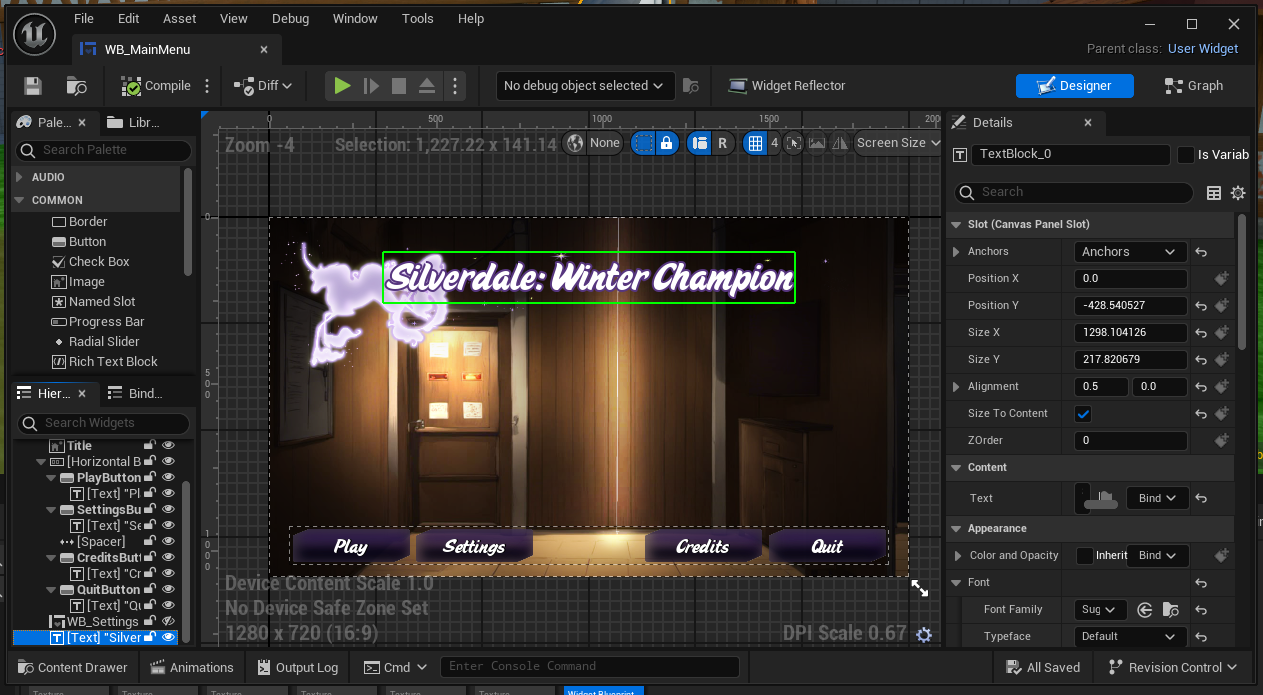 frosty heron

is there something specific you are trying to do? How do you even get the text there to begin wtih if you don;'t know how to modify it
looks like a VN game? I would probably use unity instead of unreal
pretty sure they have plugins for Live2D
pulsar ginkgo
frosty heron
is there something specific you are trying to do? How do you even get the text t...
Wasn't done by me, person who did kind of vanished and the game title recently changed to Celestial Grove: Shadow Over Silverdale
pulsar ginkgo
frosty heron
looks like a VN game? I would probably use unity instead of unreal
VN as in visual novel?
It's a 3D game 😅
frosty heron
@pulsar ginkgo this is where you can change the text

 oblique shadow
Trying to figure out why I can get data but not save data? Using Game Instance and Interfaces (happy to get on a call to get this sorted, I have been struggling for days to figure this out!)


 frosty heron
oblique shadow
Trying to figure out why I can *get data* but not *save data*? Using Game Instan...
frosty heron
oblique shadow
Trying to figure out why I can *get data* but not *save data*? Using Game Instan...
this setup looks pretty bad to me
it implies that you are loading over and over
while you should just load once and use the same save game object
oblique shadow
Are you talking about the print strings? Because that's just triggered by input which I am spamming 😅
frosty heron
not sure why interface is used here either
nothing to do with the print string
it's your GetMoneyData
every time you call that function, you are Loading the slot
it's like everytime you are trying to get money from your save game file, you load a new save game object
while it really depends on the game, the normal setup is Load the game in main menu and store the reference of the loaded save game object.
Then whenever you need to pull out data or save, use the stored save game object
this should be saved as a pointer

set that as your Money Save game
oblique shadow
Okay, I will look into that
frosty heron
@oblique shadow my suggestion is to rename the function. You are not doing this correctly imo.
You load the slot once and stick with it, otherwise you don;t know which object you will end up pointing at.
Remove GetMoneyData entirely or rename it to Load Game Slot or something that make sense
Store ther reference to the loaded save game object.
When you want to get your money, it's simply, MoneyGameSave -> Get Money
oblique shadow
frosty heron
this should be saved as a pointer
Sounds good! Do you think that will resolve my saving issue as well?
frosty heron
oblique shadow
Sounds good! Do you think that will resolve my saving issue as well?
hard to tell without seeing the entire code or acthitecture but it's a step foward
assuming you are loading a game from slot like most games out there
take resident evil for example
or elden ring
nier automata, etc
oblique shadow
Yeah, I am already loading the game from a slot at the start of the game here (hopefully this isn't incorrect either 😓 ) but have struggled to figure out how to reference and change certain variables within that from other blueprints in the correct way.
 pulsar ginkgo
frosty heron
<@560140725069545487> this is where you can change the text
pulsar ginkgo
frosty heron
<@560140725069545487> this is where you can change the text
So another problem... I can type more text, but cant remove the current title
frosty heron
This is how you get your money data @oblique shadow

the use of interface here and there is quiet confusing 😄
I don't see why you want to implement interface for this at all
You use interface when you want to share functionality between different classes that are not derived from the same base class
frosty heron
pulsar ginkgo
So another problem... I can type more text, but cant remove the current title
more info needed, altough I will suggest to learn UMG basic
oblique shadow
Honestly I am just following YouTube tutorials about this stuff, I am still learning 🤷♂️
frosty heron
unfortunately there are a lot of things you have to unlearn from youtube
it is what it is
oblique shadow
frosty heron
This is how you get your money data <@123595110691635201>
This is in the game instance, how would I get this in other actors if I want them to reference it?
spark steppe
i have an custom macro, which i can't paste in the graph of an actor component for some reason. Does anyone have an idea why that is?
steady night
whats common practice with a huge map regardin nav mesh multiple small ones or 1 huge covering the whole map ?
frosty heron
oblique shadow
This is in the game instance, how would I get this in other actors if I want the...
You can always get the game instance with Get Game Instance node
Get Game Instance -> Cast to your game instance
 hidden plover
idiot question inc. I get confused easily 😛 the 'apply damage', should that be set inside of the weapon that is dealing the damage? and if so.. Do I need separate ones for each of my child weapons? And then the anyeventdamage is in my player blueprint? (it's for multiplayer if that matters)
I currently have like this in my player
And like this in my projectile BP.. but I want to slot in a check for which team the overlapping actor is on to prevent friendlyfire. (obviously its a bit of a mess at the moment)


 young meteor
Looking at my Unreal Insights I have a bar named "...KismetArrayLibrary.Array_Get" taking up almost 1 ms.
Would this be the "Find" node in the second image? And if so, is there a cheaper way of doing it?
Perhaps it is because the Keys are Tags, and should be something cheaper?

 spark steppe
it's most likely the ForEach loop (if this code section is everything which get's executed in that frame)
this performs 2 get operations for each item btw (maybe promoting the result to a variable and using the variable further on will improve performance) 🤷
young meteor
spark steppe
it's most likely the ForEach loop (if this code section is everything which get'...
Think we can narrow it down to this code yeah. Unless I misunderstand Unreal Insights which is also possible 😄
I only pass max 3 tags in the for each loop though. Think tags are expensive?
young meteor
spark steppe
this performs 2 get operations for each item btw (maybe promoting the result to ...
Not sure what you mean
spark steppe
promote the loop element to a variable
young meteor
Ah, you are saying it will "get" the array element (tag in this case) 2 times because it does it once for the "Find" node, and after the branch again for the "Add" node?
And if I get it once, and the set a local variable I reuse for the second "Add" node, that would be cheaper?
Got it. Thank you.
Hope it helps
 spark steppe
well... profile it!?
young meteor
Yup 😄
Need to get used to setting up Identical scenarios I can replicate to get a more accurate view.
This was just from a random playthrough.
rugged wigeon
It seems unlikely that grabbing damage tags two times should make a difference in your performance unless there's an absurd number of tags on it
young meteor
Max 3 tags
It's a tower defense though, so the function itself would be called a lot of times. (200 I would guess)
rugged wigeon
200 times... per frame? or per game?
young meteor
frame. Might be a high worst case scenario though.
Well it is now that I think about it.
Could have 100 Actors (towers) calling it, probably no more than twice a second. So 200 per second is a lot less than per frame of course.
spark steppe
yea with 3 array entries only, idk if this will make any difference
i've assumed that array is larger
rugged wigeon
I would try to check if the array or number of calls is as big as you expect.
spark steppe
i would have assumed that each call of the method shows separate in unreal insights?!
raven gyro
can anyone help me with this? idky my end location keep printing x=0,y=0, but my start location is printing fine
 young meteor
Not sure why it does not
 celest wadi
in the ue5 first person template, there's a Weapon component under the variables section, but I don't see a Weapon component in the tree view.. how does that happen?

Oh i see, it's done by just adding a new variable, then setting the type to 'bp weapon component'
ue5 will then move it into the component section
compact fable
Quick question about steam achievements.
Does cache achievement and write achievement automatically check if the achievement is unlocked? Or will it say the achievement is unlocked even if it had already been unlocked?
Should achievements be saved to save game and check their first before hand?
 wild sage
Hello, I'm creating an elevator and I want it to move a fixed distance, but the time it will take to move will be dynamically controlled by a variable, how do I do this?
rugged wigeon
wild sage
Hello, I'm creating an elevator and I want it to move a fixed distance, but the ...
set the position using a lerp between the start and end over time. Alpha is the % of distance traveled.
gusty mist
how could i get a physics based object to accelerate and decelerate instead of instantly being set to max speed
i know i should use finterp but im not sure where to put it as there arent execution pins on the node
 vivid quarry
can someone please explain the proper node setup to determine the yaw delta per tick. I am trying to save last yaw as a variable and then subtract my current yaw, then divide by delta time but no matter what it seems to always just say zero
I've done things much more complicated but I'm having a hell of a time with this seemingly simple task of figuring out how quickly a character is rotating in place. Open to any ideas please, spent too much time on this lol
maiden wadi
young meteor
Hope it helps
On a side note. You don't need tha Branch either.
This is functionally identical to what you have. If it exists, it'll get the old value and add to it. If it doesn't it'll return zero and just make a new entry.
 lunar sleet
gusty mist
how could i get a physics based object to accelerate and decelerate instead of i...
lunar sleet
gusty mist
how could i get a physics based object to accelerate and decelerate instead of i...
not sure about that one, you can try #chaos-physics . As for the FInterp node not having an execution pin, that's because you normally need to feed it an initial value and an end value, and SET the return value to something else.
 surreal peak
vivid quarry
can someone please explain the proper node setup to determine the yaw delta per ...
surreal peak
vivid quarry
can someone please explain the proper node setup to determine the yaw delta per ...
You need to first do the math, then save LastYaw
gusty mist
lunar sleet
not sure about that one, you can try <#966517078834151484> . As for the FInterp ...
i tried that and it had no effect, heres my current code.

i tried finterp too but that didnt work either
sorry about the sphagetti
lunar sleet
remove the value in Delta Time for starters
gusty mist
i was just trying to see if it had any effect
lunar sleet
does increasing the interp speed do anything? Also bear in mind Add Force only runs once there - as far as can be seen in the screenshot anyway
gusty mist
this is running on tick
sorry should have mentioned
target speed is set elsewhere
i suppose i could change it where tgt speed is set
 cobalt gulch
I have a working system where in the anim bp the character is able to look at various objects, the closer they are the higher priority the character looks at the object
 gusty mist
lunar sleet
does increasing the interp speed do anything? Also bear in mind Add Force only r...
gusty mist
lunar sleet
does increasing the interp speed do anything? Also bear in mind Add Force only r...
heres the code that sets the target speed
 cobalt gulch
ON the can look at target false, it's supposed to gradually "reset" the characters head to the normal looking forward position, instead it teleports and looks unnatural. How can I fix this?
 odd kiln
Hi all
Anyone can help me to Spawn meshes in an area please ?
I want to spawn cubes in a Square area in my construction script depending on my Actor Scale
vivid quarry
surreal peak
You need to first do the math, then save LastYaw
It's probably something stupid, but it's giving me 0 whenever I turn
 surreal peak
The values are probably the same, you gotta stop setting it before using it
lunar sleet
gusty mist
heres the code that sets the target speed
so what happens when you actuate the input exactly?
gusty mist
i solved my own problem by goofing off for 10 min
lunar sleet
lol
gusty mist
added get world delta and now im just fine tuning the speed
we got some quality sphagetti here

 stone field
gusty mist
stone field
gusty mist
Blueprint Assist auto-formatting for the win : )
gusty mist
stone field
Blueprint Assist auto-formatting for the win : )
IM SORRY WHAT
stone field
I'm not sure if I am meant to reply with all the caps?
It's a plugin that cleans up bps automagically
stone field
It is indeed
gusty mist
oh sorry about the two messages my wifi died
stone field
I highly recommend it
 wild coral
Hello 🙂 I have this setup and I want to switch from one camera to another to open up a menu in a 3d widget. For that I tried to use a set view target with Blend node with the player controller as target. But the player controller is always null, despite a boolean check for a player controller returning true.
What am I missing here?
 stone field
gusty mist
that sounds super nice
stone field
gusty mist
that sounds super nice
Also in a team environment it makes things consistent, so you don't have to read all kinds of different 'styles'
gusty mist
ill def pick that up if i get into more serious work
stone field
Also : AutoSizeComments
Both things that should really just be bought by Epic and made part of the engine
gusty mist
suprised the second one isnt
stone field
wild coral
Hello 🙂 I have this setup and I want to switch from one camera to another to op...
Debug step through it, check the variables are correct
wild coral
stone field
Debug step through it, check the variables are correct
I seem to have found the issue. Im not understanding it tho. So with getPlayerController, I can get the correct PC. But I cant get the PC with the getLocalViewingPlayerController node. whats the difference between those two nodes, because I somehow cant find documentation for the latter one... and the boolean check for the local viewing PC returns true, so it should return the Pc that made the boolean check return true.
stone field
wild coral
I seem to have found the issue. Im not understanding it tho. So with getPlayerCo...
getLocalViewingPlayerController seems to be a Pawn thing
But beyond that, hard to say what is going on
vivid quarry
surreal peak
The values are probably the same, you gotta stop setting it before using it
At what point would I set it so it differed from the current rotation? Sorry, basic questions I know
surreal peak
AFTER using it
stone field
wild coral
I seem to have found the issue. Im not understanding it tho. So with getPlayerCo...
surreal peak
- GetLast
- SetDiff = Last - Current
- SetLast = Current
vivid quarry
Great, I will try that, thank you for the help!
wild sage
Why does only this variable appear in this Child Actor Component?

These two should appear
 wild coral
stone field
https://dev.epicgames.com/documentation/en-us/unreal-engine/BlueprintAPI/Pawn/Ge...
wild coral
stone field
https://dev.epicgames.com/documentation/en-us/unreal-engine/BlueprintAPI/Pawn/Ge...
thank you ❤️
thin panther
wild sage
These two should appear
That second variable looks horrifically corrupt
Also, the child actor component is hella broken and can cause all sorts of issues. Proceed with caution, but preferably not at all
vivid quarry
surreal peak
1. GetLast
2. SetDiff = Last - Current
3. SetLast = Current
Seriously I can't thank you enough haha.... I have solved so many complicated IK issues, movement mechanics, etc and this tiny little thing was eluding me for so long. Finally got the "turnometer" working, very happy, thanks again
faint creek
Hey guys, I have to calculate the distance between enemy and player, but I don't know what I have to link in the "object" parameter?
This event tick is in my BP Enemy
Please help

 steady kindle
faint creek
Hey guys, I have to calculate the distance between enemy and player, but I don't...
steady kindle
faint creek
Hey guys, I have to calculate the distance between enemy and player, but I don't...
Does it not work if you remove the cast node? Looks like you have everything you need.
faint creek
steady kindle
Does it not work if you remove the cast node? Looks like you have everything you...
Yes I need it
 thin panther
casting is type check. You check if one reference is of a more specific type. I.e. "Is this Fruit an Apple, if so, let me make Apple Juice"
steady kindle
faint creek
Yes I need it
But not for the distance. Call GetActorLocation on both Self and GetPlayerCharacter and take the difference
You can probably pass GetPlayerCharacter into that cast also
thin panther
You'll note there, that you already found the method to get a reference to your player character

 white thicket
is there any node which could count how many times this function is called?

I guess the only way is to increment the integer
 true valve
How can I scale bones to make a character fat or skinny?
 steel talon
Hi guys, now I will describe the logic of what I would like to implement on Blueprints, the images will be attached below, but when you click on a given button in my case h, the sequence starts playing from the beginning on the client despite the specified start time relative to the server
The logic of what I want to do:
I need to organize the possibility for me to start a sequence on the server (in my game), for example, 5 minutes pass, and a player connects, he presses a button on the keyboard, after that a request should go to the server (to my game) to get the active time of the sequence (in our case, as mentioned earlier, it is 5 minutes), the sequence starts on the client
p.s sorry for my English😸

 faint creek
steady kindle
But not for the distance. Call GetActorLocation on both Self and GetPlayerCharac...
faint creek
steady kindle
But not for the distance. Call GetActorLocation on both Self and GetPlayerCharac...
Like this?

It doesnt work
Is for multiple enemies
steady kindle
faint creek
It doesnt work
Is the cast failing?
faint creek
faint creek
Like this?
This is the BP enemy
steady kindle
faint creek
I have different BP enemies in the level
No that tick will run on every instance of BP_Enemy in the map, and Self will return the BP_Enemy that is currently running
faint creek
So I have to create an array?
Maybe Get all actor class?
Somebody know a solution?
Please
faint creek
faint creek
So I have to create an array?
I have tried but nothing
Anyone could help me please?
 mental trellis
Works out of the box. The only issue will be if you have programmed your game correctly. And without context, we can't answer that.
However the likelihood is it will crash and burn.
mental trellis
If you want to test it in PIE, just go to the pie menu and select "play as listen server".
I'm not sure you'd call a listen server a client. 😛
thin panther
I mean you're not wrong there, but you get what I mean!!!!
mental trellis
😛
faint creek
steady kindle
No that tick will run on every instance of BP_Enemy in the map, and Self will re...
So what do you suggest?
I’ve tried using Get all actor class but nothing
 rotund barn
excuse me what is this?
 desert moss
Does anyone know why I can not re-order these?
 steady kindle
faint creek
So what do you suggest?
I’ve tried using Get all actor class but nothing
steady kindle
faint creek
So what do you suggest?
I’ve tried using Get all actor class but nothing
What are you trying to do exactly? What you showed in your first screenshot will return the distance between that enemy and the player - so long as you get rid of the cast.
odd kiln
Can anyone help me to Spawn Static meshes into the area of a "Box Collision" ?
I'm using "2D Grid Execution Macro" node but when I rotate make Actor, my Static Meshes not following it
vivid quarry
are their any potential issues with casting to the parent BP in the animation BP of a child actor? For example, trying to retrieve a variable that is set in my base enemy class for use in a child actor's animation graph
 cyan mortar


 frosty heron
vivid quarry
are their any potential issues with casting to the parent BP in the animation BP...
frosty heron
vivid quarry
are their any potential issues with casting to the parent BP in the animation BP...
What's casting got to do with child actor?
Casting is just a type check, if the object you are casting derived from the type then it will do a successful cast and you can access the member variable of the type.
 vapid plank
does an un-called cast node increase memory usage?
 surreal bridge
I know that a pure function is one that doesn't modify the actor, but I was wondering if a pure function is allowed to use local variables or if the local variables count as modifying the actor
fiery swallow
surreal bridge
I know that a pure function is one that doesn't modify the actor, but I was wond...
It can use local variables
surreal bridge
Awesome, many thanks
fiery swallow
vapid plank
does an un-called cast node increase memory usage?
Nah, if it's in the blueprint and connected at all then it's compiled and will be loaded into memory
gusty mist
I have an advanced input controling my vehicles throttle, i have code to accelerate and decelerate the vehicle but when player input stops the code to gradualy decelerate only runs once preventing slow deceleration, how can i get it to run constantly while the input action is false?
every fix ive tried the engine yells at me for an infinite loop
 eager thicket
is there a way to get the spring arm to maintain its target length when a collision is happening? or not move so close to the player?
frosty heron
eager thicket
is there a way to get the spring arm to maintain its target length when a collis...
Spring arm isn't a solution when it collides with environment, especially when you hit corner or walls
eager thicket
ah damn
frosty heron
This advice was given to me and I scrap spring arm.
It's not an easy task to tackle imo
I end up following advice to copy lyra camera
And have a very satisfactory result.
If you are doing third person shooter , it's a must
frosty heron
I only know basic cpp but I can copy it
So I guess, knowing the basic is minimum I suppose
They use this things called feeler to see how much the camera penetrate then predict the location where the camera should be based on curve. Could be wrong but that's my impression.
eager thicket
i see. thanks for making me aware of this avenue anyway
odd kiln
I'm using "Add Static Mesh Component" to spawn some meshes in an area, but they are not rotating with my Actor when I rotate my Actor
Anyone has an idea ?
frosty heron
odd kiln
I'm using "Add Static Mesh Component" to spawn some meshes in an area, but they ...
You probably need to attach the spawned component to your actors root or one of its components.
odd kiln
frosty heron
You probably need to attach the spawned component to your actors root or one of ...
After the "Add Static Mesh Component" I need to use a "Attach Component to Component" ?
frosty heron
There should be a boolean or something that's called manually attach.
odd kiln
Yes I already checked "Manual Attachment"
frosty heron
I haven't done this in ages, but you probably don't want to manually attach
Yea it should be unticked
Iirc
odd kiln
When I untick the boolean no Mesh appear
frosty heron
It will spawn somewhere tho, try ejecting from your controller and see where it is being spawned
There is also attachment rules
odd kiln
frosty heron
It will spawn somewhere tho, try ejecting from your controller and see where it ...
I tried but I can't find it I also check at 0,0,0 and not there
frosty heron
I have to run but share your code. Maybe someone else can spot the issue.
odd kiln
Here is the code
 frosty heron
You can try ticking manual attachment and use attach comp node
odd kiln
Ok I will try thank you
Even when I attach component to component the mesh is not moving with the actor
I mean when I rotate the Actor the Mesh is not facing the same direction as the Actor
odd kiln
frosty heron
Play with the attachment rule
What is the attachment rule ?
I tried Keep Relative / World / Snape to Target
frosty heron
odd kiln
What is the attachment rule ?
You should see a drop down with attach node. It should be keep relative
If you want to follow the parent
Also another guess, perhaps it has to be moveable?
I don't remember having issue with attaching comps.
It should be as simple as calling the attachment node.
odd kiln
This is because I'm using "Add Static Mesh Component" node
if I add the Mesh manually into the Blueprint Actor, it follows correctly
It is "Movable"
I'm trying to "Set Relative Location" again after I add the static mesh
But it does something weird
frosty heron
I've done add static mesh comp too with no issue. Got no editor to test rn. I will check after work.
Would suggest you to try on fresh bp
odd kiln
Maybe it's because I'm using "2D Grid Execution Macro" node ?
frosty heron
With simple mesh with no offset
frosty heron
odd kiln
Maybe it's because I'm using "2D Grid Execution Macro" node ?
No idea what that is but you might want to just try using the function bare just to test if it work.
Like just create a fresh bp and try to attach something.
odd kiln
The problem is that my spawned Static Mesh is attached because it moves with the actor but when I rotate the Actor, it does not follow the Actor direction
frosty heron
The rotation rule can follow the parent if you set the attachment rule to relative
You should check what you are attaching it to tho
It might be your one of the component in the actor is rotating but the root is not. Can't really tell without knowing
faint creek
steady kindle
What are you trying to do exactly? What you showed in your first screenshot will...
Let me explain better, I have created a BP enemy, but in the level I’ve placed three enemies, like three copies of that BP Actor. What I want to do is to calculate the distance between player and enemy for each enemy individually
rugged wigeon
faint creek
Let me explain better, I have created a BP enemy, but in the level I’ve placed ...
You have each enemy calculate its own distance to the player
faint creek
Yes but with this method I made it doesn’t work….
faint creek
rugged wigeon
You have each enemy calculate its own distance to the player
It only works for one enemy
faint creek
rugged wigeon
You have each enemy calculate its own distance to the player
Do you know how to do that?🙈
frosty heron
Just have a function in enemy that calculate distance between it self and player?
faint creek
frosty heron
Just have a function in enemy that calculate distance between it self and player...
So make this but not in Event Tick, but using a funtion is that correct?

 hollow karma
If I have a blueprint variable that holds an object reference, is there any way to clear that variable so that it is no longer valid and refers to nothing?
graceful sage
hollow karma
If I have a blueprint variable that holds an object reference, is there any way ...
Just set the variable then don't plug anything in
 thick prairie
Hey guys. Can someone point me in the right direction? I want my actor to modify stuff around it and I'm trying to figure out how to do it. I want to:
1.Spawn an Actor (building) - got that one already
2.Remove foliage around it
3.Modify landscape material layer around him
4.Spawn a decal (i Take this one could be a part of the actor)
5.Flatten the terrain around (I can probably live without that)
I would appreciate any help with number 2 and 3. I was trying to look for a tutorial on how to access the landscape from BP but i got barely anything there. If anyone have any link, i will be really grateful.
hollow karma
graceful sage
Just set the variable then don't plug anything in
Thanks. That's what I thought, but it seems very counterintuitive coming from C++ that I don't specify "null" or something similar
graceful sage
hollow karma
Thanks. That's what I thought, but it seems very counterintuitive coming from C...
Just thr differences of thr 3 I suppose
2
eager thicket
how do I access the emmissive parameter value of a material in blueprints?
so I can smoothly interpolate to a higher value for it
Or is this something I can only access within the material
odd kiln
eager thicket
how do I access the emmissive parameter value of a material in blueprints?
"Set Vector Parameter" node
eager thicket
odd kiln
"Set Vector Parameter" node
thank you.
raven gyro
you guys have any tip on how i get a morph shape into here?

 ionic quiver
Hi guys, I'm trying to figure out if my player is facing the enemy within a certain angle range. Using Find Look at Rotation and my own Actor rotation I can check if they match. But the problem is if I want to check if they match within 90 degrees lets say, then it's possible the angle would go above 360 or below 0. So effectively if the original angle is 310 then I need to check if I'm rotated between 220-360, and 0-40.
The only way I'm thinking of doing this involves a lot of checks and In Range nodes, but I'm hoping there's a simpler method.
ionic quiver
Only way I figured to do this is using this mess so far. I'd love to know if anyone knows simpler ways to do something like this.


 dawn gazelle
ionic quiver
Hi guys, I'm trying to figure out if my player is facing the enemy within a cert...
dawn gazelle
ionic quiver
Hi guys, I'm trying to figure out if my player is facing the enemy within a cert...
You'll want to use some directional vectors and Dot Product.
Dot product of 1 = vectors fully aligned.
Dot product of -1 = vectors fully opposite.
Dot product of 0 is perpendicular regardless of direction.
So if you wanted to see if a vector was less than 90 degrees apart, it would be a dot product between values greater than or equal to 0
So you can get the forward vector of your player, plug that into the first pin of Dot Product. In the second pin, you'll want to use Get Unit Direction. The "From" should be your Player's location and the "To" should be your enemy location.
If the Dot Product >= 0 then the enemy should be considered in front of the player.... Test the values out and see what you get 🙂
ionic quiver
I got to finally learn how to properly use dot products. You're the best!
 chrome pumice
heya guys, i just placed an actor and everything worked fine. now one restart some hours later the static mesh of the actor is stuck in place while i can move the origin of the actor. anyone knows what is going on?


nvm it fixed himself by rapidly changing the root. idk wtf happend there but thats not the first time i had stuff like this happening. i saw in my search histroy that it happend once already
lyric basin
If you have this issue occuring randomly, you might wanna make sure that everything is being passed or called is valid when it is. Garbage or non exact values can cause this
lyric basin
faint creek
So make this but not in Event Tick, but using a funtion is that correct?
Make a master blueprint for your enemy. Then make a child blueprint from that one. Add any variables you need to the master BP (HP, speed, whatever). This will get inherited by the children. From there, you can add the code to calculate the distance from the character to the player. You can use the get player character function and then get world location function from that to get you player location. In the child enemy BP, use the get distance to function and use the location of the player and enemy.
chrome pumice
lyric basin
If you have this issue occuring randomly, you might wanna make sure that everyth...
ahh okay
steady night
hmm my project is having a huge fps drop somehow.. how would i troubbleshoot whats causing it :/?
lunar sleet
Use #profiling tools
steady night
ok thansk
faint creek
lyric basin
Make a master blueprint for your enemy. Then make a child blueprint from that on...
Hey man, what do you mean exactly with a child?
lunar sleet
faint creek
Hey man, what do you mean exactly with a child?
Right click your blueprint in content browser, create child blueprint
faint creek
lunar sleet
Right click your blueprint in content browser, create child blueprint
Wow ok, I didn’t know this function 🤓
Thx 🙂 now I’m trying 🙂
lunar sleet
Welcome to inheritance
faint creek
lyric basin
Make a master blueprint for your enemy. Then make a child blueprint from that on...
This is the child

You mean something like this?
final berry
Hello! I'm really struggling with large sizemaps and not sure how to reduce that. Trying ot understand how sizemaps grow first. Is it correct if I say that in a reference viewer everything on the right increases the size map (which are dependencies I guess)? (for example the 2 on the right here?) And when stepping into those everything again on the right increases the size map further.
So short question is: What are some practices to reduce the amount of dependencies of a BP?
 faint creek
lyric basin
Make a master blueprint for your enemy. Then make a child blueprint from that on...
faint creek
lyric basin
Make a master blueprint for your enemy. Then make a child blueprint from that on...

Like this?
This is in the BP child
steady kindle
faint creek
Like this?
The problem is elsewhere in your blueprint. Those nodes are how you calculate the distance between the player and the enemy instance.
You shouldn’t need a child BP if all 3 enemies are the same.
faint creek
Ah
steady kindle
If you look at the blueprint output in the log it should show you that the output from Print String is coming from 3 different instances in the world
faint creek
steady kindle
If you look at the blueprint output in the log it should show you that the outpu...
Nope only from one
The others doesn't display nothing
faint creek
faint creek
The others doesn't display nothing
I placed three copies of the BP enemy, like yesterday
faint creek
steady kindle
The problem is elsewhere in your blueprint. Those nodes are how you calculate th...
Any ideas how to fix them?
 pale obsidian
faint creek
Any ideas how to fix them?
pale obsidian
faint creek
Any ideas how to fix them?
Pull all of your data out of the casted class
faint creek
pale obsidian
Pull all of your data out of the casted class
It doesnt work, I have to link the object in the cast
I have to select an asset
 young meteor
final berry
Hello! I'm really struggling with large sizemaps and not sure how to reduce that...
young meteor
final berry
Hello! I'm really struggling with large sizemaps and not sure how to reduce that...
I'm not a pro, so maybe others can give you a better explanation, but you basically load your entire connected chain (Left and right).
So at a high level I think you have 2 options:
- Try to avoid building long chains of connected BP's/Assest. Which means avoid hard references when possible (casting to stuff).
- Try making the things in your chains lighter on memory. An example could be if you need to cast to some BP's that are almost identical just to get variables, locations, or other simple things, make them share an "empty" parent without the mesh, vfx system, audio, etc.
( that way you don't force loading all the meshes etc. before you need it)
primal hare
So debugging is not available in User Widget BP?
faint creek
Guys I'm trying to placed multiple copies of the same BP enemy in my level. For each enemies, I'm trying to calculate the distance between each one and the player.
I'm really struggling, so if somebody could help me please it would be really appreciated 🥲
steady kindle
faint creek
Nope only from one
Time to go back to basics and find out what's wrong. Create a fresh new blueprint that only does this. Put 3 instances in the map. What happens?

(Also a power tip for this kind of debugging, pass the actor's display name in to Print String as the Key. That means that each time Print Screen is called on an actor it will overwrite its previous line, instead of filling the screen with spam)
 faint creek
Ok so I made it and:
- I placed two different enemies to different distance, and they have both different numbers
- I noticed that when I litteraly put the player in the center of the enemy, the distance is not like 0 but is 30 or 16
But the main is that the distance seems to be correct
steady kindle
The distance will be in cm and it will factor in height differences as well
steady kindle
If you want to ignore height then you want this node instead
 steady kindle
Yup. You know that works, so just go step by step until you find where the problem is.
steel talon
steel talon
Hi guys, now I will describe the logic of what I would like to implement on Blue...
someone, pleasee 😭 it’s very important and urgent
primal hare
How do you cast to non players?
I'm trying to cast to a "character" parent class from inside a WBP... What do I put in the "object" pin? I tried actor obj ref... also character obj ref..
No warmth and dice.. only cold and ice
this

if it was non WBP I would have put it in the scene and used pickable reference.
But WBP can't be put in the scene
silly question, if the "cast failed" knows and recognizes exactly the event I'm looking for... why is it "failing"??
lunar sleet
primal hare
this
Watch the bp comms live training pinned here
Your understanding of casting is currently backwards
lunar sleet
All of what
primal hare
one tutorial said all the object pin wants is a Parent class
primal hare

Announce Post: https://forums.unrealengine.com/showthread.php?101051
This Training Stream takes a look at Blueprint Communication. We find that Unreal Developers of all levels can sometimes struggle through the concepts behind moving data between objects. So in this video we'll take a look at the different ways to make Blueprints talk to one an...
haha this is over 2 hours and all I want to know is the obejct pin.. there must be a shorter way? 😛
lunar sleet
primal hare
haha this is over 2 hours and all I want to know is the obejct pin.. there must ...
That’s the best 2h you’ll ever spend on a video.
primal hare
I have got hold of event dispatching BP interfaces
lunar sleet
Then just watch the cast part
primal hare
even casting if I can use picakble object ref.
ok I'll go for it
thank you
hopefully I get it in my thick head..haha
primal hare
primal hare
silly question, if the "cast failed" knows and recognizes exactly the event I'm...
BTW this part I don't get
lunar sleet
You need to understand that casting just checks if an object you fed it is of a certain class or not. If it is not, cast fails. This can also mean your ref is invalid (null) at the time the cast fires
primal hare
it knows the event has happened... and yet it wants me to feed the correct "object".
ok hitting play
primal hare
lunar sleet
You need to understand that casting just checks if an object you fed it is of a ...
ok If what I'm casting to is a "character class" then I can just make a variable with character obj ref and plug it into the "object " pin it should work?
I have seen so many tutorials and a lot of overlapping but this specific thing is hard to find
graceful sage
primal hare
ok If what I'm casting to is a "character class" then I can just make a variable...
It would work if the character variable has a value
primal hare
Value as in like if I picked it in the game
graceful sage
Value as in set it to something
primal hare
like make it public, put it in the scene and pick it
I'm telling it exactly what the thing is in the variable...then it says NOTE in blue
final berry
young meteor
I'm not a pro, so maybe others can give you a better explanation, but you basica...
Thanks! So, how do i avoid hard casting but still be able to reference to the stuff i need. Its confusing to me
graceful sage
primal hare
I'm telling it exactly what the thing is in the variable...then it says NOTE in ...
What bp are you trying to get it in?
primal hare
I'm trying to cast to a "character" parent class from inside a WBP...
the character parent class in this case is a character driven by simple "AI move to"
graceful sage
So you want the character reference in a widget?
primal hare
yes!
graceful sage
On construct get a get owning player pawn node then cast to your specific class
primal hare
All I want is to change color of a text in the WBP based on event dispatchers in the the character BP
graceful sage
Then promote that to a variable
primal hare
so no casting?
graceful sage
The object of the cast use the return of get owning player pawn
Get owning player pawn gives you a generic pawn reference. So you cast to your specific class with the object being the generic pawn reference
young meteor
final berry
Thanks! So, how do i avoid hard casting but still be able to reference to the st...
I'm hesitant to answer because we get into stuff where I might straight up be wrong.
In my own case I do a lot of casting to an "empty" template/parrent. That is still casting, just with less loading.
To avoid hard cast you have the soft reference or interface options I think.
It depends on your actual needs as well.
primal hare
graceful sage
The object of the cast use the return of get owning player pawn
Thank you, for now I found a different simpler way to do and avoid this casting
graceful sage
primal hare
Thank you, for now I found a different simpler way to do and avoid this casting
Idk what would be simpler besides instance editable and expose on spawn
primal hare
I'm not changing anything in the WBP. Just using a different WBP with changed color for separate events
primal hare
haha yes
faint creek
steady kindle
Yup. You know that works, so just go step by step until you find where the probl...
I made this script but always the same problem
 primal hare
As Maximus in Gladiator said, one day I'll slay that dragon, that day is not today
faint creek
I put two enemies and only with one works.Seems that for the other one the variable "Away" is always set to true
final berry
young meteor
I'm hesitant to answer because we get into stuff where I might straight up be wr...
Allright ill look into that. Your answer is nonetheless appreciated 🫶
young meteor
final berry
Allright ill look into that. Your answer is nonetheless appreciated 🫶
If you get stuck try and give me specific examples.
Might help you to work out a few general scenarios.
But soft references is not my strong side. Probably why I don't use them myslef.
graceful sage
faint creek
I put two enemies and only with one works.Seems that for the other one the vari...
Try printing the distance
hearty veldt
young meteor
But soft references is not my strong side. Probably why I don't use them myslef.
soft references have their own will, I struggled 2 days to make a character customization using soft references, and the issue was that if you somehow reference them inside a Pawn or ActorComponent, they turn into hard references, the gotcha was to use DataTables instead, but hey, that's why you always google stuff and watch tuts, no matter how experienced you are, it's little things like this
hearty veldt
yeah I know
frosty heron
You can see it as address, it will never turn to hard ref unless you load it with async / blocking load
hearty veldt
well, ofc you gotta load it at some point, but loading it from a DT is fine, in contrast to keeping it inside the BP / AC itself
frosty heron
You can keep it where ever
hearty veldt
and yet here we are, don't know what to tell you, why is it happening, found countless posts about others having similar issues with soft references, and they're recent they go back 1-2 years tops
young meteor
If I add a Child Actor component, do I not get to set variables exposed on spawn like with normal Actors spawned?


 signal perch
how to change mouse cursor speed
hearty veldt
signal perch
how to change mouse cursor speed
add a float and multiply it by input
signal perch
hearty veldt
add a `float` and multiply it by input
bro cursor speed
I don't have a value to multiply because I need the mouse cursor, not the input I made myself

it's a system made by unreal
faint creek
steady kindle
Yup. You know that works, so just go step by step until you find where the probl...
Hey guys I think that the problem is in the UI in the end
I'm trying to make a system that when the player is near the enemies appears a image of allert
So when you are far away is green, when you are close is yellow and in the end if you are too much close is red like a stoplight
I think the problem is not the distance because it works well
Is the management of the UI condition
 silk root
Is there a good way to Blueprint a Turn-based/ ATB Battle?
faint creek
faint creek
Hey guys I think that the problem is in the UI in the end
I'm trying to make a s...
The first one is of the UI
second one of the same enemy
somebody could help me please?
(The distance for each enemy print correctly so it works )
The problem is my UI but I don't know how to fix it

 hearty veldt
signal perch
I don't have a value to multiply because I need the mouse cursor, not the input ...
hearty veldt
signal perch
I don't have a value to multiply because I need the mouse cursor, not the input ...
if you mean the hardware cursor itself, I highly doubt UE can handle that, that's low level and is usually handled by the OS or your mouse settings, I mean you can always try to dive into OS code and make it yourself, but that stuff gets really nasty really fast, and not sure how much cross platform friendly it is either
only setting I'm aware of is for the viewport inside the editor, but that's like the camera speed, which you can always change for every viewport, except this setting is global, and it's clamped with a max value of 1
you could fake the mouse by creating a widget and move it around taking the default mouse input multiplied by whatever value you want, it's the same if you want to invert, you just do input * -1, this is usually called software cursor, the problem with software cursors is that they're FPS dependent, low fps and the cursor has low fps as well, for example if you have 10 fps, the mouse will only update 10 times / sec, and you'll see it jumping on screen and feel laggy, compared to the usual behaviour
this is what I have for my projects, most are 3rd person but I also have a base building which is using mouse input and it works the same, it's just basic math

 lyric basin
faint creek
Wow ok, I didn’t know this function 🤓
lyric basin
faint creek
Wow ok, I didn’t know this function 🤓
Yeah this is useful for rolling back changes and change control
You have a template that has everything you need and then you make changes to the cold. If you mess up, just make another
Give me a minute
I'm not at my rig
faint creek
lyric basin
Yeah this is useful for rolling back changes and change control
So for this issue could work?
faint creek
faint creek
The first one is of the UI
second one of the same enemy
somebody could help me p...
This is my situation at the moment
And I don't understand how to find a way out
I would be very grateful if you could help me🥲
lyric basin
Yeah, when I get to my rig I'll pull it up
For the record, this type of thing is probably better with a behavior tree, but it can be done with BP as well
faint creek
lyric basin
Yeah, when I get to my rig I'll pull it up
Thank you
hearty veldt
faint creek
The first one is of the UI
second one of the same enemy
somebody could help me p...
so what is the problem? what's not changing?
faint creek
hearty veldt
so what is the problem? what's not changing?
The UI color opacity
hearty veldt
do you tell it to do something with it when it's changed? from that ss you only update the color, not set it back to where it has to go, so it's just updated in memory
faint creek
No I don’t😅
I only made that script
lyric basin
so let me make sure I understand all this
you have enemies in the level and you want to measure the distance between them and the player
right?
faint creek
Exactly
lyric basin
okay, so first show me what your UI BP looks liks where the changes occur
faint creek
Just a second
faint creek
lyric basin
okay, so first show me what your UI BP looks liks where the changes occur
With this color
 hearty veldt
like I said, you're not doing anything with it, just change the variable itself, unless you used UI binding, but that's a really bad idea, since it's setting the value every single frame
lyric basin
faint creek
With this color
I need to see the whole thing
these are just the nodes which set that variable.
hearty veldt
lyric basin
Yeah this is useful for rolling back changes and change control
I mean it can be used as a backup, but version control is not the point of inheritance, this is to avoid the DRY principle - don't repeat yourself, so if for example you have a base class called creature which has things like health, isDead, movementSpeed, code that handles what happens with these variables etc, and then you inherit from it, you can have the player, you can have different types of enemies, and they will all have the base logic + whatever specifics you add to them
now ofc, you don't want to abuse this and have everything inherit from everything, this creates a god object which is even worse, but it does make sense like when you have a base enemy and then other enemies are children of it, or when creating Material Instances for example
steady kindle
faint creek
Hey guys I think that the problem is in the UI in the end
I'm trying to make a s...
Ah, so I think the problem is that you're doing the distance calculation on each enemy and each enemy is trying to update the UI independently. Unreal doesn't really expect you to do things that way and it makes it hard. What you want is for the UI to only be updated in one place. There a several ways to do that, but I would do it on the player controller or player state. I would store a reference to every BP_Enemy in an array and iterate over it in a loop, setting a flag if any enemy is within range.
The only problem with that is you don't want to be doing GetAllActorsOfClass every single tick. What you need to do is OnBeginPlay in BP_Enemy, call a function or event on the player controller (or whatever) saying "I've been spawned". Make that function or event add it to the array. Similarly, in BP_Enemy call a function OnEndPlay saying "I've been despawned" that removes it from the array on the player controller. Now your player controller has an up-to-date list of all the enemies in the map.
The UI widget can easily get a reference to your player controller/state/whatever and read the state of that variable. Or alternatively you can make the player controller change the value on the UI widget directly when it detects a robot in range.
hearty veldt
steady kindle
Ah, so I think the problem is that you're doing the distance calculation on each...
that could be it as well, but I don't see any BP names
hearty veldt
steady kindle
The only problem with that is you don't want to be doing GetAllActorsOfClass eve...
if there are a lot of enemies, calculating the distance constantly might be bad as well, better to have a big collider on the player and only update enemies inside of it 3-4 times every second, or do a sphere trace 3-4 times / sec
depending on fps this can be more noticeable, for example at 60 fps 4 times per second is fine even for pathfinding, so you don't notice the enemies changing direction too slow
but this depends on a lot of stuff, like the type of game, how many enemies are at any given point, how many are visible like if you have a top down / isometric cam, if you care about knowing the location of all of them all the time, or just closest ones etc
hearty veldt
young meteor
If I add a Child Actor component, do I not get to set variables exposed on spawn...
not with that node, no, I use Add Component by Class to spawn an Actor Component and they show up, albeit not at first, I have to expose it, compile, check if it's there, and then go back to the AC, uncheck expose, check it again, and again compile, for some reason 1st time it gets ignored
this is what I mean, it's cropped on top, but I was just compiling and changing tabs
no idea if it's an issue with 5.4 or not, been having a lot of these weird things with 5.4, but they're too consistent to be bugs
graceful sage
if it doesn't show up just right click the node and refresh it
hearty veldt
oh okay, I forgot that's a thing 
 barren dove
Hey guys Ive got a question
I want to grab a subtag, and then find an actor with a matching subtag.
For example, I have tag actor.hat.beenie
I want to parse the tag after actor.hat (in this case beenie, it could be anything) and then find another actor with tag object.hat.beenie
do I like, somehow break the tag into a string and append it to anther string then loop through actors looking for the second tag?
I need to do this dynamically because listing each tag individually would take a massive amount of code
 hexed cosmos
how can i fix this?? (Bug Doesn't Show up in the editior!!!!)
eager thicket
What am I doing wrong here? I'm trying to set the emmissive strength during runtime but it doesn't work

got it nvm
hearty veldt
hexed cosmos
how can i fix this?? (Bug Doesn't Show up in the editior!!!!)
if you use OBS, remux it to .mp4, so it can be played here, without downloading and then opening it locally
 hexed cosmos
hearty veldt
if you use OBS, remux it to `.mp4`, so it can be played here, without downloadin...
hexed cosmos
hearty veldt
if you use OBS, remux it to `.mp4`, so it can be played here, without downloadin...
wasn't my problem but thanks for your advice
steady night
if i make a variable private cant a child of that actor see that variable the n=
hearty veldt
steady night
if i make a variable private cant a child of that actor see that variable the n...
you need to check this one, is off by default because it's showing EVERYTHING, including the ones that come by default with any BP
 steady night
'yeah i know but if i wanna "hide" specific ones is that possible ?
hearty veldt
you can't hide them, since they inherit them, you can make them private and then the children can't set them, just read them, but hide entirely no
defeats the purpose of inheritance if children don't see them at all
mental trellis
Not really. There are times when private is the right call. In fact, some would say that private is the right call most of the time.
hearty veldt
yes, private as in read-only, not completely gone, cause if you have a lot of stuff that the children shouldn't know about, then inheritance it's not the right call, or maybe you should use a parent with less data in it
mental trellis
Or use components instead 9f inheritance.
thin panther
hexed cosmos
wasn't my problem but thanks for your advice
It kind of was. You posted a video in a format that isn't embeddable. Few people are going to download a video to help you.
 tough creek
I've got an error compiling a blueprint, which I've never seen before. Can anyone help explain?
Function ' SKP -> Unreal Flip Compensation ' is unsafe to call from blueprints of class ' Dataprep Editing Operation '.
 storm shale
hearty veldt
yes, private as in read-only, not completely gone, cause if you have a lot of st...
storm shale
hearty veldt
yes, private as in read-only, not completely gone, cause if you have a lot of st...
If you have variables or functions(A) that you only use within other functions(B) in the parent you would want them to be private so the children simply call the functions(B). Ultimately it is just for ease of life and less clutter though, or if u expect someone else to work with the class besides u
 elfin hearth
Hi, I'm trying to get my solar panel mesh to rotate following the UDS sky. It rotates once at start, in wrong direction and not updates as the sun moves

 willow gate
Hey folks. I'd like to clamp my character to the screen bounds for a top down mini game. Is there a way to do this besides invisible colliders? I want this to be able to scale with the player's selected resolution.
rotund barn
is there a way to remove a single variable from an array, without an index? to simplify, lets say i have multiple duplicate items "bread" in an array, lets say i eat one bread, id then need to remove that from the array, how can i remove it if its impossible for me to have that specific index available? the remove item would remove all breads not just one, so is there any workarounds?
lunar sleet
primal hare
ok If what I'm casting to is a "character class" then I can just make a variable...
No, that’s essentially creating an empty variable. You need a reference to the specific instance of that object, you can get this through interactions such as overlap or a couple diff ways
dark drum
elfin hearth
Hi, I'm trying to get my solar panel mesh to rotate following the UDS sky. It ro...
Just plugin the 'Sun World Rotation', if needed invert the rotator.
lyric basin
elfin hearth
Hi, I'm trying to get my solar panel mesh to rotate following the UDS sky. It ro...
I have UDS as well. I can take a look at this
elfin hearth
dark drum
Just plugin the 'Sun World Rotation', if needed invert the rotator.
thank you both @dark drum @lyric basin
lyric basin
Yup yup
elfin hearth
dark drum
Just plugin the 'Sun World Rotation', if needed invert the rotator.
It's already plug in? Or am i missing something
dark drum
elfin hearth
It's already plug in? Or am i missing something
As in remove the find look at rotation stuff and just connect the rotation directly.
lyric basin
Are you trying to get it to look directly at the sun or just follow it's general location

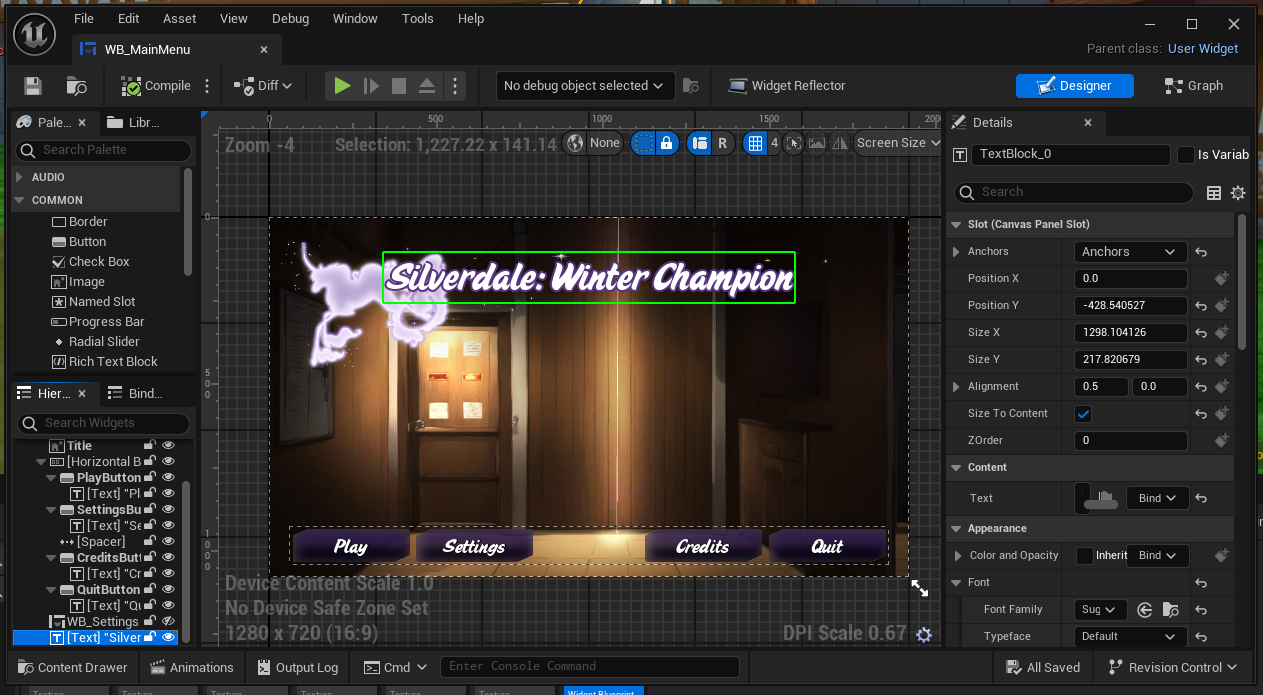 elfin hearth
lyric basin
Are you trying to get it to look directly at the sun or just follow it's general...
elfin hearth
lyric basin
Are you trying to get it to look directly at the sun or just follow it's general...
I try to make it look at the sun like it's optimized to get max light possible
elfin hearth
dark drum
thank you
it rotated but not updating in real time. + in the wrong way but it just looks inverted with the sun start pos

 lucid cape
I'm new to UE5 and have a question. How can I make it so "Emitter Template " randomly selects from different emitters, rather than using the same one every time?
 elfin hearth
lyric basin
could be expensive
elfin hearth
lyric basin
could be expensive
probably 🙂 but that's for rendering only
lyric basin
lucid cape
I'm new to UE5 and have a question. How can I make it so "Emitter Template " ran...
use an array
elfin hearth
you know what I should do different to get it update in real time?
lyric basin
elfin hearth
you know what I should do different to get it update in real time?
yeah I am testing
lyric basin
lucid cape
I'm new to UE5 and have a question. How can I make it so "Emitter Template " ran...
 lyric basin
lucid cape
I'm new to UE5 and have a question. How can I make it so "Emitter Template " ran...
lyric basin
lucid cape
I'm new to UE5 and have a question. How can I make it so "Emitter Template " ran...
something like this
and then populate your array with the emitters you want it to choose from
 gloomy holly
Hello, I was wondering if anyone could help me with some information, so I have a model that has 8 UV lists in blender, I export it to unreal and want to assign each UV list to a player colour for an RTS game, is this possible?
When a put the model in unreal and make a material for the texture, in the texture sample I can change the UV from 0-3 and get the first 4 player colours, but I don't know how to get the other 4 colours through the UV on the model
hearty veldt
willow gate
Hey folks. I'd like to clamp my character to the screen bounds for a top down mi...
- you could simply give it some numbers, and then clamp the position between those numbers, and it won't be able to get through no matter what;
- to make it automatically update with screen res you could do a raycast from each corner of the screen and save the position where it hits, this way you get all 4 values needed for clamping - minX, maxX, minY, maxY;
- you could also just do screen location to world space;
- also take into consideration camera rotation, cause screen X might not be world X, same with Y;
for example this will give you the bottom right corner, then leaving X and Y at 0 will give you top left corner, and then you can either invert them if it's a top down cam with exactly 90 degrees rotation, or get the either 2 if the cam is at an angle, since it won't be a rectangle; for the other 2, leave X at 0 and set Y from viewport, and the other way around;
however this works for something simple like a shmup, but won't work if you need some sort of physics, like let's say you want some balls to bounce off the edges of the screen, in that case you should do invisible walls, and since you already have the location of each corner you can move and resize the walls to cover it properly
 willow gate
hearty veldt
- you could simply give it some numbers, and then clamp the position between tho...
willow gate
hearty veldt
- you could simply give it some numbers, and then clamp the position between tho...
I'll try this when I get home. Thanks!
hearty veldt
rotund barn
is there a way to remove a single variable from an array, without an index? to s...
what kind of data do you have on those items? do you have any way to query something or are they just a bunch of random items thrown together in an Array? like is it just a bunch of Actors or Enums?
no idea how your data looks like, but instead of keeping a list of just the items themselves, add some data, for example you could make a Struct which holds some sort of ID - this could be an int, an Enum, whatever you prefer, and then add other data you might need, like mesh, icon, number of items / stacks, whatever makes sense for your project;
for example this is a random Struct I'm working on, don't try to make heads or tails of what I have in it, just needed an Array of some random data to illustrate it:
-
now if I leave
1 and trueit finds the 1st item; -
if I leave
2 and trueit won't print anything, becauseFindreturns-1for an invalid item, and2 and trueis not inside thatArray, instead is2 and false; -
now since it found an item, I have info about it, I know what data it has when it's used by the player, and I also have an
Array Indexready to remove it; -
alternatively if you have some complex data and you only want to search by a certain element inside that
Struct, without knowing what else is there, you can do aloopand compare whatever it is you want to compare; -
this finds the first element set to
trueregardless of what other data I have in there, and then it stops, since I used a loop with break, in your case you could search by that ID I mentioned earlier so you can find the first item marked as bread; -
the
loopis also giving you theArray Indexso you can then remove it from theArrayif you want;


 mossy shard
hello fellow devs hope you are doing great , so did any one ecountered this weird issue where you use flying movement component on a character or even the character movement component that has movement mode to flying , and then "add input vector" you see all the actor moves but the mesh will stay in it's initial location ?
elfin hearth
Did you get any luck with it @lyric basin ?
elfin hearth
elfin hearth
Did you get any luck with it <@257394852361273354> ?
nevermind it looks like changing the node to a get forward vector between sun rotation and the new rotation solved it !