#blueprint
1 messages · Page 172 of 1
 minor mortar
 frosty heron
Set the new view target to your player character or w/e you want
 severe tendon
I tried, but i cant put my follow camera directly into "target"
frosty heron
severe tendon
I tried, but i cant put my follow camera directly into "target"
you don't, it will just use what ever active camera is there in the actor
If you want to make sure that you are using the follow camera of your actor, Get your Character -> Get Follow Camera -> Set Activate to true
Then you can do the Set View Target with Blend
severe tendon
Still need a target

 lofty rapids
what does the error say ?
frosty heron
ofc you do
plugin your player controller..
Set View Target with blend is a function that lives in a player controller. Just look at the text below the Title of the node.
lofty rapids
is the view target the character, or the camera ?
idk i never used it
but you used camera in the first one
severe tendon
Yeah
I used a separate camera
then I created a reference inside the BP and and put the camera there
After that i connected it to the target
Btw, This is more general, this script checks if you have a certain number of coins, when you have all the coins the code executes and does all the other stuff, all works great
The problem is that idk where to connect all the script
I did it in event tick at first, but since it upgrades every second the script starts going insane
lofty rapids
you can switch a boolean
so that when it hits a point you turn the boolean false, then the true branch won't run again untill you flip the boolean back
lofty rapids
if you flip it back at the end of the logic it will run once
severe tendon
Yeah, it works
Well, that was all, finally finished this, thanks for all the help, really appreciate it
 zenith knoll
hello

if i define a struct that consists of 4 actors

but load "character" into the variable somewhere
this is loading the primitive version of "character" right?
only the polymorphic primitive members
 stoic ledge
'actor' it would seem.
 dawn gazelle
If you define a reference as "Actor" and store a "Character" in it, it'll still be a reference to that particular "Character" but will be stored as an "Actor" reference.
 spark steppe
are you sure that you want an actor object to begin with?
usually i would assume this should be hardrefs (if they are populated at runtime) or soft class references if you want to spawn them at runtime from the struct informations
zenith knoll
yeah i guess i was trying stuff out for a weapon system
basically multiple weapons can be loaded at the same time, but i dont want the character to load all the weapons information all the time
so i thought maybe loading just the primitive reference to them would be enough to validate that they exist
then the gameplay abilities can handle loading them, casting abilities, then destroying them when they are put away
spark steppe
???
you can always do IsValidSoftObjectReference
or IsValidSoftClassReference
that tells you if they are set to a valid value or not
zenith knoll
yeah thats exactly right
so ability one draws the weapon, spawning it and setting it in the character struct (as actor reference)
another ability checks if it exists, if not create it
then destroy it when its done
that way all the weapons' assets are loaded by a gameplay ability and destroyed, but whether it exists or not is the responsibility of the character
 silver garden
How can I get an Actor Component during runtime? For example, on "Begin Play" event?
I have a base actor from which inherit a couple others. In this base actor I have a Variable that should reference an actor component. The base actor doesn't have this actor component, instead it is added on each children, and I have to set the variable that should point to each children's actor component.
dawn gazelle
silver garden
How can I get an Actor Component during runtime? For example, on "Begin Play" ev...
You can use Get Component(s) By Class, but this sounds like a strange set up to me.
 wraith loom
Just set that variable you have as the actor component. All the children should inherit that variable, so they each have a seperate version of that variable. Though I may be misinterpreting something because your text is quite confusing
 silver garden
dawn gazelle
You can use Get Component(s) By Class, but this sounds like a strange set up to ...
silver garden
dawn gazelle
You can use Get Component(s) By Class, but this sounds like a strange set up to ...
Thank you, that worked!
To see if it can clarify your doubts or in case I'm doing something weird or wrong:
I have Fire mode actor components:
- Fire mode base
-- Overheat fire mode
-- Charge fire mode
-- Reload fire mode
I have Turrets Actor blueprints:
- Base turret <--- No fire mode
-- Kinetic turret <--- Overheat fire mode
-- Energy turret <--- Charge fire mode
-- Explosive turret <--- Reload fire mode
There is a variable in the base turret: FireModeComponent which is of type AC_FireMode. There is no FireModeComponent in the base turret blueprint. So I needed a way of getting, in each inherited blueprint, the actor component in runtime, during Begin Play, and assign them to the turret variable.
dawn gazelle
Nevermind.. The more I think about it... It seems like you're going the right way.
 indigo bough
Hey folks, we use a lot of actor components or scene components to handle individual logic on actors so that the actor blueprint itself is quite simple and everything is a little more modular.
Anyway, I want to enable some more direct editing of vector variables on these custom actor components, but when enabling "Instance Editable" and "Show 3D Widget", the 3D widget doesn't show for these actor component variables in either the Blueprint Actor editor OR the Level Editor where the Actor is placed.
Any ideas if this is possible? I really don't want to have to have these variables at the Actor level itself as it's highly inefficient within our workflow (the amount of variables varies per Actor variant, these are vehicles with many different properties...)

For a bit more context, I essentially want to be able to determine a certain level of per component control, for example these line debug indicators are the input positional offsets of the cannon based on it's status (ready to fire, recoiled, etc.). But each cannon position has a variety of requirements, such as angle, maximum recoil distance, rotation of the carriage over distance (the deck is curved), and so on.
It's an absolute pain in the ass to set this up with data input only, because for anyone more visually inclined, it's just a mass of numbers to try to understand.
Anyway, my intention was to provide some simple 3D widget controls (vectors) to set up each gunport more easily. Choosing a certain few locations by hand and then calculating the correct pathing, etc. from that.

To further clarify, this is all editor time, this is setting something up for the team to use when launching new ships, rather than a gameplay feature. Hence trying to piggyback off of the "Show 3D Widget" feature.
 zealous moth
am i doing it wrong?

I got a soft object ref to a skeletal mesh
I async loaded it
and print string goes 1, 2, 4
so the cast fails
somehow...
what am i supposed to cast it to?
frosty heron
Are you even loading skeletal mesh?
zealous moth
so the answer was no
and it's weird

I added this
it said nope, so the SK soft ref is null
I went back to the DT and the struct
the DT is filled

and it is a soft object
spark steppe
is that even the one which is plugged into the async load?
zealous moth
yes
spark steppe
cause it looks like the MI could be it to
zealous moth
if I add a default value to the struct, it loads that value and it is considered valid
you think?
sec
nah it's good
 spark steppe
ok
zealous moth
nice idea though
but instead of loading the DT asset, it loads the struct default value
hmmmmmmmmmmmmmmmmmmmmm
spark steppe
that means you aren't getting the DataTable entry correct
zealous moth
huh
you're right
the ID wasn't pulled
oh
wow
I'm room temp iq
I didn't link the ref
spark steppe
that's still above the average here
zealous moth

this was missing
so it defaulted
great catch, thank you!
yay enemy spawn system completed
 odd berry
Feel like this is the more appropriate channel now, correct me if I am wrong

Any clue why my event is not being called?
the dispatcher for reference


 topaz condor
is the logic on this event sound? i cant get this to work correctly?
 frosty heron
@odd berry This is a bit confusing

you are calling a function that bind to it self?
Bind your OnAudioPlayback Percent at begin play or somewhere before you make a call
 lunar sleet
topaz condor
is the logic on this event sound? i cant get this to work correctly?
lunar sleet
topaz condor
is the logic on this event sound? i cant get this to work correctly?
Can you be more specific as to what is not working correctly?
topaz condor
lunar sleet
Can you be more specific as to what is not working correctly?
forgot to mention lol, so i add a crosshair widget on my HUD, and basically im trying to create an event that anytime gun or shotgun is equipped make crosshair visible, if not make it invisible
odd berry
frosty heron
<@964261271585308672> This is a bit confusing
like so?
 lunar sleet
topaz condor
forgot to mention lol, so i add a crosshair widget on my HUD, and basically im t...
lunar sleet
topaz condor
forgot to mention lol, so i add a crosshair widget on my HUD, and basically im t...
Ok but what is going wrong?
odd berry
frosty heron
<@964261271585308672> This is a bit confusing
The test string is not printing 😅
 dawn gazelle
odd berry
The test string is not printing 😅
dawn gazelle
odd berry
The test string is not printing 😅
Getting any errors in your log?
frosty heron
odd berry
The test string is not printing 😅
check if your audio variable is valid to begin with. And what even calls OnAudioPlaybackPercent?
what are you actually trying to do?
topaz condor
lunar sleet
Ok but what is going wrong?
my crosshair is not showing on my screen
odd berry
frosty heron
what are you actually trying to do?
This BP has a metasound component
I am trying to create a mesh reactive to audio, I got it working but the issue is that its contained within itself
so I am trying to do the broadcaster/subscriber model so that many meshes can react to the same information
 lunar sleet
topaz condor
my crosshair is not showing on my screen
lunar sleet
topaz condor
my crosshair is not showing on my screen
Alright. Did you check if the bools are true at runtime?
frosty heron
odd berry
This BP has a metasound component
I am trying to create a mesh reactive to audi...
and you know when/how OnAudioPlaybackPercent actually get broadcasted?
lunar sleet
Also as a side note. If shotgun is a child class of gun, then you only need to check if gun is equipped. @topaz condor
topaz condor
lunar sleet
Also as a side note. If shotgun is a child class of gun, then you only need to c...
sorry, i figured it out lol i had my whole hud as hidden so it wasnt showing in game
working too much i completely skipped it
 primal hare
For some reason Lvl Seq are not playing in order, the 2nd one keeps playing before 1st.
How to make sure 1st one plays to compeletion then only the execution moves forward?
 frosty heron
Using delegates
bind the OnPlay Event to your function that play the other sequence.
primal hare
you mean using this node in between? Please elaborate if you can.

I guess I'll add a calculated delay based on length of 1st sequence
frosty heron
primal hare
I guess I'll add a calculated delay based on length of 1st sequence
nah that's terrible
you won't even get accurate result with the delay, sequence are played on different FPS etc
not to mention if the player alt tab
 obtuse mulch
the collision component only shoots OnHovered once when i click on it but not when hovering , any idea why?
frosty heron
and you don't want EndPlay, unless you want to play the sequence AFTER the 1st one finished, and im not even sure if that's the right event. I think it's something like Finished
frosty heron
obtuse mulch
the collision component only shoots OnHovered once when i click on it but not wh...
there is OnHovered other than for widget button?
 robust mural
hey guys anyone using the version 5.4, is there any documentation about renamed blueprint nodes ?
Im unable to find
obtuse mulch
like i click on the actor and on begin cursor over shoots once but it doesnt register mouse moving over it othervise
primal hare
frosty heron
and you don't want EndPlay, unless you want to play the sequence AFTER the 1st o...
Yes that is what I want. 2nd sequence only plays after the 1st one ends.
frosty heron
primal hare
Yes that is what I want. 2nd sequence only plays after the 1st one ends.
then use delegate, bind it to your function before you play the sequence
primal hare
frosty heron
you won't even get accurate result with the delay, sequence are played on differ...
ok thanks for pointing me to the direction, now off to find what that means.. 😉
frosty heron
primal hare
ok thanks for pointing me to the direction, now off to find what that means.. 😉
Pretty sure it's OnFinished
not onEndPlay
obtuse mulch
obtuse mulch
like i click on the actor and on begin cursor over shoots once but it doesnt reg...
didnt see im making my widget visible and not not hit testable so it blocked the whole screen for mouse inputs
frosty heron
obtuse mulch
didnt see im making my widget visible and not not hit testable so it blocked the...
one way to debug is to get the hit actor/component and check the value
obtuse mulch
is there a way to print string which widget you are clicking?
frosty heron
obtuse mulch
is there a way to print string which widget you are clicking?
2D or 3D? what is your trace method?
obtuse mulch
2d widgets
obtuse mulch
it was obstructing the way
frosty heron
Widget Component (this is 3D one)
Or actual 2D Widget you add to the screen space?
obtuse mulch
screen space widget obstructs the way for ingame actors to be clicked if its Visible
frosty heron
Anyway
if testing 2D, use widget reflector
for Widget Component, trace and get the hit result
primal hare
frosty heron
Pretty sure it's OnFinished
Is this correct? It is playing as I want it.
 frosty heron
primal hare
Is this correct? It is playing as I want it.
frosty heron
primal hare
Is this correct? It is playing as I want it.
Bind it before Playing would be more correct.
I can see why it work but the correct way would be to bind before you play
primal hare
the 1st one finishes goes into this and checks if finished and then the red node lets it go into the 2nd
seems to make sense.. is it not?
this works too
 frosty heron
primal hare
this works too
frosty heron
primal hare
this works too
that's better.
primal hare
thank you for your help!
 untold ivy
Following a tutorial, I end up with two skeletal mesh on a character due to retargetting. Is it possible to "Squash" the two so I'd only have the main mesh?
 frosty heron
I never like that method
frosty heron
problem is, they probably follow a tutorial where the other mesh copy anim data to the other one
so no manual retargeting needed
but you end up with multiple Mesh
odd berry
frosty heron
and you know when/how OnAudioPlaybackPercent actually get broadcasted?
I'm at work ATM but I did get closer it's displaying the debug message on the subscribers end
Mesh isn't reacting like it was before but I'll take a look when I get back home 😅
untold ivy
lunar sleet
You realize you can select which asset to use right?
No, I do not. I'm still quite new to this, so I follow tutorial to learn. Which gives this result and I didn't know what to search to solve it.
untold ivy
frosty heron
but you end up with multiple Mesh
So if my understanding is correct: The new mesh isn't animated itself but copies the underlying mesh? It saves me from having to "animate" it myself but it makes it dependant from the original?
How can I solve that? Or what name should I search for a tutorial on how to do that?
frosty heron
untold ivy
So if my understanding is correct: The new mesh isn't animated itself but copies...
That's valid afaik. If you don't want to use multiple meshes, you don't do what they do.
You just Re-Target the animations that you want, then you can use that anim asset to your target mesh.
there should be re-targeting tutorial on youtube
 bitter raven
Hi, I have a problem with the horizontal scaling of the screen. When scaling the screen, my "launcher" is getting smaller. How can I block it so that it is the same size?


I need resolution like this:


Solved! In Scale Box:

 odd lava
doesn't show the error when i click on it

 cerulean igloo
What's the best tutorial you guys saw on PCG? Don't think I want to get pre made ones. Maybe later. But would like to learn first. Is it doable with blueprints or preferred cpp?
frosty heron
odd lava
doesn't show the error when i click on it
What does the entire error says?
odd lava
 frosty heron
@odd lava
 odd lava
ok thank you
odd lava
frosty heron
Do you get it tho?
nope
frosty heron
ok, do you know your array length? how many elements in it?
odd lava
3
frosty heron
ok
now what's the index of each element
Give me the index of all the elements in your array
odd lava
 frosty heron
So what happend if you access Index [3] there?
odd lava
what do you mena?
odd lava
am not trying to go to index 3

 tulip yoke
kjfnbajkfa
frosty heron
you are infact trying to acess index that is out of the bound of your array
 waxen mason
If the array has 3 elements, then the Index is from 0 to 2.
Somewhere you are accessing the arrays, but you have to subtract -1 in the index
frosty heron
you also tries to acess index -1, which will return error. Again out of bound. 3 Elements in an array will ahve index of 0, 1 ,2
odd lava
am trying to make a inventory system, were if the slot your holding exceeds the arrays amount it goes to 0

 crude timber
Hi ! How can I have an array of the spawned instances ? I'm not sure what node I need. I'd like to have them referenced in an Array so I can pick a random one for example
 frosty heron
odd lava
am trying to make a inventory system, were if the slot your holding exceeds the ...
frosty heron
odd lava
am trying to make a inventory system, were if the slot your holding exceeds the ...
again, you are trying to access index that doesn't exist
Remember that array starts with 0
not 1
tulip yoke
why is the inventory a string array am i crazy
frosty heron
So Array with 3 elements is 0, 1 , 2

This probably should be Length - 1
that will be your Last Index
alternatively instead getting the length, you can just pull LastIndex
it's effectively the same thing
odd lava
ok thank you
frosty heron
the entire code looks like a curse btw, I will be suprised if it work at all.
you probably want to avoid while loop as well unless you know what you are doing
odd lava
frosty heron
you probably want to avoid while loop as well unless you know what you are doing
i didn't do this my cousin i ask my cousin help
Still getting errors
 frosty heron
yea just read the code. This will be the part where you will get accesses none
 odd lava
?
 reef portal
crude timber
Hi ! How can I have an array of the spawned instances ? I'm not sure what node I...
reef portal
crude timber
Hi ! How can I have an array of the spawned instances ? I'm not sure what node I...
Hope that helps you out Remy.
Tree Beech is an instance static mesh.
just pick what index you want if you want a random index.
If you really need an array just add them from the loop. But given you can access them by the way shown in the pic is there any point?
You could use the loop to separate them into different arrays based on their z value, scale and so on.
The instance variable "Tree Beech" kind of acts as a container for all instances of that mesh. So its kind of an array already. If that makes sense.
 frosty heron
odd lava
?
frosty heron
odd lava
?
"Selecting" number is higher than last Index, hence the error
you cannot access Index[3] it does not exist
frosty heron
don't access out of bound index
odd lava
and how do i do that?
frosty heron
by not doing it?
if you have index 0 , 1 , 2 , 3 . Only access 0 - 3. Not less than 0 not Greater than 3
odd lava
ok
frosty heron
You sorta have to read your code and understand them. If not, well not gonna get things to work. Imo, forget your cousin and pick up some documentation or even videos about array and variables.
odd lava
is there a way that the player can skip a index, if there is nothing in the index the selecting var skips that index?
 mint blade
hello guys
good morning
i need a little help
my FPS character sprint when in crouch mode, and i dont want that, could you help me plz a little, thanks.
 surreal peak
Check if you are Crouching and thus don't Sprint?
mint blade
1 sec, i will share my blueprint
<iframe src="https://blueprintue.com/render/sujzuocw/" scrolling="no" allowfullscreen></iframe>
my character croush perfectly and enter in silence mode, but the moment i press left shift to sprint, he run...
surreal peak
You need to save if you are Crouching or not with a boolean.
And then use that Boolean where your Sprint is located and only allow sprinting if not Crouching.
You probably also want to call something like StopSprinting when you start Crouching.
mint blade
i try different booleans but could not make it works
have you 5 mins to help me with it please_
?
surreal peak
I am helping you with it
This is very simple and I already told you what you need to do
it doesn't get simpler than this
Make a boolean bIsCrouching. Set it to True or False depending on if you are Crouching or not.
Check if Crouching is True or False when you try to Sprint.
That's all there is
 limber parcel
mint blade
have you 5 mins to help me with it please_
limber parcel
mint blade
have you 5 mins to help me with it please_
are you german? xD
mint blade
lol, no
surreal peak
It's 3PM in Germany. Doesn't really count as Morning anymore.
limber parcel
just wondering, because you are applying german grammatics to english xD
limber parcel
true
 broken badge
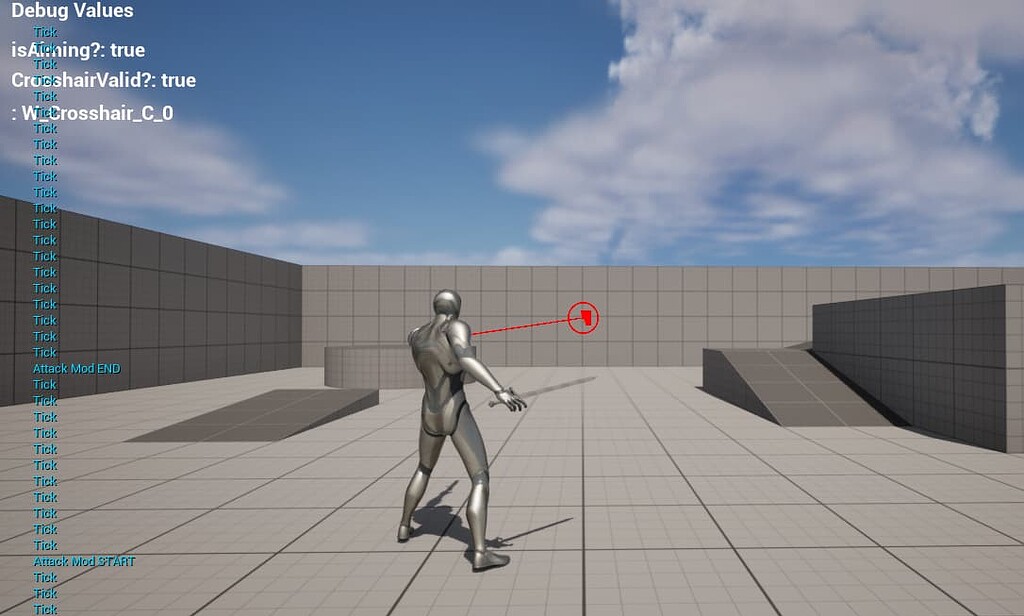
I'm experiencing some weirdness with a widget that seems to destroy itself or stop ticking for some reason, any help would be amazing ❤️
https://forums.unrealengine.com/t/widget-destroys-itself-during-character-animation/1871495
Epic Developer Community Forums
Evening everyone, so here’s an odd one for you all: This is a screen shot from my project, the line trace is from the character’s weapon mesh, the red circle is the aiming crosshair widget that follows the line trace hit or end locations (generated by the widget for now). The debug values show that the Player is aiming (hence the animation), th...
 plucky ice
Hi guys, general question about structs / data tables. I understand their use case for me to feed information into the game engine, but I am wanting to use one to store a bunch of information about each trial as it happens and then export that data table to a .CSV for manipulation and analysis in Matlab or R subsequently. I know to export it I need to write a C++ function and that's fine.
My question is more generally, is this the best way to do it? I can't seem to find a lot of default functions in UnrealEngine that relate to writing information to the data table within the game. As an example here, I have a struct set up according to the image and a matching data table. For instance, when the stars spawn in the level (based on an array of vectors), I want to store that array of vectors in the entry in the data table corresponding to star spawn locations at the row corresponding to this particular "trial" or loading of the level. Is this the right way of thinking about it, or am I totally off? I was imagining that I could just drag off in my section of the code where the stars spawn and say something like "set this particular struct / column in this data table equal to this variable I have here in this blueprint" but that doesn't seem to be how it works. Thank you! My dream would be to have a data table where each row is a particular trial and each row has all of this information for each trial, and then just export that entire data table and have the whole experiment dataset as one .CSV file.
 surreal peak
plucky ice
Hi guys, general question about structs / data tables. I understand their use ca...
surreal peak
plucky ice
Hi guys, general question about structs / data tables. I understand their use ca...
DataTables are readonly
plucky ice
surreal peak
DataTables are readonly
So for this particular usecase, what would be better? Should I create a SaveGame class that holds all of these values? Like I said, my ultimate goal is to export a .CSV file that has all of the values for the relevant variables for every trial organized where each trial (loading of the level) is a single row.
untold ivy
I retargeted ABP_Quinn as I wanted a female character, but this result on it being a child of ABP_Manny. Is there an easy solution to turn it into its own full ABP?
 lofty rapids
plucky ice
So for this particular usecase, what would be better? Should I create a SaveGame...
lofty rapids
plucky ice
So for this particular usecase, what would be better? Should I create a SaveGame...
maybe an array of structs, where you can alter it when needed and get/set data whenever you want.
surreal peak
plucky ice
So for this particular usecase, what would be better? Should I create a SaveGame...
Don't know what runtime options for csv generation the engine has, but probably your own set of Structs or just living with exposing it via json?
plucky ice
@lofty rapids @surreal peak I’m not too worried about making it a .CSV at the moment, just figuring out how to store the data to get it out later. I have a struct that has all of those entries, is that accessible within every blueprint in the level? I’m just trying to understand how to organize the hierarchy of data.
lofty rapids
you can stick it in the game instance or something, so you can access it from anywhere and it persists
plucky ice
So for something that's happening within my GameMode blueprint, I have to do this? This seems extremely unwieldy:

 marble tusk
That is not how you use set members in struct, but also it looks like you don't even need it for what you're doing
You can go into the details panel with the break struct node selected and only show the pins you need
plucky ice
I'm basically trying to aggregate a bunch of different parameters that are getting input or created in a bunch of different blueprints into one data storage "thing" that I can then export to .CSV later. I'm totally open to whatever is the simplest implementation to be able to do that.
lofty rapids
i feel like an array of structs is similar to a csv structure
where you can just map the stuff to specific elements in the csv
plucky ice
lofty rapids
i feel like an array of structs is similar to a csv structure
Why an array of structs instead of just one struct that has all of the different types of information in it first like what I'm showing? Sorry for all of the questions, this is totally new to me and I don't think exporting experimental parameters to .CSV from Unreal is a super well-documented activity at least not that I could find. It's also confusing me because all of these different parameters are getting created in different blueprints throughout the course of the "level" so I want basically to be able to say "okay after you did this thing, update this value in the big data (tm) thing to be the value you just used to do this thing"
wraith loom
How do I find these kinds of parent nodes?
 lofty rapids
plucky ice
Why an array of structs instead of just one struct that has all of the different...
lofty rapids
plucky ice
Why an array of structs instead of just one struct that has all of the different...
well if you think of a csv it's basically a bunch of lines with the same structured data. It's like having an array of structs in a way, where each field has it's value
so in a way the structure matches
frosty heron
wraith loom
How do I find these kinds of parent nodes?
Right click the event and select add call to parent if you are asking how to call one
lofty rapids
plucky ice
Why an array of structs instead of just one struct that has all of the different...
are you just storing locations ? or you want more data than that ?
plucky ice
lofty rapids
are you just storing locations ? or you want more data than that ?
No it's like, as the different blueprints fire, we create star locations, we identify the type of trial to be presented, the intensity the stimulus was presented, etc.
Basically every single one of these values will be filled out as the level progresses each time the level loads. That's the goal, at least.

 grave otter
Hey there, Can someone help me fixing collision issues?
lofty rapids
plucky ice
No it's like, as the different blueprints fire, we create star locations, we ide...
you'll have to figure ways to store vectors and arrays in the csv
lofty rapids
plucky ice
No it's like, as the different blueprints fire, we create star locations, we ide...
i would imagine (tho i have not done it), you can loop through the array and pull out the data to store in the csv, that would make sense
are you using some sort of plugin for csv if there is one, or are you creating this file on your own ?
 lavish veldt
Hello everyone! I am trying to make an inventory system similar to the one in Hunt Showdown, which is basically just a hotbar with no more than 10 slots, and I am trying to understand what the best practice for that is. Specially when the player is spawned into the map. Should I spawn the items as I need them in x slot? Should they all be attached to the character and just make them visible when I need them? Is there another way?
grave otter
I have placed an savepoint-actor which has a sphere collision but then i hit the savepoint-actor with my melee weapon, the sphereTrace from the weapon detects that it hit savepoint-actor and also the component but the collision event on the on the savepoint-actor isn't getting triggered


 lofty rapids
are you trying to fire a collision from a trace ?
grave otter
I want to hit the sphere using (melee)weapon
grave otter
lofty rapids
are you trying to fire a collision from a trace ?
pretty much i guess
lofty rapids
i'm pretty sure traces don't fire off collision
grave otter
the other option i have is to find which actor is being hit and make a custom event in that actor and call it from "Actor Hit" from hit result
frosty heron
yes, or comp/interface
lofty rapids
you could make an interact function in a interface, then have that thing implement the interface
then when you hit it with the trace fire off that function
but you could just have an event
try to cast to it when you hit it, and fire off the event
minor mortar
lavish veldt
Hello everyone! I am trying to make an inventory system similar to the one in Hu...
I don't know enough to really answer, but I'd like to know what you come up with. That's sort of an interesting problem.
My initial thought is that the character themselves has a couple of specified slots that determine they can hold something. Each of these slots is defined by an enum because they are mutually exclusive and constant. For the two weapon slots, they are the same type but would hold a maximum of three 'weight' points each. Small weapons are identified as 1 point, medium 2, large 3. The item slots are a different enum that covers all the potential items, and each one is mutually exclusive from each other so you can't hold more than one of the same type. For the spawning in portion, you just pull the enum for each slot and double check the logic to make sure that there's no problems downstream. Not really sure what the next step might be though.
grave otter
@lofty rapids
I did this and it works

 lofty rapids
makes sense looks like your using collision here instead of the trace
lavish veldt
minor mortar
I don't know enough to really answer, but I'd like to know what you come up with...
Ye, I guess I'll have to dig a little to see what I can come up with. I think I'm gonna need 2 different systems, one for permanent items and one for usable ones.
 wise ravine
Anybody here have experience in packaging?
 trim matrix
wise ravine
Anybody here have experience in packaging?
trim matrix
wise ravine
Anybody here have experience in packaging?
click package and you are done
wise ravine
trim matrix
click package and you are done
I wish it were that simple 🤔

I've had packaging issues on every game except my first 💀
trim matrix
how are you packaging
trim matrix
what button do you click
wise ravine
trim matrix
what button do you click
file--package project--windows 64 bit
grave otter
wise ravine
I've had packaging issues on every game except my first 💀
Seems like your uproject file might have some issue. It should be something like this

open it with notepad and see if it something like this
wise ravine
grave otter
Seems like your uproject file might have some issue. It should be something like...
Perfect, I will tr4ry that thanks
 zinc spear
using the gravity direction added in ue5.4, anyone know how i could make it where its always pointed towards the floor the character is walking on?

tried adapting this but havent had success https://dev.epicgames.com/community/learning/tutorials/w6l7/unreal-engine-custom-gravity-in-ue-5-4

Epic Developer Community
Unreal 5.4 introduced support for custom gravity in the CharacterMovementController. See how to take advantage of it and do cool things like gravity puz...
this works, the camera kinda awkard tho, not sure how i can fix that https://streamable.com/8scamt


 scenic ember
Hello, I'm trying to use the paragon assets to learn UE5 but for some reason this blueprint keeps giving me error on compile. Can anyone tell me what this does and how to possibly fix it?

 daring merlin
scenic ember
Hello, I'm trying to use the paragon assets to learn UE5 but for some reason thi...
daring merlin
scenic ember
Hello, I'm trying to use the paragon assets to learn UE5 but for some reason thi...
assuming you're not building a VR project just remove it c:
scenic ember
daring merlin
assuming you're not building a VR project just remove it c:
tried to, but it kept giving me these is it ok if I just ignore them and just package the game?

Or should I also remove them all?
daring merlin
scenic ember
tried to, but it kept giving me these is it ok if I just ignore them and just pa...
ah it's bcz your UE project uses enhanched actions by default, you'll either have to import the inputs in your project settings, or recreate those inputs using the enhanced input system
sadly I don't have UE to send a screenshot atm, but notice how your project settings->input has missing inputs for the legacy input system, that should be the reason for the warnings
scenic ember
daring merlin
sadly I don't have UE to send a screenshot atm, but notice how your project sett...
Is it this one?
 daring merlin
scenic ember
Is it this one?
daring merlin
scenic ember
Is it this one?
on the top, exactly c: I believe there was a way to export/import them instead of having to readd them manually. But using the new system is also something you can/should consider c:
scenic ember
daring merlin
on the top, exactly c: I believe there was a way to export/import them instead o...
tbh I dont really know what I'm doing sorry 😦
if you dont mind, can you tell me how exactly can I do that?
daring merlin
scenic ember
if you dont mind, can you tell me how exactly can I do that?
DM me please and I'll help you in like 15 mins if others dont jump in to help meanwhile c:
scenic ember
daring merlin
DM me please and I'll help you in like 15 mins if others dont jump in to help me...
Ok thanks I really appreciate the help 😄
zinc spear
zinc spear
this works, the camera kinda awkard tho, not sure how i can fix that https://str...
incase anyone has a similar issue, the fix was removing any offset in my spring arm and instead manually moving it to whatever offset i wanted, it now works properly, but is a bit jittery for some reason https://streamable.com/jzzjuh
 minor mortar
zinc spear
incase anyone has a similar issue, the fix was removing any offset in my spring ...
minor mortar
zinc spear
incase anyone has a similar issue, the fix was removing any offset in my spring ...
looks neat
zinc spear
appreciate it 🙏
 visual crest
I need some help with taking a screen shot for my Save Icon. First I need to know how to get my follow camera to plug into the hi ress screen shot node and then how to get that screenshot back as a 2d texture.
 lunar sleet
visual crest
I need some help with taking a screen shot for my Save Icon. First I need to kno...
lunar sleet
visual crest
I need some help with taking a screen shot for my Save Icon. First I need to kno...
I mean surely you can understand that error you're getting
 tropic bison
Hi, could someone give me some insight? Made blendspace animation for my character, everything works wonderfully, however due to the type of game i'm making I am technically rotating spring arm and not whole character for camera, which causes my animations to permanently be world rotation stats instead of constantly updated. Not sure if it's possible to get spring arm component into the animation blueprint to use it as reference for relative rotation. I hope that makes sense.
 lunar sleet
tropic bison
Hi, could someone give me some insight? Made blendspace animation for my charact...
lunar sleet
tropic bison
Hi, could someone give me some insight? Made blendspace animation for my charact...
TryGetPawnOwner -> cast to your pawn -> get the component //not the ideal way of working with animation I think, but it should do the trick
visual crest
lunar sleet
I mean surely you can understand that error you're getting
it wants an actor but my camera is not an actor its a componet... Does that mean I need to spawn a camera useing my camera as a ref or is there another way?
odd berry
frosty heron
and you know when/how OnAudioPlaybackPercent actually get broadcasted?
I have fixed the problem thank you so much
teeny issue now but I have posted that to the appropriate #audio section
lunar sleet
visual crest
it wants an actor but my camera is not an actor its a componet... Does that mean...
sure, ig you could spawn a camera at the world location of your cam component and use that to take a screenshot.
visual crest
but is there a better way?
seems kinda dumb to spawn a camera when I have one already
visual crest
lunar sleet
sure, ig you could spawn a camera at the world location of your cam component an...
IG this works lol. Now how do I get the screenshot and pipe it out as a 2d texture?

Do I have to pipe file directory or just name like this?
 lunar sleet

that is also an option apparently
not sure if you can actually convert this type of screenshot to a 2d texture dynamically, without using cpp tho
lunar sleet
same thing, takes a high res screenshot using console command
visual crest
ah
dose it have the .png on the end?
It worked!!

I might want to duble the ress though
lofty rapids
thats a good idea a ss of the save point ?
visual crest
yea
I save meta data of my save data so I load meta data for time and pic


okay I just found out you have to import the texture as 2d on the load menu because you cant actually save it as a 2d texture.
 bitter raven
hello, where I can change icons for window bar area?
 lunar sleet
bitter raven
hello, where I can change icons for window bar area?
lunar sleet
bitter raven
hello, where I can change icons for window bar area?
try #umg
 faint rune
zinc spear
incase anyone has a similar issue, the fix was removing any offset in my spring ...
faint rune
zinc spear
incase anyone has a similar issue, the fix was removing any offset in my spring ...
reminds me of trackmania very cool
 teal vapor
Watch unknown_replay_2024.05.25-11.45-00...
 analog wigeon
Anyone know of where to look for making custom thumbnails for blueprints that aren't based on a viewport/scene component?
E.g., given a blueprint for a Gameplay Effect in GAS, it would be nice if I could have its thumbnail in the content browser be the same as one of its texture data fields.
teal vapor
Is there a proper way to ensure a level is fully loaded before rendering a level start begins? Right now for a brief half second I get the sky popping in before the rest and it looks glitchy when starting a level. I turned off the sun directional light and the skylight in the beginning of the level BP and then turn it back on after a brief delay, but I don't want to do that for every level. 😢
odd berry
How can I add some randomness despite all of the information coming from the same source?

The above works, bit the result looks super jittery (its an audio visualiser)
lunar sleet
teal vapor
Is there a proper way to ensure a level is fully loaded before rendering a level...
probably a loading screen. I hear Lyra has one you can copy over
teal vapor
lunar sleet
probably a loading screen. I hear Lyra has one you can copy over
thank you NeoExcidious 😄
 dim agate
I have two different blueprint interfaces. The first one (implemented on a game instance) works as it should but the second (implemented on a static mesh actor) won't allow its function to be drag and dropped directly in to the event graph, telling me "This function is not marked as blueprint callable". Why would this be?
lofty rapids
odd berry
How can I add some randomness despite all of the information coming from the sam...
you may be able to interp on tick so it transitions instead of snaps
wraith loom
Can I have a child inherit from multiple parents at the same time? Or do actors only have one parent class
lofty rapids
I believe it's one parent
lofty rapids
odd berry
How can I add some randomness despite all of the information coming from the sam...

 hollow bane
i have a material function on material instance. its activates autoplay back for vertex animations. i want to trigger this function from a blueprint. how would i accomplish this?
cerulean igloo
How can I understand why my AI MoveTo Fails (gets printed aborted). It has the right Target Actor just can't make it
 odd berry
lofty rapids
odd berry
lofty rapids
This is what I was thinking as well (f interps) but what I've noticed is that it kinda takes away the randomness (at least visually) because music reacts too fast for interps to catch up
ive found that random small delays work the best but it looks a bit laggy
lofty rapids
whatever works
cerulean igloo
cerulean igloo
How can I understand why my AI MoveTo Fails (gets printed aborted). It has the r...
Actually just found the collision was too wide around the building!
silver garden
I need to call Async Load Class Asset in a function I have, but I can't access it there, I can only access it on the Event Graph?
Is there a work around for this?
 stone field
silver garden
I need to call `Async Load Class Asset` in a function I have, but I can't access...
stone field
silver garden
I need to call `Async Load Class Asset` in a function I have, but I can't access...
No - you can't do delays or async stuff in functions, period. Rethink your approach so it can be done in the main graph.
silver garden
Can you be more explicit with your answer?
Why is it no possible?
How can I do this stuff from the function? Like, is there a way to call something in the event graph and return me the loaded asset?
lofty rapids
you need the value in the function ?
make the whole thing an event
do you need a return value ?
stone field
silver garden
Can you be more explicit with your answer?
Why is it no possible?
How can I do t...
it's pretty hard to say since use cases vary wildly.
But basically you might for example have an Event which handles the AsyncLoad, and once it's done, it calls another Event called LoadComplete.
lofty rapids
since function can't do that stuff i always just make whatever i need as an event
 worthy jasper
stone field
it's pretty hard to say since use cases vary wildly.
But basically you might fo...
worthy jasper
stone field
it's pretty hard to say since use cases vary wildly.
But basically you might fo...
Event and event dispatcher that’s what I did to handle updating info from an API
stone field
We have an AsyncLoader system that does everything in one go when we start up a Level. But if you need them on the fly, then you have to establish who wants things, who needs to know about it when it's ready, etc, basically like ShinyKey just said - that's a valid option
Background : Functions are synchronous and are required to finish in one pass, and return stuff if needed. A function blocks all other operations. It may seem annoying at first when you hit the limitation but so it goes : )
silver garden
I see. Thank you guys, I'll have a more "in depth" thought about this, and decide how to proceed.
 neon hound
is blueprint still capable of doing the things C++ can do or does it have more limitations? sorry if dumb question, im new to unreal engine
dawn gazelle
neon hound
is blueprint still capable of doing the things C++ can do or does it have more l...
Blueprint is essentially an extension of C++. You only see things in blueprint because the underlying C++ has exposed it to blueprints and then you can have blueprints based on other blueprints. Unfortunately this also means there is much that isn't exposed to blueprints, and that you can't do everything you can do in C++ in blueprints directly out of the box. That's not to say you couldn't expose everything that is done in C++ to blueprints, but it's not all done for you.
neon hound
k thanks
 maiden wadi
dim agate
I have two different blueprint interfaces. The first one (implemented on a game ...
maiden wadi
dim agate
I have two different blueprint interfaces. The first one (implemented on a game ...
I think the more appropriate question here is why do you have an interface applied to the game instance? This question borders on applying interfaces for the sake of avoiding casting? If that is your intention you need to not do this. Interfaces are one of the last means of communication you should consider once you have exhausted all other means because you don't have a choice but to not use inheritance, or composition, a delegate, or some form of physics query/interaction
 marble agate
Does anyone have any idea why default settings set in a parent actor aren't saving?? Upon restarting the engine all the values get set back to 0. Its so weird because other actors and such definitely do save.
maiden wadi
marble agate
Does anyone have any idea why default settings set in a parent actor aren't savi...
I just read your other message about this a bit ago. 😄 Sorry for not responding to that. But any chance these are affected in construction script or anything?
marble agate
Its good no worries! I was out all day afterwards anyways, just got back. No there are no construction scrips involved.
maiden wadi
Are they in a struct or loose properties with a category?
marble agate
Those ones are not, they are just in a different category.

Values save in my player character bp, but this basic actor just doesn't... save anything
marble agate
I'm also like... noticing that when i compile the base actor, it causes one of the ENEMY actors, to become unsaved???


 spring osprey
hi guys, can someone tell me why this isn't working?
 marble agate
maiden wadi
Do default actor properties save?
marble agate
maiden wadi
Do default actor properties save?
you mean like, if i change replication or just an actor property?
maiden wadi
Yeah. Curious if it's just this class's properties, or any properties this class is using.
 maiden wadi
Why don't your other loose properties not show up there?
marble agate
The other loose ones that aren't under the user defined tab are in the default tab

thats the whole class defaults
well like, all the ones that i made.
maiden wadi
Those don't save either?
marble agate
they dont
 maiden wadi
Is that newish? Semi curious if you delete all of those properties from the class, if it'll save.
marble agate
like all the variables?
maiden wadi
The enums mostly. Make the class not reference that enum at all.
maiden wadi
Going on vague hunches. 🤷♂️ Cause either something random and weird like this is happening or you have some crazy version of BP corruption.
Make sure you check the enum's referencers after saving the BP. Make sure it's removed entirely.
maiden wadi
spring osprey
hi guys, can someone tell me why this isn't working?
Need more to go on than it doesn't work. What isn't working? The sounds? Is it not switching back and forth? Not doing anything at all?
lofty rapids
spring osprey
hi guys, can someone tell me why this isn't working?
whats not working about it ?
maiden wadi
marble agate
nope, still not saving.
Huh. I'm out of ideas. 🤷♂️ I would be shocked if you made a new Actor BP with a slightly different name, copied the code and set the properties back up, if it didn't save fine.
marble agate
I will give that a go. i guess if nothing else i'll just wait and see if i get anything back from a report, this feels unintentional.
preciate the assistance
completely blank new bp actor with different name saves 🙃

I wonder if it has anything to do with making a child bp?
Nope????? even made a child of it and that one saved
maiden wadi
It's hard to say. Clearly it has the right class for serialization as it's loading in Actor level properties fine. But the BP level properties are somehow skipped. It's hard to say without some heavy debugging to find out whether it's failing to save, or failing to load from serialization. And depending on which, why it's failing only on that class's properties.
I mean I'd bet that if you made a parent class and put a property in it, that would save in the one that is failing if you reparented it. Not sure if that would do anything to the class that is failing to save or not.
marble agate
Validate asset states it contains valid data.
as for localization no, i will do that now
doing that has now caused my project to crash on startup.
its a freaking actor bp.
maiden wadi
Yeeeeah.. about time for the bombs and fire.
marble agate
this is the second time ive remade this from scratch
im boutta go back to 4 i swear
i love these new features but my god
no plugins, nothing extra.
maiden wadi
I'm not sure if 4 would change anything here. Not much has changed with object serialization in quite a while.
marble agate
That MAY have fixed it? project launched now.
i want off this rollercoaster
it didnt 🫠
just gonna remake the bps
 pine pulsar
i had an issue a while ago where it an actor kept removing an actor component randomly and i wanted to rip my hair out, still dont know if thats what fixed it but it was the last attempt when it seemed to stop happening
maiden wadi
marble agate
it didnt 🫠
just gonna remake the bps
Any chance you could copy the broken one and send it to me before you purge it? Kinda curious.
marble agate
Absolutely
maiden wadi
Pretty sure it won't break for me, because I'm 99% sure it's a naming or redirector issue. But if it does I wanna know why.
marble agate
Sending rn
marble agate
pine pulsar
i had an issue a while ago where it an actor kept removing an actor component ra...
I do appreciate the assistance tho, hopefully these new ones dont have this issue
Thanks for the input
 molten yew
I'm trying to have a system where the player is bounded by a texture (a mask). I have a line trace to check the color then divided it by 255 and multiply that to the speed of the character. However, this eventually leads to the player completely stopping at the edge. So my question is what's the best way to keep the player bounded by the texture mask while allowing them to still move around (basically as if there was a collision box where it is black, so they glide off if they try to step out of bounds)?

 spring osprey
maiden wadi
Need more to go on than it doesn't work. What isn't working? The sounds? Is it n...
spring osprey
maiden wadi
Need more to go on than it doesn't work. What isn't working? The sounds? Is it n...
the interaction is not working and I cannot turn it off/on
spring osprey
lofty rapids
whats not working about it ?
the interaction is not working and I cannot turn it off/on
spark steppe
molten yew
I'm trying to have a system where the player is bounded by a texture (a mask). I...
inverse the velocity and push back the player?
tho that might not always work perfectly... especially if you move them too far... maybe get an idea of the center of the mask and push them towards that
lofty rapids
spring osprey
the interaction is not working and I cannot turn it off/on
is the event firing ? you can check with a print string
the interact event
lofty rapids
where are you calling it ?
spring osprey
lofty rapids
where are you calling it ?
the event interact?
lofty rapids
ya, you need to actually run it at somepoint
it's not running if the print string string doesn't show up atleast thats what i think
single or multiplayer ?
spring osprey
single
lofty rapids
so you should be running the event somewhere
in order for it to work
it says interface, are you using an interface ?
but i thought they were functions in an interface
spring osprey
lofty rapids
it says interface, are you using an interface ?
yes
lofty rapids
interesting
molten yew
spark steppe
inverse the velocity and push back the player?
Good call, though the mask is dynamic so it’s not just a circle. Will try thanks!
spring osprey
lofty rapids
interesting
do u have a clue on what could be wrong?
 wide summit
anyone able to call and help me with blueprint casting errors? I'm trying to cast to a component but it keeps failing.
visual crest
can some give me a tut or tell me exactly how move a widget to under my mouse? Cause I have been fiddling with this for over an hour and this is as closest I have gotten... lol

 lunar sleet
visual crest
can some give me a tut or tell me exactly how move a widget to under my mouse? C...
lunar sleet
visual crest
can some give me a tut or tell me exactly how move a widget to under my mouse? C...
#umg guys might know
visual crest
grr... lol
 faint violet
I'm trying to get rotational movement like the gold pickup in timewasters. What function can do this?
faint violet
wait nvm. can take the player to gold unit direction, and 2dInterp to opposite player velocity unit direction. then end and set to homing projectile
Edit: be sure to update current
 unreal violet
Anyone willing to take $50 to convert a Geometry Script Blueprint to C++?
topaz condor
hey guys, been working on this thing for hours and i cant seem to get it to work even though from everything ive looked up it should work. so i have a interact interface blueprint so that when you look at an object it brings up a little circle crosshair on the screen. it works with doors and other blueprints but not with data assets. my inventory system is using data assets and i cant seem to get the interact interface to work.
this is my interact dot

and i usually add it here on the left to any object i need to interact with but it doesnt work for my inventory data assets
 dawn gazelle
topaz condor
hey guys, been working on this thing for hours and i cant seem to get it to work...
dawn gazelle
topaz condor
hey guys, been working on this thing for hours and i cant seem to get it to work...
Your data assets wouldn't be something that exist in the world to look at.
topaz condor
dawn gazelle
Your data assets wouldn't be something that exist in the world to look at.
so do i add it to the mesh?
for instance i have a shotgun thats a data asset and i can pick it up in game
dawn gazelle
You'd add it to the object that actually spawns and exists in the world.
 frozen pilot
if the data asset structure is chosen for each item and placed in the world, would you place the interactable part on the data asset or add it to the object at runtime?
topaz condor
so its kind of setup like this


 dawn gazelle
The spawnable object should already be implementing the interface.
You give the spawnable object the data asset to use.
The spawnable object can utilize the data asset as it needs (display meshes, return names, etc.)
You'd implement the interface on the spawnable object to also do whatever you need it to do, including reading data from the Data Asset if it needs to.
frozen pilot
by spawnable object are you saying a bp object?
dawn gazelle
An Actor.
frozen pilot
what if we can't change it from data assets to blueprint actors yet
can we not implement the interactable object type?
dawn gazelle

This is an actor.
You probably feed it a data asset.
That actor should be implementing the interface.
The implemented interface can also read from the data asset (if it needs to!)
frozen pilot
oh
topaz condor
its on A_item and still nothing
 dawn gazelle
How did you implement that interface on that actor?
Likie, what logic is being used here to determine whether something should be allowed to be interacted with? Just if it implements the interface?
 karmic palm
Hello! I am assuming this is the right place to ask a question about this.
I have built a system of picking up objects and throwing them. I am having a problem where the player can pick up objects, FLICK their mouse really fast and then let go of the object and have it go like 1000 feet away. I
want to stop this. I am getting the object's LAST location when it is dropped, and then TELEPORTING it to that location to stop this.
My problem: This "works" but the object MAINTAINS it's MOMENTUM after the teleport, and still continues to fly away really fast. How can I stop an actor's/object's momentum?

@nocturne oasis
lunar sleet
karmic palm
Hello! I am assuming this is the right place to ask a question about this.
I ha...
Is it a pawn or char by chance?
karmic palm
My system involves hitting an "actor" that acts as an object, so Im basically scanning with a line trace by channel for an actor that has a specific tag that lets it be picked up.
"Last hit pickupable object" is the most recent actor the line trace has hit.
lunar sleet
And that object has simulate physics enabled ?
karmic palm
Yes.
karmic palm
Sorry if this is stupid but I'm a bit new. What do you mean dynamically? If I untick "simul. physics" on the object they dont do anything/cant be picked up
topaz condor
dawn gazelle
How did you implement that interface on that actor?
ya all i did was implement the interface just like any other bluperint actor
 nocturne oasis
karmic palm
Hello! I am assuming this is the right place to ask a question about this.
I ha...
nocturne oasis
karmic palm
Hello! I am assuming this is the right place to ask a question about this.
I ha...
hmm some sort of calculation using yaw and pitch
maybe get the time it takes for you yaw/pitch to go from 0 facing forward to when you let go and at what value on the axis
but yea i see how you would think it would be easier
karmic palm
Thats the only solution I can think of anymore. Is somehow using math to apply a force to the object to make it instantly stop, but I was hoping there was simpler code for that. I'm not sure why I cant just tell the object to stop simulating physics for 1 tick to stop it 😦
nocturne oasis
if you set the object as movable and have live physics on the attached component though its possible the engine is still doing calculations
only time i ever did that was hanging tentacles though...
karmic palm
I got it! Weirdly I guess I had to pull the "Component hit" off the line trace which allowed me to "Set simulate physics" off for a split second. I guess because I pulled off the "Actor hit" it isn't possible to set physics off for the actor.
nocturne oasis
easy
 graceful sage
topaz condor
its on A_item and still nothing
graceful sage
topaz condor
its on A_item and still nothing
Did you add the event from the interface?
topaz condor
this is the only thing in my interactInterface
 graceful sage
Yup and what happens when you click that event in your actor?
graceful sage
topaz condor
its on A_item and still nothing
 topaz condor
so i have another blueprint that i have it set on and whenever i look at it, a dot appears on my screen and fades away when i look away from it

but on the items it does not
graceful sage
I assume this is something you didn't setup yourself
graceful sage
I would say you just do the logic that's on the door or wherever that logic is happening and apply to the item
topaz condor
yea i used the same setup for the door as the item it doesnt work though. difference is the item is a data asset using an actor name A_items which i implemented the interactinterface but nothing. im wondering if it just doesnt work on data assets
graceful sage
Can you show the code to achieve this you showed me code to open door
topaz condor
so this is the code for the interact dot which is linked to the interactinterface, all i do is implement the interface on each object in my game. works for all except the items which are data assets
 graceful sage
When does it get constructed?
topaz condor
if it helps here is the tutorial https://www.youtube.com/watch?v=wU-K7WEWA60

Discord - https://discord.gg/q2MGdmXU9B
Create a Smooth Interact Dot Crosshair In UE5
using this guys logic for my items
graceful sage
Just show the code where it gets created I just need to know how you're detecting when you create widget
topaz condor
well all there is the interactDot which i showed you, the InteractInterface which just has a blank function on it, and then i add that interactInterface onto any blueprint
like all i do is in the class settings of a blueprint i click implement interface and add the interactInterface


 graceful sage
I see no where that widget is created
 graceful sage
Enable the debug on the trace and see if the trace hits the item
topaz condor
yea it looks straight at it
topaz condor
the trace does hit the item
dawn gazelle
The issue is with your trace. You likely have nothing on the A_Item that responds to the visibility channel or don't have queries enabled.
Use some breakpoints and see.
graceful sage
topaz condor
the trace does hit the item
As in it detects a hit or thr trace goes through it (does it leave a "dot" on mesh
You could also print the hit actor and see or breakpoint would be even better
topaz condor
 graceful sage
Click your static mesh component and check collision settings visible should be set to block by default but check it
Your sphere collision could be blocking too
frosty heron
topaz condor
the trace does hit the item
Just because you trace to the object, it won't magically call a function for you.
you never do anything for the Interact event
topaz condor
graceful sage
Your sphere collision could be blocking too
you freakin genius lol, it was the visibility on the collision
THANK U!
was driving me nuts lol
graceful sage
I figured that was it when I saw there was a sphere collision
topaz condor
graceful sage
I figured that was it when I saw there was a sphere collision
yea, i appreciate it!
topaz condor
dawn gazelle
The issue is with your trace. You likely have nothing on the A_Item that respon...
also thank you for helping too
lunar sleet
karmic palm
I got it! Weirdly I guess I had to pull the "Component hit" off the line trace w...
That’s what’s I meant. Dynamically means at runtime, using that node for example
And yeah it needs to be done on the component, hence why actor directly won’t work
 next hollow
Is there special needs for this node (image)?
Its returning false, or just an empty array.

 tropic bison
How would I go about making a check timer so that if I dont attack for 3 seconds, the boolean changes?

 dreamy yacht
Hi. Has anyone had this issue ? I wanted to create a simple barrel mesh floating on built in engine water. When I pick the sample buoyancy blueprint cube and place it anywhere in world ( doesnt matter if its in water or in air ) the sample buoyancy cube goes bonkers and rotates in random direction fast as hell, so I cannot even see it
Only thing I can see is a rotating gizmo
UE 4.27.2
dreamy yacht
tropic bison
How would I go about making a check timer so that if I dont attack for 3 seconds...
You will need get node instead of set + delay of 3sec for check
tropic bison
Hmm I don't get it. The only way I imagine doing with Delay makes it so that it repeats the condition, not sure about how to make that delay a check instead of a simple timer.
 young meteor
tropic bison
Hmm I don't get it. The only way I imagine doing with Delay makes it so that it ...
young meteor
tropic bison
Hmm I don't get it. The only way I imagine doing with Delay makes it so that it ...
How do you actually want it to work. I think you may want a Timer by Event, but it depends what functionality you want.
lunar sleet
odd berry
silly question, what are these called in the search bar ?
What are what called? Retargetting is an animation thing
tropic bison
I have an attack sequence, the goal is to make it so that if no attacks have been done for more than 3 seconds, it changes to a different blendspace. The blendspace and everything works, just need to figure out how to check the timer.
young meteor
tropic bison
I have an attack sequence, the goal is to make it so that if no attacks have bee...
I would do Set Timer by Event then
 tropic bison
I thought so aswell, but couldnt figure out how to plug in the event node 😄
young meteor
You create an event that simply sets your bool to not true.
If you call that event again the time will be reset.
lunar sleet
tropic bison
I thought so aswell, but couldnt figure out how to plug in the event node 😄
That’s a delegate pin. You make a custom event and plug it into the red square
Red square to red square that is
young meteor
tropic bison
I thought so aswell, but couldnt figure out how to plug in the event node 😄
 tropic bison
I think I understand now. Thanks for the help 
young meteor
I want to add some camera shake to my game when something explodes etc.
How do I control How MUCH the camera shakes on the fly?
Right now I only see the option to add many different camera shake BP's and change the settings before runtime?
 lunar sleet
Is it something you spawn ?
young meteor
Only know how to do it with "Play World Camera Shake" at this point
 lunar sleet
Ah I c it’s a shake asset
young meteor
Right
young meteor
Right, that is what I'm saying I see as the only option.
Guess that will have to work.
Would have liked to increase shake if it is a critical hit for example. And decrease it if I just played another shake etc.
So I will need to just make 10 different assets and implement logic for which one to choose I guess.
lunar sleet
young meteor
So I will need to just make 10 different assets and implement logic for which on...
🤔 … have you read this? https://dev.epicgames.com/documentation/en-us/unreal-engine/camera-shakes-in-unreal-engine

Epic Developer Community
Create camera shake effects in Unreal Engine.
young meteor
lunar sleet
🤔 … have you read this? https://dev.epicgames.com/documentation/en-us/unreal-en...
Nope. Will check it out. Thank you.
 tribal gazelle
How can I switch from playing one 2D sound to another, and disabling the first before playing the next?
 outer quail
what do I need to use to make it, if RPM <= 50, it will subtract 5, how do I connect it?
 lunar sleet
tribal gazelle
How can I switch from playing one 2D sound to another, and disabling the first b...
lunar sleet
tribal gazelle
How can I switch from playing one 2D sound to another, and disabling the first b...
Try #audio
You need to subtract from itself
So get current value and set to same -5
 light garnet
Does anyone know about PSO Precache ?
outer quail
lunar sleet
So get current value and set to same -5
owh yeaaa thank you
lunar sleet
light garnet
Does anyone know about PSO Precache ?
Mind the crossposting
light garnet
I don't know where I should ask this question
lunar sleet
It was probably fine in general, but I’d prly ask better questions than “does anyone know about ?”
Google can answer that kind of question usually
trim matrix
I am having trouble with a spline blueprint. The cars use the spline and get location at the nearest input key, then they look ahead along the spline to smooth out their turning. They drive really well on a typical track design, but I now have to make a track that doubles back on istelf where the spline in one direction is very close to itself in the opposite direction. When the cars take the turn they swing wide and then become closer to the spline in the opposite direction. Any ideas how I can account for this in my script for the nearest input key location?
Photo1 you can see the intended directions.
Photo2 you can see when the car swung out from that turn it began getting location of that opposite side.

 light garnet
lunar sleet
Google can answer that kind of question usually
light garnet
lunar sleet
Google can answer that kind of question usually
I tried very limited documentation and answers about this...
lunar sleet
light garnet
I tried very limited documentation and answers about this...

Unreal Engine titles have faced stutter issues on PC with DirectX 12. These hitches primarily stem from inefficient handling of Pipeline State Objects (PSOs), which preconfigure GPU states but suffer from on-demand compilation delays. Unreal Engine 5.1 introduced PSO Precaching to preemptively compile PSOs, but issues persist with partial covera...
first result 😑
light garnet
Thanks
 plucky valve
Good Morning, I am hoping someone here might be able to help me with this particular problem. I have ball that is a physics actor in a pawn class. I trying to get the ball to roll like a wheel around a single local axis.. However, I am really struggling with this cuz despite using Physics Constraints, I run into the problem where it only locks rotation based on world axis, not local. Trying to make something similar to the Morph Ball in Metroid Prime. Does anyone here know how to tackle this?
Thank you
 undone sequoia
guys can I ask why I cant print any velocity 😄 ? I need count it by myself because this giving me always 0 0 0

 hearty sand
you probably need to get the velocity through the Character Movement Controller
undone sequoia
hearty sand
you probably need to get the velocity through the Character Movement Controller
I dont have player movement controller 😄
 hearty sand
how are you moving the pawn? just manually through blueprints? Actors GetVelocity function just returns the velocity of its RootComponent, which in your case is a SkeletalMeshComponent, which only sets its velocity when its in simulate physics mode
undone sequoia
hearty sand
how are you moving the pawn? just manually through blueprints? Actors GetVelocit...
My pawn is plane so I had to do it kinda different than person on ground I am adding world location / rotation and flying with it around
i have own gravity etc
lavish veldt
Hello everyone! What would be the advantages of using Data Assets or Data Tables VS Just having the variables inside the actors? For multiple weapons for example?
reef portal
lavish veldt
Hello everyone! What would be the advantages of using Data Assets or Data Tables...
Lets say each weapon has a strength, power, damage, etc etc. Its easier to just grab that info from a data table for each weapon.
lavish veldt
reef portal
Lets say each weapon has a strength, power, damage, etc etc. Its easier to just ...
But couldn't those variables be in the weapon actor? Or am I misunderstanding the use of Data Tables and it is more of an implementation ease of use, rather than a performance thing?
reef portal
Im not 100% sure how it would effect performance, I think it is more for ease of use and just keeps things tidy. You can also rapidly edit things from a single data table opposed to opening up all your weapons and doing in that way.
If you wanted to change all swords damage later through dev do you want to open up every weapon or just edit a single data table.
Data tables can also hold a mesh, texture 2d etc so their uses are varied.
tropic bison
Does anyone know where I can find information on how to set up movement speed based on character direction?
 lavish veldt
reef portal
Im not 100% sure how it would effect performance, I think it is more for ease of...
lavish veldt
reef portal
Im not 100% sure how it would effect performance, I think it is more for ease of...
Oh, I see. Thank you!
reef portal
tropic bison
Does anyone know where I can find information on how to set up movement speed ba...
inside your character movement component is a setting called 'Max Speed' this as you probably know sets how fast the character will move.
What you need to do is work out the direction based off your characters current rotation (Yaw), if Yaw is >0 <90 = 200 walk speed >90 <180 = 100 walk speed etc.
Is that what you mean?
undone sequoia
guys should not be delta seconds +- same every frame ? if i use this to calculate something in game for example also velocity or anything else its getting a little bit weird because I can get results number where i have big differences for example flying straight and getting 5 6 7 8 5 9 10 11 8 12 when I need get 5 6 7 8 9 10 11 12 13
 tropic bison
reef portal
inside your character movement component is a setting called 'Max Speed' this as...
tropic bison
reef portal
inside your character movement component is a setting called 'Max Speed' this as...
Yeah something like that, I have a bunch of max speed changes during combat, but this would probably work, i'll give it a try. Thanks.
reef portal
tropic bison
Yeah something like that, I have a bunch of max speed changes during combat, but...
hope it helps. 🙂
 plush zodiac
man, i wish blueprints could use templates like c++
dim agate
maiden wadi
I think the more appropriate question here is why do you have an interface appli...
It's from some save system tutorial I followed that's being replaced by a proper C++ one rn so not too concerned about that, though this is the first time I've seen someone discourage the use of interfaces over other methods so I'll make note of that. I'm just wondering why I get this message when it's worked before, I can't see anything different that would make it "not callable" while others are.
maiden wadi
dim agate
It's from some save system tutorial I followed that's being replaced by a proper...
This is a pure BP interface? Not defined in C++?
dim agate
maiden wadi
This is a pure BP interface? Not defined in C++?
The one used by the save system or the new interface that doesn't work?
maiden wadi
And I'm largely a UI Engineer. So I hate interfaces. 😄 Cause I have to go fix other people's code when it doesn't work to prove it's not "UI errors". And tracing shit through in interfaces in some projects is about as fun as licking sandpaper.
The one not working
dim agate
Purely BP.
maiden wadi
That's odd. 😦
dim agate
It also lead to my first ever UE editor crash and then my second one when I tried to remove its implementation from another BP.
Very cursed.
 blissful moat
For some reason I can't access the sockets that child actors have been attached to. I have an array of child actors but when I use "Get attach parent socket name", it just returns none


("idle" is from something else, ignore those)
 thin panther
lavish veldt
Oh, I see. Thank you!
thin panther
lavish veldt
Oh, I see. Thank you!
Data tables also have their own issues. While data tables can be good for bulk data, they shouldn't hold hard references to any assets.
Data assets have their own benefits, and have replaced all data table usage for me. I don't have to deal with a data tables pitfalls, and I can even make functions and stuff on a data asset. Using primary data assets also gives discover ability with the asset manager.
 halcyon flower
Hello everyone, I am trying to make my own top down movement for a helicopter and I have it working so I add an acceleration in the direction I want to travel in however I want this to be analog so that I can go at half speed or any speed in-between if a gamepad is being used. I want this to feel floaty when changing directions but I still want it to accelerate at a constant rate in the input direction. I have tried using vinterp and making it so it accelerates in the input direction but decelerates in every other direction however all of these methods result in the helicopter slowing down when moving diagonally, I want it to keep its momentum throughout the turn. Can anyone help me with this please?

PS TS is the top speed the helicopter can go and I set the actor location to actor location + velocity to create the movement.
maiden wadi
blissful moat
For some reason I can't access the sockets that child actors have been attached ...
Child actor as in an actor from a ChildActorComponent?
 maiden wadi
And you got the actor from those and put them into an array?

 maiden wadi
Right. But this is because the actor is attached to it's component.
You need to check what the component is attached to most likely to get the socket.
Not specifically for Characters, but usually EnableInput works on any actor for locally enabling input.
I'm not sure what you're trying to do here? What kind of system is this for?
cerulean igloo
In the most general sense, what are people's favorite and top notch tutorials for UE5? Both beginners and intermediate, not too advanced though.
maiden wadi
It's more common to unpossess the primary character and attach it to the horse, and then possess the horse. Much easier to manage. Unmounting simply reverses that by unpossessing the horse and repossessing the primary character.
blissful moat
maiden wadi
You need to check what the component is attached to most likely to get the socke...
I got it to work through this elaborate setup hahaha, thank you! 😄
 dim agate
cerulean igloo
In the most general sense, what are people's favorite and top notch tutorials fo...
dim agate
cerulean igloo
In the most general sense, what are people's favorite and top notch tutorials fo...

Announce Post: https://forums.unrealengine.com/showthread.php?101051
This Training Stream takes a look at Blueprint Communication. We find that Unreal Developers of all levels can sometimes struggle through the concepts behind moving data between objects. So in this video we'll take a look at the different ways to make Blueprints talk to one an...
cerulean igloo
Thanks!
young meteor
Hey folks
Is this node not how I would change the color of a Text widget?

Thought it would be the same as setting it directly under Apperance?
 maiden wadi
young meteor
Hey folks
Is this node not how I would change the color of a Text widget?
maiden wadi
young meteor
Hey folks
Is this node not how I would change the color of a Text widget?
There should be a setter for that.
young meteor
maiden wadi
There should be a setter for that.
Ah, this bottom one?
 maiden wadi
Yeah
young meteor
Hmm, not working yet sadly. Will double check the rest of my code.
maiden wadi
young meteor
Ah, this bottom one?
The above one here simply sets this on the UWidget. UWidgets are nothing but UObjects that house state and maintain a slate widget. Slate is the real visual and the bottom node also affects the slate for this UWidget.
untold ivy
I want to make a score system that increase whenever the player is standing in a particular area.
Is there something like "on tic" but rather "On 1 sec"? I don't want score to increase every tic.
untold ivy
I'll look up timers.
 heavy hemlock
Or you can set a time value when you enter, and on tick check how long it's been.
untold ivy
Also Is it possible to setup a list of key/value during runtime? and to get the highest value for example?
Basically I want a multitude of condition to impact how much score is earned each tic, to be the highest of the conditions. Example, being on the balcony is 3 point, but being on a chair is 4 point. So at that current time, the list would have both 3 and 4 point and take the maximum of 4. Score would increase by 4 every seconds.
heavy hemlock
Sure, you could have multiple objects register to a list, then when you update the score, you just call Max on the list and add that.
trim matrix
hey i downloaded the advanced locomotion system, and i wna add some of the movement from it to my main project, how would i migrate it over into my player blueprint without completely breaking it 💀
 tired hollow
What am I doing wrong? I set up my input, and all my WASD keys go left and right
 cerulean igloo
In PCG plugin, how do I connect get landscape data to input? PCG is not PCGing 🙂

 remote rapids
hey i need help
i have a image that i want to animated
i did the animation in the timeline but when i press play nothing happend
why nothing happend and i want that to loop over and over again

 outer quail
Hi, idk where this came from, but its not showing what its supposed to, it supposed to show the login page, then once login it should go into mainscene


 lofty rapids
remote rapids
hey i need help
i have a image that i want to animated
i did the animation in th...
lofty rapids
remote rapids
hey i need help
i have a image that i want to animated
i did the animation in th...
what do you call when you press play ?
lofty rapids
outer quail
Hi, idk where this came from, but its not showing what its supposed to, it suppo...
so the login page should be showing and it's not ? did you add it to viewport ? and is the first image what you actually see ?
outer quail
lofty rapids
so the login page should be showing and it's not ? did you add it to viewport ? ...
I did add it to the viewport under login_level bp. yes the first image is what I actually see. I want to make it where at first it would go into login_level, then once I press the login button, it will go into mainscene

 lofty rapids
outer quail
I did add it to the viewport under login_level bp. yes the first image is what I...
lofty rapids
outer quail
I did add it to the viewport under login_level bp. yes the first image is what I...
i think you can set the default map in the project settings
if you set that to login, that should be the first level that loads
outer quail
change the game default map to login_level?
 lofty rapids
ya give that a shot
outer quail
nothing happen still show the first image
do I have to restart after making changes?
lofty rapids
no it should just goto login map as the default map that loads

 lofty rapids
outer quail
if I disconnect this, it stop showing the unreal engine login screen
lofty rapids
outer quail
if I disconnect this, it stop showing the unreal engine login screen
so your on signin in is most likely firing off, and loading the other map
or your signed out, whichever one is loading that map
remote rapids
i have another problem
when i click on the button i dont see the details panel
why? @lofty rapids
 outer quail
lofty rapids
or your signed out, whichever one is loading that map
outer quail
lofty rapids
or your signed out, whichever one is loading that map
I checked and the on signed out is the problem, but why is it happening? since I set it to login_level
 remote rapids
lofty rapids
maybe in the view menu
remote rapids
lofty rapids
maybe in the view menu
no i cheked
lofty rapids
outer quail
I checked and the on signed out is the problem, but why is it happening? since I...
idk why that would be firing off, idk how that node works is it a custom thing you made ?
lofty rapids
remote rapids
no i cheked
it looks like you just don't have a details at all
you should be able to show the details window
outer quail
the listen for sign in changes is from a plugin
remote rapids
i fixed that
i zoomed out
and that work good
i was able to see that
thunks all
lofty rapids
outer quail
the listen for sign in changes is from a plugin
well theres not much you can do except try to figure out why sign out is firing, you could use a boot boolean, so isBoot then don't do it, then flip it to false ig
but thats more like putting duct tape on a problem you may want to actually fix
 outer quail
it somehow show this widget when I set it to Login_level
 lofty rapids
outer quail
it somehow show this widget when I set it to Login_level
lofty rapids
outer quail
it somehow show this widget when I set it to Login_level
but if you disconnect the events it works fine correct ?
so it's definately firing that off for some reason
i imagine you create and add to viewport in one of the levels, most likely the one that you load on sign out
outer quail
only if I disconnect the event that is connected to login_level (sign out)
lofty rapids
right so thats your problem is firing off for some reason, it's signing out
lofty rapids
lofty rapids
well theres not much you can do except try to figure out why sign out is firing,...
^
outer quail
if I change the from login_level to something else (signed out event), it won't show the unreal engine widget menu
the problem right now is my would when login_level selected it would show the unreal engine widget menu
lofty rapids
outer quail
the problem right now is my would when login_level selected it would show the un...
what level are you loading on sign out ?
that level most likely loads the widget similar to what you showed
i imagine in the level bp ?
outer quail
login_level (which I created)
outer quail
lofty rapids
i imagine in the level bp ?
yup
lofty rapids
login level loads the login stuff
and the level that is loading is loading the other stuff
outer quail

 lofty rapids
right thats your login which works fine if you load that level
i'm talking about the level that loads on sign out
that one probably shows that widget
lofty rapids
again there is probably nothing you can do short of fixing that or using a bool as a flag
if that event is firing off and it's a plugin, your either triggering it or thats just default behavior
outer quail

 lofty rapids
outer quail
i changed the name from login_level to login_scene
lofty rapids
outer quail
i changed the name from login_level to login_scene
oh ok so you load login level on that sign out event ?
outer quail
yup
lofty rapids
or now login page
ok so that should be fine, but when it signs out it's not the correct page ?
outer quail
the login page is a widget bp called inside login level/login_scene
outer quail
lofty rapids
ok so that should be fine, but when it signs out it's not the correct page ?
yup, it somehow show the unreal engine menu
lofty rapids
is your object reference setup correctly
i have only load level by name
but i imagine if the reference is not correct it may load something unintended


 lofty rapids
😎
outer quail
thanks for the help 👍
lofty rapids
 pine trellis
how does it havbe outputs that atr not there
pine trellis
how does it havbe outputs that atr not there
it looks the struct is split
those are whats inside a transform
trim matrix
what up gamers, I don't know how to make ui that does what I need it to. I have 4 spells that can be picked up, and when they are picked up you can swap between them, and it should swap the name of the spell in the bottom right according to what spell is equipped currently, this is what I have so far, and I know it's basically nothing but idek where to go from here tbh
 trim matrix
outer quail
trim matrix
outer quail
an email? will that be sent to some kind of data base stored in a server? how is that possible in BP
tropic bison
tropic bison
Does anyone know where I can find information on how to set up movement speed ba...
Going back to this problem, i've tried multiple different things, nothing seems to solve my specific case. To give more context: Character always follows the mouse cursor on screen, rotating towards it. Camera control is whilst holding right click separately from the character by spring arm. It would be easy enough to accomplish faster walk based on direction if it was single data, however W is not always going forward, W only is a means to go up, so if the camera is facing up, and I want to go down, my front run button is S. Does anyone have any advice on how to achieve this? Or any links to similar posts and whatnot? Thanks in advance.
Edit: The only thing I can think of, though not sure if possible, is to make those changes in Animation Blueprint for Blendspaces, since it has the data of whether the character is moving forward or backwards?
Edit 2: Solved it, found a way through Animation Blueprints. If you run into same problem I can help.
 outer quail
trim matrix
an email? will that be sent to some kind of data base stored in a server? how is...
outer quail
trim matrix
an email? will that be sent to some kind of data base stored in a server? how is...
I'm using firebase plugin*
worthy jasper
trim matrix
an email? will that be sent to some kind of data base stored in a server? how is...
very easily if your using something like varest
trim matrix
worthy jasper
very easily if your using something like varest
what's that
worthy jasper
trim matrix
what's that
A plugin for interacting with REST api's
outer quail
so I tried running the packaged project, after logging it, it just crashed


 round spruce
i have a map of structs that contain arrays of actors iam removing actors from that array as seen in the screenshot but that arrray size is constant and not being decreased and iam removing the same item each time it starts again

 somber elbow
Hey guys! I have a weird thing here. It looks like i have hidden skylight or something else. Ive made a video here. Please halp.

even with switched off directional light i have some kind of light source

even a new sphere added to the scene behaves the same way.
trim matrix
https://youtu.be/h_Cr_azdsDE?list=PLQN3U_-lMANPmV9KZGwSp9RYWZDN5r74o hey i was following this tutorial and now everytime i press the input for vaulting the screen gets cut off?

Hey guys, in today's video I'm going to be showing you how to implement vaulting and climbing into your game. (Parkour). This is part 1 of a 2 part series. Check further down for credits.
Part 2: https://youtu.be/ox3osZiTOts
Parkour Animations: https://drive.google.com/drive/folders/1wnLAnQCy6SiwjIkyh5vijVdUuKi-tH8l?usp=sharing
Video Idea and...
 hallow garden
Hello guys
i hope y'all doing good
i tried to use the new input action ( hold and release ) to add impulse to an object depending on the time the player did hold the button , but when i connect my old working blueprint of adding the impulse to the trigger connection nothing is happening after holding .
i tried to test the trigger with print string but nothing happening also
( what i did is adding input action >>> adding it in the input mapping context and changing of course mapping and triggers ) but nothing is happening
is there anything i am doing wrong or is there a better way to get a value from a holding button ?
Thank you
lunar sleet
hallow garden
Hello guys
i hope y'all doing good
i tried to use the new input action ( hold ...
show actual code screenshots using win+shift+S
lunar sleet
trim matrix
https://youtu.be/h_Cr_azdsDE?list=PLQN3U_-lMANPmV9KZGwSp9RYWZDN5r74o hey i was f...
watch it again until you figure out what you missed
cerulean igloo
Hey guys. I can't find static mesh buildings to use at all! Even this tutorial I'm following on PCG https://www.unrealengine.com/marketplace/en-US/product/medieval-kingdom is using $100+ worth of meshes. Where do you guys source free assets? Even if it's just for learning, but it seems it just lacks variety

Unreal Engine
Medieval Kingdom is a next-gen PBR 3D modular art package which contains hundreds of fully customizable models to create your own RPG or RTS Game with First Person or Top-Down View.
cerulean igloo
sorry. will do
lofty rapids
i have found that 3d stuff is generally paid and a pain in the ass to get for free
lunar sleet
why would anyone give you their hard work for free
lofty rapids
it's definately hard work and makes sense
hallow garden
lunar sleet
show actual code screenshots using win+shift+S
Sorry for the late reply , wasn't here
 lunar sleet
hallow garden
Sorry for the late reply , wasn't here
lunar sleet
hallow garden
Sorry for the late reply , wasn't here
What's your trigger set to again?
hallow garden
i tried both (hold) on one shot for 2 sec
and (hold and release for 2 sec )
lunar sleet
hallow garden
i tried both (hold) on one shot for 2 sec
and (hold and release for 2 sec )
ok, remove the trigger (it'll default to down)
hallow garden
lunar sleet
ok, remove the trigger (it'll default to down)
but , it still doesn't adding any impulse at all ?
am i doing something wrong ?
lunar sleet
hallow garden
but , it still doesn't adding any impulse at all ?
am i doing something wrong ?
is CanJump set to default True?
hallow garden
yes
lunar sleet
from your details panel
hallow garden
and it does work with old input on pressed any button
lofty rapids
when are you triggering can jump ?
lunar sleet
try elapsed seconds instead of triggered
lofty rapids
i see if can jump is true, then it will run once and get shut off
hallow garden
i tried both elapsed and triggered and tried to print also string directly from triggered just to check if it fires and nothing was printed
lunar sleet
hallow garden
i tried both elapsed and triggered and tried to print also string directly from ...
so your input is not firing
hallow garden
yes
lunar sleet
Show where you're adding mapping context @hallow garden
also we have #enhanced-input-system for future ref
hallow garden
lofty rapids
i see if can jump is true, then it will run once and get shut off
i have a working system to reset it ( thank you btw) 🙂
hallow garden
lunar sleet
also we have <#1004083824344436767> for future ref
Do you mean the folder ? or what exatly ?
lunar sleet
hallow garden
Do you mean the folder ? or what exatly ?
it's a channel in this discord
lunar sleet
lunar sleet
Show where you're adding mapping context <@471662807126114314>
and if you mean the mapping context part, I mean the nodes
and if you didn't add the mapping context in your bp, that would explain it
somber elbow
somber elbow
Hey guys! I have a weird thing here. It looks like i have hidden skylight or som...
No one has any ideas what it could be? Just bumping
lunar sleet
should look something like this @hallow garden , make sure you read the documentation on EIS if you haven't
 hallow garden
lunar sleet
and if you mean the mapping context part, I mean the nodes
hallow garden
lunar sleet
and if you mean the mapping context part, I mean the nodes
i guess thats the problem i didn't add it to anything i just added it in a folder
i guess i have to enable it in the controller or in the pawn
lunar sleet
hallow garden
i guess thats the problem i didn't add it to anything i just added it in a folde...
correct
hallow garden
lunar sleet
correct
i guess i am in the wrong channel also , i didn't notice im sorry
anyway im using a pawn ill try it
thank you
lunar sleet
hallow garden
i guess i am in the wrong channel also , i didn't notice im sorry
anyway im usi...
it's fine now, you'll know for next time
let us know if it still doesn't work as intended
hallow garden
lunar sleet
let us know if it still doesn't work as intended
still not firing
is there a way to do this with old inputs ?
lunar sleet
hallow garden
still not firing
is there a way to do this with old inputs ?
the old input system is deprecated, so you shouldn't use it. show a screenshot of your mapping context being added and one of your IA event with the print string added
hallow garden
sorry i didnt see your screenshot
i'll ty it first
somber elbow
somber elbow
No one has any ideas what it could be? Just bumping
Solved by light rebuilding
untold ivy
Hello, I have a trigger volume that I want ot make use of. Is there a way to have a more explicit name than "trigger volume 2" in the event graph? It is after all renamed Volume_LadyStyle
 untold ivy
It's the old name of the trigger. It's the instance name vefore I renamed it.
 lunar sleet
did you compile and save everything after renaming before opening that context menu?
untold ivy
Yep. I've actually re-opened the program afterward. I created that trigger volume at least 3 days ago.
lunar sleet
What bp is this code in? please don't say level blueprint
untold ivy
It is? Isn't it where you're supposed to put stuff about trigger volumes?
lunar sleet
2 things:
- Don't use level blueprint unless you absolutely have to (cinematics or w/e)
- Objects placed in the world tend to keep their old name or refs to it unless replaced with the new name
untold ivy
In my defense, i checked 3 different tutorials on Trigger box/volume and all three said to do it in the level blueprint. If you have an alternative, I'm all ears.
lunar sleet
untold ivy
In my defense, i checked 3 different tutorials on Trigger box/volume and all thr...
create an actor class, name it w/e you want. Add a box collision to it or any other shape. Then place instances of it in your world at will
you can then use their overlap events inside said bp, or the other way around (in the char, detecting the overlap) for example
 placid steppe
I have a Actor transform (Location and Rotation) and I have a Vector. How would I find the required roll for the actor to have the vector right above and along the actors pitch? Seems like it should be easy but im really struggling to figure it out
This way i can make actor look at vector just by modifying the pitch
hallow garden
lunar sleet
the old input system is deprecated, so you shouldn't use it. show a screenshot o...
i tried adding it like you showed in your screenshot , now it fires
now i 'll start playing with variables and triggers to make it work
thank you so much for the help
 runic parrot
Hi!
Does anyone know if there's a way to do a sphere trace or something similar to gather all the nearby actors without repeating?
I can do it storing them in a Set, but i'm trying to find if it's possible to get the clear list from the get go
 minor jackal
Anyone knows how to control pose asset poses with control rig? I've found how to create pose asset but not how to access pose curves from control rig, face rig for metahuman is doing it somehow but i can't find any info how to recreate for custom non metahuman face rig
 modest monolith
Hello guys, is there a node to cancel the rendering in order to give "false" input when I call "was component recently rendered?"
dawn gazelle
runic parrot
Hi!
Does anyone know if there's a way to do a sphere trace or something similar...
Multisphere trace?
runic parrot
dawn gazelle
Multisphere trace?
I'm using that one, but it's returning like 20 entries of my own pawn (the starting point) and same for all other actors, they get repeated for some reason
 modest monolith
Guys help.. the only problem of my game before I release it. I have this actor that is a classic horror enemy (look at me, I stay still, look away, I follow you). This actor is spawned by a spawner and it acts normally, after 15 seconds it gets destroyed and a new one gets spawned after 1 minute. THE PROBLEM IS that when the second actor gets spawned, it doesn't follow the player but it stays there at the spawner as if the second actor doesn't have a code. This is so weird. Why?
 harsh comet
Hey besties, quick question. If I wanted to make a variable that has a populated socket list like when you child an object onto a skeletal mesh and want to attach it to a parent socket... How do I get that / Is there a way in Blueprints / should I be querying the C++ crowd instead?
Trying to grab the position of bones on an animnotify event so I can have damage volumes be based on that, and I want to make an easier system of doing this than going to the skeleton and copying the bone / socket names
 dawn gazelle
runic parrot
I'm using that one, but it's returning like 20 entries of my own pawn (the star...
dawn gazelle
runic parrot
I'm using that one, but it's returning like 20 entries of my own pawn (the star...
An alternative would be to spawn a sphere collider that you can augment its collision settings and define its size, then get overlapping actors of the collision, but then you'd lose the hit information.
harsh comet
modest monolith
Guys help.. the only problem of my game before I release it. I have this actor t...
make sure this is set properly. And are you sure the behavior tree is running properly / does it have the target filled properly?
 modest monolith
harsh comet
make sure this is set properly. And are you sure the behavior tree is running pr...
modest monolith
harsh comet
make sure this is set properly. And are you sure the behavior tree is running pr...
it doesn't have a behaviour tree.. all blueprints..
also, the actor works well and that also placed in world of spawned
the problem is when the actor gets spawned again that it does nothing
harsh comet
modest monolith
it doesn't have a behaviour tree.. all blueprints..
also, the actor works well ...
Can you verify that the move target reference is valid? Lets see where the behavior starts failing
modest monolith
harsh comet
Can you verify that the move target reference is valid? Lets see where the behav...
you mean checking if player character is valid?
harsh comet
yes
I'm assuming you're moving some form of AI Move To, or lerping your enemy towards the player, but regardless you need the player character as a reference for where you're moving.
If you're setting it, instead of using "GetPlayerCharacter" / "GetPlayerPawn" then you'll need to make sure the reference is valid
modest monolith
harsh comet
If you're setting it, instead of using "GetPlayerCharacter" / "GetPlayerPawn" th...
lemme check
harsh comet
I can also hop into voice quickly to debug
modest monolith
harsh comet
If you're setting it, instead of using "GetPlayerCharacter" / "GetPlayerPawn" th...
 harsh comet
modest monolith
harsh comet
modest monolith
ah, okay, do this
 modest monolith
basically the first start correctly, the second doesn't unless I glance at him once
harsh comet
let me know if the failure reason prints off
alternatively, put a breakpoint on the print text node
Here's the "format text" syntax
{this} FAILED TO MOVE!
{Reason}
what's inside the {} becomes a wildcard pin, most things can be connected or converted to a connection for these
 frosty heron
modest monolith
frosty heron
modest monolith
Convert first
Movement result is not a text type, ofc it will fail.
harsh comet
modest monolith
aye, peep the green to pink - enum to string pin I had
modest monolith
God.. why print string is not showing up now?
I've noticed that prints don't show up on the screen no matter what
harsh comet
print text and print string are essentially the same thing, print string would just require the text to string conversion for the format text bit
modest monolith
harsh comet
print text and print string are essentially the same thing, print string would j...
they don't show up
holy crap
😭
I see on google is a bug
harsh comet
IE the enum isn't printing?
frosty heron
I have no issue printing movement result since 4.27
modest monolith
frosty heron
I have no issue printing movement result since 4.27
I'm using 4.27
frosty heron
No issue on my end. I am not aware of bug that you are talking about.
Perhaps post your code
modest monolith
i've literally put being play - print string and it doesn't work
frosty heron
Post your code
harsh comet
If you put a breakpoint on the node, or the set playrate prior, does it run on the second enemy?
frosty heron
Print string is development only btw
How do you rule that as a bug? It's even written with big warning sign
harsh comet
frosty heron
Print string is development only btw
fair point, I'm making the assumption that we're doing editor testing here.
modest monolith
frosty heron
Print string is development only btw
 harsh comet
Are we testing shipping @modest monolith ?
modest monolith
frosty heron
How do you rule that as a bug? It's even written with big warning sign
Because many people on google says the same
harsh comet
Like are you packaging a build every time?
frosty heron
modest monolith
Ah the game is in shipping mode.. one second
Was at least
modest monolith
harsh comet
Are we testing shipping <@326323883559092224> ?
I've released a beta test that why
harsh comet
Because build configuration matters only when you package the project and you're testing the executable
modest monolith
harsh comet
Because build configuration matters only when you package the project and you're...
where do I know if i'm in shipping or dev mode?
harsh comet
Okay, so the enemy still moves during PIE, but not in a packaged build?
modest monolith
modest monolith
it doesn't have a behaviour tree.. all blueprints..
also, the actor works well ...
^
modest monolith
modest monolith
Guys help.. the only problem of my game before I release it. I have this actor t...
^
anyway.. print string doesn't work
this is the code:


 frosty heron
Debug and check. For A.I to move. It needs to be assigned a controller. Make sure you spawn AI node instead the regular Spawn actor
Check if your AI controller is valid and work your way forward
modest monolith
frosty heron
Debug and check. For A.I to move. It needs to be assigned a controller. Make sur...
Did you read the entire conversation?
modest monolith
modest monolith
Guys help.. the only problem of my game before I release it. I have this actor t...
This actor is spawned by a spawner and it acts normally, after 15 seconds it gets destroyed and a new one gets spawned after 1 minute. THE PROBLEM IS that when the second SAME EXACT actor gets spawned, it doesn't follow the player but it stays there at the spawner as if the second actor doesn't have a code. This is so weird. Why?
the problem is not dev mode or shipping mode. the problem is that the code for some reason works only at the first actor spawned and not with the second which is the same identical actor just difference instance
harsh comet
We're trying to help you, but that involves getting additional information about the problem, every solution in gamedev has some custom authoring, so we're trying to understand the extent of that here and the extent of the solution, feels like we're getting a bit of sass while we're trying to help you...
Can you put a breakpoint on the SetPlayRate or something so we can verify that we're getting to this node?
lofty rapids
modest monolith
the problem is not dev mode or shipping mode. the problem is that the code for s...
so it does the same thing in pie ?
your using all the default variables of the class ? meaning are you using variables from say an instance or something ?
modest monolith
lofty rapids
your using all the default variables of the class ? meaning are you using variab...
yes all variables of the class
lofty rapids
modest monolith
anyway.. print string doesn't work
by print string doesn't work, are you saying ai moveto isn't failing ?
or if you put it on begin play it doesn't fire off ?
harsh comet
add a breakpoint to the print

and somewhere before the AI Move to
you can also just put down Print Strings / Print texts so we know these bits are actually firing off.
Cause we need to know if for some reason the navigation is failing, or if something is preventing us from even getting there
harsh comet
Print string is printing off now?
modest monolith
harsh comet
Print string is printing off now?
Yes. failed to move. Reason is : 3
harsh comet
Ah, uh, that should be "off path" but we should be able to print out actual results
Is there not navmesh where you're spawning the creature?
modest monolith
Actually. The first actor says reason 3, because it fails sometimes but at the end it does its job and reached the player if I don't stare at him. The second actor ( which is the problem ) doesn't print anything. He just stands there menancingly
modest monolith
harsh comet
Is there not navmesh where you're spawning the creature?
yes there is. I explained my self bad
harsh comet
Okay, lets put breakpoints and strings on earlier parts of the execution flow so we can ensure we're getting to the navigation call
modest monolith
harsh comet
Okay, lets put breakpoints and strings on earlier parts of the execution flow so...
Okay. at the set play rate you said? (if I put a breakpoint, the first actor will trigger it, how to I ignore it and wait for it to be triggered again?)
harsh comet
Just press the play button again
harsh comet
 modest monolith
Okay the second actor triggered the begin play
so it runs the code too apparently
harsh comet
This is on the set play rate right before the move to?
modest monolith
harsh comet
This is on the set play rate right before the move to?
No I've just put it on begin play to see if it runs the code at all.. now I'll try on set playrate
harsh comet
gotcha
modest monolith
harsh comet
gotcha
oh god.. now not even the first one starts to move if I don't look at it
this happens in a plain map with me and the actor only
harsh comet
And Navmesh?
modest monolith
harsh comet
And Navmesh?
there is.. I'm sure this is a problem with rendering and booleans.. the actor acts normally only if I give him a first glance.. otherwise he stays there
bitter raven
hello, I have problem with pawn. If i clicked "W" my ball rolling with forward Impulse max 314, bui If I adding next key "A" or "D" by ball rolling very fast. How to normalize/magnitude pawn speed?

Only Key "W":

Keys "A" + "W"
 harsh comet
I think the "GetRightVector" should be normalized, but try normalizing that vector to be sure
minor mortar
Is there a straightforward way to use multidimensional arrays? If I have to, I think I can use a struct to make what I need, but just want to make sure I'm not missing something more obvious.
modest monolith
I think I'll just destroy this blueprint and think about another mechanic. This isn't even original
harsh comet
modest monolith
I think I'll just destroy this blueprint and think about another mechanic. This ...
very little in games is ever truly unique, but if you want to hop in voice and debug this more thoroughly, I'm happy to help
modest monolith
harsh comet
very little in games is ever truly unique, but if you want to hop in voice and d...
YES PLEASE
I think is impossible to show you without a streaming
 pallid gorge
Can anyone help me understand what this is saying about "outer objects" and how they're used to solve this issue? I'm very new to UI design and I'm trying to get it so my options menu can return to either the main menu if entered from there or back to the pause menu if entered in-game
https://forums.unrealengine.com/t/menu-system-return-back-button-how-to-travel-to-current-panels-outer/634303/2

Epic Developer Community Forums
Here is two methods. It might sound inefficient to store the owner, but it’s potentially a better solution, because it may turn out the the outer is not the original outer, because it may have been reassigned to a different object out from under you. Less likely with widgets but still possible. You can also specify the type if you set the owner...