#blueprint
1 messages · Page 128 of 1
 lofty rapids
 frigid summit
lofty rapids
but you can use a timer it will work the same
frigid summit
lofty rapids
but you can use a timer it will work the same
it didnt
 faint pasture
Event GetOn -> set CharacterRef = CharacterThat'sGettingOn
Event GetOff -> set CharacterRef = Nothing
Tick -> if CharacterRef.IsValid -> figure out where CharacterRef is on the spline -> add to it based on delta time and speed variable, move CharacterRef to the new place on the spline -> If at the end, call Event GetOff
In plain english it works like "If theres a character we care about, move it along the spline. If it reached the end, we don't care about it any more"
lofty rapids
i would look at some blueprint tutorials that teach some basics
especially if you never programmed before
frigid summit
lofty rapids
i would look at some blueprint tutorials that teach some basics
man im 2 years into the game i developed 4 games
lofty rapids
interesting
frigid summit
but i still messing the basics
lofty rapids
ya programming and game dev do have a lot of differences
faint pasture
ignore the animation, ignore rotation for now, get it to slide to the end and get off or whatever you want to happen at the end
frigid summit
faint pasture
Event GetOn -> set CharacterRef = CharacterThat'sGettingOn
Event GetOff -> set C...
ok ill try this
 dry coral
Hi yall can i ask a question in here mid conversation about a blueprint script not presenting itself?
lofty rapids
"presenting" ?
dry coral
So I have this cyberpunk pack from a long time ago Im using for a project
I used the objects in the actor folder below

But whenever I put the actor into the world, nothing shows up
lofty rapids
dry coral
But whenever I put the actor into the world, nothing shows up
anything in the outliner ?
is that the object in the outliner ?
do you have visible checked ?
dry coral
Im sorry a bit of a novice, is the outliner the details?
lofty rapids
well i see in the outliner your selected the thing you dragged in i think
but the outliner has all the stuff in the scene in it
so when you drag something in, it will be in the outliner
dry coral
Gotcha
 lofty rapids
click on viewport
 queen valley
lofty rapids
click on viewport
queen valley
lofty rapids
click on viewport
beat me to it
dry coral
like this?
 frigid summit
faint pasture
ignore the animation, ignore rotation for now, get it to slide to the end and ge...
frigid summit
faint pasture
ignore the animation, ignore rotation for now, get it to slide to the end and ge...
still
queen valley
dry coral
no no, go into here and click on "viewport"
look at what image i replied to
lofty rapids
it's a tab your current in event graph
dry coral
queen valley
no no, go into here and click on "viewport"
Sorry if I being to much
Where is "here"
Oh wait
in the blueprint
 dry coral
 queen valley
dry coral
Sorry if I being to much
queen valley
dry coral
Sorry if I being to much
no dont be sorry for trying to learn
queen valley
dry coral
uhhh you see, there it shows nothing thats why it is invisible
when you place it
dry coral
Sorry I get so scared im just being a dumb butt around 3d art channels, I had a bad time in a blender one lol
queen valley
dry coral
Sorry I get so scared im just being a dumb butt around 3d art channels, I had a ...
i got ignored many times too lol
dry coral
Hmm, is it something in my folder importing thats wrong, should i reimport it ?
I dont know blueprints
queen valley
dry coral
@lofty rapids you have any idea? (sorry for ping but I have no idea other than wrong transform and visibility)
dry coral
nothing in the meshes
 lofty rapids
looks weird like a bug because the viewport should atleast be there
dry coral
Let me slot them in
queen valley
how big is the building
queen valley
lofty rapids
there it is
but it shouldnt be location since its imported and not changed right?
queen valley
yea he may be in the mesh
dry coral
I dont know myself
lofty rapids
after you place it it, zoom way out see if you see it
and your meshes might be just huge and your inside them so you can't see them in viewport
queen valley
lofty rapids
and your meshes might be just huge and your inside them so you can't see them in...
i would laugh so hard if thats the case
 queen valley
yep his location is wrong i think
dry coral
Well the object is not the building, its the airconditon on topp
 queen valley
lofty rapids
fbx ?
queen valley
lofty rapids
fbx ?
if he messed with it in blender he may have moved it somewhere also blender and unreal x y z are different
lofty rapids
dry coral
what does self look like ?
if you don't see anything then click on the component and check it's location
you may have them way off center
dry coral
Not It was a cyberpunk pack i got online

What sucks about it is that i used this for another project and everything worked
this being about a year ago
maybe 2
lofty rapids
i would re import if you can
but it might not help anything
it could be a compatability thing what version it comming from ?
a couple years probably an older version ?
are you still using that version ?
dry coral
Gonna try that
Now i imported the folder by putting it in the content folder from the internet explorer
you think there is a different way
or not
lofty rapids
i have not migrated anything yet so idk the any way aside from best
queen valley
lofty rapids
i would re import if you can
afterall he can rebuild it in the actor bp with the static meshes he has
lofty rapids
its a bit weird it looks fine in the preview
 hidden cedar
anyone have any tips on making very dynamic movement like in Dusk or Ultrakill? Is it mostly the camera that gives that super smooth and dynamic effect?
lofty rapids
frigid summit
still
i also wouldn't play montage on tick
just set your animation to running
or set up a state in the anim bp that you can switch on and off
i would still use a blendspace
faint pasture
hidden cedar
anyone have any tips on making very dynamic movement like in Dusk or Ultrakill? ...
Ultrakill just looks like old school shooter movement
 warped juniper
Yeah I feel it has straight up consistent gravity as well
Just that there are a lot of instances where the player Z velocity gets adjusted / changed
For instance doing a slam is like Mario. Your Z velocity is fixed downwards
faint pasture
You can do all that with the CMC
 obtuse glacier
Hey there, does anyone know how to toggle next AI character when debugging state machine on PIE? I’d like to use a keyboard shortcut rather than switching windows for selection if possible
 gusty shuttle
Off the top of anyone's head
How does one join a spline end point and start point together? I know with splines in landscapes it's Ctrl, but for a regular spline actor, is it possible and if so, how?
For those who are wondering, you just have to go to the spline component and enable "Loop"

 zealous moth
gusty shuttle
For those who are wondering, you just have to go to the spline component and ena...
zealous moth
gusty shuttle
For those who are wondering, you just have to go to the spline component and ena...
and if you wanna make it a semi-perfect circle, use bezier
gusty shuttle
Thanks for the tip!
 zenith knoll

any idea on how to optimise settings the variable on tick?
is a gate more optimised? or 2 branches instead? or is this as good as it gets
 lunar sleet
zenith knoll
is a gate more optimised? or 2 branches instead? or is this as good as it gets
lunar sleet
zenith knoll
is a gate more optimised? or 2 branches instead? or is this as good as it gets
Are you having perf issues and profiling is telling you that this is not optimized?
zenith knoll
lunar sleet
Are you having perf issues and profiling is telling you that this is not optimiz...
non it just seems wrong to set a bool on tick, optimisation happens on every step of the production
lunar sleet
zenith knoll
non it just seems wrong to set a bool on tick, optimisation happens on every ste...
Premature optimization is just as bad as not doing it
Build. Test. Optimize what needs to be optimized. This is the way.
 wise ravine
Hey does anyone have any recommendations for videos to watch after this one? (https://youtu.be/EM_HYqQdToE?si=4x_au9oMaaUHKnSV)

Announce Post: https://forums.unrealengine.com/showthread.php?101051
This Training Stream takes a look at Blueprint Communication. We find that Unreal Developers of all levels can sometimes struggle through the concepts behind moving data between objects. So in this video we'll take a look at the different ways to make Blueprints talk to one an...
 light garnet
I have a major issue
Whenever i restart my project. 1 errors that compiler issue
When i refresh node. It's fine
Then i save the project and restart. Same issue
This is an engine bug ??
lunar sleet
wise ravine
Hey does anyone have any recommendations for videos to watch after this one? (ht...
The next thing you should do is start building stuff
lunar sleet
light garnet
This is an engine bug ??
Maybe, or bp corruption
light garnet
So many things in the widget blueprint
lunar sleet
light garnet
So many things in the widget blueprint
Then restore from source control to a point where it wasn’t broken
lunar sleet
light garnet
<@179343890409717771> ..
Show screenshots of what’s happening with win shift S
 vestal acorn
Working in VR tracking hand position, want to move objects based on my handmovement, but only in one direction at a time
Tracking the velocity of the hand works, but not quite sure how to properly detect which of the 6 Directions/Axis is currently the highest value, trying some complicated min/mac branch comparing but its very stuttering https://blueprintue.com/blueprint/8fqaqsoa/


No description provided
 frigid summit
lofty rapids
i also wouldn't play montage on tick
frigid summit
lofty rapids
i also wouldn't play montage on tick
yea i tried this and still
frigid summit
lofty rapids
i also wouldn't play montage on tick
the only thing left for me is i find alternative to splines to make the charcter move on the track
 hoary kraken
how can i make a chicken ai for my game
light garnet


 light garnet
lunar sleet
Show screenshots of what’s happening with win shift S
light garnet
lunar sleet
Show screenshots of what’s happening with win shift S
Still same issue
See after reference node i have the same problem
 dawn gazelle
light garnet
dawn gazelle
light garnet
Try disconnecting these pins. Recompile. Save. Close out your project. Open it again. Connect the pins back up. Compile. Save. See if the problem persists.
 light garnet
bro you dont understand
its compline just by referse
problem is whenever i restart probject. same issue
dawn gazelle
I do understand. Structures in blueprints can bug out and the structure type connecting through this foreach loop could potentially be stuck with an old version of the structure. Disconnecting the pins I've indicated and recompiling and saving and closing out while the pins are disconnected could potentially correct it, but you do you.
lunar sleet
And also maybe don’t use bp structs
 rain wraith
Any recommendations for saving (to the SaveGame blueprint) the data of multiple arrays stored inside a class that has multiple spawns of it. I have a system of multiple pawn classes that are spawned on a timer and each pawn's component transforms (multiple components) are stored in multiple arrays inside its BP, so I need to store the existence of the pawn itself as well as the array data inside the pawn for all spawns of the pawn and be able to load the array data back to the components for each corresponding pawn
 gentle urchin
vestal acorn
Working in VR tracking hand position, want to move objects based on my handmovem...
gentle urchin
vestal acorn
Working in VR tracking hand position, want to move objects based on my handmovem...
How often can a direction change? Whats the criteria for direction change ?
Sounds like a very troublesome control, unless its related to "while holding x"
You could then track initial loc on press, and just track current while held, then pick the highest value axis from there
vestal acorn
gentle urchin
Sounds like a very troublesome control, unless its related to "while holding x"
Its exaclty while holding X xD
Think I figured it out mostly
 frigid summit
lofty rapids
i also wouldn't play montage on tick
frigid summit
lofty rapids
i also wouldn't play montage on tick
i fixed everythig by just using a timeline
 lyric pumice
I have two Box Collisions on my map and I want to activate only the Box Collision my character is in, but when I use "Get All Actors" and I'm only in one Box, it understands that I'm in both at the same time, using my item twice and confusing everything. How can I make him understand that I am in Box A or B?

 strange grove
is there an option to get via blue print the lumen/light level of an area?
 dry sleet
strange grove
is there an option to get via blue print the lumen/light level of an area?
dry sleet
strange grove
is there an option to get via blue print the lumen/light level of an area?
I don't think so, those calculations are potentially quite complicated.
wise ravine
lunar sleet
The next thing you should do is start building stuff
Build what exactly?
 ripe loom
hello guys, i have this dash blueprint right here. its work well but when i jump AND dash or dash And jump, it goes further than just dash alone . how can i make it stay consistent on the ground and in the air. I've tried everything for the past 2 days now

 silver blade
Would there be any reason why the stop movement node doesn't work?
 pale obsidian
ripe loom
hello guys, i have this dash blueprint right here. its work well but when i jump...
pale obsidian
ripe loom
hello guys, i have this dash blueprint right here. its work well but when i jump...
Dont use addImpulse. Use setVelocity
And set it for a specific period of time, probably similar to length of animation. You could use animation notifies in the dash montage to fine tune disabling/enabling of root motion or IK.
This way you hard lock the distance and speed of your dash
 olive pasture
how would i get game time from a blueprint object? is there a way i can somehow access the owner or world that an object is in ?
pale obsidian
ripe loom
hello guys, i have this dash blueprint right here. its work well but when i jump...
Just be sure to Add some sort of logic once the - is over. So that if you dash, an airborne or dash off of a cliff that increase velocity doesn't continue longer than you intend
pale obsidian
olive pasture
how would i get game time from a blueprint object? is there a way i can somehow ...
Maybe you can use an interface to communicate with the level blueprint
olive pasture
pale obsidian
Maybe you can use an interface to communicate with the level blueprint
thank u
 digital palm
Hey, I'm trying to understand the difference between these 2. Optimization?
 lofty rapids
lyric pumice
I have two Box Collisions on my map and I want to activate only the Box Collisio...
lofty rapids
lyric pumice
I have two Box Collisions on my map and I want to activate only the Box Collisio...
i c your getting the actor and checking a variable ? i'm not understanding the problem
lofty rapids
digital palm
Hey, I'm trying to understand the difference between these 2. Optimization?
it's probably close to the same math i would guess
distance is distance
 remote meteor
digital palm
Hey, I'm trying to understand the difference between these 2. Optimization?
remote meteor
digital palm
Hey, I'm trying to understand the difference between these 2. Optimization?
they are the roughly the same, bp would have a very slight overhead on each node, but if we are talking about optimization,
if you need distance only for an comparison, always use Distance Squared option and square the comparator, cause cpu sucks at squareroot-ing, especially large numbers
digital palm
remote meteor
they are the roughly the same, bp would have a very slight overhead on each node...
the objective is to compare distance between a lot of objects and probably for long distance. So I will use distance squared instead
 icy plover
I have a level that is only UI interaction. So in order to keep the camera is a fixed location, I Set the View Target with Blend. The problem is that when I transfer to a different level, no mouse interactions work. How do I undo Set View Target with Blend?
 digital palm
icy plover
I have a level that is only UI interaction. So in order to keep the camera is a ...
digital palm
icy plover
I have a level that is only UI interaction. So in order to keep the camera is a ...
new set view target with blend, but the New View Target is your pawn
icy plover
digital palm
new set view target with blend, but the New View Target is your pawn
So I have two UI levels with that Set View Target with Blend. When I move from the first one to the second one, it breaks. But if I start the second one alone, the mouse interactions work fine and the camera stays fixed. How do I fix the camera for those UI levels? Can I do Set View Target with Blend on two different things (the camera and the pawn) in the same level?
lyric pumice
lofty rapids
i c your getting the actor and checking a variable ? i'm not understanding the p...
i've two box collisions where i want just one of it activated, but because "Get Actor" only one activates and if i use "Get Actors" both activates at the same time, but i already solved it now, destroying the other actor via variable and using "Get Actors"
icy plover
Also, Get Player Pawn doesn't let me drag out to Set View Target with Blend
What I mean is I am running into this, for the second UI level, where I need the camera fixed and I need to interact using the mouse
 digital palm
icy plover
What I mean is I am running into this, for the second UI level, where I need the...
digital palm
icy plover
What I mean is I am running into this, for the second UI level, where I need the...
the target is still the player controller, the view target is your character
icy plover
Okay. So the first UI level is that one #blueprint message . If I transition to the second UI scene which has either of these blueprint sets ups, the mouse still cannot interact in the second UI scene.

 lofty rapids
why are you setting it then setting it back ?
wouldn't you just want to set it once ?
lofty rapids
icy plover
I have a level that is only UI interaction. So in order to keep the camera is a ...
this is in the level bp ?
icy plover
lofty rapids
this is in the level bp ?
Yes. I got the fixed camera idea from this tutorial https://www.youtube.com/watch?v=3YnzCbrvfPI&t=607 . The solution that he has at the end for getting the mouse back does not work when going to a gameplay level that still needs the mouse

In this Unreal Engine 5 tutorial, we'll be creating a main menu for our game. This main menu will serve as a central hub for the game, and we'll be using it to display the title, main menu buttons, and game progress.If you're looking to learn how to create a main menu in Unreal Engine 5, then this tutorial is for you! We'll cover everything from...
lofty rapids
icy plover
Yes. I got the fixed camera idea from this tutorial https://www.youtube.com/watc...
did you create a new level or use the template like he did ?
i would imagine when the level loads it should possess the pawn in world settings
he just hid the mouse cursor, that doesn't set up the movement
icy plover
Okay, so going from UI level to UI level and in the second UI level, doing Set Input Mode Game Only lets everything work.
However, going from UI level to gameplay level and doing Set Input Mode Game Only does not work. I still can't do interactions with the mouse. When I do Set Input Game Mode and UI in the gameplay level it works!
I don't know why this took so long. Walking through it with someone really helps
 gritty wraith
Excuse me whyyyyyyy?

I would like to create an image widget and assign it to a grid.
wise ravine
gritty wraith
Excuse me whyyyyyyy?
Did you create the widgeT?
gritty wraith
Theres no way such stupid thing is the only option... nooooo...
 gritty wraith
wise ravine
Did you create the widgeT?
gritty wraith
wise ravine
Did you create the widgeT?
no, i mean this image widget:

but using code
wise ravine
gritty wraith
no, i mean this image widget:
Yes that is a component inside the widget blueprint you should be adding
 latent venture
I have this part which is also from a for each loop, and each then has some conditions like in the second image, how could I do in such way after it reaches the function "Add instance" to not go over to other then`s ?

 gritty wraith
wise ravine
Yes that is a component inside the widget blueprint you should be adding
gritty wraith
wise ravine
Yes that is a component inside the widget blueprint you should be adding
well its not displayed as an option in the Construct widget node
gritty wraith
gritty wraith
Excuse me whyyyyyyy?
as i just showed
wise ravine
gritty wraith
no, i mean this image widget:
The Image itself is not a widget blueprint, therefore you cannot construct in inside an event graph
wise ravine
gritty wraith
Excuse me whyyyyyyy?
In that node you add the actual widget blueprint
wise ravine
Yes that would also work
dawn gazelle
latent venture
I have this part which is also from a for each loop, and each then has some cond...
If this is within a function, then you could technically use a return node after the add instance node which should stop execution of the rest of the "thens".
Your code could be simplified by using some boolean logic rather than several branches too...
Basically something like this:

 trim matrix
gritty wraith
ooooh i see i have to use the construct OBJECT node...
trim matrix
gritty wraith
ooooh i see i have to use the construct OBJECT node...
Why not just create the widget yourself and then construct it? Way more customization that way
As in making its own widget blueprint
gritty wraith
trim matrix
Why not just create the widget yourself and then construct it? Way more customiz...
that would not be a solution to my problem...
Now i don't know how to replicate theese settings in code.

position X will change
this is as far as i got


 magic crown
Now is there is a way we can permanently make input be on Game Only or something? Left clicking doesn't work correctly sometimes when Mouse Cursor is shown in PC because UE likes to constantly switch off Game Only input and go to UI or some crap. I don't understand how to fix? Cheers.
gritty wraith
actually is was the widget im now trying to position
 versed sun
gritty wraith
that was a different widget
versed sun
gritty wraith
that was a different widget
well whatever widget you want to position will work, as long as the Slot As type is what the widget is on
 hoary junco
is there a way to create a trigger that only works if you enter it from a certain direction? The reason I ask is I want to create a corridor that infinitely loops if you go through it in one direction, but if you turn around and go the other way there's a trigger box that teleports you to a different part of the map
versed sun
hoary junco
is there a way to create a trigger that only works if you enter it from a certai...
sure , when you start the trigger, get the location of the actor that triggered it to find the direction of the trigger
 hoary junco
versed sun
sure , when you start the trigger, get the location of the actor that triggered ...
hoary junco
versed sun
sure , when you start the trigger, get the location of the actor that triggered ...
and then would you do a branch of if the actor location on a certain axis meets a specific value at the beginning of the overlap then it activates?
versed sun
or, compose a 'Box' from 4 smaller boxes, each triggers a different overlap
versed sun
hoary junco
and then would you do a branch of if the actor location on a certain axis meets ...
yes , you would want to focus on the Z
gritty wraith
versed sun
well whatever widget you want to position will work, as long as the Slot As type...
nvm, got it
versed sun
if its close to 90, then you are heading east, or something like that
not sure what your level layout looks like , but theres a start
hoary junco
versed sun
or, compose a 'Box' from 4 smaller boxes, each triggers a different overlap
the problem with each triggering a different overlap is the trigger box can be walked through, so if you entered it from the left side, it would trigger when you hit the right side of the box group, I want it to be completely walked through one way and it do nothing, but when walked through the other way it triggers which means the solution around actor location being a conditional of the teleport will be a lot more effective
versed sun
2 boxes like this
when you trigger Blue, check to see if you are already in Red, If you are then you are moving Left
 lofty rapids
hoary junco
the problem with each triggering a different overlap is the trigger box can be w...
lofty rapids
hoary junco
the problem with each triggering a different overlap is the trigger box can be w...
dot product ?
hoary junco
lofty rapids
dot product ?
idk what that is
lofty rapids
hoary junco
idk what that is
you want to know if your comming from one side or the other ?
 dense badger
You... can... hold... shift... to... move... comment... boxes... without... moving... the... contents... 🤯
versed sun
dense badger
You... can... hold... shift... to... move... comment... boxes... without... movi...
📷 neat
lofty rapids
hoary junco
idk what that is
idk much about it but you will get different numbers depending on if your looking in the same direction or opposite
there is a node
dot product
versed sun
 lofty rapids
or do what ryck is saying probably easier
versed sun
dot product is magic
hoary junco
versed sun
so, when you overlap the blue box, if you're overlapping the red box too then it prints text?
versed sun
I think so, should only be 1 trigger once both boxes are overlapped
hoary junco
but how would that limit direction since you can overlap both boxes by coming from either direction?
versed sun
you want Red to Blue direction to respawn infinite loop of same room
and Blue to Red exits the loop and new level spawns
or something like that , right ?
lofty rapids
you can do dot product on begin and/or end overlap but you would be f'd if you say turned around in the middle your result would be off
hoary junco
versed sun
you want Red to Blue direction to respawn infinite loop of same room
and Blue to...
yes
or rather I want the red to blue direction to do nothing because the player gets put in a circular corridor that has no exit, but if they turn around and go the blue to red direction they get teleported to the next area
versed sun
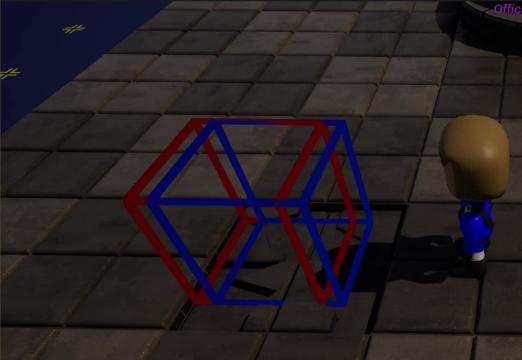
Ryck
World's leading screen capture + recorder from Snagit + Screencast by Techsmith. Capture, edit and share professional-quality content seamlessly.
you can make it do whatever you need , theres how to detect direction
hoary junco
I guess that works then
versed sun
(except I messed up the left/right)
 simple field
Any idea why is it not actually adding that material onto that static mesh

it's a toggle button to enable/disable a material layer
if material is enabled, it sets that material to none
if material is disabled, then it sets the material
hoary junco
versed sun
one question btw, how do you get your wires to be that neat? mine are always a curved mess
lunar sleet
wise ravine
Build what exactly?
Your game
vestal acorn
simple field
Any idea why is it not actually adding that material onto that static mesh
element index 300? 
simple field
I thought it was a hierarchy issue so I just set it to an incredible number
vestal acorn
probably try static mesh to print string to check if its getting the correct mesh?
if index0 is doing nothing
hoary kraken
how can i make a chicken ai for my game
simple field
vestal acorn
probably try static mesh to print string to check if its getting the correct mes...
It is getting correct mesh, when I set index to 0 it actually changes the material
but when I set it to 1 it's not showing up
it's basically a mask that is supposed to go above another material
vestal acorn
show the static mesh with material indexes?
0 = first material slot, 1 = second material slot
so if 0 is working, and 1 not , probably a material slot/static mesh issue
simple field
There's just 0 under the static mesh, do I add 1 manually?
 vestal acorn
no
vestal acorn
simple field
There's just 0 under the static mesh, do I add 1 manually?

set material changes the material set in the material slot, you cant add more dynamically as far as i know
simple field
Well I need two materials, the one with index 0 is my earth texture that gets changed in-game (highlighted countries appear), and on index 1 I'd like to have the borders material itself so that player can enable/disable the visibility of borders
 dawn gazelle
simple field
Well I need two materials, the one with index 0 is my earth texture that gets ch...
dawn gazelle
simple field
Well I need two materials, the one with index 0 is my earth texture that gets ch...
Open the mesh you're using. There should be a section labelled "material slots" which can then let you add more slots. Whether it will actually properly display though, I'm not sure as normally you define parts of the mesh that the material applies to when you design the mesh.
dawn gazelle
Find the mesh in the content browser. Double click it.
If you're using a built in mesh, then you may want to make a copy of it to make your changes to
simple field
dawn gazelle
If you're using a built in mesh, then you may want to make a copy of it to make ...
 lunar sleet
dawn gazelle
Open the mesh you're using. There should be a section labelled "material slots"...
lunar sleet
dawn gazelle
Open the mesh you're using. There should be a section labelled "material slots"...
Don’t you have to edit the mesh with modeling tools to add more slots?
simple field
lunar sleet
Don’t you have to edit the mesh with modeling tools to add more slots?
I tried but Material editing is disabled for some reason
 lunar sleet
simple field
I tried but Material editing is disabled for some reason
lunar sleet
simple field
I tried but Material editing is disabled for some reason
Is it a skeletal mesh?
simple field
static mesh
lunar sleet
Did you drag it into the map from the content browser ?
simple field
Yes
lunar sleet
Was this imported or something ?
simple field
Er no
I made it in UE
then I moved it into a pawn
and then I dragged in and dropped the pawn
lunar sleet
No
Take the static mesh
Drag it directly into the world
Then edit
It’ll change in the pawn when you apply
olive pasture
hi everyone. i want to place an image in a widget as a dynamic percentage of its parents total height.
for example 0.5 would be exactly half way vertically, 0.25 would be a quarter down.
is there any way to do this? does that make sense ?
olive pasture
olive pasture
hi everyone. i want to place an image in a widget as a dynamic percentage of its...
oh i think i figured it out, with the anchors

 versed sun
hoary junco
one question btw, how do you get your wires to be that neat? mine are always a c...
versed sun
hoary junco
one question btw, how do you get your wires to be that neat? mine are always a c...
Electronic Nodes Plugin
 maiden gale
Hello, I have a question for you guys about enhanced input and blueprints.
I have created an input mapping context and added the number keys so i can assign them to action bar slots.
How do i get the display names from the input mapping to use in the Widget Blueprint? I have tried a load of things but cant seem to get an array to populate with any info.
Any suggestions would be greatly appreciated.
Im getting the following error in the output log.
LogScript: Warning: Script Msg: Attempted to access index 0 from array 'ActionBar1_KeyMapping' of length 0 in '/Game/Coast_Game/Blueprints/BP_CST_FirstPersonPlayerController.BP_CST_FirstPersonPlayerController_C'!
LogScript: Warning: Script Msg called by: WBP_CST_ActionBar_1_C /Engine/Transient.UnrealEdEngine_0:GI_Coast_C_22.WBP_CST_Player_HUD_C_0.WidgetTree_0.WBP_CST_ActionBar_1


 agile moss
The actor keeps setting its rotation to the Y of where I last looked at the viewport, but I want it to look only in one direction, help?
trim matrix
Will this function still continue down the execution line on false or will it honor the return nodes and only continue from those?
 gentle urchin
You need to be explicit about early returns
(So instead of break, you can simply return the element on true)
Early return 🙂
So yes, it continues, as ypu have not been explicit about returning there
warped juniper
Hey there, I got this error while testing stuff. It did not cause a crash.
Blueprint Runtime Error: "Attempted to access BP_FireballProjectile_C_1 via property K2Node_Event_Other, but BP_FireballProjectile_C_1 is not valid (pending kill or garbage)". Node: Branch Graph: EventGraph Function: Execute Ubergraph BP Fireball Projectile Blueprint: BP_FireballProjectile
I have a fireball projectile that explodes on impact (spawns an explosion and destroys itself on impact with anything)
When they collide together, however, this warning appeared
 warm tree
hey all 👋 wanted to ask if there's a CharacterMovement or Actor setting that replicates actor rotation that isn't Orient Rotation to Movement
 waxen mason
I believe theres a RotatingMovementComponent
warm tree
waxen mason
I believe theres a RotatingMovementComponent
hmm looks kinda like what I was looking for - thanks!
trim matrix
gentle urchin
So yes, it continues, as ypu have not been explicit about returning there
I see what you are saying. So, I dont want the function to return until the loop is complete, but you are saying the false will return on the loop until break. Which might explain the manner which my pawns are spawning. In that case, what should I do, because on the out side of that function the very next function is to spawn the AI pawns in the remaining player starts. Should I call an event on the loop complete instead?
 sick sky
i actually trying to think of doing a "mop the floor" systrem
the idea is that I have a transparent plane to show the player the area, then detecting what % of the flat area he touched with the mop.
i was wondering if using some linetrace is a good start, of if i should use something else
 dull scroll
I'm not sure if this is the right place to put this but I modeled a car in Blender for my game I'm working on but for some reason my car keeps pivoting, I don't really do the whole making the game work thing but I've been trying to learn and I'm just stuck.
All my mesh origins are setup correctly which are shown below, and I tried messing with the center of mass in my blueprint cause I figured it could be too rear heavy but that doesn't explain the pivot it does when it pawns in


 wise ravine
dull scroll
I'm not sure if this is the right place to put this but I modeled a car in Blend...
wise ravine
dull scroll
I'm not sure if this is the right place to put this but I modeled a car in Blend...
@dull scroll #chaos-physics
and use this to troubleshoot your vehicle (#chaos-physics message)
 tough kiln
trim matrix
I see what you are saying. So, I dont want the function to return until the loop...
tough kiln
trim matrix
I see what you are saying. So, I dont want the function to return until the loop...
It seems you're trying to access an element of the loop after the loop is completed. If I've understood your intentions, you want to loop through data, find the first one that matches your criteria, and return the transform, while also understanding which element of the array was used.
If this is the case, you should set the transform and index as local variables after your branch, then on loop complete, remove the index from the array and return the transform. Then you'll have your transform and an updated array to spawn the rest of your actors.
lofty rapids

this works fine though it doesn't return on loop body as far when you print string after it's after all the test prints
warped juniper
Hello, working more on my spell casting system.
Not sure how should I approach that system... It's something similar to having a different weapon on your hands every time.
I haven't made such thing before, thing is.
lofty rapids
what sort of spell thing, you want to have a certain spell on at any time ?
the more complicated version wout probably be GAS
warped juniper
GAS?
lofty rapids
Gameplay Ability System i never used it but thats basically what it's for
or you could just use variables also as an alternative
maybe a component or something
trim matrix
tough kiln
It seems you're trying to access an element of the loop after the loop is comple...
Dude! Duh. Yes why didnt i think of that. Thanks!
warped juniper
Well I don't think that's exactly what I was looking for
I had something very straightforward
The player can select a slot on the fly
When that slot is empty, clicking lets them use the inputs to cast a spell. Once cast, that spell is equipped and they can cast it freely until it runs out.
There are 2 logc gates here first. Checking if the slot is empty or not, which should be the easy part, and checking what spell is in that slot
Since the current spell has to be reflected in the UI for visual clarity.
lofty rapids
so a slot that fills up as you cast spells ?
or just a single slot for that spell ?
an by "slot" wdym ?
warped juniper
You know how in a shooter you can have different weapons equipped?
lofty rapids
ok so a slot that is linked to a keypress ?
warped juniper
Pretty much.
Only that slot is changed in a cycle since there are only 2 of them.
lofty rapids
you can already cast spells n stuff you just need the slot worked out ?
warped juniper
Yeah pretty much
I got the logic of turning inputs to spells
Now I just need that system to allow players to stash a spell, plus making more complex spell inputs.
warped juniper
I could ask around... Thanks for the help
 dry scaffold
https://youtu.be/bMgilfS_biQ
If my enemy jumps in the air and I lock on and slow down time attack, the camera and player does not reset with the player being tilted, any fix?
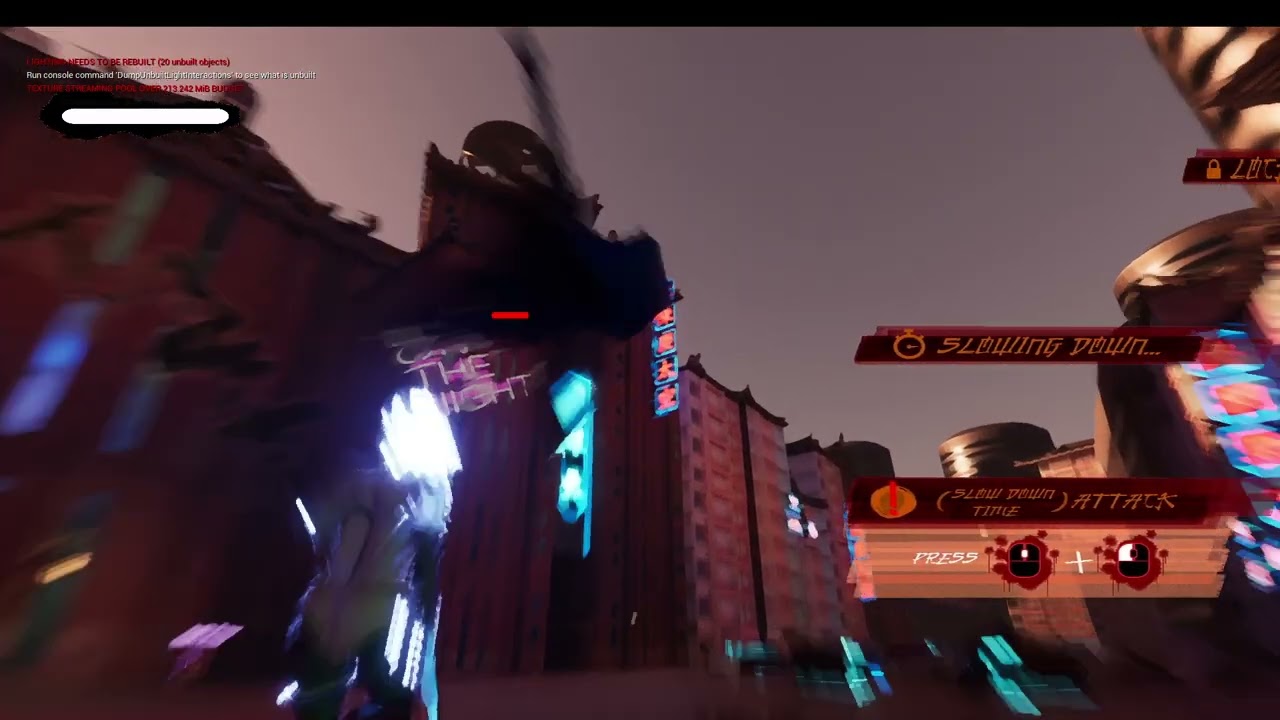
 finite hearth
I am in collision hell, and I know the solution is probably a checkbox that I am missing.
When a monster dies, I set its collision to a custom collision preset, which ignores everything except for a block on WorldStatic. I also change the object type to DeadObject.
My landscape is a **WorldStatic **which blocks DeadObject.
However after changing the preset on the monster after death, the monster will fall down and clips through the world.
As an alternative, I've tried disabling collision and gravity after monster death, but it will still clip down.
What am I doing wrong?
Note: Multiplayer setup, but the change collision logic and being called on both client & server
To debug: I am trying to check the collision settings of the monster in PIE, but the dang things falls so fast I can't click it in time.
 surreal peak
finite hearth
I am in collision hell, and I know the solution is probably a checkbox that I am...
surreal peak
finite hearth
I am in collision hell, and I know the solution is probably a checkbox that I am...
Try setting the movement mode to none too
rain wraith
Any recommendations on how to Save and Load arrays that are uniquely and repetitiously generated? In my level, the player can spawn pawns from a class which generates an array with unique data for each pawn and I'm unsure how to make a system for saving this array data.
lofty rapids
what kind of data ya got ?
you need to be able to serialize it i think
array of integers, array of strings np
array of structs idk but you might be able to change it to savable data
trim matrix
So this is a really good idea and I did implement it and it does work well. But even after sorting my array, triple checking at runtime with debugger multiple times, when the same level is re opened it gets messed up no matter what I do because the local player indexes actuall change! Player 0 becomes player index 1, and Player 1 becomes player index 0, hsomething like that, so now the question becomes what happens to these local players controllers when a level is re opened? @tough kiln
lofty rapids
#multiplayer might know more about that
rain wraith
lofty rapids
what kind of data ya got ?
There's four arrays in the pawn class that need to be saved, all are transforms recorded from the VR Controller.
Does an approach like this seem reasonable? Every time a pawn is spawned it gets added to the ExistingPawns array > For each loop of the array > Get the CapsuleTransformData and append it to array SavedCapsuleTransform Data (which is stored in BP_SaveGame)

And then to just repeat it three more times for the other array transforms in the pawn class
 lean jasper
Hi everyone ^^ !
I would like to not only add an easter egg, but also a functionality to my Melee Character : how to detect if a player's left thumbstick made a full rotation ?
How to then check if it made multiple rotations ?
I'm compelled to use BPs only, and I have absolutely no clue how to make it properly (if possible, without using Event Tick, but that wouldn't be too problematic if there's no alternative).
Thanks for your attention !
lofty rapids
rain wraith
And then to just repeat it three more times for the other array transforms in th...
looks legit to me
warped juniper
@lofty rapids I couldn't get any help on umg, but I tried to come up with some logic system...
So for starters, I made a struct.
It stores an int, for the slot
A string, for the ID of the spell
And a boolean to check whether or not it's open
Hmm... But in second thought checking for null in string does the same.
lofty rapids
i would use an array
maybe even just 0 for empty, 1 for occupied
you got to be careful with structs in bp
i hear they can break your project
rain wraith
lofty rapids
looks legit to me
How would one go about loading this data back to the individual pawns though? Not very familiar with arrays but I believe appending just adds all the input array into one larger array. So each CapsuleTransfromData stores 80 Indexes. How would the code tell it to send the 80 indexes of transform data to index 0 of the stored pawns, then index 81-160 to object index 1 and so and so on for additional pawns
warped juniper
I need something that stores both an int and a variable string
rain wraith
Sure for the objects. But then how does the game know that object index 0 should recieve transform index 0-80
warped juniper
Well I have no idea why or how
lofty rapids
right just be careful with the struct make it and leave it if you can
warped juniper
But the character lost the ability to move at all.
lofty rapids
is your camera working ?
warped juniper
This is the error
Blueprint Runtime Error: "Accessed None trying to read property CallFunc_GetMovementComponent_ReturnValue". Node: Set bIsInAir Graph: EventGraph Function: Execute Ubergraph First Person Anim BP Blueprint: FirstPerson_AnimBP
warped juniper
lofty rapids
the actual movement event is firing
And yes.
lofty rapids
warped juniper
This is the error
Blueprint Runtime Error: "Accessed None trying to read proper...
where does it take you when you click on it ?
warped juniper
The anim bp
lofty rapids
show the nodes
accessed none pretty common the thing your trying to access is most likely empty
warped juniper
Nothing is affecting the movement now
Not even gravity
What nodes specifically?
I changed nothing of the movement
I just added some of the spell slot functions and then it just broke...
lofty rapids
did you already have a ui ?
a widget was already on the screen or you made one ?
did you set the game mode at all ?
warped juniper
I have the same game mode as I had
I genuinely changed nothing but what I mentioned of the spell slot system
I tried the default character bp and it works as normal
lofty rapids
well i'm just going about debugging
usually check the events are firing
first then see if you can add input another way
like a hard coded key press or something
seee if you move
warped juniper
No you don't see
It's not input
No form of character movement works
I move it up, it remains static, cannot detect anything in regards of falling and such.
warped juniper
Yes, it is.
lofty rapids
or is he idle or falling ?
lofty rapids
so it's not falling thats weird and if you take out the code you put it does it work again ?
or it's broke ?
also does it break at a certain point, or it starts like that ?
warped juniper
It broke
It starts broken
And even if I remove all I added, it remains broken
@lofty rapids What would have even caused this... How do I even fix it?
lofty rapids
well your events firing so thats good, you did a print string on that ?
warped juniper
Yes.
I can move the camera
The character is just permanently stuck in a fixed point in space.
lofty rapids
whats 1 ?
ya it definately could be
but hard to tell with out going through a bunch of stuff
warped juniper
It's 1 gravity.
lofty rapids
your gravity scale is 1 ?
warped juniper
Yes.
lofty rapids
and enable gravity is checked ?
warped juniper
Yes
I did not change it
And besides
It cannot access the character movement component itself as shown in the error log.
There isn't a no gravity problem, but a no character component problem.
warped juniper
It's the default character movement component
lofty rapids
so you used a template then
and when your in the character can you click on the component and get details ?
if your details is blank it's a bug
and if your character is all f'd up, what version are you on ?
warped juniper
So I'm using the one version of UE that randomly destroy itself?
lofty rapids
i think so
warped juniper
And yes, it displays nothing. Again.
lofty rapids
good time for backups or source control
 mighty kernel
Anyone know a quick way to get a landscape's height given X and Y coordinates?
lofty rapids
mighty kernel
Anyone know a quick way to get a landscape's height given X and Y coordinates?
perhaps a trace ?
on a custom channel
line trace by channel
get the point
and then subtract where your zero is
or if you landscape is at zero z, your all set
just trace and get the location
split the pin and get your z
 twin shale
Question: Once upon a time I had a collision sphere around my player I used to turn stuff on and off at a distance. It ended up checking so many things per frame that my frame rate tanked due to the collision sphere moving each frame. I made a custom component that just checks the distance to the closest player and sets the tick rate accordingly. If no player is within X distance the tick rate reduces to once every say 8 seconds. This works fine right now but we're going to have thousands and thousands of actors that have this code (everything interactable in the entire world). I need to find the most performant way to turn features on and off based on distance. Any ideas?
lunar sleet
warped juniper
The backup worked and I recovered everything.
Setup source control
lofty rapids
twin shale
Question: Once upon a time I had a collision sphere around my player I used to t...
how were your checking the collisions on tick exactly ?
c++ will help with larger loops
twin shale
lofty rapids
how were your checking the collisions on tick exactly ?
Each component just checks distance to all 4 players on tick. There's a sliding scale so the tick rate increases the closer the closest player is. Depending on distance this can range from every 0.3 seconds to over 10 seconds if the distance is vast
lofty rapids
so it's only checking 4 players, or you said thousands
twin shale
Thousands of actors are checking against 4 players. Basically every item in the world regardless of distance is doing these checks
twin shale
Nope, I cache the 4 players as they log in and out. They're just pulling from an array and checking
Then they dynamically adjust tick
lofty rapids
checking actor location ?
twin shale
Yes. They get both actors location and do a distance compare
So theoretically only say 200 actors are high tick at any point
twin shale
My general question I guess is would moving this back to something like collision spheres be a good or bad move? I can limit to only pawns but it seems like doing that would still be a lot more costly
lofty rapids
collision spheres on each item ?
twin shale
This will probably move to C++ in the future but it's not moving just yet. I guess I can bump that priority if needed
mighty kernel
lofty rapids
perhaps a trace ?
This worked brilliantly, thank you!
twin shale
Probably each item so it's not moving each frame. I think the sphere moving each frame the first time is what really tanked my frames
lofty rapids
so the frames went down even when nothing overlapped ?
twin shale
When I had the sphere on the player it was set to something like 40 meters and it was checking literally every actor and mesh I passed as I walked. I had to chase it down with insights
lofty rapids
maybe make them idle within a range
twin shale
I also have a number of different things that had to happen at certain distances. I couldn't imagine putting several overlap spheres on there
Make the collision go idle after a certain distance you mean?
 raw pilot
Since i cant copy and paste a 2nd tick in my blueprint, how can i make one as a custom event? just add the float DeltaSeconds and it works the same?
lofty rapids
twin shale
Make the collision go idle after a certain distance you mean?
well make the tick go idle and not keep getting untill the character reaches a collision set on the actor
 paper smelt
How do i get bone name with line trace?
lofty rapids
paper smelt
How do i get bone name with line trace?
split the out hit
twin shale
lofty rapids
well make the tick go idle and not keep getting untill the character reaches a c...
I could give this a try. I don't know exactly how collision works in C++ but I have to assume they're doing smart, fast checks
lofty rapids
c++ just makes everything faster
when your dealing with a large scale especially actors to loop in an array
in the thousands
it's really the only way to make it work
if you have 1000 in range thats 1000 loops * 4
bp is just not built to handle it imo
it will eventually crap out
 twin perch
Question, i have a Length, its a float, i have a normalized vector, i want to increase that normalized vector by the length how would i go about doing that. youtube is telling me i gota do matrix math ?
i want to keep the original vectors rotation ect ect.
lofty rapids
you should be able to multiply it by the float
but actually idk if that will you give you what your looking for
twin perch
multiplying didnt work unfortunately
lofty rapids
matrix math isn't that bad
you just do the math in order
if you have a matrix
multiplying a vector by it is just a matter of doing in a certain order
twin perch
well there is Get Scale Vector (matrix) ... but ive never used that i sware their is a simpler way of doing it.
lofty rapids
but matrix math can also just be broke down to a formula
what does the matrix look like that they want you to use ?
or do you need multiple ?
twin perch
hmmm ? its a blueprint node called Get Scale Vector i asume it scales the vector which is what i want right ?
lofty rapids
idk never used it
twin perch
hmm all good im gona do more google fu cheers for the help!
lofty rapids
but i imagine you want set
 frail swan
When I jump into the edge of a platform, I get stuck on it. When I jump over the ledge, I clear it easily. How do I prevent getting stuck?
 twin shale
lofty rapids
it will eventually crap out
twin shale
lofty rapids
it will eventually crap out
I think I'll move this to c++ in my optimization pass since it will be a bottleneck. I'm kinda wondering if I can limit how many entites are checking locations by adjusting World Partition distances
twin shale
frail swan
When I jump into the edge of a platform, I get stuck on it. When I jump over the...
your capsule is not clearing the ledge
frail swan
How do I prevent it from interrupting the vertical momentum?
even if the bottom edge of my capsule hits it, it gets stuck
lofty rapids
you could try to change the capsule half size, or size
i've never done it but it's worth a shot
you could make it smaller when your falling
or when you jump
then set it back when you land
frail swan
that might be worth a try. To match my character's curled up legs... Ideally I'd like the capsule to just slide up the edge. I don't want my jump's height to be affected by whether or not I hit a wall
a ceiling, sure
lofty rapids
well unfortunately the animation doesn't change the capsule
frail swan
Yeah but what I'm saying is this isn't a matter of the character size. A jump that doesn't hit the wall gets me that high, but if I hit the wall, I don't get that high.
lofty rapids
frail swan
Yeah but what I'm saying is this isn't a matter of the character size. A jump th...
its the "capsule" size
goto your character
and look at the capsule
thats whats hitting it
that pill shape thing
frail swan
I understand that
lofty rapids
but i would also check out step height
see if you can get that sliding effect by making that a bit higher
but then you would need to change that on the fly
or you could leave it but your regular step height will be a bit larger
idk if that would work considering your not walking
but it's also worth a try
or also #animation might have some tricks
warped juniper
lunar sleet
Setup source control
I'm not too familiar with it... Any info you reccomend?
twin shale
warped juniper
I'm not too familiar with it... Any info you reccomend?
What's your team/project size?
frail swan
I just am having a hard time understanding why the upward velocity stops all of a sudden. As you can see, the capsule is sliding along the ledge just fine until the bottom gets there, and then I'm suddenly suspended with no velocity for a moment
 warped juniper
twin shale
What's your team/project size?
warped juniper
twin shale
What's your team/project size?
For now, just me, although it will most likely expand.
twin shale
warped juniper
For now, just me, although it will most likely expand.
Size? 100MB, 9999TB?
lofty rapids
frail swan
I just am having a hard time understanding why the upward velocity stops all of ...
normally irl you would tip over with velocity but it makes sense you would just stop it's quite a bit of coverage there to stop the capsule
its not actually using the collision of the mesh
your using the capsule collision so it's getting stuck
you can try to adjust the capsule idk how that would look upon landing tho
frail swan
I feel like we're talking past each other, but thanks for trying to help
I really do appreciate it, that probably came across really passive agressive
warped juniper
twin shale
Size? 100MB, 9999TB?
Just basic files for now so less than 2GB
lofty rapids
frail swan
I really do appreciate it, that probably came across really passive agressive
are you talking about how your character just stops and doesn't have force applied or something ?
twin shale
frail swan
I just am having a hard time understanding why the upward velocity stops all of ...
This is basically the default behavior of the CMC. If you want to keep going you're going to add custom code in some form to change the capsule size/detect ledges in some form to keep the player momentum/temporarily ignore the platform collision/etc... or override some of the CMC to make it do what you want.
frail swan
If you watch my first gif you can see that my jump is able to clear the ledge and then some just fine , if I don't come into contact with the ledge on the way up. My capsule goes well over it. Also, if I jump against any other wall, my upward momentum doesn't seem to be affected. But if there's a ledge at the top of the wall, the capsule "catches" on the corner of it
frail swan
twin shale
This is basically the default behavior of the CMC. If you want to keep going you...
This is kinda what I fear
twin shale
warped juniper
Just basic files for now so less than 2GB
Github LFS on Azure DevOps I believe is still free. Easy enough to set up and use solo, and will expand for more users later. Multiple users and locking is a PITA but can be done
twin shale
frail swan
This is kinda what I fear
The "laziest" thing I can think of is do what @lofty rapids suggested and just use an anim notify state in your jump to shrink the capsule during a window of the jump.
lofty rapids
or do the line trace and disable collision that was a good one two, theres some issues with either way
twin shale
Oh yeah, either one. If you're going to do that I'd probably add an extra collision channel to platforms in the middle so you can treat them differently from the ceiling and the floor
frail swan
I do plan on implementing one-way platforms. I need to do some testing and see if this only happens on thin platforms like this, or if it also happens on plateaus that go all the way down to the ground
lofty rapids
i would probably try both see whats smoother the changing capsule size one i kind of see it jumping up sort of glitching but i never done it
i also have the same thing happening in some of my projects i have not fixed it yet so it's nice to get some ideas
frail swan
Yeah it happens on thick platforms too. I'll have to fix it somehow, but that's a future me's problem
twin shale
I'm not doing sidescroller but I'd personally probably detect ledges during jump and play a small step-up-on animation when you approach an edge. I'd imagine it would look the most natural
Cause from your video it's doing pretty much what I expect it would do
twin perch
Ok got a slight issue, my code works the issue is Attack Distance needs to be a negative to work

Is their a node that flips a positive into a negative, abs flips a negative into a positive, is thier a reverse abs ?
twin shale
X -1 flips either direction
lunar sleet
warped juniper
I'm not too familiar with it... Any info you reccomend?
See bonkers’ guide in #ue5-general pins and then use Azure
twin perch
@twin shale sorry could you please give me more information ?
twin shale
AttackDistance x -1.0 float
twin perch
@twin shale ah! right times it by -1 cheers that worked thank you!
warped juniper
lunar sleet
See bonkers’ guide in <#846520322642411570> pins and then use Azure
Fair. I'm used to workng with asure from before...
I get it's a pain to actually add people onto it though.
 trail goblet
Not sure if this is the right place, but i've been making this in BPs. I've created a custom hover vehicle and it weighs about 2 tons, yet it cannot push over very light objects at any speed. Yet the sadan can do it at even slow speeds. Im unsure why this is the case.
It also floats down very slowly compared to the sedan as well. Would anyone have any ideas what would cause this?
twin shale
trail goblet
It also floats down very slowly compared to the sedan as well. Would anyone have...
No idea without looking at loads of settings but my immediate thought when looking at this is you're not properly interacting with the other actor. Generate hit events is off or not properly simulating physics or channels or something
trail goblet
Just default settings :/


Physics works because it still interacts with being shot. That's why im so confused
Yet it feels like it has no force when it collides with something
trail goblet
Would using a FloatingPawnMovement do anything to this? (Nothing changed)
 devout wave
hey! I was looking into making a climb for my game but having trouble with anything feeling good, I played some Diablo 4 this weekend and the traversal mechanics would be perfect, it is essentially an automatic climb when triggered in a hit box. Tunic does similar... would this be done using a timeline in unreal or is there another way I could do it?
Thanks!
lunar sleet
warped juniper
I get it's a pain to actually add people onto it though.
You can switch repos anytime rly
trim matrix
Hey, first time i meet this bug, BlueprintImplementableEvent won't show up on Blueprint graph, so weird. The function is still there but no event. Tell me if you know anything.
(got it, was the "const")

 warped juniper
Hey, I'm thinking of using the Gameplay Ability System in my project, but it's not an RPG. Instead, it's more of an action game with a large number of skills... Some of them are shared between players and enemies, with important changes to their behaviour and visuals.
Would my case be a good situation to implement GAS? Or should I use components and such?
trim matrix
Sound like you can use GAS. Faster than implement your own system anyway, why not
warped juniper
trim matrix
Sound like you can use GAS. Faster than implement your own system anyway, why no...
Alright... Then I should see how to implement it.
As a simple explanation, though.
The idea is that the player inputs codes to cast spells.
I would probably have to make minor extensions to the system to support that player side.
 worldly urchin
what is the difference of just using keyboard 'F' event and using an Input Action? Which is better?

 warped juniper
The F key event is EXTREMELY rigid in logic.
It checks only the frame it receives input, and the frame it strops receiving.
Because of this it has no amount of flexibility and is even prone to errors in some use cases.
trim matrix
Those keyboard event is just for debugging
worldly urchin
ok thanks
remote meteor
F is just F
IA_Flashlight could be, iteral many anything else, including gamepads, gestures, virtual triggers from code, rebinded keys, etc etc.
warped juniper
The Input event gives you.
The moment the Trigger becomes active
The moment the input assigned to the event is first pressed
A tick event as long as the input hasn't been cancelled or finished
The moment you let go of the key before trigger
The moment triggering has been completed and nothing else is left to do.
The most important part of Enhanced Input is setting the trigger.
You can make virtually any possible interaction if you are smart
For example you can have a Hold input for events that you want the player to hold down a button, for example to turn a dial or valve, but have a Start event as well to simply press a button.
Or in a fighting game you can have a button that does something if you tap the key, and something else if you press the key while also holding down a different key.
Possibilities are as many as what you can figure out... I just wouldn't ship anything with hard coded key interactions.
Except maybe a Konami Code? That one gets a pass.
 thin panther
Even then I'd still rather map it to actions, who's to say you can't use a cheat code because you use an alternate layout, a foreign keyboard, or an accessibility controller
warped juniper
Yeah, that's a fair point as well.
Not to mention EIS handles player custom buttons by itself. That's a load off your shoulders for something every player will want.
 south ginkgo
Hi! Just a quick question. I've been trying to find a way re-update my player references upon respawning and found this post: https://www.reddit.com/r/unrealengine/comments/cg3i6h/for_single_player_game_whats_best_way_to_handle/
And it seems that OP found a solution but I don't quite seem to understand it. I'm just kinda confused on where exactly this code would be placed like if it's in the level BP, or elsewhere and what exactly would be the BP_myController. I'm pretty new to UE5 too, so forgive me if I'm a little slow.

Reddit
Explore this post and more from the unrealengine community
 bitter star
Hi guys, I'm trying to make a blueprint that spawns an actor (Gas 1unit) with an osc message and checks if there are other actors present (Gas 2unit A & Gas 2unitB) and if so destroy them. This is what I've done so far and it "works" but i get errors from the message log (Blueprint Runtime Error: "Accessed None trying to read property Gas2unitB". Node: Branch Graph: EventGraph Function: Execute Ubergraph BP OSC Server Blueprint: BP_OSC_Server) that points to my last branch of the chain (the one that goes out to destroy actor). What am I doing wrong in the bp? Note: the gas2 unit A & B may not have been spawned yet at the moment the action is called, but it shouldn't matter as I've added the isvisible bool. Or should I spawn all actor and hide them all then call visibility toggles with my osc message instead of spawn and destroy?
 dawn gazelle
south ginkgo
Hi! Just a quick question. I've been trying to find a way re-update my player re...
dawn gazelle
south ginkgo
Hi! Just a quick question. I've been trying to find a way re-update my player re...
This is one of the issues of storing refs to something that may dynamically change during gameplay. You don't want to have everything using additional dispatcher logic just to keep itself updated with the new ref. The code you've displayed would need to go in to any actor that wants to maintain a reference to the Player Character, and yes, that means any actor that wants to keep itself updated when the player's pawn changes.
An alternative would be to create a blueprint function library with a getter function for your custom character class, allowing you to easily get your character reference from anywhere, and anything that needs to use a reference to the character can just request the reference at any time.

 frail swan
lofty rapids
i also have the same thing happening in some of my projects i have not fixed it ...
frail swan
lofty rapids
i also have the same thing happening in some of my projects i have not fixed it ...
If I turn off "use flat base for floor checks" it doesn't solve the problem per se, but it changes the nature of the problem. Now my character does make it on the platform, but they "snap into" walking, even if they still had a bit of height left to their jump. Arguably better but still not what I want
dawn gazelle
bitter star
Hi guys, I'm trying to make a blueprint that spawns an actor (Gas 1unit) with an...
The issue is that you're trying to reference something from Gas2unitB (the Root Component) and as you've said, it may not necessarily be spawned, and because it's not spawned, you can't access the Root Component of it, so then you get this error.
To fix this, you can check if it is valid first before doing anything with it, and only if it is valid can you attempt to access values from it and destroy it.
This means you may want to use a sequence here after your first branch so you can check both of your Gas units individually and destroy them if necessary.
 bitter star
dawn gazelle
The issue is that you're trying to reference something from Gas2unitB (the Root ...
bitter star
dawn gazelle
The issue is that you're trying to reference something from Gas2unitB (the Root ...
Thanks, it makes sense. How do you find the Get is valid node?
dawn gazelle
bitter star
Thanks, it makes sense. How do you find the Get is valid node?
You can right click on any normal get of a reference and convert it to a validated get.
bitter star
dawn gazelle
You can right click on any normal get of a reference and convert it to a validat...
Awesome, I've never done this, thanks for the tip!
bitter star
dawn gazelle
You can right click on any normal get of a reference and convert it to a validat...
So with this I dont need the is visible function anymore do I?
dawn gazelle
bitter star
So with this I dont need the is visible function anymore do I?
Up to you if you want to check if the thing is visible or not.
lunar sleet
speed of what
ok, so what's the issue you are experiencing exactly?
Oh
You’d prly need to do some maths to change the track output
bitter star
What node should I use to invert the vector direction of a value? For example if my value is 200 I want it to become -200
lunar sleet
I’m thinking you can maybe get distance to actor at the start, and divide the track output by it before plugging it into the lerp. But you’d need to test that theory. #game-math would prly be more useful than me
lunar sleet
bitter star
What node should I use to invert the vector direction of a value? For example if...
Multiply -1
bitter star
lunar sleet
Multiply -1
Thanks!
trim matrix
Is there a delegate that fires when the world has fully loaded that I can access in blueprint on the game instance?
thin panther
No
 hardy mango
Streaming Levels - how do i set this initial state for this MISSION MAP to NOT be loaded?

when I play the game - this level is visible.
hardy mango
is this appropriate? This works but it feels like there is supposed to be a setting somewhere to set the initial state of this streamed level?

all docs say to use Blueprint or AlwaysLoaded - thats the only 2 options....
surreal peak
@hardy mango have you tried the Visibility setting?
hardy mango
surreal peak
<@223223397729959937> have you tried the Visibility setting?
the ToggleVisibility (Eye icon) ?
 warped juniper
Hey there, just want a quick hand here...
I'm trying to make a simple explosion expand over time based on its lifespan.
 surreal peak
I'm relatively sure the level should be unloaded by default if you set it to Blueprint... Hm
warped juniper
I tried using the Event tick delta seconds but it ain't doing anything, sadly.
A timeline isn't ideal either since I want the duration to be dynamic.
surreal peak
warped juniper
A timeline isn't ideal either since I want the duration to be dynamic.
Which they can be fwiw
warped juniper
I don't know much of them sadly... How can I input a float to adjust their length?
surreal peak
Make the Timeline 1 second long and set the PlayRate to 1 / Duration
warped juniper
Ahhh thank you... And that retains all easing as well?
surreal peak
Should yeah.
The Lerp is linear so if you want to recreate that without a Timeline you need to use a Float Curve asset
And then count up some float variable on tick to know how long the actor is alive. There might be a variable somewhere that gives you that already but not sure what it's called or if it's BP exposed
warped juniper
Thanks so much for that, you're a lifesaver...
surreal peak
That counted up variable is then divided by life time and the result clamped to 1.f and fed into the get value function of the float curve
That's the alternative solution to the timeline
warped juniper
I think a timeline should work though
It wouldn't cause issues if spammed multiple times I hope...
This is for an explosion.
surreal peak
It resets fwiw. You wouldn't call this in Tick
Right but one explosion is one actor, right?
At least it should be
warped juniper
Yeah of course
It's one actor with a matching particle effect
Plus the overlap event to check for damage.
@surreal peak It works excellently, thank you!
Now I just hope my spell system holds up...
I feel this will make some people cringe.

The way it works is that it checks for the current spell the player holds and executes the according function.
Each spell has alternate player actions besides the basic M1 fire event... But I'm at a loss for making this more efficient.
Specially for creating more complex systems.
I would like to have something similar to the U5 first person default FPS gun... The gun itself holds its own input logic that overrides the players
I just cannot crack the code for it.
 teal sky
tryign to make an on clicked event for this gun, where the cube detects when it is clicked. the cube doesn't really fit the gun though that well. does anyone know of a better way to do this? perhaps there is a shape i can use besides a cube that is more customizable
 surreal peak
@warped juniper Singleplayer ?
Your system is basically lacking any kind of Object Oriented Programming.
warped juniper
surreal peak
<@1118969537161855037> Singleplayer ?
Yeah, it's singleplayer 100%. No plans for making any form of multiplayer.
surreal peak
Your Spells should be their own Objects
warped juniper
surreal peak
Your system is basically lacking any kind of Object Oriented Programming.
Definetly because I'm not a programmer.
surreal peak
BP_Spell which should have some functions like ActivateSpell with some generic information passed in. Then you can inherit from that and make a BP_Spell_Fireball.
Override ActivateSpell in there to do your actual Fireball stuff
There might be more functions you need, and some more boilerplate stuff
You would probably also have a BP_SpellComponent which is a child of UActorComponent which should take care of the spell system in generall
E.g. adding spells or activating the right one
warped juniper
Hmm well the current system I have for selecting spells is a pretty weird but "functional" one
surreal peak
You can try to activate spells by matching the class or give them some GameplayTag to identify them
warped juniper
Player input is translated to an ID
surreal peak
Your system looks like almost everything sits in the character
warped juniper
The ID is converted to a string and then that string is what drives the spell once cast
warped juniper
surreal peak
Your system looks like almost everything sits in the character
That's the case sadly. I'm not a coder by choice... I'm currently doing this out of absolute need.
surreal peak
You can still do that. Input can be translated to a GameplayTag and you then tell the SpellComp to activate that
SpellComp loops the abilities and checks which one has the tag
You should really not code the system into the character
It will bite you really quickly
And since you are doing Singleplayer stuff you can use Objects easily I guess
warped juniper
I really wish I could follow you better here. I'm really not at the level you may think I am.
I cannot fully grasp what objects are in this case.
Just the absolute base class type?
surreal peak
Object is the base class of basic almost everything in UE. The are also the most lightweight class you can make
warped juniper
Alright.
surreal peak
They can't be placed in the scene for example. That only starts being a thing with Actors
But for a spell they also don't need to
warped juniper
Currently I have my spells as a BP Component...
surreal peak
Yeah...
Idk. You should learn a bit more than I would say. You will code yourself into a mess sooner or later other wise
The system you make there scales really poorly
warped juniper
Sadly that's how college life is.
They half teach you JS and throw you into the engine to make a proof of concept in a month.
surreal peak
Game Dev college?
warped juniper
Hey, it's free.
surreal peak
Yeah idk. I never thought that made sense
warped juniper
It's mostly for the business studies.
surreal peak
I studied generally math and IT and learned the Game Dev stuff myself with a then very nice base of knowledge
Two of our employees went to a Game Dev University. Can't say they seem to have learned more than anyone going to a normal one and learning Game Dev manually
warped juniper
I'm not quite good at self teaching most things... More often than not I just don't know how to properly train myself.
surreal peak
They are lacking a lot of base knowledge due to that actually
hardy mango
i myself have a computer networking degree (Cisco/MS Servers) and never used it.... 12 years IT work.... self taught myself programming + game dev
i full heartedly agree/stand-behind self learning.
college is a joke
warped juniper
I guess it's just a mistake... Really I'm just carrying on with this because I'm so close to the finish line.
surreal peak
Totally fine
warped juniper
And if I abandon now I would have wasted years for nothing.
surreal peak
Just sharing experience
hardy mango
yah - and its a rough point in life - businesses/corps push "NEED BACHELORS"
surreal peak
My bachelor degree is also unused
And I never went for a master one or a doctor title
After all I founded my own company and no one cares about this anymore
hardy mango
but - it gets you foot in teh door... you do learn good things though
soft skills
people/project management
surreal peak
But the knowledge I got from studying was worth it
hardy mango
core skills that develop you as a person.
warped juniper
It's pretty bizarre, really.
surreal peak
Game Dev college is not bad. I just don't think it's the best alternative out there
warped juniper
Most of my focus was on more general art elements of the game dev pipeline
Like the general area of 3D art such as shaders, rigging, models, texturing and whatnot.
hardy mango
college is a good INTRODUCTION to topics i find
warped juniper
But having to do all the college stuff made me neglect it, as all the 3D related elements get skimmed over with redundant subjects I mastered long ago.
warped juniper
Yeah, but if college can't help me now, what's my other option?
hardy mango
if you take college - and dont put in 1000+ hours on the topics to develop/go above & beyond.... you're not going to get into the industry on your degree alone
hardy mango
warped juniper
Yeah, but if college can't help me now, what's my other option?
study bud
tons of study
surreal peak
Idk how it is in your college but I think here they give you art and programming basics and then have you take a path.
And at the end of the day you gotta make some project with a small group of people which will probably just about work cause everyone is lacking actually experience
hardy mango
warped juniper
But there's a lot of stuff bothering me
baby steps
warped juniper
Every time I feel I made some progress to set some form of consistency, I just fall back.
Like, I stried to sculpt every day to improve my skills. And it started giving some results.
hardy mango
my suggestion - get with someone good - learn together.
THis also is hard in this industry .... its hard to find good people in a FREE MARKET such as game dev
surreal peak
@warped juniper I've been out of Uni for 8 years or so. And also working with UE4/5 for 10 years. I'm still learning
That's how it is
warped juniper
But sadly I couldn't keep it up.
hardy mango
ALWAYS learning
warped juniper
Imposter syndrome just gets the best of me. How do you beat that invisible hand just pushing you down?
hardy mango
warped juniper
Imposter syndrome just gets the best of me. How do you beat that invisible hand ...
start a learning project. set an attainable goal... SMALL.
FINISH IT
9/10 peopel cant finish a project
= failure from the start
surreal peak
Socializing imo. You aren't alone. Almost everyone struggles with it, even the ones where you think are masters of what they do
warped juniper
I'm not talking exactly of entire games regardless of size
But goals...
I want to improve at digital art, but can't keep a good streak of art made every day.
surreal peak
In your current stage you should probably do what is the most fun for you
hardy mango
warped juniper
But goals...
well this is on you my man... you gotta keep motivated.
Think of big success stories - Valheim, Minecraft..... ask yourself - "Do I want to be one of N# of devs that made 80 million $$ for their 2 years of work?"
warped juniper
I love design above all things, really.
The puzzle of making things fun and engaging, or look interesting and unique.
surreal peak
Try to find like-minded people fwiw
hardy mango
warped juniper
I love design above all things, really.
i'm the same! I love design..... brinigng things to life through logic
warped juniper
But currently, I need to prototype a proof of concept in a month.
surreal peak
You have a 100k User Server here. Use some of the social channels
And find some peeps that do and think the same to talk to
surreal peak
warped juniper
But currently, I need to prototype a proof of concept in a month.
Yeah there are times that you will have to sit through it
hardy mango
warped juniper
But currently, I need to prototype a proof of concept in a month.
my suggestion - small scope. for college - think of "A character is in a room and has to pick up an object, which sets off a trap - and needs to escape the room or dies"
warped juniper
Because the college says so. And that's just beyond absurd when the only dedicated programming class we ever had was using JavaScript for Phaser browser games.
warped juniper
hardy mango
my suggestion - small scope. for college - think of "A character is in a room a...
They are also grading us on uniqueness and originality.
surreal peak
Yeah we have a lot of peeps like you here that got told to make something in UE but never got much stuff taught about it
warped juniper
Which could mean anything.
sick sky
sick sky
i actually trying to think of doing a "mop the floor" systrem
the idea is that ...
Any ideas
surreal peak
I doubt any college professor would actually objectively review something as unique
gentle urchin
^
surreal peak
So just go with your gut feeling
warped juniper
Honestly my college stories are a nightmare.
I worked with people who demanded final-quality character models before a prototype was even set up.
sick sky
warped juniper
Honestly my college stories are a nightmare.
What studies are you doing ?
Programming, game design , ... ?
warped juniper
People who told me to forget the color palette, then color the characters themselves and set up the lightning, only to then complain about the characters having low visibility.
sick sky
For us its the opposite
We are focused on game design et game feel before starting the visuals
gentle urchin
 surreal peak
I gotta start my day and leave the convo. Please consider moving to a social channel like #lounge , #programmer-hangout or similar. Or something more #career-chat like. BP questions are getting drowned out.
warped juniper
It's just a pretty demoralising experience. I want to improve, I want to be great at what I want to do, but I feel demolished thinking the time I could be spending on mastering some crafts is spent on a place like that.
Yeah, we got carried over. I'm sorry for that.
surreal peak
No worries.
 abstract schooner
Hey Guys,
There is no UI or Wdgets forum, so I'll ask here I guess..
What is the trick, feel free to link some docs or tutorials.
How do we combine CommonUI widgets with UMG widgets?
I have an asset from the MP that uses CommonUI that works great, but I also have quite some normal UMG widgets that stop worki g the second time they are created.
I'm not sure if it is due to them being different types of widgets or if it has to do with changing the InputMode or something..
But I can't be the only one running into this?
hardy mango
abstract schooner
Hey Guys,
There is no UI or Wdgets forum, so I'll ask here I guess..
What is th...
 verbal jungle
quick question, if i make an array, and then remove an item from said array, does the array shrink? or is there jsut an empty item there
hardy mango
verbal jungle
quick question, if i make an array, and then remove an item from said array, doe...
simply removeItem - then debug string the array size -
I was trying to find an answer for you but i'm not finding what i want to see.... in C++ you can array->shrink() because it states that arrays dont shrink automatically (copilot).... i would still suggest debugging it after removing item.
I recall there being a boolean on the function bShrink? or something to that nature - but i dont see this .... not in 5.3
there is no SHRINK node in blueprints however
verbal jungle
yeah i was rummaging around in the blueprint node menu and found none
lunar sleet
There’s Resize Array
verbal jungle
guess i could work with that
sick sky
so in UE, it can add slots if you add items, but it wont shrink when you remove ?
or is this a c++ array behavior
lunar sleet
I think it shrinks but the indices don’t get resorted automatically
So if you iterate over an array you removed an item from, it’ll cause some issues
sick sky
because from memory they shrink
hardy mango
literally debug it - you'll find your answer
array->removeItem(item)
printString(array.length)
if you have 5, remove = 4 (expected)
print string = 4 - you know it shrinks automatically
verbal jungle
so if i remove the 3rd item in an array of 5, does the 4th and 5th items get moved "up"?
lunar sleet
From what I’ve experienced, the indices break without using resize
hardy mango
this is referred to as "shrinking"
again i remember this being a boolean value on the operation .... but i'm not seeing that in 5.3
sick sky
in 10m i can test this
from memory the indexs are updating after a remove
i did a lot of stuff with arrays and never got issues
 undone bluff
you will need an entry that represents an empty slot
you can't actually have an empty array index
 bitter otter
hi guys,
I have an actor that can be destroyed when shot and i have it used to my enemy actor blueprint (like a weakspot), since the destroy logic is in the original actor, im struggling to have it lower the enemies health when destroyed,
does anyone know how to fix this? (sorry if its easy, im pretty new to unreal)
undone bluff
it either has a value or it doesn't exist
undone bluff
bitter otter
hi guys,
I have an actor that can be destroyed when shot and i have it used to m...
Your enemy should save the references when it spawns them
sick sky
@verbal jungle @lunar sleet @hardy mango
looks like (in BP atleast) the array is resized and updating index

 hardy mango
debugging ftw
bitter otter
undone bluff
Your enemy should save the references when it spawns them
sorry, im pretty bad at this and don't quite understand, since there are many enemys, all sharing the same weakpoint actor as one of their components, with the weakpoint logic being in the weakpoint actor as to not repeat it alot as each enemy has many points, how can i check when it is destroyed in the enemy actor to lower health, while not lowering the health of all enemies through a custom event or something?
frigid summit
hi guys how to speed up the charcter using set timer by event and add movement input nothing work so far including set max walk speed
gentle urchin
bitter otter
sorry, im pretty bad at this and don't quite understand, since there are many en...
Custom events doesnt happen on all instances
Only on the one you invoke it on
bitter otter
gentle urchin
Custom events doesnt happen on all instances
thanks, that kinda works, one issue however, if i get one enemy down some health, then try attacking another, the health is carried over to the new one, while also counting for the health of the old one, what can i do?
undone bluff
All instances are entirely separate objects
gentle urchin
and have their own values
but if your UI is stuck to the old instance or smth, then its a coding mistake
abstract schooner
hardy mango
there very much is -you have to subscribe to it in your ROLES.
<#22179946768957...
Ooh shiiet! Thanks! 😁
 nimble citrus
Hello, I'm working on merging two objects into one. Currently, there are two small objects tagged as 'small.' Upon collision, they're set to be destroyed, replaced by a larger object tagged as 'medium.' However, two medium objects spawn instead of just one. Additionally, these new objects appear at the spawn point of the initial small objects, whereas I intend for them to spawn at the exact collision location. How can I achieve that merging effect, similar to the game 2048. What I'm trying to do is a snowball keep growing with each new smaller object added to the mix. Also here is my current object setup:
 sick sky
begin overlapcan be called twice
However, two medium objects spawn instead of just one
when this happens, is 'col' printed twice ?
nimble citrus
yes!
sick sky
and i think i understood the main problem
for each small objetcs, this code is called
so this will result in 2 time your code (2 prints and 2 spawned mdeium)
since each collided small object will start overlaping
nimble citrus
i see! is there a way to limit it run only for one object? because all the small objects have the same blueprint it2ll keep running it for both of them
sick sky
a possible fix would be adding a bool var "did merge"
it is false by default
-
before your branch, check if "did merge" is true
-
if its true, destroy self
-
if its false, check for the tag,
-
if the tag is found, you set to true and do your stuff
gentle urchin
that wont work
the issue is that they're two instances, and they both collide with each other
so both react to the overlap event
and both have the correct tag
and b oth spawn the new medium
What you could do is when you interact with one of them
you can mark them in some manner
either by a bool or by adding/removing the tag
bool is safer
that way you can use that bool as described above to block the functionality in the cube you're holding
(so the merge happens on the other cube, not currently held by the player)
(welp, you're dropping it , so i guess that wont work)
atleast not directly
nimble citrus
sick sky
a possible fix would be adding a bool var "did merge"
it is false by default
- ...
yeah! it kinda worked once but never again, on the instance it worked it kept one small object, so i guess it just didn't recognize the collision
nimble citrus
gentle urchin
(welp, you're dropping it , so i guess that wont work)
yeap in the regular gameplay i won't be holding the objects
i'm thinking of a way to not destroying both of the objects and not spawning new ones but keeping one and make it grow with each additional collision destroying the smaller object in each collision
gentle urchin
whoever destroys first wins
just make sure you validate the target first
it should then be marked for destruction
im also not sure why you're using CAC
why not just Actor?
nimble citrus
i'm not sure what is CAC honestly 😅 i've been learning UE only for a week at the minute
gentle urchin
Child actor component
nimble citrus
oh i just draged and dropped the medium object from the content drawer
gentle urchin
Really?
thats interesting ..
SpawnActorOfClass is usually what you wanna do,
and destroy self (alternatively Set Lifespan)
 nimble citrus
i'm thinking of a way to not destroying both of the objects and not spawning new...
nimble citrus
nimble citrus
i'm thinking of a way to not destroying both of the objects and not spawning new...
it's working fine for now, i just need to do the math right 😅

now i see the extra branch please ignore that
gentle urchin
Ypud probablt want a generic cube actor class
Which have some value to it, directly related to the size
So instead of looking for a tag, you look for a class, and attempt to merge with self
lofty rapids
nimble citrus
it's working fine for now, i just need to do the math right 😅
here if the last one was < 0.5, your stuck
 dark drum
Does anyone know if there's a way to specify the default key value when adding a new entry to a map? I'm wanting to use an int as the key and it defaulting to 0 makes it awkward. :/
dark drum
gentle urchin
Or does your ocd not allow you?
I feel attacked. 😛 haha. Having 0 last is what I've been doing but I'd prefer it to be a value less likely to be used.
If I decide to add another, i have to modify the 0 entry first (to a different one) and then re-add it which isn't ideal.
gentle urchin
You mod 0 to new, and add new 0 😄
But yes its awkward
Could do it by script
What id do is fake it with more instances
Which you on damage, swaps for a real actor
Yepp
 torpid hearth
Hi! I'm trying to export a metahuman to my project (using quixel bridge), but this error keeps occurring:

anyone knows how to fix it?
verbal jungle
torpid hearth
anyone knows how to fix it?
have u tried reconnecting the pin
lofty rapids
torpid hearth
Hi! I'm trying to export a metahuman to my project (using quixel bridge), but th...
that value doesn't exist, redo the node

 south ginkgo
dawn gazelle
This is one of the issues of storing refs to something that may dynamically chan...
south ginkgo
dawn gazelle
This is one of the issues of storing refs to something that may dynamically chan...
Perfect! I'll try that out, thank you so much!!
 jaunty solstice
Blueprint puzzle. Why isn't it possible to simply cut paste functions from one BP to another?
If you can't cut paste, how do you use functions in multiple BPs?
hoary junco
so I'm trying to create impossible geometry by teleporting my player around between similar looking corridors using directional teleporters, most of it is working so far but I want the effect to be subtle, like I don't want the player to know they've just been teleported or it breaks the illusion, but whenever my character walks through the teleporter there's this slight jitter in the character's vision as they are teleported, is there a way to get rid of this jitter?
hoary junco
well I'm only moving them like 700 units..
hoary junco
hold on lemme get a video
hoary junco
lofty rapids
wdym "jitter" ?
this is what I mean
you'll see when the teleport occurs
torpid hearth
verbal jungle
have u tried reconnecting the pin
yes, it worked for this BP, but the rest still on error. I didnt change anything in metahuman BP, there's a recent tutorial for unreal 5.3?
verbal jungle
torpid hearth
yes, it worked for this BP, but the rest still on error. I didnt change anything...
then u just need to do this to everywhere else
whatever the Live Link Body Retarget is was changed so the references need to change too
i think there's a "replace reference" functionality somewhere
torpid hearth
ok, I'm going to try this, thanks 🙂
 ripe quarry
The jitter could just be the result of the player teleporting to a location thats not pixel perfect in relation to the corridoor
Then again i'm no expert, still learning day by day
So dont take my words as gospel
hoary junco
ripe quarry
The jitter could just be the result of the player teleporting to a location that...
it should be pixel perfect though, the second corridor is exactly 740 units above the first, and I've told the calculation to preserve the rotation and just add 740 to the Z direction for location so it should be a smooth teleport but idk why the jitter occurs
gentle urchin
Camera/spring arm lag? 😆
hoary junco
gentle urchin
Camera/spring arm lag? 😆
it's first person so there's no spring arm
hoary junco
gentle urchin
Then the positions gotta be wrong
it shouldn't be, corridor 1 is at Z 900, corridor 2 is at Z 1640, so I have the teleporter take the player's current position then add 740
gentle urchin
Altho... it seems its skewed to a side notnjust straight up
gentle urchin
hoary junco
it shouldn't be, corridor 1 is at Z 900, corridor 2 is at Z 1640, so I have the ...
If capsule think its colliding tho..
ripe quarry
Or maybe lighting is slightly off on the location ur teleporting to, so you could be seeing the switch between different lighting
gentle urchin
Try setting movement mode to flying, disable collision, and teleport
See what happens
hoary junco
ripe quarry
Or maybe lighting is slightly off on the location ur teleporting to, so you coul...
I use an ambient cubemap for the level lighting, it should be consistent throughout the level
hoary junco
gentle urchin
Try setting movement mode to flying, disable collision, and teleport
how would I do this?
gentle urchin
hoary junco
how would I do this?
I assume you use some on overlap ?
hoary junco
gentle urchin
I assume you use some on overlap ?
yeah, on overlap triggers the teleport
gentle urchin
So on overlap -> cast to character -> get character movement comp -> set movement mode
And set actor enable collision
Iirc