#blueprint
1 messages · Page 88 of 1
 marsh gulch
The character in front should be moving again but the error pops up
 marsh gulch

 trim matrix

your bug is coming from BP_ThirdPersonCharacter
im not sure where is On See Pawn since i don't know much about AI
marsh gulch
trim matrix
im not sure where is On See Pawn since i don't know much about AI
It's just a custom event, it's a cone in front of my character that registers if I see BP_Freeze or not
I found a new error out of nowhere
LogAIPerception: Warning: UAIPerceptionComponent::OnRegister: Perception Component is being registered with BP_ThirdPersonCharacter_C_0, they are designed to work with AAIControllers!
marsh gulch
Yes, but the error still pops up after a few times of looking at the pawn
 gentle urchin
Your also accessing the cast parameter after a delay
Id suggest making it its own variable
To ensure ypu cache it
I bet cast invalidates the output pin if a cast fails
So worst case you see pawn -> cast succeed -> delay starts
Then you see non-player cube (because wrong collision setup or w.e.) and cast fails.
Then the delay completes, trying to access the pin from the cast
Verify this by putting a print string in the "OnSeePawn" event chain. At the very start
If its a custom event it may not even be pawm. If its AiPerception it may already be filtered to pawn (but can still be something not being a character)
marsh gulch
gentle urchin
Verify this by putting a print string in the "OnSeePawn" event chain. At the ve...
Like this?
 gentle urchin
Ye
Id print the displayname of the pawn pin
If thats the issue, it can tell you who's the culprit
Also... cache after cast succeed, not before
marsh gulch
gentle urchin
Also... cache after cast succeed, not before
I'll be honest, no idea what you mean by that
gentle urchin
Your saving the pawn variable before you know if the cast succeeds
Meaning it will be set even if the next cast fails
Making it rather useless..
marsh gulch
Oh so I put it here?

Also it kept registering as being seen even when it wasn't

Same issue, said that it should be moving but it's not
 marsh gulch
 marsh gulch
gentle urchin
Id save BP Freeze as a var
marsh gulch
gentle urchin
Id save BP Freeze as a var
How do I do that?
gentle urchin
right click "As BP Freeze" -> promote to variable
if there's only ever just 1 BP Freeze , then this should suffice
if not, you'd want some additional logic
marsh gulch
Only one of them
gentle urchin
alright
marsh gulch
Do I link it to the sequence?
 marsh gulch
Like this
 gentle urchin
yepp
marsh gulch
Alrihgt let me try again
 gentle urchin
🎉
marsh gulch
So because it's a variable does it check everytime it pasts the variable if it's the pawn or smth?
 dim loom
i have a good one what is the pawn even sensing start off by checking that use a print string to see whats happening. where on see pawn stick a print string after it and take the pawn blue line and stick it in ( in string ) to print out what its seeing
 dim loom
wel if you dont even know what its showing of cource you dont know whats happening
marsh gulch
Do I enable debug lines anywhere?
Or do I just check a tutorial how to activate debug lines
dim loom
and yea thats another way
gentle urchin
marsh gulch
So because it's a variable does it check everytime it pasts the variable if it's...
It only writes to the variable if the "pawn" being sensed IS BP_Freeze
marsh gulch
Ohh and before that the code was like '50/50 if this stuff works or not'
dim loom
but what is bp freeze even is it a door a collision sphere ?
gentle urchin
marsh gulch
Ohh and before that the code was like '50/50 if this stuff works or not'
Well, the code fired with something that wasn't BP_Freeze,
so the "As BP Freeze" pin got invalidated
While you still tried to access it after the delay
marsh gulch
dim loom
but what is bp freeze even is it a door a collision sphere ?
It's a character
A character actor
dim loom
ok
marsh gulch
dim loom
i have a good one what is the pawn even sensing start off by checking that use a...
Also sorry but I didn't get what you meant with this, do I put a print function before casting?
dim loom
wel it seems its working and yea if you promote it to a var the you dont need to keep on casting. never promote the on see pawn. first always cast to what your looking for
gentle urchin
ok this wasnt as intuitive as my mind said

but 1st execution is yellow
2nd is orange
3rd is red
marsh gulch
gentle urchin
ok this wasnt as intuitive as my mind said
Dw I can follow
gentle urchin
So Delay is started on first exec.
Cast is invalidated on second exec.
Cast is accesses in third exec
dim loom
squize you wright but it seems it fix the problem so
 frosty heron
But why? 😛 just use behaviour tree and stop moving when target pawn is invalid
gentle urchin
BT's are a rabbit hole compared to this xD
dim loom
only use a behaviour tree if you intend to make a complex ai.
marsh gulch
frosty heron
But why? 😛 just use behaviour tree and stop moving when target pawn is invalid
I'm still learning how to use behaviour trees
Making baby steps rn
dim loom
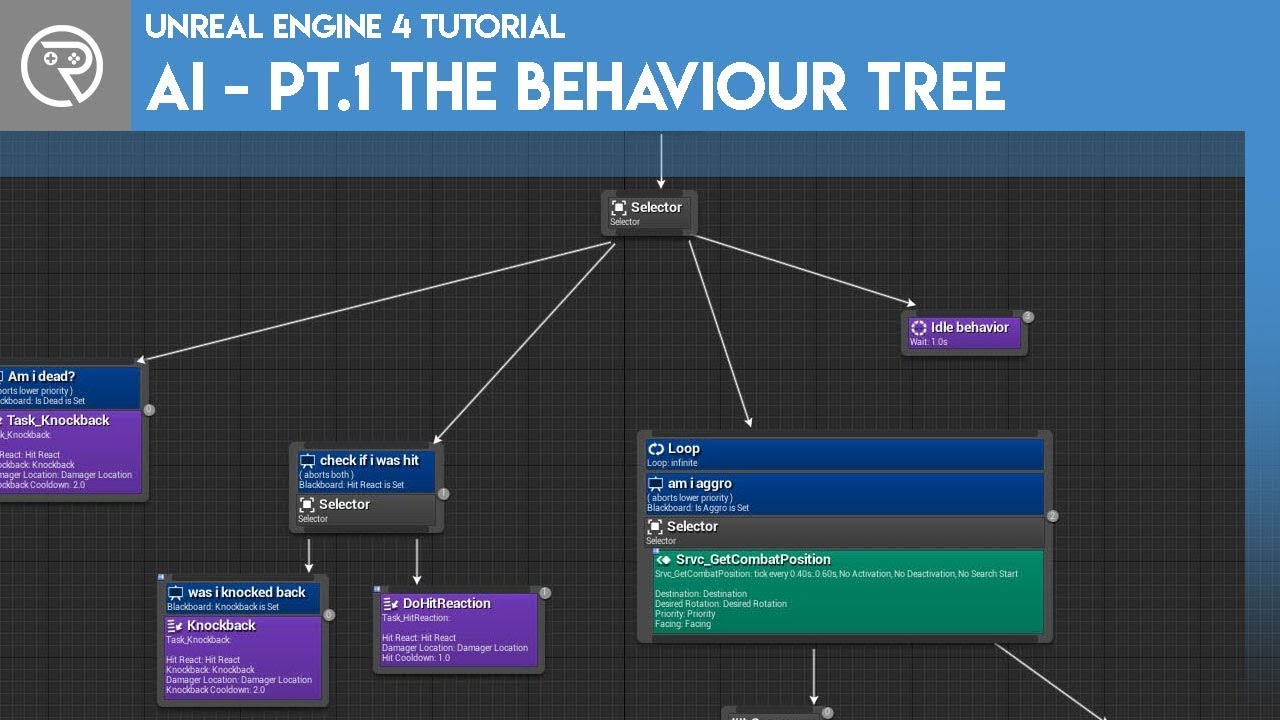
Welcome to the start of a brand new series. This time we are diving into AI for games. This episode introduces the concepts being used in AI design and in particular, the behaviour tree. In this episode we add an NPC that can randomly roam around the level.
Support me on Patreon and get access to videos early, join our developer community on Di...
he has a newer video just look on his youtube page
marsh gulch
Alright awesome
marsh gulch
dim loom
https://www.youtube.com/watch?v=zNJEvAGiw7w&list=PL4G2bSPE_8ukuajpXPlAE47Yez7EAy...
I'm currently following along with this one from Ali Elzoheiry:
https://youtube.com/playlist?list=PLNwKK6OwH7eW1n49TW6-FmiZhqRn97cRy&si=gnvwbIFRE-yPMVv2
YouTube
This tutorial series will teach you how to use advanced AI features in Unreal Engine 5 to create Smart enemies that: - Collect data from their environment an...


 dim loom
👍
marsh gulch
gentle urchin
So Delay is started on first exec.
Cast is invalidated on second exec.
Cast is a...
Is that why there needs to be a delay, because else it skips over disabling/enabling movement again cus cast only gets accessed in third exec?
gentle urchin
The delay acts to re-enable the movement of the target after a while
not really the way i'd do it but not my place to question it to much 😛
marsh gulch
Totally is, I don't know a lot yet so pulling stuff into question is the Socrates way
marsh gulch
gentle urchin
The delay acts to re-enable the movement of the target after a while
Is that why if the delay is super short that it keeps switching between the two the whole time? Because it's in sequence so it goes over both?
I would say I can up the tickrate of registering the other actor couldn't I?
marsh gulch
It makes the looked at actor freeze, like weeping angels/coil heads kind of deal
marsh gulch
Uhm let me look for an example

 marsh gulch
gentle urchin
not sure i catch that reference
marsh gulch
gentle urchin
not sure i catch that reference

watch as i literally shit my pants and freeze because of a coil head in lethal company 2023.
gentle urchin
so it moves when you dont look at it
gentle urchin
gotcha
I wouldnt use a delay at all
I'd register on overlap, store the variable,
and unregister on end overlap, re-enabling movement and clearing the variable
marsh gulch
Alright that does sound super logical, I have no idea how to register/store variables plus clearing it
gentle urchin
dont you already have a "sight cone"
marsh gulch
Yes I do have that
marsh gulch
gentle urchin
I wouldnt use a delay at all
The problem with not using a delay is that it keeps switching back and forth between enabling and disabling the movement
gentle urchin
i wouldnt use pawn sensing at all tbh
 celest lotus
Can tell me whats going on here? Im trying to make a tetris and so im doing a line trace if the hit is false im adding local offset of 100 and if hit gets true i spawn a new block
gentle urchin
marsh gulch
The problem with not using a delay is that it keeps switching back and forth bet...
id create a custom sight component
using a sphere + linetrace
marsh gulch
celest lotus
Can tell me whats going on here? Im trying to make a tetris and so im doing a li...
Item origin?
celest lotus
marsh gulch
Item origin?
hm?
its a default floor u get in basic level
i didnt changed any collision settings of anything
marsh gulch
gentle urchin
id create a custom sight component
There's probably a tutorial somewhere for that I assume right
gentle urchin
probably not
ignore making it a component
it's just two things
you can stuff it in your pawn tbh
It's a Sphere Collision component
marsh gulch
celest lotus
i didnt changed any collision settings of anything
The block origin point is probably in the center of the tetris block instead of at the bottom
gentle urchin
which acts as the "detection radius"
OnOverlap -> Cast to BP_Freeze -> store in variable
On Tick -> Linetrace from self to BP_freeze ,
if successfull -> Disable movement
if failed -> Enable movement
dim loom
celest lotus
hm?
it looks like your sphere track isent at the front you could move it up
celest lotus
dim loom
it looks like your sphere track isent at the front you could move it up
no the spehere trace is for detection where its getting hit
marsh gulch
gentle urchin
OnOverlap -> Cast to BP_Freeze -> store in variable
On Tick -> Linetrace from se...
Like just getting a sphere/cone object, make it no collision and then implementing this on it?
dim loom
yea but then its ment to stop right
gentle urchin
 celest lotus
yes
dim loom
so move it up
gentle urchin
gentle urchin
 dim loom
instead of it being half way just move it too the front
celest lotus
move sphere trace?
dim loom
yea
celest lotus
 dim loom
its a bit weird that you have it half way
marsh gulch
gentle urchin
And then adjusting the radius of the sphere right
celest lotus
dim loom
its a bit weird that you have it half way
i didnt set it, i doing a draw debug sphere on impact point
my bad didnt specified it before
my blocks are stopping after crossing the floor
dim loom
i wouldent realy do it that way i would just have it stop when it hit a other actor or mesh
marsh gulch
I'll try it out later got class again now (UE class xd) Thanks for helping out guys
celest lotus
thats wt im trying to do
celest lotus
dim loom
i wouldent realy do it that way i would just have it stop when it hit a other ac...
but the hit is getting detected very late ig, i really dont know whats happening
dim loom
wel am starting unreal at the moment
gentle urchin
marsh gulch
And then adjusting the radius of the sphere right
This is what you need


or how i'd do it *
marsh gulch
gentle urchin
This is what you need
Wow that was fast, that does look what I'm looking for thanks so much
gentle urchin
Sphere radius is whatever you wsnt it to be
dim loom
you can add a box colision in your actor place it at the bottom of the blocks when it over laps with the floor you can stop its movement just use the box colision event to stop its movement click on the box colision and on the detail panel scroll to the bottom and you will see events there select the on component begin overlap and when that fires stop its movement
so just fire off the code you already have you dont need to use a line trace for that @celest lotus
gentle urchin
marsh gulch
Wow that was fast, that does look what I'm looking for thanks so much
Perfect. With a 10% start discount, that'll be 299 * 0.9 = 270$
/jk
dim loom
OOO and consol tasion costs with it thats 10 $
🤪
@celest lotus give that a try. i need to go now but let me know if you got it working
celest lotus
dim loom
<@1161880522541236304> give that a try. i need to go now but let me know if you ...
i thought about using that before trying line trace, as i said im trying to replicate tetris so it will hard since every block is of different shape and im spawning same class every time just the static mesh inside the class is getting randomized alsoo the problem i was facing was solved. I was doing the line trace in positive Z axis i.e from actor location to +100 units from actor location and thats why the the hit got detected too late, i should do -100
celest lotus
dim loom
you can add a box colision in your actor place it at the bottom of the blocks wh...
Thanks for ur time btw
gentle urchin
They might be controlled in a shape but logically they're all still individual blocks
They're just controlled together during falling
 sudden swan
Hm Hiya, question. I think im getting the blueprint function library wrong. I made a simpel setup to assign car parts so i can open them en rotate the wheels.

Now i want to use this function in other blueprints and be able to adjust the floats in the function.
for example this float

But when calling this function in another blueprint I cant see the floar values in the details tab
When making the same function within the blueprint I see all the variables.


but when using the blueprint function library,

I cant see or edit the variables inside.

Im probably misunderstanding the blueprint function library
tl:dr I'd like to get the local variables from the blueprint function library to show up in the details panel when I call that function to my blueprint.
or some how store a function so that i can use it in other blueprints withput making all the variables again.
 formal narwhal
shouldn't this give me 9 pixels? It gives me array length longer than 1000 if Im in the middle of the image.

Prev Position never goes beyond the pixel bounds
 wintry imp
Tinkering with physics constraints.
Generating the constraints you see here at runtime, and then drawing a debug sphere/line using the location and forward vector, but obviously the component itself doesn't rotate or move ...
Any idea how I get the actual constraint origin & rot to visualise this?
Or any better ways I can visualise the constraints while I'm testing things?
frosty heron
sudden swan
or some how store a function so that i can use it in other blueprints withput ma...
U can't store local variable
they get destroyed when the code block ends
Do print string even work without valid world?
 chilly plover
got a strange one: Mobility of : WaterBodyLakeComponent has to be 'Movable' if you'd like to move.
I have made it movable but it still says this message. I am basically trying to move the water along a line
 little moat
I use a different save game class and it starts working, WHAT?

 frosty heron
What's the issue?
Wdym by different save game class. You are suppose to derive one anyway
little moat
frosty heron
Wdym by different save game class. You are suppose to derive one anyway
The first one is in C++ and gives me "read none at X" and the second one which is a blueprint class works fine
frosty heron
little moat
The first one is in C++ and gives me "read none at X" and the second one which i...
Shouldn't be an issue but you want a bp of every cpp class anyway
little moat
frosty heron
Shouldn't be an issue but you want a bp of every cpp class anyway
Well I don't
It's an issue and I don't understand why, they have the same variables
 lofty rapids
c++ and bp is great together, c++ adds that performance where you need it
frosty heron
Up 2 u but the wise ppl tell you that you should. I will just listen to them
Not having bp version means you have to hardcode paths
If u like pain, then...
little moat
frosty heron
Not having bp version means you have to hardcode paths
Yeah I get that but I don't need a path in my SaveGame class
frosty heron
I would also use subsytem like they suggested
little moat
frosty heron
I would also use subsytem like they suggested
I don't really need a subsystem for this
Wrong channel
 astral orchid
frosty heron
little moat
I don't really need a subsystem for this
astral orchid
frosty heron
little moat
I don't really need a subsystem for this
So where you gonna place your save game object??
little moat
frosty heron
So where you gonna place your save game object??
No idea I thought it would just work like that
frosty heron
little moat
No idea I thought it would just work like that
No, please just listen to those veterans they know what they doing
We should be humble when we don't know better
The problem now, is you travel to another level your save game ref is gone
How u gonna fetch it? It got destroyed when new world is made
lofty rapids
game instance
frosty heron
Your option is game instance or game instance subsystem
If u gonna do cpp then no brainer to use subsystem
Cuz then u don't need to clutter Ur gi
little moat
frosty heron
We should be humble when we don't know better
Well I do know why I don't need it
Because I don't switch levels
 lethal night
Anyone have a clue why this isnt working

It runs all loops instantly without waiting for the Ai to move
frosty heron
lethal night
It runs all loops instantly without waiting for the Ai to move
Yes loop happend in one frame
frosty heron
No it just run everything in one frame
lethal night
I guess its probably a mis-understanding but oh well
frosty heron
Ye I had to find out as well
lethal night
I was trying to be intuitave and not repeat find random, move AI 4 times in a row lmao
frosty heron
little moat
Because I don't switch levels
Not even from main menu?
little moat
frosty heron
Not even from main menu?
Yes but then I just override the default pawn which has everything gameplay related
little moat
It's not that complex but right now I just want to figure out why it isn't working with my C++ savegame
So if someone would be willing to help I would greatly appreciate it.
 tight pollen
hi
Is it possible to disable the ability to jump in a faster way than creating a macro that blocks the jumping button?
i see this

but how can I change the variable in this function?
or something else?
lofty rapids
i would just use a bool but maybe there is a canjump setting idk
frosty heron
That variable lives in Movement Capabilities. but honestly, I wouldn't touch it.
Just block on your input and call it a day
 tight pollen
frosty heron
That variable lives in Movement Capabilities. but honestly, I wouldn't touch it....
tight pollen
frosty heron
That variable lives in Movement Capabilities. but honestly, I wouldn't touch it....
why you wouldn't touch it?
frosty heron
tight pollen
why you wouldn't touch it?
cuz I don't know what it does and CMC is 10k long + I can't read code.
tight pollen
ok
frosty heron
things might break, is all i'm saying because if we can toggle it at our will, why dont they make an exposed function to toggle can jump
maybe it work maybe it doesn't, I dunnoe
most of the time I see people just block on input
like if u need to check for mantle and all that
tight pollen
I want to block the ability to jump when I run Montage
lofty rapids
you don't want to use a boolean ?
wdym create a macro ?
stick a boolean and branch in here before jump

 frosty heron
tight pollen
I want to block the ability to jump when I run Montage
frosty heron
tight pollen
I want to block the ability to jump when I run Montage
Just define the rule in input imo. If condition met (do something else) otherwise jump as normal
frosty heron
All loops run in one tick
u get infinite loop when you loop through X ammount of time
X determined in project setting
forgot the name, never bothered changing the value
Becareful with while loop
if u dont have the exit condition in the same frame, u gonna get infinite loop error
lofty rapids
in general when programming i avoid while loops
there are some occassions where it's necessary but i avoid it at all costs
instead of while i would use bool on tick
or something like that
frosty heron
different loop different usage imo
lofty rapids
while loops just have the possibility of stalling the app high
i just avoid it, it's a personal preference
too many times i got locked up in a while

ブループリントとC++のパフォーマンスの比較をしてみました。ブループリントのネイティブ化をした結果も動画の後半に載せています。
I tried to compare the performance of blueprint and C++. Blueprint Nativization is posted in the latter half of the movie.
loops though, pain in the ass
frosty heron
@lofty rapids well you already licked cpp, keep going with it
lofty rapids
ya i generate my levels with cpp now
frosty heron
my first cpp code was life saver, it's really eye opening
lofty rapids
It's really cool i basically never used c++ before, i tried it out a couple times
frosty heron
I have plugin that import mesh and materials, gotta repeat the process 18 times to rename materials with each import
with c++, I can rename them in one click
lofty rapids
fortunately for me i can do most of the stuff in bp
frosty heron
even a little helps
lofty rapids
but having the ability to run functions made in c++ is awesome
frosty heron
move all your bp structs too
lofty rapids
i have not used a struct yet
but i will use in c
i heard also enum
but i used enum in bp no problem
but i guess it can break ?
frosty heron
ye I never had problem with bp enum too tho, if u gonna do some cpp, you can't get that enum in bp land
but if u declare in cpp you can access the enum in both world
lofty rapids
i'm just going to offload stuff to c++ if i think it would help performance, but bp is doing most of the work in project

this is generating the level on the fly with bp
works well, but if it starts bogging down then move to c
frosty heron
👍
lofty rapids
i'm actually surprised after my loop problem that it handles it
the only part i needed c was for the actual data generation, but i technically didn't need it i just wanted to have large levels if desired and get some performance as it was breaking in bp
but i can't say it enough, huge performance difference
frosty heron
Ye
 chrome arch
Is there a way to invert “Finterp to?” I am trying to move an actor to its starting position but I do not want it to slow down at the end. I would prefer it to accelerate the entire time until it hits its destination.
Or is there any other way to move an actor to a location with acceleration?
 severe tendon
Normally where should the raytrace origin be?
Camera or Weapon?
lofty rapids
i'm not sure about normally, but it would be difficult to hit center from the weapon
 shut yew
hey
im tryna change the book after something happens


and the scale is so small

yo @lofty rapids can you help me w this please?
 thin panther
severe tendon
Normally where should the raytrace origin be?
Camera or Weapon?
thin panther
severe tendon
Normally where should the raytrace origin be?
Camera or Weapon?
the origin is in the #rules about crossposting
severe tendon
Ok thanks
lofty rapids
shut yew
yo <@910231430074859570> can you help me w this please?
whats going on here ? it's tiny in the first picture i'm guessing the second is when it's open ?
shut yew
lofty rapids
whats going on here ? it's tiny in the first picture i'm guessing the second is ...
second is in game
third is in socket
ill try to make a vid
frosty heron
you probably scale the socket
shut yew
frosty heron
you probably scale the socket
i did
frosty heron
well then, what's the suprise?
shut yew
scaling doesnt change it
frosty heron
scaling the socket, will scale the children
shut yew
yea
 frosty heron
You want to fix your book size to begin with
shut yew
(in game)
frosty heron
Can't debug from my end
i can't even see the socket scale
In general you want the correct size for your mesh
frosty heron
and dont touch scale off the socket
You might scale it again with code somewhere in the bp, I dunnoe
shut yew
lofty rapids
did you try messing with the scale setting in the attach ?
ya
i put keep relative
snap to target
still dont change
lofty rapids
did you scale the actual book ?
shut yew
that too
frosty heron
sounds like bandage after bandage
any reason why u can't get scales to be 1 : 1?
scale your book in 3d program
lofty rapids
just seeing if the open book function is causing it, or it's just attaching that small
frosty heron
you can't
frosty heron
How do you even pause with delay?
shut yew
no i meant
frosty heron
Use Timer
shut yew
yeah you get what im saying
 sand slate
Hey, is there a special chat here for UI or can I ask my UI question here? I have a button in my menu for adding a local player. And when the first player presses that button a small widget (with player name and option to edit player colour) needs to replace that button on exact the same spot.
How do I do this? I can create the widget when someone presses the button, but its not on the right spot. Is there a node for this?
frosty heron
sand slate
Hey, is there a special chat here for UI or can I ask my UI question here? I hav...
there is #umg
shut yew
frosty heron
there is <#221799467689574410>
timer by event?
frosty heron
shut yew
timer by event?
depends on what you want to do
there is timer by function too
 sand slate
frosty heron
there is <#221799467689574410>
sand slate
frosty heron
there is <#221799467689574410>
Thanks, going to ask it there
frosty heron
sand slate
Thanks, going to ask it there
local Split screen multiplayer or network multiplayer?
frosty heron
shut yew
whichever one works idk
Neither for that purpose
sand slate
frosty heron
local Split screen multiplayer or network multiplayer?
Local Split screen
frosty heron
You can use delay in Custom event, tho generally you want to avoid using delay
frosty heron
sand slate
Local Split screen
k, I have no idea

 frosty heron
not gonna work
No
You can't use Function then use delay
Don't use function
call custom event
shut yew
then what am i supposed to do
frosty heron
lofty rapids
shut yew
are you returning anything from the function ?
if not just use an event if you want delay
 frigid needle
Hi! Is there pure map/filter/reduce functions in Blueprint?
lofty rapids
i don't think so, theres a foreach
frosty heron
never heard that
lofty rapids
functions with callbacks that give you a new array based on the callback return value
 hard charm
Guys, it's giving me a problem when compiling, it turns out that I want to activate a Niagora particle in a UI with activate system but when compiling the project because I have the activate sytem node included in the widget it gives me an error
Error: [AssetLog] D:\whisperofsoul_4.26\Content\CloseCombat\Blueprints\Hud\HUD_Widjet_Warrior.uasset: [Compiler] In use pin <Unnamed> no longer exists on node ActivateSystem . Please refresh node or break links to remove pin. from Source: /Game/CloseCombat/Blueprints/Hud/HUD_Widjet_Warrior.HUD_Widjet_Warrior
lofty rapids
hard charm
Error: [AssetLog] D:\whisperofsoul_4.26\Content\CloseCombat\Blueprints\Hud\HUD_W...
looks like you ActivateSystem changed and removed a pin
delete then insert the node again
or break links like it says
right click, break link
 lunar sleet
lofty rapids
delete then insert the node again
lunar sleet
lofty rapids
delete then insert the node again
You can right click refresh a node btw
lofty rapids
much easier
 winged relic
I have a curiosity question. Im trying to make a random enemy generator for a game im working on. When I spawn into my unreal engine world without landscapes, the enemies (zombies in this case) work just fine. But when I turn the map into a landscape (with no ground static mesh unlike the regular template map) the generator no longer works. Any idea as to why that is?
What i wonder is do I have to reference the landscape inside of the generator so it knows to spawn the zombies onto the landscape map?


welp nvm on that
it started working lol
 surreal peak
winged relic
I have a curiosity question. Im trying to make a random enemy generator for a ga...
surreal peak
winged relic
I have a curiosity question. Im trying to make a random enemy generator for a ga...
Your Landscape was possibly not generating Nav Mesh ?
winged relic
thats what im thinking, is there a way to ensure it does everytime I hit play? instead of just hoping it works?
like can i make a BP to have the landscape generate the nav mesh?
chilly plover
How do you call the level blueprint instance in another blue in unreal engine?
frosty heron
chilly plover
How do you call the level blueprint instance in another blue in unreal engine?
you don't
abbandon level blueprint
 rich ferry
chilly plover
How do you call the level blueprint instance in another blue in unreal engine?
rich ferry
chilly plover
How do you call the level blueprint instance in another blue in unreal engine?
You probably shouldn't be using the level BP for anything
frosty heron
The communication is only one way with level bp. It's a thing of the past, don't use level bp
 versed sun
Only use the Level BP to make Tutorials
 crystal crown
how can i do a thread safe interface call
rich ferry
Hopefully this is the right channel. I've been wrestling with this for a long time and thought I'd see if I could get any new insight.
My main pawn is a tank, which has a turret. The turret is its own actor that is attached via an actor component. I want to give my tank a reticle that follows the direction of the gun and, within a certain distance, comes closer to the tank if the projectile is obstructed.
Originally I did this with a spring arm and widget component, however I discovered that this causes the widget to be visible to all players, and I didn't want that. I couldn't get "only owner see" (or similar settings) to work right, I could still see other tanks' reticles no matter what. Even in cases where those settings do work right in static meshes on the turret.
So instead I tried using the HUD and translating the world location of a line trace impact point into screen location. But with this, I discovered a bug (which many discuss online) where the world-to-screen nodes do not appear to work properly. The given screen coordinates are simply wrong.
Has anyone been able to pull off this effect, or have any advice on how to get around these issues?
 wanton radish
how does it work that my katana item weights same as my pistol item and pistol item is being throwed much further? does physics asset has some impact on that?
 steel shadow
rich ferry
Hopefully this is the right channel. I've been wrestling with this for a long ti...
steel shadow
rich ferry
Hopefully this is the right channel. I've been wrestling with this for a long ti...
if your spring arm/ widget component method was working other than being visible to all players, I think you should not have the widget component initialised on start but instead spawn it on client in game and store a reference for manipulation on the client
rich ferry
steel shadow
if your spring arm/ widget component method was working other than being visible...
So basically create it, but don't replicate it, to mimic the behavior of "only oner see"?
steel shadow
yes
 stark patio
Does anyone know if there is a way to completely disable all events inside an actor temporarily?
rich ferry
stark patio
Does anyone know if there is a way to completely disable all events inside an ac...
If you couldn't find anything on google, I'd say probably not
 undone sequoia
guys any idea how I can make my AI turret little bit less accurate ? as it is now? its tracking all pawns around and shooting at you when u are close enough bullets are with collisions but its still pretty accurate
stark patio
undone sequoia
guys any idea how I can make my AI turret little bit less accurate ? as it is no...
what method are you using to make it turn towards the pawns?
stark patio
rich ferry
If you couldn't find anything on google, I'd say probably not
ye you are most likely right, just wanted to duble check here
undone sequoia
stark patio
what method are you using to make it turn towards the pawns?
just this

and its shooting at it
immediately
maybe use some finterp to?
stark patio
undone sequoia
just this
ah i see, try using something like this. This will make the turret turn towards a location at a certain speed and not instantly look at something
 rich ferry
undone sequoia
maybe use some finterp to?
rich ferry
undone sequoia
maybe use some finterp to?
That's certainly a good idea, you could also add spread to the projectile so it's not pinpoint accurate
undone sequoia
yea thx guys!
😄 definitelly will try
another idea is how i will make my plane not to be 100% accurate when chasing me and shooting at me with front gun hah
stark patio
undone sequoia
another idea is how i will make my plane not to be 100% accurate when chasing me...
how have you coded your planes movement?
undone sequoia
stark patio
how have you coded your planes movement?
oh boy was hard way 😄
hours
we are not using forces but normal setting actor rotation/ location
we created own gravity etc
undone sequoia
stark patio
how have you coded your planes movement?
maybe give me more exact question and I can answer
stark patio
undone sequoia
maybe give me more exact question and I can answer
is it flying and does it use navemesh in any way?
undone sequoia
stark patio
is it flying and does it use navemesh in any way?
u asking for NPC or my plane?
stark patio
undone sequoia
u asking for NPC or my plane?
the plane
undone sequoia
because NPC plane works different than my which I move with
stark patio
undone sequoia
because NPC plane works different than my which I move with
ah sorry thought you meant the turret when you said NPC. I want to know how the NPC plane works
undone sequoia
stark patio
ah sorry thought you meant the turret when you said NPC. I want to know how the ...
here small video so u can see, its on testing map i just created NPC few hours ago, NPC plane is basically copy of my with deleted functions which it does not need
it basically has some points and randomly fly between them
for now , i need implement chasing
(and i have no animations there, my model is broken 😄
it is flying 10-20 sec to some location then choose new and turn there
undone sequoia
I wanted to make some distance to which it can fly but I want it to stick at one place at map
so points between it is moving are better then
imo
lofty rapids
instead of having the npc shoot directly at you, maybe make it jump around within a range ?
stark patio
undone sequoia
for now , i need implement chasing
I have made a nice flying chasing enemy before but in my case i didnt really need to account for how it would be turning (since i guess you want it to turn like a plane when it chases the player).....
Maybe you could try to make the npc plane move towards where the player was a bit ago and then update?
undone sequoia
lofty rapids
instead of having the npc shoot directly at you, maybe make it jump around withi...
But also I just noticed not all bullets hitting me as its not linetrace but real colliders so it already has some mistake i will add more with rinterp to
undone sequoia
stark patio
I have made a nice flying chasing enemy before but in my case i didnt really nee...
yes my plane is turning like in reality but its still not the best , i will improve it later
yes i can do that too
 main lake
Can "Component Actors" be spawned in the world then attached to the player or is there a specific way to do that without spawning and directly attaching it on the player ?
undone sequoia
main lake
Can "Component Actors" be spawned in the world then attached to the player or is...
yes that is way how collectibles in my game works
it get spawned and u can pick it up by attaching it at player
main lake
undone sequoia
yes that is way how collectibles in my game works
are you sure you're using "Actor Component" and not just "Actor" ?
undone sequoia
i will check
undone sequoia
main lake
are you sure you're using "Actor Component" and not just "Actor" ?
I am using pawns
why do you use actor component?
main lake
undone sequoia
why do you use actor component?
Because I want to create an ability system, where each ability is a single "actor component" that could be attached / removed to the player so he can use it when he has it.
undone sequoia
and did u already try it and it didnt work or u asking i dont think there is difference
it can be picked imo same as pawn
main lake
undone sequoia
and did u already try it and it didnt work or u asking i dont think there is dif...
I'm asking if could be spawned like a simple actor and attached to the player or is there another way to do that ?
 undone bluff
main lake
Can "Component Actors" be spawned in the world then attached to the player or is...
undone bluff
main lake
Can "Component Actors" be spawned in the world then attached to the player or is...
I don't get the question
undone sequoia
I think u need try it then ask 😄
because function for attach is inside this blueprint
as I checked
undone bluff
when you add a component actor it is attached, components cannot be in the level without an actor
undone sequoia
undone bluff
when you add a component actor it is attached, components cannot be in the level...
he want put it on map
so you can pick up
and attach it on yourself
i think
undone bluff
well that's simple enough
make an item actor
which adds the component to the pawn that picks it up
if you want something to be in the world it needs to be an actor
undone sequoia
true
main lake
undone sequoia
he want put it on map
no, I want to give and remove an actor component from the player how should I do that ? Because usually we need to spawn an actor before doing something with it like attaching it, so is it the same with an actor component itself ?
undone sequoia
main lake
no, I want to give and remove an actor component from the player how should I do...
here i cant answer i never used actor component I think u would not see answer unless u try :/ sorry
main lake
so adding / removing the component directly from the player without having an actor containing it
undone bluff
you add the component to the actor, you can attach it to another component but it is already part of the actor
crystal crown
how do i call interface with thread safe
main lake
undone bluff
you add the component to the actor, you can attach it to another component but i...
So that means each of my abilities must be in a "actor component" that would be in an actor first before attaching it to the player ? So there's no way to directly spawn the "actor component" directly on the player ?
undone bluff
no you literally just add the component to the player, that's it
undone bluff
using the add component by class node lol
main lake
undone bluff
using the add component by class node lol
Thank you, that's what I was looking for 😛 Because I thought you had first to spawn it in the world then attach it like how you with any actors 🙂
undone bluff
because an actor cannot be part of another actor
you can only attach them
if you wanted to attach a component to another you'd need to do the same
there's a distinction there
main lake
undone bluff
because an actor cannot be part of another actor
so attaching an actor to another actor you can't do that ?
crystal crown
you can
undone bluff
main lake
so attaching an actor to another actor you can't do that ?
attaching and adding are not the same thing
when you attach something to something else, it will move, rotate, and scale relative to whatever it is attached to
you can attach an actor to another
and you can attach an actor component to another
chilly plover
what would you use instead of the level bp class?
undone bluff
well, technically attaching an actor attaches the root component
but you get the idea
adding is a different operation, it makes the actor component part of the actor, including any included logic
an actor cannot be added to another actor
lofty rapids
chilly plover
what would you use instead of the level bp class?
what are you doing ?
undone bluff
chilly plover
what would you use instead of the level bp class?
considering there is practically no reason to use the level bp ever this is like asking how to do things
chilly plover
set level defaults so I can use them in saving on a gameinstance
undone bluff
what are level defaults
chilly plover
item picked upo, enemy dead etc
lofty rapids
your doing that stuff in the level bp ?
undone bluff
I really do not follow
lofty rapids
hmm, i put most of my code on the player and game instance for variables
but i should probably use the controller because i'm stuck with that bp
undone bluff
item being picked up should be handled in your inventory and that's it
maybe in the item, but that's not a great setup
lofty rapids
chilly plover
item picked upo, enemy dead etc
so your setting a lot of variables ?
chilly plover
like I have a level which has a house in it and in the houose is an item. I pick it up and next time I load the level the item should disappear. Where do I store this logic?
lofty rapids
one way to handle that might be to have id's on certain items, then an array that holds all the got items id's in the game instance, after you load the level check the array includes the id and get rid of it if it does.
 frail galleon
Where's the best channel to post about techinal animation / anim instances / locomotion stuff?
 dry sleet
probably #animation
undone bluff
chilly plover
like I have a level which has a house in it and in the houose is an item. I pick...
easy way out is adding a tag for items that have been picked up, grabbing them to save the state of that tag when the game is saved, then when loading again getting all actors with tag and destroying them
get all actors with tag is slow as hell but I'd say fine if done just once when loading in
chilly plover
What I basically mean is where do I put this code?
I need a default level bp
but the one built in you guys say don't use
lofty rapids
the player ?
undone bluff
chilly plover
What I basically mean is where do I put this code?
game instance
chilly plover
so I just create another bp class?
I don't want to keep all the logic for each level on the player class
lofty rapids
i would put the code in the character and the variables in the instance
chilly plover
Because these are big levels I want to separate it
lofty rapids
make a function library ?
undone bluff
none of this logic should be level dependent
chilly plover
like on the game load. if level == true then load a class that has that level object
undone bluff
unless you have level specific events, which you can make a manager for
undone bluff
chilly plover
I need a default level bp
I still don't get for what
chilly plover
to set a variable to see if an item exists in the level anymore
undone bluff
making a variable to save for each item individually is ridiculous
if you don't want to run get all actors by tag then just get all actors of class of your base item class and check them for tags
lofty rapids
i have not used tags yet
chilly plover
Ok but where do I get the info the item is missing then?
undone bluff
by it having the tag on it
if you have a variable in your level bp or whatever
you'd still have to save that
I'm not even sure you'd be able to access it in blueprints
lofty rapids
if you set a tag on an actor in a level, when you load the level wouldn't you need to have something in the instance telling it to reset the tag ?
what i mean is wouldn't the tag reset ?
chilly plover
no
lofty rapids
thats nice to know, the tags carry over ?
chilly plover
It will always be the name you give it if thats what you mean
It's a way to reference something
lofty rapids
well i'm saying if you get the item change the tag, you'll still need to know that because it will reset when the level loads anyway
atleast thats what i would expect
chilly plover
I need to store the tags in an array struct and save them on game save and then load these back into a level class and do the logic
undone bluff
no the tags are ofc gone when the level loads and everything you do not save is gone when the game is restarted
 solemn basin
How do I pass a reference to the widget? I have the widget as a component in the actor. I want to destroy the actor whenever a button is pressed in the widget.

 undone bluff
they are just there to indicate that the item is not in its default state
not sure why I suggested that though, instead of a tag just store an array of references in the save game
winged relic
surreal peak
Your Landscape was possibly not generating Nav Mesh ?
Hey, im not sure if you saw my response but, is there a way I can have the Landscape properly generate the Nav Mesh everytime? Maybe by making a blueprint that calls for it or something?
frail galleon
frail galleon
Where's the best channel to post about techinal animation / anim instances / loc...
Hey? 😄
 dawn gazelle
frail galleon
Hey? 😄
dawn gazelle
frail galleon
Hey? 😄

 jolly cipher
Im trying to recreate a pokemon coming out of a pokeball anim sequence but having an issue with the Set Actor Scale 3D.
On begin play I set my scale to 0.5 wait 5 secs and set to 2 ( Only for testing )
When the 2nd Actor Scale kicks in, my character just gets stuck in a Tpose,
So weird if I start at 0.5 and then set it to 1 it seems ok but if I set it to 0.3 to 1, it breaks again
This is not making any sense to me lol
surreal peak
winged relic
Hey, im not sure if you saw my response but, is there a way I can have the Lands...
Puh I don't work with that very often. Iirc it would need to block the Pawn channel in its collision settings. NavMesh should properly update in the editor by default
surreal peak
jolly cipher
Always funny to see what pops up in chat when specific games get famous
😏 parent class name of that .. animal
Not sure what your issue could be though. Is this singleplayer or multiplayer?
You could try to set the AnimBP class again
Fwiw I would also suggest maybe scaling the mesh and setting the capsule size separately
Instead of scaling the actor as a whole
jolly cipher
Its multiplayer 🙂
jolly cipher
surreal peak
Fwiw I would also suggest maybe scaling the mesh and setting the capsule size se...
Ah interesting let me give that a try
surreal peak
Right so Actor scale is a strange one for multiplayer
Since it's somewhat replicated already
And since you call it on BeginPlay it might get into a strange state
I would suggest the mesh scale solution
jolly cipher
Ah good to know, so far mesh scale does seem to be working better 😄
surreal peak
Also
Keep in mind relevancy
Since you call that on BeginPlay
It will trigger for everyone getting into range or connecting late
Even if that thing is already fighting for half an hour
jolly cipher
Oh! I might have to rethink my logic then, I only wanted this "animation" to start when you spawn the animal .
 faint pasture
chilly plover
item picked upo, enemy dead etc
faint pasture
chilly plover
item picked upo, enemy dead etc
GameState probably
faint pasture
surreal peak
Since it's somewhat replicated already
Is there a writeup somewhere that goes over what exactly you get with Actor Replicates and Replicate Movement?
surreal peak
jolly cipher
Oh! I might have to rethink my logic then, I only wanted this "animation" to sta...
Yeah it's a bit tricky. An RPC might not get through directly after spawning unless reliable and I'm not sure it comes in without showing the animal with default values for a few frames.
Marking it as spawned with a replicated variable is probably better, but you would need to give it a few seconds before doing so, so it doesn't block the actual relevant players too
surreal peak
faint pasture
Is there a writeup somewhere that goes over what exactly you get with Actor Repl...
Maybe?
Replicates does a bunch of stuff in the background. Mostly probably ActorChannel creation and considering it for replication in general.
ReplicateMovement you can simply check. It replicates a struct iirc that holds some movement info. Mostly the transform by default
Maybe minus scale
faint pasture
Which one implies replicating attachment, just actor replication itself?
I've wondered about that. Like, consider an actor attached to another, with both replicated and both with replicate movement checked. You move the parent, are 2 actors worth of transforms being replicated or just the parent, with the 2nd knowing that its RELATIVE transform hasn't changed?
surreal peak
faint pasture
I've wondered about that. Like, consider an actor attached to another, with both...
You'd need to check. I don't have the specifics in my head
Replication is part of the normal replicated stuff of an actor yeah
 tame terrace
Hey, what do you guys use to screen record to send on discord?
faint pasture
tame terrace
Hey, what do you guys use to screen record to send on discord?
OBS
tame terrace
faint pasture
OBS
Oh
 plush hinge
So, I'm trying to create team colour based spawnpoints for Lyra, using this tutorial: https://dev.epicgames.com/community/learning/tutorials/XjBe/unreal-engine-lyra-team-based-spawn-points
Have set the spawn points accordingly: https://gyazo.com/91d73812f20d982caddfb91edfdca7cd
Copied the graph over, and built the local variable: https://gyazo.com/6676f7a0ab8d257302c29adc0b7cc681
And it compiles successfully. But when I play, it doesn't function right, and I get this error: https://gyazo.com/2969d8426006967330a33371656454c8
I can't figure out why it's not getting the proper Red/Blue input. Any ideas appreciated.
 tiny meteor
hi, what is the easiest way for connected clients to detect a new player joining in Blueprint? looks like PlayerArray in Game State cannot be set to OnRep. is there some other way to detect when a client has connected and get all game states on connected clients?
tame terrace
how does someone turn a file from obs into a playable video to send to discord?
plush hinge
Record in OBS as MP4 or something, and then upload to youtube, then send link 😄
Or, if its small enough, upload to discord directly
surreal peak
tiny meteor
hi, what is the easiest way for connected clients to detect a new player joining...
BeginPlay of the PlayerState
Also this is a #multiplayer question
tiny meteor
ok thanks
 dark drum
tame terrace
Hey, what do you guys use to screen record to send on discord?
dark drum
tame terrace
Hey, what do you guys use to screen record to send on discord?
If you have an Nvidia card, you can use the gforce experience to record. If you have windows 11, you can then use clipcamp if you need re-encode to a smaller resolution. (720p)
thin panther
there's also win key, alt and r
tiny meteor
plush hinge
So, I'm trying to create team colour based spawnpoints for Lyra, using this tuto...
is your team short name the same as your player start tag? place a breakpoint on the first branch node to see if it returns true. and check if the correct DisplayAsset is being used for that experience
plush hinge
tiny meteor
is your team short name the same as your player start tag? place a breakpoint on...
They are, yeah. Default Lyra ones: Red/Blue.
tiny meteor
well the error is saying the display asset is null, so the player you are passing in doesnt have an associated display asset, could be many reasons, you need to use a lyra experience with a teams setup
frail galleon
hey guys! I'm using ALS and want to integrate some combat montages on it. If i'm standing still they work perfectly but in some situations with a slight movement something (I guess it's the stop transitions / end transitions or stop movement events) break my montages. Is there any way to make montages work during walk/run process without being interrupted?
chilly plover
Whats everyones preferred saving method out of these two options:
- Auto save on everything and you can't ever chose a different load slot
- Have a place in the level to click save and only be able to save your progress when you interact with the save point.
faint pasture
chilly plover
Whats everyones preferred saving method out of these two options:
1. Auto save...
Depends on the game
 opal pasture
Is here any solution for reset timeline while doing this second animation? Trying to make a combo with RMB. For the first animation its ok, but for the sencond one if i'd like to spam it, loops and makes my character almost unmoveable - after 2seconds it can move again.
 faint pasture
opal pasture
Is here any solution for reset timeline while doing this second animation? Tryin...
faint pasture
opal pasture
Is here any solution for reset timeline while doing this second animation? Tryin...
Keep that montage energy going
you don't need a timeline here
you can do it all with montages
opal pasture
i mean idunno how to root it with my capsule, cuz it stays in origin place either if its rooted or not. Thats my problem. At the motage its going forward but tried everything with root but still in place. Otherwise is there another option that i dont know?
can i send vid here?
 junior prairie
if I create a new graph in a blueprint and copy and paste code from my event graph to the new graph, will the blueprint itself more or less be unaffected?
My event graph for my player is big enough that I'm getting performance drops when editing it
opal pasture
it looks like my capsule doesnt follow the mesh but dunno, i've made my character from blank character bp
lofty rapids
junior prairie
My event graph for my player is big enough that I'm getting performance drops wh...
maybe offload some stuff to functions if you can, might make for less nodes
junior prairie
lofty rapids
maybe offload some stuff to functions if you can, might make for less nodes
yeah I want to do that too, it's just a lot lol
 lusty hedge

WHY isnt this going forward
its driving me crazy
that is the velocity in a projectile component
it just moves over a tiny tiny bit
like 0.00001
but i am multiplying it by 200
lofty rapids
you may want to try a higher number
lusty hedge
i need to redirect the velocity
i am ricocheting off of a wall
and so far. i have the rotation correct
but now i need to adjust the velocity
so you may think. well, if i have the rotation figured already. i can just move it forward! welll... idk why
it doesnt work
 distant hollow
Where is your movement?
lusty hedge

the movement is in a projectile comp
that screenshot calculates where to rotate the projectile
it works

here is my attempt at redirecting the velocity
BUT
it goes up and down
distant hollow
Do a print screen and check what is your actual resulting velocity
You divided by 360
Chances are your value may be quite low
lusty hedge
yes
to normalize it and get a direction
then i multipled that by the speed
the low value isnt the issue. low values mean lower speeds. i need the velocity to be in the correct direction
distant hollow
So are you having a velocity issue or a direction issue?
lusty hedge
both

this is the set node for the velocity in the ProjectileMovement COmp built into unreal
this velocity is in charge of speed in each direction
which is why its a vector

No description provided
thats the blueprint
 vital acorn
does anyone know how i can acheive a better jump for a 3d platformer because the default one feels horrible to platform with and the more i mess with it the worse it gets
distant hollow
lusty hedge
this is the set node for the velocity in the ProjectileMovement COmp built into ...
So have you tried printing out the velocity value to check if it was s correct?
 inland monolith
I'm studying Blueprint communication with dispatchers and interfaces and was wondering if there is any big difference between using a "Get Actor of Class" node or creating an Actor Reference Variable? I feel the first one is easier to use. Thanks!
lusty hedge
i may have found it
i fixed one thing but another problem came
its moving in worldspace i need it to move local space
 fossil linden
 tame terrace
Hi, I don't know why the result on the top left says "You have enough space" it should say "You don't have enough space" because the amount of coins in total which is 205 is split in half due to there being two backpacks so there's 102 coins in each bag. Then the greater condition has 100. And because of the not boolean it should result as if the amount of coins is not greater then it is true which is "you have enough space" and if its false then "You don't have enough space".
chilly plover
is it possible to make a shiney material over a blueprint like an inventory item flashing?
lunar sleet
tame terrace
Hi, I don't know why the result on the top left says "You have enough space" it ...
Debug using breakpoints or watch value
lunar sleet
chilly plover
is it possible to make a shiney material over a blueprint like an inventory item...
Idk what you mean by over a blueprint. Depending on how you make your inventory you can change the material on a timer so it looks like it’s flashing
 opaque acorn
Hi there as we know already ; at searching section if we 2 click at an event it gonna take us there; hwever for functions it make it open. for my cause i want to know where the "Register. . " function is being used at the main graph of the BP_FluidSim however i cant able to find it. ( making it change does affect the BP functionality )
all these are from Water plugin of EPIC GAMES

🥹 pls any info so helpful

 surreal carbon
hey guys I have this issue where the camera view sort of shifts once i use debug lines or trace lines and I'm not sure why

 indigo bough
Hey folks. Just wondering if there is any way to force categories of variables to the top, or at least closer to the top of an actor's details panel? Most of the stuff above is edited very infrequently.
I've tried putting numbers, I've tried reordering in the variables list inside the blueprint. Nothing seems to work 😦


Ahh, it seems to only happen to child classes of this actor class, not the parent class itself 🤔. It's like if you make a child class, it randomises the details panel ordering all over again
 timber basalt
Hey guys quite new here how does Sphere Overlap Actor works in terms of detection ? so im using it for a hit meele collision to increase my enemy "stun bar" the first hit is fine but on the 2nd hit after the first hit it destroys the enemy actor entirely how do i prevent that ?
faint pasture
timber basalt
Hey guys quite new here how does Sphere Overlap Actor works in terms of detectio...
Show code
timber basalt
 faint pasture
Show the part of the code where the problem is
I'm guessing your increase stagger function isn't right.
 frosty heron
inland monolith
I'm studying Blueprint communication with dispatchers and interfaces and was won...
frosty heron
inland monolith
I'm studying Blueprint communication with dispatchers and interfaces and was won...
The first one is beginner trap. Which can be used occasionally if you are sure there is only one instance in the world
 simple spade
I have a question, I'm new to unreal and game development. I've watched a few tutorials but nothing really cover's the type of character movement I want. I have a reference of how I want the character to move. How can I reverse engineer that into something I can recreate? I've developed my own method but it's really janky .
simple spade
simple spade
I have a question, I'm new to unreal and game development. I've watched a few tu...
This is what I'm going for, if anyone knows any resources or could possibly help.
 tough siren
Hello. I'm making a party game and I need a code to randomly select a level for my game and send all players to the selected level. How can I do it or can you send it?
celest lotus
Im setting actor rotation in Y axis as 180 but when im getting actor rotation the value of X and Z axis is 180 and Y is 0 why is that? Im doing to test something but I dont understand why X and Z axis' rotation is being changed. Same case happens when i set Y axis = 90, but in that case the value of Y is 90 while X and Z have 180


 surreal carbon
yea for some reason it only appears when use trace or debug lines
frosty heron
tough siren
Hello. I'm making a party game and I need a code to randomly select a level for ...
Use random int in range node, followed by a switch (int)
 twilit lynx
Im trying to use the Cursor Over/On Clicked events for when a Player cursors over/clicks a state, from a map of the USA. The state will raise and get an outlineduring Begin Cursor Over, and lower it while removing the outline on End Cursor Over. My question is if theres any easier way to do this thats just as reliable (using a trace below the cursor gave me mixed results) but wont require me to do this same code for every State. (Would be 100 Begin/End Cursor Overs, plus another 50 for the On Clicked events.

 vital acorn
I already asked and I got no response but does anyone know how to make the third person blueprint jump better for a 3d platformer as the default one sucks for 3d platformers
lunar sleet
twilit lynx
Im trying to use the Cursor Over/On Clicked events for when a Player cursors ove...
Learn how inheritance works
You should only need to write the code once
lunar sleet
vital acorn
I already asked and I got no response but does anyone know how to make the third...
What’s “better” ?
vital acorn
Something that feels closer to crash 4 or a 3d Mario game
lunar sleet
vital acorn
Something that feels closer to crash 4 or a 3d Mario game
This means nothing to me. What do you need it to do that it doesn’t currently do
vital acorn
Follow a nice consistent curve like movement
lunar sleet
There are settings on the char movement component you can play with but beyond that you would likely need to build your own
lunar sleet
simple spade
This is what I'm going for, if anyone knows any resources or could possibly help...
Unlikely that you’ll find anything that specific. You can use the Swimming mode in the char movement component but aside from that, you’ll need to make your own. Control Rig might be a good place to start tho, there’s decent documentation on it
lunar sleet
tough siren
Hello. I'm making a party game and I need a code to randomly select a level for ...
Starting with a multiplayer game is not ideal, but anyways. Make an array of levels, and use Random Array Item to pluck the level so you can send your players to it.
 prisma walrus
Hi all, just jumping in again in hopes to get some assistance, I've got an active question on the UE forums that is currently unanswered, I've narrowed the the issue further today. The issue is that when I pause the game and by extension the Media Player, the sound seems to Stop rather than Pause, which means everytime I UnPause, the audio starts again and once it gets back to the point the VIDEO paused, the video resumes, any ideas?
Link to forum post which contains video to help illustrate the issue https://forums.unrealengine.com/t/crt-vcr-how-do-i-use-a-trigger-to-play-a-custom-movie/1673640/4

Epic Developer Community Forums
Video showing issue after clicking resume, video waits until sound catches up again until resuming
twilit lynx
lunar sleet
Learn how inheritance works
...care to expand on that? Is there something a static mesh component can inherit that would run the Begin/End Cursor Overlap or On Clicked events?
dark drum
twilit lynx
...care to expand on that? Is there something a static mesh component can inheri...
Create a base continent BP that has the logic all continent pieces would have and the create children of that BP. In the child you can change the mesh used for the static mesh but all the logic would be the same as the parent.
 half swallow
hello! i'm currently making a mechanic for the player to gather resources, and they have a location ability to scan for resources in a radius, with markers (green arrows in picture) pointing in the directions of resource clusters.
currently, i'm able to detect the resources and get the locations, and able to draw those green arrows to each resource, which ends up being a lot of arrows.
is there a smart way to detect clusters of resources in such a way that i can use fewer green markers to still point in a good general direction?

 gloomy swift
What's the proper way to disable/enable scene captures? For some unknown reason, only on my PC, during runtime, when there's more than one render capture going, the entire engine just freezes with no not responding and no error messages, while the VS debugger (UE source) suggests it's waiting for an update or something...
frosty heron
gloomy swift
What's the proper way to disable/enable scene captures? For some unknown reason,...
at run time?
gloomy swift
yes. It's the most unusual bug I've encountered so far, it's consistent but it's only reproducible on my system with an RX 6700xt gpu (my laptop with an AMD igpu doesn't even get this issue)
frosty heron

Render capture is very expensive
you basically render the world again for every capture
gloomy swift
I know what render capture does and a large part of the code I'm making is to optimize for performance
frosty heron
you can toggle the capture every frame
gloomy swift
but there's something inherent with the capture itself I think, like an engine bug, that's causing a complete engine freeze, not just an unresponsive program. GPU and CPU usage drop to idle when the engine freezes but there's no unresponsiveness detected by the OS
frosty heron
No idea, I have 3 render target working at the same time (used to be 8 but my fps get buthcered)
never froze
maybe it varies depending on the hardware, I have no idea but personally never got locked
gloomy swift
The code does disable/enable capture every frame depending on where the player is, there's also some capture on movement stuff for some additional testing. I've also been trying activate/deactivate to disable as well, online is suggesting to disable ticking which I can try
frosty heron
There is Capture on Movement yes
gloomy swift
yeah idk if anyone reading this has an AMD gpu, I bet it's something specific to the dGPU because no one I know has encoutered this issue, and they have nvidia or integrated
and the source engine debugging in VS doesn't help me figure out the issue at all, unless maybe I spend a few hours understanding the backend engine tick
faint pasture
half swallow
hello! i'm currently making a mechanic for the player to gather resources, and t...
Simple approach would be a minimum angle between arrows
Resource -> calc angle to -> if not near another arrow -> draw arrow
That'll naturally adapt, you'll have 1 arrow when far away then as you get closer you'll get more.
half swallow
faint pasture
Resource -> calc angle to -> if not near another arrow -> draw arrow
ooh i like that, and with each arrow i can also assign a weight based on how many are combined into one arrow so it can get an average among the clusters
i've been doing it in a full batch of all locations and therefore struggling with pruning the arrays through multiple for loops but your idea helps a ton, tyty
 odd kiln
Hi all !
Does anyone already tried to change the "Buoyancy" component to look at a custom "Water" Material ?
I don't really know where to start :/
Or do I have to create a buoyancy system from scratch ?
shut yew
how to wait until anim montage ends and then start other anim montage
 wicked magnet
shut yew
how to wait until anim montage ends and then start other anim montage
wicked magnet
shut yew
how to wait until anim montage ends and then start other anim montage
Isn't there an on completed pin on play montage?
odd kiln
shut yew
how to wait until anim montage ends and then start other anim montage
On the "Play Montage" node you have a "On Completed" pin
shut yew
 wicked magnet
Try play montage not anim montage
 wicked magnet
Is play montage not available in functions?
shut yew
ma
wicked magnet
Well then yeah ig custom event
shut yew
can i loop an anim montage in functions
half swallow
faint pasture
Resource -> calc angle to -> if not near another arrow -> draw arrow
it works fantastic! thank you so much!
wicked magnet
anyone know a video or have example code of rotating an actor around their up vector? tried something like this but it's not working right

sorry for spaghetti
shut yew
shut yew
can i loop an anim montage in functions


it executes the branch instantly
I want it to execute the branch after anim ends
shut yew
what how
 obtuse mulch
 wicked magnet
idk put a custom event that goes into the branch and call it from function maybe?
obtuse mulch
do it not in function then
wicked magnet
or that
obtuse mulch
functions cant have custom events
shut yew
cant really
wicked magnet
obtuse mulch
functions cant have custom events
I might have read it backwards on which was where
obtuse mulch
no, you cant do it THIS way
shut yew
i really need to do it in a function
wicked magnet
why
shut yew
cause i have lots of things calling to that function
gimme a moment
ill try to make it in event graph
how do i stop autosave
so i can make a restore point
 wicked magnet
you sure? every project I've made had it
obtuse mulch
its never by default 🤔
wicked magnet
obtuse mulch
but its in editor pref
that's save on compile not autosave
obtuse mulch
whats autosave 😄
wicked magnet
the little message bottom right that saves every once in a while
shut yew
done
shut yew
wicked magnet
the little message bottom right that saves every once in a while
now i just need to loop a montage

or set a pose from anim montage
obtuse mulch
check looping in montage
wicked magnet
it's not hard bro idk just like put a branch on completed and loop it back to the montage or sumthn
or what nibiz said
I haven't used anims much so I forgot about that lmao

 obtuse mulch
it doesnt loop? i never used this
shut yew
yea

 olive yarrow
my foot ik is out here wildin' on me. I'm using virtual bones for my feet, any suggestions? if it helps - i followed this tut https://www.youtube.com/watch?v=LM06-K1F-is

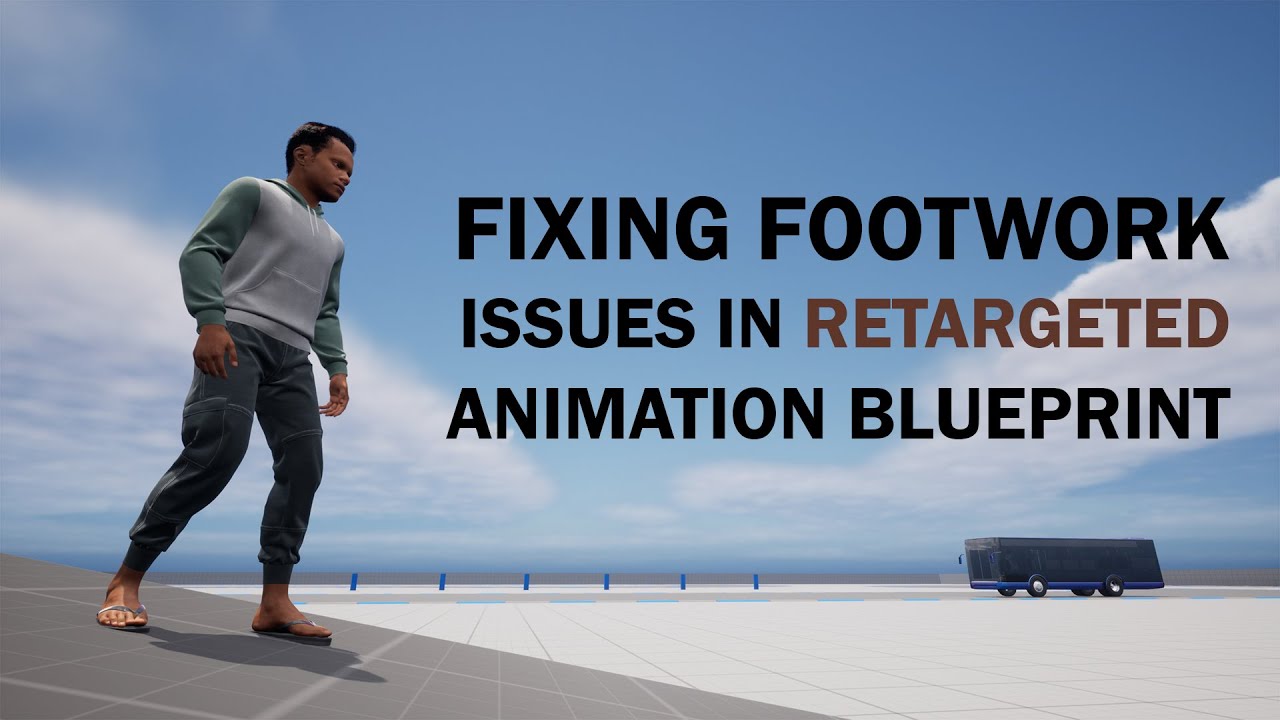
Project Files: https://www.patreon.com/posts/78617641 .
In this video, I am going to demonstrate how to solve the commonly occurring foot sliding issue and IK foot placement not working properly issue on retargeted animation blueprints. This usually happens when you retarget default mannequin animation blueprint into a new animation blueprint w...
frosty heron
shut yew
now i just need to loop a montage
What's this suppose to do? You don't even feed any skeletal mesh
frosty heron
olive yarrow
my foot ik is out here wildin' on me. I'm using virtual bones for my feet, any ...
Look at Unreal TPS template, it already implement foot IK
you can copy the code
 burnt obsidian
Hi is it possible to remove a blueprint component when I added it to the level. Let's say as example I've made this blueprint that just contains a cube. is it possible for me to delete the cube in this instance but not from the blueprint
 frosty heron
burnt obsidian
Hi is it possible to remove a blueprint component when I added it to the level. ...
frosty heron
burnt obsidian
Hi is it possible to remove a blueprint component when I added it to the level. ...
if you are talking about the component then no. Also you can't delete inherited component
shut yew
how to smoothen anim montage transition
burnt obsidian
frosty heron
if you are talking about the component then no. Also you can't delete inherited ...
alright
shut yew
 frosty heron
burnt obsidian
alright
frosty heron
burnt obsidian
alright
Just set the static mesh component to Null
so u don't see a cube
obtuse mulch
shut yew
how to smoothen anim montage transition
try making blend out time higher in montage
 wicked magnet
just try out numbers. ain't gotta ask every little thing
olive yarrow
frosty heron
Look at Unreal TPS template, it already implement foot IK
I'm using the basicikfootrig that the mannies already has 😦
frosty heron
olive yarrow
I'm using the basicikfootrig that the mannies already has 😦
I can copy it just fine, what do you have trouble with? Do you have an IK bone?
not sure what's the deal with virtual bone. never really touchhed it but as long that follows your foot, it should work
wicked magnet
why does my thing stop rotating after 90? disconnected x and z for test
 olive yarrow
frosty heron
not sure what's the deal with virtual bone. never really touchhed it but as long...
olive yarrow
frosty heron
not sure what's the deal with virtual bone. never really touchhed it but as long...
got rid of the virtual bones, dudeman inb the tut added uneccesary junk. howver still doin' the thriller lean. i've footb ik and bfull body ik on my characters ik (i just copied what the existing ue5 rigs use)
 turbid pecan
Guys is there a good way to easily determine directionality using the enhanced input actions and a controller bp? So I have a EIA for strafing in town. It only defines A and D keys. My movement works well for this. All's good there, but I am trying to explicitly determine movement direction inside the controller blueprint which uses this IA.
So like I want to be able to use the IA Event that fires on either A or D press to somehow give me which key was pressed so I can easily say "yup, player is intending to move left" for instance
frosty heron
olive yarrow
got rid of the virtual bones, dudeman inb the tut added uneccesary junk. howver ...
if u have foot ik you wouldn't need virtual bone
olive yarrow
frosty heron
if u have foot ik you wouldn't need virtual bone
that's exactly what i was sayin' after taking a second to think on thisb dudes tutorial 😂
hard charm
I have some niagara text particles and I want to add them to my character but it turns out that when I put the camera in, this particle is not rendered correctly
frosty heron
@olive yarrow


 trim matrix
shut yew
<@456226577798135808> and <@803699025211293697> really helped me
trim matrix
shut yew
<@456226577798135808> and <@803699025211293697> really helped me
wait what
wicked magnet
he meant me prolly
trim matrix
lol
olive yarrow
frosty heron
<@406859364624891905>
yurp, that's what i have. except for the final get transform, oddly if i don't use the VB onb those specifically my character slides
frosty heron
olive yarrow
yurp, that's what i have. except for the final get transform, oddly if i don't u...
if the foot planted to the ground 24/7 then it's not setup correctly yet
olive yarrow
frosty heron
if the foot planted to the ground 24/7 then it's not setup correctly yet
yeah, i know
frosty heron
you probably want to check your walking/running anim as well
and see if the IK foot_l and ik foot r actually moves with the bone
If ur foot IK is not animated, then ur feet will stay planted 24/7
olive yarrow
frosty heron
If ur foot IK is not animated, then ur feet will stay planted 24/7
animsb andb blend space have bno issues
aaaaaaaaaaaaaaaaah
the ik wiggles but does not follow
frosty heron
olive yarrow
animsb andb blend space have bno issues
The IK logic should be added last anyway, so if it work for one anim should work for others
frosty heron
olive yarrow
the ik wiggles but does not follow
that's the issue
since ur IK stays in place
ur feet not gonna move
olive yarrow
how to tackle said issue though
frosty heron
If you are doing re-targeting
make sure u re-target the IK too
otherwise, if you are importing anim from 3D program, make sure to animate the Ik there. I don't know how animator does it, I'm no animator
olive yarrow
awh shit i overwrote the manny foot ik with my characters 
oh wait i had the ik built in for the retarget so back at square one
 olive yarrow
yupp
frosty heron
if you want to re-target manny IK you need this
@olive yarrow last tip, when you are in Control Rig. To re-target successfully. Set the IK bone translation to Globally Scalled. IT's default to NONE so you will have the same issue if you skip this step
 olive yarrow
frosty heron
<@406859364624891905> last tip, when you are in Control Rig. To re-target succes...
olive yarrow
frosty heron
<@406859364624891905> last tip, when you are in Control Rig. To re-target succes...
i'm unable to find this in my details while in the control rig
frosty heron
olive yarrow
i'm unable to find this in my details while in the control rig
show picture
u have to select the IK control
the Sphere thingy
simple spade
lunar sleet
Unlikely that you’ll find anything that specific. You can use the Swimming mode ...
I appreciate the response! Guess I got some reading to do!
olive yarrow


 tough creek
I think this is mostly a math question but I'm struggling to wrap my around it and would appreciate some input:
I have an actor whose transform has a scale which is made up of either 1 or -1 in each axis. I want to create a new transform which has a scale of {1,1,1} whilst maintaining the same rotation in the world.
Is there a quick and easy node to help with this or do I need to get the math brain on?
olive yarrow
no dice on the globally scaled, aye carumba
frosty heron
olive yarrow
no dice on the globally scaled, aye carumba
The yellow square
click it

 queen heron
why does this give me that error? 🤔
 frosty heron
queen heron
why does this give me that error? 🤔
frosty heron
queen heron
why does this give me that error? 🤔
Because not the same type
queen heron
how?
frosty heron
not sure how to answer that, it is what it is
they are not the same type
it even tells you
Actor Object Reference is not compatible with Point To Look At Object Reference
queen heron
I'll need to figure out a different way then...
olive yarrow
frosty heron
click it
Heard, I'll click the foot goals when I get back from work and catch back up with ya
queen heron
I wanted to access the custom event from that actor using the find nearest actor node
but since that ain't possible
I'll need to refresh the array
frosty heron
olive yarrow
Heard, I'll click the foot goals when I get back from work and catch back up wit...
you are already selecting it (but the hand IK). do the same with the foot IK 😄
frosty heron
queen heron
I wanted to access the custom event from that actor using the find nearest actor...
why not
olive yarrow
frosty heron
click it
Ah yeah xD I selected the foot ik, made it global, along with both feet ik (did not edit the goals), re ran the retargwter but had same ol issue - but in time... Dang... Work...
obtuse mulch
queen heron
I wanted to access the custom event from that actor using the find nearest actor...
you need to cast to point to look first
frosty heron
@queen heron Any reason why Look At Actor is not an Actor reference?
you want to be as generic as you can be in cases like this imo
queen heron
this works

I have a camera system where the camera rotates twice as much than the spring arm
and if its close to the actor that is set into that array node
it will focus on that
disabling that dynamic camera rotation
frosty heron
I dunnoe, you seems to try destroy something before setting it
do u not get error when playing in editor?
probably get accesses none though I can't debug from here
queen heron
when the actor was destroyed
frosty heron
requires look at actor to be set
queen heron
this node tried to access the same item
 frosty heron
if not here then somewhere
queen heron
which was failing to find it so the variable which was supposed to enable the dynamic camera rotation was not being set
now after putting those two nodes there, it works as it should
normally the Find Nearest Actor node should've worked just fine without the fix
a slot would become NULL if the nearest actor is destroyed, but kinda weird that it was still looking at the same array index
frosty heron
well it helps to place something that is not broken
what's up with the save system?
frosty heron
Well, might want to debug it
nothing wrong from the engine side, I've been using it just fine since UE4
queen heron
when shipping, the save folder is put in a completely different directory
frosty heron
queen heron
when shipping, the save folder is put in a completely different directory
Yes, as it should be
queen heron
its not the same as the game folder
frosty heron
pretty sure u can change it but I don't bother
queen heron
and unreal engine fails to load it
frosty heron
In shipping it will load from App Data
So you have seperate .sav location between development and shipping
it will still load just the same tho
no issue
queen heron
this is the node I was using when the build was in shipping build
 frosty heron
Yeah, that's fine
i'm using that too
there is only one node to load anyway I think
you just insert the .sav name and it will load the file
queen heron
my game was not finding the save file when it tried to load the progress
frosty heron
must have done something wrong, check if you are actually saving anything
queen heron
I looked up myself and the save file was there
frosty heron
For shipping it's at AppData
thin panther
then it didn't exist or you used the wrong name.
frosty heron
Been making different mini projects and used the save system over and over. Not once it failed me, just saying
queen heron
thin panther
then it didn't exist or you used the wrong name.
slot names in both Save and Load were the same
copy pasted
frosty heron
Check with Does Save Game Exist node
queen heron
I just said I found the save files in App Data
meaning it should've worked
my guess is it may have to do with the fact that I used Save Game for everything and not Game Instance?
or
maybe the Load Game from Slot is trying to read the save file from the wrong directory
frosty heron
On development the node will load from your saved Folder
On Shipping the node will load from appdata
dark drum
queen heron
maybe the Load Game from Slot is trying to read the save file from the wrong dir...
It would read the file from the same place it saves too so it wouldn't be the wrong directory.