
#blueprint
1 messages · Page 65 of 1
 lime crow
 distant hollow
lime crow
like this? this caused no errors
distant hollow
lime crow
like this? this caused no errors
Yep cos when GameInstance_Cast is not ready it would just flow past the IsNotValid node
And it will flow through the IsValid node and retrieve the data once it is ready
So your issue has been fixed?
 scarlet ledge
Anyone use Epics Citvy Vehicle example cars, why do they look like crud?
 lime crow
ooo i see now, interesting, so that is similar to a isvalid node?
distant hollow
How and where did you call the SaveGame function?
distant hollow
lime crow
ooo i see now, interesting, so that is similar to a isvalid node?
Yep
If you get errors such as "is pending kill" then this Validated Get would work well against it as well
lime crow
@distant hollow @spark steppe Guys just want to say a huge thank you - you have been a massive help and apprecite you taking your time to help. I learnt alot during this as well. Thanks
 jade prairie
distant hollow
How and where did you call the SaveGame function?
jade prairie
distant hollow
How and where did you call the SaveGame function?
The save and load function is called via keys
distant hollow
jade prairie
The save and load function is called via keys
Show the part of the code where the function is called
You are either missing an input, or when you call the SaveGame function, the Actor which you are putting through is already invalid
Likely you have Destroyed the Actor before passing it through the SaveGame.


 jade prairie
distant hollow
jade prairie
distant hollow
I inserted default actor from cast there and it doesn’t work
jade prairie
distant hollow
The error is likely happening when you pressed V
yes
 spark steppe
did you mean to call your custom event's?
distant hollow
jade prairie
I inserted default actor from cast there and it doesn’t work
Show us how you did that?
distant hollow
jade prairie
yes
So it means that there were no Actors to read from in the SaveGame function
Because there was no input
jade prairie

 lime crow
sorry quick question, how did this work? i created a variable from a cast, but disconnect the cast and used a get is valid node, im assuming its still stored in a game instance variable even though there is no direct cast?
 jade prairie
I understand that the actor has been destroyed
spark steppe
lime crow
sorry quick question, how did this work? i created a variable from a cast, but d...
that's not where you should replace it
you keep the cast on begin play, but you remove the cast (and replace it with the validated get node) in the function which updates the text
lime crow
i see - this was on the begin play of the second level, just curious because it still all works
spark steppe
no it doesn't
it works, because your updating text function probably still gets the game instance from the engine and casts it every tick
but chances are that your beginplay stops right at the validated get, and all the stuff later wont ever execute
 river schooner
W ben
lime crow
spark steppe
but chances are that your beginplay stops right at the validated get, and all th...
o i see, i wont touch that then
spark steppe
river schooner
W ben
no, the real hero here is @urban coral for all the help provided :>
river schooner
spark steppe
no, the real hero here is <@280444227467345920> for all the help provided :>
what did bro do
jade prairie
distant hollow
So it means that there were no Actors to read from in the SaveGame function
How to pass the actor there so that it can read and save?
spark steppe
you only want to save the actor which fires the event?
distant hollow
lime crow
sorry quick question, how did this work? i created a variable from a cast, but d...
This would probably slip through the Not Valid node because you haven’t defined it, it would be null
 tiny wing
jade prairie
tiny wing
jade prairie
try to call "save" and "load" instead on save game and load game on inputs. it may fix
distant hollow
The cast node takes the GameInstance, and the Set node sets the “GameInstance_cast” variable to the GameInstance
This variable is not stored inside GameInstance, it’s on the blueprint where you cast it.
distant hollow
jade prairie
How to pass the actor there so that it can read and save?
Depends on context, what are you trying to save? Does every time you save have to involve the Actor?
If it doesn’t, then you could use a IsValid on the Actor before proceeding with Actor related sequences.
jade prairie
distant hollow
Depends on context, what are you trying to save? Does every time you save have t...
I need to save the actors changes and load them
spark steppe
all actors?
distant hollow
jade prairie
I need to save the actors changes and load them
Then you need to pass the Actors through when you use V key
Which Actors are you trying to save? Get a reference to that Actor and plug it as the input when you call SaveGame on V key.
river schooner
didnt you say that it was not possible to save actors?
river schooner
okk
 urban coral
spark steppe
no, the real hero here is <@280444227467345920> for all the help provided :>
urban coral
spark steppe
no, the real hero here is <@280444227467345920> for all the help provided :>
stfu Ben
river schooner
urban coral
stfu Ben
what happened
 untold rain
dont if the logic isnt correct, but it prints 3 times

 lunar sleet
untold rain
dont if the logic isnt correct, but it prints 3 times
lunar sleet
untold rain
dont if the logic isnt correct, but it prints 3 times
Not sure what you’re asking
You should be printing the actual actor not Hello
Much more effective debugging
spark steppe
from the little information on the screenshot i would guess that he might trace 3 times
river schooner
I got the covid.. help<
lunar sleet
river schooner
I got the covid.. help<
spark steppe
please no
river schooner
me crying
lunar sleet
spark steppe
from the little information on the screenshot i would guess that he might trace ...
Yeah, part of why I suggested printing the actor
river schooner
lunar sleet
Yeah, part of why I suggested printing the actor
how to make a if statement with strings
@lunar sleet
equal<
if they are eqal
untold rain
spark steppe
from the little information on the screenshot i would guess that he might trace ...
oh ye its being traced 3 times , why is it?
 barren tangle
Do you know how that node works?? what is the link between that node and the Max Walk Speed?
 spark steppe
river schooner
<@179343890409717771>
spark steppe
river schooner
<@179343890409717771>
stop pinging random people
spark steppe
untold rain
oh ye its being traced 3 times , why is it?
idk, your screenshow only shows potions of what you do with the trace result...
spark steppe
river schooner
he was talking to me tf?
no, he was talking to Mytho
river schooner
spark steppe
no, he was talking to Mytho
can yo uhelop me then?
spark steppe
river schooner
can yo uhelop me then?
yes, but no (i'm not that helpful as you know...)
lunar sleet
Sometimes we could use an age limit 😀
river schooner
spark steppe
yes, but no (i'm not that helpful as you know...)
? cmon ben you are helpful I lied
you are just better
untold rain
spark steppe
idk, your screenshow only shows potions of what you do with the trace result...
it printed the same actor name 3 times
 river schooner
lunar sleet
Sometimes we could use an age limit 😀
river schooner
lunar sleet
Sometimes we could use an age limit 😀
i am 21.
spark steppe
river schooner
i am 21.
twisted some numbers here, didn't you?
lunar sleet
untold rain
it printed the same actor name 3 times
Can we see what fires this trace?
river schooner
spark steppe
twisted some numbers here, didn't you?
can you help me please ben.. i am a beginner
lunar sleet
river schooner
i am 21.
 spark steppe
river schooner
can you help me please ben.. i am a beginner
spark steppe
river schooner
can you help me please ben.. i am a beginner
Equal (string)
spark steppe
weird, it works here
river schooner
I just did a pure equal so thats working
untold rain
lunar sleet
Can we see what fires this trace?

 spark steppe
you are still only showing your trace and result handling, not what is causing the traces to happen
river schooner
this guy is trolling lmao
lunar sleet
river schooner
this guy is trolling lmao
No, you are
barren tangle
what are you trying to do alex?
lunar sleet
String comparison is likely ===
river schooner
untold rain
we need to see what is before that to know if its a loop or somethinmg specific
river schooner
lunar sleet
String comparison is likely ===
yea i know now
spark steppe
somehow i want to see where this leads if alex takes the lead here 😄
untold rain
spark steppe
you are still only showing your trace and result handling, not what is causing t...
its actually connected to a func and am calling it every 0.3 sec using set timer by func name
spark steppe
on the other hand, that would be unfair to Mytho...
lunar sleet
untold rain
its actually connected to a func and am calling it every 0.3 sec using set timer...
So umm
river schooner
spark steppe
on the other hand, that would be unfair to Mytho...
bro I amk not that bad
untold rain
spark steppe
somehow i want to see where this leads if alex takes the lead here 😄
is this u r brother or smth
 wild moat
anyone know the best way to set up (modular) character with changable skeleton size?

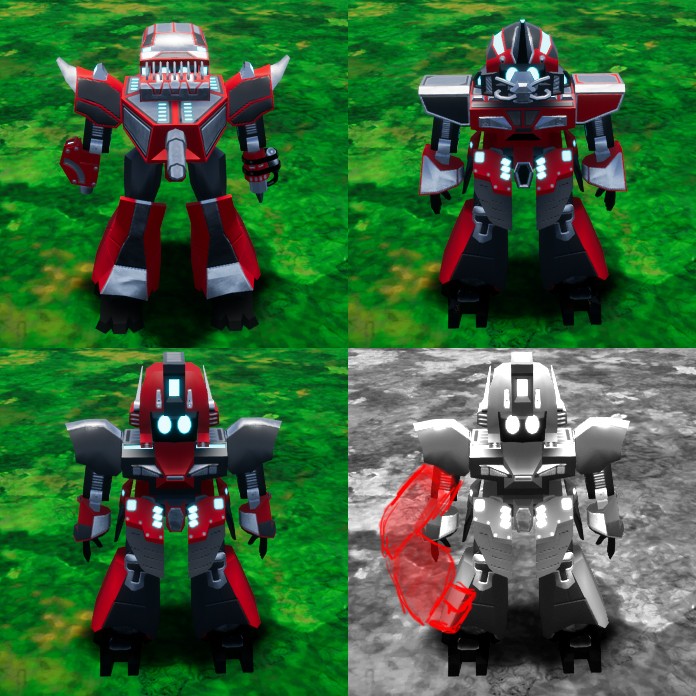
Epic Developer Community Forums
Basically the first three images show how my character is set up now. they all share the same skeleton and animations. however i would like to implement some limbs which are larger than others as shown in the forth image. Im struggling a bit to figure out how i should set this up. My thoughts of how to do this are: Should i somehow set it u...
lunar sleet
untold rain
its actually connected to a func and am calling it every 0.3 sec using set timer...
Why are you asking us why it’s printing multiple times if you’re using a timer to do this to yourself lol
river schooner
LOL
lunar sleet
wild moat
https://forums.unrealengine.com/t/best-way-to-set-up-modular-character-with-chan...
Maybe #animation
untold rain
lunar sleet
Why are you asking us why it’s printing multiple times if you’re using a timer t...
uh i actually added a condition there
wild moat
lunar sleet
Maybe <#221798806713401345>
i'll try that thanks
spark steppe
wild moat
anyone know the best way to set up (modular) character with changable skeleton s...
Create characters by combining multiple skeletal mesh components.
did you read this?
untold rain
i have a var and i m checking if it is not equal to the hit actor then setting the var to hit actor and print
 barren tangle
No one is able to answer to my simple question?
river schooner
IS THERE A FONCTION: get actor by name?%
wild moat
spark steppe
https://docs.unrealengine.com/5.3/en-US/working-with-modular-characters-in-unrea...
yes but that assumes that the skeleton is the same for all modular parts
river schooner
untold rain
i have a var and i m checking if it is not equal to the hit actor then setting t...
show us the entire thing please
lunar sleet
untold rain
i have a var and i m checking if it is not equal to the hit actor then setting t...
Debug and find out if that second var ever changes, my guess is not
lunar sleet
barren tangle
No one is able to answer to my simple question?
Maybe try bumping the actual question ?
barren tangle
barren tangle
Do you know how that node works?? what is the link between that node and the Max...
this one
spark steppe
barren tangle
No one is able to answer to my simple question?
compared to the other stuff here this is rocket science... my guess is that it accelerates the character until it reaches max movement speed?
iirc there's an acceleration rate in the character movement component!?
lunar sleet
Yeah
spark steppe
river schooner
IS THERE A FONCTION: get actor by name?%
no, but there's get Actors with Tag, so you can add tags to actors to find them
untold rain
lunar sleet
Debug and find out if that second var ever changes, my guess is not
nop not printing
river schooner
spark steppe
no, but there's get Actors with Tag, so you can add tags to actors to find them
no
spark steppe
river schooner
no
xD yes!?
river schooner
I am not going to generate tag
spark steppe
then you aren't going to find them 😛
lunar sleet
untold rain
nop not printing
If it’s staying as null, your condition always returns true then
barren tangle
lol, so it's a difficult question 😄
river schooner
spark steppe
then you aren't going to find them 😛
can we go in a vc and you could help me out?
lunar sleet
barren tangle
lol, so it's a difficult question 😄
Yes, CMC is very complex.
untold rain
lunar sleet
If it’s staying as null, your condition always returns true then
but then should have printed more than 3 times right
spark steppe
barren tangle
lol, so it's a difficult question 😄
no, it just requires experience with character movement, eventually you ask in #ue5-general if you don't get a response here
lunar sleet
untold rain
but then should have printed more than 3 times right
Depends, not sure when your timer is told to cease, if it is
river schooner
1% of gross revenue if we vc and we pack it up, its the biggest problem and the last one
lunar sleet
1% of 0 is 0
distant hollow
Gosh the chat is a mess lol
river schooner
distant hollow
Gosh the chat is a mess lol
i am currently doing the thing you said
I am trying to save the actor names
distant hollow
river schooner
I am trying to save the actor names
Names? You mean the class?
river schooner
 distant hollow
barren tangle
lol, so it's a difficult question 😄
distant hollow
barren tangle
lol, so it's a difficult question 😄
What’s your question again?
river schooner
their actual name
untold rain
lunar sleet
Depends, not sure when your timer is told to cease, if it is
0.3 secs dealy and btw ye it prints 3 times the previous one too like the entire code is running 3 times
distant hollow
river schooner
their actual name
Ok, and what were you trying to do with it?
barren tangle
barren tangle
Do you know how that node works?? what is the link between that node and the Max...
here
 thin panther
why are you crossposting
lunar sleet
untold rain
0.3 secs dealy and btw ye it prints 3 times the previous one too like the entire...
Honestly the whole code looks problematic.
river schooner
distant hollow
Ok, and what were you trying to do with it?
setting the saved name to the new actor
 spring osprey
river schooner
spring osprey
river schooner
it says not to use this as ID
 untold rain
lunar sleet
Honestly the whole code looks problematic.
untold rain
lunar sleet
Honestly the whole code looks problematic.
how
lunar sleet
You’re only setting the other variable if your first bool, whatever that is, returns false for starters
river schooner
spring osprey
it says not to use this as ID
then how should I do it
lunar sleet
Also I asked when your timer is told to stop not how often it runs but eh
spring osprey
river schooner
then how should I do it
tags probably, that's why they are there
distant hollow
river schooner
setting the saved name to the new actor
It’s quite pointless to save that actually, what is your use case?
lunar sleet
untold rain
how
So what are you trying to do here?
river schooner
spring osprey
tags probably, that's why they are there
so I should generate a random tag for each actor?
distant hollow
barren tangle
here
And what exactly are you having trouble with?
river schooner
distant hollow
It’s quite pointless to save that actually, what is your use case?
I need to save a propretie of an actor that I can use to find it
distant hollow
river schooner
I need to save a propretie of an actor that I can use to find it
A class or a tag would be your best option
Display name is not likely going to remain constant
untold rain
lunar sleet
So what are you trying to do here?
ah i quit
river schooner
distant hollow
A class or a tag would be your best option
class?
spring osprey
river schooner
so I should generate a random tag for each actor?
so you need a unique ID for each actor?
river schooner
many actors can have the same class and thats not what i want
lunar sleet
untold rain
how
If you want to clear the timer and stop firing the trace once the correct actor was hit, just clear and invalidate the timer, no need for all those checks
distant hollow
river schooner
class?
Yes, like the BP class
river schooner
spring osprey
so you need a unique ID for each actor?
yea
barren tangle
distant hollow
And what exactly are you having trouble with?
If my Max Walk Speed = 1000m/s and i only have an Horizontal movement (X) i will move on the X axis at 1000m/s.
If i add a vertical movement Y. That's mean my movement will try to reach the Max Walk Speed (1000) but on the 2 axis. that's mean my speed on the X axis will slow down.
and it's an issue for me 😢
so there is two possibility
- something exist and i don't know what
- nothing exist and i have to go with lot of complexe physic and math calculs for that
distant hollow
river schooner
yea
It’s something like what I’m doing
You can have a string variable in that class
Then Get All Actors of Class, pass the array through and check the variable until you find a match
river schooner
distant hollow
It’s something like what I’m doing
You can have a string variable in that class
...
but the other guy said that we shouldnt do that
untold rain
lunar sleet
If you want to clear the timer and stop firing the trace once the correct actor ...
so like make a var timer and set it to the timer delay and once actor is hit, change timer to 0 and then when no actor is hit set time back to the initial value? smth like that?
distant hollow
barren tangle
If my Max Walk Speed = 1000m/s and i only have an Horizontal movement (X) i will...
If I understood it correctly, it will move at the same speed towards both vectors
So if you have two actors on the same speed, one heading south and one heading southwest, their Y values should remain the same.
lunar sleet
untold rain
so like make a var timer and set it to the timer delay and once actor is hit, ch...
No no. your timer return value, promote it to a variable. Run the trace as you are now. Cast to the actor you want to hit. On success, grab that handle variable and use clear and invalidate timer. Done
barren tangle
distant hollow
If I understood it correctly, it will move at the same speed towards both vector...
yes
thin panther
distant hollow
If I understood it correctly, it will move at the same speed towards both vector...
could you continue this one in #ue5-general ?
The two conversations on the same topic being maintained is rather confusing
distant hollow
thin panther
could you continue this one in <#846520322642411570> ?
The two conversations on ...
I’ll take it to private
barren tangle
but because of the max walk speed i slow down automatically, and that's annoying
distant hollow
barren tangle
but because of the max walk speed i slow down automatically, and that's annoying
PM
distant hollow
river schooner
but the other guy said that we shouldnt do that
Where?
spring osprey
river schooner
but the other guy said that we shouldnt do that
if you are refering to me, I only pointed out that you shouldn't use Display Name as an ID. The suggestion was to create a string variable and give that a unique value which is perfectly acceptable, though looping through them all seems unnecessary. I'd suggest a map for efficiency purposes assuming there are a lot of them and you need to look up frequently
river schooner
spring osprey
it says not to use this as ID
.
 wide schooner
Hey, i'm using a spline in an actor and the actor is scaled in the world. The problem is that when i scale the actor (which also scales the spline), the spline length is not updated and doesn't correspond to the real length it takes. Is there to update the spline length based on it's scale ?
untold rain
lunar sleet
No no. your timer return value, promote it to a variable. Run the trace as you a...
but i want to recheck again after player rehit with that actor
distant hollow
river schooner
.
He said you shouldn’t use the display name as an ID, not a variable.
river schooner
distant hollow
He said you shouldn’t use the display name as an ID, not a variable.
what's an ID? cuz i am also using that in a variable
lunar sleet
untold rain
but i want to recheck again after player rehit with that actor
Like you want to keep tracing ?
distant hollow
spring osprey
if you are refering to me, I only pointed out that you shouldn't use Display Nam...
Map? How would that be done?
distant hollow
river schooner
what's an ID? cuz i am also using that in a variable
It just means an identifier, nothing specific
It can be a string or a set of numbers, depending on yourself
spring osprey
distant hollow
Map? How would that be done?
key is the Unique ID and value is the actor. Could cache each the first time they are found in the loop to prevent continously looping through all objects
river schooner
So, should I use a random tag generator for each build actor to be able to get them easily?
spring osprey
really depends on how frequently this operation is used and how many objects looking through to make it worthwhile
river schooner
spring osprey
really depends on how frequently this operation is used and how many objects loo...
1 time
river schooner
yea
untold rain
lunar sleet
Like you want to keep tracing ?
yep
river schooner
but should i use tag?
distant hollow
spring osprey
really depends on how frequently this operation is used and how many objects loo...
My use case is that every piece of wall/floor have a random unique ID assigned when they are first created
This unique ID will be saved and maintained when these structures are reloaded elsewhere.
river schooner
distant hollow
My use case is that every piece of wall/floor have a random unique ID assigned w...
bro copied me
distant hollow
river schooner
but should i use tag?
You can use a tag or a string variable like me
river schooner
distant hollow
My use case is that every piece of wall/floor have a random unique ID assigned w...
how did you do the breaking child/parent system?
distant hollow
river schooner
bro copied me
Erm diff is I already have it done up earlier on today, I am just exploring to see if there are any methods with better efficiency instead of double looping
distant hollow
river schooner
how did you do the breaking child/parent system?
Wdym?
river schooner
distant hollow
Wdym?
can you break the walls/floor
distant hollow
spring osprey
oh then no need to use a dictionary
So not applicable…ok tks
distant hollow
river schooner
can you break the walls/floor
What do you mean by “break”?
river schooner
distant hollow
What do you mean by “break”?
can they break somehow
like most games
distant hollow
Like I said, what exactly do you mean by “break”???
Destroy?
river schooner
yea
spring osprey
i think he's talking about a destructible environment mechanism
distant hollow
Any actors can be destroyed. I don’t understand your question.
river schooner
ofc
distant hollow
Paint a scenario?
river schooner
then how did you do that system because when you destroy a wall, you might want some other actors relied to it to destroy too
spring osprey
river schooner
ofc
its not clear in here, in blueprints break means something different
distant hollow
river schooner
then how did you do that system because when you destroy a wall, you might want ...
Like a window or door on it?
spring osprey
river schooner
then how did you do that system because when you destroy a wall, you might want ...
well if you have an object that depends on another object, You could fire an event before you destroy it and then have all dependent objects listen to the event
distant hollow
You want to destroy those attached actors when the parent actor is destroyed, is that what you mean?
river schooner
spring osprey
well if you have an object that depends on another object, You could fire an eve...
how do you know if they are dependant?
spring osprey
idk it depends on the specific situation
distant hollow
You can use a Get Child Actor / Get Attached Actors depending on how you constructed them
spring osprey
like if you had a rafter with support beams and you wanted the rafter to be destroyed with the support beams the rafter would need to reference the beams somehow
distant hollow
That’s up to your design.
 untold fossil
Is it normal behaviour that I can see debuglines on the client, even when they are only created on the server?
spark steppe
wide schooner
Hey, i'm using a spline in an actor and the actor is scaled in the world. The pr...
the spline component has an Update Spline method, did you try to call that one? (just a wild guess, not sure if it helps you with this issue)
spring osprey
the child actor seems like a good option, without knowing more about the requirements
wide schooner
spark steppe
the spline component has an Update Spline method, did you try to call that one? ...
I'll try that thanks !
river schooner
so basicaly there's my problem, I build and everythings good and the parent/child system is fine but when I leave and rejoin. Everything resets and then it doesnt work so that is why I need some kind of propreties or an ID to get access to them and set them proprely when rejoining
I will try with a custom build ID, ty
wide schooner
spark steppe
the spline component has an Update Spline method, did you try to call that one? ...
It worked, thanks a lot, i was struggling to find something
distant hollow
river schooner
so basicaly there's my problem, I build and everythings good and the parent/chil...
In my case when I created Windows and Doors on my Wall they are stored in an array
When I respawn them using a function on the wall itself with the array information I attach them to the Wall which owns the windows and doors
So it really depends on your design and how you want to work with it
river schooner
k
distant hollow
What I have now is a BaseStructure class which is the parent of my Wall and Floor blueprints
In the BaseStructure class itself I have a “UniqueID” string variable and a “StrctureType” enum variable, so both Wall and Floor blueprints can also have the same variables
So when I load the structure I can read and match the UniqueID in my savegame.
lunar sleet
untold rain
yep
Then don’t cancel the timer 🤷♂️ . It’s difficult to give you the right answer when we don’t know what you’re trying to achieve with all this tbh 😀
 abstract oar
Need help with Add Movement Input inside ai character, the character doesn´t move

 hushed berry
Hello, everyone. It's my first question here so. Nice to meet you all. I have a pickle problem that I cannot wrap my head around. I've tried everything that I know, and somehow the thing that at least for me is supposed to work doesn't work as expected. To summarize: I have a retriggerable delay that spawns a cube right under the character. I gave the delay a condition IsAbilityActive that is supposed to turn it on or off. The events "activateability/ deactivate ability" trigger only once with each press of a button. Here is the problem. Even though that the "deactivateability" event sets the bool to false, the bool gets activated right after to true and the ability keeps going. I'm not sure as to why that happens as this is the only place where the variable can be set and after deactivating the ability the "activateability" event doesn't trigger, hence I don't get why the variable still gets set to true.
 river schooner
hushed berry
Hello, everyone. It's my first question here so. Nice to meet you all. I have a ...
river schooner
hushed berry
Hello, everyone. It's my first question here so. Nice to meet you all. I have a ...
why does it look so bad? I cant even look
distant hollow
abstract oar
Need help with Add Movement Input inside ai character, the character doesn´t mov...
Put your values on a tick and check them
abstract oar
distant hollow
Put your values on a tick and check them
Tried it, same value
distant hollow
hushed berry
Hello, everyone. It's my first question here so. Nice to meet you all. I have a ...
How did you call your Activate? Show the codes
hushed berry
distant hollow
How did you call your Activate? Show the codes
It's a long noodle but after I put the string on event tick there seems to be some shamblo jumblo happening. So even though the response wasn't to me it helped 😄 thx
distant hollow
hushed berry
It's a long noodle but after I put the string on event tick there seems to be so...
As long as it works
 undone sequoia
guys how i can make prediction for bullet at target? I mean I wanna draw circle before target so I know I need fire in that circle when target is moving
😄
is there any function?
distant hollow
abstract oar
Tried it, same value
Maybe getting the wrong vectors/values? Play around with the links
distant hollow
undone sequoia
guys how i can make prediction for bullet at target? I mean I wanna draw circle ...
Line Trace
From the muzzle to the hit location
abstract oar
distant hollow
Maybe getting the wrong vectors/values? Play around with the links
It won´t jump either
undone sequoia
distant hollow
Line Trace
line trace is straight
i have realistic game
i want add prediction
like here

warthuder have same
distant hollow
You mean like a trajectory?
undone sequoia
yea so when u shoot in white circle u hit because plane has some speed + bullets have some speed you cant shoot directly on target
distant hollow

Hey guys, in today's video I'm going to be showing you how to create a system where the player can see a predicted path for the trajectory of the grenade that they are throwing.
You may want to experiment with the final delay values for spawning and deleting the trajectory line. Lower-end PCs may need it to be slower as it could cause lag. You'...
Try this
undone sequoia
distant hollow
https://youtu.be/TAnzmz2AviY?si=LUladvoN9eRtzS9S
like this i have for bombs but cant use same for plane target i mean 😄
thx
distant hollow
Or maybe this

A lil video about how to calculate bullet trajectory in UE4
Hope you'll enjoy!
|} Many of my projects are located on my Google Drive, don't forget to check it!
https://drive.google.com/drive/folders/1LqJFwqdGPXbHd-sLYEcc6mmHDhyh-1Gh?usp=sharing
 random pulsar
hey can i make a web build on unreal?
 rough wing
Why is there a delay between when I invalidate the timer and I can start it back up again?
 thin panther
random pulsar
hey can i make a web build on unreal?
thin panther
random pulsar
hey can i make a web build on unreal?
Not anymore
random pulsar
hell no
abstract oar
Huh, it worked, I forgot to set auto possesed by AI to spawned or placed in world 🤣
 elder lodge
the bullets need to inherit the velocity of the player
elder lodge
undone sequoia
yea so when u shoot in white circle u hit because plane has some speed + bullets...
gonna have to do some algebra and geometry
roughly something like:
target_current_position + time * target_velocity = target_position_at_hit = player_position + time * bullet_velocity
bullet_velocity = bullet_direction * bullet_speed
Then solve for bullet_direction and figure out how that displays on the HUD.
Not sure if time cancels out there? Might need curent_distance_to_target to complete a triangle and do some geomtry for it.
Maybe try #game-math
I think another equation relating the sides and angles you know might get rid of the last variables, like Law of Cosines
This article has some really complicated stuff involving gravity, but it depends on if you're simulating that for projectiles.
https://www.forrestthewoods.com/blog/solving_ballistic_trajectories/
Detailed explanation of 3d math needed to solve video game ballistic trajectories.
wild moat
alright they didn't have an answer in #animation so:
anyone know the best method of attaching different skeletons together?
like Bionicles, not modular characters but modular skeletons

 supple dome
wild moat
alright they didn't have an answer in <#221798806713401345> so:
anyone know the ...
supple dome
wild moat
alright they didn't have an answer in <#221798806713401345> so:
anyone know the ...
what about just doing that?
Its pretty common to have skeletal meshes attached to other skeletal meshes
ie. attaching wings to a character, would work just fine
wild moat
is it really just that simple, i'll give it a go
supple dome
the hardest part would be if you want smooth mesh transitions between different skeletal meshes, but if you are fine being different objects, should be easy
wild moat
morphing between them would be cool but not really necessary, i'm fine with pop in and out, nothing some vfx couldn't hide
 austere coyote
I need some help, does anyone know how to call a event created in a level blueprint from an object?
context: i have a pause menu and i want the game to re add all the previously hidden widgets when the resume button is pressed. The pause menu widget does not have a reference to those widgets but the level BP does, so i want the event of the Level to trigger upon this specific interaction of the pause menu.
random pulsar
The game is working fine in editor ,also as standalone but when i built ,animals are strange
 copper tree
Anyone know offhand if multimaps are supported in blueprints?
 digital valve
Hey guys im having a issue with my equip/dequip remove stats. Im not sure what to make of this. Equiping works and updates the stats but removing it will not. If anyone has ideas how to fix this or do it better Id love some help


 frosty heron
copper tree
Anyone know offhand if multimaps are supported in blueprints?
frosty heron
copper tree
Anyone know offhand if multimaps are supported in blueprints?
No, unreal engine only support single world out of the box.
You can buy multi world plugin if you want multi world but it will cost hundreds of dollars
copper tree
frosty heron
No, unreal engine only support single world out of the box.
You can buy multi w...
Referring to the container type: https://docs.unrealengine.com/5.0/en-US/map-containers-in-unreal-engine/

TMaps are primarily defined by two types — a key type and a value type — which are stored as associated pairs in the map.
frosty heron
copper tree
Referring to the container type: https://docs.unrealengine.com/5.0/en-US/map-con...
Well then not sure but I will wager the answer is also no
copper tree
frosty heron
Well then not sure but I will wager the answer is also no
That's kind of what I assumed but was hoping not 😦 Thanks
 remote meteor
what is multimap anyway
the value of the map is another map?
you can just encapsulate the second map in a struct if its so
spark steppe
wild moat
alright they didn't have an answer in <#221798806713401345> so:
anyone know the ...
yea you could actually model the wings so that they are kinda on "ground" by default and then define virtual bones for attachments in your character skeletons
then you would attach the addition to those virtual bones/sockets
remote meteor
oh you mean std::multimap? probably can implement your own
copper tree
remote meteor
what is multimap anyway
It's a map that can have multiple keys with the same value. A standard map would only allow unique keys. I didn't think ahead with my inventory system and used maps, but to allow stacking, multimaps would be the answer
remote meteor
map value to a struct, with an array within the struct, probably can achieve the same
copper tree
That's what Chatgpt recommended lol, I may give that a shot
 proper flower
guys yoday I tried after some suggestion but unfortunately I was not able to solve this cast.

what's useful and what's to delete
I tried many combinations and logic but none seems to retrieve lifespan of my entity
now the component are disconnected, I know, but can I sort things out by these components? or I need others too?
the actor variable : tried as actor class, actor object reference, entity reference itself.
none
used get actor of class as it is, connected with print and get life span, but none
used cast to, with object of different types, but none
why this does not work?


accessed none, so it cannot find the target
 faint pasture
remote meteor
what is multimap anyway
faint pasture
remote meteor
what is multimap anyway
Multiple values for a key
I use it to store an adjacency list
 crystal crown
Does it matter if i use float or int for health?
faint pasture
crystal crown
Does it matter if i use float or int for health?
Depends on your system
crystal crown
wym? atm there is no complex system
copper tree
Use Int if you want whole numbers for health values, float if you want decimal points

 violet wagon
proper flower
accessed none, so it cannot find the target
violet wagon
proper flower
accessed none, so it cannot find the target
do you have an "Asteroid field" in your world when you're calling this? GetActorOfClass gets whatever is in the world currently
proper flower
I solved in a completely different way
thanks anyway
yeah was generated in runtime
 trim matrix
bit of a silly question this one but if I want to launch the enemy character at a particular location so that what I end up with is enemy launches toward player mesh
I currently have it kind of working but the enemy always ends up slight to the right of the player rather then at the,
*them fully


thats my code so far. and in my behavior tree I have it rotate to face the target before calling launch in the enemy BP
faint pasture
trim matrix
thats my code so far. and in my behavior tree I have it rotate to face the targe...
face the target probably has an accuracy threshold
instead of forward vector, launch them actually at the target
 swift kiln
Hey I made a thing where actor will spawn at random location inside a box collision and I wanted to know how can I implement, that around for example my character there would be a radius where that actor just won't spawn
 faint pasture
You're doing:
Look at target
Launch forward
any inaccuracy in look at target will be amplified by the launching.
Instead, do this:
Look at target
Launch at target
trim matrix
faint pasture
instead of forward vector, launch them actually at the target
well I tried that but couldn't see what I was confusing as I would prefer to launch at the target then well just forward direction
faint pasture
Your launch direction will be Normalize(TargetLocation - CurrentLocation) instead of Forward
Or if you're trying to land on them you can use SuggestProjectileVelocity
 shell wren
Really quick, I have two BP's that went missing in editor but exist in my folder explorer, how can I pop these two back up in the editor? Importing isn't a option - uasset
 ruby cobalt
My cine cam focus is set on this green translucent plane here, which can be parented to anything.
I'm trying to orient it properly so it faces the cam.. but i fail to understand how to process the rotator here.
 undone sequoia
elder lodge
gonna have to do some algebra and geometry
roughly something like:
target_curren...
undone sequoia
elder lodge
gonna have to do some algebra and geometry
roughly something like:
target_curren...
thanks I will check I think I already solved it I need test it but I did same approach like u said
ruby cobalt
 digital valve
Hey guys im having a issue with my equip/dequip remove stats. Im not sure wha...
digital valve
digital valve
Hey guys im having a issue with my equip/dequip remove stats. Im not sure wha...
anyone able to take a look at this. Its driving me nuts 😭
trim matrix
So got this issue I'm not sure on


I have a collider that overlaps with player and it's doing stuffright
spark steppe
ruby cobalt
you win the price for the most cursed video example i've seen here so far, shouldn't it be fine to just copy the camera world rotation to the plane?
trim matrix
however when it launches the bot doesn't seem to be setting at the location of the socket name given and yes I defo have a socket on mesh with that name
any ideas here ?
sometimes it'll kind of attach and slowly sink it's really confusing
ruby cobalt
spark steppe
you win the price for the most cursed video example i've seen here so far, shoul...
oh you have no idea.. i'm going for some backroom creepy shit where I'm breaking those fingers and all
trim matrix
I even checked with a sphere to ensure its right and it is
spark steppe
also i think you should ignore the roll which "find look at rotation" might return
i think the roll will always be wrong
ruby cobalt
damn actually yeah.. it's just the camera's absolute rotation
and possibly an offset based on the plane default orientation
 spark steppe
stop it
ruby cobalt
dat UE5 bloom and short DOF tho
trim matrix
anyone help with my issue at all ?
ruby cobalt
i don't understand your issue
faint pasture
digital valve
Hey guys im having a issue with my equip/dequip remove stats. Im not sure wha...
Why do you have so many RPCs and no replicated state?
trim matrix
ruby cobalt
i don't understand your issue
sorry so basically
I have an enemy thats launches at the player and if their collider overlaps with player they stick to player as it where
I'm using attach actor to component for this so the actor being the enemy and the component being what it's hit
my attach rules I've tried them all.
at the moment the issue is it doesn't seem to attach and either ends up off somewhere or ends up sinking into the ground. I have disabled collision on enemy and also set it to flying but I can't see to get it to work
I was having issues like this before to be fair the attach actor to component thing but on something else
ruby cobalt
do you think they don't attach because they are tied to something else and have to be released first?
trim matrix
ruby cobalt
do you think they don't attach because they are tied to something else and have ...
there not attached to anything else
ruby cobalt
how do you launch them?
 fading otter
my grenades (projectile movement component) are not smoothly updating over the network despite very generous interpolation settings -- anyone know what might be going on here?
 trim matrix
So you can see here how it's attached but inside and not at the socket location I've created on the player mesh

like that
 ruby cobalt
hmm 1s i'll try to figure it out
i had this issue I believe
hmm so attach on bone will attach at the bone's base.. which is inside the character
you need to offset the attach point
@trim matrix different context but same logic I believe.. it attachs at the center of the target.. but offset it by "its current position" https://youtu.be/FK7FBBdY5fY?si=Qk2X7bEET1_3FO5E&t=166

Watch the recording of our presentation ‘New Character Physics in UE5: Can You Pet the Dog?’, originally shown at our booth at GDC 2023.
The new Physics Control component is a plugin that enables you to add simple, intuitive, and powerful physically based controls to a Blueprint in Unreal Engine 5.
In this talk, we demonstrate the basics of g...
btw, if you use physics control to attach like they show in this demo, you have have the objects dragged to their parent using physics and then you can have them bounce
trim matrix
Hmmm I'll take a look
I'm bit surprised it's this difficult for it to work
I'm giving the attach a socket name as well so surprised it isn't doing stuff right
ruby cobalt
trim matrix
So got this issue I'm not sure on
what about using hit location?
trim matrix
won't be able to
issue with attach actor to component is it don't take a vector in
I would prob have to set the actor location location and rotation at same time of attaching
ruby cobalt
i believe attach is the same as parenting in your BP editor..
meaning you need to change relative position to offset
 wary trellis
Im trying to pull the players character into the center of a TriggerSphere, but to use AddImpulse I need to simulate physics for the capsule component, which messes things up, so instead I can set the position of the actor over time but dont really know how the math would work

 surreal peak
wary trellis
Im trying to pull the players character into the center of a TriggerSphere, but ...
surreal peak
wary trellis
Im trying to pull the players character into the center of a TriggerSphere, but ...
You can add impulse on the character movement component afaik
Without physics
faint pasture
wary trellis
Im trying to pull the players character into the center of a TriggerSphere, but ...
A pull would imply being done over time, use AddForce assuming the CMC implements it which I'm pretty sure it does.
wary trellis
surreal peak
You can add impulse on the character movement component afaik
this is inside of the level blueprint, ive tried using the character movement component but still gives the error that the capsule component needs physics enabled
river schooner
spark steppe
stop it
Hi ben
wary trellis
faint pasture
A pull would imply being done over time, use AddForce assuming the CMC implement...
ill try this
river schooner
why is the ID value always saving as 0 when it should be another number
 faint pasture
wary trellis
ill try this
faint pasture
wary trellis
ill try this
remember, physics units in Unreal are really small so you'll need to apply large forces and VERY large torques
river schooner
is this a unreal bug?
faint pasture
river schooner
why is the ID value always saving as 0 when it should be another number
Show how ID gets set
river schooner
 faint pasture
river schooner
faint pasture
river schooner
So show where that Own ID comes from
river schooner
 surreal peak
Also use PrintStrings and Breakpoints to debug your code
river schooner
I know, after the event add build child, it prints a random number between 1 and 100000 but when its time to save, the number is 0 for some reason
surreal peak
Maybe check for any setters that set it to 0 and breakpoint those
river schooner
nothing...
surreal peak
Then you might be printing/saving an actor that you didn't call that interface on
Maybe check if the hit actor and the one you save in are actually the same
Fwiw there is an unreal bug that could cause the variable to stay 0. That one would be fixed by just redoing the variable
But idk how that bug is triggered or if it still exists
wary trellis
faint pasture
remember, physics units in Unreal are really small so you'll need to apply large...
I have this, which works, however how should I weaken the force the closer the character is to the center of the sphere
 faint pasture
wary trellis
I have this, which works, however how should I weaken the force the closer the c...
faint pasture
wary trellis
I have this, which works, however how should I weaken the force the closer the c...
however you want
surreal peak
Calculate the distance between center and character
And divide it by the max distance
faint pasture
There's an Add Radial Force node that might have some falloff stuff you can tweak to do the math for you
surreal peak
Then you have an alpha value that goes to 0 the closer the character gets
faint pasture
wary trellis
I have this, which works, however how should I weaken the force the closer the c...
Calculate distance, map range clamped that distance to some force strength you want
river schooner
surreal peak
Maybe check if the hit actor and the one you save in are actually the same
yea they werent, tyy
 regal bane
Is it possible to have an actor blueprint that randomises its static mesh every time it is spawned? I would like it to have a random width & height and use something like the deform tool in the modelling mode and change the seed of the perlin noise randomly. I have failed at googling can someone point me in a direction if it is possible?
wary trellis
faint pasture
Calculate distance, map range clamped that distance to some force strength you w...
would something like this work
 faint pasture
wary trellis
would something like this work
faint pasture
wary trellis
would something like this work
I would use map range
 small wedge
I'm making a small translator:
TIPA to IPA
X-SAMPA to IPA
IPA direct input (no translation)
I want to have one text field where the user can input text, and select which of the three translators they're using. Are enums the way to go about this, or something else?
faint pasture
much simpler and quickly tuned
faint pasture
wary trellis
would something like this work
 wary trellis
faint pasture
wary trellis
faint pasture
okay so it works but isnt really aggressive enough with weakening the closer to the center, but im not really sure what to change in the map range clamped to tune it
surreal peak
The Out Range A, I guess
 viscid flower
Hello I am struggling with something that seems so simple, yet not working 
I want to loop a spotlight color change in an order (either from an array or just directly by using set light color)
First, I have this, but 1) it doesn't seem to execute in order of the sequence for some reason

and not sure how to make it repeat infinitely
river schooner
viscid flower
First, I have this, but 1) it doesn't seem to execute in order of the sequence f...
the way sequence work is that it will do instantly the first 1 and then the second 2.... without even finishing it so it will not wait 5 seconds.;.
viscid flower
ohhh I see
thin panther
yeah, you misunderstand how a delay and sequence works. It does not respect asynchronous actions.
use a looping timer for 5 seconds, each time you run the function, go to the next element in an array
when you go out of bounds, loop back around, or do nothing
 bleak kelp
you can set a custom timer to fire an event with a delay
A How To Guide for Using Timers for Gameplay in Unreal Engine 4.
thin panther
viscid flower
do you mean timeline?
no, i mean a looping timer, as show above
viscid flower
this is another attempt I made, but I dont think I am using the for each loop correctly haha
 viscid flower
thin panther
no, i mean a looping timer, as show above
viscid flower
thin panther
no, i mean a looping timer, as show above
reading this
faint pasture
viscid flower
First, I have this, but 1) it doesn't seem to execute in order of the sequence f...
For a quick and dirty version, you can just hook those all up in a loop. Change color, delay, change color, delay, change color, delay, go back to change color
 grave relic
Does anyone know where I could start with taking damage on impact? So I have trees as in Valheim, when you chop them down they fall over. And I want it so if the player is not careful they can get hit and take damage. I don't know how to make this impact damage based on the tree's velocity and if it collides with the player. Any tips? 🙂
faint pasture
grave relic
Does anyone know where I could start with taking damage on impact? So I have tre...
Event hit impulse magnitude
That's how hard the hit was
viscid flower
faint pasture
For a quick and dirty version, you can just hook those all up in a loop. Change ...
Got it to work! Thanks all!
grave relic
faint pasture
Event hit impulse magnitude
Where can I find that? When into the static mesh and took out "On Component Hit" but cant find anything relating to magnitude 🤔
 winged totem
Hi Guys, is it posible to do with Unreal a feature like in this video? When you pick a coin the 2d coin is like simulaing physics an then takes the correct place in the bag. How would you do this?
https://youtu.be/errcUtHvDqU?si=mj_bQ97hZ-su7S5K&t=138

COMPRA MÁS BARATOS TUS JUEGOS AQUÍ Y AYUDAS AL CANAL!
https://www.g2a.com/r/buckfernandez Usa el código BUCK para un 3% de devolución de la pasta y recuerda comprar siempre con G2A SHIELD para garantía total
INTRO POR:
Mira la programación del canal y más en:
http://buckfernandez.com/
CAMISETAS, GORRAS, LOOOOT!
https://shop....
digital valve
faint pasture
Why do you have so many RPCs and no replicated state?
Ive been following a tutorial for the most part. Im pretty sure so its persistant through levels
faint pasture
digital valve
Ive been following a tutorial for the most part. Im pretty sure so its persistan...
There are no good tutorials, and that goes doubly for multiplayer
 nimble wasp
I'm setting up a 2D character in a 3D world. How can I simply call a flipbook to fire when the character (not the player) moves right, left and forward?
 stiff swift
Copilot mentioned using a set Flipbook node possibly
U4 instructions and not sure if good but what it gave
 nimble wasp
I love this discord. Thank you two!
Now I just need to figure out when my NPC is moving right or left to set the appropriate flipbook. I think this does that.
 faint pasture
nimble wasp
Now I just need to figure out when my NPC is moving right or left to set the app...
faint pasture
nimble wasp
Now I just need to figure out when my NPC is moving right or left to set the app...
that'll tell you if it's moving but not which direction
nimble wasp
faint pasture
that'll tell you if it's moving but not which direction
How do I tell which direction it is moving towards? I am only using the four primary directions, so I know I need to check x and y - but I don't know how to tell.
digital valve
faint pasture
There are no good tutorials, and that goes doubly for multiplayer
indeed I try to go offscripts reguarly such as what im doing now adding attributes to equip dequip. Im just confused on why dequip wont work ;\
stiff swift
If the last one worked ill drop this then let me know I suppose, copilot myte be decent for a good helper (free on the playstore) with recent programming info added for us to play with


 full turret
Hello. Is there a way to execute/play the timeline in editor? Trying to get a ping pong like movement but I need it in editor, not during run time. Event Editor Tick makes the other functions run in editor but it's not working with the Timeline node.
 frosty heron
full turret
Hello. Is there a way to execute/play the timeline in editor? Trying to get a pi...
frosty heron
full turret
Hello. Is there a way to execute/play the timeline in editor? Trying to get a pi...
Why don't u connect the update exec?
full turret
frosty heron
Why don't u connect the update exec?
My bad! Old screenshot. Update exec connected, still not working
 frosty heron
Not sure about editor time. 🤔 , you prob can't? The time doesn't seems to move
full turret
Is there another way to get a ping pong like movement without the timeline?
frosty heron
full turret
Is there another way to get a ping pong like movement without the timeline?
Wat r u trying to do?
Why does it have to be editor time too. Normally it's kinda useless to do something visual like that in editor time?
You can probably use material that utilise wpo.
It's a common technique to rotate massive ammount of actors like coins in runner games
full turret
frosty heron
Wat r u trying to do?
Trying to move an object in a circular/eliptical path (ideally with variables for radius/axis) in a loop for a light to track. I'm doing linear content but don't want to keyframe trackers in sequencer
frosty heron
No idea, gl
 zealous moth
frosty heron
No idea, gl
zealous moth
frosty heron
No idea, gl
merry christmas
faint pasture
full turret
Trying to move an object in a circular/eliptical path (ideally with variables fo...
Tick -> update position
if it's meant to be continuous
a timeline is just a temporary ticking thing with animation tracks
full turret
faint pasture
Tick -> update position
I was trying to use the timeline to loop between the values -1 and 1 (to get the ping pong effect) and then multiply the value by a constant and offset the position. Is there a way to continuously loop between -1 and 1 without a timeline?
faint pasture
full turret
I was trying to use the timeline to loop between the values -1 and 1 (to get the...
I mean why not just use a looping timeline? You're reinventing the wheel here
distant hollow
But why do you need that in Editor mode?
full turret
distant hollow
But why do you need that in Editor mode?
Can I get the animation from the timeline in the blueprint to sequencer? I need to render the animation
full turret
faint pasture
I mean why not just use a looping timeline? You're reinventing the wheel here
I was using the looping timeline but can't get it to play the animation in sequencer
faint pasture
This being sequencer certainly throws a monkey wrench in it
full turret
faint pasture
This being sequencer certainly throws a monkey wrench in it
Pretty much. I can keyframe the movement I need in sequencer but there are quite a few trackers that need to move around for the lights to follow and I thought I could make some parametric animations in blueprints with a couple variables for the radius/axis of the circular/elliptical path for quick animation iteration
 minor pollen
Question, what is the difference between equal to (==) and equal to exactly (===)?
 wraith torrent

how do i fix this
idk what i did
solved it
very stupid solution
and problem
distant hollow
minor pollen
Question, what is the difference between equal to (==) and equal to exactly (===...
=== for text.
 unkempt warren
wraith torrent
unkempt warren
wraith torrent
Dock it and it should go away. Once it goes away you can undock it if you like. It's a bug.
minor pollen
distant hollow
=== for text.
🫶 Thanks
frosty heron
minor pollen
Question, what is the difference between equal to (==) and equal to exactly (===...
The triple one is probably case sensitive
minor pollen
frosty heron
The triple one is probably case sensitive
So i just noticed that == does not even work on text only exactly and there is a other node == for case sensitive checking
It was just confusing because i saw there was a exactly option and equal check should be always exactly so why should there be a extra option but now i know what is going on
frosty heron
minor pollen
So i just noticed that == does not even work on text only exactly and there is a...
I just use the equal and call it a day
digital valve
How does this attribute go from 15 - 0 = 0?

 frosty heron
digital valve
How does this attribute go from 15 - 0 = 0?
frosty heron
digital valve
How does this attribute go from 15 - 0 = 0?
Where does it say 0 in the game? You are just showing a picture of your default value
digital valve
the new variable or the updated stat when I dequip. it's weird it'll say 30 str equipped then dequiped 0 but back to 30 equipped
maybe my widget has a bug
random pulsar
I was thinking about abilities like in Elder Scrolls V,fire, electricity,dark energy etc.For example lets say we have a fire ability,how does it damage ?I can imagine how i could set up the niagara system or particle system ,but how does it actually apply damage?
digital valve
random pulsar
I was thinking about abilities like in Elder Scrolls V,fire, electricity,dark en...
apply dmg function + trace hit or overlap?
random pulsar
Skyrim is the best game from my childhood,so i thought about structuring the m3chanics to better understand them
random pulsar
digital valve
apply dmg function + trace hit or overlap?
Trace hit-i imagine it ,but how overlap works,particles generate a domain and when you overlap with that domain you lose hp?
distant hollow
random pulsar
Trace hit-i imagine it ,but how overlap works,particles generate a domain and wh...
Turn a boolean on when you overlap, and run on Tick or timer to trigger the damage so long as the boolean is true
distant hollow
digital valve
How does this attribute go from 15 - 0 = 0?
There is nothing leading into the Set mode
random pulsar
Yeah but i was thinking about the trigger box,it spawns ,how big it is,is it different for every particle system,does it stay with one scale or it inscreases...?
distant hollow
random pulsar
Yeah but i was thinking about the trigger box,it spawns ,how big it is,is it dif...
I guess that’s up to your design?
 jaunty coral
Hello, guys. I have a question. Does this exist in Blueprint as well? Or it is just C++? I have tried searching for exact blueprint but have not found it. Does it have different name or something?

Called from game mode upon end of the game, used to transition to proper state.
random pulsar
distant hollow
I guess that’s up to your design?
Yeah there are multiple ways,but how it works in Elder Scrolls V,do you know?
distant hollow
jaunty coral
Hello, guys. I have a question. Does this exist in Blueprint as well? Or it is ...
Event End Play? Not sure if that’s what you are looking for
distant hollow
random pulsar
Yeah there are multiple ways,but how it works in Elder Scrolls V,do you know?
No idea
jaunty coral
distant hollow
Event End Play? Not sure if that’s what you are looking for
Not quite sure they are the same but this seems to be usable in same case. Thank you for the info 😁 👍
 jade coral
If I was to set "gamemode settings" in a lobby map, and then transfer to a map (and have the aforementioned "gamemode settings" be saved through the level transfer (and thus impact how the game starts and is played) how would I accomplish this?
[Using Advanced Sessions Steam for multiplayer rn]
distant hollow
jade coral
If I was to set "gamemode settings" in a lobby map, and then transfer to a map (...
Couldn’t you just use the same Game Mode for the new level instead of transferring?
jade coral
distant hollow
Couldn’t you just use the same Game Mode for the new level instead of transferri...
I thought it might be easier to have different gamemodes for the lobby where players connect/ready up and the actual game (so I could run logic/"start" the game on the actual begin play of the gamemode as opposed to basing it in the level, since if I have one gamemode for all the levels I can change the levels [as long as the logic works still])
I think I might just use the extra settings on the steam advanced sessions sessions to store the values [found this as an example]
Still open to ideas though, I saw the game instance as a possible solution but I felt like that might be a poor way of doing this

although ig your right actually
i just viewed the idea of having separate gamemodes as a possible flexibility option since if I want the lobby to be able to pick gamemodes I could just use them instead although the upside to having the settings all be in the session data would mean the search list for the sessions could show even more data (IE the map, settings, etc)
distant hollow
Not sure if it would be what you need but

changing the game mode at runtime can be very useful if you have alot of modes for one map. in this video i will teach you how to do it.
#ue5 #tutorial
 steady kindle
Is it possible to make a blueprint and then move it's individual component seperately in a scene on an instance basis
 frosty heron
wraith torrent
make the little grey container thingy
frosty heron
wraith torrent
make the little grey container thingy
Press c for comment
wraith torrent
ok ty
 dire frost
steady kindle
Is it possible to make a blueprint and then move it's individual component seper...
dire frost
steady kindle
Is it possible to make a blueprint and then move it's individual component seper...
Yeah
Just double click the component you wanna move
 north lynx
Hey everyone!
I have an unusual question. I would like to make an in-game game, that is, to implement in my first-person game the option to play a 2D arcade game. I know what I'm trying to achieve, but I don't know where to start, and I couldn't find any tutorials on the subject. I would like the player to then be safe, the game time would not flow, and the control would shift to the 2D character.
swift kiln
Hey I made a thing where actor will spawn at random location inside a box collision and I wanted to know how can I implement, that around for example my character there would be a radius where that actor just won't spawn

 tepid willow
Hello, what is required to call the DelayUntilNextTick? I'm trying to make a macro library for just an object, but it doesn't show me that node, does anyone know why, and how I would get it?
distant hollow
tepid willow
Hello, what is required to call the DelayUntilNextTick? I'm trying to make a mac...
I don’t think you can find that in macro library
tepid willow
Yeah, but why?
distant hollow
If I am not mistaken you cannot get any direct Delays for macros
tepid willow
I only see the TaskWaitDelay which takes the time as input
But I would like to wait a tick rather some amount of time
distant hollow
swift kiln
Hey I made a thing where actor will spawn at random location inside a box collis...
What exactly are you stuck with?
distant hollow
tepid willow
But I would like to wait a tick rather some amount of time
Maybe set it as a custom event in a blueprint instead of a macro
tepid willow
It doesn't work the same way
swift kiln
distant hollow
What exactly are you stuck with?
I figured something out. I just spawn actor before or behind player
distant hollow
north lynx
Hey everyone!
I have an unusual question. I would like to make an in-game game, ...
One option would be to save the game then load up the 2D as another map
distant hollow
swift kiln
I figured something out. I just spawn actor before or behind player
There would still probably be a chance that they spawn in the same spots
swift kiln
I mean I changed it so it wont be randomised in certain are, just before/behind player Edit: thats the old bp, I forgot to plug in location from break transform
 north lynx
distant hollow
One option would be to save the game then load up the 2D as another map
north lynx
distant hollow
One option would be to save the game then load up the 2D as another map
Yeah, that is possible
How could I not have thought of that 🤦♂️
Thanks 🧡
grave relic
faint pasture
Event hit impulse magnitude
Where can I find "Event hit impulse magnitude"? Went into the static mesh and took out "On Component Hit" but can't find anything relating to magnitude 🤔
 pulsar vigil
Hey any idea why im spawning bp_actors and the same logic dont work on them if they are spawned or manulay placed in the level ?
 versed sun
they are colliding with something and not spawning?
pulsar vigil
they are spawning and directly attached to another actor but they dont behave as intended
when i place them in the level they behave normaly
distant hollow
pulsar vigil
Hey any idea why im spawning bp_actors and the same logic dont work on them if t...
What exaclty is not behaving as intended?
pulsar vigil
like the behaviour is that when i trace hit them i can interact and attach them to my player
it look like the last actor spawned behave normaly
i was just hoping for a comon solution that* i didnt know but if nothing come to mind i m gonna do a better explanation with screenshot
distant hollow
So what is the abnormal behavior? Or what isn’t happening?
pulsar vigil
hmmm let me few minute i explain the entire thing
i want to test some thing before explaining everything cause i might take a lot of time to explain
My problem is because i use an event dispatcher that is binded with overlap box or execute over all the children that use the same logic multiple time and it fuck everything up i just tested to go in and out of every interact attempt and it work
distant hollow
So issue resolved?
If you have one collision for the entire sword then it will not distinguish which part of the sword is struck
That said, even if you have multiple collisions it would be counted as a same sword I think
You’ll probably need to have the parts as separate child actors so that they are processed differently. But I could be wrong.
pulsar vigil
distant hollow
So issue resolved?
no i m still trying to figure it out few testing and i come back here
pulsar vigil
distant hollow
So issue resolved?
resolved i dont realy know exactly what i did im to tired to remember my last 5 minute but it work lmao
versed sun

will area always be a cube ?
i would start with a Sphere Trace by channel, use a large radius, and the hit Should be the closest point
oh, hmm
ok, get the 8 corner points of your Rectangle Area
Loop thru the 12 Line Segments of the 8 Corners , and Find Closest Point on Segment
the lowest Return Value would be closest point

Draw Debug Box will help visualize it
versed sun
on 2nd thought, save the 2 closest points , and Find Closest Point on THOSE points
trim matrix
anyone know how I would do say a dash and sprint on same key but my enhanced input runs in c++
digital valve
distant hollow
There is nothing leading into the Set mode
It was connected in the test. It unconnected as ive been playing with it.
untold rain
i dont have any variables added to this blueprint , though had previously but deleted
 thin panther
BP structs strike again?!
untold rain
thin panther
BP structs strike again?!
what should ido now to fix
frosty heron
untold rain
what should ido now to fix
restart the project , open the bp again. you will get apromt that asked to delete the variable.
say yes.
If that fixed it, avoid future corruption by having 0 bp struct. Instead declare the struct in CPP and compile with the editor closed (apparently hot reload can cause the same corruption)
spark steppe
if you want to be on the "safe" side with BP structs you have to save all files, then edit the struct and just save the struct file, then restart the editor (without saving any other file it prompts you for)
trim matrix
in BP whats a good way to get the mapping context and maybe dynamically get the action so mapping and the associated key binding it has ?
grave relic
Does anyone know where I could start with taking damage on impact? So I have trees as in Valheim, when you chop them down they fall over. And I want it so if the player is not careful they can get hit and take damage. I don't know how to make this impact damage based on the tree's velocity and if it collides with the player. I got told about Event hit Impulse magnitude but could not find it 
 broken wadi
grave relic
Does anyone know where I could start with taking damage on impact? So I have tre...
broken wadi
grave relic
Does anyone know where I could start with taking damage on impact? So I have tre...
Setup a bool for when the tree is cut down. Check for collision with player and make sure cut down bool is true then use the tree’s GetVelocity vector and then the length of that vector to convert it into a float. Now you can use it for a damage value.
spark steppe
i think you could just use the hit event and multiply the damage with the velocity vector length, when the tree isn't falling it should return 0, so 0 * damage is no damage
broken wadi
spark steppe
i think you could just use the hit event and multiply the damage with the veloci...
Sure but maybe the character is already setup with some particles and sound effects whenever damage is taken? I suppose you could then just check the damage value to see if it’s greater than 0. I tend to just only apply damage when there is actual damage in the first place.
 gusty shuttle
Hey guys, is there a tried and true method for using WASD in widgets using bluprints only?
Or rather, is there new techniques to do so?
 warm mulch
Hello everyone, I have a pawn that is placed in a level. When I edit Base Eye height from the level, the value doesn't change and is reverted in the game while playing. But if I set value from the blueprint editor, the change is reflected in the game. Why does it happen? Also, I tried with a simple pawn and the same issue occurred.


 proper vigil
distant hollow
warm mulch
Hello everyone, I have a pawn that is placed in a level. When I edit Base Eye he...
proper vigil
distant hollow
warm mulch
Hello everyone, I have a pawn that is placed in a level. When I edit Base Eye he...
Check if there is anywhere in your BP that sets the value when the scene starts.
distant hollow
gusty shuttle
Hey guys, is there a tried and true method for using WASD in widgets using blupr...
What do you mean by “using WASD in widgets”?
warm mulch
distant hollow
Check if there is anywhere in your BP that sets the value when the scene starts.
I also thought that but I created an empty pawn blueprint and tried setting base eye height and still the same issue occurred
gusty shuttle
distant hollow
What do you mean by “using WASD in widgets”?
I mean, by default, Unreal uses the keyboard arrow keys to navigate through menus. I'd like to find a reliable way to either take the keyboard inputs and convert them to WASD or use some input system to navigate through the menus via enhanced inputs in the widget it's self if possible.
grave relic
broken wadi
Setup a bool for when the tree is cut down. Check for collision with player and ...
Sorry I dont think I fully understood, tried this but I get not prints
 distant hollow
warm mulch
I also thought that but I created an empty pawn blueprint and tried setting base...
distant hollow
warm mulch
I also thought that but I created an empty pawn blueprint and tried setting base...
Check the default value of the variable in the blueprint. Was that the value that it was reverted to?
distant hollow
gusty shuttle
I mean, by default, Unreal uses the keyboard arrow keys to navigate through menu...
I see
warm mulch
distant hollow
Check the default value of the variable in the blueprint. Was that the value tha...
Yes. But why does it happen if I am setting in level then that value should be final.
distant hollow
grave relic
Sorry I dont think I fully understood, tried this but I get not prints
Is this on the player or the tree?
distant hollow
warm mulch
Yes. But why does it happen if I am setting in level then that value should be f...
Both the guns were changed to 64?
warm mulch
Yes in both the gun blueprint and the empty pawn blueprint where I am doing nothing.
distant hollow
Are the pawns child class of another class?
trim matrix
got a wierd issue happening
my Enemy is too good in terms of hitting me when it shoots at me
warm mulch
For gun blueprint it is derived from pawn class
trim matrix
I don't quite get how cause when it shoots it would be doing it towards the location it saw me rather then right at me
How quick would people say the bullets should be as at moment I have them at 1000 and it feels very unfair to the player at moment
grave relic
distant hollow
Is this on the player or the tree?
The tree 🙂
distant hollow
warm mulch
For gun blueprint it is derived from pawn class
Are there any part of the codes that would alter this value?
 distant hollow
grave relic
The tree 🙂
distant hollow
grave relic
The tree 🙂
Then your Component Hit is not firing, ie you are using a wrong hit/overlap event
distant hollow
warm mulch
No
What about the parent class?
warm mulch
warm mulch
you can see here the parent class is Pawn.
distant hollow
Where is the BaseEyeHeight variable in your design? I didn’t see it in the variables list
warm mulch
provided by default in Pawn class
untold rain
why is it like i cannot access custom event from widget bp from another actor compo bp
i can get the variable but not the custom event
distant hollow
warm mulch
provided by default in Pawn class
Let’s take a look at that Pawn class
stiff swift
Mytho you'd need to add a reference id think to be able for the system to check your other actors BP so It can pull the event* but after thinking idk if you can do this
untold rain
stiff swift
Mytho you'd need to add a reference id think to be able for the system to check ...
refernce for?
distant hollow
untold rain
why is it like i cannot access custom event from widget bp from another actor co...
Are you trying to access the widget via a blueprint, or the other way round?
warm mulch
distant hollow
Let’s take a look at that Pawn class
The Pawn class is the class provided by Engine. I have not edited anything in Pawn class.
distant hollow
warm mulch
The Pawn class is the class provided by Engine. I have not edited anything in Pa...
I’m not saying that you did; just needed to look at it to see if something is resetting it to default
My PC isn’t on right now so I can’t check
untold rain
distant hollow
Are you trying to access the widget via a blueprint, or the other way round?
i have this event and from an actor comp who is child of player character , i have a ref to this widget
i can only see the var

 warm mulch
distant hollow
I’m not saying that you did; just needed to look at it to see if something is re...
warm mulch
distant hollow
I’m not saying that you did; just needed to look at it to see if something is re...
ok I will try digging deeper into the code.
 flint veldt
Hey everyone, I need a desperate help to solve this casting issue, any input would be appreciated💫
Im using an encoder, trying to rotate a skeletal object, which is the BP on the right.
Im getting the value of the rotation position when i simulate it, but I cant make my object rotate.
Also, the value that I get has these gaps and weird breaks as you see in the thid image.


 distant hollow
untold rain
i have this event and from an actor comp who is child of player character , i ha...
distant hollow
untold rain
i have this event and from an actor comp who is child of player character , i ha...
Drag out from As BP Main Player, not the target
untold rain
distant hollow
Drag out from As BP Main Player, not the target
uh thats what am doing
 distant hollow
untold rain
uh thats what am doing
distant hollow
untold rain
uh thats what am doing
Oh wait no
stiff swift
flint veldt
Hey everyone, I need a desperate help to solve this casting issue, any input wo...
From viewport on your BP, add what is rotational component on the board for 300 pls
untold rain
distant hollow
Oh wait no
umm i think i always get bad luck 😦
lunar sleet
flint veldt
Hey everyone, I need a desperate help to solve this casting issue, any input wo...
What casting issue? There are no casts in your screenshot
warm mulch
distant hollow
I’m not saying that you did; just needed to look at it to see if something is re...
There is a function.
void APawn::RecalculateBaseEyeHeight() { BaseEyeHeight = GetDefault<APawn>(GetClass())->BaseEyeHeight; }
that is getting called in void APawn::Restart()
stiff swift
I mytve striked neo with a chance to steal xD
lunar sleet
stiff swift
I mytve striked neo with a chance to steal xD
Oh I didn’t see your reply but still see no cast
flint veldt
lunar sleet
What casting issue? There are no casts in your screenshot
True, I tried to use casting node but i cant figure out a way to use it for my case.
distant hollow
warm mulch
There is a function.
`void APawn::RecalculateBaseEyeHeight()
{
BaseEyeHeigh...
That’s probably it maybe
untold rain
distant hollow
Ok I’ll boot up my PC to test stuff
to me?
distant hollow
untold rain
to me?
Yep, give me a few mins
stiff swift
lunar sleet
Oh I didn’t see your reply but still see no cast
Oh your right there is no cast BP character or object so that'd be a good start casting to whatever and then telling us what it's not doing
untold rain
distant hollow
Yep, give me a few mins
its ok i will go with function instead of events
am able to access functions but not events
maybe its how it should work
distant hollow
No
Events can work
I think you are pulling wrongly
DM
@untold raincheck your DM
stiff swift
It's to early I shouldn't be giving advice such poor advice 
warm mulch
distant hollow
That’s probably it maybe
Found out that APawn::Restart is resetting value. But why this is done? This will overwrite the values updated in the level.
distant hollow
warm mulch
Found out that APawn::Restart is resetting value. But why this is done? This wil...
You may need to figure out from the Pawn blueprint at what point in the codes is this being called
I’m not familiar with c++ so can’t help you there
distant hollow
Alternatively
Rather than spending all the time trying to fix this
May as well just insert a couple more nodes to make sure it changes to the value on BeginPlay
That should override the reset
remote meteor
gamemode spawning player = restart player at player start = called APawn::Restart
distant hollow
remote meteor
gamemode spawning player = restart player at player start = called `APawn::Resta...
Ohhhh
So essentially the pawns will be destroyed and respawned?
remote meteor
not exactly, if a pawn for the controller already exists, it will use it
 tight pollen
every time I click on the widget and stop playing in the editor, Unreal crashes


why?
distant hollow
remote meteor
not exactly, if a pawn for the controller already exists, it will use it
So in his case…?
tight pollen
someone can help?
warm mulch
distant hollow
May as well just insert a couple more nodes to make sure it changes to the value...
Yes, I can do that and fix it but I was looking into why it is happening and resetting the eye height on restart.
distant hollow
warm mulch
Yes, I can do that and fix it but I was looking into why it is happening and res...
So in short, the Pawn class is doing so, and likely is due to what IAsaka quoted
remote meteor
APawn::Restart is setting BaseEyeHeight to default, if you edited the value from the level editor (instance editable) it would be overriden by the Restart function
since the way GameMode use to spawn player when you press play, is the same as restarting the player
the Restart function is being called
hence it is reset to the default values
versed sun
tight pollen
someone can help?
so, when you press the button, you make it simulate pressing the button, which in turn simulates pressing the button that simulated pressing the button...
warm mulch
remote meteor
`APawn::Restart` is setting BaseEyeHeight to default, if you edited the value fr...
In that case, the value should not be visible or editable if it has no effect while changing in level as it is confusing.
remote meteor
yeah thats one part Epic did not do well
nontheless, either you create your own variable, or override what APawn does to the variable
warm mulch
remote meteor
nontheless, either you create your own variable, or override what `APawn` does t...
yes
remote meteor
sometimes unreal is just too big to have everything make sense...
warm mulch
yes I understand
remote meteor
so when i identify stuff that epic did not do well, i just do my own or edit theirs(by extending class)
warm mulch
I will do the same 👍
 crude dew
Q : Will Random fire twice and provide 2 different index's from this code or will it print out the random one it chooses from the spawn points please?

Just want to make sure that I am printing out the correct "random" index from this.
versed sun
Location and Report will be different
crude dew
Ah damn so i,ll have to run location throuhg and do a FIND INDEX on the array to get it,s correct index then
versed sun
You would want to get a random Index and save it , the Get from array using index
Or your way is same
 versed sun
will still be different
versed sun
Random>Set Variable> use the Variable
 remote meteor
gotta save the output from the random first
also
save the index
not the object
so you can get by index easily

 paper gate
Probably a compelte newb question, but I gotta know. Is there a better way of doing this? I am trying to clamp player's -x velocity. I am converting it to local, clamping and then converting it back. It works just fine, but it seems ridiculous to do it this way instead of something simpler. Is this the way you all would do it?

 foggy escarp
paper gate
Probably a compelte newb question, but I gotta know. Is there a better way of do...
foggy escarp
paper gate
Probably a compelte newb question, but I gotta know. Is there a better way of do...
 foggy escarp
for vectors, you can clamp the length without breaking and making it manually.
foggy escarp
oh, missed that.
yeah, this is basically how I'd do it.
 unique silo
hi folks, anyone have a quick idea on how to round a float with 3 decimal slots to a float with 1 decimal slot? So that 10.XXX gets "rounded" to 10.X ?
versed sun
in text form or as a float ?
unique silo
preferrably both. but text form could work as well
versed sun
To Text (Float) has a dropdown with some settings
 unique silo
omg you are a lifesaver
just out of curiosity, if we wanted to do the same for actual floats, is modulo the only way?
versed sun
If you need to Round a float to a certain decimal point , i use this
Step = what you want to round to, so your 10.xxx rounded to 10.x you would use step = .1
 unique silo
amazing thank you so much!!
paper gate
I remember snooping around some in-built chararcter blueprints and remember an "if" blueprint or something like that, it took a boolean expression as input, along with true/false arguments (floats, I think) and outputted them based on the bool. Any idea what that could've been called? I couldn't find it, so am I misremembering something? Was it deprecated? Was it custom for that script? I can't seem to find it now
 paper gate
Select, thank you
I genuinely remeber seeing it under the name "if" somewhere
no idea
thanks
gusty shuttle
Hey guys, is there a way to push a key (WASD) and virtually press up, down, left, right arrow keys on a keyboard? Essentially for widget navigation
gusty shuttle
I need to take a keyboard button press (WASD) and simulate it pressing press up, down, left, right arrow keys on a keyboard
Are there any keywords or anything guys? Anything?
I need something like this. Is there an alternate method inside a widget (not widget component, nor C++)

 abstract mango
I wonder.... would someone be able to help me rebuilding these Car Physics and the system for the Cars?
https://youtu.be/mzhOhWLj85A?t=304

Road Trip Adventure PS2 Gameplay
Release Date: October 26, 2002
Platforms: PlayStation 2
PCSX2 Settings:
Renderer: Direct3D11 (Hardware)
Please leave a comment and rate it. :)
Enjoy !
all of my previous attempts failed, even setting up the vehicle with the base chaos vehicle stuff was horrible, and with the advanced vehicles plugin it even was an disaster, nothing really worked when I tried
copper tree
gusty shuttle
I need something like this. Is there an alternate method inside a widget (not wi...
If you're using 5.2 or later, you can use Enhanced Input to map that for CommonUI: https://docs.unrealengine.com/5.2/en-US/using-commonui-with-enhnaced-input-in-unreal-engine/
If you're using something older, not too sure
Learn how to incorporate Enhanced Input with CommonUI's input system.
 hot inlet
Hello
How can i change als (advance locomotion system) camera spawn location??
gusty shuttle
copper tree
If you're using 5.2 or later, you can use Enhanced Input to map that for CommonU...
I am indeed, however, I don't understand how I can use that within a widget though. I'm sure I could, but at this point my main issue is the native navigation system Unreal has. I need to simulate pressing buttons...If the enhanced inputs can have keyboard W, but have a modifier of it press Up then we're in business
gusty shuttle
hot inlet
Hello
How can i change als (advance locomotion system) camera spawn location??
It's inside the camera blueprint
hot inlet
gusty shuttle
It's inside the camera blueprint
I cant find it
gusty shuttle
Still my focus won't change in menu. I'd need to still press a button for it to fake press it
 copper tree
gusty shuttle
I am indeed, however, I don't understand how I can use that within a widget thou...
copper tree
gusty shuttle
I am indeed, however, I don't understand how I can use that within a widget thou...
I guess it depends on why you need "Up" or whatever direction to be pressed to determine what your best solution is. Just trying to navigate, or are you doing something more complex in widget?
gusty shuttle
copper tree
I guess it depends on why you need "Up" or whatever direction to be pressed to d...
Thanks for responding. Firstly, I didn't implement CommonUI upon further reading, just default UE5.3. All I want to do, is press a input (w, a, s, d) and convert that press to a simulated up, left, down, right press.
Why? Unreal has it's default UI navigation set to use the arrow keys. There is away to switch it via C++ but I'm not versed in it. I'm trying to find a work around
 red briar
Hey, i'm not really sure where to put this, as it's to do with cameras but heres the deal:
How can I make Legacy Camera Shake predictable? As in, I don't want it going in random directions and making the player throw up, lets say I want to roll the camera left and right gently, but not randomly, the same in both ways. How can I do that?
copper tree
gusty shuttle
Thanks for responding. Firstly, I didn't implement CommonUI upon further reading...
Okay yeah I think the BP is the way to go if you don't want to tinker with cpp. You may be able to use the Set User Focus node as a workaround?
gusty shuttle
copper tree
Okay yeah I think the BP is the way to go if you don't want to tinker with cpp. ...
Aye, I've been using SetKeyboardFocus and it usually works. Seems like when I muck around with SetUserFocus, things get wonky haha. Also, how do I tell it to set user focus on the button above or below right
copper tree
Array of widgets, and increment/decriment?
gusty shuttle
Aye, I've done that before too. You set up a int for which row. I was trying to avoid that haha
I'm sure this is possible. It has to be. If It was a VR game, they have a super handy node for widget components called Press Key haha
copper tree
What was wrong with the BP example you sent in the first message?
gusty shuttle
copper tree
What was wrong with the BP example you sent in the first message?
That node won't work because it needs a widget interaction component (typically used for VR)
I'm just in a regular widget
UserInterface
copper tree
Ahh, okay I see. Yeah, I think unless you go the C++ route you won't have a super clean solution, but I'm sure there's some way to override the default navigation 🙂
gusty shuttle
Oh there is for sure. Probably super simple too. It's one of those things where I'm either over thinking it, or there's a node string that can easily be put in
Either way, if I find a solid solution to this, I'll make a video and post it on the forums. Seems like their is a huge search demade for this topic, yet the only major fix is through C++
 idle monolith
Basically I need some help to figuring out how I can't make this damn character switch functionable
I have tried everything, even redoing from scratch the BP that see in this orange Comment, but nothing at all.
So...pliz help!
 random pulsar
when i press r i want the door to slowly go down ,the timeline has float track from 0 to 2 sec,now when i press r the door teleports from 130 units to 0 units z axis,why?


 hot inlet
How can i make a camera actor for als??
If i dont make one, unreal make cameraactor_0
But if i make camera actor, Unreal make cameraactor_1
"Sorry for bad english"
 crude timber
Hi everyone ! Are the Debug Traces bugged in 5.3.2 ? When turning debugging ON to see the line trace or shapes, it is not placed properly and my camera shifts location for some reason.
As soon as I turn off debugging, there are zero issues so I don't think it's something I did wrong. Even the Hit locations are correct andd accurate, it's just the debugging that shows up wrong
 round marten
why isn't this working

this is in an animation blueprint
coming off an update animation event
same issue
crude timber
round marten
why isn't this working
I don't think you can get location that way, you have to reference from your actual player actor
round marten
i don't want to cast to my character every tick
crude timber
you don't have to
round marten
i tried it in begin play and it didn't work
crude timber
no casting needed
At Begin Play, "get actor of class", pick your character blueprint, set it as a variable. Then, reference that variable and get actor location
round marten
ok i'll try that
crude timber
I see you named your location variable as "player head", but keep in mind that it will not save the location of the head but rather the root of your actor
You'd have to get a reference to the actual head bone from the skeletal mesh to do that
round marten
i know i had a socket setup and everything rn i'm trying to get this to work first
update

didn't
didn't work*
crude timber
round marten
update
it's not setup properly
What you are doing there is getting the head bone location only once at begin play, then updating every frame to that same original location
round marten
round marten
why isn't this working
that's why i tried this
and it didn't work
should i use the get actor of class in the update event?
crude timber
round marten
update
Set the skeletal mesh as a variable, then reference that variable in your update anim graph, then get socket location
crude timber
round marten
should i use the get actor of class in the update event?
never, it will eat performance
Never Cast or get classes every frame
 crude timber
should work, hard to say without context of your system
round marten
here it is in begin play
 round marten
crude timber
should work, hard to say without context of your system
round marten
crude timber
should work, hard to say without context of your system
just a regular first person template
crude timber
you can print a string or draw a debug shape to test if your location is properly saved
round marten
(don't laugh at my model) here it is working fine

but it's giving me an error at exiit
crude timber
What's the error ?
round marten
access none trying to read properly bla blabla
this play head variable
does it need constant information?
crude timber
If it worked I guess it couldn't access it only for a few frames at the beginning
round marten
one thing i know for certain, is that this wasn't an issue in unreal engine 4
crude timber
you could add a Is Valid ? for your skeletal mesh before setting the Player Head variable
that should get rid of the error
round marten
crude timber
If it worked I guess it couldn't access it only for a few frames at the beginnin...
you're right, it only gave me the isue once
that could explain it
alright, thank you @crude timber
 green solar
can someone help me do simple math in blueprint?
i want to get the acotr forward vector
if the x is positive and the y is positive make this vector [1,1,0]
if the x is positive but the y is negative make this vecotr [1,-1,0]
etc
gusty shuttle
copper tree
Ahh, okay I see. Yeah, I think unless you go the C++ route you won't have a supe...
I found a work around, I found this AMAZING plugin that does the job superbly. It's a free plugin called Virtual Input. Frigging would of saved me HOURS if I found it earlier


Unreal Engine
A plugin can send dummy input event to engine
copper tree
Oh that's sick! Exactly what you needed
crude timber
green solar
i want to get the acotr forward vector
if the x is positive and the y is positiv...
Getting the forward vector isnt hard, let me screenshot my setup
green solar
crude timber
Getting the forward vector isnt hard, let me screenshot my setup
thats the easy part
its just a function
the hard part is the math
crude timber
I'm not sure what problem you have then ?
green solar
cus idk how to do it
i want to make a vector where x is 1 if the x in the forward vector is positive and -1 if negative
and the y is the y in the forward vector , is 1 if its postive and -1 if negative
the z always 0
crude timber
I'd use Compare and Branch nodes
green solar
how, if it was writing on a language this part would be easy
but in blueprint idk how to do it
crude timber
I'm in UE right now ^^ let me check and screen
 crude timber
might not be the best way but you can try this

But honestly you don't even need to do that, you could just Round your vector values to an integer
green solar
crude timber
But honestly you don't even need to do that, you could just Round your vector va...
-0.2 would round to 0
and i dont want that
what SET block is that?
crude timber
green solar
what SET block is that?
just a vector3 variable I had in hand
crude timber
green solar
-0.2 would round to 0
ah, I see
You could also just multiply your vectors by a high value like 10, and clamp the result from -1 to 1

 fair magnet
Is DayTime more like a gamemode or gamestate thing? I'm unsure lol
green solar
thx
also, why does launch character function different on ground and on air
and it also does kind of a curve
unkempt warren
fair magnet
Is DayTime more like a gamemode or gamestate thing? I'm unsure lol
Game state
fair magnet
unkempt warren
Game state
Ty
 finite hearth
On game mode construct, I get all actors of X and add them to an array.
This works fine on my other level, but I created a new level and now the array is returning empty.
Things I have checked:
- I have the correct gamemode set in the level override
- I have several X actors added to the level in the viewport
I am a little stumped on this one.
lunar sleet
finite hearth
On game mode construct, I get all actors of X and add them to an array.
This wo...
Where is this array saved ?
finite hearth
The array is saved on the game mode
And called on "event handle starting new player"
So in theory, it should go construct (set array), then call the array after. Right?
But putting a print to loop the array at construct shows its empty. It feels like "Get all actors of class" is not grabbing the actors that I dropped on the viewport.
finite hearth
nothing prints from a for each loop
lunar sleet
Have you tried moving it to begin play?
lunar sleet
finite hearth
nothing prints from a for each loop
And are you sure the print itself fires?
finite hearth
Will try now!
I put a print on the "completed" for my for each loop, the completed fires but the loop body does not, I suspect because there is no item in the array.
Will try moving to begin play.
Same result on begin play: empty array
lunar sleet
finite hearth
Same result on begin play: empty array
Leave it on begin play and use a breakpoint. When it drops, hover over the array output pin or its counterpart on the for loop
That should tell you for sure what’s in it, if any
Also can you show a screenshot of the current code
finite hearth
I'm very new to unreal and don't quite know how to use breakpoints.
fair magnet
Why can't I set the timezone offset of my datetime variable? It just keeps jumping back to +0100
lunar sleet
finite hearth
I'm very new to unreal and don't quite know how to use breakpoints.
Select node, hit F9, hit play. You might need to step over to the next node to see the pin hovering results.
Gtg but if you can’t figure it out, post a screenshot of both sides in here (level that works and one that doesn’t. And double check your world settings for the new level (not project settings) are where the GM is overridden
finite hearth
Will do, thanks for the help!
finite hearth
lunar sleet
Gtg but if you can’t figure it out, post a screenshot of both sides in here (lev...


I have double checked the GameMode Override & selected GameMode is the same between levels
 sonic crest
Show variable type
Try make for each then create variable from the blue pin, then change it to an Array
finite hearth
sonic crest
Show variable type
Here is the var type
 sonic crest
Is BP Player Start Camp a child of the BP Player Start?
finite hearth
BP Player Start Camp is a child of Actor
sonic crest
finite hearth
Here is the var type
Try to change the class to BP Player Start Camp
bleak kelp
is that what the get all actors of class is set to?
sonic crest
sonic crest
Try to change the class to BP Player Start Camp
From the Get all actors of class
Because it's showing for the BP Player Start. And since BP Player Start are BP Player Start Camp are not related, that can be to why it's not connecting since they're different
finite hearth
It's a bit cut off in the screenshot, but the Get all actors of class is set to "BP Player Start Camp"
bleak kelp
you could do a "is array empty" check and branch off that on the get all actors of class node to check if it's picking anything up
sonic crest
After the loop, try manually adding to the Array?
Get array
Add
And hook up from the loop
finite hearth
I tried to manually add, the issue is get all actors of class is empty.
sonic crest
When you print string from the Get All Actors of Class, do you get any output?
finite hearth
the print string will fire, but the contents (array elm) is blank
sonic crest
finite hearth
Here is the var type
Try to attach it directly to the loop, then on Loop Body, print the Array Element
finite hearth
^ that's what I tried
sonic crest
Hmm
finite hearth
So strange, this logic works fine on the other level
sonic crest
Double check with the map, see if you're using the default spawn or the camp one
sonic crest
finite hearth
So strange, this logic works fine on the other level
Not new, I once had an issue with a boolean actually being inverted without inverting it. Thought a bug will get fixed but nope, still there. Kept ity
sonic crest
finite hearth
So strange, this logic works fine on the other level
If you have them set correctly, try adding a "delay until next tick" on your begin play
finite hearth
sonic crest
Double check with the map, see if you're using the default spawn or the camp one
Do you mean, check if I dropped the correct BP Player Spawn Camp in the viewport? Or are you referring to a spawn setting?
 sonic crest
finite hearth
Do you mean, check if I dropped the correct BP Player Spawn Camp in the viewport...
sonic crest
finite hearth
Do you mean, check if I dropped the correct BP Player Spawn Camp in the viewport...
Yes, weird.
sonic crest
sonic crest
If you have them set correctly, try adding a "delay until next tick" on your beg...
Try this, if it didn't work, restart the engine if you haven't yet
finite hearth
Woa! The delay until tick fixed it.
What does that mean? Too much stuff being processed at once?
sonic crest
Glad to hear it got fixed, and depends which is being fired first
BeginPlay isn't always first to launch
Like when working with AI. BeginPlay doesn't start first
finite hearth
Should this live in the construction script then?
Ah, there is no tick to delay in construction..
sonic crest
I wouldn't use construction scrips unless if I wanna debug something.
Construction Script runs constantly but only in the editor and not in game
finite hearth
Thank you very much for the help!
sonic crest
Happy to help)
 solid vault
 bleak kelp
other way round, the top pin is what you're applying the modulo to
 pastel fable
lime crow
pastel fable
lime crow
If I want to store a money pick up across my game I want to set it up in the game instance right? But really the logic needs to be the player character for overlaps and stuff, is it enough just to make a money pickup function in the BP player and call it from even init from the game instance?
 eternal cradle
lime crow
If I want to store a money pick up across my game I want to set it up in the gam...
eternal cradle
lime crow
If I want to store a money pick up across my game I want to set it up in the gam...
you can store the value in the gameinstance and/or just save&load while changing levels
it does not need to be specifically INSIDE the game instance. you can store the money value anywhere, but send it to the gameinstance when required (while changing levels for e.g)
lime crow
eternal cradle
it does not need to be specifically INSIDE the game instance. you can store the ...
Yeah that makes sense, then just call it on each level blueprint?
faint pasture
lime crow
Yeah that makes sense, then just call it on each level blueprint?
Don't use level blueprints
especially not for keeping score
or pickups or anything like that
 mellow pike
so I got this logic for selectively rotating the camera when some switch is triggered, and it works fine.
however after some testing I found it only rotates right to left but I will need to flip that from time to time
how do i invert it ?
(tryed setting the target value from -90 to 270 and other things like that , but no change )
 distant hollow
Multiply -1?
mellow pike
somting like this ?
no change

 mighty crown
I'm having issues with my variables disappearing if I use common UI variables in my UI widgets that are being referenced by my character. This is happening after I restart my editor.
If I create a UI widget that isn't being referenced by my player char then the variables don't disappear after I restart the editor.
Been trying to figure this out for a couple days. Any advice?
mellow pike
this made a change but it was triply

sorry Copyrighted , I have not seen that before
mighty crown
Ah I see this in my log when I boot up the editor. Maybe this is a part of the issue
LogLinker: Warning: [AssetLog] C:\Users\tyler\Documents\Unreal Projects\WeatherReportGame\Content\UI\BP_RTSHUD_ResourceBar.uasset: VerifyImport: Failed to find script package for import object 'Package /Script/CommonUI'
mellow pike
distant hollow
Multiply -1?
got it thanks
guess I don't got it lol
mellow pike
mighty crown
Ah I see this in my log when I boot up the editor. Maybe this is a part of the ...
that is likely , "Failed to find script package" that is odd you may want to try reimporting the plugin
but that could mess up your BPs that were using it ....I will try to look up what that error might be about
mighty crown
I disabled and reenabled the plugin but still encountering the issue. Yeah Im doing some searching
distant hollow
mellow pike
this made a change but it was triply
What do you by “triply”?
mellow pike
it was rapidly snapping not good for epilepsy lol
I do have it fixed now trough
mighty crown
mellow pike
that is likely , "Failed to find script package" that is odd you may want to try...
I fixed it. I changed the loading phase of the common UI plugin to PreDefault from Default
mellow pike
that is odd but glad you found it
 quartz gate
Hi gang, new here, and quite new to UE as well. (Never made a game in my life 💀)
I'm trying to start somewhat simple. I want to develop a simple dice rolling game.
I followed this tutorial (https://www.youtube.com/watch?v=iqscP1aRmbE) and duplicated the dice BP 6 times to make it roll as a standard D6 set.
So far, I've got the rolling down, but getting it to show all 6 dice values is proving to be tricky. I'm just not sure I know of the proper methods to do so. Would appreciate any help I can get.
https://www.youtube.com/watch?v=4fJZWc5E4SI
Hello, I shared this video in March, and some people wanted to learn how to do it. so here is the frist part of making
for dice 3d Model: https://sketchfab.com/3d-models/dice-711dc79e2ebb4090964f2bc3fe44e162
for ue4 project files: https://drive.google.com/file/d/15CAS8zNh8E8WcGgyyK9BVTcNIHiYjVcJ/view...
 main lake
Any pro at Voxel Plugin who could tell me if it's possible to use that plugin to make voxel builds that aren't terrain. Because usually people use that tool to make terrain and was wondering if with that tool it's possible to create builds like in minecraft (houses, farms, etc...) that aren't terrain like this image. And by that I mean being able to do that in editor, by placing block by block and having it make the necessary optimization for voxels (not rendering hidden faces, greedy meshing,etc...)
Please ping me if any answer 🙂

 lean flax
quartz gate
Hi gang, new here, and quite new to UE as well. (Never made a game in my life 💀...
lean flax
quartz gate
Hi gang, new here, and quite new to UE as well. (Never made a game in my life 💀...
What do you mean you can't get it to show all 6 dice values?
quartz gate
So, according to the tutorial, each dice face has a box collision. I have another box collision setup that checks if it is hitting a certain face and sends the face value to console. Right now, it only shows one die's value, I can't get it to show each individual dies face value, it only shows one and I'm not sure exactly which one it is showing. I hate to make you watch the full 20 minute long video, so tell me what you need in order to understand the situation and I'll do it 😄
Let me see if I can send you an example of what it is doing currently.
lean flax
quartz gate
So, according to the tutorial, each dice face has a box collision. I have anothe...
Show me how you are getting said dice value (the only one that prints)
lean flax
quartz gate
So, according to the tutorial, each dice face has a box collision. I have anothe...
Also in your original message you said you duplicated the D6 BP, did you do that in the editor or in the content browser?
quartz gate
lean flax
Also in your original message you said you duplicated the D6 BP, did you do that...
Content browser
lean flax
quartz gate
Content browser
Your problem might be there
quartz gate
lean flax
Show me how you are getting said dice value (the only one that prints)
I have a BP named Side_BP. It is a big box collision. It is positioned just above the dice model, so it will only hit the box collision on the dice bp.
The image provided is the Dice BP Event Graph. This performs the random rotation and positioning of the dice in addition to checking if the dice is rolling.

The next image I am about to provide is the Event Graph for the Side_BP.
 faint pasture
quartz gate
So, according to the tutorial, each dice face has a box collision. I have anothe...
faint pasture
quartz gate
So, according to the tutorial, each dice face has a box collision. I have anothe...
That's a pretty bad tutorial then
quartz gate
faint pasture
That's a pretty bad tutorial then
Honestly fair enough. Couldn't really find any solid tutorials online.
lean flax
quartz gate
I have a BP named Side_BP. It is a big box collision. It is positioned just abov...
If those images you sent are straight from the tutorial I'd say you watched a pretty bad one, yeah
faint pasture
Some math based on the dot products of Dice.Forward, right, up vs global up vector (0,0,1) will get you on the right track
quartz gate
Yup, no real modification. Now granted, this tutorial was for only rolling one die, and I need 6. Me being absoultely brand new, I figured, duplicate and see if it works 💀
faint pasture
quartz gate
I have a BP named Side_BP. It is a big box collision. It is positioned just abov...
Are those 6 child actor components? What are those 6 things
quartz gate
faint pasture
Are those 6 child actor components? What are those 6 things
Those are all box collisions on each dice face.
 faint pasture
Naw don't use collision for this
You want to roll physical dice -> get a number 1-6 out right?
quartz gate
faint pasture
You want to roll physical dice -> get a number 1-6 out right?
Precisely. I'll need to define rules for it later, but as of right now, I just want to get the number
faint pasture
You could just add a scene component to each face and check which of the 6 scenes has the highest Z
that'd be a quick and dirty way to do it
put the 6 components in an array, select the one with the highest Z, it's index + 1 is your result
quartz gate
Ohh okay, should I keep it as 6 different blueprints or should I consolidate it?
Honestly, I hate to bother, but I'd need some sort of visual on how to do what you just said. Like I said, I strictly followed the tutorial and slightly messed around a bit. As far as everything else goes, I have no idea what I'm doing.
I appreciate all your advice
faint pasture
1 bp
quick and dirty

You could do it with your current colliders, colliders ARE scenes
you just don't need the collision-ness of them for this
quartz gate
Dude you're frickin awesome. Thank you so much man.
faint pasture

Had a bug lol
WHEN to get result will be harder, if you're using physics you can use the On Sleep event probably I guess
quartz gate
That's awesome. Thank you man. So, just to clarify.
I have a character that originally was calling the rolling event in each blueprint.
So should the Event BeginPlay code you provided go there?
And the rest below is what goes in the Dice BP? Sorry, I'm confused lol
faint pasture
This is just to set up the array and a function to check the result
When and how to do your roll is up to you
idk anything about your rolling system, just that the CheckResult function will return a number when you call it based on which face is facing most up
quartz gate
Okay, so all of this should be in the dice BP? And the scenes are the faces of the dice?
My rolling system is barebone. All it does is it randomlly sets the rotation and applies an impulse. You can see it in the image I provided.
I'm just trying to understand how it should all work with each other.
Forgive me for being slow lmfao
faint pasture
quartz gate
Okay, so all of this should be in the dice BP? And the scenes are the faces of t...
I'm assuming your dice is 1 static mesh. Just put a scene in front of each face like your colliders are right now
quartz gate
faint pasture
I'm assuming your dice is 1 static mesh. Just put a scene in front of each face...
You'd be correct.
faint pasture
it's just a thing you can get the location of to see which one is highest in Z axis
quartz gate
Gotcha. One second here while I do that
quartz gate
faint pasture
Hey, what's the SET node named in this image?
faint pasture
quartz gate
Hey, what's the SET node named in this image?
just setting an array
quartz gate
👍
 radiant bear
Is this node removed in UE 5.2.1?
 frosty heron
radiant bear
Is this node removed in UE 5.2.1?
frosty heron
radiant bear
Is this node removed in UE 5.2.1?
it's called leader pose now
radiant bear
ohh
frosty heron
afaik the change is from UE4 to Ue5
frosty heron
if you use UE5, look for leader pose
radiant bear
thnx!
frosty heron
generated docs from Unreal website is not reliable
radiant bear
frosty heron
generated docs from Unreal website is not reliable
i see
will keep this in mind
distant hollow
It’s almost never helpful at all lol
 pure salmon

 versed sun
never saw it , doesn't ring a bell
 edgy ingot
Like repnotify maybe but yea never saw it