#blueprint
1 messages · Page 32 of 1
 thin panther
 vital cargo
better idea, i dont know why i didnt see that one coming, plug the alpha into the update print string
that will be better to see if it's actually firing finished as soon after
i have a theory on whats happening but want to rule out this being an issue first
vital cargo
ohh wtf
Uhh it seems the alpha is taking longer than the timer
I'll show you
That is a first tbh
thin panther
no i think i know what it is
so, before you call the timeline, store that relative location in a variable
 rigid bobcat
oh
your using the current location in the lerp
thin panther
then read from that variable
the value you're lerping is changing each time, but you've run into the rare case where it looks ok
thin panther
i.e. frame 1 is lerping from 0 - 40
then its 0.1 to 40, and so on :P
vital cargo
I would have caught it eventually but after it drove me nuts
thin panther
yeah there's those ever so rare cases where it doesn't actually look like an issue
:P
vital cargo
Time to adjust the timelines now, just a tad slow to what I wanted, thanks again
thin panther
no problem! That's something I've always found with these things, how deceptively slow it is.
I remember once having a crouch lerp be 0.3 seconds and it was painfully slow :P
 elfin hazel
You could, in the entry widget, override On Mouse Button Up and return Unhandled. That way the listviews click event fires and you can now in the entry widget tell it to update the UI. Another way is to have the item tell the entry widget to update, through event dispatchers. This kind of seems like the way Epic suggests, But I would probably go with the mouse override.

 pulsar moss
elfin hazel
You could, in the entry widget, override On Mouse Button Up and return Unhandled...
pulsar moss
elfin hazel
You could, in the entry widget, override On Mouse Button Up and return Unhandled...
First suggestion is unfortunately, not data driven
Thanks for your help though, I had no idea regenerate entries was a thing!
I'll just make it do inefficient things for now 🙂
 red berry
How do you remove the motion blur when you move your camera around in first person?
Edit: found it, its in the camera settings in the player blueprint
 trim matrix
red berry
How do you remove the motion blur when you move your camera around in first pers...
trim matrix
red berry
How do you remove the motion blur when you move your camera around in first pers...
You can also place a post process volume in the level to change it
pulsar moss
@elfin hazel sweet 🙂
elfin hazel
Nice
 mint coral
Can someone help me figure out how to change the pivot point of a static mesh in an actor blueprint?
 opal kraken
I have this bunch of node inside my character bp used for debugging purpose (i want to see the actual speed), how do i update the speed every 5 seconds for example instead of every tick?
 thin panther
opal kraken
I have this bunch of node inside my character bp used for debugging purpose (i w...
thin panther
opal kraken
I have this bunch of node inside my character bp used for debugging purpose (i w...
use a timer, or count the delta seconds up until it's greater than 5 then reset the count
(timer is much cleaner)
opal kraken
thin panther
use a timer, or count the delta seconds up until it's greater than 5 then reset ...
Exactly what nodes should i add, i've alredy tried adding some nodes but they were not the right ones
thin panther
a set timer by event node
then drag off the red pin and create a custom event
then add your printing code
set looping to true and change time to 5 seconds
 lucid venture
Hey y'all wondering if I could get some help with trying to make a wrapping bounds actor. Basically, I have a box collision actor that will wrap the players position if the overlap ends. It works just fine on the player themselves as you see in the video with a small volume, but not when the player is on the boat. It is only setting the position of the controlled pawn, so when the player is on the boat it sets the position of the boat and the player is parented. It is also only setting it once, but for some reason the boat position is being set to a crazy huge value and keeps moving even after the first tick. I have tried with smaller values and it works but when I get large enough like in this case it goes flying. I am not sure if this is something to do with the stacking, or for some reason the boat calculates velocity even though I am setting the actor location with a teleport. I've also tried just using teleport instead of set actor location but that didn't work either. Any ideas on what I am messing up here? Or if I should approach wrapping the player location differently than with a volume?
lucid venture
I've also confirmed that when it is just the player with a larger volume their position also is set correctly, so it is something to do with the stacking of pawns probably?
 ionic crescent
maybe you can set a default transform for the location and use distance or something
lucid venture
I'd like to have it teleport to the opposite side of the volume, that's why I am transforming the location of the actor to the local space of the bounds actor then multiplying it by -1
This is the teleporting logic (I changed it slightly from the video to go back to world space but it functions the same)
 trim matrix
Hello! I am having a bit of a problem, and I believe it goes here, if not I am sorry. But it's the only place I coudl think of.
I am currently following this tutorial (https://www.youtube.com/watch?v=XuAbHTaz1r0 starting at 2:16) but for some reason, the option to put the 2D image into the Unit isn't showing up for me (at 2:45). I have the variable, I've followed the steps, but I cannot find that option anywhere. Does anyone know why that is?
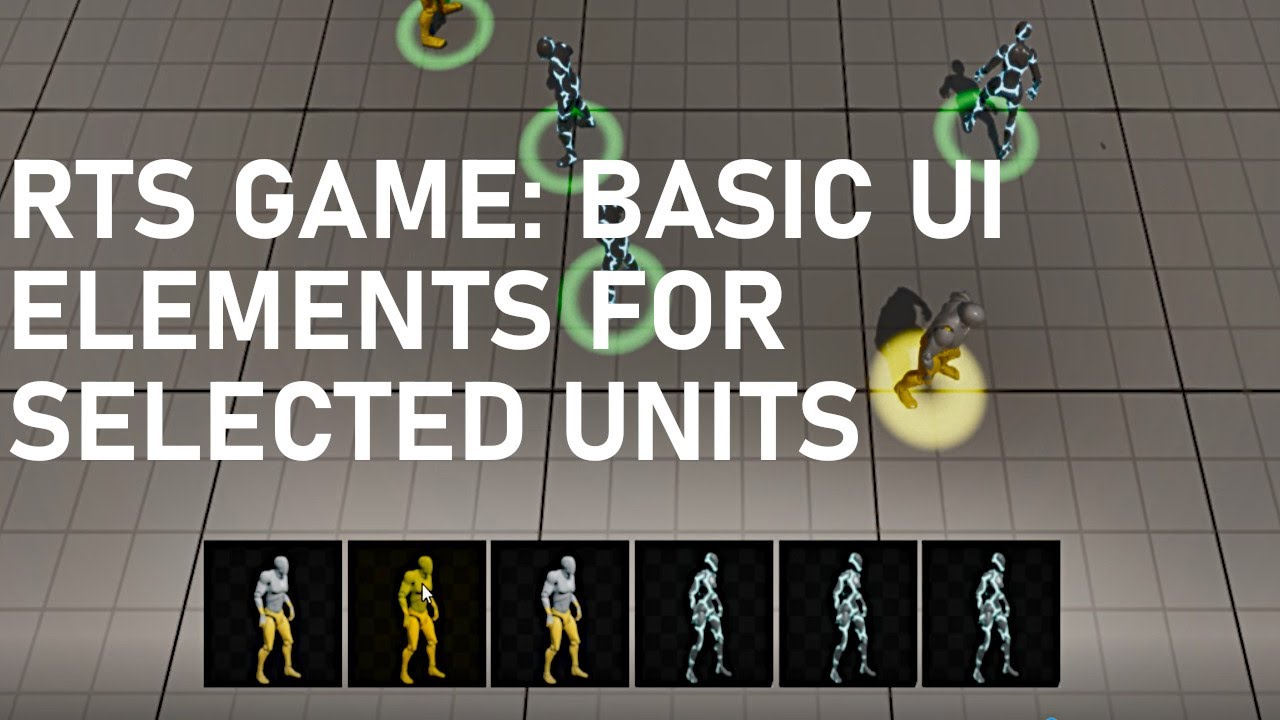
We'll make the first UI elements of the RTS game - Unit Portraits and the Selected Units Area. This is the area on the screen that shows the player which units they currently have selected. We'll introduce functionality to click unit portraits to select that individual unit (for micro management for example), and we'll also react to the player...
 dawn gazelle
trim matrix
Hello! I am having a bit of a problem, and I believe it goes here, if not I am s...
dawn gazelle
trim matrix
Hello! I am having a bit of a problem, and I believe it goes here, if not I am s...
If you've set the variable as texture2D, hit the compile button at the top left and then it should appear in the details panel.
 eternal cradle
hey guys, anyone experienced with navigation invokers? i've a couple of questions.
 solemn basin
Could use some knowledge on how communicate between blueprints. Anyone have a good tutorial or video?
 frosty heron
solemn basin
Could use some knowledge on how communicate between blueprints. Anyone have a go...
frosty heron
solemn basin
Could use some knowledge on how communicate between blueprints. Anyone have a go...
Blueprint communication video pinned in this channel
solemn basin
frosty heron
Blueprint communication video pinned in this channel
man, 2 hour video is rough for me. I guess its still something. Thanks for the heads up
frosty heron
2 hr video is nothing to be fair. Real tutorials take 100+ hours, not the few mins from youtube. Those normally do more harm than good imo
solemn basin
frosty heron
2 hr video is nothing to be fair. Real tutorials take 100+ hours, not the few mi...
true, I've already experienced that myself.
trim matrix
Also thank you! I did that last time, and then tried it a second time, but it didn't work, but it worked this time so thank you!
 wicked cairn
Hi guys!! :D I'm trying to have the player's Location AND the Level they were in Saved every once in a while, but when its loaded, the GameMode Blueprint keeps opening the level, I'm assuming because when the level is opened the BeginPlay is called, which causes a loop (Player keeps teleporting to last saved location infinitely)
Anyone know where I can better place this logic?? Their location is Saved via the Controller grabbing the pawn, and Loaded currently through the GameMode... 😭

Putting the load save logic in the Pawn OnPossessed or BeginPlay does the same thing, and so does putting it in the controller itself so i have no clue atm where to place it
dawn gazelle
wicked cairn
Hi guys!! :D I'm trying to have the player's Location AND the Level they were in...
You are correct. It's because you're opening the level in the begin play, so then when the level loads, you're opening the level, so then when the level loads, you're opening the level, etc. etc.
You should use some other event rather than begin play of your game mode.
Usually starting up a save game would be triggered by something the player does, like clicking a continue button. If you always want the level to instantly load the last level that the player was on whenever the game is started up you could use the Init event in Game Instance - this will only fire once when the game starts up, mind you, you wouldn't be able to access the last location from the player controller at this point.
lucid venture
lucid venture
I tested this in a blank level with just floating pawn movement and the issue also occurs, does anyone have any idea why a floating pawn behavior would do this?
 primal schooner
Anyone know why the further you are away from a UI widget, the larger it gets? You can see how big the enemy bar is when I'm far away vs when I'm right next to him


 edgy ingot
It never become larger. Its actually the same size
primal schooner
"appears" to get larger then :p
edgy ingot
Grab a ruler if u want ro measure
lucid venture
lucid venture
I tested this in a blank level with just floating pawn movement and the issue al...
Works just fine with the character movement component
primal schooner
okay so this is measured, far away one first, close up one second


its 400 px wide when its faw away, and 384 px wide when its close up
so its definitely getting bigger
edgy ingot
Its the same size far away or close if you never actually tell the widget to change its size
Prob an error in your part when screen grabbing
If you want to scale it the further the actor is. Maybe you can remap the scale based on the distance between the actor and the camera
That or use widget component and use world space instead of screen space
primal schooner
hm.. yeah you're right its the same size. okay ill mess with scaling
dawn gazelle
 primal schooner
Heh yeah I just tried to line up with my own character one

bout the same
well, exactly the same hah
 loud tree
Do you have it set to screen space?
solemn basin
I really need someone to walk me through this. What I want is to set the Deck Texture to something else when the DeckCount gets to 0. I tried watching the "Blueprint Communications | Live training" video, and I got kind of confused. I tried using "Get all widgets of Class" but I wasn't able to set the Deck Texture from the CardHUD Widget.


 lunar sleet
solemn basin
I really need someone to walk me through this. What I want is to set the Deck Te...
lunar sleet
solemn basin
I really need someone to walk me through this. What I want is to set the Deck Te...
Are you creating this widget anywhere with CreateWidget?
solemn basin
lunar sleet
Are you creating this widget anywhere with CreateWidget?
Yup I'm creating it In my game controller.
 lunar sleet
solemn basin
Yup I'm creating it In my game controller.
lunar sleet
solemn basin
Yup I'm creating it In my game controller.
Good, so promote that return value to a var. Then in your HUD, get player controller, cast to your PC, get that var and set brush
trim matrix
trim matrix
Hello! I am having a bit of a problem, and I believe it goes here, if not I am s...
Hello everyone! I have encountered a very similar issue, but this time it seems different.
So I created a horizontal box, in a widget, clicked to turn it into a variable, as it says to do (3:30), compiled it, saved it, and now it won't show up as a target to get from another variable for some reason, and I have no idea why. (9:55).
I tried to delete it, and remake it, I tried to force it through, cause I can make it show up, but then it just doesn't connect. I'm at a loss
lunar sleet
trim matrix
Hello everyone! I have encountered a very similar issue, but this time it seems ...
Did you read the comments?
trim matrix
&*%$. I read them before and forgot there was a comment at that time lol. I'll check that out.
Thank you for reminding me of that simple fact!
 heady crypt
hrmmm, Neo, you reckon 2 for loops and some Gameplay attribute evaluations from tags is a bit too much for a Pure function that finds and returns a colour ?
1-6 + 0-6 loops with 0-6 Attribute value evaluations
 remote meteor
No such thing as too much for a result you need to search for though. Often its not going to be too heavy, if is is heavy, can just shift to cpp to remove the bp loop overhead.
More like the better question to ask is whether there is a better way to evaluate what info you need. Which we dont have a context here.
heady crypt
So I have the ability for the designer to add an array of damage types to abilities, and the option to let it also add damage types from the player stats, so I've set it to search the highest base damage value and grab a colour for the particle
So it will go through a for each loop at least 1 time, and then grab a value from GameState for colour and return it
but it may have to do that 6 times, and may have to search through an array of gameplay tags and search through player attributes with tags for a value 6 times

I should just learn how to use the profiler and see the impact it causes
 summer nexus
How can I edit model polygroup that is selected in blueprint?
I like the corner to get higher when I look up and and lower when I look down
 primal schooner
Uh.. I was messing with animations that my PlayerCharacter is using, and I compiled and ran to test and now my player won't spawn or become possessed. I checked my GameMode, PlayerController, and Level, and all seem to be hooked up still. But none of my breakpoints work in my player controller. What should I look for?
remote meteor
seems fine, so the color will always follow the highest damage type among them
profiler yes, if you have the time, its always better to judge from there.
i would say go with it, when it comes to optimization phase, you can shift this function to c++
heady crypt
primal schooner
Uh.. I was messing with animations that my PlayerCharacter is using, and I compi...
what about default pawn? that's your Charaxcter
primal schooner
heady crypt
what about default pawn? that's your Charaxcter
Is DefaultPawn on the player controller?
 primal schooner
ah, yeah mine's set

i have player spawns
my GameMode is being created properly, I'm able to hit breakpoints in there at least
heady crypt
and nothing is spawning at all in the scene after you modified your AnimBP ?
primal schooner
ah i figured it out lol
geeze.. didn't realize a "spectator" mode was a thing, and its bound to "alt + s" which I must have fat fingered or something
heady crypt
lol yea spectator cam
primal schooner
I'm guessing if you're in spectator then it doesnt' spawn any players since there's nothing to possess them?
heady crypt
yep
primal schooner
ah okay mystery solved haha
remote meteor
heady crypt
So I have the ability for the designer to add an array of damage types to abilit...
this is an evaluation before applying the GE?
remote meteor
so, multiple GE, but 1 manually executed cue?
heady crypt
yes
it may have up to 9 GEs per tag for 6 damage types so far
I guess I could throw on 100 GEs and see if it still works without any issues
added 89 GEs and it seems to not mind at all

guess my armor GE affixes system won't bother UE at all

 silent drift
Morning! I'm currently trying to make a notification system for my game. I have made a notification widget and added a custom event called "Send Notification". Can I somehow make this global so I can call this from any place in my game to send a notification to the player?
remote meteor
you can make a function library to get the correct reference and call the function
where is this SendNotification function at?
silent drift
It is inside the widget itself. I don't know if this i the bestd approach, but I did it like this,
I did a "NotificationWidget", and inside of that I have a "SendNotifiction" event I can call with custom parameters for title and message. Then it adds itself to the viewport and removes itself after X time.
Again, if there is a better approach I'm happy to hear about it! It's my first time trying to make this, so I just did it based on what I thought was best.
remote meteor
a widget probably cant really add itself to the viewport
silent drift
Yeah, I'm currently adding it to the "PLAYER HUD" viewport, sorry! Missed to say that step.
So it doesn't add itself to the viewport, it adds itself as a child to a vertical box on the right side of the playe rhud. 🙂
So it is stackable as well if several comes.
Though, this also isn't great, since I want to be able to also show notifications in the main menu and that is without a player hud.
So this is a second problem I have. 😄
remote meteor
viewport are exclusive to player controller or the hud, you can have the SendNotification function on either of them.
when SendNotification is called, you can create a new widget and add to the viewport, or let the PlayerHUD widget to handle the adding of notification widget
you can always add a playerhud on the main menu though
silent drift
True, and yes, sorry, it creates a widget, and adds it as a child to the "notification" areas. 🙂
So I guess the best approach would be.
- Create a function library and add so I can call the "SendNotification" from anywhere
- Add a new "HUD element that's called "NotificationArea" or something, that will be a second hud to the player, and also added to the main menu (So I don't see health and such in the main menu, but have the same reference to the notificationArea for the library.
- Call the SendNotification from anywhere, and add it as a child to the notificationArea.
Do you think that sounds resoanble?
remote meteor
depending if this is a single player game, at the function library, you can use getplayercontroller(0) or you can retrieve the playercontrollers from the gamestate or gamemode.
you are getting to the widget reference through the playercontroller/HUD(the NotificationArea widget reference needs to be stored somewhere) to call the respective adding notification widget functions
silent drift
It is single player, so that sounds like a really good idea!
I also figured I wanted to do the "NotificationArea" as it's own HUD element, since then I can also give it a really high z value, to always be on top of things.
heady crypt
since it's SP you can use controller[0] and add an interface to do "AddNotification" and then you don't even need to cast
remote meteor
yes, either an interface or a shared parent class for both the game PC and the menu PC
i preferably will use the HUD class instead of a PC, but it depends if you utilizes it
silent drift
Interface? Still haven't learned about these, how does a Interface work?
remote meteor
interface allows you to have shared function calls on entirely unrelated classes
the implementation of the function itself depends on how the class itself implements it
this also allows you to call function on certain objects without knowing the underlying classes
heady crypt
You make a Blueprint->Blueprint Interface, then you add it to your Class Settings->Implemented Interfaces, then your object can receive any of the functions you implement without needing to cast to it
heady crypt
so if you want to talk between multiple objects, then you want to use interfaces
if you expect responses you may want to have tests though
silent drift
Okay! I will see if I can get this working! Thanks for all the answers! 🙂
 halcyon vapor
Is it possible to make a macro for a function library, and if I use that function library anywhere else, will the macro work?
primal schooner
If I have a select node like this, but I've connected the False and True pins to something, is that basically like writing:
 {
  ...
  ...
  if (!something())
  {
  }

  if (somethingElse())
  {
  }
}
Meaning both will get evaluated regardless?
 halcyon vapor
primal schooner
If I have a select node like this, but I've connected the `False` and `True` pin...
halcyon vapor
primal schooner
If I have a select node like this, but I've connected the `False` and `True` pin...
that's not exactly how the select node works (unless I'm misunderstanding the question), the select node will "select" whatever options you gave it depending on the "index" pin, so if your Index is true, whatever you connected to the true pin will get used as the return value, same with the false
trim matrix
primal schooner
If I have a select node like this, but I've connected the `False` and `True` pin...
Most nodes usually have short descriptions, which you can view by hovering your mouse over them
I believe Select should have one as well if I'm not mistaken
remote meteor
one thing about select node is
regardless which one is chosen
both pins will be evaluated
trim matrix
remote meteor
both pins will be evaluated
Doesn't that happen for all of the pure nodes?
 wheat flame
hello, for some reason when i change air control it does nothing which means my character is strafing normally in the air, can anyone help me out with it?
silent drift
Sorry for being a bit stuck again, but how do I make a reference to my "NotificationWidget" inside of a Blueprint Function Library? I'm trying to do cast, or even add it as a varible, but neither seems to work, so not sure how this works. 😦
trim matrix
I imagine a notification widget would appear for a certain period of time, display something and then disappear right?
You could construct it inside the notify function
and remove it afterwards
silent drift
Inside the notify function? Okay, maybe I'm missing something. 😄 Yes. So currently what I'm doing (I asked here a bit earlier and was told about the blueprint function library since I want to send it from any other script).
- I have a "NotificationAreaWidget" which has a super high Z value to make sure it's always on-top. It's a stackable box, so if several notifications comes they stack ontop of each other.
- I have a "NotificationWidget" which is the notification. This has a custom event called "SendNotification" with parameters, for title, message, time to show and if it is a warning or not (this just changes the BG color).
- I want to be able to send this from anywhere, so I can send it on the main menu, or while in-game etc. E.g. the player reports a bug through the user report tool I have. If successfull they get a notification it worked. or when they reach a certain goal or such.
So I don't know what the best approach is, and before when I asked for a bit of help I was told about the function library or interfaces, but I'm sadly not sure how to get it to work.
trim matrix
@silent drift why not have the notification area widget handle that?
Adding the notifications to itself i mean
silent drift
That sounds better! 🙂 I mean, since I don't really know what I'm doing with this (trying to learn), any suggestion that helps me understand this is highly appreciated. 🙂
And how do I make it able to be called from anywhere? In unity I "just" did a function that I could call and that would deal with all the work.
trim matrix
@silent drift You could make use of the Get All Widgets Of Class node
to get the referene to the notif area widget
within ur bp lib func
silent drift
Ah, okay, I will give it a go and see if I can get this working! I might be back with more questions. 🙈
silent drift
I think I got it working! Thank you all for the help! 🙂 I don't know if I have done it in the most efficent way, but I'm able to send notifications from anywhere by calling a BP Function Library. 🙂
Again thanks everyonet that helped me! 🙂


I need to add some error checks as well to make it fully work in a good way, since right now if there is no "NotificationArea" on the screen I think it will do nothing. 😄
trim matrix
silent drift
I think I got it working! Thank you all for the help! 🙂 I don't know if I have...
Looks good, but you don't need to run a for loop over your widget areas
Since there can be only one such widget, you can use a get node
silent drift
Ah. Didn't know that. Thanks! Will update it to do that.
trim matrix
The code is more logical then
 west grotto
ITs a float to interget multiplier then float So i can't add decimal number on multiplier. Is there way I can add decimal to float to float Multiplier

 trim matrix
i really don't understand the question here
 versed sun
 heady crypt
0 x ?
 versed sun
you need to change it to a float, Right click on node
west grotto
heady crypt
1 * ??
its interger can't add 0.5 OR 1.5 I m noob
heady crypt
you just want float * 1.5?
west grotto
heady crypt
you just want float * 1.5?
YES
heady crypt
Decimal is a float
drag your float, type multiply or *
and put in 1.5
done
and you can convert from int nodes in your math nodes, Ryck has a picture of how
versed sun
Ryck
World's leading screen capture + recorder from Snagit + Screencast by Techsmith. Capture, edit and share professional-quality content seamlessly.
and here is video
trim matrix
So I looked at the comments this time and I didn't see anything. But I have a main menu screen, and on that main menu screen are buttons. They all work it's fine.
HOWEVER, for some reason, when the game is booted up, a mannaquin also spawns, and falls into oblivion, and the tutorial I'm checking out has nothing of the sort. It doesn't break the game or anything. It's just... I don't know why it's there. The rest of it all works fine. The map appears to be empty
heady crypt
GameMode Default Pawn
PlayerStartPoint might be below the map slightly, or your PC doesn't load fast enough and it clips through map first and then loads landscape/floor
west grotto
versed sun
https://app.screencast.com/iErU0eYcbwTEs
OK thanks for help I need to write multiply then pick float •float
trim matrix
Oh the main menu is devoid of everything but buttons. I don't even know where the manaquin is coming from, all of the characters should only be appearing once the button is pressed, and said characters do appear on that map.
heady crypt
if you have a GameMode you'll spawn the Default Pawn
unless you clear it or set to spectator
World Settings->GameMode->GameMode override
trim matrix
face desk it didn't even occur to me to look at that, cause I'd already changed it a dozen times
hmm... it still showing up though
heady crypt
depends on where/when you changed, if you changed maps and accidently reset it or crashed
trim matrix
There we go it's fixed! Thank you!
heady crypt

trim matrix
Had to root around alittle
heady crypt
now to place an animted character getting smacked and turn on physics based animations so it falls on the floor in the background as you look at the main menu 😉
venting your frustrations
 ebon olive
Hi guys. why didnt my animation played? when i test run the game, when i attack this object, all those links (the white one) above got highlighted but my animations didnt get played
 versed sun
If its true, print your Health , just to check that health is less than 0
 undone bridge
Hello all, I'm trying to create a "steerable" projectile. this part of the code is just supposed to move the object forwards and a constant speed, but nothing happens as is. does anyone know what I should be doing?

sorry, that's actually a mis-named varriable
it's currently just 10
 red berry
Which is better: AttachActorToComponent or AttachComponentToComponent? This is with regards to equipping items on a player
versed sun
Is the item a component or an actor? (Don't use Actor Components)
 gentle urchin
Isnt attaching to actor just attaching to root component of that actor?
Actor is just a container gor components really
red berry
The item is an Actor. I'm just trying to find out which is better for performance
gentle urchin
My point was, theres no actor to attach to. Its the root component, which is also just a component 🙂
Chained component transform updates is expensive regardless of which node you use (as they do the same thing)
elfin hazel
So apparently scene components has "Start with tick enabled", so do they tick or do they not tick because there's nothing connected to their tick?
4.27
thin panther
even if there's nothing connected they can still tick
the node still incurs a performance cost, even if slight
elfin hazel
So every time a component is added to an actor, wether it is in the components view or dynamically with a node, gotta remember to disable tick?
Correction; not just scene components. Any actor component has tick enabled.
versed sun
I think you can default them to not tick in Project Settings

 knotty coral
Hey everyone!
I hope anyone can help out with this
I have a inventory for a multiplayer project, everything works fine for the host, but other clients seem to have a problem reading items from the MAP variable.
So maps can't be replicated, but everything seemed to be ok a few days ago for the client somehow, but all of a sudden it's not working, so i'm trying to wrap my head around whether or not MAP variables are useless for MP or if i'm just doing something wrong.
So should i stick to using map or find another method? Because i honestly don't know why it was working earlier
The current process:
My inventory component has a server event that adds all the items to the map, and then i pass the map information to the players inventory widget, that's when things go wrong, the client reads the map as empty when reading it from the widget. This does not happen to the host.
 spark steppe
when i copy a function definition from an existing BP into an interface BP it copies the whole graph and i can't get rid of the nodes, is there any workaround?
dawn gazelle
knotty coral
Hey everyone!
I hope anyone can help out with this
I have a inventory for a mu...
Map variables can still be used in multiplayer as a means of being able to look up a value based on a key, but they can't be used for replicating data.
You can emulate a replicated map by using an array of a structure that contains your key and value pair and having functions set up that search the array for the appropriate key to find the right index to modify and then update that index.
trim matrix
spark steppe
when i copy a function definition from an existing BP into an interface BP it co...
💯 bug
Can you delete it?
knotty coral
dawn gazelle
Map variables can still be used in multiplayer as a means of being able to look ...
Thanks, i'll give it a try, appreciate it!
spark steppe
who tf thought that it was a good idea to force every interface function (without return value) to be an event? 😦
versed sun
spark steppe
who tf thought that it was a good idea to force every interface function (withou...
I don't know, but we hates it
Nasty filthy interfaces
i just add a no-named bool return 🙂
spark steppe
can i get the actor class of an interface reference?
or do i need to make my own GetClass interface function? 😄
also it somehow made the interface functions pure where i copied the definition from another BP -_-
i think the whole copy&paste thing should be avoided!?
versed sun
unless it works ?
i would LOVE to have some default code in a Interface like a Override Function's "Add call to Parent"
spark steppe
this should be impossible!?

 tribal blade
i just don't use interfaces at all 
I'm totally a composition fan but for unreal i either go small reusable components and larger classes with very optional functionalities
spark steppe
yea, this is one of the rare cases where i can't inherit from a common base class -_-
and a component is also not really what i want here
versed sun
but, does the pure Interface call work?
spark steppe
haven't tested yet, still refactoring stuff (and i still have the feeling that i will hate myself for that change...) -_-
already mentally prepared to revert everything 😄
tribal blade
spark steppe
and a component is also not really what i want here
I doubt that. What's the use case?
spark steppe
versed sun
but, does the pure Interface call work?
it does, just tested
 manic vessel
I tried to set a grenade beep sfx TO GRADUALY Beep quicker as is is about to explode . Didnt work 😦
 dawn gazelle
manic vessel
I tried to set a grenade beep sfx TO GRADUALY Beep quicker as is is about to ex...
dawn gazelle
manic vessel
I tried to set a grenade beep sfx TO GRADUALY Beep quicker as is is about to ex...
When using a timer that's looping it will continue to use the time first provided. You'd have to not use looping and create a new timer with the new time value each time.
Can be as simple as using an event to trigger the creation of the timer that you call in the beep sfx event.
manic vessel
dawn gazelle
When using a timer that's looping it will continue to use the time first provide...
OK did not know that, thanks
spark steppe
urgh, now i can't put actor references in an interface array -_- what a time to be alive
 dawn gazelle
manic vessel
Also not working ?
dawn gazelle
manic vessel
Also not working ?
The % is something called modulo, it's not giving you a percentage if that's what you were hoping for. If you want to get 50% of the value, just multiply by 0.5.
 lofty rapids
manic vessel
dawn gazelle
The % is something called modulo, it's not giving you a percentage if that's wha...
lofty rapids
manic vessel
dawn gazelle
The % is something called modulo, it's not giving you a percentage if that's wha...
I suspected that. Thanks for showning me the way
dawn gazelle
manic vessel
Also not working ?
I also think you might want to clamp the minimum value of the beeping, otherwise you might end up where the timer is causing the beeping to happen extremely quickly. Like maybe clamp the minimum value at 0.25, which would be like 4 beeps a second?
 undone sequoia
guys I have question I am calculating my own velocity because I am not using simulate physics but own kinematics and
this is how i do it, at first point I set Current Frame position, at second point I substract old frame positiion from current frame positon and divide it by delta world seconds and setting actual plane velocity at point 3 i am setting last frame position.
the thing is when I calculate it like this its working fine BUT big BUT delta world seconds are always very different which causes my result of velocity for example X can be 1000 1025 1080 1035 1090 1040 , its not in sequence but sometimes is next number lower than last number which is totally wrong, I tried divide it constantly by 0.03 or 0.02 then result is ok, I also printed delta world seconds and saw that number is in range 0.02-0.03 sec which causes me problems, any ideas ? I need get numbers in sequence because then My crosshair which predict my velocity is shaking like mad

output for x should be like 1000 1025 1040 1065 1080
next number never should be lower when I am not changing dirrection ofc
versed sun
can you clamp it to fake it ?
undone sequoia
versed sun
can you clamp it to fake it ?
nope I need precission I show you for waht I use it
undone sequoia
versed sun
can you clamp it to fake it ?
u see its for bomb crosshair
also check this I am flying straight and numbers of velocity are that crazy

there is difference by 200
3691 then 3411
crazy
versed sun
I dont know if the Tick's Delta Sec and World Delta Seconds are the same
Did you try pluging the Tick's Delta into the divide ?
undone sequoia
i plug in delta world seconds and then seconds right from tick same shaking
trim matrix
what if you used a constant value instead of the delta seconds?
versed sun
Did you clamp it tho? a clamp would make it so it would at least be == and never go smaller
undone sequoia
versed sun
I dont know if the Tick's Delta Sec and World Delta Seconds are the same
Did y...
this is how it should look, this is example when I dont divide by delta world seconds but constant 0.02
undone sequoia
trim matrix
what if you used a constant value instead of the delta seconds?
ye then its right but I dont really know what constant is preccise for plane and if on every pc its same 😄
undone sequoia
versed sun
Did you clamp it tho? a clamp would make it so it would at least be == and neve...
clamp delta worlds?
 vale pine
Is there a way, via BP, to give a custom SceneComponent an icon or something where I can see it in 3d space?
versed sun
vale pine
Is there a way, via BP, to give a custom SceneComponent an icon or something whe...
you can see a Vector and Transform variable
 vale pine
yussssss, thank you!
undone sequoia
versed sun
but wouldnt work if you turn around..
ye vector has x y z , also now i tried put 0.01 instead delta world seconds its nice precisse but also not shaking question is if it will be same on every computer lol
if yes then it will say
stay
undone sequoia
i am going test it on another computer
😄
if it is ok I let it
idk why delta worlds seconds s*cks
versed sun
i can think of work arounds, but probably better to try to identify the problem first
undone sequoia
versed sun
i can think of work arounds, but probably better to try to identify the problem...
at first in unreal you should get your velocity by its function get velocity, but if you are not using simulate physics like me
then u have make it by own
😄
trim matrix
undone sequoia
i am going test it on another computer
you don't have to, i'm 90% sure about this
versed sun
Vinterp on tick from Current location to Goal location, and update Goal location every .1 sec ?
undone sequoia
versed sun
Vinterp on tick from Current location to Goal location, and update Goal location...
vectors are ok , only problem make delta world sec
 worthy tulip
how do you get the BP node for "target" for actor or capsule component? It appears only Static Mesh Component has that "target" node
lunar sleet
worthy tulip
how do you get the BP node for "target" for actor or capsule component? It appea...
Target node?
Do you mean pin?
lunar sleet
Target for components usually only shows if they’re from a different blueprint
worthy tulip
i need it for "Cast to ____"
lunar sleet
Show your code
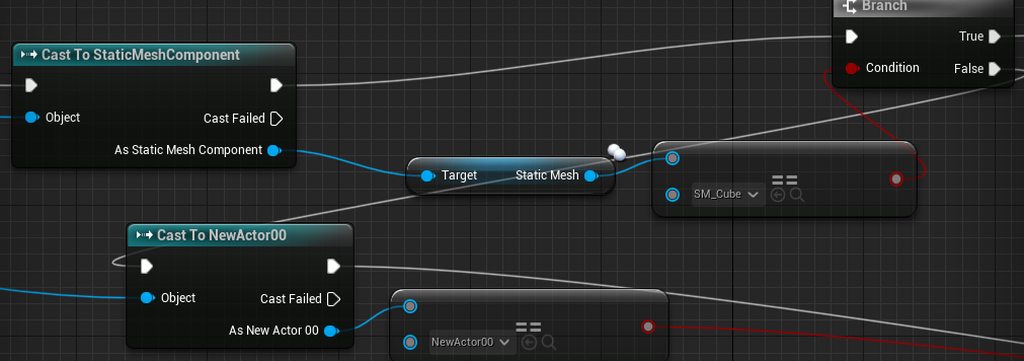 thin panther
The cast doesn't no
lunar sleet
Jesus lol
thin panther
You're just accessing a static mesh from the casted component
worthy tulip
without it, it won't even try to go through
lunar sleet
thin panther
You're just accessing a static mesh from the casted component
And then == cube lol
trim matrix
🍿
thin panther
Do you understand what a cast actually is
lunar sleet
you’ve been here since March, please watch the blueprint comms video pinned here
thin panther
And what that target pin is for
worthy tulip
i needed it to check an equal ==
lunar sleet
No you don’t need the ==
trim matrix
If it wasn't the actor it would go to Cast Failed
lunar sleet
I understand if you’re checking for the asset
But you’re casting to a component to begin with which prly means you’re doing something terribly wrong
Maybe go over what you’re trying to do exactly
worthy tulip
but if i am not casting to a component, then how does the BP will know it is a Cube Mesh?
trim matrix
no that part is all good (prob)
lunar sleet
Where is this code, where are you trying to check the asset from, what’s the point of this?
lunar sleet
Ok
trim matrix
What's up with the second cast?
worthy tulip
it is an event from the capsule itself
worthy tulip
trim matrix
What's up with the second cast?
to check after the first one false basically if else if else
lunar sleet
worthy tulip
to check after the first one false basically if else if else
Ok, so if component hit is of a certain class you want to do something, I imagine
trim matrix
 lunar sleet
Why the need to check if its mesh is the cube
Dumb this down for us. What are you trying to detect here
worthy tulip
basically there is so many mesh there
lunar sleet
They’re all the same blueprint class?
worthy tulip
alright, i am trying to check if that static mesh is a cube, if not it is not that cube or static mesh, i would to check if it is another actor instead of static mesh. So it is an if static mesh, see if it is cube, else if it is actor, see if it is this "newactor00"
lunar sleet
Ok but I think you’re confusing static mesh actor and static mesh component
trim matrix
the == in the second cast is unnecessary
along with the branch that it is connected to
lunar sleet
Did you just place a bunch of cubes and stuff in your world without making a blueprint class for them?
trim matrix
yes, they did
worthy tulip
trim matrix
the == in the second cast is unnecessary
let me test again
lunar sleet
Ok, make this easier for yourself @worthy tulip
worthy tulip
lunar sleet
Did you just place a bunch of cubes and stuff in your world without making a blu...
i am using default Third Person Template
lunar sleet
Oh
worthy tulip
the cube is already there
lunar sleet
Hang on, I gotta check how they made it
worthy tulip
it is just Static Mesh, it has no blueprints
worthy tulip
trim matrix
the == in the second cast is unnecessary
it does not go through. I put a print string to check
lunar sleet
Try this for your putposes
thin panther
(though they are still actors)
trim matrix
worthy tulip
it does not go through. I put a print string to check
where did u put it?
lunar sleet
Make a new actor bp class. Add a static mesh component to it. Find the mesh for that cube in the assets
trim matrix
You can do a screenshot and paste it to discord, no need to upload to imgur
or use that windows snipping tool thing
worthy tulip
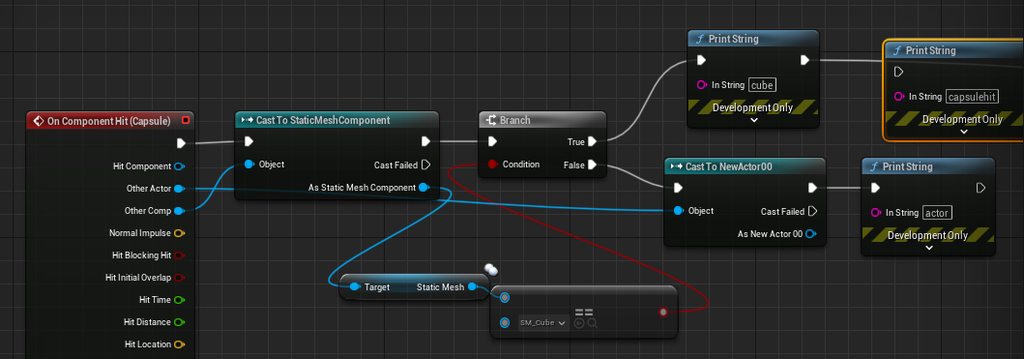 lunar sleet
thin panther
(though they are still actors)
lunar sleet
thin panther
(though they are still actors)
yeah they make them actors when placed in world, just not the kind you can access like you would a bp
trim matrix
worthy tulip
https://imgur.com/a/sYBub2D
what was working and what wasn't?
worthy tulip
the cube is working if it knocks the cube, so i let it knocks the actor, it does not work
trim matrix
connect cast failed from cast to staticmeshcomponent
To the 2nd cast
@worthy tulip
lunar sleet
we keep going with what he currently has, it'll only keep him confused and won't really scale well
worthy tulip
it works but long errors message spamming on end play
worthy tulip
lunar sleet
we keep going with what he currently has, it'll only keep him confused and won't...
then what is the way exactly?
lunar sleet
easy
worthy tulip
 trim matrix
do a is valid check before the initial cast, for its input connect the other comp
lunar sleet
- go to your content browser, create a new bp class actor. Name it BP_Cube
- Open this actor with 2 click, add (+ sign) static mesh component, select SM_ChamferCube from the assets. Select MI_SolidBlue from the materials once compiled
- Delete all cubes in your level, and place these instead by dragging that actor from the content browser into your world.
- Moving forward you only need to cast to that actor directly, no need to check the mesh etc., just from other actor pin cast to BP_Cube
@worthy tulip
trim matrix
if is invalid connect it to the 2nd cast
worthy tulip
noted, i will do both of you methods. Thanks a lot really
lunar sleet
def watch the blueprint comms video pinned in this channel when you have some time, it'll clear the fog on casting and all
worthy tulip
noted on that as well
trim matrix
worthy tulip
noted, i will do both of you methods. Thanks a lot really
don't do both lol
worthy tulip
trim matrix
don't do both lol
i mean yours and his method separately, my bad.
Thanks again you two
spark steppe
if i store a bunch of actor references on an InterfaceType array, is there ANY way to get the actual actor?
ah, guess to object and then cast?
 crimson geyser
When I play my game it automatically spawns an CameraActor. I have no idea why and from where this is happening. Does anyone know why this happens or knows a way to find the blueprint that does this? In the image the grey cameraactors are the ones I placed myself. The yellow one is automatically spawned.

I can't do something like find reference on it.
 mild seal
Not sure if this would be the correct channel to ask.
I can not understand how to access the Physics Asset of a Skeletal Mesh.
From what I have seen (YouTube vids), it is achieved by setting Set Simulate Physics to true of the Mesh (See image).
But this would only work in some scenarios (will not work on the Skeletal Mesh that I am working with).
Logically it would make sense to access the Physics Asset and then enable it?
A bit lost with how this is done, any light on the subject would be helpfully.

 proud wasp
why does this happen every time i open the editor?
 frosty heron
I get those stuff when I forgot to compile
normally from blueprint callable stuff not Blueprint interface
undone sequoia
guys how I should switch between 3 cameras? For 2 I am using flip flop
but for 3?
mild seal
mild seal
Not sure if this would be the correct channel to ask.
I can not understand how t...
I have worked out what it is.
It is related to the collision and in may case, had to be set to Ragdoll, but was CharicterMesh.

 runic pagoda
Is there an easy setup for controlling the offsets of a camera component depending upon the pitch of the players view? (Eg. The more they look up, the more it offsets)
trim matrix
undone sequoia
guys how I should switch between 3 cameras? For 2 I am using flip flop
use a multigate
trim matrix
it's a single node
works like flip flop, but has more outputs
you only need to enable looping on it
 golden gull
Guys, I have an interaction system which uses a line trace. I use a line trace to see if an object I hit implements the interact interface and if so it invokes its interact function. I have a door and its function is to open up, but the catch is, since the door swings open, the only part left to target with the line trace is the hinge. So, when I'm close to an open door and want to close it, I have to aim precisely at the hinge, which kinda sucks. Any suggestions on how to trigger the interaction without having to aim at the hinge?
loud tree
golden gull
Guys, I have an interaction system which uses a line trace. I use a line trace t...
Add a collision box in the doorframe that is overlappable
 brazen pike
golden gull
Guys, I have an interaction system which uses a line trace. I use a line trace t...
brazen pike
golden gull
Guys, I have an interaction system which uses a line trace. I use a line trace t...
Why do you have to target the hinge? why doesn't the door itself have collision
trim matrix
runic pagoda
Is there an easy setup for controlling the offsets of a camera component dependi...
currentOffset = pitch/maxPitch * MaxOffset
loud tree
brazen pike
Why do you have to target the hinge? why doesn't the door itself have collision
It probably does. But it's likely attached to the door so when the door moves the collision is gone.
frosty heron
loud tree
It probably does. But it's likely attached to the door so when the door moves th...
If the door moves the collision should move with it too
golden gull
ah I had a collision box but the problem was that it wasn't blocking the visibility channel so the line trace didn't work properly
frosty heron
you just add collision in the mesh editor if you haven't got one
loud tree
Which is why I suggested adding a new collision box to the frame 😅
runic pagoda
trim matrix
currentOffset = pitch/maxPitch * MaxOffset
That doesn't sound like a blueprint solution.. is there a node that gives current pitch? I looked but it didn't seem to be apparent
frosty heron
runic pagoda
That doesn't sound like a blueprint solution.. is there a node that gives curren...
You can do that in blueprint
brazen pike
The camera's Y axis rotation is the pitch
trim matrix
runic pagoda
That doesn't sound like a blueprint solution.. is there a node that gives curren...
Get the node GetPlayerCameraManager
you should be able to draw out of it the max pitch
golden gull
Guys, any idea why this happens when I block the visibility channel on the doors box collider?
trim matrix
something to do with iks or whatever
u'd need to change stuff in the anim bp i think
frosty heron
looks to me the character get pushed down to the floor rather than the ik being the problem
the default manny Ik implementation is already good imo
Open Console and type Show collision
trim matrix
frosty heron
the default manny Ik implementation is already good imo
never seen it 
frosty heron
It basically just trace down from the foot location and apply offset to the foot according to the impact location iirc
trim matrix
maybe it's freaking out since it's inside the box collision
golden gull
I turned off the IK and the problem is gone
trim matrix
yee
you could change the ik traces to ignore visibility and use a trace for obj instead
golden gull
thanks guys
frosty heron
golden gull
I turned off the IK and the problem is gone
Well now your footstep not gonna get offseted when walking on steep surfaces
golden gull
yeah I can see that now its ugly
trim matrix
trim matrix
you could change the ik traces to ignore visibility and use a trace for obj inst...
.
frosty heron
oh right, the IK trace might be hitting your collision
golden gull
I'm a bit confused by what use a trace for obj instead means. Sorry I'm very new to unreal haha
trim matrix
Sphere trace for objects
frosty heron
This is what the IK uses
 trim matrix
Sphere trace for objects
trim matrix
trim matrix
Sphere trace for objects
not sure if such node exists there
it's diff than the nodes u'd see in a normal event graph
frosty heron
You can probably make a custom trace channel for your interactable stuff
golden gull
trim matrix
not sure if such node exists there
sphere trace by object types?
trim matrix
yes
trim matrix
golden gull
sphere trace by object types?
is the obj type input of that node an array?
golden gull
yes
trim matrix
or a single var?
that's good
draw out make array out of it
and for the elements select WorldStatic and WorldDynamic
golden gull
This didn't work unfortunately
 trim matrix
golden gull
This didn't work unfortunately
trim matrix
golden gull
This didn't work unfortunately
u can't draw out make array?
then click on that +
next to it
frosty heron
It's not like normal bp unfortunately 😦
golden gull
oh I did the values are there I just didn't show them haha
well I guess I can scrap doors then lol I'd rather have IK
trim matrix
golden gull
well I guess I can scrap doors then lol I'd rather have IK
u don't have to
trim matrix
trim matrix
then click on that +
didn't that work?
trim matrix
golden gull
I set it as worlddynamic and world static but its the same problem
show how the collisions in ur box coll are configured
golden gull
 trim matrix
set the object type to vehicle (or something else than worldstatic and worlddynamic)
golden gull
lol that worked, why?
trim matrix
because it was still tracing against it
trim matrix
golden gull
This didn't work unfortunately
that thing
golden gull
ah I see
trim matrix
now you made the coll box invisible to that trace
golden gull
thanks a lot!
frosty heron
Launch the game from IDE in debug mode
trim matrix
do you recognize InContext.Struct as a struct you could be using somewhere?
trim matrix
have you tried checking the logs?
if they provide any other useful info?
I ment just the logs in the Saved folder
Aren't those just a trimmed version of the logs in Saved btw?
(sb pls fact check that 4 me, thank you)
Now I see why cross posting is disallowed 🙂
Post this in #cpp
and delete it from here
so mods won't get mad
knotty coral
why does it say my arrays are not replicated inside my widget blueprint? They are neither sets or maps so don't understand why they can't be replicated.
 knotty coral
i need to pass an array of item objects to my widget, so that i can create item widgets out of each item object
knotty coral
alright will try, the tooltip got me a bit confused, appreciate it!
 near elk
I have a question, whenever I go into crouch for some reason my character is half way in the floor, (it's FPS) but when I used my TPS character as a FPS it was working fine, but when I switch to another mesh it starts behaving weird. Any idea why this might happen?

 rich pollen
having problems with spline meshes on my snake boi
they are deforming, but are all over the damn map, and in no observable pattern
anyone who works with spline meshes able to help me out here?

the construction script
and the code that should be moving these spline meshes


the spline meshes should be following the head directly, but what the hell is happening
the head appends a spline that should be controlling the movement of other parts of the body
it worked fine when i used instanced static meshes instead of spline meshes but im looking to make it appear as a single thing and not a head and so many parts that just follow
 crystal crown
Literally #packaging 😄
trim matrix
crystal crown
Literally <#402958499660955658> 😄
oh LOL thx
 dreamy mountain
how would i remove a widget from the screen?

this is in the widget i want to remove
idk how id remove it
dawn gazelle
If you're trying to remove it when you click the Start button, it won't happen as the Open Level basically stops everything and starts loading the level.
dreamy mountain
but it doesnt remove the widgets before starting to load the level
it just freezes up
dawn gazelle
Exactly. No time to process it, it just starts loading the level.
dreamy mountain
ok.. so would i be able to make it like remove the menu widget and then show a loading message?
dawn gazelle
Not if you're doing it on the same frame as opening a level.
dreamy mountain
would adding a delay work maybe?
dawn gazelle
Probably.
dreamy mountain
how would i add in a widget that isnt self to the widgets blueprint?
i need to get a reference to loading_widget
 noble ledge
Can someone tell me what this add is doing? Is it getting the 0th index in the UpdateCounts array and setting something to the UID member?
 dawn gazelle
noble ledge
Can someone tell me what this add is doing? Is it getting the 0th index in the U...
dawn gazelle
noble ledge
Can someone tell me what this add is doing? Is it getting the 0th index in the U...
The Update Counts is an array of a structure and that structure contains the two properties, UID and New Count.
It's adding a new entry into the array setting the UID property to whatever it's connected to and the New Count property to 0.
noble ledge
dawn gazelle
The Update Counts is an array of a structure and that structure contains the two...
Got it. thank you
noble ledge
Is this Add actually adding anything?
 dawn gazelle
noble ledge
Is this Add actually adding anything?
dawn gazelle
noble ledge
Is this Add actually adding anything?
I believe it does - it'd be adding a nullptr into the array.
noble ledge
dawn gazelle
I believe it does - it'd be adding a nullptr into the array.
Ok thats what I thought but wanted to make sure. Thanks again!
 plush hornet
hi all, hope your ok. Just a quick question, how would I save an actors rotation when transferring levels? I'm going to do it in the game base as all my teleport logics there. Im not sure what blueprints I would use though. Any helps appreciated.
Thanks
 mossy nymph
my player character blueprint corrupted. is there anything i can do?
versed sun
either load a back up , or learn to back up
mossy nymph
i have a backup but its old so id have to redo so much
thats so shit
this type of thing should never happen in any engine ever
versed sun
what corrupted ? just errors ?
mossy nymph
this
 thin panther
Ah the classic 5.3 engine bug
mossy nymph
the details panel is blank and every time i playtest, it crashes the editor
thin panther
Are you using source control?
mossy nymph
wdym
 ornate kraken
mossy nymph
the details panel is blank and every time i playtest, it crashes the editor
ornate kraken
mossy nymph
the details panel is blank and every time i playtest, it crashes the editor
That happened to me and I just copied the code and pasted it into another blueprint and deleted the original
thin panther
Source control. Are you using it? Like perforce, git, plastic, etc.
I'm going to assume from you saying that, that it's a no
mossy nymph
thin panther
Source control. Are you using it? Like perforce, git, plastic, etc.
I'm going t...
no
ig not then
mossy nymph
ornate kraken
That happened to me and I just copied the code and pasted it into another bluepr...
i would have to remake all my variables and everything referencing the player blueprint
mossy nymph
thin panther
That's your insurance against this stuff
ill do that from now on then, thanks
this should still never happen, ever
mossy nymph
thin panther
Also worth checking your auto saves
how can i do that
ornate kraken
mossy nymph
i would have to remake all my variables and everything referencing the player bl...
When you add variable references to other blueprint where they don’t exist you can right click them and select promote to variable or something like that.
thin panther
But yeah with a bug like this, that is quite random, affects very few people, and is hard to reproduce, it can slip through cracks of qa
ornate kraken
ornate kraken
When you add variable references to other blueprint where they don’t exist you c...
That’s easier than creating all of the again from scratch
mossy nymph
thin panther
But yeah with a bug like this, that is quite random, affects very few people, an...
this is the 2nd time its happened. both times its from me editing a basic variable in the character movement component, then pressing ctrl+z
i literally just changed the "Jump Z Velocity" then pressed ctrl+z and it corrupted
thin panther
Could be worth making a bug report on considering it's pretty critical
If you've got solid repro steps
Test in a blank project or whatevs
mossy nymph
thin panther
Could be worth making a bug report on considering it's pretty critical
how can i do that
thin panther
Google for the bug tracker. I don't have a link
mossy nymph
ok thank you guys
im just using an old backup now
gonna have to redo some stuff but its not as much as i thought
 clear cave
Hello! I'm using a 3rd party package (called Cinematographer) to provide realistic camera bodies for use in a first person game. The primary way to integrate them into my player character seems to be child actors, but the challenge I'm having is that yaw rotation is not being translated into the CineCameraActor located within my child actor component..is there a way to propagate that?
I think my problem is similar to this one: https://forums.unrealengine.com/t/add-controller-pitch-yaw-to-child-actor-component-camera-doesnt-work/1260268

Epic Developer Community Forums
The boardgame player characters (“MainCharacterBP_BoardGame”) in my party game have a multitude of custom camera actors (“CharacterCamBP”) which I’ve added as child actor components, which allows me to have much better camera control, and also allows for easier camera transitions using Set View Target with Blend, however, here is the problem. I...
 tribal gazelle
You can load two different savegames like this right? Or can you only use one at a time? (Just wondering since I am getting reference none errors)
 dawn gazelle
tribal gazelle
You can load two different savegames like this right? Or can you only use one at...
dawn gazelle
tribal gazelle
You can load two different savegames like this right? Or can you only use one at...
Yep, this is fine. Your None error is likely because of this. You need to use the completed pin.
 tribal gazelle
dawn gazelle
Yep, this is fine. Your None error is likely because of this. You need to use ...
tribal gazelle
dawn gazelle
Yep, this is fine. Your None error is likely because of this. You need to use ...
I just noticed that man thanks
I put a branch there also lol
tribal gazelle
dawn gazelle
Yep, this is fine. Your None error is likely because of this. You need to use ...
Can I ask, since it's the main menu, no replication is needed for multiplayer?
trim matrix
Probably not, but that depends on your menu
tribal gazelle
When I save and load my character's position, the camera spawns at the PlayerStart and then moves to the player's position. How can I fix that?
rich pollen
rich pollen
having problems with spline meshes on my snake boi
they are deforming, but are a...
bump
 marble tusk
rich pollen
and the code that should be moving these spline meshes
marble tusk
rich pollen
and the code that should be moving these spline meshes
What happens if you switch the get location and tangent node's coordinate space to world?
rich pollen
that doesnt work
and the setting location and tangent for a spline mesh only does it in local
marble tusk
Are the spline meshes and spline itself all set to 0,0,0 in the blueprint?
rich pollen
yes they are the default
tribal gazelle
When I save/load my player's position, they always spawn facing north. Would I have to save the CameraView location/rotation to make them face the right way?
trim matrix
yep
dawn gazelle
tribal gazelle
But how do I set the camera view?
If it's a controlled pawn, you'd usually set the control rotation on their player controller.
 sick basin
heres no errors, but why wont me interacting with the button make all the instances of my coin blueprint respawn

 dawn gazelle
sick basin
heres no errors, but why wont me interacting with the button make all the instan...
dawn gazelle
sick basin
heres no errors, but why wont me interacting with the button make all the instan...
It wouldn't get all of them to respawn as you're referencing only a single instance (if any at all) and calling its event dispatcher.
sick basin
it doesnt even make single one respawn
dawn gazelle
Probably because you have no reference set?
sick basin
what reference
dawn gazelle
 sick basin
it says coin blueprint there
dawn gazelle
"Coin Blueprint" is a reference to something. What is it pointing to?
dawn gazelle
No it isn't. It is a cointainer that can hold a reference to a spawned object.
sick basin
i dragged this into here
 dawn gazelle
You may have set the type of that container to Coin Blueprint but it doesn't point to a blueprint.
sick basin
 tribal gazelle
dawn gazelle
If it's a controlled pawn, you'd usually set the control rotation on their playe...
tribal gazelle
dawn gazelle
If it's a controlled pawn, you'd usually set the control rotation on their playe...
Camera is now in right position but the player is facing north still
rich pollen
rich pollen
bump
looks like its some issue with my spline i think
dawn gazelle
sick basin
That's exactly what I mean. It's a container that can hold a BP Coin PIckup reference.
But are you actually setting anything into that reference?
sick basin
it should reference to blueprint class right
sick basin
well how do i make it reference to all the spawned instanced of blueprints
dawn gazelle
That container can hold a reference to the spawned instance.
tribal gazelle
sick basin
well how do i make it reference to all the spawned instanced of blueprints
GetAllActorsOfClass
sick basin
well each spawned instance of coin pickup blueprint shoudl be listening for the event?
isnt that the point of event dispatcher
dawn gazelle
No.
An event dispatcher exists only on the single instance. Other things can bind to that event dispatcher to listen for when that particular instance calls its dispatcher.
One -> Many
sick basin
yes thats what im trying to do
theres one coin respawner button thing
and when you touch it, it should call everything binded to event dispatcher
i want to make every coin binded to it
dawn gazelle
Then you have to get reference to every coin and bind to that dispatcher.
sick basin
isnt every instance doing that when the game begins
dawn gazelle
No.
sick basin
 dawn gazelle
It is binding itself to its own event dispatcher.
Each instance has its own event dispatcher.
So when you have a reference to a single coin, and call its event dispatcher, it would execute only on its own event dispatcher.
sick basin
oh that makes more sense, so I could make the event dispatcher on the respawner blueprint instead then
sick basin
am i supposed to find a respawner in the scene, or just get reference from the blueprint in level editor
tribal gazelle
If anyone else can help me, when I save/load the player's position, I get and set the ControlRotation but my character is facing north still.
dawn gazelle
You use a variety of ways to get a reference.
One would be to have a variable of the correct type (Like set it to a BP Coin Respawner type) on your coin blueprint and mark it as "Instance Editable" and "Expose on Spawn". When you place a coin in the level you can then select any existing BP Coin Respawners in your level.
Another would be to use GetActorOfClass, assuming there is only one in the level and this would give you a direct reference to it.
dawn gazelle
tribal gazelle
If anyone else can help me, when I save/load the player's position, I get and se...
Save your actor's rotation and load it.
tribal gazelle
dawn gazelle
Save your actor's rotation and load it.
I am saving the location + rotation from the transform (also the ControlRotation)
Everything is correct angle/position but the player is facing north.
dawn gazelle
Are you setting the actor rotation after it has been spawned?
tribal gazelle
I am loading it upon begin play inside a character component but is referencing the game instance to load/save it. It's all working just the player is facing north.
I am doing the same process that has worked for other components/saving.
sick basin
dawn gazelle
You use a variety of ways to get a reference.
One would be to have a variable of...
okay thank you very much it worked, idk why it didnt occur to me i actually had to assign the variable to an instance of it
tribal gazelle
And saving upon pause menu (to then exit)
This is the game instance/saving & loading
 dawn gazelle
You can't reliably set the actor location/rotation on the client if it's a replicated actor.
tribal gazelle
What do you mean?
ATPSCharacter is the owner of the component
That is calling those events
 storm shale
Am kindda stuck thinking of smth that won't let me focus on other stuff. Why Use Functions over Macros? I understand Macros is basically just a set of nodes condensed for the sake of making graph nicer, while Functions are simply the same piece of code, but does that actually translate into performance? if so how?
You can have local variables in both.
The only difference I find is that Functions can be called from other blueprints and that Functions cannot have flow control stuff (multiple exec pins). Which is I think why Unreal itself uses macros for their own Flow Controls tuff, like For Each Loops and stuffs. BUT those are simply restrictions.
Assuming you have something that you can do both as a function and a macro, which one is better? Performance-wise. if anyone happens to know abouts this
Cuz I've seen quite a couple ppl who seem to know about this in the forums, but they never explain the why.
dreamy mountain
How would I reference a different widget blueprint while in the graph view of a widget blueprint?
I have two; MainMenu_Widget and Loading_Widget, I'm just using Add Widget while in MainMenu but from that, I can't select Loading_Widget as an asset or anything, and I don't know how to make a reference to it
versed sun
they are just 2 similar but different tools
I personally use Function 99% of the time , they seem to do anything I need
thin panther
always use a function over a macro where possible
storm shale
dreamy mountain
How would I reference a different widget blueprint while in the graph view of a ...
Best way is if you save a reference to the Widget when you create it, depending how u created it you can then get a reference to it from the other widget.
storm shale
thin panther
always use a function over a macro where possible
do u hawppen to kno why? If u don't wanna spam a long explanation u can DM me
dawn gazelle
tribal gazelle
What do you mean?
You're running RPCs there - the "Run on Owning Client" means that you're setting the location and rotation on the client only. In a multiplayer environment usually the server is in control of actor location and I believe it is supposed to be in control of actor rotation as well.
dreamy mountain
storm shale
Best way is if you save a reference to the Widget when you create it, depending ...
I just right clicked on content browser > user interface > widget blueprint > the first option which name I forgot, the default one
thin panther
storm shale
do u hawppen to kno why? If u don't wanna spam a long explanation u can DM me
iirc macros are worse for performance, due to their nodes being copy pasted everywhere they are used.
macros are also notoriously harder to debug because of this.
storm shale
dreamy mountain
I just right clicked on content browser > user interface > widget blueprint > th...
ohh then u use 'Create Widget From Class' Cuz you need to first create the widget.
and you'll be able to select the widget u created from the drop down menu
dawn gazelle
storm shale
Am kindda stuck thinking of smth that won't let me focus on other stuff. Why Use...
Macros can contain latent actions in them.
You can also think of Macros as copy and pasting code.
Functions on the other hand are their own singular call and are not "duplicated" in that same sense.
storm shale
mmkas, final question. Do you know what's the difference in the 'local' variables they both have. Cuz I've read in multiple sources that macros' 'local' variables aren't actually local variables or smth like that. OR at bare minimum not the same. And I do get that in execution cuz Macro local variables kinda persist when you call the macro again. I weally want to know.
tribal gazelle
dawn gazelle
You're running RPCs there - the "Run on Owning Client" means that you're setting...
So I should run it on the server? Not owning client?
versed sun
Macro local variables are pain in butt
dawn gazelle
tribal gazelle
So I should run it on the server? Not owning client?
Well, you're running into a problem here... If you're saving the actor location on the client, you need to be able to have the client tell the server the location that they should be in. This is a means for players to potentially move themselves anywhere in the world. You may only let them do it once, but even that one time can mean they can be placed anywhere in the game world when they call that RPC.
Technically, yes, you would need to have the server set the location if you want the actor to be at that position/rotation, otherwise the server would just correct it anyway.
The control rotation I think is ok to set on the client.
thin panther
storm shale
mmkas, final question. Do you know what's the difference in the 'local' variable...
in the sense that macros are copy pasted code, yes they are not true local variables.
dawn gazelle
The actor rotation + location I think needs to be done on server.
tribal gazelle
Ok thanks mate
 dusty badge
so i am having this problem that when i pause the game, i dont get any inupt for the widget, but when its no paused i get input and i can move the menu normally, any idea on how to fix this? https://streamable.com/x04mpv
 ornate kraken
Hello. Does someone know how I can get how stretched UVs from a hit Actor are to then stretch the brush size in that direction and make it appear normal.

 slate hound
anybody know a better way to do this? trying to put a Widget's RT on a tex param and the RT isn't made immediately and this seems like the only way to get it to work with minimal delay in displaying the texture... tried looking for an event to bind to but doesn't seem like anything is called when the widget component starts rendering
 edgy ingot
slate hound
anybody know a better way to do this? trying to put a Widget's RT on a tex param...
edgy ingot
slate hound
anybody know a better way to do this? trying to put a Widget's RT on a tex param...
Mine one didnt update either, i had to move it by a micro inch to make it update somehow.
In begin play i did set actor location and offset it by 0.0001 iirc
This is only for widget component tho
2d widget seems to work fine
lunar sleet
There’s a delay until next tick node btw
slate hound
lunar sleet
There’s a delay until next tick node btw
oh that works
oh no it doesan't
it was still going through the Do N
it takes longer than next tick for the RT to be valid
edgy ingot
2d minimap?
lunar sleet
Yeah
edgy ingot
It works just fine for 2d
slate hound
ya this is for VR world widget
edgy ingot
But 3d widget is another issue
lunar sleet
Oh, so 3d breaks it? I c
slate hound
I don't think it's broken I think it's working as intended
edgy ingot
Stressing out for like few hours. I end up got it to update by moving the plane
slate hound
it takes some time for the RT to get created and applied to the widget component, but they don't have an event that can say when that happens
lunar sleet
Prly better to do it in cpp then?
slate hound
ya the first time I had to do this it took me like a whole day to figure out why it wasn't working
ya probably
 split widget
This only prints "working" for the first enemy destroyed.
I'm spawning in a lot of actors and I need to get them each time to send an event when they are destroyed. Should I even being doing this like this?

 heady crypt
SP?
split widget
Ugh I don't know what that means.
heady crypt
Singleplayer
split widget
Yes!
heady crypt
When an enemy dies/says they dying, just call the gamestate for game functions/ player[0] for ui
you won't need to do any server auth on the thing dying, they should know their HP, and should be able to just inform GameState / Player[0]
 split widget
I got no clue...

Is an actor
Coming from Unity so a lot is interchangeable and a lot isn't
heady crypt
right, ok so if your Enemy_Spawner makes the zombies, you can just add them to an array and store the data, without wasting time later doing a cast every frame
and you could store your Enemy_Spawner REF on your GameState
and then the zombie can say GetGameState->IDed
with a Blueprint Interface Function
0 casts needed
and 0 world actor lookups lol
split widget
Understood, I'll do this then
heady crypt
BP Interfaces work similar to messages in Unity
just make it, add functions, and go to your targets Class Settings -> Implemented Interfaces-> Add
you will need to make a new GameState though and assign it in the GameMode override
Blueprint->New->GameState->Name it w/e you want
split widget
This is a lot I'll come back later if I get caught up but I'll try to do this
Thank you thou!!!
runic pagoda
So I'm trying to get the current pitch of the camera. Get world rotation seems to be getting me the right numbers (p= camera pitch, from +90 to -90, exactly right). However its all 3 axes in one so I need to split it out to be useful. I thought 'break rot into axes' would be it...
But the output for that is XYZ, with both X and Z giving pitch (but in different ways, both between 0 and 1), and Y giving.... something I can't actually figure out, but isn't pitch.
Is there another way I'm meant to do this?
 dawn gazelle
runic pagoda
So I'm trying to get the current pitch of the camera. Get world rotation seems t...
dawn gazelle
runic pagoda
So I'm trying to get the current pitch of the camera. Get world rotation seems t...
You can right click on the return value from get world rotation and select the "split pin" option.
Alternatively, you should be able to drag off from the return value and do a "break rotation" node.
runic pagoda
split pin doesn't exist on world rotation (tried that first)
heady crypt
break nodes let you hide things you aren't using
runic pagoda
breat rotation gives better results than breat rot though thankyou
dawn gazelle
 runic pagoda
dawn gazelle
runic pagoda
dawn gazelle
oh it doesn't work while it's connected, silly me. Had to disconnect it first
dawn gazelle
Ah yea that'd do it
 runic pagoda
ok so this works for looking from 0 to +90, however the issue I have (which I have one solution for, but it sounds convoluted in my head so I suspect there is a cleaner solution) is that the offset I need isn't linear.
+90 needs to equal +45
0 = 0
-90 = +10
Any thoughts?
 runic pagoda
heady crypt
runic pagoda
heady crypt
ah actor transform makes sense too, though I assume it'll give me the same figures. Worth remembering in the future though
heady crypt
nah that's cause I was in a GameplayAbility
and was the only variable readily available to drag off for a transofrm
transform even
runic pagoda
ahh
runic pagoda
heady crypt
you want to clamp your rotation range?
no, sorry, the second number is the z-offset being applied to the camera
at -90 pitch, the camera is offset by 10
at +90 it's offset by 45
This is easy enough, but the problem is that I need it to be offset by 0 at 0pitch, so it's not a linear sum
The only solution I can think of is branching nodes, that trigger depending on a 'sign' node that detects if the pitch is positive or negative
 elder lodge
I have a GravityManager that keeps track of objects emitting and affected by Gravity, and I want those objects to add themselves to the GravityManager on their own lifecycles, but I'm running into I think a race condition with them trying to reference a null gravitymanager before thegamemode sets it up. What's the best way to delay this or make sure the Gravity Manager is loaded before doign this that doesn't require polling?
heady crypt
singleton
elder lodge
heady crypt
singleton
yeah I'm aiming for singleton
the GameMode sets GravityManager as a variable at its BeginPlay
But some Actors that are starting in the game have "add to GravityManager's array" as their Beginplay, but GravityManager's null before GameMode sets it
 zealous moth
elder lodge
I have a GravityManager that keeps track of objects emitting and affected by Gra...
zealous moth
elder lodge
I have a GravityManager that keeps track of objects emitting and affected by Gra...
Inside each of those objects: cast to the game mode, get the reference to the gravity manager, declare itself to the manager.
if manager cast fails, delay and do again in 0,1s
elder lodge
i had it waiting in a while loop but Unreal didn't like that, i'll try it with a little delay
heady crypt
if you aren't threading with coroutines don't ever wait in a loop of any sort
lunar sleet
Well, you can technically make a custom for loop with delays but prly better to use coros 🎵
gentle urchin
runic pagoda
at -90 pitch, the camera is offset by 10
at +90 it's offset by 45
This is easy ...
Map range x2
trim matrix
that would be still linear i think
runic pagoda
gentle urchin
Map range x2
yeh I don't see how that wouldn't still be linear
this works, I just think there's probably a cleverer solution

I'm also not happy having to use Tick, but I'm not sure there's another way
trim matrix
isn't that linear?
runic pagoda
mine? No, it's 0 to +90 uses a 0.5 multiplier, and 0 to -90 uses a x0.11 multiplier. So it's a curve
well it's a not flat line
a V
 heady crypt

runic pagoda
trim matrix
I think my solution actually ended up tidier than that lol
trim matrix
runic pagoda
I think my solution actually ended up tidier than that lol
it's linear... (kinda)
runic pagoda
trim matrix
it's linear... (kinda)
ok if you say so. It's not linear in the regards of "a single multiplier will get me from A to C while passing through B"
trim matrix
yeh
runic pagoda
which was all that mattered lol (for my purposes anyway)
its tidy enough for testing purposes anyway. Is there an alternative to using it on Tick?
 trim matrix
You should do this on tick if you want it to be smooth
runic pagoda
ok thats fine then, I had to enable tick on the character blueprint for this so I guess nothing else required it, but smooth camera stuff is going to need to be running all the time I guess
gentle urchin
runic pagoda
this works, I just think there's probably a cleverer solution
How is this not linear, by 2 pointsz just like the map range would be ?
runic pagoda
gentle urchin
How is this not linear, by 2 pointsz just like the map range would be ?
wouldn't map range make the value go from +10 to +45 in a straight line?
gentle urchin
If ypu want something truly unlinear, find a formula that fits your needs (quadratic ?) Or do a curve
trim matrix
trim matrix
😃😃
trim matrix
runic pagoda
ok if you say so. It's not linear in the regards of "a single multiplier will ge...
here's how it looks on a graph

 gilded venture
So anyone have any guidance on how I could go about making a map of all of the variables on a given blueprint where the key is the variable name and the value is a reference to that variable? Trying to set up a script interpreter to build cutscenes via Excel sheets handling dialogue and manipulating variables.
frosty heron
Variable name will be FName, the value will be w/e the value is
 random pulsar
Hi guys,i just want to know how can i make a village stomach, like for the player to collect meat, berries, etc. and on the side of the progress bar it is shown that the village’s reserves are growing. And if he doesn’t collect food for a long time, then little by little the value in the progress bar decreases
heady crypt
prob make yourself a custom GameState and use it to store that, and have the player character send a notification to it to ++ and have it drain on tick
or add a Timer
 twilit jacinth
Im trying to change the position of Held ObjectActor by taking Relative location of components on an actor. But it seems to me I cannot take relative Z axis location relative to the parent component from components, and can use only world location. But the further I move away from the center of the world, the values change faster, since World location is in hundreds, or thousands.

How do I normalize it? Or is there a better approach
 uncut condor
twilit jacinth
Im trying to change the position of Held ObjectActor by taking Relative location...
uncut condor
twilit jacinth
Im trying to change the position of Held ObjectActor by taking Relative location...
im having same problem, how to make the camera rotation facing certain object , like the camera rotate wherever the object goes

 clear sierra
twilit jacinth
Im trying to change the position of Held ObjectActor by taking Relative location...
clear sierra
twilit jacinth
Im trying to change the position of Held ObjectActor by taking Relative location...
You want to change Relative position of actor which held on hand, How the change is derived ?
uncut condor
i have no idea what im doing
clear sierra
uncut condor
im having same problem, how to make the camera rotation facing certain object , ...
which camera
clear sierra
So you will calculate a look at the object from camera World Location to Object World Location,
Now you have rotation which needs to be applied on the camera, Now how you want to apply it, You can directly set the world rotation on the camera, But if you want to do it on relative space, you may want to Convert the World Transform to relative transform first the apply the rotation to Relative Space.
clear sierra
uncut condor
I mean the Projectile cannon in my case
make sense ?
Check LookAt function
 faint pasture
elder lodge
I have a GravityManager that keeps track of objects emitting and affected by Gra...
faint pasture
elder lodge
I have a GravityManager that keeps track of objects emitting and affected by Gra...
A subsystem would be best if you don't mind C++, they're great
uncut condor
clear sierra
make sense ?
how to convert the world transf to relative?
Isn't GetForward Vertor calculate the forwardness of the rotation?
clear sierra
uncut condor
how to convert the world transf to relative?
there is a function for that as well
uncut condor
what is its name?
clear sierra
uncut condor
what is its name?
Relative to World
uncut condor
ok
runic pagoda
Is there a way to take the running feed of the world location Z axis of an actor, and get a running average? eg. while walking the z height changes by small amounts constantly, but I want to smooth out the result by taking an average
clear sierra
runic pagoda
Is there a way to take the running feed of the world location Z axis of an actor...
Vinterp
uncut condor
i don't see it
faint pasture
runic pagoda
Is there a way to take the running feed of the world location Z axis of an actor...
There's nothing built in to just get the averate but yes, you can interpto or just do the averaging yourself
I'd use a FInterpTo probably
clear sierra
runic pagoda
Is there a way to take the running feed of the world location Z axis of an actor...
Z height of what , Camera ?
You want to smooth out Camera movement ?
random pulsar
heady crypt
prob make yourself a custom GameState and use it to store that, and have the pla...
Thx
faint pasture
If it's for a camera, there's already movement lag built in to the spring arm component, maybe use that.
runic pagoda
clear sierra
Z height of what , Camera ?
You want to smooth out Camera movement ?
yeh. I've been trying using spring arm lag but it still ends up jittery (its connected to a skeleton socket). A non-socketed camera has a lot less jitter, but then it doesn't follow things like crouching and climbing properly
faint pasture
runic pagoda
yeh. I've been trying using spring arm lag but it still ends up jittery (its con...
How does it end up jittery? It should only ever hard snap if you hit the lag limits
faint pasture
Anyway, just interpolate if you don't want to use a spring arm
heady crypt
isn't crouching camera height based on the capsule half height settings ?
runic pagoda
clear sierra
Show lag settings
I've tried a lot of lag settings. They do start to show improvement if I put the speed down to like 2 and the distance to about 10. But then if I move more than a small amount I end up behind the character
I have considered setting up nodes to update lag depending on speed, but thought I'd try alternatives first
You can see the issue in this. I toggle between the two cameras. First is socketed with lag, second is non-socketed but using interp to keep the height correct (doesn't matter for the vid as I'm just walking).
The gun/arm looks jittery in the first, and smooth in the second. (Second is the hand being slightly further right as I don't have the cameras perfectly aligned)
though the ideal would be the socketed camera, but with the jitter smoothed out (so maybe interp will help there). being able to do the smoothing per-axis is handy, something thats often an issue with lag (perfect lag for one axis, doesn't work for anotther, especially fast forward movement). Though I'm sure there's better solutions
clear sierra
runic pagoda
I've tried a lot of lag settings. They do start to show improvement if I put the...
Only alternate, i can think of is to create a custom CameraComponent, then add this average or Vinterp there
You will make the camera instead of attaching,make the camera follow your pawn, You can use VInterp to do follow or do average Position, where you will fill an array of positions on tick, then create a logic, where you will average the index in the array.
runic pagoda
clear sierra
You will make the camera instead of attaching,make the camera follow your pawn, ...
As in the camera as an entirely separate actor blueprint? I've not done that before. I'll try the interp on the parented camera first and if it's not doing the job I'll look into it
clear sierra
runic pagoda
As in the camera as an entirely separate actor blueprint? I've not done that b...
not actor blueprint, as a ActorComponent, because camera is a Actor compoent, you can override the CameraComponent and create a custom Component, or you can do everything in the pawn.
uncut condor
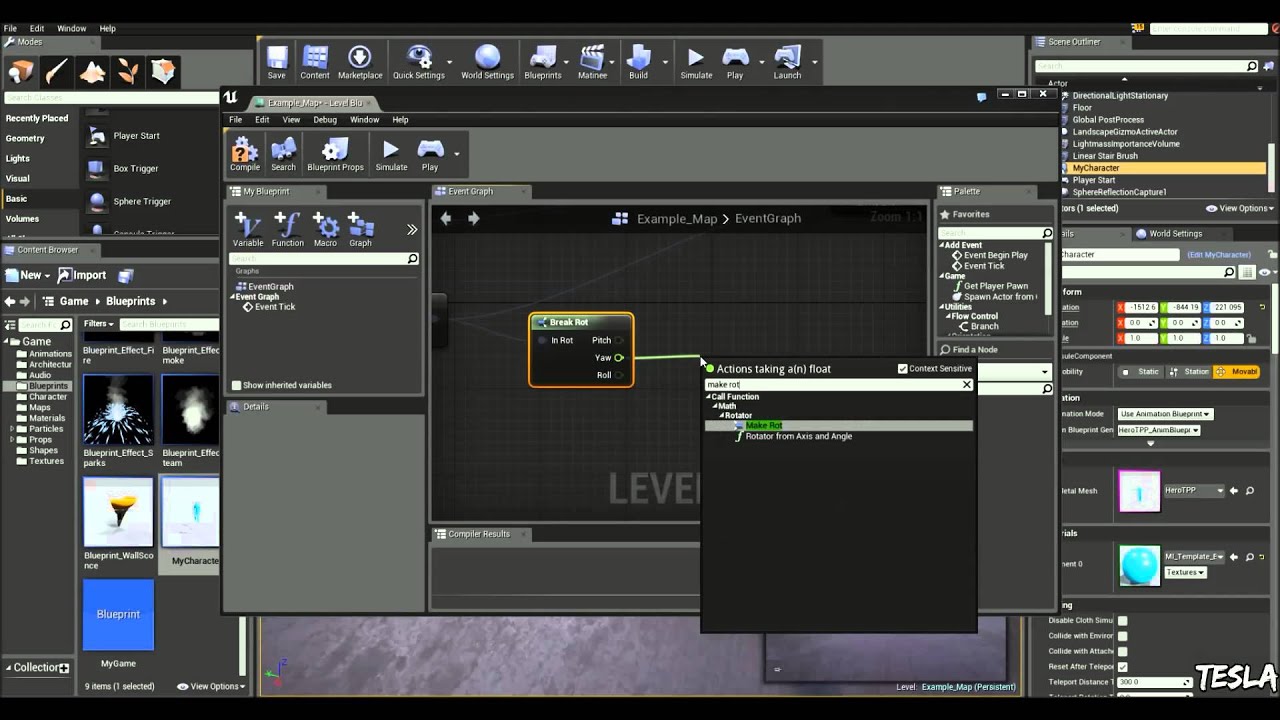
In this tutorial, we are going to make a simple character look at our player.
 molten knoll
Question:
I want to create an Editor Utility Widget, where the User can select a DataAsset of a specific type, how can I search for those DataAssets in my Widget?
clear sierra
uncut condor
found it https://youtu.be/JQWIckh4XT0?si=rqFctqJ4qanRtvM4
This will give you rotation for the Camera In World Space, now if you want to use Realtive, you can convert that rotation to Relative Space using the ConvertToRelativeSpace Method
uncut condor
clear sierra
This will give you rotation for the Camera In World Space, now if you want to us...
but i can't find it
ConvertToRelativeSpace
edgy ingot
molten knoll
Question:
I want to create an Editor Utility Widget, where the User can select a...
Object list
Actually i dont think you can use that for data assets.
Why not just have a variable of the data asset of youe type in the editor utility widget?
uncut condor
clear sierra
This will give you rotation for the Camera In World Space, now if you want to us...
I finally solved it , thank you for your help 😃
 steady night
Hey Guys Question, im gonna do my Save/load Function now i get the best way to save logic is inside the GameInstance Right ?, also should i use a Commponent to save on or how do u guys do it ?
clear sierra
steady night
Hey Guys Question, im gonna do my Save/load Function now i get the best way to ...
GameInstance is fine.
clear sierra
Yes, Well if you look at the problem of saving and loading, you want to do it no matter what your pawn or other classes is doing..
So Game instance is the best one for Blueprint Project, I have done subsystems, which is also UGameInstanceSubsystem , so Game instance is fine
steady night
ok
even tho its a MP game
each player has their own game instance tho
so shouldent matter
clear sierra
Yes, Save game will only save a local copy
so each client will save there own save game copy, But in multiplayer scenario, if you want everyone to save same copy, i would not even recommend SaveGame, I will personally use Database on a cloud machine to save the status of the game.
steady night
aye no all thats saving is basicly their own local "player character" with stuff
so theres no saving involving others
if thats what your aiming at
clear sierra
if you only want to save only for Local Client, then Save Game inside GameInstance should serve your purpose
steady night
ok ty

@clear sierra just a question will this "overwrite" the current save" or do i need to remove / clear it somehow or ?
clear sierra
This will over write, if Save Game files is available, you should Load the Save Game file first then, Update the Parameters inside SaveGameObject, then Resave
steady night
hm alright
thin panther
steady night
aye no all thats saving is basicly their own local "player character" with stuf...
that is very susceptible to cheating doing it this way
only the server should be saving important client info
otherwise any client can just use a save editor
and cheat items and such
steady night
hm, save editor ?
thin panther
yes
steady night
whats that
thin panther
save files are just files
files which you can edit. sure they're binary, but you will be able to easily cheat with a hex editor
steady night
how would i save it onto the server then ?
thin panther
the same way you would for a client
steady night
except just run it on server ?
thin panther
yeah, you'll probably have to do some funkiness for retreiving a specific client's info, which is where #multiplayer come in
steady night
aye
hm if i would make it saving locally first would i be a bug rewrite to change it to saving it on the server after ?
thin panther
yes
steady night
gah...
i mean your probably right, but cheaters will always find a way to cheat tho...
but yeah thats would be a big gamebreaker
heady crypt
cheating == aim bot, not save spoofing the entire games inventory lol
don't allow any client to ever have access to MP save data
steady night
aye
 thick bramble
Is there a way to get to CustomDepthStencil for instance in InstancedStaticMeshComponent?
versed sun
I don't think there is
I think you have to make a ISM for each Stencil
 clear sierra
thick bramble
clear sierra
thick bramble
Which mean its possible... 😁
Now go and figure it out, I think you can instance ID inside shader, I am not sure but maybe, we did something similar but using Niagara.
trim matrix
Niagara for outlines?
trim matrix
thick bramble
Is there a way to get to CustomDepthStencil for instance in InstancedStaticMeshC...
4.25 introduces means to add custom data to the instance buffer and it is technically only available in the vertex shader. However, you can use the VertexInterpolator node to convert the incoming f...
you could work with that
zealous moth
thick bramble
Is there a way to get to CustomDepthStencil for instance in InstancedStaticMeshC...
@versed sun Try this:
https://www.youtube.com/watch?v=8F6Sl5gsLy8&ab_channel=PendingKill
Not the exact same but close to the same idea
SOURCE: https://github.com/PendingKill/Tutorial_ShaderAnimations (flies)
https://github.com/PendingKill/Tutorial_SplineMesh (boxes with splines)
TABLE OF CONTENTS
00:00 Introduction
00:26 PerInstanceRandom Documentation
00:59 Shader Animations (Flies)
02:27 Colors Intro (Boxes + Splines)
04:00 Basic Float Method
06:00 Modulo Method (3 branches)...
you can do per instance material
clear sierra
trim matrix
Niagara for outlines?
Niagara for doing custom changes to a single Particle ?
versed sun
zealous moth
<@204736241139318794> Try this:
https://www.youtube.com/watch?v=8F6Sl5gsLy8&ab_c...
thats a Material per instance, not Stencil per Instance
spark steppe
can you even have multiple stencils?
zealous moth
thick bramble
Is there a way to get to CustomDepthStencil for instance in InstancedStaticMeshC...
my question would be, why? are you using a grid actor to place these instances?
spark steppe
i think you can only have one
zealous moth
you have up to 255
zealous moth
werent there 4 buffers?
spark steppe
rgba? xD
zealous moth
no, they had different denominations
I haven't touched stencils in 2 years >.> but you could definitely change the stencil and if you have an ISM/HISM, you can change it at the dynamic material instance level of each instance
spark steppe
i feel like you are mixing something up
there's only a checkbox to render in custom stencil, no way to select one
spark steppe
also there's only one CustomStencil texture sampler for materials
zealous moth
that's the word
there were different samplers as well

k so you can do up to 255 using the default
versed sun
I switched from Stencils to Overlay material , seemed easier to manage
zealous moth
in 5.2 i think it was introduced?
yes, much more easy
here

spagetthi and meatballs
but you can do multiples at once on the same material, and using a material instance on a per instance, you can set it up
zealous moth
true but again you can do it all in the same mat
steady night
 spark steppe
wtf, why do you cast to a specific class?
zealous moth
?
heady crypt
zealous moth
is that centipede poisonous 
vale pine
A bit of a "sanity check" question
-When there's a delay with Custom Event variables, can I expect the variables/references to always be "stored" in the event until they are requested?
-Also would I be correct in assuming that it will grab the values of only the most recent call of the Custom Event?
 zealous moth
print string it
and check if it is
but if you call the same event twice between delays expect tomfoolery
it's best to use a timer
spark steppe
yes
if it's called twice, it will execute twice with the same values tho (the last ones it had when called)
vale pine
Cool, that's what I suspected. Thanks!
elder lodge
Will that End Play cause shenanigans if it's using nodes taht were only directly flowed to by Begin Play? Seems to work rn, items disappear from the list upon destruction.
Worth maintaining an index to speed up destruction?

Pure Node?
I could just convert it to a variable to ref later, how does one convert to a pure node?
lunar sleet
Right click
elder lodge
Ooooh
elder lodge
😨
silent drift
Anyone know how I can make my own player start? I would like to make the character spawn inside a particle effect rather than directly. Is that possible?
zealous moth
lunar sleet
Not everything should be pure
 lunar sleet
I’ve seen my share of tutorials where every cast is pure for no reason
zealous moth
lunar sleet
I’ve seen my share of tutorials where every cast is pure for no reason
tutorial starts
says don't use tick
says casting is bad
instead of using a loop makes the thread go around in a circle
makes functions for everything
makes variables that are never used
makes a pure cast because it looks good
struggles to make code work on first go
5 minutes of "uhhhhhhhh this should work"
What did I miss?
lunar sleet
zealous moth
>tutorial starts
>says don't use tick
>says casting is bad
>instead of using a l...
Use duct tape and rubber bands to make 15min’s worth of spaghetti for something that could be done in 15s using the adequate solution
zealous moth
gentle urchin
Im a fan of functions
that's a very lengthy way of saying you're wrong
events are the way
 eternal flame
Does anybody knows how to move for example box from A to B, but with additional shakes (using animation curves)? What is efficient way of doing it?
zealous moth
shakes?
lunar sleet
You know, like Shakira
eternal flame
I mean it has some trebble
lunar sleet
 eternal flame
For example elevator
zealous moth
OH
eternal flame
😁😂Yes shakira👍😂
zealous moth
break it into 2, local offset and actor location
eternal flame
I want to add additional effects
zealous moth
using a timeline, or tick, or whatever, move the actor location.
Then, using a timer or still on tick, add offset using a sine/cosine function
eternal flame
But how to move efficient with additional control of coordinates