#blueprint
1 messages · Page 18 of 1
 novel rock
 true igloo
this throws an error.

 zealous moth
@true igloo what are you trying to do, have a single ABP for multiple characters?
true igloo
Yes, a basic set of state logic that many NPCs can use
 prisma delta
I believe that things like screen settings only take effect when you're simulating a build
zealous moth
true igloo
Yes, a basic set of state logic that many NPCs can use
are all those NPCs using the same skeleton?
novel rock
im building it then runing the .exe
true igloo
zealous moth
are all those NPCs using the same skeleton?
Yes, well maybe I’ll do male/female skeletons. But for now just 1
prisma delta
Yeah strange, as I said, limited knowledge without being infront of my project to verify
 zealous moth
true igloo
Yes, well maybe I’ll do male/female skeletons. But for now just 1
zealous moth
true igloo
Yes, well maybe I’ll do male/female skeletons. But for now just 1
ok... i mean if its the same skeleton, as long as that NPC uses that ABP, you can make it do any animation you want. Typically, you would just either add all of them in the ABP and switch states (like in a state machine) or play montages as needed.
You could alternatively load data assets asynchronously and only load the animations you want however you'd find that you aren't saving much power.
Finally, if your NPCs don't need to do anything complex, like they just idle around, you can throw this onto the GPU through material WPO.
true igloo
zealous moth
ok... i mean if its the same skeleton, as long as that NPC uses that ABP, you ca...
I guess what I’m trying to save is time. Each npc would need a clone of the anim blue print. I could make a child of a master for each npc and set a bunch of animations per child copy. But that is an asset that goes along with each NPCs character blueprint. It’d be nice to have 1 asset, but it’s not imperative I guess.
The more I can consolidate assets and data the easier it is to scale.
 tribal gazelle
Anyone know why I am getting an infinite loop error for event construct?

 oak fable
do anyone know why the teleport function is not working ?
it already hits it but the character doesn't teleport

 frosty heron
tribal gazelle
Anyone know why I am getting an infinite loop error for event construct?
frosty heron
tribal gazelle
Anyone know why I am getting an infinite loop error for event construct?
The error occur during play time? or in editor time too?
That setting only work in packaged version of the game
it will not work in PIE
tribal gazelle
frosty heron
The error occur during play time? or in editor time too?
When I use my inventory. They are alert messages.
I just turning it into a component FYI
frosty heron
tribal gazelle
When I use my inventory. They are alert messages.
and when you disconnect the pre construct does the error even tstop?
my guess is you have Object X that spawn Object X
tribal gazelle
frosty heron
and when you disconnect the pre construct does the error even tstop?
I think it's sending a message saying inventory is full when I drag something inside inventory
Because there is a bug making max weight 0 so it will trigger that message
 lunar sleet
oak fable
do anyone know why the teleport function is not working ?
it already hits it bu...
lunar sleet
oak fable
do anyone know why the teleport function is not working ?
it already hits it bu...
It hits what?
frosty heron
Infinite error loop shows up when something happend 10000 times or a number of times that you set in the editor
frosty heron
tribal gazelle
I think it's sending a message saying inventory is full when I drag something in...
Use breakpoint to find out
or printstring but Print to OutputLog
lunar sleet
Pre construct is before runtime
oak fable
lunar sleet
It hits what?

 frosty heron
lunar sleet
Pre construct is before runtime
frosty heron
lunar sleet
Pre construct is before runtime
Yeah I suspect the image he gave is irrelevant since it's infinite loop error (which means he got it when playing)
lunar sleet
frosty heron
Yeah I suspect the image he gave is irrelevant since it's infinite loop error (w...
lol, true I was giving them too much credit
oak fable
lunar sleet
Does it print location found
yeah it does
lunar sleet
oak fable
yeah it does
Try using set actor location instead
oak fable
was going to try it
lunar sleet
tribal gazelle
Anyone know why I am getting an infinite loop error for event construct?
Do you actually need to do this on construct or can you just set the text in the details panel ?
tribal gazelle
lunar sleet
Do you actually need to do this on construct or can you just set the text in the...
They are dynamic messages and it's event pre-construct because it's the message widget
novel rock
frosty heron
it will not work in PIE
I'm not testing this in the editor. I test it in a build.
lunar sleet
tribal gazelle
They are dynamic messages and it's event pre-construct because it's the message ...
Yeah, pre-construct is the widget’s construct technically
lunar sleet
tribal gazelle
They are dynamic messages and it's event pre-construct because it's the message ...
Does it work if you do it at runtime instead ?
tribal gazelle
lunar sleet
Does it work if you do it at runtime instead ?
What do you mean?
lunar sleet
Like not on pre-construct
frosty heron
tribal gazelle
What do you mean?
The infinite loop shouldn't have anything to do with setting a text on pre-construct, what make you deduct that to be the problem?
works for me 🤔
oh wait, I still have to press Alt-Enter
for the window thingy to pop up
nvm I don't, I just cant do it on my max resolution
otherwise the Window bit is at the top
try lower resolution for the window mode
novel rock
frosty heron
oh wait, I still have to press Alt-Enter
Alt-Enter works >.>
novel rock
im going to have to include that in the instructions
frosty heron
novel rock
im going to have to include that in the instructions
prob not ideal :S
you can probably change the resolution for a few pixel at the top to make room for the window bar but that sound hacky
The heck, I just noticed something
Alt-Enter Auto resize my Resolution
From 2k to 1080 p
 earnest swan
hey everyone. I haven't used event binding before so I'm not sure why it's not working. I know the event is being called via print strings, but the event that is supposed to be subscribed is not firing. Does anyone know what could be missing? I also checked to make sure that MusicManager reference was valid

 wild moat
still havent had any luck with this, if anyone knows how to select from an matrix array based on XY coordinates i'd appreciate the help
 novel rock
what like
for(x = 0; x < 256; x++)
{
  for(y = 0; y < 256; y++)
  {
    return index x*y doSomething;
  }
}
i have a hard time remembering this
did this a bunch a a while back but have a hard time remembering the details.
earnest swan
wild moat
still havent had any luck with this, if anyone knows how to select from an matri...
what are you trying to accomplish here? To get the sphere to circle the player in a square shape?
I see your video but I'm still a bit confused
prisma delta
You'd need to detect the spheres location relative to the forward and right axis of the pawn then use that as a boolean to set the values?
 graceful zodiac
Is it possible to hide the camera mesh in BP/map viewport?
 prisma delta
Search for visible and untick in the details
graceful zodiac
Tried - doesn't actually turn it off
On the actual camera component, you can just set the mesh to null, but this is a SceneCapture2D and doesn't have that field
prisma delta
There are also settings in the viewport itself
Game view for one should hide all visible actors that shouldn't be rendered in game
graceful zodiac
Ya the camera doesn't show in game, but I don't want it to show in editor either
prisma delta
Untick the eye on the asset in the outliner? Not a permanent solution I know. 😝
wild moat
earnest swan
what are you trying to accomplish here? To get the sphere to circle the player i...
i'm setting values in my material depending on the position of the sphere around the player:
 graceful zodiac
That's only on the map, not BP editor, sad days... Wish they added the mesh area to the scene capture like they did for the camera
wild moat
earnest swan
what are you trying to accomplish here? To get the sphere to circle the player i...
currently it's snapping only when the sphere is at an exact coordinate, instead i want it to leap between the 9 positions:
https://gyazo.com/a2ed3bfad3c4245d26a821de6a626a30
 wild moat
i'm setting values in my material depending on the position of the sphere around...
wild moat
wild moat
i'm setting values in my material depending on the position of the sphere around...
i have an array of arrays for all these values:

and an array for corresponding coordinates, my problem is an array is only selected when the sphere is at the exact coord, instead of learping between all the points in-between:
 wild moat
currently it's snapping only when the sphere is at an exact coordinate, instead ...
wild moat
wild moat
currently it's snapping only when the sphere is at an exact coordinate, instead ...
ignore the wiggle that's a different system
here's a better view of the snapping issue:
https://gyazo.com/d368c7c4ac43ee121eaa26cd36ca902b
 graceful zodiac
prisma delta
Untick the eye on the asset in the outliner? Not a permanent solution I know. 😝
graceful zodiac
prisma delta
Untick the eye on the asset in the outliner? Not a permanent solution I know. 😝
I just child classed USceneCaptureComponent2D and exposed the mesh myself - problem solved
 spark steppe
graceful zodiac
Is it possible to hide the camera mesh in BP/map viewport?
spark steppe
graceful zodiac
Is it possible to hide the camera mesh in BP/map viewport?
i usually just scale it down to a comfortable size (i think even scale 0 works for it)
graceful zodiac
With the base class I made I can just set the mesh to 'none' and then not have to worry about
 rain furnace
i would like to rotate my projectile to face away from the normal direction of the wall or whatever it hits so if it hits a wall it would be sticking out and if it hits the floor it would be up but im bad at math so i dont know how to turn this normal into a rotation

i figured it out nvm XD

 gusty dragon
Is there a way you can change a splines starting point?
 thick bramble
How can I setup variable here, if my blueprint inherit from C++ class that inherit from UObject, and that class has variable?

 spark steppe
it wont show up in the variables list, but you can rightclick and search "get taskname" and it will show up
also in the class defaults it should be visible
 granite frost
Hello guys. I am facing a small problem where the begin overlap event is triggering a bit late and the particle effect is happening inside the wall instead of on the wall. Sometimes its at point and sometimes its inside. I think I need to tweak a bit of settings but which one?
 fringe junco
granite frost
Hello guys. I am facing a small problem where the begin overlap event is trigger...
fringe junco
granite frost
Hello guys. I am facing a small problem where the begin overlap event is trigger...
probably the physics settings in the project settings? although im not entirely sure if changing these settings will resolve the issue
granite frost
Yes, but I don't know which setting to tweak.
 vital cargo
I did this method too, I have some stuff that load quicker than the UI. You can always use .2 instead of a whole second.
 faint pasture
wild moat
and an array for corresponding coordinates, my problem is an array is only selec...
faint pasture
wild moat
and an array for corresponding coordinates, my problem is an array is only selec...
Why select and not calculate?
It's pretty trivial to math your way to the matrix from the locations
Convert world to local ref frame, divide, clamp, then round
 manic vessel
Im confident this is ok But wanted to Know If there was any better ways to add Any ammo amount Up to a maximum limit .

does this essentially do the same thing as above? but cleaner?

 spare hamlet
Hey,
I'm currently working on a mushroom picking simulator.
The soil moisture of the terrain also plays a role in the spawn condition, which is why I need a “Humidity” variable on my terrain, but unfortunately I have no idea how to implement this.
That on my terrain at coordinate X,Y,Z -> Humidity = 2;
On the other coordinate -> Humidity = 0.5 etc. can be.
This value should not be visually visible via landscape material, only the numerical value plays a role.
Does anyone of you have an idea how I can best implement this?
manic vessel
spare hamlet
Hey,
I'm currently working on a mushroom picking simulator.
The soil moisture o...
I would do that either with a volume box \ sphere of some kind or and actor that is using a distance value from itself to set the value ?
or even use Niagara system that set that?
just some Ideas of the top of my head
 prime stump
If you haven't already, save a reference to the currency widget by promoting it to a variable, then on your pause input get that variable and remove from parent
 gentle urchin
manic vessel
does this essentially do the same thing as above? but cleaner?
gentle urchin
manic vessel
does this essentially do the same thing as above? but cleaner?
Max only clamps downwards, not upwards
Youd prob want min
manic vessel
gentle urchin
Max only clamps downwards, not upwards
Thank you
 manic hamlet
How do you guys link data from 2 different data tables?
e.g. i got one DT with NPC data and one with Item data.
Now I make a merchant wich obviously needs an array of items that he sells the player.
What is the best way of doing so? Currently said array is a stringArray, wich holds the RowNames that come from the ItemDT but this seems stupid , cause as soon as I rename lets say IronIngot to IngotIron I need to check every single Merchant if they have "IronIngot" in there as sellable variable 😄
manic hamlet
gentle urchin
Avoid renaming ironIngot 😄
haha
gentle urchin
And i make sure, tedious as it is, that row names are gameplaytags
manic hamlet
i mean it doesnt happen often but you know how it is 😄
manic hamlet
gentle urchin
And i make sure, tedious as it is, that row names are gameplaytags
okay so lets play this through
ItemDT the RowName is IronIngot
and in the merchantDT you got like a row with tags like: Item.Pickable.Ingot.Iron ?
manic hamlet
this still requires, when you change the RowName to change all entries in merchantDB though,no?
ohhhhh
i see
gentle urchin
Im gonna make an editor tool to help me out with this tbh
And a tool for searching for all instances of said tag
manic hamlet
this means you can rename the tag.....all data in MerchantDB changes to the new name and then you change rowName of ItemsDT....aka you change it in 2 areas only
 red berry
Is there a better way than this to manage all the equipment slots for a player? Should I just keep this huge list of different variables? Or should I use a key-value map to better organise and look through? Because right now if I want to get a variable by an enum, I have to use a huge list like this. If I use a Map, I can just search by the key, and get the value I need
 manic hamlet
red berry
Is there a better way than this to manage all the equipment slots for a player? ...
manic hamlet
red berry
Is there a better way than this to manage all the equipment slots for a player? ...
i do the same, let me know of theres another solution 😄 (i save the data as struct though)
gentle urchin
manic hamlet
this means you can rename the tag.....all data in MerchantDB changes to the new ...
Oh yeah i forgot rename exists
gentle urchin
red berry
Is there a better way than this to manage all the equipment slots for a player? ...
Array - component - slot identifier
manic hamlet
gentle urchin
Oh yeah i forgot rename exists
haha so i (re)taught you something with my question 🙂 youre welcome LOL... jk jk thanks 🙂
gentle urchin
manic hamlet
haha so i (re)taught you something with my question 🙂 youre welcome LOL... jk j...
Well i havnt gotten to that part yet but ill prob just wipe it
manic hamlet
gentle urchin
Well i havnt gotten to that part yet but ill prob just wipe it
yeye but your solution is amazing,as mentioned it only requires 2 changes and all are changed.
manic hamlet
I do that anyway
gentle urchin
I wish there was a gameplaytag alternative
manic hamlet
when you create an item...you name the row anyway
gentle urchin
Ill make a tool for it
manic hamlet
and as you use gameplaytags.... you have to create said tag anyway too 🙂 so technically:
make item tag->copy it
make new itemDT entry->paste it.
gg
 kind estuary
vital cargo
I did this method too, I have some stuff that load quicker than the UI. You can ...
kind estuary
vital cargo
I did this method too, I have some stuff that load quicker than the UI. You can ...
So this is a common practice. Set timer to get reference to the widget for like a second
so to make sure the widget is loaded before we get the reference
manic hamlet
yeah, whatever your solution will be, the proposed one will do for me 🙂 changes in 2 areas is good enough.
kind estuary
i thought i was doing something sketchy
though now im having other issue, that is sometimes some actors spawn but are instantly killed in an explosion.
so when the settimer fires to get the widget the actor no longer exists
so i have a crash
someone told me in cpp to use weak pointers
 distant hollow
Try using a Validated Get
gentle urchin
manic hamlet
yeah, whatever your solution will be, the proposed one will do for me 🙂 changes...
You can even have excel do it for you
kind estuary
distant hollow
Try using a Validated Get
sorry this part is in c++
distant hollow
Oh
kind estuary
and im using IsValid
gentle urchin
Export -> import
kind estuary
but its not working
distant hollow
Or you can delay the spawn to happen after explosion? Like set a boolean flag "IsExploding", and set a delay-loop to read the flag before moving on to spawn.
vital cargo
I don't think it's common practice, because you would normally do something like "Is Valid" then if false, try to call for it again until it is valid. I'm just not bothered to personally do it that way  @kind estuary
kind estuary
vital cargo
I don't think it's common practice, because you would normally do something like...
yup
like me lol
though i have an isvalid check
still crashes
    FTimerHandle TimerHandle2;
    GetWorld()->GetTimerManager().SetTimer(TimerHandle2, [this, TempActor]()
        {
            TSubclassOf<UMyWidget> classToFind;
            classToFind = UMyWidget::StaticClass();
            TArray<UUserWidget*> FoundWidgets;
            if (!IsValid(TempActor))
                return;
            UWidgetBlueprintLibrary::GetAllWidgetsOfClass(GetWorld(), FoundWidgets, UMyWidget::StaticClass()); //crash happens here.
            TempActor->WidgetRef = Cast<UMyWidget>(FoundWidgets[0]);

}, 1, false);```so my crash happens after the isvalid
distant hollow
I have a gut feeling that it is still executing the next line after return; basically your "if(!IsValid) is doing nothing
gentle urchin
vital cargo
I don't think it's common practice, because you would normally do something like...
This is hacky 😅 unpreffered
kind estuary
distant hollow
I have a gut feeling that it is still executing the next line after return; basi...
hows that possible
distant hollow
Does using "return" break out of the entire function straightaway?
vital cargo
gentle urchin
This is hacky 😅 unpreffered
So that isn't the "proper" way?
distant hollow
And skip the rest of the code?
gentle urchin
distant hollow
Does using "return" break out of the entire function straightaway?
Yes
kind estuary
distant hollow
Does using "return" break out of the entire function straightaway?
it should. i mean its a return
distant hollow
Hmmm
gentle urchin
Break wouldnt
manic vessel
seem to have forgotten how to set the widget ? just shows as empty in set widget
 gentle urchin
It doesnt hit return 🙂 debug it with a breakpoint, its not gonna hit that return
gentle urchin
kind estuary
so my crash happens after the isvalid
What does the crash actually say?
distant hollow
kind estuary
but it doesnt skip the code, so it crashes 😖
Try
AUnit* TempActor = this;
FTimerHandle TimerHandle2;
GetWorld()->GetTimerManager().SetTimer(TimerHandle2, =
{
TSubclassOf<UMyWidget> classToFind;
classToFind = UMyWidget::StaticClass();
TArray<UUserWidget*> FoundWidgets;
if (!IsValid(TempActor))
return;
UWidgetBlueprintLibrary::GetAllWidgetsOfClass(GetWorld(), FoundWidgets, UMyWidget::StaticClass());
TempActor->WidgetRef = Cast<UMyWidget>(FoundWidgets.Num() > 0 ? FoundWidgets[0] : nullptr);
}, 1, false);
See if it works
gentle urchin
Instead you can make a safe getter.
Which checks if the widget exist, if not it creates the widget, updates the ref and returns the updated ref.
If its valid it simply returns the ref
Whoever gets the widget first will create it
No more race condition
Or is this widgets in widget components or smth?
kind estuary
gentle urchin
Which checks if the widget exist, if not it creates the widget, updates the ref ...
the widget exists. what doesnt exist seems to be the actor
problem is this is one of those bugs that happens only sometimes
gentle urchin
Where is this code located..
kind estuary
its in the begin play of my unit
gentle urchin
The unit exists by then , always
kind estuary
gentle urchin
The unit exists by then , always
yes it exists but idk sometimes units are spawned in explosions and they die immediately
must be that
gentle urchin
They cant die pre beginplay
kind estuary
they appear on the map, then they die, and ahve a the settimer of 1 second to get the widget
by then they were killed by the explosion
kind estuary
yup
gentle urchin
You shouldnt need one.
kind estuary
because at the start the units are spawned before the widget it seems
gentle urchin
Ofcourde
kind estuary
so i make them get the widget reference 1 second later
kind estuary
no the widget is spawn somehwere else
gentle urchin
Thats not very logical
If they own it they spawn it
Pass in their own owner as the owning player controller
You're even using getallwidgetsofclass, despite managing widget creation yourself ?
Thats... questionable
kind estuary
found it. the widget is being spawned in the controller
gentle urchin
Is it s common widget for all units? Or one for each unit ?
Are they always visible or only when selected ?
red berry
gentle urchin
Array - component - slot identifier
What do you mean by this? Isn't this just a map?
kind estuary
gentle urchin
Is it s common widget for all units? Or one for each unit ?
its just the main widget, where everything happens
gentle urchin
red berry
What do you mean by this? Isn't this just a map?
Could be a map, depends on what equipment means and if its multiplayer
gentle urchin
kind estuary
its just the main widget, where everything happens
So how come every unit needs access to it ?
kind estuary
gentle urchin
So how come every unit needs access to it ?
because of icons and stuff
so i just communicate with the widget to draw the icon
frosty heron
distant hollow
Does using "return" break out of the entire function straightaway?
it does
distant hollow
distant hollow
Try
AUnit* TempActor = this;
FTimerHandle TimerHandle2;
GetWorld()->GetTimerMan...
@kind estuary tried it out yet?
 floral lynx
Does anyone know if the default UE subtitles from Dialogue Waves can modified in a blueprint-only project? I have two issues, the text is way too small and Unreal's default Subtitle system just seems to display the entire Dialogue Wave text at once. Is there any way to splice the text up? Everything I see on this topic appears to be C++ related
kind estuary
distant hollow
<@711946020858101790> tried it out yet?
yes, so far no crashes
but this is one of those crashes that happens only when you are not expecting
gentle urchin
floral lynx
Does anyone know if the default UE subtitles from Dialogue Waves can modified in...
I had little luck with it.. not very customizable
gentle urchin
kind estuary
but this is one of those crashes that happens only when you are not expecting
Are your units spawned from the playercontroller aswell?
If so, let it pass in the widget ref aswell, after spawning it
floral lynx
gentle urchin
I had little luck with it.. not very customizable
I guess I have to build something in UMG then :/
kind estuary
gentle urchin
Are your units spawned from the playercontroller aswell?
yes
they are
kind estuary
gentle urchin
If so, let it pass in the widget ref aswell, after spawning it
great idea
well actually they are spawned from the controller and from buildings
and they are also spawned in the c++ there is one function that spawns them in a kind of orderly manner
i prefer to do it in the unit
because of this
gentle urchin
But also the playercontroller would be their owner
kind estuary
else i will ahve to do it everywhere.
imagine i have to remember that everytime i spawn the unit i cant forget to also give it the widget ref
its better to make the unit get its own refs
i think
gentle urchin
Its easy.
Always spawn them through the controller
always
Let them input a vector for the location and only maintain the spawn logic in that one place.
 acoustic sleet
Hey Guys
Just a question regarding this
I've made this graph exactly the same as the following video.
https://www.youtube.com/watch?v=iqi-kg7n-io
Would any one know why The visibility is not working correctly?
I think the first step would be addressing:
Source:
https://forums.unrealengine.com/t/how-to-make-a-variable-public-and-editable-when-the-eye-icon-next-to-it-does-nothing-when-im-clicking-on-it/790869/16
Issue Resolved

 dark drum
gentle urchin
Always spawn them through the controller
dark drum
gentle urchin
Always spawn them through the controller
To reword this a little. Try to keep the spawning happening from one place. Personally, I would make a manager for it but pc can work depending on the end goal.
If anything ever needs to spawn a unit it has to do so through the one place instead of using the spawn actor of class node directly.
kind estuary
gentle urchin
Always spawn them through the controller
ah so create a function in the controller that spawns it
then call this function from any other actor by casting the controller
dark drum
kind estuary
then call this function from any other actor by casting the controller
Pretty much.
gentle urchin
dark drum
To reword this a little. Try to keep the spawning happening from one place. Pers...
Same, im also using a manager.
Also just making a getter is a valid path
In the unit class
GetMainWidget () -> get owner -> cast to MyController -> get main widget
dark drum
acoustic sleet
Hey Guys
Just a question regarding this
I've made this graph exactly the same a...
you need to explain what 'is not working correctly' means. What is it doing and what should it be doing?
acoustic sleet
dark drum
you need to explain what 'is not working correctly' means. What is it doing and ...
Sorry I added context.
Apparently on the newer versions you need to assign variables and bind it to the widget element variable.
dark drum
acoustic sleet
Sorry I added context.
Apparently on the newer versions you need to assign varia...
I'm not sure what you mean by that statement. You need to explain what it is doing and what it should be doing. Generally, there tends to me many ways to do the same thing.
dark drum
gentle urchin
Same, im also using a manager.
Yea, managers are much better for helping contain the code in one place. I find it makes it easier to get access to stuff as well.
gentle urchin
dark drum
Yea, managers are much better for helping contain the code in one place. I find ...
Especially when the complexity increases
dark drum
gentle urchin
Especially when the complexity increases
I often create a manager for stuff even if it only ends up have 2 or 3 vars and a handful of functions. You never know if you'll need to add more stuff later.
 tall field
Is there any way to replicate set actor rotation? Without having to use RPCs
tall field
Yeah if there's a SetControllerRotation built in or I'd have to make it myself
frosty heron
you can always replicate variable, eg replicate the rotation of the character
tall field
I guess, was hoping there was something built in, cheers
frosty heron
and on every tick, you want your character rotation to interpolate towards the TargetRotation
Not sure wym by built in, try to read the compedium in #multiplayer
gentle urchin
dark drum
I often create a manager for stuff even if it only ends up have 2 or 3 vars and ...
Yeah, i had camera manager and even npc manager 😅
dark drum
gentle urchin
Yeah, i had camera manager and even npc manager 😅
Placement Manager, stats manager, action manager, inventory manager, level actor manager, dialogue manager, notification manager, Point of Interest manager, everything gets a manager haha. Need to keep the code in line so it doesn't get a mind of its own and mix with the wrong crowd.
 versed sun
you need a Manager manager to manage the managers
gentle urchin
versed sun
you need a Manager manager to manage the managers
Max 8 managers per manager is optimal i've heard
versed sun
after that you need a District Supervisor
 rough remnant
i cant spawn a simple projectile sphere. Im using get actor eyes and spawn actor

yeah i know, probably the dumbest question ever asked regarding unreal engine
 dawn gazelle
It may be colliding preventing its spawning. Try setting the collision settings to one of the always spawn options.
rain furnace
rough remnant
when in doubt print it out :D
gusty dragon
Anyone know what might be causing this the train is following a spline https://gyazo.com/5aaf43b4aebee8ce52959b2efc9b8aae
it just won't angle correct and face plants the track when going vertical
gentle urchin
Seems like it got mismatching directions
As if the train actor was upside down while component was turned or smth 😆
versed sun
needs to negate rotation
gusty dragon
 versed sun
When confused , post code you used
gusty dragon
is it cause its only on the x vector?
versed sun
On the bottom Return Node , add a Multiply by -1(Float)
versed sun
or, World coord space on bottom one
gusty dragon
a lot better results with the multiply by -1 float
I will try the world cord space on bottom and I will show u result of the -1 float
rough remnant
dawn gazelle
It may be colliding preventing its spawning. Try setting the collision settings...
already tryed 😎 , to no avail 😎
rough remnant
rain furnace
when in doubt print it out :D
what does it mean?
manic hamlet
rough remnant
what does it mean?
use print node 🙂
gusty dragon
manic hamlet
 gusty dragon
this is the result from the return node adding a multiply by -1 float when I changed the local space to world space it rotated the train backwards
gentle urchin
Looks alright
dawn gazelle
rough remnant
already tryed 😎 , to no avail 😎
Have you tried spawning it at a pre-defined location? Otherwise, determine if perhaps the location is incorrect by printing it out?
gentle urchin
Except to steep curve
gusty dragon
yeh I can mess around with the curve looks way better though ty
rough remnant
dawn gazelle
Have you tried spawning it at a pre-defined location? Otherwise, determine if pe...
what is the function for a pre defined location? i tried "make transform" with no avail. Idk how to print
btw when i play and i see the outliner, i dont see any sphere spawned
dawn gazelle
rough remnant
what is the function for a pre defined location? i tried "make transform" with ...
You could just disconnect the input on the spawn node and type in a value where you know you can see and nothing would prevent it from spawning. First I'd say try putting a print string node by your spawn node and see if you actually get the string to print on screen, if you don't that means your logic isn't reaching the spawn node.
rough remnant
i created the sphere by creating a BP, adding sphere compnent, adding it to root, adding projectile movement, in costruction script i binded the projectile movement component to the collision component and finally i created a variable
distant hollow
rough remnant
i created the sphere by creating a BP, adding sphere compnent, adding it to root...
Like Datura said, just put a Print node before the SpawnTelep node, to see if your logic reaches this point or not yet.
Alternatively, use a Breakpoint and see where it flowed to.
rough remnant
i putted a print node and it does happen nothing, i guess my game logic is off
distant hollow
You mean the Print did not show up?
Then you need to backtrack along the code to see at which point it got broken.
Post your code before the SpawnTelep so we can see
rough remnant
im working in a blueprints project
distant hollow
Ya so take a screenshot
manic hamlet
rough remnant
im working in a blueprints project
windows+shift+s
mark the area of the code
open discord(make use you click in the text box)
ctrl+v ->enter
tada picture is in discord
rough remnant
rough remnant
this is the code
im trying to follow Chatouille s second comment in this post https://forums.unrealengine.com/t/it-cant-be-this-hard-to-throw-a-projectile-and-teleport-to-it/747079/2
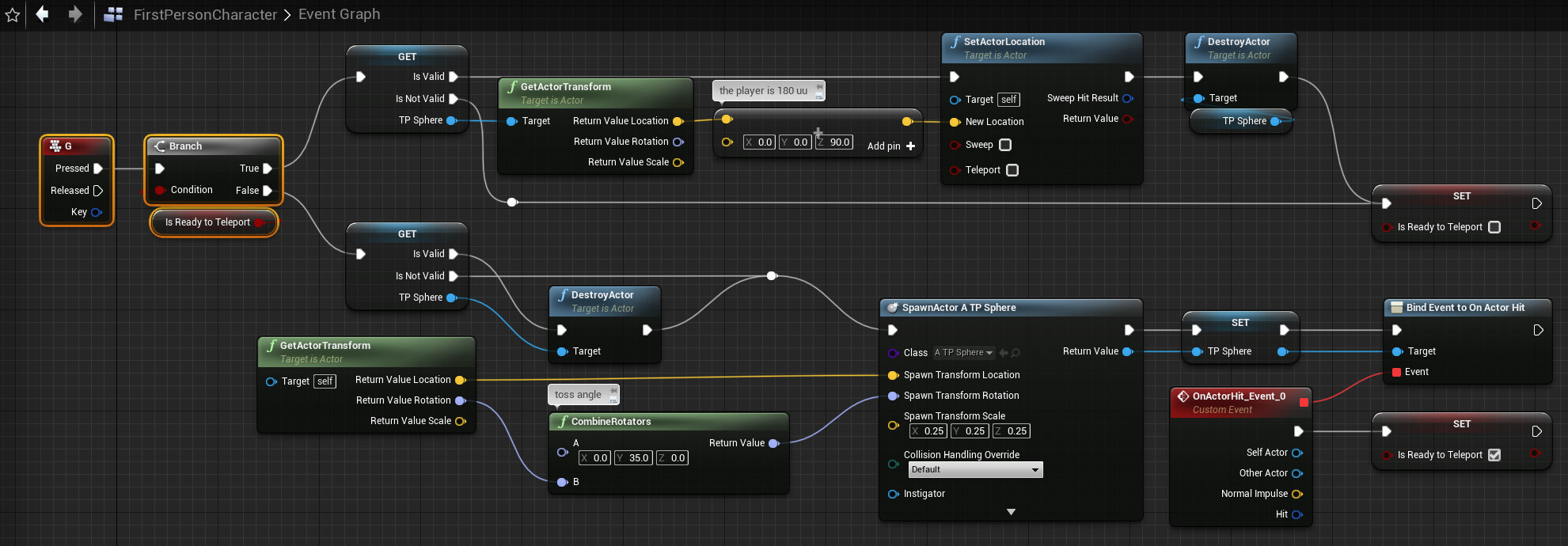
Epic Developer Community Forums
Could look like so: Using a simple projectile: How to throw it is up to you, just an example.
 dawn gazelle
rough remnant
dawn gazelle
rough remnant
- You're specifying an asset as the object to check if it is valid or not. Assets specified like this will almost always be valid when doing Play In Editor stuff, so the "Is Not Valid" path will never be called.
- You don't have the input execution path of the print string connected. The white wires show you the execution flow.
 distant hollow
Why would you need the IsValid check for?
manic hamlet
prolly for the actor that has been shot
1st time it aint valid as theres nothing to teleport to.....2nd time around though(as 1st time is the shot) it is valid and now he wanna tp there
rough remnant
- but thats how is in the post i linked? and to him he is working? maybe he organzed the asset in a different way
manic hamlet
rough remnant
1) but thats how is in the post i linked? and to him he is working? maybe he org...

red =remove...white line= you need that
rough remnant
- i deliberate chopped the connections off for trying first the only Non vallid path, and secondy for trying the pre set transform location
 thin panther
rough remnant
1) but thats how is in the post i linked? and to him he is working? maybe he org...
thin panther
rough remnant
1) but thats how is in the post i linked? and to him he is working? maybe he org...
No it isn't though
If you look at the post he actually has a variable hooked up
dawn gazelle
rough remnant
1) but thats how is in the post i linked? and to him he is working? maybe he org...
The "IsValid" node gives you a place to input a value. You've decided to select an asset that happens to be named "telep" which happens to be the name of the blueprint you're trying to spawn and the name of the variable you're trying to use. What you've done then is selected the "telep" asset in the IsValid check node which will always return valid.
rough remnant
thin panther
If you look at the post he actually has a variable hooked up
big oof now is working
rough remnant
dawn gazelle
The "IsValid" node gives you a place to input a value. You've decided to select...
yep this is it. thanks guys
 lusty hedge
whats a good way to store an inventory item's data
im using a struct right now but i feel like theres gotta be something for it
something like Scriptable objects from Unity?
dawn gazelle
Data Assets
gentle urchin
Or DTs
lusty hedge
thanks ill check it out
should i have 2 types of data assets
one for base item and one for each item
gentle urchin
dawn gazelle
Data Assets
Why DA over DT?
If even 😅
Guess pro is being able to use tags as id's natively?
lusty hedge
would i make a unique asset for every item
gentle urchin
Thats the part that scares me lol
But ofc you can bulk edit them so
It becomes much like a dt anyway
You can also easily make custom editor widgets that edit them 🙂
dawn gazelle
gentle urchin
Why DA over DT?
Subclass data assets 🙂
versed sun
1 Per Type I would assume
Group them with similar functionality
PDA_Sword could have 3 DA's (Basic,Rare,Unique)
then a different PDA for Consumables, and another for Shields : Each with there own DA's
gentle urchin
Inhertiance in other words
To compound data
Guess it also supports limited function implementations
Which is more than dts easily do
Youd need a struct library to compare..
They also dont take instanced uobjects do they

 frosty heron
gentle urchin
You can also easily make custom editor widgets that edit them 🙂
frosty heron
gentle urchin
You can also easily make custom editor widgets that edit them 🙂
I'm disabling my editor utility stuff atm cuz I can't package 😭.
I never make module or editor only module but I think it is time now
Gonna try to make editor only module and move codes there
frosty heron
 stuck sentinel
if this is active
stuck sentinel
if this is active
Work it out in paper. You most likely want some state, things such as bInteracting
When you want to pause the game, check if the player is currently interacting. If the player is interacting then don't pause
gentle urchin
frosty heron
I'm disabling my editor utility stuff atm cuz I can't package 😭.
I never make...
Disabling ?
Hmm havnt tried packaging directly yet
frosty heron
gentle urchin
Disabling ?
Yea I commented out my utility stuff
gentle urchin
But i assume they're excluded ?
frosty heron
I thought so too but in calling material editor stuff in one of my library
gentle urchin
The code itself is nothing special, just wrapped in #if WITH_EDITOR
stuck sentinel
frosty heron
Work it out in paper. You most likely want some state, things such as bInteracti...
im new so im asking for a blueprint code to do the job since i dont know many blueprint codes
frosty heron
I tried with if with editor but it still not cool with it. As long as I have dependencies declared in the main build.cs it won't compile 🫠
 noble ledge
I have a UUserWidget that implements a interface. The EventGraph has these 3 events that do nothing. Is the purpose of this so that the Widget implements all the interface functions even if they don't do anything?
 gentle urchin
frosty heron
I tried with if with editor but it still not cool with it. As long as I have dep...
gentle urchin
frosty heron
I tried with if with editor but it still not cool with it. As long as I have dep...
Nah thats true, no export or whatever, right ?
So custom editor module it is
frosty heron
gentle urchin
Nah thats true, no export or whatever, right ?
No export or import. Just changing material slot names in bulk and ticking materialinstanceconstant parametre
Yeah I will try editor module
 tawdry surge
You can if you make the keys into an array and then get their values, but you can't iterate through a map directly
tawdry surge
maps have a function for getting an array of the keys
Point of a map tho is to have random access. You generally should know what you want from the map and then it can find it quickly
 marsh pilot
What does "Server only" mean?
 tawdry surge
It happens on the server not the client
marsh pilot
Oh is this a multiplayer thing?
tawdry surge
If your game is single player just ignore it
marsh pilot
Ah got it thanks
noble ledge
What does it mean that some are gold and some are gray?

This is under the interfaces tab
vital cargo
rain furnace
when in doubt print it out :D
Best saying ever. I use Print so much
vital cargo
noble ledge
What does it mean that some are gold and some are gray?
Some will give an output while others are just calls for the function
So all the "gets" will return whatever you're trying to get while "sets" are setting a variable on your class.
versed sun
noble ledge
What does it mean that some are gold and some are gray?
I think Gold is Event/No Return Node
Gray is Function with Return
vital cargo
Sometimes you can have both, so it calls the function, does what ever it needs but then also gives you an output.
vital cargo
versed sun
I think Gold is Event/No Return Node
Gray is Function with Return
That's right
vital cargo
Yup
noble ledge
Ok intersting. Thank you
 strong lodge
Hello! Thanks for any help for this! I always struggle with this menu. I want something to come down (with gravity) and land on top of my player character, but not pass through the floor (oh and also not cause my camera to zoom in, I'm in third person). basically I'm dropping an anvil on them. My player character is a pawn, what should I choose in here and set stuff to in other actors? I can make my floors and walls whatever and as a little bonus it would be great if it could go through walls as well, though I feel like that's probably harder.
 vital cargo
Do you want the anvil to fall through your character or just stop and fall to the side?
strong lodge
fall through it
over it I guess is a beter wird since i want to kind of hide the character for a few seconds before the level restarts
vital cargo
Wait tbh, I don't think it really matters.
For the Camera, is it using a spring arm? (I haven't used Third Person starter in a while). If it is, the arm might be doing a collision test which is the Visibility trace I believe, you can set that as ignore/overlap.
As for that, everything makes sense. Maybe change CharacterMesh to overlap if you have a mesh on your character or it will stop the anvil from falling.
 modern radish
can someone explain me how to use Get Timer Elapsed Time by Handle?
vital cargo
I believe it returns the duration/time that the timer has been running for.
Say you have a timer for 30 seconds and you need to know how far through it is, you can get it with that.
modern radish
yeah I'm trying to get the time elapsed between the same Exec triggering

but this doesn't work
but perhaps there's a better approach
vital cargo
The Timer Handle isn't valid so it's adding nothing, unless you've set up the timer before hand.
modern radish
I guess I need to use Game Time in Seconds
vital cargo
Say your STBE has the event attached to it, you have a 30 second timer and you've triggered it. You've set the Timer Handle variable because it's been triggered, then you can call for Get time elapsed

The Elapsed Time will return 0 or 30 (not sure which one it returns)
strong lodge
vital cargo
As for that, everything makes sense. Maybe change CharacterMesh to overlap if yo...
thanks for the help! I also had to set it to query and physics so it wouldn't pass through the floor
vital cargo
0 it returns since the timer just started
vital cargo
strong lodge
thanks for the help! I also had to set it to query and physics so it wouldn't pa...
Sorry, missed that. I sometimes forget to check that myself
modern radish
vital cargo
thanks for the help mate, I tried this but doesn't do what I need.. I need this to run inside a bigger logic, and right now it looks like it blocks the rest from executing
vital cargo
All good, that was just an example. I haven't personally used it.
versed sun
modern radish
thanks for the help mate, I tried this but doesn't do what I need.. I need this ...
Are you just trying to track time between events ? and record them in an array
modern radish
versed sun
Are you just trying to track time between events ? and record them in an array
yeah pretty much
versed sun
 modern radish
but that's since creation, not exactly suitable in my case
versed sun
you can Math it to what you want
Array(1) - Array(0)= time elapsed from 1st index to 2nd
modern radish
I'm going to try that
lusty hedge
how do i make an array of a map

i am trying to make an array of an item slot
and have the item slot contain a data asset AND an amount int
versed sun
Make a Struct of the Array
lusty hedge
you mean array of struct?
versed sun

or whatever object/actor whatever you use
Then you can use it either as a key or value
 lusty hedge
thanks!
i ended up making an array a struct for inventory
the struct consisted of a data asset and an int for an amount
I dont like how maps are restricting. like i cant have certain functions like get or length
its a list like any other i dont see why there are restrictions
noble ledge
Question, on UpdateSnap could I have just called the event instead of tapping into its execution? Where the read circle is, could I just connect it? Just trying to see if it is basically the same thing.
 modern radish
shouldn't this Custom Event fire every second?
 versed sun
That will give you undesired effects, but its ok
Either disable Physics on the sphere or Enable Collision
versed sun
modern radish
shouldn't this Custom Event fire every second?
Just dont do it on tick
Do it once (On begin play)
modern radish
versed sun
Do it once (On begin play)
thanks!
 stone dirge
Hey I want to create a fixed pattern line trace shotgun spread for my game, how would I do this in blueprints code?
 simple falcon
versed sun
That will give you undesired effects, but its ok
Either disable Physics on the s...
simple falcon
versed sun
That will give you undesired effects, but its ok
Either disable Physics on the s...
i want it to be able to go through objects but still trigger on component hit events
should i make it just go through everything, then instead of using on component hit, check if the sphere ever overlaps an actor? or is there an option for it in the details tab
versed sun
simple falcon
i want it to be able to go through objects but still trigger on component hit ev...
If you dont have Collision, then Physics cant work (Can punch a ghost)
Just uncheck this to remove error
 simple falcon
it needs SOME collision to be able to trigger on component hit effects right?
versed sun
Uncheck the Simulate Physics
lunar sleet
I don't want to cross-post but lmk if you have any insights on this please: #chaos-physics message
 frigid swallow
Does anyone know how I could make swords collide? So during the sword swing animation, if the sword collides with another sword, it should stop/stay there, instead of just going through.
Same with other things like shields, walls, etc.
frigid swallow
how would I make the animation stay though? it kind of bugs out
lunar sleet
frigid swallow
how would I make the animation stay though? it kind of bugs out
prly need to make an #animation for swords clashing to run on hit
frigid swallow
k
stone dirge
Hey I want to create a fixed pattern line trace shotgun spread for my game, how would I do this in blueprints code?
 jade lintel
my first thought is some vector math
stone dirge
yeah but like how
frosty heron
I'm getting hitches from async loading 😦
 odd field
Anyone have a link to best practices for native game logic with blueprint subclasses?
I’m hoping someone has a naming convention that clarifies the back-and-forth of a single task across the native-bp boundary.
gentle urchin
frosty heron
I'm getting hitches from async loading 😦
Are you doing lots of em
frosty heron
gentle urchin
Are you doing lots of em
yup
I probably should have made a manager 🥹 and load them in chains
too late for that I guess
In theory Async load shouldn't hitch
but we are talking about Unreal (As Laura says)
gentle urchin
Still weird
If its that many you could still breaknit up in a loop
Do them sequentially
frosty heron
the way I did it was by creating an object (for the purpose of loading) for each soft object. Perhaps that was a bad move
can't figure out a way to que them up now
gentle urchin
If macros are as they say, duplicatino of nodes,
macro inside a macro should work
nvm , not like that
sequentially is ok, that's a macro with a loop delay
gentle urchin
frosty heron
the way I did it was by creating an object (for the purpose of loading) for each...
something like this


or inside the loop

internally
 frosty heron
@gentle urchin 🤗 I will try that, cheers
gentle urchin
only 'issue' is that if you keep on piling objects on the array, it will never complete or reset, but maybe that's not an issue : )
If that would be an issue for whatever reason, you'd split them in two arrays, and do batches of say 20 items each time or smth
common loop behaviour, ofc
frosty heron
also another issue is that some Soft object depents on other Soft Object.
Eg, Material can only be loaded after the skeletal mesh is loaded.
but I suppose I can just load what ever after the loading screen and that shouldn't matter
when I'm opening the data table, I will load them again anyway
so I can try what you've shown right after map load
and then Just load normally after, which shouldn't be an issue if the soft objects are already loaded
gentle urchin
frosty heron
but I suppose I can just load what ever after the loading screen and that should...
you could split it into categories i guess
"load Materials" -> when done -> "load skeletal meshes"
or the other way around
frosty heron
Sounds good. Right now I kinda only pre-load the icons and that's what caused the hitches.
Then when I load the Material and skeletal mesh for the first time I get this black artifact
but switching between what's already loaded will look seamless after
so yeah, I would deffinitly look into pre-loading them
in a sequential way like you showed
Surely loading 1 obj at a time shouldnt cause any hitch
 spark fjord

In this video, I'm going to show you how to set up a Health and Damage System in Unreal Engine 5. This system will allow you to track the health of your characters and damage they've taken in game.
This tutorial is designed for beginners, so if you've never worked with Unreal Engine before, don't worry! I'll be walking you through the entire pr...
this helped me a lot
frosty heron
spark fjord
<@551183785144877056> https://www.youtube.com/watch?v=PxTpmyWH8Qg&ab_channel=Pi...
Have the stat as component instead and use event dispatcher to broadcast when the Stat is changed
Calling a function that only update a specific widget is not good,
You should just be able to broadcast Stat change. And ANYTHING that subscribe to that delegate will do the update in their end
 tight pollen
hi
 flint wind
Hey guys, bit of a dumb question, I think. How do I keep an actor or a component from unrendering when behind another one? In this case, I have a widget on world space with a post process material overlay so it displays over other objects but, when it's completely covered y something else, it just disappears like this. When selected, it's back being visible, but it disappears again once unselected. I bet it's a simple setting but I cant find how to disable this. Thanks!


I think it won't be needed, but just in case this is the material it's using as overlay on top of the basic widget material

 silver laurel
Hoping this is the right channel. Has anyone ever encountered a bug where going through a level transition breaks your AI movement (walk/run anims) and behavior tree? Like the AI just stands there instead of performing its actions? I built the transition with blueprints.
 pseudo anchor
ok so im trying to replicate rotationg of my charcter
but whenever i play test, the joystick controls both players
i have another input that adds velocity and it works correctly
i also did in the same way with rep notify
i added a print and it just prints from client 0 for both screens
any ideas why
 frigid swallow
Does anyone know how I could get a specific slot, lets say "full body" to not run in this layered blend?

Btw, "test" is the main state machine (ie. running, walking, jumping)
 feral parrot
guys how do I customise a scalar value of a post process material using a blueprint? I started with that but don't get where to move on to
 flint wind
feral parrot
guys how do I customise a scalar value of a post process material using a bluepr...
flint wind
feral parrot
guys how do I customise a scalar value of a post process material using a bluepr...
Forgive me if I'm not understanding you, but you're using parameters inside a custom material you created, right? Have you tried creating an instance of your material in the blueprint and then modify whatever parameter you want?
I mean, I haven't tried modifying parameters from post process materials, but I bet it's pretty much the same as modifying parameters from any other kind of material. Again, forgive me if I'm wrong
flint wind
pseudo anchor
ok so im trying to replicate rotationg of my charcter
but whenever i play test, ...
Are you using the same controller for both characters?
pseudo anchor
flint wind
Are you using the same controller for both characters?
the same class?
flint wind
I'm fairly new here so honestly, I'm not sure if controllers can have multiple instances of the same class, but I'm guessing your controller is "possessing" both characters and then applying the same input on the two. If I'm understanding you right, maybe you want to create a different class for the other player from where you reference the controller and copy only that part of the input. Am I being clear '^^?
pseudo anchor
it should work automaticly tho because i have another input under space and it works fine
flint wind
Space input doesn't get replicated?
pseudo anchor
no it does it works fine
its just that the joystick control the same player
the space input controls different characters
flint wind
Hmm... Then I might not be getting what you mean, so why don't we wait a bit and see if someone else can help you better than me? Feel free to DM me if you want me to try any further tho ^^
pseudo anchor
ya id like to try more
tribal gazelle
I am getting an "infinite loop" error. What I've done is converted my inventory system into components, but I also made it so the inventory can be on other players (not just NPCs) and I am trying to reference the same component I am coding in. Is that the reason I am getting an infinite loop? When I use my inventory (and force a notification) it says the notification widget (on event construct) is an infinite loop.
thin panther
tribal gazelle
I am getting an "infinite loop" error. What I've done is converted my inventory ...
We can't do anything unless you show us the code :P
tribal gazelle
thin panther
We can't do anything unless you show us the code :P
It's one of those bugs where IDK what code to show you
thin panther
Normally if you click an error it shows you
tribal gazelle
But I plan to convert back to the way it was to see if me referencing same component is the issue.
lunar sleet
tribal gazelle
But I plan to convert back to the way it was to see if me referencing same compo...
Did you disconnect the stuff on the pre-construct?
tribal gazelle
Take not of the max weight being 0 (which is a bug) but it is triggering a notification message within the inventory system (saying item is too heavy to be added to inventory)
But this is the issue I think

I am trying to reference the character component within the component
That is the "extra" step I took when converting to components
Disconnecting gives same error
lunar sleet
tribal gazelle
Disconnecting gives same error
Wdym? The loop is sending you to that pre-construct event isn’t it?
tribal gazelle
Well, it is trying to send me a message saying the item cannnot fit in the inventory (as there is 0 max weight)
lunar sleet
Right, but that’s not what I asked
If you get rid of that pre-construct, does your infinite loop go away?
tribal gazelle
When I delete it and keep disconnecting things it goes right back to the actual notification function in the UI widget
tribal gazelle
tribal gazelle
But this is the issue I think
I felt if I converted back to just detecting AI it will work again.
lunar sleet
Nah something else is wrong there
lunar sleet
tribal gazelle
I felt if I converted back to just detecting AI it will work again.
Show the code where the widget is being created and added to viewport
tribal gazelle
lunar sleet
Show the code where the widget is being created and added to viewport
But I am doing this inside the character component, is that ok? Or does it need to be done in the character blueprint?
 lunar sleet
should be fine in theory, but what is calling that Create Inventory Widget function
tribal gazelle
lunar sleet
should be fine in theory, but what is calling that Create Inventory Widget funct...
OnBeginPlay
lunar sleet
of what
tribal gazelle
lunar sleet
of what
Inventory Character Component
lunar sleet
tribal gazelle
Inventory Character Component
hmm try moving it elsewhere
 jolly cipher
Not sure if anyone has ran into this issue,
I have a characterBP that has a C++ class as a parent.
I bought an asset on the marketplace that uses C++ and the base character also has a C++ class.
Is it possible to somehow create a child of my custom C++ of the asset's character BP? Essentially inhereting both C++ code?
tribal gazelle
lunar sleet
hmm try moving it elsewhere
Progress.. finally. I disconnected way back to the notifications and stopped loading the UI widget and the loop error went away
lunar sleet
jolly cipher
Not sure if anyone has ran into this issue,
I have a characterBP that has a C++...
Wdym? What kind of asset ?
lunar sleet
tribal gazelle
Progress.. finally. I disconnected way back to the notifications and stopped loa...
Are you loading it on tick or something ?
 hexed solstice
So I’m currently trying to parent the blueprint with a “dummy” on both the left and right side of my character, is there anyway to do this?
I am trying to set this up because I want to use “detour crowd” stuff but only for the left and right side of my character. (Enemies are supposed to follow the main character but avoid its left and right side)
Also any documents and examples of this are greatly appreciated. I’m trying to learn as I go with this project
 jolly cipher
lunar sleet
Wdym? What kind of asset ?
jolly cipher
lunar sleet
Wdym? What kind of asset ?
I just bought the Ascent Framework asset in the marketplace. Its basically a plugin you activate and you plug their Character base BP that has their C++ code linked. Im trying to figure out how I can inhereted my C++ code on top of that.
lunar sleet
jolly cipher
I just bought the Ascent Framework asset in the marketplace. Its basically a plu...
You’ll need to reparent yours to that one
versed sun
After you Construct /Create something , there should be a blue Return value
That is your Texture, off of it you should be able to set Size , or Width/Height or something
You might have to wrap it in a size box and Align to Fill
Not sure , I never messed with Media Texture
jolly cipher
lunar sleet
You’ll need to reparent yours to that one
Well if I create a child of the asset’s Character BP and then I reparent that child to my C++ i just loose evertyhing afterwards no?
 near stratus
I'm trying to make a camera that pans around the character by rotating a spring arm that has a camera as the child component. When I rotate the spring arm in the viewport for the character blueprint, the camera is always facing the center but in game its always facing the front of the character. What should I do?


 thin panther
wild moat
still getting some jumpiness on my skew BP/material
thin panther
wild moat
still getting some jumpiness on my skew BP/material
#materials
there is also nothing people can do without seeing the code, but for future reference the material graph is not bp :P
versed sun
wild moat
still getting some jumpiness on my skew BP/material
Looking good!
How did you end up setting the Matrix
 leaden yew
for my game, I'm making a mission editor where the player can choose where on the map they spawn, how do I move the player starts to where they need to be before a player spawns in?
vital cargo
Single player?
dawn gazelle
leaden yew
for my game, I'm making a mission editor where the player can choose where on th...
Rather than moving a PlayerStart object, you could override ChoosePlayerStart in the Game Mode, find and feed in a reference to the actor that you want to use as the location.
leaden yew
vital cargo
Single player?
multiplayer
leaden yew
dawn gazelle
Rather than moving a PlayerStart object, you could override ChoosePlayerStart in...
how would I place the actors there before the player spawns? There won't be set locations for players to spawn, it can be anywhere in the map
in the chooseplayerstart function, could I spawn a playerstart in the right location and pass that as a reference?
dawn gazelle
You normally wouldn't want to allow players to choose a specific location. If you have a mission editor, I would think that you're setting positions of player starts and would allow players to choose from valid available start points.
kind estuary
How do i remove the collision entirely from a mesh, so to save performance?
Just this?

or there's more to it?
 paper python
Hey, I want to gain some clarity on fundamentals of how engine works (and things break)
If I have a Timer that calls an event very frequently
And that event has slow code - like, an unreasonably super dense calculation, or even a delay() node.
With such situation, could it happen that the event gets called multiple times, while the original call is still executing, leading to chaos and overwriting values in the variables it operates on? 🤔
 mighty frigate
Hi.
Level streaming.
I have a starting level with just a CameraActor and PlayerStart that loads a BP_LevelManager.
In that blueprint Event_BeginPlay triggers LoadStreamLevel of a TitleScreen_Level.
That level streams in correctly.
In the BP_LevelManager I have a Event_Enter (the keyboard input) that SHOULD trigger a print string (for debugging bc the real load swap wasn't working). It does not.
I actually want it to unload the streamed TitleScreen_Level and load a stream of the Gameplay_Level but it seems getting the Print String to work will resolve that.
Any thoughts?


 leaden yew
dawn gazelle
You normally wouldn't want to allow players to choose a specific location. If y...
leaden yew
dawn gazelle
You normally wouldn't want to allow players to choose a specific location. If y...
It's for a flight sim, but I think for now I'll go with this advice and have player starts at airfields, thanks for the help
wild moat
thin panther
<#1014244767854510262>
there is also nothing people can do without seeing the c...
it's both, here's the corresponding mat:
 versed sun
wild moat
it's both, here's the corresponding mat:
versed sun
wild moat
it's both, here's the corresponding mat:
The box looks like Box is moving in a box path, but sphere is a smooth rotation
Its hard to tell because of the material change is trippy
Maybe the Boxe's Clamped ranged needs to be larger?
wild moat
versed sun
The box looks like Box is moving in a box path, but sphere is a smooth rotation
...
the values are based on the sphere's smooth circular path, the smoothness should match
but yeah i noticed it looks like it's moving linearly
versed sun
Looks like -1 to 1 needs to be -1.3 to 1.3 .... or something
wild moat
 wild moat
versed sun
Looks like -1 to 1 needs to be -1.3 to 1.3 .... or something
wild moat
versed sun
Looks like -1 to 1 needs to be -1.3 to 1.3 .... or something
changed it to -2 to 2, no difference
versed sun
hmmmm

 versed sun
I see you got it down to 4 arrayMatrix, are they Cardinal directions(N,S,E,W)or the corners(NW,NE,SW,SE)?
thick bramble
Can I somehow create an object in array from editor?
 zealous moth
Make a double for loop in construction enabled by int > 0.
Set int to 1.
Editor freezes 🥶
 unborn sigil
In order to make a player character's collision capsule rotate to follow the camera direction, does the camera need to be set as the default scene root component in the character BP?
lunar sleet
unborn sigil
In order to make a player character's collision capsule rotate to follow the cam...
why would you be rotating the collision capsule
unborn sigil
lunar sleet
why would you be rotating the collision capsule
For a character that is always oriented toward the camera direction and freely moves in 3 dimensional axes (except for Roll/Z-rotation)
lunar sleet
unborn sigil
For a character that is always oriented toward the camera direction and freely m...
still dunno why you're trying rotate the capsule itself but 🤷
unborn sigil
lunar sleet
still dunno why you're trying rotate the capsule itself but 🤷
I assume that's the only way to keep collision accurate to the orientation of the character model when rotated
marsh pilot
How do I check to see when the right mouse button is clicked?

Is this something I have to do with the enhanced input system?
lunar sleet
marsh pilot
Is this something I have to do with the enhanced input system?
Depends, is this for a widget click or just clicking anywhere
marsh pilot
Clicking anywhere
lunar sleet
marsh pilot
Clicking anywhere
Then yeah, you should setup an input action with the #enhanced-input-system
Read the docs and look at how the templates do it, you should be able to figure it out
 past junco
hey, sorry to butt in. I just don't know the channel were we can ask about extremely basic questions?
Super new to UE
lunar sleet
past junco
hey, sorry to butt in. I just don't know the channel were we can ask about extre...
#ue5-general or here, we can redirect you to a better channel if needed
past junco
ahh ok thanks. I think I'll try general.
Just trying to figure out first person movement and the UI
lunar sleet
past junco
ahh ok thanks. I think I'll try general.
Just trying to figure out first person ...
There’s a first person template you can build on
past junco
lunar sleet
There’s a first person template you can build on
That's the issue. It looks nothing like any video tutorial I can find [nvm, finally found a good guide on how to get to content]
 slim widget
marsh pilot
Clicking anywhere
slim widget
marsh pilot
Clicking anywhere
there's an event for right mouse button nvm do what neo said
 lunar sleet
slim widget
~~there's an event for right mouse button~~ nvm do what neo said
lunar sleet
slim widget
~~there's an event for right mouse button~~ nvm do what neo said
Yeh, except that system is deprecated now so it’s better to learn the new one
slim widget
 I'm having trouble too. I have a character, character shoots bullets, that's working fine, but if I pick up a powerup to say, make the bullets "should bounce" from the projectile movement component to become true, I cannot seem to do this because the only actors they will recognize is the power up, and the character that collided with the power up, and the bullet, somehow, is not as interactable, even promoting the BP_Projectile to a variable in the power up, I cannot drag it from the content browser, and because it's a bullet that exists for 3 seconds, making it a level asset that just exists in the void doesn't seem plausible either
lunar sleet
slim widget
<:bepDead:1007689599973331004> I'm having trouble too. I have a character, chara...
Where did you promote it to a variable ?
And sorry rephrase that, what’s not colliding with what exactly?
slim widget

the logic I feel is simple, player spawns bullets, to change the property of what is shot, change the BP_Projectile of that object being shot, as it'll only ever be itself
lunar sleet
Is bouncy bullet a child class of bp_projectile?
slim widget
no it's just an actor, making it a child of bp_projectile has the same issue when trying to address bp_projectile as a parent
lunar sleet
slim widget
no it's just an actor, making it a child of bp_projectile has the same issue whe...
Ok, is this bouncy bullet supposed to travel through the cube, or bounce off it?
slim widget
the cube is just a power up because I'm not 3D savvy, it would change the property of future bullets fired to become bouncy
basically A hits B, doing so effects C, but C is invsible to event dispatchers, parents, cast binding. I feel like there's a principle I'm not understanding
lunar sleet
Ok, but you want to hit the cube with this initial bullet first, right ? What’s supposed to happen to that bullet next ?
slim widget
the player runs into the cube, like old fashioned games where you run into the thing to get the thing
running into the cube should change BP_Projectile's projectile movement component "should bounce" variable from false to true
the player spawns bullets through the spawn actor so it doesn't know what BP bullets are either, technically
 lunar sleet
Oh ok that’s much easier
slim widget
yeah  I feel like solving this everything else would be smooth sailing but my kryptonite is making simple things very hard
lunar sleet
Ok, so what happens now, does running into the cube work as intended?
slim widget
no, but I had an idea of changing the variable bullet to a class variable instead object to see if that'd make it populate from the content browser that didn't help I have no ideas.
lunar sleet
slim widget
no, but I had an idea of ~~changing the variable bullet to a class variable inst...
Yeah you can’t really reference something that doesn’t exist yet
But it’s not too difficult to achieve this
slim widget
unity gave me a lot of bad habits apparently 😆
lunar sleet
Make a new bool on your player, HasBouncyPowerup, default false
Make your player make to overlap the cube and vice versa. Then, on the player, use actorBeginOverlap , cast to the bouncy cube bp. On success, change the HasBouncyPowerup to True
Lmk when done and you’ve tested the overlap works with a print string or something.
 dapper nest
hi can anyone help me with the maths here, i need to get the input direction relative to the player's current direction, any advice? even if anyone has pointers towards what i should look into
 slim widget

 supple dome
dapper nest
hi can anyone help me with the maths here, i need to get the input direction rel...
supple dome
dapper nest
hi can anyone help me with the maths here, i need to get the input direction rel...
what kind of movement you want
slim widget
lunar sleet
Lmk when done and you’ve tested the overlap works with a print string or somethi...
simple enough
lunar sleet
slim widget
simple enough
Good. Now on your BP_Projectile’s begin play, get player character, cast to your char bp, branch check if the power up bool is True, then get the PMC or drag into the graph, set bounce to enable
slim widget
Interesting, it'll take some getting used to but I think this is the way it is, thanks Neo
dapper nest
supple dome
what kind of movement you want
i am using it to add a dash that takes the input, and turns it into a directional vector based on the player's rotation. So pressing left will return a vector that is left of the player, pressing right returns the right vector, etc, etc
so i know the maths i gotta do involves the forward vector and the directional wish vector, but im not sure what to do with them
lunar sleet
slim widget
Interesting, it'll take some getting used to but I think this is the way it is, ...
There are still times when you can directly create variables of a certain bp type, but other than doing so inside the level blueprint (which you generally want to avoid using), I think it mainly works for widgets inside the HUD
slim widget
right
lunar sleet
dapper nest
hi can anyone help me with the maths here, i need to get the input direction rel...
There are get forward vector and get right vector functions you can make use of
Nvm I guess you already know that
dapper nest
yeah, it would mean having a different calculation for each possible vector, but ik there is a way to do it with the wish vector and the forward vector, i just cant figure it out
slim widget
oh. wait. I just realized something, when you create the bullet, for the time it's created you have access to the object  Neo's bool still applies to this, but it opens up all the doors I had wanted anyway about modular powerups
lunar sleet
slim widget
oh. wait. I just realized something, when you create the bullet, for the time it...
Right but it does get destroyed eventually. Maybe you can get the class and set the bounce from there, but I haven’t tried that
slim widget
right, ideally changing the class, but for now this will do until getting lower level becomes necessary, just wanted to update that I completely forgot spawnActor has a return value of the spawned actor 
lunar sleet
dapper nest
yeah, it would mean having a different calculation for each possible vector, but...
🤔I can’t test rn but what happens if you multiply the fwd vector by the incoming action values and add it to the location, then set the actor location to that (you can interp later maybe)
I’m thinking it should be as simple as breaking into 2 where W/S uses fwd vector and A/D uses right vector
 opaque acorn
facing an really weird prob;m, baiscally i want to my array to get reset however at an index i want to keep the value. when i try to access the array via event tick it only work for once then if i test other values array reverts

at event begin play the loop changed all values to 0 then it re put the value at given index after completation of for each loop. Now evnt tick do shows the right value for once but if i change the index and try to get the value; the problem occurs
lunar sleet
opaque acorn
at event begin play the loop changed all values to 0 then it re put the value at...
I don’t rly understand what you mean but what’s this whole thing for?
dapper nest
got it working, this seems to do the trick
 opaque acorn
lunar sleet
I don’t rly understand what you mean but what’s this whole thing for?
opaque acorn
lunar sleet
I don’t rly understand what you mean but what’s this whole thing for?
which part u dont get have u even checked the code?
lunar sleet
opaque acorn
which part u dont get have u even checked the code?
Yes, I looked at your code but it didn’t make much sense what you’re trying to do
lunar sleet
dapper nest
got it working, this seems to do the trick
Nice
earnest swan
dapper nest
got it working, this seems to do the trick
Noice. If you look up or down, might that forward vector be pointed up? And that would impact your wish direction
opaque acorn
this the array and i want to make all the item values 0 but keep 2nd at the value its ie 1
 earnest swan
Unless you don't gotta worry about it
opaque acorn
so at event begin play i use GET (copy) and stored its value ; then i used for each loop to change all items to 0
then i took that variable which stored before the loop; then used set array elm to set it back to the index ( 2)
dapper nest
earnest swan
Noice. If you look up or down, might that forward vector be pointed up? And that...
its getting the actors forward vector and not the camera vector so this shouldn't be an issue, will clamp it just in case haha
earnest swan
dapper nest
its getting the actors forward vector and not the camera vector so this shouldn'...
Oh that's true!
opaque acorn
now Im checking the array's items via event tick
opaque acorn
lunar sleet
Yes, I looked at your code but it didn’t make much sense what you’re trying to d...
let me know if i am able to explain it
dapper nest
btw for anyone wanting to use this, make sure you normalize it, just accidentally sent my player flying lmao
 earnest swan
Lol classic
dawn gazelle
opaque acorn
now Im checking the array's items via event tick
If you leave "Active Index" and "Given Index" as 0, what does the event tick print out?
lunar sleet
opaque acorn
let me know if i am able to explain it
Yeah, I understand what you mean now, I was trying to figure out where you went wrong but needs debugging with print or breakpoints like Datura said
opaque acorn
active index supposed to check array via event tick
dawn gazelle
But if you leave it at 0 as well as "Given Index" at 0, what displays? Based on what is happening here, you're only storing the value of "Given Index" which means looking up "Active Index" will only return a value other than 0 if it's set to the same value as "Given Index".
 trim matrix
How do i set the restitution value over 1? it wont let me
 opaque acorn
if i type active index 0 (which item is 3 before the for each loop) at event tick and i dont change the value via BP slider; it would show the item = 0 which shows that EVENT begin play code has worked BUT if i change the active index via BP ; it will revert the older value DONE BEFORE the event begin play
lunar sleet
trim matrix
How do i set the restitution value over 1? it wont let me
Idk much about phys mats but I imagine you need to check one of those overrides first
trim matrix
lunar sleet
Idk much about phys mats but I imagine you need to check one of those overrides ...
Nah doesnt work, i think i have to go cpp mode
thats where the clamp is defined in
dawn gazelle
opaque acorn
if i type active index 0 (which item is 3 before the for each loop) at event tic...
But does it show 3? That's what I want to know. Don't assume. Test.
lunar sleet
trim matrix
Nah doesnt work, i think i have to go cpp mode
I would imagine its disabled for a reason but 🤷♂️
opaque acorn
dawn gazelle
But _does_ it show 3? That's what I want to know. Don't assume. Test.
if i unplug the loop code then only it will show 3
dawn gazelle
I didn't ask you to unplug the loop. I asked you to set Given Index and Active Index to 0. You should see 3.


 lunar sleet
Is that maybe an overridable bind ? Check the + sign in the panel
kind estuary
lunar sleet
Is that maybe an overridable bind ? Check the + sign in the panel
event dispatcher?
zealous moth
I am trying to add spline points between spline points on a spline actor in the construction script.
I figured I'd do this:
- find the total amount of spline points
- for each spline point, find it and the next point's distance along the spline
- subtract to find the given distance and then divide that distance by n+1 of the intermediates you want to have
that way if you want 1 intermediate, you want it at the halfway point (d/(n+1)) = d/2;
- take the current spline point in the loop, get the distance along spline and add the d/n+1 value to it.
- get that new distance and find the vector
- add new spline point at the vector
It sounds good but works wonky...
It adds spline points at already existing spline points and after a certain point, they go away from spline.
If I set the value to 2... all hell breaks loose...


No description provided
dawn gazelle
So, then it is operating exactly how I described. You won't see anything other than 0 unless Active Index == Given Index because you're retaining the value of "Given Index" only.
All the others you're setting to 0.
lunar sleet
kind estuary
event dispatcher?
Kinda, yeah. I haven’t heard of it before tho, so not sure if it’s doable in bp
kind estuary
lunar sleet
Kinda, yeah. I haven’t heard of it before tho, so not sure if it’s doable in bp

there is no on destruction
lunar sleet
kind estuary
No no, not right click
opaque acorn
dawn gazelle
All the others you're setting to 0.
im telling u now if change the active index at runtime to anyother value THE otther items which suppsed to be 0 would give the preivous value
lunar sleet
kind estuary
Check if it’s in the overridable functions in the left panel
 opaque acorn
No description provided
u can check the code from ur side
use simulate and try to use active idex value at the BP detail pannel
idk why other values are turning back ( they should be 0 ; as the loop code supposed to turn them 0 )
@dawn gazelle
kind estuary
that saved the day
slim widget
https://stackoverflow.com/questions/14184515/action-delegate-uses-the-last-values-of-variables-declared-outside-foreach-loop scary thought but it's not this is it
opaque acorn
-__-
lunar sleet
zealous moth
I am trying to add spline points between spline points on a spline actor in the ...
My math-fu is not as great but shouldn’t it be (dist(N+1)-dist(N))/2 ?
zealous moth
lemme check
zealous moth
lunar sleet
My math-fu is not as great but shouldn’t it be (dist(N+1)-dist(N))/2 ?
why /2?
this?
 lunar sleet
zealous moth
why /2?
lunar sleet
zealous moth
why /2?
I thought you wanted the halfway point between this spline point and the next
zealous moth
ah, i set it up with the # of intermediates you want +1
so 1 intermediate means divide by 2
2 means divide by 3
etc
so yeah, that's correct 🙂
lunar sleet
Might need to ensure it doesn’t go past the last spline point if you don’t already have that in place
zealous moth
yeah i just added a fix for that
but it doesn't change the fact i get extra points i don't need and past point 3 it's way off the spline
opaque acorn
Also look here it just keep having this weird problem even i try to set a new blank array to older one with al items being 0 and num of items being same. This is happening when i change the active index via detail pannel at runtime


 dawn gazelle
opaque acorn
idk why other values are turning back ( they should be 0 ; as the loop code supp...
dawn gazelle
opaque acorn
idk why other values are turning back ( they should be 0 ; as the loop code supp...
It works flawlessly on my end as I described. Only when I set Active Index to Given Index will the stored value display and all others show 0. Maybe try restarting?

 lunar sleet
zealous moth
but it doesn't change the fact i get extra points i don't need and past point 3 ...
lunar sleet
zealous moth
but it doesn't change the fact i get extra points i don't need and past point 3 ...
🤔 floating point error maybe ?
zealous moth
I added another layer of debug
opaque acorn
dawn gazelle
It works flawlessly on my end as I described. Only when I set Active Index to G...
damn i never faced error like this
zealous moth
 opaque acorn
have u tested it with sim mode?
zealous moth
@lunar sleet here it will print a text near the points. at intermediates = 0, it looks good
dawn gazelle
opaque acorn
have u tested it with sim mode?
That looks to be the cause.
opaque acorn
dawn gazelle
That looks to be the cause.
hm?
dawn gazelle
Values are retained in simulated mode.
lunar sleet
😁
dawn gazelle
The actor doesn't "begin play" in simulated I imagine.
zealous moth
if I add 1 intermediate....

 dawn gazelle
or something along those lines?
opaque acorn
dawn gazelle
The actor doesn't "begin play" in simulated I imagine.
damn so is there any node like BEgin sim??
zealous moth
 lunar sleet
dawn gazelle
The actor doesn't "begin play" in simulated I imagine.
lunar sleet
dawn gazelle
The actor doesn't "begin play" in simulated I imagine.
Begin play should still fire
lunar sleet
opaque acorn
damn so is there any node like BEgin sim??
Shouldn’t matter really, you don’t make games to be simulated. You can just have something change that index value on a timer if you need to test further
opaque acorn
dawn gazelle
The actor doesn't "begin play" in simulated I imagine.
i bet ur right
dawn gazelle
It does fire in simulated XD
opaque acorn
lunar sleet
Shouldn’t matter really, you don’t make games to be simulated. You can just have...
ofc but i never new this shortcoming of simulation mode
was Datura said it wont retain
dawn gazelle
Perhaps its just in how the variables are handled? I don't know as I don't use simulated myself :/
opaque acorn
yea but i used to use that mode for checking now i wont use this mode
lunar sleet
opaque acorn
ofc but i never new this shortcoming of simulation mode
It’s prly not a shortcoming but the way it was intended. If I simulate and hit play and move a wall, when I stop the sim it moves right back
It’s possible this is a side effect of how the mode works
opaque acorn
lunar sleet
It’s prly not a shortcoming but the way it was intended. If I simulate and hit p...
i used to think its a mode with no pawn support
now it looks its a "SIM FORWARD" thing meaning it wont going on if conditions are change
meaning if i change active index *it wont count the change
instead it will use the the original values
lunar sleet
zealous moth
if I add 1 intermediate....
So are they all ok except for the one at 10..4?
zealous moth
no, they keep adding too many
I have 4 points
I expect 3 more to be added totalling 7
i get 10
so something is doubling
lunar sleet
Is it possible it’s counting the ones you’re adding as you add them?
lunar sleet
Right yeah
zealous moth
so I set the number of spline points before the loop
it cannot go past 4
or whatever number i have currently
lunar sleet
I’d set a breakpoint and step through each node to see what actually happens tho
Prly some weird side effect
 cyan bone
Cant call this function its an BlueprintImplementableEvent

UFUNCTION(BlueprintImplementableEvent, BlueprintCallable)
void RemoveIcon(AMainBat* Actor);
 zealous moth
@lunar sleet the first loop works 4 times, which is what i expected.
The second loop will itterate 8 times...
hmm
dawn gazelle
cyan bone
Cant call this function its an BlueprintImplementableEvent
Is this code within a const function or something?
cyan bone
dawn gazelle
Is this code within a const function or something?
its inside the OnPaint function
overriding it
dawn gazelle
Which looks to be a const function
cyan bone
 lunar sleet
 cyan bone
dawn gazelle
Which looks to be a const function
cyan bone
dawn gazelle
Which looks to be a const function
its a blueprintimplementable event
sorry yup spagheticious
lunar sleet
I think the point is you can’t do it inside a constant function
So move it out of there
dawn gazelle
cyan bone
its a blueprintimplementable event
OnPaint is const though, which means it's not supposed to be changing things and if you call a function that isn't const inside of a const function I think that is what causes that message.
cyan bone
dawn gazelle
OnPaint is const though, which means it's not supposed to be changing things and...
so maybe create an event just for this
and in that event in blueprint
i call the removeicon
sounds a bit hackey
lunar sleet
zealous moth
<@179343890409717771> the first loop works 4 times, which is what i expected.
Th...
Shouldn’t this just do one thing on each loop for a total of 4 loops tho?
dawn gazelle
cyan bone
so maybe create an event just for this
OnPaint isn't supposed to be used to manage changing things like this. You may as well use Event Tick.
lunar sleet
zealous moth
yeah so it doubles
Yeah, that’s odd, I’d check the input array maybe, in case it somehow gains new elements as it goes
dawn gazelle
But I wouldn't recommend that either for looping over things like that to check if its valid or not :/
cyan bone
dawn gazelle
OnPaint isn't supposed to be used to manage changing things like this. You may ...
its drawing icons. The only thing new that i added is, if the actor is not valid (its dead), then remove the icon.
its working now
but what is the issue with doing this in the On Paint?
 frosty wadi
SO i have an array of texts and when i do remove item and remove the item form the array it removes it but shortly gets added bakc bc the length goes form 3 to 2 and thne the next time it prints the length its back to 2 its not like its perm removed what am i doing wrong
lunar sleet
frosty wadi
SO i have an array of texts and when i do remove item and remove the item form t...
Try adding a resize node, removing elements from an array can mess with the indices
 frosty wadi
lunar sleet
Try adding a resize node, removing elements from an array can mess with the ind...
frosty wadi
lunar sleet
Try adding a resize node, removing elements from an array can mess with the ind...
the thing is its removeing by a text variable and not index
lunar sleet
You’re removing an element from the array, I imagine
 zealous moth
when you remove, the index gets shifted, dunno if this was talked about
dawn gazelle
cyan bone
but what is the issue with doing this in the On Paint?
Again the problem is likely because OnPaint is const and const is a promise that you're not changing things about this object. By attempting to call a function that isn't const in a const function signals that something could be getting changed and the engine wants to stop you from doing it. As for why the Set Render Translation function doesn't throw the error, it is likely because it's called on a separate target that the const function wouldn't care about and isn't considered "read only" in this context.
lunar sleet
frosty wadi
Perhaps you need to explain what you’re expecting vs what’s happening again
 loud bridge
is it possible to bind a custom event in the construction script?
frosty wadi
lunar sleet
Perhaps you need to explain what you’re expecting vs what’s happening again
so i am making a 3d bingo caller and whne the number gets called and displayed on the ball it supposed to remove it form the array so it does not call it again and it removes it fro mthe array but when i cal lthe next number it sometimes picks it again
lunar sleet
Show the rest of the code so we can see how you’re calling each number and if that array is being modified anywhere else
zealous moth
hm, if i add spline points in construction script, is it normal to not be taken into account at begin play at all?

 lunar sleet
zealous moth
hm, if i add spline points in construction script, is it normal to not be taken ...
lunar sleet
zealous moth
hm, if i add spline points in construction script, is it normal to not be taken ...
Doesn’t sound normal
zealous moth
in the construction script, it takes into account all of them in that debug, at runtime, i made it print the amount i have and it's the original number :/
brb crashed engine
lunar sleet
frosty wadi
Where is this code, the part where you make the array
 lunar sleet
Did you have to pull from source control?
 lunar sleet
frosty wadi
lunar sleet
frosty wadi
No, the first screenshot
 lunar sleet
Yeah I mean where is it being called from
frosty wadi
its right ther it make array that has 3 elemtns in it
its a test array its not the origonal one
lunar sleet
I know I mean where? Begin Play, Event Tick, random function , etc
frosty wadi
lunar sleet
Yeah I mean where is it being called from
thats on begin play
i orgionally hadd it in a fuciton on its own whne the cal lvbutton was clicked
its like the array is getting remade or like reset when i do the next number
lunar sleet
Begin play of what bp, the widget ?
lunar sleet
Ok, is it always the exact same instance of the ball then?
Or do you have more than one ball
lunar sleet
Store the array somewhere where it persists
Or simply hide the ball, move it (if necessary) and show it again rather than destroy
frosty wadi
so how owuld i go about storing the array
should i make the array in a seperate bp
like make a new bp secifcally for the array
lunar sleet
You can store it in like player controller or game mode if you want or like I said, avoid destroying the ball and you’re golden
frosty wadi
thnaks
cyan bone
dawn gazelle
Again the problem is likely because OnPaint is const and const is a promise that...
thanks
 dawn gazelle
thick bramble
Why can't I use GetAllActorsOfClass in UObjects?
dawn gazelle
thick bramble
Why can't I use GetAllActorsOfClass in UObjects?
UObjects don't have a world context.
cyan bone
i also tried learning how to work with uobject but found it hard because doesnt have anything. so i just use actors
thick bramble
cyan bone
i also tried learning how to work with uobject but found it hard because doesnt ...
Why not use UActorComponents instead?
Much cheaper
And have functionalities
cyan bone
thick bramble
Why not use UActorComponents instead?
or that
thick bramble
Can't I add tags on already placed actors?
 lunar sleet
Isn’t it also that not all objects are actors ?
thick bramble
I clicked "+" like milion times
thick bramble
lunar sleet
Isn’t it also that not all objects are actors ?
No. All objects are characters
dawn gazelle
thick bramble
I mean, not from you
You can add a world context fairly easily but needs C++ to do... And in this case, it tries to use an assigned Actor as the "Outer" to retrieve the world context.
UCLASS(BlueprintType, Blueprintable)
class YOURAPIHERE_API UWorldObject : public UObject
{
    GENERATED_BODY()

        virtual UWorld* GetWorld() const override;

};
UWorld* UWorldObject::GetWorld() const
{
    if (!HasAnyFlags(RF_ClassDefaultObject) && !GetOuter()->HasAnyFlags(RF_BeginDestroyed) && !GetOuter()->IsUnreachable())
    {
        //Try to get the world from the outer actor if we have one
        AActor* Outer = GetTypedOuter<AActor>();
        if (Outer != nullptr)
            return Outer->GetWorld();
    }
    return nullptr;
}
On level, you can place only actors
What you see, are actor's components, e.g. static mesh component
Components =/= actors
Components on the base level, inherit from UObject
So, you are corrent
Not all objects are actors
thick bramble
dawn gazelle
You can add a world context fairly easily but needs C++ to do... And in this ca...
Ok, ty
zealous moth
well i hit a funny snag... i have spline with points 0, 1 and 2. I want to add intermediates to it, but anything added becomes... 3, 4, 5, etc
How can I make my new points move the old ones?
lunar sleet
zealous moth
well i hit a funny snag... i have spline with points 0, 1 and 2. I want to add i...
🤔 maybe once the new one is created Add Unique n , n.5 and n1 to a new array?
gentle urchin
You can set point data directly
Youd need to move the old points manually
Is there a specific reason for making intermediates vs just adding to the end ?
zealous moth
yeah my ai needs them for patrolling
gentle urchin
I kinda dont feel like that answered it but
zealous moth
ai gets spline points and walks to them in order
gentle urchin
Add point at the end -> set its data to the previous point -> continue doing this untill you hit the location /section for your new point
gentle urchin
zealous moth
ai gets spline points and walks to them in order
Right but why not get them in order in the first place
Or is this dynamically changed by the player at any random point in time?
zealous moth
well that's the thing, the AI goes straight, doesn't follow the spline. What I am doing is adding extra points on construct so that the AI can now go to intermediates between them and better mimic the arc
the issue is that those intermediates are added later in the index instead of in between
I think an idea I had was to create a temporary array/map and add to it the index, the distance, the tangent and the location, store it, run the calculations and at the end, rebuild it entirely
gentle urchin
Just reversing from the end does the same thing but saves you from caching it additionally
zealous moth
the array becomes like this:
0
1
2
to
0
1
2
3
4
but 3 and 4 should be
0
3
1
4
2
how would reverse fix it?
gentle urchin
Add point(4) = get point 2
Add point(3) = get new 4
Add point(2) = get point 1
Add point(1) = get new 3
dawn gazelle
Reticulating Splines
gentle urchin
For inserting?
spark steppe
my client didn't scroll (my answer was about the construction script spline point thing, was apparently >1h ago xD)
gentle urchin
😄 been there done that
Suddenly i answer to things 3 days ago
I rly should get back to my spline project
Was quite interesting to play with
zealous moth
reticulating?
trim matrix
I want to paint a bunch of static meshes with the foliage tool then convert them to blueprint actors in the editor.
I cannot figure out how to get a reference to the exact static mesh type of foliage that I'm painting
gentle urchin
wondering if Datura comes clean or finds another ref for Reticulating....
spark steppe
branching?
gentle urchin
You know you can paint actors directly right ?
Sounds like it'd save you a middle step
trim matrix
oh that'd be way easier thanks
I'm going to need to be able to get all these painted actors and store them in an array, then delete them from the world.
Then I'll randomly spawn a fraction of them at the start of every round
fringe junco
does unreal have a json or xml parser / serialization built in
 grizzled beacon
Guys I'm trying to spawn a text widget on an actor of the scene, but it's binded and locked on the player camera, is there a way to make it fixed and frozen on top of the actor?

 quartz haven
Hi folks! Do you guys know if I can do this inside of BP? Just changing where the wires plug by clicking and dragging? Maybe native or with a plugin?
In the video, I am using another visual scripting app called Max 8

 foggy escarp
that looks horrendous
quartz haven
And also this. Just press SHIFT and click to connect to different nodes
 quartz haven
foggy escarp
that looks horrendous
quartz haven
foggy escarp
that looks horrendous
If you are referring to how my patch looks, it's ok. But I was referring to the functionallity of it
dark drum
grizzled beacon
Guys I'm trying to spawn a text widget on an actor of the scene, but it's binded...
Does this currently follow the actor?
dark drum
fringe junco
does unreal have a json or xml parser / serialization built in
I believe there's an experimental plugin for JSON stuff.
quartz haven
The functionality I would like to use in BP as well. It is a lot faster to do it like that, than draging again and again and again.
foggy escarp
Blueprint assist is pretty much the best when it comes to blueprint qol features. It has pretty much everything I can ask for.
https://github.com/fpwong/BlueprintAssistWiki/wiki/Features
GitHub
Contribute to fpwong/BlueprintAssistWiki development by creating an account on GitHub.
He shows off everything there
quartz haven
foggy escarp
Blueprint assist is pretty much the best when it comes to blueprint qol features...
So you say that if I learn those shortcuts, I can do the 2 things I showed in the video? That would be cool!
foggy escarp
bp assist basically makes everything 10 times faster once you learn the shortcuts. I don't use like 50% of what it has but Definitely the auto format and pin shortcuts
it does the first one, but the second video is more unique to material-type graphs in UE, I think there's one that does it somewhere
quartz haven
foggy escarp
it does the first one, but the second video is more unique to material-type grap...
I will definitely check the info there. Thank you so much
Regarding <<but the second video is more unique to material-type graphs in UE>> I will have to figure out what "material-type graphs" mean first 🙂
Still new to this
 drifting kite
hi is this the right place to ask about issues and problems?
foggy escarp
yep
drifting kite
im having an issue in 5.0.3 where nothing is showing up on my detail panel when working on BPs

i saw some other screenshots where there should be a gear on the top right of the panel with the filter options, but i can't seem to find it
foggy escarp
when selecting variables, events, and other things similar?
The details panel doesn't have much, to change, but there are options like showing plugin content and other stuff
drifting kite
yup, regardless of what I select, it just shows up as a blank
frosty heron
drifting kite
yup, regardless of what I select, it just shows up as a blank
5.3 maybe?
There is a bug in 5.3 where it wiped the detail panel
But I am not aware of that happening in 5.0 or 5.1.
If it isn't the bug, maybe try restarting the editor. Close the detail tab and open again
 crimson prawn
Hello, I have a question.
Is it better to download a whole json for each time it is updated (of an API) or just request the API each time I need ?
drifting kite
frosty heron
But I am not aware of that happening in 5.0 or 5.1.
If it isn't the bug, maybe ...
its 5.0.3. I have tried restarting both the editor and my own computer, but the problem still persists
thanks for the advice though, I guess I will poke around this a bit longer
 wary birch
How does one transfer information from one game level to another?** (Example: You picked up and equipped this weapon on level 1, so now you will start level 2 with this weapon) **
dark drum
drifting kite
thanks for the advice though, I guess I will poke around this a bit longer
Have you tried resetting the editor layout?
 silent drift
Could anyone tell me how I add a check to see if I hit an actor with a certain component on?
I would like to add so it plays a "hit" sounds when I successfully hit something that I can hit, and not when I hit something that doesn't have a health component, OR when I hit something where it fails to give damage (since you might need a special bullet or such).
 distant hollow
fringe junco
does unreal have a json or xml parser / serialization built in
distant hollow
fringe junco
does unreal have a json or xml parser / serialization built in
DataTable?
dark drum
wary birch
How does one transfer information from one game level to another?** (Example: Yo...
Two options, put it in the game instance or put it in a save game object and save to disc and then load the data from the new level.
Whilst putting it in the game instance would be the easiest option, this isn't always the best option depending on what you're doing.
gentle urchin
wary birch
How does one transfer information from one game level to another?** (Example: Yo...
Savegame is one option
distant hollow
wary birch
How does one transfer information from one game level to another?** (Example: Yo...
Try putting the info in GameInstance
distant hollow
drifting kite
i saw some other screenshots where there should be a gear on the top right of th...
Show your full screen?
distant hollow
foggy escarp
Blueprint assist is pretty much the best when it comes to blueprint qol features...
Is it a built-in or a plug-in?
distant hollow
silent drift
Could anyone tell me how I add a check to see if I hit an actor with a certain c...
Other Actor, then perform your checks
foggy escarp
its a plugin. $20, but well worth it. The speed jump using it is insane.
distant hollow
foggy escarp
its a plugin. $20, but well worth it. The speed jump using it is insane.
Will check it out
silent drift
I'm using the other actor, but I need to check so it has the "Health Component", but when I tried to do this it sadly didn't work. 😦
distant hollow
silent drift
I'm using the other actor, but I need to check so it has the "Health Component",...
Show us your code?
You can also use tags
kind estuary
How do i remove the collision entirely from a mesh, so to save performance?
Just this?
https://cdn.discordapp.com/attachments/221798862938046464/1165439588450439240/b.png?ex=6546db32&is=65346632&hm=f85d4a4a3a9583d5359b80b7efc7795a38eb2316a094a404d2a803ccb87174c9&
Because it seems there are at least 3 places where the collision of a mesh is set up

 silent drift

Ah, which would be better? To use tags or to check for a health component? I'm good with either, just trying to learn and unreal and setting up a basic first projectile. 🙂 SO I can shoot destroyable walls, and enemies.
(To start with)
distant hollow
kind estuary
How do i remove the collision entirely from a mesh, so to save performance?
Just...
If you are absolutely sure that you won’t need any collision at all, you can go to Viewport to remove them
gentle urchin
Remove collision from the mesh itself 😎
distant hollow
silent drift
Ah, which would be better? To use tags or to check for a health component? I'm g...
How did you check for Health Component?
kind estuary
gentle urchin
Remove collision from the mesh itself 😎
so the mesh
open the mesh
just this
no need to go on the blueprint and change the collision settings and all the stuff?
silent drift
This is what I tried, but I get the warning it will always fail, and I'm honestly not sure how to solve that. (Sorry)
Though, I wonider if tags might be better since I want the bullet to bounce when it hits something that is "protected" and just make it bounce on those, deal damage otherwise, and just kill the bullet if there is no tag or wrong tags.
 kind estuary
so the mesh
open the mesh
just this
no need to go on the blueprint and change the collision settings and all the stuff?
 kind estuary
gentle urchin
Remove collision from the mesh itself 😎
kind estuary
gentle urchin
Remove collision from the mesh itself 😎
@gentle urchin
distant hollow
silent drift
This is what I tried, but I get the warning it will always fail, and I'm honestl...
DM me
kind estuary
or do i need to change this too?

see there are 3 places that relate to the collision of a mesh.
1- The collision itself, can be removed.
2- Collision settings inside the mesh.
3- Collision settings inside the mesh inside the blueprint.
There is also the option to not import the collision when importing the mesh into ue.
quite confusing
Should i remove everywhere?
 chrome scarab
Is there a way to set up simple parent/child (attach) relationships within the blueprint editor (viewport)?
In the outliner of the level I can make two actors and make one a child of the other.
In a Actor's BeginPlay() I can spawn another actor and attach it to the first.
But in the actual viewport of an actor blueprint I can only make ChildActorComponents, not a simple "actor which is attached to me". Or am I missing something?
distant hollow
chrome scarab
Is there a way to set up simple parent/child (attach) relationships within the b...
Are they not the same?
kind estuary
gentle urchin
It cant collide, unless use complex as simple is set
so that means complex collision is not removable
it always exists
because its made by the triangles themselves
kind estuary
gentle urchin
It cant collide, unless use complex as simple is set

should i also touch this?
spark steppe
depends on the mesh
kind estuary
use complex as simple
spark steppe
you dont want this for meshs with many vertices
it's good for doorways and stuff tho
spark steppe
then leave it to project default
kind estuary
remove collision entirel