#blueprint
1 messages · Page 15 of 1
 lean schooner
 dark drum
lean schooner
does using statetree or BT offer better ai performance than just designing exact...
dark drum
lean schooner
does using statetree or BT offer better ai performance than just designing exact...
I would imagine it would depend on what you're actually doing. If it's pretty basic, there probably won't be much difference.
Is there a reason you're thinking of not using the built in solutions?
lean schooner
oh its just that i already designed a fairly robust ai system for my NPCs in blueprints , i am about to add quite a lot of functionality to it, so i was thinking that if i was going to swap to another solution, i should be done now
i am not finding my blueprint solution limiting right now, i just worry about performance once i have a few 100 of them running around a rather large landscape
dark drum
lean schooner
i am not finding my blueprint solution limiting right now, i just worry about pe...
It's difficult to say as it would depend on what you're getting the AI to do and how you're managing the various checks.
The best thing to do is spawn 100 NPCs in that use your system and see what happens. Even if it's just them moving around and doing some basic actions.
lean schooner
yeah, i will spawn lots and see what happens! i have my population limit at 25 now and it handles that just fine. the npc ai i am discussing is a pawn that replicates a human mmo player running around a world, fighting monsters, looting, visiting shops etc
i have arrays managed by another BP which stores the locations of everything the npc would ever need to find so there is quite little they actually need to "think" about tbh. i will just keep working on my blueprint/smartobject system until i run into problems, it works good so far and i feel comfortable developing it
 fringe junco
as you can see in the video the inventory mostly works but there is a slight rotation bug at the end with the payload widget. im not sure whats going on as previously the wrong widget would rotate (lol), but this is atleast a clue.
dark drum
That would depend on the var type, if it's an object you can check if they are the same object using the = node.
 tight pollen
hi]
 wraith raptor
Would anyone know how to return the level being used in a level instance? The name of the actor is different from the level being used.
 gentle urchin
No you cant
 thin panther
Tell us what you're trying to achieve. This sounds like a classic XY problem
 ebon olive
hi guys what i did wrong here? 😦 why doesnt my "boost" got activated?
 gentle urchin
You can pass around a pointer to a single object, yes
 versed sun
ebon olive
hi guys what i did wrong here? 😦 why doesnt my "boost" got activated?
versed sun
ebon olive
hi guys what i did wrong here? 😦 why doesnt my "boost" got activated?
try this, and -10 seem super high for on tick
thin panther
Simply. You don't. No has no concept of memory addresses
You have references, which are only uobject pointers
Other than that, everything is a copy
versed sun
 ebon olive
versed sun
ebon olive
versed sun
didnt work 😅 sorry haha. this is really hard 😦
versed sun
Crank the 10 , -10 down to like .5
 modern radish
I have a simple question, does the Sequence node wait for the loop to conclude?
 gentle urchin
Yes, as long as theres nothing latent, its all running on the same thread, in the logical order it can
versed sun
ebon olive
didnt work 😅 sorry haha. this is really hard 😦
You can also just get the IA_Boost value and plug that into branc
 ebon olive
versed sun
You can also just get the IA_Boost value and plug that into branc
ebon olive
versed sun
You can also just get the IA_Boost value and plug that into branc
ok so far i maanged to make it print a string! thanks, im getting there. but when i goes speed, it didnt boost, it just remain the same. so it got something to do with it
modern radish
gentle urchin
Yes, as long as theres nothing latent, its all running on the same thread, in th...
Even if the loop is slow, iterating over hundreds of assets?
gentle urchin
modern radish
Even if the loop is slow, iterating over hundreds of assets?
All in the same frame, unless something is latent
Like Delay / async load etc
 lunar sleet
Can’t use a delay in a loop because of that reason
 torpid juniper
Is there a special way to create/add a component to an actor in runtime using blueprints?
Also, i have created a bp actorComponent but when in a blueprint i have a variable on actorcomponent, i can't find it to reference. Either by class or by object
Also, with inheritence. If i have a Primary Dataasset of Type Item and then a child of furniture and then child called TestGame. And in Furniture and TestGame i implement an interface. If i call cast to interface on that dataasset as an object. Will it go to the TestGame implementation of the interface?
 native creek
torpid juniper
Is there a special way to create/add a component to an actor in runtime using bl...
native creek
torpid juniper
Is there a special way to create/add a component to an actor in runtime using bl...
 torpid juniper
native creek
torpid juniper
native creek
Tried that but didn't seem to work for me
thin panther
Define "didn't work"... Because that is how you do it
torpid juniper
As in i have a variable of type object and i passed in an actor component, i did cast to actor component then get class and passed it to that and it failed
thin panther
Show the code
torpid juniper
Just trying to rewrite it to make it clearer
thin panther
Sounds good!
torpid juniper
That seems to have gotten it working
I think my code was probs getting mixed up between variables as i had them too similarly named
ty
 lapis imp
Question if you can help:
I currently have my line trace set up as shown below.
It's making my gun fire vfx go in the wrong direction client perspective; however, the damage logic works fine: https://streamable.com/xjafuz
Any tips on fixing the gun firing wrong way from other player's perspective?

 lunar sleet
lapis imp
Question if you can help:
I currently have my line trace set up as shown below....
lunar sleet
lapis imp
Question if you can help:
I currently have my line trace set up as shown below....
#multiplayer is a whole different beast
lapis imp
lunar sleet
<#221799385611239424> is a whole different beast
Ty, I moved msg there
 rose gull
hey guys, i have used this custom buoyancy component to make a ship that floats. now i spawn an actor on the top of it and want to move it around on the ship. unfortunately when i attach the actor to the ship and keep it relative the actor doesnt move, when i dont attach and the character actually moves on the ship, it impacts the ships movement. do you guys know how i can work around this
 dry bramble
Sup guys how can I use the gyroscope of an iPhone to steer a car wheel? I already have it ready and working for Android but it doesn't work in ios
 grizzled sparrow
there's a way to make a projectile go to where the cursor is?
and...also how do I make the cursor visible in game?
dark drum
grizzled sparrow
and...also how do I make the cursor visible in game?
Get the player controller and enable show cursor. If you want to show it all the time you can enable it directly in your player controller in the editor.
grizzled sparrow
dark drum
Get the player controller and enable show cursor. If you want to show it all the...
oh, thanks
even if I already looked up elsewhere
now is the first part the issue
want me to go in vc to show it?
 static shell
does anyone know what "get player character" has in way of performance cost? is it the same as casting? is it worth while promoting it to a variable?
dark drum
grizzled sparrow
there's a way to make a projectile go to where the cursor is?
Generally you would spawn a projectile and give it some velocity. Are you wanting it to move in the direction of the cursor when it's fired?
grizzled sparrow
dark drum
Generally you would spawn a projectile and give it some velocity. Are you wantin...
yes
this is the mess of the code I did for it

 frosty berry
I have a vehicle that can turn, rotate, etc. and travel forward. I have some "following" ojbects that I want to stay in the same horizontal plane a certain distance back and have them keep that distance as the main vehicle moves forward. The plain is the red line. What would be the best way to approach this?
 grizzled sparrow
the projectile consistently shoots on the right and super above
dark drum
static shell
does anyone know what "get player character" has in way of performance cost? is ...
Get player character is fine. I'm not aware of any performance related increases from using it. If you need to cast to a specific character type, it would be worth storing a ref if you need to get it a lot.
dark drum
tight pollen
how can i convert this: "text
text
text
text" to this: "text text text text"
Replace node I believe.
dark drum
grizzled sparrow
this is the mess of the code I did for it
What happens if you plug the whole rotator from the find look at node instead of just the pitch?
grizzled sparrow
dark drum
What happens if you plug the whole rotator from the find look at node instead of...
uh, I left some context out
I'm making a side scroller
 cyan drum
lapis imp
Question if you can help:
I currently have my line trace set up as shown below....
cyan drum
lapis imp
Question if you can help:
I currently have my line trace set up as shown below....
Can you not just use 'GetForwardVector' on the camera?
dark drum
grizzled sparrow
uh, I left some context out
I'm making a side scroller
You'll probably still need yaw unless you want it to only ever shoot in one direction.
grizzled sparrow
uh, that would make it shoot to the camera
dark drum
grizzled sparrow
uh, that would make it shoot to the camera
The get hit result under cursor does a trace into the world and returns the location of where it hits something.
grizzled sparrow
still doesn't work
like
I face left, my mouse is at the left
it still shoots at the right
grizzled sparrow
dark drum
The get hit result under cursor does a trace into the world and returns the loca...
why don't we just go to vc?
so I can show it
dark drum
grizzled sparrow
I face left, my mouse is at the left
Swap the start and target around.
grizzled sparrow
dark drum
Swap the start and target around.
nothing
can we just use another method?
tight pollen
dark drum
Replace node I believe.
how
grizzled sparrow
maybe using the mouse X/Y axis?
dark drum
grizzled sparrow
can we just use another method?
Well assuming the projectile travels at its forward vector, getting the look at direction is all you need.
Print the location it's giving you under the cursor to see if it makes sense.
grizzled sparrow
I'll do it another time
 ionic palm
Hi guys I was wondering what's the best way to ensure only one tick of damage on a spherecast for melee?
Basically, each sphere trace applies its own instance of damage. For some reason, I can't seem to add a re-triggerable delay into this function either which was my first guess. This is an issue for both my enemy and player as they use the same logic

 lunar sleet
ionic palm
Hi guys I was wondering what's the best way to ensure only one tick of damage on...
lunar sleet
ionic palm
Hi guys I was wondering what's the best way to ensure only one tick of damage on...
Prly cause it’s a sphere trace
ionic palm
lunar sleet
Prly cause it’s a sphere trace
Thanks?
ionic palm
lunar sleet
Also, what’s calling this function <@327150192266575886>
Its on my AI tree it is being called I will send a screen
 lunar sleet
If that hit function is called from inside the attack player task, I could see it going through it again within 1s
Try increasing the wait
ionic palm
Ok I will give it a go
lapis imp
cyan drum
Can you not just use 'GetForwardVector' on the camera?
Produces same issue
 junior prairie
I'm trying work with the nav link proxy smart links to get my enemy type to jump up on to a ramp, and it's just barely able to land on the edge when jumping up, but gets stuck when jumping down:
the nav link proxy bp looks like this
and it just uses an interface on the enemy bp

which looks like this
 lapis imp
ionic palm
Hi guys I was wondering what's the best way to ensure only one tick of damage on...
lapis imp
ionic palm
Hi guys I was wondering what's the best way to ensure only one tick of damage on...
What you can do is, have a gate that closes after 1 loop.
Once the sphere collision no longer overlaps, it can reset the gate 👍
ionic palm
lapis imp
What you can do is, have a gate that closes after 1 loop.
Once the sphere colli...
Thanks for the suggestion Rico I will try this out!
ionic palm
lapis imp
What you can do is, have a gate that closes after 1 loop.
Once the sphere colli...
I am not sure how to implement this into my BP, I have never used this node before I understand what you mean but I am not sure how to and where to plug it in here
 lapis imp
ionic palm
I am not sure how to implement this into my BP, I have never used this node befo...
lapis imp
ionic palm
I am not sure how to implement this into my BP, I have never used this node befo...
Imma guess the logic order since I'm assuming you have an overlap event triggering the hit detect
For Gate node, have the logic start at Enter
On exit, have the rest of your git logic there. At end of logic, circle back and Close it.
That way it closes with just once execution
You can reopen it once character attacks again or when overlap ends. This could be done with an event ot something
lunar sleet
lapis imp
Imma guess the logic order since I'm assuming you have an overlap event triggeri...
He’s using a sphere trace not an overlap
lunar sleet
ionic palm
Thanks for the suggestion Rico I will try this out!
What’s in your attack task, and did changing the wait do anything?
ionic palm
lapis imp
Imma guess the logic order since I'm assuming you have an overlap event triggeri...
The logic is triggered by an animation event
The animation is triggered by the AI behaviour tree.
The animation event triggers the logic in for the sphere trace


 lunar sleet
ionic palm
The logic is triggered by an animation event
The animation is triggered by the ...
lunar sleet
ionic palm
The logic is triggered by an animation event
The animation is triggered by the ...
Idk much about animation but does receive notify tick fire on tick or just once after it’s received a notify
ionic palm
lunar sleet
Idk much about animation but does receive notify tick fire on tick or just once ...
I'm not sure tbh
I know it is open for the duration of the animation notify

 frosty heron
There is begin notify and end notify
for Anim Notify State
there is also tick inside the Anim Notify State
 visual crest
How do I spawn a static mesh at run time? I was using a Instance static mesh but I can't get it to react with physics right because a ISM can not simulat physics any more
 frosty heron
if u don't want a component u can just Spawn Static mesh actor

or if u want to go with the component route

select your add static mesh component node and change the variable from the detail panel
lunar sleet
frosty heron
there is also tick inside the Anim Notify State
He’s using Receive Notify Tick
How often does that fire
ionic palm
visual crest
How do I spawn a static mesh at run time? I was using a Instance static mesh but...
I commented on your video the other day asking about the parry mechanics your project is really cool man!
I dont suppose you have a system in your game for applying one tick of damage per swing?
I am struggling to apply consistent damage per attack as it applies damage with every new sphere-trace
 frosty heron
lunar sleet
How often does that fire
frosty heron
lunar sleet
How often does that fire
I dunnoe, every frame I guess. He can print string and find out
ionic palm
frosty heron
I dunnoe, every frame I guess. He can print string and find out
I'll try this
visual crest
frosty heron
if u don't want a component u can just Spawn Static mesh actor
I am trying to add a static mesh for each item in a stack along the spline the ISM worked but it just falls through the floor when its parent has its simeulat physics active. Wich method would be best?
ionic palm
lunar sleet
He’s using Receive Notify Tick
It does seem to be applying every tick
 lunar sleet
ionic palm
It does seem to be applying every tick
lunar sleet
ionic palm
It does seem to be applying every tick
Well then you’ve found your issue
You’re sphere tracing every tick
If only I had mentioned testing for this earlier 🙃 #blueprint message
frosty heron
visual crest
I am trying to add a static mesh for each item in a stack along the spline the ...
I never work with spline and I am not sure what your end goal is. I only know how to spawn the static mesh.
You can hack your way with spawning an actor/object that Spawn the instanced static mesh, that way the owner is not set to your actor that have Physic enabled
visual crest
ionic palm
I commented on your video the other day asking about the parry mechanics your pr...
for that, I would likely add an equipped item that causes damage every tic and add time to it every time the sphere trace hits
ionic palm
I want to sphere trace every tick to ensure I reliably hit the character.
What I want is to limit the amount of times the damage can be applied during the attack window
lunar sleet
ionic palm
I want to sphere trace every tick to ensure I reliably hit the character.
What...
Then use a Do Once
On the damage part
ionic palm
That make sit literally do it once and it doesnt refresh
lunar sleet
Reset when animation ends or w/e
No, let it sphere trace constantly, just do once for the actual damage
Not ideal to be using that many sphere traces but if it works…
ionic palm
lunar sleet
Not ideal to be using that many sphere traces but if it works…
I tried this initially but it doesn't work at least how I ahve it setup

 lunar sleet
ionic palm
I tried this initially but it doesn't work at least how I ahve it setup
lunar sleet
ionic palm
I tried this initially but it doesn't work at least how I ahve it setup
What doesn’t work? And what’s printing hello?
visual crest
ionic palm
I commented on your video the other day asking about the parry mechanics your pr...
So when actor is hit you would check if act has damage item equiped, if not equip one on him. If so check a integeron the item for how long it last until it unequips then if below a set amount add time.
ionic palm
lunar sleet
What doesn’t work? And what’s printing hello?
Well no damage is being applied at all and the print is from checking the notify tick
lunar sleet
Bro your damage is set to 0
Connect all the things
Connect the reset
Fix the damage
ionic palm
lunar sleet
Bro your damage is set to 0
Literally never touched it while I have been tinkering I have no idea how that changed
ionic palm
lunar sleet
Connect the reset
Connect reset to what?
lunar sleet
Prly end of animation notify. Basically whenever you want it to start working again. Also your apply damage should prly be after it, else we’ll just keep going in circles
ionic palm
visual crest
So when actor is hit you would check if act has damage item equiped, if not equ...
I understand what you mean spawn the set damage item on player but how would I know what damage to apply based on what hit him?
visual crest
ionic palm
I commented on your video the other day asking about the parry mechanics your pr...
O my bad I thought you wanted a damage over time effect like a fire burn. You want a only hit once thas easy you just add the actor hit to an array and every hit checks that array if the actor all ready exists it ignores the target. then every swing you just clear your array

Do you understand?
ionic palm
visual crest
O my bad I thought you wanted a damage over time effect like a fire burn. You wa...
I think so I am still unsure how to set it up though.
I need to get the out hit as a variable which I have done
Then I make an array of actors to ignore.
But I am unsure how to convert these into the function you have shown me


For example your function allows you to reference and plug in the LastHit actor but I can't seem to replicate that if I make my own function
visual crest
"on trace hit" is your "last hit" variable.
just dif name
you then make an array of the actors hit
then when applying damage you check if that actor has already been added if so don't do damage
then at the end of the animation, you clear your array using an anim notify
Actually looking back at my work I just remembered that actors to ignore would be the ones you hit

 short ivy
whats the node to get the pawn of a player controller?
frosty heron
Get Controlled pawn
modern radish
any easy way to convert a collapsed graph into a function?
lunar sleet
modern radish
any easy way to convert a collapsed graph into a function?
What’s a collapsed graph
modern radish
lunar sleet
What’s a collapsed graph

I see if I right click there's an option to promote to function, will that turn all variables into local variables?
 lofty rapids
undo: ctrl-z ftw
lunar sleet
I don’t think it’ll force them local
 grim sand
modern radish
I see if I right click there's an option to promote to function, will that turn ...
grim sand
modern radish
I see if I right click there's an option to promote to function, will that turn ...
No, if you created them in the event graph, then they will stay as variables available throughout the bp
visual crest
you are also going to want three or four sub-traces like this so your weapon does not just straight through the target with
out hitting it

 modern radish
grim sand
No, if you created them in the event graph, then they will stay as variables ava...
modern radish
grim sand
No, if you created them in the event graph, then they will stay as variables ava...
Cool thanks, then I will recreate it as a function
lunar sleet
Ctrl+Z for undies 🙃
grim sand
modern radish
Cool thanks, then I will recreate it as a function
Yea if you want to be extra safe, you can always uncollapse the graph and then select everything to promote it to a function
sometimes UE doesn't like it when we try to skip steps in the 'intended' user flow
lunar sleet
I would hope that if they added a promote to function on it, it would work properly 😅
grim sand
lunar sleet
I would hope that if they added a promote to function on it, it would work prope...
haha, I would hope so too, but you never know
everything in my brain is screaming that this is a bad idea, is it?
 lunar sleet
grim sand
everything in my brain is screaming that this is a bad idea, is it?
lunar sleet
grim sand
everything in my brain is screaming that this is a bad idea, is it?
I mean nothing’s plugged in so…
grim sand
lunar sleet
I mean nothing’s plugged in so…
Haha, yea, didn't want to waste any time in case this is inherently bad practice
frosty heron
what's the context?
lunar sleet
grim sand
Haha, yea, didn't want to waste any time in case this is inherently bad practice
It’s not usually ideal, but what are you going for?
frosty heron
nested loop are necessary sometime
Man I spend whole week making my bp pretty, now I am destroying all of them because of refactoring
lofty rapids
you could have an array of strings that you turn into an array, and want to forEach over
lunar sleet
frosty heron
Man I spend whole week making my bp pretty, now I am destroying all of them beca...
Haha refactoring is life, we can only embrace it
lofty rapids
since theres no 2d array right ?
lunar sleet
It entirely depends on the context
frosty heron
lunar sleet
Haha refactoring is life, we can only embrace it
I didn't plan to do it but I noticed I had to move all the BP stuff into the base C++ class 😦
lunar sleet
frosty heron
I didn't plan to do it but I noticed I had to move all the BP stuff into the bas...
How come
frosty heron
not planning through
lunar sleet
Is it too slow in bp?
frosty heron
Nah, just inheritance problem
short ivy
this is getting called each time a player joins or leaves. It adds a player arrow for each player. The problem is that is local player controlled kinda only checks if it's you who joined. So when a different person joins for example my minimap gets updated (and adds 2 arrows although it shouldn't add mine) and the one who joined doesn't get arrows added on his minimap at all. Now i am asking here because i think the "Is local player controller" node is wrong

 lunar sleet
frosty heron
Nah, just inheritance problem
lunar sleet
frosty heron
Nah, just inheritance problem
You can usually just make an extra parent
lunar sleet
short ivy
this is getting called each time a player joins or leaves. It adds a player arro...
These questions are best asked in #multiplayer
frosty heron
lunar sleet
You can usually just make an extra parent
prob should have thought about it
grim sand
frosty heron
what's the context?
Alright, so I have an array of vectors the tower can fire an arrow from (separate physics actor). However, I need to check from each one of those if they can reach any of the units that are within attacking range (as in the flight path of the arrow isn't blocked by anything). I save the indexes of the units that are indeed in attack range and can be reached from any one of the arrow firing locations.
I can't think of any other way to run through each arrow firing location, and check for all the units that are in range
short ivy
lunar sleet
These questions are best asked in <#221799385611239424>
but it could be a node problem
frosty heron
grim sand
Alright, so I have an array of vectors the tower can fire an arrow from (separat...
Sound like a slow operation if you do it in bp but I can't really tell
lunar sleet
short ivy
but it could be a node problem
Everything in blueprints is a node, but #multiplayer is a whole other beast with different rules.
grim sand
frosty heron
Sound like a slow operation if you do it in bp but I can't really tell
Gotcha, but perhaps this means then that I should indeed make it a nested loop?
frosty heron
grim sand
Gotcha, but perhaps this means then that I should indeed make it a nested loop?
my brain isn't working and I don't think I can give u advice on this matter, maybe Neo can 🙂
lunar sleet
I’m thinking hard 😀
grim sand
frosty heron
my brain isn't working and I don't think I can give u advice on this matter, may...
No worries, thanks mate.
I might just have to rework the system so that every tower arrow module only has 1 point it can shoot from? That might simplify the system a bit
frosty heron
So the tower have multiple shooting point?
grim sand
Yea
frosty heron
and how are you calculating if the tower can shoot
grim sand
frosty heron
and how are you calculating if the tower can shoot

Im using capsule instead of line to account for the arrow mesh thickness
lunar sleet
Yeah I mean if you need to make another array, on the first loop add unique to a NewArray and then loop over that one on completed
No need to nest
 pulsar pulsar
So i'm having a little issue where i'm having a very hard time swapping slots when drag dropping in my inventory. I'm setting OriginalWidgetIndex when Drag is detected, i get the widgets index from the UGP and then I set it into a holding variable but when i then try to apply this variable it always manages to set back to 0. I've done prints and I can see that the holding variable is indeed getting set to whatever new slot i'm hovering over with the drag drop content but for some reason when I drop it, the second item always defaults to 0...
 pulsar pulsar
fair
grim sand
lunar sleet
Yeah I mean if you need to make another array, on the first loop add unique to a...
This is a good suggestion. Im gonna refactor the system anyway though, I can only see more and more issues down the line if I continue to make it this complicated. Thanks for the help @lunar sleet @frosty heron
lunar sleet
frosty heron
is Autheur gone? 😦
He has been for a while now, might be taking a break
frosty heron
grim sand
This is a good suggestion. Im gonna refactor the system anyway though, I can onl...
u can do it in bp first till it work
prototype is faster in bp
u won't get performance hit unless u hvae many many towers imo
lunar sleet
Yeah, should be fine.
grim sand
frosty heron
u can do it in bp first till it work
It will stay in bp either way, because I am putting off learning C++ 🫠
frosty heron
grim sand
It will stay in bp either way, because I am putting off learning C++ 🫠
Don't be, what's not exposed to blueprint you need to code it your self
even just tiny bit can help you long way
 silent drift
Not sure of this belongs here somewhere else but I have a question about how to save certain player data that I can import to the engine and see how the the player played. For Unity when I was using it I saved the data into a JSON.
I saved the player position once every second to be able to see how they moved.
I saved the death position
This JSON the user could then agree to upload to me (or not) and I would be able to import this into the correct level (the file name said which level it was from) and it would create a white sphere for each player movement position and a red sphere for each death that I then could see in the level.
Would it be possible to do something like this for Unreal?
 fiery swallow
grim sand
everything in my brain is screaming that this is a bad idea, is it?
fiery swallow
grim sand
everything in my brain is screaming that this is a bad idea, is it?
it's not that this is bad practice, people do loops inside of loops all the time, it's just slow af in blueprints 😮💨
you could add a loop w/ delay to the first loop, and then loop through the second one in a single frame
frosty heron
Im using character generation and I need to rename all of the material slot in the editor.
If I don't know some cpp, i would have to re-name every slot hundreds of times.
Using utility editor widget and a tiny bit of code saves me hours/days in the end
My old Project in Unreal 4, I do everything in bp, all hard reference, more than 100 NPC. It's tanking at 144 fps 🙂
In unreal Engine 5, with 2 NPC, Im already hitting 90 fps withotu lumen
there are things that I would worry about more than slow bp
grim sand
fiery swallow
it's not that this is bad practice, people do loops inside of loops all the time...
Right check, not sure if I understand what you mean with loop w/delay. Won't the forloop just hit the delay node x number of times, with the delay node only firing once at the first index?
fiery swallow
custom foreach loop
grim sand
frosty heron
Don't be, what's not exposed to blueprint you need to code it your self
Yea I really need to be learning it. Tomorrow I shall learn 😄
 jade lintel
silent drift
Not sure of this belongs here somewhere else but I have a question about how to ...
jade lintel
silent drift
Not sure of this belongs here somewhere else but I have a question about how to ...
yea
lunar sleet
silent drift
Not sure of this belongs here somewhere else but I have a question about how to ...
Ik there’s JSON nodes in UE iirc
lunar sleet
Ah that’s what I couldn’t rmbr
jade lintel
i had to rewrite all my json and api call code because the beta plugins were unstable while packaging (what a shocker)
silent drift
Ah. Cool. Thanks I will use varest and look into how I can make something similar. 🙂
grim sand
fiery swallow
custom foreach loop
Ah right, I will look into this, thanks!
jade lintel
best of luck!
silent drift
I think the import will be harder than the saving, based on this. :
jade lintel
it should be pretty straight forward
fiery swallow
grim sand
Ah right, I will look into this, thanks!
https://gyazo.com/a00002268046d18ff0886b85506a39e9
Made a quick video to show you how to do it
0.0 would be essentially waiting one frame
grim sand
fiery swallow
https://gyazo.com/a00002268046d18ff0886b85506a39e9
Made a quick video to show yo...
That is super kind and very helpful, I was definitely struggling trying to understand how it would potentially work
fiery swallow
so the first loop would have a delay, the second loop would not (it would just be the default foreach loop)
silent drift
jade lintel
best of luck!
Thanks!
fiery swallow
for sure man, don't be afraid to customize the nodes UE provides, you can do a lot with them
just don't edit them directly
modern radish
grim sand
Yea if you want to be extra safe, you can always uncollapse the graph and then s...
thanks mate. I'm trying it now, but is it impossible to have Custom Events inside functions?
grim sand
fiery swallow
so the first loop would have a delay, the second loop would not (it would just b...
and is it guaranteed for a forloop to finish running through its array within one frame? Or is this only a concern when dealing with very large arrays? In my case the max number of entries would be 61 at any point
grim sand
modern radish
thanks mate. I'm trying it now, but is it impossible to have Custom Events insid...
It is indeed. There is a fancy word as to why that is, something to do with functions always returning a result within the frame they were called in
thin panther
grim sand
and is it guaranteed for a forloop to finish running through its array within on...
It is guaranteed. The thread is blocked until completion. BP will crash at more than 1k iterations though
grim sand
fiery swallow
for sure man, don't be afraid to customize the nodes UE provides, you can do a l...
Gotcha, this is all really helpful
modern radish
grim sand
It is indeed. There is a fancy word as to why that is, something to do with func...
Is there a workaround for this?
thin panther
You can increase this amount, but it's generally not reccomended. Even 1k iterations is slow
modern radish
 fiery swallow
if you use the delay loop, it won't crash but I wouldn't recommend looping on 0.0 delay all day
grim sand
thin panther
It is guaranteed. The thread is blocked until completion. BP will crash at more ...
Awesome, thanks for letting me know, I definitely will keep this in mind and ensure that I never enter a scenario where I am running through that many iterations
thin panther
If you are ever at that point, you're at the stage where you might want to pick up a little utility c++ :)
fiery swallow
grim sand
Awesome, thanks for letting me know, I definitely will keep this in mind and ens...
it'll be fine when you get into cpp, Pretty sure you can loop through like 10k just fine
he's beating me to everything lmao
grim sand
modern radish
You will probably need to split up your functionality into multiple functions to do what you are trying. As far as I know functions need to have very specific purposes to make sure they remain optimized and useable. If you just want to keep your bp readable a collapsed graph is probably easier
 remote meteor
and in extreme cases, you can multi thread the operation so it doesnt block the game thread if thats viable
thin panther
Hell even 100k loops are perfectly doable. And depending on what you do you have access to threads.
If threads aren't an option you always have the option to frame slice. I.e. split the loop across frames.
grim sand
fiery swallow
it'll be fine when you get into cpp, Pretty sure you can loop through like 10k j...
Any recommendations on good resources for basic UE C++? I find that some resources dive very deep very quickly, which makes it difficult to keep following along
modern radish
grim sand
You will probably need to split up your functionality into multiple functions to...
The problem is that I would like to use the same functionality to read from multiple URLs, then the processing logic thereafter is the same
jade lintel
modern radish
what are you trying to achieve here
modern radish
I guess I will do that part in the Event Graph
thin panther
grim sand
Any recommendations on good resources for basic UE C++? I find that some resourc...
Honestly, just learncpp.com and the source code to the engine
modern radish
jade lintel
what are you trying to achieve here
It's a function, and I can't use a custom event apparently
thin panther
Once you can understand c++ it's fairly trivial to use unreals api
jade lintel
modern radish
It's a function, and I can't use a custom event apparently
are you making a function for a http request?
fiery swallow
grim sand
Any recommendations on good resources for basic UE C++? I find that some resourc...
https://youtu.be/6485d5Zoc_k other then learncpp.com This video is insanely good for people who already understand code from blueprints

Have you mastered Blueprints and want to take the next step into C++ to leverage more from the engine? It's easier than you think! In this tutorial, you'll learn the basics of exposing C++ to Blueprints, migrating Blueprints, and more.
thin panther
BP nodes are nearly always 1:1 and can be easily looked up in the source code, and more complex functionality can nearly always be spotted in the engine
modern radish
jade lintel
are you making a function for a http request?
It's a node in the VaRest plugin, Call URL
thin panther
You just need that little kickstart of knowing regular c++
remote meteor
modern radish
It's a function, and I can't use a custom event apparently
you can use Create Event and point to a event or function
modern radish
remote meteor
you can use `Create Event` and point to a event or function
Not inside a function
remote meteor
with the same signature ofcourse
jade lintel
modern radish
It's a node in the VaRest plugin, Call URL
Avoid using call url
use apply url or similar instead
remote meteor
modern radish
Not inside a function
Create Event, not Custom Event
grim sand
You people are awesome @fiery swallow @thin panther Literally going out of your way to help me get much better 🙏
modern radish
jade lintel
Avoid using call url
Oh that's interesting!
 midnight tree
am i allowed to ask questions about an error here ?
jade lintel
yup
modern radish
jade lintel
use apply url or similar instead
But seems to be Latent, I cant use inside a function
 jade lintel
modern radish
Oh that's interesting!
jade lintel
modern radish
Oh that's interesting!
This covers pretty much everything you might need for a http request
 modern radish
jade lintel
This covers pretty much everything you might need for a http request
modern radish
jade lintel
This covers pretty much everything you might need for a http request
can you run that inside a function?
jade lintel
this is in a macro
 sand slate
Hey I try to load a level and open it when its loaded. I have this two nodes behind eachother, does this make any sense or am I doing it wrong?
 jade lintel
let me check if its function compatible
remote meteor
no its not function compatible because of the latent ApplyURL
modern radish
jade lintel
this is in a macro
Got it.. I think I need a function because I would like to reuse the logic and read from multiple URLs
frosty heron
 remote meteor
just use create event to handle the Callback
jade lintel
modern radish
Got it.. I think I need a function because I would like to reuse the logic and r...
Just make a macro library
modern radish
remote meteor
just use create event to handle the Callback
I tried creating event to handle it inside a function, but got error
jade lintel
functions dont support latent actions
frosty heron
 modern radish
jade lintel
functions dont support latent actions
modern radish
jade lintel
functions dont support latent actions
But Call URL is not latent.. why is Apply URl better?
midnight tree
well actually i am getting an error i am pretty sure but i dont see it bc i made an day and night cycle via tutorial i am pretty new to all of this but it used to work i followed every step checked everthing what i could have done wrong but i cant seem to find it, its that the cycle doesnt move anymore anyone who knows about that stuff?
remote meteor
frosty heron
i dont have varest with me but this is the one im talking about @modern radish
modern radish
remote meteor
i dont have varest with me but this is the one im talking about <@29780526239435...
I got it, but then should I make a Custom Event?
 jade lintel
modern radish
But Call URL is not latent.. why is Apply URl better?
jade lintel
modern radish
But Call URL is not latent.. why is Apply URl better?
i'll be honest i dont know
modern radish
Create Matching Event? It doesn't seem to work inside a function
jade lintel
i read that while scouring the forum
frosty heron
You can select create matching function/event
 frosty heron
modern radish
Create Matching Event? It doesn't seem to work inside a function
frosty heron
modern radish
Create Matching Event? It doesn't seem to work inside a function
the event don't need to be inside a function

 modern radish
But then I need to pipe in two Exec nodes, seems weird
frosty heron
Do you not have any dispatcher or callbacks in your project?
modern radish
well the Call URL node is inside the function, then I make a custom event for the callback, then I need to pipe the exec again into the function to continue the logic?
remote meteor
you cannot do that
the callback with be a separate exec
ideally if you can just move the rest of the execution to the event graph
you cannot continue a latent in a function, functions are immediate
thats the whole restriction of no latent in a function in the first place
modern radish
Indeed. I will have to resstructure things
frosty heron
I mean it's kinda obvious tho, think of callbacks like "DownloadComplete", "UrlLoaded" etc
remote meteor
must you use a function in the first place?
if not, if you can make some flow control to make sure calling the latent, more than once before one is completed, that you would handle it properly
frosty heron
you want to only run your Downloaded Logic after download is complete
remote meteor
they can just be in event graph
modern radish
I would like to use a function because I will reuse the same logic multiple times, after reading multiple URLs
jade lintel
macros might help ya
modern radish
how about local variables
modern radish
but that doesn't return a JSON object?
remote meteor
my way of doing it is to have a varest request object so i can separate the instances to their correct callback functions
the other way is what devboi suggested, by macros
modern radish
remote meteor
my way of doing it is to have a varest request object so i can separate the inst...
Sounds interesting, can you elaborate a bit?
remote meteor
when it comes to api calls, whether if you want your calls to run in parallel when multiple of them are called or not
i have a helper to make varest request object and stored in a separate custom object for each call, if there are any necessary data needed when the callback is done, it is also placed in the request object. whether the request should block the game(shows a loading screen), cancellable or not, maximum concurrent request, are also defined in this helper. when the request is done, the callback is fired to the function/event we assigned during the construction of the object, ofcourse, with the custom object as the parameter
modern radish
Sounds a lot like some of the things I would need as well
remote meteor
basically i made a wrapper around the original varest request object that handles abit more data
modern radish
and are you using Call URL for your needs?
remote meteor
any of the function are okay, i did not use call url, since i have the object, i bind the appropriate delegate, and just the apply url without the latent (i forgot the name)
modern radish
Thanks so much for the info mate, I'm only beginning to use VaRest so still trying to wrap my head around how it works. But how do you have the object prior to calling it/reading from the url?
or you mean the Contruct Json Object?
remote meteor
let me see if i can still open the project..
basically, if i need a request, i construct the wrapper i made
ionic palm
visual crest
O my bad I thought you wanted a damage over time effect like a fire burn. You wa...
I get what you mean but I can't figure out for the life of me how you set it up
Like I mentioned earlier I promoted the hit variable and made an array but I am none the wiser as to how to make the function
ionic palm
ionic palm
I get what you mean but I can't figure out for the life of me how you set it up
...

 modern radish
remote meteor
basically, if i need a request, i construct the wrapper i made
modern radish
remote meteor
basically, if i need a request, i construct the wrapper i made
Okay yeah, I think I understand what you mean.. I'm also replacing the Call URL I had, seems to work with Process URL
 remote meteor
bind before calling the process
process should be the last
i need to reinstall 4.24 to check
i forgot the name of the function
modern radish
but that what I did worked 😄
remote meteor
just incase 😅
best practice is to bind first
before calling anything that possibly will do the callback
 frosty heron
seems right
the previous one look wrong
u just got lucky that it took some time
had the process been faster, u wont get any callback because u bind after
modern radish
got it
 remote meteor
thats a macro..?
modern radish
it's just inside collapsed graph
modern radish
but that's the thing, I wanted to make a function, so that I can ask multiple URLs
or maybe a macro then
 signal perch
I’d like to pause the game when it’s not in focus by the player. For example alt-tabbing or minimizing would trigger a function that stops the time until the window is back in focus.
How can this be achieved, preferably in BP? I can’t find a function that returns if window is in focus or not. Best idea I have is to have a transparent widget cover the screen and check if that is in focus. Any advice?
modern radish
remote meteor
let me see if i can still open the project..
let me know if you can find it, would be really interested to study it!
remote meteor
modern radish
let me know if you can find it, would be really interested to study it!
blueprint ue dint show it properly, the function signature should be like this

an example if you need to insert a highscore to the api

 lofty rapids
ionic palm
lofty rapids
ionic palm
so your adding to the array in a function, and using it another ? did you run the first function to populate the array ?
or it's working ?
 heavy linden
Hey @jagged cipher im sorry to bother you but can i ask how you where planning to make spells work because i cant figure it out :')
ionic palm
lofty rapids
so your adding to the array in a function, and using it another ? did you run th...
Not quite,
I tried to simplify it for my own purposes as it was spread over like 4 different BP's/AI Tree's so now it works like this first is the Behaviour Tree
Then it moves onto the Attack Player Task, in this task I set the Attacking bool to true
Then it plays the attack player function where it plays the animation and once it is finished it sets Attacking to false
Then hit react is called by the animation event
Then in hit react I have my hit actor added to actors to ignore after the first application of damage. Then it checks if attacking is false before removing the hit actor from the Actors to ignore array.
I feel like I have over complicated this but I also feel like I am close now as it only applies one tick of damage it just isn't resetting as I expected


I missed the attack player function screen
 tight pollen
how can I add Array to Map variable? only for each loop?
i want convert 2 arrays to Map
i have Keys and Values
fiery swallow
@tight pollen I want to help but I can't really understand what you're asking. You only finished what seemed like 2 out of 4 sentences.
if you have an array of keys, and another array of values then yes you would need to use a for each loop
tight pollen
poor in terms of performance :/
fiery swallow
tight pollen
poor in terms of performance :/
Assuming your indexes were lined up correctly between "Keys" array and "Values" array you could do this

Although I'm not sure why you would want to do this, it doesn't really serve any kind of purpose
ionic palm
Can anyone recommend a tutorial series or blog post etc. about setting up melee with one instance of damage like I am looking for ?
Basically I want each landed hit to do an allocated amount of damage and eventually stamina drain. All the tutorials I have found show you how to do sphere trace for objects but it normally stops there.
ATM I can only get them to apply damage for every sphere trace hit per swing or do one instance of damage and being unable to reset this effectively after the attack.
tight pollen
fiery swallow
Although I'm not sure why you would want to do this, it doesn't really serve any...
The Map variable is not replicated and I need to send this data to the server
fiery swallow
tight pollen
The Map variable is not replicated and I need to send this data to the server
figured it had to be for replication
well there ya go 
lunar sleet
ionic palm
Can anyone recommend a tutorial series or blog post etc. about setting up melee ...
Did you fix your values and connect your reset pin yet?
ionic palm
lunar sleet
Did you fix your values and connect your reset pin yet?
Look at my last post I laid it all out what I have changed and exactly how it flows now in my logic its not far if you scroll up
lunar sleet
ionic palm
Look at my last post I laid it all out what I have changed and exactly how it fl...
Why are you setting the hit actor and adding to the ignore array twice
ionic palm
I'm not, unless I am mistaken it adds the hit actor to the ignore array if attacking is true and removes it if its false
Add > Branch > Remove?
 lunar sleet
You’re not adding it twice mb, you’re just setting it twice tho
You already have it set, so just use get
ionic palm
True I will do that but I dont think it will change the logic
lunar sleet
No, just makes it less confusing 🙂
Far as I can tell you went back to running this on tick
With no do once or gate, so running multiple times I imagine?
Tho that branch should make a decent gate
Where are you setting the bool to True tho
And back to False
ionic palm
I am still confused by the do once and the gate the examples I found online for do once aren't clear on how to reset it which is why I tried this more primitive method
ionic palm
It is set to true before anim and false after anim
lunar sleet
So what happens
ionic palm
I get hit once for one tick of damage as intended but then it never resets and does no damage after that
ionic palm
lunar sleet
So what happens
 gentle urchin
tight pollen
The Map variable is not replicated and I need to send this data to the server
gentle urchin
tight pollen
The Map variable is not replicated and I need to send this data to the server
Hopefully you send it from the server
lunar sleet
ionic palm
I get hit once for one tick of damage as intended but then it never resets and d...
Put a breakpoint on that branch. Run the game. When it drops, hover over your Attacking bool to check its value, then resume game, see if it drops again. If it does, check the bool again
gentle urchin
fiery swallow
Although I'm not sure why you would want to do this, it doesn't really serve any...
Maps are O(1) in lookup 😄 arrays are O(n)
ionic palm
lunar sleet
Put a breakpoint on that branch. Run the game. When it drops, hover over your At...
It triggers once and then never again when watching the simulation but the AI tree is cycling through Chasing>AttackPlayer>Wait so that should include ressetting the variable to true when the next attack player task is called
fiery swallow
gentle urchin
Maps are O(1) in lookup 😄 arrays are O(n)
wait I'm confused, wdym by that
lunar sleet
ionic palm
It triggers once and then never again when watching the simulation but the AI tr...
Move the breakpoint to the first node in the function or the function call node and see if it’s ever being called again
lunar sleet
fiery swallow
wait I'm confused, wdym by that
O = worst case scenario Omega = best case
fiery swallow
oh really? I see, didn't know that but does make sense
 faint pasture
gentle urchin
Maps are O(1) in lookup 😄 arrays are O(n)
faint pasture
gentle urchin
Maps are O(1) in lookup 😄 arrays are O(n)
how big is your map?
gentle urchin
Biggest
fiery swallow
Guessing it's due to not having to loop through the entire thing to find the value?
faint pasture
I don't know for sure but I'd bet you'd have to have over 20-30 elements before a map got faster than an array
fiery swallow
Figured it'd be relatively the same thing
gentle urchin
faint pasture
I don't know for sure but I'd bet you'd have to have over 20-30 elements before ...
Iirc maps were im general faster to iterate than arrays
Weird as it sounds
faint pasture
well yeah at large N
ionic palm
lunar sleet
Move the breakpoint to the first node in the function or the function call node ...
Basically it gets to here after the first cycle and stops working which infers that my character is not being removed from the ignore array I believe after the first cycle
 fiery swallow
gotta do some research on that, I have a pretty massive array I'm looping through a lot so maybe it's worth converting
gentle urchin
faint pasture
well yeah at large N
Doesnt make sense to me 😅
Iteration should be iteration?
lunar sleet
fiery swallow
gotta do some research on that, I have a pretty massive array I'm looping throug...
Sry, big O is the worst case, Omega is the best case. Runtime complexity stuff can be a bit confusing but it’s useful to know when to use a certain algorithm based on the amount of iterations it’ll have to do for example
gentle urchin
Its been a while since i tested but i vaguely recall like 30% increase
Dont quote me on it tho
fiery swallow
lunar sleet
Sry, big O is the worst case, Omega is the best case. Runtime complexity stuff c...
I'm literally trying to get to the bottom of this right now
lunar sleet
ionic palm
Basically it gets to here after the first cycle and stops working which infers t...
Actually, that likely infers your cast failed. Put a print string on that cast failed pin to test
fiery swallow
I'm like a crack addict when someone tells me about iteration gains
modern radish
remote meteor
blueprint ue dint show it properly, the function signature should be like this
Thanks a lot mate, I will try and have a look!
modern radish
remote meteor
an example if you need to insert a highscore to the api
the thing is that I only ever want to read values, and not send anything over to the URL
fiery swallow
Our game suffers from iterations loops the most
gentle urchin
fiery swallow
I'm like a crack addict when someone tells me about iteration gains
I ended with TQueue
fiery swallow
delays come second
ionic palm
lunar sleet
Actually, that likely infers your cast failed. Put a print string on that cast f...
Yeah you are right it is failing but isn't it failing because my actor is being ignored?
They aren't missing me I can see the sphere trace go through my character after the first cycle of damage
lunar sleet
ionic palm
Yeah you are right it is failing but isn't it failing because my actor is being ...
It means whatever your sphere caught is not that actor. Print the hit actor to find out what it catches
faint pasture
gentle urchin
Dont quote me on it tho
I'm bout to test array set and map
ionic palm
lunar sleet
It means whatever your sphere caught is not that actor. Print the hit actor to f...
Do you mean like this?
If so it's not printing anything
 fiery swallow
faint pasture
I'm bout to test array set and map
fiery swallow
faint pasture
I'm bout to test array set and map
Spill the results pls
fiery swallow
gentle urchin
I ended with TQueue
TQueue? I'm learning a lot today
lunar sleet
ionic palm
Do you mean like this?
If so it's not printing anything
Connect the actual execution pin first
ionic palm
lunar sleet
Connect the actual execution pin first
To what? Wont disconnecting anything break the chain?
lunar sleet
ionic palm
To what? Wont disconnecting anything break the chain?
In between lol
gentle urchin
fiery swallow
TQueue? I'm learning a lot today
yeah it tries to avoid unnessesary memory allocations
so it's a circular buffer
ionic palm
lunar sleet
In between lol
Simpleton moment mb haha
gentle urchin
 ionic palm
lunar sleet
In between lol
ionic palm
lunar sleet
In between lol
1st hit is my pirate 2nd is nothing
fiery swallow
gentle urchin
yeah it tries to avoid unnessesary memory allocations
Is that faster then findbypredicate? I heard in some situations that could be fasted then iterating... but again I don't get how. Seems like just an extra step
gentle urchin
fiery swallow
Is that faster then findbypredicate? I heard in some situations that could be fa...
It's not ment for finding anything
 lunar sleet
ionic palm
1st hit is my pirate 2nd is nothing
lunar sleet
ionic palm
1st hit is my pirate 2nd is nothing
Yeah, so 2nd hit is not detecting it…. lol I just rmbred you’re adding that actor to the ignore array…for some reason
fiery swallow
Hmm 🤔 time to look up some documentation
ionic palm
lunar sleet
Yeah, so 2nd hit is not detecting it…. lol I just rmbred you’re adding that acto...
I add my character to the ignore array after the first hit it's then set to remove it from the ignore array once the attacking boolean switches to false
So that it applies one tick of damage and then shouldn't be able to apply another until the next attack as the actor should only be removed from ignore after the animation has finished
 gentle urchin
fiery swallow
Hmm 🤔 time to look up some documentation
gentle urchin
fiery swallow
Hmm 🤔 time to look up some documentation
I use it to compose a list of all the 'workers' that have requested something from the manager
from there i Dequeue however many i process that tick
lunar sleet
ionic palm
I add my character to the ignore array after the first hit it's then set to remo...
You shouldn’t need it at all. If Attacking is set to True properly, it’ll never get that far
ionic palm
lunar sleet
You shouldn’t need it at all. If Attacking is set to True properly, it’ll never ...
I'm not sure what you mean, if I add myself to the ignore array surely I have to remove myself at somepoint if I wanna be able to take damage again?
lunar sleet
I mean you shouldn’t need to do any of that
The bool check should be handling the “gating”
But anyways, simple thing to test for, check the value of the ignore array on the 2nd breakpoint hit
If it still contains your actor, you know why your trace is failing
fiery swallow
gentle urchin
I use it to compose a list of all the 'workers' that have requested something f...
we were planning to do something like this to limit how many inventory actions the server is allowed to process per frame. You might've just helped big with that
ionic palm
lunar sleet
The bool check should be handling the “gating”
How can I print the array? or check it in simulation can I just hover over it?
gentle urchin
fiery swallow
we were planning to do something like this to limit how many inventory actions t...
glad to be at service. Ill bill you in the morning
fiery swallow
brings me back to "$100.00 an hour starting now"
lunar sleet
ionic palm
How can I print the array? or check it in simulation can I just hover over it?
Just hover.
ionic palm
lunar sleet
I mean you shouldn’t need to do any of that
I see my pirate is still in the array
lunar sleet
ionic palm
I see my pirate is still in the array
Problem solved, next 🙃
ionic palm
But I still don't understand why as the boolean should remove it with the setup no?
lunar sleet
ionic palm
But I still don't understand why as the boolean should remove it with the setup ...
Because that should prly happen while attacking is true not false
ionic palm
lunar sleet
Because that should prly happen while attacking is true not false
If I switch the branch to true instead of false I have the same issue of damage every tick
ionic palm
lunar sleet
Ugh lol
It feels like it really should not be this hard lol
ionic palm
Ok
lunar sleet
Hang on
ionic palm
Here is the full chain.
It seems way too convoluted


 lunar sleet
ionic palm
Here is the full chain.
It seems way too convoluted
lunar sleet
ionic palm
Here is the full chain.
It seems way too convoluted
Well yeah, #animation is involved. I don’t think using that receive notify tick should be what’s triggering this
Realistically all that should happen is when your attack is called, the animation is played and separately, the trace is made and the damage done
You linking it to the anim’s tick is what’s making it all fire multiple times and having to gate it that way
ionic palm
lunar sleet
You linking it to the anim’s tick is what’s making it all fire multiple times an...
I know what you mean but I dunno how else I could get reliable hits without dumbing down the collision and just using a box volume to do a set amount of damage or something
lunar sleet
ionic palm
I know what you mean but I dunno how else I could get reliable hits without dumb...
I’m confused as to what that has to do with it. This isn’t precise anyways because you’re only letting it do this once
It’s not like your trace is doing anything throughout the animation
faint pasture
fiery swallow
Spill the results pls
 lunar sleet
faint pasture
lunar sleet
faint pasture
Aww, not pico ? 🥲
ionic palm
Look at the sphere cast it is drawing a line through the air where the attacking arm is.
It only applies damage once yes but at a specific spot on the player and at any point the player appears in the arc of attack.
Without a spherecast what else could I do other than like I say dumb it down to a box collider?
I am just going to have to find a course or tutorial on it as I have ended up with a jumbled mess atm from several tutorials
fiery swallow
faint pasture
testing the other 2 things I'm guessing?
lunar sleet
ionic palm
https://streamable.com/xwbh5r
Look at the sphere cast it is drawing a line thro...
Ok I see what you mean
fiery swallow
gentle urchin
hang on so this is equivalent to just getting "0" from an array and removing it everytime lol
 red berry
If I am creating a UserWidget, why do I have no option to bind an event to an event, like OnDragCancelled? It seems like I have to create a custom Event Dispatcher in the UW, and then when I create it, I can bind to that custom event. I find myself going:
Event On Drag Cancelled -> Do Stuff -> OnDragCancelled2 (Event Dispatcher) -> Do stuff in parent
Is there a way I can just bind to the event, and not the custom event dispatcher? There's no option to do so
gentle urchin
fiery swallow
hang on so this is equivalent to just getting "0" from an array and removing it ...
You could do this manually by only resizing the array if the element amount exceeds the count. You'd also have to track the tail and the head
it's probably less efficient that way
gentle urchin
faint pasture
20k plz
fiery swallow
red berry
If I am creating a UserWidget, why do I have no option to bind an event to an ev...
no I'm pretty sure you create your own event dispatcher for that
the only reason there's default event dispatchers is because they're already declared in the cpp parent widget


 faint pasture
This is just summing random integers
gentle urchin
And then just fell so hard behind
faint pasture
    Accumulator = 0;
    TArray<int32> TestArray;
    TSet<int32> TestSet;
    TMap<int32, int32> TestMap;
    for (int32 i = 0; i < TestCount; i++)
    {
        const int32 RandomNumber = FMath::RandRange(0,1000000000);
        TestArray.Add(RandomNumber);
        TestSet.Add(RandomNumber);
        TestMap.Add(RandomNumber, RandomNumber + 1);
    }

    int32 Seconds;
    double PartialSeconds;
    double StartTime;
    double TotalTime;

    UGameplayStatics::GetAccurateRealTime(Seconds, PartialSeconds);
    StartTime = PartialSeconds;
    for (const auto Element:TestArray)
    {
        Accumulator += Element;
    }
    UGameplayStatics::GetAccurateRealTime(Seconds, PartialSeconds);
    TotalTime = PartialSeconds - StartTime;
    UE_LOG(LogTemp, Warning, TEXT("Array iteration over %i entries took %f microseconds"), TestCount, TotalTime * 1000000.0);

    UGameplayStatics::GetAccurateRealTime(Seconds, PartialSeconds);
    StartTime = PartialSeconds;
    for (const auto Element:TestSet)
    {
        Accumulator += Element;
    }
    UGameplayStatics::GetAccurateRealTime(Seconds, PartialSeconds);
    TotalTime = PartialSeconds - StartTime;
    UE_LOG(LogTemp, Warning, TEXT("Set iteration over %i entries took %f microseconds"), TestCount, TotalTime * 1000000.0);

    UGameplayStatics::GetAccurateRealTime(Seconds, PartialSeconds);
    StartTime = PartialSeconds;
    for (const auto Element:TestMap)
    {
        Accumulator += Element.Value;
    }
    UGameplayStatics::GetAccurateRealTime(Seconds, PartialSeconds);
    TotalTime = PartialSeconds - StartTime;
    UE_LOG(LogTemp, Warning, TEXT("Map iteration over %i entries took %f microseconds"), TestCount, TotalTime * 1000000.0);
https://www.youtube.com/watch?v=PJYtOt82nlU&ab_channel=UnrealRPGMastery
I just bought this as its £16 rather than £50 with a fresh Udemy account so hopefully this is more than enough for my needs

Description:
Link to course (Udemy): https://www.udemy.com/course/unreal-engine-5-soulslike-combat/?referralCode=DF33143D2687D19C2BF6
Link to course (Patreon): Coming Soon
In this course I will be teaching you how to create your own combat system inspired by games like Dark Souls. We'll be starting off in section 1 with the initial setup & the...
fiery swallow
faint pasture
```cpp
Accumulator = 0;
TArray<int32> TestArray;
TSet<int32> TestSe...
this test also takes into considering setting, I was only looking forward to the getting portion 
gentle urchin
faint pasture
```cpp
Accumulator = 0;
TArray<int32> TestArray;
TSet<int32> TestSe...
This suggests that my array iteration was not very good tbh
faint pasture
fiery swallow
this test also takes into considering setting, I was only looking forward to the...
no the set isn't timed
the set takes forever, a million random numbers is pretty rough lol
lunar sleet
ionic palm
https://www.youtube.com/watch?v=PJYtOt82nlU&ab_channel=UnrealRPGMastery
I just ...
Most tutorials out there are crap, def shouldn’t be spending money on any but up to you
 primal veldt
can anyone help me setup some simple wall procedural genration, kinda like a maze but more spaced out?, ue5
gentle urchin
Resize with random int initializer 😄
 unborn sigil
Feel like I'm missing something obvious, but why would a blueprint class in my project not be appearing as an option to cast to within a separate object's blueprint?
lunar sleet
unborn sigil
Feel like I'm missing something obvious, but why would a blueprint class in my p...
Bad ref
fiery swallow
ah, don't understand why the map took longer and longer each time then if it's O(1)
and why did 1mill make the difference lol
gentle urchin
Iteration != lookup
Or find... rather
Iterating an array should be faster as thats just mem displacement
While the tmap has some fancy magic
fiery swallow
 for (const auto Element:TestMap)
    {
        Accumulator += Element.Value;
    }
ah yes I'm just an idiot
he's looping
gentle urchin
Find in a TMap is far faster than Find in a TArray
faint pasture
gentle urchin
Find in a TMap is far faster than Find in a TArray
yeah i'll do finds next
gentle urchin
Find in TMap is equal to (or very close to) the same as Get(MyInt) from array
gentle urchin
True
ionic palm
lunar sleet
Most tutorials out there are crap, def shouldn’t be spending money on any but up...
I mean where else would I learn lol?
I have exaughsted all of the free content on youtube and searched the docs and my issues on google independantly and asked in forums I feel I have tried everything else haha
lunar sleet
ionic palm
I mean where else would I learn lol?
I have exaughsted all of the free content...
Well we were still working on the issue
What happened when you added the branch at the start ?
No breakpoints, just normal run
ionic palm
lunar sleet
What happened when you added the branch at the start ?
Nothing it just functioned the same.
I appreciate you taking the time but without me just sending you my project and having you dissect it we could be here forever and I wouldn't expect you to waste that much time and effort on it.
I think the issue was me using a rudimentary AI tutorial as a foundation for an increasingly complicated melee system so I think I will be better off going from A-B with a more complex system over 15 hours of content.
lunar sleet
I watched an 11h tutorial as my first and most of it was a waste of time and bad code, but I mean give it a shot ig
ionic palm
lunar sleet
I watched an 11h tutorial as my first and most of it was a waste of time and bad...
Well same haha
Hopefully, a course not aimed at complete noobs will have more applicable systems for my project needs
unborn sigil
lunar sleet
Bad ref
I'm not seeing anything abnormal in Reference Viewer though
lunar sleet
unborn sigil
I'm not seeing anything abnormal in Reference Viewer though
It wouldn’t show as anything abnormal
Bad ref as in you might have given it the wrong object and searching context sensitive. Show code
fiery swallow
ionic palm
I mean where else would I learn lol?
I have exaughsted all of the free content...
the better you get the more challenging problems you'll face and ultimately the less likely you are to find help for it. You should see it as a good thing. We all had to go through that. You'll figure it out so long as you don't give up 🫡
primal veldt
can anyone help me setup a procedural wall generation placement method on a plane? basically a spaced out maze of sorts
fiery swallow
primal veldt
can anyone help me setup a procedural wall generation placement method on a plan...
probably
primal veldt
fiery swallow
probably
i have to go for the moment can i dm you when im back?
unborn sigil
lunar sleet
Bad ref as in you might have given it the wrong object and searching context sen...
apparently I was foolishly trying to cast from a BP in my main content folder to a BP located in a plugin folder
fiery swallow
primal veldt
i have to go for the moment can i dm you when im back?
Respectfully I'm gonna have to decline as there's no gaurantee I'll be able to help you with your problem specifically. What I meant by probably was that if you asked a more detailed question, the community could probably help you reach your goal.
ionic palm
fiery swallow
the better you get the more challenging problems you'll face and ultimately the ...
Thanks for the encouraging words Moxie!
I understand what you are saying. Unreals so dam straight forward until it isn't I just wish there was a more gradual middle ground haha
 fiery swallow
thanks for that, some good information
fringe junco
I have an inventory system thats currently borked. im certain its the On Preview Key Down Func and the correspondign Refresh Item event call being incorrect but can't sus it out.
 trim matrix
alright so, im having a problem, where im the text render isnt aligned the way it needs to be and facing the incorrect direction. its suppose to be like in the last image as the last image is the actual blueprint itself? and the middle screenshot is the blueprint as a child of the parent blueprint its in, any ideas on how to fix this?


 oak fable
hey there
i made a simple ai that moves to a location i gave to hem with one speed like he runs all the way to the location
so i need to adjust the speed based on the distance
i can get the distance but i dont know how to make hem change the speed for when he gets closer to the target
fiery swallow
trim matrix
alright so, im having a problem, where im the text render isnt aligned the way i...
You should be able to have it face the correct way by dragging the text component under the red square's component
fiery swallow
oak fable
hey there
i made a simple ai that moves to a location i gave to hem with one sp...
Are you trying to decelerate the closer you get to the target?
Essentially coming to a smooth stop?
oak fable
yeah
fiery swallow
There isn't a simple way to do that, you need a movement system made for that. Or you can try to make some hack on tick or on a timer that changes the characters max walk speed based on the distance of the target
oak fable
like run if its more than 200m jog if its less than 200m and walk if its less than 50m
fiery swallow
So every 0.1 seconds or every tick check the location between the character and the target, and gradually decrease or increased based on some math formula
oak fable
fiery swallow
There isn't a simple way to do that, you need a movement system made for that. O...
i was thinking about that
i made it but in the move to target function and the issue is it wont work unless i press or give hem new destination
oak fable
fiery swallow
So every 0.1 seconds or every tick check the location between the character and ...
yeah exactly
fiery swallow
Set max walk speed
In the movement component
AI move to respects it at any time
If it's not working you should show your code
oak fable
okay let me try
trim matrix
fiery swallow
You should be able to have it face the correct way by dragging the text componen...
what do you mean?
fiery swallow
trim matrix
what do you mean?

Drag "TextRender" into "RedDoor"
Once you do that it will be like sort of a child of red door and will inherit from it
trim matrix
fiery swallow
the text iokay i will try that
fiery swallow
Then whenever way the red door faces, the text render will be relative to it
trim matrix
fiery swallow
Then whenever way the red door faces, the text render will be relative to it
the thing is, its suppose to change to unlocked and the red door is suppose to dissapear thats alll
fiery swallow
That wasn't the initial problem 😅
trim matrix
and even tho its inside the red door now, its messed up
trim matrix
fiery swallow
That wasn't the initial problem 😅
yea the problem is the text render is messing up with the parent blueprint its inside and i dont know why
fiery swallow
Based on your images, it looked like you were changing the rotation of the red door rather then the entire actor
If that's not the case then I don't understand why your text render was facing the wrong direction
trim matrix
fiery swallow
so this is it in the blueprint, this one is the open-close blueprint (text render looks fine in this screenshot), but in the blueprint Equation (Parent Blueprint) i have the Open-Closed blueprint as a child inside the viewport now the text render is messed up and isnt facing the correct direction or in the right position
which is the problem im facing
fiery swallow
Have you checked that the relative rotations are all correct?
trim matrix
fiery swallow
Have you checked that the relative rotations are all correct?
let me look
oak fable
fiery swallow
If it's not working you should show your code
okay i tried this way but this work only if my waypoint is spawned and i do destroy it once i got the location so what should i do

nvm i found i way for it
 trim matrix
fiery swallow
Have you checked that the relative rotations are all correct?
trim matrix
fiery swallow
Have you checked that the relative rotations are all correct?
figured it out, turns out a few things werrent hooked up
oak fable
okay i have another issue
whenever i hold the move to location key and the waypoint appears if it get near the ai or me it move to the camera location and stuck as the shown in the picture
why is that and how to fix it

 red berry
Quick question, how do you put a literal enum as a value for a string? I dont want to set a variable, just pass an enum from an enum, into a string
Edit: found it. Literal enum node
 lunar mulch
I have 2 landing animations where a widget is created and removed when the Landing animation completes. However 1 of the landing codes doesnt properly remove the widget. The codes is nearly identical. Why won't it remove the Widget on the bottom Code? ( i checked with print strings, and it's properly reaching the "Remove from Parent" node.) It's a repost, but at this point i wanna know. (Both codes are using the same widget)
 lunar sleet
lunar mulch
I have 2 landing animations where a widget is created and removed when the Landi...
lunar sleet
lunar mulch
I have 2 landing animations where a widget is created and removed when the Landi...
Is this code in separate blueprints?
lunar mulch
Nope both inside my character bp
It's so weird, it get's past the remove parent node, and it doesn't give an error. So technically the widget should have been removed. But it stays there.
lunar sleet
lunar mulch
Nope both inside my character bp
So both of your hard fall and your soft fall use the same hard land blur widget?
lunar mulch
yeah
i copied the code from the working one to be 100% sure nothing iffy is happening :p
lunar sleet
Try using another var
Yeah, except in programming copy pasting is usually the wrong approach but regardless
lunar mulch
i mean it was original code at first
didn't work, so i copied to double check
What do u mean with using another var?
(Sorry wanna make sure i understand correctly)
lunar sleet
Make a soft landing ref instead of reusing it
Like on create widget for the soft landing promote to a new variable and call it soft landing
lunar mulch
hmm will give that a try
lunar sleet
And on your remove from parent just use get
Once it’s set there’s no need for spaghettios
Cleaner anyways
lunar mulch
lunar sleet
Try using another var
Bummer, but no bueno :/
Ah well, off to bed. Thanks for trying tho Neo, much appreciated
 uncut vigil
Does anyone have any good suggestions for limiting the movement of a player controlled camera or spectator pawn to a specified area? Something like a collision box that prevents actors from leaving it instead of the reverse where it prevents anything from overlapping it?
remote meteor
modern radish
the thing is that I only ever want to read values, and not send anything over to...
the only difference is the GET and PUT request, they are otherwise similar.
 vast kindle
Hello everyone - by any chance is there any way to send a struct worth of data into the payload of a Gameplay Event?
I am trying to pass a couple different relevant pieces of information over to a gameplay ability but not quite sure how to send it through.
 remote meteor
vast kindle
Hello everyone - by any chance is there any way to send a struct worth of data i...
remote meteor
vast kindle
Hello everyone - by any chance is there any way to send a struct worth of data i...
there are different ways to do it, optional object as the first, or though a custom EffectContext
ofcourse, the optional object needs to be replicated beforehand for it to work over a networked multiplayer
as for effect context, you can read more about it here https://www.thegames.dev/?p=62
 elder fjord
Does anyone know what logic Unreal uses to expose pins on blueprint struct nodes? I have a USTRUCT defined in C++ with like ~5 properties, for example, and when I create a "Make FooBarStruct" node in Blueprint, it seems to only display the first 2 pins. Not a big deal, since I can just expand the node, but it seems a bit arbitrary
vast kindle
remote meteor
there are different ways to do it, optional object as the first, or though a cus...
Hmm... challenge of an object is that my values exist atm as a struct variable, I'd assume that the only way to make that viable would be loading it into a component of some sort and passing that as the optional object?
As for custom effect context, this is definitely interesting - but I'd assume it isn't possible to do this with blueprints alone is it?
remote meteor
vast kindle
Hmm... challenge of an object is that my values exist atm as a struct variable, ...
a normal UObject as the payload is fine
custom effect context indeed requires c++
vast kindle
remote meteor
a normal UObject as the payload is fine
custom effect context indeed requires c...
How would I get the struct loaded into the UObject to attach, hm..
remote meteor
luckily, nowadays we have something called InstanceStruct
you can make an UObject with a property member of InstanceStruct and set within
if the struct doesnt change across different gameplay events, the UObject also can just hold that specific struct instead
vast kindle
Instance Struct? Thats a new one
remote meteor
InstanceStruct allows a variable to hold any type of struct, however, the code needs to know exactly which struct to break to at the other end when you want to use it (similarly to a getdatatablerow)
making it useful for stuff like "payloads"
vast kindle
Hmm, trying to find stuff on it - not having too much luck yet.
remote meteor
vast kindle
Hmm, trying to find stuff on it - not having too much luck yet.
this variable type

you can make a uobject that contains the variable

you can construct the uobject that contains the payload
 vast kindle
Hmm... I am not seeing Instanced struct as a variable, nor am I able to get it to pop up when right clicking in the event graph
remote meteor
which engine version are you using?
it is only available in UE5 if i remember correctly
remote meteor
none of these? 🤔
 remote meteor
Oh it is a plugin 😅
vast kindle
Nice 🙂 - Gotta head to bed, but I'll dig into all of this tomorrow, I think this can help on a lot of things
Thank you again for the help 🙂
modern radish
remote meteor
the only difference is the GET and PUT request, they are otherwise similar.
Thanks! But it’s true I might need it later, some sort of leaderboard. How do you handle that, where do you store this info? Some database?
 surreal bridge
Having a bit of issues with mobile controls.
I have the enhanced input set up to use a click control when the player left clicks but also for touch 1
It works fine on the PC but on mobile the event is never fired

 short phoenix
In the graph view for a widget blueprint, I am trying to listen for the tab key. The event doesn't seem to come in from there. I see it if I add it in the character controller logic. Is it even possible?
 glossy cloak
I just came across struct inheritance and my gears are turning... is this available via blueprints/the content browser? Or is this CPP only?
short phoenix
I saw I could override key down and work off of that, which means some cross-communication anyways, so I suppose I'll just keep the main logic for the key in the character controller and set up an event for it instead.
glossy cloak
short phoenix
In the graph view for a widget blueprint, I am trying to listen for the tab key....
You could bind to a dispatcher that gets called on the controller when the player presses Tab
I suggest doing this with a blueprint interface.
Or if you have a direct reference to the widget on your controller/character, then you could just call whatever function you want when it's pressed.
You typically don't want to detect input in widgets since it's input and most input should be handled on the player controller/character
glossy cloak
short phoenix
I saw I could override key down and work off of that, which means some cross-com...
I think tha'ts a cleaner route that will make it easier to debug in the future once you've long forgotten how you set this up. Lol
short phoenix
I lost how I had the logic in the character controller (I guess I didn't actually save the blueprint when I committed to git) so I have figure out how I was getting a handle to the widget again
red berry
Whats the best way to refactor a specific funcition, thats used in multiple different classes? These classes inherit from different parents, so unless you can inherit multiple parents (which I think you can't in unreal), then inheriting won't work.
Should I just put the function in the GameState and just get GameState and call it? Every object and class can get a reference to GameState
short phoenix
How would I plumb the menu widget to the character controller? I'm editing it through the content browser itself versus in the level and I've never assigned a variable that way.
Can that even be done?
glossy cloak
red berry
Whats the best way to refactor a specific funcition, thats used in multiple diff...
Do you mean that you've basically rewritten the same function in multiple classes*?
Why not create a blueprint function libarary and put it in there, then call it from all the classes?
That way you only have to modify it in one place and it can be called from anywhere in the project with no reference to the game state and no casting.
 glossy cloak
short phoenix
How would I plumb the menu widget to the character controller? I'm editing it th...
glossy cloak
short phoenix
How would I plumb the menu widget to the character controller? I'm editing it th...
How are you creating the widget and adding it to the screen at runtime?
short phoenix
Uhhh I was doing something that apparently never got committed to git so now I can't tell you. :p Previously, I was instantiating the widget in the character controller.
glossy cloak
short phoenix
Can that even be done?
And no. Since widgets and all actors, for that matter, once spawned into the game are individual object instances, you can't set a direct reference to them until they've been spawned.
short phoenix
Ok I guess I need a one-time create and work off of that.
I think I got the mechanism back.
glossy cloak
short phoenix
Uhhh I was doing something that apparently never got committed to git so now I c...
Typically on begin play in your controller or character blueprint you'd create a widget, then promote it to a variable so you can then modify it or remove it later in your code.
Or you could do it in the game mode. Wherever makes the most sense, really.
short phoenix
Well promoting to a variable is a new one.
glossy cloak
If it's a score HUD then it would make more sense to be stored and modified via the game mode. But if it's the character's HUD with health and such, then the character should own it.
short phoenix
It's the main menu
glossy cloak
short phoenix
Well promoting to a variable is a new one.

Obviously you'd want to create your own widget. I just grabbed a random one from the list since I don't have any widgets in this project yet.
glossy cloak
short phoenix
It's the main menu
Yeah. Personally I'd spawn that in the game mode, but it's not a big deal if you do it on the controller.
short phoenix
Heh I just want it to work once and then I can rearrange the furniture . . . after I properly preserve it in source control this time haha.
glossy cloak
Ctrl Shift S is your best friend.
short phoenix
But I did the same stupid thing I did the first... five times I've tried to use an interface and made the interface implementation in the blueprint be a call to the interface instead of an event matching the signature.
I thought I had done the save all!
glossy cloak
Lol It happens to the best of us.
short phoenix
Huh I think I need to add the interface to the widget blueprint but I don't see an interfaces section.
glossy cloak
What's the interface for?
short phoenix
Toggling the main menu GUI. No params. Just a kick. The main menu has the logic since it has a return to game widget inside of it that's dealing with getting out too.
glossy cloak
If you have a direct reference to that type of widget (which you do when you promote it from that specific class like you're doing) then you don't need to use an interface if you'd rather not. You can just make a function or a custom event in the widget, then call that from the widget reference you created.
short phoenix
Ehhh that's true
But just cuz', how do would I cram that in there? I am just surprised there wasn't a section for it. I'm guessing I can't use an interface?
 short phoenix
Ohh ewww it's not there by default?
 short phoenix
Yeah I saw it and groaned lol
I can't remember if I did that previously but juuust enough time has passed.
glossy cloak
Class Defaults are the variables and Class Settings are additional options for each class.
 honest ember
Hi I have a question.
So I am using a timeline to change some material parameters over time and for some reason the values I am lerping between increase. So I have some waves that move at speed x and I want to change it to y. (x=high speed/y= slower speed). Whe it goes from x to y right before the transition ends the waves start to move backwards like the value would reverse and when it goes from y to x it incresese their speed while transitionig and then they slow down when the timeline ends.
Any idea what could cause this and how I can improve it?
Any advice is appreciated.
Cheers.

 dawn gazelle
modern radish
Thanks! But it’s true I might need it later, some sort of leaderboard. How do yo...
dawn gazelle
modern radish
Thanks! But it’s true I might need it later, some sort of leaderboard. How do yo...
Yep, it would be a database of some sort, the API would just be a means of requesting or sending the data over HTTP.
Just be aware, that if you allow players to host their own servers (whether dedicated or listen) and expect the servers to update your leaderboards, it will be insecure and tamperable, so be prepared that the leaderboards will likely be filled with junk at some point due to malicious players figuring out how to send spoofed requests to your API.
short phoenix
@glossy cloak thanks. I'm actually writing that down this time and hoping I don't smack my forehead into that one with interfaces again. I use them all the time with regular old programming but Blueprints puts them here and there and I feel like a kid trying to learn C again by hunting and pecking the crazy function names out of a book.
glossy cloak
honest ember
Hi I have a question.
So I am using a timeline to change some material parameter...
Can you send a screenshot of what your timeline graph looks like?
honest ember
glossy cloak
Can you send a screenshot of what your timeline graph looks like?
yes it is very simple.

just goes from 0 to 1 over x amount of seconds
right now is set to 10 sec but I also tried with 1 min and I still have the same result
glossy cloak
Are you triggering it to reverse at some point?
Try printing the alpha value coming from the timeline to see if it actually goes 0 to 1 or if it goes back down?
I feel like the problem has got to be something to do with triggering/retriggering/reversing the timeline.
Timelines typically just end and then they're done. They don't reset or reverse unless told to, so unless you've got more functionality also lerping these values somewhere else or more functionality modifying the timeline/triggering it, then I have no idea. :/
 honest ember
idk to be fair as I am new to blueprints
frosty heron
It warrants bug at first glace if I can give my 2 cent
glossy cloak
Is this UE4?
glossy cloak
Huh. You're like the third dev I've seen this week using UE4. Plus me! lol
frosty heron
My old proj still sitting on UE4
honest ember
glossy cloak
Huh. You're like the third dev I've seen this week using UE4. Plus me! lol
hahah
frosty heron
UE4 100+ npcs, hard reffing everything 144 Fps
UE5 , 2 NPC. capped at 90 Fps without lumen
I dunnoe if it's just me but I'm still struggle to find ways to increase fps
glossy cloak
Huh. I was considering upgrading to 5.3 to save performance with Nanite. Guess not. lol
glossy cloak
honest ember
I am triggering it by mouse input and using a flip flop to reverse it
So.
My first guess is the delay on your reverse flip flop.
frosty heron
glossy cloak
Huh. I was considering upgrading to 5.3 to save performance with Nanite. Guess n...
Don't quote me, that's just my personal experience
glossy cloak
Does it work the first time you click?
honest ember
so the first time I click right before the transition ends the waves move backwards like the value would go from 1 to -1
glossy cloak
That delay is definitely going to cause some problems. If you click, then click again, the delay will wait, even if you click again, then trigger the reverse even if the timeline is meant to be going forward at that point.
honest ember
when the timeline ends it works properly
honest ember
i used the delay to give a bit of time for some things to dissaper before the transition starts as this is part of a dynamic weather system but I could remove it
honest ember
glossy cloak
Or a 1.0s delay?
is 3 sec
frosty heron
Imo FlipFlop have no place in end product, it's okay to use for prototyping.
Problem with flip flop is that it always remeber the previous state, this make it not scaleable and can cause a lot of issue.
Switch to boolean. In your case you might want to do a check if Changing the weather is commited but not yet completed.
In which pressing the button does nothing until w/e u want to do is completed
Delay shouldn't be used either in this context
glossy cloak
Either I'm blind or the screenshot resolution is just awful. lol

I guess I can see the 3 if I'm looking for it. Lol
honest ember
 frosty heron
Why do u want the delay?
get rid of it?
cursed as f
because no matter what after 3 seconds it will execute the code after completed
glossy cloak
Yeah. If I were you I'd use a gate and reset the gate on complete.
frosty heron
When u want to "Toggle" between states, you can use play the timeline and reverse
honest ember
i got rid of it
glossy cloak
I wouldn't even use a bool, tbh. I'd just add a gate with a custom event to "ResetWeatherGate" or something and then call that on timeline finished.
honest ember
so I removed the delay and I still have the same problems
glossy cloak
If you do want to use a bool you can use one of these.
 glossy cloak
honest ember
so I removed the delay and I still have the same problems
glossy cloak
honest ember
so I removed the delay and I still have the same problems
Try right clicking on the flip flop node and add a "breakpoint"
frosty heron
 glossy cloak
Press play and test it. It'll stop your code and bring you to the blueprint. Hit resume in the top menu (green play button)
And see if the flip flop triggers again without a click.
dawn gazelle
Does this X to Y transition "reversal" only happen with the water material or all the others too like the clouds?
glossy cloak
And does the reversal happen within the time of the timeline, or after it completes?
honest ember
dawn gazelle
Does this X to Y transition "reversal" only happen with the water material or al...
on the clouds I don't see any problems
only on the water
glossy cloak
Ah. Okay, so it's likely a material issue.
dawn gazelle
Then your issue is likely in your water material.
honest ember
glossy cloak
And does the reversal happen within the time of the timeline, or after it comple...
after it completes
glossy cloak
Oh. If it's for sure after it completes then maybe not.
honest ember
oh sorry
i missunderstood
so the problem where the waves move backwards happens right before the timeline ends
glossy cloak
Okay.
Then yeah, it's an issue in the material.
I like your boolean state setup better though, so it was worth the code review. lol
Maybe make a material instance of your water material and try setting those values manually to see if it performs as expected.
It sounds like when you break a certain value, the material is reversing.
honest ember
yes that is what I did and it works properly
after the timeline finshes the material again behaves as expected
I only have that weird state for a sec before the timeline ends
glossy cloak
Huh.
honest ember
glossy cloak
I like your boolean state setup better though, so it was worth the code review. ...
what set-up you mean? the one that Cold Summer sent?
dawn gazelle
Like, it could just be a combination of the changes you're using that it ends up appearing like it's moving backwards
Flow Strength, Flow Speed, Flow Density, Flow Panning, Mesh Distortion and whatever else you may have... Combining these things together may give the appearance of moving backwards when changed together and once the timeline is done it can just continue.
Especially since the values would interp at different rates since they're varying values
honest ember
dawn gazelle
Like, it could just be a combination of the changes you're using that it ends up...
this could be possible yes cause I have no way to adjust these manually all at once so I can't really test it
glossy cloak
honest ember
what set-up you mean? the one that Cold Summer sent?
Oh my bad. I thought you posted that. But yeah. There's nothing wrong with a flipflop, but you'll need to gate it if you don't want players spamming the input and causing some weird results.
dawn gazelle
You could make a test UI slider that transitions from 0 to 1 and sets those material parameters
Then you can just drag it around and see how the material behaves
honest ember
glossy cloak
Oh my bad. I thought you posted that. But yeah. There's nothing wrong with a fli...
i see. Yeah I will probably change it to what he sent if it is better. I am new just learning blueprints so I don't know what it would be better over a certain thing
glossy cloak
Game development is so frustrating. You struggle with an issue for hours and hours only to find out that it's just the result of a visual phenomena that you can't even change without rethinking how you did the entire system.
honest ember
glossy cloak
Oh my bad. I thought you posted that. But yeah. There's nothing wrong with a fli...
the player wouldn't cause any problems cause this system will be tyriggered by another custom event
the mouse innput is for testing
honest ember
glossy cloak
Game development is so frustrating. You struggle with an issue for hours and hou...
yeah
glossy cloak
You could do something like this to prevent spamming.

I prefer this sort of setup over making a bunch of boolean variables.
glossy cloak
honest ember
the player wouldn't cause any problems cause this system will be tyriggered by a...
Oh I see.
Then yeah. The gate isn't necessary.
But keep in mind that the flip flop might get a bit sketchy if you save states between sessions or change levels or anything like that. Maybe a boolean to determine if it's storming or not would be best. Or whatever this is for exactly.
 potent orbit
nvm I just figured it out
tight pollen
gentle urchin
Hopefully you send it *from* the server
from PlayerController >>> Run On Server
 vernal snow
Hello there, i was wondering if anyone could perhaps just inform me the difference between each method of interaction.
One being a cast to a master class and using the interact event on Child Blueprints or a interface.
Just curious if one was more beneficial than another in a general use.
 thin panther
For interaction you would generally use an interface. Interfaces are for class agnostic functionality. Everything that can be interacted with cannot feasibly share a base class, without horrific to manage inheritance trees.
Since interaction can happen across a range of base classes, that's where an interface steps in
 glacial sierra
Not sure if this is the right place to ask, but are these modellingtools can be scripted / exposed somewhere? Where do I start to look at it?

 sand yacht
Hi there, for some reason the was recently rendered always goes through, even when the character is facing 180 degrees to the opposite direction. Any ideas on how i can fix this? This is in ue5.2 (ignore the beginplay)

 marble tusk
glacial sierra
Not sure if this is the right place to ask, but are these modellingtools can be ...
marble tusk
glacial sierra
Not sure if this is the right place to ask, but are these modellingtools can be ...
Geometry Script
tight pollen
BP interface doesn't wokr in PlayerState?

maybe I'm getting player state wrong
?
i want call to Event what is in Player State
thin panther
You haven't shown an interface at all there
tight pollen
it doesn't matter, there is a regular BP interface Message
thin panther
It does matter
 thin panther
Ok. So what is this actor component on?
tight pollen
Player controller
thin panther
Which is a Controller?
thin panther
Yes. I'm asking about the specific class of this player controller
It is called Controller yes?
tight pollen
no
i cast to default class
Controller is global
i not cast to my controller
my controller class belongs to this class, it doesn't matter
 sonic plinth
Hey there, I am trying to get the world delta seconds in the anim instance class with thread safety, is there a way to do that?
 thin panther
Ah so it is.
And your player state is implementing the interface yes?
tight pollen
yes
thin panther
And your player state class is correctly set in the gamemode and isn't overridden by the world settings?
tight pollen
and in Event i add print string, but nothing happen
tight pollen
thin panther
And your player state class is correctly set in the gamemode and isn't overridde...
yes
thin panther
Could you show your implementation of the interface?
 worthy sage

This is not unloading the level
the new level addition works
how to correctly unload previous level?
 steady night
Hey Guys need Advice, im trying to check if All Targets in Array is "enabled" then do {action}

how would i do it since this done owrk
versed sun
What triggers the {action}?
if All enabled?
if None enabled?
gentle urchin
You need to store the result
Since you're breaking
If you wrap it in a function you can do the same branch and simply return false.
And if it completes, return true

 radiant imp

Missing Resource from 'CoreStyle' Style: 'Unable to find SlateColor 'Foreground'.'
Where does this come from?
I only have this named foreground in this widget blueprint:
 radiant imp
radiant imp
radiant imp
Doesn't matter if I inherit or not, it still warnes me about "unable to find slateColor" Foreground
Anyone knows whats up with this?
What is "CoreStyle" Style even?
 lethal night
Yo yo, if I am trying to achieve a camera tilt when the player moves in a certain direction would I do this through a CamerShake or by other means?
worthy sage
my level going overflow
how to correctly unload previous level?

i'm printing the current level
it prints: LevelStreamingDynamic_1 _2 etc
found a node that works: Set Is Requesting Unload and Removal
 last vine
I've tracked my bug to The Left Mouse Button node's Pressed exec line does not fire, but the Released does fire. Any clues as to why? I am not able to find any other use of LMB anywhere.

 tight pollen
LogNetPartialBunch: Error: Attempted to send bunch exceeding max allowed size. BunchSize=114657, MaximumSize=65536
how can i load large data for widgets?
from server
 sonic meadow
Hi!
working on the VR template UE5, I need some help please.
I tried to looks it up but I couldn’t find anything that can help me do this:
Widget with text and/or photos in a trigger box.
I want the virtual player to step into a specific point to see images and information.
** My workflow:
-
Created the UI widget , created the actor (blueprint class) , added widget component and then added my previously made widget.
-
Placed the trigger box and inside it , I placed the actor (now i can see the text on the screen)
-
In the event graph of the actor:
OnActorBeginOverlap> create widget > add to viewport
OnActorEndOverlap> get all widgets of class > remove from parent.
I previewed in the VR:
The text is there but it doesn’t appear or disappear, it is just there even when I am out of the trigger box.
What is that I am doing wrong.
Also, if you have some tutorials on that, please refer to it
steady night
@versed sun i just noticed since the function dont have a breake and the complete is set to "all enable" wont it always be All Enable ??
versed sun
nope, the For each loop will stop and NOT do Complete if you Return in the loop
steady night
oh
tight pollen
lunar sleet
No idea what you’re talking about
i load Data from save game object in server and send it to clients, but this data is too large and i have this Error: LogNetPartialBunch: Error: Attempted to send bunch exceeding max allowed size. BunchSize=114657, MaximumSize=65536
versed sun
So, the loop stops running and it returns on the first False
lunar sleet
tight pollen
i load Data from save game object in server and send it to clients, but this dat...
What exactly are you saving that’s so big?
lunar sleet
sonic meadow
Hi!
working on the VR template UE5, I need some help please.
I tried to looks it...
Show the actual code of how you’re adding and removing the widget
tight pollen
lunar sleet
What exactly are you saving that’s so big?
1000 arrays of string, texts, integers etc
is just big
how can I split an Array into parts?
lunar sleet
Make smaller arrays. Strings and texts and ints are not usually that big but sure
tight pollen
also i have in this structure Classes, Vectors 2D, another Arrays of string
sonic meadow
lunar sleet
Show the actual code of how you’re adding and removing the widget
I unfortunately don’t have access to the laptop until Monday (I work on university devices)
I will send again everything I did w/pics
lunar sleet
sonic meadow
I unfortunately don’t have access to the laptop until Monday (I work on universi...
Yep, just post again on Monday ig. Remove from Parent is the node that removes a widget
sonic meadow
lunar sleet
Yep, just post again on Monday ig. Remove from Parent is the node that removes a...
Thanks! I will post again on Monday
tight pollen
is there a quick way to split an Array of Structure into parts?
lunar mulch
lunar sleet
Yep, just post again on Monday ig. Remove from Parent is the node that removes a...
Your tip worked, appearently you need to have a seperate variable for evert widget creation 🤷♀️ after a week of fiddling finally managed to get that Landing Event solved.
lunar sleet
Nice
steady night
@versed sunoh right now i se the problem
@versed sun thats true when u said if its false it stops the loop, but thats now working in my case since im checking if Any of the 4x indexes is true
its not looping to the next one since it returned already

so im testing something like this looks fin e ?
versed sun
If any are true
 steady night
oh right thats simpler 😛
versed sun
Make them Pure , too
 versed sun
the functions, they can be Pure
 frosty heron
steady night
what dose that do :/ ?
frosty heron
steady night
what dose that do :/ ?
read the name 😄
array of widget only
it's checking if all the widget is enabled. You can grab the widgets you placed and add them to the array
lunar mulch
I have some code here that slows down movement speed. However, the Variables don't seem to work. It does slow down movement speed, but only for a milisecond and i cannot adjust the duration and how much its reduced. Eventho the code is set up to do that. Any idea what i could have missed?

 tight pollen
is there a quick way to split an Array of Structure into parts?
tight pollen
tight pollen
is there a quick way to split an Array of Structure into parts?
someone give me idea?
lunar sleet
lunar mulch
I have some code here that slows down movement speed. However, the Variables don...
Are you changing max walk speed anywhere else?
frosty heron
tight pollen
someone give me idea?
Don't make much sense to me
tight pollen
frosty heron
Don't make much sense to me
 frosty heron
tight pollen
frosty heron
tight pollen
Declare empty array struct, Do a for loop and add the element to the array
though I can hardly see a use case
lunar sleet
Apparently he’s saving so much crap it’s throwing him an error
Idk what splitting the array of structs will do for this but 🤷♂️
tight pollen
I will send smaller Arrays from the server to the client
lunar sleet
So this is nothing to do with saves and you’re trying to send a heap of data from server to client, for some reason
tight pollen
but of course they will all be loaded only with a slight delay
lunar sleet
You need to go ask #multiplayer if what you’re doing is completely wrong
What you’ve described so far sounds like something chatGPT would say
tight pollen
this data is displayed in widgets and the widgets are not replicated
so there is no other way to send all the data to the clients
tight pollen
if these were actors, it would be different, the server loads everything and the players, when they are close enough to these actors, are replicated
lunar sleet
Server is not supposed to overload clients with data
 echo storm
How can I access this variable of the Anim BP in my Character BP?

 blissful grail
Get your skeletal mesh. Get Anim Instance from that. Cast to your ABP. Now you have access to it.
But that isn't the way data should flow. Your ABP reads from your character, not the other way around.
dark drum
tight pollen
whats the data?
lunar sleet
Ya got your donkey and your cart mixed up there laddie
tight pollen
dark drum
whats the data?
Titles, Vectors 2d, Arrays of string, description etc.
all is in Structure
dark drum
tight pollen
Titles, Vectors 2d, Arrays of string, description etc.
Where does the data come from?
tight pollen
dark drum
Where does the data come from?
data is loaded in GameMode from SaveGameObject, if player join then get this data from GameMode

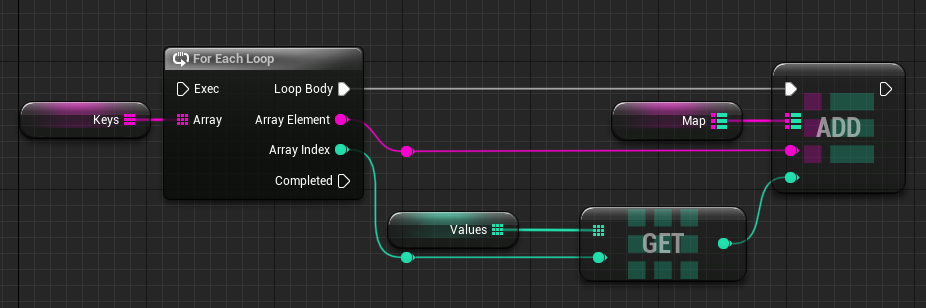 dark drum
tight pollen
data is loaded in GameMode from SaveGameObject, if player join then get this dat...
dark drum
tight pollen
data is loaded in GameMode from SaveGameObject, if player join then get this dat...
How does the data gets saved to begin with (as in where does it come from)? Whats it for?
tight pollen
From PlayerState
in PlayerState i stores this data
and if Server click SAVE, then i get all PlayerStates and save this data in SaveGameObject
frosty heron
 crude dew
Wut 😄
I don't think the player should care or know anything from the Anim BP
it's the other way around
lunar sleet
Duro beat you to it
frosty heron
lunar sleet
Duro beat you to it
Just read 🫡
tight pollen
dark drum
How does the data gets saved to begin with (as in where does it come from)? What...
this data is there to be displayed in widgets
dark drum
tight pollen
this data is there to be displayed in widgets
but what is the data for? You say for displaying in widgets but this is a very generic response. Is it just health values? A collection of assigned quests? Total enemies killed? etc...
tight pollen
dark drum
but what is the data for? You say for displaying in widgets but this is a very g...
I have multiple widgets in the viewport and each has its own title, description, image, etc.
frosty heron
What's that gotta do with displaying it on widgets tho? If you store the data in the widget you need to rethink the choices you made
frosty heron
tight pollen
I have multiple widgets in the viewport and each has its own title, description,...
Store the title description image or anything that needs to be send over the network anywhere but in your widget
Like player name can be just in the player controller.
When someone join, server send RPC that update the widget while passing the playername
dark drum
tight pollen
I have multiple widgets in the viewport and each has its own title, description,...
Another generic response. 🤦♂️ As cold Summer has said, data shouldn't be stored in a widget and should have some sort of handler that it gets the data from. Making suggestions beyond this is going to be difficult with the details your providing.
frosty heron
ask in #multiplayer for optimised approach. Mp questions are tricky and should be asked to those that are doing it
lunar mulch
lunar sleet
Are you changing max walk speed anywhere else?
Yeah im using it in another function...Hmm..
Is there a simple way to get around this or is this a huge headache?
I need it in the other function
lunar sleet
lunar mulch
I need it in the other function
Well my point was is it overriding the value you’re setting here
thin panther
its going to be a headache somewhat. basically you only need to change it in one place.
Other places can apply a modifier to it, but really only one place changes it.
so you might have whatever executing it that says "add 200 to the modifier"
so it will use basespeed + modifier as the new walk speed. which would be 600 + 200
then something else comes in and goes "remove 50 from the modifier"
and at that point the speed is set to 600 + 150
how you manage that is up to you
echo storm
blissful grail
But that isn't the way data should flow. Your ABP reads from your character, not...
That makes sense, thank you
lunar mulch
lunar sleet
Well my point was is it overriding the value you’re setting here
Im using it for this code so i suppose i am yeah :/
 lunar sleet
lunar mulch
Im using it for this code so i suppose i am yeah :/
lunar sleet
lunar mulch
Im using it for this code so i suppose i am yeah :/
See what cuppa told you
lunar mulch
thin panther
its going to be a headache somewhat. basically you only need to change it in one...
cheers, ill have a go at it
 jaunty solstice
Timeline node is tricky.
Isolated a bug in my logic to my Timeline node which is 'stuck ' on Paused so Update only fires once instead of continuously.
Does anyone know why this happens and how to solve?
 lunar sleet
Show the rest of the code, seeing 2 execution paths coming in, bit sus
thin panther
don't trust the watch either
 verbal lotus
jaunty solstice
Timeline node is tricky.
Isolated a bug in my logic to my Timeline node which is...
verbal lotus
jaunty solstice
Timeline node is tricky.
Isolated a bug in my logic to my Timeline node which is...
you need to plug in to "play from start" instead of play
if you just keep playing its never gonna reset
could be other issues but thats the most common
 keen wedge
Hi all, little query...
I have a series of box collision volumes which, on a specific event attach an actor to themselves (e.g. if there are 8 box volumes, 8 actors are attached, one to each).
Under a certain condition I need to remove all again (the actors, not the box volumes).
I'm having difficulty finding the correct node. There's a GetAttachedActors, but thats all of the actors attached to any component on that actor. I'd like to be more specific and say "Get me the attached actor to this component".
Any ideas?
 raw bridge
Hello 👋🏻 I’m in need of some guidance on data handling. Here’s my situation: I’ve got a substantial dataset in Excel, complete with columns for Key, ValueA, and ValueB. Now, my goal is to read this data based on the provided Key and, subsequently, pass it to a UWidget for the display of ValueA and ValueB. To put it another way, I’m looking to create something akin to a file or a global variable that can house a collection of objects, each with properties like Key, ValueA, and ValueB. These objects need to be accessible within a Blueprint, allowing me to perform actions like GetDataByKey. The dataset is quite extensive, comprising hundreds of items. Importantly, our UE project is entirely Blueprint-based, without any C++ involved. Your input and expertise would be greatly appreciated!