#animation
1 messages · Page 170 of 1
 thorny meadow
 ashen junco
It's just that the lack of proper documentation for such monolithic shit frustrate pretty much everyone, even those who are know what they're doing.
And @thorny meadow don't hold your breath on me. Who knows if I ended up making my own locomotion solution for my project, which is in my plan list.
 hot crown

Made some progress was able to accurately map bones and retarget after rigging my model in MIXAMO
However the mesh disappears when I use it in the third person character blueprint
Also when I try to preview the animations in this viewer
ashen junco
 misty dagger
aww wasn't sure, since I thought it got introduced in 4.26
misty dagger
aww wasn't sure, since I thought it got introduced in 4.26
Chaos was first introduced in 4.23, but isn't going to be stable until at least 5.0 or 5.1.
misty dagger
aww, do you know if it works for armor pieces? haven't seen a example of it yet.
hot crown

Overview of the Chaos Destruction tools that are available, and how they work together to create destruction in UE4.
Just sharing these sorry if you already looked at them

Overview of Chaos Physics in Unreal Engine 5
ashen junco
misty dagger
aww, do you know if it works for armor pieces? haven't seen a example of it yet.
I personally go for "physical" bones, in a sense that the bones are in dangling motion. Granted it's anime style so cloth sim accuracy isn't important
misty dagger
that sounds nice! maybe I'll look into that too!
hot crown
@ashen junco srry to be annoying any idea for my question👀 👀 👀
ashen junco
hot crown
<@!325627930484932608> srry to be annoying any idea for my question👀 👀 👀
Sorry, no idea. I stopped using Mixamo for a long time.
hot crown
Sure but the retargeting was succesful
misty dagger
Control rig can retarget for you, I find it works better then the retarget system
ashen junco
The auto rigger was awful, wasn't as good as Auto Rig Pro's.
misty dagger

Let's explore the latest animation features available in Control Rig for Unreal Engine 4.26! The team will cover updates to the Control Rig Mannequin Sample that's available on the Marketplace, rig sharing with Control Rig Components and Setup Graphs, attaching multiple Control Rigs for animation authoring, Slope Warping breakdown with post-proc...
ashen junco
hot crown
I am lucky that it worked for my vroid bases
I personally rerig my VRoid stuff with Auto Rig Pro.
hot crown
ashen junco
The auto rigger was awful, wasn't as good as Auto Rig Pro's.
I just wasn't able to figure out my python issue but I believe it would have been more legit
I think there is something wrong with my pc
VROID + ARP (Blender to UE4) - "/3/ - 3DCG" is 4chan's board for 3D modeling and imagery.
ashen junco
I think someone had another python issue, said to be conflicting app from Steam or something. Was it you?
hot crown
misty dagger
https://www.youtube.com/watch?v=UyCziUcnqxM&t=1249s
And thank you for sharing this color me intrigued
misty dagger
hot crown
And thank you for sharing this color me intrigued
yea sorry, might not help with your problem, but its amazing for retargets!
ashen junco
misty dagger
yea sorry, might not help with your problem, but its amazing for retargets!
Eh, I won't say Control Rig is easy for soft retarget, in particular if the bones of one skeleton to another has the same exact names.
misty dagger
yea if bone names match you can just retarget, but anything that has a control rig humanoid setup is cross compatible. They work different scales too. so getting new animation is just couple clicks. It's still beta though.
 whole latch
I'm just wondering, am I missing some tools here, or complex animation graphs are supposed to look this messy? And I didn't even yet added a weapon-related animations, so they also will create additional transition rule from every node...

Keeping check of the transition requirements and catching edge cases where I forgot to add one starts becoming quite a headache.
 silver badger
Good luck maintaining that, and I bet you are just starting.
But animation blueprints are "friendly", and "easy to use"...sure.
whole latch
I really do miss Unity's "from any state" node.
 rustic plume
whole latch
I'm just wondering, am I missing some tools here, or complex animation graphs ar...
rustic plume
whole latch
I'm just wondering, am I missing some tools here, or complex animation graphs ar...
you can always nest your graphs 👺
whole latch
You can do that?
ashen junco
whole latch
You can do that?
Yes.
 last hound
Having trouble with a bit of a math problem.
I want to draw a spline between 2 arbitrary points on a sphere with there tangents set to curve around the sphere. In theory I believe that the tangent should be 90 degrees from the center of the sphere to the spline point, in the direction of point a to b, of a certain length, since a sphere is constant radius.
How can I calculate a tangent vector that is perpendicular, parallel, and of right length?
 ashen junco
last hound
Having trouble with a bit of a math problem.
I want to draw a spline between 2 a...
ashen junco
last hound
Having trouble with a bit of a math problem.
I want to draw a spline between 2 a...
Not sure how this is related to animation 🤔
last hound
The Math is related to procedural animation like satellite trajectory. Maybe physics channel is more fitting.
 last hound
 whole latch
last hound
whole latch
last hound
Ballistic orbits are more like a circle or an oval that had part of it that's below the ground cut off. Maybe this'll help?
last hound

 bright skiff
This is driving me bonkers, in UE5.0 I'm cutting an animation and it's auto adjusting the end of the animation to the characters starting pose.. does anyone know how to turn this off ? advice greatly appreciated 🙂 example cutting Jump anim https://drive.google.com/file/d/1q3oLIuVM5H73ZoEPAwo4Wd-lXifczLbw/view?usp=sharing

Google Drive
misty dagger
Hey, anyone know how to use a float to "scrub" through an alembic animation? Like manipulate the playhead of the animation via a value in blueprint.
misty dagger
Nvm I got it
 weak delta
Hello guys I need your help


I want to retarged an animation but it's retargeting it in this random x position
In the skeleton asset both of them are in the same place as a reference, I've also tried to put it the one that I am retargeting 2x up, but same results
I am using UE4.26
ashen junco
weak delta
Meshes looked the same, why you need hard retargetting?
weak delta
What do you mean by hard retargeting? I simply took animations right click retarget to another skeleton and next
ashen junco
That's what I call hard retargetting.
weak delta
ashen junco
That's what I call hard retargetting.
How do I light/easy retarget?
ashen junco
Soft retargeting would be changing the skeleton assigned to the skelmesh.
weak delta
ashen junco
Soft retargeting would be changing the skeleton assigned to the skelmesh.
Sorry for pinging you, how do I do that?
What do I need to change?
 errant raven
I have 2 animBPs and Blendspaces, one for normal movement, and one with a weapon being carried, what should I do so when I press 1, the animBP and Blendspace changes from the normal one to the weapon one?
ashen junco
errant raven
I have 2 animBPs and Blendspaces, one for normal movement, and one with a weapon...
You don't swap the entire animBP, but rather create another state in it.
 lone void
This channel is also to ask questions about animation retargeting, right?
ashen junco
lone void
This channel is also to ask questions about animation retargeting, right?
Yes.
lone void
So, I tried retargeting this animation and to the left is the original one, right is the retargeted one. Does anyone know if I can fix this offset?
 ashen junco
weak delta
Sorry for pinging you, how do I do that?
ashen junco
weak delta
Sorry for pinging you, how do I do that?
 ashen junco
lone void
So, I tried retargeting this animation and to the left is the original one, righ...
ashen junco
lone void
So, I tried retargeting this animation and to the left is the original one, righ...
You have to modify it in either the animation asset itself (by adding additive curves), or doing it in animBP (which won't work if that is a one shot montage)
 winged topaz
i want to create some characters in blender and use them in unreal engine in a way that i can easily use existing unreal animations. i have no experience in character creation. what do i do? do i export the unreal mannequin and import it to blender to base my characters on that skeleton? can someone recommend a nice workflow guide or tutorial? thanks
ashen junco
winged topaz
i want to create some characters in blender and use them in unreal engine in a w...
If you have some money to burn, you can buy Auto Rig Pro, which can (auto) rig humanoid characters to something matching that of UE4 mannequin standard.
Otherwise, you can export the mannequin skelmesh or obtain one from Mr Mannequin Tools (the official female one actually has better proportions), and then use the skeleton as a base for your character's rigging.
Also make sure your blender scene's unit scale is set to 0.01
 winged topaz
@ashen juncooh cool, thanks
ashen junco
ashen junco
Also make sure your blender scene's unit scale is set to 0.01
This is one thing that could make or break with skelmeshes, especially if you're going to animate it.
winged topaz
auto rig pro look nice. when you say "something matching that of UE4 mannequin standard" you mean its not exact and need fine tuning?
ashen junco
winged topaz
auto rig pro look nice. when you say "something matching that of UE4 mannequin s...
Not exactly the same, as you can add more bones on top of it, but the base matches the standard that retargets can work rather seamless.
winged topaz
ok cool, thanks again @ashen junco
 grave sable
Can someone please help? We're trying to export character animation as alembic into UE but when we add it to the scene, the animations don't appear, only the character.
 winged topaz
@grave sablehave you tried the .fbx format?
grave sable
We did yes.
 hasty oar
Hey folks. I want to make a TP character but the default TP mannequin has no animations for strafing or moving backwards. And every tutorial i've found on the subject uses the animation starter pack, which only has animations while holding a weapon.
Anyone know of any good assets or resources for TP unarmed animations? I unfortunately am not an animator.
 wind pilot
Yello, can you make relatively complex animations from scratch inside unreal or do you have to use Maya ,Max, Blender etc. for that? I don't seem to find any YouTube tutorials and all what I see are imported animations that make me assume that it is indeed impossible to make them in unreal.
rustic plume
hasty oar
Hey folks. I want to make a TP character but the default TP mannequin has no ani...
i bet for the price of a sandwich, you could get a hold of good animations to work from
hasty oar
rustic plume
i bet for the price of a sandwich, you could get a hold of good animations to wo...
have any specific recommendations?
rustic plume
hasty oar
have any specific recommendations?
you want what kind of animations? strafing without a weapon, what else?
ashen junco
wind pilot
Yello, can you make relatively complex animations from scratch inside unreal or ...
As far as complex animation goes, I don't think you can go far in CR+Sequencer, especially due to lack of bone constraints
hasty oar
rustic plume
you want what kind of animations? strafing without a weapon, what else?
essentially just basic locomotion. forward/backward, left/right, forwardright/forwardleft etc
ashen junco
hasty oar
essentially just basic locomotion. forward/backward, left/right, forwardright/fo...
I've seen some basic locomotion (not ALS) on Marketplace, though can't recall if it's free for the month or permanently free
And no, I won't recommend Mixamo, but if you want to take the risk of working around with incompatibilities, then by all means
hasty oar
ashen junco
I've seen some basic locomotion (not ALS) on Marketplace, though can't recall if...
what's ALS?
and I know enough to avoid mixamo lol
I know it's a pain in the ass to get it to work with UE4
ashen junco
hasty oar
what's ALS?
Advanced Locomotion System
But it's way too advanced (read: Monolithical mess)
ashen junco
rustic plume
lol if als has strafing
Yes, it has.
rustic plume
hasty oar
essentially just basic locomotion. forward/backward, left/right, forwardright/fo...
yeah, grab als
i mean its got some more stuff, but if you just need the anims
im sure you could migrate them out
never used als, but i assume its the same rig
hasty oar
that might work actually. I just need the animations.
ashen junco
hasty oar
that might work actually. I just need the animations.
Good luck extracting some out of them (epic ominous foreshadowing)
rustic plume
unless its a "just anim pack" its going to be the same hassle of extracting, but hey free is free
ashen junco
Nah, ALS is just going to be the more confusing out of them, due to how specifically used they are
rustic plume
well if the anim asset are just that, animations and they use the normal ue4 rig, then they can be extracted afaic
 near dragon
I am trying to get a AK reload anim working and i am having the issue of not being able to import constraints into UE from Blender. I have a "ChildOf" constraint for the left hand so I can change the influence(allowing swapping weapon to other hand). I tried baking actions in blender but it didnt help anything. How are you guys doing reloads "the right way"?

 ashen junco
near dragon
I am trying to get a AK reload anim working and i am having the issue of not bei...
ashen junco
near dragon
I am trying to get a AK reload anim working and i am having the issue of not bei...
Bake the constraints.
near dragon
Yeah, I have tried that. Pose>Animation>Bake Actions... checked Visual Keying and clear constraints
ashen junco
Also for comparison sake, on this test run, I did not use attaching in engine for the gun, just playing back the anims on the character and the gun simultaneously. Though maybe I should look into attaching it, because I did ran into issue with shorter/taller characters
near dragon
I have 2 armatures, one for the arms adn another for the gun. I am wondering if the constraint is on a seperate armature would that be causing the issue? If so do I combine the 2 armatures somehow?
ashen junco
near dragon
I have 2 armatures, one for the arms adn another for the gun. I am wondering if...
In my case, both are separate armature, just that the gun skelmesh component is parented to the character's skelmesh. component, so that both share the same locations
near dragon
ah ok, i can try that
ashen junco
Though I should mention that the workflow works if your game is an FPS with floating arms. I personally found issue with this in full body FPS and TPS.
near dragon
yeah mine are floating
near dragon
still not working😔 ive tried every bake setting in blender. it just wants to stay attached to the right hand in UE no matter what
ashen junco
near dragon
still not working😔 ive tried every bake setting in blender. it just wants to...
Are you still attaching the gun skelmesh on the hand bone?
Also please note that viewing it in Persona anim viewer is not representative of what it actually looked like in game
near dragon
yes it is attached to the right hand the whole time in UE. bet that's the problem.. can I just key it to swap to the left hand in UE ?
ashen junco
near dragon
yes it is attached to the right hand the whole time in UE. bet that's the probl...
With the baked constraints I described above, it's not necessary to attach the weapon to the bone.
Again, both hand and gun are separate armature, and the gun armature has its own root bone motion, following the hand motion based on the constraints
near dragon
yeah i think I have mine setup a little differently. I had it attached to the grippoint socket and attached a Weapon_Base component at start
lone void
Does anyone know if it's possible (and how if it is) to retarget an animation using the absolute rotation/location of the bones instead of the relative?
 fathom vapor
I have a question!
Will we be able to somehow make the same realistic animations as in rdr 2 without having millions of money and hundreds of animators?
As we know, rdr 2 animations use muscle simulation, and so on.
Can we do that in the Unreal engine?
Maybe you know good tools or plugins for procedural Animation and Simulations of muscles and others, whether it's paid or not. Maybe you know such projects are in development?
I'm really wondering if ordinary people, animators, will be able to make the same animations as in rdr games.
ashen junco
lone void
Does anyone know if it's possible (and how if it is) to retarget an animation us...
Change the skeleton's retarget bone settings to Animation
ashen junco
fathom vapor
I have a question!
Will we be able to somehow make the same realistic animation...
It's going to involve a lot of money and lots of R&D manpower anyway.
But for "poor man's" version, you can have some vertex displacements or morph target driven by the main bones in anim BP.
fathom vapor
ashen junco
It's going to involve a lot of money and lots of R&D manpower anyway.
But for "...
I think a couple of smart guys will have enough and not very much money to try to do something very similar, I just didn't see something very similar in the unreal engine.
If you have something, it wouldn't be a bad thing if you showed me.
ashen junco
fathom vapor
If you have something, it wouldn't be a bad thing if you showed me.
Eh, don't rely on me lmao
My projects are mostly contemporary anime sytle games, so breast jiggle is in my work list, but not muscular morphing
 craggy knoll
About the Control Rig Component. If I want to correctly setup my ControlRig, I have to call this, so the Rig adjusts itself on the Skeletal Mesh:

My problem is, how do I use this Control Rig in my custom ABP, or the other way around, get a reference from the Control Rig inside my ABP to my blueprint, so I can subscribe to the OnPreSetup event?

If I use the ControlRigAnimInstance, I can't apply animations anymore. I want to use my own ABP.
misty dagger
can someone give me a free punch animation or give some information about how can i make them?
ashen junco
misty dagger
can someone give me a free punch animation or give some information about how ca...
Information on how you can make them it is.
misty dagger
ashen junco
Information on how you can make them it is.
what
ashen junco
misty dagger
what
It's going to be a fairly lengthy post, so bear with me.
misty dagger
alright
 earnest merlin
Hello everyone, I have an oven with a bunch of animations that affect the whole mesh (for example the lid is closing and it bashes the rest of the mesh) But I've got also an Idle animation running the whole time while it's cooking. I'm trying to set up the opening/closing lid animations on top of it but they don't blend really nice with "Layered Blend per Bone".

The only way these 2 will blend kinda okeish, is if I setup the Bone Layer from where it will start. BUT I'm losing animation details to the rest of the mesh
 ashen junco
misty dagger
alright
ashen junco
misty dagger
alright
With attack animations, in particular melee attacks, you can have three stages:
-
Anticipation; This is where the character prepares for a punch, typically he/she will move the fist back to wind up for the attack
-
Contact; This is where the character swings his/her fist to land the attack on the enemy. To convey sense of power, this stage has to be done faster. You can also shake the camera or slow down time for a brief moment when the attack lands to exaggerate the hit.
-
Recovery; This is where the character had his/her inertia from the attack, and returning to the idle stance. At this stage, you can have a logic for initiating combo when the character is still have yet to return to idle stance.
misty dagger
thanks
ashen junco
misty dagger
alright
For additional reference, you can give this a watch:
https://www.youtube.com/watch?v=8X4fx-YncqA

One of my most requested video topics is combat systems. So let’s look at everything from Bayonetta and Yakuza, to Batman and God of War, to break down the essential elements of a good melee combat system.
Support Game Maker's Toolkit on Patreon - https://www.patreon.com/GameMakersToolkit
Have Mark talk at your studio, university, or event - h...
ashen junco
earnest merlin
Hello everyone, I have an oven with a bunch of animations that affect the whole ...
Why not have the cooking animation as another state?
earnest merlin
ashen junco
Why not have the cooking animation as another state?
Another state? could you please elaborate?
ashen junco
earnest merlin
Another state? could you please elaborate?
As in this.
For reference, this is the Third Person mannequin's animBP, using states.
 earnest merlin
oh this one yeah, I have the Spawn and Rumble/Idle Animation in one State

Thing is, I need to add the 3 Lid Close/Open animations on top of that when they are callend, **while **the Oven is rumbling/idling
 jade pawn
Does anyone have good tutorials / information on cloth simulation. Want to have the clothes in a short film be simulated all in unreal and we've been struggling
 simple star
What's the point of a "child montage" ?
rustic plume
simple star
What's the point of a "child montage" ?
some slight variations on avoiding duplicate anim setups - such as using the same anim notifies for variant animations
simple star
rustic plume
some slight variations on avoiding duplicate anim setups - such as using the sam...
I don't get it so you create a child montage and you can't change anything on it apart from base animation? What's the benefit? Not having to setup notifiers again?
I found this tweet on it and it makes no sense to me haha https://twitter.com/unrealengine/status/806121445554356226


Alter your animations using Child Montages to create new moves while not interfering with gameplay. https://t.co/8MirkaZap3 #UE4 https://t.co/KWvlDySH9V
 Twitter
·
rustic plume
simple star
I don't get it so you create a child montage and you can't change anything on it...
Twitter
·
rustic plume
simple star
I don't get it so you create a child montage and you can't change anything on it...
right
simple star
so the timing of the notifiers can't be changed?
rustic plume
so if you have 10 idle animations, why make 10 unique montages with the same setup?
simple star
I see it's for simple cases
misty dagger
Hello, I have a snowflake that falls down the chimney.
Is there a way i can gradually fade out an object in the sequencer?
If i could "melt" it would be even better, but a simple fade out is also good.
rustic plume
redundant cases 😉
simple star
Mucho love and a merry Christmas @rustic plume
rustic plume
simple star
Mucho love and a merry Christmas <@!568839944970174501>
Merry Christmas
ashen junco
misty dagger
Hello, I have a snowflake that falls down the chimney.
Is there a way i can gra...
This seems to be more of a particle (#visual-fx) related question more than animation related
 blissful kite
Help, I broke the something trying to change the character mesh and now he wont move

I deleted the other character i was trying to replace it with but it still wont move.
 fathom vapor
These animations are made using a neural network, maybe we have ways to do this in ue4/5 as well?
Plugins or something?
Is it possible to make animations using a neural network on blueprints in ue4/5?
fathom vapor
fathom vapor
https://cdn.discordapp.com/attachments/653114038942695447/811385242388660264/Tes...
Something similar you can see in https://youtu.be/16CHDQK4W5k

Is it possible to make the same animations, only in ue4/5? Preferably on blueprint
 heavy pelican
I did an animation with the base mannequin and re targeted it successfully. But what if the non mannequin animation/charakter has a weapon that is attached to the previous mesh/animation. How do I get rid of it? I just need it off screen. I tried to set a keyframe inside the animation and put the weapon below the ground (see screenshot) but it still appears. Both in sequencer and in game which I don't need in this case.
 wind pilot
Easiest way to get rid of the weapon is to simply assign a transparent material to it
heavy pelican
wind pilot
Easiest way to get rid of the weapon is to simply assign a transparent material ...
I'll try that, didn't think of it!
wind pilot
heavy pelican
I'll try that, didn't think of it!

Guide for using Transparency in your Materials.
You find how to do it here
 twilit rivet
so I made this animation in blender (video) and exported it as an fbx to put into UE4, however when I export it the charging handle and magazine dont move in the viewport of the fbx, and then when I put the animation into UE4 this happens (see picture below), help?

 edgy meteor
Anyone have any experience with livelink? I'm having troubles applying an animation on top of my livelinked mo-cap footage
 tranquil lark
When doing animations in Blender and porting over to UE, should they be done with +X being forward? I noticed that when I do it with +Y being forward (because the default character in UE is +Y facing) and then import it into UE, it is like flipped backwards. The mesh that is. I am using +X forward and +Z up for export settings.
ashen junco
tranquil lark
When doing animations in Blender and porting over to UE, should they be done wit...
I personally found modifying the export bone axis tend to break even more
though I should check on Auto Rig Pro's code first, brb
 honest geyser
So uh, can someone tell me what I did wrong? character has very similar skeleton to UE Manni, naming and hierarchy, with a couple extra bones, but when I retarget an animation that is based on Manni, I get weirdness like this. DCC is blender, if that helps.
 edgy meteor
does anyone know how to blend bones in an additive manner? In the AnimGraph, I've tried "Apply Additive" within the blends functions, however it makes my model huge
edit: figured out it was layered blend per bone is what I needed, then within the details, there are config options to add which bone names to add
misty dagger
Hi, I have a problem, I don't know why but my animations are not exporting right in unreal
I've got an animation from mixamo, and I need it in place
but even after I updated the location on every frame to be the same
it still doesn't work
 blissful kite
I'm still stuck
 fleet stump
Anyone know why everytime I import my character fbx from Marvelous Designer it gets imported in chunks like this. I also get the error "Could not find the bind pose. It will use time 0 as bind pose"

 primal geode
Hello all. Sorry for stupid question. I am doing a simple animation like "look how to easy unfold our sofa" for furniture firm in sequenser. But I want to add some bounce effect, when pillow drops. What I need to fo in ue5? Some soft body physic? Like Flex? And bring it to sequenser? Can someone point me in right direction? I run out of ideas for Google
 obtuse idol
tweaked my walk cycle a bit
misty dagger
Hey there, when you scale a bone via animation blue print the physics assets do not seem to scale with it. They show they are scaling when I turn on collision drawing, but any hit tests I perform act as it it were against the original PA. Is this a bug or controlled by a setting, or not supported?
 past onyx
Does anyone here have experience with inertialization?
How do I soften the transition between an animation with inertialization blending and one without?
honest geyser
Alright boys, think Im ready to retire.

 queen notch

Creatures and Magic: Sparks of the source its a role-playing game with a beautiful world, a good story, leveling up your character, the ability to tame animals, and control them, including playing for them :)
A large number of unique skills, abilities and spells. You can combine them and create your own style of game.
⭐⭐⭐⭐⭐⭐⭐⭐⭐⭐⭐⭐⭐⭐⭐⭐⭐⭐⭐⭐⭐
LETS...
near dragon
Still having this issue with constraints. Need to get the right hand detached but it doesn't want to export my anim bake from blender correctly
i know constraints are functioning becasue my mag is constrained to my hand and that is working just fine. not sure the right hand wants to stay attached
 proven sigil
Looking for advice. Added physical animated hit reacts, quick timeline etc turns phys anim on then quickly blends it out. Thats all working as far as i can see, but my settings arent right and i fall through the floor. I have char mesh and tried several ways of ticking the 'ignore, block, overlao' part. Far as i know as long as world static (floor) and pawn(enemy hitting) is blcked is should work? The enemy is a child bp of my guy with slight differences in bp, mainly the widget cast for different hpbar. Any ideas? ive tried making custom channel and preset but i may not have done them right.
 austere monolith
So for a few days now I have learned something important about UE4. Custom character and rigging for Unreal is the most convoluted, backwards, overly technical, overly detailed, overly the top in method. Rigging and animation in UE4 is literally the worst part of UE4. There needs to be a better way than this abomination of a time sync process that has way to many options methods, work flows and technique's and hidden things that make progress near impossible.
/rant
EZ Character rigging in UE is no such thing. It's way overly the top in silly technical garbage. The UE4 Mannequin itself is complete garbage with every new release of UE. Look at it. Take a good look at the UE4 char. Its a freaking monstrosity that needs to be put down.
I seriously can not stand even trying to use it at this point. May as well just rig my own bones and set my own IK and set my own animations because taking a custom rig and IK and attempting to use it with the UE frankenbone system UE4 has its utterly the last thing on any planet a developer should do.
Literally wasted 3 days trying to figure out a smooth way to integrate and there is not one. Not a single way without hashing through tons and tons of useless Bone parts, rig parts, IK parts and holy unholy god the face rigging... I am done.
Seriously not done... A simply character with 24 bones and no simple way to make use of any animations that already exist because every body and there mother from Mixamo to Maya to any developer literally based everything off the Franken UE monster abomination speghetti trash UE4 base Char Model...
I am gonna puke.
No thats not what I am doing
Here look
Simple

This character only has 24 bones.
And I am supposed to delete my bones and integrate them with the UE4 trash monster...
There just must be a better way to tap into the animations tons of Developer's have made for characters and unfortunately most all of them built around the UE4 trash monster.
Yeah thats what I am going to have to do... Then I will have to custom each and every 1 animation...
So I am exploring possible procedural movement
yeah my guy has dog legs going on which kinda complicates things.
Thansk for hearing my vent and rant but seriously UE4 guys really need to just trash the UE4 monster and lay it to rest... A better way but be done.
I mean there has to be an easier way to make use of existing animations everyone has built over the years...
yeah I got all the IK stuff set up in Blender
I mean literally this little guy is ready to start making animations
I can design my own animations within UE right?
Meaning I can prolly just export this to UE4 at this point and start setting the animations up
So UE4 is not capable of taking a custom with IK set up and doing the animations within? I need to set the animations up in BLender and export thwem?
Well anything is better than wasting 3 days seeing if I can integrate my bones and character with something that has a ton of animations built into FrankenUE
yeah yer prolly right
Thansk man:) I usually hang out in Voice chat but nobody wants to hear my BS about this subject so I spared them
Well mine only has 24 Bones:) Franken monster has more bones than there are animations made for it...
yeah, hopefully Unreal might listen to developers that think there is an easier way but instead UE has doubled down on stupid with Metahumans
Not everyone wants human characters
Nice, well I made a tank game and not a single bone in it yet:) This character I made here is just a gound unit which would be the first to have any bone system in it
And I thought it could be done pretty quick with some learning. Damn was I wrong
yeah it would not work which is why I think UE4 needs to make more options for more simplified models
If it was easier they could fire all 50 of them and hire 1 or 2
If the process was made easier.
 wraith furnace
i am using cc3 characters in unreal. I have gotten 2 separate anim blueprints to work successfully one is the face live link iPhone app and the other is my perception neuron suit body live. I am trying to add my body blueprint to the face blueprint so they are one so i have a fully live character with both. I chose to add the body blueprint to the face blueprint because the body animbp was a lot more simply built lol. I have included 2 photos with the questions i assume i should be asking. Thank you!!


 bronze osprey
@austere monolith you need a symetrical base pose
than you can retarget animations from another char.
if u dont know whats goin on under the hood its prolly best you stick to the same hyrarchy setup
if ur char has 24 bones its prolly a completely diffrent setup, this doesnt mean you cant try retarget animations from paragon crunch to ur rig tho
 wooden sleet
Hi, just wondering If I have a pickup animation and I just want the arm bone movement and none of the rest. Can I do that in unreal? or do I have to get into an external editor to remove them?
Like can I mask a montage, only for the arm movements
ashen junco
wooden sleet
Hi, just wondering If I have a pickup animation and I just want the arm bone mov...
Look up on Slots.
wooden sleet
Yeah I've managed to do it with my general animation for it a slot called UpperBody
ashen junco
Now do that again, but on the arm part.
wooden sleet
Like this?
 wraith furnace
i am using cc3 characters in unreal. I have gotten 2 separate anim blueprints to...
wraith furnace
wraith furnace
i am using cc3 characters in unreal. I have gotten 2 separate anim blueprints to...
I still need help! Anyone maybe ?
edgy meteor
Does anyone know how to attach static-meshes to a socket within sequencer? I'm currently trying to use a trigger event, and then within BP, use AttachComponentToComponent. However I am having 2 issues with that. I can't find/use my static mesh that I want to parent under the parent noodle, and I get an error saying my target skeletal mesh isn't a skeletalmeshactor

 subtle shore
hi! I am having an issue with my character camera. Whenever I import a large mesh that surrounds it (a wall in this case) the camera gets all messed up and does this:

it is a 3rd person camera
i believe it has something to do with the collision?
proven sigil
subtle shore
it is a 3rd person camera
i believe it has something to do with the collision?
details panel of characterbp, click the top left cam and cam boom, then details penel scroll down to collision, you can tinker with them there. Even if this does not provide the fix, it may help debugging, as you could like make the camera and boom overlap all, and if it still does it then it may suggest where else the problem is, just a thought im not an expert ive just been sweating out collision research as ive got issues currently xD
check the collision of the imported stuff, remember to double check right below its settings for block ignore overlap, it has the setting for what its own object type is. Easy to forgot about.
 warm coral
Is it possible to rotate an entire blendspace? So like when I rotate the root it keeps that rotation?
lone void
does the anim bp of anyone else also keep looking like this messy?
 ashen junco
lone void
does the anim bp of anyone else also keep looking like this messy?
ashen junco
lone void
does the anim bp of anyone else also keep looking like this messy?
- ADS can be made as additive separate states
- Reloads can be made as montages instead (imagine scaling up to more than one weapon)
lone void
Oh yeah
But I'm only going to use a max of 2 weapons tho
I think
Idk
I spent like 5h making that😳

 ashen junco
 past tusk
Anyone know why my IK rig exported from Blender acts so unusual in Unreal?
past tusk
Anyone know why my IK rig exported from Blender acts so unusual in Unreal?
Usually IK logics are implemented entirely in engine 🤔
past tusk
Really? Don't you have to set up targets/poles in Blender first?
ashen junco
past tusk
Really? Don't you have to set up targets/poles in Blender first?
Nope. Especially with the advent of Control Rig (if you're in 4.25 or newer)
AnimBP do have two bone IK functionality as well, but it might be more difficult to set up.
past tusk
Ok thanks I looked this up and it's an experimental plugin, will activate it and give it a try. Thanks!
 elder echo
Hey everyone! I have a gltf file with a mesh and two animations, I'm trying to convert it to a fbx file in Blender to import it into UE4 but I end up with a file with 300+ animations. I'm just importing it into Blender and exporting it with no modifications whatsoever.

 viscid tulip
hey guys, Is anyone good with quaternion math? how would i compare 2 quaterninos and apply the delta to a third quaternion?
if it was a vector i could do v3 = v3 + (v1 - v2)
im working in control rig
ashen junco
viscid tulip
hey guys, Is anyone good with quaternion math? how would i compare 2 quaterninos...
I personally do it by converting Quats to Rotator or Axis/Angle, do the math, and convert it back to Quats
viscid tulip
ashen junco
I personally do it by converting Quats to Rotator or Axis/Angle, do the math, an...
Ohhh! there is a to rotator option! somehow i missed that, i will give it a try! thanks
ashen junco
AFAIK the only real advantage Quats had over Rotvectors is alleviating gimbal locking issue in transform/interps with gizmos.
viscid tulip
ashen junco
AFAIK the only real advantage Quats had over Rotvectors is alleviating gimbal lo...
Yeah, that Quats are for preventing gimbalock is about the limit of my quat knowlege, i have no idea why it works tho
viscid tulip
ashen junco
AFAIK the only real advantage Quats had over Rotvectors is alleviating gimbal lo...
Hmm. im not sure if i did something wrong with the calculation or if im going about the underlying problem in the wrong way. I have question active on the forum with more context. feel free to take a look (if you want to / have the time, ofc)
https://forums.unrealengine.com/t/contol-rig-basicik-setup-with-0-0-0-bone-transforms-4-27/268336/6

Unreal Engine Forums
I managed to get one step closer by setting up a chain of virtual bones identical to the arm bones. (green bones in the hierarchy) i then aligned these bones with aim nodes (with the real bones as target) to get the correct bone rotation. I then run the IK solver on the virtual chain. lastly i set the transform of the real bones to the virtual b...
 cloud lodge
does anyone know how to change the skeleton from one mesh to another, the mesh i want to use is using the UE4 default mannequin but the one i want to use has a few more bones
ashen junco
cloud lodge
does anyone know how to change the skeleton from one mesh to another, the mesh i...
Right click, assign skeleton?
cloud lodge
Won't work tried that
 novel blaze
Im trying to add a skeletalmeshcomponent to my data asset so that I can fill out the skeletal mesh and materials different for each data asset. What is the name of the class that will let me drop down and edit it as if im in a blueprint with an attached component?
I've tried TsubclassOf<UskeletalMeshComponent> , USkeletalMesh*, Uskeletalmeshcomponent* but none of them allow me to do what I want
rustic plume
i dont code, but in bp, setting skeletal mesh targets skinned mesh component, hope it helps
novel blaze
I was wrong using a pointer to a skeletal mesh component works as long as I point to a class.
rustic plume
alright
novel blaze
Well actually that didnt work either. So my solution is to use TSubclassof<UskeletalMeshComponent> and just create a bunch of blueprints aka skins. Its not as streamlined as I wanted it but it works
misty dagger
it seems like everytime i move left or right this weird glitch happens to me

i checked the animation and its fine
it only happens when i launch the game
 latent sluice
I have a problem with animation FirstPerson_Run from FPS Template. It twitches at the end. As if the start and end positions of the hand in the animation loop are not the same. This is not so noticeable in the video:
But in the game it is very noticeable. What can be done?
viscid tulip
hmm. does anyone know how to find the "additive control rig" mentioned by epic in their control rig youtube demo?

 peak lantern
viscid tulip
hmm. does anyone know how to find the "additive control rig" mentioned by epic i...
peak lantern
viscid tulip
hmm. does anyone know how to find the "additive control rig" mentioned by epic i...
maybe it is changed? Maybe add a normal control rig track and change the track to be additive in someway? I don't remember where I saw it tho, might be wrong
viscid tulip
peak lantern
maybe it is changed? Maybe add a normal control rig track and change the track t...
i managed to figure it out. the workflow has changed a bit. if you are intressted, here is the resolution: https://forums.unrealengine.com/t/additive-control-rig/147578

Unreal Engine Forums
Is it possible to use the control rig as an additive layer to an existing animation? I tried long and hard and having an animation track anywhere near it makes the control rig controls disappear.
peak lantern
awesome, yeah I somewhat remember that the additive setting was moved to be associated with the track itself
fathom vapor
Unreal Engine Forums
Do you think with the new technology for animation in ue5, we will be able to do something very similar to: ubisoft animations: And rdr 2 animations/ragdoll: What ue5 technologies might we need to do this? Maybe you have ideas or have seen something similar in development? My buddy @MostHost_LA He said it was possib...
ashen junco
fathom vapor
https://forums.unrealengine.com/t/ubisoft-gta-animation-unreal-engine-5/268597
What even is this?
 elfin axle
anyone use als?
 feral trellis
should i use als or just stick with regular anims
ive been trying to use echos mesh on the regular third person character. I just cant get it to work.
but the regular thirdperson anim setup is easier than echos so thats why im trying to put her mesh onto it
 raven flicker
hi, i'm currently modding the UE4 game jedi fallen order, and i'm trying to play an animation for an actor but it's displaying incorrectly - in blender & in-engine it plays fine, but ingame the limbs of the actor are distorted
 languid spade
Wondering if anybody knows the solution to this. I have a skeletal mesh with several chains that I want to simulate physics on. However whatever settings I try to input, every chain except the first in the skeleton tree gets snapped to the root bone when simulating.


 ripe rock
Does UE have it's own rigging system for assets or does a user need to rig and skin in another 3d application like maya before importing to the engine?
ashen junco
raven flicker
hi, i'm currently modding the UE4 game jedi fallen order, and i'm trying to play...
Jedi Fallen Order doesn't have official modding tool, so good luck with that.
ashen junco
ripe rock
Does UE have it's own rigging system for assets or does a user need to rig and s...
The latter.
There is Control Rig, but it's by no means its own rigging system.
ripe rock
ashen junco
The latter.
There is Control Rig, but it's by no means its own rigging system.
I see, I know you can create materials in UE too but should that be created in mari or substance painter too? Is UE just to link all the assets together to forum a game?
Not sure what UE's other job is if you pretty much make all the assets in other programs.
ashen junco
ripe rock
I see, I know you can create materials in UE too but should that be created in m...
Materials (and in extent shaders) are different kind of beast from animations.
Those tools you mentioned mainly spits out textures for you to use in Unreal's material system.
ripe rock
Yup I agree. But Unreal has it's own node system too to input those textures.
ashen junco
And not even related to rigging.
rustic plume
you should use unreal to make materials, you are taking textures made elsewhere
there are no skinning tools in the engine
ripe rock
The thing that confuses me is materials I create in substance painter is already perfect right? After I export, what am I doing in unreal with them ? Any changes would make it look different than my substance/mari render.
rustic plume
ripe rock
The thing that confuses me is materials I create in substance painter is already...
you are not making materials in sp, you are making textures
ripe rock
ashen junco
And not even related to rigging.
ops yea I should move to a different section. But you answered my question on rigging already thanks.
 barren sand
Hey guys, I might be missing something simple but I have a little issue:
I have a character with an animation blueprint controlling the animations using explicit timings etc...
In the character blueprint, I have 3 other skeletal meshes that use the same rig and animation blueprint, they drive changeable outfits, jewelry etc..
When I update the explicit timing and animation to play in my main character anim bp, I want the others to follow it. Is there a way to share the anim bp between multiple skeletal meshes or do I need to loop through them and update each on their own?
ashen junco
barren sand
Hey guys, I might be missing something simple but I have a little issue:
I have ...
For the outfits and stuff, either use Set Master Pose Component (cannot have their own physics but slightly cheaper) or give them another animBP with just Copy Pose From Mesh in the anim graph (slightly more expensive but each can have their own physics and more)
barren sand
ashen junco
For the outfits and stuff, either use Set Master Pose Component (cannot have the...
That worked out perfect with the master pose component!
Thank you very much! 🙂
fathom vapor

⚡ADD TO WISHLIST: https://store.steampowered.com/app/1372880/The_Day_Before/
The Day Before is an open-world MMO survival set in a deadly, post-pandemic America overrun by flesh-hungry infected and survivors killing each other for food, weapons, and cars. You wake up alone in a world you no longer remember, setting out to find answers and the r...
 merry loom
both
ashen junco
<@&213101288538374145>
 silver bridgeBOT
:no_entry_sign: Biglio#5838 was banned.
 light river
It's hard to get banned from here too.
 warm kayak
would you do Quadruped leg placement with regular old Two Bone IK in anim bp or setup full body IK and control rig?
raven flicker
ashen junco
Jedi Fallen Order doesn't have official modding tool, so good luck with that.
there's already quite a lot the discord has managed to figure out with the game so i doubt it's impossible o7
ashen junco
raven flicker
there's already quite a lot the discord has managed to figure out with the game ...
It's possible, but I'm sure it's the underground way, not through official mod kit provided by the devs
And this server does not cover underground modding 🙂
Hence why I refuse to elaborate about the underground ways here 🙂
raven flicker
fair enough
i don't suppose you could point me to somewhere where i might find support for that kind of thing?
misty dagger
Hmm I have a montage that plays when I fire a gun. The montage is the player bringing the gun from pointing down to straight in front of him. What's the best way to #1, keep the gun aimed up for a bit, and #2, only allow firing if the gun is up? Right now if I fire the animation jumps between up and down, and the projectile leaves the barrel even if it's not all the way pointing up yet.
The fire action can be used multiple times in a row, and it mostly works how it is now, except for the weird jumping in the montage
 blissful tinsel
hey so, im trying to use mixamo to export animations to unreal
and im not really sure how the workflow works
I want to import animations and put them into my animation blueprint so I can stick them into my state machine
but I have no idea how to put them inside my animation blueprints
misty dagger
You drop them into the anim graph
 charred aurora
I have a question on editing animations within Unreal Engine. I want to edit the skeleton to the pose I want, but it changes the position of the other animations that use the same skeleton. Is there a way to have the other animations negate the changes I made to certain animation pose using the same skeleton?

 charred aurora
I probably did it the long way but I adjusted the skeleton to where I wanted it, then I recorded and readjusted the skeleton of the other animation to fix all of them... took a much greater time than I wanted lol
misty dagger
This is the issue I am having. I can't figure out how to make it so it doesn't actually fire until the weapon is 'up' (its an animation montage playing from idle state to pistol idle), and additionally make it so the down to up and up to down transition is smoother if you don't fire immediately after the first one.
hmm I smoothed it out a bit using a delay
yeah nevermind, I think I am okay with that result.
raven flicker
an animation plays fine in UE4, but not umodel/ingame, any ideas?
also plays fine in blender
ashen junco
<@&213101288538374145> Cross post across multiple channels
silver bridgeBOT
:triangular_flag_on_post: god.rays#8300 received strike 1. As a result, they were muted for 10 minutes.
past tusk
Trying to do IK with Ctrl Rig, but the bones stretch off into the distance. Any ideas why that might be? Is it a Blender export issue?
 merry loom
past tusk
Trying to do IK with Ctrl Rig, but the bones stretch off into the distance. Any ...
merry loom
past tusk
Trying to do IK with Ctrl Rig, but the bones stretch off into the distance. Any ...
What does ur ctrl rig graph look like
past tusk

Tried using FABRIK because my leg has more than 3 bones too, but it still deforms quite a bit
past tusk
Just an update, I think I know where the issue lies, but cannot change it. It appears my bones are all scaled by 100 by default

Or is the control rig scaled always by 100? Weird
merry loom
emmm i can see taht scale causes issues
try reimport? Is this from blender? Did you use epic’s blender addon for import?
you could try scale the bones back to 1 using the set transform nodes in control rig and then apply the IK just for testing to see if this is actually the issue
 ember field
How can I extract data from an animation curve? I have a curve inside an animation which I use to drive the character's movement speed but I'm not sure how to set the character's walk speed based on the curve
past tusk
merry loom
try reimport? Is this from blender? Did you use epic’s blender addon for import?
I did not use the addon, I will try this, thanks
elder echo
Hey yall!  I need help converting a gltf model with a couple animations to fbx. I made the original model and animations in Blockbench and I'm trying to use it in UE4.
The issue with Blockbench is it can only export animations to gltf format. Not only that but it also exports bones as separate objects in Blender, which turns my 2 animations into separate animations for each bone.
After almost giving up on having any character animations in my game I found the addon Empties To Bones which seems to fix this exact issue, however I'm now having new issues.
After baking animations and exporting as fbx, the imported model looks wrong in UE4 and my animation file looks empty. Would anyone be able to help me with this?
https://youtu.be/qMaJsShb5FM
 misty dagger
Hey guys, is there a way to copy Additive Layer Tracks from one animation clip to another?
fathom vapor
Boys
Are there any new animation solutions in development for UE5?
I think in the future we would be able to see something similar to:
https://youtu.be/8sMjfGkQ4bw

For more details about the research discussed in this video, please refer to our SIGGRAPH Asia 2021 paper SuperTrack: Motion Tracking for Physically Simulated Characters using Supervised Learning.
Perhaps something similar is already in development on UE5, I don't know for sure
It would be cool if someone made smooth, realistic procedural animations with new ue5 chips.
Although perhaps it is a matter of time
 steel tree
hi i wanna ask,is it recommended to use control rig for your IK solution?
thinking of using similiar method like ValleyOfTheAncient demo
simple star
Anyone knows if you can play random animations from an array?
 misty dagger
That's what that node is for?
simple star
misty dagger
That's what that node is for?
to pick from random animations, lets say (in my case) idles. But I want to change them dynamically
misty dagger
Change them dynamically how so?
simple star
Like these
 misty dagger
In the example you provided it would randomly select one of the animations in the array based on their weight. If weighted evenly, it would randomly select them. AFAIK, if you set them randomly in there, there isn't a way to change the items in the array.
simple star
misty dagger
In the example you provided it would randomly select one of the animations in th...
I was looking for a way for the animations to be fed by an array. I guess it's not feasible then
misty dagger
It is, just not from where you are doing it, afaik
simple star
yeah I could do via blueprint but that becomes a mess I think ?
charred aurora
fair warning to anyone using mixamo animations, make sure the box "in place is checked". I have to redownload and reedit a bunch of animations now 😩
 woven rose
Hello, is there a way to have animations play while the game is paused?
fathom vapor
Perhaps something similar is already in development on UE5, I don't know for sure
It would be cool if someone made smooth, realistic procedural animations with new ue5 chips.
Although perhaps it is a matter of time
I think in the future we would be able to see something similar to:
https://youtu.be/8sMjfGkQ4bw
For more details about the research discussed in this video, please refer to our SIGGRAPH Asia 2021 paper SuperTrack: Motion Tracking for Physically Simulated Characters using Supervised Learning.
 plain drift
Changing retarget source sometimes doesn't work:

UE4 4.26
Can't figure out why. Have two poses imported from the same blender file. One works perfect, the other has wrong bone transforms due to it seemingly not applying the retarget source. All asset detail settings are identical for both poses
I have set them to local space additive. Using Non-Additive or mesh space solves the problem
 jolly hatch
hello.
Im working in VR and was trying a new method of Changing hand poses, so set a gripstate enum that casts to the hands anim BP. One method works fine, But I wanted to get a state machine method working of it the hand pose is = or not.. and for some reason Its not working. Just wondering Is there is anything I might have over looked

 dry grail
Would I be able to switch animations within a montage based on a c++ function call? I want to play a melee animation and switch to a "recoil" animation during the montage if the melee attack results in a hit.

Can this be done without an anim BP?
ashen junco
dry grail
Would I be able to switch animations within a montage based on a c++ function ca...
Run a new montage and stop the current one
No animBP necessary for the montage playback
dry grail
I was initially planning to do that but I was hoping it could possibly be handled in the montage itself; that would help keep my code a bit cleaner.
 drifting sleet
these two horse have similar skeleton tree, and I retargeted, but the new Anim Asset is turn 90° than before.
 stone patio
does control rig have some kind of LOD system? one of my characters eyes stops aiming if i move away from it :/
 proven veldt

I imported one animation, but it keeps splitting into separate parts of the one animation
grave sable
Is there anyone here who has any information on importing character animations from blender as alembic? I am having a tough time and would appreciate a few pointers.
Please!!!!!
ashen junco
grave sable
Is there anyone here who has any information on importing character animations f...
Character animations in alembic sounds overengineering to infinity and beyond. Chained morph targets or vertex anim textures are more plausible for more complex deformations.
merry loom
stone patio
does control rig have some kind of LOD system? one of my characters eyes stops a...
Control rig itself does not have lod system afaik
ashen junco
stone patio
does control rig have some kind of LOD system? one of my characters eyes stops a...
No. Probably your generated weights on lower LOD are the ones to blame.
ashen junco
proven veldt
I imported one animation, but it keeps splitting into separate parts of the one ...
What's your DCC tool?
plain drift
I have an issue with "hidden" or not "visible" skeletal mesh components not updating their poses. I want the mesh to be invisible but still have correct collisions. Right now I jsut apply a holdout material to deal with this. Is there any other way?
ashen junco
plain drift
I have an issue with "hidden" or not "visible" skeletal mesh components not upda...
Hidden skelmesh component disables the anim instance. Your better bet would be to have even lower poly, general shape of the skelmesh, just to fit the physics asset's collisions into
plain drift
Mmh yeah. I was hoping I could somehopw force update the animations but skip rendering.
I guess the performance impact is okay for now
woven rose
Set tickable when paused doesn't seem to work, perhaps I'm doing it wrong. I connected it to begin play and the mesh component of my character. I'll try the time dilation trick if I can't get the pause to work. Thanks for the help 🙂
plain drift
How can I move the constraint range, without moving the axis rest position? I only want to allow rotation in one direction on y-axis

I remember that in older versions I could just snap the axis back to bone axis and the range would stay where it is. But now the range also snaps back
mmh seems like holding "ALT" key does the trick 🙂
 ashen vine
Hi everyone who can help with control rig in alsv4?
Or share script for that
I had edit one animation for firing
Its looking good in preview
But when playing its look creepy

Here is in preview
Its ok

But then its looking like this
What could be the problem?
misty dagger
is there rigging inside of unreal engine?
ashen junco
misty dagger
is there rigging inside of unreal engine?
If you mean making rig/skeleton from scratch, no.
misty dagger
ashen junco
If you mean making rig/skeleton from scratch, no.
ye that what i meant , thanks
grave sable
ashen junco
Character animations in alembic sounds overengineering to infinity and beyond. C...
I've gotten to the point where there is no error another, but at the same time, the alembic mesh has nothing inside it

It's set to geometry cache and everything. Rest of the settings.
 ashen junco
Huh. I thought the deformation was so complex (as in monsters and whatnot) that alembic was necessary
Even then monster deformations can be done with some morph targets or VAT
grave sable
Well this import process is complex lol. I am missing a step, I just don't know what it is
ashen junco
If I may ask, why alembic cache for character animations? As opposed to normal skeletal meshes with normal skeletal animations and morph target (or even VAT)?
grave sable
We're using blender for the animating, buit we're also using marvelous designer etc
We want to improve the workflow because you can easily bake in MD, quickly grab animations in Blender and put them all into UE without a lot of extra go-betweens
ashen junco
I'm not working with physically accurate prebaked cloth sims, but unless it's a strict requirement (e.g. for close up shots), I'd assume that's solvable with chaining together morph targets or controlling Vertex Anim Texture based on bone rotation. Even then I usually just get away with bone based physics (or the realtime cloth sim)
As for Alembic, I rarely use it, maybe limited to something like pre-cached destructions or fluid sim, when morph targets or VAT are not suffice for the occasion. And from my experience it just worked, not much additional steps, aside from materials.
 bold lake
proven veldt
ashen junco
What's your DCC tool?
bold lake
proven veldt
ashen junco
What's your DCC tool?
I'm just a coder, so I downloaded fps rig from sketchfab
It's happened for another fps rig too
 harsh cedar
Do physics fall under 'animation'?
I'm just wondering what the color coding on the physics geometry/collision means? I've duplicated a physics asset; one copy shows as mostly green/yellow in the editor window, the other mostly red.
What is the color indicating?
raven flicker
raven flicker
an animation plays fine in UE4, but not umodel/ingame, any ideas?
apologies to bump but still zero clue as to what the issue is here
 nocturne radish
I’m dabbling in making a pro wrestling game. When it comes to animating, I’m reading that I can’t animate two actors in a single animation but instead should have an “attacking” animation and a “defending” animation, and sync them in-engine. Does this sound right?
proven veldt
@ashen junco I've also tried importing the file into blender then exporting that
 serene patrol
Anyone know what that adobe free animation website is called please ping me
ashen junco
serene patrol
Anyone know what that adobe free animation website is called please ping me
Mixamo.
serene patrol
Ah that's it thank you so much
ashen junco
nocturne radish
I’m dabbling in making a pro wrestling game. When it comes to animating, I’m rea...
Sounds right and usual.
ashen junco
 elfin bridge
can you set a variable in a state machine
elfin bridge
can you set a variable in a state machine
No.
elfin bridge
ashen junco
No.
I'm trying to build a fighting system, but when I run a montage in the character blueprint it seems that the animation blueprints state machine overrides the play anim montage call. My character just twitches in an A pose and then goes back after animation duration completes, but the animation doesn't play. I was going to try and accomplish things in the animation state machine but I can program it like I can with a blueprint
 elfin bridge
lol
ashen junco
elfin bridge
I'm trying to build a fighting system, but when I run a montage in the character...
Have you checked the montage's slot?
ashen junco
elfin bridge
yea I tried loading the montage directly
I mean, the assigned slot in the montage.
(don't have the editor open right now, can't exactly remember the part in the montage editor to set the slot)
Also how's your anim graph is set up?
ashen junco
proven veldt
Don't reply if you ain't gonna help
I'm not sorry for having a real life.
elfin bridge
 elfin bridge
ashen junco
I'm not sorry for having a real life.
elfin bridge
ashen junco
I'm not sorry for having a real life.
lmao
elfin bridge
then I have an idle with a blendspace
inside the state machine
jump/run simple shit
ashen junco
elfin bridge
You should try blend the state machine with cached pose in slot
IIRC the setup goes like this:
Slot -> Cache pose
Cached pose -> Blend (with the state machine) -> Output Pose
elfin bridge
ashen junco
You should try blend the state machine with cached pose in slot
IIRC the setup ...
damn ok, I think I dont know enough to know all that but im googling
is the cached pose the one inside the variable?
ashen junco
I think what's going on is that your anim graph has no idea about the slot that the montage used
ashen junco
elfin bridge
well the montage isnt in the graph
The issue here is more related to the slot it uses as opposed to the montage playback itself
elfin bridge
ashen junco
The issue here is more related to the slot it uses as opposed to the montage pla...
there we f**kin go

works 😉
 zenith sapphire
is there a way I can blend 2 state machines?
like I have a deer that when it idles it eats and looks around randomly and stuff
but when it is done eating, and say its face is on the ground, and not looking around while chewing, the animation looks really bad
I'm also a beginner
these 2 I am trying to smoothly blend, theres just a velocity calculation in the transitions

nevermind, I got it, you can literally set a blend on that transition, now the rotation changes while it is like halfway through the transition, but it looks way better than it just snapping
nocturne radish
ashen junco
Sounds right and usual.
Thanks. So does this mean for every move I’m going to have two animations?
ashen junco
nocturne radish
Thanks. So does this mean for _every_ move I’m going to have two animations?
Yeah, attack anims are usually montages, though defence may be a different state for the upper body slot
 gilded latch
quick question: i dloaded some anims off marketplace that were designed to be use with unreal rig, however, they also came with a diff mesh. trying to figure out how to get it on the default robot char. any ideas?
when i go to retarget manager it only shows the skeleton the anim came on. doesnt show UE4_Mannequin_Skeleton
ashen junco
gilded latch
when i go to retarget manager it only shows the skeleton the anim came on. doesn...
Your skelmesh's skeleton also need to configure the retarget settings first.
gilded latch
hrm any vids on that? i tried to yt a bunch of vids but they were all showing how to put stuff on new skeles. im tryin to go back to mannequin (which seems like it should work similarly but i just didnt have any luck)
i also got one to import but when animating (its a walkF), the mesh is slightly above the ground. but idle is grounded
 warm island
Well this is a headscratcher...
I made a ball with 2 joints: root and ball
I made 2 animations: roll forward (360 degrees in 30 frames) and idle (nothing for 1 frame OR nothing for 30 frames)
when i make a blend space, it stutters like crazy in between those 2 animations
what can i do to smooth it out?
 tall knoll
is it possible to edit additive animation by code (before being applied) ? i have an additive move animation for arms and want to decrease the influence of z axis
ashen junco
warm island
I made a ball with 2 joints: root and ball
As in the sample marble game?
 lunar valve
What does Inertialization in Anim Graph means?
warm island
@ashen junco yup. The physics ball is quite awful sobi opted for anims
 molten sequoia
Пр
 analog turret
Hello, aim offset yaw is not being replicated, but pitch works fine, does anyone know why?
ashen junco
warm island
<@325627930484932608> yup. The physics ball is quite awful sobi opted for anims
Why not just use sphere collision and rotate the ball according to the velocity?
warm island
@ashen junco also looks weird. Like i said i wanted to try using animations instead.
warm island
So i checked a few things to no avail so i wonder if my setup is wrong.
I tried interp time 0 and interp weight 5.
My rolling animation does 12 degrees every frame with fre 0 being 0 and frame 30 being 348 and not the full 360
 limpid robin
If I have my player pawn sitting in a vehicle pawn that is currently being possessed, how would i send turn/look information from the vehicle to the player pawn as the vehicle has the controller?
warm island
@ashen junco you know what in the end that is the way to do it
limpid robin
Is it proper to have 2 animation blueprints for a single pawn, because lets say i want to have a different group of animations for when the player is walking around from when it's in a vehicle? Or is it best to just have 1 animation bp that has it all?
warm island
limpid robin
Is it proper to have 2 animation blueprints for a single pawn, because lets say ...
i usually go the lowest complexity route unless you can separate them with simple booleans
limpid robin
That's what I was thinking, another bp might make sense, I just wasn't sure what common practice was. I always get stuck on "the right way" to do these things
ashen junco
limpid robin
Is it proper to have 2 animation blueprints for a single pawn, because lets say ...
Better go for the latter. Easier to just make transition to another full body state.
feral trellis
I’m making a tps game and I’m wondering if I should use als? It seems complicated to add additional anims in als and that is something I will need to be doing.
ashen junco
feral trellis
I’m making a tps game and I’m wondering if I should use als? It seems complicate...
It is complicated. ALS's animBP is a monolithic mess, and you should only use it for reference to make your own locomotion system.
If you're in 4.27, you can also copy from Windwalker Echo's animBP.

 merry loom
target space looks sus, does it help if you set it to none?
 clever shore
Unfortunetly no, but I converted target location (set from anim blueprint) to be in mesh component space
it helps as it does not longer spin around
but it still far off from pointing in correct direction
merry loom
i could not see where your aimtarget is in the video, i suppose it should be at where ur camera is pointing ?
clever shore
towards crosshair
ok I have add aim start (like head bone or muzzle socket), and it starts to look better ;
 wintry marten
how can I synchronise animations to avoid the "snap into place"?
for example, I'm trying to make my character sit
merry loom
clever shore
ok I have add aim start (like head bone or muzzle socket), and it starts to look...
XD u have lost me. I thought this would be as simple as grabing the world position of the aim target converted to component space and stick it to the aim node.
merry loom
wintry marten
how can I synchronise animations to avoid the "snap into place"?
for example, I'...
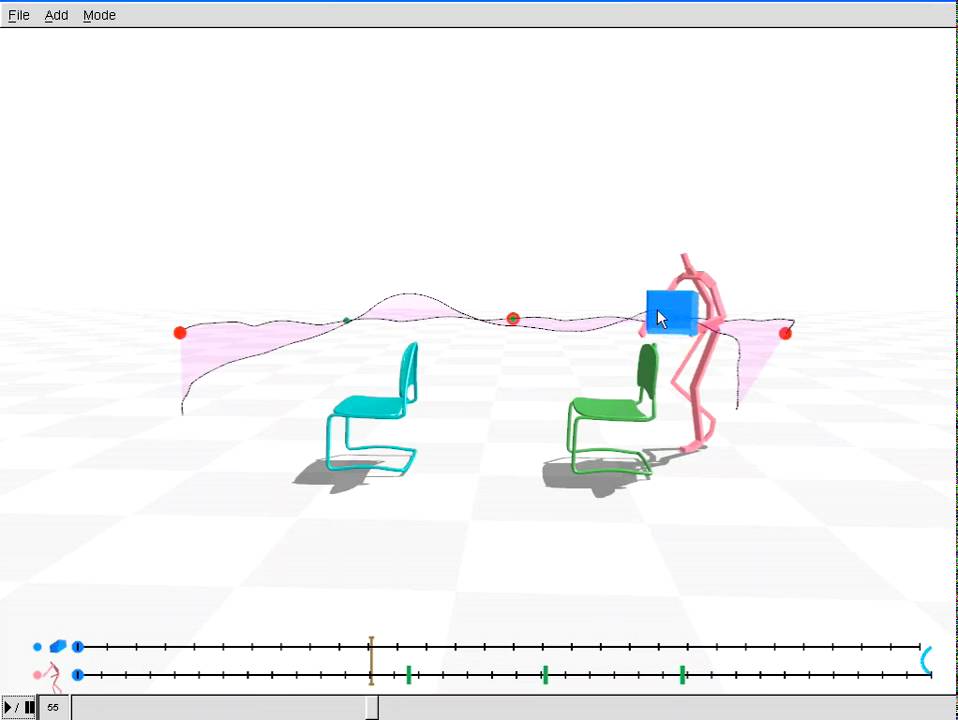
not sure which level of quality you are looking at. Usually games just force characters to move to predefined locations and play the sit animation from there.
Still there are gigachads outthere coming up with very fancy methods 12 years ago https://youtu.be/wiRmVsTarAI
 lament spruce
hi, i'm following the guide at https://docs.unrealengine.com/4.27/en-US/AnimatingObjects/SkeletalMeshAnimation/AnimHowTo/AimOffset/ using UE5. is there a bug where I cannot remove from frames?
Using an Aim Offset, a character aims a weapon in the direction of your mouse or controller.
it worked for the first pose, and i can't seem to get the other poses, the editor is refusing to delete the frames
nevermind, fixed it!
 dusk tinsel
Has anyone used the KaiLocomotion system before? I’m stuck on something with setting it up and wondering if anyone can help?
ashen junco
dusk tinsel
Has anyone used the KaiLocomotion system before? I’m stuck on something with set...
Never used it before, and you might get some mileage from its documentation and/or help channels
It's difficult to troubleshoot when it comes to one specific plugin.
dusk tinsel
Ah I see, it’s mostly about using data assets with animbps
The tutorial kind of cuts off at that part
Or anyone that can help with distance matching in general as I’m new to it
 vocal spindle
Hi everyone,
I have to create a short movie for my high-school media class and I decided to try and make an animated short. I am very inexperienced with this sort of stuff and have short deadline. Can anyone give recommendations on how to make a good animated short which is not too difficult to make. Like how to skip having to animate a lot of actions etc. I found a nice environment I want to use and was thinking of doing something like an Eagle flying around it with some sort or story to it... not really sure... but felt as if it would be easier to do a single character in first person.
Any help would be greatly appreciated
ashen junco
vocal spindle
Hi everyone,
I have to create a short movie for my high-school media class and ...
You cannot skip "animating a lot of actions". It's just given when making anims from scratch for a specific scripted scenario.
As for the eagle, maybe the Meerkat demo has it, though it uses a lot of Groom hair strands, so can be heavy to load on average student computer.
merry loom
vocal spindle
Hi everyone,
I have to create a short movie for my high-school media class and ...
Does it have to be 3D? I would go for 2D hand drawn animation if u are not experienced.
ashen junco
Also yeah, having no experience doing something with a short deadline is just shooting self in the foot, or zeroing out the score.
vocal spindle
Well I have a month so maybe it is enough time?
I have a lot of experience programming in C
So maybe I can pick up c++ quickly
ashen junco
vocal spindle
So maybe I can pick up c++ quickly
Programming, in particular in C++, is largely irrelevant for short film making.
vocal spindle
Is it possible to make something decent mainly using paid assets? I see that quite a lot of them have precreated animations
ashen junco
Heck, forget about C++ if you're not making your own tools in the engine for the short film.
ashen junco
vocal spindle
Is it possible to make something decent mainly using paid assets? I see that qui...
Decent, with premade anims, probably, but it won't guarantee matching nor flow well with your desired short film script/storyboard
merry loom
Tbh since it is school project it kind of depends on what your goals are. If you want to tell good stories go with 2D anim, since it gives u most control over the tradeoff between quality and time. If you want to use the chance to learn 3D anim then go ahead but just don overscope ur work😆 . Hand keyed animation is hard. Rig making is time consuming as well
ashen junco
vocal spindle
Is it possible to make something decent mainly using paid assets? I see that qui...
If it doesn't have to be 3D (realtime), and you have no experience in making animations in 3D, consider sticking with 2D hand drawn animations (Blender has Grease Pencil; Unreal has ILIAD plugin on Marketplace)
merry loom
Or just good old adobe animate cc
I did one of my school project with that XD, quite fun
vocal spindle
The end product doesn't actually matter, what they mark is the planning of it and the evaluation etc. If they graded the film I would probably do 2d but I would like to try out 3d as I think it would be fun
merry loom
Yeah i figure u just want to learn the process
ashen junco
vocal spindle
The end product doesn't actually matter, what they mark is the planning of it an...
Fun, yes, but remember your short time frame too.
It took me years to get the hang of 3D CG content creation.
merry loom
I mean in that case it is fine. I bet the teacher would be happy if things are moving onthe screen
vocal spindle
Most other people are making a live action movie trailer with school ipads so I think it would be kinda cool to do something like this.
I'll give it a shot over the next week or so and see how I am getting on
If I'm in over my head I can always change to 2d or live action
ashen junco
vocal spindle
I'll give it a shot over the next week or so and see how I am getting on
I won't expect a week from zero to pro, but good luck, I guess
vocal spindle
The movie doesn't need to be anywhere near perfect - just as long as it doesn't crash when I press play lol
ashen junco
3D animating, or 3D CG content creation for that matter, is not something that can be mastered overnight or in a week.
A week might get you a bouncing ball, and then some basic stuff
merry loom
I think what might help is if you can come up with a proposal/storyboard and we can maybe help point out which parts are ez, which parts are not realistic/hard
ashen junco
But then Pixar's first film isn't exactly flashy either, just a couple of lamp and ball
I'm sure Luxo Jr is entirely doable in realtime by now
merry loom
I am not worry about looks tbh, but badly keyed anim really stands out
unless you stylized it like this guyhttps://www.youtube.com/watch?v=9klzZsVw-cQ

These people are risking their own life for money. But it seems like some of those are outstanding...
Thank you for watching! Also for your likes, comments, and subscription!
If you have any idea for next video, tell me on comments!
Discord : https://discord.gg/tqSaept
Instagram : https://www.instagram.com/kotte_anima...
Facebook page ...
ashen junco
Not everyone can pay Maya, so no Autodesk elitism here
Guess I have the upper ground for having trained with financial hardship living with Blender ¯_(ツ)_/¯
merry loom
not to fuel the blender/maya comparison more, but coming from a blender first background I would say that whichever software you touched first will likely make u biased towards it
ashen junco
Rather use Blender than pirating Maya
And I started with pirated copy of 3ds Max. I was none the wiser as a kid.
merry loom
sure, i respect ur opinion.
ashen junco
If pirating Maya is actually better than legally using Blender, then the elitism can be more justified.
Anyway, tangent's over.
merry loom
https://blender.chat/home, feel free to continue the conversation over there
ashen junco
🛑
vocal spindle
merry loom
I think what might help is if you can come up with a proposal/storyboard and we ...
I'll have a think about it today thanks. My current idea was to use the modular lost ruins kit which is one the free for the month list and have a bird fly through the air around the environment possibly even just in first person. I also seen a few animals packs with animations so I could maybe put wildlife in the area too. This was just a really quick idea there is no plot but I was coming from a viewpoint of having only 1 character to cut down on workload. Not sure how to make a plot from this? Maybe something like the bird is young and is trying to fly and is finally able to after failed attempts?
I am really bad with creating ideas etc, I mainly do computer science and maths and took this class because it was either this or art - so I was wanting to approach it from a games dev pov hence unreal engine.
ashen junco
vocal spindle
I'll have a think about it today thanks. My current idea was to use the modular ...
I think that's still too big of a scope for short film that needs to be made in short amount of time.
merry loom
this makes a lot of sense no worries, I actually dont think it is too complex XD
ashen junco
vocal spindle
I'll have a think about it today thanks. My current idea was to use the modular ...
Considering that there's not much ready made assets when it comes to young animals, you might want to look for alternative subjects. Maybe as simple as inanimate objects that somehow has feelings.
merry loom
i wouldn't mind photoreal environment + a lowpoly bird built from scratch lol
merry loom
https://www.unrealengine.com/marketplace/en-US/product/modular-lost-ruins-kit I suppose u meant this asset right? it looks like high quality assets

Unreal Engine
Modular lost ruins pack contains a set of different environment and modular assets along with a set of different props, rocks, foliage, and landscape Material/Textures.
vocal spindle
Might be easier to do. I think having young birds would be too difficult to do as hoodieguy pointed out so maybe I can try and use some other plot
vocal spindle
merry loom
https://www.unrealengine.com/marketplace/en-US/product/modular-lost-ruins-kit I ...
Yeah that one, I thought it looked pretty cool
I should mention that I have a budget of £100 as well
merry loom
I am just saying, given that you don care about quality, you can do whatever you want XD, just enjoy the learning process. heck, I tried to make a multiplayer fps shooter for a school project when i was in highschool
the end result was so bad but fun regardless
vocal spindle
Aha yeah the most important part is the write up which I do afterwards
merry loom
💯 , looking forward to seeing what you come up with over this month 😄
vocal spindle
Thanks for the help guys 🙂
cloud lodge
@dusk tinsel dont cross post into multiple channels the same question.

 upbeat flame
Hi there. Please advise me good tutorials about ALS (Advanced Locomotion System).
 carmine delta
hi, is there a way to extract animations from videos?
rustic plume
i use my EYES
carmine delta
for now, I don't have a good camera for motion tracking yet, but want to use few videos with clear animations
merry loom
you are asking for some pretty cutting edge stuff https://nv-tlabs.github.io/physics-pose-estimation-project-page/
carmine delta
oh! Nvidia again, I had an issue earlier, I couldn't launch metahuman because there is no nvidia, i'm using AMD Graphics
 twin fulcrum
So would anyone be able to point me in the direction of some sort of tutorial to do what thest best I can describe as is "Spritesheet but like for 3d" think like NES Mario but 3d kinda thing
rustic plume
twin fulcrum
So would anyone be able to point me in the direction of some sort of tutorial to...
i suggested sampling at lower framerates so that each pose "exists" longer during runtime
merry loom
carmine delta
oh! Nvidia again, I had an issue earlier, I couldn't launch metahuman because th...
the point of the link is not about Nvidia, just want to point out that 3d pose estimation from video is no mature tech, still an active field of research 😄
carmine delta
ah ok, lol
merry loom


#UE5 #UnrealEngine5 #gamedev
I powered up my parkour/traversal system with UE5 motion warping feature and if you ever wonder... yes, I can do a ground roll too😅 https://t.co/XxtQc9QgV6
Likes
486
Twitter
·
gilded latch
when creating a montage out of an anim that has 38 frames, the montage ends up being 19f. when hovering the original anim i see sequence length is .663 (which would be 24f). trying to figure out what sequence length actually means here
if i set sequence length within the montage, it gets to the 19th frame from above, and just stops
also, new question. without using a montage, is there any way to get length of animation playing, or time remaining on animation? need it to spit out a variable. only reason i thought of using montage is cause i couldnt figure out how to get time remaining on a single anim
 rose horizon
Can I set this value to be read from the class blueprint instead of having to manually set it on each animation I use the notify on?

This is the anim notify BP

omg nevermind I got it
silly me
 sudden sedge
Is there a way to get location of a bone pre-additive?
I have a reloading animation I want to play on top of other animations, but I want to use the pre-delta'd running animation to use as an ik goal for certain elements
 red tinsel
My setup :-
- I have a character.
- I have an animation with root motion, and its corresponding montage.
My questions :-
- Is CharacterMovementComponent is designed to work with root motions in regards with networking?
- What are the ways to control CMC when an animation montage is playing? What are the function calls to CMC?
2.1) Selected Cases :-
- During a "lunge" animation, player can control the character's direction, but speed only to an extent.
- During an attack animation, player can only control the character's orientation, to an extent. (RotationRate?)
- Movement is disabled, during special animations.
languid spade
I have an issue where I try to simulate physics on a skeleton with multiple chains and all of the bones not in the first chain snap to the root bone on simulate. Does anybody know what the fix is?
 glass oyster
Hello, I've created a simple skeleton mesh with only one bone and two key frame. The mesh is a cone, and I lift it up. But in unreal the cone do not trigger any event and I ticked overlap all. So I tried to add a collision box, but the animation do not move the component. Enable root component is tick, and the collision box is the root of the actor. I tried to play the animation as a montage or through state but I have the same result. Any help please
 tawdry drum
hot crown
tawdry drum
hot crown
Were you able to resolve this issue? I had the problem the other day trying to import animations and I didn't even know where to begin to resolve this.
 wild sonnet
Hi guys, I need some help with retargeting. I'm trying to use a mixamo animation on Shinbi from paragon but her feet goes a bit underground. The animation works fine on the ue4 mannequin.
ashen junco
wild sonnet
Hi guys, I need some help with retargeting. I'm trying to use a mixamo animation...
Any comparison screenshot of Shinbi against UE Manny?
wild sonnet
 ashen junco
wild sonnet
ashen junco
wild sonnet
Judging by the odd looking arm, you might have the retarget settings on the bones wrong.
wild sonnet
ashen junco
Judging by the odd looking arm, you might have the retarget settings on the bone...
I did fix that,

 jade storm
i thought paragon comes with default manny retarget poses?
wild sonnet
I used Humanoid and Paragon_proto_retarget, same result
ashen junco
wild sonnet
I did fix that,
Everything should be Skeleton, except:
- Animation Scaled: root, pelvis, ik_ bones (if any)
wild sonnet
wild sonnet
I did fix that,
Her arm break if I set clavicle to Skeleton
ashen junco
Weird.
I never had any breaks with clavicle bones set to Skeleton, at least retargetting from Manny
wild sonnet
ashen junco
Weird.
I never had any breaks with clavicle bones set to Skeleton, at least reta...
I just tried with Kwang, same result, maybe it come from the mixamo animation itself
ashen junco
wild sonnet
I just tried with Kwang, same result, maybe it come from the mixamo animation it...
Are you retargetting the anims to Manny first?
wild sonnet
ashen junco
Are you retargetting the anims to Manny first?
Yes,
 high musk
How can I transition to a different state after a single animation has played inside a RandomSequencePlayer? RelevantAnimTime nodes seem to consider all animations in the RandomSequencePlayer so the transition never happens.
ashen junco
wild sonnet
Yes,
Yeah, because I know the settings I mentioned above should work on any UE Manny compliant rigs, including Paragon assets.
Also for comparison sake, by "arm break", how does it look?
wild sonnet
ashen junco
Yeah, because I know the settings I mentioned above should work on any UE Manny ...
So did everything from start and set everything to skeleton except root pelvis and k_bones just as you said. And well nothing broke, maybe i missed something the first time. but still her feets goes underground.
ashen junco
wild sonnet
So did everything from start and set everything to skeleton except root pelvis a...
You already set root and pelvis to be Animation Scaled, right?
ashen junco
Animation Scaled should change the translation, because it accomodates for the proportion scale, unlike Animation 🤔
wild sonnet
ashen junco
Animation Scaled *should* change the translation, because it accomodates for the...
I'll adjust the Z position in a BP for now, but I really want a proper fix for this 😞
ashen junco
wild sonnet
I'll adjust the Z position in a BP for now, but I really want a proper fix for t...
I suppose you can shift the pelvis bone in the animation asset in additive manner
wild sonnet
So ultimately, i fixed it by re-importing the animation and adjusting the import translation Z
plain drift
Anybody knows what causes a physics body on a character to twitch? It's really annoying. I use PhAT for breast physics and it looks really weird
Also, even when I set all linear and angular constraints to 'Locked' the bones still tilt upwards once I start simulating physics...
twin fulcrum
Ok I asked this the other day and got an answer( forgot who it was but thanks) but I didn't really understand what was meant. I figure this would help to. I have these 3 models here that I basically wanna be able to cycle through as an animation. Im not sure the best way to go about making this kinda effect

I guess what Im trying to figure out it how to do this snapping animation without needing bones, cause I don't think that would work given this is how they are going to be made
ashen junco
twin fulcrum
Ok I asked this the other day and got an answer( forgot who it was but thanks) b...
If you don't mind the mesh component fustercluck, you could use switch on int and toggle the visibility of each mesh, all in a regular BP
twin fulcrum
ashen junco
If you don't mind the mesh component fustercluck, you could use switch on int an...
that was my first thought and have messed with that a bit, getting the timing is hard though and wasn't sure if it was necessairly the best way to do this
ashen junco
twin fulcrum
that was my first thought and have messed with that a bit, getting the timing is...
As far as timing goes, why not use event/function calls and timers?
twin fulcrum
yea I was using timers but figuring how long the delay should be
rustic plume
twin fulcrum
yea I was using timers but figuring how long the delay should be
basically reinventing the wheel of an animation system for a lower frame rate look. I still think you could just import it as animation sampled at a lower frame rate
ashen junco
rustic plume
basically reinventing the wheel of an animation system for a lower frame rate lo...
I don't think it's a viable option, given the "voxel" character isn't like Minecraft's
rustic plume
ashen junco
I don't think it's a viable option, given the "voxel" character isn't like Minec...
if i knew blendshapes, id figure there may be direction there, same with alembic :/ seems better in the long run though, im sure you'll want more anims
ashen junco
I mean, who knows if one voxel appears in one pose, but not in the next pose
 worthy canyon
Is there a way to attach a preview mesh to a socket in an animation, rather than just the skeleton view?
 upper fossil
are hit reaction best implemented as additive layer into the animbp or as montage?
rustic plume
upper fossil
are hit reaction best implemented as additive layer into the animbp or as montag...
ive got mine as montage so i can decide if they are fullbody or just upperbody
though ive also been experimenting with some physics influences to make a little more random each time
upper fossil
I’d rather have them as full body montage too, is there a way for them to overlay currently playing montages tho (like attack/shoot) at the same time tho?
rustic plume
upper fossil
I’d rather have them as full body montage too, is there a way for them to overla...
i guess if they are controlled from the layered blend per bone since that has a weight param
upper fossil
I’ll give it a try thanks
gilded latch
anyone ever run into an issue where you drag a conector in statemachine animgraph.. and theres no transition rule node? i had to create a new state machine to get them to show up. still doesnt show up in my original state machine
 cinder nymph
Does anyone know what does the "Machine Weight" node return?
It just says "get the blend weight of a specific state machine" on the documentation. But what does the blend weight mean?
 shy hemlock
hey, I have a noobie question about importing animations from blender to UE
misty dagger
Question
I want to animate my skeletal mesh, it's is only for cinematic purposes, so it doesn't need to be controlled by a player.
But I can't seem to find the correct way to start keyframing?
Which one should I choose if I want to create a simple keyframe animation to be used in sequencer?
 misty dagger
shy hemlock
hey, I have a noobie question about importing animations from blender to UE
misty dagger
shy hemlock
hey, I have a noobie question about importing animations from blender to UE
maybe i can help im also noob but i tried it a few times.
shy hemlock
ight. so basically I created an incredibly simple titration animation in blender and I want to export it to the lab I made in UE. However, every time I import it to my content folder, it loads in like 1000 animation files and not the whole thing in one unit. Is there something I might be doing wrong on either end?
lmk if you need more context!
misty dagger
shy hemlock
ight. so basically I created an incredibly simple titration animation in blender...
did you save it as a fbx?
shy hemlock
yes
shy hemlock
its 1.36mb, that might be big relatively
misty dagger
oh can you dm it to me
shy hemlock
yeah sure
merry loom
misty dagger
`Question`
I want to animate my skeletal mesh, it's is only for cinematic purpos...
drag and drop ur skeletal mesh in to the scene. it will create a level sequence for you automatically. Or You can right click at a blank space in content browser to create a new level sequence
misty dagger
merry loom
drag and drop ur skeletal mesh in to the scene. it will create a level sequence ...
i have a sequence, what i want to know is how to animate my skeletal mesh
merry loom
after u add your skeletal mesh actor to sequencer, you should be able to add a FK control rig track
misty dagger
lol
the question is how to make said animation inside ue4
i jsut need some floating legs of my char for a cinematic. so i dont want to setup a whole control rig if im never gonna use it
merry loom
XD then add a fkcontrol rig track pls it should be a universal rig that the engine creates for u
misty dagger
ok il try
misty dagger
merry loom
XD then add a fkcontrol rig track pls it should be a universal rig that the engi...
Do i need to install the ControlRig plugin for this
merry loom
Emm yeah just enable it
merry loom
😆 awesome
 steady mist
Hiya, would I be able to get some feedback on my animation showreel for my uni work please? These are the first animations ive created so any feedback would be much appreciated. Thank you 😁
ashen junco
steady mist
Hiya, would I be able to get some feedback on my animation showreel for my uni w...
#work-in-progress or #released
steady mist
ashen junco
<#225448516376461313> or <#479798887247511570>
thank you
misty dagger
Question:
I have an object with an animation from C4D inside UE4 with DataSmith. How can I attach the animation to the SkeletalMesh so it moves with the head? If i drag it on the root bone it doesn't show up in the sequencer anymore.
 merry loom
misty dagger
`Question:`
I have an object with an animation from C4D inside UE4 with DataSmit...
merry loom
misty dagger
`Question:`
I have an object with an animation from C4D inside UE4 with DataSmit...
I remember there is something called attachment track, mentioned in a control rig video from unreal
misty dagger
merry loom
I remember there is something called attachment track, mentioned in a control ri...
yeah works prefectly

Thanks again, you on fire today
merry loom
misty dagger
Thanks again, you on fire today
Glad to help😄
hot crown
tawdry drum
Were you able to resolve this issue? I had the problem the other day trying to i...
Not yet m8 I am still cracking away on it will def let you know when I do
Hello
Good mornin
shy hemlock
shy hemlock
ight. so basically I created an incredibly simple titration animation in blender...
Could anyone else chime in on this?
merry loom
do you actually have 1000 animations in that fbx?
shy hemlock
ah shit
literally just noticed
yeah... it looks like there were a bunch of unnecessary animations
 iron knoll
Hello!
Does anybody know if it's possible to rotate a socket during an animation? I know you can rotate a bone using the Additive Layer Track but it doesn't seem to let me add a Key for a socket 😦
hot crown
Can someone explain to me what the concept of getting these all on the same skeleton means? I was able to rig the base in Mixamo. But how do I get the loose parts on? Can someone explain it me like I'm dumb or push me in the right direction

Still working on fixing the wonkiness of the retarget
merry loom
hot crown
Can someone explain to me what the concept of getting these all on the same skel...
i am not sure but you probably need to put some skin weights on your loose parts? in like a 3d software
 proper bramble
Hi, I have an animation made in Cinema 4D that's just some hard surface bits moving around, no bones or anything, just animated transforms. I'd like to import this as an actor with the animation to Unreal. Is there any way to do this?
I understand that animation sequences are for skeletal meshes only, but things like buttons, light switches or doors are animated by parts, not as a skeleton.
I've seen there's Actor Sequences as an experimental feature that are close to what I want, but I still don't know how to import the scene hierarchy from C4D as component hierarchy in an actor, or how to import the animations from C4D as Actor Sequences 🤔
 tough tusk
Does anyone know a good tutorial for animations (beginner)?
 indigo gulch
@tough tusk Are you familiar animators survival kit? Many basic tutorial and lesson, hope it help
merry loom
tough tusk
Does anyone know a good tutorial for animations (beginner)?
how much do you want to learn? the whole pipeline in simple terms is like: character modeling -> rigging -> animate, if you just want to learn to animate, you probably just need to find a rigged character, pick a software and start playing around with it a bit, for that a new animation software "cascadeur" is probably the most straight forward . If you want to learn the whole thing then it is a different story :D, you will need to find blender/maya tutorials.
and yes, 2d animation books help too, an eye for good animation is transferable from 2d animation to 3d
( meanwhile, I am personally still very bad at animating anything, I feel like it is so hard
tough tusk
Thank you!
shy hemlock
merry loom
do you actually have 1000 animations in that fbx?
okay so I've cleaned up the hierarchy and it's still really f'ed up. Could I maybe send you the blender document to see if it's something obvious?
merry loom
shy hemlock
okay so I've cleaned up the hierarchy and it's still really f'ed up. Could I may...
sure
merry loom
shy hemlock
okay so I've cleaned up the hierarchy and it's still really f'ed up. Could I may...
checked ur file, your problem is the same as @proper bramble 's problem, the animations are not skeletal mesh animations, so I don't really know how unreal treats it. I have only worked with skeletal mesh animations before.
 limpid sundial
I will have thousands of live link animations captured as Level Sequences. Is there a way to automate the "Bake to Animation Sequence" on all one thousand animations? I really don't want to do it one at a time. I can script with blueprints also.
I am using Take recorder also. I am using a metahuman as the target for the live link animations.
shy hemlock
merry loom
checked ur file, your problem is the same as <@!174258107965374464> 's problem, ...
Darn... thanks anyways haha
hot crown
merry loom
i am not sure but you probably need to put some skin weights on your loose parts...

I figured it out sorta
But does anyone have any idea why an asset would be flipped in anim BP?
I will try to show what I mean asap
proper bramble
I think I found a solution
Importing a nonskeletal fbx as skeletal mesh automatically creates a bone per object in the hierarchy
And the NLA animations then work as expected
bronze osprey
@hot crown i know ur materials need the morph target checkbox 😛
feral trellis
Any recommendations on what to learn for creating a advanced locomotion system?
merry loom
feral trellis
Any recommendations on what to learn for creating a advanced locomotion system?
feral trellis
merry loom
https://www.unrealengine.com/marketplace/en-US/product/advanced-locomotion-syste...
Ok. I’ve tried this one but it seems really advanced. I’m not super advanced in BP. Should I still try to use this one? If so, what should I do?
merry loom
😄 sry I just thought it is kind of funny you asked for advanced loco system and there is literally a project of the same name on the market place that is open sourced. don mind me
ashen junco
hot crown
Can someone explain to me what the concept of getting these all on the same skel...
Honestly I would consider rerigging it outside of Mixamo, considering how its auto rigger isn't maintained and unorthodox to UE standards.
I personally use Auto Rig Pro addon in Blender, and some minor adjustment, got it working with ALS in pretty much no time.
 uncut flicker
Hey im working on my character´s animation bp and I encountered this error. Ive tried to find info about it online, but no luck. If anyone can help me thanks.
 hot crown
bronze osprey
<@!267308542963220484> i know ur materials need the morph target checkbox 😛
hot crown
bronze osprey
<@!267308542963220484> i know ur materials need the morph target checkbox 😛
What does that mean good sir?
hot crown
ashen junco
Honestly I would consider rerigging it outside of Mixamo, considering how its au...
I would def use Auto Rig Pro just that I get a weird python error that I haven't been able to fix

 pseudo goblet
I feel like I'm missing something about Poses.
I exported a pose based on 1 frame of an animation, but when I open the Pose it's the start of the animation not the pose I created.

HOWEVER I see the Pose_1 weight down there, and when I make that 1, it's correct

But like, I can't figure out how to "save" that. it doesn't count as an edit on the asset it seems, and when I close it and reopen it, I'm back to that shitty ref pose
I think maybe I need to wrap this in an animation asset? But I cannot figure out how to import this pose into that
When I try to drag and drop this pose into the Animation BP, I get a node that's looking for a Source Pose which... makes no fucking sense. This is the source pose!
 hot crown
ashen junco
Disable that UE4AnimTools addon thing
hot crown
ashen junco
Disable that UE4AnimTools addon thing
Just disabled am working on seeing what's up
pseudo goblet
OKAY i had to set pose by name. Is there a better way?
 autumn venture
Hi all, programmer here. I’m working on a personal learning project in UE4 and finding it very limiting what I can do with free animations on Mixamo. Has anyone had success teaching themselves to animate at a prototype quality level from zero experience? Any recommended learning resources aimed for hobbyist to get started making custom animations with existing assets I got from marketplace, mixamo, etc?
Im pretty sure I could figure this out eventually with enough Google and YouTube but would love some pointers in the right direction since the space is very large.
rustic plume
autumn venture
Hi all, programmer here. I’m working on a personal learning project in UE4 and f...
i hear a lot of good things about ALS, but I am not a programmer and I make my animations in another software
cinder nymph
Hey guys, I'm studying ALS and the node "Machine Weight" comes up quite a bit, what does it mean?
It just says "get the blend weight of a specific state machine" on the documentation. But what does the blend weight mean?
 stoic jacinth
hey guys, can someone help me understand these stuff
what is the real difference between
motion matching
distance matching
and can both be combined ?
I am very confused between the difference now
because this what I understand about them
distance matching it matches the animation to the distance moved by the character so it won't feel like the character is sliding on the floor
and motion matching gets the movement values to choose which animation to play so again the character doesn't feel like sliding on the floor
and they both seem like having the same purpose with different approach
I could be wrong so can someone correct me
merry loom
stoic jacinth
hey guys, can someone help me understand these stuff
what is the real differen...
i think motion matching picks the best animation out of a database of anims, and distance matching refines/tweaks that picked animation dynamically such that it matches the actual speed of the character. Not sure abt distance matching tho, i might be describing stride wrapping. Motion matching only picks, distance matching only tweaks. Might be wrong as well😆
 round shale
dumb q
Are all animations, like a gate opening, only capable via skeleton mesh?
(aside from doing it via lerping of rotation etc)
stoic jacinth
merry loom
i think motion matching picks the best animation out of a database of anims, and...
I found this on a channel called (OutCast DevSchool) it is in a comment from the author:
Neither is the superior method, in my opinion. Both have pros and cons. Motion matching is great because it can represent the natural variety of human movement. We don't step the same way twice. Motion matching can, however, be unpredictable. Because a neural network or algorithm determines which segments of animations are played where and when you can sometimes encounter strange, unexpected results. This isn't always a bad thing, but it is a lot of the time. Distance matching is closer to the traditional state machine method, it modifies how animations are played back, not which animations are played back, that's still up to the developer. Which one you use depends on your project, and your budget. An optimal Motion matching setup needs lots of good mocap data, which is expensive to record. Motion matching can be done with looped animations, but you loose some of its greatest advantages. Because these systems are separate, and do different things, it is very much possible to combine them. Though this all is mostly in theory
so motion matching mostly solves the idea of state machines (the need to tell the code when to use each animation)
and the distance matching solves the animation problems itself like wrong foot position or warping
I think the only thing that is in common between them is start and stop animations
here they both try and solve the problem , but I think motion matching is superior in this
gilded latch
is there an easy way to remove the acceleration that seems to happen during a blend when going from an anim with root motion to your walk or run state
bronze osprey
@hot crown your materials have a checkbox in the details you find it if you type morph in the search bar when u open em
the material wont compile right if it has morph targets or blendspaces and the box isnt checked

 worldly swan
Hello everyone, I am trying to have hit animations when the character is taking damages. I am using anim montages and and it works well but is there a way to have hit animation blending while casting a spell for example? I am using anim montages for spell casting too. From my understanding it's not possible to have two anim montages play at the same time. Maybe I should not use anim montage for one of the two?
lunar valve
Why Root motion in UE4 is very limited compared to Unity's counterpart?
Anyway to improve?
Like no way toggle specific rotations
 rose prawn
cinder nymph
Hey guys, I'm studying ALS and the node "Machine Weight" comes up quite a bit, w...
rose prawn
cinder nymph
Hey guys, I'm studying ALS and the node "Machine Weight" comes up quite a bit, w...
This would be blending between multiple animation state machines. If you have 4 states and only one active, your would specify that with blend weights, EG [1,0,0,0] to enable the first one only
misty dagger
hi
hi
i got problems with retargeting and character making, can i get some help with that please? 🙂
i use the easy rpg survival template and i love it how you can customize your own character and want to do this with metahuman or something else
if you look at this you see that i really S at it

for this i feel deeply ashamed

 umbral peak
hello, all. I’m very new to animation. I just got some new ones and even though they match the ue skeleton, it says they aren’t compatible with the ue skeleton I currently use. is there a way around this issue without retargeting, since it’s the same skeleton? retargeting has caused big problems with the orientation of hands and wrists, even when i match the pose closely. thanks
 smoky shell
hot crown
smoky shell
hot crown
Just learn Akeytsu, fantastic software in it's own right, but will rig for you too
Maya was outdated garbage back in 2010 when I studied 3D for film, I still use it because I know it inside out and now that I've moved to programming my 3D usage is so intermittent that I forget any other software between use
Autodesk intentionally assign unskilled devs to Maya purely to make it look like it's still relevant; they don't bother with meaningful work on it because they know their major customers, 3D studios, all develop Maya further in house
If you're not already incredibly experienced with it, jump ship
I did everything related to 3D at some point, but my major specialization was creature rigging in Maya (incl. python scripting), but I still changed to Akeytsu for rigging + animation (I do the skeleton + weighting in Maya, but only do that if you already have the knowledge and know how to navigate it so you never encounter bugs, etc)
 bitter shard
Has anyone else had problems with the Control Rig in UE5 compared to UE4? I'm using more or less the exact same setup I had with PowerIK in UE4 but with FBIK.
The solver itself does a good job in the debug view (the skeleton goes where it should) but the animated character doesn't follow the skeleton, as if it wasn't rigged properly
bitter shard
I think FBIK is just PowerIK under the hood, very similar setup and PowerIK is free which means Epic probably bought it
smoky shell
They did, and it probably is, but they would have improved on it
Which could involve meaningful changes with different requirements
bitter shard
Which is why it's so strange it isn't working for me
In fact, it seems like regular IK isn't working either
smoky shell
Sounds like your problem will be something simple and overlooked
merry loom
bitter shard
In fact, it seems like regular IK isn't working either
mind sharing some screenshots/videos?
smoky shell
umbral peak
hello, all. I’m very new to animation. I just got some new ones and even thoug...
If the skeleton is completely identical you can probably just delete the skeleton that they're using and use the replace references feature. That's what I do for multiple animation packs all assigned to UE4 mannequin.
bitter shard
Sure, hold on
The black line is the debug skeleton showing that the solver does its thing, but it's the mesh that doesn't play along

 merry loom
do other nodes work? try a set transform node and see if u can affect the dragon
btw, are you using UE5 EA or UE5 built from github?
bitter shard
Hmm it doesn't seem like set transform works either
Using EA from the launcher
Hold up it works for certain bones
The head moves perfectly but most bones don't
So there isn't anything wrong with the nodes
merry loom
you have lost me 😄 so what is the problem now?
bitter shard
Basically, the mesh acts as if it wasn't rigged properly in the viewport
Most bones don't affect the mesh even though they should
I'm gonna try to see if it's just the viewport by adjusting it during runtime
merry loom
kk, yeah you can also try recreate the asset/ use a different skeletal mesh, find a working case and see what makes it different from the non working case. u could also enable bone displays in the viewport toolbar, I think under "Character"
bitter shard
Nice, you can see on the skeleton that the problem is the mesh not following along
 merry loom
kk. check if the mesh is properly skinned, maybe in the skeletal mesh/anim editor?
bitter shard
Ugh I found the problem, a really dumb thing
This must be a bug
So basically, wherever there is a '-' in my skeleton (like Hand-L), it has been replaced with a '_' when creating the bone hierarchy in the control rig (so it's Hand_L). That's why most bones didn't work, but some did (like Head, which remains the same)
I think in the original skeleton in Blender, the bones have spaces in their names (Hand L), and the skeleton editor interpreted that as '-' while the control rig as '_'
merry loom
lol, yeah I can imagine that causing problems. Spaces in names are always tricky for software to handle
bitter shard
Yep, I guess you gotta learn the hard way 🤣 thanks for your help
merry loom
glad you finally figured it out 💯
umbral peak
@smoky shell thank you so much. I will give it a try.
 sick yacht
hello - i have the following problem. I have an idle animation to which I applied small tweaks in Unreal via additive layer track. But when I use this animation in a blend space, this tweak is not applied. And when I change additive settings on the Idle animation to anything other than None, in blend space all the bones in this animatin are scaled to 0 and generally twisted and clamped -_- I'm probably doing smth wrong but not sure what
Idle animation - shoulders are moved back thanks to the additive layer tweaks

when set to No Additive, in Blend space the tweaks are not applied (arms are moved forward)
 smoky shell
Sounds like your problem will be something simple and overlooked
smoky shell
smoky shell
Sounds like your problem will be something simple and overlooked
@bitter shard do I win
FWIW unreal expects non case sensitive A-Z, 0-9, and _
Nothing else
In many cases when you deviate it's fine - until it's not, and control rig is still pretty new I guess. It's best to not deviate so you never encounter edge cases
They should absolutely fix it so that it spits out a warning, but they've shut down any form of bug reporting that isn't UDN; they make a show of having the capability, but its worthless
If you report it, no matter how clearly, you will get someone who can't understand it and wont escalate. They gatekeep user error as they should, but unfortunately also very real bugs
They've also started ignoring pull requests so I've fixed a few engine issues that wont be merged
One of my PRs should be a perf boost for motion warping that I PR'd to UE5 main but they ignore that too, so it's not just because there's a new engine
misty dagger
How can i set the start of my cable so it stays put. it goes trough the mesh now
the angle doesnt turn with the attached point so to say
bitter shard
@smoky shell Damn well I guess in this case it's a pretty small thing, but still very annoying - and hard to spot. Hopefully they manage to iron out the most severe bugs until the full release
smoky shell
bitter shard
<@!96182038511509504> Damn well I guess in this case it's a pretty small thing, ...
Yeah it's the fact it says nothing that is the main problem. The node itself should have a "warning" label under it and compiler error
Well, if they can't just fix it
The fact other anim systems function fine with it indicates it should be fixable
 modern root
I'm setting up directional movement for a blendspace, when moving directly backwards, the calculate direction node is printing out -179/-180 and flipping to 179+/180+ making the animation appear to flip between my -180 and 180 poses. Anyone know off the top of their head the proper fix for this?
 lethal comet
had my editor crash mid-playing and this happened to some animations

no preview mesh
any idea on how to restore this?
ashen junco
You didn't save the skelmeshes?
 somber briar
how do you make animations always open in a new editor window
oh you can hold shift
merry loom
somber briar
how do you make animations always open in a new editor window
there is also a setting, in editor preference -> AssetEditorOpenLocation
somber briar
ohh ya I used to have that set to main window and forgot about it since going to 4.27
hot crown
ashen junco
Disable that UE4AnimTools addon thing
Yooo hope all is well m8 with ALS you think it is possible to get Absolver esque martial arts combat.
Don't know if I can post this here : https://www.youtube.com/watch?v=0njR0ZFnuYU

Like these hits hurt lol if you get what I mean.
bitter shard
Has anyone had a problem with physical animation in UE5 Chaos where the ragdoll's target pose is offset rotationally? Instead of having his feet on the ground like in the animation, he's offset 180 degrees on Z and 90 degrees on Y trying to have them out to the side as if he's doing the human flag.
Interestingly, this only happens if the root bone is simulated. If it is set to kinematic (and everything else simulated), or if the affected rotational axes are locked, he acts like expected.
ashen junco
bitter shard
Has anyone had a problem with physical animation in UE5 Chaos where the ragdoll'...
bitter shard
@ashen junco I don't know if this is UE5 specific, could be some overlooked settings or something but I'll try there as well
ashen junco
You mention Chaos, so it has to be UE5 specific. UE4 still uses PhysX for the physics, including physical anims
bronze osprey
try the same setup in 4 and u know if its engine specific
i think its the setup not the engine
bitter shard
@ashen junco I meant that Chaos is relevant info, but not necessarily the problem. Gonna try it in UE4 like @bronze osprey suggests
bitter shard
@bronze osprey I think that just means it won't be able to stand up straight and probably fall on the ground. There shouldn't be anything inherently wrong with simulating the root, it could be used for example in transition from animated to ragdoll
bitter shard
@bronze osprey In fact I don't think it's the real root that's being simulated, since it doesn't show up in the PhysicsAsset editor. It's just the topmost bone, sorry for the confusion. You're right
It's the Pelvis I meant
@bronze osprey @ashen junco I tried the exact same setup in UE4 PhysX and it's the same problem, any ideas?
bronze osprey
physics has a lot of lil settings, dunno where or what is setup wrong
bitter shard
I haven't changed much, this is what I did:
- Generate single convex hull collision
- Assign all bodies to a physical animation profile
- Set orientation strength 1000, angular velocity strength 100
- Simulate
bronze osprey
you are simulating in the phys editor?
bitter shard
Right now yeah, but it's the exact same behaviour during runtime
bronze osprey
mayB show a screenshot of the phys editor
bitter shard

Simulated

See how he just turns on his side
If I uncheck "Is Local Simulation" he's trying to turn upside down instead. Really weird
bronze osprey
thats complex collisions
bitter shard
I know, I use it for now since it would take a long time to make good capsule collision (lots of bones), but it doesn't matter for the problem. It's the same when I use the generated capsule collision
bronze osprey
what if u do simulate selected with a wingbone selected?
bitter shard
It's only the pelvis that's acting weird, if I set it to kinematic everything works like it should
bronze osprey
to me it looks like 1 big collision
bitter shard
What do you mean?
bronze osprey
looks like bones dont have collision but its 1 collision for the whole dragon
bronze osprey
if u simulate a wing it starts to hang?
 bronze osprey
what does ur pelvis collision look like?
 bronze osprey
and if u just sim the pelvis bone?
bitter shard
Nothing happens then
bronze osprey
u can run an animation during the sim
bitter shard
Yes, and it's the same thing, the animation is playing but is offset rotationally
bronze osprey
if it drops flat w/o the profile i would think the offset is in the profile\
bitter shard
Yeah, but the profile doesn't have a lot of settings. I only changed the strength and there isn't much else to change, it's so weird
ashen junco
bitter shard
It's a convex hull like for the other bones
Convex hull doesn't work for physical collisions I think
bronze osprey
never tried myself 😛
bitter shard
@ashen junco It certainly does
bronze osprey
mayB setup a more simple rig first like the manny
bitter shard
But it isn't the convex hull that is the problem, since simple capsules generate the same behaviour
If I change the skeletal mesh initial rotation he still always rotates back to the same offset, so the problem is probably something with the target for the physical animation
 teal osprey
Hi sorry to bother, i am quite in a pickle right now ( i am a junior rigger and first unreal job), i received a model to rig and some animation from an other model to put on that said rig and i have quite a problem with the hands. ( see the screen, the hand of my model has some relax hands and the reference one has the straight one )
When i do a re-target for the animation, i found myself with the fingers twist in an unnatural way squashing them. I redid the rig multiple time with Animation Rigging Toolkit 2, re did the translation targeting and the set up rig Humanoid. Nothing changed. I even imported in maya the reference model and compared the joins orientations and that seemed clean.
The only moment it seems to worked out when i created a skeleton that, just like the reference model for the re-targeting has some straight hands. Sadly it only worked once and ever since it don't work anymore.
I know that ARTv2.0 don't put every joint on the model (like Ik's or twist's)

here is an example, on the left, you can see that the fingers turn and create an odd angle compare to the right

I also tried and copied by hands the local rotation a from on to the other and it seems to correct the problem but if we need to do correction on each animations, we have 30 + animations . . . . i won't lie saying that i may cry if i need to correct all of those by hands
example of that last point just here with 1 finger
tall knoll
anyone knows how to change the additive alpha of an animation montage ?
im playing a montage which is an additive animation so slot automatically do "apply additive" itself but I want it to be played with different alpha
🤔
misty dagger
How come my layers go in front of each other in the wrong order when I move the camera?
The first img is how it should be
2nd one is when i move the camera they go randomly in front of each other


in depth they are behind each other like so:

 gaunt meteor
Hi guys, I'm trying to make a new animation from an already existing one, I just duplicated one then moved the bones in the new animation asset so the character would be looking down. Unfortunately when I do this it also changes the original I duplicated from. Does anyone know how I can do this without affecting the original?
limpid sundial
Is it possible to use animations that are stored in a data table? I have thousands of animations and it makes it easier if I reference the animation from a datatable.

 merry loom


ue5-main news: ik retargetter is now exporting things correctly. there is also a handy retarget pose editor so you can fix problems like falling shoulders easily. also work in animbp it seems #ue5 https://t.co/jxH3ne1Pgr
Twitter
·
ashen junco
merry loom
https://twitter.com/games_inu/status/1479094340454653954?s=21
Is this on 5.0 as well?
merry loom
ashen junco
Is this on 5.0 as well?
IDK probably need to check github
 stray wraith
yeah Inu Games showed this on twitter 🤙🏻 My Gif is made inside 5.1 Source
 compact aurora


 void anchor
Blender --> UE4 questions:
hey all, ive been struggling with my rigged character blender > workflow. sometimes its not an issue, but UE4 is expecting Joints instead of Bones (Maya uses joints, blender uses bones) the key difference being the rotation at the tip vs the base of the bone. This problem comes up a lot.
ALSO
Randomly my meshes turn to either 1/100th the scale or x100 scale when i assign the skeletel mesh in ue4
merry loom
void anchor
Blender --> UE4 questions:
hey all, ive been struggling with my rigged character...
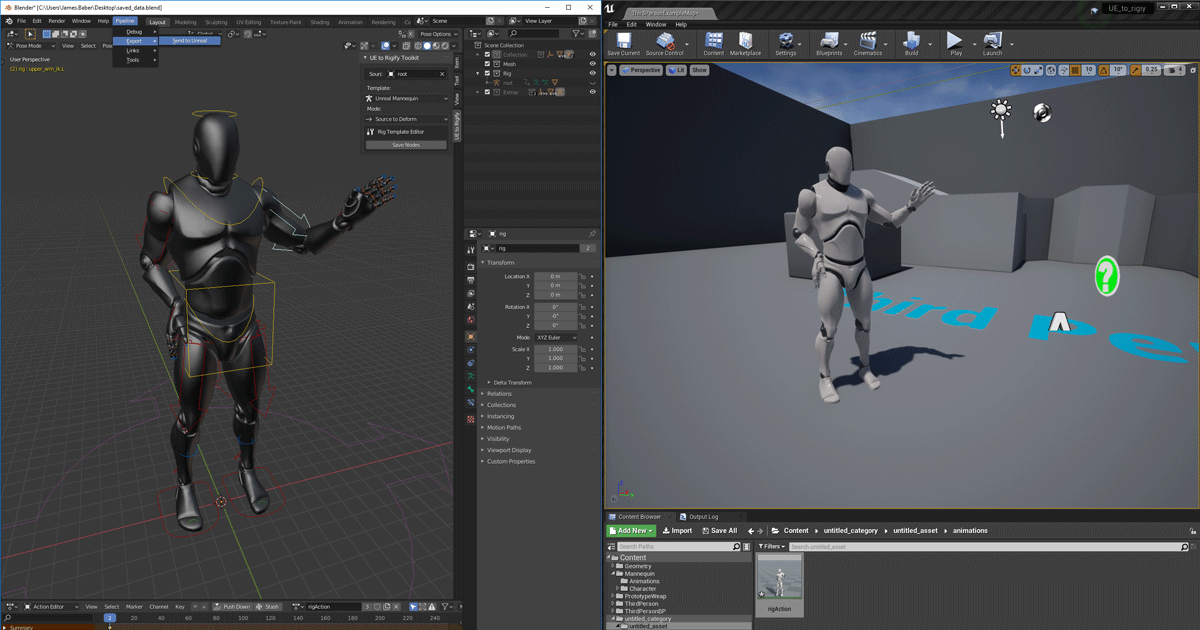
Unreal Engine
We’ve released two new, free addons that greatly streamline the workflow between Blender and Unreal Engine.
void anchor
oh shit
 unreal trench
Why're they such different sizes in the preview aha

 jaunty aspen
anyone knows if a montage that calls the BlendOut delegate will certainly call the OnMontageEnded delegate, or are there instances where OnMontageEnded isn't called
 cloud jungle
Hello. I followed this tutorial online last night to successfully get my model retargeted to the UE4 mannequin so it could use the animations and poses from it. I had to edit the model and when I followed the same process I cannot seem to recreate the retargeted skeleton mesh animations to the new model. Please see attached. it is the model I have retargeted on the idle third person on my model on the left and the mannequin third person idle on the right. https://docs.unrealengine.com/4.27/en-US/AnimatingObjects/SkeletalMeshAnimation/AnimHowTo/Retargeting/

Examples of how to set up and use Retargeted Animations for multiple characters.
pseudo goblet
So I can select all the bones in a physics asset and edit them... is there any way to bulk edit CONSTRAINTS?
pseudo goblet
pseudo goblet
So I can select all the bones in a physics asset and edit them... is there any w...
it's in the Edit menu

 valid rock
where does people usually get animations like for shooter and such, any other site or source other than mixamo?
ashen junco
valid rock
where does people usually get animations like for shooter and such, any other si...
I'm making them myself, but Unreal marketplace had some good ones. Some would also sell them on ArtStation Marketplace or Gumroad
valid rock
ashen junco
I'm making them myself, but Unreal marketplace had some good ones. Some would al...
By making them yourself you mean using mocap suit?
ashen junco
valid rock
By making them yourself you mean using mocap suit?
Nope. Animating them by hand.
valid rock
Which software do you use for that?
Blender?
ashen junco
Good ol' Blender.
Sometimes Control Rig + Sequencer in UE, but I have yet to really have constraints working the way Blender did it.
tall knoll
has anyone ever used custom blend logic for transition rule ?
how do I get alpha of blending duration there ?
🤔
tall knoll
NVM
carmine delta
Hi, Good evening,
Can you please guide me on creating animated visual storytelling in UE?
ashen junco
carmine delta
Hi, Good evening,
Can you please guide me on creating animated visual storytell...
"Animated visual storytelling" is too broad of a term, because this is what movies and games did for decades now.
carmine delta
hmm... that's the confusing part.
what I need to do is to present a kind of 3d Slideshow or Presentation, as well as present some short 3d Movie
ashen junco
carmine delta
hmm... that's the confusing part.
what I need to do is to present a kind of 3d ...
3D Slideshow is either overkill job, or just terrible framerate from underpowered machine.
As for filmmaking, it practically the same as any other 3D CG movie making, except with Unreal, you have to put into account game engine limitations.
carmine delta
ok, let's start this way. How do i move a car from Point A to B or maybe people walking around, then record the displacement of the car as well as the people?
ashen junco
carmine delta
ok, let's start this way. How do i move a car from Point A to B or maybe people ...

YouTube
Look up on how to use Sequencer.
That'll at least able to make some sequence in UE with existing animations, events, and more
carmine delta
ok, thanks, let me look into it
 severe warren
Hello,
So lets say i would want to make a 2d game
how and in what program do i design the charakter in?
also do i have to code?
thanks in advance
rustic plume
severe warren
Hello,
So lets say i would want to make a 2d game
how and in what program do i ...
what kind of 2d game? 2d art? 2d side scroller with 3d art? you can use c++ or bp or both
severe warren
rustic plume
what kind of 2d game? 2d art? 2d side scroller with 3d art? you can use c++ or b...
dont you use c# for it?
rustic plume
severe warren
dont you use c# for it?
Unity uses C#
severe warren
oh and unreal is c++?
rustic plume
yes
rustic plume
2d or 3d art?
severe warren
the charakter is 2d but the world is kinda mixed
rustic plume
is there a game with a similar idea?
severe warren
rustic plume
is there a game with a similar idea?
are you talking only about the graphics or the whole game?
rustic plume
severe warren
are you talking only about the graphics or the whole game?
im not the one making this game you are, do you know what you are making?
severe warren
you could compare the vague idea i have to hollowknight or octopath traveler when youre only talking about the visuals
rustic plume
hollow knight is 100% 2d, as in sprites, so you dont need 3d software for that, but you said mixed, so it sounds like there is some 3d
severe warren
oh ok then 2d
severe warren
kinda i just want to start now and kinda see what im getting myself into and if i ever could learn to make a simple game
rustic plume
see if you can get free marketplace assets that serve your needs for now then
severe warren
i want to make the character myself
rustic plume
so pixelated like that?
severe warren
no maybe more like hollowknight