#animation
1 messages · Page 73 of 1
 spare adder
 scarlet mantle
I disagree, if you're animating at this level then you really need to understand how IK works in-depth and how this all fits together. Otherwise when you need to make changes to a rigid gun which is fixed in front of the player and won't kick-back when it fires then you won't know how. And you'll run into 100 other similar issues. Either you learn it by spending the time to learn it by doing it - eg. try the 4+ built in IK solver nodes out to know what the differences are between them and get to understand how much flexibility you need for your particular game. or hire an animator. you can't just expect to be able to click your fingers and animation will be done for your game... it's hard work and resources are scattered about. sometimes you need to ask specific questions here instead of general ones. sometimes you need to work with unreal assistant ai. sometimes you need to look at unreal source code. sometimes you need to work in the industry and learn from more experiences animators around you face-to-face. its just how it is... its also quite possible that you're in over your head and need to take a step back and practice some of the more basic animation concepts and workflows first.
 velvet jasper
spare adder
lovely, thanks! Do you know anything about Lyra? Lyra has its own slightly diffe...
velvet jasper
spare adder
lovely, thanks! Do you know anything about Lyra? Lyra has its own slightly diffe...
Ah, so you actually want to modify Lyra anim setup?
Can't be sure about that.
This is just proof-of-concept basic setup using Lyra animations. Injecting such changes should be possible but I can't say for sure what's needed to be done in their setup.
 severe sage
Hello, and happy new year, folks! I'm having an issue where my chooser isn't outputting the action type, despite finding a correct animation for traversal. The correct struct is being used, so I'm a bit confused as to what's going on


 velvet jasper
severe sage
Hello, and happy new year, folks! I'm having an issue where my chooser isn't out...
velvet jasper
severe sage
Hello, and happy new year, folks! I'm having an issue where my chooser isn't out...
Just a random thought - shouldn't be the output enum added to the actual chooser with assets?
I mean, adding it not to the root of the chooser but inside of the nested choosers.
severe sage
Yes, that solved it. I tried that before, but just now realized that I didn't set it to Output enum the first time I tried. Thanks a lot
spare adder
scarlet mantle
I disagree, if you're animating at this level then you really need to understand...
are you for real? Where did I say I want to "click my fingers"? I said I need tutorials that explain things well. You giving me a "let me google that for you" is extremely offending. Good for you if you are a champion genius who can figure things out. The rest of your tirade is great advice for people who aren't in some important work, which I am in, otherwise I wouldn't bother coming here. I only come and ask in this server when I have exhausted other (my own searches). EVERY SINGLE TIME I ask something here, the gatekeeper geniuses have to come up and "skill shame" me. Thank you very much for your help but I don't need that you, can just say you don't/can't help with it or whatever. I appreciate that DanDiamond isn't talking down to me and instead just telling me whatever he thinks is useful instead of being condescending. I won't waste your precious time anymore though 👍
I am not "in over my head". I am doing something I did not do before, and trying to find the best resources. That's it. Nothing you wrote helped me, it was just you venting over me for whatever reason. Again, thanks a lot mate!
spare adder
velvet jasper
Ah, so you actually want to modify Lyra anim setup?
Can't be sure about that.
...
Gotcha, thanks a lot! I'll try out your stuff with the Lyra and see if it works
I know that I can use a control rig and add it to the end in the lyra anim chain, so it should be fine theoretically. Perhaps just a refactoring of what you did into its proper function or something.
scarlet mantle
spare adder
are you for real? Where did I say I want to "click my fingers"? I said I need tu...
you said you just want to do what DanDiamond did in the video. if you literally want to just watch videos and copy them, well that's why I posted my whole reply. sorry that you were offended by me encouraging you to learn this stuff properly
spare adder
scarlet mantle
you said you just want to do what DanDiamond did in the video. if you literally ...
then you are just assuming. I dunno why you would go so far to extrapolate that much. By saying "what he did" I meant the way he posed it. That's it. Not copy paste his solution, though if I cannot do that then how am I supposed to learn? You say I have to learn IK (which is exactly what I asked for in the start), but then I get resistance where nobody wants to teach it. So then once again, I raise my hands up and just go away. I for one would never ever discourage someone even from copy pasting my solution. It's the base fundamental feature of humans that enables us to learn in the first place. I can only be creative in something once I understand how others are doing things.
anyway whatever, this is just the usual derailment. Sorry to mods on my part.
scarlet mantle
spare adder
then you are just assuming. I dunno why you would go so far to extrapolate that ...
IK is a general animation concept, and unreal engine has various implementations of it. you can go to thousands of places to learn about it, it doesn't even need to be unreal engine specific. when you understand the fundamentals of how it works then its mostly just a matter of dialing it in and discovering its limitations in unreal
spare adder
I do know the computer science aspect of it, I did my education in it after all. But you and I both know the engine has its own way of doing things. Most of my issue is learning how to do things as the engine expects it. Otherwise it would be much easier.
scarlet mantle
spare adder
I do know the computer science aspect of it, I did my education in it after all....
exactly, but then we can discuss specifics of how to set things up and modify them, because we have the common ground of understanding IK.
spare adder
There was a great tutorial on sound cues and sound systems that unreal made, and it walks you through everything. That was helpful because it teaches you how to do things as the engine is setup for it, and how it expects you to do things. Like I can just type a cast in C++ in one line great and dandy but in blueprints it's a node, and then if you wanna use the class elsewhere you have to do a coupe other things etc.
anyway lyra is complicated so that adds quite a bit more headache to things
scarlet mantle
why are you trying to modify lyra out of curiosity? that project is designed as a learning tool to show the best way to do a wide variety of animation things (not all things)
 cinder thicket
Hi everyone,
I am a self learning, solo dev trying to learn is there any way that I can make a non-rooted animation to be a root animation?
===Current issue I am facing===
-
Original animation did not include the rooted animation.
-
Therefore, from the video attached you can see, the robot slide back when animation is finished.
-
I tried to enable the root motion but it did not resolve the issue.
-
I tried to create a Control Rig so that I can add root via sequence, but the skeleton is not a standard skeleton, so when I created "ControlModular" after adding the spine, I cannot add leg and arms. Which I failed to make it work as well.
-
I tried to create a retarget way, so that Root motion is added in the Op Stack, but I don't know it is because of the IK I have, this did not work either.
===
Could any one guide me or provide me with some "keyword" I can search on this matter?
Also, Is it possible to change a non-rooted animation to a rooted animation at all?
Any guidance is greatly appreciated 🙂
scarlet mantle
cinder thicket
Hi everyone,
I am a self learning, solo dev trying to learn is there any way th...
when you watch the animation in sequence editor, do you see the root bone moving? (if you select it) I can't quite tell but it looks like it might actually be fixed
velvet jasper
Yeah, it is possible to mix the animations within the sequencer.
You can use the recent addition called Anim Mixer which is a plugin that you have to enable.
It would add a new anim graph node called Sequencer Target.
Inside your ABP, you can add as many targets as you need.
Same as with Slot Nodes, by default, the node would spawn with DefaultTarget name.
The target name could be changed inside the node details panel.
This targets could be hooked anywhere, for example, to the Layered Blend nodes.
When you start working with your Sequencer, you need to make sure that your mesh is using correct Anim Blueprint.
If Sequencer won't be able to find the target, it'd force Custom Anim Mode.
After you add your animation to the sequencer, right click at the anim section, go to Properties and you'll see new Mixed Animation tab.
Here you'll need to change the target to Anim Blueprint Target option, then change the node name to desired one.
Automatic option would just try to find DefaultTarget node.
P.S.: Same workflow could be achieved with Montage Slots as well. Anim Mixer has to be turned off.
Here's an example setup:
(Forgot to attach the anim graph, it is in the thread)

 spare adder
scarlet mantle
why are you trying to modify lyra out of curiosity? that project is designed as ...
spare adder
scarlet mantle
why are you trying to modify lyra out of curiosity? that project is designed as ...
the project owner decided to use Lyra (for many other reasons) so unfortunately the downside is the animation stuff so it's kinda out of my control otherwise I wouldn't use Lyra 😄 at least until I better understand it because I see the usefulness of it as well
cinder thicket
scarlet mantle
when you watch the animation in sequence editor, do you see the root bone moving...
Is this what you meant?
When I select "Edit with FKcontrol Rig", but when I chose bake to control rig, I do not have a CR available for this model at this point 🙁
 scarlet mantle
cinder thicket
Is this what you meant?
When I select "Edit with FKcontrol Rig", but when I chos...
scarlet mantle
cinder thicket
Is this what you meant?
When I select "Edit with FKcontrol Rig", but when I chos...
sorry no I was just wanting to confirm whether this is the root bone?
 cinder thicket
scarlet mantle
sorry no I was just wanting to confirm whether this is the root bone?
cinder thicket
scarlet mantle
sorry no I was just wanting to confirm whether this is the root bone?
Thank you for confirmation.
After clicking it, it look like a bone one layer above the root?
 velvet jasper
cinder thicket
Thank you for confirmation.
After clicking it, it look like a bone one layer abo...
velvet jasper
cinder thicket
Thank you for confirmation.
After clicking it, it look like a bone one layer abo...
Are you using Blender?
Oh wait, that's AdvSkel stuff.
cinder thicket
velvet jasper
Are you using Blender?
Not at this stage, I do not know how to use blender, I bought this model from Fab 🙁
velvet jasper
Yeah, well the author of the model screwed up.
cinder thicket
ahhh make sense 🙂
I am willing to learn Blender if I can fix this but I need the original FBX isn't it...
velvet jasper
It wasn't about fixing the stuff with Blender rather figuring out what's the source of the mesh.
scarlet mantle
cinder thicket
Thank you for confirmation.
After clicking it, it look like a bone one layer abo...
interesting. it might be easier to fix it in this case, because you could just delete that fake root "MotionSystem" in blender and use root as the parent. in theory XD
velvet jasper
The correct way would be to contact the seller and ask for a fix.
The model and the animations need to be re-exported properly.
Removing the joint might screw up the existing animations.
scarlet mantle
yeah it would, you'd need to keep the animations with the fbx as well
I would try to avoid doing this work. a lot can go wrong. especially if you don't know blender animation stuff at all. there are often scale issues, etc.
velvet jasper
If you want to fix it yourself, you can try opening the mesh asset, go to Skeletal Editor and remove the "MotionSystem" joint.
If it would break the animations, I'd suggest to revert the changes, duplicate the mesh and the skeleton, apply the changes to the new skeleton, then retarget the animations from the old skeleton to the new one.
cinder thicket
velvet jasper
If you want to fix it yourself, you can try opening the mesh asset, go to Skelet...
I will give it a try! Is Skeletal editor in the UE5 right?
scarlet mantle
^ enable skeletal mesh editing tools plugin first
velvet jasper
cinder thicket
I will give it a try! Is Skeletal editor in the UE5 right?
Yeah, it is enabled by default. At least, in 5.7.
cinder thicket
Thank you so much for clarifying this 🙂
I will try the skeletal editor and contact author as well.
But if he doesn't reply, I will find another model to work on.
Also, for future reference,
if I buy model with correct rig, should I choose one with this kind of description?
Rigged: (Yes)
Rigged to Epic skeleton: (Yes)
If rigged to the Epic skeleton, IK bones are included: (Yes)
velvet jasper
cinder thicket
Thank you so much for clarifying this 🙂
I will try the skeletal editor and cont...
The thing is that anything could be written in the description.
The mesh could be rigged with it's own skeleton hierarchy but this hierarchy would be correct and the root motion would work just fine.
In your case, the mesh is rigged to Epic skeleton BUT exported incorrectly.
cinder thicket
velvet jasper
The thing is that anything could be written in the description.
The mesh could b...
Ahhh make sense!!
I learnt a lot today, thank you so much @scarlet mantle @velvet jasper 🙂
velvet jasper
Mixing the animations inside Sequencer
 green token
Okay so it turns out that my two meshes (which are in the exact same place in the viewport) are becoming misaligned when playtesting
Wat
America explain
velvet jasper
green token
Okay so it turns out that my two meshes (which are in the exact same place in th...
Other countries count?
Could you give a bit more context what’s going on? Can you show how it currently looks and what you want to achieve?
green token
(I have moved the camera back a bit to show you)
Well I have a First Person and Third Person mesh for multiplayer purposes
For some reason when I launch the game, the meshes become misaligned. I only noticed it because the staff he is holding is misaligned in the first person
And you can see that the foot placement is different 🔴


Yet in editor both meshes are synced
 velvet jasper
To be honest, it’s really hard to understand what I’m looking at.
In any case, do these meshes use the same ABP or it’s different for each?
green token
They use the same ABP yes
At least rn
In the left picture, he is standing right against the white square on the floor.
On the right, he is to the left of it 👀
I'm really bad at explaining I know
 velvet jasper
In that case, one of the meshes doesn’t need to run the same anim logic twice and could just copy the animation data from the other one.
In BP’s construction script you can call function Set Leader Pose Component and define the components there OR create a new ABP with just single anim graph node called Copy Pose From Mesh, where either manually specify the mesh to copy or just enable “Use Attached Parent” in the node details, in case of FP mesh.
green token
Ooh that's neat! I've done that 👀 However the problem persists
I hope this is easier to understand 👀 (I've set the third person mesh to be pink)

 barren fiber
green token
Ooh that's neat! I've done that 👀 However the problem persists
I hope this is ...
barren fiber
green token
Ooh that's neat! I've done that 👀 However the problem persists
I hope this is ...
you got any ik setup? the footplacement node for example will loock the foo tha a different location.
honestly not sure what im looking at either 😄
barren fiber
barren fiber
you got any ik setup? the footplacement node for example will loock the foo tha ...
ohoh
i dont know how i typed that
barren fiber
ah okay now i read it properly
green token
Basically look at the staff in his hand 💀
barren fiber
why the meshes attached to each other?
green token
Or not in his hand depending on perspective
barren fiber
never done a first person third person anything either just curious
green token
It comes parented originally
I've been parenting and unparenting it in trying to fix this
I don't actually know if it does anything tbh
barren fiber
you not using mover neither are you?
green token
I don't even know what that is tbh
barren fiber
in theory the meshes should be properly following the root component they attached to
so technically there is no possible way anim to cause deviation from those positions
i think its either cmc or custom logic offsetting the visual comp
where vis comp is your skeletal mesh
maybe a missconfigured root lock inside anim
can you screenshot your anim graph outer layer?
green token
Outer layer?
barren fiber
the layer containing the output
green token
I have no idea if you mean this screen tbh :> I feel dumb

I've slept many times since I made this
barren fiber
 green token
 green token
 barren fiber
no TIP setup nothing
well then this is likely nothing related to anim
your problem is with cmc or logic in your character bp
green token
 barren fiber
tho honestly
if you not creating anything competitive you shouldnt worry as long as the error is minor
velvet jasper
green token
Ooh that's neat! I've done that 👀 However the problem persists
I hope this is ...
How do you attach the spear?
barren fiber
i think its about feet
green token
barren fiber
if you not creating anything competitive you shouldnt worry as long as the error...
(I am creating something highly competitive 💀) Either way I would like to know what causes this just for learning purposes
Thanks for the help tho ❤️
 green token
velvet jasper
How do you attach the spear?
green token
velvet jasper
How do you attach the spear?
It's an actor which is spawned and attached to a socket
But yeah the feet are misaligned too which makes me think one of the meshes is slipping for some reason
barren fiber
barren fiber
https://tenor.com/view/foot-sign-finger-fuck-you-gif-11865314
this is to funny its i didnt know hahahahhaa
show collision
velvet jasper
green token
It's an actor which is spawned and attached to a socket
Yeah, which way you do it?
green token
velvet jasper
Yeah, which way you do it?
As in?
 barren fiber
green token
As in?
barren fiber
green token
As in?
may i add that its bad to attach actors to meshes anyways for replication reasons?
green token
Of course lol
I'm not quite sure if it was a shortcut the guy in the tutorial made for the sake of the tutorial, or if it is necessary to for GAS somehow
You wouldn't be the first to say it either
barren fiber
yea this is just some stuff i picked up in the industry after awhile, honestly multiplayer games are hard to achieve right especially when freshly starting with the engine, id ask in #multiplayer what kind of ways you could take to approach that stuff. also trying to make a competitve one makes it alot harder again.
green token
The gods send me an arduous pilgrimage
barren fiber
for animation, you would want to attach a skeletal mesh or static mesh to a socket for the visual, hit reg and stuff you would want to solve not inside an attached actor but in your character, could be a component or a more complex system
green token
Oh I have all that covered at least 🙏
barren fiber
green token
The gods send me an arduous pilgrimage
hmmm, still for a pilgrimage you'd likely want to prep before going.
green token
Funny that I have a decent amount of the stuff you would consider more complex, but the mesh gets all wonked up and suddenly I'm all :s
barren fiber
green token
Funny that I have a decent amount of the stuff you would consider more complex, ...
i really suggest finding a way to not use actors to handle weapons
green token
Tis on the agenda for sure
I don't think it would solve my drifted mesh issue though right? 🤔
barren fiber
green token
I don't think it would solve my drifted mesh issue though right? 🤔
show collision
check collision first then blame mesh
click this ->` type that show collision
 barren fiber
green token
Looks fine which i wasn't expecting
barren fiber
green token
Looks fine which i wasn't expecting
ofc it will
you attach to a socket which doesnt solve anything apart from loco pose
green token
Tbf it seems like it's a rotation thing rather than a drift
I think if I change the staff like you say, it might open the doorway to fixing the main issue now, which is the staff placement 💀 I'll give it a go
Thank you very much btw :>
I drink of your wisdom
barren fiber
green token
Thank you very much btw :>
no worries
 somber light
I have a problem where montages are displayed correctly in the editor but when called through a "play montage" outside an abp or "montage play" node inside an abp, it does not exactly play but rather just twitch quickly and that's it. I mean its a string animation and its just 3 frames long where it snaps back so I don't know if it's being optimized away or anything to be honest as the camera is in bird view so not very close
I am certain that the nodes are being called correctly and the values that are put in are correct as well. The Default Slot node is added at the very end as well.
Like I've said, it does show signs of playing it, it however is just a twitch
Just fyi if that's of any help, the skeletal mesh component in question has an abp which is a child of an abp template. The optimization settings of it are set to default. It is set to no collision and has no physics body.
velvet jasper
somber light
What’s the blend times of the montage?
velvet jasper
And what length is your animation?
somber light
3 frames lol
Yea my bad
I KNOW IT, EVERY TIME ITS SUCH A STUPID MISTAKE
thanks xD
 radiant lance
Hey does anyone know why unreal 5 is removing my root bone on FBX export? my animation seems to have proper root motion, Y value is steadily increasing as my skeleton moves outward- but when i export FBX and put it in blender its renamed my armature root and these no visible root bone- which i need to avoid


does unreal treat pelvis as the root bone or something?
velvet jasper
radiant lance
does unreal treat pelvis as the root bone or something?
For the information - UE has hardcoded logic that if the FBX has been exported from Blender and has the root node named “Armature”, it skips that node during import.
So if you export from Blender using built in functionality, your rig hierarchy should look like this:
Armature
->root
—>pelvis
…etc
radiant lance
velvet jasper
For the information - UE has hardcoded logic that if the FBX has been exported f...
Ive done it this way.
So I don't have a "double root"
radiant lance
velvet jasper
For the information - UE has hardcoded logic that if the FBX has been exported f...
This is my export rig as well as the retarget target source bone hiearchy


my problem is- I need these animations OUT of unreal for use elsewhere. and when I export FBX from unreal 5. It removes my actual root bone from my armature, renames the skeleton to "root" and everything is parented to the pelvis instead of the root bone- this screenshot shows an exported animation/skeleton from unreal
 velvet jasper
radiant lance
my problem is- I need these animations OUT of unreal for use elsewhere. and when...
velvet jasper
radiant lance
my problem is- I need these animations OUT of unreal for use elsewhere. and when...
Ah, alright, now I got it.
Yeah, because there’s no Armature node in UE mesh, the proper root bone becomes the “armature” for Blender.
Unfortunately, I won’t be able to further help you here as my Blender knowledge is limited.
radiant lance
velvet jasper
Ah, alright, now I got it.
Yeah, because there’s no Armature node in UE mesh, ...
I only really need the root bone to remain, is there any way in unreal to "hack it" or atleast get it to export the root bone that you know of?
I actually tried doing it incorrectly by not renaming my skeleton in blender "armature" so i did get a double root to see if unreal would keep the root bone on export but it actually doesnt, I wonder If I can set the root to the generated bone "armature_humanoid_001" and pin the root to that or something...

im not really sure where or how unreal 5 is removing the root bone though
 raw pilot
somber light
I have a problem where montages are displayed correctly in the editor but when c...
raw pilot
somber light
I have a problem where montages are displayed correctly in the editor but when c...
DM
raw pilot
radiant lance
I only really need the root bone to remain, is there any way in unreal to "hack ...
You can DM me for help. Unreal will always force a single root bone, so double root “hacks” from Blender won’t survive import. You can’t reliably pin armature humanoid 001 as a root either. The practical solution is to keep one clean root, retarget the animation, then use Layered Blend Per Bone so only the arms animate while the root and lower body remain untouched.
radiant lance
raw pilot
You can DM me for help. Unreal will always force a single root bone, so double r...
dm'd you
 vapid flower
here my wolf was snaping as you can see while turning so how can i make it smoothly
i try to set rotation rate but it was not working so any one know how can i solve this problem then please tell me
velvet jasper
vapid flower
here my wolf was snaping as you can see while turning so how can i make it smoo...
Turn off Use Controller Yaw rotation in Class settings, turn on Use Desired Controller Rotation or Orient Rotation to Movement in CMC.
somber light
raw pilot
DM
I received help a few messages below and fixed it
velvet jasper
radiant lance
dm'd you
Looking at this person’s profile, it seems scammy.
Be careful, please. I wouldn’t personally trust someone’s forcing me to DM for no reason.
scarlet mantle
what are some reasons that my npc character animation blueprint isn't applying root motion when it plays animation sequences that change the root bone translation? I have the ABP root motion mode set to "root motion from everything"
velvet jasper
scarlet mantle
what are some reasons that my npc character animation blueprint isn't applying r...
What’s in your BP outliner?
scarlet mantle
velvet jasper
What’s in your BP outliner?
not sure what you mean by outliner but this is my ABP let me know if there is anything I need to show on screen specifically ❤️ at the moment it's piping it through a debug node so that I can see if the root bone is actually rotating (and I'm seeing mixed results)
 velvet jasper
scarlet mantle
not sure what you mean by outliner but this is my ABP let me know if there is an...
velvet jasper
scarlet mantle
not sure what you mean by outliner but this is my ABP let me know if there is an...
How does your character BP’s hierarchy looks?
scarlet mantle
velvet jasper
How does your character BP’s hierarchy looks?
slightly more complex than usual because its a metahuman

my animations have root motion ticked on, and they mostly just rotate the root bone, not move it
velvet jasper
scarlet mantle
slightly more complex than usual because its a metahuman
Yeah, the hierarchy needs to be changed.
Body mesh supposed to be assigned to built in “Mesh” component, the rest of body parts should be parented to this component.
Root Motion extraction is possible only when the animation is played on Character’s class already existing mesh component.
 orchid wigeon
I checked enable root motion with a root motion animation but it stays still in Game. what is wrong here? Im using 5.6
velvet jasper
orchid wigeon
I checked enable root motion with a root motion animation but it stays still in ...
Show your animation asset with the root bone selected in your skeleton tree.
orchid wigeon
velvet jasper
Show your animation asset with the root bone selected in your skeleton tree.
Thank you for the reply. heres the animation asset
velvet jasper
orchid wigeon
Thank you for the reply. heres the animation asset
Hm, is the root motion enabled here?
Can you show your character BP hierarchy as well?
orchid wigeon
velvet jasper
Hm, is the root motion enabled here?
Can you show your character BP hierarchy ...
No root motion is not enabled, not checked here
velvet jasper
orchid wigeon
No root motion is not enabled, not checked here
Turn it on, yeah.
orchid wigeon
velvet jasper
Turn it on, yeah.
Heres it turned on.
orchid wigeon
velvet jasper
Hm, is the root motion enabled here?
Can you show your character BP hierarchy ...
character bp hierarchy meaning the hierarchy of components?
velvet jasper
orchid wigeon
character bp hierarchy meaning the hierarchy of components?
Yup.
orchid wigeon
velvet jasper
Yup.
This is the character bp
 barren fiber
your problem is different
in your sequence settings, force your root to be locked, so you dont play the anim back in component space
this allows us to still read root motion data without offsetting the pawn
not pawn
bone hiarchy in root space
a skeleton is made of a couple transforms you would be working with, ComponentSpace->RootSpace->and any space you can imagine in your rig
barren fiber
orchid wigeon
Heres it turned on.
this looks super wierd btw
orchid wigeon
barren fiber
your problem is different
Thank you for the reply. Do you mean check enable root motion and check force root lock?
barren fiber
orchid wigeon
Thank you for the reply. Do you mean check enable root motion and check force ro...
yea
force root is crucial to keep it inplace
whenever importing make sure to check these boxes
orchid wigeon
I dont want it in place though,,,
barren fiber
orchid wigeon
I dont want it in place though,,,
no you want it
otherwise your skeletal would deriviate from the character position
you want it to be with the component
you want root motion to drive your character?
orchid wigeon
I checked both but, in game still animates in place
Yes I want root motion to drive my character
barren fiber
okay with both checked as they should now you have to enable root motion in the anim instance
from everything, or better control it when and when not to
orchid wigeon
enable root motion from everything is on and its in the right slot though
barren fiber
this will read and propagate translation to your character instead of in comp space
barren fiber
orchid wigeon
enable root motion from everything is on and its in the right slot though
is that a montage you are trying to play?
or full loco setup?
orchid wigeon
Im not using anim bp right now, im using animation asset in the character mesh settings, I tried to play an montage from anim bp but still doesnt drive root motion
velvet jasper
orchid wigeon
Im not using anim bp right now, im using animation asset in the character mesh s...
That won’t work.
barren fiber
orchid wigeon
Im not using anim bp right now, im using animation asset in the character mesh s...
you need an anim instance
also you want to create a montage
then play it using play montage instead of sequence
it could be a pretty simple setup!, just get local pose, your slot default slot and connect to output
barren fiber
barren fiber
you need an anim instance
anim bp
orchid wigeon
I tryid it from anim bp but still doesnt drive root motion

 orchid wigeon
Heres the anim graph,
 barren fiber
okay in your character!
we play the montage instead right or your trying to do some start stop?
 orchid wigeon
Its the default slot,,
barren fiber

what is this
only your LocoPose will play, but not moving it will not evaluate
thus play
scarlet mantle
velvet jasper
Yeah, the hierarchy needs to be changed.
Body mesh supposed to be assigned to b...
almost got it

 scarlet mantle
barren fiber
attach your components and zero the transforms
scarlet mantle
barren fiber
attach your components and zero the transforms

 orchid wigeon
barren fiber
orchid wigeon
barren fiber
I created a new anim bp but it still doesnt drive root motion,
barren fiber
orchid wigeon
I created a new anim bp but it still doesnt drive root motion,
if you want hop in voice chat
would be a good break anyways they talk politics that would stop it 😄
orchid wigeon
barren fiber
if you want hop in voice chat
Thank you. what channel shoudl I go in?
barren fiber
orchid wigeon
Thank you. what channel shoudl I go in?
just fort fivus
barren fiber
scarlet mantle
if you want you can join too :D, this looks painful
barren fiber
orchid wigeon
Thank you. what channel shoudl I go in?
may aswell go pivot point 😄
scarlet mantle
barren fiber
if you want you can join too :D, this looks painful
I'll be fine, he just has a woman's skeleton in a man's body and his legs got erased

apparently this is quite normal for metahumans
barren fiber
@velvet jasper
you ever retargeted an asset that doesnt have a root?
well root being the pelvis?
we found the cause
barren fiber
so the problem if curious was, retargeting an animation which didnt extract root motion!, then even more problematic use of a mixamo rig that has the pelvis as its root.
i never worked with mixamo assets, so unsure how to go about retargeting its root track, normally copying from hip/pelvis should work but it didnt
quite lost
barren fiber
scarlet mantle
I'll be fine, he just has a woman's skeleton in a man's body and his legs got er...
:D, doesnt look that happy 😄
scarlet mantle
barren fiber
:D, doesnt look that happy 😄
I wouldn't either if both my shoulders were dislocated
barren fiber
scarlet mantle
I wouldn't either if both my shoulders were dislocated
create a proper retarget asset! then it should be fine, iterate and export an animation once at a time and have a look at the result
severe sage
Hiya! Anybody have any idea why the steering node would kill animations like this?
 barren fiber
when you happy with the result then you can bulk process, retarget said anims
scarlet mantle
velvet jasper
Yeah, the hierarchy needs to be changed.
Body mesh supposed to be assigned to b...
thanks heaps, its totally working now!
velvet jasper
barren fiber
i never worked with mixamo assets, so unsure how to go about retargeting its roo...
Mixamo assets has to be processed through the external converter before importing to UE.
First results in Google would give a needed stuff.
Answering your previous question, last time I had to work with Mixamo animations for personal needs, I just did root motion myself inside MotionBuilder, as it was easier and quicker for me.
barren fiber
velvet jasper
Mixamo assets has to be processed through the external converter before importin...
thanks, @orchid wigeon
barren fiber
velvet jasper
Mixamo assets has to be processed through the external converter before importin...
yea thats true, the rootmotion is pretty much unusable anyways constraining it from the pelvis, atleast in gameplay
barren fiber
velvet jasper
Mixamo assets has to be processed through the external converter before importin...
so you animate too? or just clean up when needed and animator doesn't get it 😄
velvet jasper
barren fiber
so you animate too? or just clean up when needed and animator doesn't get it 😄
If the question about my experience, I used to be “swiss army knife” animator when I was working at Slipgate, completely switched over to technical animation at the latest gig, as it was more interesting for me as a self-taught.
My LinkedIn contains pretty much all the information.
barren fiber
velvet jasper
My LinkedIn contains pretty much all the information.
oh yea, i like the personal approach more, thats why on mine it doesnt say where i work at ever.
its nice to chat about it
barren fiber
velvet jasper
If the question about my experience, I used to be “swiss army knife” animator wh...
thats cool though yea
i don't animate at all, well lately for like showcases or personal projects i do use cascadeur, although i don't want to call it animating
Maya, aswell as motion builder is proper animation in my eyes since it is much more technical and how to approach it is way different
valuable skill to have
velvet jasper
Originally I wanted to be the viewmodel (and later on, character) animator, as I’ve started my career doing FP animations.
Early access UE4 and its blueprints gave me the ability to go deeper into the technical stuff.
barren fiber
velvet jasper
Originally I wanted to be the viewmodel (and later on, character) animator, as I...
can you explain viewmodel to me in this context?
velvet jasper
barren fiber
can you explain viewmodel to me in this context?
Viewmodels were called meshes that belong to First Person view.
Like, in HL2, there’s a pistol world model, which is just a pistol, and a view model, where the pistol is being held by the player’s arm with the polygons that you won’t see from FP perspective stripped down for optimization.
But in my case, animator solely focusing on first person animation.
barren fiber
oh okay, so viewmodel is the animations rendered in 2d so they dont interfere with the 3D geometry
screenspace anim
velvet jasper
Simply animations done from FP perspective.
Half-life games are not 2D games.
In any case, I think we go off topic here.
Either let’s create a thread or move to the direct messages so we won’t budge the channel too much.
barren fiber
yea but the first person animations use a different rendertarget, so its eventually 2d kind of
how is this offtopic? its the animation channel
velvet jasper
barren fiber
yea but the first person animations use a different rendertarget, so its eventua...
Eventually, everything is 2D, simply rasterized pixels on your screen.
It doesn’t matter what kind of render target is and even what is the render target.
It’s the animation channel related to UE.
People usually come here to ask the questions and request the help.
At least, that’s how I would keep it.
That’s just my point of view 🙂
 autumn elk
Hi, anyone got experience with exporting animations and rigs from Houdini to Unreal? I get this error: "Multiple roots are found in the bone hierarchy. We only support single root bone."
severe sage
autumn elk
Hi, anyone got experience with exporting animations and rigs from Houdini to Unr...
I don't have Houdini, but it sounds like you have multiple hierarchies in your rig, and Unreal only supports one
velvet jasper
autumn elk
Hi, anyone got experience with exporting animations and rigs from Houdini to Unr...
Just wondering, how does your result hierarchy look?
severe sage
severe sage
Hiya! Anybody have any idea why the steering node would kill animations like thi...
Regarding this, I figured it out that it's not looping anims, which is why it gets stuck
autumn elk
velvet jasper
Just wondering, how does your result hierarchy look?
In Houdini it looks like this
 velvet jasper
autumn elk
In Houdini it looks like this
velvet jasper
autumn elk
In Houdini it looks like this
Is it possible for you to open resulted FBX and see its hierarchy tree?
autumn elk
It wont import into UE, but i think it`s a naming issue with several locator sources merged into one... Not sure, but i will test out this theory and update you if i figure it out 🙂
radiant lance
alright ive actually almost solved my issue, but one small step is left- does anyone know why my target skeleton is bleeding speed compared to the source? I really cant figure out whats going on here
 severe sage
What's the best way to debug a state machine's transitions? My state machine's locomotion never gets into the locomotion loop, and I don't know how to get some Print Strings going without the exec nodes. Edit: I managed to sort my issue, but advice on a better way than testing each bool value individually would be great

 frozen hazel
Hey! Does anyone know what would be the best way/ what tools would be best to use to achieve this sort of automatic/ procedural obstacle avoidance system presented in the Witcher 4 demo?
 scarlet mantle
frozen hazel
Hey! Does anyone know what would be the best way/ what tools would be best to us...
scarlet mantle
frozen hazel
Hey! Does anyone know what would be the best way/ what tools would be best to us...
using a trace just above the head in the forward to see when the capsule will collide soon, compare it with one in the middle of the capsule to determine it is an overhead obstacle and not a wall. when the overhead distance gets below a threshold, smoothly transition to a hunched over animation and do IK placement by blending the alpha with an animation curve for the hand against the nearest ceiling point. do a similar technique to determine when we are now in the clear and can transition the hunched animation back to normal
barren fiber
scarlet mantle
using a trace just above the head in the forward to see when the capsule will co...
they actually use a stitch
your solution is a little more dynamic i would approach it a bit different tho.
barren fiber
frozen hazel
Hey! Does anyone know what would be the best way/ what tools would be best to us...
nothing procedural there btw
frozen hazel
Thanks a lot! Appreciate both of you!
frozen hazel
barren fiber
your solution is a little more dynamic i would approach it a bit different tho.
What would be your approach?
barren fiber
frozen hazel
What would be your approach?
it would strongly depend on the environment
barren fiber
frozen hazel
Hey! Does anyone know what would be the best way/ what tools would be best to us...
if those cases are rare, i would approach it that way
if you need to do it runtime, you need to figure out on how to approach without it being to expensive to evaluate since if it needs to adapt non scriptively you would probably constantly run it.
id probably shift it into something that is evaluating anyways
for example the trajectory, that way you can sort of predict ahead on how the terrain will adapt and if the character needs to duck to pass it
capsule sweep and iterative shape adaption is how i would do it
but then again there could be problems when idle next to one and accelerating into the direction
there is no real solution just alot of options, which fits here needs to be tested and iterated, there is no one fits all solution for anything
frozen hazel
Okay, so if I understood you correctly, the better/ best looking solution would be to kind of script (pre-define) where this happens, and not have those kind of obstacles all around? Sorry if the question sounds stupid.
radiant lance
radiant lance
alright ive actually almost solved my issue, but one small step is left- does an...
noone knows :(?
velvet jasper
radiant lance
alright ive actually almost solved my issue, but one small step is left- does an...
It's really hard to say as this is unusual behaviour.
What's your root bone scale?
scarlet mantle
frozen hazel
Okay, so if I understood you correctly, the better/ best looking solution would ...
it could be done with a volume that triggers the scanning to occur only when you're inside it (maybe placed in "cave" areas)
barren fiber
frozen hazel
Okay, so if I understood you correctly, the better/ best looking solution would ...
thats the safest, gameplay can be unpredictable, if it happens just anywhere it will certainly break something somewhere
barren fiber
frozen hazel
Okay, so if I understood you correctly, the better/ best looking solution would ...
just think of it as in its a ledge you want to climb and how do you know the obstacle type without computing to much
if you look at parkour heavy games most of these environments are specifically authored to allow for that type of navigation
AC for ex
especially with complex nanite geometry its hard to get usuable information out of the trace you do to check.
severe sage
barren fiber
capsule sweep and iterative shape adaption is how i would do it
Is there any documentation regarding capsule sweeping? A quick google only showed me about multi capsule trace
barren fiber
severe sage
Is there any documentation regarding capsule sweeping? A quick google only showe...
SweepSingleByChannel
that returns the first hit
multi returns all hits
severe sage
Is this only available in C++ or open for BPs as well?
barren fiber
idk about bp i do think so
barren fiber
severe sage
Is there any documentation regarding capsule sweeping? A quick google only showe...
maybe its called what you named?
 ashen junco
Maybe this is what you're looking for
 barren fiber
ashen junco
Maybe this is what you're looking for
barren fiber
ashen junco
Maybe this is what you're looking for
does bp expose multi too?
severe sage
Yeah, that's what I'm getting in searching as well, so most likely the same thing by a different name
severe sage
barren fiber
does bp expose multi too?
Yep, it does
barren fiber
then this seems to be the right function to use
severe sage
Alright, thanks for the clarification. I've been using quite a few traces in my locomotion system, so if there was a cheaper system, I'd have moved over to that
It'll probably better to move it all to C++ in the end, but I know very little C++ at this point
barren fiber
severe sage
Alright, thanks for the clarification. I've been using quite a few traces in my ...
this probably isnt cheaper
severe sage
It's for different functionalities, such as wall jumping or procedurally walking on a ledge without needing a spline
barren fiber
severe sage
It's for different functionalities, such as wall jumping or procedurally walking...
yea i was referring to line tracing and capsule tracing
if you can do it with a line trace keep doing it using a line trace
severe sage
Oh, absolutely. I'm using them both where it makes sense. Not trying to overburden the logic with expensive traces if I don't need to
I used box traces before, but have moved away from them since because of this reason
frozen hazel
@barren fiber & @scarlet mantle thanks a lot for the help!
 dusk surge
Hi everyone! I need some guidance on setting up a Locomotion system for a Mobile Stealth Horror game.
I have a full set of animations for crouching:
Start: Stealth_Slow_F_Start_IP
Loop: A complete set of 8-way directional animations (_IP)
Stop: Stealth_Stop_F_IP
Extras: Turn_90_L/R, Turn_180, and Uncrouch.
The Goal: I want to create a smooth transition where the character plays the Start animation fully before blending into the 8-way Blend Space, and plays the Stop animation when the joystick is released.
My Questions:
What is the best way to handle the Start -> Loop transition logic in the State Machine for mobile (performance-wise)?
Should I use Time Remaining (ratio) or is there a better "Mobile-friendly" way to trigger the Blend Space exactly when the Start animation ends?
How should I integrate the Turn_IP animations when the character is in Idle but the player rotates the camera/joystick?

 worldly anvil
Interesting, I just tried to use it, and it works perfectly, however, why would one want to have it set to anything but low values? I don't think that anyone wants the FP to be clipping with geometry in the level, so why would you have it set to anything but something like 0.1?
barren fiber

Watch this session recorded at Unreal Fest Orlando 2025 to discover best practices for setting up first-person views, now more robust and easier to implement in Unreal Engine 5.6.
This session explores various approaches to first-person rendering and how Epic developed a solution that addresses clipping, supports a custom FOV, and integrates w...
velvet jasper
dusk surge
Hi everyone! I need some guidance on setting up a Locomotion system for a Mobile...
- I’m not sure what’s so special about the “Start to Loop” transition as this would be just automatic based on time transition, the checkbox you set at the transition details.
Performance-friendly transitions are inertial transitions. You’d use Inertialization (or even better Dead Blending) node in your graph for such stuff.
 fleet sable
barren fiber
https://www.youtube.com/watch?v=11sLIyw0pWQ
fleet sable
barren fiber
https://www.youtube.com/watch?v=11sLIyw0pWQ
Good Evening.
https://www.youtube.com/watch?v=lgiTCS1dFX0
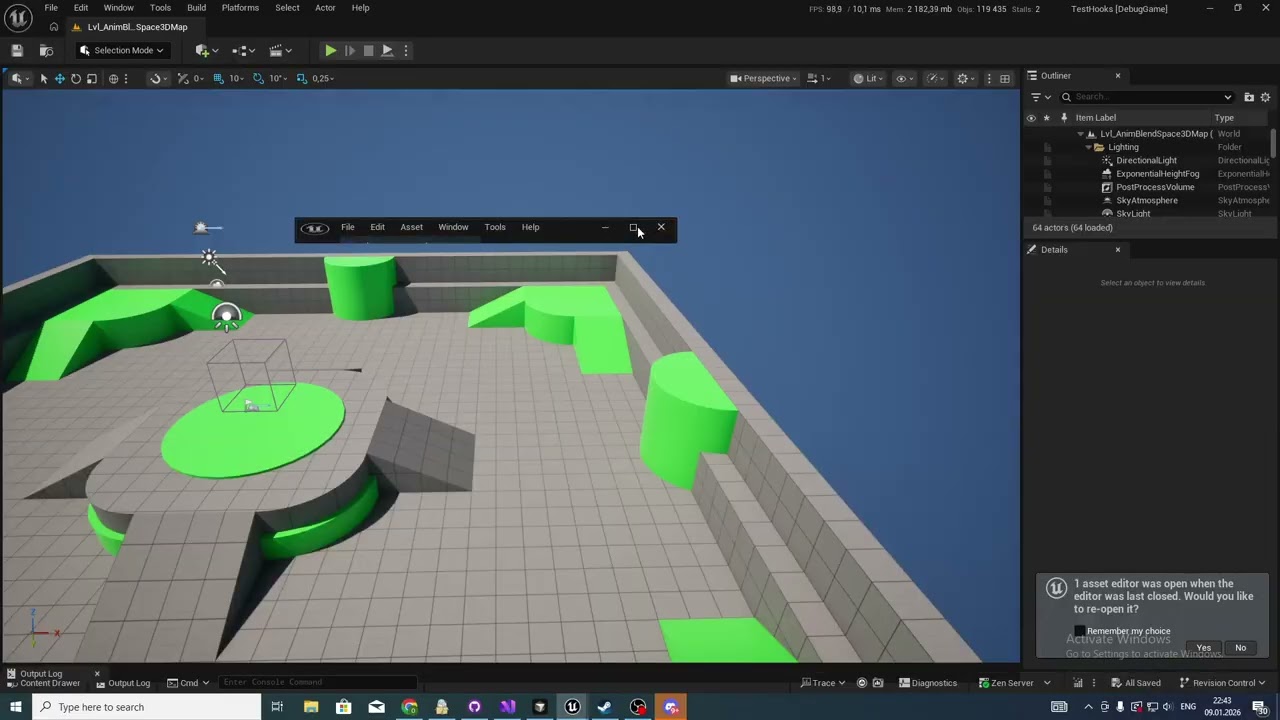
Let me know if anything seems wrong.
After all, your work made a lot to my solution.
barren fiber
fleet sable
Good Evening.
https://www.youtube.com/watch?v=lgiTCS1dFX0
looking great, a little rough but thats is probably due to the animations and inversed directions?
fleet sable
barren fiber
looking great, a little rough but thats is probably due to the animations and in...
I think it's because of the initial animations. There's a fairy animation that constantly shakes even in idle - other mode. I'll check it twice out a bit later.
barren fiber
im glad you got something working, since you want to go commercial with it i guess try to make it more appealing to the eye a bit the interface, i love your 3d mouse control!
if it interest you aswell, i used the controller to navigate through the blendspace which is not needed but a nice thing to add
the thumbnails are also pretty cool, mine if i remember where just points in space
fleet sable
barren fiber
if it interest you aswell, i used the controller to navigate through the blendsp...
Hmm, thats sound interesting.
Thank you for idea.
barren fiber
did you profile yet? the runtime performance?
barren fiber
fleet sable
Hmm, thats sound interesting.
add me on linkedin once you are done aswell, i will share with my network!
fleet sable
barren fiber
did you profile yet? the runtime performance?
Not yet. Only the video memory, I had to figure that out. It turns out a Viewport pair eats it up very quickly for breakfast.
fleet sable
barren fiber
add me on linkedin once you are done aswell, i will share with my network!
Not now, maybe in couple days. Thank you!
I need fix some things and check a lot more things.
Thank you, your comments are very helpful.
barren fiber
fleet sable
I need fix some things and check a lot more things.
Thank you, your comments are...
use cycle counters in your evaluation function when pie and profile runtime performance
im impressed man thats cool shit!
velvet jasper
fleet sable
Good Evening.
https://www.youtube.com/watch?v=lgiTCS1dFX0
Cool stuff!
scarlet mantle
is there any way to remove root animation completely in my animation sequence without exporting/blender/importing? I want to replace it with a "rotate root bone" node, but if I check "force root lock" that node doesn't appear to function while playing the sequence
velvet jasper
scarlet mantle
is there any way to remove root animation completely in my animation sequence wi...
There’s a built in “Zero Out Root” anim modifier.
 hollow crane
Hey guys...sooo I enabled raytracing for my AMD gpu 9070-XT so I could use the shadows and lighting for my cinematic...upon restart my project will no longer launch due to driver issues I'm assuming
Crashes with DX12 since raytracing is a DX12 feature
scarlet mantle
hollow crane
Hey guys...sooo I enabled raytracing for my AMD gpu 9070-XT so I could use the s...
can you check what the driver it is that its using in device manager, or your unreal log file
scarlet mantle
velvet jasper
There’s a built in “Zero Out Root” anim modifier.
it doesnt seem to have any effect
hollow crane
scarlet mantle
can you check what the driver it is that its using in device manager, or your un...
LoginId:4e7f6b2f479ee0529c1df7824c2eaaab EpicAccountId:a971cd0c1f7d41c6831b62097737423d Unhandled Exception: EXCEPTION_ACCESS_VIOLATION writing address 0x000000002000000c amdxc64 amdxc64 amdxc64 amdxc64 amdxc64 amdxc64 amdxc64 amdxc64 amdxc64 amdxc64 amdxc64 amdxc64 amdxc64 amdxc64 amdxc64 amdxc64 amdxc64 amdxc64 amdxc64 amdxc64 amdxc64 amdxc64 amdxc64 D3D12Core D3D12Core D3D12Core D3D12Core D3D12 D3D12Core UnrealEditor_D3D12RHI UnrealEditor_D3D12RHI UnrealEditor_D3D12RHI UnrealEditor_RHI UnrealEditor_RHI UnrealEditor_RHI UnrealEditor_RHI UnrealEditor_Core UnrealEditor_Core UnrealEditor_Core UnrealEditor_Core UnrealEditor_Core UnrealEditor_Core UnrealEditor_Core kernel32
scarlet mantle
hollow crane
```LoginId:4e7f6b2f479ee0529c1df7824c2eaaab EpicAccountId:a971cd0c1f7d41c6831b62...
can you try deleting Intermediate and Saved folders, then if it still happens after it rebuilds shaders then upload your log inside Saved
scarlet mantle
this throws me off so often in 5.7. what does this even mean? often I set my class properties and this option button is checked so it doesn't work, and I need to switch it to class defaults. what is selected instance - is that not the ABP I currently have open? EDIT: ok I see, it's the debug instance I select up the top
 velvet jasper
scarlet mantle
it doesnt seem to have any effect
velvet jasper
scarlet mantle
it doesnt seem to have any effect
Hm, my bad then, I’ll check what’s needed when I get back to my PC.
scarlet mantle
velvet jasper
Hm, my bad then, I’ll check what’s needed when I get back to my PC.
Thanks. from what I can see your suggestion should have worked. I tried it on a couple of animations though and the root bone is still rotating. I even stepped through the c++ code for it and it all looks like it applied fine, but there is no effect in the sequence editor or in-game
also, the other side of what I'm trying to do... it's funny how this does nothing. Note in bottom right I have no root motion extraction by default, and have also checked my instance and its the same

I've tested it while running various animation sequences and also while AI MoveTo is running. Have now realised that what I want to do is in fact rotate the capsule, not the root bone
velvet jasper
scarlet mantle
I've tested it while running various animation sequences and also while AI MoveT...
So, is the issue resolved or you still need some explanation?
I got back at my desk, gonna scrub again through the latest messages.
dusk surge
velvet jasper
1) I’m not sure what’s so special about the “Start to Loop” transition as this w...
Thanks for the advice! I've attached the animation file. Could you please record a short video showing how to set up the full logic in the AnimGraph/EventGraph?
Specifically, I need to see how the animation starts, loops, and ends smoothly, including the logic for transitioning between standing and crouching. Since this is for a mobile game, I want to make sure I’m using the performance-friendly methods you mentioned, like Inertialization or Dead Blending. Seeing your workflow in a video would be a huge help
scarlet mantle
velvet jasper
So, is the issue resolved or you still need some explanation?
I got back at my d...
that's all good sorry for being ambiguous. it turns out that when rotating the capsule and not extracting root motion I can actually now use force root lock on the animation sequences to fix the animation in place. so I think this workflow works for me now, I don't need to strip the root bone animation anymore
velvet jasper
dusk surge
Thanks for the advice! I've attached the animation file. Could you please record...
Unfortunately, I can't see your attachment.
In any case, I'd prefer to keep the discussion at the question level - you do the setup yourself and ask the questions as you go.
There's a lot of learning materials online that you could follow along, I personally would not want to re-invent the wheel here.
Explaining or showing something specific - that I can do, but not building the whole anim system 🙂
 icy heath
When retargeting, how do I account for a source root bone that is in a different orientation than the target root bone?

 velvet jasper
icy heath
When retargeting, how do I account for a source root bone that is in a different...
velvet jasper
icy heath
When retargeting, how do I account for a source root bone that is in a different...
I'm not sure that's possible but instead you could batch apply ReOrientRootBone anim modifier to the source assets in order to fix the root bone orientation preserving the character's body animation.
worldly anvil
@velvet jasper Since I transitioned to playing montages to change my character active stance like you said, I got some issues in-between the montages.
I play a montage to deactivate and activate a weapon, but if I play the activation montage right after the deactivation montage, the character snaps in some weird pose for a frame when I have inertialization to then blend into the right animation.
If I don't use any inertialization, you can see that, for a frame, it's in the idle pose of the stance that it's switching to.
I tried playing the activation animation a bit earlier, like towards the last frames of the deactivation animation, but the result is inconsistent. Sometimes the activation animation starts playing before the deactivation finishes removing that gap frame, but sometimes it doesn't.
Do you have any idea how I could go about fixing it?
velvet jasper
worldly anvil
<@95508360631164928> Since I transitioned to playing montages to change my chara...
Could you show your switching logic?
worldly anvil
velvet jasper
Could you show your switching logic?
It's a bit convoluted, it's in C++. In NativeThreadSafeUpdateAnimation I call UpdateActivation()
void UMESS_AnimInstance::UpdateActivation()
{
    if (!CanTransition()) // is mid transition?
    {
        return;
    }

    const bool bWantsActivate = !bIsActive && bHasSelectedItem;
    if (bWantsActivate)
    {
        StartActivating();
        return;
    }

    const bool bHasChangedItem = ActivatedItemID != SelectedItemID;
    const bool bWantsDeactivate = bHasChangedItem;
    if (bWantsDeactivate)
    {
        StartDeactivating();
        return;
    }
}

void UMESS_AnimInstance::StartActivating()
{
    bIsActivating = true;
    TransitioningItem = SelectedItem;
    TransitioningItemDefinition = SelectedItemDefinition;
    TransitioningItemID = SelectedItemID;

    UpdateTransitionItemAnimations(); // read the 2 transition anims
    OnPlayActivationAnimation(); // PlaySlotAnimationAsDynamicMontage_WithBlendArgs with blends
}

void UMESS_AnimInstance::StartDeactivating()
{
    bIsDeactivating = true;

    TransitioningItem = SelectedItem;
    TransitioningItemDefinition = SelectedItemDefinition;
    TransitioningItemID = SelectedItemID;

    OnPlayDeactivationAnimation(); // PlaySlotAnimationAsDynamicMontage_WithBlendArgs with blends; the Deactivate animation is read and saved when activating
}
It eventually reads the item animations (not the transition ones) depending on blend settings, e.g. if there's a blend in for like 0.25, it'll read the anims after 0.25 seconds in NativeThreadSafeUpdateAnimation
void UMESS_AnimInstance::UpdateMainItemAnimations()
{
    if (CanUpdateMainItemAnimations())
    {
        AnimationsItemID = GetRelevantItemID();
        ReadAnimationsConfig();
    }
}

bool UMESS_AnimInstance::CanUpdateMainItemAnimations() const
{
    if (bIsFirstUpdate)
    {
        return true;
    }

    if (bIsActivating)
    {
        if (AnimationConfigReadTimestamp > ActivationTimestamp)
        {
            return false;
        }

        const float Cooldown = Activate_BlendInArgs_Normal.BlendTime;
        if (UMESS_KismetUtils::IsOnCooldown(this, ActivationTimestamp, Cooldown))
        {
            return false;
        }
    }

    if (bIsDeactivating)
    {
        if (AnimationConfigReadTimestamp > DeactivationTimestamp)
        {
            return false;
        }

        const float Cooldown = DeactivationDuration - DeactivationTimeOffsetToStartActivating; // DeactivationTimeOffsetToStartActivating is set to 0.05, I tried to fix some blending issues
        if (UMESS_KismetUtils::IsOnCooldown(this, DeactivationTimestamp, Cooldown))
        {
            return false;
        }

        return true;
    }

    const int32 TargetItemID = GetRelevantItemID();
    const bool bHasItemChanged = TargetItemID != AnimationsItemID;
    if (bHasItemChanged)
    {
        return true;
    }

    return false;
}
I have to do that in C++ because I do a lot of shared logic shared across TP and FP ABPs. Creating base ABPs in BPs isn't feasible because it doesn't allow you to override thread safe update in children, at least in 5.5
Let me know whether you need any other details
velvet jasper
To me it looks like it switches the Idle animation right after the Deactivation animation, then plays the Activation animation.
Logically, the Idle switching could happen after Activation montage fully blended in.
worldly anvil
Do you see the output log and the read animation in the active animations in the bottom right corner?
It's switching the idle roughly towards the end of the Deactivation. However, that shouldn't be a problem in general considering that there should be no gap in-between the two montages, yet there is
velvet jasper
What's the blend time args for deactivation and activation?
worldly anvil
They're printed out in the output log on the video. Activation BlendIn 0.0, Activation Blend Out 0.25, Deactivation In 0.25, Deactivation Out 0.0
I'm not sure whether the right idea would be reading Unarmed animation set anytime I deactivate the stance, and then read the weapon animation during the activation, maybe in that case the blend during the gap wouldn't butcher the character
velvet jasper
worldly anvil
It's a bit convoluted, it's in C++. In NativeThreadSafeUpdateAnimation I call Up...
I'm thinking it's the cooldown inaccuracy, as there's a single frame gap between the holster and equip animations.
One of the quick ideas - use the actual montage assets instead of dynamic ones, where Holster montages have auto-blend out disabled.
That way the montage would "hold" until being interrupted by the Equip montage and you won't need precise timing for the montage triggering.
Although, you tried to shorten the deactivation duration... Wonder why that didn't work.
worldly anvil
velvet jasper
I'm thinking it's the cooldown inaccuracy, as there's a single frame gap between...
The cooldown is not the thing that drives the montage activation, the CanTransition() is, and it's pretty much returns something like !(bIsActivating || bIsDeactivating). The flags are set to true in the respective StartActivating and StartDeactivating functions, and they're set back to false in here
void UMESS_AnimInstance::NativeOnMontageEnded(UAnimMontage* Montage, bool bInterrupted)
{
    if (LastPlayedActivationToggleMontage == Montage)
    {
        NotifyFinishTransition();
    }

    K2_OnMontageEnded(Montage, bInterrupted);
}

void UMESS_AnimInstance::NotifyFinishTransition()
{
    if (bIsActivating)
    {
        OnActivated();
    }
    else if (bIsDeactivating)
    {
        OnDeactivated();
    }
}

void UMESS_AnimInstance::OnActivated()
{
    MLOGVS(.Category(MESS_LogAnimations), "Stance was activated");

    bIsActive = true;

    ActivatedItem = TransitioningItem;
    ActivatedItemDefinition = TransitioningItemDefinition;
    ActivatedItemID = TransitioningItemID;

    ResetTransitionData();
    UpdateActivation(); // will call StartDeactivating if the selected item is different from activated item
}

void UMESS_AnimInstance::OnDeactivated()
{
    bIsActive = false;

    ActivatedItem = TransitioningItem;
    ActivatedItemDefinition = TransitioningItemDefinition;
    ActivatedItemID = TransitioningItemID;

    ResetTransitionData();
    UpdateActivation(); // will call StartActivating if there's a selected item
}
The cooldowns drive the process of reading active animations, e.g. whatever state machines are using.
If I would use actual montages, how would I queue them? Like, I can put Deactivate and Activate animations in the same montage, but there's too many combinations of items I can transition from/to, and I can change the hypothetical Activate animation if the player is scrolling the mouse wheel selecting a lot of different items. I don't think that that's what you meant though
velvet jasper
You just trigger them the same way you trigger the dynamic ones. I'm not talking about assembling the combinations.
worldly anvil
velvet jasper
You just trigger them the same way you trigger the dynamic ones. I'm not talking...
Would it change anything though? I feel like it's going to have that gap regardless
velvet jasper
As I said, disabling auto-blend out would make the montage to "hold" the last frame until you manually stop it or the other montage would interrupt it.
That should fill the gap you're having.
worldly anvil
oh, for some reason I thought that you meant to set the Blend Out duration to 0, my bad. Yeah, that would fix it
However, I got it to work now. Right now on Deactivation I set my TransitionItem to nullptr/INDEX_NONE for it to pick Unarmed after 0.25~ seconds after Deactivation for it to use the unarmed idle so that it would look right during the gap. Right after it finishes the deactivation, it'll start the activation from the unarmed idle, and pick the new animations during the activation animation
velvet jasper
worldly anvil
However, I got it to work now. Right now on Deactivation I set my TransitionItem...
Yeah, this is the solution as well.
worldly anvil
Disabling AutoBlend is interesting though. However, how would you do that dynamically? E.g. sometimes I might want to have it enabled, sometimes I don't. For instance, the player might want to remove any weapon, so the character should become unarmed, so I do need AutoBlend. However, during the deactivation the player might select the weapon once again, so I would need to play the activation animation after the deactivation, so at that point I do not need AutoBlend
velvet jasper
worldly anvil
Disabling AutoBlend is interesting though. However, how would you do that dynami...
This option is not dynamic, you just manually stop the montage when needed.
worldly anvil
velvet jasper
This option is not dynamic, you just manually stop the montage when needed.
What would be the entry point for stopping it though? I guess I could have it always not blend out, and stop the montage anytime it's ended or play the next one if needed?
velvet jasper
worldly anvil
What would be the entry point for stopping it though? I guess I could have it al...
To be honest, after some thinking, it's hard for me to come up with proper entry point here in your case 🙂
Your solution is a better fit for your purposes, so if it works good, then all good.
worldly anvil
Yeah, I was just evaluating how I would go about disabling auto blend in case I will run into something like this elsewhere. Either way, that works now, thank you again 😄
worldly anvil
Hello, is it possible to make an inactive BlendPosesByBool to update its blend interpolation even when it's inactive?
I made a little example of what I mean by that. When Boolean1 is active, the bottom BlendPosesByBool gets deactivated immediately. Changing Boolean2 would make the bottom blend node switch poses with some blend time. However, the blending will only occur while the node is active, which means that the moment I set Boolean1 to false, the bottom node will blend all the way from one animation to the other, but I'd like it to not have any blend when the boolean was changed while the BlendPosesByBool was inactive.
velvet jasper
worldly anvil
Hello, is it possible to make an inactive BlendPosesByBool to update its blend i...
If I understand you correctly, In theory, you can use Two-way Blend node, set the alpha type to boolean and make both inputs always update.
worldly anvil
Hm, that's an interesting solution. However, is there really no proper way of doing that? I'm looking at FAnimNode_BlendListBase implementation right now, and I'm thinking about making the RemainingBlendTime to be 0 if the node became relevant for it to immediately snap. I don't mind modifying the source build
velvet jasper
In that case, do whatever fits your needs 🙂
worldly anvil
Just tried Two-way blend, and it doesn't seem to update the other pose when alpha is 0, so that doesn't work
velvet jasper
What if you cache the bottom blend?
worldly anvil
worldly anvil
Just tried Two-way blend, and it doesn't seem to update the other pose when alph...
worldly anvil
velvet jasper
What if you cache the bottom blend?
Will try
Same thing. It doesn't get updated at all
worldly anvil
worldly anvil
Hm, that's an interesting solution. However, is there really no proper way of do...
I was thinking about having a checkbox like ResetWeightOnBecomingRelevant or something like this, but I'm fairly unfamiliar with the way anim instances are handled under the hood. I see what I need to modify, but I don't see how I would know that the anim node just became relevant. Looking at FNodeFunctionCaller::BecomeRelevant() is looks like they do it like this
FAnimSubsystemInstance_NodeRelevancy& RelevancySubsystem = CastChecked<UAnimInstance>(InContext.GetAnimInstanceObject())->GetSubsystem<FAnimSubsystemInstance_NodeRelevancy>();
FAnimNodeRelevancyStatus Status = RelevancySubsystem.UpdateNodeRelevancy(InContext, InNode);
if(Status.HasJustBecomeRelevant())
but it feels like calling UpdateNodeRelevancy from a different place would ruin this code
velvet jasper
Why would you need such blend logic?
severe sage
Hiya. How can I find a specific bone from an anim instance? Trying to cast it to Skeletal Mesh fails
 velvet jasper
severe sage
Hiya. How can I find a specific bone from an anim instance? Trying to cast it to...
velvet jasper
severe sage
Hiya. How can I find a specific bone from an anim instance? Trying to cast it to...
Anim Instance has nothing to do with the bones.
Skeletal Mesh Component contains the information about the mesh and its skeleton.
GetSocketTransform function would give you the transform values by the provided joint/socket name.
severe sage
velvet jasper
Anim Instance has nothing to do with the bones.
Skeletal Mesh Component contain...
Thank you, That's the bit of info I needed to get it working
Am I doing it wrong? Keep getting a none trying to access variable. The Find Socket is failing, despite root being a bone name
 velvet jasper
severe sage
Am I doing it wrong? Keep getting a none trying to access variable. The Find Soc...
velvet jasper
severe sage
Am I doing it wrong? Keep getting a none trying to access variable. The Find Soc...
No, you don't need the asset itself.
What is "Mesh" variable?
severe sage
velvet jasper
No, you don't need the asset itself.
What is "Mesh" variable?
SkeletalMesh type
 velvet jasper
I think it's a Skeletal Mesh Component. so you could just drag the GetSocketTransform from it.
severe sage
velvet jasper
I think it's a Skeletal Mesh Component. so you could just drag the GetSocketTran...
Yeah, that did it. Sorry for wasting your time on such a basic thing and thanks for helping me figure it out
worldly anvil
velvet jasper
Why would you need such blend logic?
I was trying to debug some issues with my crouching, and found out the culprit.
I have this setup for combining my final pose. When I'm standing and not moving, I'm using everything UpperBody has, e.g. it entirely takes the current weapon pose. When I'm standing with a pistol or with a baton, my leg positioning is different from Unarmed idle. However, when I started moving, I want to use generic locomotion, so there's this BlendPosesByBool with 0.1s blend. When I'm crouching/uncrouching, it also will have the legs going up/down.
However, when I start crouching, I immediately transition to the other BlendPosesByBool that shadows the BlendPosesByBool that has that 0.1s blend.
When I stop crouching, that bottom BlendPosesByBool becomes relevant, but in case I was not moving before starting crouching, it would've been False, but now that I'm mid uncrouch, it'll be True, which will cause it to take UpperBody leg animations which aren't going up/down, which will cause a pop at the beginning of the uncrouch. It'll eventually fully transition into Locomotion, and take 100% of the legs animation going up/down, but the pop is there regardless (ignore the legs sliding at the end, at some point we mirrored leg positions and forgot about this animation).
Now that I look at it again, it looks a bit tangled, but I don't see how I can rewrite it to avoid that problem. I don't even remember why I added that top BlendPosesByBool, removing it seems to work just fine, I need to play around with it to see whether I will see the reason
 misty dagger
Does someone have a good deformer graph for skeletal meshes, so volume preserve and morph targets work together?
scarlet mantle
anyone seen locomotion states toggle in a weird way like this? it should be doing rot_90 then rot_45 but instead its doing both at once and also the idle animation a little. am I misunderstanding how priority works? I've got priority set up on each transition so that it tries to keep rotating if there is any angle left, otherwise it only then goes to idle and then walk

 velvet jasper
scarlet mantle
anyone seen locomotion states toggle in a weird way like this? it should be doin...
velvet jasper
scarlet mantle
anyone seen locomotion states toggle in a weird way like this? it should be doin...
Priority orders are for the multiple transitions between the same states.
scarlet mantle
velvet jasper
Priority orders are for the multiple transitions between the same states.
so they don't define a preference order? is that why I'm seeing 3 overlapping states?
velvet jasper
scarlet mantle
so they don't define a preference order? is that why I'm seeing 3 overlapping st...
Yup. The preference between different state transitions is defined by your own logic.
scarlet mantle
velvet jasper
Yup. The preference between different state transitions is defined by your own l...
ah ok, that makes this more complex then. I was hoping I could just say "try this branch first, then try this one" for which state to go to
velvet jasper
Well. you can simplify the state to the single TurnInPlace and then pick which animation should be played inside the state itself.
scarlet mantle
velvet jasper
Well. you can simplify the state to the single TurnInPlace and then pick which a...
would I have to do a blend node to do that? or is there some other way to branch conditionally?
velvet jasper
scarlet mantle
would I have to do a blend node to do that? or is there some other way to branch...
Basically, you can make the empty Sequence Player, set the Sequence Asset to be Dynamic, then create a binding for OnBecomeRelevant event where you define which asset to pick. It could be just if-then conditions, could be Chooser, etc.

 scarlet mantle
@velvet jasper hmm I tried it, but the problem is that when the first one finishes it doesn't blend immediately to the next one - eg. in the case where I want to do 90 degrees followed by 45 degrees. in that case it needs to transition to itself instead of back to idle, otherwise the idle animation gets in the way briefly
I guess I can just have no blend out time, its a little stiff though
 blissful bloom
not sure where to ask so i am trying at different channels but does anyone know how could i make something like these screens (anamorphic screens) in unreal i am not talking about anamorphic lenses but rather a screen in unreal

 fallen kraken
how do I trigger actions like punching when using an animation state machine
 late jasper
fallen kraken
how do I trigger actions like punching when using an animation state machine
late jasper
fallen kraken
how do I trigger actions like punching when using an animation state machine
You play a montage, and make sure the state machine is connected to a montage slot
velvet jasper
scarlet mantle
<@95508360631164928> hmm I tried it, but the problem is that when the first one ...
In that case, a different approach would be needed.
I’ll get back to you soon.
So, basically, you want to reuse the anim graph setup with Layered Blend node, right?
May I ask you what are you trying to achieve?
velvet jasper
blissful bloom
not sure where to ask so i am trying at different channels but does anyone know ...
That’s a tech art question.
I’d advise to ask about that at #materials
fallen kraken
late jasper
You play a montage, and make sure the state machine is connected to a montage sl...
I'm not what you mean by a montage slot
 late jasper
fallen kraken
I'm not what you mean by a montage slot
late jasper
fallen kraken
I'm not what you mean by a montage slot
Montage Slots
make an upper body slot for the punching animations

Epic Games Developer
Insert entry-points within your Anim Graph to play animation from using Slots.
fallen kraken
thanks, I'll try that
after UE finishes its favorite activity: crashing
So, did I miss something:
- I set the montage of the punch animation to use DefaultGroup.UpperBody
- see attached pic

- I invoke Play Anim Montage from a BP
it doesn't do the punch
late jasper
what did you do in the Layered Blend Per Bone
fallen kraken
ah hold up
late jasper
also send pic of the animation, and BP code
 charred flint
Hello, I am starting to animate with unreal engine (5.7) and I've got something that is bothering me. I don't know if I am missing something or if the tool provided do not work the way I would like.
When editing curve in the Sequencer Curves, weighted tangent are not acting the way i am used to. I would like to be able to weight one side of the tangent while keeping them align.
At the moment, the weighted tangent option modify both side of the tangent (as in the video) ; combine with the broken tangent option, it weight only on side, but the other side is not at all affected (as intended), but I would like the other side to be affected on direction only.
SO, am i missing something ? or is the behavior simply not possible in unreal engine ?
fallen kraken
late jasper
what did you do in the Layered Blend Per Bone
forgot to set the bone, ty
late jasper
charred flint
Hello, I am starting to animate with unreal engine (5.7) and I've got something ...
you can do this
 velvet jasper
charred flint
Hello, I am starting to animate with unreal engine (5.7) and I've got something ...
velvet jasper
charred flint
Hello, I am starting to animate with unreal engine (5.7) and I've got something ...
For the overall introduction with the curve editor.
You’re probably looking for breaking the tangents.
https://dev.epicgames.com/documentation/en-us/unreal-engine/animation-curve-editor-in-unreal-engine

Epic Games Developer
Tweak your keyframes and curves by using the Curve Editor and tools within it.
charred flint
Thx for your answers. I've check the documentation provided by Epic, but it is not always as precises as we would so I thought i'd better ask ^^
To be clearer, this is the behavior I'd like to have :
Is this doable in unreal ? If not, i know how to do without it, I just find this behavior way more comfortable to work with.
velvet jasper
charred flint
Thx for your answers. I've check the documentation provided by Epic, but it is n...
Make the tangent unweighted.
severe sage
Hi. Is this happening because the attach bone isn't in the right place? I'm trying to simplify the system I'm working on by first making sure it works with GASP out of the box, and I'm getting into this situation. Based on the white debug sphere, the front ledge is in the correct place
 acoustic lily
hey! dont know if this is the most relevant channel but its related 
I have been trying to setup Chaos cloth using the new chaos cloth panel and im using a skeletal mesh as the base.
But when I Setup the hierarchy for the BP I end up with 2 meshes of the same cloth being rendered, one as the SKM itself and the other as the Cloth Component, is there a away around this?
I tried to just disable the visibility of the the SKM but that just ends up leaving the Cloth component without any attachment to the character

 charred flint
velvet jasper
Make the tangent unweighted.
charred flint
velvet jasper
Make the tangent unweighted.
that's not quite the same behavior ... if the tangent is unweighted, both side stay align, yes, but I can't control the strength.
severe sage
severe sage
Hi. Is this happening because the attach bone isn't in the right place? I'm tryi...
Turns out the issue was that it was still defaulting to CMC instead of Mover for some reason
velvet jasper
severe sage
Turns out the issue was that it was still defaulting to CMC instead of Mover for...
Defaulting to CMC?
What do you mean?
severe sage
velvet jasper
Defaulting to CMC?
What do you mean?
Since the GASP character has both Mover and CMC, the branch was set to CMC for some reason. So instead of using the Mover to control movement, it just played the animation
 scenic pasture
Hey everyone, does anyone know how mortal kombat fatalities work and what would be the workflow to emulate them in unreal? What I actually mean is like, let's say we have 10 different characters (entirely different models, ex: one is human, one is a dog, one is a bird, one is a demon, etc.), should I create 10 entirely different animations for each enemy character? Or is there a way to make it scale better?
velvet jasper
scenic pasture
Hey everyone, does anyone know how mortal kombat fatalities work and what would ...
Each character that has a different body structure (humanoid, quadruped, insect, etc.) would need its own skeleton and animset.
If the demon is humanoid type, it might use shared base humanoid skeleton and reuse humanoid animations.
Although, for the fighting game, you’d probably go with building unique animation set for each playable character
scenic pasture
velvet jasper
Each character that has a different body structure (humanoid, quadruped, insect,...
For context, the game would be more of a turn based game, where the finisher should be more of a cinematic thingy. So the idea would be to tag each character into a specific category (ex. humanoid for humans & demons, large humanoid for giants, flying for dragons, quadruped for wolves etc.). And with that I'll create multiple variants for each fatality/ finisher animation for each category. Did I understood it right or I'm still missing something?
And as a bonus question, if you don't mind: Should environmental finishers (ex. a character punching the ground, creating a crater) have an additional different workflow?
Thanks @velvet jasper btw for the answer.
scarlet mantle
velvet jasper
In that case, a different approach would be needed.
I’ll get back to you soon.
I can get it to cross-fade by having the in/out transitions set to 0.0s, maybe I can do secondary transitions in/out for when the full rotation is done to crossfade in/out of the complete rotation. is there a way though to mimic the automatic transition behavior and combine it with other logic? ie. "start blending out 0.2s before the sequence chosen in the state finishes" + "and rotation remaining < 10"
 barren fiber
severe sage
Hi. Is this happening because the attach bone isn't in the right place? I'm tryi...
barren fiber
severe sage
Hi. Is this happening because the attach bone isn't in the right place? I'm tryi...
this uses mover you need special handling to disable collision and apply root without readjusting for ground level!
scarlet mantle
this stuff is frustrating to work with. how am I meant to get inputs to this node in my transition? my animation sequence is selected dynamically

can I not just have it automatically determine both based on the context. EDIT: welp I just made local variables and assigned them on OnBecomeRelevant. not sure if this is intended but it seems to work I think
scarlet mantle
nevermind it doesn't work

 brave path
I'm trying a parenting method that involves using constraints in animation mode. But when I go into animation mode, the constraints menu that's shown in the tutorials isn't there. There's no animation settings menu either.
 blissful bloom
velvet jasper
That’s a tech art question.
I’d advise to ask about that at <#10142447678545102...
blissful bloom
velvet jasper
That’s a tech art question.
I’d advise to ask about that at <#10142447678545102...
sure will give it a shot
velvet jasper
brave path
I'm trying a parenting method that involves using constraints in animation mode....
 scarlet mantle
so I have these two transitions, the lower one is meant to run when the turn in place animation runs once so it instantly goes back in and runs again. but then when it plays the shortest animation within that state it sends a notify and that sets a boolean. that boolean is checked on the upper transition and it's meant to fire earlier on that second time around. but the notify ... doesn't fire 🙁


it seems to me that the reason it's not firing is because it takes the other transition too early. I've set it to 0.0s but it transitions half way through the animation sequence - actually about 0.3 seconds before it ends, which the other transition is set to use. its like its getting its wires crossed between the two transition settings, and settings priorities doesn't help resolve that
velvet jasper
scarlet mantle
so I have these two transitions, the lower one is meant to run when the turn in ...
Once again, could you explain how you expect the turn in place to work in a nutshell?
Is it NPC or Player?
scarlet mantle
velvet jasper
Once again, could you explain how you expect the turn in place to work in a nuts...
it's npc. what it does is first rotate 90 degrees if its target is >= 90 angle from its forward vector. if its less than 90 or once the 90 has been rotated, then we look at the 45 degree case - if we can turn that one then we do that. for now, that's all. the transition between 90 and 45 needs to be instant and the transition to the first and from the last rotation animation needs to cross-fade
I'm also wrapping the whole thing in mirror and handling the case for animating left vs right, that part works perfectly
once I get the above working I plan to add one final 45 degree rotation which is shrunken to align to the angle remaining
the part that I'm stuck on and have tried at least 4 different solutions on is the cross-faded transition out of the 45 degree.
for some reason I absolutely can't get a second notify to fire on the animation even mid-way through
I got to around here with unreal assistant

interesting I think something might be corrupted. I tried to add the notify to a second notify track and it actually fires now. BUT it fires the instant the sequence plays, regardless of which frame I place it on
tried restarting unreal and fixing redirectors but its the same. you can see it firing OnReadyToTransition as soon as the 45 degree rotation starts here

it also gets stuck in some weird loop glitch because of it where it jitters
in fact it doesn't look like it's firing the don't transition notify now, which it's meant to do at the start. or maybe its just not shown in the rewind debugger and that's the reason for the jittering

tried redoing the track a third time and it's gone back to the transition ready notify never firing. this is all way too buggy for me
 scarlet mantle
I recreated the animation sequence from scratch and notifies, fixed redirectors, and it still does one of the above two behaviours. I wonder how I can debug this further as its clearly bugged. I have the source build
okay I found part of the reason. even though the rewind debugger is extremely fine-grained, it doesn't record all the notify events. they're still running properly but there is some kind of issue visualising them
scarlet mantle
well ive been playing with them for a couple of hours, and I will say that notifies still seem super unreliable. their order isn't gauranteed. it makes sense that their timing isn't, but if their order then isn't, like if lag occurs, then they aren't reliable for using with state machine transitions. this is really sad as it is the only option I had left to solve my problem, since I wasn't able to map the Node and Context dynamically when selecting animation sequences.
severe sage
What would cause the root bone to move underground in motion matching when performing traversal? It happens on both beginning and end of the traversal action
Sorry for all the questions in the past week, but figuring out why something like this happens helps me to learn to not need to ask again
 velvet jasper
scarlet mantle
it's npc. what it does is first rotate 90 degrees if its target is >= 90 angle f...
velvet jasper
scarlet mantle
it's npc. what it does is first rotate 90 degrees if its target is >= 90 angle f...
Hm, If I understand you correctly, I think Blend Stack might be a good option.
You can push into the node both Anim Asset and required Blend time, if it's crucial for you to have a granular control over blending.
Yeah, you'd have to build your own logic when the assets supposed to change.
 wild atlas
hey! I setted up a simple motion matching system, but is not replicated, how I can ensure the replication of this motion matching system? I dont find anything online
severe sage
wild atlas
hey! I setted up a simple motion matching system, but is not replicated, how I c...
Which version of Unreal are you using? GASP 5.7 should have an example for online replication for both CMC and Mover. Previous versions of GASP only have replication for CMC
wild atlas
5.5
severe sage
wild atlas
5.5
Then you should be able to see it in the Game Animation Sample Project that you can get for free from Fab. It's provided by Epic, so shouldn't be too hard to find
velvet jasper
severe sage
Then you should be able to see it in the Game Animation Sample Project that you ...
The engine should be updated as well, as 5.7 project iteration is compiled for 5.7 engine.
severe sage
velvet jasper
The engine should be updated as well, as 5.7 project iteration is compiled for 5...
You can still get the older versions of the project when creating the project locally. It's still be accessible
Posting the screenshot just in case Skatoony has issues finding out how to install an older version. I know I had trouble with it
 wild atlas
I installed the 5.5 version, I m looking at it right now.. but theres nothing very fancy here
that would help me to understand why in my project is not replicated
severe sage
Do you have these custom events replicating? (This is from 5.7, so it might look different on your end)

Can you share your setup?
severe sage
Dm me
 main iron
I'd appreciate it if anyone can point me in the right direction with a video or documentation.
I'm authoring true first person animations, and I have ~10 weapons.
How would I go about making the off hand react appropriately, slight alterations would be needed based on equipped weapon (torch/unarmed/sword/etc.)
I imagine making an animation for every possible combo is less than ideal
severe sage
main iron
I'd appreciate it if anyone can point me in the right direction with a video or ...
Can you give an example of 2 extreme poses? (off hand by the side of the body when holding a torch vs offhand right below the dominant hand when holding a 2-handed weapon)
Are you looking for that big of a gap, or just moving the offhand somewhere else on the weapon, like in the 2-handed weapon example
main iron
severe sage
Can you give an example of 2 extreme poses? (off hand by the side of the body wh...
There won't be any real extremes, I'm looking to imitate Dark and Darker
right now my unarmed hand moves forward then swing down as the sword animation strikes forward, it looks good.
But if I use that same animation using a shield it will look bad
Plus the hand will definitely be in a different spot so the shield looks good in 1st person view
I guess I'm looking for advice on how I should think of the ABP
Do I make multiple versions of the same animation depending on what the off hand is? That feels wrong
severe sage
What about simplifying it down to stances? Shield, 1-handed sword, 2-handed, torch, etc. And if you can equip on both hands different things (torch + sword for instance) you call a different stance depending on equipped weapons
main iron
Yeah I agree, I've made a pose/idle for every combination
The challenge now is making the off hand react appropriately without having to make 30+ unique animation's
I wonder if I should do a layered blend at the end on the left clavicle
Then I make 1 reusable anim, thank you I just needed to talk that out
severe sage
Yep. No point in making custom animations if it's not gonna be noticed anyway. Glad you managed to figure out how you want to deal with it 🙂
green token
Do you guys know any good resources for learning fp tp animating? 👀 I see a few but most seem to go for "true" first person
Also do any of you attach actors to your first person meshs via sockets? 👀
green token
Third person only I assume
brave path
velvet jasper
The constraints window that pops up doesn't work properly. I can't find any tutorial that shows how to use it this way and the latest official documentation shows that there should be a dropdown menu for constraints. https://dev.epicgames.com/documentation/en-us/unreal-engine/animation-editor-mode-in-unreal-engine


Epic Games Developer
Enable Animation Mode to provide an animator-friendly workspace and tools in Unreal Engine.
brave path
I also tried parenting using the sequencer method, but when I assign the binding, the child object flies out of place even though I chose preserve current in the attach options.
velvet jasper
brave path
The constraints window that pops up doesn't work properly. I can't find any tuto...
What are you trying to constrain exactly?
 strong elk
Hello ,👋
I’m trying to attach a sword under an avatar’s hand. I’ve associated the weapon with a bone to move it, but I’m running into an issue: but after positioning it correctly and saving, it goes back to its original position when I place the Skeletal Mesh in the scene.
i’m still a beginner with UE5, and I would really appreciate any help, advice, or ideas you might have,please.
note: I want to attach the weapon to the avatar without using Blueprints.👀
 velvet jasper
strong elk
Hello ,👋
I’m trying to attach a sword under an avatar’s hand. I’ve associated...
velvet jasper
strong elk
Hello ,👋
I’m trying to attach a sword under an avatar’s hand. I’ve associated...
Where do you pose the joint?
strong elk
velvet jasper
Where do you pose the joint?
Hi @velvet jasper Hmm… this is quite frustrating: after restarting UE5, i can no longer see the sword’s bones/joints like in the previous images, even though i did save everything. I’m honestly a bit confused myself..
originally, the bones (joints) are attached to the wrist of my 3D character to make the connection. the joint bones are correctly placed on the weapon mesh, but i think i may have misunderstood your question...
also, the weapon (the sword) is a mesh that i directly attached to a bone in Blender. It does move with the entire Skeletal Mesh, but it does not properly follow the wrist movement.
so, what approach would you recommend to move and attach the weapon without using Blueprints?
 velvet jasper
strong elk
Hi <@95508360631164928> Hmm… this is quite frustrating: after restarting UE5, ...
velvet jasper
strong elk
Hi <@95508360631164928> Hmm… this is quite frustrating: after restarting UE5, ...
It doesn't matter much what was attached inside the Blender scene.
Technically, you'd have to use blueprints in any case because this is where you would attach the components to each other in the outliner.
Well, unless you're making a cinematic and the attachment would be done inside the Sequencer.
If I understand you correctly, you have two separate meshes and the character's skeleton has been edited inside UE, right?
Why wouldn't you add a weapon joint inside Blender, since seems like you have access to the sources?
As an alternative way, if you're not planning to animate the weapon in the hands, you can add a Socket to your hand bone and attach the mesh to it.
Socket would be a static pre-defined point that you can pre-pose as you wanted, then use an attachment point.
strong elk
velvet jasper
It doesn't matter much what was attached inside the Blender scene.
Technically, ...
I have a Skeletal Mesh (the character) and a separate mesh (the sword).
the Sequencer is an option, but as a beginner, I find it quite cumbersome especially if i have to animate the weapon for every movement and every animation. Honestly, i’m afraid of losing a lot of time doing that.
i found the correct save, so I’m wondering the following:
is it really impossible to modify the position of a mesh once bones have been created on it (like for the sword), in order to use it properly in the game scene?
i also tested sockets, but it seems that the mesh needs to be attached to the socket via a Blueprint to be visible and properly linked in the game scene. However, i would like to avoid using Blueprints.
i’m asking this because i’ve seen Skeletal Meshes with weapons already integrated (with their own bones), and I’m wondering how this is usually set up in that case especially without relying on Blueprints.
On my side, I really want to avoid using Blueprints.
 velvet jasper
strong elk
I have a Skeletal Mesh (the character) and a separate mesh (the sword).
the Sequ...
velvet jasper
strong elk
I have a Skeletal Mesh (the character) and a separate mesh (the sword).
the Sequ...
I'm not sure what's your goals if you want to avoid Blueprints.
scarlet mantle
does anyone know if blend stack can tune separate blend-in and blend-out values. is this parameter for both?
 velvet jasper
strong elk
I have a Skeletal Mesh (the character) and a separate mesh (the sword).
the Sequ...
velvet jasper
strong elk
I have a Skeletal Mesh (the character) and a separate mesh (the sword).
the Sequ...
Well, the combined skeletal mesh supposed to contain the weapon mesh, skinned to the relative weapon joint.
Usually, it's been done inside DCC and exported to UE.
I think current UE tools allows doing that as well, but personally I have never done that that way.
velvet jasper
scarlet mantle
does anyone know if blend stack can tune separate blend-in and blend-out values....
Animations in Blend Stack always Blend In - each anim asset change adds it to the stack, which the node blends into.
strong elk
velvet jasper
Animations in Blend Stack always Blend In - each anim asset change adds it to th...
Does DCC refer to software like Blender?
I’m also going to look into Blend Stack and Blend In to see if that’s the only viable option. Thanks.
scarlet mantle
velvet jasper
Animations in Blend Stack always Blend In - each anim asset change adds it to th...
so the idea is to configure everything then assign the asset, and just trust that the whole snapshot of parameters is added to the stack to play?
velvet jasper
strong elk
Does DCC refer to software like Blender?
I’m also going to look into Blend Stac...
Yes.
velvet jasper
scarlet mantle
so the idea is to configure everything then assign the asset, and just trust tha...
You can create a struct with needed parameters, add a struct variable, bind the struct parameters to the Blend Stack ones, then call "Set Members..." for struct variable to push the settings.
Or just change the dedicated variables.
Can't comment on the trust issues.
 balmy scaffold
ask for advice,I'm not sure if this is the right section.
Is there any documentation or video tutorial for the "Add New Retarget Op" section in IK Retargeter? I only found older versions, and these are different from the ones shown here.
 velvet jasper
balmy scaffold
ask for advice,I'm not sure if this is the right section.
Is there any documenta...
velvet jasper
balmy scaffold
ask for advice,I'm not sure if this is the right section.
Is there any documenta...
No documentation but here's the official talk about Retargeting Ops.
Link with Timecode:
https://youtu.be/-8CQNaODNNA?t=1450

Watch this session recorded at Unreal Fest Orlando 2025 for a showcase of the latest features in Unreal Engine 5.6 for animation retargeting—and find out what's to come in the future.
This session explores how retargeting has changed since UE5 and what's new in UE 5.6, including a brand new Editor interface, support for drastically different...
balmy scaffold
👍
severe sage
severe sage
What would cause the root bone to move underground in motion matching when perfo...
Figured out what was going on here: I had my movement mode set to Flying, and it was causing the issue. Setting it to Falling sorted my issue of the root bone going underground. Posting it here in case someone has the same issue
brave path
velvet jasper
What are you trying to constrain exactly?
I’m trying to constrain the glasses to the character.
velvet jasper
brave path
I’m trying to constrain the glasses to the character.
Like, simply follow the head?
velvet jasper
brave path
I’m trying to constrain the glasses to the character.
If you just need to make them follow, you can simply use Attach track and attach to the mesh's binding. Pick the joint you want them to follow, then pose them correctly.
 hazy grove
I have an animation question, I am not an animator, but this should be a easy question.
I am not an animator, I am a game designer, AD, environment art, principal art.
I had bought two packages from UE Marketplace the first one was a small animation pack that covered basics. A free series of animations followed it which added a robust array of animations for a Action RPG or FPS type of games. I really needed to at least get some of these implemented into my vertical or visual slice going.
The first pack used boxes for stairs and anims are fine at first glance. I brought them into 3ds Max so I could make assets that fit the animations already done. The stairs were not all th same depth or height, they were off a little bit. Now I could tweak the animation on the cleanup of the geo I made.
The second pack was a lot of elements for scale and metrics, curved stairs, steep stairs, but this pack had no animations. These stairs metrics were off here as well. And the stairs I felt were the most critical, so neither pack was good in terms of consitency.
I export the wall climb animation so I could build assets to fit the animation.
The question is tweak the animations to fit Pack two, this I think is the best option, because units of stairs would be on par with the door frames, wall heights etc. How do I do it, can I tweak the animations in UE5.6 or or tweak them in 3ds Max 2026 and import the animation and test it there?
Thanks for any assistance with this.
Revenant Games Studio
velvet jasper
hazy grove
I have an animation question, I am not an animator, but this should be a easy qu...
If you're still using Mannequin (assuming you have a paid animation pack), you can open your Anim Sequence (make a copy if you want), then pick Edit In Sequencer - Bake To Control Rig.
That would create a Level Sequence asset, where you can drag'n'drop your desired mesh, position it as needed (e.g. 100 cm from root) and then edit the animation using the rig system.
Everytime you save that Level Sequence asset, the changes automatically apply to your Anim Sequence asset.
You can either reduce the keys during baking and then tweak the existing curves or/and add an additional Additive transform sub-track and add the keys "on top".


 ivory shoal
Has anyone ever experienced when reimporting a skeletal mesh from DCC to unreal for adding new bones, the first time it loads the skin weights are properly bound to the bones, but after restarting the editor, the skin is no longer bound to the bones. However, when editing it, the skin weights are still there
brave path
velvet jasper
If you just need to make them follow, you can simply use Attach track and attach...
Still not working. I’m a little confused by what you’re showing here.
 weak beacon
Are Chooser Tables not working correctly with getter functions vs properties?
If I choose a pure getter function with enum return value, it doesn't populate the rows, but if you select a variable directly it populates.
Not sure if intentional.. Is there a work-around to make it work with getter functions?
velvet jasper
brave path
Still not working. I’m a little confused by what you’re showing here.
Here's how to add the Attach track.
If that's not it, what's not clear for you?
 weak beacon
Are Chooser Tables not working correctly with getter functions vs properties?
If...
weak beacon
weak beacon
Are Chooser Tables not working correctly with getter functions vs properties?
If...
For anyone seeing this, set the value of you column to a property first (a variable), and then once the rows are populated you can change the value back to a function. Verified that it works and reads it correctly.
brave path
velvet jasper
Here's how to add the Attach track.
If that's not it, what's not clear for you?
Like I said, when I try that method, the location, rotation, and scale get messed up, even if I have the attach options set to preserve current. You didn't make it clear what exactly I'm supposed to do in that properties menu.
velvet jasper
brave path
Like I said, when I try that method, the location, rotation, and scale get messe...
By any chance, you don't use Override Instance Data for your Level Sequence actor, right?
I can get the parent constrain working without affecting the initial transforms only if everything is at zero coordinates.
brave path
velvet jasper
By any chance, you don't use Override Instance Data for your Level Sequence acto...
I don't know what that is. I'm still new to UE.
velvet jasper
Otherwise, you'd attach your mesh first, then set the correct transforms when it's attached.
brave path
velvet jasper
Otherwise, you'd attach your mesh first, then set the correct transforms when it...
Tried setting the coordinates to 0, attached the mesh, and it's still not in the right position when I put in the previos coordinates.
velvet jasper
brave path
Tried setting the coordinates to 0, attached the mesh, and it's still not in the...
Previous coordinates won't work because the space would be different.
brave path
The problem is that when the transform is affected, I can't find a transformation that makes the glasses fit properly on the character.
velvet jasper
brave path
The problem is that when the transform is affected, I can't find a transformatio...
Wait, I think I found the issue.
Try first setting the transform key at the first frame, then apply the parent constrain.
Works anywhere, at least, for me.
brave path
Didn't work.
velvet jasper
OBS Window Capture missed the dropdown menus but I'm simply picking Parent constraint, then "head" joint.
brave path
velvet jasper
OBS Window Capture missed the dropdown menus but I'm simply picking Parent const...
That did it. TYSM.
velvet jasper
ivory shoal
Has anyone ever experienced when reimporting a skeletal mesh from DCC to unreal ...
So you say that after reimporting the SkelMesh and restarting the editor, the animations no longer drive that mesh, correct?
That's a weird behaviour, personally never had that issue.
Is it a custom mesh or are you editing Mannequins?
 tropic atlas
Anyone know of a good retargeting guide I could use to brush up on 5.6? Need to go over bones' chains, ik rigs.. all of it manually.
worldly anvil
Hello, does anyone know why it's preferred to read curve values not in AnimGraph, but in the update function? I'm referring to performance side of things. It should be possible read curves on both worker and game thread, but afaik UE prefers reading them outside of anim graph
brave path
I'm also looking for a way to setup these pens and buttons so that they accurately follow the deformations of the shirt. Does anyone know of a method that works?
 tropic atlas
Anyone know of a good retargeting guide I could use to brush up on 5.6? Need to ...
tropic atlas
tropic atlas
Anyone know of a good retargeting guide I could use to brush up on 5.6? Need to ...
If you're in here. Thank you. 🙂

This part of the "Character Animation HowTo" series. In this video we are going to learn how to use animation retargeting with meshes that uses a different skeleton using an IK Rig and IK Retargeter. We are going use the default UE5 animations and retarget them to another character that we’ll get from the marketplace.
We are going to learn ...
hazy grove
velvet jasper
If you're still using Mannequin (assuming you have a paid animation pack), you c...
Thank you very very much
ivory shoal
velvet jasper
So you say that after reimporting the SkelMesh and restarting the editor, the an...
just for that specific new bone, this is metahuman bone model. looks like this issue is specific to metahuman face. this not happening on 5.6. still not sure actually. could possibly the DNA feature replaced this. already asume the problem on DCC broken bone data etc. I tried to even create new project in case of broken skeleton because of bone merge failure issue data but still happening.
scarlet mantle
brave path
I'm also looking for a way to setup these pens and buttons so that they accurate...
how dynamic do they need to be? one way is to attach them to a socket and animate the socket with the shirt
brave path
scarlet mantle
how dynamic do they need to be? one way is to attach them to a socket and animat...
How do I do that?
ivory shoal
brave path
How do I do that?
dont do that, it will clipped a lot since that area has a lot of bone influences. it is actually hard to maintain the buttons form. I was thinking about attaching the mesh to certain tris/vertex might solve this
copying the weight is still mostly done by a lot of people i guess. with the downside that the button might stretched during the animation
velvet jasper
ivory shoal
just for that specific new bone, this is metahuman bone model. looks like this i...
That joint has to be added to all 7 LOD meshes or you would need to force LOD you’ve added your joint, which would kill the performance if it’s LOD0.
MetaHumans are technological beasts and modifying them requires a different workflows.
Can’t say much on that topic as I’m not working much with them.
ivory shoal
velvet jasper
That joint has to be added to all 7 LOD meshes or you would need to force LOD yo...
yeah, I already gave up, I create it in separate mesh for it now
scarlet mantle
@velvet jasper I came up with a creative solution to my turn-in place use case without having to use blend stack. the realisation came when I realised every IN transition should have blend = 0.0 except for the start of the rotation stack, and then I just focus on the blend OUT times for transitions TO states, and also further breaking down the states instead of trying to cram in more optional transitions. well anyway thanks for your help with this stuff, it was super valuable. and I now know blend stack exists anyway

 velvet jasper
scarlet mantle
<@95508360631164928> I came up with a creative solution to my turn-in place use ...
velvet jasper
scarlet mantle
<@95508360631164928> I came up with a creative solution to my turn-in place use ...
To be honest, looks kinda overengineered, but if it works for you, that’s good.
velvet jasper
scarlet mantle
<@95508360631164928> I came up with a creative solution to my turn-in place use ...
Could you show the final result though?
scarlet mantle
bit of a janky early WIP example
it runs each time after he does that leg waving idle animation. sorry I forgot to put his shoes on so its a bit hard to tell when his feet lift up and place down. I also haven't done an actual walk for this guy yet
scarlet mantle
velvet jasper
To be honest, looks kinda overengineered, but if it works for you, that’s good.
it is and thats the only downside, but at least I can refactor it into its own mini state graph
 latent edge
guys, how do you animate actor in level sequencer usually? i need my capsule to repeat root motion from anim sequence, but actor moves sideways, because in anim sequence it walks 2m forward which is Y, but for actor it's Right vector, so it goes 2m right. i thought my charatcer imported with errors, but the same happens with ThirdPerson template Manny, so am I missing something in level sequencer settings?
velvet jasper
latent edge
guys, how do you animate actor in level sequencer usually? i need my capsule to ...
Working with Root Motion for In-game Characters in Sequencer is, unfortunately, really problematic.
Can't say right now from the top of my head what would be the best way, but if it's possible to avoid the sequencer for such work, please do.
latent edge
velvet jasper
Working with Root Motion for In-game Characters in Sequencer is, unfortunately, ...
oh, okay thanks, quick question then, is there a way to animate without root motion, and right after animation is done teleport capsule to where mesh ended up?
velvet jasper
latent edge
oh, okay thanks, quick question then, is there a way to animate without root mot...
Is that like an in-game cutscene?
latent edge
well, its not a proper cutscene, i'm trying to pre-bake some npc actions so to speak, but player will be free to do whatever he wants
latent edge
velvet jasper
Is that like an in-game cutscene?
yeah basically in-game like you said
dusk surge
severe sage
Hiya. Is there a way to have a trace running only when the character is moving, but without using tick? Are timers cheaper overall?
For context, I'm looking to make a line trace when the player is walking to check if the character is on a mesh with a specific collision tag
velvet jasper
dusk surge
 velvet jasper
dusk surge
velvet jasper
dusk surge
Showcase:
velvet jasper
severe sage
Hiya. Is there a way to have a trace running only when the character is moving, ...
IIRC CMC already does the floor trace checks.
severe sage
velvet jasper
IIRC CMC already does the floor trace checks.
Do you happen to know if Mover does the same?
velvet jasper
severe sage
Do you happen to know if Mover does the same?
 severe sage
velvet jasper
severe sage
velvet jasper
That was a pinfully obvious node that I somehow missed. Thanks for that
dusk surge
velvet jasper
Thanks broo!
 plush trail
Beginner here - I have always had issues when trying to create custom animations with the skeletal mesh that I chose for my characters in-game. This skeletal mesh character came with no type of control/modular rig (not sure if they usually do, or if devs usually set that up themselves when importing a new mesh). I tried creating one by copying the OOTB manny control rig and using my skeletal mesh instead, but no luck with that. When I got my control rig created, anytime I placed it in my level, and tried to tie an animation onto it via the Animation track of the sequence embedded under the control rig skeletal mesh track, the mesh would stay in T pose and would slightly move some of the joints as if it were trying to play an animation. All-in-all, I have struck out with creating custom animations.
What is the proper / most generally used method for creating custom animations for new skeletal mesh characters? Do websites usually ship characters with control rigs that can be imported when importing the skeletal mesh file as well? Please help with this process
scarlet mantle
plush trail
Beginner here - I have always had issues when trying to create custom animations...
what about creating a custom retargeter asset and using it to retarget manny animations to your custom skeleton
velvet jasper
plush trail
Beginner here - I have always had issues when trying to create custom animations...
The industry standard process for the in-game animation is having your character rigged in DCC like Maya, do the animations there, then export them to Unreal.
Of course, with the modern UE5 capabilities, nothing stops you building the rig inside the engine itself (e.g. using Modular Rig asset) and do the animations there.
Epics themselves did all Lego Fortnite animations completely inside Unreal.
Don't know about which websites you're talking about, but on FAB most of the character meshes mostly rigged in a compatible way with default UE5 Mannequins.
Basically, the skeleton follows the same naming conventions for the bones and similar bone orientation.
That way, the assets built for the Mannies (including the control rig for animation), could be theoretically shared with that mesh as well.
In this case, having a custom Control Rig asset is up to each seller.
plush trail
scarlet mantle
what about creating a custom retargeter asset and using it to retarget manny ani...
Thank you for the response! So I have tried this, and it seems to be working for existing animations and any skeleton of my choosing. My issue is with creating new, custom animations for any skeleton I import into my game, and was wondering the most common approaches for doing that with other game devs/companies
plush trail
velvet jasper
The industry standard process for the in-game animation is having your character...
Thanks a lot for this @velvet jasper! That helps a lot
 vocal owl
If I've made a bunch of adjustments to an animation sequence via additive layer tracks like the screen shot below is there anyway to export those adjustments to an asset that I can apply to whole bunch of different animations or use dynamically in my ABP? I have a blendspace for my movement and I want to apply the same left arm fixes that i put into the walk_fwd animation to everything in the blendspace rather than manually cutting and pasting the additive layer tracks into each sequence.
 velvet jasper
vocal owl
If I've made a bunch of adjustments to an animation sequence via additive layer ...
velvet jasper
vocal owl
If I've made a bunch of adjustments to an animation sequence via additive layer ...
As an idea, you can save a pose out of the zero frame of your animation, remove the additive tracks from the original, make the resulted pose Anim Sequence additive based on that original animation, then apply the additiive on top what's needed in your Anim Graph.

 heady plover
hey guys, Im looking to import into Unreal an animation sequence from Blender. It's just a camera and 1 character that both move for 5 seconds. The objective is just to render this and get a presentation video out of it, so I dont care about optimization or integrating this into a game project. What would be the most convenient format to export this in? Classic FBX, or sth like alembic or USD? Would there be any advantages with going with one format over the other?
vocal owl
velvet jasper
As an idea, you can save a pose out of the zero frame of your animation, remove ...
will try it, thanks
velvet jasper
heady plover
hey guys, Im looking to import into Unreal an animation sequence from Blender. I...
Have you looked already any information online regarding that?
dusk surge
How can I add Start and Stop transitions to my crouch animation in UE5? Looking for a tutorial on setting this up in the Animation State Machine for a professional mobile horror.
velvet jasper
dusk surge
How can I add Start and Stop transitions to my crouch animation in UE5? Looking ...
Trigger your entry and exit animations as the montages, while you switch between standing and crouching state at the same time.
The state switch might happen instantly (zero blend time), the inertialization would store the incoming pose and blend into it, so you won't see the pop.
Here's the very rudimentary logic just for showcasing:
 plucky crypt
Hi. I have some movable objects in my game. I want them to have moving parts as well so when the player shakes them, they respond. It's nothing complicated like a string attached to an object swinging as they move the object. Where would i need to start? I'll be making the models myself but dont know what kind of tutorial i should be following to add the required bones / how to import said bones / how to add physics to them so they swing with the movement of their parent object
Overall titles of subjects would be enough so i can go on a goose chase for tutorials 
velvet jasper
plucky crypt
Hi. I have some movable objects in my game. I want them to have moving parts as ...
Those are really broad questions that I think it would be easier to search for such information online.
There’s a ton of tutorials how to rig stuff inside Unreal, how to setup the physics asset, how to apply the force to the physical object ingame etc.
barren fiber
plucky crypt
Hi. I have some movable objects in my game. I want them to have moving parts as ...
simple you have your prop/weapon whatever you attach to the character, you create a physics asset for said prop that has simulation enabled on the joints you want to simulate, so when the character has the item in its hand you swing left and right it will move accordingly to how it is set up in the physics asset
so the not moving parts such as a grip will be driven kinematically so set that up inside the phys asset, the remaining are set to be simulated
dusk surge
velvet jasper
Trigger your entry and exit animations as the montages, while you switch between...
I need a video tutorial that explains how to add Crouch_Start and Crouch_Stop animations to a State Machine.
I specifically want to see:
1․How to transition from Idle to Crouch_Start.
2․How to automatically transition from Crouch_Start to Crouch_Idle (loop) once the animation finishes.
3․How to play Crouch_Stop when releasing the button.
Please suggest a video that explains the logic (Time Remaining or Automatic Rules) step-by-step. No Montages, only State Machine.
velvet jasper
dusk surge
I need a video tutorial that explains how to add Crouch_Start and Crouch_Stop an...
I shall say that triggering such animations through the state machine is not efficient and it won’t be responsive.
Entering and exiting the crouching is not a state, it’s an action. Usually you would trigger your action using the anim montage.
 naive carbon
Hello, does anyone knows if its possible to remove blend shape curves that are empty when baking animations ?
Manually removing these curves greatly reduce the animation file size.
velvet jasper
naive carbon
Hello, does anyone knows if its possible to remove blend shape curves that are e...
You can make a custom Anim Modifier that removes the unneeded curve tracks from the sequence.
It could be applied in a batch.
 glad kettle
Hello! I am having a odd issue... I have some animations that I know have root motion. I've cross checked in Blender to ensure Y/X is moving from start to finish on root. Unreal animation sequence shows the red line for root motion when Root motion is unchecked:
My character blueprint, has its primary mesh set to source for movement component, and character movement component has Alow Root motion set.... and my animation blueprint, has allow Root motion from Montages. No matter what I do, I can't get root motion to work? Any ideas for things I may of missed? This is in unreal engine 5.7. I've confirmed root bone moves with the animation, and shows its X/Y updating as animation goes through as well.

 somber briar
Anyone have a guess as to why my new pose database animations inside of the GASP do this sort of weird skip/hop motion? It sort of looks like the animation is replaying or something inside the Anim BP is changing the foot positions -- not sure
brave path
ivory shoal
dont do that, it will clipped a lot since that area has a lot of bone influences...
So then how do I attach the mesh to the vertices?
velvet jasper
glad kettle
Hello! I am having a odd issue... I have some animations that I know have root m...
The red line is not important, the shown trajectory when the Root Motion is enabled is.
"Allow Physics Rotation" might not need to be enabled as this would allow the capsule procedural rotation (e.g. control rotation) on top of the root motion.
What's your BP hierarchy and what's your skeleton hierarchy?
velvet jasper
brave path
So then how do I attach the mesh to the vertices?
The person meant that you'd have to do the skinning for your mesh, copy the skin weights from the body mesh.
 covert parcel
i'm having a problem that is probably a easy solve, but i have no clue, so basically the code on the bottom stretches the arm to a point. and the code on the top is for my idle/walk/run cycle. but if i plug the run cycle into base pose, it will work but won't shoot out the hand properly, if i plug the bottom code into base pose though, it works as intended but the walk/idle code doesnt work then (besides animating the shooting hand) do i need to eliminate the arm animations? or do i need to use a different node?
 velvet jasper
covert parcel
i'm having a problem that is probably a easy solve, but i have no clue, so basic...
velvet jasper
covert parcel
i'm having a problem that is probably a easy solve, but i have no clue, so basic...
In the Layered Blend node, turn on the Mesh Space rotation.
Also, add the Cache node after the Slot node, then plug that cache to the Base pose and the False pose of Blend Bool node, otherwise you’d have no animation at your arm when it’s not grabbing.
 exotic glacier
Hello does anyone here know how i can make 2 animation blueprints forcefully synced? i have an actor for my weapon and actor for my player, the first person hands and the weapon have seperate skeletal meshes and seperate animation bps, which causes them to desync in specific circumstances. even if i play montages on them at the same time to sync them, they gradually fall out of phase again.
velvet jasper
exotic glacier
Hello does anyone here know how i can make 2 animation blueprints forcefully syn...
Could you show what kind of desync are you talking about?
exotic glacier
velvet jasper
Could you show what kind of desync are you talking about?
Of course, one moment
velvet jasper
Also, the weapon mesh preferably should be a component attached to the hands mesh component, so they would tick under the same actor.
exotic glacier
i just find it a little bit odd that i cannot child an anim bp to another to make them run in phase or something like that, it seems like that would be needed for other applications
velvet jasper
The weapon is not attached to the hand, right?
exotic glacier
velvet jasper
The weapon is not attached to the hand, right?
No, its a seperate actor childed to the playerpawn
velvet jasper
exotic glacier
No, its a seperate actor childed to the playerpawn
Well, I wouldn't say that would be a correct setup.
There's some Montage Sync functions available you might try to use.
exotic glacier
velvet jasper
Well, I wouldn't say that would be a correct setup.
what is a correct setup then
velvet jasper
exotic glacier
what is a correct setup then
- Weapon mesh is rigged skeletal mesh.
- Hands mesh's skeleton ideally contains the weapon joint or, at least, the weapon socket that represents the pivot point for the weapon's root bone, relative to the palm.
- Weapon mesh component attached to the hands mesh component via weapon joint/socket.
- Weapon animations are authored relative to the attached pivot point - there's no point to make an idle anim for the weapon, as the idle movement would come from the hands themselves.
- Action animations (such as Fire, Reload etc.) are played by calling Play Montage function for each mesh
 normal wharf
does somebody know why layered blend per bone is doing it? When I uncheck the Mesh space rotation blend it is not stretching but this is not what I want. Skeletal mesh in on the same skeleton as UE5 manny, UE5 manny works correctly
 velvet jasper
normal wharf
does somebody know why ```layered blend per bone``` is doing it? When I uncheck ...
velvet jasper
normal wharf
does somebody know why ```layered blend per bone``` is doing it? When I uncheck ...
Hard to take a guess from one screenshot, as it could be multiple things.
Standalone animations play on this mesh just fine, right? No skinning issues?
If you go to the skeleton tree tab in ABP and poke each arm joint, which ones are stretching?
normal wharf
velvet jasper
Hard to take a guess from one screenshot, as it could be multiple things.
Standa...
I think I found the issue, I don't know why accurig did the weights on additional bones 🤔
 normal wharf
but without mesh space rotation blend it looks alright but it is not accurate :/
velvet jasper
normal wharf
I think I found the issue, I don't know why accurig did the weights on additiona...
I think these twist bones are not marked in the blend mask, based on their naming which doesn't belong to UE5 skeleton.
normal wharf
velvet jasper
I think these twist bones are not marked in the blend mask, based on their namin...
yeah, switched to hierarchy, marked spine_05 with depth 4 and it works now
so you're right
velvet jasper
normal wharf
yeah, switched to hierarchy, marked spine_05 with depth 4 and it works now
"spine_01" with depth 5 would give a better result in terms of precision, but yeah, glad it's resolved.
 stark gate
Guys why can't I add physics bodies in here? It literally won't list my whole skeleton and let me add physics bodies. When I try to scale the ones already in here, the wont go small enough they still stay massive
 velvet jasper
stark gate
Guys why can't I add physics bodies in here? It literally won't list my whole sk...
velvet jasper
stark gate
Guys why can't I add physics bodies in here? It literally won't list my whole sk...
Click at the gear icon in the skeleton tree tab, then pick "Show Mesh Bones".
velvet jasper
stark gate
Guys why can't I add physics bodies in here? It literally won't list my whole sk...
Also, if you're using Blender (assuming by Auto-rig's "c_traj" bone name"), make sure that you've did the Unreal-compatible export and your root bone doesn't have 100 units scale, as that would make the physics unstable in any case.
stark gate
velvet jasper
Also, if you're using Blender (assuming by Auto-rig's "c_traj" bone name"), make...
Thank you I'll try this 🙂
stark gate
Anyone know why my belt keeps falling off? I added constraints and physics capsules to it, set to simulated but I expected the ropes to swing from the first point but instead the whole thing just falls and keeps falling through the floor

 covert parcel
velvet jasper
Also, add the Cache node after the Slot node, then plug that cache to the Base p...
covert parcel
velvet jasper
Also, add the Cache node after the Slot node, then plug that cache to the Base p...
so i already had the mesh space rotation on, and i didn't understand what you mean't by cache node. i think i did what you mean, but now when its grabbing, theres also no animation in general. is that how its supposed to be?
 stark gate
Anyone know why my belt keeps falling off? I added constraints and physics capsu...
stark gate
stark gate
Anyone know why my belt keeps falling off? I added constraints and physics capsu...
nvm I figured it out. I created the constraints and bodies incorrectly. Creating them via: ceate bodies/ constraints > capsule (with caonstraint box ticked) solved it
stark gate
Alright anyone know why this might be happening to my characters sleeve please? lmao


It's got some cloth physics on it, but the weights are fine this doesn't happen when moving the rig
this is just inside unreal and during the animation

This is what's happening basically
ivory shoal
velvet jasper
The person meant that you'd have to do the skinning for your mesh, copy the skin...
it was actually just random idea of mine, it works like groom binding to attach certain mesh to specific tris, and keep transforming the mesh every tick based on the binding. but yeah, skinning is more preferable. maybe I will share it for free as plugin if it is useful
vocal owl
is it possible to use the sequencer and a control rig to apply hand ik to an existing animation sequence and then bake the sequence to clean up inaccurate hand positions? I have a couple animations where i want to clean up the left hand behavior but i don't need run time IK. if so if anyone could recommend a tutorial I'd appreicate it.
scarlet mantle
vocal owl
is it possible to use the sequencer and a control rig to apply hand ik to an exi...
yeah definitely. most control rigs for things like manny have tick boxes to enable IK for various limbs. check the global_ctl track. there are some tutorials around if your control rig doesn't, try looking up things like "using IK in unreal control rigs"
velvet jasper
vocal owl
is it possible to use the sequencer and a control rig to apply hand ik to an exi...
It would be kinda the same workflow as this:
velvet jasper
covert parcel
so i already had the mesh space rotation on, and i didn't understand what you me...
No, this is incorrect.
If you open the node creation menu, you’ll be able to choose the option “Save cached pose”.
Create this node, give it a better name, then plug it to your Slot node.
After that, open the menu again, in the search bar type your cache node name, you’ll have an option “use saved cache pose” with your given name.
Create the node, duplicate it, plug both instances to the inputs I’ve mentioned previously.
severe sage
Hiya. I'm having a weird issue with Mover component, and I couldn't find anything online. The mover is working perfectly fine, except for jumping. If the character is moving when jumping, it's all fine. If the character is stationary, it flies into the sky and locks any and all inputs. Any idea where the jump may be set up?
velvet jasper
severe sage
Hiya. I'm having a weird issue with Mover component, and I couldn't find anythin...
In your character blueprint?
severe sage
velvet jasper
In your character blueprint?
So it's not just something preset? Like CMC's jump
velvet jasper
severe sage
So it's not just something preset? Like CMC's jump
I can't know how your own character blueprint is built.
I think it would be easier if you open the asset and search for "jump" keyword.
severe sage
velvet jasper
I can't know how your own character blueprint is built.
I think it would be easi...
It's set up like the example in GASP Mover, but couldn't find it there either. I'll keep looking into it more tomorrow, cause I think I saw a part that didn't have the movement mode set up properly
 signal edge
hello, in ue5.7, im trying to set up a ik retargeter asset but i keep running into issues. After creating an IK rig for any skeletal mesh, then creating retargeter asset, i get these warnings that it cant find the root bone, even though there definitely is a root bone.
i even downloaded ue5.4 and i dont get issues on that version. does anyone know how to fix this? i coudn't find anything online.
 velvet jasper
signal edge
hello, in ue5.7, im trying to set up a ik retargeter asset but i keep running in...
velvet jasper
signal edge
hello, in ue5.7, im trying to set up a ik retargeter asset but i keep running in...
Mixamo character by default actually doesn't have the root bone.
Is it converted for Unreal usage?
signal edge
velvet jasper
Mixamo character by default actually doesn't have the root bone.
Is it converted...
mixamo was just an example but really im trying to retarget this mocopi mannequin for mocap. the skeletal mesh comes with the official plugin so i dont know whats wrong
 brave path
velvet jasper
The person meant that you'd have to do the skinning for your mesh, copy the skin...
brave path
velvet jasper
The person meant that you'd have to do the skinning for your mesh, copy the skin...
So how do I copy skin weights?
covert parcel
velvet jasper
No, this is incorrect.
If you open the node creation menu, you’ll be able to c...
gotcha. so i did it, but when i grab a object it still doesnt blend the 2 animations together. (i did use the cached pose as base pose. but the problem was that it wasn't modifying the bone anymore.)
 velvet jasper
covert parcel
gotcha. so i did it, but when i grab a object it still doesnt blend the 2 animat...
velvet jasper
covert parcel
gotcha. so i did it, but when i grab a object it still doesnt blend the 2 animat...
Tell me, you’re currently blending what to what?
covert parcel
velvet jasper
Tell me, you’re currently blending what to what?
So. the part in the red circle is the walking/running/idle stuff, and the part in the blue circle is code for making the arm extend out to grab a item.

i'm wanting to make it so it can grab objects using the blue circle, despite being able to move using the red circle code.
if that helps.
velvet jasper
covert parcel
So. the part in the red circle is the walking/running/idle stuff, and the part i...
Yeah, so logically what should be the base?
covert parcel
velvet jasper
Yeah, so logically what should be the base?
most likely the walking/running/idle animations. because you only go to pick up objects when you hold left click.
velvet jasper
covert parcel
most likely the walking/running/idle animations. because you only go to pick up ...
Here you go.
covert parcel
velvet jasper
Here you go.
Yeah, but when i did what i just said. it only executed the animations when i wasn't trying to pick up a object
so it didn't really fix anything
id still like it to blend when picking up a object
velvet jasper
covert parcel
Yeah, but when i did what i just said. it only executed the animations when i wa...
Take a look at the nodes and my original comment again, please 🙂
covert parcel
velvet jasper
Take a look at the nodes and my original comment again, please 🙂
I did. but when i put the cached pose as base pose. it no longer plays the "Transform modify bone"/true pose

unless you're talking about mesh rotation, which i already had on
velvet jasper
What’s your Layered Blend settings?
covert parcel
velvet jasper
What’s your Layered Blend settings?
i messed with these earlier. so it may be changed
 velvet jasper
can’t see the Layer setup.
 velvet jasper
covert parcel
velvet jasper
covert parcel
Yeah, there’s nothing in the blend settings.
You have to specify the bone to blend from.
Link leads to Layered Blend node example usage.
https://dev.epicgames.com/documentation/en-us/unreal-engine/using-layered-animations-in-unreal-engine#4-finalizingtheblendsettings

Epic Games Developer
Demonstrates how to blend animations together, in this case, a character that can move and fire a weapon at the same time.
covert parcel
velvet jasper
Yeah, there’s nothing in the blend settings.
You have to specify the bone to bl...
ill take a look at this. thanks for the help
velvet jasper
covert parcel
ill take a look at this. thanks for the help
More info on the blending setups;

Epic Games Developer
Exclude Bones or change their individual blend speed by using Blend Masks and Blend Profiles.
velvet jasper
covert parcel
Also your blend weight set to zero and dynamic, for some reason.
It should be just one.
 inland ridge
Why would my motion matching traversal montages be offset on z, even if they worked fine before (on another skeleton and data I bought over). Some motion warping issue?
velvet jasper
inland ridge
Why would my motion matching traversal montages be offset on z, even if they wor...
Could you show what you mean?
Hard to guess without seeing the issue.
inland ridge
velvet jasper
Could you show what you mean?
Hard to guess without seeing the issue.
sure, I used the exact montages and traversal logic and animbp from a project where they worked fine, but now there is this offset, only on traversal montages
velvet jasper
inland ridge
sure, I used the exact montages and traversal logic and animbp from a project wh...
Do you have the “attach” joint in your character’s skeleton?
inland ridge
yes, but more than that, I re-used almost everything from an existing template that worked fine, I mean I swapped that mesh+skeleton in my pawn, used that animbp on my pawn and re-did the traversal logic
so it should use everything about motion matching data the template had that worked, animations, montages, etc, same skeleton, same everything
it sorta works if checking ignore z on motion warping notifies in montages
or substracting on Z when updating warp targets but i don't know where exactly is the offset coming from
in the first place
velvet jasper
inland ridge
it sorta works if checking ignore z on motion warping notifies in montages
Looks like it warps by the root, but it should warp the attach bone and then the root bone relative to it.
What’s your warping notify settings?
inland ridge
velvet jasper
Looks like it warps by the root, but it should warp the attach bone and then the...

also for a weird reason on first play montages are offset on Y on first play then it's okay?? but this offset is not present in-game, just the Z offset, I assume it's after the retargeting happened

 turbid kite
does anyone in here use syncsketch when reviewing their 3d models animation?
velvet jasper
inland ridge
“Warp to Feet location”?
inland ridge
velvet jasper
“Warp to Feet location”?
I will try that
velvet jasper
No, I was more questioning about what this option does.
inland ridge
Im not sure yet but it was on even in the original montages (that worked fine)
velvet jasper
inland ridge
Im not sure yet but it was on even in the original montages (that worked fine)
In that case, doesn’t matter, yeah.
You sure your own custom mesh has the attach bone?
It might be in the skeleton asset but the mesh itself could have it missing and the engine won’t be able to utilize it.
Does the traversal work if you switch to Mannies?
inland ridge
velvet jasper
You sure your own custom mesh has the attach bone?
It might be in the skeleton a...
I will have to double check tomorrow, but the offset was there even with the manny mesh (the one I brought in that worked)
I originally retargeted the uefn stuff from gasp myself and added the attach bone but it was the same offset on traversal, then I decided to start over with a template someone else did I KNEW worked
Didnt work out 😅
 pseudo goblet
In a blend space, how are out-of-bounds values treated? Does it try to extrapolate even if the input number is wildly out of bounds, or does it just clamp it to the bounds you set?
 velvet jasper
pseudo goblet
In a blend space, how are out-of-bounds values treated? Does it try to extrapola...
velvet jasper
pseudo goblet
In a blend space, how are out-of-bounds values treated? Does it try to extrapola...
They do clamp.
pseudo goblet
Perfect, thanks!
Next question, this sorta preview here makes it seem like there's perhaps a cleaner way to do transition rules based on enumerators? Is that true or am I basically doing this right?

 velvet jasper
pseudo goblet
Next question, this sorta preview here makes it seem like there's perhaps a clea...
velvet jasper
pseudo goblet
Next question, this sorta preview here makes it seem like there's perhaps a clea...
The preview is not precise, so do not count on it much.
The logic itself looks fine.
pseudo goblet
What's the easiest way to make an animation sequence pause in the middle? I want it to just get to 1s and then freeze in that pose for 0.5s before continuing
 distant lion
What are the use cases for blendspaces vs montages?
velvet jasper
pseudo goblet
What's the easiest way to make an animation sequence pause in the middle? I want...
You can pause the animation by binding the sequence player’s play rate to variable and then setting the play rate to zero.
How that could be achieved is up to you.
Could be done with the skeleton anim notify that would set the variable, call delay for 0.5 seconds, then set the play rate to normal, but I’m not sure about reliability.
velvet jasper
distant lion
What are the use cases for blendspaces vs montages?
Those are two separate things.
Blendspaces used for blending between locomotion animations, additional detailing (e.g. leaning), aim poses (through Aim Offset asset).
Something that might run constantly and have a state in between.
Montages are mostly used for triggering the character’s actions - jumping, landing, transitioning to locomotion states, firing or reloading the weapon, etc.
Something that needs to be called in momentarily.
distant lion
That is very helpful, thank you.
inland ridge
velvet jasper
You sure your own custom mesh has the attach bone?
It might be in the skeleton a...
I ended up re-targeting everything from uefn again and making sure the attach bone is there and pinned and traversal seem to work for now 😩
worldly anvil
Hello, does anyone know how to go about having anim modifiers that add curves to an animation sequence?
I've made this, it works perfectly, but the moment that I reapply the modifier it runs OnRevert to then run OnApply, effectively deleting whatever values I've set previously.
I noticed that it would re-apply the modifier anytime I add a new one, effectively making my curve to drop whatever it has added.
 velvet jasper
worldly anvil
Hello, does anyone know how to go about having anim modifiers that add curves to...
velvet jasper
worldly anvil
Hello, does anyone know how to go about having anim modifiers that add curves to...
Have you turned on this option by any chance?
 worldly anvil
velvet jasper
Have you turned on this option by any chance?
worldly anvil
velvet jasper
Have you turned on this option by any chance?
I haven't
velvet jasper
In that case, that's a weird behavior.
worldly anvil
Ended up disabling the revert for now
 dense ibex
How do I lock this character's feet to the ground? Basically I want the anim to work relative to either the left or right foot, instead of keeping the pelvis locked.
 hoary briar
I'm having a strange problem that I cannot find the solution for online.
Yesterday, I exported my skeletal mesh from Blender to Unreal with three animations that got animation sequences: an idle, walk, and run. Today, I have added a jump, double jump, and falling animation. When I reimported my skeletal mesh, my new animations were not added as animation sequences, and instead my animation sequences for idle, walk, and run were replaced with the first three actions alphabetically in Blender.
Attached are all of my .fbx export settings. What can I do to fix this?


It would be fine if it also imported all my other animations, since I could just remap them, but I'm completely stumped.
From what I understand, a solution could be to make copies of each mesh in Blender and give them one animation each, then export them individually without the mesh
velvet jasper
dense ibex
How do I lock this character's feet to the ground? Basically I want the anim to ...
Your animation looks broken, I'm afraid.
Have you turned on Force Root Lock while your character doesn't have the root bone?
dense ibex
yeah
its ripped from a game (from 2007) so not surprised its a bit weird
idk how to edit the animation though to have it be relative to the feet instead of pelvis
velvet jasper
So it's like that in your source files?
dense ibex
yeah
velvet jasper
In that case, the ripping is done wrongly.
There's nothing much could be done, the data is broken.
dense ibex
isn't there a way to fix it though?
as in
automatically offsetting the animation so that the foot stays at 0,0,0
Was hoping it could be done inside Unreal, but I guess I'd have to check if Blender can do that then.
velvet jasper
Well, Control Rig and Math might help you kinda restore the pelvis movement relative to the feet, but what if the feet are not stationary?
hoary briar
hoary briar
I'm having a strange problem that I cannot find the solution for online.
Yester...
I figured out an easy solution: Disable All Actions, then in Unreal, select "Import Only Animation." Now I can export animations individually (and hopefully update them too)
dense ibex
Well at least of this specific animation, I'm sure the feet are stationary. Most of the other ones though are fine with the pelvis being centered (since the chars are flying around usually)
distant lion
So, I'm trying to familiarize myself with curves. I would like to make this curve value output to the player model's rotation. How do I do that? (Also if there's a way to toggle keys snapping to section boundaries, that would be great to know how to do).
 velvet jasper
distant lion
So, I'm trying to familiarize myself with curves. I would like to make this curv...
velvet jasper
distant lion
So, I'm trying to familiarize myself with curves. I would like to make this curv...
Do you want to rotate the mesh or the collision capsule?
distant lion
Mesh.
It doesn't really matter because the players can't move in my use case, but mesh is probably going to be my more common use case when it does matter.
Also, what on earth are the units for those numbers on the top? My first animation is being played at 20x speed, so it lasts a fraction of a second. The second section isn't really an animation, it's just a static pose that lasts an extremely short time by default, so I tried slowing down its play rate, and I noticed that strtches out its section of the bar, but I don't know what the units could be with how short these are.
 velvet jasper
distant lion
Also, what on earth are the units for those numbers on the top? My first animati...
velvet jasper
distant lion
Also, what on earth are the units for those numbers on the top? My first animati...
Frames. And seconds in the brackets.
distant lion
Ahh. Gotcha.
velvet jasper
As for the mesh rotation, you can use Rotate Root Bone node in your anim graph, then set the Yaw value.
The logic might be something like: Yaw = Yaw + GetCurveValue(Rotation)
distant lion
velvet jasper
As for the mesh rotation, you can use Rotate Root Bone node in your anim graph, ...
How do I get it out of the Montage.
velvet jasper
distant lion
How do I get it out of the Montage.
If your anim graph contains Slot node, your anim instance would get the current curve value if it's currently active.
Basically, when you trigger your montage, the curve data would populate the animation attributes of your anim instance, so the function would just scrub through that attributes and output the value, if the curve is found.
You don't need to, like, acquire it from the montage directly.
distant lion
And this won't do anything when the montage isn't playing?
 velvet jasper
distant lion
And this won't do anything when the montage isn't playing?
velvet jasper
distant lion
And this won't do anything when the montage isn't playing?
Nope, since the curve won't be active.
distant lion
Pog.
It does not seem to be working. Is there a way to configure the preview settings to validate what's happening?
 velvet jasper
Create a custom event in the event graph, turn on "Call in Editor" for this event node, connect the montage play node.
You'll have the button in your Instance Variables data that you can use to play your montage in ABP:
velvet jasper
distant lion
It does not seem to be working. Is there a way to configure the preview settings...
As I've said, this won't work, as when the montage would end, the alpha would be zero.
You probably would want to accumulate the yaw variable on tick (update).
distant lion
velvet jasper
As I've said, this won't work, as when the montage would end, the alpha would be...
I want the alpha to be 0 when it ends. I want it to do one full spin and return to neutral. Does this not work like that?
velvet jasper
distant lion
I want the alpha to be 0 when it ends. I want it to do one full spin and return ...
Well, in that case, this should be working.
Additionally, you can right-click on the return value of GetCurveValue function and select "Watch this value"
distant lion
It does not change. The animation plays but the curve output does not.
velvet jasper
distant lion
It does not change. The animation plays but the curve output does not.
Try setting the blend out time of your montage to zero.
distant lion
No change other than the animation transitions being slightly snappier.
velvet jasper
distant lion
No change other than the animation transitions being slightly snappier.
Works on my side.
Could it be a name mismatch? Like, extra space somewhere?
Snippet from your screenshot

 velvet jasper
distant lion
It DOES appear in the curve debugger?
velvet jasper
distant lion
It DOES appear in the curve debugger?
No, if you hover your mouse over these icons, you'll see what they mean.
velvet jasper
Try renaming the curve and type the new name again in the function.
distant lion
I have not figured out how to rename the curve.
velvet jasper
Or just copy the name directly
 distant lion
Nada.
velvet jasper
How to rename:
 distant lion
Not sure what was wrong, but after fiddling enough, I got it to change on the watches. Unforunately it still does nothing visually, which suggests I'm doing something wrong with the mesh.
 velvet jasper
Ah, wait.
"Mesh To Component" changes how the pitch and yaw are evaluated.
You need to change the actual Yaw value.
distant lion
Victory! Thank you!
velvet jasper
brave path
So how do I copy skin weights?
Quick google search gave me this official documentation page, looks promising:
https://dev.epicgames.com/documentation/en-us/unreal-engine/create-an-action-utility-for-transferring-skin-weights-in-unreal-engine

Epic Games Developer
Learn to use Geometry Scripting to create an action utility that transfers skin weights from a skeletal mesh to a static mesh for cloth simulation in Un...
velvet jasper
OR that could be done inside your desired DCC, but that information has to be searched by yourself.
barren fiber
velvet jasper
Quick google search gave me this official documentation page, looks promising:
h...
wow crazy what unreal can do nowadys "D
 vestal stream
how would i get my camera animations from my arm animations to play? With the current setup everything in the animation plays besides the camera animations
for reference to what i did, in blender i have made myself an animation rig. I animated things like idle, walk, jump, ect. Each with different camera animations.
i want to keep the arms attached to the camera since it keeps the arms always centered with the camera, i know it works if i make the camera follow the arms instead, but then this causes issues with the player since i would need to remove the control rotation variable, and that stops me from being able to look up and down


ive tried a couple hacky solutions with control rotation off, but it didnt work properly
vestal stream
ive heard aim offsets might work, but is that something i would need to add for every animation? i plan to have multiple weapons, each with their own animations. And each animation will have its own camera animations baked in as well. So would i then need to duplicate every animation an extra two times to have an up and down aim offset?
 mortal lantern
I am animating this enemy for a game using Maya and Unreal. Does anyone have any Idea how I could make the tentacles better without having to hand animate each one?
velvet jasper
vestal stream
how would i get my camera animations from my arm animations to play? With the cu...
Do you have your camera animations baked to the camera joint in your skeleton?
velvet jasper
mortal lantern
I am animating this enemy for a game using Maya and Unreal. Does anyone have any...
Control rig with spring interpolation applied to your tentacles should do the job for you.
vestal stream
velvet jasper
Do you have your camera animations baked to the camera joint in your skeleton?
so i have a bone in my blender rig that controls the camera in blender, and when i export the animation it can control the camera in unreal but i would need to make the camera attached to the camera bone on the arms mesh for it to work
what i did essentially was duplicated the headbone on the rig, got rid of the deform option, called it camera
then in unreal added a camera socket onto the camera bone in unreal
if i was to make a walking animation for example i could animate the hands and the camera, when i export it currently with the current setup only the arms move no camera
velvet jasper
vestal stream
so i have a bone in my blender rig that controls the camera in blender, and when...
In this case, you can utilize the Camera Modifiers.
It's a logic that you can apply to your in-game camera, where you modify how the camera should be rotated, located and what FOV it uses.
I can't find an official documentation, but you can find some tutorials online.
What you can do with it, is to create a** custom** Camera Modifier blueprint, where you would combine the current transform of the camera with the camera socket transform in Component Space.
The socket should be rotated that way that when the camera is pointing forward, the rotation would be zero on all axes - X forward, Y side, Z up.
Alternatively, you can use Camera Animation Modifier and create the **Camera Animation assets **out of your animations, then trigger them, for example, with custom Anim Notify, that gets the Camera Anim Modifer and then calls Play Camera Animation function.
For that, you'd have to look up how to export Camera data from Blender to UE.
Another way would be to actually attach the camera to the joint and then manipulate with the bones using e.g. Control Rotation.
Regarding the Aim Offset, here's how it might look like:
As I'm rotating the spine joint, using camera as a pivot point, it could be applied to any animations.
vestal stream
velvet jasper
Regarding the Aim Offset, here's how it might look like:
ill take a look, thanks!
 ripe yew
I'm trying to apply the 3rd persons template control rig on my custom character. getting these error
 velvet jasper
ripe yew
I'm trying to apply the 3rd persons template control rig on my custom character....
velvet jasper
ripe yew
I'm trying to apply the 3rd persons template control rig on my custom character....
The issue is pretty self explanatory.
Unfortunately, the Mannequin Control Rig is hardcoded to use its skeleton.
You’d have to modify the asset in order to make it work with your custom mesh.
Probably would be easier to build your own rig using Modular Rig asset.
ripe yew
velvet jasper
The issue is pretty self explanatory.
Unfortunately, the Mannequin Control Rig ...
I've all those bones. Why do i modify them?
velvet jasper
ripe yew
I've all those bones. Why do i modify them?
Could you show your Skeleton tree?
ripe yew
velvet jasper
Could you show your Skeleton tree?
I also created a control rig using the modular rig. But how do I use that.

I am trying to use this control rig since its more performant than modular rig
velvet jasper
ripe yew
I also created a control rig using the modular rig. But how do I use that.
UE5 Mannequins have 5 spine joints, so the hierarchy doesn’t match.
ripe yew
velvet jasper
UE5 Mannequins have 5 spine joints, so the hierarchy doesn’t match.
SSo which bones should I reparent
I have. there were minimized.
 velvet jasper
ripe yew
I have. there were minimized.
velvet jasper
ripe yew
I have. there were minimized.
What’s this?
velvet jasper
ripe yew
I also created a control rig using the modular rig. But how do I use that.
I missed the question about usage.
What do you mean here?
velvet jasper
ripe yew
that the bone hierarchy -
Hm, these are two different screenshots with different hierarchies.
If your custom mesh has the skeleton from the second screenshot, the Control Rig should work in theory.
If it's from the first screenshot, then you have to add additional inbetween spine joints. Use Mannequin skeleton as a guide.
ripe yew
velvet jasper
Hm, these are two different screenshots with different hierarchies.
If your cust...
both same. first i had minimized so it didn't show
velvet jasper
ripe yew
both same. first i had minimized so it didn't show
Minimized?
Sorry but it's hard for me to understand that as you're clearly showing two different lists of joints.
In any case, my answer is above.
ripe yew
velvet jasper
Minimized?
Sorry but it's hard for me to understand that as you're clearly show...
I got it fixed. I had to import and refresh skeletal mesh in the control rig. But now my character legs are stays glued to the ground when moving.
velvet jasper
ripe yew
I got it fixed. I had to import and refresh skeletal mesh in the control rig. Bu...
Do your animations have IK joints animated?
distant lion
Could someone recommend a video or article that explains what all the stuff in the animations window actually does? I feel like I only understand 10% of the visual information there, and it's hard to find explanations that aren't just telling you what it does in a specific context, which isn't what I'm looking for.
distant lion
Like, for instance: I want to shorten this whole animation, but I would like the keyframes to maintain their relative spacing. I'm sure that one of these doohickies lets me do that, but heck if I've figured it out yet, and I don't wanna pester people in this server constantly with questions like that.
 brave path
velvet jasper
Quick google search gave me this official documentation page, looks promising:
h...
brave path
velvet jasper
Quick google search gave me this official documentation page, looks promising:
h...
Well, I figured out how to copy the shirt weights to the buttons in Blender, but they don't seem to carry over when I import the fbx into Unreal. Tried following this tutorial, but the example file's not importing.
velvet jasper
distant lion
Could someone recommend a video or article that explains what all the stuff in t...
Epic Games Developer
Tweak your keyframes and curves by using the Curve Editor and tools within it.
velvet jasper
distant lion
Like, for instance: I want to shorten this whole animation, but I would like the...
Fold the parameters and drag the edge of the transform section - it would stretch and squash all the keys of this track.
distant lion
"Fold the parameters"?
velvet jasper
distant lion
"Fold the parameters"?
 distant lion
Huh. So you DON'T want them selected?
velvet jasper
Nope, just drag the section box by the edges
 distant lion
That explains why I couldn't figure it out. Every permutation I tried involved selecting them. Thank you, that's very handy.
worldly anvil
Coming back to this after a while, and one of the issues regarding shadows with TP having hidden shadows is the flashlight. Since the character leans forward a little bit and there's TP hand roughly in the same spot as FP hand, the flashlight ends up casting the shadow off of the TP mesh on the wall. Do you have any idea on how I could go about it?
velvet jasper
worldly anvil
Coming back to this after a while, and one of the issues regarding shadows with ...
I’d either place the light differently if it’s possible, or for FP mode have its own light and replicate the TP light for others only.
worldly anvil
velvet jasper
I’d either place the light differently if it’s possible, or for FP mode have it...
They're separate for TP and FP. For TP it's on the tip of the flashlight, for FP it's in the camera. I can make a thick spring arm away from the camera that would position the light like 30 units in front of the camera unless there's something too close to prevent clipping through walls
Hm, that doesn't work well either, as looking down effectively puts the flashlight right into my body
 velvet jasper
worldly anvil
Hm, that doesn't work well either, as looking down effectively puts the flashlig...
velvet jasper
worldly anvil
Hm, that doesn't work well either, as looking down effectively puts the flashlig...
Maybe light channels could be adjusted?
 teal osprey
Hello! I'm trying to learn the basics of animation in Unreal and I can't find an answer to what's going on with the normals on my simple test mesh here. The expected results is they will just be flat when the "arm" is fully extended (see the Blender screenshots). I've tried my best to make sure all export settings are correct, that the mesh is triangulated and that import settings in Unreal are set to import normals and tangents. I'm noticing that I can't untick "recompute tangents". They get reticked everytime i reimport the mesh (I applied the settings as unticked and saved the skeletal mesh before). Please help, this can't be the expected result? 🥲


 worldly anvil
velvet jasper
Maybe light channels could be adjusted?
worldly anvil
velvet jasper
Maybe light channels could be adjusted?
Anytime I try to deal with anything but channel 0 it turns out weird. I don't remember the specifics because it was a while ago, but I can try it again. The annoying thing is that you have to enable that on every single mesh I want the flashlight to be present on. I tried enabling it on main blueprint the environment is built on top of, and it looks fine so far though
 mental musk
I create figurines 3d design like this, and also can modify your files to different poses, do you offer paid jobs as such at the moment?
 subtle thicket
mortal lantern
I am animating this enemy for a game using Maya and Unreal. Does anyone have any...
subtle thicket
mortal lantern
I am animating this enemy for a game using Maya and Unreal. Does anyone have any...
Without animating each one? 😅 That's always been how I've done it
I see you've already got some wiggle on them though so I think that's good
I'd make the wiggle less pronounced though, so like if you're using an addon/plugin for this consider lowering the stiffness by a lot, tentacles should be more "free" in their wiggle, they shouldn't stiffen back up so quickly after being affected by forces
velvet jasper
teal osprey
Hello! I'm trying to learn the basics of animation in Unreal and I can't find an...
Could you send your mesh for testing?
I could take a look what's going on.
teal osprey
velvet jasper
Could you send your mesh for testing?
I could take a look what's going on.
Absolutely! Here's the Blender file and FBX separately. Thank you!
I'm using Blender 5.0.1 and Unreal 5.2.1, but I get the same results in Unreal 5.7.2.
velvet jasper
teal osprey
Absolutely! Here's the Blender file and FBX separately. Thank you!
I'm using Ble...
This is how FBX looks for me in 3ds Max:
 teal osprey
Oh, wow! Must be something wrong with my fbx then? hmm… locked normals?
teal osprey
velvet jasper
This is how FBX looks for me in 3ds Max:
Here's what the FBX looks like for me, imported to Blender 5.0.1 and Maya 2022. Maybe there's something with your import settings for 3ds max that's similar to what happens for me in Unreal?

 teal osprey
velvet jasper
This is how FBX looks for me in 3ds Max:
teal osprey
velvet jasper
This is how FBX looks for me in 3ds Max:
OK, reposting my deleted post. It seems I get the same result with an export from Maya. Normals unlocked, set to hard, non deformer history deleted before export. What's going on? 🫠

 teal osprey
Looking at normals, tangents and binormals here. This can't be right? Nobody else has this issue?
 velvet jasper
teal osprey
Looking at normals, tangents and binormals here. This can't be right? Nobody els...
velvet jasper
teal osprey
Looking at normals, tangents and binormals here. This can't be right? Nobody els...
Looking at your mesh, I think the main issue is that your mesh by default is bended.
teal osprey
velvet jasper
Looking at your mesh, I think the main issue is that your mesh by default is ben...
Yeah, if this was not just a test mesh it might make sense to have the bind pose be straight. I'm just trying to figure out how the pipeline for this works in Unreal. I can see this kind of result would be a problem in a character that has creases and folds that should be able to straighten out, like chunky fingers or armpits. In Maya and Blender the normals seem to adapt to the pose, but I can't get the same result in Unreal, which is unsettling to me. Is this an expected behavior in Unreal or am I doing something wrong? Thanks for your attention to my issue!
Here's the result with smooth normals in the bend. Surely this can't be right?


 velvet jasper
teal osprey
Yeah, if this was not just a test mesh it might make sense to have the bind pose...
velvet jasper
teal osprey
Yeah, if this was not just a test mesh it might make sense to have the bind pose...
To be honest, it's hard for me to say what's going on, as I'm not a 3D Artist.
From my personal opinion, the topology might be an issue here.
But that would be a better question for #graphics channel.
teal osprey
velvet jasper
To be honest, it's hard for me to say what's going on, as I'm not a 3D Artist.
F...
Thanks for your time, @velvet jasper ! I'll follow up here if I find a solution. 🙂
velvet jasper
 meager bear
Is your IK Rig correctly setup for Target Mesh?
Does the Full Body IK solver has the root bone assigned? "Root" here means the starting point of the solver which mostly is the pelvis joint.
By the way, I see you have two root bones in your hierarchy, that might give you a headache further down the road.
Please fix that on your side when possible.
 meager bear
velvet jasper
Is your IK Rig correctly setup for Target Mesh?
Does the Full Body IK solver has...
meager bear
velvet jasper
Is your IK Rig correctly setup for Target Mesh?
Does the Full Body IK solver has...
I cant press right click on these because mine are grayed out
meager bear
velvet jasper
Is your IK Rig correctly setup for Target Mesh?
Does the Full Body IK solver has...
they aren't clickable
 velvet jasper
Is your IK Rig correctly setup for Target Mesh?
Does the Full Body IK solver has...
velvet jasper
velvet jasper
Is your IK Rig correctly setup for Target Mesh?
Does the Full Body IK solver has...
I'm showing IKRIg asset window, not the Retargeter.
meager bear
velvet jasper
I'm showing IKRIg asset window, not the Retargeter.
So in this case I made root the first bone right?

I made that bone clared root, and now the target is floating like this
velvet jasper
I’ve explained already what does the root means in the context of retargeting solver.
meager bear
velvet jasper
I’ve explained already what does the root means in the context of retargeting so...
"Root" here means the starting point of the solver which mostly is the pelvis joint.
oh thank you, ok I see
 haughty trench
teal osprey
Thanks for your time, <@95508360631164928> ! I'll follow up here if I find a sol...
haughty trench
teal osprey
Thanks for your time, <@95508360631164928> ! I'll follow up here if I find a sol...
I'm no expert and those are only assumptions;
but it seems to be an UV problem.
If you look at how the uv mapping on the geometry in a viewer, it looks odd
My guess is that blender uses flat color and not the uv data to shade the default material. So you wouldn't know without a textured material if the uvs are good or not.
If you apply an actual gradient texture to force the use of the uv, you see the uv's mapping.
I regenerated them in a different rest position, without the sharp edges(they were probably fine, idk) and it seems to have fixed the shading issue


 velvet jasper
haughty trench
I'm no expert and those are only assumptions;
but it seems to be an UV problem.
...
velvet jasper
haughty trench
I'm no expert and those are only assumptions;
but it seems to be an UV problem.
...
Thank you for detailed explanation.
teal osprey
haughty trench
I'm no expert and those are only assumptions;
but it seems to be an UV problem.
...
Thank you for the detailed explanation. I redid the UV's but kept the sharp edges and after having baked a normal map, I think this is a deliberate way for Unreal to keep seems from appearing. With a baked normal map in Blender on the animated mesh, I get seams when it deforms. But not in Unreal. Though I wish this way that Unreal treats the normals would only be for where there are UV seams, I'm OK as long as I understand this is what's going to happen. As you can see in the images, Blender shows some very sharp seams when the mesh deforms.


 full crag
Trying to do a simple spline based animation for a cinematic. Simple but haven't used splines in a while.
https://youtu.be/vbTonkZsj9s
I've placed a spline component in a Blueprint Actor then places the BP in my level.
But when I alt click and drag the spline point I am unable to create additional points.
The only thing that happens when i click and drag is my viewport tumbles!
What am I doing wrong?

Unreal Engine 5 tutorial: movement along a spline made easy and powerful — perfect for cinematic creators.
In this video, I’ll show you how to animate object movement along a spline using a smart and little-known method. This tutorial is especially useful for those creating videos and cinematics in Unreal Engine.
🎬 We’ll use an undocu...
haughty trench
teal osprey
Thank you for the detailed explanation. I redid the UV's but kept the sharp edge...
I'm not familiar about baking normal maps, or even hard edges.
There is a settings in Blender called 'Split normals' in the geometry data when using SharpEdges, which, to my understanding, results in a per-face shading, which would explain the lack of transitions and an hard seam in Blender.
My guess is that those split normal informations are lost when exporting and that Unreal shares the same vertex for both faces, which results in a smooth lerp, instead of sharp per-face like in blender.
You could try to add edge loops around the deformation to reduce the shared vertex's range, so that it is sharper in Unreal.
If instead you'd rather have a smoother feel in Blender, maybe there's a way to delete the splitNormals while still keep the hard edges, to have per-vertex shading, but I don't know tbh.
 velvet jasper
full crag
Trying to do a simple spline based animation for a cinematic. Simple but haven't...
velvet jasper
full crag
Trying to do a simple spline based animation for a cinematic. Simple but haven't...
You have to select the actual spline component in the actor outliner.
 full crag
velvet jasper
You have to select the actual spline component in the actor outliner.
full crag
velvet jasper
You have to select the actual spline component in the actor outliner.
Thanks
velvet jasper
teal osprey
Thank you for the detailed explanation. I redid the UV's but kept the sharp edge...
Actually, there was a setting I had unchecked during import to 3ds Max - smoothing groups.
Left is without imported smoothing groups from file, right - with them.

Hm, basically all the polygons belong to the single smooth group here.

Clearing the smooth group results in this.
But Unreal doesn't like that topology still.

 cedar schooner
Hello, can someone point me in the right direction? After two days of troubleshoting im lost.
I have this issue with foot IK, only thing that i did i imported retargeted GASP anims to first person template in UE 5.7. Replaced default Quinn animations with Manny GASP ones. And my foot IK works OK except on inclines, as you can see in the video.
Google Docs
worldly anvil
velvet jasper
Maybe light channels could be adjusted?
Just realised a problem with that. Since it's a multiplayer game, everyone has a flashlight. When you point the flashlight at someone, it should cast their shadow. If someone puts a flashlight at you, your shadow should be cast as well. That means that both character and flashlight have to use channel 1, which defeats the original purpose of it ignoring the owner
velvet jasper
worldly anvil
Just realised a problem with that. Since it's a multiplayer game, everyone has a...
Game development is hard.
full crag
Simple rigging problem.
I have an unrigged car asset blueprint animating on a spline for a cinematic cut scene.
I need to have the vehicle turn the corner so the front wheels need to turn as though they were steering the vehicle
How can I accomplish this yet have the wheels parented to the main car blueprint?
velvet jasper
cedar schooner
I have this issue with foot IK, only thing that i did i imported retargeted GASP...
Is it custom Foot IK solution?
Looks like the knee target/pole vector is too close to the leg itself.
cedar schooner
velvet jasper
Is it custom Foot IK solution?
Looks like the knee target/pole vector is too clo...
Nope, just a standard Unreal foot IK Rig. The default one for SK_mannequinn. Can it be a retargeting problem? Cuz it works normally with Anims from 3rd Person template. And the IK bones follow foot bones in retargeted animations
And animations are from GASP. And thanks for the reply 👍
 astral swift
Hey there! Any idea how to properly retarget the weapon bones from an animation pack to the GASP (UEFN) skeleton? The animations I retarget mostly look good but when attaching the weapon to the bones I see they're far from perfect and things don't click as they should
severe sage
astral swift
Hey there! Any idea how to properly retarget the weapon bones from an animation ...
Hi, does this help? https://forums.unrealengine.com/t/ik-retargeter-is-not-retargeting-ik-bone-information/525060/52

Epic Developer Community Forums
I am working on a 5.3 integration currently. Will be published soon. Does the Constraint Bones solver only work for ALS animations Of course not! It is implemented for all UAnimSequences. 😉 Maybe your retargeting options are not correctly setup for your mesh. See get metahumans working · Issue #11 · tuatec/TTToolbox · GitHub or see th...
astral swift
severe sage
Hi, does this help? https://forums.unrealengine.com/t/ik-retargeter-is-not-retar...
Are you expert in animation / technical animation in UE?
severe sage
No, very much not the case 😅
astral swift
rip ahah
I feel like this is a very deep level problem at least for my knowledge. I've workned in animations and retargets for mre than a year and I can't seem to ffigure it out. UE 5.4+ did a great job in retarget tech but this isn't still working as expected and I need someone who can really pinpoint the problem
severe sage
No, sorry. I have enough know-how to keep me going on my project, but it's still a case of spending several hours a day trying to look up possible solutions for my own problems
And as for my own question: Is there a Mover function that's equivalent to CMC's Launch Character function? I have looked for 'impulse', 'force' or 'launch', but not getting any avenues for overwriting the jump function. I want to be able to control the force and distance the character is launched, so I can specify the landing location
velvet jasper
full crag
Simple rigging problem.
I have an unrigged car asset blueprint animating on a sp...
From the top of my head, the wheels could be turned based on either:
- Getting the car rotation delta * (1 / DeltaTime), which would give us how much the car would rotate in 1 second.
Or: - Getting the point position along the spline ahead of the car, finding the angle difference between this point and the car.
Values might be clamped, remapped etc.
velvet jasper
astral swift
Hey there! Any idea how to properly retarget the weapon bones from an animation ...
How do you retarget them currently?
astral swift
velvet jasper
How do you retarget them currently?
I'm using the auto generated retargeter in UE5.7, then I renamed and adjusted the Weapon_R and Weapon_L bones to match the ones from the source skeletal mesh and created a new chain for each. Then changed the translation to globally scaled in the FK function
velvet jasper
severe sage
And as for my own question: Is there a Mover function that's equivalent to CMC's...
If I recall correctly, the launching is done through using Layered Move.
 severe sage
velvet jasper
If I recall correctly, the launching is done through using Layered Move.
severe sage
velvet jasper
If I recall correctly, the launching is done through using Layered Move.
I never would have found that, despite looking through the documentation for the mover. Thank you very much
velvet jasper
There's also Jump To move
 velvet jasper
astral swift
I'm using the auto generated retargeter in UE5.7, then I renamed and adjusted th...
velvet jasper
astral swift
I'm using the auto generated retargeter in UE5.7, then I renamed and adjusted th...
Could you show what kind of "things don't click" you're getting?
astral swift
velvet jasper
Could you show what kind of "things don't click" you're getting?
Sorry to bother but if you have time we can go on a quick call and I can show you 😅 always happy to learn. If not I'll try to send a video or prints
velvet jasper
astral swift
Sorry to bother but if you have time we can go on a quick call and I can show yo...
Unfortunately, I'm not available for the calls.
astral swift
Let me try to capture what i'm getting


 fluid hare
no one can help me to make this character sitting ? i literally followed every tutorial but nothing works...
 velvet jasper
astral swift
I'm using the settings I told you and these are the results
velvet jasper
astral swift
I'm using the settings I told you and these are the results
I'll run some tests and get back to you.
velvet jasper
fluid hare
no one can help me to make this character sitting ? i literally followed every t...
What's the issue?
fluid hare
velvet jasper
What's the issue?
My bp character doesnt want to sit, "anim to play" doesnt work
velvet jasper
fluid hare
My bp character doesnt want to sit, "anim to play" doesnt work
Show your BP settings for the animation
 formal basin
Hey, i got a general question!
Does anyone have rescources or best practices on blending jump and walk/run animations?
Do people use a blendspace?
I need to blend animations with my walking blendspace somehow when the character is moving while starting or landing the jump.
velvet jasper
formal basin
Hey, i got a general question!
Does anyone have rescources or best practices on ...
Probably the most official resource would be the Third Person project template.
formal basin
velvet jasper
Probably the most official resource would be the Third Person project template.
Wow, i feel dumb now, that was a "not seeing the tree in the forest" kinda situation.
From what i've seen the manny abp caches the movement and adds the landing movement onto it, that does sound fairly flexible.
but if anyone has other approaches, i'd love to take a look
 full crag
velvet jasper
From the top of my head, the wheels could be turned based on either:
- Getting ...
full crag
velvet jasper
From the top of my head, the wheels could be turned based on either:
- Getting ...
Thanks
fluid hare
fluid hare
velvet jasper
fluid hare
This animation belongs to the different skeleton, you have to retarget this asset to your character first.
fluid hare
velvet jasper
This animation belongs to the different skeleton, you have to retarget this asse...
like this ?
 velvet jasper
fluid hare
like this ?
velvet jasper
fluid hare
like this ?
Yup.
cedar schooner
Does anyone know the retargeting problem where character leans when retargeting root motion?
its a slight lean forward but i don't know what's causing it
velvet jasper
astral swift
I'm using the settings I told you and these are the results
After fiddling around a bit with the single chain setup with no luck, Pin Bones Op gave me a better result here.
You can copy the original rotation from the source joint + add an offset to correct the target joint placement.

Additionally, there's a Weapon Goals sub op for IK Rig operator that might be useful.
Haven't used it as my target example mesh doesn't have any IK joints.
EDIT: Sorry, I've checked the 5.7 build and it doesn't have that (and prop debug previewer as well).
I'm using the source build on my end. Nevermind then 🙂
 astral swift
velvet jasper
After fiddling around a bit with the single chain setup with no luck, Pin Bones ...
astral swift
velvet jasper
After fiddling around a bit with the single chain setup with no luck, Pin Bones ...
I've also noticed the original IK_Rig from the animation pack has an IK target for the weapon bone. Would that be a solution to create IKs to match? I've tried that approach following the UE4 to UE5 retargeter but still haven't had great results
I'll try that out and come back to you! Thanks @velvet jasper
astral swift
velvet jasper
After fiddling around a bit with the single chain setup with no luck, Pin Bones ...
This gave me great results. Not perfect but by far the best up until now. I had to use the scale op to correct the scales and make the hand IKs match exactly to use the global location on the pin bones OP. Using the relative location doesn't produce good results in my case because I'm using sword a sheath and they need to match perfectly by the end
 vast belfry
Hello i create gaming graphics and illustrations
if anyone is interested in getting work done feel free to message me privately.
velvet jasper
vast belfry
Hello i create gaming graphics and illustrations
if anyone is interested in gett...
For being 8 years in the industry, why have you registered on Discord only a month ago?
vast belfry
velvet jasper
For being 8 years in the industry, why have you registered on Discord only a mon...
I previously worked with most of my clients through direct contacts email and other platforms so i didn’t really use discord before i joined discord recently because of team projects and gaming communities as it makes communication much easier.
velvet jasper
cedar schooner
Does anyone know the retargeting problem where character leans when retargeting ...
Hm, it doesn't lean rather the pelvis movement is slightly scaled for some reason.
This is unusual behavior. I'd blame any scale processing, if any.
fluid hare
@velvet jasper I have an another question brother, how can i position the playerstart in order to be in a sit position like the doctor ?


when am positioning myself in order to have a sit position, it seems like i still see her from above
velvet jasper
fluid hare
<@95508360631164928> I have an another question brother, how can i position the ...
Have you tried turning off collision for the chair?
Oh, you're placing it below the ground even.
fluid hare
velvet jasper
Have you tried turning off collision for the chair?
No i haven't. I will !

am still above her
velvet jasper
The PlayerStart actor doesn't represent your character completely.
Yeah, it kinda shows where you capsule might be, but if it's rotated or clipped into the ground, the character class by default would be just straight upwards and readjusted to the spawn ground point.
In your case, you either have to make your character "fly" and have no collision or make the character spawn where the chair supposed to be and adjust the camera position.
fluid hare
velvet jasper
The PlayerStart actor doesn't represent your character completely.
Yeah, it kind...
Okay i see
am gonna try
thank u so much
meager bear
velvet jasper
Is your IK Rig correctly setup for Target Mesh?
Does the Full Body IK solver has...
By the way, I see you have two root bones in your hierarchy, that might give you a headache further down the road. Please fix that on your side when possible.
How would you suggest I fix that?
Does the Full Body IK solver has the root bone assigned? "Root" here means the starting point of the solver which mostly is the pelvis joint.
yes, I made "spine" both
 velvet jasper
meager bear
> By the way, I see you have two root bones in your hierarchy, that might give y...
velvet jasper
meager bear
> By the way, I see you have two root bones in your hierarchy, that might give y...
My main suggestion would be to do the correct export from your DCC.
How it would be done is up to your own research.
I see that your solver says that it's missing IK goals.
Probably a good idea to look up documentation online how to set up IK Rig asset correctly.
 true lion
Hey! So it’s my first time cleaning up mocap data and I saw that there was part of the more idle part of the animation where it just keeps moving my character back and forth kinda like caffeine jitters but on the whole body. I’ve tried reducing keys and applying a butterworth filter but no dice. I even tried to just highlight the keys on just the sitting part of the animation but it still jitters.
Here is a link to a Google Drive which has my mocap animation in there program along with how it looks in metahuman ctrl rig and my butterworth settings incase I did anything wrong there. I’ve been trying to fix it for hours finding YT vids but couldn’t find the specific solution I needed so thank you for your time if you do check this out
https://drive.google.com/drive/folders/1ARIONy61cmrv31YONIq4VUdI4XJR4VNk
 near moth
Hey guys, when retargeting, I see these errors -

My IK chains looks pretty much the same
Target -

Source -
 astral swift
near moth
Target -
astral swift
near moth
Target -
You just have to fill exactly what the warnings tell you. Arms and legs don’t have an IK goals assigned. You probably have then created just need to assign them on the chain
Then go to the root motion operator and you’ll see some missing bones that you should assign
near moth
astral swift
Then go to the root motion operator and you’ll see some missing bones that you s...
Thanks
I fixed all of them except this one
 velvet jasper
near moth
I fixed all of them except this one
velvet jasper
near moth
I fixed all of them except this one
Ignore it.
cedar schooner
velvet jasper
Hm, it doesn't lean rather the pelvis movement is slightly scaled for some reaso...
Yeah, the root transition offset in FK op stack, Offset in Pevis Motion op stack and Run IK Rig op stack blend spaces need to be fine tuned. I mean why would Epic crate a RTC in GASP Template that sucks. For someone how is starting with UE this is a nightmare. Glad I spent 6 Hours doing nothing but changing every single value there is 😩
near moth
velvet jasper
Ignore it.
Thanks! Also looks like my bones are not aligned -

Any easy way to fix that?
Or do I have to manually adjust the positions
cedar schooner
velvet jasper
Hm, it doesn't lean rather the pelvis movement is slightly scaled for some reaso...
And a queestion, is there a difference between using OP Stack to pin IK bones to retarget them, or to do it with bone chains. Both work for me but maybe one of them is the right way?
near moth
near moth
Or do I have to manually adjust the positions
Dumb question sorry, ignore. Was able to fix it
velvet jasper
cedar schooner
And a queestion, is there a difference between using OP Stack to pin IK bones to...
Pin Bones op should be used primarily, as it copies the motion from your FK joints to IK targets one to one. Works as a parent constraint.
cedar schooner
velvet jasper
Pin Bones op should be used primarily, as it copies the motion from your FK join...
Thanks man!
velvet jasper
true lion
Hey! So it’s my first time cleaning up mocap data and I saw that there was part ...
The curve filters might smooth out the noise but they won't reduce it completely.
You got a pretty fine result but the next step would be to manually tweak the curves.
Unfortunately, there's no "make stuff good" magic button 🙂
near moth
Anyone who imported stuff from blender have a rotation problem on fingers when retargeting?
Looks like my axes are wrong
on the source mesh
 fathom raptor
Hi! I’m running into a Root Motion issue in UE5 with a forward roll/dodge animation (Mixamo FBX, retargeted to my character skeleton).
Symptoms
When I enable Root Motion (AnimSequence/Montage), the character shoots/teleports far away and the motion becomes “jittery / jumpy”.
In the animation preview, I often see only the root motion path, while the mesh ends up far from the origin.
If I disable Use Normalized Root Motion Scale, the “flying away” issue disappears (or becomes much smaller).
If I disable Enable Root Motion, everything looks normal.
 near moth
Anyone who imported stuff from blender have a rotation problem on fingers when r...
near moth
near moth
Anyone who imported stuff from blender have a rotation problem on fingers when r...
For anyone struggling, yeah, I had to change the axis to Y forward and Z up when importing for fingers to work
velvet jasper
fathom raptor
Hi! I’m running into a Root Motion issue in UE5 with a forward roll/dodge animat...
Have you converted the Mixamo animations to be UE compatible beforehand?
Is your character imported from Blender? If so, was it exported correctly (e.g. root bone scale is not 100)?
fathom raptor
velvet jasper
Have you converted the Mixamo animations to be UE compatible beforehand?
Is your...
I didn’t run a dedicated “Mixamo-to-UE” conversion step. I downloaded Mixamo FBX and imported it into UE5, then enabled Root Motion in the animation. My character/skeleton workflow involves Blender. In Blender the Armature has a 90° rotation on X (not fully applied), so it’s very possible the export is not clean (transforms not applied / wrong axis). In UE, as soon as I enable Root Motion (especially with “Use Normalized Root Motion Scale”), the character snaps/flies away and the root motion trajectory becomes huge. Disabling “Use Normalized Root Motion Scale” reduces the issue.
 velvet jasper
fathom raptor
I didn’t run a dedicated “Mixamo-to-UE” conversion step. I downloaded Mixamo FBX...
velvet jasper
fathom raptor
I didn’t run a dedicated “Mixamo-to-UE” conversion step. I downloaded Mixamo FBX...
Your character doesn't have the root bone, the root motion won't work that way.
Mixamo animations have to be processed as they're missing the root bone by default as well.
fathom raptor
velvet jasper
Your character doesn't have the root bone, the root motion won't work that way.
...
Thanks — makes sense.
Could you please point me to the correct workflow to fix this?
My situation:
Mixamo animation has motion on Hips, while root either doesn’t exist or stays static.
In UE5 enabling Root Motion causes “launching/jitter”, and with Use Normalized Root Motion Scale it gets worse.
I want proper forward-only roll using Root Motion from a montage.
Questions:
What’s the recommended way to add/create a root bone for Mixamo skeleton and transfer motion from Hips → root?
Blender steps? (constraints + bake?)
Or a UE5 tool/plugin you recommend?
After adding root, what UE import settings should I use (force front axis, convert scene, “preserve local transforms”, etc.)?
Should root carry XY only and keep Z on hips, or should root carry Z too?
If you can share a link/tutorial or short step-by-step, that would help a lot.
velvet jasper
fathom raptor
Thanks — makes sense.
Could you please point me to the correct workflow to fix t...
Mixamo converter: https://terribilisstudio.fr/?section=MC#close
From your side, you need to add a root bone to your character in Blender and do the correct export to UE.
How that could be achieved is up to your own research. Since you're using LLM, might worth a try asking it, but manual googling would be better.
There's no special settings needed for importing.
Root motion might have Z movement, but for the on-ground locomotion it's usually just XY animation.
terribilisstudio.fr
<p>Animations generated by Adobe's Mixamo.com are not fully compatible with Unreal Engine 4 and 5, most notably when it comes to IK or root motion extraction. Mixamo Converter software is a mini-app that processes FBX files downloaded from Mixamo and adapts them to Unreal's conventions.
fathom raptor
velvet jasper
Mixamo converter: https://terribilisstudio.fr/?section=MC#close
From your side, ...
Got it — thank you for the clarification.
I’ll add a proper root bone in Blender, transfer the motion from Hips to Root (likely keeping locomotion on XY), then re-export and reimport into UE5.
Appreciate your help!
velvet jasper
fathom raptor
Got it — thank you for the clarification.
I’ll add a proper root bone in Blender...
Watch out what the LLM says, you don't need to transfer any motion in Blender yourself, it'll be done during the retargeting process within the engine.
It's just Mixamo animations need to have a root bone animation and your character needs a root bone where that animation could be retargeted to.
There's nothing to "likely keep".
fathom raptor
velvet jasper
Watch out what the LLM says, you don't need to transfer any motion in Blender yo...
Thanks for the correction — makes sense. I won’t transfer motion manually in Blender to avoid double transforms. I’ll ensure my character has a proper Root bone, convert Mixamo animations so they include Root track (using Mixamo Converter), then handle root motion extraction/retargeting in UE.
cedar schooner
Hi, need a quick tip, what's the method to stop feet from sliding in Locomotion Blendspace without speeding up the animation or lowering a Character speed.
I can speed up animation to fix it but then the movement is all hectic and to fast
velvet jasper
cedar schooner
Hi, need a quick tip, what's the method to stop feet from sliding in Locomotion ...
Does your character move the same speed as in the animation?
Usually, to make the animation flexible to game design needs, some procedural changes could be applied.
You can procedurally change the striding of your character (requires IK setup), or simply modify the play rate to match the character's speed.
Both techniques could be used, UE has built-in nodes/helper functions for that.
If your locomotion animations have root motion, it could be utilized for these procedural nodes to automatically calculate the difference between animation speed and character's speed and applying the correction.
cedar schooner
I have root motion and fullbody IK
velvet jasper
If you mean, the feet are acting weird when you're in the state, let's say, between moving forward and moving right, make sure all the animations have the same stride, like starting from the contact pose on the right foot.
