#animation
1 messages · Page 67 of 1
 steel tree
and how tf do you use multiple trait
lets say in my animgraph_motionmatching i have 2 trait one is posehistory and another is motionmatching trait
and lets say i use generate trajectory from mover and set the trajectory in pose set and in mm, i supplies the database
how tf do i set from this trait and go to that trait
because the trait result didnt give shit
also lets say im using owning object node, is that how i access object from the animnext comp owner?
lets say im trying to get my mover trajectorycomp from my playerpawn, it seems i have to do getowning object->cast and output wildcard find the stuff from my player pawn
because i the cast node, you have to set the value to whatever you want manually
ughh this is so confusing'
maybe using blend by bool of blendlayer
 ruby wren
@steel tree hi i had no time yet to look at more stuff but great to see how far you came 👍🏻 you need to send the velocity from the tick so it updates every frame then it should work , as for motion matching we will need to figure out how tf they are doing things such as
Generating trajectory
Adjusting Steering
Accessing Choosers
Setting Pose History
I am going to spend some time to read the code a big question mark for me that’s a deal breaker:
the addition to bind functions to ABP nodes is something of a must have for me, even the MM node had some specific binding functions.
And yeah usability of this is needs a lot of work😅😅 I know it was not their focus but still.
steel tree
Yeah
I can give you some insight
Currently woth ABP we either use CharacterTrajectoryComp and we use that in ABP to get the trajectory.. if we using mover,we can duplicate CTC and in their initialize function, ibstead of getting the value from CMC we use mover and from commonlegacysettings
I basically duplicate CTC and use that and called it MoverTrajectory
Or we use MoverPoseSearchPredictor
Now in UAF we have generatetrajectoryfrommover node
Now here, we have to figure out how can we get the movertrajectorycomp or moverposesearchpredictory to access the trajectory value to put it inside the UAF GenerateTrajectoryFromMover node
Then we can supply that to PoseSearch and MM trait
Also i dont understand when you mean send the velocity from tick? What tick? AnimNextComp owner tick? We set the setvariable node there?
Maybe you have screenshots?
Also in your trait to output to animation result? What base trait do you use?
From the witcher demo, they use blendstack? Which im not sure what that mean
steel tree
ruby wren
<@297643931590590465> hi i had no time yet to look at more stuff but great to se...
okay, i managed to send velocity data from cmc to UAF velocity variable to the module


okay but now i cant access this variable in the animgraph
bruh
just printing the value inside the module which is there
maybe this is the point of data interface?
but i make the same velocity test variable and add the DI to the workspace but cant get variable anyways or
maybe this need to use the injection thingy which i have no idea
also the variable in the module need to be public if you use set variable function
you know what, thats enough for today
at least i know how to get data and pass it to UAF
and know how to get UAF to start animating
next steps probably to use the variable for blendspace
and maybe try the state tree for state machine and trasition from idle to walk/run
 dark crow
I have a one frame idle animation on my FPS and use a single Transform Bone on spine_04 for the aim offset. When looking around, the arms are fixed and stay pointed in the same center of screen direction like a typical FPS. I am using Lyra turn in place and when I am turning left or right to trigger a turn in place animation, the arms get a little jitter during the turn animation. Curious if anyone know what could be causing this?
 wraith swallow
In the skeletal mesh editing tools, is there an easy way to center a bone within some geometry? Not just the center of the whole mesh itself, but specific parts of it? Use case is I'm trying to add a bone to a weapon skeletal mesh but having trouble lining it up just right within the geometry
 wide sequoia
someone please help me idk whats wrong with the animations it goes in weird directions
 loud lodge
Hey guys, how does the "Axis to Scale Animation" work in blend spaces? I was expecting the animation play rate to speed up if my vertical axis "Speed" went past the last animation, but the play rate of the animation seems to be the same.

 delicate crane
wide sequoia
someone please help me idk whats wrong with the animations it goes in weird dire...
delicate crane
wide sequoia
someone please help me idk whats wrong with the animations it goes in weird dire...
🤔 You might see more if you make all bones visible.
 delicate crane
wide sequoia
delicate crane
wide sequoia
Well... looks like anim is "fine". I mean at least you see the root is below and hips in the air. Did you animate that and import did not work or is this some asset set from MP and you tried to retarget?
loud lodge
Any guesses to why enabling root motion causes the character to be rotated left and right.
First video is the desired result (but root motion is disabled).
Second video is with root motion enabled, but it rotates left and right in a weird way.
Any ideas to why this is happening?
delicate crane
I did not really do that much. Yet I've found the Mover Examples are kept simple. The base class Mover Example Character is C++ tho so you need VS to check it (but it's simple as well). It does not seem they are using MotionMatching in the examples... but you can run a TP character (with some flickery shadow).
 wide sequoia
delicate crane
Well... looks like anim is "fine". I mean at least you see the root is below and...
wide sequoia
delicate crane
Well... looks like anim is "fine". I mean at least you see the root is below and...
its some assets online
wide sequoia
wide sequoia
its some assets online
well it had a problem bc its a ue4 assets so i had to download ue4 then create a copy for the ue4 project as ue5 project then migrate the assets.. i had this ue4 assets problem many times but the other ue4 animations works fine idk why this one does that, the root animations only are the ones doing that, like when he walks ,he walks in a perfect direction not up or smth
steel tree
delicate crane
I did not really do that much. Yet I've found the Mover Examples are kept simple...
i have MM works with Mover in my project just not with UAF yet
just need to convert that to UAF
gonna try to dive in a bit more today
im currently moving to 5.7(ue5-main) because lots of things have change
for example the set variable node is now not fname anymore and instead its finding from the UAF Graphs/Module for UAF variable
and Data Interface is called Shared Variables now
steel tree
steel tree
maybe this is the point of data interface?
okay so in 5.7, any variable you created in module now can be access in the animgaph. previously this is not shared but now there is 😄

also manage to use velocity to play walk/run blespace
still need to fogire out how to supply start position
 near moth
steel tree
okay so in 5.7, any variable you created in module now can be access in the anim...
near moth
steel tree
okay so in 5.7, any variable you created in module now can be access in the anim...
Damn is uaf a very big jump from anim bps
steel tree
near moth
Damn is uaf a very big jump from anim bps
It should be more performant and as far as i know,its threadsafe
The workflow is a bit confusing due to module workspace etc but once you know what goes where, its pretty "straightforward"
having fun figuring this one out tbh
You can look at the CDPR UAF presentation if you want to know
And because they use RigVM instead of Blueprint VM
 quick geode
Anyone know how performant the real time retargeting method used in Game Animation Sample is?
delicate crane
quick geode
Anyone know how performant the real time retargeting method used in Game Animati...
As far I remember some tested it and had about 10fps less for 50 simultaneously characters (<= 5.5). It's ok I think. I'm using it only for one skeleton mesh in my project currently (with some different skeleton) while I replaced already skeleton for others. The problem is not only fps but even a bit of different handling about sockets (mesh vs child mesh), aim offsets polishing, the physical asset. For example I can just ragdoll right away on death with my non-realtime retargetted characters but have to store some momentum and add an impulse if I would ragdoll the realtime retarget mesh (otherwise it uses the wrong physical asset from the rtg base which most likely moves him into or above the floor ... or it just does not get any velocity as child on switch).
delicate crane
near moth
Damn is uaf a very big jump from anim bps
Current animBP is only partly multi threaded. UAF should be better. Current CharacterMovementComponent is tied to character-class. Mover should be actor agnostic (so you can use it in other actors and not only characters) and has a modular but lot less tested source base. Overall I think it's too early to start dealing with it for a real game and is more meant for learning purposes: "UAF is currently experimental and will take several years to reach production-ready status." - Epic already reinvented some wheels that got replaced (AI sensing, behaviour tree, ...).
Epic Games Developer
A FAQ for the new Unreal Animation Framework
 kindred goblet
Anyone know how to smooth transition from landing to walk or run without other animations if possible
 gentle lake
kindred goblet
Anyone know how to smooth transition from landing to walk or run without other a...
gentle lake
kindred goblet
Anyone know how to smooth transition from landing to walk or run without other a...
what are you using to transition right now ?
because this is usually done with states, and the walking/running/idle can be done with a blend space

 gentle lake
ok so you do have a blend splace
kindred goblet
yep
kindred goblet
yea a little and transition from land to walk
gentle lake
what do your transitions look like ?
kindred goblet
look video
gentle lake
kindred goblet
no i mean these white lines, what are the rules you have set for whhen to transition ?
kindred goblet
 delicate crane
kindred goblet
look video
delicate crane
kindred goblet
look video
What's inside this?
 kindred goblet
up
delicate crane
kindred goblet
This could be replaced by auto ... but you would add a second transition rule and check if you are moving already to also allow in that case
gentle lake
kindred goblet
whats the one from idle to landing ?
kindred goblet
id understand can you explain more explicitly i just started devellop
delicate crane
This is how it's done in third person anim BP for manny:

 delicate crane
which is fine. First one (auto) would play the full anim and auto blends to idle... second is switching instant if it's moving


That "Automatic Rule Based on Sequence" is even batter than those GetRelevantAnim times as it makes FastPath possible (better for performance).
kindred goblet
so what do i do with my abp
delicate crane
But I know you find those node uses still a lot in some examples.
You make it exactly like it's done in the third person anim BP ... or at least similar.
kindred goblet
 delicate crane
Drag a further one from FallingToLanding to RunnerMovement. And in the transition rule make sure it's some check about movement.
gentle lake
what is your idle to landing rule look like ?
 delicate crane
The pink block is not necessary it's only to clean up the state tree a bit. It's an alias.
 delicate crane
It's like you would pull some transitions from Locomotion -> ToFalling, Land -> ToFalling but you dont see the lines in that case and all of those must have the same transition rules.
 delicate crane
kindred goblet
i put nothing in the second rule
delicate crane
kindred goblet
i put nothing in the second rule
In the first rule mark the auto... and remove that get relevant time thing. In the second rule use some bool that is set in the EventGraph and checks if your character is moving. If your character is standing still and just jumping it's fine to play the slow landing anim. But if the character is moving he should already run
kindred goblet
delicate crane
In the first rule mark the auto... and remove that get relevant time thing. In t...
hre ?
 delicate crane
Yes. Both is FastPath friendly.
You can remove that

This is enough for the auto rules:
 kindred goblet
delicate crane
This is enough for the auto rules:
kindred goblet
delicate crane
This is enough for the auto rules:
i've do that but now where i set my should move
 delicate crane
Yes this is fine.
kindred goblet
is the ground speed same as my speed value
delicate crane
I'm not sure but speed sometimes is velocity of the character which is bad in that case because even jump is velocity... but you are interested in that case only if you moveXY and not if you moveZ.
what's your speed?


 kindred goblet
ah yes
delicate crane
CharacterMovemement is the CharacterMovementComponent of a character.
 delicate crane
Looks fine.
delicate crane
Yes
delicate crane
welcome
wide sequoia
wide sequoia
someone please help me idk whats wrong with the animations it goes in weird dire...
someone help me please T_T
 weary frost
Hi, Can someone please tell me how you retarget animations from a tall model to a small model ? I,m finding that when retargetiung the animation from the larger model to the small one when the animation is played the target models scale is changed on the target for some reason as you can see here.

I mean I could "eyeball" it and adjust the model scale everytime I play this Montage but thats not ideal as there is more animations I would like to retarget to this model.
loud lodge
Hi, I've run into a problem with my character animation. I have a animation sequence containing root motion, and it looks good as long as root motion is enabled. The problem is I am not using root motion for the character so I need the character to stay in place. Thus I activate Force Root Lock on the animation, but then he gets misaligned and starts wiggling left and right. Do you guys know how I can fix this issue?
loud lodge
@brittle dune Hey, if you have any ideas on how to solve the issue then feel free to write it here. I would like to avoid dms unless I know what it is about.
loud lodge
loud lodge
<@1374312572710289459> Hey, if you have any ideas on how to solve the issue then...
And to answer your question, yes I am still struggling to display the animation correctly when not using the root motion*.
 outer garden
What happened to all of the settings in the Animation Mode window in 5.6??? There's so many settings in there that are vital for control rig. https://gyazo.com/bccdeced11e298c302420f79af5b75cf

 merry loom
outer garden
What happened to all of the settings in the Animation Mode window in 5.6??? Ther...
merry loom
outer garden
What happened to all of the settings in the Animation Mode window in 5.6??? Ther...
I think some of those go to the tool bar at the top of the viewport
 tropic star
how ot extract animation from game with umodel???
outer garden
merry loom
I think some of those go to the tool bar at the top of the viewport
That was it. What a horrible change 😱
 errant pine
Can someone tell me the difference between in-place animations and just regular animations?
 hazy spruce
errant pine
Can someone tell me the difference between in-place animations and just regular ...
hazy spruce
errant pine
Can someone tell me the difference between in-place animations and just regular ...
could you give us more context conelious?? maybe I can help u Im animator and rigger👀
errant pine
hazy spruce
could you give us more context conelious?? maybe I can help u Im animator and ri...
so basically I have these attack animations, and some of them are in-place animations so the feet don't move, and there's also the same ones that aren't in-place so the whole body moves when it plays
hazy spruce
got u, sometimes is useful to have the inplace animation if u want to keep the player in the same place with no moving forward at all. As animator, the in-place anims are not so appealing like the once moving the whole body, because it feels more impactful. It depens also the genre u are animating.
Actually sometimes you just need good responsive gameplay and no so much appealing, because if each attack move the player forward you loose control
also in place anims are useful to combine with runs, or locomotions, you only use the upper body to do the motion and there is no need to animate the whole body
in few words, both are useful depending on what kind of player control you are looking for😀
For naming conventiion I would call the "in place animations" vs the "root motion animations" or "full body animations"
merry loom
errant pine
so basically I have these attack animations, and some of them are in-place anima...
the non in place are meant to be used with root motion, which i think interestingly drives the capsule transform using the animation, instead of the other way around
errant pine
merry loom
the non in place are meant to be used with root motion, which i think interestin...
ahh okay thank you both🙌
 shut igloo
hey whats the best way to handle first person animations for different guns, should i use seperate animation blueprints for each weapon or keep it all in 1 animation blueprint
 steel musk
I'm using GASP. I have made the camera first person. My problem is the turn in place is slow so the player is able to see into itself if they spin the camera quickly, anyone know of a fix for this?
 wet basin
hey all does anyone know when the Modify Bone By Name node got phased out? I'm in need of it right now to pass a bone name variable from a child ABP to its parent's anim graph but it appears it no longer exists and now Transform (Modify) Bone is all that's left.
 tardy berry
Is there good free animation data for motion matching which can be used commercially?
(other than the ones from Animation Sample)
I’m evaluating Motion Matching for my team, but the animator working with me is a bit slow,
and it’s taking forever to gather enough animation data for the evaluation
delicate crane
tardy berry
Is there good free animation data for motion matching which can be used commerci...
Lyra. https://www.youtube.com/watch?v=S4aBd64t-hY ... however I'm still not sure if it's worth the afford.
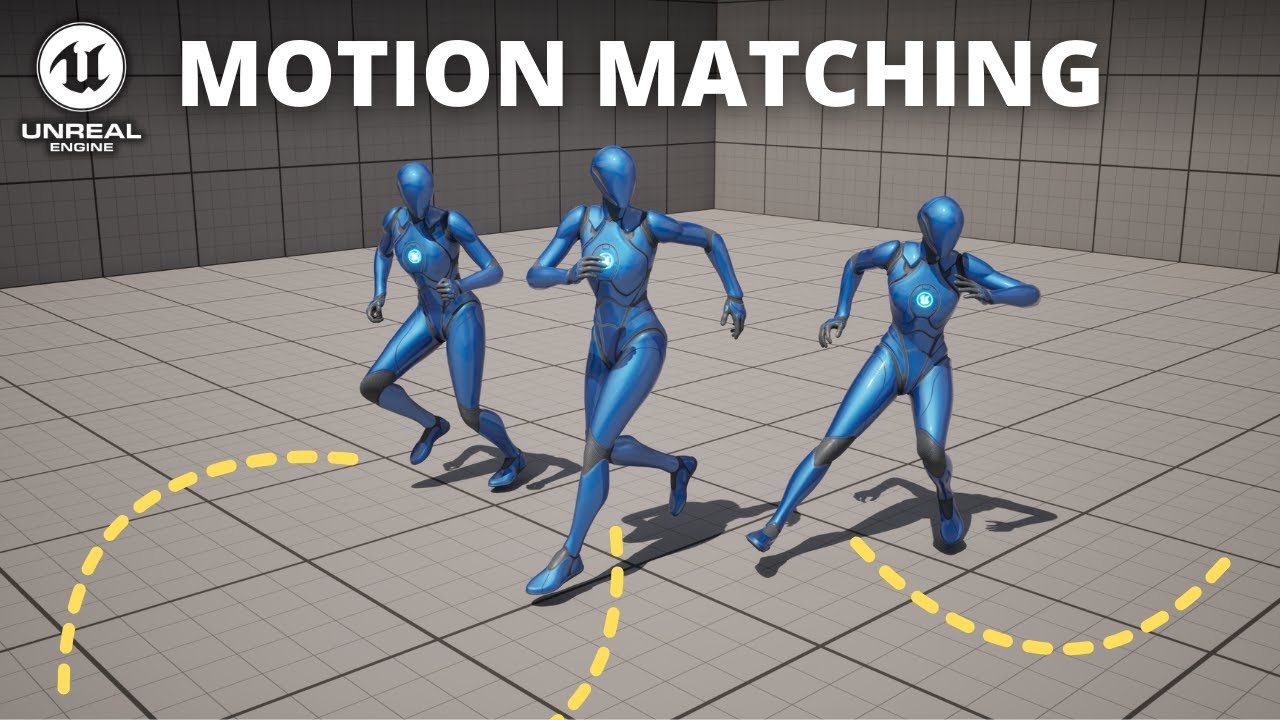
Hello guys, in this quick and simple tutorial we are going to see how we can use Motion Matching in Unreal Engine 5.4.
↪️Project Files: https://bit.ly/GorkaGames_Patreon
🏆My New Unreal Course: https://bit.ly/UE5_StealthCourse_GameDevTv_GorkaGames
🔥Discord: https://bit.ly/GorkaGamesYouTubeDiscordServer
Lyra: https://www.unrealengine.co...
tardy berry
delicate crane
Lyra. https://www.youtube.com/watch?v=S4aBd64t-hY ... however I'm still not sure...
I don't need a tutorial, what I need is Data
delicate crane
tardy berry
I don't need a tutorial, what I need is Data
Lyra has data. But it's not just assigned as it is for GASP. The tutorial shows you how to use it for Motion Matching (which mostly is to enable root motion at all and assign it to the database).
tardy berry
It seems like there isn't much motion data for lyra
Also, the tutorial guy didn't use foot locking, not much data + without foot locking = disaster in my opinion
thank you for the info though
delicate crane
The issue with motion matchin is that it's pretty "new". There are almost no paid asset sets on fab that are prepared and even less for free. You can create them yourself but even that is not so easy. In my opinion for small or indies the time that you pay for it is too much for what you get.
delicate crane
Also I'm no big fan of the GASP animations. They look too "comic" (e.g. run left/right). So overall the amount of motion matching anim data is too thin.
tardy berry
it's not the problem of motion matching itself
the problem is lack of data
anyway, I'll talk to our animator guy and see if he can speed things up 
wet basin
if ur just looking for an animation library, rokoko and mixamo have pretty large ones
 hexed granite
having a hell of a time just trying to replace the damn Manny default model. i have a daz3d to unreal exporter (using a daz3d mesh) but the retargeting and IK is not working at all for me... there's got to be a easier way to simply replace Manny no? that's like the basis of any new game creation
 jovial anchor
hi everyone, why does my animation in mixamo look cool but in unreal engine it moves differently, maybe I forgot to turn on some parameter?

 carmine estuary
Anyone know how to make a blender animation properly import to UE5 when some of the bones use blender contraints? I swear everything in my animation looks fine except the head of this creature I'm animating, it limply follows the body without any of the movement my animation is supposed to have, seemingly because its deformation bone is using constraints. The rig itself is just the dog rig from blender's metarig addon.
 slim topaz
jovial anchor
hi everyone, why does my animation in mixamo look cool but in unreal engine it m...
slim topaz
jovial anchor
hi everyone, why does my animation in mixamo look cool but in unreal engine it m...
you might need to use "mixamo converter" its a free software that retargets the rig
jovial anchor
slim topaz
you might need to use "mixamo converter" its a free software that retargets the ...
thank u very much
slim topaz
jovial anchor
thank u very much
all good!
jovial anchor
slim topaz
all good!
bro i need use mixamo character in "Mixamo Converter" and retarget it in unreal enigne to my character?
slim topaz
jovial anchor
bro i need use mixamo character in "Mixamo Converter" and retarget it in unreal ...
you can set it in the converter to use UE rig, without retargeing in UE
jovial anchor
slim topaz
you can set it in the converter to use UE rig, without retargeing in UE
oh okey tsym
slim topaz
jovial anchor
oh okey tsym
yee, see how it goes for you
jovial anchor
slim topaz
yee, see how it goes for you
very bad
 slim topaz
jovial anchor
very bad
slim topaz
jovial anchor
very bad
intesting... have you the correct fbx in the folder?
jovial anchor
slim topaz
intesting... have you the correct fbx in the folder?
i do something wrong i watch tutor right now
jovial anchor
slim topaz
for mixamo are you using the UE character?
mani ?
slim topaz
jovial anchor
mani ?
you mean "SKM Manny"?
jovial anchor
slim topaz
you mean "SKM Manny"?
yeap
slim topaz
hmmm, when you export the animation from mixamo, are you just exporting animation, like without the mesh?
jovial anchor
slim topaz
hmmm, when you export the animation from mixamo, are you just exporting animatio...
with mesh
omg
 slim topaz
jovial anchor
with mesh
slim topaz
jovial anchor
with mesh
try without mesh...
jovial anchor
slim topaz
try without mesh...
what do u mean i can't understand
slim topaz
jovial anchor
what do u mean i can't understand
there is a toggle on the export page at mixamo
jovial anchor
i export my character from unreal enigne 5.6 and import character in mixamo download it and drop it in mixamo converter
slim topaz
jovial anchor
i export my character from unreal enigne 5.6 and import character in mixamo down...
I think you have to use "manny" in mixamo, for the animations
slim topaz
yee, then you can import that animation in UE, then apply it to your character in UE
its a weird process lol
jovial anchor
slim topaz
its a weird process lol
oh i dumb sorry
jovial anchor
slim topaz
the process is 😉
ahhhhhhhhhhhhhh
 slim topaz
jovial anchor
ahhhhhhhhhhhhhh
slim topaz
jovial anchor
ahhhhhhhhhhhhhh
ooon nooo, why he dead 😭
jovial anchor
slim topaz
ooon nooo, why he dead 😭
bro im dead
gg any more other options how to fix it?
slim topaz
jovial anchor
gg any more other options how to fix it?
you might need to retarget your rig with the other, but dunno how to do that tho, soz
jovial anchor
slim topaz
you might need to retarget your rig with the other, but dunno how to do that tho...
wooooow
slim topaz
jovial anchor
wooooow
what? why wooow?
jovial anchor
nah this retaget rig
slim topaz
aww ye, hope it goes well for you!
jovial anchor
slim topaz
aww ye, hope it goes well for you!
thx
 worldly badge
Hey anyone on that could answer a question about GASP?
worldly badge
Well i will just post it here hoping someone could help clarify it later.
I am trying to have my character turn without having to aim. I have successfully done it while the character is in motion but, the idle animation wont allow it. However, it will allow it when using the right mouse button (aim). I've looked everywhere within the Anim graph and tried multiple solutions...but i still can't get my character to turn while idle. It will look left and right, but is completely rooted and wont turn at all.
 dull stream
Hi, is it foolish to drive morph targets from blueprint to animate a character face and deciding the values based on interpolation over the duration of a phoneme?
Or is there a very simple way of driving facial animations from a text line? Currently I would translate the line into phonemes and estimate the durations for each one. And then feed that into some interpolation curves. But the movements seem very hasty and unnatural.
 slender willow
hello good day
please again im still wondering how to retarget an animation that is animated on a particular bone which the mesh im trying to retarget to dosent have the bone
i tried using the skeleton aditor to add custom bone but it breaks the whole animation of my main character
i tried using visual bone it dosent retarget the rotation and location
anyone with a solution?
 spice helm
@gentle lake i think i managed to add the anim very simple like this the problem is not looping, is like 2 secs and the anim stops
 gentle lake
spice helm
<@910231430074859570> i think i managed to add the anim very simple like this t...
gentle lake
spice helm
<@910231430074859570> i think i managed to add the anim very simple like this t...
go into the montage itself
on the left there will be asset details
theres a loop check box a bit down under animation
but it might be better to have this in the anim bp depending on what your doing
basically theres a way to have a boolean and set an animation state
spice helm
gentle lake
go into the montage itself
im insidee there, on the montage is loop on and on the anim is loop on too
nothing changed
gentle lake
spice helm
nothing changed

trying doing this instead of play montage
i think the set might be a bit redundant
but it should work
obviosly check looping as well on play animation
gentle lake
what does your compents look like ?
spice helm
how u got that character, target mesh togehter
gentle lake
spice helm
how u got that character, target mesh togehter
character is a reference to the character bp, in your case your already in the character bp so you can use self
spice helm
 gentle lake
spice helm
gentle lake
spice helm
ok right, set the mode to use asset
spice helm
is not reaching self too
gentle lake
spice helm
this is fine you don't need the character, mesh, all you need is the mesh
spice helm
got it
gentle lake
gentle lake
ok right, set the mode to use asset
^ i think you can just play without the set animation
i would try that first
gentle lake
spice helm
when i selet the anims in the last two nodes
wdym errors ? can you show
gentle lake
do you have the mesh plugged into it ?
gentle lake
spice helm
even if i keep empty it says ''warning''
hover over the warning what does it say ?
spice helm
 gentle lake
spice helm
gentle lake
spice helm
plug the mesh that you plugged into the first one, into those two
where is says target
that should be hooked to mesh
like the first one
spice helm
ok its working
i placed the anims i wanted on both of them ( dont know why should i choose on both nodes)
so like this we avoided the montage?
we not used the montage
we just ''played ''the anims selecting it
so when should I use the montage
also id like to ask you, how does Unreal understand taht the node ''mesh'' is my character?
gentle lake
spice helm
so when should I use the montage
if it's a play once and blend with the rest thing then montage
but if your going to be pausing the state basically then i would use the animbp, but this way i showed you is a work around from setting up a state
gentle lake
spice helm
also id like to ask you, how does Unreal understand taht the node ''mesh'' is my...
it's a variable, that is linked to that component, its a reference
i reference basically means this variable is that thing you set to
spice helm
gentle lake
if it's a play once and blend with the rest thing then montage
what means a play once
gentle lake
spice helm
what means a play once
like not looping, play the montage and black at into the animation bp
if it's looping then it's blocking
and it doesn't go back to the animation bp very easily
spice helm
so i should use the montage only if i dont want it looping?
gentle lake
spice helm
so i should use the montage only if i dont want it looping?
if you want to play an animation and blend it into your animation bp use a montage
if it's "blocking" meaning it doesn't go back to the animation you want to use state
but state you would need to look up a tutorial it's a little more difficult
so i showed you a work around basically
gentle lake
spice helm
we just ''played ''the anims selecting it
yes, and i actually not sure you need the set animation node, just the play animation node should be fine
spice helm
ah indeed what is the set animation for
bc i had to select two times the anim i wanted there and the next node too
deleted it
wasnt necessary
gentle lake
spice helm
wasnt necessary
thats what i'm saying, i put in there but i don't think you need it
and to switch back i think you can just set the mode back to your animation blueprint
you may have to reselect your animbp, not sure
spice helm
i dont remmber how i blocked the movement input and not the camera. i did like before with a node in the end ''disable movement'' but its blockijng also the camera now
oh done
well yes its working
i cant still stop the anims and go back to idle but its a thing
gentle lake
gentle lake
and to switch back i think you can just set the mode back to your animation blue...
^ "i cant still stop the anims and go back" <-- try this
spice helm
seems fine

ah to switch back
well set the mode back is a whole bunch of work i guess
because i guess it means1. press the key E again to stop it 2. give a position where it should stop?
since she needs to be stopped literally inside the box collision again with E
i mean, if i have to stop the anims, she will be still inside the box collision
and if i press E she probably trigger again all the interaction we did
gentle lake
spice helm
since she needs to be stopped literally inside the box collision again with E
you can use another boolean, isInteracting
kind of like a state variable
if it's true your animation is playing, if its false it's not
spice helm
i've tried yesterday with a tutorial and failed, making her detach from that was harder than doing this
but if i do manage to, atleast i could add bunch of anims all around my room
wihtout always starting and stopping the game
to test them
gentle lake
you could also use a flip flop, but those are not very reliable
a boolean that says if the animation is playing, then when you press e again you can check if the animation is playing, and if true, set it back
spice helm
gentle lake
a boolean that says if the animation is playing, then when you press e again you...
to the same place of my BP character?
gentle lake
spice helm
to the same place of my BP character?
ya after you check isinteracting, then check isanimationplaying
spice helm
gentle lake
ya after you check isinteracting, then check isanimationplaying
so basically i copy and paste all that group of nodes but swap that thing?
making a new variable
i think i did not understand
checking out whats a flip flop on yt
spice helm

like this the flip flop?
i've tried to add after the second branch a play animation and trying to get back to the deafult movement of my character BP
but not worked
i've also tried to add the arrest mesh, it does arrest it but is not what i need
i managed to do it
my own
the last thing is only one
since to the A when we using the anim i have a disable Input. To our B i need to reactivate the movement
and i dont know what node to use
spice helm
i managed to do it but deleting ''disable movement'' on my whole A group
finally i did it
spice helm
now im trying to do the same exact thing on another BP mesh with a different animation
for some reason its not working...
i swapped the cast to_ (my new BP mesh) and connected again in the BP mesh the capsule to my character
i thinkj the problem is that i can't generate another overlapbeing/end and its makng Custom even1 and 0
spice helm
how can I add another Overlapbeing component to my Bp character
hexed granite
I'm so close to import a DazG9 into UE5.4.
I used Daz to UE, and then converted the Skeletal Mesh to Epic. The rig was perfect except the face. Does anyone know why?

 keen inlet
@hexed granite are you using Mutable by any chance? I have the same weird problem and can't really put my finger on it. It only happens when using the Game Animation Sample Project with Mutable. If Mutable is not involved, the retargetting works fine: https://www.youtube.com/watch?v=7TmTSCrTQLw

In 5.5 there was no problem at all
It seems to be some issue with the new retargeter... however, in my case, only if Mutable is involved
keen inlet
OK I think I found the culprit, PelvisMotionOp calls a function that copies all child bones, I rewrote it to only copy the pelvis, now everything seems to work like it did in 5.5. I'll need to do more testing though.
hexed granite
I'm not sure what mutable is...
But I have one side-solution:
Workflow:
Daz to Unreal (using the latest plugin)
In UE5.6, I pick the ported Skeletal Mesh and convert it to Epic skeleton, Merge/All options
The above pic is what a G8 character looks like.
On a G9? It works!! So it's an issue with G8 + Daz to Unreal bridge + UE5.6 Epic skelly conversion
 topaz cobalt
can someone explain the difference between all of these 4?
 delicate crane
topaz cobalt
can someone explain the difference between all of these 4?
delicate crane
topaz cobalt
can someone explain the difference between all of these 4?
They differ in terms of what what they expect (anim instance or character) and what they play (montage or sequence). Overall I prefer "Play Montage" if I would play a montage because it has the most outputs. You can easily respond to some notifies (use switch node) if something happens (e.g. if equipped or if slash starts, ...) or if you still would do something (or abort something) if it's interrupted.
topaz cobalt
delicate crane
They differ in terms of what what they expect (anim instance or character) and w...
so the left 2 are different ways to implement montages, and the right 2 are for just anim sequences?
Quick question, how would you get the mesh component of an NPC/AI where they might have mutliple difference classes?
delicate crane
No you've 3 for montages. And probably even the 4th could play it (not sure if it accepts that type) but only "Play Montage" gives you the OnSomethingHappened outputs.
delicate crane
topaz cobalt
Quick question, how would you get the mesh component of an NPC/AI where they mig...
If the NPCs inherit from the "Character" class then all of them must have a Skeletal Mesh Component. So you can just drag a wire from your NPC->Cast to Character->Mesh.
topaz cobalt
delicate crane
No you've 3 for montages. And probably even the 4th could play it (not sure if i...
🤦♂️ sorry, mb
delicate crane
But... usually I play the montages from the character BP (either NPC or player) anyway. I try to keep as less as possible logic into anim BPs.
topaz cobalt
delicate crane
If the NPCs inherit from the "Character" class then all of them must have a Skel...
so even when the AI might be a custom skeleton for an animal or fantasy beast?
delicate crane
topaz cobalt
so even when the AI might be a custom skeleton for an animal or fantasy beast?
Yes. As long it's a Character it has a mesh (and a CharacterMovementComponent and a CapsuleComponent). They are mandatory (for current versions of Characters).
topaz cobalt
the reason I'm asking is I'm designing some combat systems, inc for AI, and so I need to control anims they play from blueprints at runtime
delicate crane
Yes. I do so as well.
It really does not matter if it is a custom skeleton or not as long it is a skeleton mesh and the character uses it as the skeleton mesh component you can just run your anims straight from the character BP or if you would run it from a behaviour tree task or state tree you can just cast to Character and from there you got your mesh component.
If you use a different base class (e.g. Pawn or Actor) then you can use some interface to do some "GimmeSkeletonMesh"... but I think you would not really need it. Character is just fine for NPCs. Usually you would use some CharacterMovementComponent anyway somehow.
topaz cobalt
delicate crane
If you use a different base class (e.g. Pawn or Actor) then you can use some int...
so I should design all my AI around being of a character class. And then it's easier to control in bps. Correct?
Remind me what the node is called to dynamically get the character, I'm assuming I would need to do "Get owner > get character > get mesh"
delicate crane
If it is some NPC or player that has some movement that matches with the CharacterMovementComponent then I would just use the Character class yes. CharacterMovementComponent has walking, flying, crouching and so on. So if you need any of those use a Character as class. How you get your character (or if you even need to get it) depends from where you wanna use it.
This is some of the Play Montages I use in my enemy NPC character BP:

And that's part of AI task I use for that (used in behaviour tree). I'm casting to BaseEnemy instead of Character because of event dispatchers. Usually I prefer some base classes (so Cast to Character).
 topaz cobalt
delicate crane
If it is some NPC or player that has some movement that matches with the Charact...
topaz cobalt
delicate crane
If it is some NPC or player that has some movement that matches with the Charact...
I'm assuming that a custom enemy (eg.a spider or snake) will have complex collision on its mesh already. So then does the movement component support things that may not naturally have legs?
delicate crane
topaz cobalt
I'm assuming that a custom enemy (eg.a spider or snake) will have complex collis...
A character has a capsule as component. So if you collide with a wall or the bottom it's the capsule that keeps your offset from your map. But the mesh inside the capsule can have limbs (with own collisions and IK for foot placement). In case of a spider a capsule probably would still do (like a sphere) and use some IK for the legs. For a snake I'm not sure but I think I would still go with the character BP a capsule that's more 90° rotated and use IK for all the bones of the spine to match the floor. But other than that all of them has a skeleton mesh component. You can probably even use Pawn instead of Character if you really don't need the other components. But even in that case... as long as you got some skeleton mesh (which is the case in all of your examples) you can just drag a reference from it.
topaz cobalt
delicate crane
A character has a capsule as component. So if you collide with a wall or the bot...
coolio, I think I have the info I need now
thank you for the help 😄
delicate crane
welcome
dark crow
I have a animation blueprint that has lyra turn in place added to it. The turn in place works without issue. In my characters BeginPlay I spawn a weapon and attach it to my hand_r where it is lined up. The issue I have is when I turn left or right, the gun stays straight. If I trigger a turn in place, the gun will move. So its like the gun is only in line with the legs. How can I get it to follow the arm?
 hexed granite
Hi, is there any way to raise the mesh in UE5?
I've tried transforming on the vertical axis across several different ways to no avail.
Changes made in the skeleton, the skeletal mesh, and the "Scene" offsite. all failed
 delicate crane
hexed granite
Hi, is there any way to raise the mesh in UE5?
I've tried transforming on the ve...
delicate crane
hexed granite
Hi, is there any way to raise the mesh in UE5?
I've tried transforming on the ve...
If you raised the mesh in the character BP but it's still in the floor like this when you begin play it's most likely because you use some kind of leg IK that needs an offset. If you use the Control Rig node in your anim BP it's done in the control rig and can be fixed there. If you use the "Foot Placement/Leg IK" nodes (Game Animation Sample Project) then you can do it in the Anim BP with some transform bone as well.


 leaden harbor
Are there modifers for the curves of controls of a control rig in sequencer (such as noise/sine)?
 stuck forge
leaden harbor
Are there modifers for the curves of controls of a control rig in sequencer (suc...
stuck forge
leaden harbor
Are there modifers for the curves of controls of a control rig in sequencer (suc...
Not in the same way Blender has them, no
stuck forge
hexed granite
Hi, is there any way to raise the mesh in UE5?
I've tried transforming on the ve...
You could also use a transform track in Sequencer if you're not talking about gameplay and are focused on a Level Sequence
loud lodge
Hi guys, any idea on how I can remove the 180 spin when blending between my animation montages?
I normally play the montage from blueprint code, so editing the sequencer wouldn't work, it's just to visualize the problem.

The animation preview window shows what I want the blending to look like.
The sequencer shows the actual result. (180 spin)
hexed granite
delicate crane
If you raised the mesh in the character BP but it's still in the floor like this...
Ty! I'll give that a shot
Where is the node/blueprint that points to this manny idle animation? I have a new idle animation I would like to use but I can't find the place to define it
A YT says to find ABP_Manny but I can't find that in my project (dif version?)

 desert zenith
question, is there a way to blend two animations together without a montage? I want to combine upper body of a run animation with lower body of a strafe animation
spice helm
ok here i moved
 quaint summit
How's the walk cycle?
spice helm
this is a part of the pick up system

montage is playing the animation splitted with legs and ''holding'' upper one
the box before i started to follow the drop was picking up and realeaing with correct animation
getting back to idle and regular walking
this part two of the pick up still

this the dropping part

the last montage is setted on ''non'' in ''animation assets''
none*
gentle lake
did you try stop montage instead of setting a blank montage ?
spice helm
gentle lake
did you try stop montage instead of setting a blank montage ?
so I should add a stop animation montage
instead of that one in the drop system?
gentle lake
your trying to stop the montage by setting it to a blank one right ?
spice helm
gentle lake
your trying to stop the montage by setting it to a blank one right ?
if i add a stop montage the anim not starts, both of them. i have the actual montage play animation on blank yea
i mean is setted on None
OH yea
u were right
i added for mistake the Stop montage on the pick up and not drop, now i added it on the final drop part and it stops properly
but the box is still not on the ground
drops the box like flying everywhere i want, but i want it to be dropped propelry on ground
gentle lake
turn on physics when you drop it ?
spice helm
i tried it
not woreked
i turned on also gravity and physic
i just turned up the physic on the box in general on the mesh detail
NICE
did it
i was changing the phsic of the child BP and not the main box BP mesh
now physic is on and all working
thank u
now im going to try to fix the other box with this system now added
he made me do childs for that
so i think i could pick up with the same anims just making them childs of that BP
when i drop the second box it become small, i copy and pasted all the parameters X y z to the box asset
not working
did just the same as the first one
damn now the second box on pick up is insidible
invisible
💀
@gentle lake Can I ask you why the second Box drops smaller than when i pick it ?
when i pick it respects the XYZ scale i applied but when drops it doesnt, its small
 rain osprey
Hi there, im trying to create an AimOffset for an automated Turret. For some reason the barrel is twisting between some poses, Up & Down / Left& Right

Is there a way i can restrict that bone to only move on a specific Axis??
The barrel should just be pitch and the base rotate yaw
gentle lake
spice helm
when i pick it respects the XYZ scale i applied but when drops it doesnt, its sm...
whow do you apply the scale ?
gentle lake
spice helm
when i pick it respects the XYZ scale i applied but when drops it doesnt, its sm...
 runic peak
Does anyone know UE5 might be changing my animations on import despite them using the same skeleton?
It's going from this

To this. I don't know what it would even move to do that.

 smoky quest
if I have an animation that reverse a spaceship doing a half backflip and then rolling back "upright" whats the best method for orienting my control rotation to that same orientation?

 solemn kestrel
Hey Everyone! I have an issue. I set up a really simple Anim BP for a custom weapon in unreal, the animation plays everywhere except in the level. I chose the right skeletons, i chose the right Anim BP in my Weapon's blueprint layout. But for some unknown reason the animation doesn't play. The animation is simply the barrel rotating. I'm on a source build of unreal 5.5. Let me know what you guys would suggest i do???

 zinc fog
Are there good code based tweening plugins like how Unity has DOTween?
zinc fog
solemn kestrel
Hey Everyone! I have an issue. I set up a really simple Anim BP for a custom wea...
Does it play in the blueprint editor too?
solemn kestrel
zinc fog
Does it play in the blueprint editor too?
it plays everywhere except the Level. What i did is i created a new Blueprint class which is an Actor, added a Skele mesh and dragged into the map, it did spin then. So i have concluded that it has something to do with my C++ code for this weapon class. I'm not sure what. One aspect is that the skeletal mesh is 3rd parent away from the Weapon, ItemAndweaponClass->ShootingClass->MiniGunClass. Skele mesh is created in the ItemAndweaponClass. I'm not exactly sure why it's not working. Next stem is to create a new skelemesh in the Minigun class and see if that works.
zinc fog
solemn kestrel
it plays everywhere except the Level. What i did is i created a new Blueprint cl...
It seems like the setup is very specific to your project. Hard to give much pointers without seeing the actual code and other setup. I hope you figure it out soon though.
solemn kestrel
zinc fog
It seems like the setup is very specific to your project. Hard to give much poin...
I'm not sure what it is. But i'll keep messing around until i figure it out.
zinc fog
If you think it has to do with the code, see if you can disable large sections of it to narrow down the issue. Sometimes it's easier than debugging every line to see what's happening
 gentle prawn
Anyone have any ideas why animations might fall apart on import?

 uncut hamlet
Hello!
I am currently trying to animate a spider, and i have a wierd problem where flipping the pose of the animation, will completely break the pose.
I've attached a video to this problem:
https://youtu.be/_gq5LhKOeRg
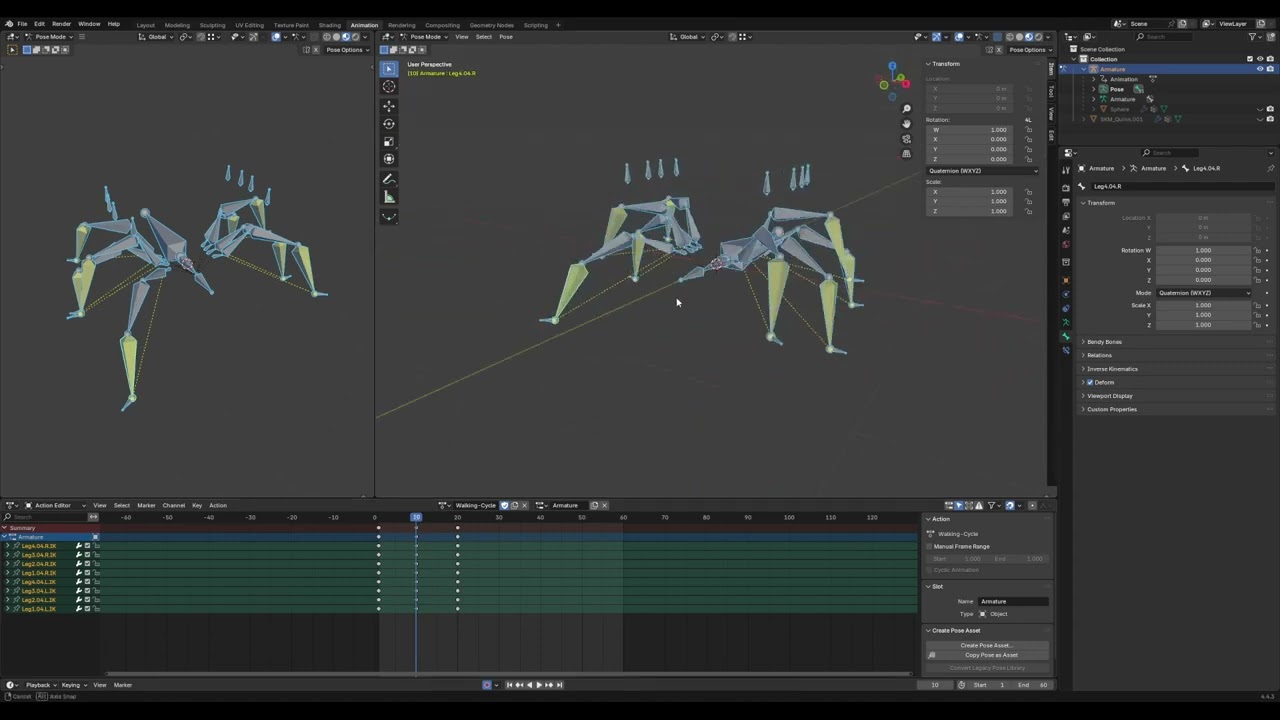
 minor spindle
Hey!
I have ABP and Control Rig node.
In my Control Rig I have Vector var with some data.
How I can transfer vector's data to my ABP ?
gentle prawn
gentle prawn
Anyone have any ideas why animations might fall apart on import?
Anyone know anything about this?
 dreamy bison
Hi @austere sapphire
Wassup?
 austere sapphire
Can we chat on telegram I am unable to send you messages for a while seems from discord
austere sapphire
austere sapphire
Can we chat on telegram I am unable to send you messages for a while seems from ...
@dreamy bison
I even thought you blocked me
dreamy bison
austere sapphire
Can we chat on telegram I am unable to send you messages for a while seems from ...
No
Why would I block you? 😄
austere sapphire
Send me a friend request
dreamy bison
That's nice that you can see it 🔥
I wanted to ask, can we chat on whatsapp, if you can?
austere sapphire
Our studio can get on telegram
dreamy bison
Alright. Can you tell me in DM, how is your studio called in telegram? I can't really find it by searching
austere sapphire
@phantomjs
 austere sapphire
Yes 💥
 oblique tusk
Question about root motion in animation montage and animation instance
How can I access and disable root motion during gameplay for specific animations?
My character has an attack with Anim montage that propels him forward, and after that he puts away his equipment. All animations have a sequence of returning to the idle position in the last key frames. This return works well with root motion, but I would like to condition that if the player moves, the anim montage would continue without the root motion, but applied only to the upper part of the character.
Note: the blend mask part has already been done, as well as the verification of the moment of execution of the aspect change, but I don't know how to access the root motion in blueprint.
I found the same question on the forum in a 2017 answer where the solution was to create a class in C++ with the root motion exposed for modification. However, since it is very old, I imagine there are other new ways
delicate crane
oblique tusk
Question about root motion in animation montage and animation instance
How can ...
You can use Set Root Motion Mode from anim instance #animation message
oblique tusk
delicate crane
You can use Set Root Motion Mode from anim instance https://discord.com/channels...
Thank you very much. This helped a lot
 hard socket
Hi, where are the "Animation Settings" in 5.6?
https://forums.unrealengine.com/t/no-animation-settings-in-5-6/2545313

Epic Developer Community Forums
Maybe I’m missing something obvious, but I can’t seem to find the “Animation Settings” Drop down that used to be in the animation window. I’m trying to get controllers to show during playback, which I think(?) you used to be able to toggle here using “hide control shapes”. In the docs, this window is still shown with animation set...
 lethal edge
Is there a fix for this error in 5.6 for retargeter? IK Retargeter bone chain, Root, was unable to be normalized. Chain too short.
runic peak
Does anyone use UEFY 2 for Blender? Is it worth the money, to go from Rigify to UE that way?
 radiant parrot
did anyone ever faced some issues with root motion animations and figure it out? i'm unchecking root motion in the anim seq window(no issues here) but it still bahaves like it's enabled in sequencer and animations play in place. animations are from mixamo by the way.
 raw storm
anyone know why this is happening?
I set up my animation blueprint but for some reason after executing the running animation it stops and stays a the end of the animation while I’m still running and only resets when I go idle and then run again. How do I fix this?
raw storm
nvm i fixed it lol
dull stream
Hi, is OVR Lipsync still used for lip syncing characters?
rain osprey
@serene arch This is whats happening when trying to switch to the aim offset State Machine:
I super slowed it down


 viscid willow
rain osprey
<@251746269012295690> This is whats happening when trying to switch to the aim o...
viscid willow
rain osprey
<@251746269012295690> This is whats happening when trying to switch to the aim o...
this will be related to your additive settings. things to check are whether your additive types are all the same within the blendspace.
also are you applying the additive animation anywhere? can't see a node for it in your screenshots
 rotund linden
How to overlay a montage of pure curve data on a skeleton animation montage?
I use curves to control material parameters to achieve a flashing effect. I want to play the hit animation and the flashing animation when character get damage.
This only played the get hit montage but not the curve montage.
 rain osprey
viscid willow
this will be related to your additive settings. things to check are whether your...
rain osprey
viscid willow
this will be related to your additive settings. things to check are whether your...
Im using Local Space for all the Aim Offset Poses, if i use mesh space it lets the joints of the turret twist (i guess you'd want that on an organic model but not some like this)
Then i have a standard Reference Pose
rain osprey
viscid willow
this will be related to your additive settings. things to check are whether your...
On your other point, i am just trying to switch to use the Blend Space when the turret is not idle
im not sure if this is correct or not?
viscid willow
rain osprey
On your other point, i am just trying to switch to use the Blend Space when the ...
if it's an additive animation you need to apply the result of the blend space as an additive to some base pose.
so in this case your blend space would be additive to the idle, not that its toggled on or off
rain osprey
Sorry bear with me, im pretty dumb. I have all the typical poses, and then a ref pose which is NOT an additive anim, it just mimics the "Centre, Centre" Pose

Thats what all the additive anims are using as their reference, or is that wrong? Should the additive anims have a different reference pose than the blend space?
@viscid willow
 serene arch
In your anim blueprint you need to use the “apply additive” node and apply the blend space onto that non additive anim you are using for it
rain osprey
ah, so not layered blend by bone?
@serene arch omfg

@serene arch @viscid willow Thank you guys
I was using layered blend by bone
serene arch
Yea blend is usually for non additive anims but a aim offset is additive and needs to be applied to a base
Also you can use blends on aim offsets you just gotta apply them to a base first
rain osprey
serene arch
Also you can use blends on aim offsets you just gotta apply them to a base first
I think what was slipping me up was that i'd done this before on a course using the method i did orignally, but it was an aim offset for a character and we were doing the layered blend by bone from the spine or something. Live and learn i guess, thanks again for the help
gentle prawn
I desperately need some answers as to why the animation would fall apart when imported into the engine from Blender.

It's been causing a headache for over a week now
rain osprey
gentle prawn
I desperately need some answers as to why the animation would fall apart when im...
What do you mean animation fall apart?
Looks like all your face smoothing is borked too
leaden harbor
gentle prawn
I desperately need some answers as to why the animation would fall apart when im...
check if the root bone of your skeletal mesh is scaled in unreal
gentle prawn
rain osprey
Looks like all your face smoothing is borked too
These are just proxy meshes, ignore the looks.
gentle prawn
leaden harbor
check if the root bone of your skeletal mesh is scaled in unreal
Like this?

Yeah...
Something really isn't right here...
The cannons barrel bone is coming out of it's butt...
What's causing the bones to just explode like this?

This is the rig in Blender, If I apply all transforms then everything just explodes in engine.
Is the rig bad or is it my import settings...?

 brazen wharf
your scale is probably wrong and therefor screwing it up on import
scene unit scale should be 0.01, not blender default of 1.0
then you have to scale everything up by 100 and apply scale
which may break your animation within blender
leaden harbor
gentle prawn
Like this?
yeah this is fine I think not sure what the problem is
gentle prawn
Okay, I was able to find the solution by exporting it as a glb instead of an FBX
 limber wharf
Has anyone made the gameplay animation sample work with Mover, or hopefully there's a github project somewhere?
 hollow mesa
Hey folks, sorry to just pop in and drop a question but I have a bunch of animation packs for the default manny fps arms and I want to use them on the full third person mannequin (since I blend by bone anyway per weapon type in my anime bp). Do I just need to re target the arm skm to the manny skm?
 ember tundra
Is there a way to slow down an animation like this and make it smooth or interpolate from frame to frame?
It is quite choppy if I slow it down to 25% of the original speed.
 novel blaze
Does anyone have any idea how it is possible to play an anim montage 5 times and for each time you set its position to a specific time and copy that pose to a poseable mesh component but each time the pose is different?
novel blaze
novel blaze
Does anyone have any idea how it is possible to play an anim montage 5 times and...
Okay I figured it out. The problem was happening because if the montage's play position was at 0.6 then I set it manually to 0.5 and finally snapshot the pose the bone transforms will still be where they were for when the montage was at play position 0.6. The solution was actually pretty simple. I just had to force an update of the bones by ticking the skeletal mesh with 0 delta time and call refresh bone transforms.
 balmy epoch
Does anyone know how you would go about adding an Aim Down Sights animation to the newest 5.6 FPS template? I've never worked with animations in ue so it's difficult for me to parse
 sterile abyss
I am try to control the arm IK and trying to move the hand to Specific FVector position in worldspace that is controlled in the C++ actor. But i am getting opposite results.
I am a beginner when it comes to Animation blueprint, any suggestion would be helpful.


 sterile abyss
Solved it forgot a adjust to a rotation that i do earlier
 loud lodge
I have a zombie walk animation with root motion from mixamo.
I can't figure out why the character is moving forward and slightly to the right, as if it is rotated. The animation seems to move straight forward. Any ideas?

 loud lodge
I would expect the character to walk along the line in the grid.
Let me ask my question in a different way.
I am inspecting the animation in blender and I can see that the armature is translated and rotated in the animation.
Is this correct or should the armature be static at world 0,0,0?
(The orange dot in the video is the position of the armature)
loud lodge
I managed to solve it. It seems like the blender plugin "Mixamo Converter" I was using to convert the skeleton mesh into a Unreal Engine compatible skeleton was transfering rotation to the root bone from the animation. When I deselected the "Transfer rotation" option in the Mixamo converter menu and reimported it into Unreal Engine, then the character started walking straight when using root motion.
 ember tundra
This is increasingly becoming a complete "self-help" channel. Read the most recent posts above, it's people posting the answers to their own unanswered questions. I was just about to post a possible solution to my animation problem involving linear interpolation when I was starting to wonder. It's not all of the time like that if you browse around here but increasingly so, probably since the rise of AI. I guess many people don't even come here anymore and just ask any LLM instead. It's too bad, I'm still very fond this channel exists and it helped me a great deal only a few years back.
 rapid moth
Hello here, I still have the same problem with animation. I use mixamo animatio, my character goes in one direction, but in montage - not! I don't know why
I don't use Blender, try to retarget it via UE and use Cascadeur to do some clean up + root motion constraint addition
It's a still magic to me
rapid moth
loud lodge
I managed to solve it. It seems like the blender plugin "Mixamo Converter" I was...
Looks like it's something with rotation
 full crag
Animating a clock face. Trying to simulate the tiny bounce or reverse rotation of the second hand each time it increments.
How is this best achieved? Via some type of blueprint or looping animation curve or?
rapid moth
full crag
Animating a clock face. Trying to simulate the tiny bounce or reverse rotation o...
It's too difficult to me to understand what it means. I guess you need to adjust your animation a little, to add some bounce effect if I understood your question correctly.
full crag
rapid moth
It's too difficult to me to understand what it means. I guess you need to adjust...
Exactly
 signal edge
Hello, I am trying to use 2 animations for a skeletal mesh in a sequencer - body mocap and a face mocap. When i added both to the sequencer, it appeared as if they were 'weakened' and half as strong as they should be. i noticed when i changed one of the anims weight to 0, the other anim was working as expected. how can i fix this?
austere sapphire
signal edge
Hello, I am trying to use 2 animations for a skeletal mesh in a sequencer - bod...
Have you tried Using an Animation Blueprint with Layered Animation?
 dawn kiln
Hey guys, would anyone happen to know the "correct" way to achive this effect? In the background is my actual player running the idle animation. The one in the foreground is the same animation just I scaled it -1.
This is a side scroller, so I want to have the animation look the same no matter which direction the player is moving. I know scaling the whole player is a bad idea and would look bad if I did it in the middle of gameplay. Is there a way in unreal I can make a second animation clip that looks and works like the scaled one? either a compleatly seperate clip or one that flips it at runtime?

 nimble forge
I'm coming from Unity so still getting used to UE.
I have been trying to research what the easiest way is to rig a humanoid character so it will work with UE animations and the UE5 mannequin.
The issue I am having is my character is made of separate parts (upper arm, forearm, hand, etc). It is designed to be like an retro PS1 character so what I did in Unity was via rigify in blender manually assign a single bone to each mesh piece. That way each bone only controlled one body part like an action figure, no weight painting.
Anyone know how I can do something similar in UE5 and use the aniimations provided by Epic and on Fab easily?
 next python
you can just weight paint the mesh however you want
to be just for x limb part to x bone
you could also just attach meshes to each bone if you wanted
nimble forge
next python
you can just weight paint the mesh however you want
Do you mean form within UE? I haven't tried any rigging in UE, I've only used blender
next python
you can actually weight paint inside of unreal but this is like
the is literally just making all verts painted 100% to one bone
this is not rigging, this is just weight painting
rigging moves a skeleton, not meshes
nimble forge
Yes exactly. My issue is getting the rig into UE and working with the UE5 skeleton
next python
blender weight painting is more than good enough to just press select all and hit 100%
nimble forge
I already rigged my character fine in blender with rigify, but the animations look bad retargeted. Hence why I think I am doing something wrong
nimble forge
next python
the hard part is getting stuff from blender to unreal here
Yes, this is where I am having trouble. Most of the "solutions" I find online is to just use a tool to do it for you like autorig pro. I'll check that add on you linked out.
next python
I would assume to try just merging them into 1 mesh for export in blender which should be trivial if annoying
you don't want 1 static mesh per limb unless that's useful idk (it could be to swap out parts etc if that's how you set it up)
nimble forge
next python
I would assume to try just merging them into 1 mesh for export in blender which ...
My characters are already merged into one object with each bone assigned to a single mesh 'loose part'
 brittle pier
Hey I have a question I know how to make footstep sounds for 3d person or 1st person character but what about a character with foot ik set up? Because if I do the classic 3d person method I will have a footstep sound play whenever the feet touch the ground in my animation but with the feet ik I can't know when that will be because the feet touch the ground at different times when there are slopes involved with mountains or something with uneven ground
next python
how would foot ik prevent knowing when the foot hits the ground? it has to be able to measure the distance between the foot and the floor anyways
when that distance gets very small it hit probably hit the floor
I assume you could just declare it getting close as a footstep and then have some simple reset/cooldown etc to start waiting for the next footfall
brittle pier
next python
how would foot ik prevent knowing when the foot hits the ground? it has to be ab...
No i mean the method I had seen people using is going to the animation of running and placing footstep sounds whenever the feet touch the ground inside the animation
brittle pier
next python
when that distance gets very small it hit probably hit the floor
Yeah that sounds useful, how can I get a value from my ctrl rig to BP tho?
next python
brittle pier
No i mean the method I had seen people using is going to the animation of runnin...
yeah, so of course something that is dynamic would either guess or track the hit
I think I would be worried about it repeatedly stepping accidentally
brittle pier
next python
I think I would be worried about it repeatedly stepping accidentally
Why would that happen?
next python
it might be a good idea to have something like the actual movement of the pawn be what changes when you are ready for another foot sound or something
because the bone position and the trace in the world could move back and forth for a variety of reasons
standing on a moving thing that shifts the ik slightly
playing at a high framerate
etc
brittle pier
next python
it might be a good idea to have something like the actual movement of the pawn b...
Yeah that's true
next python
but maybe it just works, you can find out I guess
brittle pier
next python
but maybe it just works, you can find out I guess
Yeah thanks, do you happen to know how I can get a ctrl rig value into my BP?
next python
brittle pier
Yeah thanks, do you happen to know how I can get a ctrl rig value into my BP?
brittle pier
next python
from seconds of googling: <https://dev.epicgames.com/documentation/en-us/unreal-...
Lmao thanks
next python
fwiw I have no clue if that's the best way to go, I've never done foot ik sound events
it just seems like what I would try without anything else out there
might be something built in that does this for you
I would be curious to see how the ALS setup does it
signal edge
austere sapphire
Have you tried Using an Animation Blueprint with Layered Animation?
I am using UEFN and unfortunately anim blueprints aren't available. I was hoping there was another way
hexed granite
Is there an issue with the G9Retargeter (using Daz to Unreal bridge)?

I get a warning and needless to say, the targeting isn't working. I"m using UE5.6 and Daz to Unreal latest from github v5.5.0.509
novel blaze
What is the warning message saying?
hexed granite
 novel blaze
hexed granite
novel blaze
hexed granite
Yea that one is pretty straight forward. The G9 retargeter doesn't have one of the needed IK rigs assigned in its settings. So you either have to make a new one or find the one its supposed to use and assign it in the details panel
 remote summit
Is anybody else running into ANIM BP's crashing in 5.6?
Claud is saying the following:
"This is a Animation Blueprint compilation error that's causing an array index out of bounds crash. The error is happening during the blueprint compilation process, specifically when trying to access animation node data.
What's happening:
The AnimBP is trying to access an array element at index 0
But the array is empty (size 0)
This suggests there's a broken reference or missing connection in your AnimBP"
It was working last night before i closed the engine. When I woke up this morning and opened the project the ANIMBP is now failing.... seemlingy out of nowhere
novel blaze
I did the other day. I was manually calling "TickAnimation" on the skel mesh and that has some issues when using linked anim layers but other than that no.
remote summit
novel blaze
I did the other day. I was manually calling "TickAnimation" on the skel mesh and...
Interesting, I am not doing anything special. The odd part is I made no changes... and now I cant seem to get the animbp to open at all without the editor crashing 😦
novel blaze
Do you have editor symbols enabled? What is the error?
remote summit
doesnt really tell me much
and claude seems to think its related to a corruption issue. Not sure how that occurs here, since i touched nothing in the past 5hrs while sleeping 😛
novel blaze
Yea most of those functions are editor only so something is bugged out. Might have to roll it back to a previous changeset.
remote summit
that is what I am going to do next, see if it works from before my push last night. If it does.... confused lol
I have a feeling, it wont work
yeah, still crashes 😦 (just reverted the file to previous before my changes)
I might just revert back to 5.5 😛
novel blaze
Good luck. I had to rebuild the entire engine the other day because something corrupted due to hot reloading.
remote summit
ew
 lilac crest
I have a left run animation and I want to have the animation mirrored (left run => right run) , but with the leading foot being swapped (left foot first => right foot first). Is it easily possible using Mirror Data Table or I have to redo it in Blender?
novel blaze
Could use a level sequence and edit it in unreal using a mirror data table, then use the anim tools to edit further. Does require a control rig I believe. You can do the mirror without one but edits might need one.
 past garnet
I am learning ue5 and i want to make a realistic video game like resident evil with complex realistic animations and I need help and I'll be soo pleased if you could give me advice.
remote summit
past garnet
I am learning ue5 and i want to make a realistic video game like resident evil w...
Lots of tutorials online 😛 Youtube = best friend
past garnet
remote summit
Lots of tutorials online 😛 Youtube = best friend
But sometimes they are low quality videos according to the way of explanation + Thank you
remote summit
past garnet
But sometimes they are low quality videos according to the way of explanation + ...
I get that, but the topic is HUGE, you couldnt realistically expect anybody here to hand walk you through that. Unless, you paid somebody to do that.
The point of the tutorials is to gain a basic level of understanding, and then from there ask questions on where you get stuck or have a unique approach/idea
past garnet
I got it
remote summit
If you want "complex" realistic animations, you need to understand what type of systems you need/want
past garnet
I have made a basic ai system
remote summit
Well, this is the animation section 😛
past garnet
remote summit
If you want "complex" realistic animations, you need to understand what type of ...
they are not huge
remote summit
AI is a whole different topic
past garnet
remote summit
Well, this is the animation section 😛
I know
remote summit
Okay, lets start this way, what area confuses you the most and lets focus that
past garnet
remote summit
AI is a whole different topic
ok iam going to ask about it in its own section
past garnet
remote summit
Okay, lets start this way, what area confuses you the most and lets focus that
opening the door with the player hand
you know what i mean?
remote summit
If you want the hand, to go to the knob, you need to look at using IK
There are other "hacky" methods that could be easier and create an okay result, but if your going for "complex" and "realistic" then you need to use IK to drive the hand to the point (door knob)
past garnet
remote summit
If you want the hand, to go to the knob, you need to look at using IK
does that help if the actor is away from the object to make it moves toward it?
remote summit
IK = Inverse Kinematic (its math on how to solve for the arm joints and the location of bones/joints in doing so)

Check out my Discord channel: Check Information Page For Discord Link.
Thought I would do a quick breakdown on how they do reach targets in the Content Examples Pack. Btw this breaks down when the arm goes behind the character, you can test this out by moving the ball behind the character in the Blueprint and watch how the arm twists in funny w...
This is an example of what that looks like
The animation created, is a pointing animation. With the use of IK, and a target system, you can make the pointing animation go to the location you desire
There are 50 different ways you can accomplish this, some more hacky and some less hacky.
If your intent is to use this in a game, you should look at the control rig setup
https://www.youtube.com/watch?v=hhcpSXJ2zak&list=PL2A3wMhmbeArc-d471A4cku1pYA31X-ir - this guy has an entire series on what that looks like

In this Unreal Engine Blueprint Tutorial series we are going to help you break down the learning curve for all things Control Rig. We start by taking an intro look at what Control Rig is and creating your first control.
🎓 Why Control Rig
🎓 Control Rig Intro and tour
🎓 Control Creation
🎓 Understanding control visuals
Truly thankful ...
past garnet
remote summit
https://www.youtube.com/watch?v=hhcpSXJ2zak&list=PL2A3wMhmbeArc-d471A4cku1pYA31X...
I know this guy
remote summit
Using control rig, you can then create complex animations
past garnet
remote summit
Using control rig, you can then create complex animations
Awesome
remote summit
In real time, which is kinda what you are looking to do
past garnet
remote summit
In real time, which is kinda what you are looking to do
yeah
past garnet
remote summit
In real time, which is kinda what you are looking to do
can i use ue5 for making the whole animations of my vidoe game?
remote summit
In newer versions, yes
I would not think it is "ideal" but some people are doing it and have fun doing so
past garnet
remote summit
In newer versions, yes
I have the latest one
The last qst
I have an issue using lumen because my GPU is intel iris xe which doesn't support sm6 shader do you know a better practice i can do to improve my lighting quality for knowing that my video game has much dynamic lights and picking up objects moving others and solving puzzles.
remote summit
novel blaze
Good luck. I had to rebuild the entire engine the other day because something co...
Some further testing, the issue is, when I cast to our character and pull an "is jumping" from the character. It works the first time in editor. Once I close the editor and try to open the animBP, this errors out now with the zero array thing.
Honestly, makes no sense. This only happens when casting to the character and pulling the "is jumping" function
This seems like a UE problem, but might not be... maybe something related to how we are using jumping with our character component
I am not doing anything off the wall, so that would be odd]
novel blaze
Show the bp function
 daring cape
is there anyone who could help me decipher some animation stuff? im a total noob to UE, and im having issues
im trying to mod for stalker 2. I am using their model they made of a mosin sniper, and im basically trying to copy that to make an SKS work. so far, ive gotten pretty far. but i need to add animations to it, or at least, i think thats the issue im running into
and the animation pages are one heck of a flashbang to me since theres so much going on that idk whats going on
 glacial garnet
how can i make a "turn in place" system on a FPS character , i tried looking up some tutorials but they were all TPS characters so they couldnt help much
hexed granite
novel blaze
Yea that one is pretty straight forward. The G9 retargeter doesn't have one of t...
Thanks, it compiled but when I go back to the Daz skeletal mesh, it still tposes:

ABP_Fab looks fab with this:

And the individual components do have a whacky preview either...
 zinc fog
I have a really strange issue. In this section of my anim BP, if I set the branch filter of the 'Layered Blend per Bone' to the root bone with BlendDepth of 0, it's same as directly connecting 'GripPose' to 'ProcessedUpperPose'. Right?
For some reason, I'm getting different results.
 novel blaze
Does the main mesh have alway tick pose and refresh bones set?
zinc fog
It does. How does that matter though?
novel blaze
If you are tposing that is a possible issue
 summer ginkgo
is there really not a way** to make a simulated body follow a root bone while simulated**? like a pure parent relation and use the physics just as an offset.
hexed granite
novel blaze
Does the main mesh have alway tick pose and refresh bones set?
yes if you are talking about my problem
 wise apex
why is this enum == lying?

Its also returning the wrong value compared to the event graph


 dawn kiln
Is anyone in here familiar with mirroring animations? Im trying to do some mirroring with a mirorr table and its like halfway there but not doing exactly what I want it to despite having all the bones in the table, but maybe im missing something
 clever star
🤷🏻I retargeted 'Advanced locomotion system' skeleton to manny in UE5.5.4.
It shows fine in the retargeter window but is stretched on playing the level

 finite hollow
Anyone knows of any animations that is akin to someone laying down tied up face towards the sky?
finite hollow
Nvm ended up finding a pack that suits my needs.
 ember sun
A few weeks ago, I created two zombie animations in maya using a Unreal 4 mannequin. I thought of presenting those animations interestingly so I imported the animations into Unreal Engine, retargeted them to a custom zombie character, and set up a quick cinematic using the Derelict Corridor environment from Quixel Megascans. I adjusted the lighting to create a dark, abandoned hospital vibe and established a few cinematic shots to enhance the mood. And here’s how it goes. https://youtu.be/8XORgltEpNA?si=7JYzVPfwofDr5ED0

 vapid flower
hello guys

i was building a unreal lyra like animation Blueprint for my custom charcter its stop animation was not blending properly is there any know how to do dhat
 dusty depot
Need some motion captured? Reach out ! https://www.youtube.com/watch?v=hqGx_FwR8oc

Can't find that perfect wild animation? Tired of searching through endless mo cap packs?
WE GOT THAT MO CAP! Nightlife Edition brings you the animations your party scene requires
Nightlife Edition Animation Pack Download Link - https://joeylombardifx.gumroad.com/l/miouvs
Trying to get it figured out? Come chat!
https://discord.gg/grYar3aQf...
 astral viper
Hello i need someone to convert file fr me
I'll pay if needed
runic peak
Do you think UE5 will ever support double quaternion rigging?
 dusk fulcrum
 smoky shell
Funny how many of these mistakes Epic made from duplicating their libs around (check the DisplayName)

 ashen junco
runic peak
Do you think UE5 will ever support double quaternion rigging?
ashen junco
runic peak
Do you think UE5 will ever support double quaternion rigging?
It already is
Well, somewhat. You need to use Deformer Graph to get DQS to work.
steel tree
Hey folks i want to ask, from the documentation it said the Locomotor rig can be used for player controlled pawn but all demos ive seen is using it for sequencer.. can it be use for player as well?
Like use it in conbination with full body ik for feet and such
Im currently revamping my locomotion system from scratch
And update on UAF,man so far the module seems to be the "event graph" for UAF
And from what i know, YOU HAVE to use state tree as their state machine so you kinda have to have the basics of state tree
From what i can tell, you need to get the player values from state tree, feed it to module or just straight use it directly
Lots of locomotion tech like blendspace and motion matching is implemented BUT i think you kinda have to use mover instead of CMC..
For cmc, it seems like you have to tell UAF to use CMC since there like no built in for CMC and there some for mover
Currently working on a locomotion system for my game using UAF..its not that hard to use but with the lack of documentation, you kinda have to read the source code to know what piecies to use
Well, thats my rant for today
ashen junco
steel tree
Lots of locomotion tech like blendspace and motion matching is implemented BUT i...
No? Blendspace has been a thing since UE4 (if you're talking about Blend Stack, it's not tied to mover either). Also motion matching used CMC ever since it's debuted in 5.4
steel tree
ashen junco
No? Blendspace has been a thing since UE4 (if you're talking about Blend Stack, ...
No i meant the locomotion tech from AnimBP in UAF..not saying its a new thing
Yes and no on motion matching.. currently the way to build trajectory is call Make Trajectory from Mover
BUT theres not one for CMC for UAF
ashen junco
Also UAF isn't even production ready lol
steel tree
you can feed it trajectory using the CharacterTrajectoryComp but you have to tell in UAF module so the UAF animgraph can use it
steel tree
ashen junco
Also UAF isn't even production ready lol
I know, i just doing it just for the sake of it and to explore
There still some stuff i wish they adopt from AnimBP to UAF
So far, im having fun with UAF and trying different things
I managed to make it work and convert with the default third person animbp..fonverting the TPP animbp to UAF is not hard just the data flow is
Still have no idea how to test how much oerformant UAF is compare to AnimBP.. maybe have to make like those 100 characters animating demos thingy
and if anyone wondering how to do the value calculation, Right now its also quite difficult to pull values into the module, so instead what i did was do all of the anim logic in the pawn, and then push those values from the pawn to the module.
this is using the SetVariable node inside AnimNext component
as thats the only way i found that works
probably next weekend i'll try do some procedural anim stuff liked control rigs thingy
runic peak
ashen junco
It already is
Well, somewhat. You need to use Deformer Graph to get DQS to work...
Could I bring it across from Blender then with preserve volume somehow?
dawn kiln
Is anyone in here familiar with mirroring animations? Im trying to do some with a mirror table and its like halfway there but not doing exactly what I want it to despite having all the bones in the table, but maybe im missing something
 marble wing
Hello, has anyone seen something like this, or could lead me in a direction what could be the cause of this skeleton state?
The skeleton ends up like this when an actor is spawned in a dead state.
2nd screenshot shows the ABP.
I've already tried changing AnimationMode on the mesh and playing this single animation but it seemed not to change anything. So far only when I changed AnimToPlay in runtime by hand (F8) the skeleton fixed.


 tardy harbor
guys im not very good at animating so can anyone recommend me a free weapon player animation pack so like it has player recoil anims stuff like that yk
 left saffron
Does anyone have any issues with importing animations into ue5 (5.5.4)? This pose I imported as an animation (single frame) is glitching in and out with occluded by other geometry. could be a skel mesh on a skel mesh?
past garnet
I have an issue with jumping animation I can't handle it correctly the problem is when I make a full jump up that makes the player's character get ready to jump then starts to lift his leg from the ground the jump function executes before all of that and when I tried to handle that by making the jump function executes when the notify of the animation sequence begin it made another problem where the falling idle animation reapers as long as iam still pressing the space bar and I need help to make my jump animation looks realistic and works correctly
left saffron
past garnet
I have an issue with jumping animation I can't handle it correctly the problem i...
a video is easier than explaining the problem
smoky shell
Word of warning -- Epic breaks their distance curve modifier in 5.6
Or rather they broke UAnimSequence::ExtractRootMotion() and similar functions
Wish there were epic devs from the animation team on this discord, its so easy to each AI and audio
past garnet
left saffron
a video is easier than explaining the problem
Can someone enter a call with me for a better explanation than chat
 craggy knoll
smoky shell
Word of warning -- Epic breaks their distance curve modifier in 5.6
Or rather th...
craggy knoll
smoky shell
Word of warning -- Epic breaks their distance curve modifier in 5.6
Or rather th...
Same here. Although I believe it has something to do with anim modifiers in general. I was able to Extract the Root Motion from animations from within a AnimNotifyState class, but not from a AnimModifer class.
smoky shell
craggy knoll
Same here. Although I believe it has something to do with anim modifiers in gene...
Yeah the animation updates use that function so it does work during runtime and in some contexts, or rather, it doesn't work in certain contexts
 livid canyon
i have a running animation and want to add a weapon (staff), ive added a socket and got it on, can i set keypoints in the animation of the socket so i can keep it always facing up?
past garnet
left saffron
a video is easier than explaining the problem
I solved the problem
past garnet
left saffron
a video is easier than explaining the problem
but my animation doesn't look realistic because I am using Mixamo animations what can i do to make my own animations, I am not an animator I am new for animating 3d characters and what are the best softwares to make these animations
 soft jacinth
is it possible to make it so when no animation is running the character assumes a pose that isn<t a t-pose. In other word can I change the default pose or do I need to set it in an animation asset also
 thorn turret
Hi, I'm trying to use some cloth animations I made in Marvelous designer to use in the animations for my player character for a bit more realism. I've fitted the trousers in MD and they are fine, if I import an aniamtion into MD and then bring it into unreal, how do I add that to say the walk animation that my player character uses? I'm confused as to how to combine the walk animation for the character with the walk animation of the trousers, any help would be much appreciated.
 rigid bear
Is there any way to stop the control gizmos from reseting to 1:scale everytime I edit something?
 mint coral
rigid bear
Is there any way to stop the control gizmos from reseting to 1:scale everytime I...
mint coral
rigid bear
Is there any way to stop the control gizmos from reseting to 1:scale everytime I...
better to set the control initial position at construction event and set the initial transform from initial bone transform there imo. And then adjust the shape/gizmo transform after the control initialized from construction event
smoky shell
I converted Control Rig's Full Body IK solver to an anim graph node
Get it here: https://github.com/Vaei/FBIK

 heady pulsar
Hey, I am stuck with child ABPs.. I am trying to create this situation where I can generically change variable for a ABP via an interface message from anywhere. Say I wanna have TONS of different wiggly worms, but allow myself the ease of creating a different ABP Child from this templated base, what should I do and how does it work?
Do I .. create a template ABP and put all the logic there in it's AnimGraph and EventGraph? And then.. well the children of this do not get their own AnimGraph, so I am a bit lost - do I just do all the graph stuff in the parent?
And the IF calls?
Can someone chime in a bit cause I am confusing myself a bit
dawn kiln
Is anyone in here familiar with mirroring animations? Im trying to do some with a mirror table and its like halfway there but not doing exactly what I want it to despite having all the bones in the table, but maybe im missing something
 vale drift
Hey, guys!
Can you tell me how to change the location point data in the GASP system?

 limpid oar
"Animator Kit" not working in 5.5 and 5.6, I enable the plugin, restart, and go to my control rigs and the CRD deformers are never in the list, has anyone ran into this or have a solution to get it to work. I am trying it on a metahuman, where most youtube tutorials show it working.
I have the same issue with 5.5 and 5.6, have you found a solution?
 sick saffron

 weary crane
Hey forks! I have a question about anisotropic scaling, there is a chain of character bone nodes, if I do anisotropic scaling on the root node, then it will cause the relative position of the bones to shift, what can I do to keep their relative position the same?
 raven badger
Hi everyone! 👋
I'm currently a university student doing research on virtual production in digital animation (Unreal Engine, real-time rendering, etc.).
If you're a student, professional, or just interested in animation/media, I’d really appreciate it if you could take 5–7 minutes to answer this short survey.
https://forms.gle/t23sYuSeK1FrFky69
Your answers will help with my academic project and are completely anonymous. Thank you so much for your time and support! 🙏✨

Google Docs
Thank you for participating in this survey. It is part of a research study exploring the rise of virtual production in digital animation. You do not need to be an expert to complete it. Your honest responses will help us understand how people view and experience this technology.
No personal info is collected, and all responses are anonymous.
Ta...
 cedar meadow
is there a way in the animation blueprint or elsewhere to turn down an animation sequences intensity? for context, i have an idle animation for my gun which is pretty intense (a lot of up and down motion) and i also have aiming down sights. While in ADS i still want to retain some hand sway from the idle animation but i want the idle animation to be very weak so it doesn't annoy when you need to aim
i have tried some things with Apply Additive but it either doesn't work at all or half of my character deforms into some weird way
cedar meadow
cedar meadow
is there a way in the animation blueprint or elsewhere to turn down an animation...
actually nevermind, somehow i remembered about the word Weight and remembered that Layered Blend Per Bone node has a weight pin so i used that to blend over a static 1 frame animation over the swaying idle animation with a weight of 0.9 to still keep a tiny bit of sway
 coarse sinew
Can someone explain what exactly is Deformer Graph beyond whats in the poor docs, there not much about it anywhere
It only states GPU mesh deformation, what does that mean really, is it basically an easy way to run vertex shaders on mesh now? With a way to control it better.
It seems it can deform mesh regardless of amount of bones.
What are the possibilities and more advanced uses beyond those mentioned in docs, it cant create bones or like control points on the fly right, and bind them to mesh vertices?
past garnet
what's the best way to make horror game animations is using blender good?
 rose mural
past garnet
what's the best way to make horror game animations is using blender good?
rose mural
past garnet
what's the best way to make horror game animations is using blender good?
I'm not aware of horror game animations being different to make than those for any other game. What matters is the workflows you're familiar with and what works best in the context of your project. If you're familiar with blender and doing all your own 3d modelling, you might find it easiest to use what you're already familiar with. If you're working in UE primarily and someone else is doing models, you might prefer animating using the UE built in animation tools
past garnet
rose mural
I'm not aware of horror game animations being different to make than those for a...
What's better of interactive animations like opening door and there is a fight scene at the end
rose mural
interactive animations are mostly a matter of a) just having 2 prebuilt animations which synchronize play at the same time or b) governing parts of the animation procedurally in order to ensure they line up.
past garnet
rose mural
interactive animations are mostly a matter of a) just having 2 prebuilt animatio...
It's great but I have a lack of resources on YouTube
I think I have to learn by trying
past garnet
rose mural
interactive animations are mostly a matter of a) just having 2 prebuilt animatio...
So if I learned the control rig is it enough?
rose mural
past garnet
So if I learned the control rig is it enough?
https://www.youtube.com/playlist?list=PL2A3wMhmbeArc-d471A4cku1pYA31X-ir <- control rig resource

YouTube
past garnet
rose mural
https://www.youtube.com/playlist?list=PL2A3wMhmbeArc-d471A4cku1pYA31X-ir <- cont...
Yeah I am learning it right now
The last thing
I want when the player jumps it sees where is the direction of jump and play the right animation using blendspace
Like if you are jumping while moving forward the leg is positioned front a little
The problem is that i want to see if the player is close to ground and play the landing animation but I can't handle this
rose mural
past garnet
The problem is that i want to see if the player is close to ground and play the ...
use blend spaces
 radiant notch
I cant do this? D:
For movement state bool updates Ive used AnimBP EventGraph, but I cant get a boolean directly from player reference to evaluate if for state transition?
Do I have to create the same variable on player AND in AnimBP?


 dawn kiln
in that set up you are "capturing" your character right at the moment the BP starts so the animation BP doesnt know if the variable inside your character has updated
you would need to check for it on the "update animation" event to get a "live" version of it
radiant notch
ahh I see, is it wise to get the player ref on update animation?
dawn kiln
radiant notch
ahh I see, is it wise to get the player ref on update animation?
you can do that or just check for that variable on update
its your choice just depends how much checking you wanna do. If you update the character ref on update you have a live feed to it at all times. but depending on how big your character is (meaning complexity) that might get out of hand/ might not.
Or you can just check for that variable
radiant notch
Or you can just check for that variable
you mean just with a branch on autoupdate anim?
dawn kiln
basically in your current set up you can pull off of your character ref and get a live version of your "casting spell" variable
if you didnt want to update the entire character every update
 past garnet
rose mural
use blend spaces
past garnet
rose mural
use blend spaces
But how to calculate the distance between the player and the ground
And I want to transfer between walk/idle/run to the falling when the player fall from a high place
dawn kiln
radiant notch
no what you are doing in that transition is checking your old "at game start" instance of your character and asking if that variable is true or false
radiant notch
dawn kiln
no what you are doing in that transition is checking your old "at game start" in...
oh
dawn kiln
like I said your character is set once at the start and never updated after
radiant notch
I thought its getting the current variable lol
dawn kiln
you need to check a live version of that variable by either updating your character reference or checking that variable on update
either one will work but you need to know what it is at THAT moment
radiant notch
do I have to locally save the new /updated bool too, or can I pass it directly somehow?
dawn kiln
if you're just checking that bool then ya you would need to make a local copy of it
and just check that local bool in your transition
radiant notch
dawn kiln
and just check that local bool in your transition
okay, thanks a lot!
rose mural
past garnet
But how to calculate the distance between the player and the ground
line trace from the bottom of your player model to the ground
past garnet
rose mural
line trace from the bottom of your player model to the ground
I tried this but I couldn't handle it well
If you can give me an example using BP
past garnet
rose mural
line trace from the bottom of your player model to the ground
I want to calculate the distance between the foot of the player and the ground how can I achieve it by line trace
dawn kiln
radiant notch
okay, thanks a lot!
np 👍
dawn kiln
past garnet
I want to calculate the distance between the foot of the player and the ground h...
do the trace from the foots location instead of just the player as a whole. Either from a socket or the bone itself
past garnet
dawn kiln
do the trace from the foots location instead of just the player as a whole. Eith...
And how to calculate the distance?
dawn kiln
basic vector math, where the trace started vs where its hitting. find the difference
past garnet
dawn kiln
basic vector math, where the trace started vs where its hitting. find the differ...
Ok
Thank you Soo much
past garnet
rose mural
line trace from the bottom of your player model to the ground
Thank you so much
radiant notch
dawn kiln
np 👍
Sorry to bother again, a bit confused, this would update only that bool and save it as a new one in AnimBP?
Because for me it feels like its the same as I had before, in transition, the transition itself get the value.
Otherwise I really never heard of such thing without using interfaces or similar 🤔 Im probably missing some vital information. Appreciate it
 dawn kiln
thats different than what you had before because "update" is like tick
so you're going back to your character ref and asking it NOW what is the state of that variable.
vs before your character ref never changed outside of being set at the very start
and those transitions dont do any live checking they just check a variable and move on
radiant notch
ah then this transition rule doesnt update it, despite being "called" at that moment when the transition has to happen? I kinda thought they update when a condition is met xD

 radiant notch
dawn kiln
and those transitions dont do any live checking they just check a variable and m...
radiant notch
dawn kiln
and those transitions dont do any live checking they just check a variable and m...
yeah you gave the response already xD
dawn kiln
exactly that transition is just going > character (that is set once) is this variable good? no ok and moves on
radiant notch
okay, thats good to know, I guess the AnimBP needs to know the states updated through Event Graph somehow.
dawn kiln
bingo
radiant notch
crazy, never stop learning new stuff, thanks a lot Rob, things start to make more sense now
dawn kiln
its no different than when you try to get other BPs to talk to each other. if you're trying to do a live event they need to know what that BP is doing at that moment
weather thats casting, interfaces or whatever you need some kind of live tap
radiant notch
I see, okay yeah maybe interfaces are not a bad thing for AnimBP if things get more complex than just a few bools
dawn kiln
ya idk about an interface for a animation BP
what I personally do is just use gameplay tags
that way I only ever have to pass in 1 variable
radiant notch
Ive heard so often about them, sounds like they are very versatile, will look into them asap, thanks again 🙂
dawn kiln
radiant notch
Ive heard so often about them, sounds like they are very versatile, will look in...
to boil it down a LOT. gameplay tags are basically a big list of booleans arranged in a heirarchy that all actors can "copy" cause its an .ini file in the engine
you can then put a "gameplay tag container" variable on any actor you want. and through bps assign them and remove tags as needed. And that 1 containter has any and all tags they have so think of it kinda like a fancy bool array
then you can pass that container into anything and have 1 "bucket" that has all their tags (or bools) in short and again its only 1 hand off
radiant notch
Interesting, then I can just get reference of that container and a specific bool? That is handy indeed if understand it right, I just thought about making in interface just for the transitions which has a bunch of functions returning states as bools. Unreal keeps surprising me with all these goodies!
dawn kiln
ya so for example in my project. one of my heirarchies in that file is "states" and its got stuff like is moving, is stunned, is injured, is blocking ect. Basic states that both the player and AI use.
and since its all stored in that ini file as soon as I make a container on an actor they all see the same list
then its a matter of giving them tags under certain conditions (like you'd toggle a bool on and off) and then whenever I need to I just grab that container variable > ask "has tag" and that returns true or false if they have it or dont have it
another plus with the heirachy of it is you can do a "generic" check. Meaning say ive got a bunch of status effects and they are in one hierarchy, I can instead ask "are any of these true?" by simply checking the top tag
id show you an example from my graphs but im not home rn unfortunetly lol
radiant notch
Uh the hierarchy makes it so much more powerful, I see already the benefits for my project beyond animating 🔥
Nah its fine, you explained it well and Im convinced that this is a solution to some of problems I currently have, thanks!
dawn kiln
ya ive used them in place of a lot of bools, reserving bools for very specific checks that dont need to be in the list. But like literally all of the states my player and enmies can enter is stored in there which is good for animation and making them react to envionment stuff as needed
dawn kiln
radiant notch
Nah its fine, you explained it well and Im convinced that this is a solution to ...
np glad to help
vale drift
Why is the number coming in but not going into MakeMap?


When I modify it directly, it works

 lethal blaze
hey there - is there a way for me to change the length of an animation i imported into ue?
merry loom
coarse sinew
Can someone explain what exactly is **Deformer Graph** beyond whats in the poor ...
Yeah pretty much, there is a sample level for it in the content examples project on fab.
 outer ingot
Okay i joined this server just because this problem has made me go almost insane.
So i have an item system set up, where equipping an item creates an actor, attaches it to the player's hand socket, and plays the corresponding montage for the player holding the item. The problem? For some reason, it bugs out, and while visually the right arm does play the montage, the actual bone transformation remains the same, like it's still using the idle/walk animation. This causes the item to appear where the hand would normally be if you don't have an item. If you walk/run around, the item follows where the right hand would be during those animations. Any ideas?


And going to the animation itself with a preview mesh added to the right hand socket, it does display it correctly, so this might be an issue with how blending animations works, but i just cannot figure out how to solve it. Also, attaching it to the hand also doesn't work, since it seems like it's not just sockets, but the entire right arm that ias affected by the montage still thinks it's in the idle/walk/run animation, and only visually changes
coarse sinew
merry loom
Yeah pretty much, there is a sample level for it in the content examples project...
thx, i did check the content demo now, its not much, but looks ok
and now i found out that this is also the way they deform mesh with chaos flesh
but the thing has no docs
looks like it is possible to bind to SK mesh vertices, hmm...
dawn kiln
Is anyone in here familiar with mirroring animations? Im trying to do some mirroring with a mirror table and its like halfway there to what I want but its bugging out and not doing what I want it to despite having all the bones in the table, but maybe im missing something or maybe I need a different approach to what im trying to do
I should maybe say more specifically im trying to basically flip an animation over an axis. Not just flip the left and right side of the character
 austere wadi
does anyone know how to fix root motion Z axis not working on the third person character. I mean that like simple stuff like a lunge forward where the root just goes forward works fine but if the animation includes jumping and the root motion goes in the air the character just refuses to leave the ground in game and craps itself
vale drift
vale drift
Why is the number coming in but not going into MakeMap?
Anybody?
vale drift
I`m use UE 5.6
vale drift
Peoples anybody?
uncut hamlet
Hey there, i have a wierd problem, where importing animations from blender, generates 10 - 12 scenes, where one of them will have the actual animation, and the others is just a "still" animation, that looks like the first frame of the animation.
In Blender, i've only created one animation.
Does anybody have a clue to what might be going on here?
uncut hamlet
dawn kiln
Is anyone in here familiar with mirroring animations? Im trying to do some mirro...
Hey rob, i recently ran into, what sounds like a similar problem, that occurred while animating a spider. Turned out to be a parenting problem of my original rig for the character.
I fixed it by following more traditional conventions when rigging, and ended up making an entire new rig for the character, and made sure the IK constrains and poles where not parented to anything, other than being connected through the IK system. (This was done in Blender)
vale drift
Anybody know this problem?
dawn kiln
uncut hamlet
Hey rob, i recently ran into, what sounds like a similar problem, that occurred ...
what exactly was your problem? Cause the issue im having is this. my actual animation is pose 1, when the character turns in unreal it becomes pose 2, cause thats just how facing works. I want to achive pose 3. In that picture I did it by just scaling the character -1.
when I try to run him through my mirror table and flip him over Y I get the bug in the second picture.


if thats a rigging issue I'm not sure what to change since the actual skeleton that ended up in unreal is pretty simple, all the control stuff is outside it and got left behind in Maya.
unless you mean something else ?
uncut hamlet
dawn kiln
what exactly was your problem? Cause the issue im having is this. my actual anim...
Oh, I see, it looks like we have different problems, mine was a parenting issue of the root bone, where some bones where child's of the root, when not supposed to 😅
dawn kiln
dang, ive been really struggling to find answer to this. Ive been told using a mirror table should be able to do this but idk why mine is bugging.
thanks for trying to help tho
dawn kiln
dawn kiln
what exactly was your problem? Cause the issue im having is this. my actual anim...
if anyone else has any suggestions for this I would REALLY appreciate it, this has been driving me up a wall
vale drift
Anybody no?


Why?

Nobody?)
Im dont know to....
This is interesting for me...
Becouse is amazing bag....

In 5.5 it`s work, but in 5.6 is not work
Anybody?
vale drift
Or on 5.6 is not working?
vale drift
Anybody?
vale drift
Why it`s not work in UE 5.6?
It`s change, but not work, but if I change the variables manually, the changes happen.


Anybody peoples?
You have idea?
vale drift
Peoples?
past garnet
I made this as a start of learning control rig what's your opinion?
 vale drift
I need Help peoples!
vale drift
Anybody at home guys?!
vale drift
anybody help me?
 torpid berry
Hey folks, I'm having an issue with an animation retarget, wondering if i could get some help
my fingers are turning on the wrong axis' and i have no idea how to fix it
vale drift
Hello everybody, who help me?
 gloomy pike
can someone help me out with a retargeting issue?
made a full body ik for my sheep here, but the end bone of the chain is not fully following the goal:

 winged summit
Hey everyone, I have a weird bug where the Socket is right in the editor, but is off while playing. I made a second Animation Blueprint to try to pinpoint the issue, but can't understand what I am missing.


 opal sierra
hello, im trying to make a roll animation where it returns back to idle at the end and the body + feet always have to turn around, is there any way to fix this? https://imgur.com/a/urvSTqT
 gloomy pike
opal sierra
hello, im trying to make a roll animation where it returns back to idle at the e...
gloomy pike
opal sierra
hello, im trying to make a roll animation where it returns back to idle at the e...
you can try euler filter
should be in the right click menu when you select all keys
winged summit
winged summit
Hey everyone, I have a weird bug where the Socket is right in the editor, but is...
I figured it out 😮 .... Everything was perfectly setup up, there was just one option that broke it. On the First Person Camera Component, both the First Person Field of View AND the First Person Scale must be disabled. It makes both sense and no sense... I would expect those parameters to affect every child, but apparently not. Maybe I missed something else.
 opal sierra
gloomy pike
should be in the right click menu when you select all keys
opal sierra
gloomy pike
should be in the right click menu when you select all keys
it isnt here
 gloomy pike
opal sierra
it isnt here
gloomy pike
opal sierra
it isnt here
maybe in the curve editor?
or just google for unreal sequencer euler filter
opal sierra
i did, most recent post is from 2021 talking about it, but in the last part of fixing the problem they had a part of the body selected and stuff was showing for them in the details panel, for me i need to select whole objects to have anything in the details panel pop up
vale drift
Hello everyone! Who help me?
vale drift
vale drift
Like this....
vale drift
Anybody help me?
torpid berry
How do i change the rotations of my fingers in the retagging system
right now the IK works great but i can't find any settings to adjust my finger FKs
vale drift
I go to back on UE 5.5, becouse my hand and brain not work for UE 5.6
radiant notch
hi, so as I understand AnimBP is mostly good for movement and idle states (because only one can be active at a time), while anim montages are good for "action" which fits in between and during the states?
Let say fists: walk, jump, idle anims are in AnimBP states, and "Attack" in Anim Montage?
I tried to add the attack state into the state machine, it worked but feels off somewhat. Is it even possible to make a viable state machine with all the actions and movement without using a single montage, what would be the proper way?
past garnet
What's the problem with the foot IK?

 normal wharf
I can't get to work simple hand IK, the issue can be seen on the video. Tried also with Two Bone IK node and result is always the same

 leaden harbor
past garnet
What's the problem with the foot IK?
leaden harbor
past garnet
What's the problem with the foot IK?
axes values
leaden harbor
past garnet
Can I rig my character in blender and make my animations in ue5?
no, you cant export blender constraints, you can export baked animations from blender tho
past garnet
leaden harbor
no, you cant export blender constraints, you can export baked animations from bl...
Can I edit them on unreal engine to align something like the hand on doors or make the animation interact with another character
leaden harbor
past garnet
Can I edit them on unreal engine to align something like the hand on doors or ma...
you can drop it in sequencer, bake it into a FK control rig (automatically created) and make your edits to the keys or splines
 valid vault
Is using modify transform in an AnimBP (character customization) incompatible with ragdoll -> save pose snapshot -> play get up montage? If I use that node even with a scale of 1 and the translation and rotation disabled the player turns into a folded up torso abomination for the duration of the ragdoll
full crag
Trying to create a simple animation using an Actor Blueprint with an incrementing rotation property.
Step 1
I assume I need a Timeline node? But when I try and add a timeline node I just get a 'Add Component' node. Why?
 dawn kiln
full crag
Trying to create a simple animation using an Actor Blueprint with an incrementin...
dawn kiln
full crag
Trying to create a simple animation using an Actor Blueprint with an incrementin...
make sure you actually click the add timeline option. For whatever reason when you type in timeline it brings up a lot of options related to timelines, but the actual create note is typically all the way at the bottom of the menu
ive made the same mistake before by just hitting enter and assuming
full crag
Yeah thanks. Discovered that gotcha!
Finally have something working.
Question about the Timeline node duration. My 1 second looping animation seems a bit slower than 1 second when I play in PIE.
Is there any reason this might be the case?
Is the Timeline duration independent of the game play fps?
 shut kraken
I'm not new to Unreal but fairly new to animation, what's the general form for how set up anims for an upper body / lower body split for locomotion and aiming/actions? Specifically around rotating the pelvis and spine and shoulders for strafing.
Suppose I wanted strafing and aiming low and high, I'd need idle, forward, back, right, left, for the lower, and aimforward, aimup, aimdown for the upper body, do I then do a little bit of IK so the upper body doesn't inherit too much rotation that might be in the right and left strafe or how do I handle it?
dawn kiln
full crag
Yeah thanks. Discovered that gotcha!
Finally have something working.
Question a...
Im not 100% sure, but I belive yes. The timeline plays on its own rate and isnt as hard locked to tick as other stuff is
 whole lava
noob here for character maps
I'm old im used to animating cycles in place, using some mocap data and notice my "root" locator on my rig stays at "home" as the character runs
But I wanted to increase the height of the mocap jump and distance traveled.
Is it a safe practice to achieve this by just animating this root up and over some through the jump? or will that affect gameplay?
Using Maya


 dawn kiln
whole lava
noob here for character maps
I'm old im used to animating cycles in place, usin...
dawn kiln
whole lava
noob here for character maps
I'm old im used to animating cycles in place, usin...
if that locator is serving as the root of your skeleton, and Unreal is reading it as the root in engine, then yes technically moving will affect gameplay.
You might be able to get away with it depending on how much you move it tho. The issue is you will be moving your character's skeleton and by extension their mesh in adition to whatever their capsule is doing so visually yes your character will jump higher but he will technically be jumping out of his own hit box depending on how much you move it
thats why as you said in the first part you want most of your game animations to be "in place" animations so that they stay inside the hitbox and the engine takes care of moving them
whole lava
really, I was under the impression in 5.4 and such walks and runs actually happen in in motion now
rather than the OG cycle loops
dawn kiln
thats if you're using root motion
whole lava
Oh okay so not with mocap data
dawn kiln
aka the root moving WITH the character cause unreal can use the root as the character's actual location
whole lava
yea that's why I came here, nerdy enough to at least know when I jump in a game it wont resigeter until landed so I wondered if the root caused that
cool, I can go back to in place, i like that more anyways
dawn kiln
ya inplace is still the norm as far as I know. You can do stuff with moving the root. Thats what root motion is and I belive motion matching uses it to know exactly where the skeleton is. But for gameplay animation you want inplace so the engine can just move the character around
if your character is moving off their root and leaving it behind they will literally run away from their own hitbox
which doesnt "technically" break anything but its one hell of a bad visual
viscid willow
whole lava
cool, I can go back to in place, i like that more anyways
if you're not wanting to edit the animation, you can toggle on ForceRootLock in the animation asset which will keep the root at 0. handy if you want the root motion later.
@dawn kiln is right, the root motion data is used in motion matching when matching the root motion to the desired trajectory
viscid willow
shut kraken
Suppose I wanted strafing and aiming low and high, I'd need idle, forward, back,...
you can avoid inheriting rotation with a layered blend per bone node in and enabling mesh space rotation blend in the settings. This typically works better for things like the spine because you want the bones to animate in component space, rather than local bone space which can result in some undesirable rotations, particularly for aiming.
I would also suggest setting the layer blend depth to the number of bones from the pelvis to the chest, this way the blend and rotation is distributed over the length of the spine so there's less of a hard split in your upper and lower body
viscid willow
normal wharf
I can't get to work simple hand IK, the issue can be seen on the video. Tried al...
The issue might be that your effector bone and your tip bone are the same.
I would suggest using Two Bone IK over Fabrik because you can more easily control the pole target.
shut kraken
viscid willow
you can avoid inheriting rotation with a layered blend per bone node in and enab...
Sweet, yeah component space is the ticket it seems like. That makes sense.
normal wharf
viscid willow
The issue might be that your effector bone and your tip bone are the same.
I w...
In every tutorial they are setting these bones as the same bone. So how should it be configured?
viscid willow
normal wharf
In every tutorial they are setting these bones as the same bone. So how should i...
perhaps I'm wrong, in the case of two bone ik you would typically want an IK bone to be the effector target.
normal wharf
if I remember correctly I tried the ik left hand bone but I will try it once again
viscid willow
normal wharf
if I remember correctly I tried the ik left hand bone but I will try it once aga...
👍 I took a setup I had and set the effector to use the hand bone, the result was stable, but I think it defeats the purpose of hand IK because the ik effector will be the result of the local FK animation.
the other thing that could be causing your issue is the transform you're passing. can you elaborate on that?
normal wharf
viscid willow
👍 I took a setup I had and set the effector to use the hand bone, the result wa...
My transform is the socket location where the hand should be placed on the weapon. It is calculated in CPP by GetSocketTransform - "weaponsocketname" and it is recalculated to bone space using character mesh and "hand_l" as ref bone
viscid willow
normal wharf
My transform is the socket location where the hand should be placed on the weapo...
that seems like it should be fine, is the socket location in world space? I suppose the thing to pay attention to is that the conversion to bone space is correct
normal wharf
viscid willow
that seems like it should be fine, is the socket location in world space? I supp...
Yes, this function without passed argument it by default gets the world space one
viscid willow
normal wharf
Yes, this function without passed argument it by default gets the world space on...
from looking at other threads with a similar issue, it seems like the cause might be a discrepancy in your logic and abp update causing them to be out of sync for a frame.
I've seen some suggestions like setting the socket transform once since it will be consistent on your weapon, i imagine this socket transfrom will need to be relative to the right hand if that's the driver of the weapon animation.
normal wharf
viscid willow
from looking at other threads with a similar issue, it seems like the cause migh...
So it should be calculated into bone space but referencing the hand_r bone?
viscid willow
oh no, sorry i'm thinking of the hand ik retarget, ignore me.
I think thout you will still want to set this value once so you have a single transform to reference
https://forums.unrealengine.com/t/aligning-hands-to-weapon-lag-when-moving/308612

Epic Developer Community Forums
Hello, I have been struggling with aligning hands to weapon using IK. While it is working i have noticed that when for example the weapon is moving up or down the hands position lag behind the position that they normally should be. Is this caused by how IK work internally or it may be result of extensive operations that i have made with the IK?...
normal wharf
But my issue looks much different than in this thread, mine looks like two positions on hand bone are fighting with each other
The original position from idle animation and ik
viscid willow
right, and the issue is still present when you switch to the ik bone as your target?
normal wharf
viscid willow
right, and the issue is still present when you switch to the ik bone as your tar...
yes
and it persists when reloading animation is performed, on previous solution it is not happening
viscid willow
makes me think the issue is something to do with the way your effector value is set. The effector target is set to be the left hand, so with zero offset that will be your idle pose, then you're applying the offset based on the socket location, so if that value is not updating in time there will be a frame of the idle before the socket offset is set
normal wharf
it is being calculated in blueprint update animation when weapon is equipped
let me real quick open the code
viscid willow
normal wharf
it looks stable when you're in idle, when you're reloading i would imagine you'd want to alpha the ik off so you're playing the fk animation
normal wharf
it is not stable
it is being stabilized after few seconds
UFUNCTION(BlueprintPure, Category = "Player|Weapon")
FTransform GetLeftHandIKTransform() const
{
    if (!GetCurrentWeapon()) return FTransform::Identity;

    ABaseWeapon* Weapon = GetCurrentWeapon();
    FTransform LeftHandTransform = Weapon->GetLeftHandIKTransform();
    FVector OutLoc;
    FRotator OutRot;

    // Transform to player model left hand bone space
    if (PlayerModel)
    {
        PlayerModel->TransformToBoneSpace(FName("hand_l"), LeftHandTransform.GetLocation(), LeftHandTransform.GetRotation().Rotator(), OutLoc, OutRot);
        return FTransform(OutRot, OutLoc, LeftHandTransform.GetScale3D());
    }

    return FTransform::Identity;
}```

and the weapon function:

```cpp
    UFUNCTION(BlueprintPure, Category = "Weapon")
    FTransform GetLeftHandIKTransform() const
    {
        if (!IsValid(WorldModelComponent)) return FTransform::Identity;
        return WorldModelComponent->GetSocketTransform(UWeaponUTILS::GetWeaponIKLeftHandSocket());
    }
dunno tbh 😅 have you tried something like printing what the offset transform is?
normal wharf
viscid willow
dunno tbh 😅 have you tried something like printing what the offset transform is...
uh

it is the location of left hand ik transform
so 99% it causes the jittering of the hand
viscid willow
normal wharf
uh
yeah so it's flipping back and forth every frame
this one right?
 normal wharf
yes
viscid willow
normal wharf
yes
and that's the one which is calculated in the abp?
normal wharf
yes by my custom function, I am gonna to check whats giving the unstable results
is it the TransformToBoneSpace or something other
viscid willow
my guess is it's the transform to bone space yeah, as you mentioned the arm tends to return to the idle pose
normal wharf
I started wondering if this is not the networking problem
normal wharf
no, it is definietly somethning with TransformToBoneSpace
viscid willow
normal wharf
no, it is definietly somethning with TransformToBoneSpace
in your function? or in the ik node settings?
normal wharf
PlayerModel->TransformToBoneSpace(FName("hand_l"), LeftHandTransform.GetLocation(), LeftHandTransform.GetRotation().Rotator(), OutLoc, OutRot);
here
getting socket location is stable, but the transformed location is not
normal wharf
viscid willow
in your function? or in the ik node settings?
ah I fixed it.
I dont know why, but placing calculations into AnimBP instead CPP fixed this shit
 sinful solstice
Hello! I've been trying out the Mutable plugin and for some reason when I apply a set from my customizable object it seems to break my animations. Is there something I'm missing? Thank you!

 spare kiln
If I disabled both, bUseControllerRotationYaw and bOrientRotationToMovement, i can rotate the character, but as soon as i play a montage on it, it snaps back to the original rotation.
How can I fix that?
 solemn sundial
Hello, I've recently been trying to learn Chaos Flesh specifically for muscle/fat deformation and physics and I've been following this tutorial; https://dev.epicgames.com/community/learning/tutorials/W4mV/unreal-engine-chaos-flesh-muscle-simulation-tutorial-5-5
After skimming through it I've come to realize you have to get yourself a some what anatomically correct base mesh with skeleton/muscles and fat regions and I've just now after some clean up managed to sort this anatomy so I can shape it to the size of my metahumans but this is where I kind of get lost on what to do. I'm gonna make a fat layer also between the skin and muscles but yeah that's besides the point.
I'm wondering if anyone here has had any experience with Chaos flesh or muscle simulations with unreal because it feels a bit like looking into a black box, I don't know how to go from here. Do I need to rig all the muscles on my base mesh, can I just import it if it's somewhat accurate sized and fits into my metahuman and than I can just simulate it after going through the proper setup. I don't know what to do really. For now I'm just trying to get the correct anatomy but I'm asking this before jumping into unreal trying to make this all work if anyone has done this before and could give some tips.
Any help is appreciated, cheers! 🙂


 stark crescent
anybody here can give me some help with some retargeting problems ? might need to jump on a quick call
viscid willow
normal wharf
I dont know why, but placing calculations into AnimBP instead CPP fixed this shi...
seems like the issue was because of a desync between your logic and the ABP. makes sense that putting everything in the abp is the fix in this case
 wanton heath
Having strange issues when the character turns left or right. The character's model keeps falling off from center to more in towards the direction where it faces. Any fixes for this?
 hexed granite
does IK_Mannequin no longer exist in ue5.6?
how does re-targeting work now without it? trying to retarget from an imported Daz character
wanton heath
wanton heath
https://youtu.be/Z0B9AzA9r4M
still waiting on an answer for this
brazen wharf
hexed granite
does IK_Mannequin no longer exist in ue5.6?
iirc Epic has a asset on Fab which contains the mannequin and the IK retarget presets

Fab.com
This pack includes both the Manny and Quinn Mannequin assets that were created for use with Unreal Engine 5. The Mannequins are rigged with Control Rigs that you can keyframe in Sequencer to create animations completely in UE5. These Mannequins use the same skeleton and Control Rig as MetaHumans, meaning that you can easily retarget animations f...
likely that one
 high heron
Hey everyone, I’m struggling to understand how coordinate systems are handled in Unreal’s Motion Matching system (G.A.S.P example).
Unreal’s default coordinate system is X-forward, but almost every sample/template released by Epic—including G.A.S.P and most animation content uses Y-forward for meshes and animations.
The project I’m working on is fully X-forward: all meshes, all animations, root motion everything. But when I try to use my X-forward root motion animations with Pose Search/Motion Matching, Unreal seems to treat or convert them as if they are Y-forward (they get rotated or interpreted differently).
Is Motion Matching not compatible with X-forward assets? Or am I missing something about how the system expects the input direction? In my opinion, it should be able to work regardless of root motion direction.
Any insights or advice would be appreciated thanks!
 pale elk
Hello,
I have a question regarding Skeletons and skeletal meshes.
I have one Skeleton that I would like to use for all my NPCs. But some NPCs doesnt have the same exact models, and I think when I import some of them, and select the generic Skeleton that I have, Unreal show me a warning. ( picture 1 )
If I ignore it and select "no", I can try to use one of my animations and when doing this, I have a warning ( picture 2 ), and the character is rotating at 90 degrees on the x axis. Sometimes it looks like its different. ( picture 3 ) . Other than that, the animation is working as intented
Is there any fix to this ? Or do I have to have a specitif skeleton for all my different characters ? Thank you


I also want to add that all my characters are rigged using the same skeleton on blender :

 old wolf
pale elk
Hello,
I have a question regarding Skeletons and skeletal meshes.
I have one S...
old wolf
pale elk
Hello,
I have a question regarding Skeletons and skeletal meshes.
I have one S...
If it's adding the bones for you and the animations look as desired then no worries. Assuming all your meshes are humanoid I would personally use the same rig on the blender side. Using smth like game rig tools to rig them to manny from the start.
old wolf
can't seem to get orientation warping working when walking backward. Walking or running in any direction works as expected,
 floral otter
Does anyone know why I am so shaky when "launching" the game, not happening in editor. Unsure if base animation playing fast or whats up?
floral otter

 viscid willow
pale elk
Hello,
I have a question regarding Skeletons and skeletal meshes.
I have one S...
viscid willow
pale elk
Hello,
I have a question regarding Skeletons and skeletal meshes.
I have one S...
you can certainly share a skeleton between the characters you have there. The error you're getting is because the skeletons have different hierarchies which makes them incompatible, however if you have the same skeleton in blender the imported skeleton should be the same.
Unreal doesnt do a good job of showing what the differences are, to check this you could import your skeletal meshes as different skeletons and see what differences are preventing them from being compatible. Likely something to do with how the characters are exported.
brittle pier
Hello there I have a question ive set up an anim notify for testing purposes and its working fine within my blendspace but when within game it doesnt trigger for some reason, anyone knows why?
 analog sand
Anybody know if there's a way I can check the remaining time until a montage notify fires in a blueprint?
IE: A 3s animation with a montage notify at 1s should return 1s decreasing as it plays until it reaches it
pale elk
viscid willow
you can certainly share a skeleton between the characters you have there. The er...
one is the generic skeleton I want to use on all my characters, and the other is the one imported with blender when i import a new character, they are exactly the same. Its still broken. The thing that is so strange is that all my animations are working on all characters, but i keep getting error message everywhere

 viscid willow
pale elk
one is the generic skeleton I want to use on all my characters, and the other is...
viscid willow
pale elk
one is the generic skeleton I want to use on all my characters, and the other is...
the issue is that one of your skeletal meshes has the armature node as a root. this changes the base hierarchy making the skeleton incompatible
pale elk
my characters are ALL based on Mixamo rig
pale elk
viscid willow
the issue is that one of your skeletal meshes has the armature node as a root. t...
is there any way i can change this in unreal ?
viscid willow
pale elk
is there any way i can change this in unreal ?
possibly, with the skeleton editor, which is quite a new feature. however it would be best to correct your exports, especially if you're going to export more character assets and animation assets
pale elk
viscid willow
possibly, with the skeleton editor, which is quite a new feature. however it wou...
I really dont understand how to do this tbh. I also have set many animations in unreal and i fear this will break everything.
I think i found the issue, it seems the name of the armature matters. And they are different in my blender file

but blender refuse to name them with the same armature name
and unreal refuse to let me change it ahahahahah why is it so fckd up
I think I need a guide on how to export characters that shares a skeleton because it seems I am doing everything wrong
viscid willow
pale elk
I think I need a guide on how to export characters that shares a skeleton becaus...
the name of the armature does need to be Armature for unreal to ignore it. its one of the annoying quirks of the blender rigging setup. its tedious but for each export you could temporarily rename the armature to the correct name and then repeat
ideally you could have a script to automate that process
pale elk
viscid willow
the name of the armature does need to be Armature for unreal to ignore it. its o...
sorry to bother you with this, but if I have this skeleton on unreal ( picture 1 ), how should i rename my skeleton on blender so it doesnt have any issue ?

 pale elk
Characters share same skeleton without issues, but same animation work only on the character I used on mixamo to download it. I tried everything at this point
loud lodge
Anyone know what can cause this backwards solve problem? When I preview my animation in Backwards Solve and with an animation selected it seems to work. But when I Bake the animation to control rig it does not keyframe the IKs correctly.
Any suggestions on how I can troubleshoot this?
 rough trench
Hi guys! I'm doing some retargeting from Xsens to a custom model rigged in Mixamo and struggling to translate the animation from source to target. There's a bone hierarchy mismatch common with Mixamo, Xsens is Reference > Hips and Mixamo is Hips >. I did do a custom pose on the target but I don't think that's the issue. Bone chains and IK goals are all set besides this start bone hierarchy. In solver, start bone is hips for both meshes. I'm in 5.6 and looks like "set retarget root" options have either moved or shifted. Has anyone encountered Xsens > Mixamo issues like this and found solutions?
 viscid willow
pale elk
Characters share same skeleton without issues, but same animation work only on t...
viscid willow
pale elk
Characters share same skeleton without issues, but same animation work only on t...
this is likely a blender scale issue, you can find how to address that here: https://youtu.be/YbWfoyf4MqI?si=aAwKEBa_-N4PNlBV

In this video I will show you how to correctly export a character from Blender to Unreal Engine 5.
Common mistakes include issues with the scale of the root, joint orientations and differences between bones and joints. In this video I will talk about everything you need to know to correctly export rigged characters that follow Unreal Engine sta...
pale elk
viscid willow
this is likely a blender scale issue, you can find how to address that here: htt...
thank you, that was the issue !
 swift ingot
Does anyone know how to set this up? I'm trying to animate mesh Replacements in unreal for a stylized character. But I'm getting really lost. Like how do I properly set this up in Blender so that the normals are smooth and wont cause issues. And What set up for unreal, so that I can just press a button, hiding neutral face for smile seamlessly as possible. I've tried to look through every possible tutorial, but i'm only seeing full blown character replacements. Because I plan on doing a lot of facial things for a few characters. expressions, blinks, etc.
 analog sand
Does anybody know if there's any way to find the time remaning until a notify fires within a montage in blueprint? IE: Time between animation start and notify begin
 sharp portal
Does anybody have the speed warping node plugin? Talking about the version that has more properties, it's used in the Ready or Not Game for example.
It has properties like ManualSpeedWarpingDir, ManualFloorNormalInput, ManualGravityDirInput etc
viscid willow
swift ingot
Does anyone know how to set this up? I'm trying to animate mesh Replacements in ...
IMO driving facial animation with mesh replacements for a skeletal mesh is not a particularly scalable solution. You could do something where you skin each mesh piece to a new bone, then use Hide/Unhide bone nodes to show and hide the meshes you need. This would require some kind of notify to trigger the hiding through an event.
Otherwise you would need to add and remove a child skeletal mesh which follows your main mesh, and have to handle the visibility in some way, probably similar to the bone toggle event setup.
What would probably be easier is to have a different material for this piece of mesh and have your different expression textures panning in a material driven by an animation curve so you could expand this texture for different expressions.
I see you have some deformation in the mesh too, I would suggest that be done with morph targets/blend shapes and keeping the geometry consistent, that way the blends can be driven via an animation curve too.
This would make it possible to preview in Blender and more easily drive in unreal with a few curves that are exported with your animation assets.
leaden harbor
I have a modular rig, when I test it out in a new level sequence, the IK-FK Switch works and maintains the pose correctly. But when I start animating and actually need to switch, it snaps to an incorrect pose. Does anyone know what I might have done wrong? Or if this is a known bug
lilac crest
Question for fast path in an ABP.
If any node or transition use blueprint value, does it remove fast path for the local FSM, the local graph, or the entire graph?
Like, If I have a big graph and a single transition in a random FSM use blueprint, it disable fast path for the entire thing?
Second question concerning Animations Layers.
I can't find anything on the option Enable Linked Anim Layer Instance Sharing and how it works and its usages. what does it do and what is the use case?
swift ingot
viscid willow
IMO driving facial animation with mesh replacements for a skeletal mesh is not a...
So the Geometry for the most part is different from one expression to another, as I want the expressions be stylized and drastic(like the eyeshapes change, so morphs I don't really want, as they're restrictive)
So your first option seems to be the best, The head only has 1 bone currently planned, so having a few more bones in the head isn't an issue.
As for the materials. I already planning have a separate atlas for the expressions, pretty much what you suggested. because I assume keeping the 1 texture loaded in memory is better. Right now, the mesh is placeholder/textures, so the textures are just being projected on from the front.
But this gives me a good idea... hopefully. Which is to give each separate expression it's own uniqe bone, all parented to the head bone. I then use hide/unhide bone function, and the event(at least for now.) just numberpad button presses to change the expression. Does that sound right.

 naive mountain
What is a performant way to store anim montage references in my characters? For example if a character equips weapon1, I want them to able to play montages for weapon1 without hard referencing all of the montages for weapon1, weapon2 and weapon3.
Could I store the montage references in the weapon object, or a component on the character that is added/removed whenever weapon montages are needed?
dawn kiln
naive mountain
Could I store the montage references in the weapon object, or a component on the...
you can do that where its on the weapon itself, another idea ive seen some people do is Data assets and you just call up the one you need, tho I dont think that avoids the hard reference that you're trying to
dawn kiln
Got an animation question of my own actually, whats you're guy's suggestion for running animation through more than 2 slots?
Meaning ive seen the standard, cache your main locomotion and run it through a blend by bone for the upper and lower body. But what if wanted to use say 3 slots? Default, upperbody, and like just an arm to do stuff like holstering a weapon or something? Would I just run it through multiple blend by bone or would you suggest something else?