#animation
1 messages · Page 61 of 1
 gaunt tartan
 novel viper
Does anyone know how to fix the calculate direction node for AI characters? For human controlled characters the calculate direction node works perfectly fine, but for my AI it gives incorrect direction results making the AI characters use the wrong blendspace animations. Why is this and how can I fix it?
 opal galleon
Hi, I would really appreciate it if someone could help me understand how to diagnose the root cause of an animation issues in UE.
I would like to use a Breakdancing animation from Mixamo in my game, but the legs are twisting the wrong way when I play the game, and I’ve been unable to understand why it is happening.
I started my project with the Lyra Starter Game template, and I believe that it’s some part of this existing animation code that is causing the problem, but this is where I’m stuck.
The animation works correctly when viewed on the Skeletal Mesh in the editor, and in a brand new project based off of the Third Person template, so that’s what has led me to the conclusion that part of the Lyra animation logic is conflicting with this imported animation.
How do experienced animators go about debugging these sorts of issues in UE?
 wraith goblet
How do you guys Vinterp when all you have is a Vector that updates on the tick? Do you do a delay and set a 'Delay Variable' that you can Vinterp to?

 high musk
Does anyone have a good idea for bouncing an object using control rig? I have an actor attached to an animal and I want it to bob up and down when i pass it an acceleration value
 mellow urchin
animating in ctrl rig apperently still broken. how is 0,0,0 in world space not 0,0,0 in world space

if im doing something wrong let me know but this seems pretty straightforward
seemingly animating it in worldspace still somehow translates to local space
 last dove
I have a lot of robots for a game that will have the same or slightly different animations. I'm thinking of using Cascadeur to fine tune animation as there is a live link. Any thoughts on this solution since the robots have to have interchangeable parts and use the new rigging and motion matching in unreal. It has to be procedural but still have good animations.
 mellow urchin
#animation message funny using spaces also doesnt export to the animations
apperently this is 0 in that bones space. sure

 lethal blaze
is there a reason this menu in the ikretargeter is greyed out?

 rose mural
If I have an animation notify state in an animation and that animation stops playing before the end of the animnotifystate, does the animnotifystate get its "end" called?
 sleek mantle
Hi all, sorry for if this notification bothering you, I want to convert the animation file that I have made use cascadeur and blender into a VXA type animation file, is that possible or are there other applications and techniques so that I can convert the animation file to VXA??
 coral sequoia
Hi! Quick question. I'm working on creating a worm in a modular rig in UE5.5. I need to animate the worm, but not just from the head like a snake—I also want the tail to affect the head dynamically.
I've made some progress. Using Chain modules, I can animate the worm dynamically from the head down. However, I can't figure out how to make the tail's movements affect the head with the same dynamics. Essentially, I'm looking for something similar to Unreal's Cable Tool, with two anchor points.
Any advice? Thanks
 distant cave
Hello, Quick question. I am trying the GameAnimationSample in my own test project and I am having some hard time understanding how to make the character ragdoll once it's dead. The issue comes from collision settings as far as I see, if I leave the custom collision Epic left, it goes trough the floor. If I change the collision to Ragdoll, it becomes like a wood. Any ideas on how to transition from the custom collision to actual ragdoll?

 tardy seal
Hey people so I saw like this sick livelink thingie that epic used in one of their fortnite videos where you could do animations in maya and it would directly stream it into unreal and I was wondering is there something for blender aswell? I did find one plugin but it only has support for ue5.0.0 and when moving it to 5.4 it works, but Ik doesnt work which is just scuffed
 eager yarrow
so I saw all these questions not getting answered so I figured I wouldn't pile on. Hope you guys figured it out :)
 empty granite
I'm trying to make a character mod for the Unreal Tournament Pre-Alpha project from 2014, the uproject file of which uses UE4.15. The base skeleton for most of the character's in the project don't use the base third person skeleton from UE but their own instead called Base_3p_Skeleton.
The mod I'm doing it to try and port a character named Motig (an alien character) from an older Unreal Tournament game (Unreal Tournament 2004 to be specific).
Using Blender, I updated the model to be a bit more compatible with modern skeletal structures and then used an addon called GameRigTools to create a rig for the Motig model based on the Unreal Engine Mannequin skeleton. I made sure that all of the transforms in blender were applied and set at 1, exported the FBX with -x forward and z up, etc, and etc. Got the model imported into the project just fine, opening the skeleton has everything moving correctly - all seems well. I then use the retargeting tools to in UE4.15 and set the rig for both the Base_3p_Skeleton and my Motig skeleton to humanoid, saved them, and then went to the animation blueprint for the Base_3p_Skeleton, right clicked, and selected to duplicate and retarget everything, chose my Motig skeleton as the target and set all naming conventions from "base" to "motig" and hit retarget.
The results are disastrous...
Putting the newly created animations on my Motig model deforms the model in the most destructive way possible with the faces and vertices stretched and repositioned so chaotically that the model no longer has any structure whatsoever and completely destroys and explodes it making it take up a total space in the world of at least 2000x the size of the level it's in and I for the life of me cannot figure out what the problem is. I've spent 3 days on just trying to get the retargeting to work already and I have made absolutely 0 progress. I've tried everything I can find online and everything I can get chatgpt to suggest to me and nothing fixes the problem.
What do I do? How do I make this work? Is there maybe a way to bring both my Motig model and the Base_3p skeleton into UE5 and use the newer retargeting tools to basically get Motig a version of the Base_3p skeleton and then backport it to the UE4.15 project or maybe something else I can try? I'm beyond frustrated trying to figure this out because ofcourse there's very little information, 0 youtube videos even, on fixing the exact issue I'm getting.
Thank you in advance for any help at all that you can provide....
As a side note: I know that my motig model has a tail and also has those reverse joint legs. The Base_3p Skeleton also has tail bones actually since it's not just used for the humans but also a different alien race called the Skaarj who also have tails. I made sure that my tail bone names matched those in the Base_3p skeleton and that I was using the same number of them too in order to ensure the heiarchy is compatible. As for the legs, I actually just ran the calf bones from the knee to the ankle and then weighted the entire reverse joint hock to those calf bones to ensure that everything moved accordingly. My overall hierarchy of bones is identical still despite the model difference to that of the UE mannequin.


 hidden grove
any one else seeing a crash... when you delete all the locomotion states from the statemachine in the animation graph then when you add a new one it instantly crashes ??
ah ok i saved it .. let it crash and now its ok again
 hoary rivet
Does anyone here want to participate in a Brazilian Open World Project?
hoary rivet
hoary rivet
Does anyone here want to participate in a Brazilian Open World Project?
voluntarily
 tribal chasm
I'm trying to use "Animation - Getting Up 01" (free asset) and it imports and plays fine on the UE4 skeleton, but if you create a montage out of it and play it, at the end your character dips into the ground and lerps back up. I've checked root&pelvis positions and orientations, everything looks good. Anybody have an idea?
 rose moth
thanks a lot for your help will watch the tutorial
hidden grove
any ideas why that isnt working?

 rare fjord
was the animation sample updated for 5.5 already? just downloaded but I don't see crouching or sprinting and in the infos it says those should be there already
using 5.5.1

I am missing something?
 ashen junco
rare fjord
was the animation sample updated for 5.5 already? just downloaded but I don't se...
ashen junco
rare fjord
was the animation sample updated for 5.5 already? just downloaded but I don't se...
Yes, it's already updated for 5.5, you may need to download the sample again specifically for 5.5
rare fjord
lol damned fab
thanks @ashen junco
I don't see any version options
I have only 5.5.1 isntalled
apart from source 5.6 main


had to remove local content
ok
hidden grove
hidden grove
any ideas why that isnt working?
if any one else has a similar thing check if the animations need looping
rare fjord
does anyone knows how in unreal engine I can remove the translation inside an animation? for instance the jog animation, Iw ant it to stay in place https://github.com/readyplayerme/animation-library/raw/master/masculine/webp/locomotion/F_Jog_001.webp
 rare fjord
using root lock leads to small postion changes
 stark hare
Hello everyone. I'm new here. Please let me know if i'm asking in the wrong channel. I'm strugling with Moduler control rig. My rig doesn't have Sockets automatically pop like all the tutorials that have popped up on the topic. So I've gone through and create my sockets. I thought I was done but when i Tried to edit an animation 6 bones that I added which were Eyebrow bones, pop out of the head. the arm Geo is completely broken and the Spine is disconnecting from the Pelvis. I can slowly figure all that out. but is there a way to edit the spine control locations?
stark hare
Anyone know why A control rig can break an existing animation?
 gleaming vale
What's up y'all. I'm trying to use an anim notify state to start and stop some audio but I can't set the reference to the spawned audio from the overridden functions in the anim notify state. Says I can't set in this context. If I wanted to start and stop audio, based on what an animation is doing, what would you guys suggest?
 pearl iron
i dont ask questions in here but im a little stumped
has anyone ever seen this when it comes to movement ?
 prime vale
pearl iron
prime vale
pearl iron
disable orientation warping debug draw node if you use one

 echo finch
is it possible to add some kind of wiggle across this 2 points? im animating on sequence

 tribal moth
Hi everybody, does anyone know why Look at node looks snappy (like low fps), maybe the tick does not match, in which case how to change the group tick in AnimBP.
 twilit stream
Hello, I'm animating a vehicle (tractor) skeletal mesh. I have setup 2 animations sequences: one to open the cabin left door and one for moving the wipers. I want to play the wiper animation in loop when its raining and play the open door animation when i call it in my player blueprint. How to setup this with an anim blueprint? animations need to be controlled and played separately, like sometimes it will open the door while wipers are running and sometimes only wipers will run for example
 daring whale
Does anyone know how translation/rotation speed can be set for motion warping? There doesn't seem to be a property for that.
 faint marsh
Hi can anyone tell me how to import this .mesh type of model to ue5?

Like what convert to what without losing the texture or having to re map the textures
 hushed jolt
faint marsh
Hi can anyone tell me how to import this .mesh type of model to ue5?
hushed jolt
faint marsh
Hi can anyone tell me how to import this .mesh type of model to ue5?
U need .fbx
U can try to import it to Blender and then export as .fbx
faint marsh
Tried that didnt work it didnt get exported with the textures
When i imported it to ue its just a white mesh with no texture
Im still waiting on a solution or ill just make the game and map the textures manually later whenever that is
hushed jolt
faint marsh
Im still waiting on a solution or ill just make the game and map the textures ma...
U know when u importing mesh u getting window
Check if Materials is set to true
faint marsh
Aint gonna work i imported the fbx back to blender too and its still the same all white mesh
The only parts that have textures are the parts i replaced xps shader with principled bsdf
So either i get a way to export with texture here or ill have to map that stuff manually later
And its really tedious
 tender flicker
Has anyone tried using motion matching animation sample with mover 2.0? I have everything working except the offset root bone node which seems to just make the root bone jitter, when the translation mode is set to interpolate it just jitters back and forth when the run/walk loop is playing
 fringe hamlet
I'm trying to get an imported skeletal mesh I made bones with in Blender and retarget Manny animations. In the IK Retargeter, my characters head and bones is all the way up here.

and his body and the manny are all the way down there

 silent ruin
fringe hamlet
I'm trying to get an imported skeletal mesh I made bones with in Blender and ret...
silent ruin
fringe hamlet
I'm trying to get an imported skeletal mesh I made bones with in Blender and ret...
set your scene scale to 0.01 in blender, then make sure the character mesh and armature are at the right size after applying possible scale changes.
fringe hamlet
i have it converted to centimeters and the scale is correct. The mesh looks ok in the UE5 scene. Its when retargetting this happens.
silent ruin
fringe hamlet
i have it converted to centimeters and the scale is correct. The mesh looks ok i...
I know, but convert to centermeter still causes scale issues you are not perceiving. If you inspect the scale of the root bone, it will be 100
Meter with scene scale of 0.01 is the way to go
fringe hamlet
silent ruin
I know, but convert to centermeter still causes scale issues you are not perceiv...
I decided to try it out real quick. it worked. Thanks
the retarget is now taking the head with it along with the characters skeleton, but the body doesn't seem to follow for the animation. I'll leave it at that for now until tomorrow. The Target chains seem to match up somewhat in the skeletons.
 silent ruin
looks like your skeletal mesh's weights didn't setup right.
The bones are following exactly they way they should be.
 meager igloo
Has anyone else experienced an issue with the default mannequin animations flipping the root forward on X 90-180 degrees? I've imported the rig with it's own skeleton (which is just the Manny Simple hierarchy), set up compatibility, done a full IK retarget, exported and reskinned the actual Manny skeleton, retargeted all of the animations and set up custom Animation Blueprints and blendspaces with the retargeted animations, and nothing is working. There's no root motion enabled (other than for montages) but if I use the Manny blueprint, the character flips foward when you move, and if I use the custom blueprint, he flips foward when changing direction (but is otherwise upright). I can't find anything online about this.

 ocean mesa
Does anyone know why this is happening?


 hollow moat
Hey guys im trying to make a anim montage of my fire animation but the hand placement is messed up?

 ocean mesa
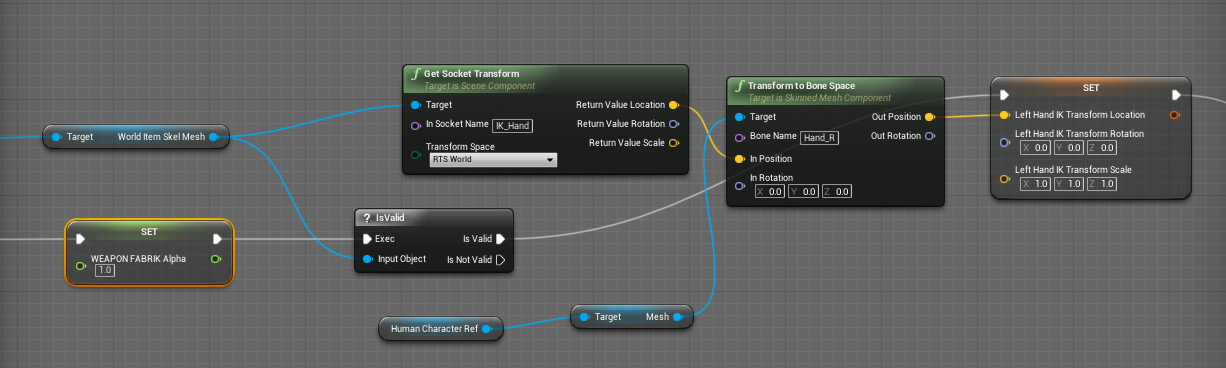
@hollow moat Needs Left Hand IK https://zaggoth.wordpress.com/2019/01/26/ue4-tutorial-the-right-way-to-do-left-hand-weapon-ik/
Everyone else on the internet is wrong. (Okay, not quite — though I spent a good many hours going through tutorials and not getting the results I wanted for left-hand IK. There are a LOT of t…
And it will always look like that in the anim preview unless you use it in the post process anim bp
or you could key it manually
hollow moat
ocean mesa
<@777376250598785064> Needs Left Hand IK https://zaggoth.wordpress.com/2019/01/...
i have left hand ik alreadly
ocean mesa
hollow moat
i have left hand ik alreadly

Hello guys, in this quick and simple tutorial we are going to learn how to edit easily animations inside Unreal Engine 5.
Follow me on Twitter: https://twitter.com/GorkaGames
Subscribe to the channel: https://www.youtube.com/channel/UCv_n9oioNF6OpzR2dt6E4xg?sub_confirmation=1
unreal engine 5,ue5,edit animation,tutorial,quixel,megascans,unreal ...
fringe hamlet
meager igloo
Has anyone else experienced an issue with the default mannequin animations flipp...
Are you using the Manny animation blueprints? I had this happen to me when I used the old Manny ABP. There were 2 selections for me for Manny, so I chose the newer one for UE5 and it worked.
Edit: just reread your whole message, you have a custom ABP, so maybe it's a different issue. But try and see if you have multiple Mannys. One of my Mannys flips like this and the other doesnt in my project. No idea why.
meager igloo
fringe hamlet
Are you using the Manny animation blueprints? I had this happen to me when I use...
Thank you! I'll take a look and see. I know there's the Manny blueprint and the Post-process for sure. I'm using 5.5 but I'm getting the same thing in 5.4, too, so I'm wondering if it's something hard-coded? But for now, I'm just doing a runtime retarget, so that works int he meantime.
Update: completely rebuilding the blendspace and animations blueprint with the retargeted animations (baked from the Manny Anim Blueprint) worked for me. I had to force lock the root on the animations that were rotated, also. Initially, I duplicated the Manny ones and input the updated animations, but something with those causes the root to rotate when blending, so you have to build them from scratch.
hidden grove
any one know how to stop or reduce the neck bone motion
destroys the fps view
spine_05== which you would think is the most stable is the less stable .. spin 01 which is literally on the pelvis is more stable spine_01
the spines are in reverse
so yeah that does not help with the insane animation rotation being fully inhierted
what can be done about this
that damn camera woble on fps mode
cant stand it
as if any skeleton is going to be so wobbly #unrealdevs
hidden grove
and yeah that whole clamping thing jaming up
 brittle pier
Hi im trying to use the two bone ik node to move the legs of an animal to match the ground height while walking, i've made a function that casts a trace below the leg and returns the z of the hit point. I assume i need to set the 2 leg ik effector Z as the Z of my hit point but whats the effector location space I need for that to work bone, world, component, or parent bone???
 blazing oriole
Is there a way to "delegate" animnotifies to another mesh component? I have a sword attack animation which needs to enable a trail, play a slash sound, and various other effects on the sword rather than the character. Since the weapon is a unique mesh instead of part of the character though, I don't directly have access to it or its sockets in the animnotifies. I could:
- Cast to my custom character class in the animnotify & directly access the weapon mesh -> no good. Weapon can be used by many different character types
- Play animation on both character + weapon -> no good. For performance reasons I only want to be playing one animation, and I can't merge the meshes since that would interfere with instancing the same enemy mesh over and over again if they have different weapons equipped
- Get component by tag from character in animnotify-> seems like the least bad option? Doesn't depend on specific character implementation but a bit icky to be iterating through all components each time I play a notify. Would be better if I could somehow pass params to the AnimMontage when I play it from the character (e.g. WeaponRef) which then get passed to the AnimNotify
- Characters implement BPI for GetWeapon(n) and animnotify calls that (still feels weird)
fringe hamlet
So I need to rename bones to match the Unreal Manny bone names. How do I hide bones in the IKrig? I cant see anything. This character has too many belts and dont get me started on whats going on in the face area.
 hollow moat
Hey does anyone know how to fix my left hand clipping thru my gun when i look up and down?
This how its suppose look normally
 obtuse storm
Hello! I have a weapon's anim blueprint and the weapon animations contains some hand bones that represent the hand location that the characters should have relative to that weapon (reloading, inspect, etc.). I pass down to the character's anim blueprint those bones location in world space to be used by the IK node. Now the problem I face is that since the anim blueprint updates at the end of the frame, the character receives the hand bone transform one frame late, so there's a noticable delay between the weapon movement and the hand location when both anims are combined together. Is there a way to update the bone transform earlier than after the tick has ended for the weapon?
hidden grove
what do i need to do to make the animation update

I cant see Set Key its greyed out
my current Anim is showing a different pose
hidden grove
thats defo not the same pose 🙃 .. its like there some step i've miseed to make it update the animation?
 fringe hamlet
I am trying to retarget some animations. I created IKs and a retargeter and everything looks good when previewing the retargets. Once I click export animations and select the new Retargeted Animation Blueprint for my character, He is facing downwards, even though his orientation looked fine in the retargeter.


 silver badger
How do I stop an actor attached to a socket copying the socket's owner animations?
blazing oriole
When you attach an actor to another's socket, you're telling it to lock itself to wherever that socket is. Of course if the transform of that socket moves due to animation, the object you attached will follow. If you don't want it to follow the object in the animation, then you could create a different socket on the object root that has the same world position as the original socket. While the original socket moves due to animation, the new socket does not since it is attached to the root, and will only move when the whole primitive does
 unique path
Hey everyone! If I wanted to combine ik with a montage, what would be the best way about doing that. For example a character opening a door in true first person. Would I use a control rig and have an ik weight or bool of some kind that overrides the hands and fingers? or would it be a pole and limb setup? and using events in the montage to trigger the enabling and disabling of the ik in ABP? I haven't really done much in the way of animation in unreal so the more detailed the response would be greatly appreciated, if not just to know what path to go down would be great.
blazing oriole
so On Interrupted plays for any montage that is interrupted rather than just the one you are playing through that function call, with no way to tell which montage got interrupted. Nice. AAA design Epic
 fringe hamlet
I am trying to retarget some animations. I created IKs and a retargeter and everything looks good when previewing the retargets. Once I click export animations and select the new Retargeted Animation Blueprint for my character, He is facing downwards, even though his orientation looked fine in the retargeter.


 wind latch
I'm having trouble identifying the problem with my motion matching setup. I've retargeted the "Magic Locomotion Pack" from Mixamo to the UEFN_Mannequin, fixed the walk animations to be in the 4 cardinal directions, and added all the walk anim sequences to a Pose Search Database.
For some reason this is the result, and I can't pinpoint why. The normal animations work fine. I'd love to be able to have separate pose matching for the upper and lower body so I can use the GASP footwork with the Mixamo magic stance, but I'm not sure how to do that 
mellow urchin
anyone knows how to disable that you can key "location" of a certain control in sequencer
 vital holly
wind latch
I'm having trouble identifying the problem with my motion matching setup. I've r...
vital holly
wind latch
I'm having trouble identifying the problem with my motion matching setup. I've r...
The turn in place animations should be in their own database
 daring tiger
Does anyone have any tips on the best way to implement a camera animation in game. IE the game is in first person but when you use this move it changes camera and that camera does some movements while you're in the animation.
brittle pier
Im trying to use the two bone ik node to move the legs of an animal to match the ground height while walking, i've made a function that casts a trace below the leg and returns the z of the hit point. I assume i need to set the 2 leg ik effector Z as the Z of my hit point but whats the effector location space I need for that to work bone, world, component, or parent bone???
 odd thistle
Is it possible to transfer skeleton from one mesh to another somehow in UE5?
For example let's say i have 2 dragon models with same features and same bone layout but two separate Slightly different rigs
one rig has animations another one doesn't
Can i somehow use the rig that has all animations in the other model?
 primal perch
Hey guys 🙂 How would I go about making animations that involve things like throwing a weapon? Im aware of sockets and have used them so far, but they only really work assuming that the weapon is not supposed to leave the hand. Im also aware of projectiles, but I dont want the weapon to be a completely seperate thing, only inside the animation itself if that makes sense...Like, in the animation itself I need to have the weapon dynamically change its parent relation from the hand to none so that I can animate the sword directly if its out of then hand and have it follow the hand accurately if its being held.
How would I set this up, so that I can make such animations with weapons?
daring tiger
primal perch
Hey guys 🙂 How would I go about making animations that involve things like thro...
in sequencer you can change the space of the weapon object right as it leaves the hand so you start working in world space instead of parent space
primal perch
daring tiger
in sequencer you can change the space of the weapon object right as it leaves th...
I dont want to handle the switch in unreal. I want to be able to animate an action completely in a prefered animation software. Im having troubles explaining what I mean...
may I show you the animation perhaps it becomes more clear
daring tiger
I think I know what you mean in terms of what you're going for. I've done all my animations within the unreal sequencer so I thought that's what you meant
you can show it tho
idk how much I will be able to help
 tiny mirage
I migrated my project from 5.4 to 5.5 and for some reason none of my animations play when running the game, but they play in their preview windows. Is this a known bug? I've migrated this project every version since 4.27 and I've never seen this before.
primal perch
daring tiger
you can show it tho
Basically I have this animation. The sword is supposed to be thrown into the ground than picked up. before and after that its fine to just use a socket on the hand and attach the weapon mesh to it. But things become tricky once its thrown as the parental influence keeps moving the sword.
tiny mirage
tiny mirage
I migrated my project from 5.4 to 5.5 and for some reason none of my animations ...
example
primal perch
primal perch
Basically I have this animation. The sword is supposed to be thrown into the gro...
and its supposed to work with other swords aswell, so ur able to switch weapons in game
I guess for that I would use a socket on a dedicated weapon bone and animate that bone independent from the hand. But it also needs to be dependent on the hand while the weapon is held to follow it precisely
Kinda like the paragon characters have it done witha dedicated weapon bone. But I cant figure out how to animate a weapon bone partly dependent partly independent from the hand
daring tiger
if you have a weapon bone you can animate it independently of the hand bone initially
and if you do it right it should work
but it will require animating in world space in whatever animation software you are using
for the sections where it's mid air
and then it's just on the hand bone when the character is holding the sword
primal perch
if I do it independently the weapon is not following the hand properly between frames (when interpolating)
daring tiger
ah
yeah
can you change what bone the weapon is bound to in a blueprint?
and the weapon bone is not parented to the hand
but it's only in the weapon bone when mid air
primal perch
not sure but I dont want to handle that in UE. I want to be able to completely animate character and weapon in the anim software then "bake" the entire animation, import it into unreal and only attach the weapon mesh to the weapon bone. Perhaps this isnt a topic for UE in particular but for the anim software I want to use and how to dynamically parent a weapon bone to the hand/root.
daring tiger
If that's what you're looking for I think that's more of a problem of your animation software
primal perch

daring tiger
also i'm not an expert so there could be a way
 deft tusk
Hi Guys, I`m trying to make a modular control rig so that i can edit animations but after i bake the animation to the rig in sequencer, the legs get misplaced.
I had a similar issue with the arms but i fixed it by changing the parent on the controll rig. Im trying to do the same with the legs but nothing seems to work.. anyone know what im doing wrong?


 gentle kestrel
deft tusk
Hi Guys, I`m trying to make a modular control rig so that i can edit animations ...
gentle kestrel
deft tusk
Hi Guys, I`m trying to make a modular control rig so that i can edit animations ...
I don't think you're doing anything wrong. I think it's bugged. Same thing happens for me and not just with the legs.
hidden grove
hey I have this strange issue .. any ideas why its offset in the game .. i've tried different component->component attachment options like snap/keep relative ... but it weird that its correct on all the mannys the retargeted mesh and inside the animation just not in the game


 jovial creek
Anyone interested in retargeting some animations/ meshes?
 strange snow
hello guys is there any way to call transform modify bone in cpp?
 primal perch
Hello 🙂 I have an animation that involves animating the weapon_r bone of the mannequin. But for some reason the bone is not moving the way it does in my animation software. I assume it has something to do with the bone being greyed out and "This bone is used by the current mesh, but has no vertices weighted against it" message.
How can I fix that?
mellow urchin
Spawning a control in modular control rig and doing something like this here to the name of the control causes it to not properly recompile on interaction

its specifically the name, which unreal seemed to have previous problems with
tbh im not fully sure but there seems to be some update errors going on regarding construction script and interactions
novel viper
Hello. I'm encountering a strange blending issue. I have set up a locomotion blendspace using mirrored animations for the right side. Everything works as expected except the blending between strafing to the right and walking sideways backward to the right. As you can see in the video when the keyframe is between strafing and walking sideways backward on the left it works as intended, but on the right the legs act weird and in between strafing and walking sideways backward to the right it seems as if the character suddenly walks forward. What could be causing this? Been breaking my head over this for several days. Can't figure it out. 😦
I don't understand how the blending can be different while the animations are exact mirrored copies
 native minnow
are vertex animation textures useful for gameplay based things vs just making scenes / film based stuff ? learning a bit about it, but not sure if this is even something that can be used in a gameplay setting
tiny mirage
native minnow
are vertex animation textures useful for gameplay based things vs just making sc...
for sure, makes it simpler to do a zombie horde for example
ocean mesa
does anyone know how to use death animations like lyra that can play the left death anim if im to the left?
 wintry niche
Why is this twitching out? the orginal animation dosent have this and it works fine on others. Is there perhaps a way i can just stop this bone from moving as a potenial fix?

 lavish inlet
hey guys is there a way to handle blend states or animations that change over time without blending?
snapping immediately to each new pose
 undone arrow
ocean mesa
does anyone know how to use death animations like lyra that can play the left de...
undone arrow
ocean mesa
does anyone know how to use death animations like lyra that can play the left de...
You can use choosers
undone arrow
lavish inlet
snapping immediately to each new pose
Can you elaborate?
ocean mesa
undone arrow
You can use choosers
Like motion matching?
lavish inlet
undone arrow
Can you elaborate?
yeah - so my animations all have stepped interpolation on them. In UE5 if I create a blend space, the transitions are smoothed out. And I can't find a way to immediately switch to the next animation state.
undone arrow
You dont need motion matching for choosers. Theres a chooser player. Lemme find it for you
undone arrow
lavish inlet
yeah - so my animations all have stepped interpolation on them. In UE5 if I crea...
you can change the blending smoothness. Lemme find it
undone arrow
ocean mesa
Like motion matching?
https://www.youtube.com/watch?v=-03Xm2oZK_Y&t=1469s youll have to do more research on how to actually use it but its powerful stuff

Watch this recorded session from Unreal Fest Seattle 2024 that explores how Unreal Engine 5.5 levels up gameplay animation with Choosers.
This talk deep dives on Choosers in and outside of animation, root motion-driven Motion Matching, and many of our Motion Matching improvements coming in UE 5.5.
We also explore updates to the Game Animation...
undone arrow
lavish inlet
yeah - so my animations all have stepped interpolation on them. In UE5 if I crea...
Set the value to the number on the next state. Can I see your blend state?
how are you changing the value on your blendstate?
 round grotto
i have this hand model that i rigged in blender and when i import them to ue5 the hand and the bones get imported at different scale, basically the bones are super small, i applied transform on all of them in blender and the export scale is 1.
the hand gets imported at scale 1 but the bones are at 0.1, does anyone know why that is? im on latest ue5 version
undone arrow
round grotto
the hand gets imported at scale 1 but the bones are at 0.1, does anyone know why...
change the unit in blender to .01
then reexport

Do make sure that your Character is the proper size still
round grotto
well thanks, that did it.
undone arrow
Anytime
rose mural
If I'm using control rigs for procedural animation, is it more performant to have 1 control rig for all my procedural animations (for different parts of a character, using blend per bone to select only the parts of the character being controlled at the time) or many control rigs, each only containing the code needed to run the animation they're being used for?
 kindred stratus
so I'm trying to make an animation blueprint and I'm banging my head up against the wall because for some reason, in this freshly made blueprint, even just connecting my blendspace to the output pose directly does literally nothing, the BS works on it's own, but literally nothing I do will make an animation play through this blueprint. any ideas what's wrong? am I dumb?
 undone arrow
kindred stratus
so I'm trying to make an animation blueprint and I'm banging my head up against ...
undone arrow
kindred stratus
so I'm trying to make an animation blueprint and I'm banging my head up against ...
Try just putting a regular animation in it
kindred stratus
did that already, nothing
undone arrow
 kindred stratus
do animation blueprints just not work with retargeted animations?
kindred stratus
 undone arrow
and your animaitions are working outside of the abp
undone arrow
hmmm
kindred stratus
I even tried restarting unreal
undone arrow
kindred stratus
do animation blueprints just not work with retargeted animations?
Do you have the right skeleton attached to the abp
kindred stratus
undone arrow
Do you have the right skeleton attached to the abp
it's using the same skeleton that I retargeted the animations to
undone arrow
howd you retarget the animations
kindred stratus
an IK Retargeter
kindred stratus
like, make another animation blueprint?
I did just now and yup, same thing, no matter what I plug into output it just doesn't do anything
....... so I went to see if I just edited the retargeted animation in the sequencer and saved it without changing anything that would fix anything. and I'd discovered that it appears IK retargeting somehow creates 0 key frames? like I'm getting a blank animation when I press on "edit in seqeuncer with FK Rig"
and now it's just crashing anytime I try with any other animation... fun
 tame dove
Hey, I'm fairly new to unreal engine. I pressed R thinking I can scale the keyframes in the graph to make the animation faster lol and it ended up making the whole graph flat. I tried undoing but didn't work. The animation didn't change. And the transform location and other parameters are missing
 ocean mesa
what looks better direction based death or locomotion based death...
lavish inlet
is there a checkbox or node that transitions animations once the previous animation is completed?
undone arrow
kindred stratus
....... so I went to see if I just edited the retargeted animation in the sequen...
Theres an easy right click retarget animation option. Well it depends on the engine version you are using.
undone arrow
ocean mesa
what looks better direction based death or locomotion based death...
Howd you end up doing it
undone arrow
lavish inlet
is there a checkbox or node that transitions animations once the previous animat...
If you are using play montage node yes
 pale elk
hello, does someone know why the animation preview in my anim BP is not working ? I have this yellow message and the apply button does nothing. The only field that is working is isFocusing. Otherwise, my character just wont move on the preview. It works "fine" in game ( there is some issues but thats why I want to use the preview )


this is how i set my variables
lavish inlet
undone arrow
If you are using play montage node yes
what about in state machines?
undone arrow
pale elk
hello, does someone know why the animation preview in my anim BP is not working ...
Maybe this maybe????
 pale elk
undone arrow
Maybe this maybe????
pale elk
undone arrow
Maybe this maybe????
I dont want to edit defaults, just preview
undone arrow
lavish inlet
what about in state machines?
Can you elaborate? Im not seeing any animations being played there
pale elk
here I cant edit the speed and direction variables and Idk why
 lavish inlet
so lets say you have a punch or w/e and then once the punch is over it returns to idle (using a state machine)
the return looks for a bool
lavish inlet
state machine
undone arrow
Can you show me your punch code
lavish inlet
just actvating it thorugh a variable
lol its not an actual punch I'm speaking hypothetically
undone arrow
One off animations are usually played through montages
can i see the statemachine where you use the bool?
lavish inlet
I was just testing an anticipation jump animation to learn how things function
pale elk
pale elk
here I cant edit the speed and direction variables and Idk why
solved it with a isvalid before setting all variables
 lavish inlet
coming over from many years of using mechanim / unity
so in mechanim you can have an animation play then returns to the original state after the aniamtion is complete
undone arrow
With animation montages you can get back boatloads of information should you choose.
 lavish inlet
oh wow
state machines and blend states are cool in unreal, but have really odd limitations
undone arrow
The limitation is within the mind
undone arrow
But yeah your "punch" imo should be a montage.
you can still set the bools in your main characters bp and get the information in the abp
lavish inlet
is it normal to have some character animations using different systems?
undone arrow
the montage is part of the abp
undone arrow

here is where the montage is played
it overwrites all previous logic
You can choose to have upperbody only animations. hand only animations etc
undone arrow
Anytime man
undone arrow
pale elk
solved it with a isvalid before setting all variables
No idea how that worked
mellow urchin
is there a way of baking "curves" into the linken anim sequnce?
undone arrow
Bake it into a new animation?
mellow urchin
undone arrow
Bake it into a new animation?
no i mean
have it become a curve here

you animate using ctrl rig -> create a anim sequence and have the curve here
oh wait
i diddle do it
ofc the same moment i ask, not 1h ago 
undone arrow
I dont use the control rig so not entirely sure how the curve thing you mentioned works
mellow urchin
hmmm problem is that there value is incorrectly key, they are just all keyed to 0
ha! there we go! you just have to make sure you have actual curves on your mesh and then set it from the forward solve. i think animation channels might not work for setting them for some reason?
 ocean mesa
undone arrow
Howd you end up doing it
ocean mesa
undone arrow
Howd you end up doing it
Blend spaces
primal perch
Hello 🙂 In my animation the weapon is weirdly shaking after being thrown into the ground. In my animation software where I made the animation, it behaves as it should and is completely stuck in the ground. I asume UE does some interpolation stuff on it from frame to frame, but I dont know why as there is no distance to interpolate in the original animation.
undone arrow
primal perch
Hello 🙂 In my animation the weapon is weirdly shaking after being thrown into t...
Its parented to something
primal perch
undone arrow
Its parented to something
well yeah, the weapon_r bone is parented to the hand_r bone. I animated the weapon bone seperatly. In my anim software, while the weapon is in the ground, its constrained to an empty scene object in order to not be influenced by the parent hand.
primal perch
does nothing
undone arrow
are these bones still moving like crazy>

try reimporting with these bones not moving
primal perch
theyre moving because the root is constrained to the pelvis for root motion
undone arrow
what software you use?
undone arrow
show point controller mode
it looks like everything is parented to the root and the root is moving wonky. Plus i dont think your animation has root motion bc youd see a red line, unless you have the root motion enabled
undone arrow
hmmm. pretty weird. I use cascadeur too
Can you send one more time with the joint mode
lavish inlet
undone arrow
Anytime man
which system do you recommend for a jumping sequence? Anticipation > up > transition > down > land
undone arrow
jump montage > You can set a bool from within the animation to finished jumping > is falling bool > event on land just set bool to false. I think the third person blueprint template handles that. But they dont use the montage.
undone arrow
primal perch
Try disabling the root motion in cascadeur and see if the problem is in that area possibly
the jump animation would already have the anticipation and the up in it
I guess you dont even need to set a bool inside the montage. Just when it finishes playing set bool in air to true or something
lavish inlet
undone arrow
jump montage > You can set a bool from within the animation to finished jumping ...
if you use montages or just a one shot animation, how do you return back to the idle / locomotion state machine?
undone arrow
lavish inlet
which system do you recommend for a jumping sequence? Anticipation > up > transi...
You control your states. The jump just sends you into the state. I dont even use that state thing anymore so Ill probably need to see how you have it setup but just set a bool to transition out of it
when you are at the end of the chain. For example. When you are in the land. set a bool to take you out of that falling locomotion
what version of ue are you using?
lavish inlet
oh so you dont even use the state machine at all?
just call animations inside BPs?
5
undone arrow
5.what? And i use abp alot. Just not that transition thingy
ill show you when my ue boots up
undone arrow
lavish inlet
oh so you dont even use the state machine at all?
I use motion matching. The highlighted box is all of my idle animations

I use motion matching and choosers.

I choose which idle I want based on the enums inside of my abp.
Inside of my purple overlay node is this

and this is just for my upper body animations mostly
I would have an enum for all my possible states. Falling, crouching, prone etc. And just blend pose by enum so whenever im falling it would just play the falling animation
and in my personal bp I would play a land animation through a montage
fringe hamlet
I am trying to retarget some animations. I created IKs and a retargeter and everything looks good when previewing the retargets. Once I click export animations and select the new Retargeted Animation Blueprint for my character, He is facing downwards, even though his orientation looked fine in the retargeter.

 fringe hamlet
UE5.5
undone arrow
fringe hamlet
UE5.5
Theres a one click retarget option
if you manually made your ik stuff
fringe hamlet
yeah that's what I'm using in the first screenshot. I tried both manual IK for my custom skeleton and the automatic one that generates those.
The animations play perfectly fine in the preview in both cases. But when I export the animations, the character is rotated facing down in both cases.
undone arrow
Im thinking your root bone is just probably rotated the wrong way
fringe hamlet
tried again. Still occurred with proper root bone rotation. I'm stumped.
undone arrow
Pretty odd
vital holly
fringe hamlet
I am trying to retarget some animations. I created IKs and a retargeter and ever...
Are you running any post processing?
fringe hamlet
vital holly
Are you running any post processing?
not sure I understand the question. Like post processing volumes?
vital holly
Post Process Animation BP. They can be added to skeletal meshes to influence your pose/skeleton. Likely not the issue here but always worth checking out. Does your target mesh have a different skeleton than the source?
 lofty bane
the fist needs to go to the head. I created IK to just this but I dont know how to add it without disconnecting everything else. Any help would be greatly appreciated.
I am copying the ik reaching target epic released in the content example project
 west nexus
Hey Guys I'm looking for someone with 2D bone animation experience in Unreal Engine. Im trying to evaluate what would be the best way to get my customizable 2D characters working and would apreciate some help. ^^
hidden grove
Do you guys think the arms look right in this ?

side ways

amimating the fingers is kind of fiddly
why not just a simple control rig and strip it down @west nexus
 left rose
Hello, quick question, is there a way to make a trace in control rig hit the simple collision instead of the complex one?
mellow urchin
left rose
Hello, quick question, is there a way to make a trace in control rig hit the sim...
 left rose
This is what I'm using at the moment, but it's hitting complex collisions instead of simple
mellow urchin
hmmm
for some reason when i make a actor blueprint and setup a control rig inside my skeletal meshes dont show up in the sequenzer

while in the metahuman example they show up

and i cant see how they did it

for the record, just click the pluss and add the component as track
still odd it works automatically on the metahuman example, would like to know how
ok got it, set default ctrl rig bp in mesh and remove ctrl rig componen
 sage bramble
oh hey man. funny seeing you here
i finally got the turret control system doing ..... something
but at certain angles, the thing starts going crazy
nevermind. not worth worrying about today
 bright jungle
Hey so I have an animgraph question, I have a bunch of different anim states for jumping, and I want them all to have transitions to the landing animation in case the player lands early, is there a way to simplify these transitions/combine them into one without having to create and set trasition ruels for every individual state?

Also, is there a way to "force" the animation blueprint to switch to a certain state, basically skipping the transition rules?
 acoustic grove
bright jungle
Hey so I have an animgraph question, I have a bunch of different anim states for...
acoustic grove
bright jungle
Hey so I have an animgraph question, I have a bunch of different anim states for...
Following this as I’m working on animation myself today. Wanting to add a dodge mechanic and I’m sure I’ll be working in this area today
bright jungle
I just achieved my dodge with an anim montage
acoustic grove
bright jungle
I just achieved my dodge with an anim montage
Nice. I got all of my regular locomotion down. My only issue now is my meta human looks like they’re walking in mud, knees are coming up a bit too high
tame dove
tame dove
Hey, I'm fairly new to unreal engine. I pressed R thinking I can scale the keyfr...
Would really appreciate if someone can help me with this
acoustic grove
tame dove
Would really appreciate if someone can help me with this
Have you tried resetting your default view? Should be an option to like reset your viewports and such. Maybe that could reset your timeline too?
tame dove
Will give it a try
acoustic grove
Sorry you may know more than me. This just seems like an issue where you close/change something out by accident and can’t place it like it originally was
tame dove
Hope it is reversible
acoustic grove
tame dove
Hope it is reversible
When I hop on UE5 I’ll try to get into the same menu as you as see if I can replicate your issue
acoustic grove
tame dove
Resetting it to default viewport worked!!
🔥🔥🔥
acoustic grove
tame dove
Thank you so much!
Yessir
 gaunt valve
Any drawbacks of uniform scaling pawn actor holding skeletal mesh & stuff?
Im trying to decide if I should model/rig larger 'boss' units (which are 1.5x larger than standard pawn units) or just spawn scaled actors in UE which would be more convenient
primal perch
anyone with an idea what could cause this weapon shaking? Its working correctly and is not shaking in my anim sfotware.
undone arrow
bright jungle
Hey so I have an animgraph question, I have a bunch of different anim states for...
What version of ue5 are you using?
undone arrow
gaunt valve
Any drawbacks of uniform scaling pawn actor holding skeletal mesh & stuff?
Im tr...
Scaled actors would be more convenient as they share the same skeleton
undone arrow
primal perch
anyone with an idea what could cause this weapon shaking? Its working correctly ...
Separate your root motion from your hip.
you have a root bone already. You can just make it proto
and animate separately.
 primal perch
so like a camera"bone"?..
undone arrow
no. just add a proto thing
primal perch
whats a proto thing?
undone arrow

the blue thing
just select the joint. and your pelvis then click that
Root bones arent supposed to be moving that much
undone arrow
Yeah to an extent. Its not supposed to be so wobbly
You can still have it move with the character but just with smooth
primal perch
so would it be better to animate on a fixed axis?
undone arrow
for root motion yes. But it depends. Just as long as its smooth and not wobbly. (im not a pro so take with a grain of salt)
primal perch
should I put the root at 0.0.0?
undone arrow
yes. Should be there already
primal perch
its currently still where the pelivs is on every frame
but with z=0
so only on the ground
undone arrow

A short step-by-step tutorial on how to create a root controller in Cascadeur
Learn more about Cascadeur license plans: https://cascadeur.com/plans
Learn how to start using Cascadeur: https://cascadeur.com/learn
Feel free to contact our support team if you have any trouble:
https://nekki.helpshift.com/a/cascade...
Join our English-speak...
Thats how I view root motion. Its just supposed to be the smooth z movement. No left and right of the hip
But im thinking you can just manually animate the root to move up when you jump up and then back down when you land
undone arrow
undone arrow
https://www.youtube.com/watch?v=G9MuiikNe1c
Its kinda buggy so doesnt entirely work. but just having the root be on its own timeline helps

I have my root animation be linear.
primal perch
hmm... I removed the root motion and put it at 0.0.0 on every frame. but the weapon is still jiggeling
undone arrow
can you send updated video
undone arrow
Can you send a pic of your skeleton tree where you have your sword
 undone arrow
I think I kinda see your problem. It’s all parented to the hand. When the hand itself moves I think everything moves with it
I’m the middle of the animation select the hand bone and move it around
When the sword is in the floor
I’m thinking a fix would be to take the weapon bone out of the hand
primal perch
The weapon_r bone in cascadeur is constrained to a independent locator at 0.0.0. the constraint is active for as long as the sword is out of the hand.
undone arrow
primal perch
But inside unreal it’s parented to the hand
primal perch
but the weapon bone has the same poitional location on each frame in the fbx
undone arrow
undone arrow
I’m the middle of the animation select the hand bone and move it around
Try this inside of unreal
primal perch
the weapon bone is parented to the hand bone. Both in Casc and unreal. the hand bone moves the weapon bone. I used a constraint in casc to suppress that parent related movement and be able to animate the weapon bone independently from the character('s hand).
undone arrow
can you scrub where your weapon is jiggling?
primal perch
what is scrub? ^^'
undone arrow
just move the timeline thing around the area to preview the animation
primal perch
in casc?
undone arrow
no ue
primal perch
like this?
primal perch
on the keyframes its always back to where it should
like, the keyframes i set in casc
undone arrow
interesting
primal perch
theoretically even between those keyframes, the sword doesnt change its position, due to the constraint
undone arrow
Can you bake the animation in cascadeur
primal perch
i dont know how
primal perch
ah
well. cascadeur bakes every animation when exporting
so it has already all frames keyframes after export
i figured that out a while ago when I tried to import an animation I made in casc but used in unreal. So like Casc -> Unreal -> casc. ansd they state that in the documentation
undone arrow
yeah but the key is still moving around. Ok try reimporting the animation into cascadeur and see if the problem exists there as well
If the problem is within the animation itself and your constraints arent working properly
If the problem still persists, you can always just drag the weapon out from the hand so that its not parented to the hand.
 primal perch
primal perch
primal perch
the bone itself not
rather its orientation
which seems correct as the point constrainer seems to only constrain location. not rotation
undone arrow
hmmm. Im thinking it shouldnt even rotationg like that bc if you added back your sword it would be wonky
primal perch
its the complete opposite. In Cascadeur, it doesnt move, but rotates, in Unreal it moves, but doesnt rotate.
idk man. Isnt there like an "industry standard" way to animations with independent weapons/objects? I feel like im always trying to do some hacky stuff for some pretty basic things.
undone arrow
primal perch
idk man. Isnt there like an "industry standard" way to animations with independe...
Just unparent it from the hand
attach it to the root
primal perch
I attached it to the root bone and reimported it but now the weapon is going crazy
primal perch
I tested it with the all-keyframe reimported animation. that one has no constraints.
undone arrow

ahhh i see the potential problem. you might need to reimport the skeletal mesh as well
its not updated on the skeletal mesh
primal perch
you mean detaching the weapon bone in the unreal skeleton?
honestly Im confused. The weapon bone seems to be there specifically to animate...well, a weapon. And it makes sense as its parented to the hand, so follows it naturally but not weighted to the mesh, so can move freely around if needed.
undone arrow
Yes. When its possibly attached to the hand. But as you see when send it away from the hand it loses its ability to look seamless
You see how your ik bones dont move. Im thinking youd have more control over your sword that way

as in it will fully follow the animation you set unless your root moves
primal perch
thats why I have looked for a way to be able to animate the weapon independently in casc by dynamically toggling the parent relationship between the hand and the weapon bone. They dont offer a natural parent on of toggle so what Ive been told on and read was to constraint the weapon bone to a independent locator to be able to "mimic" a parent toggle with a full constraint
primal perch
undone arrow
You see how your ik bones dont move. Im thinking youd have more control over you...
they dont have to move tho, no? the leaf ik bones need to move for the Ik system to work
undone arrow
Those bones exist in the ue skeleton. Not cascadeur I dont think
primal perch
they do
well
not by default
I exported the unreal manny and imported it into casc
so the skeletons match for every further animation
undone arrow
Yeah thats unreals stuff. But What I was saying was if your weapon bone was on the same level as those bones youd have full control overit. Even your togglable parent thingy you were trying to do
Ue does not have that togglable parent function. If anything to have extreme control over your weapon I think it would need to be its own skeleton
not bound to anything unless you tell it to
primal perch
The Ik bones should only be there for the Ik system. What Ive read and been told is that they're completely optional, thats why theyre parented to the root instead of the character so that If you'd decide you want to use them, all you have to do is animate them along with their normal counterparts. Which makes sens, as perhaps I dont need the IK system, but still want to animate a weapon. thats why the weapon bone is parented to the hand, but not weighted
undone arrow
You can still animate the weapon bone outside of being parented by the hand
whenever the hand moves your sword moves
acoustic grove
Sorry to but in between ya's convo, first time Im posting an issue here in the server.
Whats the best way to solve the awkward arm placements? I am able to manipulate the arms in a retargeted rig, but blending the chain mapping on the source or target doesn't seem to get rid of the T-Rex looking pose.

 undone arrow
you can have that functionality with a toggle parent
undone arrow
primal perch
you mean detaching the weapon bone in the unreal skeleton?
Can you send me your animation?
undone arrow
acoustic grove
Sorry to but in between ya's convo, first time Im posting an issue here in the s...
Are you editing the right skeleton?
primal perch
acoustic grove
undone arrow
Are you editing the right skeleton?
That where I thought my issue was stemming from. I did find that error and its showing me the changes in real time
If I am following your question correctly
primal perch
I have to check something
undone arrow
Can you send a bigger ss of this
 acoustic grove
Ofc
 naive mountain
If I delete all of my face bones, will my blend shapes still work?
acoustic grove
undone arrow
Can you send a bigger ss of this

 naive mountain
It would break my control rig though, right?
acoustic grove
One thing is I Think I dont have the source and target assets set up correctly
undone arrow
there should be a one click retarget option availiable. What version are you using
acoustic grove
undone arrow
there should be a one click retarget option availiable. What version are you usi...
5.5
undone arrow
then yes. one click retarget and you can extract the retarget ik thing they made
unless you already did that
acoustic grove
Pretty sure. I’ll check back with you in a bit! Thanks!

 smoky shell
PSA #control-rig now exists as of 15 minutes ago
primal perch
I took a look at how they did it with their paragon characters. They also had the weapon bone parented to the hand, tho they weighted it against the weapon thats included in the character mesh. Its the same as putting a socket with a mesh on the weapon bone just not as flexible in case the character should be able to switch weapons

 primal perch
undone arrow
primal perch
undone arrow
Its doing some funky stuff in the air tho...
undone arrow
its fine if they arent throwing the weapon
lemme see
lol yeah. i didnt eit your animation
That would need to fix inside of cascadeur
acoustic grove
undone arrow
there should be a one click retarget option availiable. What version are you usi...
 primal perch
undone arrow
its fine if they arent throwing the weapon
primal perch
undone arrow
its fine if they arent throwing the weapon
but their approach to making the weapon independent in case they want to do something like throwing the weapon is the same as mine
or rather, Im using their approach. the only difference being that I dont include the sword mesh in the character, because I want to have more than one sword
undone arrow
They have both
THey have a weapon bone outside of the weapon hand as well
i think
undone arrow
acoustic grove
no not that
primal perch
yeah the virtual bone. have yet to look up what exactly they are, but its completely animated with the hand bone. So it doesnt really have any influence
probably for some gameplay specific purpose
like that virtual bone is as if they straight up copy pasted the hands position for every frame. Its completely independent otherwise
undone arrow
acoustic grove


I still think your case is extreme. Their weapons probably never leave their hands
unless they unequip it
idk how their game is played
primal perch
then why would they make the weapon seperate
like they made it like that to at least have the option
undone arrow
So its easily animatble. If i wanted to do a sword spin
you cant do that if the sword is attached to the hand bone
undone arrow
But for god of war. How he throws his axe
It would not be able to be parented to his hands
primal perch
thatss just a projectile no?
undone arrow
Its a weapon
primal perch
yeah but as a projectile.
undone arrow
I still think its just a weapon attached to a bone.
bc he can recall it
and spin it and all kindsa stuff
primal perch
projectile would need to just fly back to the hand
if they would animate the weapons air time, they would have no control over it in game
prett sure they just spawn a projectile at the right time and move that with code
and make the real axe invisible
undone arrow
primal perch
if they would animate the weapons air time, they would have no control over it i...
Not if its its own actor. Its easy to make it spin on its own. at a trajectory
and possibly play a spin animation.
primal perch
yes but that actor would be put on a socket
undone arrow
Yeah. and detached at will
primal perch
the axe normally definitely is an actor
undone arrow
That thing has too much animition in the air to be a just a projectile
primal perch
just in the throw animation they either spawn a projectile and hide the real axe or directly move the axe
nah you can do everything with a "projectile"
advantage of the projectile is that it comes with very nice prefunctionality for air movement and targeting
stuff they would have to write themself when just moving the actor
undone arrow
They used ue4. Projectile is a type of actor?
 undone arrow
Im pretty sure I can make his axe without making it a projectile
primal perch
ofc you can. the projectile component is only there to make things easier
like the movement component
undone arrow
I could see it being used for his spear maybe bc that thing actually disappears and reapears
But yeah man. Gotta find your workarounds. I think you can just add a new bone and attach the sword to it whenever you throw it, and when its back in your hands attach it back to the hand's weapon socket
primal perch
sight yeah...I dont really want fo find a "workaround". But just because Im by far not the first one trying to do that in UE. So Im still looking for a standard work flow. I mean there have to be some commonalities between how all these games do it.
undone arrow
Gotta find the games that throw their weapons as well
primal perch
thats not the problem. the problem is finding devlogs for them
I just want a magic button to solve my problems. is that too much to ask for?
undone arrow
Right. My advice is dont let it hold you up. if it works it works. The people that are playing your game wont care if you did it the right way or not.
Yes
bc then the market would be even more saturated
primal perch
I dont really care if other people play my stuff. It 99% for myself. But im trying to do whats proven working. I mean animating character and a weapon is nothing new. There are plenty of solutions I suppose, but I dont want to reinvent the wheel on something so standard.
undone arrow
I personally think my way is better bc it allows for more freedom. you can always just create a socket in engine if anything.
All you are exporting really is the animation itself. The path of least resistance.
I still think it has its downfalls bc the sword is going to move when the root bone moves.
So it all depends on how much freedom youd want with your sword
primal perch
I want to have the freedom to freely move it around
primal perch
or rather being able to dynamically toggle the parent relation for that in animation.
In a nutshell what I need Unreal to do is to stop doing its shenaningan stuff between my frames
my fbx is literally fine
its just unreal
10 bucks its a tickbox somewhere
undone arrow
Do you use blender
primal perch
sometimes
undone arrow
primal perch
Can you send me this animation? Im going to attach a sword to the weapon bone and see if its fine in blender
primal perch
undone arrow
the fbx
primal perch
if is use step instead of linear interpolation in unreal its looking exactly like in casc.
so unreals interpolation seems to be the issue
undone arrow
It works in blender too
 gusty lintel
I'm trying to import a simple skeletal mesh into the engine, but it keeps scaling up the skeleton to stupid proportions. I've applied the transforms on all of the meshes and the armature, I'm not scaling it up in the import settings


I have no clue what I'm doing wrong and it is driving me mad
If I import it without the armature, the scale is exactly what I'd expect
But I need it to drive some procedural animations
undone arrow
gusty lintel
I'm trying to import a simple skeletal mesh into the engine, but it keeps scalin...
change blender's unit scale to .01

 signal marlin
Hi guys, i'm trying to implement motion matching, i've imported some animations from Lyra, but the moment i start moving, the player mesh seems scaling down for a bit. Have u ever seen this problem?
I've noticed that the scale speed decrease when I decrease the character movement max acceleration
undone arrow
signal marlin
Hi guys, i'm trying to implement motion matching, i've imported some animations ...
You have some animations set to additive maybe
Motion matching for the win
Can you send a bigger ss of your abp as well
Use choosers as well. They are powerfully stuff
acoustic grove
undone arrow
Lol might get a kick as to what the issue was
Wanted to follow up
So originally we had..whatever was happening with the arms here

My issue stemmed from inside the MH Animation Blueprint
specifically this

I did not have the right Retargeter asset selected. After finally figuring that out
Her torso appeared inside her legs which was fun
That was a somewhat simple fix.
That issue stemmed from the capsule settings and where it was reading where the ground would meet the mesh
acoustic grove
acoustic grove
specifically this
More insight, once I figured out this was the primary issue, I was able to narrow down which mesh I wanted to source from and target next. All animations were reflecting in real time
So finally
We have this.
This is where we landed
wintry niche
How do i set up interruptible animations? When i interrupt my attack combo it doesn’t let me attack again, whats a way to fix this?

 grand condor
Can someone help me out importing something I made in blender to UE5? I can't get it working for anything.
 prisma flame
what file format are you exporting it too? unreal typically takes .fbx or .obj for 3d models
undone arrow
wintry niche
How do i set up interruptible animations? When i interrupt my attack combo it do...
Can you elaborate? You mean when you get hit?
U can also use a retrigerabbpe delay and reset your counter and attacking
primal perch
wintry niche
How do i set up interruptible animations? When i interrupt my attack combo it do...
The montage nodes have "on interruption" output. Why dont use that?
primal perch
@undone arrow How did you reparent the weapon bone to the root?
hidden grove
any idea why this is happening?

I dont recall doing any thing to it so wondering if its something that come down with 5.2
wintry niche
undone arrow
U can also use a retrigerabbpe delay and reset your counter and attacking
Yea when I dash or In future when I get hit, where exactly do I put the delay?
wintry niche
primal perch
The montage nodes have "on interruption" output. Why dont use that?
What do I put there?
hidden grove
hidden grove
any idea why this is happening?
Fixed by going to the particle emitter settings for the smoke .. cleared material .. and simply reset the material
primal perch
wintry niche
What do I put there?
Whatever you want to happen when a montage gets interrupted.
wintry niche
primal perch
Whatever you want to happen when a montage gets interrupted.
I want it to reset completely, how should I do that with my combo system?
primal perch
Have a function that sets everything back and connect every montags on interrupted pin to it.
wintry niche
primal perch
Have a function that sets everything back and connect every montags on interrupt...
Is that by using a retrigable delay and then having a counter on 0 and reset attack?
primal perch
wintry niche
Is that by using a retrigable delay and then having a counter on 0 and reset att...
Do you have a reset function? Like a function that takes care of everything you need to reset, so that when you need to reset you can just use this function instead of writing the logic again every time?
wintry niche
primal perch
Do you have a reset function? Like a function that takes care of everything you ...
In the screenshot is pretty much what I have, so I guess the comboreset on the right does that but I need something for interruptions, I got no idea 😔 also is the way I got it set up alright?
primal perch
Personally, I would create an array for your combo montages and use the combo counter to pick the needed animation than play that. This way you only need "one line" of BP code, instead of 4.
wintry niche
primal perch
Personally, I would create an array for your combo montages and use the combo co...
You got a video example for that by any chance?
primal perch


this resets only after the 4th combo attack or when not attacking anymore
For the reset on interruption I have a montage for the hit-animation and whenevery I get hit, this animation play and resets the combo counter
The base attack combo technically doesnt need any interrupted logic by itself
its the other montages/animations like dashing/being hit etc that should reset the counter
the interruption always comes from "outside". Like, imagine you doing the combo attack. It wont interrupt by itself. You're not hitting yourself. the counter only needs to reset once you're at the end of the combo or stop midway.
wintry niche
primal perch
I'll give it a try making this one and I'll let you know sir
primal perch
wintry niche
I'll give it a try making this one and I'll let you know sir
In a nutshell its just
use counter to get next combo anim -> play that anim -> increment counter -> (if counter >= length(anim array) => counter to 0) -> repeat
and then you can add stuff to buffer input, so that spamming buttons doesnt interrupt the animations
wintry niche
primal perch
Anymore screenshots to show of this by the way just in case I miss another part of it off screen?
primal perch
there is nothing else
the right side of the screen after the branch is just one node that puts my character into combat mode after every attack. regardless which
dont just copy tho. try to understand what it does
this is the basic scheme every combo attack tut will teach you
I just expanded on that
 bold flame
Anyone know how to fix Unreal sometimes just not wanting to generate a Skeletal Mesh upon importing a rig? Switching to a different project always solves it, the import settings are identical for both
wintry niche
primal perch
this is the basic scheme every combo attack tut will teach you
know any good attack tut? because the ones i find are the sloppy ones
primal perch
wintry niche
know any good attack tut? because the ones i find are the sloppy ones
unfortunately no. What I observed is that there are pretty much only basic ones, which makes sense, since everything above that gets very individual and specialized. The core is usually the same.
I mean ask yourself, what do you actually mean with "good" attack tuts?
that term gets significantly more subjective after the basics
naturally people who make tutorials focus on the basics, as they live from views, and niche content doesnt give enough of those
wintry niche
primal perch
I mean ask yourself, what do you actually mean with "good" attack tuts?
i guess to me just play multiple attack animations in order and be able to have it interruptible : D
wintry niche
primal perch
naturally people who make tutorials focus on the basics, as they live from views...
yea unfortunately but thanks for the help
primal perch
wintry niche
i guess to me just play multiple attack animations in order and be able to have ...
as said. just figure out what "outside" actions can interrupt you and whenever you play them (because of gameplay), you execute your logic for being interrupted(optimally a function you can reuse easily that, for example, puts the combo counter back to 0)
@wintry niche
 wintry niche
primal perch
<@228921233373265922>
wintry niche
primal perch
<@228921233373265922>
ah yes this is a good example
primal perch
 undone arrow
wintry niche
Yea when I dash or In future when I get hit, where exactly do I put the delay?
undone arrow
wintry niche
Yea when I dash or In future when I get hit, where exactly do I put the delay?
Your dash can just call a reset attack function.
undone arrow
primal perch
<@327686831095283722> How did you reparent the weapon bone to the root?
Just reimport your skeletal mesh with the animation that has the parenting changed
undone arrow
primal perch
Personally, I would create an array for your combo montages and use the combo co...
Choosers are even better
primal perch
so reparent in casc, export anim and import anim in ue?
wintry niche
could you guys show example what you mean?
undone arrow
On your skeletal mesh do reimport with new source and select the animation with the reparented bone
undone arrow
primal perch
I think he did it here @wintry niche
wintry niche
im just not sure what you mean by chooser
undone arrow
I’ll have to show you that when I get home.
wintry niche
undone arrow
I’ll have to show you that when I get home.
sure appreciate it
undone arrow
But it’s powerful stuff. It’s like a bunch of if else in one node
And you can easily add to it
undone arrow
primal perch
I do think the retrigerrable delay would work better here bc you don’t want the combo resetting mid combo
Unless it’s an interupt then call the rest function directly
primal perch
undone arrow
I do think the retrigerrable delay would work better here bc you don’t want the ...
if you get hit mid combo you probably want to
or use a skill or something
undone arrow
Playing another montage while the one is playing counts as an interupt
So his second attack would reset the combo
undone arrow
It will still need to reset after some time no?
primal perch
I simply wont let it play another montage as long as I dont allow it
undone arrow
I usually play my second attack during the main attack so that it blends better
It blends from that attack
 undone arrow
So you don’t need to time your hits?
primal perch
I dont rely on timers no
undone arrow
As long as you attack four times in one second he’s gonna hit four times?
primal perch
you cant attack 4 times in one second
attack input is blocked until the attack reached its reset part
undone arrow
So you are hitting mid animation?
primal perch
you cant because input is blocked
wintry niche
i did not realise how compilcated a attack system could be with this conversation : D
primal perch
 undone arrow
It depends on how you handle it. Mines is even worse
So you are hitting mid animation
undone arrow
That’s how I do mines too. I’ll show when I get home. I use logic driver
primal perch
I couldnt get the skeleton to update
undone arrow
I use an on notify begin with a transition animnotify if I want to chain into a combo
wintry niche
primal perch
you see with your montage do you have all the attacks in one anim montage?
undone arrow
You reimported the skeleton with the animation that has the weapon parented to the root?
A risky method too, you be to import the animation with its own skeleton. Delete your previous one, and replace reference with the new one
primal perch
wintry niche
you see with your montage do you have all the attacks in one anim montage?
No. they're all seperate anims. But I have arrays for every type of attack, so an array for basic attacks, one for abilities, one for each element etc
primal perch
undone arrow
A risky method too, you be to import the animation with its own skeleton. Delete...
uhh...
wintry niche
could you show me the array, i hear this word alot but i dont quite understand it yet
primal perch
its just a container for a number of objects of a specific type. So you can make an array of type AnimMontage and add Objects of that type to it
undone arrow
primal perch
I couldnt get the skeleton to update
You should see a bones don’t match thing upon reimport and you would click something that says match bones
primal perch
I got a
Imported bone transform is different from original. Please check Output Log to see detail of error.
but no prompt to match
undone arrow
And the bone is reparented in casc right?
primal perch
right
undone arrow
Did you export the skeleton with it? There’s usually an option for just animation
In casc
primal perch
i did this
 undone arrow
Include objects
And try again
You might need to alt double click your scene

Well i gtg
Hope it works
 wintry niche
@primal perch https://youtu.be/pAQL69KVkZ4?si=e34LQ0-v0HhofZBS
is this video on the right track?

In this video, we’ll dive into the key to mastering responsive combat in Unreal Engine 5: input buffering. Using Dark Souls 3 demo as an example, we’ll explore how input buffering enables precise and fluid actions, allowing players to achieve perfect timing and control during gameplay. Whether you’re building an action game or a Souls-like exper...
 karmic tusk
Hello, got a question: In my project, I am receiving tranformations for each bone individually. I cannot use PoseableMesh, so I have to use SKM. Is there any more elegant and efficient way of setting the transforms for each bone other than a large ugly series of nodes in the animgraph?
 hidden grove
ah top tip for any one new to this game .. if your doing control rig animation remember to "save" in the sequencer other wise your going to have some dramas again 😄
and yeah save mucho time by using a linked animation to get things right
^ annoying cavet about that is.. if you do not key your control rig before autosave kicks in the auto save reverts the control rig 😂
undone arrow
primal perch
should i pick none or mannequin?
That’s the wrong menu. But I think choosing the mannequin you using still prompts the bones aren’t matched
You supposed to right click your skeletal mesh and hit reimport with new source
primal perch
I just decided to remake everything
wintry niche
primal perch
I just decided to remake everything
real
undone arrow
I guess you weren’t that far into it lol. At some point it becomes too late to go back
primal perch
I now have two SKMs. The default mannequin has magically changed its bone hierarchy to my custom ones. So despite them both having the same bone structure, the same animation has an offset for the weapon bone.
which is weird
On a sidenote - everything works as it should now. I have my updated skeletal mesh with the weapon bon parented to the root, and cleaned up my setup in casc. Im ready to make animations and simply import them on my custom manny.
I found this comment after hours of digging and they did it the way you did.
 primal perch
wintry niche
real
primal perch
wintry niche
real
Yeah, I messed up the default mannequin, so I have to xD
But I just made a new ABP for my custom manny and copied everything over. Now for the locomotion, the weapon is always at its default position, because the weapon bone is not animated in all these default animations. But I can make new ones (it was planned anyway at some point to replace the default locomotion).
The rabbit hole of animating weapons independently is insane...
wintry niche
@primal perch you know when you guys was talking about hitting mid animation, what is that about? how should i set up my notifies?
undone arrow
primal perch
The rabbit hole of animating weapons independently is insane...
u can parent it in cascadeur
anddd, u can also just animate the weapon and the hjand at the same time
primal perch
Its about creating a seamless and consistent transition from one attack to another
primal perch
undone arrow
u can parent it in cascadeur
yeah, but having to change the default mannequin SK despite it being set up ideally already and still not working is meh
like I had it exactly like they did it in their own examples
and its obviously set up to do exactly what I wanted
wintry niche
bruh this video is basically yours no?

Here's an easy way to blueprint attack combos in Unreal5-!!
If you enjoyed this video, please consider becoming a Member :)
https://www.youtube.com/@TheRoyalSkies/join https://www.patreon.com/RoyalSkies
If you like my Demo-Character, you can find her on my ArtStation Store:
https://www.artstation.com/royalskies/store?tab=digital_product
Hang...
primal perch
like the dedicated weapons bones, ready to attach a weapon to without influencing the mesh is really nice.
primal perch
wintry niche
https://youtu.be/GEQ3f5Rfr_w?si=NQWAxYmnM0ntUr5f
no
wintry niche
primal perch
no
at least a array so a good start for me
primal perch
@wintry niche I can recommend this video
https://www.youtube.com/watch?v=LewXWM7HDd8

Lead-ins, attacks, follow-throughs...
There are various ways to refer to them, but these fundamentals of attack animations are the focus of today's video.
undone arrow
I thiink you can have both. A weapon bone attached to the hand and one to the root
wintry niche
primal perch
<@228921233373265922> I can recommend this video
https://www.youtube.com/watch?v...
i mean i just need help with blueprints i animated my own animations and stuff
primal perch
undone arrow
I thiink you can have both. A weapon bone attached to the hand and one to the ro...
yes you can. But its annoying that their in house solution doesnt work. despite being already "battleproven" (Paragon)
I see
you'd put the end of the input buffer right where you want the next attack to start
and the beginning depends on what you think feels good.
undone arrow
This is all my attack code

This is how I actually attack with logic driver

This is what happens when One of those states are entered
 undone arrow
wintry niche
im just not sure what you mean by chooser
undone arrow
wintry niche
im just not sure what you mean by chooser
Choosers are your friend

It chooses one of the assets you chose based on the criteria you set.

One node
It chooses my idles based on the weapon I have selected and whether or not im crouched.
It can choose anything. Instead of a bunch of branch nodes. you can have one chooser node.


 spare kiln
Hey guys, I have some animations I wanted to use with my character, they have some bones I was missing, so I've gone to the Mesh of the animations and assign my skeleton, which prompted me to add the bones, which worked fine.
The only issue, now I'm missing the bones for my mesh, how can I add them there?
undone arrow
spare kiln
Hey guys, I have some animations I wanted to use with my character, they have so...
Can you send pics
spare kiln
undone arrow
Can you send pics
 spare kiln
So I assigned a my skeleton to the mesh of the other animations, that prompted me to add bones like Sword_Holder1, all good.
On the mesh of the animations (which now uses my skeleton) everything works fine.
But my original mesh is missing the bones.
They are not bones that need to alter the mesh or whatever but they need to exist on it
undone arrow
spare kiln
So I assigned a my skeleton to the mesh of the other animations, that prompted m...
What app did you use?
On your original mesh, just try reimporting with new source and choose the animation that has the correct bones on it
spare kiln
undone arrow
What app did you use?
None this are already UE5 animations with a ue5 mesh and skeleton, but I need to get them to use my skeleton and mesh, so now my skeleton hast the bones but the mesh still needs them.
spare kiln
undone arrow
On your original mesh, just try reimporting with new source and choose the anima...
Not sure what exactly you mean 😦
undone arrow
can you send a picture of your skeleton
 undone arrow
The actual Skeleton
spare kiln
what do you want to see?
undone arrow
The skeletal mesh
spare kiln

I just want to add the missing bones to the mesh and I'm wondering if there is an easy way to add them or if I have to add each of them per hand
Especially since none of the missing bones will have any impact on the mesh (deforming it)
lavish inlet
how do I transition back to a state machine if I play a montage or one shot animation inside the character BP?
undone arrow
Does the montage take you out of it? It shouldnt I dont think
can you send a ss of your abp
undone arrow
spare kiln
Right click the main skeletal mesh and just try a reimport
spare kiln
undone arrow
Right click the main skeletal mesh and just try a reimport
but from what file should i reimport it?
It's just manny
undone arrow
spare kiln
You can maybe reimport it with this one
spare kiln
undone arrow
You can maybe reimport it with this one
I'm not sure what you are saying
This is the mesh that needs the fixing
 stone kindle
I have 2 animations: idle and eye blink. In my animation blueprint I want to play the idle animation and then have the eye blink animation play at the same time. I have tried doing this with a layered blend per bone but I am getting a problem where the eyes pop out of the head sometimes. When I play the eye blink only animation the eyes do not pop out of the head. Am I using the layered blend per bone node wrong or should I be using a different approach?
undone arrow
So where is your skeletal mesh?
undone arrow
stone kindle
I have 2 animations: idle and eye blink. In my animation blueprint I want to pla...
is it a montage?
stone kindle
what do you mean where is my skeletal mesh?
idle and eye blink are both animation sequences
spare kiln
undone arrow
So where is your skeletal mesh?
My skeletal mesh is missing bone from the skeleton and I need this bones on the mesh as well and I wonder, if there is an easy and quick way I can add them since there are no vertices weighted against this bones anyway. 🙂
undone arrow
You imported something into the engine right? what did you import
undone arrow
spare kiln
So I assigned a my skeleton to the mesh of the other animations, that prompted m...
this thing
spare kiln
undone arrow
You imported something into the engine right? what did you import
A package from fab, with the animations, another skeletal mesh and another skeleton 🙂
undone arrow
stone kindle
what do you mean where is my skeletal mesh?
idle and eye blink are both animati...
not you lol
undone arrow
spare kiln
A package from fab, with the animations, another skeletal mesh and another skele...
thats what I want to see
spare kiln
 undone arrow
So thats from fab?
spare kiln
yes
and I need the bones from it on my mesh 🙂
my skeleton has the bones now but the mesh still is missing them
undone arrow
stone kindle
what do you mean where is my skeletal mesh?
idle and eye blink are both animati...
layered blend per node should be working. Can you send a ss of it
undone arrow
spare kiln
my skeleton has the bones now but the mesh still is missing them
Im thinking you may need to bind it to the mesh.

 undone arrow
Why does the mesh need the bones
spare kiln
undone arrow
Im thinking you may need to bind it to the mesh.
Yes I know 😅
I just want to know if there is an easy/quick way, since loading it into an external 3d software will be cumbersome especially if I add a new mesh and have to do it for each and every, and with the ue5 skeletal mesh editing plugin you can only add them one by one and this would be even more cumbersome especially for new meshes
spare kiln
undone arrow
Why does the mesh need the bones
because the animations are made that way
undone arrow
spare kiln
You can maybe try reimporting this mesh with your mesh. It might break it tho
undone arrow
stone kindle
can you show the acting weird
spare kiln
undone arrow
You can maybe try reimporting this mesh with your mesh. It might break it tho
Not sure, also I want to keep my mesh and there is another animations set involved with it's own bones, so i need to fix it.
Maybe I'm on the wrong path, but I just want to know if I need to use a external 3d software to bind the bones to the mesh and then maybe have to do this for future meshes as well or if there is a quicker/easier way of doing it, espcially since there are no vertices weighted against this bones.
Maybe someone has a cool trick or something for this, otherwise I'll probably not get around it 😅
stone kindle
undone arrow
can you show the acting weird
i can throw it on youtube if you dont wanna downlaod the video
lmk
in the video notice how the eyes pop out of the head
undone arrow
Streamable is an easy fast way to upload stuff too
stone kindle
ok
on it, give me a sec

Streamable
Watch "Unreal Engine 5 2025.01.30 - 15.51.36.02" on Streamable.
undone arrow
spare kiln
Maybe I'm on the wrong path, but I just want to know if I need to use a external...
i didnt watch the video but it seems like it may answer your problems
stone kindle
the eye blink animation was authored in local space so I am expecting the eyes to always follow the rest of the bones. the idle animation is the horse shaking side to side
undone arrow
undone arrow
https://www.youtube.com/watch?v=aFBZiZ3PdI4&t=93s
ok no. dont think this one helps hold on
would you mind sending me the files?
lavish inlet
undone arrow
can you send a ss of your abp
which part of it?
spare kiln
undone arrow
i didnt watch the video but it seems like it may answer your problems
Thank you very much for your help!
Maybe someone else has some insights on how they managed to add bones required by animations to there meshes 🙂
undone arrow
lavish inlet
which part of it?
the state you trying to enter
lavish inlet
so i play a landing animation in the player BP, and when that fires it doesn't return to the idle in the state machine
stone kindle
undone arrow
like it stops being connected
yeah i am not sure what the problem is exactly. i am thinking i will just have to author the complete animations in maya instead of building the animation out of blends in unreal
undone arrow
lavish inlet
so i play a landing animation in the player BP, and when that fires it doesn't r...
what state are you in when you land
lavish inlet
it says idle but the animation isn't playing
so that's why I assumed it wasn't going back to the state
undone arrow
ahh are you playing a montage? or just the animation
undone arrow
montages automically goes back to what was playing before
I need ss to see
can you send a ss of your playing the land in your bp
lavish inlet

actually I cant even get the montage to play
only regular animation calls
if I disconnect it the state machine starts and plays properly
just feels like the systems are communicating
undone arrow
lavish inlet
actually I cant even get the montage to play
you need a slot default inside of your abp

wherever you want the montage to play
And you supposed to connect your mesh to that spot

 balmy blaze
Hello there 🙂 i have a tiny question regarding Morph Targets. Is there a way to create them INSIDE of Unreal? Without any third-party program? Because so far, i only can find videos and docs for importing them from other programs like Maya, ZBrush, Blender etc.
So i wonder, is it possible to create them purely in UE with f.e. the modelling tools?
 lavish inlet
undone arrow
And you supposed to connect your mesh to that spot
lavish inlet
undone arrow
And you supposed to connect your mesh to that spot
oh yeah I couldn't get the montage to work - so I had it hooked up that way temporarily
so that definitely worked but now it seems like the montage and animation state are blending together
undone arrow
lavish inlet
so that definitely worked but now it seems like the montage and animation state ...
so everything good?
lavish inlet
undone arrow
so everything good?
man...no I'm getting a few different weird behaviors
the montage doesn't feel like its playing fully, it's sort of blending with the state machine
undone arrow
Can you send a video?
lavish inlet
and my state machine is defaulting to my running state with the condition being met
sure!
undone arrow
It shouldnt be doing that until the animation is near completion
signal marlin
undone arrow
You have some animations set to additive maybe
Yes that worked, ty!
signal marlin
undone arrow
Use choosers as well. They are powerfully stuff
What are for? I'm new to animations
undone arrow
signal marlin
What are for? I'm new to animations
Just to choose stuff basically. You can choose anything. If you have mulitple hit animations. you can choose which one you want to play based on certain variables
like you can have an enum for body parts hit, and attach an animation to each body part essentially.
signal marlin
Oh cool, i'll take a look. Maybe they can help me because now i have the problem that the camera is really shaky because of these animations
Since it's attached to the head bone
lavish inlet
undone arrow
Can you send a video?
 undone arrow
Oh yeah. absolutely. not sure for the head shaking tho.
undone arrow
lavish inlet
https://www.dropbox.com/scl/fi/23ym6jn9m5axmvmj0byib/2025-01-30-16-34-19.mp4?rlk...
You can disable the blending on the montage

just set that to 0
For the tilt. You can debug your abp and see if you are actually inside of the
lavish inlet
undone arrow
For the tilt. You can debug your abp and see if you are actually inside of the
that's what is so weird!
when I debug its not firing outside the idle
undone arrow
interesting. Can i see what you have here?

But I personally think choosers would be easier to implement, seeing that your locomotion is pretty simple.

The only thing is that I dont think there is a > than sign
This is all your abp would look like
 lavish inlet
undone arrow
interesting. Can i see what you have here?
lavish inlet
undone arrow
interesting. Can i see what you have here?
=

this is what it looks like r/n
lavish inlet
undone arrow
But I personally think choosers would be easier to implement, seeing that your l...
its simple now lol
its definitely going to ramp up
undone arrow
undone arrow
👀
lavish inlet

here's an animated gameplay mock up I made last month - this is the general direction I'm heading in
undone arrow
And here I thought your cube was looking epic
lavish inlet
hahahaha
so yeah having good animation systems is goign to be pretty important. I feel like I have a good general idea of the different methods, but definitely going to take time to put into practice
undone arrow
100% agreed. choosers are my everything now So i am biased. I dont like that old way at all
too many transition lines
not easy to iterate on
undone arrow
Its with the newer versions of unreal. That and motion matching
undone arrow
Check out this video for a taste of what’s in the new Unreal Engine Game Animation Sample Project.
Interested in creating high-quality character locomotion and other gameplay animation systems? Look no further—you can now download the Game Animation Sample Project for free!
Supercharge your development with this animation database of over 500 ...
its overkill for your game tho
undone arrow
The non oneshot ones I believe so yes
Punching, interacting, other one shot ones as montages bc you have more control over what it does
while its playing
wintry niche
i wanna be able to move around particle sword slash but it keeps on disappearing since it only plays once, basically making it impossible to line it up well, any way to make it easy to see or move around for a montage? i also have to keep on moving the time line back and fourth for it to update
 undone arrow
wintry niche
i wanna be able to move around particle sword slash but it keeps on disappearing...
undone arrow
wintry niche
i wanna be able to move around particle sword slash but it keeps on disappearing...
Send video. It’s easier to visualize the problem
But you should just line it up when the sword is in the slashing motion no?
lavish inlet
undone arrow
You can disable the blending on the montage
got everything working!
undone arrow
lavish inlet
got everything working!
Even the sprint still playing in idle?
wintry niche
undone arrow
But you should just line it up when the sword is in the slashing motion no?
its just so hard to do that as it disappears and to make it play again i have to rewind the timeline
undone arrow
wintry niche
its just so hard to do that as it disappears and to make it play again i have to...
I mean literally when your sword is mid swing place the beginning of the trail there
wintry niche
undone arrow
I mean literally when your sword is mid swing place the beginning of the trail t...
its not a trail, its a cylinder mesh particle system
@undone arrow alot of trail and error
lavish inlet
@undone arrow can I set an anim to play after another anim is finished inside the state machine?
actually even more important how can I interrupt state machine animations?
 raven pulsar
Hello, very stupid question (I guess).
Just trying to use some animations, for the fun.
Got a punch one, and even though I defined a slot etc, the player body is moving completely when I just want the upper.
Any idea ?


 buoyant geyser
raven pulsar
Hello, very stupid question (I guess).
Just trying to use some animations, for t...
buoyant geyser
raven pulsar
Hello, very stupid question (I guess).
Just trying to use some animations, for t...
you might be blending too much try just 1.0 on the layered blend per bone and make sure your value for the upper body spine is set to something higher like 1
im having an issue with GASP template where if youre on a moving object the motion matching snap to the side of the capsule
it only happens at high speeds
undone arrow
raven pulsar
Hello, very stupid question (I guess).
Just trying to use some animations, for t...
Swap your slots around
undone arrow
lavish inlet
actually even more important how can I interrupt state machine animations?
Montages. But can you elaborate?
How are you trying to interrupt your animation?
undone arrow
raven pulsar
Hello, very stupid question (I guess).
Just trying to use some animations, for t...
Actually it’s not even that. Swap the whole thing around. You have the wrong thing in the blend pose I believe.
The node coming out of the control rig should be the base pose
 vital carbon
Hello! Being a beginner in animation I do not understand some things including what I am going to share with you, my animation works perfectly under blender but when I import it on UE then my animation does not work as under blender
Under UE it is all my object that goes from top to bottom and under blender it is just my spikes

 spare kiln
How can I use a control rig, to retarget animations, that require some additional control bones?
I have some animations from fab that require additional bones for example to control sword and shield and I got told, that for this I could just create a control rig instead of having to add them to the skeleton and skeletal mesh itself, I'm just not really sure how to do that.
 wise hamlet
Can someone tell me how to render as a video instead of an image sequence?
undone arrow
wise hamlet
Can someone tell me how to render as a video instead of an image sequence?
#sequencer or #virtual-production might be a better place to ask
undone arrow
spare kiln
How can I use a control rig, to retarget animations, that require some additiona...
#control-rig maybe? I haven’t even played around with it enough. The people there seem to be using it pretty often
undone arrow
vital carbon
Hello! Being a beginner in animation I do not understand some things including w...
Are you exporting the animation?
Can you send a full screen shot of your blender
vital carbon
undone arrow
Are you exporting the animation?
I managed to do it all day long, but I had to separate my spikes from the platform that contains my spikes, otherwise apparently it won't work once exported.
undone arrow
vital carbon
I managed to do it all day long, but I had to separate my spikes from the platfo...
You can keep the spikes and the platform together
vital carbon
Can I make a single object have an animation so that only part of it can move, and not all of it?
undone arrow
Yes
vital carbon

vital carbon
I had tried with a single Bone that was assigned to only my spikes
So if I have to do it again it's two bones? One bone assigned to the platform and the second to the spikes?
undone arrow
Yes
vital carbon
Ok ok thanks you !
undone arrow
I think. But it should work like that
wise hamlet
undone arrow
<#1014244173924286595> or <#780932636008120340> might be a better place to ask
It's ok I figured it out👍thanks anyway
lavish inlet
undone arrow
Montages. But can you elaborate?
like lets say I have an animation that's playing while the player is in the air using the state machine - but then hits the ground which triggers a montage animation in the playerBP
undone arrow
lavish inlet
like lets say I have an animation that's playing while the player is in the air ...
Would montages not interrupt your animtion?
lavish inlet
undone arrow
Would montages not interrupt your animtion?
no they are I figured it out
thanks!]
undone arrow
anytime
wise hamlet
This is my first ever animation. Thoughts? P.S. No Post Processing was applied to it and the video was taken as an image sequence in 4k and then sequenced into a video in blender
I might add spatial sounds to it
undone arrow
Did you use the cinecamera rig?
@wise hamlet
Looks blurry at some points because the camera is moving too fast
wise hamlet
yeah
i used cam rig
but tbf i used like 10 keyframes for 350 frames total thats why its blurry
dw im not a total noob ive done animations in blender before
spare kiln
is it true, that if i have animations, I want to retarget them for each skeletal mesh?
Even if they share the same skeleton?
undone arrow
spare kiln
is it true, that if i have animations, I want to retarget them for each skeletal...
If they share the same skeleton they all share the same animations
Your question is also kinda hard to follow
spare kiln
That's not true I have two skeletal meshes sharing the same skeleton but the animations are only available for one, also one of the skeletal meshes is still missing bones from the skeleton so that can't be 100% right or is it?
undone arrow
are you sure they are sharing the same skeleton? or just have the same skeleton structure
spare kiln
Yes I'm sure, I think you got it mixed up right?
undone arrow
Im pretty sure manny and quinn share the same animations
spare kiln
Because as far as I understood the skeleton is just a underlying part for a skeletal mesh but the mesh itself can also only partially implement the bones.
acoustic grove
Anyone know the root cause of the meshes not staying alinged? I figured it has something to do with the way the Meta Humans are imported and has to do with something with snapping/aligning the meshes together? I have a mesh for the feet, legs, torso, and head which makes sense as to why they are misaligned
undone arrow
 acoustic grove
Anyone know the root cause of the meshes not staying alinged? I figured it has s...
acoustic grove
acoustic grove
Anyone know the root cause of the meshes not staying alinged? I figured it has s...
My mic was on my fault
spare kiln
For me it is still the same issue i have since yesterday and I have no good answer for it, I have animations that require additional control bones and my question is how I can have them for all meshes or if I have to alter all the meshes to implement said bones and if so what is the best way of doing it.
undone arrow
Would you mind sending me the skeletons?
acoustic grove
Hmmm. If I find a good solution Ill send it here.
undone arrow
or did you have to pay for the fab
undone arrow
Not you. Natsch
spare kiln
undone arrow
Would you mind sending me the skeletons?
I already sent it yesterday to you ^^