#animation
1 messages · Page 19 of 1
 brazen wharf
 ripe gazelle
i see
whats the issue moving the animation fbx into blender
i'd think setting up an "animation polish flow" in UE while making source animation in blender, is twice the work...
brazen wharf
it is, i haven't really bothered yet with the UE => blender pipeline, maybe it works by just copying the transforms on the existing rig 🤷
today was pretty much the first day i wanted to fix an animation 😄
so probably gonna sort that out in the next days
ripe gazelle
i got some research to do before i will get to demystifying animation work flows
mr mannekin rig seems to elevate a big deal
brazen wharf
if you use UE skeleton yea
ripe gazelle
it makes sense to use the UE skeleton because of the eco system
but the second i can source my own animation i will only start thinking about what opens up by moving away from UE skeleton.
brazen wharf
ok, so manually it works... and semi automatic
guess i'll just have to deal with python to create the modifier for each bone to copy the pose from one to the other -.-
ripe gazelle
ill just ask you about the homework later then 😄
brazen wharf
yea works, 30 lines of python 😛
after all... i might still use both 😄
unreal also quite has some abilities with animation modifiers, and for simple stuff it might be okay (and specially for automated stuff like curve/anim notifier population unreal is superior if you write your own anim modifiers)
ripe gazelle
awesome
when i get to it i am interested in rigging for the melee weapons
and see what magic can come out of it
i want to find out how much of my first person melee animation can be procedural
brazen wharf
yea procedural animations, the dream and nightmare of every coder 😄
ripe gazelle
i just want more data points to generate
😄
example if the weapon is made of balsa wood or solid gold i would want that to be represented in some animation data
i mean, without keying positions for wight
also interested in seeing how dense it can get. like procedural impact resolve
all this is a research topic i cant wait to start
im sure the outcome is that i will make plain old keyframes 😄
 viscid willow
Scale on bones can end up a bit weird in UE, especially non uniform scale. Have you tried enabling the Preserve Local Transform option on the import settings?

 lime ermine
anyone can help me my Character snaps back to original position while animation
iam useing walking animation it comes forward and in other animation snaps back to its original position
ripe gazelle
lime ermine
anyone can help me my Character snaps back to original position while animation
...
root motion stuff
lime ermine
if i use zero root motion then how can i move the character ?
 tepid sundial
viscid willow
Scale on bones can end up a bit weird in UE, especially non uniform scale. Have ...
tepid sundial
viscid willow
Scale on bones can end up a bit weird in UE, especially non uniform scale. Have ...
Hey, thank you for responding, uneven scaling was indeed the problem (Though unfortunately preserve local transform didn't help)
 sudden chasm
hey folks ,
got a question about ctrl rig : is it possible to visualize draw line node's line in the world real time ?
 pearl chasm
does anyone know how i can fix this i retarged this animation from ue4 to ue5 if i disable control rig animaton works but not the ik

 haughty juniper
I am in the same boat, have a root motion animation that doesn't seem to rotate. There are several settings that could affect it in several locations. Here's what I've got atm.
Anim Blueprint -> defaut settings there's a drop down to select sources of root motion input.
Animation itself, has a checkbox to enable root motion as well if you have blend space, then all the anims in that
Character blueprint,
there is a check for should the pawn controller affecting the Euler rotation axii yaw.
there's an override for being able to rotate the yaw for physics
also in old forum posts I saw perhaps the character component's movement type may have affected it.
I've tried lots of combinations of these and still I cannot get my model to rotate as it's intended with root motion, I am using a mixamo turn in place anim. I can see the anim has root motion in when it plays.
Using UE5.1.1
what else could be affecting this?
 cobalt hound
hey dude I have been trying to track down the code snippet from Gazorpo's post in this thread for a couple of days now. Do you happen to still have the first person camera .h & .cpp?
pearl chasm
does anyone have the ue5 character modular so that head, body, arms, feets are seperated?
 thorn cedar
pearl chasm
does anyone have the ue5 character modular so that head, body, arms, feets are s...
thorn cedar
pearl chasm
does anyone have the ue5 character modular so that head, body, arms, feets are s...
I've seen modular UE4 mannequin somewhere on the internet, would it fit your needs?
pearl chasm
i already have ue4 but i want ue5
thorn cedar
Sorry never seen this for UE5
 remote phoenix
Hello, are there any sources (blogs, websites etc) that dive into the low level details of how animations are implemented in UE? Thanks!
 latent frost
cobalt hound
hey dude I have been trying to track down the code snippet from Gazorpo's post i...
latent frost
cobalt hound
hey dude I have been trying to track down the code snippet from Gazorpo's post i...
Hey, I am just heading to work, send me a dm to remind me and I will look when I get home
 true marsh
hey, so I'm making a short car cinematic but I'm having trouble making realistic animation and movements for the wheels. Is there any way to link the car's wheels' rotation follow the cars' position so that when I move it forward, the wheels will move the correct amount? I know how to do this in Blender, but I'm just wondering if there's an easy way to go about doing it in UE5. I'm pretty new to UE5 too.
viscid willow
tepid sundial
Hey, thank you for responding, uneven scaling was indeed the problem (Though unf...
dang, I experimented a lot with squash and stretch bones coming out of Blender to UE, one solution I found was to use constraints, or you could use control rig now, to force the bones you want to maintain a scale of 1.0. Not sure if this helps in your case. Did you find a solution?
This was the thread from years ago, if that's helpful: https://forums.unrealengine.com/t/solved-blender-to-ue4-squash-and-stretch-bone-heirarchy-scaling/72193/4

Epic Developer Community Forums
-|SOLVED|- We have found a solution! The solution discovered is to use constraints inside the 4.17 Animation Graph to copy the ideal scale from one bone to the offending bones. For example say you have a stretchy spine_01 bone and you want the spine_02 bone to maintain its one to one scale. Apply a constraint to your spine_02 bone and copy the...
 foggy chasm
How can I get it so my enemy AI doesnt have to physically stop moving before it can attack? Id like it to be able to attack when chasing the player all works fine but the AI has to stop before it can do its attack anim.
 vernal gull
man..i'm sitting her thinking of do i want to embark on a bunch of animation i have to tweak by hand, or break down and buy a moderately priced mocap suit.
foggy chasm
vernal gull
man..i'm sitting her thinking of do i want to embark on a bunch of animation i h...
Try looking onto the xbox kinect/ps3 mocap you can find tutorials on YouTube but defo the cheapest and easiest way to go as long as you can get all the stuff , I myself plan on doing this in the future for my next game
vernal gull
that could work but also seems like you'd have to have a more ideal setup/angle than just recording your movement. i did a little research and seems like a moderate one is $2500 including finger tips. still way cheaper than a full studio but still a barrier for most
i actually have an old ps4 vr we dont use anymore wonder if that would work too lol
vernal gull
why not just pull it right into blender? is this a custom one or something from like mixamo
 compact birch
Hi, i have an issue with mixing anim montage with programmed anim changes. I have a logic that using anim bp rotates the npc head toward some other actor - it works fine when anim bp controls the mesh but how can i do it when i have skeletal mesh in sequencer and i manually play with its animation state in sequencer track? This is very easy and convinient way to set the cutscenes and test them in preview without playing the game, but how can i also trigger during the cutscene the logic that will mix the currently played montage with rotating the head in direction of another actor? From what i know montage overrides everything as long as its played.
Sorry for a messy description of issue, i know only complete basics of animations and i am looking for some easy way to apply what i already done in anim bp to context where there is no anim bp involved and there is montage played which is modified in sequencer on the go
from my experience i do not want anim bp to be involved is sequencer npc actors as it overrides the montages with no blend and it frequently crashes editor when i save the cutscene and any npc mesh there has animation blueprint anim mode enabled (for god only knows what reason)
that is my current solution which works fine in game with ai npcs which animation logic is controlled by anim bp

and i would need to have some kind of way e,g. an sequencer event which will rotate the mesh head toward something whilst at the same time playing its own montage - or maybe a way to switch between custom mode and anim bp mode without messing up the blending
 misty dagger
Inserting a for each node between my get transform and basic IK nodes on the control rig graph seems to break basic IK. Any idea on why that might be?
Example 1: Working as intended, no for each
Example 2: Back to default pose, for each

Nvm, figured it out. For Each seems to break and won't continue when there aren't any elements in the array to actually check.
 floral sky
I having Cast fail in a Anim BP when I know the object is indeed of that class
Do you have to do something special for casts to work within the BlueprintThreadSafeUpdateAnimation function?
 covert willow
Does anyone know where can I tick the settings to allow a skeletal mesh to update even when off screen? I remember clearly something existing either in the SkeletalMesh or the ControlRig components, but I can't find anything
 autumn elk
Hi, can anyone tell me why my animation seems to be rooted to the hips and walks only in-place? In Houdini it moves in the correct direction as it supposed to.

 old plinth
Hi people, I have a question about IK. Does it works on skeletal mesh, in term there one smaller creature (skeletal mesh) snap it's legs, using IK, .on some much bigger character (skeletal mesh). I' doing treace by visibility chanel and that chanel is se on block (on that bigger character/sk) but IK works only if set object type on WorldStatic? It is usposed to works on that way? Is it imposible to work IK on some skeletal mesh which is not WorldStatic (has Pawn or something custom)?
 ashen palm
i have an animation I have created in blender it seamless starts frame and end frame are the same, but when I import it into Unreal5 there is a pause stutter between replaying animation and not a seamless looping anim. anyone else have this issue and is there an easy fix?
 severe escarp
Guys there was on setting to on when animation bp is not replicated in UE5 can any1 tell me that setting i forgot please
I mean my character is just sliding on other clients and not walking as he is supposed to.. i forgot one setting and where it is help please someone
old plinth
I'm not sure for UE5, but in UE4 no magic checkbox option to replicate animation. How you replicate aniamtion ? You use some replicated variable flag/bool in ABP or via RPCs ?
severe escarp
Yeah you are right but idk what is causing the problem but my walking or rather any animation is not playing on clients (they r playing on server for all clients) n rather character is just sliding
It happened once before n some YouTube comment solved that problem of character just sliding
In UE5
It's just some random setting but it's name made some sense i don't remember what it was
old plinth
severe escarp
It's just some random setting but it's name made some sense i don't remember wha...
i don't know, sorry, maybe this

but it's about visibility not animation, I had a problems before because this (that is not default value there)
severe escarp
Yeah yeah you are right this is it..
severe escarp
old plinth
but it's about visibility not animation, I had a problems before because this (t...
Yeah yeah exactly as I said i don't remember exactly what it was
old plinth
really? that what you are searching?
severe escarp
Yes it is but that
didn't solve my problem though i will try to show you in recording
sorry for late but this is problem.. both r clients.. on server its fine but on clients this is the problem
tepid sundial
viscid willow
dang, I experimented a lot with squash and stretch bones coming out of Blender t...
Haha, saw that video. Looked like a lot of work 😓 but I did eventually find a way to solve it using constraints. Thanks again for your efforts!
old plinth
severe escarp
yeah I understand, looks like you are not replicate some state (variable). how look your ABP transitions from idle to walk ?
you can use velocity as trigger you can pass from idle to walk, and I think it's already replicated as part of MovementComponent
something like this


and in that BS you can put walk, jog, run animations on different speed
i hope it is helpful
 astral cypress
Hey all, where do I put the procedural animation logic for my rocket booster. They should turn and hover based on the movement. I just want to be sure to use the right tool for the job 🙂
 finite willow
How do you stop a rotation in the endoverlap (trigger box) actor? Cause I put "add rotating movement component" node then connect it to "Deactivate" node.
severe escarp
old plinth
yeah I understand, looks like you are not replicate some state (variable). how l...
Oh yeaah maybe you are right i put my whole calculation of speed in another function maybe i forgot to actually call the function.. i wasn't looking at that.. maybe my velocity was problem.. thanks man I'll look at it when i can n say..
severe escarp
old plinth
you can use velocity as trigger you can pass from idle to walk, and I think it's...
Yeah you are right dude i checked speed variable for clients in other clients.. it was null.. can you tell me how could you point that was the problem??
 quick spire

Hello , I have this issue , the face animations dont work same in unrral engine but fine in blender
(for example the eyebrows)
old plinth
severe escarp
Yeah you are right dude i checked speed variable for clients in other clients.. ...
because I've already doing similar things on my project...it's pretty straightforward, there is no magic checkbox for replication for animations, you have to do replication via some variables or RPCs
 ashen matrix
Hi, I am trying to change the mesh / skin of the hands of the VR templates (open XR). So far, I have success with my right hand, anim just copy fine, weights are similars on meshes, I've used the right bones. I did a FBX for the right hand, a FBX for the left hand, both but when I plug them, here"s what I get :

The animation BP mirror the anims from right to left using a data table
I just do not know what I'm doing wrong here
the animations recopy works fine though
ashen matrix
Hope someone can help me.
mmm so far the only way to have something working for me is to mirror the hand supporting the anims (right) and minus XYZ it plus rotate and not using mirroring datatable. Since the anims are similar on both hands, it makes the job but I really really would like to understand what i'm doing wrong when exporting my skins
 rose basalt
I have a question I cant find anyone else talking about.
Can there be any good reason to why I get three linked animation layer instances even though I only add it once on a begin play. If I unhook that one I get zero instances.
 humble warren
Is it possible to play a lower body walk animation, and an upper body sword swinging animation that would look exactly as if it was a full body animation?
Simply using a full body animation but only on top layer makes it distorted, as several key bones are missing from the lower body, making it very weird, is there a fix for this?
 weak beacon
I believe I'm encountering a bug in UE 5.1, when I connect States in AnimGraph no transition rule appears, only the line connector
Tried restarting editor, re-opening ABP and so forth but it's very inconsistent
Removing binaries/intermediate/saved and regenerating project had no effect either.
Has anyone experienced this?
 steel pilot
astral cypress
Hey all, where do I put the procedural animation logic for my rocket booster. Th...
steel pilot
astral cypress
Hey all, where do I put the procedural animation logic for my rocket booster. Th...
I’d keep that in the animation blueprint.
 past marsh
I have a character with all blendshapes setup. The thing is im an animator and not a developer. I'm wondering if there is an animation blueprint to allow me use live link on my custom character?
Thanks
 simple star
Could someone try to explain to me these extra bones or point me towards the right direction please?
 astral cypress
steel pilot
I’d keep that in the animation blueprint.
astral cypress
steel pilot
I’d keep that in the animation blueprint.
Thank you for the advice
steel pilot
astral cypress
Thank you for the advice
You could also keep it in a actor component if you want it to be modular.
 visual trail
I pulled an Infinity Blade character from the Marketplace and I'm having trouble with the animations that came with. In Sequencer the attack goes through the floor. In the animation editor it looks fine. Is there a setting I can tweak to fix the clipping? Or do I have to edit the animation (which doesn't make sense to me because it came with the character and looks good in the editor)?
 junior cedar
hi everyone, im trying to make an equipment system for my game but im ecountering some mental and practical difficulties. How can i begin to make the system? let me explain, if i equip the object it should go in a desired position to fit the hand of the player, but since every object (like a bottle of water, flashlight or something else) have a different rotation i should make different sockets in order to fit well every animation? How can i handle it?
 frigid sentinel
Hi all, I'm having trouble retargeting a mixamo animation to one of my meshes.
I set the pelvis as the root for both IK Rigs like the editor recommends, but the target just floats there and doesn't sync up with the source. All the limbs and stuff work, but the root doesn't move.

what did I do wrong?
frigid sentinel
junior cedar
hi everyone, im trying to make an equipment system for my game but im ecounterin...
You can add a child actor to the BP and attach it to the hand socket with a hardcoded offset
And then store variables for additional offset, scale, and rotation in each held object's code. That way it's close enough by default, but you can make small adjustments as needed for every unique mesh
junior cedar
frigid sentinel
And then store variables for additional offset, scale, and rotation in each held...
Thanks a lot!
frigid sentinel
frigid sentinel
NVM, fixed it! 🙂
 molten siren
Here's a question. I have a bone set up to place a weapon in the characters hand. The issue is every weapon that I import starts in different positions, and if you move the weapon so it fits, another weapon will be way off because the placement of the weapon hand bone moves. How do you set it so every weapon that is imported actually goes where the weapon hand bone is.


 zealous thicket
I'm trying to make an animation via the sequencer. and I have a character mesh with several morph targets. I'm doing the animation in blender. and i'd prefer to be able to animate those morph targets there instead of inside unreal. is their any way I can do that efficiently or do I have to just apply them after the fact inside unreal?
 stark plaza
hey everyone! i have a problem that i need help fixing. i am trying to add an animation to my mannequin character and to use that animation in game with a key bind. i have been stuck on this problem for about 2 weeks now and I cant seem to figure it out. i don't know if im puting it on the wrong skellington or if im not coding it properly. if anyone can help with this issue do feel free to reply to this message, or if you need more info, or see what i am doing then feel free to dm me to talk.
 frozen condor
anyone know why my unreal engine crashes when i open up my character's physics asset?
 idle silo
is it me or chaos physics is a bit wonky with animation? I'm trying to have a steering wheel simply follow the angle of the wheel bone. It works fine but as soon as I start driving it starts glitching up. Anyone have any suggestions?

Here's how it looks when played
 heavy kayak
Hi i have a Widget image that i wanna play animations on by default
how do i do that
 grand fiber
Hello, why i can't see the float control i have in my control rig inside the sequencer? It's normal behavoiur?
 lethal comet
on the IK Retargeter the 'root' bone is set to Globally Scaled as well
 slow flint
(Lyra) Why my ".._Idle_Ready" animation's foot placement looks so different from its animation asset? I created animLayers, aimOffsets for new throwable weapon.

 slow rune
Does anybody know why my weapon is getting (smaller?) when my fire animation begins
https://streamable.com/ny6za7

 exotic plover
hello ppl! what is the best way, on a Control Rig, to implement a "double knee" leg? thank you!
right now I'm using CCDIK, but that doesn't have pole vectors 😬
idle silo
slow rune
Does anybody know why my weapon is getting (smaller?) when my fire animation beg...
Hey there.. I just wanted to let you know that you should check your meshes if you are importing them. I have been trying to debug issues in Unreal Engine for weird behaviors like this for 2 days now and what I learned is that if you are doing exports to Unreal Engine, scales, rotations along axis and in general origin points of assets can cause this type of wonkiness.
I've had on cars calipers spinning as intended but then half way through a bone would just start spazzing out and jumping briefly to a different axis or it would start shrinking just a little bit. Same is happening now on the steering wheel. These assets were made in Blender and I had to redo exports multiple times from Blender to FBX to find the actual right export setup in order for it to not behave like that. It had nothing to do with the blueprints or code in Unreal.
Try looking at that if yo u are using an external gun 3d model and bringing it into Unreal.
visual trail
I pulled an Infinity Blade character from the Marketplace and I'm having trouble with the animations that came with. In Sequencer the attack goes through the floor. In the animation editor it looks fine. Is there a setting I can tweak to fix the clipping? Or do I have to edit the animation (which doesn't make sense to me because it came with the character and looks good in the editor)?
 neon lagoon
Sorry for necroing here a bit.. but I really want to thank you! I've been struggling with this issue now for over a week, and its been blocking our upgrade to 5.2. I finally managed to get things going with your suggestion of exporting + re-importing animation.
Thank you, thank you, and thank you 🙂
 crystal imp
neon lagoon
Sorry for necroing here a bit.. but I really want to thank you! I've been strugg...
crystal imp
neon lagoon
Sorry for necroing here a bit.. but I really want to thank you! I've been strugg...
Yeah no problem, that issue has been around since 5.0 was first released and they are aware of it but for whatever reason haven't fixed it yet
neon lagoon
crystal imp
Yeah no problem, that issue has been around since 5.0 was first released and the...
Weird then.. we've been on this project since 5.0 EAP and only now when migrating 5.1 to 5.2 it comes up.
crystal imp
neon lagoon
Weird then.. we've been on this project since 5.0 EAP and only now when migratin...
Maybe it wasn't a thing in EAP? hard to say what breaks it but I noticed it in 5.0 when I would retarget
I was under the impression it was somehow related to some link remaining between the old animations they were retargeted from but maybe that wasn't causing it
neon lagoon
we did do some retargeting from the old skeleton to the Lyra-style Manny ones, but that was awhile ago and during 5.1
crystal imp
Yeah I haven't had to deal with it for a while so I'm not sure if 5.1 or 5.2 had the issue
neon lagoon
yeah Im hoping things will be stable after this fix 🙂
crystal imp
I've been working on a project where we are locked into 5.0 so I haven't had a lot of opportunity to work in the more up-to-date versions
crystal imp
neon lagoon
yeah Im hoping things will be stable after this fix 🙂
it should be, once you re-import them the Virtual bone issue should be gone
neon lagoon
in my case it was the corrupted animation cache. And in a few cases the length of the animation was wrong and I had to use that "snap to duration" checkbox to re-import
ie reported length was often .2 or so off
crystal imp
That sometimes has to do with the way your importing it Animation Time vs Exported Time
Also frame-rate, using the Default Sample Rate sometimes helps
neon lagoon
yeah some of the animations I was fixing now had weird reported framerates, like 114
 mortal tartan
not sure if this is the right channel for this but...if an FBX file failed to import, how do I make unreal engine try to re-import it? I can't see it in the content browser
mortal tartan
ended up just exporting it with a different name, I couldn't get unreal to react to anything else 🤷♂️
 marsh shell
Is there a way to animate 2 rigs at once in UE? I love the ease of ik rigs and I want to use the parent control system as well
Obviously it would come out as 2 animations, one for each character but I imagine animating them separately would be near impossible
exotic plover
Hello good ppl! Repeating my question from yesterday ... any advice on the best way to implement a full IK limb on a "double knee" leg? I'm using CCDIK but that only has an end effector, no pole vectors or intermediary controls 😬
 wide hearth
exotic plover
Hello good ppl! Repeating my question from yesterday ... any advice on the best ...
wide hearth
exotic plover
Hello good ppl! Repeating my question from yesterday ... any advice on the best ...
did you try "legs ik" node?
exotic plover
wide hearth
did you try "legs ik" node?
sorry ... I didn't state on my post (today) that I'm refering to Control Rig 😅 is there a Leg IK node for it?
wide hearth
exotic plover
sorry ... I didn't state on my post (today) that I'm refering to Control Rig 😅 ...
ah sorry. no i don't think there is one. i remember seeing something like "3 bones ik" but i'm not sure if it works
exotic plover
wide hearth
ah sorry. no i don't think there is one. i remember seeing something like "3 bon...
Thank you 🙂 3 bones IK kinda works ... it's like the second best thing ... but the thigh control isn't affected by the foot control 😦 at least it has pole vector and a thigh control 😄
frozen condor
if i have a skeletal mesh of a character, and another skeletal mesh of a cape, can i attach the cape to my character and have it collide with the character?
or does it need to be apart of the character's skeletal mesh?
 radiant matrix
The cloth i made for my skeletal mesh doesnt interact with my physic asset 😦
it falls through the body when moving around
is there a button i have to press
frozen condor
does ur physics asset have collisions?
 ashen grotto
Hello
How do i make sure my current animation gets finished before transitioning to another one?
radiant matrix
frozen condor
does ur physics asset have collisions?
yee
i have ragdols in my game
without a physic asset they wouldnt fall on the floor
so it must be working
frozen condor
radiant matrix
yee
is it painted pink or black near the parts where it’s attached to the character?
radiant matrix
pink
wide hearth
quick spire
try to set retargeting to "animation" for face bones (in retargeting options of the skeleton tree panel in unreal)
 grim fox
Not sure if this is the right channel for this but im having an issue when trying to animate hands in VR. When changing the transform on any of the bones in the thumb it does this.
 slow rune
what i am doing wrong here? 1. Why is my animations walking in sky 2. Why its resetting like that
radiant matrix
I have the exactz same problem as cedric had 10000 years ago
when i export a mesh with bones from blender
it scales the bones to 100
but leaves the mesh out
ive been looking for a solution for hours now

the bones are GIANT
and i am loosing my mind
ashen grotto
Hello
How do i make sure my current animation gets finished before transitioning to another one? reposting caz no one saw my earlier message
wide hearth
ashen grotto
Hello
How do i make sure my current animation gets finished before transitioning...
you can check if the "relevant anim remaining time" is less than something or you can use "automatic rule based on sequence player in state" checkbox in the transition
 balmy ember
Is it possible to change post of Skeletal Mesh in UE5?
For example, you have character that is compatible with manequin ue4 skeletn, but its in T pose, but you want to change it to A pose so you can assign compatible skel and share animations.
weak beacon
radiant matrix
I have the exactz same problem as cedric had 10000 years ago
I haven't done this in a while, but you need to go to your Scene Settings -> Units and set them from 1.0 to 0.01.
Then you go to Object->Apply->Scale (You find it in top left of viewport).
May have missed a step, but it was def something like this
 lunar storm
i can't find the SetBlendSpaceInput node
Does anybody knows where it is
The context is that i'm taking the mouse position in the viewport screen, clamp it's X n Y values to -1 / 1, and now i need to input these values on a blendSpace that will play blended attack animations creating then 360 directional attack animations
 obsidian wedge
Hello everybody I really need help with something and I hope someone here can help or at least point me in the right direction. For an animation Im working on Im trying to get a steam locomotive I modelled and rigged to go down the tracks but I can't find many resources on how to do this. Does anyone here have any experience with this?
This is essentially what Im going for https://www.youtube.com/watch?v=ZmLIcPOzboI

A demonstration of the constraint-based physics animation applied to the locomotive's drive system.
Rendered in Unreal Engine with ray-tracing. There seems to be an issue with ray-tracing and spline meshes (the track), hence the heavy artefacting.
wide hearth
lunar storm
i can't find the SetBlendSpaceInput node
there's no such node i think. you just put your inputs into a blend space player animgraph node
 raven forge
guys, i wan to have an easy way to set how much frames of animation i can to cancel
i'm making an Attack animation for a Character
so, i set variable isAttacking to true
and i need this status automatically switch off after 1.67 sec or 0.93 sec, u know, to cancel Attack animation after this into movement
how to do it simple and easy?
thank you
 bold halo
raven forge
guys, i wan to have an easy way to set how much frames of animation i can to can...
bold halo
raven forge
guys, i wan to have an easy way to set how much frames of animation i can to can...
Sounds like something you would do with a notify within an animation montage. Then you can listen to the notify in the animation blueprint and do what you want with it.


(I just learned this stuff so there might be a better way)
In this screenshot, Attack End is a function within my C++ class
raven forge
bold halo
Sounds like something you would do with a notify within an animation montage. Th...
can u please provide me a good video tutorials about this topic?
looks like i need to learn this too
bold halo
This looks like a good video but I have not watched it. I got this from a Udemy course I'm taking

Today we're taking a look at a very powerful tool that helps bridge the gap between animation and gameplay logic. Animation Notifiers, (known as "Anim Notify's") can fire events at specified points in your animations. They can be used for footstep sound effects, spawning particles when you walk, playing sound effects at specific points in your a...
grim fox
grim fox
Not sure if this is the right channel for this but im having an issue when tryin...
Does anyone know the issue with this?
 mint geode
Does anybody know about this issue? I’m brand new to unreal and I’ve worked very hard on the scene and I’m sad to learn that I can’t do a simple rotation animation without going insane.
 molten scroll
balmy ember
Is it possible to change post of Skeletal Mesh in UE5?
For example, you have cha...
molten scroll
balmy ember
Is it possible to change post of Skeletal Mesh in UE5?
For example, you have cha...
You can adjust the retarget pose in the retargeter by clicking "edit mode", and save it for future use as well.
molten scroll
mint geode
Does anybody know about this issue? I’m brand new to unreal and I’ve worked very...
Not sure why it's going all wacky, but if you pop into the curve editor, you can clear the keys on the X & Z axis, or redo and open up the transform track and only key on the Y coordinate.... hope someone has a better answer as to why it's interpolating so crazy... "shouldn't" be that odd, I've not seen that before...
mint geode
molten scroll
Not sure why it's going all wacky, but if you pop into the curve editor, you can...
 charred solstice
anyone got a good resource on creating skeletal meshes and animating them for UE? I have a lot of monsters with 3-9 limbs... Centaurs, Dragons, winged snakes... None of which will fit with skeletons that exist, so I'm going to have to handroll my own animations and such...
I'm using blender, but every time I've passed rigs between blender and unreal, it's always gone badly. Is there another bit of software I should use?
lunar storm
Does anybody knows why the real my character disappears as soon as i plug my BlendSpace? It's just a normal blendSpace, i've done anything particular with it besides the basic, funny enough, if i plug an AimOffset my char doesnt disappear, but BS is the right way to do the my directional attack
steel pilot
bold halo
https://youtu.be/Wi4xlNULyWk
This looks like a good video but I have not watche...
This video is free.
steel pilot
lunar storm
Does anybody knows why the real my character disappears as soon as i plug my Ble...
Open up your Blendspace. I assume your animations themselves are set up improperly.
 tiny ermine
anyone experienced in control rigs mind jumping in a vc with me?
slow rune
why is my animation like that when shoot weapon is true
 acoustic violet
why am i getting these errors

the array sizes are the same

ok i restarted to before the error, just adding 1 element breaks it, even if i add another element to the 2nd array
and undoing does not fix it
wtf is happening that it stays broken even after undo?
another weird thing: when i duplicate the array nodes, all the pins are blank but in the details tab i can still see all the values
seems like the "rig element key arrays" are old and from 5.1 when im in 5.2 so i remade them as "item arrays". i still get the error but it shows on the 2nd array node instead of the "at" node now
 spring locust
In control rig I noticed that Epic examples use the project to new parent node instead of simply getting the transform of a control when creating something like an FK control, why is that?
wide hearth
lunar storm
Does anybody knows why the real my character disappears as soon as i plug my Ble...
maybe because your anims are additive?
lunar storm
wide hearth
maybe because your anims are additive?
Yeah man, i had it already figure it out with a dude in VC, exactly that, but aprecciate your help!
lunar storm
steel pilot
Open up your Blendspace. I assume your animations themselves are set up improper...
yup, they were additive, already had it figured it out with a dude on VC, but aprecciate your help, ty!
 steel tree
hello, i want to ask, for something like mantling and vault, do i need to do the trace and use motionwarping in CMC so i dont get CMC?
currently, im doing it inside Gameplay ability but i dont think thats a good place to do it
with two different prediction system im confused how can i approach this (what i mean is the prediction in GAS and the general prediction in CMC)
any of yall have tried this before, what yall do for something like this?
tag me btw
 compact flare
How can i use more than this end time animation? I want to put it 0.3 or upper ?

 heavy cradle
Hey! Anyone experienced with pasting mirrored poses in the sequencer on a humanoid control rig? I'm not getting the correct results with any of the axis selections. Mirroring feet placements results in correct translation, but identical instead of flipped rotations.
Coming from Blender, the axis on the feet controls are inherited from the feet bones, and thus identical. I'm assuming UE wants them to be flipped in a way, but I'm looking for certainty before reworking the CR.

 slow rune
why is my animation like that when shoot weapon is true
 queen lily
Hello! I am going insane trying to get the iphone Live Link Face to work with a Character Creator 4 character, could anyone help me?
I was following this tutorial, but it is for CC3 and when I go through all the steps the best I get is control over where the eyes look and opening and closing the mouth, while all the rest of the face does not react...
Tutorial: https://www.youtube.com/watch?v=ZkO3hoQegH4&ab_channel=Reallusion
I cannot find any updated tutorials, I also tried to use some blueprints to get it running, but no luck. What's the catch, am I forced to use iClone?

Download Character Creator Now https://www.reallusion.com/character-creator/download.html
Explore more about ExPlus https://www.reallusion.com/character-creator/character-base.html#v3.4
With the new ExPlus facial animation capabilities in iClone, facial motion capture has never been more accurate and detailed.
In this tutorial, you'll learn how...
 sweet lantern
Hi! a stupid question: is it somehow possible to dynamically switch slots for a montage?
Specifically I'm trying to do dual wield for different weapon combination and not do 2 montages, one per arm, where the difference is only the slot in which it's played. Just in case, I use mirrored anims
 sleek escarp
Has anyone been experiencing issues with anim curves in UE 5.2? In the project I am working on curve values have not been working in the packaged game since 5.2, in editor it all works as intended but in the packaged game (Dev or shipping) the curve values seem to be getting stripped / always have a value of 0
 marble oak
are you on 5.2?
do you resolve it?
 shrewd finch
Any idea how to apply offset to Foot Placement node in Animation Blueprint? I must be doing something wrongly, but I though maybe just applying some offset on the feet IK might do the trick

 next mountain
marble oak
are you on 5.2?
do you resolve it?
next mountain
marble oak
are you on 5.2?
do you resolve it?
No, I end up going with a different approach instead, not using the curve.
wide hearth
shrewd finch
Any idea how to apply offset to Foot Placement node in Animation Blueprint? I mu...
from your screenshot is difficult to say what's wrong. do you have ik_foot bones correctly animated? they should be at the same place as the corresponding foot bones.
acoustic violet
acoustic violet
why am i getting these errors
need some help
sleek escarp
acoustic violet
need some help
Can you send some context with it like a pic of a relevant blueprint or a description of what is happening?
wide hearth
sleek escarp
Has anyone been experiencing issues with anim curves in UE 5.2? In the project I...
i don't, it works in editor and in packaged too. but i remember they said they modified a lot of curves code. where do you call getcurvevalue?
acoustic violet
sleek escarp
Can you send some context with it like a pic of a relevant blueprint or a descri...
check the pics i put
theres 2
im using arrays for control rig so i can get control transform and set bone transform in a loop. been working completely fine until today if i change any array's size then it breaks and gives me that error
steel pilot
lunar storm
yup, they were additive, already had it figured it out with a dude on VC, but ap...
Based.
sleek escarp
wide hearth
i don't, it works in editor and in packaged too. but i remember they said they m...
I am using ALS and the layering curves seem to not work anymore from anim montages anymore since updating to UE 5.2, the most interesting part is the curves from montages work absolutely fine in editor then in packaged build its returning 0 always during montages
 indigo palm
I don't understand. I created a new lyra project, created a brand new game feature plugin (not using shooter core). I created a new player character, inheriting from the B_Hero_Default, and I for the life of me cannot get the animation BP to work unless I left click on the player character in the editor's world outliner
then it starts playing the animation BP
otherwise the mesh just moves around forever A-posted
*A-posed
What could cause the behavior of the animation BP only working if you click the character in the world outliner?
wide hearth
sleek escarp
I am using ALS and the layering curves seem to not work anymore from anim montag...
ah i see. i didn't try with montages, just with normal anims.
indigo palm
The only thing that seems to fix my issue is setting the skeletal mesh from Always Tick to Always Tick and Refresh Bones. But that is stupid. The shooter mannequin doesn't have it set that way and that is adding a lot of useless computations to the game
They're both inheriting from the same base BP class. I shouldn't have to change the tick strategy
 crisp field
Any clue?
acoustic violet
acoustic violet
why am i getting these errors
need help with control rig error
 rigid robin
Hey I’m getting a floating kind of effect when I attach a weapon mesh to my bone socket, in blender it’s a tight animation that moves together, in unreal it has a floaty effect that I don’t know how to fix, can someone please take a look an let me know if you can tell me why this happens? https://youtu.be/wc_riQfz5Gs

PS: In the video I demonstrate it with a temporary demo mesh in the animation editor but it’s the same if I had a character with 2 skeletal meshes and I attach the weapon to the hand socket in a BP
wide hearth
crisp field
Any clue?
you have incorrect foot ik setup, ik targets are at 0 all the time
viscid willow
rigid robin
Hey I’m getting a floating kind of effect when I attach a weapon mesh to my bone...
I'm curious are you baking the animation on export?
I ask because this looks to me like mismatches in bone interpolation. For instance you have a bone chain for the arm/hand and a separate bone which is a child of the root to be your prop/knife bone. The prop bone is interpolating by translating trying to match the hand, while the hand is an FK chain rotating to reach the desired position. The difference in these bone chains is going to be at the mercy of subframe interpolation and animation compression.
In this case I would suggest ensuring you have everything baked, but I would highly recommend using a prop bone which is a child of the hand so that the bone will follow the FK hierarchy. If you need to start doing fancy stuff with IK bones you can certainly do so in the cases where you need that functionality by space switching your bones, but in the general case of holding a prop the best option is to have a bone which is a child of the arm/hand FK chain.
Also, are you exporting at a really high framerate for debugging reasons?
 modern forge
I've asked in general but I'll shoot here too, is there a way to query an animation for a bone's position or transform at a certain delta?
rigid robin
viscid willow
I'm curious are you baking the animation on export?
I ask because this looks t...
Yeah I was using an automation tool to bake from control rig to game rig but hadnt realized the tool was disconnecting the weapon/prop bone and that it being disconnected would cause an issue. The frame rate was just something I was trying In that moment an had forgotten, Im animating in 30fps and I sorted that disconnected bone issue and now it seems to work fine, thank you very much
compact flare
Why my setting doesn't apply?
slow rune
Can i slow down animation somehow?
wide hearth
slow rune
Can i slow down animation somehow?
there's a "playrate" param on the play node in animbp
 slender trellis
how do i make it so that the naimation doesnt change the position
the one from running to shooting it seems like the character is slightly rotating
ah understood match with previous bones
sets the location
slender trellis
compact flare
Why my setting doesn't apply?
wrong channel but did u figure it out ?
wide hearth
modern forge
I've asked in general but I'll shoot here too, is there a way to query an animat...
there's a lot of functions for anim modifiers and other blutilities, like "get bone pose for frame". i'm not sure if there's something for runtime
compact flare
@slender trellis yes
slender trellis
compact flare
<@306060056271519745> yes
why what happened
compact flare
I forget to plug a note 😂
 glacial crane
I'm new to rigging, and earlier it seemed to be working where the control was red and when I moved it, it would move the bone but now its a white dot and does nothing
 slender trellis
how do i make it so that the naimation doesnt change the position
slender trellis
slender trellis
how do i make it so that the naimation doesnt change the position
ok can please someone tell me why this happens
 olive zenith
Hi guys!
Anybody know how to control morph targets from sequencer? Im tried some youtube vids but its not worked.
acoustic violet
glacial crane
I'm new to rigging, and earlier it seemed to be working where the control was re...
if you want the control to move the bone, you need to get the transform of control and set the bone transform with it
so when you move control, it moves bone
glacial crane
acoustic violet
if you want the control to move the bone, you need to get the transform of contr...
Ok thank you
acoustic violet
np
viscid willow
slender trellis
ok can please someone tell me why this happens
Have you looked at the Motion Blending options in Sequencer?
It looks like these are Mixamo anims so i guess the hard thing there is that they wont necessarily match up the root position etc, so changing the way your clips match might be the way to go.
 slender trellis
Yes I have to use a different bone
 fiery umbra
 sharp cargo
Hey everyone, hopefully this isn't a redundant question. I've walked through some of the pinned messages and recent messages but I'm still pretty lost as far as using 3rd party Characters from the epic store with Manny and Quin animations. I'm using UE 5.2
For my character I've set up an IK Rig, with Chains all set up for Head, Arms, Legs, Spine.
I created an IK Retargeter, with the IK_Mannqeuin as the Source IKRig Asset.
For chain mapping, I've got everything all matched up between source and target, and the Retarget Output says "Success! The IK Retargeter is ready to transfer animation from the source..."
My problem is that when I'm in the asset browser in the Retargeter, and double click on the animations, my Target ends up clipping a lot. Her general shape is right, but her arms will rest inside of her legs for instance, or when watching the run animation from the standard mannequin, her legs will cross through eachother.
Does anyone have any advice on what I'm doing wrong?
I can share screenshots of IKRigs, Retargeters etc for further clarification if needed

 primal perch
Someone here who can explain motion warping to me in relatively easy words?
slow rune
how i can make animations with this skeleton
 wide hearth
slow rune
how i can make animations with this skeleton
wide hearth
slow rune
how i can make animations with this skeleton
try cascadeur. it's free, pretty easy and unreal export works
wide hearth
sharp cargo
you can try to create the retarget pose that matches the manny a-pose better
sharp cargo
Do I do that in the retarget, or should I set the base pose for my model separately?
sharp cargo
Follow up. I selected Create in the Retargeter, and selected Import from Pose Asset. Chose the Bind_Mannequin_APose, and then did some adjustments in Edit Mode and it looks a good bit better. I'm just wondering if this is a correct approach or if I'm missing some step.
wide hearth
sharp cargo
Follow up. I selected Create in the Retargeter, and selected Import from Pose As...
you can edit the base retrarget pose directly in retargetter, there is a button on top left, something like "edit pose"?
basically you need to make it look the same, like legs and arms should be bent/spread rougly like the source pose
slow rune
wide hearth
try cascadeur. it's free, pretty easy and unreal export works
can i import my arms skeleton there somehow?

cuz they aint in the samples
sharp cargo
How do you manage the issue of feet not lining up flat with the ground? Do you just make small rotation adjustments on every bone until it's set up right? For instance, if I rotate the thigh, then the rest of the leg is in a more A shape which works to get rid of clipping, but then the feet are at an angle rather than flat on the ground. Do you just make adjustments to the calf and feet until they're lined up properly?
Conversely, I imported that pose like I said, and after a few adjustments there, it looks about right.
wide hearth
slow rune
can i import my arms skeleton there somehow?
you can import it, then use quick rig. check their docs https://cascadeur.com/help
Cascadeur is a software for creating character animation without motion capture. Using physics-based approach, it allows for creating expressive and realistic animations for movies and video games. You can get it on our website.
This manual is intended to help you learn how to use Cascadeur. Here
slow rune
yeah i figured it out. But can i import gun model too so i can animate better? last time i tried i got an error
wide hearth
slow rune
yeah i figured it out. But can i import gun model too so i can animate better? l...
you can https://cascadeur.com/help/rig/advanced_rigging/adding_objects/adding_props they have a discord too
On this page
Importing Props


	Joints


Attaching Props

	Rig Info


Rigging & Final Touches
Sometimes you might need to supply a pre-existing character rig with additional parts: tools, weapons or other objects. These objects are often referred
wide hearth
sharp cargo
How do you manage the issue of feet not lining up flat with the ground? Do you j...
yes you can rotate the feet
slow rune
where i can find their discord
wide hearth
there's a link on top of their page
slow rune
got it thanks
steel pilot
slow rune
how i can make animations with this skeleton
You could also try procedural animations. Hell of a lot less supported, but it’ll save you working with key frames.
misty dagger
im using blendspace and anim blueprint to make my charater die, im using layer blend per bone and when my character die he does a weird pose, how can I disable the bone blend during this?

 shrewd finch
I want to retarget Daz3D Genesis 9 skeleton (not animtions ) into UE 5Manny. Is there some easy way? Or I will need to actually fully reskin Genesis 9 Mesh with Manny bones + weight transfer?
 polar terrace
Does anyone know why the foot moves in the retargeted animation? This happens to me a lot and I would like to solve it
wide hearth
misty dagger
im using blendspace and anim blueprint to make my charater die, im using layer b...
make a variable and put it in alpha. set it to 0 when you don't want the blend
 spare ice
hello! just wondering if there is a way to lerp a control rotation to a target rotation in control rig graph?
wide hearth
shrewd finch
I want to retarget Daz3D Genesis 9 skeleton (not animtions ) into UE 5Manny. Is ...
what do you mean by "retarget a skeleton"? in unreal you retarget anims from one skeleton to another, there's no retarget for skeletons
shrewd finch
hmmmmm.... but then what should I do, for the Lyra Starter project, if my "Cosmetics" character uses different skeleton, not Manny? It will then make Animation Blueprint of Lyra not compatible
or I should just add in retargeting manager as "compatible mesh" or something like that?
wide hearth
shrewd finch
hmmmmm.... but then what should I do, for the Lyra Starter project, if my "Cosme...
retarget animations? that's what the retargetter is for, convert animations made for skeleton A to skeleton B
you can retarget the abp too, it will also retarget all anims the abp uses.
 snow marlin
Hi folks. I converted a simple walking anim from the template char to a control rig for edits. Even though I delete all key information for arm control, the arms still move??
 humble lance
might not be the best channel for this... but if i use fracture on an object and spin it at fast speeds can i get it to fly apart?
bold halo
sharp cargo
I can share screenshots of IKRigs, Retargeters etc for further clarification if ...
When my foot placement was off when I added animations after setting up an IK Rig and a Control Rig for the IK, I had to reset the position of the IK foot bones at the beginning of the Control Rig blueprint. Sounds similar to your issue.

This makes sure that the IK is actually being calculated from the position of your feet in your animation instead of wherever the IK bones happen to be
Another thing (which it looks like you've tried) is to make sure the skeletons in your retargeter have the exact same base pose. Often the legs and arms are not in the same position between the source and target.
spare ice
spare ice
hello! just wondering if there is a way to lerp a control rotation to a target r...
ive tried both spring interpolate and alpha interpolate, but i get this jiggle effect
sharp cargo
Hey malice, thanks for that blueprint! I'll give this a go later on and try to report back! Was there a video or tutorial that you learned this from that you could send my way?
viscid willow
misty dagger
im using blendspace and anim blueprint to make my charater die, im using layer b...
I'm curious, wouldn't you want a death animation to be full body? It might not look correct if it's upper or lower body only
misty dagger
viscid willow
I'm curious, wouldn't you want a death animation to be full body? It might not l...
um thats the issue lol?
viscid willow
misty dagger
um thats the issue lol?
right, so in that case it might be better to use a montage, rather than a blend space + layered blend per bone. Typically that's the use case for a montage, where a blend space is better utilised for blending animations based on a parameter, like locomotion or aiming for example.
misty dagger
yes, i am using a death montage not blend space
the bone blend is for sword swing animation with walking
viscid willow
misty dagger
yes, i am using a death montage not blend space
In that case it seems like you would want a Montage Slot to be placed After your Layer Blend so that it Overrides the nodes before it, as a Fullbody Slot. You can still have your montage slot before the Layer Blend but that slot would be reserved for Upperbody animations, like your sword swing
lunar storm
primal perch
Someone here who can explain motion warping to me in relatively easy words?
You can use ChatGPT for that
 unreal gorge
Hi,
I have different characters with different proportions and heights but using the same skeleton. When I use the Unreal 5 retarget system the animations play sort of correct (still a little weird and offset) but the sockets attached to the bones are not at the correct location. I tried this mainly within Lyra, where the weapon will not be attached correctly. Some characters work right away, especially the ones which are from height and proportions the closest to the UE5 Mannequins.
Did anyone came across this issue and know how to solve it?
I want to avoid to create for each character a new rig and retarget blueprint.
Thanks
primal perch
lunar storm
You can use ChatGPT for that
You're right actually. Thanks!
 hollow ember
Hey - Got a question about control rig and animation. I am trying to setup a lower body animation while the player is moving. I am using the full body IK Node in control rig and I have excluded the bones in the legs from the Full Body IK solver. I cannot seem to figure out how to add the animation to the Character with the control rig enabled. Is anyone else having this problem? or has anyone figured it out?
 radiant pier
noob question (hope this is the right channel): how to make a skeletal mesh physics asset collide with the environment rag-doll style?
radiant pier
and during animation so that the mesh doesn't overlap other objects
molten siren
Imported the MoCap Pistol Basic Animations. Retargeted using UE4 to UE5 and all of the animations make my character float off the ground. Any quick fixes?
 wide thicket
 jolly hatch
Any Control Rig experts here!
wide hearth
radiant pier
noob question (hope this is the right channel): how to make a skeletal mesh phys...
there's a lot of tutorials, search ue4 ragdoll. for the other question, look at physics control component in content examples (but it's not noob friendly)
 worn bay
hey i have a problem so i want to calculate the direction from the player, but i get weired results for example if i walk backwards and move my mouse the expected value: -180 goes to 90 can someone help me?

 hallow elm
Hi, I have a question
How can I get this variables that are from Anim Layer Interface?
I want to store them, but I cannot call the set functions in AnimGraph. Also, I cannot call them from EventGraph

 cloud swift
Hey I'm new so maybe my question is silly. How do I attach for example a bottle to a characters hand so it follows the hand during the animation?
 strange marsh
cloud swift
Hey I'm new so maybe my question is silly. How do I attach for example a bottle ...
strange marsh
cloud swift
Hey I'm new so maybe my question is silly. How do I attach for example a bottle ...
So after some sort of event such as an overlap, a line trace, or an interaction (im not sure how it works with your game) you then take the actor that was detected (the bottle) and use either the node called Attach Actor To Actor or Attach Actor To Component then you can pass in the name for a specific socket. "Left Hand" or whatever.
cloud swift
strange marsh
So after some sort of event such as an overlap, a line trace, or an interaction ...
 Thanks
 tall hinge
How do I keep the hair attached to the head socket after turning on "simulate physics"?
When it is turned off it works perfectly fine while simulating the game. But I need it turned on because I didnt find any other way to capture this simulation in the movie render queue. If anybody knows how to fix this or knows a different way to capture the physics in the movie render queue I will love you forever.

 misty dagger
Any1 help me with this animation problem? Hands are weird and so are the shoulders

 rotund mantle
I’m newbie. I have Noob question: why does ue5 store animation in skeleton instead of model like other software ?
viscid willow
rotund mantle
I’m newbie. I have Noob question: why does ue5 store animation in skeleton inste...
Other software also store animation on a skeleton. A model often requires rigging to then be used in animation.
 paper canyon
Trying to wrap my head around the lyra animation framework.
How does the feminine overlay get added? Cant see it anywhere in bps/animations
 shy sigil
im trying to play root motion anim, but it plays in the same place with root motion enabled in the anim


 blazing wave
Anyone know how to set a maximum bone rotation in control rig?
wide hearth
paper canyon
Trying to wrap my head around the lyra animation framework.
How does the femini...
using SetAnimClassLayers. I don't remember exactly but there's something called like "find best layer" which will choose the layer depending on which mesh/weapon is used.
 modern wedge
Looking for someone that can retarget my character (paid)
hallow elm
Hi, I have a question
My montage is bit strange, like this picture
(I use slowmo to find problem easily)
I think this is caused by inertialization, isn't it?
https://i.gyazo.com/68d6bcbe57787fe88a301e6e93d5ae0a.mp4
https://i.gyazo.com/1f72ab9b69ef88e27542039530aff257.mp4
This is what should be
Arm is wrong
wide hearth
hallow elm
Hi, I have a question
My montage is bit strange, like this picture
(I use slowmo...
his elbow is dislocated, the inertialization won't do that
hallow elm
wide hearth
his elbow is dislocated, the inertialization won't do that
then, what cause this?
Ah I find why, because my control Rig's Basic FABRIK cause this
Thank you
 silent bay
I want to add a series of weapons into my character creator, each weapon will have a different "animation set" that goes with it, i.e. if it's a pistol he walks with 1 hand in front, if it's a rifle he walks with 2, lightsaber he'll hold it like a sword etc.
What would be the best way to set my animation BP to accomplish this?
 young oak
Anyone know how to play a sequence that moves the player on keypress?
IE: Squeezing through a crevasse?
 vapid quartz
why is there no animation graph section when I create an animation blueprint which derives from another animation blueprint?

can I only create an animation graph on a root animation blueprint?
is this by design? am I only allowed to have parent calls to the event graph but not the anim graph?
young oak
Man, why does this discord even exist.
steel pilot
Hey, I'm trying to create a system that will allow me to take the IK of a skeletal mesh and save it to a Pose snapshot. I'm attempting to do so by calling a capture event via timer. However, I keep getting this flickering due to the delay, and it simply does not work if I do not include the delay. How do I create a system that only fires once when I want it to only capture the IK without visual artifacts?


 rancid iron
@steel pilot Using this for VR hand grab that stops at the mesh of the grabbed object?
steel pilot
rancid iron
<@422193152506593310> Using this for VR hand grab that stops at the mesh of the ...
No. I'm doing procedural animation.
With raycasts.
 gleaming vale
Hey folks. Anyone know why I wouldn't have any of the IK rig options when I go to create a new ik rig? Like, that sub-menu isn't showing up at all in 5.1.1 for me
rancid iron
@steel pilot Not entirely familiar with IK in Unreal but does that node take the snapshot of the skeletal chains pose or the IK handles pose?
steel pilot
rancid iron
<@422193152506593310> Not entirely familiar with IK in Unreal but does that node...
That node is pose blueprint only.
You need to take a snapshot in the blueprint itself.
Thus the issue.
wide hearth
vapid quartz
is this by design? am I only allowed to have parent calls to the event graph but...
you cant change the anim graph of a child bp, you can only replace anims in the anim remapping tab
wide hearth
silent bay
I want to add a series of weapons into my character creator, each weapon will ha...
lyra does this, study lyra maybe? 🙂 there's a base abp which defines general rules, then there's an anim layer that defines how it's implemented. for example there's a locomotion state machine in base which defines locomotion rules: idle->start->loop->stop->idle, and what condifitons will cause the abp play another state. then there's layer ABPs (like "manny with shotgun" or "quinn with pistol") which define what it does (which anim it plays etc) in each of those states.
silent bay
wide hearth
lyra does this, study lyra maybe? 🙂 there's a base abp which defines general ru...
back down the rabbit hole I go then
 gleaming vale
Did they change animation retargeting again in 5.1.1? I have uninstalled the engine and reinstalled it and still I can't find IK Rigs
wide hearth
gleaming vale
Did they change animation retargeting again in 5.1.1? I have uninstalled the eng...
isn't that a plugin?
gleaming vale
wide hearth
isn't that a plugin?
Is it? I haven't had to enable that plugin ever in a project. Maybe it is and for some reason it just isn't active. I'll check.
gleaming vale
wide hearth
isn't that a plugin?
Yeah... it is.
 copper sigil
Hey folks, how on earth can I disable this debug popup in the AnimBP?
It got enabled somehow months ago and it drives me insane 🤣

 zenith mirage
Hey everyone !
Is it possible to change an animation speed when playing ? I found this when putting my animation blueprint into my scene, but when I change the speed, the animation resets to zero, and I want it to keep playing when I change its speed

In my case, to make a character dance faster or slower during gameplay
slow rune
Anyone knows why my weapon is getting smaller when firing animation begins?

 calm belfry
slow rune
Anyone knows why my weapon is getting smaller when firing animation begins?
calm belfry
slow rune
Anyone knows why my weapon is getting smaller when firing animation begins?
Maybe the gun animation has different scale values than when it's in the hand
Had a similar issue when exporting from Maya. Shooting would shrink it since it either
A. Can't find an animation, thus, it shinks to the capsule root
Or B. Animation scale for the exported animation for the pistol is different
Or C. Something I didn't think of
 peak sparrow
Every time I run as standalone after a minute or so I get a crash that says my IK Rig was the cause and that it can only be run in the game thread. Anybody know what would cause this? Known issue?
I'm using dynamic retargeting from UE5 Manny down to a UE4 Skeletal mesh character.
spare ice
hi so sorry, just wondering if there's any way i can get a bone translation in the anim blueprint? or can it only be done in control rig graph through setting controls?
acoustic violet
anyone know why any animation i add it doesnt do anything?

ctrl rig track works, animation track doesnt at all
molten scroll
acoustic violet
anyone know why any animation i add it doesnt do anything?
Actually that’s normal, Control Rig “wins” vs an animation track.
 astral loom
Hello, someone can help me with my Root Animations in Unreal? Thank you a lot
 old badge
Hi, I'm trying to assign skeleton of an other character to my new character but it's showing that it's missing two bones, You guys know any fix for this?!

 honest geyser
I am having problems with exporting from blender, most everything works fine except my characters always seem to have an issue with IK_Hand_r and IK_Hand_l they are not attached to the character are are floating out infront of it. If anyone has any information or suggestions I would greatly appreciate some assistance.

 smoky shell
Anyone had issues with USkeletalMeshComponent::LinkAnimClassLayers specifically for AI controlled pawn? The anim instance runs as expected but its specifically the layer not being applied. I stepped through the code and I can't see any irregularity, it looks like it should have applied, only it didn't. It is very similar to my player character and they mostly run the same logic
acoustic violet
molten scroll
Actually that’s normal, Control Rig “wins” vs an animation track.
but the anims timeframe doesnt interfere with the ctrl rigs keyframes
if sequencer doesnt let me do it that way how should i mirror the other half of my animation?
slow rune
calm belfry
Maybe the gun animation has different scale values than when it's in the hand
Ha...
im pretty sure its scailing. But how i could fix that?
 woven rose
Hey I'm making a loop from an animation I have. The problem is that there isn't like two spots in it that are exactly the same so there's a slight but noticeable twitch when the loop resets. Is there a way to smooth the transition?
wide hearth
slow rune
im pretty sure its scailing. But how i could fix that?
you can check the scale value in bone details in anim window. i don't know if it will solve the problem, but you can try to set retargeting options to "skeleton" for all pistol bones and maybe the bone the pistol is attached to. it will use the scale from the skeleton and not from the animation.
slow rune
wide hearth
you can check the scale value in bone details in anim window. i don't know if it...
i am new in ue5 so idk how do it exactly. is it here somewhere?

the glock is so small in anim preview
so thats why it probably scales down
can i do something like that but with animations?
 wide hearth
slow rune
i am new in ue5 so idk how do it exactly. is it here somewhere?
wide hearth
slow rune
i am new in ue5 so idk how do it exactly. is it here somewhere?
it's hidden i think. in windows manu click on "details"
slow rune
i used the same scale as the weapon so it wont change it i guess but my animation doesnt work now so i will try to export new in blender maybe it bugged out
wide hearth
slow rune
i used the same scale as the weapon so it wont change it i guess but my animatio...
i think it's best to keep all scales at 1 all the time, unless you really need to scale something to make it bigger or smaller. if your scale is not 1 then that's the problem
slow rune
wide hearth
i think it's best to keep all scales at 1 all the time, unless you really need t...
my scale is 100 but the weapon isnt even big

every weapon that i export from blender is soo small thats why i need to scale it
probably because of my blender settings but i have no idea which settings i should use
wide hearth
i think the scale in unreal should be 1. if you have scale 100 then something is wrong with the export
simple star
Does anyone know why dragging my IK goals move the root in my IK retarget? I copied everything from the unreal mannequin and his doesn't move like this : (

The only thing that I can see is that the mannequins root bone is greyed out while mine is fully white, I have no idea what this means or how to change it though, can anyone help please?
 wide hearth
simple star
The only thing that I can see is that the mannequins root bone is greyed out whi...
wide hearth
simple star
The only thing that I can see is that the mannequins root bone is greyed out whi...
white root can mean that you used "set root bone on selected solver" with "root" and not pelvis. there's 2 roots, it's super confusing

but for me it's not moving even if i set it like this, so maybe it's something else
simple star
Set root bone on selected solver fixed it! Thank you @wide hearth , the top @wide hearth
wide hearth
simple star
Set root bone on selected solver fixed it! Thank you <@453171455451201536> , the...
cool 👍
 charred steeple
Hi, guys. Im interested to know how can i animate using mocap with props. I have 2 separate models: a non-playable character(follows player) and a guitar. I need to make an animation, so at some point, NPC walks to the guitar, picks it up and plays it. How can it be achieved?
 rain osprey
Ok guys hello. Total Noob here, trying to animate my first asset. Its a structure / non-organic item. Now when i textured this the mesh was one piece, however when i followed a rigging tutorial (using blender) i couldnt seem to rig it how i wanted, so i ended up splitting the mesh into its 3 pieces. I added the bones, they behaved as i wanted in blender. I imported it into UE as a skeletal mesh, but even though i exported them all as one piece, UE has imported them as 3 seperate meshes - is this the correct way? How do i now combine these into one item again (Actor?)
Said asset

Since re-importing as skeletal:

Should this be rigged without splitting the mesh in blender? The two uprights are going to simply rotate around the base in opposing directions
 fresh jolt
rain osprey
Ok guys hello. Total Noob here, trying to animate my first asset. Its a structur...
fresh jolt
rain osprey
Ok guys hello. Total Noob here, trying to animate my first asset. Its a structur...
they can be seperate assets, but they should all be put under a single root node so it comes in as a single asset in hierarchy
rain osprey
Yeah i had it setup in blender wrong, i got that fixed now, however UE is giving me an error about having multiple root bones
Like i just have 2 bones in there, one for each upright
That cant be done?
Im an idiot i did it
molten scroll
acoustic violet
if sequencer doesnt let me do it that way how should i mirror the other half of ...
What you could do is rt-click on the character in sequencer, and choose "Bake Animation Sequence" (just use default settings) so that what you animated with Control Rig is captured in a new, saved animation sequence. Then, mute the Control Rig track (vs delete, so you don't lose your keys in case you wanna make changes later). This will allow your Animation track to now be active. Next, add that new baked animation sequence to the animation track (make sure playhead at beginning of your timeline so it lands in the same place as your control rig anim - if you forget you can always drag it back too, no big). You can trim as needed too (put the playhead at the cut point, rt-click on the clip, then edit->trim right in your case). You can blend your anims as needed by overlapping your anim sequences too. (Open to any other ideas y'all reading might have too...)
 tranquil cape
Can someone explain how, despite having a giant shield on his model, he's able to hide it when the ABP is applied? It's very mind boggling to me.
If you have the answer, ping me
vapid quartz
I'm just following the pose warping docs and it says there's a node called Orientation Warping
do I need the animation warping plugin to be enabled?
wide hearth
because it's a plugin
vapid quartz
I answered my own question above lol
wide hearth
tranquil cape
Can someone explain how, despite having a giant shield on his model, he's able t...
it's scaled down and hidden in the lowerarm
tranquil cape
wide hearth
it's scaled down and hidden in the lowerarm
So the ABP, when applied, animates the shield to be small and into the arm. So it shrinks the shield into the arm, correct?
wide hearth
tranquil cape
So the ABP, when applied, animates the shield to be small and into the arm. So i...
no it's in the animation
tranquil cape
I see
acoustic violet
molten scroll
What you could do is rt-click on the character in sequencer, and choose "Bake An...
i dont understand how do i have them both work in the same sequence?
i uploaded it as an anim sequence and put it after the keyframes in my level sequence but i dont want only 1 or the other to play
they need to both play because the anim sequence is a mirror of what i already have, to finish it
 thick depot
today i am learning character movement and running into an issue where my animations work until i crouch. crouching works but after i crouch, and try to walk around, my character is just floating around in an idle animation


 plain drift
How do you change bone rotation in Control Rig? Set Transform only accepts quaterions
wide hearth
thick depot
today i am learning character movement and running into an issue where my animat...
you can debug it you know? i bet you're stuck in crouch transition state
thick depot
how do i debug it? i thought id be able to preview while playing and watch it but it didnt work
 wide reef
Why would the animation mode be locked on “custom mode”? I need to use an animation asset
I’m in a new level sequence with my actor added, trying to get a lip sync animation to play
Also in my blueprint I’ve been able to add the animation asset
 wide hearth
thick depot
how do i debug it? i thought id be able to preview while playing and watch it bu...
wide hearth
thick depot
how do i debug it? i thought id be able to preview while playing and watch it bu...
in the toolbar there's a dropdown "preview instance", when you play you can choose your game instance insted
thick depot
yeah i have it selected

but even though here im crouched it doesnt change in the state machine while previewing
wide hearth
you have "Preview instance" selected, not game instance.
 wide hearth
you need to be playing
wide hearth
🙂
thick depot
tysm for that i was wandering for so long why it wouldnt work 🙂 i can at least see where im getting stuck in the loop and as you said its the crouch transition.
thick depot
hmm no i have them checked for both, going from crouch trans to idle, and from crouch trans to walk/run
one thing i dont have in them is "IsCrouching?" -> not booleen -> output. should i add these?
wide hearth
idk. depends how it's made. actually automatic transition and conditions are exclusive, if it's checked the conditions are not used.
thick depot
maybe the state machine doesnt know which one to go back to, since it has two outputs.
wide hearth
yeah that's suspicious, if both are auto it won't know which one to choose.
i think you should have more transition states
thick depot
okay so yes that was the case so here is how i fixed it. i made the idle the auto and went into the walk/run and added the previously mentioned bp, which is in the screenshot.

im sure this will have issues such as going from crouch to walk/run, itll try to jump to idle and then walk/run. but FOR NOW i can at least get it to operate
honestly no. its seemless
noice.
tysm 🙂
all i need to do is refine the fact that going from walk/run->crouch trans->crouch, causes the character "glide" if walking/running while crouching down. maybe i can split the bone structure here in the "crouch down" animation so that the top half moves independently of the bottom half. hmm no that wouldnt work at all. considering you have to use the legs in order to crouch down. i think id have to create an animation specifically for that scenario. any suggestions would be helpful but for now ill assume this is all the help i need
 fathom dew
hey hey - so I have a pipeline where I receive vertex positions (or position deltas) over a tcp connection from a python model. I want to use those position deltas to create a morph target in c++ to then animate my mesh. is this possible? Currently, my pipeline is actually to create a UProceduralMeshComponent and directly update those vertices, but I want to animate a USkeletalMeshComponent instead for various other reasons.
Morph targets was one idea, vertex shading could also work, but I'm not sure if either is "controllable" in c++
I've gotten most of the way for morph targets, but I can't populate the morphtarget deltas since I need the FSkeletalMeshSections which I can't seem to get
 rotund sparrow
Hey everyone, having some issues when exporting from Blender my custom rig.
I created few bones only, parrented them etc... but when exporting it into Unreal it looks like this.
I tried many settings but nothing helped. Unparrent everything, apply scale,rotation, transforms etc and did it again, followed few tutorials etc etc and remade the rig like 10x already but nothing works :/
Any help would be appreciated ❤️

 orchid hazel
Is there a way (at runtime) of predicting the position of a bone/socket at some time into a montage? Use case: I have an ability with a montage and I want to know where the weapon socket will be when the weapon collision turns on (via notify state).
 pine ravine
orchid hazel
Is there a way (at runtime) of predicting the position of a bone/socket at some ...
pine ravine
orchid hazel
Is there a way (at runtime) of predicting the position of a bone/socket at some ...
Why does it need to be predicted? Just get the socket location in the notify state
orchid hazel
Gameplay reasons.
I need to know well before the animation gets to the impact point.
pine ravine
Store local pos when the notify turns on, copy paste it in a variable
orchid hazel
blech... If I end up at that point I'll just extract it at cook time
pine ravine
Gameplay reasons it would make sense to have an actual position/offset that can be slightly tweaked
orchid hazel
not when you have runtime deformations that are affecting the endpoint
I can calculate those, it's just more work
was hoping for a way to just sandbox an instance of my skel mesh and scrub around on that
I think I can do on my own
but I've worked with systems in other engines that let you do just that with a nice API
pine ravine
You can get bone pose using anim sequence
Then transform the socket position using that pose to correct position
 zinc mural
Hey, Im making a small game and I have a question. I have character teleporting from point A to B. While standing here they are in A-Pose and I want to change that. Would pose asset be good for that, or should I make one frame animation completely from scratch?
smoky shell
Anyone had issues changing anim layer for AI controlled characters? Stepping through the code shows it worked fine, except the layer isn't applied and I have nothing left to debug for that. It doesn't use the applied layer and I'm not sure how to figure out why. Same logic works as expected for player controlled character
shrewd finch
I am adding custom character to Lyra project, its smaller in size, so I get know weapon animation issue. There is tutorial, which shows, that this can be fixed by adding virtual bones like on the screenshot, and setting them inside IK RIG when retargeting. But when I do, nothing happens, weapon is still in wrong position, following taller Manny animations. I am on Unreal 5.2 Did something changed since the tutorial was release (1 year ago or so)?

that is the timecode of this trick: https://youtu.be/jKuh4Q0Jnpw?t=189

https://unrealengine.com/marketplace/en-US/product/lyra?msclkid=df8a7176b91b11ecb8a3df80c750ad7e
Adding metahuman with short and average heights causes issues in the hand positions. This video shows five methods that can be used in combination with your needs.
 sweet slate
Help!!! I combined 2 animations and the last one keeps snapping back to (0,0,0).
acoustic violet
ive made one half of my animation, how do i mirror the rest? i baked it as an animation and added it to the same sequence, but ctrl rig and anim tracks cant play at the same time. help!
 rancid siren
Hi guys, I have some overhead issues with animation notifies because I have over 60 pawns. Is there possibly a way to disable/enable them dynamically? or is there any other way to optimize sounds for multiple actors?
 uncut patio
sweet slate
Help!!! I combined 2 animations and the last one keeps snapping back to (0,0,0).
uncut patio
sweet slate
Help!!! I combined 2 animations and the last one keeps snapping back to (0,0,0).
I am also a newbie to UE but have you tried ticking EnableRootMotion in Root Motion tab?
 noble crater
I'm trying to animate a third person character, but all the tutorials online just use a speed value to transition between walking and running. However, I want my character to always be facing the direction the camera is pointing, so if you hold a or d you strafe instead of run left or right. Is there a good video that demonstrates this outcome?
rancid siren
noble crater
I'm trying to animate a third person character, but all the tutorials online jus...
don't remember which option it was but I think it was Orient Rotation to Movement in the Character Movement Component or maybe it was Use Controller Rotation Yaw. You might have to check between the two

 noble crater
rancid siren
don't remember which option it was but I think it was Orient Rotation to Movemen...
noble crater
rancid siren
don't remember which option it was but I think it was Orient Rotation to Movemen...
whwere is thaat controller rotation yaw setting?

 blazing wave
Hi, I created my own control rig for my character and it works great for everything but I cant load an animation on it without the editor crashing. I can load animations on other control rigs fine but not this one. I'm wondering if its because mine has face bones and extra bones for gauntlets and hair? I have no idea if that messes up backwards solve. Also theres nothing wrong with the animations, they all work correctly on this skeleton. Any Ideas?
 noble crater
rancid siren
or you can just click the actor(?)
noble crater
rancid siren
or you can just click the actor(?)
Perfect, that does work! I also want to know, I assume I still need to get strafe left and strafe right animations, however I've only done blendspaces using speed before. Is there a vid on this/simple explaination?
rancid siren
noble crater
Perfect, that does work! I also want to know, I assume I still need to get straf...
I'm sorry, I don't follow. But from my understanding, you can still do strafing with blendspace using speed and angles. All you need is strafing animations. As for the video, I'm not aware of any 😦
noble crater
rancid siren
I'm sorry, I don't follow. But from my understanding, you can still do strafing ...
I don't think I know how to use angles though. I'm a complete beginner, and I'm hoping theres a video on adding strafing angles or a simple explaination.
rancid siren
noble crater
I don't think I know how to use angles though. I'm a complete beginner, and I'm ...
you know what, scratch that. There's a tutorial by Gorka Games, bless his heart. Try seeing if this helps https://www.youtube.com/watch?v=Csf6m0mbKgY

Hello guys, in this quick and simple tutorial we are going to learn how to a strafe locomotion movement in Unreal Engine 5
↪️Check out awesome Unreal Engine courses: https://bit.ly/GorkaGamesWingfoxCombat
Check out my Steam Game! https://bit.ly/3rVlXU1
Follow me on Twitter: https://twitter.com/GorkaGames
Subscribe to the channel: https://www.yo...
noble crater
Awesome 😄
 amber wave
Hello guys I do have problem with my planes which I created in blender , my animation is not working correctly when I generated skeletal mesh there is no root bone and it's missing for animations, so how I can make correctly skeletal mesh for my models
?
noble crater
rancid siren
you know what, scratch that. There's a tutorial by Gorka Games, bless his heart....
This tutorial works perfectly, I just have one problem with root motion. I've heard that this snapping back to original position after the animation ends thing is due to root motion or force root lock, but when I enable those it sort of ruins the animation. Is there a better way to fix this?
rancid siren
noble crater
This tutorial works perfectly, I just have one problem with root motion. I've he...
Hmm, I've never really dealt with root motion before, so I can't help you there, sorry. 😦 If you use non-root motion animation, like the ones from lyra or the TPS template, I'm pretty sure it'll work. Or maybe if you specify the problem or post a video, someone here can fix it for you!
noble crater
I'll look at lyra animations first, but if I can't find one as good as the ones from mixamo, I'll make a video.
noble crater
I don't know how else to screen record heres the problem guys https://medal.tv/games/unreal-engine/clips/1c0ADfOWUkXqv_/d1337kEzdc7p?invite=cr-MSxveG0sMTA1NTU1ODkyLA

Watch Untitled and millions of other Unreal Engine videos on Medal, the largest Game Clip Platform.
 gentle island
Hey, could someone tell me where to start for animations? unreal control rig? blender? metahuman? should i use the default character from the 3rd person template? i'm interested in doing something like dmc bayonetta ninja gaiden, thanks.
sweet slate
uncut patio
I am also a newbie to UE but have you tried ticking EnableRootMotion in Root Mot...
I tried, but the 2nd half of the animation remains stuck
 karmic shale
I have a control rig set up for a character, and would like to be able to re-use said control rig for every character. My issue is that characters may have different rigs (same bone setup, just different transforms per bone).
How would I go about doing this? Or do I have to set up an individual control rig for each of them?
rain osprey
Im a total noob but doesnt re-targeting do that? @karmic shale
simple star
(EDIT: if you have this happen just regenerate a new retargeting file, something must be corrupted, my files were fine) Does anyone know what could make my character tense up his arm when retargeting? The same is not apparent in anything else, skeleton, IK rig etc


it keeps even after retargeting

These are the setting between arms, they are the same


 amber wave
guys how to set root bone correctly in my plane model? everytime I make skeletal mesh its missing root bone
and its makes problem
with animations any tips?
 pure hearth
What the hell is this? I cant import animations for some reason

 shrewd finch
what is the best knowing method on fixing hand on IK Retargeting so far? I did "blend to source", offest, but fingers still off
 pure hearth
What could that be? Im trying to import from Mixamo, it should be all nice and smooth

 sharp summit
Could someone please help solve this hair issue?
I've tried several options with the hair groom:
Physics Enable - hair blows all over the place
RBF Interpolation disabled - hair stays still, but there's a weird shadow on the neck
Physics disabled - hair falls through the facemesh
I can't seem to figure out how to render female hair in this shot properly, and would really appreciate any help. THANKS!
 ocean mesa
I'm making this interactive cutscene but the hand ik and the active ragdoll are interfering somewhere and I can't figure out where to start.
vapid quartz
does anyone know why SaveSnapshotPose just returns a t - pose while ragdolling? I'm seriously unsure what the hell I'm doing wrong
amber wave
How I can add root bone on model in blender ? For animations
 plain dirge
Hey Everyone,
I wanted to know if it's possible to have my "Squash and Stretch" deformer work in UE when I export it from Maya. If Yes, then anyone can please guide me how to setup ?
Thanks
jolly hatch
How can I change the number of frames IN mY ANIMATION . Currently its 1 frame 😦
 somber bramble
Supposing I want to use Arduino sensors to control a 3d model, like I turn a pot and then a character's head turns, how could I set up a model to work that way in Unreal? Would it be animation blending or is there a way to access the bone directly?
shrewd finch
how to apply additive PoseAsset properly? this setup works only for additive Animation Sequence
 jolly hatch
Why is Every new animation I try to create from the skelmesh only has a timeline of 1 frame
How Can I make this a 20 FRAME Timeline
 zinc mural
Ey
Can it be done so there is one frame animation
or something that makes that character stays in one pose
rather than whole animation
jolly hatch
So there is no way to create new animations from the skeletal mesh and choose the number of timeline frames ?
molten scroll
jolly hatch
So there is no way to create new animations from the skeletal mesh and choose t...
rt-click in the timeline and choose "Append at the end" and it'll ask you how many frames you wanna add to the animation sequence
acoustic violet
how do i mirror the keyframes in my sequence to the opposite limbs?
acoustic violet
how do i edit a keyframe without adding in another one and fucking it up
 blazing dune
For some reason, whenever I use apply an additive animation, my character becomes huge. I have an idle additive animation, which does not cause the character to become extremely large, but my leaning additive does. Anyone know how to fix it? Thankshttps://i.imgur.com/x7AyfR9.png
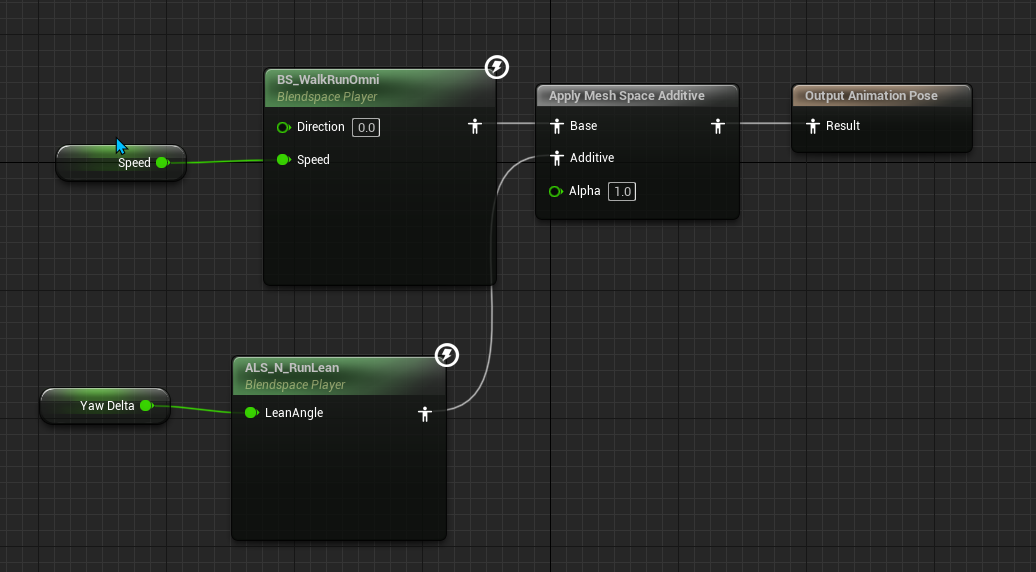
Also, nothing changes if I use the "Apply Additive" node
misty dagger
hey i need some personal assistance to anyone who, gratefully, wishes to assist me in an animation error im occuring, i have a animation problem with the hands of my character if tried remodeling and re-rigging his skeleton 6 different times and still cannot find the reason why my characters animation has this bug, the bug is, his hands. When i migrate animations from the default mannquin (quinn) in third person, it ends up messing up and making my characters hands point up, oddly. But if anyone has also had this problem or they know some magical way to fix it please DM or @ me i really need some guidance.
wide hearth
blazing dune
For some reason, whenever I use apply an additive animation, my character become...
are you sure all the anims in als_n_runlean are mesh space additive anims?
wide hearth
shrewd finch
how to apply additive PoseAsset properly? this setup works only for additive Ani...
normally it isn't used like this, you would put "retarget pose from mesh" output into "pose asset" input, then you need to use "set curve" with pose name to tell which poses you want to add
but if you really want additive poses then you need to make 1 frame additive anims and use them with apply additive node
 strange bear
Hello, I have a simple question: Can I make skeletal meshes like spinning turbines and such made static via LOD? We need them to stop animating and just be static from certain distance.
We found out skeletal meshes are very hungry and we need to trim their presence as much as possible. Even despawning them would be a good option.
 pure hearth
I have some weird stretching happening in my blendspace. What can be the cause of that?


I am using animations from UE4 in UE5 btw
blazing dune
wide hearth
are you sure all the anims in als_n_runlean are mesh space additive anims?
Yup, that was the issue. It's always the small fixes that cause the most trouble :/
wide hearth
strange bear
Hello, I have a simple question: Can I make skeletal meshes like spinning turbin...
it's not possible via lod as far as i know. but you can use instanced static meshes with verex anim instead, like they do in fortnite
strange bear
Oh. Didn't even know that was an option! I'll give it a go. In the meantime I managed to destroy the meshes and bones via LOD and the results are much better! But I'll definitely take a look at this vertex solution.
https://cdn.discordapp.com/attachments/1113724000770736168/1114172618162045019/image.png

 eternal plank
Hi, I Exported a custom animation from Maya to Unreal Engine, in the fbx format. I had a dagger that was a child of a joint, all worked fine in Maya, but when I import the fbx to Unreal Engine, I get the animation imported and my character model, but no dagger. There were few more bits in the export, like some floor and a cube, and these do not show up either. But, when I uncheck importing Skeletal Mesh, all the meshes get imported, so that information exsists in the fbx file.
My question is, am I doing something wrong, or do I have to do two different imports, and then recreate what I did in Maya - create a socked to a bone and attach the dagger mesh to it in Unreal? I don't care too much about the other pieces, but is there a way to import the animation along with a dagger that is a seperate mesh in one go?
 odd carbon
I have an object. In the Sequencer I have created a second transform.
Is there an easy way to tell the manipulator which transform to use? It seems to default to the second transorm and I want it to control the first.
blazing dune
pure hearth
I have some weird stretching happening in my blendspace. What can be the cause o...
Hey, I encountered the same bug trying to retarget als anims to my own skeleton (based on ue5). Did you find a fix?
 latent condor
eternal plank
Hi, I Exported a custom animation from Maya to Unreal Engine, in the fbx format....
latent condor
eternal plank
Hi, I Exported a custom animation from Maya to Unreal Engine, in the fbx format....
I believe skeletal meshes only support a single mesh object. I'm not familiar with mayas export features, but in blender I am required to combine all meshes before export
 mortal granite
Just wanna make sure im going about this in the correct manner. Using ALS, is it normal to have to retarget ALL the ALS animations for every single character that has an ever so slightly different skeleton? ie. large or small characters. for example I have some zombies that will inevitably share the same animation logic but they are different sizes. but if i need to change something in one of the zombies I will have to change it manually across all others? I am in Ue4.27 btw. is there an easier way to do this?
 fierce citrus
Hello I am trying to get varied idle animations so I inserted a slot with it's own slot group I called idleslot, however unlike the other slots the montage that belongs to it never plays, this is the animation blueprint:

The blueprint logic:
 blazing dune
Unreal crashes because of an error with property access. I'm using the property access nodes in my animbp, but now I can't open it since it'll just cause a crash. I know that it is not because I deleted a variable from cpp or anything. Any fixes? Thanks
 clear dune
Is there any way to rename bones? Running on UE 4.26
Also looking for a way to add a bone to a skeleton without having to retarget. Can I just add it in blender and replace the existing skeleton? I tried that and it didn't work, but I don't know the first thing about Blender, so there's a good chance I just messed it up.
wide reef
I’ve combined Iclone live link for the body animation with the Metahuman SDK for lip sync akd head movement
Only problem is the head is now stationary and doesn’t move with the body
How do I re attach the head to the body in this case?
 clear dune
That's a feature, not a bug
 wide reef
clear dune
That's a feature, not a bug
wide reef
clear dune
That's a feature, not a bug
Lol!! I’m guessing this is an easy fix, but I have a week of experience with Unreal 😅
clear dune
Yeah I wish I could help, but I don't know the first thing about live link or metahumans, unfortunately. All I've got in this channel are questions, lol
shrewd finch
how to update linked animation from sequencer? I try to bake, try to save, nothing happens - linked animation never updates. First time I try to save, it drops 'Failed to create new UMovieScene' error. Is that bug in 5.2?
 sullen jewel
anyone know how to easily rig in ue4? ive seen countless videos and they are long 3H+ long and very complex nodes
clear dune
That's some nice info
You wouldn't happen to be familiar with using blender to add bones to existing UE skeletons, would you?
acoustic violet
how do i mirror the keyframes in my sequence to the opposite limbs?
clear dune
Ok so, I believe you can do this in UE5. What you do is you set up animation mirroring of some sort, indicating which bones are mirrored to which ones on the opposite side. I haven't done this so you'll have to search online for animation mirroring, but exists under this name, or something like it.
However, this mirror effect is a boolean, it's either mirroring or not. Therefore, I suspect that it will not blend nicely with anything else. Therefore, what you should really do is enable mirroring, then record the mirrored animation in a level sequence, bake it out, and then disable mirroring again. So you won't actually enable mirroring at runtime, but instead you'll use it as an editor functionality in order to bake out mirrored versions of animations.
 late cedar
Did you ever figure it out? I have a similar problem.
hallow elm
Hi I need help about property access.
When I use Property access, My aim offset will be messed up, but when I just use function, it will work fine...
Why??? Property Access has bug???


 wide hearth
hallow elm
Hi I need help about property access.
When I use Property access, My aim offset ...
wide hearth
hallow elm
Hi I need help about property access.
When I use Property access, My aim offset ...
what the warning on aim offset player says?
hallow elm
wide hearth
what the warning on aim offset player says?
it says “Use property access“
if you use function in AnimGraph, you get this error right?
wide hearth
hallow elm
it says “Use property access“
if you use function in AnimGraph, you get this err...
no i mean on the aim offset node, the one on the right. "(None) aim offset player"
there should be no warning here
you can also try to set your aim offset directly, without the get, to see if the problem is still here
 wraith verge
Anyone knows how i can add a key? the button is disabled
 brazen wharf
wraith verge
Anyone knows how i can add a key? the button is disabled
brazen wharf
wraith verge
Anyone knows how i can add a key? the button is disabled
select bone(s)
wraith verge
brazen wharf
select bone(s)
Just found, thanks!
 grand willow
Wondering if anyone could help me with something that's probably very simple for you experienced guys out there: I have sequence with a car driving along a straight road and I want the wheels to spin accordingly. How do I do that? It seems to be pretty hard
simple star
I was thinking about being able to change my characters lengths like this and then re-adjust the position, is it stupid? Are there better ways?
 hallow elm
wide hearth
no i mean on the aim offset node, the one on the right. "(None) aim offset playe...
hallow elm
wide hearth
no i mean on the aim offset node, the one on the right. "(None) aim offset playe...
That's also you can see when you don't use property access, which says it's not thread safe.
I didn't compile so it says warning, but it won't be shown when I use property access.
 ripe stone
i have a physics asset in which I can ctrl+right click to drag the bones around.. I like that to test..
however.. in another physics asset it doesn't work? do i need to enable that?
ripe stone
remember mario 64? I'm trying to build a similar system but I'm having trouble creating forces that slowly pull back the shapes into their original state
(i'm refering to the mario deformation menu thing gizmo)
i'm trying to add forces but it doesn't seem to work
 ripe stone
idk.. i don't think so
 wide idol
By looking at this we can agree this animation can be used as root motion, am I right?

Because, when I use in-game, it doesn't move the capsule at all.

Already tried different options in the Root Motion tab in the animation asset, and checked that the animation blueprint uses Root Motion from Montages (also tested the option that accepts root motion from everything).
wide reef
Why do I get a final render that plays like this? It looks normal speed in sequencer
calm belfry
wide idol
By looking at this we can agree this animation can be used as root motion, am I ...
The root is still in place in this animation. It needs to be animated in your software of choice. Check to see if you can move the root first via a control before moving the master control so you don't have to fix it by counter animating
 odd crest
Why is Control Rig's axis Y front (BPs are X front), because of that my characters are always facing sideways. Any workarounds?
 karmic ether
Does anyone know where i can find the modular mannequin? I am trying to find one what is split up in arms/legs/torso/head.
 weak storm
I’m struggling to find info on the best approach to making UE-compatible animations in an external app (Blender), like if I wanted to prepare anims for the marketplace... Can someone please point me in the right direction? 😅
wide hearth
wide idol
By looking at this we can agree this animation can be used as root motion, am I ...
no, your root bone is not moving
 late delta
yo guys, im thinking of doing a hack and slash and stuff, when making the animations, should i end each one with it going back to the idle pose?? and what about the 2nd/3rd animations, should i start those animations with the previous pose or with the idle pose?
 dreamy dagger
Can someone explain Inertial blending to me? Not sure I get it
misty dagger
Hey i am using Mixamo converter to convert my animation, but there is this animation flashing bug. Have anyone encountered this bug before?
wide reef
Using Iclone Live Link, my character “runs in place”. How do I get the normal motions back?
I realize it’s a root motion issue, but I’m only seeing options to fix this in an animation sequence and not the actual sequencer.
I’m not using take recorder, just rendering the movie directly from the sequencer
Do I need to record with take recorder in order to do this?
wide hearth
dreamy dagger
Can someone explain Inertial blending to me? Not sure I get it
normal blending will take 2 anims and progressively replace one by the other. during the trasition time it will lerp bone rotations from 100% anim1 0% anim2 to 0% anim1 100% anim2. during this time it will sample both anim 1 and anim2
inertial blend will just replace anim1 by anim2, but it will also memorize the current rotation and rotation speed of each bone and the transition duration. then the "inetrialization" node will take this data and try to reconstruct the blend as if the bones continued to rotate at the same speed. so for example if your total blend duration is 0.2 sec, at 0.1sec it will take last rotation of amim1 bones, add speed*0.1sec and blend this with 50% of anim2 current pose.
it will look not exactly the same as normal blend but still look okay, and the strong point is that you only need to sample 1 anim during the blending, not 2 anims like with normal blend, which is faster
something like that. i hope it makes sense :))
 modest solar
Heyyo. I'm totally stumped. Turning this alpha down to 0 during gameplay doesn't affect the rotation of the wrist. If I disconnect the pin and set the alpha to 0 for always, it "works" (the transform does nothing). But modifying the alpha during playback seems to have no change (it's always transforming the wrist bone)

Any ideas?
modest solar
modest solar
Heyyo. I'm totally stumped. Turning this alpha down to 0 during gameplay doesn't...
First pic is the moment I've animated the alpha to 0. It retains the input rotation into the transform node. I've double checked this is the transform being applied during this animation. Second pic is after disconnecting the alpha pin. This is how the animation should look before going into that Transform, or, rather, going into that transform while it's at 0 alpha.

 dreamy dagger
wide hearth
inertial blend will just replace anim1 by anim2, but it will also memorize the c...
dreamy dagger
wide hearth
inertial blend will just replace anim1 by anim2, but it will also memorize the c...
So in inertial blend, it will replace anim1 by anim2 whilst saving the time it took and transformations, then it will repeat the animation and multiply the transformations by the speed that it calculated the first time which transitions to anim2? Is that correct? Or does it save the transformation data before it runs the animation?
misty dagger
Hey. I tried to make a Anim BP for a Mixamo Character. Its always dragging back to the old location
like it "snaps" back and doesnt stay in place... I already tried to check root motion etc
wide hearth
dreamy dagger
So in inertial blend, it will replace anim1 by anim2 whilst saving the time it ...
it saves the pose and speed of the last frame of anim1 and then continues to interpolate it, and blend that with anim2
at leat that's how i understand it. important thing is that it doesn't read anim1 after it starts palying anim2 during the transition
you can try to remove the "inertialization" node from your graph and see the result, it will look like if your inert. transitions are of duration 0
dreamy dagger
wide hearth
you can try to remove the "inertialization" node from your graph and see the res...
Yea Ive seen what happens, the animation when it is interialized looks like it snaps to anim2 quicker than normal blending, that's whats supposed to happen right?
wide hearth
dreamy dagger
Yea Ive seen what happens, the animation when it is interialized looks like it s...
if you forget to put "inertialization" node in your graph then the blend time will be always 0. otherwise it should respect the blend duration. but it will look slightly different than the normal blend
dreamy dagger
wide hearth
if you forget to put "inertialization" node in your graph then the blend time wi...
Alright thanks, but when should we use it? Should we use intertialization all the time for ALL transitions or is it a bad idea? Wouldnt it help performance
shrewd finch
how can I copy additive layer tracks from one animation sequencer to another?
simple star
There is something really basic that i'm missing with the new IKs system, when I create a second one, in this case the leg, the first one breaks. Can anyone help?

as in I create one IK, it works
I create another IK, it works, but the first one breaks
brazen wharf
does someone know if animation blueprints ticks within the actor tick when both are in the same tick group? or do they tick on their own?
as if i have 2 characters i wonder if it does char1 actor tick, char1 animtick, char2... or char1 actor tick, char2 actor tick, char1 animation bp tick, char2 animation bp tick
simple star
brazen wharf
as if i have 2 characters i wonder if it does char1 actor tick, char1 animtick, ...
They should tick closeby I think, probably wrong, you could just throw a test with some print nodes
simple star
wide idol
By looking at this we can agree this animation can be used as root motion, am I ...
the root doesn't move so, no?
brazen wharf
looks like actor ticks happen before animation bp ticks
brazen wharf
yea since i feel like this messes up my IK for 2 characters interacting
so if 2 actors try to reach each other as goal, they still might end up offset, because each one corrects the position to the old position of the other -.-
simple star
I mean, it's just one frame, how bad can it be?
brazen wharf
yea i already have some possible solutions in mind
wide hearth
brazen wharf
does someone know if animation blueprints ticks within the actor tick when both ...
abp update is called from skel mesh component tick afaik
misty dagger
Hello everyone ! im having some trouble with some blue prints animations im guessing im doing something wrong the root motion ?
brazen wharf
wide hearth
abp update is called from skel mesh component tick afaik
yea but in my case both actor and mesh are set to pre physics tick group, but they don't tick together
apparently it ticks actors first and then components
but also my code was okay apparently, since i do all IK stuff in their animation bp, so it should be fine
 vestal rapids
created pet for player, all compiole
compiled fine,but on play, lion runs sideways to character, what have I missed ;))
from this tut https://www.youtube.com/watch?v=ALb7CmsgjUE&t=17s
Hello guys, in this quick and simple tutorial we are going to learn how to make a simple animal AI in Unreal Engine 5.
↪️Join my Discord Server, NOW: https://bit.ly/GorkaGamesYouTubeDiscordServer
Free Animal Asset Pack 🔥 https://www.unrealengine.com/marketplace/en-US/product/17c2d7d545674204a7644c3c0c4c58ba
Simple Enemy AI Tutorial: https://ww...
lunar storm
Do i need to know how to paly guitar so i can animate a character playing guitar accurately?
 wary scroll
It does help for sure
vestal rapids
Just youtube for help playing guitar, ofc if you like guitarand can afford one, by all means
brazen wharf
wary scroll
It does help for sure
not sure if this is true
someone who knows how to play guitar might try to make it perfect and accurate, therefor spending more time
someone who doesn't, might do it so that it looks to him like someone playing a guitar, which will probably be okay enough for the majority of players
lunar storm
brazen wharf
someone who doesn't, might do it so that it looks to him like someone playing a ...
Nah but i rly want the accurate thing
TY guys
blazing wave
does anyone know of a good tutorial for creating control rigs for hands? None of them include fingers! EXTRA bonus points if it can include backwards solve. plz hlp 😅
(i did manage to find one and made a procedural hand but no idea if its right or how to do backwards solve)
slender trellis
i have added an animation but i dont see it in the sequencer im on unreal engine 5.2

 red tinsel
'Copy pose from mesh' node does not recieve montage?
is it possible to have the montage play in the copied anim instance?
heavy kayak

just bought an asset that but the hands looks all messed upp ?
seems like the bone arent hooked up or something ?
amber wave
Guys I have this problem with animation every time I play it my plane is returned to starting positon anyone help?
amber wave
vestal rapids
Also what is desired outcome?
that plane will stop at position where animation stopped instead of this you can see at the end that he is returning back
to the start
 idle knoll
hey, is there any way to do lookat animation with no flip behind back? i want to make statue to look at player 360" around


all tutorials i was looking have a flip behind, normally people just clamp animation, i just want to have it all around
 pliant cairn
Does anyone use the Drongo character? I'm trying to create an aiming blendspace. I have that created but I cannot get it to work in the animation blueprint. Is there a guide to getting blendspaces to work with an already animated character?
I've tried so many tutorials
pure hearth
What is wrong with this retargeter?


For some reason all retargeters became freaked
slender trellis
Is there a way to align the hands to the keyboard
slender trellis
pure hearth
did u set retarget root ?
 magic hull
Hey guys
I have a weird problem, I have been editing MetaHuman_ControlRigs in sequencer, I have been using an additive layer, but for some reason it now refuses to keyframe on it, instead when I change something, it changes the keyframe on the original ControlRig layer
Even if I create a new additive layer, the problem persists, it won't add keyframes to the new layer, instead, it changes the keyframe/or creates a new keyframe if there isn't one, on the original layer
The only thing that works, is baking all layers to control rig again, and then creating a new additive layer, but I don't necessarily want to do that as it creates a million empty keyframes that I don't need.
Hmmm, I just figured out a solution, adding a new additive layer to the second layer I created now works as intended. Very strange
rotund sparrow
Hello everyone, I was wondering if I can find help here.
Trying to learn a bit control rigs, so I can do some automotive videos in Unreal.
I managed to get basic control rig, so far works good, but I got stuck a bit on my Root control. I wanted it to rotate and move my other controls with the whole car.
But now if I rotate it or move, it affects the other controllers set up so my wheels rotate, drift as well etc etc. I control those with transforms on Y or X axis.
Any idea why ?


 oak raft
Can anyone please help with this transition issue from the stop animation to the idle. Not sure why it's looping
 astral lark
Does anyone know what's happening to the buttons? Why the corners and outline go back to standard?
plain drift
Hi everyone. I am trying to use "Snapshot Pose" to save the pose of a simulating skeletal mesh. But when I input the pose snapshot in my anim blueprint the character just snaps back to its rest pose. Is there something I am missing?

I even set the tick group of the blueprint capturing the snapshot to "Post Physics"
vestal rapids
your reseting near end of BP, is that on purpose or..
plain drift
vestal rapids
your reseting near end of BP, is that on purpose or..
what do you mean?
I want to save the current pose and then disable simulation
vestal rapids
long as I'm here,any idea why this above, is in that pose,the lion, instead of following my player side by side in parallel ?

 clever field
Would changing my bone names during the creation of the control rig break it?
plain drift
I solved it. Had to change transform space to mesh space on my blend node:
 vestal rapids
ok cool
ripe gazelle
I just got an idea for a thing.
What sort of work is needed to make a character press their hand against a wall?
vestal rapids
physics and line tracing or whatever its called,more Im sure but it starts there
clever field
clever field
Would changing my bone names during the creation of the control rig break it?
I think it did
Fixed it
ripe gazelle
i assume the distance is important but thats a nobrainer
im not sure physics is needed unless IK is "physics"
vestal rapids
its important as relates to it hitting the wall you want as in intersection, or however the engine sees that
ripe gazelle
"nobrainer" as its easy to solve distance data
vestal rapids
I meant well you aren't just hitting or colliding with wall, you are interacting with it, so I can't imagine phyhsics not being needed
yes
ripe gazelle
i imagine a modest animation that brings the arm up in to a resting pose before it uses IK to reach the wall via the distance parameter
vestal rapids
well sure, if you don't want to 'touch' the phsyical wall
ripe gazelle
there is a difference between objects as entities in the world and physical simulation
vestal rapids
never tried, ive so far,had no need, but oon yes I shall need that :))
ripe gazelle
i only say "physics" if its using the simulations.
vestal rapids
ok
ripe gazelle
the idea i have is to translate this functonality to first person melee swinging/attacking
vestal rapids

Epic Developer Community Forums
I have a couple of questions regarding this: How do i make my character lean on the wall and off the wall with a press of a button like you would in a stealth game? What action makes my character stick to a surface in the Blueprints editor? What i want to specifically achieve is an action where the player moves leans up against a wall with th...
if not precisely might give some ideas
so any idea how I resolve my weird lion rotatoin onplayer follow ?
ripe gazelle
i believe metal gear solid would use more direct approaches 🙂
vestal rapids
I followed tut precisely so its just weird its not working right
ripe gazelle
if pressing against the wall, movevector = wall vector
and the rest is a tuned animation
vestal rapids
ya thats what I meant, youd need a vector hitting wall for interaction
thats what I tyhought you were getting at
wall meet hand 😉
this is what I used https://www.youtube.com/watch?v=ALb7CmsgjUE&t=17s
Hello guys, in this quick and simple tutorial we are going to learn how to make a simple animal AI in Unreal Engine 5.
↪️Join my Discord Server, NOW: https://bit.ly/GorkaGamesYouTubeDiscordServer
Free Animal Asset Pack 🔥 https://www.unrealengine.com/marketplace/en-US/product/17c2d7d545674204a7644c3c0c4c58ba
Simple Enemy AI Tutorial: https://ww...
oddly, my pet is literally right up agtainst me, turned literally perpendicular to me
just weird, but I see no fault in bp['s or anything that wojuld cause that
ripe gazelle
im on a need to know basis
vestal rapids
ditto ^^^^
ripe gazelle
😄
vestal rapids
ha
ripe gazelle
so...
does anyone know how much of a first person melee weapon swing could be transfered to IK from the keyframed animation?
like at what point is the swing dependent on keyframe data...?
vestal rapids
not sure where you are going here
the keyframeis just, a key placed for animation at a given frame
shrewd finch
do I need to properly bake root motion, when I do retargeting? after the retargeting done, there is no way to bake root motion into the character? I just spend 5 hours doing retarget, but now I see, that my new animation sequences have no root motion, even tho its ticked in settings
 upbeat rampart
is there a way to animate camera movements for first person games, so for instance if you use a melee attack the camera will look slightly to the left then back to normal?
simple star
Is there any way for my IKs to work on the initial pose, before animations are applied? like the example below
 vestal rapids
@upbeat rampart not using 1st per , sequence can do most anything, I suppose parenting camera to player arm ,would do it, not sure but thast the idea,,forget whats it called, the players X, that holds weapon
another subject, on setting up new pet companion, it works fine, but on exit play, the whole thing disappears showsing unloaded under outliner, what causes that, ive seen too much of that lately
and I have streaming disabled
I mean nav disappears, its hap0pened before, I suspect a bug, then if I turn on steraming, crash, or good chance its going to, crash,,shoujldn't do that , just enabling streaming,,,sounds like a bug!!!
wide hearth
shrewd finch
do I need to properly bake root motion, when I do retargeting? after the retarge...
uncheck "root motion" in the sequences, then retarget. it will treat the root like any other bone. you also need a chain for the root, like in their example
vestal rapids
great, out of memory error just turning on steraming again ? Runtime\Core\Private\GenericPlatform\GenericPlatformMemory.cpp] [Line: 241] Ran out of memory allocating 35494909120 bytes
tepid sundial
When importing a FBX with animations, unreal imports some of the animations, but not all of them. Can anyone help me understand why this happens?
vestal rapids
depends of software, blender here,not sure I could help you, don't use it enough,,or maya, whatever, bing in this case is your friend
vestal rapids
https://forums.unrealengine.com/t/how-to-make-nav-mesh-cover-hills/337905/4, should be a giant help in making navmesh work over hills or steep ones.I was wondering, so if you have this issue, there is fix it seems.
 stark thunder

Anyone know how/why to fix this retargeting


Elbow and fingers and hands are wrong
steel tree
is your retarget pose similiar from source pose? it could be that
i assume your playing animation to see if the retargeting work
or if not you could check your retarget bone if it similiar to each other
before you do the retargeting
steel tree
i believe in epic lyra animation livestream they cover this part
you could see how epic explain it in that stream
stark thunder
Hmm, Do you know exactly what video it is?
I think the issue is, well for the hands, the goals are in a specific place and so the retargeted animation looks whack because of proportions?
Or maybe loss of bone info because it favours proportions, maybe improper settings on bones (Stiffness etc)

 supple vigil
nevermind i'm an idiot next question - how come it keeps rendering :no shot: CineCamera Actor 1"
instead of the cut that I have laid out
steel tree
stark thunder
I think the issue is, well for the hands, the goals are in a specific place and ...

This week we’ll be sitting down with two of our own incredible animators who helped shape the Lyra Starter Game as we know it, and walk through the process o...
its this one i think
you can check through the key moments for retargeting
hope this helps
 strange yarrow
Hi there, I uploaded to 5.2 and when I import a new animation and use it in the animation blueprint it doesnt loop anymore. I looked everywhere but I cant find where to make it loop, any ideas?
sweet lantern
How do I handle animations for a first person weapon system with left and right hands like in skyrim?
especially selecting animations for a hand
should I make 2 parallel state machines for that and blend them or is there a simpler way?
 charred schooner
Anybody in here ever use iClone? Got a question for ya if so
 wide hearth
dreamy dagger
What is a linked anim graph?
wide hearth
dreamy dagger
What is a linked anim graph?
it's from lyra right? it checks if you changed the linked layer, which happens when you changes thew weapon for example
dreamy dagger
wide hearth
it's from lyra right? it checks if you changed the linked layer, which happens w...
Yeah it is! Thank you for your response
The linked layer is the anim graph right?
wide hearth
it's the second abp, there^'s one called base, and then some others like "pistol", "shotgun", "feminine" etc that this one. lyra will switrch it according to which weapon and which character you have
dreamy dagger
wide hearth
it's the second abp, there^'s one called base, and then some others like "pistol...
Ooh ok, but how do they switch between each other?
wide hearth
dreamy dagger
Ooh ok, but how do they switch between each other?
Using "LinkAnimClassLayer" node, somewhere in the character bp
dreamy dagger
wide hearth
Using "LinkAnimClassLayer" node, somewhere in the character bp
Alright thanks !!
 queen ravine
Hey everyone, does anyone know if there is a way to subdivide a skeletal mesh similar to a smoothing operation in Maya? i cant tell if its possible in ue 5.1. I heard you may be able to fake it with a normal map though.
 fallen cipher
When a root motion animation is interrupted, why doesn't it just instantly allow movement?
It seems to just completely bug out when I interrupt it, keeping the movement and playing until the duration of the anim ends
Thought all i'd need to do is just call "stop anim montage"
It's like, the animation stops playing, but the input-lock from a root motion anim still remains
^^ In the video im just pressing H to cancel it prior to the anim finishing
vestal rapids
@queen ravine yes with newish modeling tools
@Hazno why would u want to interrupt weapon fire during anim ?
I think that would look strang
E
Lol
anyway
 nocturne kraken

I am thrilled to share my latest animation works on LinkedIn!
Showcasing my best work, this presentation represents my passion and skills in animation. It's a… | 10 comments on LinkedIn
old plinth
Does anybody made some custom changes in ControlRig plugin? And on which way ? I should extend SphareTrace to block one additional channel (now only blocks WorldStatic) to allow some small character to have IK on some other much bigger character. First I did it on that way to copy ControlRig in project plugins and change one class for that FRigUnit_SphereTraceWorld but have a some errors during shoipping build and not search way maybe to extend only that class instead copying whole plugin. UE 4.27
wide hearth
old plinth
Does anybody made some custom changes in ControlRig plugin? And on which way ? I...
you don't need to copy the whole controlrig, you can just copy the unit, rename it, change the code and it should be there in the list of units in control rig
units auto register, so you can make your own this way
old plinth
how exactlly to copy that? should have same folder structure in plugins (in my project) as in engine?

this is what I need to change? so...should copy that in Plugins (my project) with same folder structure ?
wide hearth
yes those two, but you need to make your c++ project or plugin and put them in there and compile it
you cannot just copy 2 c++ files like that
old plinth
its folder structure important? I need to make some kind wrapper plugin if I understand good?
wide hearth
yes you need to make a code plugin or a code project and add those files in there, in plugin or project source.
they should be compiled, otherwise nobody will see them, so they should be properly integrated in some code
old plinth
ok tnx, I will try
heavy kayak
Anyone have some tips on setting up a blendspace with "walk run " stafe left/right run walk/right and back" ?
im having troubble getting all the nodes right
sweet lantern
sweet lantern
especially selecting animations for a hand
found the mirror data table thing, but it works weird
should mirror left-to-right, but it mirrors front-to-back
for some reason it does this basically

 sweet lantern
the one above is mirrored by X, here is by Y

 full perch
If anyone could help it'd be amazing. I have an AI that refuses to change animation. It roams fine but stays in it's idle pose instead of switching to a walking animation. I've followed the steps I did before to have my main character's animation change when moving but it just hasn't worked for the AI. Any help would be greatly appreciated.
sweet lantern
full perch
If anyone could help it'd be amazing. I have an AI that refuses to change animat...
does animBP fetch the data from the bot character?
full perch
Sorry I'm really new to this. This is my first ever project on unreal haha so unsure on a lot of things. Where would I see that?
full perch
sweet lantern
does animBP fetch the data from the bot character?
Which BP would that be under? I can send screenshots if thats easier haha
sweet lantern
full perch
Which BP would that be under? I can send screenshots if thats easier haha
Animation blueprint
The yellow one, in folder with your animations
 oblique rampart
Migrated my project from 5.0 to 5.2, and for seemingly no reason, several of my characters now have jitters (I think paint weight issues) that weren't there in the other project. Has anyone else had this problem?
vestal rapids
you might restart and see if it goes away IF it wsas your firws
first boot into 5.2
but no I haven't, not using 5.2 yet with any weight paint
 haughty beacon
Sorry to bother, but I have been quite stuck with this. I have a character with a full Blender Rigify control rig (with no metarig), but I want to convert it to be compatible with the UE5 skeleton. Is there a way to do this without having to just redo the entire rig? Tried a variety of tools, but nothing seems to get close to where I want it. Kind of fearing the answer to this ^^'
vestal rapids
HMM
well as I recall, rigify is VERy basic tool in blender tho maybe uipdated in 3.x or 4
closest I could find, but im not impressed with its likely aid toyou,,thought worth sharing
there are others
bing for , rigify to ue5
simple star
What's the difference between using Ik rigs vs contol rig in an animation BP?
haughty beacon
vestal rapids
closest I could find, but im not impressed with its likely aid toyou,,thought wo...
Yeah, I've got a plethora of tools now; Uefy, Game Rig Tools, and even a little known own called Magic Bone Tools (which actually got closest to my goal). I might have to bite the bullet and rig everything from scratch I guess...if I could at least somehow transfer the weight paints to the closest matching bones :I
vestal rapids
ya ouch
animmation importing is not easy even in 5.2 ;-0
Im sure ill dealwith that soon enough ;0-EEK
Ive been SO full intojust UE51 stuff that blender has taken side lines, but now with 4 out illl want todomore
latent condor
does anyone know if there's a way to set bones to not inherit scale from their parents in anim sequences? or on the skeleton as a whole
wide hearth
latent condor
does anyone know if there's a way to set bones to not inherit scale from their p...
i think there's no way, except from scaling the child back.
latent condor
wide hearth
i think there's no way, except from scaling the child back.
😐
I've got a rig in blender and I've had a lot of little inconsistencies in my animations, but nothing too noticable until now. I think the constraints driving scale in blender give a world space scale, but then in UE those scales also inherit the parent's. So I'm getting a bit of full body stretching in extreme poses and it looks terrible
 subtle citrus
When I use my character (UE5) with ABP BasicFootIK, it gives me a small distance between the feet and the ground. Though I changed the ZOffset in the Ik Blueprint the gap is still there. Any ideas? (I activated Root Motion, the root motion animation works).
 pliant cairn
Has anyone worked with the Drongo free character asset from Unreal ? As in continued to build off of the exisiting blueprints? I'm try to get my character to aim when holding right click down. I have a 1D offset. I just have no idea how I'm implementing that into the exisiting animation blueprint and it's related locomotion etc.


I hope that paints a clearer picture
 vestal rapids
I’ve never used any of that yet, I’d just bing it, not much help sorry
subtle citrus
I am going crazy with the gap between the character´s feet and the ground using basic foot IK....
vestal rapids
Something else I need to lean for better foot step placement etc 😎
Anyway what isn’t waking
Working
subtle citrus
The thing is, that some documentation is so bad, that I am not sure if it is my fault or if the system is not working....
exotic plover
hellp ppl! animBP n00b question ... I know how to modify transforms of a bone ... but how can I read teh current transforms of a bone? is it possible? I'm trying to do weighted average (smoothing) in the animBP. Thank you!
 prisma lichen
is there a place where i can ask for help with character animation?
this blocky man, when imported to unreal and when it replaces the default mannequin in the 3rd person template,

becomes this eldritch horror
 vestal rapids
BlendSpace DoeBlendSpace has sample ANIM_DeerDoe_GrazeOnce that is invalid due to being out of bounds. Recommend adjusting it. < anyone know how to fix that ? Im not even using that anim in doeblenspace, so this is odd.
 charred parrot
I was following a tutorial series and I'm not sure what I'm doing wrong. I'm still really new to Unreal and I was wondering if someone can see what I'm missing. I have run animation/blendspace and I added an animation for the fastest part of the run "TravelMode_Fwd". In the preview the animation shows up but when I actually play the level that animation doesn't play. I get the excellerated speed but the actual change in animation doesn't change. I'm using Unreal Engine 5.03, I'm not sure if that matters. If anyone can help me to figure out what I'm missing I would really appreciate it.
 blazing wave
Hi! I made a control rig for my character and it works well and I can animate and save out animations with it. But for some reason any of the animations I made prior to the control rig's creation crash the editor when I import them to the sequence. What am I doing wrong here?
I've also done a quick test by only leaving just the pelvis to the head bones on forward and backward solve so I could verify everything was being solved and it still crashed.
Is this happening because I don't have every single bone backwards solved?

I also did a test on the built manny control rig to check if it would cause a crash if i didn't have backwards solve for some bones and it did not crash. it just didn't have those bones animated. so that cant be the issue here
 compact kernel
What all should be done when exporting out of blender for Unreal Engine?
Is there documentation for this or like a video or something that I can like bookmark that might provide some helpful insight.
 vestal rapids
wide hearth
subtle citrus
When I use my character (UE5) with ABP BasicFootIK, it gives me a small distance...
vestal rapids
wide hearth
subtle citrus
When I use my character (UE5) with ABP BasicFootIK, it gives me a small distance...
if you show the bones, what it looks like?
dreamy dagger
Difference between animation data and preview mesh?
 vagrant rivet
hello guys, this is not a really a technical question, just asking for your preference and best practice.
so i have downloaded some character packages from marketplace and they are all compatible with unreal mannequin but in some cases they have some extra bones (for weapons and other attachments) i want all my character to have exactly the same skeleton so that i can use animations with all my characters without retargeting them
so in this case which is the best practice?
- remove extra bones in maya
- add those extra bones to all my skeletal meshes (and leave them empty)
- you tell me
wide hearth
vagrant rivet
hello guys, this is not a really a technical question, just asking for your pref...
- you can try "compatible skeletons" feature
 deep coral
How should I structure my animation blueprint to achieve modularity and expandability for my 2.5D fighter game, which includes locomotion (moving, jumping, landing, wall sliding, wall jumping, wall ledge grabbing), attacks (6 basic moves: 3 punches - up, mid, low, and 3 kicks - up, mid, low), and a general perry that needs to blend with idle, walking, and jumping states? Should I use animation montages? Should I blend by bone poses for attacks? Any advice would be helpful.
Explanation: I'm currently developing a fighter game that combines elements from Smash Bros and Street Fighter. The game will be in a 2.5D perspective, and I have implemented various locomotion mechanics such as moving, jumping, landing, wall sliding, wall jumping, wall ledge grabbing, attacks, and a general perry move. Specifically, I have 6 basic attacks consisting of 3 punches (up, mid, low) and 3 kicks (up, mid, low). These attacks need to seamlessly blend with the idle, jumping, and walking states. Additionally, I have a general perry move that should blend smoothly with the idle, walking, and jumping states.
I'm seeking guidance on how to structure my animation blueprint in a modular and expandable manner. Should I utilize animation montages for managing the transitions between different animation states? Would it be advisable to blend the attacks using bone poses? I would appreciate any advice or recommendations you can provide to help me design an efficient and flexible animation system.
vagrant rivet
wide hearth
3. you can try "compatible skeletons" feature
took a while to find it and set it up correctly but THANKS A LOT MAN this is awesome
subtle citrus
wide hearth
if you show the bones, what it looks like?
Hi. Thanks a lot. The feet rotation was fine, the feet had only a gap about some mm over the ground. I was able to do a workaround by modifying the basicFeetIK. Thanks a lot!
When I use RootMotion, what exactly is the role of the capsule component? E.g. when I do a crouch, my character will become smaller, and I reduced the capsule size, Fine. Working. But: When I crouch FORWARD, my character gets out of the capsule (with his head), and so the head of my crouching character disappears in obstacles. If I adapt the capsule radius, it seems to big for the other part of the character´s body. Any ideas, friends?
 buoyant gyro
Does 5.2 pretty much break all animations that used the mannequin in previous versions? or is there a straight forward way to retarget it? It looks like lots of changes have been made there.
Ah nvm found how to retarget easily from 4x/5.1 to 5.2
fierce citrus
Anyone else has this problem that if their is an state that followed one that has a blend space the interpolation is very abrupt between the two states? Is there a way to fix that?
simple star
my control rig seems to be busted, any ideas on how to solve this? No IK works


is this still maga buggy/ broken?>
wide hearth
simple star
is this still maga buggy/ broken?>
sholdn't that be thigh-knee-foot?
i mean for A,B,and effector item
and your primary axis is wrong too
 little brook
I'm new to unreal engine and I got confused about Unreal Engine default character skeleton.
I always rig a character mimicking human bone and joint system (e.g. rokoko mocap & mixamo skeleton).
but in Unreal engine, why there is 2 bones for each arm, thigh, and legs?
What is the purpose of those extra bone?
vestal rapids
Im no pro in anim, yet,havent needed it beyond default UE install, but the bones do mimck our bodies so
short of that I'd need to refer to docs &/or some really good tut online ofwhich they are many

Learn about Skeletons, Bones, and animation data management in Unreal Engine.

Epic Developer Community
Hello guys, in this quick and simple tutorial we are going to learn how to morph a skeleton / character, and change bone scale`s in Unreal Engine 5.
Fo...
wraith verge
Hey. Anyone could say FullBody IK is actually a full ik solution for human skeletons? (As i expect). Just did what the docs say but i think elbows are not suppored... 🤔
vestal rapids
wide hearth
little brook
I'm new to unreal engine and I got confused about Unreal Engine default characte...
2 bones? you mean those called like lowerarm_twist?
wraith verge
wide hearth
2 bones? you mean those called like lowerarm_twist?
Upperarm, Lowerarm and hand, yeah
 little brook
vestal rapids
Im no pro in anim, yet,havent needed it beyond default UE install, but the bones...
little brook
vestal rapids
Im no pro in anim, yet,havent needed it beyond default UE install, but the bones...
Thanks, it's 12 a.m. Here, i will check it later. Also a few long bone connecting origin point to hand got me confused, i hope it's explained in those articles.
little brook
wide hearth
2 bones? you mean those called like lowerarm_twist?
Not sure, I'm not in front of computer right now.
wide hearth
little brook
Thanks, it's 12 a.m. Here, i will check it later. Also a few long bone connectin...
long bones are ik bones. they should exactly follow the transform of the corresponding body bones. for example ik_hand_l should have exactly the same location and rotation as the hand_l. They are used for ik in anim blueprints
wraith verge
wide hearth
2 bones? you mean those called like lowerarm_twist?
It seems the hands do not move the elbow at all
(when moving the controller)

Does it actually looks good? I doubt.. 😅
wide hearth
yes it looks correct i think. i don't know why they are not moving
little brook
wide hearth
long bones are ik bones. they should exactly follow the transform of the corresp...
I'm very familiar with IK. It's just me being not familiar with how unreal engine represent it visually.
jolly hatch
wraith verge
The from world is the missing Link .
 subtle citrus
Warp Target Name problem: I cannot choose the part of my animation to display the special section. It seems, that "Add or Update Target from Location" does not recognize the Warp Target Name. Any ideas?
vestal rapids
BlendSpace DoeBlendSpace has sample ANIM_DeerDoe_GrazeOnce that is invalid due to being out of bounds. Recommend adjusting it , error on start of project, how doI fix ?
jolly hatch
Anyone know how I could move the body ctrl up and down with the head ctrl but keep maintain there current relative position from each other.
 wide hearth
vestal rapids
BlendSpace DoeBlendSpace has sample ANIM_DeerDoe_GrazeOnce that is invalid due t...
wide hearth
vestal rapids
BlendSpace DoeBlendSpace has sample ANIM_DeerDoe_GrazeOnce that is invalid due t...
it just means you have a point in your blendspace which is outside of bounds. like, if your blendspace x axis goes from 50 to 100 and your point is at 0 it's outside bounds
 teal void
What am I doing wrong here? The animation never switches from idle to anything else - if I switch the True/False animations in the top blueprint the MoveLeft animation does play, so that rules out a lot of issues.
I'm brand new so talk to me like I have training wheels.
1st image = Animation
2nd image = Player Blueprint


 rapid locust
Anyone here who does their own animations?
No motion capture..
I ask since I tbh just want to know is all.
Since I'm wanting to do so myself so I can understand a pipeline for game dev
 tranquil lark
I have an animation that was authored for Manny's skeleton/build. I have a female character that is smaller in build, but the animation doesn't line up. It works fine for the male character though. What are some options I have other than authoring female specific animations?
wraith verge
jolly hatch
The from world is the missing Link .
That did not fix the elbows though...
 wicked forge
Hey there, how exactly would I be able to change a dynamic value in an AnimNode?

It's bound to Dynamic but I don't know how to set it externally
simple star
What are the best ways to prevent my feet IKs to find something they shouldn't? I'd like to avoid a new channel


 subtle jungle
Hey man, were you successful in adding that bone in blender to your skeletal mesh? im trying to do exactly the same thing as you, but reimporting the new skeleton still breaks it, in fact exporting the skeleton from UE5 as an fbx file and reimporting it immediately makes it work perfectly. but as soon as it is imported into blender and exported out again it breaks, so i reckon that there is some export/import setting within blender that makes it so difficult.
ill update you incase i find the right settings
 storm bluff
I was, yeah. I ended up buying the Uefy 2.5 plugin and slowly working my way through his tutorial videos. Took me a week or so of nights since I had almost no existing Blender familiarity but pretty happy with the result.

Create Manny, Quinn and other mannequin rigs in Blender with Rigify and Uefy 2 for Unreal Engine 5. Use metarig presets to instantly create compatible rigs for all mannequins in UE5.
blog: https://www.rakiz.com/uefy
Next Video: How to Import Mannequin to UE5
https://youtu.be/GdObGfhRPGA
Chapters:
00:00 UE5 Mannequins
01:35 Manny89 Export
02:1...

Uefy 2.0 is an addon for Blender that provides tools to make Rigify rigs suitable for game engines like Unreal Engine. Supports UE5 from Uefy v2.5 and above
Product Page: https://www.rakiz.com/uefy
The default output of Blender's rigify addon causes issues with Unreal Engine 4/5. Using using Uefy 2.0 will fix rigify rigs so they just work. Ue...
storm bluff
subtle jungle
Hey man, were you successful in adding that bone in blender to your skeletal mes...
Try following those and all his other 2.0/2.5 videos. It took some effort but I was able to get a workflow that succeeded for my use cases. 😀


That’s the Synty modular character re-rigged and skinned to the UE5 manny skeleton, plus the additional bones needed for the various modular parts.
Retargeting results for marketplace anims are much better for me now.
misty dagger
When opening Anim Insights in the editor the Trace Data Filtering window says "Trace Data Filtering requires a connected Live Trace Session". It used to be that it automatically picked up my editor session but now it seems to be disconnected. How can I make it work in my current Editor session?
 shut igloo
Are 2D face rigs possible in unreal?
latent condor
anyone know much about fixing squash and stretch rig issues when going from blender to UE?
stretch to constraint causing all sorts of trouble
 sharp nacelle
Any one know why when i import my animations from blender there are so many? Most appear to do nothing and I only have like 8-9 animations
 latent condor
sharp nacelle
Any one know why when i import my animations from blender there are so many? Mos...
latent condor
sharp nacelle
Any one know why when i import my animations from blender there are so many? Mos...
Check your action editor. They're likely all individual actions


 shrewd finch
how to properly retarget root motion for characters with same skeleton, but very different height?
 obtuse parrot
Hi, In UE 5.2 when try to create a new IK rig the pick skelton dialog does not pop up. Is there a new way to select the skeleton?
Ahh not a bug. Behavior changed in 5.2 to make the IKRig based on the preview selected mesh inside it, instead of a pop up.
latent condor
sharp nacelle
To see each action for the selected object, click the drop down button where it says Miles_Run. This will only show the actions for whatever object you have selected. In your case, you'll want to select the armature (not the mesh) and look at the individual actions
If you want to see every single action in your blender file, regardless of object, you can select the Blender File display in the outliner, and then click the Actions drop down tab
 compact kernel
Is there no 1D Blendspace anymore in 5.2.0?
Please @ me if you know the answer. Will see it faster, thanks in advance for help, if any.
Edit: Found it, it is located under "Legacy" haha

 bright fulcrum
Howdy peoples! I am working on remastering a old game in UE5(just for my own playing and to learn basic game dev) i have exported the skeleton/animation in a .fbx format and have AI upscaled the char skins and they are currently in .PNG. I am however lost on how to apply the upscaled texture back onto the skeleton in either blender, UE or Noeisis(what i had to use to rip the animations to begin with)
Plan is to get the character textures/animations right, make sure i can import them succesfully into UE then i will move on to importing the world textures/layout. Im hoping i do not need to physically rebuild the map using a terrain editor but may have too
Mechanics/missions etc should be simple enough to figure out so getting chars and world imported are the bulk of the work i think (maybe this assertion proves incorrect we shall see)

Example of the textures
steel tree
hello,i want to ask im thinking of making a vaullting and mantling using motion warping in multiplayer. in thinking do i need a flag in cmc to drive the vault and mantle that called another func that does it in CMC? my prototype right now is all in character bpnwith the tracing and the act of vaulting and mantle
anyone can give me pointers
dreamy dagger
What is the difference between animation and skeleton translation retargetting?
 worn marlin
Hi, can anyone give rough idea of blending two FPS animations (a pistol animation for the right arm and flashlight animation on the left). So basically i have these two animations however for the pistol it grabs the pistol on both hands while the flashlight animations holds the item on the left arm only. Is there a way I can merge this two without creating an animation that is both holding the two items for each hand. I mean can i basically blend them together via the animBP like when we blend upper arm and lower body animations? I was thinking it was possibly to lets say isolate the left clavicle via the layer by bone for the flashlight animation. Thanks
 severe burrow
Any idea on how can i break rotator or rotation to axies? Like i couldnt find nodes for it. Mby they are not in avaible in Control Rig Blueprint
 wide hearth
dreamy dagger
What is the difference between animation and skeleton translation retargetting?
wide hearth
dreamy dagger
What is the difference between animation and skeleton translation retargetting?
super easy: translation retargetting is simply like a filter applied to the anim data. when set to "animation" it will read the translation from animation keys, when it's "skeleton" it will not read the translation from the anim, only the rotation. so if you animate a translation and you set it to "skeleton" it will just be ignored. that's why you should put "animation" or "animation scaled" to the pelvis
and anim retargetting is really the retargeting from one skeleton to another, creating new anim sequence which (hopefully) looks like the original
simple star
Does anyone know the difference between using IK rigs vs control right in a videogame format? Is it the same under the hood?
frozen condor
Anyone know why my cloth character collision isn't working?
https://medal.tv/games/unreal-engine/clips/1dxPzFvsF-jL2z/d1337J007QIX?invite=cr-MSxGc0ssMTgxODA0NTcyLA

Watch Untitled and millions of other Unreal Engine videos on Medal, the largest Game Clip Platform.
wraith verge
Hhm so how do i activate the sequence option in the menu?
 frozen condor
wraith verge
Hhm so how do i activate the sequence option in the menu?
frozen condor
wraith verge
Hhm so how do i activate the sequence option in the menu?
open a level sequence
wraith verge
Ah hm. right
 fair ermine
Can you not rig a static mesh directly in unreal without importing an FBX? I rigged a gun in blender but when importing the skeletal mesh it doesn’t render it properly (weird shadows and visual glitches) whereas the static mesh is rendered fine. So I figured I’d rig it natively in unreal to avoid the import issues. But the only guides i found say to export the static mesh to fbx then import it as a skeletal mesh, which is the problem i’m trying to avoid in the first place
 toxic thorn
hello, is there any setting on an IK retargeter that would turn a RM animation into an IP one?