#gameplay-ai
1 messages · Page 140 of 1
 glass falcon
 flint trail
I see @glass falcon
glass falcon
yes child
flint trail
but based on the BT names in the Run Behavior in the second screenie, they are all the same tree, except for the first one. I am not sure I understand.
glass falcon
flint trail
but based on the BT names in the Run Behavior in the second screenie, they are a...
thats because Im lazy
and haven't done any logic for those gamemodes
flint trail
also, it would be the same thing switching between trees, wouldn't it be ?
glass falcon
flint trail
also, it would be the same thing switching between trees, wouldn't it be ?
I run the tree once when the ai is possesed
then it handles itself
wanna see them in action ?
flint trail
in my particular case I have some logic in the AI Controller, which gets passed to the BT.. Instead, I can just execute combat tree when needed.
glass falcon
oh, nice
flint trail
perhaps I can switch between 2 main trees, and have subtrees to organize within each of those..
What about debugging with subtrees? How does that work?
glass falcon
you just debug and step between trees
flint trail
ok, thanks
 acoustic condor
anyone know how I could have disabled the ingame console (tilde key) and the ai debugger (apostrophe key) in the editor? I can still access console cmds in the output log window but otherwise i cant bring them up. Checked input and debugger settings keys are still bound.
I just tried another project and its the same, so confused as to what I have done
k binding it to a key other than tilde works for the console
so weird
been using it all day
k the language of my keyboard was changed too Use language list - recommended after a windows update if anyone else has it
 flat dome
Was thinking, could I just use the "Move AI to player" function for a basic chase function?
Is there any downside to using that over the EQS system?
 stable void
anyone know when unreal aborts a path?
flat dome
So I made a function for the AI to follow the player. I dont have any sort of models, is there still a way to get it to respect the radius using the AI move to funciton?
 misty wharf
you could do that using a perception component
just set the range to the radius you want and the angle to 180 which should make it so it also sees behind
iirc it's half-angle, just hover over the thing when you're configuring it and it should have a tooltip explaining it
misty wharf
It's possible the AI's line of sight is being blocked by the other AI, so it doesn't actually see you anymore
one way to solve this would be to create a separate trace channel for AI LOS and make the other AI pawns ignore it so they won't block the sight to player check
misty wharf
I don't really know. The Sight sense functions by doing linetraces, and if something blocks it instead of hitting the target, it's considered not visible
It is possible to define ignore actors for traces, but I don't know if the sight sense exposes this function anywhere
I think it might still get blocked, it just won't count friends as seen
Using a separate trace channel for it would be quite easy though, you just define the channel in the project settings, and have it ignore pawns by default
then you just make the player pawn block on that channel
I think that should make it work
 pine steeple
i did a reverse trace
where it only traces for things that would block it in the world
non blocking hit? then we have LOS
you can do you own traces, but requires C++
but its per stimuli, and is done using the GenericSightInterface
 hearty niche
misty wharf
one way to solve this would be to create a separate trace channel for AI LOS and...
hearty niche
misty wharf
one way to solve this would be to create a separate trace channel for AI LOS and...
I probably have a similar issue but the problem is that I want it to detect friendlies to like for example, detecting dead bodies, and this one thing I am trying out where an ai when receiving a callout runs towards the ai that made ir and on seeing the ai copies its state, go into search if he is in search or start firing at the player if he is doing so.
P.S I have done an implementation for detecting by affiliation
 lyric flint
Hey guys I already have attacking health system and stuff and I want to make an Ai that would attack me and deal damage same as me dealing damage to him anyone Kniow how to go about that
hearty niche
lyric flint
Hey guys I already have attacking health system and stuff and I want to make an ...
Umm too vague. What kind of combat? Ranged? Melee? human? creatyre?
Elaborate
lyric flint
Melee
 lilac pasture
Hi how to make another system of calculating the path for AI. Or how can I fix the bug with the fact that it is not moguct to go to the point shielding that he already came
 tough helm
hey, just saw that request execution on lower prio task is now ensuring

how can I know if the current task has higher prio in decorator code to avoid this?
looked into decorator BP Base and even it doesn't do it

it checks for active branch, but not active branch can mean both higher and lower priority
so technically even UBTDecorator_BlueprintBase ensures in case it's obsevring a BB key while something is higher prio, or do I not understand it correctly?
 fallow hound
hi all, how do I get the desired velocity of an AI?
not what it is actually moving at, but what its path following wants it to do?
thanks
 main lynx
Hi everyone, I'm new and trying to do some simple AI things using blueprint. I'm following an unreal livestream, I don't know if I missed anything, but my move to actor always fails. I have movement being done in my AIcontroller class, I have a nav volume, I have my pawn's AI controller set to my AIcontroller class, not sure what I'm doing wrong here.

nevermind
I had it set to a pawn, but it should have been a character
 uneven shell
Hi guys, can anyone tell me the reason this setting exist in EQS? Apparently there is no way to set vector query param from blueprint (at least in 4.25). What I'm trying to do is start the visibility trace from gun's muzzle to the target. It's essential while shooting at targets on different height levels. Any idea how to do it?
 pine steeple
@uneven shell that is a bool
uneven shell
it doesn't make it any clearer since this event takes only float argument
 pine steeple
yeah seems a limitation of the EQS
assuming it likely converts any non 0 float to true
0 float being false
uneven shell
hm that could be the point. but since it's a bool, then how do I specify where the trace starts?
pine steeple
the context is already set
Context_GetEnemy
it traces from Context to Item
if you flip that bool, it traces Item to Context
and it will just trace to getactorlocation
you want to make your own Test specifically for weapons
uneven shell
ohhh so that's how it works! thanks, makes sense now
lilac pasture
Hi how to make another system of calculating the path for AI. Or how can I fix the bug with the fact that it is not moguct to go to the point shielding that he already came
 gentle smelt
Hi guys, may you help me?
I use task "Run Behaviour Dynamic". It works perfectly, when it is placed in main behaviour tree. When it is placed in other behaviour tree, which I run with "Run Behaviour" or "Run Behaviour Dynamic", it doesn't work.
It is bug? Can I use "Run Behaviour Dynamic" for sub-subtree?
lyric flint
Custom behavior tree decorators work like regular decorators right? I mean, the bool value will be checked constantly during the duration of a composite
 stiff gale
My ai alwys waits. It suppose to be on Find Bot Waypoint. https://gyazo.com/14861d25ea9a0603a2a5482c57b80dcd
 stiff gale
My AI won't patrol. I can only get it to move if add movement input to its event tick
Otherwise the speed is always 0
 flint imp
I have almost 0 experience with AI and multiplayer, whats the best way to handle finding closest player in pawn sensing?
I was going to use a foreach loop, but that seem rly costly
wait nvm, im dumn
 simple crest
hi dumn, i'm stupio
flint imp
nice to meet u stupio, i'm sure ill meet u here more every damn time i mess up bcz i refuse to search up tutorials 😩
hearty niche
flint imp
I have almost 0 experience with AI and multiplayer, whats the best way to handle...
there is eqs and otherwise foreach in my knowledge. Just keep the number of iterations low
flint imp
hearty niche
there is eqs and otherwise foreach in my knowledge. Just keep the number of iter...
im using 12 players with hundreds of zombies
im using pawn sensing now
i didnt know that existed
hearty niche
pawn sensing is depreceated and ai perception is better in terms of performance
but yes adding perception narrows down the number of checks by a lot
flint imp
wait, but if im making a simple zombie, isnt a depreceated version enough? zombies arent too complicated? its just a move to, and decisionmaking
mb i should still use ai perception, just to learn it, thank u regardless
hearty niche
the perception system got replaced with something of better performance. Why stack up unnecessary load. thats what I meant.
Considering how many you have at a time especially
stiff gale
One of my bb keys won't up in the behavior tree BP. Any idea why not?
 atomic badge
stiff gale
One of my bb keys won't up in the behavior tree BP. Any idea why not?
atomic badge
stiff gale
One of my bb keys won't up in the behavior tree BP. Any idea why not?
Did you remember to make it public?
Otherwise the tree can't access it
stiff gale
 atomic badge
stiff gale
how ? https://gyazo.com/96c30c53c6d78a5469d735884cfff645
atomic badge
stiff gale
how ? https://gyazo.com/96c30c53c6d78a5469d735884cfff645
I have no idea about C++
 kind iron
public:
But also
UPROPERTY(BlueprintReadOnly, VisibleAnywhere)
FName TargetLocation = TEXT("TargetLocation");
You can't use public and didn't work
kind iron
ah, yeah I didn't see it was just a namespace
 vast sluice
For some reason after my AI loses me, if i walk near it, it randomly sees me again without even looking at me, anyone know how to fix?
 prisma meadow
Hi everyone, I want to have images that are black and white that I can use to automatically create procedural meshes based on what is in the image.
Example: A floor plan image, the ai sees the picture and creates walls, doors and windows where it can be seen in the image.
Anyone know if this is possible inside unreal, and if so, by what means? I am stuck in research and thus resulting in asking here. If anyone have an example or can pin point me in the right direction I would be over the moon!
Thanks
atomic badge
vast sluice
For some reason after my AI loses me, if i walk near it, it randomly sees me aga...
The sensing area might need some adjustment
 brittle lark
Hi can someone please explain me what Set Tag Cooldown does in behavior tree?
where are we gonna use this task or decorator?
 misty wharf
It seems to relate to PerformStringPulling
it's some kind of algorithm used in pathfinding, there's some discussion on it here https://www.gamedev.net/forums/topic/539575-string-pulling-explained/
stable void
thanks @misty wharf
brittle lark
My bots detect my player as a neutral. does anybody knows why?
misty wharf
have you implemented the team interface on it?
 cerulean walrus
So I have been working on my AI here and I have run into an issue once I added the perception for hearing and seeing. I cant seem to figure out why but the AI can see the player through walls and things. It seems to be triggering the canseeplayer branch the moment the player gets within range of the perception triggers no matter what. If anyone sees something I am not and can help it would be great.
 simple crest
stiff gale
how ? https://gyazo.com/96c30c53c6d78a5469d735884cfff645
simple crest
stiff gale
how ? https://gyazo.com/96c30c53c6d78a5469d735884cfff645
I'm honestly confused, did you just make up some c++ code and expect it to create a blackboard key or are you following a tutorial somewhere? Do you know how to use FBlackboardKeySelector?
 uneven quest
How can I get an output from a custom task? I have a task that calls ProjectPointtoNavigation and I'm trying to use that vector in a MoveTo node
Alternatively, how can I have my task function similarly to MoveTo, in that it doesn't finish executing until my pawn is at the spot
 odd nexus
Hi everybody. I'm making a Football Simulator for science using.
I've made the Behaviour Tree for my football-AI with different States like: SlowRun, FastRun, Shot, Pass, Header etc. with a logic how AI should act. Now Input cames from Keyboard-Input in ThirdPersonCharacter. That Input changes the State of AI.
I need to implement the logic of how exactly each football-AI should behave to simulate some football situation, like some pass-run combination or corner.
How and where can implement this logic, which each football-AI will affect to change the State in their Behaviour Tree?
misty wharf
uneven quest
How can I get an output from a custom task? I have a task that calls ProjectPoin...
You can use a blackboard key selector variable to allow the user to choose which BB key to assign something into, and then assign that value in the custom task
uneven quest
Thanks
uneven shell
uneven quest
Alternatively, how can I have my task function similarly to MoveTo, in that it d...
You can use inversed BT Decorator IsAtLocation
uneven quest
I realized I ran into another problem in which my projectpointtonavigation function returned a location not on my navmesh for some reason
uneven shell
uneven quest
I realized I ran into another problem in which my projectpointtonavigation funct...
Can I see how does this function look like?
uneven quest
Sure
I just rewrote it
but ill send what I have now
I only rewrote the second half though
part 1

part 2

Hope thats legible
uneven shell
hm hold on. What exactly is the purpose of this task? As far as I see you're trying to move your pawn to its current location
And also it's super overcomplicated
uneven quest
Okay, so really all I want to do is get my pawn near a location. The location itself is not on the navmesh. When I try to MoveTo that location on its own, it wont budge. So I made this task to project a point onto the nav mesh so that my pawn could move to that location.
Then I debugged and that location is actually somehow outside of the navmesh.
So the moveto turns out to be in an indefinite loop cause the pawn never actually reaches the point lol
uneven shell
hm why not just resize navigation bounds so it includes the location you're trying to reach? even if it's unreachable, the pawn will try to get as far as possible, and the BT setup would be pretty simple

also this BTDecorator will prevent launching any further task if the pawn hasn't reached location yet
 uneven quest
Thanks!
I'll play around with stuff
Unfortunately I can't change the navmesh because I'm trying to have the actor be a ship on the "sea" and the unreachable part on "land"
 gilded fern
oh god this is gonna be such a dumb question but uh
how do you move splines?
im trying to make an ai path for car
u see

i can't select this
;_;
uneven shell
uneven quest
Unfortunately I can't change the navmesh because I'm trying to have the actor be...
that sounds quite specific, I'm not sure I would be able to help without looking more into your project. But I'd suggest covering the whole level in nav mesh bounds volume and then using Nav Modifier Volumes to restrict your ship from accessing specific areas
brittle lark
misty wharf
have you implemented the team interface on it?
No i'm working with blueprints ... Should I write codes for this purpose?
misty wharf
yeah the team stuff is only available in C++ as far as I know
misty wharf
That is an extremely broad question and cannot be answered unless you make it significantly more specific
uneven quest
uneven shell
that sounds quite specific, I'm not sure I would be able to help without looking...
I was able to create a working AI now with those instructions 🙂
Unfortunately, now I'm still stuck with this issue that the pawn is stuck looping on MoveTo trying to get up to the ground.. Is there any way to stop the command whenever they're within a certain distance of the location?
Acceptance Radius doesn't do anything
Strangely enough. I read that might be because they're not on the same Z level
uneven shell
Good to hear it helped! If you're using IsAtLocation decorator, then also try setting acceptance distance there. Z value is also considered by the radius
uneven quest
Got it to work!! thanks @uneven shell
Yeah I played around with more distance values. For some reason, distance in the behavior tree is different than that calculated between vectors? Maybe I'm missing something. But anyways yay
uneven shell
uneven quest
Got it to work!! thanks <@!593163620225908766>
Yeah I played around with more d...
Nothing I would know about, but UE4 can be full of surprises 😛 no problem, good luck with your project!
stiff gale
Anybody knows what's wrong with this? https://gyazo.com/df6d37e536bea1473f51aef2c3c2ec38
misty wharf
I find that if I can't find a decent answer the simplest method is best because it's the one that's easiest to change if it doesn't turn out to work in the future :D
 patent hornet
really depends on what you're trying to do here
misty wharf
stiff gale
Anybody knows what's wrong with this? https://gyazo.com/df6d37e536bea1473f51aef2...
Navmesh could be missing, actor might not be on navmesh, point might not be on navmesh, point might not be reachable, either way it looks like the moveto is failing... if you enable visual logger it sometimes shows a bit more details on why navigation fails
patent hornet
you'd need to override the pathfollowing components functions for that
stop at each path point, wait for it to rotate, then continue to the next one
stiff gale
misty wharf
Navmesh could be missing, actor might not be on navmesh, point might not be on n...
I have navmesh and the actor is on navmesh. THis is my find random locaiton. https://gyazo.com/931275e93cfbd1551413a7c99bbc0de3
 misty wharf
@stiff gale That point could still be nonreachable from where the actor is... but I think visual logger might give you more details
I would also add some logic to draw debug spheres so you can see where the points it's trying to reach are to verify it is actually a valid point to go to
patent hornet
and your task returns success even if it fails to find the location
misty wharf
(if vislog has nothing useful)
patent hornet
@lyric flint you'll need to use ObjectInitializer to replace DefaultSubobject class for PathfollowingCOmponent on AIController
be warned, blueprints don't handle changing those well
so plan ahead
i don't remember the exact steps we used to get to it, but changing the subobject type ended with c++ class having a pathfollowing component and derived blueprint having nullptr
had to recreate the entire AIController BP
@pine steeple what did we do to break it, do you remember?
pine steeple
changed the main ai controller from custom path following to default
and it broke the bp, bp kept throwing it as null
stiff gale
misty wharf
<@!441113547540398091> That point could still be nonreachable from where the act...
My radius is 1500. Is that mean I need to increase the nav mesh area?
misty wharf
No, it has nothing to do with reachability.. a point can be navigable (eg. on navmesh) but not be reachable (eg. there is no valid path to it from the current position)
you need to find out the reason why it's failing instead of trying to guess
stiff gale
Like 31 was my issue strange. I replaced that with this: Ctrl->GetBlackboard()->SetValueAsVector(GetSelectedBlackboardKey(), Location.Location);
Beside that, do you guys know why sometimes the navmesh won't show up when I press P
misty wharf
I think the editor focus has to be in the viewport or it won't work
you can also enable it from one of the dropdowns in the top left corner of the viewport if it won't show
stiff gale
Yea i tried that didn't work. But it works in diff level.
misty wharf
Then it sounds like you don't have a valid navmesh on that level
stiff gale
So I added nav invoker to my character and got it working. But do you know how to add it via c++
misty wharf
at least if it still won't show up when you go thru the dropdown
I haven't really touched the nav stuff that much on C++ so not sure about that
glass falcon
is there an alternative to behavior trees?
I've been using them for a while now and I've just about had it with stuff that works perfectly just breaking for no reason.
patent hornet
that is how AI development works for first few years
 charred lava
About CharacterMovement->Orient Rotation to Movement = true and combining Set Focus Point / Actor.
I'm not sure how I should solve this Problem.
- AI has the Focus Actor set to the Player
- AI doesn't move and the Player stands behind him, causing the AI Character not to orient his Rotation, because "Orient Rotation to Movement" only rotates the character on movement.
- AI Perception Component is on the AIController and since the Control rotation is looking in the other way of the AIPawn, it is miss leading.
I thought about turning off Orient Rotation to Movement and just Lerp the Rotation on tick, but without an Rotation animation this looks unnatural.
Or I thought about attaching the AIPerception Component to the AI Pawn, but again, I'm unsure about that, because it should be attached to the AIController right?
I would be very grateful for tips 🙏
charred lava
UseControllerDesiredRotation makes the AI rotate immediatly. I want that the AI still lerp it's rotation with Orient Rotation to Movement.
stiff gale
ANy idea I'm seeing multiple
 uneven shell
Hey guys, sometimes my AI characters seem to reach their MoveTo location, but then get stuck there for a couple of seconds before aborting. I checked the distance to their target location in Tick by DrawDebugString and it's always lower than the one I stated both in IsAtLocation decorator and the MoveTo task itself. Somehow it's just not detecting that the distance is short enough to proceed in Behavior Tree. Any idea what's happening? I tried playing with IsAtLocation parameters but it doesn't seem to work
charred lava
I have turned off
- bUseControllerRotation...
- Orient Rotation to Movement
and turned on bUseControllerDesiredRotation and when the AI Sets the Focus to the Player, he immediatly turns around. Not a smooth rotation lerp between current rotation and target rotation similiar to OrientRotationToMovement.
Also when using simple "move to" he rotates immediately
oh wait
nvm Lorash, myB. I thought I had bUseControllerRotation.. turned off, but I didn't x) Sry
stiff gale
If I want to get player location via BTTask, how can I do it so that it works in multiplayer? Can i do GetPlayerCharacter at index 0
misty wharf
index 0 will return the player who is at index 0
I'm not quite sure how that ordering works - I'm assuming it's order of joining game
so if that's the behavior you want, then yeah you can use get by index 0... otherwise you would need to figure out how to select the correct player which could for example be finding their pawns by distance
 unborn jungle
Any tips to prevent AI hugging walls to get to a destination in the shortest route possible?
Looks really bad with wide corridors and they hug walls
pine steeple
@unborn jungle not really
you could put modifiers to force them more near center
but they will always try to get near walls as that provides the closest path
brittle lark
misty wharf
yeah the team stuff is only available in C++ as far as I know
Ok thank you
misty wharf
unborn jungle
Looks really bad with wide corridors and they hug walls
I wonder if it would be possible to sort of.. fuzz the path following a bit
I don't really know how easy that would be to do - but basically you'd just have the actor not follow the path exactly, so you could for example offset the points a bit which would make them not follow it so rigidly
putting modifiers to force them near the center would probably be the easiest way... you could just make the areas near the walls more expensive to traverse. This way they would still be possible to traverse (eg. for collision avoidance or whatever) but they'd avoid them
glass falcon
charred lava
About CharacterMovement->Orient Rotation to Movement = true and combining Set Fo...
orient rotation to movement makes their movement smooth
then when you want them to focus you can disable orient rotation then lerp their rotation to their control rotation using a timeline
and set use control rotation yaw = true once the timeline ends
charred lava
I'm currently pretty happy with bUseControllerDesiredRotation
glass falcon
pine steeple
my ai always use controller rotation (not orient)
but I still notice some snapping
imma try it out
pine steeple
we also went further and modified PhyicsRotation in the CMC for more smoothness
but that is optional
charred lava
CMC?
glass falcon
character movement
pine steeple
Character Movement Component
 vale notch
I'm looking for a good way to determine what my AI is currently up to. For usage, I'm intending to create an UI element where I can display what the AI is doing, and I need to be able to retrieve that info.
Is there a good way to do this in a behaviour tree, maybe figure out which branch it's on at the moment? Or do I need something like an enum in the character itself and change it depending on different conditions? I really just need a pointer in the right direction, and I can figure out the implementation details from there.
glass falcon
press '
assuming I have a move to in a sequence, if that move to aborts because of a decorator does the sequence fail ?
patent hornet
@lyric flint i say a good talk about it, unfortunately, i can't remember what it was called or who gave it
glass falcon
is there a proper way to debug and record all the AI's actions
patent hornet
had the entire step by step evolution from point to point to curving the corners, adjusting the animtions...
thats "it"
uneven quest
How do I debug pathfinding?
Specifically, I need to see the path that my AI is following
It doesn't show up when I just have the visual logger on
uneven quest
Lol I just realized the conversation above was relevant
Hmm interesting
It seems my AI navigation doesn't update when there's an obstacle in front of it
glass falcon
uneven quest
It seems my AI navigation doesn't update when there's an obstacle in front of it
i the obstacle added dynamically ?
uneven quest
Yes like the player
vale notch
That's not quite what I meant... I mean, I know what my AI is up to, but I would like to display different information that the player can see depending on what it's doing. 😅
So is there a way to reach the information that the AI debugger displays? 🤔
glass falcon
that i do not know
has anyone seen this kind of error before with ai

it enters this tree and just stops

and the visual logger just says "root not initialized"
vale notch
hm. weird. what does the BT_RoamRandomly look like? is the root connected properly there?
glass falcon
this is it

when I added this to the first one it printed a message even though as far as debugging is concerned the tree isn't running
 vale notch
🤔
vale notch
i've also never seen that before... try reconnecting the nodes? 😅
glass falcon
I think I'll just start looking into utility ai
the tree just decides to choose violence every once in a while and I cant take it anymore
vale notch
understandable 😄
uneven quest
Any way to not generate navmeshes inside of landscape?
 vale notch
is that two landscapes? landscapes are really just a plane, so technically the flat one is not inside the other one, which... is where your problem lies
uneven quest
Nope one landscape
I do have a mesh under it
I just figured the navmesh wouldn't generate under the landscape
And I see what you mean
If it was a volume it would block navigation
vale notch
yes 🙂
hearty niche
Hey guys need some advice or at least some guidance for making flying ai that can follow me with some basic pathfinding like cacodemons in Doom 2016 and Doom Eternal. How could I go about this?
 sage schooner
why oh why does my AI controller not spawn at all?????
 vale notch
sage schooner
why oh why does my AI controller not spawn at all?????
vale notch
sage schooner
why oh why does my AI controller not spawn at all?????
does your character/pawn spawn?
sage schooner
vale notch
does your character/pawn spawn?
Initially I had them placed, I've replaced them, no luck, I think tried spawning them, no dice. Tried Spawn AI node, no go.
misty wharf
Fwiw, with the settings you have on the pawn, it should auto-spawn the controller without any BP logic involved
sage schooner
misty wharf
Fwiw, with the settings you have on the pawn, it should auto-spawn the controlle...
Thats what I assumed! Only started adding more stuff when it didnt work.. ive set the default class, but it refuses to use it.
misty wharf
I don't remember 100% sure but the spawn default controller node might just spawn a basic AIController and not the one you've configured
you can manually spawn the specific controller class you want and see if that helps
sage schooner
misty wharf
I don't remember 100% sure but the spawn default controller node might just spaw...
Ah, i assumed if i casted to it it would...
misty wharf
well if it spawns an AIController, casting it won't make it into something else
sage schooner
misty wharf
you can manually spawn the specific controller class you want and see if that he...
like a literal, spawn actor class bsEnemyController?
misty wharf
Yep
sage schooner
right that makes esnes
sage schooner
misty wharf
Yep
 sage schooner
misty wharf
Yep
sage schooner
misty wharf
Yep
??? 8(
 misty wharf
What's the variable AI controller class set to?
most likely it's null if the spawn failed
sage schooner
misty wharf
most likely it's null if the spawn failed
 misty wharf
🤔
try printing it before you spawn, and then print the returned value from the spawn node
just to confirm what the values are ingame
this is how I'm spawning controllers for my npc's so it should work the way you set it up
 sage schooner
misty wharf
🤔
sage schooner
misty wharf
🤔
hey just manually putting the in the class instead of the default worked
😄
seems like that variable is straight up busted
misty wharf
Weird, sounds like it
sage schooner
coz the way everyone acts, setting it properly and spawning default controller should do the trick
thanks for the help.. was getting angry!!
 rapid ridge
is there a way to make use the Move To behavior tree and not stop moving if it has another place to move? or an alternative way of doing this?
 abstract spindle
Guys i have a problem after i added UCrowdFollowingComponent to my custom AIController. CrowdFollowingComponent throws an error after MoveTo call: LogCrowdFollowing (Error) Invalid navigation data in UCrowdFollowingComponent::SetMoveSegment, expected 0x43E7900, got: 0x44548F00

So i understand that CrowdManager->GetNacData() returns another navmesh or navmeshdata pointer that recastnavdata
So where and how do i set both to make em match? ^^
 abstract spindle
deleted and readded my nav agents now its "working"
i only get "blocked" as error now, which is even more strange ^^
since i removed my collision box and my static mesh completely
 wise iris
Anyone using Event ReceiveDeactivation on BT services? It seems like whenever part of a tree finishes, for example when a "Wait" task finishes, the service above it is deactivated regardless if it will be active again the next tick
Would be very useful if I can detect an abort/invalidation of the service, versus just a "finished"
wise iris
Hmm, seems like tasks have an abort event, but not services :\
pine steeple
services dont abort
they just deactivate/activate
and yes i ran into a similar issue, but i just fail-safed against any potential issue. Not much you can really do about it
wise iris
Ah shucks, that's a major PITA
I thought I would just hack it by imposing a frame check to see if it's active again the next frame 😆
But doesn't always seem to work
pine steeple
yeah i just don't care in services, i just make sure i never end up in a bad state if the service goes away one frame comes back next frame
wise iris
Seems more sensible
 twin topaz
does anyone have any advice for organizing behavior trees? from what I can tell there's no way of encapsulating parts of the tree or making subtrees?
 glossy spire
@twin topaz you can use use sub-trees by using Run Behavior or Run Behavior Dynamic
Typically I'll have one main tree for my enemy characters that run sub trees for paroling, combat, idle, etc
and use dynamic trees for special abilities unique to that particular character
misty wharf
afaik they all need to use the same BB for it to work yes
twin topaz
cool, thats helpful, I'll try it out
while im on the topic
I seem to be misunderstanding some fundamentals about the trees themselves
I'm thinking of sequences like AND's and selectors like OR's
but sometimes I get results that confuse me, where the trees seems to succeed or fail differently from what i'd expect
I have a lot of custom task nodes
but currently I dont fail out of any of the tasks, they always succeed
I use the blackboard conditional decorator a lot, does that cause a sequence or selector to "fail" ?
I was thinking of it as like a gate that prevents that branch from executing but im starting to think im wrong
pine steeple
@twin topaz if you have Sequence -> Selector -> Task, and that task, fails, the Sequence will also fail.
not just the selector
pine steeple
right cause the task failed, the selector then failed, which fails the sequence
twin topaz
so when things start to fail
and its cascading failures
it bubbles all the way up to the top
and runs again?
does the tree essentially just execute over and over until something makes it stop?
pine steeple
yes
 green leaf
Anyone have any tips for AI communication? I have a multicast C++ delegate for a friendly AI receiving damage, and will then set the attacker as an enemy and start attacking them. I want "allies" of the NPC to attack the same target. If there isn't a great solution out there already, I was thinking of a simple C++ AI Registry class that AI would register themselves, and their affiliation with. It would also listen for the damage events, and send events to all allies of the damage that was done. Are there already perception systems set up to handle this stuff for you?
 uncut python
Hi everyone, so im having trouble with my AI not moving at the speed that set. I have it set to max speed 530 and i even did it at begin play and its clearly not moving that speed. Is there a way to fix this?
 frigid chasm
hey, might some one have some insight into ai move to nodes not working for other people who have the exact same project and data? currently when this ai move to node is called it never succeeds or fails for for the other person with the same project. however on my end it works perfectly, we have tested other movement nodes and they dont work either.

 umbral trail
Not sure if this is the right place for this question - how to show path AI will take? Just like in Unreal Tournament games, CTF mode?
abstract spindle
Hey guys id appreciate some help. Ive got a Pawn with a simple custom movement component derived from floatingpawnmovementcomp. The pawn is controlled by my custom AIController via Blackboard and beahviour tree. Everything works fine, unit moves when it gets its moveto order, so i moved on to unit avoidance. I added a pathfollowingcomp to my aicontroller and now once the move order is issued nothing happens. Vis Log tells me that moverequest got accepted but 3 seconds later it just quits with the message "OnPathFinished: Blocked" and then restarts the move request. To make sure my static mesh or collision box isnt blocking, i removed them for testing. With the same result. Once i remove the pathfollowing component from my customaiclass it all starts wokring again. does anybody know what could be causing this problem?
 vital zinc
Hey friends! I am having a really strange error with my AI debugger. For some reason the "Apostrophe" key is not opening the debugger at all. After some investigating I found that the key bind was empty in my editor preferences to which I went ahead and re-added it.
Even then the debugger still would not appear for me. has anyone come across this issue or have a fix?
Thanks in advance!
abstract spindle
abstract spindle
Hey guys id appreciate some help. Ive got a Pawn with a simple custom movement c...
fixed this problem by creating an instance of crowdfollowingcomp and using that in my movementcomponent instead of the original one
stiff gale
Is it possible and stable to create a zombie AI that can roam and attack using EQS in UE4.26?
misty wharf
Sure, why not?
stiff gale
misty wharf
Sure, why not?
But is it possible to make complex ai using it?
misty wharf
EQS is not an AI system, it's a system to complement your AI
stiff gale
misty wharf
EQS is not an AI system, it's a system to complement your AI
For example?
misty wharf
it's in the name - environment query system
you use it to query information about the environment, which is something you could do with regular line traces, for loops and whatever too, EQS just packages all that functionality into a system that allows you to easily build that type of logic
uneven shell
Hello, I have a question about navigation - is there a way to force update navigation from blueprint? I'm adding NavigationInvokers to some of my pawns on runtime, but in most of cases it's not rebuilt automatically, and I need to approach it with my player character which has the invoker already built in
uneven shell
Hey my navigation invokers don't update in most of cases please help, I'm trying to setup working navigation for over a year
wise iris
For those with large maps and AI, do you use multiple navmesh bounds?
I encountered an issue before where having a nav mesh bounds that is too large would cause the navigation to never work (using nav invokers)
As a workaround I would add multiple nav mesh bounds, but it's a bit shitty. Figured perhaps there's a better solution.
uneven shell
Yes, it's a pretty large map. Hm I haven't tried multiple nav bounds yet, I've seen many people discourage it
wise iris
uneven shell
Hello, I have a question about navigation - is there a way to force update navig...
I would put the invokers on the the AI itself, not sure why you would put it on the player?
wise iris
wise iris
I encountered an issue before where having a nav mesh bounds that is too large w...
For posterity
 uneven shell
wise iris
I would put the invokers on the the AI itself, not sure why you would put it on ...
uneven shell
wise iris
I would put the invokers on the the AI itself, not sure why you would put it on ...
mostly for optimization purposes. Also do navigation invokers work with level streaming? one of my sublevels spawned some NPCs with nav invokers attached, but there was no nav mesh update upon spawn
wise iris
uneven shell
mostly for optimization purposes. Also do navigation invokers work with level st...
Pretty sure they do work with level streaming, but I'm not familiar with the specifics. I stumbled upon some threads discussing it though, have a google. For instance: https://answers.unrealengine.com/questions/906568/nav-mesh-and-streaming-levels.html
uneven shell
oh heck. thank you! I'll do some digging about it
uneven shell
@wise iris I've been testing around some more, and I still have an issue about nav invokers - wether I spawn the NPC with invoker on Persisten level, or streamed one, it doesn't build nav mesh tiles until my player character reaches them. Any idea how to solve this? Can I force update nav mesh by blueprint on spawn somehow?
 fiery steppe
So I'm very new at this AI stuff and didn't take long to run into a head scratching situation. Starting with a simple patrol AI. Have everything set up to where the patrol point variables change when the AI hits his spot. It all works as the variable switches to the 2nd patrol point. Everywhere but the behavior tree. On the BT it just stays PatrolPoint1 even though everything else switches to PatrolPoint2. What would cause the BT to ignore the changes?
wise iris
Good question, I imagine it would give you the default value in case it's configured as the other type in the blackboard 🤔
0,0,0 and nullptr
misty wharf
Anyone have any ideas on how you might be able to place EQS results away from edges? or rather, filter out things too close to an edge?
basically I'm trying to do a basic query that would produce spots that are available on the surface here... the ones you see on the right side are very close to the edge, and I'd rather they would not be counted as valid
 misty wharf
also somewhat annoyingly my EQS queries in practice are producing different results than the EQS testing pawn and I can't for the life of me figure out why 🤦
pine steeple
well it takes into account the radius of the capsule
so if your navdata on testing pawn is different to the actor running the EQS, it can be different
also things like rotation etc play a part (if you are doing dots)
misty wharf
Yeah I wish there was a way to visualize it from the "live" query and not just the tester
pine steeple
you can
misty wharf
oh?
pine steeple
Gameplay Debugger EQS tab
misty wharf
yeah I remember using it for this at one point actually but I just forgot it existed lol
misty wharf
wasn't having any luck with that with the visual logger 🤔
it was just showing all my ai controllers, no eqs info in there

 misty wharf
Huh, I wonder why mine wasn't showing any of that
Yeah the EQS stuff definitely isn't showing up in the visual logger but at least it seems to work with gameplay debugger
well, I can tell the test fails because one of the bounds checks hits something but there's literally nothing it could hit where it supposedly hit something... :D
Oh wait I think I just realized what the problem is...
it's colliding literally with the item it's trying to place into the space the EQS is used to search :P because the item happens to end up within that general area before the query is ran... always something like this :D
wait no that's not it... I think I'm just gonna have to add logging into the EQS test to see what it's colliding with :P
 dusky yoke
SOLVED: #gameplay-ai message
Hello. I'm having a problem with Ai Move to, succeeds on first call, then it aborts:
It seems to depend on the character collision capsule height. If it is fewer than 5, it happens the abort behaviour, if it is greater than 6, it succeeds.
Problem is i need it to be shorter than 5 because i want the character to be a small rat.
Any idea or solution? Have been with this problem like 5 hours, reading forums and testing, stuck in the capsule height problem because i don't understand why that happens
 dusky yoke
SOLVED: https://discord.com/channels/187217643009212416/221798778208780288/83526...
dusky yoke
dusky yoke
SOLVED: https://discord.com/channels/187217643009212416/221798778208780288/83526...
SOLVED: #gameplay-ai message
This is the problem with having capsule height over 6, that the rat cannot go under small holes or gaps in the terrain. Tried to escale it, and reescale ingame, same problem

 misty grove
yo - are there any built in tasks for just toggling a boolean Blackboard key?
like if i'm rallying my troops, i set the bRally key myself, and I want them to then move to point X, and unset the bRally themselves
seems lame to have to create a custom task just to toggle this value
 iron rose
i have a question about how often blackboards update; it seems like when i change blackboard keys, my blackboard is still going down its previous path for two ticks
and when i set a breakpoint, the blackboard key information that my blackboard shows does not match what my "get blackboard value as object" call is returning
glossy spire
@iron rose if you're talking about the behavior tree, the decorators only serve to block entry by default, if you want to make them abort your tasks you have to set the Observer Aborts priority
that could be what you're seeing
dusky yoke
dusky yoke
SOLVED: https://discord.com/channels/187217643009212416/221798778208780288/83526...
Solved, changed Cell Height here from 10 to 1

 stark zealot

Does anyone know how to filter out points that are behind walls but can still be navigated to?
It's picking points in rooms through walls but you can't get to those rooms unless you go around the entire house. So an AI will run through the whole house just to get to a point, then run all the way back to get to another point. Is there a distance on nav mesh test or something?
misty wharf
you could do a line of sight check?
stark zealot
Is that the trace test?
misty wharf
that could be used to do it yeah
you could use it to filter out points that cannot be seen from where the querier is
stark zealot
But I'm trying to make it where he gets points behind things he can't see so he'll "investigate and search" for the player
Like looking behind doors, walls, etc
It works until he picks a point behind a wall that's in another room with no quick way to nav to it. These are the problem points: https://i.gyazo.com/ef23c16c00e3a87a4bc26c830ec62cc8.png
 iron rose
glossy spire
<@!138494120116092928> if you're talking about the behavior tree, the decorators...
iron rose
glossy spire
<@!138494120116092928> if you're talking about the behavior tree, the decorators...
i'm not using dectorators here for this, but i think i fuond the solution to my problem with some googling
this is almost the exact issue i'm running into
misty wharf
stark zealot
It works until he picks a point behind a wall that's in another room with no qui...
I guess you could create a custom test for navigation distance or something
stark zealot
You can make custom tests? I was looking for a way to do that
misty wharf
it's possible in C++ yeah
stark zealot
😢 Darn
glossy spire
there is a path distance test for eqs
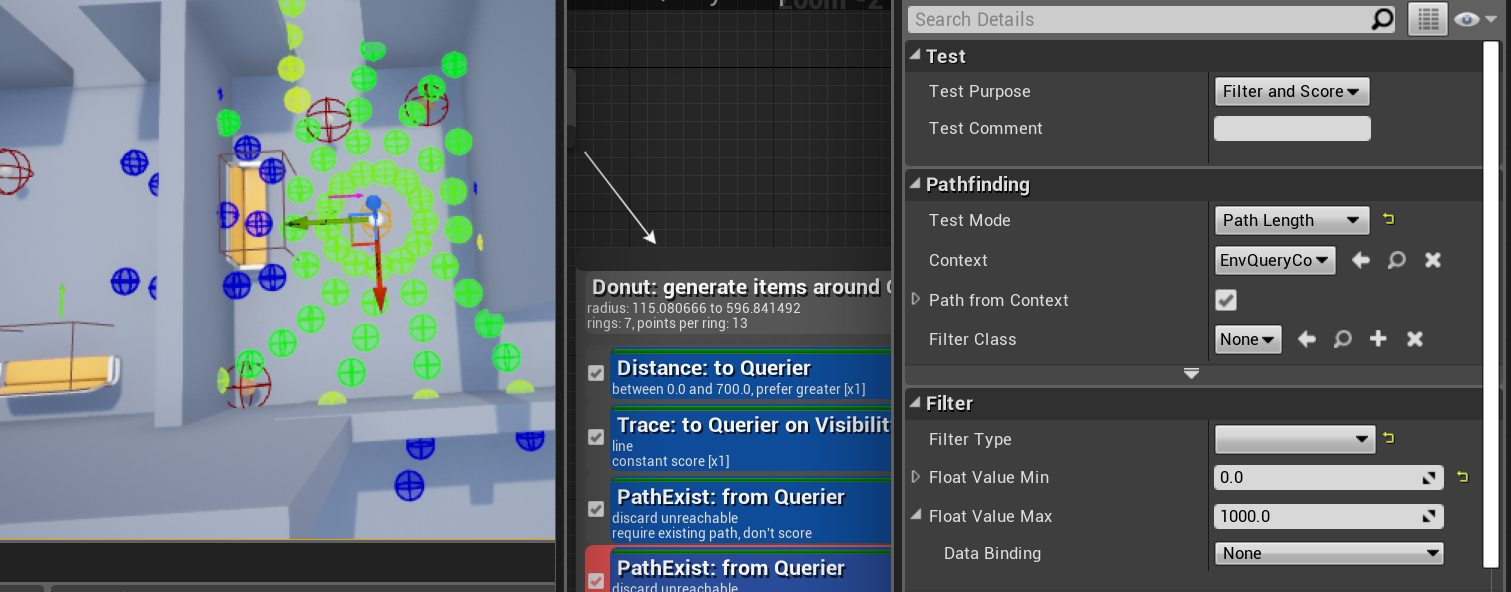 misty wharf
Oh there is?
Nice, I was working with EQS today and somehow I must have mentally ignored it in the list lol
It's worth looking into learning some C++ though if you're only working with BP's
especially EQS stuff becomes much more flexible when you can modify how generators or tests work because they just aren't all that flexible if you need them to do something they don't do out of the box
stark zealot
Yea I know I'll have to use one day. I just have bad flashbacks to my college days every time I open up Visual Studios. So many bad memories of stupid group projects and ridiculous assignments. I'm sure it's better now. I had to use 2008 back in the day maybe it's improved lol
misty wharf
lol
stark zealot
One last question out of curiosity. Can you change the Querier from the AI to another Actor? For example if I want my AI to use my player character as the source of a EQS query? That way he would get a point around me instead of around himself. I'm sure it's another checkbox or dropdown menu
misty wharf
the queries tend to work around the context object
so if you create a custom context which returns the object you want it to use instead, then that'd work
custom contexts can be created in BPs too
stark zealot
Ahh I see so I can make a new context and assign it to the EQS Query. I'm not sure how I'll tell the context that my character is the new Querier though. I also see you can run EQS queries with a node in blueprint and it lets you plug in the querier. So maybe I can use that in an ordinary task and call the EQS from that? IDK
stark zealot
I'm not sure I follow. I have my AI controller, my player pawn, and a context query blueprint. I can set my EQS query to use my custom context blueprint but what do I put inside the custom context blueprint to make it use my player pawn as the source of the EQS query instead of using the AI as it's source.
misty wharf
stark zealot
I'm not sure I follow. I have my AI controller, my player pawn, and a context qu...
it has an overridable function called "provide single actor" or something like that... override it and have it return the actor you want to use as the context
 magic wyvern
hey y'all so i'm a noob at unreal and was wondering if someone could help me out w/ something that might be relatively simple. So, I'm trying to get the thirdpersoncharacter to have a sightconfig perception so that when an enemy is in the players line of sight, the player character says a line of dialogue.
but i can't seem to get the character to actually have a line of sight for some reason.
my npc has it no problem, but in the debugger i can see that there is no perception on the player character.
i essentially want the CanBeSeen bool to switch on the AI's blackboard when that npc is visible by the player.

 frozen lichen
So, when using navigation Ai rotates controller towards the movement target.
Can that be disabled?
Im trying to add strafing, but my aiming relies on control rotation.
Ok, nevermind, found it:
For those wondering:
AIController has SetFocalPoint and SetFocus.
stark zealot
@misty wharf That worked perfect. Thank you so much for your help. I got my AI working just like I want now. 🥳
gilded fern
Ive had this question on my mind and I have to get it out of the way
How do I start with machine learning?
 timber mortar
how can i get my AI to stand still not doing anything for the first 30 seconds after begin play?
i tried the Task Wait Delay node in the AI controller BP
timber mortar
wait didn't work because either it would be ignored by the Tick event or would never finish because Tick happened instead.
i ended up just doing a time variable that increments, until it's >30
pine steeple
Run the visual logger
And see what is failing
It will log everything your controller and movement stuff is doing
@boreal stump
 boreal stump
aand how do i turn that on?
the pawn moves fine with blueprints SimeMoveTo. but if i try the function MoveToLocation in the aicontroller c++, the pawns dont move.
i know its firing the beginplay function of the aicontroller with a simple log. so it appears the aicontroller is attached to pawn correctly
ok, the visual logger shows all sorts of stuff (sorry new to this tool, thank you) when i use the blueprint SimpleMoveTo. but when i detach that and try and run the code in c++ aicontroller class. the visual logger shows nothing. but my UE_LOG in the aicontroller prints out on beginplay and ticks, so it appears to be loading with the pawn
should i not be calling the MoveToLocation from the aicontroller, but from the AIPawn c++ class the blueprint inherits from?
called from parent c++ pawn class

aicontroller is attached

any ideas?
@pine steeple
 boreal stump
ok.... calling it from the tick works. but sounds wrong calling it from the tick. is that correct or where should i call the MoveToLocation from?
boreal stump
@pine steeple i want it to start right when the enemy "begins play" so where do you sugest i call this movetolocation?
pine steeple
sorry was out
you want to use something like PossessedBy
or OnPossess
this way both pawn and ai controller are ready
boreal stump
pine steeple
sorry was out
roger that. thank you. ill look into that. working on detecting when it gets to location now.
boreal stump
Thanks for the reply. I did get it to work after moving the "MoveToLocation" call into the tick of the AIController. trying to get it to work in OnPossess now, but no luck yet. crazy how hard it is so do such simple things
simple meaning basic things almost every game has
anyone know how i might detect if the actor is at location? calling GetPawn()->GetActorLocation() crashes my engine. Was going to compare that to the destination
boreal stump
just to help anyone else, ended up leaving the MoveToLocation in the Tick, and then checked if the current location == destination. if so then change the destination. works great.
glass falcon
what does root not initialized for behavior trees ?
patent hornet
@boreal stump i seriously doubt that, move to location is not supposed to be called on Tick
as to why it crashed, Controller and Pawn are instantiated, then call BeginPlay, then Possess happens
until Posess Controller has no Pawn and Pawn has no Controller
 proven wasp
Hello everyone,
I'm building a MOBA type AI and having some problems with swapping to a new enemy. Are there any good resources that you know about it?
 coral spire
Hi, anyone in here got experience with creating custom UBehaviorTreeGraphNode for your BT nodes? I'm getting bunch of error when creating child class via editor 😦
timber mortar
simplest way to stop AI from moving during a Cinematic/LevelSequence?
pine steeple
we have an AIDirector which has all spawned AI, we simply loop through all ai and call AI->PauseBehaviour
then when cinematics finish, we call AI->ResumeBehaviour
timber mortar
pine steeple
then when cinematics finish, we call AI->ResumeBehaviour
cool, thanks
pine steeple
those functions need to be defined tho
timber mortar
oh
pine steeple
we simply stop movement immediatelty and disable the brain (behaviour tree)
{
    if (AAIHeroController* NPCHeroController = GetController<AAIHeroController>())
    {
        UBrainComponent* const Brain = NPCHeroController->GetBrainComponent();
        if (Brain)
        {
            Brain->StopLogic("Disabled by code");
        }
        }
    GetCharacterMovement()->StopMovementImmediately();
}

void AAICharacterBase::ResumeAI()
{
    if (AAIHeroController* NPCHeroController = GetController<AAIHeroController>())
    {
        UBrainComponent* const Brain = NPCHeroController->GetBrainComponent();
        if (Brain)
        {
            Brain->RestartLogic();
        }
        }
}
for example
timber mortar
oh so it's all custom stuff
timber mortar
i'm using a Behaviour Tree
pine steeple
the above code will stop and restart behaviour tree
timber mortar
oh right cool i thought brain was something u made
pine steeple
no
timber mortar
this is what i came up with, thanks tho

 quiet fiber
is there a way to get AI to ignore each other when pathfinding/moving. I'm making a 3D sidescroller and want the enemies to be able to pass through each other when moving. I've disabled collision on them and that does allow them to technically pass through each other, but any sort of pathfinding behaves as if they can block each other.
I've set them to not ever effect navigation and set their area class to none
timber mortar
so when you press p, theres no gaps beneath the AI?
my AI ignore each other even if i would like them not to
quiet fiber
there are no gaps
the stationary character is the parent class, just to show that the enemies do actually pass through each other if they both aren't trying to move
they dont have RVO avoidance activated either
quiet fiber
got it, turns out avoidance groups still effect AI even if RVO is disabled
pine steeple
timber mortar
this is what i came up with, thanks tho
That is just terrible
and an abuse of tick
but 🤷
vale notch
I have a question about the Simple Parallel node in the behavior tree. I was thinking if you have an NPC sitting in a chair, you could use a Simple Parallel that continuously checks if the chair is still there. And if the chair is destroyed, maybe in an FPS, or it is sold or moved, in some top-down game, it will return null and the NPC will know to stand up?
So my question is, is that a reasonable use of the Simple Parallel node, or would you rather have the chair object just tell the NPC "hey, i'm being removed, get up"? 🤔
Also, if you're using the Simple Parallel for something specific in your project, I'd like to hear it, so that I can understand its usage better. 😉
misty wharf
at least to me it sounds more reasonable that the npc would have this information via an event yeah
vale notch
So just telling it once rather than checking all the time? I kinda figured that should be the case. Which is why I don't really get the usage case for Simple Parallel... 🤔
I guess it's mostly useful for stuff like chasing the player, where the location needs updating all the time then. 🤔
patent hornet
not really
you can just move to actor with goal tracking
and then its just follows
vale notch
Right, so it's not even useful for that then... what the hell. 😅
patent hornet
one of our simple parallel examples is in mission system, which we run via BTs
mission objective that you need to complete is main task
while the parallel task does sequence -> spawn ambush - wait
vale notch
Hmm alright, interesting! So it's not really being run every frame, it's just running two things at once... that does sound more useful
patent hornet
the secondary task runs until the primary task fails or succeeds
vale notch
Right, so it's able to keep spawning waves of enemies for you until the player completes the mission. That's a great example, thank you 🙂
timber mortar
pine steeple
That is just terrible
it doesn't even work 🥲 but so far this is the only thing that has...
 pine steeple
why would it work and why you using tick?
timber mortar
A) because the cinematic is 60s long so it just waits 60s...
B) because thats what the tutorial said when i began and it has worked thus far
i have heard tick is inefficient but not sure why
@pine steeple i get an error (accessed None trying to read BrainComponent) when attempting your suggestion in BP
vale notch
Oh dear god. Why would you run a behaviour tree from a tick node!?
vale notch
timber mortar
i have heard tick is inefficient but not sure why
It is inefficient because every single frame once 60 seconds have passed in your game, you are executing the behavior tree. That's typically 60 times every single second for the rest of your game. You only need to start the behavior tree once. 😅
timber mortar
ohhh shit fr? 😂
vale notch
yup 😄
timber mortar
that makes things simpler, thanks
vale notch
Tick nodes are extremely useful for testing purposes because you are guaranteed to have something happen every frame, but they should really be avoided as much as possible. 🙂
glass falcon
is anyone else having an issue with perception and noise
its supposed to only detect enemies
but is detecting itself
while sight works fine
vale notch
I'm not particularly experienced with the perception modules, but you should be able to check who the instigator of the noise is to determine if it's an enemy or not I figure?
glass falcon
im using this

and have overidden the generic team ID in c++
so with these settings

its supposed to only detect enemies
i.e. people on different teams
quiet fiber
any secret methods of calculating if the player is reachable? The solutions I have found are based on whether or not the player is on a navmesh rather than anything that actually checks to see if the enemy can reach the player or not i.e across a gap that the AI cant clear
vale notch
glass falcon
so with these settings
That does seem odd then. Can't you use this node maybe to verify if it's an enemy?
 vale notch
quiet fiber
any secret methods of calculating if the player is reachable? The solutions I ha...
vale notch
quiet fiber
any secret methods of calculating if the player is reachable? The solutions I ha...
Are you using a behavior tree? In that case you can just use the Does Path Exist decorator. Otherwise... maybe you could use Find Path to Actor Synchronously?
quiet fiber
I'll have a look at the decorator, thank you
charred lava
Project Settings | Navigation Mesh
Is Runtime Generation = Dynamic Modifiers Only bugged?
My Character Capsule collider is set to block nav as a obstacle and instead it removes navigation surrounding him.
Setting it to Dynamic is fine, but Dynamic Modifiers Only seemed to be the more performant way.
When googling about it, some say it doesn't work in newer engine versions. Does someone know more about it?
 glass falcon
vale notch
That does seem odd then. Can't you use this node maybe to verify if it's an enem...
glass falcon
vale notch
That does seem odd then. Can't you use this node maybe to verify if it's an enem...
In the end I just decided to check if the actor is in the enemy team, i'm not using that node in particular so i don't have to iterate over all perceived actors
vale notch
Right, all good so long as it works 🙂
 verbal violet
Hi folks, i want to repeat question from few days ago from animation channel, sorry admins if I broke some rule, but after all I think that this chanel is better place to ask this.
I'm use StopLogic and StartLogic for BrainComponent when play some montages (stagger or some attack from run).
Problem appears after StartLogic. All my cooldowns is reseted also. So this my Attack from run, which should appears very rare, repeats in infinity.
I've seen there is PauseLogic and ResumeLogic in BrainComponent script but that is not exposed
pine steeple
dont stop and start the logic
@verbal violet
if you do, keep all the cooldowns external to the behaviour tree (like in the AI's controller)
otherwise use a bool blackboard key and abort your lower priorities whilst in a stunned/staggered state, and have the behaviour tree wait in a task the never returns, and that itself is gated
which will abort self when the bool is set to false for example
verbal violet
@pine steeple "otherwise use a bool blackboard key and abort your lower priorities whilst in a stunned/staggered state" actually it's good idea, nice and clean and simple way tnx
uncut python
hi everyone, is there any reason why my ai wont reach the max speed that I set? they walk much slower than what ive set in both the details panel and by setting Max Walk Speed at begin play


 violet merlin
why set the walk speed in two different places?
glass falcon
the task isnt aborting once target actor is set [EDIT] fixed
 uncut python
violet merlin
why set the walk speed in two different places?
uncut python
violet merlin
why set the walk speed in two different places?
i just saw it in the sidebar and thought it would help, but I guess the blueprint i made oversrides that anyway
so the max walk speed is set to 533 it just wont reach that speed for some reason
 waxen junco
how do you make actual decent pathfinding? I have this one platform above the ground, and if I increase the settings like step height and stuff to let them walk off of it, theyre then unable to walk underneath it without getting stuck to the spot
navmesh is just being so unhelpful
misty wharf
you might need to use navlinks or smart navlinks if you want them to be able to drop off things like that
they need manual placing, but afaik UT generates those automatically in some fashion so it should be possible to autogenerate them as well
(but somehow I get the feeling it's nontrivial)
waxen junco
I heard about navlink stuff but it sounds kinda useless
like its not really feasible to place them on every single ledge
seems pretty stupid that you cant just tell the ai to be able to run off ledges
man its just impossible to make reliable ai isnt it
waxen junco
you know what, Im just gonna make the ai detect ledges with a trace and automatically run off every ledge they come to, it will obviously result in their own death a lot of the time but its better than them just standing there doing nothing
misty wharf
yeah navigation is challenging to do if you need it to be especially smart
waxen junco
well I dont think my game is gonna be a game at all without enemies
so ideally they need to be a bit less braindead
does unreal not have any support for actual ai jumping and stuff or is it all just 2d navigation
like if I simply jump up onto a platform, how am I supposed to tell the ai to do the same? all Ive got is some sphere trace to detect walls and automatically jump which is obviously awful
pine steeple
you use navlink proxies 😄
and generate them automatically if you have a lot
i am assuming that is how fortnite do it for there ai
(they jump up on things
and drop down
i am really wondering if i can pull the UT4 code about
and create a little plugin that has this option
and how long that would take
waxen junco
but how do you generate them automatically? I never heard of that
pine steeple
in code
misty wharf
unless your level is huge you can set them up manually pretty easily too
yeah it's a bit of manual work that feels like it shouldn't be needed but ¯_(ツ)_/¯
waxen junco
very impractical
 waxen junco
pine steeple
in code
waxen junco
pine steeple
in code
do you mean as in program it or specifically code and not bp
misty wharf
yeah I mean you can just create one and then dupe it a few times, but yeah it's not the best
waxen junco
hmm ok well I feel like this is gonna make me a lot lazier with map design as Ill be wanting to avoid things ai will struggle with
misty wharf
and yeah, if you wanted to autogenerate it, you'd have to do it in C++ as I don't think the apis are available in BP's
misty wharf
you could potentially make some editor utilities to help place them manually
for example if you configure one for that big ledge, then you could have a utility that allows you to easily duplicate it
or edit multiple ones at the same time or something
this should be doable without C++, but it kinda depends on how much work it would be to manually do it on whether it'd be worth building the tooling
waxen junco
oh I just realised
one of the main things I wanted to do for this game was random map generation so this wouldnt help me at all anyway
waxen junco
oh no chance
lyric flint
Environment Queries are not instantaneous right? they take some frames to be performed?
wise iris
Anyone ever get these weird disconnected navmeshes on a landscape?
 pine steeple
is it disconnected ot just visual
cause we see a lot of visual artifacts with the drawing but otherwise fine to navigate @wise iris
wise iris
pine steeple
cause we see a lot of visual artifacts with the drawing but otherwise fine to na...
Good point 🤔 I did notice some jitter/getting stuck in certain areas, but wasn't sure it was because of this or something on my end.
Good to hear it could be just visual though
I had been adjusting the cell height of the nav mesh so it would work with a really large bounds, thought that might have been it
wise iris
Is there any chance that nav settings in project settings are overwritten by something when packaged? My AI walks around during PIE, but not while packaged.
Makes it a bit trickier that it's on dedicated server, so navmesh preview might be tricky
misty wharf
afaik if you have a navmesh in your level that may affect it
as it has its own settings separate from the project settings
wise iris
Right, but works in editor 🤔
misty wharf
if you delete it and let it regenerate, it should receive the project settings by default
wise iris
They're frozen in place in packaged though
Tried this, but no luck: https://answers.unrealengine.com/questions/275266/ai-doesnt-move-in-packaged-game.html
misty wharf
if you're doing any runtime stuff that requires navigation generation then it could be really anything, it seems to be a can of worms lol
wise iris
Yeah they use invokers
From what I can tell with gameplay debugger, the move node fails
So it does seem to be something navmesh related 🤔
Hmm, could this be a streaming issue? The navmesh bounds is on the streamed level it seems like
misty wharf
I haven't used level streaming but I have definitely heard that it can affect that if the bounds is on the streamed level
wise iris
The actual Recast actor seems to be on the persistent level 🤔
wise iris
misty wharf
I haven't used level streaming but I have definitely heard that it can affect th...
Should be on persistent?
misty wharf
Worth trying at least
wise iris
Nope
Aha, even a non-streamed level has the same issue, so has to be something else with the navmesh 🤔
uneven shell
Hey guys, sometimes my AI characters seem to reach their MoveTo location, but then get stuck there for a couple of seconds before aborting. I checked the distance to their target location in Tick by DrawDebugString and it's always lower than the one I stated both in IsAtLocation decorator and the MoveTo task itself. Somehow it's just not detecting that the distance is short enough to proceed in Behavior Tree. Any idea what's happening? I tried playing with IsAtLocation parameters but it doesn't seem to work

Both MoveTo and IsAtLocation have acceptable radius of 75, while the actual distance is around 50
I'm using 4.25 version
uneven shell
I also checked if pawn is overlaping car door, and it does. What can be wrong?
flint trail
I am trying to have AI NPC to aim at me (both pitch and yaw) using Aim Offset. I followed some tutorials online (although they only use pitch, not yaw) and I am in a pickle with aiming on yaw. Basically what they did was they took start vector (hand bone for example) and end vector (player) and got look at rotator, split it and pulled pitch from it. If I do the same for yaw, it doesn't quite work because it's an absolute value. I am wondering how can I convert it into "local" value. Like, when AI looks at player, yaw should always be zero. And then as player moves to the side and AI "turns" (rather calculates yaw and feeds it to aim offset) reaching max or min value, yaw gets reset back to zero. If that makes sense.
How do I do that in BP ?
misty wharf
If there's any custom nav link gurus around - how do you handle moving pawns through them? I'm rapidly discovering this is completely full of gotchas unless you literally manually lerp the pawn to its destination which feels... clunky. A DetourCrowd based AI controller just stops at the first sight of a nav link for example...
If you attempt to have the AI simply MoveTo the destination without pathfinding, that still overrides its previous pathing, leading to the previous move request failing... which complicates things like behavior trees where you're trying to have it move somewhere
But a regular PathFollowingComponent will happily path through the navlink as if just navigating normally which is sometimes desirable and definitely nicer than manually lerping it through the link
pine steeple
@misty wharf come again? 😄
misty wharf
My thoughts exactly
pine steeple
i use detour with custom navlinks
for things like vaulting over barricades etc
jumping through windows
misty wharf
So how are you handling those kinds of movements? Just lerping it while it animates or something?
pine steeple
rootmotion sources, root motion montages, w/e i need
vaulting is a root motion montage for example
misty wharf
Right, maybe I need to look into something like that then, all I want mine to do is walk to the destination lol
pine steeple
i mean
you can make an AI reach a navlink
then assume manual control and send manual movements to the AI
i do this for things like them using ziplines
they reach the navlink, i manually move them to position
then start the zipline
misty wharf
Yeah that's what I'm looking at doing currently
probably just see if I can tell the CMC to move it or something
pine steeple
i have a custom Navlink component
you can
ill get the function
so the PFC calls into the CMC
and this function ```void UCharacterMovementComponent::RequestPathMove(const FVector& MoveInput)
MoveInput being manual move input (like as if you are pressing W-A-S-D keys
pine steeple
we do this to recover players
who walk out of navmesh
{
    const FVector CurrentMoveInput = (CachedRecoveryLoc - Hero->GetActorLocation()).GetSafeNormal();
Hero->GetCharacterMovement()->RequestPathMove(CurrentMoveInput);```Yeah makes sense... this is just another seemingly quite complicated part that has barely any documentation outside of very basic things so it's a bit like.. wtf do I do to make this work lol
thanks, something like that'll probably work... just need to manually keep track of it ending up at its destination I guess but that's not too complicated
pine steeple
right i mean its not super straightforward
we have a custom NavlinkComponent
which we have a enum for the type of link it is
and we can adjust what happens for each type of monster at that link
(different AI do different things at vaults for example)
misty wharf
I think I thankfully won't need much else than doors :D
pine steeple
yeah we don't navlink our doors
we modify the volume under the door
so if player closes door monsters will break the door to gain entry
misty wharf
Interesting, they get a different behavior when entering a different type of nav volume?
pine steeple
yup
misty wharf
Good to know that's a thing
misty wharf
I'm not sure if I'd even really need links on the doors, I just was under the mistaken impression that it would be easy to trigger an animation based on when the door link is being entered and exited lol
pine steeple
i mean links make sense if the door breaks the navmesh
when closed
(which is a viable option)
you turn the navlink on/off
based on the door state
misty wharf
Yeah
pine steeple
problem with that i found
misty wharf
I might have a locked door at some point, but I don't really want the npc's to have precognition and not even attempt the locked door... so that'll be a fun exercise to figure out I'm sure :)
pine steeple
only one ai can use a link at time properly
does not allow 5-10 monsters to attack the door same time
misty wharf
Oh really, it looks like they should support multiple using it at the same time
pine steeple
they do
if you move the AI away from the actual link point
so other AI can reach the link point to trigger it
misty wharf
Ahh right
pine steeple
that was my first try with it
misty wharf
Yeah I can imagine in your situation that wouldn't work so well say if you wanted them to attack from multiple angles or something
pine steeple
right exactly
misty wharf
any idea if you can store per agent info somehow for the navmesh? Eg. if you have a door that's locked, but the agent doesn't have this info until it tries to walk into it
not even sure if that'd be the best way to do something like that tbh
pine steeple
you can't really
the link can broadcast out periodically that is relevant
but in a very small radius
if you are on about that
start with the link disabled
then broadcast the link active state in a very small radius
meaning AI has to be close to it to know that link is actually open
misty wharf
Yeah I think it'd have to start in an open state for the agent to try to path through it, and once it reaches it it would recognize it as not being relevant
but something like that could work I guess if it allows the agents to have their individual knowledge of link relevancy
pine steeple
just remember
if you turn a link on/off
    for (UPathFollowingComponent* Comp : NearbyAgents)
    {
        if (!IsEnabled())
        {
            //If they have this link, then we tell them to repath. We don't want to repath
            //any ai that never had this link for performance reasons.
            if (Comp->GetPath().IsValid() && Comp->GetPath()->ContainsCustomLink(GetNavLinkID()))
            {
                Comp->GetPath()->Invalidate();
            }
        }
        else
        {
            //We tell all nearby ai's this link is now open. Maybe they can use it
            if (Comp->GetPath().IsValid())
            {
                Comp->GetPath()->Invalidate();
            }
        }
}``` this is crucialYeah
pine steeple
this is not in the engien
something me and @smoky summit came up with
as we had issues of opening navlinks and AI not using them
or closing them and they still used them
misty wharf
I kinda assumed it would store the link information as part of the overall navmesh data so if you turned it off it'd just regenerate
misty wharf
lol
misty wharf
:D
misty wharf
yeah it seems kinda complicated to get some of this working... I'm thinking of just making my npc pawns overlap each other sometimes to alleviate some pathfinding/avoidance problems
pine steeple
want to make a custom null navmodifier that only affects agents on a specific navmesh?
good luck.
misty wharf
probably gonna have to make them nonblocking when they traverse the doors because I'm sure they will otherwise get stuck :D
pine steeple
had to hardcode this just cause the engine has a bug
{
return;
}
Super::OnNavAreaAdded(NavAreaClass, AgentIndex);``` smoky summit
🙂
pine steeple
sure there is a more elegant way
but yeah
tried doing SupportedAgents.Empty(); SupportedAgents.Set(0); SupportedAgents.Set(1); but nope it decides it wants to set all the bits 😄
wise iris
Aha, ran the server as listen server. Getting closer

That seems to confirm an issue with the navmesh
How odd that it works fine in editor, but screwed up in packaged
It's generated though...seems to show up fine, even in packaged
 pine steeple
@wise iris you don't have multiple navmesh bounds do you?
only one navmesh bounds may exist in a world
wise iris
pine steeple
<@!232215194984644611> you don't have multiple navmesh bounds do you?
I do in this case, but had not before. It also worked fine with multiple navmesh bounds before in packaged, I tested 🤔
pine steeple
we had issues where multiple bounds broke in shipping
when we switched to single bounds
issue went away
our navmesh is also dynamic
not static
wise iris
Interesting, I'll double check. I did also run a test with just one though. Think there's more fuckery going on
Right yes, invokers
Same here
Are you changing the cell height at all?
wise iris
Oh god 😄
pine steeple
cause we have bounds
and the navmesh is generated
invokers is when you dont build the navmesh but want to dynamically make the navmesh as they move right?
wise iris
Yes, exactly
20km x 20km, so gotta
(I assume)
You still need bounds in that case though
wise iris
I actually stepped back to using a non-streamed level to isolate the issue
 wise iris
I think I actually might have the reason
I use two different types of nav data. In editor, I can seemingly switch fine between the two
pine steeple
two different types?
pine steeple
why do you have two different types?
pine steeple
i saw it
its quite recent
i did my flying ai over a year ago
my flying ai actually works fine
without needing to do "3D path finding"
wise iris
Any idea why recast might be unavailable? Maybe it's stripped if no actor has it enabled by default or something odd like that?
wise iris
Hmmm 🤔


 wise iris

Hmmm


I do not have spawn nav data in nav bounds level checked, though I can't imagine that changes anything because I'm using a single level, nothing streamed
So close I can practically smell the solution though
For sure it's the fact that it doesn't want to switch back to recast
I wonder if this soft object path is screwed up during packaging


Yep...the plot thickens....
 misty wharf
@pine steeple thank for the help - got it working pretty well now with RequestPathMove with a controller that then broadcasts an event once the "manual" move destination is reached, which then triggers resume movement from the nav link :)
pine steeple
nice
 wise iris
bool UNavigationFunctions::SetPreferredNavigationData(APawn* Pawn, FSoftClassPath PreferredNavigationData)
{
    if (!Pawn)
        return false;

    UPawnMovementComponent* PawnMovement = Pawn->GetMovementComponent();

    if (!PawnMovement)
        return false;

    FNavAgentProperties& NavAgentProperties = PawnMovement->GetNavAgentPropertiesRef();

    NavAgentProperties.PreferredNavData = PreferredNavigationData;
    PawnMovement->ResetMoveState();

    return true;
}
it will need to be loaded
wise iris
Oh balls

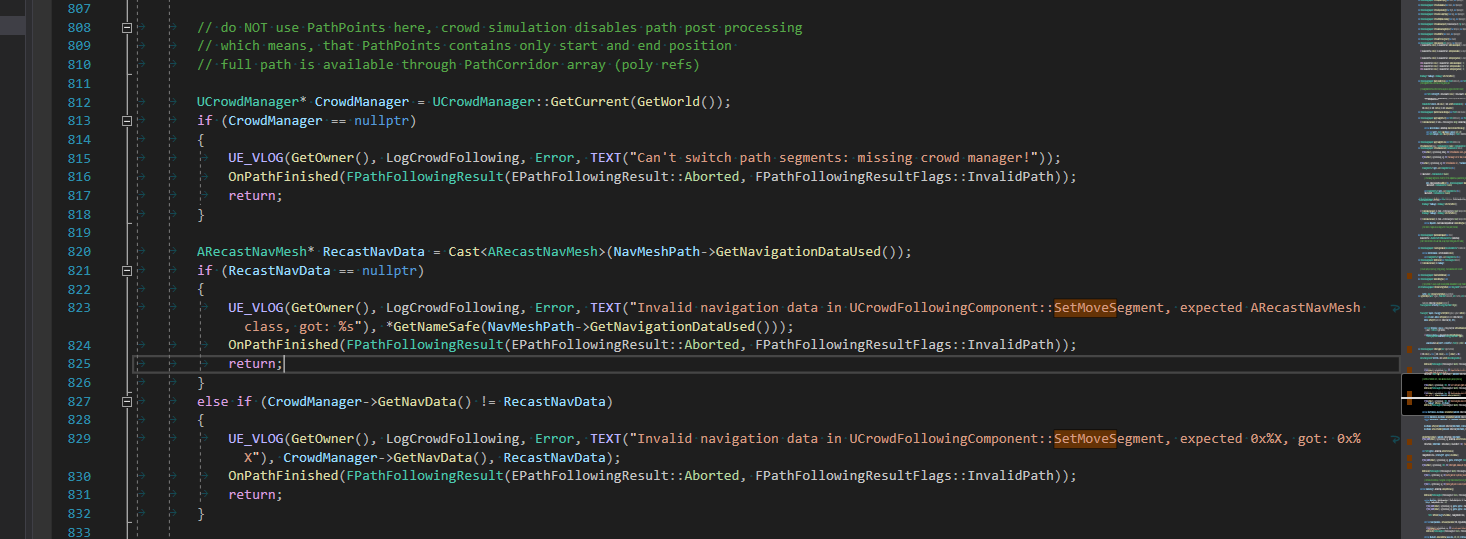
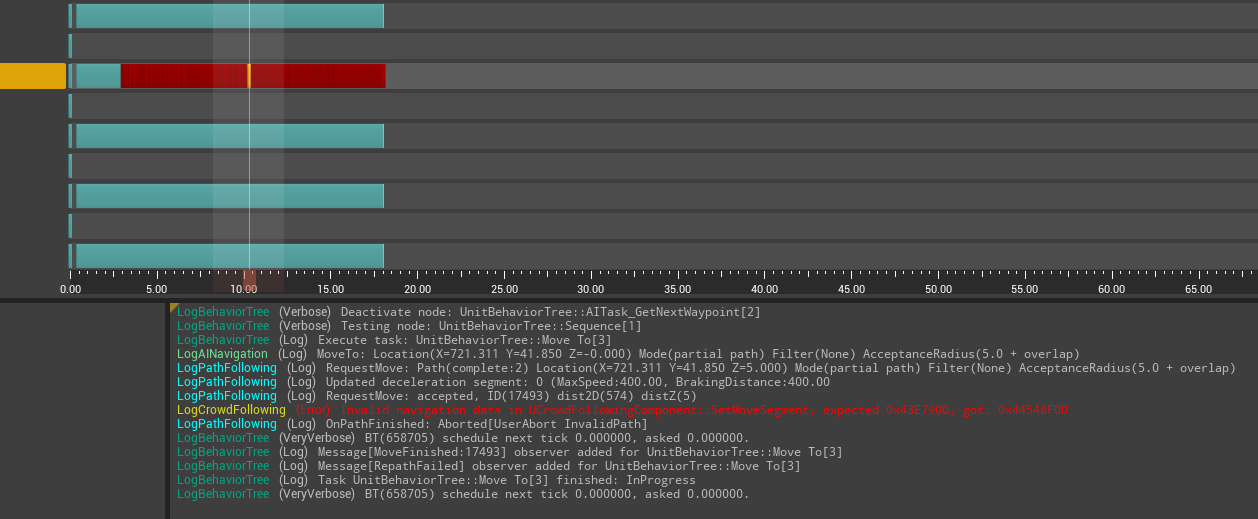
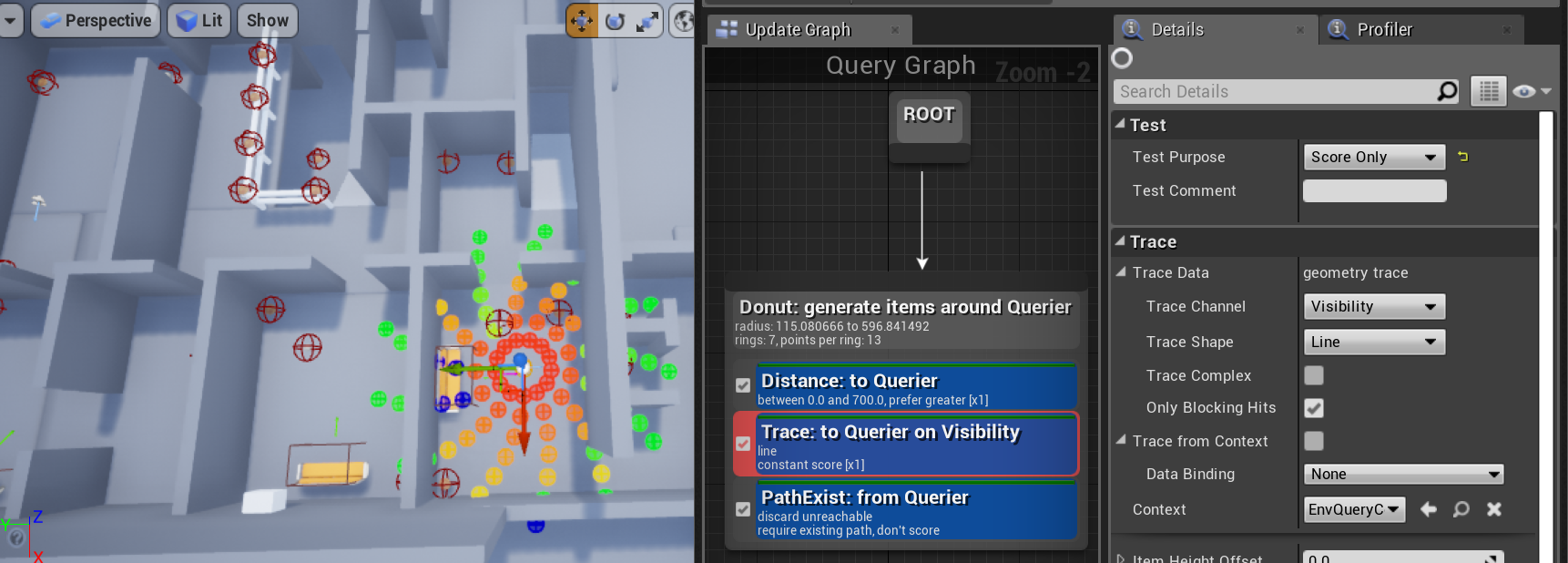
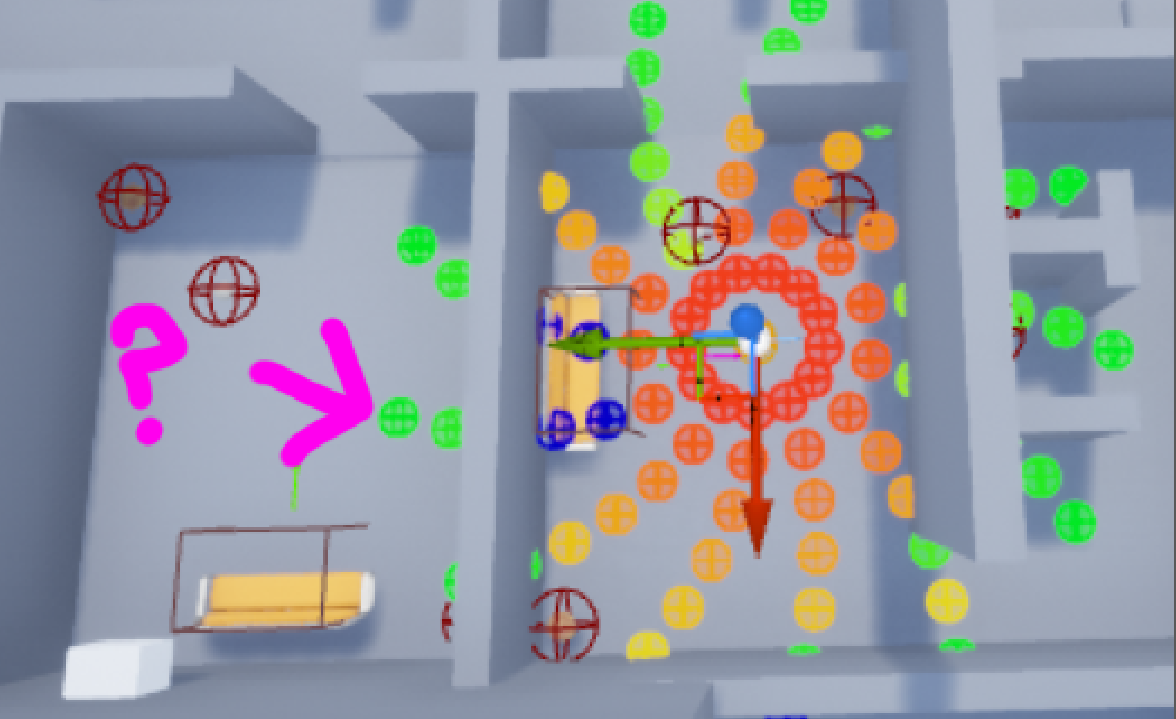
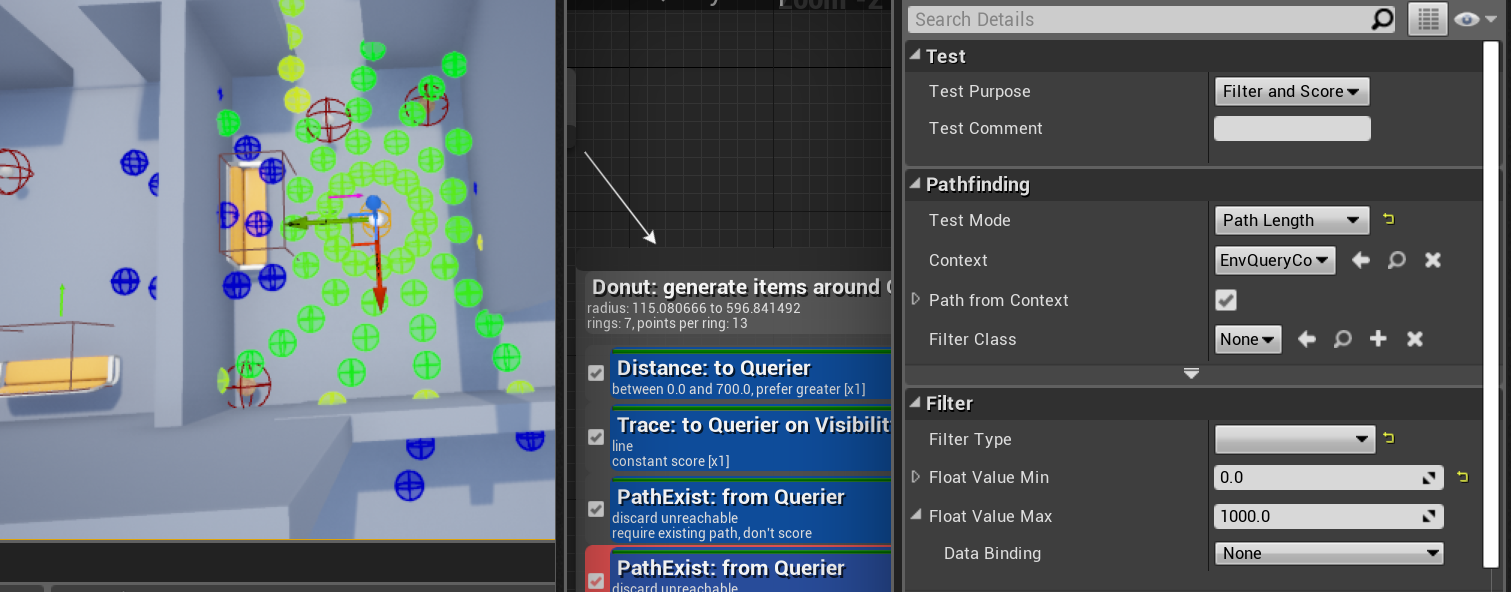


 pine steeple
right but that still wont load it
you need to call PrefferedNavigationData.TryLoadClass()
wise iris
TSubclassOf<AActor>* NavActorClass = PreferredNavigationData.TryLoadClass<AActor>();
NavAgentProperties.SetPreferredNavData( NavActorClass );
Trying that now
😆
 pine steeple
what is the path?
cause the path name says "None"
meaning there is no valid path passed in
wise iris
Yeah 🤔
I wonder if that's not a valid way of finding recast
Got rid of the soft pointer, debug looks better. Repackaging to test now
Hell yeah, works! 🤘
Cheers for thinking along Kaos, helped get the juices flowing
😄
(Still puzzled beyond relief why it worked in the editor, but eh...)
flint imp
Im trying to optimize a large number of AI in multiplayer, is there a way where the AI controller will only be active if one of the players are actually rendering the AI, it's a waste to always have the AI controller active chewing out your pc
flint trail
can anyone please help out with aim offset on AI ?
flint trail
right now I am getting any base aim value from 0 to 360 or I can normalize axis to -180 to 180
my aim offset has 3 poses for yaw: -45, 0 and 45 deg.
0 is when AI should be aiming square at player
so when aim angle will get to one of the extremes, actor will rotate so legs could catch up with torso.
basically I need to reset, so to speak, from whatever angle AI is aiming at on yaw to 0 when it reaches -45 or 45
pine steeple
@flint trail so your basically doing turn in place
you want the ai to carry on rotating
but you want to want to counter rotate the root bone in your animgraph
once the extreme hits, you want to interp the root bone to match the capsules rotation
that is the best way to do it
for example if (bStandingStill) { const FVector ForwardInverseNormalized = ActorTransform.InverseTransformVectorNoScale(ForwardVectorYawReference).GetSafeNormal(); ActorYawOffset = Atan2Deg(ForwardInverseNormalized.Y, ForwardInverseNormalized.X) * -1.f; } else { ActorYawOffset = 0.f; } ActorYawOffset will be the counter rotation for the rootbone
then you do something like if (FMath::Abs(ActorYawOffset) > 44.f) { if (!bActuallyTurningInPlaceGate) { bActuallyTurningInPlaceGate = true; bTurningInPlace = true; ActorYawOffsetReductionStartTime = GetWorld()->GetTimeSeconds(); bTurningInPlaceLeft = ActorYawOffset < 0.f; TurnInPlaceInitiated(); } } and then use a curve to rotate the legs round (curve adjusted to match animation or you can maybe pull the curve from the animation) if (bTurningInPlace) { ActorYawOffsetReductionCurrentTime = GetWorld()->GetTimeSeconds() - ActorYawOffsetReductionStartTime; UCurveFloat* RotationCurve = bTurningInPlaceLeft ? RotateInPlace90L : RotateInPlace90R; if (RotationCurve) { ActorYawOffset = RotationCurve->GetFloatValue(ActorYawOffsetReductionCurrentTime); } }
flint trail
well, I don't C++ 😦
also I am trying to feed controller rotation to aim offset and when it gets to extreme, rotate actor (which will let legs and torso to catch up)
there is no root bone manipulation involved. Just layered blend per bone at spine 1 and anim montages
(and aim offset)
I am thinking I need to map to range maybe dynamically
so when ai controller rotates to one of the extremes, range gets remapped so that extreme (-45 or 45) becomes 0
I am not sure how to do that. I tried map to range clamped and that didn't work
what you are talking about is more complicated and ignores aim offset
pine steeple
you need to counter rotate the root bone
that is how TIP works
and mine does not ignore aim offsets
simple crest
I'm not sure why you would counter rotate the root bone instead of just controlling your character rotation, or... I can't remember does the AI Perception component follow the character rotation instead of the controller rotation? 😄
flint trail
pine steeple
that is how TIP works
I already have simple turn in place working without any root bone
what I am talking about is getting aim yaw and feeding it into aim offset for torso
I use this https://docs.unrealengine.com/en-US/BlueprintAPI/Pawn/GetBaseAimRotation/index.html to get aim angles
Get Base Aim Rotation
Get Control Rotation
both return values from 0 to 360 or if I normalize axis, -180 to 180. So far I am failing to set 0 to the current aim after hitting extremes or finishing turning in place. As if those rotations are hard set to always be absolute, referencing the world.
my aim offset is -45 to 45
simple crest
You need to override the movement component code that actually turns the character. I'm not sure if it can be done in BP, haven't looked. And as I mentioned above, not sure if default perception component will use controller rotation or actor rotation so I don't want to lead you down a bad path
flint trail
AI Perception doesn't really have anything to do with rotation/ aiming
I guess I could setup aim offset if extreme poses to be at -180 and 180 and while skel mesh deformation will look horrible, if I only allow aim offset to work between -45 and 45, and then do TIP to catch up, it should look fine
I just didn't want to go that route
simple crest
It sounds like you're having trouble coming up with functional logic, so here's a thought
- controller should be thought of as providing the desired look direction. Use control rotation to set a desired look direction variable on your character
- character should control their current look direction, on tick lerping towards desired look direction
- character movement component should maintain desired character rotation and current character rotation, and should control both, checking on tick if the current look direction is beyond aim offset threshold and if so, calculate new desired character rotation and on tick lerp current rotation towards desired
Somewhere in all that (or in anim BP), you calculate aim offset as the difference between current look direction and current character rotation
flint trail
you don't do lerp with aim offset
it's there for your torso to aim in real time
I haven't seen too many tutorials about it on youtube, and whatever is available simply doesn't work
I already use lerp for TIP, it works fine
simple crest
Let me be clear I've done all this (for a player character that could be AI controlled but I just never got into AI dev for it)
You obviously don't have a fully thought out solution yet, the above is roughly what I did
flint trail
I think there is a miscommunication going on 😦
and I can't dig up any UE4 examples (videos) showing what I am after
forget TIP for a moment
simple crest
I mean it sounds like you want a character that uses aim offset to look around and TIP when it looks too far... Simple enough?
flint trail
think of player character and its aim offset
when you aim and shoot, you feed input data to aim offset on tick, basically
I need the same realtime stream of data fed to AI's aim offset when it's attacking target
and so far the only way I found to do so is by getting controller rotation (or base aim) when doing focus on target
simple crest
What I'm telling you is that your entire character is (or rather sounds like it is) poorly designed. There should be no difference between an AI controlled and player controlled character
flint trail
but there is
simple crest
No, there isn't lol
flint trail
okay
simple crest


pine steeple
our AI and Player TIP is the same @simple crest
same logic
with aimoffsets
we do our TIP tho by counter rotating the root bone in the AnimBP and allowing the capsule to freely turn
so the root bone stays stationary, aimoffset does the actual looking, when the extremes are reached we hop the feet around to the capsule rotation by undoing the root bone rotation via a curve
i explained this earlier tho
this was the method Laurent Delayron or w/e his name at Epic suggested to me
and what they do in Fortnite and did in Paragon
simple crest
yeah, I did the opposite as I don't like "turn/counter-unturn" solutions, feels hacky 😄 but maybe there's a reason for it when it comes to AI
simple crest
how come you got a discord embed and i didn't  lol
lol
pine steeple
ye
simple crest
anyway @flint trail ... ^ ¯_(ツ)_/¯
in my gif the character capsule dir always matches the legs/lower torso orientation
pine steeple
my capsule always rotates so the actor forward is always forward
simple crest
i guess in Kaos's it would always match the upper torso orientation
simple crest
yeah it looks like the default perception sight sense is coded to use GetActorEyesViewPoint which returns Actor's rotation, so for me I'd just have to override that to return my offset look direction... functionally probably not much difference between the two approaches past that
flint trail
I am using VRE plugin. It has modified AI Perception where you can specify a socket on skeletal mesh to be actual eyes
but I am glad you guys solved it for your projects
flint trail
@simple crest is this the set up you use for AI's aim offset https://docs.unrealengine.com/en-US/AnimatingObjects/SkeletalMeshAnimation/AnimHowTo/AimOffset/index.html ?
Using an Aim Offset, a character aims a weapon in the direction of your mouse or controller.
 junior hare
Anyone experiencing issues with their AI in 4.26 where the behavior tree just seemingly stops ticking? We just moved over to this Engine version and can't seem to pin down the reasoning for it. (4.25 did not have this issue)
simple crest
@flint trail well yeah except I'd clarify to say it's for the character's aim offset. There is no "AI" or "player" aim offset, just the character's aim offset
flint trail
I don't have a visual model for my player character, so I don't have an example, so to speak
cuz it's a VR project (single player)
I still don't get why RIterp is used, but I'll give it a spin after work. Thanks @simple crest
 molten quiver
Hi, currently using floating pawn movement to move my AI. I don't want the rotation to however look at the direction it's moving at.
I have a set focus node as well.
 pine steeple
floating pawn movement orients to movement
only way to change iirc is to create a custom movemement component in c++ and modify the rotation @molten quiver
unless there is options inside the FPM
 celest python
Isnt it just bUseControllerYaw ? @pine steeple
pine steeple
If the movement component does not override it
Never really used pawn floating comp
celest python
Its just updating the velocity and does nothing more, does not even provide a little bit option to improve the feeling of movement 😄
pine steeple
Path following comp might do tho
infact i know it does 😄
iirc it sets the control rotation to the path
molten quiver
Yeah orient rotation towards movement seems to only be a variable inside character movement component
celest python
Are you using FPM on Character?
celest python
pine steeple
iirc it sets the control rotation to the path
I might be wrong but afaik it only does that if bUseControllerYaw is true
molten quiver
Most of our enemies are ships in a top down setting. So we thought we’d use fpm
They are pawns
I’ve tried that
celest python
I understand, FPM is a good idea depending on your desired movement capabilities but for a smooth feeling of movement you might need to tweak it a little
 devout plume
molten quiver
Yeah orient rotation towards movement seems to only be a variable inside charact...
devout plume
molten quiver
Yeah orient rotation towards movement seems to only be a variable inside charact...
iirc there's one too in your entity BP too (the "self" thing)
use controller rotation or something like that
I also had some success overriding the "facerotation" method #animation message
Had to do that cause my movement was driven by rootmotion