#gameplay-ai
1 messages · Page 91 of 1
 severe oar
 hallow compass
the statics helpers dont offer it as far as i digged
hallow compass
start and end
in white the points of the 3DNav plugin, in red the result of the CPathfinding


 severe oar
The CPath plugin I believe runs a function to shorten the generated path.
 astral kettle
Confirming that using state tree, debugging linked assets is more or less ineffective? ie breakpoints aren't hit, debug visuals (yellow highlight) aren't shown, and rewind debugging will only display the current states if you set it as the default in the tree and won't display states for a dynamically linked one? Just wondering if there's any workaround to be able to properly debug linked assets, because being forced to have it flat or switch your whole tree is pretty unusable as a workflow, but having to use prints everywhere is pretty horrific and it'd be nice not to have to look through a list of condition outputs each time when I want to check if a state was entered or not


 wise sluice
astral kettle
Confirming that using state tree, debugging linked assets is more or less ineffe...
wise sluice
astral kettle
Confirming that using state tree, debugging linked assets is more or less ineffe...
Debugging from the caller statetree still show the substate and all tasks / conditions / transitions but yes it's tedious
 slow bobcat
FINALLY

 night wave
slow bobcat
FINALLY
night wave
slow bobcat
FINALLY
i guess this will finally allow us to easily have walking on vertical surfaces?
hallow compass
hey, do you have any news on that ?
slow bobcat
hallow compass
hey, do you have any news on that ?
Hey forgot to ask. One sec
slow bobcat
night wave
i guess this will finally allow us to easily have walking on vertical surfaces?
Don't think so, it's more for config. Unreal doesn't support vertical nav
hallow compass
by default
saw people allowing it, probably with a custom nav data thing
and like, instead of having the 2D being XY, making it abstract plane and having to convert this abstract 2D nav to something 3D in world
slow bobcat
yeah that you can do. You can have that nav data stored somwhere, path in that "virtual" nav and then transform that to the object local coords with a vertical operation
slow bobcat
hallow compass
hey, do you have any news on that ?
got confirmation: both string pulling and async path were done in-house. The library doesn't support either
hallow compass
slow bobcat
got confirmation: both string pulling and async path were done in-house. The lib...
thanks, i assume your fork is private ?
i will impl it myself otherwise, public fork
slow bobcat
hallow compass
thanks, i assume your fork is private ?
Yeah. It's company's internal code for a project. Will never be public
 harsh storm
slow bobcat
FINALLY
harsh storm
slow bobcat
FINALLY
Yeah - I already tested it. Go into the mesh asset and there is a flag under navigation. Once you enable that, then you can set the area class right there. You can only have one or the other checked Use Surface Area and Is Dynamic Obstacle

I haven't been able to actually see it work though. Like, the area class is set but the nav area doesn't appear to be a different color at all.
For example - the class that I selected for the mesh that I have is the null one. But the nav still draws on it.

When I made a custom nav area - it also doesn't color
The obstacle appears to work
 slow bobcat
Are you trying static/dyn with modifiers only nav?
Because Epic confirmed they don't test that. Only dynamic
Might not work properly when baking the nav
harsh storm
slow bobcat
Might not work properly when baking the nav
Doing dynamic.
 slow glen
Are you looking for an algorithm that avoids all obstacles without velocity prediction or for an algorithm thats specifically designed to prevent collisions between entities? Nevermind, forgot that R in RVO stands for reciprocal and not reactive, cant help with that one
 warped tiger
Is it possible to use a StateTreeTask's output parameter as an input parameter for a child state's enter condition? Since state selection happens before tasks execution I guess it's not possible, but I wonder how do people deal with this scenario
 final prism
warped tiger
Is it possible to use a StateTreeTask's output parameter as an input parameter f...
final prism
warped tiger
Is it possible to use a StateTreeTask's output parameter as an input parameter f...
You don't have to enter the child immediately. If you have a task that needs running first, it would be better to have a transition from the task on completion
Though I'm not actually sure what your scenario here is, do you have an example?
 loud niche
Why isn't my branch on the Behavior Tree firing?
MrManager has the correct gameplay tag (I have a test button that casts to it and checks Has Tag).


There is only one MrManager in the map
loud niche
Claude helped. The Has Tag decorator only checks once at the beginning of the game, so I changed it to a Blackboard Bool Decorator that gets updated using Event Dispatches.
slow bobcat
loud niche
Claude helped. The Has Tag decorator only checks once at the beginning of the ga...
Not true. Every decorator behaves the same in that sense, they all evaluate during tree execution. The fact that the decorator is in red in your las screenshot indicates that has evaluated.
Is that decorator for g.tags custom? I don't see abort conditions menu
Or on Value change vs on result change
night wave
warped tiger
Is it possible to use a StateTreeTask's output parameter as an input parameter f...
for sharing data between tasks why not store it in the character / controller or anywhere else like a blackboard
loud niche
slow bobcat
Is that decorator for g.tags custom? I don't see abort conditions menu
It is not custom.
slow bobcat
loud niche
It is not custom.
Weird. Will check once I'm on my pc how does it do internally. But I can assure you with a certainty of 99% that Claude lied
night wave
loud niche
It is not custom.
you could try checking if it works if you invert it . if it does work when inverted does it still work if you dont apply the tag
if inverting and not applying the tag doesn't matter then it's probably checking something different / not finding the tag you applied. You can also just try making your own custom decorator
warped tiger
final prism
Though I'm not actually sure what your scenario here is, do you have an example?
In this case I would like to enter the child the same frame the parent is entered. My example would be something like this: an NPC claims a goal and then has to either teleport or move to it depending on a task's output node.
ClaimGoalHandle - output nodes: {GoalLocation (FVector), bTeleportToLocation(bool)}
|_   TeleportToLocation - enter condition input: bTeleportToLocation
|_   MoveToLocation
I 'd like both TeleportToLocation and MoveToLocation to be a child of ClaimGoalHandle because ClaimGoalHandle has an OnExit logic to release the GoalHandle once any of its child tasks ends or gets cancelled.
warped tiger
night wave
for sharing data between tasks why not store it in the character / controller or...
That wouldn't fix the problem. The task would store the data once it's executed, but state selection happens before task execution, so the data wouldn't be available when I need it, anyway
final prism
warped tiger
In this case I would like to enter the child the same frame the parent is entere...
I would have modelled this as a sequence (really the way you have drawn it could be exactly how it looks in the state tree). You would just add a parent state to cache the goal handle, then have the first state of the sequence claim the handle, which would be bound to the parent, then you can have a state tree delegate transition to move you to the correct next state
The on exit logic would also move to the parent state
Or you could have a single state containing 2 tasks, similar to how they do the eqs->moveto sequence by having 2 tasks with a delegate
But since you have branching logic the former would be clearer
night wave
if i have 3 different idle states in a behaviour tree : do nothing , roam around, follow splines how would i elegantly structure my behaviour tree to switch between those 3 states depending on what it is set to ? just a decorator that checks the enum value of what state the character is in ?
what if i want to have the same idle behaviour tree with different combat trees ? do i need to make multiple behaviour trees and switch which one is running if i want to have modular subtrees ?
 near condor
Maybe a silly question, but have any of you found yourself writing your own debug apps to help identify issues in your state trees?
Feel like I have been making my own playbook to run through test scenarios and this motion-of-the-ocean has been working out well
near condor
loud niche
Claude helped. The Has Tag decorator only checks once at the beginning of the ga...
Did Claude tell you by itself or did you have it hooked up to an MCP server?
slow bobcat
near condor
Maybe a silly question, but have any of you found yourself writing your own debu...
Constantly for almost every feature in unreal
near condor
slow bobcat
Constantly for almost every feature in unreal
I had to think for a second if I have done it for a ton of the other features, and I suppose I have too, just that State trees have been a heavy focus, but yeah, GAS I have done it as well.
It's just easier to write a quick log parser/test/web-app/what-have-you than it is to write something in engine, have it go into the somewhat minimal log output that has a somewhat minimal log search, or have it all displayed on custom widgets you need to code.
slow bobcat
I do 3 things:
- visual debug in runtime (debug draw and what not)
- visual logger (A lot of it. We are looking into see if Rewind can be a substitute)
- ImGui: massive change. Especially since we added it through COG (if you use GAS, you really want it)
slow bobcat
Imgui is a famous UI/UX library for c++. Super simple. You have seen it many times without knowing it
Make yourself a favour, put this
in your project
https://github.com/arnaud-jamin/Cog
GitHub
Cog is a set of debug tools for Unreal Engine built on top of Dear ImGui - arnaud-jamin/Cog
near condor
do you have any recommended docs to pour over
Yes thank you
Famous haha, yes, it certainly looks familiar
slow bobcat
All the options and menus you see there are available out the box. The GAS stuff and the AI stuff is fantastic
near condor
Wow... Kinda mad in a small way that I have not known about this longer. Bruno, do know that you are probably the most I have spoken to during any of this development haha
slow bobcat
near condor
Wow... Kinda mad in a small way that I have not known about this longer. Bruno, ...
I keep spreading the word as if I was an investor.
ImGui is used internally by many devs at Epic, both within the engine and Fornite. Much easier and nicer than Slate. To the point where Epic is now developing their own ImGui, called SlateIM
I talked in person to the guy that runs that feature and he didn't know COG either. He was happy and angry at the same time XD
slow bobcat
near condor
Wow... Kinda mad in a small way that I have not known about this longer. Bruno, ...
Happy to help mate
near condor
Thank you Bruno
harsh storm
 harsh storm
warped tiger
In this case I would like to enter the child the same frame the parent is entere...
harsh storm
warped tiger
In this case I would like to enter the child the same frame the parent is entere...
Honestly - what you want isn't possible at the moment. Because the leaf-most node is what actually activates the tree. Once that is selected, that's when Enter State is called and then tick and all that. So you pretty much just have to break up the logic. Have a parent state that has the goal handle as a variable. Write to it in child A and then in child B do w/e. Then the parent state has a task that would release the handle on exit. Definitely convoluted and wonky and all that, but otherwise, you'd be battling race conditions as well.
harsh storm
night wave
if i have 3 different idle states in a behaviour tree : do nothing , roam around...
State trees are better at this because Epic never really built it out all that much for BTs. But you can have a subtree just run a dynamic subtree. That's about as much that comes out of the box. Otherwise, it just comes down to switching the tree that is running via your own system.
night wave
harsh storm
State trees are better at this because Epic never really built it out all that m...
thanks. i vastly prefer state trees in every way but am trying to rework an old project in 4.27
i dont suppose anyone has backported state trees to 4.27
how would you handle having 3 different idle states in a behaviour tree ? can i do it better then a decorator that checks an enum state if that is set to one of those 3 states
loud niche
slow bobcat
Weird. Will check once I'm on my pc how does it do internally. But I can assure ...
I've confirmed with Epic's documentation that Check Gameplay Tag Condition doesn't have an Abort conditions menu.
 harsh storm
night wave
how would you handle having 3 different idle states in a behaviour tree ? can i ...
harsh storm
night wave
how would you handle having 3 different idle states in a behaviour tree ? can i ...
I'd probably parameterize the tree and rely on BB values to drive stuff.
But like 80% of my games are zombie games sooooooooo
night wave
harsh storm
I'd probably parameterize the tree and rely on BB values to drive stuff.
does it matter where that enum is defined in a blackboard or in a character?
not sure what you mean by parameterize or how it would be different then what i am describing
harsh storm
night wave
does it matter where that enum is defined in a blackboard or in a character?
Not really. As long as it can be retrieved.
night wave
it just feels so dumb to check it every tick again but i guess that's just how behaviour trees work
harsh storm
night wave
not sure what you mean by parameterize or how it would be different then what i ...
My task that would handle the idle would be driven by data that is read from through the BB or character
night wave
oh yeah so 1 idle task that calls 3 different things depending on the mode
that could work
harsh storm
It may or may not be fine. I just mostly work with zombie ai lol
So this kind of stuff has largely been fine for me
harsh storm
There isn't - but maintainability could be a headache.
night wave
arguably less so then with a data driven setup since there can not be any bad setup
i already knew behaviour trees were shit but now using them in production for the first time they are just such a basic bich and not in a good way
i will physically fight anyone that prefers them over state trees
 solid spire
+1 for cog, we use it and I try to spread the word as well
Game pad navigation is fairly easy to enable as well
warped tiger
final prism
The on exit logic would also move to the parent state
This is what I'd like to avoid, defining claim and clear/exit logic in different tasks, but I think my only options are either doing it that way or creating another task just to expose the bTeleportToLocation flag
warped tiger
near condor
Maybe a silly question, but have any of you found yourself writing your own debu...
I rely a lot on GameplayDebuggerCategory_Mass to draw a UI frame displaying the hierarchy of active states on top of the NPCs and also on visual logger (picture taken from UE docs).
I also rely on ImGUI to debug other features, specially if I want to make them available in builds
 warped tiger
harsh storm
Honestly - what you want isn't possible at the moment. Because the leaf-most nod...
warped tiger
harsh storm
Honestly - what you want isn't possible at the moment. Because the leaf-most nod...
That's what I thought. The only alternative approach I've come up with is to create some sort of short-circuit task to control the next transition, but that's a very hacky approach
 flint bluff
What typically is better for performance? Using behavior trees or setting up the logic in character bps?
slow bobcat
warped tiger
I rely a lot on `GameplayDebuggerCategory_Mass` to draw a UI frame displaying th...
Didn't know this trick! Is it straight forward?
warped tiger
slow bobcat
Didn't know this trick! Is it straight forward?
Unfortunately not 😔 , it only works with mass state trees out of the box. The state tree schema alone isn't enough, it reads the state tree from a mass fragment. If you are curious about the UI debug part, just in case you want to do something similar with COG, I recommend taking a look at this chunk of code in FGameplayDebuggerCategory_Mass::CollectData
if (bHasStateTree)
{
    // Current StateTree task
    // Optional shared fragment is expected to be present for entities with a StateTree instance
    const FMassStateTreeSharedFragment& SharedStateTree = Context.GetConstSharedFragment<FMassStateTreeSharedFragment>();
    if (const UStateTree* StateTree = SharedStateTree.StateTree)
    {
        if (FStateTreeInstanceData* InstanceData = MassStateTreeSubsystem->GetInstanceData(StateTreeInstanceList[EntityIndex].InstanceHandle))
        {
            FStateTreeReadOnlyExecutionContext StateTreeContext(MassStateTreeSubsystem, StateTree, *InstanceData);
            Status += StateTreeContext.GetActiveStateName();
            Status += FString::Printf(TEXT("  {yellow}%d{white}\n"), StateTreeContext.GetStateChangeCount());
        }
        else
        {
            Status += TEXT("{red}<No StateTree instance>{white}\n");
        }
    }
}
If I want to use a Blueprint Interface in a Task how would I cast to it? Would I cast to the AI controller?
I have a BPI that allows NPCs to complete jobs for the player. When they're Idle the behavior tree casts to an Actor (BP_Manager) that keeps track of the jobs, and triggers an event using BPI_Work. That event then has BP_Manager select a job and use the interface to pass it to BP_NPC.
This second part has been failing recently, I assume, because I had it casting to BP_NPC instead of BP_AIController_NPC. But is that actually who I need to cast to if I want an event to trigger in the Task?
hallow compass
warped tiger
Unfortunately not 😔 , it only works with mass state trees out of the box. The s...
cant check source right now but how are those strings printed ? im very curious on how the {color} stuff is done
warped tiger
hallow compass
cant check source right now but how are those strings printed ? im very curious ...
See FTaggedStringParser. The parser turns something like "Debug actor: {cyan}BP_NPC_C_0{white} [ROLE Authority]" into a list of FTaggedStringParser::FNodes, which is a struct with 3 properties: text, color and bool param for new line.
The {color} tag means print the next tokens with color color and don't change color until you find a new {color} tag

 warped tiger
loud niche
If I want to use a Blueprint Interface in a Task how would I cast to it? Would I...
warped tiger
loud niche
If I want to use a Blueprint Interface in a Task how would I cast to it? Would I...
I'm not sure if I have correctly understood the problem, but BPIs should work the same way inside tasks and outside tasks. I'm a little confused about the class hierarchy here. Can you post a diagram where you show the different BP classes and the interfaces each of them implement?
 rugged vapor
hello, is there any reasons why is my task "STT Acquire Target" never called ?


Get Within Attack Range, and Attack are working fine.
Even If I put a simple delay task before Get Within attack range, it does nothing
warped tiger
rugged vapor
hello, is there any reasons why is my task "STT Acquire Target" never called ?
I'm not sure why the breakpoint is not triggered, but you should bind the AIController variable anyway, right?
rugged vapor
warped tiger
I'm not sure why the breakpoint is not triggered, but you should bind the AICont...
its already binded i think
warped tiger
rugged vapor
its already binded i think
Oh it is, nevermind, my bad
warped tiger
rugged vapor
Get Within Attack Range, and Attack are working fine.
Even If I put a simple de...
Can you open the visual loger and share what happens when you try to execute that task?
I think the other tasks are only being executed because of the Patrol -> GetWithinAttackRange transition. Perhaps the enter condition in Hostile state is never true, which would make AcquireTarget impossible to select. Can you verify if STTUpdateTargetThreat is ever executed? If my theory about the enter condition never being true is correct then this task should never be executed either
rugged vapor
warped tiger
Can you open the visual loger and share what happens when you try to execute tha...
you know what, I have just launched unreal engine just to send you this, and while testing it now work as intented
no idea what happened
thank you ahah
warped tiger
Glad it worked haha. Perhaps it jsut needed a recompile
 outer thorn
hi everyone, im currently making an ai for my first time and i was wondering should i use behavior trees or state trees? like i said is my first time so i dont have much experience with either and id like to learn first the one that has more potential and uses
flint bluff
what am i doing wrong here?

making a wave based game basically zombies and im trying to get them to always attack when the player is in range
 verbal ember
flint bluff
what am i doing wrong here?
verbal ember
flint bluff
what am i doing wrong here?
I don't think the player distance is ever going to be 0.0. try to give some buffer there, like 50 or 100
night wave
if capsules are 50 radius then it wont even be 100 since they will never exactly touch
verbal ember
I cannot assume what the capsule parameters are. But yeah, that number has to be bigger than the sum of their capsules' radius
near condor
@slow bobcat does Cog show info for state trees?
near condor
warped tiger
Unfortunately not 😔 , it only works with mass state trees out of the box. The s...
ah I actually think this answers my above question.
warped tiger
harsh storm
Honestly - what you want isn't possible at the moment. Because the leaf-most nod...
(@final prism for vis ). I managed to get it working like I described in my previous message. The trick is to rely on TryEnter selection behavior. I'll post my implementation for future reference just in case someone else wants do something similar:
 warped tiger
(<@340839742251728909> for vis ). I managed to get it working like I described ...
warped tiger
warped tiger
(<@340839742251728909> for vis ). I managed to get it working like I described ...
And the state tree
 harsh storm
warped tiger
And the state tree
harsh storm
warped tiger
And the state tree
Gotcha - so you're forcing ClaimResource to be entered. Wonder how that actually works. Like, does the task run and then it tries to select the children?
warped tiger
harsh storm
Gotcha - so you're forcing ClaimResource to be entered. Wonder how that actually...
Yep, check out the screenshot I attached to the message, I printed out all the ST task callbacks in visual logger
 shut swan
Hey, I'm currently working with an actor that is meant to be a complement to the player pawn and reads input from them. Issue is, now I wanna plug this same actor into an AI controlled pawn... What's the correct way to handle this?
For reference, it's a gun actor, the usual stuff with spawning projectiles and whatnot
harsh storm
Don't read input in the Gun Actor. Have an API that controls the functionality and then have the pawn's go through that API.
shut swan
So instead just make functions that do all the relevant things?
If that's what you meant by API
slow bobcat
near condor
<@397712228435886091> does Cog show info for state trees?
No, but it's not difficult to implement. I'm on 5.6 and we have some.engine hacks I did in 5.5 to expose st's debug, but I believe there are "new" functions introduced in 5.7 that should alow you to extract info form them
final prism
Is it possible to receive state tree events from tasks, i.e. without transitions?
 simple crescent
final prism
Is it possible to receive state tree events from tasks, i.e. without transitions...
simple crescent
final prism
Is it possible to receive state tree events from tasks, i.e. without transitions...
The little bit of research I've done on this topic suggests that you can't receive them as events, but you can see what is on the state tree's event queue.
final prism
Yeah I remember now, not ideal
final prism
It seems by default a state tree condition on an event transition cannot bind to the payload on that event?
Is there no way to do that?
Ah nevermind, it's because the payload has a nested struct, it actually does work
night wave
What's the most efficient way for an AI to find a cover location without cover generation or markup ? Getting random positions from the navmesh and doing raycasts ? Generating a grid or circular area of points to raycast to ?
Cover = a place from where you cannot be shot
simple crescent
Typically it's just random positions and raycasts.
Runtime cover generation is not super expensive if you do it over multiple frames.
You can also try something like https://gdcvault.com/play/1021780/AI-in-the-Awesomepocalypse-Creating (starts at 27:30) which uses a simplified collision geometry to find the edges of cover (ie. pairs of nearby positions where one is in cover and the other is not in cover).

Sunset Overdrive is a fast-paced game with a hero that can move quickly with numerous traversal options. This presentation will show how we created enemies able to challenge a player that has such a high degree of mobility. We began development of...
I always wanted to try that in some of the games I was working on, but it gets complicated if you have elevation and/or low cover that NPCs can shoot over top of.
 midnight creek
Is there a way to edit thes values in runtime?
 slow bobcat
midnight creek
Is there a way to edit thes values in runtime?
slow bobcat
midnight creek
Is there a way to edit thes values in runtime?
through c++ you can.
#gameplay-ai message
final prism
Is there a way to have priority based transitions like on a bt in st? i.e. we might only care about an event if we are in a lower priority state. The only way I could think of that working in a state tree would be to add a transition from every lower priority state to every higher priority state, but that seems like a massive amount of transitions?
flint bluff
just wanted to ask the experts here. Whats better for multiple instances of say zombies running the same logic. A using behavior trees that find the player to attack and repeat. B doing the same but in the characters bp without behavior trees?
flint bluff
i want to have 100 enemies in the level at a time
slow bobcat
flint bluff
just wanted to ask the experts here. Whats better for multiple instances of say ...
For AI always use a system designed for it, whether is behavior trees, state trees, goal planner... Whatever fits your needs. Said systems will give you structure and a method to achieve results.
About having 100 characters, you will have performance issues, mostly related to movement and animation
flint bluff
slow bobcat
For AI always use a system designed for it, whether is behavior trees, state tre...
would you suggest vertex animations to fix that? performance drops after 25 enemies
slow bobcat
flint bluff
would you suggest vertex animations to fix that? performance drops after 25 enem...
It's a way, but you can also looked into Instanced Skeletal Meshes and research how games like Days Gone handle it
flint bluff
thank you i will
is that the budget plug in for skeletal meshes? If so i tried it and it didnt work
slow bobcat
Also look how to use unreal insights so you can understand why and how performance tanks
slow bobcat
flint bluff
is that the budget plug in for skeletal meshes? If so i tried it and it didnt wo...
Forking from https://github.com/marinedzl/SkinnedInstancing I made a Instanced Skeletal Mesh Plugin! https://github.com/cqrita/SkinnedInstancing

 Reddit
But that just solves a cheap way to animate. The performance tanking has other componentes to it (like the character movement for example)
slow bobcat
Yeah, been there for a while
I think it started with nvidia stuff. Check the #animation channel, they can help you more there
https://forums.unrealengine.com/t/nvidia-skinned-instancing-support-for-ue/83043

Epic Developer Community Forums
Hello guys, I’ve been googling around a bit, but as far as I can see no one has implemented this yet in UE. We are currently working on a grand strategy game with huge siege battles. As a graphics programmer I could rewrite a large part of the UE rendering code to support nvidia skinned instances as described in this paper http://developer.d...
simple crescent
There is also Unreal's built-in Animation Sharing plugin that uses the Leader Pose system so that each NPC doesn't do it's own animation update.
https://dev.epicgames.com/documentation/unreal-engine/animation-sharing-plugin-in-unreal-engine

Epic Games Developer
Create a character animation system that can be efficiently shared across multiple characters in Unreal Engine.
 wet otter
ANy plans to add search feature to State Tree? And also able to see what states are leading to currently selected state?
I think those two would be big QoL improvements.
Anywhere we can request features?
slow bobcat
wet otter
ANy plans to add search feature to State Tree? And also able to see what states ...
To see what lead to the current state you have the state tree debugger no? Or do you mean some other way?
night wave
how large is your state tree ? can we see it?
wet otter
slow bobcat
To see what lead to the current state you have the state tree debugger no? Or do...
For debugger you need to use play mode, right?
What I mean is - when you select a state in editor - so you can see what other state exit transitions lead into this one.
Right now you cant really know what states lead into selected one right?
In BT you could see connecting lines a bit.
I mean, something like this might be a bit tedious to develop, but it would be very useful as some dropdown toggle to see - especially when you are prototyping.
night wave
it feels to me like you might just have made your state tree way too big
wet otter
night wave
how large is your state tree ? can we see it?
I am prototyping, so I need to keep track of things in my head (or paper) because I am trying and changing things.
I'm learning state trees so I set to do a projecft with with all AI characters. Party vs Party.
night wave
lots of small ones > one big one
if you can't keep a mental model of the flow of your states anymore then you probably have states that are too specific and can be generalized or combined
wet otter
night wave
how large is your state tree ? can we see it?
I will upload video - its big - I am learning and prototyping 🙂 .
night wave
I am (re) building AI for several big games at the same time and my state trees are usually just 5 or 6 states
but i am pretty extreme in keeping them simple
you can achieve a production level AI for a FPS combat game with like 5 states
wet otter
night wave
if you can't keep a mental model of the flow of your states anymore then you pro...
Yeah. I do have that sometimes. And its a good tip.
But tricky part is - I dont want to optimize/clean until I know its good. Coz that is waste of time.
I get you. I hope you get me. Thus why I suggested feature. But if you have better idea let me know, hm hm. Maybe my approach is not right.
wet otter
100%
wet otter
night wave
I am (re) building AI for several big games at the same time and my state trees ...
Can you give an example? To give me an idea of your approach. Might be useful for future.
night wave
show me a screenshot of your states
wet otter
night wave
show me a screenshot of your states
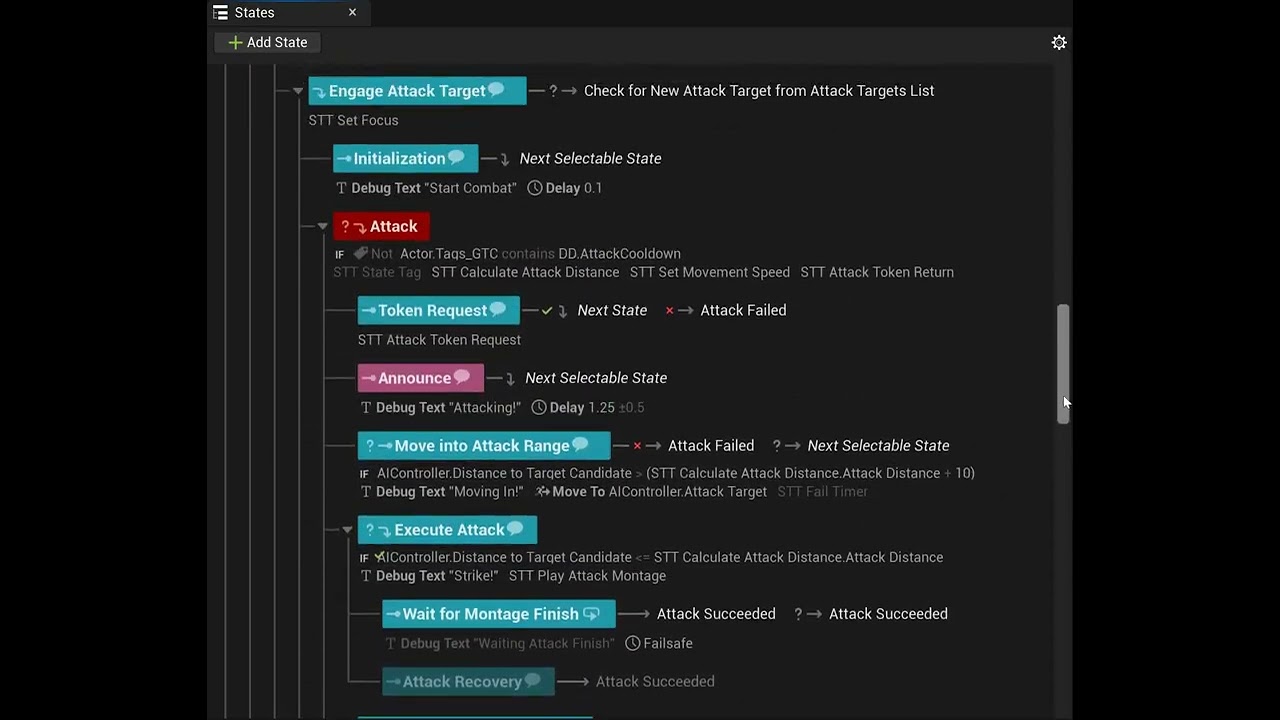
I even use some states for debugging and figuring out how some stuff works.
night wave
yeah lol that is not maintainable in production
wet otter
🙂
night wave
you know you can run multiple tasks in one state right ?
wet otter
I am doing that yes.
night wave
so for example i can see a "move to target" and "attack target" state
you could have a "moveandattack" state
that might not be the best example
wet otter
I think I will clean this by a lot later on.
But maybe I am using some states as tasks, when that logic can be put on AIC or character.
night wave
but you get the point
there is a state for a token request
that could also just be a task
that's part of the "move to target and attack" state
my state tree usually looks like this :
Root
IdleState -> Goto chase if target
Combat (parent state) -> goto idle if no target
-Chase Target -> Goto Attack if in range
-TryUseAttack -> Goto move around on complete
-Move Around the target (step back or move into cover) -> Goto chase after x seconds
a big part of development is simplification if you struggle to understand something that's a good point to start doing it
wet otter
I'll bookmark this message to give me some thinking later when I'll be optimizing, thanks.
wet otter
night wave
a big part of development is simplification if you struggle to understand someth...
Yeah. That is true. I started doing this at first with ST. But when I would be able to figure out - literally hit dead end. I'd break it down to more states - as leave it for later to clean up.
night wave
even if you have a larger state tree you should be carefull with having too many transitions. that's when it becomes spaghetti
wet otter
I generally have things dirty when concepting game, prototyping, and learning. Then rewrite or optimize.
night wave
if you have a larger state tree but you group the states correctly with a few parent states with transitions between them then it should still be easy to start at the root and follow all the logic flows that it could potentially do in your brain
wet otter
This is my 1st time using State Trees. Used BT a few years back a bit 🙂 .
night wave
sometimes its better when prototyping to move slowly and to take a lot of time to keep things clean at a production level
because then you never end up stuck
in larger projects you will always get stuck if you create things that are hard to understand as you add more and more of them
when you have something simple and elegant its actually much faster to play around with it and to change it quickly for prototyping
wet otter
Yeah. That is true and I am aware of that. Sometimes its easy to get carrfied away and forgot to tidy up or try to keep it clean, hehe. I'll try to clean it up. Good tip.
night wave
the issue is if you try changing that big state tree it will be too easy to break something unintionally
wet otter
Let me ask you @night wave
If I go to StateA from StateC (exit transition), but StateA has enter condition that fails.
My ST would go to root instead of going to StateB.
Is this normal?
night wave
im not sure about the technical implementation details
instead of having a enter condition you could also just check the thing that it's checking inside of state A
and then make the state fail
if nothing else makes the state fail then you can use On failure transition to go to state b
sometimes it's fine to just make a task suceed even if it fails
the reason for returning failure is only if you would like to implement a different transition on failure
wet otter
Ok, ok.
night wave
instead of polluting your tree with debug shit just add debug logs to all your tasks and conditions
for example i have a move to cover task
if i enable my own cvar ai.debug.movetocover then it will draw line traces and spheres to show what cover locations it is checking and why it thinks they are good or not good and it will log everything to my console
so i can just instantly enable and disable the debug logging whenever i want
I wouldn't have any states for dealing with target selection either just handle that inside of the code
it always needs to happen states are for things that should only happen when in that specific state
wet otter
night wave
I wouldn't have any states for dealing with target selection either just handle ...
Hm, I will look into that as well. Right now AIC usually handles that, but ST has some conditions about targeting. I'll look into moving that away.
Coz I guess that is more like an Action, and not a state.
When unit is in combat, if target is lost (dead or target switched from previous target), I'd go look for another target. But I can do that in AIC + Party Manager. Coz I have all events. Dispatch on death or target switching.
Thanks 👍
And I think I can see how I can "merge" some of states now.
slow glen
How exactly do state tree events work with parallel state trees? I have an event that gets fired from within a separate internal tree. I have a transition inside my Sleep state to go into the DisableAnimations state upon receiving a SleepStart.
Then, inside the DisableAnimations state i have a transition that should go to the EnableAnims state upon receiving a SleepEnd event. But it never does, and im certain that the even gets fired, the breakpoint gets triggered.
However if i transfer the transition from the DisableAnimations state to it's upper Sleep state it will work. So, which states receive the event? Im quite confused, shouldnt state tree events be global


 prime terrace
In 5.6 I'm trying to dynamically update the StateTree AI Component for a state tree on begin play using Add Linked State Tree Overrides on a per actor basis. This doesn't seem to work correctly. If I manually went into the AI Controller, and added the same gameplay tag and asset, it switches all the AI to use the override. Am I approaching this in the wrong way?


 rugged vapor
hello, I am trying to understand why this State Tree Event is not doing anything. I know its firing because I can see it on the breakpoint, but the Hostile State is only reached when the state "patrol" is finished.
On Hostile I have an entry condition that check if the KnownTargets List is not empty, but the entry condition is not even fired when the Send State Tree Event node is reached 🙁

 slow glen
rugged vapor
hello, I am trying to understand why this State Tree Event is not doing anythin...
slow glen
rugged vapor
hello, I am trying to understand why this State Tree Event is not doing anythin...
https://forums.unrealengine.com/t/state-tree-transition-problem/2491763
perhaps this will help?

Epic Developer Community Forums
I have a problem and cant seem to understand. I’m using the State Tree system in Unreal Engine 5.4 for AI behavior, and I’ve run into an issue with transitioning between states using events. Basically I have a roam task with a move to task, and I want during this if the AI perception of the AI controller sees the player to switch to chase....
rugged vapor
slow glen
https://forums.unrealengine.com/t/state-tree-transition-problem/2491763
perhaps...
it seems I have to remove the AI Move To node in my patrol state because it cant be interupted, thats strange honestly
but thank you
rugged vapor
So i tried the node Move To ( not latent ), and binding the move end on the controller to get when the movement is finished > Still not working
Tried to change my task so it returns a waypoint , and then using the built in MoveTo from state tree, still the same issue, the state tree event is ignored.
What i am trying to do is very simple > Patrol along a spline, if perception updated detect an ennemy, go to hostile state.
Dont understand why its such a pain
wet otter
 small zinc

GitHub
[SIGGRAPH 2026] Pixal3D: Pixel-Aligned 3D Generation from Images - TencentARC/Pixal3D
Look what tencent has given us
slow bobcat
This is not a generative AI channel. That said, first time I see Tencent release an AI tool under unrestricted licensing (all the rest are banned En Europe, USA and others). Also: that's just the model, you have to train it and there's no data provided it seems. Which means that you either have a big set of data you own / open source or you will have to train it like any other generative model: on stolen property and effort.
warped tiger
Is it possible to find which ST assets are using certain ST task? Are there any plans to make ST tasks work with the reference viewer?
night wave
if its c++ then you can remove or rename the task class and see what state trees fail to load atleast thats what happens in 5.3
slow bobcat
warped tiger
Is it possible to find which ST assets are using certain ST task? Are there any ...
Imagine... And while at it, give support to the same for Behavior trees
warped tiger
night wave
if its c++ then you can remove or rename the task class and see what state trees...
That's a good alt. approach, thanks!
warped tiger
slow bobcat
Imagine... And while at it, give support to the same for Behavior trees
Guess we'll have to wait for UE6 😏
Unless BTs won't be supported from UE6 onwards which afaik is the plan 🥲
night wave
you can also just add logging to the task and get the state tree component and log some debug data on what tree is running it
night wave
warped tiger
That's a good alt. approach, thanks!
we had lightbakes failing in a random level because one of my old unused state trees was still set on a unused parent character blueprint and i had removed the code for one of its tasks, just unreal things
night wave
slow bobcat
Imagine... And while at it, give support to the same for Behavior trees
AI behaviour assets should be stored as text in the editor so you could just use a text search program to find references to tasks , you can diff them, merge, etc..
if someone could add support like unity has to select if an asset should be binary or text that would be nice thanks
warped tiger
night wave
you can also just add logging to the task and get the state tree component and l...
Unfortunately I'm not relying on ST comps (mass state trees)
night wave
mass state tree component is still just a component i think
wait maybe not
never used it
warped tiger
night wave
mass state tree component is still just a component i think
Nope, mass doesn't rely on components, there's a schema for mass state trees, though
night wave
you can probably still get something like the entity name ?
you just need to log a piece of info that you can use to trace what state tree is running it
or place a breakpoint and walk up the call stack and look at local variables
warped tiger
night wave
you just need to log a piece of info that you can use to trace what state tree i...
I could access the entities' state tree fragments or wait until they spawn so that the spawners logs an error, but renaming the task and re-compiling the assets would be faster and more reliable
 rancid wing
hey folks

for this behavior tree, shouldnt it not allow the ai to do anything other than wait if gameplay tag condition is set/
harsh storm
rancid wing
for this behavior tree, shouldnt it not allow the ai to do anything other than w...
Looks like if the object doesn't implement the IGameplayTagAssetInterface interface, then its always going to fail.

And that is something you can only implement in C++
 harsh storm
It kind of makes sense though. Because GameplayTags aren't on actors or uobjects by default.
harsh storm
That node probably has the same requirement
rancid wing
hmm maybe
but it never even runs
like it never does the perform condition check
I feel like the problem might be somthing else
harsh storm
Has Matching Gameplay Tag
harsh storm
The condition is executing - you just can't put breakpoints on the places you put them
Like, the debugger won't hit it
rancid wing
 harsh storm
Put a print statement in between
Oh - yeah, that isn't stock Unreal. What plugin is it from?
But that one specifically tells you that it'll check the ASC if it has the tag
So you need to be sure to add the tag to the ASC via an effect or through the loose gameplay tag stuff
harsh storm
Companion plugin probably
rancid wing
harsh storm
So you need to be sure to add the tag to the ASC via an effect or through the lo...
thats what I did actually
 harsh storm
Well, I won't be able to look at it. So you'll have to bust open the IDE yourself and see what is happening.
rancid wing
hmm alright
the add loose gameplay tags to actor works
this is the class, so it inherits from aals character
also the print string does not even print btw where I put the debugs
harsh storm
I don't remember if BTs have a breakpoint debugger you can use or not. But if not, look at the logs and/or the BT while the game is running.
rancid wing
Im thinking I might need to make it implemen the gameplaytagassetinerface
rancid wing
harsh storm
I don't remember if BTs have a breakpoint debugger you can use or not. But if no...
yeah I did a print string and it still did not work
like it didnt print anyhting
and the bt seems to never run over that sequence
wait
problem is somethhing else
rancid wing
ok I fixed the issue
but even when its false, the other sequences still run


wait nvrmind fixed
harsh storm
rancid wing
ok I fixed the issue
Want to share with the class what the issue was?
slow bobcat
rancid wing
wait nvrmind fixed
Please explain. Don't be a DenverCoder9
rancid wing
slow bobcat
Please explain. Don't be a DenverCoder9
Sorry was outside lol
But basically it was a mistake on my end
In the end what worked was the custom gameplay tag component we have in our game
rancid wing
So issue was a bunch of things
- my enemy didn’t have the interface so loose tags didn’t work
- i set the bt to make a key , but it executed as the last node, it would preferable be the first node in a row of sequences
- I had set gameplay tag of ko elsewhere set already in my enemy
Hope that explains it!
Basically, I made a custom check gameplay tag btt and checked the tag by first getting the gameplay tag comp and running the function has matching tag, no interface needed
rancid wing
I'll explain more on a sec
hallow compass
is it a known issue that rotation isnt taken correctly into account for the nav mesh bounds volume actor ?
slow bobcat
hallow compass
is it a known issue that rotation isnt taken correctly into account for the nav ...
Yes. It's not supported. Nav bound volumes for nav generation are treated as AABB
Of you rotate it, it will create the biggest AABB it can find inside the rotated volume
simple crescent
I expect a lot of the recast voxelization code expects an aabb
hallow compass
also, for rampes is there a way to smooth the navigation ? the nav "bridge" is half under the meshes
 simple crescent
reduce the cell size or increase the draw offset for the navmesh debug
both in the recast settings object
If you're using the standard movement components your character is projected onto the collision geometry, so some error between the navmesh and the geometry is okay
Actually, I'm not sure that cell size will change anything. You really need to find the parameter that controls the vertical simplification threshold
Not sure what this is off the top of my head.
Fixing that will add extra triangles to the navmesh which impacts performance for probably no impact on how the NPCs will look or behave.
hallow compass
ill check
slow bobcat
hallow compass
also, for rampes is there a way to smooth the navigation ? the nav "bridge" is h...
As perfectly explained by Philip, don't worry too much about that unless you rely on Mav_movement mode. Nav is just an approximation
 ruby compass
State Tree, transition On Event, if Condition fails, I noticed it tests the other following transitions in the list ??
I can't set it to ignore the Event if the the condition failed?
 quartz shadow
Hey ! I have question regarding the rewind debugger for the state tree. It seems to not support well linked assets. In the details windows only the root tree is beeing displayed. In the details panel it can even have some bug where it says there are invalid index, does anyone else experienced this ?
 upper dove
im trying to add a new attack (like a heavy attack) to my basic zombie, any guidance would be nice, as the tutorials online are vast, and very different
night wave
upper dove
im trying to add a new attack (like a heavy attack) to my basic zombie, any guid...
just play an animation montage and do a damage trace
upper dove
night wave
just play an animation montage and do a damage trace
i already have a light attack, will that still work? and can this way be interupted if the player attacks them during
also i really appreciate the time shroom
is it a selector?
night wave
my tree looks like this :
move to target
execute random attack
it has a list of random attacks to use with a specific montage and damage amount
harsh storm
It is the year of our lord, 2026, and data handling in state tree's still suck so hard
slow bobcat
harsh storm
It is the year of our lord, 2026, and data handling in state tree's still suck s...

 low plover
hmmm
 polar nexus
Does anyone have examples of binding delegates in StateTreeTasks? in C++?
Trying to bind wait gameplay event
harsh storm
polar nexus
Does anyone have examples of binding delegates in StateTreeTasks? in C++?
I shared how I did it with gameplay abilities some time ago
polar nexus
aah lemme try to find it
harsh storm
Your instance data just needs the delegate handle
This code is working in a shipped game too.
polar nexus
Nice! claude was making it a lil bit complex with a new listener UObject ngl
polar nexus
I also think it should be easier to bind to delegates no?
aah sad, for dynamic delegates binding, you'd have to create a new uobject
harsh storm
polar nexus
aah sad, for dynamic delegates binding, you'd have to create a new uobject
Your instance data can be a UObject. Doesn't have to be a struct.
hallow compass
in engine, where does the engine detect slope when collecting nav data
im trying to make it allow vertical walls
night wave
isn't unreal built on top of recast logic and that all works in a 2D projection ?
hallow compass
you can swap between
slow bobcat
Between what? Recast and what?
hallow compass
i meant you can probably do some conversion between vertical space and 2D space by rotating the processed geometry or something
i saw people doing that without engine changes, dont know what part of the recast black box they changed tho
 wooden stag
Does anybody have experience or tips for using ADetourCrowdAIController? My AI controller class inherits from it and I do see the agents pathing around each other. The issue is that whenever a detour agent gets close to another agent, they have a tendency to rapidly jitter and slow down in a way that is unacceptable visually.
I have tried for days researching settings related to this and none of the solutions from the top results worked for me. bUseControllerRotationYaw is false, I've tried messing with CMC settings such as rotation rate, Use controller desired rotation, Orient rotation to movement. Ive tried manipulating detour crowd settings such as:
SetCrowdSeparation();
SetCrowdSeparationWeight();
SetCrowdAvoidanceRangeMultiplier();
SetCrowdAnticipateTurns();
CrowdComponent->SetCrowdPathOffset();
SetCrowdSlowdownAtGoal();
SetCrowdAvoidanceQuality();
I've tried changing settings in Project settings -> Crowd manager such as velocity bias, max agents, path optimization interval. No matter what values or combination of settings I use, I can't seem to get the slowing down or jittering to stop. I was able to reduce jittering by lowering CMC rotation rate, but if I do that the agents will rotate while they are walking forward which also looks wrong.
If anybody struggled with this before and could shed some light on your solutions Id very much appreciate it
 final loom
Is there more info on mass navigation, somewhere?
 tawdry zephyr
final loom
Is there more info on mass navigation, somewhere?
tawdry zephyr
final loom
Is there more info on mass navigation, somewhere?
Did you try #mass
slow bobcat
wooden stag
Does anybody have experience or tips for using ADetourCrowdAIController? My AI c...
Maybe this can help

The crowd system works by default with ADetourCrowdAIController only. In this article, we’ll look at how to make it work with other AI controllers, player characters or other types of actors.
Before start touching "random" params, you will need to understand why they jitter using all the debug you can find
Cab you post a video of your problem?
 grand fable
With StateTree, I find myself needing to do "setup states" every time I enter a new branch. This isn't too big a deal but it feels like I end up with a bunch of extra states, which makes reading rewind debugger output more complex.
I think what I would LIKE to be able to do is to have a state Selection Behavior that is "Try enter, then select children in order" So that the parent state can run a couple setup tasks.
Am I just thinking about this wrong? How do you all run setup tasks for child states?
near condor
grand fable
With StateTree, I find myself needing to do "setup states" every time I enter a ...
Can you run me through an example?
Of what you are doing at least
Then I can better share what I implemented/rec.
warped tiger
grand fable
With StateTree, I find myself needing to do "setup states" every time I enter a ...
I think what I would LIKE to be able to do is to have a state Selection Behavior that is "Try enter, then select children in order"
You can use "Try Enter" and then create an OnTick transition (or a delegate transition if you need to wait for some async task to end) with "TransitionTo" set to "Next selectable state" in order to achieve this, but I'm curious about the use case as well
near condor
most "issues" with state trees (not that they don't have any) are usually just times when we need to write out what we want to do, and before you usually finish writing it out in plain words, you realize "wait, why don't I do it this way instead?".
a physical whiteboard also helps me, quicker than prototyping in a blueprint you attempt to clean up later
hallow compass
uh, why is the override not being correctly being used here ?
the return value of the function is not used
 near condor
Well what does Rider say?
slow bobcat
hallow compass
uh, why is the override not being correctly being used here ?
the return value o...
You might not need it. You don't always need the return value produced.
hallow compass
slow bobcat
You might not need it. You don't always need the return value produced.
Its not passed by ref
 hearty grotto
first again!
 left rover
"seconded"
 lyric flint
Sweet, a new place to spam. ;)
Alright, so I don't know what happened with 4.13, but after updating I also have issues with AI and movements. Our army of professional killers is now looking like a slow motion herd of zombies.
 slim quiver
lyric flint
slim quiver
lyric flint
@slim quiver have you tried it out?;
It's an interesting approach and works fairly well as it is if the complexity is not too high.
slim quiver
@lyric flint - I am going to be trying it out soon
@lyric flint - I will be using this - https://github.com/midgen/GOAPer

 floral mango
eep, be warned that is a very Very rough bit of code at the moment
horrific in fact
it needs a lot of cleaning up
slim quiver
😦
floral mango
but it does work
like I just hammered out lots of nested iterators and stuff to get the basics working. Need to replace the agentState with a more efficient string atom and convert some of the commonly iterated arrays with maps etc
suddenly got a lot of enquiries about terrain generator so I've been focusing on getting that up to a kind of 1.0-ish standard before I go back to the goap stuff
slim quiver
Hey @floral mango Noted 😃
floral mango
I think a lot of people have been hitting my github repo with UnrealEngine + GOAP searches....and the code is in a shameful state 💩
lyric flint
I can't disclose the one we are using at the moment, but feel free to ask if you have questions on the topic @slim quiver
@floral mango that's already a start for most people to think about how to make it happen. ;) so nice job!
slim quiver
@floral mango and @lyric flint - So been thinking about somthing - I have been thinking about using GOAP in addition to some other AI systems such as Line of sight and such. But anyway - I have been thinking about layering multiple GOAP systems that are different on top of the game world. For example - Humans look for loot, sell it to get food and equipment such as weapons and other stuff. Monsters go around looking for food (Humans, Wildlife, etc.)
Would this be too much?
I want to go really in depth with this but I am unsure
lyric flint
I have experimented a bit with this approach and it is doable.
You just need to have really distinct layers. Taking an army as example, youd need one for the soldier, one for the squad leader, one for the general...
lyric flint
You can also see them as different temporal range, short term decision making, mid term, long term
slim quiver
So for example if a NPC is bleeding they could priotize getting bandages over finding a gun?
lyric flint
Example, my high ai telling me I need to go get food, my low ai telling me I have to avoid the sword close to cutting my nose.
slim quiver
ok
lyric flint
Yes that's the idea.
lyric flint
You want a fast loop for real-time stuff, but you can have more complex and slow calculations higher in the hierarchy.
slim quiver
What would count as complex or slow calculations?
lyric flint
Well let's take an exaggerated example, imagine a world where you can do whatever you want, using the goap strategy, it means you have an unlimited number of actions you can follow to achieve your goal. Well you will never gonna be able to finish computing the best plan cause it will have to go over too many possibilities. That's slow :p
lyric flint
I believe the star citizen universe will be using a goal oriented approach for mission generation for example. In a way, they are saying that every ai which can not fulfill it's goal can create a public mission to fulfill it. Neat way to get dynamic content ;)
lyric flint
Especially now that we have cloud access... :p
You can run some pretty complex ai without much trouble. I wouldn't say it's production ready yet for indies, still a bit expensive.
slim quiver
Totally 😃
lyric flint
Nice to see more people interested by AI :D
floral mango
yeah you can use different AI systems for different types of behaviour if you want
like the GOAP implementation I've done, it doesn't replace any line-of-sight . You can still use the UE perception stuff.
so when the agent gets a perception notification that an enemy is in sight, it can switch GOAP goal to 'make targeted enemy dead' and then initiate the planner
 foggy girder
Yeah, this is just a PSA for anyone doing Behaviour Tree Tasks in C++.
You need to open up your ProjectName.Build.cs and append 'Gameplay Tasks' to the array
https://answers.unrealengine.com/questions/429455/link-errors-in-ubttasknode-classes.html
I find the lack of c++ tutorials and documentation really really annoying.
 tame beacon
@foggy girder the battery collector is a good junior C++ tut...
 last fjord
@foggy girder there aren't that many in depth c++ tutorials around, I think this is pretty extensive though (although it has it's own flaws): https://www.udemy.com/unrealcourse/

Udemy
Learn C++ from scratch. Make your first video game in Unreal engine. Use the industry standard game programming language
don't get scared of the price tag
it's 10€/10$ with coupon code
coupon code atm is ANDROIDA10
definitely worth 10 bucks if you haven't touched unreal c++ that much before, don't know if I'd recommend it to more experienced users though
tame beacon
@lyric flint for AI - my PlayerController can't access the 'StoredPawn' to update stuff there. I was told to try using GetControlledPawn but even that doesn't seem to work - well not the way I'm trying...see image
how can I get at the 'controlled' pawn?
is there an example of using GetControlledPawn in a PlayerController?
 orchid barn
@foggy girder on freenode some people said C++ is one of the languages where books are preferred over web tutorials, and it is easy to make mistakes if amateur tries to teach it, like using 0 instead of NULL
 strong notch
or nullptr
tame beacon
or using pointer++
orchid barn
depends on c++ version, but knowing NULL and C-like stuff is definitely important, everybody will run into code using it sooner or later
tame beacon
I personally am in love with C++ - we got married long ago...boy the honeymoon...I'll never tell
things that happen in pointer space, stay in pointer space
Anyone have hints on using GetControlledPawn from PlayerController? (see my post above)
I always get 'Accessed None' for the pawn, and earlier, on BeginPlay, don't even get a PlayerController (???)
tame beacon
actually, in C++ dynamic method dispatch really is cool
but.. help me in my AI please!! See above!
hearty grotto
Could anyone point me to a good article about how AI would work in a large 4x type of game? (i.e. Distant Worlds, Stellaris, Gal Civ 3). Focus on UE4 would be ideal! Thx.
Couldn't really find anything...
left rover
Still with the same problem.. "AI Move To" always goes to Fail.
Before 4.13 it was fine.
 main olive
maybe work around it, by making it move to the target's location and not the target actor itself
(I would)
left rover
Also.. if I connect the "Fail" to the bottom row with the "Stop Movement" and "Clear Key" etc. the AI at least glitches towards character and kills it on impact but that glitching is not good. 😄
Should I replace the enemy key being an "Object" as being a Vector and then get blackboard value out of that vector? I was just thinking if the game knows to update it the same way as I move.
main olive
that and then snap it to the nav mesh to be safe
your target might be in a location that is just about not reachable
left rover
I didn't get it to work. The problem seems to lie in the fast ticks and how MoveToActor and MoveToLocation in "AI Move To" are working in 4.13. Spamming makes it break but it needs to be in tick to be updated fast enough. One of the staff members had this to say about the"AI Move To"-node (2 days ago it seems):
"I have moved this into the Bug Reports section for further investigation. Thanks for linking to the forum thread with additional information."
 flint trail
file a bug report on AnswerHub ?
lyric flint
trying to investigate a similar issue atm. Will let you know if I find what's messing it up. @left rover
tame beacon
In your message log, is your pawn reported as 'accessed none' from the 'Event Receive Tick AI', or is it valid pawn?
@left rover ^^
 rotund pelican
Hey there guys I am new here so I do not really know how stuff works here but I'll just fire away with my Question: I'm trying to make a shortcut in my twinstick shooter where a plank falls over, so one side on the Ground other side on top of the Ledge this works fine with runtime Nav mesh generation but since that is to cost expensive for our teams Project I wanted to do it with the Nav Mesh Runtime Generation set to Dynamic Modifiers Only. So I tried placing Nav Mesh Modifier Volumes and Adding the Nav Modifier Component to the plank but it still does not update the Nav Mesh. Any Ideas?
left rover
@tame beacon I've had zero errors. That's the hardest part (not knowing what's wrong). I managed to locate the issue to the "AI Move To"-node. The creature walks on nav mesh just fine and finds new spots to wonder, it also goes to check for noise normally. Only when it sees me it stops moving. Spamming the "AI Move To"-nodes "Fail" sequence which I had to give a print string to know it was going there each tick. So the only thing that it doesn't do is "AI Move To" players position for some reason. The player (enemy key) is "object"in the blackboard.. tried changing it to "actor" and "none" etc. but none of them worked and yesterday I tried to make the "AI Move To" vector instead of object but didn't give any better results.
But since one of the staff members at Epic moved one of these issues it into a "bug section" I'm beginning to feel that this problem might actually be a bug which gets resolved in some new patch or so. Because if the "AI Move To" worked fine in 4.12 it should work fine now as well. But since it doesn't well.. I think it's a bug.
@lyric flint Thank you. If you find out the issue you will be a hero for a day! Or two..
tame beacon
That's a pain - to wait for a fix - but at least it will be done! 😃
@left rover Can yo uhelp me now? How to properly get spawn in playercontroller?
I'm trying to replicate the AIS_PlayerController from the tut: https://docs.unrealengine.com/latest/INT/Videos/PLZlv_N0_O1ga0aV9jVqJgog0VWz1cLL5f/PgxuaTSkyu4/index.html

but my 'StoredPawn' member never gets set - and my attempt to load it fails
You can't copy in the BP as it blows up in 4.13.0
tame beacon
Wait - in the level blueprint, I did:
left rover
I can check into it but I won't promise anything since I'm a bit newb with all this.
@tame beacon but if you are using an official epic tutorial I think the issues you might encounter might get fixed as well.. I've never had anything in my level blueprints, yet the AI has worked. Only thing is the "nav mesh bounds" that I've had to place. I have one AI that is using EQS and other AI that isn't. The chasing AI doesn't use EQS at all but I have a Deer that always runs behind any corner if it sees a player. Neither need anything in level blueprint. But I think you should just follow the tutorial if it feels nice.
The one I was using to learn was made my "RATSGAME" in YouTube. https://www.youtube.com/watch?v=0BXy8QEq5X8

It has been very nice AI until 4.13.
The first thing that happens in this AI are the things in the AI characters blueprint where I've made literal names that the blackboard (and therefore bahaviour tree) can use.
So every AI character gets itself a controller at the beginning in their own blueprint.
tame beacon
Thanks @left rover - I found a part of my problem: I started with the 3rd person template as a start. That includes a PlayerCharacter to begin with. I always left it in the Level while working on the tutorial. None of the pawns I created worked until I deleted that initial PlayerCharacter from the template. I don't know why that would have affected the results, but it did
Now I just have a couple of bugs left to figure out
tame beacon
Bugs fixed!! Yay!
slim quiver
Question about GOAP - does GOAP have fail states?
Like
If I destroy the food sources in a town (Farm, Grocery store, Farm Animals, etc.) Would that cause a GOAP based to AI hang or no?
Maybe I am not thinking about it clearly enough
¯_(ツ)_/¯
 bleak grotto
@slim quiver Depending on your planning and what you are using for heuristics, if a certain task/goal's preconditions are unable to be met, then the planner will plan whatatever needs to happen to fufill those.
If that is all your AI does, and has no other possible goals then to find food, then yes it will stop working
but if it can schedule other goals besides just finding food, then it will just start planning those goals
slim quiver
@bleak grotto - One sec and I will give you a break down of what I am planning
bleak grotto
Are you rolling HTN or just straight GOAP
slim quiver
So behavior tress
bleak grotto
no
Behavior Trees aren't goal based planners
Resisitance 2 made HTN planners popular
slim quiver
alright
bleak grotto
War for Cybertron (the 2nd one, i think this is the name) followed suit
slim quiver
ok
bleak grotto
Evolve used HTN planners + BTs combined
slim quiver
I might be using GOAP + BTs
bleak grotto
Yeah a lot of people argue the very bottom most of HTN planners are incredibly similar to straight GOAP
BTs allow GOAP planning to be more reactive and less expensive
slim quiver
ok
hmmm
So in short I am making a project that deals with people doing their daily lives (Going to the grocery store, Driving around town, etc)
Those are the NPCs
bleak grotto
Right
slim quiver
So - I am really thinking about would this make sense to use goap when I can basically destroy the town that these people (NPCs) live in.
I am making a game where you play as an alien invader
or Invasion force
bleak grotto
It depends on how emergent you want the AI to be. I.e how hands off you want to be
slim quiver
ok
bleak grotto
GOAP/HTN is hands-off and AI basically figure out for themselves (i.e plan) what to do
slim quiver
Alright
bleak grotto
BT's and Finite State Machines need AI designers to fine tune them
slim quiver
Yeah
So - I want certain hand crafted AI to form cells of resistance to the player.
After the player starts to destroy towns
bleak grotto
I think that would be a good fit for gOAP
slim quiver
Or at the very least to start apearing around the world
bleak grotto
you could make a "find other survivors goal"
slim quiver
Ok
bleak grotto
and once you have enough create a new resistance cell, also make another option which is to join an existing resistance cell
slim quiver
Alright
bleak grotto
you will need to fine tune your heuristic depending if you want to favor a lot of small celss vs larger more populous cells
bleak grotto
but yeah that's the beauty of GOAP and HTNs is that you can make abstract goals and then break them down into pieces
slim quiver
Ohhh very nice
bleak grotto
normally those pieces require certain pre conditions to met before they are available
If your interested in looking into HTN Planners check out SHOP2
It's a great starting point
slim quiver
ok
bleak grotto
kinda like how you have different implementations of sort (merge/heap/quick/etc....)
bleak grotto
I love GOAP and HTN haha
slim quiver
I can tell 😃
bleak grotto
It's overkill for a lot of things, but I think it's one of the best AI architectures for first person/third person action games
slim quiver
Totally
bleak grotto
and like with all architectures usually your final answer is a combination of everything, but just favoring one thing more over the others
Since you still need efficiency and Reactivity that comes from BT
And Utility Systems also help make even more powerful heuristics
slim quiver
Totally
@bleak grotto Going to shoot you an video that is one of my core influnences
for this project
I guess I will post it here as well
https://www.youtube.com/watch?v=C1SBoNTpUB4 This was one of my major influneces for this project. With a mix of Red Dawn (1984)

Anyway back to work
bleak grotto
Oh yeah I remember that game.
bleak grotto
Red Dawn movies were terrible though. But I like the idea
bleak grotto
Working on a First Person Shooter VR title myself. Currently in the middle of implementing the Weapons which is my main priority right now over AI. But soon I'm going to start working on my HTN planner for the game
bleak grotto
I have considered making an open source plugin eventually. But that'll be way down the line if I ever get to it
bleak grotto
haha don't hold your breath for it. Still got soooo much stuff to do on my indie project
slim quiver
Alright]
bleak grotto
But yeah if you want a good reference for HTN planning implementations check out
and download SHOP2
This university got really well known for their SHOP2 implementation
and it kinda became the industry standard for HTN Planning with each game studios own unique take/add ons to it
 glacial harbor
is there a way for a service to abort the current behavior tree branch?
glacial harbor
any suggestions on how to make the behavior tree look a bit cleaner and more organised?
 indigo kettle
 weak dove
I am getting ready to start a project with AI What is the best resources for getting started with AI specifically ?
 near jetty
@weak dove epic games has a series of streams, in youtuber
"creating game ready AI part X"
a ton of hours of those
they are very useful
weak dove
I started watching the first one and I think that they are going to help a lot thanks but I see that they use blueprints do they ever cover c++ of AI?
lyric flint
@weak dove i'm only 3 vids in, and its all blueprint at this point. Having a look at the most recent ones too, it seems to stay that way
 still jasper
on the C++ side of things you tend to read the API documentation or find examples
near jetty
there is no difference beetween C++ abd BP on that
the same way they create a blueprint task, you create a C++ task
but on C++ you can do fancier things on the behavior tree editor
tame beacon
there's a C++ tutorial on UE: https://docs.unrealengine.com/latest/INT/Videos/PLZlv_N0_O1ga0aV9jVqJgog0VWz1cLL5f/NyXq0Hy9xQs/index.html

They have to get into AI for the 'Vs' part
weak dove
@near jetty you can do fancier things in c++ or blueprints?
near jetty
c++
 vivid patrol
In C++ you got full access to UE4 APIs
foggy girder
The real problem with c++ is the lack of proper documentation as to what you have available
I know I know, it's always easier to look at the class definition
but a few samples here and there go a looooooong way to helping lapsed programmers like myself figure out what the hell is going on sometimes
Another PSA:
Tom Looman's code for his zombie game is really helpful if you're trying to figure out how to implement C++ AI Tasks
http://www.tomlooman.com/survival-sample-game-for-ue4/

Survival sample game covering common gameplay concepts packed in a survival game. This series focuses on the C++ aspect of Unreal Engine 4.
flint trail
Are there any good recent tutorials (BP-only) about AI ? (NPCs and a "buddy" that follows player)
 next sinew
hmmm
you can get deer ai from a boy and his kite demo
seems to be a lot of videos on youtube give it a look
@flint trail https://www.youtube.com/watch?v=VAAHKNoIg0w

 pearl pivot
I like to make behavior tree modules in c++ and then compose them in bp. Though working with BT stuff in c++ is not for a beginner and it's poorly documented
flint trail
thx @next sinew
vivid patrol
@foggy girder well i didn't dive in to ai, but you could find examples in engine source code
 worn yarrow
it seems that my AI is consistently choosing the wrong nav agent
has anyone figured out a way to force it to use a particular agent
glacial harbor
is EQS on c++ much faster than in BP?
worn yarrow
it's the age-old question of how fast/slow is BP
there are some overheads in all calls in BP yes.
other than that it's the same
glacial harbor
@worn yarrow thanks! I'm currently converting my BT tasks to C++
worn yarrow
@glacial harbor just wondering. have you tried using dynamic parameters?
wondering if they worked yet. it wasn't available a while ago
glacial harbor
@worn yarrow yes, it works on BP. Haven't tried it yet on C++ tho
 cursive sparrow
"The real problem with c++ is the lack of proper documentation as to what you have available
I know I know, it's always easier to look at the class definition" yeah, well
That's not the only problem
In most cases, making the modules extensible is only an afterthought
for example, I wanted to override the whole UNavigationSystem
but the whole thing is so big, it's absurd
I had to just cut it off altogether, and just make a different MoveTo task
worn yarrow
@cursive sparrow i think that's not a C++ problem . It's fundamentally the engine's class extension thing. how they separate the classes
cursive sparrow
Yes, it's not a language problem, what I meant is that, while UE4 is kind of open-source now, it really wasn't thought out this way.
The way the engine is structured doesn't lend itself to much modification.
For example, I wanted to re-use the Behavior Tree editor for a different purpose (just a generic tree editor) and basically had to fork the engine, because the whole class is hidden away in Private/,
pearl pivot
maybe all these problems will someday be refactored away
cursive sparrow
Not without outside pressure, I think. I mean, if you add a pull request and explain it sensibly, it will probably happen.
glacial harbor
anyone know why delay nodes inside a BTTask creates massive FPS drop? It's only called in the Receive execute but it causes a slow down


 tame beacon
@slim quiver will you share some of your BT or AIController BP's? Or is this not open source... (?)
Or services...or tasks...
flint trail
I wonder why roadmap for AI is all marked as backlog ?!
@rugged path do you know by chance when AI roadmap is planned to be worked on? (anything for 4.14 ?)
glacial harbor
probably because Miezko (idk the spelling) is working on Paragon
so all of his AI magic is put there
flint trail
I find it hard to believe only 1 AI guy works on the engine + Paragon
also a lot of card on Trello is about exposing existing C++ functionality to BP
sure someone who isn't a lead AI programmer can do it
glacial harbor
that I can agree on
 rugged path
Mieszko is just our most public AI developer, but we have many more like Lukasz and Adam Schrader. They'll update it when they have more to say, but "just getting rid of bugs" isn't a card about the vision of AI, so it's not included.
They did mention they would like to see more things posted on AH about if the AI systems feel good and where they can improve UX
 cyan yoke
the AI in paragon is excellent. Just the right amount of stupid and aimbot to help you learn a new character
flint trail
Organize anything, together. Trello is a collaboration tool that organizes your projects into boards. In one glance, know what's being worked on, who's working on what, and where something is in a process.
Organize anything, together. Trello is a collaboration tool that organizes your projects into boards. In one glance, know what's being worked on, who's working on what, and where something is in a process.
things like that
and this https://trello.com/c/Q7HXIOoR (I assume this would be cool for AI to navigate platforms/elevators)
Organize anything, together. Trello is a collaboration tool that organizes your projects into boards. In one glance, know what's being worked on, who's working on what, and where something is in a process.
tame beacon
Well....it is open source...we could all supply suggestions for change
@flint trail ^
flint trail
@tame beacon hm?
tame beacon
From your earlier comment that there's possibly only one dev on AI in all of UE
lol
My comment was about that It is open source - so if we want a change, we could add it ourselves - and wait for approval
flint trail
Well, if I wanted that I'd stay with my old GPL engine. The whole idea to switch normal commercial engine was to get away from that open source nonsense and work on the game, instead of the engine.
 obtuse epoch
Is there a way to send a command from a button in the UI to an AI's behavior tree?
glacial harbor
you can change a blackboard value from your button event. that can change how your behavior tree will react
obtuse epoch
what is the variable type in the Blackboard for the button event? Or am I misunderstanding you?
glacial harbor
@obtuse epoch I mean your button event should change a blackboard value (maybe an enum or something) that will alter what your behavior tree does
obtuse epoch
Ok, I need to make the button do what? and the Blackboard do want? and the Behavior Tree do what? I don't mean for you to do everything for. Sorry
glacial harbor
Ok. So you have a button right? You assign a click event to it. That click event should get a reference to your AI controller, which then has a Blackboard component. That Blackboard component can set a value that is used in your Behavior Tree by using, for example SetBlackboardValueAsInt function. In your behavior tree, that Int that you just set should be associated with what you want to do. This is typically done using Blackboard Decorators. For example, in one node put if Integer Equal to 0, then MoveTo. In another node put if Integer Equal to 1, then CustomTask.
Essentially, the tree is like one big If Else.
I'm really bad at explaining stuff
obtuse epoch
Let me play with it a bit more. And just in case, Thanks for the help
This explanation seems simple
glacial harbor
No problem. Just remember that the Blackboard is your way to communicating with the Behavior Tree
obtuse epoch
Ok, so with the Button, I click the "On click event." then in there how do I get my Ai controller reference?
I see ""Cast to MyController" but nothing to about "Get MyController"
I see "character reference" variable
BUTTON
I don't know what I'm doing. Grrrr
 shrewd harness
Is the actor you want to get the controller of creating this UI? If so you can set a variable within the UI widget blueprint when you created it with a reference to "self" in the actor that is creating it
glacial harbor
well you can always use GetAllActorsOfClass. Since I presume it wont be used a lot
shrewd harness
That'd work too
Anyone have any experience with the "aborted" Movement Result enum from an Ai MoveTo node? It works 95% of the time moving to the same exact point but sometimes it'll just start only failing and returned aborted, and I can't find any kind of change in the environment or variables that makes it fail. The point its trying to move to is valid, within the nav mesh and most of the time it moves to it fine!
glacial harbor
hmmm. strange
my only guess is something is causing your AI to manually abort. Maybe some task that you're giving it that causes it to stop its MoveTo task
shrewd harness
It still just stays looping in the task though, it finishes with a failure if the MoveTo fails and it just executes and fails again and so on
glacial harbor
can I take a look at the part of the behavior tree where that task is called?
shrewd harness
On it
The problem task is "BTT_GoToWaypoint" on the far left
Actually I go into a bit more detail here too if that helps:
glacial harbor
I see
if they're exactly the same waypoints
I really think something is overriding your MoveTo task. Since Aborted basically means "the AI needs to do some other thing so stop this movement task"
but then again, can you try just making your Acceptance Radius a bit larger?
shrewd harness
Let's try it
The worst thing about this bug is that it takes many times for it to happen so it's hard to test if it's fixed haha
glacial harbor
Yeah since it's really a small probability. Really hard to tell without seeing everything.
Well I need to sleep now. Good luck!
shrewd harness
Thanks for the help! I've played it through about 10 times now with no problems, pretty promising.
Before it was happening about once every 4th or so playthrough
 plain mica
Does anyone know if you can comment in a Behavior Tree? Would be really nice, mine is growing quite a bit...
 violet patio
Hey guys, I have a small AI problem I put it in the #blueprint chat because it used Blueprint and wasn't 100% where's best to ask. Could anyone check it out and see if you can help? Thanks 😃
glacial harbor
@plain mica i think in 4.13 you can. But in other previous versions you can add a pin comment per node only
@violet patio if its about AI, post it here
 wispy zenith
Hi everyone. I have a question. I don't understand what is the different between the Behaviour tree and Behaviour tree component ?
And when i must use a Behaviour Tree component ?
wispy zenith
update : I asked the same question in ue-programming @rapid bloom reply "BTree are the data of the tree, BTreeComp operates on it (kind off)"
 vocal karma
A bit of a help would need here. The AI made is line tracing to the player, and the wall's channel is set to block, so it cannot see through walls. BUT, after it sees the player, even after the player hides behind a wall, the AI keeps chasing. I do not use pawnsensing component or aiperception component. Only logic inside BTService and BehaviorTree.
 fringe girder
Are you clearing the player reference when the AI doesn't see him?
Or post your BTService here if you like, would be better to understand how your setup is
vocal karma
The service is a bit large, so there would be about 5 screenshots, so if you want to help me, I can send you the screenshots in PM
fringe girder
Sure
 idle stone
What would be the best way to determine whether an AI has its back to you or not? For something like Backstabs?
cyan yoke
(Player->ForwardVector . AI->ForwardVector) > 0 . if my dotproduct serves me correctly. it probably doesn't. If not. Ignore me 😉
or check the difference between the rotations and give it a range like if it's 45 degrees either way. so you have some room to tweak
idle stone
I tried researching DOT product stuff and then my brain went into meltdown mode haha
right now I just have a collision capsule tacked onto the back of the AI, that I just do an event overlap with. I feel like that's pretty hacky and could be buggy down the road
violet patio
@vocal karma Did you ever fix the AI chasing you? I'm in the same boat as you was. My AI keeps following me and I dont know how to stop it, though I AM using the PawnSensingComponent (I'm also using C++)
 fickle zephyr
@idle stone it (and other linear algebra concepts) are worth learning as they're used extremely often in game programming
 rustic nova
@violet patio @vocal karma Are you aborting the movement task when you want the AI to stop?
 crude arch
@idle stone Marc was pretty close, for back stabs or anything involving 2 Actors you'll need to dot product the facing of the target Actor and the vector between the Target Actor and the Other Actor. So for a 90 degree back arc: pseudo-like: (AI_Forward . (normalize(AI_WorldLocation - Other_WorldLocation))) < 0 Please keep in mind, order may be off on subtraction or the dot product so you may end up with a front stab 😉
Also Dot Product is pretty simple as a concept: it's how alike 2 vectors are with 1.0 meaning exactly the same, 0.0 meaning perpendicular, and -1.0 meaning exactly opposite. Don't ask me about how the math works, I have no idea lol
rugged path
So we want to get Mieszko on more, but we wanted to ask the community first: What kind of thing would you want Mieszko to make?
cyan yoke
I would love to see a fighting game engine with full intelligent fighting AI (weapons and hand2hand / groundwork) that can grade and suitably counter based on the moves available. I know its a big ask but it's christmas soon. 😉
crude arch
Hmm...
cyan yoke
Sometimes I wake up sweating, realising that Alan Noon's fighting project is resigned to history and my first morning coffee tastes a little saltier from the tears of broken anticipation.
crude arch
We'll be applying Richard's state machine to fighting games in... 3 weeks? Not next week, but 2 weeks after that. Maybe we can see about building an AI input system for that?
 uneven cloud
I would like to see more in depth uses of EQS
cyan yoke
@crude arch : Anticipation restored 😃
crude arch
@uneven cloud : Did you have a specific idea in mind?
uneven cloud
@crude arch Different kinds of generators, different use cases like a spawning enemies or utility action selection
 smoky summit
@crude arch thanks for that backstab stuff earlier. I'm about to implement those 😃
 floral vigil
@rugged path: I may be on my own here, but I'd love to just have Mieszko on for a Q&A session, and maybe just demoing some specific aspects of the AI system, without actually doing any particular project.
rugged path
Hmmm, that'd be interesting
floral vigil
I find with some of the streams (not just AI) that the project can detract from whoever is doing the stream being able to get across the important info.
A lot of the time gets spent with inevitable boilerplate stuff that doesn't really have much to do with the focus of the stream.
For example the recent stream became more about how to make a finite state machine, rather than how to create plugin based code.
idle stone
@crude arch Thanks, Ill look into DotProduct more lol
last fjord
vector math in gamedev ❤
finally we have use for something they teach in schools! 😄
I guess matrices would be helpful too if we needed to do more low level stuff
 abstract trail
Not looked very far into this so the solution might be really obvious: I have some AI in my game and when I move infront of them they move out of my way towards their destination, is there a way to get them to move me out of the way
 elfin nymph
@abstract trail You want the AI to push you away?
abstract trail
Yeah
elfin nymph
Turn off can affect navigation on your character
then make sure the AI has a collision box that pushes you away
But that's a really simple and not pretty way to do it :p
abstract trail
My character apparently can't affect navigation in the first place
elfin nymph
Np :)
 worthy trench
I have several ai types in a project I'm working on but in the ranged types specifically they will not turn track the player. The player can be way off to the left or right and they will still just shoot straight
uneven cloud
Have you tried setting focus on the target? There's a set default focus service for the behavior tree.
worthy trench
Ok that's helpful, but im not using behavior tree it unnecessary for what I need. Is there a way to do that from blueprints
worthy trench
Nevermind figured it out :)
elfin nymph
Does GetRandomReachablePointInRadius take in account Nav links? Can't seem to get a proper random location in radius that also looks for higher areas?
 lyric topaz
Hello, I am new to behavior trees, after reading the quick start guide, I came up with behavior tree for my AI. The issue is that while I know the "tree" is firing, it doesn't seem to be going down to Search For Target, can someone tell me why?
And yes, even with the search radius is above zero, it still wont fire
floral vigil
A Selector node will only run until it's first successful child.
If you want both children to run in order, change the selector to a sequence @lyric topaz
floral vigil
@lyric topaz If it stops at the root then your decorator condition is obviously failing. You have it set up so that if Target is set to anything, the children won't run.
lyric topaz
i see. so do services only run when there is a task running?
because i finally got the find enemy thing to work by making it a task instead of a service
floral vigil
Oh, I didn't notice they were services 😉
Services run for as long as the node they're attached to is active.
But since you didn't have any tasks in the sequence, it would end right away.
floral vigil
Services are things you want to tick while in a part of your tree. But anything that is a process, an action, should generally be a task.
lyric topaz
i see now, i was fixing to rip out my hair since i couldn't for the life of me figuring out why it wouldn;t fire
 wise grotto
having some issues with pawn sensing combined overlapping volumes
I want to make a trigger volume that is attached the player character that when the enmey enters it and hits a button it destroys the enemy
strange thing is that I can get the trigger volume to work or the pawn sensing to work but not at the same time
and it is based on if I make the trigger volume simulate physics or not
If I make it simulate physics the AI works great but the trigger volume wont fire and if I turn it off the trigger volume works but the AI becomes dumb
here the volume I setup
changes just these 2 things is the difference between AI working or not
cursive sparrow
@elfin nymph it should. It can be that your navlink isn't setup properly?
elfin nymph
Checked all documentation i found, setup both ways. Doesn't look like i missed s setting. I'll screenshot later as I'm not on pc atm
elfin nymph
Yeah, there isn't a lot, but looked at forum threads a bit(sadly not a lot either)
@cursive sparrow
cursive sparrow
And does it actually work, I mean, can you MoveTo through it?
elfin nymph
He jumps down, but never seen him jump on
Gonna make a quick change to the BT and make it follow me permanently
Nope
He just moves towards to edge of the height difference and stands there
cursive sparrow
Yeah, so the navlink doesn't really work
elfin nymph
Not really, only one way
cursive sparrow
Have you looked through this?
Unfortunately, from my experience, default navlink implementation is pretty useless
It says that the navmeshes areas are connected but the path following has no idea how to traverse them
elfin nymph
Hmm I'll take a look at it
cursive sparrow
I solved it by following that tutorial
cursive sparrow
Actually made something a bit more complicated, as I was doing a 2D game, I made custom navlink class, a custom path following class. And made the navlink store what the character has to do in order to get from one point and other and vice versa.
Anyway, good luck
floral vigil
@elfin nymph Use the navigation testing actors to see if your link is set up properly, they're super useful.
Navlinks can be really sensitive with their parameters and positioning of endpoints. And it's not always clear when they are just not initializing properly.
elfin nymph
Yeah if i set AI to just flying permanently he does follow nav link, which is weird because then it makes no sense as to why "Random reachable point in radius" or "Random Navigable point in radius" does not return any location on the higher levels
Or does that take in account the movement mode?
floral vigil
No it's a recast/detour function under the hood, so it should just be calculating points that are reachable in terms of the nav mesh.
elfin nymph
Yeah so it doesn't really make sense, I'll dig into it a bit more, maybe i have extreme bad luck and it never return a point there :p
floral vigil
Yeah perhaps set up a very simple test scenario and see if you can get it to ever find a point that requires crossing a navlink.
It would be pretty bad if it didn't support it. Having said that, it does seem to me like recast has a bunch of limitations, as if it's still a work in progress system.
elfin nymph
Hmm seems like it's working now, although really weird random points being always around the same location, even though the AI is moving to other locations too
Thanks all though, i'll figure it out :D
Works now - Not that I really changed anything
¯_(ツ)_/¯
floral vigil
Yeah, the nav system is very temperamental.
elfin nymph
yeah noticed that too
floral vigil
@cursive sparrow You didn't implement custom query filters by any chance?
floral vigil
Not EQS, I meant customizing the logic behind pathfinding dynamically.
So you can alter path cost based on dynamic game state.
I looked into what it would take briefly a while back, and from what I could see it wasn't really possible just by extending the UE4 classes, would need pretty low level overriding of recast/detour stuff.
elfin nymph
Hmm followup question; Is there a way to check if a path is using a navlink? Definitely not in blueprints, but maybe in C++?
uneven cloud
You need to make your own area class with area flags and then check the flag in UPathFollowingComponent::SetMoveSegment
I was curious if there was a way for the AI to be able to know to jump from one place to another with a NavLink? If not, how would I tell my AI to be able to jump from one platform to another???\
1195
elfin nymph
Hmm yeah I checked that page earlier on someone else's suggestion, however my C++ isn't extremely good(i can mainly just do basic items) and because i solved my issue without needing that I stopped looking into it
uneven cloud
That's not just for jumping. That gives a detailed example of how to check area flags - which can be used for all sorts of things
floral vigil
@elfin nymph You need to know for your logic, or you just want to check yourself to see if it's working as you think?
If just the latter, you could use the gameplayer debugger I think
elfin nymph
I need to know if point A to B requires a navlink (i.e. requires jumping or falling)
for logic, not to debug
uneven cloud
Once you get a path, there's a function that you can call on it ContainsAnyCustomLink()
elfin nymph
Yeah was looking for something similiar in the docs, but must've overlooked it
floral vigil
floral vigil
I'm not sure if a regular NavLink counts as a custom link.
It may only be for smart links.
uneven cloud
yeah... it may only be smart links.
floral vigil
In which case I think you need to call GetPathPoints, and then check the flags in each point.
cursive sparrow
@floral vigil , I didn't use UE4 pathfinding at all
So I had custom cost functions, and yes I did update them sometimes due to game state changes
But that doesn't really help you
floral vigil
Ah okay. Yeah more I think about it the more it seems the UE4 navigation stuff just isn't game ready for anything remotely complex.
So did you use recast, or an entirely custom solution?
cursive sparrow
Custom tailored to the game
I'm not sure about how good recast is in complex games, as I've never worked on anything big in UE4, but for me the main issue is that I don't know recast well, and we had problems with it
Sometimes it wouldn't return paths at all
And Pawns frequently got stuck outside the navmesh
So, instead of debugging and learning about recast it was simpler to make a separate navigation system, as or requirements weren't big
floral vigil
Right. Yeah if your scope is limited then I'm sure that's the best approach.
Pathfinding in arbitrary 3D worlds is obviously not an easy thing to create a generic, robust solution for. And recast is open source after all.
cursive sparrow
Yeah, the game was 2D, recast is a bit of an overkill
I got away with using A* on a simple graph
near jetty
has someone here done jumping AI
with navlinks or similar
becouse im having a massive amount of trouble with them, on 4.13
it seems quite random, in some links it works, in others it doesnt, in some my navarea_jump does call a jump on the character, and in others it doesnt
on most of them, the enemy just cant pathfind on that navlink at all
elfin nymph
Basically read over chat above ^ I didn't ask for jumping specifically, but there's a lot of talk about nav mesh links which might help you :) @near jetty
near jetty
ive already done that
elfin nymph
Then I'm afraid I'm not big of a help :/ I am making them jump, but not the way you'd normally do it or using nav mesh links, for gameplay reasons :)
uneven cloud
I've done jumping AI
AI won't pathfind while on the navlinks. I had to actually stop it from trying until they had landed as sometimes the launch would get cancelled.
near jetty
my problem is that i do have code that "detects" the nav area
and then jumps
but it works in very strange ways
most of the time, when the guy does a pathfind
the navlink is not traversable
ahhh
i found why the fuck it was that strange
you need to actively disable the smart link part
 versed pasture
I want characters ingame to be able to pass through each other, ignoring collision so they can path easier. What would I need to set to allow them both to know they can navigate through one another and be able to do it without colliding
elfin nymph
@versed pasture turn off can affect navigation in the characters meshes/collision shapes and set to ignore or overlap pawn
elfin nymph
For those who remember, the AI just falling to the ground mid air when jumping it somehow is still happening. I traced down the issue to where the velocity of X and Y get reset to 0, but Z remains and keeps counting, so the direction just gets reset but still does the rest. It's not colliding with anything, happens random, I put print strings everywhere on anything that touches the movement component and not a single function is being called when it happens. For some reason doesn't happen in a clean project when i replicate the code but that's tested on non-ai. Anyone any more ideas?
Tested in an empty level with just a flat landscape and still happens
Movement mode doesn't magically change
elfin nymph
And for whatever reason it seems to become more and more common
floral vigil
@elfin nymph Could something be causing the path to update? As I remember sometimes when a path gets recalculated, the AI used to stop suddenly before beginning on the new path.
elfin nymph
Well if it's mid air it can't access any of the movement nodes, and the jumping isn't done with the navpath
So i doubt that's it
floral vigil
Hmm. Only other thing I can think of, do you have nav test actors in the level?
floral vigil
I seem to remember they actually had collision on despite being invisible in game, which was pretty silly.
elfin nymph
Well even if that's true they aren't anywhere near the ai
floral vigil
Right. Not sure then tbh.
elfin nymph
Hmm either i'm very lucky and it isn't randomly happening or deleting them fixed it
Going to add a nav test actor to the clean project
if it's replicatable then bug report :_)
can't replicate ti
but it was certainly messing with the ai
Quite annoyed that I spent so much time trying to find why my AI is doing that while it's just the nav test actor -.-
(╯°□°)╯︵ ┻━┻
near jetty
i do have that `problem
my AI does stop their horizontal velocity in air
i guess i should improvethe pathfollower component
to disallow that
you could also do one thing
on the pawn
if the physics is "falling"
force it to walk forward
whatever it happens just walk forward
floral vigil
@elfin nymph @near jetty May be unrelated, but just in case, this is from 4.13.1 hotfix:*Fixed!* UE-35852 AI Move To Location zeros velocity each call, causing the AI Pawn to freeze if told to move again before reaching destination
last fjord
seemed like most of the fixes were for console or vr
 arctic jacinth
ok so here's a Q why would AI be sticking to the walls when moving / wall hugging?
elfin nymph
Is there a navlink? Is the object set to influence the navmesh? @arctic jacinth
arctic jacinth
Hi @elfin nymph all fixed now, don't know what was causing it but the other coder fixed it pretty quick
elfin nymph
Alright :)
arctic jacinth
Tnx though 😄
elfin nymph
No biggie
 scenic trellis
Hey guys. Is there a way to make characters JUST use the nav mesh for colliison/placement? I'm trying to reduce capsule physics computation and have lots and lots of AI without dragging down my FPS.
Since I don't use capsules for anything on my AI, it'd be really cool if I could just turn their collision off but still have them move about.
Any other tips for making AI go into sleep mode for CPU would be great too. I already turn off their capsule, AI, pawn sensing, and loads of stuff when the player gets out of range. (I have a big AI list that I go through, about 2 every tick in Game Mode to check distance to a player) Works fine, but it hasn't gained me a ton in the CPU dept. yet.
 lilac bone
i've been trying to think of a way to code my ai to hide from the player, but i dont want to use target points. do you guys have any ideas?
my only idea is: player has sphere trace to get all visible locations. ai will select random location to go to when he wants to hide and if it equals one of the players seen locations he will choose a new random location until one is found
but i doubt that would work
scenic trellis
First thing that comes to mind (I haven't done this yet myself)... Get a target location he can move to (then get at 'eye level' for the AI) and draw a raytrace or sphere trace to the player from there, if it can see the player, try another place. That could be really inefficient though.
Other alternatives... Place hiding spots around your scene that the AI knows about and can use - though if the player can move around to those places it might not work at all, and impractical for a larger game
lilac bone
i plan on having a lot of the ai, so it's gonna have to be efficient.
imagine a swarm of rats that all scatter when the player looks at them, that's essentially what i'm aiming for
i thought about that one, and yeah, it wont work for the reason you said
scenic trellis
Traces are pretty efficient, but you could have your AI get stuck not able to find a spot.
If they find it on the first couple tries it's probably efficient enough. I don't know how games do this though, I've never programmed AI that uses cover from a player like that.
lilac bone
i'll give it a go and see what happens
hey
would this work
have a targetpoint actor that looks for the player, if it does not see the player, it will set a tag on itself that says "hidingspot", if it sees the player, it will remove the tag
then the AI, whenever he wants to hide, will get all actors with "hidingspot" tag, and then go to the closest
scenic trellis
@lilac bone Yes, actually. That's pretty clever. It would be tedious to set up the spots if you have a lot of levels or large levels
Just have a bool on the hiding spot BP "LineOfSightToPlayer" (or w/e) and have the AI check those periodically.
That could work pretty well, though hiding spots may get repetative, unless that doesn't matter, or you have a ton of them
Just make sure you store those hiding spots as an array that the NPC can access, don't do "Get All ACtors of Class" or anything each time they check - that's inefficient. A stored array is much quicker.
lilac bone
good point, i was doing exactly that, getting all actors every time, lol. so I could just get them on begin play and then check when he needs to like you said 😄
scenic trellis
Have Game Mode have an array of those Hiding Spot BPs, clear it on begin play, then get them once and store the list when the level starts.
Is your game singleplayer only?
Actually nvm, doesn't matter. Only server should execute AI behavior anyway
lilac bone
it's more of just a practice game, so yeah, single player
scenic trellis
So yeah, I'd store it on Game Mode. You could also store it on GameInstance but that persists between levels etc. and would have to be maintained more often (cleared etc)
Just have "Hiding Spot List" as a variable array, get once on Begin Play, store it. Then have NPCs called Get Game Mode -> Cast to your game mode class -> Get that array
Then you can also do more complex stuff like make an NPC take claim to a hiding spot, so others will ignore that one.
"Occupied" boolean or something.
lilac bone
heyy I like that!
scenic trellis
And that check from the game mode would be really fast.
Even more efficient than tick.. Make your "Check for hiding spot" stuff a function, and put it on a looping timer on begin play on the NPC. (Begin Timer by Function Name, I think it's called)
lilac bone
I was going to make it a function that gets called whenever the player can see them
i would assume it only needs to be called once when the player sees them, but im not sure
scenic trellis
@lilac bone You can do that on tick with a boolean (CanBeSeen or whatever) or you can pause the timer and restart it. Timers are just more efficient - or so I am told.
If you're going for large numbers, that's probably something to keep in mind. You can pause the timer by saving out the "Timer handle" as a variable. (Dark blue node on the timer start node)
Anyway, not to design your stuff for you...
😄
lilac bone
Ahaha no I appreciate it the help 😛 30 minutes ago I had no idea what to do but now I think this is 100% doable, thanks 😄
scenic trellis
@lilac bone No problem, hit me up if you get stuck. Happy to help.
scenic trellis
Gonna repost my question in here again in case someone sees it that might have an idea.
Hey guys. Is there a way to make characters JUST use the nav mesh for colliison/placement? I'm trying to reduce capsule physics computation and have lots and lots of AI without dragging down my FPS.
Since I don't use capsules for anything on my AI, it'd be really cool if I could just turn their collision off but still have them move about.
Any other tips for making AI go into sleep mode for CPU would be great too. I already turn off their capsule, AI, pawn sensing, and loads of stuff when the player gets out of range. (I have a big AI list that I go through, about 2 every tick in Game Mode to check distance to a player) Works fine, but it hasn't gained me a ton in the CPU dept. yet.
near jetty
its a checkbox on the movement component
i think
there is a "project to navmesh" or similar option
 autumn pecan


Super simple and lightning fast image sharing. Upload clipboard images with Copy & Paste and image files with Drag & Drop
any idea how to fix that ??
dragging the mesh over the floating bit just adds to it, refreshing navmesh does not remove it
scenic trellis
@autumn pecan move the navmesh. I had this issue too. Moving it .001 refreshes it properly... 4.13 bug maybe?
The navmesh bounds box that is
@vblanco Thanks I'll try that
@near jetty
autumn pecan
I did move it, it didn't go away
 tidal kraken
Hello new friends! I've been working on AI for the past couple days, so I'm going to read up on this thread. What are people working on?
 warm arrow
Hi RainbowWarrior