#gameplay-ai
1 messages · Page 74 of 1
 slow bobcat
In our game we have enemies for 30cm capsule radius to almost 2m. We use just one nav data for all of them with a custom solution. I'm finishing an article that will be published in the Game AI Uncovered series but I can't share it unfortunately. Hence my curiosity for the things you have tried
It's nowhere near ready for production for what I saw at Unreal fest Prague last year. How's your exp on it so far?
 tawdry zephyr
slow bobcat
Very interested on this issue. Aren't you having different nav agents setup to g...
tawdry zephyr
slow bobcat
Very interested on this issue. Aren't you having different nav agents setup to g...
Not sure tbh, I'm not the one working on this, just asking in case there is a solution in mind 😄 I'll pass it on
tawdry zephyr
slow bobcat
It's nowhere near ready for production for what I saw at Unreal fest Prague last...
Cedric knows a lot more about Mover 2.0 than I do
Personally I'm comfortable with CMC so no reason to use it
slow bobcat
@tawdry zephyr to me the reason, once it's usable in production, is the massive gain in performance, the simplification and the much much better online support. But it's half made yet
 harsh storm
slow bobcat
<@96182038511509504> to me the reason, once it's usable in production, is the ma...
harsh storm
slow bobcat
<@96182038511509504> to me the reason, once it's usable in production, is the ma...
So far - perf isn't any better than cmc
slow bobcat
harsh storm
So far - perf isn't any better than cmc
Really? Saw some demo with insights profiling alongside and it was infinitely better because it skipped constant ray tracing (or so it was the claim). Might have been some very tweaked stuff. That's disappointing
harsh storm
Yeah, both Cedric and Snaps have went through the ringer with it.
Obviously, it is more modular than CMC though.
 elfin smelt
sorry guys, nooby question but what is CMC ?
harsh storm
Character Movement Component
elfin smelt
ohh, thanks x) didn't know this acronym
 wide vessel
following https://dev.epicgames.com/community/learning/courses/GAR/unreal-engine-learning-agents-5-5/7dmy/unreal-engine-learning-to-drive-5-5 I run into an issue where it seems that the referenced PPOTrainer object is being referenced before its set; Has anyone followed this tutorial and encoutnered this issue? "Accessed None trying to read property PPOTrainer"


Epic Games Developer
Get familiar with Learning Agents: a machine learning plugin for AI bots. Learning Agents allows you to train your NPCs via reinforcement & imitation le...
 dusty harness
My Ai doesn't move on new level but does on all other levels. I think I had the same problem before but I can't remember anymore how to fix it. I made a completely new level, added my gamemode, added a NavMeshBoundVolume, checked Navigation and it seems to be all fine, but my AI doesn't move. I did forget anything?
Maybe it can move but it can't find a path to the player somehow?
 slow bobcat
dusty harness
My Ai doesn't move on new level but does on all other levels. I think I had the ...
slow bobcat
dusty harness
My Ai doesn't move on new level but does on all other levels. I think I had the ...
What dies visual logger say?
dusty harness
the AI Debug?

but I have to repeat that it works on my other levels
I feel like I'm missing something simple

I think it might have something to do with the RecastNavmesh Default thing
ok, wtf is this

ok I fixed it by deleting that RecastNavmesh thing and rebuild paths
 serene fern
out of interest can I have certain AI use paths that others can not ??
for instance I want a small AI that can go through vents but I don't want other AI to use vents it would be specific to this AI. Any idea on method of doing this ?
slow bobcat
dusty harness
the AI Debug?
Sorry I was out. No, Visual Logger. Look for it in Google. That's your best friend
slow bobcat
dusty harness
ok I fixed it by deleting that RecastNavmesh thing and rebuild paths
It could be you moved the recast object on the level by mistake. If you do that, things break hard. Once created it can't be moved like any other object
slow bobcat
serene fern
for instance I want a small AI that can go through vents but I don't want other ...
Research what nav agents are and, specifically, what a nav agent radius is for
Another way is by using Nav Areas through nav modifiers
Option three would be trough nav links using nav areas
serene fern
awsome thanks
new question is there a way to add onto an actor smart object stuff without making the actor be derived from a smart object ??
serene fern
so my nav mesh won't generate within the vent, any ideas what I need to change

I can guess it'll be within the project settings navigation, just not sure what to set
slow bobcat
It will depend of the height and the width of the vent. Also whether it's generating nav on top or not
serene fern
so it's 1 meter both for width and height
slow bobcat
Now compare that with your nav generation settings etc
And see what you need to modify. I'm general... Vents and tunnels are tricky
serene fern
thats what I have

i've altered them slightly here and there but yeah not too much success on getting the nav mesh to generate inside it
slow bobcat
Start simple, with a flat platform over the ground and understand why you don't get nav under it. Then research the nav params and tweak things both general nav settings and the nav params on the object
Once you see what happens with that, you will understand better the problem with the vent
serene fern
so I wouldn't know what stuff to change and don't want to change so much that it screws up stuff
slow bobcat
You can revert your changes in your source control or have a branch for testing this. If you are not using source control, stop whatever you are doing and set it up now. For real
 tiny elbow
can someone help me with this? im gettin this error here
 slow bobcat
tiny elbow
can someone help me with this? im gettin this error here
slow bobcat
tiny elbow
can someone help me with this? im gettin this error here
That's not an error. That's the BT editor showing that your decorator didn't pass the test. Your bbk is set and your are checking if it's NOT set.
That's why the right side executes
tiny elbow
the target actor is invalid. im confused about that part bcz if the character is out of sight the AI should investigate last known location and wait before going back to patrol
slow bobcat
tiny elbow
the target actor is invalid. im confused about that part bcz if the character is...
All I can see is a decorator checking for the Follow Actor bbk. I have no idea how are you handling your Target Actor, I can't even see a Targe Actor in the image. Target Location is invalid and that's possible if not being set properly
 feral edge
Does anyone know how to make an ai go back to roaming once it stop seeing a player? I made a behavior tree for my enemy and want to set it up so once it stops seeing the player it moves to the players last location, waits for a bit, and goes back to roaming.


 stiff ibex
feral edge
Does anyone know how to make an ai go back to roaming once it stop seeing a play...
stiff ibex
feral edge
Does anyone know how to make an ai go back to roaming once it stop seeing a play...
If I recall, OnSeePawn gets triggered frequently when the player is seen right? You could implement a timer to then set the value to false.
 pastel moth
Im getting this issue with smart objects
"Error LogSmartObject Expected slot state is 'Claimed' or 'Occupied' but current state is 'ESmartObjectSlotState::Free'. Slot will not be released" but I'm passing in my smart object to be claimed. I'm not sure why it isn't being claimed. The AI is successfully navigating to it and using it. The slot handle Im passing in is legit.

Is there some bug or something small Im missing here?
pastel moth
ah well I figured out one part. The isValid was preventing the tree from completing. I ended up printing out the state and its saying it is claimed now. Now the issue is when I pass that parameter as the output, and another state in my tree takes it as input..it's saying its unclaimed there 0_o
pastel moth
Anyone got any tips for how to deal with latent tasks in state trees such as using smart objects?
slow bobcat
pastel moth
Anyone got any tips for how to deal with latent tasks in state trees such as usi...
I have done latent tasks in our st's and the deal is to not call finish task until the async is done. We basically have a bool that is false until the callback of the onEndAsyncTask calls and sets it to true. We check the value of the bool in the tick function. Once it's true, we call finish task. Is shitty because it forces you to have tick enabled to return Running constantly
pastel moth
I ended up just not calling anything and placing events in my AI controller to run the latent event and do a callback to the state tree
But yeah I agree completely lol
 keen crow
So I have this weird issue when my project (UE 5.5.3) works in editor, but in shipping build I was told that it crashes because of something related to my AI, and it is fixed by (!) moving all subtrees into the main tree (i.e. replace all BTTask_RunBehavior with the content of those BTs). I don't have the build on hands yet so I can't provide stacktrace, but I'm currently looking at output log in editor and it shows some warnings from LogObjectsGlobal category related to some inconsistency between BT node names or something like that...
Ambiguous object name /Script/AIModule.BTComposite_Selector'BTComposite_Selector_8' while FindImportedObject, will return /QCCore/AI/Behavior/v2/BT/BT_Enemy_Combat_CriticalRange.BT_Enemy_Combat_CriticalRange:BTComposite_Selector_8 but could also be: /QCCore/AI/Behavior/v2/BT/BT_Enemy_Combat_TargetOutOfCombatArea.BT_Enemy_Combat_TargetOutOfCombatArea:BTComposite_Selector_8 or 3 other object(s)
Then it also complains about some properties issue like 1 of my decorators from 1 BT references some composite with a text property or something which makes completely no sense
LogProperty: Warning: Illegal TEXT reference to a private object in external package (BTComposite_Selector /QCCore/AI/Behavior/v2/BT/BT_Enemy_Combat_CriticalRange.BT_Enemy_Combat_CriticalRange:BTComposite_Selector_8) from referencer (BTDecorator_ReleaseSmartObject /QCCore/AI/Behavior/v2/BT/BT_Enemy_Combat.BT_Enemy_Combat:Behavior Tree.BehaviorTreeGraphNode_Decorator_84.BTDecorator_ReleaseSmartObject_3). Import failed...
I'm not entirely sure how serious is it and what to make of it, but since it says Import failed I wonder if what crashes my builds is the fact that one of many BTs failed to be cooked and hence it just crashes attemtping to run the core BT? And if so, how do I fix it?
 slow bobcat
keen crow
So I have this weird issue when my project (UE 5.5.3) works in editor, but in sh...
slow bobcat
keen crow
So I have this weird issue when my project (UE 5.5.3) works in editor, but in sh...
you might want to ask this in the #packaging channel. They probably have better info about the error
Has anybody ever used this?
I just show it while debugging and I'm curious about its possible ussages. Any resources (talks/websites/videos) about it you might know?
 harsh storm
Not a single time, no.
Most of the time, if I'm going for grid stuff, I'm rolling A* anyway
 low kayak
 slow bobcat
If you expand Treace from Context, what is inside?
 solemn garnet
I am using state trees and smart objects with the gameplay interaction system. I am trying to use the UseSmartObjectWithGamplayInteraction node and was under the impression that it would succeed if the tree succeeds and fail if the tree fails but it just seems to always succeed almost immediately. Am I misunderstanding how this works?

 dark agate
Hi! I'm trying to use EQS trace test to do traces downward from the generated item position context but they always return 0 no matter the settings. I want to use the trace on a specific collision profile but even on visibility it doesn't return any hits.
Can somebody please help me understand why these traces are not working like regular traces?
slow bobcat
solemn garnet
I am using state trees and smart objects with the gameplay interaction system. I...
I'm not familiar with smart objects and but could it be Succeed is just about the request and you need to listen to On Finished?
slow bobcat
dark agate
Hi! I'm trying to use EQS trace test to do traces downward from the generated it...
What are your items? When you say return 0, do you mean that non of the items pass the test?
dark agate
slow bobcat
What are your items? When you say return 0, do you mean that non of the items pa...
By items I mean points generated by a grid generator. I want to do a trace downward from their positions and get the hits on a specific profile. Right now, none of the points pass, the score is 0, even on if the profile is BlockAll for example
slow bobcat
dark agate
By items I mean points generated by a grid generator. I want to do a trace downw...
there's a chance that the points are generated exactly at floor level and the trace starts below it. Try adding an offset on the trace start or ensure the points are generated over the floor. Are you testing your EQS using a EQSTestPawn? maybe you can show us a screenshot of it on the level. If not, Visual Logger should have some similar debug
dark agate
slow bobcat
there's a chance that the points are generated exactly at floor level and the tr...
I tried adding offset directly in the trace test. There are item height offset and context height offset.
slow bobcat
dark agate
I tried adding offset directly in the trace test. There are item height offset a...
And when you look at the debug info, any data that shows what could be going on? Are you using the default engine trace test or a custom one?
dark agate
this is my current setup
 slow bobcat
way but you are adding negative offset. That moves the point even further down. If you are having the issue with the floor height I mentioned, you want to add positive offset, so it moves up
dark agate
I added the positive offset when creating the grid, like you suggested, so they're not at the floor level
 dark agate
slow bobcat
way but you are adding negative offset. That moves the point even further down. ...
dark agate
slow bobcat
way but you are adding negative offset. That moves the point even further down. ...
I tried both, positive, negative, item offset, context offset - nothing
slow bobcat
Can you try something? can you change from scoring to filtering? I think the problem might be the scoring calulation since you are multiplaying and using the average
if you try by filtering, you migt see if they are discarded or not
at least that way you might know if the test works
dark agate
slow bobcat
Can you try something? can you change from scoring to filtering? I think the pro...
it looks the same
I wish there was a way to see the traces because right now I am questioning if they're even happening
slow bobcat
and if you get back to scoring only and change the Multiply Score Context OP to something else than average score?
I don't use engine's default trace test for this same reason: no debug whatsoever to know what the trace looks like at all.
I have been writting my own for years now
I recall there's a flag to show traces in editor. Let me check
dark agate
slow bobcat
and if you get back to scoring only and change the Multiply Score Context OP to ...
no change unfortunately
elfin smelt
slow bobcat
I recall there's a flag to show traces in editor. Let me check
I didn't find any flag or console variable to set in order to have debug information on the EnvQueryTest_Trace
I had an edit to add it in 5.4 but I lost it when I pass to 5.5
dark agate
I'm thinking of writing my own test too, I even looked into unreal's source code for these traces. What's strange, is that trace by profile mode doesn't have a selector for shape (whereas trace by channel does) so I don't even know if it's a sphere trace or a line trace or whatever. In the code, it seems to support all shapes, no metter the mode (channel or profile)
I'm on UE 5.4 btw
slow bobcat
There's a command called TraceTag that prints all the traces and overlap tests done in real time. I can't open the editor now, but I think you have to use it like "TraceTag all"
dark agate
okay, there is hope, I think I saw it do a line trace
slow bobcat
ok yeah, you can use TraceTag and pass the specific tag or use TraceTagAll on runtime and you will see something like this
That's an enemy swinging a baseball bat and doing overlap checks + all the traces from the movement

it's Debug Hell but it's something
 slow bobcat
ok so they do trace downwards with a line trace
so... it's either the scoring calculation failing or something is off with your profiles physics setup? maybe?
dark agate
slow bobcat
ok so they do trace downwards with a line trace
they look kinda long, can it be the projection?
when I'm creating the points, the generator is set to project them on visibility
dark agate
 slow bobcat
yeah maybe skip the projection for now, only do the tracing test and see if that helps isolating the project
dark agate
yeah... I don't think they're doing the trace
slow bobcat
ah wait wait
your context is the item
you are tracing from the context to the item
in your case: item o item, so your trace is 0 lenght
dark agate
so it disregards the offsets I specified?
 slow bobcat
that one I'm not sure. I guess it should work that way?
It's truly stupid there's no debug for all this
dark agate
slow bobcat
that one I'm not sure. I guess it should work that way?
the code also kind of looks like it accounts for the offsets so it should really be working
slow bobcat
if you do that and you draw the traces with the TraceTagAll... does it show anything?
dark agate
slow bobcat
if you do that and you draw the traces with the TraceTagAll... does it show anyt...
no, there are no lines, or spheres or anything
slow bobcat
Try using a different context. Use the querier for example, see if soemthing changes
Maybe using that you will see some lines or something
dark agate
slow bobcat
Try using a different context. Use the querier for example, see if soemthing cha...
traces from the querier are working
slow bobcat
Ok. At least there's a clue there.
I guess there's something off when using the same start/end with an offset
Difficult to say
dark agate
slow bobcat
I guess there's something off when using the same start/end with an offset
can I trick it somehow? like copy the points and then pass them as "new" ones?
slow bobcat
I think at this point you either debug the engine code or you create your own test inheriting the one that exists and mofying the code to have debug and other new options (it's what I did back in the day)
dark agate
slow bobcat
I think at this point you either debug the engine code or you create your own te...
Yeah, I'm probably going to write something custom. Thank you for the help!
serene fern
what would people say in this situation, I have an AI that is going to do set of things in order and not really do much else. Would that be better being a state Tree or Behavior Tree. Is there any performance difference. I normally use Behavior Trees for AI so
slow bobcat
serene fern
what would people say in this situation, I have an AI that is going to do set of...
While evaluation of state trees is lighter on the cpu, in the end everything will depend on how do you use them and what are they evaluating inside. It's doesn't really matter one or the other as far as you feel comfortable using it
harsh storm
serene fern
what would people say in this situation, I have an AI that is going to do set of...
Can they be interrupted?
serene fern
not really
serene fern
they could develop to where that could happen but at the moment they won't be
harsh storm
If you don't need anything from either, literally just make a queue.
Can inherit from the brain component if you want. Just to have a design more in line with how UE does it.
But the idea is that you would have an array of UQueueTask. And that is a simple UObject. It has a method to prep for the task (gather requirements), execute the task (the tick), and to cleanup the task. Then you just pop the task, do it until it reports success, then pop the next one.
And push it once it is done (if you just want them to do this in a loop)
Can be more simple than BTs/STs (even though this can be modeled in both paradigms fairly trivally)
serene fern
I'll look into that, looks quite good
harsh storm
But if you don't want to build something, you can model it in ST by just having each state automatically go to the next one. Each state would have w/e task. It'd work pretty identically.
One of the drawbacks would be that adding a new task at runtime, could be a headache.
Same with BTs
The way around that would be for each one (BT/ST) to pull the information from the pawn.
At which point, your BT/ST would be pretty small.
So, it may or may not work for your exact use case. Can't know for sure without more details on who it is for, what is going on, how many AI, expected behavior, etc....
slow bobcat
harsh storm
But the idea is that you would have an array of UQueueTask. And that is a simple...
Didn't know about the queue taks. Sound super useful
harsh storm
slow bobcat
Didn't know about the queue taks. Sound super useful
Oh - it doesn't exist to my knowledge. Entirely custom, lol.
But the way I said to model it works pretty much how BT/ST tasks work themselves.
Just overall less complexity because it is literally just a simple array of these custom tasks.
serene fern
so never knew that the projectile movement thing can handle the AI MoveTo node
only though the Character Move Comp would utalise etc to the AI MoveTo
serene fern
Anyone have any good places to learn about Floating Pawn movement at all ?
harsh storm
There isn't much to learn
It is the simplist out-of-box movement component
Just add movement input and it moves based on some simple props
No gravity either
You can look at the source code, it is like, less than a 100 lines of code if I recall
serene fern
thats fine the other question is, apparently it's meant to be compatible with AI Move To ?
or is this just not correct
cause at the moment I'm doing this
// Called every frame
void ABaseFloatingPawn::Tick(float DeltaTime)
{
    Super::Tick(DeltaTime);

    if (FloatingPawnController)
    {
        FVector NPCPawnLocation = GetActorLocation();
        FVector TargetLocation = FloatingPawnController->GetBlackboardComponent()->GetValueAsVector("TargetLocation");
        FVector Direction = (TargetLocation - NPCPawnLocation).GetSafeNormal();

        if (bWantsToMove)
        {
            AddMovementInput(Direction, SpeedMultiplier);
        }
    }
}
but it doesn't seem to be going towards said location
Ping is where it's meant to be going to
 serene fern
I really don't get how this isn't working
harsh storm
Have to look at what AI Move To is doing specifically
Epic likes to throw us in a loop and randomly depend on the CMC
They're a bunch of jokesters
AI Move To does require a navmesh
serene fern
thats what I'm doing in code on tick
 harsh storm
And sometimes the navmesh can get screwy so you have to remake it.
serene fern
harsh storm
AI Move To does require a navmesh
so I've taken that out of the equation for now
and this specific AI will be going to places where there won't be any nav mesh so
harsh storm
Put your speed at some ridiculous value
serene fern
nope doesn't seem to want to move and I'm using multiply value of 50000
harsh storm
Next thing to do is step through the engine code as well.
serene fern
is that value you see in that screenshot correct though ?
serene fern
but with a multiply of like 100000 the pawn should well be moving fairly quick
one interesting thing though is if I do a debug arrow so the following thats what I get

DrawDebugDirectionalArrow(GetWorld(), NPCPawnLocation, NPCPawnLocation + DirectionNormalised, 30.0, FColor::Red, false,
                0.02, 0, 3);
okay so it's moving to target location
serene fern
@harsh storm does the FloatingPawnMovement thing have a rotation thing on it ?
harsh storm
serene fern
<@297744474703134722> does the FloatingPawnMovement thing have a rotation thing ...
What do you mean?
serene fern
so i thought that component would have had a function to rotate the pawn in direction of travel, its fine if it doesn't as I've added my own method for now but just thought there was one
harsh storm
Nah, not that I know of
serene fern
Am I using this node wrong ?


I have that set but when I test it the AI Pawn keeps going for other smart objects that don't have that user tag rather then the one that does. Any ideas at all ?
so solved that issue, box extent was too small, however a new issue is how would I after the AI has reached the target actually do it's interaction ?
so I have that set there and within that BP I have the logic for the behavior however something doesn't seem right as the Behavior tree seems to get stuck on using the behavior

 brave phoenix
Hello, after multiple times watching video about AI and behavior tree and all those stuff i think i finally understand how it works.
When we work on the behavior tree, we need to ask "What do i need to do"?
Waiting? > waiting until when?
When the when is determined i need to select what action i need to do? Until When? If i have finishe that action what is the next step? and so one?
So for that we have the decorator, allowing us to check some variable/ state, boolean, and check if the value is set to and the task and go to the next one. The next on will run for example if the previous taks is completed.
Then task will update those variable use into the decorator to make it move to the next flow...
and for the AI we need to create fonction that we perform has human
to understand what he is supposed to do... that is the hardest part
convert what we see to what it will do
so we need to create the game for ourself but also prepare all taks that we accomplish for the AI... that make the things more complicated in fact
maybe you will tell me that the AI can see? the world?
no he can't really see by it'self
serene fern
so got an issue where I can see I'm giving valid vector location to my AI for it to travel to it yet it seems it won't move to it
keen crow
are there any known limitations for how much and how big can my BTs be which I run layer by layer via BTTask_RunBehavior? 🤔
 heady silo
I'm trying to put my agent into a special AI state when they are held up by the player, but it doesn't look like the subtree ever triggers. I have logic in place to enable the subtree when the value is passed into the tree but it doesn't seem to work. How do I fix this?


 slow bobcat
keen crow
are there any known limitations for how much and how big can my BTs be which I r...
slow bobcat
keen crow
are there any known limitations for how much and how big can my BTs be which I r...
Yep, 256 bt instances. That means 256 different calls to "run behavior" nodes (which includes both versions, static and dynamic). Imagine you have a tree with 2 branches, left and right, that end up in Run BT nodes. Both branches call the same BT. That's considered 2 different instances of the tree, even though you are calling the same bt asset in both
But as for size of a tree, none that I know (I would imagine there's a similar limit somewhere)
slow bobcat
heady silo
I'm trying to put my agent into a special AI state when they are held up by the ...
Not sure what happens but worth mention you don't need composite nodes for just one task. You can add the decorators straight into the task call and skip all those selector/sequences with just one child node
heady silo
slow bobcat
Not sure what happens but worth mention you don't need composite nodes for just ...
I'm guessing you refer to shot #4 of the subtree. I was leaving it room to grow, since I have yet to implement dialog from guards being ordered around. I'm probably gonna add voiceover for those eventualities. I'm not sure if integrating a forced interaction such as ordering an enemy to open a door would branch from those trees or require its own composite node. (Thinking about this as I type, it'd be very funny if other enemies inside a room are laying ambush for the player, and the player gets the drop on a guard outside and forces them to walk into the enemy's trap and tank the bullets for you)
the more I add to the project and think about it, the more I realize that I enjoy coming up with ways for the player to toy with enemies and that there's a ton of fun to be had there
slow bobcat
yeah... same feeling got me into it professionally. It's a painful joy
 quiet iron
Anybody have experience with sub behavior tree? When using subtree under a selector node, it always fail and move to the next node despite the subtree state is success.
slow bobcat
quiet iron
Anybody have experience with sub behavior tree? When using subtree under a selec...
Does the subtree run?
If it does, what's the return value of it? It's usually the last leaf to run return
slow bobcat
If you run the same logic in a sequence, does it continue after running the subtree? Or does it fail too?
 feral bluff
hey, is it possible to add some force to AI Character? I mean if I'll enable physics then AI movement will be broken, so I cannot use physics for AI, right? and what alternative do we have?
quiet iron
My fault, the subtree actually return false.
slow bobcat
Hi!
I'm panicking a bit here so tagging @misty wharf and @harsh storm for some support.
We just migrated to 5.5.3 from 5.4 and everything was fine until someone mentioned this "hey... I can't bined context stuff in our tasks anymore"
I looked and... something has changed radically.
Example: I have a task that needs the StateTreeComponent. We usually grab it from the context (AiController -> State Tree Component). But that doesn't work anymore.
All I get offered is Remove Binding (the binding is there because the asset still has the 5.4 serialization code) or Promote/Use as Paramenter.
That value is declared as a class member in the Default Class. Checking the engine's moveTo task, I noticed two things there's a new(?) category called Context.
If I set it to that category... I get picture two: a message saying "Could not connect Context Propery automatically" and the same menu for Parameters only (no more context public objects menu)
I can't bind to anything that is not specifically the context objects. For some reason, the State Tree doesn't offer me all the own components from the context actor/controller like it did in 5.4
It only works if the Context can be automatically set (aka either an actor or a controller)
So... questions:
- How do I fix this? We use this approach A LOT. Do I need to expose all this as params from a global task now? Seems... bad
- Second question: WTF Epic.


 misty wharf
🤔
Context as one of the Category options has been there since the start for ST I think, not sure what's up with this though. I thought they were going to improve the property binding support but that looks like the opposite of it
slow bobcat
Any suggestions to handle this? Expose things as params somehow? This sucks incredibly much
misty wharf
So it also breaks if you set the Category as Input?
slow bobcat
doesn't work either. Only params
It's either autodetected or promote to parameter. Nothing else
misty wharf
I'd try 5.5.4 and hope it fixes it... but it might not, there are two state tree related changes in it I think but it doesn't really look like related to this
Not really sure if there's a good way around it if it's like this now for whatever reason. Maybe you could use a separate task to "extract" the fields from the object itself instead of using the property binding function, or you could use a custom context which extracts the properties from the other bits
The property binding thing was buggy as hell at least in some cases for me in the past so I've used tasks which basically just do return MyCharacter->Foo as an Output value
harsh storm
I'm on 5.5.1 and this is pretty much the same behavior I encounter. Property binding has been wishy washy for me for the ST since the beginning (which is why I prefer BTs personally). I've been having issues binding props to context stuff as well. (Also, yeah, Context has been a category since the beginning)
slow bobcat
Ok, didn't notice the context category but the other change... Fuck. OK, will write a udn post and see what's what
Thanks!
harsh storm
Yeah, I'm a peasant - so I don't have access to UDN. And Mieszko doesn't work on the ST, so pinging him would just be rude.
misty wharf
Would be curious to hear what comes of it... The property binding system was very handy on the occasions when it did work
slow bobcat
Will let you guys know. That said, udn public questions are going to be public in the near future.
I'm going on holidays so a friend will post for me and I will let you know here
harsh storm
slow bobcat
Will let you guys know. That said, udn public questions are going to be public i...
Yeah, can't wait. Treasure trove of knowledge in there.
slow bobcat
harsh storm
Yeah, can't wait. Treasure trove of knowledge in there.
Yep. Also lots of amazing posts lost. Not the case anymore, but UDN had a policy that, when an user account was removed (mine was when I left my former company to join the current one), all questions from said user were removed. Can only imagine how many gems of knowledge have banished like tears in the rain
This was 3.5 years ago
 queen venture
Does anyone have an idea of how to run a parallel task in a state tree properly? Right now I have a tree for "Fight" that immediately goes to the first child and fires off a run parallel tree which basically the other state tree simply does an AIMoveTo over and over by doing the task and falling back to root to do it again.
This works fine, but then when I go to the next sibling node to do some more logic, it executes what it needs to then returns to the "Fight" parent to then execute the parallel tree again so it causes the MoveTo to spam itself over and over. I was hoping to find a way to either have that tree run indefinitely (doesn't work it seems to eventually time out?) or have a way that I can call the parallel tree task but not run itself if it's currently running.
In other words, if I enter the Parent "Fight" node, go to the first child and run the parallel tree, then never come back to fight or the parallel tree node, it still stops doing AIMoveTo calls because the parallel tree just dies out.
 bleak drift
How can I run another state tree from a state tree?
I'm thinking of encapsulating part/states of a state tree into their own state tree, so I can reuse them in other state trees.
What would be the approach for that?
queen venture
bleak drift
How can I run another state tree from a state tree?
I'm thinking of encapsulat...
Change the leaf Type node from State to LinkedAsset
bleak drift
queen venture
Change the leaf Type node from State to LinkedAsset
awesome thanks! 🙂
harsh storm
<@&213101288538374145> 👆
 severe sorrel
For AI, what's the best way to get data off the controlled pawn?
I want to know the equipped weapon of the actor
queen venture
severe sorrel
For AI, what's the best way to get data off the controlled pawn?
I think you just answered your own question. Get Controlled Pawn and then cast it to the type of pawn it is and get the information from it.
From the AIController itself
severe sorrel
I want to be able to use it in the behaviour tree
queen venture
Ahh that I know less about since I'm only using StateTrees
severe sorrel
and I don't know if just pulling off the actor from there is a good idea
state trees?
queen venture
Yea I'm unfamiliar but I'd call get AIController then, get controlled pawn, cast and go from there
State Trees are the new way to write behavior trees basically
You can use both technically but I'm building most of my logic in a State Tree instead of using behavior trees
severe sorrel
oh interesting
harsh storm
severe sorrel
I want to be able to use it in the behaviour tree
In a task, you get the controller and pawn passed in, you can just pull off the pawn
Depending on your architecture, it may be fine to just cast to the base enemy class and get the weapon
harsh storm
queen venture
State Trees are the new way to write behavior trees basically
State Tree and BT are meant to solve different problems.
ST won't be a good choice for every AI architecture. Just like BT isn't.
There is a pinned post that talks about the various AI architectures. The one Luthage posted, Flame Retardant AI.
harsh storm
Depends - how to use it? Yes.
How to reason about it in the source code? No
Just gonna have to do the good ol' read the source.
severe sorrel
I was going to have a few elements such as drop-downs and ladders, and wasn’t quite sure how I’d bridge that
harsh storm
There might be a blog post out there somewhere.
harsh storm
severe sorrel
I was going to have a few elements such as drop-downs and ladders, and wasn’t qu...
Nav links is one way
severe sorrel
Also dunno if the navigation has anything for different hull sizes
severe sorrel
Does blueprint also have get path to object async?
harsh storm
I don't think it has the async version
severe sorrel
Ah bummer
harsh storm
Navigation pathfinding is about to get a pretty big perf boost potentially as well. There was a commit back in like November for Mass to be able to use it.
severe sorrel
Guess I’ll have to do a lot of stuff in C++
queen venture
harsh storm
State Tree and BT are meant to solve different problems.
They may use different methods, but the entirety of what I wanted to accomplish with AI can be done in State Trees which is why I mentioned it's a newer way to accomplish similar tasks. In 5.5.3 so far, I haven't run into too many issues that require me to switch to a BT or use one at all.
heady silo
Is there a way to prioritize types of a Rotate To Face BB Entry? Let's say we just did a move to location that should be on a flank. But we lost sight of the enemy, or potentially stand to do so during the completion of the move. I want to face last known location but then face the target actor if we see them. Will this happen automatically as long as I have a higher priority action assigned when we see a target actor, it will interrupt this? Or do I need both in the same action?
 severe sorrel
heady silo
Is there a way to prioritize types of a Rotate To Face BB Entry? Let's say we ju...
severe sorrel
heady silo
Is there a way to prioritize types of a Rotate To Face BB Entry? Let's say we ju...
Could make another selector node
with more conditionals
harsh storm
queen venture
They may use different methods, but the entirety of what I wanted to accomplish ...
Didn't say you would. Whatever you are doing can be accomplished without either as well. Just like you can use a BT like a state machine. These are just architectural decisions based on your game.
But saying they're a new way to write BTs is wrong.
They are just a FSM with BT selection logic. In that it goes top to bottom, checking the enter conditions.
The transition part still has the same flaws as a typical FSM though.
You can let it go to the next sibling state automatically or have it jump to a state explicitly. So if you add a new state and some of your states need to be able to jump to it, you need to go to each state and modify it.
With a BT, you just sort by priority. You don't really "jump" to a specific behavior.
The problematic part comes when you have a lot of states and they need to jump around.
Each additional state increases the potential issue with transitions.
 brazen dagger
Hello, could someone point out the reason that the AI Pawn does not perceive hearing? (It doesn't show hearing range in debugger). The hearing perception is set in the component.

 misty wharf
brazen dagger
Hello, could someone point out the reason that the AI Pawn does not perceive hea...
misty wharf
brazen dagger
Hello, could someone point out the reason that the AI Pawn does not perceive hea...
How are you triggering the hearing event?
brazen dagger
misty wharf
How are you triggering the hearing event?
I use a make noise node, but I am wondering, in the debugger view for the perception, it only shows that the AI has sight perception but no hearing perception
 misty wharf
brazen dagger
I use a make noise node, but I am wondering, in the debugger view for the percep...
misty wharf
brazen dagger
I use a make noise node, but I am wondering, in the debugger view for the percep...
Try increasing max range
I don't remember for sure how it works but at least your configuration for it looks correct, so it might be that it needs to also have an actual max range on it
heady silo
trying to come up with a room clearing system with a minimum of scripted locations. I don't have this working yet, but I'd really appreciate some input on how to make something like this work.
 severe sorrel
heady silo
trying to come up with a room clearing system with a minimum of scripted locatio...
severe sorrel
heady silo
trying to come up with a room clearing system with a minimum of scripted locatio...
It'd probably be easier to have an entity register on the EQS
and use that to control it
And have variables such as the room group, the location group, and the priority
You'd probably have a manager entity that'd dole out tasks to individual members
 cyan sigil
What's the best way to handle an EQS that searches wider and wider areas until it gets a match?
slow bobcat
cyan sigil
What's the best way to handle an EQS that searches wider and wider areas until i...
Run the same eqs each time with a parametrized Generator where you pass a different radius each time
cyan sigil
Good idea. Thanks
keen crow
It seems that EQS dot test discards items completely if it's set to filter and score mode (with proper range) but one of the contexts happens to be empty. Is there a way to avoid such behavior? I do need it to filter out items but don't discard them entirely when there's nothing to test. The funny thing is I can see in the source code that It.SetScore is only called in nested for loop which should only be called when there actually are contexts for both lines of dot product so I'm kinda confused why does it happen at all 🤔
slow bobcat
Even tough it's supported, I always found extremely confusing and prone to errors using more than one context generator per eqs. I prefer separating the logic into more eqs and then merge results.
 static flint
Hi, my enemy sees itself
PerceptionComponent->GetFilteredActors([](const FActorPerceptionInfo& ActorPerceptionInfo) { return ActorPerceptionInfo.bIsFriendly && ActorPerceptionInfo.HasAnyKnownStimulus(); }, OutActors);
        if(!OutActors.IsEmpty())
        {
            check(OutActors[0] != OwnerCharacter && "Percepts itself, must never happen");
How to fix? No google articles on that
Like, why does this happen at the first place?
bleak drift
Do you guys have any good resources, of good/common AI behavior patterns that are used in games?
Like how they attack and behave and stuff.
slow bobcat
bleak drift
Do you guys have any good resources, of good/common AI behavior patterns that ar...
Pinned messages have a bunch of useful things. But also:
- check unreal's official channel for AI tutorials, there are a bunch
- check other YouTube channels for AI (there are a bunch)
- check Gdc videos (both YouTube and free Gdc Vault) AI Summit Videos
- AI And Games channel
- Game AI Pro book series (they are free online)
- Game AI Uncovered book Series
slow bobcat
static flint
Hi, my enemy sees itself
```
PerceptionComponent->GetFilteredActors([](const FAc...
Difficult to say. Do you have custom logic for perception?
static flint
slow bobcat
Difficult to say. Do you have custom logic for perception?
No, but for now disabling UAISenseConfig_Touch and doesn't happen anymore... Can't replicate so far but its kinda random bug
I just wanna understand can it even happen for the perception stimuli to be sent into its owner
Its doesnt make any sense
bleak drift
slow bobcat
Pinned messages have a bunch of useful things. But also:
- check unreal's offici...
thank you! 🙂
slow bobcat
static flint
No, but for now disabling UAISenseConfig_Touch and doesn't happen anymore... Can...
You can check which sense triggers it, check how the filtering works. Could be a child actor component holding an actor triggering a touch sense onto the owner or some weird situation like that
static flint
slow bobcat
You can check which sense triggers it, check how the filtering works. Could be a...
Thanks I'll take a look
static flint
slow bobcat
You can check which sense triggers it, check how the filtering works. Could be a...
Thats really strange
I start an empty scene with a single enemy
When I get in sight of that enemy, EnemyController::OnPerceptionUpdated gets called (as expected)
Inside OnPerceptionUpdated I call my UpdatePerception thingy
Which calls
PerceptionComponent->GetFilteredActors([](const FActorPerceptionInfo& ActorPerceptionInfo) { return ActorPerceptionInfo.bIsFriendly && ActorPerceptionInfo.HasAnyKnownStimulus(); }, OutActors);
Which returns array of 1 element which points to that exact enemy
No warnings
No expections
Thats crazy
If calling GetFilteredActors leads to that kind of errors, how do I manage my enemy targets? I don't wanna make a custom array which mirrors the logic of perception system cuz then I can straight up go making my own perception systems
I want to ask perception component give me all the friends I see now so I can check which one has the lowest HP so my healer would heal the lowest hp friend
Is this a wrong approach?
I mean partially I'm moving a part of that logic into EQS query with custom filters but I can't move everything into EQS
 stoic cove
Does anyone know why pawnsensing doesn't fire on see pawn? I have it setup in a simple pawn actor which I have then added to my main AI controlled character actor. I need this because the pawn sensing needs to rotate seperately from the main ai character's rotation. But the on see pawn doesn't fire no matter what I try. Why is this?
harsh storm
First thing first - why are you using PawnSensing?
Are you on version like 4.14 or something?
The reason I ask is because that system has long been deprecated (with officially being deprecated in 5.5). You should be using AI Perception.
harsh storm
Nah - it has been in UE for awhile
harsh storm
I don't recall when it was actually released (may have even been with 4.0) but PawnSensing is absolutely not utilized.
And hasn't been for a very long time.
stoic cove
Yeah it seemed extremely rudimentary and with very littl control over anything
harsh storm
So switch to that first and then if AI Perception is giving you trouble, then post again 😅
stoic cove
Was already wondering if this was all there was
stoic cove
harsh storm
So switch to that first and then if AI Perception is giving you trouble, then po...
Will do 😉
stoic cove
Hmm following a tutorial on how to attach the AI perception to the head of the character but the tutorial seems to skip completely how the AI perception is actually attached. He created a head socket in the skeleton and then all of a sudden the AI perception just attaches automatically to it? Does the AI perception know that if you make a head socket it should attach to that if you use the eyeviewpoint override in c++? That seems wild. lol https://youtu.be/rDXGeXK-PNI
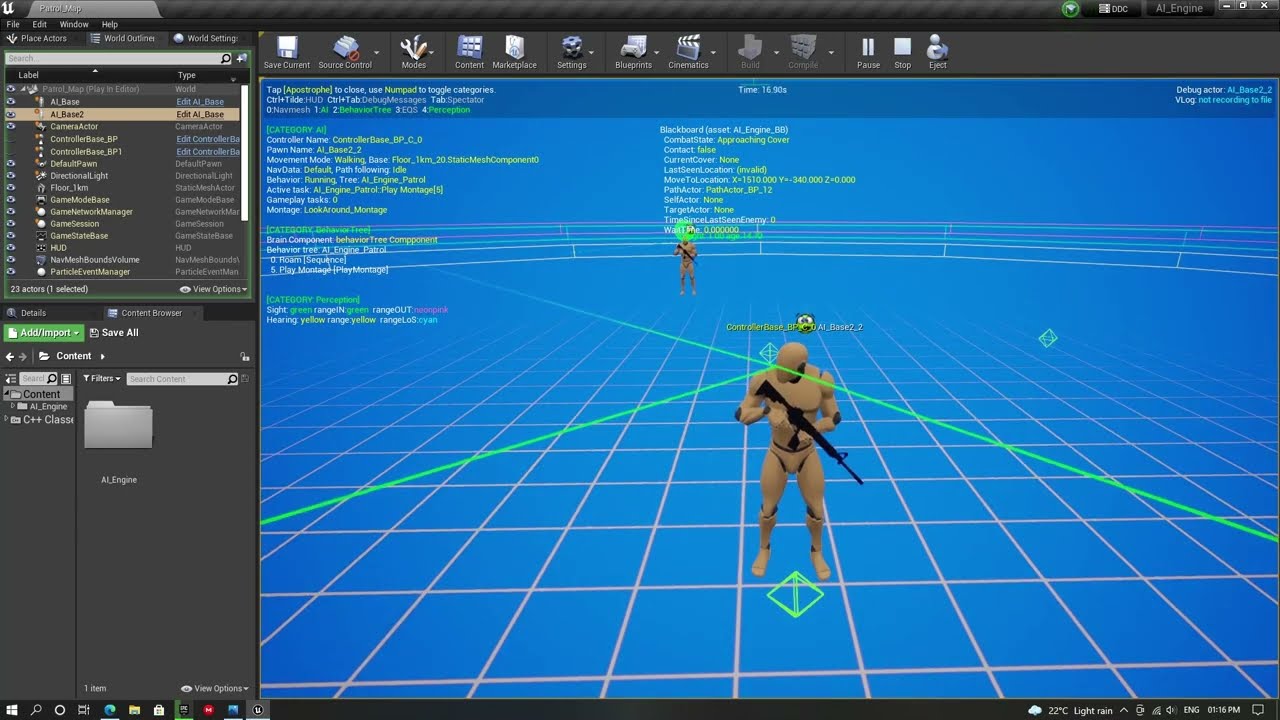
Attach the AI Perception Component to The Head Bone so that it follows the head and rotates along with animations.
Download the project from : https://drive.google.com/drive/folders/15QTUOyvu2jph9fSEJCxhgvIkCZg1wL0u?usp=sharing
This project is in ue5. You may not be able to open the project in a earlier version.
misty wharf
@stoic cove iirc it uses the C++ function that's defined there
 amber lance
"Hearing" component seems really buggy but it might just be me
 dusk pewter
do nav invokers work at all?
I have been trying to make it work but it just doesn't.
I have a huge grid of 10x10 in an empty level with a nav volume and I'm basically generating the level. my expectation is that the nav will get rebuilt through the invokers, but that isn't the case, the entire map is green in PIE
bleak drift
I'm currently just sending the ActorPerceptionUpdateInfo event to the state tree.
Now I'm wondering, is it possible, to have the state tree manage the targeted enemy?
Because the event will always fire when a new target is found or lost.
misty wharf
amber lance
"Hearing" component seems really buggy but it might just be me
If you mean AI perception's hearing sense, it should work just fine
bleak drift
bleak drift
I'm currently just sending the `ActorPerceptionUpdateInfo` event to the state tr...
I wonder, if i have to split the even into multiple events before sending it to the state tree, and manage the current target outside the state tree?
But I really like the idea of having it all in the state tree
keen crow
is BT's Simple Parallel stable? It seems that sometimes my are NPCs stuck in the main node even after it is finished with non-InProgress result. In vislog I can see the Simple Parallel node and secondary branch being active, but the main node is not there at all 🤔
misty wharf
bleak drift
I wonder, if i have to split the even into multiple events before sending it to ...
I would consider the event as a kind of "update trigger". The ST logic would need to query the currently perceived actors from the component and make the decision based on that whenever the update is triggered.
At least that seems like the way to go about it if you were to do it in the ST
bleak drift
misty wharf
I would consider the event as a kind of "update trigger". The ST logic would nee...
But the issue is, that the event is fired every time the info is updated, including when a new target is perceived or the current target is lost.
But adding a transition on event, will abort things like a current move to right?
So even if i have a valid target the current action will be aborted on the other hand, if (and I'm not even sure how) I would change this, then losing the target would not take effect.
Otherwise I would have to split up the event into two, target found and target lost.
But then the state tree does now know about that and does not handle that, which means i have to track the current target outside the state tree, but this then in turn means, I also on losing the a target, I would have to assign a new target.
This is all easily doable, but the thing is it is not managed by the state tree, but I want the state tree to choose the target and handle it and i also like the idea, that most of the logic is encapsulated in the state tree.
So I'm wondering, is there a way, to mange this in the state tree?
misty wharf
Maybe try using a global task or evaluator for it
Basically have that listen to the perception update event, and have that make the determination on whether the active target changes
bleak drift
How do global tasks work, are the running all the time while the state tree is running?
And what is a evaluator?
misty wharf
And trigger the transition event from it, only if the active target changed
Yeah global tasks run through the whole tree, evaluators are basically the same. I'm not sure what even is the intended distinction between them
bleak drift
Also how could i listen for a event inside a task, that what i did not figur out until now
misty wharf
You can pass the AI controller from the context to the task and bind the event from its perception component within the task
bleak drift
hmm that might be a cool idea
but can i just trigger them through the event?
otherwise i would constantly check the current perceived targets in on tick or wahtever which might not be the best for performance and i like to just trigger it on the event
is there a way a task or evaluator can listen for an event?
misty wharf
Yes, as I said, get the perception comp and bind the event
bleak drift
misty wharf
Yes, as I said, get the perception comp and bind the event
ohhh i thought you meant check in tick ok thats a cool idea
misty wharf
Yeah I've used it for some things and I think it works quite well
bleak drift
misty wharf
Yeah I've used it for some things and I think it works quite well
Yea and I really like it, this way it should be possible to completele let the state tree manage the perception.
bleak drift
misty wharf
Yeah I've used it for some things and I think it works quite well
Thanks a lot! 🙂
misty wharf
np
slow bobcat
misty wharf
Would be curious to hear what comes of it... The property binding system was ver...
Udn came back. It's fixed in 5.5.4. In that version you can bind to sub components in the context actor/controller again. @harsh storm
misty wharf
Ah good to know
Weird that it didn't seem to be listed in the release notes, or maybe it was just phrased in such a confusing way that I couldn't tell
harsh storm
slow bobcat
Udn came back. It's fixed in 5.5.4. In that version you can bind to sub componen...
Sweet. Thanks for the info. Now I need to update. lol
bleak drift
Do you guys have any idea, I'm currently running an EQS-Query form a state tree, with the AIController as Query Owner, but it appears, that the points are not updated I'm always getting the same result point, even though the pawn moves, which should yield different points from the query 😦
 rancid mural
Hm. Say I wanted my enemy ai to be aware of various things, like distance to the player, whether it's recently been hit, if the player is casting a spell or trying to use an item, player advancing or retreating, whether it's current attack is being blocked, and so on, and for each of these things to make it more or less likely to want to take whatever actions it has available, and then just roll the dice on those weighted available actions and see what comes up.
does that sound more compatible with BTs, STs, FSM, or just like...my ai controller adding and removing gameplay tag stacks with the rest of it handled in gameplay abilities?

 zenith hill
seems like I have to use sequencer instead of selector at the root 🤷♂️
Is there a way to not use hard coded value?

 potent stone
Hi all!
To make my AI chase my Character, I'm using a "Nav Mesh Volume"
The question is : How to move my AI to my Character over time and not related to the "Max Walk Speed" float ?
Like a Timeline with a Set Actor Location could do ? Please
potent stone
I guess Nav Mesh is too much perforamcen consuming so I will not use it, thank you anyway !
misty wharf
potent stone
I guess Nav Mesh is too much perforamcen consuming so I will not use it, thank y...
Huh?
Navmesh is not expensive at all unless you're running your game on a device that can't run unreal to begin with :P
 glass blaze
Ive been working with navlinks recently and the smart links dont always fire when they're reached, causing the character to walk off ledges a lot. Ive made a little vid showing it, any advice would be appreciated 🙏
https://youtu.be/lgFUs4U4x2A?si=e2OnQbx_XGqs4Lbo
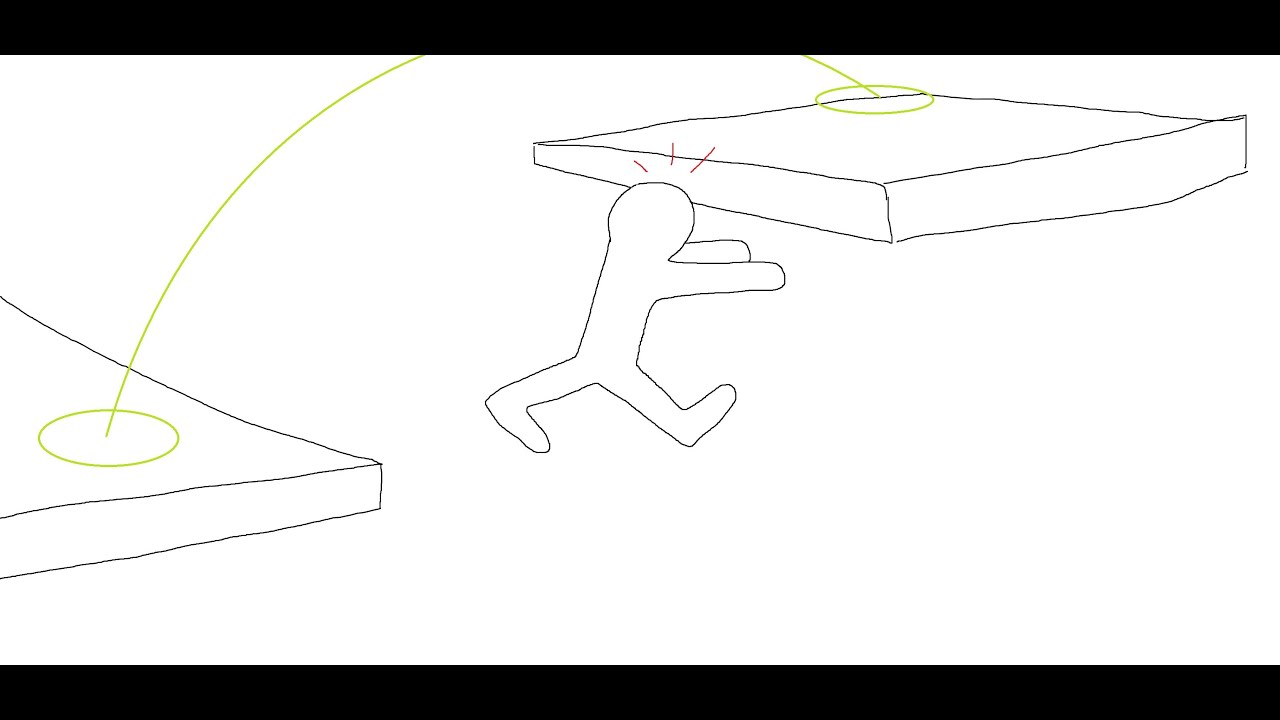 harsh storm
zenith hill
Is there a way to not use hard coded value?
harsh storm
zenith hill
Is there a way to not use hard coded value?
In 5.5, this changed.
They updated all of these types from the basic type to a struct. FFValueOrBBKey_{data type}
So, if you need it and you can update to 5.5, I'd say do it.
potent stone
misty wharf
Huh?
I activated Dynamic NavMesh at runtime and when I'm moving with my Character in my level the FPS drop (-10)
When I stop moving, it gets back to normal
misty wharf
Yeah it isn't intended for moving things like that to keep forcing a navmesh update
Dynamic works well in my game where the player can place walls and objects since it doesn't update as often
potent stone
Also the issue with NavMesh is that I can't move my AI from point A to B in X seconds. It's always related to "WalkSpeed"
misty wharf
Right, if you don't need navigation/pathfinding like that then it's useless I suppose
potent stone
misty wharf
Right, if you don't need navigation/pathfinding like that then it's useless I su...
Yes I need to control the movement of AI over time and to Speed
I guess I have to make my own Pathfinding system to avoid obstacles etc..
misty wharf
You can use navmesh for pathfinding and have your own movement logic
There's a function you can use to get the path from A to B, which you could then use in your own logic to do the actual movement
It may be slightly more complex if you need avoidance for dynamic/moving obstalces
potent stone
misty wharf
You can use navmesh for pathfinding and have your own movement logic
For example I create a spline from A to B with the "Find path to location synchronously" ?
But I don't understand this "Dynamic" NavMesh, and also the "Invokers" thing. I have a large map
misty wharf
Dynamic basically means any primitive component which has "can affect navigation" enabled will cause the navmesh to recalculate if those comps are moved
I can't really speak for invokers or large maps as I've not had experience dealing with those
potent stone
So I have to enable "can affect navigation" only for Actors which will move ? And not to the AI and the Character ? (if I understand correctly)
misty wharf
Moving pawns will probably work pretty poorly if they have it enabled because they can get confused about their pathing
It's not really intended for that type of usage as far as I can tell
misty wharf
Well, in my game the player can build things. AI characters should avoid things that are built, so I use dynamic on the buildables
Since it only updates fairly rarely (only when player builds something) the performance is fine for it
potent stone
Oh ok so you enable the "Can affect navigation" only on the spawned actors
But for your other Actors which are placed on the map before, is this enabled ?
misty wharf
Only for static geometry
potent stone
Like for example, walls, columns, etc..
misty wharf
Yeah for those it's enabled since they never move or otherwise change, so the navmesh is normally built around them
If you turn off can affect navigation, it's as if it doesn't exist from the perspective of the navmesh
potent stone
Ok and you extended your "NavMesh Bounds Volume" to the whole map ?
misty wharf
You can see the effect if you turn on the navmesh debug view and place a cube on there and turn can affects on and off. You'll see when it's on, there will be a hole in the navmesh around the cube.
Yeah I have the whole map with the navmesh bounds
potent stone
Yes right, there is a hole under it
misty wharf
It's not super large though
potent stone
Oh ok so I will take a look about the "Invokers" for a large map, as I want also my Enemies chase my Player
Thank you very much for all the informations !
misty wharf
np
amber lance
misty wharf
If you mean AI perception's hearing sense, it should work just fine
Yup. Not sure how much I like the perception component, but it's nice that it's built-in.
rancid mural
asking again since it's been a few days, if no one has an opinion or any thoughts I'll just start tinkering, but...
Say I wanted my enemy ai to be aware of various things, like distance to the player, whether it's recently been hit, if the player is casting a spell or trying to use an item, player advancing or retreating, whether it's current attack is being blocked, and so on,and for each of these things to make it more or less likely to want to take whatever actions it has available, and then just roll the dice on those weighted available actions and see what comes up.
does that sound more compatible with behavior trees, state trees, state machines, or like...my ai controller adding and removing gameplay tag stacks with the rest of it handled in gameplay abilities?
harsh storm
- State Trees are state machines.
- BT or ST would be fine for this.
- ST would be slightly easier because it already has a utility scoring type thing. BT, you'd have to roll your own.
BT's are more stable though. So, pick your poison.
The two main things to think about between picking the two, at least imo, is stability and how you want to handle transitions.
slow bobcat
rancid mural
asking again since it's been a few days, if no one has an opinion or any thought...
For the weighted decisions, state trees have Utility Approach implemented already. With Bt's you will have yo create your own solution or use some available plugin (there are some out there)
Ah durox already replied this.

 chilly nebula
Hello everyone!
I'm the Lead Programmer on the UE AI team here at Epic, and I would love feedback from you on two things:
-
If you are already using State Tree, what are your two biggest wishes for the framework and what pain points have you had using it so far?
-
If you have not tried State Tree and still using Behavior Trees, can you give me any details on why? Is it simply because that's the framework you know, or are there features missing in State Tree you would like to see before trying it out or fully switching over?
We have a LOT of changes coming in 5.6 we are excited to show you!
heady silo
chilly nebula
Hello everyone!
I'm the Lead Programmer on the UE AI team here at Epic, and I w...
I haven't jumped into StateTrees yet because I barely understand BTs and EQS queries right now, so I'm using whatever has more documentation available. I've been finding a lot of the more bleeding edge features of the engine have documentation that is frequently made obsolete by even minor patches (such as how we've been from UE 5.2 yet the tutorial on SmartObjects has not been updated with new required methods yet). As someone who's just trying to keep my head above water, it's just too much to move to StateTree right now.
Also if I were to request specific things for BTs, some way to more smoothly call animations there would be nice. At the moment my characters go into a nice little T-pose if I call an animation directly without using a Task.
misty wharf
chilly nebula
Hello everyone!
I'm the Lead Programmer on the UE AI team here at Epic, and I w...
- I'd say the biggest one is tasks which fetch data for another task to use. The problem is basically this: If I need to fetch data for another task to use, I need to put the fetch task into a parent state to be able to bind the data from it into the user task. But that seems to work rather poorly because the ST tries to always enter a leaf state, so I can't reliably just enter the parent state, wait for it to finish, and then enter the leaf state. It's kind of similar to the issue I've mentioned here https://zomgmoz.tv/unreal/State-Tree/StateTree-design
My understanding is that state tree property refs are intended for this usage, but I've not seen much info on it.
The second somewhat smaller issue is that ST's still have a tendency of silently failing if you make a mistake. Using the wrong context can silently fail, a global task which ends will silently stop the whole tree, prohably some other cases as well that I forget. This can make debugging rather frustrating, unless you know you need to look for these things. (I have listed a number of other debug-related issues here https://zomgmoz.tv/unreal/State-Tree/Troubleshooting-State-Trees)
- I'm currently using both but I'd say the main concern I have is that ST's seem to always tick and I'm not sure if that's going to be a problem. BT's feel a bit more predictable, but it might just be because I've used them more so I know how they will behave.
My current projects have been around since 4.26 so there's a number of BT-related things in there, and although I've considered moving them to use ST's, it would be quite a lot of work :)
chilly nebula
Thanks guys, keep it coming 🙂
@misty wharf - Im familiar with your notes blog, have read through them already 🙂 really appreciate all feedback here.
In 5.6 we have some great additions coming that address most of above, including tick optimizations/scheduling and a way to create STs with no ticking at all via async patterns. Tasks can now expose delegates that other tasks or transitions can bind to. And yes, property binding is the way to move data from task to task.
And I hear you both on documentation and examples, working on getting this improved as well.
misty wharf
Nice :)
I've noticed ST's are getting better every release, it's already been a quite nice system to work with
slow bobcat
chilly nebula
Hello everyone!
I'm the Lead Programmer on the UE AI team here at Epic, and I w...
Hi!
I'm currently on holidays and (very) far from my pc but I would love to give you feedback once I'm back. Is this something I can send you in a week's time? We are on our second AAA using state trees within a reaction system using both, Bt's and ST's
chilly nebula
slow bobcat
Hi!
I'm currently on holidays and (very) far from my pc but I would love to give...
no rush 🙂 We are doing some longer term thinking and also what changes we want to make in 5.7 and 5.8.. I really want to prioritize things that make the biggest impact for you all, and increase overall adoption of State Trees.
 lost mauve
chilly nebula
Hello everyone!
I'm the Lead Programmer on the UE AI team here at Epic, and I w...
lost mauve
chilly nebula
Hello everyone!
I'm the Lead Programmer on the UE AI team here at Epic, and I w...
@chilly nebula Thanks for asking. I have a couple points.
- Would like to 100% reiterate the first point @zomg mentioned above. This makes simple tasks that should just run one after another more complex. Maybe I'm using this inappropriately.
- composition. I like the addition of linked assets. This was my favorite addition. Currently, though it seems like this may not be fully fleshed out. I've noticed things tend to fail in the nested tree. For example, the debugger, will only work on the "parent" tree and not show up on the "child". This is the not a big deal since the parent still works. The bigger problem is the crashing that can occur. I wish I had a better understanding of whats going on internally but if your using events with payloads with both a nested tree and a parent tree listening to said event it can crash in certain scenarios.
- This may be silly but some general idea on best practices. Sometimes I get the feeling I'm just using state trees inappropriatley. Like is it common to have the AI in an indefinite "Wait for events to fire" state? Because I've been using an event driven approach a lot.
Thanks, for the feedback request and appreciate the work!
misty wharf
Yeah I think your #3 is a pretty common thing with many UE systems. There's little info on common patterns for most of them, so you're just guessing. But I mean if it works it works so it might not be a huge problem tbh, just would be nice to know.
harsh storm
Heck yeah - hi Siggi 👋. I'm about to jump into a meeting, but will write up my feedback as someone who has tried ST about 3 times now (throughout 5.0's lifespan) and have consistently went back to BTs.
 pale haven
Hi, I did post this in cpp channel but I just realized there was an ai channel and it might be more appropriate to ask here.
I'm trying to get my ai to run a function called OnTargetDetected based on when OnTargetPerceptionUpdated runs, and it should update based on whether it sees an actor called FoodActor.
Food Actor has an AIPerceptionStimulusSourceComponent that is being created within it's c++ script, then I register for sight and register the actor with the perception system within that script.
I then made a blueprint derived class from FoodActor and placed instances of that blueprint within the world.
But, for some reason, it never realizes to run OnTargetDetected, and I've been running myself up a wall here to figure out what is it that's blocking it.
If there is any ideas on what the issue could be, it would be super appreciated 🙏
The first 4 pictures are from my AI Controller script for my creature, and then the last 3 are for my food actor.


 solid spire
Hi Siggy!
Thanks for getting involved here.
I might be doing something wrong on my end, but I want to output current tree node (and parents) at runtime for quick debugging. And that seems to be impossible with parallel state trees?
I find the main state tree debugger also very confusing to read, but it's very close
harsh storm
chilly nebula
Hello everyone!
I'm the Lead Programmer on the UE AI team here at Epic, and I w...
Ended up writing more than I expected, so I put it in a txt file due to Discord character count limitations.
Something that I didn't put, but meant to as well - it'd be nice if we could have a state be marked as "complete" when all of the tasks have completed.
So instead of it being a race 😅
slow bobcat
harsh storm
So instead of it being a race 😅
Yes please
cyan sigil
Hello. I have two services on my AI: One that always ticks and does intelligent target selection, and one that normally does nothing but if a target is very close I want it to override the target selection. If I have both running at the same time, how can I ensure the override happens?
slow bobcat
cyan sigil
Hello. I have two services on my AI: One that always ticks and does intelligent...
You could have a target stak with priority. Last one added will rule if the priority is higher than the current. Once that's removed, the next in the stack will be the one targeted. Your second service could push a target with a high priority
cyan sigil
Do decorators have instanced memory? i want to make a decorator that detects how long a character has been moving at a particular speed, and return false when they go over.
I guess that's what the Blackboard is for.
harsh storm
I'd put that in a service personally. I know you can use decorators for it, but I don't like my decorators ticking. Just feels abnormal 😅
harsh storm
cyan sigil
Do decorators have instanced memory? i want to make a decorator that detects ho...
All of the nodes have it. The memory stuff is implemented in the base node class.
cyan sigil
If I want to do something once when a section is entered should I use a service or a decorator?
harsh storm
Either can technically do it. But I just prefer to keep decorators as gates and services as the thing to mess with data.
Just need to override a specific function that I forget the name of and am not at my computer to check the name.
cyan sigil
Thanks. Service it will be.
 stable plover
chilly nebula
Hello everyone!
I'm the Lead Programmer on the UE AI team here at Epic, and I w...
stable plover
chilly nebula
Hello everyone!
I'm the Lead Programmer on the UE AI team here at Epic, and I w...
1- state tree blackboards, state trees dont really have a method for storing data, im getting around this by running a global task to get an actor component used as a blackboard, more expansive debugging features like being able to see the state tree execute in realtime just like behavior trees, abilities to override eqs default parameter values, like how behavior trees do, also state tree overrides, being able to override parts of the state tree. Also setting attributes in the state tree ai component are extremely limited atm, like what if I want to execute a different state tree at some point, i have to destroy the component and make a new one, i should just be able to get the component and set the tree ref.
harsh storm
stable plover
1- state tree blackboards, state trees dont really have a method for storing dat...
- Global tasks are the BB replacement
- Using a linked state tree asset, you can override parts of the state tree
- Subclass the StateTreeComponent and just make a public BP method that allows you to replace the state tree asset. In 5.6, they'll have it exposed where you can BP swap the asset
stable plover
harsh storm
1) Global tasks are the BB replacement
2) Using a linked state tree asset, you c...
2- I know but I need it dynamically changed at runtime
harsh storm
You can
stable plover
3- I also know that but when you have a purely bp project you can’t do that from what I know of
stable plover
harsh storm
You can
With the tags I’m assuming
harsh storm
stable plover
3- I also know that but when you have a purely bp project you can’t do that from...
Yes, which is why I also said it is already being exposed in 5.6
stable plover
harsh storm
1) Global tasks are the BB replacement
2) Using a linked state tree asset, you c...
1- why are global tasks the BB replacement, can’t state trees just have a container for variables
stable plover
harsh storm
Yes, which is why I also said it is already being exposed in 5.6
Sucks because I’m using 5.4 currently
harsh storm
stable plover
1- why are global tasks the BB replacement, can’t state trees just have a contai...
Because you're supposed to be using the property references. The global task was added later.
They replaced evaluators
stable plover
harsh storm
Because you're supposed to be using the property references. The global task was...
Can you link any resources? I honestly haven’t heard because I can’t really find anything about what to use and what not to use for state trees. Thank you
harsh storm
You can use either. But ST was designed to be used with the property refs
harsh storm
@stable plover Also just tested thing you wanted from BT with being able to look at the state actually changing in the editor. It works the same in ST. At least in 5.5
harsh storm
Anyone see this with EQS before? Trying to find a spot near the player for my AI to move to. This gets ran after the enemy attacks. The enemy is already close to the player. When I test in editor, it finds the locations as expected. I made sure that the player is correctly found as well. Just for some reason, it ain't finding a place close enough??
It is a really simple EQS that has worked in the past for some simple stuff. So, not sure if I glossed over anything.


I wonder if this is an issue with the ST EQS task
Yup - issue with the ST
pastel moth
can you not set smart object gameplay activity tags at runtime?
harsh storm
Works fine in the BT.
pastel moth
harsh storm
Anyone see this with EQS before? Trying to find a spot near the player for my AI...
yeah I have. You'd think it'd just work, right? 😦
harsh storm
It works fine in BT
pastel moth
Aye
harsh storm
This is just something funky with ST execution. As per usual.
harsh storm
Yeah
Error creating query instance for QueryTemplate
The plot thickens. Why the shit is it having trouble creating it.
pastel moth
Do you have a query instance set in your state tree?
 pastel moth
yessir
harsh storm
Nothing really sticks out. Strange indeed. EQS does get created properly, even returns a running status.
pastel moth
Do you know if the EQS query is failing or succeeding in your state tree?
harsh storm
It is failing - but there isn't any reason it should be. Especially when it succeeds in the BT.
harsh storm
Made my own custom EQS task - works. Issue seems to be the result property in the state tree.
This is part of my complaint earlier - the data flow in ST is odd.
pastel moth
agreed ^
Have you had issues using latent tasks? I've been putting latent tasks outside of the state tree and have them be called/return a call to the tree when finished. I use enter for the transition to keep the tree in the current state while waiting on the latent task.
harsh storm
Not really - because that is pretty much how async stuff is done. Even in BT land.
pastel moth
oh okay.
harsh storm
Issue with ST is the execution flow and data flow. Both are convoluted for most use cases imo.
Looking at the code though - the result variable shouldn't be an issue. It gets updated via a pointer. So idk.
What I do know is that it works on my own custom EQS task. It works on the BT. But it doesn't work on the engine provided EQS task.
chilly nebula
stable plover
1- why are global tasks the BB replacement, can’t state trees just have a contai...
Every state is a container for variables, and then every task and sub-state of that state can use them and bind to them. Its essentially scoped variables.
If you want variables accessible to the whole tree, you can put them on root state or as variables on global tasks.
You are really missing out by being on 5.4 btw, State Tree got a lot of improvements in 5.5 🙂 and even more coming in 5.6!
chilly nebula
harsh storm
Yup - issue with the ST
Please tell me if you find out what it was, doing some changes to this task soon.
Lots of changes done to ST execution in 5.6, lets hope your issue is fixed there 🙂
elfin smelt
I tried the ST when we passed on UE5 but I was not sure that the debug tool was enough for production.
So we decided to stay with BT. The prod will be shipped in 5.5 soo maybe the next one will be on ST (I hope, BT AI is not great for Open World Size map).
I will retry it after I think.
I follow the update for my classes (and small development for students) but didn't try it in my studio since.
But I join others on the need of tutorials "What is the right way to do things ?". I tried to implement an AI who used Zone graph + NavMesh for long pathfinding (further than NavInvoker Range, Ubi does something like that with their tools) and I didn't found many resources on how to combine the AI tools between Basic AI and Mass AI (didn't spend much time on it, so maybe I'm wrong on this point)
chilly nebula
elfin smelt
I tried the ST when we passed on UE5 but I was not sure that the debug tool was ...
Do you remember what the UE version was when you evaluated? And if you remember any specific points that affected your decision, that would really help 🙂
elfin smelt
It was 5.0 or 5.1 I think,
and I was using a lot the Visual Logger and it was the biggest issue for me. (didn't find easy way to add visual logger debugging to record and see why my ST does this or that)
I think, if I had anticipated the need of the production I would go with ST now. (75 AIs per level on the design, we are actually at 300 or 400).
edit: Apparently the Vlog implementation was added in 5.4, I just search it
Today, I don't have really big issues with it (just need to dig the system but it's ok). I think it was more a timing issue for us.
just the part where If a want an AI to use parts of Mass AI and parts of Basic AI (I used Basic AI for Perception system, BT BB etc don't know if there is a better names for that) I don't really know how to manage the thing
I don't think it will be a good idea to change all the tools to pass on Mass AI completely in one time.
chilly nebula
thanks, and good to know 🙂 yeah the first versions of the State Tree were much more limited compared to what we have today. The first release didnt even have a proper debugger
chilly nebula
Thanks everyone for the feedback so far, keep it coming 🙂
I'm happy to say there are no surprises so far and most of what you mention has been added or fixed in 5.6, with a few more coming later this year.
The idea of chaining tasks in a dependency graph is interesting, and I'm checking if that is already possible with something we are adding in 5.6.
Look forward to hear what you all think of 5.6 once we ship!
harsh storm
chilly nebula
~~Please tell me if you find out what it was, doing some changes to this task so...
I don't have exact concrete data that it is the ST, but it is the only logical thing I could come to after debugging and seeing that the query gets created and given to the list of queries correctly. The status gets returned as Running initially. But, for whatever reason, it seems like the first tick, it fails.
But it works in the BT I made real quick. Works in my custom ST task (which just runs it via the exposed BP function), and works in a regular ol' BP.
It has to be something with the ST, just can't put my finger on it.
chilly nebula
harsh storm
I don't have exact concrete data that it is the ST, but it is the only logical t...
are you using query config parameters? Im wondering if something just isnt setup correctly there in our task.
harsh storm
I am not.
chilly nebula
and you are on 5.5?
harsh storm
I have also tried binding the result to a parameter, global task, parent state, and root.
harsh storm
chilly nebula
and you are on 5.5?
5.5.1
My setup goes:
- parent container state
- EQS state (on complete, go to next state)
- move to EQS location
- Wait (go back to root after)
Stupid formatting
The move to and wait are sibling states, not child states of the EQS
chilly nebula
yeah that is a very normal setup
harsh storm
Just for picture format 😅


Incredibly simple EQS. I like to get simple stuff working first and this is my first time trying with the ST EQS task.

The property binding should also be usable without needing the *Anywhere (or other variants of it) specifier imo.
This shouldn't need to be exposed to the details panel as it just clutters the panel (I calculate the cooldown through some other means rather than letting the designer just willy nilly set it). But without it, the property binding won't be able to bind to it.
With it:


Without it:


Do you know if this has changed at all? @chilly nebula 👆
harsh storm
chilly nebula
Thanks everyone for the feedback so far, keep it coming 🙂
I'm happy to say the...
Can't wait to try it. I've generally tried the ST almost every release. But stuff like I'm experiencing leads to me just going back to BTs. And BT has a very clear line of data flow imo.
chilly nebula
@harsh storm looking at the above, shouldnt your MoveTo be a child of FindCooldownLocation? I cant remember actually if state sibling order matters for property binding, there might be an issue reading the result from a task not beloning to the same or a parent state
chilly nebula
harsh storm
Do you know if this has changed at all? <@187650553168265216> 👆
You can also use property binding functions to pull in external data instead of doing it through a parameter 🙂 a binding function is basically a way to call a method whenever you read a property
chilly nebula
harsh storm
Ended up writing more than I expected, so I put it in a txt file due to Discord ...
hey, regarding #3 on this list. I just checked, and with our new task delegates coming in 5.6 you can actually set up a task dependency and trigger them in a hierarchy. It works, but our debugging tools dont track this well so it might be confusing to debug if you run into issues 😉
We agree it is an interesting pattern though, so we'll look into more improvements in future releases.
harsh storm
chilly nebula
<@297744474703134722> looking at the above, shouldnt your MoveTo be a child of F...
If it is a child of the EQS state - then it runs into the issue that I highlighted before (in the notepad) where there is no guarantee that the parent state's task will complete before the child state. So the EQS will kick of and the Move To will try to move to a location that hasn't been found because the EQS hasn't completed.
chilly nebula
harsh storm
If it is a child of the EQS state - then it runs into the issue that I highlight...
EQS task signals a success on completion, and you could have a state transition triggered by that over to child state no?
harsh storm
chilly nebula
You can also use property binding functions to pull in external data instead of ...
Still ain't great UX imo. Having to have a function to do grab a property that you don't want exposed in the details panel is not so great 😅
harsh storm
chilly nebula
EQS task signals a success on completion, and you could have a state transition ...
Nope. Because all tasks in the hierarchy get ran. So it would have to be a sibling state. Which, the EQS task, in 5.5, checks on tick if the eqs was successful or not in order to handle the transition.
So:
- root
- parent state
- eqs
- move to
- eqs
- parent state
Would cause the eqs task and the move to task to run at the same time.
But if they're siblings, then you can at least control that dependency.
Unless I'm misunderstanding what you're suggesting?
chilly nebula
Im confused.. you can enter the "eqs" state there without going all the way to MoveTo, and only go to MoveTo when the EQS task signals success.
Yes the task on the parent "eqs" state will still run, but it shouldnt be re-triggered
harsh storm
Maybe set up an enter condition now that I think about it. Wonder if there is a "eqs is successful" condition.
But even so - that won't change the issue with the EQS failing only in ST though.
Because even my current setup does what you're saying.
First hits the EQS - then on state completed, just moves to the next state.
I'm just doing it as sibling states instead of parent-child
But the crux of the actual issue is that for some reason, in ST, the EQS is failing, whilst it succeeds everywhere else I run it.
misty wharf
chilly nebula
Im confused.. you can enter the "eqs" state there without going all the way to M...
iirc I've tried this setup once and while it kinda sorta worked, it also kinda sorta didn't
I'm assuming you're suggesting using that specific mode whatever it was called where it tries to enter the parent before the child
It could be I was doing something incorrectly though, because the setup for that was not entirely clear on how it's intended to be used
chilly nebula
harsh storm
But the crux of the actual issue is that for some reason, in ST, the EQS is fail...
the EQS failing should obv. not happen, I'll have someone look into that 🙂
harsh storm
Regarding the multiple tasks on one state, btw Siggi, in the 60 minute tutorial with ST https://dev.epicgames.com/community/learning/tutorials/lwnR/unreal-engine-your-first-60-minutes-with-statetree#addstatestothetree I have never been able to get the Wander state to actually work. Because the Move To task always tries to move to a location that hasn't been found yet. This is part of some of the issues imo.
 chilly nebula
I also see we need to work more on samples and docs, that is all in flight and we will improve those
harsh storm
chilly nebula
the EQS failing should obv. not happen, I'll have someone look into that 🙂
Yeah, I'm honestly genuinely not sure what is happening in that regard. Because it all, logically, should work. Gets successfully registered to the EQS manager and all. Returns "Running". Great! But then it just fails and that causes the task to fail.
Works literally everywhere else though 😭
chilly nebula
As I mentioned above, we are doing some work on this task in a few days so we will investigate.
 near flame
hello everyone
i have this setup working but i only need to fire the first phase sequence one time,how can i do so?
now it checks the boss health in a service
so the idea is
when boss is damaged reaches less than 40 % of health ,he heals himself to 90% and is vulnerable to everything
but when he reaches less than 40% of hp the second time,i dont want him to self heal
how can i do so?
 harsh storm
A couple ways. One of the more simple ways would be to have a bool BB key, bHasEntered and then do a BB key check. Flip it to true the first time you go in.
 toxic perch
why is my nav mesh stopping like this?
 harsh storm
<@&213101288538374145>
serene fern
Anyone have any good methods of having AI go around each other if they are heading head on to each other ?
 visual mountain
What is the best way for me to create a flying enemy? I tried enabling “Can Fly” in the Character Movement. However, when the character gets a certain distance away from the ground, it seems to stop “reading” the navmesh (and it's not an issue with the bounds size). Do I need to enable something on the navmesh or on the character besides just enabling fly, or should I use a different technique?
 hallow compass
serene fern
Anyone have any good methods of having AI go around each other if they are headi...
hallow compass
serene fern
Anyone have any good methods of having AI go around each other if they are headi...
Check the "avoidance" stuff
iirc there is a component you can use on the AI controller so it has a good avoidance
Something about velocity
hallow compass
visual mountain
What is the best way for me to create a flying enemy? I tried enabling “Can Fly”...
There is a decent plugin for custom pathfinding
Its free on fab, there is also a github repo iirc
Search "pathfinding" or similar keywords and look for a screenshot with blue/green cubes covering a level
If you want to keep the regular navmesh stuff you can go in project settings in AI navigation and edit the height in the "Supported Agents > default > query"
Idk how far it can work well with flying
serene fern
hallow compass
Check the "avoidance" stuff
Yeah turned on avoidance and it's better. Might have a dig around what other settings there is tommorow but it's decent enough for now
serene fern
hallow compass
iirc there is a component you can use on the AI controller so it has a good avoi...
Hmm might have to look into that
 flint finch
Sorry for the forwards, but this channel might be more appropriate
The issue in the first picture is that the float variable was not being updated. It was always 0, so the enemy would only ever use the short range attack
I was using the code on the second picture to update the blackboard variable, but for whatever reason, it didn't work. Does anyone have an idea what could it be ?
I tried searching google and the closest I could find was to make variables public. I did try that, but didn`t worked
heady silo
I think what'd be an interesting add to STs that would make me more invested in using it is some methods of making an AI planner in blueprints, like being able to see queued actions and then if the system needs to redo a plan of action it can do that and show this change happening in real time.
 remote magnet
Anyone know of some good resources for creating new state tree schemas, or using state tree parameters?
 signal tangle
Hi,
I have issue with Mass Crowd the AI is Sliding on Idle animation not walk animation .
I have Use Acceleration for Paths enabled .
How to fix ?
 olive turret
Hi, I am exploring State Trees and when setting up I wanted to use linked trees and parallel trees as much as possible to make them more reusable. However, I got to a point where I needed to share a variable from one tree to another, which is currently not supported (at least I couldn't find a built in method for it).
To resolve this I am saving related variables in BB (which I'm not a big fan of). I am curious to hear if anyone came up with a better approach for this. Any recommendations?
keen crow
flint finch
I was using the code on the second picture to update the blackboard variable, bu...
where do you call the Set value as float? I'd personally suggest to put it in a BT service somewhere (wherever in makes sense) above the selector from 1st pic. Also in that case you wouldn't have to call Set value as float on Blackboard component (which I assume is nullptr in your case which is why the BB value doesn't change), you could just have a variable FBlackboardKeySelector and call "Set float value" on it in the service`s tick
serene fern
anyone know how game devs do the thing where when levels are unloaded the AI still do their stuff say moving around. ??
obvs they'd prob be not rendered or running any anim instance but just wondered
anyone know what settings I need to change to allow nav to be generated through this door. I've set the door to be dynamic obsticle

there the settings at the moment
 elfin smelt
You can set the boolean "Can Ever Affect Navigation" to false on your door
serene fern
yeah I was thinking letting the door still affect nav. after reloading engine what ever I've changed seems to have done something as now I have the nav generating through the door as in like this

the next challange though will be seeing if I can get the door to act as collision dynamic collision that is
elfin smelt
Depends on your Navigation generation settings
In Dynamic it will be auto i think
in ModifiersOnly, you will need to add a NavModifier to your door and update it to do that you want
and in Static I think it is just impossible because you can't update the Navigation (Never used that one so maybe i'm wrong maybe wait for someone with some Xp with this type of generation)
serene fern
so I done it with a box component instead
as in the thing being used as the dynamic Obsticle
solemn garnet
olive turret
Hi, I am exploring State Trees and when setting up I wanted to use linked trees ...
If you set a create a parameter for a subtree you can set that parameter in the linked state
Subtrees can basically be used like functions
olive turret
solemn garnet
If you set a create a parameter for a subtree you can set that parameter in the ...
Not for the parallel tree tho right?
solemn garnet
olive turret
Not for the parallel tree tho right?
Yeah, just set a parameter and compile and it should show up in the run parralel tree task
For subtrees you set the parameter on the state, on linked assets and parallel trees you set them in the asset details panel
olive turret
solemn garnet
Yeah, just set a parameter and compile and it should show up in the run parralel...
Yes you can make it for the linked tree with the inputs as you said but it doesn't work for paralel tree(which is just a task at the end). Thus forcing me to use third point to use for variable caching.

 solemn garnet
olive turret
Yes you can make it for the linked tree with the inputs as you said but it doesn...
solemn garnet
olive turret
Yes you can make it for the linked tree with the inputs as you said but it doesn...
It should be there
olive turret
solemn garnet
It should be there
I meant you can't carry params from this tree to the parallel tree it is running.
solemn garnet
olive turret
I meant you can't carry params from this tree to the parallel tree it is running...
What do you mean by carry params? You can bind the parameters?
olive turret
solemn garnet
What do you mean by carry params? You can bind the parameters?
😮 oh god I can!
olive turret
solemn garnet
What do you mean by carry params? You can bind the parameters?
Never mind there was a misunderstanding on my end. You are right.
solemn garnet
Awesome! Finding this out really opened up what state trees could do for me so have fun 🙂
olive turret
solemn garnet
Awesome! Finding this out really opened up what state trees could do for me so h...
ah y now I'm gonna reconstruct things again 😅
There was one other reason why I was saving values in BB. When I send an event to transition to a linked/sub/paralell tree and bind to that event's value(lets say chase target actor), that value was disappearing??? or something because after one loop it was causing a crash on the second loop. But now I should try binding to it with a param and see if it disappearing.
solemn garnet
olive turret
ah y now I'm gonna reconstruct things again 😅
There was one other reason why ...
Be aware that if you transition to a subtree instead of starting it with a linked state then 'tree failed/suceeded' on the subtree will fail/suceed the whole tree not just the subtree. I havent tested this but I found it here: https://unrealist.org/dev-log-03-statetree-isnt-just-for-ai/
Matt’s Game Dev Notebook
Unreal Engine 5 Tutorials & Dev Blog
olive turret
solemn garnet
Be aware that if you transition to a subtree instead of starting it with a linke...
Yes and that is why I ended up using paralel tree for the chase. I don't want to leave chase state until x. But subtrees were causing state to leave complete itself. With parallel tree it can loop in itself without causing the main tree to return to the root.
Not that happy with this implemntation and Im looking for other ways.
Thanks for the resource, I will check it thoroughly.
solemn garnet
olive turret
Yes and that is why I ended up using paralel tree for the chase. I don't want to...
Not sure if I am full understanding but if you use a state with a linked state type then you should be able to transition to tree failed or tree succeeded in the subtree and that will decide whether the linked state suceeds or fails. It is only if you transition to the the linked state instead of using a linked state that the whole tree will suceed or fail.
olive turret
solemn garnet
Not sure if I am full understanding but if you use a state with a `linked` state...
I'm not sure If I fully get it as well but I will update you once I get to retry.
 honest coral
if I want to optimize evaluators a little bit then would it be better to:
- override TreeStart and set a timer to update evaluator every 1s for example
- override Tick and check TimeSinceLastUpdate to update only every 1s
- none of the above, rethink your evaluators instead
harsh storm
honest coral
if I want to optimize evaluators a little bit then would it be better to:
1) ove...
What version of UE are you on? Global Tasks have replaced Evaluators. Some people have reported better perf from them by default.
solemn garnet
What would be the best way to trigger a state tree transition on an animation notify? I am using a contextual animation scene but the end task on notify option does not seem to work and the description for the property suggests that it is designed for a different purpose
honest coral
harsh storm
What version of UE are you on? Global Tasks have replaced Evaluators. Some peopl...
5.5.4
I'm not keeping up with the latest changes tho... are there any docs with "best practices" for State Trees?
honest coral
Is this confirmed that evaluators will be deprecated?
 undone heron
im trying to optimize my ai by disabling a bunch of stuff when the player is not in range, however even with all of this it they still have a massive impact on performance:

does anyone know if there's a different approach to jsut completely disable ai other than just despawning them?
harsh storm
honest coral
5.5.4
I'm not keeping up with the latest changes tho... are there any docs with ...
No, not really.
 shadow dawn
undone heron
im trying to optimize my ai by disabling a bunch of stuff when the player is not...
shadow dawn
undone heron
im trying to optimize my ai by disabling a bunch of stuff when the player is not...
Just out curiousity, how are you benchmarking the performance costs? Is it in editor or packaged build? Are you using Unreal Insights properly?
misty wharf
^would highly recommend using Insights yeah.. "massive impact on performance" is pretty vague, the more specific details you have on what is consuming the time the easier it will be to suggest how you can approach fixing it
For example CMC and skeletal meshes can be costly depending on factors, and you're not disabling either of them
undone heron
shadow dawn
Just out curiousity, how are you benchmarking the performance costs? Is it in ed...
Just in editor, but it's like a 40 fps drop if I spawn the ai's
In the packaged version it doesn't drop though for some reason
shadow dawn
Run it with Unreal Insights cause it could be editor overhead causing the drops
cyan sigil
Is there a way to set up a EQS filter so that it is an "Or" operator for two other filters? IE The filter is valid if filter A OR filter B are valid.
cyan sigil
I want to make a filter that can test if an item can trace from itself to an actor that is provided by the caller's blackboard. However, EQ Contexts can only be provided by subclass so I would have to hard-code the blackboard key to look at. Is there a better option?
harsh storm
Not really (for contexts). But it is pretty trivial to implement a new context to be honest.
cyan sigil
Got it. I'll have to make a base context that gets a value from a blackboard key, and then subclass it with different key FNames.
slow bobcat
honest coral
Is this confirmed that evaluators will be deprecated?
Yep.
Now, when and how...no clue
harsh storm
If it is anything like the PawnSensing class - I'll do a PR for it 😅
pale haven
Wondering if anyone has had an issue before where they do set up their perception component, sight config and perception stimuli source component within c++ (ai controller with the perception component and sight config stays as a c++ class, but I made a blueprint deprived from the c++ class that has the perception stimuli source component), and the OnTargetPerceptionUpdated function never runs despite the stimuli actor being in the view of the ai supposedly?
I also don't know if its because I'm on mac, but when I turn on debugging for the AI, I also can't turn on perception, but I also can't seem to turn off the first two options, so it's probably a shortcut thing.
Anyways I did do a check to see if PerceptionComponent or PerceptionStimuliSourceComponent don't exist at beginplay, but both say they do. I'm not sure what else could be blocking OnTargetPerceptionUpdated from running..
misty wharf
pale haven
Wondering if anyone has had an issue before where they do set up their perceptio...
Are you initializing the sight sense by doing something like this? https://zomgmoz.tv/unreal/AI-Perception/Configuring-AIPerception-Senses-in-C++ - not setting the affiliation as shown there is probably the most common reason it won't detect something
by default it's only set to detect hostiles iirc, and unless you implement IGenericTeamAgentInterface, everything will be neutral by default
solemn garnet
Are you not able to transition to states within a subtree without causing tree failed/succeeded to apply to the whole tree? I know this is the case for transitioning into a subtree but it does not make sense when transitioning within a subtree.
I have this try enter state that plays a contextual animation and binds the montage notifys to state tree events so that I can transition to child states when the notifys happen. This works but I now need to do it in a subtree and I'm not sure this is possible now.
 solemn garnet
I realised that one of my transitions accidentally transitioned to the root tasks of the subtree which was causeing the warning and the issue so it does work as expected
pale haven
misty wharf
Are you initializing the sight sense by doing something like this? <https://zomg...
Yep i do, I have that all set up in a function that’s called in construction of the ai controller
I can send pictures of the code if it helps any for an idea
misty wharf
pale haven
I can send pictures of the code if it helps any for an idea
Yeah that would help, you can also wrap it in
```cpp
Ugh how do you make it actually display that lol
pale haven
Ok, so this is for the AI Controller


and this is for my food actor, which is the stimuli

 pale haven
misty wharf
Yeah that would help, you can also wrap it in
```
```cpp
```
```
pale haven
misty wharf
Yeah that would help, you can also wrap it in
```
```cpp
```
```
Within AI Controller, should I wrap everything in that line starting from right under the includes?
misty wharf
Hmm
Oh I mean the images are fine
In general this looks correct to me, however, you should not bind delegates in constructor-related code
Dynamic delegates in particular will get saved into the blueprint asset, and delegates in general have the possibility of activating in editor instead of at gameplay time, which is generally undesirable
For the stimuli source, I'm not a 100% sure, but you might have to do the registration for senses from BeginPlay similar to how you should bind delegates
If it still doesn't work after these changes, I would place a character into the level, and see if it will detect that. Any pawn subclasses (such as characters) will be automatically registered as stimuli sources by default, so this should rule out any problems in the stimul source at least.
pale haven
Ok, I'll fix that up real quick and let you know, that makes a lot of sense though
Oh that made a huge change!! Thanks! It actually calls the OnTargetPerceptionUpdated function and updates everything within the function binded to it
I was stuck on that for the longest time literally thank you sm 🙏 🙏
misty wharf
yw
static flint
How to make perception stop seeing pawn when it "dies" (hp == 0)?
I've tried calling
    if (UAIPerceptionSystem* PerceptionSystem = UAIPerceptionSystem::GetCurrent(this))
    {
        PerceptionSystem->UnregisterSource(*this);
    }
Doesnt work
I've tried doing hp == 0 checks in
OnPerceptionUpdated
OnPerceptionForgotten
I kinda can cover every single method with hp check but then I can straight up write my own perception system
So I'm curious if PerceptionSystem provides anything for doing thing like
UAIPerceptionSystem::MakeEveryoneForgetActorBecauseActorIsNotRelevantToGameplayAnymore(Actor);
Like, PerceptionSystem->UnregisterSource seems to unregister actor but, e.g., my Sight sense has 3 seconds cooldown so enemy still fights air 3 seconds after player is dead
 wise sluice
static flint
How to make perception stop seeing pawn when it "dies" (hp == 0)?
I've tried cal...
wise sluice
static flint
How to make perception stop seeing pawn when it "dies" (hp == 0)?
I've tried cal...
Call PerceptionComponent->UnregisterComponent on the dead AI does the trick for me
static flint
Not a listener
wise sluice
Ah it's when your player is dead
static flint
A source
wise sluice
You can call ForgetAllActor on your AIs
static flint
But I dont need to foreach everyone and forget everyone, only a specific character, without global god delegates
wise sluice
There is ForgetActor (Target) then
static flint
Is there a clean way to foreach all listeners?
wise sluice
through the ListenerMap within the PerceptionSystem (you can do like in a any AISense::Update)
static flint
So writing my own sense?
As ListenerContainer seems protected
Or maybe override UAIPerceptionSystem
 wise sluice
That's so old 😄
UnregisterSource is probably a good idea as well since your AI will stop being interested by the player
But it seems that it doesn't clear active stimulu on this target
static flint
As for now Im gaining minus 500% profit from using anything related to PerceptionSystem, such a strange system, using only cause its supported natively in EQS
wise sluice
Else what you could do is reporting a noise and your AI react to this noise
Player dies, scream, AI reacts
static flint
Trying overriding subsystem for public map
Trying
void UMyAIPerceptionSystem::UnregisterAndForgetSource(AActor* Actor)
{
    UnregisterSource(*Actor);

    for(const auto Listener : ListenerContainer)
    {
        if (const auto ListenerComponent = Listener.Value.Listener.Get())
        {
            ListenerComponent->ForgetActor(Actor);
        }
    }
}
OnPerceptionForgotten just doesnt get called...
How can it be that I see ForgetActor is being called for EnemyController0 in debugger but EnemyController0.OnPerceptionForgotten doesnt get called at all, is this a joke?
wise sluice
How are you able to call ForgetActor if ListenerComponent is const?
static flint
wise sluice
How are you able to call ForgetActor if ListenerComponent is const?
const auto, const pointer to object, object itself isnt const
I've tried everything, OnPerceptionForgotten doesnt get called (only after 3 seconds passing when sight decides it wants to call it)
Enemy fights air
No other methods in subsystem that could help
wise sluice
Try to debug ForgetActor then, i'm not sure what's going on from that point
static flint
wise sluice
Try to debug ForgetActor then, i'm not sure what's going on from that point
Nothing to debug past that point, IDE cant into lambda so Im not sure what happens after

But I don't see any cues of OnPerceptionForgotten in UAISense_Sight
So still not sure whats its requirement of calling
wise sluice
Can you modify the engine?
If yes, try to put the macro UE_DISABLE_OPTIMIZATION on top and UE_ENABLE_OPTIMIZATION on the bottom
static flint
wise sluice
Can you modify the engine?
If yes, try to put the macro UE_DISABLE_OPTIMIZATION ...
Not now, unfortunately
My way doesnt seem as intended way anyway, so Im looking for example how epics were expecting developers to use this thingy
Like, aint no way they weren't expecting player to die in arbitrary game
There should be an intended solution to "yeah, my percepted target is dead, lets stop attacking it maybe..."
wise sluice
As i said :
- create a noise when player dies
- react to this noise on all nearby AI
You could use tag to distinct it BUT you could also make a gameplayEventSense as well with gameplay tag to ease your task
But yeah, i'm also confused about forgetActor, it seems the "OnTargetForgotten" is only called through the ProcessStimuli function
static flint
Could there be any difference in behaviour between using auto register pawn as source and UAIPerceptionStimuliSourceComponent?
wise sluice
I don't think so
it just regulates when AI Stimulus can be emitted (automatically for the pawn or when the component is manually registered)
queen venture
Does anyone happen to know why OnEvent transitions don't seem to execute the first time around? I have a StateTree that goes from wandering around into fighting mode from any state if it receives an onEvent. It ignores my character at first, I let the AI see me, then I leave its sight, it goes back to wandering, I shoot him without him seeing me and the on event fires and works properly. Before he sees me, however, he will never react to the damage and event that is successfully being sent through to the tree.
It's almost as if the Fight State needed to be entered first before knowing how to transition to it
queen venture
Hmm seems I found an issue with the focus actor, nevermind
 shadow sapphire
Hey everyone,
When using the AIMoveTo node, if I have the target set as my player character and I stand on the very edge of a block with a drop below it, my AI stops moving.
Any way to have my AI track me while I am in this state?
misty wharf
shadow sapphire
Hey everyone,
When using the AIMoveTo node, if I have the target set as my playe...
You need to identify why it stops. It could be it can't path to the point because it's outside navmesh, in which case you could try allowing partial pathing, or projecting the target point to navigation up front.
hallow compass
Who still use BTs on new project if using 5.4 or higher ?
After testing in 5.4 STs and see what got added/updated in 5.5 i dont find any advantage of using BTs
harsh storm
I do. They're far more stable and reliable than STs.
Execution flow is also far easier to understand.
Data flow is also more predictable
slow bobcat
I combine both
harsh storm
That's another approach.
It isn't like you have to use one or the other.
You don't have to only use one architecture for your game.
 kind raft
I was wondering if it was Possible to add game tags into a Black board Key slots, without using a struct to pull it in?
is this the right or the Correct way to add Gameplay Tags into the blackboard?
 slow bobcat
Looks like the right way to me. Never used g.tags as Bbk's though, but I don't know of any other way. To me this never made sense since tags are added to actors. All the decorators/services we use that rely on g.tags read them from an actor specified through and actor bbk in the node itself
 ebon shore
I'm making a beat em up that will have a bunch of different mobs, both ranged and melee, and bosses - I've organized them thus far in a really complicated parent/child hierarchy that's now causing me a lot of issues re: everything spread out. I like having the big parent actor that stores the variables, so I can just cast to that class during player attacks... but now that I'm learning more, I realize there may be better ways.
Question: how would y'all organize this? Would you just have each enemy have a faction, and cast to general actor during player attack but check faction? Should I use components more, to store variables that will be used by all villains? Utilize the controller to store variables and basic functions they'll all use, and only put very distinct functions on their actor BPs?
Looking for best practices - thank you!
harsh storm
ebon shore
I'm making a beat em up that will have a bunch of different mobs, both ranged an...
I prefer to have as little as BP classes as possible. Instead I rely on data assets to define the data for the enemy. Most of the time, I am able to get away with just having one BP_Enemy that gets configured based on the data asset. I'll make a specialized BP as needed. But for most grunt-y style enemies, I find I don't need a bunch of BPs.
If you're using BTs - you should be able to get away with just having one BB as well. Have the BT decide what to do. Have the BP decide how to do it.
keen crow
is batch version of EQS pathfinding test reliable? I'm having a weird issue where in rare cases (i'd say 15% of times) it seems pathfinding batch test misjudges the path length and hence makes NPC select wrong position. Like on my screenshots, there's no way path to that point is 63.63 as vislog shows. And the pathfinding of MoveTo was also weird that time... 🤔 . I wonder if it's a related issue


 ebon shore
harsh storm
If you're using BTs - you should be able to get away with just having one BB as ...
ebon shore
harsh storm
If you're using BTs - you should be able to get away with just having one BB as ...
I'm just using the BPs, no BB - I wanted more customizability
No BT/BB I mean
harsh storm
ebon shore
I'm just using the BPs, no BB - I wanted more customizability
That doesn't make sense to me. If you are avoiding the tools, then the only part you need to tackle is being able to share logic. As the data part I explained works regardless.
So, my answer to "how would I organize it" is - not like that. I'd reach for the BT first.
The not hotness is the State Tree though. And some people would recommend that you reach for that. I still say BT because it is more stable and there are more resource on it.
Then once you get comfy you can use the ST and/or both at the same time.
harsh storm
<@&213101288538374145> 👆
 sweet rune
Did anyone have this problem and was able to solve it?
- Problem: I want to have 100 PvP Bot AI on a semi large map. Right now they all EQS the nav mesh which individually isn't a lot, but causes some optimizations errors
- Question: Is there a way to build the nav mesh once on the server and have the PvP AI query that? Are there any other idea's people have?
Any help would be greatly appreciated 🙏
harsh storm
What did your profiler say was the bottleneck? AI only runs on the server by default.
So they're already only querying on that.
sweet rune
harsh storm
So they're already only querying on that.
This is the AI computing how to move (from my understanding, I am a novice profiler). It looks like that it is querying the floor/how to move. This 7.5ms task graph wouldnt matter but since it's ~100 ai using this behavior tree, it adds up. I'm still looking into other things but figured it was a AI Behavior Tree setup or the computation of the nav mesh causing this
 harsh storm
All of 'em are using the CMC?
I don't see anywhere in this profile showing that the perf bottleneck is the EQS
EQS is already time sliced as well
If the navmesh was baked, there isn't much more computation other than finding a path.
Are the AI using Navmesh movement mode?
sweet rune
harsh storm
I don't see anywhere in this profile showing that the perf bottleneck is the EQS
I wish I was better at this, if you have tips I can search through the Unreal Insight rn
harsh storm
Are they all processing at the same time?
Have you tried putting them in a tick bucket?
Making it so they don't tick every frame but every other frame.
So group A ticks on frame 1 and group B ticks on frame 2 and then they flip flop
Players can't perceive 1 frame
sweet rune
All amazing questions. I'll be speaking to the person who created this in an hour so I'll ask these questions and see what room we have to improve or if it's something else I should be focused on. I'll reach back out to let you know @harsh storm ! I really appreciate the questions/responses 🙏
harsh storm
Generally speaking, with AI, you have a couple frames before the player even actually notices anything.
So things don't have to happen every single frame with AI (in a surprising amount of cases)
sweet rune
harsh storm
Generally speaking, with AI, you have a couple frames before the player even act...
Is there a good rule of thumb like every 2 frames? If it was every 4 frames than you could hypothetically have 4 tick buckets but I'm not sure if the players would notice
harsh storm
I don't recall if there is a rule of thumb, but just experiment for your usecase.
sweet rune
harsh storm
Are the AI using Navmesh movement mode?
- AI NavMesh --> Not exactly due to collision traces so they dont go into floors/walls
- In a way we do tick buckets. We do a limit of registered ticks per frame (1 frame does 60 character ticks, if over 60 (example number) it gets postponed to next tick
- For PvP AI I was told we need CMC to move the PVP AI from point A to Point B in a physics based way (obstructions, falling, etc..). Used for per tick movement
We should be on a good track as he'll be profiling and looking into it as well, we found a few other things to check out as well so we're making progress. Thanks again for the questions, it helped start the conversations
 silk fulcrum
Why does UBrainComponent::TickComponent not call Super::? Is it intentional or a bug? Any childclass of StateTreeComponent/BrainComponent will never receive Event Tick in BP as a result
ebon shore
harsh storm
That doesn't make sense to me. If you are avoiding the tools, then the only part...
Got it, thank you! 🙏
slow bobcat
Epic is 5 days away from unlocking lots of good knowledge for all people outside UDN...
 misty wharf
Interesting 🤔
slow bobcat
this is probably one of the most annoyin changes in the lates Ue5 verion...
BTDecorator_XXXXX.cpp(17): [C4996] 'FValueOrBBKey_Float::operator float': Implicit conversion will be removed next version. Call GetValue instead Please update your code to the new API before upgrading to the next release, otherwise your project will no longer compile.
if you don't have access to the owner component or to the BlackBoard... you are pretty much doomed (unless you are debugging and you can use .ToString)
harsh storm
I'd be surprised if they actually do remove something
 iron trout
It seems like AI Move To resets velocity when reaching endpoint and if its used together with a path segment where every segment is called with AI Move To it decelerates the AI and also the rotation seems to snap and ignore the smooth rotation "Orient to movement" fro the character movement component. Any ideas why?
slow bobcat
iron trout
It seems like AI Move To resets velocity when reaching endpoint and if its used ...
the velocity resettings on each path end is weird, maybe you have some decelaration setting somewhere? it should just maintain velocity. The snap will happen if the Orient To Movement is true. If I don't get you wrong, it's what you have set?
iron trout
Shouldn't orient to movement be rotating smoothly ?
I have a few points in the world where and I've taken those points and added an interpolation algorithm for a smoother path. I will feed AI Move To with this array in the location pin. Everytime it reaches the target location the velocity is 0 for the character movement component. Since there are a lot more points it looks unatural with orient to movement as it snaps to the new point basically even if its 5 degrees it looks weird if it happens many times over.
slow bobcat
Shouldn't orient to movement be rotating smoothly ?
that would depend on your rotation rate
iron trout
Should I handle rotation with custom logic instead or whats your idea
slow bobcat
there's a way to set the rotation rate (how many degrees per second do you allow your AI to rotate). If that's high, it will snap
about the interpolation for smoother path, are you adding those points to the path points array?
iron trout
I'm creating them before hand and then I'll update the index once it reached its location
 slow bobcat
ah then you are calling AI move to to each point, not following a path
then yeah, velocity will reset upon each point
it's not the same to follow a path calculated than move to each point at a time
iron trout
How would I follow a path?
slow bobcat
you calculate a path on the nav using the end point (goal) and the Nav System will calculate a path
then if you want smoothness handled in a different way (using catmull rom splines for your corners or Clothoids etc) you would use the path following component for that (at least I handle it that way, there are others I guess)
iron trout
The points I've done is created using catmull rom splines. So you say this feature already exists in the path following component?
slow bobcat
No, it doesn't
But you can do logic where you calculate how far from the next path segment you are and calculate points to move to/look at to make the curve smoother based on a carmull Rom spline
Or you could post process the path after calculating it and add then as part of your path
Or simply rely on your rotation rate, set it to something reasonable (45 degrees for example) and leave the CMC to handle the smothing for you while following the path
iron trout
I'm trying to get an API using the path following component that's added to my AIC in blueprint but there is no API to follow a segment or path
slow bobcat
Nope, that c++ only. MoveAITo will calculate a path if you have a navigation mesh
It does it in the background
But in order to do operations on the path itself (using the API form the path following component), you need some c++ (not sure how much is exposed to bp's)
iron trout
Alright thx! I'll give it a go
harsh storm
slow bobcat
But in order to do operations on the path itself (using the API form the path fo...
I don't think much useful. I can't recall myself. But it is definitely not something BPers often do anyway.
keen crow
are there any gotcha's to BT's SimpleParallel node? It seems that sometimes OnBecomeRelevant and Tick don't get called on services (judging by vislog, I can't see logs that I've added to both tick and OnBecomeRelevant) in a setup where I put services on SimpleParallel and main task is either just Finish with result InProgress or some other indefinite task (like reload which initially finishes with InProgress and then on brain message it calls finish latent task)
 slow bobcat
keen crow
are there any gotcha's to BT's SimpleParallel node? It seems that **sometimes** ...
slow bobcat
keen crow
are there any gotcha's to BT's SimpleParallel node? It seems that **sometimes** ...
Does it never call or just sometimes fails to call?
I'm general parallel nodes are the devil
keen crow
that's the point, it works like 80% of time in the same place of BT
slow bobcat
Sorry no clue. I have avoided those since ue4.27 due to pure trauma
Could it be the main taks doesn't run at all in those cases? Become relevant will only call once the child task of a node calls iirc
 crimson matrix
hey when setting blackboard values in the ai controller, is there ANY other way to get the exact name of the blackboard variable without having to rely on FName and hoping you don't make any typos? Im using blueprints but open to using c++ if it means I can avoid using name references for blackboard keys
slow bobcat
crimson matrix
hey when setting blackboard values in the ai controller, is there ANY other way ...
Not that I know of. We have a .h file with a name space in it holding const FNames for all our bbk's so we can just use that everywhere
crimson matrix
slow bobcat
Not that I know of. We have a .h file with a name space in it holding const FNam...
oooo okay thats a nice idea thanks!
slow bobcat
There's a way to list them if you can grab the black board object in c++. We do it to set Bbk's in a BB from custom State Tree task (user can pick a BB asset in a drop down and it will expose all the Bbk's in said BB)
keen crow
crimson matrix
hey when setting blackboard values in the ai controller, is there ANY other way ...
there is. what I usually do is I have a data asset, implement IBlackboardAssetProvider, override GetBlackboardAsset, and then expose all FBlackboardKeySelector I need to use in my AIC

and then you can just pick BB keys as you'd to it in the BT
 harsh storm
That's nice. But I do it the same way Bruno does 😅
keen crow
slow bobcat
Could it be the main taks doesn't run at all in those cases? Become relevant wil...
idk, it's hard to tell what exactly is happening in vislog. I can see my BT service in the active observers, however my InProgress node shows just once and then it's just the background selector. But again, I'd accept such behavior had it happened every time, but when it's so random... idk, I guess I'll try to workaround on sequence and loop decorator combo
crimson matrix
slow bobcat
There's a way to list them if you can grab the black board object in c++. We do ...
I'm kind of following you, I'm a little confused on how the user would actually be able to get these through blueprints though?
crimson matrix
keen crow
there is. what I usually do is I have a data asset, implement IBlackboardAssetPr...
ooo thats also a cool idea thanks!
harsh storm
The same way they do in a BT task
Oh - wait, I thought you replied to reddification at first
But you could just make a BPFL to retrieve them.
crimson matrix
Ahhh yes true! I'm overcomplicating it haha thank you
harsh storm
You could even probably populate it with a dropdown
crimson matrix
I’ve been messing around with behaviour trees again for a bit and I really like the actual behaviour flow part of it but I still just can’t get my head around blackboards.
Is it feasible to just completely ignore the blackboard and use my own behaviour tree decorators and in my BTTasks just get values directly from my base enemy controller blueprint? Or would this be insane 💀
slow bobcat
crimson matrix
I’ve been messing around with behaviour trees again for a bit and I really like ...
It's perfectly doable, the problem with that is re-usability. Values within a BB can mean different things for different AI's. For example the "approach target" task would move the AI towards the BBK_Target. For a melee enemy that might be the player, but for a enemy that is in patrol mode, the Target would be the next patrol point, that might be a tree actor, or a door or a smart object to interact with... For the melee enemy, the BBK_Target would be set by the Perception (or some form of Target Component). For the Patrolling enemy, the BBK_Target would be set by the Patrolling component, which only that type of enemy might have. If you use a BB the same approach task would work for both. If you use a task that grabs the info from the actor, you will need 2 different tasks in your Bt's and use one or the other depending on who's the BT user or have several bt's per type to do similar things
- grabbing components etc from within the tasks/decorators that, while it's not critical generally, it adds complexity and overhead to the cpu. Accessing the BB from within the BT is fast and accesible at an equal level for everyone
cyan sigil
Bruno is right. Blackboard exists to be a set of properties that many different objects can access in a really generic way, rather than needing specific classes.
harsh storm
crimson matrix
I’ve been messing around with behaviour trees again for a bit and I really like ...
Genuinely curious - what part with BBs are you struggling with? I would figure it is the simplist part of the structure.
crimson matrix
slow bobcat
It's perfectly doable, the problem with that is re-usability. Values within a BB...
Yeah that part makes sense to me, I just feel like it would be less hassle to just use interfaces to essentially do the same thing. I’m sure that in practice that would end up with its own bunch of issues though
crimson matrix
harsh storm
Genuinely curious - what part with BBs are you struggling with? I would figure i...
I think it’s just that it feels tedious to work with them and not being able to easily rename keys easily without breaking every behavior tree that uses them, even though it’s a minor thing it just frustrates me lol!
I also just find it way harder to debug as it means there’s multiple different assets to deal with and it makes it harder for me to pinpoint where the problem actually is sometimes. I’m just surprised epic hasn’t updated the whole behavior tree system to introduce some quality of life improvements but I’m sure it’s not quite as simple as that and my little knowledge of them is probably a big part of it.
queen venture
I'm having an issue with State Trees not working in packaged builds either and I'm using get property ref in some of my tasks. How did you go about fixing this?
harsh storm
crimson matrix
I think it’s just that it feels tedious to work with them and not being able to ...
I think you might be overthinking it in general to be honest. The BT's themselves, the tasks/decorators/services you write should rely on the BB Key Selector type. So the BT itself shouldn't ever really break due to a name refactor. As for systems outside of it, build a BPFL that does modifications to the BB while also logging who is making the change. Then, there is one place that has all the FName's for the BB keys and you also get logging so you can know when stuff changes. Or use the visual logger.
It's not like you're going to have 50 keys in a BB
Maybe like 10-15.
If even.
 undone mason
[TLDR: Navmesh not working after fucking with some values]
Hey all, Not really sure how to correctly explain the problem I'm having. But my nav mesh was working perfectly for about a year, then I tried to fix the values on the recastnavmesh changing back to a default when I would load my project. I tried adding a 'Supported Agent' in the project settings. This fixed my problem with the values but since then my ai enemies dont work properly, they will move for a bit (mostly using navlinks) and then stop and not move anymore. They still play animations but will no longer chase the player or roam.

Also context i deleted the Supported Agent since it made my ai stop working
 deft pumice
I am working on a project where there are flying pawns. Since I can't (and don't want to) use a navmesh, i wrote my own pathfinding function.
I rarely worked with AI and that's why I am not quite sure where to go from here.
My idea would have been to let all the ship pathing logic run on tick and have a bunch of sequences with bool.
But that seems to be just a behaviour tree with extra steps... am I correct?
harsh storm
@crystal hatch Did you miss my other PR because I did 2 PRs back to back? I know this is pretty low on the priority list and a simple PR but it seems like it should've been done already based on the comment on the class.
 crystal hatch
harsh storm
<@333981651245727755> Did you miss my other [PR](https://github.com/EpicGames/Un...
crystal hatch
harsh storm
<@333981651245727755> Did you miss my other [PR](https://github.com/EpicGames/Un...
I didn't miss it. I investigated a bit and then forgot 😄 We won't pull this one in, we have plenty of BTs that still use that one, and I don't feel like updating them all (because I would be the one getting tickets that my CL is causing warning). Thanks for the initiative, but UBTTask_WaitBlackboardTime will keep existing until last dying breath of BT in Unreal (so roughly until UE6).
harsh storm
Ah - the damage system treatment
crystal hatch
On that note, I'd be interested to hear why people are not switching to ST, or what would ST been to do better/at all to be the first choice. We do know fair amount about that, but I'd like to get fresh voices on this.
harsh storm
Oh, we discussed this last week. One sec...
zomg's feedback - #gameplay-ai message
@slow bobcat is supposed to be giving some feedback sometime this week.
Some more feedback - #gameplay-ai message
My feedback - #gameplay-ai message
Just a couple of the things we brought up when Siggi came in last week and asked.
Overall, dataflow and async stuff are some of the bigger headaches.
The property binding stuff still also seems to be wishy washy in that it'll lose its references sometimes.
But if BTs are going the way of the dodo - reckon I should embrace our ST overlord 😢
crystal hatch
Oh, if Siggi already asked then that's fine - I wanted to gather some feedback for the team.
The whole point of this feedback is improve STs so that people are as comfortable with ST as they are with BTs right now.
crystal hatch
harsh storm
But if BTs are going the way of the dodo - reckon I should embrace our ST overlo...
is we get the right feedback, and people report issues (preferably with repro projects :D) then by the time BTs go away STs will be awesome(er)
deft pumice
deft pumice
I am working on a project where there are flying pawns. Since I can't (and don't...
Guys, simple yes no answer here cmon
harsh storm
crystal hatch
is we get the right feedback, and people report issues (preferably with repro pr...
Another thing I like about BTs over STs is being able to abort with the decorator. But now I need to send a ST event manually to achieve the same behavior. At least to my knowledge.
crystal hatch
deft pumice
Guys, simple yes no answer here cmon
no
crystal hatch
harsh storm
Another thing I like about BTs over STs is being able to abort with the decorato...
well, I know nothing about ST implementation 😄 Conceptually it's definitely something we'd like to support (meaning easily configuring such behavior, not requiring manual triggering). I'll pass that over to the right people.
harsh storm
There might be some other way to configure the states to do it to be honest - but it appears that ST events is the way to do it. Because you can set up a state transition to be on some event.
slow bobcat
harsh storm
zomg's feedback - https://discord.com/channels/187217643009212416/22179877820878...
I'm currently writing a document with my issues with ST's. We do some "weird" stuff so it needs some explanation on my ways of doing things. It will be ready at some point this week
 naive oar
queen venture
I'm having an issue with State Trees not working in packaged builds either and I...
naive oar
queen venture
I'm having an issue with State Trees not working in packaged builds either and I...
Using a source build seems to have fixed it for me, no idea why
 final prism
Out of interest, has anyone tried combining state trees with behaviour trees? As in having the state tree act as a hfsm running behaviour trees in its leafs
 grand fable
crystal hatch
On that note, I'd be interested to hear why people are not switching to ST, or w...
grand fable
crystal hatch
On that note, I'd be interested to hear why people are not switching to ST, or w...
My main gripe with ST is that they are difficult to debug. Multiple times I've tried to lean into ST features (through small generic/reusable tasks tasks, and statetree params) I get to a point where I'm unable to debug. So I rework the system so that most of the logic and important variables live in an actor or actor component, and the ST tasks are super simple, just calling blueprint functions and setting blueprint vars. Some thing that would help
- Breaking on state or task, snaps your editor to that task/state (like the blueprint editor)
- Some way to watch the current values of the state tree params (global and in states)
- The timeline in the debugger is nice, this is the most useful part. I'm not sure why some variables show up under the tasks and some don't.
slow bobcat
final prism
Out of interest, has anyone tried combining state trees with behaviour trees? As...
I do this more or less. Have a global st that picks the right BT to run (idle, combat and so on). Then also have some patralell st's that can run other bt's to react to things like dodging an attack
slow bobcat
grand fable
My main gripe with ST is that they are difficult to debug. Multiple times I've t...
The breaks exist. There are break points for everything in a state tree
elfin smelt
in The MassAI system (Zone graph and all), do they manage verticality easily ? like a zone graph link to another zone graph with a NavLink or other tools are use for verticality ?
Our level is actually more of a cube than a plane so we don't use World partition for example.
(sorry if the question is dumb I don't use Mass in the production but I know it will be a big subject for us when we will start the change)
final prism
slow bobcat
I do this more or less. Have a global st that picks the right BT to run (idle, c...
ooh interesting, I did have a look through the code and there were some questions I had if I were to implement something like that:
- Unreals controller architecture only allows for one brain, both the st and the btcomp are brains so you cant have both at the same time?
- ST data seems to be built around staying encapsulated within it, how do you pass data to the bt without some gross workarounds?
elfin smelt
slow bobcat
I do this more or less. Have a global st that picks the right BT to run (idle, c...
you can have 1 ST and X BTs (for each valid behavior) updating the same AI at the same time ? 🤔
final prism
I'd assume theres only one bt running at the same time, you can achieve that with a single bt component and swapping out the bt asset its running
 midnight scroll
Am I missing something? I'm having a hard time finding any sort of callbacks in UBehaviorTreeComponent for when it's tree has stopped. Will it deactivate the component or something later?
keen crow
if I have a dynamic navmesh and at some point in runtime I call SetAreaClassOverride on one of regular BoxComponents one of my actors have, will it invoke regeneration of the navmesh or is there something else to call or is it just not how it is supposed to work?
 tired burrow
Hey guys, just a question, is the channel limited to behavior trees and EQS or can someone share experiments on custom AI models implemented in e.g python/pytorch and integrated into unreal?
grand fable
slow bobcat
The breaks exist. There are break points for everything in a state tree
Right, in my experience they dont' work like a blueprint break, where you are taken to that asset/editor window. So there is this extra step of needing to know what asset and break to look for once the game halts. Once I'm there at the breakpoint, there isn't a lot I can do it inspect what is going, compared to what is available in the blueprint debugger. Maybe I'm missing something about how ST debugging is supposed to work.
midnight scroll
tired burrow
Hey guys, just a question, is the channel limited to behavior trees and EQS or c...
Well they can talk about offtop random things in C++ half of the day. And they treat programmer hangout like a generic chat channel half the time with topics that have nothing to do with programming. So having something even vaguely relevant to a channel topic is an upgrade.
harsh storm
tired burrow
Hey guys, just a question, is the channel limited to behavior trees and EQS or c...
This channel is generally more for the AI Tools of UE or game AI in general. AI like you're talking about isn't really what we talk about here. Though it can be applicable if it is being used for game AI. Really the main thing is that this channel is meant for game AI.
Regarding Authaer's comments for the other channels mentioned - those channels are also far far far far more frequented/populated than this channel.
So more common for things to derail.
harsh storm
midnight scroll
Am I missing something? I'm having a hard time finding any sort of callbacks in ...
I can't recall if there is one, but I'm also not sure the usecase for one. As you would typically call StopLogic on the BrainComponent to get a BT to stop.
It is a virtual method, so you could override it and then broadcast an event if it doesn't already exist.
tired burrow
harsh storm
This channel is generally more for the AI Tools of UE or game AI in general. AI ...
Thanks for the insights. Yeah. I'm planning to use those different external forms of AI but in gaming so that it's relevant
Influencing game behaviour through that method
harsh storm
Yeah, nothing wrong with that. Especially because UE has its own learning model thing these days.
midnight scroll
harsh storm
It is a virtual method, so you could override it and then broadcast an event if ...
I just found OnTreeFinished. I feel like I'm going to be overriding five different places. Because whoever wrote the BehaviorTreeComponent decided to entirely ignore it's parent class and just calls a non virtual StopTree everywhere.
harsh storm
Sometimes it do be like that 🤷
I'd have to look at the source to tell the exact difference and I'm unable to at the moment. But I'd imagine it has something to do with the different types of states you can have.
Like Linked Asset type states or Group States, etc...
queen venture
naive oar
Using a source build seems to have fixed it for me, no idea why
Thats strange. I am using a custom source build myself and it’s not working.
slow bobcat
final prism
ooh interesting, I did have a look through the code and there were some question...
You can have one brain for the BT and as many as you want for st's (technically you can add as many St components as you want, which are brains by themselves). I guess you could say the same about behavior tree components but I'm not sure about it
Our shared data between st's and bt's is handled in the AI Black board (we use the same BB for all bt's within an enemy). We have a task and a condition in. St's that allows us to write/read bbk's from any BB
We also don't use parallel state trees, we our component has an array of st:s that get ticked/updated when we need
- we can run bt's as single entities and we backup their memory so, if we get back to a bt, we can restore the memory of the last time the AI used susch bt class, restoring it's state, skipping completely using sub trees when needed
This is not for the faint of hearth when using unreal's source code though
Took some time to get it right
final prism
I see that sounds sensible thanks for the insight
harsh storm
Well, Mieszko seemed to indicate that BT's were going to be deprecated in the future. So if you don't want to go with that hybrid stick to working out something with STs
slow bobcat
midnight scroll
Am I missing something? I'm having a hard time finding any sort of callbacks in ...
Look for OnTreeFinished
You can override it to do stuff
slow bobcat
chilly nebula
Hello everyone!
I'm the Lead Programmer on the UE AI team here at Epic, and I w...
and tagging @crystal hatch because he seems interested.
My feedback is a bit lengthy (6 pages) because I think it's important to give some context about how I use and perceive the State Trees API.
Sorry if it has too much noise and just some valid data for you, I tried my best with an unheard-off opportunity: you guys listening to the peasants XD.
Any questions, I'm here. Feel free to tag me or send a DM
harsh storm
slow bobcat
and tagging <@333981651245727755> because he seems interested.
My feedback is a...
I will say - AI team is really really good at listening to us. Mieszko especially. It's the main reason why I'm actually willing to do PRs for their stuff or even little cleanup items.
It'd be nice if Siggi would frequent here more often though. Like how Mieszko is in #mass all the time or Adrian is in #pcg-framework
slow bobcat
ah yeah. 100% agree with you. But it's the first time I see someone activelly asking for feedback, so I see it as a golden opportunity
I only have seen this when using their premium support (or when in calls with them)
misty wharf
My guess is that Epic thinks "well, you can repro the bug in PIE". But
you can't most of the time. PIE doesn't run the same as Builds due to
many factors
Oof yeah. Just the other day I had to fix a bug using a compile time macro to switch behavior based on whether it's an editor build or a shipping build because I couldn't figure out why it behaved differently >_>
(not AI-related tho)
 coarse smelt
Hello, I'm trying to create a custom Decorator node. It's all working as expected, but I don't have access to the usual "ObserverAborts" and "NotifyObserver" options in the node details (see images where these are different for my decorator, and the inbuilt "Blackboard Based Condition"). Can anyone tell me how I'm supposed to set up the decorator to have access to these nodes?


 queen venture
I've just confirmed that using Get Property Reference node in BP's inside of a State Tree Task is crashing the game in packaged builds (at least development ones). I think they are not working at all in shipping builds either. Not sure if anyone else has experienced this?
chilly nebula
harsh storm
Another thing I like about BTs over STs is being able to abort with the decorato...
sorry for late reply. Abort what specifically? Switch to a current state, stop a running task? Stop the whole tree?
In 5.6 you can also use task delegates and even use async patterns to trigger transitions.
chilly nebula
grand fable
My main gripe with ST is that they are difficult to debug. Multiple times I've t...
We have some planned improvements coming in 5.6 and 5.7 🙂 stay tuned!
harsh storm
chilly nebula
sorry for late reply. Abort what specifically? Switch to a current state, stop a...
In BT, the decorator can automatically abort its section or all lower priority sections/tasks. Just by changing a BB Key value.
I just like the simplicity of it. With the ST, you have to set up the transition to be an event and then send an event. Just more work required for the same behavior. A small amount of work admittingly.
chilly nebula
harsh storm
It'd be nice if Siggi would frequent here more often though. Like how Mieszko is...
I will do my best 🙂 but as the team lead my time is split between all our components + all sorts of management stuff, not just State Tree.
I will check in here every now and then, but always feel free to tag me if there is something interesting you'd like me to notice!
chilly nebula
harsh storm
In BT, the decorator can automatically abort its section or all lower priority s...
Some new possibilities coming soon for these sort of patterns.. But you can setup a task on a parent state (anywhere up the chain) that can register to external delegates and triggere a transition or complete the state once it gets a callback.
Just be mindful that external delegates can be a bit iffy before 5.6, and can result in a nullptr when callback runs after a state is triggered by something else (ie the task no longer exists).
chilly nebula
slow bobcat
and tagging <@333981651245727755> because he seems interested.
My feedback is a...
Lots of great feedback here, let me process in detail and get you some answers in a few days time.
But at a glance I can at least answer you this one:
"is there a way or plans to allow for how often they should tick?"
Yes, 100% 🙂 both automatic improvements, settable scheduling/tick rates and new patterns that allow you to author STs without relying on any ticks at all 😉
harsh storm
chilly nebula
Just be mindful that external delegates can be a bit iffy before 5.6, and can re...
Yeah, I'm waiting to see how things change in 5.6. But Mieszko asked again, so here we are 😛
At least you can see a consistent theme though. Data Flow and async behavior is confusing or cumbersome.
coarse smelt
coarse smelt
Hello, I'm trying to create a custom Decorator node. It's all working as expecte...
Ah, so it seems like my decorators only have access to "Abort Lower Priority" when they're added under a Selector. If they're on a node that's a child of a Sequence, they don't have that option...
queen venture
@chilly nebula do you have any recommendations for passing parameter work from one task to another if the Get Property Reference BP node is crashing in packaged builds? I'm currently depending on this working in order to respond to certain tasks by passing out the work to a global ST parameter so it can then be referenced by the next task.
I haven't tried 5.5.4 yet I'm on 5.5.3, but I haven't found anyone else complaining about this so I wasn't about to update just to see if it was fixed there.
harsh storm
I think it is fixed in 5.5.4 as an FYI
Could've sworn I saw someone mention that some time ago
UE-236702 Crash in packaged game when using Get Property Reference in StateTree
https://forums.unrealengine.com/t/5-5-4-hotfix-released/2385193
 azure pulsar
I'm not sure if this is a common issue, but sometimes the AI will overshoot the nav link it's pathfinding to. This causes the ai to do a 180 before using the link
Is there a way to define a nav link's angle of approach or to force the ai to hard stop to use it?
slow bobcat
azure pulsar
I'm not sure if this is a common issue, but sometimes the AI will overshoot the ...
Sounds like an issue with your setup. Can you record a video of the thing happening? Might give us some clues
slow bobcat
I recently moved to 5.5.4 and I just noticed the search in BT's got massively improved. Whoever you are, thank you!

 steel wagon
Hi, does anyone have any advanced AI UE5 Udemy course suggestions that may also include some C++?
 lofty ember
Is it normal that when I try to bind result from EQS to MoveTo task inside the same state (or in child state) then "MoveTo" instantly fails although it picks the right location from EQS?
It works only when I bind EQS result to global parameter and then bind that to Destination in MoveTo task.
slow bobcat
lofty ember
Is it normal that when I try to bind result from EQS to MoveTo task inside the s...
have you checked in Visual Logger? Just in case the move to is not actually trying to move to the eqs location or that the location is not a valid location to move to (might not be projected on the nav or out of it)
lofty ember
slow bobcat
have you checked in Visual Logger? Just in case the move to is not actually tryi...
Yes, as I said it picks the right location but works properly only when I bind both to a new global parameter.
slow bobcat
ummm right.
If I get you right, you have it like this when it doesn't work?
State
Task EQS with an out parameter
Task MoveTo binded to the out parameter from the EQS taske
related question: if it picks the right location and still fails, what's the error returned from the move to task? what does VisLog say if you look into it? is it a path problem (blocked/ can't path) or something else?
lofty ember
slow bobcat
ummm right.
If I get you right, you have it like this when it doesn't work?
Sta...

it seems like when both are binded to local param then "MoveTo" ticks only once and nothing happens
slow bobcat
By instinct I would never expect this to work since the tasks within a state run in parallel and the EQS is async, meaning that the move to will run at the same time and the eqs would have not called its delegate finish on time (it takes at least one frame)

But if it works with a global param... no idea how that works.
I think global params are handled in the start of the State Tree Context Tick so, maybe, the logic detects internally that a global param is being modified and it's waiting for the next tick to actually run the tasks using it after the modification? Pure speculation here
in your screenshot move to is moving to the picked location, so the move to fails.
to understand why it fails it will help a lot to see the visual logger output for the movement, see why it failed. To check at least if the movement tried to find a path etc or if it didn't run at all for some other reason
lofty ember
vislog shows only that moveto task is invalid
LogGameplayTasks (Log) AddTaskReadyForActivation AITask_MoveTo_524
LogGameplayTasks (Verbose) UGameplayTasksComponent::ProcessTaskEvents: AITask_MoveTo_524 event Add
LogGameplayTasks (Verbose) AITask_MoveTo_524 is invalid
LogGameplayTasks (Verbose) RemoveTaskFromPriorityQueue for AITask_MoveTo_524 called, but it's not in the queue. Might have been already removed
It's not a big problem since it works properly with global parameter but I would just like to know why to make sure I'm not doing something wrong (something that might be fixed later)
keen crow
How do I make UE use my derived RecastNavmesh class as the default one when generating navmesh? I can't find any class selector or anything for it... 🤔
nevermind. found it. had to create default agent in project settings -> navigation system. there is a nav data class variable to set
final prism
slow bobcat
By instinct I would never expect this to work since the tasks within a state run...
How would you typically do sequential task chains then? 🤔
slow bobcat
final prism
How would you typically do sequential task chains then? 🤔
StateA-> task EQS
StateB (child state of A) -> move to eqs point
Either that or, if custom tasks I controll, never call finish task until the last one, but this approach doesn't guarantee async logic working properly where a task is waiting for other's results that runs async
Meaning
TaskA
TaskB
TaskC <- only this one has a FinishTask code call
final prism
wasn't there something about the state tree needing to select a leaf node before it starts running the tasks in the hierarchy? Does it still work that way, but it just calls the from highest to lowest in the hierarchy sequentially instead of in parallel?
chilly nebula
This is the recommended approach atm 🙂 5.6 will bring a new async pattern that makes this kind of async work easier to do (and you can chain together tasks via delegates).
slow bobcat
lofty ember
vislog shows only that moveto task is invalid
```cpp
LogGameplayTasks (Log) Add...
the next line says "it's not in the queue, might have been already removed".
That sounds weird. If I had to guess, I would imagine the EQS Task is finishing and triggering a state transition.
In state trees, as soon as a task finishes, the transition will be evaluated. Sounds like that's happening to you and then the move task is being deleted/not evaluated.
But it doesn't explain why it works with a global param (unless I'm correct about the Global Params evaluation)
@chilly nebula since we have you here, any clue about the problem @lofty ember is experiencing? I can't make much sense of it
final prism
chilly nebula
This is the recommended approach atm 🙂 5.6 will bring a new async pattern that...
cant wait for 5.6 then, sounds a lot better
chilly nebula
slow bobcat
<@187650553168265216> since we have you here, any clue about the problem <@33302...
I agree with your original assumption, this setup should not work (without the task delegates in 5.6). The MoveTo will run at the same time as the EQS query, so it will try to move before the result is even there. My guess is the initial MoveTo fails because the data in the global parameter is first invalid, and then perhaps ticks and tries again later once the EQS query is done (I have to look at the MoveTo code to verify)
slow bobcat
chilly nebula
I agree with your original assumption, this setup should not work (without the t...
Maybe it's a good example on how to improve the debugger or the error outputs. In this case, it's pretty much a blackbox for anyone that can't look into the source code to follow what could be happening
chilly nebula
yeah good callout there 🙂
slow bobcat
thanks a lot for the effort you guys are doing to improve the tool
final prism
Whats the typical approach for receiving external delegate callbacks inside of a state tree? Is that what the state tree event system is for?
chilly nebula
@slow bobcat going through your feedback, good stuff 🙂 thanks for this. I'll post some replies in a bit.
Based on context in the doc, I guess you have a coworker by name of Quod Soler? 😄 (no need to reply if you arent comfortable)
slow bobcat
DM
slow bobcat
final prism
Whats the typical approach for receiving external delegate callbacks inside of a...
the State Tree event system is to send events to the tree from within the tree (mostly. Nothing stops you from grabbing the state tree component and send events from outside). Those events are to be used within transitions in States
The way I handle it is:
- register to the delegate on start
- on callback happen, set a memeber bool to true (like bCallbackRetrieved) or something like that. Default is false
- on Tick check said bool. If false return Running, if true call FinishTask
It's not possible to handle delegates in Conditions as far as I know. Maybe someone found a way to do it that I'm not aware of
chilly nebula
slow bobcat
the State Tree event system is to send events to the tree from within the tree (...
"It's not possible to handle delegates in Conditions as far as I know. Maybe someone found a way to do it that I'm not aware of "
How would you expect that to work? Just to be able to set a boolean that gets read next time its evaluated?
Please keep in mind that callbacks only work for states/tasks/etc that are in the currently active ST path. If you try to call back to a state that is inactive, those objects are no longer in memory and will result in a nullptr.
harsh storm
For what is worth, I've had issues with the EQS task in the ST in general. I ended up writing my own. By all accounts, it should've worked.
@slow bobcat @lofty ember
Now that I have more time off, might go back and do more investigation on it.
slow bobcat
chilly nebula
"It's not possible to handle delegates in Conditions as far as I know. Maybe som...
Yeah, something like that. For example, many many of our decorators really on async checks that come from EQS's, async path checks and others.
We would need something like that in State Trees. Maybe conditions could have a tick function also and have the possibility of "Condition finished" if needed. I would even go as far as to have immediate and latent conditions
slow bobcat
chilly nebula
"It's not possible to handle delegates in Conditions as far as I know. Maybe som...
The nullptr part yeah... I suffered that and had to handle that case
harsh storm
Hopefully we can get 5.6 before UE fest though.
chilly nebula
slow bobcat
The nullptr part yeah... I suffered that and had to handle that case
We have some fixes and better examples in 5.6 for this, to clean up when task gets destroyed
chilly nebula
harsh storm
Hopefully we can get 5.6 before UE fest though.
its all on Github if you can compile the engine yourself 🙂
feral bluff
Can you recommend anything to improve the dogs' behavior? For now they just run straight to the player, they don't notice each other. I tried connecting this crowd controller, but it works terribly, I don't know, maybe some fine tuning is needed. In general, any ideas on how to make it more interesting are welcome
chilly nebula
feral bluff
Can you recommend anything to improve the dogs' behavior? For now they just run ...
Depends on how deep you want to go. You can use EQS for positioning or issue pathfinding requests. You can also write code into their behaviors to be aware of each other, or even a system for further situational awareness (write your own or even use EQS for that).
To make animals interesting you should also implement some kind of senses, so you can get out of their LOS and shake them off..
Depending on your needs, some games also do leashing radius.. so if an animal chases you further than X distance it will go back to its previous position.
Then you should have a separate idle/roaming/patrol state, a combat:chase state and a combat:attack state when close enough to the player.
As for pack behaviors, many approaches there. If you want the biggest one to be the alpha, then make the little ones want to stay close to it and share their aggro target.
feral bluff
chilly nebula
Depends on how deep you want to go. You can use EQS for positioning or issue pat...
thanks, that's a pretty good list, but what do you think would be the easiest thing to do first? How would you recommend using EQS? Picking positions around the player or something else?
 deft palm
Hi guys, Do you guys use GameplayStateTreeModule in a c++ project?
It seems like I can not generate subclass of the module's classes(like UStateTreeComponent) by Rider or Visual Studio
Is there any guide out there I can follow?
Thank you very much
slow bobcat
deft palm
Hi guys, Do you guys use GameplayStateTreeModule in a c++ project?
It seems like...
I do have extensions for many of the components in c++. What's the issue you have? (BTW, I light take a while to answer, going to bed now)
deft palm
slow bobcat
I do have extensions for many of the components in c++. What's the issue you hav...
yeah of course
when I change the myproject.Build.cs. Rider will regenerate the project for me
but when I add "GameplayStateTreeModule" in the myproject.cs
I can not find the Unreal class "UStateTreeComponent"
This class is enssential to add a statetreecomponent to my character

Rider can add a unreal subclass like this. By doing this it will generate the boilerplate code for my new c++ subclass
slow bobcat
deft palm
yeah of course
when I change the myproject.Build.cs. Rider will regenerate the ...
Are you sure that's how the module is called? Not on my pc. Can you show me the folder structure from where the state tree component .h is at upwards? I think it's just called StateTreeModule
lofty ember
deft palm
yeah of course
when I change the myproject.Build.cs. Rider will regenerate the ...
class GAMEPLAYSTATETREEMODULE_API UStateTreeAIComponent
If the module name is right, did you run Generate Project Files? Rider runs it automatically when you change a .cs module, but just in case
slow bobcat
deft palm
I Never use the auto generation in rider. If you click add unreal class and you add the header of the component etc, does it not compile?
deft palm
slow bobcat
Are you sure that's how the module is called? Not on my pc. Can you show me the ...
in here
 deft palm
slow bobcat
Are you sure that's how the module is called? Not on my pc. Can you show me the ...
deft palm
slow bobcat
Are you sure that's how the module is called? Not on my pc. Can you show me the ...

Epic Games Developer
State tree component designed to be run on an AIController.
and my friend tried it on pc, he used visual studio and regenerate the project also not working
deft palm
slow bobcat
I Never use the auto generation in rider. If you click add unreal class and you ...
the problem is when I click add unreal class, I can not find the "UStateTreeComponent" or "UStateTreeAIComponent"
deft palm
slow bobcat
I Never use the auto generation in rider. If you click add unreal class and you ...
If I add the header file it can compile
but I can not generate the boilerplate code like "MyStateTreeAIComponent.generated.h"
by rider
or visual studio
slow bobcat
I always generate everything by hand. If you write the generated line and write a simple empty UClass that inherits from the state tree component (only with the Generate macro call inside), do you get a liner error?
slow bobcat
deft palm
in here
I have no idea what am I looking at here. What is this? You can list clases in modules? What sorcery is this?
slow bobcat
deft palm
but I can not generate the boilerplate code like "MyStateTreeAIComponent.generat...
If this compiles, all good. Let's see what happens once you manually add the .generated file
If that works, it might be your rider acting up
chilly nebula
deft palm
the problem is when I click add unreal class, I can not find the "UStateTreeComp...
Did you enable the plugin? Its not enabled to load by default, so you need to turn it on in the project.
chilly nebula
feral bluff
thanks, that's a pretty good list, but what do you think would be the easiest th...
First of all you need a good idea how you want your creatures to behave, then the technical implementation should follow that.
slow bobcat
chilly nebula
Did you enable the plugin? Its not enabled to load by default, so you need to tu...
Aaaaah very good point
deft palm
chilly nebula
Did you enable the plugin? Its not enabled to load by default, so you need to tu...
Yeah I enabled the plugin
it like this
 feral bluff
chilly nebula
First of all you need a good idea how you want your creatures to behave, then th...
feral bluff
chilly nebula
First of all you need a good idea how you want your creatures to behave, then th...
I don't think there should be a lot of them, alpha + 3-5 normal ones. Alpha has an attack speed aura, so normal ones should prefer to move in a pack with him. They don't need a lot of variety in behavior like patrols, aggro zones, etc., since the game will be more action-oriented and focused on arena battles. Therefore, if there are opponents, they will attack the player. Well, that is, in fact, at the moment I think it will be enough to improve navigation so that they don't get stuck in each other, maybe you can advise something?
deft palm
slow bobcat
I always generate everything by hand. If you write the generated line and write ...
the self implemented subclass can generate by hand ?
chilly nebula
deft palm
Yeah I enabled the plugin
The module where you are trying to add the subclass, can you show us what your .Build.cs file looks like?

 chilly nebula
feral bluff
I don't think there should be a lot of them, alpha + 3-5 normal ones. Alpha has ...
chilly nebula
feral bluff
I don't think there should be a lot of them, alpha + 3-5 normal ones. Alpha has ...
Then definitely learn EQS, you can setup something there so they are aware of each other. Go through some tutorials and examples 🙂
Btw. animation can also play a big part in making creatures look more believable.
chilly nebula
deft palm
this
Ok thats your problem 🙂 skip the "Module" part at the end of the name
one sec
deft palm
sure
chilly nebula
Piggy can you walk me through how you are getting your errors, what steps you are taking and where you are getting an error about not finding the class?
chilly nebula
Im starting a fresh project, going to mirror you.. Im sure this is something simple 🙂 unless you are trying to subclass it as a BP
deft palm
No
deft palm
chilly nebula
Im starting a fresh project, going to mirror you.. Im sure this is something sim...
do you use rider ?
chilly nebula
yes
deft palm
okay
chilly nebula
Love Rider 🙂
deft palm
firstly add the GameplayStateTreeModule
then the Rider automatically generate the project
then right click add a unreal class

you can not find any class related to GameplayStateTreeModule in here
 chilly nebula
Did you try to manually add a class+header and change what class it inherits from?
deft palm
at the same time you can find the dependencies include the gameplaystatetree here
 deft palm
chilly nebula
Did you try to manually add a class+header and change what class it inherits fro...
deft palm
chilly nebula
Did you try to manually add a class+header and change what class it inherits fro...
yeah I include the header
it compiled successfully
chilly nebula
this might just be a tooling issue in Rider, you should be able to add a class and change its parent class
deft palm
wait a sec
Could not find definition for module 'GameplayStateTree', (referenced via Target -> AshesOfWar.Build.cs)
it did not compile successfully
chilly nebula
ok that points to the modules not being setup correctly. Ok give me a few minutes to repeat your steps on my side