#gameplay-ai
1 messages · Page 70 of 1
 shadow dawn
I'm tempted to code my own EQS test that should be able to access them, but I'd rather use something built in
 stable plover
I have a small question, when I run a linked asset is there a way to pass data into it?
what are you trying to do exactly, maybe I can help if i know what you are doing
shadow dawn
stable plover
what are you trying to do exactly, maybe I can help if i know what you are doing
I'm making a shop game, so ideally I would search for which slots have access to what item, the AI then claims the slot and picks up the item and moves on
I was doing it with pure EQS before, but was having issues with AI overlapping one another or getting each other stuck
stable plover
shadow dawn
I'm not sure how to communicate these tags to the EQS system so that it can sele...
nice approach, so the slots would contain a tag and you want to compare them to the slot members tags in eqs and if they match go to that location right?
shadow dawn
Yeah, and claim that slot
I've already made the EQS test, it was honestly quite easy
void UEnvQueryTest_SmartObjectInstance::RunTest(FEnvQueryInstance& QueryInstance) const
{
    USmartObjectSubsystem* SmartObjectSubsystem = USmartObjectSubsystem::GetCurrent(QueryInstance.World);

    if(!IsValid(SmartObjectSubsystem))
    {
        UE_LOG(LogTemp, Warning, TEXT("UEnvQueryTest_SmartObjectInstance::RunTest - SmartObjectSubsystem is null"));
        return;
    }

    for (FEnvQueryInstance::ItemIterator It(this, QueryInstance); It; ++It)
    {
        const FSmartObjectSlotEQSItem& Item = UEnvQueryItemType_SmartObject::GetValue(It.GetItemData());

        const FGameplayTagContainer& InstanceTags = SmartObjectSubsystem->GetInstanceTags(Item.SmartObjectHandle);
        UE_LOG(LogTemp, Warning, TEXT("UEnvQueryTest_SmartObjectInstance::RunTest - InstanceTags: %s"), *InstanceTags.ToString());

        // Now we need to compare to the input Query
        It.SetScore(TestPurpose, FilterType, TagQuery.Matches(InstanceTags), bExpected);
    }
}
so i just whiped something up in bps real quick if this helps

or smart objects instead of actors, i havent messed with that plugin
@shadow dawn let me know if this helps
 fiery glacier
Our current game design has decibels assigned to certain events to decide which noise should get a priority to investigate (move to noise location) by AI. So while AI is already investigating a noise, a lower priority noise should not be taken into account. Would loudness parameter of make noise function be helpful here or is this requiring a solution more like a custom filtering upon receiving a noise perception? From what I understand, loudness is just simply being multiplied with the noise sense range, so it feels like the loudness parameter wouldn't be useful for me here. I would appreciate any inputs about this
 quaint mulch
guys, how can I make those two sequences run in parallel? Like make it possible for it to walk with delay of 1 to 8 seconds, but in parallel constantly checking hostile list every 0.5 seconds

 misty wharf
You can't. You need to use a different approach, such as using a service or something else for the hostile checking
The Simple Parallel node might in theory also work but I've never really found it useful myself so YMMV
quaint mulch
misty wharf
The Simple Parallel node might in theory also work but I've never really found i...
it works like this, but damn, it's ugly 🙂

 proper pawn
does anybody here have experience with StateTree yet? I've got this incredibly simple tree set up and the EQS works just fine, but no matter what I try and do the MoveTo always fails to do anything
 misty wharf
the tasks in the state don't run in sequence, they are kind of parallel
so most likely your EQS starts, and the moveto attempts to move at the same time and fails
EQS is asynchronous so it won't finish immediately so the result won't be there
proper pawn
huh, because I'm getting the correct location when I step through the code
here's my vlog output

it's definitely not obvious that those are supposed to run in parallel though, even after going through the tutorials
misty wharf
I'm not sure where you see the location value but the fact it says MoveTo is invalid it seems to suggest the data isn't there
Either way I would try splitting it into two states, one with the EQS other with the move, and have the EQS state transition into the move when it succeeds
proper pawn
when I debug it (in Editor Debug mode) I can see it set the correct location from the EQS query and then it finds the path successfully and sets the task to Running, it gets invalidated because it's been marked for GC at some point when it hits this IsValid check

I'll try splitting them up into states though, if they run in parallel then that sounds like the right thing regardless
misty wharf
Interesting if it's actually getting the point and only moving after 🤔
If it's indeed doing that, then what happens is most likely that the EQS task succeeds, which triggers the transition
but at least the log says a task failed which suggests otherwise
proper pawn
it's like it fails as invalid because it tries to add the task again after it's been started?
but I'm only like 2 days into StateTree, there's a lot about the code I don't understand yet
it's entirely plausibly that when I see it set the move target location that it's grabbing junk memory where the EQS task result will eventually be put after it executes
proper pawn
misty wharf
Either way I would try splitting it into two states, one with the EQS other with...
yup, this was exactly it, I needed to split them all into child states. Thanks for the help!
misty wharf
Yeah junk memory sounds pretty likely in this case. I'd generally recommend using draw debug sphere or such for checking points, otherwise it can be kinda error prone to try and manually look at the vectors :)
 slow bobcat
misty wharf
Yeah junk memory sounds pretty likely in this case. I'd generally recommend usin...
slow bobcat
misty wharf
Yeah junk memory sounds pretty likely in this case. I'd generally recommend usin...
"a day building visual debug tools saves a lifetime of headaches"
misty wharf
I wish there was a function in UE that would let you just paste in a vector and it'd tell you where it is
It's such a common thing to do :D
slow bobcat
misty wharf
I wish there was a function in UE that would let you just paste in a vector and ...
Yeah... I used to have a command (cheat) some time ago where I would copy/paste from code the variable value and pass it with a float for how long I want it drawn
But I fully rely in VisLog controlled by console variables
 thick walrus
How can I change the Navigation cost for Roads created with the Landscapespline tool?
I tried changing the RoadMesh to a DynamicObstacle and adding a NavArea with lower cost to it.
However, now when I start the Project I get ensure condition failures from the SplineMeshComponent:
bool USplineMeshComponent::DoCustomNavigableGeometryExport(FNavigableGeometryExport& GeomExport) const
{
    // the NavCollision is supposed to be faster than exporting the regular collision,
    // but I'm not sure that's true here, as the regular collision is pre-distorted to the spline

    if (GetStaticMesh() != nullptr && GetStaticMesh()->GetNavCollision() != nullptr)
    {
        const UNavCollisionBase* NavCollision = GetStaticMesh()->GetNavCollision();

        if (ensure(!NavCollision->IsDynamicObstacle()))
        {
...

void USplineMeshComponent::UpdateBounds()
{
    Super::UpdateBounds();

    CachedNavigationBounds = Bounds.GetBox();

    if (const UStaticMesh* Mesh = GetStaticMesh())
    {
        if (const UNavCollisionBase* NavCollision = Mesh->GetNavCollision())
        {
            // Match condition in DoCustomNavigableGeometryExport
            const FBox NavCollisionBounds = NavCollision->GetBounds();
            if (ensure(!NavCollision->IsDynamicObstacle())
                && NavCollision->HasConvexGeometry()
                && NavCollisionBounds.IsValid)
            {
                const FBoxSphereBounds NavCollisionBoxSphereBounds(NavCollisionBounds);
                CachedNavigationBounds = ComputeDistortedBounds(GetComponentTransform(), Mesh->GetBounds(), &NavCollisionBoxSphereBounds);
            }
        }
    }
}
guys, any clues, how to do it "normally"?
maybe not in BT, maybe somehow else?

 dense owl
Do what?
slow bobcat
quaint mulch
guys, any clues, how to do it "normally"?
maybe not in BT, maybe somehow else?
Do you mean to not copy/paste both parts?
quaint mulch
slow bobcat
Do you mean to not copy/paste both parts?
Yea
quaint mulch
dense owl
Do what?
Running time consuming tasks with ability to be interrupted by something more important. Like walking waiting being interrupted with agro mechanic
slow bobcat
The interruption is made by a decorator that van abort. Engine's de corators have the abort already implemented, if you do a custom one, you have to implement it yourself. "importance" in trees is given by the order of the branches (left to right).
Not sure what exactly you want to do, so my example might not fit your needs but:
- you can have a selector with 2 branches.
- in the left branch there's a sequence that does your target handling (attack and all that stuff you have there). Said sequence is guarded by a decorator that checks if "has hostile in a list". If there is, the decorator aborts the lower prio branches and runs the sequence it guards. Low prio is the right branch
- the right branch has the move to random location node
 restive loom
Why is it so hard to find out how to get my npcs to avoid certain things 😭
slow bobcat
restive loom
Why is it so hard to find out how to get my npcs to avoid certain things 😭
You still with that? Damn. It's one of the hardest things to get right, so it looks natural. Is it still the "avoiding cars" thing?
restive loom
slow bobcat
You still with that? Damn. It's one of the hardest things to get right, so it lo...
Yeah
I'm stuck on how do I avoid just more than the other npcs
And how I do it is also a big question
I keep getting stuck on things and it's really downgrading my motivation
slow bobcat
Ummm I think you need either bibliography or pester people in LinkedIn from games that do the thing you need to copy. Generally speaking, people is quiet open to share if you are polite and precise with your questions. For bibliography... Have you check any games that do the same? Maybe you can track down articles, gdc talks and what not?
slow bobcat
restive loom
I keep getting stuck on things and it's really downgrading my motivation
Yeah, the learning curve. It's only up from the bottom. Keep up, you are in the right track
restive loom
slow bobcat
Yeah, the learning curve. It's only up from the bottom. Keep up, you are in the ...
Thanks
restive loom
slow bobcat
Ummm I think you need either bibliography or pester people in LinkedIn from game...
I'll look into it
slow bobcat
I strongly suggest these 3 things:
- gdc ai summit. Some in YouTube, some in GDCVault (many are free, some under subscription)
- Game AI pro books: 100% free online
- Game AI Uncovered: new book series. Paid, digital and o paper versions. There are 3 so far. Check the chapters and, if there's anything there you might need, worth the investment. I have them (1 and 2), you can ping me if you see something and I can tell you what is is about before you buy
One of the three defininelty have something you can use
 mint terrace
I'm utilizing dynamic navmesh generation, but this is project wide, and its very handy to have the nav mesh drawn while developing things like smart links or testing out nav mesh generation tweaks. Is there any way to use static generation on specific maps (ie test/dev maps) or temporarily tell the editor to generate an area statically so that the navmesh debug rendering can be used in editor?
right now im just switching back to static while doing it and i have to remember to put it back 😒
misty wharf
The debug render should work just fine with dynamic navmesh
At least I never had any issues with it when using dynamic, just plop down a navmesh bounds volume and it'll generate it just the same
mint terrace
After testing a bunch of stuff, I think there's a bug when you don't have Update Navigation Automatically enabled in editor prefs
When it's off, and you have no existing nav mesh in the level, and you drop a nav mesh bounds, using Build -> Build Paths will not generate it
however, if there is an existing nav mesh in the level already that is generated, and you disable the option and move the bounds, it wont update it (as expected), but when you use Build -> Build Paths it does update it
explains why i was confused, because i had this option off at the time
(and was making a brand new navmesh in a test level)

better screenshot to capture the state

then the moment you tick update nav auto, it builds

Ah yeah, this only happens when you have Runtime Generation: Dynamic enabled. With Static, Build Paths works like it should
Cool, well problem solved for me (for now), I'll just leave the editor generation on 🙂
It still becomes a problem though, because for dynamic generation to work, you need a navmesh bounds volume. The reason I'm using dynamic generation is because this game is open world, so if I leave that option on, then the editor will try to generate navmesh the second I move anything in the main world...
I guess as a workaround one could just turn it on briefly, let it generate, then turn it right back off-- since then Build Paths will work fine
mint terrace
heyyyy that's cool https://dev.epicgames.com/documentation/en-us/unreal-engine/automatic-navigation-link-generation

Epic Games Developer
Learn how to automatically generate Navigation Links in Unreal Engine.
mint terrace
So I'd like narrow paths to have the behavior that agents should not attempt to walk through when another agent is already walking through it in the opposite direction. I'm not aware of anything built in that would allow for this, but I think smart links could be used to accomplish it, acting as a bit of a traffic cop for who may enter the narrow path and when.
The default NavLinkProxy actor is very limited with respect to ensuring that the narrow path is marked as an obstacle and the relative smart link points align to the edge of the obstacle-- I think this is because one is a centered extent and the other is the full distance from the center-- they don't scale at the same rate (it would be desirable to size the "threshold" actor to cover arbitrary paths).
Given this, I'm not sure if it would be best to start from a plain actor and add on UNavLinkCustomComponent or to extend NavLinkProxy-- the editor debugging views all come from NavLinkProxy. Anyone have thoughts on which direction I should go, or is there a different path that would be better?
Skipping NavLinkProxy would be nice as I could eliminate the simple link stuff and other extra features, which have no use here...
Furthermore, would crowd manager cover this scenario? Or if it doesn't would extending crowd manager to cover this make more sense?
mint terrace
so far im going down the custom actor + UNavLinkCustomComponent -- looks like getting debug rendering and implementing the right interfaces isnt too bad...
mint terrace
yeah i think this is the path considering that you would want to put in accounting logic on UNavLinkCustomComponent::OnLinkMoveFinished, but thats only possible if you subclass it or implement your own INavLinkCustomInterface entirely-- looks like the ANavLinkProxy subclass path was not going to work for this
stable plover
is there any way to pass data into a linked asset as arguments?
I was hoping to reuse the same linked asset but just change some data on it, like if i have a asset called attack then I could change speed, distance etc
 compact osprey
Have any of you figured out how to implement or use AI more effectively within project based on UE Blueprints other than just having chat buddy?
restive loom
slow bobcat
One of the three defininelty have something you can use
Now the problem is finding exactly what I need
The gdc AI seems like a general info on it
I have a clear problem with my game
Let me try ai pro books
I feel like I need direct examples to learn things for me it's hard to just go out there and pick up information from a seminar or something
slow bobcat
Yeah... It might be better to try your best and split everything in little problems you can track down from whatever troubles you in your solution
mint terrace
so i guess there's a bug in the crowd following component-- in the case where the agent is blocked by another character but is on the last segment of the path, detour crowd will turn the character around so that they can avoid the conflict, but crowd following component thinks that on the the last path segment it can assume that checking the dot product of the destination and the current direction vector (ie, is the destination "behind me") should tell it that the character has moved too far-- this would be true if the character hadn't turned around so it could go around the obstacle.
might seem kinda corner case-y, but the simplest test you can do of an avoidance system is sending two characters directly at (and past) each other, and this fails consistently in unreal, they just smash into each other and never recover or they stop the nav-- and i think its just because of this bug
(when the "too far" check happens, it marks the navigation request as succeeded, so the move request ends early, with the characters face to face)
slow bobcat
I think that's a safety measure to ensure the AI is never pushed out of nav (since your path might end at the very edge)
mint terrace
yeah I get why it's there
but it misfires
it should not assume that the waypoint being "behind the character" can only happen because the character moved along the vector past the goal
honestly this is probably why I thought detour crowds was fundamentally broken-- I remember doing this test years ago and dismissed it -- silly, since detour will actually work in more complex paths-- but a simple 1 segment linear path is not unlikely, so maybe not so silly
and it's not detour that's broken, it's unreal 😅
unfortunately this can't be turned off with a setting
mint terrace
slow bobcat
I think that's a safety measure to ensure the AI is never pushed out of nav (sin...
also there is the path offset feature to avoid this, which offsets all nav points based on agent radius-- since the points can only come from the nav mesh anyway, this is a sufficient way to avoid this case
so tomorrow I guess I have to pull crowd following component into my project to fix the bug, lovely
 undone rune
Hi guys I wanna create a flying enemy (float in air) what should I do for navigation and movement and avoidance
restive loom
undone rune
Hi guys I wanna create a flying enemy (float in air) what should I do for naviga...
Float in air not fly?
undone rune
restive loom
Float in air not fly?
Like bird
slow bobcat
undone rune
Hi guys I wanna create a flying enemy (float in air) what should I do for naviga...
If you want your birds to follow a path and avoid objects you can make your own logic creating 3D navigation (basically creating voxels and A* through them) or look at plugins like Kythera.
 desert radish
I'm on 5.5.1 and trying to use StateTreePropertyRef in a blueprint task. However, it keeps crashing in packaged game (currently Development setting) whenever I try to call GetPropertyReference. Tried with global tree parameter. task parameter, global task output property - always a crash.
It works in the editor. Has anyone experienced this issue?
Error:
Error: Assertion failed: Result [File:D:\build\++UE5\Sync\Engine\Source\Runtime\CoreUObject\Public\UObject\Stack.h] [Line: 416]
Error:
Error:
Error:
Error: [Callstack] 0x00007ff6c68ce834 Vendingo.exe!UObject::execLocalVariable() []
Error: [Callstack] 0x00007ff6c68cd990 Vendingo.exe!UObject::execLetBool() []
Error: [Callstack] 0x00007ff6c689af98 Vendingo.exe!ProcessLocalScriptFunction() []
Error: [Callstack] 0x00007ff6c685b629 Vendingo.exe!ProcessScriptFunction<void (__cdecl*)(UObject * __ptr64,FFrame & __ptr64,void * __ptr64)>() []
Error: [Callstack] 0x00007ff6c6868141 Vendingo.exe!`TThreadSingleton<FDeferredScriptTracker>::Get'::`2'::<lambda_1>::operator()() []
Error: [Callstack] 0x00007ff6c689aba3 Vendingo.exe!ProcessLocalFunction() []
Error: [Callstack] 0x00007ff6c689af98 Vendingo.exe!ProcessLocalScriptFunction() []
Error: [Callstack] 0x00007ff6c689a953 Vendingo.exe!UObject::ProcessInternal() []
Error: [Callstack] 0x00007ff6c6559df9 Vendingo.exe!UFunction::Invoke() []
Error: [Callstack] 0x00007ff6c689a485 Vendingo.exe!UObject::ProcessEvent() []
Error: [Callstack] 0x00007ff6cd5f3ca1 Vendingo.exe!UStateTreeTaskBlueprintBase::EnterState() []
Error: [Callstack] 0x00007ff6cd618ff1 Vendingo.exe!FStateTreeExecutionContext::EnterState() []
Error: [Callstack] 0x00007ff6cd635ebb Vendingo.exe!FStateTreeExecutionContext::Start() []
Error: [Callstack] 0x00007ff6cd6ddd69 Vendingo.exe!UStateTreeComponent::StartLogic() []```Re: that bug I mentioned yesterday; OK so it turns out pulling in and duplicating UCrowdFollowingComponent is infeasible because of Epic's spaghetti (UCrowdManager depends on that type directly 😕 ) But that's fine, the check can be force disabled by forcing bCanCheckMovingTooFar to false ahead of UpdatePathSegment in your own subclass. You need to do it here, not during initialization, because the component changes the value of bCanCheckMovingTooFar at runtime
 mint terrace
desert radish
I'm on 5.5.1 and trying to use StateTreePropertyRef in a blueprint task. However...
mint terrace
desert radish
I'm on 5.5.1 and trying to use StateTreePropertyRef in a blueprint task. However...
looks like the engine code got a little scuffed here, that check() exists, but the code that calls it is:

so the engine should be calling ReadPropertyUnchecked() here so that you could see this error:
Attempted to access missing local variable. If this is a packaged/cooked build, are you attempting to use an editor-only property?
so maybe you are doing that
which explains why it doesnt crash in editor/uncooked
desert radish
mint terrace
> Attempted to access missing local variable. If this is a packaged/cooked build...
using either tree parameters or standard properties from global tasks

 mint terrace
if those are your own defined variables, its doubtful that it relates to them
something in this blueprint is referring to a variable that only exists in the editor
something provided by the engine
desert radish
mint terrace
something in this blueprint is referring to a variable that only exists in the e...
in the task blueprint?
mint terrace
yes
desert radish
mint terrace
yes
that's all there is (and earlier didn't even have the NewValue variable)
 mint terrace
try disconnecting stuff until it works (or go the opposite and start from nothing and add til it fails)
also if you have more than one state tree task, it could be any of them
if it fails with a totally empty state tree task (including with no variables), then its an engine bug
5.5 is still pretty buggy, 5.5.1 fixed some things but 5.5.2 should fix a bunch more
desert radish
mint terrace
try disconnecting stuff until it works (or go the opposite and start from nothin...
already did that. it fails on GetPropertyReference
mint terrace
OK lets see where that is in the engine
desert radish
mint terrace
OK lets see where that is in the engine
UStateTreeNodeBlueprintBase, probably
 mint terrace
ah shoot thats totally new in 5.5 heh
cant use my 5.4 project 😄
i was like "where is this damned thing"
desert radish
ye, they added property ref for blueprints in 5.5
mint terrace
eesh well i bet you its just broken in packaged
here's where its implemented at least
suspiciously puts a nullptr on the stack lol... then i guess tries to fix it up
might want to take a look at issues.unrealengine.com and see if you can find any similar cases
i did a cursory search but didnt find much
desert radish
not that many issues shown for ST and none of them relates to that
so eh, I will use a workaround 🤷♂️
again 😄
I'll report a bug later
thank you for helping @mint terrace 🙇♂️
mint terrace
np, good luck on 5.5 😅
desert radish
mint terrace
np, good luck on 5.5 😅
ty 😄
I am a person who likes to die on the bleeding edge 😛
 stiff gale
My AI NPC won't roam or turn around. I'm using the built-in BTTask_Rotate to. It gets stuck there. This happens when I implement a custom interface in my controller. IDK if its conflicting or something else?
slow bobcat
stiff gale
My AI NPC won't roam or turn around. I'm using the built-in BTTask_Rotate to. It...
Does your npc have a movement component? Is there nav in the level?
stiff gale
slow bobcat
Does your npc have a movement component? Is there nav in the level?
both - yes
slow bobcat
Then check with Visual logger. You probably have some log or something there in the navigation category that can give a clue about what's going on
fiery glacier
Is there a recommended movement component for AI-only pawns? We had ~50 zombie like AIs walking around and cmc was too heavy for them so we changed their movement components to floating pawn movement for optimization purposes.
Now on a new project there will be at most 10 AI that will be let loose around the map. Floating movement.. well floats. Pawn movement is abstract and expects the movement part to be implemented like floating pawn as far as I can see? I'm not sure if cmc could cause similar fps issues with 10 pawns. I'd be happy to get any ideas
slow bobcat
fiery glacier
Is there a recommended movement component for AI-only pawns? We had ~50 zombie l...
10 characters should be fine. Most unreal games handle somewhere between 1 and 20 pawns with cmc
You could try the new very-experimental AI Mover
https://youtu.be/P4IKS5k47Wg

The recently released Mover plugin is an experimental tool supporting movement of actors with rollback networking. In this session, we will discuss its high-level concepts, compare it with CharacterMovementComponent, take a look at what's running under the hood, and see what's planned for future development. Please note the README documentation...
stiff gale
fiery glacier
Is there a recommended movement component for AI-only pawns? We had ~50 zombie l...
Checkout FastAi Plugin from marketplace. It comes with Ai optimizer component, that lets you toggle ai features based on distance.
fiery glacier
I can't do that since we're relying on listen server
fiery glacier
slow bobcat
You could try the new very-experimental AI Mover
https://youtu.be/P4IKS5k47Wg
Well I'm curious about that but our project is currently in 5.3
slow bobcat
fiery glacier
I can't do that since we're relying on listen server
Even if you are in a listen server (AI is server only no matter what approach you use) you should definitely optimize things based on the distance to the closest player
You can also implement aggregated ticks (it's a massive improvement on performance)
https://youtu.be/CBP5bpwkO54

This Unreal Fest Europe presentation by Rare's Senior Software Engineer Jon Holmes covers the techniques employed to efficiently manage the scale of Ticking Components and Actors within Sea of Thieves while also diving into a few real-world examples of how the team optimised these systems and detailing how it all plugs in neatly inside Unreal En...
fiery glacier
Oh it has "(multiplayer)" on it's name. If this kind of stuff are also considered maybe I can take a look at the plugin as well
slow bobcat
With LOD based on distance to the closes player and aggregated ticks, you will be fine with using character movement component. Enough room in your frame budget
fiery glacier
How can tick aggregation be applied to AI pawns though?
Do I turn their movement component tick off and call it outside from a manager?
slow bobcat
No, everything that ticks will be handled "manually"
fiery glacier
Like, are movement components fitting for the concept?
slow bobcat
Everything fits. Whatch the talk, it will explain it better than me
It's basically a smarter way to handle how your frames tick
fiery glacier
I did and my questions arise after that, I'm not sure how to apply that to movement components
fiery glacier
fiery glacier
Do I turn their movement component tick off and call it outside from a manager?
Other than this kind of a thing
But not sure if I can simulate the tick of movement component from another place
Or I didn't get the concept correctly, I'm not sure. Gonna cover the video again just in case
slow bobcat
It's not simulating, it's controlling when does it call and make all the movement components tick at once toghethee etc
We use it in our current game and the perf improvement is quite big
slow bobcat
fiery glacier
Or I didn't get the concept correctly, I'm not sure. Gonna cover the video again...
Yeah, not exactly that. Whatch the video you will see
fiery glacier
slow bobcat
It's not simulating, it's controlling when does it call and make all the movemen...
I get the idea and impact of ticking at once. But shouldn't movement components tick every frame?
So it sounds like (at least for movement components) registering movement components to a manager and calling all their ticks from that manager, on every frame
This is what I meant by simulating the tick
slow bobcat
fiery glacier
I get the idea and impact of ticking at once. But shouldn't movement components ...
Depends how far/visible they are. In AI terms, you rarely need things ticking every frame. It all depends
You can reduce the tick rate if they are far or not visible
You don't need fluidity if nobody is looking
 misty gale
fiery glacier
So it sounds like (at least for movement components) registering movement compon...
misty gale
fiery glacier
So it sounds like (at least for movement components) registering movement compon...
I had significant gain from just ticking from a manager vs letting them tick normally
Even if they all tick every frame
fiery glacier
I see, I'm going to try it
fiery glacier
slow bobcat
You don't need fluidity if nobody is looking
My consideration about this is the tradeoff between checking if anyone seeing the pawn vs just letting it tick every frame
Although there are some optimization flags (for skeletal mesh for example) and I haven't tested them, their description says it's about the owner's screen percentage. It sounds like that could cause problems in multiplayer, since it doesn't count the clients' perspective
 gloomy storm
Hello I'm trying to create StateTree counter enter condition which should be similar to Behavior Tree Loop Decorator so that you can specify the max Amount it can re-enter the task before fail. I coded some barebones in c++ but it's not working as Intended. Has anyone tried to implement something similar? I have hard times understanding the transitions, I have child state the Recover Wait one which I want to transition to Attack Parent state, which will have this enter Condition to check how many times we entered already
- Attack
- Go Close To Player
- Play Animation
- Recovery Wait
FPGSTCondition_Counter::FPGSTCondition_Counter()
{
    bShouldStateChangeOnReselect = true;
    bHasShouldCallStateChangeEvents = true;
}

bool FPGSTCondition_Counter::TestCondition(FStateTreeExecutionContext& Context) const
{
    FInstanceDataType& InstanceData = Context.GetInstanceData<FInstanceDataType>(*this);
    return InstanceData.EnterCount < RepeatCount;
}

void FPGSTCondition_Counter::EnterState(FStateTreeExecutionContext& Context,
    const FStateTreeTransitionResult& Transition) const
{
    if(Transition.ChangeType == EStateTreeStateChangeType::Changed && Transition.TargetState == Transition.CurrentState)
    {
        FInstanceDataType& InstanceData = Context.GetInstanceData<FInstanceDataType>(*this);
        ++InstanceData.EnterCount;
    }
}

void FPGSTCondition_Counter::ExitState(FStateTreeExecutionContext& Context,
    const FStateTreeTransitionResult& Transition) const
{
    if(Transition.ChangeType == EStateTreeStateChangeType::Changed && Transition.TargetState != Transition.CurrentState)
    {
        FInstanceDataType& InstanceData = Context.GetInstanceData<FInstanceDataType>(*this);
        InstanceData.EnterCount = 0;
    }
}
The engine itself does not have an approach for this issue?
slow bobcat
undone rune
The engine itself does not have an approach for this issue?
Nope. 3D navigation is quite niche, not many games do it. And if you add to the equation the Unreal only has stuff as a by product of what epic needs for their own games....
undone rune
slow bobcat
Nope. 3D navigation is quite niche, not many games do it. And if you add to the ...
Do you have information about DonNavigation its ok or not... (I have ground enemy that use NavMesh) and if use DonNavigation for fly enemy its ok or not for performance
undone rune
slow bobcat
Nope. 3D navigation is quite niche, not many games do it. And if you add to the ...
Thanks for your help
slow bobcat
undone rune
Do you have information about DonNavigation its ok or not... (I have ground ene...
No idea what DonNavigation is sorry
undone rune
slow bobcat
No idea what DonNavigation is sorry
Ok Thanks
 rugged cloak
Hi guys, I don't know why but my Navmesh volume doesn't work: when I rescale, it doesnt upgrade like if they weren't
Please help 😅
 slow bobcat
rugged cloak
Hi guys, I don't know why but my Navmesh volume doesn't work: when I rescale, it...
slow bobcat
rugged cloak
Hi guys, I don't know why but my Navmesh volume doesn't work: when I rescale, it...
Are you rebuilding the nav or do you have the auto generate nav option in the editor enabled?
 floral mango
undone rune
Do you have information about DonNavigation its ok or not... (I have ground ene...
floral mango
undone rune
Do you have information about DonNavigation its ok or not... (I have ground ene...
I have a free 3D navigation plugin if you want to give it a whirl. It's basic atm but works. Currently getting back into working on improving it. https://github.com/midgen/uesvon

GitHub
3D navmesh generation and pathfinding plugin for UnrealEngine - midgen/uesvon
undone rune
floral mango
I have a free 3D navigation plugin if you want to give it a whirl. It's basic at...
Thank you, I will check that
rugged cloak
slow bobcat
Are you rebuilding the nav or do you have the auto generate nav option in the ed...
Solve was a bug of the engine
rugged cloak
slow bobcat
Are you rebuilding the nav or do you have the auto generate nav option in the ed...
Thanks 🙂
 analog linden
Regarding Sea of thieves, the sea approach to navmesh in seas, I don't fully understand how the shadowing is suppose to work! is there a detailed explanation to how the shadowing is suppose to work?
when it's a single ship it's easy, but when I think about ship battle I can't get my head around who should shadow whom!
the crew location and rotation goes from the Shadow ship to the original(visible) ship.
Now let's consider waves, they could push ships away? so should the original ship move the shadow ship or the shadow ship move the original ship??
quaint mulch
guys, where do you usually store state that AI needs? Like in AI Controller? Or Pawn itself?
 silent hamlet
quaint mulch
guys, where do you usually store state that AI needs? Like in AI Controller? Or ...
silent hamlet
quaint mulch
guys, where do you usually store state that AI needs? Like in AI Controller? Or ...
Controller is the most common I've seen. But pawn could work too
fiery glacier
Is using a pawn with AI controller to make an actor move through a straight line too much for AI? I wanted to use actor with an InterpToMovementComponent but unless I calculate the slope on the line myself it's not adjusting the actor location's Z coordinate. Converting the actor to pawn and using MoveTo is the simplest solution for me right now but is there a better solution?
slow bobcat
fiery glacier
Is using a pawn with AI controller to make an actor move through a straight line...
Is the line calculated at runtime or is it a pre-defiened "path"? Because if it's ore difined, you can place a spline in the level and have a component calculating the next point to move to each frame using it, your defined velocity and the delta passed into the tick by calling set actor location. You might also check projectile movement component. I think that might work too
fiery glacier
Hmm let me see if I can configure projectile to my needs
It's not predefined unfortunately, I want to spawn it anywhere and make the actor move forward, but also not stay under or above the ground, as it's not just flat everywhere
Well it seems like doing what I want, thanks
 bright girder
I'm trying to learn StateTree. How do I abort a state or force a transition to another state?
I have one state "Investigate Gunshot" - the AI will move to a vector
I have another state "Combat" - the AI will move to a target and attack
I am activating both states via event tags which are sent after the perception system picks up a stimuli (gunshot = sound, combat = sight).
My problem is the AI is locked in the investigate state and will not move to combat if they see the player while moving to the gunshot vector. How to I make the sight event override the hear event?
slow bobcat
bright girder
I'm trying to learn StateTree. How do I abort a state or force a transition to a...
You can force a transition by checking some variable on tick or through a state tree event.
If you see the target, send an event for combat so a transition (that you set) from investigate to combat triggers
slow bobcat
The event transition needs to be in a running state, which can be the root state for example
bright girder
slow bobcat
You can force a transition by checking some variable on tick or through a state ...
Thank you! I was sending events, but I traced the issue to a sneaky "Lock All Logic" bool on my move to actor task.
Which opens the question: What is the correct way to "move to actor" in a StateTree task?
If uncheck "lock all logic" then my state will not respond to StateTree event tags, but if I set the "lock all logic" to false, the state will finish instantly due to (what I think) the movement being async. So the state just keeps trying to jump back into itself and it spawns thousands of async tasks.
I need to somehow lock the state for the duration of the move, but have the ability to abort the task manually via events. Or maybe I am using transitions incorrectly?


^ that's the problematic "MoveToTarget" task
slow bobcat
All the states under combat run at the same time (parallel). If any of the states finishes before move to, the state tree will try trigger a transition
bright girder
Ah that makes sense, then "lock all logic" was just ignoring these other states attempt to transition.
Feels like I should not use lock all logic and instead try to wrap my head around this parallel state processing.
slow bobcat
I was not aware of said bool. We use our own move logic
mint terrace
I'm annoyed to deliver this pro tip for using Detour Crowd (ie CrowdFollowingComponent). The "Max Agents" setting in Project Settings is for real. If you exceed it, your extra AIs will not be assigned a Detour Crowd agent, and will simply not move (ever). It will not print a log or give you any kind of error. Make sure its set appropriately. That is all!
slow bobcat
mint terrace
I'm annoyed to deliver this pro tip for using Detour Crowd (ie CrowdFollowingCom...
The more you set, the lower the framerate. It's not intended for large enemy numbers. Keep that in mind
It also has some decent debug hidden behind console variables
mint terrace
yeah for sure, that's why I didn't say crank it to a million.
as a followup you can also use SetCrowdSimulationState on inactive crowd following components to keep the number low
I think I might PR to add a log message here (when add agent fails) because debugging it is not fun
slow bobcat
Yeah I recall that from a project some years ago. There's a book about ue4 with lots of info about crowd control. Is the official documentation any better now? I think there's some debug when you use the visual logger and the console commands. As in "only handled agents have debug drawings on them"
mint terrace
yeah at least that is a hint -- but epic really should be handling failure on addAgent regardless -- for instance they could also auto disable crowd following and fall back to path following
detour allocates a fixed size array here so it's not fixable at runtime unless you reboot the whole simulation
slow bobcat
Didn't know that. Good to know
mint terrace
I might write a blog on path following if I can get around to it, it's actually not overly complicated with some dedication to reading the code, but could save a good bit of time
this guy has a few articles that are pretty nice on the overview of how things fit together https://www.unrealdoc.com/

Exposing Unreal Engine's internal cogs. Covering low-level implementation details for programmers reveling in the details - beyond what the official documentation offers. Click to read Unreal Engine Code Analysis, by Hussein Khalil, a Substack publication. Launched 2 years ago.
slow bobcat
Uuh didn't know that! Will give it a read
I'm more or less versed in path following (I do lots of custom nav stuff, path post processing etc). And it's obscure to a point. If you write a blog, it will be greatly received for sure
 bronze birch
Is there a reason i have huge fps drops when i run state trees on many actors, but even if there is no logic at all?
misty wharf
If there is no logic why are you running state trees on them? Surely there is some logic happening?
Either way, blueprint state tree tasks can have a perf impact in sufficiently large numbers
bronze birch
no logic at all, i'm running no logic to test, why i have very bad fps with state tree
misty wharf
ST's do also tick which can affect it
but you really need to profile using Unreal Insights to find out what's up.
bronze birch
and its not just low fps, its fps drops, almost freezes
misty wharf
You need to use Unreal Insights to profile it, it's very difficult to say off hand what could be causing it
bronze birch
that will be pain
misty wharf
Eh, it's not that hard
You might as well learn to use it because if you make a larger project you will eventually need to know how to do it
bronze birch
misty wharf
Eh, it's not that hard
I guess im lucky that i found the problem in unreal insights relatively fast
so most frame time taking FStateTreeDebugger::Tick
misty wharf
Yeah the state tree stuff does show up fairly clearly in it :)
I think you might be able to fix that by turning off the debugger panel?
Not sure, never had that particular issue with it myself
bronze birch
The only way i found to turn that off is WITH_STATETREE_TRACE=0 and WITH_STATETREE_TRACE_DEBUGGER=0
In plugin build, it does that by itself only if target is shipping
misty wharf
Oh good to know. That's pretty bad if it can have such a big performance impact and no other way to turn it off for development use
 bronze fossil
With the navmesh modifier type, there's the area class type "nav area_default". What use could that option be?
Is there e.g. some way override an already existing nav mesh null modifier, putting a nav mesh "navarea_default" on-top of it or something? I can't seem to get that option to do anything.
 clever skiff
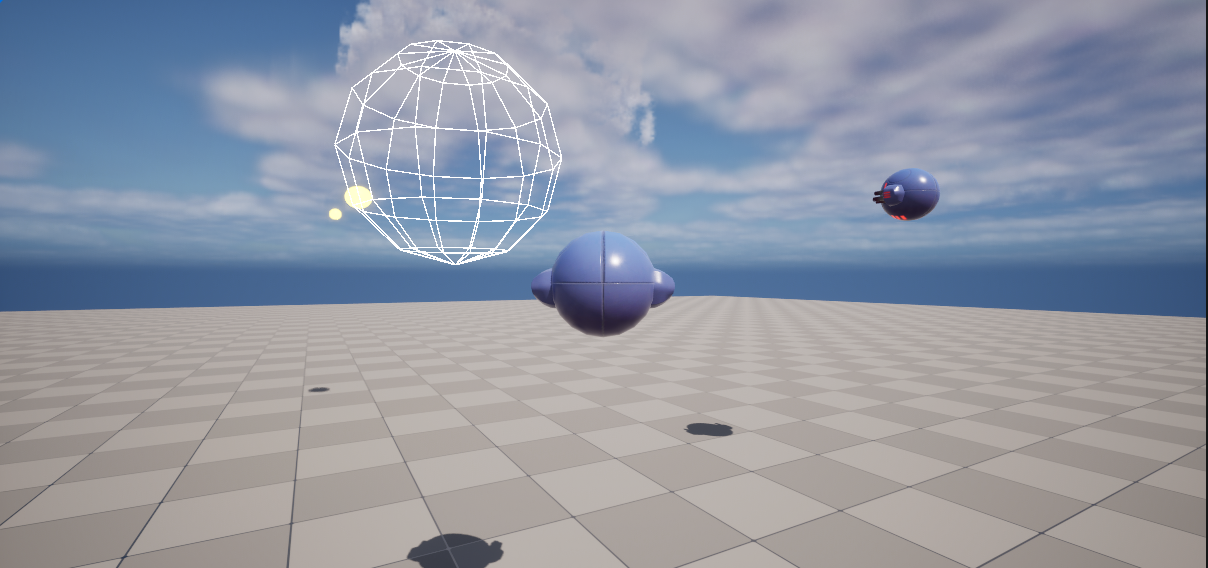
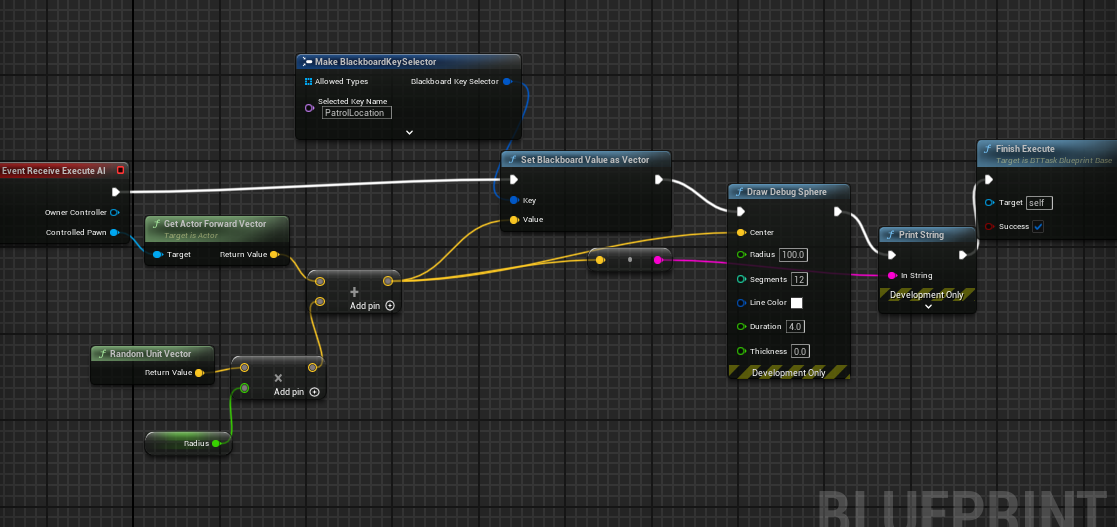
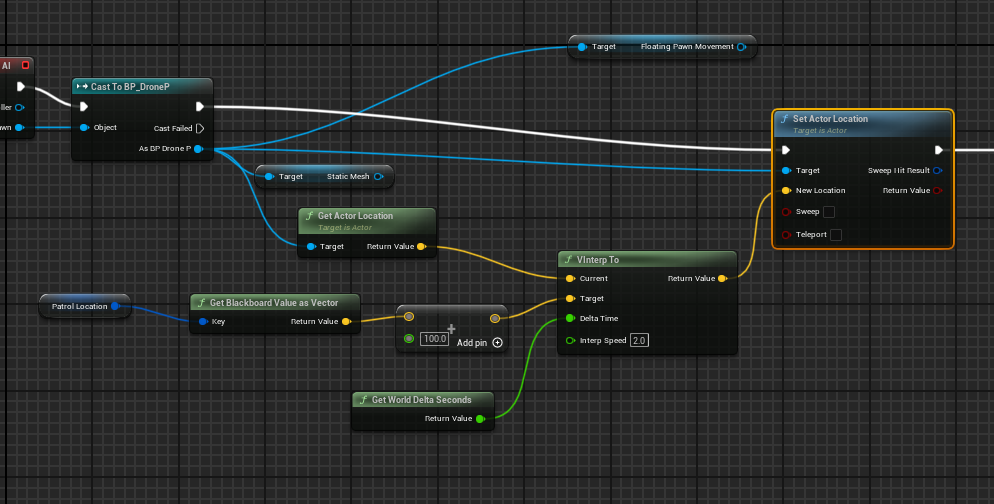
i have an issue with floating pawn movement. i have a floating pawn that draw a debug sphere to the location it is suppose to go to https://i.imgur.com/wyqc0yd.png
when it draws the sphere it is correctly showing but when the pawn move, the pawn does not go to that location. and it does not move smoothly as well nott sure what i am doing wrong i been struggling with this for weeks.
 clever skiff
i got it working just using the regular move to node in behavior tree not sure why my movement was not working
slow bobcat
bronze fossil
With the navmesh modifier type, there's the area class type "nav area_default". ...
Default is "do nothing". Sometimes you don't want to change properties in nav polys without changing their nav flag for the type. Or you want to enable/disable a volume, you will swap between default (disabled) and other area (enabled).
About the second part of the question, not sure I understand it. Can you give an example of what are you trying to do?
slow bobcat
clever skiff
i got it working just using the regular move to node in behavior tree not sure w...
The images you posted are using different locations:
- one is setting the patrol location to: pawnLocation + (randomUnitDir * radius) (a random location at Radius distance from wherever the drone is)
- the second image is using the calculated location above and adding 100 units to it (to every component in the vector)
If patrol location is 0,0,0, the other image is using 100, 100, 100
 balmy zephyr
Anyone know why my navmesh isn't drawing when pressing P
it's even enabled but still doesn't show

This seems super buggy, this happened after deleting navmesh and remaking a new one on the same level
Even if i fully delete the navigation instance
and its recast
and then resapwn
its still grayed out
its also not rebuilding
super lame, have to rebuild my entire level now
fixed upon restarting the editor, this happens often, idk why, but restarting the editor fixes it
slow bobcat
Nav mesh debug is knowly buggy. It's a pain in the ass when that happens. Sometimes you get just part of it, others it doesn't update... It's rare but happens
bronze fossil
slow bobcat
Default is "do nothing". Sometimes you don't want to change properties in nav po...
I see, thanks. But then how does None differ from NavArea_Default though
One other thing I'm wondering about now... is there any way to adjust the frequency with which tiles are regenerated when using dynamic mesh.
I'm trying to adjust a level at runtime - after some time, a platform that's far away starts moving towards the main area and I want to adjust the nav mesh on it. Do I have to use dynamic setting, or is there some way to get that working via modifiers?
A really hacky solution would be to prepare the navmesh to exist along the whole path of the platform, and then use navmesh modifiers to hide the parts that are currently inactive. There doesn't seem to be some sort of "invert" option for the navmesh modifier.
bronze fossil
Fooling around with dynamic nav mesh and I don't really get it... when the tiles in debug view are green, does that mean they haven't been updated? It sure seems like it, since the tile-generation time seems to be constant. I thought by default it's just dumb and automatically regenerates each tile that is reachable by a nav invoker?
But I guess it might first do a check if any sort of dynamic nav-mesh thingy actually moved in each oct-tree cell?
slow bobcat
bronze fossil
I see, thanks. But then how does `None` differ from `NavArea_Default` though
None does absolutely nothing, default applies what default is. Looks the same, but is not.
bronze fossil
slow bobcat
None does absolutely nothing, default applies what default is. Looks the same, b...
Sorry I dont get it - in what scenario is there a difference? I mean a navmesh modifier only works within a nav mesh bound right? And you can't change the default nav-mesh bounds area type, so I don't see a situation in which None would make difference to default.
No sorry, None
slow bobcat
bronze fossil
Sorry I dont get it - in what scenario is there a difference? I mean a navmesh m...
In practice, they are the same as what they leave behind when applied. I would need to test things like apply a nav modifier with null (to create a hole) and then switch it's area to none and see what it does. I think they are there in case you want your nav modifier to do stuff without changing the nav area flags in the affected polys. Specially for overlapping nav modifiers
But that's A theory, never tested myself
bronze fossil
Yeah some sort of overlapping modifiers case sounds like a case where it could make a difference, I see.
Thanks.
slow bobcat
bronze fossil
Fooling around with dynamic nav mesh and I don't really get it... when the tiles...
- when no nav has been created, it creates nav
- if there's nav, only re-geberates if anything changed from the last time nav was generated
bronze fossil
slow bobcat
- when no nav has been created, it creates nav
- if there's nav, only re-geberat...
Oh ok that's cool. So green tiles are actually tiles that haven't changed, so no tile regeneration happened.
I suppose telling if anything changed is pretty quick, I thought it might be problematic (and source of the cost for the dynamic mesh), so I wasn't sure.
slow bobcat
Flagging tiles as dirty (so they are regenerated) is quick, renerating it is not since the actors/meshes that van affect navigation will need to be gathered again, grab the bounds, calculate the nav etc. One problem is that, if you have a path going through a dirty tile, the path is paused, the tile is rebuilt, then the path is recalculated. Those things can affect performance
bronze fossil
slow bobcat
Flagging tiles as dirty (so they are regenerated) is quick, renerating it is not...
Oh that's definitely something I don't want, especially in a lot of cases - I have certain behaviors/ai that automatically update their paths frequently, so I'd rather have control over what's happening.
Is there some way to turn this off? No path-recalc of the path if a tile along it got dirtied? Probably somwhere in the path following component?
slow bobcat
bronze fossil
Oh that's definitely something I don't want, especially in a lot of cases - I ha...
If you want full control, you can have a path observer that will have a delegate to let you know when a path event happens (blocked, nav updated, unreachable etc). To know how it works, the best way is to inspect the MoveTo async task the engine has. In our project we use our own move to task, which is like the one in the engine but we handle more cases and we do other stuff
bronze fossil
Thanks a ton, I'll look into it.
balmy zephyr
balmy zephyr
fixed upon restarting the editor, this happens often, idk why, but restarting th...
(still cant navigate though)
any way to force a navigation actor reset? deleting seems to bork it
slow bobcat
balmy zephyr
(still cant navigate though)
Deleting the recast object from your world and clicking Build Paths should work. If after that you can't navigate... Soemthing else happens.
Question: do you have sub levels?
balmy zephyr
No sublevels. When I first create a world and add the navmesh, I'm able to navigate. But if I delete it at any point and try to make a new one it bugs out and no longer is navigable even with the same settings
I have tried doing build paths
slow bobcat
balmy zephyr
No sublevels. When I first create a world and add the navmesh, I'm able to navig...
Umm very strange. We did actually had the exact same problem with a test level recently. Let me check if the level designers figured it out, just in case it helps
balmy zephyr
good to know at least im not going crazy ..
slow bobcat
Can't find it. And we are all on holidays until next week.
So... Let's try to figure it out.
- when you re-generate, do you get a recast object at least?
- what does the log say? Any warning/error you should worry about?
- when you hit play, if you run Show Navigation command, do you see nav?
balmy zephyr
slow bobcat
Can't find it. And we are all on holidays until next week.
So... Let's try to fi...
Yeah, a recast object comes back
The logs are empty which is what makes this worse
Navigation text shows up top left but nothing much happens.
FWIW I'm running client->serv arch
slow bobcat
balmy zephyr
Yeah, a recast object comes back
The logs are empty which is what makes this wor...
Ah wait... So you are expecting nav on the client? Or is this a problem on the server?
slow bobcat
balmy zephyr
Yeah, a recast object comes back
The logs are empty which is what makes this wor...
So no green nav mesh drawn on the level?
balmy zephyr
slow bobcat
So no green nav mesh drawn on the level?
yeah
and the nav doesn't work on either client or server
it doesn't matter if its online or not
i remade the level and added a navmesh (which hadn't been prior deleted, fresh level) and confirmed that level has working nav
Just saw this

"Navmesh needs to be rebuilt"
doubt it'll work, since ive already done build paths before
ok, now it's working

slow bobcat
Yep, you are having the same problems we had with that damn test level. If you don't figure it out by January the 7th, ping me. I can ask our team if they figured it out. But same problem: nav works on boot, rebuild doesn't generate, needs rebuild constant message
clever skiff
slow bobcat
The images you posted are using different locations:
- one is setting the patrol...
if i leave it and take off 100 unit thing it only move like a inch and still not to the desired location to blackboard key patrol location. i was able to get it to work smoothly by using the node ai move to in behavior tree but it doesn't float, it goes straight to the ground.
in the actual level there is no ground so ai move to doesn't work.
slow bobcat
clever skiff
if i leave it and take off 100 unit thing it only move like a inch and still not...
Sounds like you need to rework how you calculate the next movement point playing with your velocity and your delta time.
How big is the radius?
clever skiff
slow bobcat
Sounds like you need to rework how you calculate the next movement point playing...
i grab random vector unit * radius which is 1000 and then i add that to get actor location and set the black board key as i said this show up fine in the correct mannor but moving to the location is the issue

the draw debug is where the ai should be moving to next
i think my issue is once i grab the location i am not setting the right way for the ai to move to that location even tho the coords are correct
 vapid dust
I have an enemy driven by a behavior tree that automatically follows me. At its begin play node, I linked LinkAnimClassLayers, but strangely, only on the client side, the enemy plays running animations normally when following me. On the server or in single player mode, it only stays idle and moves towards me. Why is this? Why does the delay on the client cause the Anim state machine to start correctly? Is this related to PossessedBy?🤔
misty wharf
Yeah iirc they have different names. You can check BTServiceBlueprintBase to see what calls the BP ones
misty wharf
vapid dust
I have an enemy driven by a behavior tree that automatically follows me. At its ...
You may have more luck on #multiplayer or #animation
 pure cradle
hello
i have a question im trying to add learning agent into my rts game
however im having some difficulty with the learning agent observations as it appears that beside the " out of the box" variable like location direction float ect
i cannot input a custom struct as observation ( which is very limiting )
does anyone know how to work around that?
 celest python
Is it just me or Epic forgot to export UBTCompositeNode::CleanupMemory in 5.4?
Cant compile anything derived from it if said function is overridden
misty wharf
Not sure if that's really intended for it anyway? It seems it just calls the destructor
misty wharf
Yeah I just noticed the RunEQS service also overrides it
neither InitializeMemory or it has the AIMODULE_API macro on them so yeah maybe they forgot or decided that it's now illegal
celest python
We're not bullying Epic enough tbh
but at least we got to learn Fortnite modules dont override those functions
misty wharf
You don't think they have a custom engine that lets them do that there? :P
celest python
misty wharf
You don't think they have a custom engine that lets them do that there? :P
I just thought they would notice the missing export but you made me consider a scenario where they just didnt care too 😅
misty wharf
Yeah they might have noticed it and just replaced it and called it a day lol
celest python
Time to complain at twitter so hopefully I'll annoy someone
misty wharf
you could try your luck pinging Mieszko I guess
celest python
If Mieszko would notice it probably it would get fixed I'm mostly annoyed at this managed to reach production so now I have to download 5.5 and waste another ~70gb disk space
misty wharf
they had a lot of problems with this 5.3-5.5'ish I think
because they changed how the api macro was used in a bunch of modules
clever skiff
slow bobcat
Sounds like you need to rework how you calculate the next movement point playing...
i got my drone working by just using a character and switching it to always flying it work way better
for some reason floating pawn movement is just a mess.
slow bobcat
celest python
Is it just me or Epic forgot to export `UBTCompositeNode::CleanupMemory` in 5.4?
Yep, that was an upssie fixed in 5.5. Since it was an API header, they never fixed it with a hotfix...
They missed the API export in several places after a re-factor to clean up some deprecated stuff + adding stuff for state trees
pure cradle
pure cradle
hello
i have a question im trying to add learning agent into my rts game
howev...
Anyone?
slow bobcat
pure cradle
hello
i have a question im trying to add learning agent into my rts game
howev...
You are not the first asking about learning agents here, unfortunately almost nobody has experience with it. There's some people in the c++ channel that know a bit more. It's been discussed several times that we could have a specific channel for it. This one is more for deterministic AI
pure cradle
So how do we open a separate channel for it?
This is wierd learning agent is in its core an ai algorithm that in Unreal isn't specific to c++
slow bobcat
pure cradle
This is wierd learning agent is in its core an ai algorithm that in Unreal isn't...
Admins need to open it. Not sure how the process goes. Maybe you can mention it in the general channel?
dense owl
You can try #969360633386655744 but creating a new channel doesn’t mean you’ll generate alot of responses
pure cradle
Yeah but at least the will be a place for people who try a learning agents to have a place to talk about it
It's baffling there is nothing online about it even though it's been in Unreal since 5.3
 pallid mica
@sweet swift Please stop spamming videos of that YouTube channel into every channel of this Server.
If this is your own YouTube channel you can use a single post in #1054845249945616404 to promote them all.
You have 0 interaction with the community despite spamming these shitty AI videos into channels. Next time I find one I will remove you from the Server.
 severe kayak
Hey, are state trees (regular, not the ones with other Schemas like for Smart Objects or Mass), are they running every tick? How are they evaluated? Sorry for the noob question
misty wharf
No. It's just a different type of tool for building AI
slow bobcat
severe kayak
Hey, are state trees (regular, not the ones with other Schemas like for Smart Ob...
Every tick. When the state tree component ticks, it creates a Execution context and ticks it. Within the EC tick everything is evaluated (global tasks, transitions etc)
Complete personal preference. There's no general rule really
That said, state trees do not need an AI Controller like Bt's, so you could have them running logic on anything really
Like a door or whatever
misty wharf
I'd say currently if you're not well versed in C++ I would probably stick with BT's just because they're a bit more fleshed out in UE than ST's are :P
ST's in general do work fine but they have a few rough edges which may be hard to debug without C++ skills
severe kayak
slow bobcat
Every tick. When the state tree component ticks, it creates a Execution context ...
oh ok. is there a way to control how often it ticks? Or maybe to only evaluate based on events and the such? Like the way we can disable tick on AnimBPs and instead use UpdateAnimation (forgot the name of the reavaluation method)
silent hamlet
severe kayak
oh ok. is there a way to control how often it ticks? Or maybe to only evaluate b...
No, AFAIK. they are being reevaluated every tick by design.
misty wharf
Maybe you can reduce the component's tick interval?
It may impact how the ST functions though
 lavish vault
UE5 freezing when i enable AI debugger for some reason. there's not much AI in the level
slow bobcat
What do you mean by AI debugger?
severe kayak
silent hamlet
No, AFAIK. they are being reevaluated every tick by design.
But maybe it is not as bad as BTs interms of reavaluating from the top down? So if we are currently in a state that we know it disnt finish or abort or interrupted, then I dont see the need to reevaluate from the top like in BTs but of course I csn be wrong
silent hamlet
I don't know if there are internal optimisations but the tree ticks independently to support transitions
slow bobcat
severe kayak
But maybe it is not as bad as BTs interms of reavaluating from the top down? So ...
Yes and no. It evaluates all the states from the active one up to the root, including all the states under a common parent state in the hierarchy (since they run in parallel).
 random jay
severe kayak
But maybe it is not as bad as BTs interms of reavaluating from the top down? So ...
random jay
severe kayak
But maybe it is not as bad as BTs interms of reavaluating from the top down? So ...
I’m not familiar with UEs specific implementation, but the reason for this is because parent nodes can abort children nodes.
There’s definitely ways BTs can be designed with the optimization you’re talking about though
misty wharf
Sure, that's what the abort functionality in it does
slow bobcat
Either place a decorator that checks the orientation of the character towards a direction so it only evaluates to true if it's too far and needs to rotate or create DoOnce decorator that holds whether it already run or not in its memory
fiery glacier
So uh.. I need a sanity check, this is logical to see, if it's possible to find a reachable point even though it's using the second random location, right?
 misty gale
This isnt reliable
You can include the exec pins on the pure node these days tho
Making nodes like this reliable
(Theres also a non pure version of this)
celest python
fiery glacier
So uh.. I need a sanity check, this is logical to see, if it's possible to find ...
this function would get called twice
fiery glacier
misty gale
You can include the exec pins on the pure node these days tho
How can I do that, is it possible in 5.3?
Ah okay just typing the name by dragging the exec pin showed the non-pure function
misty gale
Nah exec pins is 5.4 or 5.5 thing
fiery glacier
celest python
this function would get called twice
As I was unaware of the node with the exec pin, I was counting on if I get a true it would mean that origin/radius pair has a valid point so I could use the location on the second call, accepting the redundant second call
Nice to see you again, it feels like you're not here much lately
fiery glacier
misty gale
Nah exec pins is 5.4 or 5.5 thing
Apparently it's GetRandomLocationInNavigableRadius that has the exec pin, not the GetRandomRachablePointInRadius. Are there any difference in logic or result between these two?
Oh I guess ...InNavigableRadius returns a point within any nav mesh bounds while ...ReachablePointInRadius also ensures the point is also reachable from the origin, is that correct?
misty gale
Sounds about right, I havnt checked out rhe specifics of it tho^^
fiery glacier
That's what I get from the comments at least
misty gale
If you wanted the pure one you could wrap it in a function if you're not on 5.5
Makes no sense to me that it's pure but oh well
 onyx umbra
fiery glacier
Oh I guess `...InNavigableRadius` returns a point within any nav mesh bounds whi...
onyx umbra
fiery glacier
Oh I guess `...InNavigableRadius` returns a point within any nav mesh bounds whi...
GetRandomPointInNavigableRadius doesn't check if it's reachable or not
misty gale
Youd need that + testPath right?
celest python
fiery glacier
Nice to see you again, it feels like you're not here much lately
Yeah I've been absent for a long time, the discord ban was a great excuse to stop slacking around
 rugged garnet
I spawn AiController possess Player pawn, then use "ai move to",it return "request success" but player pawn not move, it doesn't even trigger success or fail.
The enemy move to attack me, but the player possessed by AiController does not move.
slow bobcat
Does your player have a movement component? Or how does move to handle the movement?
rugged garnet
slow bobcat
Does your player have a movement component? Or how does move to handle the movem...
when aicontroller possess player,I can't input to move it.So player just static
slow bobcat
rugged garnet
when aicontroller possess player,I can't input to move it.So player just static
Does your player character have a Movement Component?
rugged garnet
slow bobcat
Does your player character have a Movement Component?
yes,it is base on the Character class
slow bobcat
If the movement returns success and you have a movement component l, could it be your end location is wrong? If you check visual logger, any extra info that might help within the Navigation category?
Umm wait...soes character class have a movement component? Isn't that exclusive to the AI character?
rugged garnet
slow bobcat
Umm wait...soes character class have a movement component? Isn't that exclusive ...
CharacterMovementComponent
slow bobcat
Ah ok yeah, got confused there for a bit
 slow bobcat
If you debug draw a sphere with the point you are trying to move to, does it make sense?
rugged garnet
slow bobcat
If you debug draw a sphere with the point you are trying to move to, does it mak...
Maybe.
 slow bobcat
Umm try projecting the point onto the nav mesh. Maybe is that? Difficult to say
The Success return is what puts me off
 slow bobcat
rugged garnet
Maybe.
slow bobcat
rugged garnet
Maybe.
But it's not on the nav, it's above it (the center of the sphere is at the same height as the waist of your character)
Are you using any extent in your move to node?
rugged garnet

I'm now trying to get my enemy to run the same code.
It work on Enemy but not work on player
slow bobcat
Exact same values for acceptance radius etc?
rugged garnet
yes,I try to use simple character.
slow bobcat
And if you move the point further away, same result right? Returns success, no movement?
rugged garnet
slow bobcat
And if you move the point further away, same result right? Returns success, no m...
It will always return success, even if I move the point to an unreachable place
slow bobcat
Yeaaah... Any chance you have downloaded the engine symbols so you can debug in code what's going on? I don't see other way to figure out what's going on
rugged garnet
slow bobcat
Yeaaah... Any chance you have downloaded the engine symbols so you can debug in ...
when I delay 0.2s it work,return failed. I feel like I've wasted a lot of your time.
slow bobcat
Nah its fine. Glad you are finding things. The whole thing with poses/unposes is weird to me. Wonder if that's part of the problem
rugged garnet
When I put the target in an accessible place, it doesn't trigger a callback. When I put it in an unreachable place, it immediately returns fail.I have to go to bed. Good night.
undone rune
I have several type enemy(with different skeletal mesh) what is the best way for body part damage amount?
 naive veldt
Do you guys use multiple behavior trees for complex ai?
I'm not sure if handling the behavior switch logic from code helps keeping it cleaner or actually make it even more difficult.
slow bobcat
undone rune
I have several type enemy(with different skeletal mesh) what is the best way for...
Probably a component to handle it where you can define a way to know where the hit landed (whether it's bone based or because you attach colliers to the skeleton)
slow bobcat
naive veldt
Do you guys use multiple behavior trees for complex ai?
I'm not sure if handling...
Yep, subtrees is the easiest. If you want to starts/stop independent trees you can, but there's a problem: Start Tree calls stop tree, which call Cleanup in all the tree nodes, which deletes the memory of the tree. If you intend to use custom nodes that need to remember values from the previous tree run, you need to modify the source code. It's a bit niche problem, but to keep in mind
rugged garnet
slow bobcat
Yep, subtrees is the easiest. If you want to starts/stop independent trees you c...
I found the reason, I don't know why the AIController which is spawn by NewObject<AAIController> in c++ did not execute the TickComponent function.then I succeeded run "ai move to" node with the one which spawned in blueprint.
misty wharf
rugged garnet
I found the reason, I don't know why the AIController which is spawn by `NewObje...
It's an actor, they need to be spawned using SpawnActor. They will not work correctly with NewObject
Most likely the reason tick didn't get called is because you used NewObject
rugged garnet
misty wharf
Most likely the reason tick didn't get called is because you used NewObject
Yes, I've changed it to SpawnActor in c++ and now everything is finally working.
 coarse arch
I just have a simple question, if I wanted to make a game with multiple different types of animals, some who hunt, like wolfs, and some who run, like rabbits, and then make them interact with eachother (hunting and running from) aswell as with the player (running away from or hunting the player) then should I use behavior trees for the AI? I currently have the system mostly setup in blueprints for the AI. I just wanted to know which would be the easiest and most polished and good working solution to the AI. Thanks
misty wharf
I don't think it really matters that much ultimately. Behavior Trees have some features that could be helpful for that, like being able to abort by higher priority parts of the tree - this could be handy to abort the default behavior when it needs to run away or something
coarse arch
I thought so too, but I couldn’t find out how to get the AI perception to run an event when it sees a player, let alone inside a task.
misty wharf
You would do it based on setting variables on the blackboard
So for example, using on actor perception updated, you check what it was and how to react to it, and then set a value on the blackboard. This can then be used by decorators in the BT to abort or such.
coarse arch
Thank you, my only problem was I just don’t know how to check what the perception updated to.
misty wharf
coarse arch
Thank you, my only problem was I just don’t know how to check what the perceptio...
The event from the perception component has the data in its parameters, so you can f.ex. cast it or such. There's lots of tutorials for basic AI like chasing behavior which would most likely explain how to set it up, you can then adapt it for your own use
misty gale
The rabbit would listen for something that scares it / hunts it
Wolf would look for (and smell?) For prey
slow bobcat
Umm you could check when the movement finishes with success and if the bIsPartial flag is false, trigger it
If you are using c++, check the path events in that task (OnPathEvent) . That's a good place to handle cases like yours
stiff gale
Any idea why getting this error?
: Super(ObjectInitializer.SetDefaultSubobjectClass<UPathFollowingComponent>(TEXT("PathFollowingComponent")))```Looks like your path following component is null
Now... Why? No idea. Is that a custom class?
Looks like the engine's default by the name
stiff gale
Only this works
: Super(ObjectInitilizer.SetDefaultSubobjectClass<UCrowdFollowingComponent>(TEXT("PathFollowingComponent")))```But why are you doing an override of the path following class with the same the engine already creates? You don't need to do that unless you want crowd following or using a custom one
stiff gale
slow bobcat
But why are you doing an override of the path following class with the same the ...
I wanted this feature to be available. So I found out that you can toggle the Crowd Obstacle Avoidance with a function. Thanks anyay
restive loom
Still stuck on AI avoidance...
Oh
I can just toggle the avoidance on my player and zero out the radius
But now I gotta figure out how to do it for actors without movement component
 nova prawn
Happy new year all, Wondering if someone can let me know how you make the Report Damage Event node work in 5.4 or do I need to use a completely different method to detect a AI Damage Sense event please? 🙂

nvm fixed it, I added the AI Perception Component to the Character itself and not on the AI Controller. #doh
stable plover
how would one add deceleration to an Ai character
for example if they move to a location and that succeeds, instead of stopping instantly, i would like to deccelerate
I tried messing in the character movement component's braking decceleration walking, ground friction, braking friction but they dont work
misty wharf
I think they should, but it might require checking flags on there like use acceleration for walking or whatever it was called, otherwise it won't do that
but not 100% sure.
stable plover
misty wharf
I think they should, but it might require checking flags on there like use accel...
i hope im not trying to make the situation worse than it actually is because what i keep thinking is if the move to succeeds then how will braking even be possible if we are already at the succeeded location
misty wharf
iirc it brakes before hitting the target
so it should gradually slow down instead of just instantly come to a stop
stable plover
misty wharf
so it should gradually slow down instead of just instantly come to a stop
I got it, looked through a form https://forums.unrealengine.com/t/ai-controller-disregards-character-deceleration/336892/14

Epic Developer Community Forums
This is the solution that worked for me. Annoying that it’s a protected variable and can only edit in BP (as far as I can tell) but nice to have non-jittery AI movement finally. Many thanks!

for anyone else interested as well
thank you
 humble spruce
 slow bobcat
What do you mean? What's the problem in that image?
misty wharf
This image is on the level of the screenshot posted on cpp yesterday "how to fix this error" and it's a screenshot of a menu in Rider... lol
restive loom
Shit I was wasting time
RVO is only for character class
Could detourcrowd be a good way to handle avoidance with more than just npcs?
slow bobcat
restive loom
Could detourcrowd be a good way to handle avoidance with more than just npcs?
Avoidance of non-characters is what navmesh is for. If you refer to vehicles... Maybe? I haven't used crowd control in a very long time, can't remember is you can add non-character moving actors to the list
restive loom
slow bobcat
Avoidance of non-characters is what navmesh is for. If you refer to vehicles... ...
I need to avoid dynamic obstacles and I'm stuck on how
stiff gale
If I config senses in c++, the config should appear in blueprint as well right?
slow bobcat
restive loom
I need to avoid dynamic obstacles and I'm stuck on how
Umm you have different approaches, but as far as I know you can sumarize them in two:
- either you make your obstacle affect navigation with an area type that has to be avoided. Ie: the moving obstacle has a nav modifier volume attached to it that creates a Null area. The problem with that is that you will re-computing the nav constantly where that obstacle is (affected nav tiles by the volume) while it moves
- or you take into consideration movement projections of the moving obstacles nearby the current ai path. Then, in the path following component you check "is any obstacle gonna cut my path?" and re-direct from there.
It's a complicated issue. In our AI interviews we ask it as part of the technical test to see how people adapt to problems.
Have you checked if the Game AI pro books have chapters for it in any of the 3 volumes? I recall reading something about it. The online version of the books are free
Another approach is a mix of the two, where your moving obstacle creates something like a heat map, not modifying the nav but adding ankther later of information on top of it that your characters can read while moving. The "heat" is intense in the centre (moving obstacle location) and soft in the edge (towards 0). When you detect heat under the AI's feet, depending on how hot it is, you apply a softer or harder avoidance logic to move out of the way
restive loom
You know where can I find the books?
slow bobcat
This all takes another degree of complication when your AI is static and the obstacle approaches them
restive loom
slow bobcat
Umm you have different approaches, but as far as I know you can sumarize them in...
So basically I need to do a custom avoidance thing?
slow bobcat
restive loom
You know where can I find the books?
Home of the book Game AI Pro
The have paper books called game ai pro 360. Each book compiles all the articles within a topic (navigation, behaviors and so on)
slow bobcat
restive loom
So basically I need to do a custom avoidance thing?
. Maybe? I would first check the code for crowd control and see if you can use it for your moving obstacles. If that is not possible, then maybe check the nav modifier solution, see how well it works and how it affects your performance. If that doesn't fit your needs, then try some other solution (whether it's a heat approach or any other solution like movement prediction or whatever you can find in books or online talks)
Another good resource is the Game AI Summit from each's year gcd talks. Some are in YouTube, some in their website gdc vault (within that some are free and others under a pay wall)
Is the obstacle movement deterministic? As in "does it follow a predefined path" or does it move "randomly" as in "it chases some character"?
 dusty fox
Hi guys, Im having a trouble with my nav mesh here where by the enemy actor keep running onto ledges and edges of the nav mesh and then stops out of nowhere. What should I look into in order to resolve this issue?
silent hamlet
dusty fox
Hi guys, Im having a trouble with my nav mesh here where by the enemy actor keep...
It looks like the agent radius might be different than the collision radius on the character
Seems like its trying to cut that corner
 latent zephyr
hey all! 🙂 curious if there is a preferred, comprehensive, unreal AI tutorial? i'm looking for something that's a bit more advanced and less about the basics.
stable plover
latent zephyr
hey all! 🙂 curious if there is a preferred, comprehensive, unreal AI tutorial?...
could you be more specific?
like which approach do you want to take? state trees, or behavior trees etc
as bruno mentioned for general ai, which has helped me out tremendiously he recommends the game ai pro books which are free.
and since you are looking for tutorials what are you trying to do exactly?
latent zephyr
good questions! i would like a combination of state tree, behavior tree, and eqs. at the most basic level, i'm assembling a scene, like a small outpost, with a number of AI that guard, patrol, etc. i'd like to extend into variety of AI roles, including non-hostiles, and more complex behaviors that fit for an open world game.
misty wharf
I doubt you'll find anything that covers all that unless you somehow find a paid course that ends up covering all that
latent zephyr
ah okay, that's probably realistic. i am definitely looking for a free option. I will dive into some of these random youtube tuts. was hoping there was a "yeah, this one or this one is fairly top-notch".
silent hamlet
latent zephyr
ah okay, that's probably realistic. i am definitely looking for a free option. ...
My 2 cents: try to make something and when you have a doubt on how to make something, look for info on that specific topic. You'll end up learning a lot anyways.
latent zephyr
that's the current approach 😛
but i was looking for something a little more direct
one issue that I ran into, for example, is that I don't know that in behavior trees, that Check Gameplay Tags On Actor is working... as I would expect.
I have an NPC character with a gameplay tag NPC.Type.Guard. And in my behavior tree, I have a selector with a MoveToGuardPoint sequence under it. That sequence has a decorator 'Check Gameplay Tags on Actor', which is set to match any tags 'NPC.Type.Guard'. I have tried both TargetActor and SelfActor, but this behavior tree node always seems to fail. There is a red bar on the decorator during runtime, but I don't get any info from it. Using the debug, the NPC actor does indeed have the NPC.Type.Guard gameplay tag.
I'm not sure if I have incorrect expectations on how the check gameplay tags on actor works, or if i am missing something else. i did some googling, but haven't found anything.
here's a video:
silent hamlet
latent zephyr
one issue that I ran into, for example, is that I don't know that in behavior tr...
For that to work the checked actor needs to implement the IGameplayTagAssetInterface and override the query functions. Is that the case for the actor you're running the check on?
These 2 in particular
 latent zephyr
silent hamlet
For that to work the checked actor needs to implement the IGameplayTagAssetInter...
latent zephyr
silent hamlet
For that to work the checked actor needs to implement the IGameplayTagAssetInter...
I don't believe so. The actor does have an ability system component, but I don't think that provides that interface
silent hamlet
Actually it does. But, it is on the component itself. So you would need to bridge that in the actor that implements the ASC
So, basically you implement that same interface on your actor and in the override you call the same function in the asc. It's a handy pattern actually
latent zephyr
okay great, that makes perfect sense. thank you. it'll take me a bit to figure out the code changes. 🙂
silent hamlet
latent zephyr
okay great, that makes perfect sense. thank you. it'll take me a bit to figure...
It's not hard really. You can have a look into the lyra character. They do the same and the code is in the engine repo
latent zephyr
yeah! i was going to ask chatgpt. buuuuuut that's a good point about the repo.
latent zephyr
silent hamlet
It's not hard really. You can have a look into the lyra character. They do the s...
beauty! it worked! thanks, again!
 zinc sky
Hey I am working on a simple AI for my game and I have noticed that it does not move in Standalone mode? is there anything wrong with these tasks I am missing?


 stable plover
zinc sky
Hey I am working on a simple AI for my game and I have noticed that it does not ...
stable plover
zinc sky
Hey I am working on a simple AI for my game and I have noticed that it does not ...
so does it move at all?
you have a nav mesh volume in your scene
zinc sky
yes it only moves when in the editor, but not in standalone
stable plover
zinc sky
Hey I am working on a simple AI for my game and I have noticed that it does not ...
and you are running your tree in begin play correct?
zinc sky
no just placed in the level, I tried it with spawning and got the same results. In the editor it does as expected, moving randomly within the range
zinc sky
stable plover
and you are running your tree in begin play correct?
let me check but I am pretty sure I am
stable plover
zinc sky
no just placed in the level, I tried it with spawning and got the same results. ...
i haven’t experienced that problem before, can you try to send a video?
zinc sky
yeah hag on it will be a min
*hang
here is it working in the editor
im getting a video of it not working in standalone
stable plover
can you put a break point in where you first call the run tree task in bps and your own move randomly to task
zinc sky
yes I can do that. Here is it working/not working in standalone
stable plover
zinc sky
yes I can do that. Here is it working/not working in standalone
it looks like they were randomly moving
zinc sky
stable plover
it looks like they were randomly moving
they did but the spawned ones had some issues. The blue one that spawns is not supposed to fire that many times and the two silver ones at the end didnt move at all
one idea I thought was maybe a second base enemy class that accidentally got imported but I just check and there is only one
stable plover
ok if you could replicate the videos better that would be great but I understand better now thank you. No I dont know how you have everything setup and organized, im sure you have variables for fire rate and etc, and your movement is controlled by the behavior tree, how do you enter the sequence? is it a decorator or you just freely enter it
zinc sky
I will try to get better recordings soon. this is the tree for the enemy and the run behavior tree is being called in the AI controller for the enemy.

also thank you for helping this problem has been a constant thing that seems to keep appearing/dissapearing
stable plover
zinc sky
they did but the spawned ones had some issues. The blue one that spawns is not s...
Im looking through the video again and I dont see a blue colored ai that spawns in, all are the same color, but im assuming the ai fire extremely fast and quick, also I dont know why you have 4 shoot projectile tasks right there as well, what is inside of your service and shoot projectile tasks just curious?
you have the wait at the end so my hypothesis would be since you are shooting the projectiles continously, lets say one is null, it will break the sequence then when it comes back again do the same thing over and over
which may cause the rapid shooting of x projectiles
thats just a guess
zinc sky
stable plover
Im looking through the video again and I dont see a blue colored ai that spawns ...
sorry about the blue. I am a bit colour blind it's the generally darker enemy hes supposed to shoot more. The four in a row is because I didn't know a better way to do it. your idea of the sequence makes sense as well because this seems to happen randoml. I have another video of the error I will send
 stable plover
zinc sky
sorry about the blue. I am a bit colour blind it's the generally darker enemy he...
stable plover
zinc sky
sorry about the blue. I am a bit colour blind it's the generally darker enemy he...
if the component isnt valid why are you finishing the task as success?
zinc sky
stable plover
if the component isnt valid why are you finishing the task as success?
I don't know, I did not notice that I think I did that on accident
stable plover
looking at that the delay should prevent the continuous fire, instead. Now I dont know if this is right and i could be wrong which i probably am but doing a delay inside a task may not be 100% the best approach. I have had some issues in the past with the delay and I always used the wait task. I mean you could try outputting a wait task after each shot, and the wait seconds would be the fire rate to see if that fixes your fire issue
so to be more clear. The ai that have the problem, what is the problem exactly and does it only occur with the ones you spawn in
zinc sky
I will give that a shot. the problem is they either get stuck firing or don't move at all. Like in the video the three pre-placed ones did fine and behaved exactly as expected but the spawned ones the two blue and two silver, had only one blue one (second one) working as expected, as where the first blue one and the silver ones towards the end either shot continuously and did not move at all
I am realizing now that the silver ones, if not killed initally just quit tracking the player after a moment now. I am wondering now if it is the way I am spawning the enemies or maybe even the map I am on
I think maybe it's if the player even leaves the navmesh for just a second it makes them stop. Whats very frustrating to me is they work exaclty as intended in the editor, the second I go into standalone these issues happen
stable plover
yea im not sure what to say. I dont know how you are doing things behind the hood well enough to give an effective solution. Maybe your initialization somewhere is off during spawning them im not sure
zinc sky
I guess I will keep looking thanks though I have a better idea of what to look for now
 heavy heron
Hello guys! I am new to using blackboard in unreal engine and I would like to ask if there is anyway I can set its keys without having to type its name.
How do you guys normally avoid human error of incorrectly typing? Do you guys use enum to get name or something like that?
I'm asking because I'm finding way to reduce/mitigate human error.
Thank you in advance 🙏
 latent zephyr
heavy heron
Hello guys! I am new to using blackboard in unreal engine and I would like to as...
latent zephyr
heavy heron
Hello guys! I am new to using blackboard in unreal engine and I would like to as...
Not sure if this is the best solution or a good practice, but you can do something like make a function library, and make a pure function for each name that simply returns each name. then you're defining these all in one place which helps mitigate a bunch of the issue
heavy heron
latent zephyr
Not sure if this is the best solution or a good practice, but you can do somethi...
Thank you very much!
 ocean delta
having a very weird issue happening to me. when my state tree component is referenced by a controller, it fails to load on first launch:

it was working fine until a couple of minutes ago
has anyone run into this?
seems like it's this: https://forums.unrealengine.com/t/ue-5-5-statetrees-require-manual-recompilation-in-editor-on-every-load-statetrees-fail-in-packaged-builds/2156121 but i'm unsure what this even means

Epic Developer Community Forums
I ran into an issue where some StateTrees fail to initialize properly and require re-compilation every single time the editor is run. These StateTree assets also fail to build for packaged builds. These are the only error messages that are printed when the StateTrees fail initialization: LogStateTree: Warning: StateTree /Game/AI/StateTree_AI/...
ah crap... i found it
    UPROPERTY(Config, EditAnywhere, BlueprintReadOnly, Category = "Development|Player")
    TMap<EBastionPlayerClass, TSubclassOf<APawn>> PlayerClassMap;
I fixed it by changing one of the object references to a soft object pointer, and the state tree is no longer loaded early and properly compiles when it’s loaded further down.
nova prawn
Hi, Can someone tell me if I really have to go modify C++ code to assign my Player as a Hostile (Im finding the AI Sight Perception is perceiving other Enemies when they come into range of the sight tool which is leaving them confused ) Or is there a way to say "Hey this is the player he,s hostile to us so attack him and ignore any other enemy actors detected"
I tried using a Tag to define the player and then filter out on the perception updated event
 silent hamlet
nova prawn
Hi, Can someone tell me if I really have to go modify C++ code to assign my Play...
silent hamlet
nova prawn
Hi, Can someone tell me if I really have to go modify C++ code to assign my Play...
the perception component/system uses TeamAgentInterface to filter out what actors to perceive. you need your actors to implement that interface and return a teamid. then you can configure each sense to perceive actors using that. Same team id == friendlies. Different team id = enemies. I am not 100% sure what neutral does.
 nova prawn
Ah ok thanks I,ll implement the interface into the AIController and try to see if i can work it out form there.
Is this the interface you mean ?
 silent hamlet
yep
this explains it well https://www.thinkandbuild.it/ue4-ai-perception-system/

In this article I’ll go down the rabbit hole, showing how to setup and use the AI perception system. The official documentation about this topic is good but I had to scrape other needed information from various forum threads, Unreal-Answers posts and a lot of try-fail attempts. This article will condense my experience and findings into a single ...
nova prawn
Ah thanks, So I do need to do it in C++.
silent hamlet
yea, as far as i know there is no way around that for this
nova prawn
Ok seems a bit weird to have those checkboxes when really you cant "filter" them inside a blueprint lol
But thank you anyway 😄, GOnna have to dip my toes into C++ **Scared >.>
silent hamlet
i think c++, especially in a framework like the one they developed for unreal, just look scarier than it actually is
youll figure it out im sure. else, just look for help!
nova prawn
Will do its nice to have such a cool discord of people who can help! 🙂
dusty fox
silent hamlet
It looks like the agent radius might be different than the collision radius on t...
The collision radius on the character is 90, I tried changing the agent radius to 100 from -1. Not working. Doesn't seem to be the issue.
slow bobcat
dusty fox
The collision radius on the character is 90, I tried changing the agent radius t...
If you check with Visual logger what is the calculated path, how does it look?
What's the nav agent radius in your nav settings?
nova prawn
@silent hamlet I found a couple interesting plugins on the store not sure if they are good and wondered if you had any experience with them , Nody Entity Perception and Team Manager Plugin they are called. Just intrigued to know your insight or if anyone has used them before.
dusty fox
slow bobcat
If you check with Visual logger what is the calculated path, how does it look?
Not sure what to look at in the visual logger, first time using it.
dusty fox
slow bobcat
What's the nav agent radius in your nav settings?
It's 34
If i were to directly set the nav agent radius to be larger within the recastnavmesh nav setting, it resolves the issue but i don't want the mesh to be smaller.
slow bobcat
dusty fox
If i were to directly set the nav agent radius to be larger within the recastnav...
Your nav agent radius has to be the same as your AI's. Unreal assumes that you will have a set of nav data per ai radius, which will end up demanding quite a bit of ram if you have many types
If your nav agent radius is smaller than your AI's capsule radius, AI's will get stuck against objects in corners and other cases
dusty fox
I see, that explains why. Thanks for the information, appreciate it!
misty wharf
Have you looked at the code for GetValueAsInt?
I would imagine it will do some kind of checks or casts of the value somewhere, which could tell you how to check for it yourself to decide which one to call
FBlackboardEntry has KeyType stored in it
I think you can pull those from the BB asset
restive loom
slow bobcat
The have paper books called game ai pro 360. Each book compiles all the articles...
Could you point out navigation part?
restive loom
slow bobcat
Is the obstacle movement deterministic? As in "does it follow a predefined path"...
It follows a predetermined path
slow bobcat
restive loom
It follows a predetermined path
Aaah then you have a much easier solution! You could treat the path as a spline, check if your path crosses it. If it does, then you need to check against the moving obstacle whenever you are close.
The cross can be done with a path segment vs a spline segment for example. That could be a start
restive loom
slow bobcat
Aaah then you have a much easier solution! You could treat the path as a spline,...
Wdym path crises it?
slow bobcat
restive loom
Could you point out navigation part?
I think posting shop links is against the rules. If that's the case, sorry im advance, not sure where else can be found
https://www.amazon.com/Game-AI-Pro-360-Pathfinding/dp/0367151111

Game AI Pro 360: Guide to Movement and Pathfinding: Guide to Movement and Pathfinding
slow bobcat
restive loom
Wdym path crises it?
Sorry, I'm on my phone and the keyboard does what it wants. Edited
restive loom
slow bobcat
Aaah then you have a much easier solution! You could treat the path as a spline,...
I don't really get this
Why a spline?
slow bobcat
The cross approach is a quick way to discard it, but still requires checking on every new path segment against every oredofined path. You still need to discard oredofined paths that are not nearby your path
slow bobcat
restive loom
Why a spline?
By spline mean a "path defined by points", like any other nav path. Since it's pre-defined, I guess you have something like that?
restive loom
slow bobcat
By spline mean a "path defined by points", like any other nav path. Since it's p...
Yeah I have patrol points. The goal is to have npcs go around that and dodge other npcs or whatever comes across that path and then continue to to it's destination
restive loom
slow bobcat
Sorry, I'm on my phone and the keyboard does what it wants. Edited
Yeah no problem
Thanks for trying to help
restive loom
slow bobcat
I think posting shop links is against the rules. If that's the case, sorry im ad...
I could buy that or use Google and well get it in another way
slow bobcat
Then you could do something like this:
- put every patrol point in an octree
- when an AI starts a new nav path segment, grab the middle point and use the half of the segment as a radius. With that point and radius, search in the octree for patrol points.
- if patrol points found, grab the owner of the patrol path.
- from that moment on, check against the patrolling actor to know if you need to dodge it
Unreal's octree implementation is not meant to be used as add/remove. They only support adding, which might be a problem
You will need to implement remove yourself
restive loom
slow bobcat
Then you could do something like this:
- put every patrol point in an octree
- w...
I don't get how does this work
I just get a middle point of the path and check for actors around it?
slow bobcat
restive loom
I just get a middle point of the path and check for actors around it?
When your AI moves and you calculate a nav path, the AI follows it segment by segment. I'm the AI Path Following Component, there's a función called when a new segment starts. A segment has a start and end points. The middle point + half the distance will give you the needed data to do a search in the octree
To search in an octree you pass a location and an extent (if you want yo search in a box) or a location and a radius (if you want to search in a sphere)
That search will return patrol points around said location within that radius, in other words, patrol points near the segement your AI is following
Of that happens, your AI is near a patron route and chances are you will need to dodge a patrolling npc
restive loom
So basically I can search for actors with that? Couldn't tracing also do that?
slow bobcat
Not actors, patrol points
The trace will be way more expensive and searching at the beggining of the segment might fail finding an actor you will coras Paths 2s later within the same path segment follow up
But you can also try that approach: every AI has a sphere that checks for collisions against patrolling npc's and, of an overlap happens, do the dodge
You could use the octree approach and enable said collider if points are returned
It will be much cheaper
restive loom
I don't really understand how does it help if I just find patrol points
Shouldn't I search for actors?
slow bobcat
If you find a patrol point, you know there's a patrol route that will be problematic. Grab the owner of the patrol route (the patrolling actor)
restive loom
slow bobcat
But you can also try that approach: every AI has a sphere that checks for collis...
Problem is that if I do that how will I resume the task
The owner of the patrol route isn't an actor
I have separate bp for the patrol points
slow bobcat
You don't stop the task, you modify the path within the same task (will probably require a custom mvoe ai task)
But don't you have a way to connect the patrolling actor and it's patrol BP?
restive loom
I don't understand how could I have two AI move to at the same time
restive loom
slow bobcat
But don't you have a way to connect the patrolling actor and it's patrol BP?
Not really I just have a variable for patrol points in my AI controller
restive loom
slow bobcat
If you find a patrol point, you know there's a patrol route that will be problem...
I don't really understand this either
I search for patrol points in the segments and if there is one I somehow know it's going to be problematic? Then get the owner and yeah something
slow bobcat
Ok, let's do something. It's late for me now, but tomorrow I can make a drawing and tag you with what I mean. Maybe that will help more and inspire a good solution
restive loom
slow bobcat
Ok, let's do something. It's late for me now, but tomorrow I can make a drawing ...
Alright thanks
slow bobcat
@restive loom
Hi!
First thing: scrap anything I said yesterday, it was not good. Many cases would fail.
That said, I thought about the problem and I think I have a solution that's not costly in cpu and that will work I think.
I never implemented this myself, but might be a good start.
Things needed:
-
A central place where patrolling enemies can register. I suggest a subsystem but it could be anywhere any AI that needs to avoid a patrolling npc can access. Let's call it NavigationDirector for example
-
When a patrolling npc starts a new patrol segment (the line between two blue dots), it registers to the NavigationDirector in a TMap called PatrollingNPCS (using FindOrAdd). The TMap holds the pointer to the patrolling actor as a key and a struct as a value. The struct contains the start and end of the patrol segment (you will have to define when does a patrol npc unregister from the tmap. Maybe on EndPlay and/or OnDeath if they can die)
'struct class FPatrolSegmentInfo { FVector start; FVector end; }
TMap<AActor*, FPatrolSegmentInfo> PatrollingNPCS;
-
The NavigationDirector has a delegate OnPatrollSegmentAdded that will broadcast to interested AI's whenever a patrolling npc has started a new patrol segment
-
The NavigationDirector has a float variable called MinDistanceToPatrollingNPC. The size of it will depend on the game needs
-
AI's will have a sphere collider component that is completely disabled until it's needed (more on this later). The radius of said collider will depend on the game needs.
How does it work:
AI's will do Intersection Checks. If positive, the sphere collider will be enabled to catch when the walking AI and the patrolling NPC intersect so avoidance can be done.
Intersection checks are the tests needed to know if a walking AI will cross paths with a Patrolling NPC. There are two:
- Partial: the check is done against one specific Patrolling NPC and it's current patrol segment
- Full: the check is done against every single registered patrolling npc in NavigationDirector.
It's not needed to check against every patrolling npc. Many will be far away from the walking AI location. That's why the test is done in two steps:
- Step one: a squared sitance check versus MinDistanceToPatrollingNPC. If the sqDistance between the AI and the NPC is bigger than the squared MinDistanceToPatrollingNPC, the AI doesn't care about that NPC. Squared distance checks are fast to compute (at least faster than normal ones)
- Step two: if step one validates, then an intersection check is done between the current AI path segment and the the Patrolling NPC patrol segment (obtained from the TMap). The intersection test is the 3D line intersection test
Two non-parallel lines p1+Rv1
and p2+Rv2 intersect if and only if (v1×v2)⋅(p1−p2)=0
I strongly suggest you add some offset to the calculation to avoid floating errors or simply path segments that are super close and crossing directions but not intersecting 100% (imagine two lines that, when looked from top-down they intersect but when looked from the side one is over the other by 50 units)
- If the intersection check returns true, the sphere collider is enabled. The sphere collider will only care about overlaps (no collision, just queries) against that specific Patrolling NPC. Once an overlap happens, you need to run your avoidance logic.
Suggestions on avoidance logic:
I would implement some form of priority system to define two things:
- Who avoids who: is the walking AI the one modifying its path/behavior to avoid the patrolling NPC or the other way around?
- What to do in that case: different route? wait for the other to pass?
imagine this:
- A walking human intersects with a patrolling human. Ideally you will not touch the patrolling human and make the walking one go around the patrolling. The easiest way to do that would be to modify the current walking path to add a point behind the patrolling human. This can be done "raw" (straight use a location behind the patrolling npc wherever it's at the moment of overlap) or "elaborated" (predict where exactly the intersection will happen considering both AI's velocity and direction and add the extra path point sooner in time to avoid that collision)
- A walking human intersects with a patrolling car: in that case, you might want to pause the walking human when the overlap happens and resume when the overlap stops with the car (this will need some fine tunning because you might stop the human in front of the car if the overlap is detected in a location perpendicular to the movement direction)

both cases can be turn around (it's the patrolling npc the one taking actions) if you desired it. To me it sounds easier to make the AI avoid the patrolling and not the other way around, but it depends on the game. Maybe you want the car to stop to let the AI pass as if it was a crosswalk.
The implementation:
- When a walking AI decides to move, it registers to the NavigationDirector callback mentioned above. When the movement stops, it unregisters (which should also disable the sphere collider if it was enabled at some point during the movement).
- When the movement starts, do a Full Intersection Check. There might be patrolling npc's that will affect the AI and the callback happened just before starting the movement.
- From that moment on, checks will only happen in two cases:
- When a patrolling NPC starts a new patrol path, it registers is in the NavigationDirector. The navigation director broadcast the delegate. At that moment, the listening AI's will do a Partial Check (only against the patrolling npc new path segment)-
Every time the walking AI starts a new path segment, it will do a Full Check
That way the checks will happen as little as possible and, since the checks are fast (sqDistance + intersect), it should not be a problem on the cpu. If there are many AI's and many Patrolling NPC's, you can build a queue system and only process X requests per frame. You couls even do this multithread passing the location and the segments start/end to an multithread async task if needed.
-
this is how I imagined your predifined patrol paths look like

The yellow sphere is the collider that is enabled when the intersec check success and disabled when the movement finishes (if enabled before).
In the case I imagined, rather than a straight line crosing the car's path, you will modify the current path adding an extra point behind the car using some prediction. By the time the walking AI get's to the extra point, the car would have passed already
On the right case, the intersect test will return false since the Patrolling npc is somewhere else. But once it takes the next patrol segment, the intersect test will return true since the patrol segment is a different one that crosses the current Walking AI's segment, even though the walking AI is past the intersection point. This is a by product of the walking segment being long enough to still be current when the patrol segment changes. Maybe you need to add a check for said cases or maybe you can simply enable the collider none the less since, potentially, that patrolling npc could cause issues.
In any case, you might benefict from some checks within the collider to avoid false positives like patroling npc's behind, the AI actually moving away etc. A simple dot product between [patroling npc location - walking AI] and WalkingAI Movement Direction (both projected in the 2D plane) should be enough to discard many cases (orange arrows)

avoidance will be most difficult part to get right, but it's a matter of trial and error
restive loom
What the fuuuuck
slow bobcat
ahahah sorry man, I got very interested into the problem, never had to face it myself and I found it fun to solve.
restive loom
Nah np I will try to figure it out
So if I understood correctly you add a bunch of actors to a subsystem then you make them detect eachother and then if one is close you enable a collision and do the avoidance?
slow bobcat
more or less yeah.
- a quick/controled way to process the patroling actors -> TMap
- a quick controlled way to discard things you don't care -> intersection of 3d lines + squared distance between actors
- a way to avoid excessive computation towards a more Event Driven approach -> do things only when a new path segment is taken
- a way to avoid expensive operations (mostly physics) -> only do them when you are absolutely sure (with the sphere collider that checls overlaps)
restive loom
Isn't it more expensive to do additional logic to only enable the collision when something is detected
Isn't it much simpler to just use a collision and have it enabled at all times
I feel like detecting if the collision is needed is kinda redundant
slow bobcat
collision enabled at all times is way more expensive than not having it. Specially for moving actors. You can check in insights. It's much simpler for sure, but you will have to compute things every frame for every AI and, within that logic, figure out which one of the multiple overlapped actors is the one you care about and then check if you actually care (pretty much the checks I mentioned)
slow bobcat
restive loom
I feel like detecting if the collision is needed is kinda redundant
it's is if you don't care at all about your performance. Chaos is not cheap...
slow bobcat
don't worry, just go step by step and drop me a DM if you get stuck
it's much simpler than you think
or simply enable colliders in every AI and go your way. If performance suffers in the future, you can resource back to my proposal and build something from there
restive loom
I have a subsystem that tracks all the AI. I have a collision for each character and it only gets turned on if there are other characters nearby?
restive loom
slow bobcat
or simply enable colliders in every AI and go your way. If performance suffers i...
Rather do it this way tbh
I kinda need a way to track all the agents
Of course I could use tags
slow bobcat
I can see you getting callback for overlap constantly. You will need to create some collision profile (or even a channel) custom to patrolling actors to keep the overlap callbacks to a minimum (plus help the Broad and Narrrow passes of the physics engine)
Then it's a matter of learning how can you modify a path while following it. There's a post process path logic somewhere in the engine
Or if that's too soon, within the path following component you can do stuff and modify the path
misty wharf
Have you tried using the composite decorator?
that should allow you to use things like x or y
silent hamlet
nova prawn
<@477469927264092164> I found a couple interesting plugins on the store not sure...
hey sorry I totally missed this. No I have not used any of those.As usual it depends on what you need to do but the basic unreal framework works quite well and it's probably helpful that you understand that before adding a plugin on top of it
then again, I have no idea what those plugin do so can't give specific advice there
 upper compass
has any one got across linking error when trying to have a derived class from FStateTreeMoveToTask/FStateTreeRunEnvQueryTask
MyTaskTest.cpp.obj : error LNK2001 : unresolved external symbol "public: virtual enum EStateTreeRunStatus __cdecl FStateTreeRunEnvQueryTask::EnterState(struct FStateTreeExecutionContext &,struct FStateTreeTransitionResult const &)const " (? EnterState@FStateTreeRunEnvQueryTask@@UEBA ? AW4EStateTreeRunStatus@@AEAUFStateTreeExecutionContext@@AEBUFStateTreeTransitionResult@@@Z)```
I get similar error for all function in  FStateTreeRunEnvQueryTask   but in FStateTreeMoveToTask I only get
```MyTaskTest.cpp.obj : error LNK2001: unresolved external symbol "public: virtual class FText __cdecl FStateTreeMoveToTask::GetDescription(struct FGuid const &,struct FStateTreeDataView,struct IStateTreeBindingLookup const &,enum EStateTreeNodeFormatting)const " (?GetDescription@FStateTreeMoveToTask@@UEBA?AVFText@@AEBUFGuid@@UFStateTreeDataView@@AEBUIStateTreeBindingLookup@@W4EStateTreeNodeFormatting@@@Z)```
although I have these in my build.cs
```"StateTreeModule",
"GameplayStateTreeModule",
"GameplayTasks",```this only happens in 5.5
misty wharf
Are they actually exported?
upper compass
misty wharf
Are they actually exported?
are you talking with me?
misty wharf
Yes
 scarlet sequoia


 upper compass
what do you mean by actually exported? however they added FStateTreeMoveToTask::GetDescription() in 5.5 if I comment it out the project compile and launch the editor
FStateTreeMoveToTask works fine but when I try to have a derived class I get the linking error
misty wharf
I mean do they have the api macro in the struct definition
misty wharf
That might be the problem then 🤔
upper compass
/**
* Task moving the given AIController's pawn using the AITask_MoveTo framework. Succeed when move ends at destinations, fails if move is impossible.
*/
USTRUCT(meta = (DisplayName = "Move To", Category = "AI|Action"))
struct FStateTreeMoveToTask : public FStateTreeAIActionTaskBase
{
    GENERATED_BODY()

    using FInstanceDataType = FStateTreeMoveToTaskInstanceData;

    virtual const UStruct* GetInstanceDataType() const override { return FInstanceDataType::StaticStruct(); }

    GAMEPLAYSTATETREEMODULE_API virtual EStateTreeRunStatus EnterState(FStateTreeExecutionContext& Context, const FStateTreeTransitionResult& Transition) const override;
    GAMEPLAYSTATETREEMODULE_API virtual EStateTreeRunStatus Tick(FStateTreeExecutionContext& Context, const float DeltaTime) const override;
    GAMEPLAYSTATETREEMODULE_API virtual void ExitState(FStateTreeExecutionContext& Context, const FStateTreeTransitionResult& Transition) const override;

    GAMEPLAYSTATETREEMODULE_API virtual UAITask_MoveTo* PrepareMoveToTask(FStateTreeExecutionContext& Context, AAIController& Controller, UAITask_MoveTo* ExistingTask, FAIMoveRequest& MoveRequest) const;
    GAMEPLAYSTATETREEMODULE_API virtual EStateTreeRunStatus PerformMoveTask(FStateTreeExecutionContext& Context, AAIController& Controller) const;
};```I think you'll only be able to call or override the ones with the api macro
upper compass
this is the code in 5.5 "```c++
/**
-
Task moving the given AIController's pawn using the AITask_MoveTo framework. Succeed when move ends at destinations, fails if move is impossible.
*/
USTRUCT(meta = (DisplayName = "Move To", Category = "AI|Action"))
struct FStateTreeMoveToTask : public FStateTreeAIActionTaskBase
{
GENERATED_BODY()using FInstanceDataType = FStateTreeMoveToTaskInstanceData;
virtual const UStruct* GetInstanceDataType() const override { return FInstanceDataType::StaticStruct(); }
GAMEPLAYSTATETREEMODULE_API virtual EStateTreeRunStatus EnterState(FStateTreeExecutionContext& Context, const FStateTreeTransitionResult& Transition) const override;
GAMEPLAYSTATETREEMODULE_API virtual EStateTreeRunStatus Tick(FStateTreeExecutionContext& Context, const float DeltaTime) const override;
GAMEPLAYSTATETREEMODULE_API virtual void ExitState(FStateTreeExecutionContext& Context, const FStateTreeTransitionResult& Transition) const override;GAMEPLAYSTATETREEMODULE_API virtual UAITask_MoveTo* PrepareMoveToTask(FStateTreeExecutionContext& Context, AAIController& Controller, UAITask_MoveTo* ExistingTask, FAIMoveRequest& MoveRequest) const;
GAMEPLAYSTATETREEMODULE_API virtual EStateTreeRunStatus PerformMoveTask(FStateTreeExecutionContext& Context, AAIController& Controller) const;
#if WITH_EDITOR
virtual FText GetDescription(const FGuid& ID, FStateTreeDataView InstanceDataView, const IStateTreeBindingLookup& BindingLookup, EStateTreeNodeFormatting Formatting = EStateTreeNodeFormatting::Text) const override;
virtual FName GetIconName() const override
{
return FName("StateTreeEditorStyle|Node.Movement");
}
virtual FColor GetIconColor() const override
{
return UE::StateTree::Colors::Grey;
}
#endif // WITH_EDITOR
"```
tried c++ GAMEPLAYSTATETREEMODULE_API virtual FText GetDescription(const FGuid& ID, FStateTreeDataView InstanceDataView, const IStateTreeBindingLookup& BindingLookup, EStateTreeNodeFormatting Formatting = EStateTreeNodeFormatting::Text) const override;
it didn't work
misty wharf
You would have to modify the engine code to add the macro
Try not overriding GetDescription in your struct and see if the error goes away
upper compass
I downloaded my engine from epic games I can't modify it but state tree tasks can be modified I can make it work if I just comment out the GetDescription() function but that would only fix the problem on my engine version
misty wharf
FStateTreeMoveToTask doesn't have a GetDescription on 5.4
upper compass
misty wharf
FStateTreeMoveToTask doesn't have a GetDescription on 5.4
it doesn't have the whole WITH_EDITOR section
I think it's something epic needs to fix
misty wharf
Yeah
You can't really fix it yourself without modifying engine code, there's no way around it if they haven't put the api macro in there
upper compass
unless they specify overriding FStateTreeMoveToTask/FStateTreeRunEnvQueryTask would require editing engine code
upper compass
misty wharf
You can't really fix it yourself without modifying engine code, there's no way a...
yes thank you for your time! by the way just a side note if I comment out the function GetDescription() from FStateTreeMoveToTask it works for me
 vital heron
Hi everyone, I was wondering if anyone had pointers on how to implement different pathfinding algorithms in UE. Currently we're using the default (PathFollowingComponent/RecastNavmesh) but I'd like to be able to generate Arc paths and I'm not really sure where to start.
slow bobcat
vital heron
Hi everyone, I was wondering if anyone had pointers on how to implement differen...
This link might help but it's very outdated (2015). I think someone mentioned here there's now (ue5) a post process path function somewhere. The way I handle path modifications is within our own AI MoveTo task.
For smoothing when taking curves I use the Path Following component
https://forums.unrealengine.com/t/how-can-i-edit-the-path-that-tells-an-ai-character-where-to-move/315436/4

Epic Developer Community Forums
Hey guys, thanks for the reply! I’ve put this task off for a bit but now I’m back at it. I’ve attempted to make some changes in SetMoveSegment() and FollowPathSegment(), and I’ve got my path following component initialized in my custom ai controller (I think): ASKIMEGController::ASKIMEGController(const FObjectInitializer& ObjectInitializer) : ...
vital heron
Thanks for the pointer
ocean delta
has anyone figured out how to make the crowd following component work with more than one agent? :\ i need two different agents for my game because one agent is significantly bigger than the other, thanks
slow bobcat
ocean delta
has anyone figured out how to make the crowd following component work with more ...
Not too shabby with crowd management but... Does it really at all on the nav agents settings? I recall. It just using some rdistance from the actor? Just curious about it, for the sake of learning
proper pawn
I'm trying to learn StateTrees, and how do y'all handle a case where you want the AI to do the first state who can find all the stuff it needs to work before jumping back to root? Something like this should work but isn't particularly robust if a task other than "find the stuff" fails
 stable plover
proper pawn
I'm trying to learn StateTrees, and how do y'all handle a case where you want th...
stable plover
proper pawn
I'm trying to learn StateTrees, and how do y'all handle a case where you want th...
Could you tell me what you mean more clearly?
So do one task first only if it works?
proper pawn
so I've got 3 things I want this worker to do, in order of priority: if it's able to find a workable smart object, it should move and use that; if it can't find one nearby, it should look for stuff to carry to storage and then do that; if it can't find things laying around or nearby storage it should idle around for a bit and then try again
stable plover
Ok then your next selectable state should cover that
?
you can also send events to if you want
which is probably what you want
proper pawn
my question is less "would this function" and more "is there a better way to set this up", because right now it'll skip to CarryResource state if the 'Use Workable' task fails
stable plover
proper pawn
so I've got 3 things I want this worker to do, in order of priority: if it's abl...
and you have that solved?
which im assuming you do
I would just personally send out an event under certain conditions and have it listen for that event
thats just me if your problems are complex
proper pawn
stable plover
I would just personally send out an event under certain conditions and have it l...
so you wouldn't use StateTree?
stable plover
you know about state tree events right?
proper pawn
I do not
stable plover
look into that
you can break out of state tree states with events
and transition to certain states
ocean delta
slow bobcat
Not too shabby with crowd management but... Does it really at all on the nav age...
yes it does. it does not work with more than one agent
latent zephyr
Hi all! I have an EQS I've just set up, and my context appears to be returning a vector correctly, but my blackboard key does not seem to be getting updated (remains Invalid). Any idea if there is something obvious I might be missing?
silent hamlet
proper pawn
my question is less "would this function" and more "is there a better way to set...
What's the transition setup on UseWorkable?
slow bobcat
ocean delta
yes it does. it does not work with more than one agent
Do you know where in code is getting the nav agent properties? Maybe it's just grabbing the first one or it needs some param to be passed (like the optional querier when finding paths) so it uses the correct data?
slow bobcat
latent zephyr
Hi all! I have an EQS I've just set up, and my context appears to be returning...
Without seeing the tree and how you run the eqs, difficult to help
ocean delta
slow bobcat
Do you know where in code is getting the nav agent properties? Maybe it's just g...
Unsure but I removed the crowd following component for now (since the actual implementation wasn’t great anyways) and I’m gonna roll my own pathfinding later. Thanks
 river storm
i dont suppose its possible to make navigation invokers work outside a navmeshvolume huh
 rancid mural
Maybe a weird question with no good answer but 'keep at it', but who knows...
Which of state machines/Behavior trees/state trees is easiest to remember or has the most convenient debugging or transparent operations?
I find myself coming back to BTs after a while to work on something new or because I noticed a bug and it can be...challenging, just refreshing on how my own stuff works. It doesn't feel particularly intuitive.
latent zephyr
slow bobcat
Without seeing the tree and how you run the eqs, difficult to help
yeah fair enough. i've grabbed some screenshots today. i'll paste them in sec.
latent zephyr
OK, so first image is my btree with the EQS query that finds a nearby patrol point location. It's pointing at my query template and also the desired PatrolPointLocation blackboard key. In the runtime, the guard has the corresponding btree + bb. In the second image, you can see the EQS, which finds POI according to the listener context which can also be seen to hit its breakpoint and has an expected vector value. However, this doesn't write to the blackboard. The EQS testing pawn also does not succeed, fwiw.
Any help is appreciated!


Ah I think I solved my problem. If I just use Actors of Class rather than Perceived Actors, I am getting results. I am guessing that even though the patrol points have a sight stimulus source, they probably aren't actually being seen though. Curious what happens if I give them a static mesh component...
latent zephyr
Hmm, well I didn't really solve my problem - not sure why Perceived Actors is failing - going to test AI senses a bit... my best guess is that the sight sense is not picking up these actors even though they have static meshes with blockall collision.
definitely seeing my POIs
i do have my ai perception on the controller
latent zephyr
as a test, and using the same setup, if i switch to using hearing sense and report a noise from the patrol points, this does work. the btree + eqs does update the blackboard and the sequencer progresses to the move to node.
and perceive actor does work if the allowed actor is the player character. but not if its my bp poi actor.
silent hamlet
latent zephyr
and perceive actor does work if the allowed actor is the player character. but ...
Do the actors you want to percieve have the Stimuli Source Component?
perceive..it always gets me 🙃
nova prawn
Can I ask CPP and Ai here or is it only Blueprinted AI ? 🙂
I have a CPP query but its to do with AI I have put in the CPP thread atm but not sure its the right palce.
latent zephyr
silent hamlet
perceive..it always gets me 🙃
me too. and they do have perception stimuli source, set to sight (and also now hearing, for test purposes)
silent hamlet
latent zephyr
me too. and they do have perception stimuli source, set to sight (and also now...
Did you try debugging it with the gameplay debugger?
Sight works by default using the visibility channel. Could be a mesh collision/setup problem.
Also are you registering the Stimuli Source as source? I'm not sure this happens automatically. You might have to enable auto register or call a function on the component itself
silent hamlet
nova prawn
Can I ask CPP and Ai here or is it only Blueprinted AI ? 🙂
Just go ahead and ask! C++ or blueprint, that's just implementation detail
shadow dawn
My smart objects are spawning in around the world origin

The shelf I placed in the world (the one in red) is fine, but the one that I spawn in (on the right) has it's smart objects around the world origin
If I jump out of the camera and click on it, its working
 latent zephyr
silent hamlet
Also are you registering the Stimuli Source as source? I'm not sure this happens...
latent zephyr
silent hamlet
Also are you registering the Stimuli Source as source? I'm not sure this happens...
Good questions!
I have it set to auto-register. Was also confused about that, but checked it just because it sounded like a good thing to do. The AI perception update sees the BP POI actors. They are static mesh actors with blockall, so they should (and do appear to) be set up to properly get hit by visibility traces.
The context listener returns a BP POI actor (which is using a get all actors of class and filtering those to a single actor). But this does not update the blackboard if I'm using the sight sense. It does if I'm using hearing.
silent hamlet
Ok, then its probably worth looking into the source
silent hamlet
Can you show how you are reporting the hearing event? @latent zephyr
Also I'm seeing quite a few visual logger logs in the context generator. Worth using it to see if it logs something related
latent zephyr
Actually I just figured out while rolling through the code. It's of course something silly. I have one of my radii set very low. I was under the impression that the search radius property I was setting was a multiplier.
Btw, with regards to the hearing event, with testing I didn't need to set up the hearing sense as a source at all - it only needs a report noise event for perception to sense it. But that doesn't matter, I can remove the hearing now that I understand what's going on.
silent hamlet
Cool, glad you found it
latent zephyr
Yes, me too. Very glad. Was driving me crazy. Thanks for your help. 🙂
I think I need to research this listener context a bit better.
nova prawn
silent hamlet
Just go ahead and ask! C++ or blueprint, that's just implementation detail
Ok thanks 🙂 here goes.
I have a perception component on my enemy and ofc a source on the player but I am trying to get the affiliation to work (I kinbda got it to work but it feels a bit hacky to me but not sure, If someone could tell me if it would be a performance hit or not)
//-> This code only seems to run once upon startup and NOT when triggered by someone entering the Sight Zone of the AI.
ETeamAttitude::Type AAIBaseController::GetTeamAttitudeTowards(const AActor& Other) const
{
    if (const APawn* OtherPawn = Cast<APawn>(&Other))
    {
        if (const IGenericTeamAgentInterface* TeamAgent = Cast<IGenericTeamAgentInterface>(OtherPawn->GetController()))
        {

            FGenericTeamId OtherTeamID = TeamAgent->GetGenericTeamId();

            if (OtherTeamID == TeamID) {
                return ETeamAttitude::Friendly;
            }
            if(OtherTeamID != TeamID)
            {
                return ETeamAttitude::Hostile;
            }


            //return Super::GetTeamAttitudeTowards(*OtherPawn->GetController());
        }


    }
    return ETeamAttitude::Neutral;
}
This is the function which checks "If a nearby actor is on the same team ie... friendly or hostile"
The issue im having is that Hostile never gets returned and this code only seems to run upon play.
So i created a function to return both of the team id,s (Which im using here)
~Now I kinda got it working using this blueprint but it dont feel right as the AI Perception Component as it has to have Detect Neutrals checked to detect the player (Instead of the player simply being hostile) Hope this all makes sense to someone. 🙂

I am guessing I need to somehow override/add the above code to C++ OnPerceptionComponentUpdated so it simply checks if they are on the same team or not when some actor triggers the perception
Here is the image showing the enemy detecting neutrals but ignoring other enemys (As they are on the same team as himself) (Hostiles return nothing and Friendly causes the AI to detect other enemies as well as the player, So there is no Hostile / Enemys according to the AI Component)

Sorry for my long post!
silent hamlet
nova prawn
Here is the image showing the enemy detecting neutrals but ignoring other enemys...
Checking the team in the perception updated doesn't make sense. This check is ran by the perception system before that event is broadcasted, using the function you posted.
Also in that screenshot your sense is setup to only detect neutrals. So based on your picture it looks like things are working as intended.
Assumimg its not working when you set it to detect hostiles (is that the case?), then the issue is in the setup somewhere. How are you assigning a team ID to your controller?
nova prawn
You are correct Hostiles are not detected but this is because the function is run upon start and never triggers again so I would imagine that I need to do another "check" when the player is in sight range. I am assigning a Team ID to the controller using the SetGenericTeamID
void AAIBaseController::SetTeamID(uint8 ID)
{
    SetGenericTeamId(ID);
    TeamID = ID;
}
I have
silent hamlet
i see you declared your own SetTeamID function
silent hamlet
but did you override the function i pasted above?
another thing is: where are you setting the team id? I am not sure you can do it outside of the constructor
maybe it's possible but ive never done it and all examples ive seen do it there
nova prawn
https://www.thinkandbuild.it/ue4-ai-perception-system/ this is the guide i was following.
In this article I’ll go down the rabbit hole, showing how to setup and use the AI perception system. The official documentation about this topic is good but I had to scrape other needed information from various forum threads, Unreal-Answers posts and a lot of try-fail attempts. This article will condense my experience and findings into a single ...
silent hamlet
    : Super(ObjectInitializer)
{
    SetGenericTeamId(FGenericTeamId(1));
}```yep also in that guide it does the same
nova prawn
// Fill out your copyright notice in the Description page of Project Settings.


#include "AIBaseController.h"

AAIBaseController::AAIBaseController()
{

    SetGenericTeamId(TeamID);


}

ETeamAttitude::Type AAIBaseController::GetTeamAttitudeTowards(const AActor& Other) const
{
    if (const APawn* OtherPawn = Cast<APawn>(&Other))
    {
        if (const IGenericTeamAgentInterface* TeamAgent = Cast<IGenericTeamAgentInterface>(OtherPawn->GetController()))
        {

            FGenericTeamId OtherTeamID = TeamAgent->GetGenericTeamId();

            if (OtherTeamID == TeamID) {
                if (GEngine)
                {
                    GEngine->AddOnScreenDebugMessage(-1, 15.0f, FColor::Yellow, FString(TEXT("HOSTILE>>>>>")));
                }

                return ETeamAttitude::Friendly;
            }
            if(OtherTeamID != TeamID)
            {
                return ETeamAttitude::Hostile;
            }


            //return Super::GetTeamAttitudeTowards(*OtherPawn->GetController());
        }


    }
    return ETeamAttitude::Neutral;
}

uint8 AAIBaseController::GetTeamID() const
{

    return GetGenericTeamId();

}

void AAIBaseController::SetTeamID(uint8 ID)
{
    SetGenericTeamId(ID);
    TeamID = ID;
}
I just passed an exposed UProperty in the form of a uint8 so I can pass it inside the Constructor to set a default value and I made a function to allow me to pass a Value from within a Blueprint
This is the header file
// Fill out your copyright notice in the Description page of Project Settings.

#pragma once

#include "CoreMinimal.h"
#include "AIController.h"
#include "GenericTeamAgentInterface.h"
#include "AIBaseController.generated.h"

/**
 *
 */
UCLASS()
class BF3_API AAIBaseController : public AAIController
{
    GENERATED_BODY()

    AAIBaseController();


public :

    ETeamAttitude::Type GetTeamAttitudeTowards(const AActor& Other) const override;

    UFUNCTION(BlueprintCallable)
    void SetTeamID(uint8 ID);

    UFUNCTION(BlueprintPure)
    uint8 GetTeamID() const;

protected:
    UPROPERTY(BlueprintReadOnly, VisibleAnywhere,Category = "AI Team Assignment")
    uint8 TeamID = 5;

};
yep ok thats good
nova prawn
But as you can see there is nothing there to "check" upon seeing something so it runs at the start ie.. Play but then fails to run again when it "sees" something inside its sight .
silent hamlet
and your player controller?
you setting the team id there too in the same way? and is it different that the one on your ai?
well im assuming its a player controller. i mean the controller of whatever pawn you want to sense
nova prawn
void ABF3PlayerController::SetTeamID(uint8 ID)
{

    PlayerTeam = FGenericTeamId(ID);
    TeamID = ID;

}

uint8 ABF3PlayerController::GetTeamID()
{

    return PlayerTeam.GetId();


}
The player controller has the same functions as the AI one.
silent hamlet
constructor?
nova prawn
    FGenericTeamId PlayerTeam;
    FGenericTeamId GetGenericTeamId() const;

    UFUNCTION(BlueprintCallable)
    void SetTeamID(uint8 ID);

    UFUNCTION(BlueprintPure)
    uint8 GetTeamID();
Its not set in the Constructor.
silent hamlet
i would add that
nova prawn
This is how i set it

So you can see the player controller is assigned Team ID of 67 on BeginPlay
Which the AI is detecting from the printout in the Sight image.
silent hamlet
hold on. where is GetGenericTeamID override?
nova prawn
you can see here it,s kind of working.
 silent hamlet
so i think if i keep trying guessing this it will take longer than needed.
https://dev.epicgames.com/community/learning/tutorials/lwnR/unreal-engine-your-first-60-minutes-with-statetree#addingandimplementingtheteamagentinterface
try following this simple setup. Im very sure this is a minor implementation issue.

Epic Games Developer
A practical guide to understanding and working with StateTree as it relates to AI. It covers key concepts, terminology, and execution flow for StateTree...
i know its about state trees but it has a section about how to setup a minimal case for ai perception
nova prawn
Using this
 silent hamlet
and i am quite confident that if you go through it and try to spot what you are missing you'll find it
else it's a guessing game
nova prawn
I understand about the state tree,s its more about updating the perception component to detect hostiles (By ticking the Detect Hostiles) 🙂 I mean I could leave it as it is for now with Neutrals and use the BP code I have which seems to be working but just a minor gripe that I have to choose neutrals and not hostiles xD 🙂
silent hamlet
nova prawn
Using this
this is going against the system
silent hamlet
nova prawn
I understand about the state tree,s its more about updating the perception compo...
nova prawn
I also dont know performance implications of doing this.
silent hamlet
it has a section for setting up team agent interface from scratch
it's as bare bone as it gets and i know for a fact that it works
i have done it
nova prawn
I,ll take a look at that article 🙂
silent hamlet
im pretty sure youre missing something small
nova prawn
Oh i misunderstood i though tState Tree was a Behaviour tree #facepalm xD Its a new thing to UE XD 🙂
Will work through it thanks!
silent hamlet
no wait
just to be clear
ignore the whole article except for the part i linked
in that huge tutorial there is a small section that explains very well how to setup the team agent interface. that is the only relevant bit
silent hamlet
nova prawn
Will work through it thanks!
☝️
 prime terrace
I added a NavMeshBounds to my level, but it seems to want me to rebuild the nav mesh every single time I hit play. I don't recall having to do that in the past, is there a setting or something that I need to click? I have force rebuild on load checked, but it doesn't seeem to do anything.
 simple crescent
prime terrace
I added a NavMeshBounds to my level, but it seems to want me to rebuild the nav ...
simple crescent
prime terrace
I added a NavMeshBounds to my level, but it seems to want me to rebuild the nav ...
This looks like the code for triggering a rebuild. If you've just added a NavMeshBounds I would check that the bounds are valid. It looks like invalid bounds could trigger a rebuild.
 simple crescent
prime terrace
I added a NavMeshBounds to my level, but it seems to want me to rebuild the nav ...
simple crescent
prime terrace
I added a NavMeshBounds to my level, but it seems to want me to rebuild the nav ...
There is also this setting in the Navigation project settings

Is there a clean way to show NavOverrideVolumes in game for debugging?
The best I've been able to come up so far is to parent a static mesh off of the modifier volume, and then set it up with a material that uses a material parameter collection that I can set from a show/hide console command.
 west gorge
Hi, I'm looking for a way to disable behaviour tree execution when the character is a certain distance away from the player, without creating overhead in other places. I have about 300 enemies per level and they have to be persistent. I get a good 60 fps on my potato with or without enemies spawned as long as they don't have a controller and AI; once I set up enemies with even basic AI, fps drops to 30-40. I could give them a sphere collision and listen for overlap events, but 300 sphere collisions isn't the greatest thing either.
slow bobcat
west gorge
Hi, I'm looking for a way to disable behaviour tree execution when the character...
Check for Stop Logic in the Behavior Tree Component. That stops the BT execution. You might want to also stop ticks in other components and unregister from the Perception system
west gorge
(Also, PSA for anyone searching this discord for help and not finding it: if your AI does not move using AI MoveTo and you are using the detour crowd controller and the AI debugger says "Path following: simulation:NOT ACTIVE", make sure your number of detour actors in project settings exceeds the number of actors in your map or they will go afk.)
west gorge
slow bobcat
Check for Stop Logic in the Behavior Tree Component. That stops the BT execution...
Awesome, this is what I need! I'll still probably need the sphere collision 😦 but at least it's not a decorator. 🙂
slow bobcat
west gorge
Awesome, this is what I need! I'll still probably need the sphere collision 😦 b...
What's the sphere collision for?
west gorge
slow bobcat
What's the sphere collision for?
To stop and start logic based on distance
slow bobcat
That's a bit overkill. You can just simply check sq distance to the closest player. Waaaay cheaper
Or even check if the AI was recently rendered (on screen)
west gorge
I don't want a tick on 200 characters, but I like the other one - how does it work?
slow bobcat
You don't need to tick.
If you have a subsystem where your AI's register on spawn and unregister when dead/end play (add/remove from an array) you can have a timer checking every 1s. The timer will loop through the array of registered AI's and check square distances against the players. When you find the closest one to your AI, then check if if it's closer than MinDistToActivateLogic. If you make your checks square distance checks, even cheaper. The colliers have a lot of overhead. Not only that, physics checks every frame in the narrow phase. In the end, you are checking every tick.
west gorge
Thank you ❤️
slow bobcat
If you can afford it (or find it for free somehow), Game AI Uncovered Vol.1 has a detailed chapter about how to write a LOD system for AI based on distances to the closest player. On Vol3 there's a chapter about the concept of spawners and eenmy pools. Those two things will save you lots of cpu cycles when handling big enemy numbers.
slow bobcat
west gorge
I don't want a tick on 200 characters, but I like the other one - how does it wo...
The was recently rendered is a function in the actor (I think, might be in the mesh component?). It tells you if it was in screen recently or not (rendered). In a project I was part of we had a problem with it: it returned true "too late", as in the AI was well within the screen (more than half of the capsule) before it returned true. We solved it by adding a transparent mesh (a sphere) that was bigger than the enemy itself (about 3x capsule radius). That way, that invisible sphere would be on the screen few frames before the AI would do it, but since it was transparent, the player would never notice. By the time the AI was rendered on screen, we had plenty of time to enable animation etc
Both things (distance to closest player) and Recently Rendered can be used together.
west gorge
@slow bobcat Thank you! 🙂
 harsh storm
Also - look into the significance manager @west gorge
west gorge
harsh storm
Also - look into the significance manager <@1092154966967320626>
Last I checked, it was an absolute black box. 🤔
harsh storm
It is dead simple
Or if you want a long video https://www.youtube.com/watch?v=u7K4qFTW608
 sterile crane
Has anyone tried to use AISenseConfig_Sight to detect AActor's instead of something specific like Pawns? Im trying to get the sense to register when my item comes into sight and I cant seem to get it to register. My "ABase_Item" class inherits from AActor and I think that might be my problem.
I can get the sense to detect my player character or other enemy pawns though
sterile crane
sterile crane
Has anyone tried to use AISenseConfig_Sight to detect AActor's instead of someth...
I found it. You have to add an AIPerceptionStimuliSource to the actor and register it to the specific senses you want.
 opaque crown
Hi guys, I'm getting a bit annoyed at this point, especially since I've been googling like insane and I'm trying to implement relatively simple thing, so I'm hoping somebody can point me into the right direction.
I'll try to make it simple. I'm making a single-player puzzler-platformer and I got: a player, one AI class (I'll have multiple of those in a level but all using the same AI class etc.) and few objects like a lift or a terminal that the player can interact with.
What I'm mainly struggling with is being able to check (I guess do a 'switch' if possible?) for multiple collided actors (of different classes) within AI's sight range and being able to set BB's bool variable depending on what the AI is colliding with. I tried doing this using castTo and then if that fails, another castTo to another class but that's not the best.
I guess the question is, how can I properly loop through actors within sight perception? I don't know if I'm making sense but to simplify, my AI can be given commands by my player but only when player is within the sight range. The AI can also enter a lift, but I did it in a way that both player and the lift has to overlap AI's sight perception to change its state and then do its action. I got it kinda working but there are always issues so I feel like I'm doing some things incorrectly
harsh storm
There is a function - get perceived actors
You should only be "seeing" certain actors anyway.
opaque crown
harsh storm
There is a function - get perceived actors
I think I've seen this before. How would I go about looping through those objects and checking which ones are being 'seen', so I can set bools in blackboard depending on sighted actor?
harsh storm
Those are the ones that are "seen"
It returns an array of actors that are currently perceived by your perception
 tidal seal
Hello guys, I've a question, I'm using the Detour Crowd Manager, and I can't figure out a way to not have my movement jitter / slowing down when AIs are surronding my player ? Is there a setting to modify or is it something mandatory with it ?
opaque crown
harsh storm
It returns an array of actors that are currently perceived by your perception
Alright, I see. Not really many examples on the internet with people utilizing this. Are you able to send me a screenshot of how would I go about check whether a specific item from that array is of specific class or something? I mean, I could do a cast but then for checking another actor, would I just do another cast on previously failed cast? I just need to be able to check my sight area whenever something enters it and set bools. I might be making this more complicated than it needs to be 😅 sorry!
harsh storm
opaque crown
Alright, I see. Not really many examples on the internet with people utilizing t...
You definitely are. It is just an array that gets returned, you would do a foreach loop on it. There are a plenthora amount of examples on the interwebs for that. As for checking for a specific class, you really shouldn't need to. Only certain things should even be your perception stimuli.
To avoid casting to multiple unrelated classes, make an interface and then check if that element implements that interface. Interfaces don't need to have methods. Use it just as a type pretty much.
Whenever something enters/exits your perception, there is an event to listen to. "On Perception Updated" or something like that. You can also check things that way.
misty wharf
iirc the good one is on actor perception updated, one which gives you a stimulus. The one with the array is a footgun, don't use that one lol
harsh storm
Yeah
But the function call "get perceived actors" is fine to use
And that gives you back an array
Just couldn't remember the actual event name to listen to
opaque crown
harsh storm
You definitely are. It is just an array that gets returned, you would do a forea...
Yeah, I thought to 😅 and I'm using OnPerceptionUpdated right now. My problem is also that different objects use the same interface, so that makes it difficult to distinguish them. I guess I kinda already got what you're describing, so I guess I can find a way. It gets tough when you have to factor in player can also give commands (so player do specific input) to AI when AI close enough but I got this figured out I tgink
opaque crown
harsh storm
Just couldn't remember the actual event name to listen to
Right, I'll see about using it that, thanks a lot!
harsh storm
opaque crown
Yeah, I thought to 😅 and I'm using OnPerceptionUpdated right now. My problem is...
Reading your original problem - you still need to come up with a way to filter to only a specific AI. Unless you just want anyone within sight range to receive the command.
So you want the player to issue commands to an AI, but the AI can only execute said command if they can also see the thing that the player is telling them to interact/move to?
opaque crown
harsh storm
So you want the player to issue commands to an AI, but the AI can only execute s...
Yes and AI has to be also always be within player to receive the commands. I don't if you've played, but this is heavily inspired by games like Oddworld: Abe's Oddysee.
In essence, AI can only receive player communication commands when within that sight range to player but for things like lift or other objects that I might want to instruct it to interact with, it has to: 1. Be within the range of player (to receive command), 2. Be within the range of the said interactable object, 3. Have player say the required command
So, I guess this is not enough yet to solve my problem, as even though I managed to get this kind of working, it would glitch, with player suddenly not being sighted etc. so I must have done something wrong fundamentally
harsh storm
On the interface, have a method which accepts either a vector or actor. If the vector has a value that isn't 0,0,0 - just move to it.
If you get a valid actor - on the AI, call Get Perceived Actors and check if that actor is in the array. If it is, move to it and use the action.
If you only care about being in the "range" - you don't even need the perception system. It would just be a distance check.
opaque crown
harsh storm
On the interface, have a method which accepts either a vector or actor. If the v...
I didn't add this but I realized I made some mistakes (namely forgot to re-plug the 'CanSenseActor' nodes following the blueprint changes but it looks like it's all working and I did utilize get perceived actors, so that's definitely a help. Thanks for all your help!!
 lyric drum
Does anyone know if it's possible to make a specific sound class not hearable by AI that's using AISense_Hearing?
misty wharf
lyric drum
Does anyone know if it's possible to make a specific sound class not hearable by...
Hearing doesn't hear sounds to begin with. It only triggers from what you manually trigger yourself
If you don't want the AI to hear something, don't trigger the hearing event from it
 lunar gyro
hi guys super beginner here was wondering how i can set up an AI to switch behaviours when the player overlaps with a collision sphere that i have set up.
im trying to set up a collision sphere (runawaydetect) and make it so that when the player character collides with the sphere it triggers the fish to run away but i cant seem to link the component to "overlapped component" im not sure if im doing this right at all honestly
https://cdn.discordapp.com/attachments/1232722985656254464/1326728350454251591/image.png?ex=67807b90&is=677f2a10&hm=e2f78a92486e3aac45db65fdafdab3fa8cb786905711310f740aec7eb81b5bdb&


 low stump
Does anyone know if you have to build the engine from source if you want to enable debugging for crowd manager?
Nvm, I found out you can just use console variables to debug, nice :)
Does anyone know what I settings I need to play around with to get AIs using crowd following component to not jitter so much when correcting their pathfinding? A lot of other people online have been dealing with the same issue but all the ones I've found are unresolved, maybe someone here has any idea?
 obtuse igloo
Hi all! I was wondering if there were a way to get AI Perception to detect not just pawns but other specified actors as well? I'm trying to see if my AI can detect actors with the "food" tag on them without it being a pawn
Could just use a smart object system but I'd like to utilize the AI Perception so that the AI pawn has to SEE the item instead of tracing items around them (but if not possible i might as well do a trace around the AI)
obtuse igloo
Nvm i discovered the AIPerceptionStimuliSourceComponent 🫡
 stiff ibex
Good afternoon, just wondering if there is an official channel for asking about Learning Agents/Machine Learning or if this might be the best spot.
 lime mica
Does detour AI work ok with blueprints only? I need ai to surround a player and engage in melee but without tripping all over each other. I have experimented with using overlapping enemies and having melee slots around the player that can become vacant or filled but so far it's janky
 stuck comet
Does EQS param support gameplaytag, i want to pass gameplay tag to eqs
slow bobcat
stuck comet
Does EQS param support gameplaytag, i want to pass gameplay tag to eqs
I think EQS params can only be floats. Haven't use them in a long time, so take my statement with a pinch of salt.
I think that's where they are stored

and looking into the EnvQueryInstanceBlueprintWrapper, it seems to confirm it

 misty wharf
Yeah they are all floats for whatever bizarre reason
There is a workaround but it's not pretty https://zomgmoz.tv/unreal/Environment-Query-System/Custom-EQS-parameters
slow bobcat
Brother.... Ewww.... XD.
Tbf I had to do soemthing like that not long ago
stuck comet
slow bobcat
I think EQS params can only be floats. Haven't use them in a long time, so take ...
thanks
obtuse igloo
Anyone run into a weird ai movement bug using ai move to in blueprint/behavior trees when it comes to child actors of their base ai?
My base ai actor/controller moves fine but the child version (with the ai controller set up and auto possess) will sometimes break and the ai won’t move at all until I remake the child…🧐
 simple ginkgo
Does anyone know how to prevent objects that have a NavModifier component on them from being built into the navmesh permanently. I'm finding that with the mode set to DynamicModifiersOnly and a NavModifier component added to an actor placed in the world, the nav mesh retains the area that was blocked for that actor, even if its moved or destroyed.

 slow bobcat
simple ginkgo
Does anyone know how to prevent objects that have a `NavModifier` component on t...
slow bobcat
simple ginkgo
Does anyone know how to prevent objects that have a `NavModifier` component on t...
That's very weird. It's should te-build. We are talking about runtime right? Or do you mean in editor while tweaking your level?
simple ginkgo
slow bobcat
That's very weird. It's should te-build. We are talking about runtime right? Or ...
Yeah runtime.
slow bobcat
Double check your recast object is actually using dynamic with modifiers only. Just in case
In runtime I mean
simple ginkgo

looks to be the case
I was following the native call path all the way down, and it does trigger a rebuild of that chunk, but I'm not really sure where to look to figure out why the old blocked area isn't cleared.
slow bobcat
If there's a rebuild then soemthing happens. And you are 100% sure the nav modifier volume is not present anymore right? (if there's a rebuild call it's almost sure that happens, but just in case)
Does this happen with any other nav modifier volume placed on the level? You can try deleting it after a delay in begin play as a test
simple ginkgo
this is just with an actor thats a static mesh and a nav modifier component, not the nav modifier volume
I can test with just a nav modifier volume though
slow bobcat
Won't harm. Maybe there's a deeper problem. Worst case scenario, you confirm it's your actor
simple ginkgo
I actually tried with a few different types of actors and got the same result
simple ginkgo
slow bobcat
Won't harm. Maybe there's a deeper problem. Worst case scenario, you confirm it'...
After more testing, with just a NavModifierVolume it can move and update while removing the old built nav blocker. However if you add a static mesh that affects navigation to that nav modifier volume, the blocked area by the mesh stays, even when the nav modifier has moved.
Figured it out. Static mesh assets have an option Is Dynamic Obstacle which is required if you want to move or remove it.
 obtuse igloo
Anyone run into a weird ai movement bug using ai move to in blueprint/behavior t...
obtuse igloo
obtuse igloo
Anyone run into a weird ai movement bug using ai move to in blueprint/behavior t...
To add onto this, the movement result keeps printing as blocked even though there's nothing around the ai to block it and the nav mesh is green around it 😭
obtuse igloo
To anyone coming across this problem in 5.5, the solution i decided to go with is just to recreate the npc child actor anytime i made changes to the npc base actor and the movement is normal again :')
 idle kayak
Anyone knows how to implement having an ai following a spline smoothly? I have it setup where it goes from point to point in a spline but no idea how to make it follow the curves
slow bobcat
obtuse igloo
To anyone coming across this problem in 5.5, the solution i decided to go with i...
That's not a solution. Have you checked in Visual Debugger when the problem happens? Maybe there is some clue there? And if you debug the move AI task in code, when the path event Blocked happens, from where is it being sent?
slow bobcat
idle kayak
Anyone knows how to implement having an ai following a spline smoothly? I have i...
Edit: much better answer down below. There's a built in function for it already
You will need to use the same math formula the editor uses to draw the spline to calculate points along that curve while the AI moves (most probably something in the path following component tick). Not sure where said logic is. You have many other math formulas to choose from, like Catmul Rom, Clothoids and many others that will calculate curve points (each of them in a different way) .
A good video to understand curves a bit better
https://youtu.be/jvPPXbo87ds
why are splines? well my god I have good news for you, here's why splines!
if you like my work, please consider supporting me 💖
https://www.patreon.com/acegikmo
This project grew much larger in scope than I had originally intended, and burnout made it impossible for me to do more with it. It was already getting incredibly unwieldy, so I apolog...
 woeful abyss
I am using thirdpersonshooter kit, I already have builtin companion AI in that kit. I want to implement that companion AI should attack to my custom made AI zombie character. How can I do that ?
slow bobcat
woeful abyss
I am using thirdpersonshooter kit, I already have builtin companion AI in that k...
I would recommend check AI tutorials for Unreal in YouTube. Chasing/attacking AI behaviors are your "meat and potatoes". Should be easy to find one, specially if you are using the template project
 ionic kayak
idle kayak
Anyone knows how to implement having an ai following a spline smoothly? I have i...
ionic kayak
idle kayak
Anyone knows how to implement having an ai following a spline smoothly? I have i...
I just recently did something like this. Basically, just getting the next position via SplinePath->GetWorldLocationAtDistanceAlongSpline().
Will eventually switch to a PID controller system to do it via accelerations along tangents, but this does the trick for a quick and basic implementation.
slow bobcat
ionic kayak
I just recently did something like this. Basically, just getting the next positi...
But does that return the curve point or some interpolation in a straight line between points in the spline?
ionic kayak
slow bobcat
But does that return the curve point or some interpolation in a straight line be...
the curve point
slow bobcat
Oh nice. Will edit my answer then. Didn't know about that.
 thick rune
Hi guys! I'm having a heck of a time trying to figure out why this simple EQS isn't working, and was hoping someone could point out my obvious mistake here. I have it being executed here, just trying to pick a spot near the player for the enemy pawn to target. I've tried a bunch of parameters, but it never seems to succeed at finding any results at all. I'm sure I'm missing something obvious, but I'm really not sure what.
As you can see, I'm not using a behaivour tree right now and so am using the "Run EQSQuery" node. I've had success with EQS using behaviour trees before but not used this node before. What am I doing wrong? Thank you very much in advance! I'm at my wit's end here.


 silent hamlet
thick rune
Hi guys! I'm having a heck of a time trying to figure out why this simple EQS is...
silent hamlet
thick rune
Hi guys! I'm having a heck of a time trying to figure out why this simple EQS is...
Can you share the player context?
thick rune
Oh yes! Apologies, I'd meant to do so. It's all very MVP prototypey at the moment.

I've tried just passing in the pawn itself too, to no avail.
silent hamlet
thick rune
Oh yes! Apologies, I'd meant to do so. It's all very MVP prototypey at the momen...
Hm ok that looks good. So I'm assuming you get empty array in the resulting locations?
On thing i am not sure about is eqs ran on the same frame. Did you try also the latent version?
thick rune
silent hamlet
Hm ok that looks good. So I'm assuming you get empty array in the resulting loca...
I do, yes! Unfortunately.

I haven't yet! How do I go about doing that, if you don't mind my asking?
Thanks for the help!
silent hamlet
Yep ok. And did you try the latent version of it? There's another run eqs query that returns an object you can bind to when it finishes running
Don't remember the name but It's similar. Try typing run eqs in the graph and the node should pop up
misty wharf
thick rune
Hi guys! I'm having a heck of a time trying to figure out why this simple EQS is...
The problem is EQS is async and you're trying to read the result immediately
silent hamlet
Yes that
misty wharf
You need to bind an event to query completed or whatever it was called
thick rune
Ahh of course, that makes sense
I see, there's a bind to "OnQueryFinished" - that makes total sense
Thank you! I knew it was something obvious, I'll try that
silent hamlet
But as far as I remember there is a node that runs and returns right away no?
misty wharf
afaik no
silent hamlet
Ah ok, bad memory
thick rune
It worked! Thank you, I thought I was going crazy - it was something obvious that somehow I failed to find during my searches. Much appreciated the both of you!
obtuse igloo
slow bobcat
That's not a solution. Have you checked in Visual Debugger when the problem happ...
This is what i've got currently. This AI pawn was spawned and will not move. Within the Initialize NPC function I have I set the pawn's AI Controller (im using an NPC data asset variable to allow modular changes on the NPC actor depending on it's asset). I have the Auto Possess AI disabled because i want to manually spawn it after the AI's controller has been successfully set.
I'm unsure why this is happening still, but when I manually place an AI pawn into the world it works fine, its just having it spawned is making it weird, but the only reason i disabled auto possess AI is because i'm thinking itll spawn ANOTHER controller and have it possess the pawn and I dont want dupes but again i'm unsure 😭


when the Spawn Default Controller function is called its supposed to possess the pawn and it does from the looks of it
 slow bobcat
Umm when you drop the BP on the level it works but, is it using the AI Controller you set in the data asset or a default one?
Maybe your unit function is calling too late? After OnPossses?
obtuse igloo
slow bobcat
Umm when you drop the BP on the level it works but, is it using the AI Controlle...
The ai controller i've got set in the data asset is the one it uses
i could try adding a delay node and see if that works?
also the solution i used for the child actor stuff earlier was just to not use a child actor LOL i never figured that out, but this is a different issue of the controller just not working properly atm
Adding a delay before spawning the controller, nor changing the function being called to MoveToLocaction (with pathfinding off) from AIMoveTo, works 😭
but the placed in world AI still successfully is moving around
what a dilemma
obtuse igloo
So i did an extra test by creating a completely new n fresh character actor and make it move with AIMoveTo using the same ai controller the other ai that i have, use, and realized it's probably something in my own CharacterBase c++ code haha
Edit: THE MAX SPEED IS 0 FOR THE SPAWNED PAWN FOR SOME REASON DFJFDJJFGFH
 median socket
I have a problem with EQS + SmartObjects. We have a super simple thing like this set up using only the default EQS components, in order to find SmartObjects for our NPC:s.

It returns SmartObjects just fine -- but the PathExist check is a problem.
Because this thing only returns the SmartObjects themselves, which are often not on the navmesh (they might be flush against the wall etc.) -- instead having an Entry Point which does lie on the NavMesh.
Like in this example.

I'd like the PathExist call to check navigation to the Entry Point, rather than the SO itself... how can I go about doing that?
I know you can find the location of the Entry Point in C++ but I'm not very good with custom EQS stuff yet, so any advice is appreciated.
slow bobcat
To check that exact point you will need a custom test indeed. But I think you could try using the Project test (instead of the path) and, for the extension X, use the distance from the smart point to the entry point for example. I think that might work
median socket
Hm, I suppose that could work, but would it not also return SO:s that are unreachable to this specific agent?
My goal is to have the agent skip SO:s that happen to fall on a separate navmesh island, for instance.
slow bobcat
If you have 2 islands that are close enough to the point where the extent might give a false positive, yeah
If you can do c++, doing a custom test is quite simple
median socket
I might be misunderstanding what Project does -- I assumed it only checked whether or not the location fell on the navmesh or not.
I can do C++, though -- it might be as easy as copying EnvQueryTest_Pathfinding into our own project and tweaking it slightly?
slow bobcat
Project checks if a point is in nav within an extent. Your case might be solvable with Project, UNLESS you have cases like this (image), where 2 islands are so close that the distance between the smart object and the entry point (which will be X in your extent for the projection) is large enough to "overlap" the other island
Black: island
Blue: smart object
Green: entry point
Orange: distance to project
But you are correct: this will fail since it only tells you if its on nav, not which nav, which you need to know
 slow bobcat
median socket
I can do C++, though -- it might be as easy as copying `EnvQueryTest_Pathfinding...
slow bobcat
median socket
I can do C++, though -- it might be as easy as copying `EnvQueryTest_Pathfinding...
yeah. Copy or straight inherit and modify what you do inside and calling it "PathToSmartObjectEntryPoint" or something. That's what "we all do"
median socket
EQS is pretty haunting to look at inside haha
FVector UEnvQueryItemType_SmartObject::GetItemLocation(const uint8* RawData) const
{
    return UEnvQueryItemType_SmartObject::GetValue(RawData).Location;
}
This part of the EnvQueryItemType_SmartObject I suppose looks like it'd be a good place to start.
slow bobcat
you could create your own type where the location is the entry point and then have a generator and tests that use your new custom type. That way within the test you don't need to check which type of object is being passed as an item (your Smart object vs any other type).
Or create a path test where you don't care about custom types: you grab the passed item and, if it's one of your smart objects, do the test against the entry point
median socket
I think I might try option A first, it seems a little more straightforward.
slow bobcat
Creating your own types for EQS's is a very powerful skill. It's not often needed, but nice to know. Same with custom Blackboard key types
median socket
I can imagine! A little hard to get started with it, though, to be sure :)
But I guess this is a good a place as any!
Thanks for the advice! I'll let you know if I get it working
median socket
@slow bobcat Thanks again for the pointers -- I got it working with a custom Generator with very little code changes. Hopefully Epic adds this option at some point to the default EQS Generator because it's a bit silly not to have Entry points taken into consideration!
I guess it's quite likely I'll encounter some fun bugs but it should be managable. :)
From:
// EnvQueryGenerator_SmartObjects.cpp:73
if (bOnlyClaimable == false || SmartObjectSubsystem->CanBeClaimed(SlotResult.SlotHandle))
{
    const FTransform& SlotTransform = SmartObjectSubsystem->GetSlotTransformChecked(SlotResult.SlotHandle);
    AllResults.Emplace(SlotTransform.GetLocation(), SlotResult.SmartObjectHandle, SlotResult.SlotHandle);
}
to:
// EnvQueryGenerator_SmartObjectsWithEntry.cpp:73
if (bOnlyClaimable == false || SmartObjectSubsystem->CanBeClaimed(SlotResult.SlotHandle))
{
    FSmartObjectSlotEntranceLocationResult res;
    const AActor* owner_actor = Cast<AActor>(QueryOwner);

    if (SmartObjectSubsystem->FindEntranceLocationForSlot(SlotResult.SlotHandle, EntranceRequest.GetRequestFor(owner_actor), res); res.bIsValid)
    {
        AllResults.Emplace(res.Location, SlotResult.SmartObjectHandle, SlotResult.SlotHandle);
    }

}
(ah, EntranceRequest.GetRequestFor(const AActor* Owner) is just a little extra translation struct I did to hide some fields from Epic's FSmartObjectSlotEntranceLocationRequest, since that has fields for Owner and stuff that I didn't want the visible request struct to show)
 pine steeple
anyone using state trees ?
slow bobcat
pine steeple
anyone using state trees ?
Me
pine steeple
i have a very very simple state tree
not complex at all

but my task on the right side never executes, enter state never gets called either
even if i make it super simple

 slow bobcat
Umm someone had this problem before here. Can't recall exactly but had soemthing to do with the state tree component not initializing the state tree. If you set breakpoints in your stage tree component (within the AI controller), do you get it to call StartLogic?
misty wharf
Does your global task finish?
iirc there was an issue that if they do that it magically makes the tree stop so perhaps could affect this
slow bobcat
Oh you have a global task... Make. Sure that always returns Running
Otherwise it will finish the entire tree
pine steeple
alright it hit once now it wont renter
pine steeple
its only entering once @misty wharf @slow bobcat

it apparently starts the move
but never calls stick again
because its already running?
slow bobcat
So... Questions:
- is the global talks in your tree run ign constantly or does it call finish task at some point?
- can you place a breakpoint in stop tree (c++) just in case? Just to see if anything is calling stop tree
- is Start Logic being call in your component?
pine steeple
i took it out the global task
(just put it there for testing)

my very basic tree
so it seems its not signalling the entities that the move is finished
slow bobcat
So your move state runs, does it call finish task when done? Trying baby steps here
pine steeple
it does when mass signals back
 wraith wing
Geez i just starter using ai.. while bt are easy and Simple, state trees is like engineer sandbox. And every YT tutorial is doing things different way
pine steeple
if a state is running
sorry a task is running and then a task fails
it will just deadlock right


 heady silo
did the AI Teams perception ever get fully exposed to blueprint for affiliations or is C++ still required
pine steeple
even thouhg navmeshpath follow retunred false