#mac-os🍎
1 messages · Page 15 of 1
 dull oxide
 molten saddle
Yeah, the Mac client isn't on Steam yet 😦
but we're going to keep working until it is.
I don't have an ETA for when that will be, though.
dull oxide
i remember i ask people if there was a mac version when i convinced a friend to play and then they said they said it wan't any so it bummed me down also i think my friend never played it cuz he doesn't have the game on his steam library which even more down
hmm windows can be modified to hold bigger games but macs cannot so i could lower graphics if there is an option for that but idk could it crash if i spam too much?
molten saddle
Hey @dull oxide did you try this?
xattr -c /Applications/Path\ of\ Exile/Path\ of\ Exile.app

dull oxide
on the terminal?
molten saddle
Yeah
dull oxide
it doesn't do anything
molten saddle
After getting the latest .dmg and doing a fresh install?
dull oxide
what you mean?
molten saddle
Like, with the latest .dmg from the website with a fresh install/folder.
Because we updated the client on that download link a couple of hours ago, so any earlier versions won't work.
dull oxide
also this appears after reinstalling but in a split second when the numbers appear about downloading something it quits itself
it says "allocating space" then numbers appear and is gone
dull oxide
also i press terminal and i paste that sentence you typed and nothing happens
molten saddle
Yeah, that's fine
dull oxide
molten saddle
That just allows the app to be executed
 lucid wyvern
without that command, Safari applies the com.apple.quarantine attribute to the folder because it's downloaded from the internet, that command allows the installer to not be quarantined
molten saddle
It's not related to the browser you use, though.
 fair flower
Is there any way to open the app without upgrading to Catalina?
I need my adobe stuff
 proud igloo
oof
molten saddle
Not that I know of
 strange wind
Has anyone else been getting really bad download speeds on the Mac client? I ran a netspeed test and it's definitely not on my end, the launcher is downloading at less than 1MBps. The closest server to me is Singapore
And is there no download resume on the Mac client?
strange wind
Is there going to be a torrent for the mac download?
proud igloo
Unlikely.
strange wind
Hmm okay, what about a steam version for the mac? Has that been mentioned anywhere?
 warm tusk
yep, like 20 posts above you @strange wind
strange wind
Woops my bad. Awesome. Ty!
 tame void
hmm, quitting the client seems to crash it instead - 'PathOfExileClient quit unexpectedly'
Why call exit() when you can just try to deref an invalid pointer instead. More to the point 🙂
Patcher started the heist patch smoothly
 south flame
I'm seeing General failure, error code = 267 and Error: An attempt was made to load a pack file with an invalid format after the first small 20MB patch before the 5.5GB patch
 cyan spear
Keep getting this login error after already downloading patch?
 mental token
I keep crashing on launch. I download a 27.4 MB file and then "the application quit unexpectedly." Any ideas?
This is off of a fresh download of the .dmg and after running the terminal line.
molten saddle
When did you download that client?
mental token
just after noon today.
molten saddle
We have identified a problem with PC client which is having the same problem, so it's likely related to that.
mental token
Good to know. Thanks for being so responsive!
molten saddle
Np, sorry for the trouble 😦
mental token
I've been waiting how many years for a native Mac version? Another few days won't kill me.
dull oxide
and it has problems before it could even become something official
molten saddle

dull oxide

 odd surge
Does anyone know where to put the item filters in the package
molten saddle
Yes, let me check, I forgot.
Default path would be: Applications -> Path of Exile
in the same folder as the client "Path of Exile"
content.ggpk etc
strange wind
Catalina 10.15 users, how are you using PoB? Apparently Wine doesn't work with Catalina anymore because they removed 32 bit support?
dull oxide
idk not everyone can play the game
strange wind
Catalina 10.15 users, how are you using PoB? Apparently Wine doesn't work with Catalina anymore because they removed 32 bit support?
Got it to work following this video https://www.youtube.com/watch?v=0X4IJPFB9dg

In this video we cover how to run Guild Wars, a 32-bit Windows application, on Wine for Mac OSX 10.15 Catalina which only supports 64-bit executables.
Wineskin Winery patched for 64-bit OSX (Catalina / 10.15+):
https://github.com/Gcenx/WineskinServer/releases
GuildWars Clien...
dull oxide
that’s a lot of stuff to do a game
mental token
There’s an executable that ggg just put out. Use that. Pretty unstable (mine won’t even launch), but Mac OS native. There’s a news post about it.
 chilly anvil
@mental token laggy was asking about Path of Building, not PoE
strange wind
Yeah haha was talking about path of building
mental token
Oh lol. Sorry!
dull oxide
wrong dm
cyan spear
Anyone else having issues when quitting the game and restarting (both via exiting to login, restarting the entire client, etc) that their mapped keyboard controls disappear?
dull oxide
wut
cyan spear
I changed my keyboard controls for my flasks to be on QWERTY and my attacks to be on ASDFG, but when I close out of the game and come back to play later they've gone back to the way they were originally mapped – flasks on 12345 and attacks on QWERTY
molten saddle
Can't say I've seen reports of that, but we'll look into it.
cyan spear
Can't say I've seen reports of that, but we'll look into it.
@molten saddle Thanks!!
 minor marlin
So now I can download path of exile on my work computer and play poe during work :D
mental token
Prior to today, I was getting an error where PoE on launch would download 27.4 MB and then crash. Now I'm getting multiple errors culminating in a 528 error? Anyone have any ideas?
And now it's back to the 27.4 MB download and crash. The only difference is I closed my browser. Is Chrome causing PoE to fail somehow?
 atomic lantern
For all of you guys struggling with web pob or using mac version/playing xbox or ps versions and don't have fork version like me, I got good news for you. You can use: https://poe.technology/poebuddy/

PoE Buddy
View Path of Exile builds from Path of Building directly in the browser or from your phone
 rustic charm
I'm having the issue with my keyboard not "working" upon launching the game
when trying to type in my log in information i get the little mac "error sound"
dull oxide
anybody has news on the error 267 on the experimental and any news about a new launch for mac non experimental to avoid errors and avoid another week of waiting?
 plain kindle
xattr -d com.apple.quarantine /Applications/Path\ of\ Exile/Path\ of\ Exile.app
fixed everything for me
dull oxide
it doesn't work for me
plain kindle
¯_(ツ)_/¯
dull oxide
is broken
plain kindle
i also deleted and redownloaded a few times
dull oxide
i tried that 10 times and tried it on terminal is still dead
i want news that are "new" for mac
not "old news"
molten saddle
The keyboard not working thing is a known issue which we're working on. Same with error 267 and others. Hopefully we'll have a nice update this week.
proud igloo
@plucky swallow Mobile is a very distinct experience from the PC game that inspires it, at least based on the exilecon talks and videos.
molten saddle
Can't say officially since that's quite far in the future.
Nor something I actively work on.
tame void
Oh, fun bug - haven't looked to see if it's already reported: Launch game on regular DPI screen, move to macbook's internal screen, the 'center point' (where it switches from running left / right / up / down - normally over the character) is in upper left, about halfway from character to upper left of screen. So likely just not adjusting to screen its on & its pixel count
tame void
Made a bug report on the forum ☝️
Is there a way to see render resolution? An overlay somewhere? I have the feeling it's rendering at a fixed res, then scaling to the window size? Minimizing down to a tiny window doesn't seem to affect performance, and my computer is going crazy standing in hideout.
proud igloo
@tame void If the Mac client has a Client.txt, check it for terms like SwapChain, that's how the resolution is logged on PC.
tame void
Awesome - it does claim to be changing the resolution while resizing, so hopefully it's actually doing it 🙂
plain kindle
Yea it definitely does, you can see the resolution in production_config.ini
like if you resize window it changes it in the config
 wintry stone
I remember Chris saying about the mobile client during Exilecon: "We'll make it what you need it to be"
Pretty sure everyone here would prefer access to their accounts from the phone instead of playing in a segregated area
tame void
would main poe be anywhere near playable on a phone? Even just in hideout doing trades seems daunting for its ui
proud igloo
The mobile game is designed and balanced around touch controls and while it uses some assets from the desktop game it's different in the gameplay loop and reward-wise.
It'd be way more likely to have a dedicated mobile companion a'la Destiny than desktop integration in the same app as the mobile game.
rustic charm
Anyone know good PoB for Mac users?
pob.party (which is what i used before) seems to be bugged since the "import" button doesnt work
rustic charm
i have catalina 10.15 unfortunately
wintry stone
being balanced around touch controls doesnt mean stripping off gameplay systems
I can see them making campaign not playable on phones, just the map content
but that's about it
proud igloo
@wintry stone It's also about expectations of play time and balancing rewards/content around that.
It's supposed to be way more tuned toward pick it up, run a quick zone when you've got a few minutes.
tame void
I get a system error beep every time I hit enter in game. The actual behavior happens (open chat, or whatever), but beep beep beep every time
proud igloo
Those keyboard issues are known, cheers.
The one reported seems to be more about blooping on everything hit, but I could've sworn I saw Enter/Esc in the past.
tame void
bloop. bloop. good word for that. Glad it's known
mental token
Has anyone who gets the 27.4MB download and crash on launch been able to get around it yet? Any ideas what the cause is?
molten saddle
Has the game worked for you before?
Should just require getting a fresh install/.dmg and then using that terminal command.
molten saddle
@mental token if that doesn't work for you, what I said above, you can try right-clicking the Path of Exile app and clicking 'Show Package Contents" then browser through to Contents->MacOS->Path of Exile(the terminal icon, not the 'client' one)
dull oxide
Should just require getting a fresh install/.dmg and then using that terminal command.
@molten saddle that way doesn't work
 molten saddle
@dull oxide perhaps try the same?
dull oxide
i did it last weeks and you know it doesn't work
molten saddle
Was that with a fresh install as well?
Cause I was able to reproduce the error today and that method worked
But maybe there is something else breaking for you 😕
dull oxide
i stopped downloading cuz it doesn't work and im waiting for a steam mac logo on the game
which it hasn't appeared and that is quite dissapointing
But maybe there is something else breaking for you 😕
@molten saddle what you mean by that if the link is broken in general and my mac just updated after a few weeks
mental token
@molten saddle no, the game has never worked for me
Fresh download and install, run the terminal command, launch game, launcher downloads a 27.4MB file and then crashes. 100% reproduction rate.
dull oxide
mac os steam when
proud igloo
Any decade now.
dull oxide

lucid wyvern
mac os steam when
@dull oxide thanks for reporting problems to us, and for your patience while we work out the kinks with the experimental client; at this point we don't have a confirmed date for the release of an official Mac client however we are working hard on getting this up for players. When we have additional news and updates, including a potential Steam client we will post about it in the Announcements subforum on the Path of Exile website, and also link any updates here 🙂
 languid comet
It has come to our attention that the GGG users discussing the macOS client are being harassed here making them not want to participate as much. As a reminder, Do Not Ping users with red names they are here on their own time and are not beholden to you to give answers.
languid comet
languid comet
It has come to our attention that the GGG users discussing the macOS client are ...
mental token
I hope that wasn’t directed at me. I was responding after being directly pinged by the user, so I felt it polite to ping in my reply.
languid comet
I don't know who it was directed to I was approached and so I stated our position
mental token
No problem.
proud igloo
Despite not using the platform (no compliant machine or OS version), I'm still super hyped that there's a client in the works and look forward to seeing it improve and help people exiled to Maeclast.
mental token
Maeclast. That’s good.
tame void
Do loot filters work? I have a subscribed loot filter, and it gives an error when loading at launch time about accessing a directory
molten saddle
They don't load from the website
However you can use a local one
Copy them to: Default path would be: Applications -> Path of Exile
in the same folder as the client "Path of Exile"
content.ggpk etc
And of course, we are going to make it work with the website ones eventually.
molten saddle

 summer zinc
dull oxide
summer zinc
dull oxide
 sweet rune
How can I use my Log in with Steam account on the MacOS client?
chilly anvil
You'll need to attach an email address and password to your existing Path of Exile account and use that to log in
Logging in directly with your Steam account won't be possible until the Mac version is available on Steam.
proud igloo
You can do that attaching on the profile page of the website.
sweet rune
oh no
i did everything, launched the client
but my keyboard doesnt work within the client
so i can't login
tragic
proud igloo
Happens to some, unfortunately.
sweet rune
should i just keep restarting client?
chilly anvil
Is it beeping for every key, or not responding at all?
chilly anvil
Anything noteworthy about the keyboard you're using, or your setup in general? Beeping on some keys is a known issue but beeping on everything is less typical
chilly anvil
US layout?
sweet rune
ya
chilly anvil
Drat. Was hoping there'd be something obviously weird about your setup that might be triggering this issue
 molten saddle
Yeah that is a known problem, restarting till it works is only solution atm. 😦
sweet rune
all good, i'm just glad i can play it on my laptop
dull oxide
are there any other ways to play poe besides mac
chilly anvil
... like playing it on windows?
molten saddle
I think the only other method is Boot Camp
chilly anvil
I'm really not sure what you're trying to ask. It might help if you start by asking what you're trying to do, and what specific problems you're having
dull oxide
wut
 storm gull
why it doens't work in bootcamp? it should. because it works like windows because it is windows.
 rancid raft
He i asking how to play PoE on Mac HW I think.
proud igloo
On current mac hardware, if it doesn't run on macOS for some reason, there's either dual-booting to Windows via "Boot Camp" but the driver situation tends to be bleh there; or dual-booting to Linux and enjoying the kind of suffering that the penguins in #linux-🐧 have.
I'm not sure about the exact specs needed but it may be higher on macOS than on Windows, depending on what kind of graphics API and capabilities it uses on macOS.
I haven't been able to run it myself on my (justifiably) ancient MBP, so can't really tell anything.
I'd love for Henry and gang to elaborate on the cool details of how the client got ported to mac, but I'm not going to push for it. Like - is it running the Vulkan path on Metal via MoltenVK, or is it an actual Metal port?
I guess that might come later when it's more of a shipping product.
 valid heath
well linux is not officially supported and i dont think i will ever be
proud igloo
Sure, but at least there's "alternatives".
valid heath
yeah, i dont know how dualbooting on Mac works
but if its like wind/linux
you could just instal trial version of windows on 2nd drive and hope that native Mac version will be fixed before your trial runs out
odd surge
im having a problem where when im launching path, it starts on my secondary screen and not on the default screen. When i move the window over i am unable to play the game also. Does anyone know what is going on?
proud igloo
What happens when you move it over? Can you change which screen is "primary" in the OS (by dragging the menu bar or whatever one does in Displays) to test and does that change anything?
odd surge
it still opens on the secondary display
when i drag the window over to the default, none of the in game buttons work and i have to escape to exit the game
proud igloo
What kind of mac is this?
odd surge
its the 2020 macbook pro
proud igloo
I don't think I've ever heard of a similar problem before, you may want to post on the forum about it.
odd surge
okay
proud igloo
There's a thread of known issues in the pins, not sure if you've checked that already.
(I haven't 😄 )
odd surge
here is a quick spoiler: its not there
valid heath
stupid idea:
disable the 2nd screen
lunch the game
enable the 2nd screen\
and not stupid part: report bug on forums =]
dull oxide
because my brother said that on bootcamp it requires something about windows 10 plus or a higuer version and thus cannot installed bootcamp
proud igloo
Apple claims that 64-bit Win10 Home or Pro should be sufficient, but heaven knows.
 tender drum
does anyone know how to apply/install an itemfilter?
do i just have to paste the files in the poe content folder?
proud igloo
@tender drum Please see this message for the location: https://discordapp.com/channels/174993814845521922/756296636275359794/758808388330192906
tender drum
Thank you!
molten saddle
ty @proud igloo
 proper zenith
Anybody ever have an issue with their keybinds/ui settings not saving when they logout? I googled and found a game file that has all the settings but can't do anything with it. Can't find anything else re this. On mac so that might be part of the issue? Idk
molten saddle
If you make the changes on the login screen, then save/apply, then click the Exit button, it should save then?
proper zenith
Sorry i meant every time i close the client lol, when i go to login screen it saves. And it seems to be just keybind settings, all of my graphics/UI stay
molten saddle
Oh, I see.
 echo sparrow
hello! I'm wondering if the mac osx client is officially out already? or is it still experimental
proud igloo
@echo sparrow Publicly available in an experimental form, give it a try if you want.
Today's "What We're Working On: Heist Week 2" mentions that they hope to release soon but still have some important issues: https://www.pathofexile.com/forum/view-thread/2953909
echo sparrow
alright thank you so much 🙂 !
proud igloo
There's forum posts on known issues and a download link.
 carmine shell
someone else crashing on opening map device?
proud igloo
@carmine shell It's in the known issues post, fortunately and unfortunately.
Using the Map Device can cause your game to crash.
carmine shell
i played for a week without this crash and only today it began
any possible way to fix it?
proud igloo
I don't know more than the "can" line in the issues list, so I guess there's might be something about the character or progress made that does it.
How does it crash, just puts you at the desktop, do you get some error message, or is it just a disconnect?
Not sure if the macOS client has client*.txt logs stashed away somewhere, there might be something relevant in there to add to the bug report I saw you posted.
proud igloo
Last bit is in "What We're Working On: Heist Week 2" linked above.
molten saddle
👍
carmine shell
feels like map device crash somehow connected to map progress
now im forced to only play heists 😩
proud igloo
Have you tried Standard?
carmine shell
standart is ok, map device works fine
proud igloo
That's an interesting datapoint.
carmine shell
atlas progression is on 140/154
so i just unlocked delirium mod at zana
after that crashes started
 little aurora
dull oxide
little aurora
dull oxide
any news about mac also the server room for mac has been silent for weeks
the most active is often linux
proud igloo
Haven't seen any, but I'd expect it's puttering on beneath the surface.
Linux is so active because everything is always broken there 😉
(I kid, I've been deeply involved in running games on Linux in the past with Cedega, I know the pains all too well)
dull oxide
how broken is the linux version from the mac version and pc windows versions?
mental token
I mean, I still can’t even install the Mac version so I find it hard to believe Linux is in worse shape.
 odd mango
The linux version isnt unstable as its the same exact version as the windows one. (there is no linux version of the game) Top end of fps is around the same as it is in windows, usually a bit better. But the low's are lower aswell.
Its nice to see mac getting some love aswell tho, even if its not working yet
dull oxide
there hasn't been some mac mentions in the patches that appear
molten saddle
The only news to report is that we are working on it.
There will be a post made as soon as we have something to show.
mental token
We all greatly appreciate the effort, Henry. Thank you!
strange wind
Hey has anyone been getting general failure error code 267 on the latest patch
For the mac client
I ran the xattr command when I installed the game and it was working all this while
But after downloading the initial 27MB patch it started throwing this error
Is there no other go other than reinstalling?
My internet is crap right now :/
mental token
I have that same problem, Laggy. Unfortunately, there's no fix I'm aware of. Just gotta wait for the next build.
strange wind
@mental token do you mean even reinstalling didn't fix it?
mental token
Correct. I’m stuck unable to get past crashing after downloading a 27.4MB file.
I’ve reinstalled several times.
mental token
Sorry.
strange wind
Has this been happening to anyone else?
proud igloo
There's some occasional reports of it earlier here, but I don't think anyone dug out any information on what might cause it.
Does the crash tell you anything relevant about what kind of thing blew up, is there the usual macOS crash dialog or something else?
Ah, I see there's a bit of discussion on it but nothing useful - https://www.pathofexile.com/forum/view-thread/2936769/page/1#p23504154
What kind of filesystem is this, any weird settings like case sensitivity or something?
strange wind
It's not a crash as such, the client says checking resources and then the general failure error code 267 dialogue box pops up, no other info. The game logs only have stuff up till yesterday's session of PoE.
The threads on the forum talk about using the xattr command but I did that when I installed it at league start and worked fine till now, running the command now didn't do anything again
mental token
General Mac error “something went wrong.” I can post a crash dump somewhere if it’ll help. Mac OS Catalina 10.15.6 on an i7 MBP.
molten saddle
For the error code 267, best thing you can try is deleting the client and performing a full re-download/install, and then using the xattr command again.
strange wind
@mental token I'm in the middle of reinstalling, but I posted a thread on the forums and got this response, try it out? https://www.pathofexile.com/forum/view-thread/2962866

Path of Exile
Path of Exile is a free online-only action RPG under development by Grinding Gear Games in New Zealand.
mental token
Thanks laggy; I’ll check it out.
mental token
Ahh, no luck. I got this:
'/Applications/Path of Exile/Path of Exile.app/Contents/MacOS/Path of Exile'
2020-10-08 01:47:11.840 Path of Exile[76774:2448591] Patching from patch4.pathofexile.com:12995...
2020/10/08 01:47:11 124030569 [I Path of Exile 76774] Send patching protocol version 6
2020/10/08 01:47:12 124030658 [I Path of Exile 76774] Web root: http://patchcdn.pathofexile.com/3.12.3.1.2/
2020/10/08 01:47:12 124030658 [I Path of Exile 76774] Backup Web root: http://patchcdn.pathofexile.com/3.12.3.1.2/
2020/10/08 01:47:12 124030658 [I Path of Exile 76774] Requesting root contents 1
2020/10/08 01:47:12 124030711 [I Path of Exile 76774] Got file list for "" 0
2020/10/08 01:47:12 124030711 [I Path of Exile 76774] Requesting folder Art 1
2020/10/08 01:47:12 124030711 [I Path of Exile 76774] Requesting folder ShaderCacheVulkan.packed 2
2020/10/08 01:47:12 124030711 [I Path of Exile 76774] Requesting folder Bundles2 3
2020/10/08 01:47:12 124030711 [I Path of Exile 76774] Queue file to download: update.dat~161416
2020/10/08 01:47:12 124030711 [I Path of Exile 76774] Updating client executable and restarting.
Illegal instruction: 4
proud igloo
From "What We're Working On":
Mac Improvements
This patch includes some Mac-specific improvements as we continue to get closer to our official Mac launch.These are fixes for things like keyboard input failing, gateways not displaying their server latency, improvements to patching, images not displaying and the client crashing after being minimised alongside general client improvements.
 fossil plank
Thanks for making the Mac version. I’m enjoying it daily.
 stone egret
Running '/Applications/Path of Exile/Path of Exile.app/Contents/MacOS/Path of Exile' in a terminal allowed me to get past the "error code 267" message, but the game doesn't accept my mouse input (keyboard works) after I increase the size of the game window.
 scenic coyote
Any word on how to get key bindings to save, I have to keep setting them each launch of the game
dull oxide
anyone how close is the official launch like will it be on november or december?
 stable aurora
amm guys i have a problem from a few days ago, apparently i'm muted, what means I can't join to parties, no one can read me (global, party, whisp, local, etc) and i'm very scared because this don't let me trade with other players or interact with them, could someone help me please?
 median socket
Talk to Support for that
usually mutes can be resolved quickly
scenic coyote
oh and do we still need to manually dump a filter file in the game directory for it to work?
as in we cant use linked filters?
sweet rune
does anhyone know how to totally uninstall the mac version?
oh yeah, i guess on mac u just drag to trash
dull oxide
if the game doesn't work then yes
proper zenith
@scenic coyote filters don't link to the site apparently, but you can add them manually to the game file. I have the same issue with keybinds not saving (in fact, you're the only other person i've seen with the issue lol), no idea what to do
scenic coyote
Yeah, I've been creating then on the site then saving locally instead of my profile.
Key bindings not saving being rare... Hmmm... Maybe a clean uninstall.
Before I do what version of macOS are you running?
scenic coyote
I've just deleted and started again. This time trying to see if I sudo the command they want you to run in terminal helps
scenic coyote
Nope, still can't get key bindings to persist through application restart
proper zenith
I'm running catalina
Pretty sure it's because the computer doesn't have permission to edit the file where settings are saved, i tried everything i could find to allow it , but nothin :/
Or at least, it wont give the poe client permission to write in the file
So the file gets wiped every time you close the client. Weird part is though, that all my graphics/ui settings persist, and i'm pretty sure all of that and keybinds are in the same file
scenic coyote
@proper zenith also tested the region setting is also persistent. But yes, if I knew the numbering used for the key allocation I would update the file myself. It's just something to do with the write-back on the key bindings that isn't sticking. I don't think its a macOS permissions thing.
I also get an error every time I close the client
proper zenith
Yep, i also get the error
scenic coyote
I just tested changing key binds in the file directly. Client didn't care, just gave me default layout
proper zenith
Hmm
This has to be an issue with the mac client right? I played all through harvest on geforce now servers and never had an issue like this
scenic coyote
can you check your file and see if some of the text formatting is a bit off?
I got...
"PartyLeftObeysDoNotDisturb=false
PartyMemberInvitedDisplayToastPopup=true
PartyMemberInvitedObeysDoNotDisturb=false
PartyMemberInvitedObeysDoNotDisturb=false
PartyMemberInvitedObeysDoNotDisturb=false
PartyMemberInvitedObeysDoNotDisturb=false
PartyMemberJoinedDisplayToastPopup=true
PartyMemberJoinedObeysDoNotDisturb=false"
huh pasted ok...
not what it looked like in editor
proper zenith
Which file? Production_Config.ini right?
scenic coyote
yeah
proper zenith
How do you open it lol
scenic coyote
in a text editor
proper zenith
Ohhhh
proper zenith
No yeah it all looks fine
And you said binds didnt save even when you edited the file?
proper zenith
Oh weird there's two sections with all the action keys
scenic coyote
should be anything within [ACTION KEYS]
proper zenith
At the top and very bottom of the text
scenic coyote
yeah we have a weird config file
oh... lemmie see what happens if I get rid of the bottom one
proper zenith
Thats what i was thinking, but will it save though
scenic coyote
hmmm... I'll take a copy of what I have now and do some touch up
scenic coyote
also... thats a duplicate setting...
proper zenith
One of them is probably just there to reset to default binds right
But no then all the sections would be duplicated
scenic coyote
yeah. My key binds are at the bottom
proper zenith
Hmm mine are at the top and bottom
scenic coyote
OMG!!! FIXED IT
proper zenith
Really??? How
scenic coyote
actually... let me see if I can change the bindings
its at least remembers the change I made
proud igloo
I'd be curious to know what the invisible whitespace is for those settings. Could one of you people upload the file somewhere?
proud igloo
The ones illustrated in your screenshots.
scenic coyote
that setting keeps trying to create
give me a bit and I will do some more use case testing
proud igloo
(it sucks to not have a competent enough mac to test with, sounds like you all are having all the fun 😄 )
scenic coyote
lol
proper zenith
Idk if i'd call a 2015 mbp competent but it works i guess lol
scenic coyote
it works until the setting in my screenshots causes enough of a problem
proud igloo
Mid-2011 MBP here stuck on 10.13 and an Intel HD4000
scenic coyote
ie.. I have a recreated action key set at the bottom again
so next test, invert that setting and see if it behaves
proper zenith
Damn
scenic coyote
ok test one.. paste my settings back over the top ACTION KEYS and change flakey setting to true
settings launched as expected
next.. I'll launch and make a change to binds, save and close
that setting flakes out again...
ok
edit it back
- I did not get a second set of action keys
ok so we have a condition where I can set my key binds, close the game, fix the config ini and have it keep them
I also now know what to look for to fix if the file craps out again
now the fun part.. should I see what happens when I press reset to default
proper zenith
Hmmm
scenic coyote
oh!! I know. I can get the config file right and just copy it over before a launch?
going to remove the flakey setting and see what happens
There is clearly something wrong with how the client writes back to the config file, but I have my key binds and I know what to look for to stop it keep resetting
I went through and made all the changes to all of the settings I wanted. Saved, closed, checked, and touched up a few things.
I'll make the file do its thing again and explain in a bit more detail
scenic coyote
SAVE A COPY OF THE CONFIG FILE FIRST...
Ok make all the changes to the settings and key binds that you want.
close client
open production_Config.ini using an advanced text editor, the default mac one was not great at showing the issues. I used BBEdit
Check the following
Do you have [ ACTION_KEYS] section at the top and bottom? My binds were the bottom set.
Cut the version of [ ACTION_KEYS] section that looks to be right and copy over the top version.
Get rid of the space in [ ACTION_KEYS] so it's now [ACTION_KEYS]
Now scroll down to [NOTIFICATIONS] and look for any settings that have any weird spacing and fix (remove) the spacing.
If using an advanced text editor you may now see some of these settings with lines under them, this is the because its the exact same setting. Keep 1 delete the duplicates.
Save file
Launch Client!
proper zenith
Fuckin a man this is awesome tysm
Aaaand now i'm getting "PathOfExileClient is corrupt, generall error 528" 😐
scenic coyote
Oh save the config first?
I've just stepped away for dinner. I can upload a default config later?
scenic coyote
@proper zenith you still need that clean config?
proper zenith
I actually just did a full reinstall and it fixed it lol
The config file is fine, no duplicated sets or anything
Tysm for your help still though, if you hadn't posted about it i wouldn't have bothered trying to fix it at all lol
scenic coyote
I tried the reinstall this morning and didn't do anything to change the issue.
Hence digging in the config
Glad you got it sorted!
 neon socket
now we need POB Mac support 😌
 marble stone
Wine works fine for me but I am not on the latest osx
proper zenith
The pob fork from github works for me
Mt, info and link to the working mac version of pob in this thread https://www.reddit.com/r/pathofexile/comments/hq4fq4/path_of_building_on_mac_osx_catalina/?utm_source=share&utm_medium=ios_app&utm_name=iossmf
reddit
0 votes and 5 comments so far on Reddit
scenic coyote
Just tried the install. Is the text meant to be so big?
its great that we have a mac version
whats the difference between that and pob.party?
proper zenith
Yeah it opens really small, but when you make the window big it should be normal
Idk what pob.party is
scenic coyote
Yeah it opens really small, but when you make the window big it should be normal
@proper zenith That was in full screen mode
Idk what pob.party is
@proper zenith website from what I can tell does the exact same thing?
I also use https://poe.technology/poebuddy/
PoE Buddy
View Path of Exile builds from Path of Building directly in the browser or from your phone
proper zenith
Ohh ive never used that, cool
And yea idk whats up with the text size, i figured it was normal lol
chilly anvil
The font in the Windows version is super small by macOS standards
scenic coyote
also that mac version is only 3.11
scenic coyote
are there any tools to make the cursor more visible, other than just making the default mac one larger in the accessibility settings?
dull oxide
will the official release be by december or november and will this time not fail by a error number at launch?
chilly anvil
@dull oxide I'm sure they'll be fixing that issue before launch (heh), yes
dull oxide
that still waits to be seen by the next news
and then those who try it out first like a speedrun too
scenic coyote
so the update has change a bunch of stuff
path button to show filters folder now works
config file is now in a new location...
wonder if there is much difference in the config files and if I can just move mine over
item filters now work from account
 harsh island
Map device keeps crashing my game. Any ideas?
scenic coyote
at what point?
harsh island
Cant even put in a map. Crashes pretty much the instant i click on it.
proud igloo
Does the other map devices in the game work, like the one in chamber of sins and the one in act 3, if it's still there?
(haven't used them since before hideouts 😄 )
I think this is in the Known Issues.
mental token
So now instead of downloading a 27.4MB file and crashing on launch, my PoE client downloads a 32.1 MB file and crashes on launch. Progress?
scenic coyote
@mental token what crash are you getting?
Try a clean install and run the install from terminal with a sudo command
also ensure this is done after you done the click and drag thing
Update: So we kind of failed when making the installer. We're going to fix this over the next week, but there's a small manual workaround you can do in the meantime to avoid the "Invalid Installation" error. Once PoE is installed from the .dmg file, you need to open a terminal and run the following command:
xattr -c /Applications/Path\ of\ Exile/Path\ of\ Exile.app
@harsh island you played the game too much apparently
https://www.pathofexile.com/forum/view-thread/2936390
Path of Exile
Path of Exile is a free online-only action RPG under development by Grinding Gear Games in New Zealand.
"Having a large amount of completed Maps can cause your game to crash when you interact with the Map Device."
and
"Using the Map Device can cause your game to crash."
harsh island
Ah. I guess that’s what you get for mapping this league. Back to heists I go.
mental token
Thanks critical damage. I’ve done that several times. The crash I get is detailed farther up this thread. If I launch by double clicking the icon, I just get “the application quit unexpectedly” but if I launch the game from terminal, I get the dump I posted several posts up.
Here’s the dump:
'/Applications/Path of Exile/Path of Exile.app/Contents/MacOS/Path of Exile'
2020-10-08 01:47:11.840 Path of Exile[76774:2448591] Patching from patch4.pathofexile.com:12995...
2020/10/08 01:47:11 124030569 [I Path of Exile 76774] Send patching protocol version 6
2020/10/08 01:47:12 124030658 [I Path of Exile 76774] Web root: http://patchcdn.pathofexile.com/3.12.3.1.2/
2020/10/08 01:47:12 124030658 [I Path of Exile 76774] Backup Web root: http://patchcdn.pathofexile.com/3.12.3.1.2/
2020/10/08 01:47:12 124030658 [I Path of Exile 76774] Requesting root contents 1
2020/10/08 01:47:12 124030711 [I Path of Exile 76774] Got file list for "" 0
2020/10/08 01:47:12 124030711 [I Path of Exile 76774] Requesting folder Art 1
2020/10/08 01:47:12 124030711 [I Path of Exile 76774] Requesting folder ShaderCacheVulkan.packed 2
2020/10/08 01:47:12 124030711 [I Path of Exile 76774] Requesting folder Bundles2 3
2020/10/08 01:47:12 124030711 [I Path of Exile 76774] Queue file to download: update.dat~161416
2020/10/08 01:47:12 124030711 [I Path of Exile 76774] Updating client executable and restarting.
Illegal instruction: 4
chilly anvil
What model of Mac are you running the game on?
mental token
Mid 2012 MBP, 2.7 Ghz quad-core i7
16 GB RAM
NVIDIA GeForce GT 650M 1 GB
It's an older model, but I can still run the most recent version of After Effects just fine, so I don't think power is an issue.
Here's the actual crash dump:
Crashed Thread: 10
Exception Type: EXC_BAD_INSTRUCTION (SIGILL)
Exception Codes: 0x0000000000000001, 0x0000000000000000
Exception Note: EXC_CORPSE_NOTIFY
Termination Signal: Illegal instruction: 4
Termination Reason: Namespace SIGNAL, Code 0x4
Terminating Process: exc handler [19580]
Thread 10 Crashed:
0 com.GGG.PathOfExile 0x0000000105fb3923 0x105e66000 + 1366307
1 com.GGG.PathOfExile 0x0000000105fb383e 0x105e66000 + 1366078
2 com.GGG.PathOfExile 0x0000000105fb3701 0x105e66000 + 1365761
3 com.GGG.PathOfExile 0x00000001064fe8df 0x105e66000 + 6916319
4 com.GGG.PathOfExile 0x0000000106457674 0x105e66000 + 6231668
5 com.GGG.PathOfExile 0x0000000106457512 0x105e66000 + 6231314
6 com.GGG.PathOfExile 0x000000010646693e 0x105e66000 + 6293822
7 libsystem_pthread.dylib 0x00007fff72fd0109 _pthread_start + 148
8 libsystem_pthread.dylib 0x00007fff72fcbb8b thread_start + 15
chilly anvil
Oh, perfect, lemme see what that points to
mental token
Thread 10 crashed with X86 Thread State (64-bit):
rax: 0x0000000000000040 rbx: 0x000000005ea0f5f2 rcx: 0x0000000069070d48 rdx: 0x00000000c14d0a09
rdi: 0x00000000c3521a41 rsi: 0x0000000090d20e1a rbp: 0x000070000a54ad10 rsp: 0x000070000a54abd0
r8: 0x0000000069070d48 r9: 0x000000000000306f r10: 0x00000000ffff8fff r11: 0x00006ffefed55d88
r12: 0x000070000a54ad88 r13: 0x0000000000000040 r14: 0x000000010b7f5040 r15: 0x0000000001e96521
rip: 0x0000000105fb3923 rfl: 0x0000000000010246 cr2: 0x000000010b7f5000
Logical CPU: 0
Error Code: 0x00000000
Trap Number: 6
(Thank you so much for looking into this, by the way)
chilly anvil
That being said, the game is going to run poorly on that GPU, if at all.
mental token
It used to run just fine via wineskin a couple of years ago.
I always expected a native version would run even better
(granted it has been a few years)
Are there min specs released for the game on mac yet? I try to stay current with the news but haven't seen anything.
chilly anvil
Ugh, honestly can't tell what's going on there, sorry :X
mental token
No worries. I appreciate the look.
I've seen two other people post similar persistent problems (one here, one on the forums), but the one here appears to have gotten things working eventually, and the one on the forums gave up.
Initially I thought maybe I didn't have enough storage, but I've since freed over 100 GB and it still crashes.
hopefully the new executable, when it comes, will solve the issue.
proud igloo
SIGILL is not necessarily be due to unsupported hardware, but often is from __ud2 which is an intentionally undefined instruction that is invoked by runtimes when things are hosed.
 neat hornet
is there any fix to map device crash ? seems normal since macos release, but only today that everytime i access map device it crash
Application Specific Information:
abort() called
PathOfExileClient(64313,0x119cc7dc0) malloc: *** error for object 0x7fcce34ccde0: pointer being freed was not allocated
Thread 0 Crashed:: Dispatch queue: com.apple.main-thread
0 libsystem_kernel.dylib 0x00007fff68de433a __pthread_kill + 10
1 libsystem_pthread.dylib 0x00007fff68ea0e60 pthread_kill + 430
2 libsystem_c.dylib 0x00007fff68d6b808 abort + 120
3 libsystem_malloc.dylib 0x00007fff68e6150b malloc_vreport + 548
4 libsystem_malloc.dylib 0x00007fff68e6440f malloc_report + 151
5 com.GGG.PathOfExile 0x000000010e1bec73 0x10c728000 + 27880563
6 com.GGG.PathOfExile 0x000000010e1b3950 0x10c728000 + 27834704
7 com.GGG.PathOfExile 0x000000010e1b1cc2 0x10c728000 + 27827394
"Having a large amount of completed Maps can cause your game to crash when you interact with the Map Device."
@scenic coyote so i cant play on standard anymore ?
proud igloo
Seems unlikely that there's anything you can do to mitigate it, but at least it's known.
neat hornet
Oh well, that sad
mental token
So given the new version of MacOS I figured I'd try installing again.
First: The .dmg file for a fresh install no longer puts Path of Exile.app inside of a folder
This means that the copy/paste terminal command doesn't work.
You have to delete the "path\ of\ exile" text in the middle of it so it only points to the app and not a folder that doesn't exist first.
Second, while I still have a crash that appears on the surface to be the same as the one I've always been getting (download a 32.1MB file and then crash hard)...
When launching from the unix executable the terminal said something different this time. Instead of "error type 4" it now says:
2020-10-16 10:35:35.894 Path of Exile[3407:28346] Patching from patch2.pathofexile.com:12995...
2020/10/16 10:35:35 846934505 [I Path of Exile 3407] Send patching protocol version 6
2020/10/16 10:35:36 846934595 [I Path of Exile 3407] Web root: http://patchcdn.pathofexile.com/3.12.4.1/
2020/10/16 10:35:36 846934595 [I Path of Exile 3407] Backup Web root: http://patchcdn.pathofexile.com/3.12.4.1/
2020/10/16 10:35:36 846934595 [I Path of Exile 3407] Requesting root contents 1
2020/10/16 10:35:36 846934642 [I Path of Exile 3407] Got file list for "" 0
2020/10/16 10:35:36 846934642 [I Path of Exile 3407] Requesting folder Art 1
2020/10/16 10:35:36 846934642 [I Path of Exile 3407] Queue file to download: update.dat~161847
2020/10/16 10:35:36 846934642 [I Path of Exile 3407] Updating client executable and restarting.
zsh: illegal hardware instruction  /Applications/Path\ of\ Exile.app/Contents/MacOS/Path\ of\ Exile
(protip, you can make codeblocks by enclosing your text in lines of triple backticks `)
mental token
Thanks zao. I did not know that.
So the copy paste terminal command which the forum post says is
xattr -c /Applications/Path\ of\ Exile/Path\ of\ Exile.app
Should now be
xattr -c /Applications/Path\ of\ Exile.app
mental token
I saw someone on the forums speculate that the crash I'm seeing may be because the game doesn't support my NVIDIA video card? Is that possible?
proud igloo
650M should be a D3D11 part, but I don't know what kind of Metal (assumedly) capabilities are needed on the mac.
It's somewhat close to the minspec on Steam tho.
mental token
I understood almost none of that. 😉
scenic coyote
Anyone got a trade macro working on Mac, something to check value is what I'm looking for?
My Mac struggles doing anything except playing PoE when the game is open
scenic coyote
Or am I asking a no no question
chilly anvil
Any of the existing trade assistants would have to be pretty much completely rewritten to work on macOS, and I don't think anyone's really tried yet
scenic coyote
Yeah looks like I'm all out of luck
I just have 0 idea what things are worth. I use a item filter already, but just knowing specifically things to pick up or not and what to sell them for.
scenic coyote
One more thing going back to the config and keybinding fix I put out a few days ago
the config file and a bunch of the content has now moved to ...
/Users/XXXXXXX/Library/Application Support/Path of Exile/Preferences/production_Config.in
XXXXX is whatever your username is
proud igloo
@mental token On PC the tech patch bumped the minimum requirement to graphics cards that are a few generations into Direct3D 11.0, capability-wise. The requirements may be different on macOS depending on the graphics API used.
As I have not been able to run the mac client at all (too old OS) I can't tell what it's using but I'm guessing that it either emulating Vulkan on top of Metal (likely) or is a full Metal port (less likely). Metal being the Apple graphics API, that is.
mental token
I understood more of that, thanks zao! It would be nice to have a spec sheet to know what GGG is aiming for in terms of mac requirements.
proud igloo
Yeah, I assume that's something that comes eventually when the client matures a bit.
Your problem may of course be something completely different, hard to tell from the outside with just the crash state.
chilly anvil
I'm pretty sure it's using Vulkan internally, fwiw.
mental token
So doing a bit of quick research, it seems that molten will allow Vulkan to run on metal. That makes me think that this probably isn’t the issue.
proud igloo
@mental token The thing I'm trying to communicate (poorly) is that Vulkan may have slightly higher requirements than D3D11, and Vulkan adapted into Metal may have even higher requirements as the translation may not be perfect.
mental token
Gotcha.
dull oxide
news
proud igloo
@neat hornet @harsh island @carmine shell https://www.pathofexile.com/forum/view-thread/2969453/page/1#p23627554
As a temporary work around to this crash, you can prevent it from occurring by clicking on your Crafting Bench, before interacting with the Map Device.
We have identified the problem and will get a fix out for this as soon as we can.
Path of Exile
Path of Exile is a free online-only action RPG under development by Grinding Gear Games in New Zealand.
As for general news, follow #ggg-tracker and interact on the forums, I guess. There's sometimes tidbits and info in general patch notes and announcements.
While things are being worked on, there's not too much communication around it as the only thing to say is "YEP, still working on things".
neat hornet
@neat hornet @harsh island @carmine shell https://www.pathofexile.com/forum/view-thread/2969453/page/1#p23627554
@proud igloo do i need to do this every time i want to open map device ?
Path of Exile
Path of Exile is a free online-only action RPG under development by Grinding Gear Games in New Zealand.
or just 1 time only every char login ?
proud igloo
I don't know, only saw the forum post.
neat hornet
just tried it
go to hideout > open craft bench > open map device, not crash
after that open map device, not crash again,
but after i go to einhar, then back to hideout, then open map device, it still crash
if my game crash, my AG will still be alive right ?
proud igloo
They should only lose their gear on actual death, not despawning.
As for trying it, I don't have a good enough mac for PoE 🙂
harsh island
@neat hornet oh neat. I didnt know that worked. Thanks!
neat hornet
it still sometime crash the game when you use your map tho, i usually if im not forget, after i use map in map device, i open the craft bench immediately, after all 6 portal open, then i can enter the map normally\
harsh island
yea same here
carmine shell
thx it works! but already finished 36/40 on windows client and done with this league 😋
proud igloo
@neat hornet If you've got feedback on this, it might be beneficial if you post it in the thread, although it sounds like they've found the underlying cause here.
@carmine shell Heh, nice. Figured I'd ping everyone I saw in the logs that had mentioned it 😄
harsh island
So it appears that after 144 map completion the crafting bench trick doesnt work anymore. 😄
 versed valley
Is poe compatible with mac ?
proud igloo
@versed valley There is an experimental client for Mac that mostly works, see links in pinned messages.
versed valley
Thanks mate , I didn't saw that
 heady yarrow
is this game on steam? (mac os)
proud igloo
Not yet, still only an experimental standalone client.
heady yarrow
they can play with players from steam chrome os tho right?
proud igloo
Both Windows and Mac (and the unwashed Linux masses) are on the PC realm.
heady yarrow
oh great, thx btw
scenic coyote
They updated the beta client to fix a few of the niggling issues
 spring holly
650M should be a D3D11 part, but I don't know what kind of Metal (assumedly) capabilities are needed on the mac.
@proud igloo So they are still forcing Mac users to get D3D for this game?
I wish they'd just switch to Vulkan already.
proud igloo
@spring holly D3D11 as in the hardware capabilities of the card is sufficient for Windows to treat it as a full Direct3D 11.0 device.
The macOS port supposedly emulates Vulkan on top of Metal, which is rather common.
spring holly
I've been watching channel more for workarounds in Linux since the two OS's are so close to each other
stable aurora
I wish they'd just switch to Vulkan already.
@spring holly this isn't the fault of poe devs
this is the fault of apple
they don't provide vulkan support, instead they push their proprietary metal API, which no one wants to use because it's basically only compatible with osx
if apple wasn't stubborn and selfish, vulkan support would have happened a long time ago
stable aurora
@left tusk
tell me how that is salt?
am i wrong?
there is literally no reason for osx to not have vulkan support other than control
and there is no other reason for opengl to have ever been deprecated
they simply do not respect their customers
stable aurora
scams can be smart businesses choices, doesn't mean it's good
and they could still make plenty of money implementing vulkan but they don't want to because they are stingy
they want to make it a hassle for game developers, so most game developers naturally dont write their games for mac
 vale spruce
Why is this so surprising? Apple has been pulling stuff like this since forever, its kinda expected.
Like, you buy into it knowing this is something you're going to experience.
proud igloo
The reasons why a consumer and a developer uses an OS are quite disjoint and we shouldn't shame mac users for using the platform, regardless of the moves that Apple do to control their environment.
Try to keep it civil.
valid heath
¯_(ツ)_/¯
mental token
Is there anyone else here who always crashes on launch, even after typing in the terminal command? Did you ever get it to work? I've tried dozens of times and had no luck.
 stray maple
is there anyone who gets a "path of exile quit unexpectedly" error when installing?
dull oxide
stable aurora
Why is this so surprising? Apple has been pulling stuff like this since forever, its kinda expected.
@vale spruce it's not tbh
that's exactly why i stopped buying apple products since 2008
we shouldn't shame mac users for using the platform, regardless of the moves that Apple do to control their environment.
yeah i know, i wasn't shaming anyone for using mac, was just saying it's not the poe devs fault in this instance
 formal quartz
Hello! Is there possibly a way to make Path of Exile to install to an external hard drive cause my main one doesn't have enough space?
I have even tried downloading the installer on the ssd!
proud igloo
I'd kind of assume that it runs wherever you place the app bundle, but haven't been able to run the actual patcher here.
chilly anvil
@stable aurora Metal was released to developers a couple years before Vulkan was even announced (/necro)
stable aurora
so?
vulkan is open source and is practically supported by everything but apple at this point
it's essentially the successor to opengl
chilly anvil
it's hard for a company to use an API that doesn't exist yet, and switching tracks a year or two into the life of an API is pretty bad in its own regard
stable aurora
vulkan has existed for quite a while now
in comparison to the other big two, sure it's new, but in 2020 it's developed enough to be very practical
and is the reason why it's supported in just about every semi recent amd/nvidia gpu
chilly anvil
Vulkan was announced in 2015, and released in 2016. Apple announced and released Metal in 2014.
stable aurora
did they expect to win with a proprietary closed source license gated api?
i mean that's kind of a given that vulkan would basically beat it
of course the open source alternative is going to win, especially in a hardware market
as a game developer i see four graphics api's
1. DirectX (closed source, and not portable, but covers a huge marketshare)
2. OpenGL (older, not as good with multithreading, but is easy to write and is supported across practically anything)
3. Vulkan (new, extremely good at taking advantage of multi thread, not that easy to implement but is generally well supported)

and

4. Metal (modern, easy to implement, but only covers macOSX which is an extreme minority of gaming marketshare, and is closed source and license gated)
Doesn't Molten allow Vulkan to run on Metal just fine?
chilly anvil
I believe that's exactly what the current Mac PoE client client is doing.
At least, I'm pretty certain there's some sort of Vulkan-to-Metal translator in there. Not sure if it's MoltenVK or not, but that'd be the obvious choice
proud igloo
With any kind of translation layer by its very nature there may be a bit of inefficiency or incompatibility where the APIs differ in behavior. Here they're quite similar and as such don't have too much of an impact unless things go pear-shaped and you get to keep all the bits 😄
chilly anvil
Doesn't hurt that Vulkan and Metal are very similar -- much more so than (e.g.) Vulkan vs DirectX or OpenGL.
stable aurora
Doesn't Molten allow Vulkan to run on Metal just fine?
@mental token yeah but it's a metal > vulkan translation layer
which introduces some overhead
not as good as running vulkan natively
sorry i meant vulkan > metal
so osx can actually use it
proud igloo
Until the unicorn pony shipment arrives I’d settle for a small horse with a cone glued to its forehead.
stable aurora
it won't, because of apple's attitude, that's the problem
practically everything else supports it but apple
they are intentionally not allowing vulkan to be implemented
scenic coyote
Playing last night I decided to turn on the performance meters.... My MacBook 2018 13in with the Intel Iris graphics card pumps along at a whopping..... 12fps
Maybe my insta deaths aren't...

scenic coyote
So.... My Mac just did its version of a blue screen of death and straight up crashed and rebooted. What I found afterward was the game performance is now more than 100% better. I think the framerate and general performance issues I was having is a product of disk and memory allocation and recovery from hibernation. TL;DR. Give your Mac a full reboot before playing???
my 12fps is now bouncing around the 30 mark which is what I have it limited to
stable aurora
@left tusk do you think that if you keep adding emoji reactions, it will automatically make your opinion correct?
instead of actually providing a real argument?
proud igloo
nb. the known issues list has been updated: https://www.pathofexile.com/forum/view-thread/2936390
Path of Exile
Path of Exile is a free online-only action RPG under development by Grinding Gear Games in New Zealand.
chilly anvil
@scenic coyote The fact that you're able to even get 12 fps (or sometimes 30!) on Intel graphics is surprising. 🙂 Something that might be worth checking is if you had any other programs running that were no longer running after a reboot -- even something like a web browser or Discord might have an impact on GPU resources
proud igloo
One of the lovely aspects of an OS that encourages suspension and hibernation over actual reboots.
I run my Windows 10 for around two weeks before it craps out enough and loses timer precision to make me do a full reboot.
scenic coyote
I have everything closed except Chrome with discord running in it, and a few tabs for build notes and trade pages. Oh and PoB
chilly anvil
As much as it may pain you, I'm going to recommend you try closing one or both of those. Either one (or both) could have an effect
scenic coyote
I tried with nothing open and no noticible difference. Also running on my TV as a second screen. Mac lid is closed
neat hornet
anyone had encounter corrupt content.ggpk after the update ?
opened the game, trying to update, then it just say it corrupt, and i need to redownload all over again ? that sad
scenic coyote
I did a clean install earlier this week and update was fine today
neat hornet
well i just redownload again, already got 3gb from 27gb, i think i encounter this corrupt 3 time from first release, so maybe its not just this specific update
proud igloo
Does it eat your GGPK when it does that, or is there a file around that one could technically look at?
neat hornet
the ggpk still there, but everytime i start the game it say it corrupt
so i had to move to trash to redownload again
stable aurora
I run my Windows 10 for around two weeks before it craps out enough and loses timer precision to make me do a full reboot.
@proud igloo
honestly even with any operating system you shouldn't be running it for 2 weeks, that is an extremely long time
the only instance where you want to go beyond that is a headless isolated server
anything unix/linux will leave windows in the dust in terms of uptime though
 unborn loom
@static pilot read the channel topic next time
scenic coyote
Anyone else have an issue with mid activity crashes to login screen?
I get one map done and then after that I get half way through a second and kicked. same occurs in delve, heist...
proud igloo
Is it telling you you're being disconnected from the instance? Does the visuals freeze for longer than the disconnect timer or is it somewhat responding but desyncs long enough to boot you?
scenic coyote
that would sum it up
visuals completely freeze get the beach ball, then a long pause, 1 frame of movement then kick
neat hornet
still no update about map device crash ? im starting to reach 140 completion on heist
scenic coyote
I haven't even got that far and I'm crashing in most activities now
 marsh perch
u already know anything about the official release?
proud igloo
3.12.4d:
Fixed an issue on Mac where enabling Antialiasing Quality caused the game to only display Bloom effects.
Fixed a client crash that could occur on Mac when opening the Map Device.
@neat hornet Good news, Exile ^
marsh perch
is there something new about the release of the official version?
 marble osprey
I have the same issue as @mental token & @stray maple : a 32.1MB dl then when the game tries to open the launcher it 'quits unexpectedly'.
Also found a few more others with the same issue : https://forums.macrumors.com/threads/path-of-exile-for-mac.2255134/page-2 https://www.pathofexile.com/forum/view-thread/2983647/page/1#p23653805 & also on the main thread
Has anybody t

MacRumors Forums
Done the drag the app to the terminal window then pressed enter method, click on app, Path of Exile application it does a 27.4 MB download then fails with this error.....
Path of Exile quit unexpectedly
Path of Exile
Path of Exile is a free online-only action RPG under development by Grinding Gear Games in New Zealand.
Has anybody found a way to resolve this issue?
mental token
I have not.
marble osprey
It's sad :/ can't play the game
proud igloo
You people that have this problem, what mac hardware is this?
I forget how you look that up, the "About This Mac" thing or something, where it tells you things like MacBookPro15,1?
Ah, System Information app or sysctl hw.model in commandline.
(I'm not blaming your hardware, just curious to common denominators)
marble osprey
Catalina 10.15.7
MacBook Pro (Retina, Mid 2012)
Processors 2,3 GHz Quad-Core Intel Core i7
Memory 8 GB 1600 MHz DDR3
Graphics Intel HD Graphics 4000 1536 MB
mental token
Catalina 10.15.7 (19H2)
MacBook Pro (Retina, Mid 2012)
Processor 2.7 GHz Quad-Core Intel Core i7
Memory 16 GB 1600 MHz DDR3
Graphics Intel HD Graphics 4000 1536 MB
NVIDIA GeForce GT 650M 1GB
proud igloo
For completeness, what sysctl hw.model is that?
mental token
where would I find that information?
proud igloo
Open a terminal and run that command.
marble osprey
MacBook Pro10,1
marble osprey
Indeed
proud igloo
Ivy Bridge CPU, hrm.
marble osprey
What's that?
proud igloo
The CPU in those machines are from Intel's Ivy Bridge generation, 3000-series.
A notable thing about them is that they are the last generation (IIRC) that didn't have the AVX2 instruction set.
marble osprey
Does that mean anything in our case?
proud igloo
It could be that the game is built assuming higher CPU capabilities than your machines have.
It'd be easier if I had an actually working mac here at home to disassemble with.
mental token
I'm skeptical. When the game crashes as launched from the internal terminal file, it seems to be while trying to retrieve an update rather than running anything.
marble osprey
Actually if you try to open the launcher right away (not the terminal) it just won't open similarly
proud igloo
I'm not saying it's necessarily the problem, but it's a lead I'm considering.
mental token
2020/10/29 17:30:34 1995032829 [I Path of Exile 22545] Updating client executable and restarting. zsh: illegal hardware instruction /Applications/Path\ of\ Exile.app/Contents/MacOS/Path\ of\ Exile
I was thinking there might be some permissions denial happening.
proud igloo
Has any of you tried putting the app in your home directory's ~/Applications?
marble osprey
Same imo
proud igloo
There's two locations for apps, the system-wide one in /Applications in the root, and a per-user one in $HOME/Applications
mental token
oh I see
marble osprey
That's what I get when launching the app:
2020-11-12 00:28:20.394 Path of Exile[3393:88534] Patching from patch3.pathofexile.com:12995...
2020/11/12 00:28:20 3114499164 [I Path of Exile 3393] Send patching protocol version 6
2020/11/12 00:28:20 3114499278 [I Path of Exile 3393] Web root: http://patchcdn.pathofexile.com/3.12.4.5.2/
2020/11/12 00:28:20 3114499278 [I Path of Exile 3393] Backup Web root: http://patchcdn.pathofexile.com/3.12.4.5.2/
2020/11/12 00:28:20 3114499278 [I Path of Exile 3393] Requesting root contents 1
2020/11/12 00:28:21 3114499683 [I Path of Exile 3393] Got file list for "" 0
2020/11/12 00:28:21 3114499684 [I Path of Exile 3393] Requesting folder Art 1
2020/11/12 00:28:21 3114499684 [I Path of Exile 3393] Requesting folder ShaderCacheVulkan.packed 2
2020/11/12 00:28:21 3114499684 [I Path of Exile 3393] Queue file to download: update.dat~163463
2020/11/12 00:28:21 3114499684 [I Path of Exile 3393] Updating client executable and restarting.
Illegal instruction: 4
logout
Saving session...
...copying shared history...
...saving history...truncating history files...
...completed.
[Process completed]
proud igloo
It should work out of the full one, but hey.
mental token
It still crashes when launched from my user/applications folder
marble osprey
Same :/
mental token
Exact same as before
2020/11/11 15:34:01 3114840088 [I Path of Exile 4655] Updating client executable and restarting. zsh: illegal hardware instruction /Applications/Path\ of\ Exile.app/Contents/MacOS/Path\ of\ Exile
(that's re-running it from my root/applications folder, but the crash was the same - just don't want to doxx myself via user name)
marble osprey
Not sure if that can help but found a thread regarding 'illegal instruction: 4'
https://stackoverflow.com/questions/14268887/what-is-the-illegal-instruction-4-error-and-why-does-mmacosx-version-min-10

Stack Overflow
I get Illegal Instruction: 4 errors with binaries compiled with GCC 4.7.2 under Mac OS X 10.8.2 ("Mountain Lion"), when those binaries are run under Mac OS X 10.7.x ("Lion") and earlier versions. The
proud igloo
Signal 4 is termination from illegal instruction. There are several types of illegal instructions, the common two are instructions that are not supported yet by your hardware as they are invented in the future, and instructions that are by design illegal like ud2 which is used when things are fully hosed and the process wants to bail.
The information in the crash dumps is annoyingly close, as the address of the instruction is in there, but I can't tell from here what it is.
marble osprey
Is there anything I can try to assist with it?
proud igloo
Not off-hand, as I have very little idea what I'm doing to begin with.
I've got the executables down at least.
Well, some excutables.
marble osprey
Though keen on finding a solution for this I got a workaround question: would it work if my friend downloaded the whole thing and then sent it to me?
(the full app with full content with usb)
proud igloo
Feels unlikely, but you never know until you try.
marble osprey
I guess not since it seems to be an issue with the launcher but I'll give it a try
proud igloo
Bah, I'm at a standstill. My virtual Mac doesn't expose AVX and as such, crashes even earlier. My executables doesn't match the crash reports you people have either, so I can't look at those offsets either.
proud igloo
Note that there's a ~/Library/Application Support/Path of Exile directory where the game patches itself after the initial download.
proud igloo
I can't make it misbehave just the right way on my machines. VirtualBox gets me a SIGILL on vxorps already, and qemu KVM just works 😄
proud igloo
@mental token @marble osprey I've got some bad news for you two. I've finally gotten 10.15 running and debuggable on my old Mac and it raises an illegal instruction event in a place that seems pretty darn close to yours when I run a fresh installation of the launcher.
The instruction for me is a vextracti128 (and if running a more patched patcher vpxor) which is solidly in AVX2 land.
If you run sysctl -a | grep avx you should see something along the lines of this indicating that your hardware doesn't do AVX2:
hw.optional.avx1_0: 1
hw.optional.avx2_0: 0
2020/11/12 21:47:37 3191256039 [I Path of Exile 543] Updating client executable and restarting.
Process 543 stopped
* thread #8, stop reason = EXC_BAD_INSTRUCTION (code=EXC_I386_INVOP, subcode=0x0)
    frame #0: 0x0000000100155684 Path of Exile`___lldb_unnamed_symbol1353$$Path of Exile + 180
Path of Exile`___lldb_unnamed_symbol1353$$Path of Exile:
->  0x100155684 <+180>: vextracti128 $0x1, %ymm0, %xmm1
    0x10015568a <+186>: vpextrd $0x3, %xmm1, %r15d
    0x100155690 <+192>: vpextrd $0x2, %xmm1, %esi
    0x100155696 <+198>: vpextrd $0x1, %xmm1, %r10d
Target 0: (Path of Exile) stopped.
I'm a bit surprised that 10.15 runs on your hardware at all as my slightly older machine is ruled out.
I'd expect that when PoE ships more formally that things like specifications would note what hardware and OS versions are required, as there's not even anything said about minimum OS version currently.
mental token
Yeah, I’m seeing what you expected.
That’s a bummer. I take it there are no plans to fix that? PoE used to run just fine for me in wineskin. I had hoped a native Mac version would run even better.
proud igloo
I'm not versed enough in the Mac world to know if this is some intentional optimization or if it's a default in Xcode when targeting 10.15. I've seen some mentions online that Mojave and Catalina "requires" AVX2, but that's mostly tangential from people running it virtually as Apple has no need to mention anything like that.
My personal thoughts on it is that I'd expect PoE to stay this way, especially as it probably helps performance on the mid-to-high end machines where PoE has a chance of running well. Reducing the perf for everyone so that machines that unfortunately are near-obsolete might be able to boot it up doesn't rhyme well for me, even if it means the difference between playing at all or not.
If you want any actual reasoning or conclusions, I reckon you've got to raise it with GGG through whatever normal channels there are (forum, support, etc.).
(I just dabble in tools, I have nothing to do with GGG)
mental token
Here’s hoping GGG adds an “AVX2 on/off” performance toggle.
proud igloo
3.12.5 patch notes preview has the following Mac-specific changes:
- You can now take Screenshots.
- When Dynamic Resolution is enabled, you can now adjust a Resolution Factor slider, which will cause the game to use this fixed factor resolution, rather than dynamically adjusting it.
- Fixed an issue which caused changes to keybinds to not be saved between sessions.
@scenic coyote @proper zenith your keybind problems may be addressed in the upcoming patch
proud igloo
Good news, the patch is in 30 minutes, at least on PC 🙂
proper zenith
Hell yeah ty
mental token
So apple just announced the new M1 chipset, which does not use an Intel processor. It seems like it will not support SSE, AVX, AVX2, or AVX512?
"If your code includes instructions for the SSE, AVX, AVX2, or AVX512 units of Intel processors, update that code to support Apple silicon. The best alternative to processor-specific vector code is to use the Accelerate framework, which provides a vast library of vector operations optimized for all Mac computers."
proud igloo
Heh.
In the transition period until developers have ported their code, Apple has a translator that reasonably efficiently maps x86_64 instructions to corresponding ARM (Apple Silicon) on the fly, getting the things to at least run.
What one as a developer does is ship fat binaries like in the good old days where there was PowerPC and Intel-based Macs, where the executables has a full set of code for each architecture and the OS picks the right one at launch time.
What the blurb you listed there is about is that Apple recommends people who are using platform-specific instruction sets (via intrinsics or third party libraries) that they should lock-in harder and write Apple-specific code with their Accelerate framework which maps to AVX and friends, as well as whatever they call their own Apple Silicon vector extensions (probably Neon?).
On the note of the translator, seems like Apple's docs on it claims that they didn't do any AVX/AVX2 - https://developer.apple.com/documentation/apple_silicon/about_the_rosetta_translation_environment
The work needed for PoE (apart from everything else like the weaker memory model) would be to find all the places where it's using platform-specific intrinsics, including in third party libraries like compression libs, and port that to the equivalent Apple Silicon instruction set. In the case of the compression library, the vendor most assuredly has ARM builds already, the big hurdle may be their own code.
Of course, the instruction usage in the binary as it stands now might just be autovectorized code that doesn't explicitly use vector instructions, that would compile more easily for the new platform.
If you want a success story, Firefox already has Nightly builds that target the new platform, so it's not that much rocket surgery, but it depends a lot on what the codebase does.
I'm sure there's some sort of plan from GGG's side on supporting Apple Silicon, but it's still quite early in the platform's life. I'd reckon the plan involves lots of cursing 😄
mental token
lol don't most plans involve that?
Remember: A plan is just a list of things that won't happen.
proud igloo
The executables are not fat so it will attempt to go through Rosetta for translation, and I don't expect it to fare well with the vector extensions, but sure, would be interesting to see someone try.
While on the sidelines, one can see whether the executable is universal with file:
Path of Exile: Mach-O 64-bit executable x86_64
PathOfExileClient.app/Contents/MacOS/PathOfExileClient: Mach-O 64-bit executable x86_64
firefox: Mach-O universal binary with 2 architectures: [x86_64:Mach-O 64-bit executable x86_64] [arm64:Mach-O 64-bit executable arm64]
nvm it doesn't work at launch so is the same
dull oxide
also has anyone tried to release a patch on the broken launch? like the game is just like the broken experimental launch version
and i waited a long time to finally play it until getting disappointed once again
proud igloo
@dull oxide There has been nothing official said about it so I didn't want to lure people into trying something which I didn't know the state of.
The binaries have been up there since October 30th and are updated at the same pace as the Windows ones.
Both the Standalone and Steam macOS versions are on the same patch level as Windows.
What kind of launching problem do you have with it, and on what hardware?
dull oxide
what
the experimental version on ggg’s website is broken as well
what’s the link for?
proud igloo
@plucky swallow I don't think there's anything in alternate branches for PoE since the dawn of time.
I'm still curious as to what happens on your machine that supposedly persists even for the Steam release.
Something a bit more descriptive than "it's broken" and "it doesn't work" would help, as would system specs and any deviant choices like case-sensitive file system or such.
proud igloo
Runs about as well as expected on my "machine" considering it doesn't have any GPUs 😄 https://i.imgur.com/dYeF11t.png
dull oxide
"PathOfExileClient quit unexpectedly" with just either ignore, report or reopen
proud igloo
Does it say anything of interest if launched from a terminal or in the crash logs in the Console app?
Also curious as to what sysctl hw.model this is
proud igloo
What model is this machine, if you run sysctl hw.model in a terminal or open the System Information app and look for "Model Identifier"?
dull oxide
it says iMac13,2
proud igloo
Ok. That series has an Ivy Bridge CPU, which doesn't support AVX2.
Could you open a terminal and run sysctl hw.optional.avx2_0 please? If it says 0 you're a bit out of luck with the current way PoE is built.
proud igloo
In short, as it currently stands the Path of Exile executables are built using instruction set extensions introduced in later Intel CPUs, in particular AVX and AVX2. As long as the client uses those, it will not run on a CPU older than Intel's Haswell.
This may change in the future in response to feedback or other internal reasons, but it is not necessarily a straightforward change to make.
dull oxide
well is 0
proud igloo
I don't know if anyone has offered this feedback yet on the forums or to support, hard to tell 🙂
marsh perch
is there already official release?
proud igloo
Nothing announced as such. The Mac version is updated at the same pace as the Windows version and is getting fixes for known issues every now and then in the regular patch notes.
dull oxide
but is it unplayable on macs that are 10.15
proud igloo
The minimal OS version is according to metadata 10.15 and runs assuming the CPU and GPU is capable enough.
proud igloo
If it's the same hardware as we talked about on the 19th, neither Standalone or Steam will work currently.
However, the forum reports on the problem has the "Thank you for the report, we're looking into this." answer now today.
 opal marshBOT
Please don't post discord invites
 spring owl
dull oxide
spring owl
dull oxide
on steam it doesn't
it crashes on launch like when they released the experimental version
proud igloo
@dull oxide The game works exactly the same in the standalone launcher and the Steam release, it still needs remotely modern hardware and will violently crash if the prerequisite instruction sets are not present (for now).
mental token
Yeah, it only crashes on launch if you’re running a cpu that doesn’t support avx2. My 2012 MacBook Pro with 16GB of ram, quad i7 chip, and dedicated GFX card crashes, but my 2013 iMac with 8GB of ram and an i5 chip without dedicated GFX runs it.
I’m hoping that with the new M1 chips not natively supporting AVX2, that means GGG will have to make avx optional.
 storm yoke
hey guys. does anyone know if there is any possibility to get a lootfilter on the mac version? would be glad if anyone knows something:D
proud igloo
@storm yoke Based on previous discussion in here, supposedly both synced filters from your PoE account and the button to open the directory where you can place your .filter files should be working.
If you use the search box and search for "filter" and narrowing down the search with "in:#mac-os🍎 you might find some talk.
proud igloo
@sand timber as far as I can tell the translator of apps doesn’t have the capabilities needed and there is no native Apple Silicon build yet.
(unless one appeared in the last week or so while I looked away)
The GPU is going to be "fun", considering it's more like a mobile tiled GPU than a traditional desktop one.
Not sure how much experience carries over from PoE Mobile there.
Found one person on the forums that tried via Apple's translation, crashes as expected.
 wary pier
Something strange going on with the download in the delay announcement fails to download both in firefox and safari for me.
But was able to fetch it with curl.
 elder cedar
does anyone know if there is a like awakened poe trade or POB for mac? that you can install
wary pier
Maybe MercuryTrade will work? It's no longer maintained so ymmv, but it was written in Java so should work.
 marble terrace
getting a connection failure on installation, anyway to fix it?
wintry stone
Doesn't PoB just run on wine?
 left tusk
not on catalina/bigsur
 echo flicker
it can run on catalina/bigsur with crossover
however the pob community fork crashes due some modifications made in the code for SimpleGraphic.dll so using an older version of SimpleGraphic.dll makes it run
proud igloo
3.12.5b has some Mac-specific fixes:
Fixed an issue on the Mac client where the delete key was not reclaiming Hideout decorations.
Fixed a crash that could occur on the Mac client in Solaris Temple Level 2.
 misty nymph
can i switch my characters from steam to epic games
wintry stone
yes, same realms
but the mac client is quite unstable and haven't been officially released
although I'll let actual mac players define the "quite unstable" part
proud igloo
 potent gate
poe works on mac??
potent gate
poe works on mac??
Yep, there’s both a stand-alone client with a traditional patcher and an unannounced Steam build. They’re both on the same version as PC, no delay in patches like consoles have.
While there’s still a bunch of rough corners due to being very new, it’s supposedly rather playable.
Minimal (non-official) requirements are macOS 10.15 and a CPU with AVX2 (roughly mid-2013 and onward). No Apple Silicon (M1) yet.
proud igloo
Not sure what kind of GPU is min-spec, as I don't have a Mac capable of running more than the launcher 😄
potent gate
@proud igloo so whats my best play on choosing a mac version?
go with steam or the unofficial installer?
proud igloo
Requirements should be the same, and like on PC there's not much difference between the two when patching.
They haven't actually mentioned anywhere that it's on Steam yet, but it's on there and seems to patch at the same rate as everywhere else.
I don't personally know how well Steam works on macOS, but if you like the value it adds, it probably adds some value 🙂
It's an official installer btw, it's just "experimental" like all macOS support.
potent gate
yeah but id assume the standalone patcher should go through changes more than steam will?
or at least automatically update
as with the standalone it might require a new downoad
proud igloo
The patcher may need to patch itself and technically has the ability to screw itself over more than Steam will.
Upside of the standalone is that it stores everything in a single Content.ggpk, while Steam has a whole lot of loose files that theoretically may be affected by your choice of filesystem.
I haven't seen any problems downloading and patching it on any of my setups, but they were mostly VMs.
Give it a go in any of them, look at the Known Issues thread, and report or talk about problems you run into.
chilly anvil
proud igloo
I don't personally know how well Steam works on macOS, but if you like the value...
steam is kind of a hot mess on macos, I get the sense it's been neglected even harder than the rest of their service :/ they were super slow to release a fully 64-bit version of the launcher, to the point that they nearly failed to have it ready for catalina
left tusk
chilly anvil
steam is kind of a hot mess on macos, I get the sense it's been neglected even h...
By an inch or a mile though
chilly anvil
left tusk
By an inch or a mile though
hm? not sure what you're referring to
left tusk
Just a meme of "they nearly failed to have it ready for catalina"
spring holly
I'd be super interested to see if anyone try's this out on the ARM based mac book though.
proud igloo
@spring holly We've had reports that it doesn't run at all, IIRC, due to Rosetta not supporting the instruction set extensions.
spring holly
Okay, I had a feeling it wouldn't, More ore less the same issue in Linux with other ARM chips I've tried but using qemu, which is just slow
proud igloo
Upside of things, in the parts I looked at around the launcher crashing, it seems to be more autovectorized than explicit use of AVX2, so it's probably not a super annoying port.
SHA256 implementation for example.
spring holly
Oh, They just need to use the Neon then with VFP4. Their chip doesn't have SVE support yet so that option is out.
SVE is ARM's version of AVX and SVE can be adjusted form 128-bits to 2048 bit's so four times that of AVX-512
proud igloo
Third party libraries may be a bit sketchy, but at least RAD's should have implementations for every platform under the sun.
On the graphics side of things, MoltenVK 1.1.1 came out the other day with initial support for M1 Apple Silicon.
storm yoke
hello, is there a possibility to install a lootfilter for the mac version? would be glad if anyone knows where i could look for it
proud igloo
The button in-game in UI options at the bottom to open the folder should supposedly work.
storm yoke
its been a while since i tried it... cant check it right now. just for clarification. wanna help my dad out, he is playing it on the mac and the last time i visited him, we couldnt find the directory, but i diddnt thought over that way to look for the folder. ty:) and neversink filters should work like on win?
proud igloo
Let's see if I can boot my "mac".
storm yoke
gonna visit him the next few days and would be nice to get a good lootfilter for him. the standart poe one is kinda meh:D
marble stone
cant you sync filters via filterblade on osx?
proud igloo
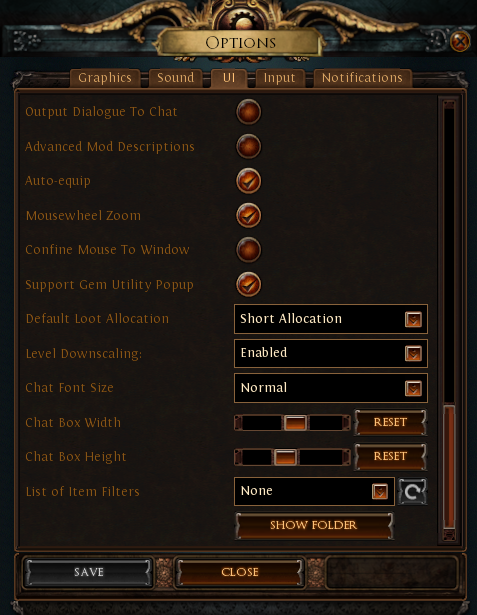
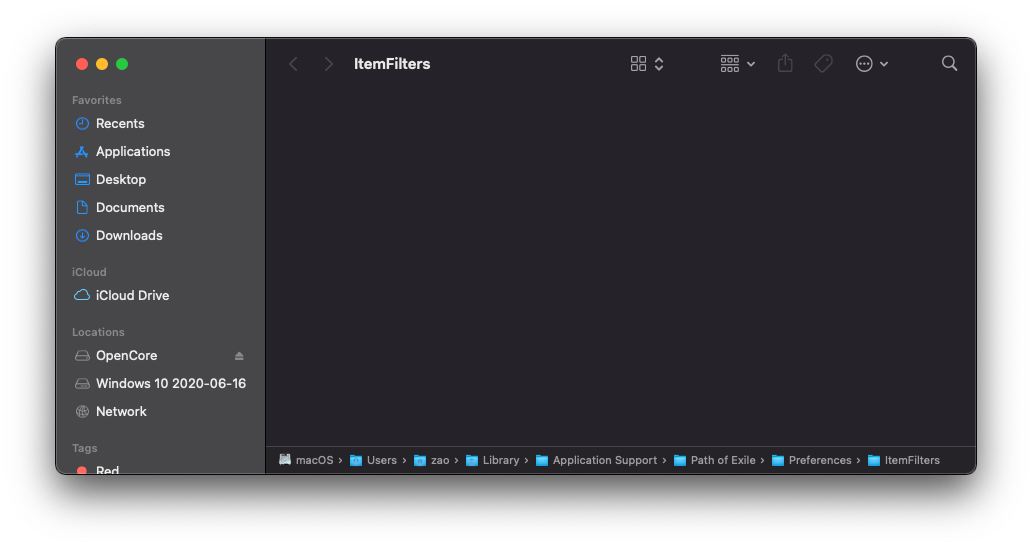
Putting a filter in there makes it show in the dropdown in the game.
After a client restart, my newly synced filter from filterblade also shows up: https://i.imgur.com/wjIafiW.png
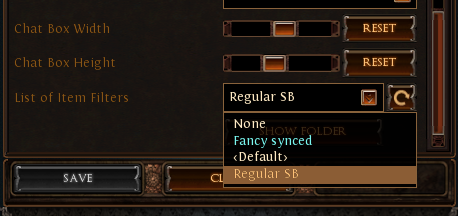 storm yoke
thanks @proud igloo will definatly check that out when i get the oportunity:)
minor marlin
Anyone tried playing poe on a M1 macbook air/Pro? Planning to buy one and Id only be playing path of exile on it.
chilly anvil
Doesn't currently run.
This will change, but we won't know what performance is like until then
minor marlin
F
versed valley
I have a mac pro 2020 , should I play POE on it ?
proud igloo
Maybe?
versed valley
I mean does it run well on it ?
proud igloo
Didn't test much more than running around in hideout and towns on my Hackintosh. A fair bit of texture pop-in but that could very well be cold caches.
Out of curiosity, what kind of hardware is there in that generation of box, CPU, GPU, etc.?
versed valley
i5, intel plus graphics
proud igloo
Did you mean MacBook Pro?
I wouldn't have super high hopes for integrated Intel video on any OS, even on such a late configuration as MacBookPro16,3 or MacBookPro16,2.
Give it a try and see how it runs, I guess.
I didn't have an overly pleasurable experience on PC on an Coffee Lake that closely matches the MacBookPro16,3, but hey, to each their own.
 hollow zodiac
anybody managed to run the game on M1?
mental token
Unless they removed the need for AVX2, M1 won't / can't run the game in its current state.
proud igloo
Speak of the M1 devil: https://www.pathofexile.com/forum/view-thread/2995426/page/1#p23715266
We're aware of the problem and hope to have it fixed soon, cheers.
Path of Exile
Path of Exile is a free online-only action RPG under development by Grinding Gear Games in New Zealand.
potent gate
any news on how mac is doing? my friend is kinda still wanting to play but waits for a steadier release
proud igloo
Patches tend to have some smaller mac-specific fixes. If I had to guess, there might be some effort spent on getting it additionally built for Apple Silicon these days.
Never hurts much to give it a try (assuming softcore and that you're fine with the download cost) 🙂
dull oxide
any news about the catarina without needing teh annoying avx2 thing
proud igloo
Nothing said explicitly about Intel chips, but there was some mentions of the related M1 problems on Apple Silicon.
chilly anvil
... macOS Catarina? 🤔
proud igloo
I would temper my expectations for machines that are that old, quite unlikely that they have any GPU able of sustaining any enjoyable experience.
chilly anvil
@proud igloo I was more wondering what features the Master of Undeath would bring to the macOS user experience.
 hallow crypt
Man I hope they can fit in m1 support by next league.
proud igloo
It's gonna be interesting for sure to see how their porting efforts go, compared to something that's successfully ported already like Firefox.
valid heath
is PoE on mac even a proper port or it is just in some kind of a wraper ?
proud igloo
It's natively compiled and has Mac-specific features. It uses the Vulkan API via what I assume is MoltenVK to run on Apple's Metal API.
It's not using tools like CrossOver to run the Windows build like some other games might, if that's what you ask.
valid heath
Yeah i was just curious
proud igloo
It's also not behind the Windows build, patches come out at the same time as on Windows.
proud igloo
As the Mac doesn't have native support for Vulkan, it's either writing a full new Metal pipeline with shaders and everything, or leverage the rather robust thin library of MoltenVK.

GitHub
MoltenVK is a Vulkan Portability implementation. It layers a subset of the high-performance, industry-standard Vulkan graphics and compute API over Apple's Metal graphics framework, enablin...
As the APIs are roughly the same in capabilities, the mapping is often straightforward.
valid heath
i see not perfect but not bad ether
proud igloo
Huh, that's odd.
Oh right, they're running the Windows build that doesn't require much in the way of instruction sets.
chilly anvil
Hmm. Actually, I wonder how well the Windows build would run under M1 -> Parallels -> Windows-on-ARM -> Windows x86 emulation
 knotty spoke
Hi, I'm forever stuck on the twilight strand loading screen
Downloaded the game yesterday, haven't found a fix to this
proud igloo
I saw quite the loading time on the first run on my machine as it had to generate a lot of shaders and stuff, but not sure how long it took. Is it still animating, or is it frozen? Are there any popups behind or on another screen?
You may want to post on the forum about it to make your problem known, with your system specifications.
knotty spoke
Oh. Interesting. It is still animating, and there are 0 popups.
@proud igloo Do you think I should just let the gears turn for 30min or so and see if anything comes out of it?
proud igloo
Sounds a bit too long, but if you don't have much else to do it probably can't hurt.
Could be that there's some network shenanigans too.
knotty spoke
great, I'll just leave it running in the background for a while and see
Does my choice of server matter? I'm in the singapore server, but I've tried the others too
If nothing happens I'll take your advice and post about it
proud igloo
There's some other reports, some seem to talk about connectivity - https://www.pathofexile.com/forum/view-thread/2942967
Path of Exile
Path of Exile is a free online-only action RPG under development by Grinding Gear Games in New Zealand.
But do post about it and describe your circumstances, if nothing else it gets more visibility.
knotty spoke
Don't think it's a network issue on my end
Hmm thanks mate appreciate it 👍 I'll see what I can do
proud igloo

 toxic sleet
Does anyone have the issue on mac client where the screen is constantly flickering and certain textures blink between different colors? (e.g. water in twilight strand will blink bright green/blue/purple)
misty nymph
nope
 undone ferry
i have no knowledge about mac os but that sounds like a gpu driver problem
proud igloo
@toxic sleet There seems to be a report on this on the forum, not sure if that's you. I would recommend posting about your problem (with screenshots if possible) and include some information on what kind of machine you're running on?
Earlier responses have requested a Mac System Report (assumedly to get all that information in a decent format) - https://www.pathofexile.com/forum/view-thread/2999430#p23704295
neat hornet
anybody had stuck in this screen ? long time not login, when i tried, it stuck in here
proud igloo
Hmm, haven't seen that before.
Anything of interest in the output if you run the launcher from a Terminal?
neat hornet
proud igloo
Hmm, haven't seen that before.
hmm it work with command line
but it show this error before, maybe my internet ? idk if the command line fix it or not
proud igloo
It should be launching the patcher in the same way, probably just luck.
Sounds like you may have some connectivity problems to the patch CDN? You might want to post on the forum or something.
neat hornet
yeah my internet provider kinda suck here, even tho the ping is lower in sea region, but the spike make it unplayable, better play in eu with stable 200+ ping
 dapper notch
Hi, I'm currently running PoE smoothly on bootcamp on a 2019 16" MacBook Pro.
Question: Should I switch to Mac OS? Any 2019 MBP users here who can speak to a comparison between running poe on bootcamp vs. natively on MacOS? Thanks so much 🙂
dull oxide
poe doesn't run on macos
chilly anvil
dull oxide
poe doesn't run on macos
yes it does, there's been an experimental mac build since september -- please don't confuse people further 😆
 zenith smelt
Does it run on M1 macs at all? I'd be keen to test it even if it crashes alot
chilly anvil
not currently (crashes on launch), but the AVX2 changes mentioned in the patch notes may change that
might also get the game running on some older macs, but no guarantees on performance
zenith smelt
ahh ok, does it run on parallels?
haha performance is not something one considers when gaming on a mac, only its ability to run
chilly anvil
you know, that's actually a good question -- I'm not sure anyone's tried that configuration. it does apparently run on crossover+wine though -- https://www.youtube.com/watch?v=FyqDiB-vh8c

Tutorial: Windows apps on M1 Mac: https://youtu.be/1_2uAMjKgf4
CrossOver FREE 14 DAY TRIAL: https://www.codeweavers.com/?ad=835
Path of Exile (Steam) running on CrossOver 20 and plays well on MacBook Air 2020 512GB with 8GB RAM and 8 GPU cores. Game runs okay on reduced resolution and graphic settings turned down.
Couldn't get the Mac Steam v...
30-40 fps in act 1
zenith smelt
Well if the new update doesnt fix POE for M1 then I'll have to test it, thanks for the help 🙂
chilly anvil
yes, well, there is a big difference between "it doesn't work" and "it doesn't work for me"
proud igloo
@dull oxide Not sure if you're trying to be funny there or if you personally have problems, but disinformation like that is not welcome.
Took me several reads of the second statement to see the "my", aight.
Ooh, changes in patch notes? Guess I'll pull out the old MBP and boot up the VM with the patcher again 😄
I should try some areas on my Hackintosh, see how the game fares on Windows and macOS.
Hardware is way better of course than an actual Mac, but still.
(Possibly) fixed a crash on macOS clients that prevented the game starting if your hardware didn't support AVX2. It's a real tough one to test, so let us know if you're still having problems!
dull oxide
well the first time when i was talking about that was the pc requiring a weird thing called avx2
proud igloo
Oh right, duh, the patch isn't actually out yet so I can't test 😄
One thing of note is that if they've only addressed AVX2, it would still probably use AVX and as such, Rosetta 2 for M1 is of no use, one still needs to wait for an Apple Silicon-native binary.
@zenith smelt The current public state of M1 is that translation is off the table as PoE uses both AVX and AVX2. Crossover running the PC version supposedly works somewhat according to videos like the one linked above, but no idea about performance.
proud igloo
I wonder if the standalone patcher works enough to patch itself to a version that doesn't crash.
First crash I saw was SHA256 code, I think.
zenith smelt
yeah when I put in the code in terminal to run the experimental macos file it says 'file not found', so it may just be a case of adjusting it to the M1 .... architecture?... either way it would be a nice surprise for native code but that seems like a huge endeavour so I wouldn't expect anything.
proud igloo
There's three big parts to porting PoE to the M1 architecture.
- Getting PoE itself to build and produce ARM64 exectuables, including getting rid of any x86_64-specific intrinsics and routines.
- Getting all third party libraries (middleware) to do the same so that they can be used on the platform.
- Doing the same for the patcher and getting it to do the right thing.
proud igloo
Note that the patch isn't out until the game launches on Friday.
dull oxide
which friday?
proud igloo
This one, when 3.13 launches.
dull oxide
what you mean by the game launches?
proud igloo
Sorry, expansion/league.
dull oxide
till echoes launches they will fix it?
proud igloo
The line in the patch notes suggest that they will have purged all AVX2 use from the game client for 3.13.0, yes.
proud igloo
Steam should update it just fine whenever you install it.
There's not much difference in size between downloading it now and patching it later, and fully installing it after the patch.
It's trickier with the standalone client, as the patcher itself uses AVX2 😄
A short primer on what AVX2 is and why it's such a pain to deal with here:
When you compile a program, you turn it from human-readable source code into a stream of instructions that the processor understands and executes. Each instruction does one particular small thing with memory and registers.
There's a base set of instructions that almost all processors of the same type understands, and on top of that are many extension instruction sets. These are things like MMX, SSE, SSE2, SSE4, AVX, AVX2, and many smaller ones. Newer CPUs support more and more of these instruction sets.
A fictional example may be that if an earlier instruction set has an instruction for adding four numbers, a newer one might provide one for adding eight numbers, doing twice the amount of work in one instruction. Depending on how you build the software, it may automatically be using a newer instruction set unless explicitly told not to. Programmers can also use specific instructions where they feel it's necessary.
This, together with how there may be third party libraries that have already been compiled, makes it hard to audit for use of these instructions and may require working with a vendor to get a new version of a library with all the complications that may imply.
proud igloo
Another macOS change in the patch notes:
Fixed a bug where, on macOS clients, only one notable would be displayed on Cluster Jewels when hovered over.
proud igloo
@hybrid quiver How does it crash, message box about vkSomething, or regular macOS crash report dialog after a while mentioning illegal instructions?
If the former, GPU is insufficient. If the latter, your machine probably doesn't have the CPU capabilities that are currently needed, but may work after the 3.13.0 patch.
What model is this?
 hybrid quiver
hey Zao
16inch maxed out macbook pro 2019
ive played heist on this at start of league
so its def capable
proud igloo
That's curious. When does this occur, before gear splash screen, later?


 proud igloo
I've never seen something like this before, heh.
You could try things like move your config away to make it use default graphics settings maybe, if there's something there that messes with you.
(booted my "mac" up to test if I could get in at all)
hybrid quiver
how do i do that?
i want to try and reinstall, but everytime i trash the game, and empty trash. and redownload, it has all the game files
proud igloo
See $HOME/Library/Application Support/Path of Exile
That's where they squirrel away the content pack, the game client, your settings, and stuff.